#development-advanced
1 messages · Page 48 of 1
 distant oar
 eternal mantle
I just fixed it, had to press play mode and then exit, I heard it was a bug in unity 2018
 solid lake
anybody familiar with the vrc api, is there any way I could figure out if a given user is in one of my favorite friends lists?
solid lake
nvm I found it, https://vrchat.com/api/1/auth/user/friends/favorite
 scarlet pagoda
How do I make an object world space with constraints? I've done it with rigidbodies but I heard constraints were more performant and maybe easier to use?
 manic zealot
Constraints are indeed better for performance and they also work a lot better.
You can see a video on how to setup a prefab already made for this, the download to the prefab is in the description.
https://www.youtube.com/watch?v=0sZSMmpAoKI&feature=emb_title

 drifting token
oh hey it me
 sonic locust
well that's just sad, having to reserve to disliking someone's work because feeling were hurt 😔
 lyric iris
well, it's okay. i usually dont look at the youtube pages themselves, was just looking for comments and i noticed. the videos are great, the response has been great. we're confident in our work so it's okay.
drifting token
I've only banned like 2 people I think
And one person was upset because we didn't help them even though they never posted in our support channel
I checked
 tropic jewel
How would I add a property like this to an animation? Enabling/disabling another animator further down the hierarchy?
https://gyazo.com/eea171fd1356f22823f40b2c42dc4736
 drifting token
https://youtu.be/GHjWF4yflRU
Script in desc and video explains how to use
Editing by Cheese
Link to the package with assets from the video (Includes scripts)
https://drive.google.com/file/d/1oi1Ryc2O5FAKQg1_92G6CbEaUBmKnzhU/view?usp=drivesdk
This is a guide on how to expand your gestures or emotes and create multi-state animators for use with inven...
 winged crystal
Hey there guys, so weird issue. I have uploaded a world in the past using SDK2 I thought I would come back and work on another world with SDK3. So I boot up unity, start a new project, install SDK 3, Set up layers, collision matrix and so on then get to work. Now when I went to test it things went well for the most part. The upload happened but when I click go. The game flashes then starts loading up my old world from SDK2? I thought hmmm, maybe there is something wrong with my project so I created a new project completely bare bones, set up the scene. No real environment for the most part and tried doing a test upload. Same thing happened. Is there something I am missing with SDK 3? I placed the VRCWorld prefab in scene and so on.
I am currently using unity version 2018.4.20f1 which was suggested by the sdk doc.
 hasty heath
Howdy all. I've been trying to get the Leapmotion+ to work with varying success. Any advice on how to switch "grip input profiles" from vrchat to default? It changes automatically on game startup, the vrchat profile lacks a trackpad
@red agate Hi Bacharach,
Have you looked into the later version of input emulator?
As far as I can tell vrchat is using an unusual hybrid of openVR/SteamVR input that will force some things based on the headset it detects
@winged crystal
you very likely have a script failing on build, check your console
 red agate
@hasty heath I got index emulation to work, thanks for the tip :). On a more lucrative note, would it be possible to use a Kinect to project my playspace into VRC as an avatar of sorts?
hasty heath
uhhh, that's a crazy one!
but maybe in a spicific world, yes
you would need to stream the output of the camera to a render texture, then take that pointcloud splatter map and give it depth
if you wanted a static one, you could simply use your kinect to scan your room
or something much better, like display.land
red agate
I know there are certain Kinect plugins for updated version of Unity
hasty heath
you can't use any scripted assets in vrc at all
red agate
avast
hasty heath
but you COULD make a standalone program that pumps that data into two streams
then, in an sdk2 world, you could use the video player to read that data
then
you would feed that into a spicific catch for YOUR avatar render texture
and then project yourself
which would be really interesting actually
red agate
wanna work on something together?
hasty heath
I wish I had the time, it sounds like something fun
but unfortunately if I grab another project I won't be able to do them all
red agate
Well, I'll see what I can do
hasty heath
something I've only seen a few times is streamed render textures turned into a fragment shader pump

Virtual alternative artist "memex" performed a live show "#fuitch" on 30⁄05⁄2020․This world is an archive world that recreates the live show․You can enjoy the live space as you would enjoy a live vid…
this world does it
red agate
I'll have a look at it
hasty heath
that's a full concert btw
red agate
and if you know anyone, please get them in contact with me
hasty heath
the words floating in the air were livestreamed tweets
it's an archive, but this was done live
they used this tech to "broadcast" themselves from the main instance into infinity instances live
Pibo would be the person you would want to talk to lol
I know there's another westerner who is doing that in a club world (their custom videos change the speaker cone values and make them pump, it's cool af)
but I can't remember their name
there's other nifty things you can do with the ability to get the data from outside, like for example encoding xyz values into rgb zones and moving from 0-?? motion "stops" over the intensity levels.
this world, for example

Stream your avatar motionǃ
has a shader based "motion recorder" in it
the output is dumped to your stream camera
if you save that video, you can play it back later on the shader. It's super neat
 quick heron
😋
 warm niche
Is there a way to have avatar props with free motion like a world object? IE: being able to toss it from one hand to the other, spin it around, collide and embed in stuff, etc.
scarlet pagoda
@eternal mantle What do you mean when you say "UI text" vs "3D text"? I tried using 3D text with Textmesh pro in Unity 2018 and I had the same issue with it rendering through objects. But it was my understanding "UI text" is used for interfaces, not VR... https://www.youtube.com/watch?v=wlY5sRewfVQ
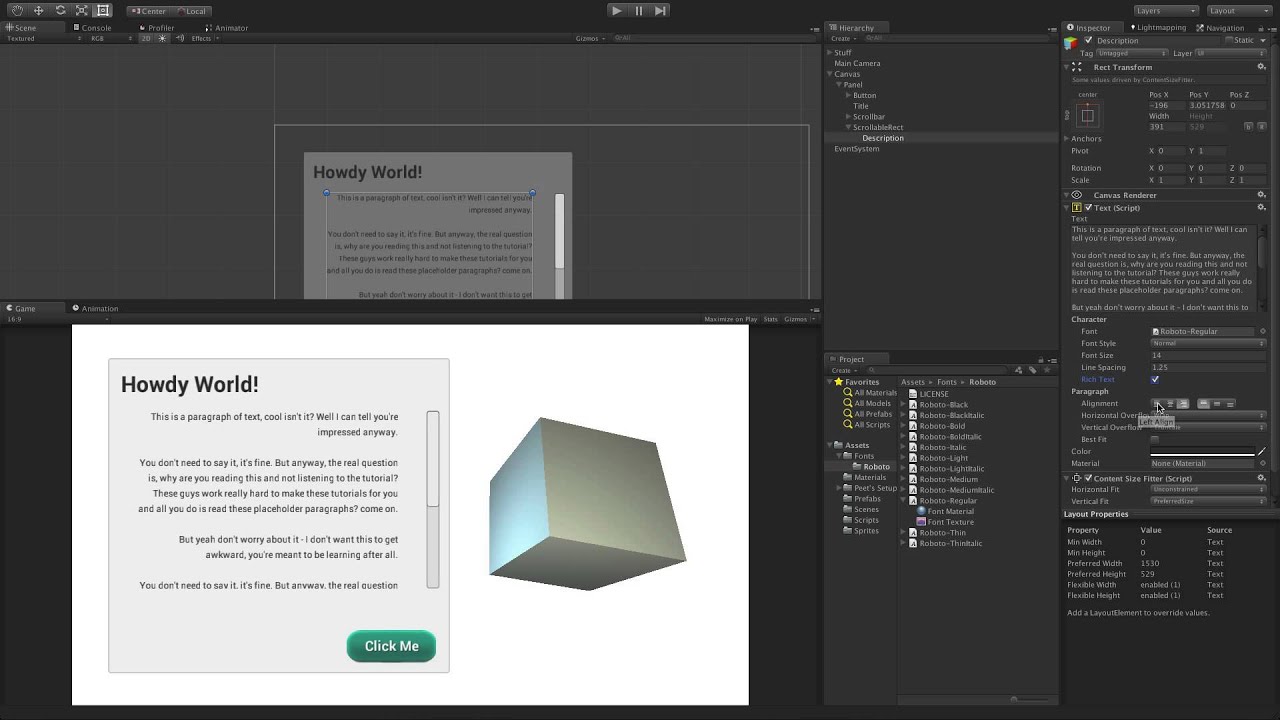
Watch this lesson on the Unity Learn pages here -
The Text component, used to render text onscreen for various purposes such as labels, buttons, and other information.
Help us caption & translate this video!
eternal mantle
3D Text I know does go through objects but not UI Text, which can can still use like a 3D Text but have to put it on a UI Canvas in world space.
 dense rose
@eternal mantle Ayy nice to see you here as well :P
eternal mantle
Hi there @dense rose ! Yeah I ask around a lot for help to make Udon stuff xD
dense rose
ah nice, here for the same reason pretty much lol
 grave creek
is it possible to build a computer monitor running linux in a world using udon?
 wanton summit
an os inside a vrchat world? lol highly doubt it
warm niche
So is here any way to build a "webbrowser" in VRChat, like the ones in ALTSpace?
 shadow ruin
Not currently no
 marsh narwhal
Using SDK2:
I have a bit of an odd one here. I build my models and anims using Lightwave, I made this handheld that I'd like people to be able to pick up and drop somewhere, but then the knob/buttons should still respond to the OnInteract (Meaning the parent can't absorb the triggers) I tried using a box collider as hack, but even when making the box smaller then the area where the buttons are, the buttons are still unusable. Obviously when adding the pickup&sync to the "base" object the buttons stay afloat, but is there a way to make this work?
As reference I made a small video showing my issue.
marsh narwhal
Nvm, made a workaround, now just need to fix the physics of it.
dense rose
what workaround did you use
dense rose
ah thats pretty smart
marsh narwhal
Right, with a 0 bounce phys mat and configurable joints (so I can set all offsets to 0) it seems to work amazing
marsh narwhal
There we go. 🙂
GameObject hierarchy at the moment
Default phys mat
Parent object
Both child items (So audio also follows the object)
Might be a better way of doing this, but this works for my case 🙂
 gusty glade
I am having a problem with VRChat's built in video player were it will only play one video even when loop is off, is there any way to fix it?
marsh narwhal
Try to expand the question, do you have an example of the url used, or did you use a text input or are you trying to use a youtube playlist or......
marsh narwhal
Lemme make a test setup and I'll get back to ya 😛
marsh narwhal
Hmmmm... IDK what's going on for you, but using simple Youtube URLs (like https://www.youtube.com/watch?v=ybGOT4d2Hs8) it followed the playlist as expected with the default prefab (I just removed the event handler and trigger to use a button for video start rather then the OnNetworkReady event)
 mortal meteor
Hello. Recently I was working on my avatar and tried to load DynamicBones 1.2.0 package into Unity 2018.4.20f1. Caught an error: "Assets\VRCSDK\Dependencies\VRChat\Scripts\ApiFileHelper.cs(1177,21): error CS0433: The type 'StreamUtils' exists in both 'DynamicBone, Version=1.1.0.0, Culture=neutral, PublicKeyToken=null' and 'ICSharpCode.SharpZipLib, Version=1.0.0.0, Culture=neutral, PublicKeyToken=1b03e6acf1164f73'"
How do I fix that?
shadow ruin
Update to the latest version from asset store
mortal meteor
Ok, ty
gusty glade
Ok I will try that. I saw there’s a update for the SDK maybe it will fix the problem I am having. I will update it and get back to you about it.
 stiff lily
That error is caused by other errors @celest tinsel
 celest tinsel
ok
marsh narwhal
P.S.A. If you use SDK3 be sure to remove VRCViz, this will break the SDK
gusty glade
No I am not updating to SDK3 there’s a new one for the SDK2
marsh narwhal
For your issue, you have to build and test before uploading
 warm dove
I need help with this please. when ever i build and test it loads for a second and then go to my default home. is it the capacity or is this a error?
marsh narwhal
Looks like you're missing some stuff, did you add the VRCWorld prefab?
warm dove
yeah still dident work
marsh narwhal
Hm.. Crep.. Then perhaps it'd be good to re-open the project or reimporting all assets.. :/
warm dove
ill try that
warm dove
yeah seems to be just not working for some reason
marsh narwhal
 Odddd
Odddd
 wraith atlas
You might be lacking a valid spawn point for the players.
I had that issue with a world once, it would do exactly what you said until i assigned a spawn point to the VRCWorld.
 woeful current
@marsh narwhal earth's gravity is 9. 8m/s
So if you have gravity set just use earth's gravity
Value
scarlet pagoda
How do you make a chair which can animate or pose the avatar on it? I'd like to make an avatar sit or stand in a specific way, like how you might sit in a car, or stand on a balancing scooter. If possible, I'd like VR users to still be able to move their hands and head when seated or standing on these chairs, but I'm not sure if that's possible. Standing chairs are broken if I'm not mistaken, so I think I couldn't even use those to allow moving the arms and head when standing on a chair.
 wary ingot
2.0 not really a way to turn off specific parts, if you disable ik there's no moving hands
 static crescent
Yoooo anyone in here know how to add flying vehicles to worlds?
I downloaded the jetpack prefab but have no clue of how to use it
stiff lily
isn't there a readme ?
static crescent
there is??
stiff lily
i'd hope so, if not it means it's a drag and drop kind of thing
static crescent
I just looked through the files and there isn't a readme
How would I get the object to fly after I drag and drop?
static crescent
Wait okay I'm kinda confused
If I drop the jetpack and joystick prefab into the scene it'll just work?
Because when I do that it doesn't have any triggers or anything along those lines
static crescent
I have figured out how to make a flying vehicle with testrun jetpack!
Does anyone here know how to make the jetpack faster?
warm niche
Does anyone have papers on the performance boost for plane collisions contra to mesh collision (The custom mesh I made highlighted by orange). I want to find out if using panes will reduce lag and how much.
marsh narwhal
No papers but simple logic. Less = more, with a mesh collider you have way more panes that could possibly respond to collision, rather then just 6 for a box collider
warm niche
Right so the insane amount of planes I need to plant for collision. Would that be worse for the performance?
marsh narwhal
You could make a very low poly mesh for just the collision 😉
warm niche
Never thought of that.... good idea
 drifting owl
shadow ruin
drifting owl
shadow ruin
Need to import Standard Assets in first
static crescent
Hey I'm using the guns in the VRCPrefabs, and I was just wondering if there's any way to make the bullets move faster?
 autumn lichen
Hey guys, can anyone point me to some instructions for setting up a twitch stream in world. I have the info for youtube streams but cant seem to find twitch info. Thanks.. (for non udon world)
static crescent
Also does anyone here know how to make the GunRapidFire prefab work?
 odd magnet
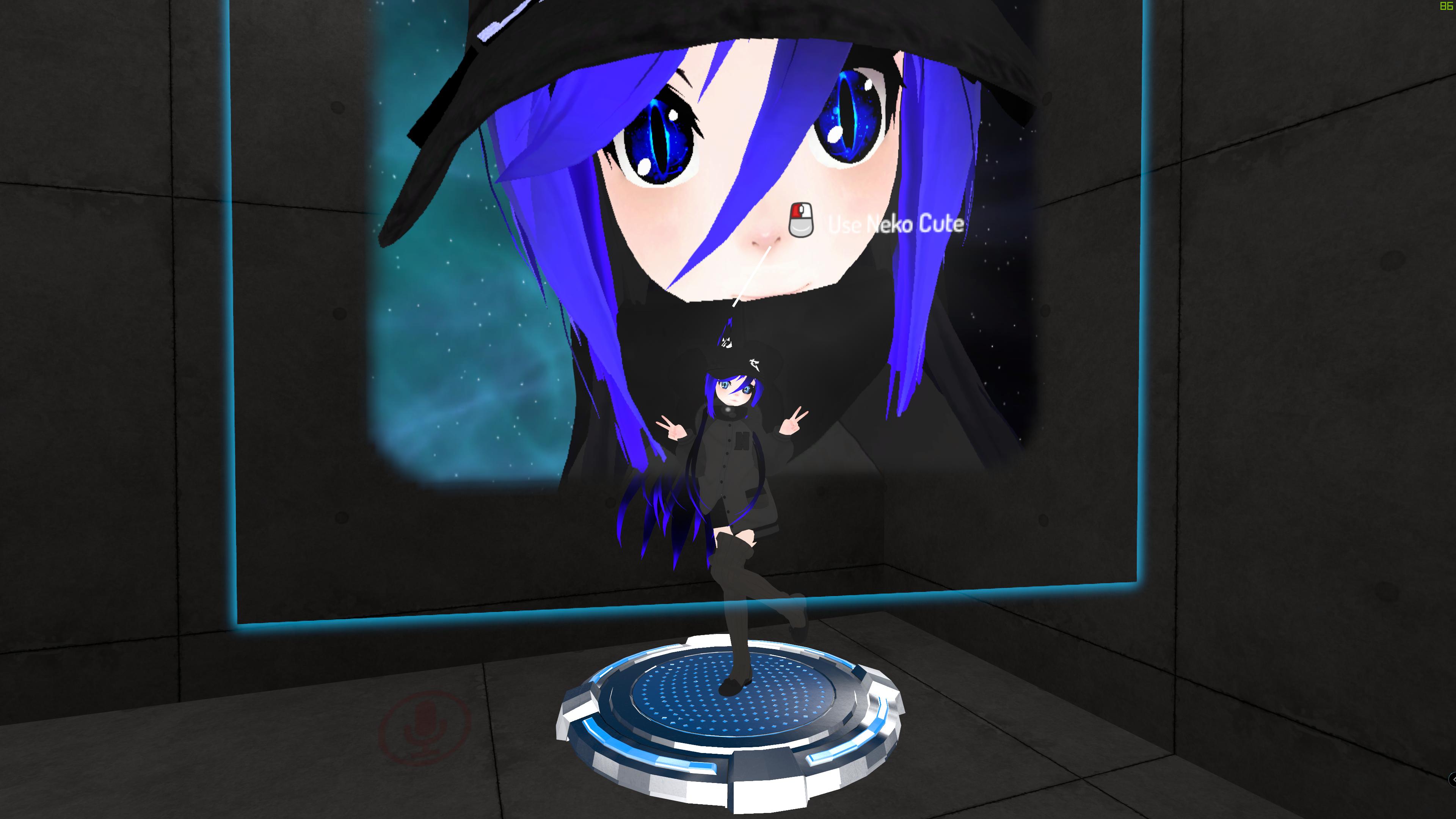
Can someone help me? I'm looking for help in case of world issues. How I'm able to remove the picture and make the Avatar lines as use point? https://i.imgur.com/vAQBujj.jpg
 worn latch
NullReferenceException object reference is not set to an instance of an object. Cant write title and more of the world. Only if i press Pause it lets me do it. But still cant upload it.
wary ingot
Normal errors now , you will see these will not stop the upload
*Api Web Request send before online mode is initialized.
*Destroy may not be called from edit mode! Use DestroyImmediate instead.
*Two delegators in existence
*'GameObject' has been destroyed but you are still trying to access it.
*NullReferenceException: Object reference not set to an instance of an object
*Trigger on 'objecnamehere' was not initialized in time!
You have other issues
im 7 minutes ahead of you , uh okey discord
 woven gate
anyone know if there is a way to construct a mirror that reflects particles?
 fair dragon
QQ, say i wanted to control say the color of an armband on my avatar via like an API, could this be done? or could it be done in SDK3 for avatars?
woven gate
hmm looks like mirrors don't reflect my avatar lights either
 visual kelp
What limitations are there for non-humanoid avatars? Is there any documentation on the subject? The docs just say to be prepared to do custom animation
wraith atlas
No tracking at all for non-humanoids. And you have to provide your own animations. @visual kelp
 sterile carbon
Is it possible to rebind vive controller's grip gesture? Make t just like the Oculus?
warm niche
What can cause pickups to bounce around? Was okay until a patch messed something up with them.
 fleet cedar
@warm niche I know you asked a little while ago but I should clarify that if you're ever using primitive mesh colliders, use quads instead of planes (2 tris each instead of 200)
@warm niche it's a VRC bug IIRC
warm niche
@fleet cedar Ah okay. It seems to be causing crashes for some users too.
fleet cedar
https://vrchat.canny.io/bug-reports/p/pickup-objects-start-crashing-servers should be the relevant canny
I know great pug disabled pickups- and I did as well- until it gets resolved
warm niche
If i tick 'is Kinematic' do you think that will be okay?
 ember yacht
does anyone know how i set up dynamic bones in unity so that my avatars hair becomes loose and hangs downward? right now even with dynamic bones, my avatar's hair doesnt hang downward it just is suspended in its default position even when it swings around
 oak basin
Alright, 3.0 people. I've got a simple toggle on my model that activates an object, and that object has an on start animation. But when I toggle it, I can't see it (everyone else can), and the actual object doesn't show up locally unless I afk on and off until they appear. Anyone seen this happen?
 rigid tusk
Hm maybe this can go here. I'm trying to access the web api, but each time I do I end up with
{"error":{"message":"\"Missing Credentials\"","status_code":401}}
After using the key
 trail pivot
I'm having some problems with a scarf on my avatar, it gets in front of my viewpoint when I'm looking down. I know the meshes weighted to the head gets scaled to 0, the scarf is weighted to the neck. Is there an elegant way to fix this issue?
 dull hollow
You could try putting all of the scarf under a root bone that is a child of the neck and then scale constrain it to the head probably
trail pivot
Interesting, will try
 copper berry
I'm currently working on a script that duplicates a button inside the unity editor and should modify 1 property of a VRC_Trigger. I'm trying to modify the url parameter in AddURL of the trigger. How would I go ahead to access that property? I already have the event I need in code.
copper berry
it's in event.parameterbytes if anyone needs it
 young cave
Is there a way to export an avatar.from unity as a standalone package so those who commission me need only import login, upload?
wraith atlas
Is there a way to export an avatar.from unity as a standalone package so those who commission me need only import login, upload?
@young cave In Unity, right click on the folder all the Avatar files are in and hit "Export Package...".
You can uncheck the "Include dependencies" option to save a bit of space, but if it cuts out something that it was supposed to have then make sure it's checked. The view will show you what files will be included in the package.
young cave
It doesnt quite seem to work, i export the entire scene. It exports the vrc sdk as well but the clients seem to come up with null reference errors
young cave
Ok so there is no way to make this standalone.
stiff lily
Depends which platform the project is in when you import
young cave
I understand different OS will have different result
warm niche
i've got an onplayerjoin trigger set to local, doesn't seem to be activating every time someone enters the world, just sometimes it activates. Wondering why.
 upper plover
I've got an editor script that outputs a .png from a selected RenderTexture asset, downside is it totally ignores the transparency channel, only RGB. Anyone know how to add that so my cameras have a transparent background generate transparent background pngs? https://pastebin.com/S03GGufq
Got it, had to change type to ARGB32
warm niche
i have a question, a bit odd... but, is it possible to use rift s controllers for the main movement of the arms (normal vr movement) + some oculus rift controllers for like feet and hips?
i had no idea where to put this lol
 wide wolf
left a message over in #avatar-help
wasn't sure if it belonged here or there so i figure'd id just leave a link to it here https://discordapp.com/channels/189511567539306508/730948173379535022/745230706858524722
 floral topaz
Does the SDK for Avatars 3.0 have any way to freeze AngularY (side-to-side rotation of body following head) other than disabling Locomotion completely? Some of us were hoping to emulate SDK2 emotes. They would freeze rotation while still allowing movement to end the emote, and people seem used to it. Now this is the last piece of the puzzle for 3.0 to do the same. Any tips welcome! Thanks! 👍
 odd violet
I've got a question, is there a command line option, much like enable-udon-debug, but for other game objects like PoseRecorder or IKController? Looking to see if there's any method to have the game output player positional data so my external program can read the debug file.
 sage timber
Does anyone know if i can get Tilt Brush reactive brushes working in VR chat..reacting to audio. I tried using SDk3, but inside VRChat the brush did not react to the audio coming from the audio source.
stiff lily
you'd have to somehow bake the audio information into the brush, and tie that in together
folks in #udon-general might be able to help
 near solar
Anyone know the reasoning why everytime when I try to play VRChat on my laptop I always get the same resolution error no matter what I change or do?
stiff lily
 analog helm
anyone here able to sacrifice some time to help with SDraw problem? any help is very much appreciated
 pine oxide
Maybe someone can point me in where this is answered, but, is there a reason general C# isnt supported?? I generically assume its for security reasons, but it unfortunately kills off things like Vegetation Studio's render loop stuff for example.
Ik UdonSharp exists, but even that doesn't support true OOP so most C# is useless since if you're doing it in any capacity you're hopefully using OOP...
 split hull
Security reasons and you can't use C# in IL2CPP. Even if they were to allow C# to run in some VM on top of IL2CPP, you still wouldn't be able to use stuff like vegetation studio's rendering loop since VRC wouldn't expose the necessary methods just like they don't in Udon because security.
 tepid flame
uhm can anyone help out with a simple udon teleport script?
saw a video but im not used to the graph thing and the guy in the video didnt show the compiled script
feel free to DM
basically trying to recreate this graph, but no idea why i dont get the right nodes in the search drop down
EDIT Solved, DM for Details
tepid flame
also im trying to access the properties of the applied skybox shader at runtime with C#, cant seem to get the values changed. anyone who can maybe help?
EDIT Solved it, if anyone wants to know how ping me
 woeful fog
Its still not working. When I play through unity, it works flawlessly. When I play it through VRChat, not audio can be heard. I have birds chirping in background so I know it should work.
Are we not allowed to play audio via script?
stiff lily
custom scripts ? nope
woeful fog
I am using udonsharp
stiff lily
scarlet pagoda
Does anyone have even a general idea of how much video ram VRChat typically requires? I've got a friend with a 3GB 1060 who constantly crashes, and I'm guessing its his ram, but it's hard to say. From what I understand, textures can be compressed in video memory, but that depends on if the avatar creator set it that way. Actually now that I think about it, didn't they just implement like a 250MB limiter on avatar size? I guess I could assume that as an upper limit. And now that I think about it, when they started listing people's avatar sizes in the stats menu, I checked a bunch of them out, and 30MB seemed average with some that had lots of media up to 50MB. Anything above that was extremely rare. But 50MB x 32 people is still only 1.6GB. That would seem to leave plenty for the worlds, which are generally only 250-500MB.
shadow ruin
The size you see in there is just the download size for the avatar which is compressed a bunch
Once they get loaded to your vram they can quadruple in size in some cases
Or actually even more
wraith atlas
It's a 200MB file size limit they introduced, but you can raise or lower that size in the performance settings (same place where you select the minimum Avatar performance rank to display).
But it's 200MB by default.
I have a 4GB Radeon RX 570, and i rarely ever crash. But I'm also VERY selective over what avatars get displayed.
 red kindle
convert into udon behaviour @woeful fog
btw does anyone know if the unity version will ever be updated from 2018
wraith atlas
Probably sometime down the road, they tend to stick with the LTS branches for stability reasons, so Unity 2019 will probably be the next version.
woeful fog
@red kindle I did
red kindle
hypeee @wraith atlas
 jaunty trout
anyone know a good file browser for Unity? like the ones in Skybox Video that you can go through directories and select video/image?
warm niche
How do i get ui to work in VRChat? I'm using tsuna-prefabs-shaders-master Movable mirror, which doesn't work as there's no UI interactions or text.
Tried linking up the main camera to world space but still doesn't work.
 timid briar
Hey i need help with unity and what version of unity are u giys using cause im trying to upload avatar but keeps on crashing
 robust forum
2018.4.20f
 earnest bobcat
does VRC_SceneDescriptor ignore the clipping planes on the reference camera?
also: does it only apply the props on first load, or does it update as the ref camera's properties change?
ah, looks like the far clipping plane is being used, but not near
shadow ruin
@earnest bobcat the near clip gets clamped between 0.05 and 0.03 by vrchat
 short rock
How do i sync objects in sdk3?
earnest bobcat
add an udon behavior and I think the checkbox is "Sync Position"
don't have it in front of me but it's something like that
short rock
Sdk2 for 2018.4.20, is the followtarget script no longer a part of it? A bunch of my old projects relied on it and none of them seem to work anymore.
stiff lily
standard assets ?
short rock
yep
i guess, is it whitelisted still, would be a better question.
Yeah, it doesn't seem like i can get any of the standard assets scripts to run in the current build.
is the doc outdated?
stiff lily
i used followtarget two weeks ago, so definitely works
short rock
My old projects use it, so i know it has in the past.
But both yesterday and today have thwarted me.
Does it need to be a specific version of the standard assets?
i have the most up to date as far as i know.
stiff lily
Which other components do you have on your agent ?
short rock
Just follow target and the sdk trigger system to tell it when to turn on.
i tried putting in the third person and the vehicles quickly to see if they'd drive like they used to, but nothing
 dapper mountain
I just made a quick test, and can confirm that it works on current build of the game. So something on your project is not working (or your world is not updating? )
short rock
i'll poke through my triggers again then
I don't understand what could be wrong here, Everything works fine in unity (i know that doesn't really mean anything,) but nothing standard assets related seems to run.
Squall which version of standard assets are you running?
dapper mountain
I am using 1.1.6 You could try reimport the asset? Or maybe try making a new project and test it there.
dapper mountain
So nothing from the standard assets works? Even without triggers? Like putting a Follow Target on a cube that you can pick up and see if it follows?
short rock
Nothing works at all.
i can throw the cube around and the floating ball stays in place
I can get it all to work easily in an older version of unity and the sdk with an older version of standard assets.
current version, still nothing
dapper mountain
So it works in Unity, but not on VRChat right? Are you using a prefab to test them? Or a simple cube or sphere from the "create" tab? With the new Unity version, if you dont unpack a prefab, it will revert any changes you make and you will not see the changes on VRChat. Unpacking the prefab will let it save new added components. If you are not using a prefab, I dont know what the problem could be, sorry.
short rock
That might be worth a try on a few of these assets.
stiff lily
Do you have baked navmesh ?
short rock
but others i just dropped them in without changing anything
stiff lily
Do you have the ai controller and third person script ?
short rock
i have third person, i've never used the ai
just the player control
third person controller doesn't work in vrc either though
i tried that already as well.
stiff lily
works in quite a lot of worlds, it's always the same setup
does the object move to your target in unity ?
short rock
it has worked in the past for me as well
yes, everything in standard assets and out works as intended in unity.
stiff lily
Then go to your world and check your log afterward
stiff lily
!outputlog
 olive oxideBOT
You can find your output log at C:\Users\%Username%\AppData\LocalLow\VRChat\vrchat named output_log.txt
short rock
thanks
Is udon supposed to load even on non udon worlds?
I'm seeing it in the logs, just wondering.
As well as lots of this.
[API] ApiFeedback: Could not write property due to decoding failure, wanted System.Int32 for contentVersion
[API] ApiFeedback: Could not write property due to decoding failure, wanted System.String for contentAuthorId
[API] ApiFeedback: Could not write property due to decoding failure, wanted System.String for contentAuthorName
these three seem to loop on until i exit.
stiff lily
Are you making an udon world ?
short rock
no, it's sdk2,
i have a separate udon project though. Separate file, separate project.
stiff lily
Then there's no reason it should
short rock
I see it in every log i've skimmed so far.
i'll find a reference for you
Thanks again for the help so far, even if i haven't gotten anywhere yet. At least i've ruled out a good chunk of possibilities.
stiff lily
oh that's normal
short rock
I managed to get a secondary object in the same project working alongside the duplicate set up that was not working.
I resolved all the issues by removing and re-adding the follow script to all the non functional ones. I have no idea what rendered them non functional, or why i couldn't get them working before by doing the same thing.
My forehead hurts.
I want a massage.
stiff lily
Good job !
short rock
I take back what i said, this only worked for the follower scripts.
i tried a separate few objects from standard assets to see if it was the same, results are pretty grim.
third person controller still doesn't work, vehicles still don't, fiddled to see if first person would work, also no.
all work in unity though
so annoying.
short rock
Which of these looks broken?
I have a feeling that it's the destructible standard, but i want a second opinion before i start ripping 300 hours of work apart.
this is how the script used to look
Confirmed that it's not the destructible.
After thorough testing, I'm back to somehow seeing Standard assets being blocked
short rock
So unity is saying that the user-control script isn't derived from mono-behaviour? Anybody have any ideas?
It seriously worked flawlessly in older versions.
short rock
Have determined that this is definitely a VRCHAT side issue
My old worlds don't work anymore, despite not having been updated post my issues.
Third person character user controller from unity standard assets appears to be failing to load for some reason
short rock
it's working in the new world now, i haven't tested the old. I didn't change anything in my project other than opening and closing triggers, so i don't know what caused it.
earnest bobcat
is there a native way to set custom OOB for pickups
beyond just the "below this height"
 flint mesa
how do you change specific values in post processing volumes/profiles?
I heard something about send message might do it but I have no idea how
earnest bobcat
The parameters live in the PostProcessProfile
Although IIRC Udon does not have access to those properties yet, so as a workaround you can create different gameobjects with slightly different profiles and switch between them
That’s what I ended up doing
Oh is this a trigger
earnest bobcat
- Added video players to SDK3, powered by Udon!
pog
 severe hinge
About 99% sure that they're still relevant when uploaded.
short rock
thanks
short rock
Last question from me for a while i hope, anybody have any tips on reducing avatar stutter/jitter on moving objects? I have a camera mounted on a pickup and looking at it while in the vehicle is nauseating.
I asked in standard user support, but the best i got was "make driver owner," After checking my design, i realized i had already done that. The jitter remains a serious issue. I've seen relatively smooth running driving worlds, how is it managed?
I should note that those worlds are also going MUCH faster than i am.
My vehicle hardly goes faster than someone on foot in the black cat.
 wary vector
Does anyone know if vrchat uses the Unity job system for its multi threading? I read that the way it works is it will only make one thread per core, which seems like useful info. I know the function didnt exist for unity 2017 but when we moved to 2018.4 we got it. Did VRC add that functionality?
flint mesa
Hey @earnest bobcat, you know custom scripts don't work in vrchat right?
use this to toggle objects
shadow ruin
I would assume they are doing udon sharp
flint mesa
good point
wary vector
I havent played with UdonSharp but I am very experienced with C# in untiy. How restrictive is UdonSharp?
Will I be able to pretty much do everything I am used to doing? Do schedulers work still? Can you pull data from objects in the scene? And how does Udon handle things like null pointers or whatever they call it?
earnest bobcat
as far as language features go, you can basically write C# as you'd normally write it, since the compiler supports most of C#'s features:
the APIs exposed to Udon are much more restricted than normal Unity, but still pretty flexible. you might need to find workarounds for certain things that might be easy to do in Unity C# because of that
the readme has some info on important gotchas https://github.com/MerlinVR/UdonSharp#udonsharp
Do schedulers work still?
at first glance, doesn't look like it
Can you pull data from objects in the scene?
yes
And how does Udon handle things like null pointers or whatever they call it?
you mean like trying to act on a null object? it will crash (well, halt your script) at runtime. apparently there are bugs related to this: https://vrchat.canny.io/vrchat-udon-closed-alpha-bugs/p/null-check-on-gameobject-will-throw-exception-if-the-gameobj-is-destroyed
but overall I've found that a lot of Unity knowledge transfers over to U#, since a lot of the normal UnityEngine interfaces are exposed to Udon
scarlet pagoda
Why aren't my sky textures being rendered at their actual resolution? The texture I'm using is an absurd 16384x8192, and I may end up using a cube map instead since it seems to be more efficient having six 2048 maps, but just for the sake of testing, I set the texture to 8192 which is the max, and well... It's clearly not that resolution. In fact, I see virtually no change in the viewport as I reduce the size of the texture all the way down to 2048. Beyond that, I then see the expected degradation.
This is about how detailed the moon should look with the texture scaled down to 8192. Clearly, its not even remotely close:
Since I'm almost certainly going to just switch to using cube maps, I'm more interested in what's going on here out of curiosity than anything. I didn't touch any of the player settings when I created the project, so it should be running at ultra settings. I guess perhaps its possible Unity scales textures down in the viewport for speed or something?
wary vector
Thanks for the info @earnest bobcat Yeah, I wasnt sure if the gameobject destroyed or does not exist error would be caught by VRC or just cause a full crash for everyone in the instance. Without schedulers being available I guess I'll have to use controller objects that will have to dynamically grab objects. And make sure I check everything before using it
earnest bobcat
I think the VM hosting your Udon script just exits
game won't crash
but the script won't work for the rest of the session, I think
unrelated, but really cool looking world @scarlet pagoda
scarlet pagoda
@earnest bobcat Thanks, but that's just the test scene from the AllSky asset in the Unity store. 😄
flint mesa
might do, wonder if it's gonna be like unity 2017 vrchat where it's was broken all the time
@earnest bobcat just looked into it and it doesn't use yt-dl
flint mesa
so what's the simplest way to attach an object to a players position? I don't need rotation data
earnest bobcat
@flint mesa that's just a frontend available to play videos, though (alongside Unity's default video player), not the backend that actually gets the stream
scarlet pagoda
Is there a way to see how much data a scene takes up? When I upload a world to VRChat, it creates a package with everything required for the scene. I'd like to know how big that package will be before I go to all the trouble of building and uploading it. Even a list of just the textures used in a scene and how large those alone are would be useful, as I am using an asset pack but I have no idea which textures are being used in the scene and which I need to bother optimizing to reduce that size.
stiff lily
You can use the specific texture cruncher pinned in #world-optimization
shadow ruin
You can't really know how much stuff compresses before building the package
earnest bobcat
You can use the specific texture cruncher pinned in #world-optimization
oh that's handy
flint mesa
how to toggle an array of objects with udon?
flint mesa
finally got a basic options menu going
 halcyon lion
Anyone know why my post processing suddenly stopped working, everytime i try to test ingame? It always worked and also does in the game view.
stiff lily
@flint mesa #udon-general
 brazen trout
Does anyone know why I can’t move and look left or right when I spawn in my world it only lets me look up and down for some reason
earnest bobcat
this is so sad
 hollow trout
I'm not 100% sure on where to ask this, but uh, how would I go about importing photos to make a collage of sorts?
earnest bobcat
u could make it in photoshop or something then import it
and put it on a quad if u wanna stick it on a wall or whatever
hollow trout
Thanks, I'm still learning how to do this, sorry if I upset y'all
earnest bobcat
dw
I also wish there was a general world-making channel
all these topics seem too specific imo
 shell ridge
hi! anybody familiar with topazchat player? trying to put a stream into a world...
flint mesa
Whoops sorry @stiff lily
earnest bobcat
is there a way to store player preferences at all
just a simple key-value store would be 👌
if not I will request it on canny
hmm this would probably be better in udon-questions wouldn't it
 wide cloak
anyone know if it's possible to specifically animate properties on one Material in unity on a gameobject with more than one material?
alternatively - anyone know if it's possible to offset a texture as a shape key in blender?
 opaque wadi
@wide cloak If you're talking about animating, for example, the emission on 1 material and have it not affect any other materials that are on the gameobject, I haven't been able to accomplish that. It always animates all the materials on the object. The only way I've found to animate separate materials is to have separate meshes.
wide cloak
dang
yea i cant separate the meshes unfortunately - the texture is on the eyes and separating the meshes breaks eye movement
the alternative would be to keep one mesh and create a shape key for it in blender, and just animate that in unity
but i legit think that changing the texture offset in blender is impossible
wide cloak
I figured it out
in Blender theres a "Mapping" node that i can use to offset the UV
but i have to insert it before the texture node, not after
wide cloak
quick update for anyone who runs into this issue: i ended up keeping the eye texture as a separate material on the model, and making a different version of the material for each different eye texture
then i could just animate between entire materials
bit messier but technically no less performant since its still only a single draw call for that material
and not as bulky since the eye texture is separate, it doesnt have to load four different versions of the entire model's material
earnest bobcat
thank you DenverCoder9
 sick citrus
So the newly allowed RTMP / RTSP...has anyone got it working? I either get the AVPro error:
"[AVProVideo] Error: Loading failed. File not found, codec not supported, video resolution too high or insufficient system resources."
or with the "Unity" player in SDK 3
"NativeProcess.HasExited: process exited with code 0, took 712 ms. Command line: C:/Users/User/AppData/LocalLow/VRChat/VRChat\Tools/youtube-dl.exe (...)"
RTMP stream works without any issues in VLC
I'm working in a brand new Unity project with the 25/09 SDK 3
Unity tells me that it isn't a valid url
VLC says otherwise...
 supple peak
I don’t know much about this so forgive me if I’m wrong, but I’m pretty sure to run a video it has to be a https://
sick citrus
This is a livestream, according to the last update RTMP should now be supported
But it doesn't seem to be
supple peak
Strange
sick citrus
Very....
sick citrus
It is an untrusted URL that I'm using, but I have untrusted URLs enabled
sick citrus
Sorry, thanks for letting me know
flint mesa
not entirely sure where I post this but I'm having this issue with the video player where it flips the video and the center is in the bottom right.
I should note that I modeled the tv myself and I'm sort-of new to blender
shadow ruin
You need to UV the screen to fill in the whole thing properly
And flip it around if it's flipped wrong way
shadow ruin
You sorta need the UVs for a game engine to know where to show the textures
Otherwise yeah stuff like that happens
warm niche
Hello
 astral barn
I had a question for any map veterans who may know if this is possible. I would like to have cameras in the scene that output video, I am attempting to build a TV Recording Studio of sorts. Is there something in the default 2.0 editor or Udon that may enable me to do this?
 delicate mason
Hey all, does anyone know if there's a way of feeding an objects position (particularly Y value) into a parameter?
I want a float that corresponds to the Y value of an object so I can use it in my logic
shadow ruin
With Udon easily but that would be a question for #udon-general
delicate mason
Ahh, so you wouldn't be able to do this for a prop on an avatar?
shadow ruin
On avatars it would require a bunch of triggery and depends on really what you actually want to do
Might have to make your own shader
delicate mason
I'll have a look into it, thanks 🙂
Basically I have a prop on an avatar, and I want to work out the vertical position of that object
That value will feed into a shader that essentially changes a shader value depending on the height
warm niche
can someone help me with this? i dont have have same post processing in game like in the scene and game view
shadow ruin
Have you set the reference camera?
warm niche
yes its in the scene descriptor
short rock
make sure your ref cam is on the same layer as your post proc layer @warm niche
.
My question:
Is anyone aware of a way to use multiple scenes in one world?
warm niche
the porblem was i didnt have the latest version of post processing
short rock
ah okay
So for my question in more depth, i see that the vrc scene descriptor (in the doc) specifies one per scene.
I assume this means multiple scene set ups are supported to some degree.
scarlet pagoda
I saw an avatar a while back which allowed you to do a fingerpoint gesture and then touch a button to make a gun appear, and then victory and touching the same button put the gun away. This avatar also allowed you to enable and disable a hud by touching the side of your head. Does anyone know how that functioned? Was it done with particles perhaps? I believe some of the touch interfaces work with particles, though I'm not sure of the exact mechanism by which they function. Can a particle trigger an animation or something on collision?
short rock
It's a stopped state animator triggered on particle death. There's a few tutorials out there for it.
@scarlet pagoda
i made one myself a few years ago
They're simple, just time consuming. :3
warm niche
i feel like they updated vrchat so that people can't use xbox 360 controller anymore, the sensitivity is super high now, and i can't keep my line of sight correctly.
they changed the buttons too
scarlet pagoda
How do I make an object like an axe, stick in a tree until a player picks it up, and from then on have it be affected by gravity?
If I can't do this with a single object perhaps there some way to hack it so the axe in the tree is a trigger which spawns another axe affected by gravity in the player's hand like a pickup?
This needs to be global btw. And as for which SDK I'm using, I was gonna use SDK3, but it appears Udon is broken in regards to globally triggering gravity on a rigidbody, so it may not be able to be used for this. And I wanted to have the combat system in place which it only just occurred to me may not be something available in SDK3 yet anyway, so maybe the fastest way to implement this in time for Halloween is to go back to SDK2 for this world.
severe hinge
You could always fake it. Have just a plain box collider holding the axe up and at an angle into the tree, and then use onPickup event to disable the collider in SDK3
scarlet pagoda
@severe hinge I don't suppose there's a way to do that with SDK2? I need the combat system so I'm gonna have to switch back to that. No time to learn Udon.
severe hinge
I'm not too familiar with SDK2, but I'm sure it would be doable. The next best thing you could do is leave the collider, but put it on a specific layer like pickup that only the axe and other pickups could interact with it. And if you make it small enough then it really wouldn't be an issue once the axe has been removed from the tree.
scarlet pagoda
What's to prevent the axe from falling over sideways when it lands on the collider, since it would be virtually impossible to place it perfectly on the collider. I've had lots of props just go missing cause I had them too close to the thing they needed to sit on.
severe hinge
Just make it so that it'll hold the axe, and don't put it at too steep of an angle. As long as it's a flat collider that's wide enough there shouldn't be any issues. Just minimize the distance that it has to fall as best as possible and it should work fine. If it starts shooting up because it's too close just bump it up a little and keep going from there.
If anything and you absolutely can't get it to balance just make a simple box or container in blender and use a mesh collider, disabling the mesh. The walls of the container would keep it from sliding off. Or just put another box collider on the side it's likely to roll off of so that it can't roll.
warm niche
Hello, who can explain me some things about FinalIK use in vrchat?
 rugged seal
Will VRChat ever be coming to PS4 and there VR
sonic locust
most likely not, because of the user generated content
 golden sky
I doubt it as well. VRChat would have to build a new platform; so you’d have Quest, PC, PCVR & PS4 all in the same worlds. It’s already a logistical nightmare. They’d be generating 25% more dev-work for themselves overnight.
scarlet pagoda
Does anyone know how I can toggle all these to have lightmaps off without having to go through every single prefab in the scene individually, open, and uncheck static?
Well, that won't work...
Since transform is in there when I select one, I assume if I revert all it will make everything snap to the origin.
Hm, it appears it will only revert the scale if I revert all, not the position or rotation, which is good.
 west elk
so
this is throwing me for a loop.
I have a big cube collider between the wall there and those 2 pillars. when the player enters that area, it triggers the enemy to activate. that works fine. onentertrigger. great.
now, the enemy itself, has that big capsule collider, and that attack trigger. by all rights, it should work. yet, when the player enters that trigger, it does nothing.
why?
I know it's set to onavatar hit right there, because i was messing with other options since it just wasnt working
stiff lily
You need to give the knight a rigidbody if it's moving afaik
west elk
it has one
most things on him work fine. the AI works fine, player tracking, his activation stuff works fine. only things i cant seem to figure out are attacking, as well as making him take damage from a designated weapon.
it's kind of annoying because I know the last time I messed with the project in earnest, I had the attacking working. I dont remember what i did differently though
stiff lily
Did you check with cyanemu if the animator triggered in the first place ?
Use this for every world ^
 summer berry
I recommend using OnEnterTrigger instead of OnAvatarHit. OnAvatarHit can do weird things to the player if its a moving object.
(I should put a warning in CyanEmu if I see it 👀 )
west elk
yeah I had it as enter trigger to start with. I had only changed it when it wasnt working
it seems to be working now.
not sure whay it wasnt working before, but, whatever
now I just need to figure out health
was trying to use vrc destructible standard
but the documentation on it leaves a bit to be desired
summer berry
I don't recommend reading that. Health can be set in an animator using int parameters. You can perform math on the int using VRC_Triggers and in the animator itself, you can setup states for when it has health and when health reaches zero, transition to a state to react.
OnAvatarHit only works with a collider not set to "IsTrigger" and OnEnterTrigger works when it is set to "IsTrigger". It could have been you set it for one but not the other?
west elk
ok so i have some health set up, simply by having a health int, and a subtract on the weapon. and a simple trigger that triggers a death animation once it hits 0 and turns off his AI.
now there's just one final issue.
whenever the sword collides with the enemy he goes flying. Any ideas on how to deal with that?
no i think i got that too- i set the knight's rigidbody to is kinematic
seems to do the trick...
west elk
Hm. Though for some reason I can't seem to disable the ai.
Even when dead he keeps sliding towards me, despite the trigger that triggers his death animation also toggling the ai components to false
🤔
stiff lily
all the components ?
west elk
oh. I think i see why. I had that trigger attached to the death standard script. but im not using it so it does nothing.
uh, how should i go about having the health value activate a trigger?
easy enough for health less than 1 triggering the animation, but not sure how to trigger a vrc trigger from within the animator.
just make an animation that enables a gameobject with the triggers as on enable or something and make the death trigger not just the animation but that animation?
stiff lily
You make an animation event inside an animation, the animation event calls for a customtrigger
also there's an action for a player taking damage no ?
west elk
yeah adding that bit to the death animation actually worked wonders
the death animation enables the trigger that turns the other stuff off
mint 👌
I appreciate the help
now I can move on to another nightmare, baking lights
stiff lily
feel free to ask in the lighting channel and i'll do my best to help if you have any issue
west elk
I baked lights on a map once. once
it was a smaller map so there was less to do. this is a fairly large map with a lot of lights. Gon b fun
 stiff lily
you have a nvidia gpu ?
west elk
I do. I know I can do it by GPU. I'll ask if I need some help.
last question regarding npcs and such, is it possible to teleport them in a similar way to the player, when teleporting the player? like, if I had it set up that an NPC follows you, and you go through a door that teleports you somewhere else
stiff lily
@west elk Buy Bakery if you can, it'll make the whole process 30x easier
and faster
Not sure if you can teleport AI, but you could spawn a duplicate one onto the nav mesh
summer berry
You can teleport ai, just like teleporting any other gameobject, but it gets annoying. When teleporting it, you need to turn off the nav agent and turn it back on to ensure it doesn’t get “stuck” along the way. Nav agents for some reason need a direct path. If there is a wall in the way, trying to teleport it through the wall will result in it being at the wall, but from the original side.
stiff lily
Camera settings for clipping plane ?
 sudden mulch
Is there a way to move the audio listener somewhere else in a world? for example I could use it with my camera. I tried placing it on an empty object somewhere but it didn't work
shadow ruin
Not really those get stripped anyways and all that is used is the one VRChat makes
sudden mulch
I thought so, thanks
 viral verge
Any way to use a custom Postprocessing shader? i think its not uploading my PostProcessEffectSettings so not sure if i can input it
stiff lily
nope
viral verge
thats a big sad
 severe inlet
Camera settings for clipping plane ?
Yes
Sorry I didn't get pinged so I forgot to check
stiff lily
it's on the camera itself
severe inlet
So I just changed the parameter on the refence camera it should just works?
stiff lily
If you use this camera as the one in the world descriptor reference camera, yes
warm niche
i'm gonna ask here since it's quieter
I have a simple elevator door system that has 2 animations - one to open the doors, one to close them. I want the animator such that the animations to open/close cannot be interrupted, and can be triggered immediately after the animation ends
however, if i set an exit time, it creates big delays when the animator is idling before closing/ opening again, while if i don't set an exit time, the animations can be interrupted
i'm assuming i need Exit Time enabled, but i don't know the settings to make it act like i want
warm niche
i gave in and added additional states but the trigger still queues up while the animation to open/ close is still playing
would prefer not to have to use udon to prevent the trigger from being fired and just have the trigger do nothing while playing the animation to close/ open
wary ingot
turn off the trigger collider until its done with the animation, cant be clicked then
shadow ruin
The animation shouldn't get interrupted with how you have them in the picture above 🤔
Oh wait actually
This is how I have my states and they don't get interrupted when changing the parameter
scarlet pagoda
Does anyone here know about LODs? I've got a bunch of trees not casting shadows in my scene, and some which do. I'm using Bakery to bake my lighting btw. The trees which DO cast shadows seem to be those which have an LOD 0. The trees which don't, do not, which makes no sense as I would assume every object has to have an LOD 0. But adding more LOD levels does not allow me to add enough to get LOD 0. It adds them at the end and stops once LOD 7 appears and grays out the control to add more.
warm niche
Is Text Mesh Pro more optimised than using canvases (which aren't interactive)?
 languid blaze
Ok whoever made the vrchat among us and made it so relatively bug free is a vrcsdk genius
golden sky
Jar?
 sullen tendon
I'm looking for prefabs / tutorials on making AI that chases you within range. Most of them are out dated and doesn't work.
 daring elbow
if youre using udon just put a sphere trigger around the Enemey and if something enters you start chasing it (i think navmesh is supported? so you can use the agent)
 sweet ibex
Trying to build an intercom system but having trouble...basically the ability for someone to talk into a microphone on one end and have people in another room hear them.
I've tried using audio override but it won't work since the region must be a trigger, and triggers must be convex, so I can't connect two locations without including everything inbetween them
stiff lily
in sdk2 ?
 cinder jasper
So i'm not sure where best to ask this and i'd assumed the most knowledgable poeple would be found here. but does anyone know what it means if all file labels suddenly turn red?.. https://cdn.discordapp.com/attachments/731462175989694495/771934801623646218/unknown.png
 cinder jasper
i didn't add anything recently though. everything that's in this project has been in here for weeks now.
i was editing an animator and suddenly bam everything is red.
stiff lily
do they open fine and show up when you right click > show in explorer ?
stiff lily
Good idea
cinder jasper
hm. for now nothing seems to have broken and the names are back to black. will just have to wait and see if it happens again for now..
split hull
custom editors can leak their settings into Unity display options if they do something wrong and you can end up with stuff like that sometimes
sweet ibex
@stiff lily sorry for not replying. Yes, I'm trying to do the intercom thing in SDK2
stiff lily
It'd be much much easier in SDK3, hasn't been achieved in SDK2 often
warm niche
I'm having trouble with an animator and a canvas system. I'll preface this by saying that I'm guessing the transition animations shouldn't be necessary and the transition system itself should handle them automatically, right?
The issue I'm having is that my 'Transition to On' animation moves the Canvas up. However, when the HowCanIHelp animation plays (which is a single frame which enables/ positions the elements inside the canvas), the whole canvas moves back down (not even to the position in the 'Off' animation). I don't know why its position changes after Transition to On finishes
 near bronze
That's because of something called "Write defaults". The animator will take note of all the default settings of the properties that it modifies. When it has stopped animating the position of the canvas, it will return the canvas back to the default, which is down.
All you need to do to fix it is to animate the position up in HowCanIHelp as well
warm niche
but would i not need to specify it in every animation?
to avoid it reverting to its default on any animation that doesn't have a value for it?
@near bronze
(or otherwise, how do I set the default?)
ah, got the default working
warm niche
I'm having trouble with my canvas
I've used canvases on my other maps but this one doesn't seem to even wanna work in Play mode in the editor
everything seems the same besides Static and the use of Canvas Groups
(I can confirm that the buttons do things by clicking 'Invoke' on the On Click)
canvas settings look the same too
I am getting a cursor thingy in game but the button is still not clickable
warm niche
uhhh now it's working
not sure what i changed or why it doesn't work in the editor in play mode/ game window
warm niche
Hello, I just read through the VRChat documentation to find out which IK solution VRChat uses and it appears to be Final IK. Does VRChat only utilize the VRIK component of it?
Reason I ask is because I'm trying to find a way to get motion data from professional mocap solutions (Optitrack, Vicon, Xsens) into VRChat but with only 6 specific (and somewhat unusual) points tracked from VRIK it seems rather limiting and difficult.
I'm aware official support is currently limited to VIVE Trackers but for my project those are not viable as only mocap solution and using them in combination with everything else causes issues for the performer.
manic zealot
Yes they use Final IK and yes they use VRIK. Only allows up to 6 tracking points as a result.
1 for the HMD, 2 for the controllers (hands), 1 for hips, and 2 for feet. Allows for adequate FBT. Doesn't seem unusual considering how few tracking points they have to begin with, Final IK can smooth out the rest somewhat well.
warm niche
Alright, thank you for clarifying
scarlet pagoda
Hey guys, is there a bug in the latest update regarding positional tracking of pickups for SDK2 worlds? Last night I added the https://docs.vrchat.com/docs/vrc_objectsync component to all the props in my world so the interactions with them would be global, and it kinda worked, except the objects were all "floaty" on my end when other players were holding them... It was kinda like their positions were being smoothed way too much.
VRChat
Used to sync transform values of a game object as well as animations using animatorsActions available via TriggersRPC's are available via the SendRPC action
scarlet pagoda
I want to have a trigger trigger random sound effects, but I was wondering if there was a better way to do it than to have ten different audio sources on an object each with some sound effect? As you can see here, when I select the audio source which I want to play a clip, only a single clip... The one which is already on the audio source, appears in the dropdown to be selected for it to play. I assume I'm either missing something, or they intended to allow you to select OTHER audio clips in that dropdown but forgot to implement it, because it makes no sense to force me to select a clip for the audio source if the only one it can play is the one that is already selected on the component.
The reason I don't want to have ten different audio sources, besides cluttering the hierarchy, is that if I later decide I need to adjust the range or volume, I'd have to do so for each individual sound effect. Though I suppose I could make a prefab for the audio source and then adjust that if needed and only the clip itself would be overridden in the hierarchy but it seems silly to make a prefab for a single world object just to resolve this.
 stoic tapir
you'll want to take a look at the vrc audio bank component
it can do what you're trying to do among other things
scarlet pagoda
@stoic tapir Okay I found the docs... Seems straightforward enough. I assume the other players will hear the sounds synced up so long as I have the trigger set to say, AlwaysUnbuffered, with the trigger layer set to PlayerLocal. But if I select randomplayback, should I set it to PlayNext, rather than Play? Because Play says it plays the audio file at the current index, which I'm guessing it pulls from the index specified in IDX: https://files.readme.io/6c92569-Screenshot_6.png
 stoic tapir
not too sure about non-local uses, but for random tracks i use playnext, with the audio bank order set to random
 peak folio
I am setting a VRCChair3 to be the child of the driver's seat in a car mesh I created. I have an animation playing on the car mesh that moves the car when a button is pressed inside the car. No problem everything works well. I'm using Udon Sharp BTW. The concern/issue is: Once the car starts to move, there is this "blinking"/"stuttering" thing that occurs with the avatar. Its as if the avatar keeps trying to re-sit in the chair. Does anyone know if there are issues with parenting and moving a VRCChair3? Is there some best practice here? (I searched and couldn't find anything special) Has anyone had a problem like this before?
shadow ruin
You most likely had sdk2 in the project at some point which sets a scripting define symbol in the project settings
 thick quail
alright, now how do i get rid of it
shadow ruin
You change the 2 to a 3 and press enter to save
shadow ruin
That piece of code would only ever run if you have a 2 in there 🤔
thick quail
like this?
shadow ruin
Make sure you press enter in the field so it actually saves
shadow ruin
The whole file is behind the 2 scripting define 🤷
Might have to just reimport everything
thick quail
not sure how to reimport it
shadow ruin
Is this a new project?
thick quail
yea
shadow ruin
VRChat
If you need to update your SDK, it is important that you follow these steps to ensure the update proceeds properly and you don't have any old/conflicting files. SDK3 For SDK3, you should be able to update in-place. This is especially important for SDK3-Avatars, as you may lose...
thick quail
i imported all my stff to a new one with the sdk 3 along
thick quail
i think sone of my avatars may have the sdk avatar desctriptor
aka the old descriptor
(I also dont know hw to back them up)
shadow ruin
Still shouldn't be able to load it when it's behind the scripting define
thick quail
(not sure what the scripting define is also.)
shadow ruin
It just tells code which parts to load in basically put
thick quail
oh
thick quail
where's that?
shadow ruin
Right there in your picture
shadow ruin
Looks like that's from the old sdk if that's the top fully
Which explains the error
Since it's a completely new project I would just delete the sdk and import the latest sdk3 worlds
Basically close unity go to the assets folder in your project delete VRCSDK and VRCSDK.meta
https://docs.vrchat.com/docs/updating-the-sdk#sdk2
Or actually these apply pretty much
VRChat
If you need to update your SDK, it is important that you follow these steps to ensure the update proceeds properly and you don't have any old/conflicting files. SDK3 For SDK3, you should be able to update in-place. This is especially important for SDK3-Avatars, as you may lose...
thick quail
and its still there @shadow ruin
thick quail
yeah
shadow ruin
And you deleted the VRCSDK folder and the VRCSDK.meta file while unity was closed?
shadow ruin
Does the VRCAvatarDescriptorEditor.cs have the #if VRC_SDK_VRCSDK2 at the top of the file?
thick quail
nope
shadow ruin
Did you import anything into the project after importing the sdk3?
thick quail
nope
shadow ruin
Then it honestly doesn't sound like you imported the latest sdk not sure what else to suggest than just making a proper new project
If you want you can screen share what you are doing and repeat the steps from above
thick quail
im reimporting the vrsdk once more
stiff lily
hopefully you mean importing in a new project
thick quail
not really
im reimporting the sdk but ill do that if this one dosent work
yeah nvm, importing the stuff to a new project
thick quail
well it worked and the progress bar is frozen when i upload my avatar
 burnt zephyr
how long has it been frozen?
thick quail
okay nvm FINALLY i managed to publish my vrc avatar
thick quail
thanks for the help
scarlet pagoda
Can anyone assist me with this? I'm trying to play random sounds when a player approaches a raccoon, which all other players can hear, they hear the same sounds, and each sound plays to completion before a new one can be triggered, so when people crowd around it you don't have it triggering and re-starting the sound repeatedly. Here's how I have it set up. In this present configuration, I, as the master, heard the sound trigger once and then never again.
So in the above, you can see that each player in the world tells all other players, in an unbuffered fashion, when collide with the trigger volume, to call a trigger on the object I named Audiobank.
That trigger, which only the master should be able to activate, then sends an event to all the other players to play a particular random index in the audio bank.
The audio bank in turn should play the sound and call Audio Playing when the sound begins, and Audio Stopped when it ends.
These however are local only events, which should disable, and then re-enable the trigger which picks a random sound that only the master should be able to activate, so for the master, they should ignore new requests to trigger sounds from other players until the current sound stops playing, while for the rest of the players, it should do nothing because they can't cause that trigger to fire anyway. However, should the master leave, and they become the master, when the last sound finishes playing that trigger should end up in an enabled state, so that they can then tell other players to play the random sounds they select.
But as I said... This doesn't work for some reason. Clearly I'm not understanding something right here, because as the master, I think I heard the sound trigger once, and never again, which suggests that Audio Stopped is not being called, or is not setting the trigger enable back to True for some reason.
 gritty oxide
Can someone help me with my 2.0 Base Station. every time i look for them or something when i go to steam VR > Devices > Bluetooth or Bluetooth Base station. it say's there is no Bluetooth to be found
 little zenith
Hi, was wondering if anyone else is having problems with vrc and unity collab. Seems to work as expected until you click builder tab in vrc window. Then everything hangs. Has anyone got collab successfully working with 3 plus people? Any tips or info would be greatly appreciated.
stiff lily
unity collab is awful ! Would highly suggest switching to plastic
little zenith
THanks @stiff lily I presume you mean this: https://www.plasticscm.com/
A version control that will help you develop new features in parallel, go distributed, merge in time, and never break a build again.
little zenith
Legend, thanks! Will give this a bash. Yeah Unity Collab is being awful. Appreciate the tip!
 pine oracle
I just made a post on the feedback site about not being able to pickup objects through a trigger collider edge. I wonder if there is any way to bypass that without having a udon script that checks for player every frame.
shadow ruin
You can set the trigger collider to be on MirrorReflection layer
pine oracle
oh yes i'll try that
thick quail
any way i can animate it without the model doing this pose?
or just have the preview pose be the tpose
thick quail
anyone gonna help me?
 left garnet
I mean I don't know, but did you try moving it back to t pose after it's been in this pose?
thick quail
Not really
I know that I can put it back to t pose by turning off preview
But I want the preview pose to be t pose
So I can animate it easier
Since I’m animating the idle for my avatar
 orchid rock
does anyone have a way to create an animation file from a scripted transform? I wrote a script for a basic music visualizer that will run with any audio file I choose, I just need to convert the result into an animation since VRC doesn't allow custom scripts.
dull hollow
In unity 2018 you can just use GameObjectRecorder and TakeSnapshot() on update
orchid rock
@dull hollow absolutely fantastic! thanks.
 dull palm
Hello developers! I'm unfamiliar with VRChatSDK, and have spent much time searching for an answer to my question on the forums and read the guidlines, to no avail. My question is: Is there a way to create a world such that it can upload user data to a remote server? Specifically, it would look something like this, user enters the world, user steps into a specific location, triggering a "recording" of the hand transforms position and rotation as well as what buttons were pressed; every X number of seconds. The user steps out of the location, the arrays of transform positions, rotations, and times, are then sent somewhere I can access them. Is it possible to do something like this?
Any ideas?
Thanks
stiff lily
Sounds like a job for Udon
 vernal ibex
At this point, i really have no other choice to post here, because i believe this is a bug or something. All my write defaults are off, all my animations are set to their proper looping, all of them; are connected with proper transitions, and transition lengths, all have exit properties, that control their exit specifically, EXCEPT for the three initial required layers.....For some odd reason, no matter what I do, The left hand animations will play (gestures, but within the FX layer, because i am turning on and off an object) but only up until i play a single right hand animation. After playing a right hand animation, the left hands animations will no longer play UNLESS the right hand is also playing an animation.
 vocal merlin
@dull palm yes you can post data the only real challenge so far has been receiving data
The most common way we do this is by using a video player for the job as that thing is the only thing that can send http requests
You would need to make a get request with parameters however for the thing you want that sounds Extremely complicated to the point I don't think it's possible
If Devs would grant us access to http via udon @stiff lily that would allow us to do so much more 😉
pine oracle
i just tried having a trigger collider that only colliders with mirror reflection but it still prevents player from using interactables or pickups
shadow ruin
@pine oracle you set it to collide with mirror reflection or you set the gameobject itself on mirror reflection layer?
Because if my other instruction wasn't super clear 😅 I meant if a trigger collider itself is on a mirror reflection layer it won't interrupt raycasts but still detect things entering into it.
pine oracle
set it to only collide with mirror reflection
ooohhh
omg yes it worked. thank you so much!
upper plover
Would something like this work with the SDK? I'm trying to see if it's possible to optimize an avatar on runtime and upload the result to VRChat. https://answers.unity.com/questions/625243/combining-skinned-meshes-1.html

Unity is the ultimate game development platform. Use Unity to build high-quality 3D and 2D games, deploy them across mobile, desktop, VR/AR, consoles or the Web, and connect with loyal and enthusiastic players and customers.
shadow ruin
On "runtime" would mean in game which is not really possible in vrchat. But anything you do before uploading in editor would work as normal as long as the output is not depending on having scripts during runtime and is "baked" into the final version.
Japanese community has made a bunch of similar in editor tools for adding clothes and such on avatars.
upper plover
So would something like this be possible? Something that combines all of the skinned mesh renders into a single one? Assuming they all share the exact same armature
The idea is they can just throw clothing on and mix and match and it still optimizes it before the upload
shadow ruin
Anything would be possible as long as you code it into the unity editor 😄
upper plover
Right, I just mean will it upload the scene if it executes right as build and publish is hit or is that too late
shadow ruin
Well the vrcsdk has a hook for running stuff before uploading which would allow something like that to be done
upper plover
I already know there are lots of Scripps that do some things right as you hit upload, like some Scripts that position the blueprint camera for you and pose the avatar
Ah, what is the hook I’ll look into it
shadow ruin
The vrcsdk includes a sample of it
https://booth.pm/en/items/2517643
Here is also a japanese tool that should include combining skinned meshes licensed under MIT which I googled quickly

Unity上でSkinnedのメッシュを簡単に編集できるエディタです。 主に以下のような機能があります。 ・ひとつながりになったメッシュの削除 ・複数メッシュの結合 ・複数ボーンの結合 ・Transformの正規化 ・fbx形式での出力 Unity2018.4.20f1で作成しました。 MIT Licenseで提供されます。(つまりライセンス文を入れておけば再配布ができます) ご要望や不具合報告があればメッセージまたはTwitterなどでご連絡ください。より使いやすいツールを目指しています。
upper plover
Thank you very much, this looks like it might be perfect
 near nymph
What is the recommended way to make a UI menu with different pages? Should each page be an already existing & disabled UI gameobject that is toggled or is there a better way?
near nymph
answer turned out to be: create a UI using Text components and set its element with UdonSharp
warm niche
I got a couple of recommendations from the guys at the Loli Police Department, and they say they want a new LPD avatar that has a gun we can actually hold in computer mode. I know I'm not with your team, but I'm kinda the 'canary' for the LPD. They employed me recently, and they wanted me to tell you this.
 spice hazel
I have not found an official way to this: Recording a "stream" camera that is attached to a moveable object in a world. Basically a gantry camera for recording shots. So as far as I can tell the better way to do this would be to use a second account as a camera with that accounts avatar sitting on a moveable chair. Sound reasonable?
 deep cave
i'm not sure if this or udon questions is a good place to ask but:
I'm trying to figure out colliders and triggering events per instance of an object
AKA doing damage to something on collision. I've got the idea down but i'm starting to crack testing it to repeated failures lol
New to C# and unity, but if someone is willing to DM me and talk to me about this before i lose my fucking mind i'd appreciate it a ton.
 silver badger
Where is the best place to ask a general worlds - SDK3 question? For some reason strafing is broken on my map for desktop users. Googling doesn't seem to provide any clear answers. How would I go about troubleshooting strafing for my map?
stiff lily
That's a current bug with udon
will be fixed in next update
@silver badger Otherwise you can manually fix by changing the strafe speed in the udon behavior on the vrcworld object
silver badger
Aah! Thank you.
near nymph
Not sure where to ask this. I've made UI screens but the raycasting collision or what it's called is far out from the screen, by like a meter
maybe not a meter but by a lot atleast

how can i solve this?
 pine depot
Sdk2 or 3?
near nymph
3 @pine depot
near nymph
does anyone know?
 halcyon laurel
I have the same exact problem my SDK2 world UI works but sk3 nada
@near nymph
Let me know if you figure it out
near nymph
i've tried many things @halcyon laurel but am at a dead end honestly
halcyon laurel

Stack Overflow
My current problem is that the cursor appears too far away from a button. You can see in the screenshot what I mean. Hovering over a button from the list lookes like this:
Question: What can I do ...
Not an amazing fix but worth a shot
Ill be trying to in a bit
near nymph
@halcyon laurel any luck ?

 severe olive
warm niche
I have a question: Where can I sign up to be a part of the VRChat personnel?
severe olive
warm niche
I have a question: Where can I sign up to be a part of the VRChat personnel?
I think in their website? Just like with every company theres usually a tab somewhere at the bottom of the website
warm niche
severe olive
I think in their website? Just like with every company theres usually a tab some...
Oh okay, thanks. 🙂
 valid fern
Hi, I've been fooling around with Amplify Shader Editor and have come to realize I know almost nothing about Scripted Render Pipelines. Does anybody here know about these? Can you recommend some good explanations or tutorials to get me started understanding Render Pipelines in general at a deeper level? And also, most importantly, what are the current Renderer/Render Pipeline requirements for VRChat? Am I limited to using only certain ones if I want them to be seen in VRChat? Thanks in advance. 🙂
 wet tinsel
valid fern
Hi, I've been fooling around with Amplify Shader Editor and have come to realize...
wet tinsel
valid fern
Hi, I've been fooling around with Amplify Shader Editor and have come to realize...
lumi my lad 👀 I found this out for you: VRC uses the "Legacy Render Pipeline", a system that Unity stopped using after Unity 2018. Only things using that pipeline are compatible with VRC. Amplify and Shadertoy are compatible with the Legacy pipeline; the default Unity Shader Graph is not. So if you try to use something made in the wrong pipeline, it won't work. I can recommend @proud meadow for moar info
 proud meadow
Legacy Render Pipeline still exists in Unity 2019 and later. No worries aboutit. Yes VRC uses Legacy Pipeline. It's the right choice for now. To change may require a content wipe or two separate systems which would be added confusion to the current SDK2 + SDK3 split.
@valid fern the legacy pipeline shouldn't affect you, but one consequence is yes you cannot use Shader Graph.
If you can afford it, Amplify is still better than shader graph, and compatible with both Legacy and scriptable (URP, HDRP)
valid fern
Awesome. That's good to know. So now I truly am glad I bought Amplify. I still don't know what a Rendering Pipeline is (in detail), but now I know I have a tool that will work well for VRChat content. And here's looking forward to the upcoming "content wipe" upgrades (hehe, jes kiddin'). Actually maybe someone will be nice enough to come up with some kind of "legacy emulation wrapper" for the new renderers, so VRChat can move forward without losing backward compatibility.
@wet tinsel @warm niche
wet tinsel
@valid fern I don't know if this is what you're referring to, but I do know it's fairly common to convert shaders between systems that would otherwise be incompatible
(For example, taking a shader you created in Blender (tho this isnt a pipeline) and attempting to recreate it in Amplify) -- or translating from Unity Shader Graph to Amplify
It's not a bad way to learn either. I found it hard to find Amplify tutorials on Youtube, so I actually learned the little I know by finding ultra-beginner tutorials for more common systems (like unity shader graph or blender) and then converting what they did into Amplify.
valid fern
Wow, that sounds like the long way around ot me. I htink I'd rather just the tool I think I'll be using the most. But anyway I was talking more about the Renderer than the Shader. I was talking more about a way for , say, the UDP Renderer to take over for rendering of shaders that are designated as "legacy" if there was some sort of middle layer to mashup the interface (API) so to speak.
.
My guess is that this was already considered and rejected for some reason and that's why we have a "Legacy" Renderer in the first place.
These are Unity decisions I'm talking about now.
wet tinsel
Oooo.
split hull
VRC has a "legacy" renderer because the non-"legacy" renderer is not production ready and still has a subset of the "legacy" pipeline's features. Unity just calls it legacy because they're not doing much more to it other than some fixes, but it's still generally more functional and stable than the non-legacy pipelines.
When they end up switching to URP or some customized URP down the line in a few years, then yes they'll need to either drop old content, replace old content's shaders with some generic toon/standard shader, or hack together a shader conversion system. For the conversion system they'd need Unity source to make that not a massive pain of reverse engineering and maintenance.
valid fern
Yeah, it does seem like that level of work would need some support directly from Unity. And yes I do remember reading that the new SRPs are still in "beta". So for now I'll be content with learning about the Legacy Pipeline, which is the one I'll be using the most.
But it bugs me that I don't really know what a Rendering Pipeline is. I've finally got a clue that a draw call is like (in my simple mind) an RPC from the CPU to the GPU telling it to render something. I also know that the GPU will need to be "primed" to do the rendering it's going to be asked to do (meshes,shaders,etc). So these steps must have to be orchistrated to occur in a certain way with certain timing. I imagine the Rendering Pipeline is a series of code blocks that run serially to perform this orchestration (first paint the background, then cull unseen faces, then... whatever). Am I even close to the truth on this?
split hull
Generally yes it's for doing a bunch of steps in series to build the final frame, though they don't strictly run serially unless you tell them they need to from dependencies needing previous passes to finish. Most of the time they just need to end in order, but multiple things can be in flight at once.
 atomic crescent
pimax
 hexed shell
Unity URP doesn't really mean ALL shaders need to be rewritten. But they can be updated to better utilize the new pipeline.
Sone shaders do need a rewrite tho. If you have more than one pass, then rewrite it is
but what about HDRP
wouldn't that be better for VR?
manic zealot
According to VRChat. If they switched to HDRP / URP all the content currently on VRChat would be lost, effectively asking users to reupload anything they had if they want it back in VRChat.
hexed shell
I guess at least the materials and stuff need updating probably
But I'd say it's worth it, just give a long enough time to prepare e.g. 2-3 months
manic zealot
It'd better be a huge benefit to warrant losing over 9 million avatars so.
I think it'd be more likely to be done if something happened or they plan to do something else that would cause all the content to be lost, then switching over wouldn't be as bad.
hexed shell
there is quite a bit of new stuff for XR in newer Unity versions right?
though I don't know exactly what the biggest changes are
there's also the newer .net versions
maybe the VFX graph would take a lot of weigh off particle rendering
but who knows
upper plover
I've heard that all shapekeys should be initialized to zero on a skinned mesh render for some optimization reason. Is this true, and if so, what exactly is the reasoning?
split hull
If there are any shape keys at > 0 weight, Unity needs to calculate their effect on the avatar. Shape keys can cost a bit of time for Unity to calculate so it's best to let them all rest at 0 and only get used when you're talking
 compact pebble
AYOOOOOOO
west elk
if i'm using a state machine that goes from int 0-5, with a trigger that uses IntAdd 1, what do I do when i reach 5? how can I reset it back to 0?
west elk
ok so i managed to set things up like so-
with on either end, an animation that enables a trigger, that sets the int value to whatever is required, either 0 or 4. on paper, it works. when I test it with cyanemu, it works it hits the last channel, and upon hitting next, it hits the int reset animation and transitions back to the first channel. same for the other direction. hits the "set to 4" animation trigger, and transitions to the last channel.
but
when i hit build and test, there, it doesn't work. when i hit next after the last channel, it just goes silent, and hitting previous at that point doesnt help. is there any way to figure that out? what is going on there?
why does it work fine when i test in unity but seemingly does not when i build and test ingame?
opaque wadi
If it works fine in Unity and not in-game, then the issue may lie in the VRChat Expressions Parameters/Menu section.
@west elk
 somber pendant
Can anyone tell me if VRChat supports playing audio from Shoutcast streams (V1? V2? Icecast? All of?) or not? My google-fu is weak today apparently. I imagine there'd be no issues, but maybe I'm wrong? As a follow-up, assuming VRC supports Shoutcast in some form; would it be possible to have music played in your world, globally, from said stream; so you might not hear the same music each time you join? Originally I was just thinking of scripted audio players for clubs / live performances, but the follow up sprung to mind too lol.
 rough sleet
@somber pendant You can try playing an icecast stream with the AVProVideoPlayer in SDK3 or the VideoStreamPlayer in SDK2. As long as the URL scheme is one of http, https, rtspt, rtmp, or rtsp it should get passed to the underlying AVPro player which should be able to play Icecast streams. Also you'll need to have untrusted URLs enabled in your settings.
somber pendant
neat, thanks.
 wintry fractal
I have icecast set up for live streaming music to a video player.
not sure if it's just me, but I couldn't get it to work with a link to a non-standard port e.g. http://example.com:8000/stream, so I set up an http 302 on an existing webserver to redirect it - you can do that, or set icecast to port 80.
there's a decent possibility that it was just me misconfiguring something though
also, in some worlds it just doesn't work
re: not working on not-port-80, it seemed to dislike the :8000 in the url, hence why the redirection worked
warm niche
Does anyone know how a map owner can add another user as an additional owner? Just to have map owner privileges
Do you have to upload the map using your account to the same map blueprint ID
Or is there another way
dull hollow
There is no way, a world can only have one owner. With Udon, you can give special privileges to specific usernames on join so you could try that, though I'm unsure what you mean by "map owner privileges".
warm niche
I need the ability to unilaterally kick in public instances
Map owner is willing to grant it to me
But we need to know how
If I uploaded the files using my own account, could I get the same privileges? And if i did so, would that replace the original owner
It sounds like it would based on your comment
This is an SDK2 map sadly
stoic tapir
you cant. if you uploaded the map you'd just have the same map on a different id. if you tried to upload to the same id the sdk will tell you you cant because that id belongs to someone else
warm niche
Ohhh, okay
Well this is interesting because I know that for fact that a World owner granted another member of his discord some kind of special privilege to be able to kick people on his map, which I assumed meant that he was given the owner status
Since it’s my understanding that owner can do that
Is there someway to do that with a plug-in or other script
stoic tapir
cant say i know of any means to transfer such abilities to anyone, pretty sure that's not a thing
warm niche
Huh. Okay, something else must’ve happened. Maybe he just have him the map. That would’ve been the only way then
upper plover
Probably someone misunderstanding kick vs vote kick
(When you can and Can’t start a votekick seems to be somewhat inconsistent)
little zenith
Hi I have been trying to figure out why my world gets stuck on initializing world for so long? Can't seem to crack it. Anyone know if there is something specific that causes it to hang on initializing world for longer than it should?
pine depot
SDK2 or Udon?
little zenith
Sdk2
pine depot
@little zenith Any errors in the unity console?
or possibly scripts on game objects that aren't whitelisted in VRC
little zenith
Nope no errors. World builds fine and works at a good framerate. Got me really scratching my head. @pine depot thanks will dive deeper into the Google and see if I can find any others with similar issues. Appreciate the time.
pine depot
What is the file size of your map though?
little zenith
190mb
pine depot
How long does it take to initialize?
little zenith
Takes abt 1 min
pine depot
Have you tried checking the log as you are loading into the world?
little zenith
pine depot
Have you tried checking the log as you are loading into the world?
Nope I haven't. Thanks lemme give that a crack.
 zealous pivot
I need help
My VRChat isnt working
Everytime it starts it neeeds so long to start
Not to start
to log in
and to load in worlds and load my friends and load worlds in generally
and i dont know how to fix it
its not my internet look at #user-support-old
it all works fine
hexed shell
theres the full body tracking channel I guess
 high warren
Hey guys, I'm trying to do something special here and I don't exactly know how I should do this. I'm trying to stream my computer screen, with OBS, directly to the VRChat video player. I know there plenty of methods, especially with YouTube for exemple. But I would like to do this privately and hosting the stream myself. It's only for me a couple of friends and I don't want to struggle with copyright claims etc... Something like I could do with BigScreen for example. I don't really care about the stream delay either. I've read in the VRChat docs that there's some stream protocols, used by AVPro, but I don't really know where to start with all of this. Anybody could point me the right direction?
hexed shell
well if you can do it with youtube you can have a private stream right?
high warren
youtube bots can get pretty harsh with copyright content even on private streams
warm niche
hi
one question
is it possiible to make a handhel camera that exports videos and gifs to the vrc folder
when ur done rec ording
burnt zephyr
no, however theres been word that a file system for ingame worlds have been achieved, but is unknown how they did so
warm niche
oh
well lemme take snippit of what im trying to make
that is what im trying to make
burnt zephyr
i mean, you could record in game and find a way to play the video back in game, but you wont be able to download it into a personal folder
burnt zephyr
like in game,. take a snippit of a timed reality base prefix via motion capture (in game) and when toggled, will play back what was recieved
however, this datat cannot be downloaded, as that would cause malicous behavior
burnt zephyr
ive seen some worlds be able to do that. however im not entirely asure how tho sorr
warm niche
ohok
 south kite
Trying to find info on whether VRChat allow developers to create shared rooms where the environment is essentially a 360 video player? If so, does it support 4K+ resolutions and can the 360 videos be somehow cached or located locally on their device or otherwise somehow predownloaded so users with poor internet connections can still playback at the 4K+ quality required for a decent experience for 360 videos
burnt zephyr
@south kite yes, it can be done
south kite
Great! Everything specific point I mentioned? 4k+, cache or file located locally on user devices, etc? If so, can you please point me to where I can learn more? (Tutorial or even a more detailed breakdown of the feature)
burnt zephyr
@south kite the main features such as 360 is theoretically illgal at this point, caching and reflow work works
4k will also work, but not for youtube plugin
south kite
I see. So no 360 video then? Fails upon upload or just policed by VRChat and perhaps technically possible if the room is private? Fa
burnt zephyr
policed by vrc, there are private worlds that have figured it out but not completely tho so theyve never been shot down
stoic tapir
what? i'm not sure where you got the idea that 360 video worlds are illegal
one of the vket worlds uses a 360 video player
there are public worlds with 360 video players
shadow ruin
Yeah there's not much stopping people from making 360 video players
stoic tapir
The primary difficulties would be having an appropriate shader to render the video on, especially if you want to have stereo 360 videos for users in vr, but I think you can find some already written out there, or if you know how to write shaders shouldnt be too difficult.
embedding a 4k video directly into a map might prove difficult though, as depending on length of video the size of the map is going to be unreasonably big, and I believe its highly discouraged to have maps exceeding 500mb.
I don't think the video players would be able to get the full 4k resolution from a youtube link, but it should work fine if you host the video yourself and play it via a direct mp4 link.
shadow ruin
Youtube is limited to 720p so yeah would need something different
south kite
Awesome guys. Yeah the other concern is that someone in the group always seems to have a very slow internet connection so I'm looking for ways for the files to be either cached or for the video player to be pointed to a common local directory like C:/Downloads/4KRome360.mp4 I've heard that maps can be much larger than 400mb if it's a private room. What is the hard limit on file size according to VRChat?
For context, I'm trying to build a virtual classroom for students to meet in from their homes during the covid lockdown so it's a private room with most coming in off of flat screen PC and a handful coming in on Quest 2. Because it's a organized weekly class, there a possibility to email large assets like 4K 360 videos or highly detailed 3D models earlier in the week for them to drop into their common Downloads folder.
stoic tapir
I may not be correct on this, but I believe maps exceeding 500mb are usually taken down unless there is a very good reason for them to be that big. I also believe its highly discouraged for users to embed large videos into the map itself.
Also if you are making this a cross platform map with quest users, then that complicates things even furthur
the quest/quest2 will not load maps exceeding 50mb, this is a hard limit built into the client.
As for playing local videos, the video players I believe will not allow you to play a file specified via a local path
However, you could set up a small portable static file server to serve the video files over https locally I believe
but if you have quest users, thats a bit problematic
also do note for quest users, if you need the video to be sync'd, you will need to use sdk3 udon video players, as sdk2 video players do not work on the quest
south kite
If I was able to find (or build) a video player that play these large video files from a local path, would those videos be considered part of the map and the 50mb limit or no because it doesn't load with the map?
stoic tapir
if by local path you mean a video hosted locally via a file server, then no its not part of the map
I don't think you can load videos with a local path in vrc
south kite
Okay. Lets say I was able to figure out how to play from a local path - then would it still be considered part of the map?
stoic tapir
no, since the video isnt bundled together in the world build
south kite
And just to clarify, even Private rooms have a hard 50mb cap for Quest 2, no?
stoic tapir
fwiw, when i say local path, i mean putting a local path into the url component of the video player
yes
south kite
They don't make it easy huh
stoic tapir
you may want to look at this article for quest content limitations
VRChat
Creating content for VRChat Quest is a challenge-- you have to create attractive, compelling content all the while keeping the content optimized for a mobile device. These are the same challenges that game developers must deal with while building for mobile. Here, we'll give you some general guidel...
You should be aiming for a maximum of 30-40 MB. You cannot upload or access worlds that exceed 50MB in size after build-time compression for VRChat Quest.
south kite
"a small portable static file server to serve the video files over https locally" still doesn't help the issue of poor wifi though if i understand you correctly - unless you are saying by setting up a portable static file server, I'm allowing the videos to FULLY cache and play later on command - unlike youtube links that tends to only cache part of the video
stoic tapir
I mean when you send the students the video file, you also bundle a small lightweight file server that they start before launching vrchat, and the url just points to localhost
south kite
Got it. Perfect.
stoic tapir
but since you have students on quest, this isnt as feasible
you could have the video precatch first though
but you'll probably have to set up your video player yourself to do this, where it attempts to play the video files upon loading into the map, but keep it hidden until its ready then you restart the video.
south kite
The icing on the cake to all this would be for the room host to be able to have play/pause/next controls keep the video in sync to all users in the room.
stoic tapir
oh you should note that I have been talking with the assumption of using vrchat's video components, and not native unity video components, which have the capabilities to keep videos in sync and what not. It's a bit more difficult to set up appropriately for Sdk3, which uses Udon, which is vrchat's in house scripting solution, but that can all be done easily, and having the video's timestamp synchronized with everyone is a given.
I havent had much time to tinker with Sdk3's video players yet, but you should note that they are also more limited on the quest version of vrchat.
south kite
Yeah I tried to build a 360 video theater for Altspace in Unity but they wouldn't accept my video manager control part of my build because they have a "no scripts" policy
stoic tapir
for sdk3 and udon, there are 2 video player components, one that's based on the default unity video player, and one on AVPro, only the former works on quest. You'll also be unable to use video file links from services like youtube etc, as vrchat uses youtube-dl to parse the pages to extract the file end points, which is not available on quest. Direct file links should work however.
You should also take note of what video encodes work natively on quest
you'll want to target the snapdragon 835, as that is what the original quest uses
south kite
I can't tell you how grateful all this info is. Ive been jumping around trying so many social VR platforms and they all come up short in on one of the features I need.
stoic tapir
Well I cant guarantee it'll work, you'll need to experiment quite a bit
I only wish I got to have classes in VR while I was in university 
south kite
If I hit a wall, would you be interested in some freelance work trying to get the player to work? I don't have the budget of a company for a large project but if you see this being something that could be built within a day, would you be interested in some work?
stoic tapir
haha, I appreciate the offer but I don't particularly have the free time right now, and I haven't fully caught up to vrchat's udon scripting systems yet.
with regards to udon, you can probably find better help from others in the appropriate channels in this discord
south kite
No worries. What you have explained so much already
I'm going to go check out the Vket for the first time tonight. Feel free to friend me or say hi "BnLA"
stoic tapir
Cheers
be sure to check out "MIYAVI Virtual LIVE 360" as that uses a 360 video as its center piece
south kite
Thanks. I will.
I can highly recommend the vast 1 to 1 recreation of Burning Man on AltspaceVR under the name, BRCvr
warm niche
Do you think VRChat would support free locomotion with the KATVR C omnidirectional threadmill?
 solid hollow
if they made it properly yes and according to their page yes
scarlet pagoda
Has anyone else noticed that audio sources are not functioning as expected? I have a beach for example, where I want the audio from the ocean to be fairly consistent in volume as you walk along the beach. To achieve this, and have sufficient volume, I don't want the audio to appear to come from a point source, so I set "min distance" and "near" to 15 meters, and "max distance" and "far" to 30 meters. But rather than the audio starting out at full volume at 15 meters as expected in game, even with my world volume cranked up to 100, it seems to start at 10 meters and falls off to 0 at 15 meters, and nothing can be heard beyond 15 meters.
 cursive walrus
HMMMMMMMMM
Min distance should be 0
And you need to remove the rolloff
@scarlet pagoda
scarlet pagoda
If I set min distance to 0 then the source is not only really quiet, it's also highly directional which sounds completely wrong for a beach.
And I can't remove the rolloff for two reasons. First, I want the sound to fade out as you move away from the beach not just stop instantly. And second, I can't edit the rolloff because if I tell the VRC script to use a custom rolloff curve, it just breaks and makes the audio sound loud everywhere in the world.
What I want is a sound which is equally loud in say, a 10 meter radius, and then it falls off gradually to being completely silent at say 20 meters. But I can't seem to get this effect with the parameters provided even though the descriptions of them indicate they should do what I want.
 sacred topaz
https://www.vrchat.com/home/world/wrld_3462c5b2-f16a-43aa-a953-8e4f00547922 does anyone know how worlds like this work? I want to try my hand at my own if that information is out there

update note˸ depth fixed Big thanks to Merlin for the updated camera․
pine depot
@sacred topaz Not sure of any information available for it but its done by rendering over the default VRC player camera with multiple other cameras that are specifically positioned and rendered to make a composite to create that effect
It can be quite an extensive setup so your best bet would be to ask either jetdog himself or Merlin.
tepid flame
For quite some time now everytime i use Height Maps on my Standard Shaders for Worlds and zoom in close i get a weird distortion effect:
https://gyazo.com/cbfad36fd0db9d3e82245509fb050623
I have tried solving it by redoing UV Maps, changing all the Values and Maps on the Material etc, the issue is definitely caused by the Height Maps and happens on every Object with every Height Map.
Can provide more details, pictures.
There were same issues online but no answers posted to the questions.
I would appreciate some hints via my DM's 🙂




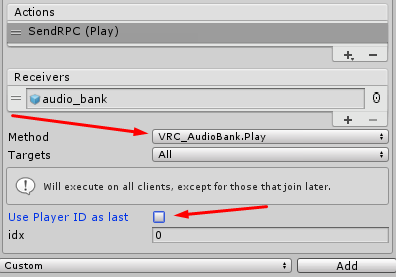

 warm niche
Hey I'm wanting to add cars to my pubg avatar world (community labs rn) so anyone got clues?
stoic tapir
sdk2 or 3? there are prefabs for both
warm niche
Sdk2 (sdk3 tends to lag quest ports)
(My world is cross-platform)
I'm kinda wanting to have cars in it because its a whole pubg map
(I might be gone in 8 mins as it is almost 4am for me)
Heres the map
warm niche
Thx
 little bridge
Hello! I'm trying my world with multiple clients, and I've noticed that the log of the master player is filled with messages like "Deferred event [number] because we are over BPS" and "Death run detected, killed [number] events" when I connect the second client. I did something wrong or it's normal? So far I didn't noticed any problem with my world, I'm just wondering what it is and if it will be a problem
shadow ruin
That usually happens if you have triggers getting oversynced
little bridge
Oh, alright, then I'll check my scripts, thank you! 😄
valid fern
Hi, I'm looking for a List implimentation (sorry for long post).
In my world, I am trying to apply a "Particle Plexus" effect I got from Ultimate VFX on the Unity Store. It's implemented with some custom C# that itterates through the particles in a system and calls LineRenderers at appropriate moments to create the effect. The code is, of course, not in UdonSharp so I'm porting it over.
As you might guess the code makes pretty heavy use of Collections (List<LineRenderer> to be specific) which aren't implemented in UdonSharp yet. So...
As a stop-gap, and possible future use, I'm implementing the standard ArrayList class (non-Generic) to help me manage lists of LineRenderers. It's done with a base "LpArrayList" class plus 11 support types.
Now it occures to me that I can't possibly be the first one to think about trying this so my question is: Before I go any further, does anyone have a simple list management class in UdonSharp (maybe similar to ArrayList) that they like to use when handling lots of the same kind of items?
As a sort of correlary question: Am I even barking up the right tree here? Or am I doing a lot of extra work for nothing?
Anyway, any and all thoughts would be appreciated.
(pinging @spare tendon and @serene radish for their possible direct interest)
 spare tendon
I personally don't have any generic class for the purpose since I mainly use UdonToolkit and editor scripts to manage anything more complex. But regardless I still have it on the backburner.
near bronze
You could totally make an array that behaves like a list with automatic resizing (though it would be expensive). But handling the line renderers will not be your problem. The problem is that particles are a list, so you won't be able to do anything with them as udon just does not expose any methods to convert them to an array. So even if you build a nice way to have complete control over line renderers, you still won't know the position of the individual particles
 tight jackal
what services do you guys use to sync projects among a team? I remember Finns mentioning an alternative to Unity Teams but can't remember what he mentioned for the life of me!
valid fern
Oof, I'm gonna have to study on that List of Particles thang
burnt zephyr
@tight jackal all i can say is google drive
valid fern
@tight jackal I use github, but there is a repository size limit.
burnt zephyr
or microsoft teams, but its basically zoom with no upload limit
unity teams is best imo
stoic tapir
I havent had the opportunity to try it out yet, but PlasticSCM seems to be well recommended, and unity looks like it'll be replacing unity collabs integrating it directly into unity in the near future.
valid fern
I've also used Unity Teams but the version control left something to be desired.
Think that has been improved lately though
tight jackal
@stoic tapir BINGO! Thats what I was looking for, thank you!!!
valid fern
YES! Didn't know that.
stiff lily
plastic is great !
near bronze
Plastic very good yes
hexed shell
GitHub is good
near bronze
GitHub is good if you're only doing code, and especially if you're doing an open source project and you want to encourage pull requests. But it doesn't handle assets nearly as well as plastic
stoic tapir
Since the topic is on version control and what not. What is the consensus with regards to Assets, Licenses and working on a project in a team? Does everyone in the team need a license for the assets used? Or is it fine if there is at least one licensee for each asset used for that project? Do you consider licensing ownership for assets in a team to belong to the team as a whole instead of each individual person?
Probably the biggest concern I have when working in team projects as i'd prefer to respect the rights of the authors of the assets I purchase as much as possible.
hexed shell
near bronze
GitHub is good if you're only doing code, and especially if you're doing an open...
Could you elaborate on what makes plasticscm better for assets in your opinion?
near bronze
Because if you need to sync assets, you'll have to use GitHub LFS which stores the actual files on a separate server while keeping just pointers to those files in the main server. That process slows everything down
hexed shell
Yes you need LFS, but it works fine as far as I have tested、does plastic not use LFS then?
I read up a bit on plastic, seems interesting, I might try it some day to see how it works
near bronze
Sure LFS works fine, it's just slow. Plastic is lightning fast
valid fern
One thing I do know about github is that it has quite a hard time versioning binaries, and they do discourage that practice in general. I agree with @near bronze . It's really best for code source control.
Regarding licensing, I see it this way: I am the "master" of my projects. If I purchase a commercial asset for myself, I expect to be able to use it in my projects (or at least one project). If I have other collaborators on that project, they may manipulate the asset for its intended use only within my project but they may not take the asset for their own use. It's important for me to make this clear to collaborators working on my software.
Not sure how I would handle it if someone else brought a paid asset to the table along with their coding contribution.
Also, I'm assuming assets here that get used "per project" not, say, tools that might get used on a "per user" or "per seat" basis.
Like if your project requires that you use Photoshop, each user needs their own license for that.
sacred topaz
hey y'all, what's the best way to figure out avatar height in sdk3? that's not part of udon yet is it
burnt zephyr
@sacred topaz you make a good point about the udon part, but exactly do you mean bu “height”?
sacred topaz
@burnt zephyr I suppose I'm looking for the viewpoint height they would have set during avatar creation
burnt zephyr
well in 3.0, you can set it where ever, id recommend 1.2-1.5 for it, but technically theres no unisiual fahring for such a thing I guess 🤔?
sacred topaz
ah I'm building a world and want to know how tall the players are
sacred topaz
I need to programatically figure out their avatar size so I can automatically scale world components to big and small players
burnt zephyr
interesting? i mean, you might be able to with udon since customizibke chairs exist for udon now... but im not sure how one would do so. try asking in udon questions
sacred topaz
okay rephrasing that: is there a more accurate way to detect avatar height in udon besides summing the lengths of bones from head to foot
stiff lily
 opaque needle
@tepid flame best solution is to not use height maps,i couldnt figure it out in the past either
 fresh ermine
opaque needle
<@!138754122085040129> best solution is to not use height maps,i couldnt figure ...
fresh ermine
opaque needle
<@!138754122085040129> best solution is to not use height maps,i couldnt figure ...
Probably vry few cases where you'd really benefit from using height maps with Unity's implementation of parallax mapping - but the cause of your issues might be because you need to make sure that sRGB is unchecked on the texture import settings of the height map
opaque needle
o is that so