#engine-source
1 messages · Page 44 of 1
 modest ingot
 ocean inlet
It does not because of the unreal engine version selector
modest ingot
ah see i like that much more
thats what i wanted, is to point to my built version of the source
ocean inlet
if you have it in your UE Source root it's auto detected courtesy of the uprojectdirs file
modest ingot
instead of having it all tangled together
modest ingot
ocean inlet
if you have it in your UE Source root it's auto detected courtesy of the uprojec...
at what point does UE get built during those steps ?
ocean inlet
The parts your project need get compiled when you compile your project
So unless you're using everything in the engine, you should be compiling vastly less
modest ingot
okay. gotcha
modest ingot
ocean inlet
So unless you're using *everything* in the engine, you should be compiling vastl...
Running: C:\Windows\Microsoft.NET\Framework\v4.0.30319\MSBuild.exe /nologo /verbosity:quiet "C:/Users/nbond/Documents/GitHub/UnrealEngine/Engine/Source/Programs/UnrealBuildTool/UnrealBuildTool.csproj" /property:Configuration=Development /property:Platform=AnyCPU
Missing C:/Users/nbond/Documents/GitHub/UnrealEngine/Engine/Binaries/DotNET/UnrealBuildTool.exe after build
Did you run setup.bat?
modest ingot
Checkling dependencies, registering git hooks, installing prereqs then it dies
ahhh i believe so. which ones do i need?
ocean inlet
modest ingot
Checkling dependencies, registering git hooks, installing prereqs then it dies
open a cmd window and run it manually, what does it die on?
modest ingot
looks like maybe i only have 5.0.103 sdk
Checking dependencies...
Registering git hooks...
Installing prerequisites...

C:\Users\nbond\Documents\GitHub\UnrealEngine>
C:\Users\nbond\Documents\GitHub\UnrealEngine>
C:\Users\nbond\Documents\GitHub\UnrealEngine>
dies right after i approve the Pre-Reqs with admin control
ocean inlet
modest ingot
looks like maybe i only have 5.0.103 sdk
IIRC you need .net 4.6 SDK?
4 - 4.6 is what i have installed anyway
But anyway manually building the UnrealBuildTool project should give you some more details
ocean inlet
Yeah was about to say it may be the "project" version but you can still see the programs folder
modest ingot
Okay found it in Engine/Source/Programs/UnrealBuildTool/UnrealBuildTooL.csproj
building it does... nothing?
ocean inlet
modest ingot
Okay found it in Engine/Source/Programs/UnrealBuildTool/UnrealBuildTooL.csproj
hmm you should be able to build it from within your project solution?
ocean inlet
modest ingot
```Building UnrealBuildTool in C:/Users/nbond/Documents/GitHub/UnrealEngine...
R...
Oh is that from the generate project files?
modest ingot
it was happening with both generate project files and select unreal version
wait
i just tried again
looks like it went through after i manually built UBT
???
ocean inlet
odd
modest ingot
alright so
ocean inlet
cool now you should be good
ocean inlet
Rebuild on your project
ocean inlet
If you've opened your game solution
ocean inlet
Replace artfulescape with your game
modest ingot
dope okay cool
ocean inlet
modest ingot
game solution has like 70+ projects
yeah that will be the "programs" folder
modest ingot
does that mean i do not want to run with the default selected "Spherical" setting up top next to development editor
but rather Games/Spherical?
ocean inlet
Just right click on spherical and select set as startup project
If it isn't already in bold
modest ingot
no option for that in Rider but im sure i can find it
ocean inlet
Oh, i thought you were in VS?
modest ingot
for now I'm gonna go ahead and just run it with right click build
eh, im preferring rider right now. but i tried VS earlier to see if it was a rider problem
ocean inlet
roger
modest ingot
so, it is supposed to be building the engine now, correct?
just the components i need
ocean inlet
if you selected build on your project and you had Editor selected yeah
modest ingot
alright
i will be back in a few years
/s
thanks so much for your help lmao. i know that was a lot. hopefully it works out now though
i have a better understanding of how this all fits together anyways at the very least. i think maybe i should go do a bunch of reading on how UBT and all that works
ocean inlet
No worries!
The UBT situation is weird because GenerateProjectFiles should compile UBT, which is why you were seeing that error that it said "expected output but didn't get it"
modest ingot
honestly i just think with a project the size of Unreal Engine you're just bound to have weird shit happen sometimes. same reason people gotta delete intermediate/saved/etc and re-gen project files sometimes lol.
ocean inlet
for sure
modest ingot
!!! @ocean inlet It works! Thanks!!
ocean inlet
no worries 🙂
modest ingot
well, stuck at 45% initializing but im sure its just shaders
 stable hemlock
Hi guys, i have problem with Steam integration, i used this tutorial https://allarsblog.com/2016/02/26/basicsteamintegration/
and at the end i should be able to use shift tab in standalone game, i open it and it does not work, the same is with package game even with clear FPS template, any ideas ? i have this problem for some time and i need to fix it
Allar's Blog
This is the first step in a series of guides that will show you how to enable the OnlineSubsystemSteam module for your project. It does not cover session creation, session management, app id association, or anything specific to OnlineSubsystemSteam. These steps are the first part in enabling a Steam integration
 dense maple
I think people here might know the answer to this question...
If you change the camera settings and make a 2D game in UE4, will it still run the game in 3D in the backround?
Such as lighting and etc?
 hidden hedge
stable hemlock
Hi guys, i have problem with Steam integration, i used this tutorial https://all...
hidden hedge
stable hemlock
Hi guys, i have problem with Steam integration, i used this tutorial https://all...
use more up to date documentation: https://docs.unrealengine.com/en-US/ProgrammingAndScripting/Online/Steam/index.html
An overview of Online Subsystem Steam, including how to set up your project for distribution on Valve's Steam platform.
 halcyon fable
not sure if this is the best place to post this but here it goes. I'd like to break up my input into different modal sets. For example, a different set of input actions for "flying" and "walking". I'm finding unreal's API to be a little clunky in this respect. Would appreciate advice from anyone who's attempted to do something like this. How did it go? what do you recommend/discourage?
 high epoch
Is there a way to build the VS Code project from outside the editor? Can't seem to find a .bat file for that, only for VS.
 quick mica
high epoch
Is there a way to build the VS Code project from outside the editor? Can't seem ...
quick mica
high epoch
Is there a way to build the VS Code project from outside the editor? Can't seem ...
$UNREAL_ENGINE_ROOT/Engine/Build/BatchFiles/Build.bat -Target="$PROJECT_NAMEEditor Win64 Development -Project=\"$PROJECT_ROOT/$PROJECT_NAME.uproject\"" -Target="ShaderCompileWorker Win64 Development -Quiet" -WaitMutex -FromMsBuild
smth like this?
high epoch
quick mica
```bash
$UNREAL_ENGINE_ROOT/Engine/Build/BatchFiles/Build.bat -Target="$PROJECT_...
That’s to build the game, not to build the “Visual Studio Code” project, isn’t it?
quick mica
high epoch
That’s to build the game, not to build the “Visual Studio Code” project, isn’t i...
So you want to generate the project files?
high epoch
quick mica
So you want to generate the project files?
Correct but for VS Code, not VS.
quick mica
$UNREAL_ENGINE_ROOT/Engine/Binaries/DotNET/UnrealBuildTool.exe -projectfiles -project="$PROJECT_ROOT/$PROJECT_NAME.uproject" -game -engine -progress
Think you just need to configure the build tool to create VSCode solutions
high epoch
quick mica
```bash
$UNREAL_ENGINE_ROOT/Engine/Binaries/DotNET/UnrealBuildTool.exe -project...
I’ll check the help of UnrealBuildTool.exe, maybe it’s mentioned somewhere. Thanks.
quick mica
high epoch
I’ll check the help of `UnrealBuildTool.exe`, maybe it’s mentioned somewhere. Th...
You can add a BuildConfiguration.xml to AppData\Roaming\Unreal Engine\UnrealBuildTool
<?xml version="1.0" encoding="utf-8" ?>
<Configuration xmlns="https://www.unrealengine.com/BuildConfiguration">
    <ProjectFileGenerator>
        <Format>VisualStudio2019</Format>
    </ProjectFileGenerator>
</Configuration>
just need to modify it for VSCode I think
high epoch
quick mica
You can add a BuildConfiguration.xml to AppData\Roaming\Unreal Engine\UnrealBuil...
I’ll give it a try.
 red hornet
guys what to change in the code to enable cooked blueprints to be loaded in cooked map in editor ? i create map, cooked it, removed uncooked one and now cooked map is loading fine but without any Blueprint Actors in editor. I tried many changes in the code and no luck :/
i need them just for loading

 red hornet
that is what i did but level load without Actors
stable hemlock
Well, it's kinda cryptic that message: limited to a subset of supported asset types 😄 I know it works for some basic assets types, but I have no idea the full extent of what is supported 😄
I also don't know why you need the cooked content back in the editor, but to each its own, I guess 🙂
 keen spear
Hi, does anyone knows why I have this error?
 red hornet
stable hemlock
I also don't know why you need the cooked content back in the editor, but to eac...
red hornet
stable hemlock
I also don't know why you need the cooked content back in the editor, but to eac...
so i can let users to add extra map layer over my map so they can create extensions and i dont want to distribute uncooked stuff
 quick crystal
My visual assist is failing me - I can't seem to figure out what include path to use to include OnlineSessionSettings.h
I've tried Using Engine/, /Plugins, Runtime/, etc.
I'm just trying to drill down to the Engine/Plugins/Online/OnlineSubsystem/OnlineSessionSettings.h file
hm.. #include "../Plugins/Online/OnlineSubsystem/Source/Public/OnlineSessionSettings.h" seems to work, but it would seem like there would be a way to make the include path shorter.
 smoky goblet
quick crystal
My visual assist is failing me - I can't seem to figure out what include path to...
smoky goblet
quick crystal
My visual assist is failing me - I can't seem to figure out what include path to...
If that's the include that works, you should only need #include "OnlineSessionSettings.h"
That's assuming that you have the OnlineSubsystem module as a public or private dependency in your Build.cs file.
hidden hedge
keen spear
Hi, does anyone knows why I have this error?
always look at the output log, not the error list
hidden hedge
quick crystal
My visual assist is failing me - I can't seem to figure out what include path to...
starting from the bit after "Public" usually helps, it's pretty simple to work out the location from the path
 peak zinc
is there any way that you can add a rocket build to the launcher?
 mighty charm
Where can I find the logic for the "Add Pin +" like on the addition node?
 mild geyser
Got a question, for the source build of unreal engine 4.26.1, is there a way to tell the unreal build tool to not build the engine for specific platforms? I'd like to avoid android, ios, and hololens, and perhaps avoid building for things like Datasmith?
quick crystal
By God, I don't know what happened with this new visual assist and the engine source, but ever since I upgraded a few days ago it hardly ever lets me middle click and auto include a required header file
It is so flipping annoying
Most disappointing release to-date. Not sure if anyone else is having that problem w/ visual assist and the source build. I'm using Visual Assist build 2021.1
red hornet
is cooked Actors disabled from content browser ? I cant see them there, i can see all my other files but non BP files.. is there a way how to compile UE4 with that feature enabled ?
hidden hedge
red hornet
is cooked Actors disabled from content browser ? I cant see them there, i can se...
huh?
 normal crag
Building source is awesome, I'm compiling it all day now :D
red hornet
hidden hedge
huh?
what huh ? im trying to make editor for my little project and i have always couple of meshes inside one actor. I can see meshes but if i want to place Actor i cant as they are not there. I dont want to distribute my uncooked BPs
hidden hedge
red hornet
what huh ? im trying to make editor for my little project and i have always coup...
I’m not sure what misconception of cooked data you have, but I really have no idea what you’re asking
If you are looking at mod tools, you usually distribute your uncooked assets in a build of your editor that goes on EGS
red hornet
but if i dont want to distribute uncooked assets ?
red hornet
so i have to create that support in c++, its not part of the code where i just change some false to true or disable some lines ?
hidden hedge
I’m not sure what you mean, again. The editor has very limited cooked asset support and I’m pretty sure that doesn’t extend to Blueprints. If you are worried someone can look at your Blueprint then I guess it’s time to convert that actor to C++
We distribute all but a handful of BP and that’s never been an issue for us
 lapis wave
Hi, Is there a builtin type trait like IsUClass or IsUStruct that can be used in template? Many thanks!
lapis wave
Just implemented a version like this:
template<typename T>
struct TIsUClass
{
    template <typename C> static uint16 Test(decltype(C::StaticClass));
    template <typename C> static uint8 Test(...);

    enum { Value = sizeof(Test<T>(0)) - 1};
};

template<typename T>
struct TIsUStruct
{
    template <typename C> static uint16 Test(decltype(C::StaticStruct));
    template <typename C> static uint8 Test(...);

    enum { Value = sizeof(Test<T>(0)) - 1};
};
 spiral mortar
lapis wave
Just implemented a version like this:
```
template<typename T>
struct TIsUClass
...
spiral mortar
lapis wave
Just implemented a version like this:
```
template<typename T>
struct TIsUClass
...
FWIW this won't work for base struct types like FVector/FColor etc
Because they don't have a ::StaticStruct()
See TBaseStructure
 brittle estuary
Hey guys, I'm trying to build 4.26.1 from source, and I'm getting the following weird error: 1>Creating makefile for UE4Editor (no existing makefile) 1>steamworks SDK not found in ThirdParty/Steamworks/Steamv1,47/sdk 1>UnrealBuildTool : error : Unable to instantiate module 'Steamworks': steamworks SDK not found in ThirdParty/Steamworks/Steamv1,47/sdk
Except it does exist at ThirdParty\Steamworks\Steamv147\sdk
So... why is there a comma between the "1" and the "47"? 😦
 barren minnow
How can i build unreal engine with html plugin?
CAn some one adress me to a tutorial?
normal crag
Why does UE4 use FPoseLink and why can't i make this link?
Cuz i have UAnimSequence asset in content browser, i can use it with Animation BP
But if i get the same asset through variable in other class, i won't be able to get it as FPoseLink
Like this

Are there ways to create link?
How does UE4 create this structure? Can i somehow trigger it's creation from variable?
I explored the code, i found no real reason to use it. But this engine was created by very smart people, so there is a reason
 void lily
hello, not quite sure where to post.
i just switched to 4.26.1 with my game (coming from 4.23) and it builds fine.
however at startup (even sound got loaded and already plays) there comes this error. without call stack and out of the blue.
do you have a clue what to do next?
 normal crag
So no info at all?
Try to look at it with debugger, maybe it can tell anything
There is no call stack? Are you sure?
It's error generated by framework, it should have call stack
void lily
so yea. sorry. i forgot to build it in debug.
so here is the new error with a debug built game
 void lily
hmm. so do you think a reference is missing somehwhere?
void lily
it has some c++ but only in a player controller
normal crag
Passing params may e
void lily
ok then. i guess i have to investigate more. thank you for the hint tho!
normal crag
No problems!
I would recommend to set breakpoints on the functions you can see in call stack and check what is wrong
Maybe some materials are failed on migration
void lily
we are doing some intense stuff in BP with generated instanced meshes tho. might be, we are messing it up.
editor version runs smoothly tho
void lily
@normal crag found the bug in answers..seems to be an engine bug since 4.26.
can be fixed when chaninge creation time of instanced mesh to somewhere before tick OR switch to dx12
lol
i did the latter and it works now.
normal crag
Can i put some UnrealEd FBX import based code to runtime to use for plugins? I can't really understand, is it even right to import fbx data at runtime from File System?
As i discovered, creating UStaticMesh at runtime is possible, it is hard, because you need to read FBX and process it, but it is possible
Also, i didn't find anything related to FBX importer in Runtime
So i guess, i would need to implement FBXImporter by myself
I think i can use FBX SDK for this, should not be a big problem
I technically can translate FBX models into some simpler format for my own purpose (Im interested in making game with dynamically loaded content, i dealt with Sound and Images already, now i need 3d models)
It's in case of problems when delivering project on consoles
Of course PlayStation for example, won't be compatible with anything like FBX SDK and all of that
So i would need to use my own types of storing and loading data
What is FArchive, i still don't understand...
I guess it's archive for storing Unreal Assets? Like UASSET, UMAP, UEXP
I saw these types in enumerator when i was looking at serialization system for UAsset type
And Mesh Description should be the mesh data? I see there are verticies, normals, tangents, UVs, all that stuff
I like how modular UE4 is
I can change anything and it will be reflected in the game and editor you build. Of course you need to keep in mind, that UE4 was made not by idiots, it's very complex and smart thing, developers are real genius people
Yes, MeshDescription is basically the mesh geometry

Im sorry, that im writing a lot of stuff here, im just too excited to work with Source Code of something this big! Also i hope, that some of my researches would help some humans in development!
They even have a whole function to give this smoothing groups warning >:0

Hardest thing here as i thought is to get array of FbxNode*s
After that the setup and creating of UStaticMesh and USkeletalMesh is easy(compared to FBX file reader)!
normal crag
You pass UStaticMesh* as output into the arguments, then if it's nullptr it creates new UStaticMesh with regular normal NewObject<>(), nothing hard here
// Copyright 1998-2019 Epic Games, Inc. All Rights Reserved.
if( InStaticMesh != NULL && LODIndex > 0 )
{
  StaticMesh = InStaticMesh;
}
else
{
  StaticMesh = NewObject<UStaticMesh>(Package, FName(*MeshName), Flags | RF_Public);
}
Then it adds LOD0, checks how much LODs are here, creates FMeshDescription and loads Source Model Reduction Settings, it's LODs again
// Copyright 1998-2019 Epic Games, Inc. All Rights Reserved.
FMeshDescription* MeshDescription = StaticMesh->GetMeshDescription(LODIndex);
if (MeshDescription == nullptr)
{
    MeshDescription = StaticMesh->CreateMeshDescription(LODIndex);
    check(MeshDescription != nullptr);
    StaticMesh->CommitMeshDescription(LODIndex);
    //Make sure an imported mesh do not get reduce if there was no mesh data before reimport.
    //In this case we have a generated LOD convert to a custom LOD
    SrcModel.ReductionSettings.MaxDeviation = 0.0f;
    SrcModel.ReductionSettings.PercentTriangles = 1.0f;
    SrcModel.ReductionSettings.PercentVertices = 1.0f;
}
else if (InStaticMesh != NULL && LODIndex > 0)
{
    // clear out the old mesh data
    MeshDescription->Empty();
}
Then it creates FStaticMeshAttributes out of FMeshDescription and does nothing with it at this time
// Copyright 1998-2019 Epic Games, Inc. All Rights Reserved.
FStaticMeshAttributes Attributes(*MeshDescription);
Now it creates Lightning GUID and setups lightning mode
// Copyright 1998-2019 Epic Games, Inc. All Rights Reserved.
StaticMesh->LightingGuid = FGuid::NewGuid();

StaticMesh->LightMapResolution = 64;
StaticMesh->LightMapCoordinateIndex = 1;
In this moment it also creates MeshMaterials and starts to create Bounding Box, whatever it is in case of Mesh and what i want the most, it creates the Static Mesh itself
// Copyright 1998-2019 Epic Games, Inc. All Rights Reserved.
if (!BuildStaticMeshFromGeometry(Node, StaticMesh, MeshMaterials, LODIndex,
    VertexColorImportOption, ExistingVertexColorData, ImportOptions->VertexOverrideColor))
{
  bBuildStatus = false;
  break;
}
Now it setups materials and stuff...
And commits FMeshDescription!
// Copyright 1998-2019 Epic Games, Inc. All Rights Reserved.
StaticMesh->CommitMeshDescription(LODIndex);
then again tweaks, materials and LODs and after all of that... We finally get our UStaticMesh*!
// Copyright 1998-2019 Epic Games, Inc. All Rights Reserved.
UFbxStaticMeshImportData* ImportData = UFbxStaticMeshImportData::GetImportDataForStaticMesh(StaticMesh, TemplateImportData);

if (LODIndex == 0 && InStaticMesh == nullptr)
{
    StaticMesh->LODGroup = ImportOptions->StaticMeshLODGroup;
}

return StaticMesh;
You can see more really interesiting info about this in FbxStaticMeshImport.cpp (line 1396)
The most hard thing in here is still getting all of this data... You really need to use FBX SDK to get this or just use own simpler format, converted from FBX SDK, if you are deploying for PlayStation or XBox for example. I will try to work in that direction, maybe one day i will make a plugin for this with more variants
Im tired for today, goodluck, guys!
 ionic plover
Anyone in here know how the procedural foliage tool actual works? I'm trying to understad exactly what the InitialSeedDensity of the FoliageType means, and I can't seem to figure out how the Procedural Foliage system works as a whole.
This is what I'm trying to understand. it defaults to 1.0f.
 void lily
normal crag
Im tired for today, goodluck, guys!
void lily
normal crag
Im tired for today, goodluck, guys!
did you ever try this one out? perhaps it helps https://www.unrealengine.com/marketplace/en-US/product/runtime-fbx-import-asynchronous

Unreal Engine
Asynchronously Import FBX files in your Unreal projects, in runtime.
void lily
ionic plover
This is what I'm trying to understand. it defaults to 1.0f.
could be that the content creation "graphics" channel is more appropriate and responsive for such a question.
ionic plover
Thanks @void lily , but I think I figured it out
normal crag
void lily
did you ever try this one out? perhaps it helps https://www.unrealengine.com/mar...
Oh, i didn't saw it. But still, i would like to figure out it all by myself for learning purpose! But still thanks!
 cosmic stump
I need to update RoboRecall mod kit from 4.16 to 4.26.2 - do you think it's doable without shedding too much blood ?
normal crag
 smoky lynx
Can i copy something to clipboard by clicking on a button in UE4 ?
smoky lynx
Can i copy something to clipboard by clicking on a button in UE4 ?
You definitely can, but im not sure how exactly
Maybe ue4 has own cross platform way for it or you need to implement it by yourself
But as you have all 101% power of c++, you literally can launch SpaceX Falkon Heavy using unreal engine
normal crag
cosmic stump
I need to update RoboRecall mod kit from 4.16 to 4.26.2 - do you think it's doab...
Engine changed a lot from this version, most of problems would be with deprecated variable access and functions
Like you can't just get some variable, you would need to change it to GetThatVariable()
And stuff like this
But there should be not that big difference
cosmic stump
I read that there are some issues with OdinEditor plugin, whatever that is..
what is OdinEditor plugin?
normal crag
Never heard about it
cosmic stump
me neither 😦
modest ingot
Has there been much work done by anyone looking to use UEs water with non-landscape components? I.e. a procedural mesh component? Likewise, has anyone seen anything about the possibility of doing the necessary distance field generation during runtime and not in the editor?
cosmic stump
so I got RoboRecall project, trying to either switch engine version or generate project files and getting this:
Discovering modules, targets and source code for project...
While compiling E:\Unreal Projects\RoboRecall\Intermediate\Build\BuildRules\RoboRecallModuleRules.dll:
e:\Unreal Projects\RoboRecall\Source\RoboRecall.Target.cs(23,12) : error CS0246: The type or namespace name 'UEBuildBinaryConfiguration' could not be found (are you missing a using directive or an assembly reference?)
e:\Unreal Projects\RoboRecall\Source\RoboRecall.Target.cs(37,13) : error CS0246: The type or namespace name 'LinkEnvironmentConfiguration' could not be found (are you missing a using directive or an assembly reference?)
e:\Unreal Projects\RoboRecall\Source\RoboRecall.Target.cs(38,13) : error CS0246: The type or namespace name 'CPPEnvironmentConfiguration' could not be found (are you missing a using directive or an assembly reference?)
e:\Unreal Projects\RoboRecall\Source\RoboRecallEditor.Target.cs(19,12) : error CS0246: The type or namespace name 'UEBuildBinaryConfiguration' could not be found (are you missing a using directive or an assembly reference?)
ERROR: Unable to compile source files.```nm, fixed it
so, trying to compile project in VS and it's looking for preject's plugin in the engine's folder
how do I make it look in the project's folder instead ?
this is what I am getting essentially:
3>E:\Unreal Projects\RoboRecall\Plugins\OdinEditor\Source\OdinEditor\OdinEditor.Build.cs : warning : Referenced directory 'E:\UE4Source\UE-426pre1-vanilla\Engine\Source\OdinEditor\Public' does not exist.
3>E:\Unreal Projects\RoboRecall\Source\Odin\Odin.Build.cs : warning : Modules must specify an explicit precompiled header (eg. PrivatePCHHeaderFile = "Odin.h") from UE 4.21 onwards.```Can i legally distribute my own engine modification?
quick mica
normal crag
As i got, i can, but only with free open source fork from UE4 official github repository
quick mica
yep and open source = repo must be part of the organization
 pulsar wadi
Hi folks! I'm trying to make Installed Build but in the very end I get
ERROR: Files have been modified
       (see C:\UE4.26.1\UnrealEngine\Engine\Programs\AutomationTool\Saved\Logs\Log.txt for full exception trace)
AutomationTool exiting with ExitCode=1 (Error_Unknown)
AutomationToolLauncher exited with code 0```
I have almost no experience in compiling such huge projects, but it seems to me, that AutomationTool overwrites UE4Editor.target file resulting in different filesize from what I get after compilation in VS2019 (which is exactly 917764 bytes). Also, after attempting to make Installed Build if I try to recompile from VS it seems to recompile UE4Editor.target only with right filesize again.
```Build started...
1>------ Build started: Project: UE4, Configuration: Development_Editor x64 ------
1>Using 'git status' to determine working set for adaptive non-unity build (C:\UE4.26.1\UnrealEngine).
1>Creating makefile for UE4Editor (no existing makefile)
1>Creating makefile for ShaderCompileWorker (no existing makefile)
1>Building UE4Editor and ShaderCompileWorker...
1>Using Visual Studio 2019 14.28.29337 toolchain (C:\Program Files (x86)\Microsoft Visual Studio\2019\Community\VC\Tools\MSVC\14.28.29333) and Windows 10.0.18362.0 SDK (C:\Program Files (x86)\Windows Kits\10).
1>Building 1 action with 12 processes...
1>  [1/1] UE4Editor.target
1>Total time in Parallel executor: 0.44 seconds
1>Total execution time: 15.50 seconds
========== Build: 1 succeeded, 0 failed, 2 up-to-date, 0 skipped ==========
Any ideas on what might be going on? Because I'm completely lost here and I have to distribute my build to my team somehow....
 stiff prawn
Does anyone know why my Dedicated Server seems to be capped at sending no more than 8kb per frame to each client? I am running a local Dedicated Server and clients so there's no real network involved here
Outgoing packets from Server to Client 0. See the hard cap at 8000 bits

Can I increase that limit? So far I've only found ways to increase it for ListenServers. Read #multiplayer message if you want more info
 hybrid shoal
Does rebuilding source, automatically rebuilds the game project too?
Or do i better rebuild both separately?
 next forum
both are separate from my experience, though you can find the UnrealVS plugin, build engine first, then build your project
hidden hedge
next forum
both are separate from my experience, though you can find the UnrealVS plugin, b...
why would you ever need to build the engine before project?
building the game project builds engine modules that your game uses
it saves a lot of time
cc: @hybrid shoal
hybrid shoal
hidden hedge
building the game project builds engine modules that your game uses
never knew about this. Thank you a lot!
I thought I have to rebuild the engine each time i changed something in the engine, so that there won't be some errors or something went wrong in case.
 charred apex
hi everyone. I have a strange stuttering in cooked game. ScreenSaverInhibitor takes 53ms on some frames, on a regular time basis. Any clue ?

in fact, it's every second
leads to this

Maybe i am in the wrong channel, but i think this is the best place for 'optimisation stuff"
Mhhh, seems to be related to PSO caching... anyone had to put their fingers here ?
 gloomy hamlet
@charred apex It doesn't look to me like that's the issue. When it shows CPU stall that generally means that's simply how long that thing was asleep for waiting for the real bottleneck to finish.
More likely to be garbage collection related.
charred apex
hi @gloomy hamlet I remeber GC operating every 60 seconds but not every second
I continued to dig in this problem and it may be due to the culling mecanism
no solution found right now, still very annoying to get this expensive frame every second
another lead is the UDP messaging process, I have a lot to investigate
It's the first time I come across this kind of behavior, and I am using this engine since UE 2.5. Three projects, 2 have this symptom. The only difference is that 2 projects are using modular assets for greyboxing, the other one is more organic
so maybe occlusion culling is the culprit
gloomy hamlet
@charred apex GC frequency is editable, but yeah may not be that. Really just wanted to point out that the stall in the profiler means "it's not me".
If the game thread entry is showing the same time for that frame, dig into that.
charred apex
ok
It's another thread that makes the frametime pike game thread stays stable. It's not one of the common threads shown by stat unit
I saw some stuff about having a VPN and UDP messaging doing wild stuff
As for now, gamethread does not reflect the "dents" in the frametime graph. So i assume it's not gamethread related
might be wrong tho
 civic plover

does anyone know if this version has the ability to package HTML5 projects? Before I spend my time compiling it and stuff
ah it seems possibly yes

 hot dome
anyone know what is the name of class responsible for displaying Details Panel for instanced BP on level?

i want to try to add some kind of sroting to categories to display them on top
 finite marsh
I was attempting to configure a linux server yesterday and started receiving an unknown error on 686/688 building for the server. Then when I reopened the project it would open and then freeze as soon as the editor opened and crash with an error saying "Assertion failed: SerializeNum >= 0"
I've rebuilt from the solution 4 or 5 times now, pulled an old build from our perforce and now I'm getting a "cannot build from engine, try building from IDE" error.
The last thing I edited before these issues was configuring a custom launch profile. Not sure if that could have played a part? Any ideas are greatly appreciated!
 crimson light
Can someone help me? what could be this error .. is a dedicated server
 quick mica
no idea, but "particles" and "dedicated server" would make me think^^
crimson light
so brother .. I think it must be a 4.26 plugin that I don’t even use ... but the error doesn’t explain which
I suspected Niagara and to no avail
quick mica
ok "brother", what about starting code search for this error message?
and if you found the line, attach to the debugger and break there, then you can go up the callstack and try to figure out what is involved
crimson light
already researched .. so I came to ask here
quick mica
code search = do a string search in the code basis for a substring
crimson light
sorry brother .. i'm brazilian i'm using a translator .. could you help me .. i didn't get it right .. can you draw for me? .. lol .. or give me a link that explains
quick mica
nope sorry^^ I can't help you on this, you'll need to start digging into the field of debugging
crimson light
build debug server no development server?
quick mica
debug game, but that shouldn't matter first of all. debug game just has less optimisation which may could help, if you can't read everything, but I'd start with dev build and see how far I get. But at first you need to find the line of code that logs this error
crimson light
I suspect the source engine .. I will reinstall and try again .. thanks👍 👍
quick mica
? don't think you need to rebuild something
crimson light
particlemodule.h must have corrupted I don't know
 neon girder
Hi guys, because of some stereo layers issues in 4.26 I need to downgrade to 4.25 after two months of work with 4.26, any tips? I already tried just changing the versions of the project and it renders my maps, pawns and stuff like that unusable. Is it even worth trying to do that or I am just to count my losses?
hidden hedge
neon girder
Hi guys, because of some stereo layers issues in 4.26 I need to downgrade to 4.2...
really would like to know about your engine upgrade process here. you cannot use assets that have been created/modified on the new engine
neon girder
So it means all UE assets like pawns or blueprints or materials if I created them on the new version?
Most of the new work past two months on the assets was made using the 4.26 so I guess that will require full remaking with 4.25, is it possible at least to migrate some types of assets?
hidden hedge
neon girder
Most of the new work past two months on the assets was made using the 4.26 so I ...
no, UE4 is not forwards compatible
might be easier to just resolve what issues you're having with 4.26 specifically
stable hemlock
@neon girder Although I agree with @hidden hedge, In the sense that it's not meant to, nor necessarily easy to accomplish this kind of compatibility, you can try and trick it.
in LinkerLoad.cpp, there is this line:
// Don't load packages that were saved with package version newer than the current one.
    if ((Summary.GetFileVersionUE4() > GPackageFileUE4Version) || (Summary.GetFileVersionLicenseeUE4() > GPackageFileLicenseeUE4Version))
Any uasset has metadata, which in binary form looks like this

You can use a stream parser and replace any bytes 4.26 with 4.25. Assuming that the serialization schema between 4.26 and 4.25 is identical, you may succeed 😄
Of course, this approach is unorthodox, so kids, don't try this at home 😄
 inner kraken
 hidden hedge
inner kraken
hidden hedge
inner kraken
context?
neon girder
Thanks guys! Tricking the engine sounds fun to test, maybe I will try that too if I am not able to resolve my issues with 4.26
inner kraken
@hidden hedge it was when trying to open my project, it was some weird c++ compiling error, I ended up moving my entire project to fix it.
 lament cradle
I'd like to force re-compile my source built engine, because it decided not to execute some BPs after a few crashes. Can't even set breakpoints, they turn yellow without any hint. Opening backup versions suffer from the same thing... Opening the project in the launcher version UE fixes it all. Also tried generateprojectfiles.bat again
Can I delete the binaries, intermediate etc folders of the engine to force recompile?
 rain sentinel
Hello, I use a 4.22.3 unreal engine version from source, I was wondering how I can add code to emscripten to reduce the file size of .wasm file
modest ingot
anyone know the trick to be able to use UE marketplace with a source-built version?
 hollow token
modest ingot
anyone know the trick to be able to use UE marketplace with a source-built versi...
hollow token
modest ingot
anyone know the trick to be able to use UE marketplace with a source-built versi...
trick not
sad workaround
have the same engine version you build your source-built from in the epic installer
make an empty project
get the stuff from the marketplace into that project
move it over 😦
modest ingot
hollow token
trick not
sad workaround
have the same engine version you build your source-buil...
That's wild. I can't believe someone hasn't found out an easier way to do it.
quick mica
I don't get the issue. Just select what you want to add, select "show all projects" and then specify the engine version you use
neon girder
Hello everyone, I tried building 4.26.1 from source after I changed few lines in runtime plugin of oculusVR before building an engine, but it crashes now when compiling UE4Editor-UnrealEd.dll without any error messages that make sense, the changes correspond to the commit already done in Master except of modifiyng Engine/Build/Commit.gitdeps.xml file, do I understand correctly that in this list are listed assets and content used by third-party plugins that are required to be built when engine will be compiling?
 royal plume
Anybody know how to get Omniverse working with the Unreal source code? The current documentation states that it will currently not work, but has anybody found a workaround or is this a feature that will be implemented in the future?

 stiff cedar
has anyone had issues with git and uassets? I had a strange issue where I was not able to see the changed file in the commit/merge to main. Im looking into perforce now because it cost me a day of research to basically end up just deleting the branch and start over
Asking more out of curiosity than anything, since I have a friend who uses git all the time and never saw an issue like this
hidden hedge
stiff cedar
Asking more out of curiosity than anything, since I have a friend who uses git a...
I'm very much camp perforce but #source-control
stiff cedar
Oops my bad
 wheat field
For anyone who wants a Racing game Template check out this unreal engine Drone/Space Racing game Template https://kayoverlord.itch.io/dronespace-racing-game-template

itch.io
This project provides developers with a template to develop space/air racing games
 ancient widget
If I made a custom lighting model in ShadingModels.ush for desktop deferred renderer
How can I use it for mobile deferred renderer?
 prime solstice
I'm having issues spawning HISM during runtime has anyone ever done something like this before
It keeps crashing
 fiery pecan
Hi everyone. I'm trying to build a dedicated server with the 4.25.4 build. My understanding is that I need to use source to do this. I have both the source and launcher versions of 4.25.4 installed, I added and changed the server build target to my game project, and I rebuilt the project in Visual Studio using Development Server settings. When I try to open my game from the launcher, it shows the Unreal Engine version as "Other" and when I double click I get an error saying "Failed to launch editor." What am I doing wrong here? Do I also need to rebuild the project for Development Editor in VS?
quick mica
fiery pecan
Hi everyone. I'm trying to build a dedicated server with the 4.25.4 build. My un...
You only need the source build to Build the server, yes, but you need Dev Editor to run the editor, the server or client builds are just server/client only builds, with no editor code
 simple temple
    /** Wraps X to be between Min and Max, inclusive */
    template< class T >
    static FORCEINLINE T Wrap(const T X, const T Min, const T Max)
    {
        T Size = Max - Min;
        T EndVal = X;
        while (EndVal < Min)
        {
            EndVal += Size;
        }

        while (EndVal > Max)
        {
            EndVal -= Size;
        }
        return EndVal;
    }
Hi all, I ran into this issue last night and thought I'd ask here before posting a bug report.
This wrap function was recently added to FMath and it seems to be returning unexpected values, or at least values that I'm not expecting.
Given Min = 0 and Max = 9 this function would wrap a value of 10 to 1 instead of the expected value of 0.
Given -1 it would wrap to 8 instead of 9.
So my question is, am I using this wrong or expecting the wrong result?
Furthermore this looks like an infinite loop waiting to happen.
quick mica
well use Clamp instead
gloomy hamlet
@simple temple Does indeed look broken. They've defined it as inclusive which is weird.
If it was meant for integers only then I guess size should instead be Max-Min+1.
If it's supposed to work with floats, then inclusive just doesn't even make sense...
simple temple
@gloomy hamlet I agree with your suggested fix, this would indeed be shaky with floats.
I'll report this as a bug and see what comes of it
Thank you all
gloomy hamlet
Thinking a bit more, isn't this just a horrible piece of code regardless?
Pretty sure return min + (x - min) % (max - min + 1); does what they're trying far more efficiently.
simple temple
Indeed, the loops are troublesome
Your solution would not account for negative values
Hopefully they will reconsider the approach
Or maybe I should submit a pull request 😛
gloomy hamlet
True but it's pretty trivial, just add the range size on again conditionally on negative result I think. Can't recall for sure how it works offhand.
simple temple
Correct. This is what I've landed on.
    /** Wraps X to be between Min and Max, inclusive */
    template< class T >
    static FORCEINLINE T Wrap(const T X, const T Min, const T Max)
    {
    int32 Size = Max - Min + 1;
    int32 Mod = (X - Min) % Size;

    if (Mod < 0)
        return Min + Mod + Size;

    return Min + Mod;
    }
 sturdy elk
New to UE4. How do you remove unrequired targets from the 'GenerateProjectFiles.bat' process? We are not currently working on mobile, so I removed the Android libraries but when I run 'GenerateProjectFiles.bat' I (as expected) get messages about references to missing Android files. How do I stop it looking for Android stuff?
fiery pecan
quick mica
You only need the source build to Build the server, yes, but you need Dev Editor...
Thanks @quick mica ! I spent some time yesterday going through the example docs as well and that solved the issue I was having. I also rebuilt the engine from source just to make sure.
quick crystal
Anyone here try to build the engine with Visual Studio 16.9.x yet?
I'm going to wait to upgrade until I see some people reporting success with it
 normal saffron
I dont like whats going on
 hidden hedge
that's about as little context as you can possibly provide
normal saffron
I wasnt meaning to provide any actually lool
If i build my project through IDE will it start storing data in the DerivedDataCache folder?
normal saffron
Please someone tell me how to stop the build from eating my C drive, ive changed the project deriveddatacache folder to another HDD

its still seeming to eat up the c drive
is it because my visual studio is installed there? or is it like a ritual that cant be changed?
can someone tell me?
quick mica
well it seems you installed your engine to C
normal saffron
Yeah it is in C
quick mica
well then that's the issue 😛
normal saffron
if i put the engine in an HDD , then i will lose the benefit of the NVME M.2
Im not sure if this is even true
quick mica
... source build takes space, either have this space or don't have it.
 mellow sigil
are editor only actors included in lightning build?
 arctic juniper
Does anyone here have any experience with unreals texture streaming systems?
hidden hedge
what particular issue are you having with it?
 twilit plaza
What is this message? This comes when I generate project files. WARNING: Exception while generating include data for LiveCodingConsole: Unable to instantiate module 'LiveCodingServer': Unsupported compiler version (Clang) (referenced via Target -> LiveCodingConsole.Build.cs)
Where is that happening because I think it might be fixable if I know at which file that error comes from
 compact herald
does anyone know why I can't play any audio just in one project?
 dreamy bay
If I install the source, will this mess up anything with my regular installation of ue4?
cosmic stump
any git users here ?
 short pike
I tried to move an Engine Plugin from my Launcher Engine version to my self build binary Engine plugin folder. When enabled and trying to restart the project this pops up

Both the Launcher Engine and my binary engine is at version 4.25.4. How can I use Marketplace plugins with my binary engine?
twilit plaza
short pike
I tried to move an Engine Plugin from my Launcher Engine version to my self buil...
Is that self built engine really the same? because if you cloned it from github master branch its different
twilit plaza
dreamy bay
If I install the source, will this mess up anything with my regular installation...
no.
short pike
twilit plaza
Is that self built engine really the same? because if you cloned it from github ...
I pulled from the release branch and build a binary version from it
gloomy hamlet
If you add a plugin to a source build engine, you need to build it again.
short pike
that makes sense. Thank you @gloomy hamlet
twilit plaza
Why isn't livecoding supported when compiling with clang?
It warns about unsupported compiler when compiling with clang
spiral mortar
Because it's not supported? 😛
Patching at runtime like that requires working hands in hands with the compiler - you need to have per-compiler logic
and I assume live++ doesn't support clang on windows yet
twilit plaza
spiral mortar
and I assume live++ doesn't support clang on windows yet
Atleast there was announcement of partial support https://liveplusplus.tech/forums/thread-9.html
And I would imagine they would have made it work pretty good at 8 months
But is Unreal Engine using latest version of livec++ in the release branch?
And where did that UnrealBuildTool option to use gcc style argumetns with clang go?
And then there is a lot of errors in build, do them matter?
Or do I need to try and fix them myself
And then, why is master branch behind release on github?
twilit plaza
spiral mortar
Because it's not supported? 😛
what? I can get that error away if I change DiaSdkDir on LiveCodingServer.Build.cs from "Target.WindowsPlatform.DiaSdkDir" to actual full path of my Dia Sdk location
I am not complaining if its going to work
twilit plaza
it worked atleast that far I am able to compile livecodingconsole without any errors
Next goes full engine build
twilit plaza
Why is building unreal engine give out of memory errors?
I have 16gb of ram
and plenty of space on ssd
twilit plaza
I have only 4, but I guess some of the modules are heavy so they consume memory
And I also accidentally started building using x86 clang
twilit plaza
How to add compile argument to only one module on unreal engine?
Or do I really need to add that as global unrealbuildtool option?
I would like to know before I build the engine, because if I change unrealbuildtool config, I need to rebuild whole engine
@stable hemlock Do you know?
twilit plaza
Because that is very annoying at initial build if some module requires some argument and then I have to start whole engine build again just because of that
And the engine build takes like three hours
so it is not very fun waiting around
And why is this area of discord very shy
 vagrant osprey
so I've been in the main #ue4-general room. Is this really where one should be if they are having issues with the source build?
vagrant osprey
4.26.1 straight source from the github.. not sure how to resolve this

 silver scroll
Unreal Engine Forums
Latest Release branch 4.26 Engine compilation fails with the following:
Engine/Source/Runtime/PhysicsCore/Private/PhysicalMaterial.cpp(107): error C2653: 'FChaosEngineInterface': is not a class or namespace name
Anyone came across it yet?
There are more errors but its basically due to bCompileChaos and bUseChaos being false
first result when I googled the first line in your output
 keen quest
Hello I want to ask where my first steps my be towards moving a API over to Unreal. I'm attempting this since the library is made up of 24 different fields i feel like this would be a great start into ingratiating into. I'm attempting to send this values over to a physical rig.
vagrant osprey
@silver scroll thx I looked here.. but I don't have it turned on
I'll setup the github version and pull latest then
I had that link up earlier and went through it.
vagrant osprey
added their custom stuff to the headless chaos file and it works now
i guess ill remove that when the new release is out
thx
 vague musk
I'm hitting a serialization issue after upgrading to 4.26. It happens if I resave certain blueprints (even with no changes), then close the editor and start the editor back up.
UE_LOG(LogLinker, Fatal, TEXT("%s"), *FString::Printf( TEXT("%s: Serial size mismatch: Got %d, Expected %d"), *Object->GetFullName(), (int32)SizeSerialized, Export.SerialSize ) );
Any idea where I should even start trying to figure out what's going on?
 merry galleon
Hi guys! I need to save Compiler Results output to a file. Does anyone have an idea on how to do that? I just need to keep track of compile time whenever I press compile on a blueprint.
quick mica
use the slate debugger to check what creates/uses the compile button, track this down to where the compilaten starts and either look if you can hook into this or just modify the engine to track the time and well then write the results to where ever you want.
stable hemlock
Guys, rly wired PROBLEM with printing logs/GPU stats etc.
Why wired - becouse the same project have prints on different computer, other project have prints in the same version on this computer...
I tried many solutions:
- reinstalled UE (v 4.25.4),
- removed local files and downloaded project from working correctly repo
- rebuilded source code
- rebuilded in Developer and DebugGame mode,
- tried ENABLEALLSCREENMESSAGES
- added do DefaultEngine.ini
[/Script/Engine.Engine]
bEnableOnScreenDebugMessages=true
Whats also wired - PRINTING LOGS WORKING ONLY IN VR HEADSET
When headset is plugged - printing working - when headset is plug off - printing don't working - but only in this project...
Any ideas ? What can I do with this ?
quick mica
First thing to do: Do a proper error reporting. What Do you do, Where do you do it etc. and swap over do the #cpp or #blueprint channel depending on the context you are developing.
 uncut kraken
I'm doing changes to the engine's source code, but at each and every change Visual Studio is rebuilding the whole engine
for example, changing SceneCaptureDetails.cpp yields Building 3181 actions with 24 processes...
is that the expected experience? or should it be incremental?
(I literally just cloned the project, ran setup + generate project, built it, made a change, then rebuilt it and got a full reload; retried a few times, always consistent)
Total execution time: 1385,57 seconds
😥
and unfortunately my changes didn't work ...
it's a long shot, but would anyone have an idea why exposing the Diffuse ShowFlag to SceneCapture (to remove them from the render, leaving only lights) doesn't work (scene still has all its textures / colors)? from what I gather that's the same thing that the editor's viewMode use, so I'd expect scene capture components to respect it as well
quick mica
If this is not a typo, this is your issue
 uncut kraken
I did rebuild it, but but clicking on "Build" again (not "Rebuild"), so the previous artifacts should have been there
quick mica
there is a difference between build and rebuild, if you say "rebuild" ppl will assume you really did a rebuild, otherwise you just did a build 🙂
Ok, so no rebuild hm if you just touch cpps it shouldn't result in a full rebuild, but I don't know the build system good enough to be able to actually help.
uncut kraken
by any chance, if you change this same file (like by adding a semicolon), does a build triggers as many module rebuild as me?
I wonder if it's something magical in this file's dependencies ... but that sounds surprising, since I would expect .cpp to be compiled independently
quick mica
I don't know and since a rebuild takes more than an hour on my side I actually don't want to try it right now^^
uncut kraken
fair enough 😄 interestingly, updating another file (GameViewportClient.cpp) only took 24 actions ...
quick mica
hm maybe depends on what depends on what and what is linked statically with what
gloomy hamlet
In my experience it mostly just depends on what UBT feels like doing at any given time.
 magic fjord
ive been trying to get unreal source code, ive linked my github to my epic games, i made sure it was the right account, i got the email saying i was invited to join epic games, but i still can't find UnrealEngine
ive been going crazy about this for around a week now
it says this yet when i search up my account name in the members list im not there

what the hell?
 peak zinc
Is there any way to modify the crash reporter to send the report to us?
 celest viper
peak zinc
Is there any way to modify the crash reporter to send the report to us?
celest viper
peak zinc
Is there any way to modify the crash reporter to send the report to us?
Yeah, take a look at some stuff here. https://answers.unrealengine.com/questions/224517/game-crash-report.html
peak zinc
amazing, thanks
celest viper
Yeah we hooked ours up thru a 3rd party (Backtrace) but you end up changing ini files here [CrashReportClient] DataRouterUrl=
celest viper
hah I honestly dont know if its just that easy, but it might be if youre not using other stuff
I integrated in a plugin for us, but mostly it was something that set some configs and ran a post process step on the crashes before sending em, no idea if you can just swap out that URL and go
peak zinc
is that post still accurate? because i can't find the project for Crash Report Receiver or Crash Report Process
i do see there is one for the client
celest viper
hmmm yeah possibly not huh. CrashReportClient is all I have as well
peak zinc
well, that's a start ,will look into it, thanks!
spiral mortar
peak zinc
Is there any way to modify the crash reporter to send the report to us?

might be helpful 🙂
hidden hedge
a total replacement is a bit more than changing the URL in an INI file though
peak zinc
hopefully i don't need to get to that point
magic fjord

@small cobalt they prob dont have an answer to this
are you still there @small cobalt ( im really sorry for pinging you but ive been at this for around 2 weeks now)
 small cobalt
I said someone will help if they have an answer, that didnt mean I have the answer. Sorry.
magic fjord
its okay
peak zinc
i remember having a similar case on a different engine where we did more low level stuff. this is usually due to assuming some size of data incorrectly (causing the data not being aligned), and in the end the data does not match the bytes count
@magic fjord
i'm not sure if you are touching the engine at that level tho. my second guess would be just a simple data corruption on some asset?
magic fjord
oh my god
cant even imagine high level
well yeah im reevaluating steps
it will most likely fail again since god hates me
magic fjord
peak zinc
i'm not sure if you are touching the engine at that level tho. my second guess w...
no data corruption sicne i can load the level into the game it came from
@peak zinc does the level need uexp and umap
or just umap
magic fjord
fart
quick crystal
Anyone here had any success (or heard of others having success) building the UE4 engine with the 16.9 VS?
gloomy hamlet
@quick crystal I'm using it with 4.26. I had to make a few minor tweaks, though it's possible they're only needed because I'm building with stricter than default compiler flags. But anyway, yeah fundamentally there is no major issue.
quick crystal
Awesome
 mild vale
Hi all. I noticed that dedicated servers always run in single-threaded mode. This is fine for most of our game modes, but we have one game mode where players command a squad of AI characters, so it's possible to have 200 characters in a match (of which maybe 10 are humans). I noticed that this chokes the core that the server is running on, while every other core is literally sitting at 0-0.5% utilisation
I expect a large chunk of that performance hit comes in the character movement components, so I was wondering if overriding this bit of code in PhysicsPublic.h would help:
FORCEINLINE bool PhysSingleThreadedMode() { if (IsRunningDedicatedServer() || !FApp::ShouldUseThreadingForPerformance() || FPlatformMisc::NumberOfCores() < 3 || !FPlatformProcess::SupportsMultithreading() || FParse::Param(FCommandLine::Get(), TEXT("SingleThreadedPhysics"))) { return true; } return false; }
Would this be used to handle the collision and physics simulations done in the character component, or is this only for things like rigid body simulations?
There is AI of course, but the squad AI is pretty basic (just move where told, shoot when told etc.) so I don't think this would hammer the CPU as hard
 full stone
So I recently moved my project from ue4.24 to ue4.26 and now it crashes when I save or do anything on it. Anyone know any fixes to that?
 wraith crystal
is it possible to PR outdated 3rd party DLLs and lib files, and if so how?
quick mica
wraith crystal
is it possible to PR outdated 3rd party DLLs and lib files, and if so how?
I think they are not part of the git repo, so I don't think so, maybe with access to their perforce?
 azure axle
When I try to open my project, I'm presented with the message
The following modules are missing or built with a different engine version.
After which it lists ALL my modules. If I choose to rebuild them, I get this message:
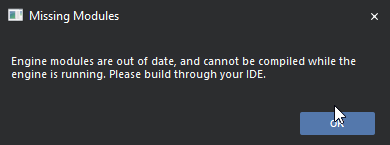
Engine modules are out of date, and cannot be compiled while the engine is running. Please build through your IDE
I've rebuilt both the game and the engine through visual studio multiple times now, and I get this problem every time. I'm out of ideas. Any thoughts here?
quick mica
do you get the same error if you start the game using VS?
 frigid briar
Hey guys, I am working on a project with a group of 5. While most of us are working with the EPIC launcher version of the engine, one of our programmers uses a self compiled version of the source code. When he works on stuff, we get those yellow messages on all entities he worked on:
LogLinker: Warning: Asset '../../../../../../../uproject/Content/Blueprints/UI/BP_HUD.uasset' has been saved with empty engine version. The asset will be loaded but may be incompatible.
LogLinker: Warning: Asset '../../../../../../../uproject/Content/Blueprints/UI/NewWidgetBlueprint.uasset' has been saved with empty engine version. The asset will be loaded but may be incompatible.
When one of us just resaves those entities, the yellow warning wont show up anymore. Anyone knows what this warning actually means or if something breaks?
gloomy hamlet
@frigid briar A non-installed source built engine tags assets with a zero version ID when saving. Reason being it has no meaningful version, anything in the engine code could have been changed, which could affect saved asset format.
So the warning is telling you that the asset was saved in an unversioned engine build, so it can try to load it, but there's the potential that it would fail.
In practice if your team member is not modifying internal asset types, you shouldn't run into issues. But it's not ideal, really they should make an installed build (which I think allows the versioning to match the launcher builds), or otherwise everyone should be building from source.
smoky goblet
You could also look into UnrealGameSync. Unfortunately I don't know a lot of the details exactly but it does allow for local builds to be versioned correctly to work interchangeably with automated builds. I don't know how well it works with an installed version of the engine.
magic fjord
another error
magic fjord
aand another :|
quick mica
looks like your data is broken, attach a debugger and debug ...
magic fjord
quick mica
looks like your data is broken, attach a debugger and debug ...
how
my data cant be broken i used umodel to extract the level from the game and placed it right in there
quick mica
Well then those crashes don't exist, and no crashes, no problem 🙂
magic fjord
but i am still crashing @quick mica
also heres the thing im following just incase u need it
quick mica
Attach a debuger and have a close look on what is going on...
magic fjord
quick mica
Attach a debuger and have a close look on what is going on...
how do i attach a debugger
quick mica
well then use it to attach to the process that crashes.
I suggest to get some basics learned^^
magic fjord
uh okay
so far it hasnt crashed
but its frozen
@quick mica here is a list of things that happen when i set my startup map as the custom one
quick mica
you do actually read those errors, right?
quick mica
Then start reading it. Your package is missing lots of Data
magic fjord
yehh
magic fjord
how do i make the engine ignore missing assets when im importing a level
i just want it to not give me errors for every asset missing, and instead skip loading it
magic fjord
;-;
quick mica
well it won't load it and that's why you crash in the end... fix your data...
 wintry acorn
Guys, I know Its a popular q but Ive never seen an answer
I just rebuilt my project on C++ and now UE just dont want to start properly
Assertion failed: false [File:D:/Build/++UE4/Sync/Engine/Source/Runtime/Engine/Private/EdGraph/EdGraphPin.cpp] [Line: 1884] Pin named StructOut was serialized while trashed - requesting pin named StructRef owned by node K2Node_SetFieldsInStruct_0
I know that some people saw that before maybe you have an idea of how to fix it
Cause It just killed my project :c
quick mica
first approach: attach a debugger ... check what asset is failing ... delete it
wintry acorn
Ok I found that controller breaks my project
But main thing is that I cant just throw it away. Too many things inside it was done. Any ideas how to resurrect it?
Also is there any "hotreload" files? Wanna delete it first
quick mica
hot reload files?
wintry acorn
Just dont really know how it works, so wanna try to delete anything related to hotreload
quick mica
there is nothing you could delete related to hot reload
and if your data is broken it's broken, that's why I have my files under source control and also have most logic in code and just some simple stuff in BP, so I don't really care if a BP breaks, I either can check out out from source control or recreate it
wintry acorn
kk I have a backup too that was made not too long ago. But its disgusting :/
quick mica
well, if you don't know what you do, don't do it with important data^^
wintry acorn
The fun part is - I just made a change in C++ struct
Just added 2 FName's
And it just went down 😄
quick mica
Did you close the engine while compiling?
if not, if you really need your engine running while compiling, never change serialization code and use this LiveCode thing, but never use hot reload, otherwise, close your engine before compiling
wintry acorn
quick mica
Did you close the engine while compiling?
Im closing it but not 100% sure that Ive closed it last time
Ive noticed that hotreload is not a perfect thing 🙂
quick mica
you can disable it somewhere, IIRC
wintry acorn
I think I just disabled it in Build.h
quick mica
well then, just close the engine before compiling and you shouldn't face such issues again^^
wintry acorn
Yeah, better do like that 😄
Also for the future people who will search for Assertion failed: false [File:D:/Build/++UE4/Sync/Engine/Source/Runtime/Engine/Private/EdGraph/EdGraphPin.cpp] [Line: 1884] Pin named StructOut was serialized while trashed - requesting pin named StructRef owned by node K2Node_SetFieldsInStruct_0
Seems like you gonna lose at least 1 of your files. Through error window you can find a folder with error log. Just scroll down and see what file broke your project and get rid of it

And use source control next time 😄
 dusky zinc
I don't know much about this, but...
where does a custom shader model sit in the rendering pipeline? One of the biggest struggles with developing for oculus quest is you can't use mobile hdr. So we're stuck with regular LDR and no post process or anything. Where would one go in the engine to insert that kind of stuff? Would you make a custom render pipeline (edits to the original) or would you do something with a custom shader model?
 sturdy nimbus
Key guys, I am doing something about scene shadow in ui, can i get textures of shadow map in slateui render pass?
 modern condor
Hi, can someone help me with this? I´m trying to build the engine from source but i came across this error

 lime sedge
hello.
data-oriented is we create structs to contain all our data that we will then use in classes?
What is a factory? (To set up data driven objects)
 thorn basalt
Hi ! I have a question which I cant find on forums. I would like to detect collision on complex and simple mesh collider. However I cant find a way to do it. I tried this Mesh->GetBodySetup()->CollisionTraceFlag = ECollisionTraceFlag::CTF_UseSimpleAsComplex
but it does not change the collision geometry.
Please I am kind of lost
well I am actually lost
 dusty inlet
Hey, Is there's a way to get Intellisense in the engine's source, without compiling it?
vagrant osprey
Hi, so QQ. On my computer I get headless chaos compile errors.. but another dev doesn't with a fresh engine source checkout and game checkout and build. Does anyone know what I might look for on my computer that would cause that? I have a 3090 video card, not sure if its related. I do know.. that I can turn some flags on in one file to make it compile for me, but I'm more interested why it only is on my pc. Oh. On 4.26.1 btw
vagrant osprey
also got this..
 vagrant osprey
nm got it to build
 wooden flame
Hi i need some help.
Im working with ugc exapmle and want to call ugc plugin function from my cpp code. Always getting invalid access to code. Any help?( I can give more details)
quick mica
(yes you should give more information)
 finite belfry
does the ugc plugin function have [Plug-In Module Name]_API in its definition
thats about all i can think to ask without further info
 finite sphinx
In UE4Game.Target.cs, there is a comment to uncomment some lines to create a smaller binary for ios. However, doing that leads to compilation error. Disableing recast gives errors in ai
 undone oxide
Hey Unreal People, any chance someone knows how UE4 is loading a map with sub-levels in the editor?
For me it eats a lot of RAM when I'm loading all the sublevels at once. And less than a half of that if loading the same sublevels one-by-one manually.
My assumption is that the editor is loading sublevels in parallel and loading all the assets in memory each time even if they are referenced in multiple sublevels.
E.g. if an asset is referenced in sublevel1 & sublevel2, UE4 will load it to the memory two times.
Any idea how to test/fix this?
 ornate harness

unable to build unreal engine from xcode i get this when i try to run generate project files.command
 native crow
Any up-to-date guides on howto compile a linux server?
hidden hedge
native crow
Any up-to-date guides on howto compile a linux server?
the official docs? https://docs.unrealengine.com/en-US/InteractiveExperiences/Networking/HowTo/DedicatedServers/index.html
How to set up and package a dedicated server for your project.
you must use a source build
that hasn't changed
native crow
There doesn't seem to be much of a mention in terms of linux in there, primarily for Windows 😅 And yes I am using the source version in order to test this. Ran the tutorial that you linked however there seems to be a different procedure for linux than for windows?
hidden hedge
it's the same?
native crow
So all that's needed is the cross platform toolchain and changing the build platform to linux?
hidden hedge
though this tutorial uses the packaging inside the editor rather than something like invoking UBT
well yes, packaging from the editor on windows would require the linux cross-compilation toolchain installed
native crow
Sorry I seem to have misphrased myself... I should have asked regarding dedicated linux servers, and not just linux, my bad
hidden hedge
and you might have to build your project after installing the toolchain so that LinuxTargetPlatform.dll (or whatever it is again) is compiled
native crow
Will try and play around with it, thank you wires 🙂
 dense helm
Hi,
What is the difference between touchforce and push force in UCharacterMovementComponent ?
what i understand is that they are both used to apply force to physics objects
 last swallow
i am being pretty stupid, i can't find the file analytics provider plugin source code, i assume it is in the engine code somewhere
stable hemlock
Quick question, I just built unreal source last night, and it seems like the editor keeps freezing on 45% when loading up. Anyone know why this could be happening?

 hollow scarab
stable hemlock
Quick question, I just built unreal source last night, and it seems like the edi...
hollow scarab
stable hemlock
Quick question, I just built unreal source last night, and it seems like the edi...
First load can take a long time
stable hemlock
oh ok thanks!
stable hemlock
also when running project in source the UE version is showing 4.26.2 and when adding advanced sessions it popped up a rebuild prompt after trying to rebuild it says this, I assume its because the advanced session plugins are for 4.62.1
any ideas?
 undone goblet
stable hemlock
https://i.imgur.com/hbMwdmC.png
undone goblet
stable hemlock
https://i.imgur.com/hbMwdmC.png
you need to generate visual studio project files(if they are not available /generated previously), open .sln file and build the project from there
stable hemlock
undone goblet
you need to generate visual studio project files(if they are not available /gene...
Life Saver ❤️
stable hemlock
Quick question as well I was diving into the engine source and in "Plugins -> Online -> OnlineSubsystemSteam -> Private -> OnlineSessionAsyncServerSteam.cpp" on line 458, they have this showing ```// Figure if we need to override the server name here
FString CustomDedicatedServerName = SessionInt->GetCustomDedicatedServerName();
Session->OwningUserName = (!CustomDedicatedServerName.IsEmpty()) ? CustomDedicatedServerName : Session->OwningUserId->ToString();
I am wanting to overide the name and I see it looks like its calling GetCustomDedicatedServerName but where is that checking? I am new to c++ so sorry for weird question
 dreamy rune
@stable hemlock Hi, is this what you want to know?:
In this line they use something called a "conditional operator". With this you can check something and decide on a value as a one line statement rather than writing "if-else":
Session->OwningUserName = (!CustomDedicatedServerName.IsEmpty()) ? CustomDedicatedServerName : Session->OwningUserId->ToString();
The "if-else" would be something like this:
if(!CustomDedicatedServerName.IsEmpty())
{
Session->OwningUserName = CustomDedicatedServerName;
}
else
{
Session->OwningUserName = Session->OwningUserId->ToString();
}
The first value after the "?" is used when the statement is true. Else it uses the value after ":".
stable hemlock
dreamy rune
<@456226577798135808> Hi, is this what you want to know?:
In this line they use...
Thanks a lot, so it’s just looking for a fstring named customdedicatedservername and if there is none it used the owning used id
dreamy rune
yes
stable hemlock
dreamy rune
yes
Ok thanks, and you wouldn’t happen to know how to read a custom ini file value for that?
dreamy rune
nope sorry haven't done that before
stable hemlock
dreamy rune
nope sorry haven't done that before
Ok well thanks for the info anyways!
 terse torrent
Hi All,
Just updated my project (4.25) to 4.26 but needed to compile from source for plugins. I downloaded source and built engine all fine but...
When i open my project in 4.26 in some of my levels "Static Meshes" are missing, it seems like the path to these meshes no longer exists, but the meshes themselves are in the content folders.
Any help on this would be appreciated as I've quite a few levels with a lot of meshes and will take a considerable amount of time to manually fix each 1. Thanks
gloomy hamlet
@terse torrent Why would plugins require you to build the engine from source?
 serene shale
side note.. i just had issues compiling source 4.26... found this ,, it worked
<from another web site>
The commit adds the following to the end of the HeadlessChaosTarget constructor in HeadlessChaos.Target.cs
// Force enable Chaos as the physics engine for this project as this
// is a Chaos unit test framework - it doesn't build with PhysX enabled
bUseChaos = true;
bCompileChaos = true;
bCompilePhysX = false;
bCompileAPEX = false;
bCompileNvCloth = false;
After adding those lines I was able to compile my project without having to add Chaos to the engine target.
terse torrent
@gloomy hamlet trying to load my 4 25 to 4.26 just gave me an error about compiling plugins, so decided to do this with source which succeeded but with issues on the static meshes I mentioned
@serene shale I also found that topic today, added those lines and it did indeed build with no compiler erros but, same issue with static mesh paths in my levels really strange
 strange jungle
Hey ! I'm trying to modify the default Diffuse_Lambert reflectance model. I want to change the diffusecolor part for now it is something along the lines of NdotL = saturate ( dot (N,L)) and i want to change it to N.y *= 0.3; NdotL = saturate (4 * dot (N,L)); but i can't find where the diffusecolor is written in the engine source code. Can someone help me ?
Here is the Diffuse_Lambert (BRDF.ush) also sorry for my english it is quite bad.

 kind storm
Does anyone know how to make engine patch from the source code modification?
 shell portal
Isn't the master branch supposed to always be able to compile?
I'm trying to compile from source and getting 86 errors.


As a result, I'm not able to launch the Editor. When I do, I get the following error.


 twin hazel
Is there any common engine modifications you guys do? for optimization, or adding a new functionality etc.
smoky goblet
twin hazel
Is there any common engine modifications you guys do? for optimization, or addin...
Almost all my engine modifications are related to making custom blueprint nodes or improving blueprints one way or another. Making a harmless getting public, or writing one or tweaking the order of pins in stock blueprint nodes.
 prisma lark
Does anyone have any experience with doing IPC through UE4's sockets ? If so, does it work ok on all platforms or are there any platforms (the mainstream ones) that don't have support yet?
kind storm
kind storm
Does anyone know how to make engine patch from the source code modification?
Does anyone know how to make engine patch from source modifications (4.26)?
I want to make my other project to be open, but it's meant to be used in editor (not standalone runtime app), and I can't distribute the modified UE4 it uses without having others going through the hoops of building the engine themselves.
 heady sparrow
https://github.com/ryanjon2040/UE4-Binary-Builder perhaps just distribute the entire binary?
GitHub
An application designed to create installed Unreal Engine builds (aka Rocket builds) from Unreal Engine GitHub source. - ryanjon2040/UE4-Binary-Builder
for the record I haven't used this myself
 vague jay
I build the engine with this https://github.com/ryanjon2040/UE4-Binary-Builder and ticked "Include DDC" and "Host DDC Only".
It spits me two folders out.
Why? 😅 The Engine one contains the DerivedDataCache/Compressed.ddp file. What do I do with the "InstalledDDC" folder?

GitHub
An application designed to create installed Unreal Engine builds (aka Rocket builds) from Unreal Engine GitHub source. - ryanjon2040/UE4-Binary-Builder
 last stream
Building 4.12 for the Unreal Tournament project; what does this mean?

I feel that I might not have the correct windows 8.1 sdk, any help is appreciated.
 kind storm
heady sparrow
https://github.com/ryanjon2040/UE4-Binary-Builder perhaps just distribute the en...
kind storm
heady sparrow
https://github.com/ryanjon2040/UE4-Binary-Builder perhaps just distribute the en...
I mean, yeah, that part is obvious, thanks, but how do I make sure anyone who downloaded it also have a valid Unreal Engine licence? I'm not distributing it in a closed team in this regard and I don't want to get into trouble for violating distribution rules.
heady sparrow
Oh jeez, that hadn't occured to me
Make it a weird fork of the engine on github and force them to get it that way?
(this is not legal advice, please don't sue me)
kind storm
heady sparrow
Make it a weird fork of the engine on github and force them to get it that way?
Not everyone would understand the actual struggles coming from building the engine. I mean, my artist is having difficulties building the same fork themselves without my direct guidance (both the game project and the unrelated machinima project share the same engine mods and materials). The project is geared towards machinima creators, and I doubt they have 100 GB of space for the compiled editor alone.
But if that's the only way (even if I remember there was engine patching in 4.20), I'll make the detailed instructions myself.
 gentle beacon
Hello everyone, I'm having a few issues working in Source with GameLift enabled. They are:
- *Server.Target.cs does not populate to */Source folder in the solution explorer after generating project files
- After manually adding *Server.Target.cs, building with the Development_Server x64 build config (after rebuilding the editor) builds as "Invalid Win32" instead, and "Development_Server" is not on the list in the config manager
- as a result of one or both of these I am unable to build my server application
quick mica
you have to name it ProjectNameServer.Target.cs and it is usually not created by default, you have to create it IRRC
gentle beacon
I have done that. I managed to get a little farther, but now I get this:
Task "Exec" skipped, due to false condition; ('$(NMakeUseOemCodePage)' != 'true' and '$(NMakeBuildCommandLine)'!='') was evaluated as ('true' != 'true' and 'D:\UES_4.26\Engine\Build\BatchFiles\Build.bat PROJECT Win64 Development -Project="D:\PROJECT\PROJECT.uproject" -WaitMutex -FromMsBuild'!='').
Development Server build config runs fine... then doesn't build server executable...
Before I was using *Server so as not to put the name of my project in a public forum, but yes, I did call the file (and the code within) ProjectNameServer.Target.cs.
quick mica
could you ping the content of your target.cs file?
gentle beacon
how do you mean?
quick mica
the code you have written into this target file
 daring basin
I'm trying to work out how to use UE4's built-in source control stuff from within C++. I want to be able to spawn the "Do you want to check out these files?" window but for some specific files. Does anyone have experience with this?
Is this even the right channel to ask?
 fringe night
Does anyone know if there is a way for Unreal to be able to recognize Network mapped folders? We use this so that all source assets have the same drive letter by creating a fake network drive to a folder anywhere on your computer. I am tweaking the Substance plugin to try and fit into our workflow, but Unreal doesn't seem to be recognizing the network folder as a valid path
hidden hedge
daring basin
I'm trying to work out how to use UE4's built-in source control stuff from withi...
probably more #editor-scripting

and these look like they would do it, in UEditorAssetLibrary
daring basin
@hidden hedge mr snrub you are incredibly helpful as always, thank you ❤️
 civic trout
I'm trying to set the minimum weight threshold to be lower from the default 0.01f to 0.002f, but building that seems to break the importer and produce weird artifacts (due to float rounding error maybe?  ).
).
Is there a possible fix for this aside from increasing the threshold to 0.004f?
(In Unity it imports just fine)

 summer spindle
is fastbuild implementation finished in 4.26?
 narrow jungle
UE4 doesn't let me create C++ classes. It doesn't show in the right click menu
dense helm
@dark spindle hi, Do you know where in the engine source i can get the class/method how manage rendering.
i mean something like iterate over all actors looking for cull distance etc etc?
 dark spindle
No idea what you're asking, sorry
Also don't tag me for your random questions please
 mighty fulcrum
Is it possible to do integer scaling of game resolution? I want the game to be pixel perfect at a custom resolution, but it seems the best way to do it is on the engine source aspect. I want the game to run in low resolution but scale up in multiples instead of stretching to the full screen.
Can anyone help with this?
mighty fulcrum
Or at least when running in Windowed mode, render black around the entire screen except the game window
wooden flame
Does somebody know how can i automate migrate assets (dataprep, bluetilites, python) anything? Thanks
 split vapor
Is their anyway to build the engine from source faster
spiral mortar
ye buy more cpus
 drowsy tendon
split vapor
Is their anyway to build the engine from source faster
drowsy tendon
split vapor
Is their anyway to build the engine from source faster
Maybe IncrediBuild
 limber jacinth
only if you have multiple machines.
stiff prawn
I have the following doubt: Is it normal for my UE4 source version of the engine to occupy ~360 gb after compiling it?
Or have I done something wrong (aka cooking more stuff than necessary)
Also, what's the purpose of configs *Development *and *DebugGame *? In contrast with Development Editor and DebugGame Editor , Which version should I use for compiling the engine and why?
 turbid moss
stiff prawn
I have the following doubt: Is it normal for my UE4 source version of the engine...
turbid moss
stiff prawn
I have the following doubt: Is it normal for my UE4 source version of the engine...
my 4.26.1 source build is 143 gigs
turbid moss
I'm trying to get chaos enabled on a 4.26.1 source build, but after following the steps here https://docs.unrealengine.com/en-US/InteractiveExperiences/Physics/ChaosPhysics/Overview/index.html and rebuilding the engine and my project, if i dont change the project editor build cs it complains that its using the same target as the editor (cant remember the exact error) and if i add BuildEnvironment = TargetBuildEnvironment.Unique, bCompileChaos = true and bUseChaos = true to the project editor build cs it seems to work but i cant run it with the debugger attached, i get "Running incorrect executable for target." and the debugger closes but it launches my project in the editor. anyone know how i can fix this so i can run the editor with the debugger?
hidden hedge
you should just build your project
that only builds engine modules you need
also disabling plugins you don't use also helps compile times and file sizes a bit
 fair lily
hey folks, I've built Chaos-4.26 engine source and have been toying with the new physics engine. I'm trying to add a Static Mesh Simulation Component, but it keeps excepting on seemingly an assert false..: ensure(false) on PhysScene_Chaos.cpp:574
 orchid seal
Wonder what's going on with the master branch? Last commit 7 days ago. 🤔
 abstract cove
If I generated visual studio project before running setup.bat, would it work if I redo it correctly i.e. run setup.bat first to download dependencies then create VS project again?
heady sparrow
Do you need to run setup first? I don't think that's a big deal
heady sparrow
orchid seal
Wonder what's going on with the master branch? Last commit 7 days ago. 🤔
I was wondering about this too. Is it normal to go this long without commits? Maybe a holiday?
No biggie either way but I had to comment stuff out of sequencer to build latest
hidden hedge
it looks like there might be an issue with the bot that sync epic's perforce with github
since I'm seeing commits as recent as today through that
 lyric mortar
might be a dumb question, but how does one gain access to perforce?
hidden hedge
by being a custom licensee
lyric mortar
ah, that makes sense. I submitted that contact form a while back and haven't gotten a response 
hidden hedge
well maybe you'll want to follow-up because depending on your project, having support could sometimes save your arse
abstract cove
heady sparrow
Do you need to run setup first? I don't think that's a big deal
I don't know. This is how the process is defined, so I thought maybe
abstract cove
Hey guys, I'm getting this error when building UE4

 raw zealot
Does anyone ever created a Dynamic Duplication Level from Dynamic Source Level for the Replay System? In the Engine I could find DuplicateRequestedLevels() but there is a check on top of the function using if (GEngine->Experimental_ShouldPreDuplicateMap(MapName)) what is hardcoded to always return false. Basically I just wanna play my Replay in a different World.
 half ridge
just posting for visibility, had a big problem with trying to Migrate some bps between projects. Editor failed to load them, crashed with a 'serial size mismatch' error. Found out it was just a few functions in the bps that was causing it, which had Actor inputs. deleting the function inputs fixed it, was able to migrate, and add the inputs back in after.
 astral hedge
I already built ue4 from source a year ago, tried it again now - pulled from github also as zip, each way I get this error - Any Idea what this could be? Been searching for around 10 Hours now, but every tutorial has no issue with this bat file ( generateProjectfiles) Installed Visual Studio 17/19, installed every addition that was suggested - I can open other ue4 projects in visual studio

 quick mica
did you run the Setup.bat?
astral hedge
@quick mica thanks you saved me, I reread the doc as well, looks like I twisted what file to run first/broke it before - just pulled a fresh workspace and setting it up worked!

 opal magnet
Hey Im having a REALY hard time finding information about the issue im comming up with on my unreal project.
The rendering seemed to be smeared whenever moving the player camera. Its fine when moving the player, but as soon as the mouse is touched, you cant even focus on a single object on screen because its ghosting so bad.
Ive even been looking for tutors on fiver, but can't find someone who can awnser my questions. Is there anyway I can find someone who can help me?
quick mica
guess it's due to TemporalAA
 modest ether
Hello! I was wondering if there is a way to bypass this:

I mean the player need to install it so my game can run. And I want to run immediately. (The player don't have to install it)
 upbeat olive
Hey I am trying to build 4.26 from source but I get thise issue

I went to binaries win64 and the exe has not been created
 lusty coral
you need to rebuilt unreal from vs
did you build unreal from visual studio?
@upbeat olive watch this entire video explains how to build unreal 4.26 from source, probably you were missed some steps : https://www.youtube.com/watch?v=UGJggZKRhWU&ab_channel=SneakyKittyGaming

Patreon: https://www.patreon.com/SneakyKittyGaming
Discord: https://discord.gg/VUJKzE3
In this video I walk you through installing the UE4 source build, specifically 4.26 :)
upbeat olive
Its weird cause I compiled multiple versions of the engine
And It was working an hour ago
Ima just give a re build
gentle beacon
Try building UnrealLightmass separately
upbeat olive
I just re built UE4 project and still the same 😦
 misty oyster
Has anyone experienced these errors before when cleaning the solution?

Cannot open 'C:\Users\Kieran\dev\Unreal\essentialue4\Engine\Source\Programs\DotNETCommon\DotNETUtilities\obj\Development\DotNETUtilities.dll' for writing -- 'The process cannot access the file 'C:\Users\Kieran\dev\Unreal\essentialue4\Engine\Source\Programs\DotNETCommon\DotNETUtilities\obj\Development\DotNETUtilities.dll' because it is being used by another process.' [C:\Users\Kieran\dev\Unreal\essentialue4\Engine\Source\Programs\DotNETCommon\DotNETUtilities\DotNETUtilities.csproj]```if i delete the file, its created as part of the clean too
 ember gull
hello guys
i always using unreal engine source from github master branch, but its been 18 days since last commit, my question is, am i limited and cant see the updates
or every body else is like me
quick mica
it's 12 days. https://github.com/EpicGames/UnrealEngine/commits/master
did you fetch latest updates?
ember gull
quick mica
it's 12 days. https://github.com/EpicGames/UnrealEngine/commits/master
did you f...
yea, why no activity in 12 days?
quick mica
I guess because no one pushed smth to main?
 upper grove
i'm getting this error and crashingwhen trying to play in editor offline "assertion failed error !GIsInEditorWorld" anyone have any ideas how to fix this?
lol im a dummy i had it set to have 2 players kekw
misty oyster
ember gull
hello guys
i always using unreal engine source from github master branch, but it...
I think Epic push to their private repo which is Perforce and the updates trickle through to GH
 undone talon
Hey all,
I'm working on an upgrade from 4.24.3 to 4.26.2 (Win64 build). I build the engine from source for my project.
I got everything upgraded/converted and nearly everything is working. All the basic mechanics/tests look good.
On 4.24.3, and previous engine versions, I've been able to load levels, and content, from custom pak files, without issues. Materials, meshes, etc, would render; no problems.
This time, levels loaded from pak files are not loading materials. I have the project options "Share Material Shader Code" and "Share Material Native Libraries" unchecked.
I deleted "DerivedDataCache" from all project/AppData locations in effort to clear shader cache.
The source project which generates the pak file has also been upgraded to 4.26.2. I executed "recompileshaders all" on this project and re-saved all the used materials in the project before cooking the pak.
This is what I see in the logs:
[2021.04.27-23.55.24:986][731]LogShaders: Error: Mismatch size for type FMeshMaterialShaderMap, compiled size is 112, loaded size is 104
[2021.04.27-23.55.24:986][731]LogShaders: Error: Mismatch size for type TBasePassVSFNoLightMapPolicyAtmosphericFog, compiled size is 520, loaded size is 256
[2021.04.27-23.55.24:986][731]LogShaders: Error: Mismatch size for type TTranslucencyShadowDepthVS<TranslucencyShadowDepth_PerspectiveCorrect>, compiled size is 512, loaded size is 248
[2021.04.27-23.55.24:986][731]LogShaders: Error: Mismatch size for type TBasePassPSFNoLightMapPolicy, compiled size is 520, loaded size is 256
[2021.04.27-23.55.24:986][731]LogShaders: Error: Mismatch size for type FHashedName, compiled size is 16, loaded size is 8
[2021.04.27-23.55.24:986][731]LogShaders: Error: Mismatch size for type TTranslucencyShadowDepthPS<TranslucencyShadowDepth_Standard>, compiled size is 520, loaded size is 256
[2021.04.27-23.55.24:986][731]LogShaders: Error: Mismatch size for type FMaterialShaderMapContent, compiled size is 584, loaded size is 508
[2021.04.27-23.55.24:986][731]LogShaders: Error: Mismatch size for type TTranslucencyShadowDepthVS<TranslucencyShadowDepth_Standard>, compiled size is 512, loaded size is 248
[2021.04.27-23.55.24:986][731]LogShaders: Error: Mismatch size for type TTranslucencyShadowDepthPS<TranslucencyShadowDepth_PerspectiveCorrect>, compiled size is 520, loaded size is 256
[2021.04.27-23.55.24:986][731]LogShaders: Error: Mismatch size for type TBasePassPSFNoLightMapPolicySkylight, compiled size is 520, loaded size is 256
[2021.04.27-23.55.24:986][731]LogShaders: Error: Mismatch size for type TBasePassVSFNoLightMapPolicy, compiled size is 520, loaded size is 256
I have also tried running the command "recompileshaders all" on the main game project. This does rebuild all the shaders, but it doesn't resolve the issue.
Am I missing something obvious here? The "compiled size" not matching the "loaded size" seems telling... just not sure what to try next.
Thanks!
hidden hedge
does "custom pak files" refer to mods because that engine upgrade is compatibility breaking
undone talon
Yeah, but I've upgraded the mod project as well and re-cooked the paks
I forgot to mention that the materials do load successfully when packaging up a shipping build of the game; it's only doing this in development builds
hidden hedge
though we explicitly load shaders from the mod but I don't get what you did:
    // load shaders from mod
    FShaderCodeLibrary::OpenLibrary(ModName, MountPoint);
#endif```ah thanks, gives me something to try 👍 appreciate it
 brittle rune
I need a sanity check on an error I'm running into... latest in 4.26 branch, Array.h:674
checkf((Index >= 0) & (Index < ArrayNum),TEXT("Array index out of bounds: %i from an array of size %i"),Index,ArrayNum); // & for one branch
This is just wrong... right? It's asserting that an index is out of bounds if it's less than the ArrayNum. A few lines down in IsValidIndex, the check for a valid index is identical:
Index >= 0 && Index < ArrayNum;
brittle rune
brittle rune
I need a sanity check on an error I'm running into... latest in 4.26 branch, Arr...
Weirdly, seeing some evidence of this same behavior on the issue tracker @ https://unreal-engine-issues.herokuapp.com/issue/UE-96884, but if I'm reading this right... seems like the bug author is blaming this on data corruption, rather than the code being busted.

Unreal Engine
Welcome to the Unreal Engine Issue and Bug Tracker. You can check the status of an issue and search for existing bugs. See latest bug fixes too.
misty oyster
they're not identical, the first has a & the second has a &&
The file hasn't been modified in almost a year
looking at the comment at the end of the line, i'm assuming its because of this: https://www.doc.ic.ac.uk/~wjk/c++intro/RobMillerL5.html
 neon shoal
maybe you source guys will be a better place to ask, but I'm working on a network heavy piece of software that uses splines for walls generated dynamically at runtime...and I am wondering about replication. Currently I have to NetMulticast all changes to the spline actor, and this means that join-in-progress clients see none of the modifications to spline actors. From what I can tell in the source, FSplineCurves is a not a replicate-able struct. Is my understanding correct that I cannot pass/get/store the data of a spline component between servers and clients to get everyone to update to the most correct server-side data of a spline?
narrow jungle
How do I fix this error?

 clear elk
I need help to fix my construction script, it won't be called no matter what I do, and sometimes my sky sphere and my post process don't work properly or just won't load
currently my construction script works but sometimes it just doesn't work anymore
narrow jungle
C:\Program Files (x86)\Microsoft Visual Studio\2019\Community\MSBuild\Microsoft\VC\v160\Microsoft.MakeFile.Targets(45,5): error MSB3073: The command "A:\ue\Engine\Build\BatchFiles\Build.bat -Target="CounterSixSiegeEditor Win64 Development -Project=\"B:\unreal engine\CSS\CounterSixSiege\CounterSixSiege.uproject\"" -Target="ShaderCompileWorker Win64 Development -Quiet" -WaitMutex -FromMsBuild" exited with code 6. How do I fix this error?
misty oyster
@narrow jungle Nowhere near enough information for someone to help fix these. The first looks like a bug in UE4
The second just means the command to compile your game failed
if you check the output window in VS/Rider, you should see some errors detailing exactly what failed
brittle rune
misty oyster
looking at the comment at the end of the line, i'm assuming its because of this:...
I might be missing, what's the this in here? You're right, different between && and &, but I figured that the bitwise & is an optimization, it shouldn't behave differently from && in this case.
misty oyster
this points to a TArray by the looks of it
yeah thats correct, i believe its to reduce the number of branch instructions
brittle rune
oh d'oh, checkf is using assert-like logic, OK🤦
 pallid delta
hey guys i need help compiling the ue 4.27
but i using vs 2019 to compile it
but its bring like close to 200+ errors
maybe i need newer version of visual studio?
kind storm
pallid delta
hey guys i need help compiling the ue 4.27
4.27 isn't even out for preview yet.
Speaking of 4.27
Does this mean Niagara Simulation Stages only usable in 4.27+ and can't be backported to 4.26 since it's a "Content" only plugin?

 thick storm
yes
the real question is
why would you want to stick to older version
it doesn't make any sense when using unreal
kind storm
thick storm
why would you want to stick to older version
Copy pasting my angry rant about sticking to older version:
Rebuilding the engine again takes a lot of productive time away, since building the engine took up all the hardware power. I don't want to spend 24 hours just to rebuild the engine again.
Porting existing codes to newer version is either hit or miss, due to API changes between versions. You have no conception of how tough it is to redo all the changes I made in the older version to the engine and project codes and plugins every time I switch the engine version. I brought modifications from 4.23 to 4.24 to 4.26, and it's a bloody chore.
Distributing the compiled engine to the team members working remotely is also time consuming and can cost them their data usage. I'm talking about uploading 20 GB of ZIP file across non-first world country internet connection.
I'm seriously pissed when some random person shout to me "just switch to the fucking new version or use UE5 lmfao", because I'm not that egoistic. I have the reason to stick with slightly older version, [it makes bloody sense], and many pros I asked also suggested to stick on one version.
Rant over.
Also yes, I'm using custom GitHub build, hence asking in #engine-source
For crying out loud, Gears 5 (and maybe Gears Tactics) uses UE4.11 with many backported engine features.
thick storm
Gears is using 4.2x or something.
One question. What you do, that you need to modify engine source in the first place ?
And second thing. Compiled binaries I distribute to artists have about 500Mb..
how the hell did you endup with 20gb ?
kind storm
thick storm
Gears is using 4.2x or something.
One question. What you do, that you need to mo...
Gears 5 is a modified 4.11, with backported features from 4.19, the devs still use Matinee, which Sequencer didn't exist until 4.12. There was a talk from the devs about it.
Deferred GBuffer anime shader, slightly modified world composition loading, modified widget classes to suit our design language, integrating some custom plugins (mainly on physics).
The binaries I distribute include PDBs and the source code, and it's important because I can't store precompiled C++ files into GitHub. They worked on the UI too.
I'm not gonna question how you ended up with 500 MB, because the most barebone, no gameplay modules at all, no fucking PDBs, still reached 4 GB.
 unkempt forum
 summer spindle
does anyone know what's "PerforceBuild.txt" used for?
quick crystal
Anyone here using chaos instead of physx?
I just updated my source build to use 4.26.2 (from 4.26.1) - I usually always try to compile chaos, but it never works. Not sure if this time will be any different.
Also, is chaos the default now for the launcher version of UE for 4.26?
Welp, I'm going to be stupid and try to rebuild it with the bCompileChaos = true; flag one more
It'll make me wait 30 minutes to just fail with errors I am sure
oh look at that, not even 30 minutes this time
1> [91/4446] Module.Core.3_of_15.cpp
1> [92/4446] Module.PhysicsCore.cpp
1>C:\Source\GH_Repos\UE4\Engine\Source\Runtime\PhysicsCore\Public\PhysXIncludes.h(42): fatal error C1083: Cannot open include file: 'PxPhysicsAPI.h': No such file or directory
One day in the next ten years we will be able to just download the latest engine source code and compile the chaos system by simply pressing F5
One other thing, with a fresh rebuild, should it really take around 40 minutes to compile everything? I have an i9 overclocked CPU, 128 GB of overclocked memory, and the engine is on a M.2 SSD that screams. The documentation says it should only take upwards of 40 minutes at the worst end of the spectrum. I'd think I would be much better off...
quick crystal
1>Total time in Parallel executor: 2237.02 seconds
1>Total execution time: 2248.38 seconds
 potent anvil
I have an issue I'm hoping someone might have insight with: I'm currently trying to use data tables to populate a data driven object system (think halo's forge mode, where each piece is loaded through a datatable). I have a category list (which is a table full of dataTableRowHandles), and then I have my items themselves in a list which the categories point to. If I have the same row handle but in two separate categories, when I place the second version of that item in the scene, it seems to garbage collect (or something I have no idea) the pointer that the first item uses. Does anyone have any idea how a row handle could become invalid in this way if duplicated? I'm stumped as my code used to work logically when I used blueprints instead of data tables for data loading.
potent anvil
Ignore me, think I might have located the issue. I think I was trying to point to objects in a vector, and upon resizing those were becoming invalid
 viral heron
Does anyone know what "Super" is referring to i.e. the base class in the BeginPlay function? Or is this dependent on the type of C++ class you are using... Also.... why is the base class BeginPlay() called inside the overridden BeginPlay function definition as seen in the .cpp file. It's by default in the code and i'm wondering the reasoning for this.
viral heron
Ok cool that makes sense. It is all very abstract right now.. i have to actually work in the engine longer to understand this
but at least i know what super is and how it functions in the engine
Where can I find the source code for the base implementations?
 sudden drift
Should I not be building from the master branch?
I'm getting all kinds of weird errors trying to run projects with the Development Server option and I read something about not using the Master branch.
limber jacinth
Master is unstable
 round pagoda
sudden drift
Should I not be building from the master branch?
round pagoda
sudden drift
Should I not be building from the master branch?
use the release branch for the latest stable build
Just checking if we're suppose to be using VS 2019 for UE 4.26.2? All of my solutions are paraphrased as VS 2017 in my 2019 editor. Is this normal?

 static dirge
does engine source include editor symbols for debuggin?
 snow kindle
if you build in debug mode I suppose yes. As you've got the sources, you're the one generating the symbols when compiling
static dirge
ya I was actually just able to debug my local ueminidum.dmp, but still haven't figure out how to debug those that happened for other PC
lament cradle
I am trying to build 4.27, anyone run into these errors? I was looking for log files in the source folder, not sure which one is for building for source.
sudden drift
round pagoda
use the release branch for the latest stable build
Thank you. I checked and I am using the default release branch. I still cannot build my project for Development Server 😦
round pagoda
Oh, not good. Why don't you just use the front-end and build with dedicated server?
sudden drift
round pagoda
Oh, not good. Why don't you just use the front-end and build with dedicated serv...
Do you not need to use the Development Server configuration to package a server build?
round pagoda
sudden drift
Do you not need to use the Development Server configuration to package a server ...
I've only ever built the Frontend and 'cooked by the book' with Servers. I've heard of using VS to directly build the Server, but no idea 😂
 sudden drift
Oh...I might be using the wrong name for what I'm talking about.
round pagoda
Your trying to build a server with your client build for a multiplayer game?
sudden drift
Yeah, the tutorial that I'm following says to launch Unreal with the Development Server configuration, then package the server through the File -> Package -> etc menus.
round pagoda
Ahh yeah, never done that before. I've only used the frontend
sudden drift
@round pagoda #packaging message This is the error that I'm getting when I try to launch with Development Server.
It's a post I made in #packaging
round pagoda
This is a option you can select in the frontend options, sounds similar. Maybe worth checking out?

Unreal Engine has some content it calls 'engine content' and there's some basic stuff like cubes etc. there. Its easy to accidentally select an engine content item from the asset viewer. I've done that loads of times for my 'dev' levels where every item is on a white cube
sudden drift
@round pagoda I'm building the Frontend now 🙂
round pagoda
🙂
You can use the asset viewer to see where you've messed up and accidentally used engine content (if its unintentional)
sudden drift
I actually did it on purpose! The reference viewer has been my friend to use new meshes.
 hexed valley
Hello everyone! Did anyone have any luck compiling the 4.27 branch? The error I get is C4668 'WINAPI_PARTITION_GAMES' is not defined as a preprocessor macro, replacing with '0' for '#if/#elif'
hidden hedge
are you using VS2017 or something? or using an old windows SDK?
should be fine if you're using the 10.0.18362.0 windows SDK
 neat laurel
Sorta unsure where I should be asking this, so this channel seemed to be the closest to where I think I could find answers. Basically, UE4 (4.24.3) is giving me the error of "Compile Unreal Lightmass" but I had never built UE4 from source, only through the Epic Launcher :/ Should I possibly build UE4 from source to get past this issue for my project?
 full jewel
@neat laurel that error is a red herring, a mesh probably has an issue
neat laurel
full jewel
<@95172170279288832> that error is a red herring, a mesh probably has an issue
Do you think there is any possible log that would show an area where the mesh might be the issue, or will I just need to test all of them...
full jewel
my friend ran into it a few times, i think the only way he got around it was deleting things until it worked. duplicating the map would make it easier
neat laurel
Righto, well thank you for the confirmation on this then! I'll... spend my night trying to work it out then hahaha
full jewel
i think in his case when he found the mesh causing problems, it was the lod settings being wrong
it was one of the infinity blade assets if that narrows anything down
neat laurel
Well it's a start, at least there isn't any issues with my engine build then!
Not quite but knowing I need to check meshes, definitely gives me a path to follow
 robust timber
What folders can I delete after building the engine? 150GB is quite insane.
 waxen tide
heyo i downloaded this https://github.com/EpicGames/UnrealEngine (2.26.2 release)
and then i extract it to a folder now i builded my game with (2.26 release) and copy the UE4Server.Target.cs and UE4Editor.Target.cs to the project source folder and named to "MyProject4Server.Target.cs and MyProjectEditor.Target.cs"

When i will start on building game comes this

why?
waxen tide
höh
how then

Hello guys welcome to another tutorial. Today I will show you guys how to compile a dedicated server for your own game. This will allow you to host your own server, and have anyone join it from across the world. I demonstrate this by putting the packaged final game on a usb and running it from my laptop on a mobile hotspot. I join the dedicated ...
i have show this
how then? @hidden hedge
hidden hedge
what does your server Target.cs look like?
https://docs.unrealengine.com/en-US/InteractiveExperiences/Networking/HowTo/DedicatedServers/index.html the official docs also cover it pretty well, I prefer that rather than watching a video
How to set up and package a dedicated server for your project.
and by extension, your editor Target.cs
 hidden hedge
?
hidden hedge
usually you have
Engine/
YourProject/
GenerateProjectFiles.bat
etc
when you generate the project file, the solution should have UE4 and the game project in it
then you can just build your game project so you don't have to compile the entire engine

 waxen tide
what do you think?
hidden hedge
waxen tide
hidden hedge
usually you have
Engine/
YourProject/
GenerateProjectFiles.bat
etc
who you mean haha
hidden hedge
who?
waxen tide
waxen tide
this is the folder lol
hidden hedge
yeah and where's your project?
waxen tide
here
 hidden hedge
so you ignored my message then
because it's not under the engine directory, because when you use engine source, it usually lives under the engine root which is in your other screenshot
waxen tide
i just want to know if i have to compile the whole engine
 hidden hedge
no if you actually read the message I linked
because that generates a UE4.sln with your game project in it
waxen tide
kk
hidden hedge
and then if you just build the game, it only compiles what it needs
waxen tide
and how can make the dedicated server lol
hidden hedge
dude I already linked it
How to set up and package a dedicated server for your project.
 hidden hedge
yes if you do the thing I say then it'll build only the modules your game project needs rather than the entire engine
waxen tide
ah ok sorry bro for dont understanding
ah i have the configuration Development Editor for game and Development Server for the Dedicated Server right?
 kind storm
waxen tide
<@!166299757151649793> how long it need
kind storm
waxen tide
<@!166299757151649793> how long it need
24 hours, so enjoy your Sunday.
hidden hedge
Looks like you built solution so probably an hour or so depending on CPU and RAM
hidden hedge
Considerably more than that if a low core count CPU
waxen tide
i think complete ue4 editor
hidden hedge
If you did the directory structure I suggested and just build your game project, you’ll save a lot of time on building
If you build your game in Development Editor or DebugGame Editor, then it builds only engine modules it needs rather than all of them
waxen tide
i have make a file in source by my game project also the server.target.cs
and then i build development editor
the way it is written in the docs
hidden hedge
The server target isn’t even read when you’re compiling the editor
waxen tide
ok also takes long?
hidden hedge
Probably since it compiles each target independently. Depends how many plugins you use and how many you’ve disabled that you don’t use
waxen tide
hidden hedge
The server target isn’t even read when you’re compiling the editor
I know because the server stands alone and the game is later only on the pc and then you connect from the game so editor simply to the server
hidden hedge
16GB is a pretty low amount of RAM for serious UE4 dev though
waxen tide
xD
hidden hedge
So you might get the compiler is running out of heap space a few times
waxen tide
yes
but just let it run?
xd


i think its ok
Is it only now that it takes so long to compile? or in general again and again?
 full jewel
it usually took ~2 hours on my 3600x before to build the engine
waxen tide
okay
 full jewel
let it finish and try again, you may need to close some other things you have running

 limber jacinth
because its compiling shaders
waxen tide
ok
 plush hinge
You can import a project from UE launcher to UE source correct? I don't feel like manually updating UE source rn if I can just use the launcher and build from source when I needs it's features
 nova thicket
i can build unreal source on my laptop with 8 hours.
 barren beacon
8 hours that is crazy.. it takes 30 minutes on my desktop
plush hinge
I just tried building it twice. First it errored saying the path was too long. Now it errored saying heap limit reached.

Btw this took like 3 hours on an 8 core CPU, like what the heck
Do you need Visual Studio 2017? Or does 2019 work?
barren beacon
2019 works fine to build source
plush hinge
well why is mine erroring then
barren beacon
not sure
hidden hedge
how much memory do you have?
plush hinge
16 gigs
hidden hedge
pretty low
barren beacon
that should be OK
hidden hedge
you just have to keep retrying until it works
barren beacon
I can build it on my mac laptop with 16gb and it is fine
plush hinge
I was only using about 12 during the entire process
hidden hedge
barren beacon
I can build it on my mac laptop with 16gb and it is fine
because that's likely bottlenecked by CPU
hidden hedge
because you probably built everything rather than just your game project
plush hinge
?
barren beacon
1 hour sounds about right to build the entire engine source on an 8 core
plush hinge
I right clicked on UE4 and clicked build
hidden hedge
yeah that's why
that builds EVERY engine component
if you just build your game target then it only builds what it needs
plush hinge
Where is that option?
hidden hedge
well is the engine and game project side by side?
if not do that
run GenerateProjectFiles.bat
plush hinge
 hidden hedge
open the solution, right click the game project, build
plush hinge
I dont have a project yet, I was going to make one after building the engine
hidden hedge
ah I always use the launcher engine for that, saves having to build the entire thing
 hidden hedge
suck up the 1 hour compiling time and create your project
plush hinge
I can just make one in epic games launcher
hidden hedge
Engine/
MyGame/
GenerateProjectFiles.bat
...
but since you already built the engine, then you might as well use what you've built
hidden hedge
well that was not the right thing to do
when you get internal compiler error or heap limit errors you can usually just try again
and it'll usually go through
 hidden hedge
well if you create your project in the launcher engine, you can just move it to be a subdirectory under your source build
the directory above the one in your screenshot

 hidden hedge
usually, because with a source build you usually have your engine in source control
when I did the project creation last, I legit did it with the launcher engine, copied it under where the engine source was, removed the engine association from the uproject, generatedprojectfiles, and then compiled the game target
which only compiled engine modules/plugins the game needed
plush hinge
How do you know when to recompile the engine?
hidden hedge
I'm not sure what you mean
plush hinge
If I compile the entire engine, nothing will error
But ur telling me only to compile required modules. What if I need a module that isn't built?
hidden hedge
if you enable a plugin or modify Build.cs, you just build your game target from VS again
which will only build that plugin, it doesn't do the entire thing again
plush hinge
Ok thx but is there any reason why this crap errored. I don't want to waste my time erroring again

 hidden hedge
well I have a 24-core CPU with 64GB RAM and occasionally get it
hidden hedge
if you want to see it less, get more RAM or mess with your page file settings
plush hinge
What is the unable to find dll error tho?
hidden hedge
but it's usually bad news if it starts hitting the page file
plush hinge
is that my fault?
hidden hedge
use the output log
hidden hedge
well you should only ever read the output log for errors
the error list tab is beyond useless
plush hinge
Ok let me use 7zip to redo the entire process
So I literally just copy the entire project folder into the same folder as UE4.sln?
hidden hedge
what's 7zip to do with anything?
but in a engine build that's usually where it goes
plush hinge
I'm gonna re-extract ue4