I said periodically because I don't know how often I should. Is the release branch updated at the same time as the launcher version? I already do a lot of work with unreal via the launcher. I like the launcher because it automatically notifies me to update. When you say to test in a separate branch, do you mean creating your own branch of the engine rather than just cloning epic's version? I was under the impression that I should just pull from epic's release branch
#engine-source
1 messages · Page 20 of 1
 gloomy hamlet
If you intend only to clone the release branch as is, what is your reason for wanting to use a source build at all?
 junior phoenix
As I understand it, dedicated servers can only be built using source
gloomy hamlet
Okay. Yeah if that's your only purpose, then it's fine to just clone release. You can just pull updates whenever you have a need to.
junior phoenix
Is the typical workflow to have a version of the engine for each project, or to have one version for multiple projects(like the launcher)?
gloomy hamlet
I don't know what's typical, it would depend on studio. But I would say, just use one unless you have a specific need to modify the engine in a particular way for a certain projects.
Having said that, it would be quite normal to have different projects tracking different release versions of the engine.
For example, a project approaching release is not going to be using as recent an engine version as another in the prototyping stage.
junior phoenix
Right, that makes sense
 sick pivot
Looking to consult with someone on very specific portion of the game engine - NetDriver + IOnlineSessionInterface. Namely - we are looking to pull off a host migration system in our game.... this looks to be pretty deep into the actual engine functionality with the NetDriver and a few other components..... which limits my exposure to said topic.
This is a paid consultation - please message me with any questions directly. I hate to advertise in this channel singularly - but i dont want/need the countless banter from individuals not even established/familiar with Game Engine coding/source.
 hollow kernel
<source/git newb here> is it possible to diff a source fork on git? I'd like to see changes made to this specific fork of 4.18: https://github.com/marynate/UnrealEngine/tree/4.18-release-toon
Using other custom shader resources, I assume only 9 files were modified, but I'd like to make sure if possible.
Oops. Found it. Diff = Compare in git
 elder falcon
anyone tested vs 15.6 yet?
gloomy hamlet
Installed today. No issues so far, but that's compiling project only. Not tried to build engine.
elder falcon
just installed it aswell and rebuilt engine, all seems to work
hollow kernel
When creating new material pins, how should I go about generating a new FGuid?
"MaterialShared.cpp"
Add(FGuid(0x0AC97EC3, 0xE3D047BA, 0xB610167D, 0xC4D919FF), TEXT...
Can I just slap in 4 random 4byte hexs so long as they aren't already being used?
I couldn't find much info on how the existing ones were generated.
 radiant hazel
@hollow kernel they are GUID's
They are generated like any other GUIDs
I think Visual Studio even has a macro for "generate guid"
hollow kernel
Sorry, I'm not familiar with how other GUIDs are generated.
Thanks! I'll look into the VS macro.
I take it it's not a good idea to make one manually? heh
radiant hazel
No, don't make one manually
It won't be a big deal, a GUID is almost like a random string of numbers, the chances of something breaking are astronomically low
But
There is a specific algorithm that ensures that there will pretty much be no collisions between GUIDs and decreases those chances even beyond just a random string
hollow kernel
Got it. Thanks a lot for the info! I'll definitely go the VS macro route.
radiant hazel
@hollow kernel a properly generated guid is guranteed to not collide in the future, nobody will come up with the same string etc
 valid surge
has anyone managed to build unreal tournament from source?
when i run setup.bat i get the following error
looking at the files on the github the redist files are not even on there
so i copied them in manually from my engine folder and then setup.bat runs and installs the prereq but it doesnt install any of the files i need in order to generate the project files to build the project
 inner burrow
anyone know how to fix this i downloaded a project off Redist but the project was made using a different version of unreal engine but it wont rebuild
do i have to compile it using visual c++?
 spice shadow
 small cobalt
@inner burrow You would need the same engine version.
If it is an Source Build, you need to rebuild it from its custom source as the message suggests
inner burrow
what program do u use to rebuild off the custom source?
why isnt the 4.18 version on there?
the project needs to be a UE4 version 4.18 but im using 4.18.3
 shrewd thorn
4.18.x is guaranteed to be compatible with 4.18, and includes critical bug fixes, you always want to use the latest point release
 grim halo
I made an engine mod for 4.18 and merged it with release
no I want to merge it with 4.19, but for some reason release has about 500 commits that 4.19 doesn't have ( my mod only added something like 10 )
so I can't just merge it
gloomy hamlet
Have you tried merging your modified 4.18 branch into 4.19 instead?
grim halo
the problem is i merged by change directly in release, which corresponded to 4.18 at the time
 clear nacelle
ive never edited the source before so im not sure what needs to be done to apply changes to my project
all i did was change the initialization value of InactivePlayerStateLifeSpan
do i just need to rebuild this particular file or the entire engine?
gloomy hamlet
You need a source engine installation. Then you just rebuild it and it will determine which files need recompiling.
@grim halo You could use git cherry-pick to apply the commits you made previously onto the 4.19 branch.
clear nacelle
cool thanks, just wanted to make sure i wouldnt have to wait 30+ minutes like the first build
gloomy hamlet
You shouldn't. But sometimes you do anyway, UBT is hit and miss.
grim halo
this is weird
git cherry pick detects a lot of "both modified" files even though upstream didn't modify most of them
elder falcon
pretty sure all files were updated for 4.19 since the copyright year changed
 wet vector
I never worked with UE4 Source Code , But i've looked into CryEngine 5 Source code (I am building it rn) ,
And it is Modular
With multiple projects set up for each seperate module
Does UE4 Do the same ?
(CE5 currently has 73 Projects )
The reason i am asking is that , As far as i know / seen , It makes it faster to work with , You modify something , You only have to compile that (There are exceptions of course
elder falcon
unreal is also split in many modules, ubt automatically takes care of only building what's necessary
wet vector
Multiple Projects ?
elder falcon
however there are so many cross-includes between modules that it rebuilds the whole engine very often
all the modules are just added to one project, since ubt takes care of the building and the vs solution is just for you to look at the code
wet vector
I've looked more into the way CE does it , There are lots of modules , They get built seperatly , You ONLY have to build a single project in case of non large modification , Other then that , You have to build The Project + CrySystem (Which takes care of connecting all the seperate projects together (Projects get built into DLLs)
I which that EPIC would take a more modular approach
elder falcon
unreal has them less nicely separated
wet vector
It would really boost their productivity
elder falcon
changing headers anywhere likely results in full rebuild unless it's some side module like paper2d
changing a cpp file works as expected though
it would actually not boost their productivity much
their solution is to throw infinite processing power at it with incredibuild
only we get the problems
 stable hemlock
hi all
I'm currently in the process of getting UE4 to run on FreeBSD (as a fun project and to see how far I could get)
but I've hit two main roadblocks it seems: Physx and FBX library
of PhysX I know I should be able to get the source on Github, but I can't seem to get through the Nvidia process; I request access, but I never get an e-mail
does anyone know what to do to get access?
 wraith crystal
is there a way to detect whether a computer has an integrated GPU?
the engine currently thinks Intel == integrated
from WindowsD3D11Device.cpp:
    // Simple heuristic but without profiling it's hard to do better
    const bool bIsIntegrated = bIsIntel;
 signal leaf
When using the engine from source for a dedicated server. When do you have to rebuild Development Server? Should you use Build or Rebuild when doing that?
signal leaf
Also, does anyone know what this warning/error is for. Its showing up when running the dedicated server with -log flag:
[2018.03.11-22.38.00:824][366]LogScript: Warning: Accessed None trying to read property CallFunc_GetPlayerCameraManager_ReturnValue
 obtuse axle
Well, it tells you what occurred—you tried to access a value which was null from a "Get Player Camera Manager" node.
There's not much more we can extrapolate from that one message, however
signal leaf
Maybe this can help @obtuse axle
This is how I am making the text box over a players head turn towards the camera
I am assuming the warning is hinting at a different or better way of doing this?
obtuse axle
Did you mean to send a picture?
Either way, this is probably more of a #blueprint question
clear nacelle
where could i go about implementing code in the source to always make the game start on the primary monitor?
theres an engine bug that makes it always start on the left monitor and id like to make it stop doing that
obtuse axle
The fix is implemented on promoted and staging-4.19, if you'd like to use those
The fix is buried in a 700,000 line commit, however, so there's really not much way of knowing what the fix itself is :/
clear nacelle
guess ill try to search for it
obtuse axle
Here's the issue: https://issues.unrealengine.com/issue/UE-54135
clear nacelle
how could i add that code to the engine if i find it? my game is entirely blueprint except for the code required to make a dedicated server work but im running on a source built 4.18
obtuse axle
It says it has a target fix of 4.20, but the commit is merged into staging-4.19, so I think it should be in 4.19
You would need to checkout the staging-4.19 or promoted branch then rebuild.
The project being BP-only doesn't really have any significance
Be aware, however, you wouldn't only be adding that code
Like I said, there really isn't a way to cherry pick that fix only, as Epic squashes everything into massive commits
clear nacelle
are there any built in c++ functions that can switch the display?
obtuse axle
No idea.
 sharp axle
i'm guessing the swap chain setup chooses the monitor to use? I could be mistaken but seems like something the engine init would have to set (or just leave default so windows choose primary)
wraith crystal
noob question here: I've just switched to a source build of UE4 4.18, but had formerly been using binary builds for my game. the game's been in constant development since 4.15, always on binary version of the engine. How do I now switch the game over to the source-built 4.18, so that VS starts that version of the engine up as opposed to the binary build?
UE4 already made me create a copy of the original project, but whenever I launch the source build it just terminates & has the binary version launch the game (after selecting it in the project browser)
 rustic reef
right-click your .uproject and switch engine versions there and make it point to your source build
 celest parrot
I moved my project folder into the root of my engine folder and VS detected it as a game. I tried to launch the project but encounter this problem:
The shader cache file that I DO have is not for Windows, it is for a different platform
How do I configure VS to look for the correct platform shader cache file?
elder falcon
@obtuse axle staging-4.19 is where fixes from the 4.19 branch are prepared for merging to master, it does not go in 4.19
celest parrot
Posted in #career-chat - looking for help with an engine source / VS problem. Will pay via PayPal for your help
wraith crystal
@rustic reef thanks so much
rustic reef
yw
elder falcon
@celest parrot did you maybe try to launch the wrong config? you should be using development editor
 hallow pulsar
I'm trying to set up the HBAO+ branch from nvidia's github and I get this error when trying to generate the project files. I am using visual studio 2017
celest parrot
from what I remember, you need VS 2013 AND a newer version @hallow pulsar
Does anyone know if it's possible to link a project outside of the engine root (somewhere else in the drive) to my engine to then use the modules, plugins etc. included in the code?
hallow pulsar
I can't find a download for visual studio 2013 😦
stable hemlock
hi
I'm still working on a FreeBSD port, which is going pretty well, with a few caveats
one of them is that most applications (TestPAL, UnrealFrontend ...) work well, but when building UE4Editor I get a link error because there is no main method
is there a difference between those applications and if so, where could I find it?
thanks in advance
never mind, Launch/Private/Linux/LaunchLinux.cpp which escaped my attention
hallow pulsar
So is building with VS 2013 the only way to build the HBAO+ branch
valid surge
anyone know how to fix this error
Error is "failed to open selected source code acessor Visual studios"
all of a sudden i am unable to create any new c++ projects. visual studio wont open and displays that error. i also cant open or edit any exisitng c++ class
is there some file path somewhere that tells the launcher where to find visual studio install ?? maybe this is set wrong
thanks
hollow kernel
Edit: 4.18.3 Source
Sorry about this, but I did google around a bit in an attempt to fix it before coming here.
I'm getting these errors after making shader-related changes to the engine.
ERROR : UBT error : Failed to produce item: C:\Users\Hans\Downloads\UnrealEngine-shadingmodel_418\Engine\Binaries\Win64\BuildPatchTool-Win64-Development.exe
24>C:\Program Files (x86)\Microsoft Visual Studio\2017\Community\Common7\IDE\VC\VCTargets\Microsoft.MakeFile.Targets(44,5): error MSB3075: The command "....\Build\BatchFiles\Build.bat BuildPatchTool Win64 Development -waitmutex" exited with code 5. Please verify that you have sufficient rights to run this command.
24>Done building project "BuildPatchTool.vcxproj" -- FAILED.
All users have full read/write rights on the entire engine folder.
Getting the same error before and after the latest VS 2017 update.
hollow kernel
code 5 in ShaderCacheTool.cpp, too.
hollow kernel
Maybe this is the thing I should've found. https://answers.unrealengine.com/questions/726010/418-will-not-build-from-source.html
Aside from launching VS with admin privs, anyone know of anything else I should do? I get this error when only VS is running; nothing else.
stable hemlock
Can anyone help me with this? Trying to build my project files (new ue4 source, the "GenerateProjectFiles" batch file i need to execute
C:\Program Files (x86)\Microsoft Visual Studio\2017\Community\MSBuild\15.0\bin\Microsoft.CSharp.CurrentVersion.targets(
322,5): error MSB4019: The imported project "C:\Program Files (x86)\Microsoft Visual Studio\2017\Community\MSBuild\15.0
\bin\Roslyn\Microsoft.CSharp.Core.targets" was not found. Confirm that the path in the <Import> declaration is correct,
 and that the file exists on disk. [W:\Unreal Engine\Versions\UE4.18\Engine\Source\Programs\UnrealBuildTool\UnrealBuild
Tool.csproj]
C:\Program Files (x86)\Microsoft Visual Studio\2017\Community\MSBuild\15.0\bin\Microsoft.CSharp.CurrentVersion.targets(
322,5): error MSB4019: The imported project "C:\Program Files (x86)\Microsoft Visual Studio\2017\Community\MSBuild\15.0
\bin\Roslyn\Microsoft.CSharp.Core.targets" was not found. Confirm that the path in the <Import> declaration is correct,
 and that the file exists on disk. [W:\Unreal Engine\Versions\UE4.18\Engine\Source\Programs\UnrealBuildTool\UnrealBuild
Tool.csproj]

GenerateProjectFiles ERROR: UnrealBuildTool failed to compile.

Press any key to continue . . .```which packages did you install for vs 2017?
stable hemlock
Game development for c++
elder falcon
to build the engine you should have
c++ game dev
c++ desktop dev
.net desktop dev
windows 8.1 sdk
stable hemlock
i have the windows 10 SDK
elder falcon
it needs both the 10 and 8.1 sdks, but the 8.1 one is not included by default with those other packages so you need to manually check it
stable hemlock
so i need to add ".NET desktop development" & "Desktop dev with C++"
elder falcon
win 8.1 sdk can be found in individual components near the bottom
elder falcon
theoretically it should work after you install those
stable hemlock
alright
elder falcon
you also have to run setup.bat before generateprojectfiles.bat
which downloads 4-5gb of stuff
stable hemlock
i did that already
Following that ^
I use git bash and did a git clone of the repo,
Already had vstudio installed from yesterday
and then i did setup, then went to run projectfiles & got that error
elder falcon
I don't think they ever tell you what packages are required
I figured out this combination by adding stuff until it worked, since then everyone seems to be able to build with it
stable hemlock
Why can't they just give a straight up list of components needed
"Android development? Add blah blah blah"
"Windows only? Game dev, .net, c++ and blah"
ayy, it didnt throw an error
Thanks @elder falcon
 uncut pier
Does lowering the time where Garbage Collection purges, lower performance or increase performance?
 gray glade
Sort of a trick question?
You shouldn't be changing it if you don't know why you'd change it.
shrewd thorn
Generally there's no need to change the frequency, but you can schedule one after particular events, like loading or unloading a bunch of assets
uncut pier
In blueprint whats the Function for forcing a purge?
gray glade
I don't think there is one.
Ostensibly, you could run the console command though via BP, I think?
Gross, but feasible at least.
uncut pier
DestroyActor ran around 80 times at any given moment. Then purging those references. Is this a common occurrence in video game development. Im building a game here and I have no concept of how an engine is being bottlenecked or anything other than just testing it over and over again. I don't have anyone's brain to pick other than this discord and obviously google but google is only going to help if I know the correct questions to ask.
gray glade
Kind of confusing message, not sure what's rhetorical or not.
If you're not seeing performance issues then... you're okay?
uncut pier
Yes but I dont want to build code only to find out much later than it wont work because of performance
OK i got the question. Is Destroying an Actor intensive or could it be intensive in any way
gray glade
You shouldn't be worried about the cost of destroying an actor, no.
You should be worried if you make a 1000 objects in a frame and destroy 1000 objects too.
And you'll know, because you'll hitch.
uncut pier
Thank you. A value to my troubles lol thats all i need is values
Now that 1000 is an exaggeration im assuming
gray glade
As for not knowing if the path you're going down is going to end up bad... unfortunately here's not a lot you can do about that. Either you know, or you don't, from experience.
uncut pier
Since it depends on whats in the actor
gray glade
1000 is an arbitrary number I chose, but yeah. Point is, creating a lot of objects in one frame could cause a hitch.
And you'll know. You'll feel it.
gray glade
It's not a bad idea to have a target framerate and setup a memory budget, but you may not really need to stress over that early on.
Memory budget meaning keep track of how much memory is being used for what and track what your memory footprint looks like overtime to see if you're bursting at the seams and need to optimize something.
uncut pier
Ya right now I just have code. My Friend is doing all the Art based work. We have a gold idea just I dont know enough about C++ and the actual engine itself. Hopes and Dreams right lol
gray glade
I wouldn't stress about it too much then.
You've got bigger obstacles than ending up with something that's difficult to cleanly optimize.
uncut pier
Such as?
gray glade
Not knowing enough C++, working on your first game, not having funding, not knowing UE4 very well.
uncut pier
I have funding, Blueprint only project with help from a friend on the C++ side. First game is all trial and error. But the engine itself is hard cause i dont know anyone on the inside
gray glade
Kind of like a first boyfriend/girlfriend, it's a learning experience but don't seriously think that it's going to last beyond that.
If it does, great, but don't set your self up for disappointment and failure by overestimating your ability at something new and extremely complicated.
uncut pier
No such thing as Disappointment or Failure
gray glade
Where's Dustin Clingman when I need him?
 strange urchin
Hello guys, i have a big problem in the engine :/
i try to found an answer but i found nothing in the engine
in this code from LightGridCommon.ush i've got this :
FLocalLightData GetLocalLightData(uint GridIndex, uint EyeIndex)
{
FLocalLightData Result;

if (EyeIndex == 0)
{
uint LocalLightIndex = CulledLightDataGrid[GridIndex];
uint LocalLightBaseIndex = LocalLightIndex * LOCAL_LIGHT_DATA_STRIDE;
Result.LightPositionAndInvRadius = asfloat(ForwardLocalLightBuffer[LocalLightBaseIndex + 0]);
Result.LightColorAndFalloffExponent = asfloat(ForwardLocalLightBuffer[LocalLightBaseIndex + 1]);
Result.LightDirection = asfloat(ForwardLocalLightBuffer[LocalLightBaseIndex + 2].xyz);
Result.ShadowMask = ForwardLocalLightBuffer[LocalLightBaseIndex + 2].w;
Result.SpotAngles = asfloat(ForwardLocalLightBuffer[LocalLightBaseIndex + 3].xyz);
Result.SourceRadiusPacked = ForwardLocalLightBuffer[LocalLightBaseIndex + 3].w;
Result.LightTangentAndSoftSourceRadius = asfloat(ForwardLocalLightBuffer[LocalLightBaseIndex + 4]);
}

...

return Result;
}
Where asfloat(ForwardLocalLightBuffer[LocalLightBaseIndex + 0]); get the value in the .cpp or .h ?
Link with BasePassRendering.h i guess
thank you very much !
gray glade
@strange urchin Use ``` to create code blocks, like:
this
is
a
code
block```Oh ok sorry :S
uncut pier
Who is Dustin Clingman? I dont get the reference
gray glade
Dustin Clingman's an industry figure. Was a course director at Full Sail University, got the nickname "dream crusher", had a lecture that was basically about convincing you that your ideas are shit, your chances of making anything are shit, you're practically guaranteed to fail - but do it anyways, because you need to.
By building experience and breaking yourself of naive, unwarranted optimism, you'll make better informed decisions, more pragmatically, and you're more likely to succeed.
If you're all sunshine and rainbows, you don't have the sense to make the hard calls, cut the necessary corners, commit where you need to and abandon where you mustn't.
uncut pier
Ya but we are talking about building a video game. Understanding people and Programming where we have all the information we could ever want. Why would I need to fail in order to succeed. I simply just look to other failures and learn from their mistakes.
gray glade
That's just not how it works.
You say we're talking about "building a videogame" like that's somehow simple or less serious than... something else?
You can learn from other's mistakes, sure, but only to an extent. You don't learn how to paint or how to do a martial art by just watching someone - you have to do it yourself too.
uncut pier
Sure it is. Driving for instance. You cant learn how to feel how a car handles on a computer.
Exactly....You are proving my point
gray glade
... no? I'm not? My point was you can't be good at painting or martial arts because you watched someone else do it, you have to do it yourself.
uncut pier
Video game code does exactly what I tell it to.
gray glade
And?
uncut pier
Video game development is NOTHING like painting or martial arts
gray glade
You're mistaken. You don't understand how you're mistaken because... you don't have the experience that would give you the insight to understand that.
uncut pier
Thats fine. Ill go with it. Thanks for answering my questions.
gray glade
Like any sufficiently complex and abstract skill and field of knowledge, there is a lot that you have to "feel" and intuit in ways that can't easily be put on paper or communicated to others.
 torpid moth
Hello I have a problem. I changed the texture streaming pool on one of my levels to 2500, when I saved and restarted engine I coudnt get into the level. Everytime engine crashes
gray glade
If it was as simple as "I know C++, therefore I'm a good engineer", then you'd have my job in no-time. There wouldn't be lead/senior engineers versus associate/junior engineers.
@torpid moth You should always check your logs after a crash for additional information.
uncut pier
OK you want to continue this. Your saying that I cant learn how to code from watching someone correct?
gray glade
Sort of. I'm saying that observation is not a substitute for actual experience.
uncut pier
What about someone with a Photographic or even Eidetic memory?
gray glade
Either of those affects memory recall. That only impacts whether you can remember something you observed.
But you don't observe a thought process or a physical sensation.
uncut pier
The physical sensation of computer programming?
gray glade
I was speaking broadly, about observation versus experience - obviously, it's less relevant with programming.
uncut pier
Well this is a discussion on Programming
gray glade
Actually, it's a discussion in #engine-source, which was never the right channel anyways.
And it's about game dev, not just programming.
uncut pier
exactly i tried to end the conversation
gray glade
🤷 I'm not obligated to stop talking about a subject in a publically accessible Discord channel just because you didn't want to continue it - the discussion wasn't about anything specific to you or me at that point.
uncut pier
Thats fine. I dont mind personally.
If you want to continue i would be more than welcome to PM you about it privatly
 torpid tundra
Nah, I want to hear what Sion has to say.
gray glade
I'd rather bring it to #ue4-general at this point, 'cause again, it's not really about anyone specifically, I'm just talking about the process of learning how to be a better game developer.
torpid tundra
People pay for advice this good.
gray glade
Will bring it to #ue4-general, so as not to clog #engine-source, for what it's worth.
stable hemlock
Anyone know why my recently built UE4 from source gets stuck at Initializing.... 45%
gray glade
Run with -log, should at least help you see what it's doing.
Worst case scenario, you actually attach the debugger, break, switch to the main thread, and see what's going on in the callstack.
Possibly resuming and breaking again multiple times to see if it's going anywhere.
stable hemlock
How would i launch a .uproject with -log
gray glade
You don't launch a .uproject, you launch the editor, passing the .uproject file as the first argument.
You'd just be passing -log as well
If you're launching from VS, you should install UnrealVS, located in Engine/Extras
It will allow you to easily specify startup arguments when launching from VS.
stable hemlock
[2018.03.14-00.25.58:313][  0]LogMeshMerging: No automatic mesh merging module available
[2018.03.14-00.25.58:313][  0]LogMeshMerging: No distributed automatic mesh merging module available
[2018.03.14-00.25.58:340][  0]LogStaticMesh: Building static mesh MatineeCam_SM...
[2018.03.14-00.25.58:474][  0]LogStaticMesh: Built static mesh [0.62s] /Engine/EditorMeshes/MatineeCam_SM.MatineeCam_SM
[2018.03.14-00.25.58:662][  0]LogMaterial: Missing cached shader map for material WorldGridMaterial, compiling. Is special engine material.
That's what the editor is stuck at
hollow kernel
Sorry to cut in > Anyone know why I might be getting this?
...VCTargets\Microsoft.MakeFile.Targets(49,5): error MSB3073...
"UnrealCEFSubProcess.vcxproj" -- FAILED.
I've been able to build 4.18 default source, so I take it everything in VS is set up correctly.
Can't get it to build after making changes to shader-related files
stable hemlock
@gray glade Hey, left for dinner & came back to UE4 being loaded. Thanks
hollow kernel
Got past the above error by moving the entire Engine folder to the same folder as default launcher engine versions.
Still getting this though:
MSB3075 - BuildPatchTool Win64 Development -waitmutex" exited with code 5. 'verify you have sufficient rights to run this command'
(This is after making solutions open with VS with admin privs.)
hollow kernel
Me failing to enter in a case for the new pin property in Material.cpp's CompilePropertyEx function was the source of my problems. Sorry, didn't know it was a requirement.
stable hemlock
@royal glacier Yeah we should
 royal glacier
Just came back from the break
fixing the last conflicts here (I hope it'll work out)
and started the build
I've got a meeting for the next hour or so, maybe less, will ping you when back and report if everything went smoothly
stable hemlock
Wow you fixed the shader conflicts quickly
 low dust
@royal glacier merging vxgi and vrworks is a) hardest combo as they both mess a lot with ue4 renderers internals b) pointless as you cant afford to run vxgi nor hbao+ on vr
Also, vxgi only runs in deferred, so you still get AA issue on VR
stable hemlock

OneBonsai
We do a side by side comparison of Unreal’s lighting engine and Nvidia’s global illumination algorithm : VXGI.
royal glacier
I dunno I just dumb merged the branches ¯_(ツ)_/¯
we already run in deferred by default, and for testing purposes FXAA is enough
as for the performance issue we are NOT publishing anything, every demo we do is for internal use
royal glacier
we're aiming for SLI or Titan V grade GPUs
low dust
Also, while realtime gi is cool, those comparison images on the article were total BS :D
royal glacier
right now we're using a single 1080 non TI, but we are looking into an upgrade soon (not until we get to know if NVidia will announce anything at the GTC
royal glacier
we're a building construction and engineering company, our players are multi million clients 😬
low dust
So, you used kdiff3 to solve the merge conflicts?
low dust
Ah, well, gl then :)
royal glacier
9 conflicts, mostly a bunch of missing stuff from a branch to another
low dust
9??
low dust
Wonder if VS conflict solver is more efficient :D
royal glacier
I surely did something wrong somewhere, or they cleaned up a lot of stuff
yeah that too 😂
oh well once its compiled we'll get an answer I guess
low dust
I got like hundreds of conflicts when I tried to merge it to my gameworks branch
low dust
But it could have clashed with volumetric lighting as well now that I think about it
stable hemlock
Most the conflicts are pretty easy.
It's super fucking tedious though
low dust
Yeah, I have 4.18.3 branch where I've merged nvidias blast, flex, flow, hbao+, volumetric lighting and vxgi
royal glacier
oh wait was it you who made that merged branch on the forums ?
I remember seeing a thread about a multi Nvidia branch
low dust
Had hairworks there too but there were issue with packaged builds so I took it out
royal glacier
Uh WindyStrife made it, is that you ? 🤔
low dust
Well I'm one of many who have posted there, I only merged and manually upgraded few (flex, flow) there
royal glacier
aye
stable hemlock
Do you have the source of your merge up
low dust
I'm 0lento on forums too
royal glacier
local merge only :[
I basically got the repo from Nvidia Physx
got both branches locally
and merged them
low dust
I always use my own forked ue4 repo as base
Add others forks and original epic one as remotes, fetch and them merge them on my own fork
My UE4 git folder is like 100GB due to that when engine is built
.git alone is like 25GB
royal glacier
yeah versionning takes so much space 😄
low dust
But I dont push all my branches back to public github
Like, I have ones with newer PhysX but I cant share some of the files due to eula on regular nvidia repo
royal glacier
yeah
woops
got an error
oshit
nvm
got a fuckload of errors

all related to VXGI though
meeting time brb
stable hemlock
Just built VXGI alone.
First time building from source.
Way easier than I thought it'd be
Will try to merge vrworks and vxgi tomorrow.
A lot of shader conflicts, but all seem easy to choose between
stable hemlock
Nvm I'm busy tomorrow.
HMU if you get it working @royal glacier
royal glacier
@stable hemlock I'm C++ illiterate so I'll prbably just pass on VXGI + VRworks for now. Plus I'm tied to Unreal studio and UE4.19 sooo 😦
stable hemlock
👍
 twin nymph
Hello, I've been building UE 4.18 from source, but there were a lot of dependencies to download
would it be feasible to build UE 4.19 using the downloaded dependency folder of 4.18 ?
elder falcon
no
but if you update to 4.19 in place it will be able to reuse all the dependencies that didn't change
elder falcon
is there a better way to update to 4.19 than creating a new branch off release and cherry picking the changes that are still relevant?
twin nymph
@elder falcon I need a 19gb folder to compile UE4, this cannot go on ....
@elder falcon but thanks for the infos
elder falcon
you need an internet connection to update it
twin nymph
and for me it's a problem
elder falcon
how else are you going to pull the changes from git?
twin nymph
because I have a computer that is never connected to the net
so I use a portable hd to transfer a new UE4 build from time to time
until now where it's becoming ridiculously huge
elder falcon
why is it not connected to the net
twin nymph
because i don't want anyone spying my games
i know it may sound silly, no problems with that
elder falcon
right now my unreal folder is 10GB with nothing built
since I'm moving over changes to 4.19
twin nymph
@elder falcon did you download all the deps ? 10gb sounds okay-ish
elder falcon
yeah
twin nymph
(facepalm) that is great, nevermind then
elder falcon
which was kind of a mistake since it's slowing down my git client on every commit
twin nymph
you mean you're commiting the deps ? 😮
elder falcon
nah, but it seems to be slightly slower with this many ignored files
twin nymph
oh right, the client has to check every file
cannot you limit the client to some folders ?
elder falcon
dunno actually
they've massively sped it up for the next version but it's not released yet
twin nymph
okies
elder falcon
I'm using https://www.syntevo.com/smartgit/
doesn't help that they changed so much in the engine that every single change is hitting conflicts :v
twin nymph
you mean you can get the latest ue4 source updates directly ?
or are you using git only for your game ?
elder falcon
yeah, that's the whole point of the engine being available as a git repo
(you're kind of shooting yourself in the foot with that offline pc setup)
twin nymph
thanks for the opinion, i'll try to use a better method
twin nymph
yes but you can get instant code updates which can help a lot in case of engine bugs
and 18minutes isn't too good indeed, but it makes time for a little walk/moment to try new code
elder falcon
I'm already using a crazy i7 7820X and it still takes forever :D
elder falcon
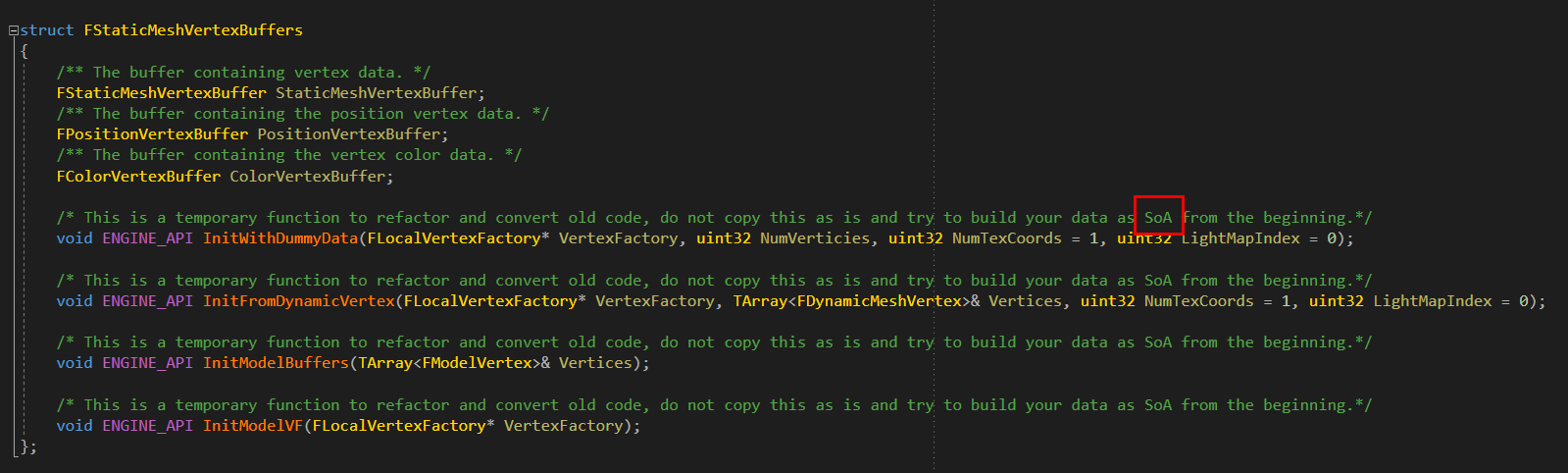
https://i.imgur.com/maVFXPG.png what's a SoA ?
 midnight river
Structure of arrays i guess, https://en.wikipedia.org/wiki/AOS_and_SOA
In computing, AoS and SoA refer to contrasting ways to arrange a sequence of records in memory, with regard to interleaving, and are of interest in SIMD programming.
twin nymph
yes it's the downside of UE4, it's totally worth it, but that's a lot of compiling, had no idea about what is an SOA either
elder falcon
appearantly they did massive refactoring on vertex buffers so now I first have to figure out how to get my project to compile again :D
 silent thicket
Pillows no ones trying to spy on your game buddy
elder falcon
^
wraith crystal
I'm having problems making a UE4 source build into a binary build via this "UE4 Binary Build Helper" tool (I know I suck for trying to use it - anyways).
here's the error:
ExceptionUtils.PrintExceptionInfo: ERROR: Command failed (Result:1): C:\Program Files (x86)\Microsoft Visual Studio\2017\Community\MSBuild\15.0\bin\MSBuild.exe E:\Work\UE_Release\Engine\Source\Programs\IOS\iPhonePackager\iPhonePackager.csproj /property:Platform=AnyCPU /property:Configuration=Development

...

ExceptionUtils.PrintExceptionInfo: CommandFailedException: Command failed (Result:1): C:\Program Files (x86)\Microsoft Visual Studio\2017\Community\MSBuild\15.0\bin\MSBuild.exe E:\Work\UE_Release\Engine\Source\Programs\IOS\iPhonePackager\iPhonePackager.csproj /property:Platform=AnyCPU
I'm running a build on "Host platform only", so it shouldn't even try & touch any iOS-related files I guess...
gray glade
The hell is UE4 Binary Build Helper?
Seems like a redundant tool that's already present in the editor?
wraith crystal
some tool with a gui
this is what it does:
Parsing command line: BuildGraph -target="Make Installed Build Win64" -script=Engine/Build/InstalledEngineBuild.xml -set:WithDDC=true -set:SignExecutables=false -set:EnableSymStore=false -set:HostPlatformOnly=true
wraith crystal
I'm trying to make a binary build of the source-built engine itself
I'm not trying to package a game
looking at InstalledEngineBuild.xml, I see this:
        <Node Name="Build Tools CS">
            <Do If="'$(HostPlatform)' == 'Win64'">
etc. etc. etc.
                <!-- TODO: Change these projects so that they can be compiled on non-windows platforms (currently use WinForms) -->
                <CsCompile Project="Engine/Source/Programs/UnrealControls/UnrealControls.csproj" Configuration="Development" Platform="AnyCPU" Tag="#Build Tools CS" TagReferences="#Build Tools CS"/>
                <CsCompile Project="Engine/Source/Programs/IOS/iPhonePackager/iPhonePackager.csproj" Configuration="Development" Platform="AnyCPU" Arguments="/verbosity:minimal /target:Rebuild" Tag="#Build Tools CS" TagReferences="#Build Tools CS"/>
so I guess it wants to build this iPhonePackager whenever target platform is win64
and I assume I should be commenting those out since I don't need an iPhone packager
gray glade
Oh, weird... okay.
So, you, mean like building the engine the same way its distributed in built form via the launcher?
wraith crystal
yes - to have a single (nightly) build that's distributable to the entire team
gray glade
Hold on, might have something for that
Engine\Source\Programs\UnrealGameSync\Deployment.txt
See the Zipped Editor Builds section
Might do you some good, as it's something that Epic uses internally and is maintained.
If not the whole thing, then at least parts of that process/set of instructions could be of some use.
wraith crystal
interesting
gray glade
That is the mechanism Epic uses to build a redistributable binaries for developer use, put it on a network drive, and then allow UnrealGameSync to automatically download the binaries that match a given set of content-only changelists.
twin nymph
@silent thicket @elder falcon 😊
gray glade
In other words, it's how Epic lets non-engineers sync changelists without having to build everything locally.
UGS itself is what does the filtering though and recognizes that it shouldn't enumerate changelists after a code-changing changelist unless the specified network location has pre-built binaries for it.
The instructions here are just how it builds and packages up those binaries to put them on a network location. If you're not using UGS, you may have to tweak this somewhat, but at the very least you'll have to fill in the gaps that UGS otherwise fills in itself.
gray glade
Would not be surprised, yeah. I don't think what you want is exactly the same as what UGS "BuildForUGS" does, but it sounds similar.
wraith crystal
let's call it the cheapo indie version of what Epic has :P
gray glade
Note that you do have access to UGS.
So if you use Perforce, you can just build UGS and configure it.
Otherwise, no, you'll have to roll your own solution or even edit UGS to support other source control/versioning systems.
wraith crystal
hey thanks, this doesn't look too bad at all
gray glade
👍
wraith crystal
f*ck me... took an hour to build but it worked. ended up using the build helper tool and removing most of what's ios / iphone-related from InstalledEngineBuild.xml
stable hemlock
Does anyone know if vrworks is better than the forward renderer?
low dust
you are comparing two totally different things
or are you telling forward renderer doesn't work with vr works?
stable hemlock
@low dust Would both together give better performance then?>
royal glacier
LMS or MultiRes + Instanced stereo + forward should be a nice combo
low dust
you'd usually want to use forward even without perf benefits as it lets your do MSAA
but some still stick with deferred as it gives you all unreals rendering feats
forward is more limited on them
stable hemlock
Anyone know what this is in 4.19?
I'm trying to figure out how I can do this
Sion, do youn know?
stable hemlock
I thought Instanced stereo only worked in defferred. If I can get all my materials working in Forward that should be great!
 hollow wadi
does anyone know if you can test against a specific objects distance field in a material?
celest parrot
PM me if you know your way around C++ function libraries in BP using an engine compiled from source
hollow wadi
how about i dont PM you and just say i know it here
because like its a community and everyone benefits from the discussion
stable hemlock
My default 4.18 engine takes 70 minutes to build on a 6700k at 4.5Ghz and an SSD.
What are some options that I might not be using?
Or is that normal
stable hemlock
Mine seems to use all 8. Sucks.
Might just have to get an i9
low dust
octobuild sped things up a little for me
I spent week+ trying to get the 4.18 builds faster, tried also fastbuild
elder falcon
with i7 7820X and nvme ssd it takes 18 minutes
stable hemlock
Yeah I wanna buy a 7980xe
But Idk if it'll show real world differences in ue4
stable hemlock
the first time i built 4.19, i think it was something like 25 successes, 3 failures, but the log didn't show which projects failed
so i rebuilt it again and then all were a success
however, now i can't build a ue4 project through frontend
there's this error that i don't exactly understand
XGE is required... well the custom engine was built, so whatever this XGE is, it should be available
elder falcon
xge is the incredibuild manager thing
stable hemlock
huh. why is it trying to compile through XGE if i don't have it
i suppose i could just explicitely turn it off
elder falcon
good question
it's supposed to detect if you don't have it and compile locally instead
stable hemlock
hm.

and i explicitly put bUseXGEController = false; into both client and server targets
didn't help...
elder falcon
this is about shader compiling though
there's a config var somewhere to turn it on/off
stable hemlock
found it

but this is not normal... most people don't have incredibuild, why is it on by default?
how do i disable it on the per project basis? would simply copying ConsoleVariables.ini into Project/Config work?
setting this cvar in ConsoleVariables.ini fixes the problem, but i can't figure out how to set it on the per project basis
it says ; Other way to set cvars: ; in engine ini files (e.g. BaseEngine.ini, DefaultEngine.ini) in the [SystemSettings] section ; from the in game console or in editor OutputLog ; Device Profiles ; Platform settings (editor UI)
but putting [SystemSettings] r.XGEShaderCompile=0
into DefaultEngine.ini in project/config doesn't work
stable hemlock
reproduced this problem on a blank TPP project and reported the bug...
 ashen badger
Hey, Does anyone bake lighting with UE4Editor-Cmd.exe? I'm having loads of issues where my project take ages at this stage or crashes. It just doesn't appear to be as solid as baking the lighting in the Editor (UE4Editor-Cmd.exe C:\temp\Ext\testProject.uproject -run=resavepackages -buildlighting -ProjectOnly -allowcommandletrendering Quality=Production -buildtexturestreaming -Map=BaseLevel.umap) this is the command I am running does anyone see any problems here?
 gray crystal
alright, i give up
I got what is probably a simple problem, but i cannot figure out where to shoot the trouble.
a long time ago i rigged the console to print out a value on tick
by now i cannot remember where its coming from and i don't want it anymore
anyone know a way i can figure out where this is printing from?
i checked all of my blueprints (i think)
oh, and i have multiple levels and its only happening on one level, so it doesn't seem to be from a common prefab/blueprint
it's almost impossible to use the console to for anything else because its printing 100.0 on tick
anyways, if you know the answer, please DM me, I'll probably be sleep by the time you reading this.
stable hemlock
so my project corrupted, is it possible for me to retrieve the game from the .pak file of my built demo?
sharp axle
@gray crystal I'd recommend putting a breakpoint in teh blueprint static library in C++ and see where it takes you
somewhere it is doing the call to draw on screen with that text which you should be able to grab pretty quickly. I know the pain, random prints with no context except a float to string are horrible to find if you've forgotten them
gray crystal
okay ill see if i can figure that out, thank you much
sharp axle
checkout this guy
UKismetSystemLibrary::PrintString
and this guy
UEngine::AddOnScreenDebugMessage
breakpoint in there should give you some nasty blueprint callstack but the function (or something) should give you the executor and either the function or the uber graph
 whole zephyr
Does anyone know how to integrate Nvidia Hairworks with UE4 (Unreal 4.18)
(Note: Please don't provide me the general link for the hairworks, I want to integrate with 4.18 like I said above)
 solar sequoia
is there anyway to change output to jpg from highresshot?
gray glade
... wot?
What would be the point of taking a high resolution shot and then immediately compressing it to hell?
solar sequoia
commandline "highresshot" gives out png, its a bottleneck to our simulator in ue4
gray glade
You could just convert the produced image yourself and compress it to your liking.
solar sequoia
it seems as the engine is having a hard time taking the shot, it takes 2 pictures a minute
gray glade
How would adding in additional processing by using a lossy compression on the raw data help optimize that?
gray glade
I have no idea what your bottleneck is, I haven't profiled your code.
highresshot isn't exactly an API for games to use
gray glade
Same idea.
solar sequoia
true
gray glade
It's not really an API at all, it's just a handy console command for taking higher resolution screenshots.
Obviously, having the engine capture one of these images, then run lossless PNG compression over it, and save it to disk just so you can (assumedly?) load that image up, decompress the PNG compression, and display it, is a pretty wasteful thing to do.
solar sequoia
what would be an better alternative?
gray glade
... not making a roundtrip through compression and hitting the disk?
It's hard to hit a bottleneck any worse than IO. Seriously.
If you want to hit a bottleneck, file IO is your trusted friend in royally destroying performance.
And obviously copying the pixel data from the buffer to memory, compressing it, uncompressing it, and copying it back to another buffer is utterly pointless.
You could always take a look at the source for how highresshot does what it does, and see what API it uses and leverage that, instead of highresshot itself.
solar sequoia
heres where i hit a stop, because my experience in c++ is not that high. Trying to look at the c++ in engine files, but right now its like greek to me
gray glade
You really should have an engineer involved. As you might imagine, you're not going to optimize a technical bottleneck without having someone with the relevant technical knowledge to diagnose the bottleneck and optimize for whatever the particular problem is.
solar sequoia
well, they are 8k pictures, at a lower res they would go much faster ofc
gray glade
If you don't need 8K res screenshots, then take lower res screenshots?
solar sequoia
we need them at 8k really
gray glade
Then we're back to getting an engineer.
There is nothing you can realistically do to make taking 8K worth of pixels, copying them to memory, compressing them, writing them to disk, reading them from disk, uncompressing them, and copying them back to the GPU not be a non-real-time operation.
solar sequoia
im pausing the gaming and rendering tough, that helped a bit
gray glade
You're still going to hitch dramatically.
solar sequoia
at the same time why is it reading it from the disk again?
aint i just doing copying them to memory, compressing and writing?
gray glade
I suggested you were using those screenshots in the game/project, you never responded otherwise, so I assumed you were.
Are you not loading these images up for display within the engine?
gray glade
Fair enough.
If you're only writing them, then I'm not sure there's much you can do about that.
Not generally anyways. You really would need to have an engineer profile what exactly is taking so much time.
Besides actually getting better hardware to minimize the overhead of file IO to disk, I'm not sure there's much to be done.
Something like JPEG wouldn't do you any good, it's just a different and lossy compression compared to PNG. You'll write less to disk, ideally, which saves you some of that overhead, but you're loading more work on to the processor - it might be a net positive though. I don't think it'd be anything more than marginal though.
gray glade
What's your framerate like outside of taking these 8K screenshots?
gray glade
Preferably not, the editor itself will obviously have its own overhead.
gray glade
That's pretty bad. If the machine is struggling to render the scene in realtime at whatever resolution, rendering it at 4 times that resolution, compressing it, and writing it to disk is just not going to cut it.
solar sequoia
i thought so, let me profile the fps first then
gray glade
It does mean that you can probably optimize your project and try to increase your framerate in general.
solar sequoia
well, we did something stupid in the start and used the kite assets
gray glade
That is, at least, if the bottleneck in your framerate is GPU-related.
solar sequoia
which are a huge fps drop because of non optimized meshes
atleast we noticed that
we can change that tough
gray glade
If it's CPU related, then it probably won't make highresshot any faster, since that should ostensibly be a very GPU-bound operation.
solar sequoia
whats the easiest way to difference between if its the cpu or gpu
watching the performance hit in task manager?
or using the cpu profiling?
solar sequoia
im at that site now,
gonna try cpu profiling first then
ahh okay
thats a diifferent one
gray glade
The distinction you're making isn't clear to me, but this will give you both the time spent by the CPU as well as the GPU.
It will tell you what the CPU spent its time on and will give you limited information as to what the GPU spent time on.
solar sequoia
one problem i have is that the foliage is not visibile in editor but ingame, even tough i have gone advanced - foliage
cant find folaige actor in outliner either
had to reload the project
thanks man ill try the profilin stuff
stable hemlock
does anyone know the story behind these lines in LinuxToolchain.cs (issue isn't public)
Result += " -Wl,-rpath=${ORIGIN}/../../../Engine/Binaries/ThirdParty/PhysX3/Linux/x86_64-unknown-linux-gnu";```I'm having an issue on FreeBSD where the editor can't find the APEX Legacy module library, but the debug version works as expected
It looks like it's related to linking with --as-needed (filtering out libraries that aren't needed) and I'm sure this line will fix it somehow, but I don't like specifying rpaths lke that unless really needed
stable hemlock
in the meantime I can confirm that as soon as I removed --as-needed, the editor had no troubles finding the APEX Legacy module
 still peak
What's the best way to update a source built version of Unreal?
stable hemlock
so im using git source with my custom shader model engine and i keep getting these everytime i open the project
gray glade
Should probably .gitignore some or all of those files.
Definitely just some.
DDC, Intermediate, and Saved should all be .gitignore'd
stable hemlock
@gray glade thank you but i got it sorted turns out its because i had a subfolder
 lucid anchor
Do any of you guys have experience building the engine for google daydream development?
I'm having a few problems I can't sort out
Anyone ever had this happen to them?
aaaaaaand i figured it out.
nevermind
in all things, listen to epic. don't listen to google.
stable hemlock
What would be the best way to share code (cpp files) between two platforms? Right now I have a Linux and a FreeBSD platform, but in many cases both are using the same code. In its current state this means duplication, but I'd like to reduce that (and thus reduce maintenance of my FreeBSD fork) to the bare minimum
 old aspen
Hye Guys, I have been having a problem with building ue4.19 release from github
Is 4.19 in dev?
what does merging release mean?
 gloomy hamlet
Release branch should always be buildable. If you get errors then it's something to do with your environment.
gloomy hamlet
I have no idea, you haven't given much info. 😉
Just pointing out that if you're using release branch, then you can be pretty sure there are no code problems on Epic's side.
gloomy hamlet
Nothing important, it's just the description of the last change made to that branch.
low dust
@old aspen did you follow the 1,2,3 step instructions?
like you DID get the dependencies before generating project files?
and you have visual studio 2015/2017 with c++ build tools on your system
@old aspen well, according to your answerhub post you didn't get the depencies
https://github.com/EpicGames/UnrealEngine/blob/release/README.md, see Getting up and running and part where you have to run setup.bat (if on windows)
stable hemlock
"Term Body","28.402 ms","99.9 %","0.000 ms","0.0 %","1.0",
anyone know what "Term Body" means or is?
It only occurs when updating instances on Instanced Static Mesh Components
 *    Clean up the physics engine info for this instance.
 */
void FBodyInstance::TermBody()
{
    SCOPE_CYCLE_COUNTER(STAT_TermBody);

#if WITH_PHYSX
    // Release sync actor
    TermBodyHelper(SceneIndexSync, RigidActorSync, this);
    // Release async actor
    TermBodyHelper(SceneIndexAsync, RigidActorAsync, this);

    // releasing BodyAggregate, it shouldn't contain RigidActor now, because it's released above
    if(BodyAggregate)
    {
        check(!BodyAggregate->getNbActors());
        BodyAggregate->release();
        BodyAggregate = NULL;
    }
#endif

    // @TODO UE4: Release spring body here

    CurrentSceneState = BodyInstanceSceneState::NotAdded;
    BodySetup = NULL;
    OwnerComponent = NULL;
    ExternalCollisionProfileBodySetup = nullptr;

    if (DOFConstraint)
    {
        DOFConstraint->TermConstraint();
        FConstraintInstance::Free(DOFConstraint);
            DOFConstraint = NULL;
    }

}```Something to do with BodyInstance.h and Physics
is there a way to turn off physics on a component?
Or just on an object in general
old aspen
===
ue4.19 SOURCE FROM GITHUB BUILD ERROR ^COMFIRMED
https://answers.unrealengine.com/questions/772254/ue419-build-always-giving-errors.html
why is this happening?
 onyx maple
@old aspen , if there's no "nldef.h" in your "C:\Program Files (x86)\Windows Kits\8.1\Include\shared" folder, then you might need to download and install windows 8.1 sdk
old aspen
ohh ok
@onyx maple thanks ill do that and get to you
@onyx maple i have installed win 8.1 sdk
i checked in the vs installer
stable hemlock
I'm sorry about asking this again, but it would really help me make my FreeBSD port better and improve the odds of getting it into the official tree
Is there a way to share CPP code between multiple platforms? I'd like to use most of the Linux code for my port as well (inheriting classes, including source, whatever works and is maintainable), but I'm stuck finding a good solution
gray glade
@stable hemlock I'm not that familiar with FreeBSD, but it'd involve a refactor to try to make a common core Linux and FreeBSD platforms.
Unfortunately, the best reference point is probably the way UE4 handles Xbox and Windows - pretty sure there are common shared code between both, due to sharing the same APIs.
But, without a license for Xbox dev, you can't access that.
stable hemlock
@gray glade that's actually a good idea, if there are two platforms very close together it'll be those too
sadly I indeed don't have a license for Xbox dev
Linux & FreeBSD are quite closely related, and my FreeBSD port duplicated quite a lot of code (although also has quite a lot of subtle changes)
gray glade
Yeah, realistically it'll be an intrusive set of changes to tease apart the real common codebase in to not being platform-specific, but actually enabled only based on those two platforms.
As you said, some things will operate mostly the same but with slight changes, which means rewriting that code to maximize reusability but allow customization.
stable hemlock
Would you happen to know how Xbox & Windows do share code technically? I guess that's not a secret part since it's not related to Xbox development.
Does Xbox use the Windows/ platform subdirectories of each module or does it have its own one? And if the former, does it also have an extra directory (which is currently my take on doing this for FreeBSD) for Xbox-only code?
gray glade
I don't know, no. You could probably just look at how the Windows platform is handled, honestly.
Surely, you'll find stuff that's identified as being "MICROSOFT_PLATFORM" or some such.
Probably some custom macros with conditional compilation.
stable hemlock
couldn't find something like that, it seems there are two defines: PLATFORM_WINDOWS & PLATFORM_XBOXONE but no general one
for my port I did end up having a PLATFORM_LINUXLIKE (I hate the name, but couldn't come up with something better yet) to already share some code but I still need to prevent a completely different platform directory altogether
would you happen to know where in the code that translation is made? I suppose in the build tool, but up to now this hasn't been clear to me
Basically I'd like to know where UnrealTargetPlatform.FreeBSD gets translated into FreeBSD. It can't be a direct String translation since there's differentation between Win32 & Win64 too, which both go to the Windows/ directory.
 edgy hedge
do the guys at Epic Games use Visual Assist?
The UE4 source code is so huge my Git crashed...
edgy hedge
I'mma just download the zip...
 mystic cave
yes
grim halo
is there a way to open an usf file as hsls in visual studio 2017?
so that i can get syntax highlighting and stuff
stable hemlock
Is here anyone who has an idea how to solve an issue with ShooterGame, which segfaults when using MallocJemalloc, not when using MallocDebug?
and on top if that, this only happens when playing over network, doesn't happen when playing only against bots
I'm completely stuck on my FreeBSD port here, everything seems to be working, all demo's work except for this single case 😦
so if there's someone out there who has an idea how to tackle this, please shout it out
Clang's address-sanitizer might help, but I haven't managed setting it up with UE4 yet, valgrind segfaults and I'm left with only a debugger it seems
 hollow hawk
For ue4 4.19 would i have to rebuild the engine if I change engine code specifically for the playerstate class. I tried building but it doesn't seem to show changes in editor
elder falcon
if you want to change how engine classes work, you need to build the engine from source
why do you want to change the player state class though?
silent thicket
Visual Assist ftw, love that plugin
 hidden hedge
@stable hemlock POSIX, UNIX-like? "linux-like" is a bit of a funny name if you're referring to a BSD port
though in regards to that, i wonder if the mac and linux platform-specific code shares anything
stable hemlock
@hidden hedge yeah, the reason I used linux-like was that I had to replace many if PLATFORM_LINUX lines and people might wonder where these went
And the issue with both POSIX and UNIX (or UNIX-like) is that there are many more POSIX and/or Unix-based platforms (like Mac, IOS but also Android and possibly others)
I'm not sure about Mac & Linux, but I do suspect that they share a pretty good deal; at the very least things related to BSD sockets (networking)
That other question, MallocJemalloc crashes when playing ShooterGame over network, doesn't crash with MallocDebug
Now apparently the same is true for MallocStomp, although I just realized that it might have to do with compiler optimizations
But if there are any pointers on how to debug malloc issues, please share because I'm running out of options 😦
stable hemlock
nah, still fine with MallocDebug and optimizations
so there's something wrong with my default (je)malloc implementation
Are there any known bugs with the jemalloc allocator?
stable hemlock
a quick'n dirty ansi malloc also works without issues, that's interesting
 final quarry
Anyone know why this command-line for BuildGraph isn't working correctly? It keeps trying to build non-host platform targets and failing
SET UAT=call C:\Users\Administrator\Desktop\UE4\UnrealEngine\Engine\Build\BatchFiles\RunUAT.bat
SET SCRIPT="C:\Users\Administrator\Desktop\UE4\UnrealEngine\Engine\Build\InstalledEngineBuild.xml"
SET TARGET="Make Installed Build Win64"

%UAT% BuildGraph -script=%SCRIPT% -target=%TARGET% -Set:HostPlatformOnly=true -Set:WithWin32=false
specifically it gets to a point where it looks for IOSRuntimeSettings and fails, claiming its required by the target
 austere bronze
do someone knows how to get the total VRam in the computer from somewhere ?
 normal quiver
Amount?
 whole mauve
not sure if this is the right channel... does UE4 have the concept of a spinlock, or some other thread lock that's super-cheap if it's not already locked?
I have a time critical thread (custom audio processing) that I need to briefly lock at init/cleanup time, and I don't want to pay the ongoing cost of a mutex during gameplay, during which it'll never be contested
 slow crescent
Anyone know how to tell UnrealBuildTool that an external library (using PublicSystemIncludePaths) has changed its headers?
According to the documentation such include paths are not checked when resolving header dependencies, which is what I want 99% of the time, but when they do in fact change I'd like to be able to signal this to UnrealBuildTool somehow. I get some really strange builds if I don't.
 charred apex
heya, anyone here available to give me some advice ?
about making a installed build for my existing C++ project on unreal
I already can make an installed build of my from source engine, but i want to make an installed build of my game project as well
so I can distribute it to Artists
I miss the second step
(my project is on switch so I had to build from source)
 hollow timber
Hello ! Does anyone know how to fill the field PreviewGameLanguage ? It's empty for me... Can't find a way to do it for now... And no infos on answerhub neither forums...
Okay found it, there was a problem with my ini file in DefaultGame.ini / [Internationalization] : the path to my localized folder was removed (weird). I Just removed this line and the culture display fine !
hollow timber
Yeah still the preview language for UMG is not working so there should be somewhere else to look...
Oh it works ! I just lost like 20% of all my translations by magic ><
thats why i didn't see it working on my main menu 😦
Thats why its marked experimental I guess
final quarry
@charred apex I'm in a similar situation, fixed BuildGraph not building my installed editor by tweaking the AppleARKit plugins whitelisted platforms field, but I'm confused as to how to target a game project not UE4Game cleanly
charred apex
@final quarry yup ... confusing... no clue yet 😦
stable hemlock
is UnrealPlatformGroup.Unix actually used in code other than the public UE4? Enterprise-code, anything else etc?
I'm thinking of repurposing it for my FreeBSD port and using the Unix/ directory to contain code that is common to Linux and the BSD family
and what's probably more important, if I were to make this change to move current Linux headers and code files into the Unix/ directory: could it actually make it through a pull request or would it be too big of a change to be admitted?
in short the idea is to have one group for the open source Unix-like families: Linux and the BSDs
 thick storm
you should probabaly try talking about it with RCL
he handling most of *nix stuff in engine
in general big pull requests rarerly make it trough
stable hemlock
@thick storm I've sent RCL an e-mail about this. I think I can keep the size of the pull request acceptable if I split things up; it shouldn't be one of those all-or-nothing changes
 last swallow
if i want to compile and be confident i am using a stable release, should i checkout the 4.19 branch or a release tag?
 rain lake
someone explain this madness
{
    UPackage* Package = GetOutermost();

    if (!Package->HasAnyPackageFlags(PKG_PlayInEditor))
    {
        // Return Map:/path/to/map
        return FPrimaryAssetId(UAssetManager::MapType, Package->GetFName());
    }

    return FPrimaryAssetId();
}```why does it return FPrimaryAssetId() if play in editor?
...
figured it out
the package name in PIE is different
elder falcon
why would anyone be calling that on a PIE world though? 🤔
strange urchin
Hey guys, did you know if it's possible to connect Mac client ot a Window server ?
He told me that the client version of the mac is different
Is it possible to avoid this : Client connecting with invalid version. LocalNetworkVersion: -222229966, RemoteNetworkVersion: 657890150
 gloomy gulch
any idea how to build with clang5? I'm getting a lot of "specified path differs in case from file name on disk" coming from the engine sources. it worked well in 4.18 and clang 4.
stable hemlock
haven't had trouble building with clang 5 on BSD, I guess that's on an OS that doesn't care about case in file names?
gloomy gulch
yeah, I'm building on Windows
it looks like the engine builds, but when I try to compile BP project (first person template), I'm getting all these errors
and I'm already out of ideas how to fix it
4>c:/Unreal/UE-4.19/Engine/Intermediate/Build/Linux/B4D820EA/UnrealFrontend/Development/Core/SharedPCH.Core.h(39,10): error : non-portable path to file '"c\Unreal\UE-4.19\Engine\Source\Runtime\Core\Public\CoreSharedPCH.h"'; specified path differs in case from file name on disk [-Werror,-Wnonportable-include-path]
4>c:/Unreal/UE-4.19/Engine/Intermediate/Build/Linux/B4D820EA/UnrealFrontend/Development/CoreUObject/SharedPCH.CoreUObject.h(38,10): error : non-portable path to file '"c\Unreal\UE-4.19\Engine\Source\Runtime\CoreUObject\Public\CoreUObjectSharedPCH.h"'; specified path differs in case from file name on disk [-Werror,-Wnonportable-include-path]
4>#include "c:\Unreal\UE-4.19\Engine\Source\Runtime\CoreUObject\Public\CoreUObjectSharedPCH.h"
4> ^~~~~~~~~~~~~~~~~~~~~~~~~~~~~~~~~~~~~~~~~~~~~~~~~~~~~~~~~~~~~~~~~~~~~~~~~~~~~~~~~~~
gloomy gulch
can anyone help?
it looks like I can build the engine just fine, but not the project 😡 My project is a default FPS template (blueprint).
stable hemlock
@gloomy gulch you're cross-compiling for Linux it seems; it might help, but I'm more or less guessing since I've never cross-compiled, that it's in your LINUX_MULTIARCH_ROOT
try with slashes instead of backslashes, it might help
gloomy gulch
ok, trying...
the same set of errors
"specified path differs in case from file name on disk [-Werror,-Wnonportable-include-path]"
I checked, all file names have the same exact register
#include "c:\Unreal\UE-4.19\Engine\Source\Runtime\Engine\Private\EnginePrivatePCH.h"
the same exact path
this is where it complains that path is different, but I see it exactly the same........ any ideas?????
gloomy gulch
anyone?
stable hemlock
I suppose the Epic staff aren't really present until after the (Easter) weekend, they might have an idea
 hollow agate
Anyone successfully integrated Amazon GameLift Server SDK into 4.19 ? I keep getting flumoxed by random errors with incredibly little info about them.
 tiny oracle
Dont use latest engine ver for things its never 100% stable
gloomy gulch
any help?
 full sleet
do you have source control? try wiping the intermediates
let me look again
what is line 39?
@strange urchin you can connect from any platform to any platform. like pc to xbox to linux to ps4. legally you may be denied...
but thats not the tech
it has to be the same build
hidden hedge
@hollow agate you need to post the errors
also gamelift is a pretty expensive solution for game servers
strange urchin
@full sleet thank you for the info. I finaly achieve it ! And indeed My Android Players can see the Mac and PC client ^^
 next anvil
anyone know where unreal decides which display it wants to boot a packaged build up on to?
4.14 and prior always booted to the primary display correctly on windows machines but 4.18 just always boots to whatever "display 1" is instead of the primary display
full sleet
there's probably a function deep inside the engine that decides
you'll have to trace the main loop
hidden hedge
they fixed in 4.20, it's a bug in SWindow.cpp
next anvil
do you have a link to the fix at all?
hidden hedge
we merged it from perforce iirc, not sure the github merge
        DisplayMetrics.PrimaryDisplayWorkAreaRect :
DisplayMetrics.GetMonitorWorkAreaFromPoint(WindowPosition);```in SWindow::Construct
next anvil
how do you even find those fixes? 😛
next anvil
no i meant through their git
hidden hedge
we use perforce not git
next anvil
ah
hidden hedge
issues site shows the github/perforce CL numbers
next anvil
got a link for the issues site?
hidden hedge
next anvil
ty
twin nymph
Hello, small problem compiling a project
I'm migrating a project from 4.16 to 4.19
and a file from the engine cannot compile
" cannot open include file JsonObjectWrapper.generated.h" : No such file or directory
i did include the "Json" module in the .cs files
and I compiled the engine from source, should I recompile the engine again ?
hollow timber
Hello ! I have different behaviors regarding inputs axis (mouse move mainly) between launch in editor and in packaged version... So the question is : are the inputs scaled by deltatime (or inversely scaled) somewhere ? I think it's due to difference in FPS ! In my code I multiply the axis by deltatime but maybe I don't need to ?
Hmmm nevermind I don't need to multiply by deltatime that sounds stupid in fact 😄
For my usage with the mouse
 bleak fjord
hi everyone,have anyone an experience with mounting paks?
and loading asset from there?
 frank moth
any reason the source code isn't available on github?
 severe kestrel
Hey, I have a problem (Can I ask here?)
elder falcon
can you? 🤔
severe kestrel
well, I will ask
I created a Door, but I created the door in other level and when I place it in another level I can't interact with it. In the "original" level I can normaly interact but in the other level "the game one" I can't
how can I fix this?
elder falcon
that has nothing to do with the engine source
uncut pier
For a flicker effect. What is less taxing:
A. Light Function
B. Tick the hidden in game at random intervals
hollow kernel
Are destructible mesh chunk transforms not exposed to BP by default in 4.19?
small cobalt
@hollow kernel There is alot of things you cant do with DMs once they are fractured.
At least not without implementing the features yourself.
For example runtime collision for DMs cannot be modified at all.
hollow kernel
Thanks for the info @small cobalt
Most of the related info I could find was pretty dated. You saved me a lot of time looking around for a more current state of DM things.
stable hemlock
Don't know what channel to put this in.
Has anyone gotten jenkins ci to build their ue4 project?
If I build in the editor it works instantly.
In jenkins, it takes forever and fails with an unknown cook error.
full sleet
I've used gocd, but post a log 😉
small cobalt
@stable hemlock I use Jenkins for Automation. It works perfectly. If you have an Unknown Cook error you most likely have an ERROR in your log somewhere. Search your log for the Error and then rectify it.
full sleet
Remember, ERRORS stop the build, warnings don't.
stable hemlock
@small cobalt @full sleet I don't have a single error in any of my logs
I just get Error: Cook failed. Then points me to the cook log.
In there, the only problem seems to be Warning: Incompatible or missing module: UE4Editor-<ProjectName>.dll
But I don't know how to fix that
small cobalt
You probably need to recompile.
stable hemlock
The dll files are created, they just have four random numbers at the end.
stable hemlock
I have the compiling done in Jenkins since it's off a github repo
Here's the script I found online. I have no idea what I'm doing. :(
"E:/Program Files/EpicGames/UE_4.19/Engine/Build/BatchFiles/RunUAT.bat" BuildCookRun -rocket -compile -compileeditor -installed -nop4 -project="%WORKSPACE%/Decay.uproject" -cook -stage -archive -archivedirectory="%WORKSPACE%/temp/Development/x64" -package -clientconfig=Development -ue4exe=UE4Editor-Cmd.exe -clean -pak -prereqs -distribution -nodebuginfo -targetplatform=Win64 -build -utf8output
Delete the Binaries, Intermediate and Saved folders. Then run the script again
You need to recompile and get rid of those HR binaries
stable hemlock
Two scripts run before that one. Would they cause any issue?
@small cobalt Very weird. Deleted all three and getting the same error
It works completely fine if I build in the engine though
I don't know what's wrong
stable hemlock
I tried that too
full sleet
what was the command?
RunUAT BuildCookRun -project="full_project_path_and_project_name.uproject" -noP4 -platform=Win64 -clientconfig=Development -serverconfig=Development -cook -allmaps -build -stage -pak -archive -archivedirectory="Output Directory"
stable hemlock
"E:/Program Files/EpicGames/UE_4.19/Engine/Build/BatchFiles/RunUAT.bat" BuildCookRun -project="%WORKSPACE%/Decay.uproject" -noP4 -platform=Win64 -clientconfig=Development -serverconfig=Development -cook -allmaps -build -stage -pak -archive -archivedirectory="%WORKSPACE%/temp/Development/x64"
Trying it again
full sleet
-project="full_project_path_and_project_name.uproject" <- did you do this?
 hollow scarab
@frank moth You need to associate your Github account with your epic games account. Log into epic games --> manage your profile --> Connected Accounts, scroll down --> Github
full sleet
nevermind that's just the basics
what happens when you go in visual studio and build a windowsnoeditor?
like without the editor
stable hemlock
With that script, I get the same error
I could try windowsnoeditor, but should I expect a different result?
The build succeeds. Cooking doesn't
final quarry
has anyone ran into this crash on 4.19? https://i.imgur.com/RjPNYSk.png
 full sleet
there's two worlds?
radiant hazel
@final quarry are you trying to destroy actors manually somehow and not doing it entirely correctly?
It feels like in your case "this" is null
final quarry
I think it was caused by a timer not being clear'd in time, as it was a timer delegate calling the function
I moved clearing all active timers on the character to BeginDestroy rather than Destroyed
final quarry
I think EndPlay is called during the Destroyed event which might already be too late
radiant hazel
EndPlay is called before actor starts being deinitialized
I'm not sure what's the exact timing, but I think it should be one of the first things to get calle
d
 regal thistle
If anybody is looking for something to fix in the source code, I found an article that surveys the code base and highlights some areas that could be refactored: https://hackernoon.com/how-to-improve-your-c-skills-from-awesome-projects-251b300ed5a1

Hacker Noon
The Unreal Engine is a game engine developed by Epic Games, first showcased in the 1998 first-person shooter game Unreal. Although…
(ctrl+f refactor)
 high epoch
Should there be a #shader-development channel separated from #engine-source?
low dust
@high epoch #graphics and #visual-fx , depending on the shader purpose
I don't think shaders should go to engine-source at all
stable hemlock
Hey guys, I'm using jenkins to manage builds, so I'm building from command line.
Every time I build I get a compile error. Unknown compile error. Been debugging this for three days now. It gives no hits as to what's wrong. Even one a brand new project.
 long junco
Does it work when you run it through the project launcher?
stable hemlock
Yes
long junco
Are you still stuck with the same error as yesterday?
stable hemlock
Same exact one
long junco
Is the editor closed when you run RunUAT.bat?
stable hemlock
No
long junco
Try it :)
stable hemlock
Will do
Same error. This is killing me
Fresh project no plugins
commands straight from the wiki
long junco
Can you try using the same command line the project launcher is using to build the project instead?
It should be one of the first lines in the log
stable hemlock
@long junco I got the command. Should I run it off of RunUAT like normal?
long junco
Yep
stable hemlock
Holy fuck nuggets that works. Still have to get my jenkins working, but a test in CMD works. Thanks @long junco!
long junco
No problem :) would have been surprised if that command didn't work, since you mentioned the project launcher worked... still wonder which parameter on your command line is causing the issue though
stable hemlock
Here's the old command on top and the new one if you're bored. 😂
https://pastebin.com/HEZQGDrk

Oops. Just ignore the archived directory too. Forgot to update that
long junco
Ah... you're missing some parameters in your previous one
stable hemlock
Damn. Working off this guide: https://patricevignola.com/post/automation-jenkins-unreal#parameterize-your-build
Automation with Unreal Engine and Jenkins-CI
But using git and winrar instead of p4 and 7z. Don't know what I'm doing. Just improvised 😂
what
the
fuck
Same error in jenkins
long junco
Right, you don't have to compile the .sln yourself, UAT will take care of that, saves you a step of generating a project and compiling that
Is your workspace correct?
stable hemlock
🤦 I saved it with both commands
long junco
Ah, lol
long junco
Timing?
stable hemlock
Just how long it takes
long junco
Jenkins has a timing plugin, can't recall the name though
Each line in the console will then display the time stamp
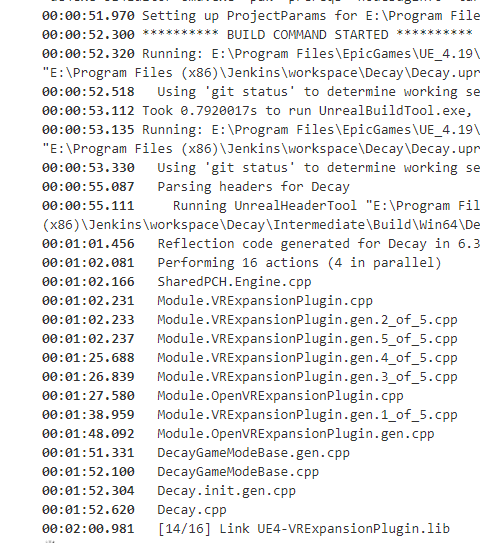



 long junco
Yep
stable hemlock
Yay
Same error
Trying just copying and pasting into cmd
See if it works
Replaced %workspace% with exactly what it gives out
Ok that's weird
I get the error when I use the project it downloads from github. Don't get the issue in the project's actual location
Trying the same command again but on the actual project
Oh my god I think I know
The default gitignore for unreal engine doesn't whitelist the plugins folder
Or atleast blocks some files that keeps me from being able to compile off the github repo
long junco
Ah... so your plugins folder was missing?... That seems like a weird default to me...
stable hemlock
Some binaries in it probably are
Not the folder itself though
I would think it'd be able to compile these itself, but I had issues in the past with compiling the project itself
Some vdf and txt files were ignored. Hmmm
Oh nice. Same error
long junco
You sure everything required is committed and nothing else? https://docs.unrealengine.com/en-us/Engine/Basics/SourceControl/Perforce only the files marked in green need to be added (see the section above Adding files to perforce) the same applies to <project>\Plugins\ <plugin>
stable hemlock
Looks like the gitignore github suggests for a ue4 project is the exact same as this https://github.com/github/gitignore/blob/master/UnrealEngine.gitignore

Oh
Fuck I'm a dumbass
I need to close discord when I'm this tired
long junco
lol, what's the issue? :P
stable hemlock
Of course that's what github uses as default. It's from the github default repo
I meant to link ue4's source gitignore
Oh well
I changed my gitignore to literally only accept the project, source, config, and plugins.....and nothing changed it github. I'm tearing my face apart
Maybe it's a gitlfs setup issue
long junco
Forgot to push and remove the files you added before? or something like that? 😅
long junco
Oh well, shit happens :P
stable hemlock
I've probably put 80 hours into this issue
Still not even a new error
Well I just straight up copied files over myself instead of using git to see if that's the issue. Instead of crashing in 2 minutes it's been running for 5.
I'm getting close 🙏
long junco
Good
stable hemlock
HOLY FUCK IT COOKED.
Now I have to find what's not going to github
long junco
👍
stable hemlock
Ok wat
It's my binaries folder
It's not making the binaries correctly
Here's the difference. The bottom one works. (Project) The top one doesn't. (Generated by the command line)
long junco
hmm
stable hemlock
I copied every folder over except binaries and it still doesn't work. Copied these files and everything packaged perfectly.
long junco
Can you remove -nocompileeditor from the commandline arguments?
long junco
Did it generate the UE4Editor-Decay.dll?
stable hemlock
Ahh no. Same binaries
What RunUAT do you use? I have it linked to E:/Program Files/EpicGames/UE_4.19/Engine/Build/BatchFiles/RunUAT.bat
long junco
I use source build from GitHub myself
stable hemlock
Yeah I'll have to when I use VRWorks
long junco
Let me see if a simple project still works from the Epic Launcher installed version :/
stable hemlock
I renamed the binaries folder in my project. Trying the command on my project now
long junco
Can you also remove the -nocompile and change it to -compile, afaik that one is just for the UAT but lets just make sure
stable hemlock
Sure thing
Thanks again for the help
Yeah get the error in my project. That's it. I'll try compile
long junco
No problem, pretty bored today
stable hemlock
wait, how did I get those binaries in my project...building with visual studio?
long junco
Yeah, if you build Development Editor you get those binaries, but UAT should take care of that
(as long as the params contains -build)
stable hemlock
Hmm. I have an idea
Now idea what I'm doing, but I have a good feeling. Running another build
long junco
Hmm... just looked in BuildProjectCommand.Automation.cs and contains this condition: if (Params.HasEditorTargets && (!Params.SkipBuildEditor) && !Automation.IsEngineInstalled() && (TargetMask & ProjectBuildTargets.Editor) == ProjectBuildTargets.Editor) so... doens't build the game editor code if it's an installed engine...
stable hemlock
I'll use one of NVidia's forked engine's soon. Trying this...and it looks good so far
long junco
Yeah add the build of the .sln before the RunUAT
stable hemlock
Ok..so I just generated the sln, now I'm forcing visual studio to build that for me
long junco
With target Developement Editor
stable hemlock
Then I'm building the game
We might have just said the same thing, but I'm not sure
long junco
Yeah
stable hemlock
Just started doing this three days ago
Aight cool
Oh nice same error
At least I have more binaries..... 😂
Hmm they're temp
long junco
What params are you passing to MSBuild?
stable hemlock
UE4Editor-Decay-5772
Ok
Wait it's been closed
Close all 4.19 editors?
Fuck it i'll try that too
long junco
Yes
stable hemlock
Ok building again
long junco
If there are numbers in the file name it thinks it had to hot reload
stable hemlock
Ahh that's why I got them in my project. I did a hot reload myself
I think
I did build and not rebuild
long junco
Don't rebuild, build is not the same as hot reload
stable hemlock
Ok hmm
On the bright side...I'm getting all these failures out of the way early 😂
Fuck yes thank you
Not temp dlls
long junco
Hot reload means recompile with the editor open, so you can test game code within the editor without closing it
stable hemlock
Lets see if it works now
Ahh ok
Thanks
I've worked in java for the past 7+ years. I haven't been able to wrap my head around C++ or anything like this yet lmfao
long junco
Lol, so far this has been pretty much Unreal specific though
stable hemlock
Yeah that too. I've been in unreal for 4 years*. But it's been all blueprint
Never packaged a project out of editor either until now
You fucking magical man. Thank you
Lmfao that shows the 1 build I did yesterday and said Fuck It. Not Today 😂
long junco
No problem :D
stable hemlock
Oooook time to find out winrar's console commands 😂
stable hemlock
Yes! It's all done. Auto builds on commit and the rar file is made available on jenkins
Damn. Thought that would take an hour to setup. Spent 50 on it. 😂
long junco
Good to know it works :)
 drifting flower
hey all, I keep getting errors trying to build installed version of the 4.19 engine
from the release branch
and i keep getting this error from RUNUAT
im calling the UAT from this command
"%~dp0Engine/Build/BatchFiles/RunUAT.bat" BuildGraph -target="Make Installed Build Win64" -script="%~dp0Engine/Build/InstalledEngineBuild.xml" -clean -set:HostPlatformOnly=true
in a bat file
it seems to be related to XGE, but even if i disable that, it still gives that error
i am using the version of the InstalledEngineBuild.xml that the engine came with as well
has anyone got this to work with VS 2017?
high epoch
@ebon junglento I was talking about a channel dedicated to discuss .usf and .ush shader files in the engine source code. In #graphics and #visual-fx people mainly interact with the material editor, they aren’t really graphics programming channels.
hollow kernel
Has anyone here used VSAid? http://www.brocksoft.co.uk/vsaid.php
BrockSoft VSAid (Visual Studio Aid) is a freeware Microsoft Visual Studio extension that enhances and assists your devlopment experience.
I'm looking for a cheaper alternative to VAX
 slender kestrel
Hi guys how can we change FOV of VR Camera in Engine Source Code
Checked out the source control code
void FSteamVRHMD::GetFieldOfView(float& OutHFOVInDegrees, float& OutVFOVInDegrees) const
{
OutHFOVInDegrees = 0.0f;
OutVFOVInDegrees = 0.0f;
}
I tired checking out the source n find out this page
https://github.com/EpicGames/UnrealEngine/blob/release/Engine/Source/Runtime/HeadMountedDisplay/Private/DefaultXRCamera.cpp
void FDefaultXRCamera::OverrideFOV(float& InOutFOV)
{
// The default camera does not override the FOV
}
I am not sure what this function is for any idea what its purpose?
hidden hedge
you're potentially breaking your NDA with sony talking about psvr stuff here, you're best off using UDN for that kind of stuff
 crystal valve
:/ ok, thanks for your advice.
low dust
@high epoch to be fair, there's only few people here who have ever opened usf files to modify them in the first place
I agree that dedicated channel might be cool but I doubt there would be enough users for it
but if you want to propose some #graphics-programming channel, better do it in #server-feedback, people responsible for the channels don't necessarily monitor this space
hollow kernel
Sorry, I should be directing this question to wholetomato customer support, but the response here is likely quicker...
When you buy a personal VAX license, does it just get bound to an account via email address? Couldnt find much info on it.