#cinematics
1 messages · Page 25 of 1
 vivid wolf


Missing items as an example..

The quality of the test flythrough in Engine is far better.. Is it better to use something like NVIDIA screen recorder and record straight from my screen than using UE4s MRQ?
Spec: 12th Gen i9-12900K with 32GB RAM & 3090 RTX...
vivid wolf
hmm.. thought I'd try Ray Tracing to see if that changed anything.. is this normal..?

If I did what it asked me (See above attachment) in Project Setting, would my PC catch fire?
Is Skin Cache important?
 nimble wave
Hey there, I'm trying to figure out how to setup auto keys for a cine cam in game mode, has anyone tried this before or know if this is possible? for example I want the cine cam to be the child of the first person char cam, and want to key the movements made in game.
for a cinematic sequence
 young granite
vivid wolf
If I did what it asked me (See above attachment) in Project Setting, would my PC...
young granite
vivid wolf
If I did what it asked me (See above attachment) in Project Setting, would my PC...
No, i use a GTX 1650s and a ray-trace as well as use nanite just fine with UE5. your hardware is way better than mine

 pearl wadi
Hello, Quick question here. I'm having an issue with some Kitbash 3D elements and their opacity maps not being effected by the depth of field of the camera. Has anyone had this issue or know how to solve it? Thank you!

 somber talon
What is the best way to keep them in the game after the sequence ends? (in my example, someone comes out to talk to my main character, then leaves to work on their truck, when we cut back to gameplay, the NPC is running on an looping anim of them working on their car.) I've read to use the 'Keep State" selection for say wen you open a door, but not sure if this were to apply to my situation as well.
 slate island
guys, is there any command-line argument that allows me to enable path tracing for Rendering Movies? I'm referring to this page --https://docs.unrealengine.com/4.26/en-US/AnimatingObjects/Sequencer/Workflow/RenderAndExport/RenderingCmdLine/ -- and, quite unfortunately, haven't found anything useful there

Outlines the Sequencer Command Line Arguments that can be used for Rendering Movies
also, I've been browsing through the sources of the engine, no luck there

 mighty fjord
Hey Network, I'm using python to convert video into image sequence(png)and then bringing those sequence into UE but when I use them into UE as img media source and when I play the media it kinds glitch maybe because of timestamp I'm not sure, I have attached the example video.
is there any way to fix this glitch issue?
or any suggestion?
pearl wadi
Hello, Quick question here. I'm having an issue with some Kitbash 3D elements and their opacity maps not being effected by the depth of field of the camera. Has anyone had this issue or know how to solve it? Thank you!

 crisp horizon
Hey...I´ve been stuck with rendering out of movie render queue.
I get flawless color in Unreal but when rendering out, I keep getting banding issues in After Effects, no matter what I do.
Rendered out as png and as EXR 16 bit, tried using OpenColorIO and without it.
Any clue as where I could start troubleshooting?
crisp horizon
Alright, seems to be an after Effects issue.
 gusty heath
Hy guys, I'm new to unreal... I've put my image sequence with Alpha in a plane with a material , all work good with track in sequencer.... My problem is only that I'm not able to change exposure or contrast of that material... I can change everything with post process volume but changes affect all the world... I want to be able to change parameters of only an object if is possible..... I have to put a light near the plane? Thanks
 flint yacht
Hi good people of the internet. I wanted to ask where could I find information on how do I prepare a level sequence on sequencer where n spawned actor would in fact "possess" the player character. I want it so when the cinematic triggers, it actually takes the player character in whatever state it is and play animations on its skeletal mesh, using whatever mesh it has, attacheed equipment etc. At the moment, I havent been able to figure out how to do this, so some information pointing to the right direction would be appreciated. Thanks!
 solid ore
pearl wadi
Hello, Quick question here. I'm having an issue with some Kitbash 3D elements an...
solid ore
pearl wadi
Hello, Quick question here. I'm having an issue with some Kitbash 3D elements an...
Most likely cause of this is the "render after DOF" option being selected in the the material setting.
 rustic geode
gusty heath
Hy guys, I'm new to unreal... I've put my image sequence with Alpha in a plane w...
rustic geode
gusty heath
Hy guys, I'm new to unreal... I've put my image sequence with Alpha in a plane w...
The overall intensity of your objects material will be found in its Master Material, make a material instance by right clicking it in the content browser to edit parameters if they are setup...this is also a question for #graphics for future reference
 slim citrus
Can I use level sequence to animate components within a BP?
 ember dirge
ok guys i need your knowledge once again.
So i wanna start small, i've just saved a picture of two people, now i want to use this pic during a dialogue at the start of the lvl. Prob is : is it like a widget and everytime i press e the next line is displayed or is it more complex?
 wispy siren
slim citrus
Can I use level sequence to animate components within a BP?
wispy siren
slim citrus
Can I use level sequence to animate components within a BP?
You can use an Event track and key frame a trigger to call a custom event in a blueprint that’s been added to sequencer. There’s a video on my YouTube channel that shows how. Pretty easy.
 rain jungle
slate island
guys, is there any command-line argument that allows me to enable path tracing f...
rain jungle
slate island
guys, is there any command-line argument that allows me to enable path tracing f...
I'm not sure if 4.26 is able to render movies with Path Tracer. That was a new feature added in 4.27
 torn nymph
Hi
I’m going to use a video file as a material of an object in UE5 but having a problem to render it through Movie Render Queue.
I added a media track in a level sequence and the video was played at correct frame rate in the viewport when I played the sequence.
But when I rendered the sequence with MRQ, the video was rendered at faster frame rate so the timing between the video and the other objects in the scene didn’t match.
Is there any way to correct the frame rate of the video material when it is rendered in MRQ?
The video file’s frame rate was 24FPS and the output frame rate setting in MRQ was also 24FPS.
 quick portal
torn nymph
Hi
I’m going to use a video file as a material of an object in UE5 but having a ...
quick portal
torn nymph
Hi
I’m going to use a video file as a material of an object in UE5 but having a ...
Use image sequence media instead.
 hollow plaza
Exactly, image sequences is better than video. I had the same problem before then after switching to image sequences it was fitting great!
 quick portal
hollow plaza
Exactly, image sequences is better than video. I had the same problem before the...
quick portal
hollow plaza
Exactly, image sequences is better than video. I had the same problem before the...
FYI it was because image sequence media can be dependant to the engine's frame passage, as opposed to video media doing its own thing, independent of the engine's frame passage.
quick portal
 warped frost
where do I go to slow down the time of this cutscene?
warped frost
where do I go to slow down the time of this cutscene?
You might be looking for Time Dilation Track.
warped frost
quick portal
You might be looking for Time Dilation Track.
Okay that slow down the world
I tried it but slow down the world and when it down its still slowed down
slim citrus
wispy siren
You can use an Event track and key frame a trigger to call a custom event in a b...
Ah, thank you very much, I shall check it out! :)
 gentle abyss
Right now, if I want to move the transform of a number of different actors at once, I create an empty parent actor, with the actors as I want to move as its children, and then move the single parent actor.
However, that feels kind of janky. Wondering if anyone has come across another way of moving around lots of actors at once? Like in blueprint scripting, it's a lot more efficient to get all actors of a certain tag, and automatically affect all actors with that tag. However I haven't come across anything in Sequencer itself that would be designed to do that without scripting.
wispy siren
gentle abyss
Right now, if I want to move the transform of a number of different actors at on...
I usually setup a custom event in a blueprint to do several things at once (like move actors around or turn on lights) and then call that custom event from a trigger event track in sequencer when I want it to happen in the sequence. I don’t know of a way to do it in groups like that in sequencer without custom events though.
gentle abyss
wispy siren
I usually setup a custom event in a blueprint to do several things at once (like...
Yeah, scripting makes a lot of sense for binary actions like lights or simple movements. However what I'm wanting to do is have a lot of manual control over moving different pieces of geometry in the level - walls raising/lowering, pieces rotating, etc as part of a scripted event, where timing is important, and Sequencer seems quicker to work with.
I know ultimately I could script all of that, but it seems faster to make adjustments by having everything on a timeline in Sequencer to quickly adjust.
I did just discover that you can have a Sequencer embedded inside of a blueprint, but I haven't messed with that much yet.
wispy siren
gentle abyss
Yeah, scripting makes a lot of sense for binary actions like lights or simple mo...
That’s interesting. I’ll take a look at that too. You can always keyframe individual components of a blueprint in sequencer too by just adding a track for the object under the main actor. You probably have already messed with that.
gusty heath
Can someone recommend me a Cryptomatte or Alpha Matte tutorial? I tried the tutorials from Winbush and Faucher, but they do not cover the post production. I can't get a clean alphamask, i think im doing something very wrong.
 raven crown
hi guys
I need some help
for some reason when i render from sequencer
the render doesnt render my camera
and it makes no sense
everything i have set up should work
I have the camera and the camera cuts ofc
I tried making a new level and it worked flawlessly
so its something to do with this specific projkect
anyone knows what this migh be?
raven crown

this is what i have set up

and yet this renders?
its not even a camera
it renders at 0,0,0
gusty heath
raven crown
https://cdn.discordapp.com/attachments/782328635318206474/942566901702352937/unk...
MAke sure you click the camera icon on the Camera Cut track
And then check what camera is active in your Camera Cut track
gusty heath
Make sure you click the camera icon on the Camera Cut Track so it's white
gusty heath
raven crown
I only have 1 camera on the sequence
Then make sure it's selected like this:
 gusty heath
ok, because in your preview it shows unselected

I have had this a few times, cost me hours of wasted render time because i walked away and didn't check first few frames were ok
 gusty heath
Yeah and what camera does it say its refrencing to? do you get the correct camera in your Cinematic Viewport?
raven crown
I do get the correct one in the viewport
you can see belowt he camera cut it says Walking
and on the camera cut itself (top left) it also says it
gusty heath
alright, then i dont know sorry
gusty heath
how are you rendering it out
with seq or MRQ
I would try to duplicate your level file, open the duplicate, remove all camera's and try to make a new sequence, but i have no idea what your porject is about. I only use UE for cinematics not really game cutscenes and stuff. But that's how i fixed few of my problems latley
raven crown
gusty heath
I would try to duplicate your level file, open the duplicate, remove all camera'...
I only use it for cinematics too
I tried to do that and it also didnt know
im trying to render with both
MRQ and Sequencer
the idea is MRQ
but no matter which one i choose
it always records at 0,0,0
for no apparent reason
it just does it
@gusty heath i just checked and when rendeing a new camera is made
and it is used to render
makes no sense
gusty heath
raven crown
I only use it for cinematics too
Can you render out other projects succesfully with the correct camera actor and angles?
gusty heath
Did you try adding new camera's and new sequences?
i'd try to make a new sequence, add a new camera actor and new camera cut tracks, set a range of a few seconds and try it out. I still ahve the issue sometimes that the first few frames are at 0,0,0 but after 1 or 2 frames it would jumpt to my camera
 red surge
When I use the "save current as..." feature my lighting goes all different. What am I doing wrong?
 hard nest
How do I lock a cameras direction to an object? so it rotates around it
gusty heath
raven crown
yes
I have no idea, cant really tell what is different in your current project then other ones. Guess you'll have to check what the differences are
raven crown
gusty heath
I have no idea, cant really tell what is different in your current project then ...
I fixed it actually
apparently i had to have a player start close to where the sequence is recorded because the map is so huge
weird but works so i wont complain
gusty heath
hard nest
How do I lock a cameras direction to an object? so it rotates around it
You can use a camera rail to create a path around your object, that's how I would do it, but I dont know what your project needs.
https://www.youtube.com/watch?v=AFA3xEfh8QI

Unreal Engine 5 Filmmaking Tips Part 5 Camera Rig Rail,ue5 filmmaking tips
First 1000 people to use this link gets a discount on my How to make a movie in Unreal Engine 5 Course.
https://www.udemy.com/course/how-to-create-a-movie-in-unreal-engine-5-beginners-edition/?couponCode=9F6698F3B263A8CCB385
MOCAP GIVEAWAY! https://www.youtube.com/watch?...
gusty heath
raven crown
apparently i had to have a player start close to where the sequence is recorded ...
Very wierd indeed, i dont even have a player start most of the time
but i agree if it works i would just finish the project 😄
raven crown
💀
hard nest
gusty heath
You can use a camera rail to create a path around your object, that's how I woul...
awesome thank you 🙂
 rancid gate
Guys I rendered a video sequence but I can't hear audio with it even though I have audio in the sequencer
quick portal
rancid gate
Guys I rendered a video sequence but I can't hear audio with it even though I ha...
You don't render the audio together with the sequencer video render.
You have to add the audio in post or in a separate recording.
 void tartan
Hi, i try to make a intro cutscene for the enemy in my level but the ai controller of the enemy making the enemy ignore the rotation i've put for it in the sequancer. how can i disable the effect of the ai controller during cutscene and activate it after the scene?
 sacred sky
Hello everyone, I am wondering if anyone knows how to create a smooth spiral with the camera rig ( that goes up a few floors of stairs for example). Ive been doing it manually can’t seem to construct it properly, is there an easier way to do this?
 toxic oyster
Hey, what can be the reason for sub levels disappearing in editor when playing a sequence?
We have tried to force a level visibility track but it didint fix the problem
 rustic hamlet
Any reason my camera is jumping to a random position when I try to render a movie?
sacred sky
Thanks so much, will try that
 eager turret
sacred sky
Hello everyone, I am wondering if anyone knows how to create a smooth spiral wit...
eager turret
sacred sky
Hello everyone, I am wondering if anyone knows how to create a smooth spiral wit...
You could make a circular camera rail... And animate the rail to move up as the camera travels around the rail. Maybe. Sounds like it would work.
Are there any lighting guru tutorials? Lighting is so weird to work with. (UE4).
sacred sky
eager turret
You could make a circular camera rail... And animate the rail to move up as the ...
Hadn’t thought of that! Thank you!
 fiery elk
Does anyone know when I try to render out a camera in a sequence it does some random place in the world?
gusty heath
fiery elk
Does anyone know when I try to render out a camera in a sequence it does some ra...
Do you have a Camera track in the Sequencer and a assigned Camera to said track?
gusty heath
fiery elk
Does anyone know when I try to render out a camera in a sequence it does some ra...
fiery elk
@gusty heath Thank you so much
 steady pewter
Hi guys! What's the easiest way to make a simple cutscene that is:
- Black screen with text going
- Then, moving camera that stops at a certain position
?
Thanks in advance!
gusty heath
steady pewter
Hi guys! What's the easiest way to make a simple cutscene that is:
1. Black scre...
Check out the documentation on Sequencer and cinematics
https://docs.unrealengine.com/4.27/en-US/AnimatingObjects/Sequencer/

Sequencer is Unreal Engine 4's multi-track editor used for creating and previewing cinematic sequences in real time.
steady pewter
I'll have a look at it, thanks!
gusty heath
steady pewter
I'll have a look at it, thanks!
it has the tutorials with gifs for what you need
 steady pewter
Just looking at it, seems good to create the camera animation. Trying to understand how to make the black screen thing
But maybe will be easier to make that as a video and then playing it into the game
gusty heath
You can use a Fade Track

The Fade Track is used to fade the entire screen to a solid color. With it, you can fade to black, white, or any other specified color.
gusty heath
steady pewter
But maybe will be easier to make that as a video and then playing it into the ga...
yeah so many ways of doing it 😄
steady pewter
gusty heath
You can use a Fade Track
Oh yeah, this works for the case too. And for the text making it like is "keyboard" written as a sequence? How would you do that?
gusty heath
steady pewter
Oh yeah, this works for the case too. And for the text making it like is "keyboa...
Not sure how in UE, i know there is a 3D text tool. Depends on your choice I guess. Personally i would do it in After Effects or some other NLE, because that works faster for me. But you could also do it inside UE4, but i dont know how.
Guide to placing 3D Text in Unreal Editor, and using it to create motion graphics.
steady pewter
Alright thanks! I think I'll go with an external software, playing the video as a movie and then making the moving camera thing in unreal
gusty heath
yeah, i would also do it like that. Good luck!
gusty heath
steady pewter
Alright thanks! I think I'll go with an external software, playing the video as ...
There is a letter-by-letter animation function, if you want to try that, it's on the bottom

 rancid yacht
When running/walking long distances in a cinematic, do you do animations in the sequence or call an event that executes MoveTo Location for the actor?
I mainly ask because of the ability to let them navigate automatically over small objects and up hills without manually adjusting the position of the z height to make it look natural.
 latent quail
im trying to play back an animation in sequencer which is alembic geometry cache of 262 frames, and also a PNG texture sequence to go on top of it, also 262 frames. In the sequencer, the sync is perfect and it looks great. but once I launch the game in the editor, the sync is totally off. can anyone point me in the right direction as to how I can keep the two synced?
steady pewter
gusty heath
There is a letter-by-letter animation function, if you want to try that, it's on...
Thanks for this and good luck to you too!
 grand otter
Hi! Is there a way to use the sound placed in the level directly into the Sequencer ? (without adding Audio tracks, obviously).
For instance : in the example below, sound has been placed within the Level, and if I play through the Level Editor, we can hear the sound change depending on my position in the environment.
However, I would find logicial to hear that too through the Sequencer, which is not the case. Any idea ?
https://cdn.discordapp.com/attachments/836649231849750598/944189216169021470/no-sound-sequencer.mp4
 sterile orbit
Hey guys I have a sequencer question I recorder a car I rigged the game and recorded its data movements and made it an animation in the preview it looks great and worked properly but when I render it doesn't work it doesn't follow the animation only when I render

 tawdry rivet
is there any reason why
when i press render (on the movie render queue) with only one camera in the scene
it just views the scene from a random angle in the render
with random camera settings
so frustrating
gusty heath
tawdry rivet
with random camera settings
Make sure you have a camera tor in your sequence and you marked the camera you want rendered. If you scroll up a bit you see many peyople with the same problem.
gusty heath
tawdry rivet
is there any reason why
Sequencer is Unreal Engine 4's multi-track editor used for creating and previewing cinematic sequences in real time.
 severe python
Hello, does anyone know why I’m not getting the same lighting in my camera and perspective view? I’m trying to get these lightrays that I have in my perspective view in my camera but can’t seem to figure it out
 gusty heath
Guys, i'm trying to batch render the same sequence multiple time. But each time with a variation (Sphere with shader A, then Sphere with shader B, then etc..)
do you know how i can do with with a blueprint?
i was looking at https://docs.unrealengine.com/4.27/en-US/AnimatingObjects/Sequencer/HighQualityMediaExport/RuntimeBuilds/
but it's kind of obscure
How to use Movie Render Queue in a distributed build to create movies on end-users' devices
do you have any idea? any one tried it before?
 noble kraken
Hello, has anyone had a problem where you close a project, open it and the sequencer is empty? This is happening to me and im stuck ...
 zinc flame
I think that's normal. If you re-open the sequencer asset it should load everything back.
 gloomy laurel
How can I fade in an audio track in sequencer?
Edit: I didn't see I could expand to see volume track. solved
 blazing jay
I am calling my rendering through blueprints and get an error "Cut State: Uninitialized" Any idea how to solve this error?
 crude knoll
Hello. I am having trouble capturing an object I have rotating using a blueprint in my Level Sequencer in Unreal 4?
warped frost
Are there any downloadable ue sequencer projects ?
quick portal
warped frost
Are there any downloadable ue sequencer projects ?
There's an example Sequencer project in the Learn tab at the Epic Launcher
gusty heath
crude knoll
Hello. I am having trouble capturing an object I have rotating using a blueprint...
We have no idea what your trouble is, try to be a bit more specific, or at least provide some context for the problem.
gusty heath
severe python
Hello, does anyone know why I’m not getting the same lighting in my camera and p...
Interesting, i'm no expert at all, just a beginner also. But for me it is usually the other way around. In my camera it looks good, but in the world it would look different. My suggestion is to at least; Build your lights. (this can have very different results if you keep building your scenes but don't build your lights. I've wasted a lot of time with this).
Then check your Camera settings and your Post Process Volume and or Exponential Height Fog if you are using one. Make sure you view trough your camera you will be using to film everything in the end.
 old roost
hi guys, im looking to loop an animation in sequencer. I know how to loop, but I need it seamless, any ideas on how to do that?
im really fond of the blending modes between various animations, and im looking for something similar to bind together the beginning and ending?

like theese transitions only doing it with the end and the beginning not in the middle
gusty heath
old roost
hi guys, im looking to loop an animation in sequencer. I know how to loop, but I...
Not sure if this is the way to go in Unreal. But an old VJ trick i still use is to make the blend. then cut a part where the animation is constant and use that as a starting point.
gusty heath
old roost
hi guys, im looking to loop an animation in sequencer. I know how to loop, but I...
I'll try to record what i mean
gusty heath
how to make seamless loop (the janky way) :D
 trim horizon
sequence was working in different project but so far not herein current. No 'document' icon in game to run into for one, how do I fix that ( can't export from other project it seems ?) ? I do have sequence loaded, is there a way to fix it from there ,,very green at alll of this, sorry.
I mean cutscene is in level, but having hard time finding the object player runs into to start it up
there is a 'trigger' but its just a round sphere , and while not hidden, it doesn't show up in game, what do I have missing
trim horizon
nvm thx just the same, found youtube tut, all good ;0-0-
gentle abyss
Does anyone know if there is a way to do a picture in picture export using sequencer? i.e. have one main camera on the screen, and then a smaller one in the corner? Multi camera view basically.
wispy siren
gentle abyss
Does anyone know if there is a way to do a picture in picture export using seque...
I’ve never done it but I would start with rendering a camera (small cam) onto a texture and then putting that on a plane that was where you wanted it to be in the main camera view.
gentle abyss
wispy siren
I’ve never done it but I would start with rendering a camera (small cam) onto a ...
Yeah I was thinking similar, or also maybe adding the render of the camera to a widget so it's more precise/flexible like this
 crisp horizon
Ok, so, I have a dumb problem I can´t fix...
I´m using Movie Render Queue to render out HQ cinematic content.
I couldn´t get rid of motion blur, so I checked "Disable mutlisampling effects" in post processing.
That got rid of the motion blur, but now some shader didn´t function properly.
So, how do I completely get rid of motion blur when rendering with Movie render queue?
trim horizon
grand otter
Will this help ? (Of course, make sure post-process or camera settings won't override this setting)
 trim horizon
Im trying to capture my camera movement as I take cam over and pilot, but after I mark location before movement, and after piloting another location mark on timeline, on play camera doesn't move at all, is there a trick to getting sequence to 'see' movement of camera piloting ?
Do I have to hit record or something before moving piloted camera ?
trim horizon
OK well getting closer, at least I'm getting SOMe movement recorded, but its not geting all of it just from first location and rotatoin tick, literally backwards to where I stopped and added two more, is this normal, what am, I missing ?
what fixed it, was I'd forgotten to click + on cameracuts
gentle abyss
Does anyone have experience using Cine Camera Actors to create render targets? I was trying to setup a widget with one render target per camera (to create a multi cam view), but I realized placing a 2D render target on a Cine Camera Actor seems to not match what I'm seeing through the cine camera actor, due to the FOV being different.
i.e. my cine camera actor has fairly tight FOV, so the 2D render target is wayyyyyy zoomed out very far away, since it has completely different settings. Am wondering if there is another way to setup a render target for a cine camera actor so you get a 1:1 match.
Bottom right is cine camera actor's original output, and the rest of the frame is the output from the SceneCampureComponent2D
 trim horizon
the trouble I was having with moving camera and getting ingame 'cutscene' from that, was I wasn't clicking on unlock camera to selected viewport
in case someone else has trouble
trim horizon
as per ( where I should have started) https://docs.unrealengine.com/4.26/en-US/AnimatingObjects/Sequencer/QuickStart/
A guide to quickly get up and running with the Sequencer Editor in Unreal Engine 4.
 cyan mountain
Is anyone able to get 4k prores 4444 renders out of sequener while NOT using an RTX8000 for large scenes, or is there some god code and cvar. Combo that I’m just unable to untangle? Always GPU crashes on me @4k
 honest urchin
sterile orbit
honest urchin
sterile orbit
Not sure if anyone answered your question, I've used recorded BP vehicles before, are you bringing the recorded vehicle data into sequencer as a "Subscenes" track?
sterile orbit
@honest urchin Yes that’s exactly what I’m doing
honest urchin
Okay have you gone into that track, double click to open it, and deleted the camera cuts track inside it?
if your vehicle had a camera on it which would be impossible to drive otherwise, you should delete it
then in the top level of your sequence, just double check that you ahve a Camera Cuts track added, and that your cinecamera of choice is the one selected with in
you dont want a "nested" camera cuts track else where in your sequence, it
will screw up which camera gets rendered
work?
no news is good news, I'm assuming youre on track now... 🙂
so now I've got an issue, video explains more, has anyone been able to solve the issue with transparent glass not accurately pulling focus?
sterile orbit
@honest urchin thank you so much. I'll try it out
 brazen saffron
Hi, I'm beginning with Take Recorder tool and I have small issue here... I cant edit anything because of "The object bound to this track is missing". Please, can someone give me a hint how to solve this?

 static obsidian
is there any way to make the time dilation track only work on specific objects?
gusty heath
brazen saffron
Hi, I'm beginning with Take Recorder tool and I have small issue here... I cant ...
Rightlcik > Assign actor
gusty heath
honest urchin
so now I've got an issue, video explains more, has anyone been able to solve the...

Unreal Engine Forums
I’m still looking for a solution to this also. I actually couldn’t find the Enable Separate Translucency checkbox in the details panel.
Out of curiousity; what happens when you visualize the DoF?
 compact scarab
Anyone interested in a cinematics job? Posting shortly in the job section.
trim horizon
Reading sequence docs , and wondering how do I keep camera on a given spot in sequence , for a longer period of time ?
 verbal oyster
Is there a way to use the Blueprint Editor Utility to add keys in the sequencer on the selected object?
trim horizon
Ok got it via forums, Alt right will do what I was needing, good job !
Unreal Engine Forums
OK Thx, appreciate it ;_) What a great option ! Have a good day.
Just fyi
Now HM, how do I increase camera focal point I guess is right word, higher, so what is visible at that location isn't being cut off ?
 rocky escarp
verbal oyster
Is there a way to use the Blueprint Editor Utility to add keys in the sequencer ...
rocky escarp
verbal oyster
Is there a way to use the Blueprint Editor Utility to add keys in the sequencer ...
You might be able to get the basic idea from this: https://youtu.be/VObmhcA4Ln8
Instead of an asset action, there should be a utility function for ‘get selected level actors’, you can then make a binding and add the keys. There’s also a handy function for ‘get current level sequence’ which will return any sequence that is currently open.
Using editor scripting with sequencer enables you to batch process animations, level sequences and track properties. This video shows how to get started working with processing keyframes with sequencer, which can be a bit of a pain to access. I made this video to remind myself how to do it.
For filmmaking in Unreal, editor scripting can be a hu...
gusty heath
trim horizon
Ok got it via forums, Alt right will do what I was needing, good job !
Personally i would use a Constant Keyframe for that.
 gusty heath
trim horizon
Now HM, how do I increase camera focal point I guess is right word, higher, so w...
gusty heath
trim horizon
Now HM, how do I increase camera focal point I guess is right word, higher, so w...
Place your camera in the sequence and it's properties will appear, you can also add it with the + icon.
People also say sometimes you can increase the bounds scale on your object. But personally that doesnt work for me most of the time I increase the focal lenght and my distance to my subject, allows me to film much closer without having the sides dissapear etc. but you can always try.

 umbral harness
hello ppl 👋 🙂 Being a noob in most things animation, I just started exploring the possibilities with AnimDynamics ... started to get some nice results but ... how can I render out in MRQ with temporal samples replacing AA and not having the animdynamics simulation completely freak out? Is it even possible? Thank you 🙂
 junior dawn
Any idea on how to move a level sequence?
trim horizon
If you mean to another project from what I understand it works fine tho I've yet to have had a need https://www.bing.com/search?q=ue4+moving+level+sequence+to+another+project&cvid=117e3bac3d06488f859b721ec455862e&aqs=edge..69i57.10520j0j1&pglt=43&FORM=ANNTA1&PC=U531
 echo fern
Hey fam having an urgent issue and totally stuck!! When I render a prores sequence in render queue, all fx, procedural texure anims, and particles GO FAST like playing in FASTFORWARD MOTION in the final video. Fps is an regular sequencer animations are right just fx and procedurals. Any help is highly appreciated 🙏🙏🙏
trim horizon
I'm rather NEW at this myself, but are you sure you are giving the latre, enough frames ?
@echo fern hope that helps
echo fern
trim horizon
I'm rather NEW at this myself, but are you sure you are giving the latre, enoug...
Hey there thanks for the reply. You mean adding more frames for the aaa render warm up? I left it at the 32 default value for now
 civic granite
Dont know if this is the right place to post this question, but I am trying to implement a simple render into my game. The idea is to export an mp4 from the packaged project. Im having a hard time finding an answer as everything is in the editor and I want to do this in a packaged project.
trim horizon
@readream honestly I'm not sure, never having , yet today anyway done a render of sequence, I thought possibly as seq. ed. , you must be able to somewhere just add more frames. I saw the same thing once for my seq ed item and I was told here to just alt right click where the start 'key' for that FX is, and expand to right which gives it more frames, but that may well not apply to your issue 😦
@civic granite somehow I doubt what you want isn't as easy as render to texture :), first thing that came to mind, sorry.
is as
@echo fern mine wasn't a fx, but I thought it 'might' work similar for you
civic granite
Yeah I wasnt expecting a "here is a plugin to download" answer haha
echo fern
trim horizon
@readream honestly I'm not sure, never having , yet today anyway done a render o...
I see what you mean. Yes in my case it's a bit different. I am adding lots of fx warmup frames at sequence start, but still they play superfast during the animation. It's gotta be something I'm doing wrong with timestamps or temporal aaa?
trim horizon
I don't even know what a 'warm up ' frame is, so I'll be useless to your need I suppose ;(, sorry :((((((*(
@echo fern this is PROB not what you want , but its all I could find that looked even close
gah

Greetings!
This a quick tutorial on creating a camera and sequence in Unreal Engine 4.26 and exporting it using the Movie Render Queue.
Hope it is helpful.
Website: https://tandreades.com/
Art Station: https://www.artstation.com/thaddaeus
Buy my Art: https://foundation.app/tandreades
echo fern
trim horizon
I don't even know what a 'warm up ' frame is, so I'll be useless to your need I ...
np! yes It has to do with render queue but probably I'm having an issue with custom variables I'm entering while rendering.
trim horizon
ahhh ya prob.
trim horizon
gez, anyone know how to 'stop' looping of sequence video in game ? ONce player sees it, I don't want them to be able to run past trigger and it play again, at least not at this location.
I've looked online everywhere and in doc page, finding squat 😉
junior dawn
trim horizon
If you mean to another project from what I understand it works fine tho I've yet...
No, i mean moving the cutscene on the map
The room where the cutscene take place has been moved, and even if I move the level sequence, the content of the cutscene remains outside the room I've moved
trim horizon
I'm using a trigger so I'm not sure , if that isn't what you are doing..massive guess here, as my time with sequence isnt' MUCH atm
i'm rather sure that isn't what you n eed, sorry
I'm having my own issues atm dont' feel bad ;0-0
OH hmmm interesting
well,are you using world comp ?
junior dawn
I'm using world partition
trim horizon
ok well that makes it easier in theory anyway 😉
much easier to work with as they have their own files as I understand , so that isnt the issue clearly
rain jungle
civic granite
Dont know if this is the right place to post this question, but I am trying to i...
I would take a look at the Car Configurator Demo project. It's in the Learn tab of the Epic Games Launcher. If I'm remembering right, in Play Mode there was some widget where you click and export a render. I think if you look at how they set that up you could figure out how to make it work for your own project
trim horizon
well,,,if you are using ue5 now , might be your issue, even though the 'new' release is better than ea2 it still isnt' production ready
sounds like a bug to me
junior dawn
It does the same in ue4
trim horizon
wow
did you use the manual convertor for ue4 > 5 or just make a new scene in 5 , could that be it ...
are you sure the 'trigger' was in the same level as room...
junior dawn
No it's unrelated
trim horizon
ok
thats about all I'd know,,did you ask yet on forum
or wait for someone else to chime in
junior dawn
Not really, I can do without ATM, it's not ideal but it works
rain jungle
The camera in your level sequence needs to move to where the new room location is
trim horizon
gotcha
rain jungle
You could take an empty actor, parent the camera to that, then move the actor so you retain all your keyframes
trim horizon
interesting
junior dawn
rain jungle
You could take an empty actor, parent the camera to that, then move the actor so...
But I have also spawning actors and lights
I guess I need to parent them all
rain jungle
yeah unfortunately... that's how I would do it
junior dawn
Thanks
umbral harness
@echo fern not sure what fx you're refering to, and also not sure about proc materials ... but for particles, you should make sure to have a NiagaraComponent + System Life Cycle on your actor in sequencer, and also set them up so you can properly control them in sequencer like this https://youtu.be/rIkpu358Hak

I show how you control a niagara system in the scene/level with the animation sequencer. Important are two options in the sequencer: niagara component / system life cycle:
- age update mode: desired age
- section evaluate behavior: activate if inactive
 mortal pecan
hello. anyone here that would be so kind to take a few minutes and help me setup sequencer for rendering a cinematic? I'm really sure I set up everything correctly but somehow its still not rendering the correct camera but instead just a black screen
its the last thing I need to finish my gamejam game and I've been pulling out my hairs for 3 hours already 😩
rain jungle
You have added a camera cuts track and it is set to the camera actor you want to render?
mortal pecan
yes
noble kraken
Hello, does anyone know how can I trigger a mesh animation and a video in the sequencer?
umbral harness
noble kraken
Hello, does anyone know how can I trigger a mesh animation and a video in the se...
The Media Track provides controls for the playback of movies and images from Sequencer using Unreal Engine's Media Framework features.
😉
static obsidian
My particle system seems to working incorrectly when rendered in the movie rendered queue
This is how it is supposed to work (rendered via the sequencer):
https://youtu.be/yciYRX5Unpc
and this is how it rendered out in the movie render queue:
https://youtu.be/XiupEaKDkkU


Assistance would be greatly appreciated ^-^
trim horizon
when playeris in level, how does one stop sequence from playing again if player trys to, by running into trigger again ?
 frosty narwhal
@trim horizon set a boolean the first time they trigger it. Check the boolean before starting the sequence
 sinful burrow
Hi all wondering if I can get some help with the Take Recorder. Every time I preview in the sequencer, my capsule and camera are tuned down 90°. Anyone else run into this?

 split ledge
I'm creating a 360 3D scene. Right now the files are rendered out over and under for the left eye and the right eye (see screenshot to understand). This renders out great in a MP4 and looks cool in an Oculus Quest 2. Now what I want to do is have an intro where a small window appears and an old movie plays that is shot and plays in 2D, and when that ends, the full 360 video opens up. How could I get this movie to play in this format to introduce the stereo panorama? I also want to put 2D titles ontop when it first plays.

You can also reach me at insectula@gmail.com
 viral surge
Hi,
There is an issue with the master sequencer not playing animation keyframes in every shot.
I attached an actor that have dissolve function in master sequencer but it's not playing animation (like dissolve particle). The dissolve animation particle work in single shot, but not in the master sequencer. It also happened at the other actor too (e.g lighting not turning on in master sequencer while it animated in single shot).
Also I have an animation with Trail Animation Data inside shot, and it worked if i play it individually. However, if i play it via Master Sequencer, the particle doesn't emit.
Is there any solution to this problem? it will be appreciated if any ideas come through.
Thank you!
crisp horizon
Hey there,
I´m used to create a simple camera rig by using a dummy and linking the camera to it, so I can rotate around the dummy.
But when i rotate around it locally, I get rotational errors when keying that in the seqzencer, it doesn´t go from local to local rotation, but uses world rotation instead.
Any idea how to fix that?
trim horizon
frosty narwhal
<@!623895662337064960> set a boolean the first time they trigger it. Check the b...
ahh got it! TY so much for nudge, I added set > auto destroy and indeed it was that simple, and when player tries to activate sequence again during same play, it doesn't do anything :)_)
after playback node in bp
trim horizon
crisp horizon
I´m used to create a simple camera rig by using a dummy and linking the camera t...
I've never tried that- but is you right click on 'rotation' line in sequence , is there anything there that would help ? If not maybe what you want can be done in BP, no idea
, if not hopefully somebody that knows will respond soon ;0-0
 opaque totem
When I am trying to render with movie render queue one of my media texture video gets stuck ( it plays for a few second and then just stops abruptly ) has anyone faced a similar issue ? The media texture looks good in real-time but pauses after a few frames when rendered.
Please Help
rain jungle
opaque totem
When I am trying to render with movie render queue one of my media texture video...
What format are you using for media? When using MRQ an image sequence is best. PNG will usually work fine, EXR even more performant
 upbeat sail
Hi, how do I change job order in MRQ? Or at least sort them alphabetically.
When I add a job, it appears I can't change order of the jobs, and I can only add or delete them.
Which is odd if I have like 30 numbered shots.
 ancient perch
noble kraken
Hello, has anyone had a problem where you close a project, open it and the seque...
ancient perch
noble kraken
Hello, has anyone had a problem where you close a project, open it and the seque...
you are presssing "save all" or at least saving the sequence itself right?
gusty heath
crisp horizon
Hey there,
Also no expert, but what are you trying to achieve? Maybe if you have a video we can see your problem and help out. 🙂
crisp horizon
gusty heath
Also no expert, but what are you trying to achieve? Maybe if you have a video we...
No offense, but people who know what I´m talking about and could help, should understand what I explain verbally...:)
In 3ds max I would "freeze transforms".
gusty heath
crisp horizon
No offense, but people who know what I´m talking about and could help, should un...
have you tried a constant keyframe
this is how i would "freeze transforms"
 rocky escarp
crisp horizon
But when i rotate around it locally, I get rotational errors when keying that in...
rocky escarp
crisp horizon
But when i rotate around it locally, I get rotational errors when keying that in...
You can add a transform section in sequencer set to ‘additive’, this effectively means you are working zeroed out - and it will allow you to key locally to it’s existing world transform.
crisp horizon
rocky escarp
You can add a transform section in sequencer set to ‘additive’, this effectively...
Yeah, I already stumbled on that, but couldn't quite figure it out. I'll look into it again, thanks.
 grand plaza
Does anyone know of a way to create a maya style image plane that's constrained to the cam frustrum? Like a way to keep it attached to the camera so that when you push or pull the image plane away from the camera it scales to fit the frustrum?
quick portal
grand plaza
Does anyone know of a way to create a maya style image plane that's constrained ...
You can hack together that mechanic with some simple Blueprinting
 wild shard
Hello 👋
Apologies if this is the wrong channel.
What is the recommended way to get a Level Sequence and play it?
My game is deterministic in the sense that there are particular states the game will be in at certain points. I would like to play a Level Sequence when a particular state is entered and then mark the player as ready when they've seen the sequence. Looking online it seems that most people use the Level blueprint. However, in my case this seems highly impractical as I'd have to re-add the exact same logic to play a sequence for the same state in every one of my levels. Is there a reliable way to do this from the GameState for example by referencing the LevelSequenceActor somehow?
 coral cedar
Hi, I'm having problem recording a camera attached to a player I control using W,S,AD with Take Recorder. It captures the Player but not camera rotation. I see a bug report that is Won't Fix. How do I capture the camera?

Unreal Engine
Welcome to the Unreal Engine Issue and Bug Tracker. You can check the status of an issue and search for existing bugs. See latest bug fixes too.
 manic oxide
grand plaza
Does anyone know of a way to create a maya style image plane that's constrained ...
manic oxide
grand plaza
Does anyone know of a way to create a maya style image plane that's constrained ...
Play full screen videos and image sequences on your cameras using Image Plates.
gusty heath
How can I change default 24p take recorder setting? I need 25p on default, because I use a plugin that need to close take recorder every time... Thanks
 drowsy widget
How to achieve better DOF with Unreal's current camera? Not the cinematic actor camera.
quick portal
drowsy widget
How to achieve better DOF with Unreal's current camera? Not the cinematic actor ...
Adjust the post process's camera values and focal length.
The only difference with camera component (which often used for gameplay) and cine camera component is the way the parameters are presented.
drowsy widget
Currently I have a low aperture, low field of view and adjusted the focus distance. It's very limited compared to cinematic. I'll follow what you've said
rocky escarp
gusty heath
How can I change default 24p take recorder setting? I need 25p on default, becau...
 gusty heath
I need to change the default fps in some ini file o other... I know that i can change manually, but I have to change the default setting
My comp camera has different settings than the cinecamera actor, even though the comp cam references cinecameraactor
 rocky escarp
gusty heath
I need to change the default fps in some ini file o other... I know that i can c...
rocky escarp
gusty heath
I need to change the default fps in some ini file o other... I know that i can c...
 gusty heath
Thank you, this work!
gusty heath
gusty heath
Fixed
 grand plaza
manic oxide
https://docs.unrealengine.com/4.27/en-US/AnimatingObjects/Sequencer/Cameras/Imag...
grand plaza
manic oxide
https://docs.unrealengine.com/4.27/en-US/AnimatingObjects/Sequencer/Cameras/Imag...
Thank you.
old roost
hey guys! maybe its an easy one but I simply coulnt google my way out of it. I cant seem to get audio out of the sequencer when I render my AVI file? it renders a seperate waw but with nothing in it 😦
gentle abyss
Short answer is that at least as of 4.26 (what I use), rendering audio out of Unreal is problematic. Even if you had audio, for me and people I know it ends up being glitchy, out of sync - it just does not feel like a completed feature.
What I do is only work with a finished audio file as a refrence, and then drop the exported video from Unreal into my editing program which has the audio file in it.
Or if I need to do it quickly, I'll do a screen capture of Unreal's output window.
Question of my own - does anyone work with creating Custom Burn In widgets to use with sequences? I'm experimenting with trying to actually run a script in my Event Graph that can affect actors in the scene - resize them, hide them, things like that.
That way when we need certain actors enlarged for an export, we can toggle the burn in on any sequence, instead of having to adjust the blueprints in each individual sequence.
However, I've only ever gotten data for a burn in widget - i.e. text metadata or a render target. Have never gone the other way and affected anything. Looking into seeing if this is possible?
sterile orbit
Anyone know how to get rid of the blur effect from the car?
 mint bison
Is there a way to reset cloth animation to restart at default during simulation or play?
I used cloth simulation for a character's hair and when I simulate the animation, the hair goes all over the place due to the force of it moving rapidly to the animation location. T^T
 sudden jacinth
Hey ! I am looking for constructive criticism so I can make improvements in all areas. Thanks 🙏
sterile orbit
@sudden jacinth I would keep the camera lower to the ground maybe behind a pillar and a slower zoom in the character face and have more expressions in the beginning would be nice to have a sign of discomfort she seems a bit stiff in the beginning. I love the title sequence by the way its amazing, great work
upbeat sail
Hi, is there any way to import frame range from the FBX file when importing cameras to level sequencer?
So that I don't have to manually drag the end frame to the last key.
 shell tundra
oh sorry
gusty heath
Hy guys, someone know how to change the direction of a sequence camera? If I import a camera sequence from blender, the movement remain the same even if a turn the camera for example 90°... In this case the view it's different but the trajector of the camera it's the same... How can I change that? Thanks
 solemn cosmos
Hi all - I'm looking for a MRQ setting or command line solution that can set a limit for time spent rendering per frame.
For example, say for pathtracing, if you were to set this time limit variable to 60, it would spend maximum 60s rendering the frame regardless of the amount samples used. Any ideas? Thank you!
 sweet night
I have a weird issue in cinematics where I get these black streaks when the camera moves (like seen on the planet in this image). Anyone have any clues? I tried changing the post processing settings for screen space reflections but no luck

 sweet night
turned out to be an issue with the exponential fog. I don't know why but it can cause those tracers with certain configs. Ended up just making a new exp fog with similar looking settings and it worked fine

 pine pier
Hi there, i hope all Is well. it possible to set different variant sets to different sequences ?
gentle abyss
Does anyone use Take Recorder here? I'm trying to see if it's possible to edit the keyframes generated by Take Recorder.
gusty heath
sterile orbit
I usually just place it where i want it, then make it a child of one of the skeletal meshe's bones
gusty heath
sterile orbit
Make sure the Static Mesh is Moveable tho:
 sterile orbit
@gusty heath Thank you so much man. I'll give it a shot
gusty heath
sudden jacinth
Hey ! I am looking for constructive criticism so I can make improvements in all ...
Looks great!, If I would have to critisize it would be maybe adding some very little eye movements or chest breathing very minimal. Because human bodies are never 100% still, there is always some little movement going on, especially our eyes have trouble staying still for a longer period of time, either be it blinking, partially, or repositioning our focus with micro movements. Corridor Crew has a nice little part where they talk about that in their latest video: https://youtu.be/ocNxd2xDr38?t=627
And here another link that talks about eye movement and how to achieve a natural blink pretty fast, maybe it's of use 🙂
https://youtu.be/c0DimVO18ps?t=70
I like the high shot, but also like @sterile orbit suggested, i would maybe put something in between the camera and the object you are filming to create more depth. My personal style is always filming very narrow and close to other stuff, so it can differ a lot from your style, but these are just the things i thought of looking at the clip. Looks cool! 🤘🏾
rocky escarp
gentle abyss
Does anyone use Take Recorder here? I'm trying to see if it's possible to edit t...
Of course, just unlock or set to record unlocked.
gentle abyss
rocky escarp
Of course, just unlock or set to record unlocked.
Oh, duh, thank you! I guess I've never worked with a locked sequence and didn't think to look there.
gentle abyss
Sorry, another Take Recorder question. Has anyone been able to trigger Take Recorder to start recording, during gameplay, from within a character controller blueprint, or similar blueprint? I've read conflicting info on the topic - that Take Recorder is designed to be accessed via UI only, but I've seen workarounds and a custom C++ script tutorial. Kind of unclear what the best pathway is here.
I tried this https://blueprintue.com/blueprint/ff9u452v/ - but didn't seem to work.

Lives Inside Level Blueprints
Actors to be recorded need to be added to Take Recorder preset before game start
Num 1 to start recording Num 2 recording to stop
mint bison
sweet night
turned out to be an issue with the exponential fog. I don't know why but it can...
Do those artifacts still show up in the rendered video too?
Noob question - What's the difference b/w using the crane & rail vs. directly keyframing the camera?
rocky escarp
gentle abyss
Sorry, another Take Recorder question. Has anyone been able to trigger Take Reco...
This will work in playmode if your blueprint derives from an editor utility. I quickly checked with an actor utility BP, and it fires take recorder in playmode just fine.
Potentially a number of other ways, but this seems the quickest and simplest for casual utility use.
 turbid radish
hey, im quite new to cinematics. Does anyone know why my character just does the idle animation? The animations are set up but can't figure out how to use them in the sequencer

maybe a sidenote, I've seen in videos that by adding a character to the seqencer it automatically creates the animation and transform track. It didn't for me, I had to add them manually
gentle abyss
rocky escarp
This will work in playmode if your blueprint derives from an editor utility. I q...
I saw that, but my understanding is an editor utility widget is designed to be accessed via Unreal's editor UI, and not a blueprint you can access during gameplay? Is there basically a way my character controller could cast to the editor utility blueprint?
rocky escarp
gentle abyss
I saw that, but my understanding is an editor utility widget is designed to be ...
Use a utility actor (not widget) in the world.
rocky escarp
gentle abyss
I saw that, but my understanding is an editor utility widget is designed to be ...
Yeah you could fire the event from wherever you need it
gentle abyss
rocky escarp
Yeah you could fire the event from wherever you need it
Okay thanks I'm part way there. Was not aware of utility actors - makes sense, they are not for builds, just for use in editor - and I was able to create a script like you showed, but when I tried casting to the blueprint via my character controller, my custom events did not show up in the list of what I could access from the BP. What is the right way to access the blueprint? It seems like the ideal would be to access it as a component, but looks like that is not an option.
I guess the simplest way seems to be to enable input directly on the utility actor on BeginPlay, and that way I can control input directly via the blueprint.
 chrome plinth
Hi guys, is it possible to transform a grouped actor in sequencer? Whenever I try to transform it in sequencer, it only moves the GroupActor and not all of the grouped parts.
rocky escarp
gentle abyss
Okay thanks I'm part way there. Was not aware of utility actors - makes sense, t...
Right yeah, not in builds. Take recorder is generating .uasset sequences/data so doesn't really have much meaning in cooked builds without another ecosystem around it. Good luck!
gentle abyss
Thanks!
gentle abyss
chrome plinth
Hi guys, is it possible to transform a grouped actor in sequencer? Whenever I tr...
Sorry, I don't think there is a way to do this... at least not that I know of. If I need to move a lot of actors, I put them under an empty parent actor blueprint in World Outliner and move the parent, but that is far from ideal.
chrome plinth
Thanks for the help
gentle abyss
Sorry to ask another Take Recorder question, but after getting my controller input working in 4.26, I am getting this error when migrating the project to 4.27. I was using "Open Take Recorder Panel" and "Get Take Recorder Panel" in 4.26 as recording doesn't seem to get triggered during gameplay without them. But now it seems accessing these functions isn't working in 4.27? Wish there was clearer documentation - most code I have seen has been based on just looking at the source code.
 gusty heath
Someone know how to syncro play composure with sequencer? I want to start at the same time I press play in sequencer both animation and video in media plate..
 crisp horizon
I have a question: I am trying to clone a sequence and then work on the clone, so I can work with different versions of the animations. But in the cloned sequence, the actors seem to loose the reference, which results in the render not rendering correctly.
If I click "play" I can see the actors are all red in the cloned sequence.
I tried the "fix broken actor references", but that didn´t work, possibly because I´ve set my level up using sublevels for geo/cinematography/vfx?
crisp horizon
Nevermind, figured it out. I moved all assets to the main level and now I can fix up the actor references.
 lapis lantern
Hello everyone!
Can someone explain to me why the light reflection is blown in a movie render compared to in Editor? (i'm new to movie rendering)


 warm jacinth
Hey all. Trying to render out of the movie render queue in a project, and im coming acrossed a really strange problem and im stumped. When I go to render out a level sequence, it just produces one frame. And during rendering, it just keeps overwriting it. The reason is obvious, for some reason UE4 is not assigning the frame number on export. Using 4.27.2
 eager turret
I have a scene I need dark shadows across a character's face...think film noir... but I don't want the light on him to be brighter... is there a way to darken shadows? UE 4.27.
warm jacinth
eager turret
I have a scene I need dark shadows across a character's face...think film noir.....
You could try adjusting the shadows in a post-processing volume
eager turret
warm jacinth
You could try adjusting the shadows in a post-processing volume
Thanks! I'll give that a shot... something else I need to look up 🤣
warm jacinth
Yeah its all good. A post process volume will handle a lot of stuff like that. Just make sure you set it to "unbound" in its settings. that way it will affect the entire environment
eager turret
warm jacinth
Yeah its all good. A post process volume will handle a lot of stuff like that. J...
It's all good. This is for one closeup shot.
 plucky stream
Hey guys I am on RED ALERT here lol. I dont know what happened but i was editing my camera in unreal and suddenly ALL of my shots in sequencer were offset for some reason. I dont have any clue what did this. I really need help!!

You can see the cinematic preview in the bottom right
FOR SOME REASON
when i scale the camera it temporarily snaps to the right camera angle
and then when i let go of scale it goes back to breaking
i have no clue whats happening
all the footage is just offset now and ive got no clue why
plucky stream
Problem Solved!
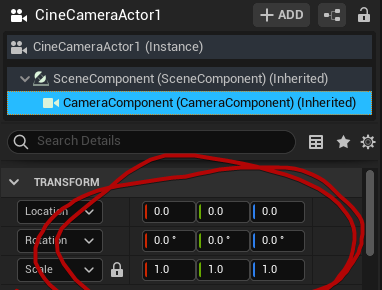
The child component of CineCamActor had transform and rotation offsets that DO NOT get keyed during keyframing
 mint spire
Hi there guys, I just released my full CGI Short Film ''Till This Day'' entirely made by using Unreal Engine. Hope you like it! - https://www.youtube.com/watch?v=x3krOHaU8DI&t=20s

A man with a haunted past visits a town where an accident took place that claimed his brother, he returns to face his past, but not all is what it seems.
I wanted to try something new & extraordinary with the outstanding technologies Unreal Engine has given us. That's where the exciting part comes - I achieved such results using the UE 4.27 ve...
plucky stream
Does anyone know if you can reverse keyframes in Sequencer?
rocky escarp
plucky stream
Does anyone know if you can reverse keyframes in Sequencer?
You can use the multi-select tool in the curve editor. Drag around your keys, type -1 in the X.

 pulsar nexus
can anyone help with this problem please? something is messing up my lights when the level changes. It works normally in the editor mode, but as soon as I run game test mode, the shot which should not change lights, becomes much lighter, almost like it is still loading a HDRIbackdrop from the level which should be hidden. I made sure that naming is correct, so the Level Visibility track works. Is this known problem? Where should I look for help?
mint bison
Has anyone ever had an issue where a material won't reflect DoF?
One particular mesh with this glass material would not get blur :/

 grave crescent
@mint bison Check if "render after DOF" is enabled
Question of my own
Does anyone know of a way to do an override material in Unreal? Apply one material on all objects only in a specific sequence or maybe at render time as in the Movie Render Queue
plucky stream
rocky escarp
You can use the multi-select tool in the curve editor. Drag around your keys, ty...
Thank you Daryl
 nova mantle
Hey all, I'm new to using sequencer in Unreal. I want to use Replay System to record some gameplay to be able to use that in sequencer. I'm using the console commands that come with Replay System Standard. Where do replays get stored ? How can I access them via sequencer ?
quick portal
nova mantle
Hey all, I'm new to using sequencer in Unreal. I want to use Replay System to r...
I don't think Replay System goes hand in hand with Sequencer. Sequencer tools are mostly editor code.
nova mantle
quick portal
I don't think Replay System goes hand in hand with Sequencer. Sequencer tools ar...
Is there a way to set up a cinematic camera with replay system ? I want to record gameplay and use that for dynamic shots
quick portal
nova mantle
Is there a way to set up a cinematic camera with replay system ? I want to recor...
You have to make that yourself in runtime.
nova mantle
So just using replay system to record won’t work ?
quick portal
nova mantle
So just using replay system to record won’t work ?
You can use replay system to record, but you have to create your own additional functionalities.
You can't use Sequencer as it is editor code.
rocky escarp
nova mantle
Hey all, I'm new to using sequencer in Unreal. I want to use Replay System to r...
Use take recorder instead
mint bison
grave crescent
<@!383512386746712081> Check if "render after DOF" is enabled
Thank you!!!
 near locust
Hi all, I'm having some trouble trying to figure out how to fix this. In the video, on the left cliff edge, you can see the edge flickering. I have enabled motion blur in the project setting and camera, but no matter what my settings are, this always happens. Any idea on how I can fix this flickering of the cliff edge and make it smooth. Thank you so much!!
near locust
After doing some troubleshooting, I think I've narrowed the stutter down to when I change the fps in sequencer to 24fps.. As this isn't being used in a game and I'm trying to achieve a film look, 24 is the standard, how do I now resolve the stutter with use of 24fps
 amber ether
Hello everyone,
I am currently working on a cinematic for university. I tried rendering the sequence, but the rendered image looks very different from the viewport image. It looks like it was rendered without the PostProcessVolume applied but idk why.
Is there a reason for that?
Sorry if that's a stupid question. I'm pretty new to unreal.
I am working in unreal 5 btw.

 gusty heath
how can you fix camera falling into ground when exporting video from sequencer?
gusty heath
seems like adding camera cut track helps, but still there's a small seconds part of camera fall in the beginning
pretty weird, never had this problem in the past
 tender blade
Here's one that... Not sure if it's better here or in one of the other rooms as it's kinda multi-subject.
The project basically has a pair of glasses that the player can put on and take off (this would be an animation in first person... Shouldn't be too crazy hard hopefully) but I want the appearance of things to be different while the glasses are being worn... Which I guess just requires a trigger or something in the blueprints of those items.
The hard part though is the transition. While the animation is running it would be nice to see through the lenses as they come up, and see a glimpse of the things that are visible while wearing the glasses. But not sure how I could do this. I suspect its very hard, might be best to just have them turn on after they're on the head..
nova mantle
rocky escarp
Use take recorder instead
Thank you will take a look
nova mantle
rocky escarp
Use take recorder instead
Can you use take recorder with spawnable characters in a game mode ?
turbid radish
Hey, for a school project I'm currently working on cinematics. I've just finished my research. Would this channel be a place to share a onepager of my research to collect feedback?
quick portal
turbid radish
Hey, for a school project I'm currently working on cinematics. I've just finishe...
#work-in-progress
 lyric glen
amber ether
Hello everyone,
I am currently working on a cinematic for university. I tried re...
lyric glen
amber ether
Hello everyone,
I am currently working on a cinematic for university. I tried re...
You have to turn on infinite bounds under the details panel while selecting post processing volume
solemn cosmos
Hi all - Is there a way to ensure the camera shake node affects the camera the same way each and every time?
amber ether
lyric glen
You have to turn on infinite bounds under the details panel while selecting pos...
That wasn't the problem sadly. I double checked and infinite bounds was turned on.
quick portal
solemn cosmos
Hi all - Is there a way to ensure the camera shake node affects the camera the s...
No. Camera Shake is realtime procedural effect.
If you want motion consistency, you might as well make up a camera shake in the Sequencer timeline per frame.
solemn cosmos
quick portal
No. Camera Shake is realtime procedural effect.
If you want motion consistency,...
Thanks. Sounds like you're experienced with Camera Shake. Have you tried baking down the procedural effect to camera keyframes?
quick portal
solemn cosmos
Thanks. Sounds like you're experienced with Camera Shake. Have you tried baking...
No, I never had the need for "consistent" camera shake in my cinematics (as it's supposed to emulate 2D animation)
 barren lagoon
hey everyone!
in one of my cinematics i have a scene with a particle effect that needs to be keyframed at a speed of like 600 times per minute. is there a way to execute this via blueprint (event track) rather than tediously scrubbing through the timeline and keying that particle effect?
noble kraken
Hello, does anyone have idea why this node is missing ? The picture is from google
 solemn cosmos
quick portal
No, I never had the need for "consistent" camera shake in my cinematics (as it's...
solemn cosmos
quick portal
No, I never had the need for "consistent" camera shake in my cinematics (as it's...
Hi all, here's the solution to my problem above. Use the take recorder to bake down the camera shake 🤦♂️ @quick portal thanks for replying, perhaps you can use this fix for your non-2D-emulated cinematics.
quick portal
solemn cosmos
Hi all, here's the solution to my problem above. Use the take recorder to bake ...
I don't rely on Take Recorder, so that won't be the brightest idea in my book
crude knoll
Hello guys. I am still using Unreal 4.27 and I am having issues with recording particles? The particles will stay in the shot for 3 seconds and then it disappears. I am having trouble keeping the particles consistently throughout the entire recording.
 quick portal
crude knoll
Hello guys. I am still using Unreal 4.27 and I am having issues with recording p...
quick portal
crude knoll
Hello guys. I am still using Unreal 4.27 and I am having issues with recording p...
Are you using delay every frame?
crude knoll
@quick portal Forgive me, I'm still somewhat an amateur at Unreal. I am self taught. Not sure what you're referring to by "Delay every frame"
mint bison
So I disabled the render after DoF for this glass material and it's half-working. It seems shows the line for where it overlaps with other material 😦 Anyone experienced this before?
 nova mantle
Hey all, I'm working in sequencer setting up a new master shot with sequences. I'm not able to get the thumbnail preview working.
Would anyone know how to get it back ?
 turbid radish
Heyo, when I create a keyframe for the character location in my sequencer, it sets the spawn position of the character to that location as well instead of the player start. Any way how to fix this?

 quasi horizon
Hey guys! how to make a smooth transition between cinematics and gameplay like this in video?
eager turret
Is there a solid tutorial on making a shareable control rig? I built one control rig that works fairly well with one character, but would like to have a start up event that would snap it to a different character with the same skeletal structure even if the proportions are different. Right now, I either get squashed or stretched characters. Please don't make me build another control rig from scratch :)
quick portal
eager turret
Is there a solid tutorial on making a shareable control rig? I built one control...
More of an #animation question
eager turret
quick portal
More of an <#221798806713401345> question
True... Force of habit. I'll pose the question over there.
mint bison
Is there a way to make spawn less obvious in Sequencer? When my character is spawned, I always get a frame where the character is forcefully being placed all shaken. Makes it almost look like a glitch :/
quick portal
mint bison
Is there a way to make spawn less obvious in Sequencer? When my character is spa...
Spawn it out of sight.
mint bison
quick portal
Spawn it out of sight.
As in, out of the camera view?
quick portal
mint bison
As in, out of the camera view?
Either that, or obscured by another objects
It's a common developer trick.
mint bison
That's how I've been dealing with it
but was wondering if there was a better way for scenarios I can't do that
quick portal
mint bison
but was wondering if there was a better way for scenarios I can't do that
What kind of scenarios? Invisible actors going visible?
In that case spawn the actor invisible earlier, then make it visible in time. Easy peasy lemon squeezy.
mint bison
so I am switching a same character from one to another on camera
they are located on the same spot, timed perfectly so that when one goes invisible, the other will become visible
quick portal
mint bison
they are located on the same spot, timed perfectly so that when one goes invisib...
Still the same.
Preemptively spawn the second actor invisible, then set it to visible when the first actor goes invisible later on.
barren lagoon
there are things that cannot be done “elegantly” when you’re working with sequencer. some things that can be done “elegantly” are time consuming and as such it’s not worth the hassle. if it looks good then it looks good 🙂
quick portal
mint bison
still glitches
What kind of glitches?
You can have the actor spawn far earlier to let any physics settle. Just the matter of setting the visibility on time
 full magnet
Hello, in a scene I have a media player texture. In the level blueprint I have Open Source node that starts the video playback. When rendering in the Movie Rendering Queue, the mediaplayer texture does not start. Is there a checkbox I'm missing somewhere?
Ah media track to sequencer, disregard
 real pond
Hi, im teaching myself Sequencer for cinematics in gameplay. I just used sequencer to start blocking out a earthquake for this street area, does sequencer support audio localization as well? I have things like destruction sounds from particles etc.
I also have a ice cream truck vehicle that is moved in the sequencer timeline, and I wanted it to play a song that parented it to the vehicle track. Could this be possible in sequencer only as well? I am trying to avoid BP as much as possible since I am primary an artist, thanks!
 mint bison
quick portal
What kind of glitches?
You can have the actor spawn far earlier to let any phys...
mint bison
quick portal
What kind of glitches?
You can have the actor spawn far earlier to let any phys...
and by visibility, you mean view on camera right?
the transition needs to happen on camera, which is the issue. I will probably just remove the bad frame after the export for now
One more question - is there a way to move (push out) all content from timeline? I want to add some additional scenes in between the existing sequence and not sure if there's an easy way to do this.
lyric glen
look at this i made it
rocky escarp
mint bison
One more question - is there a way to move (push out) all content from timeline?...
This is why you want to work in subsequences, then you can add & move new shots easily in a master sequence. Moving lots of keyframes about is not nice. I’d still suggest looking in to it, if you’re not too far down the road.
crisp horizon
I need some help...is it possible to attach foliage to a moving mesh?
I have some rocks scattered on a bigger rock, that I animated in teh sequencer.
I can attach the foliage actor to the mesh and it moves with the mesh, if I move it in the editor. But if I animate the mesh in sequencer, it doesn´t move with it.
crisp horizon
Nope, it isnt.
Looking into a blueprint on marketplace now, that converts foliage to static meshes. Should work fine with nanite enabled rocks in UE5 I hope.
mint bison
rocky escarp
This is why you want to work in subsequences, then you can add & move new shots ...
too far 😢 but I will definitely utilize the subsequences in the next project
 torn mantle
I'm trying to render out a still image using Movie Render Queue. However, whenever I try that my camera moves into nirvana. I already tried to set a keyframe to the camera's transform in the level sequence, but that didn't help.
Am I doing something wrong or is this a known bug?
(This is in UE5 preview 2 but I've been having the same issue in UE4.27 as well)

 mint monolith
@torn mantle This could be a few things. Best thing to do is hit the play button to Play in Editor and see if you camera jumps there/what else is going on. This is one of the main differences between what you see in viewport and what happens at render time
@mint bison Sounds like you are looking for shot tracks which allows you to edit sequences together
rocky escarp
torn mantle
I'm trying to render out a still image using Movie Render Queue. However, whenev...
You need a camera cut track
 buoyant herald
My camera cut thumbnails are black, sequence render is black can anyone please help me troubleshoot and fix this?
 gentle abyss
buoyant herald
My camera cut thumbnails are black, sequence render is black can anyone please h...
gentle abyss
buoyant herald
My camera cut thumbnails are black, sequence render is black can anyone please h...
Would need more info. Have not come across this issue. Like what does your level look like, what do your camera tracks look like, etc.
Pretty sure you can customize the look of the thumbnails too, so more info would be helpful.
Does the sequence actually work when you play it back?
i.e. you can check here
 gentle abyss
Anyone work with master sequences and shots here? I have a very basic master sequence setup with one shot inside of it. I'm trying to figure out why the camera from the shot is not being recognized. When it plays back, the actors move, but the camera is not being referenced.
If I open the sequence being used directly, it plays back fine and I see the camera. This is such a basic thing that normally I haven't had an issue with, so a little confused.
There is no Camera Cuts in my master sequence. Just in CubeNormalize.
gentle abyss
 gentle abyss
^^ Weird. Solved the above. Just needed to tell my sequence which camera I was using again, and it was suddenly fine.
 last fjord
Hi everyone. New to the server. I am trying to render a Composure comp added to my sequencer sequence, using the Movie Render Queue as an EXR sequence. The comp has a foreground CG element, a media plate, and a background element CG element. All seems to work in the comp preview, but for some reason Movie Render Queue only renders the cg elements in the final sequence. Also, apparently, as soon as I launch a local render, the media player for the media plate turns off the video playback and appears to also deactivate the File Media Source that was playing. Did anyone run into similar issues with Composure, or could point me to some resource? I can’t figure it out with the Unreal Engine documentation. Ps It is in Unreal v 4.27. Many thanks in advance.
mint bison
I have audio attenuation & spatial audio set up, which plays correctly according to the camera location in the sequencer but not when I render using this method. Anyone know how to manage this?
gusty heath
I'm really going crazy with unreal... :) for god sake can someone tell me how I can start stop my composure with only one button? Now i play the sequencer and try to double click as soon as possible the media player, but with start and stop frequently it's a pain... Please please!! Thanks
 solemn grail
Hello, how can I sync my sequencer timeline to start playing when I hit play in the editor in my level? I'd like to hit play in editor and the timeline to start playing at the same time
 wooden moat
Hi! Do you know if there's a way to make RayTracing look as good as PathTracing? Currently there is no way to make it work with nanites, right? It just looks so darn real! Really wanna use it.
rocky escarp
solemn grail
Hello, how can I sync my sequencer timeline to start playing when I hit play in ...
Drag it in to the world, make sure it’s set to autoplay. That’s the easiest way, otherwise you can launch it via blueprint.
solemn grail
rocky escarp
Drag it in to the world, make sure it’s set to autoplay. That’s the easiest way,...
thank you I'll try it!

 vivid wolf
hi, I was wondering if someone here could kindly confirm this? Do I need a GameMode set in World Settings if I'm only using UE4 to create a movie clip? I can't seem to find anything that says I should or shouldn't.. thanks
quick portal
wooden moat
Hi! Do you know if there's a way to make RayTracing look as good as PathTracing?...
No.
If what you're looking for is Path Tracing quality, might as well use Path Tracing altogether.
Alternatively you can bake lighting with GPU lightmass, but it's difficult to get right.
rocky escarp
vivid wolf
hi, I was wondering if someone here could kindly confirm this? Do I need a GameM...
No, you can leave it unset
wooden moat
@quick portal Hi there! But Path Tracing doesn't work with nanites, which would make the render times much longer. Or do you know of a way around this?
Does baking with GPU lightmass work with moving images also?
 long chasm
When rendering several level sequences in MRQ that you want to go to different folders, is there a way to set the folders without having to manually change the output one by one?
 last bramble
It seems this would be very easy yet I am unable to find a suitable tutorial ; how do I have a camera rotate automatically in a scene? No player controls. My goal is a simple rotating a camera within a skybox. I've looked at matinee, yet that is for an object (but might work with some finagling.) And since I'm not using a player control or actor, the character rotation tutorials are far too complex. This seems like a simple thing yet every solution I've found is far too complex and not the solution for this challenge. If there is a specific word or technique or node that does this, your insights would be appreciated.
long chasm
last bramble
It seems this would be very easy yet I am unable to find a suitable tutorial ; h...
A camera with rotation keyframes within a level sequence doesn't work in your case?
quick portal
wooden moat
<@!325627930484932608> Hi there! But Path Tracing doesn't work with nanites, whi...
Oh, right, Nanite.
last bramble
long chasm
A camera with rotation keyframes within a level sequence doesn't work in your ca...
My inexperience here is a handicap. So it does rotate in the sequencer, that is easy, yet my understanding is I have to render the scene, which makes a final animation. My goal is to have this happen in real time so it can be streamed live. So a final rendering doesn't work.
Turns out I can rotate via Skyzoneinfo, that will achieve the desired effect with a stable viewpoint camera.
 pulsar glen
@long chasm, what about use {sequence_name} in your OutputDirectory?
 gusty heath
last bramble
It seems this would be very easy yet I am unable to find a suitable tutorial ; h...
gusty heath
last bramble
It seems this would be very easy yet I am unable to find a suitable tutorial ; h...
You might wanna look into Camera Rigs. You can simply draw out a little train track and put your camera on it.
Camera Rigs Documentation
https://docs.unrealengine.com/4.27/en-US/AnimatingObjects/Sequencer/Cameras/CameraRigRail/
gusty heath
last bramble
It seems this would be very easy yet I am unable to find a suitable tutorial ; h...
Another option is to create a Cine Camera Actor and make it "Look" at your subject. This will follow your subject everywhere it goes.
Cine Camera Actor Documentation
https://docs.unrealengine.com/4.27/en-US/AnimatingObjects/Sequencer/Cameras/CineCameraActors/

both these options will also run in realtime if im correct, but i have no idea what your context is.
vivid wolf
rocky escarp
No, you can leave it unset
Hi, I was wondering if you guys could kindly help again?
I need my camera (the one on sequencer) to have collision so that it can hit the triggers I have so that they can load the NPCs when the camera is close enough to them. How do I do this?
gusty heath
.mov files that previously worked in my project no longer want to have playback, this happens often and at random, prores files will just do whatever they want in UE4
quick portal
gusty heath
.mov files that previously worked in my project no longer want to have playback,...
If you're using .MOV files for video in the scene, then use image sequence media instead. It's more consistent with the sequencer's timeline.
long chasm
pulsar glen
<@!144538577731190784>, what about use \{sequence_name} in your OutputDirectory?
haven't tried yet but this should work, seems simple enough 😅 Thanks!
gusty heath
quick portal
If you're using .MOV files for video *in the scene*, then use image sequence med...
Thanks I'll take a look at that tomorrow morning, it's just odd that it works in the scene for the last 3 days and suddenly when the project is booted it's unable to be read
PNG sequence it is
 scenic rivet
hi, does anyone know how to reduce the flickering of the billboard's reflection of HypeChamber? 😁
long chasm
Hey there, I don't have a video background and I am struggling to understand how "disable tonecurve" in MRQ is working. I have tried it before on the archviz scene and the guy that tried to edit said it had more information to edit than without "disable tonecurve". But now I was rendering a simple scene with a ciclorama and 1 rect light and lights seem overblown.
What is your workflow to get renders good for post editing in a different software like nuke or AE?
Do you have any resources that would help me understand how this tonecurve thing is working?
pulsar glen
long chasm
Hey there, I don't have a video background and I am struggling to understand how...
If you are rendering EXR with Unreal, you need to disable the tonecurve.
In Nuke, you need to set the project to ACES and set your read to utility - linear - sRGB

 long chasm
Hey thanks! We will keep on testing. I must have done something wrong in this shot.
In spite of that I'd still like to know if you plan anything differently in your shots/renders and what shortcomings have you come across when comparing to your usual workflow outside of UE.
pulsar glen
The main difficulty is if you want to use passes.
I have done some tests this summer and I have abandoned the idea to use them. My last blocking point was the motion blur/motion vectors mainly.
 versed vortex
Hey all! New here. So, I have a question, and I did do a bit of research on this beforehand and couldn't find a solid answer, but is it possible to animate the wheels of a vehicle in Sequencer if the tires aren't separate to work with? If so, is there a good tutorial that explains this? Also, if there's a quicker way as well to achieve this, that would be great too.
long chasm
versed vortex
Hey all! New here. So, I have a question, and I did do a bit of research on this...
By seperate you mean the wheels and the rest of the Car are the same mesh?
versed vortex
Yup!
long chasm
then I am sure you cannot animate just part of a static mesh in sequencer (or at all as far as I know)
To make a simple animation in this case maybe you could export the wheels seperatly (and with the pivot where needed otherwise you have to use UE modeling tools which crash sometimes, at least for me)
 rustic marten
Can i change an animations rate scale(speed of animation) inside sequencer? or will i just have to make a function then call it inside
 wheat karma
Movie Render Queue is rendering from the wrong unreal levels.. what did I forget to do?
versed vortex
long chasm
then I am sure you cannot animate just part of a static mesh in sequencer (or at...
If that's the case, then I may have to go with that or a different method. Unless a different answer comes by, I appreciate it!
versed vortex
rustic marten
Can i change an animations rate scale(speed of animation) inside sequencer? or w...
That would be the playrate function if you right-click the animation on the timeline and go into properties, it should show there.
long chasm
wheat karma
Movie Render Queue is rendering from the wrong unreal levels.. what did I forg...
make sure you have the right level set in MRQ on the panel to the right
rustic marten
versed vortex
That would be the playrate function if you right-click the animation on the time...
yah i see that but can i keyframe the property values?
versed vortex
Not too sure on that part.
 cold basalt
I have a quick question, so i try to render a Cinematic and make a video, but the renders always super laggy and ittering, any idea how to improve performance and reduce lag in the render?
(I use ue5)
quick portal
cold basalt
I have a quick question, so i try to render a Cinematic and make a video, but th...
Even in the final video?
cold basalt
Yes i have no idea why
quick portal
Maybe UE5 issue because it never happens in UE4 to me 🤔
rustic marten
I don't have that issue in ue5. I've heard from a video someone mentioning it; they said to fix it you have to export it from a editing software
 glacial scarab
I'm sure this has been asked a bunch of times but I'm currently troubleshooting it myself for the first time-
Does UE4 have problems with certain video resolutions?
Does it accept any other formats than .mp4?
Been reading some comments here to see if I can get some answers.
https://www.reddit.com/r/unrealengine/comments/33t9oo/the_videos_which_ue4_accepts_as_startup_movies/
reddit
28 votes and 3 comments so far on Reddit
Just realized the link is ancient.
quick portal
glacial scarab
Does it accept any other formats than .mp4?
If you're in 4.27 or 5.x, consider using Bink format instead
glacial scarab
Thanks for the tip, I'm actually on 4.26.1 here
gusty heath
cold basalt
Yes i have no idea why
How are you rending? As movie file image sequence? For me the image sequence works perfect but movie filrs like.mp4 and .avi can get jittery, skip frames or sometimes just jumble everything up
cold basalt
gusty heath
How are you rending? As movie file image sequence? For me the image sequence wor...
I used both video and image both lag i dunno why
Is it performance?
quick portal
glacial scarab
Thanks for the tip, I'm actually on 4.26.1 here
Yeah, if only the free Bink/Oodle licence retroactively apply to all UE4 versions...
glacial scarab
Yeah, I'm not able to get my videos to play at all. Hmmmm
It's kind of surreal the infinite complexity Unreal can handle but can't play basic video files.
quick portal
The problem is that video players are not that platform agnostic.
glacial scarab
Mhm, I wish I could keep the video I made at least at 1920x1080 resolution
No matter how I render out this video, it's just not playing at all for some reason. Hmm
quick portal
Your best bet would be to move to 4.27.2 and use Bink
glacial scarab
Question, would I only be able to see the startup movie through either building the game or using the Launch in the editor?
Like it would never play just by playing in the viewport?
glacial scarab
quick portal
Your best bet would be to move to 4.27.2 and use Bink
and yeah, I'm debating on doing this but migrating always stresses me out in that I don't know what it could potentially break.
cold basalt
So how do i increase performance? Because my renders suck even if i dont have much in the scene.
I am using a RTX 2080 so its not my GPU.
 edgy lion
Hi everyone I REALLY need help. I have a cinematic camera make a route around a world using keyframes and there is a section where the camera needs to circle around an object at a constant rate while looking at it. I have tried to manually keyframe it with rotation and position at even intervals but despite this i still get pumping and uneven movement when circling the object. I know about camera lookat tracking but the issue is i cant smoothly interpolate the cameras lookat from my manual keyframes it just jolts to it. I can also achieve the look i want with a camera rig rail but then theres no way to get a smooth change from the keyframe camera to the rig rail camera. i am so stuck
It's worth noting ive also tried my best to smooth out the manual keyframes using the curve editor but still can;t seem to get a smooth jolt free circular pan. Am I missing something?
cold basalt
cold basalt
So how do i increase performance? Because my renders suck even if i dont have mu...
I fixed it, ligit, just turn viewport to unlit or wireframe and then render the video, it will be less laggy.
 mortal iron
Hi everyone, i used control rig to do animation in sequncer but the hair doesn't work, i installed hair plugin (kawaii pysic) but it only can be called in animation BP, do anyone know how to combine control rig in sequncer and anim BP 🤨?
 tough niche
Hi guys, just wanted to ask here.
I setup a cinematic scene, my main subject is green sphere for example and I render that in png sequence, it works as it should be but I wanted to now change the color of the sphere to red and render it again, and change it again to other color.
My question is, is there a way to automate this instead of manually selecting the file name, location, and clicking the render button manually?
quick portal
Do you know anything about colour theory?
gusty heath
cold basalt
I fixed it, ligit, just turn viewport to unlit or wireframe and then render the ...
interessting, i will remember this trick
 idle knoll
How to capture ingame audio while using Take Recorder ?
cold basalt
cold basalt
I fixed it, ligit, just turn viewport to unlit or wireframe and then render the ...
For those wondering my render turned out great, very smooth. finally,
https://www.youtube.com/watch?v=V1L3urxwIwI

This is a fast render for testing and for checking performance of UE5 for our game Behind Lines. This little short video is about a German infantry soldier called Kurt.
cold basalt
gusty heath
interessting, i will remember this trick
Ye i didnt knew that either, it will increase your render performance and renders faster with time deeply.
real pond
Hi, is their a way to have sequencer render out a movie with audio? I notice it keeps the avi without audio? Thanks!
cold basalt
real pond
Hi, is their a way to have sequencer render out a movie with audio? I notice it ...
it is possibe to render .avi with audio, Under audio Output you can set a Master Audio Submix.

 real pond
cold basalt
it is possibe to render .avi with audio, Under audio Output you can set a Master...
real pond
cold basalt
it is possibe to render .avi with audio, Under audio Output you can set a Master...
I get two files, any way to merge them?
mint spire
Hey guys hope you’re doing fine! I just released my latest short film entirely made in UE4 with motion capture! Hope you like it! - https://youtu.be/iyxZSPHBJpw

CGI 3D Animated Short Film: Till This Day Animated Short Film by Nako Baev. Featured on CGMeetup Gallery https://www.cgmeetup.com/project/till-this-day
A man with a haunted past visits a town where an accident took place that claimed his brother, he returns to face his past, but not all is what it seems.
Realistic CG Animated Short Film ''Til...
quick portal
mint spire
Hey guys hope you’re doing fine! I just released my latest short film entirely m...
<@&213101288538374145> promo outside promo channel, crosspost
 brazen geode
mint spire
Hey guys hope you’re doing fine! I just released my latest short film entirely m...
brazen geode
mint spire
Hey guys hope you’re doing fine! I just released my latest short film entirely m...
Hi. 👋 This is a support channel. Please promote your project in #released instead.
real pond
cold basalt
if you have a video editor?
Oh like Camtasia? Ah you mean adobe premiere I see.
cold basalt
real pond
Oh like Camtasia? Ah you mean adobe premiere I see.
well any video editor that allows you to place audio under a video.
 astral plank
hey guys, how can i get the sequenser camera to track an armature bone? it seems like the look at parameter doesnt allow you to select anything else other than the origin of an object
quick portal
astral plank
hey guys, how can i get the sequenser camera to track an armature bone? it seems...
Attach a dummy actor to the character bone and track it.
astral plank
quick portal
Attach a dummy actor to the character bone and track it.
i tried doing that but the dummo sphere mesh i added doesnt seem to be exposed in sequencer,


sequencer only seems to register the skeltal meshes
although perhaps the fact that i left out that this is a blueprint makes it more complicatedd?
(the dummy actor is CalibrationPoint btw)
 rich bough
Hi all, is it possible to use 8k HDRI backdrops in UE4? Rumor has it, there is a hard-coded 2k limit.
quick portal
rich bough
Hi all, is it possible to use 8k HDRI backdrops in UE4? Rumor has it, there is a...
It's possible. The 2K res is default max texture size for cubemaps
astral plank
rich bough
Hi all, is it possible to use 8k HDRI backdrops in UE4? Rumor has it, there is a...
yeah just bum up the cubemap reso to 4320
 rich bough
quick portal
It's possible. The 2K res is default max texture size for cubemaps
rich bough
quick portal
It's possible. The 2K res is default max texture size for cubemaps
Okay, thanks for the quick reply!
rich bough
astral plank
yeah just bum up the cubemap reso to 4320
Thank you!
quick portal
It's just that it'll take a lot of time to process after you change it, and the engine will temporarily freeze while doing so
astral plank
4096*
quick portal
Also the real limit for textures is 8K (8192) in one dimension. So you can't use 16K textures in UE4.
rich bough
Okay, I understand. This will probably change in UE5, right?
quick portal
Who knows. I don't use UE5.
pulsar nexus
does anyone have strange jump cuts few frames between camera cuts? In the editor everything works smoothly, but in render it adds few frames from the angle which doesn't even exist in the project.
I am not sure how to debug this, and it only happens with one camera.
Should I just recreate the camera?
pulsar nexus
nope
I made a new camera and made sure everything is usual, no strange rotation, no keyframes on the camera, everything works in the editor, but as soon as I render it with the render cue, bam, additional frames with fucked up angle. And only on this camera, on this angle
how is that possible?
ok, got it. It was showing me messages that the shot is starting on subframe, for some strange reason. At least I can probably fix that
yes, it was that. I have to get used to read the warnings after the rendering.
cold basalt
Guys, you guys are gonna like this, so UE5 uses standard vsync, you can turn it off which will increase performance even better from 30 FPS to 60FPS and higher, using the follow commands in the editor console command panel:
r.Vsync 0
r.VsyncEditor 0
you are welcome.
 fringe dawn
guys when i try to render the sequence i made it renders a mystery camera thats way beneith the level.

this is what i try render

this is what it renders
plz help
im rendering in movie render que
Nvm it was only first frame
nova mantle
Hello, I'm working on the sequencer, and I am going close up to the face of the character the LODs are popping. Has anyone run into this issue with the sequencer?
these are metamhuman meshes I'm using
 lyric apex
nova mantle
Can you use take recorder with spawnable characters in a game mode ?
lyric apex
nova mantle
Can you use take recorder with spawnable characters in a game mode ?
Hey, did you ever manage to find a solution to this?
Currently struggling with using take recorder due to crashes with spawned stuff
nova mantle
lyric apex
Hey, did you ever manage to find a solution to this?
No I did not . I have tried to regenerate LODs and the head still pops on focal lengths of 85 -150
lyric apex
Ah at least it doesn't crash though, for me I can't get it to record without a complete CTD
thanks for your reply though!
I'm glad to know it's at least partially possible
nova mantle
lyric apex
Ah at least it doesn't crash though, for me I can't get it to record without a c...
You converted to spawn able in sequencer ?
 nova mantle
lyric apex
I'm going to try again once the engine is compiled
nova mantle
lyric apex
I'm going to try again once the engine is compiled
that's a lot. hopefully you're on ssd when compiling
nova mantle
The weird part of my problem my mesh doesn't pop on the body. Just the head
 ancient steeple
any of you fine people know if its possible to make a level sequence that can do stuff to the player character? (like play montages on him or the likes(especially if player is not in the level at start)
trying to find a way to do those cameras that blend in to the gameplay cam and blend from player character animation into the level sequence animation
quick portal
ancient steeple
any of you fine people know if its possible to make a level sequence that can d...
Yes, you can cheese it by calling events.
ancient steeple
so like play a montage on the player?
 gentle forum
hi, im trying out cine cameras in sequences (and sequences in general) for the first time and the camera goes to 0,0,0 on player actor after it finishes the cutscene
im guessing the player's camera is getting destroyed and there's supposed to be some setting for spawnable/possessable on the sequence cameras but i can't seem to find it
are cine cameras different (the tutorial mentions different cameras than cine)
blazing jay
How can I render a sequence from blueprint?
nova mantle
blazing jay
How can I render a sequence from blueprint?
would this be helpful ? https://forums.unrealengine.com/t/export-sequence-render-from-blueprint/468267
Unreal Engine Forums
Is there any way of exporting (capture movie) a selected sequence from Blueprint. (or c++)?
nova mantle
lyric apex
yep m.2
https://www.youtube.com/watch?v=DUr5wApfSyg&ab_channel=K.D.iscreatingGames found solution to my problem

 jovial dawn
Is there any option to display text inside a cinematic other then making widget blueprints or adding subtitles to sound?
 near patio
I have an issue where my render queue footage, when rendered out is jumpy. I save it as PNGs or JPEGs not .AVI.
Would anyone know of a fix for this, or the cause of it?
 abstract hazel
can I export vertical videos (tiktok, instagram style) from UE?
gusty heath
abstract hazel
can I export vertical videos (tiktok, instagram style) from UE?
Yes, you can set your custom Aspect ratio during export and on your camera's
https://docs.unrealengine.com/4.26/en-US/AnimatingObjects/Sequencer/Workflow/RenderAndExport/RenderMovies/
gusty heath
fringe dawn
Nvm it was only first frame
Faucher has a nice video on it. Good for when 1 frame render can take up to 30 mins, and you are in a timecrunch.
https://youtu.be/lXcerW59onA?t=206
 craggy gale
My movie render queue is not outputting any files at all to the file location i set and nothing seems to be rendering that i can see in the preview
 snow hamlet
craggy gale
My movie render queue is not outputting any files at all to the file location i ...
snow hamlet
craggy gale
My movie render queue is not outputting any files at all to the file location i ...
Did you add your own settings or leave setting as 'Unsaved Config'? A screen grab of your the movie render queue setting would be helpful.
craggy gale

it says unsaved config but i have loaded the preset i saved
ive tried making a new sequence and another camera but its always black
snow hamlet
craggy gale
That's UE5, right? Haven't tried MRQ in UE5 myself but one thing I do notice. There's no rendering setting.
craggy gale
ah yes thats what i was missing thank you
yep its in ue5.
its not rendering with the camera i set up for some reason
snow hamlet
craggy gale
its not rendering with the camera i set up for some reason
Can you take a screen grab of your sequence?
craggy gale
I got it sorted out, had to add a camera cut track
 fierce berry
hey guys, trying to export a composite, but it's not making its way to the sequencer and im not sure what to do
its a composite with a media plate, and a background layer, all its fine in the composite preview, i just dont know how to get what i see there to the sequencer
 gritty rivet
Hey guys, does anyone know how I can make a short 20 second video of my cine camera orbiting around an object and as the video plays through the angle at which the camera is facing the the object goes from 15 to 60 degrees
umbral harness
morning ppl 🖖 question about control rig ... would this be the best place for it?
quick portal
umbral harness
morning ppl 🖖 question about control rig ... would this be the best place for i...
umbral harness
quick portal
<#221798806713401345>
ty for your reply 🙂 I managed to solve the issue meanwhile 🙂
umbral harness
ok, a question that is likely to be in the correct place in this channel 😅 how can I keep thee current world transforms of an attached object, when detaching it? (in sequencer) ... already managed to make the attachment work, but detachment always fail 😦
quick portal
umbral harness
ok, a question that is likely to be in the correct place in this channel 😅 how ...
Kinda hacky, but you can copy the absolute location and rotation, and then paste it back
umbral harness
quick portal
Kinda hacky, but you can copy the absolute location and rotation, and then paste...
I see ... yeah, hacky last resort solution, but it might work 👍 what bugs me is, there are actual options that should make it keep the current world transforms, but they don't seem to work 😦
 umbral harness
@quick portal fwiw I found out how to make it work correctly ... you need to select "Preserve with bake" in the attach options when you create an attach track 😉
 finite kite
Hey guys, I've got a small 'understanding' issue with timelines inside a Blueprint actor.
I've set up my Blueprint in a way that there's a 'reset' event at the start of sequencer to reset the timeline animation back to its initial state, whenever Sequencer loops back to the beginning.
Then whenever I need the Blueprint actor animation to 'fire' I've got an event on the respective event track.
Playing this once in sequencer works exactly as expected.
However, when I've got sequencer in 'playback loop' mode the Blueprint actor animation starts to 'snap' on the second and following rounds of playback (as you can see from the video below).
From what I can see, it's because the sequencer in/out duration isn't long enough for the timelines of the later Blueprints to finish playing, i.e. sequencer playback ends before the timeline animation is done.
If I wait a couple of seconds before playing sequencer again, the animations behave as expected.
However, I don't want to wait! 😄 So how can I force the timeline nodes for the Blueprints to be finished and reset to their respective start positions when sequencer loops back to the start?

 abstract hazel
Im trying to render a video similar to this from UE4 instead of doing screen capture from OBS. https://www.youtube.com/watch?v=5gZWna6RnCA.
Can I do this from sequencer? Idk if sequencer can handle live footage....

From https://onsetfacilities.com a PreViz tool, so that we can record in REALTIME, the FG, the BG, the Matte, and the Camera Track data (in FBX format, with zoom a focus) so that we can finish in NUKE the final composition with the OTOY same ORBX file we used for PreViz in UE4.
quick portal
abstract hazel
Im trying to render a video similar to this from UE4 instead of doing screen cap...
No. Doing live realtime composition doesn't share the exact same workflow with a prerecorded footage.
Also #virtual-production
 loud finch
Anyone know why my renders are black? I've made sure the camera isn't being obstructed. Thanks 😄
 undone geode
Any Niagara experts here able to help with rendering a sequence with particle collisions?
My particle collisions work when played back in editor on timeline.
But NO particle collision at all when rendered out with MRQ!
So confusing why something plays back correctly in editor but renders out totally different!
 cinder pasture
Anyone know why I am getting this weird stipply thing going on with the grass with a Movie Render Queue render. The ground appears fine but not the grass. I have AA set to 64 samples and override set to None.
 nova mantle
Hello, I've been learning a lot working on cinematics in Unreal. Do you prefer using 21:9 or 16:9 DSLR ?
quick portal
nova mantle
Hello, I've been learning a lot working on cinematics in Unreal. Do you prefer...
Depends.
quick portal
cinder pasture
Anyone know why I am getting this weird stipply thing going on with the grass wi...
If you're using MRQ, might as well not using anti-aliasing at all. You should render in higher resolution (at least 150% is my safe range) if you want less machinima look
nova mantle
quick portal
Depends.
I'm going for a more cinematic look. My camera focus length is usually 85 or 150 with aspect ratio at 21:9
rocky escarp
cinder pasture
Anyone know why I am getting this weird stipply thing going on with the grass wi...
From that screen-space dot pattern - it looks like dithered temporal AA use somewhere in the foliage material.
cinder pasture
Thanks @rocky escarp and @quick portal. Will try a couple of things an report back.
 thin osprey
Hey peeps, having some trouble with implementing my starting cutscene once I press play. One element is appearing too early and I have an idle character hanging out in my scene. Ive gone through my layers and keyframes and checked for both the element and the character and cant seem to find any hidden extras.
It works normally in the sequence player but bugs out when I attach it to game start
 inland gale
Hi all, i'm trying to do an "micro to macro" shot of our environment where the camera starts slow close to the ground and then gradually moves out faster and faster.
Problem is i can't for the life of me understand how to do it in the sequencer as it seems major adjustments in between keyframes completely fucks up the previous keyframe and breaks the animation.
I looked into editing the curves but doing manual adjustments is practically impossible because even the smallest tweak is big enough to screw everything up..
Just to clarify i'm talking about showcasing a huge 64sqkm map just to be clear about the scale of things.
Technically the easiest solution is to just move the camera in a straight line but I would like to have some slow camera panning etc.
quick portal
inland gale
Just to clarify i'm talking about showcasing a huge 64sqkm map just to be clear ...
64km²? Are you using UE5?
inland gale
not for rendering the sequence
cold basalt
cinder pasture
Anyone know why I am getting this weird stipply thing going on with the grass wi...
What grass do you use? the grass material needs to be setted up properly? maybe something going in your material graph?
quick portal
inland gale
not for rendering the sequence
I mean, with map that huge, are you using UE5?
inland gale
its a marketplace product that will support UE5
cold basalt
inland gale
its a marketplace product that will support UE5
WorldScape?
quick portal
I'm thinking about floating point imprecision at play, screwing up the curves
Though on second thought UE4 shouldn't have problems even in at least ±800,000 cm
inland gale
Doubt its precision issue because i already run into issues early on in the sequence when keyframes are still quite close to each other position wise
fierce berry
@loud finchcheck your exposure settings
you may have to crank them up to make it match your viewport, looks black but theres stuff there
inland gale
Had more luck in a different engine version (427) so maybe something changed for the better in the newer ones.
cinder pasture
cold basalt
What grass do you use? the grass material needs to be setted up properly? maybe ...
Looking at that now for any 'gotchas'.
loud finch
fierce berry
<@!256950098427117571>check your exposure settings
my monkey brain left a fade in actor there so the render sequence has still fading in, making it black
 upper drift
IMG_Media in Sequencer... Can anyone let me know the method for resetting image sequences on play. I'm having to drag back through the timeline to reset the start of each media track to get back to the first frame. I flipping did it a while back but cant recall how, BP? Thanks!
 vital nebula
inland gale
Technically the easiest solution is to just move the camera in a straight line b...
vital nebula
inland gale
Technically the easiest solution is to just move the camera in a straight line b...
not sure what exactly is the issue
But animate the camera using 2-3 different Nulls (empty actors) - might help
vital nebula
umbral harness
ok, a question that is likely to be in the correct place in this channel 😅 how ...

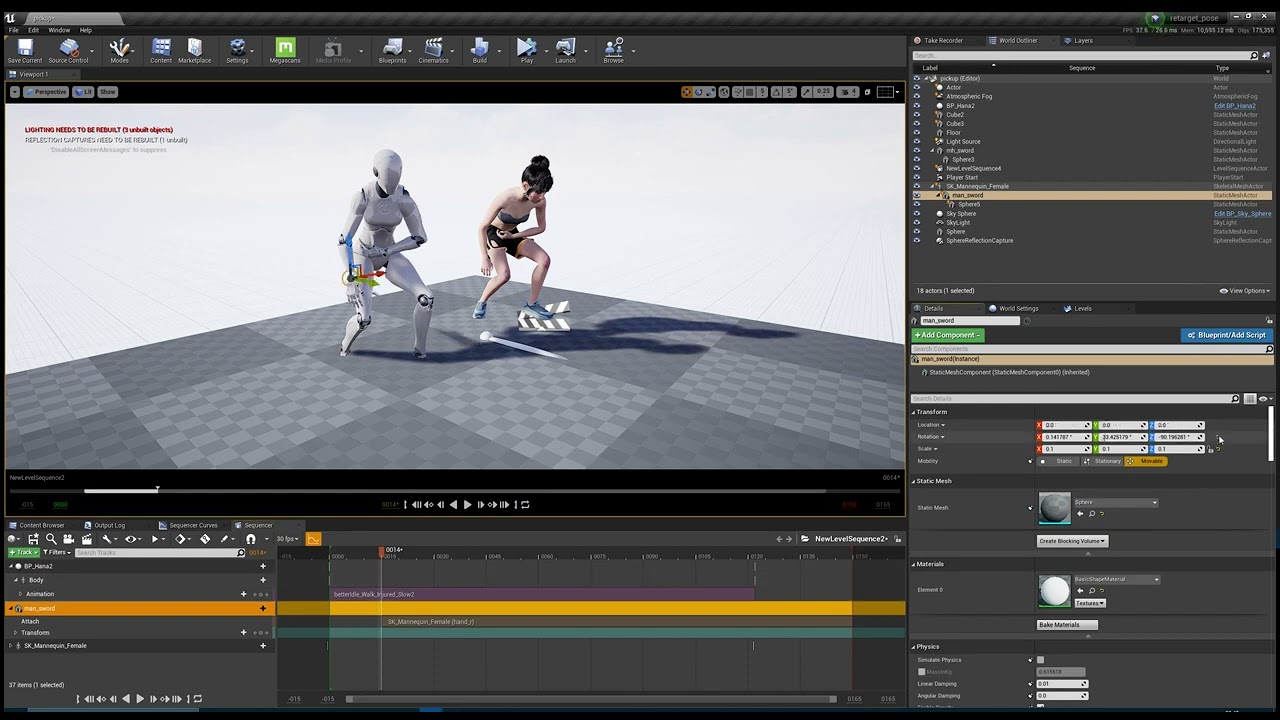 umbral harness
ty @vital nebula 👍
crisp horizon
Ok, heres the question...
using Unreal to render linear content and we´re using a blueprint asset to render out multiple passes of the same blueprint with different settings.
We also have some shots with multiple copies of the same blueprint asset and have to render each out separately with different settings.
So, right now, I´m doing all of thus manually, changing "actor hidden" status and the settings in the blueprint.
Is there a way to automate this process, so I only need to set it up once and can then render it out in one go?
Please ping me if you have an answer!
abstract hazel
quick portal
No. Doing live realtime composition doesn't share the exact same workflow with a...
Do you know how or if I can export from UE sequencer a green screen chroma key :((
 onyx cargo
How do I render a sequence to video in UE5..? In UE4 it was simple, just pick the format and you're good. With UE5 it seems my only choices are frame sequences?
 quick portal
onyx cargo
How do I render a sequence to video in UE5..? In UE4 it was simple, just pick th...
quick portal
onyx cargo
How do I render a sequence to video in UE5..? In UE4 it was simple, just pick th...
Yes, and those are better options than rendering to .AVI file
You're expected to stitch them together in post
 hollow bough
Hey folks, hoping someone here might be able to help me with a sublevel/sequencer puzzle (UE 4.27).
I'm doing a multi-shot animated sequence and have my sets and characters set up in their own levels.
For each shot, I create a shot level with the necessary set/character levels as sublevels.
With the shot level active, I create a level sequence in which I will move the characters, props, and cameras around that need moving to make the shot work.
Pretend object X lives in its own level named X_level, a sublevel of my shot level.
When I keyframe the simplest move in sequencer for object X, then hit "save all" it quite understandably wants to save the level sequence. But it ALSO wants to save X_level! Even though (AFAIK) I'm not changing anything related to that level. Indeed, if I tell it not to save the sublevel and reload UE everything works as I'd expect.
To me this feels like an unnecessary save that's being triggered and I'm curious if there's a way around it.
Thanks in advance for your help!
gusty heath
hi there - please help as this issue is driving me crazy - I have setup in ue5 mit 4 cameras (front, left, right, ceilling) which i export via sequencer - these cameras are supposed to be stiched in after effects for kind of 360 movie... what I cant find out is how to set ue5 to have all cameras exact the same exposure... the thing is of say 20 sec the most is looking good but as soon as brightness in scene start to change so one camera - actually only ceilling camera - is getting britgher or darker .. I switched off eye adatption, set in post process min and max brigthnes to 1 - as said it is working for 70 % but I need also those 30 % - any idea how to solve this?
 smoky hill
Trying to play Audio from a character with the sequencer, but it feels a bit troublesome to work with. Am i not supposed to be able to see the length of the audio im playing, just like I do when i add them direction in the sequencer?
So when added to the component in the actor that tries to play this sound it just shows like this;

while if i add it as an Audio track directly in the sequencer, i get this , which is way more usefull

Am i doing it wrong or is this how it's supposed to be ?
 remote aspen
Hi my name is Akil Kannan, We are currently working on a virtual production project. I've been running on a few issues related to Cinematic Ray tracing, basically the shot is focused on soap bubble flowing in the air where you can see a slight reflection of background and rest all out of focus when using DOF. So when I enabled Ray tracing the DOF is not adjusting properly and getting blurred with background. I kept the aperture to 1.2 and still its happening. Weird part is when i disable Ray tracing itself everything is normal and getting blurred correctly but real time reflection doen't work!!. I need some help
With Ray tracing Real-time reflection and DOF enabled

Without Ray Tracing, DOF adjusts accordingly
 gritty rivet
Hey guys. How would I keyframe a perfect circle? Trying to have my camera orbit around a mesh
 feral wharf
gritty rivet
Hey guys. How would I keyframe a perfect circle? Trying to have my camera orbit ...
feral wharf
gritty rivet
Hey guys. How would I keyframe a perfect circle? Trying to have my camera orbit ...
Put camera under an empty actor, set target in camera to your mesh, push the camera backwards from the mesh until you get your framing you want, animate Heading on the Empty actor
gusty heath
feral wharf
Put camera under an empty actor, set target in camera to your mesh, push the cam...
Interesting, i never thought of that method. I'll give it a try sometime!
I usually get an Rail and put my cam on there with the Camera Rig Rail:
 gusty heath
hi there - please help as this issue is driving me crazy - I have setup in ue5 m...
gusty heath
gusty heath
hi there - please help as this issue is driving me crazy - I have setup in ue5 m...
Maybe your Project Settings still use Auto-Exposure?
 feral wharf
gusty heath
Interesting, i never thought of that method. I'll give it a try sometime!
I usua...
feral wharf
gusty heath
Interesting, i never thought of that method. I'll give it a try sometime!
I usua...
That’s after effects part of my brain kicking in
gusty heath
Haha, Null objects Unite!
loud finch
Is there a way to render directly to mp4? all my sequences spit out hundreds of jpgs.
gusty heath
loud finch
Is there a way to render directly to mp4? all my sequences spit out hundreds of ...
UE4 or 5?
loud finch
gusty heath
UE4 or 5?
5
gusty heath
loud finch
5
Use MRQ
 gusty heath
oh i dont know about mp4
sorry, i thought you just wanted a video format instead of high res image sequence
loud finch
gusty heath
sorry, i thought you just wanted a video format instead of high res image sequen...
is there any video format i can export to?
gusty heath
loud finch
is there any video format i can export to?
yeah should be, i dont use 5, but there should be something like.mov or .avi
You see any Apple Pro Res codec or something?
loud finch
just these
 gusty heath
strange, like i said imnot a 5 user, but i can fire it up for you im waiting anyway
gusty heath
loud finch
just these
this maybe usefull anyway: https://docs.unrealengine.com/5.0/en-US/cinematic-rendering-export-formats-in-unreal-engine/
loud finch
gusty heath
this maybe usefull anyway: https://docs.unrealengine.com/5.0/en-US/cinematic-ren...
Apparently theres a function in premiere pro to combine the image sequence into an video
gusty heath
loud finch
Apparently theres a function in premiere pro to combine the image sequence into ...
yeah most Non Linear Editors (NLE) can combine Image Sequences
It also gives very high quality video in the end, for me at least
then in comparisson if i export a .avi or pro res straight out of Ue
 quick portal
loud finch
it's giving me these lines where it should be smooth
quick portal
loud finch
it's giving me these lines where it should be smooth
That's just because how colours work.
loud finch
even if it's much smoother in one of the still frames?
 gusty heath
loud finch
even if it's much smoother in one of the still frames?
gusty heath
loud finch
even if it's much smoother in one of the still frames?
in UE5 you can export straight from sequencer to .avi. I dont know how to get it with MRQ, but yeah:
 loud finch
gusty heath
in UE5 you can export straight from sequencer to .avi. I dont know how to get it...
loud finch
gusty heath
in UE5 you can export straight from sequencer to .avi. I dont know how to get it...
awesome thanks for the update, i'll check that out 👍
gusty heath
loud finch
awesome thanks for the update, i'll check that out 👍
np, i recommend png sequence myself had good results with that
gusty heath
loud finch
awesome thanks for the update, i'll check that out 👍
inthe Documentation it reads you have to enable Pro Res also just like you did MRQ:
 loud finch
gusty heath
inthe Documentation it reads you have to enable Pro Res also just like you did M...
loud finch
gusty heath
inthe Documentation it reads you have to enable Pro Res also just like you did M...
oh that's where is was lol, i was looking for it 😂
gusty heath
Yeah, I have the same, but the documentation can be fragmented at times
gusty heath
How can I record gameplay from editor?

I added sequence record, but there's no movement after I record in play mode
I dragged cinecamera actor inside of it
i got random movement of one car, but it's not recording the whole action from gameplay
car just pops out of nowhere and then disappears later on
gusty heath
the camera is not updating in real time
quick portal
gusty heath
How can I record gameplay from editor?
Take Recorder?
At least looking at the videos, that seem to be what they're using
 lapis ruin
hey, are there any ways to change an Actor's material in the sequencer via BP/C++ ?
I tried changing the Actor's material and then start recording the sequence via TakeRecorder in BP, but it doesn't capture the Actor's material changes.
gusty heath
quick portal
Take Recorder?
At least looking at the videos, that seem to be what they're usin...
using sequence recorder, but with matrix demo it's not working the way it should
you can't chose what to attach camera to
and placing camera actor inside sequence recorder is wrong I think
confused a bit
checking out take recorder now
hope it works 😄
i just drag camera actor inside take recorder?
 pale blade
When it comes to rendering cinematics, do you all prefer to use lumen now or is path-tracing/ other methods still better?
quick portal
pale blade
When it comes to rendering cinematics, do you all prefer to use lumen now or is ...
Depends on the art direction and hardware availability, really
gusty heath
gusty heath
i just drag camera actor inside take recorder?
Yeah, You should be able to record gameplay with Take Recorder
Check out Unreal Documentation:
https://docs.unrealengine.com/5.0/en-US/take-recorder-in-unreal-engine/
or the EPIC Dev Community
https://dev.epicgames.com/community/getting-started
You can select the right engine in the corner:
 gusty heath
Yeah, You should be able to record gameplay with Take Recorder
`Check out Unreal...
gusty heath
gusty heath
Yeah, You should be able to record gameplay with Take Recorder
`Check out Unreal...
yeah thx, it's just that in the matrix demo you can't seem to get it working
gusty heath
gusty heath
yeah thx, it's just that in the matrix demo you can't seem to get it working
If you can define your problem precice i'm sure there is a sollution 🙂
described it above kind of
i place camera actor
i drag it into take recorder
i press play
i drive a car past camera
press stop
but the video is empty
atleast when I drag timeline in the sequencer
i can't seem to render the video because of low memory
gusty heath
gusty heath
i drag it into take recorder
if you only put a camera in the Take Recorder it will only record the cam iirc
what you mean?
what else do I need to put there?
also make sure your camera cut track is long enough and assigned the correct cam
yeah I dragged length of it in sequencer
There a lot of things that could be missing in your workflow, I can't guess what it is from here. But it seems you are only recording the camra in Take recorder. I really suggest you check out a small tutorial on sequencer and Take recorder, it will take maybe 30 mins of your time and probably clear up a lot of questions you have now and in the future.

yeah, looking for tutorials
this should help you out with some basics
you need to put all the actors in too?
anyway
thanks
will try it later again 😄
 somber hemlock

didn't happen on preview 2 or preview 1
reflection capture res is at 8
what else can i do
 copper palm
does anyone know if you can render as prores directly from thinkbox deadline / standalone prompt?
 subtle idol
somber hemlock
subtle idol
somber hemlock
I was getting this constantly when generating LOD's on too many tiles in World Composition. The problem wasn't Video Memory in terms of GPU Ram, it was my actual Ram. So I bought another 32gb's and even with 64gb's I would still run out hahahaha XD
My best advice is close everything you can down when doing it, if that doesn't help figure out what's causing it and try to dial it back so that it's not consuming so much....I heard recently if you try to cram too much into one shot that can cause issue's as well
somber hemlock
i can't see the option to generate hlods in world partition though (edit its wp not wc)
or did you try to generate like mesh lods
somber hemlock
subtle idol
I was getting this constantly when generating LOD's on too many tiles in World C...
also i'm on 8 gb ram 💀
but that doesn't mean i need new ram, since the same shot used to work on preview 2 too
so idk where im going wrong
gusty heath
 lilac mirage
Hi Everyone.
lilac mirage
Hi Everyone.
where are you trying to get it from
subtle idol
somber hemlock
or did you try to generate like mesh lods
Under Levels it's the buttons on the top left, the one on the far right of those...You have to change the LOD number from 0 to see the generate LOD buttons for each of your LOD's. Honestly though generating 3 with various levels of detail game me 3 LOD's all with the same number of triangles...so I'm not sure if having more then one is useful at all.
subtle idol
somber hemlock
also i'm on 8 gb ram 💀
8 gbs isn't much, but if your primarily working with smaller scene's it may work....as far as it suddenly not working with the official release....in UE4 I could simulate about 16 large Procedural Foliage Volumes at a time in an open world....in UE5 if I simulate more then 1 at a time it freezes and after about 4 hours I eventually give up and force close it....it also does this just when simulating 1 as well but sometimes it doesn't....so needless to say they obviously rushed UE5 to be officially released before it was actually ready....there are still some serious issues with it.
somber hemlock
subtle idol
Under Levels it's the buttons on the top left, the one on the far right of those...
i'm sorry to ask this but where is this "Under Levels it's the buttons on the top left"
world settings?
subtle idol
My bad it's the middle button

It looks like this

@somber hemlock but I highly don't recommend World Composition...there's a reason why Unreal went out of their way to replace it with a better system.
somber hemlock
wait shit i got confused between world comp and world parition damn
i am using wp
my bad
subtle idol
Ah lol
somber hemlock
why am i so dumb
ok so maybe there's nothing else left?
there's no level details afterall
(i think)
subtle idol
As far as WP there is cell size and streaming distance...not sure what the second one is called but it's under your HLOD
I haven't explored it much quite yet...I've been trying to re-simulate Procedural Foliage Volumes....UE5 seems to be struggling with them. Hopefully that's fixed in the next patch
I've had to force close UE5 several times so far, so there must be some issues with their procedural foliage system. UE4 can generate large areas easily but UE5 really struggles with it.
somber hemlock
subtle idol
I've had to force close UE5 several times so far, so there must be some issues w...
lmao its supposed to be the other way around considering they removed the 20km limit or smth
i feel your pain too
subtle idol
Lol
subtle idol
somber hemlock
lmao its supposed to be the other way around considering they removed the 20km l...
yeah you would think
The area's I'm generating them for is around 1km...that's when it struggles and often freezes up....haven't had issues with 1/4th km areas though
somber hemlock
you using nanite? maybe that helps idk
subtle idol
If I try to generate 2 1km Procedural Foliage Volumes then it's a guaranteed force close...at least for my environment.
subtle idol
somber hemlock
you using nanite? maybe that helps idk
Nah I haven't converted them yet.
most of them won't be convertible anyway. I'm working with a Pine Forest
I haven't even converted to Lumin in fact, I'm a bit afraid to try because I've seen pictures of it and the performance isn't very great...considering I'm already working with a dense Pine Forest...I'm not sure I can afford that hit on performance.
Supposedly Lumen doesn't look really great with foliage. I haven't tested that myself quite yet though.
subtle idol
somber hemlock
it just crashed my whole pc trying to render
Yeah, Lumen's great but it's not a one size fits all kind of solution
 scarlet otter
🤦♂️

 still prism
so. i cannot find any documentation or resource that helps me figure this out.
my directional light affects my world in lumen, but not pathtracing.
is directional light not supported in path tracing?
quick portal
scarlet otter
🤦♂️
UE5
Matinee
excuse me what
scarlet otter
quick portal
>UE5
>Matinee
excuse me what
Camera shakes have always been matinee. UE5 brings a tool to convert them to the undocumented new SequenceCameraShake. But it doesn't work.
and, btw... the matinee camera shakes still work fine in ue5, so I guess they're aware that they haven't been able to replicate them 100% yet... which is f-ing weird.
quick portal
Last time Matinee is relevant was 4.12
scarlet otter
so I guess you don't use camera shakes then
quick portal
At least for sequencer, yeah
still prism
ya sequencer has a fairly fantastic camera shake function once you get the hang of it.
i have had no problems whatsoever with it
The first 1,000 people to use this link will get a 1 month free trial of Skillshare: https://skl.sh/williamfaucher09211
This tutorial covers how to set up and use a procedural camera shake blueprint in just minutes in Unreal Engine. This applies to both Unreal Engine 4 and Unreal Engine 5!
Shaky Cam is one of those things that are either extreme...
2:38 is where he starts
scarlet otter
huh... well, finally someone made a video explaining what Epic won't... still don't see a replacement for this, though...

oh, wait... UE5 actually sees more classes than UE4 here!

they might finally actually have a viable replacement?
although, funny... if you dynamically spawn your pawn, like 99.99% of all Unreal projects do, you can't use the new Camera Shake Previewer?
weird... so I was able to finally manually convert the old camera shake to the new one... why can't the tool they included in the menu do it?
 exotic hill
Live Link Face and Tentacle sync, has anyone done this? After a long wait, I got a couple of Tentacle kits. Everything works great everywhere except Live Link Face, it just says no device found. Is tenticale device meant to be recognized via bluetooth, through the app or is it meant to be connected via USB C? Connecting them via USB C had no affect. The Tentacle devicess are recognized by the Tentacle app, but not LLF app. Anyone here done this?
gusty heath
why can't I see myself driving in the take recorder?
trying it in matrix demo
all the rest of world is showing in camera
gusty heath
i made new level, placed a mesh and tried to record
i can see it in recorded file, but I can't see the player movement
seems like you need to have playable character in level place by itself
instead of the default one that you get whenever you press play
how can you enable it so that it gets shown in take recorder?
 quasi juniper
Hello why ue 5 can not reproduce videos and mp4 trough media player?
is it just completly bugged?
quick portal
quasi juniper
Hello why ue 5 can not reproduce videos and mp4 trough media player?
Either use Bink (for games) or use image sequence (for pre-render cinematics)
quasi juniper
quick portal
Either use Bink (for games) or use image sequence (for pre-render cinematics)
thank you so much for your answer. it didnt fix it obviously but i found another way of doing it 😉 thank you so much
 compact jolt
quasi juniper
thank you so much for your answer. it didnt fix it obviously but i found another...
compact jolt
quasi juniper
thank you so much for your answer. it didnt fix it obviously but i found another...
I've had the same issues. .MOV don't play at all, .MP4 is hit or miss (mostly miss), but image sequences work perfectly, I just bring any video I need played in as an image sequence.
 unreal pagoda
Hello... I'm a newbie trying to work on my first cutscene. In all tutorials I watch, when you hit play on the editor cinematic view, the camera moves according to the what is defined in the sequence, but when I do it, the camera is static. I can work around this by manually selecting the camera from the list, but I can't do that in the master sequence because the don't show. Feels like I'm missing some step, could anyone help?
quick portal
unreal pagoda
Hello... I'm a newbie trying to work on my first cutscene. In all tutorials I wa...
Make sure you have camera cuts track assigned to the correct cameras
 grizzled ginkgo
I'm also dipping my toes into the waters of the Level Sequencer for the first time, and I have a question where so far Google hasn't been able to direct me to the answer, so I thought I'd ask here
So this cutscene takes place in a level that the player is teleported to after selecting "new game"
I want to trigger an event from the player character.. but I can't seem to figure out how to add the player character as an actor when it isn't on the level (just a Player Start actor)
still prism
grizzled ginkgo
I'm also dipping my toes into the waters of the Level Sequencer for the first ti...
i think you should look up spawnable assets within the sequencer?
may be what you are looking for
honest urchin
Is anyone familiar with Stype and its Data Recorder app?
I've recorded a bunch of takes with the Red Spy camera tracking setup, I've exported the takes as fbx files, and now I want to import them into sequencer.
But I'm an error when I try and import them onto a cinecam in sequencer:
"Filed to find any matching camera for CineCameraActor1. Importing onto first camera from fbx StypeCamera"
Not sure what's happening but it doesnt appear to be addin the transforms to any camera in particular...
 quasi juniper
Hello what is the best way to recreate something like this in a cutscene where theres a discussion with text appearing and also the camera zooming into the character talking .
 steep copper
hello , I have a question; I want to skip the level sequences with a key. how can i make it? when the seq starts, after a little time i want to have an option to skip it. In my opinion, there can a logic that black outs the level and set time faster and complete the seq too fast. i want to make this way because in the sequencer there might be some event to keep state. what do you think , is there a change to "get any key" event in level sequencer?
quick portal
quasi juniper
Hello what is the best way to recreate something like this in a cutscene where t...
Depends on YOUR game.
quasi juniper
quick portal
Depends on ***YOUR* game**.
exactly what do you mean ?
my game is literally a 2d pltform like that
quick portal
quasi juniper
my game is literally a 2d pltform like that
Then it can be as simple as calling event to move the camera around in BP. Sequencer's might be overkill in that case
 minor zodiac
am i doing something wrong with sequencer/movie render queue? It doesn't seem to add my keyframe changes into the render at all
is there a setting i need to tick or something for it to actually add my sequencer keyframing stuff to the render queue render?
gusty heath
minor zodiac
am i doing something wrong with sequencer/movie render queue? It doesn't seem to...
Are you getting a wierd angle and wrong camera?
Make sure you have camera's setup and a Camera Track
minor zodiac
gusty heath
Are you getting a wierd angle and wrong camera?
nope the camera and angle is fine
just my emissive intensity and particle start keys are not working in the final render
gusty heath
minor zodiac
nope the camera and angle is fine
just my emissive intensity and particle start ...
Hard to say from here, maybe a screenshot of your sequence or a scrnrecording. Might help people see how you hooked it up and detect a failure. I'm also a beginner but I had/have a lot of these mistakes already 😄
abstract hazel
Can anyone explain to me how the process chain works in UE4.27? If I'm correct it's light (directional light, skysphere...) > camera setting > composite composure > and then if you hit play you'll see the final product? I'm having major issue with the rendered out image not the same as in the composite composure or the viewport or when I pilot the camera....


 unreal pagoda
Hi, in my cinematic the character "stutters"a lot when the game is running or when I'm running it with simulation on. But when I run it without those it is fine. Any idea on what could be causing it?
Here's some video for comparison so you can see what I mean by stutter.
Any idea on what I am doing wrong?
 trim solar
I have a quick question for you guys about multicam editing in sequencer... is this doable? I come from film and television and I love being able to take 3-4 cameras in a scene and run them with toggles to switch from one camera to another. Looking to see if there is any way to do this kind of thing in UE5. Thanks ahead of time!
quick portal
trim solar
I have a quick question for you guys about multicam editing in sequencer... is t...
You can split the viewport up to 4 (or maybe even 16 if UE5 still have the 4 viewport windows), then on each of them, pilot one cine camera that is used in the sequencer.
At least with that, it can help you manually sorting out the camera cuts in sequencer.
trim solar
That's a cool way of looking at it. Thanks! I am hoping do something like this in UE5: https://www.youtube.com/watch?v=MQIj1sZEck8&ab_channel=JustinOdisho

 elfin shale


 devout marten
Hello guys! I have a question. Im new to unreal, coming from blender. Would like to know is there a way to create a sequence in simulated world? I mean, If I have a for example City Sample Matrix and would like to record some stuff from there using cameras and sequencer not in playmode but having the city simulating. Is it possible? Im trying to understand how it works 🙂
Or maybe I just need to change play to simulate :? and then record in sequencer 🤔
quick portal
devout marten
Hello guys! I have a question. Im new to unreal, coming from blender. Would like...
If the simulation consistency/continuity per shot doesn't matter, you can do nothing and work with the hero actors per usual.
devout marten
I mean I would like the world to be simulated in the sequence, or for example record me actually driving but from different camera
quick portal
devout marten
I mean I would like the world to be simulated in the sequence, or for example re...
Then you can use take recorder, put the player pawn into the record list and record.
devout marten
Ok thanks, one more question.
Why I cant see through the camera while beeing in pilot mode, and there is a different output, also having this weird small preivew which is actually correct output. 🤔

I think there is some problem with the City Sample itself as its not happening in the regular scene
 pulsar willow
Does anyone know how to activate Chaos destruction in sequencer? I'm using Niagara Fluids with Chaos and so far I'm just simulating in the editor but I would like to render a sequence. I can't figure out how to trigger the field to start the destruction and I'm not sure if I just have to trigger the field or if I have to trigger it as well as Niagara Fluids separately.
I think it's one of these in this list but so luck none are triggering the field to go off.
 minor zodiac
gusty heath
Hard to say from here, maybe a screenshot of your sequence or a scrnrecording. M...
minor zodiac
gusty heath
Hard to say from here, maybe a screenshot of your sequence or a scrnrecording. M...

still havent figured this out
for anyone wondering, i have keyframes for emisisve intensity but when i render the sequence they dont show up
when i play in editor they do thpugh
minor zodiac
my particle effect also goes way straighter in MRQ render


 quaint pond
Does anyone know how I can get cinematic black bars like in the cinematic viewport overlay to show up when the level sequence plays in the actual game? 🤔
quick portal
quaint pond
Does anyone know how I can get cinematic black bars like in the cinematic viewpo...
Adjust the sensor width and height to be in 21:9 (or 2.35:1) ratio.
Typically you want to just adjust one of them by doing the rational math from the other.
Assuming the default, which is 16:9, converted to 21:9
Width = (Height / 9) * 21
minor zodiac
quick portal
Adjust the sensor width and height to be in 21:9 (or 2.35:1) ratio.
isnt it better to somehow handle it with an overlay?
quick portal
minor zodiac
isnt it better to somehow handle it with an overlay?
Using overlay widget can be inconsistent, can break in ultra wide displays or aspect ratio closer to 4:3, and waste some rendering work
Using the camera's aspect ratio is much more consistent across all displays, and even save some rendering work as the black letterboxes actually renders nothing
quaint pond
Thank you for the explanation, I'll give that a try.
minor zodiac
quick portal
Using the camera's aspect ratio is much more consistent across all displays, and...
interesting. Funny how different that is when using ue for rendering stills/clips. Then you want to always render 16:9, and add black bars in post
quaint pond
Nice, that works great. Thanks!
minor zodiac
still having an issue where keyed emissive material changes arent showing up in final render sequence
and particle effect looking different
 lost shadow
Hi, i'm rendering a sequence using UE5 rendre queue but it doesn't render my light shaft / bloom. Any idea! Bug ?
ancient steeple
is there any advantage on using a cine camera instead of a regular one for gameplay? -also, how do i change the fstop value in realtime? i cant find any way to set it in blueprint
 frosty granite
Hi everyone, hope you all well. I'm new to Unreal Engine and what id like to do is take advantage of the environments. My issue is how do I export a base mesh on a terrain or even some of the amazing nanite terrain scenes so that I can plot an animation in a DDC app and then export that animation back to the engine for render. Remember its purely for a short film so it doesn't need to have retime collision etc. all I need is for my characters to be in the right position on a given frame. Any advice would be greatly appreciated.
 wheat frigate
hello i just downloaded the city map for unreal and im a noob. i wanted to record video with the camera and create cinematics. how do i capture cinematics with the traffic moving? its all paused when i try and use the cinematics
 sharp imp
minor zodiac
sharp imp
minor zodiac
temporal aa causes particles to render multiple framws of their lifetime for 1 frame and they end up looking weird, any fix?
 bold patrol
Where did Aperture and focus settings go in camera in UE5?
 glossy viper
Hopefully quick question. In Take Recorder, it's not recording particles spawned in as Notifies during an animation. Am I missing something?
minor zodiac
bold patrol
Where did Aperture and focus settings go in camera in UE5?
hasnt changed for me
 mighty sleet
frosty granite
Hi everyone, hope you all well. I'm new to Unreal Engine and what id like to do ...
mighty sleet
frosty granite
Hi everyone, hope you all well. I'm new to Unreal Engine and what id like to do ...
You could try the other way around where you bring in your character with the animation to Unreal. I believe it's easier than exporting the landscape terrain
frosty granite
mighty sleet
You could try the other way around where you bring in your character with the an...
Thanks for the reply, but the issue is that i want to use one of those cool nanite scene in the sample library, so i need to know where things are in the scene when i animate my character in in blender. (character is riding mountain bike)
mighty sleet
frosty granite
Thanks for the reply, but the issue is that i want to use one of those cool nani...
So you want to import the nanite scene to unreal you're saying? If it's in the unreal marketplace you need to add it to your project. Or if you are talking about megascans you need to download them and you create a scene out of the megascan assets
frosty granite
mighty sleet
So you want to import the nanite scene to unreal you're saying? If it's in the u...
there is this sample project called - ValleyoftheAncient its has this amazing desert mountain environment. I image it is nanite cause its in unreal 5. So since the scene is huge and lots of rocks and hills I would need to know where these objects are in space when I animated my character riding from point a to point b on the given map. If I select one of the patched and expert I get a piece of geometry that i can use to represent that point in space. The problem is when I select more than one like way more than one on export unreal just seams to hang and not export anything. My plan is to export the environment geo I need then animate character riding bike through it in blender then export the character on his bike as fbx or maya be alembic and reimport into unreal. I then thought I could use the sequencer for camera and shots and edit. Just thought it could be a fun way to do it.
quick portal
frosty granite
there is this sample project called - ValleyoftheAncient its has this amazing de...
FWIW most of them are directly snatched from Quixel Megascans.
frosty granite
quick portal
FWIW most of them are directly snatched from Quixel Megascans.
Yeah I figured I just wanted to avoid remaking an entire level.... me lazy lol
mighty sleet
frosty granite
there is this sample project called - ValleyoftheAncient its has this amazing de...
Yeah selecting a lot of objects and trying to export it is a crazy thing to do. Specially in your case which I'm assuming you're trying to select everything in the scene. That is not a very good workload I guess just my opinion.
I would suggest to bring in your baked bike animations, put cameras in the scene (valleyoftheancient) and use a sequencer. Hope that will help I guess
frosty granite
mighty sleet
Yeah selecting a lot of objects and trying to export it is a crazy thing to do. ...
ok ill try that out , will animate a bunch of cycles and stuff and do it that way round. Thanks for the input I appreciate it.
mighty sleet
frosty granite
ok ill try that out , will animate a bunch of cycles and stuff and do it that wa...
Happy to help man. I know the struggles! Specially when you trynna do everything yourself without a mentor
grizzled ginkgo
Is there a way to tell a Level Sequence to wait until a boolean variable is true before moving forward?
grizzled ginkgo
I still haven't been able to figure this out, though I've also stumbled into a different issue: it seems that Level Sequences, when played from Begin Play, interrupt loading the player in (I found that having the player as a spawnable asset gave me other issues, since I'm using a Player Start BP to determine where the player spawns in the level). The player doesn't fully load in until after the Sequence is done playing.
 winged current
whenever i play sequencer in google VR mode, by turning the phone to sides i'm able to rotate the camera (it's not locked), so the targets broke down and that's my issue!
any help would be appreciated.
noble kraken
Hey guys, im trying to record gameplay with take recorder, but it does not record mouse camera movement ? Any ideas why?
 spare lark
noble kraken
Hey guys, im trying to record gameplay with take recorder, but it does not recor...
spare lark
noble kraken
Hey guys, im trying to record gameplay with take recorder, but it does not recor...
Are you using character blueprint?
Make sure u have camera attached to it. Once these things are done. Record the gameplay through recorder and then u can generate the gameplay sequencer go inside the sequence. You will find your character rig. Inside character rig. U will find the camera.

This is in Chinese but it's a good tutorial. Just follow what he is doing
steep copper
hey, I ve dummy question because i couldnt find it on google. I need to get the level sequence animation duration as a float. There are something with frames but i need only the time . If there is a way to calculate the total frames / fps ? i think this could help more to have standart for all systems?
real pond
Hi does anyone know how to put a chaos cache asset into sequencer? Is a geometry asset required, how to get the track in? Thanks!
 trail mauve
Anyone having an issue where Level Sequencer won't open at all? (UE5)
severe python
steep copper
hey, I ve dummy question because i couldnt find it on google. I need to get the ...
In the level sequencer where it says fps you should be able to change that
 steep copper
severe python
In the level sequencer where it says fps you should be able to change that
steep copper
severe python
In the level sequencer where it says fps you should be able to change that
Hey thank you. But i have calculate the level sequencer duration. For example one cinematic takes 1 minute but the other is different. I need find a way to get the duration from blueprints
severe python
steep copper
hey, I ve dummy question because i couldnt find it on google. I need to get the ...
In the level sequencer where it says fps you should be able to change that
 trail mauve
Anyone having an issue where Level Sequencer won't open at all? (UE5)
trail mauve
trail mauve
Anyone having an issue where Level Sequencer won't open at all? (UE5)
Update... accidentally found it tucked away in a hidden content browser.
 wise linden

#2022 #UE5 #EPIC #UnrealEngine #shorts #enviromentart
Hi Viewers! Welcome to my Channel!
This is a short clip of which topics we are going to cover on this channel.
Here’s what you need to know – I use this channel to explore around
[]- Unreal Engine
[]- Textures
[]- Environment art
[]- Shaders
[]- Level Design
[]- Clips
You can find me:
D...
 sleek kiln
Hi! I made a custom rig rail very similar to the built in one with UE4 and my goal is to get it to start playing as soon as I overlap the trigger. I setup a trigger in my scene and had it just start playing the sequence. The problem is everything but my camera system plays. Why is it if I hit play in the editor It works fine but not in game?
You can see only the test cube fires but the rail does nothing until i manually hit play
pale blade
Does anyone know why movie render queue is saying there is 'no shot' from the camera? This has randomly cropped up and it won't render out the camera properly
 abstract hazel
ive been trying to render this video from sequencer but the result video is not at the same view as the viewport camera pilot ... anyone know what's going on?


 spring minnow
Whats your render settings?
abstract hazel
this is what im using
 spring minnow
If your not doing anything to the post processing at render I'd suggest trying to render it out as frames and compositing them Instead of rendering out straight to .avi
abstract hazel
let me check...
it still doesnt work. the png rendered out are still in the wrong perspective
 spring minnow
Sorry for some reason I thought you were saying the render looked different then the out put lighting wise
completely read what you were saying wrong my bad
abstract hazel
The light is fine. But I wonder why the camera position in the render and camera is different
severe python
abstract hazel
The light is fine. But I wonder why the camera position in the render and camera...
Not sure what’s the issue but I would suggest activating the movie render queue plugin and rendering from there. It’s more stable and offers more options
severe python
sleek kiln
Hi! I made a custom rig rail very similar to the built in one with UE4 and my go...
moving objects is very different in sequencer than in-game. What you’re trying to do should be done all in blueprints and not in the sequencer. Watch this video and other related videos and it should make more sense: https://youtu.be/IKNei8f-wd8
Episode 6 | 30 Day Tutorial Series
★ Custom Events, Communicating, Moving Objects Over Time, Moving Doors ★
★ Come join the Team Beard Discord: https://discord.com/invite/hhv4qBs ★
★Check out my Marketplace Asset: https://www.unrealengine.com/marketplace/en-US/product/flexible-combat-system ★
★ Ways to Support The Channel ★
Patreon: https:/...
severe python
pale blade
Does anyone know why movie render queue is saying there is 'no shot' from the ca...
Not sure. But i’ve had similar bugs and what fixed it once was to delete the the Shot in the sequencer on the ‘camera cuts’ track, then add it again using the ‘+’ button next to ‘camera cuts’
severe python
steep copper
Hey thank you. But i have calculate the level sequencer duration. For example o...
Ah my bad I misunderstood. I don’t know exactly but my guess is that you should probably be able to get it using the ‘Event Tick’ and other nodes, in the level blueprint. There ‘s also a timeline node that could be useful but I don’t know too much about that. Hope that helps a bit
steep copper
severe python
Ah my bad I misunderstood. I don’t know exactly but my guess is that you should ...
I made a trigger for each sequences
severe python
steep copper
I made a trigger for each sequences
Did you link the triggers to the sequencers inside blueprints?
severe python
grizzled ginkgo
Is there a way to tell a Level Sequence to wait until a boolean variable is true...
You can use the ‘Delay’ node which will delay it by x seconds. Maybe you’re issue is that the level sequence begins before the player spawn. So in your blueprints maybe you can change the order of actions so that it goes: eventBeginPlay -> SpawnPlayer -> PlaySequencer
severe python
 autumn badger
This slow motion effect how to create
autumn badger
This slow motion effect how to create
Don’t know but you can download the ‘ActionRPG’ game from the marketplace and try to figure it out. It has the same type of slow-mo attacks.
steep copper
severe python
Did you link the triggers to the sequencers inside blueprints?
I set an event from sequence blueprint , and event send message “sequence is over”