#ue4-general
1 messages · Page 1162 of 1
 drowsy snow
 shut nova
drowsy snow
You should have multiple reflection captures spaced out across.
shut nova
drowsy snow
You should have multiple reflection captures spaced out across.
How many for the lake specifically?
drowsy snow
shut nova
How many for the lake specifically?
Up to you to try. I have no idea on your level's layout.
 glass rapids
hi, I have a quick question. Is there an advanced sessions steam release for 4.27.2?
nvm, I think I found it.
shut nova
I’m not using static lighting in my scene because it was affecting my foliage
And how do I access scene capture tools to bake the cube map?
Here’s a better video of the problem I’m having… it starts at 8 seconds. The reflection gets WAY to white and bright when I look from that angle.
shut nova
drowsy snow
Up to you to try. I have no idea on your level's layout.
Should they be overlapping?
drowsy snow
shut nova
Should they be overlapping?
Overlapping is fine
As everyone said since like yesterday, it's SSR being SSR.
You have the advantage of it being not an open world, so use reflection captures
shut nova
drowsy snow
You have the advantage of it being not an open world, so use reflection captures
Did I apply them wrong?

If I can’t get SSR to look relatively nice I’ll try that baking my cube map and using that trick
 grim violet
How do I edit the existing character movement component in Visual Studio? It is locked when I try to edit it
do i need to create a new c++ class
i've never used c++ only blueprints, not sure how to start lol
drowsy snow
grim violet
How do I edit the existing character movement component in Visual Studio? It is ...
either:
a. Create one from scratch in C++
b. Inherit from CMC class
c. build the engine from source, if you want to modify built in CMC once and for all
grim violet
drowsy snow
either:
a. Create one from scratch in C++
b. Inherit from CMC class
c. build the...
Would this be what I do to create it from scratch?
 drowsy snow
grim violet
Would this be what I do to create it from scratch?
drowsy snow
grim violet
Would this be what I do to create it from scratch?
No.
You're looking for Actor Component
 grim ore
character != character movement component
shut nova
drowsy snow
You have the advantage of it being not an open world, so use reflection captures
Or was it not supposed to fix the white area
drowsy snow
shut nova
Or was it not supposed to fix the white area
Have you built them all?
drowsy snow
shut nova
Or was it not supposed to fix the white area

System for capturing and displaying local glossy reflections.
shut nova
drowsy snow
Have you built them all?
Yep
grim violet
Why is the overlap detecting the middle of the desk when I have the collision set to complex?
(ignore the wonky physics) https://gyazo.com/fa3b9bb6b499a3e1cc227b47105a1640
 grim ore
welp we dont see any code so whats supposed to be happening?
grim violet
I am trying to set the physics to blend with animation on beginOverlap and to stop simulating physics on endOverlap

 jolly rampart
why is the cube just not here? i cant reference it anywhere (im new btw)

 grim ore
is your item set to use complex collision as simple?
grim violet
Yes
jolly rampart
jolly rampart
why is the cube just not here? i cant reference it anywhere (im new btw)
i cant even make a cube in the components tab
 grim violet

 distant quiver
Does the gamemode initialize before the actors in the game or alongside them
grim ore
@jolly rampartdid you edit anything before this? like say the cube in another project
jolly rampart
grim ore
<@!814585030176407574>did you edit anything before this? like say the cube in a...
no not really i dont think
drowsy snow
jolly rampart
why is the cube just not here? i cant reference it anywhere (im new btw)
Verify the engine installation or reinstall it
grim ore
^^
grim violet
Yea seems like asset got deleted somehow
jolly rampart
drowsy snow
Verify the engine installation or reinstall it
ok
grim violet
I've had that happen b4 and verifying solved for me
jolly rampart
how do i verify?
grim violet
 jolly rampart
wait i think i see the issue
 jolly rampart
grim violet
jolly rampart
grim violet
can i do that with the engine open?
grim violet
No
grim ore
definitely weird @grim violet , perhaps try doing your test in another scene to eliminate other collisions
jolly rampart
grim violet
No
oh shoot ok
grim violet
grim ore
definitely weird <@!737261565920673839> , perhaps try doing your test in another...
Good idea, thank you
I will let you know if that does anyhting lol
grim violet
grim ore
definitely weird <@!737261565920673839> , perhaps try doing your test in another...
The thirdperson example works with it. Perhaps it is because I am using live link to power the character movement? I don't think I did that right.
 drowsy snow
That reminds me
In conclusion, his setup is using mocap to control gameplay
grim violet
Trying to use pelvis motion as input.
drowsy snow
So not to bake animations, or non-gameplay live capture
But to drive gameplay out of it.
grim violet
Yes
It seems that is the only way to prevent collisions on animations
Or live animations anyways
drowsy snow
I still don't know why he's reluctant to put proper motion controls into the mix, but I'm not the one to judge.
grim violet
Since live link technically never finishes animation, I can't just enable collisions and it works lol
My end goal
Is just to have it where the live character can't walk through the desk
or the chair lol
But apparently that is impossible
drowsy snow
grim violet
Is just to have it where the live character can't walk through the desk
Put a real desk in your real life stage lmao
drowsy snow
Just put a desk in your mocap room, easy peasy lemon squeezy
grim violet
it just doesn't look right when you try to have the positioning exact to mocap, it still falls through in many instances
shut nova
I think I’m just going to wait until lumen works with what I’m doing. I’ll work on other games aspects until 5.1 comes around.
drowsy snow
grim violet
it just doesn't look right when you try to have the positioning exact to mocap, ...
Driving gameplay is not what mocap is meant to be used for, but you do you.
grim violet
I've tried using a basic desk IRL and mapping the scale of the UE desk to it, but like I said you can still see the hands going through it, I would have to hold my hands weirdly above the real life desk to make it not look so wack, and it still even looks weird after all that
No I understand that
I just want to make the collisions look real, not like my character is a ghost and can just walk through everything
Maybe if I add specific collision spheres to the hands, etc it would work? Idk
Seems like the problem is with the capsule component
drowsy snow
As I repeatedly say, mocap is meant to make animations, not to drive gameplay out of.
grim violet
Mhm
drowsy snow
Consider that I don't do mocap at all, but at least I know what to expect from mocaps
grim violet
Ok
I completely know what to expect my dude
I am trying to do something new lol
Something that makes it easier to do editing for those animations.
if you try mocap you will understand how time consuming it is to make the hands and feet match correctly to surfaces 😭
drowsy snow
If you want easier time with props, might as well put real blockout props in your real life mocap room.
grim violet
Trackers r expensive
drowsy snow
Blockout props do not need trackers, but whatever floats your ideal boat.
grim violet
drowsy snow
Blockout props do not need trackers, but whatever floats your ideal boat.
can you give an example of what a blockout prop is
If it helps me I will scrap my idea of input, I genuinely do not care about being right I just want this to work
Spent almost a week on this lol, don't really mind what the solution is as long as it doesn't mean me buying $10k worth trackers 
jolly rampart
new question, why does my game look so jittery?
drowsy snow
grim violet
can you give an example of what a blockout prop is
Just put together anything that roughly resemble the scene. Can be as simple as literal blocks put together
grim violet
O
drowsy snow
why is that so hard lmao
grim ore
@jolly rampartits the code you are using to slow down time
jolly rampart

 jolly rampart
grim ore
<@!814585030176407574>its the code you are using to slow down time
jolly rampart
grim ore
<@!814585030176407574>its the code you are using to slow down time
what about it?
grim ore
you asked why its jittery, its because your slowing down time
jolly rampart
so the reason why it is jittery is because of something i cant control (besides removing the slow down thing)?
grim ore
how are the items being moved?
jolly rampart
just physics simulation
also when i move my mouse while its slowed the camera jitters too
oh
so should i move to another version?
 swift sundial
grim violet
swift sundial
grim violet
That environment looks sick
 rotund mulch
is there anyone experienced with materials/foliage in unreal engine? Im trying to use megascans foliage and materials but i dont really know what im doing haha
jolly rampart
can i just remove the motion blur?
i dont know how to though lmao
it just is created with it
drowsy snow
jolly rampart
i dont know how to though lmao
r.MotionBlur.Amount 0
grim violet
swift sundial
That environment looks sick
its from the marketplace! thx tho i thought it was epic too
drowsy snow
jolly rampart
i dont know how to though lmao
Or just disable it outright in Project Settings
jolly rampart
drowsy snow
Or just disable it outright in Project Settings
that would be ideal
swift sundial
grim violet
its from the marketplace! thx tho i thought it was epic too
Ohh still nice tho
swift sundial
Does anybody know the art that disables rendering from launch
jolly rampart
sorry for me being difficult
swift sundial
swift sundial
Does anybody know the art that disables rendering from launch
So now window pops up at all
Sth with rhi no rendering irrc
drowsy snow
swift sundial
Does anybody know the art that disables rendering from launch
wdym?
So you just want to use Core/Slate modules?
swift sundial
Yeah
jolly rampart
wait im actually so confused what
swift sundial
Like just a command line window
drowsy snow
jolly rampart
that would be ideal
 jolly rampart
i turned it off in project settings and i made a motion blur post process volume with it turned off
drowsy snow
swift sundial
Like just a command line window
Make a new empty console project in Visual Studio 
Then do your cout shenanigans
jolly rampart
drowsy snow
i did that and it didnt work
drowsy snow
jolly rampart
i did that and it didnt work
OH RIGHT
That's the per object motion blur
swift sundial
Nah like I already have the compiled game
swift sundial
And I have a pak that does all the stuff it needs
Like it hosts a server
And all I want is to disable rendering
So I just have the console
And don’t waste performance on the rendering
drowsy snow
swift sundial
Nah like I already have the compiled game
So it's not a game you make?
swift sundial
I saw somebody do it but I’ve no idea what the arg was
swift sundial
drowsy snow
So it's not a game you make?
My friends one
drowsy snow
Then that's up to their editor project.
 minor grove
Is there any literature online on providing a mission editor or scripting environment for players, similar to the editor in ArmA or DCS/IL2?
 twilit ridge
I've given my actor a staticmeshcomponent and given it a mesh. When I put the blueprint in my scene, the mesh is rotated incorrectly and I can't change the rotation in the blueprints. Is this a feature of static mesh components or do I need to enable rotation in the editor from code somehow?
twilit ridge
 plush yew
uproperty(blueprintreadwrite)
plush yew
uproperty(blueprintreadwrite)
I had it set to EditAnywhere
 plush yew
Are you remembering to compile and save after adjusting the rotation?
twilit ridge
plush yew
Are you remembering to compile and save after adjusting the rotation?
I am, yes

I don't even have the option for rotating in the blueprint editor
plush yew
 drowsy snow
twilit ridge
The transform only has scale
drowsy snow
twilit ridge
The transform only has scale
It's because you're selecting Root Component. Root component uses the actor's transform itself.
You could add a dummy scene component as a root and put your thing as a child of the root component
 glacial needle
Does anyone know why my animation montages are not retargetting properly? as when it is in blueprints and the animation montage is supposed to happen, nothing happens but it looks fine in the editor
 mint umbra
Hey guys, so I was wondering if there's a way to prevent a collision sphere from hitting you if you're inside a building? Currently Im spawning collisions spheres which deal damage once a missile hits the ground. Realized that the players are gonna need the ability to take cover from this barrage 😆 https://gyazo.com/d4ea98442c90ca5986cd8e5da4b19f1a

 glass tapir
mint umbra
Hey guys, so I was wondering if there's a way to prevent a collision sphere from...
glass tapir
mint umbra
Hey guys, so I was wondering if there's a way to prevent a collision sphere from...
Any chance it’s possible to effectively draw a line from the explosion to the player, and check for collision on that line? Then you would be able to say that if it collided with a wall or something, then nullify damage to player or something like that?
grim violet
https://docs.unrealengine.com/4.27/en-US/Resources/ContentExamples/Animation/ Where can I import this to my project or download it? I don't see it in the Add/Import content page
Overview of the samples provided in the Animation and Physical Animation Content Examples.
 modest trench
grim violet
https://docs.unrealengine.com/4.27/en-US/Resources/ContentExamples/Animation/ Wh...
modest trench
grim violet
https://docs.unrealengine.com/4.27/en-US/Resources/ContentExamples/Animation/ Wh...
this is in the learn section of the unreal launcher
it is a separate project
modest trench
don't worry, it's kinda buried in there these days
grim violet
I just needed to see the examples and nowhere on the doc page did it tell me where to download 🤣
There are ALOT of examples wow
modest trench
go to the folder with all the levels in it to find the animation stuff
 quick sedge
is it possible to play a specific level on play in editor? If editing Game but you can only test your game from main menu etc
quick sedge
If you have a UObject created with Construct Object from class in an array, the only way to get it GCd is to remove it from the array and make sure there are no refs to it stored on anything correct?


 drowsy snow
 warped hornet
I click dropdown but it flashes black
warped hornet
I click dropdown but it flashes black
NVIDIA user?
 winter stream
what is this why are there black dots moving
quick sedge
i lost the reg key to change to fix it
i restarted ue like 60 times before i finally caved and went looking
 fading magnet
Anyone know how to find an invisible mesh in your level? I made something invisible and now I cannot select it and I have too many items in my "World Outline" list to go through it. Is there a "make all invisible" visible mode?
 dusk nebula
fading magnet
Anyone know how to find an invisible mesh in your level? I made something invis...
dusk nebula
fading magnet
Anyone know how to find an invisible mesh in your level? I made something invis...
why not look through your world outliner for objects that are hidden? or search for the object by its name? You can also make folders/categories within the world outliner to make things easier to parse through
 neon bough
fading magnet
Anyone know how to find an invisible mesh in your level? I made something invis...
neon bough
fading magnet
Anyone know how to find an invisible mesh in your level? I made something invis...
select all actors in world outliner, rightclick on one and go to visibility settings
that should allow you to make everything visible
fading magnet
Thank you, I guess it will just take some time going through all of them
I realize organization in the future will help a lot.
Turns out it was actually the collision of a certain object being way off
neon bough
why go through all of them? you can just select everything
 mental dome
Hey im trying to build the source version of ue4 but it keeps "running out of heap space"
 mortal canopy
it's been a while since i wrote anything in here but before i ask, would a question related to hair grooms go in #graphics ?
either way i'm having some issues getting the hair to actually sit on the char's head lol even with binding
 gloomy fiber
hey all
engine not responding when trying to build large navmesh, its been at it for over an hour, should I close it and try again ?

 primal tendon
Yeah there is, multiplayer integration can be done with same difficulty in either codes, converting blueprint to c++ is present but often advised against using it since the code could end up being bloated with unnecessary code
 sick slate
Anyone knows why i cant paint foliage on my static meshes? When i use the fill option eveything is fine, but when i try to paint on my static mesh i can't (Static meshes is checked).
drowsy snow
warped hornet
Bcuz intel > amd
Except when people has less issues with AMD these days, and your issues are DEFINITELY because of NVIDIA.
drowsy snow
I just hope he's not taking UserBenchmark as gospel
mint umbra
glass tapir
Any chance it’s possible to effectively draw a line from the explosion to the pl...
Hmm, I will try that! Thanks 😁 Maybe I couldhave the sphere overlap ensure that Im only trying to do this toward overlapped players.
plush yew
hello guys
can we make effects like blast, fire, shooting, etc... in after effects and export to unreal?
if yes how to do that
drowsy snow
plush yew
can we make effects like blast, fire, shooting, etc... in after effects and expo...
No.
Houdini or Blender is more suitable for the job
 summer geode
Urgh, finally managed to work out how to use lnav last week to view the logs from our UE4-based game client and node.js-based game server all nicely interleaved using timestamps and updating live etc. Was looking forward to using this newfound power to untangle a gnarly bug that's broken our async multiplayer recently... Then the clocks changed over the weekend (it's now UTC+1 in London) and it turns out that while the server logs show the correct local time, UE4 doesn't bother and seems to be stuck on UTC +0... great!
summer geode
Ah, looks like there's a command line option -LOCALLOGTIMES which fixes it though...
 rustic vapor
So I tried importing a fluid simulation from blender to unreal engine but it gets some weird cubic topology bug. Even after subdividing the mesh in blender it looks completely the same


 keen hinge
Can I migrate code from a project using an older UE-version somehow, if I don't have that version installed? And will it cause the same issues as if I just copy/paste (BP reparent not possible and crash, data tables lost)?
 scarlet turret
My mesh's reflections seem to go gray when I turn Nanite on...
The first image is without Nanite, the second is with


 short mesa
Is there a way to flush references to an asset in the editor without having to restart the whole editor/project? :/
 last topaz
Hi, having more than one lighting sub-level loaded seems to cause this skylight error, even though there is only one skylight in the scene. Seems like as soon as you load in more than level with a skylight it doesnt properly unload the other skylights even after hiding the levels.
 drowsy snow
 oblique pelican
what version of UE4 is recommended?
oblique pelican
what version of UE4 is recommended?
4.26
Unless you want Oodle & Bink, then 4.27
 azure reef
Hi guys! I'm a bit confused of this nested json!
I'm using VaRest and I want to get all identifiers from here https://api.elrond.com/accounts/erd17x84s53883pnfwx74lnr56dg2fkxg2mk8dcgsv3aywx70emcmf7sftt97k/nfts?size=100&collections=BDGA-a05446
But I always get "No field with name identifier of type Array
 oblique pelican
drowsy snow
4.26
Unless you want Oodle & Bink, then 4.27
oblique pelican
drowsy snow
4.26
Unless you want Oodle & Bink, then 4.27
oodle and bink?
azure reef
If I have a simple {"Identifier":"Name"} it's working
drowsy snow
oblique pelican
oodle and bink?
Oodle = "new" built in compression algo
Bink = cross platform media playback
oblique pelican
oh ok 4.26 it is then cheers
 stable remnant
I don't understand how unreal is getting something so simple as keyboard input wrong, any other layout like azerty is scuffed
drowsy snow
Most of the changes in 4.27 are on Virtual Production stuff, and some refactor on the engine that makes backporting both tech too hard
stable remnant
they never heard of scancodes or what
drowsy snow
If only Oodle and Bink being free retroactively apply to 4.26, I'd gladly stay on 4.26
oblique pelican
anyone know why I can't see the line trace for this?
 neon bough
do you trace away from the camera? try to unpossess with F8 and see if it shows you some traces around the camera
most likely you either trace straight forward from the camera, or in the wrong direction
 pine siren
Is it possible to add random foliage on a mesh in runtime without having to line trace where it should spawn? Like populate all faces of a cube with grass by just passing the mesh of the cube?
 clever niche
any idea why the editor is eating up 100% of my gpu just by being open?
neon bough
clever niche
any idea why the editor is eating up 100% of my gpu just by being open?
have you set an fps limiter?
pine siren
clever niche
any idea why the editor is eating up 100% of my gpu just by being open?
if you press ctrl+r in the viewport you turn off realtime render, maybe that'll help.
(or press the menu-button top left inside the viewport and untick "Realtime")
clever niche
that's made it a little better
just didn't think a blank map with realtime on would use up 100% of a 3070
pine siren
neon bough
maybe also this <https://docs.unrealengine.com/4.27/en-US/BuildingWorlds/OpenWor...
This doesn't seem to be in runtime, they click "simulate" before playing.
What do you mean by "material feature"?
neon bough
isn't simulate kinda like hitting play? but without possesion and probably some events not firing
 fresh brook
Hey everyone I am trying to build the game so I have an exe file which I can run. But when I execute the cook or build not even sure how to call it 🙂 I get a cook error but I can't seem to find a answer about what I should do on google. Can anyone help ?

 unborn dew
is there a tut on making bones in yrneal engine blueprints i cant find any 😦
neon bough
you can't @unborn dew
 peak falcon
summer geode
Urgh, **finally** managed to work out how to use `lnav` last week to view the lo...
peak falcon
summer geode
Urgh, **finally** managed to work out how to use `lnav` last week to view the lo...
i know this is super delayed, but very strongly consider keeping all of your logs everywhere in UTC +0.. you can always apply timezones later, but like you're seeing it's a pain in the ass to go back and sync them up, and the bugs get worse
eg, what happens when you run game servers in more than one timezone also D:
summer geode
Oh yeah, totally makes sense to do that in production, in fact the server logs probably shouldn't have ever switched over to summer time now I think about it... probably worth fixing that at some point. It helps to have everything synched up to my local machine's time for this specific kind of dev/debugging stack/workflow though
peak falcon
fresh brook
Hey everyone I am trying to build the game so I have an exe file which I can run...
you need to look at the log file it's linking you to
grim ore
@fresh brookthat error is the error that something broke, above that it says 2 things broke, find those 2 things in the log.
also more than 50 warnings 😦

 grim ore
shift-f1 to eject from the viewport, then click the eject button on the top to eject from the character. then zoom out and look
what does it look like in game
unborn dew
grim ore
shift-f1 to eject from the viewport, then click the eject button on the top to e...
u sure its shidt f1
neon bough
try F8
grim ore
I am sure its shift-f1 to unlock the mouse from the viewport, yes
unborn dew
 unborn dew
grim ore
I am sure its shift-f1 to unlock the mouse from the viewport, yes
unborn dew
grim ore
I am sure its shift-f1 to unlock the mouse from the viewport, yes
nvm sorry
this is what it looks like after shift f1
 grim ore
welp you can see the issue, now you have to check your code and see what you are doing wrong. we dont know what you are doing so doubt we can help
 grim ore
any reason you are moving it other than just attaching it to the camera or the model? letting the gun follow the model or the camera
unborn dew
grim ore
any reason you are moving it other than just attaching it to the camera or the m...
thats probably smarter to attach to attach to the cammera
it works fine now thank you
 fossil bough
i want to ask can we create custom character animation?
grim ore
sure if you know how
fossil bough
object animation such as car animation?
 kindred viper
Hey all. Got this error whilst trying to compile a fresh engine build. >D:\UnrealEngine\427\Engine\Source\Runtime\JsonUtilities\Public\JsonObjectWrapper.h(10): fatal error C1083: Cannot open include file: 'JsonObjectWrapper.generated.h': No such file or directory
Anyone had this issue?
 rain knot
Hi guys, I'm a seasoned game dev with years of exp with Unity...need guidance on whether there's something I can quickly use to build a turn based multiplayer
https://docs.unrealengine.com/4.27/en-US/BlueprintAPI/Online/TurnBased/
Is this any good? I barely see any documentation on this
kindred viper
maybe on the marketplace. I know there is a turn based game project but not sure if its multiplayer
rain knot
I'm not interested in using anything from the asset store
kindred viper
why?
fossil bough
grim ore
sure if you know how
object animation such as car animation
can we do it//
rain knot
kindred viper
why?
I have a poor opinion of assets in general for this sort of stuff. Art is fine.
Just understanding their source code slows me down imo
I'm trying to check if TurnBased makes sense, but I see no documentation or videos on it
kindred viper
fair enough. I have to agree that not every asset on the marketplace has impressed me either tbh. Often they aren't very extensible unless you rip it apart so much you may as well make something fresh. But sometimes there is gold out there
grim ore
@fossil boughyes, you can create any animation if you have the skills
kindred viper
making a turn based game shouldn't be hard anyhow. It's only an event driven game anyway. Just depends how complex you want to go
the multiplayer side dictates you would have to code it up a specific way, but aside from that, it's logically a procedural flow
kindred viper
Personally I'd check out what was available, see how it works, then roll my own. But if you are confident with an event based system it's not difficult to figure out if you have your gameplay idea done already
rain knot
But why event based system? can I not just disable inputs when it's not a client's turn?
So not event based system per se, just disable inputs on repnotify when turns change
kindred viper
you can do that too but consider the logic of a turn based system. It's a lot of waiting for things to happen to cycle into the next phase. Which is usually done with events. Input is neither here nor there
rain knot
Although I'm seeing event driven being thrown around everywhere for this, so I'm curious now
 kind dew
So I have a character whose movement is behaving weirdly and it's all because I am setting the scale of a no-collision static mesh component attached to the character.
by weirdly i mean if i press jump, the character will jump to the right. If I press run forward, the character will run diagonally forward and right. If I change the size of the root capsule component, this will increase/decrease the severity of the problem depending on how I change it.
anyone know why that could be happening? I've never seen that before
kindred viper
a character movement component relies on the capsule for movement. So if anything changes it, the movement component will act funny
clever niche
is the marketplace borked?
kind dew
kindred viper
a character movement component relies on the capsule for movement. So if anythin...
okay that makes sense, but why would setting the scale of a child static mesh component at runtime with no collision affect the capsule component
clever niche
anything i click opens a web browser
kindred viper
@kind dew not sure. sounds like it shouldn't but I'd have to see the setup
kind dew
kindred viper
<@!157791651434201088> not sure. sounds like it shouldn't but I'd have to see th...
its actually verrry simple, i'll show a gif for ya
here's my setup. The body is the component I'm setting the scale of. It's the simple sphere.

take note of that capsule component setup
so here's a gif of him moving around

thats literally just me using arrow keys and Jump. (For jump Im using the default Jump function in the character blueprint)
kindred viper
it might be that the capsule is scaled down to a sphere so it's physics collision is rolling it causing the movement component to calculate wrong. I'm pretty sure it works on the understanding that you would be using a capsule shape, ie. head/tail + body length
kind dew
hmm okay well let me show you what happens when it is a normal capsule component like this
 kindred viper
it will probably roll and bump right? Unless its statically moved
how are you controlling it exactly?
kind dew
no theres no physics
kindred viper
ah
kind dew
im just setting the scale on the mesh to make it grow and shrink when we runs
pseudo animation
kindred viper
yeah figured that. Which still begs the question, why does it affect the collision 😄
kind dew
so with that "normal" capsule set up. the run is fine, but the jump is still weird:
p https://gyazo.com/edfa083ab24df9745c7829381b795fd2?token=00c383b0d1edd40238c0fd1882257680
kind dew
im just using the standard jump function of a character
kindred viper
hmm couldn't really say then. Looks like it's skewing the vector somehow. But scaling a subcomponent mesh with no collision shouldn't do that at all unless the animation is root motion based I guess.
or non root motion based. I get them mixed up sometimes
kind dew
right but there's no actual animation
the animation is the scale being adjusted
just fyi
but yea idk so weird
kindred viper
oh yeah. Perhaps its better to have the animation then. Not that it solves this issue, but it might workaround it
kind dew
ah haha yea see that's the problem if i could animate i would its much easier for me to just scale the ball to different sizes haha
just a dumb programmer
kindred viper
well a simple animation would only do the same thing, but be handled with the animBP instead of scaling the mesh using world scaling
kind dew
right but i still have to make those animations in blender/maya/whatever
kindred viper
10 minute job tho. another 5 for the animbp. I know you are just a coder but even a coder needs supplementary skills. I know, I had to learn all the extra stuff too :p
grim ore
does it still do it if you dont animate, might want to check that first
kind dew
good idea. just tried and yea it the problem goes away if i dont mess with the scale
kindred viper
you know what I wish would go away?
When I have a Chaos engine build. I make a new project, add a cpp to the project, and then it won't compile, so I goto Visual Studio to compile it and the goddamn thing compiles the entire engine again.
I've spent all day making engine builds because of it
this means I have to work at the weekend to make up the time. Which utterly sucks because I have personal projects to do 😦
kind dew
god i know the C++ side of things after using blueprints only for a year was soooo daunting. like "oh just ignore the intelisense errors it might work, unless of course the intelisense error isn't fake, then don't ignore it!". switched to rider and it's mmmuch better
 cedar wave
kind dew
god i know the C++ side of things after using blueprints only for a year was soo...
cedar wave
kind dew
god i know the C++ side of things after using blueprints only for a year was soo...
Please let the people in #cpp know this. They definitely need the affirmation. 😈
kindred viper
wanna know something sick? I don't use intellisense, nor do I use VAX or Rider. I just free code with my eyes :p
cedar wave
Godly
kind dew
haha its crazy! I was like there's 0 chance professional companies are using vs and just ignoring intelisense errors over the the whole project and what not. My code file was red and green like a damn christmas tree with intellisense errors and all the C++ people are like oh yea just ignore it. im like wtf
kindred viper
I actually got an invite to Github Copilot today so I might not have to code ever again if the machine learning works on unreal c++ :p
drowsy snow
kind dew
haha its crazy! I was like there's 0 chance professional companies are using vs ...
Yeah, just ignore it
But!
VS2022 saw improvement in Intellisense part, it complain less compared to VS2019 days
kind dew
psh im ever using vs again rider till i die
kindred viper
im still on vs2019. I like pain
kind dew
too much pain
drowsy snow
Granted, I'm just a poor boy
Cost of Rider subscription could cost me some food and saving.
cedar wave
Which you can keep re-upping
drowsy snow
cedar wave
Trial of Rider is free.
I sure won't use it for just 30 days or so
But hey, if anyone wants me to starve for Rider, let me know.
 sly kernel
bout to ask a potentially hella dumb question
whats the difference between unreal engine developer and blueprint developer
kind dew
lol no one wants that dude that doesnt mean i want to use it tho
drowsy snow
sly kernel
whats the difference between unreal engine developer and blueprint developer
UE developer = people who develop UE
BP developer = people who develop BP
sly kernel
no way Keepo
xD but i meant, can a BP developer create a full game in unreal for example
or only just that aspect
cedar wave
Yes
kind dew
sly kernel
whats the difference between unreal engine developer and blueprint developer
just a title they both coulllld mean the same thing but i blueprint developer is more specific so you'll know what you'll be doing. UE Developer could mean just someone who uses blueprints, it could mean a generalist, it could mean a c++ programmer, etc. Its a catchall i guess
drowsy snow
sly kernel
xD but i meant, can a BP developer create a full game in unreal for example
Yes, creating full game in BP only is possible.
sly kernel
ahhh got it, any of you guys here either of those?
- and willing to take on a project currently due in a month
cedar wave
Willing to pay*
sly kernel
ofcourse
cedar wave
Excellent #freelance-jobs
sly kernel
ive contact many people from the #hire-a-freelancer but availability or the requirements didnt meet their criteria
cedar wave
So post #freelance-jobs
sly kernel
oh i can
drowsy snow
#hire-a-freelancer is more of people putting themselves up for hire
#salary-jobs and #freelance-jobs are more of people who looking for workers to hire
cedar wave
If you have questions about what a channel is for - #more-resources
drowsy snow
#volunteer-projects is just for entertainment
scarlet turret
How many MB maximum should be dedicated to ambient sounds?
I have about 84.5 MB worth of nature ambience atm

 tough solar
drowsy snow
But hey, if anyone wants me to starve for Rider, let me know.
tough solar
drowsy snow
But hey, if anyone wants me to starve for Rider, let me know.
Are you sure you are not eligible for one of the cases where you can use Rider for free? ;)
drowsy snow
tough solar
Are you sure you are not eligible for one of the cases where you can use Rider f...
If that means only up to March, I don't know...
I'm sticking with VS2022 Community.
tough solar
drowsy snow
If that means only up to March, I don't know...
I'm sticking with VS2022 Commun...
There is a number of cases when you can get it for free as long as you meet the criteria (like if you are a student, of you contribute to OSS, or you are studying at some courses), list is pretty long.
or you can use EAP versions, they are free for anyone, but less stable
kindred viper
Can I use it for free out of pity for the fact I dont use intellsense or vax?
drowsy snow
tough solar
There is a number of cases when you can get it for free as long as you meet the ...
Well, I'm not a student (can't afford the university lol), and I'm not that huge as an open source contributor. I'm just a third world country guy using what I have at hand.
My open source repos were mostly not that significant, dumpster of tools and scripts that barely anyone use
 half drum
Any public information on when NVidia Ansel will work again on UE5 ?
sly kernel
phew, finally made the post
the bot for #freelance-jobs is really well put together
nice and simple
plush yew
Omg I'm so happy for some reason my add movement input wasn't working in PIE so I was doing a weird workaround with set velocity (in multiplayer) which was fine in PIE but lagged like hell in 'new window' mode, didn't think to swap back to add movement input for that mode to work
 fallow hornet
Anyone know how to prevent UE from taking the file's name space when importing an fbx, I have my meshes named with SM_ in Maya and only want those names
 brisk bridge
How can I record 360° video in UE?
I'm using now OFF WORLD plugin, but there is limitation for resolution (max. 4k). I need 6k.
 leaden flame
hey how can I turn off the visible line that appears when doing line tracing?
 left zephyr
I noticed there is a Common Conversation plugin in the plugin list in the engine. It's marked experimental. Does anyone know if there are docs for it anywhere?
drowsy snow
left zephyr
I noticed there is a Common Conversation plugin in the plugin list in the engine...
Probably something something UE5
Nobody seem to use it yet.
 spice burrow
Most experimental plugins don't have documentation. Best solution is to read the C++ source, unfortunately.
left zephyr
Thanks. It looks like it uses the behavior tree code.
quick sedge
put myself in a weird spot with an Interact button and interface. I have a player and horse and when i hit interact i can get on and off the horse but if mounted, i need to be able to interact with a "drop off zone" but it doesnt run the input any longer. Do i need to abstract this higher to my controller or something?
grim ore
where is the interact code at?
quick sedge
on my Player
grim ore
it should still run the input then, or is your player not longer a player?
quick sedge
im possessing the horse but it's still in play
grim ore
then no, its no longer a player. its just an unpossessed pawn at that point
so yes, you would need to duplicate the code to your horse since its now your possessed pawn, or put it up higher like on the controller
quick sedge
should i be sending input TO the horse to control?
i guess i should look at a vehicle example closer.. thought i had done it correctly but this is a bit more complicated
grim ore
input goes controller -> controlled pawn basically. If you have more than one pawn and the controls are the same, it might be better on the controller
quick sedge
definitely not the same.. the horse is driven with much different code. i guess i just need the interact code itself put higher then as the player will never be "out of play" per se.. he's just going to be by himself, riding a horse, or riding in a wagon being pulled by a horse.
unborn dew
i cant get something to down somewhat slowish it goes down but sometimes it goes down once or sometimes it goes down instantly

i know why its happening just cant find a solution that works 😦
 regal mulch
I'm confused a bit. You are in which Blueprint here?
quick sedge
more print debugs 😄
regal mulch
Usually there are two Actors involved in a hit. The one that the HitEvent calls in, and the "OtherActor" pin.
But you are using GetPlayerCharacter0, which would only make sense if either of the two is not that charater
regal mulch
Idk, just commenting on the thing I'm looking at
quick sedge
yep.. lol
regal mulch
Which already makes only little sense

 quick sedge
how many tutorials you watched on this so far?
unborn dew
whats causeing it is the collision when i go inside it that happens
regal mulch
More questions
What is Damage
What is beanz
What is that freaking hit even calling in
Who is PlayerCharacter 0 of those two?
quick sedge
I think i watched around 80 hours of UE tutorials and bought Tom Looman's course and went through it all before joining this server.
unborn dew
quick sedge
how many tutorials you watched on this so far?
trying to do as few possible because i learn better with peoplei can speak to and work better if i can try learn how to fix it
regal mulch
Yeah that's fine, but you gotta provide a lot of info when peeps should help you
It's otherwise really tricky to understand the bigger picture of what you are dealing with
unborn dew
regal mulch
What is Damage
its a cube that when u collide with it it damages the player (beanz)
unborn dew
regal mulch
What is beanz
the player
quick sedge
yea this needs a lot more info.. pictures of tabs tough to digest what the source is, is it a projectile.. is it calling collision more than once etc?
 unkempt finch
im on my first lesson. 'project does not support atmospheric fog' but the lesson im doing uses it. Anyone know why ?
unborn dew
regal mulch
What is that freaking hit even calling in
wdym
unborn dew
regal mulch
Who is PlayerCharacter 0 of those two?
beanz
quick sedge
before destroy.. lot could be going wrong here
regal mulch
unborn dew
wdym
You implemented the Event Hit in some EventGraph
Which Blueprints EventGraph is that
unborn dew
is that bad
quick sedge
@regal mulch you're a mod for a reason, i wish you the best of luck with this patience test 😄
unborn dew
lol
quick sedge
at least watch like.. 5 minute projectile damage tut =x
regal mulch
unkempt finch
im on my first lesson. 'project does not support atmospheric fog' but the lesson...
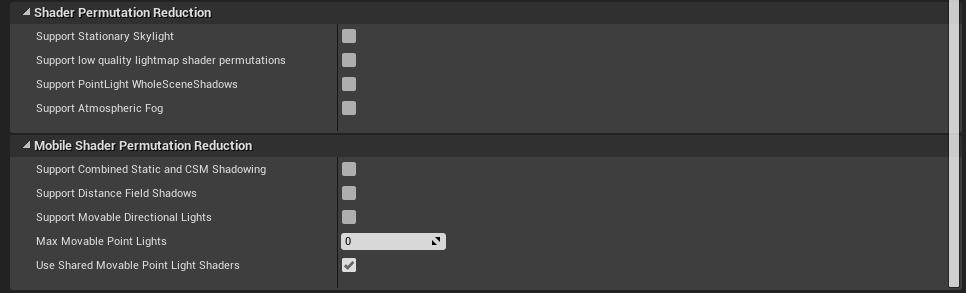
Medium
Reducing shader permutations to make testing and iteration faster!
Check if this helps you
quick sedge
the code looks ok actually on further inspection.. so is it a Do Once you need on the damage impact maybe?
regal mulch
It talks about your error message
unborn dew
quick sedge
the code looks ok actually on further inspection.. so is it a Do Once you need o...
tried that but dont know where to do the restart thing
regal mulch
So, it can totally be that the HitEvent calls a few times
Cause collision can and will always be a bit janky
quick sedge
why do you need a reset on a projectile?
regal mulch
Well it's not a projectile. It's a cube you could run into
I assume the Cube does survive that
quick sedge
ah thats tough if its like a trap on the ground and you need some delay before it can damage the same player again
thats a gameplay decision
unborn dew
regal mulch
So, it can totally be that the HitEvent calls a few times
thats the problem i think but im not sure how to stop it calling so many times in as short period
unborn dew
regal mulch
But using Begin and EndOverlap
ok
quick sedge
is it a collision or something you can walk into like eXi said?
regal mulch
You can't really, without just filtering the Actor
unborn dew
quick sedge
is it a collision or something you can walk into like eXi said?
not into but on it like a real box not sure how to describe
regal mulch
The MovementComponent will try to walk into the Cube over and over again and small floating point issues might cause it to do that even though you are already against it
You would have more control by using Overlaps
You can save the Actor you overlapped into an Array
Check if the Actor is in the Array first
If it is, ignore it
If it's not, add it and damage it
quick sedge
yea and probably do some periodic damage while inside it
regal mulch
On EndOverlap, you can remove it again
That way it doesn't trigger more than once unless the Player moves away from it again, resetting itself
quick sedge
kinda reminds me of path of exile "collision" traps
esp those jank doorway spike traps
unborn dew
regal mulch
That way it doesn't trigger more than once unless the Player moves away from it ...
i want it to go down just not super fast
like every 0.5 secs
quick sedge
sounds like a struct of Actor/Enter time that you can iterate and mod math to do on an interval etc
 queen gulch
quick question, my project crashed and when i try to reopen it it crashes on startup. Anyone know a quick fix? im just starting to use unreal
quick sedge
or if its just single player.. just cache the entry time
unborn dew
whats cache the entry time is it like puting it in a excel graph to store it somewhere bad example i know but is it sorta like that
regal mulch
unborn dew
i want it to go down just not super fast
Really depends on your Project, but you could cache the actor when you overlap, and start a Timer "SetTimerByEvent". That Event you bind to the Timer can cause damage to the cached Actor.
Timers can be set to loop
E.g. every 0.5 seconds
Cache as in save it to a variable
quick sedge
Is that preferable in Unreal? timers vs setting a currentTimer float and tick it down and if <= 0 call a function and reset it to the tick time?
regal mulch
Timestamps are useful in some areas, timers in others
unborn dew
i got like 10 mins before i got to get off so if i dont respond prob cause i got off
unborn dew
do u know a tut on that thing so i can watch it tmr
 acoustic flame
Is there a way to change the pivot location of a mesh? All tutorials I find shows how to change the pivot location for an specific actor already placed in the world
jolly rampart
fixed
 knotty token
trying to add a line trace to a projectile, but it keeps doing this?, how do I make it a line instead of dots
shits impossible to see when its like that
 jolly rampart
fixed
jolly rampart
jolly rampart
fixed
^
regal mulch
unborn dew
do u know a tut on that thing so i can watch it tmr
No sorry
 frozen pond
Any1 got same error when entering ue4 forum ?
 quick sedge
yeh
 fierce tulip
yup
jolly rampart
how do i change rooms with blueprint?
i made a new room

and that
but idk how to switch
wait nvm
im dumb
 winter gazelle
knotty token
winter gazelle
knotty token
Your drawing a debug line with distance based on delta time in tick. The line will never be the same distance.
Use a line trace node and attach it to an action input and make end distance based on a scalar of the camera forward vector
knotty token
winter gazelle
Use a line trace node and attach it to an action input and make end distance bas...
Im not doing it for it to be used in firing, its to debug bullet drop and velocity
winter gazelle
knotty token
Im not doing it for it to be used in firing, its to debug bullet drop and veloci...
You shouldn't be using tick unless absolutely necessary. Also the line trace nodes and project arc node include debug and hit interaction. So you can set how long the debug is on screen.
If you want to fire off a line trace every tick. Make an event or function and call it on tick.
quick sedge
boo.. Actor Class Filter for Component Overlap Actors doesn't support interfaces?
i know there's Does Implement Interface but just trying to clean up
glacial needle
Does anyone know why my animation montages are not retargetting properly? as when it is in blueprints and the animation montage is supposed to happen, nothing happens but it looks fine in the editor
 green light
sly kernel
ive contact many people from the <#780560026220625950> but availability or the r...
green light
sly kernel
ive contact many people from the <#780560026220625950> but availability or the r...
some never answered, and others can't do
warped hornet
Id there a way to alter sprite flippbook animations as a character, when the character is performing a specific action?
And when i say alter, i mean increase or decrease the animation speed
 unique kraken
ANY idea why this happens to all my characters?

they are properly exported with the root at 0,0,0


i dont think its the capsule, could it potentially happen when retargeting?
plush yew
floating? could be that your characters relative z location to collision capsule is too high
unique kraken
nope checked those things already
most likely actually happend from retageting
(someone talked to me in prvt) animations seem to be the problem
 west junco
🆘
idk what happened, but i was working in unreal, it crashed, and now i can't open the project without it crashing
i don't have a recent backup, is there anything i can do to not have to lose everything?
unique kraken
@west junco search the folder in wich u last worked
delete whatever asset u worked on last
maybe copy it befor to the desktop or so
west junco
alright, i'll give it a shot, i also am running a rebuild on it to see if it helps
and i just got it to open!!
thank you!!
unique kraken
how on gods earth did i get this connected

try to do something simular currently why the heck cant i connect it now?

 stable cypress
Doing a little market research: Does a open world survival game (think NEO Scavenger) with turn based combat (similarish to xcom) seem appealing to anyone? And if so what mechanics or elements would you want to see?
 harsh rapids
Does anyone here know how to fix a charecter that has all it's animation on. But when walking forwards is facing backwardsm
 spice ruin
So basically early final fantasy games, but sci-fi, @stable cypress ?
stable cypress
@spice ruin Somewhat! The combat would be on a grid with movement playing a heavy role, kind of like Fire Emblem but most units are ranged
drowsy snow
Open world but turn based... Nope
spice ruin
Sounds a bit like a standard RPG game, really.
stable cypress
I've been told the most similar product out is Battle Brothers, so in that vein but with much quicker combat and more streamlined gameplay
drowsy snow
Turn based battle is not my forte
At least not without real time incentive like ATB
ATB patents have been expired anyway so feel free to put it in your game.
spice ruin
To be honest, it sounds like xcom but with bigger maps.
Somethng I would totally not be against!
stable cypress
Definitely would take a lot from xcom! I would hope to make it have some of the mechanics and feel of darkest dungeon (healing is difficult outside of towns and morale must be managed) Plus I think the combat system in DD is amazing
spice ruin
What would the camera system be like?
drowsy snow
I'm against pure turn based battle that has no realtime incentive, so if you want to win me, put something that has consequence if I don't do something in time.
spice ruin
I didn't like that about xcom, that it forced you to do tihngs in a certain time. The time limits weren't overly harsh, but it didn't let me play like I wanted.
Having combat rewards be based on time taken isn't bad, though.
Especially when every map had these time constraints.
drowsy snow
So X-COM has pseudo realtime battle?
stable cypress
Yeah having time based objectives can be fun occasionally, although I think Xcom 2 used them a bit too much
spice ruin
Every map had a "in x number of turns, the bomb will explode" "save the civilians before the monsters kill them" "in x turns, the exfil chopper leaves"
drowsy snow
That's something I'd like to take tbh
spice ruin
Yeah. I'm totally basing this off XCOM 2 rn
stable cypress
I think it makes a lot of fun situations for some missions but not as the main mechanic or else it feels very stressful all the time
spice ruin
XCOM 2 did feel very stressful.
drowsy snow
If there's no realtime incentives, then I'm out.
I'm all about making fast strats.
spice ruin
Especially as the main campaign had a constant time constraint
"In x turns, the big evil guy will finish his project and you all die"
stable cypress
For the main "campaign" element I think I would allow players to move at their own pace, moving through the increasingly difficult regions to reach the main goal and win the game
But individual missions might have time constraints as a challenge
drowsy snow
stable cypress
For the main "campaign" element I think I would allow players to move at their o...
At the very least have the option to pause the time between turn when opening huge menus, like FF's ATB system
stable cypress
Haha definitely I hate it when games don't do that
drowsy snow
ATB is the reason I go through older FF games
It's like a balance of turn based, and realtime incentive
stable cypress
Another good example of a somewhat similar game combat wise would be Into the Breach with the interesting abilities and combos
 scarlet birch
Anyone help me with a little trig? When a hit happens I have a unit vector represented by the green line that is moving towards the surface, the blue line would be perpendicular to the surface and I want a unit vector moving away from the surface represented by the red line such that the angle between the green line and the blue line is the same as the one between the blue and red lines. I'm only dealing with X and Z movement, Y is locked. It's been a decade since I took trig and this is taking me longer than it should to solve.
 spice ruin
ATB?
drowsy snow
spice ruin
ATB?
Active Time Battle
Basically you take turn when the time is up, but so does the enemy at independent pace
Taking turn will reset the timer
spice ruin
Ah, so you both make simultaneous turns and then at the end of the time, both are applied?
Oh independent. Hmm.
So it just limits how long each of your turns can take?
drowsy snow
Well, it's been staple since FF4
spice ruin
Ah. I never really played FF games that had that. I don't recall it on 10 and 11? I think those are the 2 I played.
I played 7 a very long time ago.
stable cypress
I think the star wars game with Revan had something similar
drowsy snow
spice ruin
Ah. I never really played FF games that had that. I don't recall it on 10 and 11...
10-1 uses pure turn based but with visible queue, so yeah
spice ruin
10 and 12 actually.
Loved the different combat systems in those.
15 was shit combat.
drowsy snow
12 is borderline realtime IMO
spice ruin
Yup.
That was the one you could set up little macros for autocombat, right?
I loved that system in Dragon Age, I think I used it in 12 too... Shrug
drowsy snow
Yeah, I like that one, the Gambit system.
Felt like you have control over the battle without necessarily issuing command to them every time
scarlet birch
scarlet birch
Anyone help me with a little trig? When a hit happens I have a unit vector repre...
This does what I was looking for.
 drowsy snow
scarlet birch
Anyone help me with a little trig? When a hit happens I have a unit vector repre...
drowsy snow
scarlet birch
Anyone help me with a little trig? When a hit happens I have a unit vector repre...
So basically Breakout clone?
fierce tulip
yups
scarlet birch
yeah, basically just playing around with different ways to implement it. Reflection Vector was what I was looking for. I couldn't remember what it was called.
 slender egret
Super nooby question: how do I close the GPU profiler brought up using the ` > stat gpu command?
scarlet birch
enter the command again
 glad temple
Hi guys,
I'm new to both programming in UE4 and programming in general, but I'm teaching myself through a JRPG blueprint asset that I bought off the marketplace. I'm trying to add in a Type Advantage system like you'd see in the Pokemon games. I've made an enum that has the names of the types, and I have a struct that has 3 variables linked to the enum that lists your type, your type strength, and your type weakness. How should I go about implementing the settings for assigning those? I've tried setting variables for each type with its assigned values, but it doesn't work correctly as it ignores what I set and fills the 3 variables with the default value. I'm doing something wrong and I'm not sure where I should start on trying to get it to carry over each type's attributes.
If anybody has any advice or input, that'd be awesome. Thank you!
 scarlet birch
glad temple
Hi guys,
I'm new to both programming in UE4 and programming in general, but I'm...
scarlet birch
glad temple
Hi guys,
I'm new to both programming in UE4 and programming in general, but I'm...
You want to look at DataTables.
glad temple
scarlet birch
You want to look at DataTables.
Thank you so much! I've got the basic functionality working now.
warped hornet
WHY DOES THE ENGINE GO BLACK AND FLASH BLACK AND CANT USE DROP MENUS
pls sum1
tell me i not the only one 😭
spice ruin
Heard of it happening... update drivers?! 😦
warped hornet
Every driver is up to date 😊
 autumn flame
Checked the pinned message of the channel if you have Nvidia?
 sinful jackal
If you like horror games,
Check this game demo, and kindly give your opinion in the comment section, on the game itch.io page
https://nimbusgames.itch.io/malice
 modest trench
warped hornet
WHY DOES THE ENGINE GO BLACK AND FLASH BLACK AND CANT USE DROP MENUS
modest trench
warped hornet
WHY DOES THE ENGINE GO BLACK AND FLASH BLACK AND CANT USE DROP MENUS
try this out!
 bleak shadow
Just hopped in to ask if anyone has a solution to UE4/UE5 not rendering properly. Issue seems to be drop down menus rendering as the top left corner of the main window. Also the screen is completely black when hovering certain menus, or when the window is maximized. This issue occurs on UE 4.26.2, 4.27.2, 5.0.0 so far (what I have tested). I have updated graphics drivers and windows to the latest and I have tried the (After updating to NVIDIA Game Ready Driver 461.09) fix. I am using a GTX 30 series GPU.
Any help or info would be greatly appreciated.


quick update, 4.26.2 appears to work now apparently. The other two versions still no-go
 upbeat spoke
Getting an error on migrate that says an object does not exist... anyone know how I can solve that?
warped hornet
Hi
I have a 2d character that is animated by a flipbook. Any way to speed up the flip book animation, or better yet, dictate the speed of the animation based on the speed the character travels over a surface?
 crisp bone
Unreal Engine is such an advanced engine that sometimes you expect basic things to be supported, like for example to be able to import gifs from adobe after effects to UE4 directly, but nope gotta do a thousand workarounds in between 😂
 livid hazel
Hey guys i got a beginner question that i cant figure out. Can someone tell my why i cant edit the values? Or how I can edit them?

its an actor with an attached static mesh
warped hornet
This place is rife with questions and sparse with answers 😭
 cloud grail
It seems the internet is also that way when it comes to unreal... many questions online are dead ends
warped hornet
It sucks because im sure most questions are simple fixes
I demand an expert in here standby on call 24/7 to help us little peeple
livid hazel
its just sometimes hard to google for questions when you have no idea where to start
warped hornet
Did u try clicking the over ridden light box
livid hazel
yee sadly no luck but ill click more boxes now
warped hornet
Maybe try changing the block all dynamics
rain knot
can someone help me with a simple architectural decision?
my game has cards...each card represents a resource
should I just represent it as an int or should I make a full blown class?
I'll have to show some nice UI to the end user, with their respective cards. Does it make sense to make a Card object and then model that as List<Cards> under my player?
warped hornet
Full blown ofc
rain knot
interesting...so you don't suggest "checking" for which number the card represents and then doing something with that on the client??
That way I'm sending very little data over the network right?
warped hornet
Is this mobile game
rain knot
yea
warped hornet
I dont think a card game takes up too much internets
bleak shadow
livid hazel
Hey guys i got a beginner question that i cant figure out. Can someone tell my w...
I believe this is because it is selected in the scene, not in the content browser
warped hornet
@bleak shadow r u an expert pls help me toooooooo 😭
rain knot
how would i for eg: move card from one player to another?
I think it's...on server I only say "transfer Card of type X from Player A to player B" and on client I do everything else I guess
warped hornet
No idea. Probably something like getvectorfloatpawn and force the 3 axis into a boolean
Sry
Im bitter cuz i need help too 😭
bleak shadow
warped hornet
<@140943063974412288> r u an expert pls help me toooooooo 😭
not an expert, but I might be able to help in a few minutes
warped hornet
bleak shadow
not an expert, but I might be able to help in a few minutes
Yayy 😊 my question is up a lil bit
crisp bone
plush yew
can we make effects like blast, fire, shooting, etc... in after effects and expo...
If it's for 2D purposes, Yes, you're able to export your animation from after effects as GIF or PNG sequence (and then convert it to flipbook). But if it's for UI, you can only do it as GIF. And UE4 doesn't support GIF. So you'll have to install this plugin https://github.com/neil3d/UAnimatedTexture4
GitHub
Import Animated GIF as a new AnimtedTexture asset type - GitHub - neil3d/UAnimatedTexture4: Import Animated GIF as a new AnimtedTexture asset type
bleak shadow
warped hornet
I have a 2d character that is animated by a flipbook. Any way to speed up the fl...
I assume the animation only plays when the character is moving?
warped hornet
bleak shadow
I assume the animation only plays when the character is moving?
Yep
Thats what i want
There neednt be an idle animation, but the run animation should cycle faster the faster the character is moving
dusk nebula
I haven't added anything to this project since October and I forgot how bad it got as I got into it

that screenshot comes after a for each loop in a tick function, so it seems like I should address that next lol
bleak shadow
warped hornet
Yep
default 2d side scroller has something like this

in this case you can add a set paly rate option, we already have a node grabbing the velocity you we can use that. Velocity>playrate is way too fast so I just divide the velocity by 100(could be more, in my case) and pop it into playrate
 bleak shadow
yup no problem. The only issue with doing it that way means that it's based on movement speed of any kind, so in my case jumping make it look like the character is running really fast
bleak shadow
warped hornet
Does that go in the input or the event graph
event graph
livid hazel
bleak shadow
event graph
Didnt work but thanks for the input. I will go to bed for now anyways!
bleak shadow
livid hazel
Didnt work but thanks for the input. I will go to bed for now anyways!
Ok, if you cant seem to get it ping me again tomorrow. I've had this issue before I'm just too tired to remember the fix
grim violet
big mood
 ocean pumice
how bad does this looks to you in terms of performance ? like really bad or normal bad
knowing that the level is filled of chair 1 2 3 4 5 + bench 1 2 3 5

 tame marsh
ocean pumice
how bad does this looks to you in terms of performance ? like really bad or norm...
tame marsh
ocean pumice
how bad does this looks to you in terms of performance ? like really bad or norm...
Inevitable
Performance wise I think it'll be detrimental if you have to do GetAllActorsOfClass but you shouldn't be doing that regardless
There's a feature in UE4 where you can merge all of those static mesh actors into a single StaticMesh asset but woe be upon you if someone down the line asks if you could remove a certain chair
ocean pumice
ok! thanks a lot by inevitable you mean terrible right ?
I need to get the best quality result and foliage does gets down the quality a bit (if i'm right? )
tame marsh
Inevitable as in levels will often reach that level of assets in it
Depends on the quality of your mesh
Uhmm
I think you should look into Instanced Static Meshes
That'll improve your performance if they're all identical
drowsy snow
Wasn't there an auto instancing feature?
crisp bone
ocean pumice
ok! thanks a lot by inevitable you mean terrible right ?
how many are they? Maybe you can use instanced static meshes?
ocean pumice
tame marsh
I think you should look into Instanced Static Meshes
ok thanks i also thought about Foliage what are the downsides?
ocean pumice
crisp bone
how many are they? Maybe you can use instanced static meshes?
1000 maybe
crisp bone
and you're placing them manually?
i would use either foliage or instanced, because i can imagine it'd become a problem if they're all static meshes
ocean pumice
crisp bone
i would use either foliage or instanced, because i can imagine it'd become a pro...
yes especially with the trees but i have this issue where they look bad if placed by folage
especially from distance
i'm sure it's because of LOD but i don't undersnta why the ones with foliage would disapear if the ones placed manually are still there if they have the same properties
the shadow especially seem tofade
 flint cypress
Hi guys, I'm new to Unreal engine here and currently i face some problems in setting up UE4 live-broadcasting.
Every time when hitting the play button, the media player that connected to the camera (with person moving around green screen) and link to pc via camlink will disappeared. Not sure how the setup of the blueprint is...but I'll be glad if anybody can help this out. Thanks guys 😄
tame marsh
flint cypress
Hi guys, I'm new to Unreal engine here and currently i face some problems in set...
Once you press the Play button, you'll have to start the MediaPlayer again by going to its asset and press play
I'm sure you could script that it plays once you start runtime
tame marsh
There was a setting in the foliage for that, lemme check
tame marsh
ocean pumice
In the InstanceSettings, you got some flags like Affect Dynamic Indirect, Affect Distance Field
Try playing a bit with those
 inland hollow
I have a question, how did you create begin and end powerup, confused about it, also this is what i have rn
on powerup
 ocean pumice
tame marsh
In the InstanceSettings, you got some flags like Affect Dynamic Indirect, Affect...
ocean pumice
tame marsh
In the InstanceSettings, you got some flags like Affect Dynamic Indirect, Affect...
ok thanks ill check that !
crisp bone
ocean pumice
i'm sure it's because of LOD but i don't undersnta why the ones with foliage wou...
it has to do with culling distance i think in the foliage settings
ocean pumice
yes i looked at it but its set to 0 0
ocean pumice
tame marsh
In the InstanceSettings, you got some flags like Affect Dynamic Indirect, Affect...
instance you mean material instance ?
tame marsh
No, Foliage Instance settings
ocean pumice
ok !

@tame marsh
but now even when cast shadow is off i still have this weird pale veil covering the trees when going into the distance
 cerulean flare

 tame marsh
ocean pumice
tame marsh
ocean pumice
Have you built lighting?
flint cypress
tame marsh
Once you press the Play button, you'll have to start the MediaPlayer again by go...
Thanks Fragrag! I'll go and try out and see if this working.
ocean pumice
tame marsh
Have you built lighting?
i found a solution ! i just chekecd all the boxxes
 woven ingot
Hey guys. I want to retrieve data from database (mysql workbench or xampp) and display in unreal engine. I'll be glad if anybody can help with resources, threads any thing.Thanks in advance!
 cloud patrol
Hey all, I'm using a VR controller that has a dragon mesh positioned under it. I'm trying to rotate the mesh downwards to dive, however because of the position of the pivot point for the mesh, it will rotate and the camera will be inside the mesh rather than above the shoulders as it should be. I think the best way to tackle this is to always have a set offset between the shoulder bone and the VR camera, but I don't know the best way to run this check.
Any help would be amazing
Ideal position:
 cloud patrol
Rotated mesh:

 rich reef
What is the system that describes 3D rotations based on 2 euler angles called again? Using the rotation on Z as well as vertical angle
 rotund scroll
2 euler angles?
I don't know any system that uses something like that
are you referring to how quaternions determine a correct angle?
knotty token
cloud patrol
Ideal position:
america, fuck yeah
rich reef
rotund scroll
I don't know any system that uses something like that
no, its commonly used in games to control camera angles for first or 3rd person
You rotate around Z from the object center & then rotate relative to the Z rotation you rotate on X or Y (but never both)
rotund scroll
well when you say "system" the only system I know of that is a way to measure out rotations different from euler angles are quaternions
 fresh pulsar
Hey guys so I want to after a delay set the character's velocity to a certain amount but I cannot find a regular velocity node, just launch velocity and all that
Sort of losing my mind trying to do this
rotund scroll
it would be based on the character movement component
rich reef
This is what I was looking for https://en.wikipedia.org/wiki/Horizontal_coordinate_system

The horizontal coordinate system is a celestial coordinate system that uses the observer's local horizon as the fundamental plane to define two angles: altitude and azimuth.
Therefore, the horizontal coordinate system is sometimes called as the az/el system, the alt/az system, or the alt-azimuth system, among others. In an altazimuth mount of a ...
fresh pulsar
rotund scroll
it would be based on the character movement component
Is there a way I can gradate the velocity down to a certain amount instead of straight up cutting it off down to said amount
rotund scroll
celestial coordinate system 🤔
fresh pulsar
It feels jank rn
rotund scroll
never heard of people working with that in games
rotund scroll
fresh pulsar
Is there a way I can gradate the velocity down to a certain amount instead of st...
you'll have to do it over time
so a timeline, a timer, on tick etc.
fresh pulsar
Is there a way I can loop a command that like reduces velocity to a certain amount over a certain amount of time, idk
Like idk loop 100 times something with a delay and change velocity command
rotund scroll
see above comment
fresh pulsar
Not sure how to do this at all
fresh pulsar
rotund scroll
so a timeline, a timer, on tick etc.
I can see what you're saying but I'm an unreal noob so I just have 0 clue what you're suggesting
rotund scroll
in that case I'd suggest googling it or looking up MathewW's videos on youtube
fresh pulsar
rotund scroll
in that case I'd suggest googling it or looking up MathewW's videos on youtube
I tried watching tutorials earlier and it was just a nightmare experience so I've resorted to coming here
I'm seriously begging for help at this point lol my brain is melting out of my ears
rotund scroll
well you haven't tried anything I've said just yet
and really the best thing you can do for yourself is figure things out
I don't have time for a hand holding session
fresh pulsar
I have been trying some things but I can't quite figure it out
rotund scroll
rotund scroll
in that case I'd suggest googling it or looking up MathewW's videos on youtube
.
fresh pulsar
rotund scroll
and really the best thing you can do for yourself is figure things out
I'll just wait for someone else then because my brain has just melted at this point
And tutorials have proven to just be useless to me all day
It's been an exercise in futility and mind bending confusion
 wet schooner
my first assumption would be something relating to your fog
Like the lighting/shadows changing because of the distance making your fog more noticable
ocean pumice
yeah same 🙂 but i use ultradynamic sky i tried diisabling all the fog but i still get that
especially on the filiage
wet schooner
hmm odd
ocean pumice
yeah :/ i don't get it on the blank mountains though
so that must be related to foliage i guess
wet schooner
Yeah foliage is the worst, i've been dealing with it these last days and life is pain
ocean pumice
aha man you cant' imagine same her
omg
but a guy named @neon bough was of amazing help here :)*
shit sorry :///
rotund scroll
ocean pumice
Any idea why i get this white veil over the treees while moving ?
it might be the cubemap
but yeah also pinging people like that is against the rules
ocean pumice
rotund scroll
but yeah also pinging people like that is against the rules
really sorry i didn't know my bad
rotund scroll
I could have sworn it was under this before,
- No spam. This includes phishing, scams, unsolicited Discord invites, unsolicited direct messages asking for help, cross-posting in multiple channels, and use of excessive mentions, emoji, or repeated messages.
 split tundra
I've got a simple actor with a Static Mesh Component and a Box Collision to act as a trigger by performing some stuff on overlap, however something odd is going on: whenever a pawn's collision intersects the trigger's collision box on the edges, (which means the pawn is not totally inside the trigger box), OnComponentBeginOverlap and OnComponentEndOverlap keep on firing multiple times, why's that?
rotund scroll
split tundra
I've got a simple actor with a Static Mesh Component and a Box Collision to act ...
multiple components on the actor overlapping?
split tundra
Already checked, that isn't the case
Uhm... it appears that this behaviour is somehow caused by the RunOnServer function that gets called on overlap
rotund scroll
split tundra
By removing the pin on that function, collision works flawlessly
 timid sand
hey there, I'm missing a "rename loaded asset" blueprint function for some reason. Did they remove it?
rotund scroll
timid sand
hey there, I'm missing a "rename loaded asset" blueprint function for some reaso...
seems to be only for editor assets. is the blueprint you're trying to make work an editor asset?
timid sand
rotund scroll
seems to be only for editor assets. is the blueprint you're trying to make work ...
Yep. Seems like a bug. It's 4.27.2.

 marble otter
How do I making a constant input convert to a trigger?
So once the input comes in, it instantly disables after passing through.
marble otter
It is doing once, but it's constant, so the once is infinite
 oak patio
inland hollow
on powerup
oak patio
inland hollow
on powerup
Begin powerup is a function in powerup manager
You ise the reference to powerupmanager to call it
marble otter
Yes but it never turns off because the first input doesn't turn off/retrigger.
You press the button, which opens a gate. When the gate opens, it'll allow the player to do an action. This action is launch character. That needs to only trigger once. Currently it's constant and will continuously propel the player until they let go of the button.
Do once isn't even doing once lol
Let me try do N
Nope
oak patio
show the code
marble otter
So I figured it out.
For one, something's buggy about the start of the function. If I place Do Once inside the function, it could infinitely retrigger.
After putting it into the event graph, it worked properly

Ahhhh
I see
So Do Once doesn't work inside a function?
timid sand
timid sand
Yep. Seems like a bug. It's 4.27.2.
not a bug! It just needs the EditorScriptingUtilities plugin to be enabled 🙂
wet schooner
Yeah functions can be tricky like that
personally I remember cheating
and making a bool called action bool
which I reset to false when you start a function
and can reuse for functions
although I didn't really use it for do once
but for something else
 rocky hound
I was reading around some job descriptions to figure out what companies typically desire and I don't understand this part. What is meant by "unreal's internal systems and extending them" ?
 drowsy snow
rocky hound
I was reading around some job descriptions to figure out what companies typicall...
drowsy snow
rocky hound
I was reading around some job descriptions to figure out what companies typicall...
Basically knowing Unreal's inner workings and making stuff with it, from tools, gameplay code, and whatnot (and sometimes making custom engine modifications)
rocky hound
I wonder what are some use cases to modify the engine for?
I'm still a noob but I just can't fathom it xD
In my head unreal seems to be able to do everything (in theory)
 hazy lake
That's why you're still a noob :P once your start doing serious development you'll start to notice some limitations and want to change the engine code
drowsy snow
rocky hound
I wonder what are some use cases to modify the engine for?
Many, many use cases, but it's all about bending the engine to your project needs.
In my case, I modify the engine to have dedicated anime shading model and super epic lens flares
 drowsy snow
Also modifying the engine can help make your UE game more stand out than other UE games
drowsy snow
Well, in my case it's the custom visual effects. I had to modify the engine to get something that looked different than the vanilla bloom and lens flares, and implementing dynamic anime shading model.
But I'm sure other UE4 games needed to modify the engine to replace/modify things like the default gameplay related classes, the physics, the rendering, backporting new features to older versions of UE4, etc.

Also I think developing for consoles require building from the engine source code to get the SDK going
rocky hound
ahh thanks 
ocean pumice
omg please help i've just rendered my scene and my foliage looks like this this is insane :/


why does it look black ?
 hidden cairn
I just change my character pawn and its referred to by a load of my scripts - is there an easy way to remap the dependencies or whatever
 fleet wing
Hello everyone, hope you are doing well.
Can someone help me with a thing I was looking for a while now, How to create a rail shooter game like The house of the dead in unreal engine?
Is there any tutorial on this topic? So, far I've found one for unity but I've been trying to find one for unreal engine.
Thank you 🙂
wet schooner
Hmm i'm not sure if there's a specific tutorial
What i can say however the first thing you should look up incase you haven't already is splines
because you're going to want to put your player camera on a spline
following the track/level
and you can put some crosshairs on your screen house of the dead
That should get you 30% there
enemies and events could spawn based on your player camera entering a zone with a box collision trigger
that's another 30% I imagine
fleet wing
wet schooner
Hmm i'm not sure if there's a specific tutorial
So, you're saying it's basically similar as a First person shooter but the character moves itself and about the box collision trigger - I can use this to move the character in different locations without hitting any input key?
wet schooner
Yes but you may be able to keep it even simpler
drowsy snow
fleet wing
Hello everyone, hope you are doing well.
Can someone help me with a thing I was ...
Basically point and click game but with time incentives.
wet schooner
it's been a while but house of the dead was just a crosshair right?
So you don't even need to worry about gun models and animations
fleet wing
wet schooner
it's been a while but house of the dead was just a crosshair right?
only when you reload there's a quick animation
drowsy snow
Nah, rail shooters are basically point and click games but with time limits and automated movements. That's the simplification, enough to get going
wet schooner
You can make the pawn follow the spline on it's own and set how long it will take or pause it during enemy encounters and when all enemies are dead it can resume etc
drowsy snow
It's even simpler than first person shooter
wet schooner
yep
fleet wing
wet schooner
You can make the pawn follow the spline on it's own and set how long it will tak...
about that, how do I write the code ( If last enemy dies > I move to next location )
fleet wing
drowsy snow
It's even simpler than first person shooter
I see
drowsy snow
fleet wing
about that, how do I write the code ( If last enemy dies > I move to next locati...
Check if enemies in one encounter is zero
Basically you group it into bunch of encounters
wet schooner
There's many ways to do it, i'd try and create a enemy manager for each combat encounter basically, so you can add a variable of how many enemies you need to kill. Each time you kill a enemy it adds to the variable in your manager
ocean pumice
ocean pumice
anyone ? sorry 🙂
ocean pumice
ahah thanks this is pure nightmare omg
fleet wing
drowsy snow
Basically you group it into bunch of encounters
I see, I was thinking about coding within the enemy health bars like if last enemy health reached 0 > play death animation > I move but it seems more complex.
Your Idea sounds easier. Thank you very much.
wet schooner
hp 0 > play death animation > cast to event/combat scenario manager that someone has died
 twin beacon
Hello, I'm having trouble removing an empty folder. Within the editor the folder appears to be empty but in the explorer it there remains a file with ".uasset" ending.
fleet wing
wet schooner
There's many ways to do it, i'd try and create a enemy manager for each combat e...
Yes, I have covered this encounter based tutorial inside this course
https://www.udemy.com/course/unreal-engine-the-ultimate-shooter-course/
Udemy
Master Unreal Engine by Creating a Complete Shooter Game!
drowsy snow
twin beacon
Hello, I'm having trouble removing an empty folder. Within the editor the folder...
Right click the folder and fix up redirectors
twin beacon
drowsy snow
Right click the folder and fix up redirectors
I tried that, it didn't help
drowsy snow
fleet wing
Yes, I have covered this encounter based tutorial inside this course
https://www...
I'd take udemy with a huge grain of salt...
drowsy snow
twin beacon
I tried that, it didn't help
Save all.
twin beacon
Did that too, even closed + reopened the project. Same issue
drowsy snow
I don't know, just delete it directly in file explorer
twin beacon
pretty sure I didn't delete any references either so idk how that happened
drowsy snow
If all else fails, just brute force it
wet schooner
tbh I just use random youtube stuff 😂
best teacher that's free
a lot of cool people teaching
on youtube that is
fleet wing
@wet schooner @drowsy snow I was having a hard time, fully stressed out. I reached out for help and I got it here.
Thanks guys, your advice was really helpful.
fleet wing
wet schooner
on youtube that is
Do you have any good recommendation?
twin beacon
deleting in explorer worked, hope it doesn't cause future issues
wet schooner
fleet wing
Do you have any good recommendation?
Alright so this is a easy to learn from one I used once I think https://www.youtube.com/watch?v=-V6D5WtemMI&t=333s&ab_channel=MattAspland
But if you want something a bit more official and indepth there is also a official unreal one it seems, but this one goes really indepth also showing you how to use meshes with splines for shapes https://www.youtube.com/watch?v=wR0fH6O9jD8&ab_channel=UnrealEngine

Hey guys, in today's video, I'm going to be showing you how to make an object or blueprint actor follow a spline path that you have defined. This is great for cars driving along a road for example.
#Ue4 #UnrealEngine4 #Ue4Tutorial
00:00 - Intro
00:06 - Overview
01:06 - ...
In this Livestream Tutorial we'll show how to use both Spline and Spline Mesh Components to construct an easy-to-use racetrack generator tool in UE4. Viewers will learn about custom structs, functions with local variables, using for loops, and much more!
[00:00:45] - Google Drive file - https://epicgames.box.com/shared/static/2ws205gi1nct0g5vvc...
matt aspland in general has some good ones that quickly show you a concept
fleet wing
wet schooner
Alright so this is a easy to learn from one I used once I think https://www.yout...
noted!
 blissful trail
hey anyone here good with advanced steam sessions??
fleet wing
wet schooner
Alright so this is a easy to learn from one I used once I think https://www.yout...
Thanks for going extra miles for me 😉
blissful trail
cos i'm having trouble with creating the advanced session/joining the advanced session
oh
glacial needle
Does anyone know why my animation montages are not retargetting properly? as when it is in blueprints and the animation montage is supposed to happen, nothing happens but it looks fine in the editor
cedar wave
Not retargetting or not playing? Massive difference.
glacial needle
@cedar wave not playing
cedar wave
Make sure your AnimBP has the correct slot in the output. If these words are odd to you - look up a tutorial. Most common reason people's montage doesn't play.
(Your montage also needs to be in the correct slot)
glacial needle
@cedar wave hmm that could be the problem, but I tried combining animBPs so I think that could be the problem, in terms of referencing slotgroups... I will keep playing around with it
jolly rampart
i need help really bad
i need to package it but
glacial needle
@cedar wave to specify, The animation is playing properly in a blueprint, but when playing the game and i am calling the anim montage to play, it doesnt work
cedar wave
glacial needle
<@!297744474703134722> to specify, The animation is playing properly in a bluepr...
My statement still stands.
autumn flame
jolly rampart
i need help really bad
i need to package it but
That's the entire log, not just the packaging log...
But shortly
PackagingResults: Warning: Visual Studio 2019 is installed, but is missing the C++ toolchain. Please verify that the "VC++ 2019 toolset" component is selected in the Visual Studio 2019 installation options.
UATHelper: Packaging (Windows (64-bit)):   ERROR: Visual Studio 2019 must be installed in order to build this target.
Literally tells you
jolly rampart
autumn flame
```
PackagingResults: Warning: Visual Studio 2019 is installed, but is missing t...
i already got it
though
i think i can fix it
 umbral compass
I need help with the Epic Games Launcher itself. Where do I go for that?
It keeps going through a loop of;
Installing
Verifying
rinse repeat
Its been doing so for over 14 hours
grim ore
that would be the support email or forum more than likely.
umbral compass
About to head to work, going to try uninstalling it... removing all files from %localappdata% regarding it... then reinstalling and trying again. Read that did the trick for someone else.
Thanks for advice
autumn flame
It's not telling you to get Visual Studio
It's telling you to get the toolset
"Please verify that the "VC++ 2019 toolset" component is selected in the Visual Studio 2019 installation options."
grim ore
well it is telling them they need it installed, but its also telling them that.. its... doing both lol
but yes, the literal error telling you what to install might be a start 😉
 blazing notch
how do i get the create an anim montage when right clicking on an animation ? whenever i right click on an animation i get these options and not the ones shown in the engine docs
 grim ore
it looks like they are off your screen at the top
blazing notch
well if i shrink the editor window it still stays at the top of the screen. any idea on how to fix it ?
grim ore
it looks like thre is a scroll bar, have you tried scrolling up in that menu?
blazing notch
just tried the white bar on the right hand side has no scroll bar
it doesnt scroll up
grim ore
otherwise that resolution is super tiny for working in the engine, you could try using the widget reflector and scaling the entire editor if you cant change your windows resolution
blazing notch
oh. how do i do that ?
grim ore
 grim ore

 lethal light
hello, I have a little doubt, I was researching and I saw that I can use packages made by other people who distributed them for free/sold in the unreal store for my projects, I can sell the project with these packages but I can't sell the package itself , that's it?
blazing notch
@grim ore Thanks !
grim ore
@lethal lightitems sold in the epic games marketplace?
grim ore
if its from the marketplace then yes, it should follow the marketplace license which allows you to use it in your project and release said project as a completed thing but not redistribute the items inside of it as is (no reselling, including them as the source assets, etc.)
fierce tulip
you cant sell the project, you can sell the cooked game.
 silver crest
Is anyone able to point me in the direection of what this crash means? 🙂
Assertion failed: StreamingTextures.Num() == StreamingTextureGuids.Num() [File:D:\build++UE5\Sync\Engine\Source\Runtime\Engine\Private\Level.cpp] [Line: 1894]
lethal light
in this case I could only sell if the game is completed or executable, but if it's the project that can still be modified by others I can't, right?
grim ore
if they have access to the source asset, the core file(s) that you purchased then no you cannot do that
grim violet
Anyone know how to prevent this from happening? Any popup in UE starts flickering after like an hour of work. Then I restart the editor and it’s fine for another hour. Is this a hardware related issue? Or something I can enable to fix it in the editor
grim ore
your cant basically buy something and give that something to someone else
fierce tulip
@grim violet update/change/revert (nividia?) drivers.
grim violet
Ahh thank you
lethal light
free same thing right?
grim violet
They’re updated but perhaps reinstalling is a solution