#ue4-general
1 messages · Page 1147 of 1
 plush yew
 hoary seal
plush yew
Get relative transform "Z" + Lerp = New Rotation "Z"
hoary seal
plush yew
Get relative transform "Z" + Lerp = New Rotation "Z"
https://i.gyazo.com/f07b067268187bae174bac2c1cd45ab1.png Something like this?
 plush yew
There seems to be some offset
plush yew
hoary seal
https://i.gyazo.com/f07b067268187bae174bac2c1cd45ab1.png Something like this?
Return value of lerp + return value of Z (get relative transform)
 hoary seal
gotcha.
the real question is

this works, however if I put in "54" which is how much it increase if I manually increase the Z, it shoots into the sky
so I need to use like 2 here instead for it to behave the same. why?
plush yew
Why are you multiplying 10000 to the forward vector?
plush yew
hoary seal
so I need to use like 2 here instead for it to behave the same. why?
Sorry, I forgot what the original problem was?
hoary seal
Yeah, so the window closed, the Z is -706. If I bring it up to the "open" position, it's the original -706 - 54
 drowsy snow
<@&213101288538374145>
hoary seal
however if I apply the same -54 to the lerp, it shoots up into the sky
 buoyant graniteBOT
:triangular_flag_on_post: Juan Pablo#9367 received strike 1. As a result, they were muted for 10 minutes.
plush yew
hoary seal
however if I apply the same -54 to the lerp, it shoots up into the sky
Hey, sorry I lost track of what problem you were stuck at originally.
I am so overwhelmed with my code right now. I can't seem to think
 spice ruin
Your lerp should be between 0 and 1, to get that do (current-min) / (max-min)
plush yew
drowsy snow
<@&213101288538374145>
This is the first time I ever saw anyone gotten a strike ever on Discord.
hoary seal
spice ruin
Your lerp should be between 0 and 1, to get that do (current-min) / (max-min)
Well with it at 1 it works fine, now I just gotta do some logic so it increases if its closed, decreases if open.
spice ruin
You can use the same math, but start at the max value and change your current value by whatever * -1
hoary seal
is there some kind of "if" that I can have a condition input, offset input and offset output?
 clever timber
- JetBrains 2022.1 EAP3
- 4.27
- Windows 10
hoary seal
If condition, set the output offset to this, else set it to this?
spice ruin
Set a bool to the value of whether your window is open?
hoary seal
Yes I'm doing that
spice ruin
Or just set the direction you're currently going.
Then you can change it midway no problem
 shadow estuary
having an issue, i am shooting a projectile, applying damage, and making the hit char ragdoll when hit as well as disabling character movement component
when i do it multiplayer on 1 guy it seems to behave correctly, when another guy shoots the first, it registers the hit but doesnt enable ragdoll
or disable movement
any ideas where i should look
spice ruin
Listen server?
spice ruin
Sounds like a replication issue.
shadow estuary
hmmm
spice ruin
It's working you you do it because you're the server.
shadow estuary
maybe i need to call a function that is multicast that calls apply damage?
yeah that was my though
spice ruin
You don't necessarily need to do that, you can have the damage just replicate out
But the effects, like disabling the movement component and applying the ragdoll, that should probably be a function
It sounds like, however, that your shots aren't even being routed to the server from a client in the frist place
shadow estuary
the projectile is replicated i think
shadow estuary

let me see
no it doesnt
i added replicate to the projectile BP and its components tho
spice ruin
Controller or character is fine
 ionic bridge
anyone have a sphere visible trigger set up? as in, a sphere follow player and anything inside the sphere is visible (ai or players)
spice ruin
What you need to do, though, is send a Server function (client tells the server) to fire your gun and then on the server have it tell everyne that the gun has been fired.
Currently your code is trying to make a client behave like a server and that's why i'ts failing for your clients, but not for you (who's playing as a listen server)
shadow estuary
can you make a RPC through BP
spice ruin
Yes.
Similar to that blue node you have in the middle, just set the other way around
(client->server, not server->client)
You may want to include the current player's firing position in the srever call too
And then use that sent location instead of your server accurate one if they're reasonably close
(There's going to be some slight offset due to lag times)
shadow estuary
so i guess im a little confused on how to do that as i THOUGHT thats what i was doing hahahaha
spice ruin
Read the text on that blue node.
spice ruin
Create a new function (or just modify that one)
shadow estuary
replicated to all (if server)
so create a function or event
or are they similar things
and im still a dummy i understand what your saying
just not how to implement
spice ruin
Honestly, I haven't used blueprints in well over 6 years.
And it's almost 7am, so I need to sleep. 😛
shadow estuary

Guide to Replicating Functions in multiplayer games with Blueprints.
okay i was just following this
ill keep messing with it
thank you
spice ruin
Np. Good luck!
 tough solar
clever timber
* JetBrains 2022.1 EAP3
* 4.27
* Windows 10
tough solar
clever timber
* JetBrains 2022.1 EAP3
* 4.27
* Windows 10
OK, this combo should work just fine. Say, do you C++ Build Tools installed?
shadow estuary
spice ruin
Np. Good luck!
got everything working EXCEPT the projectile is invisable
hmm
 digital mist
I’m trying to make a character select using a Game Instance. This is my one missing piece. In the level blueprint I need it to get the variable but it needs a target and idk what it would be. And yea I know the Cast doesn’t need to be there, was just seeing if it’d word. Any ideas?
 clever timber
tough solar
OK, this combo should work just fine. Say, do you C++ Build Tools installed?
clever timber
tough solar
OK, this combo should work just fine. Say, do you C++ Build Tools installed?
Yea i have VS Studio 2022 community edition with UE extensions and C++ build tools
tough solar
clever timber
Yea i have VS Studio 2022 community edition with UE extensions and C++ build too...
the last suggestion before starting to ask for screenshots of your code)
check what MSBuild is selected in your settings
clever timber
oki that was it
it was blank ? but then from the drop down i chose autoselect MS ....etc
and restarted and now i can see everything

thank you very much @tough solar
tough solar
dang it! it'd be great to figure out why we've failed to detect your MSBuild. do you mind if I'll drop in DMs in an hour to ask few questions?
clever timber
Sure
 idle arch
Has everyone seen this google doc of best practices with UE4? If so how do people generally feel about it? A lot of it seems like pretty sound advice to me anyway, but I'm pretty new:
https://docs.google.com/document/d/1kIgOM7VONlPtx3WPiKdNVRYquX-GTduqSw0mU7on5h8/edit

Google Docs
UE4 Best Practices Owner: Stephen Maloney Updated: 1/23/2022 Table of Contents Table of Contents Setup Derived Data Cache (DDC) Team Setup (while in office) Locally (remote work) Perforce Rider Visual Studio Engineers Reflection System and C++ Coding Standard Class Creation UCLASS HideCategories...
plush yew
can you select elements which are not affected by landscape editing? I want to place landscape around that mesh and make a tunnel

 exotic shore
Hey, i'm new (never touched an engine before) in game dev and wanted to make a project on Unreal as the programmer, was wondering if the learning platform on unreal is any good, or should i start somewhere else thanks!
clever timber
tough solar
dang it! it'd be great to figure out why we've failed to detect your MSBuild. do...
i have to soon run an errand so just send me your questions if i dont answer and ill answer asap 🙂
tough solar
clever timber
i have to soon run an errand so just send me your questions if i dont answer and...
Can't send you dm's, you need to add me as a friend XD
 raw mica
ok so I wanted to create a widget that when you get near a collision box it opens up a widget then when the widget comes up on the screen you can type a code in, that part i have done, but what i need is to try and set the code that is going to be the one you need to put in to activate the sheild on the first correct input and then deactivate the shield on the correct input again and repeat it.


 waxen sluice
exotic shore
Hey, i'm new (never touched an engine before) in game dev and wanted to make a p...
waxen sluice
exotic shore
Hey, i'm new (never touched an engine before) in game dev and wanted to make a p...
Ben tristam/gamedev course at Udemy are relly good...
raw mica
raw mica
ok so I wanted to create a widget that when you get near a collision box it open...
this is what i have so far but past this point im not sure, im just a college student trying to make awesome games for my FMP (final major project)
drowsy snow
exotic shore
Hey, i'm new (never touched an engine before) in game dev and wanted to make a p...
This one could be better than Udemy
https://www.unrealengine.com/en-US/onlinelearning-courses

Unreal Engine
Unreal Online Learning is a free learning platform that offers hands-on video courses and guided learning paths.
exotic shore
drowsy snow
This one could be better than Udemy
https://www.unrealengine.com/en-US/onlinelea...
alright thanks!
 merry zephyr

do i download plugin to ue5 or ue5
why is there 2 versions
;-;
and it doesn't even download showing unavailable
hmph
plush yew
exotic shore
Hey, i'm new (never touched an engine before) in game dev and wanted to make a p...
Unreal engine is the best place to start
plush yew
Ola
 vast ruin
Can you please help with a UE5 VR Nav Mesh Bounds issue? I have made a model in Sketchup and then imported with Datasmith into UE5 VR template. I would like to create the Nav Mesh Bounds Volume onto the floor which was imported from sketchup. However, it only seems to work on a 3D shape created in UE
plush yew
I don't know anything about VR but hope this link helps: https://www.youtube.com/watch?v=CUglHqZJmOg

► Join the Discord: https://discord.gg/xw65fg7
► Patreon: https://www.patreon.com/GameDevXR
► Twitter: https://twitter.com/GameDevXR
► Instagram: https://www.instagram.com/gamedevxr/
--------------------------------------------------------...
vast ruin
Thanks, i've hecked out that video but I dont know if his floor was created in UE or imported
*checked
 coarse vine
guyz whats the best approach to do partial transparent materials like glass
 stable path
coarse vine
guyz whats the best approach to do partial transparent materials like glass
stable path
coarse vine
guyz whats the best approach to do partial transparent materials like glass
Guide for using Transparency in your Materials.
coarse vine

this is the building in question
here u can see its too much transparent
reading the doc meanwhile
plush yew
coarse vine
here u can see its too much transparent
Maybe a dumb solution, but could you try increasing the opacity?
plush yew
coarse vine
haha thats ez
Isn't that what you would want?
coarse vine
masked blend mode doesnt render it
plush yew
vast ruin
Thanks, i've hecked out that video but I dont know if his floor was created in U...
Yea, I can't help you with VR.
coarse vine
and using translucent ones only for decals
vast ruin
Its weird because the Nav Mesh Volume appears on the bar counter that was imported from sketchup using datasmith, but the Nav Mesh doesn't appear on the floor
 plush yew
vast ruin
Its weird because the Nav Mesh Volume appears on the bar counter that was import...
plush yew
vast ruin
Its weird because the Nav Mesh Volume appears on the bar counter that was import...
Your nav mesh volume is not even the right shape
stable path
coarse vine
um, that's in Blender? 🤔
plush yew
stable path
um, that's in Blender? 🤔
OMG I didnt even notice that!
coarse vine
stable path
um, that's in Blender? 🤔
yes
stable path
coarse vine
yes
Did you try in the Engine?
plush yew
coarse vine
yes
Can you zoom it on the material shader?
stable path
stable path
Did you try in the Engine?
With a material created with the help of docs
coarse vine
its just same material cloned to use one for alpha blending
wait i open ue
and show it there
plush yew
coarse vine
its just same material cloned to use one for alpha blending
On blender I think I have a solution.
What if you use a color ramp and then mix that with the original texture?
coarse vine
ye that could work
 coarse vine
but i dont pay much attention blender side cuz the file stays with me
the team gets only the ue version of the product
plush yew
oh
 coarse vine
cuz its unable to reflect
plush yew
and I can see some tiling pattern
coarse vine
dont worry will get rid of that
plush yew
like there is a horizontal line on top of each window? Not sure
coarse vine
just imported
plush yew
coarse vine
cuz its unable to reflect
I have never seen a window that doesnt reflect.
 stable path
coarse vine
stable path
coarse vine
How does your material look like
plush yew
i can see reflections now
 plush yew
Your railing doesnt seem to be perfectly attached with the window
the window railings. The white ones.
plush yew
ooh
coarse vine
i extruded em
the windows
so its strange
as i said i havent touched much after import
so there are bugs
decided to start with this tower first
example xD
 plush yew
does anybody know how i can enable the media capture via blueprints using the composition composure
 plush yew
coarse vine
example xD
plush yew
coarse vine
example xD
I noticed something here which is rather odd..
There are some white patches on the road and also on the green grass and further on the right
coarse vine
i have a super simple glass shader but as u can see that will not look too impressive was hoping for different mirrors
plush yew
It seems like a vignette was added and then stretched onto the ground. Which looks a little fake to me.
coarse vine
xD
plush yew
Considering its a racing game and players would be moving fast so I dont think that would matter
coarse vine
that is so strange
 plush yew
Yeaaa
coarse vine
and also the road texture isnt updated
plush yew
Its more apparent here
coarse vine
in a long time
plush yew
aah I see
plush yew
Sorry, to bring this out tho
coarse vine
nah first we fix the tower windows
then other things
so lets not get distracted xD
plush yew
coarse vine
i normally vertex paint
What's the different between vertex paint and weight paint?
plush yew
coarse vine
so lets not get distracted xD
Yes. Let's not...
I am the king of distractions
coarse vine
its the same thing
so lets see what approach we take
control via a node?
same material
see

so we can modify one instance
 primal tendon
how to get masks texture? I added Masks in download settings and export settings in bridge but didn't get any such thing after re downloading the material and exporting it.
 plush yew
coarse vine
so we can modify one instance
plush yew
coarse vine
so we can modify one instance
I think yea create a master material first tho
and then create an instance material
coarse vine
a new master material?
plush yew
Yea. Atleast you would have full control on that
coarse vine
already loaded
 plush yew
coarse vine
already loaded
plush yew
coarse vine
already loaded
Can you open the material?
Let's change some material to parameters so that you can play around with those in the instance material
coarse vine
its megascans material with custom stuff
plush yew
oh
plush yew
coarse vine
already loaded
it seems as tho your first issue is solved where its not very transparent
coarse vine
it is solid boi
thought of using translucent mode but this material doesnt work with it
plush yew
coarse vine
it is solid boi
what's boi?
plush yew
coarse vine
thought of using translucent mode but this material doesnt work with it
What if you add another material layer on top of it and make that layer transcluscent?
coarse vine
can i do that?
plush yew
I think so..?
coarse vine
thought was only useable for landscapes
thats why why there is 2 copies of exact material
cuz the alpha doesnt render well
on full thing
plush yew
Hmm
coarse vine
translucent material then?
plush yew
coarse vine
translucent material then?
Yeaa
coarse vine
ok will let u know if it works
plush yew
Fingers crossed!
coarse vine
imma try this one as it could give me the look i want
 plush yew
Looks goof!
good*
Buut... I think this method could potentially lead to some performance issues
Lez see
coarse vine
me too
 storm parcel
Simple question how do I prevent my player from looking up and down? I only want them to be able to look left and right.
plush yew
storm parcel
Simple question how do I prevent my player from looking up and down? I only want...
You should have this in your character BP
 storm parcel
plush yew
You should have this in your character BP
storm parcel
plush yew
You should have this in your character BP
Thank you!
plush yew
Welcome
 granite ridge
Hello. How can I solve the noise problem in the clouds?


 plush yew
Oooh looks good
 modest trench
is that like an observation building? cool
plush yew
But you gotta check your performance
 plush yew
That's not good.
If you add more buildings of this type
Then it will slow down the game pretty quickly
coarse vine
maybe we should go the ez way and just use standard solid
coarse vine
2
plush yew
coarse vine
maybe we should go the ez way and just use standard solid
There is another way...
If you can play with the LODs, it should not affect the game so much and you wouldnt be sacrificing much on quality either
idk
plush yew
Maybe even the FOV of the player would help UE automatically optimize
plush yew
Yea I dont think it would affect so much
You would have to export the game and test it
coarse vine
well to me i think we should save the performance
as its gonna be used in a racing game
so maybe we can get away with it
plush yew
If I were you. I would choose performance
plush yew
coarse vine
well to me i think we should save the performance
Exactly
coarse vine
thats why i packed most of the details on textures
anyways
so we can save as much performance as possible
to use it in other departments
 small ridge
Working on a platformer right now. What's the best way to approach jumping and dashing mechanic in Unreal?
 fluid girder
hey guys im new here hows it going?
plush yew
small ridge
Working on a platformer right now. What's the best way to approach jumping and d...
3D or 2D
plush yew
fluid girder
hey guys im new here hows it going?
Ola
small ridge
fluid girder
hey guys im new here hows it going?
2.5 D.
Chara is 2d but surrounding can be 3d
fluid girder
got a question
how can i import assets from extern sources into UE5?
import button doesnt work
fluid girder
and putting them through the explorer doesnt work either
 gloomy fiber
anyone knows how to fix this error ? the things its pointing to is just this, I`ve never seen or use it in my life
 plush yew
just out of curiosity how do large gamedev teams get away with sharing assets if thats not allowed
say there are 50 people working on the same enviornment, do all 50 people need to purchase the same assets to legally make their game? Or is it understandable to use a company account to purchase all the assets and somehow state there are multiple users of that asset?
gloomy fiber
 plush yew
the EULA of Unreal makes no sense to me but there are triple a games using marketplace assets so im curious how that even would work
fluid girder
plush yew
just out of curiosity how do large gamedev teams get away with sharing assets if...
i think if you buy something through a companys name that every single worker in the company has the right to use it in the name of the company
plush yew
thats fantastic if true
fluid girder
i mean thats how it would make sense
plush yew
were only 15 people so i feel we would get more slack but if thats the case i will pursue more info on it and then try to come to a conclusion
 thick herald
If the company buys marketplace assets then anyone in the company can use them in the company's projects. The exception to this is code plugins which must be paid for each person that will be using it [floating seat licence]
plush yew
thanks omega
 sick patio
Has anyone worked with https://www.youtube.com/watch?v=o4kBYQMqoDk Downtown West Modular Pack - UE4 I couldn't get their example map to load anything but street lamps and street signs

For more high quality images and a list of artist credits please take a look here.
https://www.artstation.com/artwork/q9BVEy
Download it now! For free on the UE4 Marketplace
https://www.unrealengine.com/marketplace/en-US/product/6bb93c7515e148a1a0a0ec263db67d5b
Music:
Hearing (Artist: Sleeping at Last)
is it my computer?
 fierce tulip
ive loaded it a few times, worked fine for me.
 oak patio
That solution wouldnt work as you are directly setting the rotation, which doesnt use the CMC
You just need a sphere collision with a begin overlap and end overlap node, cast it to the parent class of whatever enemy, e.g. BP_MyEnemyMaster, then toggle visibility, do the reverse on the end overlap node
sick patio
fierce tulip
ive loaded it a few times, worked fine for me.
am i doing something wrong? what could it possibly be?
or should i just shut down everything and restart
fierce tulip
i dont know, unless you manually moved it, it should work. though its very heavy on the rendering part.
 trim mountain
Hey mates. Anyone know a way to turn a sky box 90 degrees? So horizon is vertical rather than horizontal?
sick patio
fierce tulip
i dont know, unless you manually moved it, it should work. though its very heavy...
maybe it's secretly rendering and I need to wait or something?
uh did i do this right?

 drowsy snow
trim mountain
Hey mates. Anyone know a way to turn a sky box 90 degrees? So horizon is vertica...
drowsy snow
trim mountain
Hey mates. Anyone know a way to turn a sky box 90 degrees? So horizon is vertica...
Are you using premade cubemap for the texture?
drowsy snow
sick patio
uh did i do this right?
Why do you plug RGBA to Roughness?
sick patio
I don't ... I'm having extreme personal problems ... I might not be thinking right. Help me (with the material, not my personal problems)
I was trying to remember a tutorial on materials and he did all sorts of stuff
he use the red and green?
am I making any sense?
drowsy snow
sick patio
am I making any sense?
If it's channel packed (combining attributes to individual colour channel), you should use one of the individual colour output. Metallic, Specular, and Roughness are scalar parameters, in a sense that they only accept black (0.0), white (1.0), or in between.
 icy bolt
Hello , can some one help me. I have a 20 gb project and i want to send it to my friend online, is there any way to decrease project size or like package a level and then again transfer it to the again use it in project. 15 gb is used by megascans assets that i have used.
drowsy snow
icy bolt
Hello , can some one help me. I have a 20 gb project and i want to send it to my...
Do you used source control (Git, SCM, P4) already?
sick patio
so should i plug red into specular and green into roughness?
the grey thing is named "gloss"
the grey texture
drowsy snow
sick patio
so should i plug red into specular and green into roughness?
Plugging red into both attribute works.
drowsy snow
sick patio
or just leave it rgb
Normal takes RGB, so keep it that way
sick patio
oh thank you for being patient with me
last question for tonight. I did something wrong here.

or am i supposed to shift the material, so that the hole faces down?
drowsy snow
sick patio
last question for tonight. I did something wrong here.
Where do you get this model from?
Megascans shouldn't be that defect, unless you picked the wrong textures
sick patio
oh uh this asset https://www.youtube.com/watch?v=t_aOwF1qh4o has links to bread, that he says he has shadows, where they are supposed to go in the store and he provided links to sketchfab. The asset is simply called SUPERMARKET on the marketplace. So I was trying to follow exactly what he said.

A short video from my supermarket environment available on UE4 marketplace.
drowsy snow
sick patio
oh uh this asset https://www.youtube.com/watch?v=t_aOwF1qh4o has links to bread,...
Yeah, figured. I know Megascans have bread, and shouldn't be that defect
 shadow ravine
Hey guys, I'm trying to make a responsive material where I can update the two colors manually but I can't get the material BPs to work. I've got two masks for the material and a master mask for everything. Can anyone see where I'm going wrong here?
 sick patio
on the sketchfab page the bread is perfect, and you can use their 3d viewer to move the bread all around. so i don't understand

Collection of baked goods 3D scanned using Rigsters photogrammetry rig. 4 Breads, 4 Bread rolls, and 4 pastries. Data processed using Reality Capture and Zbrush.
Topology count varies between 500 - 900 polys per object. Either triangles or quads.
Included Files
x1 .FBX including full scene
x12 .OBJ individual objects
Textures x12:
Albedo...
I wish I were smarter
drowsy snow
sick patio
https://sketchfab.com/3d-models/baked-goods-d1ae09e3cb8343bc8790b15928452906
Just pick the ones from Quixel Megascans, it's guaranteed to have no defects.
 signal falcon
sick patio
oh uh this asset https://www.youtube.com/watch?v=t_aOwF1qh4o has links to bread,...
signal falcon
sick patio
oh uh this asset https://www.youtube.com/watch?v=t_aOwF1qh4o has links to bread,...
cool
trim mountain
@drowsy snow just got up the sky with default scene
sick patio
drowsy snow
Just pick the ones from Quixel Megascans, it's guaranteed to have no defects.
I figured it out. he has 2 different OBJ models. thank you a million.
drowsy snow
trim mountain
<@325627930484932608> just got up the sky with default scene
Oh, my bad, I misread it as sky light.
I rarely dealt with the stock sky sphere, so if you rotate it and no change happens, that would mean editing the material (make sure to duplicate it as opposed to editing the engine file directly)
trim mountain
Yer rotating it does nothing. What's best thing u reckon to make a sky rotated by 90? Hdri maybe? Or gonna have similar problem?
drowsy snow
trim mountain
Yer rotating it does nothing. What's best thing u reckon to make a sky rotated b...
I don't have similar problem, as my world is earthly, and I use Sky Atmosphere.
Hdri is one option, but you can try duplicate the sky sphere material and figure out on rotating it 90°.
A funny hacky way would be to rotate the camera 90° but it's not practical.
trim mountain
It's a contest where I can't move or rotate camera
drowsy snow
Ohh, kinda like one of those hackathon thing I guess
sick patio
can I ask what phys material is?
 austere nova
Hi! I'm working on a multiplayer game which I eventually want on a dedicated server. A host/"listening" server seems logical and makes sense - but setting up a dedicated server is like a brick wall to me.
Can I develop using a listening server and transfer to dedicated later or would it be a big mistake?
drowsy snow
sick patio
can I ask what phys material is?
Physical Material
Useful if you want to have different logic based on the surface it supposed to represent
drowsy snow
austere nova
Hi! I'm working on a multiplayer game which I eventually want on a dedicated ser...
Generally yes, but if in doubt, always profile the performance with stat unitgraph (and use RenderDoc if you have to)
primal tendon
how to get masks texture? I added Masks in download settings and export settings in bridge but didn't get any such thing after re downloading the material and exporting it.
drowsy snow
There are situations where you have to use multiple material slots, there are situations where you can just run away with textures to control the PBR attributes.
 toxic birch
Hey! I currently have this lamp which has a point light inside it. As you can see the light isn't really emitting outside of it as the light being blocked by the mesh, I'd like the light to go through the mesh and still cast shadows so it looks like it's coming out of the lamp. I tried googling and they suggest things such as "unlit" and whatnot but I don't think it really matches my question. I'm sure it's easy but I'm overlooking something, thank you in advance!

If there is no simple way I can just remove "cast shadows" but was thinking a bit of shadow for realism is also cool
drowsy snow
toxic birch
Hey! I currently have this lamp which has a point light inside it. As you can se...
You can have the lamp one sided (no face inside to let the light goes through) and enable two sided shadow.
I think you can also resort to subsurface, though I'm not entirely sure how to set it up
toxic birch

 regal valve
I’ve gotta ask: has anyone tried out a way to handle vinyls on car customization?
drowsy snow
regal valve
I’ve gotta ask: has anyone tried out a way to handle vinyls on car customization...
Wdym by "vinyls"?
oak patio
You could add decals, or change the texture in a dynamic material instance
regal valve
drowsy snow
Wdym by "vinyls"?
Decals on cars. To be added during the course of car customization.
Color isn’t a problem. You can handle the color and textures by creating appropriate sliders.
oak patio
Thats what i mean, you could make textures with each decal and change then in a dynamic material, or add decal materials onto the car
drowsy snow
regal valve
Decals on cars. To be added during the course of car customization.
This guide will cover setting up and using Mesh Decal Materials.
regal valve
Thanks!
drowsy snow
You can also make use of render targets, but make sure to watch the frame time (stat unitgraph) when updating it.
plush yew
plush yew
can you select elements which are not affected by landscape editing? I want to p...
bump
like enable a layer that secures those meshes to make a tunnel shape landscape hole and then disable it to sculpt some of the landscape over the mesh to make it look realistic with ground coming out and not like typical room box walls
with voxel landscape it's kinda possible to make that kind of hole
but with default landscape it's a mess lol
thick herald
Make the hole, and use a static mesh to fake the landscape.
plush yew
static mesh and fake landscape?
🤔
with foliage you can select areas that are not affected
so I thought maybe there's a way with landscape too
 stone stump
hey guys i want to learn how to transition from Cinematics to game-play where can i start?
@ me
 maiden sundial
Is there some option to prevent the "main tab" from showing up in case that i click on an "secondary tab" ?
drowsy snow
maiden sundial
Is there some option to prevent the "main tab" from showing up in case that i cl...
Wdym by "secondary tab"?
maiden sundial
Like when you drag a tab out of the main tab to the second screen if it makes sense
Or like generally when you drag a tab out so that such a separated window opens

 tame marsh
My Sources Panel in the Content Browser shows lots of content. I remember there being a way to trim down what it shows but I forgot how

 jolly rampart
 sullen cloud
question how i can prevent NCPs colliding with my Player?
drowsy snow
sullen cloud
question how i can prevent NCPs colliding with my Player?
Enforce the rule of social distancing, and hope your NPCs aren't antivaxxers.
tame marsh
Hold up, let me trademark the term Social Distancing Simulator 2020
drowsy snow
sullen cloud
question how i can prevent NCPs colliding with my Player?
Kidding.
Depends on the context of colliding here.
You can add a check for distance to player. If it reaches the treshold, then stop following until the distance is larger than the treshold.
shadow ravine
Is it possible to set a VectorParameter of a material via level blueprints?
drowsy snow
shadow ravine
Is it possible to set a VectorParameter of a material via level blueprints?
Yes, but this scenario makes more sense if you're setting a material param collection
shadow ravine
drowsy snow
Yes, but this scenario makes more sense if you're setting a material param colle...
That's exactly what I'm doing
plush yew
so im a complete beginner at unreal engine and id like to know where to start, ive messed around and gotten used to the controls but i have no idea what to do
 grim ore
read the pinned notes in this channel
plush yew
oh thanks
 grand saddle
Hi everyone. I have a tricky question. I have a house model and I have open the roof to see inside from above (like in The Sims), but I dont want sunlight to pass through the open roof. I want it only to pass through windows. Any ideas how to do that?
 merry gazelle
grand saddle
Hi everyone. I have a tricky question. I have a house model and I have open the ...
merry gazelle
grand saddle
Hi everyone. I have a tricky question. I have a house model and I have open the ...
just block the windows with an invisble plane that casts shadow
I was wondering if there's any feasable way to use UE4 to make a VST (DAW plugin)? Or atleast some interface that will translate from Unreal to a DAW
grand saddle
merry gazelle
just block the windows with an invisble plane that casts shadow
Passing light through windows is OK and wanted. What I dont want is the light to pass through roof.
merry gazelle
grand saddle
Passing light through windows is OK and wanted. What I dont want is the light to...
set the roof to not visible but leave it as casting shadow. I think not visible mesh still cast shadows
plush yew
Sooo....
I was designing a level that took me 2 - 3 hours and I forgot to save! I ran out of video memory!
I might PUNCCHHHHH THIS STUPPPIIIIID iwughipahbrgvianv;rvnoi .......
 digital anchor
grand saddle
Passing light through windows is OK and wanted. What I dont want is the light to...
digital anchor
grand saddle
Passing light through windows is OK and wanted. What I dont want is the light to...
check the shadow pass switch in a material and/or bRenderInMainPass in primitive
 grave forge
anyone here fancy hooking me up with a 8 directional movement character un armed ? just a favour to make you feel youve done a good deed for a day 🙂
 cinder bloom
Hello guys İs there anyone know unreal engine light build
grand saddle
digital anchor
check the shadow pass switch in a material and/or bRenderInMainPass in primitive
Hmm, shadows. Great idea 🙂
plush yew
Can you share your BP with the print string?
plush yew
cinder bloom
I dont light build
Do you not know how to build light?
plush yew
what did you do?
plush yew
cinder bloom
but then its crashing
can you share the error?
sure
Can I see your enum variable?
Try using "Switch:
Switch on E_PrintString


Oh yea.
uum*
hold on
 plush yew
 latent dock
anyone know why I cant find "get actor forward vector"?
latent dock
anyone know why I cant find "get actor forward vector"?
you have to reference it to an actor first.
 kindred viper
Hey, not sure if this is a good channel for this question but...
Im trying to start up the Signalling Webserver for Pixel Streaming and it errors out because it can't find my NPM modules. I have installed NPM in the default location and installed Express. But I still get these errors.
 latent dock
plush yew
you have to reference it to an actor first.
latent dock
plush yew
you have to reference it to an actor first.
how do I reference it

nvm
found it
cinder bloom
@plush yew
its working another project but not working my project
why did could be like this
its not working all maps in my project by the way
plush yew
Click on the down arrow next to build and select "Build lighting only"
cinder bloom
ı did
plush yew
I really can't figure this out. The only way I see it is if you just create 3 print strings and hardcode the value into them
cinder bloom
but again not working
plush yew
cinder bloom
ı did
In that video you clicked on build
Which will build other stuff as well apart from lighting
Ok that is definitely weird.
 scarlet birch
kindred viper
Hey, not sure if this is a good channel for this question but...
Im trying to st...
scarlet birch
kindred viper
Hey, not sure if this is a good channel for this question but...
Im trying to st...
You figure it out? I haven't used it but looking at the log I wonder if you need to set a path variable or maybe move some files to a location it expects to find them.
cinder bloom
When I put a light on the stage, it does not show me the warning that the light should be built.
kindred viper
I double and triple checked the path variable and its correct. Thats where Im struggling
cinder bloom
Something else is triggering
scarlet birch
reboot?
kindred viper
tried a reboot also

in order to have it install Express I had to correct the path and an old install of node.js had the path in my roaming profile which was superceeding the new path. Once I changed that I could install express fine. So I presumed the signalling server would work then
I even tried repackaging the project
plush yew
cinder bloom
Something else is triggering
You seem to have a static mesh in your level that does not have an actual static mesh assigned to it. It's an empty acto

actor*
Try clicking on that empty actor with static mesh and delete it or add some static mesh to it
cinder bloom
ım tried before but ım trying again now
latent dock
@scarlet birch can you please help me debug something rq
 dusk nebula
I can delete these once the megascans are added to the project, right?
 plush yew
Duplicate the level
and from the outliner
start deleting all the static meshes with that name^^
plush yew
plush yew
and from the outliner
Search on the outliner
and after you have deleted all of them, try to build it again
shadow ravine
Can someone help here I'm so confused I've just bought a new laptop with better specs of my old one and my frame rates have dropped dramatically. I'm running the template map and getting 16-28 fps. My old laptop would be hitting 60-120 fps. Is there something I've missed on the engine settings or if anyone knows of anyways I can check what's going on?
CPU: i9-11980HK (5GHz)
GPU: GeForce GTX 3080 GGR6 (16GB)
RAM: 32GB
If anyone knows what's going on here I'd appreciate any input at this point
plush yew
Update your graphics drivers.
 warm horizon
does unreal 4/5 support vdb's for say fluid/fire simulation explosions? or do you have to recreate it with niagra system?
scarlet birch
Thermal throttling, old drivers, could be it's not using the dedicated GPU,
warm horizon
+1 on thermals. new hardware more heat harder working....
oak patio
not only that but laptop thermals are notoriously bad
warm horizon
mmmmh
oak patio
recommend getting one of those cooling tables that has a bunch of fans on to help circulate air
plush yew
oak patio
not only that but laptop thermals are notoriously bad
I have a 2060 RTX and it works at 60gps
fps*
I'm pretty sure you would need to update your drivers
and change some power settings
Mine is at "High Performance"
scarlet birch
My guess would be it's using the UHD Graphics and not the dedicated GPU.
oak patio
i never said fps, i said thermals are bad
if they keep it on a blanket or something then thermal throttling is probs gonna kick in
 upbeat tendon
Hello I am making a space station themed level with a female lead and another female friend (very much like alien isolation i know) i am a guy so i cant do the voice if anyone who wants to do a voice acting bit probably no more than 5 minutes i will credit you in the level and on the portfolio thank you this is for my final major project
oak patio
whihc is why i reccomend a cooling pad, it solves the bad airflow and thermal issues of laptops
 grim violet
I have this model I got off sketchfab and I was importing it and noticed the lightning doesn't appear https://sketchfab.com/3d-models/alien-a070595f4d784e0895c96ccd670e5a72 I tried in Blender and the armature/animations for the lightning is there but there are no planes or anything attached to allow the material to display, is there a way to fix this? Thanks

Big Brain Alien with Psychic Powers - Game Ready
Additional File Contains separate animations
4k PBR Textures
Rigged
Animations Include:
-
Idle
-
Walk
-
Run
-
Death
-
Melee Attack
-
Ranged Attack - Alien - Buy Royalty Free 3D model by rvh (@rvh) [a070595]
I am using UE5 but it seems like something with the file that I need to fix
oak patio
damn some people are hella skilled at modelling
grim violet
Truth
shadow ravine
plush yew
I'm pretty sure you would need to update your drivers
Okay this has got me to 60 fps so that has helped but still should be hitting higher than that
plush yew
What's your power settings?
shadow ravine
oak patio
recommend getting one of those cooling tables that has a bunch of fans on to hel...
Yeah I have got one of those and it definitely helps
oak patio
gotta treat a nice piece of hardware like that right
plush yew
My power setting have been set to "High Performance"
 plush yew
Why is your GPU not being used?
shadow ravine
Default settings with the laptop 🙄
plush yew
I bought an ROG and its default settings were good. I immediately saved them to my keystone
oak patio
NO
I HAVE FALLEN INTO THE TRAP
i ahve had a 144 Hz monitor for 2 years
and its on 60 hz
i didnt think it would happen to me
shadow ravine
😂 😂 😂
plush yew
oak patio
i ahve had a 144 Hz monitor for 2 years
Shiiiiiit
I have had it for 2 years now
oak patio
PSA: check your windows settings
shadow ravine
What do you guys suggest I set the CPU and GPU settings of my laptop to?
oak patio
I can see the difference already, my eyes have been opened
shadow ravine
This is the CPU
 oak patio
dont mess with OC software
shadow ravine
This is the GPU
 oak patio
that isnt the issue
oak patio
yeah if you like buying new laptops cause the old ones blew up
shadow ravine
Nah I'm not about that life 😂
oak patio
but if you start tryina OC you gonna have a long history of BSODs
plush yew
oak patio
but if you start tryina OC you gonna have a long history of BSODs
That's how true legends are born
plush yew
shadow ravine
This is the GPU
Honestly, these are pretty good settings. But if your UE keeps crashing because it ran out of video memory (which happened to me today and I lost 2 hour progress) then you might need to change some settings.
oak patio
it also has a bad habit of birthing true idiots
shadow ravine
Yeah I'm just lost as to why this is happening now
Dunno what else I can test to try and troubleshoot it
plush yew
shadow ravine
Dunno what else I can test to try and troubleshoot it
Close any heavy background processes
Especially antivirus softwares
shadow ravine
Only one I can see running is Microsoft Defender
oak patio
It's liekly trying to use your integrated graphics instead of the gpu
i suggest looking up how to change default GPU in windows
 fluid wadi
hi everybody
shadow ravine
oak patio
i suggest looking up how to change default GPU in windows
Gave that a try but still struggling with the fps for some reason
 plush yew
shadow ravine
Gave that a try but still struggling with the fps for some reason
plush yew
shadow ravine
Gave that a try but still struggling with the fps for some reason
Check for any windows updates
Direct X updates
as well
and prob .NET
then restart
your device
plush yew
fluid wadi
hi everybody
ola
shadow ravine
Okay I'll try that, thanks
fluid wadi
i need a hand please
plush yew
 fluid wadi
not that kind of hands but thanks
plush yew
you gotta specify what hands you need
oak patio
I do have right hands if necessary
plush yew
lol
shadow ravine
plush yew
Check for any windows updates
Just done a few updates for them all which I thought was going to solve it but still getting the same results... This is stressing me out now 😭
plush yew
Are you on UE4 or UE5?
shadow ravine
UE4
plush yew
In the viewport if you get 60gps that means you can expect around 150fps when you package and export the game
shadow ravine
I'm only getting 60fps when opening a new template level. My main project I was working on before upgrading my laptop, I'm still hitting 16-38 fps when my old machine was hitting 120 fps
plush yew
plush yew
In the viewport if you get 60gps that means you can expect around 150fps when yo...
Someone said no? Idk why?
plush yew
shadow ravine
I'm only getting 60fps when opening a new template level. My main project I was ...
Ok uumm I'm not entirely sure why that's the case?
It's definitely weird
shadow ravine
Yeah I'm lost
plush yew
I hope you didnt get scammed and the seller sold you a fake GPU
shadow ravine
No no I got it from Dell's website
 modern root
plush yew
Someone said no? Idk why?
modern root
plush yew
Someone said no? Idk why?
That's not how that scales, it'll be different per game, per pc
plush yew
modern root
That's not how that scales, it'll be different per game, per pc
I am obvio talking about his own pc. When he exports the game on his own pc ,he can expect higher fps
or she
modern root
shadow ravine
No no I got it from Dell's website
Does the laptop have a mux switch? If you enable it it should disable the integrated GPU and forcibly use the dedicated gpu
shadow ravine
modern root
Does the laptop have a mux switch? If you enable it it should disable the integr...
Yeah F1 I think, as it puts it in high performance which I think is changing the GPU
It's an Alienware X17 if that helps at all
modern root
shadow ravine
It's an Alienware X17 if that helps at all
Apparently it's a bios option that was added late last year
From what I can read, the 4k model has it unsure the others
shadow ravine
I just got this for the first time
 modern root
shadow ravine
I just got this for the first time
modern root
shadow ravine
I just got this for the first time
Normally that means the gpu had a long enough frame that windows decided to drop the context
shadow ravine
Yeah the editor just crashed
shadow ravine
modern root
From what I can read, the 4k model has it unsure the others
I have the 4k model but is the F1 not the hybrid switching? Or is that something else
modern root
shadow ravine
I have the 4k model but is the F1 not the hybrid switching? Or is that something...
I have no idea what F1 is
shadow ravine
modern root
I have no idea what F1 is
Okay I need to look this up, it's saying that it's enabling Alienware's High Performance mode
shadow ravine
modern root
I have no idea what F1 is
Just seen this on reddit think you were right:
"Make sure you are plugged in A/C and f1 enabled/turned on. When performance mode is turned on, you get the full 130w to the 3070 gpu, just make sure your BIOS is up-to-date."
plush yew
shadow ravine
"Make sure you are plugged in A/C and f1 enabled/turned on. When performance mod...
I think I have been saying that from the start. To change power settings to high performance?
Or is that a different thing?
modern root
plush yew
Or is that a different thing?
Different, this is hardware level
Specifically, laptop not windows settings
plush yew
Oh
 dense knoll
Just wondering, is there a way to make UE not frame dependent?
if the FPS is running at 60 it goes normally
but at 30 it goes noticeably slower
shadow ravine
modern root
See here:
<https://www.notebookcheck.net/Essential-BIOS-1-3-0-update-for-Alienwa...
Just gave the BIOS update a try and still getting the same results 😭
dense knoll

the actor just doesn't move
Now the actor moves slow when the game is set at 60 FPS
just realized that FSR does some weird stuff and makes the projectile look like its going slower
as the motion blur is less on 30FPS
FSR boosts performance a ton
latent dock
@remote iris
dense knoll
theres certain plugins i need to wait to get ported to 5
modest trench
It doesn't matter how fancy your pixels look if you can't make stuff
Also pretty much any gameplay code plugin can be ported to 5 easily
dense knoll
 shadow ravine
Is there a default FPS on a template level as I feel like that's only getting 60 fps when I've hit 120 fps on past projects
dense knoll
the plugin im using for rendering clouds
im waiting on that
i didnt take it on high res
modest trench
Lens dirt overlay?
dense knoll
 plush yew
shadow ravine
Is there a default FPS on a template level as I feel like that's only getting 60...
plush yew
shadow ravine
Is there a default FPS on a template level as I feel like that's only getting 60...
Idk why you are struggling on an Alienware. That is hella weird
Alienware is a gaming laptop with good graphics
modest trench
If it's a flat 60 just raise t.maxfps in the console
dense knoll
its just me taking a quick screenshot
win + shift + s
the grain is added in post process
plush yew
Not sure. He did post the specs but I guess he deleted it
 worn pecan
how can you make it so when a mesh touches you, you take damage?
every yt tutorial I followd hasnt been diong anything
plush yew
worn pecan
how can you make it so when a mesh touches you, you take damage?
You can use a Pain Volime
Volume*
So, it's not good?
or properly optimized?
modest trench
It's deprecated in ue5 and you should make your own
That's omega overkill for a newbie though
plush yew
I did not
modest trench
It's worth looking into for multiplayer projects though
plush yew
what is GAS?
oooh right
Yea I am new to UE
So a lot to learn
1 month new
if that is considered new...
So why would I ever want to create my own thing if everything is already been done before? Moreover, even if I do create my own system it's definitely not going to be better that what epic games implemented
Yea I will look into it. For the game that I am making right now I am mostly using prebuilt stuff
An asset flip game.
Yea I will give it a shot for my next game.
modest trench
Gas has limitations and quirks that might not fit your ideas
grand saddle
digital anchor
check the shadow pass switch in a material and/or bRenderInMainPass in primitive
this did not help, but I am not sure I used it correctly. this is my case, I dont want th cylinder on left to cast shadows inside the house, or not even sunlight to be visible there. just through windows
 plush yew
Can anyone explain me how to make models like this where one side is rendered and the other side is literally invisible?
What should I even search on google to get the tutorial to make models like these?
digital anchor
grand saddle
this did not help, but I am not sure I used it correctly. this is my case, I don...
if you use shadow pass switch, plugging 1 on base pass and 0 on shadow pass will make it render but not cast shadow
0 on base pass and 1 on shadow pass will make it invisible but still cast shadow
then plug into opacity mask
 finite mica
plush yew
What should I even search on google to get the tutorial to make models like thes...
finite mica
plush yew
What should I even search on google to get the tutorial to make models like thes...
Backside culling
plush yew
finite mica
Backside culling
Thanks!
 raw beacon
Anyone have any experience with control rig? I have been rigging a character the past couple days, and just realized that CR imported my eyebrows on my models backwards (left is right, and right is left) however in the skeleton tree of my model, it is showing that the eyebrows are labeled correctly, so i'm not sure why CR is seeing them backwards
grand saddle
digital anchor
if you use shadow pass switch, plugging 1 on base pass and 0 on shadow pass will...
I just solved it by modeling roof and hiding it as was suggested by someone else. Thank anyway
oak patio
plush yew
Thanks!
Its generally quite easy, you just make a model of a wall, the delete all the faces you cannot possibly see
shadow ravine
Would Unreal Engine immediately hit the best fps possible for the machine it's begin ran on or is there a 60 fps cap somewhere?
 glossy mica
does anyone else always get jumpscared by the "launch on computer" sound😂
plush yew
oak patio
Its generally quite easy, you just make a model of a wall, the delete all the fa...
Its something to do with normals
rather than deleting faces
The face becomes completely transparent
from the back side
oak patio
No trust me as someone that has dine this exact thing for their current project
You dint have to manually set the normals
plush yew
oh
oak patio
If you work from a plane, or work from a cube then remove redundant faces, the outcome will be the same
plush yew
oak patio
If you work from a plane, or work from a cube then remove redundant faces, the o...
So, if I have a cube and I want backface culling then what would be the redundant faces?
oak patio
its quite easy to picture, maybe some images would help
say i have modelled my fancy wall to be modular, it is quite clear what faces i dont need
 plush yew
oak patio
say i have modelled my fancy wall to be modular, it is quite clear what faces i ...
plush yew
oak patio
say i have modelled my fancy wall to be modular, it is quite clear what faces i ...
You don't need the face at the back
oak patio
now its set up for that
 plush yew
oak patio
now its set up for that
plush yew
oak patio
now its set up for that
Ooh ok
oak patio
and theyre modular so you just keep pasting them over

sometimes its easier to work from a plane to do those walls, but sometimes i like working from a cube
plush yew
But the advantage of backface culling is that it really helps in level designing as it does not interrupt the view when we would look at it from the other side. So, we can have a hollistic view
plush yew
Yea and it's pretty easy to do it in blender
oak patio
indeed
plush yew
oak patio
now you arent rendering a bunch of triangles for no reason
You wouldnt be rendering those triangles anyways using backface culling right?
oak patio
that is backface culling
those walls typically dont have some magic rendering technique
they just remove the unneeded faces
plush yew
oak patio
they just remove the unneeded faces
If they only remove the unneeded faces then how does it render the faces from the front side but does not render any faces from the back side?
oak patio
because there is only one face
faces can only point 1 direction
it can only have 1 normal associated with it
 plush yew
Yea I got it now
oak patio
cool cool
oak patio
general rule of thumb is delete all faces you can never possibly see (without breaking the game)
cause thats easy way to save on poly count
also less chances of mishaps with ngons
plush yew
So, whoever is modelling is responsible for this right?
oak patio
yup
plush yew
not the programmer?
alright cool
I am not a modeler but when I do get one, I will keep that in mind.
 small pewter
Is there a shortcut to focus on a node if your Zoom level is too low ?
oak patio
now the programmer/designer can force 2 sided faces, in the engine, but cannot, without difficulty, say ignore these faces whihc you cannot see
you can stop rendering objects, if you cannot see them, but to do that on a face level is harder
generally when you get a modeller you shouldn't have to tell them that
its one of the main things to go by, never have unnecessary polys
plush yew
oak patio
you can stop rendering objects, if you cannot see them, but to do that on a face...
True
plush yew
oak patio
its one of the main things to go by, never have unnecessary polys
There is this asset on the marketplace called Factory Environment Collection. I made a room with that and my FPS went down to 20 on the viewport.
It had no backface culling and it was probably using all 4K textures
which slowed down my viewport heavily
oak patio
to be fair, your fps will probs improve drastically in a packaged game
but a lot of those assets say theyre game ready, but some are needlessly high poly and needlessly detailed
I do really like those packs, I just don't use them because I would have no real way to supplement assets to it
because I wouldn't have the tools or know how to make something as nice
and it would stick out
plush yew
oak patio
I do really like those packs, I just don't use them because I would have no real...
Yea thats exactly my issue as well
For some reason all my lights are turning off after building the lights?
then when I move them, they all turn on and then when I rebuild they all turn off again
grim ore
basically your using realtime lighting until you build, once you build you move to stationary/static depending on your settings and your setup is really bad and you can see it once its done building
its possible/probable its not the lights that are turning off but the items that are being lit are not set up right
plush yew
grim ore
its possible/probable its not the lights that are turning off but the items that...
Wdym, they are not setup right?
like I didn't position them correctly or?
plush yew
grim ore
basically your using realtime lighting until you build, once you build you move ...
Yea my lights are static
plush yew
I couldnt find this online, but is there some way to put comments on individual nodes?
Like the normal comment block, but its just a bubble on a specific node
drowsy snow
plush yew
Like the normal comment block, but its just a bubble on a specific node
Hover on the upper side of the node, you should see a button to create comment bubble
plush yew
OH thanks!
jolly rampart
for the past about two hours i have been following all of the courses
is there one about actually using blueprint to make logic for my games?
i understand everything about the ui
just not blueprint itself
if you have any recommendations ping me or dm me
drowsy snow
jolly rampart
for the past about two hours i have been following all of the courses
See pinned message for this channel above. Don't worry, no link to Udemy.
jolly rampart
drowsy snow
See pinned message for this channel above. Don't worry, no link to Udemy.
blueprint kickstart?
(#ue4-general message)
worn pecan
by the way, how can you get a reference to third person character
jolly rampart
go into the level editor and click on the player, right click in the grid and click "create reference to (name)"
i think
worn pecan
so do you mean the player start?
worn pecan
hmmmm...
oak patio
worn pecan
hmmmm...
if it is your default character, then get player character will always do that
 charred briar
Hi
I'm new to unreal engine, and am currently navigating the interface
But I was wondering if anyone could help me with replacing the textures for the terrain here

if anyone knows how to do so, please lmk
 true plume
 earnest gyro
where is this in ue5
 jolly rampart
for the past few hours I've been following some courses, but is there one that teaches you about the actual blueprint language? I understand all of the UI, but none of the courses explain using blueprint to create logic. ping me or dm me if you have any answers
oak patio
Unreal Engine
Unreal Online Learning is a free learning platform that offers hands-on video courses and guided learning paths.
plenty of em
like blueprint kickstart which someone linked, but there is other too
charred briar
charred briar
But I was wondering if anyone could help me with replacing the textures for the ...
Nnevermind, I believe i've figured it out
 formal pecan
Anybody know what I can do to fix issues with these "jagged" lines in my render? This is with tsa and a spatial count of 7, which is the most I've been able to get it reduced. Using other settings makes it go away entirely, but causes a similar issue to show up on different objects.
plush yew
have you guys experienced some volume weirdness with the lake/water actors? I get a lot of issues where the water post process covers some of the range of the spline but not others, it seems pretty random but i can't tell why its doing this, any tips on tinkering with it so that the volume is properly working at all depths?


 versed lichen
How do I prevent the message log from popping up every time when exiting PIE
plush yew
I'm using easyswimBP actors for the water here with a mannequin that can swim, and in some regions they just fall right through where the post process falls off

 peak oxide
I freelance making visualisations, when making models in 3ds Max I create versions by simply naming my scene as I go: 'myScene-001', 'myScene-002' etc.
What is the equivalent in Unreal? I can copy a project but that's a lot of data being copied. Cheers.
 bright sigil
peak oxide
I freelance making visualisations, when making models in 3ds Max I create versio...
bright sigil
peak oxide
I freelance making visualisations, when making models in 3ds Max I create versio...
I will duplicate and back up my projects, but most will recommend perforce or some other source control
 vast sable
Well my M1 Macbook air is coming and I'm really excited 😁
Just wondering is there anything I should be aware of or patches to get UE4 properly running/working or better for M1 on macos..?
Ty!
 mossy temple
I'm having problem in my built app. I just want to input a valid email but the '@' character is not showing. I can input the character in the unreal editor but not in the built file. Am I missing something?

 tepid haven
Anyone know why an collision object channel would change or be overided at runtime? I setup a gun in my game to be on its own object channel and now for some reason when I run the game it defaults or overrides to physics body
 ripe carbon
I am just starting to learn ue, haven't downloaded it yet, should I get ue4 or just go with ue5?
 jagged gulch
If anyone has experience with Perforce for version control, do you know how to associate your workspace files with a different depot?
charred briar
Does anyone know how to fix this

I can't go to the next or previous step in the tutorial
since it's offscreen
Nvm figured it out
 limpid isle
Any idea why my character is clipping through the ground when i try to place it in the scene ?
plush yew
So im trying to regify my model and for some reason when i exported my blender model to ue4 the bones are huge! how do i fix?

 viral wasp
Okay I know this is going to sound dumb, but what is the best way to move materials and textures together so they don't disconnect?
They only have copy, and advanced copy but I need to Move them to new folders
 tribal leaf
viral wasp
Okay I know this is going to sound dumb, but what is the best way to move materi...
tribal leaf
viral wasp
Okay I know this is going to sound dumb, but what is the best way to move materi...
They won't disconnect. But you can just drag them to the new folder.
viral wasp
But if you are trying to move each into their own folders, Materials and Textures?
I thought about moving them into the same folder but that won't work
tribal leaf
If you move them, everywhere that uses them will update the references
Why wouldn't it work?
viral wasp
Right now it's copying the files and making duplicates
viral wasp
I swear I didn't see that option, let me check again
 maiden flint
Is there a way to remove an item from an array and have it update the length of the array? Currently it just removes the item and replaces it with a null value which keeps the length the same

 cerulean hollow
maiden flint
Is there a way to remove an item from an array and have it update the length of ...
cerulean hollow
maiden flint
Is there a way to remove an item from an array and have it update the length of ...
That should work fine. Maybe print the bool to make sure its actually removing the item
 serene light
Hey. Hello unreal family. There is a problem im having that is probably easy to solve. I have epic games launcher on my c drive. Ue5 on my d drive. And c drive is full. Is there a way to import assets via the launcher by using a drive diferent than the c drive?
peak oxide
bright sigil
I will duplicate and back up my projects, but most will recommend perforce or so...
Thanks, I've used perforce and didn't dig it, but I better dip into it again.
limpid isle
limpid isle
Any idea why my character is clipping through the ground when i try to place it ...
🆙 🥺
cerulean hollow
limpid isle
🆙 🥺
Because the origin of your blueprint pawn is in the center of the character model. It pops up into the correct position when you place it, so is it still a problem?
limpid isle
cerulean hollow
Because the origin of your blueprint pawn is in the center of the character mode...
How can you move the blueprint pawn then ? Because when I move it in the scene with alt+middle mouse button and the 'set offset ...' ut still spawn using the center position

 cerulean hollow
limpid isle
How can you move the blueprint pawn then ? Because when I move it in the scene w...
cerulean hollow
limpid isle
How can you move the blueprint pawn then ? Because when I move it in the scene w...
When you alt+middle mouse move the offset thats only temporary. And I think if you 'set offset' that will only be for that single instance of that pawn, so when you drag a new one in, its a new instance and wont have the offset. You'll need to edit the actual blueprint to move it permanently
limpid isle
cerulean hollow
When you alt+middle mouse move the offset thats only temporary. And I think if y...
Thanks, I'll try that tomorrow, but from what I've seen it's not going to be easy
cerulean hollow
plush yew
How could I spawn an actor from a object array?
You can try the Spawn Actor Node, but your list looks like it has multiple types.
 sharp crest
storm parcel
sharp crest
storm parcel
Hello, I have a simple cube and a box collision around it. I want it to print a string when I click on the box collision. This is the blueprint

First person character blueprint

I'm a newbie and I think the solution to this is gonna be something very simple.
hoary seal
I'm trying to add an image to my widget and it's just not letting me drag it in
 languid bison
Does anyone know how to make yarnhub-style animations? I have spent hours trying and cant get it right
cerulean hollow
languid bison
Does anyone know how to make yarnhub-style animations? I have spent hours trying...
As in the youtube channel yarnhub?
plush yew
cerulean hollow
You can try the `Spawn Actor` Node, but your list looks like it has multiple typ...
Yeah I have different types of objects in it and different spawn systems for them. I have been able to spawn meshes, but I can't get actors even through casting
 zealous galleon
Since when simulating physics disables collisions??
I tried to simulate physics for the mesh, the whole capsule collision loses collisions.
It just happened randomly. Was working fine before but now the character goes through the floor
FPS template ^
I did. I gave it back to having collisions so he wouldn't fall
 blissful trail
so im trying to create a physics asset but this keeps happening anyone know how to fix it ?

 finite wren
There are so few tutorials on creating skeletal mesh animations in Unreal, is it even worth doing or should I rather learn to do it in a separate program?
plush yew
It makes me sad that there is no Fixed Windowed Ratio option in UE4
plush yew
When is the best time to unload primary data assets from memory?
plush yew
how to fix window aspect ratio? I just want player resizing window /w fixed aspect ratio.
 dull lily
Does somebody have a sample or link using UE5 MassGamePlay plugin?
 icy linden
packaged the project, tested it out again and the issue is now fixed! all box brushes appear in the level when playing from the executable, will make sure to use project packaging more often to solve any possible issues from now on, thank you for the help
modest trench
dull lily
Does somebody have a sample or link using UE5 MassGamePlay plugin?
Check out the built in processes
They are your best bet besides the test code
Just make your own processor class and it will be used by mass
It's a little rough for me so far though
Same-frame components require some stupid workarounds
I'm almost certainly missing something though
dull lily
only few MassEntity test code exists in source code, no test for MassGamePlay.
modest trench
1 make entities with the same fragments as the queries in massgameplay
2 they run (if the processor is on)
Get the mass subsystem in your code and start making new entities
Or use a massspawner
Better off asking in #ue5-engine-source anyways
 urban flower
everytime i import a model in unreal engine there semes to be like an invisible barrier that prevents me walking closer to it or jumping on it is there a way to fix it or smthing?
drowsy snow
finite wren
There are so few tutorials on creating skeletal mesh animations in Unreal, is it...
Best just to make it in DCC tool.
storm parcel
Hi, I want to hide and unhide Actor1 when I click on Actor2. How can I do this?
My current idea is to use OnClick Actor2 on my level blueprint and then make it toggle visibility of Actor1, but I can't find the correct blueprints for that.
drowsy snow
urban flower
everytime i import a model in unreal engine there semes to be like an invisible ...
Check the mesh collision.
small ridge
Hello, i'm working on 2.5D a platformer right now, and I want to create a coyote timer/ghost jump mechanic. What do you think is a good approach at solving that problem?
 warm canyon
small ridge
Hello, i'm working on 2.5D a platformer right now, and I want to create a coyote...
small ridge
warm canyon
small ridge
Hello, i'm working on 2.5D a platformer right now, and I want to create a coyote...
small ridge
yeah, dumb me for not looking into youtube
storm parcel
storm parcel
Hi, I want to hide and unhide Actor1 when I click on Actor2. How can I do this?
...
Update: found the solution on my own but leaving it here in case someone in the future stumbles upon it through the search function.
I used something called "Set Actor Hidden In Game". There is also "Set Hidden In Game" if you need more control. Feel free to ask me anytime about explanation of this if you are reading this from the future
Quick question, I have a beginner project with 2-3 things that I want to back up on GitHub so in the future I can refer to it. Its just a personal learning project.
Should I just create a repo and upload the entire project folder on it located at C:\Users\y2crest\Documents\Unreal Projects ?
plush yew
Hi all, does a shipping build of ue4 have a log file to say what has caused a crash???
Or is the crash file like taken out on a shipping build manually to save game space and processing power ??
digital anchor
plush yew
Or is the crash file like taken out on a shipping build manually to save game sp...
it has a crash log and a minidump you can debug saved to %appdata%
plush yew
Is this still a thing even if the crashreporter program is usrd
A game I'm playing is crashing at a certain point and as I have made a mod for it I need to see what specific about my mod is causing the crash as its only crashing for some but not others
 crimson pebble
Hi, I'm new to unreal and have been having the same issue with both UE4 and UE5 where, when i try to build the lighting i receive an error message saying "Failed to initialize Swarm. Check to make sure you have the right version of Swarm installed." I have tried googling a fix but so far nothing has worked. Any advice would be greatly appreciated
 leaden copper
Hi! I've been curious about linux support for ue4. If a game is developed by other developers on Windows but then downloaded to Linux, assuming it's recompiled, with the tool chain for compatibility, it should run. But what about the inverse? If a game is developed in Linux for ue4, then sent over to Windows, compiled, would it run?
drowsy snow
leaden copper
Hi! I've been curious about linux support for ue4. If a game is developed by oth...
I'm sure you can't compile from Linux to Windows, inclined to think you can't have Windows SDK API on Linux
drowsy snow
leaden copper
Hi! I've been curious about linux support for ue4. If a game is developed by oth...
Besides, compiling from Windows grants almost maximum compatibility, minus Apple stuff
leaden copper
drowsy snow
Besides, compiling from Windows grants almost maximum compatibility, minus Apple...
So in short, develop it Windows, then send the compiled game to Linux? Can't be developed on Linux, sent to windows, compiled and sent back?
Or am I just over-complicating it
drowsy snow
leaden copper
So in short, develop it Windows, then send the compiled game to Linux? Can't be ...
Pretty much that, yeah
plush yew
Can you, but I don't have access to the ue4 project or anything. All I have is access to the game it self. I have ue4 and VC but yeah there pointless unless I have full build of original game.
 sonic notch
Is there a way to show edged faces in the editor viewport whilst keeping the normal lit view?
Found it. Show > Advanced > Mesh Edges
plush yew
Arrr but some mentioned in appdata there should be the file from the crash reporter on what cause crash ??
Like cause game to crash
tame marsh
For quick and dirty multiplayer testing with teammates, is there a way to set an custom IP address to connect to?
 night burrow
I downloaded Black Alder tree pack by quixel and tree animation is causing some issues. Is there any fast way to disable animation or do you have to do it with materials individually?
 strong schooner
so we have now unreal engine preview 1?
maiden flint
@cerulean hollow It removes the item, but the length never updates. If I loop through all the items in the array they're just blank after removal. I've switched to a Set which appears to be updating the length just fine.
drowsy snow
strong schooner
so we have now unreal engine preview 1?
Dang, I thought something big like 4.28 P1
tame marsh
Now with less crashes!
drowsy snow
UE4-master still has recent commits, and still has 4.28 version...
Maybe it's the matter of time either UE4-master dissolved into UE5-master or finalised into 4.28 and call it that.
tame marsh
As in when a version is released, there's always a branch made for the next version regardless?
drowsy snow
Felt like doesn't make sense ue4-master would just get abandoned with the recent commits when 4.27 branches were already final and receive no further commits
Either way I'll be a good baby boomer and stick with 4.27 for the time being.
 zealous scaffold
So hoping someone may know where I am going wrong...
Have a top down project for testing, made an enemy character that always moves towards the player.
I have an on hit on the capsule component that will display text.
The on hit only seems to trigger when the player moves into the enemy, but never when the enemy moves into the player....
The enemy ai stops moving but the hit trigger doesn't occur...
Anyone have thoughts on what i am doing wrong ?
small ridge
what does unreal use to calculate the falling velocity of the a mesh? I'm trying to clamp the maximum falling velocity to a cap but i can only get the velocity of one actor
versed lichen
How do I prevent the message log from popping up every time when exiting PIE
zealous scaffold
Figured out my issue, had to switch from simple move to actor, to simple move to location.
urban flower
is there a way that i can have a specific area have an effect like a snow effect and not the whole map? is there a video tutorial?

 keen bobcat
Hello folks. I just read a new UE5 has been released in Preview stage but it seems I can't find the installation process available on the launcher. Any info about it?
 jolly anvil
 rustic panther
I like how this link goes to a dead page
rustic panther
I like how this link goes to a dead page
I couldn't even find that page your on to install
keen bobcat
I guess they are working on it to correct some issue...
rustic panther
jolly anvil
I couldn't even find that page your on to install
this is from the Epic Launcher -> Unreal Engine -> Library -> Engine Versions + 5.0.0 Preview 1
keen bobcat
That's where I looked at but it doesn't list it, and yet my launcher is up to date already.
Does the launcher not give an engine as available if silently checks for the computer requirements and they do not match the minimum criteria, perhaps!? I really hope it ain't the case...
rustic panther
have you tried restarting the launcher
keen bobcat
I really hope ain't this the case, it can be the second most devastating news I can get today, after HP Support just let me know they are gonna refund my newest laptop because the missing piece prevents from repairing it and its cost by now doesn't cover the cost of any valid substitutive machine... this can potentially gonna ruin all my plans and projects.
Yes, I did.
rustic panther
I highly doubt it works like that
keen bobcat
I hope you're right
 tardy hedge
does array size matter if you dont loop and just use find and get
 graceful spade
Good evening everyone
 wanton kite
Where can i chat about errors i've been having with ue lately?
 drifting cloak
howdy, i am trying to unpak a pak file from ue4.25 and i have a key, but i don't know how i use the key to unpak the pak file.
the unrealpak.exe documentation doesn't show how to use decryption keys etc.
anywhere i should look to learn of such
please @ me so that i can get your response more easily
wydm? as in i need to find an unreal 4 server?
oh, even for modding purposes? purely comedic
plush yew
tardy hedge
does array size matter if you dont loop and just use find and get
Array size definitely matters in terms of space complexity of the game. But if that array is of primitive type such as int or char or bool then prob does not matter that much. But if it is a non primitive datatype such as string or objects then it really depends on what object that array is and how it contributes to the space complexity of the game.
 limber ridge
hey guys i have a quick question, if I am using a live video source in unreal then keying out the green screen, is there any way to record that video directly in unreal? or do I have to record it on the device then put it into unreal later?
drifting cloak
roger.
thanks for the help
y'all have a good one.
Thanks for responding to my question.
plush yew
drifting cloak
y'all have a good one.
Thanks for responding to my question.
hope you get your issue solved.
wanton kite
drifting cloak
howdy, i am trying to unpak a pak file from ue4.25 and i have a key, but i don't...
U got crypto.json?
 twin vault
Hey guys! Dropping in on behalf of the Faceware team! In partnership with Epic Games and course author Nick Jushchyshyn... we launched the FIRST-EVER facial solutions partnered Unreal Online Learning course!
(feeling so proud... *heavy sobs)
Course is free with 30-day trials or we have our $179 Indie license. Learn how to execute real-time facial workflows for MetaHumans using Faceware Studio / Unreal Engine! https://www.unrealengine.com/en-US/blog/learn-how-to-create-real-time-facial-animation-for-your-metahumans

Unreal Engine
Ready to make your MetaHumans more realistic? Take the first in our new series of courses on creating facial animation with Faceware Studio.
 shell yarrow
I’m not sure where to start, so much frustration. But here’s my situation. I live in one state, my friend lives in another state. We are trying to collaborate on a project together. When setting up multi-user tool, we’ve gone through all the correct steps (using hamachi vpn) and after 2 days of trying to figure it out, I throw my hands up at this point. No matter what we do, neither one of us could find the respective session of who’s hosting. So we’ve pretty much given up on that and are trying to opt to just use perforce source control for the project and work on it that way. Not even this will work, server is set up on perforce, document is in there, all necessary steps have been taken for perforce to recognize the files and - same issue, friend cannot get in the server. We’ve looked through dns, we’ve looked through firewall, everything should be good to go. Of all the tutorial videos, people get it fired right up but yet we are having issues. Why? I am beyond frustrated and don’t know what to do. The lack of information or clear information is disturbing. Please help.
plush yew
shell yarrow
I’m not sure where to start, so much frustration. But here’s my situation. I liv...
This seems more complicated than it should be. Me and my partner are just using GitHub to collab
and its working flawlessly for us
Wdym?
We are not paying anything
and our repo is private
Shiz
Now what?
Neither me or my partner has money
what is LFS?
 maiden swift
twin vault
Hey guys! Dropping in on behalf of the Faceware team! In partnership with Epic G...
maiden swift
twin vault
Hey guys! Dropping in on behalf of the Faceware team! In partnership with Epic G...
Congrats on launching the course! Can you please post this in #released instead? That's our promotion channel for newly released content. 🙌
twin vault
maiden swift
Congrats on launching the course! Can you please post this in <#4797988872475115...
AH! Can do 🙂
plush yew
Our project is not so big
So, I think the first project will definitely be fine
From next project onwards I think I would have to look into other collaboration services.
twin vault
It was the MetaHuman channel and the Unreal-Engine channel. WDY?
 jolly plank
anyone know how to make mobile joystick in umg instead of using virtual joystick
shell yarrow
So for me and my friend to collaborate with no money, what’s our best option?
plush yew
Then how come it's still free for us?
plush yew
What would you choose? Perforce, AzureDev ops, GitHub, SourceTree or any other source control?
Which is the best that you would recommend regardless of the price?
shell yarrow
Okay what if we are using blueprints?
plush yew
shell yarrow
Okay what if we are using blueprints?
If you are using blueprints with GitHub make sure that you and your partner DO NOT work on the same BP
There is nothing at this point. Which is why I want to start with a strong foundation
Like a strong system that works
I am not inclined to learn git.
p4 as is perforce right?
shell yarrow
Well for myself and my friend, I am doing a lot of the modeling in blender with animations and things of that nature. He will be doing a lot of the unreal engine stuff, blueprints, putting things in the world. However I would like to be in the engine with and sculpting the world and also placing models in. We want to use a free service to collaborate. What’s the best thing for us to do with our situation? Git?
plush yew
It wont have a steep learning curve as compared to git. So, I would be okay with that
If it cant tell me that a file has been changed
shell yarrow
So, this will allow us to work on the project together at the same time? And also if changes are made when I’m not around and vice versa, they will automatically be implemented when getting back to work on the project?
plush yew
That's the whole point. To know what files have been changed and whether they can be merged
plush yew
Does anyone know why the Get All Level Actors node wouldnt be showing up for me? Even when I turn off Context Sensitivity it doesnt show up in the menu
urban flower
Anyone know were I can get free mediaeval model's? I wanna make a medieval type game but I can't find many good free assets like house parts or stone bricks etc
plush yew
urban flower
Anyone know were I can get free mediaeval model's? I wanna make a medieval type ...
Epic Games > Marketplace > Search Product ("Environment") > Max Price ("Free") > Medieval Game Environment ("Quixel Megascans")
grim ore
rustic panther
I like how this link goes to a dead page
Good catch they are fixing it and it should be fixed soon
 somber quail
plush yew
Does anyone know why the Get All Level Actors node wouldnt be showing up for me?...
somber quail
plush yew
Does anyone know why the Get All Level Actors node wouldnt be showing up for me?...
This is for editor utilities only. Are you inherited from an Editor Utility class?
drowsy snow
urban flower
Anyone know were I can get free mediaeval model's? I wanna make a medieval type ...
Quixel Megascans have an entire pack of it
plush yew
somber quail
This is for editor utilities only. Are you inherited from an Editor Utility clas...
Oh nope, I didn't know that haha. Thanks
drowsy snow
urban flower
Anyone know were I can get free mediaeval model's? I wanna make a medieval type ...

Immerse yourself in this playable experience as you explore a beautiful and eerie medieval village that showcases the newest features in Unreal Engine 4.26 and the power of Megascans.
Get the full scene for free on the Unreal Engine Marketplace: https://bit.ly/2Z5NjZF
Full Medieval Game Environment tutorial series playlist: https://bit.ly/2Z3R...
 dusk portal
Hi guys
Just installed ue 5 preview, but cannot get hardware ray tracing to work. My GPU is RTX 3050, everything is set properly except I've turned off sdf generation
drowsy snow
dusk portal
Just installed ue 5 preview, but cannot get hardware ray tracing to work. My GPU...
raw beacon
Anyone know anything about quaternions? I'm trying to break a rotation value within control rig from a get transform, and feed it back into a set transform, but the rotation gets messed up, I believe it might have to set something with needing to convert to quaternions, but i'm not sure!
 leaden flame
hey is there a way to change the references attached to something? I accidentally made a blueprint class of Actor instead of Actor component and really don't want to restart it all
 neon bough
leaden flame
hey is there a way to change the references attached to something? I accidentall...
neon bough
leaden flame
hey is there a way to change the references attached to something? I accidentall...
there's a button "Class Settings" in the top menu, click that, then there's a dropdown to choose the parent class in the (new) Details Tab
 vernal scaffold
Does anyone know if Alpha Ch on a Normal Map in UE4 gets removed after pack or what is used for ?
 robust pier
Hi all
leaden flame
neon bough
there's a button "Class Settings" in the top menu, click that, then there's a dr...
thank you!
robust pier
I'm about to buy a new PC for UE4 and I want your opinion guys please
drowsy snow
robust pier
I'm about to buy a new PC for UE4 and I want your opinion guys please
#hardware if you have doubts on the parts
robust pier
okay great thank you Makoto !
 brisk obsidian
raw beacon
Anyone know anything about quaternions? I'm trying to break a rotation value wit...
brisk obsidian
raw beacon
Anyone know anything about quaternions? I'm trying to break a rotation value wit...
You don't need Quaternions for this, the problem is how you're adding the rotation. You are trying to apply a rotation by just adding to the axis which isn't what you want, instead you should make a new rotation with your value on Z and then combine that with your rotation from the Get Transform node. i.e. you want to the final rotation to be your original rotation combined with your new rotation around Z. Order is important here, you'll want to make sure the rotation from Get Transform is applied first
Also that Get Transform node will currently get the current rotation and apply your new offset on top of it, if you want to always have your rotation applied to the base rotation of the eyebrow you can just tick Initial on the node
 quiet island
In unreal engine 5 there was this really easy way to make a blueprint for any mesh with options like On Click. I cant find something like that in UE4 any suggestions?
nvm I found it ^^
 keen tulip
Has anyone ever experienced the shoulder missing when looking at an animation and know how to fix it?
 quiet island
Im trying to make a multiple choice option and have a user being redirected to a web page based on a specific answer he chooses.
I got this blue print done so far but miss the idea on how to get the multiple question involved in this


 timid meteor

 drowsy wigeon
Hi, I was trying light up my indoor scene, and whatever light intensity I set (1cd vs 1000cd), it was the same - which was because of extremely adaptable exposure. So I turned exposure to Manual instead of Histogram, and all my lights are super invisible right now, so I cranked them up to somewhat real like values and scene now looks OK. Is it correct to set the light intensity in scene with manual exposure as a "canonical" light setting?
 calm widget
@timid meteor Not sure how you lost the pivot? But you can manipulate pivot with ue modelling tools
drowsy snow
drowsy wigeon
Hi, I was trying light up my indoor scene, and whatever light intensity I set (1...
It's an okay practice.
drowsy wigeon
drowsy snow
It's an okay practice.
What other reference can I use instead of fixed exposure?

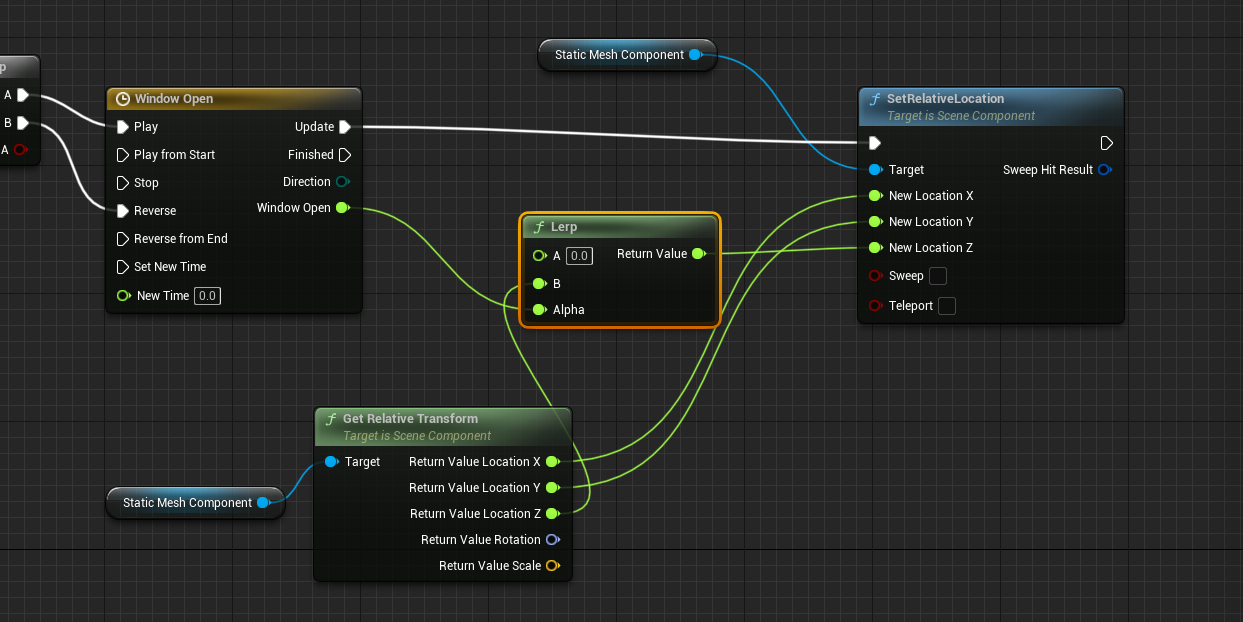
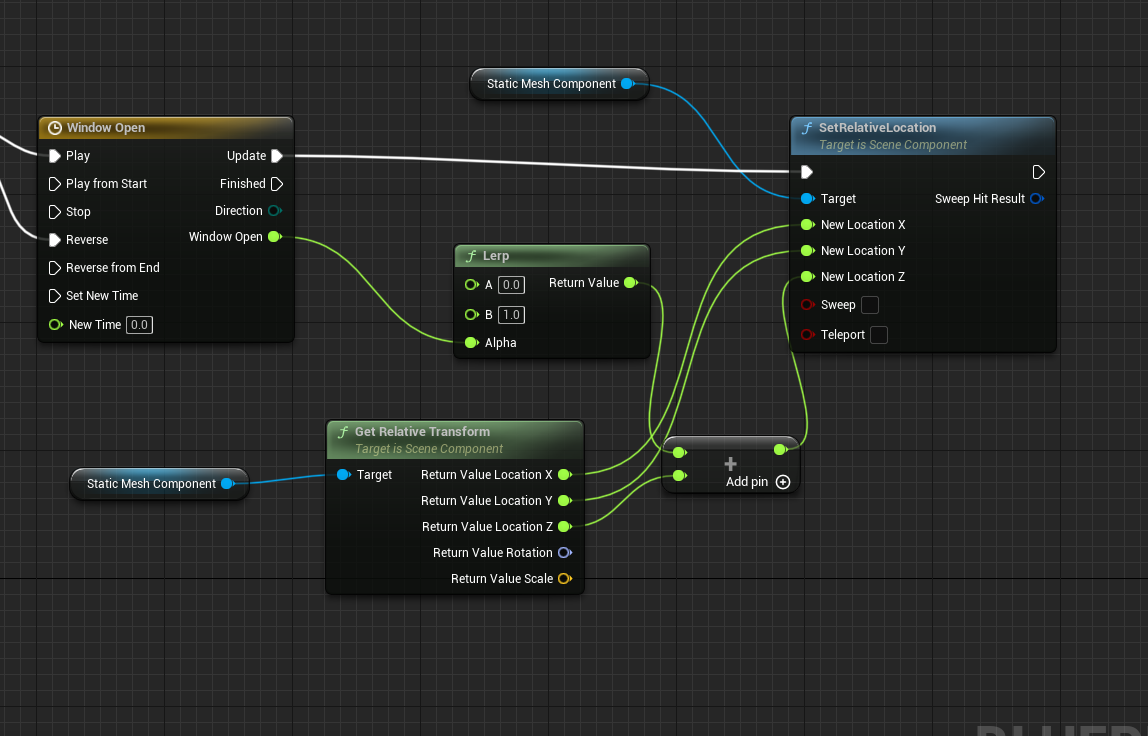
 drowsy snow
drowsy wigeon
What other reference can I use instead of fixed exposure?
drowsy snow
drowsy wigeon
What other reference can I use instead of fixed exposure?
I personally went with more limited auto exposure
drowsy wigeon
I am aware that is impossible to tune lights when exposure is changing perception, but I am not sure if Manual default exposure is the correct real-life ratio
drowsy snow
calm widget
<@!930506391788085269> or do you mean this thing?
You @ the wrong person lol
calm widget
oops hah. thanks
well second time anyway
What's a good way to change animation speed for sprinting function?
To be clear i've set up an animation BP and a blendspace 2d they work quite nice.
I've added sprinting in character bp that increases the speed over the maximum run speed for the blendspace i have.
Obviously i could change that but seems like there's a simpler way rather than adding duplicates for every run animation, forward, back, left, right, diagonals and changing their playback speed?