#ue4-general
1 messages · Page 1144 of 1
 minor badge
 minor badge

 grim ore
yes? it's asking for your image
grim ore
no. it's part of the project settings
grim ore
which one did you change
 plain crypt
Why isn't any options appearing here? how do i select one
 grim ore
splash screen worked for me

the splash screen time is loading time, so no you dont want it longer
@plain cryptthose are active instances of the object, are you running the game with any of them loaded?
plain crypt
grim ore
<@!415724936871542797>those are active instances of the object, are you running ...
Ohhh
The game has to be running
That makes more sense
minor badge
grim ore
the splash screen time is loading time, so no you dont want it longer
i changed the lower resolution jpg, is worked when i click play, but after package the game, it not works.....
grim ore
you might have no loading time is why, so no need for the splash
minor badge
how to set loading time?
 dawn plume
before and after clearing the output log

 plush yew
does anyone know where I can get the unreal engine logo but in a 3d format like fbx? I cannot find one from the company, not sure if it is something I can get
 verbal pelican
Hey everyone ^^
 mint raptor
Is it possible to maintain game input even while game window isn't focused?
verbal pelican
I doubt it, I've heard of very, very few non-UE4 apps that can do that
plush yew
I export sketchfab props into my project and when i save and quit and then load the project later, all the props textures just disappear and the texture is now the default
its only the props i downloaded from sketchfab tho
does anyone know how to fix this?
mint raptor
verbal pelican
I doubt it, I've heard of very, very few non-UE4 apps that can do that
VR seems to do this. I just need my mouse to as well
verbal pelican
VR is different
I'm not an expert on the subject and I am happy to be corrected here, but from my understanding VR apps are basically always in focus because they're being sent to your headset as a separate display
mint raptor
verbal pelican
I'm not an expert on the subject and I am happy to be corrected here, but from m...
The input has to go through to unreal to issue the commands to the game. But it seems like Unreal natively doesn't support this as a flag/option which is a big bummer as Unity gives this flexibility no questions asked. I guess I'll have to dig through source and insert the option.
verbal pelican
Just curious, why is this a functionality you need?
mint raptor
Lets say a joystick/controller to control of a game (maybe it is windowed) while you are not focused on the game itself. No reason why you can't play the game on one monitor while you have another window focused
Unreal offers Set Inputmode Game/UI/Both but nothing for this scenario/use case?
verbal pelican
I'm going to be honest, personally I've never thought of or heard of someone playing a game when it's not in the active window. I myself just have other stuff in the background while I play, not the other way around
So I'm not really sure how I would set such a thing up
Hopefully you can find the answer you're looking for, though! 🙂
 summer quest
is the capsule collision same as the physics collision?
plain crypt
How can i get the length of a animation?
 bright sigil
summer quest
is the capsule collision same as the physics collision?
bright sigil
summer quest
is the capsule collision same as the physics collision?
physics collision is not a shape
 finite mica
How does actor visibility work for multiplayer? Can I make actors invisible for individual clients or are they like serverside?
 sullen oxide
I have a general workflow question, I am developing under both OS Linux and windows, compiling from source the engine.
Do I need to have Unreal 2 time one for Windows with the Setup.bat etc and one for Linux using Setup.sh etc, or can I use the same folder?
So when doing my coding I can point the project to the same Unreal Folder
Thx a lot!
 sick tangle
sullen oxide
I have a general workflow question, I am developing under both OS Linux and wind...
sick tangle
sullen oxide
I have a general workflow question, I am developing under both OS Linux and wind...
Try #linux
summer quest
bright sigil
physics collision is not a shape
but can it be used instead of capsule collision as a colision?
plain crypt
how can i reference an Anim Sequence?
 brave fable
Hi Guys,
i am trying to get depth from backbuffer directly, but depthstencil view comes as NULL, here is the code …
[this, dx11Texture, Context](FRHICommandListImmediate& RHICmdList)
{
ID3D11DepthStencilView* View = nullptr;
Context->OMGetRenderTargets( 1, nullptr, &View );
Context->Flush();
if (View)
{
View->GetResource(&m_TargetDepthTexture);
Context->Flush();
}
});```
please guide me how to get depth from backbuffer directly … is there any faster way then scenecapture and using a render target texture , even this is problemetic RTF_R32F is not working so i was using PF_rgbaFLOAT, how ever, i want to get depth buffer with depth value in range of 0 … 1.
is there a possibility.
thanks … worn pecan
 finite mica
I mean that error literally tells you how
By not attaching root components to other components in the same actor
 quaint stirrup
whys it so fucking hard to export blender textured items to unreal engine
i swear to fucking god so annoying
idk how to do it my shit is white
fuck
finite mica
quaint stirrup
idk how to do it my shit is white
You perhaps should see a doctor
quaint stirrup
fuck you
 rain badger
@quaint stirrup Hey, not sure if this will be exactly what you're looking for, but I hope it helps! You got this! lol
https://www.youtube.com/watch?v=zA-krE0qmDM

In this tutorial you will learn how to import models into Unreal Engine 4 from Blender.
Cool Add-ons for Blender:
Human Generator:
https://bit.ly/3rBjJXy
Massive Cars And Vehicles Add-On:
https://bit.ly/3cuWF8N
1100 Textures in Blender:
https://bit.ly/2QEJ7yN
Flip Fluids Simulation Addon:
https://bit.ly/2Pbu5QR
HDRI Maker Addon:
https://bi...
quaint stirrup
I tried that 100 times it hasnt work
 thin python
quaint stirrup
whys it so fucking hard to export blender textured items to unreal engine
thin python
quaint stirrup
whys it so fucking hard to export blender textured items to unreal engine
I just export FBX and it works in unreal 🤷
quaint stirrup
i gave up
i spent so many fucking hours on this road block
no more
it shouldn't be this fucking difficult to slap different textures on a square
fuck unreal engine
fuck blender
 oak patio
Idk man works fine for me
quaint stirrup
dont give me drag and drop
you think i didnt try it
i drag shit
its fucking black
 oak patio
Or if the blender model is important and mot actually a square, just keep the white material, import the texture and fix the mat in ue4 anyway
quaint stirrup
what its suppose to be
\

i tried uv mapping
ive done all the fucking videos
im so sick of it
everytime someone is like you need to do this
and its another 30 minute video
that doesnt help
what in unreal engine?
i was going to goto the gym today
but this shit made me so mad
whose the ceo of blender
jeff bezos?
im eating mcdonalds tonight because of him
 obsidian nimbus
what format is the texture?
quaint stirrup
I double clicked it
its fucking unknown
it doesnt know what format it is
can you believe that
 oak patio
Then reimport your texture file, and manually set it in the material
quaint stirrup
in blender?
obsidian nimbus
if you open the texture in unreal and just look at R / G /B
oak patio
You have a bigger issue if ue doesnt read pngs
quaint stirrup
it comes up as fucking black
obsidian nimbus
nah thats prolly not it
 bleak zodiac
greyscale, seems either it's roughness or specular
obsidian nimbus
blender does have some texture buffer and it needs to get saved
oak patio
Did you miss the part where it was unknown file format
obsidian nimbus
can you share the .blend?
oak patio
That isnt the issue here
The guy cant import pngs
His engine is broke
The .blend isnt an issue here
Also no images are loading help
quaint stirrup
where do I verify integrity
oak patio
Epic games launcher
quaint stirrup
library
finite mica

obsidian nimbus
i dont believe he cant import pngs
 tame marsh
how bout jpegs?
finite mica
What are you gonna get from McDonald's?
quaint stirrup
they're all black
oak patio
rolling stones plays softly in the background
quaint stirrup
jpgs dont work either
its all black
unknown
@finite mica diabetes
4/27/2
no its not the 4th of the 27th
4.27.2
oak patio
quaint stirrup
<@!599688337401577472> diabetes
Goes well with the McInsulin
obsidian nimbus
hmm i can drag drop that texture no prob, how odd
tame marsh
insert big smoke's order
quaint stirrup
I dont think anyone has been driven to the point of insanity quite like me
not in the history of this entire planet
IN A WORLD
WHERE SHIT ACTUALLY DOES WHAT IT IS SUPPOSE TO
oak patio
your anger was misplaced at poor old blender smh
 timid meteor
people of the world ❤️
learn me something ❤️
topic is anything related to ue4
got 6 ears of learning so i love advanced stuf
 runic fern
Hello guys is there anyway to convert world rotation from -180 -180 to 0-360 ? DEGREE xD
 thick herald
You learn, we teach. There ya go, that's a freebie 😄
tame marsh
so is it fixed?
timid meteor
thick herald
You learn, we teach. There ya go, that's a freebie 😄
lol :p
 nova kayak
hey guys, when I create a large mesh lets say a house out of modular pieces, I convert the whole thing into one static mesh to reduce draw calls as Epic suggest to do that when I do it though, my lighting uvs for each mesh get crushed together and I have black splodges all over, does anybody know how to fix this?
 quaint stirrup
this shit still uploading as invalid
 dusky chasm
hi there! I am not sure what's the best place to ask this, but could someone tell me if there is any specific legal information about UE4 that I should add to the Nintendo Intellectual property notices on the SLIM site for Switch?
quaint stirrup
@oak patio I did it man
tame marsh
Is there a way to run Simulate in a new editor window
Or to run Simulate at a specific resolution
finite mica
Poor McDonald's ain't gonna get a dime from you
quaint stirrup
It fails everytime I upload it so I have to double click the texture and re import it
:]
but I figured it out fellers all thanks to my fucking self
 fiery tangle
hey im pretty new to UE and i'm trying to make an FPS game, i have a character i made in metahuman and i would like them to be one of the playable characters but im not sure on how to set them as the person you control, all i can think of is to attach a camera that follows them from the eye's prespective but how do i make it so that character has a playable ragdoll/ skeleton?
finite mica
Assign a skeleton, animation and blueprint
quaint stirrup
gentlemen
fiery tangle
yeah i get that, just how exactly im pretty much new to all this
quaint stirrup
average is a choice
finite mica
When you right click on a mesh in the content browser, you can assign a skeleton
Make sure the skeleton actually works for your thing
fiery tangle
cool ill get to work then
rain badger
Is there a way to change a textures colour as a variable? I've got a button with a checkbox in a widget and I want the colour of the image that is displayed when checked to selected by the player. So I'm wondering if there is a way to do this without having to import 'x' number of the same image in different colours and then figuring it out from there? (I'm going to figure out the set up for that later)
 dim merlin
Hi, anyone knows how to create visuals like these:
(The red line)
Is this done by post process ?
 oak patio
rain badger
Is there a way to change a textures colour as a variable? I've got a button with...
oak patio
rain badger
Is there a way to change a textures colour as a variable? I've got a button with...
you could always make a white texture and multiply it by a 3 vector
quaint stirrup
uv maps my friend
quaint stirrup
this the only way I could get it to work
oak patio
you cant just drag a texture in? what are you new
quaint stirrup
you're rude
well it's true
you pretended to not understand what I was talking about
oak patio
👾
have a space invader
oak patio
yeah you can just drag textures in
oak patio
i'll have you know i upload them to git and pull every time i wanna import
quaint stirrup
i want to select a face in blender
and then set it to a material
but it don't let me do it that way dwahg
quaint stirrup
i have to use these shitty uv maps
well it doesnt work for me
you mc understanding what I am mcsaying
oak patio
its better than maya
and 3ds
i had to use maya for 2 years, didnt like it one bit
its just the ui that gets me
plus blender makes things simpler in some aspects
ah yeah that one is slightly annoting
thats why you learn to rig
😎
very true, it is the one annoyance
idk probs a plugin to fix or smthn
I also dislike it's animation workflow
maya was better in that regard
but everything else
maya doodoo
oak patio
pretty much default
just i tick selected objects only cause i dont wanna export references
 normal echo
hi, is it possible to export asssets from the compiled ue game?
for example hud elements?
oak patio
you want to get assets from an exe?
normal echo
like
oak patio
well depends, they updated the rule
quaint stirrup
no one is smarter than me
oak patio
even then itll probs be bypassed
when theres a will theres a way
quaint stirrup
hehe just kiddding I think yall are really intelligent
I hope you all make good games about the experience
oak patio
oh mb i read it wrong lmao
normal echo
there is this thing for fortnite called fviewer of smth
oak patio
i read or instead of and
quaint stirrup
because at the end of the day its the experience
which makes our lives light up
in the dark
:3
oak patio
✨ experience ✨
quaint stirrup
roughly 32 experience points
normal echo
normal echo
there is this thing for fortnite called fviewer of smth
and I was wondering if it could be done wo any 3rd party software
oak patio
you have scammed me
quaint stirrup
hello could you please save my daughter from the mob I will reward you with 10 copper
oak patio
idk whats with the influx of reverse engineering rn
quaint stirrup
haha hackers
oak patio
idk it still seems theres a lot of fnaf fan games atm
fnaf sb really revived that one
i give it 2 months before we have 10 people a day asking how to make crypto scams/malware in ue4
its scary though
nf..... jpeg
i cant do it
i still don't understand the whole NFT game thing
do you get NFT's for playing? or do your NFTS go in game
either way its silly
 sick patio
THEORETICAL QUESTION: should a horror game have a save game, or should it have a checkpoint save, and if you die / quit, you got to the last checkpoint... to preserve the difficulty of the game and integrity of puzzles?
oak patio
it all depends, is it a survival horror? maybe save games are good for that, have a mode where you can only save at certain points too, or even limited saves like resident evil
is it a short indie horror that you can go start to finish in like 30mins, maybe checkpoints are better
I always prefer the freedom of saving, but like systems that make me cautious about when I should
e.g. resident evil ink ribbons, or alien isolation save terminals
sick patio
actually i'm making it ... 1 level at a time? so you "solve" the level... and even future DLCs will be more levels / floors of the building
kind of like chapters
oak patio
checkpoints might work better then, if its an enclosed level, id say if there were more options for backtracking, or if it was a more open experience, a la Metro games, then a save system would be good
but also its preference
you know how your game feels, and what environment you want
could it be easily save scummed with a normal system
is there not enough content for a limited save
sick patio
also i'm trying to come up with the most ... open ended solutions to things, where invisible to the player, they check off 20 things like: fill the cup with water, pour water under the open wire, when the monster comes on and turns on the light, it fries the monster and they jump over the monster to get through the door. And I'm thinking if you were on step 5 and came back a week later, you'd forget what you were even doing. so starting at the beginning of the level would help you. and I don't think save would help
anyway, you answered. thank you
oak patio
a good solution to that may be a checklist
you could reveal one step after the other in a UI
or give hints
sick patio
oh I didn't want it to be so mechanical
i.e. multiple ways to solve it
and there's ltierally just "get to the other side" as the "puzzle"
oak patio
instead of it being "Pour the water in X spot"
it could be "Find a way to distract the monster"
with options being like
- punch hole through wall
- start a fire
but you dont show the options, you just give a vague hint the player could see on reload
i know if i was playing, i wouldnt like it if i came back a week later and my level progress reset
but that may be necessary idk
i guess you could also have a hotbar of items, like if i come back after a week and see a cup of water in my inventory, and a broken wire, I will remember what i was trying to do with it
sick patio
you're making me think I should go watch that robot game ... uh ... detroit something
sick patio
yes that
oak patio
heard its good tho
sick patio
lol
oak patio
are you just lurking waiting to strike
quaint stirrup
you read me wrong
sick patio
but they present multiple avenues of accomplishing the ... scenario
oak patio
sick patio
but they present multiple avenues of accomplishing the ... scenario
ah makes sense
sick patio
well sheesh minecraft is super ... what do you call it... open ended... with multiple options?
oak patio
its all about the fine balance of knowing what to do while not detracting from the environment
its a fine balance
 kindred depot
I have 128 gigs of memory in my pc. Unreal engine is only using 1/4th of the memorys power, how do i allow unreal engine to use at least 3/4 when doing certian things?
sick patio
I tried searching for that, and only got tutorials on "open WORLD"
quaint stirrup
sick patio
well sheesh minecraft is super ... what do you call it... open ended... with mul...
its called a sandbox
oak patio
it says "Hey you found the helicopter, go get these things" and if you find the submarine it says "Hey you found the sub, now go find this stuff"
kindred depot
unreal engine should have an open world template with ue5 btw, someday 😉
<File Name="Templates/TP_OpenWorld/Content/__ExternalActors__/Maps/2kmTemplate/E9/LG/QYXMBYO3S8OJOYJZSG9VG.uasset"
sick patio
is there a "limited" or small sandbox?
oak patio
so you could set it up to say, If you come across the broken wires, add something to the checklist that says "Find a way to bridge the gap" or if you find the noise making thing, it says "Find a way to trigger the distraction"
and that points you in the right direction without giving too much away
that would work with a save system
if it is a really small level, sure restart it from the beginning, but if the puzzles are any way decently complex i think it would be good to have some form of checkpoints or saving
with a notifier pointing you in the right direction
thick herald
sick patio
oh sandbox means open ended?
Sandbox basically means that within the level / map you can do what you like with the tools given to you as the player. It can be large massive open world style maps or tiny enclosed rooms.
kindred depot
I mean that is complex lines of code you are talking about lol
if you can do this, you should go work for a studio xD
kindred depot
Yeah you said do whatever, with your own imagination lol
kindred depot
sick patio
but but but I hate humans
I know.. those aliens >_<
oak patio
kindred depot
Yeah you said do whatever, with your own imagination lol
nah wdym i made Life 2 in a day
sick patio
wait, are you all suggesting sandbox is too hard for a loner?
oak patio
no i think theyre saying what you said vs what you meant is a bit different
what you want is possible, i think if i understand, you want a set number of ways to complete a puzzle but you choose
kindred depot
To make tools like this to work at runtime, and mp is very complex.
sick patio
ok is detroits multiple choice a sandbox?
I've spent a month on stamina
I've spent the same on sprint
I should be done, in a bout 6 months
kindred depot
i have been working on my game for over a year now. dang
oak patio
if you want a set number of ways to complete a puzzle, like start a fire, turn on the lights, or make a noise, - possible
if you want literally everything in the environment be used to complete the puzzle - not so possible
kindred depot
kind of like breath of the wild or zelda puzzles in a open world?
sick patio
ok i'll go look up what sandbox really is
what i really want to do is make it like Hogan's Heroes wehre they literally have a task to do THIS and they setup 30 part thing to make it work
kindred depot
Sandbox is a game like ark survival or any game that uses a characters behavior in that way. Or has a vast open world.
oak patio
i mean if you have a set number of outcomes, and some setup required to complete them
thats possible
sick patio
and if i were a master and a genius
oak patio
I woudln't call what you want a sandbox, id call it a puzzle with choices
a video game or part of a video game in which the player is not constrained to achieving specific goals and has a large degree of freedom to explore, interact with, or modify the game environment
thats the definition
and you do have specific goals
you just want multiple ways of achieving the specific goal
so entirely possible
quaint stirrup
unintelligible nonsense
quaint stirrup
we are all going to be great friends I can already tell

 tepid helm
I know that, at the moment, UE doesn't have deterministic physics (I mean, with Chaos they might be at least deterministic on one machine), but I have other questions regarding that.
(To simplify, from this point deterministic means "deterministic independently of machine" so full determinism from now on .)
-
Are non-physics-related systems, like movement, also indeterministic?
-
If yes then why? Is this the problem with floating point optimisations? Does making the framerate locked solve the problem?
2.5 If yes, then how does it work when a machine can't have the power to play with the locked fps value? Will it calculate few frames during one?
3 (a long one). I read an article that using fp-strict fpu instruction improves determinism drastically at the cost of performance... Is this an oprion even worth considering? On Intel's site I read fpu optimisations make calculations about 15% faster... It doesn't seem like a REALLY big performance throw if I would turn it off... Am I right? If yes, would this make the engine deterministic? Would it solve the physics indeterminism as well?
3.5 If yes, is this even possible to somehow compile the engine with these instructions? How?
Tl;dr is this even possible to make UE at least PARTIALLY deterministic regarsless of machine if we throw out physics?
Sorry for being a bit chaotic, it's much information to digest haha
oak patio
kindred depot
that's what this discord is 😉
this discord is the only one im active in lmao
kindred depot
Hmmmm. I cant wait to see this in the ue5 main lol i might have to copy the code and put into ue5.0 😛
Forget aim assist and deadzones... here's a quick look at the new and improved gyro controls and flick stick Epic hired me to design and implement in Fortnite!
Try these features out on PlayStation 5, PlayStation 4, Switch, Android, and Windows (if you have a PS4 or PS5 controller plugged in).
Check out the Fortnite blog for more info: https:/...
oak patio
wonder how it responds if you just launch the controller across the room
oak patio
it sounds like it's more suited to racing games, for if you cant afford a steering setup
not sure how well it would work in a battle royale
also great for accessibility
kindred depot
It's the future for shooters. This makes it easier to have a more precise 1:1 with the aim on a default linear curve.
Gyro might be the replacement for aim assist in future console or gamepad shooters.
Having Gyro Aiming on disables aim assist whenever gyro is active. ``` gloomy lodge
Hey guys, how come the real-time preview setting on a node isn't working for me properly? Is there a setting elsewhere that I've missed?
The texture I'm using has a panner and a vectortoradialvalue connected, the real-time preview shows the radial node working but not the panning. I'm following a tut and the preview is panning for them but I can't get mine to work
I know that's a real trivial issue that doesn't really matter but I'm still learning unreal so every little helps 😅
 wet obsidian
Hello. I am working on a VR project for desktop devices and try to package it. Everything seems fine but when i try to open it it doesn't work and i have this message ""Assertion failed: IsValid() [File:C:\Program Files\Epic Games\UE_4.26\Engine\Source\Runtime\Core\Public\Templates/SharedPointer.h] [Line: 890]""
Does anyone know what is this and what i am doing wrong?
 crisp vessel
Hello. Is there any way to prevent Unreal Engine from closing on EXCEPTION_ACCESS_VIOLATION?
It's really annoying to restart engine each time I have an error.
grim ore
prevent the error itself, leaving it open could/would leave to unstability and you do not want that
if you get that type of error, its a bad thing to keep it running
crisp vessel
grim ore
if you get that type of error, its a bad thing to keep it running
The main reason of this question - unity does not crash on error >.< I've believed UE will be able to too )
 flat trail
Merch 😍
 grim ore
Unity does crash on error, you have just never had it happen
sick patio
lately, in this project my right mouse clicks stop working. I saved and restarted and it worked. This has happened twice so far
like the window will pop up for .0001 seconds
how do i fix it?
 drowsy snow
flat trail
Merch 😍
drowsy snow
flat trail
Merch 😍
This one's from the BP ninja?
drowsy snow
crisp vessel
The main reason of this question - unity does not crash on error >.< I've believ...
Except it's the Unity bias playing with you.
Also consider installing debug symbols if you haven't already. Chances are it's an actual program error and not just messed up malloc, but the engine didn't know what to blame due to lack of debug symbols.
drowsy snow
sick patio
lately, in this project my right mouse clicks stop working. I saved and restarte...
Are you using NVIDIA GPU?
sick patio
yes
wet obsidian
UATHelper: Packaging (Windows (64-bit)): C:\Users\chrismouz_local\Documents\Unreal Projects\MyoProject - Copy\Plugins\myo-ue4\ThirdParty\Thalmic\Include\myo\cxx\impl/Hub_impl.hpp(26): error C4530: C++ exception handler used, but unwind semantics are not enabled. Specify /EHsc
Does anyone know how can i solve this error?
gloomy lodge
gloomy lodge
Hey guys, how come the real-time preview setting on a node isn't working for me ...
Can anyone point me in the right direction?
tame marsh
gloomy lodge
Can anyone point me in the right direction?
Try asking in #graphics ?
gloomy lodge
tame marsh
Try asking in <#221799195806400512> ?
Done ty
sick patio
drowsy snow
Are you using NVIDIA GPU?
any advice?
drowsy snow
sick patio
any advice?
📌 ↗️
sick patio
that doesn't quite cover mine, because the rest of the engine is fine
in fact all other operations are perfect
it's jut righ clicking, goes out at a certain point
wet obsidian
Could you help me with that? Sorry i am a new developer and i am not sure i understand what you said
I already done something like that on my plugins Hub_impl.hpp. But i had the same problem

is there another one?
throw?

i suppose i must go to the other script and make comment the throw
Ok. First of all, sorry for your time and thanks for the help? What you suggest? On the "Throw Script" to make the throw class as a comment or to use " UEBuildConfiguration.bForceEnableExceptions = true;" Inside my project.Build.cs
?
I can't find something for 4.26 so i don't know what to do next. I am using this plugin (https://github.com/getnamo/myo-ue4/blob/master/README.md) and there is the problem. If you want to suggest me a solution it will be great help
GitHub
Myo Plugin for Unreal Engine 4. Contribute to getnamo/myo-ue4 development by creating an account on GitHub.
i tried that but it is dead. We have a myo arm band and try to create a VR app for research. But we stuck here
In editor mode it seems great but we didn't manage to package it
I didn't do any changes related to exceptions. I just install the plugin and then try to test it with a simple BP, This is all i try to do for now

Yeah i understand that. Thanks for the time any way
 grizzled carbon
I have a system to detect objects within an overlap sphere, and if they have a visibility component, toggle their visibility.
Am I reducing the computational demands of this if I create a specific collision channel for this so that only relevant objects will be caught in this sphere?
Or am I actually increasing the complexity / doing nothing because the sphere is going to notice every object anyway under the hood and need to check its collision channel?
Or maybe more simply. Is there a computational cost when a collider begins overlap / hits another collider which its supposed to ignore? Or is it calculated in a way such that the collision is never noticed?
 silk nimbus
guysss i need some help with UE5
why are all my textures looking shit and burry ?

they all look low res
those ones are 4k quality megascans downloads but i tried it with the nanite quality download and it was just as low res
my texture quality in engine scalability is cinematic to
and res scale is 100%
 mental helm
Are you zoomed in close to a very large mesh? 4k textures won't hold up to focusing on one small part
You can use tiling detail textures to add some smaller details
grim ore
@silk nimbusopen the texture, look at what it is showing for the resolution(s) in the top right
im guessing its using the wrong mip detail levels
 silk nimbus
mental helm
Are you zoomed in close to a very large mesh? 4k textures won't hold up to focus...
silk nimbus
mental helm
Are you zoomed in close to a very large mesh? 4k textures won't hold up to focus...
well im not sure
since like
i downloaded another asset off of bridge, to test this out, and downloaded it in the nanite quality, which im guessing is highest quality available, and it still looked low res to me
thats at its default size too
not scaled up
wait ill download another one now in high quality and test it
silk nimbus
is 8k the highest megascans goes ?
grim ore
no idea, I do know that mip maps can get wonky with them and it will show the wrong texture sometimes which is why I had you check that (is showing 2k which is fine)
silk nimbus
hm alr
ok last thing then check this screenshot;

is the res on this one looking fine for a 8k download
didnt scale that object up at all
silk nimbus
yea i see, these are my engine scalability settings

anti aliasing makes the scene blurry tho isnt that an issue or na ?
grim ore
cinematic is noneed, you can keep it on epic
mental helm
Try epic for textures
grim ore
and is that an 8k texture on that mesh?
mental helm
UE5 has better sharper AA
grim ore
if you want to make sure the texture is showing completely without issue, go into the texture and change the mip gen settings to no
 silk nimbus
grim ore
and is that an 8k texture on that mesh?
silk nimbus
grim ore
and is that an 8k texture on that mesh?
yep
 grim ore
that will atleast prevent any possible mipping issues
and honestly, if its a large mesh even with an 8K texture there is still only so much it can do since it has to fit it over that space
flat trail
drowsy snow
This one's from the BP ninja?
BP ninja? Got it from unreal as part of the epic mega grant 👍
silk nimbus
grim ore
and honestly, if its a large mesh even with an 8K texture there is still only so...
hm alright i see thanks
but then how comes like the proffesional unreal demos n stuff have such clean textures n that on everything
or is that just the illusion from a distance
grim ore
does it, or do you just think it does?
mental helm
They use a lot of smaller assets or tiling detail textures
grim ore
yep. plus illusions like from a distance
some meshes are intended to be used for far away, for closer up you can use smaller meshes and bash the together
silk nimbus
alright cool thanks ill probs just try to avoid close ups on low res things then thanks
but ill also make sure i have all my close up assets downloaded at max res over 2k too
and keep 2k for distant stuff
silk nimbus
hey guys im back i need help with smt else hahah
i just rendered my first animation cinematic for testing purposes mostly
and i rendered it as a sequence of png files
so what now
coz now i got like 400-500 pngs but what do i do with these lol
was that the right way to render it out ?
ah dw i figured it out now haha
 maiden sundial
Anyone knows why those tabs wont be open once i restart the editor ?

I've got this setting on here, maybe it's the wrong one ?

(I always restart via my IDE if that's important)
finite mica
I've opened a few assets

<@&213101288538374145>

Nitro scammers even in this server 
oak patio
Oh theres a few, they come and go
oak patio
finite mica
I've opened a few assets
How much RAM do you have, jesus
finite mica
Yes 
 thick acorn
I am getting en error when I am trying to create my first project. In which channel should I ask?
grim ore
here is fine
thick acorn
I get this error despite having .NET framework 4.8 installed:
An error occurred while trying to generate project files.

Running C:/Program Files/Epic Games/UE_4.27/Engine/Binaries/DotNET/UnrealBuildTool.exe  -projectfiles -project="C:/Users/latsp/Documents/Unreal Projects/UnrealTest1/UnrealTest1.uproject" -game -rocket -progress
Discovering modules, targets and source code for project...
ERROR: Could not find NetFxSDK install dir; this will prevent SwarmInterface from installing.  Install a version of .NET Framework SDK at 4.6.0 or higher.
so what should i do?
anyone?
 blissful trail
yo so some of my friends have this issue where ue4's menu's imminently close when opening them i think their version is 4.16/4.17
grim ore
@thick acornhow did you install your current framework?
what I am getting at is you can do it the same way, I would recommend using the VS installer myself. Click modify on your current install

@blissful trail is this when they click a menu at the top of the screen, or when they right click in a blueprint graph?
if it's when they click a menu, disable menu animations. If it's when they right click in a graph, its an nvidia driver issue and the pinned messages have some ideas.
 blissful trail
they do have that disabled
it happens when they click a menu or right click the bp graph
 viscid narwhal
Hello folks, is there a way to draw an array of floats as pixels in ue4?
 civic flame
Hello everyone,
I am working with UE4 for a school project. I have a dialogue plugin that allows me to spawn things when that node is reached. What I need help with is a mechanic. I need to have four spheres spawn to represent the four answers. I need those spheres to come towards the player. For the selection we are using num keys 1-4. Once the number is selected I need the other three spheres to go away and I need that selection to continue with the dialogue. Does anyone have any suggestions how I could achieve this. I've looked at countless tutorials on youtube and forums but nothing is making it clear and would love some suggestions.
Thank you in advance.
plush yew
Hey so I have a rather odd situation that I honestly think might be a bug with the engine since I have seen 0 results online. I looked it up on google and youtube but found no results.
I am having a compiler error that claims there are multiple functions with the same name, but the specified place of the second one is labeled as <None>. Is there a known fix for this? (I didnt see it in the FAQ either)
 dim saddle
Ok i have a summary of when making a demo based level:
You put in model's as fbx and everything else;
Add triggers and cutscenes;
After that a end sequence and then that's it?
plush yew
plush yew
Hey so I have a rather odd situation that I honestly think might be a bug with t...
Its kinda weird because previously this was not happening but when I restarted UE4 it started having issues
plush yew
plush yew
Its kinda weird because previously this was not happening but when I restarted U...
This is the exact phrase

Also when I click on None it takes me nowhere
The blueprint just remains in the same camera position and does not show anything
 pallid talon
Will epic fix all the broken image links on their forums? Every topic I run across to trouble shoot an issue has images that are broken on them.
grim ore
@plush yewhave you tried a bp find for that name? to find the function(s)
plush yew
There is no blueprint with the name <None> or any absent name if that is what you are asking 🤔 and in my blueprint I can only find 1 function with the name Restart
grim ore
one named Restart
a function

only shows the one blueprint and one function in it?
if so, what about renaming it to say Restart1 then trying to compile and see what happens
ah.. I can also duplicate it if there is a native function in the blueprint and I implement an interface with one
 tiny grove
<None> === Lightmass crashed: ===Unhandled Exception: EXCEPTION_ACCESS_VIOLATION writing address 0x0000000000000004
Unhandled Exception: EXCEPTION_ACCESS_VIOLATION writing address 0x0000000000000004
0x00007ff6a724d13d UnrealLightmass.exe!Lightmass::FEmbreeGeometry::FEmbreeGeometry() []
0x00007ff6a725640b UnrealLightmass.exe!Lightmass::FEmbreeAggregateMesh::AddMesh() []
0x00007ff6a72a79d5 UnrealLightmass.exe!Lightmass::FStaticLightingSystem::FStaticLightingSystem() []
0x00007ff6a725aa69 UnrealLightmass.exe!Lightmass::BuildStaticLighting() []
0x00007ff6a72817f7 UnrealLightmass.exe!Lightmass::LightmassMain() []
0x00007ff6a72a09d3 UnrealLightmass.exe!main() []
0x00007ff6a73093d4 UnrealLightmass.exe!__scrt_common_main_seh() []
0x00007ffb86137034 KERNEL32.DLL!UnknownFunction []
0x00007ffb87d42651 ntdll.dll!UnknownFunction []
I`m stuck here when building lighting
please someone help
grim ore
without the crash debug symbols there is no way to know where it crashed
install them from the launcher and re crash it, or try building lighting on a new map to make sure its a map issue and not lightmass
 neon bough
do they include third party libs? because embree is one
plush yew
grim ore
ah.. I can also duplicate it if there is a native function in the blueprint *and...
Oh wait I have an interface with a function called Restart so that might be it, Im gonna check now
Ah yes that fixed it, my bad lol
grim ore
yep thats why I suggested searching for Restart 🙂
sick patio
NOOB QUESTION: uh how do i show my friend, I finished making this animated menu that travels around the map for each link in the menu?
plush yew
grim ore
yep thats why I suggested searching for Restart 🙂
Which search function is that? I do not think I have seen that before
grim ore
in the main editor window, find in blueprints

you can also get to it from the normal find in a BP

 pale jetty
cant find a localization section - how does localized text work with rich text? if a style command <textcolorred> is accidentally translated will it no longer work as intended? i would assume so but havent tried yet and am looking for a quick answer
sick patio
was my question too dumb?
grim ore
no? show your friend what?
sick patio
Menu
grim ore
make a video of it?
sick patio

Support the channel through donations. Crypto accepted!
PayPal: https://paypal.me/reidschannel?locale.x=en_US
Patreon: https://www.patreon.com/reidschannel
Bitcoin: 1JFwWHr4X6uAeoZadukzqKjzFBj3Qjy7Sk
Ethereum: 0x2B2Bc108F1Cc0fF899959dEF3226637787d8C3dE
Dogecoin: DNQ33YnhpWoTBokBNVkZP5ub8KTLkpyjpv
Join our community discord!
Discord: https://dis...
so I have to learn how to make unreal videos?
grim ore
well if you want to show it to them you can send them a screenshot or capture a video and send it. If you are trying to send them the project to play with, then you package it
sick patio
uh, ok, thank you
blissful trail
when they right click on the grid and bring up that little menu or press file top right or anything like that
it basically opens but then closes immediately
they usually fix it by restarting the project but it eventually starts happening again
plush yew
how do you make your character into another downloaded character
 olive orchid
I know this is unreal but does does anyone here know of a world machine discord?
Can’t find any working links
plush yew
plush yew
how do you make your character into another downloaded character
as in, how do you make it so when you press play you are the "other character" and not the default mannequin
plush yew
grim ore
you can also get to it from the normal find in a BP
Thanks for the help btw :)
grim ore
@plush yewyou set it as the default pawn in your game mode, you set it as auto possess with the character in the level, you spawn it in and possess it manually. any of those work
 remote badge
Hey do you guys know how the reverb system works, I'm not sure if I'm using it wrong or if it's an intended feature
Basically outside reverb is applied to any sound being played to a player outside despite originating from an inside location with different reverb settings
Wondering how I can override that
 timid spade
civic flame
Hello everyone,
I am working with UE4 for a school project. I have a dialogue p...
timid spade
civic flame
Hello everyone,
I am working with UE4 for a school project. I have a dialogue p...
inside the class run a switch to check the input, then destroy the other 3 spheres and continue what you need from that switch option
plush yew
grim ore
<@456226577798135808>you set it as the default pawn in your game mode, you set i...
thx
also, ive got my character and my map now, but my character is literally the size of the ingame mountains, so is there a way to resize him or do i have to just make my map bigger, which might just crash my laptop as it is quite laggy already
grim ore
if the character is in the level you can scale them
 main palm
I have a concept for a game that involves a level editor (the user can create levels and save them). To achieve this, I would think that I would need to serialize the relevant data to a file and reconstruct the level at runtime from the data in that saved file.
I guess my question is, do consoles have limits on creating and saving additional files at runtime?
Or would the saved levels have to be built into the game's save file on consoles?
kindred depot
downtown west is taking 3.2 hours so far to advanced copy. holy hell.
its only 10 gigs 😛
city park is going to be another 3+ hours...
This is what happens when you dont like assets in your games root dir.
the difference between this. All materials will not render on the 3d model IF you delete the folder out of the content folder when doing a basic copy. The advanced copy will take the materials and textures with it, so you do not have a cluttered content folder, imo. So instead of having 40 folders in the /content folder i just have one.
Taking a break from game dev for a few days. putting my ideas on paper and watching movies. I lost my mind losing 200+ hours of work
 cloud pagoda
Can someone please help me, I'm having issues with a dynamic mesh. I created particles within Unreal using Apex, and i checked simulate physics but for some reason when I play, the mesh just breaks itself before I shoot it
Update: I checked off start awake so now it doesn't destruct itself automatically, but when I shoot the mesh, it doesn't break, it just moves in translation. It only breaks when it hits the wall on collision. So I think I need to somehow set bullets as a collision that works like the wall, that way it'll destruct when it makes contact with the bullets too, not the wall
If anyone knows please ping me
plush yew
does anyone know if there is a video showing how to switch between meshes fast, and automatically? I want to jump between these meshes to make an animated look to it, but not sure how to start on that.
 thick acorn
grim ore
what I am getting at is you can do it the same way, I would recommend using the ...
thick acorn
grim ore
what I am getting at is you can do it the same way, I would recommend using the ...
thanks! I got it working
plush yew
yeah the first one might work well, the bp idea is just too difficult to get a good looking switch. thanks for the tips, I will try the timeline idea and see if that works out for this.
 bronze vault
plush yew
does anyone know if there is a video showing how to switch between meshes fast, ...
bronze vault
plush yew
does anyone know if there is a video showing how to switch between meshes fast, ...
Idk if its a good idea or not, but you could try a timer. Here is a quick and rough example of what I'm thinking.

 tribal sonnet
hEY was just wondering if its possible to change the pivot point of a flipbook
i mean im assuming it is but-
for the life of me i caNNOT FIGURE IT OUT LMAO
oak patio
Now that one i can solve
 night bridge
even when I set my material to "emissive" the light is still effecting it. How can I truely make my mesh+UV an "unlit" asset without worrying about lights in my scene doing anything to it? this is for 3D scans
 tribal leaf
Are you looking at the material in UE or the texture?
night bridge
the material
quaint stirrup
does anyone want to make a video games with me ;]
 autumn flame
mental helm
night bridge
even when I set my material to "emissive" the light is still effecting it. How c...
autumn flame
mental helm
night bridge
even when I set my material to "emissive" the light is still effecting it. How c...
Change the shading mode to unit
 plush yew
why UE does not support multiple parent bones?
plush yew
Is there a channel to find a team
 austere whale
is anyone here in the blender vfx discord
 indigo steeple
What channel would I want to ask in about building some assets that i got on ArtStation? Picked up a few rifle variances and it's pretty much all in pieces. But I want to learn how to properly make a full rifles from the pieces and then also how I would want to go about animating the Charging Handle.
remote badge
Import to blender -> group triangles by parts -> rig bones -> export to ue
 grim juniper
<@&213101288538374145>
 buoyant graniteBOT
:warning: Failed to send a DM. User will not be notified.
:no_entry_sign: ASTRO MUSIC#4579 was banned.
indigo steeple
remote badge
Import to blender -> group triangles by parts -> rig bones -> export to ue
Now since I have just starting learning and understanding UE, just do a general file type in Blender?
indigo steeple
okay, thanks
 limpid isle
Anyone knows how to get the character actor from a line trace ?
For some reason every other actor are detected by the line trace but my duplicated character ( it's for a possession )
I also noticed the actor was detected when I add a static mesh,but I would rather not
limpid isle
Here it is for your answer : https://forums.unrealengine.com/t/line-trace-not-hitting-skeletal-mesh/337050

Unreal Engine Forums
Hi I am shooting a projectile and on overlap with the a characters capsule component generate a line trace from the projectile and try and find the bone name of the part of the skeletal mesh that it collides with. But the line trace just goes straight through the skeletal mesh no matter what collision settings I try and change. Currently the ske...
now what about my question ?
jk thank you for the reformulation !!
summer quest
now i shall delete me messages
 rapid lark
 quaint stirrup
pack it as much as you can
make big building
yes
I think blade runner is a good example

have this in the background
don't have to put much detail in it if it's far away
limpid isle
limpid isle
Here it is for your answer : https://forums.unrealengine.com/t/line-trace-not-hi...
However this raise another question, how to delete the capsule component of the character as he indicates in step 2
?
oak patio
limpid isle
However this raise another question, how to delete the capsule component of the ...
The capsule component is necessary for character movement component so you cant
limpid isle
Okay, but then how to get a collision with a skeletal mesh component ?
I have enabled Per Poly Connection but it still doesn't work
Otherwise i found a solution with setting a box static mesh invisible, but it's not the best solution ...
 flint crescent
limpid isle
Okay, but then how to get a collision with a skeletal mesh component ?
flint crescent
limpid isle
Okay, but then how to get a collision with a skeletal mesh component ?
Does your skeleton mesh have a physics asset?
 flint crescent
Just to confirm. The trace channel on the skeleton mesh is set to "block" the correct channel and "collision enabled(query and physics) is set
and you are using "line trace by channel" node
not useing multi-line trace or anything
 flint crescent
is that ue5?
limpid isle
Yeah it's ue5 but you were right i missed the option block all in collision settings
Thank you so much !
flint crescent
👍
 wooden rain
does anyone know a discord server for unreal engine but for buying and selling things?
 ionic bridge
Dear peers, i need some help cause i've done this step by step and im stuck....
I'm following this Tutorial: https://hippowombat.medium.com/tutorial-line-of-sight-visualizer-for-unreal-engine-f32113b1f6f3
But I get to the point of adding the On-tick event (see screen shot) but the actor is not rendering or not following my character or anything. So im stuck at actually getting the actor to follow my character

I add the last image to the sightline actor and hit play and nothing
any one have any ideas? anything is very appreciated.
 devout whale
Calling out the creative people! So I am lacking ✨imagination✨, and I've got a project I want to make with a cube and guns attached on the sides.
Any idea how I can add ✨umph✨ to the game? I don't want a basic cube just going around shooting.
Any abilities, guns, ect. Anything. Maybe even movement wise. What if its not a cube.
Thank you and I'd love to hear some thoughts! ✨✨
quaint stirrup
movement
always love a game with good movement especially if it is action based
if you could add a grappling hook that would be fun
make it high paced action
and a dash forward ability
mm yes
devout whale
Hmm! Now that's what I'm talking about! Thanks for the ideas. I'll definitely will be added them to my notes @quaint stirrup
quaint stirrup
yes
you could vary the levels
have them swing around shooting rockets into hordes of enemies
or swing around with a sniper and assasinate people
stealth levels are extra fun with good movement
swing around plant c4 blow them all up
levels with mines and obstacles
devout whale
I like your ideas 😏
quaint stirrup
ofcourse my friend
only the best
for story line I would have the cube wars where one side is losing the war and with limited energy can only send you back in time with op weapons to run through the entire enemy army when they only had swords and shit
though you can still make it challenging in a fun way
i love the feeling of being op
reason why everyone loves one punch man
you could incorporate comedic elements from that too
devout whale
Honestly! Great ideas. Definitely sparked my ✨imagination✨
quaint stirrup
nw
let me know if you need help making assets
im trying to get into that so I need practice
devout whale
Awesome will keep that in mind ✨✨
 proven aspen
devout whale
Calling out the creative people! So I am lacking ✨imagination✨, and I've got a p...
proven aspen
devout whale
Calling out the creative people! So I am lacking ✨imagination✨, and I've got a p...
You move around from gun kickback? Kind of like those jets on the sides of spacecraft that move it around in orbit. Guns in all directions!
blissful trail
ok so i need to create a first person vaulting/climbing system and idk where to start i did check online but couldn't find any good tutorials or anything like that
dont rly know a better way to explain this but like id like it to like do a vaulting thing when the wall is shorter and then climb kinda thing wall if its a certain height
 devout whale
proven aspen
You move around from gun kickback? Kind of like those jets on the sides of space...
devout whale
proven aspen
You move around from gun kickback? Kind of like those jets on the sides of space...
Omd! Was thinking the same thing a moment ago, hahaha! Awesome idea though
proven aspen
blissful trail
ok so i need to create a first person vaulting/climbing system and idk where to ...
There’s a thing called Advanced Locomotion System for free on the unreal store. You don’t have to use the system but it does have a ledge grabbing mechanic you can reference. It taught me a lot.
 true ridge
Is there a way to set the "default" anim blueprint class of a skeletal mesh? So if I spawn a skeletal mesh or add one as a component to something else it automatically sets its animation to a particular AnimBP?
 valid yew
Hello, it's my first time at Unreal. These days, there are many places that use unreal engines to simulate (projections, interactive, etc.), but can i simulate them by matching them ansi lumen? For example, 40,000ansi lumen...
 haughty slate
If I place an actor below the Kill Z value (and have World Bounds Check enabled) - when I play the game shouldn't it be instantly destroyed? I'm just doing some testing and this empty actor is not pending kill (I'm also printing a reference of it in level bp)
 worn copper
Anyone Tried to Integrate "MetaMask" Login in Unreal Engine?
 tepid lantern
welp both of my issues are both in pins that's useful, thanks for pinning them
shoulda checked first
ionic bridge
how do you attach an BP actor to a character?
 ebon stirrup
ionic bridge
how do you attach an BP actor to a character?
ebon stirrup
ionic bridge
how do you attach an BP actor to a character?
you can attach actor to component
or attach actor to actor
 fossil nexus
I have a group of static mesh component star shapes in my Blueprint.
At some point i need them all move to a different place, slowly.
I found that it is not possible to use a For each loop to move many static meshe components with the bp Move Component To.
So what is the alternative?
drowsy snow
fossil nexus
I have a group of static mesh component star shapes in my Blueprint.
At some poi...
Timelines.
flint crescent
fossil nexus
I have a group of static mesh component star shapes in my Blueprint.
At some poi...
"move comp to" is a latent node so you can use it in a for loop but you'll need to call a differant "move comp to" for each array index. Alternatively... event tick - for loop - vinterp to.
ionic bridge
ebon stirrup
you can attach actor to component
or attach actor to actor
How do you do it
fossil nexus
flint crescent
"move comp to" is a latent node so you can use it in a for loop but you'll need ...
Calling Move Comp to manually in each array index, i dont know if it works in my situation. Since the ammount of soldiers or stars change depending on the situation.
 last pebble
sorry to interupt
ive been messing around with world composition lately, and trying to make a big map
but smh, i always have an error
one of my tiles, usually my main tiles is always missing

the main island is there when its unloaded

then boom
when its loaded, its gone
i tried to look for solution in google, but doesnt seems to found it yet...
fossil nexus
drowsy snow
Timelines.
@flint crescent So i ended up choosing my other alternative that i dont know if it can cause some kind of issue. I calculate with square root the distance, and i increase the position of my static mesh by 1 unit in the direction each time i call this function:
https://blueprintue.com/blueprint/em7d1c1a/

No description provided
With this i can move all the static meshes slowly to a place
But i dont know if this can cause some problem
flint crescent
fossil nexus
With this i can move all the static meshes slowly to a place
Different frame rates may cause problems
 red pond
guys, does anyone know how normal vectors are calculated in Unreal Engine? I see that sometimes there are values greater than 1, which doesn't seem right
rain badger
Hey! When I'm adding my widget to the viewport it gets buggy and appears really small. But when I adjust the camera position it becomes big and takes up the whole screen (as it should). But depending on what the camera is facing, it will jitter and got small again. Is anyone here familiar with that issue?
 modest trench
red pond
guys, does anyone know how normal vectors are calculated in Unreal Engine? I see...
modest trench
red pond
guys, does anyone know how normal vectors are calculated in Unreal Engine? I see...
template<typename T>
FORCEINLINE bool TVector<T>::Normalize(T Tolerance)
{
    const T SquareSum = X*X + Y*Y + Z*Z;
    if(SquareSum > Tolerance)
    {
        const T Scale = FMath::InvSqrt(SquareSum);
        X *= Scale; Y *= Scale; Z *= Scale;
        return true;
    }
    return false;
}```turns out floating points are fuzzy so you won't get exactly 1.000
rain badger
So to expand a bit on the situation:
I've got a card spawn on a table (with a widget component and an invisible button overtop of it). When interacted with, I need it to open the widget to the viewport. The widget has a series of checkboxes. When the widget is closed (removed from parent), I need any changes made to it, to remain and appear on the card on the table.
I did this by making a variable of the widget component on the actor and then when the invisible button gets pressed it adds the widget to the view port. It displays the widget but its tiny. But when I check some boxes and close it, they appear on the card. 🤷♂️
tame marsh
blissful trail
dont rly know a better way to explain this but like id like it to like do a vaul...
the internet has ruined me, I thought this was loss
red pond
modest trench
```cpp
template<typename T>
FORCEINLINE bool TVector<T>::Normalize(T Tolerance)
...
pardon me for mistrusting this, but is it this function (or a similar function somewhere in shaders) that calculates the values of world normal buffer?
modest trench
red pond
pardon me for mistrusting this, but is it this function (or a similar function s...
ah, this is the regular C++ .normalize function
no clue about the shader version
red pond
modest trench
ah, this is the regular C++ .normalize function
understood, I'm going to dig deeper
if anyone, however, has any clue, I'll be glad to hear it
 gaunt gyro
I would like some opinions for a game title, a moba / shooter, I have some ideas and would like to know which ones sounds good to you for this kind of game:
1- Rise of Legends
2- Legends Ascending
3- Fragments of Eternity
4- Rise of Heroes
kindred depot
Those seem a bit basic and remind me of the mobile games that rip you off with paid content. You should try a different approach for your games title. (not trying to sound rude at all, just putting my 2 cents in)
Think about the bigger picture, what is your game about, give it a name based on what is occurring within your games world.
drowsy snow
gaunt gyro
I would like some opinions for a game title, a moba / shooter, I have some ideas...
5- Crystalraiser
Granted I don't have any idea about the theme/premises of the game.
gaunt gyro
Thanks, I have a prototype existing made with Core for a Game Jam (which we won ) but I'm not sure I can share any links, video or picture here (Core is a software made on top of unreal)
Currently I'm redoing it in Unreal
and it's time for a steam store page... and I need to decide the title :p
drowsy snow
Just share the overall theme/premise of the game, else think about it for yourself.
kindred depot
Yeah what is the general idea of the game, moba, mmo, story, adventure, sp?
gaunt gyro
can I link a youtube video ?
kindred depot
put it in the show off section
gaunt gyro
ok
 wild aspen
hi, I come today with an odd question: is there any builtin way to setup an output video stream of an engine's viewport (in edit mode) in local network, so that a separate UE application can play it it through aa Stream Media Source?
plush yew
wild aspen
hi, I come today with an odd question: is there any builtin way to setup an outp...
Not sure if it's built in but I have achieved kinda the same output. Search for OSC, Spout and unreal
wild aspen
will do, thanks!
 raw field
Hi there !
I am trying to adjust rendering based on the Platform the game is running on.
I am using the "Get Platform Name" node in Blueprint.
It works well, but I have one small issue : when using the Mobile Preview (PIE), it returns "Windows" instead of "Android" or whatever else, so my branching is not used. It's not ideal for debugging and fast iteration.
Is this a known bug ? Is there a way to bypass it ? Another way of checking plaftform ?
 lunar turret
Hey, I'm new to this server, I am doing some random projects to learn UE4 step by step, but sometimes I have questions. Which channel should I ask my questions in?
thick herald
Any of the channels listed - pick the one best suited to the question, if you aren't sure you can read the channel description at the very top of that channel. If it doesn't fit any of those, here is okay too.
lunar turret
Alright, thx
How many actors is a lot? I've tried spawning 32*32*16 instances of a cube with an instanced static mesh, but it won't even start. 32*32*2 works, so the crash comes from the number of actors. But is it just my PC or 32*32*16 actors is a lot?
(≃ 16000 instances of a cube)
Yeah that's right
Then how many instances is a lot?
Judging by the thumbnail I guess 16000 is nothing?
Why is my PC crashing then :(((
I can't send screenshot since it's crashing rn but I'll send one
Yeah ik ik
Yes I'll do that when UE4 gives me any sign of life 🥲
I might just restart but this is a dilemma
I've been waiting for 20 minutes, maybe it's gonna unfreeze in 30 seconds? If I restart right now I... IT JUST UNFROZE
The logs say this:

So #blueprint ?
 hazy hound
is there a way to import uexp files or open them?
wild aspen
so digging in the virtual camera implementation, apparently what I need to use is output providers (I guess Viewport Output Provider). However the docs on the topic are full of useful usage examples as usual... has anyone dealt with output providers before I start spending a week digging in the implementation to find out how to use it? 😅
dim saddle
Question: when i export my builded map in unreal engine as fbx, why can't i see the corners in the ue?
wild aspen
I whish my job with unreal was about making games, so i'd have questions that most people here could answer 😆
grim ore
if you cant see anything on a model, check your normal direction 😛 @dim saddle
plush yew
lunar turret
I've been waiting for 20 minutes, maybe it's gonna unfreeze in 30 seconds? If I ...
Tip someone also gave me was to check your Task Manager and expand Unreal to see what process is currently active.
This is because Unreal doesn't always tell you what it's doing in the background. Saved me a couple of times thinking it crashed, whilst it was doing stuff.
lunar turret
plush yew
Tip someone also gave me was to check your Task Manager and expand Unreal to see...
I'm on Linux and task managers suck, they don't do that
 wheat hare
wild aspen
so digging in the virtual camera implementation, apparently what I need to use i...
wheat hare
wild aspen
so digging in the virtual camera implementation, apparently what I need to use i...
If you're doing visualizations in ue, see also: archviz servers
UE is veddy popular for many contexts
veddy good platform
wild aspen
wheat hare
If you're doing visualizations in ue, see also: archviz servers
i'll search for that thanks!
dim saddle


What do you mean, i put all planes into one plane
Im just making the map be one
'Cause i want to make a game using a few chracter's, every object being only one joined
Since when
 maiden shadow
Does anyone know if I'm able to manually (console or otherwise) load a specific streaming level during the game runtime? I need it loaded for debugging purposes but in editor gui it can't be done and can't find a command with load, level, stream, etc.
Thanks.
Yeah, I'd like to avoid it because I'd have to make a whole lister of the available levels and then gui to select and load.
There ain't no faster way?
I've expected a right click and "load", but apparently I'm among the rare who ever needed it:P
dim saddle
Ok i made the mesh seperated in different meshe's and it still gives me the same result
 gilded igloo
Hey guys, is there a way to raycast to get the color of an object in a shader?
 echo turtle
Hello gentlemen,
Do anybody have some tips to improve the Epic Games launcher asset download speed?
I cant get it to go above 100mbs/sec...
dim saddle
echo turtle
Hello gentlemen,
Do anybody have some tips to improve the Epic Games launcher as...
Disable programs in the task manager, don't use too manny programs depended on ram and possibly have a good wifi
echo turtle
dim saddle
Disable programs in the task manager, don't use too manny programs depended on r...
I litteraly have nothing but Epic Games running when I let my PC run during night lol
dim saddle
I mean sometimes a program can be a b*tch, you just got to end task and reopen the program to reload faster
 severe crater
dim saddle
I mean sometimes a program can be a b*tch, you just got to end task and reopen t...
severe crater
dim saddle
I mean sometimes a program can be a b*tch, you just got to end task and reopen t...
I think he means it's capped at 100 mb / s for whatever reason...
echo turtle
^
 violet yoke
How do I disable and enable a component in an actor through blueprint?
 wide quarry
guys, how do i package to html5? its not there, am i doing something wrong ?
violet yoke
oak patio
Theres a node called activate iirc
Can you send a screenshot of it please?
 whole hazel
hey guys, I'm working on a game with multiple levels (currently level 2), I bought an environment from the marketplace of Unreal Engine, is it possible to (since I'm not that familiar with UE yet) to use the whole environment as my level 3? what do I have to do so when I double click it, it loads the whole map because currently it's in another folder and I don't know if I can create a shortcut of it to my Level folder in the content browser, thanks
 pine vessel
do we have any official server for Epic games?
 vast sable
If you're trying to get the map for your level, you should be able to just duplicate and rename the level.
pine vessel
I have some technical issues related to Epic Games in general I want to know if there is a community I can get help from
vast sable
Not sure about an official server, but the forums are and community run
whole hazel
vast sable
If you're trying to get the map for your level, you should be able to just dupli...
if I move the duplicated level to my Levels folder, would it keep the assets linked on it?
vast sable
whole hazel
if I move the duplicated level to my Levels folder, would it keep the assets lin...
It should be, just don't move the assets. I would duplicate the project folder and do it just in case.
whole hazel
vast sable
It should be, just don't move the assets. I would duplicate the project folder a...
I'll try that, thank you
vast sable
Np and hopefully you get the level working👍
whole hazel
thanks matey 
 pseudo ledge
https://docs.unrealengine.com/4.27/Images/Basics/Levels/LevelsWindow/LevelDetailsStreaming_Windows.webp how do I access this window? I've used the engine for like 5 years now and I've never seen it before!

oh, Summon Level Details Panel, ok cool
kindred depot
Has anyone tried using reshade shaders with unreal engines postprocess other than hooking to the games engine with out there tools? (This is a BSD 3-clause license btw) Very interesting idea... I'm going to try this later
drowsy snow
kindred depot
Has anyone tried using reshade shaders with unreal engines postprocess other tha...
Personally I'd prefer to not including ReShade with the game, as to give players choice.
 jaunty cedar
Real quick, I'm getting a Linker error, cannot open delayimp.lib - so far in troubleshooting I have:
Reinstalled VS2019
Reinstalled Windows SDK
Installed every recent version of Windows SDK
Reinstalled the engine
Added $(LibraryPath) to VS project properties
Added WinSDK lib path to my PATH system variable, folder does contain delayimp.lib
Verified my PATH does contain System32
What's left that I could be missing here?
It also doesn't just happen in one project, it happens always, whether building from the engine or VS
 kindred depot
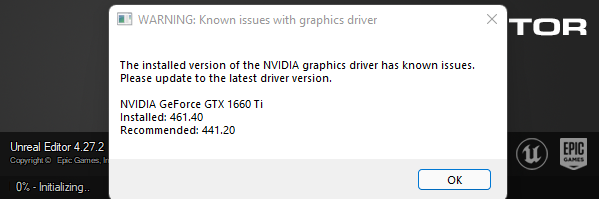
look in pinned messages @tepid lantern
tepid lantern
yea i downgraded because of this
tepid lantern
ah makes sense
vast sable
whole hazel
thanks matey <a:lovehug:916034881849544764>
Any update?
whole hazel
vast sable
Any update?
I was at work, starting to work on it right now, give me 5-10 minutes and I'll update you 😄
vast sable
Has anyone tried unreal engine on any M1 Macbook? I think there would be more crashes due to the ARM switch but don't know yet
whole hazel
vast sable
Any update?
it worked flawlessly, thanks for the simple solution, whenever I'm overtired from work my brain doesn't want to work/think but your advice did the job 
plush yew
dumb question: how do I change my project's name?
vast sable
Good good
plush yew
other than renaming the .uproject do I have to do anything else?
in the project settings or whatev
vast sable
Nah but make a backup just in case
Renaming the folder might also help for consistency
whole hazel
btw, if there are multiple assets in one place, is it possible to select them all at once in easier way than looking for each one at the World Outliner or clicking each asset holding Ctrl individually?
pseudo ledge
shift-click will select all between two things
so click one item in the list, then shift-click the last item in the list to select the whole list
then you can hold ctrl and click to deselect anything you don't want to select
ctrl-a will select all
(it works the same way file lists work in windows or macos)
whole hazel
the only issue is that some assets have different names as I'm using a level that's not made by me so using Shift would be only useful if all assets have the same name prefix, which they don't.. :c
pseudo ledge
you can use the filter search bar then
and generate a query that finds what you want, then select all or somesuch
https://ikrima.dev/ue4guide/misc-ue4-editor/content-browser-search-syntax/?h=filter for syntax of doing advanced stuff in the filter search bar
Gamedev Guide: Programming with Unreal Engine, Houdini, Math, & Graphics
 worldly lynx
anyone know what laptop is good for creating games for IOS ?
raw field
worldly lynx
anyone know what laptop is good for creating games for IOS ?
You need a MacOS device for that
 teal pawn
Am I the only one that cant log in into Epic Games Launcher?
raw field
Note : if you already have a Mac capable of building iOS project, then you can remotely create the build from a Windows computer. In that case, consider my answer invalid 😁
https://docs.unrealengine.com/4.27/en-US/SharingAndReleasing/Mobile/iOS/Windows/

How to remotely compile on a Mac from a Windows machine to create an iOS build.
 granite mortar
if you want to save a project to an external drive you have to zip it i guess? or is there a way to change the file path to save?
kindred depot
wha?
how would you access a zipped file with the editor?
unless you are backuping which you should be using source control.
granite mortar
no clue, but it is an option
kindred depot
lol
granite mortar
like i cant see how to move the project? do i just copy the files over?
granite mortar
alrighty ty
kindred depot
3 days of copying files... I can not wait to open the editor and build again, 10 more to go!!
pseudo ledge
jeez what kind of machine are you on where it takes 3 days to copy? 😛
I think it took me 6 hours to copy the entire engine w/ source + debug files to an ssd last I tried
kindred depot
pseudo ledge
jeez what kind of machine are you on where it takes 3 days to copy? 😛
Advanced copying can take up to 5 hours depending on size of contents. Per folder. 10 gigs is = to about 4 - 5 hours
pseudo ledge
good lord
kindred depot
I have over 600 gigs of stuff lol im on about 470ish
 worthy urchin
need an nvme
pseudo ledge
that do be a lot
 verbal pelican
Anyone have any good links to a base character mesh I can build off of? Preferably rigged to the base UE4 skeleton
granite mortar
C:\Program Files\Epic Games\UE_4.26 is this the path?
verbal pelican
 cedar wave
Manny
cedar wave
Manny
Manny?
 kindred depot
verbal pelican
Anyone have any good links to a base character mesh I can build off of? Preferab...
kindred depot
verbal pelican
Anyone have any good links to a base character mesh I can build off of? Preferab...
Do meta humans instead.
granite mortar
ok so i can just copy that whole folder over and i will be able to recover my project?
kindred depot
yupp.
granite mortar
k ty
kindred depot
ctrl +c contl + v
verbal pelican
kindred depot
Do meta humans instead.
Can I export them as FBX and take them into mudbox? Was hoping to make armored chars
timid spade
aiming to only lose 5 fps but not sure if thats even possible
kindred depot
make a custom event to allow high rendered screenshots.
pseudo ledge
timid spade
how can i optimize a scenecapturecomponent
use showflags to turn off every rendering feature you don't need
kindred depot
verbal pelican
Can I export them as FBX and take them into mudbox? Was hoping to make armored c...
take a look in #metahumans and see if this is the way you want to approach your characters assets.
Judging by megascans being owned by epic, i will forever use metahumans.
verbal pelican
Doesn't seem like metahumans are my answer since they appear pretty performance heavy
thanks anyway
kindred depot
verbal pelican
Doesn't seem like metahumans are my answer since they appear pretty performance ...
might want to try out daz studio then
pseudo ledge
mixamo might also have some options if you already have Adobe Creative Cloud
kindred depot
true
verbal pelican
Yeah basically I'm just looking for a blank human mesh that's already rigged that I can take into mudbox/substance and make armored characters with
kindred depot
100% look at daz then
pseudo ledge
su su stuido, the hot new phil colins tune
verbal pelican
Aren't Daz models somewhat performance heavy? Or am I just misinformed
pseudo ledge
polygons don't matter much these days
kindred depot
depends if you are using 100+ morph targets.
verbal pelican
Nah I'm not even planning on these guys to have visible faces
verbal pelican
ah, I'm terrible at modelling lol
kindred depot
verbal pelican
ah, I'm terrible at modelling lol
just buy a model from a 3d website. use it. there is models that are rigged for like 3 bucks if your looking for something with out faces
verbal pelican
rog
 vagrant atlas
I have multiple sections in a level where I want my camera to be depending on which section the player is, and I want the camera to focus on one section while the player is moving in it, and when the player moves out of it into another one, the camera should focus on the section the player is in now (I have a 3D side scroller)
 broken heath
Hi whens UE5 releasing again?
pseudo ledge

broken heath
pseudo ledge
<:meme_shrug:738306761945120810>
But
pseudo ledge
bud not even the epic engineers I'm personally friends with will tell me lol
but they locked the code down a few weeks ago. It's in QA now.
kindred depot
Spring 2022
kindred depot
rather have a working editor than a broken one.
 wraith flume
Help please. I've got pictures too.
So, I've got a space station ring. I put a sphere in the center. Parent the ring to the sphere. Then add rotation to sphere and it spins.
The child's (space stations) collisions are use custom collision as simple.
When I test play in UE4 all collisions work.
When I play in Pavlov VR, NONE of the collisions work.
When checking the commissions in "view player commissions" all of the meshes are pink. Not the normal blue/ green for working collisions.
Question: do child actors take on the collisions if the parent mesh?
Or do I just have a mesh problem?
 midnight crescent
Learning about Datasmith. Does anyone use Blender to create assets? How does the Send to Unreal plugin compare to Datasmith? Should I consider using 3DS or Maya instead?
cedar wave
My team uses Blender - no issues so far really. But if you ask @plush yew - Blender should be avoided at all costs and is a constant headache. So, your mileage may vary
tame marsh
What do you use @plush yew ?
Imma check out bforartists thanks
I like Blender, but it does sometimes feel like it's developed by developers for developers
midnight crescent
cedar wave
My team uses Blender - no issues so far really. But if you ask <@456226577798135...
For exporting to unreal do you use the send to unreal plugin or another method?
Thanks for mentioning bforartists and the 3ds indie license Lorash. Wasn't familiar with either of those
Holy blender settings?
 sullen cloud
Performance PAIN🤦🏻♂️ are there options to get volumetric height fog more performant? Costs me half of FPS right now ☁️
wraith flume
wraith flume
Help please. I've got pictures too.
So, I've got a space station ring. I put a ...
Wow, that's a really interesting problem. I hope someone knows the answer
 rose sinew
Is there another way to block light with megascans other than setting two sided in the material instance? The materials seem to break when I turn it on. I'm using the megascans ice cliffs.
wraith flume
On account of no help, I have restored to passive aggressive sarcasm
sullen cloud
sullen cloud
Performance PAIN🤦🏻♂️ are there options to get volumetric height fog more perf...
Yes that’s also an interesting Question 😁
cedar wave
midnight crescent
For exporting to unreal do you use the send to unreal plugin or another method?
We just export the normal way, no plugins.
midnight crescent
Cool - thanks!
indigo steeple
So I am currently working on combining 2 projects. In one of my Controller BP's, it's not allowing me to select any type of InputAction tiles. When i am in a completely different project, I can select this node, but in this certain project, I can not. Any thoughts as to why i can't? Doesn't matter if I type out "InputAction" or just start typing out the name of that node like Social Menu, whatever I type out, no nodes come up for Input Actions. What gives?
grim ore
show the issue? I undertand your issue but show the problem and expected results
I assume you have the actual input set up in both projects properly, you won't be able to see a node for input action if that input is not set up
indigo steeple
grim ore
I assume you have the actual input set up in both projects properly, you won't ...
So I am taking Project B and adding it to Project A. Project B is a chat guild system and Project A is a skeleton project for a survival game. When I go into the Character Player BP_Controller and adding the Proj B BP_ControllerComponent to it, I then have to copy these little commands and paste them into Proj A BP_Controller. They should look like this:

But when I paste them into the proper controller area, they look like this.
 grim ore
is the blueprint type the same?
indigo steeple
Yes, both are Controllers
grim ore
so those are hard coded inputs, have you tried searching for "N Keyboard"
indigo steeple
In the Controller I am trying to paste into, yes.
I’ve typed out InputAction and nothing pops up either.
grim ore
they are not input action is why
input action is using the input system in the project settings, your using hard coded events
you want the keyboard events
 indigo steeple
Well, one of the steps is to type out Social Menu and then it brings up the option to add the InputAction so I can assign a proper key to trigger that part
That doesn't even show up for me either.
grim ore
do you have context sensitive checked? top right
indigo steeple
yes
grim ore
ok open up your pallete then, something your doing is.. off
Window->Palette
and you can see input -> keyboard events
 indigo steeple
So those are showing up there. I wonder why I can't search for them in the window itself?
drowsy snow
sullen cloud
Performance PAIN🤦🏻♂️ are there options to get volumetric height fog more perf...
Try adjusting value of r.VolumetricFog.GridPixelSize in the console command.
grim ore
show what you are typing like I did above
indigo steeple
grim ore
show what you are typing like I did above
When I go to drag out the Enter node on the right side, it's telling me that I can't place that node in this window.
grim ore
so what class does it show in the top right?
indigo steeple
Under where it says Favorites?
grim ore
 indigo steeple
Player Controller

 indigo steeple
Excuse me while I go laugh uncontrollably at myself in the corner while crying at the same time.....
Oh look, it's working..... >.>
grim ore
We all do it, if we didn't I wouldn't know it was an issue 🙂
indigo steeple
If you drink anything, I owe you a drink. lol
And here all this time I thought I had clicked the Event Graph and watched it switch over. Guess not.
Well, to the proper graph at least.
grim ore
forward progress!
indigo steeple
Learning point as well. Thank you again so much. Managed to save some of my sanity at least. lol
 rose sleet
If i add a trigger in game that hides objects when you walk into it, will that help the performance in game when they get hidden?
grim ore
you will be rendering less, so the gpu will be helped
rose sleet
Awesome thanks
only because if i go into without anything hidden, i get like 25 fps haha
Also is there anyway to check what in my project is taking up most of the gpu?
neon bough
rendering 😛
rose sleet
because i have this room where i only get like 25 fps when i go inside it but when i leave the room it get 120
neon bough
sounds like there's a dynamic light?
rose sleet
yeah i have a few lights inside that room
8 lights
maybe that's too many aha
it is quite a small room
neon bough
and they are all movable?
rose sleet
Yeah
neon bough
well thats pretty bad for performance
rose sleet
ah ok
what would i change it to for it to still sort of have the same effect but less effective on performance?
neon bough
if the lightsource doesn't have to move you should at least switch to stationary
while there you can only have 4 overlapping ones
rose sleet
yeah it doesn't move. It's just ceiling lights
neon bough
if you don't need dynamic shadows go for static
well, you can probably get along with less stationary then, maybe 2 or so for some dynamic shadows, while the others are static
and better watch some tutorial about lighting in unreal, that should help you understand the stuff better
rose sleet
Ok will do, Thanks!
wraith flume
Help please. I've got pictures too.
So, I've got a space station ring. I put a sphere in the center. Parent the ring to the sphere. Then add rotation to sphere and it spins.
The child's (space stations) collisions are use custom collision as simple.
When I test play in UE4 all collisions work.
When I play in Pavlov VR, NONE of the collisions work.
When checking the commissions in "view player commissions" all of the meshes are pink. Not the normal blue/ green for working collisions.
Question: do child actors take on the collisions if the parent mesh?
Or do I just have a mesh problem?
grim ore
since this is for Pavlov VR, do they have a support channl anywhere?
 placid folio
I can't get past this error, I've reinstalled the engine, reinstalled the plugin over and over. LogPlayLevel: Error: LogPluginManager: Error: Unable to load plugin 'PowerIK'. Aborting. LogPlayLevel: Error: ERROR: Client exited with error code: 1 Any help or suggestions?
wraith flume
grim ore
since this is for Pavlov VR, do they have a support channl anywhere?
Yes.
However, this is an unreal engine problem.
Is my specific question unclear?
Do child actors take on the collision settings of their assigned parent?
I presume the answer is no.
grim ore
@placid foliodoes this happen on an existing project, or when opening the editor with a new project?
placid folio
existing
grim ore
you used the plugin before and it stopped working? or trying to use it
fossil nexus
Where is the standard character movement set up in the TopDown game?
More precisely the part where it gets my mouse left button click to move? I dont see anything in the event graph
placid folio
grim ore
you used the plugin before and it stopped working? or trying to use it
everything works in the editor, didn't know there was an issue just wanted to test it and can't build it. I don't think I've every built it. But I did build the project before I added it and it worked. I am using powerik for my models so I hate to lose it.
grim ore
@placid foliooh it's on building. is the plugin compatible with that platform?
placid folio
Yes it says it is. It's power ik on market place.
grim ore
@fossil nexusthe movement code is in the player controller
@placid foliomight need to check for any other errors above those lines, the actual issues
fossil nexus
grim ore
<@!646709080265719821>the movement code is in the player controller
thank you
placid folio
grim ore
<@!562417767970766860>might need to check for any other errors above those lines...
I said, build but I ment launch. Sorry. I'll see what other errors there are.