#ue4-general
1 messages · Page 1116 of 1
 drowsy snow
How exactly do you want to change the materials?
 plush yew

you see the window, left and right,
i changed the material from a more stylized looking to another material and some changed but not all
 grim ore
so maybe the other windows are different
plush yew
yes
grim ore
when you click on the mesh in the world, is it the one you changed in the details panel
plush yew
it had another material
yes
when i do go to mesh i get that mesh were the window is highlighted
grim ore
yeah it looks like they are using instances so your going to have some troubles automatically changing all the instances in the world
if they are named the same in the world, you can try and select all of them and then change them all at once
plush yew
i did name it badly haha xD
thanks, then the best thing to do for now is change it better do this houre some concentration material change then searching for 5 days how to solve this xD
grim ore
if its all the same name, wall_window_sm , just find window in the world outliner and you can select them all
 grim ore
does your top animation have any actual animation?
you might want to change the blend bone to something higher then, otherwise its not going to have any of that animation
plush yew
mattheww?
a weathersystem with changing grounds is based on different material right ?
BP checks weather condition --->> is it snowing? ( true) -->> get material from landscape -->> change to material thats snowlike
grim ore
might need to jump into #animation then for some more advanced advice
 tiny zodiac
Sorry i only saw your answer now. Transforming the cutter plane? But a plane isn't transformable as far as i know. I mean it is transformable in its direction and position, but i could never shape it or make it stop. It cuts all the way through.
grim ore
@plush yewthat is one way of doing it yes, using material instance to change a blend or something else that changes the material. You could also just change the material completely if its a complete change in weather needed
drowsy snow
tiny zodiac
Sorry i only saw your answer now. Transforming the cutter plane? But a plane isn...
So you want to partially "cut" through...
Fake it with (mesh) decals.
tiny zodiac
drowsy snow
So you want to partially "cut" through...
Fake it with (mesh) decals.
thank you. will study it.
plush yew
grim ore
<@456226577798135808>that is one way of doing it yes, using material instance to...
nice, well i think a blend would be beter
its for a skil lol xD
i had that dream i was using mine sharingan and i used that many shakra that even the weather changed to lightning and round me was a red kinda snow partical, i did heal the people and made a shield to protect them from the rinnengans big comet that was coming at us (
so i wanna make that skil in my game haha 😄
tiny zodiac
@drowsy snow I looked into it. the (mesh) decals. How expensive are they in performance? Because my project is about saving memory by cutting out parts of big army units in formation.
So imagine a square/cube, and when it gets attacked i just cut a chunk out of it. Rather than having 30 cubes inside a unit in formation, i have one square/cube, and just take chunks out of it.
Thats a cheap way to do it? So i thought of procedural mesh to do this. Do you think mesh decals will achieve the same? Or are mesh decals expensive in the cpu? The cut is supposed to be just a simple square cut on the big rectangle that represents the army unit
plush yew
it was like a combo of naruto/dreaming and dragonball made in 1 single animation skill xD
Does anybody know why when I put an actor like a water body ocean the landscape isn’t adjusted although i have both landmass plugin and edit layers in the landscape enabled?
 surreal cloak
Just spawned a wood log from the Stylized Forest marketplace pack, into my new level.
I've enabled physics with the check box but when I hit simulate or play, it doesn't move, even though it is in mid air.
also in the message log I get this...
Anyone know what's going on here?

 surreal cloak
grim ore
open the mesh, change the collision type. so do what it says
surreal cloak
grim ore
open the mesh, change the collision type. so do what it says
?
I don't see that parameter in the static mesh.
grim ore
see above picture
surreal cloak
grim ore
see above picture
I know, you opened the dropdown menu inside the "Collision Complexity" parameter.
I'm saying I have no Collision Complexity parameter, (so in turn, no drop down menu)
grim ore
show your screen? @surreal cloak
surreal cloak
grim ore
show your screen? <@!396517981489725442>
 grim ore
and this is the static mesh editor?
because that doesnt look like the static mesh editor
that looks like your instance in the level. You need to double click on the mesh in the content browser to open the static mesh editor
 bleak zodiac
surreal cloak
bleak zodiac
surreal cloak
that seems like Physics in the Details panel instead
surreal cloak

 bright sigil
surreal cloak
bright sigil
surreal cloak
scroll down silly, or use the search
 rare pulsar
I have a question about Texturing
Maya => Substance Painter => Unreal Engine 4
I use the export method in Substance painter "Unreal Engine 4 Packed"
My question is why does it somehow give this stretched Marks in the end Product in Unreal Engine the UV is perfectly Unwrapped and the UV in Substance Painter looks exactly the Same but in Unreal Engine it looks like he takes the texture from the Top and the Bottom to the edge of the Image. Because what Substance Painted does is like this FADING at the edges .
Is that a Bug or is there a Problem in some of my Settings?


 bright sigil
rare pulsar
I have a question about Texturing
Maya => Substance Painter => Unreal Engine 4
...
bright sigil
rare pulsar
I have a question about Texturing
Maya => Substance Painter => Unreal Engine 4
...
looks like edge dilation from sp
are you using this as a repeating texture? it looks like it
 rare pulsar
bright sigil
are you using this as a repeating texture? it looks like it
rare pulsar
bright sigil
are you using this as a repeating texture? it looks like it

ah its from the PANNER since it will rotate the whole texture around right ?
OK i see so i need to make the texture using the full 1x1 UV till the edge.
 distant siren
I also get out of virtual memory messages .. how is it emptied?
 light thunder
How do I get these failed to loads cleared, particularly that first one - it's got no place for me to navigate to, file wise, that I can see where the item is referenced incorrectly
 rare pulsar
yes worked now perfect
I usualy was always making the UV smaller for other software game Engines so thats why i usualy leave some border around it.
But i was confused why it stretched so i guess if i use a PANNER i should allways use the whole 1x1 =)
bright sigil
Yeah. Requires tiling. You can put uvs along the edge without much issue in general
Can always clamp the xy of the texture for those that dont go outside of 0-1 space
plush yew
https://matlib.gpuopen.com/main/materials/all wow this just became free 😮
i wonder can i use it comercially, can't find any info yet
Finished my first cinematic in UE$! 😄 thanks for all the help peoples
now im gonna try to get my 360 to work with mocap
 twilit hearth
does anyone know why i can't build my lighting?

here's the log but im not seeing an error
plush yew
twilit hearth
make sure u have light volume setup just in case

 charred blade
What are these large squares on the navmesh

 olive rapids
hello , I am working on creating a tutorial feature for the game but I think my aproach is a little bit complex than it should be. Would please recommend a tutorial video for making a tutorial 🙂
 barren coyote
Hi, how can I get the actual size in the game world of a static mesh? These nodes report the same size no mater how large I scale the actor on the world, that is the size of the mesh in blender or as imported to UE, lets say that works out to be 10 units. If I scale the actor to 10 in the editor how can I get nods to return that value of 100 at runtime?
 tiny zodiac
<@!325627930484932608> I looked into it. the (mesh) decals. How expensive are th...
tiny zodiac
tiny zodiac
<@!325627930484932608> I looked into it. the (mesh) decals. How expensive are th...
@drowsy snow @drowsy snow pls could you answer my comment when possible?
sorry to be annoying 😦
 winged lava
Sorry if this is not the place to post I just thought some of u knowledgeable folks might know. Basically I get this error when trying to pack my game for android. It has seriously got me puzzled. THE ERROR ---> ERROR: cmd.exe failed with args /c "C:\Users\Glyn\Documents\Unreal Projects\Platformer Kit 2D 4.26 - 4.27\PlatformerKit2D_422_426\PlatformerKit2D\Intermediate\Android\armv7\gradle\rungradle.bat" :app:assembleDebug
barren coyote
winged lava
Sorry if this is not the place to post I just thought some of u knowledgeable fo...
try #mobile chanel
 worthy flame
a random question I have.
Can you use UE for software apps, or like office/work apps. Databases and calculations and things like that, is that possible in UE. I get that its mainly for games, am just curious
 thorn topaz
worthy flame
a random question I have.
Can you use UE for software apps, or like office/work ...
thorn topaz
worthy flame
a random question I have.
Can you use UE for software apps, or like office/work ...
yes
bright sigil
worthy flame
a random question I have.
Can you use UE for software apps, or like office/work ...
If you want an impressively rendered ms word competetor sure. But youd be stripping down so much and be better off with a blanker canvas
worthy flame
bright sigil
If you want an impressively rendered ms word competetor sure. But youd be stripp...
wdym stripping down and better w a blanker canvas?
barren coyote
well, for a ms word type app 90% of UE4 wont be needed
bright sigil
worthy flame
wdym stripping down and better w a blanker canvas?
Start makin, youll see what i mean
Maybe im wrong 😋
thorn topaz
@bright sigil is right. You're probably better off with a C# app
worthy flame
idk, am just asking cuz ue is mainly if not only used for games
 vocal sorrel
Hey everyone, does anyone know how to only stream landscape tiles when they are seen in the viewport?
barren coyote
@worthy flame like how a car can be used for moving furniture but most people would use a truck 🤷♂️
bright sigil
worthy flame
idk, am just asking cuz ue is mainly if not only used for games
its more about rendering or visual effects
bright sigil
worthy flame
idk, am just asking cuz ue is mainly if not only used for games
so if you want some crazy rendering effects in your word processor...... just work from a better base
thorn topaz
barren coyote
<@!241637633548091395> like how a car can be used for moving furniture but most ...
Disagree. More like how a car can be used to move a studio apartment but you choose 2 semi trailers instead
worthy flame
i understand what u mean by this. it is interesting to think about
thorn topaz
There's nothing wrong with using UE4/UE5. Just that it maybe a bit overkill. There are probably other softwares better suited towards your situation.
worthy flame
ye i get it. thanks for the info and feedback
bright sigil
worthy flame
ye i get it. thanks for the info and feedback
are you just making a word processor or.... what?
distant siren
i only used blueprints, i didn't use any c ++, why does it ask me to install visual studio 2019?
 bright sigil
distant siren
i only used blueprints, i didn't use any c ++, why does it ask me to install vis...
bright sigil
distant siren
i only used blueprints, i didn't use any c ++, why does it ask me to install vis...
dunno, i think you need it installed but dont need to use it..... maybe? its been awhile since i installed a new engine version, but i think thats a thing it needs
worthy flame
bright sigil
are you just making a word processor or.... what?
no, something like databases, finances, plans, calculations reports. things like that
and later on some visual things that show things visually for better perception. but thats just a bonus
bright sigil
worthy flame
no, something like databases, finances, plans, calculations reports. things like...
sounds like you probably also want security then, but i cant think of other platforms of software for that sort of stuff
worthy flame
yes
distant siren
bright sigil
dunno, i think you need it installed but dont need to use it..... maybe? its bee...
so it must also be installed without using any C ++. ok
bright sigil
worthy flame
and later on some visual things that show things visually for better perception....
and if its 2d visuals, i mean, i guess its possible in Unity since its more of a blank canvas
probably some other engines
i know XNA exists, but that about it lol, maybe thats better
bright sigil
distant siren
so it must also be installed without using any C ++. ok
thats my guess
worthy flame
was goin for 3d if possible. but wasnt really the point of the app the visualization.
bright sigil
worthy flame
was goin for 3d if possible. but wasnt really the point of the app the visualiza...
well unity does 3d as well
worthy flame
ur sayin unity is better for these kind of things than ue?
worthy flame
lol, same
bright sigil
in Unity, you start from a blank level though
distant siren
bright sigil
thats my guess
but why does it ask for the visual studio version 2017 and elsewhere it requires the 2019 version? which one should i install?
bright sigil
level as in a blank starting point
bright sigil
distant siren
but why does it ask for the visual studio version 2017 and elsewhere it requires...
i dunno, maybe look up online
bright sigil
worthy flame
ur sayin unity is better for these kind of things than ue?
i just mean your not stripping away much when you start in Unity
worthy flame
question then, is it possible to make this somewhere else and make the hud/gui thingy and the rest in ue?
worthy flame
lol
barren coyote
thorn topaz
Disagree. More like how a car can be used to move a studio apartment but you cho...
was referring to the right tool for the job, not suggesting UE4 is a truck 🤣
Use a hammer to drive a nail, a nail puller to remove it, UE4 is the wrong tool for making an office application
 raw harbor
does starting with making a small fps game by following tutorials help me learn bp?
bright sigil
raw harbor
does starting with making a small fps game by following tutorials help me learn ...
sure, or just poke around at the variables and learn what the settings do, and if something doesnt seem to work, look it up
worthy flame
pretty much ^^
bright sigil
if you know 0 of bp, then follow whatever tuts you like
raw harbor
i already tried to make bouncy cube sim 2022, and failed
i did the bp right, i just didnt mange to make the controls work on the assigned camera
so i just gave up
bright sigil
right on, i guess try another project and see what you can do
raw harbor
tried to model the car for my other game, failed and was like screw it il make a fps game
now i dont want to even start
bright sigil
maybe youll come back to bouncy cube sim after a break doing something else
raw harbor
the constant failing of me doing anything and the realsization that i cant do anything new is just keeping me away from starting again
bright sigil
or i could say you lack discipline and to work through your problems, regardless of scope and keep working on bouncy sim
raw harbor
i just wanna level design, thats it, i want to make a team and the others do everuthing else and work on a group project
bright sigil
the unappealing nature of programming/coding is that a feature or bug can take 2 minutes to make or 2 weeks to fix
bright sigil
raw harbor
i just wanna level design, thats it, i want to make a team and the others do eve...
then work on levels to a degree that they look awesome
give up on all other facets and focus on that specialization
raw harbor
but then how can i make the game without knowing anything else
bright sigil
pick something and stick with it until its pro level
worthy flame
pick something, try things. google how to do something u have an idea for. copy some code online, understand what it does. apply to other things. do anything even if its over and over the same thing. I didnt know how to make materials a few years ago and what they did
bright sigil
raw harbor
but then how can i make the game without knowing anything else
well you cant, making a game takes more than just one skill, hence a team, if you want others to know you are serious, you need to have something to show for it
so work on a level design portfolio
worthy flame
i remember i made like 5 different projects w level design w new materials and i just remade them cuz i didnt like the last one, even tho i could delete it. i did it over and over again until i learend/understood it and moved on to antoher thing
raw harbor
can someone atleast tell me what to do with frsac camera, i have a cube and controller base and set the controller base n level thing deafults, when i start the game the free camera is the only shit that i can play with
drowsy snow
raw harbor
but then how can i make the game without knowing anything else
Start with modding.
bright sigil
raw harbor
can someone atleast tell me what to do with frsac camera, i have a cube and cont...
i think im going to sit on your requests until you stop flip flopping between skillsets and show a seriousness towards one
 pallid talon
Question...
I understand what referencing &, and dereferencing * in C++ is, but I do not understand when to use it in UE4 C++. For example:
USphereComponent* CreateSphere;
How do I know when to use *?
drowsy snow
I was started from modding, and it eventually snowballed from there
drowsy snow
pallid talon
Question...
I understand what referencing &, and dereferencing * in C++ is, but ...
Basically referencing when you want to have object reference variable of a class. Typically UObject and derivatives.
bright sigil
modding and lack of internet and knowledge back in the day forced many of us to learn the only way possible
raw harbor
how do i change the deafult camera, i want to get rid of the free cam and use the cam i added to the cube
pallid talon
drowsy snow
Basically referencing when you want to have object reference variable of a class...
Oh ok, so anytime I have an object like a mesh, sphere, cube, etc. I would need a reference pointer?
drowsy snow
raw harbor
how do i change the deafult camera, i want to get rid of the free cam and use th...
Change the default pawn in your game mode, or make your pawn/character auto possess to player 0
raw harbor
where is that located
bright sigil
raw harbor
where is that located
https://docs.unrealengine.com/4.27/en-US/ - they have a search function. exhaust yourself by using the internet first.
 slow tinsel
Hey there, I have a question for anyone who's experienced with UE4's particle systems. I was curious as to whether or not it's possible for these individual particles to animate independently of each other. I was wondering if it would be possible to create a strategy game in the vein of Total War or Nobunaga's Ambition with thousands of units on screen (using 2D images instead of models for obvious reasons) and thought that particles might be a good workaround as opposed to having potentially hundreds of actors running code at once.
drowsy snow
Certainly not in this server, because we use UE4 or newer (some might stick to UE3/UDK, but I'd say that's a super rare occurence)
drowsy snow
slow tinsel
Hey there, I have a question for anyone who's experienced with UE4's particle sy...
Niagara could fake some crowd, but certainly NOT for gameplay reasons.
The expectation with particle system is that it should be purely cosmetic.
slow tinsel
drowsy snow
Niagara could fake some crowd, but certainly NOT for gameplay reasons.
The expec...
Well, the intent is that they would be cosmetic, they'd just be visual representations of the units, whereas the formation itself is the one running damage calculations, and the individual unit sprites are just there for decoration. If that makes sense.
drowsy snow
slow tinsel
Hey there, I have a question for anyone who's experienced with UE4's particle sy...
Also if you want hundreds of actors running all at once, handle the tick in C++.
drowsy snow
slow tinsel
Well, the intent is that they would be cosmetic, they'd just be visual represent...
Oh, okay, that's sounds very doable with Niagara.
tiny zodiac
tiny zodiac
<@!325627930484932608> I looked into it. the (mesh) decals. How expensive are th...
@drowsy snow could you help me pls?
i was thinking about niagara. or the technique im coming up now.
drowsy snow
tiny zodiac
<@!325627930484932608> could you help me pls?
I don't work with procedural mesh, but seems like you want to make cavity more than a one dimensional slice stopped in the middle.
tiny zodiac
exactly
others have suggested to make 2 slices and then join together the pieces you want to remain intact and delete the other
cavity is a decalc?
 fringe pivot
Have anyone noticed a bug where editor dropdowns close as soon as you open them until you restart it?
drowsy snow
fringe pivot
Have anyone noticed a bug where editor dropdowns close as soon as you open them ...
NVIDIA?
fringe pivot
yes
drowsy snow
fringe pivot
yes
See pinned messages
tiny zodiac
anyways thank you @drowsy snow 🙏 🍣 arigato
drowsy snow
tiny zodiac
anyways thank you <@!325627930484932608> 🙏 🍣 arigato
どういた~
fringe pivot
drowsy snow
See pinned messages
Well I'm not reinstalling graphics drivers, at least not without an explanation about what is the issue and how this would fix it.
Unless you are referring to something else.
drowsy snow
fringe pivot
Unless you are referring to something else.
There's one custhelp link among them, might want to check that one out
 lime sorrel
for some reason import uniform scale completely stopped working for me
plush yew
hello, someone knows how can i rip unreal engine 4 games maps?
raw harbor
im trying to make it so when player hits ground, a variable is set to true and disables input for player, however its not working any idea?
 rare pulsar
plush yew
https://matlib.gpuopen.com/main/materials/all wow this just became free 😮
rare pulsar
plush yew
https://matlib.gpuopen.com/main/materials/all wow this just became free 😮
I am not sure if they gave you answer about the matlib website, is says in there info "all submited materials need to be under licence CC0 or MIT" so you can use it commerical.
drowsy snow
plush yew
hello, someone knows how can i rip unreal engine 4 games maps?
We don't condone asset ripping here.
plush yew
ok
 fierce tulip
casts a stern look
raw harbor
Thank you
 prime willow
fierce tulip
_casts a stern look_
prime willow
fierce tulip
_casts a stern look_
Spare him for know not what judgement he has brought onto his vessel
 light thunder
bright sigil
If you want an impressively rendered ms word competetor sure. But youd be stripp...
light thunder
bright sigil
If you want an impressively rendered ms word competetor sure. But youd be stripp...
You'd probably want something like Notion for that, or another collob/database software
@worthy flame sorry I was answering your question, not Conrads
replied to the reply
raw harbor
well, i want it when i land on a certain thing
guys i need help, i want to make it so when the player collides with the ground the input gets disabled, all the tutorials i found were when the collision is with player itself, i dont want that, i want it for when i collide with the ground it does that, i added this bp to the ground but it still doesnt want to, what im i doing wrong?

this is the bp of the cube
do i add it to the player itself?, if i add it to the player it will disable the input on any collision, i just want it on floor collision
 urban ether
Hey quick question is there a way to get world composition (or anything similar) to work in all 3 dimensions ( stacking levels on top of each other)?
 safe sentinel
has anyone ever had the issue where I can't open certain engine versions in file explorer/taskbar etc (only through epic games launcher)???
 stray geyser
Any idea on how to calculate clicks per second?
Should I measure (every second) the clicks? And just display that (for myself)?
bright sigil
Spitballing.... a looping 1 sec timer that prints the number of clicks. On the click input, increment int. Timer clears it after it logs it.
stray geyser
Love the idea, thanks!
bright sigil
Np. There might already be this kind of functionality from the engine but i dunno of it
bright sigil
Hope it gets u somewhere
 lilac mirage
Hi, I'm Completely new to UE
is it normal that when I open UE it uses 100% CPU usages? I'm also a bit worried that CPU temp goes to 92 C degree
I'm currently using Laptop, acer nitro 5, Intel I7 11800H, RTX 3050, 32GB Ram, SSD NVMe around 3000MBps read speed
 stiff vine
Complete newby with gaming engines but I created a physical 3D printed game, and want to include sensors and a microcontroller so I can read out locations in the physical game live and display them on a pc / phone and thought a game engine might be good for that but not a clue on where I would start. The end goal with the game engine would be more like an interactive experience with music and graphics depending on where you are as an addition to the physical game it won't be a game on itself. (I hope this makes any sense)
bright sigil
stiff vine
Complete newby with gaming engines but I created a physical 3D printed game, and...
without any familiarity with engines (assuming programming too?) its quite the challenge, but hey anythings possible
you could do some kind of mixed AR with unreal though
bright sigil
that would probably help with the hardware side of things, but i dont code with the engine 😛 so i only know what i know
check out the epic games content on the market place, they have an xr demo that might give you a better idea https://unrealengine.com/marketplace/en-US/product/project-anywhere-xr
if you do dive into it, you'll probably get more help from #virtual-reality
stiff vine
thanks, was thinking about vr but I mostly would like to know how to integrate parameters / coordinates from self build input like an arduino. All I want for now is 2 rectangles a grid and display a point on each grid
thanks just having to think about what I actually want already helps
bright sigil
ive never worked in vr or ar, though would like to (as an artist) at some point so im unsure of the whole setup and whatnot
thats pretty much the extent of my advice 😁
 neon magnet
Hey guys, is there a way to merge actors and ignore hidden static meshes?
I have a lot of meshes that are basically placeholder, but they were legit meshes because they are the actual models before eventually I made blueprints and placed those blueprints in the exact spot (doors most popularly). I could go and delete all the hidden ones but it's kind of a drag and hoping there's just an option somewhere to ignore static meshes that are hidden/not visible
raw harbor
first working code i did by myself!
its easy yes, ik, and i can say it myself, im just so happy i manged to do something compared to my failed other attempts
 kindred depot
using a collision box as a death box 😉
kindred depot
hey man congratz tho for sticking with this and not leaving after one day 🙂 that is what i love to see!
raw harbor
kindred depot
hey man congratz tho for sticking with this and not leaving after one day 🙂 tha...
i was man, i worked on smth today and failed and was so sad and just said this isnt my thing, but i tried again when i got another idea of how i can do my code and it worked!
kindred depot
moral of that situation, never give up 😉
raw harbor
raw harbor
i have a question tho
when i create a variable that is boolian, the one that stores yes or no, i made it so when i collide with the box the boolian is set to yes, how do i make it so when the boolian is yes it disables player input? bec i tried doing that code in the cube bp and it didnt work, same time when i tried to do in the player bp, i cant get the variable, any idea of what im thinking about or is this not how i should excute it?
raw harbor
kindred depot
moral of that situation, never give up 😉
thanks man ❤️
raw harbor
yes, i did it so when collision overlap occurs, it disables input and from disable input , get player controller, this seems not to work

this is the floor's bp
not player, bec i cant make it in player
raw harbor
raw harbor
is it wrong?
 raw harbor
its not really clear if you can send the link
kindred depot

In this tutorial we will look at how to disable controls for the player, just for a short amount of time.
raw harbor
it works!
thanks man, its all just bec i didnt add player charecter as target
the target was (self)
thanks ❤️
kindred depot
literally everything is on youtube, you get stuck go on youtube. Try typing it in youtube 30 different ways.
bright sigil
looking good birb
raw harbor
bright sigil
looking good birb
thanks man!
 ruby quarry
Okay, what's the trick to moving folders and files in a project? I was trying to clean up my assets by moving things into new folders, like furniture items into a furniture folder, drink items into a drinks folder...But even though things seemed to move, the original folders remained. So in the example of the ATM, the original ATM folder remained, but in Unreal it was empty. Deleting in within Unreal wasn't working so I went to delete in in Explorer. Except in Explorer the folder wasn't empty. Upon further investigation I now had the original folder (not empty) and the moved folder in the furniture folder (also not empty). So, two copies, both not actually empty, but within Unreal the original folder shows as empty. This is the case for everything I tried moving. So, I tried deleting the original ATM folder. Problem is, when reloading my project, it complains it can't find the files in that folder. So I figured the move didn't work and moved the folder back out of the furniture folder in Explorer. Now reloading the project it complains that the moved files no longer exist. So do I now have to have BOTH folders available? Or what's going on and how do I fix it? Sorry for the long explanation...
 bright sigil
ruby quarry
Okay, what's the trick to moving folders and files in a project? I was trying to...
bright sigil
ruby quarry
Okay, what's the trick to moving folders and files in a project? I was trying to...
alright
migrate
yes, within the same project
second point, since folders have been moved
fix redirectors constantly
that wont solve it though
but it helps
open up file explorer so you can see the folders/uassets of where you have moved them, there will still be those "duplicate" or original uassets, but their size should be 1kb or 0kb
that means its just the director
so as a very last step, delete it
consider all of this with a grain of salt, and BACK YOUR SHIT UP
kindred depot
This is all wrong. Just drag the folder, or files and do an advanced migrate.
bright sigil
kindred depot
This is all wrong. Just drag the folder, or files and do an advanced migrate.
yes Migrate is best, dragging folder leaves shit behind
you may still run into having to update references as well
kindred depot
bright sigil
yes Migrate is best, dragging folder leaves shit behind
You manually delete that one >_< I hate the editor freeze lol
ruby quarry
bright sigil
alright
Hmmm...Okay. Weirdness. Why have a move option if it doesn't actually move? Bleh! Thanks for the advice!
bright sigil
kindred depot
You manually delete that one >_< I hate the editor freeze lol
well i do it while its open, but safer would be to shut it down
ruby quarry
move cleanly, I mean...
bright sigil
and sometimes they actually go away because the engine is no longer using it
bright sigil
ruby quarry
move cleanly, I mean...
Migrate is your best option, like i said
i moved a whole bunch of folders all into a main folder under my content, and even with migrate i had some manual cleanup to do
im on 4.26
ruby quarry
bright sigil
Migrate is your best option, like i said
Okay, thanks.
bright sigil
ruby quarry
Okay, thanks.
spam fix redirectors as much as you like, do it on your content folder
kindred depot
I enjoy having all my files organized. So I use _Assets/Game/Character _Assets/Game/Maps
etc.
bright sigil
kindred depot
I enjoy having all my files organized. So I use _Assets/Game/Character _Assets/...
well when you get marketplace content...
bright sigil
but yes, its better to plan a folder structure ahead or early
bright sigil
lol yeah, but they dont go to the right places for me
kindred depot
some things you can not migrate tho, like certian bps, enums.
bright sigil
mmmmmmmmmm enums and structs, those can get funky
but i did get everything good in the end, based on what was suggested up top
kindred depot
example, ballistic VFX has to stay in the content folder 😦
bright sigil
including making a backup to know how things were connected in case those break
kindred depot
to many errors
bright sigil
i had to hook up a bunch of textures from some marketplace assets for whatever reason
it was tedious but i referred to the pre-migrate backup
bright sigil
kindred depot
example, ballistic VFX has to stay in the content folder 😦
yeah, shit like that
i left the mannequin folder alone lol kept losing ALL OF MY ANIMS
ruby quarry
Oh God! I've made my own personal hell! haha I'd been working on this project off my OneDrive so I could work on it at work as well as at home. I recently moved my One Drive folder to another drive and now the project is doing stuff across both the old and new drives! Gah!
bright sigil
ruby quarry
Oh God! I've made my own personal hell! haha I'd been working on this project of...

sounds like it
raw harbor
looking at some tutorials on cpp, they dont really explain the terms. like what does int mean, what does cout mean, what does return 0 do or mean, etc, is there a place to see what those mean?
learncpp.com doesnt seem to explaing ether
if im not mistaken
bright sigil
man i dont really know that shit either
except for int, thats an integer 😛
and I THINK return 0 means the result would be 0 if that gets called
cout? count?
raw harbor
idk man, they should teach use this
bright sigil
well i picked up this sort of understanding from bp vids and such
raw harbor
attleast bp is understandable, but wtf is uproperty and cout like bruh
bright sigil
its an unreal property
there's a large amount of "Unreal Code" in addition to the normal cpp language
API's are a programmers best friend
raw harbor
i guess i should stick with bp until i know almost everything and what it does and means, and maybe just maybe see if i can do cpp
raw harbor
do you rely on bp?
bright sigil
rely? well i guess
raw harbor
like all of your games are bp?
raw harbor
man i need to remove this shit idea that it will ruin performance, like alot of games were made on bp, even some games looking AAA
bright sigil
oh you'll know when you ruin performance
raw harbor
this shouldnt be a worry thats what i mean
raw harbor
my worry tho is when i learn bp, i wont understand cpp bec i dont understand terms, i need to understand what this mean so i can write a code i understand
bright sigil
great thing about cpp or bp is you can always improve it
nah, that wont be a problem
raw harbor
i should work on a project in the future entirly on bp then later slowly learn cpp and convert
bright sigil
it wont be 1 to 1 obviously, but i think you just need to understand the concepts
and bp are less friction
kindred depot
everything in blueprint is the same in c++ you will start to notice similar things when you open up a c++ file
raw harbor
can i learn most cpp terms / have a background when i start by learning bp?
raw harbor
bright sigil
then try some cpp here and there
im looking at it and i just dont understand what the terms mean so i can use it
bright sigil
raw harbor
im looking at it and i just dont understand what the terms mean so i can use it
oh i hear yah!
 woven marlin
Converting a project from 4.27 to 4.27.1 and this happens :/ any idea why?
Running C:/x/x/Desktop/Folders/PotatosProject/UE-2.71.1/Engine/Binaries/DotNET/UnrealBuildTool.exe Development Win64 -Project="D:/x/Epic Games/UE_4.25/Potatos 4.27 - 4 4.27/Potatos.uproject" -TargetType=Editor -Progress -NoEngineChanges -NoHotReloadFromIDE
WARNING: Running from a path with a long directory name ("C:\Users\foxs1\Desktop\Folders\PotatosProject\UE-2.71.1" = 55 characters). Root paths shorter than 50 characters are recommended to avoid exceeding maximum path lengths on Windows.
Using 'git status' to determine working set for adaptive non-unity build (C:\x\x\Desktop\Folders\PotatosProject\UE-2.71.1).
Creating makefile for PotatosEditor (no existing makefile)
@progress push 5%
Creating makefile for UnrealHeaderTool (no existing makefile)
@progress push 5%
@progress pop
Parsing headers for PotatosEditor
  Running UnrealHeaderTool "D:\Program Files\Epic Games\UE_4.25\Potatos 4.27 - 4 4.27\Potatos.uproject" "D:\Program Files\Epic Games\UE_4.25\Potatos 4.27 - 4 4.27\Intermediate\Build\Win64\PotatosEditor\Development\PotatosEditor.uhtmanifest" -LogCmds="loginit warning, logexit warning, logdatabase error" -Unattended -WarningsAsErrors -abslog="C:\Users\foxs1\Desktop\Folders\PotatosProject\UE-2.71.1\Engine\Programs\UnrealBuildTool\Log_UHT.txt"
LogInit: Display: Loading text-based GConfig....
LogCompile: Error: Circular dependency detected for filename D:\Program Files\Epic Games\UE_4.25\Potatos 4.27 - 4 4.27\Source\Potatos\Characters\PotatosCharacter.h!
Reflection code generated for PotatosEditor in 5.0804548 seconds
@progress pop
ERROR: Building would modify the following engine files:
photatos project XD
woven marlin
xD
bright sigil
raw harbor
im looking at it and i just dont understand what the terms mean so i can use it
i have to sit there for awhile to reread the same code before i get a sense of what it does
and even then id have a guess, maybe confident if i recognize enough of it
kindred depot
Using 'git status' to determine working set for adaptive non-unity build (C:\x\x\Desktop\Folders\PotatosProject\UE-2.71.1).```i tried learncpp, but i kinda dont like reading, im better off with "learn cpp in one video" the video: 6h
raw harbor
he too good
kindred depot
the issue here is you need to generate the .cpp file for your project
do this by; opening your project in 4.27
raw harbor
man deserves a role xd
kindred depot
raw harbor
man deserves a role xd
NO never.
woven marlin
kindred depot
do this by; opening your project in 4.27
i did :/
but only happens when i do that with source code engine
kindred depot
woven marlin
i did :/
You went to tools, generate new c++ class
and generated the source code?
woven marlin
wait
raw harbor
that one dude with those letters @drowsy snow deserves a role, he very active and helping alot here
sorry for the ping 😦
woven marlin
kindred depot
and generated the source code?
why would i need to do that?
bright sigil
yeah hoodie guy is another smartie
woven marlin
if code already exists
kindred depot
woven marlin
why would i need to do that?
you have a .sln file inside your project folder?
woven marlin
yep
kindred depot
did you right click, change engine versions?
then open the sln and compile it?
thats the way it works.
bright sigil
raw harbor
man deserves a role xd
and atomik knows this because they've had to solve this problem, possibly enough times that they recognize all the signs
woven marlin
kindred depot
did you right click, change engine versions?
i thought unreal will do the changes?
raw harbor
ama rest for a bit then later today or tmr work on bouncing cube sim 2022, heck il make it a working game with ui, levels and shit, il post it here if i can
kindred depot
woven marlin
i thought unreal will do the changes?
unreal engine sucks when trying to do that way. Just follow my lead it will work
kindred depot
did you switch engine version tho
woven marlin
how do i change engine version in sln?
kindred depot
Just right click on main project
and it should show up " Switch Unreal engine versions"
ruby quarry
What's the general opinion of people these days? If I'm essentially at the start of my project, and it would benefit greatly from Lumen and Nanite, is there any reason to NOT start working on the project in UE5? I'm not only at the start of my project, but I'm also quite new to game dev in general. So, it could be as much as year or more before my game might be ready for release and my understanding is that UE5 is due for full release in the spring...
bright sigil
UE5 is not stable, so you have a bumpier learning experience
if you need lumen and nanite, then i cant really detour you from using it
but if you can, it would be less problem-laden to work in ue4
kindred depot
Well you could work in EA, but its 100% not recommended. UE5.0 from github will give you errors. You need to learn to save everytime you are done with any little edit.
bright sigil
plus you may upgrade to 5 whenever you like
ruby quarry
bright sigil
UE5 is not stable, so you have a bumpier learning experience
I'm not exactly stable either. Hahaha! It's not that I need lumen or nanite, it's just that for the look I'm going for some things, it would just be easier to use those...
bright sigil
ruby quarry
I'm not exactly stable either. Hahaha! It's not that I need lumen or nanite, it'...
you say that...
woven marlin
kindred depot
and it should show up " Switch Unreal engine versions"
i can't see it
 kindred depot
no the uproject
bright sigil
ruby quarry
I'm not exactly stable either. Hahaha! It's not that I need lumen or nanite, it'...
i think you should go with ue4
upgrade to ue5 when you feel youre ready
drowsy snow
ruby quarry
What's the general opinion of people these days? If I'm essentially at the start...
Unless you're a filmmaker, you don't have much real reason to use UE5 right now
kindred depot
that UI tho... and the instaclick fixes for invalid variables.
woven marlin
ima kill myself
 kindred depot
Yes
build the .sln now
Open .sln in visual studio
right click on project name, and build.
woven marlin
ok
 round light
anyone available to help on an issue im having with the Editable Text node?
still cant figure this out 😦 any advice?
https://www.youtube.com/watch?v=sQNx0utpV68&t=618s&ab_channel=MattAsplandhaving
woven marlin
kindred depot
right click on project name, and build.
1>------ Build started: Project: Potatos, Configuration: Development_Editor x64 ------
1>UnrealBuildTool : warning : Running from a path with a long directory name ("C:\Users\foxs1\Desktop\Folders\PotatosProject\UE-2.71.1" = 55 characters). Root paths shorter than 50 characters are recommended to avoid exceeding maximum path lengths on Windows.
1>Using 'git status' to determine working set for adaptive non-unity build (C:\Users\foxs1\Desktop\Folders\PotatosProject\UE-2.71.1).
1>Waiting for 'git status' command to complete
1>Building PotatosEditor and ShaderCompileWorker...
1>Using Visual Studio 2019 14.24.28319 toolchain (C:\Program Files (x86)\Microsoft Visual Studio\2019\Community\VC\Tools\MSVC\14.24.28314) and Windows 10.0.18362.0 SDK (C:\Program Files (x86)\Windows Kits\10).
1>Building 5 actions with 16 processes...
1>  [1/5] dte80a.tlh
1>C:\Program Files (x86)\Microsoft Visual Studio\2019\Community\MSBuild\Microsoft\VC\v160\Microsoft.MakeFile.Targets(44,5): error MSB3073: The command "C:\Users\foxs1\Desktop\Folders\PotatosProject\UE-2.71.1\Engine\Build\BatchFiles\Build.bat -Target="PotatosEditor Win64 Development -Project=\"D:\Program Files\Epic Games\UE_4.25\Potatos 4.27 - 4\Potatos.uproject\"" -Target="ShaderCompileWorker Win64 Development -Quiet" -WaitMutex -FromMsBuild" exited with code 6.
1>Done building project "Potatos.vcxproj" -- FAILED.
========== Build: 0 succeeded, 1 failed, 0 up-to-date, 0 skipped ==========
No, not a filmmaker, but am interested in a certain level of realism...
kindred depot
why is your unreal engine inside your project folder?
woven marlin
i saved them inside unreal engine x.x
bright sigil
ruby quarry
No, not a filmmaker, but am interested in a certain level of realism...
if your that dead set, then you might as well open it up and see what you can do in it
woven marlin
don't worry about PotatosProject
its not the project
its just a directory
UE-2.71.1 is the engine
ruby quarry
bright sigil
if your that dead set, then you might as well open it up and see what you can do...
Worst case scenario I start over again in 4.xx...Will only be like the 8th time I've started over. hehe
kindred depot
D:\Program Files\Epic Games\UE_4.25\Potatos 4.27 - 4\Potatos.uproject""
bright sigil
ruby quarry
Worst case scenario I start over again in 4.xx...Will only be like the 8th time ...
yeah exactly, just wasting time, dive in already!
kindred depot
the issue could be all the .%$#@! letters and the spaces.
SO confused on your directory.. and worried at the same time.
 trim mesa
 bright sigil
is it that the 4.27.1 is on c but thinks its on d? thats the old on on the d right? there is also the "too long name" warning
kindred depot
bright sigil
is it that the 4.27.1 is on c but thinks its on d? thats the old on on the d rig...
 trim mesa
Isnt't this the way, animationw works in ue4?
because this code, is not working at my side
pls someone help me
bright sigil
kindred depot
https://tenor.com/view/error-windows-glitch-gif-5012719
oh dude thats actually giving me some ptsd
trim mesa
run the animation on collision
kindred depot
are you trying to play an animation on overlap with out a montage?
trim mesa
with overlap
kindred depot
Just add the animation as a montage, and inside your anim graph create a slot. inside your anim montage add the slot name, done.
bright sigil
i have a feeling this is going to open up to learning about montages - possibly slots an-
yeeaahhh.....
kindred depot
bright sigil
i have a feeling this is going to open up to learning about montages - possibly ...
I KNOES IT ALL >_<
bright sigil
dont forget to setup the cached anim and blend per bone as well 🤪
bright sigil
kindred depot
I KNOES IT ALL >_<
oh its more that im sure this is unknown knowledge
arcane if you prefer
bright sigil
kindred depot
This is what failed game dev feels like 🙂
there's been a lot of feelings...
trim mesa
bright sigil
i have a feeling this is going to open up to learning about montages - possibly ...
whats montage
trim mesa
kindred depot
Just add the animation as a montage, and inside your anim graph create a slot. i...
whats montage
bright sigil
@kindred depot with your all mighty knowledge
trim mesa
bright sigil
<@!887916264188694578> with your all mighty knowledge
cant you explain?
bright sigil
ofc, just teasing atomik
kindred depot

Animation Montages are a flexible tool that enables you to combine and selectively play animations that are contained in a single asset.
bright sigil
usually your animations are the anim graph, locomotion - move, jump, right? montages are used for lots of "interruptive" animations. such as one off animations like attacking or reacting to a hit
trim mesa
kindred depot
https://docs.unrealengine.com/4.26/en-US/AnimatingObjects/SkeletalMeshAnimation/...
will read, but i need someone to explain me here too
kindred depot
bright sigil
<@!887916264188694578> with your all mighty knowledge
it feels like basic knowledge to me.. I'm almost done with advanced stuff 🙂
those videos are outdated af
bright sigil
there needs to be some way to resume the locomotion set by the anim graph after the animation fires and montages handle this
bright sigil
kindred depot
those videos are outdated af
yeeaahh..... and ive already been helping other people who simply hit a wall seeing that older notify ui
kindred depot
trim mesa
will read, but i need someone to explain me here too
Honestly tho, this will show you the way.
bright sigil
@trim mesa look at it this way, it took me a long time to understand what montages do let alone use them, so prepare to depart from your actual game for a bit while you learn this system
kindred depot
LOL facts.
trim mesa
yeah, my animation is idle, btw i didnt create a "Animation blueprint", as i have just used the animation of ue4 assets, "Animal Variety Pack"
bright sigil
kindred depot
LOL facts.
so you understand now...#ue4-general message
kindred depot
Yeah i get it 🙂
bright sigil
kindred depot
Yeah i get it 🙂
i think you've elected yourself as tutor
kindred depot
Wait till you guys try and understand control rigs
trim mesa
in a easy langauge
kindred depot
 bright sigil
😏
bright sigil
kindred depot
Wait till you guys try and understand control rigs
i plan on it when i get to anims
trim mesa
trim mesa
ok, so what should i do first
tell me
bright sigil
while atomik is finding those vids, i will outline the things:
anim bp graph state machine for locomotion
montage versions of the animations to call as one offs
slot and blend per bone setup in anim gp event graph
montages setup to use slot
bp logic to call the montage
trim mesa
what is anim bp graph
kindred depot
Pretty much explains it real easy
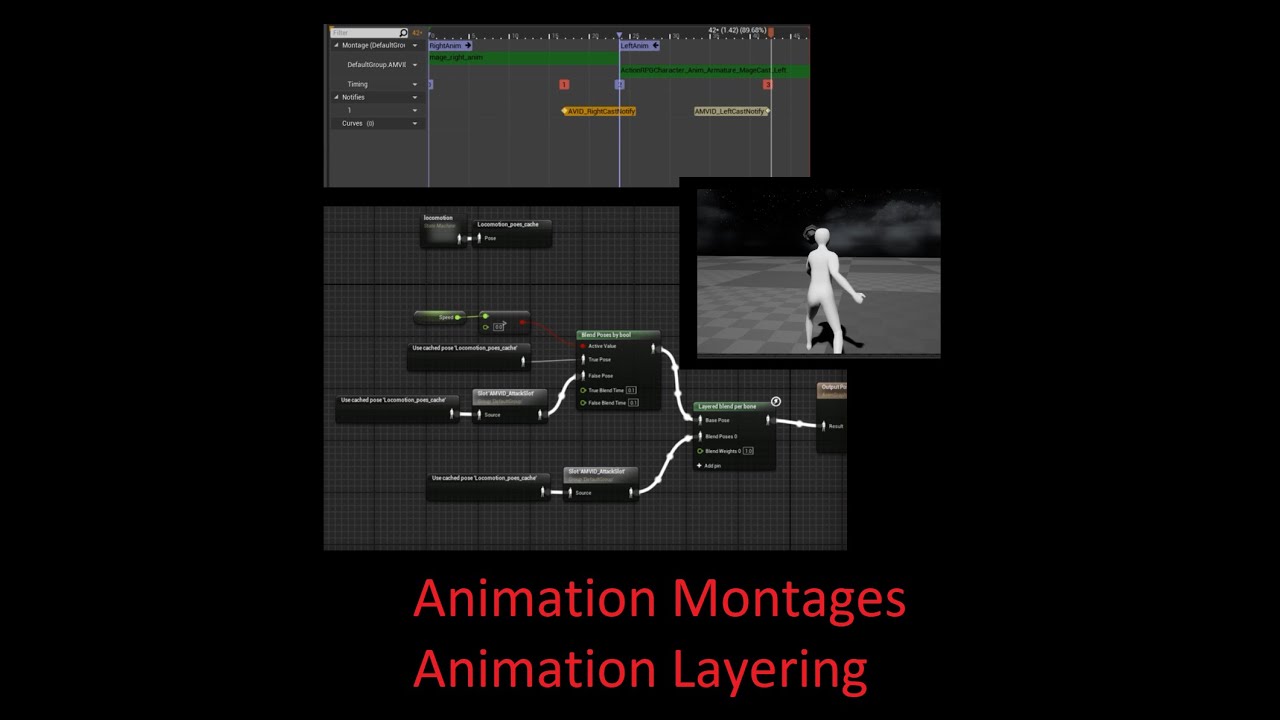
Quick reference/refresher on how unreal animation montages and animation layering work.
This is intended to be a memory jogging reference, not necessarily a tutorial. I may make a tutorial explaining these concepts one day when I've better mastered them.
0:00 Intro Explaining Name Changes
0:10 Create Animation Montage
0:16 Animation Montage - ...
bright sigil
trim mesa
what is anim bp graph
these are all outlined for you to look up videos/docs for
trim mesa
kindred depot
Pretty much explains it real easy
ok, will see it
 cedar wave
👆 <@&213101288538374145>
bright sigil
We need Roy! Roy is Awesome!
kindred depot
trim mesa
ok, will see it
just follow the base not the left and right aims no anim modify as well
trim mesa
bright sigil
these are all outlined for you to look up videos/docs for
it will be nice of you if you explain me here
atomik and conrad
bright sigil
trim mesa
it will be nice of you if you explain me here
essentially i have, anymore and it would be longer than what a tutorial video covers
trim mesa
bright sigil
essentially i have, anymore and it would be longer than what a tutorial video co...
ok , sure
both of you
kindred depot
Right click on the animation you want to create the montage for.
bright sigil
trim mesa
atomik and conrad
i think atomik can cover this. and i dont have to, id prefer you learn things yourself, regardless of the problem, lest you rely on being spoonfed every answer
trim mesa
on it
kindred depot
 bright sigil
thanks Jack!
kindred depot
create a new slot.
trim mesa
Atomik
kindred depot
call it what ever.
trim mesa
there will be two animation
like there will be walking
and when the wolf will hit the collision
kindred depot
I got work in 20 minutes 😉
trim mesa
the idle animation will start
so for which animation should i create the montage for
idle
or walking
kindred depot
Wait...
wait
animation montages are only used for animations you want to blend with the base locomotion animbp.
bright sigil
kindred depot
animation montages are only used for animations you want to blend with the base ...
yes, please back up and start there
trim mesa
kindred depot
animation montages are only used for animations you want to blend with the base ...
??, Whats locomotions
explain easily
i am still beginners
kindred depot
You need to learn the anim graph first and how that works. Understanding that you need to create a state machine to place your Idle, stop starts. run crouch. etc..
open up the third person bp anim bp and learn from it.
OR open up Windwalker Echo and try the advanced way off the bat.
bright sigil
kindred depot
OR open up Windwalker Echo and try the advanced way off the bat.
does that one use cr?
kindred depot
bright sigil
does that one use cr?
yes
bright sigil
ic..... nice
bright sigil
i guess that could still help..
im mainly interested in making anims within engine from scratch
one less hurdle
kindred depot
very easy to do with keyframes and controlrig
trim mesa
kindred depot
You need to learn the anim graph first and how that works. Understanding that yo...
what the
bright sigil
yeah, i guess i had some fails when i tried it before, 4.26 so maybe its a version engine thing
trim mesa
its so confusing
kindred depot
trim mesa
its so confusing
Yes welcome to game dev beginner course part 2.
bright sigil
trim mesa
its so confusing
not expecting this stuff to click instantly, like i said, get ready to depart from your goals to learn something rather advanced
kindred depot
Looking at the animgraph for the first time can be overwhelming. dont give up.
fedex time 😦 ugh bye.
 toxic hound
Hi, i'm having the following error message while trying to build my test project. what am i doing wrong?
:\Program Files\Epic Games\UE_4.27\Engine\Binaries\Win64\UE4Editor-Cmd.exe" -clean -compressed -ddc=InstalledDerivedDataBackendGraph -pak -prereqs -distribution -nodebuginfo -targetplatform=Win64 -build -clientconfig=Shipping -utf8output
UATHelper: Packaging (Windows (64-bit)): WARNING: Error while enumerating Visual Studio toolchains
UATHelper: Packaging (Windows (64-bit)): WARNING: Assuming no compilation capability.
PackagingResults: Warning: Error while enumerating Visual Studio toolchains
PackagingResults: Warning: Assuming no compilation capability.
UATHelper: Packaging (Windows (64-bit)): Setting up ProjectParams for C:\Users\ALX\Documents\Unreal Projects\MyDrive\MyDrive.uproject
UATHelper: Packaging (Windows (64-bit)): MyDrive.uproject requires a temporary target.cs to be generated (RawInput plugin is enabled)
UATHelper: Packaging (Windows (64-bit)): ERROR: C:\Users\ALX\Documents\Unreal Projects\MyDrive\MyDrive.uproject does not look like uproject file but no targets have been found!
UATHelper: Packaging (Windows (64-bit)):        (see C:\Users\ALX\AppData\Roaming\Unreal Engine\AutomationTool\Logs\C+Program+Files+Epic+Games+UE_4.27\Log.txt for full exception trace)
PackagingResults: Error: C:\Users\ALX\Documents\Unreal Projects\MyDrive\MyDrive.uproject does not look like uproject file but no targets have been found!
UATHelper: Packaging (Windows (64-bit)): AutomationTool exiting with ExitCode=1 (Error_Unknown)
UATHelper: Packaging (Windows (64-bit)): BUILD FAILED
PackagingResults: Error: Unknown Error
LogSlate: Window 'ProjectLauncher' being destroyed
vehicle template project?
toxic hound
yes
bright sigil
did you do stuff or is this just the project?
as in, you made the template and then are trying to build?
toxic hound
yes, i did quite few stuffs,
toxic hound
no, i just picked a new project, and select the game type (vehicle), added few blueprints.
no C++ integration
bright sigil
how about plugins?
toxic hound
I activated the rawinput plugins if i remembered
bright sigil
UATHelper: Packaging (Windows (64-bit)): MyDrive.uproject requires a temporary target.cs to be generated (RawInput plugin is enabled) correct
toxic hound
yes,
bright sigil
from what i read, uproject isnt found, by what im not sure, i would guess the plugin
never used the plugin though
you could try making a new project and build without the plugin to see if it still occurs
toxic hound
Everything is being saved, i believe it will be in .uproject extension
bright sigil
well the line there says "requires a temporary target.cs" to be generated, so i assume you need to edit some .cs file for this plugin to know where the uproject is -- but im merely guessing
therefore, the root project folder location
toxic hound
.cs, that's C# file, right ?
bright sigil
where is where uproject lives
sounds like it
i guess the plugin is using cs
these are all guesses 🙂
bright sigil
Just to see if the plugin is the issue
toxic hound
ok, good
bright sigil
Not saying to start over
toxic hound
yes , i get you
prime willow
bright sigil
i think atomik can cover this. and i dont have to, id prefer you learn things yo...
spoonfed me my whole game than market and sell it for me than gimme all dah moneh
hardwork takes too much brain power i wanna win instantly

 sonic granite
i want to make an effect that makes my scene fall off to complete black
like ur in heavy fog
how would i achieve such an effect
bright sigil
atmospheric and/or height fog
toxic hound
@bright sigil it didn't work out after I created a sample project, I still face the same error
sonic granite
i tried to use height fog, but when i make the abledo black it just becomes transparent =\
bright sigil
toxic hound
<@!568839944970174501> it didn't work out after I created a sample project, I st...
ah thats a bummer
wait
disable the plugin
toxic hound
ok
bright sigil
sonic granite
i tried to use height fog, but when i make the abledo black it just becomes tran...
i am using atmospheric fog and i have a sort of dark falloff, you can also search online for post process versions
sonic granite
ok thanks conrad, ur an amazing dude i can tell
bright sigil
sonic granite
ok thanks conrad, ur an amazing dude i can tell
alright, thanks
toxic hound
@bright sigil i guess its working,
bright sigil
toxic hound
<@!568839944970174501> i guess its working,
build success in the new project?
toxic hound
no build success yet, but it's compiling
bright sigil
ah, that is a better sign
well if there is another error then youll encounter than in your project i assume
but at least that explains the plugin issue
toxic hound
sure!
toxic hound
I just started with UE not long, I wanted to build a quick prototype, i read few basics though,
********** packaging complete
toxic hound
🙂
bright sigil
build and backup often
sonic granite
another questions, how would i add a distortion effect to my lens?
bright sigil
unless you use source control
sonic granite
i'm trying to build an underwater level, first time
bright sigil
sonic granite
i'm trying to build an underwater level, first time
i remember finding an underwater tutorial for ue awhile ago, i dont know for sure
sonic granite
im watching this tut:
https://www.youtube.com/watch?v=gwx2NOZJ5CE

In this video, we create a distortion shader in the Unreal Material Editor using noise textures to offset our UV coordinates. This video teaches the basics of UV manipulation including texture scaling with multiply and texture scrolling with addition. If you're learning to create materials in Unreal Engine, this is a great place to start!
Dow...
but it's from 2019
bright sigil
thats not too big a deal i dont think, that works for pp?
raw harbor
Is it worth releasing my game on gamejolt after I’m done with it? The cube sim 2022, it will be An actual game like with levels and stuff
bright sigil
raw harbor
Is it worth releasing my game on gamejolt after I’m done with it? The cube sim 2...
i dont know the platform
drowsy snow
raw harbor
Is it worth releasing my game on gamejolt after I’m done with it? The cube sim 2...
itch.io's a better place
raw harbor
Is there a reason?
drowsy snow
GameJolt has gone to crap these days
raw harbor
Ah ok
bright sigil
sonic granite
im watching this tut:
https://www.youtube.com/watch?v=gwx2NOZJ5CE
youd be doing something like that through post process
learn yourself some pp material concepts
bright sigil
yes, merry christmas
plush yew
got a question with gurus - what's the pros and cons of importing whole prebuilt level from 3D software to unreal vs modular level pieces? any technical insight would be welcome
prime willow
is it possible that
drowsy snow
plush yew
got a question with gurus - what's the pros and cons of importing whole prebuilt...
If you're going for the whole level as one static mesh, performance is going to be impacted, because unneccessary geometry for the frame is not culled out by the view frustum culling
prime willow
the anim blueprint could cause the camera to lock with mesh rotations
drowsy snow
prime willow
the anim blueprint could cause the camera to lock with mesh rotations
I have my doubt that it is the case, but not hurt to check out.
plush yew
drowsy snow
If you're going for the whole level as one static mesh, performance is going to ...
nope not as one static mesh, but as built and textured level with multiple pieces but joined before the export. with proper UCX colliders aswell.
prime willow
drowsy snow
I have my doubt that it is the case, but not hurt to check out.
i noticed my capsule doesnt rotate with camera
but my mesh does
drowsy snow
plush yew
nope not as one static mesh, but as built and textured level with multiple piece...
As in import FBX scene?
plush yew
drowsy snow
As in import FBX scene?
yeah
if i don't want to edit it later in unreal or anything, is there any other, technical reason for having modular pieces?
drowsy snow
plush yew
yeah
Me thinks that's not a huge issue then
bright sigil
plush yew
got a question with gurus - what's the pros and cons of importing whole prebuilt...
this is a technique for some platform games - sonic boom and some uncharted levels - but unreal is an engine different from those
drowsy snow
prime willow
but my mesh does
Well, it's less common to have rotation be governed by animBP
bright sigil
plush yew
if i don't want to edit it later in unreal or anything, is there any other, tech...
modularity allows for faster iteration - the level can be changed and tested (iterated) without the back and forth. Asset pools are limited to those kits vs more unique models. Collision and other fixes are more a sweeping effect with the same assets being used many times
drowsy snow
prime willow
problem still occurs
Your character BP might have full control over the mesh rotation, it seems
bright sigil
but you can still make your entire level in your 3d software, textures and all, and use it. you'll likely need to put collision everywhere - so these are independent of one another (if you change the art, the collision needs updating) and it could be split into some pieces for the sake of performance (occlusion culling and draw calls)
plush yew
bright sigil
modularity allows for faster iteration - the level can be changed and tested (it...
but i like back and forth from 3D to unreal and solving all the architectural problems before i even start anything else (texturing, trimsheet alignment, detailing etc.) - i'm more interested if there's any technical (performance wise) problems that could arise and i can't foresee now - idk maybe light works weird with wholly imported models during gameplay stress or something down the road. as for collisions, i'm making custom UCX-es for everything so that's not a problem.
prime willow
drowsy snow
Your character BP might have full control over the mesh rotation, it seems
dunno how tho :3
drowsy snow
prime willow
dunno how tho :3
Use the Find tool to look up for whatever is getting the character skel mesh component
prime willow
ill check
bright sigil
plush yew
but i like back and forth from 3D to unreal and solving all the architectural pr...
i mean, i dont mind the back and forth (sarcasm?) but a single mesh could be a lot to load - depends on number of mats, textures, polycount, etc - but again, it could be split where it makes sense. its a matter of scale i guess. BSP would help here since you can design the level collision and test that all in engine, then export that as geometry to use as a template to model from - either as a unique environment or modular pieces
drowsy snow
Though be sure to not commit the pool if you use BSPs 
I maybe done that too many times on my own (unreleased) Doom maps lol
Hmm
Now that I think about it
Maybe I should recreate the infamous NSFW pool in Unreal 🤔
plush yew
bright sigil
i mean, i dont mind the back and forth (sarcasm?) but a single mesh could be a l...
nope it wasn't sarcasm, i love back and forth, helps me fine tune everything in the boxout stage seeing the scale and all via unreals player view so all i have to do afterwards is make everything good. and it's not a single mesh - it's collection of different meshes, just pre-placed, pre-textured and imported as joined object.
bright sigil
plush yew
nope it wasn't sarcasm, i love back and forth, helps me fine tune everything in ...
hmmmm.... but that means its one mesh....
plush yew
no, i mean, when u import objects, they are imported as separate objects, but u can select them all, drop on the scene and they all are placed to their respective locations.
so it's definitely not a one mesh.
drowsy snow
drowsy snow
Maybe I should recreate the infamous NSFW pool in Unreal 🤔
what are the odds that I found this on sketchfab
I'm going to port this to UE and have fun with it
||https://sketchfab.com/3d-models/that-pool-c563bd34fda046f6943c7069caf664d9||
plush yew
it's just their pivots aren't placed per objects, there's one pivot and whole building is built around it.
so if u wanted to use idk, some arch as modular object - it's pivot would be way far away.
bright sigil
so you cant really move them in unreal..?
and so then your importing them as one fbx, but they come in as indiv objects
plush yew
nope, u can't use them as modular objects. but they are all separate, with separate texture inputs where needed and separately selectable etc.
bright sigil
i still think there is more overhead than it being the same asset
plush yew
yeah and when u drop them in scene, they automatically build the scene.
bright sigil
that wouldnt be too different if they were a single mass of meshes
prime willow
https://gyazo.com/893bd5eef2dcacb6d40dea69ea880ab4
could this be causign the issue? @drowsy snow
 plush yew
bright sigil
i still think there is more overhead than it being the same asset
plush yew
bright sigil
i still think there is more overhead than it being the same asset
what is overhead?
bright sigil
plush yew
what is overhead?
performance impact
drowsy snow
prime willow
https://gyazo.com/893bd5eef2dcacb6d40dea69ea880ab4
could this be causign the iss...
Where does this bool came from?
prime willow
my movement component
plush yew
bright sigil
performance impact
so there is indeed a performance impact, that's what i was trying to find out. now i need to find out, technically how big that overhead is. i mean i've seen ubisoft artists doing it my way aswell as the modular way, idk though how big of a difference it would be into unreal.
drowsy snow
prime willow
my movement component
Guess that is the reason after all. Try eliminate and/or work around it
prime willow
wot
drowsy snow
I mean, that bool could have override the mesh's controller rotation yaw, because it doesn't follow that defined by the CMC
bright sigil
plush yew
so there is indeed a performance impact, that's what i was trying to find out. n...
yeah, i didnt really understand but each mesh is a look up, even if they are identical in vertex/model structure
bright sigil
plush yew
so there is indeed a performance impact, that's what i was trying to find out. n...
i did say earlier that unreal engine is different. its different for every engine what works well
so i dont believe that will play as nicely as having just one mesh and duplicating in engine or large clusters of the mesh - less to load
like if your going to be in a room, that might as well be one mesh because they all need to load, so make it one mesh to load it
that also means you can go as unique as you want for these things
plush yew
bright sigil
yeah, i didnt really understand but each mesh is a look up, even if they are ide...
oh wait i think i get this, so if i used 1 door 10 times and exported built, unreal would read it as 10 models vs if i copied 1 modular door 10 times, it would read it as 1 door?
bright sigil
as for material/textures, thats not per mesh but use - so if the same material is applied to different models they're already loaded the one time
bright sigil
plush yew
oh wait i think i get this, so if i used 1 door 10 times and exported built, unr...
you can literally look at the list of assets you've imported into unreal and each of those are their own draw call
maybe there is some kind of pooling method, but i dont know that deep
so if you bring in one door, then dupe it in engine, yes, its the same asset reference
so placement would be done in engine, but the authoring of the asset and its look can still be done outside
plush yew
k gotcha, thnx for info, i'll try to figure that out. as for materials, whole of my castle uses only 3 trimsheets so it would work the same whether i use it on 10 modular pieces or 10 prebuilt pieces.
bright sigil
the profiler can give you more insight on this sort of thing too
bright sigil
plush yew
k gotcha, thnx for info, i'll try to figure that out. as for materials, whole of...
the material/texture part is separate from this
just go off of the number of assets you have in unreal
thats the "burden" on performance - but meshes are pretty cheap
so unless there a shit ton, i doubt much difference from the setup
plush yew
i'll try finding pooling plugins on marketplace, there might be something for my specific need, there's high chance there might be one.
bright sigil
i thought ue already had pooling, but i dont know if it would also work for assets being their own mesh version, i suppose so?
plush yew
bright sigil
so unless there a shit ton, i doubt much difference from the setup
it's castle as big as notre-dame with atleast 100+ different pieces copied all over dozen times, so i guess that goes for shitton, idk.
bright sigil
sounds sort of like it - performance go down based on mesh polycount * unique placements
but before any optimization happens, maybe just import the whole thing into engine and find out
plush yew
just when i think of building that again with unreal gizmos, my brain shuts down. i really hope there's a plugin which pools prebuilt FBX models.
bright sigil
theory is great and all, but youd be suprised just be trying it
plush yew
i mean it runs good on my PC but i want to make it as performant as possible.
i have beefy PC
bright sigil
once again, use the profiler
plush yew
i'm using it, but is it accurate?
bright sigil
well it will tell you where the worst problems are
plush yew
because it shows different load on different machines for the same scene.
like once it shown that scene could theoretically run perfect on machine with 8 GB ram and GTX 1050ti i5 but when i tested everything was in red.
so i kinda decided profiler was fluke.
bright sigil
that is the toughie part: spec-ing for different qualities
im sure there are things like lowering clock speed or a software that changes that sort of thing
to test different qualities
plush yew
i'm quite sure i need to figure out pooling for prebuilt meshes, there's no chance that isn't possible. i'll get to it, thnx again, u helped alot.
bright sigil
lol if pooling works, i kinda threw it out there thinking that you'd not be the first person approaching the engine this way
plush yew
yah i'm also thinking that
bright sigil
and i dont recall if simplygon is still a thing in ue
plush yew
there would be some pro who just didn't liked using unreal gizmos for building. 😄
bright sigil
its a traditional method, if you call it that, but very common for 3d artists - though again, some engines are fine with that
thanks, i remember it was there for a version then vanished
plush yew
oh btw, if u used UE5, i haven't rlly used it thoroughly so, does it care for mesh calls aswell? since nanite and all that?
bright sigil
plush yew
oh btw, if u used UE5, i haven't rlly used it thoroughly so, does it care for me...
have not touched ue5
plush yew
wow cool, i might just download it and try and atleast check ue4 profiler vs ue5 profiler. if there's important enough difference, switch is imminent.
is it that bad? 😦
bright sigil
sounds bad
plush yew
damn i thought it was almost done, like i've heard all the big new games coming on ue5 and such
yup, makes sense, pooling it is then
bright sigil
yeah, i bet they're overhauling and altering a lot of the base engine
plush yew
no my shipping is planned for 2023 so i can switch to ue5
bright sigil
hmmm.. alright
plush yew
i'm just afraid that if i import this huge city prebuilt and all of that, i will have to build it from ground up later if i don't optimize it now
whole castle is like half of skyrims map in size
rebuilding that would kill me
bright sigil
plush yew
i'm just afraid that if i import this huge city prebuilt and all of that, i will...
it may not be optimal for lower end hardware, but you wont have to rebuilt it regardless
worst case is you split it for occlusion
plush yew
bright sigil
it may not be optimal for lower end hardware, but you wont have to rebuilt it re...
i meant rebuild as in architecturally - building whole castle again piece by piece, not unreal building, u meant the same thing?
bright sigil
plush yew
i meant rebuild as in architecturally - building whole castle again piece by pie...
i mean, import you model as the single mesh or w/e, but then break it up if it needs to help performance
its still all from your 3d software
plush yew
oh cmon now, don't tell me lumen casts shadows and lights different way... i thought it was just more realistic way.
bright sigil
again, i doubt its rebuild
just splitting into parts
like if your castle is one mesh, then later split into 10 parts, all offset and w/e so you just drop
plush yew
i spent 1 week just playing with different times of day and building castle around that -_-
fml
bright sigil
apparently not on armygear's nasa computer
plush yew
no no it's not one monolithic castle mesh, it's just collection of meshes pre-placed in 3D engine, so they're not modular.
bright sigil
but thats where i suggest spliting into meshes
plush yew
bright sigil
apparently not on armygear's nasa computer
it's Ryzen 3600X, 32GB ram, GTX 1070 - nothing fancy. 😄
plush yew
i make my walls 20cm thick, atleast there i didn't fcked it up. 😄
bright sigil
i bet you could poly crunch the castle geo and use it as a guide in ue
plush yew
ok so it seems like i just need to drop everything for now and find out more about how lumen works, so i build castle properly.
bright sigil
plush yew
ok so it seems like i just need to drop everything for now and find out more abo...
sounds like a good idea
kit kit kit
bright sigil
they're sort of tedious, but thats ue preference
i do BSP all the time XD
i can export my entire level and then design the kit from there
which is...... like bsp?
ah so it skips the intermediate step
plush yew
i also used bsp for blockouts and i hated how slow gizmo building was compared to blender. if only unreal had atleast plugin to move objects freely with mouse.
bright sigil
bsp is technically mesh anyways
BSP are slow to work with, yes, but i only do base architecture for collision sake
i "invent" more of the kit from that base as it solves scale/spaces
plush yew
bright sigil
BSP are slow to work with, yes, but i only do base architecture for collision sa...
why not just UCX everything u export from 3D soft?
bright sigil
because i cant play the game outside of ue!
i cant feel out the timeing
i cant see how id like to obscure corners or reveal open areas
plush yew
so import - test, edit, import again, repeat 😄
bright sigil
i cant play with lightinging
i can literally do all that in engine with just boxes
THEN export and start modeling
plush yew
i would if i could press G - move my mouse and mesh would move, or press S, move my mouse and mesh just scaled. 😦
bright sigil
its actually hold CTRL and then use left, right or left+right
plush yew
lemme try o.O
bright sigil
plush yew
are u talking abour viewport movement?
i WASD when i viewport move
im talking move scale rotate of object
alt drag to dup it
ctrl click for axis manip
shift to ride it
prime willow
@drowsy snow so
bright sigil
yeah, no devoraks here
prime willow
its something code related
i tried cloning it
after pasting some part of it i was camera locked again
plush yew
bright sigil
im talking move scale rotate of object
ok tried it, it seems like much better than using gizmo, still not as free but, better than gizmo.
bright sigil
i think its actually not too different from blender
just holding one more button down
plush yew
do u have blender? 😄
bright sigil
yes, though i use maya
plush yew
if u have it, to tell u exactly what i want (u might know how to do that in unreal) just open blender, select object, press G and move mouse.
this is what i mean. i just press G and freely move object, if i want to move it on axis i just press X,Y or Z and move the mouse. is that possible in any way in unreal?
bright sigil
plush yew
this is what i mean. i just press G and freely move object, if i want to move it...
oh... thats the work of satan
plush yew
yeah i love it 😄
plush yew
yah i know i used maya for a long time and there was cool plugin for it
bought it right away
bright sigil
plugin... for unreal?
plush yew
no plugin was for maya, idk for unreal, i searched for it for a long time.
nothing yet.
bright sigil
wha? you can freely move without pluging
lol thats always been there, am i missing something
plush yew
they might have added it now, i used maya 2-3 years ago.
after that only touched blender.
plush yew
hm, idk then, i know for sure it was 5$ plugin. 😄
bright sigil
lol thats wack
plush yew
yah it might have been just hidden and that plugin activated it and charged 5$ from newbs.
bright sigil
lol i dunno, maybe its something else that it do
plush yew
but u get the idea, i never got used to gizmo movement so really hard for me now to build whole damn notre dame castle that way.
plush yew
i agree there, worst learning curve out of everything i ever used.
bright sigil
the white ball at the start of each xyz arrow
plush yew
lol i know how to use gizmos, i'm saying they're slow. very, very, veeeeeeeeery slow 😄 so u said it was possible to free move in UE?
plush yew
oh wait
bright sigil
 plush yew
is there any way to link that to a shortcut?
plush yew
yeah
that's actually very smart, haven't used autohotkey in UE
hope it works
nah it doesn't. UE actually wants left mouse to be pressed ontop of white sphere to grab it. well was worth a try.
bright sigil
considering it doesnt show the ctrl-click shortcuts, im sure there is
i mean .... old dog new tricks, so just click the damn ball
plush yew
u probly haven't built anything in blender for extensive periods of time or u would know what is waste of time. 😄
well u can sculpt out ur 3D models into a wall with stone knives for all i care but don't bash on my preferences man 😄
plush yew
bright sigil
click sphere or suffer
well CTRL+RMB and that sphere thing still cut my worktime in half compared to using gizmos so, still been a great help. 👍
bright sigil
plush yew
well CTRL+RMB and that sphere thing still cut my worktime in half compared to u...
sphere is for free move, but mouse + click is great
not too hard to move forward then left then forward again
https://docs.unrealengine.com/4.27/en-US/Basics/ToolsAndEditors/EditorSettings/
lots of cool customization stuff here too
Update BSP Automatically: If enabled, Brush geometry rebuilds automatically when brushes are moved or modified in the viewport. When disabled, geometry must be rebuilt to see the changes. Yooooooooo
totally forgot about this
nah
plush yew
bright sigil
`Update BSP Automatically: If enabled, Brush geometry rebuilds automatically whe...
haha this basically turns BSP into 3D modelling software 😄
plush yew
now that's what i'm talking about! (i think... ) 😄
bright sigil
ah shit
nvm 😭
yeah
i made myself happy then sad
lol thats like a UDK switch right there
when performance was that bad
this tho

pivot stays at the center
so moving a face or points, it will update pivot to center
plush yew
epic buys everything, so if UE5 comes with it's own proper 3D editor for BSP's, imma lose my sh1t.
bright sigil
think i saw an epic demo where they were showing some "extra" modeling capabilities of bsp
like preview smooth 😂
plush yew
i love how BSP is so easily integrated with textures
plush yew
yah and also u don't have to have 1000 400x400 meshes, when u can have one 1000x1000 mesh with tiled textures.
bright sigil
looks nice... until it froze!
looks like fun though
finally BSP getting love, call it what you want
plush yew
i noticed UE 5 being very intense right now. just booted it up and boom, took half my system resources with gpu at 60c 😄
i hope that won't be the case on full release.
bright sigil
ur never getting them back
plush yew
i can't afford RTX gpu for raytracing.
imported my castle and yup, totally fcked, all that epic sundown and stuff, gone with lumen.
yah but 1070 on raytracing is like basketball player playing as jockey
oh gotcha, didn't knew that.
looks like i can switch to old lighting aswell.
but it'll be removed on full release i assume.
didn't they do it other way around though?! - implement new stuff in old engine.
yah will check difference on youtube now

this is no DXR?
bright sigil
raytracing look like ass
prime willow
i think i kind of get it
my camera is locked in location behind the character
so itll always rotate with the mesh even tho everything else rotates as supposedly to
plush yew
i haven't even checked side to side comparison of raytracing vs lumen, wtf. why would we even use raytracing? is it more performant?

but it looks like ass 😄
wow, so much information about lights to take in. and i was finally just happy with my lighting setup on old 4.27.
wait i thought lumen was just like nanite, cheaper performant light.
bright sigil
ue5 is still in its renderer-only phase, it hasnt grow its gameplay legs
plush yew
yah i just converted one of my games to UE5 and it's 15fps 😄
bright sigil
writes down..... use ue4 for game, make in-game cutscenes with 5
plush yew
from what i see so far, nanite isn't really as advertised and even with nanite, you'd want to bake high poly sculpts onto low poly meshes because it will give EVEN more performance.
i just checked that
myself
bright sigil
i thought with nanite you just use the decimated hp
plush yew
dropped 17 mil sculpt then dropped low poly with bakemaps
bright sigil
and just enjoy those vertex colors
plush yew
difference is clearly visible in FPS.
20 fps lower with sculpt.
it's 300 fps - on higher FPS'es difference is much larger for some reason.
on lowpoly it dropped from 300 to 280 fps
wait so, high poly sculpt drops fps - isn't that the whole point of nanite to raise FPS when u have loads of high poly sculpts? i don't get
it might be alphas fault idk
and on full release this gap won't exist
bright sigil
cool, well i shoulda went to bed 2 hours ago, night yall
plush yew
night, i'll sit down on this tutorial series about lumen, thnx for help
why this don t working??
 bright sigil
plush yew
night, i'll sit down on this tutorial series about lumen, thnx for help
bright sigil
plush yew
night, i'll sit down on this tutorial series about lumen, thnx for help
yep sure thing, ill want that kit on my desk by 11
prime willow
FXIED IT!
@drowsy snow you were right something was hijacking my mesh!
it was a camera lag enabler using world transforms for my camera~!
drowsy snow
prime willow
it was a camera lag enabler using world transforms for my camera~!
At last!
drowsy snow
prime willow
now my movement looks even sexier
Can't wait to see it in action 👀
plush yew
plush yew
why this don t working??
can someone help me?
drowsy snow
plush yew
can someone help me?
Make sure you don't test it in Play In Editor @plush yew
Or just replace the Escape key with something else, or even better, input mapping
plush yew
but I also tested with the q key (it was supposed to turn off the game but it didn't work either)
drowsy snow
Escape key always terminate running Play In Editor session
prime willow
drowsy snow
Can't wait to see it in action 👀
so yeS ill definitely show you
it looks so much better now
plush yew
i am using a 2D scroller can this be the reason?
 drowsy snow
plush yew
but I also tested with the q key (it was supposed to turn off the game but it di...
drowsy snow
plush yew
but I also tested with the q key (it was supposed to turn off the game but it di...
How's exactly "not working"?
plush yew
I click q and it doesn't turn off the game

nice
i found the problem
I didn't have a gamemode set
drowsy snow
plush yew
I didn't have a gamemode set
Wait, you do those on game mode?
plush yew
I had in the world settings
 drowsy snow
Okay, that's fine. Don't do that kind of thing in Game Mode
 runic fern
Hi guys i want plugin share computer screen realtime do we have something like this other than NDISDK ?
 prisma plank
Why third person char have darker exposure than scene? Both post process exposure same
drowsy snow
prisma plank
Why third person char have darker exposure than scene? Both post process exposur...
Because auto exposure
plush yew
what's the fastest blueprint method to make lights flicker?
drowsy snow
plush yew
what's the fastest blueprint method to make lights flicker?
On tick → Set Intensity = Random Float in Range
 hidden cairn
Im getting an error at build time - I cant see any problems and my project built fine in the past and the error is pretty generic
Unable to find target 'UE4Game'
Has anyone had this one that can help? Reaching end of tether here
plush yew
drowsy snow
On tick → Set Intensity = Random Float in Range
ok, kinda got it
 smoky timber
Hey there peeps! Quick question:
I'm using the built-in subtitles feature in UE 4.26.
So, basically I:
- added the subtitles with Manual Word Wrap and Single Line ticked.
- Went to project settings to make sure subtitles is on and the default roboto font is set up.
- Went to the roboto font and changed the size.
But, when I test it in-game, the subtitles font is still small and hasn't changed. Any ideas?
drowsy snow
hidden cairn
Has anyone had this one that can help? Reaching end of tether here
Are you building the engine from source?
hidden cairn
no, its a bp bnased project using the standard 4.27.2
im just trying to build project and its failing at the initial startup
proejct is two years in and its usually fine
drowsy snow
smoky timber
Hey there peeps! Quick question:
I'm using the built-in subtitles feature in UE ...
I'd recommend you to create your own subtitle system. The built in one sucks.
hidden cairn
I agree - built in subtitles are terrible
drowsy snow
hidden cairn
no, its a bp bnased project using the standard 4.27.2
Try verifying the engine from launcher.
smoky timber
drowsy snow
I'd recommend you to create your own subtitle system. The built in one sucks.
Nah, it's okay. I've already used it for my last game and it really is a time saver.
hidden cairn
I did that - it verified ok and seems to be running finer
smoky timber
It's just I can't remember how I did it
hidden cairn
fine
@smoky timber its to do with setting default fontt as the subs system uses the default font - problem is that all your fonts then go superlarge
the font system in UE leaves a little to be desired sometimes
smoky timber
hidden cairn
<@!420338364659662848> its to do with setting default fontt as the subs system u...
Yeah, I know about that.
hidden cairn
I also remember having this problem, fixing it and not being 100% sure how 🙂
im going to try a full migrate - along with settings. See if that cures anyway
anything I mean
 sour tide
(man, I should get myself a gaming chair)
sour tide
(with back support)
hidden cairn
aye, as a 50 year old man i can say ALWAYS get back support
sour tide
I have a tendency to slouch 200% of my bodyweight onto my tailbone
hidden cairn
you might not need it now...
drowsy snow
Don't get a gaming chair
hidden cairn
no
I found my wooden captains chair at a local charity shop for £10
best purchase I ever made
drowsy snow
Get the office chairs, particularly the ones that famously gifted to Reggie Fils-Aime