#ue4-general
1 messages · Page 1096 of 1
 bright sigil
 manic owl
yes conrad im going to switch my method entirely after this
i just want to understand why i cant do it this way
bright sigil
great, but i dont mind having you check this out, its also pretty cool
manic owl
because if i dont im just going to run into this problem again with future blueprints
 stable path
As Conrad said this already,
When picking up th orb, you're only destroying the component
But when spawning the orb again, you're spawning a whole new actor
So, you're most likely ending up with two actors. The first one having destroyed component and second one, the new orb
stable path
It might also be messing with the collision
manic owl
that makes complete sense
bright sigil
stable path
As Conrad said this already,
When picking up th orb, you're only destroying the ...
yeah, i wanted you to come to this conclusion, although yes, i did sort of say it, the click is the important bit but i also am considering this: if you spawn a new one, shouldn't that function like the previous anyways?
manic owl
im convinced that it should still be possible (thought inefficient as ive learned) to destroy the whole actor and replace the whole actor (or destroy and replace the component within the one actor)
how could that be achieved? @stable path
 inland pine
wait why is this rendering in as black when it has a texture (also i have rebuilt the lighting)
 bright sigil
manic owl
im convinced that it should still be possible (thought inefficient as ive learne...
bright sigil
manic owl
im convinced that it should still be possible (thought inefficient as ive learne...
for starters, instead of destroying the component, just call destroy actor - make sure you destroy last
 loud berry
inland pine
wait why is this rendering in as black when it has a texture (also i have rebuil...
loud berry
inland pine
wait why is this rendering in as black when it has a texture (also i have rebuil...
Did u apply the texture in the material of the object?
manic owl
bright sigil
for starters, instead of destroying the component, just call destroy actor - mak...
when i call for the destroy actor node it doesnt allow me to destroy the orb because the orb is considered a component
bright sigil
inland pine
wait why is this rendering in as black when it has a texture (also i have rebuil...
is this something you've modelled and imported?
manic owl
so i have to use destroy compoonent
inland pine
bright sigil
is this something you've modelled and imported?
no
stable path
@manic owl if you want to destroy the whole actor, you'll have to spawn a new orb first and then destroy the previous orb
 oblique flame
Can someone help me sort out this error, im trying to make my game MP and im getting this one error,
Blueprint Runtime Error: "Accessed None trying to read property CallFunc_GetPlayerController_ReturnValue". Blueprint: BP_GameInstance Function: Update Game State Graph: UpdateGameState Node: Cast To BP_HUD_Parent
Been at this for hours trying to simply get the hud working for the client.
 stable path
Use the destroy actor node instead of destroy component
manic owl
stable path
<@667950420471185408> if you want to destroy the whole actor, you'll have to spa...
Thanks ill see if i can make that happen
bright sigil
stable path
<@667950420471185408> if you want to destroy the whole actor, you'll have to spa...
i believe i said this?
stable path
@bright sigil yeah
bright sigil
stable path
<@568839944970174501> yeah
it's your avatar, somehow he listens to it more
bright sigil
inland pine
no
haven't the faintest idea, everything is dim though, but it doesn't look like lighting, what does unlit mode look like?
inland pine
 bright sigil
stable path
Well, Omni man does look menacing
bright sigil
stable path
Well, Omni man does look menacing
yeah, something out of venture bros
loud berry
inland pine
no
What does ur material node look like? And nothing else in ur scene has much light either try bumping up the brightness
bright sigil
inland pine
damn that is weird, i aint got much, and when i aint got much, restarting the editor is all i can think of
manic owl
stable path
Use the destroy actor node instead of destroy component
i cant because the orb is an actor component not an actor so it wont let me reference the orb that way
 loud berry
bright sigil
damn that is weird, i aint got much, and when i aint got much, restarting the ed...
loud berry
bright sigil
damn that is weird, i aint got much, and when i aint got much, restarting the ed...
I think it's a lighting issue caused by the material having a lower value in the reflection map/specular node [i think its specular]
bright sigil
manic owl
i cant because the orb is an actor component not an actor so it wont let me refe...
Hyphen, you dont need to plug anything into it all this bp code is on the sphere right?
stable path
@manic owl you must have a blueprint where you've attached your actor component, right?
inland pine
 bright sigil
inland pine
bright sigil
inland pine
is scale negative?
bright sigil
oblique flame
Can someone help me sort out this error, im trying to make my game MP and im get...
still thinking on your issue, a bit harder, #blueprint or #multiplayer might be better, ill guess that you cant access player because game instance initializes before the player does, just a guess
loud berry
inland pine
Google says somethings scale is set to 0 on an axis. Change it to like 0.1 or something
 stray ingot
hey guys, im new to UE4, and i just try watching videos but nothing seems to help me learn how to make games or code at all. Any ideas on others ways?
 drowsy snow
stray ingot
hey guys, im new to UE4, and i just try watching videos but nothing seems to hel...
drowsy snow
stray ingot
hey guys, im new to UE4, and i just try watching videos but nothing seems to hel...
Take Unreal Online Learning courses.
Link is in the pinned messages.
stray ingot
drowsy snow
Take Unreal Online Learning courses.
Link is in the pinned messages.
dope g thanks
 ivory hearth
Guys. Sorry for bothering. I was just looking for an answer regarding a question related to publishing a free game.
I do not plan to monitize it in any way.
Is it necessary that I inform epic game about this release or I can just post it without informing.. I am planning to put the mini game in playstore.
Could you please help me.
loud berry
stray ingot
hey guys, im new to UE4, and i just try watching videos but nothing seems to hel...
Patience and time. If unreal is the engine you chose you'll have to mess around a while before you understand. If you want to learn to code try code academy or something similar
drowsy snow
ivory hearth
Guys. Sorry for bothering. I was just looking for an answer regarding a question...
Just publish it right away.
stray ingot
drowsy snow
Take Unreal Online Learning courses.
Link is in the pinned messages.
age req at all?
inland pine
loud berry
Google says somethings scale is set to 0 on an axis. Change it to like 0.1 or so...

fixed
drowsy snow
ivory hearth
Guys. Sorry for bothering. I was just looking for an answer regarding a question...
You'd only have to consult to Epic if you somehow made almost 1 million USD from your game sales alone.
ivory hearth
drowsy snow
Just publish it right away.
I read somewhere that threre was some sheet like this was there.
https://www.unrealengine.com/en-US/release
Don't know if it is only for paid

Unreal Engine
Unreal Engine is the world’s most open and advanced real-time 3D creation platform for photoreal visuals and immersive experiences.
loud berry
inland pine
Rock on 🤘
drowsy snow
ivory hearth
I read somewhere that threre was some sheet like this was there.
https://www.unr...
If you're required to contact Epic regardless, there won't be a lot of UE games on itch.io
ivory hearth
Thats also true
Am just so paranoid about these legal stuff..most of the times they are very very confusing
bright sigil
ivory hearth
Guys. Sorry for bothering. I was just looking for an answer regarding a question...
 oblique tangle
hi all, sorry for the random message but im running into this painful camera push bug and i cant remember how you can fix it, ive tried adjusting the near clipping plane to a smaller value but it hasn't helped, any response would be greatly appreciated, cheers! https://i.gyazo.com/c2be59464552a614c807f6add1a42443.mp4
 ebon stirrup
oblique tangle
hi all, sorry for the random message but im running into this painful camera pus...
ebon stirrup
oblique tangle
hi all, sorry for the random message but im running into this painful camera pus...
thats is from the camera boom (spring arm )
maybe you can try unticking the do collision test of the spring arm
oblique tangle
ah yep, worked perfectly, thanks a bunch man @ebon stirrup
ebon stirrup
oblique tangle
ah yep, worked perfectly, thanks a bunch man <@!851341226614849556>
😋 welcs bro
 hidden bloom
Ok now I am pissed. I made a new part no material on it like I have always done before and then did my uvs now trying to put a material on it in unreal and it isnt letting me. im doing the same as I always had before so there must be a stupid setting somewhere I dont know about blocking textureing
 bright sigil
hidden bloom
Ok now I am pissed. I made a new part no material on it like I have always done ...
bright sigil
hidden bloom
Ok now I am pissed. I made a new part no material on it like I have always done ...
bro, that's the static mesh slot
hidden bloom
well it slid when I was trying to hit the prt scn button but same thing in material slot
 native raven
I'm really new to Unreal Engine 4 and every time I import my character into it, it always splits it into pieces. How do I fix this?
 hidden bloom
@native raven on import theres an option for single mesh might have to open some dropdowns to see it
also if you select everything at once and drag it in it will place everything properly but you then would have to select them and group them
native raven
I'm either blind or there is no option for me
 tender pecan
I think Combine is only available for Static meshes, Skeletal mesh dont have that option. But also I see each mesh is coming in with their own skeleton.
Did you skin all your meshes in your DCC to the same skeleton?
From the docs.

 sullen forge
Asking here cause wasn't sure where else
Is it illegal to take a system that is implemented in a game engine like nanite or IDTech's megatexture thing and implement in another
tender pecan
It is not illegal at all.

No idea about IDTech, you would have to consult their EULA
stray ingot
drowsy snow
If you're required to contact Epic regardless, there won't be a lot of UE games ...
thanks again, just finished my first part of a course and its alot easier since it quizzes you on it.
drowsy snow
<@&213101288538374145> Judgement on invitation links?
 surreal eagle
drowsy snow
<@&213101288538374145> Judgement on invitation links?
surreal eagle
drowsy snow
<@&213101288538374145> Judgement on invitation links?
do you really need to wase their time on this
really?
drowsy snow
sullen forge
Asking here cause wasn't sure where else
Is it illegal to take a system that is ...
If you do your own clean room reverse engineering, then it's legal (as long as it's not patented). Clean room engineering is basically you look at other's implementation on something, study with what you can get, and make your own spin on it.
Copying parts of the copyrighted code however is illegal, and doesn't substitute (clean room) reverse engineering.
tender pecan
Copying code is not illegal, that is bullshit. It is stated in the EULA you may do so. You are then subject to the Unreal EULA. 🙂
drowsy snow
tender pecan
Copying code is not illegal, that is bullshit. It is stated in the EULA you may...
I mean, it's not entirely illegal, but for oversimplification sake, let's just say it's illegal.
But tbh it's my bad for oversimplicating, should've been pedantic on writing it.
tender pecan
I see the point yes. I mean there are actually many grey areas here, need to check on precedent but distributing for sale yes. defo illegal and they will persue, but copying nah. You should be ok.
surreal eagle
tender pecan
Copying code is not illegal, that is bullshit. It is stated in the EULA you may...
illegal?
laughs in stealing blueprints from random russian links
tender pecan
The Google and Apple cases are making it very difficult to find cases. urgh.
Go look here and decide for yourself. Or get your lawyer to splain it. 🙂
https://casetext.com/search?q=Epic Games&PHONE_NUMBER_GROUP=P&sort=relevance&p=1&type=case
 buoyant graniteBOT
:triangular_flag_on_post: dr.supervillain#0176 received strike 1. As a result, they were muted for 10 minutes.
tender pecan
sullen forge
Asking here cause wasn't sure where else
Is it illegal to take a system that is ...
Now, if you were to copy UDK (UE3 source code, that would be a different story,. as that is protected by Law as code containing Trade Secrets and IP )
Epic are still battling cases to this day with licensees of the UDK regarding copying code. That is 100% illegal. And is stated as such when you sign the contracts. But UE4 is a different story.
It is a little difficult to determine cases for precedent without access, but it does not seem like UE4 users are getting sued left right and center for copying code.
And that makes sense looking at the EULA. Once you copy UE4 code, that product becomes governed by the UE4 EULA. How would this impact that products existing EULA?
Those are questions you should ask you legal rep. If you are just a dude copying stuff for making a game, and not for the purpose of selling in part or whole as a 'game engine' then you are golden.
Once you hit 1MIllion, pay the piper. 🙂

 runic fern
Goodmorning , Goodafternoon , Goodevening
drowsy snow
tender pecan
Now, if you were to copy UDK (UE3 source code, that would be a different story,....
If I had the choice, I'd prefer doing clean room reverse engineering to avoid the royalty impact and other potential copyright infringement cases.
runic fern
drowsy snow
If I had the choice, I'd prefer doing clean room reverse engineering to avoid th...
mate i used spline for cable spawn yesterday but i want to spawn it on wall and ceiling ..
also i want to spawn corners when i change it from X to Z its stretching the mesh instead of spawning new one
drowsy snow
runic fern
mate i used spline for cable spawn yesterday but i want to spawn it on wall and ...
I think procedural mesh could do the rigid stuff.
Please see #instructions on how to post on #hire-a-freelancer. Thank you for understanding.
runic fern
its just cable cylinder should i do it rigid ?
I was trying to spawn new mesh when the X changes to Z but its spawning weird shape
drowsy snow
Make sure you don't block incoming server DMs.
runic fern

Manny cant answer you like this its a bot
you have to follow the instruction he will post your offer in channels
drowsy snow
Follow the #instructions closely. Works just fine in my end.
 runic fern
This is the shape im getting when i change the direction
 drowsy snow
runic fern
its just cable cylinder should i do it rigid ?
drowsy snow
runic fern
its just cable cylinder should i do it rigid ?
Wait, you said you want to make walls?
runic fern
runic fern
mate i used spline for cable spawn yesterday but i want to spawn it on wall and ...
xD
drowsy snow
スペイン語は話せません。
I don't speak Spanish.
drowsy snow
runic fern
mate i used spline for cable spawn yesterday but i want to spawn it on wall and ...
I think there was a new plugin specifically for cables on walls on Marketplace, forgot what it's called
runic fern
Cable Component ?
drowsy snow
runic fern
Cable Component ?
No, a marketplace plugin
runic fern
oh
drowsy snow

Marketplace: https://www.unrealengine.com/marketplace/en-US/product/tether
Create cables, ropes, flexible pipes, and anything similar, in the Unreal Engine editor. Tether simulates physics and builds static meshes in-editor, allowing rapid creation and iteration using a non-destructive workflow.
Music by Mo...
 lone talon
i want cook for windows server after delete some folder, but still editor try to cook deleted files and BPs , anyone can help ?
tender pecan
lone talon
i want cook for windows server after delete some folder, but still editor try to...
what is 'some folder' kind of more or less specifically?
lone talon
tender pecan
what is 'some folder' kind of more or less specifically?
folders which I do not those , previous version of heroes , something like this ,but i deleted manually in wnidows explorer
tender pecan
lone talon
folders which I do not those , previous version of heroes , something like this ...
And then are you using iterative build? or full rebuild?
lone talon
tender pecan
And then are you using iterative build? or full rebuild?
full rebuild and compile
 marble mist
where can I get guns models?
 modest trench
https://orbital-market.com/ is a convenient way to search the Unreal engine marketplace if that helps
tender pecan
lone talon
full rebuild and compile
Ok, then you probably did not delete what you thought you did. 🙂
You want to be sure?
Close Editor.
Delete Output packaged folder [ where ever you build to ], Binaries, Saved, Intermediate and Build [if it exists]
Reopen Editor or Just rebuild via cmd line or what ever you use.
If it is still in your package, then it is still in your project somewhere. ( find it with CTL+P )
marble mist
modest trench
<https://orbital-market.com/> is a convenient way to search the Unreal engine ma...
But i dont have money xd
modest trench
filter by free
drowsy snow
marble mist
But i dont have money xd
Hard to get free one yknow, man's gotta eat.
Though there is few free weapon pack on MP
lone talon
tender pecan
Ok, then you probably did not delete what you thought you did. 🙂
You want to b...
thanks , i will do
ebon stirrup
marble mist
where can I get guns models?
hey i know a free pack

there are 3 guns pack that i know all are free
 sour tide
Is it actually crazy to try to learn how to make games by starting with UE4? I suspect I'm jumping in at the deep end, but I also kind of hate using tools when I can see their limitations.
drowsy snow
sour tide
Is it actually crazy to try to learn how to make games by starting with UE4? I s...
Nope. You're not crazy for that.
marble mist
ebon stirrup
hey i know a free pack
I know
drowsy snow
marble mist
I know
But you want the model of real firearms, I presume?
drowsy snow
marble mist
I know
Or just because the last supported version is 4.21?
You can force import it to newer engine versions, and it's just a bunch of simple assets, should be no problem importing them.
ebon stirrup
drowsy snow
Or just because the last supported version is 4.21?
You can force import it to n...
i do tht all the time
works 100% fine
 hasty anchor
tender pecan
Ok, then you probably did not delete what you thought you did. 🙂
You want to b...
hasty anchor
tender pecan
Ok, then you probably did not delete what you thought you did. 🙂
You want to b...
I do this , its not showing anything related in ctl+p and yea , same stage again 😦
tender pecan
"same stage" can you provide some info?
I mean it cant make stuff up and it wont take from your recycle bin, so it is in your project guaranteed, somewhere. give some info, what is it exactly you are seeing, that you think should not be there friend?
lone talon
tender pecan
Ok, then you probably did not delete what you thought you did. 🙂
You want to b...
still not work , i have errors when cook and deleted files try too cook 🙁
drowsy snow
lone talon
still not work , i have errors when cook and deleted files try too cook 🙁
I would try migrate the files into a new project and copy the config files, and try build from there.
tender pecan
lone talon
still not work , i have errors when cook and deleted files try too cook 🙁
Cool, at least you are making progress. 😆 Share your errors and lets see whats going on , I mean I cant help you via telepathy
buoyant graniteBOT
:no_entry_sign: leo-senpai#3324 was banned.
hasty anchor
tender pecan
"same stage" can you provide some info?
I mean it cant make stuff up and it wont...
so basically I delete some file from file explorer , some stuff deprecated
now while cooking engine says it couldnt find that "X" file for same "X" File

why async load code asks for something deleted....
drowsy snow
hasty anchor
so basically I delete some file from file explorer , some stuff deprecated
now...
Tried wiping Binaries, Build, Intermediate, Saved folders?
tender pecan
It is possible they were referenced by other assets, and you jsut broke those references by deleting them from file explorer.
you should really only do that if you really know what you are doing, else jsut use the delete asset in engine, it will resolve that for you
hasty anchor
tender pecan
It is possible they were referenced by other assets, and you jsut broke those re...
I dont think its a case because its running in editor
tender pecan
yeah, but for some reason, asset are marked for packaging, that want those you deleted
hasty anchor
tender pecan
you should really only do that if you really know what you are doing, else jsut ...
sometimes it dosent delete and that is why .... 😦
tender pecan
a ha. we get closer to the real issue 😆
drowsy snow
tender pecan
It is possible they were referenced by other assets, and you jsut broke those re...
Oh right, the references usually won't get invalidated until you try to load it.
But shouldn't packaging constitute loading the asset?
hasty anchor
I mean it says delete it but there is files inside that
drowsy snow
hasty anchor
I mean it says delete it but there is files inside that
Try fixing up redirectors.
Right click on any folder -> Fix Up Redirectors
hasty anchor
yea done many times
Im start to thinking about lumberyard =)))))))))))))))))))))))))))))
tender pecan
drowsy snow
Oh right, the references usually won't get invalidated until you try to load it....
It looks like animation lost references to asets. So it was def not cleanly removed 🙂
drowsy snow
hasty anchor
Im start to thinking about lumberyard =)))))))))))))))))))))))))))))
Lumberyard's dead lmao
It's either CryEngine or O3DE.
hasty anchor
so any solution? 😦
tender pecan
I see Epic's Rogue being referenced in there.
Probably a sequence was not cleanly removed
hasty anchor
want me to share my screen?
tender pecan
yes, I think do what Lorash suggested. Delete via editor rather. if you get errors there, post them here again.
hasty anchor
Ah I hope I have that option, have issues with plastic right now also
 plush yew
 plush yew
rest in palace
hasty anchor
😐
tender pecan
you can restore those assets from the marketplace, the same way you got them 😆
hasty anchor
ty guys , I will try to build up from what I have left
hasty anchor
tender pecan
you can restore those assets from the marketplace, the same way you got them 😆
lol
check this out
Join us on Discord
https://discord.gg/6sWd2qSmbq
#NFT #NFTGaming #Gaming
plush yew
are paragón asset good? 
hasty anchor
somehow conditiones of my partner force me to dont use VC , and yea Im universally ***up
tender pecan
anyyard really
drowsy snow
plush yew
are paragón asset good? <:ue5:710997327997042698>
They worth 12 million USD, so make that what you will
plush yew
Recommend some good quality assets 
drowsy snow
Still nothing compared to Blender's Default Cube 
plush yew
a,x,enter
drowsy snow
Yeah, tried to speedrun deleting default cube, shy of 2 second.
Still a few time loss here and there
plush yew
why do not delete it once and then modify the default file?
i am not playing a game with you
checkmate
drowsy snow
plush yew
why do not delete it once and then modify the default file?
Because it's boring.
drowsy snow
plush yew
why do not delete it once and then modify the default file?
Besides, default cube is the only legal subject for actual domestic violence 😈
plush yew
i do not get the reference
but if you are talking about virtual domestic violence, i would suggest to stop
violence is bad even on the bit word
 fierce tulip

Self-explanatory.
want to own this?
https://opensea.io/assets/0x495f947276749ce646f68ac8c248420045cb7b5e/34480098177541086149702737611494132811036340824110183739642814641585858281473/
Part2: https://youtu.be/StqgUS2Zw30
Song used: https://youtu.be/8C-CokwJ-34
P.S. - I do in fact do personal tutoring sessions (paid tho) So If yall need h...
sour tide
I just installed the editor, baby steps. Why is every tutorial except the first one green-ticked? Do they actually exist? If I hover over them, it says the category is completed, though I never did them, and nothing happens if I click on them.

(note: the first one does work and I actually did that one)
(....I think. I did SOMETHING that pointed out the main parts of the interface, in turn)
drowsy snow
sour tide
I just installed the editor, baby steps. Why is every tutorial except the first ...
Eh, those tutorials are, while pretty direct, are not as comprehensive as the Unreal Online Learning course on getting start.
Also it was from early early UE4 versions.
sour tide
So, they're like... stubs of what was? Curious that the buttons would be there but not seem to do anything
I'll ignore them then
drowsy snow
Things definitely changed a lot from 4.1, so yeah
sour tide
all right, sounds good
I actually already had the first hour thing opened in one of my many tabs but then this one popped up in the actual editor, so I started chasing that one
fierce tulip
 faint bone
when i cast to item actor, what should be object for it?
 obsidian nimbus
base actor
if you have an AActor ref it can cast to a character cuz its also an AActor
you sorta say.. use this aactor as an Acharacter and if its not a char the cast wil fail
tender pecan
faint bone
when i cast to item actor, what should be object for it?
Yeah, so any object, of which the parent type [ or parent's parent, etc.. ] is an AActor ( c++ ), or Actor ( Blueprint )
faint bone
well its confusing. but sol i found is create a variable, refrence it to actor class im casting and use it as object. 😛 and it doesn't work. :<
obsidian nimbus
if you have a trigger box BP, with a box collision with an on overlap event
it wil give u a ref of the overlapping actor
AActor has a lot of code like... set transform and set visible stuff like that
your char BP has all the code from AActor but also code from the char, if you want to use that code you cast to it
faint bone
yeah thats where the problem, when i cast to a actor, i don't know object for it.
obsidian nimbus
you can set transform of the char w/o knowing its a char cuz u know its an AActor
tender pecan
faint bone
well its confusing. but sol i found is create a variable, refrence it to actor c...
"a variable, refrence it to actor class im casting" -> what is your variable type as defined in your blueprint, and what method are you calling that requires an actor? screen shot if you not sure
faint bone
its same im casting to.
 obsidian nimbus
if u have a ref you dont need to cast
tender pecan
Also, what variable type is this:

And where are you setting the value for that variable
faint bone
its actor class im casting to.
 obsidian nimbus
the cast says NOTE
faint bone
so at end, what is the object here?
when casting to another actor, which object to use?
tender pecan
I see. Tell me, why do you think you need to cast? you can get the same functions from just your variable pin? ( it is the same object type 🙂 )
Cast wont fix it if its null. 🙂
obsidian nimbus
if you do a spawn actor from class and set that as the ref it wont be null
 stone stump
hey guys is there any tutorial where they show how to create a stylized ice master material in UE5
?
obsidian nimbus
not sure if thats what u want tho
stone stump
stone stump
hey guys is there any tutorial where they show how to create a stylized ice mas...
tried didnt find anything good
any documentation
obsidian nimbus

ArtStation
ArtStation is the leading showcase platform for games, film, media & entertainment artists.
faint bone
thanks, looks like it working.
but i made variable in that actor also public and now it works.
 primal tendon
Is it possible to modify how a blueprint actor I place scales? I want it so that when I scale it, it should replicate the an component in the blueprint in the direction X,Y,Z....
primal tendon
I'm trying to use water-materials
https://www.unrealengine.com/marketplace/en-US/product/water-materials
The problem is I need to separate those into different planes and put them side by side to make it look like one big ocean
And I have a 4k x 4k Sanhok (PUBG) heightmap I got from some random github.
For reference I have put 1 big plane covering the whole place but that's how I want the water to be.
I don't know exactly how much should each plane be of size but I only know that I need to have multiple of them placed side by side to overall form that big of ocean and it's too much manual work.


Unreal Engine
High-end Water Materials, ranging from Ocean to Waterfall, created with Vertex painting and Material Parameters to give you full control over the final look of the Material.
tender pecan
primal tendon
I'm trying to use water-materials
https://www.unrealengine.com/marketplace/en-US...
The water materials use vertex animation via UV's to perform the waves, so if you break up into grids/tiles, your planes wont align as the vertices deform to create waves.
Meaning you will see massive holes and tearing in the sea and your ocean plane will look like poo
So even if you get it tiled, those materials dont support offset onto a grid like you want. unless you material wizard you better off using a large plane and playing with the UV scale
 sinful grail
Hey guys! Im a beginner with UE and i could use a little help if you dont mind 🙂 Im playing around with a Blueprint atm, that scatters Houses random in an Area. My problem is, that many Houses clip into each other or overlap with parts of other. Does someone know a simple way, so they dont get too close too each other, but not too far apart aswell?
That would help me alot! Thanks in advance 🙂

 digital anchor
sinful grail
Hey guys! Im a beginner with UE and i could use a little help if you dont mind �...
digital anchor
sinful grail
Hey guys! Im a beginner with UE and i could use a little help if you dont mind �...
search for something called Poisson disc sampling
the algo contains a minimum distance apart from density
native raven
tender pecan
I think Combine is only available for Static meshes, Skeletal mesh dont have tha...
I'm not sure, how can I fix?
tender pecan
digital anchor
search for something called Poisson disc sampling
Ensure your meshes inside your FBX are all skinned to the same skeleton. There should only be one skeleton with one root, and many meshes skinned to it.
Then export FBX and import with default options.
native raven
Thanks
 rigid yarrow
hey i just went though the terms and conditions but i have some specific questions to ask, is there anyway i can do this ? someone that knows the terms and conditions very well
fierce tulip
best to just ask the question, worst case we'd tell you to contact legal.
rigid yarrow
well its more of a question for adults so ..
well i have this question thats probs very noob like, are you allow to release a game with content from blender ?
rigid yarrow
fierce tulip
hehe, dm me in that case. I might be able to tell.
will do thanks
digital anchor
i thought this was going on a completely opposite way
fierce tulip
same
rigid yarrow
it is lmao im going to dm him
tender pecan
what just happened?
loud berry
so... games like stardew where it's a platformer but... not really. it's 2d topdown... does unreal still support the kind of movement and interaction youd see in a 2d game like stardew?
what's a good starting point? i'm making a 1 room stardew valley topdown 2d game
it's not really stardew but for lack of a better term it's a topdown 2d game that is not just a linear run, jump, etc.
flat 2d preferably
okay is there much info here? i youtubed 2d unreal and it just brought up side scroller stuff. Should i use a different engine for this?
im more worried about support, or rather information available i know unreal is kind of overkill for 2d stuff because it's mainly a 3d engine
that's what i thought but upon the youtube search it dawned on me that maybe there's not a lot of people using 2d craft because there are other engines specifically made and optimized for more support and information about 2d game creation
rigid yarrow
loud berry
that's what i thought but upon the youtube search it dawned on me that maybe the...
i get you 🙂
loud berry
nono ill back up
optimization is a technical term, i mean workflow related and beginner friendly. basically "you're a new dev and you can jump right into this with plenty of tutorials"
rigid yarrow
loud berry
im more worried about support, or rather information available i know unreal is ...
Have you found RPG Maker ? . thats kinda 2D.
loud berry
i have but the problem is money @rigid yarrow
it's not exactly that kind of game. the kind of game im wanting to make is like zelda, or harvest moon, or stardew valley but essentially - room simulator; which is intentional and very core to the game. you're meant to be stuck inside.
there's no combat
 azure topaz
what does mean hovered and unhovered for the UE4?
loud berry
um... it's meant to be a first finished project of mine that's where im coming from
azure topaz
thats hovered or unhovered?
?
that is hovered or it is unhovered?
and this with the mouse is for what?
loud berry
it's for checks i'd imagine.
if mouse IsHovered = true & keyPressed (left mouse button) then 'do something'
azure topaz
and its the opposed for the unhovered, right?
i mean
if mouse isunhovered= false & key pressed( LMB) then do nothing
am i right?
loud berry
so... given the nature of hovered/unhovered functions it runs every frame. the game engine checks to make sure the cursor or the mouse is hovered on a particular element every frame if it's true then u can set it to interact or do something. if not then it does nothing.
yes
azure topaz
ok
loud berry
❤️
azure topaz
thanks alot for thelp ❤️
azure topaz
i know what ofc means ^^
loud berry
haha ok not sure between language barriers c:
azure topaz
i send you a friend request,
loud berry
accepted!
thanks for the friend request 😄 i don't know a lot but I will help where i can
plush yew
can i generate a pathfind with a mesh?
godot had this option of exporting a mesh as a navigation path but i could not find any related to ue on the internet
loud berry
plush yew
godot had this option of exporting a mesh as a navigation path but i could not f...
are you talking about AI npc stuff?
loud berry
there is definitely a robust AI pathfinding system for unreal gimme a min to find some resources
plush yew
loud berry
there is definitely a robust AI pathfinding system for unreal gimme a min to fin...
oh do not bother
i was just looking for a way to get the pathfinding already baked into a custom mesh
loud berry
that might be your answer, baking but lemme research anyway
loud berry
plush yew
oh do not bother

Overview of the samples provided in the Navmesh Content Examples.
sub links:
https://docs.unrealengine.com/4.27/en-US/Resources/ContentExamples/NavMesh/1_1/
https://docs.unrealengine.com/4.27/en-US/Resources/ContentExamples/NavMesh/1_2/
https://docs.unrealengine.com/4.27/en-US/Resources/ContentExamples/NavMesh/1_3/
An overview of the NavMesh example level, example 1.1: Simple Navigation.
An overview of the NavMesh example level, example 1.2: Nav Link Proxy.
An overview of the NavMesh example level, example 1.3: Rebuild.
plush yew
you remove the embed by clicking on the X top-right
but i already went through this docs
i had some problem by generating the navmesh very close to obstacles, which sometimes just make pathfind do not work
and idk, just being able to duplicate my world mesh and transforming it into a navmesh out of the box feels easier than tweaking parameters in the settings
as i am not using the landscape editor but a low-poly terrain made on blender
stable path
@plush yew try this
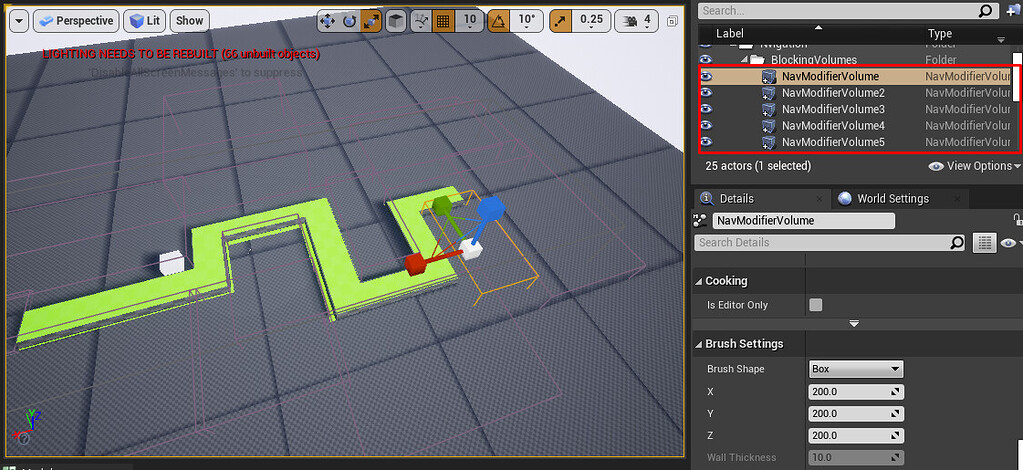
https://forums.unrealengine.com/t/navmesh-based-on-custom-shape/156385
Unreal Engine Forums
Hello everyone. I would like to know if it is possible to make the navmesh based on a mesh brought from the blender. I’m trying to make a navmesh for a classic tower defense game where the AI must navigate a path. So far I have used several NavModifierVolumes to block the parts that the characters should not be browsing, but I am wondering if...
plush yew
oh that is better
stable path
What is the better way to make modular characters?
I tried the simple way of creating a base body mesh and just putting clothes meshes on top of it
But the two meshes clip through each other
And skin shows through the clothes
What approach would you recommend?
 thick herald
Have a look at Master Pose Component, that might be what you are looking for.
plush yew
how can i fix my unreal engine crash!?
stable path
@thick herald yeah.
But I'm asking about the graphical aspect of it.
Like the skin clipping through clothes
 pastel aurora
plush yew
pastel aurora
plush yew
shouldn't 'is overlapping actor' target ' motioncontrollerpawn ( VR ) basically act as a condition!?
pastel aurora
Help noob: any idea why the VR pawn slides/drifts and not moving regularly?, i think it has to do with the vr not being character what can i do?
plush yew
anyone? 
plush yew
pastel aurora
Help noob: any idea why the VR pawn slides/drifts and not moving regularly?, i ...
im also a noob 😁
nvm found a way
 thorny pewter
any one knows if performance is affected by number of levels ? for example if i will have 10 levels or 100.000 will it make performance difference except using a lot more hard drive space ?
 stiff bane
thorny pewter
any one knows if performance is affected by number of levels ? for example if i ...
stiff bane
thorny pewter
any one knows if performance is affected by number of levels ? for example if i ...
dont think so since a map that is not currently in use does absolutely nothing but sitting on the disk
thorny pewter
is there any way to find out if its really not affect anything ? i dont want to learn that hard or terrible way 🙂 in terrible i mean after building game and in hard i mean actually creating 100k levels 🙂
stiff bane
cant give you a answer to that
thorny pewter
thx it seems it should not affect performance for me too but could not find much info in google too 😦
thx any way
stiff bane
your welcome
thorny pewter
will ask again later when more ppl will be here
 dense knoll
how can i interp this? Its only one value but for a normal interp i need two


 harsh tiger
Hi everyone, in my game the player can earn points. How would I go about having an online data base where all the points earned get added together and displayed on the data base server for statistics?
Could the plugin VaREST do this?
 spare kernel
anyone have any insight into this ? LogD3D11RHI: Error: Direct3DDevice->CreateUnorderedAccessView(Texture->GetResource(),&UAVDesc,(ID3D11UnorderedAccessView**)UnorderedAccessView.GetInitReference()) failed at C:/UnrealEngine_427/Engine/Source/Runtime/Windows/D3D11RHI/Private/D3D11UAV.cpp:116 with error E_INVALIDARG
 thorny schooner
Any reason anyone can think of that my char would just freeze up out in the world when running ?
its almost like the look of when your char gets -z and auto dies
harsh tiger
Could that be something as simple as a online google excel sheet and just changing a value there? I'm extremely out of my depth with this stuff
 random island
Hi, is anyone familiar with the collab viewer template?
 safe osprey
What would a W texture map be, its like black green and red colors?
 velvet haven
someone knows about it? i also get this random issue with NVIDIA GPU (no issue with AMD)
azure topaz
um i have a general question
does someone know ,if i install windows 11, does i have to install all the games and apps again?
drowsy snow
azure topaz
does someone know ,if i install windows 11, does i have to install all the games...
No, if your stuff is not on C: drive.
bright sigil
azure topaz
does someone know ,if i install windows 11, does i have to install all the games...
honestly not sure, i have all my games on a different harddrive so installing a new os just needs the pointers. it can make the registry pretty dirty, but most games nowadays are steam or epic or some platform which handles the look up - haven't had problems when i installed new stuff
drowsy snow
Or if you're upgrading from Windows 10 to 11, not clean install, everything should be seamless.
azure topaz
seamless?
bright sigil
lol wait, i didn't mean that reaction
harsh tiger
It's not a game that will be released to the public. It's select businesses only
bright sigil
azure topaz
seamless?
yeah, the upgrade doesn wipe it clean, it just... upgrades >.>
drowsy snow
azure topaz
seamless?
By seamless, I mean all of your installed programs and user data should remain, as upgrading only touching Windows folder.
azure topaz
drowsy snow
By seamless, I mean all of your installed programs and user data should remain, ...
ah ok
harsh tiger
How could they screw up? I just want the amount of points they've earned in a session to be added to a data base. So say 5 sessions with 10 points each would display as 50 in the data base
drowsy snow
bright sigil
lol wait, i didn't mean that reaction
Lmao, was kinda shocked, "what the f||uck|| is wrong with that"
bright sigil
drowsy snow
Lmao, was kinda shocked, "what the f||uck|| is wrong with that"
they look so similar and one's above another 😖
yes i believe that's part of their education background
drowsy snow
harsh tiger
How could they screw up? I just want the amount of points they've earned in a se...
Also don't trust the player when it comes to client-server. Else they'll found a way to abuse the reward system.
buoyant graniteBOT
:triangular_flag_on_post: mdrena#3736 received strike 1. As a result, they were muted for 10 minutes.
harsh tiger
drowsy snow
Also don't trust the player when it comes to client-server. Else they'll found a...
I can see how they could abuse it on a PC. But how would they do it on a quest 2 running in standalone mode?
 autumn flame
Corporate always finds a way
drowsy snow
harsh tiger
I can see how they could abuse it on a PC. But how would they do it on a quest 2...
Hah, I won't think Quest 2 is secure enough to stop people from tampering.
 regal mulch
Given how much stuff is sideloaded onto that device already :P
 harsh tiger
plush yew
what's causing this?
harsh tiger
plush yew
what's causing this?
Could it be auto exposure on the PPV?
plush yew
when I remove some it somehow is ok
bright sigil
if the culprit resides with your exp fog, and seeing there is a specular in the water, id say it is influence from lighting. ppv is one place, the light itself is another, id imagine it rather finicky regardless
plush yew
auto exposure was turned off, when I turn it to manual everything is pitch black
i made base with default settings
then i added this one

Unreal Engine
Fog Gradients is a Post-Process effect that allows you to layer different colors over distances and directions.
only two things from it - SKY and SUN
dense knoll
when on vulkan sky materials spaz out like this
drowsy snow
dense knoll
when on vulkan sky materials spaz out like this
Heard TrueSky had issues with Vulkan in UE4 🤔
Though that's from a long while ago, not sure if they resolved it by this point or not.
dense knoll
yea
Its not just truesky stuff tho
its also any material with with "Is Sky" set to true
plush yew
Blueprint Runtime Error: "Accessed None trying to read property None_ExecuteUbergraph_river_scene2_RefProperty". Blueprint: river_scene2 Function: Execute Ubergraph River Scene 2 Graph: EventGraph Node: AddActorLocalRotation
im getting this error suddenly
plush yew
yeah, item was missing in the map
 still reef
plush yew
too many same light sources?
still reef
plush yew
too many same light sources?
I think its too many lightsources together?
I usually get like an X icon or something indicating too many light sources together
velvet haven
plush yew
when I remove some it somehow is ok
maybe try to disable screen space global illumination
plush yew
looks like this, i want to keep that fog and vibe over all of the map
when you move it just changes in weird way
global illumination is off
i guess i will just redo it all over again and try to match the vibe
 grave pollen
thoughts on upping my character movement speed to 1000? My speed just feels slow at the regular ~600 for sprint, Im just not sure if there are ramifications since this is a multiplayer game, will it have any detrimental effect on the server due to moving too fast or is that not even a consideration?
thick herald
Depends on how you are handling movement. If done properly it's not a problem, how else would vehicles move about 😉 10 meters per second though, is pretty fast so it will affect your game design. You'll have to take that in to consideration while designing levels.
grave pollen
good point
 north bane
Having an issue with spline hair where it does this when a light passes it on the opposite side. The mesh it attaches to does not seem to occlude the light, so it's just giving full transmission. Any clue what might be causing that and how to potentially fix it?

 real heath
grave pollen
thoughts on upping my character movement speed to 1000? My speed just feels slow...
real heath
grave pollen
thoughts on upping my character movement speed to 1000? My speed just feels slow...
Reminds me of an old anecdote that floats around. Play testers kept on reporting slow movement but the character was so fast it was breaking level designs and was set to an insane speed. The solution ended up being lower the camera height so things moved by the camera quicker.
I don’t know specifically your design or game feel, but after a certain speed it may be worth exploring other changes to improve perception of movement
 dire parcel
hey everyone, so i have a request.. what is your favorite third person shooter with really good shooting mechanics? i want this third person project i am working on to feel really good, I want the shooting to really feel like you are demolishing your enemy, anything can help thanks ❤️
grave pollen
real heath
Reminds me of an old anecdote that floats around. Play testers kept on reporting...
its funny I was just thinking about moving the camera lower for another reason, but might solve 2 birds with 1 stone or whatever the saying is
 dawn gull
If I have a value in between a min and a max how could I convert it to a value I can use for a progress bar?
Thanks!
plush yew
tried to add tree in foliage and it got stuck at 70%
how long it will take to load it?
bright sigil
plush yew
how long it will take to load it?
beefy tree? lots of polys? 4k textures? multiple mats?
bright sigil
😂 itll be awhile
plush yew
30 mins lol?
 winter bluff
probably dumb question but what to do when metahumans have weird shadows?
 bright sigil
winter bluff
probably dumb question but what to do when metahumans have weird shadows?
bright sigil
winter bluff
probably dumb question but what to do when metahumans have weird shadows?
i think that's the shadow slope bias or shadow bias of the light, should still be evident in lighting only preview mode
 neon grove
where are action mappings saved?
bright sigil
Project Settings > Inputs
neon grove
bright sigil
Project Settings > Inputs
i know but is there a file for it?
bright sigil
neon grove
i know but is there a file for it?
ohh, yeah, check your ~~engine ~~ config folder
neon grove
bright sigil
ohh, yeah, check your ~~engine ~~ config folder
engine folder? isnt it saved in the project folder?
bright sigil
neon grove
engine folder? isnt it saved in the project folder?
sorry, wrong folder, config folder - defaultInput.ini
neon grove
bright sigil
sorry, wrong folder, config folder - defaultInput.ini
thank you
winter bluff
bright sigil
i think that's the shadow slope bias or shadow bias of the light, should still b...
I tried to play around with bias settings in the directional light (only light source used). But it did not change anything. Any idea which setting I could try to adjust?
bright sigil
winter bluff
I tried to play around with bias settings in the directional light (only light s...
not sure really, the bits on the neck look like shadow bias banding while the low res chunkiness is lighting quality, but there's a lot of factors there, would need to search the internet/check the docs
 muted arrow
Any suggestions on folder rename? I did in content browser F2/rename. However, it doesn't do it cleanly. Yes, I did fix up folder redirections multiple times. Is it better to do a migrate instead, does that allow you to migrate without the top folder or does it preserve it?
 paper cobalt
muted arrow
Any suggestions on folder rename? I did in content browser F2/rename. However, i...
paper cobalt
muted arrow
Any suggestions on folder rename? I did in content browser F2/rename. However, i...
what do you mean it doesnt do it cleanly? rename the founder?
not sure i understand
muted arrow
I select a folder and rename it and it creates the new folder with all the assets under it. But the previous folder and subfolders are still there and is not cleaned up?
paper cobalt
i actually just did that. it does infact do that
so if i remember correctly, it is easier to replicate and rename the contents
rather than go and edit existing content.
not sure how accurate that is :/
there was a tool on the free collection dealing with asset cleanup
maybe that will help
muted arrow
paper cobalt
there was a tool on the free collection dealing with asset cleanup
maybe that wi...
okay, I will check that out then.
 paper cobalt
absolutely
plush yew
plush yew
tried to add tree in foliage and it got stuck at 70%
took 40 mins to load, added tree's and when I build lights it just crashes..
sour tide
I think I have to say, while I appreciate the recommendations to watch the Kickstart videos, I'm getting approximately nothing out of them. I learn from worked examples
A 50-node flowchart of the blueprinting system doesn't equip me with anything I can use
drowsy snow
sour tide
I think I have to say, while I appreciate the recommendations to watch the Kicks...
For some, it takes rinse and repeat.
sour tide
Showing me the blueprint system won't help me actually get to a point where I can use it unless there's actually... some kind of material teaching me how to use it. Like, there are nodes, with little coloured symbols on the sides, but what do these symbols and colours mean?
That's rhetorical, I'll get to that eventually, when I actually find material that introduces concepts in a digestible order for me
 tidal jewel
Is there a button for restoring previous session windows after the initial prompt fades?
sour tide
BEcause it feels like I spent an hour learning simply that,
"blueprints are a powerful and visual way to solve problems and implement functionality that are normally otherwise tackled by coding"
"it's functional and event-driven"
"it's threaded through just about everything"
and "it supports inheritance and robust debugging tools"
sour tide
(OK, the "kickstart" videos are not for me, but the "exploring" courses look much more promising from the content list)
bright sigil
those are helpful to know, but it sounds like those wont retain with your current knowledge of the toolset. sometimes programmers from other languages watch these videos, it helps them. Implementing coded logic has no "starting place" as you've discovered. I'm sorry it took this long to come to it, but yet, best is to always get in there - hands on first, visit theory after, though not everyone is like that and not everyone is "starting" at the same level
sour tide
That's the issue though, I feel like the videos didn't help me get to anything where I understand the hands-on part and the theory that it did cover was too broad, too high-level. I feel like an intro course should open with like... taking one of the premade projects and adding on to it in a dozen places to turn it into a playable microgame. A sort of Hello World of game creation
bright sigil
sour tide
That's the issue though, I feel like the videos didn't help me get to anything w...
there you go, you know what to look for now. videos aren't so catered unless you get paid courses (and even then). But give yourself a little project and learn from relevant videos
thats kinda what college is for, that's personalized
 upper pumice
Hey all 🙂
So very simple scenario: actor is getting pushed around the scene. The actor is a bp i made from a C++ actor class, consists of a scene root and a cube. Cube is simulating physics.
Im trying to get the position.Z of the cube, but I can only find the position of the root actor. However, when im knocking the cube around, the cube is the thing moving, not the actor. Can anyone let me know how to get the cube/physics pos in C++?
bright sigil
upper pumice
Hey all 🙂
So very simple scenario: actor is getting pushed around the scene. T...
i know how, but not in cpp. high level, if you store the cube component mesh as a reference, get it's Z
upper pumice
Right, so i do have a reference to it as a UStaticMeshComponent, but im not seeing a GetPosition-ish sort of method in there. Maybe i should cast it to a scene component...
bright sigil
again, not knowing cpp, its something like GetWorldTransform
#cpp channel can help more honestly
stable path
@upper pumice try get location
bright sigil
duh yeah, unreal likes location not position as far as terminology is concerned
upper pumice
You're on the money @stable path, I saw it just as I finished typing the cast haha. I'll get a hang of these terms eventually haha
Thanks for the help all
sour tide
MAN, I need a second monitor for this
a website on one half the screen leaves very little room for the editor
and tabbing between is.... less than productive. Memory issues. (ADHD.)
 thick loom
Welcome to dev life!
 warm salmon
sour tide
and tabbing between is.... less than productive. Memory issues. (ADHD.)
warm salmon
sour tide
and tabbing between is.... less than productive. Memory issues. (ADHD.)
Thats me
thick loom
2nd monitor more than doubles productivity
I use an ultrawide main, landscape monitor on left (for BP, etc), and a portrait on right for discord and webpages
warm salmon
I use a laptop single screen *prefessional
thick loom
They aren't great, but there are portable USB monitors available
They are kind of like a tablet
drowsy snow
Also I think you can get a simple 1080p60 monitor for $100, brand new.
bright sigil
I use a mirror as my second monitor
drowsy snow
bright sigil
I use a mirror as my second monitor
Reflecting to your self, looking at that face.
bright sigil
drowsy snow
Reflecting to your self, looking at that face.
it reminds me to get to work, like someone is watching me and i dont want to slack off anymore
drowsy snow
bright sigil
it reminds me to get to work, like someone is watching me and i dont want to sla...
I would be just depressed.
bright sigil
i drew Groucho glasses on it with sharpie
warm salmon
Lol
drowsy snow
Good luck filtering from videos using shitty BP practices.
sour tide
Maybe there should be a video explaining the difference between good and bad BP practices
bright sigil
sour tide
Maybe there should be a video explaining the difference between good and bad BP ...
its called epic live training
the vods are on yt so its not exclusively live
thick loom
sour tide
Maybe there should be a video explaining the difference between good and bad BP ...
It's really difficult to make money on youtube. Conversely, it's really easy to make good money if you are a skilled dev (BP or C++), therefore a lot of the good devs don't bother teaching on youtube.
Epic live training and conferences are a bit of an exception
sour tide
Yeah, but since Epic's business model is literally to have everyone using UE and then take a cut of the royalties from successful projects, it only makes sense that they should clearly signpost the least onerous material to learn from
bright sigil
you can make 1 million in gross sales before they take a measly 5%
thick loom
I think they expect more money from the AAA licenses
Than the indie developers
They did the move to 1mil sales to attract more indie devs
drowsy snow
thick loom
I think they expect more money from the AAA licenses
Compare that from Valve, who expect more money from indies.
sour tide
....yes? I'm not complaining about that cut at all. I'm saying that the activity of doing this by trying to find tutorial material involves a lot of wasted time and energy
bright sigil
after, what, 2-3 years? the engine went from subscription to free
sour tide
I, personally, cannot absorb material unless I can see the relevance or at least have something to practice it on
Learn by doing and all that
But the videos that seem to get actively pushed on the learning page are uh... bloated with indigestible and frankly irrelevant material to someone that doesn't have a functional grounding in actually using the tools
bright sigil
i guess you'll just have to do some digging
sour tide
Way ahhead of you. I'm getting a lot out of this tutorial on how to make a rotating banana
drowsy snow
I personally learnt through YouTube videos (it was 2016, and Unreal Online Learning wasn't a thing so I don't have much choice), and a LOT of self experimentations.
bright sigil
and i learned UDK before yt was a thing. That's right, i was reading books! We're talking thick, outdated user guides
drowsy snow
bright sigil
and i learned UDK before yt was a thing. That's right, i was reading books! We'r...
Books are shit 😛
Nah, kidding.
bright sigil
i understand the frustration, but ya gotta dig
drowsy snow
I'm a bookworm myself, but I don't have any gamedev books (I'm not in the US or Europe)
bright sigil
they might get outdated, but they teach a lot of great concepts
drowsy snow
So online resources is the only thing I got. No books.
Wish I could have, but even as a teenager I couldn't import shit from overseas..
bright sigil
drowsy snow
So online resources is the only thing I got. No books.
you may actually find some great information in scholarly articles
and maybe there are pdfs floating around out there...
 hot beacon
Any one know of a good tutorial for Procedural Animations
drowsy snow
hot beacon
Any one know of a good tutorial for Procedural Animations
"Procedural anims" is a super broad thing.
sour tide
Maybe they mean something specific or are looking for any entry to the subject?
neon grove
how can i clear the references to deleted assets?
because i deleted a folder that i wasnt using but for some reason im still getting warning that those assets couldnt be loaded but none of the current BPs reference those assets
bright sigil
neon grove
because i deleted a folder that i wasnt using but for some reason im still getti...
hate when i get this too. to be safe, fix up redirectors on the folder in question. I will try to delete a few times, fix redirects, then save all. If it stays after a few attempts, I just delete it via file explorer
you can tell if they were removed by checking their file sizes
should be 0kb
neon grove
i did fix redirectors and all but its still referencing
bright sigil
like i said, i try deleting them a few times before doing it through file explorer
its murky waters though
neon grove
what if i already deleted them through explorer?
bright sigil
but they still show up in engine?
neon grove
is there a way to just delete any leftover references?
neon grove
u mean restart editor?
bright sigil
before opening it again, you need to see if the folders/files didn't popup again
neon grove
they dont pop up when starting the project
but they appear as warnings when packaging the project
bright sigil
neon grove
how can i clear the references to deleted assets?
sooo then?
oh
try a resave all on the root content folder
it may take some time for it, so let it do its thing
neon grove
ok im resaving
native raven
Every time I add this to the skeleton socket it always makes it huge, any idea why?
 bright sigil
native raven
Every time I add this to the skeleton socket it always makes it huge, any idea w...
bright sigil
native raven
Every time I add this to the skeleton socket it always makes it huge, any idea w...
not a clue, try #animation
hot beacon
big bone
sometimes (well for me) the size of bones is really big so if i parent something to a bone it will mess up the scaling
neon grove
bright sigil
try a resave all on the root content folder
resaving ate all my 24 gb ram
should i resave each folder is that possible?
bright sigil
neon grove
resaving ate all my 24 gb ram
sorry
yeah, i didn't realize you would have a big project. try a resave on the folder that you think the missing files are causing the error of
native raven
hot beacon
big bone
Ooooh yeah, the parent was massive until I scaled it down
bright sigil
native raven
Ooooh yeah, the parent was massive until I scaled it down
glad it was that simple! could you delete the post in animation please 🙂
damn that was fast! 😛
bright sigil
keep us posted then
native raven

hot beacon
pog
 paper crest
what can interrupt montage? just other montage, right?
bright sigil
iirc, you just call stop montage and dont plug any montage into it, read the tooltip to double check
paper crest
it just, something keep interrupting the montage
bright sigil
paper crest
it just, something keep interrupting the montage
oh, thats tougher to say without know if you have possible events or functions that can affect it
paper crest
just a sphere trace with bool condition to run the montage
the montage only run once, but it keep interrupted by something
😆
bright sigil
paper crest
the montage only run once, but it keep interrupted by something
does the line trace happen multiple times to where it may call the montage again? at what point in the montage is it interrupted? you may want to use the Find in Blueprints and search for Montage to see if there may be other affectors
paper crest
the bool keep the montage to be called only once
the line trace do happen multiple times tho
bright sigil
mhm 😏
bright sigil
if it works for your needs...
paper crest
the thing is, its only 1 montage
ahhh heck, ill just try handling the interruption
thanks btw
bright sigil
well, with a bit more detail i might know whats going on. i can only vaguely say montages are good for one off animations
thick loom
paper crest
ahhh heck, ill just try handling the interruption
Did you try using showdebug animation?
It will tell you the name of the montage that is currently running
showdebug animation
slomo 0.1
^ Those are the console commands I use when debugging my anims
bright sigil
writes down furiously
thick loom
If you are lazy, slomo .1 works too
slomo 1 to go back to regular speed
slomo 10 to go fast
After you've done showdebug animations once, later time you run PIE you can just use showdebug
showdebug animations has to be while PIE is running
neon grove
bright sigil
yeah, i didn't realize you would have a big project. try a resave on the folder ...
yeah its the project i used to learn with so i filed it mostly with lots of BPs and marketplace assets
it once got to 40 GB LOL
bright sigil
neon grove
yeah its the project i used to learn with so i filed it mostly with lots of BPs ...
ah, the mp assets will do it
they may sometimes come in with their own errors too
neon grove
i mean it was 40 GB bc for some reason if u make rly bad ticking spaghetti blueprints all the warnings get stored in massive log files
but still it was 20 gb of content folder
paper crest
uh my eyes cant handle it anymore
prolly should get a drink xD
thanks for the tips, man.. ill try later
neon grove
had to delete a bunch of unused marketplace assets to reduce it to 5 gb
bright sigil
neon grove
i mean it was 40 GB bc for some reason if u make rly bad ticking spaghetti bluep...
you can always delete the DerivedDataCache, Intermediate, Saved, and Script folders of your project to clean it. Launching the project will recreate these folders
essentially, you want to keep Config and Content and toss the rest (keep the .uproject obviously)
neon grove
bright sigil
you can always delete the DerivedDataCache, Intermediate, Saved, and Script fold...
yeah i was wondering why all the sudden my hard drive ran out of space and it turns out the logs folder was 30gb in size LOL
bright sigil
haha, its the autosaves that are the real mem sink
neon grove
yeah that too sometimes they take up to 5 gb
bright sigil
it literally makes copies
neon grove
anyways i already resaved all the folders time to try and package my game for the 50 time...
hopefully no errors this time
i think backup also takes up space
tho not that much
bright sigil
i backup by cleaning those previously mentioned folders, duplicate it and zip the old one
there is also perforce 😛
neon grove
when i backup i just copy the entire project to an external drive
bright sigil
i dont think i would suggest the same with a 40gb project
neon grove
if i mess up the current project i can always get it back
bright sigil
to trim space, delete those folders
bright sigil
neon grove
if i mess up the current project i can always get it back
yep, thats how to roll
neon grove
hopefully my 2 tb drive doesnt run out of space
bright sigil
it wil 😄
neon grove
ill prob delete those older 40 gb versions later
regal mulch
You should really just use #source-control
$5 Droplet with perforce and you are fine
 chilly geyser
OK. Im pondering my orb, about making a multiplayer Wind System that uses Closed Spline Areas. How could I replicate some kind of 3D Perlin Noise field to make Moving Wind and some areas that are Windier? Vector or Noise Fields? A Replicated Texture??
Basically I could derive values from a 3d heightmap, that is moving within the Spline Area. Anybody got any ideas?
neon grove
YES THE PROJECT PACKAGED SUCCESFULLY!
after 50 tries
i rly should package more often to prevent so many errors
sour tide
well that's intimidating
 regal mulch
Well it's a lot of like 5 min videos iirc
Talking about single nodes
So not everything is necessarily relevant to you :D
 azure nimbus
Anyone know if it's possible to make the Splash Screen different sizes for different monitors currently im using a 4k splash screen, but on a 1080p monitor it just goes on both monitors.
drowsy snow
Doesn't look like mistake to me, but you have to either wrap the parent vertical box widget with Canvas Panel, or bring the bars into their own User Widget.
plush yew
10yr old me in blockbuster
"can we rent evangelion"
mom
"we have evangelion at home"

evangelion at home
so when is UE5 Verse?
drowsy snow
plush yew
so when is UE5 Verse?
Wait until Fortnite get it first.
plush yew
drowsy snow
Wait until Fortnite get it first.
good grief
drowsy snow
plush yew
good grief
Good grief...
drowsy snow
plush yew
good grief
I know what you typed before. You're asking if Verse is going to be any faster as Lua or other scripting language.
Look, the benchmarks doesn't even exist yet.
plush yew
 wanton rain
I lost the project source and only have the packaged file. I unpacked the pak file with unreal engine default's unpacker, but instead of just one uasset I also have an uexp. Also, the uasset doesn't appear inside the engine and I can't access it. I just want my blueprints back. Is there a way to do that? Thanks
drowsy snow
wanton rain
I lost the project source and only have the packaged file. I unpacked the pak fi...
You're pretty much SOL. Decompiling packaged Unreal app is not easy, for good reason.
wanton rain
drowsy snow
You're pretty much SOL. Decompiling packaged Unreal app is not easy, for good re...
yeah, figured is not easy, but thought I could somehow get the blueprints back, I don't care about the other assets because they were stock assets. I'm so mad at me that I didn't save a backup file on cloud.
drowsy snow
wanton rain
yeah, figured is not easy, but thought I could somehow get the blueprints back, ...
Now it's your wake up call to do backups and source control.
wanton rain
drowsy snow
Now it's your wake up call to do backups and source control.
yeah, I lost about 10 hours of work, I just uploaded my other projects to github
thanks anyway
plush yew
plush yew
plush yew
<:unreal_4:847954968870256680>
please share me this png
 knotty summit
Do you guys get bad request error when opening documents of Unreal Engine?
https://docs.unrealengine.com/4.27/en-US/API/Runtime/Engine/%ROOT%/FStreamableManager/LoadSynchronous/1
 pearl minnow
ooh verse looks cool, more functionalish
modest trench
More about the instant compiles and async stuff
pearl minnow
if somebody tells you that your UE5 game is running like a postcard on their computer, how do you start to debug / profile ? I used the mesh inspector, its all green on my side. Could it be the new lighting systems killing their machine or something?
knotty summit
Thanks, didn't even noticed it. I guess something is wrong when you access from Google
drowsy snow
pearl minnow
if somebody tells you that your UE5 game is running like a postcard on their com...
Well, obviously UE5 being Early Access don't help you.
Then there's Lumen and Virtual Shadow Maps, which are still expensive as heck.
pearl minnow
@drowsy snow it could also be poor use of eventTick also right? I'm using that in a few places to lerp stuff

im animating 40 meshes up/down
drowsy snow
pearl minnow
<@!325627930484932608> it could also be poor use of eventTick also right? I'm us...
Handful of ticking BPs barely make a dent compared to the new rendering features.
Also heard that Chaos physics is enabled by default on UE5, and it's still broken.
pearl minnow
ill read about that then 😄 the physics in this game suck ATM the ball is really unpredictable but i think that's just me messing up the physics material
modest trench
Disable overlaps for those meshes unless required at least
pearl minnow
what are overlaps for, when meshes pass through each other right? in that case i wouldnt need them no
plush yew
wtf
 drowsy snow
pearl minnow
drowsy snow
pearl minnow
I dunno about you, but I don't see how this can't be done in UE4.
plush yew
plush yew
wtf
I decided to use sketchfab exporter, and use some decorations from sketchfab, and I got this lol
what even is happening with it
pearl minnow
drowsy snow
I dunno about you, but I don't see how this can't be done in UE4.
just for funs 😄 and to slowly learn new systems
modest trench
That's how a dog would wear pants
plush yew
lmao
yea, idk, I wanted to fix it, but I couldn't see anything wrong with it in Blender, and it wouldn't even let me reimport
drowsy snow
pearl minnow
just for funs 😄 and to slowly learn new systems
Well, I think now you know why people said to use UE4 in the meantime if you're getting started.
modest trench
pearl minnow
just for funs 😄 and to slowly learn new systems
You aren't using any new systems besides the rendering features enabled by default that are mostly just on/off
drowsy snow
Unpopular opinion, hot take:
New Unreal Engine 5 features are not necessary for new learners to get started.
pearl minnow
I'm working on a bunch of things in UE5 not just this
I appreciate you cautioning me
modest trench
Game features plugin?
plush yew
virtual shadow maps are broken, Lumen reflections for anything legitimate reflection related (like planar reflections) are broken, and nanite depends on VSM, so, don't use it unless you are using VSMs
UE5 is useless atm
just don't use it lol
nanite is fun for the first two seconds
UE5 is abandonable afterwards
the UI is cooler though
modest trench
5.0 has some very nice new plugins that they don't have docs for. All the newbies are just using EA2 though
pearl minnow
I had no issue running a virtual TV show for the last couple months with it and i really enjoy the lighting ( and UI 😄 )
plush yew
I still feel like there was a significant loss in terms of level design abilities by them having removed height maps from materials, but whatever
drowsy snow
plush yew
the UI is cooler though
Ugh, don't get why people liked more claustrophobic UI of UE5
pearl minnow
ive been running instance with dynamic lighting for 24 hours at a time with no issue
modest trench
The button design is too flat and unreadable but the layout is better
plush yew
I just like how it looks just a bit less like we're still in the early 2000s
not exactly the layout or anything
modest trench
Early 2000s rendered 3d buttons rule... Zoomers be gone
plush yew
as I said, 1080p at 100% scaling, I can't see shit
modest trench
The skeleton editor is literally like random modern art pieces in ue5. Hard to understand
drowsy snow
modest trench
The button design is too flat and unreadable but the layout is better
Dunno, it's just me, but I found UE5 has a lot more unused space.
plush yew
what is the cheapest method of tracing in ue4?
drowsy snow
plush yew
what is the cheapest method of tracing in ue4?
Are you talking about ray tracing, or hitscans?
modest trench
drowsy snow
Dunno, it's just me, but I found UE5 has a lot more unused space.
I like the side trays for world settings etc
modest trench
For collision? Linetrace I believe
drowsy snow
plush yew
any trace
Ok, hitscans it is.
Linetrace is the cheaper of them, though others barely have negligible performance difference in practice.
modest trench
But unless you are going nuts I doubt it will show up in profiling under 100 per frame or whatever
pearl minnow
can i link my vid here with ue5 or is that spam
plush yew
ok because i see some forums and what not say its sphere
any ideas though? half of these imported stuff break completely when you bake lighting
 pearl minnow
ok it was pertaining to the performance of the lumen lighting system for you to see a thing
but np
drowsy snow
pearl minnow
ok it was pertaining to the performance of the lumen lighting system for you to ...
This channel is still mostly UE4.
plush yew
I think after my current project, I'm not touching UE5 until it's released
drowsy snow
plush yew
I think after my current project, I'm not touching UE5 until it's released
I won't touch UE5 at all 😛
plush yew
my problem doesn't seem to be UE5 specific, so I'm asking about it here, also because there's conversation here typically lol
plush yew
drowsy snow
I won't touch UE5 at all 😛
oh, I probably will, I'd have to
drowsy snow
plush yew
any ideas though? half of these imported stuff break completely when you bake li...
Lightmap issues, I think
drowsy snow
plush yew
oh, I probably will, I'd have to
I have no obligation to, I'm still supporting low end hardware.
modest trench
I have no clue... Try to check their shadow maps on the mesh?
plush yew
drowsy snow
Lightmap issues, I think
yeah, but I don't even know how I'd fix it, I checked and UVs are there and look fine, I recalculated normals, no clue, didn't do anything
modest trench
I'm sure someone online has dealt with shadowmap export issues before
plush yew
I just googled about specifically sketchfab models having these issues, but got no usable hits
all I seen was some dude having set a scale parameter to -1
and then being surprised it broke
plush yew
modest trench
I have no clue... Try to check their shadow maps on the mesh?
how do I do that?
pearl minnow
ok well i posted it in #ue5-general - apart from minor flickering, its lumen running with dynamic lighting 24/7, mostly okay - i gotta be honest i really haven't noticed any issues with UE5 so far except not being able to migrate advancedSessions plugin 😛
plush yew
then put down a planar reflection in front of a metallic object lol
you will notice a major issue
look closely at shadows, and there, you will notice more issues, unless you know to play around with console commands anyway
modest trench
plush yew
how do I do that?
The engine uses a separate uv channel for shadowmaps afaik
plush yew
wtf
4 part tutorial series
either way though, it shows changing a "lightmap coordinate index" option, but there's only "source" and "destination" indexes
I'll try playing with them though
pearl minnow
i gotta pattern question - i have an option in my game that switches the way a key responds when a user presses it. When changing this option, should i store it in game state and on every key press check the options from gamestate, AND / OR loop over every key to update the options in a local variable at the time when the options are set, so it doesnt have to look up gamestate every time.. OR store it in the keys parent that is listening for key events and pass in the options to child keys on every key press?
the options are changed via UI and you can see the two key behaviors on J and K

 marsh rose
Guys do you know how I can remove games from my project library?
%localappdata%\UnrealEngine\x.x\Saved\Config\Windows\EditorSettings.ini
Seems not to exists 😦
pearl minnow
i know they all probably work but i wanna get some professional input 😄
stiff bane
hi guys, when i try to build my scene i get the message 'Failed to connect to Swarm' on the internet i cant find i working solution. anyone that can help?
pearl minnow
@plush yew great point ill think of it more like "keyboard class scope options" to future proof the code a bit
 sturdy smelt
plush yew
any ideas though? half of these imported stuff break completely when you bake li...
sturdy smelt
plush yew
any ideas though? half of these imported stuff break completely when you bake li...
Probably The Lightmaps UVS?
ebon stirrup
when we are dead
 raven estuary
Do people use mixer much? It doesnt seem like theres much info out there about quixel mixer
Is there a reason for that is it bad?
 kindred talon
Ey guys, can some1 help me bout, assigning the delay value to a variable? Because i want to display the value to the screen...
stiff bane
 hollow magnet
sooo ue5 when
hollow magnet
sooo ue5 when
didnt they say begin 2022?
 stray drift
Every indication is 2022, but there's already 5.1 in the works (ue5-main), so it would be funny if 5.2 started before 5.0 releases.
It gives me second hand stress, the amount of cherry picking and selective merges they just do on the regular.
 lusty carbon
Anyone experienced with Reality Capture?
plush yew
Hello,
I have 1 UE4 Project and 1 UE5 Project, how can i put them together into 1 project? 🤔
stray drift
plush yew
Hello,
I have 1 UE4 Project and 1 UE5 Project, how can i put them together int...
If UE4.26 or earlier, you are in luck. If not...
Easiest way would be to copy paste the contents over, no?
plush yew
I got it, i had to go into edito > select folder > Migrate > select destination.
I prepared the old ue4 project into a ue5 one, so now im merging the 5's
plush yew
stray drift
If UE4.26 or earlier, you are in luck. If not...
Easiest way would be to copy p...
yeah didnt know if that was possible, not that familiar withthe fodler structure etc. yet
 viral carbon
Program files/ue4.27/engine/binaries/Linux folder takes up almost 4 gigabytes, but I will never use linux. Is it okay to delete?
stray drift
viral carbon
`Program files/ue4.27/engine/binaries/Linux` folder takes up almost 4 gigabytes...
Don't delete it, untick Linux in your install
viral carbon
stray drift
Don't delete it, untick Linux in your install
Okay
plush yew
Faucher had a video on this, but it's Cinematic related, might be useful tho https://youtu.be/uWOjyxjA5Gg?t=48

In this Two-Minute Tuesday tutorial we cover how to save disk space by optimizing our Unreal Engine installs. We can easily recover 20gb of space per version of Unreal. This is especially handy if you have several versions of Unreal installed like I do.
Keep in mind, this only applies to those of you NOT doing mobile gamedev work.
#unrealengine...
How would you approach movement in bloxorz? I want to recreate it but have no idea how
viral carbon
stray drift
Don't delete it, untick Linux in your install
So it requires reinstalling?
plush yew
viral carbon
So it requires reinstalling?
check my post ^
stray drift
viral carbon
So it requires reinstalling?
No, you go in launcher, and get to the settings of the engine install that's listed. Remove all the platforms you don't need, and it does the rest for you.
 plush yew
How would you approach movement in bloxorz? I want to recreate it but have no id...
plush yew
plush yew
How would you approach movement in bloxorz? I want to recreate it but have no id...
You want to recreate the whole game or just want to move a block?
If you want to move the block check out the Player Movement Chapter in the Unreal Documentation.
If you wanna do the whole game, I suggest signing up for Unreal's Learning Portal it's free and they basically teach you all the basics really fast. https://learn.unrealengine.com
stray drift
Meanwhile I haven't setup a 1TB drive because I don't need it yet 😅
Win11 is not detecting my slow SSD, but I have 2TB NVMe that I may run out of soon-ish sooo, probably need to get into that soon haha
plush yew
how to change size of it? you can't just drag it, there's lots of blueprints but idk which one to edit
 plush yew
You want to recreate the whole game or just want to move a block?
If you want t...
plush yew
plush yew
You want to recreate the whole game or just want to move a block?
If you want t...
just want the 1x2 cube movement. Does the documentation cover that?
fog is from this tutorial

In this part we will take a look at implementing some basic noise to allow us to visualise the self shadowing. We will quickly talk about how self shadowing works, then go on to implement it.
Timestamps are as follows:
Introduction: 00:00
What's changed?: 01:02
Theory of Self Shadowing: 06:20
Adding Basic Noise: 08:08
Implementing Self Shadowi...
viral carbon
plush yew
just want the 1x2 cube movement. Does the documentation cover that?
First setup so you have instant 90° rotation, then add (time-based) linear interpolation
viral carbon
plush yew
can i find all that in the documentation?
Look up interpolation in the documentation
 rough cloud
Do you guys know what could be causing these issues?
It happens both in Ue4 and 5. I tried finding out if it was something wrong in blender but it didnt seem like it
rough cloud
its different meshes
 candid shale
Anyone here maybe have any experience with vehicles in UE4? Set up a vehicle according to the documentation, and it worked fine. Now I changed meshes, walked through all the steps again to make sure theyre correct (they are) and my vehicle just floats mid air. Anyone who has time to maybe go over all the necessities in a call? I'll offer some compensation for the time
rough cloud
plush yew
Somekind of Occlusion Culling it seems
increasing the bounds sorta fixes it
plush yew
@rough cloud does it also do that when you simulate?
rough cloud
plush yew
<@!297448652236914698> does it also do that when you simulate?
hmm good ideia, ima try it out
one moment
runic fern
Hello Guys ..
I have 2 Different Actors ( Light lamp & Electric Switch ) Connected with Cable between them how can i get reference for the light to the Switch ?
Like each switch will get the reference of the light connected with through cable
rough cloud
plush yew
<@!297448652236914698> does it also do that when you simulate?
Yes, it still happens
oh FOUND IT
if you increase the bound to lets say 1000, these things stops!
thank you very much
 humble salmon
Hi, so i have a gridded inventory, like you have in unturned and tarkov, and im wondering how i would go about right-clicking an item in my inventory, for a second widget to appear, about the chosen item. And how i would make it different.
Lets say, i select an AK47, i should have the option to equip it. And now lets say, i select a can of beans, i should have the options to consume it.
Any and all help is greatly appreciated.
 severe hound
Anyone know how to attach a static mesh object to another static mesh object? they are not actors or have scenes
humble salmon
static meshes no actors? thats out of my league xD
severe hound
ive done attachactor/attachcomponent before but its not working with a direct static mesh reference since it's expecting a scene object or actor object
severe hound
yeah i am thinking of doing that lol, good idea
ill have to spawn an actor and give it the static mesh
 humble salmon
make a new actor, tie it with a static mesh, make the static mesh like 0.0001x0.0001x0.0001 so it cant be seen
then name it something
then tie your static meshes with that object
the capsule always appears in the viewport
severe hound
yeah I got it, I can actually do it in construction script and pass it as a variable
severe hound
but thanks @humble salmon
humble salmon
NP
@nocturne tangle wait im confused what you mean
What is it your looking for?
the capsule collider? the capsule mesh?
 humble salmon
that is already shown in the viewport
 nocturne tangle
in play mode i mean
nocturne tangle
cause I gotta test something
humble salmon
can u say what ur testing, i may be able to find u a better solution
nocturne tangle
well I gotta do it exactly like that cause im following a tutorial
Im testing a jump animation
humble salmon
the tutorial doesnt show you how to put it in the game viewport?
humble salmon
ok
i have solution
from google
cant guarentee it will work
so imma check it first, then get back to u
@nocturne tangle got it
start your game
press the tild key above "tab"
then type "show collision"
and press enter
should work
it work @nocturne tangle ?
nocturne tangle
doesnt work actually
nocturne tangle
im too shy lol
stable path
nocturne tangle
im too shy lol
Post a pic then 🤷♂️
humble salmon
this true
nocturne tangle
I cant share
stable path
@nocturne tangle Select your Capsule
Then look for Render Settings in the details panel
humble salmon
he's done that already i believe
stable path
Uncheck the 'Hide in Game' checkbox
stable path
humble salmon
he's done that already i believe
Ah, i see
humble salmon
he got it working
he never pressed enter, he just clicked off it
so he's fine
man ive been here 5 mins, wanting my problem to be fixed, but ive fixed 2 peoples problems already xD
nocturne tangle
lolll
nocturne tangle
humble salmon
man ive been here 5 mins, wanting my problem to be fixed, but ive fixed 2 people...
whats your problem
humble salmon
so i have a gridded inventory, like you have in unturned and tarkov, and im wondering how i would go about right-clicking an item in my inventory, for a second widget to appear, about the chosen item. And how i would make it different.
Lets say, i select an AK47, i should have the option to equip it. And now lets say, i select a can of beans, i should have the options to consume it.
i can right click the AK when its not in my inventory, but inside it doesnt work
stable path
Well, first, you'll need a widget for your inventory slot
humble salmon
done
stable path
A Custom widget which implements the 'OnMouseButtonDown' event
On receiving this event, you check whether the clicked button was the Left Mouse or Right Mouse
If it is Right Mouse, You spawn a new widget, The Menu Widget
You'll probably need different widgets for different types of Items
You decide which widget to spawn based on which type of Item was clicked
For e.g. You could have one type of widget for Guns
which has the equip option in it
and another type of widget for Consumables, which has the consume option
humble salmon
thanks, thats pointed me in a understandable direction, instead of being a headless chicken. xD
 gleaming lotus
Any ideas why my thumbnails aren't updating in these BPs? They have meshes inside of all of them 🤔
 humble salmon
not sure
nocturne tangle
is this a group project?
humble salmon
any of them parents/child classes?
nocturne tangle
reason why im asking is those red crosses are familiar
gleaming lotus
nocturne tangle
reason why im asking is those red crosses are familiar
Yes those are for source control
gleaming lotus
When you work in a big team you have to use SCM 😛
gleaming lotus
We use Plastic, yeah
humble salmon
xD
nocturne tangle
the worst
gleaming lotus
I'm not sure this is the place to discuss source control, I'm just looking for help with my issue
humble salmon
ye, i dont know man
are any of them parent/child classes?
if so, the parent one needs to be updated, then all of them will update to the parent
Otherwise, id recommend saving then re-loading UE4
cus im not sure
nocturne tangle
I remember when things were fucking up
I removed the project from the cloud
then re-add it
humble salmon
i dont use cloud
messes up
then again, i have access to a 4TB server and a 256GB flash drive for all my backups xD
nocturne tangle
nice I have like 7TB
runic fern
runic fern
Hello Guys ..
I have 2 Different Actors ( Light lamp & Electric Switch ) Connect...
 My question float away
stable path
runic fern
<:Blyat:318040187311620096> My question float away
You can set the references in the editor
runic fern
The problem is its spawning in-game realtime xD
gleaming lotus
runic fern
Hello Guys ..
I have 2 Different Actors ( Light lamp & Electric Switch ) Connect...
create a reference of the light in your light switch BP, set the reference to 'instance editable' and 'expose on spawn' when you place the light and the switch down, link em 😄
runic fern
the player can buy it from the ingame market and place them
gleaming lotus
I can't tell you exactly how to do it because I'm not sure how your system already works, but essentially you want to be using expose on spawn and link em that way
Or perhaps create a system for the player to link each light/switch together in game 🙂
stable path
You have a wire object that connects them right?
runic fern
Yes right
stable path
Maybe it can hold a reference to them
runic fern
gleaming lotus
I can't tell you exactly how to do it because I'm not sure how your system alrea...
I could but i thought if the player built the light before the switch xD
runic fern
stable path
Maybe it can hold a reference to them
And when its overlapping both objects will transfer between them ??
stable path
You could do it like,
When the player connects the wire to a Lamp, it catches a reference to that Lamp
Then when the player connects the wire to a Switch, it checks if it already has a Lamp reference,
If it does, it sets that references on the Switch
runic fern
stable path
You could do it like,
When the player connects the wire to a Lamp, it catches a ...
Worked xD
stable path
It can work both ways
runic fern
sometimes the brain just stop thinking i was looking for an idea because i used get overlapping actors ( cable ) and got the overlapping actors inside the Cable and yea its long stroy
Thanks its working now
gleaming lotus
gleaming lotus
Any ideas why my thumbnails aren't updating in these BPs? They have meshes insid...
bumping my issue 🙂
stable path
gleaming lotus
bumping my issue 🙂
Are these BPs children of something?
If yes, does the parent have an empty mesh?
gleaming lotus
Yes, and yes
Does it need to have a not-empty mesh for the children to have thumbnails?
stable path
Well, what happens if you actually assign a mesh on the parent?
stable path
gleaming lotus
Does it need to have a not-empty mesh for the children to have thumbnails?
I'm not sure really
But you could try it
Oh and Also,
You can try Capturing the Thumbnail
Right click on the assets, Click Asset Actions, and Capture Thumbnail
gleaming lotus
Wow, you're right
the parent mesh needs to not have an empty static mesh for it to work
Damn, TIL 😛 Thanks @stable path!
humble salmon
Man, my head about to expload xD
 prime willow
your service is appreciated @stable path ❤️
stable path
gleaming lotus
the parent mesh needs to not have an empty static mesh for it to work
Well, it seems more like a bug 🤷♂️
gleaming lotus
Capture thumbnail gets a dirty screenshot of the actor in world, doesn't seem like a worthwhile solution
I guess 😛
stable path
prime willow
your service is appreciated <@!604222443887919115> ❤️
Thank you 😄
humble salmon
So...
i think its meant to look like this... i think...
but i dont know what to attatch it to

i can officially say that over 80% of my brain, has melted
stable path
humble salmon
So...
i think its meant to look like this... i think...
but i dont know what to...
You actually want to do this in the 'OnMouseButtonDown' event
On the Inventory Slot Widget
humble salmon
in all my widgets, the "onmousebuttondown" event doesnt exist
on "IsMouseButtonDown"
idk if thats the same thing
stable path
When you create a new function, there is an override button just to the left of it
In that list, there should be this event
humble salmon
wait, would this be the inventory widget sorry, or item widget
my head has melted
currently the last 20% is crumating. i cant stop it xD
stable path
humble salmon
wait, would this be the inventory widget sorry, or item widget
The widget you want to click on
humble salmon
ok
stable path
It could be any one of them, depends on your choice
humble salmon
oh thats why i cant find it, its already being used xD
considering its already being used
i just use a sequence* ye?
 stable path
You would want to make a Detect Drag on second pin
The first pin returns so the second pin will never execute
stable path
Post a pic again?
humble salmon
GOT IT
but
i removed the branch, and the two green bits
but its only left-click
imma have to try to add the right-click method back
becuase that stopped it from working

this is currently where im at
just got to experiment now
man, you've got me hyped xD
spent too long on this
stable path
Drag off the Mouse Event pin and search for 'Get Effecting Key' or something like that
It should give you what button was pressed
stable path
humble salmon
now both left and right mouse button works
That's why you should check which button is being pressed
This event is called when any button is pressed on the widget, whether that be left or right
It's upto you to filter out what you want
