#ue4-general
1 messages · Page 1086 of 1
 neon bough
 prime willow
but lets say i wanted something like breathe of the wilds map but the dungeons seemlessly like in old zelda games i would use sublevels
but lets say if i put map in the center
and spread outwards in a circular pattern for exmaple
but stop after reaching the actual maps circle edges
no issues or still issues xD
 neon bough
you are fine, as long as circle max radius is within 20km :>
prime willow
using this as an example ^
the dots being dungeons sweeping being map ill be fine right xD
granted i would make smaller dungeons or i hope
blah its ok ill look it up and see what i can find
maybe im dumb and not getting it lol
neon bough
man, just start. if you hit the limit there are work arounds that don't limit you like world origin shifting
i think you have nothing to worry about
specially if the dungeons are underground
 drowsy snow
prime willow
the dots being dungeons sweeping being map ill be fine right xD
drowsy snow
prime willow
the dots being dungeons sweeping being map ill be fine right xD
If you have the time, break GTA 5 with mods (preferrably no clipping mods) See how the game switches from interior to exterior seamlessly.
prime willow
yeah i want it to be underground and overground and even in the sky xD
ah
ill look into it
for now i finish source control!
neon bough
FiveM has seamless transfer between exterior and interior?
i only played vanilla so far, and thats all but not seamless
drowsy snow
neon bough
FiveM has seamless transfer between exterior and interior?
At least GTA 5 single player, it's pretty seamless.
 charred ibex
thanks
drowsy snow
Basically kinda like prior GTA trilogies but without loading screen.
neon bough
ok, maybe it's just laggy with online, because it has to sync the building data with the server
and that might be as crappy as their loading code of the game itself was
drowsy snow
Yeah no lmao GTAO is too messy for me to even look at.
GTA 5 SP is where it's at.
 real moth
Hey guys! I am currently working with floating Ui above actors.
I see that setting the widget to world space makes it stationary on the actor, however I want it to always face the player.
It seems I can achieve this by changing it to screen space, however this causes my UI to scale which I dont want.
I can probably keep it in world space and just on tick rotate the widget to the player but I was just wondering if there is an easier way to do this?
Thanks!
 drowsy snow
real moth
Hey guys! I am currently working with floating Ui above actors.
I see that setti...
drowsy snow
real moth
Hey guys! I am currently working with floating Ui above actors.
I see that setti...
Is there any reason not to display the widget in player screen (not in world), and move it around the screen with projected world location?
Readability can be compromised shall the player set the screen percentage below 100%, not to mention potential replication issues.
real moth
drowsy snow
Is there any reason not to display the widget in player screen (not in world), a...
surely that would be unnecessarily complicated?
drowsy snow
real moth
surely that would be unnecessarily complicated?
It's going to be necessarily more readable and fool proof, for sure.
real moth
ite
drowsy snow
I tested in world widget components in the past - they're prone to get ruined by post process effects and lower screen percentage.
 exotic thicket
widget components are sometimes pretty annoying to deal with
TAA kills the visual fidelity on them
 grim ore
as annoying as screen space can be to make work, its generally "better" for ui elements in the world compared to world space due to the issues above. to answer the question about always facing, no there is no real way to do it beyond making it face every so often
 placid plover
Is cinecamera meant for use in game as main camera? (Looks good but tanks fps)
drowsy snow
placid plover
Is cinecamera meant for use in game as main camera? (Looks good but tanks fps)
No, it's meant for cinematics.
 devout mason
So why is my Quest 2 Apk only displaying on the left eye? 😕
drowsy snow
devout mason
So why is my Quest 2 Apk only displaying on the left eye? 😕
Your Quest 2 turns into Big Boss Simulator.
Metal Gear reference aside, #virtual-reality might know something about the fault.
 gray solstice

 devout mason
damn, #virtual-reality is pretty dead, I'd even pay 10 bucks for a quick fix 😄 last step of the project...
placid plover
drowsy snow
No, it's meant for cinematics.
don't cinematics need to run at the same fps of a game?
drowsy snow
placid plover
don't cinematics need to run at the same fps of a game?
Yes and no, depending on who you ask.
placid plover
gotcha, thanks
 steel lava
Question, is there some kind of problem with tying a bunch of events to a single sequence?
Basically I have a bunch of UI stuff set to a sequence that starts on "BeginPlay". Would having the UI all tied to this cause some kind of issue like possibly lag or something?
grim ore
maybe? no way of knowing without testing.
drowsy snow
steel lava
Question, is there some kind of problem with tying a bunch of events to a single...
It could be, depending on your BP's complexities.
Always check the stats to find out for sure.
steel lava
Alrighty, thanks for the heads up!
 warm horizon
😦


 dusk nebula
What are some ways to reduce racing errors between the player state, player controller, and player? I know that "on possessed" is best between the player and controller
 true comet
anyone learning unreal engine and wants to learn together? kinda shocked on how much i have to learn. if ur down to help me out if ur someone that has free time ^^
 vocal flume
Anyone know how I can force the finished event to fire in a timeline? I want to stop the timeline and execute whatever is connected to the finish pin when a condition is true. Now I have connected to the stop pin but ot doesn’t trigger the finished pin..
devout mason
Yea, I think so - but where do I place it?
 glossy mica
Will there be no livestream today?
 devout whale
Hi there, so I've got a project coming up near Christmas time for my college.
It's to make a basic game, from the designs and features to the assets. Ofcourse as said its our first project and the tutor wants somwthing simple like a ball game through a maze or something.
Me being me decided to learn the chaos vehicles and challenge my self to make something unique then the other colleagues and so here I am.
My real question is that could you guys help figure out what I can make, like if I make a car game what can it have that is simple yet eye catching or a feature I can add to the "game" without just being a car game where u ride on flat grounds.
Thanks for reading this much and help would be appreciated. 😀
dusk nebula
devout whale
Hi there, so I've got a project coming up near Christmas time for my college.
...
Well, isn't part of the point for you to show off your creativity? Start with a core idea you like and just work off of that, keeping in mind that you can basically do anything you can visualize in UE. Rocket League is a pretty complex game, but its core concept is "car soccer"
devout whale
Awesome thanks. I tried making the rocket league movement but failed hehe.
However I do like the idea of car soccer even without the main concept of discord, thanks 😊
dusk nebula
Well, I'm not saying to just go make Rocket League again. I'm saying that you should just find a good core idea to start with. A couple other vehicle games that come to mind are Robocraft and the old Hot Wheels games for like the ps2. Both are centered around combat but have pretty different takes on it
warm horizon
devout whale
Awesome thanks. I tried making the rocket league movement but failed hehe.
Ho...
12 v 12 multiplayer car football. no rockets no jumping just plain football. script some tackle mechanic where say 49% of the time you get it
devout whale
Thanks for the help. I'll definitely do more research into these ideas 💡.
 ember quest
What deos this error mean LogAssetRegistry: Error: ASSET_NAME is too old
 modest trench
ember quest
What deos this error mean `LogAssetRegistry: Error: ASSET_NAME is too old`
modest trench
ember quest
What deos this error mean `LogAssetRegistry: Error: ASSET_NAME is too old`
tried to register an asset from an older version of unreal
 molten cairn
Hello, anybody still using MetaHuman?
 brazen panther
Hi
 weak urchin
Does anyone know what the processing exports is when saving a project? I know it isn’t processing any exported assets because I don’t have any
ember quest
modest trench
tried to register an asset from an older version of unreal
are you sure? This is .uasset from game that uses 4.26.2 and I am using same UE version
 plush yew
Hi guys, after I build my environment the lighting looks great, but after a few seconds the lighting becomes splotchy and pixelated like this (only for the walls). Does anyone have an idea about what's going on?
 modest trench
ember quest
are you sure? This is .uasset from game that uses 4.26.2 and I am using same UE ...
modest trench
ember quest
are you sure? This is .uasset from game that uses 4.26.2 and I am using same UE ...
    // Don't read packages that are too old
    if (PackageFileSummary.IsFileVersionTooOld())
    {
        UE_LOG(LogAssetRegistry, Error, TEXT("Package %s is too old"), *PackageFilename);
        SetPackageErrorCode(EOpenPackageResult::VersionTooOld);
        return false;
}```as for how to fix this I am unsure
I wonder if it's possible to editor the UASSET version manually?
 dry latch
Hey does anyone have a clue how I can make it so my spawner doesn't spawn the 100 instances at the same time ?

Like a delay time between each spawn or something?
brazen panther
I need help rn
 tight gazelle
I've created a custom object collision channel of "Player" and a preset called "OverlapOnlyPlayer" which ignores all channels, except Player. But how do I assign the object type of "Player" to the player's collider?
 cerulean geyser
anyone knows a good way to convert world location into relative? i saw online that inverse transform location should world...but its not really working for me.
 paper cobalt
Hey so i need some help please
I can't tell is it is alembic/RHI dx12 bug
or if it is my gpu's vram
 dusk nebula
dry latch
Hey does anyone have a clue how I can make it so my spawner doesn't spawn the 10...
dusk nebula
dry latch
Hey does anyone have a clue how I can make it so my spawner doesn't spawn the 10...
Check an int variable, spawn, delay, increment variable
So I'm wanting to run something in my character that needs a player state reference. What would be the best way to ensure that it never runs before the player state is initialized?
 timid spade
is there any way to execute something once the timeline reaches 0?
Ive tried finished and it doesnt work to my need

i assume finished means if the timeline is no longer moving and not when it reaches 0
nvm figured it out
in case anyone had the same question

this is how you do it
 dire ravine
hi how can i minimize the install folder of unreal? i will never make a android or ios/ mac app can i just delete this folders? what else can i delete, i just want to use unreal for windows
drowsy snow
dire ravine
hi how can i minimize the install folder of unreal? i will never make a android ...
If you're installing from launcher, just remove the platform specific dependencies in the install options
 void sierra
Every time I try to build the lighting in unreal, it seems to be creating a folder called "SwarmCache" on my C drive and storing a bunch of data in it (50+ GB). It's causing the build to fail because I don't have enough space on my C drive. How can I change the directory of the SwarmCache?
modest trench
void sierra
Every time I try to build the lighting in unreal, it seems to be creating a fold...
You can move it but I honestly question if there might be a way to disable it? https://docs.unrealengine.com/4.27/en-US/RenderingAndGraphics/Lightmass/UnrealSwarmOverview/

An overview of Unreal Swarm, our task distribution system for computationally expensive applications, including Unreal Lightmass, the high-quality static global illumination solver in Unreal Engine 4.
perhaps reducing the max size to 0?
brazen panther
imagine how cool it would be to make a ue4 sdk for the roku tvs
 hidden dew
Um, basic question. How do I get one element of the array?

Like DummyVectors[7]
Oh
Get copy
plush yew
hey guys im new to unreal and game development in general, anyone know where i should start
hidden dew
Not the most intuitive name for that one
modest trench
plush yew
hey guys im new to unreal and game development in general, anyone know where i s...

Unreal Engine
Unreal Online Learning is a free learning platform that offers hands-on video courses and guided learning paths.
plush yew
omg thanks
i was looking for a course
ima copy that link to my noteboard, thank u megafunk
u are quite a funky individual
 normal crest
Is there somewhere we can submit feature requests?
modest trench
closes thing for the public is probably just posting on the forums feedback section?
 stone edge
epic launcher is stuck trying to install small file, I keep getting the "trying to connect", I can run UE but now every project wants to open as a copy
 sand pawn
I'd hate to rock up and ask such a noob question but... can anyone please help me figure out why my custom skybox clouds are black? Im not familliar with UE5 or 4 and ive been tryna trouble shoot for hours and cant seem to figure it out

 neon bough
i would try to check the lower part of rimLight
can't twist my head around of what you are doing there, but considering that you get black clouds the upper part that you use as alpha should be fine
may be related to the way you are using the sun vector
sand pawn
its the default sky sphere mat with some changes and my own textures i was following https://www.youtube.com/watch?v=AltJpQsApPY this tut

This week Tom shows how to create a stylised custom sky box in UE4. For a while our studio really wanted to have a unique stylised sky box to compliment our game and we're stoked to show you our process!
If you want to know more about creating a custom sky box, comment below and we'll see if we can feature it in the following weeks ⛅
Intro ...
neon bough
ah, so you actually had no idea what you are doing there 😄
 neon bough
i would go along the chain from the output and replace one connection after another with a pure white vector until i found the reason 😄
and then investigate why that branch is getting messed up
but without any knowledge of materials, this may also no solution
sand pawn
I can do that 😎
neon bough
good luck
 autumn latch
Hello everyone. When i'm holding "w" and dismount from car, it's moving all time
what can i do for this problem
neon bough
set the velocity to 0 in your unmount event
autumn latch
okey, i am trying this
neon bough
and/or use a timeline to tear down the velocity
but it all depends on how your car movement is implemented
you could show the portion of your BP which accelerates the car
autumn latch
neon bough
and/or use a timeline to tear down the velocity
it's stop so fast and again moved :D
neon bough
what is happening if the player presses W? does it forward the input to the car, or do you set some value like a bool on the car?
autumn latch
autumn latch
it's stop so fast and again moved :D
and reality is gone
neon bough
that's why i said you might want to use a timeline to reduce the velocity slowly
autumn latch
 neon bough
ok, instead of setting velocity to 0, try to set throttle input to 0
autumn latch
neon bough
ok, instead of setting velocity to 0, try to set throttle input to 0
i'm tried this but not worked
i can't understand why it's not worked
neon bough
i guess the unmount is firing before it releases the control
so try with a delay of 1 second
if it's not an event you have to move it to an event to use the delay node
neon bough
autumn latch
is this in the car blueprint?
if so, you may also succeed using the unpossessed event in the car to set the throttle to 0
autumn latch
neon bough
is this in the car blueprint?
yes

this not worked


this too
i can do, if player not holding "w"can dismount
neon bough
yea, but that's not a nice fix
what if you put delay of 1 second on the first screenshot
with the unpossessed event
and put a print string behind it, so that you know it's fired
if you leave the standing car, and press W an second after, does it move or not?
autumn latch
neon bough
if you leave the standing car, and press W an second after, does it move or not?
it can't
neon bough
ok, just wanted to get sure that the controls get unbound correct
autumn latch
neon bough
yea, but that's not a nice fix
yes .d
i am trying now with delay
and checking with print string
neon bough
ok
autumn latch
with 1 second delay
print string return value"0"
but not fixed

i have to go breakfast i will try again
thanks for your helping
neon bough
ok, what i would do is to put a string behind the input axis event, but only check print on screen and use a delay of 1/fps (so 0.0166 if you test with 60fps)
i have the slight feeling that for whatever reason that event keeps firing and setting the old throttle value
if it keeps printing the string you got at least some clue of whats going on
 dim merlin
anyone here using Runtime Virtual Texture on terrain?
autumn latch
@neon bough i'm solved the problem with this node

thanks for your helping
I didn't know about this node as I'm new to cars
 mental tartan
Hey guys, I've got some issues with the FBX files that UE exports from the sequencer. What I open up in Blender doesn't match the UE render in the slightest. Any idea what's going wrong here?
Frame rate mates between both apps.
 fierce tulip
didnt know frame rates could mate :p
mental tartan
😄
fierce tulip
... I'll let myself out
mental tartan
Sorry, they match.
I recreated the animation like for like in Blender and of course it matches the UE render completely.
So there's something going on with either the way UE exports the FBX, or how Blender imports it. Though I tried importing the FBX into Houdini as well and things are just as 'off'. So this should be a UE issue.
fierce tulip
i dont use sequencer much, so cant help you :/
mental tartan
Too bad 😕
fierce tulip
#cinematics miiiiight know, but iunno. (friday mornings are usually calm around here)
 fickle bronze
I am having an issue with enabling ray tracing, I do the standard:
RHI "DirectX12"
Skincache "On"
Raytracing "On"
These are saved into the DefaultEngine.ini. When I restart the editor I am getting this error:
LogRendererCore: Ray tracing is disabled. Reason: r.RayTracing=0.
Could anyone point me in the direction of where to fix this or the right channel to ask this question?
 bleak zodiac
i used sequencer mostly for animatting control rig or camera animation or tracking rig
 worthy plaza
are there other sites besides mixamo where there are character + animations free to use?
hidden dew
If I make a Canvas Render Target as an asset in the Content Browser, I can double-click it to adjust details like these:

In particular, that one with a box around it.
But if I make a CRT at runtime, is there a way I can update that same detail?

Oh
drowsy snow
worthy plaza
are there other sites besides mixamo where there are character + animations free...
Well, not much else, really.
UE Marketplace has few of free characters including some animations, but the obvious ones are dumps from Paragon.
hidden dew
I'm an idiot - Solution: "Set - Texture Group" node when pulling out from aCanvas Render Target pin. 😐
facepalm
 hallow cradle
is there any possible way to make a form for cave? or like carve into the "ground" (your landscape) to make small cliffs?
like, with the build in Landscape tool in ue4
or do i need to learn blender
drowsy snow
hallow cradle
is there any possible way to make a form for cave? or like carve into the "groun...
You have to build caves with static meshes. Think of landscapes as the basis for your world ground, not as one fits all solution.
 wild aspen
I'm digging through ue4's Virtual Camera UI, cause I need to extend its functionalities. Aside the fact that its a mess, i wanted to check the implentation of a c++ function called in a blueprint function, but if i double click on it, that function never opens in VS. I just get a "reading c++ symbols" notification on bottom right, then nothing happens.
The function in question is "set current level sequence current frame", from the blueprint "vcam function library"
Any idea about why i can't open that function's implementation?
 desert pagoda
Hi
Someone would recommend some good paid Unreal Engine programming courses (C++/Blueprint)?
hallow cradle
drowsy snow
You have to build caves with static meshes. Think of landscapes as the basis for...
aight, thx
paper cobalt
Hey so in between my crashes I have managed to navigate to this point where my alembic groom binding is not connecting with my character's head. I can manually place it with location, but the hair still is not connected.
any suggestions?

 next badger
@paper cobaltit needs to be at the same place in the bind pose
i.e. the pose that character has when it imported to ue4
have not tried the "use 1st frame" pose with it
@desert pagodaUdemy has few
https://www.udemy.com/course/unrealcourse/

Udemy
Created in collaboration with Epic Games. Learn C++ from basics while making your first 4 video games in Unreal
desert pagoda
next badger
<@!740902788036558899>Udemy has few
https://www.udemy.com/course/unrealcourse/
Thx
next badger
@desert pagodai don't think there is a comprehensive course here, but there are some about c++ https://www.udemy.com/course/unrealcourse/
Udemy
Created in collaboration with Epic Games. Learn C++ from basics while making your first 4 video games in Unreal
@desert pagodai don't think there is a comprehensive course here, but there are some about c++ https://learn.unrealengine.com/home/library
paper cobalt
next badger
i.e. the pose that character has when it imported to ue4
You mean the Import T0 Pose option?
 spiral marlin
Hey friends, I'm sending OSC into Unreal to move some objects. I set it up correctly, once by following a tutorial that only allowed for 1 value or 1 input to change 1 rotational value. Since then, I've tried to rebuild that setup, and I can't get anything to function, nor monitor if it's even receiving correctly. I DO know that I am sending it correctly, as my other softwares are receiving it (when in practice mode). I also made a "debug" idea by sending the address of the OSC to print on the viewport, so it works there. Are there any dynamic tutorials or sample projects that show multiple OSC values being sent into unreal, changing parameters of an object?
 zinc shore
if i destroy a component dose it also remove the children or do i have to remove them manually too
paper cobalt
I did infact use that option when importing the character
the character is set to bind/t pose
as is the skeleton
next badger
Is the groom aligned to that pose when imported?
paper cobalt
next badger
Is the groom aligned to that pose when imported?
oh. good question. I will search and find out
next badger
paper cobalt
oh. good question. I will search and find out
what do you mean by "search", i'm asking if the groom is aligned to mesh when you importing it
paper cobalt
here is my pipeline
generate character in Character Creator 3
import character into Blender
Generate Hair in blender
export alembic
import unreal cc3 fbx into unreal
import alembic into unreal
set binding asset for alembic
attach groom
next badger
still not answers the question
paper cobalt
ok. well that summed up says: Yes, the groom should be aligned with the mesh prior to import
next badger
@paper cobalt i've seen a lot of cases when you import an alembic and it's either rotated or shifted due to pivot point, and you have to align one in the engine but moving one or rotation
so "should be" is not the answer, you get your alembic and your model, and looking if they are aligned
exotic thicket
Random related Q: Is CC3 useful for someone who has no idea how to model characters? :P
I'd love to have more character models in my project but that's an impossible ask if I have to model them in Blender or something 
paper cobalt
next badger
<@!644753513339027485> i've seen a lot of cases when you import an alembic and i...
i agree I have seen this before as well.
when importing i need to flip on the X by 90 and the y scale by -1
next badger
@exotic thicketit is...there's a CC importer for ue4 somewhere on the web (there was at least)
paper cobalt
exotic thicket
Random related Q: Is CC3 useful for someone who has no idea how to model charact...
it is good for people who do not want to create characters from scratch
next badger
@exotic thicket but you may need to generate LODS and only use Haircard based hairs
exotic thicket
Interesting, good to know... I don't mind if it requires a bit of work as long as it removes the need to know how to model a reasonable facsimile of a person :D
Might check it out at some point then :)
 floral moat
Ho much cost write to RVT? material stats dont calculate that material branch
 crystal granite
Hi all, just curious if anyone knows if there is some kind of block that you can add (similar to a post processing volume) that will prevent things from rendering. So, imagine you have a restaurant and you want one table to be invisible, you move this "invisibility block" over it and it doesn't show up.
I know we can do this with layers, but if we have a solid mesh and want part of it to disappear, is that possible without editing the mesh?
 digital anchor
crystal granite
Hi all, just curious if anyone knows if there is some kind of block that you can...
digital anchor
crystal granite
Hi all, just curious if anyone knows if there is some kind of block that you can...
I guess you are asking for something similar to boolean operations?
you could use a box mask in a material and plug on opacity mask to make it disappear
that would be the easy way, but ofc is just visual and wont update collision
crystal granite
digital anchor
that would be the easy way, but ofc is just visual and wont update collision
This might work! Not worried about collision, as it is for filming, so we just need it on the screen, and occasionally we will hide things. Thank you!
zinc shore
how do i delete a component and all its children in BP
 young sapphire
If i want to create a level game. Where you complete levels. Do I have all of the levels on the same world or do i create "levels" in UE.
grim ore
what is a level game?
young sapphire
So If i complete a level i get sent to another level to complete that one
grim ore
levels/maps are assets inside of UE4, they contain "stuff" that makes up what you see in your "level". So yes you would create maps/levels inside of UE4. each level is probably going to be separate and you load them as you need them
young sapphire
So I dont keep my game levels on the same world. I create UE levels for each game level.
grim ore
generally yes. But we dont now what your project or game is so it might not be
a game like super mario would have separate levels
a game like tetris, would not
grim ore
then chances are you want one unique level per "level" in your game
grim ore
neither one lags more
young sapphire
Okay, btw I have one last question. Can you do as much with blueprints as you can with C++
grim ore
no, you can only do with bluprints what is exposed using C++ and not everything is
however your game might not need anything that C++ offers, so the question is not valid
drowsy snow
young sapphire
Okay, btw I have one last question. Can you do as much with blueprints as you ca...
No, Blueprint is high level scripting and can't do everything C++ has to offer.
young sapphire
Im just going to start of with blueprints.
drowsy snow
Though due to it being high level, it compiles faster than compiling C++ code, which is good to be used as is, or prototyping gameplay codes.
And yeah, beginners are advised to start with BP.
grim ore
you should start off learning the engine, then learn blueprints, then pick up C++ if you need it
young sapphire
Thank you Mathew and Thehoodieguy
plush yew
games do not need to be written in full c++ anymore. the only thing you need really in c++ are super long codes, that you can cast to the blueprint. This is to clean clutter.
lol
drowsy snow
plush yew
games do not need to be written in full c++ anymore. the only thing you need rea...
If you tick many actors and not put performance into consideration, then yes.
BP's VM overhead is fine for situations not crowded by ticking actors, but C++ being lower level has the advantage of lesser overhead taxing performance than BP had.
I'd say the major advantage BP had over C++ is easier asset loading and quick iteration.
plush yew
Someone should write a plugin call it convert to c++
and it will show you where your code is poorly written for c++ like pluging the same pin like 8 times to 8 different things
thats another thing about c++
I dont use ticks 😉 at all so i am good lol
 grizzled axle
converting AnimBP's to native AnimInstances and toggling bUseMultiThreadedAnimationUpdate = true; is huge performance boost for "free", if you know some c++
plush yew
really?
i might have to try that out
becuase clothing simulation will end up KILLING fps.
grizzled axle
yeah, I don't think the multithread flag works with blueprint's
but I have no idea if clothing simulation even runs on threads
plush yew
Ahh shit
thats for the future of my game anyways.
lol
basic stuff first, fix all bugs, then add the beautiful things.
grizzled axle
you can write Stat anim in console and see if it's using worker threads or gamethread
plush yew
 grizzled axle
Describes methods to achieve more performant Animation Blueprints through optimization techniques.
drowsy snow
plush yew
Someone should write a plugin call it convert to c++
cough
Nativization
grizzled axle
well, that doesn't look like it requires any more performance, unless it slows down with more skeletal meshes
plush yew
That's just 2 guns, and 2 characters
lol i have a whole library of anims to add.
over like 2 k
lmfao
grizzled axle
if you need more performance later, you can try do it in c++, no reason to do it now if it works fine
plush yew
lol alright
 plush yew
Today at work. I said out loud to my coworker after he dropped a box, Get player, Is player dropping object, branch if Yes play sound at location, sound hit floor. lol
grizzled axle
unreal 5 has better skeletal mesh performance I believe too, so you might not even run to much problems
tho I don't know if it means animBP's run faster too
plush yew
I mean i hope it does lol
im only using animbps for just basic movement
and casting the anims right in a structure
grizzled axle
yeah I was using control rig + procedural animations and the bp-> c++ was big gain in performance, but mainly because I did lot of calculations inside the anim graph
plush yew
so i might be golden then, nice 🙂
idk it seems to make more sense to me to do something like this
 grizzled axle
you can always optimize later if you need to squeeze some extra fps lol
plush yew
just update the anim based on what the character is doing according to the character blueprint
grizzled axle
yeah my animBP pulled data from the player character and then did calculations on those values
plush yew
I can see why that can cause optimization issues lol
You good at anims
i have a questionf or you
grizzled axle
not that good, just stubborn so in the end I can get stuff work, most of the times
plush yew
How do i make the skeleton only adjust for this specific animation?

If i edit the skel, it will edit it for every animation
grizzled axle
inverse kinematics?
plush yew
should i just create a new socket, and update the socket based on the animation?
ohhh
IK hands
grizzled axle
you should have socket in your weapon, then pull the hands with ik to right spot, or atleast the left hand
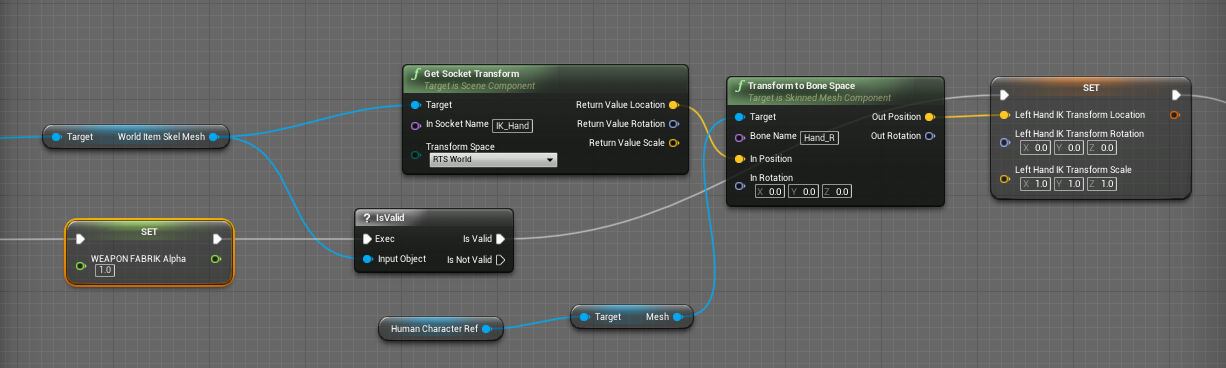
Everyone else on the internet is wrong. (Okay, not quite — though I spent a good many hours going through tutorials and not getting the results I wanted for left-hand IK. There are a LOT of t…
grizzled axle
then you can open the mesh preview window, play the game, and adjust the socket at real time to see when it's in right spot
plush yew
Okay i think i am understanding this a bit better
grizzled axle
because you need to find right spot and rotation for it to look right
plush yew
so IK can attach itself to where ever you assign it to attach to
so if i use l_hand, it will auto adjust thaty
okayy.
cool 🙂
very useful information, thank you
grizzled axle
you can also make "aim down sights" with ik that works on every weapon, they just need correctly placed "SightSocket"
plush yew
The thing about this
I created a function to update the socket for the location of the gun
can this cause an issue
 grizzled axle
you don't need to update it, you can attach the socket on the weapon mesh, so it moves with the weapon, then with ik, you try to get your left hand on the socket
or I mean, you first attach your weapon to right hand socket, then your weapon has own socket where the left hand should be, and you update your left hand with ik that looks for the weapon socket location/rotation
grizzled axle
then when you reload etc, you disable the ik or use the float variable to turn it off (1 == on, 0 == off)
plush yew
I would have to do this per gun
Now, in your AnimBP Event Graph, get your weapon’s skeletal mesh, NVM i can cast it differently
grizzled axle
you do the logic once in your players AnimBP, and each one of your weapon meshes have socket named the same way
grim ore
interfaces if you dont want to cast
real moth
Just a quick question...
Are Niagara systems deleted from the scene once they have finished (this system loops "once" mean it happens once then nothing else happens) as I cant seem to find them in the scene heirachy when spawned at run time
plush yew
grizzled axle
you do the logic once in your players AnimBP, and each one of your weapon meshes...
left arm is a little bit twisted but it should be an easy fix, thank you 🙂 I just got to fix the transform

 ancient lotus
question regarding physical material masks. ive set mine up and this is what the mask looks like. i perform a line trace and hit it and get the physical material, however it keeps returning default physical material instead of getting the physical materials ive assigned to the mask. it does work when i set the physical material to the material itself, but the mask portion doesnt work. im using the installer build 4.27Chaos

 plush yew
LOL
thanks for the help to bud, i was trying to fix this for like 5 straight hours yesterday, and thought my method was the only way to this madness.
grizzled axle
what happens if you disable IK when reloading?
grizzled axle
oh the animation
plush yew
it did it post IK
hold on cody lemme read your MSG
Set up your physical materials inside the Project settings itself
thats how i did something like this.
grizzled axle
@plush yew can you attach the mag to hand?
plush yew
grizzled axle
<@456226577798135808> can you attach the mag to hand?
going to try right now 🙂
ancient lotus
plush yew
LOL
if you use world location it will be a frame behind so you need to use relative space so you get the left hands location relative to the firearm, use the transform modify bone node to use the transform of the left hand which will make the mag snap and follow the left hand. you will want to get the offset of the time you grab the magazine though and apply that to the transform. this way you start your montage for reloading, at the point of the montage when you grab the magazine you get the offset and apply it to the transform your using, and use the alpha value of the transform modify bone node to attach/detach it from the left hand so here it would go from 0 to 1 (make sure theres no interpolating for this), then when you insert the magazine back in you do the opposite, you just set the alpha from 1 to 0 and the magazine is then detached from the hand
plush yew
hmmm
grizzled axle
@plush yew i think most games animate the weapon + character reload at the same time, so they stay in sync, but if you don't know how to animate, that will be very hard
plush yew
I spent over 5k on assets when i won 20k on a scratch off, my library is like 1.5 tb
i got em all
lol
ancient lotus
plush yew
thats how i did something like this.
no change with or without surface type. im using my own physical material class to avoid having to set the surface type to make life much easier. its just not returning the physical material its suppose to when it hits an area thats masked, even if i set the entire mask to be red it doesnt pick it up
grizzled axle
@plush yew you can try make the mag IK target, so your hand tries to follow the mag when reloading, not sure if that's gonna look good at all tho
plush yew
grizzled axle
<@456226577798135808> you can try make the mag IK target, so your hand tries to ...
Yeah I have so many guns with no animations. The anims are coming from another asset pack Trying to plug and play lol
ancient lotus
plush yew
Yeah I have so many guns with no animations. The anims are coming from another a...
if you dont have experience skinning and rigging, buy auto rig pro (well worth it), setup your mesh in blender with it, use it to skin and generate a rig and go that route to make your firearm and character animations
plush yew
i have it
ancient lotus
then might be time to use it lol
plush yew
just not an animation guy
ancient lotus
same
plush yew
truth
I can set up a complex code, but not figure this out >_<
Im going to set up a IK for the mag to be a target
hopfully this will be a ez fix
ancient lotus
then do what i did for my plugin, make everything procedural so you only have to animate a simple idle pose thats 1 frame and a reload animation lol
https://www.youtube.com/watch?v=c4SP2U116Sw&ab_channel=SneakyKittyGameDev
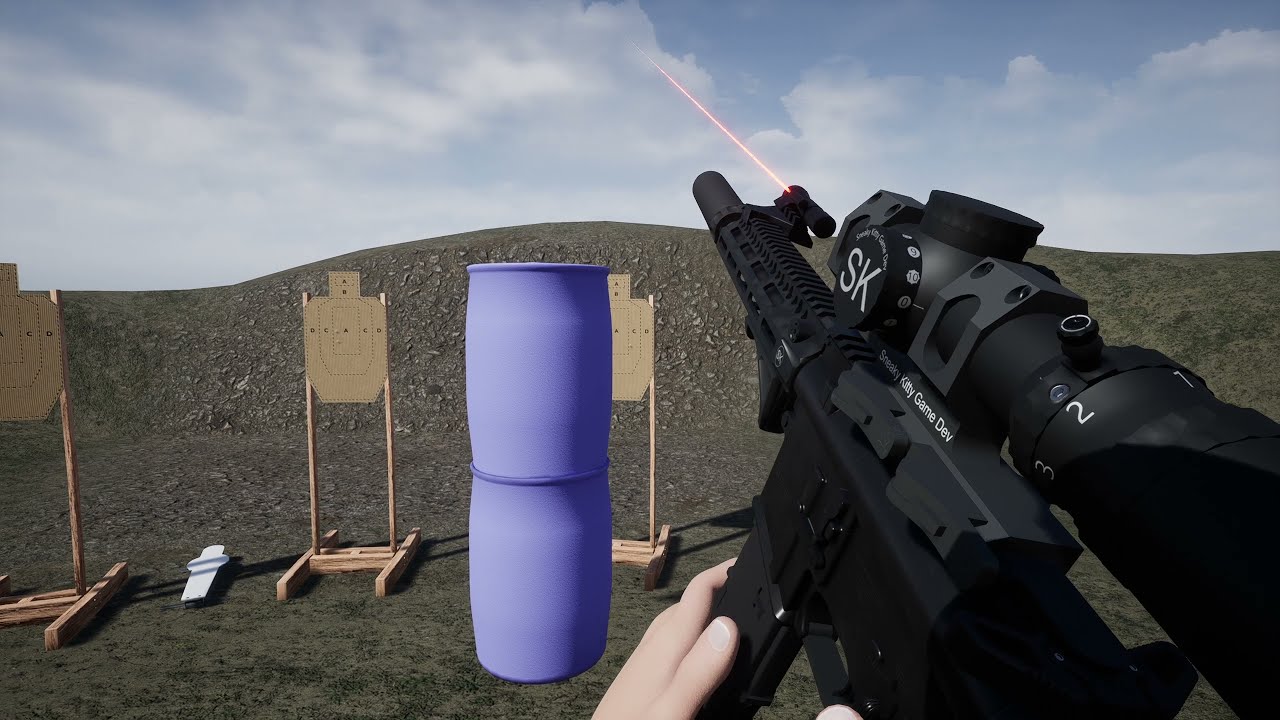
Ultimate FPS Template Plugin: https://www.unrealengine.com/marketplace/en-US/product/ultimate-multiplayer-first-person-shooter-template?sessionInvalidated=true
Patreon: https://www.patreon.com/SneakyKittyGaming
Discord: https://discord.gg/W5g6pZXfjh
In this video I'm just showing off the work in progress shoot house for the demo project. It now...
plush yew
Oh thats you!
ancient lotus
si
ancient lotus
i dont like me
plush yew
lmfao! naw i learned a lot from yoyur code 😉
ancient lotus
plush yew
lmfao! naw i learned a lot from yoyur code 😉
ah so youve picked up on all the bad habits XD
plush yew
ancient lotus
ah so youve picked up on all the bad habits XD
I learned to not use them and create a different chaotic method!
example one,

updating socket depending on gun
ancient lotus
plush yew
psh make a bone on the hand and snap that sucker to it
or use ik to move the right hand to the grip so each firearm has one socket where you grip it without the need to perform a switch
plush yew
ancient lotus
psh make a bone on the hand and snap that sucker to it
I broke my casting system, My TP gun and FP gun are just.. like hard to understand now sometimes i dont knopw which is which.
ancient lotus
plush yew
I broke my casting system, My TP gun and FP gun are just.. like hard to understa...
make a getter function. for example what i did for getting my first person and third person mesh is made a simple function so if your controlling the pawn (IsLocallyControlled()) then it returns the first person mesh, if your not (your remote) then it returns the third person mesh. makes it easier
plush yew
so many ideas. I might have to relook at your code
ancient lotus
plush yew
so many ideas. I might have to relook at your code
from which series
plush yew
i just like to build my own system other than what's on the marketplace.
i got finish this first, ill post in your discord later 🙂
ancient lotus
oh you are in it lol. sounds good
 vital mountain
Guys newbie question here
What it means "chaos" ?
I need to go 4.27 and i can't do it
ancient lotus
vital mountain
What it means "chaos" ?
its unreal engines new physics system to replace physx
vital mountain
It only shows 4.27.1 or 4.27-Chaos
ancient lotus
vital mountain
It only shows 4.27.1 or 4.27-Chaos
use 4.27 Chaos if you want to use Chaos in the installer build, otherwise you must build from source afaik
 obsidian nimbus
take 4.27.1
vital mountain
Do you know some way i can go with regular 4.27?
obsidian nimbus
why?
vital mountain
Plugins and Virtual Production requirements
drowsy snow
vital mountain
Do you know some way i can go with regular 4.27?
Again, take 4.27.1.
Chaos is not merged into main builds.
vital mountain
Yes i know but the other machínes have 4.27
And switchboard don't work fine with the hotfix
drowsy snow
The only difference in 4.27.1 from 4.27.0 is minor hotfixes rectifying lesser crashes.
vital mountain
Yes i know that but that minor change is a problem for me
 pseudo marten
hello, i kept running to this problem where it says Unreal Engine exiting due to D3D device being lost
 vital mountain
I need some way to get 4.27
pseudo marten
what is causing the problem ?
drowsy snow
vital mountain
I need some way to get 4.27
Build from source code. Problem solved.
vital mountain
drowsy snow
Build from source code. Problem solved.
From where?
Sorry i'm very newbie in this
drowsy snow
pseudo marten
what is causing the problem ?
Many things. D3D Device crashes is one of the more abstract errors, hard to pinpoint exactly the cause.
ancient lotus
vital mountain
Sorry i'm very newbie in this
open up UE4Editor.Target.cs and add this to the constructor with the rest of the stuff so it will use chaos
bCompileChaos = true;
bUseChaos = true;
https://www.youtube.com/watch?v=UGJggZKRhWU&ab_channel=SneakyKittyGameDev

Patreon: https://www.patreon.com/SneakyKittyGaming
Discord: https://discord.gg/W5g6pZXfjh
In this video I walk you through installing the UE4 source build, specifically 4.26 :)
pseudo marten
well i've done nothing to cause the problem, all i did was just launch new blank project and just place some actors in
pseudo marten
then it crashed due to D3D
drowsy snow
vital mountain
Sorry i'm very newbie in this
I would offer you my fork of UE source code, which is 4.27.0, but you're governing virtual production stuff, and I removed any VP plugins from it.
vital mountain
Someone experice with nDisplay here? I have some questions
drowsy snow
pseudo marten
then it crashed due to D3D
Are you running the editor in DX12?
drowsy snow
vital mountain
Someone experice with nDisplay here? I have some questions
#virtual-production might.
vital mountain
drowsy snow
<#780932636008120340> might.
Yes i placed my question there but no answer yet
pseudo marten
drowsy snow
Are you running the editor in DX12?
how do i check it ?
vital mountain
?
drowsy snow
vital mountain
?
#rules no.2
drowsy snow
pseudo marten
how do i check it ?
Okay, are you enabling ray tracing in your project?
drowsy snow
pseudo marten
i always turn it off
DX12 specific issues can be ruled out then.
You mentioned placing actors, does it happen with other meshes?
pseudo marten
yea
like i tried to move some textures into different folders
when i done that it crashed
or when i try to duplicate actors that i placed in
 tough ore
Hi friends. Hope I'm asking this in the right spot. Does anyone know if it is possible to set an automatic "Wrap Text" for a Text Render? (Basically having it so players can type in a message and it appears on a text render that I have on top of a screen). No rush and thanks in advance 🙂
drowsy snow
pseudo marten
like i tried to move some textures into different folders
Yeah, sorry, no idea about it. Might be specific to your GPU, because the error is resulted from hardware response.
pseudo marten
hmm
well i just updated my gpu driver yesterday
and after that the crash happens
just now i was just messing around with blueprint, didn't even touch anything beside that and Unreal crashed again
drowsy snow
pseudo marten
well i just updated my gpu driver yesterday
...are you using NVIDIA GPU?
pseudo marten
yea
drowsy snow
pseudo marten
yea
Seems like newer NVIDIA GPU drivers are oddballs with UE4, at least according to reports here.
This is not the case with AMD GPUs in recent years, so driver related issues is more likely NVIDIA's.
pseudo marten
what should i do ?
drowsy snow
pseudo marten
what should i do ?
Sounds counterintuitive, but try downgrading the driver.
Pinned messages section have some notes on it.
 lavish spruce
Not the identical issue here but since I've updated my Nvidia gpu Unreal is having a lot of trouble
So yeah, it seems like you should downgrade
drowsy snow
It doesn't even make sense how NVIDIA didn't rectify this. Their newer tech, as inaccessible as they are now, are the hot shit right now, and needs the new cards to work - which the older drivers won't have much idea how to make use of them.
 runic fern
Hi Guys what can i use for Desktop Screen share ingame plugin ?
I'm trying NDI but i should use 2 programs one for screen capture and one for monitor to get the input in ue4
 azure ridge
I'm wanting to have my UI overlay the game screen, but blur everything except the character. Does anyone have an idea how I can do that?
drowsy snow
azure ridge
I'm wanting to have my UI overlay the game screen, but blur everything except th...
If you use custom stencils to isolate the character: Add a simple HLSL blurring shader in a custom node to blur out things outside the custom stencil.
If you use scene capture + render target to display the character in widget: Add a Background Blur widget.
azure ridge
would that allow everything to show in realtime still?
 merry pendant
Hello, i have problem with my UV calculation for a procedual CubeSphere. There is a part where the UV are strange. and this is the c++ part for the UV calculation:``FVector2D AProcedualSphere::PointOnSphereToUV(FVector p)
{
p.Normalize();
float longitude = FMath::Atan2(p.X, -p.Y);
float latitude = FMath::Asin(-p.Z);

const float pi = 3.14159f;
float u = (longitude / pi + 1) / 2;
float v = latitude / pi + 0.5f;


return FVector2D(u,v);
}`` i hope someone can help me
 drowsy snow
azure ridge
would that allow everything to show in realtime still?
drowsy snow
azure ridge
would that allow everything to show in realtime still?
Either way are realtime.
Just that the latter has serious performance cost - Scene capture is extremely heavy.
devout whale
is there a way to disable bps, instead of temp deleting them, then adding them back
plush yew
how do you get additive layers to play in a montage?
 rotund scroll
devout whale
is there a way to disable bps, instead of temp deleting them, then adding them b...
rotund scroll
devout whale
is there a way to disable bps, instead of temp deleting them, then adding them b...
???
do you mean at runtime?
like deactivate?
or hide?
or whatever equivalent?
devout whale
no i mean is there a such thing where instead of deleating part of blueprint, i can just deactive it for a while.
ancient lotus
alrighty im having a problem creating a project using 4.27.1 with chaos. i set everything up and load it i my ide and set UE4Editor.Target.cs to have these properties
Type = TargetType.Editor;
BuildEnvironment = TargetBuildEnvironment.Shared;
bBuildAllModules = true;
ExtraModuleNames.Add("UE4Game");
bCompileChaos = true;
bUseChaos = true;
and it compiles just fine. i create a project called TestChaos from this engine version and im met with this
TestChaosEditor modifies the value of bCompileChaos. This is not allowed, as TestChaosEditor has build products in common with UE4Editor.
so i add these to my TestChaosEditor.Target.cs
BuildEnvironment = TargetBuildEnvironment.Unique;
bCompileChaos = true;
which then leads to a bunch of include errors when trying to compile the project
 azure ridge
i'm wanting to have a second camera on my character facing them that I can switch to, ideally blending the transition. I've found things like SetViewTargetWithBlend, but that only seems to work when it's to another actor's camera.
ancient lotus
azure ridge
i'm wanting to have a second camera on my character facing them that I can switc...
setup a scene component with the transform you wish the camera to have and interpolate your camera to it and then back?
azure ridge
I did think of that, but i was hoping to keep them separate so that I could have a Cine camera in addition to my follow camera
devout whale
can someone help me figure how to fix this issue. The model is fine outside the ue4, however when i imported the car two tires where flipped inside out, the rigging and bones are fine. just haven't gotten this problem before and i cant figure it out. Please help, thanks.
 ancient lotus
devout whale
can someone help me figure how to fix this issue. The model is fine outside the ...
ancient lotus
devout whale
can someone help me figure how to fix this issue. The model is fine outside the ...
just looks like your normals are flipped. check in your modeling software
devout whale
the blender file looks fine to me, thanks for the input though. ill double check now.
ancient lotus
devout whale
the blender file looks fine to me, thanks for the input though. ill double check...
enable backface culling
devout whale
in blender?
ancient lotus
yes, here i flipped the top face with backface culling checked
 azure ridge
i'm really really confused right now. I'm using AddLocalRotation on my character's mesh to flip them 180 degrees on the Z axis. the problem is, it only ever works every other time. I verified the function is actually executed each time, but every other time it has no effect
using SetRelativeLocation worked, just not adding it
 rotund yew
Ayo you guys
for naming convention, say for Example T-DojoWall-01-D
Should i put 01 even thought there is only 1 version of the wall?
grim ore
yes and no, 01 won't hurt (unless your near the file length limit) and you might make a variation later?
 fluid lance
I have an algo problem I can't solve. Not sure I can even explain it properly. Trying to do a small 3-deep tree structure and I have the following problem:
First array adds the items on the first row. 1 to n. For each of these, checks to see how many children, then loops through them and adds them on row 2. The problem is columns:
For columns, I add the index of the parent array to that of the child, so:
PA (parent array) i0 + 0 (row 0, column 0) =ok; i0+1 (row 0 column 1) = ok. But now the problem starts, since PA i1+0=1 again... So I have a problem when adding to the index 0 since it always overwrites one entry from the previous....
I'm probably not making any sense like this 😔
 rotund scroll
this looks like a thing that should be in cpp
fluid lance
i know no CPP 😭 I just can't freakin learn that stuff... no script whatsoever. Blueprints are visual but I just can't "visualize" code. Tried, idk, not smart enough
grim ore
you can always look at using one array, and just offseting based on the row length to determine rows. IF trying to figure out columns you can use mod to determine which column it might be in
fluid lance
@grim ore:O right! mod! Forgot about it! I'll try it right away, thanks! 😄
tho, i'll probably be back with another problem with it soon 😛
can't find proper information on treeview - that looks like it could solve my problem no matter the depth/# of elements, but not even you @grim ore did a tut on that, which is weird since you did on the whole engine lol
fluid lance
yea. Wish you still did those vids, they are just pure gold for people like me
grim ore
Ive been trying just busy with work, chances are with 5 coming out I will try and catch up
fluid lance
That would be amazing!
Yea, can't figure out how to run this through one loop...

since each of the structs have their own array of upgrades...
rotund scroll
store them in a variable?
I mean I hesitate to even give an answer given the excessive complexity of whatever it is you are doing
 dim dragon
I'm having trouble cooking a project. Is there a specific channel for questions around this or can you guys recommend somewhere I can ask my questions?
fluid lance
rotund scroll
store them in a variable?
Yep, did that, and bruteforced it. If i wanted to go deeper, it would probably break, but for a depth of 3 i just fixed it. Thanks alot! :)@rotund scroll@grim ore
@dim dragon#packaging is what you are looking for
dim dragon
fluid lance
Yep, did that, and bruteforced it. If i wanted to go deeper, it would probably b...
Thanks.
 compact patio
hi all,how u doing?
Got this problem i hoped any of yuo could help me with...
Im having this error "Swarm failed to kick off" when trying to build my lightning.
I have followed several videos on yt and a fair amount of forums.
it seems like i need to build the "UnrealLightMass" within visual studio.
Only problem ,it does not show up in the Solution Explorer from visual studio
Any tips?
grim ore
is this a source version of the engine you are using, or the launcher download?
and if its the source version, it should show up in the solution explorer under programs. Do you see the other programs in the solution?
compact patio
grim ore
is this a source version of the engine you are using, or the launcher download?
Ive downloaded unreal from epic store if thats what u mean?sorry kind a new
yes there are other programs in the program folder
grim ore
if you downloaded it from the epic store, from the launcher, then you dont need the source to install light mass it was installed already
so this is another issue
compact patio
ok thanks !!
grim ore
there should be logs when you try and run it, in the editor and on disk that tell you what went wrong
compact patio
know any other things that might cause this error?
it just said swarm failed to kick off..
grim ore
so the output log says nothing before that or after? and the saved log file is the same?
compact patio
it only says map needs lighning build
but cant cause of this error
so feel like im stuck in some kind of loop
grim ore
its weird the log says nothing. you might want to try and repair the install then from the launcher
compact patio
so reinstall unreal?
grim ore

when I remove the lightmass file and build I get a few messages in my log

and my swarm agent has more info
 compact patio
ok thnks gonna try rn
prime willow
sort of silly question
if i made a surface
and tagged a place like water with that surface
couldnt i use that setup for transitioning between swimming and standing instead of a box collision
grim ore
sure, just have to get that surface info somehow
grim ore
yep. there are physics materials that are normally used for stuff like that
prime willow
tagging the land area for land and use that for transitioning out of water via climb
oh
this means you could probably use surfaces for stuff like steel walls cant be penetrated but wooden walls have bullets pass through them!
grim ore
yeppers
prime willow
same for flesh and steel for gundam like characters
this is super cool
you can do so much with this xD
hilll/snow surface for sledding when sprinting downhill
sand for quicksand xD
nice nice
❤️
 dawn gull
What could I use to keep angles consistent at a different rotation? Probably not a good description so I'll do my best and try to draw it, but I have a specific limit that I want my random rotations to be at but I also want to do those limits on a slanted surface

I have the rotation of the plane that it's "projecting" onto
drowsy snow
dawn gull
What could I use to keep angles consistent at a different rotation? Probably not...
Context still not clear / XY problem "syndrome". Is this supposed to be a tracer? Character movement?
dawn gull
drowsy snow
Context still not clear / XY problem "syndrome". Is this supposed to be a tracer...
I'm procedurally spawning objects in with casts, but I want to objects to be in clusters, but the issue is that I'm spawning the objects onto spherical objects so the rotation is inconsistent with wherever i spawn the actors in
devout whale
is there a way to add this "Automotive Materials" asset to the 4.27.1 chaos project? says not available but thought ill just ask to make sure.
drowsy snow
devout whale
is there a way to add this "Automotive Materials" asset to the 4.27.1 chaos proj...
Last time I tried it, Automotive Materials can't compile properly in 4.26.
devout whale
it works with the 4.27, just not the chaos version
 pure briar
man the news here is unreal 
devout whale
yup thanks, already did. works perfectly
fluid lance
Jesus I hate UMG... "debugged" a widget that wouldn't behave as intended only to get a crash on undo and realize it was bugged and was actually working fine 😐
drowsy snow
fluid lance
Jesus I hate UMG... "debugged" a widget that wouldn't behave as intended only to...
They still haven't ruled out the undo crash after all these years it seems.
fluid lance
@drowsy snowYea, I'm fine with bugs "i know"... It was me being dumb, trying to undo the adding of a widget - so it's almost obvious it crashed. But still, I feel like there's nothing as bugged as UMG as a whole system in the entire engine. Why UMG is getting no love (not even in ue5) is beyond me. UI is such an important part of any game/application imo
drowsy snow
fluid lance
<@!325627930484932608>Yea, I'm fine with bugs "i know"... It was me being dumb, ...
Well, pros uses C++ most of the time, and if they use C++, might as well use Slate directly and build their own UI system as opposed to going through UMG
fluid lance
@drowsy snowI know, I've read that programmers and others that know cpp don't even bother with UMG - oh well, suits me for not knowing cpp. Beggars don't get to choose 😛
grim ore
umg is getting love, its just not like super big love that it needs. few more widgets, some better utility stuff, debugging, stuff like that
fluid lance
Is there actually no way of using scalebox to scale down a widget holding scrollboxes?
tried everything... I'm out of ideas 😐
 drowsy snow
Not sure about scale box, but I know size box works.
fluid lance
I've learned my lesson and always wrap everything in scale boxes, since I had a published game and someone reported they can't play in a weird aspect ratio resolution because some widgets were off-screen/overlapping...
grim ore
if your scale box is not set to a fixed size, that might happen
fluid lance
how do i set it to a fixed size?
oh...specified scale?
The setup is simple i'd say:

any other workaround to make sure widgets don't flow out/mishmash into each-other on weird resolutions?
drowsy snow
fluid lance
any other workaround to make sure widgets don't flow out/mishmash into each-othe...
Use Size Box.
fluid lance
@drowsy snowHow? I'm trying to get the exact behavior scalebox offers. How do I do that with a sizebox? I can't scale the sizebox down depending on how the user pulls on the window - or can I?!
compact patio
grim ore
its weird the log says nothing. you might want to try and repair the install th...
I got the problem,it was a mesh,replaced it and it cleared the error,really weird!!
But thnks for the help!!
was still lookin for if it wasnt for yourre help!!
drowsy snow
fluid lance
<@!325627930484932608>How? I'm trying to get the exact behavior scalebox offers....
Yes, you can.
I used scale box to get fixed aspect ratio for my pause menu screen.
 lucid grove
Hey fellas, whenever im zoom-out in widget - button image lines become broken and pixelated. I never seen this bug pattern on photoshop or other graphic programs, it just becomes less visible. Is there some setting i need to set or its normal behaviour and i need some graphic pipeline for small icons?

 dapper shale
Alright so I've never come across this problem before. How do I remove these floating spheres/icons?
 modest trench
dapper shale
modest trench
dapper shale
try pressing G for game view mode
...I think that's what it stands for
dapper shale
Ah yes, G worked. Thank you
fluid lance
@dapper shaleJust make sure you press G again when you want to actually do some work in the viewport otherwise you won't see any widgets/gizmos
drowsy snow
dapper shale
It won't show up in runtime/renders from sequencer.
dapper shale
drowsy snow
It won't show up in runtime/renders from sequencer.
I only wish to hide it because I'm doing a short film within this 3D model, so it got in the way quite often.
 drowsy snow
dapper shale
I only wish to hide it because I'm doing a short film within this 3D model, so i...
drowsy snow
dapper shale
I only wish to hide it because I'm doing a short film within this 3D model, so i...
Again, it won't show up in sequencer exports, which uses runtime mode, so don't worry much about it.
 upbeat dirge
not an engine issue but egl won't resume an engine download

any one got this issue before?
plush yew
So is spatial os even good
hidden dew
Oh damn I've been trying to figure out what's wrong with my material since last night, and all I had done was left dummy constants in some inputs facepalm
neon bough
for next time, there are debug nodes in material, just search for them
they can print values on your material
hidden dew
ty
charred ibex
style tips for naming interfaces?
exotic thicket
@charred ibex if it's BP, BPI_MyInterface, if it's C++, IMyInterface
 faint bone

 runic fern
Goodday guys..
Im working on Virtual classroom
Im using NDISDK to share screen into scene but on Android the screen is showing white
The rendertarget or the material using Emissive channnel
dapper shale
Sorry to interrupt. Any way to remove the shadows between the two green blocks?
 dapper shale
Yeah, that could work. How do I do that? Very new to UE4
exotic thicket
open the material, in the details panel it has shading model and change that to unlit
plush yew
Is there any way to set up Hand IK with an anim montage?
plush yew
dapper shale
Sorry to interrupt. Any way to remove the shadows between the two green blocks?
click on object, go in details click cast shadow to 0 but if its a full 3d model then idk if you want the shadow fdor the full vehicle
I hard coded montages into my game lol
and i am having issues with gun popping
_<
ik is the only way to fix that
What would a search for? nothing comes up for ik
I have the whole node set up for hand IK
left hand and right hand
Everyone else on the internet is wrong. (Okay, not quite — though I spent a good many hours going through tutorials and not getting the results I wanted for left-hand IK. There are a LOT of t…
I followed this guide
but i cant cast it to montages.
unless i turn it into a function
You know what, I think im going to just take another path with this and set it up correctly.
 dapper shale
plush yew
click on object, go in details click cast shadow to 0 but if its a full 3d model...
dapper shale
plush yew
click on object, go in details click cast shadow to 0 but if its a full 3d model...
This is what I have. Where is that option?
 plush yew
instead of this ill just put in anim graph.
plush yew
dapper shale
This is what I have. Where is that option?
Search detail, type cast shadow
Ohh i have them set up to default slot
dapper shale
still cant find it
 plush yew
your a genius. Ill just create a custom slot, and call it hand IK montages
and just call that for the hand ik
That is so much easier to understand thank you 🙂
 tender crown


 plush yew
Weird question
Is it better longterm to use traces or collisions actors for stuff like tracing mantle climb jump wall run etc
for parkour movement?
Yes
I noticed tutorials use trace channels
But amplify uses player dections
Which looks smoother in your opinion, what looks easier in your mind?
both work, make a decision
try them both out
Line tracing for it is a LOT easier.
Im thinking long term In a situation where my combat looks like this if using trace channels would of been smarter than using custom shapes and such for player detections than implement function



So far both seem to work fashionably but I feel even if im wrong that line tracing long term might have more possibility than shape based detection but idk Zzz
lol
Shape based makes me feel like im making a Nintendo 64 game xD
Its a hard system to accomplish tbh

Unreal Engine
The Parkour Movement System adds a host of parkour movements to your game (Vaulting, Mantle, Sliding, Horizontal & Vertical Wall Runs, Wall Climbing, Wall Jumps.) Ideal for games that want to give the player proper freedom of movement.
i bought this a while back
I know ;-;
Well I already have wall run sprint crouch jump slide and was working on a dinamyic climb system
Granted the zmiplfy has do much other stuff and stupid amounts of polish like omg
drowsy snow
plush yew
Is it better longterm to use traces or collisions actors for stuff like tracing ...
I guess you could improvise from how Valley of the Ancient did the vaulting, just reimplement UE5 specific stuff in UE4.
plush yew
Ohh thats genius.
Wait you can steal unreal 5 code backwards
why couldnt you?
i do it from 4 to 5 all the time
lol
drowsy snow
plush yew
Wait you can steal unreal 5 code backwards
Yeah.
Well, most of them.
plush yew
Because its forward compatible allegedly
I found a good climb setup

Part 2 of my UE4 parkour series.
Source code: https://github.com/DavieTi/ParkourProject/tree/WallClimbMantleTutorial
Updated Parkour video for Unreal Engine 5: https://youtu.be/jwPlvJRGbWE
I'm live streaming on YouTube now!
Second channel: https://www.youtube.com/channel/UChvKv1CiVjDkaxLqztIFRkQ?
Join the Discord! https://discord.com/invite/4dR...
thats the tutorial i followed
So I have sprint slide, crouch, jump, wall run and soon after reworking climbing like prince of persia
You know his tutorial is busted
LOL
prob he is a no namer
Yeh i followed his tutorial five times broken everytime
Realized he fixed it
Than added it to discriptoon
drowsy snow
I'd say that some UE5 stuff have parallels in 4.27 already
Also theoretically you could translate parts of the UE5 plugin code that uses UE5 exclusive framework modules, but that's a huge undertaking (even for myself)
plush yew
For download
let me open VOA
Im just trying to make something in between dragon ball xenoverse but with no flying lmao with movement like mirrors edge and the depth of customizations you have in yugioh decks combat wise
oops deleted it
100 gigs xD
And im slowly getting there tbh
forgot
Rip
Just not fast enough yk
drowsy snow
I've been considering to port World Partition down to UE4.27, but I have yet to figure out how UE5's engine framework parallels to UE4's.
plush yew
I haven't even touched unreal engine but I want to
However I keep being told its not production ready
I feel you tho, it takes time to make a game your way, so many things people do in tutorials that feel wrong and you get sidtraced when you want to chage something else then you notice something else
lol
I mean unreal five lol
I love my UE5 custom build 🙂
Sorry lack of sleep
But yeah the tutorials online don't give me what im trying to learn to do
LOL i work at 2 am, did not wake up till 4 said, fuck it ill just game dev
But thats not even my issue
Yup game dev means no sleep for days randomly
My main issue is I have no idea whats optimal or at least triple A level coding practies
Or what systems are best suited for my probable design
drowsy snow
If bringing down World Partition is not feasible, at least figuring out how to selectively unload layers in World Composition is one of the main goal. I have to unload the landscape levels when player is in enclosed dungeon.
plush yew
I just keep getting any angle will work no problem
Than run into issues for trying a method that should of allegedly worked no problem
Out of curiosity snow, are you using ALS?
Nope
I dont like it either
Too messy and confusing and I just want its animation layering and over the shoulder camera
was just asking it comes defualt with all that crap
YUPP
thats why the owner gave up
lol
I wanna make you walk normally than adjust for carry weapon or feminisnt body etc
Feminine*
drowsy snow
plush yew
Out of curiosity snow, are you using ALS?
I did use it, kinda understand where it's going to lol
plush yew
That way I don't need 8000 animations Just for movement alone ffs...
drowsy snow
At least not as complicated as ALS V3 did.
plush yew
snow you try this one?

Hey guys, in today's video I'm going to be showing you how to implement vaulting and climbing into your game. (Parkour). This is part 1 of a 2 part series. Check further down for credits.
Part 2: https://youtu.be/ox3osZiTOts
Parkour Animations: https://drive.google.com/drive/folders/1wnLAnQCy6SiwjIkyh5vijVdUuKi-tH8l?usp=sharing
Video Idea and...
No but might
Something I can't find a good tutorial for is this
That converts to
I do not know anything about root motion
lol
ill stick to FP shooters xD

I see it in assets but no clue where its being tesched
drowsy snow
I kinda dislike root motions, but UE5 has motion warping that can shift root motions.
plush yew
Hoodie any idea which one would be better suited for my goal
Shape detections or line rraces?
I wish i never wasted my $$ on this
pointless imo for my games.
drowsy snow
plush yew
Hoodie any idea which one would be better suited for my goal
I'd say line traces.
plush yew
Dang
I knew it
line traces are easier to understand in your own mind than anything else
I get line tracing and how to set it up
The vector break vector confuses me tho
How hard would it be to convert a shape trace setup into line trace
drowsy snow
At least based on rough look on Valley of the Ancient project (I don't use UE5), you would use line trace to detect for vaultable surface, and get the character into position with it.
plush yew
The code is there but its using a trace channels are replaced with trace shapes
Wouldn't I just create line traces for the trace shaping and be able to salvage all of the code setup?
If possible I'd like to keep amplifies systems some of them their really nice lol
Okay so i am having an issue but my hand ik is working 100%
got it.
nvm
lol
o.o sorry was making burger
your good man
i figured it out 🙂


all i had to do is create a new slot for the animation montage to NOT play the hand IK
drowsy snow
plush yew
o.o sorry was making burger
for me? 👉 👈
plush yew
I can not believe how advanced this shit is LOL.
as a high school drop out i love it

Come over and you can have mega burgeh
plush yew
plush yew
as a high school drop out i love it
Yeah unreal is really cool
plush yew
Holy crap i just wrote a universal code for updating the hand to hold the clip no matter the gun i am using... this is going to come in REAL HANDY! pun intended
 ebon stirrup
plush yew
Holy crap i just wrote a universal code for updating the hand to hold the clip n...
ebon stirrup
plush yew
Holy crap i just wrote a universal code for updating the hand to hold the clip n...
if you are using blueprints is is kind of a small code
can make in about 10 mins
BTW i get pun lol
plush yew
Not good with anims, this is ground breaking for me
lol
Its all based on montage updating hards.. i have been trying to do this for like 10 hours.
you said 10 minutes >_<
 ebon stirrup
 plush yew
LOL
ebon stirrup
plush yew
would you do it this way?
wait you do you mean IK
 plush yew

Unreal Engine
Strider is a procedural animation warping plugin which improves animation diversity via several additional animation nodes.
ebon stirrup
ima wait for free stuff
plush yew
Best way to take 4 directional anims and blend it to 8 way movement with out the use of blend spaces.
 worthy bronze
If I find outdated images in tutorials, is there a way to get them updated? (P.S. I really wish the docs were a wiki 😦 ) EDIT: okay turns out I'm dumb and that picture in particular is NOT outdated, but the question still stands
 broken spire
Is it possible to use LandscapeCoords as well as BumpOffset on the UVs node in Texture Sample?
drowsy snow
worthy bronze
If I find outdated images in tutorials, is there a way to get them updated? (P.S...
If that is the case (some pictures in other pages did), simply improvise it for newer versions.
It's unlikely that Epic will change them if it's not that huge of a change in newer versions.
ebon stirrup
drowsy snow
If that is the case (some pictures in other pages did), simply improvise it for ...
yeah true
the only node i saw changed is that "calculate direction ' node
broken spire
that worked, but now I keep getting these errors
 plush yew
Okay new issue i am having when doing is valid its returning to none, this is because i am trying to get the skel mesh of a child derived from the FP Gun Blueprint? How would i go about doing this correctly?
 broken spire
abs node? Sorry I'm totally new to unreal
also it says "sampler register index (16) exceeded" I see that I have a total of 16 maps... I'll try deleting one
thank you!
Ohh change the source?
Yeah when I remove a texture it definitely compiles, but if theres a way to add more, that's all I need is one extra map
drowsy snow
broken spire
also it says "sampler register index (16) exceeded" I see that I have a total of...
16 texture sampler is hard limit on DirectX.
broken spire
Ah okay, np, I was just trying to add height maps to my terrain
drowsy snow
There is Shared Samplers, said to be go up to 128, though I'm not sure how to use it properly.
plush yew
plush yew
Okay new issue i am having when doing is valid its returning to none, this is be...
Anyone :/
broken spire
Also, sorry one more question, is there a way to get rid of these seams? Or do they disappear when it builds?

 stiff bane
broken spire
Also, sorry one more question, is there a way to get rid of these seams? Or do t...
stiff bane
broken spire
Also, sorry one more question, is there a way to get rid of these seams? Or do t...
build the lighting
that fixes it
broken spire
Ahh okay thanks so much
stiff bane
make sure to build your lighting sometimes
for some more info, when you do that ue bakes lighting information in the texture so it doest have to calculate all of that at run time
drowsy snow
Also don't build the lighting until your scene is near final completion.
Sounds counterintuitive, but building the lightmap is slow as hell (unless you're privileged to own RTX GPU, then GPU Lightmass can reduce some time), and the time wasted better spend on actually assembling the level.
broken spire
Okay awesome, would it be possible to include a reference to a material? So I could just make the material I need, and put that into the terrain material?
drowsy snow
But for all intents and purposes, building the lighting is essentially baking ray traced lights and shadows information to static meshes.
broken spire
yeah my computer builds lighting pretty quick, and until I'm ready I avoid production quality, preview has most I need to "see"
drowsy snow
(and maybe volumetric lightmap as well)
broken spire
Volumetric? 😮
plush yew
drowsy snow
But for all intents and purposes, building the lighting is essentially baking ra...
this is why i love lumen 😛
stiff bane
that why everyone loves lumen lol
plush yew
WHAAAA
stiff bane
O_O
broken spire
But yeah, is there no way to consolidate all the textures, the base color, heightmap, normal, roughness, and reference that into the terrain material?
drowsy snow
I don't like Nanite either.
Reason being, I care more about low spec gamers, and I'm not convinced Lumen and Nanite will support lower end GPUs in its current state.
ebon stirrup
drowsy snow
I don't like Nanite either.
Reason being, I care more about low spec gamers, an...
lumen does not support potato GPUs BTW
plush yew

Unreal Engine
This unique and powerful shaders pack comes with a Landscape Auto Material that lets you easily paint multiple biomes, shaders that add dynamic effects to your objects, with everything textured automatically in real-time. #brushify to support the project!
broken spire
Yeah I'm there checking it out
plush yew
Brushify is well worth it.
drowsy snow
ebon stirrup
lumen does not support potato GPUs BTW
And I care potatoes more than any 3D game developers, really.
plush yew
for 10 dollars it givves you such a great idea how everything works
and he has a lot of tutorials.
broken spire
Wow that's so good
plush yew
Yeah
drowsy snow
Real time ray tracing, Nanite geometries, stuff that are not accessible by potato PCs, are bottom of the barrel for me. A last afterthought.
broken spire
But yeah I'm totally down for buying tools to make things easier, but I'm not there yet, I need to learn the basics
plush yew
i did everything backwards.
i bought all the tools to learn them while learning the basics.
lol
ebon stirrup
drowsy snow
And I care potatoes more than any 3D game developers, really.
great idea
but the world is changing so
potato < High spec
broken spire
So how do I reference another material...? lol
drowsy snow
ebon stirrup
great idea
but the world is changing so
potato < High spec
I'm imposing self limitation like that, in the hope that I'm not "too lazy" with things, and make my game more hardware inclusive and accessible, even by an average third world countrymen who want to play video games.
ebon stirrup
broken spire
But yeah I'm totally down for buying tools to make things easier, but I'm not th...
same but i dont buy
i wait until they are free
ebon stirrup
drowsy snow
I'm imposing self limitation like that, in the hope that I'm not "too lazy" with...
you do you
i am just saying
broken spire
so that's my spaghetti monster, but I want to know if instead of having two separate layer blends, can't I just reference an instanced material, this way I can include AO, height, roughness, normal, etc...??
 plush yew
in search details look for material attributes
check it
now you can blend
then you need to make material attributes
broken spire
ohhh "getmaterial attributes"?
plush yew
and then branch them
drowsy snow
I guess being a third world countrymen myself lead me to such self imposed limitations. I just relate to potato users more than high end users did, I know how hard it is to get access to the high end fruit in less developed countries.
Hopefully with my development rely less on exclusively high end stuff, I can prioritise more consistent experience with potato users, while also having the ability to put in the high end stuff for those who want to make use of it. That should include more optimised code, out of low end CPU necessity.
broken spire
Plus the more optimized it is the faster it will run for those high end gamers, if you can solve both, those are the best most easily accessible games
plush yew

 plush yew
I want to figure out how to enable AMD fidelityFX for Unreal engine
i really wish they would update the plugin
drowsy snow
dapper shale
Is there a way to change FOV?
 dapper shale
drowsy snow
dapper shale
drowsy snow
Ah brilliant, thanks
drowsy snow
(it's in degrees btw, not in mm)
broken spire
I still don't get this use material attribute thing it just disconnects from the main material
basically just want to do this

and get rid of the nonsense at the bottom so I can have more than 16 maps for my terrain
broken spire
I shouldn't have to buy anything though it's built in the program
broken spire
sure 😄
drowsy snow
broken spire
and get rid of the nonsense at the bottom so I can have more than 16 maps for my...

Unreal Engine Forums
Just getting around to optimising my materials and wanted to know about the “Sampler Source” property in a texture sample, and can’t find any documentation about it. I understand this can reduce texture samplers so is good for landscape when you run into the limit easily, but what about just using it in a regular material (where you are not nec...
broken spire
I'm just trying to combine materials for the terrain
In unity I just use my materials, it's so simple


 broken spire
Yeah I wish my brain could keep up with what I'm trying to say xD
plush yew

goldensyrupgames
For the island used in Tropical Manipulation, I wanted a simple material applied that I could quickly tweak to get a great looking island. I investigated using landscape layers, but found that for what I was using it for (an unchanging backdrop to the game) they wouldn't be necessary. Here's what I wanted from the material: Different areas based...
Download that project
take a look at what he did
and try to understand from that
broken spire
like I'm not trying to access the mainframe to the international space station and write all these functions, I just need a material to show up on my terrain
that's already way too much
 plush yew
Thats how it is bud when it comes to materials
lol
a BIG mess.

Today we have a look at how we can sample the landscape layers and build up our own landscape material that uses Height map blending and layer order to give us maximum control over how things blend.
If you have any questions about Game Art VFX or the Unreal Engine then email me: tharlevfx@gmail.com
Or you can find more tutorials on my website...
There is no simple plug and play for what you are trying to do.
UE offers no such things.
broken spire
The texture is almost there, I just need one thing to cooperate
 plush yew
very detailed 😉
broken spire
a lot of work went into it a few years ago, just repurposing it cause I never got a chance to use it it was meant for Arma lol
plush yew
i thought that was mars
broken spire
It is supposed to be mars, I would love to have a mars map in arma but it's too clunky and I've got bigger goals lol
plush yew
broken spire
It is supposed to be mars, I would love to have a mars map in arma but it's too ...


I made this the other day
its low gravity on jumping.
plush yew
broken spire
material attributes!
?
broken spire
 plush yew
i told ya
lol
You can do all this in Material functions too
to make it not so messy.
broken spire
Ah nvm, that's still increasing the texture sampler
 loud panther
hei guys i have a question. Basically a game called dungeon defenders 1 was built upon the UDK. It is already very old. The devs of this game release the source code in order for people to freely mod what ever they want. A while back i started rebuilding the game using the source in UE4. The devs only stated that they dont care how and where the source gets distributed as long as theire .exe does not get distributed with it. I would really like to release my project for the community of the game, so is it somehow possible to have the project run with the .exe of the devs? (i think the .exe only has some code for executing the game, its only 80kb after all)
And i really dont want to get on anyones bad side
drowsy snow
loud panther
hei guys i have a question. Basically a game called dungeon defenders 1 was buil...
If you mean different engine but the exact same executable, then no. UE3 and UE4 is in many ways drastically different (as both were built in parallel, unlike UE5 that directly proceeding from UE4).
exotic thicket
also whenever you use some source/content like this, if you want to make sure you're doing everything by the book, you'd want to contact the original authors
and/or rights holders
loud panther
Yea, but the original authors are not really available for this, i know what i can do with the source, the problem is how to accomplish that
plush yew
Yeah this happened with this

Kotaku
Back in 2016, an ambitious group of fans began work on an Unreal Engine 4 “reboot” of role-playing, light-sabering classic Star Wars: Knights of the Old Republic called Apeiron. The project has made impressive progress since then, but it emitted a tragic Wilhelm scream this week when Lucasfilm lawyers zapped it out of…
loud panther
i need a way so people cant play the game without them having the base game
plush yew
They where doing the method you just said.
broken spire
I have 5 main materials, but they can just use diffuse and normal. But one of them needs AO and height. So 12. But when I add those I still get the sampler register index (16) exceeded
loud panther
Yea true, but the devs even stated: Spread your modifications: We allow your own creations to be distributed the way YOU want - as long as you do not include our executable file (exe).
broken spire
they just don't want people getting the game for free
loud panther
exactly, thats why i need to find a way somehow to run the game only if people have the base game
and i also want to do it, cause i hate pirates
drowsy snow
The main problem here is trust.
Are you sure you don't miss a fine print or unclear wordings that could legally hamper your effort?
How do you even verify the executable file to stop piracy? For all I care, I can just make an impostor .exe file and run away with it.
broken spire
Can you not just explain to the user who's bought the game, to install the game, then download your mod, extract, etc... then drag and drop the exe into your game?
drowsy snow
broken spire
Can you not just explain to the user who's bought the game, to install the game,...
No, people can lie with this, all it takes is just smooth talking, a pirated copy of the game, and get away with it.
broken spire
Ah fair enough
loud panther
Well, the game is massively pirated anyway, but people cant play online as it has a steam check in place
i just want to make it as hard as possible for people to get their hands on a free copy
drowsy snow
loud panther
i just want to make it as hard as possible for people to get their hands on a fr...
And that's one way to hamper your effort.
Again, you have to be paranoid for that to actually succeed, and some mods that can't run on its own managed to exploit it, but it'll be a problem once you bring your own executables, and considering that (for all intents and purposes) UE3 is not forward compatible with UE4, as with the case in UE4 and UE5.
plush yew
Im not good with 3ds max, but i have it. IF i took a 3d model that is around 25k poly, can i up the poly to 50k and it will look better with no effort?
loud panther
So basically my only chance in somewhat getting the result is building an external launcher maybe, that checks for the game in steam or the signature of the base .exe and only then allows the start of the game maybe
drowsy snow
plush yew
Im not good with 3ds max, but i have it. IF i took a 3d model that is around 25k...
You could, it's subdividing, but at least in Blender, you can't apply subdivision if there's any morph targets present.
plush yew
drowsy snow
You could, it's subdividing, but at least in Blender, you can't apply subdivisio...
So a low poly screw on lets say a gun, looks octagonal, it will make it well rounded automatically?
drowsy snow
loud panther
So basically my only chance in somewhat getting the result is building an extern...
Maybe that's feasible, but what if I hack through the launcher? Or even worse, you use "open source" locks, and I directly reverse engineer it from the source code itself?
Yay, free game! Again, UE3 files aren't compatible with UE4.
broken spire
Depends on what the model is, you can use turbosmooth on lets say a rounded object
plush yew
this is good info 🙂
loud panther
drowsy snow
Maybe that's feasible, but what if I hack through the launcher? Or even worse, y...
Well yes, but if you can hack through it, you can also hack the base game
broken spire
So, I'm trying to figure out where in the official documentation where to call a material inside another material? Can anyone direct me on it, or a video explaining exactly that?
loud panther
the base game already released all its source, including the .exe source
the base game source is already in 100s of shady forums, so in theory you could just DL, build it and you got your free game
drowsy snow
loud panther
the base game already released all its source, including the .exe source
The game source yes, but the content can still be copyrighted.
Look at how id Software games before id Tech 5 have their engine open sourced, but the content still have to be obtained legally.
Repeating myself - UE3 files are not compatible with UE4, how do you going to get your mod use them as is?
plush yew
Oh yeah i forgot about that
drowsy snow
And before you said about "hash comparison", FWIW, pirated games can still have most of the files having same hash codes.
plush yew
this is why cod has its own engine because of this
broken spire
this >_>
 loud panther
I know i know, but the devs allow any of their assets distributed as needed, except the .exe. I got a hold of one of the devs 1 year ago and he just stated "do whatever you want with the assets, as long as you dont release our executable". I tried to get more info but never got a reply. E.g what happens if i release my own .exe and what not.
drowsy snow
loud panther
I know i know, but the devs allow any of their assets distributed as needed, exc...
Main take away from all the paranoia challenges I present to you is be safe than sorry. DMCA takedowns and C&D letters can be frustating to deal with, lawsuits even more so.
exotic thicket
Don't release their exe. Isn't that pretty simple to understand
If you build your own exe from your own code, it's not their exe
loud panther
exotic thicket
If you build your own exe from your own code, it's not their exe
well yea, but it sounds too easy. Sadly they never release a eula or license agreement with the source which is kinda annoying. Only that little text where they state this
exotic thicket
Well then it's pretty much "proceed at your own risk"
drowsy snow
If you want to do it, do it at your own risk.
exotic thicket
for a hobby project it might be fine, for a serious project where you hope to maybe make a buck or two? I don't know
dawn gull
Is there any way to change how debug lines are rendered so that the source of the line doesnt need to be in the viewport for the entire line to render?
loud panther
exotic thicket
for a hobby project it might be fine, for a serious project where you hope to ma...
Nah, i have 0 intention of earning money with the project