#ue4-general
1 messages · Page 1062 of 1
 full lodge
thats why i decided to use e.g., UE4_LOG to just print it, but I need a one line of code to add to UE4 engine
 sterile lichen
which value? (class:field name)
full lodge
for example this one

or this one

I dont want to change her, just only to read a value and accumulate for instance
 prisma marlin
does anybody know how do they make such a dense grass without loosing much performance! i know they use LOD but still they have to make such dense grass....so i want to know is that we should normal foliage tool or is there any different method to achieve this result ?
 full lodge
You would like to see moving grass?
prisma marlin
its fine if grass is static with no wind or anything
 sterile lichen
full lodge
<@!203202200615387136>
sterile lichen
full lodge
<@!203202200615387136>
when you open the project it does a first run of UBT so you have to wait a bit. if not that then kill them in task manager.
full lodge
okay, I killed the process
Building one more time...
seems correct @sterile lichen

I hope, that process finally will end up with success state...
long time no see this utilization XD
 sterile lichen
as i said before, ExpensiveBuild turns your PC into a pumpkin after a month trial
 ebon marlin
Is there any way to search for console commands?
Like some 'find X' prints a bunch of commands with X in their string?
full lodge
sterile lichen
as i said before, ExpensiveBuild turns your PC into a pumpkin after a month tria...
hahahaha
full lodge
sterile lichen
as i said before, ExpensiveBuild turns your PC into a pumpkin after a month tria...
yes, but I deleted this Incredibuild
@sterile lichen
 full lodge
but it seems to be hanging at the same point hmm
@sterile lichen I hope I am not interrupting you much...

hmmm
 ivory spire
does someone have a tutorial for physical rigging in unreal ?
like, making those physical skeleton things
i can't seem to make it work
prisma marlin
prisma marlin
does anybody know how do they make such a dense grass without loosing much perfo...
does anybody as solution for this?
ivory spire
prisma marlin
does anybody as solution for this?
probably normal mapping and some trickery
prisma marlin
but those looks like actual geometry
 thick herald
thats where the trickery comes in 😄
prisma marlin
and i have seen some scene where i can see actual gemetry grass
 wary wave
I have doubts there's any actual geometry there
I mean if you look at the boots in the foreground, they appear to 'hover' over the ground plane, because there's no geometry between the boot and the camera
prisma marlin
thats what i thought at first but another scene i saw some grass was showing between camera and goal post
let me see if i can find the image
thick herald
The goal post never moves so having some static meshes around that isn't going to affect performance 🙂
 distant hamlet
does anyone know how to get these in play mode
 sterile lichen
full lodge
sterile lichen
full lodge
that means it is done (sor for late response)
 sterile lichen
👏
full lodge
I decided to restart PC copy UE4 source engine (backup) and try agian
and works
ahhh, I was building engines many time, but this time will be put into my mind....
 raw forum
Hi everybody. Can you please tell me after I switched to ue5, my LODs 0 are loaded at a minimum distance from the character, and some do not load at all?
ebon marlin
Does enabling Nvidia reflex just amount to enabling the plugin? Are there any console commands I should know of?
 lyric cedar
is there a command i can do to specifically change the size of my editor window?
 solid swan
Hi Guys, do you know which Nvidia Studio Driver should I use for unreal 5 and 4.27 to have possibilities to correctly run the path tracing?
 shadow ravine
Can anyone point me in the right direction for getting my ALS character to work with two handed weapons. My right hand connects to the socket fine but the left hand is floating all over the place? https://youtu.be/6S94ckv9_lk

 wind cape
So I've tried using a Orthographic camera, downscaling the game to 640x360, and then moving the camera exactly 4 units every time to try and simulate a pixel perfect look, although this doesn't seem to work, is there some good way of retrieving pixel size in unreal units?
 mystic jewel
c sharp fcked my mind instantly
 cedar wave
shadow ravine
Can anyone point me in the right direction for getting my ALS character to work ...
cedar wave
shadow ravine
Can anyone point me in the right direction for getting my ALS character to work ...
This is what I've used in the past. Has worked thus far for me. Only issue I encounter is having to play with the IK socket on the weapon. It has never worked for me the way they're showing. But other than that, works like a charm.
https://zaggoth.wordpress.com/2019/01/26/ue4-tutorial-the-right-way-to-do-left-hand-weapon-ik/
 dense wren
hi guys i need help with a dash action i`vmade
actually, 4 dash actions
1 for each direction
they work with double tap of the keys
w+w, a+a, d+d,s+s
the thing is they mix with each other, for example.
if i pres w+a
the A+A gets triggerd, and if i press, a+s, the S+S gets triggered
depending which i pressed last
 grim ore
keep track of just the last key pressed, and compare that last key to the current key?
dense wren
how do i do that
grim ore
how do you keep track of them now?
dense wren
would you like me to share you my screen and see the blueprint?
grim ore
I wouldnt
dense wren
or i could send you a picture, wait just a sec

there
thats 2 the forward and the right dash
grim ore
yes, your pressed amount means nothing
its tracking any of those keys being pressed, not which ones
dense wren
there are 2 more under those two for the other directions
dense wren
grim ore
its tracking *any* of those keys being pressed, not which ones
right
how do i track them?
should i create a variable for each?
grim ore
dont keep track of the pressed amount #, keep track of the last key pressed and check against that. and set it to nothing. your doing it with the integer, do it with the key now
grim ore
the same way you are doing it with an integer
dense wren
with a branch, and a is dashing? variable?
grim ore
so this is how I would do it, its not perfect (you should use key bindings not direct keys) and its not battle tested
but it works
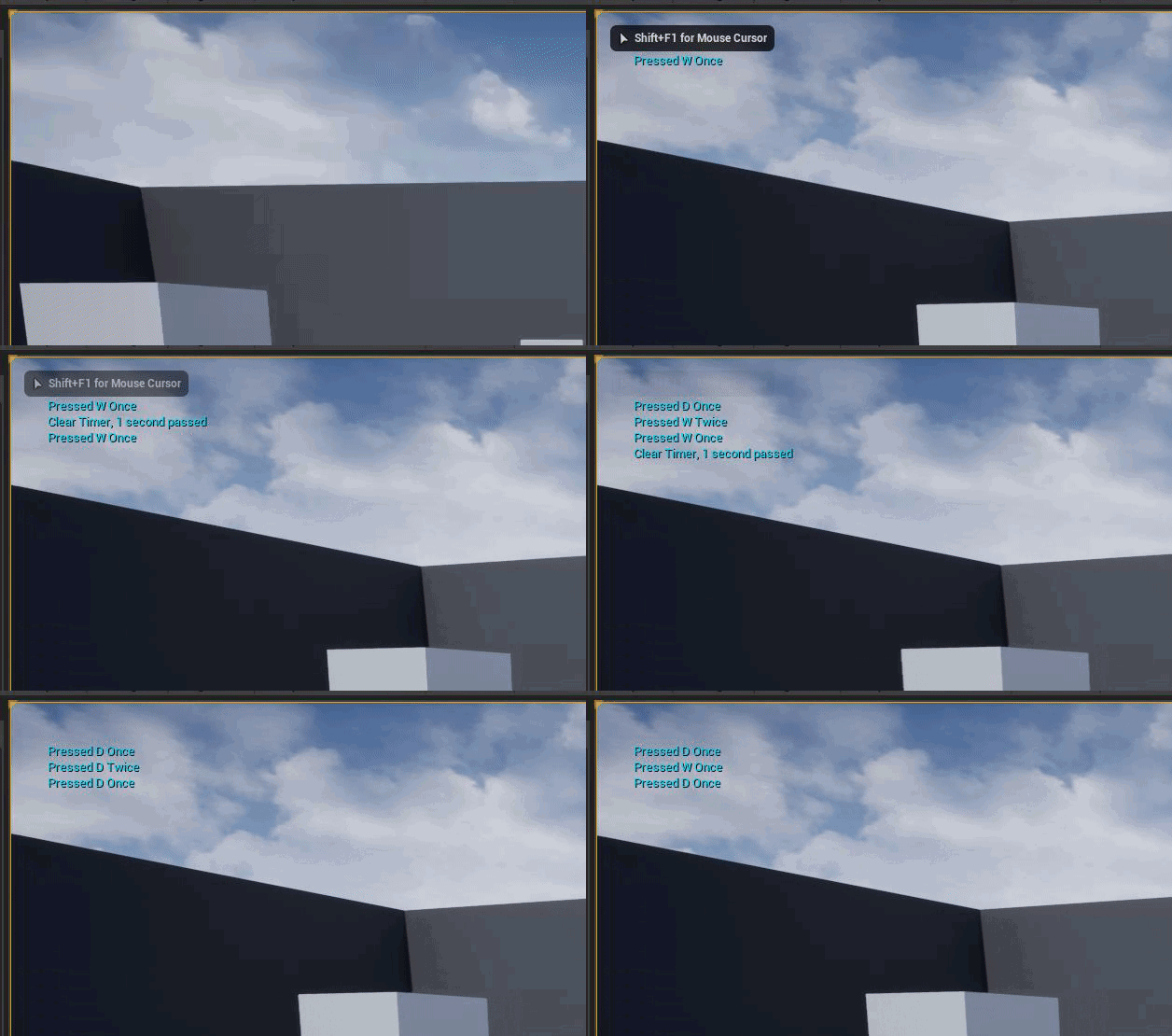
key is pressed -> is this key the same as the last key pressed that we saved? IF so we pressed it twice, set our last key pressed to none (since we want to reset our key presses now), and set our timer back to nothing (should probably clear and invalidate the timer honestly)
if the key is pressed and its not the same as the last key pressed, we pressed this one for the first time, set our last key pressed to this key, and start our timer (this resets our last key pressed after 1 second back to nothing), and saves a timer handle so we can clear out the timer later when needed
Heres the fixed image with 2 buttons tested and working

yes its more advanced than you figured out, but its a more advanced topic you are asking about
 dense wren
Thanks!, imma look up into it right now
 uneven gale
Hi , sorry about entering now, but, in your opnion, wich is the best free Crash Course of unreal c++ ?
grim ore
do you know C++?
dense wren
grim ore
Heres the fixed image with 2 buttons tested and working
so i should add all that right before my double tap function?
grim ore
you can see exactly how I did the code and how it works, you put it where it works for you
dense wren
uneven gale
Hi , sorry about entering now, but, in your opnion, wich is the best free Crash ...
there are some good ue4c++ tutorials on youtube
dense wren
grim ore
you can see exactly how I did the code and how it works, you put it where it wor...
right thanks you m8
uneven gale
grim ore
do you know C++?
yes, but i know c++ with QT 😅
grim ore
so you know C++ the language itself?
uneven gale
grim ore
so you know C++ the language itself?
yes
uneven gale
dense wren
there are some good ue4c++ tutorials on youtube
Please , did you recomend one ?
grim ore
do you know UE4 yet? the basics, blueprints, etc?
dense wren
uneven gale
Please , did you recomend one ?
i will send you one
uneven gale
grim ore
do you know UE4 yet? the basics, blueprints, etc?
yes, i'm even launched a game
full blueprint, of course : https://store.steampowered.com/app/1199770/TaskForce_Gamma13__An_SCP_Tale/

Gameplay Focused on the classic style of the award-winning Resident Evil 4. Investigate and get involved in the world of scp, starting here a journey that will expands to worlds and totally unexpected situations in the next chapters. Save your few ammo and walk carefully, watch for sounds, use your flashlights wisely. Your strategy must be car...
Price
$1.99
grim ore
https://www.unrealengine.com/en-US/onlinelearning-courses?tags=programming check out some of these courses then, theres one in particular which is BP -> C++ which would work well
the kickstart is good as well
uneven gale
grim ore
<https://www.unrealengine.com/en-US/onlinelearning-courses?tags=programming> che...
thanks ! i will start now
dense wren

This Video:
In this video, we look at the header and the code files that are created whenever you create a new C++ class.
Intro to C++:
Intended to be the true intro to C++ for UE4. This playlist is intended to focus on one topic at a time and explain how, why and when they work. Think of it as documentation in video form.
Consider supportin...
he has a playlist
with all the basics and more
uneven gale
thanks ! i will start learning today !
dense wren
awesome
uneven gale
both of you are my heros today , thanks a lot !
dense wren
not a problem friend
 mortal cedar
I have an unwanted behavior in the enhanced input mappings.
I setup an axis input. In old input bindings opposite keys on the same axis cancel each other (W and S for example for walking, if you press them at the same time the summary axis value will be 0, so your character will stay in place). In the enhanced input, one of keys always wins the concurrency, and by pressing two opposite direction inputs, the character keeps walking. Just simple "by the book" setup
 dense wren
grim ore
Heres the fixed image with 2 buttons tested and working
dense wren
grim ore
Heres the fixed image with 2 buttons tested and working
what variable type is the blue one, just key? or key event
grim ore
@dense wrendrag off the key pin on the key event and tell it to promote to variable, this makes the correct one for you automatically
dense wren
ohhh
nice why didnt i think that
im not allowed to connect anything into the == unless its an enum
grim ore
when I created that I dragged off the key and typed == to get the equals node, then i dragged off it again and promoted to variable to get the variable, then I dragged in the variable to compare it
dense wren
oh, hehe so much thanks
 static warren
Hey guys, would anybody know how to do an omnidirectional "dash" ability that also sends you upward or downward if that's where you're looking? This is what i have so far but it only sends you forward in the direction you're facing.

 torn pilot
i'm having a strange behavior, There are 3 Levels of ActorComponent Inheritances which each add their own default sub objects. The problem is, that within the blueprint, the details view is empty depending on which level i declare the component as a UPROPERTY. Log is empty, im kind of at a loss why or how this is happening. Anyone experienced the same issue before and knows how to efficiently debug it?
dense wren
grim ore
when I created that I dragged off the key and typed == to get the equals node, t...
what did you called the function name in set timer by function name?
oh got it
you created the custom event
right?
grim ore
@static warrenchances are your actor, if its a character, is not rotated on the Z (your capsule doesnt rotate, the camera in it does), so get the cameras rotation and not the character
@dense wren yep
torn pilot
@static warren get the actors key input, multiply the force by the normalized key input (thats left right). Then get the LookRotation of the actor and add that (force * LookRotation) to your impulse vector
static warren
grim ore
<@!827307507679494205>chances are your actor, if its a character, is not rotated...
Tried this, but I'm getting an error for the target and it won't attatch to the camera when i drag it in
dense wren
grim ore
<@!827307507679494205>chances are your actor, if its a character, is not rotated...
should i connect to my dash code, from clear and invalidate? or set timer by handle?
static warren
 dense wren
its like i have to press it 3 times for it to work
grim ore
yes your not getting the camera manager which it wants, you dont need that you can get the component and get its world rotation
dense wren
grim ore
yes your not getting the camera manager which it wants, you dont need that you c...
there is still a problem,the game receives as if a+s work together
but they shouldnt
w+w is one thing and a+a its another
but im normally walking and i press , a then w just cause i want to walk in a diagonal
then actor performs the dash based in the last key pressed
grim ore
so what is the order of the keys you are pressing?
dense wren
it depends always, but i dont want to throw a random dash when im walking just normal
so if i walk in a diagonal, pressing a+s cuz i want to walk to walk backward left, instead it triggers a dash
grim ore
yeah no issues here with my code doing that
dense wren
but dash its only for a+a, w+w , s+s, or d+d, not (a+s, s+d, d+w)
grim ore
theres no way for it to ever do that with my code since you are only ever storing the last key and comparing it
so A + D could never trigger
dense wren
is it maybe because i`v set the same integer for pressed key to all the dashes?
pressed amount i mean
look
grim ore
well you should never be checking the # of keys, my code never did that
you should be comparing the last key to the current key since all you care about is it being pressed twice in a row within a time

 grim ore
yep and no point do I ever check the number, that is the problem with your code and what we are not using
dense wren
grim ore
yep and no point do I ever check the number, that is the problem with your code ...
ofcourse, its actually my starting problem
not cause by your code
grim ore
my code works as is, and the two parts in each one pressed once and pressed twice, the print strings, are where you put your special code. somewhere in that part of the graph
 plush yew
Hi Everyone. I am pretty newbie to UE4 and joined here in case that I would need help or I would have some questions. First thing i've noticed after launching UE4 is similarity to Source Engine Hammer Editor where I'm pretty experienced so that's pretty good

 dense wren
i think i found the problem

i create a integer, called pressed amount 2
it seems to work now
but i bet there is a more simple and better way to do it
grim ore
yep its the way I did it
dense wren
another question, how do i create a folder in variables to store variables?
and not have a mess
 strong sapphire
Hi guys, how to use Tab or Esc for game input in PIE?
wary wave
you cannot
grim ore
@dense wrenyour variables have Category names, change those
dense wren
nice thanks
shadow ravine
cedar wave
This is what I've used in the past. Has worked thus far for me. Only issue I enc...
I've been reading though the document you sent over, where is he getting the target from for the world item skeletal mesh
cedar wave
What do you mean?
Set a socket on your weapon - that's all you need to do
Afterwards, it's just following the blog post. Adapt the character skeleton to w/e skeleton you have of course
 burnt lichen
To be sure, even though you can't test in the editor with this key, placing "input key Escape" to pause the game and show the menu will work when the game is packaged right?
grim ore
@burnt lichenyes, you can also change the default keys in the editor for stopping playback or test in standalone in the editor.
 burnt lichen
grim ore
<@!251807857715052546>yes, you can also change the default keys in the editor fo...
burnt lichen
grim ore
<@!251807857715052546>yes, you can also change the default keys in the editor fo...
Awesome, thank you.
grim ore
just remember when you do that, rebind it to something else or you have to use shift-f1 to let the mouse go so you can stop.. or you are stuck lol
shadow ravine
cedar wave
Set a socket on your weapon - that's all you need to do
Okay so I've got the updated bp using the guide but for some reason his arm is glitching out


 robust marten
No joke, my character BP wont work unless I shove an invisible zucchini up his ass. For SOME reason he has zero collisions if I dont set this zucchini collision to block all. I chose the zucchini because it's the smallest SM I have right now. My Character doesnt even inherit from another mesh so idek whats going on and why this is happening.

 severe brook
What does this mean/ i try to install on 3ds max 2020?
 grim ore
@final moththe level stops working, or the engine/game crashes?
 final moth
crashes
grim ore
the entire engine/game with a crash reporter screen?
grim ore
post the crash report or a screenshot or something
final moth
you mean here?
grim ore
or somewhere else you want help I guess
final moth
shall I zip it?
grim ore
well assuming its the crash reporter, a screenshot should be fine
final moth
ok, well, I already replaced level with the saved backup version
so I do have a crash report as a file which unreal created, but I decided to move on, I do have a deadline. So I will just rebuild the elements which were new after the last backup
grim ore
ah
final moth
I have my suspects, in the asset created by houdini engine.
it did act weird
but thanks for the response, respect!
 hallow void
Hey guys, just a brief question, an advice, since I am a game developer who's trying to make a quality game all on my own, would you recommend me to learn C++ and use it vastly or just stick to blueprints as much as I can?
grim ore
do you need C++ for anything you are doing?
in the long run, sure, learning C++ will be a benefit if you have the time and desire to learn it. If it takes up time from actively developing and you never use it... then...
hallow void
grim ore
do you need C++ for anything you are doing?
Well, I'm creating a first person shooter, all the main features like moving, jumping, flying (my character has wings), flashlight and stuff works, I have done it in blueprints and found no flaws, I just stumbled upon a problem with weapon inventory and since I found no tutorials I just chose to deep learn Blueprints, and since they're based on C++ I thought it would've been useful too
hallow void
grim ore
in the long run, sure, learning C++ will be a benefit if you have the time and d...
Ok, so, if I need it or if I have time, I'll learn it, thanks for the advice
cedar wave
You can make an entire game in BPs. No need to drop something that works.
As everything - use the right tool for the job.
hallow void
Ok, thanks a lot 🙂
grim ore
yep yep what they said 🙂
hallow void
Thanks a lot, see ya 🙂
 prime willow
@grim ore i heard you can lock your game to a certain graphic settings like 1080, 4k, 2k etc
is that true because i want my game to be capped at 1080p o-o
 gleaming lotus
Need advice on how I might create/store data for a little prototype system I'm working on.
Essentially the game I'm working on has lots of factions, each faction has their relationship with another faction (friendly / neutral / at war).
In the game, the player can create their own faction, join a faction, or an AI might create a faction.
Any idea how I could store this data? A struct probably wouldn't work as it needs to be scalable for other factions.
grim ore
@prime willowin theory you could, just dont let them change it outside of your menus. You can try and force the resolution back down if it goes higher but theres always command line stuff and the .ini file. People will find ways around it if they want
sterile lichen
gleaming lotus
Need advice on how I might create/store data for a little prototype system I'm w...
create a gamestate or gamemode diplomacy management component and enum defining relations (friendly/war/neutral), configure it based on game mode rules
as the sides - let it be some uobjects containing data or structs (i personally prefer objects) and let them be also in game state TArray<UFaction*> factions etc
then diplomacy would be a square matrix of size equal to number of factions and relationship state as value (struct or enum, depends how complex you want it to be)
gleaming lotus
sterile lichen
create a gamestate or gamemode diplomacy management component and enum defining ...
Thats kinda the gist of what I'm thinking about, holding it on gameInstance, creating a map variable type to define the different factions, each faction then uses an array of ints to dictate the different relations... so each index of the array would be for a different faction
sterile lichen
game instance is kind of global-est thing, game mode for singleplayer, game state if multiplayer
gleaming lotus
Yeah I moved a bunch of stuff into game instance as when I was changing levels they were getting reset. Figured it'd be nicer to hold global stuff like this in instance
Especially considering I'm switching game-modes with the levels 😄
Thanks for the advice @sterile lichen, I think I've got a good idea of how I'll make the system now!
cedar wave
instance exists from the time the game starts to the time the game shuts down.
So, you'd be loading all this stuff, even if they're not actually playing the game
gleaming lotus
Yep thats fine by me 🙂
It'll essentially be an empty map variable until the save file is loaded in anyway
So there's no heavy overhead when making the main menu
sterile lichen
check pins here in channel or in #blueprint
there are plenty of learning courses by epic
 wary orbit
if you only make changes to an actor component is that totally insulated from the actor? I'm wondering if 2 people collaborating on a blueprint project could work on different components at the same time without merge conflicts
kk
If that is the case it will be really useful
 stoic ridge
I Need help Sith Xbox dev program
 rancid lagoon
im making a level map for a friend but he uses unity. Is there a way to have a ue4 map and transprot it into unity?
cedar wave
Yeah. By doing it all in UE, then going over to Unity and redoing it all over again in Unity.
 vivid vortex
Is there a way i can make the camera faster??
Cuz i made a massive world and it’s a pain to go from one side to the other
 obsidian nimbus
top right of viewport
vivid vortex
Ty!!!
obsidian nimbus
can also click on something r mouse and go here or some option like that
 ancient kiln
Hello, everyone! I'm new to Unreal so can anyone suggest some learning resources for Unreal Engine C++? Thanks in advance! 🥰
grim ore
do you know normal C++?
ancient kiln
grim ore
do you know normal C++?
A little.
grim ore
do you know Unreal Engine itself? blueprints, editor, etc?
ancient kiln
grim ore
do you know Unreal Engine itself? blueprints, editor, etc?
Only how to use the interface, not its specific features.
Thanks.
cedar wave
I recommend learning Unreal and BP first. Then dive into C++. It'll make the process much more smooth.
grim ore
^^ and https://www.unrealengine.com/en-US/onlinelearning-courses has a ton of courses
cedar wave
Fast iteration is super important and you're not getting that with C++.
vivid vortex
Hello again
I’m completely new to the landmass add on and somehow managed to miss click somewhere and the the “splines” dont appear and i cant edit them, must move the shape around
How can i make them appear and edit them again?
vivid vortex
Nvm i just had to restart it lol
prime willow
grim ore
<@!517804295874281474>in theory you could, just dont let them change it outside ...
so i dont mind if people forcefully bypass it
thats like mods if they do it good on them i just feel with what i want in my game to happen 1080 is a good benchmark to keep it at o-o
i dont mind them going lower than that just no higher without forcing it through some bypass
also if youre around i have a silly question
destruction seems to be back on the menu from unreal
taling about it in 4.27 and further
does that mean itll still be compatible with 4.26 or do i have to move over to 4.27 to utilize destruction
if you dont know the answer a gentle guide in the right direction would suffice as well
 stable kettle
Can i fix this error withour rename the structures ?
LogProperty: Error: FStructProperty::Serialize Loading: Property 'StructProperty /Game/Blueprints/AllLevels/PlayerSave.PlayerSave_C:PlayerInfo'. Unknown structure.
i cant cook for W64
 shadow tree
Hey all. In the amterial editor. Is there a way to drag all the pins from one node to another rather than one at a time?

 fierce tulip
not without a plugin me thinks
before I had the node plugin I just saved one with all wires already connected and copy/pasted it and adjusted accordingly :p
shadow tree
fierce tulip
before I had the node plugin I just saved one with all wires already connected a...
ha! Good idea
shadow tree
Many thanks
 mellow turret
If I'm editing a map, is there a way to get the current location and rotation that I currently have in the point of view that is shown to me of the map? Or to place an actor with that location and rotation?
oh nevermind I can pilot the actor
sterile lichen
stable kettle
Can i fix this error withour rename the structures ?
LogProperty: Error: FStruc...
open that blueprint and resave/fix the links on the node
happens often when renaming blueprint structs
 rose plume
heyyyyyy, so i have my player character as a "sponge" rectangular rn, and it have movement and everything but it move upstraight, i want it to flip flop around the platform when it move, when i stimulate physics to it, it just flop down and does not move with the capsule component, is there a way to make it flip flop around the level when we input it movement?

 dire cairn
Is that a good and must have bundle for medieval rpg game?
https://www.unrealengine.com/marketplace/en-US/assets?count=20&sortBy=effectiveDate&sortDir=DESC&start=0&tag=4910

Unreal Engine
Search over 9,000 packs in the Unreal Engine Marketplace.
 cold bridge
hey guys, I have a weird issue with new projectiles I just created; they fall through the floor, any idea what's a possible cause? 😮
shadow tree
In materials. What nodes work best for over saturating a texture?
fierce tulip
desaturate node with negative value me thinks
shadow tree
One would think, but sadly not so much
fierce tulip
oh, try above 1 as well.
shadow tree
That also create a desaturated, but realy bright version
 woeful canyon
I can't move any asset in the world outliner for some reason. They aren't locked, the snap size is off so it's free, and rotation and transform work just fine. Idk what it can be.
I confirmed that it works in other projects. It's just this one and only in perspective mode it doesn't work.
shadow tree
fierce tulip
oh, try above 1 as well.
Ahh Ha! Found it. Its the "power" node
 faint meadow
so i opened my UE project and it deleted some folders, ones which i beleive were empty, randomly. Also, I have 1 empty folder in my project and no matter how many times i press delete it wont delete. How can i fix this?
so what actually happened i just realized is that i moved the folder which had content in and it and copied to the new location good, but now going thru it theres still some lingering files for no reason. I tried fix up redirs didint helop
okay i just wanted to make sure its safe to do that without killing my project
thank you
so they copied to the new folder i wanted but its really buggy with the old one in the content browser
they like appeared for a second and went away
i think im just gonna have to do it from file exporer, i havent even used them yet so they arent refferences in any BPS or anyhing, just audio files
just made a backup
unfortunatly it will contain the bugged folder but i think i should be okay
 dusk nebula
How do people usually implement sliding? I've ran into some issues with just modifying the crouch speed
faint meadow
should i close the engine while deleting it?
prime willow
dusk nebula
How do people usually implement sliding? I've ran into some issues with just mod...
if you figure it out please let me know
im trying to setup something similiar
stoic ridge
Someone knows how to export ue4 to Xbox?
dusk nebula
stoic ridge
Someone knows how to export ue4 to Xbox?
Like, how to package a project for Xbox? I have no idea what else you could mean
stoic ridge
dusk nebula
Like, how to package a project for Xbox? I have no idea what else you could mean
Yeah
Because I bought the license of Xbox dev program
woeful canyon
Anything I add to viewport seems to snap to the current view and centered. I can't move it. It's so irritating why it's not allowing me to use the move transform.
 stark gyro
Didnt really know where else to ask this,
I have this red storm that has a basic level sequence that after 6000 frames it ends up in a certain destination (directly right). The player has to get to the end before it arrives. I dont know why but it starts off really slow but speeds up to the point where it is alot faster then the player

 versed star
how do I import an mp3?
 weary basalt
Drag/Drop it into the Content Browser?
versed star
it isn't usable and looks like this
 weary basalt
I think you have to make another Video Player asset or something to then use it.
But im not entirely sure.
Maybe look up a tutorial on Youtube?
 digital anchor
if you want audio files use .wav
 ancient fiber
has anyone experienced drop down menus/right click menus flickering and breaking after like 10 minutes of UE being opened? i've tried updating my driver to fix it but that doesnt seemed to have helped
ancient fiber
stark gyro
Didnt really know where else to ask this,
I have this red storm that has a basi...
assuming this is done via animating a property in the sequencer, check to see if your animation curve has any ease in or ease out. (the curve will look like a sine wave rather than a straight line.)

 wooden fern
ancient fiber
assuming this is done via animating a property in the sequencer, check to see if...
wooden fern
ancient fiber
assuming this is done via animating a property in the sequencer, check to see if...
yeah, i don't know about ue4 but in ue5 the interpolation is cubic by default
wooden fern
woeful canyon
Anything I add to viewport seems to snap to the current view and centered. I can...
any actors or just from a parent class you created?
versed star
Is there a way to send a variable or at least a number from one asset blueprint to another?
wooden fern
assuming its instanced eventually, yes
versed star
Cool, but how?
wooden fern
if you have a reference to your blueprint instance its as easy as typing the name of your variable in the search box and choose the get node
 daring sorrel
i got a silly question i might make myself look stupid: i made a sequence with music in the background, is it possible to make the audio continue in a loop after even the cut-scene finished?
wooden fern
@versed star just make sure you cast the reference to the subclass that implement the variable
woeful canyon
wooden fern
any actors or just from a parent class you created?
All actors in all levels. Even brand new levels. But I gave up. I just made a new project and migrated everything over.
wooden fern
sounds like a nightmare for a sizable project, i would have definitively tried to get to the bottom of this in case it happens again
woeful canyon
Ya. Luckily, it's a small enough project. It needed to be migrated anyway, so not something that was super worrisome.
wooden fern
daring sorrel
i got a silly question i might make myself look stupid: i made a sequence with m...
i don't know the best way to do it but personally rather than having the music set directly in the sequence i'd have an actor track that start the music
versed star
when I try to open up my enemy character blueprint it just brings up this blank screen, what's happening?

oh nevermind I figured it out
wooden fern
you had class default unticked 😄
 dull lake
Is there anyone in here that can help me. Im trying to open a project I transfered from one computer to another VIA a SSD and it will not open. I keep getting an error
its making me super sad
 neon bough
faint meadow
so what actually happened i just realized is that i moved the folder which had c...
neon bough
faint meadow
so what actually happened i just realized is that i moved the folder which had c...
did you copy or move the content?
don't randomly delete folders, first check you should make is rightclick on the folder and select fix up redirectors
unreal likes to place "links" when you move stuff, so it doesn't have to update all assets that are referencing whatever you move
also @plush yew ^^
faint meadow
neon bough
unreal likes to place "links" when you move stuff, so it doesn't have to update ...
I did move it, I did do fix up redirects and it didn’t help with it. I did follow thru with file explorer and after that fixed redirs again and no issue
 wary sail
Did you try restarting the editor or deleting the directory via explorer?
 winter gale
Don't tell me Google acquired Epic 😄
 faint meadow
winter gale
Don't tell me Google acquired Epic 😄
faint meadow
winter gale
Don't tell me Google acquired Epic 😄
That’s a joke right lol
winter gale
faint meadow
That’s a joke right lol
Yeah. For some reason Edge was like this. Working now.
 livid lily
How do I make the ocean from 4.26 Water Plugin infinite?
winter gale
livid lily
How do I make the ocean from 4.26 Water Plugin infinite?
Select the water mesh actor from outliner and set Far material (there is a default material for that which comes with the plugin).
livid lily
winter gale
Select the water mesh actor from outliner and set `Far material` (there is a def...
is it just visual?
winter gale
Yes
livid lily
I want the player to be able explore the never-ending ocean will buoyancy work with that?
@winter gale
winter gale
livid lily
I want the player to be able explore the never-ending ocean will buoyancy work w...
I've never tried anything like this. You could try attaching the water to your character so it moves around with the player giving never-ending ocean but I don't know if you can do this with the water plugin 🤷♂️
livid lily
winter gale
I've never tried anything like this. You could try attaching the water to your c...
That won't look natural, waves will seem to be following the player.
neon bough
depends, if they take world position into account it could work
 maiden swift
I have a set of textures with filtering set to Nearest to achieve a pixelated look, but when I apply the material in a level, the filtering looks smooth. What might cause this?
They look pixelated in the texture editor, but not in a level. I'm wondering if there's something in the material that's overriding the filtering.
 tender fiber
Hi, I new to Game development and I want to understand the ALS system to implement in my own game can anyone suggest something or resources to understand or Should I not use it in my game ?
neon bough
@tender fiber they have an discord, you are most likely getting answers there
it's a complex system, you'll most likely learn most by implementing it, and don't expect to get the desired result within a few days, specially if you want to customize it
and it helps a lot to have some background in animations/rigging
tender fiber
@neon bough Ok thanks I'll try that
lyric cedar
anyone know of any NON-real time rendering tutorials?
 steady violet
Anybody seeing an error in 4.27 Duplicate iCCP chunk and Failed to read Niagra files?
 vale grove
When my character how can i make last pose fade out behind him?
 drifting elbow
I have a question regarding Player Start and placing a character in a level with auto-possess on. Are there good arguments (for single-player games) to not place a character inside a level with auto-possess on, and use Player Start? I remember in tutorials they often show both ways without mentioning benefits
wary wave
something is definitely unhappy somewhere, but it suggests it's something to do with something like a blueprint graph. I would suggest attaching a debugger to work out exactly which asset is triggering the problem
vale grove
How to do When my character move i want to leave behind him trails of him self with poses his doing and they fade out?
 lucid plover
how do i pull things straight in camera
like it looks like i get a weird perspective
but FOV does nothing
 somber condor
Hey all, I migrated to 4.27 and I'm getting loads of editor crashes while using sequencer (i.e. copy pasting keyframes) is it known issue?
lucid plover

 mint umbra
Is the water tool in 4.27 not compatible with larger terrains? I read 4x4km is the max, but is that accurate? It feels kinda lacking in the fact that we cant toggle between infinite ocean, and long distance mesh based on what our projects require, i.e saving performance or enabling ocean travelling.
full lodge
MaterialFloat Luminance( MaterialFloat3 LinearColor )
{
    return dot( LinearColor, MaterialFloat3( 0.3, 0.59, 0.11 ) );
}
(ITU-R BT.601) <= Luminance Coefficients Standard
Is it?
 fervent bay
is there an image somewhere that shows what these gamepad inputs correspond to?

 low mica
Hello everyone, I have a small question that i am trying to fix for weeks but still cant find a answer.
My lightmaps have a kind of Lod thing. the closer i get the better the lightmaps get, but that's not what i want. I only want the high quality one...


 stable kettle
sterile lichen
open that blueprint and resave/fix the links on the node
stable kettle
sterile lichen
open that blueprint and resave/fix the links on the node
Thanks, its worked 🙏
 icy hearth
Help Please ! , I can see the .umap file in the content folder but in content browser cant seem to detect it. The reason it happened for me is the my PC shut down while Project was running and it might cause some problem saving the map data. Unfortunately i did not find a fix or how to recover the .umap
icy hearth
ASAP please
fierce tulip
if your umap is broken, use your version control to revert to a previous working version of the map.
if you did not use version control, odds are your map is forever lost
thick herald
Maybe check your autosaves.
 dim dragon
fervent bay
is there an image somewhere that shows what these gamepad inputs correspond to?
dim dragon
fervent bay
is there an image somewhere that shows what these gamepad inputs correspond to?
Not to my understanding, but the x axis is horizontal and the y-axis is vertical and the face-buttons refers to the four buttons on the right side. In more complex games, you're going to want to filter this information in your player-controller before it gets to your player actor.
 blissful trail
any ideas on how to fix this xd
https://gyazo.com/1556ced181701e15f3e0347b2ea9ecaa

he kinda just fall over
blissful trail
lol
shadow ravine
Anyone know why this is failing to cast from my animation BP for my character. It seems like the most simple task but for some reason this just won't work?
 wary wave
if it fails, PlayerCharacter(0) is not an ALS_Synth_CharacterBP
 solemn cape
guys whats causing this black shadow
 shadow ravine
wary wave
if it fails, PlayerCharacter(0) is not an ALS_Synth_CharacterBP
shadow ravine
wary wave
if it fails, PlayerCharacter(0) is not an ALS_Synth_CharacterBP
I'm using the same cast to on my HUD BP and it works fine?
 wary wave
it's possible PlayerCharacter(0) is invalid at the time the top function is called
also delay inside tick 😐
(there is no good reason to do that)
 steady fractal
@solemn cape that's the atmospheric fog
shadow ravine
wary wave
also delay inside tick 😐
I dunno I assumed it would prevent frame-rates from dropping when I'm constantly updating my inventory system
solemn cape
steady fractal
<@!271366849734770688> that's the atmospheric fog
hmm
steady fractal
Um... where is killz now? (and is it still called that?)
wary wave
shadow ravine
I dunno I assumed it would prevent frame-rates from dropping when I'm constantly...
it's literally going to be working against that
all you're doing is delaying the logic in the function at the current tick by 0.2 seconds every tick
you're creating an internal timer, every single tick
 civic nova
Is there a way of placing meshes at the origin? without drag & drop
dragging to the World Outliner doesn't work
shadow ravine
wary wave
it's literally going to be working against that
Alright thanks I'll remove that and hopefully it won't cause any issues with frame rates. Any ideas about my main issue? You say the player character (0) might not be valid yet
fervent bay
dim dragon
Not to my understanding, but the x axis is horizontal and the y-axis is vertical...
thank you so much
wary wave
shadow ravine
Alright thanks I'll remove that and hopefully it won't cause any issues with fra...
I would generally never use delays without a very good reason (they are dangerous), and wouldn't use 'GetPawn(0)' or 'GetCharacter(0)' for similar reasons
the animBP should be able to determine it's owner
wouldn't be surprised if 'GetOwner' returns the owning character, or similar
 desert prairie
Does anyone know a good youtube tutorial on how to make a good inventory system
somber condor
Noticed that Unreal 4.27 can't detect my Razer Kiyo webcam, while it's perfectly detecting it on 4.25 :/
 native swift
Hello everyone, Can anyone help me with a major issue please? I am trying to get my characters left hand to stay in place on a rifle, but it won't seem to stay.. I feel like this should be an easy fix, what am I doing wrong?


 stoic ridge
I Need help with the Xbox developing I already have the Xbox dev license
wary wave
nobody here can help you because of NDAs
native swift
wary wave
nobody here can help you because of NDAs
any chance you could help me with my issue? you seem to be the only person active atm
wary wave
I cannot
 stone light
 stone light
native swift
https://youtu.be/cDLjHUt9OS8
stone light
native swift
https://youtu.be/cDLjHUt9OS8
try freeze transforming joints before creating ik
native swift
stone light
try freeze transforming joints before creating ik
could you explain that? im not familiar with freeze transorming
stone light
did you download the character or did you make it?
native swift
stone light
did you download the character or did you make it?
I downloaded it from the Synty Polygon pack
stone light
it could be that unreal engine's world location is reading the joints upside down or inside out becasue from research ive heard alot of these issues were the programm it was made from may have had it axis flipped
im not sure on this but im seen youtube viddeos on trasfering skeletons to animate and use for unreal and some of those issues happen
so if you dont have the knowledge of building skeletons i recommend to try another skeleton or another character
as IF it was this issue it would need re adjusting in the modelling programm
native swift
stone light
it could be that unreal engine's world location is reading the joints upside dow...
So the thing is when I remove the hand Ik transform variable from the FABRIK in the character animation, rifle state BP, I am able to move the hand in the preview viewport, which works fine, however, when I give it a socket name and bone space target through the variable it seems as though the left hand snaps to the right hand
 stone light
you might be extending the arm in a weird angle to place it to hold the weopon
it might be that it overlaps a certain restricted angle in the ik were it might bug out
stone light
native swift
So the thing is when I remove the hand Ik transform variable from the FABRIK in ...
.
native swift
stone light
you might be extending the arm in a weird angle to place it to hold the weopon
how would i be able to check for this?
stone light
try and have him in a less realistic position
to have more room
for his arm
to twist less
see if it does it if he is simply holding the gun with his hands straight
and then you can see if the animation is bad or the skeleton
native swift
stone light
try and have him in a less realistic position
I think you were on to something when you said that the axis were flipped, it seems like the weapons hand IK is updating the hands position in the opposite direction
 fervent saffron
stone light
fervent saffron
stone light
i have a deadline for tomorrow and i cant fix it man. im paanacking so much
sucks so bad
bout to cry the shit out of me
 light condor
Anyone now how to set up some sort of collaborative editing? So i can make a game with someone else, and see all the changes in real time.
shadow ravine
light condor
Anyone now how to set up some sort of collaborative editing? So i can make a gam...
Use Source Control
light condor
shadow ravine
Use Source Control
Is that something that is in the engine or do i need to download and set it up?
shadow ravine
light condor
Is that something that is in the engine or do i need to download and set it up?
In this presentation, you'll dive into source control options in the Unreal Editor that reduce risk and improve collaboration between developers on Unreal Engine projects. Learn the fundamentals of source control to manage versioning of Levels, Materials, Blueprints, C++ code, and other content.
Want to continue improving your Unreal Engine ski...
 peak merlin
I Unreal runs audio engine on a separate dedicated thread.
My question is, how does it synchronise the audio-events on main thread and respective playback in another in case there isn't an APU(just the audio card) and the audio is complex(with some real-time processing like blending, filtering, etc)?
stable kettle
how can i set a variable from another widget ? I added as var and change to BP type is correctly. But when i try the set it gives a warning like i try to reach non exist property. If i create a new widget and add to viewport. Its working but widgets overlaps.
shadow ravine
stable kettle
how can i set a variable from another widget ? I added as var and change to BP t...
Cast To OtherWidget then Set YourVariableName
stable kettle
shadow ravine
Cast To OtherWidget then Set YourVariableName
Thanks i try now
shadow ravine
Hi guys,
I'm having an issue with my two handed weapons where they don't connect both hands to the weapon. I'm using the ALS pack for my movement and currently spawning the weapon in the right hand, then on my Character BP Tick Event I'm trying to get the IK_Hand socket from the current held weapon/object and setting that to my IK Hand Transform variable. Then in my animation BP I'm adding a FABRIK on the left hand to update to the held weapon/object's IK_Hand using that newly set variable inside my Rifle overlay state. However, for the life of me I can't seem to workout why the left hand isn't attaching correctly. I've spent over a week now trying to resolve this and had no luck. So if anyone has any idea on what might be causing this or know where I might be going wrong I would really appropriate the help here.
This is a video of my blueprints and an example of the gameplay results:
 thick herald
peak merlin
I Unreal runs audio engine on a separate dedicated thread.
My question is, ho...
thick herald
peak merlin
I Unreal runs audio engine on a separate dedicated thread.
My question is, ho...
Look into Quartz, it might be the thing you need.
stoic ridge
Do someone has aldready published a game on Xbox?
wary wave
like I said the last time you asked - nobody here can talk to you about that because of the NDAs - including the one you would have signed if you are working with the XBox.
sterile lichen
yea, they're like fighting club.
 pure galleon
hey guys, may i know where to find the default sky sphere bp? i accidentally deleted it long time b4
thick herald
If you deleted the one in the engine ie not a copy of one you made, go to your launcher and on the engine version you are using click the small arrow then select verify. It will add it back in.
pure galleon
u mean the epic launcher?
epic store launcher?
what's the retriggerable delay n how to use it?
@thick herald is verify re downloading the engine ver?
thick herald
no. just the things missing 🙂
peak merlin
thick herald
Look into Quartz, it might be the thing you need.
This seems like a nice read. Thanks mate.
pure galleon
thick herald
no. just the things missing 🙂
ok 🥲
grim ore
if your delete it from your map, your fine (you can find it again in the place actors panel). If you somehow navigated to your engnie folder and deleted it, yeah you need to verify.
pure galleon
oh now that's more like it XD
what's the name again, the only sky box i find is my own
i juz verified btw
grim ore
bp sky sphere
its a custom engine blueprint, so it only shows up if that project loaded it (in the list). if you are using a project that isnt using it you need to get it out of the engine content
if you dont find it in the top left place actors list, you need to enable your engine content and use it from there
 stoic ridge
Someone has published a game in Xbox?
pure galleon
HOLY SHIT, Mathew, is that really you???
grim ore
@stoic ridgemany people have published games on Xbox, why?
stoic ridge
grim ore
<@!366673025459945483>many people have published games on Xbox, why?
I need help with it
grim ore
then you need to get help from your contact at microsoft, or inside Epic Games if this is regarding UE4
stoic ridge
I bought the license but I don’t know how to package it
grim ore
you will have an NDA you have to adhere to
stoic ridge
grim ore
you will have an NDA you have to adhere to
What’s a NDA?
pure galleon
@grim ore If it's really you, I just wanna say thank you for your videos. So helpful
stoic ridge
Where is it?
pure galleon
thx guys
grim ore
@stoic ridgetheres no way you legally have accesss to XBOX SDK without knowing what an NDA
and NDA is an "All the info I learn here is private and I can't share it with anyone else or a ninja will come in the middle of the night to make me stop talking about it"
stoic ridge
But can you help me pls?
grim ore
we CANNOT
fierce tulip
<_<
We cant, because of NDA
grim ore
no one herein public cannot help you..
stoic ridge
grim ore
no one herein public cannot help you..
So I will not be able of publishing my game?
fierce tulip
if you really had a license you would know how to publish
stoic ridge
The Xbox dev program
wary wave
which "Xbox dev program"?

 vocal sorrel
Hey guys, I currently have a CameraActor setup in a sequence and I want to look through this camera when I hit play. How would I achieve this? I click on Auto Play when in the Sequence details but still no luck
wary wave
I don't know if UE4 can make a compatible build with the Creators Program
grim ore
do you see the UE4 logo here?

because... I dont
there is a UWP compatible fork of UE4 here but its very old. https://github.com/MICROSOFT-XBOX-ATG/MICROSOFT_UWP_UNREAL
stoic ridge
grim ore
do you see the UE4 logo here?
But you said that people aldready published games
From ue4
wary wave
i.e. not through the Creators Club
grim ore
creators club is different than normal Xbox publishing. UE4 does not "easily" support creators club. it is what it is. You will probably not be able to use UE4 for Xbox.
plush yew
Guys
Never underestimate the power of red booleans and referencing functions with variables
Thay stuff can fix so much headache with ease
stoic ridge
grim ore
creators club is different than normal Xbox publishing. UE4 does not "easily" s...
But is it available ?
plush yew
What happens to the person who had the information on the NDA Xbox SDK information leeked to
bad breath
stoic ridge
The page doesn’t load
grim ore
does me me and I am not logged in
thick herald
does me me too
 mighty charm
i need help with general controles, i was follow'n https://docs.unrealengine.com/4.27/en-US/BuildingWorlds/LDQuickStart/
one of the controles is F for Focus, was not sure waht it did, so i hit F, i am stuck in a view and unsure what has happend or how to get out of it as F does not return me to my old state and i did not want to start a new project to fix it as i know i will hit F again randomly and would like to know how i could correct it

Get up and running with the basics of the Unreal Editor.

 autumn flame
You are focusing the sky sphere, just focus something at 0 0 0
In case you have nothing i guess you can spawn a cube, set its location to 0 0 0 and focus that
mighty charm
ah ic thank you verry much
 sinful pebble
there is no stream today?
mighty charm
the controles are intrest'n i like this. thanks again
 silver oar
Got a quick about surfacing. The mesh is flat on this surface, but there are these weird material breakups on it, it there anyway to smooth it out?

And for the reference they are broken up on the edge of subdivisions
Any help is appreciated
 limber pebble
grim ore
do you see the UE4 logo here?
limber pebble
grim ore
do you see the UE4 logo here?
its below the image

 autumn elbow
Thoughts on ways to limit the capsule speed?
while keeping the same acceleration settings
grim ore
using a character? set the max walk speed. another actor? check its velocity on tick and using a clamp dont let it go over that value?
robust marten
Is there any way I can add a slight blur to an image(Texture) to make it less jagged without it creating a white border around the image? I've set the filter to Nearest but if I change the Mip Gen settings to anything that isn't "FromTextureGroup" then I get a white border around it.
 neon bough
you would do that in your graphics program
e.g. use a rubber with soft brush, to draw along the outside, so that it reduces the alpha of the pixels around it
robust marten
neon bough
e.g. use a rubber with soft brush, to draw along the outside, so that it reduces...
This is created within UE4 and can not be exported
neon bough
you can export any texture?!
robust marten
Not ones created within the engine itself, here is the exported image.

 open trail
does anyone know if it's possible to downgrade unreal projects? I made a project in 4.27 and need to downgrade it to 4.26
grim ore
possible yes, probably for you? no. just assume you cant 😦
robust marten
Just figured it out, I can actually just set the max alpha to a negative number and it goes away
neon bough
robust marten
Not ones created within the engine itself, here is the exported image.
it may have (for whatever reason) an alpha of 0 on your actual color data
disable the alpha channel in your graphics program and you should see your image
what did you use within unreal to create the image? ILIAD?
 glacial pecan
Anyone have a method in Unreal for a light to only affect certain objects (or rather, to only cast shadows on certain objects)? Last time I checked this was super easy in Unity, but impossible in Unreal (or at least, nobody had a method about 5+ years ago when I last searched for one)...
fierce tulip
lighting channels?
glacial pecan
fierce tulip
lighting channels?
Sounds promising, thanks! I'll read up on it.
thick herald
There is a check box for shadows.
ah no thats for the shadows being cast from them, not on them
 unkempt python
is there a way to use a decal actor with the foliage brush tool?
glacial pecan
thick herald
ah no thats for the shadows being cast from them, not on them
yeah, but there seems to be a from too... this looks good, but initial tests seem a bit glitchy in UE5 (which may be natural)

ah, sorry, I misread... it's exactly what you said (I'm tired... I should really get to bed) 🙂
yeah, I remember now... Unity had a shadow projector plugin, but there was no equivalent in Unreal... unreal needs a light to cast a shadow (though there was a tutorial based on some disney-wallpaper-movie-thing that I never managed to get working)
autumn elbow
Anyone know how to get the current frame of the animation sequence playing ?
thick herald
There's probably a node for that
 flint dagger
Not quite what you were looking for @autumn elbow but may be helpful? convert the anim which gives you an explicit time.
Just a guess.
Right click the animation you want to control and convert it to a "single frame animation." Your animation node should turn into an evaluate node with an "explicit time" float input. Just put whatever time you want into that input to send the animation to that time.
autumn elbow
yea, that's not it. I don't think there is a built in way
plush yew
is there a sort of find a game channel
Im making a multiplayer game and id like to have people play test it with me

 flint dagger
animation graph*
 thick loom
What's considered best practice for getting your working files under source control for a project (IE .blend or .ai files)? I assume it's a bad idea to put them in the content folder.
autumn elbow
I just created a work around. I made a curve channel and mapped it to the time, then multiplied it by the animation frame rate.
I suppose that's what all the cool kids are doing these days
I'm slowing down the capsule speed to match the animation Root Motion speed.
Then I can disable Root Motion and have the capsule drive the skeleton.
A sort of poor man's distance matching.
😂
For the starts at least. Then I have to work on something for the stop animations
 autumn grail
Hello , is this normal if i set a local variable to an array reference it don't work?
neon bough
thick loom
What's considered best practice for getting your working files under source cont...
separate repository (if you use git or similar)
you probably have to push them outside of unreal anyways
versed star
If I wanted to have self radial damage do a different damage value to the player but not block it completely, how would I do that?
nevermind I think I found a solution
 muted imp
I have this one map/level that no matter what game mode I'm in, I keep getting spawned halfway in the floor and can't move at all. I think im stuck at the origin of the map but I can't look around or anything
I checked all gamemodes, level blueprints, etc.. but nothing is there that is making this happen. It only happens on this map and idk why
 quartz flint
does anyone know a simple way to make a rope. tie the player to rope
like a ropw swing
 pulsar onyx
Im following a tutorial for multiple weapons. In a child blueprint, he duplcates it and changes the mesh, but when i do that this happens https://media1.giphy.com/media/2cbB5oHPY7aSkUqVfo/giphy.gif?cid=790b7611abe543626ea8dbddcfade9d24bddc3d71a90010b&rid=giphy.gif&ct=g

but if i change it to a different mesh, it shows up in the detail panel that its changed but the viewport still shows the first weapon
ok so it seems to only be meshes from Sketchfab that are not working
unless theyre drag into the viewport#
fixed, i had to export the fbx then re import lol
versed star
I have an enemy that just chases the player and attacks, but I changed the map to a new one and the enemies just sit and do nothing. Does anyone have an idea why?
wait nevermind I'm dumb there's no navmesh
 supple totem
hi all, cam shake shakes the cam which is good. but if I use forward vector of camera for shooting traces the camshake is not accounted for
is there a way to get forward vec of cam accounting for shakes?
thank you!
plush yew
<3
 next dome
hi, im having issue where 'export' option is not visible when i try to export a texture from ue4.

anyone know why?
 slow musk
I'm having issues where my Ue4 map is bright (even over bright in the system etc.) but after I migrate it to my main project where trying to open any of hte imported maps instantly crashes UE so I can't like check if the migrate works correctly. But when I package the project upload it to Oculus Quest it's super dark and even a giant light source in the middle of the site with everything set up to not give shadows it's still making the undersides dark. I just need it to be basically equal levels of brightness etc. Or if someone knows why I'm instantly crashing that would be useful as well. Feel free to @ me if oyu have a solution.
 grim beacon
When should i use physics handle vs physics constraint?
 dreamy wasp
Hey folks,
Does anyone else have an issue with Index Valve controller bindings?
I am noticing I have values when using Thumbstick X and Y, but i get no return when using Thumbstick Touch.
When using PrintString, it echos every frame (tick) but no Axis Value. Just ZERO.
 calm pike
How can I change the Target Skeleton of an AnimInstance through the editor? I have a base AnimInstance and then a child for Female and a child for Male. The base one takes from the male skeleton, and female takes from base, which causes the female to target the male skeleton but I need it to target the female skeleton.
Edit: Nvm, it was under the expand list for class options...
Edit 2: Nvm, even more broken now somehow
 timid knoll
Does anyone know if in the Unreal learning site, if you can deactivate the pop quizzes within all the learning chapters? I'm not interested in earning badges and have a learning issue that makes it very difficult to complete the quizzes accurately enough to proceed with the lessons (they don't let you proceed w/out correct quiz----unless I missed an option to turn that off?). It's got me where I can't proceed in learning UE4 /UE5 VP. I can learn fine from the videos its the text/quizes thats an issue.thanks
 storm venture
does Rama not have docs for his plugins?
 stark raptor
hi guys I need help, in my game project I don't have any light but when I play to test the game a very annoying light appears, how can I remove it?
low mica
low mica
Hello everyone, I have a small question that i am trying to fix for weeks but st...
Nobody knows how to fix this?
 random pagoda
This might be a dumb question. But when having multiple weapon load outs slots do I need a save object per slot or just a string name per slot? I’m currently planning for custom load outs and want to properly wrap everything that I need together
random pagoda
low mica
Nobody knows how to fix this?
Did you try removing all of the other lods? I think UE4 might generate them on import but I’m not sure. Just an idea
low mica
I had removed al of the LODs bit it still did the same thing
 faint wolf
Heya guys, can anyone here help me with some UE4 Console Commands? I'm playtesting a build that still has the dev console exposed and I'm trying to use the summon command to place a static mesh. I'm trying to place a mesh that already exists multiple times on the map (SM_Stripe_Barrier) and when I look at it with the Debug camera, the HitActor Class is StaticMeshActor, but I can't for the life of me get the summon command to spawn a mesh even though I can get it to spawn duplicates of the player character by calling the class for the character
plush yew
i i need change the carachter no unreal

 regal mulch
Do the faces have their own material id?
 mental solar
I think so, they have different materials assigned to them
already did the re-export btw
 dusky pebble
Hi where i can ask for a little help?
im quite new and could need an advice for landscaping in ue4
calm pike
The female has more bones than the male, in my case.
 dark briar
How do I go about exporting as a .GLB without using File -> Export as? Looking to export over 100 models as GLB and need a loop function
civic nova
Is there a way of instantiating meshes without drag & drop?
Dragging to the World Outliner doesn't work.
lol
sterile lichen
🤔
wary wave
I have a hunch they're a grifter - just ignore them and move on
thick herald
Not a grifter, an ideas man! 😄
wary wave
yup
lyric cedar
is there a way I can play in an editor window but make it take up my entire screen? like without the windows taskbar and the project name at the top
 near aspen
I'm having an idea for clipping between a parts of a character that is made of multiple meshes (in my case, body, head and cape) but idk if anyone tried that yet. Basically what I wanna try is rendering certain parts of it with a sort of negative depth bias, but only in the main viewport and without affecting the lighting in any way, as it would mess up AO and contact shadows. So pulling vertices closer to the camera isnt viable as it causes the mentioned issues. Question is: has anyone tried something like that yet, like what would be the best way to hook something like this up? A custom skeletal mesh component written in c++ or would this be something to be done with a modified material shader?
 hard glade
I got a quick question. I got a level that is a bit too big to use as a demo, so I want to have only a part of my scene visible. Is there some kind of visibility box that I can use so that everything outside of the box is hidden and only everything inside of the box visible?
neon bough
@near aspen you want to trick the depth buffer or what? because moving vertices would also make the rendered part appear larger if you pull it to the camera
near aspen
neon bough
<@!435831738196033537> you want to trick the depth buffer or what? because movin...
well yeah, essentially having some kind of static bias that is applied on a component basis and only affects the z-clipping
and there's actually a material function that pulls vertices to the camera without perspective changes, but that has the issues i mentioned as it also affects the depth that is used for lighting
neon bough
hard glade
I got a quick question. I got a level that is a bit too big to use as a demo, so...
you could probably use sublevels to workaround that
hard glade
the thing is I got one massive landscape and I want to show just a small piece of it
 oblique pelican
Quick question are like c++ blueprints used commonly in industry or is it expected to use more raw c++?
 distant siren
hi there! do you know a good plugin for saving objects(pickup money) in the game? i had tried "SQLITE" but there seems to be some problem.
I also knew of a plugin called "easy multi save"..can you help me?
neon bough
there are several plugins that provide saving methods for objects (e.g.: savior / rama save plugin)
SQLite can only store "primitive" data types like float, string and such, which you can also store with unreals builtin save game objects
distant siren
neon bough
SQLite can only store "primitive" data types like float, string and such, which ...
which is the best? that it is working and maybe even has some good video tutorials
neon bough
idk, probably not many people who tested both, but they both got good reviews on the marketplace
cedar wave
oblique pelican
Quick question are like c++ blueprints used commonly in industry or is it expect...
You'll use both. Programmers are expected to be able to do C++ and build systems that can work with BP.
neon bough
 knotty hollow
Does the MakeMaterialAttributes and BreakMaterialAttributes Nodes mess with AO and Specular? I have two setups, one is working fine but it's a mess and now I'm trying to add macro variation using these two nodes, and my specular/AO will not work with it
neon bough
never heard of easy multi save, but seems like it also has some good reviews, check out what kind of tutorials/documentation/support they offer and then you can decide what suites you best
or roll a dice
knotty hollow
here's an example of my node setup (this one isn't working, but my other one is when not using the MMA node)
 distant siren
neon bough
never heard of easy multi save, but seems like it also has some good reviews, ch...
distant siren
neon bough
never heard of easy multi save, but seems like it also has some good reviews, ch...
both links you provided me are with code C++? what is the difference between C ++ plugin and a plugin that does not have C++?
 lucid grove
Hey fellas! I get this bug when using displacement multiplier on landscape. It appears only when im looking at top of it.
plush yew
Well, I can't delete the previous animation, the one I would like to replace, because it says it's still in memory in the anim_blueprint. So when I delete it, it crashes UE ^^ ' So I'm looking for another way to replace the anim. For example by entering the animation at the State Machine level, and replacing the anim which is linked to "Output Animation Pose". But I don't know if this is the right way to go. it seems strange to me
 fallow remnant
Hi everyone, any idea why I am not able to Drag the HDRI in the slot its getting red and I am not be able to put it there, I have match the setting of the HRDI similar to unreal ones.
 fallow remnant
Hi everyone, any idea why I am not able to Drag the HDRI in the slot its getting...
fallow remnant
fallow remnant
Hi everyone, any idea why I am not able to Drag the HDRI in the slot its getting...
Never mind found the solution, need to change the format to RADIANCE xD
oblique pelican
Would anyone be able to help me out with GitHub for team collaboration within unreal engine? If you could help please dm me.
oblique pelican
Sorry didn't see that
 pure sorrel
I see none of component hit when i look for it
 unique kraken
anyone knows if you can smooth/subdevide/tessalate a skeletal mesh?
 frigid mountain
 timid torrent
I made a wave spawning system but the problem is that if I dont kill the enemies quickly before another one spawns they spawn infinitely if the enemy counter doesn't go down to 0 before another enemy spawn. I think I need to make a variable to save how many enemies have spawned already but I have no idea how to do that :c
This is my BP

If you need another ss I can send it
vocal sorrel
Hey guys. Does anyone know how I could make my camera blueprint always perfectly centered on a selected mesh?
pure sorrel
where to find bsp
 fluid lance
Any idea on how to design the binding of the "ESC" key to hierarchically close widgets? I can only think of throwing them into an array as soon as they're created and every ESC press would close the last index. Any better ideas?
calm pike
Thanks, that will save me some headache down the road.
 north spoke
Would you suggest to use twelve 4k texture udims for a mesh,or six 8k, or three 16k? With like GPU mem buffer in mind and virtual texture streaming and material draw calls.
 rough jasper
HELPP

it wont work
accidently messed my keybinds up but when i click reset it will not reset them
plush yew
@north spokecould you bake a 16k into one mat
why would you need higher than 16k (I know there are reasons for this but im curious what youre doing where it needs that much resolution lol)
north spoke
plush yew
why would you need higher than 16k (I know there are reasons for this but im cur...
Oh just making a tech demo using photogrammetry scans, noticed that 16k loads pretty sluggish in 4.27 so thought about breaking it into smaller chunks, and 16k is pretty slow to process in photoshop, substance designer, etc. I can profile and compare, just thought I'd ask if someone had already gone down that road.
 finite wren
Does Unreal have docs for specific components? For example I want to learn about Sky Sphere. There are videos on Youtube and such, but is there just a standalone docs page for this?
plush yew
i have a problem in unreal. everytime i drag a mesh to the viewport it crashes
please help me guyz 🙏
 stiff bane
plush yew
i have a problem in unreal. everytime i drag a mesh to the viewport it crashes
stiff bane
plush yew
i have a problem in unreal. everytime i drag a mesh to the viewport it crashes
fist right click the mesh and let it load first
ue wil freeze first yes
but crash less
at least for me
when you right click on it it will start compiling the shaders but doest have to load it in the scene so it reduces the load
plush yew
it gives me a crash report
fierce tulip
@plush yew you might wanna read the #rules . anything job-related (even if its just help) can only go on the job channels. (read #instructions for that)
prime willow

fierce tulip
sadly no.
 wary wave
there is literally no information there, nobody can help you
you need to install debugging symbols if you want to hope to get any kind of crash information
(I really fucking wish Epic would install those by default)
plush yew
where?
 knotty summit
Hey everyone, quick question. Just need to be sure.

Let's say this function has ForEachLoop node inside and I connect the output to couple of nodes. Does that mean it will trigger for each loop for each connection?
wary wave
A) Don't DM people randomly, it is against the rules, hence how you have earned a block.
B) Google is a thing. Use it.
plush yew
i cant find it
gleaming lotus
When I hit any of these 'add to array element' buttons, the entire thing minimises. Very annoying. Any way to fix?
 shadow ravine
plush yew
shadow ravine
plush yew
Bro you need to tell people what you're one trying to do and two what you're doing when the crash occurs 😂
 buoyant graniteBOT
:triangular_flag_on_post: itsmagix2#3865 received strike 1. As a result, they were muted for 10 minutes.
pure sorrel
what you guys think about books for unreal?
wary wave
I think they're usually outdated before they've even been printed.
pure sorrel
so like an book from 2020 would be outdated?
 brittle plume
Why does a button in the editor work and not in normal game?
 vocal sorrel
Hey guys, does anyone know why when I click the play button my scene takes a few seconds to become fully lit?
 grave pollen

elmo takes a moment. Idk id imagine u have a ton of lights? have u built all ur lighting? Is it all static lighting?
vocal sorrel
@plush yew Where would I take a look at auto exposure? An hour ago it was fine but now when I hit play the problem is happening. And yeah Im on ue4
Yeah I dont even have a post process in my scene right now and Im still getting the problem
mellow turret
I got some 3D models from a website, they are not UE4 assets so I'm unsure of what I need to import
 vocal sorrel
@plush yew The lighting is fine when I hit simulate but when its the Play button the lighting basically starts off and then slowly fades on
Is there anywhere else this auto exposure could be happening? Maybe I hit a key or its in my camera settings? I have no post process volumes
 idle sail
Anyway to change the exposure values for the camera in BP's?
there no options for it
it seems
 scenic moon

 idle sail
@plush yew Sorry I mean like on the actual camera in the view port when you open the BP window
😅

Like theres no exposure control in this viewport
yeah would be helpful but not to big of a deal 😅
 rich oar
Is it possible to rotate the spring arm (in-place) per say. Not relevant to the target arm offset ?

Trying to get around this happening and dont know the best way

 sudden portal
anyone able to help me with this tutorial? i have done most off it just got stuck on one part.
https://80.lv/articles/how-to-create-a-terminal-system-in-ue4/
https://cdn.80.lv/api/upload/content/5a/images/5d2c53b8f1150/widen_920x0.jpg
this part, the first texture sample.
How do i get that texture out off my widget blueprint ?

Developers of TARTARUS showed how you can create an interactive terminal in your Unreal Engine 4 game.

 vocal badger
Hi everyone i have a small (i think) problem with the spawn of first player character. When I play i see 2 fp i can solve this only if I delete from the scene my fp and put the player start (but i want my fp into the scene).
Someone know how i can return to the state of default fp without lose all the code I made in my fp bp? 


 jade surge
vocal sorrel
Yeah I dont even have a post process in my scene right now and Im still getting ...
jade surge
vocal sorrel
Yeah I dont even have a post process in my scene right now and Im still getting ...
The problem usually occurs for me when I Don't use post processing in the map
There is a setting in it that effects the lighting in the map and how fast it lights up
rough jasper
how do i make a static mesh stick and follow my mouse
please help or point me in the right direction :)
 neon grove
question i have a project that is highly physics based in ue4 4.19.2
if i move the project to ue4 4.27 will i have issues?
since ue4.27 changed its physics engine from physx to chaos
 prime willow
neon grove
question i have a project that is highly physics based in ue4 4.19.2
if i move ...
prime willow
neon grove
question i have a project that is highly physics based in ue4 4.19.2
if i move ...
so make sure your assets use similiar add-ons and plugins
not all of them are version compatiable
if its not compatible you might have to use a different physics system
cedar wave
4.27 still uses physx. There is a build you can use for chaos though
neon grove
is it worth to change?
like is chaos better than physx?
does it have multithreading enabled?
or is it still ran in 1 thread
 dapper hatch
Anyone good with widgets? 😄 Haven't made any widget in long time, and now can't figure out why my widget is not updating information from array
plush yew
Does anyone know how to fix this error? I am trying to package my project just for tests, and I cannot figure out how to fix the structures for BP Interfaces. They are all read only, and I have not worked with them more than a couple of times.
Blueprints/Interfaces/Common/BP_GameInstanceInterface.BP_GameInstanceInterface_C:GetPlayerSaveDataReference.PlayerInfo'. Unknown structure.
Also sorry if I posted this in the wrong area, I am new to the discord server correct me if I make mistakes on things like this whenever possible.
prime willow
plush yew
Does anyone know how to fix this error? I am trying to package my project just f...
I believe we have a #packaging channel
its not as active as here but its far better at helping you fix this issue
 coarse apex
hey, if I want to make a scene where a exposion happens then a bunch of debris fly from that would it be best to do that in houdini?
prime willow
coarse apex
hey, if I want to make a scene where a exposion happens then a bunch of debris f...
i have no idea how to do special effects
youd be best served going to the #visual-fx
perhaps #niagara could aid you as well tho try not to double post its against the rules
 crimson peak
Does anyone has experince with the EMS Multiple Save asset. It works great, but struggling to get it to save stuff other than my character 🤣
coarse apex
prime willow
i have no idea how to do special effects
got it thank you!
prime willow

 crisp summit
I am watching a video on setting up a animation blend space but is not working. the node he is telling me to connect is "calculate direction" but it will not work as in his video it shows as blue connectable mine is showing as green not connectable to cast to third person
 wary orbit
I have an annoying issue where my playerController is not using the camera of the pawn it posses 😦
 young cave
 sly vine
hey guys i need help
i using my d drive since he have high size 2Tb but the engine using my c drive while i work on project located on d drive
and that prevent me from work
since the free space in the c drive is low
 vagrant hornet
safe to say ue5 in 2022?
 idle bear
hi all, a bit of a strange question. Is it possible to use the same BP window layout for all BP's? I did try saving layout but that seems to only change the editor windows and the PB layout stays the same.
mental solar
I have accidentally deleted the first person character and I'm unable to add it back. it was the standard one with the gun that shoots the yellow balls, how do I add it back?
I dont find it in the content browser
pure sorrel
why i get this, it says need to update path

 cinder lotus
Hey all. Anyone here able to help out a noob?
I wanted to learn unreal. I came up with a good idea (I think) and found a tutorial on a similar kind of game and thought I'll build that to learn unreal.
Turns out the tutorial was a ripoff of someone else's. Had very little info on anything but I copied along because I didn't see anything else for a similar game style. Till I got to the point where he was doing stuff offscreen between vids. I've spent 2 hours fixing some of the errors but I'm baffled and out of my depth. I normally just model haha.
I have been trying to set up time and date. It seems to be correct but I cannot seem to get the data from the gamestate blueprint into the main ui widget. So although I think the time is counting, 1. I don't know how to prove it is, 2. I can't get it to display on the screen.
If anyone can help at all I'd really appreciate it.
This is blueprints and I'm using the newest version of ue4
Happy to share screen etc to make it easy. I expect its something that can be fixed in no time but I don't have enough experience. I'm stumped to the point of giving up :/
Thanks
brittle plume
Sorry 😭
Why the button work in editor but no in the project packaging?
What could be the problem?
wary orbit
is there a way to set a limit on how for the pathfinding can look? I want the move to location function to give up and do a partial path if the path becomes too long
 full fiber
Hey guys, i have a silly problem. If an activity occurs after touching the screen (such as taking damage or using abilities), the screen touch is gone.
Can you help me for this?
pure sorrel
how do i fix this?
 plush yew
hey guys whats the dif between player character and player pawn? i forgot
brittle plume
brittle plume
Sorry 😭
Why the button work in editor but no in the project packaging?
🕷️ my play button from my main menu works fine in the engine, but not inside the standalone packaged game
 signal flower
why I'm unable to edit defaults?

 tight shell
Looking for devs who are closely familiar with Mythic's(now EA's) Dark Age of Camelot. Please DM.
 native tulip
does anybody have smartpoly s discord server?
 atomic marten
Hi friends!
I was wondering if it is possible to make the sphere collision hollow so it doesn't push out anything that is inside
neon bough
atomic marten
Hi friends!
I was wondering if it is possible to make the sphere collision hollo...
but you still want objects from outside to collide? like a shield?
 grizzled axle
My character loves to get stuck on foliage trees when jumping against them. My trees have simple capsule collider and I made the trees straight, so the capsule isn't rotated in weird angles. I use character movement component, and it doesn't print any "stuck"-messages when I'm stuck. Any ideas how to start fixing this? Once I'm stuck, it never unstucks from the tree, I can crouch or jump, it won't help, so I'm grounded on the tree.
atomic marten
neon bough
but you still want objects from outside to collide? like a shield?
Yea I pretty much want people not to be able to enter it from the outside and people who are inside not be able to leave it
neon bough
hm, i think you need custom logic for that
grizzled axle
If I just place the mesh(no foliage), I still get stuck on it but my character capsule isnt event touching the tree. I don't have any other colliders on my player with physics collision on.
 grizzled axle
yes, but the foliage actor doesn't have that settings. but I tried just normal mesh and disabled "can character step up on" and I still get stuck if I just jump against the tree couple times.
I don't get stuck on walls with colliders or anything else, just trees with capsule component
box collider on the tree works, so I guess CMC can't resolve collision vs world static object with capsule component 🤔
 smoky silo
How can i change camera rotation?
 pale owl
Is there a way to open a UE4 project in an older version of the product ?
fierce tulip
no
 brave echo
Hey guys, just wondering when to use path tracing in a scene. Is this something that you would tweak when you have everything looking how you want it, or is this something to start off with when lighting your level? Interested to know what kind of workflow everyone is using specifically when using ray tracing also.
limber pebble
Why can't my character pass through this asset? I'm new so I don't know many things about ue4 (The Ball is supposed to pass through the tunnel)
 sleek karma
how can i change the unreal engine local appdata path?
plush yew
I have post it there
Jusy requesting people here to please play
That's why you and me are different
thick herald
Keep to the rules to keep your posts.. 🙂
 lone rune
Hello guys
I’m trying to develop a game with a friend on ue4 but we can’t be in the same session
Does anyone has time to help us?
 woven shell
Does anyone know a good alternative to Substance Designer or Photoshop?
I want to combine several texture maps into less. (6 maps to 2 maps) but i really dont want any Adobe subscriptions.
thick herald
GIMP is an old favourite of many people or Quixel Mixer. Both can channel pack.
flint dagger
Glimpse is the better fork of Gimp ;3
More improved, and got rid of that dreadful name.

GitHub
Fork of the GNU Image Manipulation Program 2.10.18 - GitHub - glimpse-editor/Glimpse: Fork of the GNU Image Manipulation Program 2.10.18
crisp summit
So does anyone have a clue? My character keeps sliding and I have done everything I have seen in the tutorials.
He jumps, turns but wont change from idle to walking
 tardy hedge
Does ue4 support automating mouse movement for windows, ie to be used to script aimbots etc, external windows etc
 rough knoll
any way to get the vector of directly infront of the camera? trying to interpolate something there
crisp summit
Is there any unreal technical discord where we can actually get help?
 broken heath
Does unreal have augmented reality
Ar
I know its great at Vr , but does it have well developed AR
thick herald
Google is only for people answering questions, not for those asking them.. 😄
 north arrow
haha
I see a lot of questions seem to get ignored here, it's quieter than I thought it would be when I joined.
the question to answer ratio doesn't seem great, hence my black belt in Google-Fu 😄
 coral aurora
Can anyone help me with packaging in UE4?
I keep getting an error when packaging to the Oculus Quest 2 using UE 4.27. LogPlayLevel: Error: ERROR: Stage Failed. Missing receipt 'E:\Unreal Projects\New\Binaries\Android\New.target'. Check that this target has been built.
LogPlayLevel: (see C:\Users\ADShe\AppData\Roaming\Unreal Engine\AutomationTool\Logs\E+Epic+Launcher+UE_4.27\Log.txt for full exception trace)
LogPlayLevel: AutomationTool exiting with ExitCode=103 (Error_MissingExecutable)
LogPlayLevel: Completed Launch On Stage: Build Task, Time: 0.753947
LogPlayLevel: Completed Launch On Stage: Deploy Task, Time: 0.000025
LogPlayLevel: BUILD FAILED
PackagingResults: Error: Launch failed! Missing UE4Game binary.
You may have to build the UE4 project with your IDE. Alternatively, build using UnrealBuildTool with the commandline:
UE4Game <Platform> <Configuration>
Any idea how to fix this?
I installed everything to another drive besides C:. Would that create the problem? Looking at my log file, somethings are compiling to my D:\ for some reason...
thick herald
north arrow
the question to answer ratio doesn't seem great, hence my black belt in Google-F...
Yeah, for the most part it's because most of the questions can be answered with a little effort from those asking. Google, official docs, tutorials, the learning hub all are available. Combine that with hardly anyone reading the #rules or #more-resources , not posting in the right channel, not supplying the right information to be helped etc it wears people down over time.
north arrow
thick herald
Yeah, for the most part it's because most of the questions can be answered with ...
Yeah I get that, but I think actually replying and saying that is better than tumbleweed haha.
mighty charm

anyone know what i might have wrong that it looks so blurry?
i just installed it not long ago, it has allways looked like this, as i progressed threw the first tutorial
before the light warn'ns, it was like this as well, even in the pre scene load with assets to show you what you are start'n with and possible project end is
limber pebble
build lighting
mighty charm

makes no since why my scenes are fuzzy/blurry, doesnt mater what project i load, since ive installed this application, things should be crisp
 ripe obsidian
Hello.
In Unity I was able to reduce the engine to a glorified input/rendering/audio/asset-packaging-and-loading library. The only engine 'assets' I need are textures, shaders, audio samples and meshes. Everything else (materials, cameras, etc.) I prefer to setup in code.
Another thing I easily achieved in Unity is to split my code into a .dll and then keep developing without even running the Unity Editor, by simply dropping my .dll into a packed build.
Third and last: I like to maintain my own shaders as code, and this turned out to be also trivial in Unity.
My questions:
Can I achieve any of these in UE4?
Are these achievable without modifying the UE4 source code?
Any pointers to useful resources on these subjects are welcome.
Thanks.
limber pebble
mighty charm
makes no since why my scenes are fuzzy/blurry, doesnt mater what project i load,...
probably your pc
limber pebble
._.
broken heath
north arrow
Did you Google "ue4 ar"?
Yeah , what would i do with a official documentation? my question already hinted fact from some users google (unreal has horrible Ar support and good Vr support)
So I’m asking users if they know anything about UE and AR and if its got any better, maybe even in UE5
north arrow
what would i do with a official documentation?
Read it and see if it has features that you want? lol
broken heath
I have 0% idea about AR
north arrow
Reading the manual would mean you'd learn about it?
broken heath
I’m asking so i know if its worth digging in ue4 to join the AR world
Or ue5
Or maybe go to another program for AR
fierce tulip
i heard trough the grapevine that AR will get some good stuff, but dont know when, how, or by who.
north arrow
Have you played around with the AR template?
broken heath
Nope but i didn’t touch AR
I will look up what lous said and decide if I should start
Learning
north arrow
There's official tutorials you can use to get your feet wet and learn as you go and see what you think
broken heath
I checked , so little tutorials about ar with people in comments complaining
north arrow
Oh okay then
I don't think using others opinions of AR should hold much weight on your decision though, the best way is to dive in, play around and get your hands dirty
I know slightly more than 0, but doing tutorials etc has really helped
broken heath
Alright thanks a lot guys will check more about it , but to be honest I expected ue5 would add more to AR so i hope they do soon
north arrow
I think Unity might have an AR template too, might be worth trying that too so you can give a fair comparison between them and see which suits you better.
broken heath
Yeah , people prefered unity for Ar , and that’s unfortunate for me as i wish i keep development and learning progress in one platform and not start with unity
north arrow
Get stuck into that tutorial I linked then, you'll learn as you go and it'll help get your head around the process.
That's what I did with VR
 jolly granite
Hi, I am trying to create a new procject with unreal and I got this error (I have used UE before and didnt get this) ```
An error occurred while trying to generate project files.
Running C:/Program Files/Epic Games/UE_4.27/Engine/Binaries/DotNET/UnrealBuildTool.exe -projectfiles -project="C:/Users/Samer/Documents/Unreal Projects/MyGame/MyGame.uproject" -game -rocket -progress
Discovering modules, targets and source code for project...
ERROR: Could not find NetFxSDK install dir; this will prevent SwarmInterface from installing. Install a version of .NET Framework SDK at 4.6.0 or higher.
Install a version of .NET Framework SDK at 4.6.0 or higher.
Did you do this, or check what version you have installed?

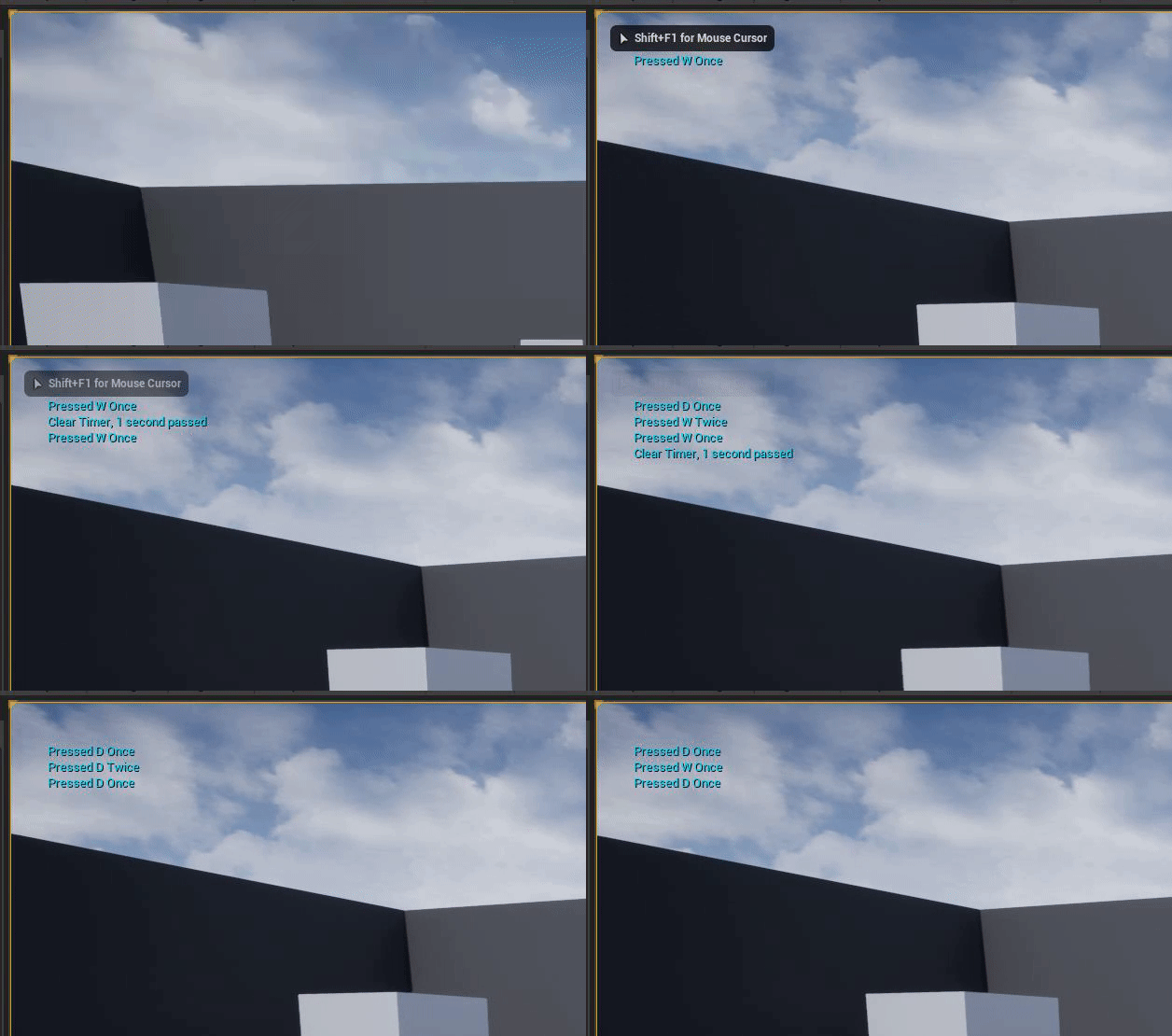

 jolly granite
thank you
north arrow
Scroll down a bit, I think
north arrow
?
jolly granite
it works
north arrow
Oh okay
jolly granite
thank you so much
finite wren
Is there a way to use concave collider for a static mesh? Or is that too bad performance and not supported? Coming from Unity where this was very easy to do.

I set "use complex collision as simple", now I see the concave collider, but player or physics-enabled sphere still doesn't interact with it
regal mulch
The convex stuff should be simple collision
Complex is per triangle or so. Not really recommended most of the time
Also ue5 is in early access, keep that in mind. You shouldn't use it for production
 spiral shoal
hello, I just met a stupid question but I could not find how to fix it
I put my own character in unreal, everything was built from empty
when I pressed W key, it could go forward, but character won't turn its model to forward
how could i fix it?
regal mulch
Is the mesh correctly rotated towards x+?
spiral shoal
yes
regal mulch
Then check the movement component, there is some boolean for Orient To velocity or so
spiral shoal

this is the situation
I just checked the blueprint
this is my blueprint

this is the official one

 upper nexus
I have unreal 4.27 installed from marketplace on 1 pc, and also installed another pc.
but how come their versions are differnt

 finite wren
@regal mulch in any case, simple or complex collision, it's not working
Ah I just fixed it nvm
I needed to change to "Block All" in both places
coral aurora
Can anyone tell me why I keep getting this error when I package it to the quest? LogPlayLevel: Error: ERROR: Stage Failed. Missing receipt 'E:\Unreal Projects\New\Binaries\Android\New.target'. Check that this target has been built.
LogPlayLevel: (see C:\Users\ADShe\AppData\Roaming\Unreal Engine\AutomationTool\Logs\E+Epic+Launcher+UE_4.27\Log.txt for full exception trace)
LogPlayLevel: AutomationTool exiting with ExitCode=103 (Error_MissingExecutable)
LogPlayLevel: Completed Launch On Stage: Build Task, Time: 0.755150
LogPlayLevel: Completed Launch On Stage: Deploy Task, Time: 0.000021
LogPlayLevel: BUILD FAILED
PackagingResults: Error: Launch failed! Missing UE4Game binary.
You may have to build the UE4 project with your IDE. Alternatively, build using UnrealBuildTool with the commandline:
UE4Game <Platform> <Configuration>
shadow ravine
spiral shoal
this is my blueprint
I'd suggest using the third person template player controls BP, make sure it works with that first then add to it for the additional movement features you're trying to achieve
spiral shoal
shadow ravine
I'd suggest using the third person template player controls BP, make sure it wor...
I would love to but I already made many changes with it, it is difficult to create a new one or move existing things
upper nexus
upper nexus
but how come their versions are differnt
I see, i think i still have the 4.27 preview installed?
shadow ravine
spiral shoal
I would love to but I already made many changes with it, it is difficult to crea...
What type of changes have you made that you need as it shouldn't be too difficult to migrate what you've already got into it
coarse apex
anyone have a good video/doc to help me make like those plane smoke trail things?
something like this:

 potent bridge
question, how would I zero out my players gravity? allowing it to float for a little bit
that did nothing

dw fixed
 thin latch
Hi guys, can anyone here help me how to fix this issue, im using bluprint from other project for the new one, thanks all
The camera is falling down when i try to play in UE5
 sour verge
How could I use an iphone for accelerometer/gyroscope input in a PC project? I'm working on a windows PC right now and have no idea where to start
 shut burrow
Any luck getting the sessions to work mate?
 coarse turtle
How meters could be converted in ue4?
It seems it's 1cm. So for gun's projectile, if a m4a1 fire range is 500m to convert it you get 50,000cm. Would that be valid?
 pliant junco
does anyone know a good ai tutorial that attacks the player. i dun want behaviour tree jsyk
jolly granite
I have created a Unreal Engine project in version 4.28 and I cannot seem to find the "C++ Classes" folder as I have the starter content package that is an option at the beggining of the project

that is all what I have
autumn flame
Share me some of that 4.28
prime willow
Yeah don't horde the wealth gimme just a spoon of that 4.28
finite wren
Hey guys I'm doing a post process material, any idea why this is black? If i plug the SceneTexture straight into emissive color it works. But this multiply doesn't seem to work as I expect
 autumn flame
ComponentMask SceneTexture RBG and use a 3 Vector for Mult
 real dirge
Posting this here too, for some reason my FPS has been stuck around 10 in the editor until I launch my game, I even went to project settings and changed max FPS by command, can someone please help me?

It's making doing anything in this engine tedious
finite wren
@autumn flame hmm can you help me out? Not really getting it
I thought I am using a 3 vector for mult. I just converted it to a parameter
Not sure what ComponentMask is used for here
autumn flame
Add a ComponentMask
Check R G B on it
Connect after Color of SceneTexture
autumn flame

What is the Material: Component Mask Node in Unreal Engine 4
Source Files: https://github.com/MWadstein/wtf-hdi-files
finite wren
ya haha im watching that
plush yew
how come when i set my render to android my textures complie but half of the terrain is just blank

 frigid bear
hi guys how do you send your code to other people just so that they can see it?
is there a website
 wraith kindle
mean the bp code or c++
neon bough

blueprintUE is a tool for sharing, rendering and rating blueprints for Unreal Engine 4. UE4 is a game engine which use visual scripting called blueprint.
neon bough
plush yew
how come when i set my render to android my textures complie but half of the ter...
maybe the material uses features that aren't available on android
plush yew
oof that sucks
real dirge
autumn flame
Draw calls? 👀
Was this directed to me? xd
plush yew
cause i really need android features for the game as its made for low end devices
and so far the android render gave me a huge boost
autumn flame
Yes
 lethal bison
is there any way of just baking the volumetric lightmap and no shadows. I was considering this for a big map with a lot of moving objects
frigid bear
neon bough
https://blueprintue.com/
thanks!
 desert pagoda
Hey, is it true that in UE Blueprint is essential and C ++ is just an add-on?
A lot of people have told me that.
||I use Google Translator||
wraith kindle
ue blueprint isnt essential but gets rid of alot of boring c++ codewriting but for more complex mechanics you for sure need c++ so c++ is extending your workspace
anyone got ue's water plugin working on tiled landscapes
desert pagoda
Okey, thx
 vapid karma
What do I do with that strategy game example in learn tab ????