#ue4-general
1 messages · Page 1054 of 1
 modest swan
 coarse apex
hello! quick question, whats the best way for me to add a simple tv? I have an asset for one and my first thought was just change the screen texture to green and do it in after effects but I imagine there is a better way, all I need it to do is play a video when I play my sequencer, any link would be great thank you!
 pliant junco

In this video I go over how to play a video inside unreal engine in the UI and in the world
Check Out My Website For a FREE 3D Model and more of my content: https://www.uisco.dev/
Join the discord : https://discord.gg/WybzV92BKJ
coarse apex
ah thank you!
pliant junco
🙂
 idle stump
For a folder structure, where do you normally put your source art files (e.g. blender/maya)? Like in a team scenario where you're using Perforce and we want to back up all the art files.
I assume something like:
|- ProjectName
  |- Assets
    |- Art
    |- Sound
  |- ProjectName (or??)
    |- Content
    |- ProjectName.uproject
 zinc gate
can someone pls help me with my project?, im trying to export it to a folder but its giving me a error
 wise trail
@idle stump https://github.com/Allar/ue5-style-guide
GitHub
An attempt to make Unreal Engine 4 projects more consistent - GitHub - Allar/ue5-style-guide: An attempt to make Unreal Engine 4 projects more consistent
idle stump
@wise trail I've been looking at that but I can't find a part about source files outside the project folder - unless I'm just missing it.
wise trail
Development?
If your currently working on something it would go in there. Things like Art if you read over his notes have a specific art folder.
So things like props, buildings, etc as far as I can tell far into that category.
 crimson peak
I tried to do a save and load for my project because that is all it needs and I can start building levels.
I got it to load from in the game menu I had. But not from main menu and the character was all wacked out. I'm going to have to give someone for saving and loading for sure 😅
 sharp crest
wise trail
<@227276199141965825> https://github.com/Allar/ue5-style-guide
sharp crest
wise trail
<@227276199141965825> https://github.com/Allar/ue5-style-guide
I saw this once, never realize it was that long. guess I gotta delete my game and start reading this novel!
wise trail
I reworked my project recently took me 10 days all really depends on your file sizes etc. Some of my files were assets and couldnt be moved so I had to compromise and have them use their default directory. Either way it definitely made things easier for sorting and planning.
Plus I work full time so theres that.
Honestly dont really have to delete anything just migrate/ move things. Depending on the type of assets ofc. Whether its hand made or bought and modified.
 young mirage
What did they mean when they say 4.27 is not compatible with 5.0 ? Is going forward 4.27 projects won't be able to be ported to 5.xxx? or just 5.0 EA has some issue?
crimson peak
young mirage
What did they mean when they say 4.27 is not compatible with 5.0 ? Is going forw...
Make a copy of your project and use the copy to test your project in a new Engine version.
 modest trench
4.26 -> 5.0 EA 4.27 -> 5.0 release, right?
ue5 main has all the new 4.27 stuff I can see anyways
modest trench
and even if you can't use the conversion tool if you just slap your project content/source into a ue5 project it will probably work anyways
modest trench
young mirage
What did they mean when they say 4.27 is not compatible with 5.0 ? Is going forw...

Learn what to expect from the UE5 Early Access program.
I'm losing it trying to remember that non-destructive heightmap terrain editing thing was called
I forget if it was an official plugin or just something they showed off at some point
young mirage
you know , something's definitely wrong I am getting only like 90 fps on 4.27 with a few cubes and baked lighting
modest trench
landmass! that was it
young mirage
what?
modest trench
the plugin I was trying to remember the name of
 next badger
Greetings! Any Adobe PS users with the latest PS here?
 slender aspen
Why is there a GameMode for two different scopes: Level and Project? I can understand level game modes but project?
 lime zinc
Hi, i get some small problem here. how can i reflect bunch of glass ball on my mirror. can anyone help me out. project setting all set to raytrace reflect, GPU baked

 thick nebula
 clever axle
link or didn't happen
 copper pier
what would be the best way to connect to a server? I am using playfab for authentication and have that working. After authentication I want to have my client connect to a server and open the level. I can get the server running the map I want but what would be the best way after authentication to connect to the server?
 woven shell
A little question that i hope someone could help me with: When downloading surfaces from Quixel, i get 3 Texture files. The Default, the Normal and ORDp. What is ORDp, what does it do and how do i use it?
 severe hound

Unreal Engine Forums
Windows Speech SDK integration is missing from UE and Unity has this implementation. I was suggested to email this address after asking on the youtube channel live stream for 4.27 update. The problem any UE developer will have is no windows voice recognition where any developer who chose Unity has a huge advantage like Ghost Hunters Corp and Ph...
oi anyone else get directed to email their communities email by staff and get completely ignored? LOL
 fierce tulip
woven shell
A little question that i hope someone could help me with: When downloading surfa...
fierce tulip
woven shell
A little question that i hope someone could help me with: When downloading surfa...
slight guess, but "occlusion, Roughness, Displacement"
severe hound
@fierce tulip u a mod, any ideas suggestion to get a real answer on certain topics like speech to text from ue team or community?
ive posted/emailed/ask in live chat/posted here LOL
fierce tulip
we arent an official ue4 discord, just endorsed. so cant help you there.
though in some cases something is very niche or only has a few people who can answer such a thing so it might take a while before getting an anwer.
severe hound
fierce tulip
we arent an official ue4 discord, just endorsed. so cant help you there.
though ...
yeah not telling u ur official ue4 discord, just wanted to see best way to get a real answer from team other than just spamming in different platforms
fierce tulip
iunno, in some cases hope for the best.
modest swan
How do I rename a macro??
 green jewel
modest swan
How do I rename a macro??
green jewel
modest swan
How do I rename a macro??
Find it in the left hand panel, right click, f2
 green jewel
Could anyone help me troubleshoot something? I'm running into a weird issue where beginPlay and tick won't run on my default pawn when switching maps, specifically. It works fine if I load right into the map in PIE, but if I switch from a menu-map to my normal map, my character doesn't run event begin play or event tick
 plush yew
do i switch to unreal
green jewel
plush yew
do i switch to unreal
yes
plush yew
green jewel
yes
ok then
plush yew
green jewel
yes
no , wait
that would mean
i have to start again from 0
no
i dont want to suffer this pain of watching tutorials and not understanding hard concepts
and entering this loop again
no
slender aspen
Nothing ever starts from zero
slender aspen
Game dev knowledge transcends specific game engine knowledge
 hidden cairn
True
And if you are used to working in 3d in any capacity it is easy to use
And build up on
hidden cairn
My advice is just load it up and get going
You are never to old to learn it
Blueprints take a little getting used to however everything is very vusual
I'm on my phone so typos galore
 tawdry wren
Does anyone know if NFTs and unreal engine 5% revenue conflict with the ability to do NFT games with unreal engine? considering NFTs can be sold elsewhere?
fierce tulip
you'll probably want to contact epic directly for that
copper pier
what would be the best way to connect to a server? I am using playfab for authentication and have that working. After authentication I want to have my client connect to a server and open the level. I can get the server running the map I want but what would be the best way after authentication to connect to the server?
green jewel
copper pier
what would be the best way to connect to a server? I am using playfab for authen...
You can use "open level" and enter the server's IP address. I don't know if this is the "playfab way" of doing it, per se, but, it should work
copper pier
yeah i dont need playfab to do anything im just authenticating with them
so it seems when I do openlevel now it crashes tho but I can manually switch maps and run it just fine
green jewel
copper pier
so it seems when I do openlevel now it crashes tho but I can manually switch map...
crash logs have anything for you?
copper pier
UE4 crashes as a whole
green jewel
copper pier
UE4 crashes as a whole
typical
copper pier
I click login, and i can see that it registered the click, then it takes about 1-2 mins and just cloeses
this is running it as standalone just trying to go to the map
green jewel
copper pier
I click login, and i can see that it registered the click, then it takes about 1...
mind if I call you and you can share you screen and maybe we can figure it out. I'm also implementing playfab auth/map switching stuff right now actually
copper pier
sure give me a min tho will you be free in 20?
green jewel
yeah I'm in the support voice channel just let me know
copper pier
thanks man
 dim saddle
Quick question ( yes i have the player setted up and the editor is down there bubble): How do i put my character down on the floor?
 green jewel
dim saddle
Quick question ( yes i have the player setted up and the editor is down there bu...
green jewel
dim saddle
Quick question ( yes i have the player setted up and the editor is down there bu...
click the blue arrow and drag it down
dim saddle
green jewel
click the blue arrow and drag it down
Im stuck on the roof
 grave pollen
does UE4 crashing fairly often have to do with lack of memory on my laptop?
green jewel
grave pollen
does UE4 crashing fairly often have to do with lack of memory on my laptop?
very likely
grave pollen
my laptop is on its last legs... my project is 130gb and if i have like 10 tabs open im getting a fair amount of crashes lol
ugh thats what i figured
green jewel
dim saddle
Im stuck on the roof
Is there collision on the "roof"?
grave pollen
'but Zee why are you developing a game on a laptop' - I dont know.
 rich compass
is 8gigs enough for UE4
green jewel
grave pollen
my laptop is on its last legs... my project is 130gb and if i have like 10 tabs ...
sometimes I think UE is crashing but I wait a couple minutes and it actually didn't crash
grave pollen
nah its giving me a hard error message and exiting on its own
green jewel
grave pollen
nah its giving me a hard error message and exiting on its own
yeah it happens
grave pollen
my project sometimes corrupts itself but 99% of the time its a damn struct issue so I just replace the struct to fix lol
if ue5 did nothing but fix struct stability id be happy
nope.. it actually did it again i just cannot make a local variable inside a function LOL
guess ill make it a regular one lmaooo
copper pier
is tehre any way to cut the size of my terrain once its been generated?
nvm i found it
 dry tree
Hey, so I’m making some fan content for a game that’s built in UE and I’m wanting to make some custom images using models/environments from the game.
How would I go about doing this? Don’t know very much about UE so advice is much appreciated
clever axle
noooooo, I accidentally deleted a sequence file! any way to get it back?
fierce tulip
version control?
clever axle
tbh, I haven't used VC much yet. I don't really know how to really use it. In a code project, I can commit, roll back to a certain commit, etc etc. in UE I can only "submit to source control"
Do I have to do the rest in an external client? (cli/gui?)
And apart from VC, any other way?
 smoky hull
When I import this model as an FBX into unreal, all materials get assigned to the wrong mesh and the image textures get lost... how to fix it?

 regal mulch
clever axle
tbh, I haven't used VC much yet. I don't really know how to really use it. In a ...
copper pier
regal mulch
clever axle
tbh, I haven't used VC much yet. I don't really know how to really use it. In a ...
copper pier
Hmm so I have a world map, and I can open it but if i try to save it hangs at 53%, processing exports. any one know why this would be?
 cyan bronze
Im not sure how to use that user parameter "BeamEnd". Im trying to make a laser like effect from muzzle to crosshair but atm its just spawning it wrong


 dull mango
Hello, how can I calculate a camera height in first person standart blueprint
I mean it is set to 64 by default
Does it mean character height is 64 cm ?
green jewel
dull mango
Does it mean character height is 64 cm ?
go to your character and click the capsule component, there's a property called capsule half height, your character is 2x that in cm. The camera height is basically how much Z it has assuming it's a child of the capsule
dull mango
green jewel
go to your character and click the capsule component, there's a property called ...
It is set to 96, means my character height is 192 cm, if i want make it 150 cm i need set 75. And doest touch a camera at all. Am i correct ?
 limber mesa
Hello everyone, running into an issue or actor spawning and respawning. I have set up a spawner that spawns an ai from class, when I try to set the controller it can’t access it. I’m assuming it’s because I have the actor to spawn pawn class variable to instance editable
green jewel
dull mango
It is set to 96, means my character height is 192 cm, if i want make it 150 cm i...
right
green jewel
limber mesa
Hello everyone, running into an issue or actor spawning and respawning. I have s...
You can set the actor to auto possess on spawn if you want, you don't need to set/possess it manually
dull mango
green jewel
right
If i set camera z location to 0 does it mean camera will be on middle of the body ?
green jewel
dull mango
If i set camera z location to 0 does it mean camera will be on middle of the bod...
If you try it, you'll see what it will do, it's not going to hurt anything to change it. It will just be at the character's "feet" so to speak
dull mango
green jewel
If you try it, you'll see what it will do, it's not going to hurt anything to ch...
Yes, but i trying to understand a system. Because if i understand correctly, by default camera set lower that actually head of player. I mean if 192 cm is height of player, 128 cm is much lower than head
green jewel
dull mango
Yes, but i trying to understand a system. Because if i understand correctly, by ...
Yep. In some games, the camera is your eyes, in some games, it's your chest. In payday 2, for example, every character looks taller than you because the camera is set so low, I guess to line up with a gun better or something. It's up to you where to set it.
 chrome beacon
Hello everybody. I decided to give UE 4.27 a try and I'm going to install it now but I'm a bit concerned about the best possible installation I should do, especially due to severe limitation of current disk space, in order to get the best of it. Is there anybody who can give me a few hints responding to some questions I have? Thanks.
limber mesa
@green jewel thankyou. I have a interface that the enemy sends a message to when it dies. But for some reason it’s not being called. my apologies if the quality is bad, I just set up a new computer and it doesn’t have discord yet
 green jewel
limber mesa
<@104252737851518976> thankyou. I have a interface that the enemy sends a messag...
green jewel
limber mesa
<@104252737851518976> thankyou. I have a interface that the enemy sends a messag...
win + shift + S will take a screenshot of a section of your screen, then you can just paste it into chat
oh wait
sorry you don't have discord on your pc and you're on your phone, I see
dull mango
green jewel
Yep. In some games, the camera is your eyes, in some games, it's your chest. In ...
Oh, i get it. So if i want set camera, like in really world( like camera from eyes) i need fill in in capsule height 75 cm and 70 cm in camera z location. Am i correct?
green jewel
dull mango
Oh, i get it. So if i want set camera, like in really world( like camera from ey...
Yes
green jewel
well, you cannot set the capsule height, only the half-height, so multiply that by 2
if you want a 150cm character, set the half height to 75
wait now I'm confusing myself
the top of the capsule is the same as the half height
on the Z axis
75 for the half height and 70 for the camera Z should be what you want more or less
limber mesa
@green jewel i am calling a interface when the enemy dies that notifies the spawn point to spawn in another enemy, but for some reason the int event isnt being called

the spawn point is valid but plugging it in also didnt work so i thought this would
green jewel
limber mesa
<@!104252737851518976> i am calling a interface when the enemy dies that notifie...
can you join the support channel and stream
or call me if you don't have permissions to stream
I need to see more to find the issue I think
limber mesa
ok let me see if i can, my computer doesnt have a mic though but i will be able to hear you
green jewel
no worries
limber mesa
one sec
dull mango
green jewel
75 for the half height and 70 for the camera Z should be what you want more or l...
Yeah, i said the same :) thanks for help
 primal tendon
I wanted to know, how can we create custom animations for a character movement, I was trying out sequencer to make a small clip, but the animation I need would be hard to find so I thought of making the movements myself but don't know how to...
chrome beacon
I try to reformulate... I need to work on VR/XR projects for PC only {at least on this stage} for Oculus, HTC and HP VR headsets only, at the moment, so I thought to leave other platforms {mobile platforms} out of the current installation. Does it make sense? Which options I should not renounce to? I'm really stuck there with the installation windows open till I take the final decision.
I would start from a basic installation but when having to add more, for some weird reason, we're forced to reinstall everything.... which really sucks.
cyan bronze
Is it ok if a solo particle flys with linear force of 1 500 000,0

It fakes the bullet effect in line trace weapon
Feels weird that it would go speed of 1.5 milion

 grim ore
no reason that cant work assuming your calling it correctly
 daring sorrel
guys im having difficulties with my ui, i created a stamina system and a bar that works, but my problem is im trying to make my bar close from both sides and ends in the middle (shown in the paint picture) but unreal dosent over that option so how do i do it? is it possible to do it?
 plush yew
@grim orebeen trying for awhile but the event just wont fire ..
@daring sorrelit does have that option tho
daring sorrel
im also trying to watch a tutorial but i still have question and i even made a texture for my bar

unreal option makes my bar go like this:
 plush yew
scale it up and rotate it?
daring sorrel
it brakes the bar completely
on my texture that i made the black is the value 0 and the white is 100
grim ore
@plush yewmaybe show the code calling it? also have you stepped thru to make sure its being called?
plush yew

thats the call function and the interface call
they both dont seem to fire the event tho
 stray tangle
Hello, does the Finterp make a smooth float Transition?
grim ore
neither one of those is the right one, neither are a message call targetting the widget
this is targetting a widget variable, you can see the message icon and the fact it says its targetting my widget with the message call
 stray tangle
The target should be a reference to an actor that has the event code
daring sorrel
@grim ore im following your tutorial, i got questions, im trying to make a custom bar, but my if node is giving a compiling error
 stray tangle
It says the input should be a float
grim ore
@daring sorrelthe "easiest" way to do this is to have 2 progress bars and change both of them at the same time, both of them are side by side, and the one on the left has a RENDER TRANSFORM setting for SCALE on the X to -1.
plush yew
hm I changed to what you did, still wont fire the event tho
 plush yew
its the hp bar , component on the actor
grim ore
your literal widget is called "EnemyHealthBar" and that is targetting Enemy
plush yew
enemy is the BPI
stray tangle
plush yew
its the hp bar , component on the actor
The variable widget should have a value (what widget exactly)
daring sorrel
grim ore
<@!333749071724412929>the "easiest" way to do this is to have 2 progress bars an...
oh ok ty
stray tangle
Oh so you're trying to call an interface Event from a component in your actor?
grim ore
@daring sorrelyour G is 1 channel (a single float), your RGBA is a vector 4 (4 floats). Your plugging in a vector4 into the IF and it doesnt like that
your missing how this is supposed to work @plush yew
 plush yew
Yea Im pretty sure hahaha
grim ore

this is my code that works
are you targetting your widget itself? or the widget component?
plush yew
I thought BPI's were like you send it to the BPI, then TAKE from the bpi?
component
hey how can i add marketplace content to a an sdk im using?
 grim ore
no you send it to the object using the interface as the go between
grim ore
your widget component is not the widget is why, you need to get the widget from it
stray tangle
plush yew
hey how can i add marketplace content to a an sdk im using?
By sdk you mean plugin?
plush yew
so the BPI is more like a bridge rather then a depot
 signal mango
hey does anyone know a fix to unreal engine games crashing
i get an application has been blocked from accessing graphics hardware only on unreal engine games
stray tangle
signal mango
hey does anyone know a fix to unreal engine games crashing
Are you developing a game or a shipped unreal game is crashing?
signal mango
stray tangle
Are you developing a game or a shipped unreal game is crashing?
shipped
grim ore
@plush yew get your Widget component variable, then get the Widget variable from it (this is the widget that it created), and then try using the interface event on that (the actual widget)
plush yew
stray tangle
By sdk you mean plugin?
im modding a game called operation harsh doorstop
plush yew
stray tangle
By sdk you mean plugin?
 stray tangle
plush yew
im modding a game called operation harsh doorstop
stray tangle
plush yew
im modding a game called operation harsh doorstop
So you want to add the assets to your project?
plush yew
stray tangle
So you want to add the assets to your project?
yes
stray tangle
plush yew
yes
Just click on add to project and select your project
 charred leaf
I wanted to ask if anyone might know of a way to easily have material color changes persist when I go back in my character creator to change the skeletal mesh and material for the female/male variants.
 plush yew
@grim oreThat worked! thanks MathewW 😄
stray tangle
plush yew
doesnt show up
Probably the unreal engine versions aren't compatible I have a solution go to were you installed the asset epic games/launcher/vault cache copy the .uasset files and add them to your project content folder from the explorer
 bold gulch
Quick dumb question (probably)
when scaling objects in ue5, ive noticed they go up in large intervals, is there any way to adjust the scale in smaller intervals?
stray tangle
bold gulch
Quick dumb question (probably)
when scaling objects in ue5, ive noticed they go...
Yes there is a way in your viewport up right there are some ui elements with numbers near them one of them is the scale
bold gulch
oh does this work for ue5 too?
grim ore
did you look?
plush yew
stray tangle
Probably the unreal engine versions aren't compatible I have a solution go to we...
folder empty
i dont even have ue opened
i openned the modkit app
looks like ue
 stray tangle
plush yew
folder empty
stray tangle
plush yew
folder empty
Did you install the asset?
stray tangle
When you press "add to project" what exactly happens send me a screenshot of the message
plush yew
 stray tangle
Click on show all projects
plush yew
its on
stray tangle
Are you using an old version of unreal?
plush yew
its the 4.26
im not using the unreal engine application itself though
im using an sdk
stray tangle
Well That's strange I can't help more
plush yew
np ill look for someone else.
 wary wave
define "SDK"?
if you're talking about something like another games mod tools, you can't import plugins, they won't work
 crystal skiff
How can I make something spin when it gets shot as a projectile
grave pollen
i think there's a built in rotator component with the engine, just make it active on hit
like u just add it in the viewport of the object , not sure exactly what its called just put in rotation or rotator
 neon hatch
Is there any way to make meshes (like say, floor tiles) snap to each other instead of having to painstakingly align each new piece individually?
@plush yew Yeahhhh watched that before and it's no longer working
I have no idea what I'm doing. Now my viewport is stuck in some kind of wireframe mode because I slipped and hit a random key 
 sage coral
had a quick question wanted to know if it would be possible to slowly have a mesh fade from its High poly to its Low poly version I have by using a time line (Im having the zombies melt after they die and having the mesh fade to its low poly would help with the liquid sim I am using. If anyone has any suggestions please @ me. Thank you to those whom can help 🙂
neon hatch
what the fuck is this
 sage coral
It looks like you somehow triggered the map view Im not sure how you turn that off in ue4 but hope I can help lead you @neon hatch
best bet would be to google the ue4 shortcuts and find the one related to viewing the map details
neon hatch
I switched it back to perspective but now I magically cannot test play anymore lmfao
sage coral
thats strange indeed
crystal skiff
Is there a way I change the arms?

Like so his arms are Posedin a different way
Edit. Im trying to make him hold a banana
Also I made a projectile shoot, but when I shoot I see it pop up in World Outliner, but I dont see it anywhere
plush yew
Going to give 471.41 studio drivers a try, see if I can overcome these menu flickers....

plush yew
Interesting, not yet @plush yew but I will try it, thanks.
 oak berry
How can I get player controller in a world blueprint for multiplayer. Trying to set view blendspace to a different camera, and it keeps giving errors.
 silent zodiac
anyone knows how to match the editor colors with the packaging colors? only solution so far is to disable tonemapper entirelyt
 fair summit
how to use a keyboard event in a widget blueprint?
plush yew
Thanks it worked! Installed the latest game ready driver and disabled multi-pane overlay with the registry update

 thick herald
That.
Because they are the same as UE4.
Magic.
Not impossible. 😄
 thick herald
Doesn't mean you can use all the features though 😄
coarse apex
how do I setup the axis properly for ik? im attempting the arms right now and nothing is working any ideas? ive been at it putting in random values for about 2 hours now and still nothing. its always the upper or lower arm is facing the wrong way
modest swan
So im trying to add shield and sword moving/idle animations. I have the code for the idle and movement for crouch and walking aswell as running and I have the animations for attacking and putting my sword on my back/in my hand. Im trying to make it so If I put the sword in my hand Ill get a different idle animation.


 vocal flume
I have a set of nodes that needs to be executed in tick (touch related stuff - swipe controls). I need to adjust this based on a condition. Problem is that this condition will be checked in every tick. Is there a way I can avoid checking the condition every single time?
Like execute node a when x<1… when x is greater than 1 execute node b but don’t check if x>1 every single time.
 exotic thicket
Checking something basic like that is completely trivial and doing it on tick is fine
vocal flume
Ok. That is good. Can you tell me what should not be put into event tick? I know casting is one..
exotic thicket
Casting is fine too. It's all relative.
Yeah that can be heavy, but sometimes you might need to use it in a tick depending on what you're doing and it can be fine there
There's not really a whole lot of stuff that is like "never do this in tick", but you just should think about what you're doing and whether it makes sense to do in tick or not
vocal flume
Got it. Thanks!
 idle mantle
Please, is there a way to change the FOV in the camera viewport?
I found the way to change the camera in the game but not in the viewport 😢
 glossy dagger
crystal skiff
Like so his arms are Posedin a different way
Edit. Im trying to make him hold a...
glossy dagger
crystal skiff
Like so his arms are Posedin a different way
Edit. Im trying to make him hold a...
I don't like where this is going XD
idle mantle
Oh, I squeeze the camera this is why... in Max, blender etc it doesnt do that

Is there a way to fix it? this is so weird lol, wondering why they have done that?
glossy dagger
your viewport is squashed, it scales that way
idle mantle
yes I understand this but is there a way to not change the FOV?
this is the first time I see that, maya, blender, max etc doesnt have that
glossy dagger
i think if you open the .uproject, tyou should find FOV there
yes i wouldn't compare modeling apps to Cinematics and games software though
 weak sorrel
I am wondering : as game engine become more and more complex. How companies will be able to continue doing game engine in-house and still competing with UE5 ? Yeah you can optimize your engine for your specific game, but how will you be able to get the same features when there will be so few people working on this engine
I'm wondering if in the future we will see less in house engine and more heavily modified UE5
glossy dagger
Plenty of engines do just as well as UE4, UE5 is simply setup for RT and LS
modified UE5? heavily, why? they are streamlining the basic features and it's more of adding custom content so you won't have to modify the engine itself
idle mantle
weak sorrel
I'm wondering if in the future we will see less in house engine and more heavily...
Maybe it's more easy to work on the in house engine vs modifying UE5? XD
glossy dagger
Dunia and Unity are just as fgood as UE4, i don't see how the level streaming would make it a global case of 'need to use it'
idle mantle
Unity = less compatible tool
glossy dagger
compatible to what
weak sorrel
Maybe it's more easy to work on the in house engine vs modifying UE5? XD
@idle mantle
Yeah that's the limit I want to talk about. When does it become harder to modify UE5 than use an in house engine. What if you need a set of complex features that you can get out of the box in UE5 vs developing all of them ?
glossy dagger
team preps how to use, builds game, releases game
weak sorrel
team preps how to use, builds game, releases game
@glossy dagger
Time needed for this stuff looks to go exponential over time
idle mantle
glossy dagger
compatible to what
for me? well right now speech graphics
glossy dagger
from what team and why, I tink you're pulling numbers from your backside
a start from scratch noob team wouldn't be able to modify anything in good amount of time with the theory i think you're trying to hint at
crystal skiff
glossy dagger
I don't like where this is going XD
ITs for my chimpanzee on drugs I swear
glossy dagger
i only have a bunch of orangutangs, whole different breed
i think talks about drugs are illegal here too
weak sorrel
i think talks about drugs are illegal here too
@glossy dagger
Shouldn't be illegal if it concerns animals right ?
glossy dagger
not interestyed in the bait, but thanks
crystal skiff
Its gonna be my first game and you throw bananas at people and they exploade and shit and funny weird visuals and youre a chimp
glossy dagger
mhmm
weak sorrel
Its gonna be my first game and you throw bananas at people and they exploade and shit and funny weird visuals and youre a chimp
@crystal skiff
I would give it a try
crystal skiff
weak sorrel
> Its gonna be my first game and you throw bananas at people and they exploade a...
Fellow monkey lover?
glossy dagger
i'df watch the trailer for a laugh
i don't really laugh anymore too thinking about how it might be 'funny'
weak sorrel
Do the game and DM me
glossy dagger
i asked what number to change from -1 on landscape details panel would more aggressively LOD a landscape 2 days ago, no answer yet
crystal skiff
I will keep that in mind
glossy dagger
i would trial and error but i think that info is very common?
crystal skiff
Idk, im VERY new to UE4
glossy dagger
i cannot find it in Documentations either
crystal skiff
Should I make it in first or 3rd person? I personally think First person would be better but third person sounds a whole lot easier
glossy dagger
Did you ever play or hear of GRAW or GRAW 2? it's a ghost recon, long story short: https://www.youtube.com/playlist?list=PLL0cLF8gjBprG6487lxqSq-aEo6ZXLDLg

It uses third person (would be better is you used a character with head removed) and place the camera in the head position
can run and slide and see feet and legs, arms and etc. are visible as well
mirrors might be a problem, maybe a mirrorBP that swaps the Character
is anyone working on a solo game interested in grouping up?
and i'm still looking for the group making the SvM style game, i wanted to design levels
 timber zenith
hey im trying to get into character desgin and level design any tips?
 velvet haven
idle mantle
velvet haven
idle mantle
may i ask if this is a public model?
glossy dagger
fairly wide open question, i think the official unreal engine youtube and dev squad are the best
timber zenith
ok
idle mantle
velvet haven
may i ask if this is a public model?
sorry what you mean?
velvet haven
idle mantle
sorry what you mean?
did you made the model yourself? looks very realistic
idle mantle
Oh it's Metahuman
glossy dagger
did you see the playlist?
 prime willow
wait why is dev squad terrible
glossy dagger
to each their own, i personally wouldn't want to see more knowdledge than what does the 1 and only trick i perform, being a clown
glossy dagger
me thinks jelley monster woke up
timber zenith
glossy dagger
fairly wide open question, i think the official unreal engine youtube and dev sq...
wdym its a wide question ? is there more to level design
cus i know absolutely nothing
im jjust downloading the app today lmao
glossy dagger
Level design involves graphics and gameplay, so with the 2 of them which type of levels and for what game?
idle mantle
velvet haven
did you made the model yourself? looks very realistic
Metahuman and it's free ! https://www.unrealengine.com/en-US/digital-humans

Unreal Engine
MetaHuman Creator is a tool for creating photorealistic digital humans that are rigged and ready to animate in Unreal Engine.
velvet haven
i haven't tried it but compared to makehuman, is it better?
glossy dagger
yeah, i'm not sure how to use it but it is 100% photo-realistic
idle mantle
ahaha man it's way way more advanced for realism 😮 and really easy!
you just click on 3 buttons and done super realistic character 
velvet haven
looks like model designers will need to find a new job
glossy dagger
that's the part of characters i havben't gotten deep into, using the animations i have Mo Cap etc. work with controls
crystal skiff
wait I hold my thought
glossy dagger
you don't know the answer, i can't hold the discord hostage, but i would 🔫
rofl
jk
timber zenith
glossy dagger
Level design involves graphics and gameplay, so with the 2 of them which type of...
you know what idk
idle mantle
velvet haven
looks like model designers will need to find a new job
no because they still do unique things like cloths etc
timber zenith
im so confused on how to start
glossy dagger
well i would try using the editor to design a single place not very large around, and make it detailed with the newer features of UE4, or UE5 if you're started with that.
idle mantle
start with Ue4
glossy dagger
timber zenith
idle mantle
start with Ue4
why so ?
glossy dagger
or if not interested in link:
 timber zenith
glossy dagger
like this: https://www.google.com/url?sa=i&url=https%3A%2F%2Fwww.artstation.com%...
timber zenith
glossy dagger
like this: https://www.google.com/url?sa=i&url=https%3A%2F%2Fwww.artstation.com%...
ah that makes sense
you know any videos that coudl guide me though the basics of actually getting stuf together
glossy dagger
building a scene like that with newer features of UE4 or 5 would be a great start to what does what and how well it runs, say if you grouped all of your level contents into one group and duplicated them to see the spikes in lower FPS, for eg.
i would try Unreal engine on youtube first, to see how to navigate
timber zenith
ik how to do that
glossy dagger
hmm, not sure who would have a walkthrough, but including BP in your scene would be a step up form styatic lights (even if they're dynamic, they don't do anything unless IES)
timber zenith
Ok
glossy dagger
looking for indoors or outdoors level design?
this should be a good walkthrough of outdoors foest type of level: https://www.youtube.com/watch?v=gbj1qgPOl3E

In this presentation by Epic’s Paulo Souza, we use the power of Quixel Megascans to build a natural looking environment in Unreal Engine. By relying on the latest world building tools in Unreal, we're able to quickly create a terrain leveraging its new Edit Layer functionality and sculpt it very quickly with the use of Landscape Blueprint Custom...
i lost the light house BP tutorial link
Volumetrics can be added in UE4 and not very taxing, https://youtu.be/Xd7-rTzfmCo
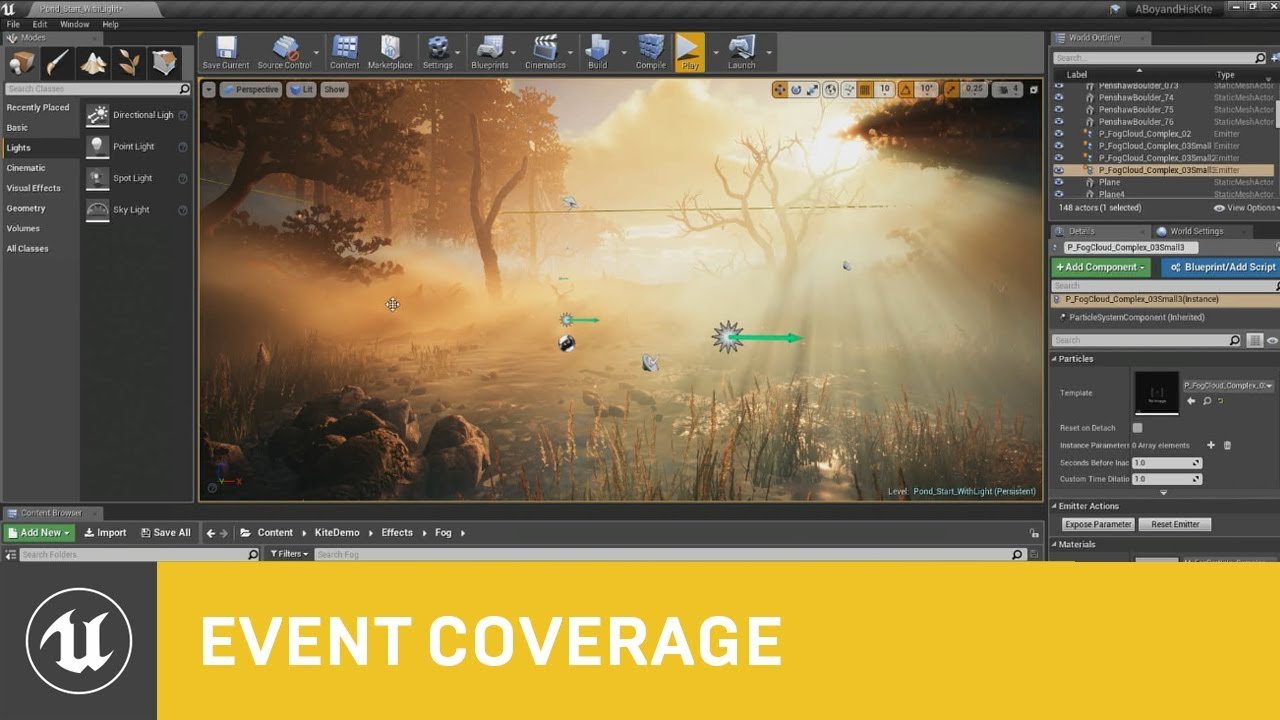
This session by Epic's Sjoerd De Jong covers the latest improvements to Unreal Engine's Volumetric Fog and lighting features.
Within a beautiful nature scene you will learn how to set up these effects, and how you can achieve spectacular results by authoring Volumetric Fog through the Material Editor.
Learn more at http://www.unrealengine.com...
I use it often and there's a trick to density. Place the very dense fog about 10,000 uu under the landcape's lowest point and you should get really subtle yet effective God Rays and shadow occlusion instead of adjusting the density to be realistic
i use a side orthographic view and look in my perspective for the fog to juuust show up and it will have all of the volumetric properties, and still allow for normal looking areas
besides that, tessellaltion is very nice, given you LOD it
that's a problem i'm facing, i need to adjust the LOD of the Landscape in Details panel, never had to adjust it before but using a scaled Fill World Landscape to have a tighter mesh, and used a Tessellated Material
does the LOD go higher or lower from -1 in UE4?
timber zenith
glossy dagger
this should be a good walkthrough of outdoors foest type of level: https://www.y...
Tank you so much
glossy dagger
No problems
coarse apex
can someone please help im setting up ik for my characters arms and I cant get the axis correct, the arms are always twisted the wrong way, here is a pic:
 glossy dagger
Be careful of megascans, though, generally you should export the textures to GIMP or Phoptoshop, and adjust the size froorm 16k or 8k to 4096 maximum
is Global Space the cause, i'm not too sure?
@coarse apex
^
coarse apex
im not sure, i thought it was my axis setup but idk how to check for that
glossy dagger
Also propagate to children is ticked, maybe as the upper arm rotated the lower part does as well.
Possibly in an unnatural way
coarse apex
hmm
glossy dagger
i always animate manually for each bone
coarse apex
i will try that, ive been at this for hours now
would it be better if I didnt use ik and just did each bone?
glossy dagger
defintely looks as if the forearm and hand are twisted in the same manner
Ik is great and blending would be a problem, but unticking propagate to cchildren might be the issue
modest swan
How do I disable all screen messages
glossy dagger
is possible to manually override the rotation after i hope
coarse apex
so I unchecked it and it doesnt seem to do anything, would I mess around with the axis now? sorry im really new to this
glossy dagger
you should use a similar node to the lower arm for the hand bone and set it up according to its specifications
hopefully you have finger bones too, but not always needed
if those are propagated from parent, gonna go wild lol
coarse apex
im going to setup the fingers after, but I still dont understand, where would I like the similar node to?
glossy dagger
hmm, you see your "set rotation" node and get trransform for clavicle, upperarm?
should use the same system for all the bones in the skeletal mesh
plug that into the Basic IK, and try to adjust rotational and link it to Ik
crystal skiff
Is gore hard to make?
glossy dagger
gibs aren't too difficult to spawn
modeling/ skinning them is most of what makes it look real
glossy dagger
i suggest niagra
glossy dagger
Niagra is a particle system that can do tons of effects, like spurting vblood to snow oor footsteps, and water fluidity

This week we'll learn how to recreate several advanced effects from the Unreal Engine 5 demo. We'll walk you through the techniques and design theories behind the bats, insect swarms, and our recent position-based dynamics-driven popcorn sim: "The Kernel." This deep dive will cover spatial hashes, boid simulators, constraints, procedural generat...
crystal skiff
OHH thank you
glossy dagger
the term "particle FX" can also mean spawning Meshes too, not just sprites with textures
 glossy dagger
should try plugging in a a radial gradient expononent to the alpha opacioty
crystal skiff
I will try
glossy dagger
will let the edges be more flowing by making them see thru
on the orb itself not the rest of the fx
crystal skiff
kk, I will kinda practice a bit
glossy dagger
that red line is mussing with my imagery of it lo;
crystal skiff
Yeah I forgot to hide the collision
crystal skiff
I used the free magic model set for monthly picks
 glossy dagger
looks good but personally i would use a planar square with a radial gradient and use "camera facing" instead of that rudimentary sphere, looks angular and breaks some immersion IMHO
but i'm looking in the direction of vector imaging and replicating camera facing tends to not work right
i built the entire structure of Rainbow Six Vegas CQB Training in Insurgency Sandstorm tools and the mod tells me i have a mismatch because i swapped Mod Projects... I just deleted the whole thing due to their lack of support:

kind of sick of playing it in Iraq
handful of megascans downsized in tri-count and px size
but the landscape tessellation is something i'm keeping in my repertiore' ... love that detail
Need the LOD to be more aggressive trhan -1
made remnants of the Maldives Islands before that
 coarse apex
please help! i have a video material on this mesh and it is rotated 90 degrees and super zoomed in, how do I fix? :

for ref this is the enitre video:
 glossy dagger
is the texture on the 3d model accurately UV'd?
coarse apex
i believe so, let me check in blender
glossy dagger
native export (for UE4) is .fbx 2018 Binary
Y-up and Z-up might be the issue
I use Z-up
coarse apex
welp im stupid thank you, the uv map had it in the very top right for some reason :/ i believe i can fix this very easily lol
glossy dagger
yeah that's the first thing i look for given a result like that, just retrace my steps and look at the model
coarse apex
thank you, this will in the future too when making skins
glossy dagger
looks cool btw, gl
 glossy dagger
honestly, i just tessellated a landscape and i see no difference between -1 LOD and 3 LOD
still a nice aspect to see video playing in game
i need real-time cameras displaying on a central command center for my project, i gotta neglect it due to not knowing BP
Ah, i found the problem's soultion
the distance fade needs to be higher
limber mesa
hello all. Is there a better way to check for a specific damage type for the player handle damage. i thought getting the display name of the damage type and then switching on each damage type name would work but apparently it doesnt
 crimson peak
Hello, So saving and loading works, but only from the level itself ( I have a menu that can save an load ) but from the main menu I am confused as to how to load the save. The level opens fine, but the saves aren't loading. Probably because after the level loads, the saves can't be executed. Does anyone here now how to execute the saves after the level loads

 autumn flame
After Open Level it doesn't continue the code iirc
crimson peak
autumn flame
After Open Level it doesn't continue the code iirc
I figured that ya. It's connected to the Load Game button on main menu. I didn't want it to just load in the level blueprint incase people wanted a new game. Anyway to make the code work after?
any insight on what I can do to make the saves load right after
without interfering with new game lol
autumn flame
Well, i really don't know how that particular node works and where it's from, but GameInstance is always Persistent, you could execute the code there or have it in the Level BP and based on the selection save a Bool for New Game or Loaded Game or such
Basically
Load Game -> Sets bNewGame to false in GameInstance -> LevelBP reads bNewGame -> False (Load)
New Game -> Sets bNewGame to true in GameInstance -> LevelBP reads bNewGame -> True (No Load)
crimson peak
Hmm okie I will give it a try for sure. Just a little confused on how to set that all up, but ill give it a try thank you 🙂
So load game would be on button press?
etc
autumn flame
Yeah
crimson peak
I am not even sure where the game instance is so I will have to try it inside the level blueprint. Thats the level I want to open right?
autumn flame
Look into what GameInstance is, it's pretty important if you want persistent data and such
crimson peak
okay awesome
autumn flame
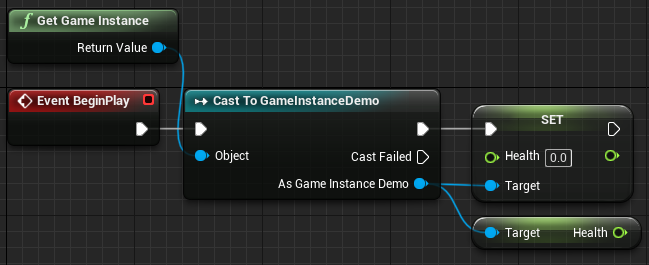
The Game Instance is one the most important blueprint classes in an Unreal Engine 4 game. In this guide we will go through what the Game Instance does and how to use the game instance in Unreal Engine 4. Contents hide 1 What is the Game Instance 2 Creating your Game Instance 2.1 Creating the...Read More
modest swan
How do I disable all screen messages
autumn flame
Console command: DISABLEALLSCREENMESSAGES
limber mesa
could anyone help me out with a event dispatcher issue. when an enemy dies it calls a dispatcher and the spawner is supposed to recognize it

this is the spawner

it works for a couple of times but then it stops
autumn flame
Are you calling the Dispatcher after Destroy Actor?
Pending Kill means it's getting destroyed
You're basically trying to access a ref of an actor that's about to get gutted
 steep basin
Are their negatives to early z pass?
 fading wolf
is the fact that I can't use the find reference button (or my whole menu being smaller) mean that this variable isn't anywhere else in my whole project?
 autumn flame
Use Find in Blueprints for that
plush yew
I don't have reflections on my wate rin ue 5 with lumen. There are reflections on with screen space
fading wolf
autumn flame
Use Find in Blueprints for that
Thanks, I think I just don't know enough UE to figure out why my thing isn't working. I realise the TopProgress thing is an input? I thought variables had to be like made somewhere. thank you
 autumn flame
steep basin
Are their negatives to early z pass?
autumn flame
steep basin
Are their negatives to early z pass?
Depends on the amount of overdraw, it really depends on what you have, but generally it gives you some performance if you have many alphas overlapping
steep basin
autumn flame
Depends on the amount of overdraw, it really depends on what you have, but gener...
is it one of those things that would for example be worth throwing on at the end? just for fuck sake? or?
autumn flame
You could try, if it gives you performance and you don't notice anything, why not
steep basin
i guess it always works with the (if it works fuck it) 
autumn flame
I mean, I use it :p
autumn flame
fading wolf
Thanks, I think I just don't know enough UE to figure out why my thing isn't wor...
It's an input yes, looks like a function so when you call it you can pass a variable as Top Progress and Delta Seconds (Probs is correlated with Event Tick)
steep basin
i just dont quite understand what the hell it does and at what point it start to make things worse 😆
fading wolf
autumn flame
It's an input yes, looks like a function so when you call it you can pass a vari...
ah you're right! thank you
 autumn flame
steep basin
i just dont quite understand what the hell it does and at what point it start to...
autumn flame
steep basin
i just dont quite understand what the hell it does and at what point it start to...
It basically doesn't compute primitives behind already rendered things, dunno how to explain
It's occlusion culling
I imagine it gets heavier with the more actors / tris you have in the scene cause it has to calculate the pre-pass for each pixel
So reduces overdraw
If gains in calculating pre pass > overdraw, then go for it i guess
crimson peak
Does Unreal automatically unload stuff? When I walk far enough I see assets dissappear. Or are they just out of player view? I'm learning map streaming tomorrow.
Lannis you are on a roll hahha
autumn flame
Streaming generally works if you enter in a streamed level, it can unload the other levels
Depends how you do it, Landscape Streaming or Manual Streaming
The general gest is that you have a Persistent Level that knows about all the Levels called Sub Levels
If you enter a Sub Level you can tell all others to unload or particular ones to unload
World Composition one works a little differently, it's more automatic
crimson peak
So far I've built everything so far in 9ne level lol. 😅
One
Well except main menu
autumn flame
It's not too bad, depends on what you're doing :p
World Composition is anyways getting replaced by World Partition

What is Level Streaming in Unreal Engine 4?
Source Files: https://github.com/MWadstein/wtf-htf-LevelStreaming
Example Game: https://github.com/MWadstein/UE4-October2015-Jam
 harsh oak
is async physics now in 4.27? seems like it didn't make it
autumn flame
Chaos? Nope
I think it can be activated, not sure if it's only for 4.26, but still runs on PhysX for compatibility reasons
Or stability 👀
harsh oak
not in 4.26
autumn flame
4.26-Chaos
harsh oak
ah
 fervent raptor
4.27 "OS doesn't support"
I'm using Windows 11
 autumn flame
Try the official 4.27 release
fervent raptor
autumn flame
Try the official 4.27 release
I'm using?
autumn flame
Preview 4
 autumn flame
Insider Preview iirc
fervent raptor
P4 to Official 4.27 doesn't work
fervent raptor
plush yew
I didn't realize Windows 11 was already out
I'm from Brazil
 fervent raptor
autumn flame
Preview 4
fervent raptor
autumn flame
Preview 4
Preview 4 to 4.27 official release doesn't need update
autumn flame
Dunno, try running directly from inside the Unreal Engine folder and if worst comes to worst, compatibility mode
 narrow mauve
Hm. I want to make use of the R and G channel of a render target but unsure how to write to one spefically and not the other
fervent raptor
autumn flame
Dunno, try running directly from inside the Unreal Engine folder and if worst co...
I'm reinstalling
 desert prairie
Question: Would importing images to my content browser through file explorer break the project or no?
 weary basalt
No, it may even pick up the fact that you added them.
Ideally you would add them by drag/drop into the Content Browser.
 frail portal
hello
i noticed we have a volunteer channel where people wanna look for specific volunteers
i wanna ask if we have a channel on looking for fellow brainstormers?
weary basalt
@frail portal Our Job Board is not that specific.
Read the listings in the #hire-a-freelancer or #hire-a-studio channels.
These are Individuals/Studios expressing that they are looking for work.
frail portal
thank you!
weary basalt
You may also want to post your own listing in #volunteer-projects, #freelance-jobs or #salary-jobs based on what your looking to offer in the form of compensation/length of employment in order to find people who may want to help you.
Please refer to the #instructions for more information.
frail portal
will do
time to write my things more tho, so i'll keep that in mind, thank you matt
plush yew
How do I hide the planar reflection geometry without losing the reflection?
 trim mantle
I am not sure you can
coarse apex
please help! ive been trying to fix this twisting issue and I have no idea how, here is a screenshot of what I have and the problem, im new to unreal so anything would help thank you!

 junior abyss
Hi all, wanted to ask if these specs are ok to run UE4
10th Gen Intel® Core™ i7-10750H 6 Core (2.6GHz/5.0GHz)
NVIDIA® GeForce GTX 1660 Ti (6GB GDDR6 VRAM)
16GB Dual-Channel (8GB x 2) DDR4-2933MHz
coarse apex
coarse apex
please help! ive been trying to fix this twisting issue and I have no idea how, ...
solved, solution: auto rig pro to retarget it to the ue4 maniquin and i can redo my exact code but it works
 grave nebula
@junior abyss they are ok, but waay below comfort zone.
fading wolf
junior abyss
Hi all, wanted to ask if these specs are ok to run UE4
10th Gen Intel® Core™ i7...
i had a worse PC than that and it worked fine
junior abyss
Alr thx
 drifting elbow
(how) can I start vislog recording in a packaged game? (development build, ofc)
 gleaming oriole
Hey everyone.
I am currently trying to play some facial animations from a csv file containing curves using MetaHuman.
My pipeline looks like this:
I use the LiveLink plugin and LiveLink Face App on Iphone to record these curves into a csv file.
There are two ways for me to generate these csv files:
The first one looks like this: I use LiveLink and directly create an animation inside UnrealEngine, and as the result I receive an FBX file that contains my animation. Then I use some script to extract curve data and I write this data to a csv file. Later I can read this data from this file using blueprints and I can map this curves onto MetaHuman model.
In the second variant I skip the part where I extract curves from an FBX file. Instead of this, I save the curve data that is being recorded in the LiveLink app.
The problem is that the curves that I extract from an FBX and those that are from an LiveLink App are of a different format. When I open an Animation asset in UE4 I can clearly see that the model has at least two different kinds of curve formats (see the screenshots). And I can easily play the ones that are from an FBX (those that have CTRL_expression prefix), but I can't play curves from the LiveLink App (but I really want to, that's the problem). According to the graphs of these curves they are not static. But the model is not moving when I click play.
I could try to map these curves onto CTRL_experssion curves, however it doesn't seem straightforward.
It seems to me that the problem is that a MetaHuman model has two different sets of animation curves and for some reason the model isn't being animated when I use one of these sets.


 royal trail
Hello. I'm in need of some help. I have used a procedural mesh to generate a plane made of 7*7 vertexes. Now i have to generate the UVs of said plane so that a 128x128 texture maps perfectly onto said plane. (The plane is a square). How do i generate the UVs to achieve that?
 hard vapor
Heyy I need help with packaging project. I need to package my project fast but it's taking ages fue to my pc's speed. Would anyone please help me? Dm if you can
fierce tulip
royal trail
Hello. I'm in need of some help. I have used a procedural mesh to generate a pla...
is each plane a different texture, or an atlas?
if its a different texture you'll need different Id's for each plane (called multisub in 3dsmax, not sure how its called in other dcc)
if its an atlas, just load the atlas in your dcc's uv-editor and move each plane its uv's accordingly.
royal trail
what is a "dcc"?
fierce tulip
digital content creation. (iirc)
basically the application you use to make your 3d models and such
royal trail
Alright, got it
royal trail
Now, problem is, i'm generating the mesh inside of UE4, the engine. The method i'm using only allows UV generation through math
It doesn't have a UV editor like blender, or 3ds as far as i know
drifting elbow
well, use maths? This looks like really simple maths
the 128x128 texture UVs is like 0-1 in x and y direction. so you would basically have (for each vertex in x direction) 1/7 for the x coordinate
except you want repetition
 buoyant graniteBOT
Something went wrong. Check the logs for details.
drifting elbow
basically something like: for v in vertices: uv = v/numvertices
royal trail
I'll try that. Thank you
drifting elbow
(as long as v is a vector)
royal trail

It almost worked
I just somehow have to move the whole thing to the right by about 1 vertex
drifting elbow
off by one? your first vertex should be 0/7=0, the last 7/7=1
royal trail
might've found the issue
 drifting elbow
great
royal trail
Thank you dear stranger
 jade surge
https://gyazo.com/76e2501f7f95c8066b878ecc8321722d
☺️ ☺️ Got blocked after I stopped doing all the work for someone here hahaha

 next dome
hey guys, does megascans plugin work for ue 4.27?
 tender granite
How do we make a feature request?
wary wave
'feature request'?
 knotty summit
Quick question. Does nativization convert BP nodes to cpp in a way we can continue to work with Visual Studio or it just converts the code on packaging the project?
 stuck path
hey people, any ideas where I can find the tutorial for a character switchable UI like this one? What I want is to be able to click the portrait icon and possess different characters available, esp one working for third person characters. Thanks in advance!! 🙏 🙏
 wary wave
knotty summit
Quick question. Does nativization convert BP nodes to cpp in a way we can contin...
wary wave
knotty summit
Quick question. Does nativization convert BP nodes to cpp in a way we can contin...
Just converts during packaging. It's also unreliable as hell, so you probably don't want to use it.
 azure nimbus
junior abyss
Hi all, wanted to ask if these specs are ok to run UE4
10th Gen Intel® Core™ i7...
azure nimbus
junior abyss
Hi all, wanted to ask if these specs are ok to run UE4
10th Gen Intel® Core™ i7...
Just be happy you're not on 4.22 i think it was.. landscape materials use to hit 100k - 200k shader compiles.
charred leaf
@stuck path This probably has what you need. https://www.youtube.com/watch?v=pgIJqiZQ-2Y&list=PLL0cLF8gjBpqA8DcrhL_O9kD4jsUqhDR6
If you've ever wanted to create a role playing game (RPG) but wasn't too sure where to start, this is the tutorial series for you. You'll learn everything you need to create an RPG from scratch using Unreal Engine 4.
You'll learn everything ranging from creating character classes to setting up inventory systems.
Head over to the next video to ...
knotty summit
wary wave
Just converts during packaging. It's also unreliable as hell, so you probably do...
Thanks for the answer, if it was converting to cpp I was gonna convert only heavy functions and expose them to BP to use them rather than converting everything
 chilly spire
grim ore
chilly spire
grim ore
@plush yewyou can start here , https://www.unrealengine.com/en-US/onlinelearning-courses/getting-started-in-unreal-engine , and then also explore the entire online learning site for more courses
@chilly spirewhat is the error you are getting?
regal mulch
knotty summit
Quick question. Does nativization convert BP nodes to cpp in a way we can contin...
Gameplay Framework
Removals
Blueprint Nativization will not exist in UE5EA. Projects that leveraged this feature should not see any changes or need to receive any modifications in order to function properly, though performance may be impacted. If this happens, developers will need to take other optimization approaches.
Just in case you aren't aware of this and you are planning on moving to UE5 eventually.
 light thunder
That square is just a hole in this architecture (literally, I removed the actual window mesh from the mesh itself) - how can I get it to be obscured by this smoke, instead of bleeding through it?

an odd
part of that is me just not matching LOD's but I'mt not sure why the previous LOD doesn't have an issue, it's obviously to do with the camera distance but I don't know if I am supposed to change my particle, the material on my particle, or what?
knotty summit
regal mulch
> Gameplay Framework
> Removals
> Blueprint Nativization will not exist in UE5EA...
Thank you for sharing this, didn’t not that. I don’t actually plan to use nativization. I’m a CPP beginner and try to convert my gameplay features to CPP in order to take advantage of both blueprints and CPP. I was planning to create simple actors and put some heavy calculations and convert them to code, then create a function and paste that code and use as a blueprint node. But I’ve made some research and people say converted code is unreadable so it might not be the best solution. 🙂
I made a huge progress with blueprints in my project so I’m only able to convert little parts of the BP to cpp.
light thunder
knotty summit
Thank you for sharing this, didn’t not that. I don’t actually plan to use nativi...
if you are a CPP beginning, if I were you I would pull up two examples of code, one that has been pure CPP and one that is a well-optimized blueprint, and see just how much of a difference it makes - might surprise you
knotty summit
I’m reading cpp version of ALS and it looks very familiar and readable, only problem is “how to make sentences” I would say. 🙂 but I’m in vacation, not able to access my computer and meanwhile I’m trying to ask questions and take some notes
 vale silo
folks, any idea if Quixel will update Bridge for 4.27 soon ?
 faint rune
It takes 20 minutes on my 8 virtual cores just to "compile shaders". And it keeps happening. For an empty template project targeting Android (the two-thumb stick flying tempate) in 4.27. It's sooooo incredibly frustrating. I am on the verge of quitting Unreal and going to Unity, where this problem is somehow relatively non-existent.
🤯
 regal mulch
Then you'll need to fix those errors
grim ore
@faint runecompilation is the first time you use a platform per engine generally, after that its just updates. and importing large projects has similar issues in Unity as well, its not like its magic
faint rune
No nothing like this. I'm really frustrated. Any small changes I make in any shaders results in massive build times. No one else has this issue?
It's especially pronounced for some reason when I'm trying to deploy on mobile.
 weak relic
faint rune
No nothing like this. I'm really frustrated. Any small changes I make in any sha...
weak relic
faint rune
No nothing like this. I'm really frustrated. Any small changes I make in any sha...
Well you know what they say
“🦆 chicken”
faint rune
You can see from the build history screenshot; 20 minutes was one case, but others are like 10, 15, 9, etc.. Toooo long.
grim ore
it should not be massive build times when making smaller shaders changes, and major platform builds are once per engine.
if its taking longer, see how much CPU is being used when its doing this. if its not near 100% there is another issue
platform shaders for the engine are done once per platform, so the first time starting the engine and the first time switching or deploying to a new platform can do this. Once its done they are cached and anyone individual changes are done and should be quick depending on the shader, platform, permutations, and your machine with the last being the biggest one. Also if you installed bad software (incredibuild) it will cause issues
faint rune
grim ore
if its taking longer, see how much CPU is being used when its doing this. if it...
It's 100% all taken up by UE4 and it's minions.
faint rune
grim ore
platform shaders for the engine are done once per platform, so the first time st...
Wait; Incredibuild is bad?
grim ore
if you arent payin for it, and most people are not, yes. it limits the # of threads that can be used when building
faint rune
How do I turn it off?
grim ore
you uninstall it from visual studio, assuming you installed it from there
but if it was running you would know, you wouldnt have 100% cpu use from shaders
faint rune
@grim ore looks like my Incredibuild is using all 8 cores, so unless there is something else 'bad' about it, it seems to be working as expected.
 grim ore
shrug just pointing out potential issues.
if your at 100% cpu use then your doing all you can beyond a better machine. If its actually re compiling all the same shaders on each deploy to device or project startup, your cache has an issue
faint rune
Where can I view / manage the Unreal cache?
grim ore
its in your appdata folder by default, you can google for derived data cache for more info
 wet briar
Question, with UE4.27 just released. are those features in UE5 as well? If not, will they make their way over once it is out of beta?
grim ore
no, yes, maybe, and possibly with a side of probably regarding UE5
in theory all of the 4.27 features that are being kept should end up in/are in UE5. which branch? when? only epic knows for sure. most of them are part of UE5 main tho
wet briar
Alright thx
 fast ginkgo
In 4.27, I've noticed that an engine feature (nDisplay) has a default behavior that's very different from 4.26. I can't find any mention about this in the documentation, so I don't know if the change is intended or not.
How would I manage to get more information on that change, e.g. is it a bug, a feature, what's the intended workaround to get the default UE4.26 behavior? I've made a post on the forums, but history tells me that it'll probably just sink without any answer whatsoever.
Maybe I could to report a bug (https://www.unrealengine.com/en-US/support/report-a-bug), but I mean the very first point is
Take a moment to evaluate whether it is an engine bug or not
Well I actually don't have the answer to that, and that's my problem right now. So how am I suppose to know if something is a bug or not when the doc doesn't say anything about it?
 faint rune
grim ore
if your at 100% cpu use then your doing all you can beyond a better machine. If...
faint rune
grim ore
if your at 100% cpu use then your doing all you can beyond a better machine. If...
It's gone crazy; all I did was start a brand new project with the FlyingExample template in 4.27, deleted the geometry, atmosphere fog and lightmass volume, added the model editor plugin which caused it to ask me to restart, and when I did it just goes crazy trying to compile 6,000 shaders! I think 4.27 has some regression in this regards.
grim ore
perhaps. Its also possible that the plugin is activating another platform and its compiling for it
cyan bronze
And if i try to build it manually on rider it gives me this
 grim ore
@faint runeI just did the same thing, and I had ~1300 shaders to compile so it definitely turned on something. but that was only about 15 seconds to compile them for me and it only did it once
 balmy rose
hey guys
balmy rose
i've a short question regarding ue5 - am i right in here?
grim ore
@faint runeah and after it started up I had 6k shaders to compile. My guess is it activated another platform
@balmy rosemaybe #ue5-general
balmy rose
oh ok thanks 😄
 astral phoenix
Hello can some1 help me, when i package my game its like 20gb and i think its alot for what the game is, so is there a way to make it lower? like clear some unused assets or something? 🙂
grim ore
yes, there are general posts out there on how to do it. Nothing magic. You can remove anything you are not using as the first step. How big do you think it should be and why?
you can look at the size map of your project inside of it to see what is taking up space
astral phoenix
grim ore
yes, there are general posts out there on how to do it. Nothing magic. You can...
i think it should be around 5gb because its a small story game where the player walk from A to B and thats like 20 min with some small story
grim ore
remove anything you dont need then, extra maps and things like that. also look at how the size map works, it shows you the size of items on disk that are in the project
usually you would do that, then you can go into the project settings and tell it to only use the maps you want
astral phoenix
so what u are saying is that there is not 1 click delete all unused assets or something like that? xD
grim ore
not built in, no
some assets might be in the project that are used but the engine doesnt know, like soft references or files in specific folders
faint rune
grim ore
<@!210913802538057728>ah and after it started up I had 6k shaders to compile. M...
Thanks for confirming! Unreal folk really should fix this.
grim ore
theres nothing to fix for that part
it compiles them ahead of time so you dont have them compiling while using, its by design. once its done it doesnt do it again
astral phoenix
grim ore
some assets might be in the project that are used but the engine doesnt know, li...
do u know if there is some kinda plugin that can ''clean up''? and is it worth it? 🙂
grim ore
I have heard of some plugins on the marketplace yes, I have never used them
faint rune
I think they could do with much better caching because I am facing it too frequently.
grim ore
if you did what you did, then closed it, then loaded it again and it compiles again there is an issue on your machine. If you opened the project again and nothing new compiled, its working
faint rune
Also how come there are so many shaders to compile when I deleted everything but the little spaceship?
grim ore
I think this might just be an issue with your machines performance causing it to be annoying
faint rune
Possibly
grim ore
its not the deleting, its the plugin you enabled
its the same if you switched to previewing IOS shaders for example on windows. it has to compile them for first use.
faint rune
It's too annoying; how come Unity doesn't do all that on the same machine? I have literally nothing in the scene:

Also it wasn't this bad on 4.26, so I feel it may be a regression.
grim ore
so this is a new project opening for the first time, or what is this?
faint rune
Yup.
grim ore
if this is after you enabled the plugin then this is normal
faint rune
This is after the plugin.
grim ore
and once its done, it wont do it again
then yes, and unity doesnt do it because its unity
I have a feeling this is just due to your machine just being annoying for the way UE4 works 😦
like those 6k shaders took under a minute for me, and then its done
faint rune
Not sure; I made this just fine in 4.26 on the same machine: https://www.youtube.com/watch?v=fpGvlS4VYg0

I made this Cinematic in UE 4.26 using the new Sky Atmosphere component along with several features including bump / displacement mapping for the mountains, waves, different reflectivity for poles, water and land, night lights, hdri skydome, cloud and planet rotations, etc.. The Planet actor I made for this is heavily parameterized, allowing me ...
But yea maybe somehow something is wrong with the machine; not sure.
 boreal lantern
@grim ore you around?
 glacial rapids
Does anyone have experience with 360 video capture in UE? I'm using the Panoramic Capture tool in UE and I'm trying to capture a night scene, but when the render comes out it looks like there are no post processing applied to the render. Anyone knows how to fix that?
boreal lantern
could use some help pulling breaking a string response and setting value to string?

 boreal lantern
Whenever you are online please let me know. Seen you help someone with request like this. getting request with VaRest. I know this would be so simple for you @grim ore
Anyone else pretty good with using VaRest?
 dark briar
hey guys, how do i create a camera from exactly where my view is? i want it in the exact same spot I am looking from if that makes sense
 cedar wave
Select the level stuff dropdown in the top left - then there is a way to create camera from view
I forget which sub-menu it is under
Could also place a camera
And then, with it selected, open the context menu and select Snap Object to View
There's also an option to place the camera with standard FPS controls (it's in the same level dropdown menu in the top left of the viewport). I don't actually know what that dropdown is called
sharp crest
left or right??
 dark briar
cedar wave
Select the level stuff dropdown in the top left - then there is a way to create ...
dark briar
cedar wave
Select the level stuff dropdown in the top left - then there is a way to create ...
PERFECT! Thank you 😄
sharp crest
it's just a simple decision, quick look - left or right, why is nobody answering 
fierce tulip
is kinda something for #work-in-progress me thinks.
to me the right one has more character, but the left one is more readable.
 glacial dawn
Right, but more clear. Left seems cheap
 spare lagoon
Hi Slackers - has anyone else had problems with Quixel bridge in Ue5 if they have a water actor in the landscape please? driving me mad(er)
true enough... love to push the envelope you know but yes, one beta too many i guess 😦
you're right.. better scrap that project 😦
 midnight bolt
where can i post a small task job offer?
 rancid lagoon
midnight bolt
rancid lagoon
midnight bolt
thats the thing, its neither both, and those look like 'real jobs', while i just need a simple task
just posted one, maybe something for you
spare lagoon
I suppose i could use a plane with the starter water material may have to deal with stretching... thats stable enough isn't it?
boreal lantern
was testing out a portal and now my character is in the floor? It is stuck in the floor ? anyone seen this before?
on start player is spawned in the floor and does not match camera
 vocal sorrel
Hi everyone, I have a character that has a walking animation. How do I set him up in the sequencer so that he's going from one place to another while keeping the animation? Every time I try to track his transforms the animation doesnt activate
 rough kraken
is there a quick way to see what code is being called from a blueprint node?
for example
is there a way to see what "Connect to Server" is actually calling in the engine code?

unfortunate, but thanks
 sterile lichen
 cedar wave
I don't think this has literally ever worked for me. Been using UE off n' on since like 4.12
rough kraken
that is a isekai beacon for sure
cedar wave
Noice
cedar wave
What's at the top for you? 🤔
vocal sorrel
Does anyone know how to keep physics active while using the sequencer? Im trying to make a BP move forward but also keeps its physics
rough kraken
I'm not familiar with the physics in this engine yet, but you probably want to apply a force to the object rather than some forced velocity vector?
 gentle magnet
vocal sorrel
Does anyone know how to keep physics active while using the sequencer? Im trying...
gentle magnet
vocal sorrel
Does anyone know how to keep physics active while using the sequencer? Im trying...
you could disable its physics?
wait nvm i just re-read the message dont mine me being a dumbass 😂
vocal sorrel
@gentle magnet im a little confused with what you mean here. I have a ship that is currently floating in water using the buoyancy component. I want to have the ship slowly move forward while also maintaining the buoyancy physics.
hahaha all good
gentle magnet
uh you could maybe keyframe its position in the sequencer?
vocal sorrel
Yeah I have no problem key framing it to move but that makes me lose its physics/buoyancy
gentle magnet
might be a long shot but could u do it in two parts? like keyframe the whole animation without it moving towards the point first but keeping its buoyancy and physics, and then once uve got all the keyframes in u could maybe change the location x,y,z depending on where u want it to move?
vocal sorrel
Yeah thats an option. Ill give it a go. Thanks!
gentle magnet
np :)
dry tree
How do I open uexp and uasset files??
gentle magnet
In Unreal Editor, open the Content Browser (Window → Content Browser).
Within the Asset Tree, select the folder in which you want to add your UASSET file. For example, if you are adding an audio file, you’d likely select the Sounds folder.
Drag the UASSET file into the selected folder. After you do, the asset should appear in the Content Browser.
i dont suppose anyone would fancy helping me actually, my game ive been making is slowing down dramatically for no apparent reason, it goes from 120 fps down to about 30 in a matter of seconds and besides the player and a few default cubes there is nothing else in the world. if someone wouldnt mind hopping in a VC id rly appreciate you helping out :)
 winter gate
gentle magnet
i dont suppose anyone would fancy helping me actually, my game ive been making i...
winter gate
gentle magnet
i dont suppose anyone would fancy helping me actually, my game ive been making i...
Is it CPU or GPU bound?
gentle magnet
uhhhhhh i wouldnt know how to tell sorry :/
limber mesa
hello all, working on a enemy respawn system.when the enemy dies it calls a event dispatcher to the spawner. it works some times but it cant access the dispatcher. could anyone advice?
 winter gate
gentle magnet
uhhhhhh i wouldnt know how to tell sorry :/
winter gate
gentle magnet
uhhhhhh i wouldnt know how to tell sorry :/

This session by Sr. Dev Rel Tech Artist Zak Parrish explores performance concerns for shipping games, focusing on how to track down problem areas on both the CPU and GPU. Learn how to set up a test environment and how to employ the necessary tools to identify key performance problems as well as some guidelines on how to address these concerns on...
This video helped me out a ton
and this reddit thread was pretty useful too: https://www.reddit.com/r/gamedev/comments/fevgv9/guide_to_game_performance_for_unreal_engine_4/

reddit
61 votes and 11 comments so far on Reddit
 hidden sparrow
Hey, I have a button that when hovered, makes an image go where the button is. It should hide when I unhover it. Thats where the problem is. If The button is above my picture, I cant click another button on that picture, but when the button is beneath the image, it doesnt know when it is unhovered. How can I fix this?

Actually it does know when it is unhovered, but It is when the image moves and covers the button, which is not something i want
Can I make a button recognise it is hovered but make it take no space?
 steady hull
not really a unreal question, but maybe someone might know? Is there a plugin or something for Maya to make it control more like unreal as far as camera control goes?
 cursive hazel
Not sure where to post this but I'll give it a go :p
Does the new water system that was added with 4.26 have some kind of waterfall feature?
 woeful canyon
im having a visual bug on the editor randomly where if my mouse is over any node or menus, it's transparent and I see the editor behind it moving it around. on a 3080 ti. I've also seen this issue on a quadro 8000. Not sure what it is. Closing and opening unreal fixes the problem temp... Anyone else having this issue or know how to fix it?
What an interesting bug... lol.
Perfect. Thank You. Nvidia. LOL
 vagrant cliff
Does anyone know how to integrate the python.py file into Visual Studio for auto-completion 😆
 bleak lark
Any way to get rid of the overlapping joints in this spline? Just have a simple translucent material applied to it.

 mental helm
Don't cap the ends of the spline mesh?
charred leaf
I could use some help if anyone can spare a moment. I'm trying to edit the values in a dictionary/map using a button. I have the dictionary set up so the keys are strings and the values are integers. I got as far as making an array out of the keys but i'm not sure what to do with it. The end goal is to increment the value within each key with different buttons.


 vagrant cliff
charred leaf
I could use some help if anyone can spare a moment. I'm trying to edit the value...
vagrant cliff
charred leaf
I could use some help if anyone can spare a moment. I'm trying to edit the value...
you can just for loop thought you array and use the object as the key in the dictionary
prime willow
cursive hazel
Not sure where to post this but I'll give it a go :p
Does the new water system t...
So you should be able to cheese for it i believe the unreal tutorial covers how to do exactly that with the water system
however i believe theres a more suitable measure for water that comes with less glitches under oceanology or something of that nature on the marketplace
 urban sinew
What's the pipeline for exporting a model from maya to unreal so that it has multiple animations associated with it? Like on the maya side if anyone knows how to set that up
prime willow
steady hull
not really a unreal question, but maybe someone might know? Is there a plugin or...
So if you mean in runtime there is camera manager setups youtube tutorials will and have covered if you mean in editor for contorlling your project you can incease its speed by using its little corner notch here https://gyazo.com/82de2835d478aa4e00b06977606e0f95 the last one on number 4 should do it
also apparently i could be wrong i believe you cna mess with editor button layouts so theres that too though im not so sure about it entirely
 prime willow
hidden sparrow
Hey, I have a button that when hovered, makes an image go where the button is. I...
prime willow
hidden sparrow
Hey, I have a button that when hovered, makes an image go where the button is. I...
so the widget system has a Zorder system which takes into consideration which parts of components of the widget system is on to por button itll be in the details panel
you can also cheat the invisible when clicked or hovered on or off by using transparent pictures per say tho i havent tried the method so dont take my word for that par tin particular
prime willow
limber mesa
hello all, working on a enemy respawn system.when the enemy dies it calls a even...
my best advice would be to take a step back and analysis what is the key aspect causing the issue if it works sometimes and doesnt at other times comfirm why it works when it does and figure out which parts in particular cause it to null at other times
once you corner that box that in a solution can be made perhaps its range of where and when he died or how he may of died that is nulling the dispatcher
however without more context its difficult to assist you sir~
limber mesa
@prime willow what context would you need?
prime willow
well the particulars to why it isnt spawning when he dies
im new to unreal so i apologize in advance and hope you can bare with me ^^
charred leaf
@vagrant cliff Thanks Archie. I tried that but couldn't quite wrap my head around it but now i'm coming back to it because I want to create a single function that can update the appropriate text to that of the ability score. This is what I have so far.
 prime willow
but if its working sometimes and failing at others there is clear disconnect in your code to event sequence
charred leaf
 prime willow
urban sinew
What's the pipeline for exporting a model from maya to unreal so that it has mul...
prime willow
urban sinew
What's the pipeline for exporting a model from maya to unreal so that it has mul...
So in my opinion you dont want to export animations with meshes itll possibly cause conflicts its best to export the mesh and animations seperate and pair it up via animation blueprints and or montages and sequencers
limber mesa
I have a ability system that I implemented for the player, fireball, life steal and etc. I have multiple enemies. Right now I’m trying to kill a crab and it respawn a certain amt of sec later. When I hit the crab with a fire ball and the health is less than or = 0 the death function runs. In the function a dispatcher is called
Notifying the spawn system to spawn another enemy in
prime willow
o.o
prime willow
limber mesa
I have a ability system that I implemented for the player, fireball, life steal ...
and does that work as intended?
prime willow
is it suppose to apply to indivdual crabs
or all of the crab spawns
and does the certain amount killed clean the affected area of the alleged enemies?
i would check if this system is applying to each spawned crab or the crab blueprint or such as a whole within a alleged space
it may be that the respawn is accounting all of the crabs and not each one that has died
per haps if an index was applied to each and every crab when said crab dies its index would proc the system again i hope you can bare with me as im still learning just as you are but that is my take on your systems possible issue i hope this helps and if not do come back as im more than willing to assist you in whichever way i can ^^
prime willow
@plush yew optimization wise is it better to keep animations all jumbled in one folder or is seprating them via folders for functions making little to no difference o.o
ah okie x3
oh o.o
of course x3
i thought animations were mbs to gbs x-x
oh goodness
thats crazy xD
well
than having thousands of animations shouldnt be all that bad :3
 tiny sonnet
Uhh, this is the right node for accessing the player character from the controller right?
 plush yew
How would I go about getting this node?
 prime willow
if i wanted to have different parts of the body do different animations whilst blending with other animations as we see in locomotion
like running but the right arm can unsheathe knife and throw
make blendspaces(insert right term) for each limb right
so i want to make a layered animations setup
ah
 thick roost
Hello!
I have a (probably) very basic question...
I would like to know if it is possible, to change the initial path folder, called "content". I want to make one called "plugins".
plush yew
Thanks heaps
hidden sparrow
Any ideas why my image in widget looks way brighter than it actually should be?
 bold lynx
question
with the new water feature from ue4.26
how do you detect if the player is touching the water?
modest swan
How do I keep a animation to loop?
limber mesa
@prime willow here is the error
 coarse apex
is it possible to do opacity on a surface opaque? If I change it to surface translucent I cannot apply metallic/roughness?
limber mesa
here is the spawner
 modest swan
How do I loop a animation? The tutorial I'm watching is from 2 years ago
 gaunt abyss
☝️
limber mesa
@plush yew i checked with a print string
prime willow
o.o
well
its pending to be killed
so pehaps
there should be a variable
to save the spawned enemies
so it can be referenced when enemies are killed x-x
limber mesa
so i added some stuff and aparently is works like 99% of the time but i still get the error
prime willow
limber mesa
so i added some stuff and aparently is works like 99% of the time but i still ge...
show bueprint please

 prime willow
can you make a variable used for tracking the spawned and killed enemies
and latch it to the enemy blueprint below
as well
 tight vapor
Is there is any tutorial on how do I make a weapon wiggle like this?
prime willow
tight vapor
Is there is any tutorial on how do I make a weapon wiggle like this?
codelikeme has one on his youtube channel
prime willow
limber mesa
i suppose i could
did my suggestion work o.o
limber mesa
ima add it now
tight vapor
prime willow
codelikeme has one on his youtube channel
Thanks i look into it
prime willow
tight vapor
Thanks i look into it

^ this as well
very good suggestion
oh im smarter than i even realized!
 thick roost
Hello!
I have a (probably) very basic question...
I would like to know if it is...
thick roost
thick roost
Hello!
I have a (probably) very basic question...
I would like to know if it is...
So, anyone knows this?
fierce tulip
afaik content is a needed folder.
 night yew
thick roost
So, anyone knows this?
night yew
thick roost
So, anyone knows this?
I try not to mess with UE4 folders because it likes to get mad at you for it. Maybe try changing the folder name in the file explorer itself and not the editor for better luck
fierce tulip
migration expects a content folder, while technically possible, you'll just set yourself up for potential failure.
night yew
Does anyone have an idea of how I could control this radial menu with the right thumbstick? It works with the mouse currently but even with a few plugins I haven't been able to get it to work.
 thick roost
night yew
I try not to mess with UE4 folders because it likes to get mad at you for it. Ma...
thick roost
night yew
I try not to mess with UE4 folders because it likes to get mad at you for it. Ma...
Alright, thanks!
modest swan
How do I loop a aminmontage
fierce tulip
coarse apex
is it possible to have attach socket in sequencer?
 wintry torrent
Might be a stupid question. When pressing play how do you set the resolution to be fixed? Like 1920 x 1080
wintry torrent
Ive noticed that when I am playing the game in viewport that its not a fixed resolution
 clever marsh
ig on begin play you could set the red
res*
i might look dumb rn i think that’s what you’re asking
wintry torrent
I mean I am new so probably xD
clever marsh
on event begin play connect execute console command
and in the box enter
r.SetRes 1920x1080f
or whatever your red is
res*
modest swan
fierce tulip
<#221798806713401345>
there.. now I gotta wait a day for a respond in that chat. for a quick simple question
limber mesa
@plush yew im trying but im not sure if that will work. The event dispatcher is the only way the spawner will know if the enemy died. i put a is valid right before the cast and the not valid pin exec. how would you go about this
clever marsh
yeah you can do that too but if you want it to permanently be like that when you build it i think my option is probably the best
limber mesa
its like the actor it is spawning isnt valid
but if i try to add it into the array it wont add every actor, ill look into it
coarse apex
hey, im having my character pickup a weapon from a table in a cinamatic but how would I attach the weapon to the characters "weapon_grip" socket when his hand picks up the gun, here is a pic:

im just not sure how to add the attach to socket to sequencer
prime willow
@plush yew arent montages and blendspaces different?
limber mesa
@plush yew the not valid gets executed
i cant add the actors into the array if theres nothing to add
 gaunt abyss
What's in the Spawn Enemy function/event?
limber mesa
@gaunt abyss just some actor spawn stuff

 arctic hare
hate to say this but make your cleaner man
limber mesa
it is clean
arctic hare
not clean but spaced out it's just a pet peeve of mine really your code is good
gaunt abyss
limber mesa
<@!261183265438695424> just some actor spawn stuff
In case the trace doesn't hit anything the event is gonna be returning null (invalid actor reference)
 limber mesa
@arctic hare i just compressed it to get it in the screen shot
prime willow
Blue man if you dont mind me asking
limber mesa
@gaunt abyss that print string doesnt print
it will hit every time
i just put it there to check
prime willow
if i had an action button and it did several things like crouch slide run on wall based on system, and i wanted different version of heavy or normal attack off of each of those particular events that said action button could enter or exit would i setup each piece of the action button as state machines o-o
better yet what term would i search to figure out how to learn that stuff
limber mesa
because it will get a randompoint in the box then extend the actors down vector by 1000
gaunt abyss
limber mesa
<@!261183265438695424> that print string doesnt print
Set the collision handling to always spawn, curious if that will change anything
prime willow
limber mesa
<@!261183265438695424> that print string doesnt print
try without print string see what hppens
gaunt abyss
gaunt abyss
Set the collision handling to always spawn, curious if that will change anything
on the spawn node
 gaunt abyss
your actors were colliding with something and it refused to spawn them
 prime willow
youre welcome~
charred leaf
Would you guys take a gander at this? I'm trying to compare strings gathered from a Map and from an Array of Objects, then assign an object a value from the Map from the corresponding Key to the Corresponding object if the comparison was true.
 wintry torrent
@clever marsh so didn't seem to work i am probably not ask for the right thing. While I play the game using viewport, I can see more if I shrink the screen from the width.
 rich oar
GUYSS I need help with using a camera and VInterpTo
I cannot get it to work
gaunt abyss
prime willow
if i had an action button and it did several things like crouch slide run on wal...
I would probably implement it sort of like a state machine
Would probably have a state object that contains the functionality the player can perform and the state object implements the action event, if the Running state object is currently set as active and an action key is pressed it would slide or whatever, if walking state is active it would just crouch, etc...
But depends how many of those states you are going to have
If it's just a few might be better to just use an enum
modest swan
can comeone help me out using anim montage
arctic hare
modest swan
can comeone help me out using anim montage
sure whats the issue
limber mesa
@gaunt abyss @prime willow @plush yew ok so i took into acct what you guys said. Apparently the enemy isnt getting removed from the array
 rich oar
Why can I not INIT an FVECTOR like so:
FVector TargetPos; //in header file
TargetPos = (1.f, 2.f, 3.f); // in cpp file
prime willow
gaunt abyss
I would probably implement it sort of like a state machine
Would probably have a...
oh okie that makes sense i plan to have quite a bit to be honest, stuff like when dodging backwards but theres a wall latch onto the wall kind of like spiderman ps4 does when you dodge backwards near an object and because latched any attack done would be sort of like a dash attack of some sort, same for sliding running walking or 4 way directional inputs plus attack or dodge or tool use etc if that makes any sense
prime willow
i wanna create essetionally combat that feels and looks like this

i know its gonna be an absolute shit ton of animations blends montages and state machines as well as script blueprints so i wanna make sure im not starting the foundation on a turd x3
prime willow
limber mesa
<@!261183265438695424> <@!517804295874281474> <@456226577798135808> ok so i took...
ok that doesnt sound to hard to fix
prime willow
try something like when enemy is killed remove from array granted idk how or what nodes would do that but im sure there are many
also see if you cna index each enemy in the array
so their accounted for and dealt with promptly
limber mesa
I GOT IT!!!!!!!!!!!!!!!!!!!!!!!!!!!!!!!!!!!!!!!!!!!!!!!!!!!!!!!!!!!!!!!!!!!!
limber mesa
thankyou everyone
gaunt abyss
rich oar
Why can I not INIT an FVECTOR like so:
FVector TargetPos; //in header file
Tar...
This should really go in #cpp
But you need to provide it with a type, it doesn't know what type you are trying to initialize it with
TargetPos = FVector(1.f, 2.f, 3.f);
wintry torrent
Hey how do I make it where these 2 match regardless of how much I stretch or shrink it
https://gyazo.com/89aadf203a83c0c5f1ff629de17a8e93
https://gyazo.com/9b1dacb753430d742cc6edf94935dd80

 limber mesa
i forgot to include this

when the enemy dies it calls a dispatcher that removes it from the array notifying the array that its length is less than the spawn amt and so spawning in another actor
prime willow
all in a days work
limber mesa
multiple days actually thanks btw
gaunt abyss
prime willow
oh okie that makes sense i plan to have quite a bit to be honest, stuff like whe...
Yeah I think you would definitely benefit from a state machine-like system from what you described
prime willow
gaunt abyss
Yeah I think you would definitely benefit from a state machine-like system from ...
ah okie okie thats good to know ❤️
well guys this was fun but i gotta get back to worksies
modest swan
arctic hare
sure whats the issue
How do I loop a aminmontage
 subtle lake
".uasset' has been saved with empty engine version. The asset will be loaded but may be incompatible."
after upgrade from 4.26 to 4.27, there are many these warnings for the uasset. should i re-open/save all uaaset after upgrade the UE? if it was, is there automatic way to do this?
rich oar
Can someone tell me why I have to use a pointer for this FVector ?

Wont compile otherwise
modest trench
the macro expects you to deref the string pointer I guess
%s specifically is an FString in this case (afaik)
rich oar
Thank you @modest trench
Also, another quick question for you guys. What is the best way to PROTECT myself from this ?

my BP is trying to access a variable and for some reasons, (at different times) it has not initialized in time or something. Not understanding why
its a simple float declared and initialized in my .h file with BlueprintReadWrite access
 whole glacier
Hi all , just wondering if anyone ever seen it where though i specifically have my level specified in project settings/Packaging . It is packaging the standard third person level instead? This is n 4.26.
rich oar
No matter what speed i use, this does not function properly. It is supposed to "Smooth" the camera movement.... It instantly snaps to the target pos

 late badge
is there a way to change the pivot of a collider in a blueprint so when I snap to floor the bottom of the volume is aligned to the floor rather than the middle? Or if pivot cannot be changed, snap using extent?
rich oar
Added this so it didnt continue to call it over and over again. Still does the same thing
 gaunt abyss
rich oar
Can someone tell me why I have to use a pointer for this FVector ?
gaunt abyss
rich oar
Can someone tell me why I have to use a pointer for this FVector ?
FString overloads operator* and returns the internal character array
Also move to #cpp with C++ questions
 dark rune
is Unreal Engine 4/5 suitable for development for mobile?
(assuming the game is 3D of course)