#ue4-general
1 messages · Page 1042 of 1
 buoyant graniteBOT
 clever axle
An hour later and I'm still at only 44% 😫
 fierce tulip
back in ye olde ut99 days I sometimes had to build lighting for multiple days.
 light thunder
Beyond an editor shutdown, anyone have experience with fixing/preventing an issue when actors from a hidden level are still visible and selectable in the editor window Everything is normal during gameplay but I'm worried that while building I'm going to select or delete something, not realize I'm not deleting it from the current level that I am working on

You can look at my list of levels there and see that EVERYTHING is hidden, so nothing should be selectable
 idle garden
Someone knows what my movable assets change color when I'm far / near to them?
 idle garden
I'll check
light thunder
Unless there's some distance material function you have on that asset, it looks like a different material is applied to a higher LOD
idle garden
light thunder
Unless there's some distance material function you have on that asset, it looks ...
I don't think that it's that
I just drop the asset on the map and put it as movable
light thunder
idle garden
I just drop the asset on the map and put it as movable
Show me that but do it UNLIT
 severe brook
What does this means?
 idle garden
light thunder
Show me that but do it UNLIT
idle garden
light thunder
Show me that but do it UNLIT
 light thunder
severe brook
What does this means?
light thunder
severe brook
What does this means?
It tells you what to do in the middle, above the red text - that is literally the nicest unreal editor packaging error messaging I have ever seen - it tells you exactly what to try to do to fix it
light thunder
idle garden
Weird - post the first gif in #graphics it might take awhile but someone will recognize exactly what is happening
idle garden
ok thanks
severe brook
ok thanks i"ll try)
severe brook
strange , there is nothing wrongs in the middle of the text

 plush yew
hey
 tawdry sable
When I change any parameter in a material, UE4 seems to recompile all shaders. I don't know why.
Is there a way to stop this?
 wary wave
shouldn't be doing all shaders, just the ones related to the material you changed
but also if you're only tweaking values use instances
plush yew
wondering what unreal version i should be using to make a game that'll run fine on lower end systems
wary wave
static switch
plush yew
plush yew
wondering what unreal version i should be using to make a game that'll run fine ...
can anyone help me?
wary wave
IIRC there's a couple of other static params these days too, but I couldn't tell you what they are
they'll be called "static XX" though
tawdry sable
As always, my situation is weird. I have base materials that I created instances from at run time
Several of them layered together using masks
Every shader? :/
plush yew
dx11 games that can run on pcs with integrated graphics and quad core cpus with dedicated gpus
wary wave
I think I might know what's going on - you may be missing some of the checkboxes that say "used with XX"
tawdry sable
I'm fine with it compiling the changed one. Can't get around that.
plush yew
i have 4.26.2 installed
wary wave
and not saving it when the engine autochecks it and compiles it
plush yew
thanks a lot! i originally started developing my skating game with unity, but unity just felt a bit sluggish to work with, and blueprints feels much easier to work with
i don't plan on going that low, i'm planning on at least 30 frames per second on decent integrated graphics, like modern intel iGPU and Ryzen APU systems
but i wanna focus on the visuals along with the gameplay, and i want to make the gameplay feel good on 30fps too, so im not gonna go too low
also looking to implement graphics options
i'm wondering how to implement graphics options and such into my game, so the user can adjust the graphical options for performance and such
 glacial pecan
Anyone else having problems getting StringTables to update using Import from CSV? Mine just refuses now no matter what I try...
plush yew
i have quite literally got every free asset pack i could find, so i might have auto settings
these the options i should choose?
 tawdry sable
@plush yew This is what I'm talking about. This material is used once, yet I change a parameter and it triggers a recompile of 99 shaders.
idle garden
light thunder
Weird - post the first gif in <#221799195806400512> it might take awhile but som...
I have found a solution... basically, on the material, I swapped from Blend Mode Opaque to Translucent
light thunder
idle garden
I have found a solution... basically, on the material, I swapped from Blend Mode...
I'll have to file that away myself - I wouldn't have thought that would make it do what the gif showed me, thanks for letting me know
light thunder
glacial pecan
Anyone else having problems getting StringTables to update using Import from CSV...
What type of errors are you getting?
glacial pecan
light thunder
What type of errors are you getting?
I've checked the Message Logs and Output Logs and I don't see any... do you know what to look for?
light thunder
Show me your blueprint where you are trying to update something
glacial pecan
light thunder
Show me your blueprint where you are trying to update something
No, I'm literally talking about the "Import from CSV" button in a StringTable asset! 😅
light thunder
Oh lol
I've had issues with it before - if I remember correctly, you need to make sure your CSV matches the format
I believe the 1st line can cause issues
try the datatable CSV wadstein video
if you haven't already
glacial pecan
I just exported a manually input table, and compared it to what LibreOffice outputs, and it turns out, LibreOffice only puts quotation marks around things with spaces in them... so ugh... but Unreal should have at least thrown an error 😦
light thunder
yeah that's what I mean, it's super particular and won't always throw errors
try converting it to an excel CSV
it might remove those quotes
glacial pecan
light thunder
try converting it to an excel CSV
I'm using LibreOffice, and there was an option called "quote all text fields" which made imports work again after I enabled them. 🥳
fierce tulip
yea, too offtopic.
plush yew
Tru dat
 haughty slate
Does anybody here have any experience with getting DualShock 4 controller working with UE4 (4.26.2)? I've enabled the Windows Dualshock plugin but getting no response in the editor. Works with steam and games that natively support the controller, so it's definitely something with UE4.
 prime willow
fierce tulip
rules be <#809148428922781737>
prime willow
fierce tulip
rules be <#809148428922781737>
no way you mean to tell me people are supose to follow the rules for stability reasons
what type of insanity is this

fierce tulip
it would be great if we follow the rules so we keep the channels clean and not frustrate others who are trying to get help/are in a discussion related to the topic of the channel :)
prime willow
tell me about it~

ive honestly never read the rules because i thought they'd be mostly common sense and so far ive yet to break the rules now that i went and checked on them lol
fierce tulip
fwiw its not a long read, and even if you dont intend to break them it can help us moderators when other can point it out to people potentially breaking them :)
fierce tulip
sowwy, dont ban me uwu (and whatever other ascii signage is needed to sound weird) @plush yew
light thunder
all I heard was elmer fudd
light thunder
How do I update a plugin when the epic store says it's already installed to the engine
got it, thank you
 buoyant graniteBOT
:triangular_flag_on_post: Green#4100 received strike 1. As a result, they were muted for 10 minutes.
 hidden sparrow
Hey, I just made a Pawn and after I posses it this shows up. Can I just ignore it because I dont think it MUST be fixed right?

Everything works fine I just dont know if I should worry about it
 tender pecan
hidden sparrow
Hey, I just made a Pawn and after I posses it this shows up. Can I just ignore i...
tender pecan
hidden sparrow
Hey, I just made a Pawn and after I posses it this shows up. Can I just ignore i...
I would not ignore that though. you can see if you can read it and figure out which property you are trying to access, and maybe you just need to add IsValid node to it. \0/
Not all errors will cause your game to crash. but that is an error indeed.
hidden sparrow
Yea I know. Its a perfectionists worst nightmare
tender pecan
hidden sparrow
Yea I know. Its a perfectionists worst nightmare
and also the engines
 daring girder
I have a questions about a widget, but it is related to the blueprints for the widget, where would be the appropriate channel to ask in? would it be UI umg or blueprints?
hidden sparrow

thats what causes it but I dont know how to fix the error
my other pawn is just a cube

i tried to do this and branch it but it doesnt recognise when i posses the pawn
I propably did it wrong
fierce tulip
life in a nutshell, amirite
hidden sparrow
Yes, so how do I make it not trying to get it. I used branch But it always says false even when I posses the other pawn. Is something on that screen above wrong?
 tidal spear
Hello, I'm fairly new so bare with me. But I have searched and found little to no help on this topic. I'm doing a mobile app nd I'm looking to implement a way that I can remove parts of layer smoothly with my finger, like a scratch ticket for example. Where my finger swipe well delete whatever is under it and show the image below
hidden sparrow
thank you so much
tidal spear
I have tried adding small colliders that exit whenever I touch them. But it's not smooth nd clunky
wary wave
tidal spear
Hello, I'm fairly new so bare with me. But I have searched and found little to n...
you want something like a render target texture
on a plane, and you want to deproject screen coordinates to world coordinates, then convert those into UV coordinates on your plane
it's not hard to do, but you may need to do a lot of reading if any of that doesn't make sense
tidal spear
Yea lol. But if it works, its worth it. Thank you ma G
 drowsy snow
Friendly reminder for newcomers and beginners to grab the Content Examples project. It contains almost all of the implementation of the engine features, and a good way to get ideas on what they do and how you could use them.
It's located in the Learning tab in your Epic Launcher. Download size may vary, depending on which engine version, but for 4.26, it's around 3.5 GB.

 dusk tartan
Guys, the game i made starts VR if its installed on launching pc. how do i disable this?
If i disable steamVR and oculusVR in plugin settings, game refuse to build...
 fair summit
whats the difference between integer, integer64 and float
fair summit
ok i get it
 drowsy snow

 pine rock
trying to make my character fly by pressing, can fly is checked in the movement. when i press it the character makes a short motion but doesent fly

 misty owl
I want to keep track of interactions between my character and NPCs, so they can affect encounters later on in the game. How would I store that information in the player data? I haven't done much of a dive into recording the results of game events and player choices, yet.
I have a system in mind to keep it simple. like if there are three different options you can choose, each with three different moods, then I'd store the value 0-8 for the result of that interaction.
Looks like DataTables would be the answer?
Cool, found an inventory tutorial that teaches working with DataTables, and I need to learn that, anyway. Should be able to roll that knowledge over to creating a system to track NPC interaction
 quasi finch
Hello everyone! I'm having a technical issue with ray tracing and sub surface scattering and I was wondering if I could get some help. Also please let me know if this is the wrong place to ask. Basically the colour of the subsurface scattering looks vastly different in the viewport compared to the render. I'm using the subsurface profile with burley for the skin material and brute force ray tracing. Thanks for any help!
 rancid lagoon
how do i edit the template? I want to have a light that swings around like the 20th century fox intro thing, but it keeps changing color and doesn't move. How to i make them move in the way that i want?
 winter gate
How would I remove all unused materials from my project if I've compiled from a source build instead of the launcher?
wary wave
manually
winter gate
And from the launcher you can just simply remove the asset and it cleans up automatically right?
winter gate
For a bit of background info here, I started a project from the launcher using blueprints and now realized that I need to use my own source build so I'm wondering if I can still remove all the unused assets via the launcher before I generate visual studio project files.
wary wave
you can't remove anything from a project using the launcher
wary wave
also, generating visual studio files is just for your project, it is not a source build
the engine binaries etc will still be the launcher versions
winter gate
On the launcher > vault > remove local files? Isn't that it?
wary wave
no, that remove the assets from your vault cache
the launcher can never remove anything from a project
winter gate
So when you download an asset pack from the library, add to project, then only use one or two items, you're telling me there's no way to automatically remove all of the unused stuff?
winter gate
Okay so I suppose the correct workflow is to make copies of the ones I'm using into a separate folder
Then I can delete the entire asset pack folder after
wary wave
yeah, keeping organised is often the best way to deal with things
but I wouldn't install any asset packs into a project
winter gate
So many copies of copies..ughh
wary wave
I would install them into a dummy project, then migrate the individual assets I want across
winter gate
okay that makes sense
wary wave
the migration tool will copy across the referenced files etc used by the asset you're moving and leave everything else behind
winter gate
Okay so now that I've got a source build running, what do I need to do so I can generate visual studio code of my existing project I started via the launcher?
wary wave
right click on the project file, then switch the engine version to your new one
winter gate
ohhhh I can see it says Source build at : .... file path
wary wave
once the engine version is switched, open the project in the editor, then add a new C++ class - this will trigger creating a C++ VS project for you
winter gate
I made a backup just in case
wary wave
always reasonable 😄
winter gate
I'm always scared with these things, I really don't want to break my project
And to open in the editor it means opening the solution file first, then debug > start? Correct? I do that every time instead of the launcher?
That's my last question for now, I swear 🙂
wary wave
nah, just double click the project file
winter gate
I have to get into the habit of opening the UE editor from within visual studio by following the guide here right? https://docs.unrealengine.com/4.26/en-US/ProductionPipelines/DevelopmentSetup/BuildingUnrealEngine/
Compiling Unreal Engine from source.
wary wave
and yeah, I always open it from VS
wary wave
once you've generated a C++ file and have a VS project for your UE project, I would always run the editor through VS by opening the project's VS project
running it through the debugger means when it crashes you can, well, debug it
winter gate
uh oh
I didn't let it finish compiling shaders while it was running and now I'm getting build error
Should I try clean? Rebuild? build?
Ill just start trying stuff and see how it goes, thanks for the help so far @wary wave
wary wave
compiling shaders should not have been a problem - but if you run into build errors, take them to #cpp
 devout swift
When I launch my game as standalone through the editor, it shows in 16:9 aspect ratio (as expected)

but when I launch it through the command line with -game it shows in a square 1:1 aspect ratio
what is going on? why isn't it 16:9 as well?
I'm running this from powershell:
C:\Users\Jorge> D:\Build\++UE4\Sync\Engine\Binaries\Win64\UE4Editor-Win64-DebugGame.exe C:\Users\Jorge\Documents\UE\UMM\PuzzlePlatforms\PuzzlePlatforms.uproject -game -log
If I try to manually resize the window, it just scales up/down but in the same 1:1 aspect ratio
Ohh I was able to fix it by unchecking this:

I then resized the window manually to make it wider and now it remembers the new size
QUESTION:
How can I launch a new standalone game instance from command line at a specific aspect ratio or resolution?
 tender orchid
Hey so I wanna make a game but I am not sure where to start. I have a idea but I am not sure where to start when it comes to making the map as I know that is what I wanna do first. Does anyone have any tips or youtube videos I can watch that would help?
winter gate
You can probably just start out with videos after searching for "introduction to unreal engine" on youtube at first. Then once you start your own project, I found this guys channel to be very helpful in the beginning. https://www.youtube.com/channel/UCOVfF7PfLbRdVEm0hONTrNQ
 vocal sorrel
Hey, i thought i would ask again, is anyone familiar with the UE4 Environment Project? It use to be called the UE4 Community Water Project
 quaint abyss
Hi, can anyone assist me with issues I am having in VR mode when creating a level?
 tiny sonnet
This is general advice but should I learn c++? I have been using UE4 with bp for 2 years now but I feel like I should start learning c++. I reconsidering my decisions as I aldry know too many languages and I'm aldry starting to forget a few like PHP
I don't use PHP anymore
 pliant junco
how can i get a static mesh to be a child bp of the mesh? cuz i can't parant socket

 knotty summit
So I've been asking how do you organise your project in order to improve mine and I found out this:
https://github.com/Allar/ue5-style-guide
Really helpful, and it shows me how bad my current organisation is. 😅
GitHub
An attempt to make Unreal Engine 4 projects more consistent - GitHub - Allar/ue5-style-guide: An attempt to make Unreal Engine 4 projects more consistent
drowsy snow
tiny sonnet
I don't use PHP anymore
PHP isn't even remotely relevant in UE development.
tiny sonnet
drowsy snow
PHP isn't even remotely relevant in UE development.
I used it for server management before for a ue4 game
So external but still
dusk tartan
Guys, the game i made starts SteamVR if its installed on launching pc. how do i disable this?
If i disable steamVR and oculusVR in plugin settings, game refuse to build...
 inner cloak
is there a tutorial to setup a skeletal character to turn it into a control rig ?
dusk tartan
inner cloak
is there a tutorial to setup a skeletal character to turn it into a control rig ...
yes, first link in google actually
inner cloak
for some reasons, i am not seeing it .. mind pasting the link or complete title ?
dusk tartan

Rig and Animate characters in real-time with Control Rig.
inner cloak
thank you very much @dusk tartan !! 🙂
 tired forge
Anyone out there experienced in both Unity and Unreal? I could really use a mentor on this subject... I'm wanting to pull my hair out over Unity shaders and GI/mixed lighting. I swear it's all fubar but I'm also just a beginner so maybe I'm being a fool. I'm hundreds of dollars into Unity Assets have already started writing a bit of controller code... but I guess my level design is still bare since I haven't been able to get anything to look right for weeks.
drowsy snow
tired forge
Anyone out there experienced in both Unity and Unreal? I could really use a ment...
You might have better answer if you're asking on the Unity Discord channel.
tired forge
definitely not there, maybe the forums
hoping to find someone who's familiar with both engines, but I guess that's a little rare
drowsy snow
tired forge
hoping to find someone who's familiar with both engines, but I guess that's a li...
It's off-topic anyway for asking on Unity tutorial/guidance, in Unreal Engine circle.
While we do mention Unity at times, it's largely making comparison and taking few jabs on it, not providing guidance in Unity.
tired forge
any comparisons of GI/realtime light systems would be amazing to hear
but I understand that it's off topic
 modest trench
in UE5 we have screenspace GI and Lumen, that's it
 barren flume
Is it possible to import a skeletal mesh and ignore the merge bones error? The bones match exactly the same when I look at the assign skeleton section for the mesh but it just fails to assign
 solemn schooner
Not really sure where this question would go, but for a current project I am looking to allow people to create mods/scripts to extend the game. I want this to be able to be done on the server side, similar to how FiveM works with resources. Question is, how could I allow for the creation of scripts that get loaded into the game, I'de rather use a language that is more appropriate for scripting rather than needing c++. Then having some functions exposed that allow them to interact with the base game.
drowsy snow
solemn schooner
Not really sure where this question would go, but for a current project I am loo...
You could have something like Lua, make some custom exposed functions and variables, and read the scripts on the fly.
solemn schooner
drowsy snow
You could have something like Lua, make some custom exposed functions and variab...
Yeah, thats what I'm going for. Not even sure where to start looking though in terms of setting that up
inner cloak
hmmm .. maybe i dont need ctrl-rig .. what i am looking for is how to give poses to my characters, i dont need anims cuz all i want to do is take screenshots
 dapper oak
can someone explain to me how all of my blueprint and cpp files have just magically disappeared from my project
theyre just gone
all my progress
gone
inner cloak
@dusk tartan trying to understand it, but its its a bit confusing to me
@dapper oak did you try to do a find files? ... were you saving regularly ?
dapper oak
the last time a worked on it was maybe tuesday and i saved everything. Just opened up rider again to get some work done, everything seemed alright, file size the same. When it opened all my code files started closing and said something about no configuration
rebuilt the solution and now everything is gone
and im dumb enough to not make a backup on github cause i though "oh its just a small project"
just opened another project and everything is working fine
so dunno what is up
dusk tartan
inner cloak
<@!198478108741992450> trying to understand it, but its its a bit confusing to m...
i have no knowledge about it, sorry. but it can surely used as a poser tool
 marsh quarry
trying to bake this texture on the render target but everytime I bake, the render target is set to all black (or orange)
can anybody teach me how to get the render target with this stripes.

im doing like this to bake currently

i want my render target to be something like this, instead of one big black square
 plush yew
Is anyone else working with ue5 preview 2 having the problem where your physics actors just fall through the world now? What's even weirder, is that it changes every time I click play. Sometimes the actors fall through the floor, sometimes they bounce like normal. Doesn't matter what collision I have enabled. Box, sphere, compex. All the same result. It either behaves as its supposed to, or it doesn't. In-between simulations where all im doing is clicking stop/play between sims. It is not consistent
 river copper
Does anyone have a UE4 course recommendation for a beginner?
drowsy snow
plush yew
Is anyone else working with ue5 preview 2 having the problem where your physics ...
river copper
drowsy snow
https://learn.unrealengine.com
is it for c++?
severe brook
it is possible to recover crashed project?

how to revert if project doesnt open at all?
where can i find it?
hah ok thanks)
maybe you know the default path to ini file?
ok
 vagrant hornet
why is the water plugin so broken for me?
I see people making perfect beaches and shorlines but I get my terrain completely breaking before i can make anything nice
such as this
 haughty slate
Implementing controller support in my project for the first time and I've noticed with my Xbox One controller the default axis value for UP on the left thumbstick is 1, however for UP on the right thumbstick the default value is -1. Is this normal? Something inherent to the way the controller was configured in the factory?
 limber swallow
Hello, I want to have a blueprint that I can call from anywhere that will instantiate niagara systems to show my damage effects. Is that a bad idea? What would be the best way to achieve this? I can make a blueprint with the logic, but how can I access it from my actors when they receive the damage? As far as I understand I only need one instance of this for the whole game, as it will only spawn the niagara systems at the correct locations and nothing else. I would also need to be able to call it from c++. I think I could add an actor of that blueprint into all my actors that cause damage, but that seems somewhat wasteful.
severe brook
Does nanite work in VR projects?
vagrant hornet
how do i stop the water plugin constantly breaking?

im not doing anything complicated
just a new landscape and water ocean
yeah
also looks pretty weird from above

whats that?
like a heightmap mountain?
Thank you
yeah

a mountain like this?
 copper iron
Quick question. How can I detect what gamepad is being used, like Xbox or Duallshock? (Without 3d party software)
 fathom bone
Does anyone know how to fix this?
I've tried "fix directories " and validate data and now I have more errors that before
 wary wave
you presumably have assets missing
I'm guessing you've done something like delete or move them in Windows, which you should not do
 old nimbus
helpme
howdoIfixmyspacekeyback
iremoveditandnowicantputitback
fierce tulip
daring girder
The following drive locations have limited free space.
It is recommended that you free some space to avoid issues such as crashed and data loss due to files not being able to be written and saved.
3,948 MB Free C:Here it displays the location
The project directory.
I keep getting this message when I load my project, how to i change the location that it is stored in?
fierce tulip
we cant fix your broken keyboard over here, and its rather offtopic as well.
fierce tulip
@daring girder you can just copy-paste your entire project to another drive.
after that, do the following: (to get some space back)
windows button > write: disc cleanup > rightclick > run as administrator> and select anything you feel comfortable with to clean up some space on your C:/ drive
plush yew
Hi
daring girder
Ok so if I move the folder at the specified location called unreal engine, then UE won't tell me that it cant find stuff, it will know where I move everything?
fierce tulip
i was talking about your project, not your engine
also, Hi!
Unreal Engine 4 tutorial covering how to move a project folder to another place on your computer and have Unreal Engine Launcher find that project.
daring girder
okay, so I navigated to the location specified in the messageC:/Users/julia/AppData/Local/UnrealEngine/4.26/
The project directory.
but I cant find "the project directory"
fierce tulip
that does not sound like your project, but your unreal engine install location
daring girder
oh darn, do i need to uninstall and reinsatal in the correct drive. I could have sworn I chose the correct one, but I guess not.
fierce tulip
actually, what your describing is the location for dirived data cache. you can remove that, but would result in your projects having to recompile shaders again.
it might not make much difference in the long run
daring girder
So there is no way to move it? I just need to clean up a bit more?
fierce tulip
among things.
you can read this about it (the common questions part)
https://docs.unrealengine.com/4.26/en-US/ProductionPipelines/DerivedDataCache/
but you might wanna do some exploring yourself as well.
maybe someone else can advice some more, but I gotta head out
Overview of the Derived Data Cache and the storage of assets in formats used by UE4 and its target platforms
daring girder
thank you
 unique kraken
been wondering, is there a way to easily find a print string?
id like to keep a bunch of print strings in my project just to check certain things but im worried about finding them later
like, a button to switch through all print strings
ah nice
side question, is there a way of like structuring this whole thing
as i would want to be able to see certain things always checking on my screen
for example "is certain thing ticking" if it does in a wrong situation i know i gotta check something
hmm i mean more like a sort of print string i can structure on the screen, bcs if anything is ticking its easy to miss single ticks
thats what i mean
 steep valve
can anyone tell me if im doing something wrong here (MySubObject inherits from UObject)
{
    MySubObject123 = CreateDefaultSubobject<UMySubObject >(TEXT("MySubObject123"));
}

// gets called from blueprint Tick
MyParentClass::AccessMySubObject()
{
    // crash
    MySubObject123->DoSomething();
}```Notice my vehicles were hitting a ramp - checked player collision view and I can see the problem - but all of my landscape spline control points are at the same Z height - what else should I check?

Ah check your collision on your static meshes you use for the splines - this one was a custom one and I needed more precise collision, it had a simple box collision which raised it up over everything else
plush yew
How could I create mercator projection to procedural texture?
 tardy wing
Hey, I have a problem with UE4, can anyone help?
Well, I downloaded the UE4 source code and I don't know how to import it into the epic games store ...
...
Help?
help...
vagrant hornet

GitHub
Contribute to UE4-OceanProject/Environment-Project development by creating an account on GitHub.
this or the default water plugin
 ancient lotus
what are some ways to measure actor performance? is it possible with the profiler
 native tulip
how do i rotate an actor on a custom vector/local rotation (not with add actor local rotation but something more like set actor rotation)
plush yew
why is my game so dark?
 native tulip
maybe camera settings? lights too dark?
fierce tulip
maybe you unintentionally wanted to make a horror game
prime willow
no no he forgot the pay the electric bill
native tulip
hehe
prime willow

 plush yew
fierce tulip
maybe you unintentionally wanted to make a horror game
plush yew
fierce tulip
maybe you unintentionally wanted to make a horror game
lmao
the lights are fine
plush yew
that is unlit it looks like a 2002 cs1.6 map
 plush yew
native tulip
shadow of the tomb raider remastered remastered?
plush yew
native tulip
shadow of the tomb raider remastered remastered?
lolol
but seriously why is my game so dark
in this guys video i have the same exact light setup and settings but his game looks so much better and brighter
native tulip
i dont know sorry

 native tulip
thats nice ass lighting
plush yew
no answers?
native tulip
i dont know sorry
plush yew
bruh
 glacial dawn
Do you have some sky light? Try changing it from static to dynamic, or playing with the indirect lighting in the fog object
 elder haven
I restarted my pc
Does anyone know what to do
This is out of the blue and I'm freaking out a bit
elder haven
cool cool
plush yew
 plush yew
glacial dawn
Do you have some sky light? Try changing it from static to dynamic, or playing w...
plush yew
glacial dawn
Do you have some sky light? Try changing it from static to dynamic, or playing w...
is that what you mean?
okay now it is pitch black

ok i kinda fixed it but not completetly

 surreal eagle
i ned advice
i'm makuing a game
and i bought this kit
it gives the shooting mechanics,but the animation bugs are a big issue
it's really good otherwise,so should i just reverse engineer it to met my needs?
it'd be a lot of work ngl
but i think it would still be helpful
because i'd basically be gutting it anyway
 young quartz
How to get world displacement of the landscape in blueprint?
blueprint of the material
wary wave
you can't
plush yew
surreal eagle
i'm makuing a game
and i bought this kit
it gives the shooting mechanics,but the...
what do you mean it bugs? can you show an example?
surreal eagle
plush yew
what do you mean it bugs? can you show an example?
makes it look like the shoulders are ripped off the body,etc etc
plush yew
Please show
young quartz
wary wave
you can't
so I want to pass landscape displacement to material attributes.. How can I pass?
plush yew
Stupid epic fix your launcher
Your working to much on ue5 that you can’t even fix simple bugs in the launcher
Does UE support .mov files (with alpha channel) as splash screen?

good evening everyone, how do we get the menu of options open I make them disappear now I'm bothered
place actor its ok tks
 supple viper
this model has a separate model for shadows and I don't want its shadow model to cast shadows to its visible model but don't know how to do that
 plush yew
Does UE support .mov files (with alpha channel) as splash screen?
plush yew
plush yew
Does UE support .mov files (with alpha channel) as splash screen?
any idea?
 soft tree
Is there another non-unreal marketplace for scenes/environments?
 autumn grail
Hello , Please , is there something special to know for replicate variables of type BP ?
i mean my character have properties being variables of type BP objects
i want to replicate them when they change
surreal eagle
developing parkoor xd
 young quartz
is there any way where I can pass the displacements from landscape to material instance?
solemn schooner
I'm setting up a system where people can extend the game by writing scripts in LUA. However I also want them to be able to add/replace the models, maps, materials etc. What would be the easiest way to set it up to allow for those custom assets to be included alongside the lua scripts?
plush yew
its for me the question ? @young quartz
young quartz
no man.. I am having my own bunch of problems
plush yew
^^
ok bro
own bunch
gooooooooood

thanks lord fidely ever
the must fiablity coach


 exotic thicket
You guys okay? There is room on this channel to ask more than one question at a time
young quartz
can anyone just tell me.. I have a landscape and I want to pass the displacement forward in a result
ask in #animation to get help
plush yew
I thoight this was careers chat lol
 midnight cloak
Hi i want to my ennemy rotate im direction of my Hero when he Shoot
Somebody know what i'm doing wrong?

 wraith sonnet
Anyone know if there is an easy way to build the engine as monolithic but then force certain modules as modular?
rancid lagoon
how do i change the gamemode mid game? I have a main menu, but it only works in tis game mode. Once i press paly i want it to change my gamemode. How do i do it?
is that blueprints or C? im working with blueprints
ok thanks
midnight cloak
and for my probleme?..
 idle mantle
Hello @steady mountain Welcom!
 steady mountain
idle mantle
Hello <@!828361919022104616> Welcom!
steady mountain
idle mantle
Hello <@!828361919022104616> Welcom!
thank u!
ill need help
cuz im looking for unreal do make animations
and i tried some times to use it but i found it kind hard
idle mantle
#animation try to ask there
steady mountain
i saw an musician who made animations with it
and i got curious
and it seems that unreal is more simple to render animation more than other programs
idle mantle
Great 😄
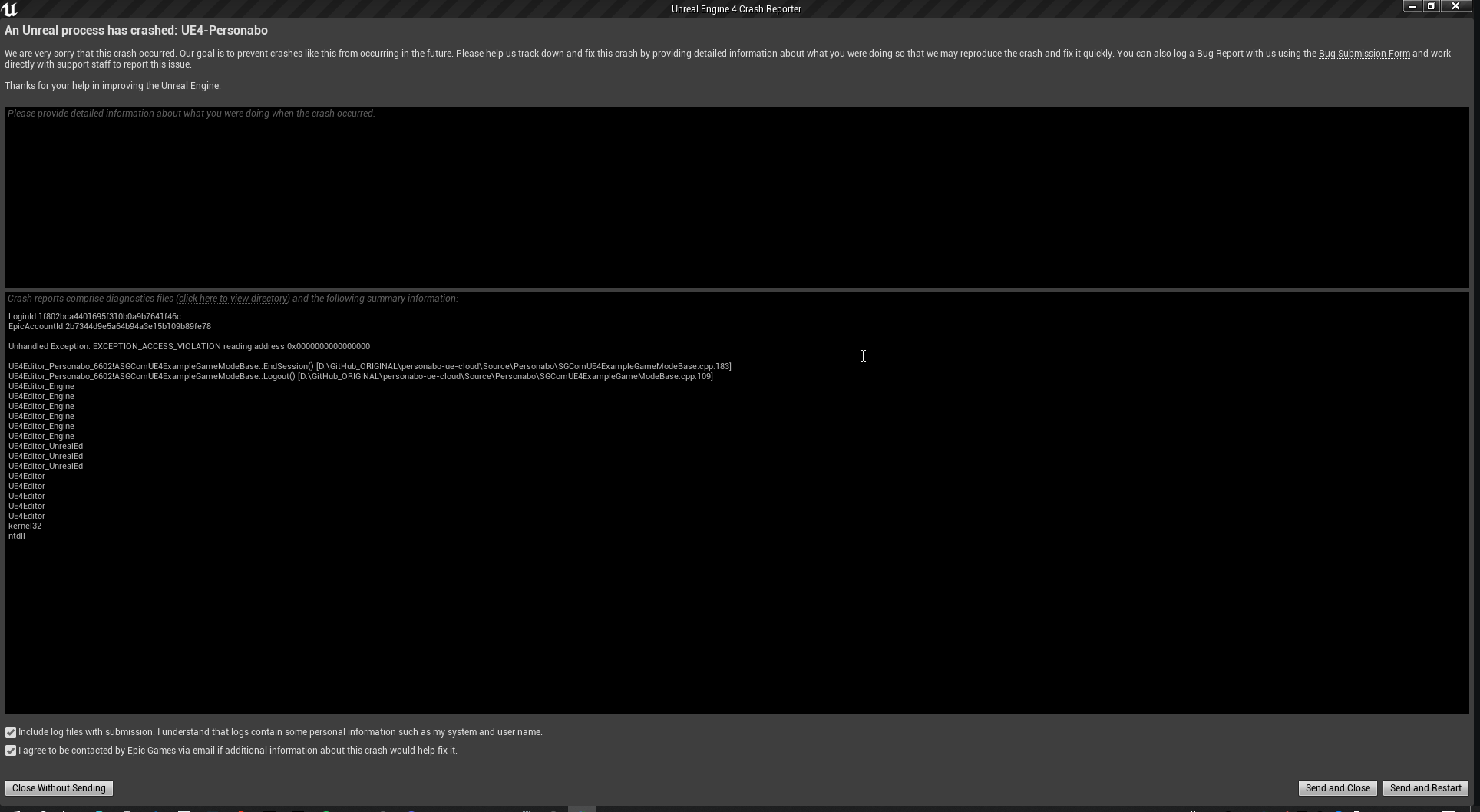
I have also a big problem, UE crash and I don't know the reason
when i click on play
and escape for quitting the gaming mode
it crash........................ im so tired of this here the error message: https://i.imgur.com/d9LTLU7.png
 pine rock
is it normal that i have to disable gravity on my mesh to enable a character to fly?
idle mantle
*"Unhandled Exception: EXCEPTION_ACCESS_VIOLATION reading address 0x0000000000000000" ** WT is that??
drowsy snow
idle mantle
it crash........................ im so tired of this here the error message: htt...
The callstack is barely helpful. Consider installing debugging symbols
idle mantle
I'm very bad at debugging, and debugging symbols? Sorry but I don't know what is that 😮
you think it's my other programs interfering? - bad internet? or maybe corrupted files? I dont know
ahhh 183 - 109 ... will check the lines
drowsy snow
idle mantle
you think it's my other programs interfering? - bad internet? or maybe corrupted...
Actually this one.

Also it's not UE5 specific, it's also a thing in UE4.
idle mantle
drowsy snow
Actually this one.
how can I access that pls?
drowsy snow
idle mantle
how can I access that pls?
 idle mantle
Oh ok I just clicked on Verify and now wait
@drowsy snow what should I do after that?
It's 38.86 GB!!!
drowsy snow
idle mantle
<@!325627930484932608> what should I do after that?
Not verufy, but options
idle mantle
ahhh sorry
modest trench
you need a lot of hard drive space for this stuff
 modest trench
turns out a few million lines of C++ engine code means a lot of symbols
idle mantle
omg :/ not for me then
wait I have another drive with 100 GB but it's not the C: drive.
pff I clicked on it see what happen... https://i.imgur.com/3XgIM4G.png
 plush yew
if I open multiple PIE windows, is there a way to mute the sound of certain PIE windows?
 modest trench
plush yew
if I open multiple PIE windows, is there a way to mute the sound of certain PIE ...
modest trench
plush yew
if I open multiple PIE windows, is there a way to mute the sound of certain PIE ...
there is a -nosound argument for standalone processes?
ah SoloAudio console command
au.debug.SoloAudio
then au.debug.ClearSoloAudio to return to normal
idle mantle
drowsy snow
Not verufy, but options
Hey I installed it


I clicked on apply
now I launch UE
I open my scene again
click on play, and when it's playing I press the key ESC
and crash again
This time with this: https://i.imgur.com/2loH0Fq.png
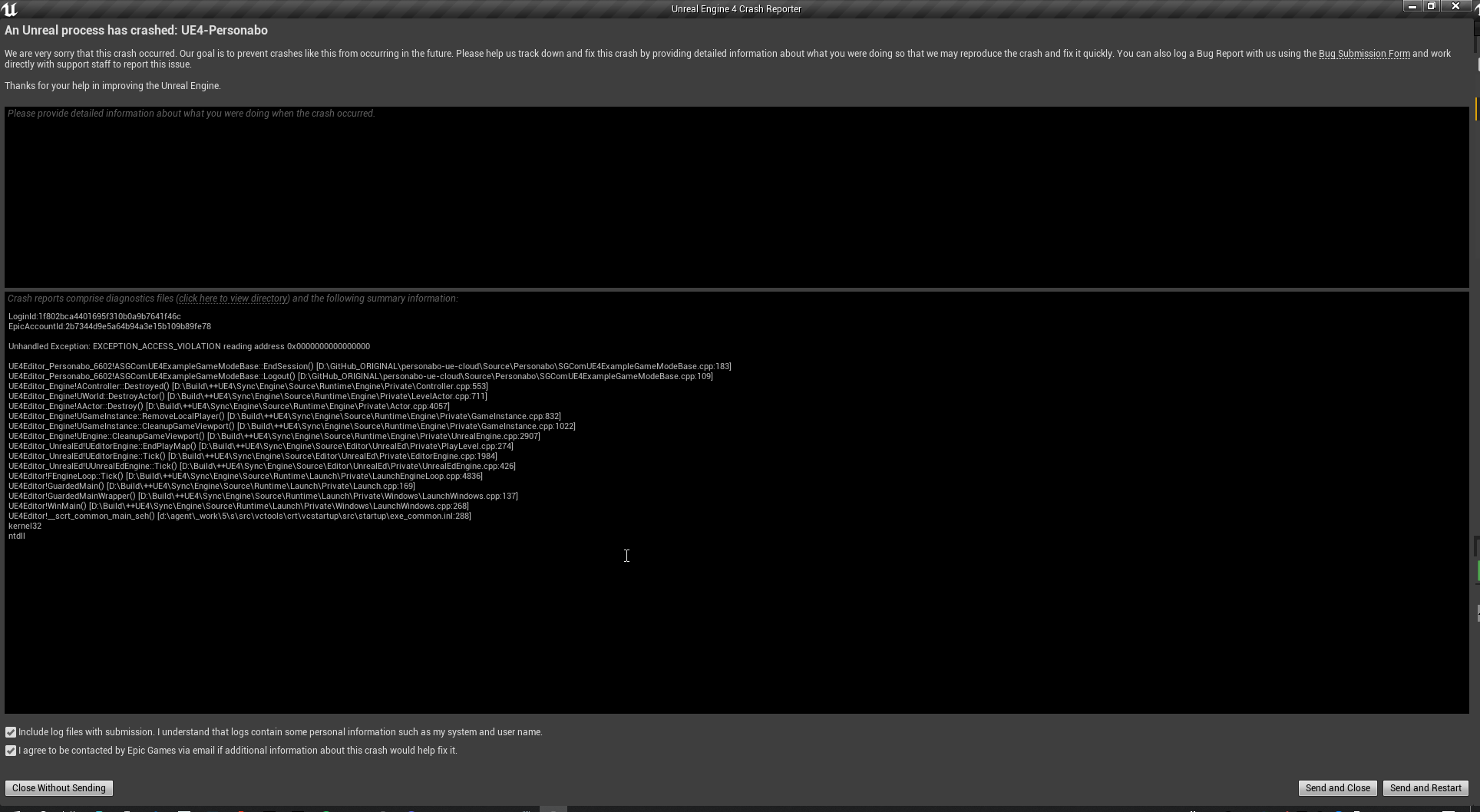
Sorry for your eyes...
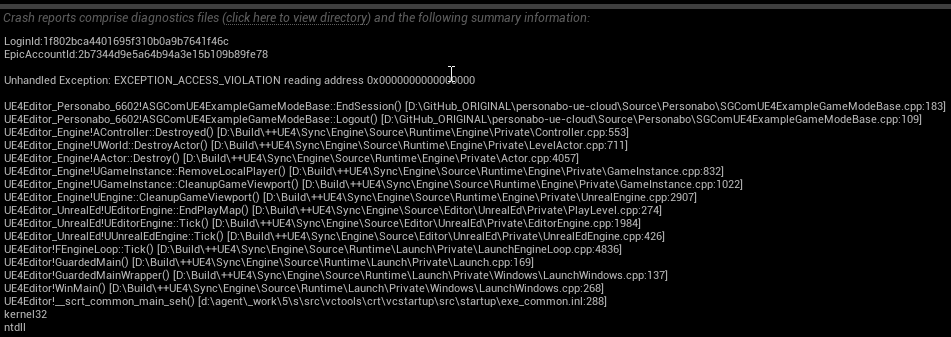
omg I have no idea what is that
@modest trench So sorry to ping you man ahah but maybe you know?
I'm so stressed I need to fix this tonight :/
Almost 3 AM
This is so strange that it's working when I press the PLAY button but it crash when I exit 😦
maybe this is my internet connexion? because lately its sooooo slow pffff
rancid lagoon
idle mantle
I'm so stressed I need to fix this tonight :/
what exactly is your problem?
idle mantle
Simple; when I exit the playing mode, it crash
rancid lagoon
if you are in multiplayer it is a possibility that your computer just cant handle it (idk what computer you have)
idle mantle
It's not multiplayer maybe I have a plugin that use Internet I dont know
devout swift
How do I get rid of this message in my packaged WindowsNoEditor game?
 idle mantle
and my internet is slow lately so maybe it;s the cause but I dont know
idle mantle
devout swift
How do I get rid of this message in my packaged WindowsNoEditor game?
Build u scene?
devout swift
i mean, how do I prevent any debug messages from showing on my packaged game
I did this
 rancid lagoon
devout swift
i mean, how do I prevent any debug messages from showing on my packaged game
rancid lagoon
devout swift
i mean, how do I prevent any debug messages from showing on my packaged game
you need to change the package title to dev. or something other than debug
devout swift
does that also remove the in-game console you access with backtick ` ?
I would like to keep the console but remove the other debug messages
rancid lagoon
devout swift
does that also remove the in-game console you access with backtick ` ?
yes it does
rancid lagoon
devout swift
does that also remove the in-game console you access with backtick ` ?
if you rebuild all levels you can get rid of the rebuild lighting on your packaged game, but you do not need to change the packge title. soory for what i just said
sorry for my bad typingh as well
devout swift
so when I package a game, it doesnt build the maps+lighting during the package process?
rancid lagoon
no it never does for me. it always re compiles the shaders tho
devout swift
I see, so just gotta remember to build before you package?
rancid lagoon
how could i assign game modes to specific levels? ie. main menu has one game mode the gameplay has another game mode. How do i switch between to two?
rancid lagoon
devout swift
I see, so just gotta remember to build before you package?
yep
devout swift
rancid lagoon
how could i assign game modes to specific levels? ie. main menu has one game mod...
in the world settings I believe

 rancid lagoon
devout swift
in the world settings I believe
rancid lagoon
devout swift
in the world settings I believe
oh thanks!
also how do i make auto save change its time?
it saves like every 30 secs
 sweet axle
rancid lagoon
it saves like every 30 secs
sweet axle
rancid lagoon
it saves like every 30 secs
Editor preferences
devout swift
just type auto save in prefs
 rancid lagoon
thank you!
idle mantle
idle mantle
https://i.imgur.com/R5zePdk.png
this is so weird..
it's when I quit the "playing" viewport..
playing mode works but crash when I quit the playing mode
 idle moat
@idle mantle it seem like a nullptr
dapper oak
if im trying to make a set of classes for like a bass character type with different components and interfaces should i be doing that in like a plugin or is there some kind of other package creator where i can just take those c++ classes and move them to any project i want?
 zinc cave
Ya'll, can we just give it up for The Ascent? One of the most beautiful and detailed uses of UE4. This art team is stellar! With DX12 and raytracing on, this game is one of the most gorgeous games to date. The amount of detail and resolution of textures and reflections is so sweet. The sheer number of assets, and the intelligent use of modularity (not a word) is really clever. Lord I hope someone does a FP mod for this. Would be fun to try out (ala' Alien Swarm mod). Oh...and the game is really fun.

 craggy sorrel
Im not sure where to go but Ive been having problems with splitgate and having this error code pop up each time I try to start it
 drowsy snow
craggy sorrel
Im not sure where to go but Ive been having problems with splitgate and having t...
drowsy snow
craggy sorrel
Im not sure where to go but Ive been having problems with splitgate and having t...
...you're showing nothing.
drowsy snow
No error code in sight 
craggy sorrel
its not showing the messege?
drowsy snow
craggy sorrel
its not showing the messege?
Nevermind, it's not the Unreal Editor.
drowsy snow
craggy sorrel
Im not sure where to go but Ive been having problems with splitgate and having t...
Had to look closer that it's a shipped game, not the engine editor.
We typically only giving support things Unreal Editor stuff in here, and not giving tech support on running finished UE4 games whatsoever. You might looking for the aforementioned Discord server and ask around.
Basically this server is mainly for developers and not for end-users.
craggy sorrel
i see thank you
 covert summit
also why in the hell did it show the in-dev error message on a shipped game
i guess they shipped a dev build?
modest trench
better crash logging?
covert summit
doesnt seem to be working 🤣
modest trench
it's doing its best
drowsy snow
That's questionable. It shows nothing at all lmao
covert summit
it tried
drowsy snow
Probably those early access title
craggy sorrel
it is
drowsy snow
Tried Postal 4 one day, and that game uses in-dev crash reporter too lol
covert summit
and this is why our actual editor crash reports don't get looked at smh
plush yew
hi every
i have question for yours please
I need the character not to cross the bridge and be able to walk on it thanks

 weak urchin
modest trench
weak urchin
modest trench
I would just "use complex as simple" in the static mesh collision settings
drowsy snow
Bridges are not something that's typically have physics simulation, so yeah, using complex collision won't cost much.
 hearty cosmos
ty!
covert summit
do you mean getting the actor location from the context of an editor plugin or utility widget or at runtime?
that doesnt really answer my question, but there is "Get Actor Location" node that gives you the actor's location...
if you mean "what is the original location of an actor that was statically placed in the editor, no matter when im asking for it during runtime" there isnt one
you would just need to save the location at Begin Play and reference it later
native tulip
how can i set an actors rotation based on his local axis?
covert summit
native tulip
how can i set an actors rotation based on his local axis?
can you elaborate?
surreal eagle
I'M TRYING TO PLAY A ANIM TO BONES ONLY BELOW TH PELVIS BUT IT JUST PLAYS BOTH ANIMS
HALP
native tulip
covert summit
can you elaborate?
lets say i have this setup here and i want the actor to rotate on their LOCAL Z AXIS so that it doesnt look messed up, how would i do that

basically i want the control rotation to define where the actor is looking
native tulip
AddActorLocalRotation would work i think? but i dont know how to do the math for it
surreal eagle
native tulip
basically i want the control rotation to define where the actor is looking
 native tulip
i dont think you understand what i want
surreal eagle
oh
native tulip
i want to rotate the local Z axis
surreal eagle
the absolute z axis??
native tulip
whats that
surreal eagle
just rotate mesh and hitbox
native tulip
the hitbox is the root tho
 wise trail
Question why is the custom collision section in the project settings limited to only 18?
surreal eagle
native tulip
the hitbox is the root tho
set relative rotation draged off mesh
native tulip
ok i actually think that should work going to test it
surreal eagle
can i get help
covert summit
native tulip
lets say i have this setup here and i want the actor to rotate on their LOCAL Z ...
this is physically impossible
what you probably want is IK
covert summit
alright whatever you want lol
surreal eagle
covert summit
alright whatever you want lol
know hohw to make anim bps?
i want to play a anim only on the legs
native tulip
covert summit
alright whatever you want lol
im sorry for sounding a bit rude but i think you didnt understand what i meant xd
it ok tho, i think i can find a cheeky workaround with the mesh relative rotation
covert summit
surreal eagle
i want to play a anim only on the legs
you are looking for Layered Blend Per Bone in anim bp
surreal eagle
thats what i had
it doesnt work tho
here i'ma open stream
you tell me what to change
covert summit
native tulip
it ok tho, i think i can find a cheeky workaround with the mesh relative rotatio...
sorry if i myself sound rude, you might have good reasons for rotating the character to fit the angle they are standing on, but most of the time you want the character to be parallel to gravity, not the surface they are on
you might be changing what gravity means though, i cant know that
if so, then you're fine
native tulip
im on flying movement mode so im not sure if its ok to defy gravity
covert summit
surreal eagle
here i'ma open stream
no im not going to just go look at your stream im sorry. im happy to help you here in text chat though 🙂
surreal eagle
covert summit
no im not going to just go look at your stream im sorry. im happy to help you he...
k
 covert summit
native tulip
im on flying movement mode so im not sure if its ok to defy gravity
covert summit
native tulip
im on flying movement mode so im not sure if its ok to defy gravity
not sure how flying movement mode matters for what id expect to look at as a player. Unless there's game logic to say that gravity is pointing toward that plane you are standing on id expect to see this

programmer art
surreal eagle
covert summit
programmer art
👍
native tulip
covert summit
programmer art
beautiful
covert summit
🏆
native tulip
covert summit
not sure how flying movement mode matters for what id expect to look at as a pla...
i think i understand what you mean now, but no, its supposed to be wall running if you know what im sayin
 covert summit
oh yeah if its happening really fast, then that makes sense
surreal eagle
native tulip
i think i understand what you mean now, but no, its supposed to be wall running ...
i'm making a advanced movement kit wit horizontal
native tulip
sorry but i dont buy plugins
native tulip
i mean marketplace content
native tulip
because im a broke 15 year old mostly but yes
 native tulip
also heres what i want to do, using the control rotation (where the character is looking) rotate the actor so that he can rotate on the wall just like on the floor
surreal eagle
do it
native tulip
:(
modest trench
surreal eagle
I'm assuming here that you have to get that character ref in the event graph and store it to a variable for later
surreal eagle
modest trench
I'm assuming here that you have to get that character ref in the event graph and...
dm me'
i dont wanna clog chat
modest trench
it's just for fast path anim processing
surreal eagle
huh
surreal eagle
well i'm trying to have it where the annim only plays on the legs
modest trench
oh, I assumed you were just worried about the error
surreal eagle
not my issue
i can fix it later
i know how havent got to it
i just straight up dont understand this blend shit
modest trench
Animation nodes that blend multiple animations together based on a set of criteria.
surreal eagle
i read that
 winter zenith
I'm trying to add first person to my game, I added the camera to the head socket, but the camera constantly moves with the head animation, causing an extremely nauseous effect. Is there any simple workarounds?
surreal eagle
have camera to controll pawn rotatioin
then set camera controll rotation to 0,0,0 per tick
surreal eagle
modest trench
instead of root
didnt work 😦
modest trench

this is a reload animation that plays while sprinting
make sure the bone name is correct
modest trench
winter zenith
I'm trying to add first person to my game, I added the camera to the head socket...
I think the only real answer here is to not directly attach the camera to a head that wiggles around
winter zenith
Well the entire character has the same animation so it doesn't matter what socket I attach it to
modest trench

This week, we go out to our Frankfurt Studio, where Brian Chambers updates us on the studio's progress and we get a complete look at the Vision Stabilization system from Ivo Herzeg himself.
01:19 - Studio Update
09:24 - Community Update with Tyler Witkin
12:04 - Behind the Scenes: Vision Stabilization
 tight robin
winter zenith
Well the entire character has the same animation so it doesn't matter what socke...
tight robin
winter zenith
Well the entire character has the same animation so it doesn't matter what socke...
Don't attach it to the skeletal mesh.
surreal eagle
modest trench
this is a reload animation that plays while sprinting
makes my guy rotate to the left and i cant fix it
even with anim edits
tight robin
Attach it to your capsule collider or something.
winter zenith
I've done that and you can see the character, any easy way to hide the character for the camera?
tight robin
Your skeletal mesh shouldn't be your character's root.
modest trench
winter zenith
I've done that and you can see the character, any easy way to hide the character...
you can hide bones by name
tight robin
Yeah just set the skeletal mesh to not be visible.
USkeletalMeshComponent::SetVisiblity()
surreal eagle
ARRRGHHHHHH
modest trench
¯_(ツ)_/¯ I don't know anything about your anim setup or what you are sending it
winter zenith
Where would I hide the bones? In a bp?
surreal eagle
modest trench
¯\_(ツ)_/¯ I don't know anything about your anim setup or what you are sending it
i can send you the file one sec
 ebon pawn
Good morning does anyone know if we can publish to a pixel streaming cloud from unreal engine directly
modest trench
ebon pawn
Good morning does anyone know if we can publish to a pixel streaming cloud from ...
Run your Unreal Engine application on a server in the cloud, and stream its rendered frames and audio to browsers and mobile devices over WebRTC.
Is this what you're talking about?
modest trench
winter zenith
Where would I hide the bones? In a bp?
probably
 ebon pawn
Yes thank you. I was using twinmotion and in it there is a feature to publish to cloud and share. So I was wondering if we could do that same inside unreal
 runic narwhal
Is it possible to have a chaos object that floats? Something that is arbitrarily attached to another object?
surreal eagle
modest trench
¯\_(ツ)_/¯ I don't know anything about your anim setup or what you are sending it
i love ow its 2mb ovr file limit
modest trench
surreal eagle
i love ow its 2mb ovr file limit
don't bother
I'm kinda new to advanced anim graph stuff anyways
surreal eagle
here i split them into 100 mb
use 7zip to re-assemble them
jam em all together
modest trench
sorry, I'm not interested in taking a look at that stuff right now
 young quartz
I have some scalar info. How should I send it through the material attributes. Which palette to use to add scalar infos to the result?
young quartz
I have scalar info like 0-1 and have a material attributes result.. and want to add that scalar info in that result to pass to material attributes further
tight robin
Not sure I follow. Are these 2 different materials you're trying to chain together?
young quartz
wait I send a pic
tight robin
Send pic
young quartz
something like this.. sry I m newbie.. so this is how I can explain
 tight robin
So this is a material function?
young quartz
yes
tight robin
I have no clue what MF_Displacement is/does.
I have the editor opened and I tried to type it in and nothing happened.
You're talking to a gameplay programmer about shaders so you might as well be taking a cheese grater to your nipples in a lemon juice filled swimming pool.
young quartz
lol
 torn shard
Any way I can tie the yaw of my mouse to the yaw of my camera and have my character move as well
tight robin
torn shard
Any way I can tie the yaw of my mouse to the yaw of my camera and have my charac...
Yes, do that and it will work.
young quartz
tight robin
I have no clue what MF_Displacement is/does.
I am working with megascans.. so the mf displacements passes the height attributes
torn shard
tight robin
Yes, do that and it will work.
?
tight robin
torn shard
?
Your camera has a transform. Your character has a transform. I don't know how you've setup the hierarchy of these two components (if they're on the same actor) but you can sample the movement of the mouse and do whatever your heart desires with it.
Your are God of this realm.
This is your dominion.
Fly high, Icarus.
If they're in the same hierarchy, move one and the other will follow.
If they aren't in the same hierarchy, sample it twice.
Or sample it once and use you Player/PlayerController to pipe it to the object of your choice.
And achieve your dreams.
torn shard
I feel like we're not speaking the same language
tight robin
Third person?
torn shard
Yes
tight robin
Skeletal mesh?
torn shard
Yes
torn shard
 torn shard
Its from the third person template
tight robin
I've been mucking about with first person lately, so I'm rusty on 3rd person.
Yaw doesn't really matter for your capsule.
Its cross section on that axis is a circle.
Yaw to your heart's content and it's still a circle. I can't recall how the default CharacterMovementComponent is setup, if it uses the orientation of the CapsuleComponent as its facing direction when determining relative movement from your forward/right axes or not.
If you want the quick n' dirty, slap a tick on your character controller, sample the camera's global transform every tick, and apply its rotation to your Mesh.
Ticks are slow, but you almost always have only one for the character (and you only have 1 character anyway) so it doesn't matter.
torn shard
I figured it out, it was insanely easy
tight robin
I'm proud of you, son.
HOW ABOUT YOU SHARE YOUR SOLUTION WITH THE CLASS?
Inquiring minds want to know.
torn shard
Sure
tight robin
👀
torn shard
 tight robin
Noice
river copper
can i setup rider for UE 4.26?
tight robin
Yes, Rider should just work.
river copper
sln?
tight robin
Visual Studio Solution File
Which Rider is compatible with.
I use Rider in multiple 4.6.X projects.
It has not required any particular configuration for me.
river copper
wait w here do i find sln
tight robin
Beyond P4 integration.
modest trench
Rider for Unreal engine specifically
river copper
umm?
young quartz
how to remove parameters from default material? I removed the functions and its still appearing in the materials parameter default
tight robin
Select "Generate Visual Studio Project Files"
It will shart out an SLN in the same directory
Open in Rider.
Become programmer.
The uproject file will be whatever you've named your Unreal project.
river copper
ok thanks
tight robin
It will be in the top level of your Unreal project structure.
tight robin
WTF are you talking about, Jessee?
river copper
jessee?
tight robin
I don't know, man. Breakin Bad memes.
tight robin
Unreal 5 is Unreal 4 + Lumen and Mega Bullshits.
There you go.
Unity is a game engine made by a bunch of Danes who don't make video games.
AKA a waste of about 100,000 man hours.
plush yew
When trying to package the FPS template for Windows it gives me this error near the end. Where's the problem? I have a new Threadripper and 32GB of RAM.
 tight robin
plush yew
When trying to package the FPS template for Windows it gives me this error near ...
tight robin
plush yew
When trying to package the FPS template for Windows it gives me this error near ...
I do not know, but congrats on your Gucci rig.
To my naive eyes it almost looks like an infinite loop.
Wow I feel enlightened on what do without an SLN already. Thank you for your contribution to the collective knowledge of mankind.
Rider needs an SLN.
Do not listen to this low grade troll.
 regal mulch
Isn't it nice how kindly people can communicate over a slightly different set of information?
tight robin
He feeds on deception and chaos.
tight robin
regal mulch
Isn't it nice how kindly people can communicate over a slightly different set of...
Absolutely not. Mankind only knows the brutal struggle of conquest.
You're either the neckbeard supreme or you're trash not even fit to bathe in the light of your betters.
buoyant graniteBOT
:triangular_flag_on_post: The Duke of Octane#6411 received strike 1. As a result, they were muted for 10 minutes.
 cyan marsh
whats the difference between jetbrains rider and jetbrains rider for unreal engine
if i already have rider installed, should i install the one for unreal engine too?
or is there an extension i can add onto my already there install
ooh alright
i'll just install it then
thank you!
it says the plugin is already baked into UE4.25+
and i use latest, which is 4.26 i think so i should be ok
plush yew
i have audio ques for everytime i throw a punch in game.
but sometimes maybe like 1/4 of the times i punch all the sounds play one after another
heres a video to show you what i mean

heres what the ques look like
i basically have it set up like this for every sound effect in the game
it doesn't happen for footsteps
 dusky slate
Guys, very simple question, i want to be able to change the Static mesh that gets spawned by the Mesh Renderer dynamically in my BP. I can switch the Sample Static Mesh, but how can i change the Mesh that gets rendered in the Mesh Renderer?


 wary wave
plush yew
but sometimes maybe like 1/4 of the times i punch all the sounds play one after ...
wary wave
plush yew
but sometimes maybe like 1/4 of the times i punch all the sounds play one after ...
it's probably a code / blueprint bug
plush yew
wary wave
it's probably a code / blueprint bug
how could i fix this
wary wave
...fix the code / blueprint bug?
plush yew
howwwww
tender pecan
cyan marsh
I get that all the time (first time after regenerating for example), project should load fine in rider though?
wary wave
I don't know, I don't have your code and I'm not psychic
cyan marsh
yeah
plush yew
 cyan marsh
i restarted unreal & rider and it doesnt show up anymore for some reason

 wary wave
gotcha - right that looks like it should work - put a print string node after the play sound and see how many times it is being triggered
plush yew
ok
ok so
the string only plays once
but the sounds still play
its an error in the que probably
but i don't know what
wary wave
audio cues set to looping or something similarly stupid?
plush yew

no
it only happens sometimes
not all the time
this is sooo annoying
it doesn't happen with any other que's
only this specific punch
well actually it happens with grunting as well

basically the same setup
doesn't happen with this tho

it's so fustrating
it's been happening for like 2 days now but i have ignored it
tender pecan
you can put a breakpoint, debug and step through the blueprint event, and step through the nodes as they occur, as they fire, so see if you can pin point or isloate where the 'loop' is coming from, a bit of triage to identify the place
if its intermittent its going to be tricky for us to give you a silver bullet, i mean it could be a few things, one of your cues are set to loop and you maybe just not seeing it,
maybe there is an event firing you forgot about, maybe there is an audio cude wrongly set as a punch that should be a footstep for example, it could be many things, debug it a little and see
what i can tell you is we use audio cues and random nodes and quite a bit more complex than that setup by our audio engineers and have not encountered an issue like that, so it is probably just a setup issue on your end, you just need to kind of work through it to find it
cyan marsh
if i made a blueprint gamemode, how can i delete the c++ game mode base?
wary wave
yeah, my guess it is something stupid like a cue set to loop somewhere
cyan marsh
and also, is it stupid to make my gamemode a blueprint in my otherwise c++ project?
wary wave
and you're just going to have to work through the settings on everything until you find the cause
plush yew
is there a way to like search through every blueprint to see if a specific node has been used?
wary wave
right click on the node, 'Find References'
it will search the current BP, the window at the bottom that appears has a button to search the whole project
plush yew
alr so there is only one node with play sound at location with sound being the punch woosh que
plush yew

i have notifies to show when something is happening
i do the same with footsteps
i think that's fine
for every wave player the settings are like this

for every random node it's like this

and for output it is like this

i don't see any problems with any of these
cyan marsh
probably a dumb question: shouldnt the play button compile and then play?
plush yew
what do you mean play button
I want the light hitting the wall from the sun to reflect more around for brighter interior, with what setting can I do this?

OMG
I FUCKING FOUND IT
NO WAY THIS TOOK ME LIKE 3 DAYS TO FIND
oml
i feel so stupid

so basically the audio i used to get all the sound effects are like from youtube and its like 30 seconds of different sound effects

just look and you will see it
grunt 4 and 5 are the entire thing
so it was playing the entire thing
oml
plush yew
plush yew
I want the light hitting the wall from the sun to reflect more around for bright...
Like this one, does not reflect the light at all

@wary wave
wary wave
lol
 shell surge
Guys, I need help. I'm using quixel meshes and the light goes through the back sided. it's double sided geometry and still ... any fixes for that ?
 cyan marsh
alright, gotcha
another question: how do i implement this to c++? i'm following a tutorial to start out and Get Right Vector doesn't have any arguments
 plush yew
i have this node in the level blueprint

so that it will be splitscreen
it works

i want it to be when i use my keyboard and mouse it affects the one on the left
dusky slate
Guys, very simple question, i want to be able to change the Static mesh that gets spawned by the Mesh Renderer dynamically in my BP. I can switch the Sample Static Mesh, but how can i change the Mesh that gets rendered in the Mesh Renderer?
 plush yew
and when i use my controller it affects the one on the right
but when i use my keyboard and mouse it affects the left
but when i use the controller it affects the left aswell
cyan marsh
cyan marsh
another question: how do i implement this to c++? i'm following a tutorial to st...
after a bit of tinkering, would that be
    Rotator.Yaw = GetControlRotation().Yaw;
FVector r = Rotator.Quaternion().GetRightVector();```?looks like that's right
plush yew
Hello guys, i need some help... It os possible to use live link in play mode ? i'm using the technocrane pluging for the ue 4.26 but it isn't compatible after build game package
Is there no quick way to implement a transparent animated splash screen? GIF, APNG or MOV, doesn't matter. The project setting only has full support for BMPs.
young quartz
why there is such weird spots on the texture? How to fix this?

 desert pagoda
What do I need to make games in addition to the basics of C ++ and UE4 skills? ||I use translator||
tender pecan
and lots of tears
desert pagoda
I mean IT things, i.e. do you need any libraries, etc.
tender pecan
desert pagoda
I mean IT things, i.e. do you need any libraries, etc.
All libraries are included in the engine you would need to make a game.
For everything else, there are plugins that you can get form the marketplace, as for IT, make a game and see where your skills fall short.
It will depend on the game, your team and their experience, the targeted platforms and storefronts, and all have their own caveats, tools and libraries that need to be taken into consideration.
desert pagoda
tender pecan
All libraries are included in the engine you would need to make a game.
For ever...
So learning plugins and libraries built into UE4 is enough to start with?
And I want to make games as a hobby, i.e. I will do it myself without team.
 gleaming crane
Trying to find the code behind this anyone have any Idea where it is? I have an open-source build of UE4
 desert pagoda
Anyone recommend some good materials for learning Unreal Engine (and its C ++ programming plugins)? It doesn't matter if it's documentation or YouTube videos. I am asking because I do not know where I can learn.
plush yew
plush yew
Is there no quick way to implement a transparent animated splash screen? GIF, AP...
any idea?
desert pagoda
Thx
Can you learn C ++ plugins or just Blueprint?
So what about writing code in Visual Studio? What do I need to learn for this? (I know C ++ basics).
But writing code is a normal thing when game make (?)
Visual programming helps and speeds up your work, but writing code by hand is essential.
Big studios make games by writing code.
drowsy snow
Here's the thing:
USE BOTH BLUEPRINTS AND C++
desert pagoda
drowsy snow
Here's the thing:
***USE BOTH BLUEPRINTS AND C++***
I heard about it
So what do you need to learn besides the basics of C ++ to write games in it?
drowsy snow
Using Blueprints in Unreal Engine 4 does not make you a weenie.
desert pagoda
But you have to start somehow.
But I honestly don't know how to do it
The basics alone are not enough to write anything. You always need some libraries etc.
drowsy snow
desert pagoda
But I honestly don't know how to do it
Make a game with Blueprints first. Familiarise with the editor, and the functions, and other stuff.
desert pagoda
drowsy snow
Make a game with Blueprints first. Familiarise with the editor, and the function...
Okey
desert pagoda
But I have to be able to use all these plugins.
drowsy snow
desert pagoda
But I have to be able to use all these plugins.
No you don't lmao
plush yew
Do you folks have nothing to do other than arguing here?
drowsy snow
plush yew
Do you folks have nothing to do other than arguing here?
If you want to ask question than ask right away.
plush yew
peace.
drowsy snow
@desert pagoda this
wary wave
maybe start with some tutorials or something?
just sitting in here saying "what do?" gets you nowhere 😄
drowsy snow
Don't even think about shipping yet. Just make it playable by family and friends.
wary wave
aye, I would just worry about getting simple games running in the editor and learning the general process
one step at a time, innit
desert pagoda
Okay
wary wave
setting up version control is sound advice tbh
desert pagoda
I understand that I should start with Blueprint and not worry about C ++ yet?
wary wave
most developers will use both
start with basic tutorials
the Unreal Learning portal probably has some decent stuff to get people started working in the editor
drowsy snow
desert pagoda
I understand that I should start with Blueprint and not worry about C ++ yet?
Yes, familiarise yourself with BP first, and your C++ scripting will be a relative breeze
I for one didn't get into C++ scripting until my third year using UE4, even though I learned C++ as a late toddler.
wary wave
didn't see the one linked, but if it does both, sure seems reasonable
cyan marsh
i'm trying to make sort of a jump pad, but i cant get the on begin overlap event to work:
i've got this func in my header:
    UFUNCTION()
    void BeginOverlap(
        UPrimitiveComponent* OverlappedComponent,
        AActor* OtherActor,
        UPrimitiveComponent* OtherComp,
        int32 OtherBodyIndex,
        bool bFromSweep,
        const FHitResult &SweepResult
    );```

and i try to link it with
```cpp
BoxComponent->OnComponentBeginOverlap.AddDynamic(this, &AJumpPad::BeginOverlap);``` where BoxComponent is my box component set as a triggeri put a debug message as the first line of the definition, but it doesnt get executed
this is the declaration:
void AJumpPad::BeginOverlap(UPrimitiveComponent* OverlappedComponent,
                                                                      AActor* OtherActor,
                                                                      UPrimitiveComponent* OtherComp,
                                                                      int32 OtherBodyIndex,
                                                                      bool bFromSweep,
                                                                      const FHitResult &SweepResult)
{
    GEngine->AddOnScreenDebugMessage(-1, 5.f, FColor::Green, TEXT("Got to here"));
        // ...
}```Thank you very much for your help
cyan marsh
yes I do
wary wave
my first guess would be collision channel issues
cyan marsh
in my constructor
AJumpPad::AJumpPad()
{
     // Set this actor to call Tick() every frame.  You can turn this off to improve performance if you don't need it.
    PrimaryActorTick.bCanEverTick = true;

    StaticMesh = CreateDefaultSubobject<UStaticMeshComponent>("StaticMesh");

    BoxComponent = CreateDefaultSubobject<UBoxComponent>("Box Collider");
    BoxComponent->OnComponentBeginOverlap.AddDynamic(this, &AJumpPad::BeginOverlap);
}```wdym with the editor closed?
drowsy snow
Oh shit.
cyan marsh
oh
wary wave
hot reload is... kinda unreliable
cyan marsh
i didnt have that enabled
drowsy snow
cyan marsh
wdym with the editor closed?
Close the editor and rebuild all your codes.
Hot reload is super messy, it's like having your entire room filled with garbage
Also make sure to disable auto compile when creating new C++ class in editor
 drowsy snow
cyan marsh
drowsy snow
cyan marsh
Live Coding is different
drowsy snow
It's meant to replace Hot Reload.
cyan marsh
well that's kinda unintuitive
so i just build all my solution, not only the game project, yeah
wary wave
generally speaking you only need to build your game solution
unless you've been modifying other parts of the project, but you'd know if that were the case
cyan marsh
it still doesn't execute
 north shadow
how to import as a single mesh ? indont have the option..
combine mesh dosnt appear xd
drowsy snow
cyan marsh
it still doesn't execute
maybe the collision channels? Though I doubt that's the issue.
cyan marsh
sorry, i'm just starting out, what are those exactly?
drowsy snow
north shadow
combine mesh dosnt appear xd
It's only for Static Meshes.
 drowsy snow
cyan marsh
sorry, i'm just starting out, what are those exactly?
drowsy snow
cyan marsh
sorry, i'm just starting out, what are those exactly?
Simply put, types of collisions (that you can add on your own too)
cyan marsh
i know how to do it using blueprints, but i want to do it in c++
that's my implementation though
void AJumpPad::BeginOverlap(
    UPrimitiveComponent* OverlappedComponent,
    AActor* OtherActor,
    UPrimitiveComponent* OtherComp,
    int32 OtherBodyIndex,
    bool bFromSweep,
    const FHitResult &SweepResult)
{
    GEngine->AddOnScreenDebugMessage(-1, 5.f, FColor::Green, TEXT("Got to here"));
    if (OtherActor == GetWorld()->GetFirstPlayerController()->GetPawn())
    {
        GEngine->AddOnScreenDebugMessage(-1, 5.f, FColor::Green, TEXT("Should launch"));
        OtherCharacter = Cast<AGraphiteCharacter>(OtherActor);
        OtherCharacter->LaunchCharacter(FVector(0, 0, 1000), false, true);
    }
}
thing is it doesnt run BeginOverlap at all
 calm crow
Hi, are unreal devs aware that the website https://www.unrealengine.com/marketplace/en-US/store is available only via chrome

Unreal Engine
Visit the Marketplace for free and paid assets for your next project.
my firefox won't load it
where is the official epic discord channel ?
drowsy snow
Use Brave thanks
calm crow
no i won't use brave @drowsy snow http://ebin.city/~werwolf/posts/brave-is-shit/
My personal blog about free software, privacy and anarchism.
wow, mails still exist in 2021 ^^
plush yew
Why reflection capture doesn't capturing my walls?
 drowsy snow
calm crow
wow, mails still exist in 2021 ^^
drowsy snow
calm crow
wow, mails still exist in 2021 ^^
Tell this to everyone else
calm crow
well, i think this mail will land in a mailbox full of 2500+ others mail related to firefox user and it just won't be read
drowsy snow
God you're such a web snob
calm crow
Discord allows human to anwser me directly if they are already on a fix or if i'm the only one signaling this to them
drowsy snow
Some Epic employee do present in this server, but they're not necessarily the direct authority.
calm crow
In theory with my company i have access to forum coe company. But i mean discord is easier and quieter for an not that important bug
cyan marsh
guys
wtf.
i figured it out
for some reason, the collision trigger is at the world origin?
wtf???
calm crow
a open bug tracker would allow me to see if there are already on the bug or not.
cyan marsh
who
drowsy snow
calm crow
a open bug tracker would allow me to see if there are already on the bug or not.

Unreal Engine
Welcome to the Unreal Engine Issue and Bug Tracker. You can check the status of an issue and search for existing bugs. See latest bug fixes too.
calm crow
thanks !


 drowsy snow
Was all of that snobbery even necessary lmao