#ue4-general
1 messages · Page 1028 of 1
 drowsy snow
 plush yew
drowsy snow
Not necessarily Sonic MD clones, but metroidvanias still have some market share.
plush yew
drowsy snow
Not necessarily Sonic MD clones, but metroidvanias still have some market share.
I see
drowsy snow
Just don't blatanly copy Sonic. (Which is kinda difficult because of rolling mechanics)
 grizzled carbon
I haven't played 2d sonic games since I was a child, but playing the recent free one on epic... I felt like the formula didn't age especially well. A lot of the level design seemed to be traversed blindly, at high speeds. Like, the fun parts of the game were kind of on rails, but it was also really easy to fall off the rails by trying to move in the wrong direction when you're constantly forced into unexpected 180s, and getting back on those rails was frustrating. Modern platformers have developed a ton of finesse and precise mechanics for movement while I felt sonic's controls to be pretty clunky, because so many sections are either done at high speeds or with frequent unwanted stops. Just my arbitrary opinion but if you wanted to make a sonic clone, I'd focus on finding the player to have more agency while move fast.
 hallow quartz
Hey, I just started learning about unreal engine and I have a really dumb question that probably takes like 3 seconds to figure out, but how do I not have this orange box to show when I click on a block. Like it appears like an orange hologram of the block or object I select and gets in the way of my view.

i just select the bottom floor and that orange box shows up out of nowhere
and it moves based on where I'm looking at the original floor
ye, I only want the block I selected to have the little orange border on it
drowsy snow
hallow quartz
Hey, I just started learning about unreal engine and I have a really dumb questi...
Try reloading the map (or restarting the engine)
hallow quartz
drowsy snow
Try reloading the map (or restarting the engine)
I have, but it does this default for some reason
This is when I moved to another angle, the orange box follows based on my view.
 drowsy snow
hallow quartz
This is when I moved to another angle, the orange box follows based on my view.
drowsy snow
hallow quartz
This is when I moved to another angle, the orange box follows based on my view.
What's your GPU? I suspect it has something to do with it.
Likely faulty driver or something.
hallow quartz
drowsy snow
What's your GPU? I suspect it has something to do with it.
it's that on a windows 7 

Don't shame me
drowsy snow
hallow quartz
it's that on a windows 7 <:feelsconflictedman:717668996240900229>
I don't think Intel HD drivers caused this. 🤔
 brisk rock
guys i need this animation but i cant find it on mixamo. maybe smb know where i can find this
 hallow quartz
How would I fix it exactly though? Since I did nothing to the world. And I kinda understand what you mean but not at the same time.
drowsy snow
Had similar issues back when using 4.20, all I did was restarting my computer. It's super rare though.
hallow quartz
drowsy snow
Had similar issues back when using 4.20, all I did was restarting my computer. I...
I'm using 4.25 so I'm not sure if that may be related to that.
Where would I find the first dropdown to try that?
drowsy snow
hallow quartz
I'm using 4.25 so I'm not sure if that may be related to that.
I never get that either in 4.25
 copper holly
Looks like brush editing
drowsy snow
copper holly
Looks like brush editing
No, third person template map don't use BSP brushes.
 hallow quartz
drowsy snow
hallow quartz
drowsy snow
it didn't fix it for me. Whenever I click on an object it shows the random orange box floating based on my perspective but then there's no orange border line like in your picture for me as if I haven't clicked on it. 

wdym? Like have it reset with default settings?
drowsy snow
drowsy snow
Had similar issues back when using 4.20, all I did was restarting my computer. I...
Kinda cliched, but this solved with my instance.
hallow quartz
drowsy snow
Kinda cliched, but this solved with my instance.
Ok, I guess I'll try that. I don't think my computer has had a full restart in a while so that may help it.
drowsy snow
And also might worth checking your RAM, since iGPUs share VRAM with the system RAM.
 covert summit
iirc i also had this literally once and yeah it went away with restart
copper holly
if i had a nickle every time i spent an hour on something only to have a restart fix it and make no damn sense
covert summit
cosmic rays
 autumn latch
hi guys what is ratio nodes
 covert summit
is that animation blueprint, or?
autumn latch
yes animation bp
drowsy snow
covert summit
is that animation blueprint, or?
It's anim BP
autumn latch
what is diffrend
 drowsy snow
autumn latch
hi guys what is ratio nodes
drowsy snow
autumn latch
hi guys what is ratio nodes
Basically it's the percentage of the anim sequence length played
autumn latch
thanks
covert summit
🙄
 strong coral
Hey guys, I was wondering if it was possible to simulate extremly accurate roller coasters on ue4/5, I explain : I want to create a ride simulation game, where the player controls every ride in a park, using buttons etc... And it seems like doing it in animations will be not accurate or very hard to do, so I was wondering if Unreal can simulate the wheels running on the rails, and the chain lift taking the coaster to the top, etc... Thank you ^^
drowsy snow
strong coral
Hey guys, I was wondering if it was possible to simulate extremly accurate rolle...
Theoretically you could repurpose the vehicle logic.
drowsy snow
covert summit
all you're doing is burying people's legitimate questions
I advise you to block them.
covert summit
would rather see what others coming in see
drowsy snow
They're being an arsehole to many people here recently.
covert summit
<@&213101288538374145> ?
strong coral
drowsy snow
Theoretically you could repurpose the vehicle logic.
Ok, will look at that
 lucid grove
Hey guys, im using scene capture 2D for character preview in UMG. I had to place capture character outside skysphere to cut it from the background. But for some reason when i place character there its starts to acting weird - weapons attached to bones starts to wiggle. How can i avoid that?
drowsy snow
lucid grove
Hey guys, im using scene capture 2D for character preview in UMG. I had to place...
Skysphere is (usually) so large you get floating point errors because of putting something outside of it
lucid grove
drowsy snow
Skysphere is (usually) so large you get floating point errors because of putting...
True
covert summit
hmm can you use show flags to omit it from the scene capture?
@lucid grove No user-defined show flags nor a category for Sky Sphere, but you can make the scene capture actor own the skybox and use "Set Owner No See" but its a bit hacky.
lucid grove
covert summit
<@!667566391444111380> No user-defined show flags nor a category for Sky Sphere,...
There was option to capture only character >_< now i can place it anywhere
Thanks anyway
covert summit
oh nice
oh right, yeah so unselect all show flags except Character
"Show Only Actors" and "Hidden Actors"
👍
ill have to remember that one
 buoyant graniteBOT
:triangular_flag_on_post: ♡♡#5261 received strike 1. As a result, they were muted for 10 minutes.
covert summit
thanks 😄 phew
drowsy snow

buoyant graniteBOT
:triangular_flag_on_post: ♡♡#5261 received strike 2. As a result, they were muted for 1 hour.
covert summit
lol
 inland gyro
help me #cinematics pllss
 fierce tulip
the people active in cinematics will check that channel and reply when they can. no need to ask in another channel
they ask in a channel that is only for unreal engine related topics
 light thunder
Can someone explain to me, or at least tell me what the axis are here -

in reference to turning one to another spline
 serene citrus
Does anyone know a way of removing an actor from a level without opening it?
covert summit
not an easy way, why cant you open the level?
or do you mean, at runtime, when the level is not loaded
serene citrus
it crashes when trying to render the actor
 glacial dawn
I'm getting a lot of D3D crashes lastly, switching between game and menu, in-game, even with the contextual menu. Just updated the Nvidia drivers, somebody with the same issue? 4.26...
covert summit
glacial dawn
I'm getting a lot of D3D crashes lastly, switching between game and menu, in-gam...
is it "d3d device lost" ?
 bright slate
does anyone know when unreal while add support for Lods for Landscape using world partition? (if it isn't already supported)
drowsy snow
glacial dawn
I'm getting a lot of D3D crashes lastly, switching between game and menu, in-gam...
Try downgrading the drivers instead.
covert summit
@glacial dawn yeah we've seen someone with rtx 2060* mobile where DX12 was causing d3d device lost, running the editor in DX11 solved it for them. seems like maybe the latest drivers are trouble right now
covert summit
serene citrus
it crashes when trying to render the actor
that sucks. whats the crash you get?
furthermore how do you know which actor is the problem?
 maiden sundial
Anyone knows why OBS wouldn't detect a selected PIE ?
Only getting a black screen
serene citrus
yes its a custom actor, I'm messing about with runtime mesh component, something to do with invalid LOD levels
glacial dawn
@covert summit yeah, that's the error, I'll switch to dx11, I hope that solves the issue, thanks!
covert summit
@serene citrus did you do it in C++? if so you could disable the probelmatic code and recompile outside the level
 vocal copper
Hey all 🙂 I can't even get what exactly to google. Please advice me. If I have a BP with a mesh of a narrow space ( a broken door with a gap, for instance) and want my player pawn(just a camera actually) to move between entry and exit points, what should I use? Is it a job for a sequencer or some other sort of camera work ? How I imagine that, is that I teleport my character between those two positions, but I can't come up with a filler. Please tag on reply 🙂
serene citrus
covert summit
<@!132972540887826432> did you do it in C++? if so you could disable the probelm...
I've already fixed the invalid code, but it seems the mesh data that was saved is invalid and crashes before any of my code does anything. I tried putting Destroy() in OnConstruction but that doesn't work
covert summit
serene citrus
I've already fixed the invalid code, but it seems the mesh data that was saved i...
oh you could delete (and by that i mean rename, because if you have a big project it will take forever to regenerate it so recommend leaving it around in case it doesnt fix it) Intermediate and/or DerivedDataCache
covert summit
vocal copper
Hey all 🙂 I can't even get what exactly to google. Please advice me. If I have ...
so its a first person shooter type situation, where the player moves a capsule around that has a camera? sequencer might be tricky there as usually you are controlling a level actor or an actor spawned by the sequencer. If you want something simple, you could disable movement input and collision, then use vector interpolate (VInterp To) to slide from the entry position to the exit position, then when the actor arrives near the end, re-enable movement input and collision
vocal copper
covert summit
so its a first person shooter type situation, where the player moves a capsule a...
Oh, okay, I can do that 🙂 to disable the capsule collision and to drag it along a spline that comes with a target BP 🙂 I guess, that's exactly what I'll do 🙂 Thanks!
 delicate mica
Hey there guys. I am wondering if anyone has experience with using ue4 to upload images to a web server using rest?
I am trying to create an avatar system, where the user can upload a file (picture), I send the file to my node js server, and then post it to a cloud account, and then return the url where the image can be accessed. My biggest missing link is how to plug in a form data or a file data to a post request. I am using LE http but would consider switching to vaRest or others if they have this capability.
 covert summit
@delicate mica hmm i wonder if LE Standard Lib has a texture to bytes
yes, it does

so you could do that and then

would recommend not using JSON String as the content of the request though for this
im sure theres a better "Set Content" variant on URL Request
 fast pendant
Hello, are there who were dealing with markers on horizontal compass?
 smoky sonnet
anyone know why my substance painter material looks like that

if i assign it to a cube in ue4
 delicate mica
@covert summit i will try this and let you know, there is set content as bytes option
 idle garden
Can I projectile a character to make it Jump without to use the function "Jump" ?
covert summit
idle garden
Can I projectile a character to make it Jump without to use the function "Jump" ...
you can but im not sure id recommend it
why not just use Jump?
idle garden
Because it's not controlled by any player, so it can jump but it doesn't change the location.
I wanted it to jump to somewhere, and not just jump on the current location
Idk if I was clear
copper holly
so the ai jumps a random direction ?
 soft tree
I'd like to create a utility that allows me to quickly create item BPs for my game.
I need to create an item BP and assign the default values, create a Data asset with input values, and save both of these to disk in sppecific locations.
Does this sound like something like bluetilities, or editor blueprints is capable of? or is there a better tool to do this with?
basically just want a custom editor window
- turns out that bluetilities are not called Editor Utility Blueprints.
idle garden
copper holly
so the ai jumps a random direction ?
It jumps but doesn't change the location. I wanted to go to some location. It will only move the on the Z-axis
copper holly
create a new function that also changes its x, y or gives it a location to go to then lerp between the two or whatever you gotta do then call that function instead of the jump function
plush yew
how do I spawn niagara particles.. faster?
they sort of take awhile to spawn
like theres a delay
unless im using instant burst or something
covert summit
@idle garden ahh ok, then yes you could use Launch- or if you have an animation with root motion, that could do it, but there is also nav mesh links that can do it
nav mesh links are very cool, it actually does use jump, but because there is Movement Input going on during the jump, it moves more than just on Z
that is, assuming you are using an AI that uses navmesh to navigate
even if not, you could set it up to use Jump and then pass in movement input of your own to the character, causing them to move during the jump
covert summit
plush yew
unless im using instant burst or something
recommend #niagara
plush yew
seems kinda dead lol
covert summit
yeah its been a bit dead with the holiday weekend
 devout swift
I wanted to confirm I understood something properly.
In the 3rd person setup where my character has a camera and spring arm component:
when I move my mouse to move the camera around, the thing I'm rotating is the PlayerController from which then the camera and the pawn determine their rotation from right?
I see, thanks! In this case "pawn" refers to my "character" right? so then Pawn Control means "the PlayerController of the Character" for me right?
right right, i remember that hierarchy. I've just never heard the term "Pawn Control"
 lunar kiln
quick question:
say i am introducing an asset to my project that has it's own surface types and physical materials that need to be merged. some of them could be replaced by my existing project's surface types and physical materials.
How would I go about combining the new/existing physmats and surfaces without compromising the ones I have in place?
devout swift
not sure if that did in fact mean "the controller of the pawn (which in my case is pawn of type character)"
oh ok I see, so when I use the Pawn Control rotation, it's basically getting the rotation of the controller with APawn::GetViewRotation() ?
lunar kiln
@plush yewto give an example, one of my use cases is introducing Footstep Sounds w/ Blueprints to a project that uses Ballistic FX's surface types as a base.
I'm mainly unsure of what changes need to be made to the Footstep Sounds setup to allow it to function with BFX, as I haven't merged surface types before now. BFX introduced all of my current surface types.
That's understandable. I'll have to do a little digging into Footsteps to see where it originates it surface references and see if I'm able to point them toward BFX's surfaces.
Thanks for the help
devout swift
awesome, thanks for explaining, it all makes sense now 😄
 finite wren
Hey guys I am new to Unreal, just testing this Megascans thing. So I downloaded a surface material, and dragged it to a couple things. But it doesn't look right on the floor. Any idea?

I tried baking it, and it did get green, but was super low-res ..
covert summit
the low res part might be that your out of budgeted texture memory (you should see a red TEXTURE STREAMING POOL message if so)
as for there in the editor, place a light above the cube, see how that looks
 near stirrup
does anyone know how to get smaller angles other than 10 degrees?
 near stirrup
ah ok thank you
covert summit
you can do 5, or uncheck the little angle thing for no snapping
finite wren
I don't see any red message. I drag the same material to both the cube and the ground but it only works on the cube
 covert summit
oh you just want it on the ground?
also that light doesnt seem to be doing anything, lights only affect surfaces that contact its "attenuation radius"
wait i see the radius
intensity too low perhaps
finite wren
Im just trying to understand why the mat doesn't work on the ground ... they are the same mesh
covert summit
so the ground is a really big cube primitive then? yeah it should work fine
its possible that unreal isnt seeing that you dragged it to the ground cube though
get closer and try again, or click the cube and use the Material selector in the Details panel
and indeed, clicking the (ground) cube and looking in the Material selector in details should show your material if youve assigned it
finite wren
Yeah the mesh is Cube (it's in the Floor actor), this is from the default first person scene. The mat is definitely applied because that's where that noise pattern is coming from. Not sure why it's not green like the Cube though
devout swift
Does the controller become null before the pawn does when the game ends in the editor by pressing ESC? I get this runtime error when I press ESC to stop the game I get the Controller's transform:

but if I get the pawn's transform, then there's no runtime error when i press ESC to end the game
covert summit
@devout swift yes, a character pawn can have no controller possessing it, so you should account for it, and it does unpossess on game end
devout swift
oh ok so just gotta make a null check for the controller right? what's the best way to null check in BP?
covert summit
use Valid to check that it exists before updating your animation state
pass it into Branch
also if you end up casting that pawn to a more specific class, make sure to cache it as a variable
best not to cast every animation tick
but for now you're fine
@devout swift also, the transform of the controller doesnt have much meaning, you probably want the character transform
or rather, it is... the same as the character pawn... i think?
devout swift
covert summit
use `Valid` to check that it exists before updating your animation state
I see, thanks!
devout swift
covert summit
<@!217441989937987595> also, the transform of the controller doesnt have much me...
I was getting the controller transform just for the rotation
because I wanted the camera's yaw rotation which is not necessarily the pawn's yaw rotation unless the pawn is set to match the controller's yaw, if I understand correctly
covert summit
so you have a camera on the player controller then?
you can do that yes, for me i put it on a Camera Boom on the Character itself
when the player controller possesses a pawn, it sets the pawn as the View Target, which will find the first camera on it and use that for the viewport camera
devout swift
well the camera is on the Character BP
covert summit
but if you want the camera position to be independent from the character position then you are doing it right- only if the camera is supposed to "follow" the character and be bound to it would i do that
devout swift
but it's set to use the controller's rotation
covert summit
ah ok
devout swift
is there a non-exec way of null checking in BP?
finite wren
I figured it out @covert summit , when I rotated the ground the material appeared, I then rotated it back to the original and it stayed 🤷♂️
devout swift
covert summit
pass it into `Branch`
what did you mean about using Valid with Branch? isn't doing it without a Branch node good enough like this?
 covert summit
oh yes, i thought Is Valid? was from my own macro lib
thats fine
oh i have one called "Valid?" that does the same thing
covert summit
devout swift
is there a non-exec way of null checking in BP?
yes you can use Select for this, but if the purpose is to avoid getting a null reference error, it doesnt work, because it is not lazy evaluated. So in this case branch (or "is valid?") with exec pin is needed
devout swift
covert summit
yes you can use `Select` for this, but if the purpose is to avoid getting a null...
I see, what does "lazy evaluation" mean? Is that a BP-only term?
covert summit
no thats a general programing term. For instance, in most languages, you would do something like someValue && someValue->someProperty
devout swift
oh you mean short circuiting?
covert summit
if someValue is NULL or falsey etc, then it knows that && (which means logical AND) will always be false, so it wont bother evaluating the right side, which is good, because if someValue is NULL, then someValue->someProperty is a null dereference
yes
devout swift
oh ok, I see, I didnt know the formal term was lazy evaluation
covert summit
no i think short circuiting is more prevalent actually
but they mean the same thing generally
at least in this context
devout swift
makes sense, although im curious, how would you even try to use select to do something when something is null? I dont think you can plug in an object into select, right?
 covert summit
you would use "Valid"
the function version
it can be useful at times
like here:

its sort of the closest thing to this || that that i know of in blueprint
i do wish there was literally that though, maybe a Coalesce or something would be nice
devout swift
covert summit
oh I see, that can be useful indeed, thanks!
coalesce is the ?? in c# ?
 kindred iris
Is there a way to remove unused assets in ue5?
covert summit
devout swift
coalesce is the ?? in c# ?
yep thats right
covert summit
kindred iris
Is there a way to remove unused assets in ue5?
nothing new compared to in UE4, and this is perhaps the most common "why isnt it in the editor" thing i hear about. There are some marketplace plugins that can help with this, but otherwise nope
i dont think the marketplace plugins are free though iirc
kindred iris
covert summit
nothing new compared to in UE4, and this is perhaps the most common "why isnt it...
fair enough, thanks for the response
I was boutta migrate that medieval map but I think I'll just do part of it for now
 dark depot
kindred iris
Is there a way to remove unused assets in ue5?
dark depot
kindred iris
Is there a way to remove unused assets in ue5?
search has a filter to list assets not used in any level granted it will list assets that are only used with soft refencing. but its a good way to find most assets
kindred iris
dark depot
search has a filter to list assets not used in any level granted it will list as...
sounds good, thanks 👌
covert summit
if I recall there's a gotcha on that one, but not coming to mind
 jolly steppe
Anyone know what this means?

Perch Additional Length
I'm just curious
brain too smooth to comprehend tool tip lol!!
 inland flicker
???
 covert summit
@inland flicker did you copy files into your project in windows explorer instead of migrating it in?
plush yew
How do I change the pov field of view?
inland flicker
@covert summit No not at all
jolly steppe
plush yew
How do I change the pov field of view?
I'm not sure what pov is, but you can find the fov under Camera settings in your camera component. Does that help?
You can also change the FOV in blue prints with the field of view node. Can be nice with a timeline for a zoom effect : )
 kindred iris
is there an if statement I can use? I'm trying to change the opacity of a hud item when a float reaches a number
jolly steppe
you could use a branch and an "= = float" node
jolly steppe
kindred iris
is there an if statement I can use? I'm trying to change the opacity of a hud it...
Something like this
 soft tree
though you'll probably want to use a <= / >= node since specific float values are almost never guaranteed
jolly steppe
^^ oh yeah true!
kindred iris
It only shows me the nearly equal one anyways so I will see if that works. I appreciate the support
jolly steppe
np! : )
kindred iris
jolly steppe
np! : )
does this look right?
 devout swift
why do all animations have a frame rate of 30 FPS? is that just what UE likes or is it like an industry standard?
 jolly steppe
@kindred iris Depending on what you're trying to do, you may want to raise that error tolerance. if you put it at that low of a decimal value you're basically saying you want it to be false even if it's off by an extremely tiny value.
kindred iris
jolly steppe
<@!565672442547142667> Depending on what you're trying to do, you may want to ra...
I feel that. I don't know what I did but it started working just now. I'll definitely raise the error tolerance though, thanks.
soft tree
I'm trying to create an inventory system
I'm looking to store the item's data
I've used DataTables as well as DataAssets, but I would like to know if anyone one else has a better streamline approach.
jolly steppe
@kindred iris aaah nice! If it's working the way you want, it might be fine.
soft tree
came across this thread
https://forums.unrealengine.com/t/inventory-system-class-choice/154285/8
and someone mentioned
Actors + Structs is the expensive way to do it.
I would create an UObject class in c++ marked with EditInlineNew class specifier and use it as item type.
Is this a viable solution?
 narrow mauve
Is there not some option to set the mass of a mesh in niagara system..tf
drowsy snow
devout swift
why do all animations have a frame rate of 30 FPS? is that just what UE likes or...
It's standard for video game animations.
 honest vale
some games use higher rates, I think Killing Floor 2 had 60 fps weapon firing anims
drowsy snow
And Arcsys games like Guilty Gear Strive deliberately disable interpolations and use stepped 12 to 15 FPS.
But generally it's 30 FPS.
 crystal kelp
Could someone help me with something please?
I saw in quite some videos that there is a shortcut how to move an object to the ground (like to the floor if i understood right). How can i use it? I tried pressing "N" but nothing happens (usually i hear either N or AND)
honest vale
snap to floor is End key I think
@crystal kelp if you right click the actor in level you can see the various things you can do to it
then in the right click menu there's the Transform submenu
then Snap/Align
you can see the shortcut keys on the functions there
crystal kelp
honest vale
snap to floor is End key I think
end key! i was hearing n :)), will try in a moment thanks
crystal kelp
honest vale
<@!261875347727974401> if you right click the actor in level you can see the var...
will try that as well
honest vale
 crystal kelp
btw i noticed there is something called"merge actors", how does that work? or atm it's something to advanced for me
 random pagoda
I was watching this talk and @ 31:20 they talk about hitboxes. They mention they disable animation on the server (How?) as well as turn off these hit box collisions on the server (How does the server know there was a headshot?) Along with these questions I guess what I want to ask is what is the best way to set up hitboxes for accurate damage multipliers for things like leggin someone or headshotting them? Theres also a video out there on how valorant handled this which they used UE4 as well so I know it can be done and optimized at a high level just wondering where to start https://youtu.be/KHWquMYtji0

Fortnite has served as a development sandbox for UE4, and in this presentation from GDC 2018 we explore the effort involved with taking FNBR from 30fps to 60fps on consoles.
Learn more at http://www.UnrealEngine.com
covert summit
random pagoda
I was watching this talk and @ 31:20 they talk about hitboxes. They mention they...
I know little of multiplayer/replication but I can say that you can get the nearest bone when receiving a collision hit event
you could use that to determine the type of damage you want to do
random pagoda
covert summit
I know little of multiplayer/replication but I can say that you can get the near...
This would work perfectly as long as animation is being updated on the server. Since I plan on being cheap I don’t want my servers doing a ton of work like animation..
covert summit
in a multiplayer game you would have to
or else the client is in charge, and the client can lie
drowsy snow
covert summit
or else the client is in charge, and the client can lie
case in point, something like GTA Online and its problematic networking
random pagoda
covert summit
in a multiplayer game you would have to
Not really, animation is more cosmetic. The client will play animation regardless of if it’s handled on the server or not. But if you want accurate hit results the server must know where bones are therefore you need the server to play animations.. valorant does a neat trick but it requires engine adjustments
covert summit
animation is not cosmetic when it controls where the head bone is
if it doesn't, then cool, but most games it does
 hollow falcon
Not sure where this should go as it’s regarding text/font in the unreal editor. I started a new third person project, created a basic menu widget blueprint, added a background image and a few buttons with text for New Game, Quit, etc. The text I changed to size 22 and changed the foreground colour to cream. When I run the game, the text displays as regular alphabet. But in the editor it’s a line of [A] symbols. Is this a bug in the editor?
covert summit
hollow falcon
Not sure where this should go as it’s regarding text/font in the unreal editor. ...
did you use Rich Text?
drowsy snow
hollow falcon
Not sure where this should go as it’s regarding text/font in the unreal editor. ...
hollow falcon
[Text Box]
covert summit
hit Compile
hollow falcon
I compiled already
covert summit
ok, but I have noticed that things like that infuriatingly don't update until you hit it so if you changed the font and didn't recompile it likely won't work
hollow falcon
Compiled again. No change. Should it be Rich Text then?
covert summit
Oh no definitely not, it will definitely be A boxes with rich text without a bunch of setup
hollow falcon
Ah ok
covert summit
Might try relaunch of the editor
hollow falcon
Tried that. Also rebooted pc.
hollow falcon
I mean, it seems to work in game. So not the end of world if I can’t view it in editor.
Ok will do
Cheers
covert summit
yeah but its annoying haha
kindred iris
I have an AI that's supposed to 'die' when it's health reaches zero. It ragdolls, but the ai is still active, and the invisible body continues to act. Does anyone have an idea of how to remove the ai?
drowsy snow
kindred iris
I have an AI that's supposed to 'die' when it's health reaches zero. It ragdolls...
Destroy actor?
kindred iris
drowsy snow
Destroy actor?
I'm thinking that's the solution, just a bit confused how i'd link it up
i can send a screenshot of it

 proud dome
Guys, this is a weird thing for UE4 i can imagine, but are there any samples of a card game that i can take notes from?
Im planning to make a online card game where you can play from various games, like "Durak" and "Black Jack" so and so...
fierce tulip
there should be at least one on the learning tab of the launcher
covert summit
kindred iris
yeah that's pretty much it
kindred iris
covert summit
yeah that's pretty much it
Thank you for the response. I tried to go with it but it ended up leaving the invisible body, proceeding to shoot projectiles.
covert summit
alright. if leaving the actors running isnt a problem for you then by all means. You'll probably get to a point where it does matter, but better to build features and just be receptive as your perf changes over time
kindred iris
I feel that. I wanted to get rid of the actor as a whole but it doesn't seem to be doing so, unless removing the actor doesn't get rid of ai
covert summit
it does get rid of ai
that is, assuming that the AI controller is only bound to that actor, and that its owner isnt set in such a way that it wouldn't be automatically removed
but youd have to do that intentionally
certainly if the AI is spawned naturally as part of you setting the AI controller class as the AI Controller Class property, it will clean it up for you
perhaps you could be holding a reference to it elsewhere, causing it to stay alive
kindred iris
I looked through it ingame and it seems like it stops at the Cast to Playercontroller
That's where the simulation ends, tried putting a string after it and that did not show up
covert summit
oh, the character that is being destroyed is the player character?
kindred iris
It should be an ai, unless I connected the wrong node/
covert summit
yeah but an AI Controller wouldnt extend from, or be, a BP_PlayerController
if you casted one to it, it wouldnt work
kindred iris
ohhh i see.
covert summit
there it is
kindred iris
Do you know what I'd replace it with?
covert summit
so in the above screenshot you are only casting it so you can tell it that its dying
i recommend telling the character that its dying
and then either having a base character class that can respond to itself dying, or using an Interface, so that any kind of character class can choose to accept the event that its dying
If you need to know in BP_PlayerController that your character has died, you can then just pass the event from your character to the controller- either by an Interface or by just casting to BP_PlayerController, and only sending the message to it when the cast succeeds
this is all about "On Death" in the above screenshot
kindred iris
So I'm guessing I'd have to cast it to the enemy instead of the player?
covert summit
you can do that yes, if it works
ultimately youll probably want to keep things centralized [or more properly abstracted]
both players and enemies can die, so they share a behavior
you can either share that behavior in an ad-hoc more "decentralized" way with Interfaces which might be preferable
or you can have a common base class between your Player Characters and your Enemy Characters
and put the common behavior there
kindred iris
Ohh okay.
Yeah earlier I gave the player it's own health system instead of sharing but I think it's a better idea to keep them together
covert summit
yeah thats another good example
you might very well end up implementing health in two places, where its otherwise the same thing
and then have to maintain that as you evolve it
the biggest mistake i made when getting started with the character class heirarchy was having islands: EnemyCharacter inherited Character, PlayerCharacter inherited Character, and NonPlayableCharacter inherited Character
they shared nothing, and i made a lot of redundant logic
as well as inconsistency -- i can steal from enemycharacter, but not playercharacter. now i want to steal from playercharacter --- the logic moves down to be common
kindred iris
I feel that, makes sense not to make copies of the same code
rn I'm just not too sure what node I should use to change it from a playercontroller to something that affects the ai atm
 dim merlin
Hi, anyone knows how to make green log texts ?
 covert summit
well you presumably have code that runs when On Death happens right?
 green phoenix
guys im signing the seller contract but I'm not native english speaker and I don't understand this field, any idea?
 covert summit
look at whether that code would still make sense when living on the character. if so, move it there, and update the death code to cast to that and call the on Death event as necessary
covert summit
green phoenix
guys im signing the seller contract but I'm not native english speaker and I don...
it means in what role are you acting
green phoenix
like what? artist? father? human? haha
covert summit
what thing are you doing in relation to the form
covert summit
green phoenix
like what? artist? father? human? haha
yeah, not knowing more than the screenshot, that is correct
green phoenix
i see, thanks a lot!
kindred iris
I'll check it out. At the moment though, from looking at the simulation, it isn't able to reach the On Death node
I think I still need to figure out the node for the Cast to Playercontroller
covert summit
in the config you showed above it won't, it's not a PlayerController
covert summit
what does On Death even do?
if nothing you care about, then just skip it
you are only casting so you can call that function
if it's not valuable to you then I'd guess its from the template
kindred iris
Yeah if I can get past the Playercontroller part, I should be able to get rid of OnDeath, from what I see it's nothing notable
covert summit
yeah then just don't cast and you're set
so delete cast and On Death and just go to the rest
kindred iris
Alright. As for the controller would it work if I casted to enemy instead of the PlayerController?
covert summit
if enemy had an OnDeath function or event, then yes
the cast is only there for that function call, it's not necessary otherwise
kindred iris
Alright, so far it seems to be running as intended then. I appreciate the support
covert summit
No problem, don't let me make it seem overcomplicated, start with the simple stuff and work up
kindred iris
For sure. I've never used C++ and i'm relatively new to unreal engine so it helps to have people who can help at all
just picked it up a couple days ago
covert summit
nice! yeah blueprint is really accessible, and you can move from basic logic into more advanced stuff very easily. The important bit is having it work for what you want now
I have a tiff with the available samples and templates in that regard, they tend to jump you into things that assume a higher level of experience. They mean well, but even as an experienced programmer, I struggled to understand the reasoning behind the structure they give you in those
but keep at it and hit up slackers when you're stuck :-)
kindred iris
For sure. I might be back tomorrow bc of this weapon issue I'm having 😅. Gonna try to go at it a bit more tho to see if i can figure it out
Good looks man keep doin good at what u do
fierce tulip
@green phoenix basically used if someone else is filling in that form. else "owner/beneficial owner" is enough.
plush yew
hey guys
im new to unreal engine
and how do i install it
clicking the "Install Engine" button does absolutely nothing

and its not an internet issue either, every other page works just fine
and clicking on the links there just results in me downloading the epic games hub installer all over again
clicking on the + button on engine version also does nothing
UPDATE: It works now, never mind.
(what fixed it: had to click the Install Engine button a million times for some reason)
covert summit
plush yew
clicking the "Install Engine" button does absolutely nothing
click the plus next to engine versions, but that should be the same as install engine
oh I'm behind, you got it
blame your isp or epic
green phoenix
@fierce tulip k thanks I've managed to finish the contract
 ruby robin
Not sure where to ask.. I have some freezes when I start to shot for the fiirst time. Looked like assets are loading.
I profiled and it showed me this:

What does it mean? I know RHI is rendering related. But why it takes so long for first couple of shots?
plush yew
this came when ue4 was open but when i closed it where is the option to try again ?

UPDATE: Solved
 dapper oak
anyone know why when I double click on a blueprint to read the c++ symbol it says it cant find code file in D:\Build\++UE4\Sync\Engine\Source\Runtime\Engine\etc... Except i dont have UE4 or any project files on my D:\ drive
plush yew
How to Refresh Project Files in **Rider For Ue4 **
is this means reload

difference between


what does cook content for windows means ??
 stiff bane
plush yew
what does cook content for windows means ??
stiff bane
plush yew
what does cook content for windows means ??
then unreal engine throws all the content in your game in a pan with cooking water and cooks it, after it you can play ur game on windows
plush yew
hi
stiff bane
hi
plush yew
watcha making all ?
stiff bane
scp game
stiff bane
scp is like ehh how you explain
a other world where scp's that wanna kill people and being hold in a facillity
its pretty big
hard to explain
worth checking out on internet
stiff bane
noice
plush yew
yeah you can take something with you and make your base werever you want
so you dont bug the game and make everything your base
within the base people can live more freely if you got the guards 🙂
stiff bane
nice
plush yew
yeah love to make it got pure passion for it
plush yew
yeah xD
stiff bane
btw does anyone know where to set the game icon that you see in the taskbar?
plush yew
project settings?
stiff bane
i thought but i cant find it
can only find this one but its not the one for in the taskbar

 frozen pond
i have problem with opening levels:
I got loop from hideout -> map -> hideout, where hideout is starting area, and when i'm trying go back from map to hideout i'm getting
TravelFailure: ClientTravelFailure, Reason for Failure: 'Failed to load package '/Game/Maps/UEDPIE_0_Hideout''. Shutting down PIE.
frozen pond
fixed by changing open level from reference to name
 loud knoll
anyone have a link or any data related to niagara vs cascade regarding performance?
 teal tulip
Does 4.27 comes with the epic store integration ?
 elfin bolt

 light lagoon
Where would I ask about analytics and telemetry? I'm looking for something that works well with UE4 and Grafana, does anyone know about that?
 frozen stratus
Anyone encountered right-click menus not working on node editors on secondary displays? I keep having this issue occurring every hour or two. Restarting UE fixes it. Also if I drag the node editor to main display it works, so it only breaks on the secondary display. As in when right click the menu just flashes there but disappears before can select anything
 kind dew
I'm trying to create a level where the floor is just cubes that I'm spawning using instanced static meshes, but theyre not generating a navmesh when i put it in the nav mesh bounds. Any work arounds?
 worn peak
Its possible to lower graphics quality of a package project ?
Like we can do in editor, that scale "low, high, epic" thing
Or just the resolution ?
dapper oak
anyone know why when I double click on a blueprint to read the c++ symbol it says it cant find code file in D:\Build\++UE4\Sync\Engine\Source\Runtime\Engine\etc... Except i dont have UE4 or any project files on my D:\ drive. How might I fix this?
 grim ore
@dapper oakthats just a normal error if you dont have the source installed, do you have the source installed?
dapper oak
no im using the epic store version, though its always worked before when using it
grim ore
when you use it, you have the option to install the source. check to see if its installed
@worn peakthose are scalability groups, and you should be able to yes. https://framedsc.github.io/GeneralGuides/ue4guide.htm
there are also BP nodes in the game user settings for setting it
dapper oak
grim ore
when you use it, you have the option to install the source. check to see if its...
yeah i made sure those were installed
its got some reference to my D:/ drive somewhere though i'm not sure where. I've gone through all my config files in app data and havent been able to find any such reference
 uneven hemlock

how can i check
if
this blueprint is in the air
or not
if I do this it doesnt work

 dapper oak
if you were adding a movement component i believe that have a build in bool variable for that

 restive eagle
make a linetrace from the bike and check if it hits something down below
with a condition that checks for vector length
uneven hemlock
restive eagle
with a condition that checks for vector length
?
restive eagle
you do a line trace from the middle of the bike to the ground
if vector is X length, then its in air
uneven hemlock
ahh ok
restive eagle
but if you are planning to add movement component, then it's simply is in air boolean
restive eagle
yeah he would have to reparent to character class, or maybe use another type of movement comp
 regal mulch
Character then enforces a Capsule, which doesn't really fit the bike
restive eagle
then he might want to use wheeled vehicle i guess
 brittle berry
How to show fps on screen?
drowsy snow
brittle berry
How to show fps on screen?
STAT FPS
 winter gate
brittle berry
How to show fps on screen?
winter gate
brittle berry
How to show fps on screen?
Press ~ then type stat fps
regal mulch
Keep in mind the Console Key by default is not supported on all Keyboards
brittle berry
Oh ok
regal mulch
So if you can't open it, go into your project settings, then to input, and then set another key at the bottom
brittle berry
Ok
regal mulch
Do you just want to see the FPS for debugging?
brittle berry
Yes
brittle berry
Ok
regal mulch
Does anyone work on a bigger project that fully utilizes PrimaryDataAssets for their Actor Data instead of having that inside the given Actor and could answer me some questions?
Also tagging @polar hawk , cause you made a video about it a few months ago.
I know the benefit of auto discovery of those DataAsset is huge and most certainly the selling point.
But Class-wise this sounds like a lot of additional files.
I also fear there are problems coming along when not having the Data in the Actor, like not being able to Attach a Component to a Socket during DesignTime, because the Mesh of the Actor is empty and Empty MeshComponents don't allow attaching.
Which means all this kind of stuff would need to be handled in Code.
And not being able to visualize an Actor without spawning it, basically making the Viewport useless, also feels a bit weird. Because if I keep my Actor with the Mesh Asset set, I don't save on loadtime, cause loading the actor will load the asset, even if it will be replaced later by a different one.
Can normal Actor Assets not be made discover-able? Being able to open an Actor and instantly seeing all data, how it looks like and having everything in one place seems also nice.
Although of course it would lead to not being able to modify data without exclusively checking out the whole file.
So I guess you have to give up on a few features if you want to opt into the DataAsset stuff. Unless there are some nice ways of making this work together.
drowsy snow
Does anyone know why preview mesh not working in Ctrl Rig previews?
 plush yew
hello friends
need help

my epic games launcher has the unreal engine library empty
install engine doesnt work
anybody have an idea how?
I wish to install a version 4.25 but the launcher doesnt work
restive eagle
you sure you got the correct launcher? it seems a lot of things are missing
regal mulch
If you mean the Game tabs on the left, you can disable them
restive eagle
oh, kk. maybe he's in offline mode then?
regal mulch
Not sure, I would try reinstalling the launcher for sanity
drowsy snow
drowsy snow
Does anyone know why preview mesh not working in Ctrl Rig previews?
Okay, it seems like preview mesh collection does work in anim BPs, but not control rigs.
Epic pls fix
 plush yew
restive eagle
oh, kk. maybe he's in offline mode then?
plush yew
restive eagle
oh, kk. maybe he's in offline mode then?
nope, im online
regal mulch
Make a Bug Report :P @drowsy snow
plush yew
regal mulch
Not sure, I would try reinstalling the launcher for sanity
already reinstalled, didnt work, at this rate I might just compile unreal engine from scratch
regal mulch
What happens if you press the Install Engine button
You said it doesn't work, does it do nothing?
plush yew
absolutely nothing, no response, just stays there, void of life
regal mulch
strange
I would also expect the + button to not be grayed out
The Launcher seems to be unhappy :P
Did you check if your settings are maybe lacking something?
restive eagle
people were complaining about this couple of months ago, but no solution for that was posted
plush yew
I am running in windows 11 afterall, but this was already happening in windows 10
regal mulch
I never had that, I just opened mine and I can press the +
plush yew
restive eagle
people were complaining about this couple of months ago, but no solution for tha...
fr? hasnt epic done something about it?
regal mulch
Epic isn't reading this Server
At least not in that kind of way
If no one reports it properly, it won't get attention
plush yew
well id expect a proper bug report
restive eagle
it was posted on their forums and answerhubs, but you most likely would have to submit a bug report for it to get any attention
plush yew
I think so too
drowsy snow
regal mulch
Make a Bug Report :P <@!325627930484932608>
Gonna need sanity check first on vanilla UE4.26 :3
restive eagle
if it doesn't work, you click until it does. got it 😄
plush yew
it will be done
kindred iris
does ue5 have an animation tool? or do I need to use blender etc.
plush yew
I've contacted unreal support
restive eagle
i doubt that the customer support will tell you how to fix it, since they have their own platform for such issues
drowsy snow
kindred iris
does ue5 have an animation tool? or do I need to use blender etc.
UE4.26 has Control Rig.
grim ore
just do nothing to fix the launcher issues, it might still be updating/installing.. its... weird
you can literally just wait and it will eventually work
plush yew
I did a lean animation, however I rotated 15 degrees the root bone in Blender. Any bug that I will face later on for doing that? it is a in-place animation

actually my question is, can I do whatever with the root bone and if I do not check the 'root bone animation' it will not have any effect on my animations?
I'm not the only one with the empty unreal engine library
and it seems unreal engine has not gotten any fix besides "compile it yourself lol"
it is what it is
thank you for your help friends
grim ore
the launcher isnt finishing setting up, just leave it open or restart the pc and leave it open
eventually the + icon will go orange. also check the settings in the bottom left to see if any prep reqs are pending
plush yew
grim ore
the launcher isnt finishing setting up, just leave it open or restart the pc and...
is this a belief of yours or has it worked for somebody else?
because I've already restarted my pc and left the epic games launcher idle for a while
grim ore
its what happens and not a belief
something isnt done setting up for some reason, it might even be a call that the engine needs to do to epic before finishing
try manually installing the pre preq files, it cant hurt if they are there. its in the launcher folder under portal -> extras -> redist
plush yew
thanks for the tips
manually reinstalled, but hasnt gone anything yet
im going to do a 30 min pause, and I'll leave the launcher open
when I come back I'll report any change
light thunder
oh I am dumb
 spiral flint
plush yew
grim ore
its what happens and not a belief
spiral flint
plush yew
grim ore
its what happens and not a belief
guess what, after waiting 30 minutes, the library now works, I can finally download
it worked
thank you alot
seems really odd unreal has this problem
if this problem comes up here regularly you guys should definitely give a copy paste response
 weak urchin
Does anyone have a solution for collision when using a quadruped character? I have a dragon character but of course he doesn’t fit in the ridiculous capsule component so the mesh goes inside walls. How do I fix this?
I have tried to set collision on the mesh itself but nothing works.
light thunder
How do I make a car STICK to a spline ?
 wind cape
So I've found a lot of auto landscape materials but they use the height / angle of the landscape, but is it possible to use a noise function to make it automatic on a flat landscape?
 digital anchor
idle garden
covert summit
even if not, you could set it up to use Jump and then pass in movement input of ...
digital anchor
idle garden
covert summit
even if not, you could set it up to use Jump and then pass in movement input of ...
I did it! I tried here and it's working properly. Thank you for you help
 solar patrol
well maya or blender for unreal engine export.? which software of the 2 has the most problems.? And by that i mean, exporting materials (without having to reinvent the wheel) and etc features. Is there a true compability ?
plush yew
weak urchin
I have tried to set collision on the mesh itself but nothing works.
try showing bones and then create a collision for the ones you want

then select the bone and then "Add Bodies"

idk if you have to set to Kinematic type of body to let it move, I am a beginner too.. got this insight because read the documentation on how to import vehicles into the engine 🙂
 weak urchin
Interesting, thanks I will try this.
 elder viper
Hi All! I am having an issue where the frame range in the sequencer is locked to 120 frames (while using 24fps) or 150 frames when I use 24 fps. How can I increase this frame range limit (red line)
 bright slate
Hey I am very new to UE, I was wondering if the engine packs all unused files in the game when you package the game, if there is a way to only package the used ones (or should I just get used to only importing the necessary files)
 steep basin
Anyone else feel like nothing ever gets done?
covert summit
bright slate
Hey I am very new to UE, I was wondering if the engine packs all unused files in...
it packages only what you use, and slims down the assets you use as well to some extent
bright slate
covert summit
it packages only what you use, and slims down the assets you use as well to some...
ok thanks
covert summit
elder viper
Hi All! I am having an issue where the frame range in the sequencer is locked to...
there is a range selector on the right edge to change the length, I think it's at the top?
elder viper
covert summit
there is a range selector on the right edge to change the length, I think it's a...
found it ! thankyou!
 heavy ruin
what is the Proper setup for Dedicated server testing? When I use the editor and run 'clients' they behave differently to when I package a dedicated server build and the run it. It's a pain to have to have to package client/server every time I make a small change, what is the best way to go about this?
plush yew
im trying to attach another actor to one of the sockets on my ai, I cant seem to figure it out

whats the correct way to do it?
 lusty scaffold
is it possible to get the default avatar and it's animations into blender?
 pastel ginkgo
Where would you link a "reflective" texture in unreal?
loud knoll
just did a packaged nativized build everything worked well except for spline paths they seem to get jacked in the kabookie during that process, any tricks to save them besides turning off nat on them?
all the splines are jacked if they are spawned in or placed
covert summit
plush yew
whats the correct way to do it?
that is correct, but do you have a socket called RightHandSocket defined on the skeleton?
easy to add one
covert summit
ohhhh
plush yew
maybe its a construction script thing
covert summit
Construction Script is not for when the actor starts
plush yew
its before right?
covert summit
Construction Script runs when you place the actor in the level, or when you modify the properties from in the editor
plush yew
guess it matters haha
covert summit
its actually not a run time thing at all
plush yew
aaah
plush yew
yea ended up doing that
is there a better way to do this btw?

it feels so wrong
haha
covert summit
well if you only made those 1,2,3,4 boolean vars to feed into the AND, then yeah, check out "Is Valid" with a green "f" icon
it outputs a boolean
the "? Is valid" version is a convenience macro
so you dont have to do (Actor) -> (f) Is Valid? -> Branch
plush yew
ah! nice thanks 😄
 civic mauve
Is it normal that all my blueprints are gone after i switch my project version from ue5 to ue4?
 wary sail
civic mauve
Is it normal that all my blueprints are gone after i switch my project version f...
wary sail
civic mauve
Is it normal that all my blueprints are gone after i switch my project version f...
Downgrading your engine version tends to strip out incompatible features that are newer
civic mauve
it were just blueprints of c++ classes, nothing special really
covert summit
going backwards is usually not an option :-(
did you migrate the content in or just open it in ue4 in place?
pretty sure ue4 will at least complain that opening a ue5 project is a bad idea
civic mauve
i migrated it
i'll just open it back in ue5 and export everything and see if i can import it
 maiden shadow
Hope you use source control!
 flat pewter
maiden shadow
flat pewter
maiden shadow
Probably soon 😄
plush yew
ive set up an anim montage on the default slot. ive got the slot before the output pose in the animbp
and ive set up a play montage node in the bp itself
but it wont play
what am I missing?
grim ore
did you check to see if its running at runtime? both the play montage and that part of the anim bp?
 inland flicker
Is there anything I can do besides block someone from this channel harassing my inbox and making new accounts to respond to my job I denied from them several times?
drowsy snow
inland flicker
Is there anything I can do besides block someone from this channel harassing my ...
In the servers' privacy settings:
||And also use recruitment sites instead||
 inland flicker
You must understand how that solution is directly detrimental to the notion of my job posting.
drowsy snow
inland flicker
You must understand how that solution is directly detrimental to the notion of m...
Use job vacancy websites if you don't want to risk yourself by posting on Discord in the first place.
There are reasons why professional job listings on #salary-jobs redirect to external websites or ask for communication via e-mail as opposed to Discord DMs.
inland flicker
Hm, that one's new to me but I'll give it some research, thank you
drowsy snow
It's way easier than Unity, for sure.
4/10
The built in tools are quite thorough when it comes to debugging and optimisation. Also has Renderdoc plugin bundled out of the box.
From knowing nothing to know it by memory, 2-3 years of YouTube tutorials and self experimenting
It was since circa late 2016.
Well, I had modding experience since 2006, and make my first "game" in 2008 with Game Maker 7. It was bad and unremarkable by today's standards, but I was 9 years old at that time, and good enough to be played by family members.
Circa 2014 found out about Unity, because it was popular among local devs, then in 2016 figured out UE4 before getting serious with it a year later.
Can't disclose ones that aren't public, but in current day, I'm proficient enough that I'm reaching into the lower level C++ scripting
inland flicker
pretty subjective question tbh
drowsy snow
Does the non public ones count? Or commercially released only?
If you want to interview me for recruitment, send me the details about your company/team, and pay rate.
If you're just want to make comparisons to how easy it is to use Unreal Engine, you'd have to try it out yourself, it's free. No need to get that personal.
As for the first ever non public game, it's bad by my standard nowadays (it was a simple TPS with nothing but Mannies) but I'm proud of how far I've come.
covert summit
So I'm realizing that Primary Asset Types can only have assets that are direct subclasses of the base type you specify in Project Settings
And I wonder if there is a way to avoid that, so that there can be child classes of child classes included...
drowsy snow
You could've ask for advices right away as opposed to giving questions like an HRD interviewer.
covert summit
So if I have a primary asset using a base class RPGQuest that is in C++, and a BP base class that inherits from it, say ARPGQuest, and then a bunch of quests themselves, nothing gets loaded during a packaged build, but they all load fine during PIE. If I change the primary asset base class to ARPGQuest, then the ones that directly inherit from ARPGQuest get loaded during packaged build, but not the ones that have intermediary base classes... it does not seem right that it should be limited only to direct subclasses 😕
(packaged build or standalone, both behave the same)
weak urchin
The collision capsule provided in the character blueprint isn’t able to be modified to fit around my quadruped character. For some reason the collisions settings on the mesh itself don’t stop the character from clipping into walls, even walls with blocking volumes. How do I set the quadruped character mesh to detect for collisions like the capsule does?
 devout whale
Hello. I want your guys and girls opinions on what I could add to a game idea I was thinking of. So basically just a chill car driving game but I was thinking to give it endless terrain and have different biomes/seasons that cycle.
However that will get boring if its just driving. What can I add to spice some things up?
Thanks 🙌🏽
covert summit
explosions are nice
drowsy snow
devout whale
However that will get boring if its just driving. What can I add to spice some t...
Destructions.
devout whale
Oh that's definitely intresting. Thank you and I'll be looking into it more 🙂
drowsy snow
devout whale
Oh that's definitely intresting. Thank you and I'll be looking into it more 🙂
If you need some reference, BeamNG is a good driving/car sim to refer to
devout whale
Hmm haven't heard of that before. Thanks anyways ill definitely check it out 😃
kindred iris
What is the name of this node? Can't seem to find it in ue5
 drowsy snow
kindred iris
What is the name of this node? Can't seem to find it in ue5
drowsy snow
kindred iris
What is the name of this node? Can't seem to find it in ue5
That's just a normal vector - vector subtraction node
kindred iris
ohh man I need to get my eyes checked 😅
for some reason it looked like an equal sign to me
appreciat eit
 heavy fulcrum
Hello, I recently started learning UE after a bit of time with Unity, I am newer to c++ and have been taking an udemy course to try and learn the basics.
I noticed that UE4 comes with a quite robust character controller component unlike Unity. Is this designed to generally be built on top of/upon or is it just more so to show you what a controller could like look? Unity had almost 0 templates for things like that so all of this is a bit new to me.
 tacit heath
has anyone tried the "Apply Uniform Vector Falloff Force" from chaos yet, it feels super buggy,
drowsy snow
heavy fulcrum
Hello, I recently started learning UE after a bit of time with Unity, I am newer...
Character Movement Component do most of the movement/control hard work for you, though that being said, you can expand upon it. Example use case is the Advanced Locomotion System (albeit it's not beginner friendly, as the name suggests)
heavy fulcrum
Alright interesting, thanks
Its genuinely surprising the features UE4 has compared to unity in terms of built in stuff
covert summit
so i just finished a debug session deep into the asset manager-- it turns out that for primary assets, multiple levels of C++ subclasses are fine. And direct blueprint subclasses of C++ classes are fine, but AssetRegistry has a limitation when it comes to blueprint classes which inherit from other blueprint classes. They are not mapped for reverse inheritance in there, so at least as far as Asset Registry is concerned, the classes are not related. This is why Asset Manager can't handle "subclasses of subclasses" in my case above -- its not that it isnt intended to work, but it only works for C++ inheritance 😕
 icy egret
#graphics message
someone plz help me
 dark socket
So what do you think ?
drowsy snow
It's input node for material functions.
dark socket
Anyone here to tell me how can I rig a character in blender for ue4 ?
drowsy snow
dark socket
Anyone here to tell me how can I rig a character in blender for ue4 ?
Do you have experience in rigging in the first place?
dark socket
Yes
I've been learning blender for 2 years
I know how to rig , but when I see tutorials i see uefy somenthing which confuses me.
 meager hemlock
Is there a way to import or export something with its textures still on it?
drowsy snow
Are you in Material Function editor? Not the regular material.
drowsy snow
dark socket
Yes
If you're going to go the oldskool way or making Marketplace assets, you have to adhere to Manny standards (the UE4 Mannequin from the Third Person template can be exported as FBX)
Otherwise, you can soft retarget it within UE4.26's Control Rig system, and basically rig it as you like.
dark socket
I didn't get it , the second method.
 neon magnet
Is there a set date for when a 4.27 production-ready version will release?
as in, right now they're preview builds
restive eagle
was there a specific date for any of the previous releases?
neon magnet
restive eagle
was there a specific date for any of the previous releases?
dunno 😄 Just asking if anyone knows or has an idea.
restive eagle
i don't recall seeing any release dates
someone said that its 2021 summer, so there's that
neon magnet
for those of us down under we have to remind ourselves that means winter for us lol
I read "mid" July so could be any week now
has 4.27 fixed that FPS issue that was in 4.26?
I mean frame dropping
restive eagle
never had such a problem
but you can try looking here https://issues.unrealengine.com/

Unreal Engine
Welcome to the Unreal Engine Issue and Bug Tracker. You can check the status of an issue and search for existing bugs. See latest bug fixes too.
or read the 4.27 preview notes
 white spruce
hello, i sent a game on my phone but the camera is awful, what do i have to change to make it look nice ? isn't it a question of aspect ratio?
maiden shadow
I need some assistance - whats a good source to learn materials,vfx,shaders through unreal?
I have questn too: how I make a shield effect and know where projectile hit shield? Need conceptual guide?
My idea: make dome, spawn dome with masked material and transparency. Spawn decals on hit places.
Qestion: how I know where in that dome projectile hit and where I need to spawn decal (damage effect)?
maiden shadow
neon magnet
has 4.27 fixed that FPS issue that was in 4.26?
performance in 426 is still terrible
neon magnet
maiden shadow
performance in 426 is still terrible
you mean still in 4.27? I know there's the issue in 4.26
restive eagle
uncheck "Monitor editor performance" in the editor preferences
quick google search suggests trying that
maiden shadow
neon magnet
you mean still in 4.27? I know there's the issue in 4.26
for me yes, 427 too. stutters lots.
covert summit
i think thats just the thing that makes it suggest scalability changes when framerate doesnt keep up
neon magnet
maiden shadow
performance in 426 is still terrible
btw someone asked a similar question few months back in another channel, maybe in graphics about identifying which part of an object something something. So try searching with some keywords there.
covert summit
i also have not had any major issues with 4.26
plush yew
oh no free assets of the months ? epic bankrupted ?
covert summit
@plush yew it happens first tuesday of each month
restive eagle
its not tuesday?
covert summit
hasnt been a tuesday yet
the bigger bummer was no inside unreal this week but hey, holidays and such (i assume)
neon magnet
quick question - if I import a rigged car (just the hood is rigged) into unreal, then use complex collision, will the element (hood) rotate its collision as the hood opens?
plush yew
summer heat is making the internet boring i guess, well some has a lif u know... (self sarcasm)
covert summit
neon magnet
quick question - if I import a rigged car (just the hood is rigged) into unreal,...
I dunno, try it. the mesh editor has a collision visualizer
but I assume yes since that's how character skeletal meshes work for sure
and I assume said car would be skeletal I guess?
neon magnet
covert summit
and I assume said car would be skeletal I guess?
probably ... complete noob with rigging so yea lol
covert summit
if it's separate meshes for the car and the hood, and they've got complex collision then definitely will work
neon magnet
they're a single object atm but the hood is a separate element i.e. not connected to anything ofc
I've been debating whether the car should be imported like that or every movable thing separately as separate objects
the glass is separate because I already have a trim sheet for glass and the rest of the car is using a single sheet for whatever it has
covert summit
if youve got it rigged with a skeleton in your dcc software (along with collision), then import it into unreal, and use Show -> Collision, then open your skeleton, assign a preview asset, and turn some bones

i think whether you go with one mesh with many components and a skeleton or many meshes that get put together as components on an actor will probably depend a lot
unreal slackers is for these times :-):
 neon magnet
so looks like I should setup collision in the dcc
blasted car is such a pain to make the collisions for it (since it's without a top and the interior is exposed)
 versed lion
I feel like its a dumb question but while messing with the post proccess there is an option for ray tracing stuff like reflection and other, I can't see differense in these options is it because my graphic card isn't supporting ray tracing?
neon magnet
versed lion
I feel like its a dumb question but while messing with the post proccess there i...
have you enabled raytracing in project settings already?
 sturdy smelt
is there any Fix that its not importing the GROOM Mirrored ?
versed lion
@neon magnet Thx man, i feel dumb now D:
neon magnet
versed lion
<@!396990950842564608> Thx man, i feel dumb now D:
no worries, we're all dumb haha
@versed lion also will be handy if your card isn't good at RT (because your editor might lag like hell): console command to disable in raytracing (while keeping project raytracing enabled): r.RayTracing.ForceAllRayTracingEffects 0
turn it to 1 when you need to see the RT in the viewport again
versed lion
Much thx bro
 vivid jetty
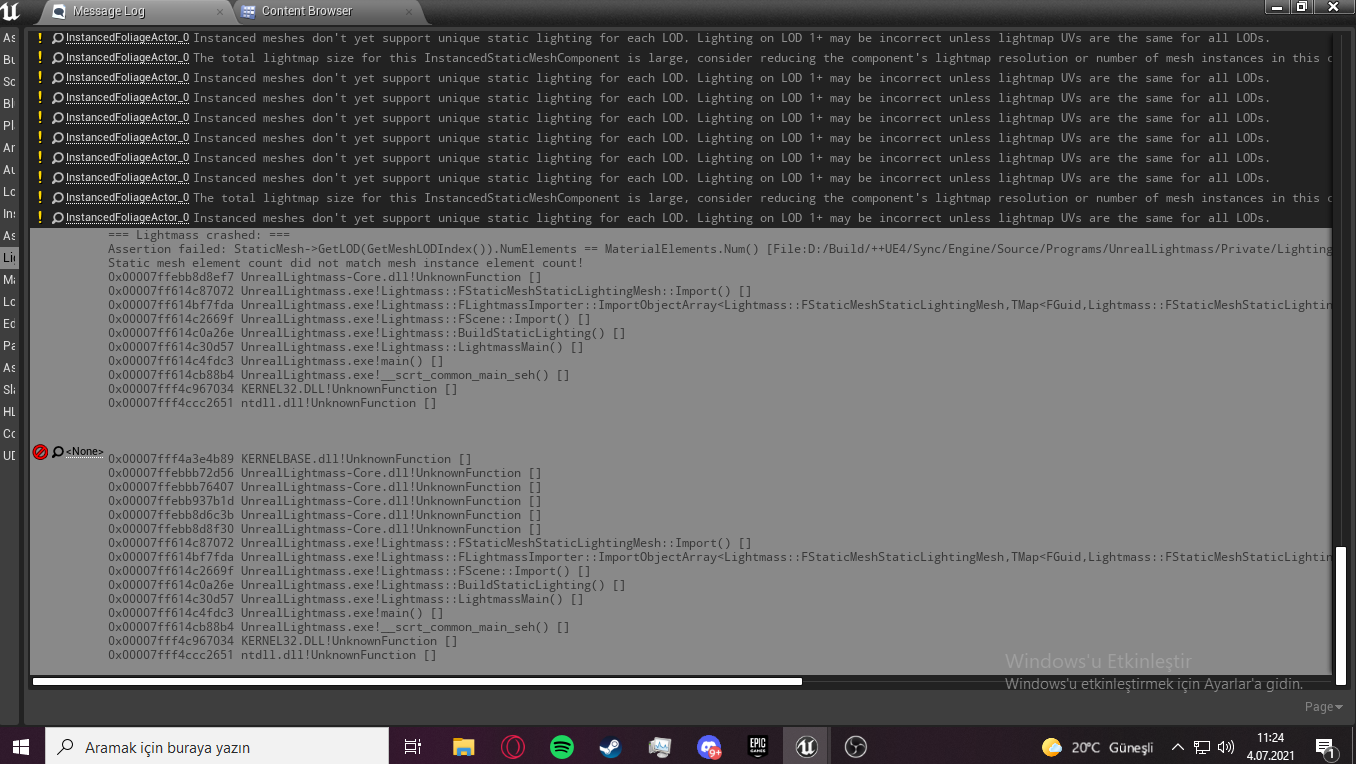
good day friends, while we were working on our project, everything was fine, but last night, when I was trying to get a build, I suddenly happened an error that said lightmass crashed and it has not improved since then, I also dealt with swarm cache cleaning, valid data etc. According to the result of my research on the internet, it did not help, why am I living this does anyone knows?
https://prnt.sc/18go3ty
 plush yew
im stumped why is this happening? when i attach to the socket the mesh becomes huge and a million miles away. i made sure the scale is normal
 restive eagle
is your parent scale 1.1.1 as well?
plush yew
@restive eagle im very new where might that be lcoated?
covert summit
on the socket in the skelly I assume is what they mean
restive eagle
it's your mesh and skeletal mesh that you parented your child to
skeletal mesh1 is a child of skeletal mesh, which is a child of mesh
if any of the parents have different scale values, they will be applied to their child comps
covert summit
ohhh good catch
 restive eagle
mesh and capsule component as well?
plush yew
yes i checked that too
restive eagle
are you attaching your gun to a socket?
plush yew
yes the right hand
restive eagle
is the sockets scale value 1.1.1 as well?
plush yew
oh yea maybe its a problem i did in blender
yea thats fixed, i just dont know why the scales still broken
aw man. ill try that out. sorry for being annoying but can someone tell me where the sockets scale value is?
i actually did do that. thats why im so confused lol
i made sure im in meters and everything
restive eagle
open the mesh and click on the socket that you have created before
if you are attaching to the bone then probably thats not the case
unless bone has some weird scale values
plush yew
yea im using bones
restive eagle
if you place that weapon inside level next to the character
are the scales correct?
 restive eagle
are you doing anything on construct?
plush yew
no i dont think so
restive eagle
correct scale value on the bone?

what you could try is making an actor bp
and putting guns mesh there, then on begin play you spawn that actor and attach to your hands, keeping the scale value as world
plush yew
thanks for helping me tsauken
i checked the bone but thats 1.1.1 too 😦
im just gonna scale the mesh manually, no clue why this is happening.
restive eagle
but even in the pictures that you have sent, scale looks fine
restive eagle
when gun is metres away from the hand its hard to tell

 restive eagle
just try making it into actor bp and then attach to your hand, unless you plan on having just 1 gun
when you attach, you will have some settings on which scale value to maintain
everything that he has shown, seems to be fine(from ue side atleast). cant recommend anything else
plush yew
@plush yew Im all set i swear to gosh im just cursed

alright thanks again tsauken
ill check it out!
tacit heath


i am trying here to get overlapping actors from the sphere, if i overlap the sphere with the cube it works, but with a geometrycollector it doesnt,
restive eagle
if geometrycollector is same as brush, then as far as i remember brushes can't have these type of events
maybe hit works, but i'm pretty sure that overlap doesnt (still taking about brushes)
civic mauve
i started my project in ue5 and now switched to ue4. I have many Uassets that are not visible in ue4 because they were made in ue5, but they dont contain anything that is a specific feature of ue5. Is there a way to make them usable?

it would take a lot of time to resetup all my blueprints etc
restive eagle
you can export to fbx
and import them back
just for meshes that is
you cant downgrade
civic mauve
yeah i think those are the smallest part of the probmem
restive eagle
you could copy paste some blueprints from event graph to another, but no idea if that would work with ue5 to ue4
 restive eagle
im not familiar with ue5 but if it's the same brush then use a static mesh instead
with brushes you have an option to convert it to a static mesh
tacit heath
it should be static mesh, at least i dont have the option like brushes have
also the collision type is static mesh
boaaaaaaaaaa this is so annoying
tacit heath
@restive eagle i'll treat geometry collector as volume collisions and see how that goes, thx for helping
 runic fern
hello guys ..
in pixel streaming the Cursor is not showing why ?
 whole fern
runic fern
hello guys ..
in pixel streaming the Cursor is not showing why ?
whole fern
runic fern
hello guys ..
in pixel streaming the Cursor is not showing why ?
Set Input Mode Game And UI
 fleet sparrow
How to add friction to a flying character?
 last topaz
Hi all, i'v got some weird "invisible" drawcalls going on in my scene. I went ahead and disabled everything from static meshes to landscape and hid absolutely everything in the world outliner and i'm still getting over 1k drawcalls. This doesn't happen in a new scene. Any ideas what it could be?

as you can see the scene is now completely black since i hid everything
I even tried deleting everything just in case but its still there
glacial dawn
D3d Lost error again, happens with last two Nvidia update drivers, with a Nvidia 3090... Randomly, in editor and testing game...
 unique kraken
hey guys, is it normal that when i
cast a variable from my char into the anim bp, and reset it to a variable, that i get a tiny delay?
seems stoopid to me. messes with my accurace here a lot
 lyric sapphire
yo can anybody tell me how can i set a new cinecamera to game view
cuz youtube videos only showin me how to switch between cameras
 potent goblet
lyric sapphire
yo can anybody tell me how can i set a new cinecamera to game view
potent goblet
lyric sapphire
yo can anybody tell me how can i set a new cinecamera to game view
I personally don't know, but there is a pilot option when right clicking objects. Maybe see if you can use that?
 summer aspen
Hey guys, I have a problem I need help with please.
In my project we are unable to generate physics assets, we get the "bone size is too small to create" error, however in other projects we are able to generate physics assets for these same .fbx files. So I do not believe the files themselves are the problem.
I have exported from blender using various settings and scaling but have not been able to generate physics assets in our 4.25 project at all anymore.
If anyone has any suggestions, advice or links I would greatly appreciate it. Thank you and have a great day 🙂
 sly shadow
Does anybody know what setting is causing this?

 rare steppe
does anyone know some good c++ fps tutorials with the newer uclass stuff?
 warm hornet
First time this has happened and I'm not the only one.
https://forums.unrealengine.com/t/failed-to-load-assets-error-message/113004
After zipping my entire project and transferring to another PC, I simply unzip and launch the project.
No error messages, a blank level opens. But when I try and launch any of my previously saved Maps nothing happens!
I get a popup saying "Failed to Load Assets" with a link to the error log but there are no errors appearing!
Unreal 4.27 Windows.
Can anyone offer some troubleshooting steps? I'm googling but so far nothing. This is a show stopper for me.
The original project and levels open fine. I just need it to launch on a different PC.

Unreal Engine Forums
In one of my projects that I’ve been working on for a couple of months there is a level that wont open, just says failed to load assets. What do I do as this level took ages to make and is key to the game?? Thanks
 young quartz
can anyone suggest tutorials on megascans?
 grim plover
is there a way to use my vive controllers outside of vr mode? i created a camera blueprint and its tripping me out.
AHH NVM I DID IT
 prisma maple
not sure where to post but trying to open a large project from the asset store, it gets to 95% for a long period of time and then eventually crashes my pc. how can i diagnose the issue? this only happens on the asset store project and i can open existing ones/newly created ones from the engine
stiff bane
how to i turn of that the epic games website opens when i open unreal its so annoying
 somber oar
Hey I have a question about how to add new colors/layers on my current landscape without having to delete my current landscape layer.
I'm new to UE and want to learn how to use it
This is what i've got right now, but I want to change just a part of my landscape with another material ( like grey as color for the city.)

 frosty wedge
Hi all!! I've got a quick question, I keep running into an "out of video memory" issue. I am using a 2080Ti, Ryzen 9 3900X, and have 32gb of ram.. is there a way to adjust a setting to allocate more? In my task manager, my GPU is only using 6% with UE open and my CPU is only using 3%. Any ideas on how I can tweak this? Thanks a bunch!!!
 marsh nacelle
Do you know if this is an optical illusion, a problem with the camera perspective or something else? my "rocket" is not exactly on the ground.
 marsh nacelle
frosty wedge
Hi all!! I've got a quick question, I keep running into an "out of video memory"...
marsh nacelle
frosty wedge
Hi all!! I've got a quick question, I keep running into an "out of video memory"...
me to. The Epic Games Supporter told me, it is a known issue in some Cases with the RTX2070 and 2080, maybe the TI too. -\
 tight vapor
does any one make profit from making games?
plush yew
how do I attach this physics chain to the shackle?

I tried physics constraint but its all wonky
nvm figured it out
 cloud heron
Someone help me please. I'm not sure what exactly is happening but I'm having an issue in the editor where it seems the right arrow key on my keyboard is pressed.
The camera in the scene moves to the right like I'm pressing the key. As well as the tabs and content browser behaving like the key is pressed(highlighting folders and assets like I'm navigating with the arrow key).
I have tested my keyboard and I don't think it's an issue with my keyboard. It behaves normally outside the editor and this is verified with online tools and just general observation.
Any help resolving this issue will be appreciated
fierce tulip
generally that happens when you have a controller plugged in (and the cat sleeping on it)
cloud heron
😅 I don't have a controller plugged in. But to be honest, a couple of days ago I noticed that my pc seems to have a nonexistent Xbox controller plugged to it. I'll look into that issue right away
cloud heron
fierce tulip
generally that happens when you have a controller plugged in (and the cat sleepi...
Thank you very much for that tip. I have resolved the problem.
I was using a pc remote app and forgot to disable the gamepad inputs(playing NFS with G-sensor).
I really appreciate the help.
fierce tulip
np hehe, happened to me so many times. (but with cats)
cloud heron
Lmao. I used to have five. I can relate.
fierce tulip
at some point I had seven, so ^5 for a fellow cat-friend
 wet dock
hi guys quick question in unreal engine when i right click on a picture i want to change into a texture the menu opens at the top of the screen missing most of the top options ive tried to move it and unsure what to do HELP PLEASE ?
 analog vale
does anyone know how i add detailed collision to the player and not just a capsule?
 elder crest
happy american holiday everyone
cloud heron
analog vale
does anyone know how i add detailed collision to the player and not just a capsu...
You generally don't want to do this since the capsule is one of the best shapes for movement if not the best. But you can add another collision component to the character if you want. Might have to tweak a number of settings though, for collision detection etc.
For more complex and custom collision, you generally would use anothe static mesh component, set it's collision channels to your taste an probably apply a material that renders it invisible.
These are just solutions off the top of my head though.
analog vale
cloud heron
You generally don't want to do this since the capsule is one of the best shapes ...
its a quadraped
cloud heron
analog vale
its a quadraped
The character?
analog vale
yes
cloud heron
You might want to attach multiple collision volumes to each limb segment and parents them to sockets defined in the bones of the skeletal mesh. Or just set the capsule radius to encompass the mesh.
It's also possible to use the physics asset of the skeletal mesh but I don't have much experience using that
wet dock
hi guys quick question in unreal engine when i right click on a picture i want to change into a texture the menu opens at the top of the screen missing most of the top options ive tried to move it and unsure what to do HELP PLEASE ? is there another way to turn into textures
analog vale
is there really no way to turn the physics asset collision into usable collision
cloud heron
There is. But I've never done it. I find physical animations really janky
analog vale
ok thank you
i will try to create somewhat detailed collision by combing capsule components
cloud heron
Yeah. That is generally the approach. But I feel like there should be a way to turn on collisions based on the physics assets and perform collision tests based on the location of the collisions determined by the animation rather than fully simulating physics. You might want to look into that. I guess?
analog vale
i have been searching for awhile and the excuse was that the player needs to be repressented as simple collides for some other systems to work , i couldnt find anyone able to use the physics asset
cloud heron
Ahh makes sense. As I stated earlier a capsule is usually the best shape for movement.
analog vale
but many people would like to have complex collision
 night burrow
any idea why there's no animation keyframe next to transform parameters?
 cloud heron
analog vale
but many people would like to have complex collision
cloud heron
analog vale
but many people would like to have complex collision
Using APawn rather than ACharacter might be better since it doesn't enforce the capsule component. But you lose the inbuilt client prediction if you're making a multiplayer game.
cloud heron
Lol. Such strong words
 analog vale
plush yew
can i make rich presence without buying this?
analog vale
plush yew
can i make rich presence without buying this?
what currency is that ?
analog vale
cool logo
analog vale
no
cloud heron
Any piece of code/software can be duplicated. The problem is knowing how to do so. iirc, the discord API is available so it's technically possible to replicate that plugin
 still moat
plush yew
can i make rich presence without buying this?
still moat
plush yew
can i make rich presence without buying this?
You will have to look into how to integrate the SDK yourself then:
https://discord.com/developers/docs/rich-presence/how-to
Discord Developer Portal
Integrate your service with Discord — whether it's a bot or a game or whatever your wildest imagination can come up with.
plush yew
still moat
You will have to look into how to integrate the SDK yourself then:
https://disco...
thank you
plush yew
cloud heron
Any piece of code/software can be duplicated. The problem is knowing how to do s...
thank you too, ill try to do that
still moat
Perhaps there may be something already for UE4 thats free somewhere like github, never checked really, might save you the trouble.
 covert summit
majestic
cloud heron
analog vale
Well, it's a start
covert summit
I see no problem
analog vale
 cloud heron
What exactly is happening.
analog vale
when i press simulate physics it starts flying and lagging like mad
I suspect it is colliding with itself
ok just one more

 torpid shadow
Everytime I try to build the lighting on my project I keep getting the error message
Landscape_0 Instanced meshes don't yet support unique static lighting for each LOD. Lighting on LOD 1+ may be incorrect unless lightmap UVs are the same for all LODs.
Im not sure how to solve this but I cant finish building the lighting cause of this
covert summit
analog vale
again, seems fine 😛
covert summit
torpid shadow
Everytime I try to build the lighting on my project I keep getting the error mes...
pretty sure thats a warning though
torpid shadow
it is but I dont know what it means, like whatever its warning me about
covert summit
its just saying that the LOD meshes should have the same lightmap UVs, i wouldnt worry about it until its a problem for you, and you would check that by backing off from the mesh its complaining about so it kicks into lower LODs and seeing if lighting is working OK
what is the actual failure?
torpid shadow
the actual light build failed cause of this, I had made a landscape that I like sculpted and stuff and its saying something is wrong with the landscape itself
covert summit
i think its probably something else, check the swarmagent log
if you see something like "System.IO.IOException: The process cannot access the file 'C:\SwarmCache\AgentStagingArea\8487AD2E5DBA413C81373D29B2915895.C697AFCF4FD55F51E71D90B7DE56F1CD.mtrlgz' because it is being used by another process." then you have duplicate lighting GUIDs
always fun when you google something, find the answer you are looking for, and realize that you yourself posted that answer 🙂
torpid shadow
lmao that is perfect, and I will take a look and see if there is any error in there
I got like 500 warnings from that so I just flat out didnt know what happened
covert summit
yeah if you had messed with your uassets in a file manager (such as pulling them in from other projects or making copies) then this is going to be why
if you have not then its probably something else, but definitely take a look
cloud heron
analog vale
Sorry. I had to attend to something. Yeah, I think it's colliding with itself. There should be a setting to ignore self/owner. I'm not so sure.
analog vale
i clicked some buttons and now its working @cloud heron
 covert summit
cloud heron
Sorry. I had to attend to something. Yeah, I think it's colliding with itself. ...
covert summit
cloud heron
Sorry. I had to attend to something. Yeah, I think it's colliding with itself. ...
i was looking for it to suggest but i only found this one

i dont think thats quite right
 oak grove
Just a quick question. So for example if I had a model I wanted to import like a person. Then I wanted to import that into the game and control him with a click onto him and right click else where in 3rd person. Kinda like Total War how would the best way going about that work? An actor or controller. Ive tried the unreal wiki but cannot find much.
cloud heron
covert summit
i dont think thats quite right
Not exactly. It may be in the collision presets
cloud heron
analog vale
i clicked some buttons and now its working <@!748903497570713650>
What buttons did you click. I'm curious.
prisma maple
trying to attach a camera to a parent socket but i don't see the option for it in the ui, am i missing something
cloud heron
oak grove
Just a quick question. So for example if I had a model I wanted to import like a...
Usually, it's done with AI controller. There's an example template that is very similar to what you're looking for. I think the top down template
analog vale
cloud heron
What buttons did you click. I'm curious.
- I set collison complexity in the physics asset to simple and complex2. the asset in the scene hadnt updated so i just deleted it and put it back in
i also disabled bone to bone collisions but i dont think that mattered
cloud heron
prisma maple
trying to attach a camera to a parent socket but i don't see the option for it i...
Attach it to the parent component first. Then select the socket you want in the parent socket. I'm not with my pc but a pic would've explained better
cloud heron
analog vale
1. I set collison complexity in the physics asset to simple and complex2. the as...
For the skeletal mesh?
analog vale
cloud heron
For the skeletal mesh?
the skeletal mesh physics asset
cloud heron
Oh right. So now it can detect collisions but does it also simulate physics?
analog vale
cloud heron
Oh right. So now it can detect collisions but does it also simulate physics?
yes
it is ragdolling
cloud heron
Cool. I'm guessing you want that behaviour
analog vale
i would preffer to simulate physics only on a per object basis
cloud heron
Maybe there's an option for that. Detect collisions without simulating physics on a skeletal mesh.
prisma maple
@cloud heron i have attached it to a parent mesh through code, but when i pause the game and look in the hieracrchy, i can't see the socket option
cloud heron
prisma maple
<@!748903497570713650> i have attached it to a parent mesh through code, but wh...
I don't think you can do that at runtime from the editor.
covert summit
yeah i dont think the skeleton view shows runtime attached actors even in simulate, but definitely wont in PIE or standalone
prisma maple
i don't even see it when the game isn't running - to test it i created another mesh in the editor, parented a camera but there's still no socket option
weak urchin
Anyone know how to set up collisions for skeletal meshes so the character mesh doesn’t go into walls? I have a character that is longer than the capsule so the part of the character goes into walls before the capsule stops movement.
cloud heron
prisma maple
i don't even see it when the game isn't running - to test it i created another m...
The mesh has to have bones and/or sockets
cloud heron
weak urchin
Anyone know how to set up collisions for skeletal meshes so the character mesh d...
Several options. You can use inverse kinematics to make the body parts react to the environment. You can use the physics assets on the mesh (go through the previous messages, there was a discussion on that not too long ago)
Or simply increase the capsule size(half height and/or radius)
prisma maple
cloud heron
The mesh has to have bones and/or sockets
the mesh does have a skeleton, and animations but the child camera still has no socket option
cloud heron
Send a snapshot of the details panel of your camera component
prisma maple
 cloud heron
prisma maple
cloud heron
prisma maple
You won't see it here, go into the blueprint script and set it there.
If that instance is directly from c++, you either have to create a bp child and set the socket there or do it using code as well. You'd use attach component to component and set the socket name there.
analog vale
i dont know how but i accidentally made even a blueprint that derives from Charachter have per bone collision
cloud heron
Is that a character or mesh setting?
analog vale
probably mesh
cloud heron
Exactly. It's not your fault don't worry😉
 loud meadow
i want to know how to let every 5 second the ennemy shoot in 2d
analog vale
loud meadow
i want to know how to let every 5 second the ennemy shoot in 2d
you should ask in #blueprint
loud meadow
i asked
analog vale
oh
wet dock
use a tick blueprint i think im new so could be wrong
weak urchin
cloud heron
Several options. You can use inverse kinematics to make the body parts react to ...
Thanks for the suggestions, any idea where I can find info on using inverse kinematics for collision? That concept is new to me. I did a google search but didn’t come up with anything.
 flint trench
Anybody know what setting this warning is mentioning about streaming mips?

Doesn't let me build the streaming texture
 strong jasper
Does anyone know what might be causing a "D3D device lost" crash? I have already have my gpu TDR set to 60
flint trench
strong jasper
Does anyone know what might be causing a "D3D device lost" crash? I have already...
Are you on a laptop?
 cerulean sorrel
i dont understand unreal engine holy shit it is confusing blueprints more so i have ideas but have no clue how to build ai using blueprints like i know what i wanna do but then i do it and its not what i want or something is off and i have no clue what to do
strong jasper
flint trench
Are you on a laptop?
Yes
flint trench
On Laptops, the GPU output often switches between the iGPU and dedicated based on power draw
there's a setting that forces it to stay on the dedicated GPU iirc
strong jasper
Oh
flint trench
if it swaps then UE4 can consider the D3D device "lost"
cerulean sorrel
just force it to use the gpu
strong jasper
I know that Windows 10 made it a pain in the ass to set the gpu recently
flint trench
^^
strong jasper
I can't use nvidia control panel
flint trench
It might be that
cerulean sorrel
settings?
wet dock
anyone know why theres no option to tun my pics into a material when i right click
strong jasper
flint trench
there's a setting that forces it to stay on the dedicated GPU iirc
i think I already had it set
 flint trench
you should always be running your laptop plugged in tbh also as it won't hit max powerdraw otherwise
strong jasper
ofc
cerulean sorrel
laptops are bad
strong jasper
cerulean sorrel
laptops are bad
not for certain people like me
flint trench
some laptops i've experienced are a bit backwards and setting the graphics adapter to be the iGPU is actually setting it to the dedicated
because the graphics output gets routed through the iGPU
cerulean sorrel
wtf
strong jasper
it would be easy if nvidia control panel didn't remove the option to set gpu
flint trench
so you could maybe try that
strong jasper
 flint trench
Also setting RTX on your project setting if you don't have support for DXR is common cause of that D3D device lost error
but you will usually get a crash on startup with that one
cerulean sorrel
i use a imac with these develpment amd gpus
flint trench
cerulean sorrel
laptops are bad
Nah, they are great if you're working on the go
 worn copper
Do steam offer Free Server for Multiplayer Game?
Voice Chat?
drowsy snow
worn copper
Do steam offer Free Server for Multiplayer Game?
Voice Chat?
Not free server, but Epic Online Services bundled with free Voice Chat system and Easy Anti Cheat.
worn copper
Sow that ad but there is no tutorial about that on YouTube
 marsh ivy
Can you use paid assets from unreal maeketplace in unity? What about free monthly assets? What about paid unity assets in unreal?
drowsy snow
marsh ivy
Can you use paid assets from unreal maeketplace in unity? What about free monthl...
drowsy snow
worn copper
Sow that ad but there is no tutorial about that on YouTube
YouTube tutorials? Pffft.
finite wren
You gotta wait til Epic buys Unity then everything will be available 😉
covert summit
strong jasper
Does anyone know what might be causing a "D3D device lost" crash? I have already...
if none of the above works, there also seem to be driver crashes on RTX 20 (mobile) series cards in DX12 in the latest drivers. You might try downgrading your drivers or switching the editor to DX11 mode to avoid
theres been a lot of folks in here with problems on RTX mobiles lately. Hadnt considered the iGPU switching though, definitely a good catch
cloud heron
weak urchin
Thanks for the suggestions, any idea where I can find info on using inverse kine...
Sorry I'm just seeing this.
Inverse kinematics is not really a collision system. It's mostly used to create intuitive reactions to the environment such as feet or hand placement etc.
That said, there's a number of YouTube videos that can teach you the basics. I'm too lazy to look up any specific one atm(apologies). But a YouTube search will turn up good results. The implementation is largely the same across all those videos so anyone should do.
analog vale
@cloud heron the collision saga is done , this video was extremely helpful https://youtu.be/H3U6D8XAFRE

Make sure the new sphere collisions (or any collision shapes) overlaps with the original capsule collision.
cloud heron
Ahh. Finally. Good luck with the rest of your project.
I'll check out the video
analog vale
thank you
 dry latch
Does anyone have an idea how to do something similar to this when it comes to pressing a skill ? I mean, camera wise. https://www.youtube.com/watch?v=LHq7_1UPNN4

Genshin Impact (PC / PS4 Pro) All Characters Ultimate Skills Elemental Burst Animations
#GenshinImpact #Ultimates #HuTao
Gameplay Raw footage edited in a synthetic manner for information purposes. All Gameplay played, recorded & edited by me.
join our discord community & discuss your favourite games with us: https://discordapp.com/invite/w4EbJgk...
drowsy snow
dry latch
Does anyone have an idea how to do something similar to this when it comes to pr...
Use Sequencer and execute the sequence upon skill activation. A better example would be Final Fantasy VII Remake's skill sequences since it also doesn't hijack player camera if the skill is executed by the one you're not controlling.
dry latch
Thank you!
weak urchin
analog vale
<@!748903497570713650> the collision saga is done , this video was extremely he...
Any idea why this won’t work with skeletal mesh? I can replicate this but it seems to only work with a sphere collision.
 peak oxide
I'm packaging a project, It's just one level, I have my default map set but I do have some other options in the project.
When I package it seems that unused resources, images etc are being packaged too, is this true?
Should I clean up a project before I package to ensure I only have the required assets and nothing more?