#ue4-general
1 messages · Page 1020 of 1
 sharp crest
 steady hull
I made a mesh in unreal super basic tho trying to make an interior of a building but I was getting some really weird shadowing at the corners even when turning off shadows. I noticed the mesh looks nothing like in the model viewer too. Dunno what I need to know to get it behaving properly
 finite dew
I was about to delete the asset but its somehow in my vault
 regal mulch
I just want to make one thing clear: Piracy is a ban reason
Keeping an asset that was refunded is very much illegal
finite dew
I'm trying to delete it but it's still in my vault so idk
 drowsy snow
finite dew
I'm trying to delete it but it's still in my vault so idk
drowsy snow
finite dew
I'm trying to delete it but it's still in my vault so idk
Delete it from your VaultCache folder.
finite dew
Oh ok
 earnest cedar
Hi, I'm looking for DLSS console commands regarding the modes: performance etc. but I can't find any for the modes
 coarse turtle
Anybody knows about these errors: https://gyazo.com/1bc4ba6c266ad95139ffaf05b232349e

 sacred yacht
hey there! just wanted to ask, is there a way to enable nearest filtering for shadows? I'm making a game with pixel textures, and I feel like that would work well.
 shell compass
@sacred yacht maybe try and crank this up to the max value:
https://docs.unrealengine.com/4.26/en-US/Resources/ContentExamples/Lighting/6_2/
An overview of the Lighting example level, example 6.2: Shadow Filter Sharpen (Movable Lights)
Otherwise it's probably possible with a custom post process material, but that's a little more work involved
 clever flare
hello, i'm trying to make an object spin around the Y axis but when it reaches 90 degrees it flips the axis and turns into -90 and then gets stuck at 90 degrees. I tried locking the X and Z axis because they rotated when it reached 90 degrees on the Y but to no avail. how can I fix this?
sacred yacht
shell compass
<@!465604812319358999> maybe try and crank this up to the max value:
https://do...
cool thanks, but is there a way to decrease the shadow resolution?
shell compass
@sacred yacht Yes, in your level blueprint or gameinstance BP upon start or whatever, add the node Get Game User Settings, and from that, pull out and add Set Shadow Quality 0
sacred yacht
epic, thanks!
 brazen stag
I'm trying to put a video as my main menu background and it seems to work fine, but for some reason when I hit play it just doesn't show and when I package the game it doesn't either. Can anyone help? Am I missing something obvious?
 drowsy snow
brazen stag
I'm trying to put a video as my main menu background and it seems to work fine, ...
drowsy snow
brazen stag
I'm trying to put a video as my main menu background and it seems to work fine, ...
Is the video stored in Content/Movies?
Video files have to be stored in that particular directory to get packed.
brazen stag
No, it's in the UI folder i created. Ah ok, Is it in the content folder? Or do I have to create the folder?
drowsy snow
brazen stag
No, it's in the UI folder i created. Ah ok, Is it in the content folder? Or do I...
You have to create a folder called Movies inside the Content folder
brazen stag
Ah ok, I shall give that a go, thank you 🙂
brazen stag
drowsy snow
You have to create a folder called `Movies` inside the `Content` folder
Do I need to put the media player or anything else in there, or just the video itself?
drowsy snow
brazen stag
Do I need to put the media player or anything else in there, or just the video i...
Just the video itself should be fine, though I'd put them there for ease of management.
 sly leaf
Hi! I'm needing some help on exporting my project as it says 'Packaging failed!' and I don't know what to do... This is for my end of degree project, it was supposed to be an environment with some functionality via C++, but none ended up being done... So UE 4.26 C++ project with no coding done.
My error says this:
'UATHelper: Packaging (Windows (64-bit)): ERROR: No target name was specified on the command-line.
PackagingResults: Error: No target name was specified on the command-line.'
It would be great if someone could help me out, I have been trying to troubleshoot it for a while and I have not been able to...
I used 4.26 for the MetaHuman implementation. The original source was 4.25. This may be part of the problem too...
I hope this is the correct channel!
drowsy snow
sly leaf
Hi! I'm needing some help on exporting my project as it says 'Packaging failed!'...
#cpp might know better
sly leaf
Thank you, I'll copy past it there then!
shell compass
How worried should one be about references between classes/BPs? Does it make sense to have a reference to the in-game-menu in the player controller so I can close it once I've opened it, or is there cleaner ways to do things?
I know the Asset Size Map grows to a scary size whenever you add a new reference to something, and that in turn references other things
The hardest part in UE4 by far feels like it's figuring out how to structure things and where things should be.
Like, right now, the size map for my Player Controller says that it's 59,5MB. But a whopping 52,4MB of that is the game instance, which has references to the options menu widgets etc.
 nocturne bough
shell compass
How worried should one be about references between classes/BPs? Does it make sen...
nocturne bough
shell compass
How worried should one be about references between classes/BPs? Does it make sen...
perhaps move and isolate your code that uses GameInstance to functions, and load GameInstance through SoftObjectReference>Cast to YourGameInstance.
Should not make to much difference since GameInstance is loaded anyways but maybe can help to cleanup your reference map.
nocturne bough
shell compass
How worried should one be about references between classes/BPs? Does it make sen...
Maybe this video can answer some of your questions https://youtu.be/j6mskTgL7kU?t=2363
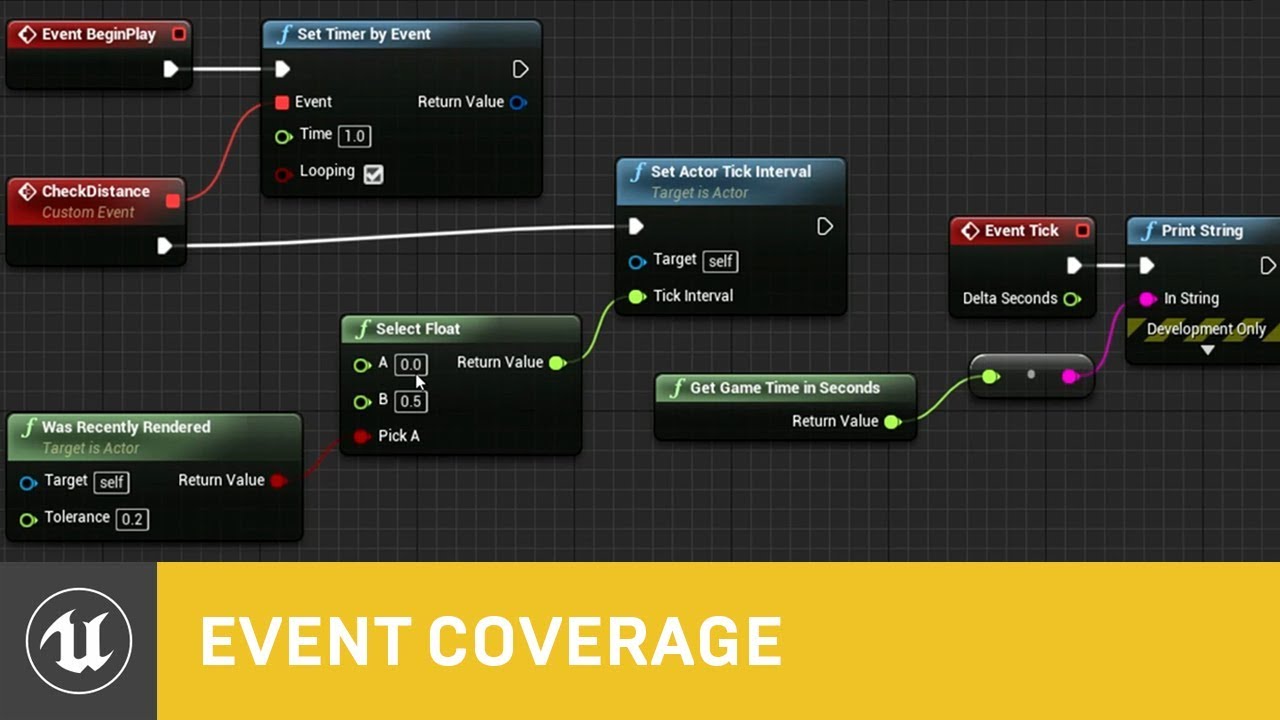
In this presentation from Unreal Fest Europe 2019, Epic's Sjoerd de Jong offers an in-depth look into Blueprints. Best practices, dos and dont's, and recommendations on how to utilize Blueprints to its full potential.
During this advanced class we will go into how to use Blueprints in a future proof and scalable way. We will look into how to c...
shell compass
@nocturne bough Thanks! Hourences is great. I know I've watched a video about exactly this kind of thing a long time ago but I couldn't find it again.

 brazen coyote
Hey guys whenever i download textures from megascans i don't see the roughness map that i plug into my master material anymore instead i see like a colored map can somebody help me out
looks something like this

im sort of new so i wouldn't really know how to go about fixing it
hmmm ok ill have a look
well i can open it and i see
one sec

thats what happens when i open the texture i see the rgb thing up top could that fix it?
i just need to plug in the roughness to my master material

thats what i saw before yk just throw in the roughness and boom
drowsy snow
brazen coyote
Probably one of the RGBA channel is roughness.
I'm not using UE5 seriously so I'm not sure how it was changed there.
brazen coyote
hmmm i see i see
so when i uncheck the rest

then i get something that looks like a old roughness channel but how do i separate this?
drowsy snow
brazen coyote
then i get something that looks like a old roughness channel but how do i separa...
In the texture sampler node, there's 4 other output pins for each channel and RGBA combined.
shell compass
You'll need to open up the material and instead of having a line from the RGB pin on the Roughness texture parameter, you want that line to go from the R pin underneath
Or you could have the RGB line go into a Component Mask and just get the R from there 😛
brazen coyote
as a beginner my brain is hurting right noww but i will see what i can do xD
i appreciate you taking the time to try and help !
ok so i open
shell compass
Start by right clicking the Material Instance in the content browser and pick "Find Parent"
That'll take you to the Material that it was based on
Then double click that to get the material node editor with probably a huge spaghetti. Find the Texture Sample 2D Parameter called "Roughness A" in there
 shell compass
No that's the texture. I mean the thing you clicked on to get the image here:
#ue4-general message
drowsy snow
It's not like UE5 in its current state is exactly meant for beginners to begin with...
shell compass
It's probably a little simpler than UE4, but still quite buggy right now
 kindred viper
how is it simpler?
shell compass
@kindred viper Just a bit streamlined interface. Not a whole lot.
brazen coyote
Yeah i could do this stuff in ue4 just because as soon as i downloaded an asset i got a A N R map nice nd straight forward
shell compass
Not all non-essential buttons are visible all of the time
brazen coyote
ok i will try and find the instance
kindred viper
oh I thought you meant to make something with. Because that would be untrue
brazen coyote
im following a tutorial and i just straight up downloaded the project files yet his looks like this

the forest texture has that map
and mine is like this

how is it that i download the exact files and i still dont have the roughness map this has held me back for so long its demotivating 😦
 plush yew
Hello! For some reason, all my decals have go green - been trying to figure it out....
 dire parcel
are there any tutorials to help creating a 2.5D pixel art game?
 uneven hemlock
whenever i use complex collision

on this
wheel
it gives me this error


using it on this bike blueprint
drowsy snow
dire parcel
are there any tutorials to help creating a 2.5D pixel art game?

Thinking about doing a HD-2D Mini-Tutorial for anyone who's curious
UE4, no plugins. Took me 2 hours to make this and mostly it was spent fighting the DoF. https://t.co/WgDUmjTCLg
Retweets
104
Likes
448
 Twitter
·
dire parcel
drowsy snow
https://twitter.com/UnrealAlexander/status/1398087914442133505
Twitter
·
dire parcel
drowsy snow
https://twitter.com/UnrealAlexander/status/1398087914442133505
I swear you are the goat.
THANK YOU
LITERALLY
plush yew
Hello ive had this question for a long time now mainly because I was confused on why all of a sudden im worn out from making my game. What is a healthy amount of time and days a week to make my game but still learn UE at the same time?
 drowsy flicker
QUESTION: When taking high res screenshot or sequence video, how to decrease viewport res back? it is lagging so much
plush yew
plush yew
Hello ive had this question for a long time now mainly because I was confused on...
I don't think there is a right amount. I think the important thing is that you don't stop, even if you only work for few hours a day or take two weeks off. The small amount of work you put in will stack up at the end, and everything will be completed ^^
plush yew
drowsy flicker
QUESTION: When taking high res screenshot or sequence video, how to decrease vie...
The same way you increased it? xD
Is there a way to create something like a costum "sinus" wave, that has a smaller window? So instead of going from 0-1, have it go from 0 to 0.5 ? Asking for a node in the material editor.
drowsy flicker
plush yew
The same way you increased it? xD
nope not works even I decrease it
 fierce tulip
@plush yew just multiply by 0.5
 arctic path
are these rocks ugly? or should i go for smaller rockers.

 untold igloo
Does anyone have any idea why I'm getting over 100 fps in my editor but my game play has suddenly gone into slow motion?
arctic path
i dont wanna add the grass yet , i really dont want to kill my fps. but thanks 🙂
yeah, i can scale it, but it will be covered with real grass soon enough
 haughty slate
untold igloo
Does anyone have any idea why I'm getting over 100 fps in my editor but my game ...
haughty slate
untold igloo
Does anyone have any idea why I'm getting over 100 fps in my editor but my game ...
Presumably you're getting bad framerate if you select Simulate, too?
untold igloo
no just play
I'm getting over 100 fps on a new project
it's a 2d side scroller and all I did was import assets and change the background
haughty slate
Perhaps it's something in your player character code?
haughty slate
So it stil lreads 100+ fps but game speed is slow?
untold igloo
yes
haughty slate
May be something setting global time dilation, I'd start with your player character and look for that
untold igloo
yeah thats what I was thinking
 weak sorrel
hey my shadows looks really bad after I build light
not matter if I use production or preview quality it looks always better before I'm building. Same issue
before I had soft shadow and you could see each leaf shadows from the trees. now it's very opaque black and blurry on edges.
increasing lightmap resolution of the landscape from 1 to 6 helped a bit on edges but still looks far worth than before I built lightning

shadows also became static after building
haughty slate
untold igloo
yeah thats what I was thinking
If any of the assets you use feature a slow-mo ability then it's a good chance, probably using a node Set Global Time Dilation
weak sorrel
I use Stationary light source
untold igloo
@haughty slateI'll look for it, but it was just a sprite sheet and a background image
arctic path
did you scale your player size?
anything over 1.00 will cause issues with out a proper edit
untold igloo
no, but I scaled the background and a block sprite
weak sorrel
@plush yew I've been looking everywhere and it was using area shadows for stationary light for no reason. now it's disable it's been an improvement but still far below what I could see before building them 😦
untold igloo
what settings on my character control it's speed?
 tough perch
What is best way to sync pawns animation bps? I have player (rpg game) and there is horses. When I start riding player changes anim bp to riding and more speed it changes as like walking/running. But when I posses horse and attach player to it. It doesnt work maybe because (Try to get pawn owner-> velocity vector length = speed) Same as horse when I dismount and posses player again it only loops running animation if I dismount while running.
weak sorrel
I had to use movable instead of staitonary to get the dynamic shadow back (to me movable was only useful if source light can move....) gonna checkout what I can do with cascaded shadows then
weak sorrel
Nice thanks a lot @plush yew I don't know why those settings got to default again. It looks like what I had before building again 🙂 Gonna tweak and improve this
arctic path
does anyone know why when i use the foliage tool, it keeps spawning grass in the air? (stamping on a rock)
 weak sorrel
is it due to collisions ?
I remember ahving this a long time ago
i think in the landscape mode there's a tool you can use on edges
so it's less buggy but I'm not sure at all
arctic path
im using a voxel world, sadly i cant use those tools
ill try saving the mesh as complex, and using the object as collision
 untold dirge
This barrel pushes itself out of the wall ultra fast, but it doesn't throw me like 'real physics' would. I can walk on it when its stationary and I cant walk through it and stuff. Can anyone tell me if there is a simple way to make it YEET me?

 prime willow
i have a really silly question
if i rig my model to work with the mannequin skeleton on a 1 for1 scale
can i just slip my model unto its bone setup and continue prototyping?
 hidden tendon
This might be a stupid question but why won't it let me connect my gun to the target of AttachActorToComponent? I can't attach this static mesh to this socket for the life of me in UE5.
 untold dirge
I'm a total noob also but the variable component name is non blaster with a small b but in the blueprints its with a big B
hidden tendon
You know what, that was working earlier but then I was getting crashes and had to delete the .uasset so I figured I was doing something wrong
The only two nodes that come up in the list are actor to component and component to component
 tacit heath
is PhysX not anymore supported ? the github repro is deleted, https://github.com/Phyronnaz/UnrealEngine/tree/ue5-early-access-physx, i read in the forum it will be deprecated
 crimson rampart
But somehow, automotive studio scene loads much faster......
tacit heath
oh i see i need to log in with my github account 💩
 pliant copper
i got these doors in a line
[] [] [] [] [] <- my doors
and i want at least 1 door to be open [x] <- open door
im randomly spawning doors open and closed but rn there is a chance that all will be closed
how can i stop that?
 narrow jungle
quick question for the sequencer (im a noob in terms of blueprints, coding, and animation in unreal). I have a camera created and it has some keyframes on it for some simple animations. I also have sound cue's placed throughout the environment with attenuation. How can I record the audio that's "in-game" and seems to only start playing when I hit play? I really want to have the audio that plays in the areas that the camera records.
 grim ore
@pliant copperspawn all the doors closed, then get a random # and go thru the array of all doors and open that many
pliant copper
so a for loop with a random # from 1,amount of doors, then make them all open?
 stuck coyote
im having an issue importing a normalmap into unreal, it looks fine in blender but when I bring it into unreal it maps oddly like this with the hard line at the UV seams.
I tried inverting the green channel, this did not help. it seems to be an issue with the Z axis being reset on import but everything ive tried via google search (for 3 days) has not worked
any help with this would be greatly appreciated!
 arctic path
that looks like a material issue.
i had this problem with daz before
make sure the texture format is coming in correct
or you are using a channel that you do not need
stuck coyote
its not from Daz, it's a texture from Skyrim. could be a material issue since it's fine in blender and elsewhere. I know skyrim stores specular data in the alpha channel of normalmaps but i already tried masking that out just in case
i double-checked that i set it manually to normalmap. if i delete the texture and bring it back in it comes in as default (dxt1/5) so i have to manually change it every time
pliant copper
would i use a trigger volume or a bp with a big bounding box and check if someones in it for the end goal of a racing game?
also how can i reimport my player model without breaking things? i need to change the scale from 1 to 100
grim ore
in the details panel for the mesh there are import options, you should be able to adjust it in there then select reimport
 inland flicker
How can I make textures ... not do this?

 spice lantern
inland flicker
How can I make textures ... not do this?
spice lantern
inland flicker
How can I make textures ... not do this?
make a triplanar shader
pliant copper
how do i make my mesh use complex collision
 lusty scaffold
how can i swap the point light for spot light, keeping the original location. (without doing it the long way.)
in blender, you can just swap it. can we do this in unreal?
 wet dove
lusty scaffold
how can i swap the point light for spot light, keeping the original location. (w...
wet dove
lusty scaffold
how can i swap the point light for spot light, keeping the original location. (w...
If you mean in a map, I believe you can right click and choose "replace actor". If you mean inside a blueprint, good luck!
narrow jungle
pliant copper
how do i make my mesh use complex collision
double click the mesh to view its details, and under details, scroll down to collision and set the "Collision Complexity" to "Use complex collision as simple"
 cyan trellis
Is it possible to add a collision for a character that uses anim dynamics in Blueprint anim?
pliant copper
is there an event similar to Hit that runs when ever the collider is touching something else?
 grizzled carbon
Begin overlap & End overlap
lusty scaffold
does emissive material contribute to bounce lighting? or is it just a bloom effect
grim ore
inland flicker
spice lantern
make a triplanar shader
Can this be done within UE4?
spice lantern
inland flicker
Can this be done within UE4?
yeah sure inside the material editor. Theres a ton of tutorials about it
inland flicker
Do you know of any in particular that isn't a 2 hour irrelevant rambling tangent?
I can sit through a 2 hour tut, if it's actually informal
grim ore
do you mean having it wrap properly? because if so that is up to your design of the texture unless you want to modify it to be a tiling material
grim ore
then you need to design the texture to do that
inland flicker
Is this something I can do in UE4 or will I need 3D software to do it?
grim ore
you could do some wacky material stuff to make it work, but normally outside in the program that created the texture
its not 3d software, it would be photoshop or something else. Where did you get it?
inland flicker
It came from a marketplace pack of misc materials for misc use. Probably why it isn't already set to do this by default.
grim ore
and if you want to try the triplanar solution there are a ton of sample materials on the internet to copy
spice lantern
it also depends on what you want do use your texture. If it's just a sphere like in you pic then a triplanar or a tiling shader would do. If its some custom mesh than you'd need a proper uv unwrap for it
inland flicker
Yeah, I'm just trying to wrap this texture around a moon basically
I mean, technically I could leave it as is, because the Player will likely never see that angle, but ... figured I could use it as a learning moment lol
spice lantern
so a triplanar would be best solution, or just make sure that the seem won't be visible to the player
 tribal halo
Hi I'm just getting started on this journey and can't install Unreal Datasmith even though I have 4.26.2 installed. I get this install plugin error.

I was able to install the 3ds max exporter from the website for 4.26.
Not sure if I'm doing things in the correct order.
grim ore

it was added to the engine as of 4.24, its no longer a seperate plugin but an included engine plugin
tribal halo
 tribal halo
thank you
 faint mulch
Is there a better way to set up input setting than using project setting?
especially if I want to create a game like gta, which the player can take control of a humanoid character or vehicle?
grim ore
well what would be better?
project settings are a way of mapping inputs to events, so UP and W could be MoveForward. What you do with the MoveForward event is up to you, it could be give gas when in a vehicle or walk forward if in a humanoid
inland flicker
ughhhh man lol
I will literally pay someone to do this damn uv map
I am genuinely tired of asking in this discord for people to hit me with "just go look at tuts" like that wasn't my first avenue and I don't have ~7 hours to waste on that nonsense
grim ore
well unless you fix the texture you are not really going to get it to tile easily
hide the seam or find a new tiling texture
inland flicker
I am a sound designer. I have no experience in this 3D stuff. So when you are offering solutions, you may mean well, but please understand I have no earthly idea what you're talking about 🤷
grim ore
there are pay for work channels if you need someone, no idea on how long it will take #instructions
find a new texture, you know what that means
hide the seam, you know what this means you already offered it as a suggestion
inland flicker
I offered no suggestions other than simply leaving it as is, which is hardly a solution
grim ore
well it is....
inland flicker
Which, I might add, I only offered the moment I realized I was wasting my time asking in here 🤷
grim ore

 marsh sparrow
think about it in 2d
grim ore
try #instructions and see if someone can do it for pay, otherwise the responses you will get will be the answer that might require you to do work
marsh sparrow
if you have a 32x32 px image.. and you need to fill and area of 500x500 with it.. how would you fix the 32x32 to not have wrapping issues
grim ore
it is a learning moment, to do this correctly requires an artist to fix it
marsh sparrow
the numbers aren't accurate.. but that basically helps hide or fix the seam
inland flicker
You have shown you can pay attention enough to take screenshots of my previous statements. I wonder why you don't maintain this intelligence when realizing I have already said I don't mind watching a tut, so long as it's worth the while 🤷 no offense but just stop responding to me mate
pliant copper
when making a blueprint struct, there is no add function thing? i think C doesnt have functions for structs but c++ does so wut? is there a way to add them?
grim ore
did you actually look for a tutorial or material to do this? there are plenty of solutions out there much shorter than 7 hours
marsh sparrow
you could be nose deep in this instead... https://docs.unrealengine.com/4.26/en-US/InteractiveExperiences/UMG/HowTo/ScalingUI/
Shows how you can set up your UI to scale to different devices automatically using DPI Scaling.
😦
grim ore
@pliant copperstructs just hold data in bluerints, variables basically
pliant copper
c++ superior then :) thanks
tribal halo
@grim ore if I have the data smith exporter for 3ds max installed shouldn't a .max extension be added here?
 grim ore
is that inside of 3dsmax?
tribal halo
no that's after clicking on dataamith inside the unreal engine.
in the drop down list
grim ore
the exporter is 3dsmax -> datasmith
it creates a special .udatasmith file for importing into unreal engine
tribal halo
grim ore
the exporter is 3dsmax -> datasmith
So I should be good to go then?
 grim ore
yep, then you can import it into UE4 as a native datasmith file
grim ore
what parts were causing issues so far
marsh sparrow
^ MathewW has a great youtube channel explaining a bunch of stuff too.
if you are new to ue
grim ore
well I mainly ask as there are official datasmith getting started/using videos on the learn channel that might have helped, but if you started with some other starting material it might be lacking
tribal halo
grim ore
what parts were causing issues so far
Well first I installed unreal 5 then saw that none of the plugins were for 5 so then I had to install 4.26 after. Then the launcher telling me to "install to engine" with datasmith then saying I had no engine installed. Then I wasn't sure if I was missing a datasmith .max extension.
grim ore
gotcha. where you using anything for learning datasmith? how do you know bout it or have info on it
or were you just randomly installing stuff to see if it would work
tribal halo

Today's tutorial is a crash course for beginners in getting you started in archviz and Unreal Engine 5.
To learn more about our Unreal Engine Community Challenge
Our Discord Community: https://discord.gg/9CDyDPb
Our Unreal Engine Masterclass
https://gum.co/uearchviz
Download free apartment project
https://www.artstation.com/artwork/lxdXYe
Ya...
I guess I should have started with something else.
grim ore
ugh
yeah theres like.. ugh
ue5 should not be started with is the first issue lol
i mean technically its all in there if it was followed exactly, he covers exporting out of max and setting up datasmith in ue5 and importing
 rancid jay
Is it even possible to automatically find them within 1 large box and divide teams accordingly?
 pseudo herald
Hi! I would like to build VR browser app with Unreal Engine.
I would like to know if Unreal has CEF integration, not for UI elements, but for rendering browser Windows onto textures and taking input from the VR controllers
regal mulch
Kinda but the Browser Widget is pretty crappy
narrow jungle
Sequencer question! I have a camera created and it has some keyframes on it for some simple animations. I also have sound cue's placed throughout the environment with attenuation. How can I record the audio that's "in-game" and seems to only start playing when I hit play? I really want to have the audio that plays in the areas that the camera records.
 runic narwhal
I'm using a controller that uses a visible mouse cursor (RTS style). I am noticing that I require a mouse-click to get axis values from my input (mouse x, mouse y). Is there a way I can specify a different button?
 nova shadow
can anyone help me migrate assets? can not get it to work at all
surely its not this hard
 wide swift
can anyone help me with mobile cel shading i want to do a cel shader for mobile can anyone help me
lusty scaffold
is it possible to delete all unused assets?
 stray ruin
lusty scaffold
is it possible to delete all unused assets?
stray ruin
lusty scaffold
is it possible to delete all unused assets?
there is something on the marketplace called assets cleaner that does exactly that not sure if any other ways
stray ruin
nova shadow
can anyone help me migrate assets? can not get it to work at all
make sure you migrate them to content folder
nova shadow
it never migrates the materials
stray ruin
oh I never had that issue so not sure sorry
 nova shadow
nova shadow
nova shadow
I just want to migrate this asset to a different project
stray ruin
I just click migrate and then select content folder and it works for me
you COULD probably just copy the .uasset files without using migrate
but you would have to re assign the textures n stuff
nova shadow
im really not sure
Ill show you hol up
oh wtf I think its working now
maybe I had to save or something idk
stray ruin
lol maybe
not sure what you mean but maybe click the little lock icon
did you make it a variable
click on it and look on top right area in details

here
lol GL
 worthy forge
Anyone knows what it means when a Destructible Mesh blows to pieces by object in **FirstPersonExampleMap **but not in a custom map
Tried MANY things but doesn't solve this
plush yew
Do I run into problems if there is no animationBlueprint during vehicle set?
I am having such a hard time to make my vehicle move...
 sullen blaze
Hello guys. I'm new to unreal, and I want to create an choose your adventure game /rpg game. And I wonder what kind of player do I have to add so that it can interact with the game via cursor only
for example, I want the start game button to be a 3d object, that the player can hover over and click
most tutorials out there are only for 1st person or 3rd person
and I can't find a tutorial that covers this kind of game that I'm trying to make
 potent goblet
@sullen blaze There is an example within the ContentExamples you can find in the marketplace I think. By setting up your Player Controller to enable mouse clicks you can make objects detect mouse hover and movement etc. As a newbie myself the sample level seems a bit complicated so I think this video might help better https://www.youtube.com/watch?v=LxFOf9xGLj8
Email: tesladev2323@gmail.com
In this tutorial we are going to look at creating some basic mouse events using the top down template.
drowsy snow
sullen blaze
for example, I want the start game button to be a 3d object, that the player can...
Look at the top down template.
potent goblet
Oh, does that use the cursor? I never checked that template
Ah yeah in the description it does mention it. Yeah that looks like the best thing to try out.
plush yew
Do I run into problems by only setting the skeleton of the wheels, without the mesh? For a hoover vehicle..?
 sterile tulip
Good night and sleep well 😴 😊
drowsy snow
plush yew
Do I run into problems by only setting the skeleton of the wheels, without the m...
As long as the physics bodies are there, generally no problem.
 summer scaffold
hey is there anybody who could give me advice how to fix the main menu start
creating a simple game and made menu with simply 2 options to start level and close app
while if i click start widget does not dissapear even tho tried to follow the UE4 guide and some yt vids
want to mention that i am a newbie in the UE4 stuff in case question is out of place 😦
 upbeat tendon
@summer scaffold there are many good youtube vids on this sort of thing, imho the best thing to do is fine some free projects on the market place and start playing with them
 late trench
Hey,
Sometime ago I came across a video that explained there is a tool to store something like "property profiles" where he would have 3 lights and a cube and he was able to assign the color and position A to one "profile" then move and change light color, assign it to a different "profile" B and then he could switch between A and B on the fly where the colors and position would change.
Does anyone know what this tool is?
weak sorrel
@plush yew Hey what's up ? I could get back to the very good result I had before but it only works if I'm really near. It moves dymanically and looks very good

I'm satisfied with this, only thing is that there are some weird shadow glitches like those points
late trench
OMG YES TAHTS IT THANK YOU
 naive bronze
question, is there a plugin where i can turn these textures instantly into a material?
 weak sorrel
Yes I played with it. If their value is 2000 it looks very good when I'm near but will totally disappear if I'm a few meters away. Right now it's less precise with a value of 4760 but it still looks fine at any distance
I'll be fine after I find a oslution with pixelated shadow that appears when far away
 flat ivy
Okay so I have my character setup with face mocap, when I click out of unreal it freezes is there a way to keep it running when out of unreal ??
weak sorrel
it's not the same shadow as the one you can see on my pictures, If I disable them the pixelated shadows will still appear far away
I have both a skylight and a directionnal light gonna investigate the first one
drowsy snow
naive bronze
question, is there a plugin where i can turn these textures instantly into a mat...
Short answer: No.
Long answer:
At least not without extending the texture importer and Asset Factory for material type, in C++. Dissect the megascans importer plugin to find out more.
naive bronze
drowsy snow
Short answer: No.
Long answer:
At least not without extending the texture import...
alright, thank you.
shell compass
I'm currently adding (and probably abusing) interfaces to make my classes less tied together and full of hard references. Previously I had just cast a bunch but now realized that it's not so great for memory and loading times to have hard references
Anyways, I just found out about adding Exec to UFUNCTIONs to have them become executable console commands. This seems super useful now as an alternative to event dispatchers and interfaces. Is it a bad idea though to start using Execute Console Command a whole lot when I want one class to get another class to do something?
Right now I'm only using that method for calling the CheatManager to activate debugging cheats from my player controller, which I assume is the perfect use case for it, but if there's no major downside to it, I could see myself calling a console command to open up the main menu widget blueprint as well etc.
It feels like everytime you see something in UE4 that offers great convenience, there's always a caveat and one should almost never use it.
(Like Tick)
 red herald
my unreal started having huge frame drops again and i have the latest driver this time
dear god the pain is limitless
not only because unreal doesn't tell me what's wrong
but it seems i cannot find the source either because task manager doesn't reveal any massive CPU/GPU usage
cyan trellis
Is it possible to add a collision for a character that uses anim dynamics in Blueprint anim?
red herald
but unreal has these laggy frame drops from 120 frames to 21 each 3/5 seconds when i move the screen
red herald
one thing i noticed is, gimp seems to fuck my gpu drivers by a lot
 light thunder
is there a way to go to woirld origin in the game with a simple command (instead of just moving an object there?)
brazen stag
So I put a video as my main menu background and it appears to work fine, even the executable works fine, until I try to run it on any other machine than mine, then the background is just white... Anyone know why this might be the case?
 humble hinge
Theres a few assets on the marketplace on sale so they're now free, if I claim them now, I don't get charged later right?
light thunder
humble hinge
Theres a few assets on the marketplace on sale so they're now free, if I claim t...
Yes
humble hinge
pog
light thunder
I buy them even if I have no intention of using them
 noble finch

Get Brushify here: http://bit.ly/BrushifyUE4 | Use #brushify on social media!
In this video I showcase a Massive, Destructible and interactive world created in Unreal Engine 5 using Brushify assets and tools and the powerful Voxel Plugin. Brushify allows you to quickly build a scene using ready-made optimized game-assets and fast level design w...
tough perch
What is this weird monitor lag in ue4? like all tooltips are black after using ue4 like 15 minutes. if i restart ue4 everything works 15 min and the again. Same if i minimize ue4 and open any other program(chrome) it is black.
plush yew
damm, looks epic
drowsy snow
tough perch
What is this weird monitor lag in ue4? like all tooltips are black after using u...
Do you use NVIDIA GPU?
plush yew
do you remember every message sent in this server? xD
drowsy snow
plush yew
do you remember every message sent in this server? xD
It's in the pinned messages list
plush yew
oh xP nvm then
untold dirge
Is 'Editor Splash' and 'Game Splash' the images that pop up before the game loads?
brazen stag
@drowsy snow Hey, just noticed you were about. So yesterday I did what you suggested regarding the video as the main menu background, and it seemed to work fine, however it doesn't work when someone tries to run it on another machine... Any suggestions? 🙂 If not it's cool, I don't usually tag people directly.
drowsy snow
brazen stag
<@!325627930484932608> Hey, just noticed you were about. So yesterday I did wha...
I don't even use video files for my project - all stuff are real-time rendered - so I don't have much idea about it.
Though make sure if the video files are included in the packaged directory.
brazen stag
drowsy snow
I don't even use video files for my project - all stuff are real-time rendered -...
Ah ok, no bother. I'll keep searching for a solution but for now i'm just switching to a still image. Thanks for your time 🙂
 fringe wigeon
Hey! does anyone know when they're actually removing sequance recorder?
it's crucial to a project im working on in 4.26.2
i'm assuming that if i just don't update till the project is over all will be fine, but wondering if anyone has any idea about this?
drowsy snow
brazen stag
Ah ok, no bother. I'll keep searching for a solution but for now i'm just switch...
Also in many cases, games either use Bink videos (which is going to be a thing in 4.27) or use image sequences.
brazen stag
drowsy snow
Also in many cases, games either use Bink videos (which is going to be a thing i...
Oh cool. I shall take a look into that and hopefully get something sorted.
untold dirge
Hey guys. Building the 'geometry' it tells me I need to add landscape to work, but apparently I already have one.. any help?

 next ivy
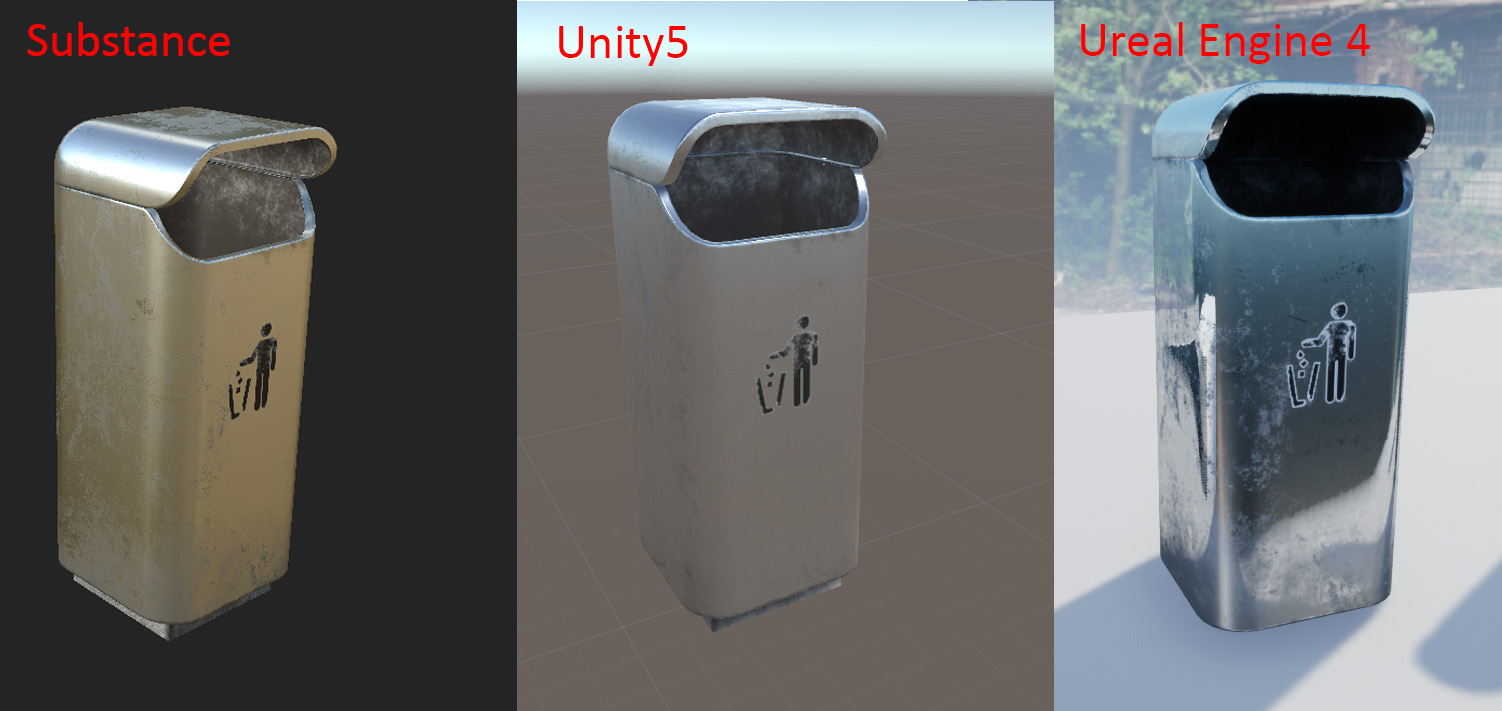
Anyone use substance painter? Any tips to get substance and unreal to look the same .....
Unreal engine still makes everything look wet for some reason....

Like look at the handle its just totally wet looking in unreal
And I can see the clouds in the blade
tough perch
Anyone know what causes this? when play mode all shadows are black? When I package it wont happen. This started when I added minimap to game which uses render target and capture 2d.
drowsy snow
next ivy
Anyone use substance painter? Any tips to get substance and unreal to look the ...
I don't use Substance Painter (Quixel Mixer FTW), though general rule of thumb is to not just lazily use the textures and leave it like that.
 ember geode
drowsy snow
I don't use Substance Painter (Quixel Mixer FTW), though general rule of thumb i...
ember geode
drowsy snow
I don't use Substance Painter (Quixel Mixer FTW), though general rule of thumb i...
Yup. Soon people well realize the same textures in multiple games.
next ivy
You're referring to modifying the material in unreal to get the look from substance back? I know but just generally speaking I'm not sure why unreal imports have to do that and if there was some settings I could change to make either subtance look more like unreal or unreal look more like substance...here's another example I found on reddit. Obviously every lighting engine is going to look different but ue4/5 has always had this wet look coming from any exporter https://i.imgur.com/NFDQFKo.jpg
 drowsy snow
next ivy
You're referring to modifying the material in unreal to get the look from substa...
drowsy snow
next ivy
You're referring to modifying the material in unreal to get the look from substa...
It's not more "wet" but more "reflective". Adjust the specularity and roughness.
ember geode
next ivy
You're referring to modifying the material in unreal to get the look from substa...
Happens to me a lot. I just try the best I can get it to look like blender or match my scene.
I hook it up to a master material and play with the instance settings.
 fringe robin
Hi everyone. Lately, when I open a project in Unreal, Chrome opens to epicgames.com . Google would have me believe I'm the only person this is happening to. Anybody seen this or know how to stop it?
drowsy snow
fringe robin
Hi everyone. Lately, when I open a project in Unreal, Chrome opens to epicgames....
Are you trying to open it from the launcher?
fringe robin
drowsy snow
Are you trying to open it from the launcher?
Nope. I have the launcher closed and just open Unreal from my taskbar. As soon as I select a project to open, Chrome opens the store site.
light thunder
is there anyway to get a character (epic skeleton rigged) to look up at a particular object? Is there some baked in functionality that would literally target the neck bones of the skeletal mesh and rotate them to look up at whatever object it is told to target?
 timid linden
Can someone tell me what I am doing wrong? I have a few static meshes that are meant to be piping. They all snap properly without editing anything except the straight pipe. It overlaps with the others. What am I doing wrong? I have turned snapping off and the plugin off and it still overlaps.

 proven aspen
My hair exported from blender has UVs that look like this. Anyone know why? The patches of color also change as I rotate the viewport.


Root UVs look normal
shell compass
@tough perch It's the eye adaptation post processing kicking in when you play. Add a post process volume and turn off/tweak that.
 rigid bridge
kindred viper
rigid bridge
kindred viper
@light thunder make a blend space for the parts you want to rotate then set the value based on the location you want to look at. A good example would be to check out ALSv3 or 4. They have a nice BS for it when turning that would work
light thunder
kindred viper
<@!273265779175194624> make a blend space for the parts you want to rotate then ...
So the lookat node actually makes the skeleton mesh look up?
next ivy
@drowsy snow @ember geode I figured it out actually. Apparantly acc't substance unreal engine imports textures 'incorrectly' and I have to uncheck srgb on the roughness, ambient occlusion, and metallic map. When I did this, the result was close enough to substance to where I can actually use them together...

It actually looks better in unreal tbh - probably because its a real lighting environment not an hdri
humble hinge
I created a new scene, working on a landscape in it, but when I drag in my character to test the scale, my character just falls through the terrain
cyan trellis
Is it possible to add a collision for a character that uses anim dynamics in Blueprint anim?
untold dirge
Guys my UE5 doesn't recognize my SDK install.. is this common?
grim ore
which SDK?
untold dirge
hmm
Windows 10 SDK version 2104 and Server development
i just googled sdk and followed first link
worthy forge
Anyone knows what it means when a Destructible Mesh blows to pieces by an object in FirstPersonExampleMap but not in a custom map
grim ore
you want this one
 untold dirge
ill just unistall the one i have right now?
grim ore
I dont know what you installed, you should be able to install it side by side
untold dirge
k thanks im on it
grim ore
it also looks like EA2 might have fixed the needing 1 specific SDK version, I cant tell for sure but it looks like it
plush yew
what are some general approaches/techniques to improve your game dev productivity?
I admire how people can manage to finish a game mvp in 2 days like for Ludum Dare game jams, but what could be learned about these workflow in general? Knowing the engine well, having strict deadlines, using blueprints when you can, etc?
 gilded igloo
Hey guys, i want to create a new pawn, but whenever i add it to my world the game ignores the camera component in it and makes a new random camera, although i set the camera to auto activate. any ideas?
 inner heart
Unity sucks hello
 elfin furnace
Could anyone point me in the right direction (tutorial, UE manual, or even a marketplace asset) that would help me use input from mouse or controller joystick for interactivity like in Soma or Observer (how you can use the joystick to open/close doors, pull levers) or even like in What Remains of Edith Finch (using the joystick to swing faster on the tree swing or using the joystick to move the fish towards the chopping blade). Basically I'm looking to use the joy stick or mouse movements for simple interactivity instead of having the player simply push a button to perform the action. Any help would be greatly appreciated. Thank you!
 deft zealot
I really need some help building my lighting. My teachers aren't directly answering the question so we're not sure our projects initial level was built with the open source engine or something but-
if someone can jump into support voice chat I'm getting a "failed to kick swarm build unreal lightmass" and all the tutorials are telling me to do things in visual studio. I cant find a ue4.sln in my engine folder and have no idea where to access what its telling me 
 spiral flint
how do i go from blender to unreal while keeping all my textures intact
 neat shale
anyone got any idea how to make particles dissapear and shrink after a few seconds
or to stop them from spawning
after a certain amount of time
 slow musk
ANyone know a way to test where a widget is failing at? I have this 3d widget that I made for VR following a few tutorials and even though I'm certain I followed them correctly when I try to use the buttons in VR nothing happens. Basically just trying to cause the game to switch levels when I push the button is there something special I am missing here?
grim ore
@deft zealotare you using a source engine build of the editor or the one downloaded from the launcher?
deft zealot
We are all using the launcher but I don't know if our teachers used source for the initial project. They wont answer this question for some reason
But our team is all using launcher version
We have a persistentlevel our teachers setup for us and our team group created sublevels to combine into this. we cannot build lighting for the full persistentlevel that contains all of our levels
grim ore
well the launcher version should have swam/lightmass installed by default, it shouldnt matter what version they are using its part of the editor/engine install
so your going to need to look at the log to find out why its failing
 manic sluice
Does anyone know how to use a control rig with an animation graph? I see there is a ControlRig node in the anim graph, but I can't figure out how to move the controls for the rig...
deft zealot
grim ore
so your going to need to look at the log to find out why its failing
   at System.IO.__Error.WinIOError(Int32 errorCode, String maybeFullPath)
   at System.IO.FileStream.Init(String path, FileMode mode, FileAccess access, Int32 rights, Boolean useRights, FileShare share, Int32 bufferSize, FileOptions options, SECURITY_ATTRIBUTES secAttrs, String msgPath, Boolean bFromProxy, Boolean useLongPath, Boolean checkHost)
   at System.IO.FileStream..ctor(String path, FileMode mode, FileAccess access, FileShare share)
   at NSwarm.FSwarmInterface.OpenChannel(String ChannelName, EChannelFlags ChannelFlags) in D:\Build\++UE4\Sync\Engine\Saved\CsTools\Engine\Source\Editor\SwarmInterface\DotNET\SwarmInterface.cs:line 1604
This is the red part of the swarm log error
grim ore
yep you can see the error
deft zealot
Could it have anything to do with being connected to perforce? Says something is being used by another process but I only have 1 instance of our project opened
grim ore
well its your local appdata causing the issue
and yes it could have something to do with perforce as well
I would personally start by clearing out my swarm cache folder (the local one in that error) after shutting down the project, then re open it and see what happens
now with that said, this posts says its something else https://answers.unrealengine.com/questions/463690/swarm-failed-to-kick-off-the-process-cannot-access.html
"To make this process easier you can find which textures and materials are duplicates by looking in your output log when the light build fails. It will list out the materials and textures it cannot open a channel for. You can then just search for those ones."
so perhaps its trying to use the same material cache twice for two seperate material/instances that it thinks is actually the same one
deft zealot
possibly this?

 faint cedar
Anyone here got any Perforce experience?
Got stuck on one bit and could use some entry-level (I guess) help
grim ore
maybe but it specifically calls out materials/material instances
deft zealot
ohh wait a minute theres a bunch of stuff. Would you mind jumping into vc? I do see a bunch of material issues in here actually
grim ore
I cant 😦 but look thru the materials and see if you can fix them would be my only thought
deft zealot
ok so they all have this issue
LogLightmassSolver: Warning: Failed to open channel for material data for CC94F86B44B6748E17D77DB177FDDFCB: /Game/LChavez/SuperGrid/StarterPack/Materials/Palette/Grids/YellowMaterial.YellowMaterial etc

theres like 1000 of these
grim ore
yep that is specifically what the post says is a problem
 brisk mirage
Hey just a quick question Level blueprint the use? Is there a way of using that for having the engine build a base over time for my ai hunters to protect? Like in the steam game subsistence
deft zealot
grim ore
yep that is specifically what the post says is a problem
I dont understand tho, theres duplicate materials? The things that its referencing are related to assets we have imported in but I dont believe any of us made duplicate material references with the same name
grim ore
go into your content browser, choose filters, choose material. and look for material that are the same (they could be the same but in different folders), this appears to be the issue. The post has this picture to illustrate. https://answers.unrealengine.com/storage/attachments/108900-capture.png

since there is more than one person, perhaps they all imported the content or are using the same content as another person in their own folders in the project
neat shale
anyone know how to make particle effects face the players camera
deft zealot
Okay so I have to manually go in all 1000 of these errors that have different materials and re-apply them to the same one and delete the rest
or can i delete them and bulk do this
bulk relocate*
 clear lark
Im just gonna ask here since i cant find the appropriate channel. Im using the Procedural terrain generator plugin and when i build the level for the lighting and everything i get this error and I cant find where to fix it. [Static Mesh Actor] : Static Mesh Actor has NULL StaticMesh property
 hollow crescent
Does UE4 Editor work with Index controllers in VR mode? Ordered some and wondering if there's any advantage over vive controllers other than the obvious attachment to your hands.
 noble cape
Im completely new to game design and to unreal engine is there any resources you guys recommend I check out?
im not sure where to get started
 rigid veldt
I'm running into a similar issue to the individual who posted this question:
https://answers.unrealengine.com/questions/884600/view.html
It's related to user interaction with cable components, and having the cable component latch onto an object after the user drags it onto it. The images in the explanation given are broken. It's kind of tricky to follow.
I tried the mentioned method of having a cable component and 2 other components as part of a blueprint, but it did not give me the ability to use those latter components as anchors for the cable component.
lusty scaffold
what's the hotkey to show lights icon in viewport?
well, show/hide icons in general
oh, the G key..
 cloud igloo
Anyone know any good videos on creating a valorant style game launcher?
plush yew
I personally don't, and I don't know what qualifies as a game launcher. But I think the easiest and the best looking and cross-platform launcher could be made with electron js
@cloud igloo
tacit heath
i connected my github with the epic account but https://github.com/NvPhysX/UnrealEngine doesnt appear, is it deleted ?
cloud igloo
plush yew
I personally don't, and I don't know what qualifies as a game launcher. But I th...
Ooh alright ill look into it
coarse turtle
When you have the UE4 editor open using the debug config, can you rebuild without closing the editor or stopping debug
 soft tree
tacit heath
i connected my github with the epic account but https://github.com/NvPhysX/Unrea...
soft tree
tacit heath
i connected my github with the epic account but https://github.com/NvPhysX/Unrea...
i had to unlink my GH account from epic, and then relink it
 plucky bobcat
Yo whats up guys Im just stepping into UE4 from Unity and am loving it so far. I have a question maybe someone can help me out with.

in play mode and in the editor everything has this weird blurry effect to it not sure whats causing it
its like a depth of field but x 100
tacit heath
@soft tree yeah it worked out thx!
grim ore
@plucky bobcatit looks like your scalability might be lower than 100%?
prime willow
@grim ore i have a really possibly silly question if you know the answer to it
i want to move towards prototyping my movement and combat and etc using the mannequin from eu4
but im not sure if i can just slip my meshes into the eu manneqin skeleton later on and not have to start all over
if i have complexz mechanics should i prototype it with the actual mesh if i wanna just go ahead or can i use eu mannequin and just rig my mesh like eu mannequin and continue on making stuff down the line ._.
the mechanics are stuff like ik's wall running jumping mantling interactions and the sorts youd see in action games
plush yew
@plucky bobcatso unreal is better then unity ? 😦
prime willow
plush yew
<@!436813815670112256>so unreal is better then unity ? 😦
They serve very different but similiar purposes so you should choose the engine that fits your project best
plush yew
as a hobyst and with the release of ue5 i think both are great and wont hurt switcing between them.
 frigid needle
The best engine is the one that lets you get your game done.
 pallid eagle
Can someone please help me? UE4 crashed on me while I was saving my project and now it constantly crashes every time it loads up! I can't even open my project anymore! Other projects work except for this one! I get this error
UE4Editor_Engine
UE4Editor_Engine
UE4Editor_Engine
UE4Editor_Engine
UE4Editor_Engine
UE4Editor_Engine
UE4Editor_Engine
UE4Editor_UnrealEd
UE4Editor_UnrealEd
UE4Editor_UnrealEd
UE4Editor_UnrealEd
UE4Editor_UnrealEd
UE4Editor_UnrealEd
UE4Editor_UnrealEd
UE4Editor_UnrealEd
UE4Editor
UE4Editor
UE4Editor
UE4Editor
kernel32
ntdll```my best advice is to backtrack step by step calmly
what was the last thing you did before the crash occured
and systematically remove said function or system until its fixed if the error code cant help you ^
pallid eagle
I saved an item and it crashed during the save
prime willow
open your project via the folder
in your unreal engine area
and remove the item
see if it saves your project
also this is my advice im not a professional
so take it with a grain of salt
also please if you fix this back up your project
every step of the way
itll save you a lifetime of game design issues
pallid eagle
yeah
prime willow
lemme know if that helped :3
prime willow
;-;
pallid eagle
All because i fixed a banana ;-;
prime willow
personally i cant do much for you but im sure the error code could help if not it may be something else
 static wharf
So this is a interesting question, how do I get the default FPS controller to only run movment and looking on the server and not client?
Its for a latency demo
pallid eagle
Pastebin
Pastebin.com is the number one paste tool since 2002. Pastebin is a website where you can store text online for a set period of time.
prime willow
again im still barely learning unrreal engine so im not all that helpful when it comes to debugging and fixing issues x3
but
it seems the editor may have an issue
pallid eagle
i think it corrupted something....
prime willow
considering the editor ddl is picking up something unknown in function
pallid eagle
i have a backup of my project but i added so much stuff since then ;-;
prime willow
i know the pain
pallid eagle
I do NOT want to do all this all over again
prime willow
i had to resort to an 8 month old backup in the last week .-.
pallid eagle
i barely have enough motivation to work on this thing :"D
prime willow
game design can be that way sometimes lol
prime willow
its highly rewarding but careless mistakes can be costly :3
pallid eagle
and the editor was like NOPE lets fuck up your whole project
prime willow
hey i added a ik to 1 foot
and evertyhing was fine
pressed 1 mouse click
and lost 8 months xD
prime willow
my best advice is slowly deconstruct the issue and figure out where what went wrong and try to fix it from there
pallid eagle
and then all of a sudden
prime willow
i think we have an error spot on here too
pallid eagle
on one of my worst days too
grim ore
well if you use source control you should never really lose much
prime willow
maybe they can help xD
wait whats source control
i hear about it alot but havent touched it yet o-o
plucky bobcat
@plush yew I have limited experience with UE4 so far but one thing I can say immedietly is the editor is much smoother Unity is slow asf at times
grim ore
but yes, you need to install the debugging symbols
prime willow
o-o i think i might be confusing such with packaging channel x-x
pallid eagle
;-;
plucky bobcat
@grim ore Thanks Ill take a look now and check
grim ore
if you think "if my project was deleted right now I would diiiiiieeeee" and start crying, you need source control
@pallid eagle you need to install the debugging symbols then crash it again
prime willow
well i constantly back it up but would source control be better than constant backing up in a seperate harddrive?
grim ore
in the launcher, click the down arrow next to your installed engine version and choose options
well backing up is atleast better than nothing
pallid eagle
yeah i back it up as much as i can too
but i added a lot of stuff recently... should have backed it up again ugh
grim ore
lets say you make some changes and back it up, then make some more and back it up, hey lets make more and back it up. oh crap... I need something I changed 3 days ago but I backed up over it... cry
pallid eagle
so what will these debugging tools do if the project just crashes on startup?
prime willow
well when you put it like that i think i need source control..
grim ore
the debugging symbols tell us where it crashed, not just a generic crash message
prime willow
glad i installd that ._.
pallid eagle
and i did have source control at one point but then i moved to another computer and i have to figure out how to set it up again apparently
grim ore
you dont need it... sure.... but...
prime willow
wait matheww whilst i have you D:
grim ore
your problem with this crash would be solved by just rolling back to before you made the changes
pallid eagle
well i'm definitely getting it now i guess
prime willow
if i rig my mesh for ue4's mannequin on a 1 for 1 scale
cant i just use my mesh on the mannequin without crazy reworking of the project
or for complex body mechanics should i just only prototype with the intended mesh for accuracy
the mannequins skeleton i mean
grim ore
pretty much they should be interchangeable if you set it up like that yeah
for example stuff in the marketplace, animations and such, are supposed to be rigged for the mannequin
so when you buy you'r "guaranteed" compatible assets between purchases
prime willow
ok good because my meshes skeleton setup is garbage and i dont wanna restart over if i setup wall running web swinging and the likes x-x
okie thx
grim ore
you can generally ADD onto the base skeleton without much issue
prime willow
o.o
grim ore
so default human and mesh and animations, then you make a humanoid with extra bones for a tail and you should be fine
grim ore
some of the paragon and fortnite epic videos go over some of that stuff, they designed it to be added onto
prime willow
yeah im noticing with the issues im having trying to make very complex races and such with add on bones
that if i buy or use something for mannequin's setup i should have a better time than these complex custom rigs
i could have furry race for those who like that kind of thing by adding tail and ears to mannequin skeleton and going from there :3
same for robot or elven / demon like races with their weird limbs
grim ore
I cant guarantee I am right on that, but I beleive so. #animation would know more for sure
I think its mainly an issue with missing bones when rigging that causes problems
prime willow
ill ask there im sure someone has notice on such practices :3
well with my setup i just cant get ik's going
everything becomes bendy and weird xD
i feel like as silly as it sounds that the mannequin setup is a pretty safe bet for making a bunch of weiord complex mechanics
grim ore
ik is weird if you dont get it right.. like.. math is hard
prime willow
omg literally
either my mesh becomes sphagetti or its spine breaks in half on every step..
im really glad though that i realized this early instead of 2 years into development smh
neat shale
for real wtf is this
i just clicked launch and it started packaging my game for my vr test but
then this happened
prime willow
i dont even know where to start with that one o.o
neat shale
yea
prime willow
try packaging section
they might be of help though their not as quick on the response time
neat shale
alr thx
 plush yew
How do I fix d3d device being lost
 knotty slate
how do i stop these pointy edges from happening

If you know or have an idea as the answer please ping me
knotty slate
plush yew
How do I fix d3d device being lost
Its very complicated and forgot how to do the process of doing it 
light thunder
how do you offset a socket
pallid eagle
Pastebin
Pastebin.com is the number one paste tool since 2002. Pastebin is a website where you can store text online for a set period of time.
but i'm still unsure how to fix it :(
light thunder
I'd love to figure out why this doesn't loop right and how to offset those stupid sockets
pallid eagle
i guess i was saving a skeleton when it crashed? does that mean my character is messed up?
light thunder
It's fixed on the skeleton but those meshes need an offset
plush yew
knotty slate
Its very complicated and forgot how to do the process of doing it <:Sad:56244051...
Some guy told me to change drivers
knotty slate
plush yew
Some guy told me to change drivers
How tf does drivers interfere with landscape rendering. Unreal is weird sometimes
pallid eagle
Ok so i fixed my problem... had to bring up backups of my character skeletons cause that's what was corrupted
have to fix the banana again but as long as that's the only thing i'm good lol
 broken heath
Banana?
plush yew
hey lads is there a finite state machine like playmaker for unreal that works similar or is there only blueprints
🥵
 high cobalt
where is a good place to find simple projects to try with unreal to try and increase my knowlege
grim ore
check out https://ue4resources.com/ and in general the learn tab in the launcher and the docs and the Unreal Engine Online Learning site

A collection of unreal engine 4 learning resources (Templates , Samples & Plugins ) for you to download
 frozen girder
I'm not sure if this is more animation or blueprints but are there any examples out there of the proper logic for spellcasting?
Right now I have Input > Check Cooldown+Mana > Reset Cooldown > Set spell as Active (Triggers animation) > Cast Spell + Start recovering cooldown loop.
This works well enough for a single cast spell but the one I'm working on is a multi-attack that needs to recast multiple times during the animation with animnotifs. This is the point where I start losing track of things and my spell either stops triggering or constantly drains mana without recasting, or it gets stuck in an infinite loop. I'm basically a beginner so I'm not sure where to look, googling just returns plugin ads
high cobalt
grim ore
check out https://ue4resources.com/ and in general the learn tab in the launcher...
thanks mate
 keen charm
How long do you think it will be until a lot of games start to use Nanite and/or, Lumen?
I'm interested in learning on Unreal Engine and making stuff but I'm so swallowed up with other things, is it difficult to learn this? I usually get easily frustrated trying to begin such processes.... even though my interest is.... rather interested and never stops coming back to me... especially now for some reason 🤔
 paper ginkgo
when learning unreal did anyone find it helpful to take notes? and if so like what seemed to work? just writing down the defintion of what various calls did?
frozen girder
keen charm
How long do you think it will be until a lot of games start to use Nanite and/or...
Depends on your prior experience. I got way further than I expected for the time I put in as someone with no coding experience, once I clicked with blueprints I started learning pretty quickly but it took a couple weeks.
 radiant sun
So this will seem like a dumb question, but delay switches.... Good or bad for optimisation when you are constantly pushing events on tick?
Also Unreal is pretty easy to learn to be honest, as with anything you just need someone to explain it in a way that makes sense to you. That won't help much, but it's all I got. If you want to learn the fundamentals start tearing demos they have by default apart and try really understand how they work. Also remember they have a website with everything you need. My college lecturer made me do this tutorial and I understood it a lot better when I finished it. https://youtube.com/playlist?list=PLlswSOADCx3dZuEIYN7dxAwYSKIwNIIC-

It's also really important to understand what the game engine prioritises and loads in first.
Which as you can see, from my question about delay's, I do not lol
keen charm
I'm really interested in seeing Latest Voxel Engine Features + Nanite + Lumen 🤔
would it be difficult for a beginner to start learning based on those things?
grim ore
yes, those are advanced features. learn the engine
pliant copper
i made model in blender then export fbx, import to ue4 and it looks weird if anyone has any knowledge on stuff like that plz come to #graphics :)
 rare pulsar
I am currently searching on Reddit, but i was wondering how big of an Open World Map is possible as a solo DEV. I know anything open world is nuts since most people go for a size of Witcher etc.
But my goal was something similar to Metal Gear Solid (just SMALLER a LOT SMALLER) with small dense military bases and some open world in between. Something like 4 smaller bases and you need to go from each Base to the Next to complete the Mission.
I was thinking about 1x1 km but i am not sure if i chew to much or if that's still OK or i should go smaller.
pliant copper
depends on how much of what you make ur self, if its just buying/downloading assets and just placing them in then i would say its fine, if you plan to make everything your self then its not a great idea. I personally as a programmer not world creation person wouldnt even dare make open world map unless most of it was premade from the marketplace. also motivation plays a big part in stuff like that

how does this happen when the model looks fine in blender?
paper ginkgo
so as someone just getting into unreal and wanting to start my own game how do i balance what i create myself verse assets off the store? As my first "full" game i wanna make a souls like boss fight that uses comboing different weapons for unique attacks
pliant copper
do what you know better more, if u programmer then get premade 3d models and stuff, if you designer then try get most of the code from marketplace
 past violet
anyone facing issue while logging in at Unreal Engine...??
 digital spoke
pliant copper
digital spoke
pliant copper
Apply object scale in blender, go into edit mode, select all and press ctrl n. That should probably fix the issue.
pliant copper
i managed to fix it, the normals or faces were inverted :( thanks tho :)
digital spoke
👍
pliant copper
im making player bounce off an object but the velocity is really inconsistent,

sometimes i dont notice the bounce sometimes i get sent to mars
 solemn siren
Not sure which channel it belongs to so asking here...
Anybody worked with Unreal Swarm before?
My agent PCs are visible from the coordinator PC (where the project is) and they are shown status Available, Unassigned but when I build my lights, only the coordinator PC (local agent) does the work and other agents remain idle. Ping Coordinator is successful when pinging from agents but when I restart the agents from coordinator, the following is shown in log:
Restart ignored for non published agents
Any ideas on how to get all agents working for the lighting build?
 cunning dust
So, novice question here, I'm trying to make a simple door. but every time I run it I run into either one of two things. I walk into the trigger volume and it crashes cause of a infinite loop. Or the door opens but is triggered several times so it sorta does this fan type of anime. I did the script thing and yeah, its firing on every tick. Any ideas?
This is what I got going on so far.
any help would be nice.

 orchid minnow
Hey, quick question here, feel free to DM me, but are you able to use multiple ocean bodies in UE4.26? to create multiple islands?
 frozen stratus
Has anyone experience UE getting slow after adding simple convex hulls to physics? After I add this opening any window including this actor (mesh, skeleton, anim bp, physics) takes like 5 minutes. Undo anything, even something simple like accidentally unplugging a wrong node in events, takes forever. Apart from those everything works normally. The mesh when played is as smooth as it can be so not sure what can cause the sluggishness
 royal stirrup
Hey, guys! Why all became greyed out аll of a sudden in post process?
 frozen stratus
UE is completely unresponsive while it is busy and even task manager shows it as "not responsive" while it is doing these things, but once it finishes these simple tasks it works again, until the next bugged action taken. One specific thing that shouldn't take long time is some dropdown selection menus also take 5 min of unresponsiveness before it shows you the choices, and then another wait after you pick one.
drowsy snow
royal stirrup
Hey, guys! Why all became greyed out аll of a sudden in post process?
Because the metering mode is in Manual.
You'd control the exposure with the values found in camera category.
royal stirrup
drowsy snow
Because the metering mode is in Manual.
You'd control the exposure with the valu...
well yeah, but I can't set metering to anything else, because it's greyed out
worthy forge
My Destructible Mesh blows up by an object in **FirstPersonExampleMap **but not in a custom map..thoughts?
 lavish garden
how would someone simulate a galaxy for a 4x game like endless space 2?
 loud knoll
@frozen stratus what machine are you running the engine on? Video Card, Memory and Processor
which physics system are you using Chaos or APEX
@lavish garden Data Tables
haughty slate
Am I right in saying that changing the material of SM_SkySphere in one project will affect the changes in other projects? (UE4)
broken heath
@haughty slate yes , happened to me to overwrite the original default bp , so i suggest just getting a copy of it from engine content then modify it instead
And get copy of material too
haughty slate
broken heath
<@365397632870383646> yes , happened to me to overwrite the original default bp ...
Aye, just opening up the project I altered it on and doing just that. Thanks for confirming!
broken heath
Goodluck skyboxing*
 junior halo
Hey folks, I am new in the area of game development. I was wondering if someone could give me pointers on how to get started with UE.
drowsy snow
junior halo
Hey folks, I am new in the area of game development. I was wondering if someone ...

Unreal Engine
Unreal Online Learning is a free learning platform that offers hands-on video courses and guided learning paths.
junior halo
drowsy snow
https://www.unrealengine.com/en-US/onlinelearning-courses
Thanks.
lusty scaffold
possible to record viewport?
haughty slate
junior halo
Hey folks, I am new in the area of game development. I was wondering if someone ...
Everybody is different in terms of what works for them. Personally for me I looked up docs and tutorials for basic navigation of the editor's UI, looked up some tutorials for doing simple things in blueprints like moving actors around and getting inputs from the player. After that I just thought of something interesting that I would like to make, something involving physics. A bit familiar with navigating blueprints at this point I had a look through the nodes in the blueprint editor, figured out what I could and looked up what I couldn't. Google and Youtube are great tools for checking things on the fly - particularly when it comes to maths (if like me, maths isn't your strong suit).
Just think about what works for you. I prefer to dive in, tinker and learn as I go whereas you might prefer something more structured - an online course may be a good way to go. There are plenty of free ones out there, forums are a good resource for finding out which ones are worth taking.
junior halo
haughty slate
Everybody is different in terms of what works for them. Personally for me I look...
Yeah, I am one of those who prefer to read docs and tutorials over videos. This is a whole new domain for me and have no experience in the past. Do you have a link that I can use for reading docs?
haughty slate
junior halo
Yeah, I am one of those who prefer to read docs and tutorials over videos. This ...
To be honest I don't really go to a single place - I google and browse what comes up. If you're searching specific nodes you will undoubtedly get the official Unreal docs (docs.unrealengine.com) but these vary in helpfulness when it comes to verbose explanations - quite a lot of nodes will just detail what they contain. There should be structured tutorials on there and in what @TheHoodyGuy linked though, but if I'm trying to figure out solutions for more complex problems it's often forum posts that steer me in the right direction.
 open gorge
haughty slate
Everybody is different in terms of what works for them. Personally for me I look...
open gorge
haughty slate
Everybody is different in terms of what works for them. Personally for me I look...
I somehow skipped that step entirely. I just kind of figured out the UI as I went. I still find things that i'm just like, oh well that's damn handy
haughty slate
open gorge
I somehow skipped that step entirely. I just kind of figured out the UI as I wen...
Haha yeah that step was pretty simple for me too as I had dabbled with level editors so a lot of it was already quite familiar. But yeah I definitely find little crumbs today where I think "hmmm, I probably should have known this already"
junior halo
haughty slate
Haha yeah that step was pretty simple for me too as I had dabbled with level edi...
That is great info. Thanks guys.
open gorge
I can't remember what it was exactly, but I vaguely recall it had to do with comparing 2 blueprints. Unfortunately it's super unintuitive, but you can compare 2 blueprints that are a child of the same class even if they're in different folders without using the bulk property editor. It works very similar to diffing a blueprint from a previous revision in source control.
 plush shoal
If anyone is interested in doing a small udk project on unreal engine 3 (payed) hit me up
haughty slate
open gorge
I can't remember what it was exactly, but I vaguely recall it had to do with com...
I can't think of any examples off the top of my head but I've been at it for a good 7 months or so and I'm only now starting to actually play about with materials for the first time!
 main pewter
correct me - if I see code in the engine source in an #if WITH_EDITOR block - these defined functions should be available while running the editor (in a BP for example if they're bp callable) and just gets skipped on a build (without editor)?
So for example in https://github.com/EpicGames/UnrealEngine/blob/4.26/Engine/Plugins/Runtime/AssetTags/Source/AssetTags/Public/AssetTagsSubsystem.h all the functions whithin the WITH_EDITOR conditional are not available to me in a 4.26 editor trying to use them from blueprint (eg. as a editor callable event)... I don't understand why.
 wary wave
correct
and they should be available within the editor, how are you trying to use them?
main pewter
in a BP with a custom event which sould work as a utility
but if I pull out from the asset tag subsystem I only get the getters which are outside of the IF block
wary wave
UAssetTagsSubsystem isn't blueprint type, so that could be an issue?
main pewter
but the other functions work fine. it is a subsystem you can access (but can't create BP childs of it - which is by the lack of not beeing blueprint type)
also if i create my own subsystem in C - you can use it in BP - but not create a BP child of it if it's not blueprint type
wary wave
being able to create child classes is 'Blueprintable'
BlueprintType means that's it can be used in BP and is accessible like a variable
main pewter
ah ok... I guess I kind of understand now
just realized that it's working fine in a utilityBP child of assetActionUtility
kind of makes sense.... so I need to put my logics there. even cleaner to work with dedicated utility bps 🙂 thank you @wary wave
wary wave
np
main pewter
maybe a general question. does one of you know a good workflow to add keywords to an asset?
like I have a few static meshes and want to assign them a tag/category/keyword thing - and in runtime I want to access lets say all static meshes with tag "stylevariant1"
this is why I stumbled over the asset tags in combination with collections - but maybe there is a better workflow
wary wave
tbh, no, I never do it
 fair herald
Does anyone know how I can set up Serial key activation for my app?
main pewter
fair herald
Does anyone know how I can set up Serial key activation for my app?
there is no builtin way. you could for example:
integrate the serial key validation logic into your app
run a dedicated server with your validation logic and data persistence. connect your client to the server to validate if activated or to enter serial key, both functions should be a runOnServer function - should work quite fine
run an api and communicate via REST with a validation backend
use an online subsystem and make your app an inAppPurchase kind of thin when your online subsystem has the functionality to validate if player has purchased an item or dlc
i guess there are several third party tools which apply some drm to your software
fair herald
main pewter
there is no builtin way. you could for example:
integrate the serial key validat...
thanks a lot, I am looking into Implementing DRM
 tropic plinth
In our project "on overlap" of a "sphere collision" triggers continuously when objects inside of the sphere are moving. We pin point the problem, that we have replaced the default root scene components of the moving objects to a custom component (collision). But as I know, replacing the default root scene component should be no problem. When we switch this back, and switch the root back to a scene component and attach our components as child, we don't have a problem of continuously-on-overlap-triggering when objects are moving inside the collision sphere.
Anyone has a solution or a some knowledge on that?
 fathom bone
hey .. can someone help me?I want to do an event that happens for a time of, I don't know, 10 secunde and then I want the values to come back to normal.
To be more specific, I want to do a ball breaker and I want to do a kind of super power, which activates for 10 seconds and makes the life of the cubes 10% shorter, but after 10 seconds i want that velue to comeback to normal
frozen stratus
loud knoll
<@783001390578532444> what machine are you running the engine on? Video Card, Me...
@loud knoll I'm on 5950x, 3090, 64gb and very fast nVME... I can play the model regardless of high detail without any slowness. It's PhysX vehicle. The slowness starts the moment I add the the convex hulls, there's no blueprints running, not even done at that point. Though once I sort them out I can play the model with high FPS no problem, it is just the certain functions on UE user interface like undo goes to extremely sluggish response
and engine is 4.26.2 version
plush yew
good idea doing sequences with Control Rig on 4.26.2 thinking in long-term development?
 hard kestrel
Can someone tell me why my fan isnt spinning around its axis, but its spinning around something else?
 plush yew
@hard kestrel are you using Blender?
hard kestrel
yes
plush yew
@hard kestrel ok, you can use an Empty and add a rotation modifier linked to the mesh and then, rotate the Empty instead the mesh ; the right way is search about local transforms, Youtube probably has this kind of stuff summed in few minutes
basically what you are doing by rotating the global transform, is doing a 360 degree turn but keeping that spin in memory, so every time it resets is has to "unwind"
hard kestrel
I have tried to place a cylinder in the centre, like an axle and rotate that: same issue.
I've tried moving the pivot point, same issue

you can see how everything is separate here....i tried parenting the blades under the red cylinder and rotating the cylinder
but same EXACT issue
i feel like the whole mesh is rotating arount its bounding box or something
plush yew
Hi! Is there a smart easy way to get a lot of the same mesh, already placed in a Maya scene into Unreal?
@hard kestrel ops my mistake, instead of a Modifier it is a Constraint

you select the mesh you want to rotate, add this Constraint, set the target to an Empty (it can be anything) and in the animation, you rotate the Empty...
hard kestrel
Wait, in this scenario are you rotating it in Blender or in Unreal
Because I'm trying to do it with an Unreal Blueprint
hard kestrel
I made the model in Blender, but the UE4 project is where i'm trying to rotate it

no matter what i do, it still goes aroudn
 gaunt frigate
You can also ask in #blueprint too for more specific help.
hard kestrel
surely exporting it like this is super inelegant and creates more work?
 red herald
guys do you ever have problem with animation assets from the marketplace ? because i got these mocap animations that don't fit with another skeleton from a character mesh which is the basic UE player character.. but use a different model, does anyone have a solution ?
hard kestrel
@plush yew it worked, but I dont understand what the alt+g did or why it conflicted with unreal
worthy forge
Anyone here know about Destructible Meshes
plush yew
@hard kestrel Hey, I just tried my solution exporting to Unreal and it fails like a rock! So anyone that read the discussion, please ignore my advice. Rotation an object in it axis with a Empty is an old thing... However take a look at this tutorial, rotating with Materials I think is the most efficient way... correct me if I am wrong https://www.youtube.com/watch?v=tzlh5a_PMOQ

In this game art episode I go over how to use the world position offset to make a mesh animate a rotation that is efficient and optimised. I also show how to combine this with vertex colours to isolate sections of a mesh.
Support me on Patreon and get access to videos early, join our developer community on Discord, get exclusive behind the scen...
if you wanna set a lot of windmills, that can be a good solution...
 lusty kite
Can someone guide me through the basics of creating a game?
hard kestrel
I watched that video, I might give it another go with the origins of the models centered, maybe that's the issue. The problem is that i managed to center all axis in UE and that didnt work 😮
plush yew
lusty kite
Can someone guide me through the basics of creating a game?
take a look at Unreal Engine Youtube channel, there is ton of stuff there!
plush yew
lusty kite
Thanks
but scroll down a bit, there is ton of relevant stuff from a year ago or even more 😛
lusty kite
Oke
lusty kite
Thx
plush yew
10 years maybe be a bit old, but...
plush yew
plush yew
good idea doing sequences with Control Rig on 4.26.2 thinking in long-term devel...
anyone?
loud knoll
@frozen stratus if you still need help hit me up we can drop into voice and you can stream the issue much faster way to help someone.
 ruby kraken
H3h3
loud knoll
@frozen stratus or if it is secret then I might check to make sure your video driver is set to be the default for physx if you are using chaos for the project then it could be that it is really really broken if you are trying to use it for vehicles. Not sure if that is production ready,
lusty kite
As a level -69 starter, should I get UE 4 or 5?
 compact marsh
In FPS games, players meshes like weapons and arms are rendered seperately and then overlayed on top of the screen. How to achieve this in UE4?
loud knoll
@lusty kite since most of hte people that start give up after a short period of time pick the one that you think will be the most fun to learn.
lusty kite
I sincerely have no idea
loud knoll
@compact marsh not sure how you got that idea look at the FPS template they give you a free to review and play with version of simple FPS setup. you can see in there how the gun is attached and the camera, etc.
lusty kite
Oke
loud knoll
@lusty kite working with a more stable version of the engine will make it easier to learn.
compact marsh
loud knoll
<@!735315547608317972> not sure how you got that idea look at the FPS template t...
No, in fps games the arm meshes are rendered onto a separate render target and then overlayed on top of the main framebuffer.
Every major fps game uses this technique. Like Doom and Doom Eternel.
lusty kite
loud knoll
<@!789059230618877952> working with a more stable version of the engine will mak...
Ok
How do I download 4?
loud knoll
@compact marsh not sure man I worked on 7 FPS games a pro so you can open up the template or you can keep thinking that or maybe I am not understanding you.
lusty kite
Where do I find it on EGS?
compact marsh
loud knoll
<@!735315547608317972> not sure man I worked on 7 FPS games a pro so you can ope...
That's the basic implementation.
To prevent clipping you have to do this trick.
Maybe I should post this in different channel.
loud knoll
in Doom the weapon was an image not a model
compact marsh
loud knoll
in Doom the weapon was an image not a model
Doom 2016
loud knoll
have you opened up the FPS template?
lusty kite
Cant find it tho
compact marsh
This guy understands me. Thank you.
loud knoll
Are you guys talking about a view model vs a dropped or in world model for a weapon because COD didn't do this the last time I checked
lusty kite
It says that the creator one isnt for game development
loud knoll
seems like a giant waste of rendering to me but I am old
lusty kite
But the publishing one doesnt have free projects?
loud knoll
we had just different models
so did quake wars last time I used pure id tech
but that was a long time ago
lusty kite
Lol im 13 i dont understand
plush yew
lusty kite
Lol im 13 i dont understand
search something like, Unreal Engine first start on Youtube and follow it
loud knoll
should be a big button in the launcher that says getting started with unreal
plush yew
hello - i'm putting together a trailer for my project. I'musing the xbox gamebar for capturing video of game play. It works well but the videos exports 2560x1440 and the video is in the upper corner at about 25% that size. SO I need to scale up about 250% in my video editing software. Anyway to capture actual full screen?
loud knoll
@plush yew i use OBS to capture
you can capture loseless
why would someone capture on a xbox?
lusty kite
Im stuck here (EGS isnt running rn)
 loud knoll
oh I deleted all the stuff before it installed in the windows setup
lols
oops
yeah OBS is great
lusty kite
lusty kite
Im stuck here (EGS isnt running rn)
@plush yew
loud knoll
yeah I make my own drivers for nvidia to remove all the spywhere as well
worthy forge
plush yew
hello - i'm putting together a trailer for my project. I'musing the xbox gamebar...
Use OBS like the rest said. I used xbox gamebar bcuz OBS wouldn't play my vids properly until i finally got it working on my AMD processor through tutorials. Your trailer will and should be better quality than what xbox gamebar can provide
lusty kite
lusty kite
<@456226577798135808>
cough || @plush yew || cough
 mint comet
loud knoll
yeah I make my own drivers for nvidia to remove all the spywhere as well
mint comet
loud knoll
yeah I make my own drivers for nvidia to remove all the spywhere as well
Pretty sure you dont
worthy forge
Destructible Meshes are a pain, can anyone help me stop crying trying to solve a simple but weird issue
ruby kraken
Suppppyy
lusty kite
lusty kite
*cough* || <@456226577798135808> || *cough*
cough @plush yew cough
lusty kite
lusty kite
Im stuck here (EGS isnt running rn)
@plush yew cough @plush yew
worthy forge
worthy forge
Destructible Meshes are a pain, can anyone help me stop crying trying to solve a...
Ok ill keep crying
mint comet
worthy forge
Ok ill keep crying
I think you and I have the same problem
worthy forge
mint comet
I think you and I have the same problem
Oh? explain
mint comet
What's the issue?
plush yew
@worthy forge Thank you! I will look into it - is it free?
lusty kite
Can someone help me plz?
 worthy forge
plush yew
<@!276871320027791360> Thank you! I will look into it - is it free?
worthy forge
plush yew
<@!276871320027791360> Thank you! I will look into it - is it free?
Yep 🙂
plush yew
we like free 🙂
lusty kite
lusty kite
Can someone help me plz?
EGS is closed rn
mint comet
I cant make my destructible meshs interact with one another
worthy forge
mint comet
What's the issue?
it blows up in the FirstPersonExampleMap but not in my custom maps.
mint comet
Could be a map setting
worthy forge
Exactly my thought but don't even know where to start to find that setting difference
loud knoll
can you post a BP image of your destructible? APEX or Chaos? @worthy forge
worthy forge
Sure but what is APEX or Chaos?
loud knoll
APEX is the old system and Chaos is the new system
Chaos isn't production ready until .27
worthy forge
 loud knoll
yeah no surprise been waiting for 2 years another year seems about right
replacing that code is so much work and touches so many parts of the engine those guys at phyx were bought for a reason by Nvidia
worthy forge
lusty kite
What even is that
lol something wrong?
lusty kite
worthy forge
lol something wrong?
I mean all those tabs and the colors of the lines
loud knoll
before you were born I did a contract for hardware physics company that was attempting to accelerate the math using custom hardware but they ended up selling them to Nvidia
lusty kite
loud knoll
before you were born I did a contract for hardware physics company that was atte...
Me?
loud knoll
@lusty kite yeah but you are on the right track I started trying to do game development at 8 years old so you will be a super start by the time you are 20 if you stay with it.
by 19 I was working at Atari on arcade games
worthy forge
loud knoll
can you post a BP image of your destructible? APEX or Chaos? <@!2768713200277913...
Did my BP make sense to you haha
lusty kite
loud knoll
by 19 I was working at Atari on arcade games
Wow
Whats the little "operations" tab on the download page and what are those colors?
loud knoll
@lusty kite yeah its very hard to do this work so dont get down when you run into trouble just keep fighting
lusty kite
loud knoll
<@!789059230618877952> yeah its very hard to do this work so dont get down when ...
Ik that, i made 3 games on roblox and one got me 52 robux, took me abt 5 months to make it.
loud knoll
@worthy forge you are using Apex not sure how you placed in the new level but I dont see anything wrong, I would add +1 to the X so the chunks fire toward the player
for impulse dir
worthy forge
loud knoll
for impulse dir
Sry dont know what this means
loud knoll
in that make vector you see the X Y Z, enter a 1 into the X
worthy forge
Ah ok. Im sure the issue is a map setting between the maps but don't know what to look for
loud knoll
if you didn't change the world settings things should be fine
you did place this actor into the level right?
you arent shooting a static wall right?
worthy forge
Yeah i even copied the same working DM in Firstperson map into my custom ones
loud knoll
can you drop down into support voice type in !stream to the manny bot once you are there and let me see your screen?
much faster to help you
light thunder
A marketplace plugin has this listed in the description Animations are broken up into 3 parts (when applicable) to allow for custom holding durations
how do you do a 'holding' duration on something like that? does he mean looping the middle sequence, like an idle?
and if so, how is this done easily?
worthy forge
loud knoll
can you drop down into support voice type in !stream to the manny bot once you a...
Sure let me figure this out, never did this
light thunder
I can't figure out how to get it to loop - I tried making a montage and setting a slot that was move over to the "idle" loop, set the cycle to loop in the montage slot section but it still kept replaying the montage from the beginning
so what am I doing wrong here then?

 empty gust
Hey guys, someone know where i can pay for apprenticeship? I am talk about blue prints for 2dsidescroller. Thx for atenttion and sorry for bad english...
light thunder
@plush yew this is the montage
 plush yew
there is something wrong here? I am trying to set a hover vehicle but turning it, only rotates the mesh but the direction continues the same
 empty gust
I want to pay to really learn and have someone to help and teach me instead of "doing" it for me. You teach People ?
 granite spire
@empty gust It's best to get some ground knowledge through youtube tutorials first to make learning easier, there's always going to be 'roadblock' difficulties, it's just a part of game development
light thunder
empty gust
I want to pay to really learn and have someone to help and teach me instead of "...
You can "Pay" for a class where the instructor teaches you all these things - it's recorded but they will have a discord channel or place where you can ask questions - the prices are very affordable
light thunder
plush yew
there is something wrong here? I am trying to set a hover vehicle but turning it...
Am I missing something - What is getting your actual forward vector? you have it to accept a rotator but nothing is plugged in

 spare kernel
..
plush yew
lusty kite
<@456226577798135808> can you help me please?
I am probably noob as you but chat it 😄
granite spire
@lusty kite
 lusty kite
I did choose F there tho
granite spire
if you are trying to make a project, pick another directory
well uninstall the launcher, clear the directory and start from scratch is the easiest option
lusty kite
Where do i find those?
lusty kite
@plush yew literally told me to do something that he doesnt know himself XD
granite spire
we know, we're just teaching you google
granite spire
@lusty kitehttps://www.youtube.com/watch?v=NhAKzUkiXbg

Full UE4 Quick Tip Playlist: https://www.youtube.com/playlist?list=PL_c7yiTIRI8rPQfsNytgjgJh-bssWUczX
Free up C: hard-drive space by moving Vault Content Cache downloads to a different hard drive.
Learn UE4 as an Absolute Beginner Without Any Prior Knowledge or Experience of the Game Engine with "UE4 Fundame...
what makes you think our explanation will be better than a visual video on youtube?
lusty kite
I have no idea
granite spire
heck most of what we recycle comes from that
most of learning UE4 is learning from youtube, if you cannot youtube, you cannot UE4
lusty kite
OK
granite spire
I don't want to sound mean, but that's just how it be
lusty kite
Ok
 dapper frost
how do I remove these things?
 lusty kite
Ok
granite spire
@dapper frost compile shaders/lighting?
dapper frost
from where?
granite spire
the top on build
 sturdy elbow
Damn, voice chat and easy anty cheat for free
This part of my life... this little part is called happyness...
dapper frost
granite spire
the top on build
with the new UE5 UI I can't find anything
granite spire
@dapper frost try #ue5-general
dapper frost
ok
granite spire
you probably want to youtube one of the 100s of tutorials that pop up
dapper frost
sturdy elbow
Damn, voice chat and easy anty cheat for free
This part of my life... this littl...
from where?
lusty kite
granite spire
<@!789059230618877952>https://www.youtube.com/watch?v=NhAKzUkiXbg
Did absolutely nothing
Still wants to install on C
granite spire
send me a screen shot of your installation
lusty kite
One sec
sturdy elbow
@dapper frost

 granite spire
that's not what I asked for, the one before that screen @lusty kite but it appears that UE4 might need some C: space during a windows install
if you are running your windows on 1.8meg, that's insanely bad
lusty kite
granite spire
that's not what I asked for, the one before that screen <@!789059230618877952> b...
This you want?
 lusty kite
granite spire
if you are running your windows on 1.8meg, that's insanely bad
lusty kite
granite spire
if you are running your windows on 1.8meg, that's insanely bad
Still got G and F and others
granite spire
but it just can't run
so you gotta uninstall it then
but you need to free up space regardless anyhow
lusty kite
So it cant run on F with 577 GB?
There is no project
Im just starting
Im downloading the engine
wary wave
it's not the project directory, it's the default install directory
i.e. where all your engine versions and marketplace assets get saved
lusty kite
And how can i change it to F?
lusty kite
Idk what do delete from there
Got 90 GB in windows folder
But seems like something i cant delete
 plush yew
anyone knows how to fix d3d device being lost error
granite spire
you need to remove the install all together, as I said before
and then pick your directory when you install it
granite spire
well
 cedar wave
granite spire
most of learning UE4 is learning from youtube, if you cannot youtube, you cannot...
cedar wave
granite spire
most of learning UE4 is learning from youtube, if you cannot youtube, you cannot...
Speak for yourself on this topic.
lusty kite
????????????????????????????????????????????????????????????????????????????????????????????????????????????????????????????????????????????????????????????????????????????????????????????????????????????????????????????????????????????????????????????????????????????????????
granite spire
it's either that or the launcher needs space
plush yew
anyone here who knows the solution to my problem?
lusty kite
plush yew
anyone here who knows the solution to my problem?
Google.com does
granite spire
@cedar wave I speak from personal experience from being taught by industry specialist and youtube, youtube was the better option for beginners as intake of experienced information would've been useless almost.
wary wave
plush yew
anyone here who knows the solution to my problem?
on desktop, if updating drivers doesn't work, you will have to replace the graphics card
plush yew
what about changing to older drivers?
wary wave
you could try older drivers
lusty kite
Guess ima go then, seems that you cant help me
granite spire
@lusty kite If you do not fix your space problem, it's not just UE4 that will not work, you will find nothing will install
@lusty kite I have helped you
plush yew
what's the latest unreal engine version that i can download that's not in early access
lusty kite
There must be a way to change the damn directory of the engine
wary wave
lusty kite
Guess ima go then, seems that you cant help me
there is, in the launcher
lusty kite
wary wave
there is, in the launcher
Where exactly


 plush yew
light thunder
Am I missing something - What is getting your actual forward vector? you have it...
plush yew
light thunder
Am I missing something - What is getting your actual forward vector? you have it...
is that?
 wary wave
engine also goes in the vault cache
granite spire
I am saying, your C: drive needs space, it does not matter if you installed it there or not, windows needs space to run, work, everything because of paging files and all of that complex stuff I don't want to get into @lusty kite this is beyond UE4 help if you are unable to remove the epic installer, the epic directory and everything to do with the installation, as I originally said
light thunder
plush yew
is that?
Not sure, I just noticed it wasn't plugged in on the previous screenshot
lusty kite
granite spire
I am saying, your C: drive needs space, it does not matter if you installed it t...
Can I move the windows folder to F without f*cking it up?
light thunder
So this doesn't match but when I example the skeleton that came with these animations, it's still in the A pose, so why does the source say T?
I retargeted anyway just to see and it doesn't SEEM like there is any problems but I'm confused as to why it says T-pose for source when all other evidence points to it using A pose
 plush yew
light thunder
Not sure, I just noticed it wasn't plugged in on the previous screenshot
plush yew
light thunder
Not sure, I just noticed it wasn't plugged in on the previous screenshot
this second screenshot is actually other blueprint
a blueprint scene component
granite spire
@lusty kite no, I don't know why it's 100GB you have done something wrong, "treesizefileviewer" can help but you're branching into windows help, which you need to find a discord for that type of thing
lusty kite
granite spire
<@!789059230618877952> no, I don't know why it's 100GB you have done something w...
Oke
Il go to windows help bye thx for helping!
granite spire
@plush yew 4.26.2
Also reinstall your GPU drivers, uninstall the old ones with a program called DDU (Display Driver Uninstaller)
plush yew
plush yew
this second screenshot is actually other blueprint
I gave up, racing games no more!
Can someone gave me tip about plugins that are not fully inserted into Engine? I have interest in Control Rig & Water, do they work in a long-term, I mean, keep up with the Engine updates or they all turn into buggy states every time?
nvidia just release new drivers
i installed them
unreal still crashes
plush yew
granite spire
Also reinstall your GPU drivers, uninstall the old ones with a program called DD...
i have nvidia geforce experince
should i just download unreal 5? will i face the same issue
grim ore
d3d lost is usually less the driver and more your machine
your gpu is overheating, your gpu is overclocked, your gpu is going bad, etc.
plush yew
hmm
grim ore
hell your gpu is not powerful enough to open the project would cause it
plush yew
gpu wasn't overheating , nor is it going bad
grim ore
especially if it happens with multiple drivers..... what doesnt change between drivers? your machine
plush yew
i have overclocked it tho
grim ore
I had 0.15mv undervolt that caused 1 project to crash/hang, everything else worked fine even other projects.
plush yew
i have an rtx2070 super , is it enough?
grim ore
enough for pong? sure.. enough for I have no idea what you are opening? maybe. if you are overclocking thats a good step in the right direction to figuring it out
plush yew
i mean unreal 4
granite spire
@plush yew try down clocking your GPU