#ue4-general
1 messages · Page 1014 of 1
 drowsy snow
 nimble tangle
ty
drowsy snow
Use For Each Loop with the actor array
 worn granite
thought it was "how expensive" myb
 severe warren
get all actors and for each loop
worn granite
@severe warren BP only extension to sort and doing multiple dimension arrays of ... primitives?? ... is like $5 value
oh macros exist
Maybe still $5
severe warren
i'll just be making 2d array version for now
drowsy snow
Though my UMG lens flare trick requires line trace for occlusion stuff, and it doesn't work well with volumetric clouds.
I was taking a page out of GZDoom screen effects.
severe warren
and sell it for 50 cents i guess
severe warren
why?
worn granite
generic equality operator is missing
and comparison
And you can't let them provide a function
so you can support maybe all the primitives but not custom structs
objects could implement a Sortable interface
 dense knoll
drowsy snow
Though the tint stuff no longer works in newer UE4 version, so your best bet for...
dense knoll
drowsy snow
Though the tint stuff no longer works in newer UE4 version, so your best bet for...
k thx
drowsy snow
drowsy snow
Though my UMG lens flare trick requires line trace for occlusion stuff, and it d...
Also this @dense knoll
dense knoll
what about convultion lens flare textures?
severe warren
worn granite
generic equality operator is missing
so other generic stuff exists on blueprints?
severe warren
lol then why did you specifically say generic equality doesn't exist
worn granite
Containers are generic
And to an extent so are macros
Make a macro that can compare two random structs
can't be done
severe warren
worn granite
Containers are generic
i mean i still have to write every single datatype myself in bluprints
it's not like i can make it a generic type
worn granite
but you don't have to make a dedicated ThisIsMyRandomStruct_Array
drowsy snow
dense knoll
what about convultion lens flare textures?
Convolution Blooms are super heavy on performance and shouldn't be used in game context. It was mainly used for cinematic rendering.
worn granite
Array already supports ThisIsMyRandomStruct
severe warren
i don't fully understand what you are saying
dense knoll
I never see the performance dip
drowsy snow
severe warren
i don't fully understand what you are saying
I think it means array of struct.
severe warren
but it's not gonna be a really polished thing it's like a really simple implementation which can come in handy for people who are looking to work with 2d arrays
dense knoll
both have the same performance impact
severe warren
but setting items in arrays of structs of arrays is messy right?
drowsy snow
dense knoll
I never see the performance dip
You'll definitely notice it.
Unless you have a god tier GPU capped at 60 FPS.
dense knoll
my game is capped at 30 fps
drowsy snow
severe warren
but setting items in arrays of structs of arrays is messy right?
Not really. Admittedly, kinda hacky, but it worked.
drowsy snow
dense knoll
my game is capped at 30 fps
Are you developing for base PS4/Xbox One S/Switch?
dense knoll
No, it was just a fix for me not capping the speed on a lot of my game
because i used Event Tick everywhere
drowsy snow
dense knoll
No, it was just a fix for me not capping the speed on a lot of my game
Then you shouldn't cap the framerate when developing games
worn granite
Ray you missed the jump from one context to another. That you made. We were talking about your 2d array thing, but then you were asking me about what I mean by generic.
When I was talking about generics and brought up arrays, that wasn't a suggestion that you do your 2d array as array of structs holding an array
Anyway, do your thing. You can't charge 50c on the marketplace AFAIR so I'm not sure how you'll distribute
drowsy snow
dense knoll
because i used Event Tick everywhere
Please don't tell me you're abusing Event Tick that much.
dense knoll
I dont anymore
worn granite
Hot take: Tick isn't evil
severe warren
worn granite
Ray you missed the jump from one context to another. That you made. We were talk...
idk by genenric, my brain only goes to the generic type where you don't actually need to specify data type to write functionality. so i was talking about that before
worn granite
severe warren
idk by genenric, my brain only goes to the generic type where you don't actually...
that's "dynamically typed"
Assuming you mean like Javascript
dense knoll
and having the game at 60 fps is wierd
drowsy snow
dense knoll
No, it was just a fix for me not capping the speed on a lot of my game
My point is, the convolution bloom's performance tank is noticeable, even in lower end hardware.
worn granite
UE4 is statically typed
dense knoll
yea now i see it
severe warren
i was thinking of implementing a generic type with combining enums and structs but it's just a real basic idea i got and i don't know how i'd go about implementing that even if that is possible
drowsy snow
I meam, if you have god tier RTX GPU and capped the framerate to 30 FPS, you won't necessarily notice it, but the stats you get will be misleading, and led to "unoptimised" status.

 drowsy snow
dense knoll
than this
drowsy snow
dense knoll
than this
But this is a dirt mask, though.
dense knoll
ignoring the dirt mask
drowsy snow
(although Battlefield 3 loves to abuse it back in the day)
You should disable the dirt mask first, it's not helpful to look at with it turned on.
 celest merlin
Hey, some of my static lights are not getting baked, anyone got any ideas what the issue might be? They are all the exact same blueprint a couple of meters apart lighting the same type of meshes and materials, but some just dont give off any light at all
dense knoll
with the dirt mask off
 drowsy snow
celest merlin
Hey, some of my static lights are not getting baked, anyone got any ideas what t...
drowsy snow
celest merlin
Hey, some of my static lights are not getting baked, anyone got any ideas what t...
#graphics should know baked light stuff.
I only deal with dynamic lighting.
worn granite
severe warren
i was thinking of implementing a generic type with combining enums and structs b...
I'm saying it wouldn't be possible, don't worry about it
update your graphics drivers, try a different graphics card if you can
can also try a system restart
drowsy snow
dense knoll
with the dirt mask off
That's acceptable tbh.
Though you can supplement it with the particle lens flare or UMG lens flare I mentioned earlier.
You don't seem to use volumetric clouds, so my UMG trick should work.
Try cranking up the TDR Delay in the Windows registry.
Substance Painter actually has a guide on how to do that.
 drowsy snow
dense knoll
truesky
drowsy snow
dense knoll
truesky
You're not in 4.26, I presume?
dense knoll
i am
truesky just works better
both in performance
and not looking out of place when flying throgh
drowsy snow
I think built-in Volumetric Clouds is way better because it's integrated deep into the engine.
drowsy snow
Increasing the GPU stall time before Windows kills the GPU driver.
worn granite
airplane games use trusky
dense knoll
but they just look out of place
worn granite
Ace Combat, Project Wingman are notable examples of shipping UE4 games that use it
drowsy snow
That aside, I don't think TrueSky affects line trace so my UMG method might not work
worn granite
anything else is a probably okay to use whatever
drowsy snow
I never used TrueSky, though, so feel free to test it.
drowsy snow
worn granite
anything else is a probably okay to use whatever
Granted, my project is more grounded, so I don't care about TrueSky or built in stuff.
If it's free, I'll take it. And I used the latter.
 light stone
I'm a beginner using UE5 and am having a weird bug. Whenever I hit 'play' some of the textures (materials) in the scene get jumbled up. Sometimes a mesh gets the texture of the landscape, sometimes two meshes swap their textures. It's different whenever I hit 'play'. Any help with this?
drowsy snow
light stone
I'm a beginner using UE5 and am having a weird bug. Whenever I hit 'play' some o...
light stone
wasn't sure if it specific to UE5, but I guess I can post it in there
 plush yew
in which channel can i ask for help?
Hello guys, I have problem with the crafting system, the sad/bad thing is that I started from scratch doing the system again and I stuck on the same problem, the interesting thingh is that I follow the tutorial from youtube step by step and he has no problem with the stuff but I have
so the problems I think are 2
- I have widget which is list with the crafting categories and I have scroll box but it doesn't work
- when I get item and open my crafting menu I should see the icon of the item that I got
and when I get the item I got these errors:
how do i fix this im completly new to unreal engine


How I can fix them?
worn granite
light stone
wasn't sure if it specific to UE5, but I guess I can post it in there
things that seem horrendously broken, like, how does anyone ship games like this broken... if you're using Ue5 you can assume it's a regression introduced in ue5
light stone
considering I am a complete beginner I was thinking maybe it was just me messing up some setting. But yeah it's probably a UE5 exclusive bug
drowsy snow
plush yew
how do i fix this im completly new to unreal engine
Set the exposure metering in your Post FX Volume / generic Camera Actor to Manual.
 kindred viper
@plush yewyou have missed a reference in those places. Accessed None means its not found the right reference to get the information.
I would make sure you are getting the player character reference first. It will fix any of the references that were based on that PC ref being accessed correctly.
 brazen knot
Thinking about messing around with a game idea and saw the UE5 preview was released
Should I make it in UE5 preview, or just latest UE4?
drowsy snow
brazen knot
Thinking about messing around with a game idea and saw the UE5 preview was relea...
You should do your game stuff in UE4 first.
UE5 is still not stable for productive use yet.
brazen knot
Okay cool, thanks
Do we know if its easy to update from UE4 to UE5 yet?
when UE5 is released
worn granite
light stone
considering I am a complete beginner I was thinking maybe it was just me messing...
UE4 might be a better start. The change to 5 isn't super significant
unless you're an environment artist or something
light stone
I tried that first, but even with a limited number of meshes in the scene my framerate is fairly low. When using Nanite I get around 120 fps consistently
drowsy snow
brazen knot
Do we know if its easy to update from UE4 to UE5 yet?
Epic promises ease of forward porting, if you don't use lower level C++ stuff (plugins included) or modifying UE4 source code. If all you did are in blueprint, the porting to future UE5 releases should be a smooth sail.
light stone
@worn granite are there easy ways to improve fps in UE4? Because if I have like 3 meshes of the highest quality in one scene I get to like 30 fps
drowsy snow
light stone
<@!112221040666542080> are there easy ways to improve fps in UE4? Because if I h...
How many tris/polys on each model anyway?
light stone
around 2k
 serene birch
for a single plain mesh, unless you are running collision code towards the full mesh itself
performance is basically entirely driven by your GPU handling of it
2k poly is tiny though, not something GPUs would choke on
light stone
wait where do I check how many triangles a mesh has? It displays 2k for all of them
 celest trout
Is Unreal Engine really great, when it comes to create Top-Down 2-D Video Games?
drowsy snow
light stone
wait where do I check how many triangles a mesh has? It displays 2k for all of t...
The tooltip when you hover the static mesh asset should show you the triangle count
 light stone
yeah that's where I'm looking. It says 2000 for most of my meshes for some reason
 austere flame
i changed something and my map went invisible...
drowsy snow
celest trout
Is Unreal Engine really great, when it comes to create Top-Down 2-D Video Games?
Depends on how complex you want your top down 2D game to be.
celest trout
drowsy snow
Depends on how complex you want your top down 2D game to be.
I would like my project to be as complex as Death Trash or something similar to that type of 2-D Projects.
drowsy snow
celest trout
I would like my project to be as complex as Death Trash or something similar to ...
If you know how to make it, then it's possible in UE4.
Though for walking sim type or simple JRPG type of top down 2D, you should use RPG Maker instead.
light stone
ok with nanite disbled, my meshes display having between 500k and 2mil triangles. Is that a lot? Would it be normal to get low fps with those
celest trout
drowsy snow
Though for walking sim type or simple JRPG type of top down 2D, you should use R...
What about Unity?
I heard that Unity is great for 2-D, however, I am not sure as many people say that the personal version is not great.
drowsy snow
celest trout
What about Unity?
I heard that Unity is great for 2-D, however, I am not sure a...
Unity sucked nowadays tbh, but your choice if you're enticed more with Unity than UE4. Who am I to stop you, as a former Unity user. ¯_(ツ)_/¯
If you can afford the Pro or above tier to get rid of the "made with Unity" splash, then I'd say go for it. Not that the logo really matters in the grand scheme of things anyway.
celest trout
Ah, I see.
Alright, thank you for the advice and the information!
 restive eagle
with source control you can revert back to your previous version
austere flame
how does it work
restive eagle
if you dont have source until then it wont work
restive eagle
either find who caused it to become invisible or use a back-up
austere flame
i dont have both
restive eagle
but it's a good time to look into source control like perforce
if you mess up something then it's just few clicks to revert it back
drowsy snow
Or GitHub if you're working in small team or solo.
restive eagle
i think perforce is easier to start with
drowsy snow
GitHub allows private repos for free, while Perforce requires you to pay.
restive eagle
host it on your own machine
drowsy snow
And I know how hard it is for some people to pay for software.
Let alone buying a new machine.
austere flame
i wont pay
restive eagle
you don't need a separate machine to host perforce
but for other team members for it to work ofc it will have to be on
i assume he's working alone so there's no point in buying/paying for something
 plush yew
kindred viper
I would make sure you are getting the player character reference first. It will ...
plush yew
kindred viper
I would make sure you are getting the player character reference first. It will ...
okay, which I need to replace or what?
drowsy snow
austere flame
i hate this
D3D device crash?
austere flame
idk im new to unreal
drowsy snow
Try this:
https://docs.substance3d.com/spdoc/gpu-drivers-crash-with-long-computations-128745489.html

GPU drivers crash with long computations (TDR crash) :
It's from Substance Painter site, but it only involves Windows Registry.
austere flame
after i close unreal, i always have to open the map to see my map
can i make it automatic?
 austere flame
where are the settings again?
restive eagle
project settings - maps & modes
austere flame
i cant find
nvm
i found it
thanks
can i add like snow or something on the top?

of the mountains
 potent bridge
I've got an issue, when I set a menu to visibile, how would I enable the mouse cursor to actually select those options?
 reef glen
Does the engine crash for you if you try to add landscape splines in top orto view?
austere flame
u asking me?
reef glen
no, you as in, the guys in this channel 🙂
restive eagle
potent bridge
I've got an issue, when I set a menu to visibile, how would I enable the mouse c...
get player controller - show mouse cursor and set ui input mode
austere flame
ok bc i also aways crash while working with landscapes
restive eagle
austere flame
ok bc i also aways crash while working with landscapes
what's your gpu, just curious
austere flame
gtx 1050 ti
reef glen
1080 in my case
restive eagle
only asked because had a feeling that it might be some intelhd 😄
austere flame
lol
 frail sail

 austere flame
i will ge ta new pc soon
restive eagle
just try updating your drives, can't really suggest anything else or just google
 grim ore
have you looked at the documentation?
 last topaz
Hi, has anyone had the issue that the engine framerate drops super low (1-2fps) when you try to fly/move around the level?
Just looking around is perfectly smooth
Its a long standing issue that sometimes just pops up out of nowhere and i have no idea what causes it
Sometimes restarting the engine helps, sometimes not. If not, restarting my PC helps, but its just temporary. After a few minutes it just starts chugging hard.
 golden crane
austere flame
can i add like snow or something on the top?
golden crane
austere flame
can i add like snow or something on the top?
yes u can
in order to add snow, u have to use a snow material
 muted crater
Howdy, if i wanted to have npcs animations lower their framerate based on distance from the player, where would i look at in unreal? unsure of what terms UE would use to handle that or where i'd need to make edits.
golden crane
make a procedural terrain material maybe?
i cant help u with the procedural material thingy
there are some great tutorials on YT
austere flame
ok thanks
golden crane
np:)
frail sail
who needs 1000+ fps in UE4 anyway 
 golden crane
i generally get 12FPS on my PC
without Raytrace
just normal
and if the scene has particles, 1 FPS or if im lucky, 3
drowsy snow
golden crane
i generally get 12FPS on my PC
Intel HD inside?
drowsy snow
No dedicated GPU at all?
frail sail
well you should still able to run my game all lowest settings makes 2k fps lmao
drowsy snow
golden crane
basically a home pc
Good luck going productive with just that.
golden crane
drowsy snow
Good luck going productive with just that.
its gone
went boom few weeks back
was baking a sim in blender
came back
PC dead
drowsy snow
austere flame
how can i make a copy of a project?
Copy the entire project's folder wholesale.
golden crane
OR I THINK THERE IS AN OPTION IN THE LAUNCHER TO DUPLICATE THE PROJECT
ISNT THERE?
i just realized, i was typing with all CAPS
lol
austere flame
HOW IS MY LITTLE PROJEKT 20 GB
golden crane
lot of assets maybe?
drowsy snow
austere flame
HOW IS MY LITTLE PROJEKT 20 GB
Intermediate and Saved folders are common denominator.
austere flame
i copyed the entire folder but i dont see it in my libary
drowsy snow
austere flame
i copyed the entire folder but i dont see it in my libary
If you're already in the editor, opening a project:
 drowsy snow
In the open project dialogue, you should see an option to browse for the .uproject in the bottom right hand corner.
 golden crane
drowsy snow
In the open project dialogue, you should see an option to browse for the .uproje...
golden crane
drowsy snow
In the open project dialogue, you should see an option to browse for the .uproje...
why do u have so many untouched projects?
lol
drowsy snow
golden crane
why do u have so many untouched projects?
I'm also doing research on the engine features, and testing things out, that's why.
golden crane
ah
austere flame
i hate the crashes
 midnight wren
for some reason, after i closed my project and went back on, some of the code doesn't work anymore, and now I have to manually possess a character after pressing play
drowsy snow
midnight wren
for some reason, after i closed my project and went back on, some of the code do...
Are you using C++, and Hot Reload?
Unrelated to UE should go to #lounge please, and then I can counter you with that argument.
 old nimbus
austere flame
old nimbus
austere flame
how can i make a projekt into a exe file?
thanks
how long will it take to package a 20gb projekt
drowsy snow
austere flame
how long will it take to package a 20gb projekt
Depending on how many shaders it compiled.
Also whether you include editor contents or not.
midnight wren
drowsy snow
Are you using C++, and Hot Reload?
im using bp
drowsy snow
midnight wren
for some reason, after i closed my project and went back on, some of the code do...
Hold up.
Just realised you need to manually possess, after restart.
Maybe something to do with the game mode.
 cobalt pine
have a question about fps arms - if i have separate anims for the gun (like the mag coming out of the weapon mesh during reload) and for the arms (the character grabbing the mag during reload), do i have separate animBPs for the gun, and for the character, or whats the best way to set this up
drowsy snow
cobalt pine
have a question about fps arms - if i have separate anims for the gun (like the ...
You can have separate animBP for the gun, and sync around the value to transition from one state to the other accordingly.
The Shooter Game example might able to give you some idea.
austere flame
its compiling 9000 shaders 😭
drowsy snow
I think that the launcher's vault should have tooltips when hovering on an asset pack name.
 austere flame
how long does that usually take
drowsy snow
Welcome to Unreal Engine, gentleman.
drowsy snow
austere flame
how long does that usually take
Depends on your CPU.
 winter gale

Unreal Engine
Bink Video is a cross-platform performance-oriented video codec that can decode 4K video frames in less than one millisecond and Bink Audio is a performance-oriented audio codec that is capable of perceptually lossless 10:1 compression.
drowsy snow
winter gale
https://www.unrealengine.com/en-US/blog/bink-video-and-bink-audio-now-available-...
Reposting this because of that

 severe robin
How small can one make an android apk export in Unreal? At what size of assets does it become feasible to use Unreal over Unity for a 3d game?
drowsy snow
severe robin
How small can one make an android apk export in Unreal? At what size of assets d...
PROTIP: Use separate data downloading, or whatever it's called.
Basically, you download the APK from Play Store just the part to get the game app running, and then download the rest of the data outside of the APK, inside the game executable.
For comparison, FFBE War of the Visions, a Unity game, took up around 2 GB of space.
I think Genshin Impact does the same as well, also a Unity game, and might be larger than that. (The PC and PlayStation port alone took 16 GB installed)
With the "installer" portion only of the game, it might bring the APK size down to 100 MB or so.
severe robin
How small would a blank game apk be in Unreal?
drowsy snow
severe robin
How small would a blank game apk be in Unreal?
Never tried it in Android (I'm not a mobile dev), but in Windows, it would be around 20 MB, without any plugins. YMMV, so please test things out on your own.
severe robin
That's nice and small.
 deep stump
I'm messing around with animations and haven't really before so excuse my noobyness. Is there a way to "spawn in" my weapon and play the weapon animation so i can adjust the key frames for the character animation within the editor?
 severe robin
I suppose for game over 60-70 mb, Unreal would be a good choice.
drowsy snow
severe robin
I suppose for game over 60-70 mb, Unreal would be a good choice.
Not to mention you have the option to deceptively reduce download size from play store by downloading the rest of the stuff in the downloader inside the app.
Also worth mentioning that by "without any plugins", I mean all of the engine plugins disabled. You may need some of those plugins activated to get a working game, and some also used in packaging so the size can go up in MBs rather quick.
severe robin
I don't use Unreal Engine. I am attracted by more features out of the box.
Than Unity.
grim ore
there is no real answer to how small or large it will be, its project dependent
Unreal can be smaller or bigger than a project in Unity
@deep stump#animation might have a better answer but if you have a socket on the skeleton you can right click in and add a mesh as a preview but I dont think you can have it play animations
severe robin
In what case would a game made in Unreal be a smaller size than a similar one made in Unity?
drowsy snow
In other words, my 20 MB example is as extremely low as it would probably get from a blank project.
deep stump
grim ore
<@!187239517110009856><#221798806713401345> might have a better answer but if yo...
Oh sick, I'll take a look. Thanks :p
drowsy snow
severe robin
In what case would a game made in Unreal be a smaller size than a similar one ma...
If you're disabling unnecessary plugins, use small sized texture, and not much audio happening.
Again, depending on your project needs, and which Unity project are you comparing against.
It's not as simple as "which engine has the smallest size footprint"
deep stump
grim ore
<@!187239517110009856><#221798806713401345> might have a better answer but if yo...
Do you know if you can play the weapon animation at the same time i'm editing the character animation?
 grim ore
I did say I dont think you can have it play animations
drowsy snow
deep stump
Do you know if you can play the weapon animation at the same time i'm editing th...
Not in the persona viewer alone, no.
deep stump
Ah, alright. Thanks. Sorry I misread lol
drowsy snow
Though you can have the weapon animation played along if you're doing it in Sequencer (and using Control Rig)
grim ore
^^ that was going to be a suggestion but its different than normal anim sequences, maybe #animation has a betterer answer
 severe shale
Hey. I see this discord has a lot of channels. Which channel can I get some basic help?
deep stump
Yeah, I'll mess around with it. I posted in #animation. We'll wait for a response but I'm just experimenting with a few things lol. Thank you both
severe shale
grim ore
weird question honestly lol
Rule number 3 #rules 🙂
nimble tangle
It seems like if your question isn't related to the specific channels, ask in this one.
grim ore
yes but this is the general unreal engine channel for general unreal engine stuff. if its a general unreal question you would ask it here otherwise... #channel
drowsy snow
severe shale
Hey. I see this discord has a lot of channels. Which channel can I get some basi...
You can ask basic question here, and we will redirect you if the question are deemed to be more specific.
grim ore
also #dontaskjustask
drowsy snow
 severe shale
Alright
So I have a 3 lifes bar which should decrement a number whenever my character dies/respawns. I just can't make it so it decrements inside my blueprint
drowsy snow
severe shale
So I have a 3 lifes bar which should decrement a number whenever my character di...
You could do all the decrement operations in the character blueprint, and make the widget follow what's happening in the BP instead.
drowsy snow
Sorry, not at this moment.
drowsy snow
severe shale
Can we talk in DM?
I'm not offering more personal guidance, because when I'm away, someone else should be able to fill in the gap.
severe shale
Do your thing
I'm not here to bother anyone
Yep you're in the wrong place. You play pubg and you're also complaing about fortnite in a unreal engine discord server
Fortnite is its own game. It doesn't need to be like other games to be good
 buoyant graniteBOT
:triangular_flag_on_post: JoeZ#6914 received strike 1. As a result, they were muted for 10 minutes.
severe shale
I would like to send my blueprints. If possible could we talk in DM?
 tall pilot
there's a blueprint pastebin right?
drowsy snow
severe shale
I would like to send my blueprints. If possible could we talk in DM?
BlueprintUE
BlueprintUE.com is a tool for sharing, rendering and rating blueprints for Unreal Engine 4. UE4 is a game engine which use visual scripting called blueprint.
grim ore
@severe shaleits possible but I don't have them enabled so you wont get a response
severe shale
👍
 uneven hemlock


 gaunt abyss
(Hopefully didn't delete any other messages from other conversations)
 deep isle
Hi all. I'm fiddling around with a PC Game: Post Scriptum's SDK. I'm wanting to export the character models to FBX/or OBJ so that I can upload them to Mixamo.com
I'm using the select object > file > export selected > OBJ/FBX
But Mixamo can't upload them 😭
drowsy snow
Try reconverting the FBX with Autodesk FBX Converter 2013 (it's a semi-abandonware, you don't have to pay)
UE4 editor's FBX exporter can be weird sometimes.
In case you missed it, @deep isle
deep isle
Okay, thank you! I will give that a shot. Have you had any experience in Mixamo?
grim ore
@uneven hemlockI dont think you can generically set that at runtime in a BP, you can on the character but thats special
 vale silo
ugh, I still need help https://forums.unrealengine.com/t/anim-notify-fires-during-montage-segment-to-segment-transition-before-reaching-actual-notify-why/234314

Unreal Engine Forums
My anim montage has first section that goes from holding weapon up to aiming it at target (player) and then second section is looped shooting anim with anim notify at the beginning of it (which makes projectiles spawn when triggered). Blend times are 0. Why would anim notify fire when animation is still in the first segment and not yet on the s...
drowsy snow
deep isle
Okay, thank you! I will give that a shot. Have you had any experience in Mixamo?
I used Mixamo in my early UE4 days, but now I can't recommend it due to how Adobe threw it in limbo nowadays, and having no support on UE skeleton anymore.
deep isle
IF it has no Support on UE Skeleton, would that make my attempts of exporting a static mesh out of UE4 to Mixamo futile? @drowsy snow
drowsy snow
deep isle
IF it has no Support on UE Skeleton, would that make my attempts of exporting a ...
Not necessarily futile, but I can't guarantee if it'll play nice with UE skeleton having a dedicated root bone.
As you see, Mixamo's and Fuse's rig don't have a dedicated root bone, and often screw up with retargeting process with UE skeleton.
grim ore
there's ways of making it work, it's just work making it work and unsupported
so finding another option is betterer
deep isle
I just need the character mesh from this game to be supported/uploadable to Mixamo... I'm not too smart on all this
I'll pay some dough to anyone who figures it out
Just throwing it out there haha
grim ore
@deep isleare the assets in UE4 that you want to get out? have you tried exporting them out with the right click asset menu
drowsy snow
deep isle
I just need the character mesh from this game to be supported/uploadable to Mixa...
It's more of Adobe's doing than simply supported or not.
deep isle
@grim ore When I right click the file in the content browser in UE4 and go to Asset Actions > Export. A file save window appears but FBX and OBJ are not listed as tutorials/videos online say they should.
drowsy snow
Back then they used to have support for UE4 skeleton, but for vague reasons, they omitted that support out.
deep isle
But when I place the mesh and then select then go File > Export Selected > FBX and OBJ appear. I'm not sure if that's answering your question.
@drowsy snow That's crummy.
grim ore
so what options do you have in the export window under asset actions?
because I can say manny works

Im guessing you might not be using the skeletal mesh as the object to export
deep isle
@grim ore Huh, holy crap. I just checked again with a static mesh and the OBJ/FBX appear as export options through the Asset Actions method
grim ore
yep so what are you trying to export out for this character?
drowsy snow
He's modding a UE4 game - the tools are stripped down UE4 editor officially.
deep isle
@grim ore Really I'm trying to get the figure/mesh. I'll also need the materials/textures to be applied
deep isle
Oh one second I'll show
WW2 Rangers from the game Post Scriptum
Ignore the right screen LMAO
grim ore
you can alt-print screen to only grab one window
 fierce tulip
thats my face looking at this screenshot
deep isle
😄
drowsy snow
😳
fierce tulip
you might wanna do that due to names showing
deep isle
YEah
grim ore
what options show up when you right click asset export on just that skeletal mesh? the pink underlined one
 grim ore
there ya go
 grim ore
yep try that might get lucky, the default fbx should be fine for skeletal meshes
 grim ore
yep its just getting it back into UE4 that fails heh
grim ore
well it doesnt fail to be honest, you can use it as long as all of your stuff comes from mixamo
appreciate the offer but I don't do paid work
plus no time for it lol
deep isle
$$ = Time
Thank you either way though
I'll probably be back in here trying to figure out how to apply the materials to the mesh 😄
drowsy snow
Though I wonder what it takes to strip down UE4 editor to be a mod kit 🤔
deep isle
Not sure! @drowsy snow
drowsy snow
deep isle
Not sure! <@!325627930484932608>
I'm not asking to you, that's a very advanced question tbh 😅
deep isle
Hahha
drowsy snow
It seems like UGC is what I need for adding mod support, though I wonder if someone who uses the vanilla UGC plugin can bring in content to a game with UGC enabled.
I'm kinda concerned about the difficulties that might arise from distributing dumbed down UE4 as the mod editor.
deep isle
@grim ore So in theory, I can take this mesh that's not been brought into Mixamo. Use an animation, set my parameters of the animation. Download the animation out of Mixamo, bring it to UE4. Apply the texture/materials there (currently Mixamo isn't doing such a hot job).
drowsy snow
deep isle
<@!218779540359479297> So in theory, I can take this mesh that's not been brough...
The materials shouldn't be your concern though, as Unreal will assign it for you if the matching materials already exists in the content folder.
 vagrant hornet
i cant find a rock texture that looks good for moutains?
i tried granite but it looks like snow
 fluid lance
@drowsy snowBut there is something very close to that, can't remember what it's called, but if you look at ue's news and community spotlight for last month or before that (maybe 2 months ago), they feature that engine (based on UE) which manages like 99% of everything, feels a lot like a mod kit
 buoyant compass
I'm having a weird issue where my CharacterMovementComponent won't show anything in the details panel. It's just completely blank.
Anyone know how to resolve this?
fierce tulip
@bitter ether please read the #rules posting in multiple channels is not allowed.
looking at your history, youve done it multiple times, so this is also your last warning.
 bitter ether
plush yew
bitter ether
plush yew
does anyone have any good tips on stealth level design? FYI the main mechanics are shamelessly ripped off- sorry "borrowed" from the arkham asylum predator sections
im only asking here because the only thing i could find on yt was the gmtk videos and those were a bit to general
fierce tulip
i'd check gamemakers toolkit on youtube, and search for their stealth videos
plush yew
fierce tulip
i'd check gamemakers toolkit on youtube, and search for their stealth videos
yep, thats what I meant by gmtk
fierce tulip
ah sorry, missed that last piece of text
plush yew
Don't worry, happens all the time
fierce tulip
there is also extra credits... ish
 winter rain
Does anybody know what it means when an animation sometimes works? When I press a key it triggers the animation. However sometimes it shows the clients that it is triggered and not the server, sometimes the server and not the clients, sometimes one client and not the other or the server... every combination seems to happen. Does anybody know what might be causing it with just this information?
plush yew
well it could be because the level is too big. I dont know why but whenever I make a big landscape, the characters animations can start glitching out but when I make the level smaller the character anims go back to normal.
winter rain
I'm using the default 3rd person character map
plush yew
UE4 or UE5
 fallow hornet
Is there a way to take an existing set of static meshes and link them to a skeletal mesh?
winter rain
UE4
 next badger
@winter rain#multiplayer hope you aware how replication works, what is relevancy and what difference between states and event replication
plush yew
did you try deleting and rewriting the code? That worked for me one time.
 winter rain
Yup this isn't my first replicated animation, currently in the process of rewriting it, didn't realize there was a multiplayer channel my bad
 pliant copper
my close and far clip planes are to the extreme , my camera is orthographic
next badger
pliant copper
my close and far clip planes are to the extreme , my camera is orthographic
i don't recommend using orthographic camera, it has a lot of issues, most annoying are no particle velocity aligment
pliant copper
i tried it with perspective and there is no difference
ive set the fov of my perspective camera to 5 so it looks like its ortho :D
next badger
@pliant copper "deproject" is actually transform screen position to 3d position and the 2d screen located at camera plane
pliant copper
so do i use something else?
next badger
so you have to add some value to that vector like + camera vector*500
pliant copper
is that what makes it all jittery?
next badger
it what cuts one in half
pliant copper

i changed the last part to actor world offset, but ima change it back
everything went black :(
next badger
i've said to shift it by 500 x camera vector (also forward vector)
next badger
where is camera vector on your graph?
pliant copper
im using the player controller position for screen to world, no camera
next badger
there is always a camera, you can't have image w/o camera...if you have no one ue4 will spawn one for you, otherwise you won't see anything
 next badger
it's location, get the forward vector
plush yew
Quick question is there a way to get what type of actor caused a collision?
i.e. see what "actor" triggered it
 next badger
@plush yew cast the actor to a class you want to confirm, or you can define the collision profile if you only want to overlap with specific types
pliant copper
is this correct?
 plush yew
@next badger the cast fails for some reason..
 next badger
plush yew
<@!156903532346212352> the cast fails for some reason..
next badger
plush yew
<@!156903532346212352> the cast fails for some reason..
looks ok...500 is arbitrary value, depends on your scene
pliant copper
k
next badger
plush yew
<@!156903532346212352> the cast fails for some reason..
well, if it fails - it's not the actor you need, here's your check
plush yew
ah right! yeah i suspected. Any idea to find what actors causing that trigger in the first place?
pliant copper
it doesnt move at all :(, ive tried 1,2,100, 500,1000 when * the camera forward vec
next badger
@plush yew well, the returned actor causes it =)))
plush yew
is there an actor name variable i can print out?
cant seem to find anything...
oh i got it
its got a tostring()
Thanks
next badger
pliant copper
it doesnt move at all :(, ive tried 1,2,100, 500,1000 when * the camera forward ...
hope it's not 0, your forward vector
pliant copper
ill check
next badger
@plush yew you can set the collision profile, and it will only be triggered to specifically defined colliders
plush yew
Right, thanks
pliant copper
0.612, 0.612, -0.5
next badger
pliant copper
0.612, 0.612, -0.5
looks correct to me, now check the location of the plane
pliant copper
(X=0.000000,Y=0.000000,Z=0.000000) , in the editor ?
next badger
when you click?
pliant copper
k
plush yew
How does one makes Spline mesh mouse events work ?
Especially the "on clicked" event or "on cursor begin overlap" event,
Both don't work
And i've set up the collision setting for visibility channel to block and mouse clicks are enabled in the controller
next badger
@plush yewi think it does not support those, you may try to check if the mesh you're using have the "use complex as simple" collision
bit it may not work
@pliant copper oh...you're moving the camera based on ITS OWN POSITION?
pliant copper
ye
next badger
well, good luck then...
pliant copper
is it that bad to do?
it was working with my original blueprint the way i wanted it to, just kindof looked broken
next badger
well, you have a screen, that is attached to camera, then you're moving a cursor on that screen...and you want to move the screen you're moving mouse on to a new location?
plush yew
next badger
<@456226577798135808>i think it does not support those, you may try to check if ...
Indeed doesn't work 😦
It's weird that the event exists if it's not supported...
pliant copper
you set a starting position when you click, then while its held down, you get the delta between the current mouse to world position and the camera then move the camera by that
next badger
it's not impossible, but i think some work need to be done to make this setup work, as it needs to cache the location etc
pliant copper
so even if its moving it should be okay?
next badger
plush yew
It's weird that the event exists if it's not supported...
event is inherited from the parent
plush yew
hmmm
next badger
pliant copper
so even if its moving it should be okay?
well, you have cyclic dependency, so it may flicker and stuff
pliant copper
im trying to recreate a simple project from unity into unreal, and i have a script in unity C# that works for moving moving the camera the way i want, so i tried to recreate it in blueprints, let me load up the project and show you it
if (Input.GetMouseButtonDown(0))
{
  touchStart = Camera.main.ScreenToWorldPoint(Input.mousePosition);
}
if (Input.GetMouseButton(0))
{
  Vector3 direction = touchStart - Camera.main.ScreenToWorldPoint(Input.mousePosition);
  Camera.main.transform.position += direction;
}
thats in the unity Update() equivalent to unreals Event Tick()
this works fine so i would have assumed it would be fine in unreal
ill try make it in C++
but i have no clue how unreal c++ works :(
next badger
@pliant copper well, it was kind of working before...but it's a lot of places where it can went wrong, btw c++ won't help you there, as it may turned more complicated than BP
next badger
@pliant copperhttps://chrysalisinteractive.wordpress.com/2016/12/02/touch-and-drag-camera-tutorial-both-blueprint-and-c/
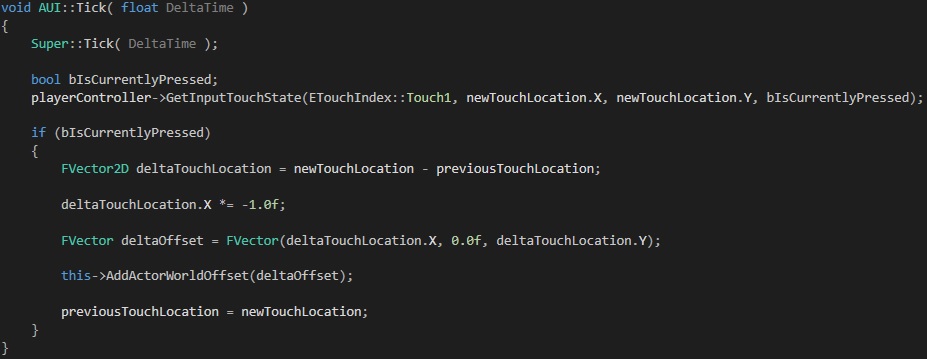
I’m currently developing a prototype for a top down strategy game for Android which I hope will see the light of day sometime realtively soon. In it, I wanted to implement a simple “tou…
pliant copper
oo thanks
deep isle

Okay guys. I'm trying to retarget some animation to a mesh
All the work is done. But how the heck do I turn this dude
He's facing the wrong way LMAO
pliant copper
unfortunate
deep isle
I open up the skeletal mesh file and turn him
Then save
but it doesn't stick
please
The two meshes are already in the UE4 Content Browse
Or maybe I don't understand what you mean
 toxic cliff
anyone know how to remove this frame from the camera in the metahumans project?

 loud knoll
it is missing a Post proc material so find it and plug it in or fix the Post Proc Vol
also could be Post proc in the camera
toxic cliff
@loud knoll thank you! I will check that out
pliant copper
does event tick run before input events?
toxic cliff
@loud knoll it's on the main perspective camera and when I turn off the PPV it's still there🤔
grim ore
its the shaders compiling still
deep isle
@plush yew Import the Maximo mesh? Or the soldier? The soldier is part of the SDK I'm working in
Okay I opened up the editor on the mesh of the one that's facing the wrong wayu
Clicked Reimport mesh
Now searching for the file
When searching for the file I'm unable to find it on my PC
The mesh is preloaded as part of a Modding SDK for UE4.
I'm not sure if that has to do with it
Yeah when I click reimport mesh and I search the file directory of the SDK to the same path the mesh is located in for the UE4 Content Browser it doesn't appear for reimport (because its saved as a usasset file and not OBJ/FBX like the browser importer wants the files to be)
RIP
The man shall never turn
UE is a fantastic program, but it can't turn people 😄
Sorry I've been at this for 5 hours and am barred from success because its a research project trying to turn my dude
I find that a bit ridiculous
Thanks for trying to help though
grim ore
well your trying to do sometihng your probably not supposed to be doing
but you exported the character out to fbx, that is what you reimport
deep isle
@plush yew I did reimport actually, ended up just exporting the mesh to FBX. Then hitting reimport and there sadly was no transform section
@grim ore Yeah just came to that epiphany and gave it a try. Won't let me turn him 😦
grim ore
when you reimport its in the details panel of the mesh. you change it then reimport
deep isle
@grim ore Como este?
 pliant copper
I made this panning blueprint, when i click it resets the camera postion or something, (the platform goes to the middle), everything else works as i want it to, but i dont know why its happening
 grim ore
how far down did you scroll... @deep isle
deep isle
All the way down
grim ore
ah wait ok so if you didnt import it with the modified properties in the first place they are not going to show up under import
so you are going to need to import it again like it was suggested before and replace it
grim ore
@pliant copperread your code outloud to see what it is doing, what does mouse click do?
pliant copper
saves the mouse positions after inverting some of it to a vector3
grim ore
ok so you have a saved value, now on that same frame since you are ticking what does the tick do since the mouse is now down?
deep isle
I HAVE FOUND THE TRANSFORM SECTION AND HAVE SUCCESSFULLY BEGAN TURNING MY MAN
pliant copper
sets the world location of the camera to that saved position - the current mouse position
grim ore
and what was the saved position on that same frame that you just set?
grim ore
yep, which means your result is 0
pliant copper
:(
grim ore
which you then set the location to 0,0,0 in the world which is the middle
pliant copper
so thats why it resets
do i just using a "branch"?
i really hate branches, they like poor man if statments
pliant copper
ik but i find them the worst part of visual scripting
using language better but unreal c++ doesnt have as much tutorials as blueprints and its slower to learn
grim ore
blueprints re the same as C++ just prettier,its the same code on the back end
pliant copper
yeah, that i find cool
grim ore
you might want to see about making your code do relative setting of the location
similar to what you have now just adding the value to the current location instead of setting it completely
pliant copper
what about the SetRelativeLocation node?
grim ore
you can clamp it them, the values
so they dont go too fast, or add sensitivity (multiply it by a small value)
plush yew
How does one get the 4.27 preview working through the launcher?
grim ore
like amount to move * 0.1 = 10% move speed
pliant copper
mATHS
grim ore
@plush yewit should show up at the top of the list of engines to add
pliant copper
oh it still resets its position tho :(
plush yew
Yeah... Not for me
 grim ore
what is at the top of the list of engines to add?
pliant copper
5.0 cooler :D
plush yew
4.26.1 I believe
grim ore
 pliant copper
mines the same as that btw
grim ore
you could consider just taking advantage of the fact you are using tick to move the camera relatively. old location - current location = amount to move. after you move it, you save the current as old location. this should work, you would have to store old location = current location when the first time the mouse is down just to avoid large jumps tho
pliant copper
ok
grim ore
I think they might not realize the number is a drop down
plush yew
Ah lol. Thanks!
 pliant copper
if thats normal, what does it look like when it fails?
deep isle
@plush yew Yeah I'm on this one video that i've been using for a couple hours
I think I just got to do something to the new reiumported mesh
pliant copper
im trying to print string a vector but it not only prints the vector but also my mouse position?

the x,y,z have mouse pos attached,
after some inverting, SO WHY does it print my mouse xyz and my vector that comes from somewhere else?

my mouse was in the top left of the screen when i took this screenshot
so the top print is my mouse pos, and the one below is the platform's position ( behind the print)
isnt that abit silly?
but if i delete that one print
then there is no other things printing
and i made the blueprint
and when i change what it prints it sometimes doesnt have mouse pos aswell
very dumb
i did until i didnt
 coarse turtle
SO anyone knows how to use the new Oodle plugins for UE4.27?
plush yew


Anyone know how to increase the sub surface area?
like how do I make it encompass the entire cube
drowsy snow
Have you set the light's transmission enabled?
plush yew
yeah

this makes no sense to me
changing it from black to white doesnt affect it

how would I enable this
anyone aware of how to turn it on?
I wrote my own profile
but i cant select it
its greyed out
 remote thicket
Is there any way to make a ball not bounce when it rolls too fast? Polygons and stuff, can't make a perfect sphere with no edges, etc.
grim ore
use a sphere for the collision instead of the mesh itself
otherwise? make it trace each frame down and move it to the surface perhaps?
remote thicket
Do you have a tutorial for setting custom collision meshes? I'm pretty new to this :/
grim ore
no, but its not too difficult. open the mesh by double clicking on it, go up to collision and remove anything that is there, then add a sphere collision from the same menu, then make sure in the details panel its set to simple complexity
remote thicket
I did that but it still starts bouncing when it gets up to high speeds. Are you sure the tracing thing wouldn't mess up intentional bounces from ball-on-ball collisions?
At least it actually rolls now
grim ore
it definitely might, you might have to end up having custom code to handle high speeds. You could try turning on CCD as well (continuous collision detection)
remote thicket
How would you go about that? I've got a solid grasp on how to make blueprints and import stuff, but that's about it
 arctic path
lol starting to realize... i scaled my world to large compared to the player.... oops.
 grim ore
@remote thicketCCD is a setting on the mesh in its details panel

you can also play with the physics settings on the mesh and also look at physics substepping in the project setting

lots of "tweaks" mainly due to how collision is handled based on the frame rate
remote thicket
Is it possible to do it based on something other than framerate? I don't want things to get all janky if when the game lags
grim ore
thats what CCD technically helps with, and the substepping settings
 obsidian sinew
does anyone know how a 2d sidescroller could use cruved stairs? is there a way for the camera and movement axis to be rotated when reaching a certain point?
grim ore
depends on how you set up everything, if its a true 2d side scroller you probably end up changing the art and not the camera. if its fake 2d (3d in a flat world), you can rotate the camera with the player but then your art has to be designed to handle being viewed from those sides or to rotate
obsidian sinew
alrighty
grim ore
i can say someone asked this same question and I had no problem using the side scrolling template (3d) and set it up when I hit triggers it wold rotate the controller for the player with the fixed camera and I could "rotate" the world
 zenith needle
How should I use a metahuman as a skeletal mesh?
Cause when I import it, it is.a blueprint
grim ore
you can use how its set up in the blueprint and duplicate it in your blueprint, or use the supplied bp
plush yew
guys i need some help, for some reason when i try clicking different buttons it just wont work
like file, edit, window, help, and even when editing a blueprint i cant right click for nodes or anything
i want to get into game dev but this is really preventing me from continuing any further
grim ore
what version of the engine?
plush yew
let me check
me waiting for the epic games launcher to actually open
there we go
4.13.2
grim ore
that would be why, you need to install a newer version. 4.26 is the latest
remote thicket
@grim ore Idea - What if you could make it so a ball would stay a set distance away from everything else, skipping the actual rolling thing altogether?
grim ore
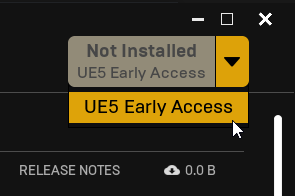
it does provide the latest, click the + and what does it show at the top of the drop down list @plush yew
@remote thicketyou could do that by attaching it to something else, or just having it move to that distance on tick
 grim ore
what does the screenshot show below that
plush yew
Early access 5.0.0
grim ore
and its not installed right?
plush yew
it isn't.
grim ore
so the engine wont let you install more than 1 at a time
plush yew
i don't have any engine installed
grim ore
click the drop down and install 4.26 if you want the latest
plush yew
i uninstalled the outdated one
grim ore
correct, you have an install pending
its not going to let you try and install more than 1 at a time
obsidian sinew
ive got another question lol
grim ore
click the drop down...
plush yew
i did
grim ore
 plush yew
it only shows the EU
grim ore
what does your shows
plush yew
5.0.0
grim ore
shrug if that drop down only show 5.0 then uninstall it all and try again and hope its not broke for you
plush yew
i don't have any engine installed
i uninstalled it when you told me it was outdated
lol
grim ore
show what that drop down shows
plush yew
 grim ore
i showed you what it shows for me and everyone else, what does it show for you
plush yew
 plush yew
i don't have a clue where that is
grim ore
click the drop down where it says 5.0.0
 sterile perch

Hello, i exported and packaged my game and it plays well on my pc but when my friends try to play it it shows this. Is there something i did wrong?
grim ore
what did you give your friend?
 neat galleon
Yeah it is very strange, for some reason the launcher is defaulting to 4.13 for some people
I had a friend try to install ue for the first time a few days ago and it defaulted to 4.13
 zinc cloak
unreal engine 4.26.2 is not showing in epic launcher, what might be the reasons for this?
sterile perch
grim ore
what did you give your friend?
I gave all the files needed like in the picture
Nvm its blurry but i gave the exe, engine and other files that i had after exporting the game
golden crane
shud work then
sterile perch
That's why im confused why they can't play it
golden crane
idk
never happened with me
 novel scaffold
what license should i get
can someone help
does this mean all my games have to be paid

the green one
pls
help
drowsy snow
novel scaffold
can someone help
Depends on what you want to create.
Games, or linear media stuff
drowsy snow
If you want to make games, choose the former.
If you just want to make linear, non-interactive animations, choose the latter.
Linear media: Videos, films, TV shows
novel scaffold
what ins internal and free projects
oh
yea
i am not doing that
what is internal and free projects
@drowsy snow
anyone
what is internal adn free projects
and what is custom applications
 fleet jackal
Hi i'm new here and to unreal as a whole. When im working on a project for an extended period of time the editor goes black and when im off it it goes back on but goes black when i click on the editor.
I have a i7 with 16gb of ram and an Nvidia RTX 2060 Laptop. i am running a second monitor on my hdmi port with a lower frame rate. What could be the issue?
 toxic lily

anyone know what im missing here? trying to get a muzzle flash particle to attach and play when firing
 signal flower
can I open projects on older version? I lave 4.26 project but my UE is 4.25. this is a tutorial project for plugin, so I really need to open it...
plush yew
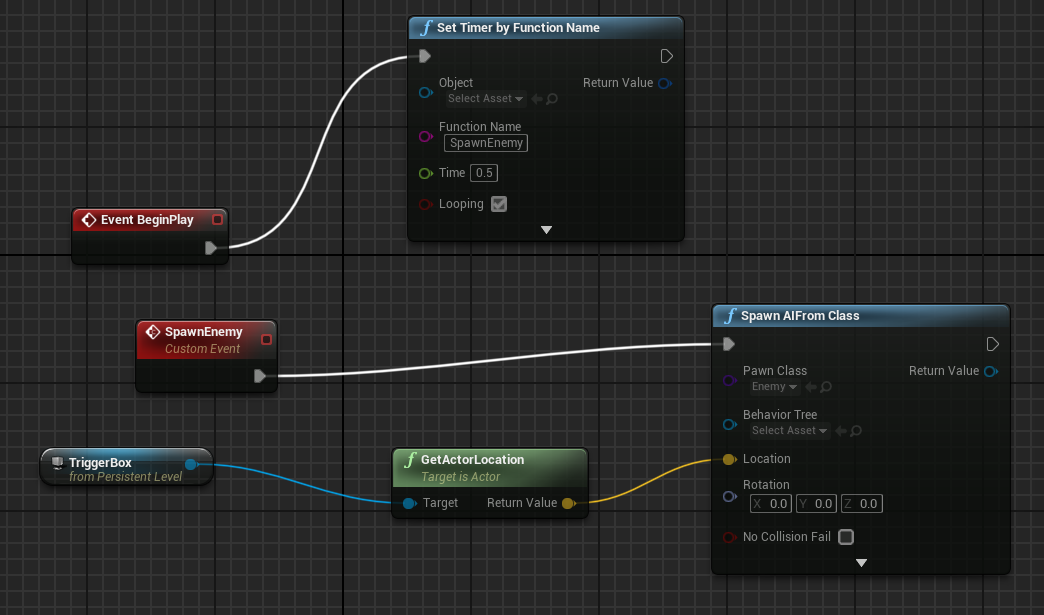
trying to make a spawner for AI but it only spawns them once even though I looped it https://i.imgur.com/HtJ6SFL.png
 novel scaffold
Guys
vagrant hornet
novel scaffold
Guys
You can
 drifting elbow
today I learned: No uasset is better than a corrupt uasset.
golden crane
drifting elbow
today I learned: _No_ uasset is better than a _corrupt_ uasset.
My deep Condolences for your corrupt corpse
golden crane
 agile hornet
Can i ask questions over here?
agile hornet
Can i ask questions over here?
sure
 regal mulch
plush yew
trying to make a spawner for AI but it only spawns them once even though I loope...
regal mulch
plush yew
trying to make a spawner for AI but it only spawns them once even though I loope...
You spawn them all on the same location. They probably fail cause the next one fails the collision test
plush yew
regal mulch
You spawn them all on the same location. They probably fail cause the next one f...
how can i prevent that? i'm extremely new to unreal engine
agile hornet
I cant make folders in my content browser
golden crane
huh
weird
agile hornet
It says "Failed to create folder"
golden crane
idk
try restarting the Editor maybe?
regal mulch
plush yew
how can i prevent that? i'm extremely new to unreal engine
Try the boolean on the spawn node that says No Collision Fail. Or code a more dynamic system to get spawn points that aren't used yet
agile hornet
golden crane
idk
try restarting the Editor maybe?
K
golden crane
im sure this aint ever gonna open
 regal mulch
1.2k isn't a lot though?
novel scaffold
ok thanks
regal mulch
Some Engine Materials are always there
novel scaffold
I am gonna learn ue5 wihtout ue4 good idea?
regal mulch
1.2k is still nothing though
golden crane
ya for a computer built for this typa things
regal mulch
novel scaffold
I am gonna learn ue5 wihtout ue4 good idea?
Not really. UE5 is in Early Access. It's not meant for learning or production.
Stick to UE4 until UE5 releases in 2022.
golden crane
im on a crappy laptop
novel scaffold
ok thanks
regal mulch
New systems, updated UI, and some old stuff is improved
novel scaffold
code wise?
regal mulch
But the overall workflow and code will stay roughly the same
novel scaffold
ok thanks
golden crane
regal mulch
New systems, updated UI, and some old stuff is improved
will there be a water system?
regal mulch
We already have a Water System, right?
agile hornet
golden crane
idk
try restarting the Editor maybe?
It was my Windows Security
plush yew
would it honestly be an issue to use UE5, like will the flow be fine or would we run into issues
golden crane
regal mulch
We already have a Water System, right?
no like in CryEngine
like inbuilt oceans
regal mulch
Never used CryEngine, so no idea. I don't think so.
Well UE4 got Fortnite's Water System, which allows Oceans
golden crane
regal mulch
Well UE4 got Fortnite's Water System, which allows Oceans
thats a Water Plane isnt it?
regal mulch
Try it :P
regal mulch
@novel scaffold It's probably good to check #unreal-faq for UE5. There is a post about bigger changes that come.
E.g. Cascade, UE4's old VFX System, will be dropped. So if you want to learn VFX, learn Niagara from the start.
golden crane
regal mulch
Well UE4 got Fortnite's Water System, which allows Oceans
actually I dont play games so i have very limited knowledge on games like these
i just like making stuff
so UE4 is kinda like a Hobby
golden crane
regal mulch
<@!777599635811467264> It's probably good to check <#846520470807117915> for UE5...
RIP Cascade
u will be remembered
so if UE is getting updated, with the 4.27 preview already out, why is there no change in the three top right buttons(the close, minimise, and restore) ?
why does it still look Windows 7?
 uncut tinsel
Hello guys.
I am starting developing a new game. An endless runner. Now let me explain a little bit what i am trying to do. My endless is set on the road and i want to have different numbers of lane (1,2,3,4). Around this i am going to spawn classic city envoirment stuff. (parks, buildings, sidewalks ....).
Now the approach i was using is: I build one actor containing the lane. The based on the number of lanes i want to spawn, i use a loop and spawn the lane. The problem is i have to many actors to keep trace like this. And i can't find a decent alghoritm for handle it. (specially when i want to change directions).I think spawning obstacles is gona be a lot more difficult this way maybe.
Another approach that come in mind is a little simplear: Instead of single lane. I have the 4 lane togheter(basically a single actor) and i spawn it. Later on that i spawn the envoirment props and in some way spawn it on the lane and using this trick make seem like the number of lane is changing. In this is way i have less actors to keep track and maybe is easier to implement and also easier to handle the obstacles.
I dont't know it's 3 day i trying to figure out and every time i do the 1 approach i end up with incomprehensible code (temprory bp as i am prototyping).
What you guys suggest to do??
 minor pine
signal flower
can I open projects on older version? I lave 4.26 project but my UE is 4.25. thi...
minor pine
signal flower
can I open projects on older version? I lave 4.26 project but my UE is 4.25. thi...
If you're lucky, you can just change version number in project files and it will work, but possibly there were backwards-incompatible changes
golden crane
regal mulch
Not sure what you mean
the Win 10 buttons are flat and minimalistic looking
so why does the UE Editor top right buttons still look like the Win7 buttons?
regal mulch
No idea :P ask the designer of the Editor from x years ago
signal flower
minor pine
If you're lucky, you can just change version number in project files and it will...
well
even if it worked - I cant open it cuz I need VS...
but thanks for help
 golden crane
regal mulch
No idea :P ask the designer of the Editor from x years ago
golden crane
regal mulch
No idea :P ask the designer of the Editor from x years ago
who is he?
regal mulch
signal flower
well
even if it worked - I cant open it cuz I need VS...
but thanks for help
UE4 isn't really backwards compatible. You can open older projects in newer UE4 versions, but not other way round.
golden crane
but i mean why wud u?
signal flower
regal mulch
UE4 isn't really backwards compatible. You can open older projects in newer UE4 ...
I know this
but if nothing changed in blueprints code - why I cant at least try?
minor pine
golden crane
but i mean why wud u?
Because of this, for example https://forums.unrealengine.com/t/4-26-performance/154610/59
signal flower
for example I guess "branch" works in the same way in 4.16 and 4.26 ;D
minor pine
signal flower
well
even if it worked - I cant open it cuz I need VS...
but thanks for help
Why not install VS2019, though?
golden crane
aah
golden crane
minor pine
Why not install VS2019, though?
ya
if u dont need it
u can just keep it there
it doesnt disturb u
signal flower
minor pine
Why not install VS2019, though?
because...
 regal mulch
signal flower
I know this
but if nothing changed in blueprints code - why I cant at least try?
regal mulch
signal flower
I know this
but if nothing changed in blueprints code - why I cant at least try?
Files are versioned I think, so UE4 basically stops you from it by not showing you the UAssets in the older Engine Version.
They aren't supporting it
You are better of downloading 4.26 then
signal flower
regal mulch
You are better of downloading 4.26 then
Id do
but this plugin doesnt exist in 4.26
4.25 is the last one for it...
regal mulch
Does it come with Source Code?
golden crane
coz the ALS project hast been updated for the 4.27 version
signal flower
regal mulch
Does it come with Source Code?
no
 verbal hawk
hello How would I update this transform panel value in real time with run mode?
 golden crane
verbal hawk
hello How would I update this transform panel value in real time with run mode?
golden crane
verbal hawk
hello How would I update this transform panel value in real time with run mode?
like in Unity?
signal flower
its just some SQL plugin from Indian guy (or not Indian IDK) with no info but tutorial project...
golden crane
verbal hawk
hello How would I update this transform panel value in real time with run mode?
i dont think UE4 does that
coarse turtle
Anybody knows how to use the new OOdle plugin in UE4.27?
novel scaffold
4.12 is the latest version?
drowsy snow
novel scaffold
4.12 is the latest version?
4.26 is the latest stable version.
drifting elbow
btw can I c++ "program" a material parameter collection or something like that?
 ionic cradle
Is it possible to get Navmesh on top of the surface of the water? Specifically the water from the water plugin.
drifting elbow
I think there are settings about navigation/navmesh stuff in the water plugin actors
regal mulch
 crimson slate
can somebody help me ?
crimson slate
can somebody help me ?
You usually use multiplayer GameModes and PlayerController, PlayerState, etc. classes.
Your MainMenu should have a MainMenu GameMode, that has MainMenu PlayerController
The Gameplay maps should have the Gameplay one
Only the Gameplay PlayerController would add the HP Bar.
zenith needle
grim ore
you can use how its set up in the blueprint and duplicate it in your blueprint, ...
yes but how can i use it as a skeletal mesh and add animations too it?
plz help
plush yew
zenith needle
yes but how can i use it as a skeletal mesh and add animations too it?
A guide for exporting a MetaHuman to Unreal Engine.
zenith needle
plush yew
https://docs.metahuman.unrealengine.com/en-US/HowTos/ExportingMetaHumans/Exporti...
ok thanks laski
plush yew
zenith needle
ok thanks laski
No problem
plush yew
Hey all, im trying to import a mesh i created in blender but in ue4 there are faces missing when import it. I've recalculated the normals but having no luck
 drowsy snow
plush yew
Hey all, im trying to import a mesh i created in blender but in ue4 there are fa...
drowsy snow
plush yew
Hey all, im trying to import a mesh i created in blender but in ue4 there are fa...
Try selectively recalculating the normals.
Also enable Backface Culling in Blender to get clearer idea.
plush yew
Alright thanks
@drowsy snow it is backface culling, just wondering how i can make it render both sides?
drowsy snow
plush yew
<@!325627930484932608> it is backface culling, just wondering how i can make it ...
If you don't mind slight performance hit, you can brute force it by enabling Two Sided in the material.
Though I'd rather fix the normals in Blender selectively, especially if you're going to bake the lighting like others did.
plush yew
@drowsy snow does fixing the normals mean just flpping it? if so then i would still have this issue from inside the model if that makes sense?
drowsy snow
plush yew
<@!325627930484932608> does fixing the normals mean just flpping it? if so then ...
Yes, and that's why I keep saying selectively recalculating the normals, because I'm sure you just select all faces and do recalculation, but not going after the faces that calculated the other way around.
plush yew
Right sure, makes sense
thanks
This is how I felt when Unreal Engine 5 Early Access came out: https://www.youtube.com/watch?v=G5Hs1sz-WBs&ab_channel=JT


 golden crane
plush yew
This is how I felt when Unreal Engine 5 Early Access came out: https://www.youtu...
golden crane
plush yew
This is how I felt when Unreal Engine 5 Early Access came out: https://www.youtu...
E
 sly surge
how do i request help (for privet project) coz i need auto landscape mat
restive eagle
you can try posting in #freelance-jobs or looking at #hire-a-freelancer
or if you just have a specific issue, then you could probably post it in #graphics
sly surge
ya i have no money so cont pay
restive eagle
if you want hands on help then most likely that will require money, but if you can't figure out something and just need some minor help over discord, then you can try posting in #graphics
sly surge
humm how do i post in #volunteer-projects ??
restive eagle
sure feel free to, but people are not that motivated to spend hours of their time for a thank you
just how the world works 😄
restive eagle
read the description of that channel
restive eagle
sly surge
there no harm in asking tho
yeah you are more than welcome, just don't get your hopes up. i think you would have more chances narrowing down your issue into a question and asking in other channels
how to do this... etc
drowsy snow
sly surge
how do i request help (for privet project) coz i need auto landscape mat
Isn't Unreal Sensei already provide Auto Landscape material for free?
 hallow void
Hi there
drowsy snow
Go to his YouTube channel, and look for the video for that material. He provided the download link.
 median forge
So, got this when running 4.27 preview:

So, I need to update to latest driver, but recomended one is 2 years old?
drowsy snow
median forge
So, got this when running 4.27 preview:
Downgrade your drivers.
median forge
I know, I know, had a lot of BSOD before downgrade
drowsy snow
Newer NVIDIA drivers has caused issues to a lot of people.
median forge
but the promt is kinda confusing, lol
drowsy snow
2 years old is like what, 2019.
hallow void
I am with 4.26 with latest drivers on the 1650 and I'm fine, probably they're gonna fix this on the final release of 4.27
drowsy snow
hallow void
I am with 4.26 with latest drivers on the 1650 and I'm fine, probably they're go...
No menu flickering whatsoever?
drowsy snow
I mean, not that I care much, because I'm biased towards AMD, but I'm surprised you're the odd ball with the latest drivers.
median forge
yeah, 441.20 which it recommends is from 2019. Very fresh, latest. 😛
drowsy snow
People here reported many many times that they have issues with latest drivers.
hallow void
So far so good for me
drowsy snow
median forge
yeah, 441.20 which it recommends is from 2019. Very fresh, latest. 😛
Come on, it's not like they forced you to install drivers from 2016.
median forge
I had bsod with 4.26.2 like crazy with them, no such issue with 4.26.1...guess it doesn't like the taste of new! 😄
Well, if it works, works, what you gonna do 😄
ponkkis, you are to fresh, you need to downgrade!
😛
drowsy snow
Downgrade to the ancient NVIDIA GeForce 256 driver 
At least none of AMD users reporting driver issues with the editor.
plush yew
Guys what kind of projects should i have under my belt for a AAA title studio as a c++ ue4 programmer?
 wary wave
probably C++UE4 ones
drowsy snow
plush yew
Guys what kind of projects should i have under my belt for a AAA title studio as...
Preferably games you worked with other studios of the same calibre.
wary wave
they really don't have to be the same calibre at all - the best material is just material showcasing the kinds of things you have done, and can do
so they don't necessarily need to be shipped games, or complete projects
plush yew
Ive mostly worked on VR games
wary wave
but it's also not unreasonable for people to shift between studios of different sizes
plush yew
Does stuff like A* pathfinding or prototypes of gameplay mechanics be any good?
drowsy snow
plush yew
Does stuff like A* pathfinding or prototypes of gameplay mechanics be any good?
That's a good idea.
There's this one guy who worked on similar stuff with UE4, and then got hired at Naughty Dog. I forgot his name though, but he was posting video of his work on YouTube.
plush yew
I mean stuff like fps seem super simple and saturated.
I made a quest/objective system like a strike from destiny 2. Would that be enough?
plush yew
drowsy snow
There's this one guy who worked on similar stuff with UE4, and then got hired at...
Oh you got a link or something?
wary wave
plush yew
Does stuff like A* pathfinding or prototypes of gameplay mechanics be any good?
these are classic examples, so yes
well implemented, self-contained systems are always good examples
drowsy snow
plush yew
Oh you got a link or something?
Shoot. I forgot his name, so I forgot the link to his channel.
Though IIRC his video was tutorial on AI stuff in UE4, before the series got halted because he landed a job at ND.
wary wave
they don't have to be revolutionary in design or anything, they just need to work well, and be implemented well
the reality is 95+% of the stuff you work on is never particularly revolutionary anyway 😄
wary wave
sure, that would be a decent example
 sick parcel
Following a tutorial on how to do some niagara particles
the teacher sets the gravity to -980, and the particles slowly fall
in my case they fall instantly, barely sees them
anyone knows why that could be?
maybe it should be 9.8 instead?
some settings in the units system
no idea
plush yew
@wary wave What should a resume have for it to be impressive?
buoyant graniteBOT
:triangular_flag_on_post: Burst#7777 received strike 1. As a result, they were muted for 10 minutes.
severe shale
Hey guys, I sent a question in #blueprint , could anyone help me? I'm doing a project for school and I need to finish it this week I'm getting stressed
regal mulch
Just wait in #blueprint for answers. Posting into multiple channels is not allowed.
wary wave
plush yew
<@!99264143659401216> What should a resume have for it to be impressive?
resumes aren't generally impressive, they should instead aim to be informative
severe shale
I only posted in that channel don't worry
plush yew
@wary wave and what should it have?
wary wave
I mean you can find that information literally everywhere on the internet, a resume is a resume
your basic contact details, work history, and summary of your skills
summary of interests, or outside-of-work accolades optional
drowsy snow
Deleted some innocent convos?
(He also DM-ed me after the first strike for reporting his spam)
buoyant graniteBOT
:no_entry_sign: Burst#7777 was banned.
 torpid dragon
Hi guys, how are you doing?
Just some quick question. I'm starting to learn UE and I didn't find anything about it, but
it is possible to attach a background image, like a house blueprint, so I can follow it as a reference while constructing my scene?
 drowsy snow
torpid dragon
Hi guys, how are you doing?
Just some quick question. I'm starting to learn UE a...
drowsy snow
torpid dragon
Hi guys, how are you doing?
Just some quick question. I'm starting to learn UE a...
Yes, you can.
Just switch the viewmode to Unlit if you're using the ortographic angles.
Of course, textures won't appear in (Brush) Wireframe viewmode, but I think you can trick it using Billboard Component.
drifting elbow
@torpid dragon in a project we even placed a huge plane with a (low resolution) map on it
torpid dragon
you mean, like a object? static mesh with texture?
drifting elbow
yep
torpid dragon
how did i not think about doing that? lol
drifting elbow
there's a plane primitive. then you'd just need an unlit material with the texture
drowsy snow
torpid dragon
you mean, like a object? static mesh with texture?
Though, as I said earlier, it won't appear in Wireframe mode.
drifting elbow
but it would "appear" if the plane was tessellated and you moved the vertices depending on the texture content 🤔
drowsy snow
That dimension is usually enough for one person.
If it doesn't fit, try adjusting the character's capsule collision, and make sure you have proper collisions setup on the door and the wall.
torpid dragon
something like that, right?
of course i need to adjust the proportions, but it is a start

genius
drowsy snow
torpid dragon
something like that, right?
of course i need to adjust the proportions, but it i...
You're in the right track!
torpid dragon
thx guys! ❤️
drowsy snow
Also considering you're using UE5, have fun with the Lumen lighting 😉
 fluid viper
hre's a nice riddle...
 toxic lily
Can anyone help me figure this out, trying to get a Niagara muzzle flash pack to work, can’t seem to get it to call in my event graph
fluid viper
All the same foliage instances form the same mesh.. some give shadows, some dont.. the first few I paint are allright.. then shadows go on/off when painting more.. it's not a distance thing
torpid dragon
drowsy snow
Also considering you're using UE5, have fun with the Lumen lighting 😉
I'm, lumen is absolutely impressive
drowsy snow
still dabbles with UE4's SSGI and LPV