#ue4-general
1 messages · Page 982 of 1
 kind dew
i have a minigame thats completely in UI. I want to make it so the widget never loses focus until the player presses a certain key. But the player can click anywhere and the widget will lose focus so the player character assumes controls and the player's input no longer affects the minigame. How do I ignore those clicks?
 grim ore
you need to define what is happening. first, what input mode is set? Game, Game and UI, UI only? second are they losing focus because the game is taking the mouse control over or something else?
kind dew
should game and UI
grim ore
assuming you only want the UI to be doing stuff, setting the input mode to UI only would fix it
 rigid belfry
is that an endless runner?
rigid belfry
rigid belfry
is that an endless runner?
if it is, you probably already have logic that decides where the player should go(left, middle, right). using those concepts, simply call "Spawn Actor from class" and spawn the Actor thats supposed to block the player
if it isn't, you still need a reference to the location where you'd want the cubes to spawn
 teal parcel
Anyone got a recommendation for learning C++ for use with nDisplay?
 vale grove
rigid belfry
is that an endless runner?
vale grove
rigid belfry
is that an endless runner?
Hey Righy
It is not an endless runner
There is an end to it
Let me give a better example real quick

I believe the end is visible from here
So I jus

Ok this is a better picture
I want to make similar boxes along the long tunnel
That's it
One way would be to keep copying the boxes in front of me and manually placing them in the tunnel
Since the tunnel is long, I have to keep going ahead real slow
I am sure there's a better way to do it
grim ore
yes, look at using blueprints and construction scripts to lay them out for you
vale grove
The blueprint tab is full of weird options, which doesn't make any sense ...lol

Could you please elaborate a little @grim ore
I am really sorry, for the dumb question
 grim ore
@vale grove your asking for help to do something you dont know how to do. you need to learn the engine
vale grove
You're right 😦
I don't want to spend time learning since this is how far my project goes. Once it is done, the project is done ...haha
But I am understand your point
grim ore
then just do it by hand the one time
 latent sonnet
Does anyone know how I can change the a flipbook animation based on how fast I am going?
 candid grail
Visual Studios auto format shortcut is: "Ctrl+K, Ctrl+F". I am pretty sure you need an add-on to auto format on save.
You might be talking about VS Code, which has auto formatting out of the box?
rigid belfry
latent sonnet
Does anyone know how I can change the a flipbook animation based on how fast I a...
tick->if velocity length = X -> stuff
candid grail
You pressing CTRL+F
xD
If you want to auto format
You need to press CTRL+K followed by CTRL+F
Idk, check your settings
latent sonnet
rigid belfry
tick->if velocity length = X -> stuff
By "Get velocity length" you mean get velocity > VectorLength?
rigid belfry
yep
latent sonnet
Ight thanks.
 fierce forge
hello, how i can load the levels from world composition ?
 light thunder
Can anyone recommend any resource/workflow example for how to delete a critical piece (in my case, it's the pawn) - I want to be able to start using another one that has better functionality - but this pawn has so many things referencing it - I know i can use the content browser to replace it so that every other thing refers to it - is that the general process? then I just find what variables are missing on it that other blueprints are trying to access/change, and I recreate those there?
Any other best practices (aside from pushing everything listed in that (this actor references this pawn) to source control, and making a backup of the pawn (so I can view it easily for recreating functionality)
latent sonnet
rigid belfry
yep
Did I do it right? It doesn't seem to be doing anything.
 rigid belfry
latent sonnet
Did I do it right? It doesn't seem to be doing anything.
rigid belfry
latent sonnet
Did I do it right? It doesn't seem to be doing anything.
is this actor using physics or using the character movement component?
latent sonnet
rigid belfry
is this actor using physics or using the character movement component?
90% sure it's using the Character Movement, but I am using the Dash Engine and it's blueprints are a little hard to understand so I could be wrong.
rigid belfry
no idea what the dash engine is, but as long as you're using the character movement component, the get velocity will return the actual velocity of the RootComponent
check if it is indeed printing anything at all
also it is quite surprising to see so many nodes attached to tick
 vivid vessel
Anywhere to get some help with the eu4 editor here?
This eludes me, why have I got this retched shadow looking thing around me

 cedar wave
 worldly leaf
https://www.youtube.com/watch?v=ma_BMgx6sxg&ab_channel=Bluedrake42
worldly leaf
https://www.youtube.com/watch?v=ma_BMgx6sxg&ab_channel=Bluedrake42
I need Bluedrake to be my hype man 🤣
latent sonnet
rigid belfry
check if it is indeed printing anything at all
Slow is being printed, fast is not no matter how fast I seem to go.
 latent sonnet
It's saying I'm in the 3000's

 rigid belfry
thats quite fast
you dont need to go fast to feel fast

reddit
2,093 votes and 125 comments so far on Reddit
latent sonnet
Understandable, but these most of this wasn't made by me, I just wanted to try and build upon it.
rigid belfry
i see. well by default the logic i said earlier must work. something must be happening in the background thats preventing your logic to run smoothly
use a breakpoint(F9 by default) on the set Flipbook node and see if it is even firing at all
rigid belfry
latent sonnet
Did I do it right? It doesn't seem to be doing anything.
i just now noticed that the flipbooks are called "idle" and what i think is "run". in that case, theres a slightly better simple setup(imo) for handling sprite animation
this is what i am using in my game
 vivid vessel
Well this was a useless use of my time
rigid belfry
vivid vessel
This eludes me, why have I got this retched shadow looking thing around me
lounge is not supposed to be a place where you ask for help btw
watch out for the bot
grim ore
12:49 to 1:07. less than a minute spent asking a question, and less than 20 minutes hoping for a response without much details.... thats just silly
rigid belfry
latent sonnet
Understandable, but these most of this wasn't made by me, I just wanted to try a...
just to show you that it works as expected
 vivid ether
Hello everyone, lovely to join a nice UE community. May I ask what would be the ideal channel to ask for help regarding Metahumans and setting up custom Morph Targets/Blend shapes?
grim ore
#metahumans or #animation ?
vivid ether
grim ore
<#831953010900336712> or <#221798806713401345> ?
Thank you very much Mathew
latent sonnet
rigid belfry
this is what i am using in my game
This looks very well done, I'll try to see if I can set it up like that without interfering with already set code.
I still am baffled on the other thing though, why wasn't it reading my speed?
rigid belfry
without knowing anything about your project, i know that having 10 different sequences on tick is a bit of a 🤨 moment
why would you need so much usage of the update function
if you're new, maybe see if it would be possible to move some logic to events
rigid belfry
latent sonnet
I still am baffled on the other thing though, why wasn't it reading my speed?
did you add a breakpoint? maybe it was firing but it was getting instantly set back to something else
since theres so much stuff running, maybe you're having code conflict with each other
latent sonnet
I guess this is why. I didn't really want to mess with any of the coding here since it works perfectly with the premade player.
 latent sonnet
rigid belfry
did you add a breakpoint? maybe it was firing but it was getting instantly set b...
latent sonnet
rigid belfry
did you add a breakpoint? maybe it was firing but it was getting instantly set b...
Lemme do that.
What's it supposed to do?
rigid belfry
if the event gets called, the game pauses
and it takes you to the event graph directly
latent sonnet
Oh, well nothing seems to be happening.
rigid belfry
so it is not getting called
if you were to attach a print string to the false pin and add a breakpoint to that, then it would probably pause
latent sonnet
So attach something to false and press f9?
rigid belfry
yeah
i mean, we already know that the branch is returning false, right?
theres no other option, since its not true
rigid belfry
i dont think thats how it works?
latent sonnet
OH WAIT
 knotty heron
wait how do you color comments lol
rigid belfry
well yes
light thunder
Any idea how to fix this? - I have a line trace that needs to hit components inside of an actor - but not the actor itself - (think, you want to be using a laser pointer inside of a house, at certain objects, but not on the walls or the house itself -
but I can't make it toggle visibility of this laser pointer when the pointer itself is looking at the house itself
latent sonnet
rigid belfry
well yes
Well the breakpoint is getting call on true instead of false...
rigid belfry
latent sonnet
Sorry I'm a little slow
just to drive the point further. my current pawn is using a character movement component, yet as you can see the get velocity always returns 0. reason being is that in my player movement logic, i am adding an offset, rather than calling the "add movement input"
rigid belfry
latent sonnet
Well the breakpoint is getting call on true instead of false...
so the vector length is greater than the value? then it should also set the flipbook
but, just my guess, theres other logic running thats also setting it to something else
latent sonnet
Ok so it's working.... in reverse....
I switch the animations and he runs when standing and stands when running.
latent sonnet
rigid belfry
so the vector length **is** greater than the value? then it should also set the ...
Holy smokes dude... that one time I fell asleep in first grade came back and bit me in the butt.
I mixed up the less then/greater than signs.
 hexed eagle
evening everyone
quick question, I feel I'm making a very bad design decision here
Doing a c++ project
have a character, that has a AWeaponBase* CurrentWeapon; property on it
I need to display that current weapons ammo to the hud
and obviously update the hud, every time the ammo updates
is it wise, to do a .Broadcast() from the AWeaponBase class?
and if it's fine to do that, then how do I access that delegate from the hud?
UPROPERTY(BlueprintAssignable)
FOnWeaponUpdate OnWeaponUpdate;
^ this method is sitting in the AWeaponBase class
note: the CurrentWeapon is null when the game starts. only gets populated if you pickup one
how should I approach this?
 spare kernel
well the player knows when he has picked the weapon up
you can just have a delegate that fires when the CurrentWeapon changes
its pretty simple
this can sit on the pawn or on the controller, does not matter, controller is better cause HUD is created after the controller
hexed eagle
so a delegate on the controller to fire when the currentweapon updates, and that will in turn tell the hud it needs to start listening to the weapon delegate?
spare kernel
well the HUD will update its stuff, to the new weapon, and grab the new weapons ammo, etc
 terse wyvern
You could also just move the OnWeaponUpdate to the character or controller and call it from the weapon to save you the unbinding and rebinding of the event every time you change weapon
spare kernel
bind to whatever delegates it needs, etc
i like to keep things abstract, i have a delegate that is fired whenever the weapon changes (not just for HUD use, i use it for Rep Graph also)
HUD just listens to this, and adjusts itself to the new weapon
hexed eagle
makes sense
spare kernel
this is actually a static delegate
meaning i can bind it without the pawn even being spawned
hexed eagle
hmmm, very clever
knotty heron
Is there really no way to animate a progress bar background image Opacity?
hexed eagle
I did have the OnWeaponUpdate on the character, but the way I setup the weapon is, it has a StartFire() which starts a timer, a Fire() method which does the actual ray tracing, and a StopFire() to kill the timer. The character class will just tell the weapon class to start and stop firing
spare kernel
@knotty heron can do it via material
hexed eagle
so that is why I moved the delegate back to the weapon
ok, let me play around
thanks guys
knotty heron
But i would just need it to fade in
 lyric arch
Hey Guys! I'm packaging a map and I keep getting a cook error:
Log.WriteException: ERROR: Cook failed.
Log.WriteException: (see /home/ue4/Library/Logs/Unreal Engine/LocalBuildLogs/Log.txt for full exception trace)
But I can't seem to find what is causing the issue. Even after following all the error logs and the Cook error log. How do I pinpoint the issue?
spare kernel
/** Global notification when a pawn changes weapon. Needed for replication graph. */
static FOnKaosPawnWeaponChanged OnPawnWeaponChanged;
``` then i just broadcast it via ``` OnPawnWeaponChanged.Broadcast(this, CurrentWeapon, PrevWeapon);
``` @hexed eagle abstract frigate
I have downloaded version 4.26.2 and I'm experiencing an annoying bug
hexed eagle
@spare kernel epic. thanks man
abstract frigate
The screen occasionally glitches to the left in a glance then return to its position
It's like it's bugged or something
Can i fix it?
 polar badge
Hey ! Does anyone know why a packed project I am receiving from someone doesn't have the same BPs inside it than the ones the sender has.
I originally packed the project and send them, they modified it and are trying to send it back but when opening it nothing has changed compared to what I sent.
I deleted the old project I sent to avoid opening it by accident and it doesn't work still.
Thanks in advance ^^
 modest island
Hello everyone ^^
so i created a project in unreal , added an actor in my scene also a component “c++” wrote this line of code , also my actor cant show up while i am playing
UE_LOG(LogTemp , Error , TEXT("Hello" ));
so instead of showing me Hello it shows me this whole text :/
 light thunder
How do I make the test for collision occur AGAIN- it won't look for an item on the inside of an actor, because it is colliding with the actor itself (meaning, I'm in a house, and it won't look for items IN the house, because it is saying "LastHitActor = house" (basically)
 kindred viper
test if it's within the bounds of the LastHitActor
light thunder
kindred viper
test if it's within the bounds of the LastHitActor
Get Local Bounds?
My main problem is not wanting to ignore this "house" actor
Okay, it was another actor that I didn't necessarily need any collision on, so I just disabled it on that one
This was my Changelog I just updated - ```Fixed Laser Pointer not showing (removed collision of Fire Rollup Door, which was blocking it since we start in that Actor's path )
 winged shuttle
hey guys, im a 2nd year programming student and my main language is C++. I would like to learn unreal without blueprint is there and tutorial i can follow that explains unreals tools and not C++ thanks
 weary basalt
There are alot of tools in Unreal Engine, you need to be a bit more narrow about what ones you want to learn about and in what order.
A good place to start is the Documentation.

Complete resources for learning to use Unreal Engine 4
winged shuttle
well for now id like to learn how to create a 2d scrolling game with jumping and thats it
id also not like to use the default character
 narrow mauve
Whom do I speak with to put up a contract job
Or to hire a whole team.. I need something very specific. I went over the hire a studio and free lancer areas..but I can't find anyone that promotes themselves with networking. I need a team that can do networking and server related stuff.
spare kernel
narrow mauve
OKIE DOKIE
 plush yew
I have a canvas render target that is used to draw a set of triangles on, in multiplayer it looks like the canvas has only one shape/instance, is that correct? only one client seems to have influence of which triangles are drawn to the canvas
or a better question to make would be how to make a global post process material that can be fed triangles and not apply post-processing in the area of the triangles in world space
 ebon garnet
hi guys, why should I use action mapping and functions, instead of just how I have it below ??? to achieve running

 devout whale
Hello, can someone link me to a video; or explain how does co-op multiplayer works? It is expensive? Cheap? Thanks. Please @ me of you reply 🙌🏽
 drowsy snow
ebon garnet
hi guys, why should I use action mapping and functions, instead of just how I ha...
drowsy snow
ebon garnet
hi guys, why should I use action mapping and functions, instead of just how I ha...
Why don't you want the ability for player to remap the input?
Also using action mapping can keep things elegant and also allows player to use controller besides keyboard and mouse.
ebon garnet
@drowsy snow thanks now I know why I would need them!!
 cobalt kelp
Hey would anyone be able to help, my jump function just doesn't do anything when its called
 polar verge
I have an interesting scenario when I attach and actor to actor. The target actor(person) is attaching to the vehicle, but when the vehicle moves the person moves freely within the vehicle. He isn't "sticking" to the vehicle. Should I be disabling collision or physics? Gravity maybe? I'm not sure why this happens.
 winter hull
I hope this isnt the wrong channel but ive got a problem which is probably caused by colission of my static mesh
the collision is somehow under my actor and under my static mesh
you can that its the simple collision of the mesh by the form of the navmesh exclusion zone
*see
does anybody know how to fix that?
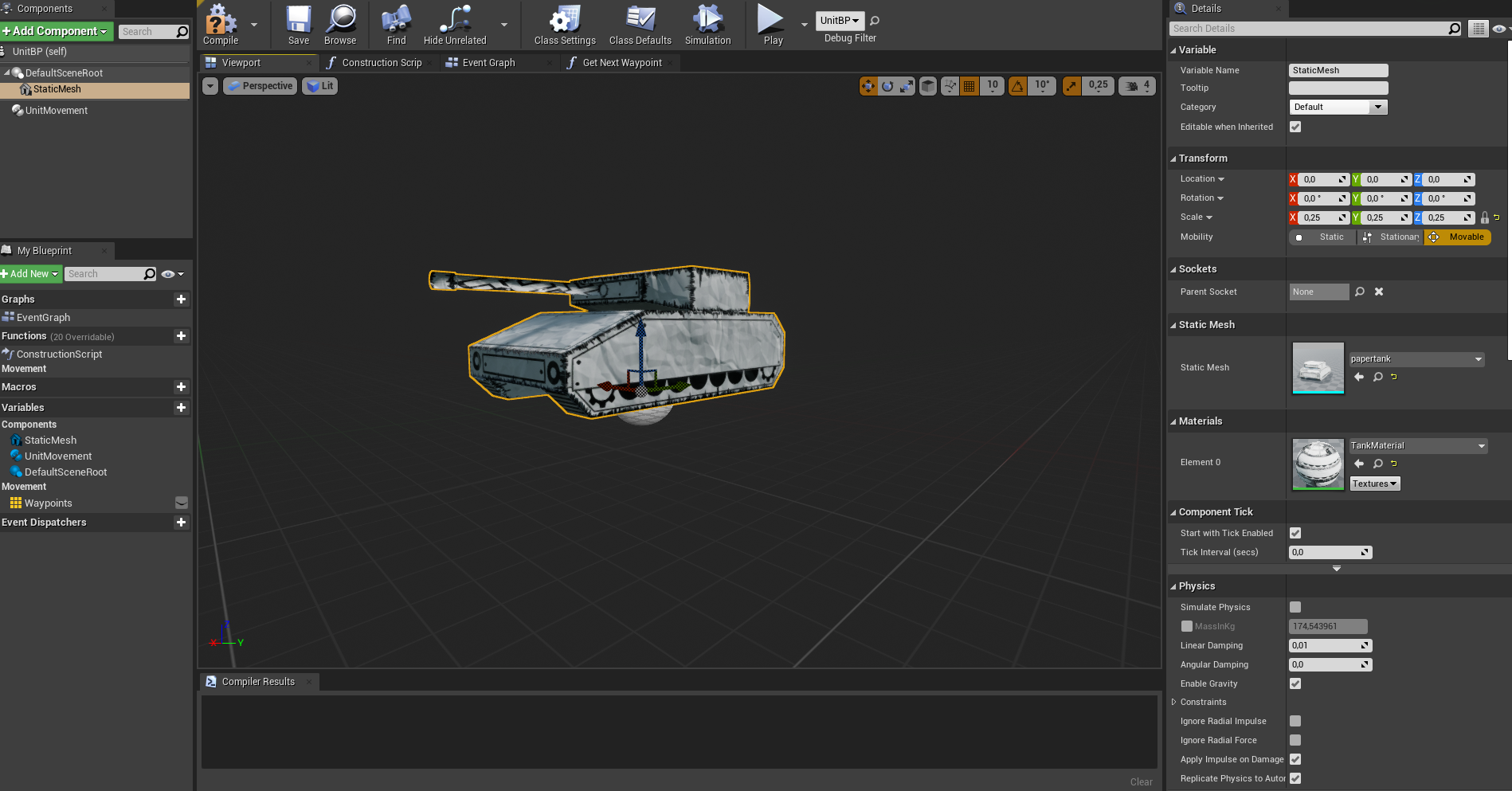
this is the pawn setup
grim ore
@winged shuttle your trying to make it harder on yourself if you are learning the engine. Unreal uses blueprints, it uses templates and characters. Learn how the engine works and all the pieces go together, including these, and then expand into learning how it uses C++. You are purposely handicapping yourself with "without blueprint" and not using the default character
winged shuttle
i HATE the thought of using bluepritns lool
grim ore
@winter hull load up the mesh you re using and show the collision
@winged shuttle don't use UE4 then, use another engine or code your own. not being an ass but being honest and realistic
Blueprints are part of the engine, quite a few things are designed around this feature of the engine.
winter hull
grim ore
its like saying "I want to use UE4 but not the rendering part, I want to use my own"
@winter hull looks fine then. I am guessing it is the height part of nav meshes, they prevent your pawn from getting stuck "under" objets (your tank in this case) so your seeing it block navigation below this object
do a simple test, grab the cube and put it in the scene and move it up and see what happens
polar verge
Should I be attaching actor to actor every tick?
 tropic anvil
Hello, is there something similar to Unity's Remote Config for Unreal?
grim ore
out of the box? no
winter hull
@grim ore
You were right its the navemeshs height https://i.gyazo.com/0d9de20eabac9cb3cddc88c527cc145d.mp4
grim ore
yep its based on the pawn height you allow to walk on the nav mesh, you can adjust that if you need to for some reason
tropic anvil
@grim ore are their any plugins?
polar verge
I see what's happening. Actor is snapping to actor, but not following the target actors rotation.
grim ore
it looks like Playfab might be able to do it @tropic anvil
polar verge
So when the parent rotates, the child does what it wants. I need to get them to attach and be "glued" together.
winter hull
@polar verge i think theres an option for that
grim ore
if it attaches it should honor the parents stuff when the parent does stuff, are you perhaps preventing the child from doing that? like setting it manually or locking it or something?
tropic anvil
grim ore
it looks like Playfab might be able to do it <@!298160837372149760>
I'll check it out thank you
polar verge
grim ore
if it attaches it should honor the parents stuff when the parent does stuff, are...
I'm not doing anything additionally. Just attaching actor to actor.
winter hull
@grim ore It seems to be another problem. I raised the Agents Height of the Mesh to 500 but nothing changed. When i lowered it got better but now i am at 1 with this result:
 grim ore
ok so whats the actual issue, what are you trying to do or not to?
polar verge
I figured it out. I just need to match the rotation of the player with the parent on event tick. Not sure why, but that solves it.
winter hull
I want to have ai controlled rts style tank movement for my game (with turn in place etc). So i created a custom aicontroller, a custom crowdfollowingcomp and a custom movement controller (derived from floatingpawnmovement) in c++. i added the custom crowdfollowing comp to the movement controller and added the movement controller to a fresh pawn blueprint.
@grim ore
Problems started once i added the crowdmanager for avoidance
probably because of the same problem i encounter with the navmesh
grim ore
have you tried to use it yet? even if it shows that its an obstacle it should still work
I think characters just have some special setup as to why they dont get marked as an obstacle on the nav mesh
winter hull
yeah i tried once the units are above the navmesh it works
if theyre close enough to grey out the navmesh log returns blocked
grim ore
yeah that blank space is just the area where no valid mesh is at that time
winter hull
yup
grim ore
but it should still work,. I dropped a pawn, added a static mesh to it, added the nav mesh volume, and then had it do a simple move to the middle of the map and it moved fine
winter hull
i can upload my project if youd be so kind to take a look at it
grim ore
I dont know if i can but the issue is the one on the left doesnt move?
winter hull
yes
grim ore
hmmm.
so those are both the same pawns, just one is off the ground higher and it works?
winter hull
yes
grim ore
is it possible that other one cant get there since something is in the way?
grim ore
well if it was the default settings should pop the collision box up out of the ground
push it halfway down into the ground and hit play and see if it pops out
maybe screenshot the code you are using to move the item? or the key part of it.
I can say just in a simple test a basic pawn with a movement component should work, it will show the blocking area below it because it blocks the area it occupies but it should work, atleast for a simple move to
grim ore
I dont have pms enabled 😦 and yeah the ones in the ground move up like they should.
if you delete that top left one, duplicate another one, move it up, hit the END key so it drops to the surface, does it go to the surface? does it work?
grim ore
i mean that looks right?
winter hull
it does but they really do not avoid each other the correct way
 grim ore
your root has no collision
your root is what is used to detect collision, you need to make the mesh the root
drag the static mesh up to the default scene root and replace it
winter hull
it works
grim ore
this i why for a character it has a capsule as the root
grim ore
progress!
winter hull
Thanks so much Mathew 🙂
 glass rapids
I don't know if this is easy to implement but, I am trying to make a recoil recovery system where the control rotation goes back to where it was on the first shot and I have figured it out sort of but when the player looks downwards the pitch is 360 - 270 not -1 -90 and it makes it hard to lerp. What would help that?
grim ore
nopers, just help someone else out when you can 🙂
tropic anvil
Is it possible to get marketplace plugins to work with compiled versions of UE4

The plugin I need shows up for 4.26 but not for the "other"
grim ore
@glass rapids it shouldnt be an issue, you store the original rotator for the control rotation when you start the fire, then the current control rotation when you end the fire then lerp between the 2
@tropic anvil it should be especially if there is source for the plugin (included with it normally). If not the .uplugin normally has the version it supports
glass rapids
I was having an issue where the player would look down and it would go to the 270 - 360 range and it would try to go up not down because it is positive
grim ore
maybe show code? but my basic test seemed to be fine I can look down, hold down fire which will randomly add pitch to the rotation, and when I release it lerps back to the starting pitch over 0.5 seconds using a timeline
glass rapids
I was using this, I should try putting it on the timeline
 grim ore
I wonder if its your make rotator doing it
this is REALLY ugly but I took the default FPS template and added this to the end of the firing

so every 0.2 it just repeats the firing code and adds random pitch input
here is what I do when the fire is released (to reset back to original)

and when first fired, on pressed, I just store the original rotation
 glass rapids
I'm going to be honest I didn't know that lerp node existed. I'm kinda new to making stuff like this.
grim ore
so the goal is when its done you lerp from the orginal to the current using a lerp and the timeline (just changing the pitch)
glass rapids
okay, I will try to make that right now.
When I set the control rotation is seems to be doing a full 360 to get to the rotation
once it goes to the 270 - 360
grim ore
which is looking down right?
glass rapids
yeah
if it is in its own range it is fine, but once it goes from either 0 - 90 or 270 - 360 it does a flip
 glass rapids
yeah
grim ore
use the fancy lerp node then 😉

let someone else smarter than us figure it out, lerp (rotator) with the shortest path checked
glass rapids
okay, let me try that. Thank you
grim ore
that one technically does the entire rotation which is funny to watch, might be what you wanted anyways
glass rapids
yeah this one still seems to do the flip
grim ore
did you check the checkbox?
grim ore
thats the magic part of the node lol
glass rapids
this works, thank you so much.
I didn't know about this node at all
I've never seen it
grim ore
there are quite a few helper nodes hidden here and there
glass rapids
yeah, this one is really simple but works really well
grim ore
quite.. like i dunno couple thousand lol
glass rapids
thank you
 ivory hearth
does anyone have an issue wth 4.26.2 not shwoing up in the epiclauncher to install?
 cinder cradle
Err anyone else getting this screen when trying to add a project or update a plugin?

 coarse wigeon
@cinder cradle I got that earlier.
cinder cradle
coarse wigeon
<@!775389000960573491> I got that earlier.
Did you accept? I guess the various Is replaced with Ls in the top header or whatever is making me a bit paranoid lmao
coarse wigeon
@cinder cradle Yep
cinder cradle
Ok ;p
 wise knot
Is there a way to make skeletal meshes play animation while in the editor?
grim ore
yes set the animation mode on the skeletal mesh to play the single asset
 scarlet birch
Is there documentation somewhere that covers everything that can be used inside the .uproject file? Things like WhitelistPlatforms , LoadingPhase etc... or if conditional statements are possible in one?
cinder cradle
Omg Mike your profile pic / gif or whatever is hilarious 😄
hexed eagle
What's your opinion : Is using Data Tables the way to go with setting up weapon info?
 round quiver
I'm kinda confused on what I want to do...
What's the point in writing a whole survival game system when there's an asset out there that does it all
networking and everything
Makes me wonder why I do what I do
I wanna learn obviously
but I doubt that it's easy to write code that's on par in terms of quality with these pro grade packages.
hexed eagle
@round quiver one thing I've noticed, is that there will always be something there that you want to create. It's easy to just buy a plugin, and boom, done, but like you said, you won't learn.
And it terms of writing quality code, there's only one way to progress, and that's to just learn and keep trying
round quiver
Yeah, I'm just surprised there aren't a lot more shitty pump and dump games... Like there are already a lot, but I guess the learning curve of learning Unreal/game engines in general makes it difficult to take an asset and make something sellable.
I've been interested in making a game similar to valheim for some years now, but I know I'm lacking UE knowledge to make it happen
so I'll keep working at it I suppose
hexed eagle
yeah man, just keep learning. Write a project, delete it, and do it again. the 2nd time will be better
then delete and do it again
you'll soon see you can get something up and running within a week
easy
then you take it a step further, and learn Blender or something like that
Create your own models, import it into UE, and boom, you have your own game
the tools are there for you, and they're all free.
plush yew
Okay guys so I have a problem
I am following this youtube tut and it showed me how to make a level selector

Now if you see here we bind two custom events to event dispatchers which are activated through a widget with buttons
Now the problem rises, I tried changing this whole functionality into a function so that I can easily access this level selector through a single key press
But apparently I can't bind custom events in functions so it doesn't work
Any tips?
Here is how I am handling it atm
 round quiver
have the function attached to the event in the main blueprint @plush yew
I'm pretty sure it's not allowed for a few good reasons
but I'm new so I'm not sure
I'm assuming they don't allow it because they want all the calls to the blueprint to occur in the main class, rather than possibly having to go hunting for an event inside a function
and functions are meant to be small pieces of reusable code, so they aren't meant to be attached to events directly
they should be hooked up in the main method
it's all for cleaner code
plush yew
round quiver
have the function attached to the event in the main blueprint <@4562265777981358...
What do you mean by that?
As in not create a function?
 whole cobalt
guys. I want to ask abit about automating the editor using python. Which is the appropriate channel for this?
plush yew
I guess #automation
whole cobalt
Thank you
 old nimbus
In the Unreal official tutorial, it says I should be finding an Atmosphere/Sunlight fog Option to check in here, but there seems to be no option like that here. 😦 Can anyone please help me?
 plush yew
Atmospheric Fog?
old nimbus
Atmosphere/ Fog Sun Light
 dim arch
@maiden swift tried messaging manny to post a job listing, but he wont accept DMs?
old nimbus
option
plush yew
old nimbus
Atmosphere/ Fog Sun Light
There is an atmospheric fog option there
 silent chasm
click on the eye in the right and uncheck filters if you have selected
plush yew
 old nimbus
silent chasm
click on the eye in the right and uncheck filters if you have selected
old nimbus
silent chasm
click on the eye in the right and uncheck filters if you have selected
nope, still nothing
old nimbus
plush yew
yes, I have that already, but I'm supposed to find Atmosphere/ Sun Light option to check in the Details search panel
silent chasm
that option atmosphere/fog sun should be in the Light category if you click the expand arrow, try to find it that way
plush yew
Send me the tutorial
silent chasm
hm... maybe that changed in 4.26 and got removed ? in 4.25 the option is there
plush yew
It got a name change
old nimbus
oh
plush yew
atmosphere sun light now
 opal glade
quick question hopefully this isnt in wrong spot dont really know where it fits xD im spawning decal (bullet hole) and it only renders when you are close to it, i cannot figure out how to get it to render from futher away, if i scale the decal size it shows from further away but im not sure how i would shrink the material to make up for it
plush yew
opal glade
quick question hopefully this isnt in wrong spot dont really know where it fits ...
check if DBuffer is enabled in your project settings
dim arch
@maiden swift well I fixed it, but it seems like if you have block messages from server members, you cant send them either
opal glade
plush yew
check if DBuffer is enabled in your project settings
it is, it is also set in the material itself, ive looked online a few people said something about a fade option but i dont see it at all
plush yew
opal glade
quick question hopefully this isnt in wrong spot dont really know where it fits ...
Otherwise try increasing its size, or you'll need to decrease Fade Screen Size value of the decals.
opal glade
ah ok thats what i was seeing, ill try to figure out how to do that i appreciate the help
 austere whale
i dont understand epic games launcher
everytime i pick the photos that are trains planes or whatever it just fails to login
ID: 2a0a39b0-a40f-11eb-ae9b-ab09cd01f1bb
 thick nebula
is there a magic secret to getting a widget to display inside of another canvas, while maintain its formatting? blurs, borders, and alignments do not display
 scenic fox
How can i make an objective system that's in order?
teal parcel
Is someone able to help with writing a config file for nDisplay please. I'm massively struggling
fierce forge
hello, do somebody knows how i can optimize an open world game without world composition ?
drowsy snow
fierce forge
hello, do somebody knows how i can optimize an open world game without world com...
Write your own level streaming and LOD management codes in C++
That's the only way avoiding World Composition (which itself is actually well optimised if you work around it)
Don't believe me? Try break GTA V as much as you can with mods and figure out how the level streaming works. Which, if your open world is modern city and not using Unreal's built in landscape creation tools at all, you can divide your world by district chunks and what not.
 scenic swift
Hey guys, does anyone know how to fix an empty viewport? I cant see anything

 digital anchor
try window > load > default
teal parcel
Hey Guys could anyone help with getting my nDisplay working at all. I've been struggling with it for a couple of days. Need all the help I can get. Many thanks
scenic swift
thanks @digital anchor that worked
fierce forge
drowsy snow
Write your own level streaming and LOD management codes in C++
That's the only ...
i can't use it for more reasons, it's a multiplayer game without dedicated servers and after a part of the landscape is loaded again, the foliages will be like at the beginning
 fiery sage
Hello. Is it possible to use visual logger when running standalone game from editor?
 next dome
hey guys, im having issue with foliage paint tool, when i try to paint lets say pebbles on a static mesh, nothing paints, any ideas why?
 idle mantle
Hello someone can help me please?
plush yew
hi. in bridge when i click on export, ue crash.
idle mantle
Hello one question please
for the breast of my character Im confused
I need to make a high version of this model:

but I wanted to make high version
and there are triangle not good for the sculpt version
 fierce forge
well
 drowsy snow
fierce forge
well
drowsy snow
fierce forge
well
If you want to go GTA Online with it's peer-to-peer merit (including the lack of hypervisors preventing cheating), then it's all yours. I'm not authorised to stop you, not even your potential customers.
Consider that MMOs like Final Fantasy XIV still operates on a split level design (kinda similar to FFXII), which means the part of the map will load when the character passed through a loading trigger and the dedicated server translates the position data in that map. The absolute position coordinates only operates on client side - the server only knows which part of the map the player is in and calculate the position in that map.
fierce forge
drowsy snow
If you want to go GTA Online with it's peer-to-peer merit (including the lack of...
who said i'm making a game like gta online or a mmo ?
i'm making a game like "The Forest" at multiplayer
so you can play with your friends on you server
drowsy snow
The fundamentals are still the same.
fierce forge
wdym, in "The Forest" the server is peer-to-peer
 brisk peak
Hi has anyone seen anything like this? When I package my project I am having a sphere with the default material appear that is not apparently in the level as I have deleted every actor one by one and it still remains only when I package the project but does not appear when I preview in the editor.
 drowsy snow
fierce forge
wdym, in "The Forest" the server is peer-to-peer
drowsy snow
fierce forge
wdym, in "The Forest" the server is peer-to-peer
Even then you don't really need world origin rebasing for MP.
Unless your map is as big as Elder Scrolls 2 or the entire UK in 1:1 scale, that is.
fierce forge
drowsy snow
Even then you don't really need world origin rebasing for MP.
Unless your map i...
it's a 4km2 map
but too many trees
also, is there any way to make the foliage to be the same, after the level is loaded again ? (world composition)
drowsy snow
I have 6x6 km (36 km²) map size that work without origin rebasing, and i think the limit is around 10x10 km
As for the foliages, I kinda cheated by putting them in a way filling half-ish of each level chunk, and it worked just fine.
next dome
@plush yew 3 of them is checked by default, i tried unchecking and checking them 1 by 1 aswell, still same issue

its like, im painting, but it paints on another mesh that is under it, its like the mesh i want to paint the foliage on is transparent or something, it just goes through
 dawn gull
@plush yew do you know if UE5 is supposed to make multiplayer easier?
Yeah, nobody except the devs do rn probably
drowsy snow
dawn gull
<@456226577798135808> do you know if UE5 is supposed to make multiplayer easier...
Even then I'm 101% sure UE5 multiplayer will be the same as UE4, as it's not a total rewrite like from UE3 to UE4.
Otherwise Fortnite updates will be halted right now.
 cosmic nexus
i have a very trivial question, is it possible to cut and paste in the content browser instead of copy and pasting?
dawn gull
drowsy snow
Even then I'm 101% sure UE5 multiplayer will be the same as UE4, as it's not a t...
Dang, cause I don’t want to have to rebuild the engine from source for multiplayer dedicated servers anymore
drowsy snow
cosmic nexus
i have a very trivial question, is it possible to cut and paste in the content b...
It's possible, but you can just drag them into a folder in tree view.
cosmic nexus
ahh okay, that could work, just sometimes a folder is buried under a lot of folders and a quick ctrl c and ctrl v would be easier 🙂
 crisp thicket
Hai
drowsy snow
dawn gull
Dang, cause I don’t want to have to rebuild the engine from source for multiplay...
I don't get the concern with UE5 stuff at all, and UE4 still aged fine, arguably even better than UE3 aging.
dawn gull
Because I’m going to want to switch to UE5 for the new technology
crisp thicket
Whens ue5 comming out
dawn gull
And (hopefully) better performance
drowsy snow
Most of the new technology promised in UE5 already present in UE4 anyway.
crisp thicket
Elaborate
dawn gull
Not lumin though, or the crazy high poly voodoo magic
crisp thicket
We need more magic!
 patent bluff
Hello
crisp thicket
Hai
dawn gull
Both of which will make the games look better
crisp thicket
Bruh
patent bluff
Would anyone know how to give my game a VHS effect?
crisp thicket
💪🏻😎💪🏻
patent bluff
crisp thicket
💪🏻😎💪🏻
Big man
crisp thicket
👉🏻😎👉🏻
patent bluff
👈😎 👈
crisp thicket
I brought u guys this 🍪
patent bluff
Thank u
crisp thicket
Np i made alot
drowsy snow
crisp thicket
Elaborate
Chaos, the new physics system, is getting perfected for UE4. Maybe even UE4.28 it's production ready
Groom, the strand based hair system, already production ready in UE4.26
Next-gen console loading, already present in around UE4.25 (or UE4.26)
Selective ray tracing, already production ready in UE4.23
Niagara, the new particle system, already production ready in UE4.26
dawn gull
Can I have one
dawn gull
drowsy snow
Chaos, the new physics system, is getting perfected for UE4. Maybe even UE4.28 i...
What about lumin or the high poly count technology? Those were my main wants
crisp thicket
😰👉🏻👈🏻
dawn gull
crisp thicket
Jk here 🍪
Nom
crisp thicket
Im at the store, wat do u guys want?
patent bluff
Beans
crisp thicket
Black or pinto?
drowsy snow
patent bluff
Would anyone know how to give my game a VHS effect?
Try to learn how VHS distortion worked. Find footages of test bars recorded in VHS.
Give the edges a soft border, and give an excessive grain all over the screen.
If you want Betamax quality one, just make the colour washed out using UE's colour correction in the post FX settings
patent bluff
pinto
crisp thicket
I got u
drowsy snow
crisp thicket
Im at the store, wat do u guys want?
Also please talk random in #lounge
patent bluff
drowsy snow
Try to learn how VHS distortion worked. Find footages of test bars recorded in V...
I am very new to Unreal and I don't know how to put it on the camera
dawn gull
patent bluff
I am very new to Unreal and I don't know how to put it on the camera
Post process volume maybe?
drowsy snow
patent bluff
I am very new to Unreal and I don't know how to put it on the camera
Put your post process material inside the blendables of the camera/post FX volume. You can use the search bar in the Details panel to search for the setting with the camera or post FX volume selected
patent bluff
Ok thank you
cosmic nexus
When making parametres in a material, is it possible to change the location of those parametres in the material instance interface so it's further up or down?
drowsy snow
cosmic nexus
When making parametres in a material, is it possible to change the location of t...
Use the grouping and sort order feature.
cosmic nexus
ahh okay, i'll look into that 🙂
rigid belfry
anybody has wrote blutilities? i am considering setting up a nice workspace for an artist and i was wondering whether blutility is functional, or if i am better off working hand in hand with the artist directly?
 blazing dock
hey everyone I have a question.. I want to play a short video (3 seconds max) in a loading screen, imagine that that video is 8mb. If I compress that video to 1 mb will the compressed video be "lighter" in memory aspects?
drowsy snow
rigid belfry
anybody has wrote blutilities? i am considering setting up a nice workspace for ...
I made blutilites to load up reference images right inside the editor.
drowsy snow
blazing dock
hey everyone I have a question.. I want to play a short video (3 seconds max) in...
Reducing disk footprint, yes, but it'll be decompressed in RAM anyway.
blazing dock
the compressed video will be lighter in disk space for sure
 robust marten
I'm trying to get my widget to display a graphic. I'm using this BP as a binding for the image. I've set the image in the proper actor but only Name and Description work, I can't get the image to show up lol
 drowsy snow
blazing dock
the compressed video will be lighter in disk space for sure
drowsy snow
blazing dock
the compressed video will be lighter in disk space for sure
Although don't overdo the compression. 3 Mbps bitrate (NOT MB/s) already falls apart image quality wise above 720p resolution.
blazing dock
@drowsy snow so what you are saying is that a video of 8mb and a video of 1mb will still be heavy in terms of ram ?
drowsy snow
blazing dock
<@!325627930484932608> so what you are saying is that a video of 8mb and a video...
Yeah, it doesn't really matter memory footprint wise.
 pseudo river
unreal 5 when
drowsy snow
pseudo river
unreal 5 when
After UE4.30 
Master branch is in UE4.28, just so you know
plush yew
That is for the release, we will have some time before a stable release I guess.
drowsy snow
Also everyone won't be using UE5 until Fortnite does anyway
If there's the very first game that uses UE5, it's Fortnite.
Using it in a shipping ready game helps Epic make sure a feature works as intended in production scenario, of which if UE5 isn't battle tested in Fortnite and general public already using it, it'll affect UE reputation as a whole.
 warm swallow
I don't know what channel to put this into.
Is there a way i can quickly pull up the code of editor functions?
Say i click the player button, is there a tool or plugin that will tell me exactly what function calls happen for the editor?

 surreal viper
no
easiest way is to search for the tooltip text in engine code
and see what the UI is bound to
warm swallow
Alright thanks
Im trying to figure out how companies build custom dedicated servers that can host a UE4 Map, does the server or anyone have resources for that, or ideas. I was figuring I'd go through source code of the editor and see how they do it for Epic
 onyx rivet
Hey everyone I have a problem i'm running into. I want to bake my lighting in a level, on a blueprint full of static meshes is that possible?
 manic wren
Has anyone ever run into an issue like this when attempting to generate PSO caching information? (in my case for DX12) It's discarding approximately half of our potential cached PSOs due to "inconsistent vertex format", which isn't very clear what we would do to fix it.
UATHelper: Packaging (Windows (64-bit)): LogShaderPipelineCacheTools: Display: Running sanity check (consistency of vertex format).
UATHelper: Packaging (Windows (64-bit)): LogShaderPipelineCacheTools: Display: 13 vertex shaders are used with an inconsistent vertex format
UATHelper: Packaging (Windows (64-bit)): LogShaderPipelineCacheTools: Display: The following inconsistencies were noticed:
UATHelper: Packaging (Windows (64-bit)): LogShaderPipelineCacheTools: Display: 124 times one PSO used the vertex shader with VET_PackedNormal (5), another VET_Short4N (14) (we don't know VS signature so assume it needs the larger type)
UATHelper: Packaging (Windows (64-bit)): LogShaderPipelineCacheTools: Display: These vertex shaders are used with an inconsistent vertex format:
...
UATHelper: Packaging (Windows (64-bit)): LogShaderPipelineCacheTools: Display: === Sanitizing results ===
UATHelper: Packaging (Windows (64-bit)): LogShaderPipelineCacheTools: Display: Before sanitization: .................................................................... 1976 PSOs
UATHelper: Packaging (Windows (64-bit)): LogShaderPipelineCacheTools: Display: Filtered out due to inconsistent vertex declaration for the same vertex shader:.......... 1025 PSOs
UATHelper: Packaging (Windows (64-bit)): LogShaderPipelineCacheTools: Display: Filtered out due to VS being possibly incompatible with an empty vertex declaration:..... 0 PSOs
UATHelper: Packaging (Windows (64-bit)): LogShaderPipelineCacheTools: Display: -----
UATHelper: Packaging (Windows (64-bit)): LogShaderPipelineCacheTools: Display: Number of PSOs after sanity checks:...................................................... 951 PSOs
 idle dragon
Yo, does anyone actually know how to turn a Niagra effect into a projectile? Or a good tutorial to one? I've made a tracer in niagra but I want to replace the first person BP projectile with it.
 wooden forge
is there any function to switch on executions when the array contains a name? instead of making a bunch of clusterspaghetti of branches?
 drowsy snow
idle dragon
Yo, does anyone actually know how to turn a Niagra effect into a projectile? Or ...
drowsy snow
idle dragon
Yo, does anyone actually know how to turn a Niagra effect into a projectile? Or ...
Is attaching the Niagara particle into the projectile object isn't sufficient? Even with setting the Hidden in Game flag for the ball mesh?
drowsy snow
wooden forge
is there any function to switch on executions when the array contains a name? in...
What about this?

The other options is that you can consolidate them into either a Macro or a single Node.
 wooden forge
drowsy snow
What about this?
wooden forge
drowsy snow
What about this?
i need to call different functions depending if its food or enemy, i just found out about 'switch on string' node , thanks!

 worn granite
@wooden forge have you considered GameplayTags? They have a switch node as well, but are generally more capable than plain FNames
worn granite
worn granite
<@556402961736138778> have you considered GameplayTags? They have a switch node ...
But I hesitate to recommend using tagging over a component or perhaps even actor types for such broad differences
What if you have an eatable enemy?
drowsy snow
Maybe NVIDIA driver issue, which is on pinned message
Similar symptoms is flickering menu, which caused by "Enable Window Animations"

 sharp violet
hi can someone help me ihave no idea why my code is not working

the error is " Set pickup already exists another one cannot be generated
ok
nah
not in this nor in any bp
drowsy snow
Use this just to make sure.

 drowsy snow
Try search for "Set Pickup"
 drowsy snow
This looks fishy...
By any chance, is your player_Char BP parented to INT_Survival_character?
 sharp violet
its an implemented interface
drowsy snow
So it's parented to base Character class alone?
Also, do you mind screenshotting the full compiler results of the BP?
 drowsy snow
I know something fishy with the recurring Set Pickup thing.
You already override the Set Pickup function.
You can't define a function twice in the same class.
Consider setting the Pickup variable in the function override you already made instead of defining it via Event again
sharp violet
deletes set pickup it did not do anthing
i am actuallly following a tuotorial
no shit he compiled
drowsy snow
What's the tutorial?
 tender dome
hey did anyone faced similar issue where mouse buttons stops working when in standalone gamemode even though it works in PIE?
 faint juniper
Is there a way to cull the character mesh under clothing?
 warm hornet
Total noob question but as I keep having to ask myself this thought I would post here.
When is it appropriate to use 'Levels' and when is it appropriate to use 'Maps'?
I see both used interchangeably in tutorials and it gets confusing sometimes.
And for some tutorials focusing exclusively on Cinematics I see 'Shots' or 'Scenes' used instead.
grim ore
Levels and Maps for the most part are interchangeable is the issue
same with shots or scenes, its differing lingo. UE4 unfortunately names the same thing a map or a level based on what is using it lol
 merry gazelle
If I use BP seed to generate a procedural model, can I then export that various component mesh into a static mesh?
E.g convert BP_Robot (blueprint) into SM_robot (mesh)
 exotic thicket
I'm not sure if it's possible with procedural meshes specifically
But you can create a static mesh from a static mesh descriptor, which should be possible to save into an asset
this is not exposed into BP's though as far as I know
 steel shell
when i spawn a mesh asynchronously via blueprint there is a performance drop whole the mesh loads / is spawned. Its like a hickup.
does someone have a performance optimization idea?
 hard quarry
where can I find the profiler and logger in the engine?
devout whale
Hello, can someone link me to a video; or explain how does co-op multiplayer works? It is expensive? Cheap? Thanks. Please @ me of you reply 🙌🏽
rigid belfry
devout whale
Hello, can someone link me to a video; or explain how does co-op multiplayer wor...
blueprint or cpp?
devout whale
Blue print
rigid belfry
devout whale
Hello, can someone link me to a video; or explain how does co-op multiplayer wor...
what do you mean by co-op? split screen?
devout whale
Oh never mind, not split screen. Just a multiplayer game I suppose
Must if misheard when I was watching YouTube video
Thanks anyways 🙌🏽🙌🏽
rigid belfry
i just want to advise you that multiplayer is hard. check the pinned messages in #multiplayer for something that might interests you
 wheat lynx
Greetings folks. New to the server. Nice to meet you all.
hard quarry
If my Draw time is at 0,39 ms does this mean, that the amount of polygons in my scene are no problem?
I only have 24 FPS in my scene, and I really dont know why. The combined Polygons in this scene are at 6.9 million.
 rigid belfry
i guess this is more of a broad question... but, what does make a game feel good?
grim ore
@rigid belfry juice, juice a game and it feels good
@hard quarry open the profiler and profile a frame or section of frame and see what is doing what
plush yew
since materials export WITH the mesh, should I have folders for each mesh's set of textures?
 spring rapids
how do i edit a .sav file?
 fierce tulip
@rigid belfry
When pressing a button feels like fun
 gilded needle
@rigid belfry My opinion is that is a very subjective question. Some people think CoD is a good game and some think it is garbage. It really seems like it would depend on your target audience.
plush yew
since materials export WITH the mesh, should I have folders for each mesh's set of textures?
grim ore
you wont find one
gilded needle
What purpose would you have for wanting to edit a .sav file?
spring rapids
debugging
gilded needle
Folder structure is your own choice. Do what makes you happy.
 lucid grove
Hey fellas
I have this error when compile project
UATHelper: Packaging (Windows (64-bit)): LogWindows: Error: begin: stack for UAT
UATHelper: Packaging (Windows (64-bit)): LogWindows: Error: === Critical error: ===
UATHelper: Packaging (Windows (64-bit)): LogWindows: Error:
UATHelper: Packaging (Windows (64-bit)): LogWindows: Error: Fatal error!
UATHelper: Packaging (Windows (64-bit)): LogWindows: Error:
UATHelper: Packaging (Windows (64-bit)): LogWindows: Error: Unhandled Exception: EXCEPTION_ACCESS_VIOLATION reading address 0x0000000000000070
UATHelper: Packaging (Windows (64-bit)): LogWindows: Error:
UATHelper: Packaging (Windows (64-bit)): LogWindows: Error: [Callstack] 0x00007ff8de7b0d7c UE4Editor-Engine.dll!UnknownFunction []
UATHelper: Packaging (Windows (64-bit)): LogWindows: Error: [Callstack] 0x00007ff8de7adc84 UE4Editor-Engine.dll!UnknownFunction []
UATHelper: Packaging (Windows (64-bit)): LogWindows: Error: [Callstack] 0x00007ff8de77dadc UE4Editor-Engine.dll!UnknownFunction []
UATHelper: Packaging (Windows (64-bit)): LogWindows: Error: [Callstack] 0x00007ff8df212080 UE4Editor-Engine.dll!UnknownFunction []
UATHelper: Packaging (Windows (64-bit)): LogWindows: Error: [Callstack] 0x00007ff8df21329a UE4Editor-Engine.dll!UnknownFunction []
UATHelper: Packaging (Windows (64-bit)): LogWindows: Error: [Callstack] 0x00007ff8e1336742 UE4Editor-CoreUObject.dll!UnknownFunction []
PackagingResults: Error: begin: stack for UAT
PackagingResults: Error: === Critical error: ===
PackagingResults: Error: Fatal error!
Cant find anything on the forums
grim ore
you need to install the debugging symbols and crash it again
you wont find anything, there is no usable crash there
lucid grove
grim ore
you need to install the debugging symbols and crash it again
How can i do that?
gilded needle
Is this your first time trying to Package the game @lucid grove or have you previously packaged it and it just stopped working?
 near pine
im using the 2d side scroller template and i cant figure out how to use my jump animation
grim ore

 obsidian nimbus
i heared debugging symbols on binary are kinda limited
lucid grove
gilded needle
Is this your first time trying to Package the game <@!667566391444111380> or hav...
Yeah, i was really caution when adding new elements to project and all was fine. But since then i did a lot of stuff when optimised stuff and tried to get Water plugin working 🙂
obsidian nimbus
think i heared it from shaddowriver and ill take his word for it 😛
near pine
im using the 2d side scroller template and i cant figure out how to use my jump animation
rigid belfry
damn thats too fast
grim ore
I was serious on what I said, look up Juicing your game
rigid belfry
near pine
im using the 2d side scroller template and i cant figure out how to use my jump ...
easy. just dont 😄
rigid belfry
grim ore
I was serious on what I said, look up Juicing your game
i was reading about that 👍 gonna crush this ludum dare
 proud dome
how to fix this?
 grim ore
@near pine it uses other animations right now right? do the same thing when it plays the move animations but when you jump
near pine
grim ore
<@!557908928189562881> it uses other animations right now right? do the same th...
im trying to understand how it updates animation
 grim ore
have you looked at how characters work and the animation system works in UE?
rigid belfry
near pine
but i need jum
thats not complicated at all
what are you not understanding?
grim ore
did you look at the section literally called "Handle Animation"
near pine
ye
 grim ore
yes, thats how it handles it
rigid belfry
is that the default template? never opened that up
grim ore
it is
near pine
default template
 potent bridge
Is it possible to have particle effects in UI? I'm trying to make it so special enemies have this on their nametag.
grim ore
if the character is moving, use the running animation otherwise use the idle animation. that is what it says
read it left to right
rigid belfry
near pine
im trying to understand how it updates animation
every frame, get the actor velocity only on the X axis and compares it to 0. if this velocity is greater than 0, it means you are moving right. since you'd be going 1,2,3,4. since you go right, you rotate the controller to the right(or forward).
if the velocity is less than 0, you are going left, hence the controller being flipped (controller at 180 about the Z axis)
if you are equal to 0, means you are idle, so simple checks whether you previously where left or right, then properly flips you to that direction
also all of the UE's templates should be using some form of character movement, so you could be calling the jump function off of all the characters
lucid grove
grim ore
if the character is moving, use the running animation otherwise use the idle ani...
Done, now i got this:
kind dew
i have a master foliage actor that plays a sound whenever a player runs through it. I'm trying to trigger a "report Noise event" in that foliage blueprint when it plays the sound. And I have an AI controller that is in range that doesn't respond at all to the noise event. On Perception Updated just doesn't get called
grim ore
usually a cook error has the issue above the cook failed part
lucid grove
grim ore
usually a cook error has the issue above the cook failed part
CommandUtils.Run: Took 119,7207431s to run UE4Editor-Cmd.exe, ExitCode=3
InternalUtils.SafeDeleteFile: SafeDeleteFile C:\Users\konda\AppData\Roaming\Unreal Engine\AutomationTool\Logs\D+Epic+Games+UE_4.26\Cook-2021.04.23-21.11.19.txt
InternalUtils.SafeCopyFile: SafeCopyFile D:\Epic Games\UE_4.26\Engine\Programs\AutomationTool\Saved\Cook-2021.04.23-21.09.19.txt C:\Users\konda\AppData\Roaming\Unreal Engine\AutomationTool\Logs\D+Epic+Games+UE_4.26\Cook-2021.04.23-21.11.19.txt
InternalUtils.SafeDeleteFile: SafeDeleteFile D:\Epic Games\UE_4.26\Engine\Programs\AutomationTool\Saved\Cook-2021.04.23-21.09.19.txt
aha
It seems like its plugin
SafeDelete
But its not enabled
Or its not
grim ore
maybe puit the entire log on pastebin or somewhere, the actual issue is elsewhere
lucid grove
Sure
grim ore
yep gonna need to paste it somewhere like pastebin
lucid grove
grim ore
yep gonna need to paste it somewhere like pastebin
Pastebin
Pastebin.com is the number one paste tool since 2002. Pastebin is a website where you can store text online for a set period of time.
grim ore
.. part of that seems missing, the entire cook part and error
like clear the output log, run the cook, and copy paste the output log
lucid grove
grim ore
like clear the output log, run the cook, and copy paste the output log
Pastebin
Pastebin.com is the number one paste tool since 2002. Pastebin is a website where you can store text online for a set period of time.
grim ore
whats in the full log? "C:\Users\konda\AppData\Roaming\Unreal Engine\AutomationTool\Logs\D+Epic+Games+UE_4.26\Log.txt for full exception trace)"
lucid grove
thats the one
When i installed those symbols error log now showing me this:
UATHelper: Packaging (Windows (64-bit)): LogWindows: Error: begin: stack for UAT
UATHelper: Packaging (Windows (64-bit)): LogWindows: Error: === Critical error: ===
UATHelper: Packaging (Windows (64-bit)): LogWindows: Error:
UATHelper: Packaging (Windows (64-bit)): LogWindows: Error: Fatal error!
UATHelper: Packaging (Windows (64-bit)): LogWindows: Error:
UATHelper: Packaging (Windows (64-bit)): LogWindows: Error:
UATHelper: Packaging (Windows (64-bit)): LogWindows: Error: end: stack for UAT
But log.txt is there, i pasted it
It seems like its now showing now
 proud orchid
Hm
lucid grove
grim ore
whats in the full log? "C:\Users\konda\AppData\Roaming\Unreal Engine\AutomationT...
I guess here should be explanation about this error, but its empty
ProcessResult.StdOut: LogShaderCompilers: Display: Worker (5/13): shaders left to compile 5696
ProcessResult.StdOut: LogWindows: Error: begin: stack for UAT
ProcessResult.StdOut: LogWindows: Error: === Critical error: ===
ProcessResult.StdOut: LogWindows: Error:
ProcessResult.StdOut: LogWindows: Error: Fatal error!
ProcessResult.StdOut: LogWindows: Error:
ProcessResult.StdOut: LogWindows: Error:
ProcessResult.StdOut: LogWindows: Error: end: stack for UAT
ProcessResult.StdOut: LogShaderCompilers: Display: Worker (9/13): shaders left to compile 5686
lucid grove
grim ore
whats in the full log? "C:\Users\konda\AppData\Roaming\Unreal Engine\AutomationT...
I have removed other assets and know have full picture
Pastebin
Pastebin.com is the number one paste tool since 2002. Pastebin is a website where you can store text online for a set period of time.
lucid grove
lucid grove
I have removed other assets and know have full picture
Btw i have enabled Distance Field Shadows recently and see something about it in log
 mild karma
Hi folks, I’m new to UE4. Whenever I try to build in VSCode, it hangs right after the process begins. The terminal outputs:
Running UnrealBuildTools.exe GameEditor Mac Development ../Game.up rohe the -waitmutex.
In order to continue the build, I always have to kill a process in a separate terminal window called:
/bin/ps -eaw -o pid,comm
This is really frustrating, any help would be greatly appreciated
rigid belfry
is there a way to make this event only fire if the key being pressed is not a modifier nor is it a windows key?
 grim ore
@lucid grove my first thought is to try cooking it all and not going right to package
rigid belfry
do i run checks to see whether the key is one i dont want? what if the player spams keys? there'll be a bunch of branches firing off at once
grim ore
that event will run from start to end each time you press a key
event runs -> is it a key I want / is it a key I dont want -> do whatever. doesnt matter how many you press
 grim ore
you can look into using AND or OR nodes instead of multiple branches
rigid belfry
oh yeha
lucid grove
grim ore
<@!667566391444111380> my first thought is to try cooking it all and not going r...
Same error
grim ore
so its a problem with cooking some of the assets, not packaging
so maybe delete your intermediate folder in the project and try again
you can make a material and re use it sure
if you already have materials, you would have to combine them by hand which is probably a pain
lucid grove
grim ore
so its a problem with cooking some of the assets, not packaging
And same error again
grim ore
ugh 😦 im sorta out of ideas. The crash log is weird
lucid grove
Last thing i have in mind disable distance field
fierce forge
hello, do somebody knows how i can make more "instancedfoliageactor" ? like one for grass, a another one for trees and so one

 dry oar
can someone help with something really simple
grim ore
if its really simple, do you really need help?
dry oar
yes im stupid
dry oar
grim ore
if its really simple, do you really need help?
how do i make a vr map in which i can shape the terrain
grim ore
that is not a really simple question
dry oar
grim ore
that is not a really simple question
Is there not a preset in which I can just load in and add/remove terrain?
grim ore
nope
dry oar
damn
lucid grove
grim ore
nope
Well, disabling Distance Field Mesh helped
But i need it, where should i dig now?
grim ore
it fixed the cooking?
lucid grove
Yep
lucid grove
grim ore
it fixed the cooking?
Those error had Distance Field text in it
[D:\Build++UE4\Sync\Engine\Source\Runtime\Engine\Private\DistanceFieldAtlas.cpp:1282]
UATHelper: Packaging (Windows (64-bit)): LogWindows: Error: [Callstack] 0x00007ff8e0bfdadc UE4Editor-Engine.dll!FDistanceFieldAsyncQueue::BlockUntilBuildComplete() [D:\Build++UE4\Sync\Engine\Source\Runtime\Engine\Private\DistanceFieldAtlas.cpp:1157]
UATHelper: Packaging (Windows (64-bit)): LogWindows: Error: [Callstack] 0x00007ff8e1692080 UE4Editor-Engine.dll!FStaticMeshRenderData::Serialize() [D:\Build++UE4\Sync\Engine\Source\Runtime\Engine\Private\StaticMesh.cpp:1524]
UATHelper: Packaging (Windows (64-bit)): LogWindows: Error: [Callstack] 0x00007ff8e169329a UE4Editor-Engine.dll!UStaticMesh::Serialize() [D:\Build++UE4\Sync\Engine\Source\Runtime\Engine\Private\StaticMesh.cpp:4699]
UATHelper: Packaging (Windows (64-bit)): LogWindows: Error: [Callstack] 0x00007ff8e37b6742 UE4Editor-CoreUObject.dll!FArchiveSaveTagExports::ProcessTaggedObjects()
So i disabled it just to check and it worked
grim ore
after cooking, turn it back on and cook again maybe it was a weird issue?
lucid grove
Sure, why not
lucid grove
grim ore
after cooking, turn it back on and cook again maybe it was a weird issue?
Yep, same crash
 grim ore
well the cook is the project so yeah it might be something else in there
grim ore
Visual Studio, attaching the debugger so when it crashes you can see which asset its processing
lucid grove
Thats sound just what i needed, since its crashing on exact same shader compiling
But i have no idea how to do that
VS is kinda dark forest for me
grim ore
yeah its a dark art
lucid grove
grim ore
yeah its a dark art
Can guide me how to attach debugger?
grim ore
its nothing specific to UE4, the normal instructions for it would work
considering the issue is not in UE4 tho you might have an issue without a source build 😦 its going to be a mess
maybe remove what you're not using, or start moving stuff to a new project. It s really hard to determine this issue without lots of debugging
lucid grove
For example if i just cut off part of content and then cook > add > cook will that help?
grim ore
maybe just migrate over that map into a new project and see if it cooks
lucid grove
Damn you are right, why should i crop all content if migrating only takes the needed ones. Thank you, those simple things always get out of my mind
lucid grove
grim ore
maybe just migrate over that map into a new project and see if it cooks
Just a little clue, when i enabled some of options in rendering my viewport cutting splines

I have to move camera away to see it

That cant be related to this problem?
grim ore
to see the roads? that seems like just normal near view clipping
if you were to move backwards in the top screenshot would it start drawing more of it
lucid grove
That started to happen after distance field was enabled, but imn not sure
Yeah but its really far
grim ore
is it fixed with DF disabled?
lucid grove
Not sure, but it started to happen at the same day i enabled DS
I did some tweaks in rendering options
grim ore
ah... im not experienced enough with that part to even guess 😦 but migrating over and seeing what happens might help eliminate. you could turn stuff back on and cook after each one lol
lucid grove
Empty map that i was cooking and migrated (without lots of assets) seems to cooking just fine
Now the big one
lucid grove
grim ore
ah... im not experienced enough with that part to even guess 😦 but migrating ...
Well... i just migrated main map with its assets and all working fine
grim ore
so maybe it was one of the settings you changed?
lucid grove
Maybe. If asset not in use but in content folder could it cause problems?
grim ore
it could if cooking yeah
lucid grove
I have always thought it took only assets referenced in map i choosed
grim ore
depends. for packaging yes, but I think it still cooks it all
lucid grove
grim ore
depends. for packaging yes, but I think it still cooks it all
I have cooked wrong map ha
Now i have it

 lucid grove
grim ore
depends. for packaging yes, but I think it still cooks it all
lucid grove
grim ore
depends. for packaging yes, but I think it still cooks it all
Probably i found it. Its MetaHuman.
 strange pilot
$portfolio command.
 woven falcon
so i've played around with the unreal4 default third person character-
And i forgot to back it up
so i'd like to get a new default third person character without making an entirely new project
is there a neat way to do this? 
oh nvm, i just made a new project, and copied the uasset into my old one 
 robust smelt
how do I remove this guys?:

not sure how I got this to display to my screen. if someone knows, please mention my usersname @robust smelt
thick nebula
i have a question about viewports and canvases: when i try to display a widget inside of another widget's canvas, none of the formatting comes through. it seems that i have to anchor the viewport of the widget i want displayed inside of the canvas on the top left, but i usually I set the anchor as the entire widget, and then try to make them responsible by using XY positions in the anchors.


is there a way to make it so i can anchor around the child widget? so it displays responsively?
this forces me to make it so the largest box is my heading, and i would like to use "fill" instead of "auto" on an XY anchored position so it displays a bigger widget
drowsy snow
robust smelt
how do I remove this guys?:
Close any Groom asset you opened
robust smelt
@drowsy snow you are my hero
 wicked hemlock
can I change the icon of a component?
 midnight wren
how do I import blueprints into my project?
 knotty slate

drowsy snow
wicked hemlock
can I change the icon of a component?
You can, with C++
midnight wren
midnight wren
how do I import blueprints into my project?
Anyone? I'm a beginner
 quick shell
what are the problems with updating your games engine verison?
merry gazelle
anyone know why I don't have these "Unwrap UV" options inside my editor?

The role of UV Channels for rendering Static Meshes, and how you can work with them in the Unreal Editor.
 slender spruce
Hi I am new here, ( Well since yesterday ) where is the main chat for all that I can speak into?
plush yew
Hi, I just lost my project, how can I get it back?
 autumn hazel
Heyy someone more experienced in Unreal Engine 4 here? I just recently picked it up and am having trouble importing my smoothed mesh into the scene, without having errors like holes in the mesh(you can see the settings I use to export in the screenshots) Tried everything from triangulating the whole mesh and doing a cleanup but that didn't help too. Also in terms of Uvs there's no overlapping on the face part, only the eye and arm+hand uv islands are overlapping. I'd appreciate any help 🙂
Some verticies f.ex. on the outer eyelid are a bit closer togethter maybe thats why? I'm really confused


also there seems to be no problem with the mesh when I export it completely unsmoothed
 prime willow
does a hair mesh need bones ;-;
autumn hazel

 arctic path
im working on a massive layer blend and i seem to hit a bump in the road. can anyone help me out? When i paint my layer, its coming out with triangular corners?

 dense knoll
How do you pre compile shaders as a file on disk for better performance and lower file size?
the shaders are compiled on the first launch
 shut olive
I don't know if this counts as coding or level design...
So my question is.
Can I somehow create levels in UE4, like I would with tilemaps, but in 3D?
grim ore
@merry gazelle from the docs above that "Project Setup: In order to use either of the UV channel generation methods outlined below, you must install the Polygon Editing Plugin for your Unreal Engine project."
drowsy snow
dense knoll
How do you pre compile shaders as a file on disk for better performance and lowe...
The shaders are precompiled when you "cook" your game into a standalone executable.
drowsy snow
prime willow
does a hair mesh need bones ;-;
I use hair bones.
In fact, it's a common practice to fake hair physics with physics driven bones, especially with anime models. It's way cheaper and you can preserve the thiccness of your hair mesh compared to ad hoc cloth physics.
drowsy snow
quick shell
what are the problems with updating your games engine verison?
- Incompatibility with assets made in newer versions. If you worked with your team, you have to make sure your team uses the exact same version, otherwise they can't load the assets in older versions. Rebuilding stuff is not quick, and progress can be halted from upgrading UE4 version.
- Compatibility issues with C++ code. Unreal Engine 4 made several API changes every few version or so, some of your plugins can broke in newer versions.
- Some API changes can also broke certain Blueprint functions.
 tough stream
grim ore
tough stream
grim ore
I think every channel lol
polar verge
He did post it in several places. Interesting how that crashes discord.
grim ore
app? Im on the website no issues
 broken stream
Hi im trying to get a information on spawn from a Enum but it want let me get it from the basseplayer controller so it get rep on to the client and server, any help on this ? Trying to get it from a BP on spawn.
from my widget i pres a button to add the right Enum name so i can get it when i spawn
 halcyon flame
what folder inside of a project's 'Saved' folder would store stuff like which color folders inside of content should have in the content browser?
I deleted saved and I want to know what I need to recover
broken stream


 twin swallow
This question might be a bit off topic.
How do I go about finding system requirements for my project?
Are there 3rd party software that can benchmark and give suggestive requirements?
arctic path
@twin swallow the only to way to dothis is to build your project and test it yourself
twin swallow
arctic path
<@!517782178059517976> the only to way to dothis is to build your project and te...
Thxs, will do, thats what I been finding from online search.

 scenic bolt
Hey guys! Is someone know how to add your game to youtube gaming system? I mean this field at the screenshot below.
p.s. I know that this is not directly related to UE4, so sorry if it's a wrong channel for this kind of question
 drowsy snow
scenic bolt
Hey guys! Is someone know how to add your game to youtube gaming system? I mean ...
drowsy snow
scenic bolt
Hey guys! Is someone know how to add your game to youtube gaming system? I mean ...
If your game's famous enough, YouTube will add it.
rigid belfry
has anyone made train rails that follow a spline? cant seem to make them work 🤔
scenic bolt
drowsy snow
If your game's famous enough, YouTube will add it.
But how does it define this fame? All I found is that the automatic algorithms are based on the existence of Wikipedia page, but maybe there is a way to do everything manually.
drowsy snow
scenic bolt
But how does it define this fame? All I found is that the automatic algorithms a...
The only way to do it manually is YouTube noticing it enough.
Besides, you don't really need to concern about YT's game tags. Make a good (or infamous) enough game, and YouTube will add the metatag and stuff accordingly.
 steep mantle
Is this the right server to ask doubts and questions?>
 lofty sandal
hi, noobie here
I downloaded a plugin 'Horror Engine' and now I'm having trouble with animating a character I added into the first person viewport. I can't seem to get him to play the 'running animation' while MoveForward is true

I've added him in the viewport here
 steep mantle
Can anyone tell how to add the string node to widget as shown here?
 drowsy snow
steep mantle
Can anyone tell how to add the string node to widget as shown here?
drowsy snow
steep mantle
Can anyone tell how to add the string node to widget as shown here?
Make sure the variable is Exposed on Spawn
 worn wasp
Hello guys, is there anyone experienced with Vehicles? I imported a car, it works fine, its wheels work too, but idk why it is floating as if the wheels were that big. Someone help please. You can refer to the screenshot to see the problem

 neon bough
either your car actor or the ground have their collision not set up correctly
steep mantle
drowsy snow
Make sure the variable is Exposed on Spawn
Can you please clarify it a bit more?
thick nebula
is it possible to turn of "always on top" for this application? or make is so one active foreground window doesn't activate them all?
i'm trying to squeeze two full-size windows on one monitor so i don't alt-tab and it's really starting to hurt brain
worn wasp
neon bough
either your car actor or the ground have their collision not set up correctly
Both are set up properly
 sonic granite
just started learning unreal, was wondering if there's a way to set focal lengths on the lens? i've done some googling but not satisfied with what i've found
 dim merlin
Hi, ive set my foliage trees to complex and simple:
 worn wasp
This is the physics asset of the car
 dim merlin
but my character does not use complex, how can i change that?
worn wasp
dim merlin
but my character does not use complex, how can i change that?
Does it use simple or it doesnt react at all?
dim merlin
it uses the simple one
worn wasp
IMO you shouldn't use complex for foilage
dim merlin
basically i want my character to react on complex, but also want to trace on simple
worn wasp
dim merlin
basically i want my character to react on complex, but also want to trace on sim...
Use trace complex in the trace node
Tick this

@dim merlin
neon bough
worn wasp
This is the physics asset of the car
that looks good to me, is that the simple or complex collision shape?
dim merlin
I know, but the character does not use complex..
worn wasp
Single convex hull thingy
dim merlin
however so, u got a point about not use complex for foliage
neon bough
worn wasp
Simple
then i don't know whats wrong if the floor is fine, too. sorry
dim merlin
basically i need to fix the simple collisions then
worn wasp
dim merlin
basically i need to fix the simple collisions then
Complex will use wayy to much performance if you are using for foilage as there will be many instances to render. You should try using collision mesh maybe
neon bough
indeed, just make some simple collisions for the tree trunk, as long as your character can't fly you dont have to care about the crown
and for the character, you probably have to set your capsule to overlap all, and enable collision on the mesh component, but i'm not 100% sure about that
 amber ibex
Hello, I have an array of structs, and the structs have an integer called Count. How could I ,,modify" that integer in a blueprint? For example, if I pick up a item I already have in that array, how could I add 1 to the Count Integer of that item?
 stray ruin
amber ibex
Hello, I have an array of structs, and the structs have an integer called Count....
stray ruin
amber ibex
Hello, I have an array of structs, and the structs have an integer called Count....
drag off the array and choose get(ref) then drag of that and choose set members pretty sure
 robust spoke
Hiho someone can explain me the different between
Game mode - game mode Base
Game Instance - game Instance base
Game state - Game State Base
Is the Game Mode/instance/state the main Blueprint for all, but the Base version is for the rules ?
amber ibex
stray ruin
drag off the array and choose get(ref) then drag of that and choose set members ...
I did that, exposed the Count Integer and did the maths on it. Is that everything or do I have to do something with the output struct on the right?
robust spoke
Whats the different between the Normal Game X,Y,Z and the Base version?
stray ruin
amber ibex
I did that, exposed the Count Integer and did the maths on it. Is that everythin...
I think that is it dont remember exactly thou
 trail sleet
Hey , have anyone know which is better ?
- an actor has two static mesh
- two actors has one static mesh separately
or they are the same?
robust spoke
trail sleet
Hey , have anyone know which is better ?
1. an actor has two static mesh
2. two...
I think its the same, some Creatures have 2-3 Meshes into one blueprint

In the Ark Dev Kit is are 3 different Player BP´s
Player BP Main
Player BP Woman and Men
The Woman and Man BP have 5 different Meshes into one BP
The Base, Men normal, Men editable and 2 Meshes that function i dont know ^^
trail sleet
Oh, I see.
neon bough
what's the best place to do game init stuff? e.g. load user settings
trail sleet
I want to use the static mesh instancing to create a lot of trees. They are different kinds. I tried to change its static mesh. Unreal is crushed in the end. I am trying to compara that which is better.

Btw, thx a lot
neon bough
why dont you just use the foliage tool, which covers all of that for you?
robust spoke
In the Foliage tool you can set settings like harvestable or not, so its the best way to do that.
trail sleet
Tree is an example. My project need to have a lot of different building.
trail sleet
neon bough
why dont you just use the foliage tool, which covers all of that for you?
That great . My city also have tree.
robust spoke
I dont know exactly but i think to combine different meshes for examble to build a house or ruine is to combine it to one mesh an load this mesh into your UE
neon bough
i don't know, never got HISM working properly and went with ISM for my buildings
robust spoke
A very big point about mehses is the performence. If you try to build a big tower with 100 Meshes its not good for the performence. So you should build the whole tower in one mesh or step by step
drowsy snow
robust spoke
A very big point about mehses is the performence. If you try to build a big towe...
The other method would be instancing.
robust spoke
thats what i mean with step by step ^^
neon bough
that's the whole point of using (H)ISM, while i think it's not certainly necessary to use ISM at all, as unreal does instancing under the hood now
trail sleet
drowsy snow
The other method would be instancing.
Yes, I am using this method. But it look like can't change different mesh in the one instancing.
robust spoke
you can walk into the buildings?
trail sleet
No, Fly in the sky.
robust spoke
like in 7 days the big hotels?
ah you will only fly about them?
Than you should build 1 mesh per house
trail sleet
Yes
neon bough
in theory you can also places buildings with foliage tool
which also grants you access to distance culling, cluster rendering, etc.
robust spoke
ok than im out ^^
trail sleet
neon bough
which also grants you access to distance culling, cluster rendering, etc.
I will try it~
neon bough
sounds more like mosquito simulator 😄
robust spoke
Haha but mosquitos can place new houses xD
neon bough
it really depends on what his goal is, if it's pregenerated map for flight simulator or something, the foliage tool will do probably
trail sleet
I am trying to create Paraglider VR game .Haha
neon bough
i would more focus on landscape then, making a city which won't look like crap takes lot of time
robust spoke
lol and why a paraglider should be able to set new houses? xD
robust spoke
ok that a lot of work xD
neon bough
that's quite some goal for a paraglide simulator
drowsy snow
Silly question: Are non UE licencees able to access the UE tab in the Epic Games launcher? If they can, how to differentiate them between licencee and non-licencee from the launcher alone? Is there any other method to verify this?
trail sleet
neon bough
that's quite some goal for a paraglide simulator
The project is in the way. I hope I can finish it. thanks guys for your help~
amber ibex
Hello, I am currently trying to check whenever I pick up a object if the ID of that object is already existing in my inventory array. I want to do that via a branch after Loop Body (of the for each loop), but how would that work if my array is empty at the beginning?
neon bough
amber ibex
Hello, I am currently trying to check whenever I pick up a object if the ID of t...
you return false in the completed node
and in the branch of the loop body you return true if it's the same item
drowsy snow
trail sleet
I am trying to create Paraglider VR game .Haha
Isn't building editor for a paraglider game too redundant?
I'm sorry to interrupt, but if you want to have some kind of level editor, using single mesh buildings is still a good practice.
neon bough
he never said that he wants to build an editor^
it was about the map generation in the first place
 tribal oak
Does someone know why Mobile software occlusion works only on the LOD0 ?


I set different LODs as occluder but the result is always the same
amber ibex
neon bough
you return false in the completed node
Sorry but I didnt really get what you meant?
trail sleet
drowsy snow
Isn't building editor for a paraglider game too redundant?
I'm sorry to interru...
I will combine all building actors into one actor~
neon bough
amber ibex
Sorry but I didnt really get what you meant?
you have to wrap your check in a function, which takes the picked up item as argument, in that function you iterate over your inventory items
the function needs a succeed boolean as output, and you might want a reference output to your existing inventory item
but as you probably want to add the item to the inventory you could do that in the function, too, iterate over all items, if it exists increase the count of the found slot and return from the function, and in the complete node of your for loop you append the item to your inventory
it only appends it then, if you didn't return from the function before
drowsy snow
drowsy snow
Silly question: Are non UE licencees able to access the UE tab in the Epic Games...
When I tried to get my burner secondary Epic Account signed in to my Epic Launcher, the Unreal Engine tab shows no difference because my main account already have UE licence and have UE installed.
So is there any other way to verify the licence from other users by myself?
 lime hatch
hi, not sure where to ask this, not seeing a dedicated 'idiots here' area
Can someone advise me what i need to look for to stop the mesh/material becoming excessively bright as i move the camera away? As such i want it to just stay as it was, without this brightness

 rigid belfry
how important is it for game jams, to be able to play the game in browser?
i reckon tons of people will skip playing a game altogether once they realise they'll have to download up to 500mbs
near pine
is there any way to rotate my 2d characters gun to the mouse
robust smelt
guys, when I move too fast my groom hair sometimes stay behind and I can see the head scalp
any advice on how to fix this issue?
for example, when I jump or crouch
midnight wren
No, I downloaded the blueprints from github
proud dome
How to make more of theses? so i can import more animations?
 robust smelt
@proud dome does shift click works?
proud dome
no
robust smelt
or drop an animation
near pine
im trying to move this to the mouse and its only going this much up and down

this is my code
 lucid grove
Hey fellas, is there a way to get result as in Set master pose component but with ability to play your own animation on that different skeleton?
I have modular body AND head from metahuman
SMPC working great but not allowing me to play face animations (since its playing master animations from main mesh)
robust marten
Anyone else unable to log in to Epic Store with facebook???
 echo star
im trying to build from source but for some reason these are the only options I can see now?
 robust marten
How would you guys solve this issue? Enemies are told to move to the player but they stack in lines. I would like them to preferably 'slide' off each other to simulate swarming the player.
 spare kernel
use crowd avoidance or rvo avoidance
 sage dove
I accidentally pressed something on the keyboard while selecting an object in the scene, now it has no baked lighting and lighting doesn't bake for it anymore.. Anyone aware of what this is?
robust marten
spare kernel
use crowd avoidance or rvo avoidance
What is that?
spare kernel
RVO avoidance is in the Character Movement Component on your enemies, Crowd Avoidance is the special AI controller class called DetourAIController
so either reparent your AI Controller to DetourAIController OR turn on RVO Avoidance in the Character Movememnt Component
but not both
robust marten
spare kernel
so either reparent your AI Controller to DetourAIController **OR** turn on RVO A...
I just tested with RVO on and it seems pretty buggy, I'll test out the other method too
spare kernel
RVO is not buggy, it just needs setup and animations that can handle strafing sideways etc
also RVO does not care for navmesh so ai can be pushed off the navmesh
 queen flume
will unreal engine works on Nvidia Gt 730 4GB ?
grim ore
yes but slowly
queen flume
Cool i just want it to run at least
grim ore
you might get 20fps on low resolution low scalability
queen flume
oh that's too slow
 merry bison
If my game is going to look something like this: https://imgur.com/a/Xn5DWNL --- would a main menu like this: https://imgur.com/a/i7j5TdQ be smart to do? And is the menu "appealing" or am I totally clueless in the design?

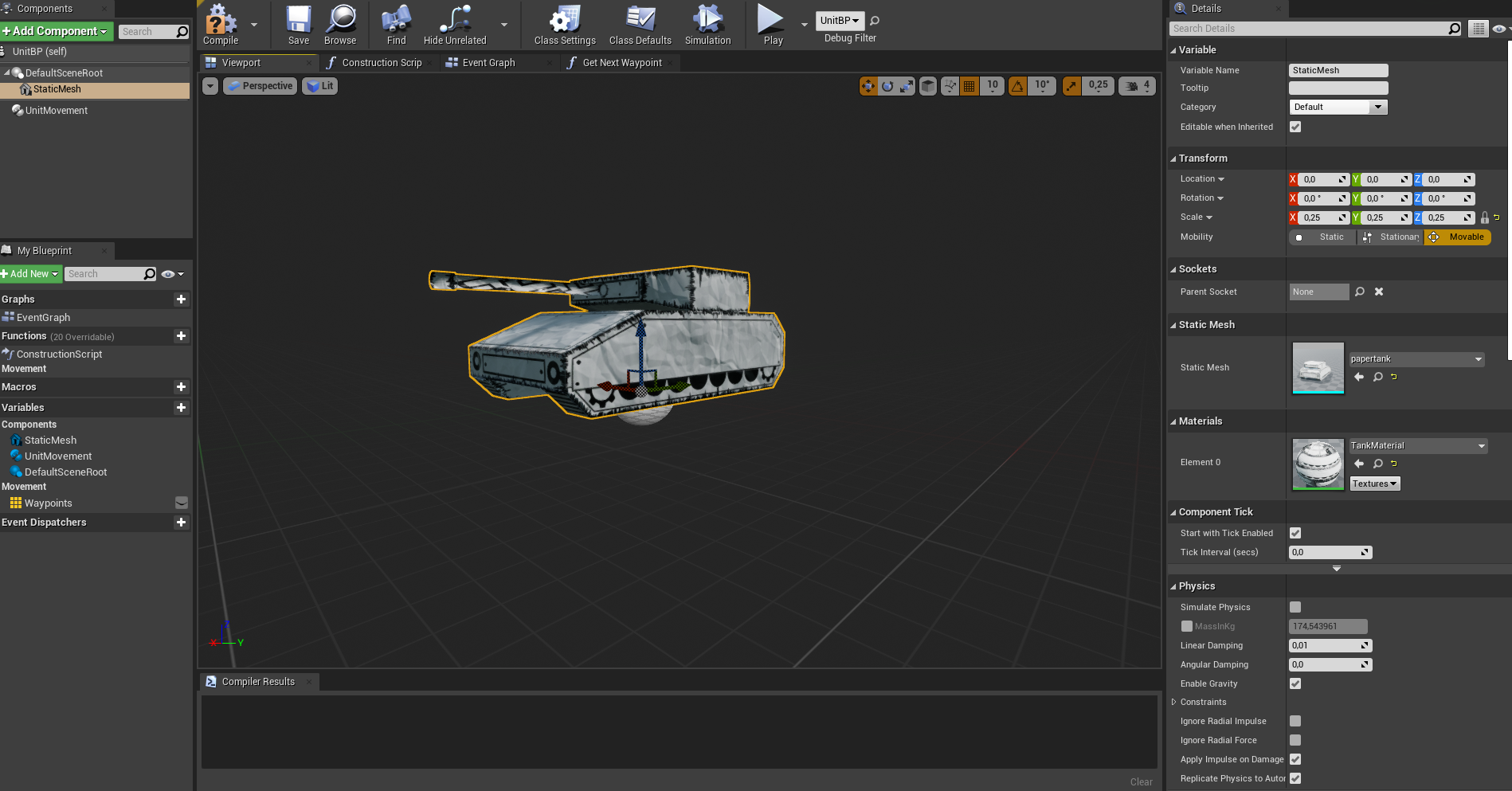
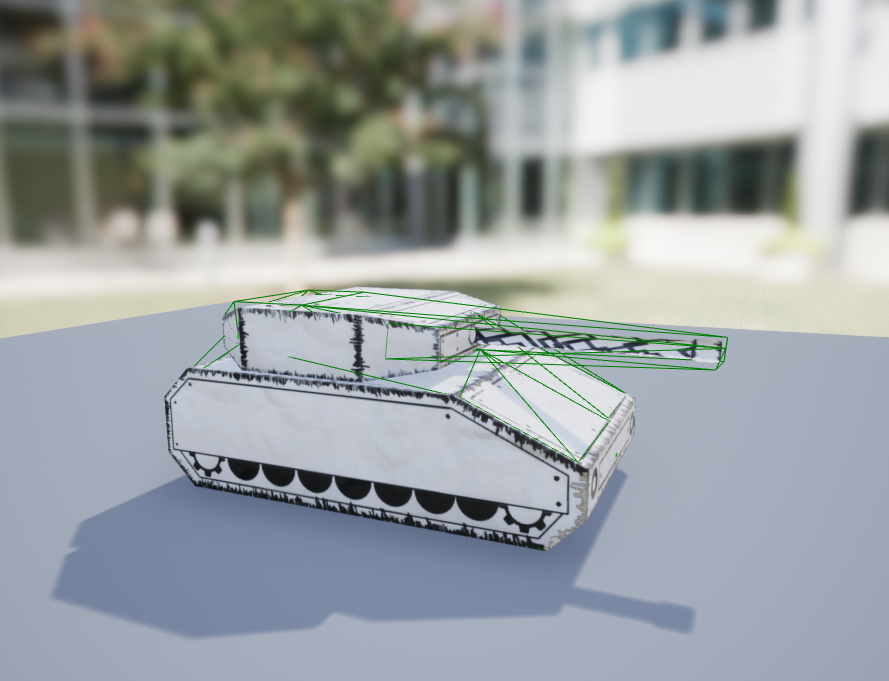
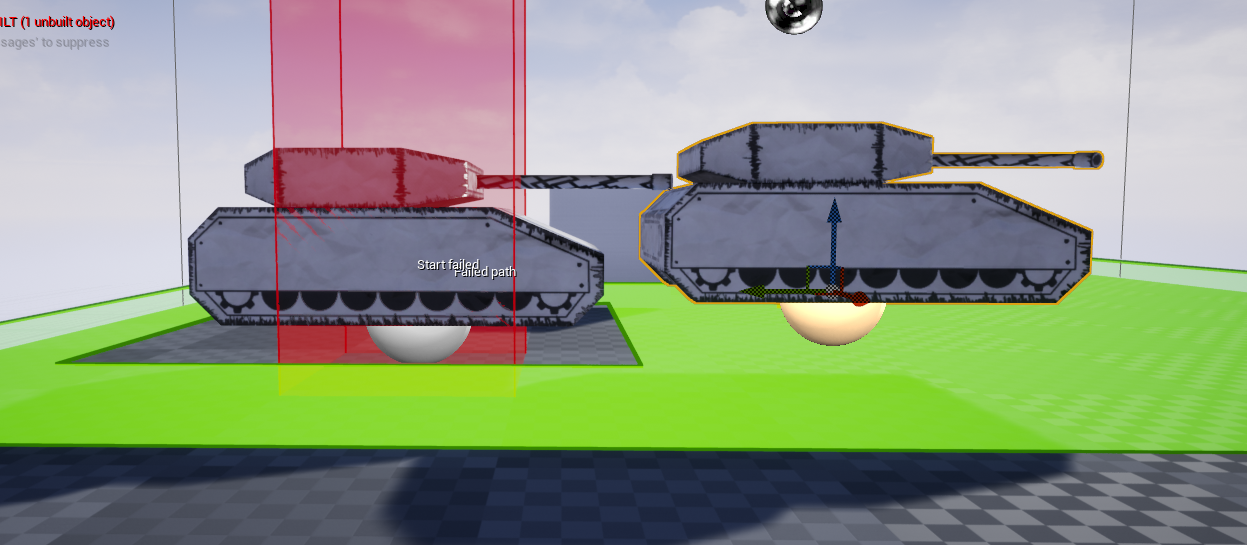
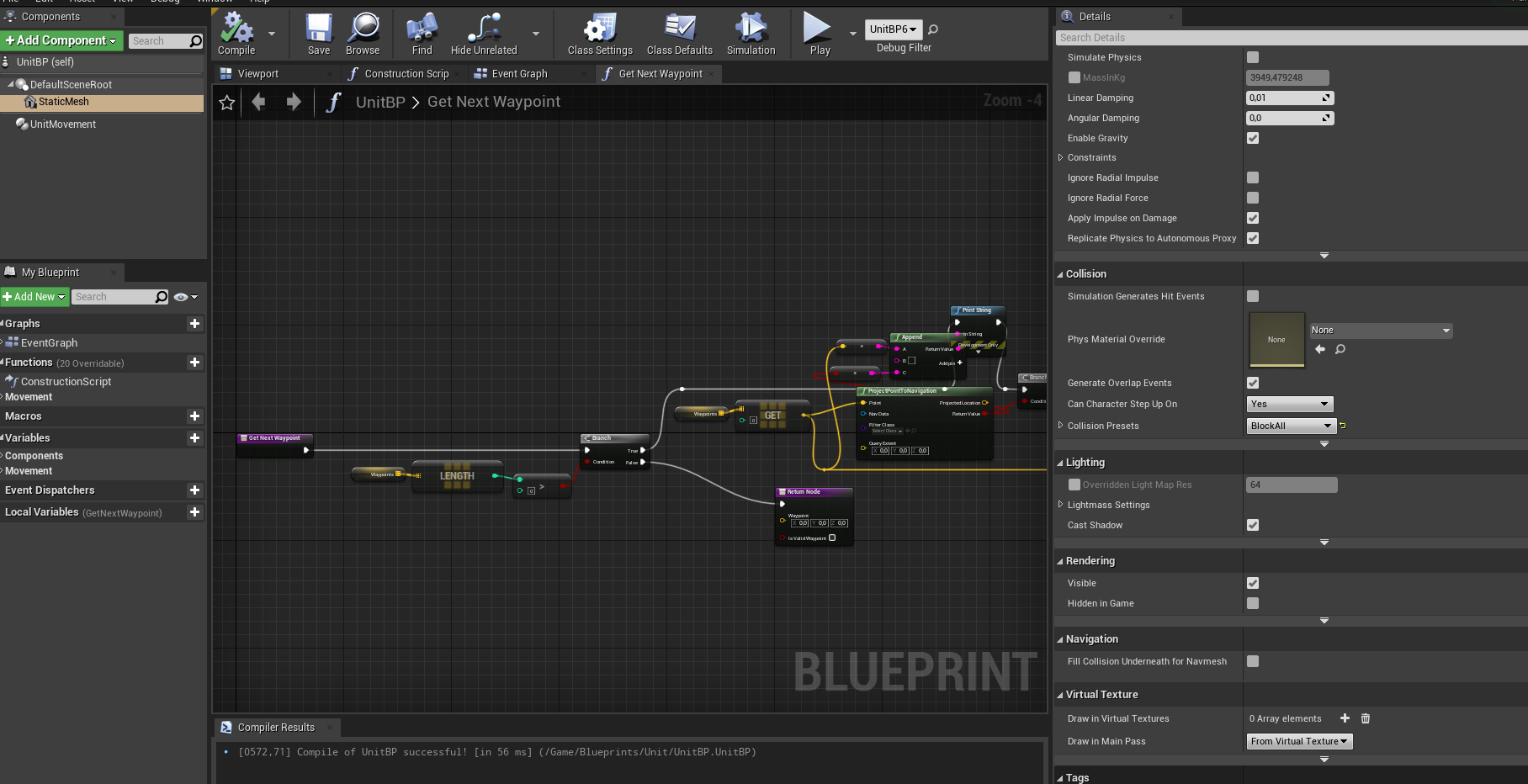
 midnight wren
No, I downloaded the blueprints from github
midnight wren
midnight wren
No, I downloaded the blueprints from github
can someone pls help
 runic fern
Hello Guys any good idea for wall painting in runtime something cheap
 magic lantern
I have a question. can I categorize the spline points like
spline points group 1
Spline points group 2
Than i want to get referance of the nearest spline point group. Can I do this
 remote bramble
merry bison
If my game is going to look something like this: https://imgur.com/a/Xn5DWNL ---...
remote bramble
merry bison
If my game is going to look something like this: https://imgur.com/a/Xn5DWNL ---...
looks cool but the brackets kinda ruin it
drowsy snow
merry bison
If my game is going to look something like this: https://imgur.com/a/Xn5DWNL ---...
The brackets are redundant, as it's not a Japanese toolbar texts.
Also try making the text more readable in smaller screen/large viewing distance.
 blissful wharf
is there a console command for showing collisions, but hiding graphics? it seems like the showed collision grid isn't really visible on my mesh
merry bison
@drowsy snow @remote bramble Thanks for the feedback. Since I posted that image I removed the brackets and created buttons beneath the text, so it's more readable now. But, question remains, besides from being able to click the buttons - should I also implement key input (hence the brackets) with F1-Fxx, like this or remove it completely and go mouse clicks only?
 blissful wharf
ah found a command "pxvis collision"
merry bison
Isn't this the way to remove a main menu widget, and open a game level?
The only thing working is that the mouse cursor disappears, which it should. But the main menu doesn't go away and the game level doesn't load up.

 warped wasp
General question, should I use blender to make my race track, or should I use unreal
The reason I'm asking is because I'm just gonna be making a typical racetrack that's a bit bumpy
But otherwise will be relatively flat
drowsy snow
merry bison
<@!325627930484932608> <@!464502614474883093> Thanks for the feedback. Since I p...
The starting game with function keys reminds me of Amiga games lol
merry bison
drowsy snow
The starting game with function keys reminds me of Amiga games lol
lol maybe that's where they come from and the reason why I insist on having them. I played a lot of Amiga games 🙂
Okay, I'll remove them completely, I think.
rigid belfry
merry bison
Isn't this the way to remove a main menu widget, and open a game level?
The onl...
iirc, after you remove a widget from parent, it wont run any more code.
btw while its fine, i dont think having code inside widget is good programming practice
merry bison
oh, you're right - the code is in the widget itself
rigid belfry
inside your widget, create a gamemoderef, set it to instance editable and exposed on spawn. from the gamemode(where the widget should be created) set that newly created ref to self. then inside the widget, on button clicked->from gamemodeRef-> run logic
that way you dont even have to cast to anything
merry bison
rigid belfry
inside your widget, create a gamemoderef, set it to instance editable and expose...
let me digest this thing you said - i've only been using UE for a week 🙂
rigid belfry
- from widget->add new variable named GameModeRef->set variable to instance editable and exposed on spawn.
- when you create widget(which should be inside a MainMenuGameMode) you will see a new pin which is the variable you created. plug a reference to "self" to that pin.
- now your Widget has a valid reference to the gamemode without the need of casting.
- your MainMenuGameMode should drive all logic. open levels, change settings, use shop etc. you dont want any real logic inside widgets, since its not good programming practice
i think its pretty straightforward. let me you if you still dont get it
merry bison
One question, I already have a GameMode. Do you mean that I should create a new one or can I use the existing?
rigid belfry
merry bison
One question, I already have a GameMode. Do you mean that I should create a new ...
every level can have a different game mode. you should have a MainMenuLevel, where you have a MainMenuGameMode
merry bison
rigid belfry
every level can have a different game mode. you should have a MainMenuLevel, whe...
I see
rigid belfry
and the gameMode has a custom even that opens a new level, where another gamemode exists.
merry bison
rigid belfry
and the gameMode has a custom even that opens a new level, where another gamemod...
Okay, I'll go rebuild and re-order stuff.
merry bison
rigid belfry
and the gameMode has a custom even that opens a new level, where another gamemod...
and the GameModeReference variable should have the MainMenuGameMode as variable type. Have I understood you correctly?
rigid belfry
yes
merry bison
cool, thanks
 weak sorrel
Guys I'm wondering how would you maintain an Unreal Engine 4 game that's both on mobile and Desktop ? Would you make a copy of the mobile project and make it better for PC ? Is there a way to say things like "On PC use this material and this texture here, this water there, and on mobile you do this this and this instead...."
on my game lightnings are really different between Desktop and Android renderer on one level
merry bison
A question @rigid belfry - I'm a bit stuck. How would I use the reference which was created in the widget, here in the game mode?
 rigid belfry
merry bison
A question <@!386223315146244097> - I'm a bit stuck. How would I use the referen...
drowsy snow
weak sorrel
Guys I'm wondering how would you maintain an Unreal Engine 4 game that's both on...
rigid belfry
merry bison
A question <@!386223315146244097> - I'm a bit stuck. How would I use the referen...
drowsy snow
weak sorrel
Guys I'm wondering how would you maintain an Unreal Engine 4 game that's both on...
Device Profiles and Feature Level Switch Material node exists for this very reason, so that devs don't need separate project for mobile port and vice versa.
 midnight wren
rigid belfry
you can copy and paste the code
midnight wren
rigid belfry
you can copy and paste the code
its not code I downloaded from github
There is this video with on how to do wallrunning with blueprints, and there is the source code in the description, which is a link that leads to the github code. I downloaded that
so I'm asking how I can put that downloaded file into ue4
drowsy snow
midnight wren
its not code I downloaded from github
There is this video with on how to do wall...
Copy paste it inside your Content folder
rigid belfry
in what format is it
drowsy snow
Although be wary that you have to copy the folder after the Content, not the .uasset file itself. Otherwise you may get into reference error hell.
knotty heron
How do you disable depth test on a sprite?
merry bison
it's insane how many times UE bugs with the menus stuttering, have to restart it countless times each day
 rotund jacinth
Does anyone else regularly see lighting bugs with loading levels? This is simply loading a level multiple times. The missing reflections used to be the most common issue but lately this overbright indirect has been a frequent thing as well:
 merry bison
rigid belfry
merry bison
rigid belfry
Thanks Righy. I've created new BP's, moved and re-ordered much of the code so now the project is kinda broken in many places.
The project shows the main menu at start but there's no mouse cursor in the menu, so can't test the changes. Got to fiddle around a bit..
 mild phoenix
Hello who can help I have an error after packaging Unable to find the Target 'UE4Game'
drowsy snow
mild phoenix
Hello who can help I have an error after packaging Unable to find the Target 'UE...
I assume you build the engine from source?
mild phoenix
No
weak sorrel
Thanks Mr Hoodie Guy gonna look after those nodes
mild phoenix
It's from Epic not compiled
weak sorrel
Nice Mathew got me back with some videos on the subject again
rigid belfry
merry bison
Thanks Righy. I've created new BP's, moved and re-ordered much of the code so no...
forgot to add the widget to the viewport