#ue4-general
1 messages · Page 934 of 1
 wanton lotus
Ah, ok
 wary wave
wait
 versed forge
i clicked the wrong button
wary wave
I think I know what you've been doing
wanton lotus
Well, you need to edit the parent of that blueprint.
versed forge
and now it is like this
wary wave
you've been trying to create a blueprint actor from a selection of actors in the viewport
versed forge

In this video we approach creating a new Blueprint Class through alternate work flows. We start by adding an Empty Actor to our level which we then populate with Components and then turn it into a new Blueprint Class. We also take our little room and light setup and convert those Actors into a new Blueprint Class which we then place inside a new...
yes
wanton lotus
All of those can't be changed in that child blueprint, since it "inherits" those from its parent class.
wary wave
ditch the entire generated blueprint
 leaden dust
Just a general question, for making this kind of inventory, should I use a canvas panel or a grid panel?
versed forge
what should i do
leaden dust
for the On-Drop operation
versed forge
@wary wave shall i delete the whole blueprint?
wary wave
you did this:
wary wave
versed forge
<@!99264143659401216> shall i delete the whole blueprint?
yes
you chose "child actors"
you want "harvest components"
versed forge
oh but can i re fix it
 worthy plaza
There is a way for know how meter is tall/large an asset?
wary wave
but in any case this is a terrible, unreliable workflow and most people don't even know this thing exists, hehe
versed forge
oh
wary wave
I build my blueprint actors entirely in the blueprint editor
manually adding the components
wanton lotus
wary wave
you did this:
That is cool, didn't even know this existed. Being a programmer I never do stuff like that since I rarely work in the level editor.
wary wave
yeah, delete that blueprint it generated, then go through the process again and make sure you choose "harvest components"
wary wave
wanton lotus
That is cool, didn't even know this existed. Being a programmer I never do stuff...
it has some uses, but for the most part it's just awkward and you have to dick about with the BP it generates to get the component hierarchy sorted etc
assuming it even successfully gives you the component you need
none of which will have names, of course
wanton lotus
Seems like it is more for the artist, to help them add functionality to their creations.
 rancid lynx
Thankyou, but what if i want to display the collision during GAMEPLAY, in the live final build sold on steam. not in editor mode. is that also possible?
wary wave
no
 plush yew
leaden dust
for the On-Drop operation
plush yew
leaden dust
for the On-Drop operation
The grid panel is a child of canvas panel. Use grid panel. You can have tiles of different sizes in the same grid panel as well. More specific questions perhaps #umg
wanton lotus
worthy plaza
There is a way for know how meter is tall/large an asset?
UE4 measures everything in CM. So, 100 units would be 1 meter.
wanton lotus
worthy plaza
this is high 2,5 meter?
Depends if its original scale was 100cm tall.
You using the 1m cube? Then, yes.
rancid lynx
is there a way to display the collision from "STATIC MESH" during live gameplay on the final product? during game mode, i want to hide the static mesh and only display the collision of some items. I dont want to double box collisions just to fake it.
 tiny ginkgo
I am looking to do something like this in Unreal and was wondering if anyone can help me? I have a media texture on a UI and I would like to display models in front of it like the developers have done here. I understand it may have something to do with render depth? I am new to unreal so I am not sure where to start!
 tender pecan
@rancid lynx no, not in prod build. you will have to make geometry that will go through the render pipeline and set materials and shaders on it to render
rancid lynx
what about wireframe mode? also no ? X_x
rancid lynx
thank ya
i wasnt seeing the option either X_x
my game scales meshes during gameplay, but the mesh can obstuct views, so a wireframe would be great. especially considering its already in game X_x. ATM i use holographic , well, semi opaque mat swaps. but I noticed how nice and clean the collision mes looked, and really wanted that instead X_x
UE4 is full of candy. guess im just asking for too many cakes ^ ^
but seriously , a default OFF on "show comment bubbles" isnt too much to ask X_x
rancid lynx
when my player pawn walks off a 50cm stair, he instantly travels 50-z. anyone know how to use regular gravity while walking off a ledge, instead of warp to next floor?
plush yew
Should I create a hard topdown shooter 3d game?
worthy plaza
And the geometry box how much is large/high? 1x1x1? can't find on internet
rancid lynx
I would never play it. but there are people who would. but technically, you will learn something, so technically, you should.
i enjoyed a few for a little whlie , while i was younger though.
plush yew
worthy plaza
And the geometry box how much is large/high? 1x1x1? can't find on internet
Ehh me?
worthy plaza
you?
plush yew
Is that a yes?
worthy plaza
Idk, is a question ahah
plush yew
worthy plaza
Idk, is a question ahah
Oh ok
worthy plaza
So it's 1x1x1?
plush yew
Which one?
worthy plaza
geometry box
plush yew
No
leaden dust
This is a grid panel on top of an image of a grid
Is it possible to move the image up and down the grid without adding more elements
Because if I do not add any placeholder images to this the arrows do nothing
I guess I should just patch together a grid box myself because this doesn't seem to work in my case
 honest lily
guys do you know why doesnt the water cover this green thing?
i dont know why it does that
(im using the water plugin btw)
well i put the default wave asset
but it goes inside the island
 chrome mural
Hi,
I would like to rig a character in Blender and exported in UE4. I am planning to use some animations from Epic, so I need this rig to be compatible with UE4. So far I know Uefy and Mr Mannequins tools. Which one do you recommend?
 odd fractal
Hi
When I import my assets again (or reimport) should I re-add them to World Outliner?
 silver cypress
Hi, Im new in UE and Im wondering why light goes through the geo in UE. Is there a turtorial on this?
Thanks
 crimson jungle
Any one knows?
odd fractal
I need some answer too...
rancid lynx
when i walk off this yellow collision box, i teleport directly to the floor below instantly. how can i disable that trash? if i jump gravity works normally, if i walk off, i telliport down the stair, no matter how short or tall.
if checked all the physic and fall options i can find in the player pawn movement controls and capsules in the actor
i want gravity to take over when i walk off a box. not a 50cm teleport.
 lucid grove
Heya, how can i save changes that i made in viewport in editor?
 sonic cliff
Hi Everyone! I have an issue that i am struggling maybe someone could help me please.
Hi everyone! could somebody help me with an issue about control rig? I am following this video to put an additive control rig to my mocap animation and i can't find the additive control rig bp. How i can get acces to it? ive installed the plugin and it doesnt appear like in that video https://www.youtube.com/watch?v=SIp4vFoU_d8

Control Rig is a scriptable rigging system that is based on Blueprint and is mainly designed for controlling properties to drive animation. This week on Inside Unreal Helge and Jeremiah will break down the Mannequin Control Rig example from the Marketplace, show how to use Control Rig with Sequencer to animate a character, give tips on how to de...
This is how appear in the UE webinar
and this is how shows to me
So its completely different i dont know whats wrong but it doesnt work
 stark marsh
i messed up world grid material somehow
how do i get it back to normal
it has some dots now
 thick herald
In the launcher for your engine version click the little arrow, pick verify.
plush yew
how can i make unchild
 weak forge
So I am attaching an actor to another actor via a valid socket and for some reason when it goes to attach the weapon goes to the origin of the scene. Any tips on how to diagnosis this?
stark marsh
help in 4.26 when i build the game the water literally moves places
in has moved downwards
why doesnt it stay in the same place as it is in the editor
 unique rock
quick question, im very very new to unreal engine, and im trying to make a first person shooter, i want to change the texture of the bullet, and i have one, but its .c4d file, i was wondering if anyone knows how to convert a .c4d file to a .uasset file, the only things i can find online are the opposite of that
 flat dirge
c4d files are cinema4d project files aren't they? you'd have to open it up in c4d and export fbx or obj or whatever
unique rock
ok thanks
 exotic thicket
https://docs.unrealengine.com/en-US/WorkingWithContent/Importing/Datasmith/SoftwareInteropGuides/Cinema4D/index.html how about this? This was literally the first result on google for "ue4 import c4d" lol
Describes special considerations that apply only when you use Datasmith to bring scenes from Maxon Cinema 4D into the Unreal Editor.
unique rock
oh guess i didnt google the right thing, thanks
flat dirge
huh, didn't know ue could import those lol
exotic thicket
yeah depending on things it might be easier to just export it as fbx or whatever :) but at least that's an option
unique rock
thanks, im very new to this
flat dirge
anyone know how i'd go about making a mask texture that has more than 4 options?
unique rock
not me sadly
flat dirge
i know the rgba method, but i need more than just 4 areas
sadly i'm having no luck feeding google the right words to find an answer
exotic thicket
I'm not sure if you can do it with one but maybe you can combine two masks
this way you'd get 8
#graphics might know better
flat dirge
yeah i'd rather not go making more images, specially when in this particular instance i only need 5 lol
i'll likely need more than 5 in future, but if i need 5 or 9 a whole extra image for a single area seems like a waste
plush yew
How to i create a teleporter?
rancid lynx
how do I reset a timer ? do i have to create a new one ? or can i clear it ? would that reset it to 1 ? it doesnt seem to be working
plush yew
rancid lynx
how do I reset a timer ? do i have to create a new one ? or can i clear it ? wo...
You need to create a pawn and name it "Bp_Timer"
Then uhh
wait ima search for the tutorial again
rancid lynx
pawn? a variable? a handle ? ok ty.
plush yew

We create a widget, and user blueprints on the game mode to create a timer. Direct to the point.
This is a very watered down version of the Unreal tutorial series, and it is more of a way for myself how to do this, then for anyone else. If however you would love to see more tutorials like this, then let me know.
+++++++++++++++++++
Donate -...
rancid lynx
you mean like an entire new actor ?
rancid lynx
ty im watching it now. no way im creating additional actors just for a timer X_x
plush yew
rancid lynx
ty im watching it now. no way im creating additional actors just for a timer X_...
I think it includes
lucid grove
Heya, im looking for solution about modular stuff and saving changes from runtime to editor
The one i have now is save var and load it in construction set
plush yew
Nice
lucid grove
But the problem is that i have to refresh actor to fire construction set
inside editor
How can i avoid that and fire up var that vas changed in editor?
 errant spire
Hi everyone! I was wondering if there is any way to set up an occlusion zone for exponential height fog?
Specifically trying to do this for interiors of buildings
thick herald
No easy way, unfortunately
errant spire
Gotcha, I was reading something about maybe using a translucent material?
 light thunder
You'd have to make some blueprint that takes in the distance of the player to whatever you determine and it can use that number to drive the opacity of the height fog
errant spire
Thank you!! Seems like an extremely manageable solution
plush yew
plush yew
How to i create a teleporter?
Anyone gonna mind this?
 eternal osprey
Hi!
I'm new to UE4. Do you know where I can change the pan speed in the graph editor?
(I already switched the panning mouse button to middle)
 gentle sage
yo, is there a help channel for unreal here?
plush yew
gentle sage
yo, is there a help channel for unreal here?
Your here
gentle sage
sweet
thick herald
light thunder
You'd have to make some blueprint that takes in the distance of the player to wh...
Unless the fog also has to be visible from windows etc, then it gets complicated
errant spire
thick herald
Unless the fog also has to be visible from windows etc, then it gets complicated
I considered that too, but I think I'll settle with this for now. I was really hoping for something as simple as implementing an occlusion zone
thick herald
Yeah, that would be a great thing to have but alas we don't
light thunder
thick herald
Unless the fog also has to be visible from windows etc, then it gets complicated
No, you just have two fogs, and switch their visibility when you are inside or not, but I get your point, it's definitely not a straight forward thing
thick herald
exponential height fog covers the entire level though, that's the issue
errant spire
light thunder
No, you just have two fogs, and switch their visibility when you are inside or n...
Okay okay, so maybe I could have fogs within the actor blueprint, that turn "on" when you enter the interior, while the level opacity is set to 0
thick herald
You could create a basic cube and use a volumetic material on it. So the edge wouldn't go inside the buildings, but that's far more expensive
errant spire
Hmmmm maybe particle systems then?
 true falcon
Anyone know how you see actual assets on Epics github? Per default only code assets are visible it seems
thick herald
errant spire
Hmmmm maybe particle systems then?
even more expensive
Limit what your windows and doors see of the outside, maybe use fog cards while inside
plush yew
Please help. I tried this Blueprint from the internet it didnt work.
stark marsh
im trying to create a level where their will be puzzles based around water
true falcon
↑ Every question in a nutshell 😄
stark marsh
and you will be able to rise and lower the water level, and i've done this by a physics volume and the new water feature
true falcon
plush yew
Please help. I tried this Blueprint from the internet it didnt work.
You havent connected the timeline node
errant spire
thick herald
Limit what your windows and doors see of the outside, maybe use fog cards while ...
Thank you!
true falcon
oh wait, you have, sorry
 gloomy ginkgo
plush yew
Please help. I tried this Blueprint from the internet it didnt work.
gloomy ginkgo
plush yew
Please help. I tried this Blueprint from the internet it didnt work.
"other actor" is an actor object renfrence
stark marsh
im set a level sequence to control the physics volume and the water mesh to go upwards, but my character isnt affected by the physics volume until i move
gloomy ginkgo
u are comparing to the player controller
stark marsh
so if i press a button to to raise the water level but stand still and don't press any keys my player stands in place instead of floating to the top? how do i fix this
and also when i package the game the actual "WaterBodyCustom" changes places, and not by any code telling it to, it has just moved for no reason
gloomy ginkgo
stark marsh
so if i press a button to to raise the water level but stand still and don't pre...
try adding movement input like "0.01" or smth like that
light thunder
errant spire
Okay okay, so maybe I could have fogs within the actor blueprint, that turn "on"...
yes, it is not that hard to do once you figure out how to access the fog's parameters in blueprint - I used it once to make the visibility change in a smokefilled room based on the player's height in the room relative to the room itself - when they ducked down, the heightfog was dialed down a bunch and they could see again
gloomy ginkgo
gloomy ginkgo
try adding movement input like "0.01" or smth like that
when u raise the water
true falcon
It's a bit weird that it lets you compare different types, but I guess its polymorphism and controller is an UObject or something
gloomy ginkgo
plush yew
Please help. I tried this Blueprint from the internet it didnt work.
this one u mean?
 spare kernel
@plush yew why are you using a timeline?
seems a waste of resources, just use a timer, set it on overlap, clear it on exit overlap
or use pause/resume if timer exists
sonic cliff
Hi! Please could you tell me where to find and apply the additive control rig to the ue mannequin like here?
This is how it shows to me
stark marsh
its not working properly still
i just want to not have to press anything and my character to react to the water levels rising
 stray tangle
Hello does anyone have an idea on how to integrate als v4 with close combat swordsman?
light thunder
What's the trick to getting all 4 cameras to be in the same lighting mode and actually visible - when i make them lit, it turns blue like in the upperleft corner - brushed wireframe is impossible to see and I don't want to hide all my geometry - I just want to zoom in around different cameras while I'm positioning certain objects without going back and forth or panning around in perspective -
light thunder
Also, anyone else find it incredibly unfair that hitting SAVE can causes a crash, thereby losing unsaved work (unless autosave snagged it)
plush yew
hello noob question. i switched to DX12 but im getting freezes with movie render queue after rendering 30 or more frames. planing to switching to DX11. does it reduce the rendering and graphic quality ?
in landscape actor: what means "Max Lod Level" and -1?
plush yew
and when i package my project for windows 64bit i get the error: RROR: Missing object file C:\Program Files\Epic Games\UE_4.26\Engine\Intermediate\Build\Win64\UE4\Shipping\Renderer\Module.Renderer.1_of_16.cpp.obj listed in C:\Program Files\Epic Games\UE_4.26\Engine\Intermediate\Build\Win64\UE4\Shipping\Renderer\Renderer.precompiled
someone knows what might be the problem?
 worldly lynx
how can change image of as example button A when i clicked on Button B? need set image or something else? i dont see anything , help
i want change image of buttons after click on it with blueprint
 grim ore
you would set the brush of the image to change it
if you want to change other brushes you would keep track of them all and then change them as needed
so in your case a function that might take in the current widget you want to "make active" and it would go thru all of your widget icons, probably in an array, and tell them each to be not active if not the one you wanted and active for the one you want
 muted imp
Hi guys so I'm trying to make a game like mirrors edge but I don't know how to have certain animations play when I'm sprinting or jumping or wall running. In mirrors edge, there are first person arm animations for different movements. How can I assign an animation to play when I press SHIFT for example?
unique rock
muted imp
Hi guys so I'm trying to make a game like mirrors edge but I don't know how to h...
https://www.youtube.com/watch?v=zQrNQtfNOHc&list=PLZlv_N0_O1gZS5HylO_368myr-Kg2ZLwb&index=16 i found this video on a wiki, i hope it helps

This video covers the Animation Montage asset, how it works, and how it can be used for special case animations.
A link to the wiki for further notes is available here -
https://wiki.unrealengine.com/Blueprint_3rd_Person_Game_Creation_Tutorials:_Intro_to_Animation_Montage_in_Unreal_Engine_4
muted imp
thank you I appreciate it
unique rock
You're very welcome
muted imp
why can't I drag in a reference to my levelsequence into my level bp?
 viral garden
I'm having an issue with reflections
 marsh sparrow
hi.. anyone know how to make the standalone editor game play option have a bigger window when it starts up?
unique rock
muted imp
why can't I drag in a reference to my levelsequence into my level bp?
unfortunately that i have no idea about, im very new to unreal engine so i apologize
muted imp
@unique rock its cool thanks
viral garden
if i put box or sphere reflection capture on the front windows and then another on the terrace, then i see the terrace reflection on the front windows
I use forward rendering, and i don't think i had this issue before enabling forward rendering
As you can see, we can see the path on the windows even though the path is in the garden
How can i fix this please?
worldly lynx
grim ore
you would set the brush of the image to change it
i just use set brush and it solved my problem, thank you
plush yew
https://docs.unrealengine.com/latest/INT/Engine/UI/LevelEditor/Viewports/ViewModes/index.html does anyone have a working link for this?
marsh sparrow
How does one figure out what is causing this ```Unhandled Exception: EXCEPTION_ACCESS_VIOLATION writing address 0x000000000000022d
UE4Editor_UMG
UE4Editor_UMG
UE4Editor_UMG
UE4Editor_UMG
UE4Editor_UMG
UE4Editor_UMG
UE4Editor_CoreUObject
UE4Editor_CoreUObject
UE4Editor_CoreUObject
UE4Editor_CoreUObject
UE4Editor_CoreUObject
UE4Editor_CoreUObject
UE4Editor_CoreUObject
UE4Editor_CoreUObject
UE4Editor_CoreUObject
UE4Editor_CoreUObject
UE4Editor_CoreUObject
UE4Editor_Engine
UE4Editor_Engine
UE4Editor_Engine
UE4Editor_Engine
UE4Editor_Engine
UE4Editor_Engine
UE4Editor_Engine
UE4Editor_Engine
UE4Editor_Engine
UE4Editor_Engine
UE4Editor
UE4Editor
UE4Editor
UE4Editor
UE4Editor
kernel32
ntdll```
crashes when I try to start the game.. not hitting any debug points I have in cpp
 kindred viper
can you pastebin a log?
kindred viper
the log that is in saved/logs
light thunder
getting real tired of your shit, Editor - anyone got a fix for this?
marsh sparrow
@kindred viper https://pastebin.com/3FS76ePw
Pastebin
Pastebin.com is the number one paste tool since 2002. Pastebin is a website where you can store text online for a set period of time.
 vagrant pagoda
Have a skeleton mesh and want to break apart at crash in collision. What's the best method. Link or suggestions. Don't want to use Chaos or Apex. Cheers
kindred viper
@marsh sparrow you have an array access issue, which is presumably setting up some water project stuff. Without it I guess it's crashing. I would check the references it mentions
marsh sparrow
hmm.. thats always been there
stark marsh
i want to make a level based around water where the water level can be raised and lowered to access differant parts of the map, but i've tried using a level sequence sequence to move the water and the physic volume upwards/downwards but the player character isn't affected by it moving until their is input
kindred viper
oh really? Thats odd
marsh sparrow
yeah.. some wave pack i put in
needs cleaning up
recently.. I added a new hud widget
doesn't even get to that breakpoint
lol
or that one
kindred viper
[2021.02.05-19.48.39:317][284]LogTemp: Warning: Broadcast New Quest Name this is the last line of the log then all error checking ends, so there is no fatal error /exception in the log itself
stark marsh
it's strange what happens
marsh sparrow
kindred viper
[2021.02.05-19.48.39:317][284]LogTemp: Warning: Broadcast New Quest Name this ...
K let me track that down
thats been there a while too
stark marsh
say if i press the button to raise the water but don't do any movement input i stay still, i don't float to the top of the water, but stay on the ground as if there was no water at all
marsh sparrow
works here...
kindred viper
the next best thing to do is make sure you have debug symbols installed and crash it with the debugger, then you can see exactly where it's crashing
it will show the full stack in VS then
marsh sparrow
yeah.. i hit new game.. and it fails loading the next map
UE4Editor_UMG
UE4Editor_UMG
UE4Editor_UMG
UE4Editor_UMG
UE4Editor_UMG
UE4Editor_UMG
UE4Editor_CoreUObject
UE4Editor_CoreUObject
UE4Editor_CoreUObject
UE4Editor_CoreUObject
UE4Editor_CoreUObject
UE4Editor_CoreUObject```usually.. its a missing pointer or null somewhere
im using rider
been looking all over
kindred viper
seems to be telling us it's UMG so perhaps a corrupt widget? Or a bad reference on construct of the map?
but it's just too hard to tell without a bit more info.
kindred viper
this is why debug symbols are 100% vital for code dev in UE4.
 gaunt abyss
this^ and look at the callstack, see where the crash is coming from
kindred viper
debug mode is like a light version. The debug symbols hold a compiled database of your data structure so you can read them in memory to see the values. It also helps the debugger catch errors and display an appropriate break routine to see it before the program ends
marsh sparrow
sweet.. where do you get those
because i thought debug mode was debug mode
apariently im trying to save calories by not having the write drink
light thunder
Is there anyway this color change is NOT LOD related?
kindred viper
@marsh sparrow looks like you can get them from the launcher now
marsh sparrow
well..
I removed the whole add widget to viewport for that new widget.. and it works.
hmmm
kindred viper
tada
kindred viper
makes sense 😄
marsh sparrow
ha yeah.. sometimes doing too much logic in bp freaks my head out
whoa.. what is 4.26-chaos
kindred viper
widgets I keep to UMG always. No reason to make them in C++ unless specifics are required
marsh sparrow
is that like canary 4.26
kindred viper
it's the engine with Chaos Physics built in
marsh sparrow
ah
yeah.. well I needed to build a typewriter function
but.. plenty of people do this.. so it should work
kindred viper
its possible, but UMG is kind of rooted in blueprints really
marsh sparrow
okay you said i can get the debug stuff in the launcher?
kindred viper
Slate is best for C++
light thunder
it does - I guess I don't know enough about materials - I thought LODs shifting but obviously it affects this - I had dead leaves as a texture for my base color and I got the green color by multiplying - thought I was done and clever but then I noticed the distance - it's like the instance just turns off the base color tint I'm using when I get a certain distance away - why is that?
grim ore
so something like this @marsh sparrow ? https://youtu.be/XolvdHmo2q0?t=27
marsh sparrow
hahaha yeah
I guess I share your stuff to other people enough I should probably know more about all your videos
well.. it seems like I need to just delete some things and go watch that video LOL
grim ore
are you sure its not the self shadowing?
light thunder
no, it was the color - i'm not sure why but I just changed the actual colorization of the TGA and that fixed it
grim ore
oh weird
light thunder
I thought so too
I thought just doing a multiply on the base color would be clever and efficient
had no reason distance would affect it, when it did, figured there was an LOD that I hadn't changed the material instance on, nope, only a single base LOD on the mesh
marsh sparrow
okay.. so I think I should have something that works.. but.. still no worki
{
    OnTriggerHUDToStoryMode.Broadcast(Stories);
}
that gets called.. its in my subsystem
Here is the bind to that event.. but it never triggers
i think something is weird with the event binding maybe
light thunder
then just make a brute force begin play event that binds it to test it out
marsh sparrow
begin play doesn't exist on widgets?
going to bounce for a bit.. thanks for the help
grim ore
it doesnt its on construct
grim ore
no just saying for a widget its not begin play, its construct
marsh sparrow
ah k
are you able to bind to subsystem events from a widget?
I'm at least trying to do something you should be able to do right?
light thunder
@grim ore if you destroy a static mesh during play, what happens to its LOD actor?
Does it remain?
Is there an "IsInsideOfMe" function? Because overlapping is too goddamn simple to actually work
Here's my issue- I have an incident command simulator for Public Safety - you show up on scene and have to command some disasters - my level setup is that I have various AREA levels that are the "intact" city, then I have scenarios that are sublevels where I will swap in static meshes that are destroyed, spawn particle effects, etc - it works fine but I'm running into one snag - MY HLOD ACTORS ARE STILL THERE even though I have toggle visibility on the mesh that they are apart of. Since HLODS are a super big goddamn secret that everyone at Epic guards like it's their resume armor, I have to guess at how to deal with them -
**I want to get the HLOD actors inside of a volume and destroy them. ** But since they don't have collision, I can't use overlap events to detect them. (I'm assuming they don't have collision) - I can do a brute force and just get all HLOD actors and destroy them but I'm close -
How do I get the locations of these actors and compare them to the box extent of a volume? Then I could use a quick vector comparison and if it falls within range, delete it. And yes, I'm still pissed about the lack of in depth HLOD references
I'm just not sure how to get the range between those points
 subtle bramble
Could someone help me please, I made a wall in blender and then exported it as fbx but some of the faces are one ways and I flipped them and it didnt fix it
light thunder
subtle bramble
Could someone help me please, I made a wall in blender and then exported it as f...
apply your transforms - I just had the same problem earlier this morning
subtle bramble
wdym
light thunder
otherwise show me a screenshot of your face orientation - make sure they are blue
subtle bramble
I dont think I have any
light thunder
hit CTRL A and trust me
subtle bramble
so I turned on face direction and it made the faces red and blue, how do I flip the wall because I can rotate it but it makes the shape weird because its filled from vertices
also I applied them so ill export after this
light thunder
Shift_N and flip the normals or recalculate outside - you want the outside facing blue, but you should really head to the Blender help channel, it's a godsend
@plush yew @grim ore so in the magical world of HLOD's, apparently, they all have the same world position of 0,0,0, inexplicably
fuck this undocumented system
subtle bramble
light thunder
Shift_N and flip the normals or recalculate outside - you want the outside facin...
I didnt see that channel, thanks
subtle bramble
light thunder
Shift_N and flip the normals or recalculate outside - you want the outside facin...
where is the blender help channel?
 static wharf
I keep getting this when I build lighting, my editor is completly locked up and it wont go away
Just as I ask for help it fixed itself
It was stuck for 20 minutes
sigh
subtle bramble
thanks
 clear patrol
is there a way to do animation like SFM where you can like control your player and start recording your the player's actions?
grim ore
You can look into the sequencer take recorder
clear patrol
wdym "take recorder", I know what the sequencer is
grim ore
I mean what I said, look into the sequencer take recorder
clear patrol
ok? I'll take a look at the sequencer again
light thunder
WTF Does making a text render "hidden in game" HIDE IT IN THE EDITOR?
 livid haven
Here's a general question, not sure how well people will be able to answer it but...
Thoughts on using SceneCapture2D versus changing camera/view target?
Context is a "photo mode"
The latter involves more book-keeping to get the player's view back to how it was before, but it is more performant as they will only be rendering once, rather than twice.
grim ore
@golden niche depending on the keyboard that might not work, you can open the output log and its at the bottom of it
 golden niche
where is it?
grim ore
windows -> developer -> output log
golden niche
thanks!!
plush yew
** Educational question: **So I've been working on a multiplayer game for quite some time now, and I was curious if anyone can shed some light on how "run on server" and multicast work in terms of performance. I could only assume 100 players constantly sending messages to the server and back would easily cause the host to lag. Is that not the case?
light thunder
Why am I still getting these errors if I am checking if the actor is being destroyed before I try to do something to it? Do I need to move this check earlier perharps?
I've tried rearranging some of the isValid but itn's not working
plush yew
Maybe try casting the soft reference to whatever it belongs to, and then set that actor hidden? @light thunder

Someone did it this way, instead of just converting it straight into target like you did, they did a cast first.
Don't know if it'll work or not, but just something you can try seeing as no one else has been able to answer
light thunder
I appreciate it - it's a matter of execution order - i think in between some tick, it's trying to set the visibility of an object setting pending destroy - I thought the IsPendingKill would help but it didn't
I ended up using an event dispatcher bound to the kill event.... the call happens when the other thing is finished with its toggling visibiliy (mainly because I realized later that the collision was in the way so it was easier to delete them)
 torn atlas
Hi, anyone here know how to make a character lean with the mouse pitch.
I've set up a third person character to be first person, but I don't want the camera itself looking up and down; I would like for the whole character to lean so the camera isn't just looking down into the body.
grim ore
you would probably rotate one of the bones on the animation based on that pitch. similar to a torso aim
light thunder
So, when this shit happens, does Unreal even give you a chance to SAVE anything?
plush yew
weird question but when your messing with unreal engine can you only use unreal skeleton
or can i import a different skeleton and use said skeleton for gameplay and such
like a dinoasaur or sandwich with legs
ive noticed most tutorials tell you to retarget and use unreal skeleton and change your bones to match it
light thunder
plush yew
weird question but when your messing with unreal engine can you only use unreal ...
it can only do bagettes with legs, an engine limitation
plush yew
only bagettes D:
light thunder
but yes, you can
the reason for all the retargeting videos is there are a huge amount of animations available that use the unreal skeleton
plush yew
i only ask because i wanna use my own skeletons and animations for said skeletons instead of retargeting and creating mannaquin replications ;O;
light thunder
and it's humanoid and pretty flexible so it makes things a lot easier to get up and running (literally)
plush yew
oh
so you can create a dinosaur like mecha turret creature
and just use that instead of unreal
just a lot harder
this makes me content~
 arctic horizon
light thunder
So, when this shit happens, does Unreal even give you a chance to SAVE anything?
arctic horizon
light thunder
So, when this shit happens, does Unreal even give you a chance to SAVE anything?
It can't, that's a crash.
just because it has a fancy error message doesn't mean it isn't any less of a crash 😛
 formal quiver
I've started noticing that when I'm attempting a build process, Unreal seems to hang semi-frequently when starting Swarm Connection (100%) and I'm not sure why, or what I can look at to debug this. Anyone have insight to how I could debug this? Attached is the build process window, and the level set up I have going (read: 3 lighting scenarios, but that shouldn't be the cause?)
I'm going to let it sit for a bit to see if its just taking a long time to think about how its at 100% completion....
light thunder
Don't ever listen to those progress bars
they are liars
the main thing is, the details of the swarm.exe in task manager
wait --- you are using the ditor while building lights?
formal quiver
light thunder
wait --- you are using the ditor while building lights?
ditor?
plush yew
@plush yew 
ok
weird question what should i google to figure out how to turn a widget system that goes into a custom level into a button you can press to go to said level and widget system and than back to base game
if any of that made sense sorry im stupid ;D
formal quiver
light thunder
the main thing is, the details of the swarm.exe in task manager
had to delete that screenshot, didn't realize some info was visible that probably shouldn't have been <_<; -- but swarm exe is not showing progress either
Ah, turns out it was a hardware setting on the router that was blocking the connection to be made. Posting just in case anyone else ever runs into this:
Callstack:
   at System.Net.Sockets.Socket.DoBind(EndPoint endPointSnapshot, SocketAddress socketAddress)
   at System.Net.Sockets.Socket.Bind(EndPoint localEP)
   at System.Net.Sockets.TcpListener.Start(Int32 backlog)
   at System.Runtime.Remoting.Channels.ExclusiveTcpListener.Start(Boolean exclusiveAddressUse)
   at System.Runtime.Remoting.Channels.Tcp.TcpServerChannel.StartListening(Object data)
   at System.Runtime.Remoting.Channels.Tcp.TcpServerChannel.SetupChannel()
at Agent.AgentApplication.Main(String[] args) in D:\Build\++UE4\Sync\Engine\Saved\CsTools\Engine\Source\Programs\UnrealSwarm\Agent\AgentApplication.cs:line 13```why can't I see this?
formal quiver
nothing is in the group?
light thunder
then why is it there?
formal quiver
no idea lol
light thunder
because they had to have this as a hotkey
defaulted
I thought I was ungrouping something and I hit that
 oak sedge
Hello. I found this line that works in an Unreal Engine 4 game by placing it in "Input.ini":
AxisMappings=(AxisName="LookUp",Scale=-10.000000,Key=V)
How can I invert an "AxisMappings" line in "Input.ini"? I want that line to work forever. I've considered using a program called "AutoHotKey" to make the "V" button be held down forever while the game's window is open, but is a better way possible?
I mean an idea like this:
AxisMappings=(AxisName="LookUp",DefaultValue=-30.000000,Key=None)
I'm not creating a game. This game was already created by other people, but I am asking here because I believe the people who would most likely know about my question would be here.
(I know an "AxisMapping" is designed to use "MouseX" or "MouseY", but regardless of the axis or button that it could use, I want the line to be activated forever.)
rancid lynx
light thunder
So, when this shit happens, does Unreal even give you a chance to SAVE anything?
When I walk off this yellow block, or any other step in game, I instantly teleport down to the grass, instead of using correct gravity physics. how do i disable that garbage? it may not be apparent in pancake games, but warping 50cm in VR on every step looks terrible.
grim ore
@oak sedge it wont work how you want. That’s not the way axis input works.
light thunder
rancid lynx
When I walk off this yellow block, or any other step in game, I instantly telepo...
What do you mean? something is setting your players location somewhere
rancid lynx
the player pawn or character have inherited capsule collisions, and ive read that they automatically line trace straight down to test if the player is standing on the ground or not, flying falling walking toggle. when you walk off a ledge,or step, it doesnt use gravity to let you "fall" to the next sstep below, it teleports you from Z+5, or Z50 directly down to ground level instantly. if you jump it applies gravity, if you "walk off ledge" it doesnt use gravity,
long story short, when i walk off a step, ledge , you dont "fall" you "teleport" to the ground. default game engine behavior, probably to keep traditional characters solid on the floor as oppsed to gliding down stairs.
light thunder
rancid lynx
the player pawn or character have inherited capsule collisions, and ive read tha...
No, it's to keep VR players from puking all over their rooms
rancid lynx
but VR games perspectives "zoom in" much closer, so the warp is very noticible.
teleporting 50cm is the puke enducer.
light thunder
If you know what it is doing, then just override it
rancid lynx
still trying to figure out how or where
based on stuff i googled, may not be correct.
light thunder
can anyone figure out how to avoid that pop in - as far as I can tell, I've enabled "use complex as simple" collision on both these things, and I've moved them farther apart - how can I be sure it's using the complex collision ?
light thunder
rancid lynx
still trying to figure out how or where
Get a reference of your player pawn and search in blueprint for all references to it
or just search for teleport
for now just disable it or tie it to a boolean that's easily accessible
 livid hazel
I have a question when parenting my camera to the player models headbone the camera gets super big in size. Why is that so and what is the best way to counteract it. I had to shrink the size to 0.0075 for it to be slightly normal again. If that question is too unclear or too vague then it doesnt rlly matter.
rancid lynx
ty, well its a build in player character inherited trace i imagine, teleport keyword may help alot
are you exporting stuff from blender metabo ? blender does a terrible -100x or +100x scale on skeletal mesh - armature exports. i had to google a while to find the fix, or just manually set import settings
rancid lynx
light thunder
or just search for teleport
Sorry blake, im not sure what you mean, get a reference to pawn and search in blueprint.
how, where, do i search for teleport? i think its an inherited function from the default player character bp actor
i know how to find refs in blueprints, but i think this line trace doesnt show up, hidden code from inherited, oh maybe i can find the characters parent class and peek in the editor code idk. nm sorry spam
light thunder
rancid lynx
Sorry blake, im not sure what you mean, get a reference to pawn and search in bl...
I think you really should watch the blueprint communications video

Announce Post: https://forums.unrealengine.com/showthread.php?101051
This Training Stream takes a look at Blueprint Communication. We find that Unreal Developers of all levels can sometimes struggle through the concepts behind moving data between objects. So in this video we'll take a look at the different ways to make Blueprints talk to one an...
Don't worry about the date, all still relevant
rancid lynx
sending references between actors is simple.
as is expose on spawn and instance ediability
light thunder
then you need to search for the default character BP actor
I'm confused, you are not sure of what I mean - I'm telling you, if you need to stop the teleport from happening, find the blueprint it is happening ON
rancid lynx
ok thanks, ill watch it on my way to work tonight.
yea, now i think i understand.
maybe i can find the inherited character bp
light thunder
it's not inherited
it exists
if you made a child of the original BP, that's fine but you can still search for the functions of the parent, they are still in your project
and any functions that exist in the parent, are being called by your child, put a break on them and you'll see, then you can override them
meanwhile, at disaster town ----
What am I missing here guys?
 candid grove
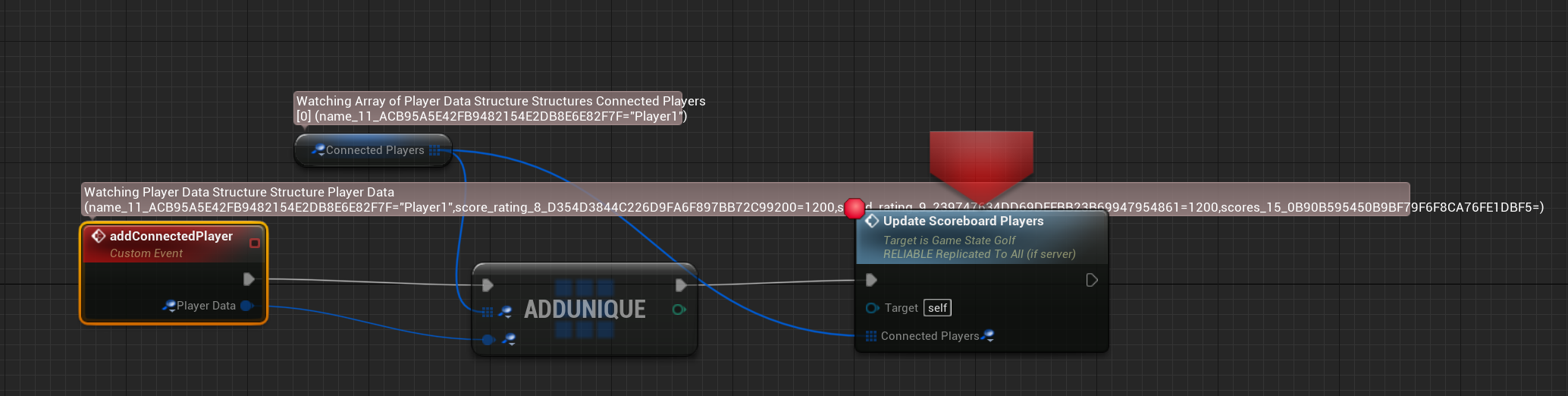
Any idea why it is truncating the other members of player data when adding it to the array?
light thunder
I think it's just the engine behavior - you are bringing in a single element on that event but you are watching an array, and I think that's why it's truncating it
if it didn't, you literally could not see anything on your screen if that array was populated
silver cypress
Hi all, anybody know how to fix this or have a link to a tutorial for this problem? Thanks in advance
candid grove
@light thunder the issue was I was passing the incorrect playerdata to the custom event. Everything that was default was truncated and it didn't have the other data I was looking for.
light thunder
trying to simulate physics on but it has complex as simple collision WTH does this mean?
 molten solstice
Hello! I cant move in my editor, i've this and idk why someone can help me?
Okay thx!
oak sedge
grim ore
<@286955792618487808> it wont work how you want. That’s not the way axis input w...
I found a script for AutoHotKey that seems to achieve my goal perfectly. It makes the game believe that I am holding the "V" key pressed forever.
plush yew
How do I create a teleporter??
light thunder
I still can't get this collision to work
WTF is it talking about -
IT DOESN'T
plush yew
plush yew
How do I create a teleporter??
Can someone mind this
light thunder
Best advice I can give you is to do one of the Udemy courses online, they are like 10 bucks and have 40 hours of video
it's not like you are going to not need help again, after someone tells you how to make a teleporter
spare kernel
Teleporter is super simple though
walk into teleport, then set actors location to other end of teleporter
spare kernel
then you did it wrong
plush yew
spare kernel
walk into teleport, then set actors location to other end of teleporter
This one was before.
But now a teleporter to go to the next level
plush yew
yes
spare kernel
well, if you use OpenLevel then you will start a whole new level
plush yew
I know.
spare kernel
so just call OpenLevel node to the name of the next level
torn atlas
grim ore
you would probably rotate one of the bones on the animation based on that pitch....
I attempted what you suggested, and although i found plenty of guides, every single one either was out of date, or flat out didn't work.
 inner flume
I have[/Script/Engine.GameUserSettings] ResolutionSizeX=1280 ResolutionSizeY=720 FullscreenMode=1 in Config/DefaultGameUserSettings.ini but my packaged game still runs at fullscreen, anything else i'm missing?
plush yew
Are there any good animations for my project?
 solemn marten
hey I have this problem "DX11 Feature Level 10.0 is Required to Run the Engine" I think it's because I removed my graphic card because it doesn't work, how can I solve that?
 gleaming creek
Buy a new graphics card?
Or install proper drivers for what is presumably a built-in on-CPU one
Updated drivers will likely let the engine start, though performance may be too poor to use, depending on what the built-in is
plush yew
which subforum would be most appropriate for a question regarding the substance to unreal engine livelink?
its crashing on me pretty nasty
solemn marten
gleaming creek
Or install proper drivers for what is presumably a built-in on-CPU one
I'll install another gpu later, but for now I want to see if it's possible to run unreal without a graphic card
grim ore
@solemn marten just depends on the cpu
 broken heath
Why epic launcher uses camera when signing in
 austere hinge
Is there anyway to use unreal gpu baking on direct x 11?
Gpu baking requires dx12 to be enabled.. But I am working on a app that is using direct x 11
 dark stag
kind of a noobish thing here... but is there may7be a more graceful way to do this?
passing in ints from 0-127
to do "whatever" per int
clear patrol
Why does Unreal keep crashing when I create my control rig?
dark stag
that sorta depends on alot of things doesnt it
 weary basalt
dark stag
passing in ints from 0-127
weary basalt
dark stag
passing in ints from 0-127
Iterate over an Array of Strings instead.
Since it seems your using the same function, just with a different input each time.
dark stag
well i wont be using the same function.. just kinda used the first 10 for that function
beyond that itll be a bunch adiff things
like thats the part from ableton that i change camera:
but for notes past noteNum 10 itll be other crap
weary basalt
You need to separate the problem into smaller problems that each can be solved in their unique way.
weary basalt
So im assuming this is some sort of Event track.
You want some function to be called when you reach a particular point.
dark stag
well, yeah, that "point" just send an int 1-127 (notenum value)
so that parts cool.
just how to delegate each note to its own event vs. 127 custom events
coz its all coming into one custom event to start and passes the int
half questioning, half talking myself through it here... coz sometimes just explaining it youre like "oh"
weary basalt
So is the input to the other 11-127 functions also a String?
dark stag
nope
sometimes other ints. or bools
like these 10 in particular piock a camera and select that as the new view target... the next "set" will probably be floats/ camaera speed settings etc
or other events
weary basalt
Is the sequence these occur going to be identical everytime?
dark stag
unfortunatley no.
dark stag
i think i might be stuck with the switch on int
its ugly, but it does work
i can just hide it in a macro. heh
weary basalt
If i know that 1-10 has the same input, id store all those inputs in an array of that type, then use the int as a lookup key to get the correct value for the function.
Following that pattern for the others as well
dark stag
for sure.
but if the incoming int order shifts... yer kinda asking for it
but i understand your thinking
 mental yacht
hey dudes, i got an empty map, i dropped a box geometry in the map, and when i select it the selection rectangle starts to flicker, is there an option to fix this?
weary basalt
Tried restarting your Editor?
dark stag
failing that, could be driver related.
mental yacht
yeah still flickers
dark stag
hove mouse over
mental yacht
11
dark stag
hm.. yeah, try updating your drivers maybe?
never encountered that one myself... but theres no "option" for it that im aware of, so could be a driver thing
you mean the orange selection "flickers" right?
mental yacht
yes
dark stag
ah yikesy.
mental yacht
updating driver atm
dark stag
quite possibly a driver update
driver updates seem to sometimes fix bugs you didnt know you had or could never figure out, and you just never really noce or remeber them until after you update
*notice
or breaks shit.
never really know
lol
Octane for c4d is notorious for driver updates breaking things
mental yacht
ok so the driver update fixed the flixker
that was wierd i just updated the driver a few weeks ago, shrug
dark stag
funny
glad i could help
yeah, in my experience with anything GPU / IDE related just do a weekly sanity check and keep drivers up to date.
unless you know why you shouldnt.
mental yacht
though i did just update unreal engine today, so i guess it makes sense that a new GFX driver would be needed
mental yacht
well thanks for letting me throw rubber duckys at you 😄
dark stag
not a problem. the best ducks.
yeah, cards a bit older too, if you can afford it, might be time for a lil upgrade
coz its kinda approaching deprecation
mental yacht
well pending i can go back to work that is
dark stag
yeah no shit, i feel you.
mental yacht
😄
 velvet magnet
Honestly as a hot take Minecraft festivals are over rated
Unreal engine has potential to host a way better quality virtual concert
 next dome
Hi! does anyone know why this happening and how to fix it?
the footage is rendered as 24fps
 empty condor
looks like occlusion culling is hiding things a bit prematurely, and/or motion blur is screwing with occlusion culling somehow. that's a guess; I don't know
does it still do that if there's no motion blur
plush yew
hello. im tring to render a cinematic using movie render queue. but its everytime get freeze at after some frames. 30, or sometimes 100. i tried dx11 and 12 both. idk why this happening. updated driver. wiped. nothing works. but i’ve lot of foliage 27.1k. any tips ? plz :/
next dome
@empty condor i managed to fix it by rendering with Movie Render Queue and settings the sub samples to 16!
empty condor
Nice
 green gate
Hi! Need a help in 4.26.1 raytracing, I recently shifted to UE 4.26.1 and noticed raytraced shadows are little different when compare to UE 4.25.4. Attaching couple of images here.
4.25.4 render
4.26.1 render
Please help me out with this one. Thanks in advance
green gate
Yes, Increasing the samples didn't help me and this one is real-time rtx
dark stag
interesting
and not at the same time.
same RHI for both?
coz i know there will be some massive discrepancies between dx11 and 12
dark stag
yeah, thats dark territory for me, so i dont think ill be of much help
green gate
Thank you, Hope some one here could throw some light.
 vale oyster
recently i create game it's have simple mechanic just endlees runner. just single sprite for character and one tile, and i follow all instructions and file size become 75MB is there any way to reduce apk size further......if yes plz let me know
 halcyon prawn
Was wondering if someone could point me in the direction of a tutorial or guide on adding in game screens to my level? Like billboard style, or think time square screens perhaps
halcyon prawn
It would have to be a mobile game and even then that's a stretch
vale oyster
dark stag
75MB for a game today is probably grounds for a pulitzer prize
Yaaa but it's just have 2 sprits and 2 sounds it's should be atleast in 20MB I know ue4 is AAA title game engine and it have lot of contents but i just wanna know cane we really decrease apk size further so consumer download easily
weary basalt
Choose the right tool for the job. If you want a smaller size, use a smaller and less complicated engine to build the game.
dark stag
you can strip UE down a decent bit... just because you have all this content doesnt nesc mean its all going to get compiled to your pak or what have you
but a game with 2 sprites and 2 sounds sounds like something you can whip up fairly quickly with homebrew
png was under a couple KB.
2 sprites and 2 sounds even
*png
so UE pong... yeahhhhh not sure how id feel about that
vale oyster
dark stag
but a game with 2 sprites and 2 sounds sounds like something you can whip up fai...
Ok thanks for info
halcyon prawn
Hm.
 true ridge
Has anyone experienced flickering with the UE4 Editor?
Ever since I got my 3080 the editor has been very finicky. Context menus will disappear and the editor will turn black.
plush yew
How do I create a respawn system?
 dim arch
A How To Guide for respawning player characters in Unreal Engine 4.
velvet magnet
dark stag
way ahead of you
Fuck yeah, can’t wait, I’m tired of seeing the same old shitty indie Minecraft music festivals that aren’t immersive at all and always fall apart half the time, like that other one that scammed you
plush yew
Ok! Thanks
 inner cloak
Does someone know that type of tree this is ?
plush yew
dim arch
https://docs.unrealengine.com/en-US/InteractiveExperiences/HowTo/RespawnPlayer/i...
It did not work
But I found the solution!
velvet magnet
By respawn did you mean to say restart?
Cause it looks like you're just restarting the game, and not actually respawning the character
velvet magnet
oh everybody makes slips in language, I do it all the time
plush yew
Ok
plush yew
@plush yew If it is a shipping build, you can try
#cpp message or
#cpp message And get some logs
if it's a developer or debug build Just look at the logs already generated
formal quiver
How can you batch render high res still frames from multiple cameras in engine? Do you use Sequencer / Movie Render Queue for that?
honest lily
guys
i have a problem with my water plugin
first i put the landscape
i create it
then i have to go to the place actors
import the water body ocean to my landscape
and it does that
it doesnt create an island
i tried to do the same to other project but it works
i dont know whats happening
 high berry
hello everyone :))
picking up unreal from scratch, been modding JFO for a few months now but wanted to try making something myself
is this the right channel to ask for advice/support?
i just have a couple questions
dark stag
well, were not a modding group, but happy to help with any UE related Q's
if youre new to UE, there are a ton of howto's and basic tutorials available from the UE docs in the learn tab
high berry
dark stag
well, were not a modding group, but happy to help with any UE related Q's
oh, no, i'm trying my own thing this time! not a mod :))
dark stag
always the best place to start
high berry
i've been checking out a few tutorials and currently watching a YT series,
for the most part things have been going pretty smoothly,
i have a bit of a weird issue though i can't seem to find
most likely i'm not using the right words
dark stag
whats that
high berry
so, my mesh and the capsule collision don't seem to align - i've made sure everythings good as far as the origin in blender and i've aligned in the blueprint but no use
i'm probably being silly here but
i'm not sure how to fix
honest lily
you have to go to your player character and choose the capsule in the left top corner i think and try to move it to your player
dark stag
just transform the x o r y position of the capule
*capsule
or the mesh
either way
i tend to keep all my transforms at 0,0 cept for capsule, which should be half-height
dark stag
mnoving the capsule just moves everything
velvet magnet
@honest lily just so you know the water system is still like, very, very broken, so for some water related things you’ll either have to implement a fix yourself or wait for more updates
Does the water body island work at least
high berry
dark stag
just transform the x o r y position of the capule
i can only seem to scale the capsule
honest lily
velvet magnet
<@280685104127541249> just so you know the water system is still like, very, ver...
well i made a new project
the thing is that i migrated all my files to this new one
but check this
when i press play it shows this it doesnt go to my character
the options for GameMode is none
velvet magnet
So setting it should fix the problem right
 drowsy gull
Hello. Anyone know where can I find information about the Input Data Node?
 outer moat
honest lily
the options for GameMode is none
outer moat
honest lily
the options for GameMode is none
GameMode Override is None, which a per level override, instead go in your project settings > Maps & Modes
there you have a Default GameMode which should never be empty
drowsy gull
Just that stuff looks red , similar to delegate
outer moat
drowsy gull
Hello. Anyone know where can I find information about the Input Data Node?
can you screenshot the node? I'm not sure what you're talking about
drowsy gull
like this
outer moat
oh ok I was stuck with blueprint in mind
have you checked this https://docs.unrealengine.com/en-US/RenderingAndGraphics/Materials/ExpressionReference/index.html
Reference for all material expressions available for use in the Material Editor for creating complex node-based shader networks.
as well as the Content Examples Project from Epic
drowsy gull
thx.let me have a look
outer moat
This document covers how to migrate assets into other projects within the Content Browser
high berry
how can i rotate my springarm without rotating the whole capsule, but keeping that kind of camera?
hope that makes sense! :))
outer moat
high berry
how can i rotate my springarm without rotating the whole capsule, but keeping th...
answering to Keore
also disable this (use controller desired rotation) on the character movement comp
drowsy gull
I found nothing about the nodes of special type 'Input Data'. I wonder if I can create such a node .
outer moat
drowsy gull
I found nothing about the nodes of special type 'Input Data'. I wonder if I can ...
well of those node are Input Data node, what would you like to create exactly?
high berry
outer moat
also disable this (use controller desired rotation) on the character movement co...
thank you! :))
drowsy gull
Something shown in Details Panel. When I give it a value , I can find a node with the same name as it shown in Details Panel available in Material Editor.
 limber badge
another day another crash
drowsy gull
And that node is a Input Data Node , returning the value I gave it to the next node
outer moat
drowsy gull
And that node is a Input Data Node , returning the value I gave it to the next n...
What's wrong with parameters?
drowsy gull
I am just curious about whether a Input Data Node is available for us to create
outer moat
Well using cpp of course
If you have a system that needs to feed data into a lot of material I would consider using material parameter collection
drowsy gull
Thanks
high berry
is anyone aware of any good resources to get comfortable with animation in blender? i know this isn't directly UE4 related but i imagine there's overlap :))
outer moat
#animation maybe
 vocal flume
I got in app purchases to work but success mode fires as soon as I click purchase button in my app. Then I get the option to choose the card and the pay button. Success should fire after i click the pay button. Does anyone know why this is?
 boreal schooner
Hey guys, I am new on Unreal, coming from the VFX industry, and I would need some help for a basic alpha question... where can I post my question ?
plush yew
does anyone get freez issues with movie render queue ?
it’s getting stopped sometimes 25, 50,100 frames. idk why. tried everything
no crash errors, no nothing
boreal schooner
(I need to render a frame from Unreal, a street scene with building on both sides, but not including the sky in the render, I would need to export a file with alpha, I tried a lot of things but, I am still unable to export an image without the skydome and postprocessvolume)
 half panther
Is it safe to scale a landscapes Z value? I know it is a problem with X and Y, but Z?
plush yew
@boreal schooner try #graphics . Although I don't quite understand your problem 🙂 as extreme measure, make the SkyDome green and key it out in Photoshop, or something 😄
also maybe #cinematics or #visual-fx ?
boreal schooner
Oh really lol 😂 ? I thought there was basically an option to hide the skydome. Like, there is one, but even if I remove it, plus removing the postprocessvolume box which is englobing the whole scene, I am still unable to export an image with alpha xD this is insane
Just imagine a street with buildings on both sides, and a sky in BG : I want to export a frame, and do a BG Matte Painting
So I would just need to export this with an alpha channel in order to put my DMP easily behind haha
plush yew
You can delete the SkyDome from the scene
And add a directional light or some other lights as you like
I'm really not an artist, but I feel it should be easy 😄
high berry
awesome, thank you! :))
plush yew
And during play, any wired box Should be hidden @boreal schooner So I don't know how exactly you actually see it 😄
boreal schooner
I don't know, as I said, I am pretty new. I just know that, even if I am removing completely skydome + postprocessvolume box, I have basically nothing around my streets, right ? In the viewport, there is a kind of 'environment' color which is blue, but I guess this is the basic viewport BG color
Like here : I want to export a frame, simply, without the "sky" BG. Just an image, with an alpha cut, only with the buildings and wires
just want the sky to be transparent basically 😄
drowsy gull
Oops, what's wrong with Foliage Tool?
Even without Per Instance Fade Amount Node in material the instance can still fade out when I slide the Cull Distance
boreal schooner
So I enabled the alpha in the parameters, I checked the alpha box in the png / exr row
drowsy gull
And it seems that this can't happen without correct LOD
boreal schooner
there is no more geometry behind my street, this is only the viewport background, but still unable to export this image without the sky ..
 worn peak
whats the ''proper'' way to get 2 blueprints ( not level bp ) communicating with each other ?
exotic thicket
there's multiple ways to do it, it depends on context somewhat
boreal schooner
Context ? 🙂
exotic thicket
As in what you're trying to do
boreal schooner
As I said, My plan is basically to keep the CG for the foreground
and doing a BG in DMP
thick herald
worn peak
whats the ''proper'' way to get 2 blueprints ( not level bp ) communicating with...
You want to research 'casting'
boreal schooner
on an image sequence
so I need to export like an exr sequence, with an alpha channel to "cut" the sky
worn peak
@thick herald theres any other way but the cast node ?
exotic thicket
Oh sorry my reply was to Naivy
boreal schooner
Okay 🙂
worn peak
oh
@exotic thicket for basic things like character getting damage after enter a damage zone
exotic thicket
You could for example have your damage zone call the apply damage function on the actor that walks into it
usually if you want to do it in a "generic" fashion you'd use blueprint interfaces
 dusk lava
Is there a standardized "forward" in UE4 (X or Y), like Z is for up?
exotic thicket
that video is pretty good for the general methods of doing so
 plush spruce
I'm pretty new to Unreal Engine, so I don't know how did this happen. For some reason, the Asset Options's getting clipped. Can some one help me on this?
boreal schooner
I already watched this video, thats why I asked the question here 😄
Yeah I guess VFX artists are not using Unreal that much haha
 summer wyvern
Which text channel ought i to text in if i wish for some help with a particular problem?
wanton lotus
summer wyvern
Which text channel ought i to text in if i wish for some help with a particular ...
A channel that fits the particular problem. If you can't find one, just ask here.
 sharp frigate
 manic sluice
Anyone know how in a code project I can make the include file paths set up in a way so I don't need to use ../?
 robust marten
Is there a command to tell the blueprint to run X amount of times? For example, I want to have random containers of food that generate when opened, but I want it to generate X amount of times. X being an editable variable
manic sluice
I'd like it to just be "Utility/SignalProcessing.h" or even just "SignalProcessing.h"
manic sluice
robust marten
Is there a command to tell the blueprint to run X amount of times? For example, ...
A For loop, or a Do N node
robust marten
Ah, How could I forget the For Loop node lol I was trying the Do N node at first but that only let me interact with it for X amount of times before stop working. Thanks for reminding me, I've only been working with UE4 for a month now, thank you, the For Loop node works perfectly
 weary lion
is there any resources or documentations on setting up factions for player and NPC's warrior factions mage factions, animals/monsters and assigning amity levels etc?
 crude jasper
Hey guys, quick question about the Unreal Contests...
Is there anything i need to know related to legal issues ?
Do i need to register the patent for the game first? If i used assets from other creators, do i need to send the licenses for each asset?
I dont think ive seen any of this information around...
Ive just started looking about it recently though
 humble fossil
hallo all, I'm very new to Unreal having dabbled mostly in either Unity or proprietary engines so apologies for quite a basic question;
Is it possible to create reference to a specific instance of a component or object within an actor's blueprint by picking it directly? I noticed you can do it in at a game world level but not within a blueprint.
If not, is the best way to just do a search for the component in script?
crude jasper
I didnt really understand your question..
This component is inside the class of the actor?
humble fossil
exactly
crude jasper
what type of component is it?
In blueprint im pretty sure any component inside the class can be called through a variable?
 tulip lily
hey all, does anyone know if it’s possible to update display device model at runtime (for motion controllers)
humble fossil
the use case is that I've created a generic controller class that takes and processes a bunch of other components that exist within its parent. For example, a plane controller that computes forces based on the number and placement of its engine components which can vary from plane to plane
I can do a search in the script but was wondering if I could just straight up point to the components and fill out the array manually
thick herald
humble fossil
hallo all, I'm very new to Unreal having dabbled mostly in either Unity or propr...
You can cast to the actor, get it's components that way. Don't think I've saw someone use a direct ref for another actors component.
humble fossil
ah its all within the same actor
thick herald
So you're wanting a reference to the actors own components?
wary wave
get component of class, then check if it's valid
casting to the actor will create a reference between the two classes, which you usually want to avoid
thick herald
^
 sterile tulip
use a greenscreen over your city and key it out in a image software @boreal schooner
plush yew
does someone knows someone that worked with unreal on linux and released a game?
humble fossil
cool cool, thats what I thought it would be. Just teething issues coming from Unity Prefabs 🙂 thx
 amber ibex
Hello, does someone know why this trigger box seems to have a collision and my sphere is reacting to it? Id like the sphere to kinda go through the trigger box without having that ,,collision", how could I achieve that?
boreal schooner
@sterile tulip So there is no clean way to do this ? oO
crude jasper
Bruce you probably need to change the Collision settings inside the Class, if youre using blueprint, you select the component and theres several options, like Ignore Overlap Block
the solution is around that i think
amber ibex
The trigger is currently on OverlapAllDynamic, only blocking projectiles. That sphere isnt a projectile
I tried to ignore everything, but then it wouldnt trigger the overlap event anymore
crude jasper
Make it so projectiles block something that the sphere doesnt
then the trigger should block what the projectiles block and the sphere doesnt
hmmm
or create a new Object Response? i think you can do that
not sure though
Or when theres an overlap
Youre using the Component begin overlap correct?
amber ibex
i once set that sphere as a projectile, and then ignored projectiles for the trigger. it still collided tho
yes i am
crude jasper
You should search it up
but
its with the savegame BP
Bruce
If this trigger isnt Triggered too many times
i think a way to do this can also be
 broken rapids
That's not available on YT that's why I am here
crude jasper
you cast to the Projectile
It is, thats how i also learned
Theres alot of it on youtube
wait a minute
broken rapids
Please share link then
crude jasper

In this video I go over how saving and loading work in UE4 and give some pointers as to some ways to improve organisation and efficiency to developing a save and load system.
Support me on Patreon and get access to videos early, join our developer community on Discord, get exclusive behind the scenes videos on my projects and much more over at ...
This will help
you set the variables you want in the BP
and then when you load a save you can use them
Guys
Im using an event tick to make something move along the movement of my character, what should i use instead?
Since tick is dependent on framerate im not sure its too reliable for this
broken rapids
Thanks a lot buddy .. I will check this out..
I made an endless runner game just like subway surfer will it work for that..?
 glad obsidian
hello i have a question
can i animate joint by joint in unreal in the sequencer? i installed the control rig plugin
crude jasper
Thanks Ponkkis 🙂
But for example,
If i define a time for the event TIck
For example to tick every 0.01
would this work the same as delta secs ?
wary wave
if you have a timer going off every 0.01 seconds it's basically the same as tick but with worse performance overhead
unless your game is running at above 100fps anyway
crude jasper
Im using the event tick but changing the Tick interval
wary wave
if your tick interval is shorter than the game's tick rate, it's not going to happen any more frequently
I don't know what your problem is, but it sounds like you need to be using delta time
crude jasper
Weird...
Yeah it seems to me too
Im gonna search it a bit better
thanks 🙂
Delta seconds worked perfectly thanks :))
 viscid bough
Just in case anyone searches my last question and is looking for the answer. If you are running out of video memory (dedicated and shared) while moving files within your project, and you are running an older GPU, make sure your graphics RHI is set to DX11, not DX12.
crude jasper
New question, really weird, i hope someone knows the answer for this one...
Basically I have a Lava Actor
and i put the material for the Lava on a Plane
Then i create a dynamic material
and set the coords for X and Y on the UV
So i can stretch the plane but keep the texture for the lava equal for different scenarios
BUT
Sometimes, with the same Text Coords, the lava texture has different appearences
It seems random
anyone have any idea?
grim ore
so you want to keep the lava texture scale the same, but still be able to resize the plane its on?
grim ore
look at using something like a world aligned texture then, dont have to do anything special
the scaling on the texture is fixed based on world coordinates, regardless of the item it's on
crude jasper
oh wow!
Didnt even know that existed
thanks 🙂
What did you connect to the Texture Size though?
grim ore
a vector 3 since it wants the texture size for scaling in all 3 dimentions, so that one is 1024x1024x1024
if you look at the end of the TextureSize input you can see (V3) which is what it wants
its also optional if the default scaling is good
amber ibex
amber ibex
Hello, does someone know why this trigger box seems to have a collision and my s...
Does someone maybe know how to fix it? Continued trying around but really couldnt find an solution :/
grim ore
do you want the sphere to not have any collision, or the trigger box?
or for them both but to ignore eachother
crude jasper
Bruce did you try Casting?
amber ibex
grim ore
do you want the sphere to not have any collision, or the trigger box?
the sphere is set to NoCollision, id like the trigger box to just let my sphere pass, you know?
amber ibex
crude jasper
Bruce did you try Casting?
could you explain? i am indeed casting something, but has nothing to do with the sphere
grim ore
what is your trigger volume set to?
amber ibex
grim ore
what is your trigger volume set to?
OverlapAllDynamic
grim ore
yep might need to show it happening then, those should be fine
amber ibex
the only case (talking abt collision settings) to let the sphere through would be if the trigger is set to NoCollision, but that wouldnt work for me because I need the overlap event
grim ore
how is the sphre being moved for example
amber ibex
grim ore
how is the sphre being moved for example
its a static mesh in my FPS Character
grim ore
you might need to show more code or double check your settings. Is this a custom trigger or just a trigger volume?
overlap all dynamic has nothing in it to collide with
amber ibex
its a box collision
grim ore
unless you added a custom channel and its set to block
so another BP actor with just a box collision in it?
amber ibex
yeah, and a lil cube (SM) but it doesnt have anything to do with it
grim ore
welp I can say I put a sphere with no collision on a character in front of it and a bp actor with a box collision set to overlap and no issues here as expected
amber ibex
does it maybe matter if the Sphere is a WorldStatic whereas the trigger volume is a WorldDynamic?
grim ore
you said the sphere was on no collision didnt you?
so then it cant be world static
i mean it shows that but no collision ignores that stuff
amber ibex
the blocks?
grim ore
try changing it to overlap all dynamic on the sphere
just see what happens, to eliminate the sphere
amber ibex
still the same problem
grim ore
move that BP to the side and drop a trigger volume into the level in its place and see if it still blocks it
amber ibex
still blocks it
grim ore
hmm that makes no sense. so at this point I would open a new map, just the one with the floor. add a trigger volume and your character and see if it blocks with just your character and the trigger volume
if it still does you got something weird
stark marsh
i've got some scripts that manage if the player has keys and what doors have been opened in the level blueprint but it is only relevent in one area in my scene
grim ore
as far as I know a trigger volume has no physics collision so it should never block anything
stark marsh
but how could i transfer all of that to a seperate thing that is NOT the level blueprint
amber ibex
grim ore
hmm that makes no sense. so at this point I would open a new map, just the one ...
still does
grim ore
@stark marsh copy/paste, never use the level blueprint in the first place. Can put them in a separate BP actor in the world, or some place like the game mode
stark marsh
like a manager of some sort, because it is pointless in being the blueprint for the whole scene when really it just applies to one part
i've tried putting it inside an actor but i can't reference things like triggerboxes
grim ore
@amber ibex I am out of ideas 😦 something is odd with your setup if a trigger volume is blocking., Might want to try and remember if you changed anything in the project or engine settings
stark marsh
that for some reason i can only do in the level blueprint
grim ore
@stark marsh yep thats why we dont use the level bp, you end up getting stuck once you realize this
the level BP always exists and it knows about all the items in the level so it can reference them directly, its why you can directly make variables for those items
stark marsh
and also i would be able to completely disable the manager once i exist the part of the level it controls, saving performance, and enabling as soon as i enter the area it manages right?
grim ore
other blueprints dont exist in the level until you put them in so they have no idea about everything else unless you tell them (exposing variables)
stark marsh
i'd like to save everything stored in it so if i return it knows what i've done, but can also be disabled so it doesnt run if im nowhere near the part it managers
grim ore
so your manage can have variables for those items, like the trigger boxes, and expose them which would let you choose them in the editor
amber ibex
grim ore
<@!264107489128087553> I am out of ideas 😦 something is odd with your setup if...
oh, i remember something. the location of that sphere is determined by the impact point of a line trace. does a volume collide with a line trace?
grim ore
if it's just sitting there doing nothing, tick disabled for example, and it's just to manage information then disabling it isnt an issue
wait so this item is not attached but you move it?
amber ibex
amber ibex
oh, i remember something. the location of that sphere is determined by the impac...
oh yeah it does, just checked it.
grim ore
yeah we assumed this was being moved with the character, not by code
amber ibex
so yeah the sphere is getting moved by a line trace basically
stark marsh
hmm i cant access and reference other objects in the level
from the manager actors script
grim ore
"other blueprints dont exist in the level until you put them in so they have no idea about everything else unless you tell them (exposing variables)"
at this point you need to learn about communicating between objects
amber ibex
i think i fixed my problem, I just have to set the trigger to an object type the trace doesnt care about. thanks for everyones help tho and the fast responses!
grim ore
if the blueprint is in your content browser, it only knows about items in your project that are asset form that are in the content browser. Once the blueprint is created and an instance of it is inside of the world it can access any other items in the world if you let it (exposing a variable to the editor/instance editable). This lets the instance of that blueprint that is in the level set that variable to any other actor that is in the level of that type
it might be easier to just set your trace on your line trace to visibility instead of camera so it doesnt collide with invisible stuff
stark marsh
i've put it from the content browser actually into my level
it's not letting me reference other things like box triggers (for the doors)
 astral sundial
so i ahve some of my ai getting stuck on one another so for a fix i have a overlap collision box in front of my enemy to check if there is another ai in front of it. If there is it stops moving until its out of the way. This works great however it sees it self as an actor in the way so I fixed this by checking if the other actor is self to ignore using BP. Is there an easier way to do this like a setting on the collision box to ignore its parent actor so that i dont have to call this function constantly?
grim ore
once you put it into the level it becomes an instance, it now has access to the other parts of your world that are loaded. You need to use a variable and set it to instance editable/public/exposed
amber ibex
grim ore
it might be easier to just set your trace on your line trace to visibility inste...
how would I do that? or how abt setting trigger boxes as an actor to ignore, if thats possible so easily?
grim ore
then you can set that variable in the editor
@amber ibex
assuming you are using the by channel trace
amber ibex
im using the for objects
grim ore
what objects are you tracing for?
amber ibex
worldstatics and dynamics