#ue4-general
1 messages · Page 909 of 1
 wanton lotus
wanton lotus
wanton lotus
How many animations you got in that blend space though?
wanton lotus
You need the far left to be your idle animation and the far right to be your running animation.
Nothing in between
wanton lotus
Unless you have a separate walk anim too
When they don't move you want them in idle though
 plush yew
i only want running animation
wanton lotus
right?
plush yew
ok i'm gonna add idle too
wanton lotus
Otherwise they will run in place
plush yew
but how
i don't want to run in the same place
i want to run forward
and not repeating the animation
wanton lotus
so you need idle anim on far left and run anim on far right.
plush yew
ok hold on let me open te animbp
 still moat
◀️ 🏃♂️
wanton lotus
This is in the blend space, hehe.
wanton lotus
wanton lotus
Now we need to set your max to your max walk speed. Default is what, usually 600?
 frozen pond
this aren't keyframes
plush yew
or whatever they are
frozen pond
this is blendspace
frozen pond
idle on left and run on right
still moat
I think we're gonna need a 24/7 Live support hotline
wanton lotus
You can even put run anim on one before the far right if you want it to cap out sooner.
wanton lotus
You can remove one of those run animations.
wanton lotus
Now set this value to 600
Just guessing that is the max walk speed, I think 600 is default.
wanton lotus
Compile and save everything then run it to test.
 finite dew
sigh very sad that all my assets come up to £2,888.4 but my pc cant handle most stuff on ue4
plush yew
wanton lotus
Save that one
plush yew
ok
frozen pond
can't compile != there is no compile
plush yew
done
 fluid bronze
So i have made 3 games in unreal engine and i would like to make a game launcher + info about everygame and a bunch more things how should i go about doing this what program should i use?
frozen pond
fluid bronze
So i have made 3 games in unreal engine and i would like to make a game launcher...
visual studio
wanton lotus
Technically you don't even need to compile, just hitting play will do that for you, hehe
fluid bronze
How would i design a menu in vs isn't vs just code? @frozen pond
 celest vapor
wanton lotus
Technically you don't even need to compile, just hitting play will do that for y...
celest vapor
wanton lotus
Technically you don't even need to compile, just hitting play will do that for y...
I had a bad habbit of that and changed a gammode override and when I went to package my game It gave me some errors because I had to manually re-compile the gammode BP
frozen pond
fluid bronze
How would i design a menu in vs isn't vs just code? <@!236559497718398977>
sadly no, but you can drag & drop some stuffs still need to code
 burnt ether
Can I smh flush the cache of unreal ?
wanton lotus
@fluid bronze can't your launcher also be made using ue4? You can make custom c++ functions to execute external files.
fluid bronze
Maybe...
plush yew
maybe what
wanton lotus
@plush yew Show current screenshots of your animBP and blend space.
wanton lotus
I thought we told you to check that before, haha
frozen pond
lul
wanton lotus
frozen pond
oh that me lol
wanton lotus
We really should be in #animation hehe. I tried to move it there before.
plush yew
wanton lotus
Oh well, nearly finished now
plush yew
is it good?
kk
yay
i changed to animation blueprint
and i selected the animation from AnimBP
wanton lotus
If that is the one you are editing, then yes looks good
frozen pond
no you don't
plush yew
he is not running
wanton lotus
You sure it is idle at 0 and run is the other one or you got only idle in there?
plush yew
idk
wanton lotus
in the blend space
plush yew
let me see
frozen pond
but you are moving yes ?
wanton lotus
In the blend space you can click and drag the green marker to test it out.
plush yew
i lost it
wanton lotus
You should see your character run as you get closer to the run animation.
wanton lotus
Click and drag an in blank area
wanton lotus
Move that run anim a bit further to the right. You will basically have no blending transition from idle to run, it just goes right into full run animation even at low speeds.
wanton lotus
Change you max to 600 in the details. It is still 100.
wanton lotus
Animation should have worked regardless of those changes though.
 solar tartan
I made a postproccess material and the outline is pixelated how do I fix that?
plush yew
i rermoved the idle
and now he running
again
he is going back
this is the hardest thing
ever
It's impossibile
It s Too hard
But i saw this in many games
ai with Animations
celest vapor
Its not impossible. I assure you that.
Take some time to do more research on how UE4 handles animation and research the tools it provides to help aid you in fixing this
plush yew
I tried everything
I watched every tutorial
i searched on google
I did everything
i tried every method
celest vapor
Okay. Just to make sure i'm on the same page.
You are just trying to make a blendspace that goes from idle to walking/running?
plush yew
No
Idle and running
WITHOUT REPEATING
the same animation over and over
which animation?
running
like its running forward and then teleporting back?
YES
IT'S RUNNING FORWARD AND THEN TELEPORTING BACK
celest vapor
that could be a few things causing that. not just the animation
plush yew
hold on, i havent touched animations in a long time
oh
https://answers.unrealengine.com/questions/743959/character-is-teleporting-back-to-the-start-of-anim.html this might help for what your looking for
Ok
Let me see
celest vapor
Speaking of Blendspaces. Does anyone know if you can update the min/max axis on a Blendspace 1D during play?
plush yew
_Answer you need to enable root motion and " force root lock" if that doesnt work then you need to place a new root bone for your animated skeleton and then retry that might not work but again haven't done animations in a long time
OK
I'm going to try
how can i get a root bone
have you done everything a tutorial has told you for Anim BP
I'm watching it rn
if you dont know Anim BP and a Blendspace are totally different things they both handle animation but in completely different ways Anim BP basically makes the Blendspace Function
i do
ok
 gray kindle
out of curiosity, is anyone else doing all the atmospheric effects and stuff inside single blueprint?
plush yew
Is it possible to have spawned actors in construction script and be able to kill only one of them? It destroys whole group now as I shot.
celest vapor
@plush yew The best way I know to approach that is for each one created just add them to an array then destroy the actor at index X
plush yew
celest vapor
<@456226577798135808> The best way I know to approach that is for each one creat...
I wanted to do the same but cannot get how to add them to an array in this case
celest vapor
plush yew
I wanted to do the same but cannot get how to add them to an array in this case
Create a array of the component type and then use the return value to add to it
still moat
👏
plush yew
guys
how can i make my ai to see throught the wallks
walls
i mean
when he is backwards
if you want your ai to follow you forever or something you should probably make it follow a path instead then when the ai sees' the character it chases it
plush yew
ok
frozen pond
do i need to activate character somehow after spawning it?
like its just hands in air and i can't move
same character just dragged & dropped works fine
plush yew
guys
how do i make like um
when ai lost me
to make idle animation
when he doesn't se eme
see me
frozen pond
@plush yew i think you should first learn basics
frozen pond
basic of engine
 plush yew
I learned the buttons in 3 months lmao
frozen pond

This episode carries on from our previous one and we improve the enemy AI so that it will chase the player more accurately.
Watch the next episode where we begin creating our quest system over at Patreon for as little as $1.
Support me on Patreon and get access to videos early, join our developer community on Discord, get exclusive behind the ...
still moat
Don't mean to be a dick but you struggled even connecting the nodes right, eitherway, 3 months is like nothing, took me 5 years to where I am now
Patience is key
frozen pond
took me almost 2 years from completly noob to still noob but less
 marsh sparrow
I'm 9 months in.. biggest key.. be nice and humble and try to do some digging first.
 burnt dragon
5 years is like super mad
frozen pond
i spawned actors from classes and characters are just in air and dont do anything
is there some function to activate them if i spawn them during gameplay ?
 broken heath
Took me 10 years , still noob
marsh sparrow
@frozen pond how did you spawn them?
frozen pond
marsh sparrow
K, do they have gravity set on them
i've never spawned from a bp 😉
but it should be the same class
frozen pond
they all work fine if i drag them in editor on map
marsh sparrow
yeah, I see you are adding 55 to z
so that puts them in the air
are you sure the actor class has gravity set to true
frozen pond
yeah they are character class so should fall down
marsh sparrow
frozen pond
funny xD
 sterile horizon
hey i have an issue i'd like to change my project name but all documentation is outdated
i dont have the [url] in the enginedefault
frozen pond
marsh sparrow
https://answers.unrealengine.com/questions/718340/spawned-objects-not-affected-b...
still nope
marsh sparrow
yuck
sorry I can't help more
I did mine in cpp and it worked fine 😐
did you shift or ctrl + f1 while playing and select one to make sure gravity is on
frozen pond
marsh sparrow
well thats awkward
Might have better luck in the #blueprint channel. I've exhausted what I think it is. Usually at this point I try to toggle that and / or physics to see if it drops while in play mode.
plush yew
Guys
how can i add a animated main menu
Bscause usually main menus are just a image
animated how?
nvm i found a video
 grim beacon
First thing I do when I open a new project
If anyone is getting annoyed by the steam vr popup every time you can disable the steamVR plugin
 brittle tundra
Hello guys, I have a crash when trying to load my main level: https://pastebin.com/LDDYE30i
Pastebin
Pastebin.com is the number one paste tool since 2002. Pastebin is a website where you can store text online for a set period of time.
celest vapor
Can someone help point me in the right direction for drag and drop events on Widgets?
plush yew
grim beacon
If anyone is getting annoyed by the steam vr popup every time you can disable th...
yeah I have that issue too, it keeps opening up
grim beacon
Like in the screenshot, you can go into plugins and disable it.
gray kindle
guys can u have multiple event ticks in the same blueprint? im trying to add another one but it redirects me to the main one
 cedar wave
No - you can't.
plush yew
@gray kindle you make a custom event and name it whatever then on the event tick you already have drag out and type the name of the custom event
you cant make multiple event ticks but you can get a reference this way
gray kindle
Thanks!
plush yew
your welcome, by the way the custom event you make will be triggerd by the event tick so the custom event is basically the event tick but can be used in more ways
So I'm new to unreal engine, is it easy to do anything? can you make stuff easily?
plush yew
plush yew
So I'm new to unreal engine, is it easy to do anything? can you make stuff easil...
Depends on what you want to do
gray kindle
Thanks, i've been making weather, temperature and day/night system in 1 event tick for the last few hours, and its such a mess right now
plush yew
plush yew
You need to learn the basic
I want a singleplayer game where you can walk around.
Oh ok
That’s easy
(first person)
@plush yew that should be easy but its best to learn the engine first
That’s what I would suggest you, if u want a nice graphics with free asset u can use megascans, and for the first person u can use the first person shooter template
I just started installing it. so i'll need to load the basics.
plush yew
plush yew
<@456226577798135808> that should be easy but its best to learn the engine first
^^^
So do the first person template?
I just booted it up.
Yes
Then what next.
Sorry i'm just new.
I'd like good graphics.
Leave it as it isnnow
plush yew
plush yew
I'd like good graphics.
You could download quixel bridge, is a massive library with free assets if used in ue4
They are really high quality
I'll do that when it's loaded.
yeah its best to leave everything default to be honest
RTX makes everything better but you need an high-end pc
Actually I would suggest you to start learning the engine system and where everything is but if ur doing this just for fun it’s ok
What do I do to get rid of the gun and all that.
plush yew
plush yew
What do I do to get rid of the gun and all that.
Those are variables
You just need the camera and the capsule component
@plush yew this will help you on your journey https://youtu.be/QJpfLkEsoek
Get the full UE4 course:
https://bit.ly/36lJS3S
Unreal C++ Beginner Tutorial:
https://youtu.be/1dl91ORwmy8
In this video you are going to learn how to build a very simple game using Unreal Engine and Blueprint.
The goal of this lesson is to get you aquainted with the absolute basics of:
- The Unreal Editor
- Simple AI
- Events in Blueprint
-...
it will show you the basics of the engine and what it can do theres loads of tutorials etc for learning the engine
i know this might sound silly but is it possible to build a smaller more contained game
with an opened world
and have the majority of the games overall mechanics and features
and than jsut expand the absolute fuck out of it xD
like adding on regions like lego blocks, entire races cities and such until its fully fleshed out
@plush yew like adding more landscape to the one you already have?
more landscapes
mechanics
features etc
races
clothing weapons
enemies
or do i have to do it all in one giant go >.<
ohhhh, yes you can haha dont do that its best to take it slow one step at a time
oh okie
so i can just make a smaller more contained game with all of the core aspects and than just build onto it with the funds from the games sales
because this was botthering me for quite a while aefdh
well yes you can but if its like that its best not to add everything
o.o
well i want to make a game that truly feels like an action 3d arena fighter sort of game
but like the scale of my mapped out project has been messing with me badly
oh ok well, again its best to take it slow if you publish the game thats starting small and with every core function it wont be as fun in the future, when starting it small its best to add stuff one at a time as the game progresses
you could add everything at once but i would just add everything that would make it the game such as what you listed, but as the game goes on add more functions and fixes
like more maps etc
Ah
 idle stump
@plush yew It's very common and good practice to start with a goal for a simple game and get that all working before adding more features and levels, etc. This is often called your "minimum viable product" or MVP. For example, let's say that ultimately you want a huge open world with 10 different kinds of weapons, 5 big cities, etc. You're MVP might be to build 1 small part of that world with 1 city and only 2 weapons. Then you should just focus on completing that before worrying about any other things you hope you can add (we often call these other things "stretch goals").
If you can get your minimum viable product and small part of the world or few levels really well polished enough that it can be considered the quality of a real final game then this is known as a "vertical slice". Meaning, it's just a small part of the game that establishes what quality of game the rest of your levels/world has to live up to. THEN you start adding more stuff.
plush yew
Huh
So to give a base idea
If you know any of these games it would make the conversation flow smoother
you could take grand theft auto for example its compact with one city and just about every component yet they can still add more
or watch dogs
Gameplay like dragon ball xenoverse 2 and naruto storm with a heavy emphasis on floor.bound battle systems with mounting and and amazing mobility with a open world like breathe of the wild Zelda by the end of the games cycle
With character customization
so an rpg kind of game?
Its grossly misrepresentation of the game but that's a base idea for helping you understand
Like an rpg arena fighter
But with co-op on couch or online like old phantasy star online dream cast games
Also if you guys don't mind I'll be saving this conversation for reference lmao
oh ok, you could always lock some areas of the map that arnt there yet but you want to add in the future same goes with most core things
But would it be possible to start with something as small as the naruto to borrow Shinobu striker game
 lofty wave
Im trying to uninstall an Unreal version but I cant
It starts uninstalling and then has an error about storage access
Running it as an admin doesnt work...
Any ideas?
plush yew
yes
And expand to that early idea through dlc free of course o hate charging players past the first purchase
Ok
So I could just make the game like Kenmore said above and than expand the ever living he'll out of it o.o
gray kindle
my brain hurts from all these conditions
plush yew
Yup tell me about it
starting small is best, like making a prototype your not sure what will happen but then you keep adding and making it bigger over time
XD
 haughty orchid
plush yew
haughty orchid
plush yew
Okie okie well if its possible to just Jerry rig parts and open world and maps and whatnot to a game like that I guess I'll really really scale down until the base line is emt
Met*
Thanksies c:
your welcome
<3
fluid bronze
wanton lotus
<@!211803081954951170> can't your launcher also be made using ue4? You can make ...
But is it possible to make it auto update too?
 chilly ledge
So I’m new to unreal engine but I have a lot of experience in blender and I am attempting a car game. I am trying to add single convex hill bodies on the wheels and even tho I rigged all the wheels the same the front right one says there’s no vertices to be found or something along those lines and I’m not sure how I’m supposed to fix that I applied all the wheels to the appropriate vertex group with the bones in blender and that one only doesn’t work
 fringe pivot
Have anyone tried the new water components in 4.26?
I'm trying the ocean one and it seems to automatically adjust the Location.Z value and spawn way over it should flooding the landscape. Any idea how to fix it?
plush yew
guys
how can i make AI like um when he doesn't see me to make idle animation and when he sees me to start running
i already have the animations
but idk how to set and stuff
 gloomy gull
@plush yew watch Ryan laleys ai tutorials
plush yew
ok
yeah but i watched a different tutorial
and i have a different blueprint
nodes
you know what i mean
celest vapor
2 questions.
If I resize an array, the input size is the last index or the number of elements?
Second, if I resize an array does it overwrite any existing elements?
fringe pivot
I don't use blueprints but it should be
- Size of the array
- No
Assuming that by "resize an array" you mean adding new elements
celest vapor
Okay, Thank you!
plush yew
Can anyone help me
plush yew
plush yew
Can anyone help me
What’s the problem
 tough pagoda
What program is good for making weapon sound?
tough pagoda
And where I can take for free weapon sound in net.
plush yew
how can i make AI like um when he doesn't see me to make idle animation and when he sees me to start running
i already have the animations
but idk how to set and stuff
that's the question
Uuuh pawn sensing should work
yeah but my AI is only running
You need an animation blueprint
ok
let me make one
done
now what do i do
plush yew
i did
 waxen raven
Hence the term more.
waxen raven
Whoever you are watching now isn't breaking it down enough. I suggest going to Udemy or Gamedev.tv iirc
fringe pivot
@plush yew Nobody is going to make the work for you, you need to figure it by yourself and then you can ask about specific issues
plush yew
what?
waxen raven
They'll walk you from the ground up.
plush yew
.......
waxen raven
Gamedev has courses for game development in both blueprints and c++ for Unreal.
waxen raven
Blueprints is just c++ in disguise buddy.
plush yew
in easier way
waxen raven
Not really, eventually you'll wind up needing to know how it works, much like you're having problems now.
This field... is a ton of work. Years for results.
 north creek
waxen raven
Blueprints is just c++ in disguise buddy.
north creek
waxen raven
Blueprints is just c++ in disguise buddy.
any logic based programming even in nodes is c in disguise, the point is that node programming is way easier
waxen raven
My point remains.
north creek
one could say that blueprints are assembler language in disguise too
waxen raven
Except there will not likely ever be a need to break it down and look at it in that level. For bp I've had to look at how the c++ is written numerous times.
north creek
isn there a way to work in python with ue 4?
plush yew
north creek
isn there a way to work in python with ue 4?
I don’t think
waxen raven
Yeah, and python is to my understanding still based in c++
There is a plugin I believe.
But I use raw c++ so don't need to know.
north creek
the point is that python is way lighter in the things you need to declare
waxen raven
Syntax arguments aren't gonna help here either. It's a little more friendly to someone who doesn't know how the computer works is my understanding. But regardless, dude would still have a ton of learning.
north creek
its a lot easier, but if the engine doesnt translate it to c++ in a efficient way it will be a disaster for perfomance
north creek
waxen raven
Syntax arguments aren't gonna help here either. It's a little more friendly to s...
agree
waxen raven
And that was more the center of what I was trying to get at. You will, at some point, hit a roadblock where you'll have to understand how things work in making any game, unless it's incredibly simple. Animation bps alone I would suggest indicate too much complexity for you not to hit it lol.
I'm just pointing him to resources that won't clutter up general chat with questions that really belong elsewhere.
north creek
well, if he never touched any programming language, python is a good start for understanding logic at least
waxen raven
I have heard that a lot. But he will still need a lot more of a push in the learning direction, and I'm sure with a few structured courses he'll get a much better idea of what he's missing. And what he needs to learn in order to get the basics to understand what exactly the engine is doing for him. The one downside of Unreal is is makes things so easy we don't realize the thousands of things it's already doing.
waxen raven
I would say nodes are an extension of that. But programming language arguments hide that underneath it all requires very similar understanding of what a computer stores/understands and how. Hence they are a language XD. What one you talk in may influence how sentences are formed etc, but with enough knowledge you can get similar points across.
plush yew
waxen raven
Procedural generation is beautiful isn't it? XD guessing a 30 by 20 or so? Nice curvying
waxen raven
though you might want to look at like Minecraft style. He basically hid any surface that didn't contact air.
plush yew
you talking to me?
waxen raven
The camera attached to a pawn maybe? I mean the concept of possession becomes very weird, I'd probably shift the camera and just respond to clicks or touches. But I haven't made one of those.
Yeah I was Crimson. Just after a point your fps will drop etc.
Yeah and it would make getting inputs much easier XD.
plush yew
I can make it better to represent a circle more, can't show more cause I will reveal how I did that and I will expand on it later this year and release a marketplace asset
the way I did it has so many uses is insane
waxen raven
Eh, I've done modeling so... I mean there are very few secrets in this domain.
Niagara feedback systems would allow it easy.
plush yew
I am making a project for my portfolio
 light thunder
Unreal measures in CM, and blender in M - I changed world units to centimeters (before I tried 100x scale) but it's still super tiny when it comes into unrea
waxen raven
Did you apply scale?
waxen raven
I haven't had a problem with it, but I've learned to be very specific on that all to start.
north creek
light thunder
Unreal measures in CM, and blender in M - I changed world units to centimeters (...
did you center your object?
is it in wolrd origin?
world*
light thunder
yes
waxen raven
Changing world units without changing the object size, I'd assume it'll just convert to the correct % of the other.
That said, pretty easy to change by specifying, Blender is mildly intuitive there.
light thunder
Using the unreal pipelinee tool, for some reason - workflow is faster but I guess the uniform import scale is set somewhere that I can't find
gray kindle
omg i finally made it, the fog that depends on season, time of day and temperature
the amount of conditions i had to work with is insane
feelsgood
light thunder
is this the problem? does that mean millimeters?
like so?
BAFFLING - even when I do "import scale x100 when I import" it still is super tiny and I have to scale it up ingame 100x as well
the original FBX (that I exported FROM Unreal comes in with this Scale) which I set to 1 in blender - so if anything, my mesh should be TOO BIG, not the other way around
plush yew
Guys can anyone tell me a good tutorial for animation retargeting?
waxen raven
Just look up those exact keywords with unreal engine on youtube. Unreal Engine themselves released one that walks you through it
light thunder
plush yew
Guys can anyone tell me a good tutorial for animation retargeting?
Even the old ones are good
light thunder
waxen raven
It'll say something like 4.7 but it's still done the same way now afaik.
I think they did change the layout of the sequencer I think
 devout whale
What language do you guys think I should learn first, im starting collage in a few months and picked game development as my course, in the course it says we are going to practice with both ue4 and unity, overall I want to become a ue4 game developer. Do you think I should just focus on c++ or start from c#
 ebon marlin
You should start with whatever language best fits the project you plan on working on
waxen raven
Ue4 is c++, unity is c#
ebon marlin
My own question:
I'm currently playtesting my cooked game and both my client and server instances occasionally crash with a fatal error, and seemingly no useful crash logs or call stack traces... even though the build configuration is Debug. How can I view call stack traces during crashes on cooked games?
waxen raven
That said, it's similar enough.
devout whale
@ebon marlin thanks thanks 😊
waxen raven
I'd look up logging, been a bit but you can add a line to the command file to have it print a log
Had to use that for multiplayer myself a few times.
ebon marlin
I added -log to the server shortcut and it did work, but unfortunately didn't print anything useful when crashing, as if it didnt even get a chance to do so
 inner cloak
Happy new year everyone !
 hasty gorge
so how do you change a widget's base class to a custom class you made?
because the way I did it for an asset was to change to "class settings"
but there is no equivalent
for widgets
plush yew
did they change the thing for camera shaking? it use to be client play camera shake what is it now?
never mind found it
yeah it was start camera shake
hasty gorge
so I'm googling how to change the parent class of a widget, and get a bunch of weird workarounds
is there really no direct way to do this?
that class settings isnt there for me
class defaults isnt either
it's a widget blueprint btw
oh I see
I had to go into graphs
omg that's so weird
@plush yew another question
what does the native c++ class do?
and also the NativeConstruct() function
 sharp flax
Do you guys know what's the proper way to do buildings in a openworld (When you enter a house in fallout/skyrim for example). Is it a complete new level or it's a sublevel of the persistent level or something else?
I can't find anything that answer my question on google unfortunately
The thing that bugs me with this is that they surely don't unload the world itself, otherwise it would take the same amount of time to exit a building as when you boot the game
I'm assuming they unload a lot of stuff but they keep the world loaded
plush yew
man so I've been looking around and I have no idea how I'm going to get telltale style models, I'll have to probably pay someone to custom create them
sharp flax
Damn hahaha
whatever works I guess
I'll give it a try with a complete new level see how the loading handle's it
light thunder
@plush yew what is wrong with these settings?
I don't need to scale it up twice right?
WTF even when I do import scale x100, it doesn't work!?!?!??!
frozen pond
@light thunder i recomend pipeline for blender
light thunder
I'm going to scream
I'm using that shit
either option
but where is the export scale on pipeline tool
light thunder
frozen pond
they deleted that option
@frozen pond thank you for helping
frozen pond
light thunder
will it overwrite if you send the same name?
light thunder
it keeps going in super tiny
frozen pond
oh also one more stuff
 dapper frost
4.26 is the last version before UE5 right?
frozen pond
drag mesh to meshes
light thunder
I've been doing that for over a month
frozen pond
default cube -> ue4
with 0.01 scale
and this is compared to default ue4 cube
so still looks x4 size
light thunder
Why??
the scale has no difference
100 or 1 they are the same size
and should be, well, 100x bigger
frozen pond
personally i would delete or rename model in ue4 folder
and see how new will be created
light thunder
don't I need to just rename it in blender first?
frozen pond
if you rename it in ue4 it will create new one
light thunder
I've done that, it doesn't make a difference'
I have like 10 "deleteme_ThisisBullshit_ meshes
plush yew
is there a way to only render a widget? i have a game launcher but i want to save resources by only render the widget is there a method for it ?
light thunder
this has no affect one anything in Unreal whatsoever
is it possible there's something overriding it somewhere?
frozen pond
as i look at dimensions something is wrong, can you send me blend file with that?
on PM
 quartz kestrel
plush yew
quartz kestrel
plush yew
ok
so
if i wanted to do something
wait
ill google it first
than ill come bother you bootiful bastards ❤️
hasty gorge
so when I make the playercontroller blueprint, do I need to attach it to something to make the code within it work?
and if so, how do I attach it to the playerstart? I'm assuming that's what I need to attach it to
still moat
@plush yew Yo.. you can't do that! You must use this chat as if it was google first! Theres 2Billion results on the internet how can you possibly get a result from there?
 wanton lotus
"Alexa, find me an unreal engine tutorial...."
plush yew
on that note though to be honest
i found what i needed xD
now i can add limb dismemberment and severe brutality to my game the easy way ;DDDDDD

This video I show you an easy (fake) way of dismembering limbs.
still moat
bro just execute the "Do what I ask for" node, its that easy bro
plush yew
D:
wanton lotus
Make that into a plugin to make bank.
plush yew
make what into a plug in
still moat
Why use a documentation that halfway does not exist anyway when ttheres a node for that
wanton lotus
plush yew
make what into a plug in
The "Do what I ask for" plugin, of course
plush yew
yeah that would be godlike
light thunder
Unreal is broken - import scale has no affect when I import something. Why?
still moat
Want your MMO RPG ONLINE BLOOD KILLER 2 ZOMBIE GAME, with 2 days of UE4 experience!? Well you're in luck, just get the "Do what I ask for" plugin, 1 node , 0 Problems!
plush yew
yessssss papa

gimmme dah node
I hate navmeshes and they make me want to cry xd
make all dah geams
wanton lotus
plugin failed
plush yew
my dreams ;-;
still moat
@wanton lotus
_UATHelper: Package Plugin Task (Windows): ERROR: Visual Studio 2017 must be installed in order to build this target.
wrong chat before, oopsie
 wild warren
i dont understand?
still moat
If you try to build a plugin through UE4, this error is guaranteed to pop up
wild warren
i don't have any issue like that
 autumn grail
hello, how can i change the altitude of the 4.26 volumetric clouds?
still moat
@autumn grail Look through the blueprint actor settings, its bound to be there.
@light thunder I guess you got it fixed?
light thunder
no
sharex and discord are being assholes, trying to upload the problem
basically, uniform import scale makes NO difference
whatsosever
100, 1000, it DOES NOT CHANGE THE SIZE
I realize now i've been dealing with this problem for awhile
still moat
Well sadly I cannot give much advice, not so much of a 3D model dude myself :/ But my guess its usually something right under your nose or some hidden shit
light thunder
It is ungodly frustrating
plush yew
can i just change the capsule size instead of using crouch/un crouch, which way is more efficient? or are they both
light thunder
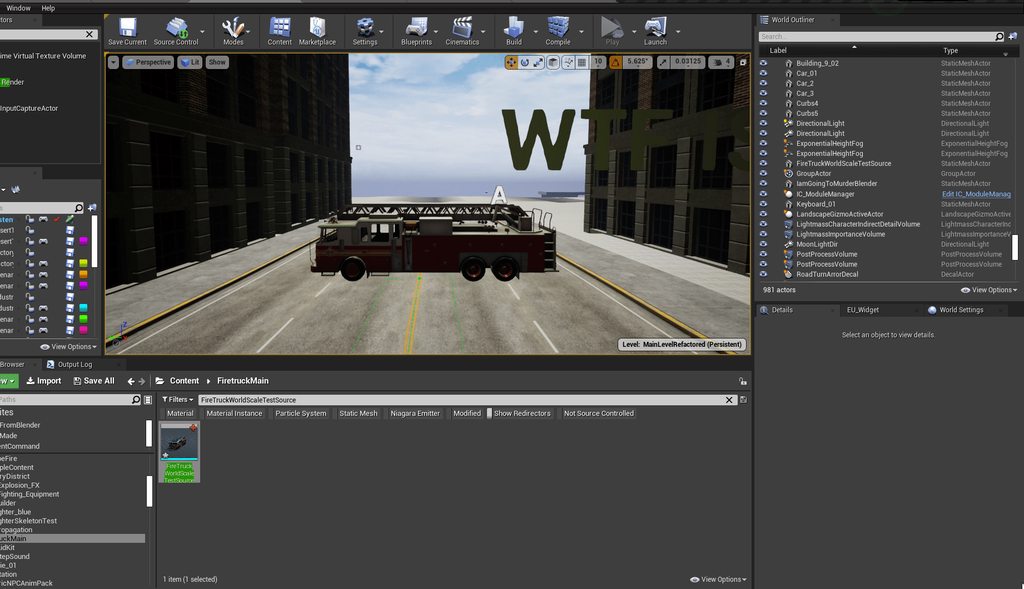 still moat
@light thunder Wait im sorry , i think im probably blind but arent both trucks the same scale? What happens if you set the value to 1 ?
light thunder
I appreciate the attempt and want to encourage you to keep trying to help people, even if you can't help, most people will appreciate the effort - no, the import scale should basically make it so that the scale you import it will become the new 1.0 for that model - so if you brought in a item and made it 100x as big in the import scale, it would be that size, but your scale you would see in the editor would be 1
 buoyant graniteBOT
:triangular_flag_on_post: Mazell#0001 received strike 1. As a result, they were muted for 10 minutes.
plush yew
i know you guys dont hear this often enough and i know you guys are probably bombarded with questions all of the time due to this in parcticular
but this discord and you guys are the best resource or resource guide to finding said solutions ive come across during my time making my first game
so thanks you guys for all of the assists its really appreciated
as im sure others feel the same way nonetheless im off to woork on dis game moar to another amazing year you guys ❤️
still moat
GG, so wholesome unreal crashed with Unhandled Exception: EXCEPTION_ACCESS_VIOLATION reading address 0xffffffffffffffff
 dark kraken
does anyone know how to solve this problem? my hud when I export my game disappears, in the viewport it is working perfectly, but when I export it does not appear, does anyone know how to solve it?
in viewport
Exported
 static sparrow
When I generate my project files, it gives me this:
CSC: error CS2012: Cannot open '/Users/Shared/EpicGames/UE_4.25/Engine/Source/Programs/DotNETCommon/DotNETUtilities/obj/Development/DotNETUtilities.dll' for writing -- 'Access to the path "/Users/Shared/EpicGames/UE_4.25/Engine/Source/Programs/DotNETCommon/DotNETUtilities/obj/Development/DotNETUtilities.dll" is denied.'
/Library/Frameworks/Mono.framework/Versions/6.10.0/lib/mono/xbuild/14.0/bin/Microsoft.Common.targets: error : Access to the path "/Users/Shared/EpicGames/UE_4.25/Engine/Source/Programs/DotNETCommon/DotNETUtilities/obj/Development/DotNETUtilities.csproj.FilesWrittenAbsolute.txt" is denied.  at System.IO.FileStream..ctor (System.String path, System.IO.FileMode mode, System.IO.FileAccess access, System.IO.FileShare share, System.Int32 bufferSize, System.Boolean anonymous, System.IO.FileOptions options) [0x0019e] in <55adae4546cd485ba70e2948332ebe8c>:0
/Library/Frameworks/Mono.framework/Versions/6.10.0/lib/mono/xbuild/14.0/bin/Microsoft.Common.targets: error : Access to the path "/Users/Shared/EpicGames/UE_4.25/Engine/Source/Programs/UnrealBuildTool/obj/Development/UnrealBuildTool.csproj.FilesWrittenAbsolute.txt" is denied.  at System.IO.FileStream..ctor (System.String path, System.IO.FileMode mode, System.IO.FileAccess access, System.IO.FileShare share, System.Int32 bufferSize, System.Boolean anonymous, System.IO.FileOptions options) [0x0019e] in <55adae4546cd485ba70e2948332ebe8c>:0
2021-01-01 17:21:14.188 defaults[47318:1714855]
These are the permissions on those files, are they incorrect? I haven't touched them, they are however they were when installed via the Epic Games Launcher...
 calm widget
@dark kraken All i could find really was a case of duplicate game modes
 mossy remnant
hello guys, can you somehow like modify the animation starter pack "pistol idle" with thirdpersonwalk/run and then you can have pistol walk and pistol run?
static sparrow
I think you're talking about using a blendspace, @mossy remnant. Not sure, though, from your description, what you want.
mossy remnant
I mean like, if you can somehow modify, the only animation "pistol_idle" in pack AnimationStarterPack, like somehow modify spine or some other bone to make it "pistol_walk" for ex. you will have half body thirdpersonwalk and half body pistol_idle.
 runic narwhal
Is anyone familiar with applying impulses to static meshes? I'm having a physics related problem (did put it in #legacy-physics) involving twisting an object around the center of mass. It doesn't really do anything.
static sparrow
@mossy remnant I still don't understand what you want... so you are saying that there is a pistol_idle animation and a thirdpersonwalk animation in the starter pack and... you want to mix the two together into one animation?...
 fathom monolith
Is there a way to choose what content goes into what .pak files.
plush yew
guys
i made a Widget and i added a text
and i want it in blueprint
i mean
in right panel at widgets
if i go down i should find an option called Events on clicked
and i don't find that
i don't find events tab
can anyone help me
nvm nvm
i fixed
how can i add outline in widgets?
 kindred viper
depends on what kind of outline you are looking for. One way is to add a border widget in the background and then cover it with the content so only the border is showing. For more complex shapes, faking it with an image behind it is cheapest.
 past otter
everytime i reboot my pc i have to reinstall unreal engine anyone know why?
this doesnt happn with anything else
kindred viper
did you install it into the temporary folder?
plush yew
ok i have a silly idea however
past otter
kindred viper
did you install it into the temporary folder?
nope in my program files folder
plush yew
would buying a character creation system from the marketplace and than adding onto it if it has most of what i want in my creator a bad idea
kindred viper
ahh I never put things there.
kindred viper
plush yew
would buying a character creation system from the marketplace and than adding on...
depends how good the asset is I guess. And how much time you want to put into learning how it's constructed. If you think it will save you any time at all worth the money, and you know it's right for purpose, buy it. Otherwise shop around. Might be others around that do have what you want
plush yew
i want a character creator like kurtzpels but with waay more morph target mesh based options for the body
and i found a kurtzpel like anime character creator
it even has head morph target systems and some for the body
so i wonder if it would be a good idea to buy it and than add even more morph targets >~>
kindred viper
shouldn't be too difficult if you know your way around
past otter
@plush yew do you have a link for it? id love to check it out myself!
plush yew
yes i do babe ❤️
kindred viper
Has anyone had an issue with Bridge bringing into assets with black textures? I checked in the Master Material and it's not even hooked up to anything.
plush yew

In this video i'll show you ho to add your custom head morph.
The next video will be about adding clothes.
Marketplace : https://www.unrealengine.com/marketplace/en-US/product/b45ad18403424404a8961233d062274d
NOTE : You can change head eye (it's as you want).
The prosses about body looks a little like that.
Music :
- Timeless by Lauren Du...
past otter
thank you!
kindred viper
damn these megascans assets cost me more time than they save I swear. If its not the plugin borking, it's the master material not building on export.
oh look. 2017 photogrammetry 😄
it's meant to be this.
I fixed it by pure luck.
I love it when that happens. Anyway the main Megascans plugin somehow had to have Displacement Enabled switched on manually.
now we cooking.
scratch that. The displacement is trolling me.
cedar wave
So after some more testing with animation sharing, I wasn't paying attention to the right stuff. My FPS wasn't changing because I'm not CPU bottlenecked. After testing out the stuff in two different development builds (one with sharing, one with not sharing)....
Sharing: 252 characters, 5 ms game thread
Non-Sharing: 252 characters, 17 ms game thread
Yeah...that's a tremendous gain. This isn't with the state processing in C++ either.
grim beacon
Can normalizing a vector increase its length?
Like if its a really really low number
 grim juniper
I'd imagine so. Normalizing makes it's length equal to 1
 marsh swallow
They are 2 different BPs (long story behind their existence, but just know something funky did happen the other day between these files and naming.) and they are mirroring each other. They are not children, they aren't even technically duplicates, its possible they COULD have been originally but this wasnt happening originally
not looking for a solution, im just going to delete and rebuild them, but i figured its kinda funny. lol
 candid grove
I made a skybox, the first image is how I want the ambient lighting, the second image is how I want the skybox to look to the player. How can I get the best of both worlds?
If it makes it easier I can hop in a call and screenshare.


Can I somehow increase the ambient lighting the skybox generates without increasing the brightness of the skyboxx?
plush yew
If I 'remove item at index 0' from an array, are the rest of the entries shifted so that index 0 now has a different item? Because I am trying to do an array shuffle > get at index 0 > remove index 0 combo and I am getting accessed none errors
marsh swallow
that is correct
well did you confirm there is stuff IN the array before shuffling?
plush yew
yes
marsh swallow
show your code
plush yew
It's okay sorry it's late but thanks for offering to help. Looks like a bandaid is a lot of 'isvalid' nodes but I will take a closer look at another time. It's a lot of interlocking BPs and I think it has to do with the speed at which each of the BP logic flows runs.
Basically I have one BP to spawn some actors but then I run some logic and after destroy some actors according to some conditions, then I set all the actors into an array, then I have a second BP that accesses the array of the first but somehow I need to make sure it waits until everything in the first is completely set
inner cloak
Hey Guys, i was working on a project for some time and today while i was working, like around Midnight in Montreal area, i somehow lost my project, as if a virus decided to delete the project. Has any of you get some kind of issue like that ?
plush yew
That's why you need source control. But I really hope you didn't lose too much.
inner cloak
like 1 day of work, and yes, i forgot to check-in stuff
 fierce spade
hello! I'm new to Unreal engine, I have problem with UE4.26 about raytracing, is this the right place to ask?
gloomy gull
@fierce spade yessir
@fierce spade u might get more help in some other graphics channel
#graphics maybe
fierce spade
ah thanks! I will ask there
cedar wave
Ignore the FPS and the Frame/GPU/Draw time, that's not the point of this. Check out this game thread. This is 504 animated characters, on screen. This is amazing. (The GPU stuff is drawing related, which isn't the focus of this test)
(FPS is bad specifically because of the GPU bottleneck)
plush yew
Does anyone have any idea how to implement this neural network to an Npc in UE4 ?
 restive cipher
i want to make an idle animation, so when the player isnt touching anything, this plays on a loop
how do i do that
plush yew
@restive cipher research blendspace and anim bp
restive cipher
i have my animation ready, all i need is the animation to play when no other animations are playing
how do i do that?
please ping while replying
 errant burrow
All of a sudden my project stopped launching (Unreal 4.25 from source).. when I open task manager, I see a process for the project keep appearing and disappearing repeatedly forever. Any ideas for what to try do diagnose?
 oblique tangle
Anyone know how to replicate this? Think its when the player grabs on to the pole, an animation is played with different states and when input is released the player is propelled into that direction
Not too sure though
 untold swallow
Hello
plush yew
It's stuck. Why?
plush yew
Delete web cache?
broken heath
Files
plush yew
...
 dark depot
how long has it been "stuck"
plush yew
2 minutes now.
broken heath
Do u need the intermediate and saved filesv
plush yew
broken heath
Delete intermediate, and Saved
Those are the save files?
broken heath
Yes
dark depot
you can check in task manager
plush yew
I've just opened it today. it was working yesterday
broken heath
If u dont need saved , and favorite folders list
Do that
And it will open
Or maybe have a new copy
dark depot
first its good to see why then do that
broken heath
Without these files
plush yew
dark depot
so wait a bit its compiling shaders
broken heath
Theres a setting in project setting (set lighting to normal ) or smth like that , made me wait an hour to open my project , avoid that setting
 whole trout
Is it necessary for visual studio to be in default location to be detected by unreal engine ?
whole trout
 wary wave
it'll use the registry location to find it
wary wave
it'll use the registry location to find it
My visual studio is in e drive and whenever I select open vs from ue4, it says to download vs
 glacial pecan
You can place an "empty actor" in a level, but there is no "empty" in an actor in Unreal... what does everyone use instead?
waxen raven
Why are you after an empty?
glacial pecan
I just want a location
whole trout
whole trout
My visual studio is in e drive and whenever I select open vs from ue4, it says t...
Can anyone help me
 winter gale

Quick #UE4 Tip number 87.
Change Blueprint wire spline delta range to have more straight wires instead of curvy wires.
#unreal #unrealtips #unrealdev #indiegamedev #gamedev #indiedev #screenshotsaturday #UnrealEngine

 Twitter
·
Twitter
·


 torpid scarab
hello i'm getting started with learning UE4 and i wandering if anyone can recommend online courses or YT series that can help me get started
plush yew
Sorry that this sounds dumb, how do i delete the gun and the arm?
gray kindle
uh just delete it from bp
 dusky inlet
Was it confirmed that we will get the free marketplace assets this year again?
 uncut ember
dusky inlet
Was it confirmed that we will get the free marketplace assets this year again?
uncut ember
dusky inlet
Was it confirmed that we will get the free marketplace assets this year again?
We get it every month ?
dusky inlet
That's my question yes
 dusky inlet
Dunno what you want them to do about it
dusky inlet
Not sure if that's feasible
dusky inlet
Well it shouldn't be too much of a problem unless you do heavy landscape materials
dusky inlet
There you go, found the problem xD
 sinful mesa
Well...maybe they will find some magic solution in UE5
dusky inlet
Are you working with material instances though?
sinful mesa
ofc i do
but it has its problems too
at least for em when i expose too much params
dusky inlet
Then I don't think theres much you can do. Maybe material layers work better for you, haven't used them though
sinful mesa
changing one param stuck the entire engine for 5-6 seconds
untill the value changes.
Will need to google, maybe there is a way to constraint the compilation for one platform and shader version only
hmm
so it doesnt have to do this much permutations
dusky inlet
Ah yeah I think there was some editor settings for that
Don't quote me on that though
sinful mesa
ye i switched those off and the static ones
plush yew
anyone got a sec to help me understand why my pawn is not moving - left / right - i have done a few tutorials and it worked before unsure what in the world i am missing this time around ?
whole trout
whole trout
My visual studio is in e drive and whenever I select open vs from ue4, it says t...
Can anyone please help
plush yew
figured it out - was getting " Get Right Vector (player)" - instead of Get Actor Right Vector... not sure what the difference is
plush yew
anyone that codes ue4 and wants to help me in something and ill pay. DM me please
 polar fossil
hi, is there a way to have a second output window?
 next badger
@polar fossil output log? why you need two?
polar fossil
i want a small one docked, that i can see while i work
and a bigger one as a tab to checkout when i build the project
and not have to undock or resize the one i already have
 scarlet jewel
hello we are looking for someone who knows how to use the UE4 who knows how to program will be rewarded with $ 10 from discord nitro and it will be a moment for what I need
polar fossil
this is the docked layout i am using
buoyant graniteBOT
:triangular_flag_on_post: yoelsbr20#2416 received strike 1. As a result, they were muted for 10 minutes.
polar fossil
@next badger i want to do the same with the output window as i did with the content browser
next badger
@whole trout you need to select VS version in the ue4
polar fossil
i am basically trying to find a workaround to not being able to maximize an arbitrary panel (like you can maximize the viewport with F11)
next badger
@polar fossil you can launch ue4 with -log key, then it will open the console (it's same as outup, but may have more info, also won't close on crash)
i use this layout cause i never needed to have both log and content browser opened:
polar fossil
next badger
<@!174585704729280514> you can launch ue4 with -log key, then it will open the c...
@next badger I can work with that
polar fossil
next badger
i use this layout cause i never needed to have both log and content browser open...
I like to keep the log open all the time to keep an eye on the engine while i work
just having it available at a glance helps me keep a bird's eye view on things
wary wave
you should merge it by hand
gray kindle
haha yeah im in a process rn of copy paste every single function and variable
too bad you cant select all the variables at once, have to do it one by one
isnt that a plugin that u have to activate?
are u on 4.26?
yes ive tried it but its just better to use external program for it
maybe im just not used to the interface
polar fossil
@gray kindle get an intern to do it lol
polar fossil
@plush yew i think it was a plugin that you need to enable. check the gamesfromscratch youtube video on it
or search for anything pertinent like mesh (in the plugin manager)
coming from industry standard DCC tools to blender, after about 15 years of doing rendering/texturing mostly
blender feels snappy fast and significantly more ergonomic to me
to each their own i guess lol
polar fossil
polar fossil
blender feels snappy fast and significantly more ergonomic to me
i mostly referring on the modeling side here
gray kindle
blender feels to me like gimp to photoshop
in re to ergonomics
like i probably could get used to it, but i spent soo much time already with maya and 3ds max i just cant
polar fossil
one thing i started to can't live without is hotkey axis lock and then entering numeric values for it with the keyboard
that's the killer feature for me, i'm a simple man lol
if you reduce the scope enough it becomes true lol
 fierce tulip
just because you like or dont like a piece of software does not give you a monopoly on the opinion of said software.
polar fossil
basically what i'm trying to say is for the old vertex pusher modeling workflow, blender is the best experience i had in 15 years
 ashen elk
I have an issue with lightning, in which channel do I ask my question ?
Alright, thanks !
polar fossil
fierce tulip
just because you like or dont like a piece of software does not give you a monop...
@ who?
ashen elk
Here's the issue I've baked the lightning but some cubes doesn't cast shadows, which is weird because I've just copied and pasted them
gray kindle
honestly if i started modeling right now i would probably use blender coz theres a lot of content for it
ashen elk
I'll look if I have a lightmass importance volume
gray kindle
but back when i started there was a lot of stuff for maya and not so much for blender
now i got used to the interface and everything else seems bad
ashen elk
I'll try that, thanks !
Pretty weird, it doesn't work and I did not have a warning when I built the lightning
Yeah that might be the UVs of the floor, I'll try
polar fossil
gray kindle
now i got used to the interface and everything else seems bad
after 2.8x it seems more down to earth
polar fossil
gray kindle
but back when i started there was a lot of stuff for maya and not so much for bl...
when i started i could find a lot of stuff on max and very little on maya. and i wanted maya. i knew about blender since the late 2000s but it was kinda unusable before bmesh.
probably around 10 years, or how long it was since 2.5 to 2.8
i'll be a hipster and say they haven't done a numeric editor right since 2.4x lol
gray kindle
maybe someone will make blender interface conversion or something since its open source
theres a potential for $
if someone made the interface more maya-like in a plugin for blender or something i would buy it
Looks good
I didnt know about that 😄
restive cipher
I have my animations imported into ue4, they work fine, but when i try to play them in game, they dont seem to work
@ me when replying
polar fossil
gray kindle
if someone made the interface more maya-like in a plugin for blender or somethin...
all i need from an interface is the ability to maximize the viewport to fill the screen. even on maya i did ctrl+space or whatever was the hotkey. and then the hotbox and marking menus all the way.
fullscreen viewport, hotkeys, a command search box and a good outliner. that's all i need to model.
seems like the modeling workflow is the more polished one in blender. soon i'll have to dabble into animation ... ..... .
 rotund scroll
I don't mind blender so much as the people sitting behind blender willfully arguing that there can only be one way to do things, and that is the blender way
 frozen oak
Weird question: Where can I find my Engine Path?
Usually it's under C:\Program Files\Epic Games, but 4,26 isn't there, even though my other engine versions are there 🤔
My team is upgrading to the latest version, and I need to take care of some of that, for which I need the default engine location.
oh
It installed in my games folder 🤔
I'm not sure how that happened
It might have defaulted to my last selected location, and I clicked confirm without reading properly xD
welp, time to reinstall
thanks for the tip!
Today I learned once again that reading is important
xD
restive cipher
I have my animations imported into ue4, they work fine, but when i try to play them in game, they dont seem to work, please @ me when replying
polar fossil
rotund scroll
I don't mind blender so much as the people sitting behind blender willfully argu...
and blender does it in so many often conflicting ways lol
restive cipher
please somebody 😦
 rocky radish
restive cipher
please somebody 😦
rocky radish
restive cipher
please somebody 😦
are you playing the animation on the right mesh?
restive cipher
wdym
restive cipher
no, but fixing it does nothing
rocky radish
what happens when you put the right one?
restive cipher
nothing
rocky radish
you have a mesh with Knife in the name, which i assume is the one you meant to play the animation on
restive cipher
yes
rocky radish
so plug it in and tell me what it does, not having the right mesh plugged isnt gonna help anyone
restive cipher
wait what
rocky radish
plug the correct mesh into the node, not having the mesh that has the animation playing an animation is gonna result in nothing
restive cipher
i am playing with the right mesh
rocky radish
you said you weren't...
rocky radish
have you checked if the animation asset itself is playing as it should?
 kind smelt
hello, i started a new project on UE4, i used to work with Unity, and im implementing a wall running system that is making my class file messy and large, i would like to know if there is a way to have my wall running system in a separate script and have it work with my main class script just like script components on unity.Keeping in mind, i do need access to the Jump function from the main class, in my wall running script.Thank you
 zinc shore
how would i make images in UMG not look pixelated
rotund scroll
you create them at a higher resolution
frozen pond
how i could get owning pawn in AI controller?
 dawn gull
So I have 2 types of noise, Simplex noise and a custom Ridge noise, how can I add the two together and make it not ugly?
broken heath
Does scale of an object affect the performance or the memory by any means?
 grave forge
quick question can i create an entire structure such as a house in quixel mixer and import it to ue4 or do i haave to create all my seperate meshes walls/floors etc seperate and add them?
broken heath
 grave pollen
cannot figure out mixamo imports... tried many things nothing works
grave pollen
cannot figure out mixamo imports... tried many things nothing works
You need to fix bone naming in blender or any 3d software or there a mixamo converter in market Place but i didnt try it
 honest fox
Any ideas as to why my foliage spawner is spawning only on the edge of my volumes? I was trying to constrain it to the non-hole material as well and I am not sure why it seems a step off? The option is selected to not spawn on holes.
light thunder
I want you to know Unreal, that I hate you
light thunder
grave pollen
cannot figure out mixamo imports... tried many things nothing works
This is a common one - it has something to do with your root bone, there is any option somewhere where it is allowed to move in place or not hang on I'm trying ot remember
Look into Root Motion that might be what's happened in yours
@grave pollen did you see this? https://www.youtube.com/watch?v=MJJYL6ztkFM
Tutorial on how to use mixamo animations with unreal engine root motion animation system.
UE4 mixamo root motion tutorial.
Blender addon:
https://github.com/enziop/mixamo_converter
Mixamo:
https://www.mixamo.com
Download animation from mixamo, that you need, put it in one folder and convert it with blender addon. I would recommend disabling...
fringe pivot
Any idea what could be causing that hole in the clouds?
Sometimes the character shadow is rendered there.
It's the freaking SkySphereBlueprint but no idea why it's doing that
 rare thorn
when leaving a session the engine hangs and doesn't close off the process stops here https://gyazo.com/17c2be9956d14aeeee1e266348965be3 any ideas?

 plush yew
Anyone has an idea on how to use the dual sense adaptive touch in ue4? is there a blueprint we can use to set it up ?
 unique kraken
okey, can someone tell me, if i made a anim notify bp, how do i get the even for this in my anim bp
fringe pivot
Right click and look for "notify"
unique kraken
well, ofc i tried that
fringe pivot
Don't remember the exact name
 merry gazelle
Any idea how to prevent machine / system noise output through speakers? It only happens when in the viewport of UE. I have an external soundcard which helped with all software besides Unreal
unique kraken
but i dont get the even as if i would creat a new notify inside the anim.
i want to use the anim notify BP ASSET i made
its triggering correct, but i cant get it in my anim BP
fringe pivot
Event AnimNotify_YourNotifyName
 left arrow
Can some please tell me what this mean. Is it a bad sign? 😦
unique kraken
i dont think you understand that i made a ANIMNOTIFY BLUEPRINT
if i use that here, i can grab it in the bp
but i made a BP
while when i created a new one by right clicking into the notify track, i can grab it
i assume i have to do something with the event dispatcher but if i creat one, its read only and i literally cant change anything
fringe pivot
@left arrow you can increase that value with r.Streaming.PoolSize command, ie: r.Streaming.PoolSize = 2000
No idea what's the suggested value tho.
The console is in the Output Log window
 sacred sable
I have a quick question, how can I make scaling go in one direction rather then both ways?
fringe pivot
Window / Developer Tools / Output Log
frozen pond
any idea how i could reacreate stamina widget from genshin impact?
 analog jacinth
.....can anyone suggest a good destructable system or voxel plugin? I was grossly turned off by the dev that created the $350 voxel plugin i was willing to buy
i just want a destructable layer of land ontopo my landscape
grim beacon
@frozen pond search for ue4 BOTW stamina bar tutorial. It's very similar
Also, did you just photoshop "Stamina Gauge" in there ?
frozen pond
no i googled this
wanton lotus
@frozen pond are you trying to curve a progress bar?

We will be showing a concept of Different Shaped Progress Bars where we can make a circular progress bar or even a non linear bar similar to the health bar in Kingdom Hearts.
Source Files: https://github.com/MWadstein/wtf-hdi-files

In today's video, Matt Parkin will show how to create a custom health and energy bar in UE4 using different textures and materials.
Download the assets used in this episode here:
www.polygonpilgrimage.com/Downloads/
Find more useful tutorials from Matt at http://www.polygonpilgrimage.com
Follow Matt:
On Twitter http://www.twitter.com/Polygo...
broken heath
Does scaling an object decreases performance or memory by any means?
still moat
@broken heath What you mean? Like changing the transform? If so , no.
broken heath
still moat
<@!768035735470080000> What you mean? Like changing the transform? If so , no.
Yes scaling something for 100,000000 times
still moat
No
dawn gull
So I'm spawning an object on a sphere and it's always a little bit too high, I already have rotation set up so it rotates to be straight up on the sphere, but how can I move it down a specific amount, anywhere on the sphere?
fringe pivot
@plush yew I think you need to pre increment the iterator ++i
 forest holly
I wanted to do a project in UE4 but it seems I can't even make a shader that has variable wireframe thickness. Is this a reason to ditch UE4 for Unity?? Seems like such a bummer for something that basic.
None on the shop
still moat
🤨
dawn gull
@forest holly If there's something that isn't there, you can add it yourself. That's why Unreal Engine being open source is so great. But I'm pretty sure that is a thing.
fringe pivot
Any other new toy in 4.26 besides volumetric clouds and water components?
Those 2 are really cool.
still moat
@forest holly https://www.youtube.com/watch?v=s3MchSmZFJM
It is possible, you just gotta figure out how

This video will showcase my Unreal Engine 4 - Wireframe Shader.
You can find more shaders at: https://elias-wick.com/portfolio/shaders/page-1
- Links -
Website: https://elias-wick.com
Patreon: https://www.patreon.com/EliasWick
Twitter: https://twitter.com/EliasWick
Instagram: https://www.instagram.com/EliasWick
forest holly
@dawn gull thank you. I just am not capable of doing custom shader code, very advanced stuff for me.
@still moat Thank you I will take a look at this.
dawn gull
oh
Unreal Engine Forums
Talk about Level Design, Static Meshes, Physics, and more.
you just need to enable "Wireframe" in the options
forest holly
I did that much
But I need control over it's thickness
Easy to do if you are happy with the default thickness
This is the issue I'm having
Dont want it solid like that
dawn gull
I don't think changing the line thickness will help with anything
rotund scroll
still moat
<@!432813805077004298> https://www.youtube.com/watch?v=s3MchSmZFJM
It is possib...
there are some tuts showing how to make this effect for free
dawn gull
I already sent him this thread
Unreal Engine Forums
Talk about Level Design, Static Meshes, Physics, and more.
it's literally 2 material nodes and a check mark
rotund scroll
that's world space though
forest holly
I already did that but thank you.
As you can see in the video
If I bake the wireframe to a texture and apply it it gives the sort of effect I want, when zooming out far away it doesn't override the object color
But then I have resolution issues
Maybe I just need some LOD's
zinc shore
why cant i resize or move the PIE window it just stopped working recently
 soft fiber
Does anyone know if you can export UE4 animations into Blender for a different rig?