#ue4-general
1 messages · Page 907 of 1
 proper quiver
 open wadi
I am trying to determine how to post to #freelance-jobs - where are instructions to do so?
 dreamy perch
 celest vapor
What is the return value of on add instance node?
Is it the index of the new instance? if so then what is to point? I cant seem to find a way to reference certian instances
 dawn gull
Does emissive color not actually emit light?
 wary wave
it does not
 strong vortex
dawn gull
Does emissive color not actually emit light?
strong vortex
dawn gull
Does emissive color not actually emit light?
There's a checkbox that enables emissives for static lighting under Lightmass Settings
dreamy perch
^^^Have to build lighting for it though. Keep that in mind
dawn gull
Okay, thank you!
dreamy perch
https://www.youtube.com/watch?v=eVPuvCAEz4Q Good video about it

Apparently files over 25mb can't be free on gumroad so it requires to be minimum of 0.99 cents :( (1.2gb unreal project file)
Scene Download: https://gumroad.com/polygonacademy
UE4 Lighting Presets + Tutorial: https://youtu.be/_bqpw5sOwr4
Setting up capsule shadows tutorial: https://youtu.be/WIDw2hCbXFM
Using emissive lighting in unreal engin...
dreamy perch
I could be wrong here, but I think if you space the blend markers out a bit, you should give more transition cushion to the blends
It's been a very long time since I've done anything major with animation though, so don't take my word as law
 plush yew
Hi! Im a beginner that knows nothing about unreal engine 4. I want to create a game with npcs(animations for them like an animation for giving you items, their head following you, walking, etc), cars (and you have a key to start it or something, you need to fuel it to work, the fuel goes down, etc) and a country roads map and more stuff like quests and dialogues and things. Can anyone give me some tutorials for those?
 frozen pond
yeah tutorial for this would look something like this:
plush yew
Basically i want to make a game similar to my summer car
frozen pond
no prob, 1-2 years of learning unreal then next 1-2 years of work and it's done
plush yew
Damn
frozen pond
2 years ago i had dreams too lol
plush yew
Is it that hard tho
frozen pond
what to do, what don't
like one time i created simple magic floor that when you walk you see brick coming to you
and fps frop was like from 120 to 30 in seconds
and this was the only element on map
plush yew
But if I just search tutorials and follow them how much would it take me
 sage grail
Strongly recommend this course @plush yew
https://www.tomlooman.com/ue4-cpp-multiplayer-course/
frozen pond
there are at least 3 problems with unreal tutorials
- you will just copy thier work don't knowing what you doing
- a lot of them are outdated
- most of them cover only 1 stuff, so they aren't connected to other systems you make
sage grail
The one I linked is pretty dang good, it's leaves you once in awhile to come up with a solution where you need to research and figure it out on your own
plush yew
I will look into it
dawn gull
I personally took a class at my local community college
frozen pond
so you got either 3 ways:
- take some courses (i would say 200-300 hours of learning)
- try doing something alone -> deleting project cuz its bad -> go back to start -> until you get something working as it should
- take profesional training
sage grail
@plush yew Do you know how to program?
plush yew
@sage grail no
sage grail
Oh, so you'd be learning how to program AND make games at the same time
frozen pond
@plush yew
- this guy is GOD in unreal (at least for me)
https://www.youtube.com/c/MathewWadsteinTutorials/videos - udemy have some cool tutorials too

YouTube
This channel is dedicated to exploring Unreal Engine 4 and the Blueprint programming language that it uses. You can think of it as a companion to the API documentation as I try to cover the how and why for what things are used for when using the Blueprint system.
The master project for these tutorials can be found at https://github.com/MWadste...
plush yew
I saw that most tutorials use the blueprints mode
I was thinking of that
Guys how do I animate the megascans plants? I don’t have the option in the details panel
frozen pond
blueprints are fine for small projects
plush yew
I think that if epic optimize blueprints the could beat, in a very far future... C++
 polar hawk
oh no its happened again
plush yew
I guess If you do it with code you can do more advanced stuff
Why is ur name green
I want green name too
polar hawk
because of this lol https://www.youtube.com/watch?v=flEtQBPtBTc

How to determine whether or not you should be using Blueprints or C++.
sage grail
lol
frozen pond
and real test if you interested

ブループリントとC++のパフォーマンスの比較をしてみました。ブループリントのネイティブ化をした結果も動画の後半に載せています。
I tried to compare the performance of blueprint and C++. Blueprint Nativization is posted in the latter half of the movie.
plush yew
What is the profiler
polar hawk
its what you use to measure performance instead of guessing
these bp vs c++ benchmarks are so arbitrary and weird
not just that video, most of em
plush yew
Oof
polar hawk
it does illustrate how expensive blueprint invocations can be though
plush yew
Guess i will start with blueprints
Because code is just so complicated
And most tutorials are with blueprints
frozen pond
do something small for start just for learning unreal
polar hawk
they're both equally complicated, one is just text and the other is graphs
plush yew
frozen pond
https://www.youtube.com/watch?v=V707r4bkJOY
What does it mean? BP is trash?
dawn gull
A lot of big games use C++ and blueprints
plush yew
Is unity better for beginners?
plush yew
Like is it easier to do stuff
frozen pond
@plush yew that means if you want to make GTA V in blueprint you may have performance issues
plush yew
I can’t even texture a 3d model bruh
frozen pond
but if you make something small it will work
dawn gull
I prefer C# but Unreal’s UI is a lot better and stuff is a lot easier @plush yew
plush yew
professional
sage grail
Thought it sounded better than saying I get paid to use Unity lol
plush yew
Well that’s cool
frozen pond
@sage grail semi-profesional c# coder 😉
plush yew
Is there like already repbuilt maps and npcs and you just edit the dialogues or something
Pre*
dawn gull
Some people only use Unity because they send you swag
@plush yew yes
It’s called the marketplace
frozen pond
@plush yew yeah there are templates
but if you think you can just download project do some magic clicks and text writing and it will be done - you are totally wrong
plush yew
What do you need to do?
frozen pond
expierence in c++/blueprints
you can't build car without knowing it parts and construction
dawn gull
Honestly, with marketplace stuff you only need basic BP knowledge
frozen pond
thats not true
plush yew
Actually there was a plug-in that convert blueprint in C++ to make it run faster
dawn gull
Was?
plush yew
Someone talked to me about that
No it was a plug-in
I saw so many do those videos and they are recreating games and it's so cool i want to do it too
Among us with RTX?
plush yew
Or those who say they did it in a day
frozen pond
end of talk back to work @plush yew gl
plush yew
Ty
I'ma watch this https://youtu.be/_a6kcSP8R1Y

Unreal Engine tutorial for beginners! In this free tutorial we will go over everything you need to know to get started in Unreal Engine 4. You will learn how to install Unreal Engine, navigate the 3D viewport, create materials and worlds, sculpt landscapes, paint foliage, program in Unreal using Blueprints, and end with creating a photorealistic...
frozen pond
working on character selection lobby tho:
 drifting valley
@dawn gull what tutorials would you recommend for beginners? got links?
plush yew
He's talking about the ui a bit
dawn gull
Any tutorials that say “complete beginner” should be what you want @plush yew
plush yew
Ok
dawn gull
I can’t remember specific names rn
drifting valley
@dawn gull @plush yew the tutorials in the pined posts are perfect. Thank you!
plush yew
Thanks for the help
frozen pond
i totally forgot why i came here today lol
if i want to block lightning to some object, would creating box from static meshes be fine to do that ?
something like this ?
plush yew
can anyone help me make a simple ai that moves towards the player?
with bp
i really need help, i can't find any good 2d sidescroller ai tutorials
dreamy perch
I believe there's an ai move to node specifically.
Take your character's position, and plug it into destination, and voila. It moves to player
 eternal ledge
Hi, im having a really bizzar issue suddenly in editor... every 4 seconds there is what looks like a tick of something heavy, but its doing it when not even playing, and it does it even in a brand new project with nothing in, every 4 sec the fps hitches basically to 0 and then back up... iv no clue why its started to happen as nothing has changed... iv uninstalled and reinstalled the engine, and games run fine like cyberpunk fine without hitching so its not likely to be a gpu driver issue... running on a 3700x and a 2070.... its such a specific thing i dont know how to try and search for it if others have had the same issue or not... any ideas what could cause a tick like lag spike even when only editing and not actually playing?
frozen pond
can i grab somehow default values of component just from class reference ?
or do i need to spawn it somewhere first ?
 unique kraken
hey, i imported my character fbx to ue4 and made folders for it.
now i want to reimport everything but bcs things are in different folders it doesnt overwrite everything.
anyone know how i can reimport everything
 analog jacinth
wow kinda surprised how quiet it is on this server
ah true
merry christmas to you
frozen pond
did you mean new year?
 teal schooner
eternal ledge
Hi, im having a really bizzar issue suddenly in editor... every 4 seconds there ...
teal schooner
eternal ledge
Hi, im having a really bizzar issue suddenly in editor... every 4 seconds there ...
I experienced something similar while I was working offline. (I turn my modem off every night. So my NIC saw that I had a network connection to my router but there was no internet connection.) So my hypothesis was that some program in the background was chugging on trying to reconnect. Once I disable my NIC adapter UE4 stopped chugging in the editor. I still have no idea what was making it do that.
strong vortex
If this is quiet... how loud does it get then?
teal schooner
frozen pond
why i can't promote to variable animation asset ?
Manually create the variable, set the type to "Anim Sequence Base"
frozen pond
k ty
 hasty gorge
is there any place here to get help on how to use the engine itself?
I'm trying to make a simple card game
and I have no idea where to start
 vocal flume
Hi all! the cube to rotate object here is a "Touched Component" that I'm passing from a OnReleased event. My problem is that this event is called whenever i touch the cube. Except that it only happens one time. When I try to do it the second time, it throws the Accessed None error. Any idea why this is happening? Cube to Rotate - object becomes invalid the second time.
 scarlet karma
Hello All
importing a fbx sequence from maya to test
It doesnt seem to import the animation .
any help !
have imported into houdini / maya back again the animation does exist but cannot see it in the animation window in unreal
 ionic haven
looking for a way to work on geometry in blender and have scenes be updated live in unreal engine. What plugin am I searching for?
 burnt ether
why
wary wave
because it's not an actor reference
 still moat
literally says it
wary wave
it might be resolveable to an actor reference
wary wave
Is it though? I suspect it is not
 north monolith
What do people use for version control documentation, and are people usually using office365?
wary wave
...version control documentation?
north monolith
version control/source control software to use with documentation when collaborating, was what I should've said.
wary wave
gotcha
north monolith
Just thinking pure documentation here, not perforce or anything of that size
wary wave
I mean, if you already have version control, you can just put your documentation in it, then the format doesn't matter so much - you could use Office 365 or any free alternative of the user's preference
I use Confluence for documentation personally
it's essentially a wiki-style tool and it integrates with Jira directly
north monolith
does it allow branching?
 brisk spire
Level blueprints are, unarguably, the best way to implement music into a game.
wary wave
brisk spire
Level blueprints are, unarguably, the best way to implement music into a game.
they really aren't :/
north monolith
I might not, but Im setting up something, and there are 3 people who will develop GDD, and I was thinking about branching before commiting too final document. But I might not really need it. Thanks, ill have a look at your suggestion. Cheers.
wary wave
I wouldn't use level blueprints for anything these days, they're an anachronism
wary wave
north monolith
I might not, but Im setting up something, and there are 3 people who will develo...
In Confluence, multiple people can work on the same page at the same time, and you don't need to commit changes until you want to
brisk spire
wary wave
they really aren't :/
What do you think the best way is, then?
north monolith
Checking out their webpage now. Atlassian are working hard to acquire these tools I see, but seems like a good tool. I might go that route.
brisk spire
I've looked around quite a bit and no one can really settle on an answer
wary wave
brisk spire
What do you think the best way is, then?
Depends on requirements, but I'd probably have some kind of audio/music manager component on the game state, that way it can more tightly integrate with things like game settings etc
brisk spire
One interesting idea is using like a manager component on the player
wary wave
and any logic you implement will be completely portable between levels
wary wave
yeah, manager on player controller can also work, if it doesn't need any networking
brisk spire
No I think you're right, I think game state allows for more flexibility. I don't really need networking but it would be nice to have the option down the road open
wary wave
tbh, if you're not writing your stuff with networking in mind from day one, it doesn't matter how you implement it
open wadi
question: I have a 2D game and I would like to eliminate any and all 3D functionality auto-loaded by Unreal. How would I go about disabling that?
wary wave
because adding in networking as an afterthought usually means rewriting 3/4s of your entire game anyway 😂
open wadi
How does one disable the 3D functionality in Unreal, or as much of it as possible? I've been told there is a bit of a "master switch" in this regard.
brisk spire
Yeah I'm uhh
I'm.. in a position to easily implement networking right now, so it should be good
wary wave
open wadi
How does one disable the 3D functionality in Unreal, or as much of it as possibl...
I don't believe there is any such thing. UE4 really doesn't support 'proper 2d'
 cloud latch
Is signin to the epic games launcher failing for anyone else at the moment?
brisk spire
@open wadi There's umm.. What about disabling lighting
open wadi
Ok, will look into that.
wary wave
you can constrain actors to a given axis in their default settings
open wadi
Someone asked something similar on the UE4 forums, as usual no proper response, but one person simply showed a screenshot of "set enable world render" node
vocal flume
any idea why a component becomes invalid when passed to an event for the second time?
wary wave
lol
wary wave
no worries
if I were to do a 2d game in UE4, I'd use planar geometry and constrain it to a given axis - it'll still be 3d in the engine, but the effect will look 2d for the most part
open wadi
@brisk spire Believe me, I know. After a year of about a 10% success rate with questions, you learn to go to the subchannels.
Basically anything other than "I have grass how make it move" goes ignored.
cloud latch
@open wadi I mostly found I end up having to go to source code and figure it out myself XD
open wadi
Well there's an exceptionally broad suggestion, but yes, occasionally one must examine the source.
cloud latch
Yeah, I was more agreeing with you that it's very rare to get answers for anything beyond RTFM questions
open wadi
Sure, that's how it goes.
Well I always make it a point to google the question fairly extensively before asking.
As a common courtesy.
cloud latch
Yeah, agreed.
vocal flume
is there a way to print text to the message log instead of just the screen?
i checked the print to log option in the print node but it is not showing up in the message log
wary wave
it shows up in the output log
vocal flume
its ok.. i was checking the message log window instead of output log window.. I figured it out. Thanks!
Thanks @wary wave @brisk spire
wary wave
no worries
 uneven hemlock
when would one use blueprints and when would once use C++
wary wave
Blueprints are good for rapid prototyping, and for holding minor variations / data variations of object subtypes
'proper' implementations are often best in C++, once their behaviour has solidified
plush yew
How do i check if my collision component hits anything?
it seems to only work with objects that have blueprints
 rotund scroll
you check the collision settings oddly enough
 broken heath
uneven hemlock
when would one use blueprints and when would once use C++
broken heath
uneven hemlock
when would one use blueprints and when would once use C++
C++ has better Performance and game size
But idk it so i stick with blueprints
plush yew
guys
i made a
UI
hud
and it's not in the middle of the screen
where it should be
can anyone help me
why does it work with capsule component but not with my collision comp?
the collision setings are exactly the same
??
@plush yew ?
i only see an option to generate overlap events
in the details tab
oh
okay
thanks
hold on
oh
plush yew
i don't have one
i made a blueprint and i searched for HUD
and i made that there
The simulation generates hit event doesnt change anything
but its also not checked on my capsule
i'm trying to make one rn
@gloomy gull hes not using widgets for some reason
 gloomy gull
🤔
plush yew
yeah id say use a widget for that
gloomy gull
@plush yew what are you using?
plush yew
i tried helping him but it go sooo confusing
gloomy gull
@plush yew never delete something without source control
gloomy gull
Cuz ur gonna end up wasting time again
gloomy gull
@plush yew send the issues here and I’ll see what I can do to help
gloomy gull
A little narrow
gloomy gull
Yeah I see it
gloomy gull
?
gloomy gull
What r u using?
plush yew
wdym
gloomy gull
Widgets?
plush yew
no
i just
created a blueprint and then i searched for hud
that's all i did and then i created nodes
gloomy gull
@plush yew the hud is basically deprecated
gloomy gull
Use widgets and add them to the viewport
plush yew
ok
gloomy gull
Make sure to anchor an image to the center
gloomy gull
With .5 offset on both axes
plush yew
what?
gloomy gull
plush yew
how can i do that
Try finding a umg tutorial
I think virtus made a good one
Covers the basics
😉
gloomy gull
 gloomy gull
Well, that takes research
ionic haven
looking for a way to work on geometry in blender and have scenes be updated live in unreal engine. What plugin am I searching for?
gloomy gull
should be a quick toggle between active and not @plush yew
plush yew
KK
ionic haven
Is there one for Cinema 4d?
plush yew
i think im dying
ionic haven
Do you fear it or welcome the change
plush yew
how do i get my collision to trigger a hit event
gloomy gull
@plush yew make sure it’s blocking the channel
And if ur using cpp, that ur bound function is a ufunction
plush yew
Yeah Im blocking everything
Why does the capsule component work so different with its collisions?
gloomy gull
I dunno
I was having this issue earlier
@plush yew I’m notify u if I solve the issue
plush yew
thanks man
 kind dew
Is there a way to modify the defaults anywhere for certain properties? Like if i wanted to change the default value of the intensity of spot lights for example. How do I do that. Is it a config file thing?
plush yew
I'm currently checking the UE doc about Visibility and Occlusion Culling. At one time, he talks about "Occluded Objects within the View Frustum Culled" : https://docs.unrealengine.com/en-US/RenderingAndGraphics/VisibilityCulling/index.html
An overview of Visibility and Occlusion Culling methods in Unreal Engine 4.
... but I don't understand
Is it some sort of automatic feature of UE ? Or does it need to set it up ?
I'm talking about the thing which can detect what objects are occluded from view and hide them : https://docs.unrealengine.com/Images/RenderingAndGraphics/VisibilityCulling/SceneView_OccludedObjectsRemoved.webp

 sly glacier
Hello, how do you create your own textures for 2D games in a very simple explanation because I'm still beginner?
plush yew
you draw them in photoshop
sly glacier
what if youre a broke high school student with no photoshop
plush yew
alright
sly glacier
also what is .kom texture files?
plush yew
so i made a door system when i click on a button the opens and closes
and after i open it will automatically closes
wary wave
never heard of that extension
plush yew
so i want when i leave the room the door to not close
apparently its for laser cutting
only when i go inside and close it
how can i make that
can anyone help me
why does your door automatically close then?
sly glacier
what is .tga texture files?
wary wave
Truevision TGA, often referred to as TARGA, is a raster graphics file format created by Truevision Inc. (now part of Avid Technology). It was the native format of TARGA and VISTA boards, which were the first graphic cards for IBM-compatible PCs to support Highcolor/truecolor display. This family of graphic cards was intended for professional co...
you know you can google these things, right?
sly glacier
oh no, i joined to ask these kind of questions hoping you guys can explain it simpler/better
plush yew
@plush yew idk
i watched a tutorial and that's why
but how can i do that?
you gotta remove the part where its closes the door lol
yeah i did
but then i can't open and close it back
when i press that key
because i set a key
Oh, thanks !
left click , and when i left click the door will open/close
but i tried that
and it's not closing and opening anymore
@plush yew does it auto close when you go away
yes
i don't want that
cuz then you just need to delete on EndOverlap
oh ok
let me try
ok
i did
but now i can't close and open it back
i mean i can open it
but after that i can't close it
@plush yew
did you change anything else?
nope
i just deleted the endoverlap
i mean it should still work then, im just guessing you used a collision box at the door
yeah
yes
so how can i fix it?
what tutorial did you use?
hold on
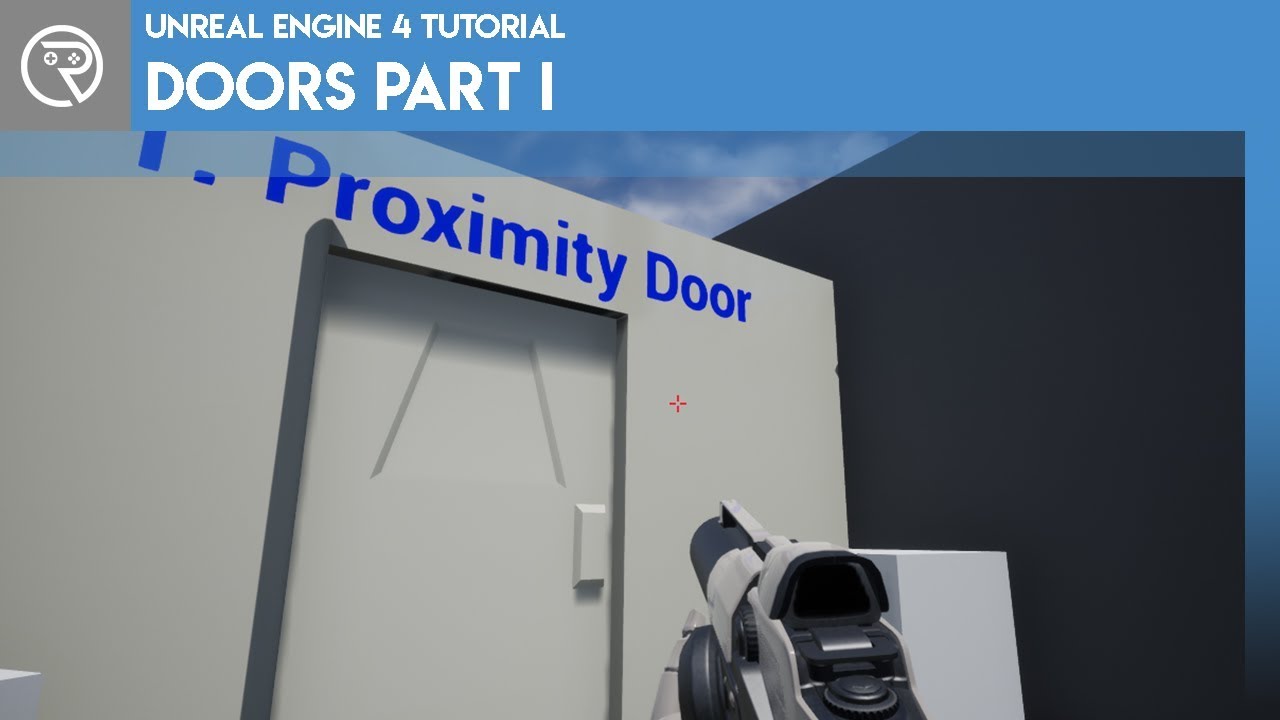
In this beginner tutorial series I go through how to create a variety of doors used in games.
This first episode teaches you how to create a door that will open when it detects the player approaching, and then closes behind them.
[Resources]
Door Model: https://www.dropbox.com/s/daxgy4ehxiwg9rk/door.fbx?dl=0
If you get stuck, have issues, or ...
Part 1

In this beginner tutorial series I go through how to create a variety of doors used in games.
This episode teaches you how to create a door that will open when the player presses a button. It is highly recommended that you watch the first part as this will build upon code that is taught there.
[Resources]
Door Model: https://www.dropbox.com/s/...
And part 2
because he used the same blueprint
so i had to watch part 1
the reverse connection on the timeline node closes the door so you need to disconnect the reverse at endoverlap
ok so
hold on
then put a flip flop at E pressed and stick the second one into reverse i guess
i want left click
ok so
the reverse from DoorAnimation/
same thing
from timeline/
?
yes
ok
i did
now what do i do
that should work i think
i just dissconnected that
disconnected
ok let me try]
nope
when i open it then i can't close it
that's the problem
can you send a screenshot of your BP?
ok
hold on
yeah you need da flip flop
wait
what is that
plush yew
plush yew
then put a flip flop at E pressed and stick the second one into reverse i guess
this
ok hold on
so
right click and type flip flop
ok ok'
its like a switch
kk
ok
i did
now what's the next step
lmao
what
put A into play and B into reverse
ym
um
wait
and left click into flip flop
wait
what A
that's my blueprint rn
ok ok
but left mouse button is connected to door animation
yeah you use left click instead of F
ok
and where i connect A
and B
plush yew
plush yew
put A into play and B into reverse
here
because left click is not connected to door
ok ok
both of them right?
teal schooner
your trolling right?
teal schooner
shut the up
plush yew
you said to connect A and B to reverse
i cant
whyy
that's what you said
to connect A and B to reverse
i said A into play
oh
and disconnect that long one
and B into reverse
ok
done
now let me try
YAAAY
it'S WORKING
THANK YOU SOOOOOOOOOOO MUCH
nice
I'm so happy
this is my best day
aight im off to bed now
yeah same
it's 5 am here
GN
teal schooner
feels good once you get anything to work
broken heath
Why are you so happy
plush yew
because i finally did it
broken heath
The game
plush yew
not yet
broken heath
O
teal schooner
i think its ready FNAFGAMER 😉
plush yew
i spend so much time trying to figure out how to do this
with doors
and finally someone helped me
broken heath
Is it simpler than u thought
Oh scrolling up that’s a cool story, thanks to the hero Guile
gloomy gull
Oops I was gone
plush yew
Uhhh guys how to connect your PS5 Controller to UE4?
gloomy gull
afk
plush yew
Cause I am testing my game to controller
gloomy gull
@plush yew https://www.youtube.com/watch?v=fii5LxBJGhg

The easiest and best way to get the PS4 controls working on your Unreal Engine 4 game! Hope you guys give this video a like and Subscribe!
Support me on Patreon:
https://www.patreon.com/AstrumSensei
Join The Discord Server:
https://discord.gg/j94z8aS
Unreal Engine 4 Action RPG Tutorial Series Playlist:
https://www.youtube.com/playlist?list=P...
Google is ur friend 😉
 rancid lynx
is this grab item function gaurenteed to finish before the switch on strings node, as long as i dont use delays ?
 digital anchor
yes
all function calls are synchronous, unless they have the clock icon
@rancid lynx
rancid lynx
functions, thank you but.
if i collapse non functions into a small node, what kinds of things could cause the grab node to happen later ? delay , maybe timelines ? anything else ?
because i can call non function nodes in a function.
i mean, i can call custom events from the main window in a function. but i guess they still finish first.
oh clock icon. thats cool ! ill look out for that. ty
yea, one of my functions called a custom event with a TL clock X_x. that was my guess. sorry. thankyou
if i call this StopTrace After the grab trace, its failing to stop unless i add a .01 delay node to the hide cursor node X_x
plush yew
Hey ! In foliage mode, I can select my trees but not my grass. Is it normal ? https://gyazo.com/83da91563450a35d664c547d5cec4932
( I didn't make the landscape. It is a demo map from a marketplace pack )
 drowsy zinc
Anyone able to help with my particle system? I'm sure it's something I'm doing that's obvious but I can't seem to get it.
what you're looking at is snow I've made, and when I turn on collision it stops emmiting downward. At best I can get it to scramble but it seems like it's killing itself on an imaginary plane.
I've tried adding it to my scene but it doesn't emit anything.
plush yew
gloomy gull
<@456226577798135808> https://www.youtube.com/watch?v=fii5LxBJGhg
I said PS5 not PS4 but still the same controller so thanks.
plush yew
Moreover, I've just noticed I can't erase my grass also. Though I can erase my trees. Is there some issue with my grass ? Or may I have multiple foliage or I don't know ??
Though, the Component Class is the same for each of my foliage elements :
I don't think I have multiple foliage components so I don't understand...
 sonic quest
Hey, anyone tried to add an exclusion volume to the new 4.26 water system.
I couldn't get it working?
Any help would be awesome: https://forums.unrealengine.com/development-discussion/rendering/1847784-enable-4-26-water-exclusion-volume
Unreal Engine Forums
I wanted to add some Water Exclusion Volume to the ocean as shown in the demo video (https://www.youtube.com/watch?v=d5Ft7UaYayM&feature=youtu.be).
So, I added the volume to the ocean but it doesn't mask the water.
I tried to find settings for that in the Ocean Material as shown in the video. (See below)
But there's no
 hot beacon
 median hound
boutta watch
 grim beacon
is anyone's empty game is above 10gb's ?
gloomy gull
@grim beacon that’s weirdly large, my empty projects are generally 2gb
Never more than 3
grim beacon
What version are you on?
I really don't have anything other than 3-4 cpp classes
4.26 I'm thinking its from plugins and stuff
Also the 10gb is before build, if that makes a difference.
 tranquil falcon
When i hit 'G' my landscape disappears from the scene, is it because I have not assigned a Landscape material to it and instead just a 'normal' material
sonic quest
grim beacon
is anyone's empty game is above 10gb's ?
It's totally possible, if you added some asset packs/plugins. Then usually contains more stuff.
Removing things and get the size down is also an art 😄
grim beacon
I havent added anything other than cpp classes
I just checked its not over 10gb's its 7.5gb's as it is
median hound
check the folders
sonic quest
When you package, do not use the pak file. Then you can see what's added to the package. (Everything is a directory)
Then use some file size checking tool to find out what's causing this big file size.
 unique wolf
when i use PIE with multiple clients, it looks like as soon as a non-editor client spawns in, both the camera and the player input bindings in my editor get detached - does anyone know what might cause this? my project is set up similar to the twin stick example (my default pawn has a camera attached to a spring) where this doesn't happen, so there must be some difference somewhere but i haven't been able to find it yet
grim beacon
@unique wolf try adding multiple spawn locations
@sonic quest The vs. file has around 4gb's
unique wolf
grim beacon
<@97550572483248128> try adding multiple spawn locations
i have multiple (6) PlayerStarts, and forgot to mention - all my pawns are spawning in as expected, and everything works fine in the editor until one of the non-editor pawns spawns in
i have custom GameMode which is cycling through the PlayerStarts for each client
plush yew
You can now try Chaos without compiling the engine from source
thats fkin amazing epic dudes.
i hope the idea get general for the nvidia goodies 🙂


@plush yew you pfp is so nostalgic. 🙂
aka my childhood 😦
plush yew
plush yew
<@456226577798135808> you pfp is so nostalgic. 🙂
oh dnt u k thi smeme
meme
@plush yew hmmm what meme that pfp has ?
 outer cosmos
 rapid gulch
Where can I get a 3D car model with bones for testing cars in UE4? I'll remove it later on, but I can't model...
 tame marsh
Car with bones?
I thought there was a basic car project with suspension somewhere
@rapid gulch Yep, there is the Vehicle template project with a WheeledVehicle class that you might be able to use.
 dire ingot
guys i by mistake removed some of unreal engine files ( i donwloaded a duplicate files remover, im sure i selected only the folder i want to delete the duplicaed files in, but it choose the entire drive. and due to that ue4 has got some of its files removed ), Right now when i run the app it wont launch. when i run the task manager and run ue4 and see what happens it exit the launcher then run te crash handler exe then exit again.
is there a repair tool?
i cant install unreal engine again from 0. that will take days due to my internet speed
so i prefer to find another way, like a tool to repair ( or install ) only missing files
tame marsh
@dire ingot Try using this function
dire ingot
why everyone use unreal engine thorugh epic games launcher?
for me i did not do that, i simply donwloaded the unreal engine thorugh google, not epic launcher
tame marsh
Epic Games Launcher is the official distribution channel to acquire it
I don't know how you did it but I would not trust any third party to download the engine
 fierce tulip
lol
dire ingot
actually they provide the engine to be downloaded through the internet, they did not restrict it to only the epic launcher.
and im the one who thought u are pro at this, but everyone is a newbie it appear lol
are u asking me how to download unreal engine?
lmao
tame marsh
Please don't insult the people who are trying to help you
dire ingot
i did not insult them, if i did please tell me when/where that happend.
dire ingot
install the new version.
why are u asking me this? do u have unreal engine installed or what?!
most of my friends have unreal engine installed with out epic launcher. it appear u only don't have it like that.
broken heath
Yes i do , i just thought ur doing something easier but apparently not since u go to google everytime u update
fierce tulip
@dire ingot can you please behave like an adult. thanks.
dire ingot
@fierce tulip that was mean
 warped tangle
@dire ingot A little professionalism goes a long way
broken heath
I use to launcher mostly to get market assets inside my project
dire ingot
wtf is wrong with this community?
i will go for now. thanks for not helping or being nice.
broken heath
The community uses the launcher , which is triggering you for what ever reason
Damn i thought id lunch my game on 1/1/2020
it is hard to be an indie
warped tangle
yeah, I heard they haven't finished yet
 buoyant graniteBOT
:triangular_flag_on_post: UE 4 The Best#2729 received strike 1. As a result, they were muted for 10 minutes.
 potent bridge
So, I'm downright terrible with animations, but I created an animation montage for my player character (stun), but it wont play when I execute it in BPs
Do I need to do something with the Anim Graph?
 ebon marlin
Does this seem right? https://tinyurl.com/y99k7nxw

My position values don't seem to change at all when moving the SCORE text
and I cant get it centered on the screen at all
Right, restarting the editor seemed to fix the position not changing
But it's equally intolerable because the values are all wrong
Did anyone else experience this? I'm on 4.26
 worn merlin
Hello guys, is there any way through which I can dynamically download a level while running the app?
 next badger
@worn merlin app? you need to be more specific
worn merlin
next badger
<@!587690787236478976> app? you need to be more specific
I mean while running an unreal app on any device, can I dynamically download the level on that device & then run that level.
next badger
@worn merlin it is possible, not sure about "any device"
worn merlin
@next badger is it possible to download level through a weblink & then stream it inside unreal? If possible how can I do that can you please help?
next badger
it's not a builtin feature, you can load pak files dynamically, and use sockets to download them
plush yew
Hello, umm when I export from substance painter to unreal engine I have no texture on the 3d model... do I need to update substance painter?
I don’t think that’s the problem but I’ll try
worn merlin
@next badger can this be done inside Blueprints or I have to use c++?
open wadi
Anyone here good at analyzing profiles?
I took a profile of my game that is running far too resource intensive on Mac, and I'm sitting in a static position (the initial login screen), there's a moving 3D background with a couple widgets displayed, and suddenly after X seconds my rendering thread goes haywire and I'm trying to determine why
worn merlin
@next badger is there some link which can help me regarding the code, I searched but didn't got any.
 calm widget
@open wadi Do you have any hickups ingame? can you notice it stutter
wary wave
judging by the fact it's FTcpMessageTransport, it sounds like something like a debugger, or some Internet connected thing is causing a stall / lockup
does the stutter occur in a packaged game?
either in Developer or Shipping config
next badger
@worn merlin look for PAK loading
plush yew
How do I store a list of pairs of integers?
 exotic thicket
make a struct that contains two integer values and make an array of the struct type
burnt ether
can I create an addpin button to my function ?
 thin merlin
Hi everyone.
New to the server. Been a long time fan of Unreal Engine.
Just want to confirm. A notification will go out here when UE5 beta becomes available right?
teal schooner
thin merlin
New to the server. Been a long time fan of Unreal Engine.
Just want to confirm....
Most likely
thin merlin
I have some light experience creating games(Project Spark, RPG Maker 1 and 2) but I've always played in the kid pool thinking UE4 was too complicated for me. T.T
I heard UE5 is supposed to be even easier to grasp and I'm very much looking forward to it.
There's a game I want to make and I know how I'm going to go about it. I just can't get started until UE5 comes out.
burnt ether
You can learn very very quickly if u have the engagement to do so
thin merlin
Better question then.
Say I'm making this game in UE 4.26 rn. When UE5 comes out, can I load it up from there?
burnt ether
I know it's possible to upgrade from 4.25 to 4.26 for example... but if it's a whole new engine version I'm not sure about it
thin merlin
Hmm
teal schooner
They're going to expect most everyone to upgrade, they don't expect people to start over
That's silly
thin merlin
If it was just a reskin of the gui and some background improvements then it wouldn't UE5. It'd be a 4.xx
I could see them making an entirely new engine with UE5.
teal schooner
This is straight from the FAQ: Will it be possible to migrate a UE4 project to UE5?
Yes. Developers will be able to migrate their UE4 projects to UE5, which is backwards-compatible. Developers targeting next-gen consoles are encouraged to start building with UE4 today and port their projects to UE5 if needed.
 glacial arch
Hey guys, so I got a conundrum. Any clue how I can render an actor to a texture independently of the scene currently loaded? Is there a way to create another "world" so to speak where I can place actors and take pictures of an actor in a separate scene?
for things like rendering a character in a UI, or rendering item icons procedurally from the item itself?
teal schooner
glacial arch
for things like rendering a character in a UI, or rendering item icons procedura...
There are plugins that can do that for you in the marketplace
glacial arch
are they free?
teal schooner
I don't remember
 stark ledge
I could be wrong, but I expect UE5 to be more of a branding thing than a new engine. So equivalent to UE4.27 or 4.28.
Usual upgrade route.
glacial arch
@teal schooner I don't mean to sound unappreciative but I do kinda wanna know how to solve that kind of problem instead of using premade assets/plugins
stark ledge
glacial arch
Hey guys, so I got a conundrum. Any clue how I can render an actor to a texture ...
It's fairly easy to do this with UE4 no plugins required. One sec...
Search the docs for Scene Capture
We use for character in the UI, and also minimap.
2 different use cases
teal schooner
glacial arch
<@!211913374961893376> I don't mean to sound unappreciative but I do kinda wanna...
np, it's quite the undertaking
glacial arch
@stark ledge thanks a whole bunch! I really appreciate it
stark ledge
Nps, this is the component we use for the UI character actor https://docs.unrealengine.com/en-US/API/Runtime/Engine/Components/USceneCaptureComponent2D/index.html
Used to capture a 'snapshot' of the scene from a single plane and feed it to a render target.
broken heath
Guys any idea how to control the width of a texture through blueprint?
plush yew
Unity better Damn boya
 zinc shore
how can i check to see if a actor has a static mesh
thin merlin
<.< Stupid question. How much code is really needed to be understood when making a multiplayer game? As long as I can understand the gui do I ever have to mess with the code underneath?
stark ledge
thin merlin
<.< Stupid question. How much code is really needed to be understood when making...
Making a multiplayer game is many times harder than a single player game. There's a lot more that can go wrong. You may get something functional without understanding it, but shipping a game will be almost impossible.
However, if you stay at it you will of course grow in understanding 😁
grim beacon
You can create simple multiplayer events but if you need to replicate movement and high frequency stuff you will need some c++
thin merlin
I'm aiming to make an online multiplayer board game. There won't be that level of control.
grim beacon
It should be fairly simple ue4 has some built in turn based match stuff as far as I know
grim beacon
Yea just don't underestimate it if you've never done multiplayer
thin merlin
Understood.
So UE4 has already done the hard networking part right?
I just need to make sense of it all and build it.
 torpid flicker
idk in which channel to post this question so, anyone knows why my collider is partially allowed to stay in walls? Both collider and wall are set to block everything
ebon marlin
how did it get in there like that?
plush yew
what does the wall collision look like
torpid flicker
snapped to the wall extends
plush yew
is the wall perfectly straight?
ebon marlin
thin merlin
So UE4 has already done the hard networking part right?
That's right, you should make sense of it while tagging along in #multiplayer, everyone there are extremely nice and helpful and it's an ever evolving conversation filled with useful information
thin merlin
^^ Thank you. I will.
ebon marlin
@torpid flicker is that using the Character Movement Component?
plush yew
are you moving with character movement component?
 marsh sparrow
so.. GameMode / GameModeBP should handle my 'start level, do cinematics, do story blah blah blah, then spawn characters and start game' stuff? if I understand this correctly? https://docs.unrealengine.com/Images/InteractiveExperiences/Framework/GameFlow/GameFlowChart.png
 torpid flicker
no, im moving with SetActorLocation()
ebon marlin
there's a lead to your problem, how are you obtaining the location you're passing to set actor location?
torpid flicker
I mean i understand this should affect the moment of impact, but when it is left there shouldnt it be pushed out?
when i apply no input and I just leave him there
torpid flicker
ebon marlin
there's a lead to your problem, how are you obtaining the location you're passin...
I multiply an input axis vector by DeltaTime and the movement speed
ebon marlin
I haven't worked with CMC but Setting actor location with your own layer of logic ontop of it is bound to be intrusive to CMC's movemnet cycle
torpid flicker
so you suggest using the character component input?
ebon marlin
Yes, it will do everything for you
it's not designed to take care of depentrations after manual calls to set actor location
marsh sparrow
    if (Value != 0.0f) {
        // add movement in that direction
        AddMovementInput(GetActorForwardVector(), Value);
    }
}``` like this..I see, is that related to the camera spring arm not colliding effectively as well?
even though I set the proper option
ebon marlin
the camera should not be related to your movement
plush yew
How could I increase number when getting closer to something
ebon marlin
only indirectly by defining right/up/forward inputs etc
torpid flicker
so thats a different problem
ebon marlin
marsh sparrow
so.. GameMode / GameModeBP should handle my 'start level, do cinematics, do stor...
not sure about cinematics, but yes gamemode is the major workhorse of the game, gamestate and playerstate - afaik - should be treated more like replicating data containers
plush yew
@torpid flicker it really depends on what kind of game you are going for. Character movement component has a ton of nice stuff built in to it, for example replication if you are wanting a multiplayer game. There is no reason not to use it even in a simple situation. SetActorLocation should in theory work (if you are using single player). Notice when you use the 'setactorlocation' node, there is a checkbox like this
 quartz grotto
Happy new year
plush yew
This will mean that your 'setactorlocation' movement ignores collisions, which can be a problem. If you check 'sweep' instead, you should in theory not be able to move inside walls, unless there is a problem eg with collision or with framerate.
torpid flicker
plush yew
<@!314806887701020675> it really depends on what kind of game you are going for....
Thank you for this, Im using c++ but i guess there is a relevant option there too
Ill test it out right away
torpid flicker
plush yew
This will mean that your 'setactorlocation' movement ignores collisions, which c...
This partially fixed my issue, thanks. I'll take it from here and see what I can do. Thanks for your help guys
Any ideas why the spring arm component collision doesn't work though?
I've set 'Do Collision test' option
plush yew
I remember I had an issue with that on one of my projects and there is a setting on either the spring arm or the camera that changes it, can't remember exactly
torpid flicker
hmmm okay ill look into that as well
marsh sparrow
ebon marlin
not sure about cinematics, but yes gamemode is the major workhorse of the game, ...
So... how would one structure story stuff cinematics before gameplay.. like where does that typically live
ebon marlin
no clue, never did those
marsh sparrow
cooldeal! me either LOL
thanks man. I'll get to googling cutscene tutorials, etc see if anything pops
celest vapor
If I stream a level into another level, if the streamed level has a seperate gamemode will that override the root level? or will it ignore the streamed level(s) gamemode?
marsh sparrow
if you stream it in, it leaves the gamemode
if you open the level it swaps the gamemode
celest vapor
@marsh sparrow Thank you! I've been super hesitant to stream levels in because I thought it would override gamemodes
marsh sparrow
not a problem. I found that out the hard way trying to go from main menu to my actual level LOL
celest vapor
Lol
one more question
is there a way to offset a streamed level
this is a poor example but; think of a endless runner game with tile sets. and each tile is a level that is streamed
(im not actually doing that but using it as an example)
plush yew
Hey ! In foliage mode, I can select my trees but not my grass. Is it normal ? https://gyazo.com/83da91563450a35d664c547d5cec4932

( I didn't make the landscape. It is a demo map from a marketplace pack )
marsh sparrow
the grass usually is part of the landscape mat and not applied as actual foliage due to fps issues
plush yew
@marsh sparrow Ooooh ! Very interesting... I didn't ask about FPS but indeed, that would explains the thing... But how can it be part of the landscape ? I don't understand.
marsh sparrow
one sec
plush yew
No pb
marsh sparrow
Learn how to add Grass textures to a landscape.
^ that explains how its usually made.. you will have to open your landscape up and check the material you have set for it and find in there where the grass is exactly
mine is buried in some layers.. but here is the landcape and the landscape mat are you can dig into on yours it should be in a similar spot
lots of grass going on
plush yew
ooooh
ok, so I get it ! that's here :
Damn ! I always thought that grass was part of the foliage !
thank you so much man !
marsh sparrow
yeah, but if you open your actual material you will see in the bp where its actually being applied
plush yew
ok
marsh sparrow
and in edit landscape mode.. there is a paint part where you can apply specific layers from the landscape mat
if you google around all that you should find it
and np man
just passing on what others have taught me in here
plush yew
🙂
Guys
How can i add Walking animation to My AI?
I mean how can i get a walking animation
 analog blaze

 arctic compass
I imported some mesh object created in blender, and when I view Show Collision in the viewport menu, the collision shape is way different from the mesh. Is that normal?
marsh sparrow
@plush yew can you elaborate? like roam or something?
plush yew
@marsh sparrow wdym
i'm making a AI
i want to add him a walking animation
because it's a character
and idk how to get one
or to make
plush yew
arctic compass
I imported some mesh object created in blender, and when I view Show Collision i...
Yes I mean for me it is anyway I think you have to make your own collisions for it, o forgot how but thats probably why
arctic compass
thx @plush yew
plush yew
Your welcome
marsh sparrow
@plush yew if you are in need of an animation for walking there are a lot of free ones here. https://www.mixamo.com/#/
marsh sparrow
ha
marsh sparrow
sure, its based on a normal skeleton
plush yew
Happy new year!
marsh sparrow
you might have more luck in #animation
marsh sparrow
it is just east of japan 😉
marsh sparrow
@plush yew like if you've already applied the animation, but it doesn't sit with the skeleton right.. I'm sorry I can't help
plush yew
bruh ok fine
Time for me
ok
So happy new year from those indias
Happy New Year everyone 🥳
Yeah you too!
Die corona die
Haha yeah, yall future peoples tho
Its thursday for me
Yay 2022!
Corona vaccine yay
plush yew
plush yew
Die corona die
yeah
plush yew
plush yew
Yeah you too!
you too 🙂
2022 boy
no its 2021 😄
xD
Uhh you from the past?
xD
Stay safe everyone
2022 for me,
plush yew
plush yew
2022 for me,
xD

hahaha
wait are you coming from the future?
No
You all from the past
ah okay
Why you guys still on 2020?
oh so you came from the future
yeah
Corona bad
2022 corona vaccine
yeah
yes
But still testing.
But yes vaccine
so are you in 2022 rn?
or 2021
But it kind of sucks here like it has alot of stuff that can make it worse
@marsh sparrow
2021.1
@plush yew I think your skeleton is just not compatible with the mixamo skeleton. You must have a compatible skeleton. Something like the UE mannequin skeleton.
( but I'm a noob in animation so I can't help more, sorry )
oh
plush yew
marsh sparrow
the grass usually is part of the landscape mat and not applied as actual foliage...
Hey ! Just for clarification : You meant it's better to have grass as part of the landscape because if it is as foliage, you can have low FPS, right ? You was not saying that my low FPS (in my screenshot, we can see that I have low FPS) is due to the fact I have grass as part of the landscape ? (Sorry if I sound a bit dumb but english is sometimes a bit confusing to me 😉 )
( Though, my low FPS is truely due to my grass I guess (in major part at least) because if I delete the landscape, my FPS goes up pretty much )
calm widget
@plush yew You can have a landscape grass type, where you can put grass and sticks etc, so you can't select it as you can foliage, it's good for setting grass automatically where you paint it etc. Not sure it has much to do with fps in comparison to foliage might be wrong tho.
plush yew
how can i animate and then Add to ue4
From blender
like animate in blender
For example a walk animation
 grim ore
you animate it in blender then export out the animation....
which part are you having problems with
plush yew
I made a AI character
an
and i want to add him a walking animation
and that's why i asked
grim ore
so you need to know how to use blender? you need to know how to animate a skeletal mesh? you need to know how to export the character from UE4 to Blender? you need to know how to export the character from Blender to UE4?
your question is very vague
plush yew
i know
how to use blender
idk how to animate skeletal mesh
I know how to export character
grim ore
then look up how to animate in blender on google
 slim pumice
Hi guys, I'm wondering if any of you here have much experience with Virtual Studios in UE4? I'm trying to work out which 3-rd party offering gives the best variety of functions but it's not easy when it's the holidays and nobody can pick up the phone! Main options are Reality Engine, Stypeland, Chryonhego's FRESH and Mo-Sys VP suite. If any of you guys have experience with any one of these I'd love to hear your thoughts on optimal tracking input and where a media server can come into it. In return you get my eternal gratitude and recommendation whenever somebody asks if I know a UE tech 😊
plush yew
Ok
Thanks
so im following ryan laley's fps tutorial and he puts the animations on the guns and seems epic likes to put the animations on the arms, what do you think is the better way ?
broken heath
plush yew
Ok
Help me idk how to resize the textures width through a material instance
plush yew
calm widget
<@456226577798135808> You can have a landscape grass type, where you can put gra...
.. "setting grass automatically" like with help of masks, for example... That's what there is my grass material, I can see it. About what it's better in terms of FPS/performance between a landscape grass type and a grass foliage, maybe some Unreal GrandMaster like @grim ore has the answer ? hihi
grim ore
@plush yew you put it wherever it makes sense for your project. both are valid.
@broken heath the sizing of the texture? if its not exposed you have to add it to the master material and expose it to the instance.
grim ore
what do you mean by width
broken heath
Like literally widenining the texture
grim ore
there is no width or height in a material since it is applied to an object and that object controls the size
it sounds like you mean the scaling, which is adjusting the texture coordinates
grim ore
you would add a texture coordinate to the texture sampler and just adjust it on the horizontal
broken heath
I want to get the value on the
Texture coordinate out
In a scalar parameter so i adjust it in an instance
grim ore
and you just want to only expose the 1 value?
celest vapor
If I create a level instance for level streaming and tell that instance to set 'should be loaded = false' will that remove that instance of the streamed level out of memory?
grim ore
you are looking at something like this to expose just one axis on the texture coordinates to a material instance
I guess this would work as well, no idea which is better
broken heath
grim ore
you are looking at something like this to expose just one axis on the texture co...
Oh thanks finally! A help i will try it out
 glass rapids
Hi, I have a quick question. What do you think would be a good way to make a hunger and thirst system?
 viscid stratus
Hey! I've just began to learn Unreal Engine and I'm trying to make a custom, flying object follow the player. It's all good, but the drone only sees what's in front of it at the start. So when I go behind it's starting point, it stops following me, because it doesn't see me anymore. I use AIPerception (AI sight config) for this method, which cannot be attached to the body itself, so I'm guessing that it simply doesn't follow the drone itself. How could I fix this?
 scenic egret
Does anyone know whether you can change the transform values of an object in sequence to local space rather than world space?
celest vapor
@scenic egret as in scaling all of an actor's components relatively?
marsh sparrow
plush yew
Hey ! Just for clarification : You meant it's better to have grass as part of th...
Ha. Actually I never looked at the screen shot close enough to see the fps.. But grass usually is never part of the foliage
 runic narwhal
Experimenting with the new water actors...what is the deal with this? It looks really...off.
It's like it's clipping through the camera frustum
 harsh tiger
if you start to package your game and then open a widget and change some text for example. will them changes be included in the new packaged build if that asset hasn't been packaged yet?
scenic egret
celest vapor
<@!141697791461294090> as in scaling all of an actor's components relatively?
It's basically just a tree falling. However when using sequences transform track it uses world space instead of the trees own X,Y,Z values, if that makes sense? I've tried experimenting with the different blend modes
celest vapor
are you using a timeline for the tree falling over?
scenic egret
Yeah I am, it isn't an animation ive done.
celest vapor
if the tree is an actor you can tell the static mesh component to update "relative transform" which only changes its transform relatively
when doing that just have the starting key be the current transform of the tree in the actor and then ending where you want it to end
like if its rotation is 0 to start and then to fall over you want to set its roll or pitch to 90 to make it fall sideways
dawn gull
DarkerNodes is my best purchase for unreal so far
plush yew
marsh sparrow
Ha. Actually I never looked at the screen shot close enough to see the fps.. But...
ok ! 👌
celest vapor
dawn gull
DarkerNodes is my best purchase for unreal so far
That look very pleasing. Easy on the eyes
celest vapor
I have yet to see that one
scenic egret
Right, yeah it is an actor with a static mesh component.
When you say update to "relative transform", do you mean changing to blend mode to relative or something else?
celest vapor
scenic egret
Right, yeah it is an actor with a static mesh component.
When you say update to...
on the update end of the timeline where you are changing the transform you can "set relative transform" on the static mesh component
I'm opening a project of mine atm i'll be able to show you in a moment
dawn gull
@cinder minnow ya done good
scenic egret
Okay thank you, I appreciate the help. Rather new to sequencer.
celest vapor
@scenic egret Of course! We're here to help
hasty gorge
uh I forgot to ask
how do you use a github repository and put it into unreal engine on your computer
do you just clone the git and then put it in some specific file path?
grim ore
@hasty gorge the engine itself or a project?
hasty gorge
the project
wait basically, I want to have an unreal engine project on github and put it as a project on my machine
dawn gull
Sorry if I'm interrupting, but I'm procedurally spawning a bunch of actors in specific locations and rotations around a sphere but the sphere is moving, how can I attach the actors to the sphere after they get spawned in game?
dawn gull
hasty gorge
wait basically, I want to have an unreal engine project on github and put it as ...
Then you'd want git or the github desktop app
 junior sedge
Happy new year everybody 🎊🎊🎊🎊.......
scenic egret
celest vapor
<@!141697791461294090> Of course! We're here to help
Sorry, if you do have a moment. Would you be able to show me? Still having issues. If not its okay.
celest vapor
Of course. I'm just about to make a door actor too lol
scenic egret
Okay, thank you.
scenic egret
Thanks, will take a look
celest vapor
I'm using the Z axis for yaw but if your tree falls over then I would recommend using x or y haha
scenic egret
Yeah I will, makes more sense seeing it. Thanks a lot
celest vapor
Just for reference. World is, well world transform. but Relative transform is specifically the component's transform within the actor it is a part of
 winter gale


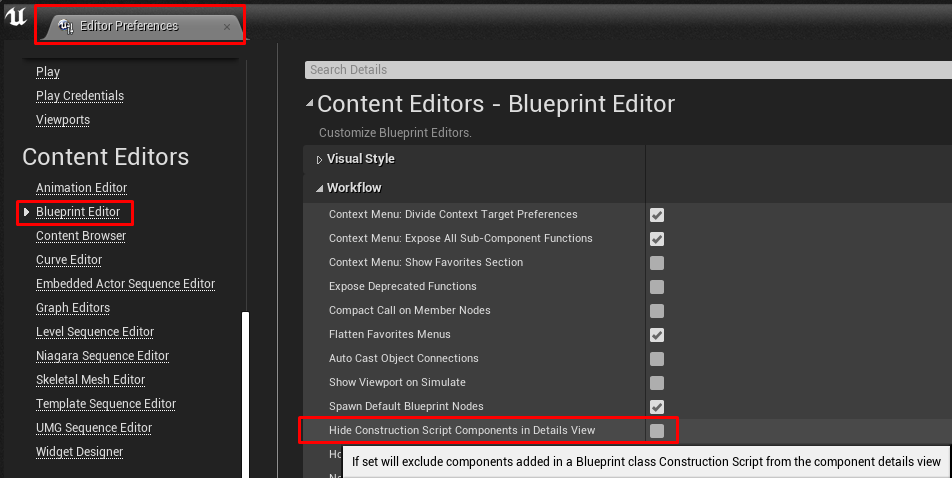
Quick #UE4 Tip number 85.
You can see components added in Construction Script by disabling Hide Construction Script Components in Details View from Editor Preferences.
#unreal #unrealtips #unrealdev #indiegamedev #gamedev #indiedev #screenshotsaturday #UnrealEngine
 Twitter
·
Twitter
·
 harsh tiger
any idea why all of a sudden i get a black screen when uploading my project as a apk to my oculus headset? it used to work just fine. but its stopped working for some reason
harsh tiger
this was the issue
 torpid shadow
Im having an issue in Unreal with lighting, Im trying to have a night time scene and I've got it how I want but inside buildings is pitch black. If I mess with exposure then the outside areas wont look right, Im kind of stuck on ideas of how to fix this, anyone have any suggestions?
plush yew
How to capture 360 degree screenshots
dawn gull
press print screen 360 times
celest vapor
@dawn gull each time you press it, it overwrites the previous one xD
celest vapor
fair
Hey, have my own map generation system with streaming tileable instances of sublevels into my main one.
it loads the starting tile when the game starts but the player's character wont collide with the level.
All the static meshes in the level have collision enabled and will collide elseware but now when streamed. How can I fix this?
plush yew
I were talking about taking 360 degree screenshots.
celest vapor
yeah, he was saying take a screenshot for each degree
gloomy gull
Is there a way to create a base project? I find myself recoding an FPS base everytime I need an FPS, which is really painful
 dapper frost
what's the actual size of 4.26?
 waxen raven
Template...
gloomy gull
waxen raven
Template...
heh heh, ty
still moat
@gloomy gull Just wanna say you're a legend with your livestreams about the EOS
plush yew
hey someone know when UE5 come out ?
 dim sedge
Just starting out with unreal engine properly, I have a fair bit of experience with unity and C++, I feel comfortable diving straight into C++ but is there a way to use both blueprints and C++?
Can anyone recommend good content for people transitioning to unreal from unity?
grim ore
there are docs on that in the docs pages as well as a course on the learn site
and there is nothing special to using BP and C++, projects are not one or the other but both always depending on what you want and use
 honest fox
Hey all, I am repeatedly crashing using procedural foliage spawner on 4.25. Here is the last message I have gotten:
Fatal error: [File:D:/Build/++UE4/Sync/Engine/Source/Runtime/Core/Private/GenericPlatform/GenericPlatformMemory.cpp] [Line: 186] Ran out of memory allocating 1627158960 bytes with alignment 0
I had no trouble with this tool on other experimental projects that I had scrapped. I have tried increasing the paging file, reinstalling ue4, starting a new project, resizing the map and with different spawning volumes on different levels. Not sure what I am doing wrong here.
I am a bit of a novice at this so please feel free to state the obvious if there is one.
 maiden iris
Hey, has anyone retargeted mocap data to the artv1 skeleton control rig in maya successfully? I can bake the mocap to the bones but then the control rig doesnt follow :/ any help on this would be great
gloomy gull
still moat
<@!578668767316410371> Just wanna say you're a legend with your livestreams abou...
Thanks man! I appreciate the kind words 😄
 meager shale
Hello everyone. Happy New Year!! As I'm sat alone tonight I figured I'm gonna dive in and try and check out the Control Rig a little in Unreal 4.26 in the hopes of being able to use that to drive animations across multiple character skeletons without the need to retarget stuff. So. Has anyone explored it in depth? And if so, does anyone know if it's posible to have, say, the UE4 Mannequin (with a bunch of animations in an anim BP) drive a control rig that in turn drives a character with a somewhat different skeletal structure? So Mannequin -> Control Rig -> Custom bipedal character. Yay? Nay?
plush yew
Trying to achieve a stylized grass look but something looks really strange here...
Looks more like fried fries than grass and also, I've got holes in there, is that normal ?
Grass density is at maximum
Any advise on how can I get that stylized look?
guys how can i animate a walking animation?
In ue4
In blender?
Wait where? @plush yew
Or in ue4
meager shale
Use the Control Rig if you want to animate inside UE.
meager shale
The add a sequencer. Then keyframe it.
plush yew
Control rig
Ohh yeaaa
thanks
But how do i select my character, how do i get Control rig
meager shale
The control rig is a plugin that you need to activate. There is a 2 hour talk from Epic about it. Let me find the link for you.
plush yew
Kkkk
meager shale

Control Rig is a scriptable rigging system that is based on Blueprint and is mainly designed for controlling properties to drive animation. This week on Inside Unreal Helge and Jeremiah will break down the Mannequin Control Rig example from the Marketplace, show how to use Control Rig with Sequencer to animate a character, give tips on how to de...
Then there are a bunch of step by step tutorials on youtube if you want it slower and more surface level.