#ue4-general
1 messages · Page 905 of 1
 river drum
 smoky jungle
I havent used unreal engine before but I am interested in the hair and fur part of it. After we create hair and fur in unreal engine are we able to export the render hair to another software?
 gray mesa
how do I test a property of a static mesh component of an actor class without creating an instance of the actor?
 pliant rose
@gray mesa learning section got meerkat project to download
gray mesa
@pliant rose I'll check it out ty
pliant rose
@gray mesa answer was related to meerkat level about fur and hair
 sly glade
hello all - is there any way to disable f9 as the screenshot key ?
pliant rose
x
how bad it would be
when desire to learn
misled by some fuker,
who misread the comma
gray mesa
so about accessing static mesh component in actor class without creating an instance?
 plush yew
What does this error mean please ?
I googled it but I don't understan that at all
( I have reduced the lightmap resolution of my foliage meshes and the reliate error disappeared but I have still these errors )
pliant rose
@plush yew may be disable shadow for that big actor
plush yew
@pliant rose "InstancedFoliageActor" is my foliage. But it says there is a problem with "InstanceFoliageActor_0". Does "0" mean a specific mesh of my foliage or all my foliage ? Should I really disable ALL the shadows of my foliage ? 🙁
gray mesa
instanceFoliageActor_0 is the first instance of your foliage in the level iiuc
 light thunder
I've made a change to my mesh on the import settings but when I hit reimport, nothing happens, it never updates the mesh based on my new import settings
there's no reimport that actually takes in the new import settings is there? what a shitty engine
 steep skiff
hello guys
so i am a beginer
on unreal engine
i think
but i would like to learn
how to make a game
how do i make fps walk
to start with the basics
plush yew
@gray mesa @pliant rose I've just run into an interesting thread about lighting and lightmaps. Notably, I read this : « Typically with larger worlds that are open or using lots of foliage you would want to use Dynamic lighting since there would be moving trees and such. You can get away with Stationary for baked lighting at distances, but if you world is large you would incur some possible performance issues with lightmap textures needing to be loaded in as well. This is why lower lightmap resolutions are better. If you're using Stationary light, you shouldn't worry nearly as much about quality because it'll be at such a distance that the player will never see it up close. »
What does that last sentence mean ? Does the stationary light adapts herself depending on the viewing distance ?
gray mesa
@plush yew he means that if you are using stationary lights to mock distant lighting on distant objects you can use a lower luxel density in the lightmap to increase build speed and load times.
plush yew
( the thread is a bit old though : 2015 but I guess it makes sense even now )
@gray mesa Sorry maybe I'm a bit dumb but I can't get what it means concretely... May you tell me an example please ?
"Distance objects" in relation to what ? 🤔
with the light ?
 vocal flume
Any idea how to hide an animation in a widget blueprint? I have a widget animation that is playing constantly in a corner all the time. Now I want to hide the animation when I click on another button but there is no visibility option for the widget animation object reference.
pliant rose
@steep skiff virtus hub on youtube got fps tutorial series, where he teaches pawn to walk, then finish all other videos on youtube.. if you feel comfortable, do stop and move onto UE4 website... by the time you are comfortable, they will have all other tutorials. remember, your target is the to flood your brain with data you desire, after 6 month, the connection will slowly forge... copy past will do, to speed up, comment on code boxez
@plush yew mine is movable cuz i move a lot = no build needed..
doubt is, comment will fail to reach him
unless your framework is ready, dont spend too much time on details @plush yew . unreal engine website, got some pro lighting video tutorials, if u havent seen it.
if movable light will solve u problem, use it. 4.26 turns all shit to stardust, so works for me
gray mesa
plush yew
"Distance objects" in relation to what ? 🤔
from the camera. a lightmap scale or density or the size of a luxel is a measure of how dense lighting calculation is on an object. more luxels per pixel, a higher density or a higher resolution lightmap will result in slower and more accurate calculation. the aim of most scenarios is to have an even perception of lightmap detail in all areas of the scene, so as you move further from the camera, you can (and probably should) reduce the lightmap detail. it increases render speed, load speed and performance of the scene
plush yew
But... The camera is reliate to your character ! How could you move further from the camera ?? 🤔
Maybe I am missing something or I don't know but I just can't understand the shit... 😆
Or you just mean that more the objects are placed far of the camera, more a high resolution lightmap is useless, that's it ? @gray mesa
light thunder
steep skiff
hello guys
there's a course on youtube...ryan lay something i think
plush yew
Moreover, in the most of cases, your can move. So that means that if you come near of the object, it is better to have a lightmap resolution which increase more and more you approch the object. Does I understand good ? @gray mesa So that is why I asked if stationnary adapts herself depending on the viewing distance because in a open world in which you can move everywhere, I don't understand when the guy say « If you're using Stationary light, you shouldn't worry nearly as much about quality because it'll be at such a distance that the player will never see it up close. »
but if it's "non-reachable" objetcs, well, ok, it makes sense...
Do I understand good ? 🤔 @gray mesa @pliant rose
plush yew
Hi guys, i made a real great window material with cube map and blinds...
The problem is I have to make a procedural building using instance mesh, but the windows look all the same. How can i make more variations ? Any bright idea?
 civic otter
Hey guys, anyone know how to do a bloom pass in composure?
 fathom monolith
Real major issue, I am making a game in unreal, forget which version, probably the latest lol, my hard drive failed so I lost the project files, all I have to come back from is a build of the game on an external usb drive from when I showed it to my friend, could I reverse engineer the game build back to project files? Thanks!
fathom monolith
Alright, are you saying that cause of some sort of rule or something, or is there actually no way?
 fallen marten
Once it's compiled, that's about it. You can probably extract something from the Pak files but I don't know about converting them back to uasset files
fathom monolith
Alright, thanks, gonna use google some more, try to figure out, running on no sleep, first published project, publishing in 4 weeks, and again, project files lost.
fallen marten
Surely you have some original asset files somewhere?... If you have published projects before, surely you have stuff on more than one drive 🧐
I've got backups of backups of backups
fathom monolith
Yep, the drive crashed while taking the first backup of the game.
fallen marten
@plush yew you could use some material parameters and set them randomly in the window generation
civic otter
Hey guys, is it possible to use composure to sandwich a media clip between two cg plates? Like a CG background, real element, cg foreground??
 lost grotto
I worked out how to make an installer for my game that makes a desktop shortcut and put files in program files
lost grotto
ihow come this isnt in my widget event graph
theres this but i need on clicked
hello?
anyone?
 crisp bone
is it same widget?
lost grotto
yes
lost grotto
lost grotto
theres this but i need on clicked
it has those by default but how do i get on clicked node
crisp bone
"on clicked" is for a button? If so u need to enable it here: https://i.imgur.com/8Jn18Ff.png
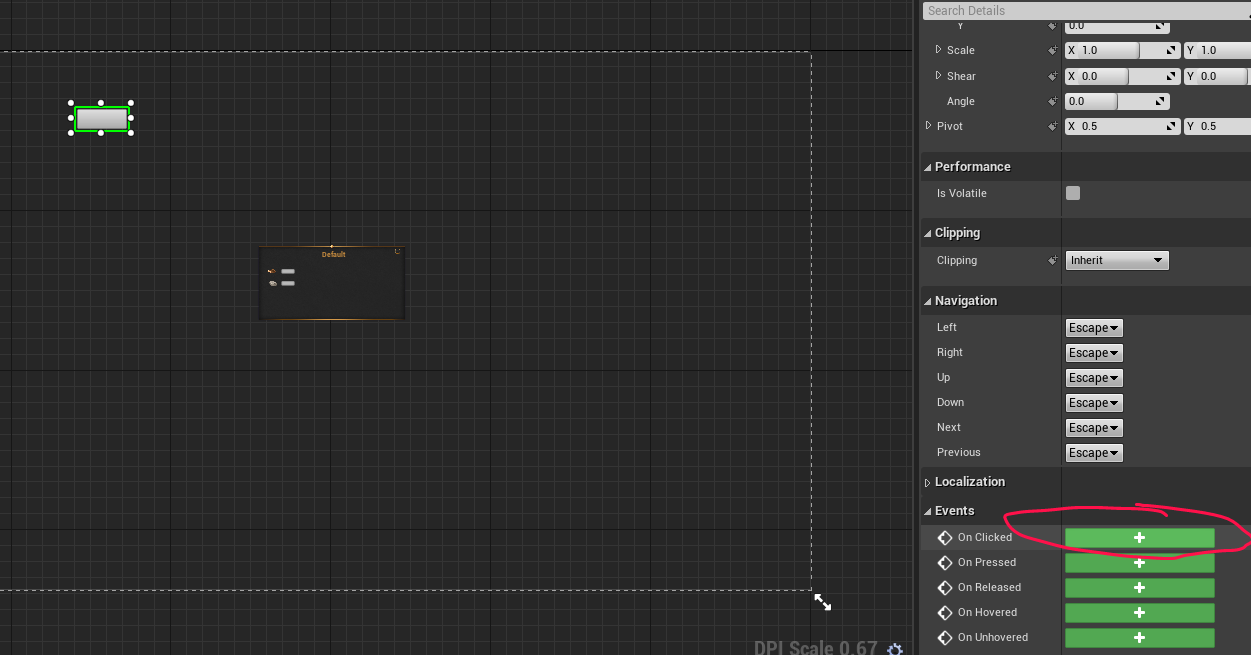
then the node would automatically appear in ur graph no?
lost grotto
ah thanks idk how i didnt realise that
civic otter
Anybody have experience with composure? I need some tips on how to best use the matte element
lost grotto
how would i create this pink thing
as in the pink dot
that like stops it there
and how do i make this
 frozen pond
Equal(string) ?
lost grotto
lost grotto
and how do i make this
whats this tho
civic otter
Anyone have any tips on why a matte element in composure doesn't line up with a cg element when they both use the same camera?
crisp bone
you create the pink dot by double clicking the point where you want it to be
 quasi pasture
If anyone is able to help me out, I wanted to ask a question related to the blueprint stuff on unreal. Most tutorials and video that i've watched seemed to have been using blueprints, which looks neat, but I wanted to know if it'd still be possible for be to use c++ if I ever needed to? (idk the engine well, and couldn't find if it was possible to have both)
plz ping me if anyone knows
civic otter
Does anyone know anything about composure? I've been asking for like a half hour now. Lol
civic otter
It seems as though the mask created in the matte element is expanded so it doesn't actually line up properly with my cg element, but they both use the same camera so I'm very confused.
Does anybody at all have any idea on how to help me?
lost grotto
how do i make the character a pawn
how do i make the character become saidpawn when game starts
 grim juniper
@broken heath iirc you Alt + drag a point, and I think it adds the point to whichever side you drag towards
 broken heath
grim juniper
<@768035735470080000> iirc you Alt + drag a point, and I think it adds the point...
broken heath
grim juniper
<@768035735470080000> iirc you Alt + drag a point, and I think it adds the point...
I added the spline from (spline mesh actor) and it gives me two points and dragging with alt still just move the point itsself
grim juniper
broken heath
I added the spline from (spline mesh actor) and it gives me two points and dragg...
Well, a Spline Mesh can only have one start point and one end point
civic otter
Can anyone tell me how to use composure to render a scene with a transparent background?
 red plover
hello, how to make a postprocess volume follow my character?
broken heath
grim juniper
Well, a Spline Mesh can only have one start point and one end point
Then how do i add an editable spline
grim juniper
@broken heath In a blueprint you add one
 regal knoll
Question: Binding variables to UI, such as a weapon's current and total ammo, shouldn't cause much of an issue right in a multiplayer environment? Or would updating the ammo UI on each weapon shot, be more efficient. Since binds function similar to event ticks, i figure with it set to update on every shot, it will have tick behavior while players are shooting, but will avoid the tick continuing when players are not shooting.
 dim arch
@red plover you can attatch it to the actor via blueprint, or search the PP volume properties for 'unbound', check that, it means it will effect your character no matter where they are in the map
@regal knoll UI classes are owned by the client and not replicated, you need to store that data in another BP
regal knoll
So any amount of binds, wont effect Frame Rate the way a tick would?
dim arch
you can make a server callback which will trigger when the ammo changes, and update the UI value then
regal knoll
@dim arch So like.... player fires weapon, triggers "Update Ammo" event in the UI
so it only updates when the value is changed
dim arch
yes
regal knoll
Ok cool. Thanks man
dim arch
the server keeps track of all players, when the playerBP on the server triggers a fire event, it will reduce the ammo count, when that 'server side' variable is changed, it can trigger a callback to update all clients
and you can reduce it on the client side, and check with the server to synchronise
regal knoll
ah ok
currently
all ammo is handled by the client
server only handles who to damage
dim arch
@regal knoll http://cedric-neukirchen.net/Downloads/Compendium/UE4_Network_Compendium_by_Cedric_eXi_Neukirchen.pdf this is the quickest way to understand the UE4 replication framework
 unique wolf
in my custom PlayerController::BeginPlay, GetPawn() gives me something with class KartPawn1_Blueprint_C whose super class is KartPawn, but in my C++ code i have AKartPawn, so Cast<AKartPawn>(GetPawn()) gives me null. is there a way to cast it to AKartPawn, or should i be doing something else?
dim arch
there are some classes which you definetly shouldnt store data in
dim arch
@unique wolf think you are classing an instance of an object to a class
*casting
you should ask in c++ channel
unique wolf
oh ok, thanks i'll check there!
plush yew
anyone with this problem?
dim arch
is this in multiplayer or SP?
make sure Name in ThirdPersonController is a public variable (open the BP and click the small eye button next to the variable)
also try adding a printstring node just before the set name variable to confirm you're sending data to it
broken heath
grim juniper
<@!768035735470080000> In a blueprint you add one
Thx!
plush yew
dim arch
make sure `Name` in ThirdPersonController is a public variable (open the BP and ...
I created it in the player controller
it is not public
but it is not private
like I cast to the controller to get the variable
dim arch
did you add that variable in cpp or blueprint?
 warm vector
hey guys Newb here. so i am making a cube slider game as a tutorials. so i made level 1 and he told me to copy it and rename it to lvl 2 and just rotate the lvl. but when i now play lvl 1 i get also the blocks from lvl 2 in lvl 1 but cannot see them in the editor ?
plush yew
Did anyone tried using a PS 5 controller and managed to get the touchpad and the haptics working ?
Get the full UE4 course:
https://bit.ly/36lJS3S
Unreal C++ Beginner Tutorial:
https://youtu.be/1dl91ORwmy8
In this video you are going to learn how to build a very simple game using Unreal Engine and Blueprint.
The goal of this lesson is to get you aquainted with the absolute basics of:
- The Unreal Editor
- Simple AI
- Events in Blueprint
-...
 fierce tulip
@lusty carbon what i'd try is place that mesh in an empty map, rebuild lighting. see if its actually the mesh causing the issue.
plush yew
dim arch
did you add that variable in cpp or blueprint?
it is in bp created in third controller
civic otter
Hey guys, i'm trying to export my composure using the sequencer but any time I capture the footage instead of displaying my comp, it renders some obscure camera falling through my level. Anyone know what's up?
 hardy nacelle
Hello I have problems with Landscape in blueprints.
I am using function Editor apply spline and I want this to work for only specifed layer of Landscape.
There is argument Paint Layer in this function, that takes Landscape Layer Info, but after hours of searching through the web and UE source code I haven't found any way to get this. Any help?
 lusty carbon
fierce tulip
<@!459754093397803018> what i'd try is place that mesh in an empty map, rebuild ...
lusty carbon
fierce tulip
<@!459754093397803018> what i'd try is place that mesh in an empty map, rebuild ...
I will do that. If not, what else could possibly be causing this?
As I expected, the mesh is fine in a test level
civic otter
Anybody have any insight on my question?
My sequence is capturing an unknown camera at 0,0,0 instead of my composure
I could really use some help.
fierce tulip
@lusty carbon i dont do much lightbaking, it could be the clutter in front of it, a light angle doing derp things, or just bad luck.
lusty carbon
Bad luck indeed. Question is how I can fix it. Tried changing the clutter in front of it, location, light angle, all of it
even edited the mesh in blender with new lightmap uvs
artifacts keep coming. driving me nuts
civic otter
Composure, nobody?
plush yew
Hello, I am looking for help i am trying to do a Health System for a game I am creating. I am wondering if someone would like to assist me with this as I am getting a issue with no fall damage or wont be able to take damage when something hits the player.
civic otter
Does anybody know anything about the sequencer and composure?
plush yew
@civic otter #cinematics
civic otter
The other channels are all dead here.
dim arch
add a printstring to the value you are trying to set the variable to
plush yew
when the game starts I am with "Player" name
and then I added icon which is button for manually change the nickname
and when I click it and set the new variable it doesn't change it 😦
that's the priblem
dim arch
add a printstring here and connect the new name value
then see if it prints the name when you click the button
plush yew
plush yew
dim arch
add a printstring here and connect the new name value
okay
 steel shell
is there a setting that makes a texture span a plane in total?
so that its stretched to the dimensions of the plane?
steel shell
this is my material, but it does not span across the plane
dim arch
doesnt do what @plush yew? You said you cant set the name variable in another blueprint, not update a widget
you can right click the SET name variable in the graph and click watch this value, then simulate the game and check if it's being set, if it's being set
just making a variable called name in the playercontroller wont update the widget text
 wicked orbit
Does anyone know why I'm getting these light leaks? I can't seem to fix them. I've tried double sided materials, my wall meshes overlap. No planes. I don't know what to do. I'm on 4.26. There should be no light coming off the corners.
dim arch
@plush yew find which variable is responsible for updating the widget text, set that
plush yew
so when we change the name it saves in new name
and then we connect new name to give the variable to name
and set the name
and it should work but doesn't work 😦
how can i pose a character?
gray mesa
plush yew
Or you just mean that more the objects are placed far of the camera, more a high...
this is exactly correct
gray mesa
plush yew
Moreover, in the most of cases, your can move. So that means that if you come ne...
I'm not sure how ue handles lightmap resolution dynamicly, honestly, but yes. you want the lightmap to be better the closer you get to it.
 tranquil roost
Hello! The Multi User BP from 4.26, is that only for the UE editor, or can I implement it in a finished desktop app? Same for the iPad virtual camera from the virtual production system. Is it likely to have that work at runtime as well, with the desktop app as a host?
 glad karma
Hey guys, if you creating your game have you got any production plan process? I mean example first you doing world, then sound, coding etc?
 keen minnow
Might be a stupid question, but I tried googling and found no result:
Can I "refresh" the "VR Preview" state of Unreal Engine? (I plugged in my headset after openining a project, and the "VR Preview" is currently greyed out)
I know if I close the project and reopen it, it will be an available option, but seems tedious to have to close down your current work, because I forgot to plug in my headset before starting work on it.
 potent bridge
What would be the best way of attaching a static weapon to every enemy of a class?
broken heath
potent bridge
What would be the best way of attaching a static weapon to every enemy of a clas...
Hmm having a main enemy and the others are childs?
plush yew
how can i pose a character in UE4?
fierce tulip
"If you have a question, keep the discussion to an single channel, if it hasn't been answered within an hour or so you may ask it again so long as it has fallen behind the existing discussions."
plush yew
.
tranquil roost
keen minnow
Might be a stupid question, but I tried googling and found no result:
Can I "re...
Sorry, that's the only solution I know. I think the engine looks for available devices only on boot.
broken heath
NO ONE CAN HELP U.
broken heath
plush yew
can anyone help me
Whats the problem
plush yew
plush yew
how can i pose a character in UE4?
.
broken heath
Does this help?

Quick silent run-through
Lift the skeletal mesh
Set to Simulate Physics
Run Simulate and Pause before the ragdoll lands
Select the mesh and press K
Save the Anim
Now you can just make a new pose!
plush yew
Where do I download some cool free fonts?
 dawn gull
 fringe pivot
dawn gull
fringe pivot
dawn gull
yes
also a good one
Is there a way I can use a Post Process Volume to fade out all objects except for one based on distance?
 grizzled kayak
Hi guys, I'm asking for your experience here. Is it easier to do a FPS multiplayer game starting in Third person and making everything from here (True FPS, animations etc) ? Or starting in First Person and adding animations after it ?
dawn gull
For multiplayer? I would say starting off with third person and making the camera first person so other people can see your body
 candid falcon
dose anyone know if the in engine animation sequencer will ever be added to the persona layout window?
or will it just remain its own separate thing?
 haughty tangle
Looking for pointers. Looking to super simplify locations for VR devices and would like to set up a scene, then capture/project/render everything mid-far background to either a sphere or cube.
I’ve not yet found a good tutorial or documents on this.
1st: possible from inside Unreal?
2nd: hints or suggestions on how or where to find out?
tranquil roost
haughty tangle
Looking for pointers. Looking to super simplify locations for VR devices and wou...
Probably not well enough versed in the engine to answer, but could you perhaps set up a reflective material on the sphere and bake what it "sees" into a texture? If you move into the center of the sphere and turn off all objects, the illusion of depth might work.
haughty tangle
Hmm. Good point. Or capture the reflection node.
tranquil roost
This could be achieved in any 3D package as well
haughty tangle
Our make a texture, but would it be good enough?
Yeah. I wasn’t that interested in making a scene in - say - blender, and then doing the local environment work in unreal. It would be great to build the entire thing in unreal, and save the bg.
tranquil roost
That depends 🙂 If you capture a 4k texture (4k x 8k), that should be enough for a background object spanning the entire screen. And if it's just a bitmat (jpeg) being fed into the illumination channel of the sphere, it shouldn't be too comp. intensive either.
I might be wrong, but look into "baking reflections". If you have the objects in the scene, bake the reflection for the sphere, I think you should be able to remove the objects and still see them in the sphere.
haughty tangle
What are they called in unreal? In unity they are “reflection probes” iirc.
 burnt ether
@haughty tangle reflection spheres or reflection cubes
burnt ether
@haughty tangle oh wait maybe I missunderstood :o If you wanna render like a scene onto a plane or smth... then I really don't know how that works sorry
plush yew
how can i pose a character in ue4
burnt ether
Why do u wanna pose smth ?
haughty tangle
Yeah. What I want to do is build a scene, then temporarily remove all close/fg material, which will be “live’, then render the environment to a projected map, so on limited devices I can just use the map
haughty tangle
plush yew
i want to make a game
Pose or animate?
burnt ether
I heard theres smth called control rig but I don't know how it works
it's probably what you need
burnt ether
yea it's a plugin for unreal
plush yew
oh
burnt ether
Control Rigs in Unreal Engine 4 is a scriptable rigging system that is based on Blueprint and is mainly designed for controlling properties to drive animation.
@plush yew I've found an easier way lol...
plush yew
ok
burnt ether
you can just select the bones
plush yew
ok
burnt ether
then move them around
plush yew
i can only select the pelvis
oh
in editor
okay
yeah
yeah but that's only in editor
plush yew
ok
burnt ether
the skeletal mesh
plush yew
ok
 pulsar badge
Does anyone use sketchup by any chance?
plush yew
ok
create animation or create pose assest?
asset*
@burnt ether
pose asset right?
burnt ether
Well I'd say pose asset but I have no clue on how to use them so :o try it out I think
 tame marsh
I'm working on a photogrammetry project that uses some very high poly assets (~10m tris in total). Often when restarting my project, my levels have a really long loading time while the editor rebuilds the static meshes again. Anyway to avoid this or should I push down the tris even more even though I get decent performance during runtime itself
dawn gull
Am I able to have the 4.26 water as a sphere?
plush yew
any blender users? i made a material for an object and added my texture to it then this happened, when i move the camera i get this weird effect and its not the texture i used, i might be missing something im to tired right now to even notice whats happening, its simple i know but i think it might have something to do with the texture cause i can do alot without it but when i plug the texture in i get a weird illusion
im lost
i feel like the material broke
tame marsh
i think it did
try making a new plane, add that amterial
Or possibly replace the texture with a Brick texture node to see if something appears
Try asking in the OpenVFX Blender discord, they might help you better there
I've DMed you an nvite
 violet goblet
Material:
Can i use a ID Map to create a mask out of it? (like "use only the specific red color"?)
plush yew
yeah, i tried that way and also made a new material and put that new material on a different object with no texture same thing happened
hardy nacelle
How to get LandscapeLayerInfo object in blueprints?
I need it for this function
 zealous meadow
Hi. I having a problem with a source build of the engine. Yesterday I built the engine from 4.26.1 branch, everything went fine and I wanted to start work on my game, but every time I add a new C++ class to the project and Reload the Visual Studio Solution, the whole engine recompiles even tho I made no changes to the source code? What the hell? How I prevent this? I have my game set up as a startup project and <path-to-my-game-uproject-file> -skipcompile in the command line. I built the engine using both Development Editor and DebugGame Editor configurations for Win64.
grizzled kayak
Hi, i'm planning to do an Arena FPS movement based (double jumps, wall run, fast paced...) in multiplayer. I'm asking for your knowledge here.
What is the fastest and most easiest way :
-
Starting the project with a True First Person Camera on the mesh of a Third Person Character. Meaning i'll only need to add and edit the animations once, and it will fit for the FPS view, but will probably require much more work to be properly implemented for an fps game.
-
Starting the project with a First Person Camera without Third Person Character, then adding that Third Person Character to follow the animations of the movement and camera externaly from the First Person View.
In both possibilities, i'm considering the True First Person view (view of the body from FPCamera), the animations for all movements, and the assets of customizable guns. Of course, there is the replication too, but I don't know too much about it atm.
Thanks a lot,
Epoqx.
 ornate forge

If you’ve been itching to give the Chaos Physics and Destruction System a try, without needing to compile source, we've got the build for you!
Help us battle test and refine this system as we head towards a production-ready release. Start causing chaos:
 Twitter
·
plush yew
Twitter
·
plush yew
guys
can anyone help me
how do i turn simulation off
Click the arrow beside play and uncheck simulation
why does this not work?
it works on my jump event
 vital geode
the character movement pointer might need to be re-initialized depending on where it is in the code
just my guess based on what you are showing
u could use a gameplay statics, and get the current player controller based on player id
then pull character movement from that
but i would recommend checking where that variable is being set
haughty tangle
haughty tangle
Looking for pointers. Looking to super simplify locations for VR devices and wou...
Just posting a potential solution to my question:
https://www.reddit.com/r/unrealengine/comments/5nse1q/hdri_from_environment/
Does this make sense? Has anyone tried something like this before?
“Yes, it's possible and pretty easy. Place a Scene Cube Capture actor on the level. Create a new Cube Render Target for it. Go to the Content Browser, right click the render target and press Save Static Texture. (I might have misnamed some things, sorry 😉 )”
plush yew
@vital geode Thanks I'll try that
tranquil roost
@haughty tangle sounds like the way to go 👍
A little bump of my previous question: Is it possible to build an app that uses the multi-user VR system, for simultanious VR and desktop collaboration? In the same way, can iPad Virtual Camera be used at runtime?
haughty tangle
tranquil roost
A little bump of my previous question: Is it possible to build an app that uses ...
I don’t know, tbh.
I’m most interested in vr for virtual production and vr based camera operation.
Like normal, I’m getting side tracked in my journey.
I can’t see why one can’t use both platforms simultaneously, but I’ve never tried it.
I’m more familiar with Unity, so I’m learning VR and Unreal at the same time.
 latent moth
 winter gale

Quick #UE4 Tip number 82.
Actor Pallete Plugin can be used to drag and drop actors from another level to the current level. Pretty useful but a bit buggy as of 4.26.
#unreal #unrealtips #unrealdev #indiegamedev #gamedev #indiedev #screenshotsaturday #UnrealEngine
 Twitter
·
haughty tangle
haughty tangle
Looking for pointers. Looking to super simplify locations for VR devices and wou...
Twitter
·
haughty tangle
haughty tangle
Looking for pointers. Looking to super simplify locations for VR devices and wou...
I’ve also found this:
Cubebrush
360 scene viewers are becoming increasing popular for showing off art and environments...
plush yew
so i know quixel bridge is one of the free resources we have for assets and stuff in unreal
but is there another for stylized graphic games?
think that of pso1 - pso2, skies of arcadia, gotcha force, megaman, pokemon, digimon, xenoblade chronicles X etc
or an example most everyone would understand genshin impact/fortnite
quasi pasture
If anyone is able to help me out, I wanted to ask a question related to the blueprint stuff on unreal. Most tutorials and video that I've watched seemed to have been using blueprints, which looks neat, but I wanted to know if it'd still be possible for be to use c++ if I ever needed to, even if i selected the blueprint option? (idk the engine well, and couldn't find if it was possible to to both for a project)
 gilded needle
@quasi pasture Yep, you can convert a Blueprint Project to a C++ project.
 pallid talon
What would cause my foilage to disappear when the camera is about 10-15 feet away, then reappear at any other range closer or farther?
@quasi pasture You can have C++ directly connect to blueprints as well. Most game development companies use it this way.
 whole quarry
You could just make a C++ project but only work with BP as well
Saves time to do minor changes to add C++
gilded needle
I always just create it as a C++ project for that exact reason, also seems to package better for me using C++ than just blueprint, that might just be a fluke for me though.
 steady owl
In the example of a row of houses that are randomly generated, for each random house is it better to use a separate sublevel (can they be spawned separately?) or somehow lay it all out in a blueprint (Which would mean potentially 1000+ child actor components in the component tree)?
 kindred jolt
Hi! Is there any way to import a blender asset with the exact materials on unreal engine?
 grim ore
#graphics would know better @kindred jolt but from what people have said no, they are not compatible and won't come in the same
 sullen steeple
helloo
i have a small problem with getting two blueprints to communicate. would there be anyone willing to spend 5 min in a call with me
 glass egret
so i need help i basically wana spawn an object where ever my player is only if it can fit in the area so i spawn a volume box to see if anything is overlappiung
but how do i do that
because isoverlapping
needs an input
 ebon marlin
do a single sweep in-place with the primitive you want
ebon marlin
you dont need a primitive component, use a collision shape
glass egret
i did that
ebon marlin
FCollisionShape?
glass egret
i used a box
ebon marlin
Alright, and did you sweep it in place?
glass egret
how do i do that
ebon marlin
GetWorld()->SweepSingleByChannel(OutHit, StartPos, EndPos, Rotation, TraceChannel, YourCollisionSHape, QueryParams, ResponseParams);
Usage: define a collision shape:
glass egret
i use blueprints
ebon marlin
You should look up the BP variation then, it shouldn't be too different
 grim beacon
Is it possible in ue4 to have the game continue offline when host leaves?
glass egret
yes
grim beacon
Is there any documentation, or something that can help?
plush yew
What are some roles in gamedev that you think aren't hard/don't take much to learn but are highly time consuming?
 half bay
what was the shortcut to see detailed tooltips in ue4 if anybody remembers?
glass egret
well i can spawn it it doesnt really matter
civic otter
Hey guys, does anyone know why the media player keeps ejecting my media source when I try to export a sequence?
grim beacon
@half bay for variables macros functions you hover on top of them
In materials, if you hover and press ALT, it will show detailed tooltips
Idk if the ALT function applies for other stuff
half bay
grim beacon
<@212834364684238858> for variables macros functions you hover on top of them
thank you, the initial tutorial said to hold CTRL + ALT over a button, like this one, but when i did, nothing happened
grim beacon
I don't know if those buttons have advanced tooltips on them
I think if you hover over them it should pop up a basic tooltip, but I've never seen anything detailed
half bay
it's basic indeed, the guide showed i should do it so i thought they have some detailed tooltip to them, guess not lol
thanks a lot! 🙂
light thunder
I've made a change to my mesh on the import settings but when I hit reimport, nothing happens, it never updates the mesh based on my new import settings - can anyone advise?
frozen pond
asking again as i'm getting mad at this problem: after importing texture, (png transparent background), its completly black, any fix?
half bay
frozen pond
asking again as i'm getting mad at this problem: after importing texture, (png t...
civic otter
Anybody know anything about why the media player doesn't work?
frozen pond
@half bay its completly black
frozen pond
frozen pond
yeah but this is for material, i need it as texture
 quasi lynx
I have a skeletal mesh (A guard)
I have a static mesh (A gun)
I have both in a Blueprint.
Is there a way to attach the static mesh to a socket on my skeletal mesh PRIOR to run-time? I want to toss this BP all over the map with his gun attached to the correct socket
Disregard....
just found my answer...
grim beacon
@frozen pond Lerp between two colors
And the alpha value is the texture
Also instead of making it transparent, make the background black and make the arrow white
After that you can change those two colors in the engine
half bay
if i enable v sync on my 60 hz screen, any idea why i see 120 when playing the game from the editor?
it should be 60, right?
broken heath
grim beacon
<@236559497718398977> Lerp between two colors
I wanna ASK u about material
half bay
tbh ran the packaged version and v sync is definately not enabled 😦
 round hawk
Yeah, think so.
half bay
grim beacon
tilda >> t.fpsMAX 60
ill try thx 🙂
command not recognized but now i got a starting point to google, ty
round hawk
round hawk
👍
broken heath
@grim beacon I dont like both lerp and multiply result when i mix a color vector and an image texture, i want the image to smoothly be colored
half bay
thank you
grim beacon
You mean gradient?
broken heath
No, like the color vector is green and an image texture is sand , i want a green sand
As a result of the mix
 still moat
The bug report website doesn't submit the bug report :/
grim beacon
@broken heath let's say you want to decrease something's effectiveness by half, what would you do?
grim beacon
So you want to get to the middle of that value
You can multiply it by 0.5
Or divide it by 2
So half of it doesn't apply
grim beacon
Yes
broken heath
Ok thanks engineer
grim beacon
Engineer gaming ✔️
broken heath
grim beacon
Engineer gaming ✔️
Gaming Engineer
 open wadi
General question - I'm looking at the various profiling tools, but as I'm new to profiling and optimization in general - if I have a fairly basic UE4 project that consists of 99% UMG widgets, what is the best way to go about optimization?
If you were trying to optimize say, the menus of a project for performance, and thus were focused on widgets / UMG, what comes to mind first?
grim ore
use the widget reflector and see what it shows. besides that normal optimization techniques that are not based on UMG
open wadi
Ok, so use the widget reflector first, then just standard optimization technique?
Sounds good.
grim ore
a few other ones as well https://docs.unrealengine.com/en-US/InteractiveExperiences/UMG/UserGuide/BestPractices/index.html#Optimizations with the invalidation box being a big one
well that shortcut didnt work lol, its at the bottom
open wadi
Good deal.
 gritty finch
My UE editor always has these hitches while I'm previewing, like every 3 seconds it lags/freezes and then is back to normal, anyone know what my problem is?
 tough pagoda
How I can resolve problem, that my animation(blend 1D) is jerky.
https://youtu.be/lUYaNRT219I

You can see problem at video.
I dunno what to do ;_;
half bay
is this the proper way to make an FPS calculator to show in-game?
when i run the game in the editor it's at 60 fps, when i package it under win x64 the max i get is 20 fps 😐 and my computer is not bad, and the scene is blank with 2 chairs
edit: found the issue, it's this bug
https://answers.unrealengine.com/questions/404402/release-build-slower-than-editor.html
enabling smooth frame rate solved the problem, i'm getting 60fps
 abstract prism
really wish lumen and nanite could be implemented into blender ngl
 clever vault
is unreal a good choice for android games and 2d games?
clever vault
yea but it can't be perfect right?
abstract prism
think of it like this unreal engine has been arround since 1997 unity has been arround since 2004 and they dont work on it anywhere near as actively as epic games works on unreal engine
clever vault
hmmm didn't know that
abstract prism
theres also the fact UE's logic block system is way more comprehensive than any other game development software
meaning you dont need to know code
you can pretty much create a entire mmorpg without much code
clever vault
the code part is not a problem to me
abstract prism
hey soopnano
 median hound
unity is more 2d i thought and most games on playstore are from unity. wildfall ur dogwater
abstract prism
yeah but UE is great for 2d as well
median hound
ive never seen a ue4 game on playstore i wonder what it cando
clever vault
it was paper2d?
abstract prism
ehh maybe my brains going on the bonfire
soop's more knowledgable bout this crap than me
so ima just leave it at his word
im more adept at blender
than game design
took me bout 15 mins start to finish to setup
clever vault
you know blender?
abstract prism
ye im learning it
civic otter
I need some sequencer help please, from anybody. I've been having a hell of a time.
clever vault
where you learning from?
abstract prism
youtube
blender guru
theres also the fact ive just been messing round figuring what stuff did
 timid pilot
Hello, there is a way to enable log into Shipping mode ? I enable it into .Target.cs but get some undefined symbol issue
civic otter
I am in serious and desperate need of sequencer help, can anybody help me please?
 rotund scroll
civic otter
rotund scroll
civic otter
I've never gotten any help from any of the other channels here. This place is dead af
rotund scroll
well good luck then
 still heath
Hello, as someone who is potentially interested in playing around with Unreal Engine, is there any way I can get it without the Epic Games launcher?
 crude robin
no
rotund scroll
you can launch your project from an executable
but you gotta have the launcher to create the project in the first place
also running your game through a cpp IDE like VS gives you an option for starting the game through the engine
still heath
Ahh ok thanks
 timber tulip
The star symbol means that the variables I have changed are not yet applied to the material, right?
How do I revert the material back to how it was before?
Basically revert it to the last point I saved it.
Solution
found it myself, you right click on the asset -> Asset Actions -> Reload
potent bridge
Does anyone have a roll animation? I can't get one from Mixamo working properly.
civic otter
Anybody please, does someone know someone that can help me with the sequencer, I'm about to lose my damned job and I've been asking for help for like 48 hours now.
glad karma
Hey guys, if you creating your game have you got any production plan process? I mean example first you doing world, then sound, coding etc?
plush yew
Hi, I am having a problem with a character movement component which is always considered to be 'falling', any way to handle this?
grim ore
@civic otter you ask for the help with the problem in this channel or the appropriate one. No one can help when you are just asking for help because no one knows what the problem is. Alternately if you need help and cannot find it here the forums or answerhub can help. Alternately if it's mission critical you can pay Epic to help.
@plush yew can you show an example? what have you changed? falling is normally when there is no contact with the capsule collider and a surface below it
@glad karma everyone and every game is different. Start by creating a game design document https://en.wikipedia.org/wiki/Game_design_document and going from there based on your skills.
 vivid vortex
@grim ore are you the guy who makes the “wtf” tutorials for ue4?
rotund scroll
or start from prototyping. GDDs aren't being made anymore because development is too iterative
especially the design
 rain relic
Well, I'm having a weird issue with the Content browser.... It's empty... but i can play it with all the stuff. Kinda weird. Do i need to create a new project?
plush yew
Well actually I asked this in AI, here I am trying to debug. Before my movement mode was set to 'falling' but I added this
Doesn't seem to make any difference where capsule is
I have capsule and mesh of the wasp (not the one in the centre the one on the right) set to overlap all
vivid vortex
oh god, these problems make my problems seem like a joke
grim ore
@plush yew you should not need to set the movement mode each tick. Where are you seeing it showing falling or is that what you are doing to fix that?
rain relic
rain relic
Well, I'm having a weird issue with the Content browser.... It's empty... but i ...
I cannot create a blueprint (or anything) in the content browser either 😅
Is it a know'n issue for 4.26.0?
grim ore
no
you need to give more details. what is you cannot create anything in the content browser
plush yew
I changed some collision settings and now it says I have movement mode walking (though no movement). If I manually set the movement mode to 'navwalking' it says movement mode is navwalking but that base is null
rain relic
grim ore
well you should not need to adjust the movment mode from the default
your content browser should not be showing game so yes that seems like an issue
frozen pond
plush yew
Doesn't seem to make any difference where capsule is
thats terrible idea
rain relic
guess i just create a new project then?
grim ore
click the little folder to the left of the word Game at the top and see what it shows
frozen pond
rain relic
guess i just create a new project then?
just do it on event begin play instead
if you really need to change it
rain relic
grim ore
yep I would make a new project or restart the computer and try again
frozen pond
@rain relic try to drag some shape on map and then right mouse button on it -> browse to asset
rain relic
grim ore
yep I would make a new project or restart the computer and try again
Okay, thx for the quick help 😄
great videos, they are very helpful 👍
plush yew
hey when i was making the crouching and un crouching it worked for a few but when i tried adding a sliding system using the same action key as the crouching it messed it up i did delete all the nodes i had made to make sliding but im still having this problem where when i click the crouching key all it does it changes the speed and doesnt change the capsule size how its supposed to and when i sprint and click the crouch key im unable to move
should i just make my own crouching system besides using the crouching and un crouching?
never mind i fixed it, im pretty stupid the camera was attached to something else sorry to waste time
 rich geyser
Hey im a new unreal engine user and I have been trying to use the 4.26 water plugin but for some reason everytime I place down 'WaterBodyOcean' it Creates this
not sure what it is or why it's happening
civic otter
So trying the various forums online didn't help. My deadline is hours from now, I will PAY someone to help me figure out what's wrong with the media element in my composure!
plush yew
How would I go about creating a blueprint consisting of two characters? This is not for flocking behaviour
Basically I want one character to follow the x and y movement of the other (which is invisible and uses pathfinding, but this only works in 2 dimensions) but also have some z axis movement which I define myself (all my obstacles are attached to the floor)
 hot anchor
Would any of you awesome people be willing to give me some feedback on my game im making on ue4, U beed akk the feedback I can get! https://youtu.be/Yw2R0PagIZs

SafeZoneVr Christmas Trailer
Itch.io page: https://will-codes.itch.io/safe-zone
What is it?
SafeZoneVR is a VR horror game coming soon free to side quest and pc VR. This immersive, ultra-realistic game will make you live the storyline inside of this game. The game has been in development for over two years and will be releasing early 2021
Plea...
rich geyser
Nice job on the trailer...I sadly dont have a VR but it looks fun
half bay
is there any player controller in the blank ue project? the one with the chairs? or must i make one? 🙂 ty
hot anchor
Thanks @rich geyser
plush yew
the music really suits it to be honest i would say more but i think your on the right track
hot anchor
Thanks!
plush yew
i am following ryan laley's fps tutorial and when the ammo is supposed to display it just says 000,000,000,000/100 and when i shoot it just removes the zero's
hot anchor
Xavier is that really u lmao
plush yew
😎
rain relic
is the value a Float? Maybe it should be a Integer?
plush yew
plush yew
i am following ryan laley's fps tutorial and when the ammo is supposed to displa...
Is the variable the right type as in the video?
yeah i think so
Yea it should be an integer
it is
Can you show us the Bp?
like this?
Huh yea but from the begin if u can
its a little hard to see tho
Probably the problem is with the last subtraction
yeah, but idk how to fix it
rich geyser
Hey im a new unreal engine user and I have been trying to use the 4.26 water plugin but for some reason everytime I place down 'WaterBodyOcean' it Creates this
rich geyser
nope..the Water plugin
plush yew
Take the spline points and make them bigger or smaller.
plush yew
Is it compiling?
rich geyser
wdym? I'm new to this sort of stuff
plush yew
Oh umm... when you placed the water body a counter to the right corner appeared?
plush yew
Huh umm... have you tried other water objects like river?
rich geyser
let me try it
I made a new project and it randomly started working
Not sure what I did before
plush yew
Huh ok good
rich geyser
Would a problem like what I had be something that could result from not enabling edit layer on the terrain? I think I did but maybe I misclicked
plush yew
Idk cuz I don’t use the water in ue4, I prefer creating my own material
@plush yew do you know how to fix the problem tho
with the integer
wait, i got some more info
when i set the default value to 30 it made 30 0's
so instead of showing the number it shows it in 0's
Oh
Umm
rich geyser
Anybody have a good tutorial they can recommend on Niagara
 frigid urchin
rich geyser
Anybody have a good tutorial they can recommend on Niagara
frigid urchin
rich geyser
Anybody have a good tutorial they can recommend on Niagara

YouTube
Go to https://github.com/Bleeck/BleeckTheMechanic#niagara-tutorial-series for all the project files.
rich geyser
Anybody know how I can remove that dark zone
clever vault
hey guys which one do you prefer for ue vscode or vs 2019?
 tall pilot
vim
clever vault
funny
rotund scroll
clever vault
hey guys which one do you prefer for ue vscode or vs 2019?
rider is probably the best new kid on the block
but its debugger is terrible compared to vs
gray mesa
is there a way to access the static mesh component of an actor class without creating an instance of the actor?
tall pilot
rotund scroll
gray mesa
is there a way to access the static mesh component of an actor class without cre...
how would you facilitate that?
what are you trying to do
gray mesa
rotund scroll
how would you facilitate that?
that's what I'm trying to find out 🙂 . I want to test each item in an array of actor class references that extra actors need not be placed in a level for my blueprint to function correctly and that the actors the bp can spawn can be changed per instance
rotund scroll
gray mesa
that's what I'm trying to find out 🙂 . I want to test each item in an array of ...
if you have access to the reference in an array you don't need an extra reference?
gray mesa
I can't see a function from the class reference that will let me access the static mesh component
rotund scroll
did you cast it?
gray mesa
casting it seems to only bring another reference to the class. as it's set up now it takes an object reference which is easy to get to the static mesh component but yeah it's got to change
gray mesa
not really, it's pretty big
a friend also suggested casting though, how would I get to the static mesh from an actor class reference?
rotund scroll
I think without showing at least the fragment where you loop over it's going to be hard to say since I have no actual idea what you're doing
I can only tell you're not familiar with how casting works, and that is basically the corner stone of all actor based logic in UE4
gray mesa
then tell me
rotund scroll
I can't tell you what to do when I don't know what you're doing
gray mesa
tell me how to access the static mesh component from an actor class reference, else how to get an actor object reference from a class reference without creating an instance of the actor
rotund scroll
I already told you, by casting
to what or how, I can't say
because you're not willing to show your logic
but good luck
dawn gull
How can I drag an actor into another actor, and be able to modify it's variables?
(The one that's inside the second actor)
rotund scroll
physically or just by way of modifying values?
dawn gull
Just modifying the values
rotund scroll
you'll need a reference
depending on what you're working with there's a few ways around it
dawn gull
Alright
rotund scroll
if you're willing to give some context I can give you some pointers
 long dock
would anyone have some advice/tips/input on how to create something similar to the camera system used for Tony Hawks Pro Skater 1 + 2?
 exotic thicket
how is that different from a regular 3rd person cam? It's been too long to remember specifics :P
plush yew
how would one find stylized/anime like assets to use for their game
~>
So when UE5 launches, how feasible would it be to port projects from the current version of Unreal into UE5? I have a few projects that I want to work on, and... I'm almost certainly going to want be using a lot of the new features that're shipping with UE5
Not sure if I'm best to just hold off until UE5 ships, rather than having to rework everything?
plush yew
plush yew
how would one find stylized/anime like assets to use for their game
Check the Unreal marketplace
no no
i mean textures and materials
like the coat of paint one would use
 worn granite
mp
worn granite
plush yew
Check the Unreal marketplace
this thing
plush yew
which will save you a lot of time and money in the long run
but also wanna see whats out there for free in casing im making what exists already xD
worn granite
anywhere you can buy models you should also be able to find textures
plush yew
o.o
bae ❤️
I mean, if you want everything to be consistently stylised throughout
yes
making your own assets is the way to go tbh
that in particular
yup
as a starting place though
o.o
worn granite
@plush yew unless you feel you've mastered UE4, you could always spend the time before UE5 polishing your skills
plush yew
look at setting up shaders, cel shading etc
worn granite
I shouldn't expect the upgrade process to be unbearable tho
rich geyser
All of my storage is full on my C Drive so Im trying to change my unreal location to my D Drive. I'm not sure how cause I have tried reinstalling it there multiple times but it always ends up with the same error and for some reason being in the C drive still. Any ideas?
plush yew
shaders, cel shading
a lot of this kinda thing is pretty flat, pastel colours, hinting at detail
okie
will do
yeah
like
plush yew
worn granite
<@456226577798135808> unless you feel you've mastered UE4, you could always spen...
True
i dont want really high detailed stuff
I still have a lot to learn
just like mostly painted with shadows and etches into it x3
I'm coming from a VFX background, so working in Unreal is pretty new to me
still gonna practice in UE4 for the time being
worn granite
and even if you do mainline development that can't transfer, it's still good to flesh out your ideas and prototype now @plush yew
plush yew
think breathe of the wild, skies of arcadia, gotcha force, shining forces, pokemon ruby, phantasy star universe, digmon kind of stuff
yeah that's true
I can at least get game prototypes/mechanics working
worn granite
just stay away from the really old stuff like Cascade or Matinee
that's a waste of time, use Niagara or Sequencer
plush yew
yeah about that
special effects
and niagara
how the flapjacks does all of that work xD
actually nevermind
ill google it
worn granite
#visual-fx is also worth a peek @plush yew
plush yew
ive seen a few cool things
like controllable particles and stuff
but i really wanna mess with it ; ///;
worn granite
I'd say go for it, the both of you
worn granite
Nyet
worn granite
I can't see them tossing away BP, and Niagara is just getting on it's feet
Should be the Ue you're used to, IMO
plush yew
god damn though, need to get my hands on Nanite
As someone currently trying to populate an 8km x 8km terrain with around 2mil hero-asset trees, foliage etc. in Maya
I can't tell you how much I want the ability to handle that much geometry in realtime right now...
long dock
exotic thicket
how is that different from a regular 3rd person cam? It's been too long to remem...
it doesn't just follow the player, it kind of moves in this intuitive way that feels really smooth. its hard to describe, this would be a good reference, the way the camera moves when the player is going up a halfpipe https://www.youtube.com/watch?v=MQCiWuCtRq4

We played Tony Hawk's Pro Skater 1 + 2.
For more gaming news, reviews & more visit https://www.press-start.com.au
SUBSCRIBE | https://goo.gl/i9FGAx
FOLLOW US | @pressstartau
Contact us at hello@press-start.com.au
plush yew
Maya has crashed on me no less than 36 times in the past 2 days
 nova trench
Blender
plush yew
long dock
it doesn't just follow the player, it kind of moves in this intuitive way that f...
Just hazarding a guess here, but I imagine that a lot of that is scripted to coincide with particular actions, or when using particular objects
exotic thicket
it looks like the basic idea is it follows you, but it looks like it has some smoothing which is noticeable in the grind
also when you go off the ramp it looks like it might have a trigger that turns the camera around automatically
plush yew
Looks as though the camera is set to follow at a set distance, pivots on the spot to keep you centered on the character
then a lot of the camera movement for the halfpipe, grinds etc is scripted to follow particular angles
you could probably get something pretty similar to this with a pretty simple camera rig
^
rotund scroll
long dock
it doesn't just follow the player, it kind of moves in this intuitive way that f...
you're probably looking at a camera with a state machine
when I wanted to do something similar I ended up with a camera behavior tree
long dock
sorry, im a bit new to ue4. the state machine is attached to the camera itself?
rotund scroll
yeah so basically the camera has some states that would make it do certain things
you'd probably want these states to be triggered based on player actions
perhaps also by entering locations
long dock
oh ok awesome. Looks like I have some googling to do
 candid stratus
what is the measurements of a geometry box of 1x1x1x in ue4. People say on unit is one cm but when referring to scale what is one unit?
rotund scroll
scale how?
candid stratus
rotund scroll
you mean the scale modifier?
candid stratus
yeah i think so ( im new)
candid stratus
ok then how can i tell the size of a cube then ?
rotund scroll
middle mouse button is a measuring tool
tall pilot
an X-scale of 0.342 will be 0.342 times the length of the object in the X dimension
rotund scroll
you can use that to measure a distance in a 2d viewport
candid stratus
ok i see. thank you
grim ore
@Manadono#1016 it sounds like you wanted Get Class Defaults to get the default properties out of a class without instantiating it
wow he wasnt even in here 2 hours lol
 tardy zealot
Has anyone had any issues with slowdowns related to static meshes in 4.26 or 4.26chaos from the launcher? In the past I've had a few hundred rigidbodies simulating physics without too much of a dip, but for some reason static mesh actors are tanking my FPS. That's with about 150-200 of them, I'd expect to maybe see a decline at much higher numbers and would use more instanced static meshes then, but considering the complexity of such scenes, I can't imagine the performance loss with this number of actors is the norm.
plush yew
are there any copyright issues with commercialising games (in theory) which rely on marketplace addons?
nova trench
If I'm looking to make an animated series with unreal engine what template should I start with? I came for the node based animation and better compositing tools.
grim ore
@plush yew all of the marketplace items should be fine with commercial use per the Epic license when you get them. You can check out the actual license itself. Some of them might have special licences that have restrictions but that should be rare
@nova trench any template should be fine to start learning with but there are film and broadcasts templates that might give you a leg up depending on what you want to do. as you are just learning it really should not matter so something like a third person template might be good
nova trench
Can you edit and keyframe individual bones as you work on a linear timeline when working with an animation blueprint?
As in, if you had a rigged character and had them transition to running or walking or idling, are you still able to move the individual parts of that character without having to import other individual animations?
grim ore
so move the bones at runtime in addition to the blending of the animation or make new animations in editor?
animation blueprints are not what you work in when working with animations directly, they control which animation and how it is played or adjusted
but I think the answer to your question is yes especially with the new sequencer animation system and control rig
nova trench
Okay, so I can theoretically just have a few blueprints, then animate and keyframe the rest of the animation by hand?
grim ore
if you wanted to do it all in UE4 now you can with the new systems yep. Still not as feature filled as doing it in your DCC and bringing it in but its a work in progress. Check out the Control Rig system
grim ore
the red X?
https://docs.unrealengine.com/en-US/BuildingWorlds/LightingAndShadows/LightMobility/StationaryLights/index.html ```Only 4 or fewer overlapping stationary lights can have static shadowing, because the lights must be assigned to different channels of a shadowmap texture. This is a graph coloring problem, so there are often fewer than 4 overlapping allowed due to topology. Shadowing cannot affect the overlap test, so the sunlight typically requires a channel from the entire level it is in, even the underground areas. Once the channel limit is reached, additional stationary lights will use whole scene dynamic shadows at a severe performance
The StationaryLightOverlap view mode can be used to visualize the overlap, which is updated dynamically as you modify the lights. Light icons are changed to a red X when they are not able to allocate a channel.```
grim ore
you need to not have the stationary lights overlapping
grim ore
if you can't do that, then switch them to static or movable if that works for your needs
grim ore
neato 🙂
plush yew
How hard is it to do first person camera animations? Without player input?
Hello
I am under 10 FPS in my viewport
nova trench
Add potatoes
plush yew
What ? x)
people were right when they said UE4 has a bad community
I have displayed all this mode successively and it's all good :
nova trench
I just meant that the low FPS could be any combination of things and it may just be your computer
grim ore
^^
plush yew
oh, ok ! 😅
well
I was hoping there was some tool to analize where the issue come from
grim ore
there is, its the profiler https://docs.unrealengine.com/en-US/TestingAndOptimization/PerformanceAndProfiling/Profiler/index.html
but you can also take a rough guess just based on stuff like draw calls, triangle count, and pc specs
typing in stat scenerendering can give you the draw calls and such
plush yew
guys
how do i add camera shake?
when walking
in first person
@grim ore Ok, I went into scenerendering and now I see this :
but I just don't understand anything, lol... Does it talk to you ?
I guess this big red lines is not a good thing...
grim ore
what are your computer specs?
rich geyser
How can I create a Auto Material and have layers for painting? I can't find anything on it
grim ore
ugh... google certainly returns a few results for "ue4 landscape auto material"
plush yew
@grim ore i7-7700HQ 2.80 GHz , GTX 1060 6Go DDR5
grim ore
yep then its the draw calls, you just have too much stuff in the scene for some reason
you pretty much need to look at your scene and analyze it. How many objects are there and are they unique?
30k-100k mesh draw calls is a bit much for that machine
shadows can cause this for example as well. each unique item is contributing. etc. your scene is just too complex and not optimized "in general" is the issue
plush yew
Mh, you're probably right
Indeed, as a matter of fact, I just take a pack with a landscape then put another pack with a village in this landscape... And just mixed the two without a care of optimization... Guess it's not the better way to go, lol...
But I'm still learning and was curious to know how far I can go with UE4 and my PC config
Apparently, I am too far... 😅
There is exactly 2974 objects. Obviously there are many instances of one and only master though, but I can't say how many exactly
grim ore
each object might have multiple materials or objects as part of it. if theres only 3000 objects but over 100k draw calls theres some funkiness going on. your shadows casting shadows is probably an issue
I would find your lights and disable casting shadows on them as a quick test
rich geyser
how does the lighting in this look? First time trying this I thought it looked alright
The mountain looks rlly bad I understand that part
rotund scroll
perhaps something for #work-in-progress
rich geyser
alright sorry
rotund scroll
@grim ore I do have a question I was hoping you could answer. I looked at your SetControlRotation video, and I found that your control rotates instantly. does it actually rotate instantly or does it take a frame or so to perform the rotation?
plush yew
@grim ore Actually, I've hide almost all the mesh and yes, my FPS went up but I'm still in red. So that could mean that the road you've said with the shadow casting would make more sense, isn't ?
plush yew
grim ore
I would find your lights and disable casting shadows on them as a quick test
I'm gonna do this
grim ore
shadow casting foliage can be a fps killer
hell even foliage, like for example using the high quality foliage from the boy and kite demo killed my machine when I decided to make it dense
@rotund scroll that's a good question I never really tested it. I assume your sending the new rotation to the control at that moment in time so it should be in that frame but other things might not notice it till next frame if they already processes that frame before the set control rotation
yeah. hmm... are you doing it on the tick or some other time? there is a tick group option in the actor that you can try playing with that might help
grim ore
yeah it literally sets it that frame so maybe try changing your tick group
try a later one see if it helps, if not try an earlier one lol
rotund scroll
was set to pre physics, seems to work slightly better with post update work, but I'll have to test it out. it may be that the location hitch is entirely unrelated, but I did use to get an entire frame where the camera would have to rotate back
plush yew
grim ore
I would find your lights and disable casting shadows on them as a quick test
I could also simply hide/unhide each light in the viewport to test it ?
rotund scroll
anyway, thanks for the suggestion, I'll play around with it!
grim ore
you could yes but disabling them might be better
well hopefully its a path to a solution lol @rotund scroll
 gloomy gull
Is it recommended to use UGameUserSettings rather than a custom settings structure?
Oh wait, never mind
plush yew
@grim ore Because even hide, there is still some calculations, isn't ?
gloomy gull
@grim ore Thanks for ur op wtf series man
I have a goto when there's something random in ue4 I don't know
grim ore
yeah its more than likely the shadows being cast anyways so disabling them on the light would be a quick check
plush yew
Ok, make sense
Though I've just noticed that when I hide one of my Directional light in particular, I win approx ~10 FPS
grim ore
yep directional lights have cascaded shadows which are set to 3 by default which is alot of shadows on foliage
I want to say this is why most of the time any shadows for foliage would be static in this case so no fps hit
gloomy gull
Is there a way to set a pfp on the ue4 community wiki?
plush yew
@grim ore How do you disable lights ? I saw this setting but I'm not sure :
grim ore
you can uncheck visible for rendering or that option, both should work
 sterile tulip
 silk sleet
anyone know how to transform uv coordinates on a render target to world location (relative to that render target's SceneCapture2D)
sorta like ConvertScreenToWorld or whatever it's called, just with an arbitrary camera (or scene capture) instead of the player's active camera
or do I basically have to calculate the two transformation matrices myself and invert them
 past garden
Can my friend and I have help using multi user editing? we are both new developers and are using softether vpn and set everything up following multiple youtube videos but the server session will not show up on the client computer. Thanks in advance
plush yew
Guys moonton(Mobile Legends: Bang Bang developer) is a liar. He said Mobile Legends: Bang Bang was developed in Unreal Engine but it was in Unity
winter gale

Quick #UE4 Tip number 83.
You can recompile any Blueprint at runtime by asdding them to Base Classes to allow recompiling in Editor Preferences.
#unreal #unrealtips #unrealdev #indiegamedev #gamedev #indiedev #screenshotsaturday #UnrealEngine https://t.co/oWyS4nYtbn
Twitter
·
nova trench

I am still exploring the toon shading inside UE, so far I got very good results, I tried to recreate a cheap version of the spiderverse shader.
I developed a small tool to visualize different shaders in a moving character. custom slates to expose engine widgets, etc.
The model is the robot from robo-recall, thanks Epic.
Does anybody know how this type of shader can be done in UE4? Just a basic breakdown

Variable framerate, noise, halftoning, flat lighting model...
Most toon shading is too perfect and just looks 3D, especially when the camera orbits.
I had some ideas to add imperfections to the lighting and framerate to sell it better as 2D cels/drawings.
Guilty Gear's too-smooth camera orbits made we want to see if stepping the characters' ro...
 chilly sun
q:cry, my guy's floating..
a (kinda broken): thirdperson character bp, found it, makes the mannequin guy go too far down if flip to him, else good
 warped tangle
@dusky dawn you're compiling shaders, let it do it's work. It'll eventally load and you'll have a ton of shaders to continue compiling
That's completely normal
warped tangle
What kind of CPU do you have
warped tangle
what project is this? A demo/complete project?
Do you have something else running in the background eating CPU?
 dusky dawn
nothing in the background
chilly sun
the purple in background seems to show the speecs, and nothig seems to be going judgin off ram
dusky dawn
its '' City Enviroment project'' which is in ue4 market
warped tangle
ah yeah that one took me a bit to load
chilly sun
could be it needs more than 16ram to fully load? shot in the dark guess
dusky dawn
i have 16gb ram
warped tangle
30 minutes is a bit long to at least open the editor though. But it definitely is a hefty project
dusky dawn
its 4.5 gb
 thorn vector
plush yew
Guys moonton(Mobile Legends: Bang Bang developer) is a liar. He said Mobile Lege...
thorn vector
plush yew
Guys moonton(Mobile Legends: Bang Bang developer) is a liar. He said Mobile Lege...
Okay ..
warped tangle
doesn't have anything to do with project size, it's about the shaders that need to compile
chilly sun
project is for editor version?
(project made for same version as editor you use?)
-- at least does it say it's compatible with the version you use? (see you launching 4.26)
dusky dawn
its say its compatible
chilly sun
I dunno :/ your machine seems strong enough to do most things, to me it should launch
dusky dawn
i have closed and open again. Stuck in %95 again 😦
warped tangle
if you just alt+f4 the editor launching window, it won't stop the process
you need to go and kill the actual process probably
what you've done is open 2 instances of the project now
dusky dawn
i closed it with task manager
warped tangle
ok, as long as your CPU useage dropped down to normal idle levels then you should be good
dusky dawn
before i closed the program there was just editor but now here ı can see the shader workers
so i think it will open now
plush yew
Event begin overlap calls endless as I get into it. How to stop the execution as I get out?
warped tangle
your binding an event on tick.....
You should be binding the event either on begin play, or at some event-driven specified time.
for the love of god don't do what you're doing
warped tangle
I believe interfaces
hardy nacelle
Can I obtain information about Landscape layers from Landscape object in blueprint?
vivid vortex
Hey could someone help me with an issue im having?
warped tangle
post it
vivid vortex
Ok, itll take a while tho
So a quick summary of my problem. whenever the enemy attacks me once, he continues to do so and is just stuck there
i think it may have to do with the animation montage ive created
warped tangle
Well firstly, if this is animation related, you're probably going to get better help in #animation
I'd also show code/video snippets that directly show the issue, becuase that can be any number of things
vivid vortex
the thing is, i have no idea if it is the animation or just badly written blueprints
is it ok if i send a screenshot of my blueprints?
warped tangle
yep
warped tangle
well you are calling chase player again in the sphere overlap which is going to create a potential unwanted loop
vivid vortex
ohhh, that makes sense
warped tangle
I also am not sure you want to be calling chase player in the foreach loop body. If there are multiple actors in that loop, it's going to call chase player every time, and end up going for the last actor in the array. This may cause some odd looking behavior I think
vivid vortex
so, how can i fix it?
because I cant really think of another place to put chase player
warped tangle
you need to put some logic in to decide when to re-attack etc.
really depends on what you are trying to do/what the feel of your game is
vivid vortex
well what im trying to do is a wave style game, though im a complete begginer and I have no clue about logic
oh ive just done something and now its following me but stuck in the attack animation
 untold swallow

 mild merlin
i have a laptop with pentium n3540 ,and 4 gb ram without graphics card, i have installed unreal engine and the icon appears on the task bar, but is transaprent means it doesn't appear on the screen please help
hardy nacelle
I was having problem running UE on laptop with GTX 1050 and 8gb ram, so I don't think UE is good option for u
mild merlin
what can be the possible solution
warped tangle
no
hardy nacelle
or other engine
mild merlin
ok
hardy nacelle
for that comp spec I think godot is good option
 tiny bridge
hello
mild merlin
but in mine when i open it , it shows not responding , its invisible , and an error come in the taskbar
mild merlin
yrs
tiny bridge
what should i do with this
mild merlin
jerk and sleep
tiny bridge
pls be serious man
tiny bridge
i3-3240
mild merlin
gpu
mild merlin
u are lucky man
tiny bridge
ddr 3
mild merlin
even it runs for u , it dont even open iin mine
tiny bridge
what?
mild merlin
application is not able to access graphics hardware
tame marsh
Does UE4.24 support Valve Index contrllers in VR mode?
tiny bridge
tame marsh
Does UE4.24 support Valve Index contrllers in VR mode?
i think no
i dont think so
Help me with this problem
tame marsh
what did you do to cause that
tiny bridge
tame marsh
what did you do to cause that
idk
i just open unreal
than open error message
tame marsh
Do other projects cause it?
tiny bridge
tame marsh
Do other projects cause it?
no