#ue4-general
1 messages · Page 884 of 1
 dire ingot
 waxen lark
right, There must be some difference between this one and the other one somewhere
dire ingot
what do you mean? well i will send screenshots
of where i used it in other places
ok?
 stark marsh
the packaged game is fine but the viewport is still 60 hz
waxen lark
the difference would probably be what "target" is
 ashen merlin
hey, how can I permanently cap my fps to chosen value? I did add t.MaxFPS 30 to console variables, but it aint working. Typing it manually is a bit annoying
dire ingot
it is an actor type, want to see where i set it?
waxen lark
sure
dire ingot
there i set the target
dont worry, it is a bit hard for u
i will try to contuine sercahing for a soultion
stark marsh
the new 4.26 water literally moves downwards when i package my project, help?
waxen lark
Seems like at least one of the objects from the sphere overlap isn't casting to that
dire ingot
what do u mean
stark marsh
it's changed positions, i placed it higher up in the editor but when packaged into a .exe the water has moved some how
dire ingot
any help guys?
waxen lark
Well, it seems like the object that ends up being best target isn't castable to the thing. Have you tried to see which actual object ends up being the best target?
dire ingot
ok
 tender river
If you mean the scene f11 maybe when you selected an object
 light thunder
Why is this not culling my draw calls - I'm using this giant cube to try to block out half the map, just for testing - This is before - with the cube SHOULD be blocking
I delete it but no real change in draw calls
I know it's a 300-400 but it should be higher in terms of reduction
like I zoomed RIGHT up to the yellow square, literally it's blocking all my vision, and I still have a high drawcall count
 plush yew
how should i check for specific overlapping actors?
light thunder
@plush yew what do you want to happen?
usually you make an event "OnOverlap" and check to see if you are hitting the certain actor
plush yew
i only want the overlap event to happen on specific actors
light thunder
https://www.youtube.com/watch?v=EM_HYqQdToE watch this if you haven't yet, will save you so many headaches

Announce Post: https://forums.unrealengine.com/showthread.php?101051
This Training Stream takes a look at Blueprint Communication. We find that Unreal Developers of all levels can sometimes struggle through the concepts behind moving data between objects. So in this video we'll take a look at the different ways to make Blueprints talk to one an...
plush yew
i got a cooking script set up but i want to fine tune it
light thunder
What is overlapping with what?
plush yew
so i got a collision box, and a couple of ingredients/actors
 storm terrace
did support for Rider (by jetbrains) free end?
light thunder
so your collision box on your character?
light thunder
oh, so like, if a steak actor collides you want it to cook right?
light thunder
Go to your steak actor - Click on the collision volume that you made in the steak actor, do OnOverlapEvent
hang on i'll show you
okay this 'battery is your food" you can use the static mesh itself to generate overlap events, but it's more efficient/performant to use the simplest object, in this case, a box, you can play and tweak settings as you like, certain things, like in VR when you are holding a tool, you need precise collision (when someone is grabbing something)
 daring gazelle
@light thunder this is probably going to be a stupid question from me but you know them houses on your photo did you make them or are they from an asset
plush yew
okay but i want the battery to cook only when it overlaps with the fire
light thunder
@daring gazelle from an asset
daring gazelle
Paid or free?
plush yew
thats the kinda problem haha
tender river
From the city park environment collection (perm free) maybe ?
light thunder
once you understand the concept
plush yew
casting still confuses me
light thunder
but I swear to god, if you don't watch that video and come back here confused i'm going to spam the crap out of you
 merry gazelle
If I remember correctly Epic were planning to release free servers or something. Has there been any progress on that?
Like free servers and other services used by Fortnite
light thunder
Casting is - "Hey, is this "THING" I hit in the world, "This OTHER thign"
plush yew
i think i watched that video about 5 times now
yea but the freaking obj never works lol
daring gazelle
Is there a way you can randomly generate a terrain and just changed what ever you don't like?
 naive glade
Btw sphere collision is cheaper than box collision
light thunder
casting the best way I can explain it -
@daring gazelle look at landscape creation on youtube they have some ways you can generate one using a 2d texture file, like topographical maps
light thunder
naive glade
Btw sphere collision is cheaper than box collision
I wouldn't have thought so, why is that the case?
naive glade
light thunder
I wouldn't have thought so, why is that the case?
Point & Radius check vs bounds check
tender river
You can of course do one then the other for a more refined collision check
light thunder
@daring gazelle Casting and finding that object always confused me, but you have to look at it backwards - don't look at what object you have to figure out to get the casting to work, instead, figure out how you can cast out in the first place, like doing a linetrace or an overlap event....the casting THEN comes and you can see what you hit -
merry gazelle
Ahh that's for sure counts me out then 😂
light thunder
Don't try to grab the fish you want catch - you have to CAST first
light thunder
naive glade
Point & Radius check vs bounds check
because radius is just a single plane/one number check?
daring gazelle
@light thunder did i ask anything about casting pal I'm confused
naive glade
Yeah it is basically a distance check to a point
plush yew
so you CAST towards the fish, and the OBJ is the type of fish?
you dont have an emitter
make one
or start with one
light thunder
No you have it backwards the object is not the type of fish - the object is the type of line or bait that the fish would bite maybe?
light thunder
daring gazelle
<@273265779175194624> did i ask anything about casting pal I'm confused
Nah I'm talking to someone else about casting it's something I struggle with so when I see someone struggling I try to help
daring gazelle
Ahh I got a tag thats all haha
merry gazelle
Casting is like rocket science until you understand it
Then it's like print string lil
Just drag off the left object now
Then see all the options
light thunder
The only way to understand it is to understand what you are casting FROM
No that's the end result
plush yew
@light lintel
merry gazelle
Get player pawn
light thunder
yeah you don't have to cast to the player pawn when you say get player pawn and if it's multiplayer you choose the right index
plush yew
light thunder
And if you need to have variables accessible from other places you can put them in the game State or the game instance
light thunder
So if your game state or game instant is spawning all of your main things then it has references to all of those things which means they can all reference each other as long as you get the game state or game instance
daring gazelle
Can you use assets for a game you're possibly going to earn from, sorry if I've asked this before
plush yew
depends on the assets ofc
tender river
If you are using GPU based emitters you might have to wangle the bounds to see them perhaps?
plush yew
nah he cant see the emitter file
you got the emitter and the system, the emitters go into the system
tender river
Wait from the r-click -> fx -> create emitter? the file doesn't appear in the current directory once done?
plush yew
the player keeps going through walls and rocks in my game and i know it has something to do with collinoins so i fiddled around with it a bit but the charector still goes thorugh walls, can someone plz tell me how to fix cuz im new ue4
 kind dew
any idea why this isn't setting the visibilty to hidden when I click the button? I feel like I'm going crazy
ah nvm i got it lol
plush yew
@light lintel How do i make them have collisions
light thunder
Why does this look like it' casting light (and it does in the game world too) but I can't find a light module on either emitter)
stark marsh
is there a chance that i never end up having to pay epic any money then
if i earn less than 1 mill in total
light thunder
yes, don't worry about paying epic money
by the time you have to worry, you won't have to worry
waxen lark
@light thunder looks like bloom
And yeah, having to pay epic games money is a good problem to have, because it means your game has grossed over a million dollars
stark marsh
yes, it's literally nothing at that point
it's peanuts what i have to pay if i earn that much
i like the system, it's good that you get use it for free, there's no expensive up front costs to start using the engine
so if the game doesn't succeed you don't pay anything
waxen lark
flying planes through rain is satisfying for some reason
 dense knoll
it is
 gritty jetty
How to add Wav audio to audio component sound slot ?
I Click to add but nothing happens
dense knoll
wdym
nvm
in truesky you can get how thick the clouds are in a certain area so you can get the location for your pawn and check how thick the clouds are, if they are at a cartain point then it should spawn aemmiter attached
 thick herald
gritty jetty
How to add Wav audio to audio component sound slot ?
I Click to add but nothing...
thick herald
gritty jetty
How to add Wav audio to audio component sound slot ?
I Click to add but nothing...
You need to create a sound cue from the wav file 🙂
gritty jetty
thick herald
You need to create a sound cue from the wav file 🙂
I can't add the sound cue either
light thunder
I'm having trouble replicating the light module from one emitter to another - I have all the same settings but it doesn't look the same when I delete the original emitter - what am I forgetting about here???
gritty jetty
thick herald
you may have more success in <#221798819753361408>
thanks 🙂
light thunder
How does the light module affect the particles? it's obvious this isn't just the light setting, it's related to the particle color sure but I'm not sure how to make it change color to make it as orange as it should be
thick herald
@light lintel that may require you to create the clouds using cascade or niagara for collision. You may also be able to do it within the material graph of the volumetric clouds, but no idea about that.
light thunder
this is with the one emitter turned off - though I've duplicate the light module's exact settings
thick herald
@light thunder that's a #visual-fx thing
dense knoll
its hard to do something like that currently
also how do i make a texture go forward via a texture cordinaate
light thunder
thick herald
<@!273265779175194624> that's a <#375020523240816640> thing
Yeah, don't feel like waiting, this isn't an in depth explanation, it's a simple answer I just need someone to point me out -
mainly, what causes these to appear, I'd lvoe to know that,
thick herald
So you'd prefer to post in a channel you know isn't the right one, making any actual #ue4-general questions get pushed out of sight? Selfish move, man.
light thunder
Know who I am and what I've dedicated my life to doing, before you call me selfish, I get you are trying to help, and you've got the right idea, but don't worry, I'm not just going to take and take and not give @thick herald
Mods have got a handle on it, believe me
 gusty dune
Can behavior trees be copied from one project to another?
light thunder
like anything else @gusty dune yeah you can migrate them
gusty dune
I'll give it a go, I wasn't sure if it would have too many dependencies and cause problems
 civic saddle
Anyone know how to read crash logs? I keep fixing my project but the next time I open it the fixes get undone, and it's not showing any changes from when it does to doesn't work. If I load a good amount of my blueprints or main scene it crashes.
dense knoll
not a panner, like the texture goes inwards, towards the player instead of on the X or Y axis
light thunder
civic saddle
Anyone know how to read crash logs? I keep fixing my project but the next time I...
Confirm that you have adequate hard drive space (particularly for your OS drive)
I notice your log said Source Control wasn't enabled - @civic saddle if you WERE using it and you aren't, none of your changes would be saved if you tried to work on stuff without having your source control connected - since it would have set everything to read-only -
civic saddle
I'm in the blue, unless there's any specific amount of space I should have
I just am using GitHub desktop
light thunder
you'd want a few GB at least
civic saddle
Yeah I should be fine space wise
 winter gale

Quick #UE4 Tip number 50.
You can use RemoveSwap, RemoveAtSwap etc on an array for more efficient element removal. This does not preserve the order of elements though.
#unreal #unrealtips #unrealdev #indiegamedev #gamedev #indiedev #screenshotsaturday

 Twitter
·
light thunder
Twitter
·
light thunder
when you are in the editor, check the write status of the blueprint in question, (use "Find in explorer" to look at the windows explorer"
tender river
dense knoll
not a panner, like the texture goes inwards, towards the player instead of on th...
UTiling and VTiling and scaling those uniformly perhaps?
Might be able to do it via TexCoord as well
Yup, TexCoord to a multiply node to the uv input of the texture sample is the way to go
civic saddle
I don't know how to check the write status
 harsh tiger
i have a problem with an android build. i have a material that shows as bright green once in game. but it's only on instanced meshes. but the check box is true for the material?
light thunder
civic saddle
I don't know how to check the write status
Right click on any file in windows and click properties
@civic saddle
make sure read only isn't checked ...or you're gonna have a bad time
if you aren't familiar, that's basically how source control works, making it so you can't save files unless they have been "checked out" and then it turns off "read-only" so you can actually save the changes to the file
civic saddle
The blueprints aren't set to read only, but the files they are in are
That seems to be normal though
Everything is getting uploaded to github that should be
 undone tulip
Hey guys I've started developing a game like a year and a half ago by using another game engine even though I have a game developing experience for like 2 years I'm really struggling with the programming part and ive heard that you dont need to be an expert about programming in unreal engine is that true
civic saddle
Blueprints help you make things in a much more visual way, which can be quite helpful
waxen lark
yeah, it's still the same underlying logic though. It's easier than c++ for most people because you don't have to deal with all of the extra rules of c++
undone tulip
waxen lark
you still need to program, whether it's through blueprints, or writing c++
what about c#
 rotund scroll
one look at the blueprint channel will tell you that you don't need to know programming to use them
waxen lark
blueprints themselves are programming, just visually.
undone tulip
now do i also need to learn c++
rotund scroll
"haha get all actors of type actor for each loop on tick"
waxen lark
you construct the same logic you would using c++ or any other language, just in block form
civic saddle
Try doing one of the learning tutorials and see if you like it 🤷 @undone tulip They are pretty quick. You don't need to learn c++ for blueprints.
waxen lark
I think there might be a couple plugins for C#, but I don't know how good or mature they are
rotund scroll
might as well go for UE4's version of cpp
plush yew
how do i turn a niagara particle emitter on and off?
i can start it
not sure how to turn it off
rotund scroll
it's about the level of learning as C# is. few extra things to keep in mind but it's easy to keep it relatively shallow
civic saddle
I prefer C# a lot more over c++ personally, but blueprints are nice
 steel shell
how can i set a priority for meshes that overlap each other? in the overlapping area, only mesh1 should be shown
is there a setting?
waxen lark
Yeah if there was a mature C# plugin I would hop on it
rotund scroll
the interpreted code is likely going to be hella unoptimized
doubt you'd get massive improvements over using blueprints
plush yew
do i pause it?
rotund scroll
you deactivate it @plush yew
undone tulip
civic saddle
I prefer C# a lot more over c++ personally, but blueprints are nice
yeah i dont know anything about c++ actually
rotund scroll
yes
plush yew
ah it works thanks 😄
i did it the wrong way, by adding the system trough the event graph
tender river
@cagri https://www.youtube.com/watch?v=gTY7cjYwVB0 This is what I did as part of mini 4 week project , only 2 bits of c++ where in there, reading a csv file from disk and a texture into an array, neither of which would probably be normal to do, the rest was all blueprints, note the little doggo thing is technically a mini game but it's just an infinite runner.

This is the result of my 4 week project.
Note-: Volume of music and sound effects not balanced so turn down low.
The music is mine and yes I know how terrible it is, created in bandlab don't let my hideous attempt put you off it looks quite good.
The Premise
The project was to create a frontend as a thing to hang the main game on, and avoid c+...
plush yew
@tender river thats really good!
obv abit rough around the edges but super cool none the less
undone tulip
tender river
@cagri https://www.youtube.com/watch?v=gTY7cjYwVB0 This is what I did as part of...
actually i dont know if im want to move on game developing because it takes a lot of time and i dont have team and im a high school student so im kinda confused xd
and starting to a new tutorial
its a nightmare
plush yew
@undone tulip bro if you love game dev, think smaller man
dont try and make the witcher 3
a lot of succesfull games were really simple
waxen lark
considering doing game dev as a hobby and getting a job doing other computer stuff, the game industry can be soul sucking to work in.
plush yew
think clustertruck
rotund scroll
not even the witcher people started with witcher 3
plush yew
binding of isaac
rotund scroll
they started with witcher 1
undone tulip
plush yew
think clustertruck
i know and im not trying to make witcher3 or gta5
i say even though it is a small game it take hell out of time
tender river
I'd say you can do it, but do it in small chunks, start with getting some text on screen, then make a little menu, then add interactivity etc... start with something like space invaders, pong to get to grips with the engine and stuff
undone tulip
plush yew
think mario
bruh
civic saddle
Mobile games rule the market
undone tulip
ive made a few games so i know a little bit
civic saddle
Oh yeah you might like game jams, easy to get a team
undone tulip
plush yew
or just make trashy mobile games and get rich
you need a fandom for that i guess
plush yew
if you really like game dev id look into game jams
people make amazing games in just a couple of days
just by getting a core concept down
 lusty lance
pretty basic q - anyway to slow down rotation speed in the engine?
not camera panning, thats fine - just rotation
with rmb
just zooms around a lot
undone tulip
plush yew
people make amazing games in just a couple of days
idk if i can do that because it requires imagination .d
rotund scroll
best way to do it is to think of a constraint
undone tulip
dude thats not something easy
rotund scroll
it is
undone tulip
you sound like it is something easy
rotund scroll
imagine something like
opening a door
but what if it's locked?
and you want to get in?
plush yew
so cause its hard you dont wanna do it? seems like a shitty mindset
undone tulip
plush yew
so cause its hard you dont wanna do it? seems like a shitty mindset
no not at all
plush yew
what Cranz said, games are designed ontop a core concept
undone tulip
im confusing because as i said it takes a lot of time
plush yew
mario is running right and jumping
clustertruck is jumping from truck to truck
then you add on to that concept
well developing a skill takes time who knew
rotund scroll
mario is literally a demo for a jump mechanic
plush yew
right, its jump up and run right, then you added goombas
hey you got a game
so you add pipes
end goal
tender river
If you are developing a game, follow the fun, get your gameplay and prototype stuff out. In the prototyping see what seems like fun and go with that, some games and genres were created that way.
plush yew
power ups
undone tulip
you kidding me right @plush yew
plush yew
if you dont wanna develop a skill cause its hard and takes time I dont know what youre doing here 👀
rotund scroll
worst part is
it doesn't stop there
you'll have to keep developing new skills to keep up
undone tulip
plush yew
if you dont wanna develop a skill cause its hard and takes time I dont know what...
dude you really sound like it is something so easy you can do it when you just want it to do
if so why dont you make something like cyberpunk 2077
undone tulip
same thing
 shadow orchid
How are your delay nodes doing today, everybody
undone tulip
rotund scroll
also everyone had to start somewhere
dude im not a beginner
 median hound
are you able to effect post fx in blueprints? like changing intens
rotund scroll
but I mean you don't have to do game development
there's value in being an accountant too
I mean they're boring soulless people but I'm sure they have fun in their own way
to any accountants here, sorry but: offense intended
😉
undone tulip
why are talking like that are you an accountant @rotund scroll
waxen lark
Yeah it's crazy how UE4 is now free. And back in say 2010, it would cost hundreds of thousands of dollars for a legit Unreal License
lusty lance
you could say its, unreal
waxen lark
It's never been easier to make high quality games
lusty lance
I've tried to get content into Killing floor (UDK) and it is kinda a ballache compared to how ez getting stuff into UE is now
waxen lark
I remember UDK
rotund scroll
don't get me started on import pipelines into the source engine
or gold source even
 hard quarry
I created a new Component. Can I somehow define a custom image for the Components tab?
 open ermine
Is there a way to extend the distance that mesh distance fields are utilized? I've tried changing the distance field shadow distance settings in the directional light higher and higher but it seems to cap out at a certain distance
the world settings Global DistanceField View Distance only increases the amount DFAO overlaps with one another, not the distance of which mesh distance fields pop in
I've also tried editing r.AOMaxViewDistance also doesn't help, same with r.ShadowRadiusThreshold and the settings in the directional light for far shadow distance and distance field shadow distance, I'm at my wits end (skylight and directional light are movable)
https://docs.unrealengine.com/en-US/Engine/Rendering/LightingAndShadows/RayTracedDistanceFieldShadowing/index.html I'm trying to achieve the results from this documentation with the distance field shadow distance

An overview of using Mesh Distance Fields to create dynamic soft area shadowing.
plush yew
Help, I currently packaged a game using the 4.26 ocean water system and it looks fine while previewing but once loading up the packaged game the waves are way too strong and there are gaps in the water
 acoustic wraith
I uninstalled a binary build and am about to build from source, but I'm low on space. Will the source build see and re-use all of the shaders that are built in DerivedDataCache?
storm terrace
Can I get the partical effects to to show in a 2d scene capture 2d?
I am trying to do it with fire and it looks horrible
notice the huge difference between the left (scene capture 2d) and right
thick herald
@plush yew 4.26 is only in preview status, so everything may not work properly. The water is a beta feature and not production ready. As to why it's doing that, no idea.
plush yew
ive looked everywhere for this but no luck, im trying to add an outline over a sprite when the mouse is hovered over it, and to be a little blunt i already know how to make an outline in the material, a lot of people always assume i dont all i want to know it how do i only show it when the mouse hovers over the sprite, i feel like its a lot more simple then what people are trying to do and no ones helped me they always start with look up how to make outlines and nothing about the mouse hovering over it and it shows the outline then when not hovering it doesn't, does that make sense?
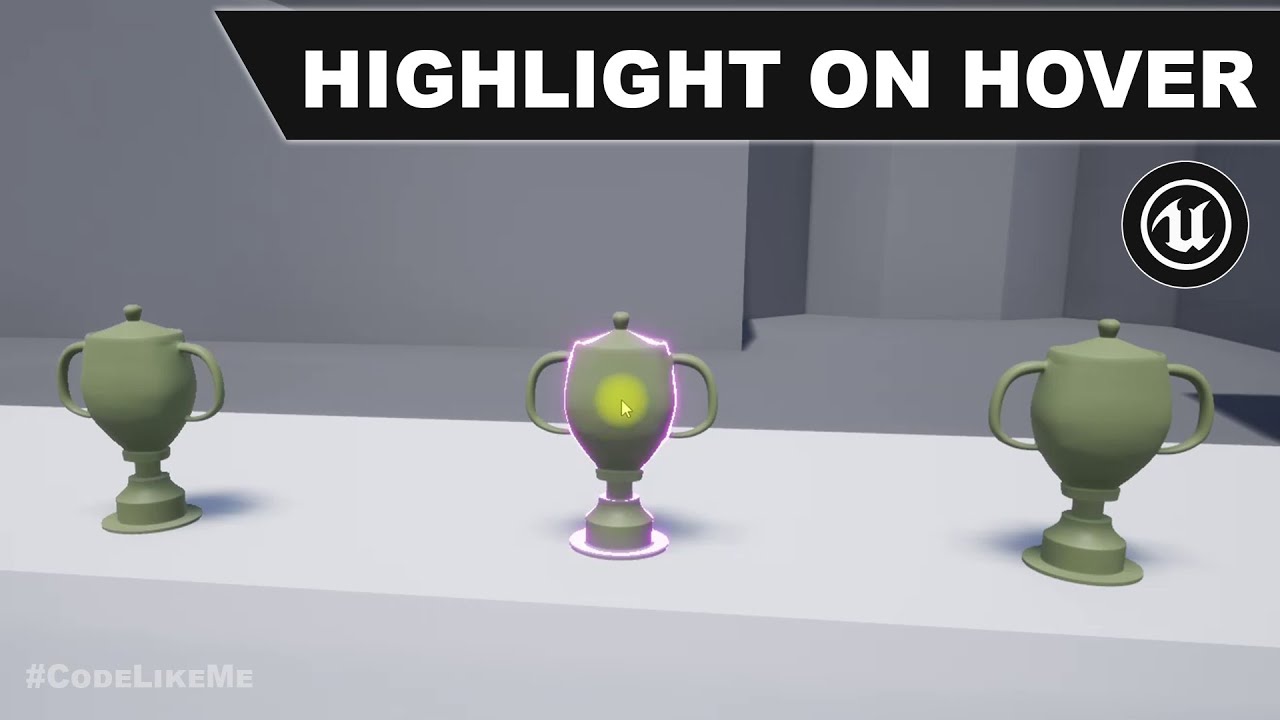
project Files : https://www.patreon.com/posts/35152293
This is a special request tutorial from one of the patrons.
The objective is to implement an item inspection system. as the first part, highlighting an object when hovering the mouse over it. So that the player would know that this object is interact-able.
support my work : https://www.pa...
@plush yew something like that?
 thick knoll
Is there a way of having the red boxed ticks be on by default so I don't have to do it every instance I make
 noble sentinel
anyone here know about Runtime Virtual Texturing?
 wet elm
i just found this, https://github.com/bw2012/UE4VoxelTerrain,
poggers?
 tough solar
storm terrace
did support for Rider (by jetbrains) free end?
tough solar
storm terrace
did support for Rider (by jetbrains) free end?
Rider's dev here. Nope, it's a bug an licensing system. Fix is already being tested, will be deployed on Friday. Meanwhile you can go through the link in license popup and start 30 day evaluation. It'll let you work with Rider until the fix is delivered! Cheers!
plush yew
hey im following a short guide on dynamic materials and the part where i have to ref to it doesnt seem to work
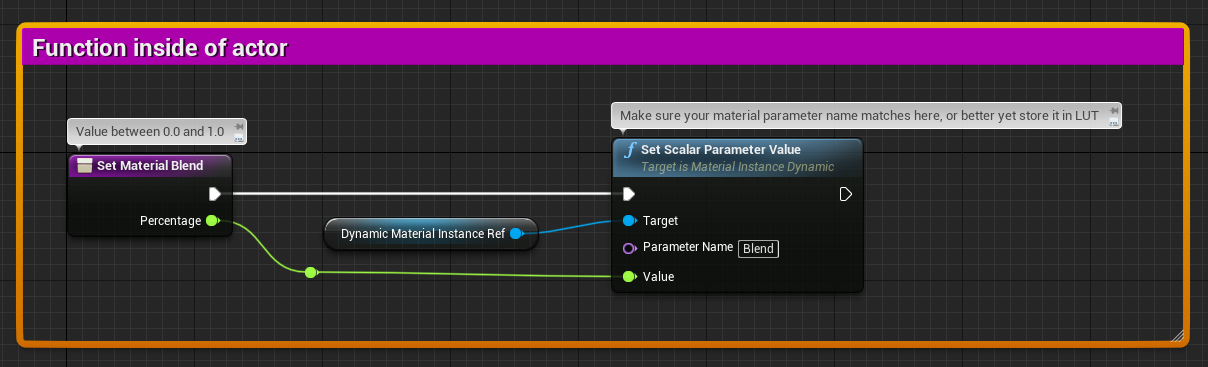
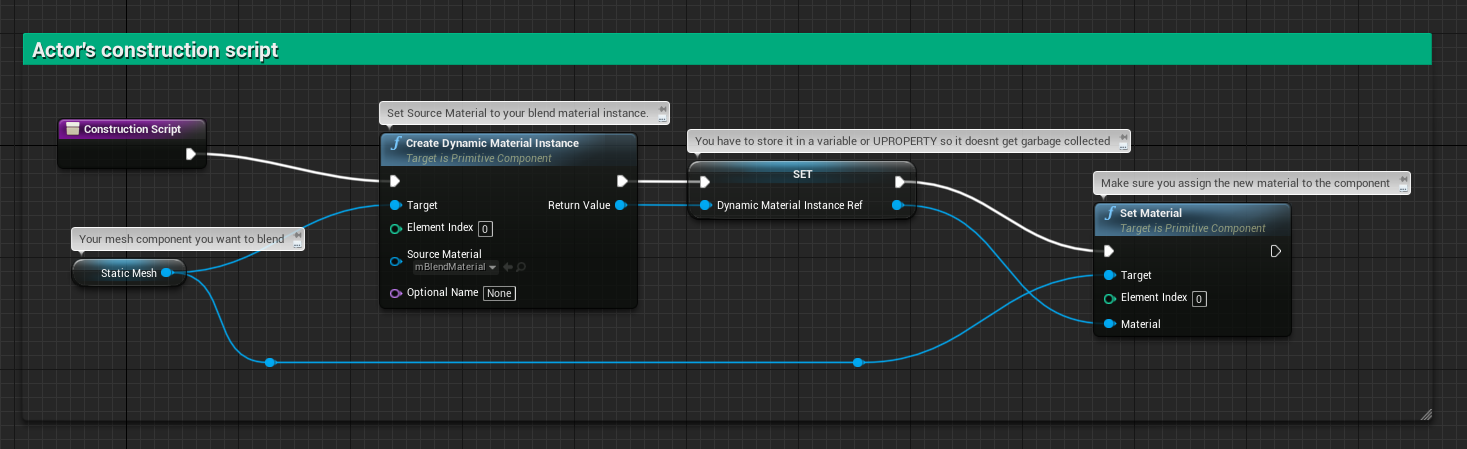
the dynamic material instance Ref doesnt work for me
light thunder
@plush yew I've had that problem before, you need to change your variable type in your blueprint, it's close but not exactly the right one -
plush yew
to what? lol
 proper quiver
What happens to the post processing for the camera, when you do Set View Target with Blend? It seems to totally go away. Which post process does it inherit?
Self here is just an actor, not even a camera
plush yew
im literally following 3 different tutorials on mid's and all of them dont fucking work...
civic saddle
@light thunder Renaming the files the blueprints that seemed to be causing the crash, and then fixing up redirectors, seems to have fixed it. 👽
plush yew
whatever it worked, all outdated
hilarious when they just change features all the time
plush yew
@plush yew sorry for the late response but yes thats what i wanted but something a little more simple i mean something only for the mouse hovering over it i dont exactly want anything else
 midnight cloak
HI how can i delete a widjet?
i can't set visibility cause my widjet is in a actor
plush yew
what do you mean?, as in delete the widget completely or just the actor
either way you can just press DEL or right click
depending on what you mean tho
midnight cloak
on game
when i destroy actor i think the widjet is already in the buffer
cause a saw this
plush yew
oh i see um im not sure to be honest
Does anyone know any Good Way of Cleaning Unused Assets? @ me
 mint sequoia
Any ideas when 4.26 might be out? I'm hoping to squeeze out the next update for my plugin before it hits because I know it will delay it significantly since everyone will be submitting 4.26 updates
acoustic wraith
I had a binary install of Unreal, but now I'm building from source. Will the source build re-use all of the shaders that the binary build compiled?
 thin tendon
I have this issue and need help. Some how I have accidentally baked my directional light or something. My world acts as if there are 2 suns with one in place. I have tried deleting all lights and rebaking. I can't seem to get rid of this in place light. I even tried deleting the build data and trying again. But no matter what this second unknown light source is always there. And its not something I can simply click on and delete.
acoustic wraith
I can't open Unreal right now, but under Lightmass settings, there is some boolean about caching that you uncheck, then rebuild the lighting.
World Settings -> Lightmass Settings
thin tendon
I couldn't find a caching option. But I have static lighting disabled in project settings and force No pre-computed lighting ticked on.
plush yew
lmao forest fire
tender river
If you try hard enough it all ends in... flames 
light thunder
what's the main factor that makes these shadows darker (the contrast)
thin tendon
Is it possible to clone everything from a level into a new level?
plush yew
@thin tendon try building the level
thin tendon
I have dozens of times
light thunder
just duplicate the level @thin tendon
If you tweak a setting in the HLOD settings, I'm assuming you have to generate a brand new cluster for it to take affect on the proxy mesh generation settings?
storm terrace
@tough solar I was trying to manage to get vs 2019 working and I forgot how slow its intellisense is. Terrible!
light thunder
Is there anyway to take a blueprint actor and break it up to just it's components - I have a house that's made of all these components but it won't include in the HLOD settings because it's a blueprint...I need to "unblueprint it
 soft fiber
UE 4.25.4 keeps crashing for me... Is this happing to other devs?
light thunder
this is why, I absolutely fucking hate the HLOD system in Unreal - these HLOD actors keep saying unbuilt EVERY TIME I restart the editor - this is a brand new map, so it's not in source control, so what gives???? I exit the editor correctly after saving
all hard drives have plenty of space
storm terrace
I'm so glad I'm in the logic/programming end and not the graphics end. Sounds terrible.
light thunder
lol I'm not qualified to do any of it but I don't have a choice, it's me or nothing gets done
wtf does this mean
Now i have to wait for all of these to build again, and the best part is, IT WON"T CONTINUE WITH THE LIGHTBUILD because I have to tell it that I know other levels are not visible but to built lights anyway
 vapid narwhal
Can people advertise in dms from this server? I got a guy who sent me a random link advertising stuff, Curious if I can report it to a mod
And now he deleted his message. Odd 🤷♂️
 honest vale
I tend to call those people out in public on the shared server I'm on with them
they're usually like "huh? What message? I don't understand"
plush yew
will unreal engine 5
have issues handling multiple unique animations at the same time flooding the screen
i was told pixel ammount and detail doesnt seem to be an issue for unreal engine 5 o-o
pretty good
sure
o.o
welp youre banned
lmao
be safe alright
and get some mental help if you can ❤️
honest vale
@sick bloom go fuck yourself
plush yew
redacted*
 snow crown
got it
plush yew
❤️
honest vale
all those years of browsing rotten as a primary school student finally paid off
did not throw up
snow crown
it was horrifying
plush yew
I mean im dead inside from on mass 24/7 abuse for two decades so it doesnt bother me but i know other people might feel a bit ill seeing that kind of stuff
honest vale
it's just a bit odd seeing that stuff first thing in the morning before I have even finished my first cup of coffee 😄
plush yew
Anywhore if anyone knows if unreal engine 5 can handle a crud ton of animations of unique manners at once please lemme know im curious since the it doesnt seem to have pixel limitations
oh yeah that kind of stuff makes eating feel a bit ickier i suppose
honest vale
@plush yew don't expect any miracles there
 abstract plank
Quick question, not really sure about this myself, or what category it falls into (AI, Programming, or QA) but how performance heavy is navmesh
plush yew
oh so it might but maybe not
honest vale
abstract plank
Quick question, not really sure about this myself, or what category it falls int...
it's one of the best optimized ways to handle navigation
it isn't heavy
abstract plank
so is it ok to use for massive scales?
honest vale
well calculating it might take a long time. For large worlds it's best to calculate the mesh at runtime with navigation invokers
 open wadi
Hi everyone, quick question - I need to call a custom event that exists in my level BP FROM a widget, but turns out you can't. However, I keep reading I should be using an event dispatcher. However, I cannot seem to figure out the logic.
I created a new event dispatcher in the level BP, how do I call it from the widget?
I've tried binding the event dispatcher to a custom event in the level BP, but I cannot call this custom event or the event dispatcher itself from the widget event graph
even after compile, it does not appear as a node
 grim ore
your going to have to talk to the item you want to bind the event from, and you cant get the level BP from anywhere
"hey level BP I need to bind to your event so you can let me know when the event is called" except..... no way to say "hey level bp"
thin tendon
I have a directional light that somehow baked into my level. I have tried everything. I delete the lights. The caches. Disable static. delete the sky. Nothing what so ever works. Anyone seen this before?
open wadi
@grim ore - So basically, any functionality within a level blueprint - be it a custom event, an event dispatcher, or a casting operation, cannot be done from my widget? There is no way to call a series of nodes that exist within a level BP from a widget BP, correct?
grim ore
yep the level blueprint is a poor place to place code
open wadi
Got it
honest vale
thin tendon
I have a directional light that somehow baked into my level. I have tried everyt...
at this point I'd try copy pasting the offending meshes/actors into a completely new level and see if it happens there too :\
 vast dagger
Yo im havin an issue, my engine crashed and when i opened it back up when i press play it doesnt spawn the character it has been since i opened the template. And when i go into project settings, it wont let me change the spawning character.
Im using C++ which ive not got much experience with
 idle compass
Hi everyone, I am trying to dive deep into unreal's blueprint. But, I found out that unreal engine can use C++ too, is it better for me to learn C++ or just blueprint will do ?
 tough berry
Depends on what you want to do with it.
 exotic thicket
is animation update in AnimBP and event tick working as the same way ?
 worthy fox
I would like to make the mannequin chibi-like.. Is it possible using Control Rig? I have never used it before..
 weak cradle
Anyone know how to create a blueprint that basically says I can only do an input once in the air, and once I land i can use it again.
wow that was broad
So like im implenenting a dash feature, and I want to dash only once in the air.
Here's the code for the dash
 wary wave
weak cradle
wary wave
weak cradle
Oh my bad
wary wave
but also there's a bool on the player controller to check if a player is falling
that's your starting point
(or it may be a movement mode these days, can't recall, either way it's there somewhere)
weak cradle
Yeah i remember i used it to code a falling loop
open wadi
Is it possible to get a reference to an actor within a level from a widget?
Not within the level's BP, but within a totally separate widget
For example, I have a SkeletalMeshActor in my level, but I need to be able to reference it from my widget
Since I can't cast to the level, how do I get a reference to this?
Never mind, I got it, used get all actors of class.
worthy fox
I'm using Control Rig to scale certain parts of the mannequins body (head, legs and arms mainly)... I want to apply these changes to my mannequin. I read in the documentation that this could be done in the Animation Blueprint.. however - I have put the Control Rig node in the AnimBP (and selected the correct Control Rig Class to use) but my changes aren't visible. What am I doing wrong?
This is the result I'm expecting, but the mannequin still looks like it always does..
vast dagger
worthy fox
This is the result I'm expecting, but the mannequin still looks like it always d...
Why not just do it inside something like Blender? Would take 5 seconds then you could retarget
worthy fox
Zero-knowledge in Blender I'm afrain.. I have it installed, but I have never even launched it xD
 severe ibex
I doubt anyone would have some input on the gamma/exposure being blown out on mobile platforms? Specifically the Pico Neo 2, its essentially an Oculus Quest. The project looks fine in editor but very gamma and exposed in game on the device.
I'm using the ES3.1 preview but the mad gamma isn't in the preview, only on device.
steel shell
how can i see what level of detail of one actor is chosen? is there a stat command?
severe ibex
@worthy fox likewise, I'm holding on to 3ds Max for dear life.
 rare gyro
 desert badger
how can i add vertical wall running
 hybrid light
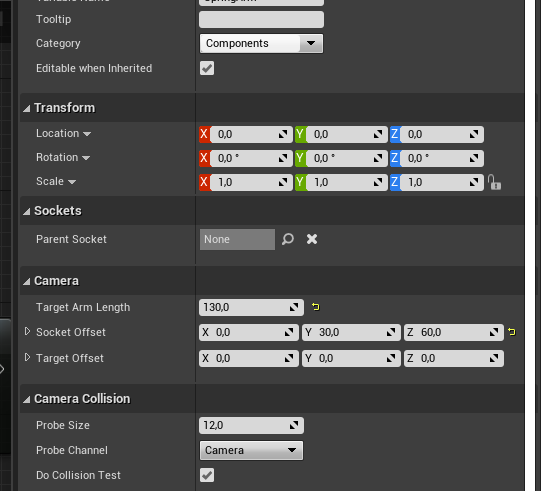
Hi I have a problem that I'm hoping someone could help me with I'm using Socket Offset for my camera https://ibb.co/Hq2nZYF but when walking or running on slops or stairs it seems like foot Ik effects the camera and it goes above the character?
https://youtu.be/aimC_8r1HYM
 idle compass
tough berry
Depends on what you want to do with it.
idle compass
tough berry
Depends on what you want to do with it.
Can you explain the difference ?
 grim hawk
hello guys i have problem with my animations in multiplayer
wary wave
because array indices start at zero
light thunder
How do you take a blueprint and "de-blueprint it" - it's a house that is a bunch of correctly placed static mesh components - I just want to have all of the static meshes in the world but not be filed as an actor (that way the pieces can be included in HLOD's)
 hollow atlas
Want voice covers for our game I have already used mine so need more
thick herald
@light thunder Haven't got UE open so can't check, but maybe right click the house in the viewport and look for convert to static mesh?
That may just create one mesh though.
wary wave
....if you have five objects in an array their indices are 0,1,2,3,4
 grim juniper
If there is only 1, then the loop would run twice for 0 and 1. Subtracting 1 makes it run the correct number of times because arrays start at 0 instead of 1
 slender moss
why does the mesh look like this? importing from blender
fixed it by changing the mesh import options from compute normals to import normals and tangents
plush yew
to make something floppy I just add a skeleton right?
theres no.. make floppy thing in unreal?
wary wave
unless you posted the wrong image, there is never a 'LastIndex -1'
it's a for loop from 0 to 'number of things, -1'
no idea what the inside of the loop is doing but it looks dodgy to me
light thunder
thick herald
<@!273265779175194624> Haven't got UE open so can't check, but maybe right clic...
It does create just one mesh
plush yew
yea that looks weird what is it supposed to do?
 unique kraken
what was the shortcut again to leave the play fewport with the mouse but keep it running?
something something 1?
wary wave
the left most node is 'number of things -1'
yes
well, if you have five things in a loop, what are the indices?
holy shit, no it's not 😂
the last loop is four
number of things -1
5 - 1 is 4...
 plain pagoda
@wary wave is right
wary wave
christ dude, unroll the loop on paper, this is painful
 vague scaffold
I notice that some projects I open immediately are at a level, but others are not. Is there way to tell Unreal Editor to automatically open up a certain Level Map?
plain pagoda
0,1,2,3,4 -> 5 elements
wary wave
it's doing a loop, from 0, to "number of things - 1"
plain pagoda
It's always total elements-1
wary wave
if number of things is 5, it will loop 0, 1, 2, 3, 4
the array indices starting at 0 catches a lot of newbies out because it's counterintuitive for sure
plain pagoda
that's how mafia works
 grave nebula
The thing is, even if you have absolutely no clue about array indexing and hearing about the thing first time, it takes about several minutes top to make a basic setup which will print debug for you, showing you clearly where iterator beings, where it ends, what is the last index in array and what is total number of elements in array.
 potent bridge
Is it possible to modify a blueprints "instance editable" values if its used as a "Player Start"
light thunder
is there anyway (in the editor) to copy the transform of details, and not just the vectors of the rotation/location
wary wave
please go somewhere and read about for loops and how they work
light thunder
@light lintel literally, it's 4 minutes and 23 seconds of your life to figure this out https://youtu.be/2uWeqcTpYXw

What is the For Loop Node in Unreal Engine 4 Blueprints?
Source Files: https://github.com/MWadstein/wtf-hdi-files
plain pagoda
light thunder
@wary wave You know of any plugin/tool that lets me copy entire transforms, not just vectors? from the details panel image I showed there
potent bridge
Question, I've removed the player character from my scene, but there seems to be a second one somewhere, but not in my world outliner.
plain pagoda
potent bridge
Question, I've removed the player character from my scene, but there seems to be...
That must be the spawned player from gamemode
Check your gamemode, what player you have set
light thunder
@potent bridge you are spawning it probably multiple times, you need to search for whatever node you used to spawn your player in, it's probably in one of your blueprints - alternatively you can step thorugh your begin play and put a few breaks every so often, and try to find out when it starts existing in the world outliner during gameplay
Can someone enlighten me on this - blueprint actors are terrible for optimization (you can't use them in HLOD system) - merge actor is okay but it won't help drawcalls much because you either lose material tiling or you keep the original material count (HLOD is the way to go basically)
I've broken up a blueprint actor into the actual components (literally copied them by hand one at a time and then pasting in their relative location so they lined up like the blueprint)
I'm almost there ...but how do I get it in the exact location without manually placing it..?.
Can I access the same location as the blueprint actor but for a group of actors as well?
paste here didn't quite work
 fierce tulip
I could really use a tool now that would be able to split my project's mat function and its references/things referencing them in two XD
light thunder
Alternatively, how would take a single static mesh item with it's materials and export them to blender and reduce their materials to a single material?
 buoyant graniteBOT
@plush yew, Check your direct messages. :incoming_envelope:
Which role do you want to learn about?
 void barn
buoyant graniteBOT
void barn
buoyant graniteBOT
The timer expired. Please start again.
 sterile tulip
hello
does it cost extra to activate cloud saving on steam published games?
harsh tiger
hey everyone, i may have messed up slightly haha. i use 4.23 but just bought an asset pack thats 4.24 and 4.25. adding it into my project shows blank files in the project.
Does anyone know of a fix for this without having to update my project to 4.24
opening a separate project in 4.25 and migrating doesn't work either
 unborn ocean
Hello !
I would like to create a not that hard 2.5 fighting game
So I took the 2D Sidescroller template, but I can't figure out how to mirror the character ?
The problem is, turning to the other side makes the character slowly doing the 180 degrees, instead of doing an instant swap to the other side ( like fighting game )
My question is, where should I start with blueprint to achieve that instant swap ( and thus, the mirror ) ?
 brittle gulch
Hi there! Is there a way to import multiple splines in UE4? I heard of the csv method, that works well for one spline at a time, but what I want to create a city with multiple roads?
plush yew
on materials doesnt work
cause why would it
shit never works how you think it does
and the top one sets the value on ALL the instances of the actors/materials, not just the one
 obtuse path
Is the launcher getting "500" errors for anyone else and then proceeding to startup in a random language? So far it's loaded in Turkish and Spanish
light thunder
yes, because you are setting the INSTANCE itself of the MATERIAL @plush yew - you are basically saying, "Hey, I take this kind of "blue color material thing" and make it all "a little bluer"
obtuse path
Whenever I click on the Unreal Engine tab, it switches back to English, but then when I click on store it will show a 500 error and the whole launcher changes to a random localization
plush yew
@light thunder i know what it does but i just want it to affect one actors material not all of them that share the same texture
light thunder
So you are looking for a reference to a material of an actor
I remember the other day you asking about this, it was not the variable type instance you had set in your blueprint, you were slightly off
plush yew
yea but all the guides were out of date
light thunder
and, of course, you did make it instance editable and expose on spawn right?
plush yew
youre supposed to make a material parameter collection
problem is its affecting all of the dynamic materials at the same time lol
light thunder
probably because you are referencing the INSTANCE and not the Variable of a Material on an actor
harsh tiger
@plush yew thank you, however i've found a work around haha. i just exported the meshes to my desktop and then reimporting to my main project and it worked just fine 👍
light thunder
if you've linked the paramter to a material instance, that won't work that way
it will be recursive and go back to the anything that has that material instance
you need to make the dynamic material first, and only apply it to your static mesh, as part of the construction script or begin play function
then you can change it and only it during runtime
i've not done this in a year or so but I remember being stuck in a very similar way
winter gale
Quick #UE4 Tip number 51.
Looking for a way to convert string to math expressions (eg: 12+34*(1/56)+(78-9)? Use FMath::Eval static method.
#unreal #unrealtips #unrealdev #indiegamedev #gamedev #indiedev #screenshotsaturday
 Twitter
·
plush yew
Twitter
·
plush yew
@light thunder yea exactly but all the guides ive found so far are outdated lol
winter gale
I'm excited to announce that my 2nd book has been released! 🥳
https://www.apress.com/book/9781484263952
This book shows you how to create exciting games using C++ and Blueprints in Unreal Engine 4. It starts with installing Unreal Engine. Next, you will learn about Blueprints and C++ and how to leverage them. The following chapters talk in detail about gameplay, basic physics, and ray-casting. ...
stark marsh
a question about paying epic royalties once i reach the 1 million threshold, do i pay 5% of how much i recieved from the game? or just 5% of how much my game made all together, because steam takes a 30% cut
plush yew
why doesnt it fucking work
ive been trying for 2 days

this is from the unreal doc
thick herald
@stark marsh I really wouldn't concern yourself with that yet. Not many indie games make that amount. Most games released on steam are lucky to get even 1% of that.
stark marsh
yeah
i'll probably never reach $1 million in sales, that's a massive amount for a single person
thick herald
Have you completed making your game yet?
stark marsh
and if i did, i'm sure i wouldn't mind paying a little bit every few months, it would be pretty much nothing compared to what i would have
no
but i was just interested in what happens when you get to that stage
i'm no where near that yet, in a few years hopefully, but not yet
thick herald
Epic has a whole page dedicated to royalties, that's your best source for the answers you seek.
stark marsh
ok thanks
but yeah i've just got my head around animations now finally
i really feel like i'm getting somwhere, it actually looks and feels like a proper game now
 atomic onyx
Can you play an unreal engine 4 html application from a web browser on your mobile? Or is that not supported?
grim ore
@plush yew the issue is the target, look at the type of item it wants to work on. in your picture its a mesh component. in the unreal docs is a material instance. your top node in your pic is also a parameter collection. IF you want the correct node for a specific type drag OFF the type then look for the node. So drag off the return value from your create dynamic material instance and then look for the set parameter node
plush yew
wow that.. that actually works
from now on i will untick context sensitive to omg
thank you so much
mathew to the rescue once again
stark marsh
if i want to give my game to someone to try out once it's packaged what do i give them
just the "binaries" folder
and can they play fine? or do they need any other files?
rotund scroll
everything that's in the packed folder
stark marsh
yeah but it has the actual project file
so if they have ue4 they can open it and just see everything
so if i just removed that
desert badger
how can i add vertical wall running
 coral folio
How do I transform a skeletal animation bone ? Without using the anim bp ?
Right now I’m in the animation editor and under the bone hierarchy I’m able to transform them, but even after saving and simulating in editor the animation goes back to its original state !
plush yew
you mean you wanna animate something?
im not sure you can do that in unreal
Guys what UE4 version do u use?
 stuck scarab
I need to export a lot of Textures, but only certain ones.
So currently I do, rightclick -> Asset action -> Export.
Can you bind this action to a shortcut somehow?
Is there a much more effecient way?
stuck scarab
in explorer its only UASSET files. They are from a pack I bought from a store. Can you access them in a different way?
coral folio
@plush yew no someone else made a walking animation, but I want to tweak the rotation of some bones
As it doesn’t looks correct right now
plush yew
im like 99.9% sure you cant do that in unreal
 normal jetty
yall got me looking at blood and paint spatter textures for tile variant overlays
xD
coral folio
I mean that’s wild, why not ? I mean yeah you can do that by using the anim bp but there’s really no other way ?
Mmm
stuck scarab
@coral folio check out this lovely lady who made a nice video about "control rig"
Havent tried by myself yet but maybe its something that could actually help you

NOTE : Watch the full playlist where I cover everything from basics to creating additional controls on a Custom Character here : https://bit.ly/31PbQ7g
Here's a tutorial on Control Rig Mannequin that was recently launched on UE4 Marketplace by Epic Games which is totally FREE.
I've covered the basics on how to animate with control rig.
Huge sh...
coral folio
Thank you
stuck scarab
maybe with this we are actually able to create / edit animations in unreal.
And jeah.. this wasnt (maybe still isnt) a thing before.
So dont take it for granted 😄
 opal carbon
how do I set up VR headset motion as LookUp and LookRight or whatever in engine input?
making a vr game, not sure what I'm supposed to be looking for here
 half bay
heya, since the official forum is down, i'd like to ask here: how can i access the project's version from a blueprint? i couldnt find any getter for it 🤔
thank you
 exotic thicket
You can't without C++
FString UCppHelperLibrary::GetAppVersion()
{
    FString AppVersion;
    GConfig->GetString(
        TEXT("/Script/EngineSettings.GeneralProjectSettings"),
        TEXT("ProjectVersion"),
        AppVersion,
        GGameIni
    );

    return AppVersion;
}```you can do something like that though so it should be fairly simple to add
half bay
thank you
plush yew
@coral folio same reason you cant or shoudnt model in unreal
plain pagoda
stuck scarab
maybe with this we are actually able to create / edit animations in unreal.
And...
I use the animation editor to make simple animations. For example, you can take idle animation, then key some bones and turn it into walking animation
plain pagoda
coral folio
Right now I’m in the animation editor and under the bone hierarchy I’m able to t...
do this, go to first frame, then make the bone changes. Then click the key button in the toolbar and click apply. That'll save the changes you made
coral folio
I need to edit an existing animation not make one from scratch so I think that wouldn’t work
plain pagoda
I'm talking about the existing animation lol
you can't make from scratch without control rig or 3d software
coral folio
I have lots of key frames in that animation, don’t I have to apply the rotation on all the key frames in order to work correctly ?
coral folio
Ohhh
plain pagoda
and it automatically keeps it that way
coral folio
Let me try !
plain pagoda
that's how I've been making my own animations in ue, from just one idle animation
 rapid ridge
Hey guys, I have time pressure and I need help. I have navmesh inside my level that intersect with my level mesh. The level mesh is set to stationary (not static) and for some reason, it can't build the nav mesh onto it. Any idea'
?
winter gale
I'm excited to announce that my 2nd book has been released! :🥳:🥳
https://www.apress.com/book/9781484263952
This book shows you how to create exciting games using C++ and Blueprints in Unreal Engine 4. It starts with installing Unreal Engine. Next, you will learn about Blueprints and C++ and how to leverage them. The following chapters talk in detail about gameplay, basic physics, and ray-casting. ...
plush yew
@winter gale gz dude 😄 your first book was a succes?
winter gale
@plush yew yup. It was with Packt Publishers
plush yew
awesome! youd think with so many free resources online itd be hard to sell it haha
 dawn gull
How can I move my player to 0, 0 and have all objects move to the equivalent distance that they were when the player wasn't at 0, 0?
So you move back to the center, but it doesn't look like it because all the other objects moved
 south tide
Get the player's current position and store it in a variable, and then loop through every actor in the map and move them inverse of that variable.
When the player moves the inverse of its current position, it should end up at zero 🙂
dawn gull
My problem is, the size 500 is different than the distance 500 in the level.
south tide
Moving them all only takes distances into account, not sizes.
dawn gull
Alright
dense knoll
any idea how to fix hightmaps importing like this?
 lavish skiff
Hello, can anyone give me some tips, I'm using the colaborative viewer template, and have some doors in my game, but the pawn wont trigger the triggerpoints on the door. Any idea what I need to change in the pawn?
dawn gull
@south tide I have this code, and nothing happens. And I know the code is executing. What am I doing wrong?
The event is on end overlap
dawn gull
Ok
south tide
dawn gull
<@!281359098157465601> I have this code, and nothing happens. And I know the cod...
@dawn gull You are just setting the absolute position, you should instead offset it
dawn gull
Ohh, get the current location and add the offset
south tide
Exactly
south tide
Also, don't do anything different with player and the rest of actors.
I'll give you an example. Let's say we have two actors in 2d:
Player at (2,3)
Ball at (8, 9)
We store the inverse player location, (-2, -3), and now we apply it to all actors:
Player becomes (2, 3) + (-2, -3) => (0, 0)
Ball becomes (8, 9) + (-2, -3) => (6, 6)
coral folio
Other question, what if I want to render a shadow pass ?
Or hide the actor but keep the shadow ?
dawn gull
It was the first branch I messed up, I'm gonna re-do all of that
south tide
plush yew
can an actor turn into a boolean? lol
That's actor comparison, which returns a boolean. But you're right in that it might not be correct, he's checking if the instance of an actor is the same as the asset for the actor, which won't return true. You might want to do a cast instead to see if the actor is of the specific type.
dawn gull
So something like this? (I haven't added the not doing it to actors yet)
This is the function
oh crap i didnt hook up the branch
This
 glacial arch
dude whats up with the launcher as of late
takes solid 15-20 seconds to open, and to sign in you always gotta do like an IQ test for a pig
and if you get your pass wrong you gotta do it again lmao
plush yew
hm? it logs me in automatically
glacial arch
not here chief, even if i set it to remember me
plush yew
sounds annoying
glacial arch
beyond annoying
dawn gull
Yeah?
plush yew
thats cool
dawn gull
I bought Discord Nitro
glacial arch
this is like a torture chamber for my hungover head
plush yew
ah
glacial arch
i can barely see the pips
plush yew
you can set it yourself? lol
dawn gull
Yeah
glacial arch
its fucking time gated lmao if you take too long it closes
dawn gull
That's just torture
glacial arch
you gotta do it 5 times lmao
plush yew
after 5 times you gotta bp your own log in system
dawn gull
lmao
glacial arch
wait not even
it made me do it 10 times because I took too long to do the 5 times
im not even joking right now
god the launcher itself is so laggy too man
alright I realize I'm whining and it's because I have a headache and im grumpy and yet
i retain my position
dawn gull
Also the code I sent is dumb I gotta fix it
plush yew
whens the last time you cleaned up your pc?
glacial arch
pretty recently, I keep my shit squeaky
plush yew
I mean youre actual like hard drive and shit
windows
i keep all my shit on a seperate drive and every so often just do a full restore on my C drive, makes everything run smooth again
glacial arch
ah, you mean that
yeah I do it like once a year at best, because it involves lobotomizing the Windows garbage
like the appstore and all that
plush yew
lol yea
glacial arch
you gotta override permissions and stuff
glacial arch
Just wait until DirectX isn't the big boy anymore
Linux gaming might become a thing
plush yew
eh?
glacial arch
The only reason I'm using a Windows machine is because games and developing them
Once Windows isn't the main go-to OS anymore, I will be happy
plush yew
think people are scared to switch so thats not ognna happen in a long time
glacial arch
I think maybe 15-20 years from now it might be more common to use Linux
as soon as zoomers figure out that you can customize unix to look like literally anything you want they will start using it just for that lol
dawn gull
Ok, I run this and It runs all of the print strings, even for each actor in the for each loop, but it doesn't move anything.
glacial arch
frankly i reckon the whole user restriction bubble might burst eventually when someone comes out with a popular thing that has none of that bullshit and it reminds people of how awesome customization is
stuck scarab
plain pagoda
I use the animation editor to make simple animations. For example, you can take ...
Mhhh okay... sounds.. doable..
I will look into that the next time!
long way to go for Linux with its current 2%
glacial arch
Linux and its brethren are currently the only really popular OS out there that allows the user full control with no strings attached or hoops to jump through
that alone sets the dominos IMO, it just takes a push for mass adoption
I say this as a long time Windows and Mac user - compared to Linux they're just pieces of shit
I literally only use Windows because it's the main OS that everything is written for
stuck scarab
probably only a very small amount of people need full control, probably the current 2% 😄
glacial arch
also everything is open source and written by a large community of people with quality as the main motivator
You ever try to read Windows code or use Windows libraries?
what the fuck is that man
anyway im sorry this is offtopic
half bay
what visual studio do i need for UE4? could i get the latest one rather than VS 2019?
glacial arch
VS 2019 is the latest one
half bay
😐 oh okey thank you
glacial arch
anytime
half bay
it prompted a lot of updates for me so i figured it's a bit old
glacial arch
nah thats just VS for ya
you probably missed the vital "make button trnasparent" update
or "give graph cool outline" update
half bay
the one out of 100 updates that all require you to restart your computer to use VS again 😅
glacial arch
meanwhile on Linux you literally just open the command prompt and type in something to the tune of "just install this program for me m8 ok?"
and everything just works
half bay
yeah but can linux use your data for their own $?
half bay
on a side note, any idea why new c++ classes dont appear in the Content browser?
glacial arch
they appear in a separate window
half bay
i made a blank one, it wont show up there, but it's in the folder
glacial arch
there's a dropdown for C++ classes
content browser and C++ classes are two different tabs
half bay
oh, thank you, i'll take a look
glacial arch
anytime
half bay
though in the settings of the content browser it does have this option
glacial arch
it does show it, just in a different tab
half bay
i cant find any :S
glacial arch
click on the folder icon
 topaz pebble
Anyone have any good reading material on unreal I can download before a flight?
Longer the better
half bay
thanks for the help, i couldnt get it to work candleboy, i'll keep googling, i click on the folder icon and nothing happens 🤔
glacial arch
no worries man, lemme go look real quick
plush yew
i was wondering if someone can send me a link to a step by step for sprits and 2d game development not a platforming game more of a 2d rpg game
half bay
seems stuff gets put in the Source folder for some reason
glacial arch
half bay
glacial arch
have you actually added any new C++ classes?
cuz thats the only ones that show up
specifically your project code
 frozen pond
hello, is this color good or bad ? this darker green ?
glacial arch
Weird man, I guess I've got no idea then. Never had this issue
worthy fox
Doesn't Mixamo support the UE Skeleton anymore? 😦
daring gazelle
Whats it mean by texture streaming pool over 80.384 MiB Budget
 hasty osprey
During cloth paint can i make it so some vertexes are affected differently by gravity than others?
 brisk socket
As I understand it, there are no possibilities to build a 64-bit multiplayer world yet?
wary wave
nothing stopping you from making the necessary code adjustments
but the performance implications would not be great
not sure why you'd necessarily want a 64-bit world
 ashen frost
Hello, good friday to you.
Am having trouble with my collision using a projectile.
am using an imported rock with material. It just goes through stuff,
But ironically when i turn on physics the collision works but then it has no velocity
light thunder
where do you build HLOD's at?
soft fiber
I'm having a lot of stability issues with Unreal 4.25.4. Any advice?
plush yew
aight it works just needed 2 lerp nodes
daring gazelle
Anyone?
 next badger
@daring gazelle type that question in google...you'll get 100s of the pages
daring gazelle
Anyone use megascans, how come im getting displacement texture instead of rough
next badger
@soft fiber you don't believe me?
potent bridge
Stupid question, but how do I get an object reference to an actor?
soft fiber
next badger
<@!479277798998147078> you don't believe me?
I'm NOT a fan of that answer. Its like telling someone to read the manual. Its not helpful!
plush yew
@next badger i made cookable chicken, didnt follow a guide, its so stupid but i love it lmao
next badger
@soft fiber the more generic answers answered, the less real questions left unanswered
@soft fiber you having crash reports examples?
plush yew
right, someone in animating just went ''help how do i animate?'' lol
soft fiber
plush yew
directx crash?
next badger
@daring gazelle is that a reflection on landscape?
daring gazelle
Yeah I have no idea how it got there
next badger
@soft fiber RHI crash is 95% issue of drivers for GPU
daring gazelle
I just want to add another layer dirt
plush yew
looks like its not loading the texture
stuck scarab
we got a lot of this stuff here. So im with you Alexey, often you find in the question that very basic knowlege is lacking. Then its better to advise with videos / terms people can use do to their own research
next badger
@daring gazelle to add layer to material you need to make proper material with blends
soft fiber
I just updated to the latest build of NVIDEA drivers. Maybe that will help...
plush yew
usually you can find the source of the crash by tracing back your steps
whatd you do before the crash
next badger
@stuck scarab Pool question is long to answer, it's not an answer that can be put in one sentence.
potent bridge
Am I missing something here? Trying to get the hitbox of "SwordWeapon" to deal damage.
soft fiber
@plush yew Honestly, not much. I'm playing with grayboxing in Unreal. New project and mostly empty scene.
daring gazelle
@next badger do you know why id be getting displacement texture instead of normal
plush yew
@next badger is there a proper way of changing material for a sprite in bp i tried it but it only effected one sprite in my level i think its cause in the level the sprites are all numbers when using the same one so im wondering how to i make it effect all of them, i think its the same with objects to
daring gazelle
Sorry not normal, roughness
next badger
@potent bridge yes...you're comparing the actor to a BP...but you need to compare class of actor to a class...reference to some actor instance never will be the same as some class definition
stuck scarab
the other actor probably shouldnt be the sword Darky. Or maybe it should, not really something that can be answered based on your screenshot
soft fiber
I'm going to eat nugets and I'll try again with the new drivers!
potent bridge
why shouldn't it be the sword? The sword has a hitbox, and this is done on the enemy BP with its capsule component
next badger
@daring gazelle sorry, I need some clarity, what you want and what you getting instead?
@potent bridge that is not a reference to the sword you talking about
potent bridge
I think I've figured it out, hold on.
half bay
why is UE4 so horrible? it wants to put my project's classes in the UE4 binaries installation path - wtf?
i need it in my project not in the installation folder
and on my gf's computer, it wont allow classes to be put in any other place than in her Documents
next badger
@ashen frost it will only have physics behavior if it's simulating physics...it doesnt mean it has no collision...it just not simulating physics
@ashen frost Collision != Bounce action, it's just a fact of registering the event
@half bay you cant have Spaces in the path afaik
half bay
it worked before 😂
potent bridge
geez UE4 suddenly deciding to crash every 5 seconds.
half bay
like before i restarted my computer
potent bridge
@next badger
something like this still doesn't work, I wish I knew what I was doing lol.
next badger
@half bay try to exit ue4. go tou project folder, right cligh the uproject and pick regenerate project files
plush yew
@next badger sorry to bother you but do you know the setting to stop the bounciness from using a physics constant?
constraint*
i know theres damping but its not there
plush yew
you need a landscape blend material
 woeful sierra
hi sorry i dont want to butt in right now but let me know when this chat isnt full, i have a question
next badger
@potent bridge nop...just cast your other overlapping component to your sword class
@potent bridge not actor, but component
potent bridge
how would I go about that man? I'm confused right now.
half bay
@next badger thanks, it didnt change anything, i'll check the config file
potent bridge
Also this is how my sword is set up right now.
And in my second screenshot is is hooked to component.
next badger
@daring gazelle use the R output from roughness, roughness is monochrome -> vec1, RGB is vec3
@potent bridge oh...that is more camplex than it should be...jusr use static or skeletal mesh. and modify the simple collision
potent bridge
your telling me I can just cast to its static mesh
unbelievable...
still, don't I need something here?
next badger
@potent bridge no...you can use a static mesh, not an actor...cause if you want to collide with some component of another actor, you have to pass some variables
and attaching actors to actors is not simple, and using actor components in not performance wise
daring gazelle
@next badger do I still keep the rgb plugged in as well cause I think its working now
potent bridge
this is making no sense to me unfortunately.
ashen frost
@next badger hi thanks, i actually already fix it and the solution was so simple and weird lol
next badger
@potent bridge shortly, if you want DamageBox to collide with capsule of another actor, you need to check for a collision on that capsule if the other component is your DamageBox...the problem is, it's a generic collider that has no custom properties you can verify
I.e. can not be distinguished from any other collider
half bay
is this frame talking about this button? cause i press it and nothing happens than a yellow text in the log saying Warning: RebindPackages not possible (no packages specified)
thank you
half bay
oh, okey ,thanks ,ill try it
woeful sierra
ok im just starting out in ue4 i wanna use blueprints, and i started with the 3rd person starter kit can anyone help me hook up some animations i made to the game?
i started by importing them and then it gave me an error due to the bones
ashen frost
@woeful sierra its probable faster and better if you just looked ip tutorials on that
ashen frost
woeful sierra
i started by importing them and then it gave me an error due to the bones
we've all be there 😔
woeful sierra
i did multiple times
next badger
@ashen frost hiring someone may be faster
ashen frost
next badger
<@!318482158522204163> hiring someone may be faster
if its just animation states wouldnt it just be easier for him to learn himself?
are u using blender? @woeful sierra
woeful sierra
yup
ashen frost
i honestly didnt really have too much bone problems
woeful sierra
all the tuts just use mixamo
next badger
@ashen frost it is better indeed, not faster however
ashen frost
i know making sure the name isnt just planely amature is helpful
woeful sierra
its not
ashen frost
next badger
<@!318482158522204163> it is better indeed, not faster however
yes that is correct
woeful sierra
they are like arm.l and leg.l
plush yew
hi, im using a physics constraint to grab objects. but its wobbly as fuck. Ive tried a bunch of stuff but it doesnt seem to work how I want it
 ashen frost
did u look up the settings u should have?
woeful sierra
should i be importing only one skeleton per model?
ashen frost
when i imported a new separate animation, i used the skeleton i already first imported
woeful sierra
... am i supposed to have them seperate!?!?
i just import the model with the model
ashen frost
are u importing animations or model?
woeful sierra
both
ashen frost
the first time you import animation, you import everything
the next time, you still make sure u select everything in blender but in unreal engine you dont add the skeleton or model
u use the one u already first imported
woeful sierra
what blender settings do i need?
ashen frost
em
i think this gives good settings, i followed a couple of tutorials but i used this one a lot https://www.youtube.com/watch?v=eyWWaTh28Dk&list=PLMosi4yQ6-_Ez5ZqLpa35CGw0Qmj1VCgS&index=1&t=18s

0:00 - Import Skeletal Mesh, Skeleton, and Animations
0:48 - Adding New Individual Animations
1:32 - How to Fix Tiny Animations
1:45 - How to View Bones in Unreal
1:49 - Fix "Can't detect import type. No mesh is found or animation track"
1:55 - Fix "Multiple roots are found in the bone hierarchy. We only support single root bone."
2:11 - Fix Gra...
woeful sierra
this is super confusing its saying a have a bone names armature that i dont have
ashen frost
you kinda have to watch at least a few videos sometimes because 3d stuff are just weird
woeful sierra
ya im coming from gamemaker studio 2 :/ im not used 3d
brisk socket
wary wave
not sure why you'd necessarily want a 64-bit world
For a large unified world in multiplayer.
daring gazelle
i have to look closely to see the grass properly, how do i change it so i can see it from further out


 wary wave
brisk socket
For a large unified world in multiplayer.
wary wave
brisk socket
For a large unified world in multiplayer.
you don't need 64-bit coordinates for that, a good sharding system would be far better and would distribute your workload across multiple server instances
SpatialOS is an example of a middleware that does this, though I'm not sure I'd recommend them given their history with Unity...
daring gazelle
anyone?
ashen frost
woeful sierra
did u try with the settings in the video
woeful sierra
no not yet
ashen frost
try those settings
and try changing the amarture name to AmatureGuy
or something like that
brisk socket
wary wave
SpatialOS is an example of a middleware that does this, though I'm not sure I'd ...
Spatiql OS is not suitable. but how to implement segmentation specifically for the big world, + its display on the client, I just cannot understand.
woeful sierra
ok @ashen frost i got it in without errors
how would i now attach it to the player
ashen frost
woeful sierra
how would i now attach it to the player
you need to do animation states and stuff
plush yew
theres hundreds of tutorials about animations in unreal why not just watch those?
ashen frost
thats a bit more complicated but a lot easier in a way because i had less problems. Blender gave me a hard time with animation/rigging and stuff
if you did that, this should be easy
devsquad on youtube have good tutorials on this
woeful sierra
i have watched them i honestly am just confused
hmm ok ill watch them
thank you so much
ashen frost
yea thats what i followed and some other videos to because game dev is just weird like that but devsquad was what i mostly watched
woeful sierra
ok great
ashen frost
Does anyone know how to make a projectile destruct? Am using the apex destruction plugin, but it doesnt let me set the destruction for projectiles class
plush yew
its iffy
gusty dune
How do you use the Calculate Direction node? It used to be a node with an execute pin, now it's just a node and isn't working when I follow a tutorial from last year
plush yew
but what i did was replace it with a destructible when it hit something
ashen frost
plush yew
but what i did was replace it with a destructible when it hit something
oh, did u do that alone or is there a tutorial on it
plush yew
yea, lost my original project for it tho
just spawn in the destructible
and destroy original
then start tweaking
 zinc shore
Dose the skeletal mesh stop animation when it’s not visible because it I make it invisible the items attached to the hand no longer move
dawn gull
How do I add perlin noise to a sphere with a procedural mesh component?
glacial arch
@dawn gull Depends on your contouring implementation
let me back up
polygonal meshes are usually generated from volumetric data using something called a contouring function. Contouring is essentially "tracing" the surface that you want at a chosen density. Say you wanted to draw a cloud as a polygonal mesh - you have to decide what density of the cloud you want to be "inside" and what you want to be "outside" because your polygonal mesh doesn't have nuance - its a hard surface
That surface is called an isosurface. The reason why it's called that is because on maps, we have something called an isoline - if you look at maps, you'll see them, they're like traces around a particular height. So, in our case we have an isosurface instead of an isoline, and instead of height we have a density. Isosurface is a direct extension of an isoline, logically going from 2D to 3D
 nimble steeple
@dawn gull Not sure if this helps. But you should watch some tutorials on planet creation on YT. But here is something i found about making maps with noise https://www.redblobgames.com/maps/terrain-from-noise/
glacial arch
There are several contouring algorithms used to extract the isosurface. They're also commonly called isosurface extraction algorithms. You've heard of them I'm sure - Marching Cubes, Dual Contouring, Marching Tetrahedra, Dual Marching Cubes, Cubical Marching Squares, Naive Surface Nets etc.
nimble steeple

PLUGINS : https://www.mediafire.com/file/qbm9owo6mtip6q8/Plugins.zip/file
SOURCES:
https://github.com/Koderz/RuntimeMeshComponent
https://github.com/devdad/SimplexNoise
I DO NOT OWN ANY OF THOSE PLUGINS
download link for the project (including the plugins)
https://www.mediafire.com/file/v00mjnnvmynaa7d/ProceduralPlanet.zip/file
Newest tutorial ...
glacial arch
They all have their own strengths, and the most popular one these days in gamedev is Marching Cubes, because it's FAST thanks to working off a lookup table.
dawn gull
@nimble steeple I had to heavily modify that one, and it uses sine waves
dawn gull
glacial arch
They all have their own strengths, and the most popular one these days in gamede...
Do you have any articles or videos that detail how to do that?
glacial arch
Now, contouring algorithms work off of a density map. Similar to a pixel image, they're usually a voxel image and instead of color they have a density value
I sure do, and I'm going to link you to one
dawn gull
Awesome
I've been looking for good planet forever, and they only come in shaders on the marketplace
glacial arch
So! To apply a perlin noise to a procedural sphere generated from a volumetric density map, you want to modify the density map using your perlin noise! This will apply your noise to the underlying data, and modify the sphere that results from it!
Let me link you to a very good video that details marching cubes. It's an excellent intro
dawn gull
I can't thank you enough for this
glacial arch
In this coding adventure I try to understand marching cubes, and then use it to construct an endless underwater world.
If you'd like to support this channel, please consider becoming a patron here:
https://www.patreon.com/SebastianLague
Project files:
https://github.com/SebLague/Marching-Cubes
Learning resources:
http://paulbourke.net/geometr...
wary wave
that looks a lot like the Nvidia GPU Gems algorithm looking at the cover scene 😄
glacial arch
If you ever need advice, you just pop into my DMs. I will also link you to my server where I have a coding channel that I check multiple times a day
dawn gull
Yeah, that's a good video.
glacial arch
@wary wave Yup! Sebastian talks about the GPU gems thing
dawn gull
I'll join the server
glacial arch
Message me, I dont think linking is allowed in this server
wary wave
in context you can link it