#ue4-general
1 messages · Page 349 of 1
 dark depot
 polar hawk
1984's reductionist viewpoint on language is reaaaaaaaal
 grim ore
if you go back to the older launcher you will find the settings popup points the wrong way now on the back button lol
dark depot
you guys should make it include more then just epic game wink wink
 maiden swift
Yeah the store is very intriguing.
Makes me wonder if we'll be able to publish our games there in the future. 😏
 paper kernel
I would like to see an option to make your own library of your premade assets, without the need to plow through all the mini projects and migrate from them
 cloud cobalt
@elfin jacinth By the way I've been talking to Chance, when he's not on a plane somewhere, and I'd love for Epic to get some love on modding. The technical part of it. Documenting what Epic considers the process at minimum, ideally support on loading PAKs manually, and some specialized Steamworks integration if you guys are really wondering what to do with your day. This is a long-standing topic in the community that both motivates many people, and is really hard to self-fix in the engine because it's an arcane part of it. I know it's not shiny and all, but it's really a nice feature to have.
polar hawk
I find it really interesting that it takes 45 seconds for the library tab to show me that I have nothing owned or installed
maiden swift
^Seconded.
 minor wave
@elfin jacinth Also, a folder / category structure for the vault would be nice
maiden swift
It takes an awfully long time just to get my Library status.
And I, too, have nothing installed there.
 languid shard
also when you change from the home/store/library menus to the unreal engine
dark depot
@polar hawk weirdly this build before today didnt do that to me
languid shard
style change :p
grim ore
Anyone else find it weird that modding is considered a game if you hide the game tabs?
polar hawk
and what is even worse is
maiden swift
I would love more robust settings for launcher defaults, i.e. default project location, default engine location, vault location, etc.
polar hawk
the library tab attempts to get details
 grave spruce
why there 2 library 
maiden swift
Right? I mean how does it not cache that? 😦
dark depot
cause its uhh "beta" atleast thats what ill keep telling myself
minor wave
Well you can opt ouut
 elfin jacinth
Let me know if you need my support on that @cloud cobalt
grave spruce
this is force not opt in 
polar hawk
opt-out beta is super weird compared to opt-in beta
minor wave
Its just to get more people into the beta program
polar hawk
its the wrong way to get people into it
maiden swift
I agree opt-in would be nicer.
polar hawk
because then you have people like me
minor wave
Atleast that's my understanding of it
polar hawk
non-stop talking shit about it
maiden swift
Opt-in with a notification the beta is available.
polar hawk
everything frustrating is 100x more frustrating when its done upon you instead of with you
dark depot
i imagine this version was also built to have less fortnite people accidently downloading ue4 i have seen way to many complaints on that haha
 wary wave
how do you accidentally download UE4 😐
dark depot
no idea
paper kernel
¯_(ツ)_/¯
polar hawk
also
minor wave
@wary wave You underestimate the general stupidity of the human race
 dark depot
yeah its crazy
paper kernel
can't complain on ram usage when I have chrome with +10 tabs in the background constantly
grim ore
well steam starts automatically so why not the epic launcher because reasons
polar hawk
steam doesn't eat cpu time or ram
steam is totaling about ~130MB for me, which is still annoying, but its not 500mb
and it doesn't randomly spin up cpu work
dark depot
looks like this new version isnt using CPU anymore like it used to at least
maiden swift
Re: opt-in beta with notification, here's a mockup: https://i.imgur.com/utTXEqw.png

Something like that could work.
 reef python
I don't know if you could see it very well, but for some reason in the viewport and when I start the game its really blurry, the game is only blurry other than that the editor is fine.
maiden swift
Guide them to the Settings page where you highlight the new beta option.
minor wave
@polar hawk Launcher is at 200mb for me tho, not horrible but wouldnt mind taking less
dark depot
cause it likes you
minor wave
@reef python Are you running the editor at low settings or something?
reef python
Where can I check that?
reef python
Engine Scalibility settings?
minor wave
Settings -> Engine Scalability Settings
dark depot
yep
minor wave
Yes
reef python
Everything is on epic
dark depot
whats your screen res for you monitor
reef python
2560 x 1440
dark depot
@elfin jacinth can you convince the engine team to have the engine order me pizza when i launch it
elfin jacinth
I'll tell you what
You call me every time you launch the engine
and I'll order you pizza.
I just need your credit card number
dark depot
hahahhahaha
elfin jacinth
Talk about full service
minor wave
Where's voice over pete when you need him
dark depot
could it just a epic grant i have a nice game
 lime cobalt
I have a new game concept
 spare sun
damn
reef python
But does anyone know what my problem is
grim ore
@reef python you have a 1440p monitor but what is your windows scaling set to? looks pretty high
cloud cobalt
@elfin jacinth - I think we're fine ourselves with a working mod support using custom tools. But we spend weeks getting there, and people who want more advanced features will bump into a wall quickly. Just so we're clear, there is simply zero documentation on modding, at all. There's a Tom Looman tutorial from many versions ago, and it's not up to date. Stuff like integrating Steamworks cleanly borders on the impossible with 4.15 onwards.
lime cobalt
a player makes a very complex scene with ue4, saves it, 3 players are watching
1st player presses control+z very fast, ue4 at some point is going to crash
polar hawk

lime cobalt
the first to say "ue4!" while having his(her) arms up in the air at the precise moment ue4 is crashing wins
minor wave
@reef python I hope you've googled your issue but if not, here are a few links to get you started
https://answers.unrealengine.com/questions/129276/playing-mode-make-images-blurer.html
https://answers.unrealengine.com/questions/312785/why-does-my-ue4-content-look-blurry.html
Make sure you read all the answers
And hey, have you tried the mother of all solutions?
Closing and restarting?
 minor wave
Google it my man, you'll find your questions answered a lot faster
maiden swift
I'm pretty sure this is what we all want out of the new launcher: https://i.imgur.com/57YzHDl.png
 minor wave
^ This is beautiful
 cedar comet
U know when ironman equips his armor it flies to him or un compresses itself it really is awsome and i'd like to know how to do that on Unreal Engine
How would i achieve such a result.
Could anyone help me like in a call or in message i'd be awsome
If you think unity is better for this just tell me
minor wave
I'd suggest by starting to have a look on how God Of War created their flying axe.
I know there is an UE4 tutorial somewhere on youtube
cedar comet
Its just that i really need help with this
minor wave
And then its a lot of animation work and stuff
cedar comet
i had a dream of having iron mans armor and wanted to make it a game
Could you link me videos i could use as help ? @minor wave
grim ore
It's not easy but it's doable in any engine. You will probably need to get each piece animation that shows it being "built" then you just move them from one location to the other while playing the animation
cedar comet
How do i make be done on the player
grim ore
well you would have to start in a DCC program like Maya or Blender to make each piece and animate it. If you are starting from scratch with no knowledge then doing it right is going to take a while and the engine doesn't really matter.
if you want to do it raw and dirty you need each piece and you can just scale them from 0 to 1 as they fly from origin to destination on the character. you can use sockets to define the location for them to move to in the world.
cedar comet
Ah nice
@grim ore is it possible for u to stay online and for us to talk about trying this cuz its really a dream
minor wave
@cedar comet Solely judging from your questions, it seems as though you may not have a lot of experience in game dev
cedar comet
Yeah im new
minor wave
Ah
cedar comet
but not too new
minor wave
in that case
I'd suggest you make smaller scaled features and work your way towards your iron man concept
You'll need to be proficient in modelling, animating as well as programming to get that done as a one man team
cedar comet
Hmm do i require c++ programming
lime cobalt
also
cedar comet
i mean i know c++ its just that its buggy with unreal
lime cobalt
this goddamn shadow dissapearing bug is hapenning again
minor wave
@cedar comet I'm not saying it cant be done in blueprints but ideally yes, C++ is the way to go
reef python
I've tried everything still blurry.... and searched every possible keyword on google with my problem
lime cobalt
while I only added an object in the scene and my shadow settings are the same as before
minor wave
@reef python Is it happening for any project you open?
cedar comet
@grim ore do you think its possible with blueprints?
cedar comet
oh and btw can you help me achieve this @minor wave
lime cobalt
ffs did they even test openGL ES2 when they've put it in the engine ?
cedar comet
in a call oR message
minor wave
@reef python well last resort would be to reinstall the engine
lime cobalt
if these shadows keep bugging randomly I won't be able to have shadows in my game ffsssss
it's unbelievable
at some point i will have to switch to unity even if it means starting the project from scratch
minor wave
@cedar comet Unfortunately I wouldn't be able to help you. I'd would take a bit too much of my time to find out how to make such a thing
grim ore
@cedar comet moving stuff and playing animations is completely doable in blueprints
lime cobalt
even the fucking shadows are bugging for fuck sake
cedar comet
Alright ill do it with blueprints then
lime cobalt
engine of shit
cedar comet
and for the coding part is it still possible in blueprints @grim ore
grim ore
what would you be coding?
lime cobalt
huge shadows are disappearing when i'm rotating the camera
minor wave
@cedar comet I would really suggest you get some udemy classes or some sort of training in unreal before starting anything of that scale my man
lime cobalt
everything is ok in desktop renderer, but not in openGL ES 2
cedar comet
its not for a full suit tho its just for a gauntlet @minor wave
lime cobalt
and I don't know how to fix this 😠
dark depot
@lime cobalt all day you have been in here whining like a child about different things how about you relax and now your having a issue why dont you explain in depth what is happening
are you testing on a phone or with the desktop renderer
cedar comet
what would be easier blueprints or c++
lime cobalt
@dark depot I did explain several times what is hapenning, if you're not capable of reading , block me so I don't have to undergo your presence
grim ore
Blueprints are easier than C++ for new people for the most part, C++ generally needs more work to learn.
lime cobalt
@cloud cobalt I have shadows disappearing in my game ffs
cedar comet
alright
lime cobalt
i've been tuning this all day, now i've been adding another object in the scene, the bug is hapenning again
cedar comet
Cuz i will be also doing a flying mechanic and arm pulse attack like a beam and also an interactive like Hacking
ill start with bp work my way up to cpp @minor wave
cloud cobalt
@lime cobalt I didn't saw your detailed explanation of the problem so I can't help you, and your attitude makes no one here want to help you
lime cobalt
what attitude
minor wave
@cedar comet I suggest you move your question over to a related channel. Maybe #blueprint or #animation
lime cobalt
i'm complaining about a bug
cedar comet
Ok
lime cobalt
you've ever seen peoples complaining ? well that's what i'm doing
dark depot
Quote " ffs did they even tested openGL ES2 when they've put it in the engine ? if these shadows keep bugging randomly I won't be able to have shadows in my game ffsssss
it's unbelievable
at some point i will have to switch to unity even if it means starting the project from scratch. even the fucking shadows are bugging for fuck sake. engine of shit everything is ok in desktop renderer, but not in openGL ES 2 and I don't know how to fix this 😠 " that is all you said none of that is explaining your issue like you should be. Soooo instead like debug like you should A does it happen on mobile device or in engine . B have you tested other object C have you tested in blank project
minor wave
@lime cobalt If you're complaining, dont expect anyone to help you out
grim ore
start here https://academy.unrealengine.com/ and the docs page for quick start https://docs.unrealengine.com/en-US/GettingStarted
minor wave
If you're asking for help, format your questions and make it legible
cloud cobalt
@lime cobalt Saying it's a bug is attitude. No one here can fix engine bugs. People might fix your problem.
lime cobalt
if i had a nickel for peoples giving fucking useless life lessons instead of talking about actual UE4 ...
minor wave
Mate, if literally everyone is giving you shit, maybe you're full of crap
lime cobalt
@cloud cobalt surely someone knows about realtime shadows and mobile rendering, surely someone has encountered this bug before
cedar comet
@grim ore thank you this is what i was trying to find also
but videos would help alot too
lime cobalt
@cloud cobalt ok , another life lesson from you and I block you, enough from this
wary wave
I've made Android / GearVR games and had no issues with shadows
dark depot
since you dont like ue4 or this discord why not just leave so we can help people that care enough
minor wave
@cedar comet The official Unreal Engine Youtube channel is great
wary wave
the issue could be hardware related, alternatively it may be worth seeing if the problem occurs in another version of the engine
cloud cobalt
Right @lime cobalt , I'm blocking you. I wish I could help you instead. Bye
lime cobalt
less spam is always helpful
minor wave
lol, feels like I'm back in high school again
dark depot
same i have 3 mobile games out and have not had this and that is why im asking you questions about how you went about debugging this
lime cobalt
go pontificate someone else with your useless life lessons in a #ue4-general ffs
minor wave
@lime cobalt You literally did nothing to explain your issue mate
dark depot
more people may be able to help
minor wave
And yeah, if you want help, a specific channel would help
lime cobalt
@minor wave as I was saying, I have a directional light, some objects , and rendering the scene in GL ES 2
(mobile)
the shadows of that directional light are appearing/disappearing randomly when I'm moving the camera
dark depot
and again is the issue happening on a device or in mobile render mode of the enditor
have you tested other objects
is the directional light on default settings
have you tested in a blank project
lime cobalt
i've tried to change almost all the light settings, it keeps hapenning
changing the "dynamic shadow distance movable light" helped at some point
but now that bug reappeared out of nowhere ffs
lime cobalt
when i'm posting to a specific channel, i'm ignored
dark depot
or stationarity
lime cobalt
when i post there, i get pontificatings and life lessons
dark depot
your not ignored it just takes time
wary wave
sometimes you just have to wait for people with specialist knowledge to be around
cloud cobalt
Or not insult them
wary wave
the less common / more obscure the issue, the less likely someone here is around with the prerequisite knowledge to answer
lime cobalt
and I should calm myself but I cannot
dark depot
so take time and relax before posting then
lime cobalt
i realize I might be annoying at times but it's like everything i've no choice but to rely on is crashing in my fucking face
and I've not insulted anyone specifically
tell to the peoples calling everyone a "cuck" all the time on youtube twitter and co to stop doing that
dark depot
we are not on youtube or twitter
lime cobalt
they are insulting ppls all the time, not me
minor wave
@dark depot You wouldn't happen to have any experience developing on the UWP fork of UE4 would you?
wary wave
I'm not sure anyone does
dark depot
@minor wave i have a little helped get some builds pushed to xbox are you having an issue
minor wave
Having an issue building the engine from source
dark depot
yeah that one is tricky i had to reinstall visual studio but there is a forum thread that details what all it needs
minor wave
Wouldnt happen to have a link would you?
This was my issue. Copy pasting from an earlier message:
I'm trying to build Microsoft's fork of UE4 for the UWP version (4.19) and I keep getting a couple of errors
'/FU' requires an argument
and
MSB3075 - The command "..\..\Build\BatchFiles\Build.bat UE4Editor Win64 Development -WaitMutex -FromMsBuild" exited with code 5. Please verify that you have sufficient rights to run this command.
Anyone got any solutions?
dark depot
ill try to find the link
minor wave
Appreciate it mate
paper kernel
I got few errorcode 5's today for no real reason
dark depot
didnt ue4 4.19 have visual studio issues in the first place i wonder if its related to that @minor wave
minor wave
@dark depot Might be a possibility, but I have no other choice
The curren stable release branch for the UWP fork is from 4.19
dark depot
yep
minor wave
if only epic decided to support uwp builds without requesting a custom engine
- wishful thinking *
dark depot
that would be nice i know they dont because the whole windows store issues but its now a way for indies to get on xbox
 misty creek
Does anyone know if you need vs 2015 to get CodeWorks going? I tried to install it with vs 2017 but it kept giving my this warning
The selected items:
Nsight Tegra, Visual Studio Edition 3.4.16231.3325
Missing external dependerncies may cause the error of installation:
- Microsoft Visual Studio
And if ignore the warning it won't install, it hits and error.
Any ideas what is wrong?
wary wave
do you not have visual studio installed?
misty creek
I do, I have used it with UE4
wary wave
it seems to think you don't
minor wave
Have you had a look at this @misty creek
https://devtalk.nvidia.com/default/topic/1028820/nsight-tegra-visual-studio-edition/codeworks-missing-external-dependencies/
Nvidia suggests using 2015
 sudden cave
Heyo
misty creek
@minor wave Thanks, yeah, I did see that, but on UE4 stater page it says that you can use vs 2017
dark depot
that means for ue4 itself
misty creek
I think that it is or am I reading this wrong? https://docs.unrealengine.com/en-US/Platforms/Mobile/Android/InstallingAndroidCodeWorksAndroid
This bit right here: The CodeWorks for Android 1R6u1 installer requires an installation of Visual Studio to complete successfully. Supported versions are 2013, 2015, and 2017.
dark depot
ahhh
ok then haha
visual studio detection can be weird and buggy as hell you could to a repair on your install to see if that fixes it
elfin jacinth
What am I commenting on?
If it is easier for me to say no comment, I'll go with that one.
dark depot
that is the correct answer tim
elfin jacinth
(I am not important enough to ever have to say that)
minor wave
@elfin jacinth If Epic has any plans to officially support UWP builds on the default engine
elfin jacinth
I feel like No Comment is an important people term
 plush yew
can anyone help me with the ships and rock pack?
elfin jacinth
I am not sure if we do or not, Over.
dark depot
you just need to sneak into big tims office and make it look like an order from him 😄 hehe
minor wave
@elfin jacinth roger Roger.
elfin jacinth
He and I share the same initials.
plush yew
thanks oke
 dry moon
Do you like coffee or tea
cedar comet
tea
dry moon
Tea is definitely best
misty creek
Depends on how tired you are
dry moon
anyone have a time frame for 4.21.1?
plush yew
anyone have time to help me get my ship saling on the water?
misty creek
I don't know anything about it but something like this should get you started https://www.youtube.com/watch?v=kkxJeyG2whw

Here is a tutorial explaining how to make objects float in UE4. This tutorial show what to do once you can read wave height at any point in your world. The h...
lime cobalt
i got the shadows working ... fingers crossed so that it keeps working, and I won't mention this issue here in any case
plush yew
thanks
plush yew
thanks for the video again
can i ask more stuff?
if i have a top down level but i want the roofs to be dynamic with that i mean if i walk into a house i want the roofs to dissepear is that posible?
cedar comet
d
grim ore
it is, there is a video on the unreal youtube channel handling masking out materials. Found it https://youtu.be/GXbE0IqbA7w @plush yew

Announce Post: https://forums.unrealengine.com/showthread.php?84886 Alan Willard discusses different depth and location-based effects, like hiding objects th...
this gives you roughly how to do it, alternately if its location based you could trigger walking into the house and set the visibility of the roof to hidden
 ancient otter
@grim ore the car thing is now non existend
grim ore
It's the Vehicle Game example project under the learn tab, it's still there from what I can see
ancient otter
Under the learn tab?
I swear i dont have a "learn tab"
Like, actually.
Show me screenshot pls?
 ancient otter
Its supposed to be in the library?
grim ore
thats just a screen shot
 spring blade
Does anybody know if i can check if 2 widgets are touching?
grim ore
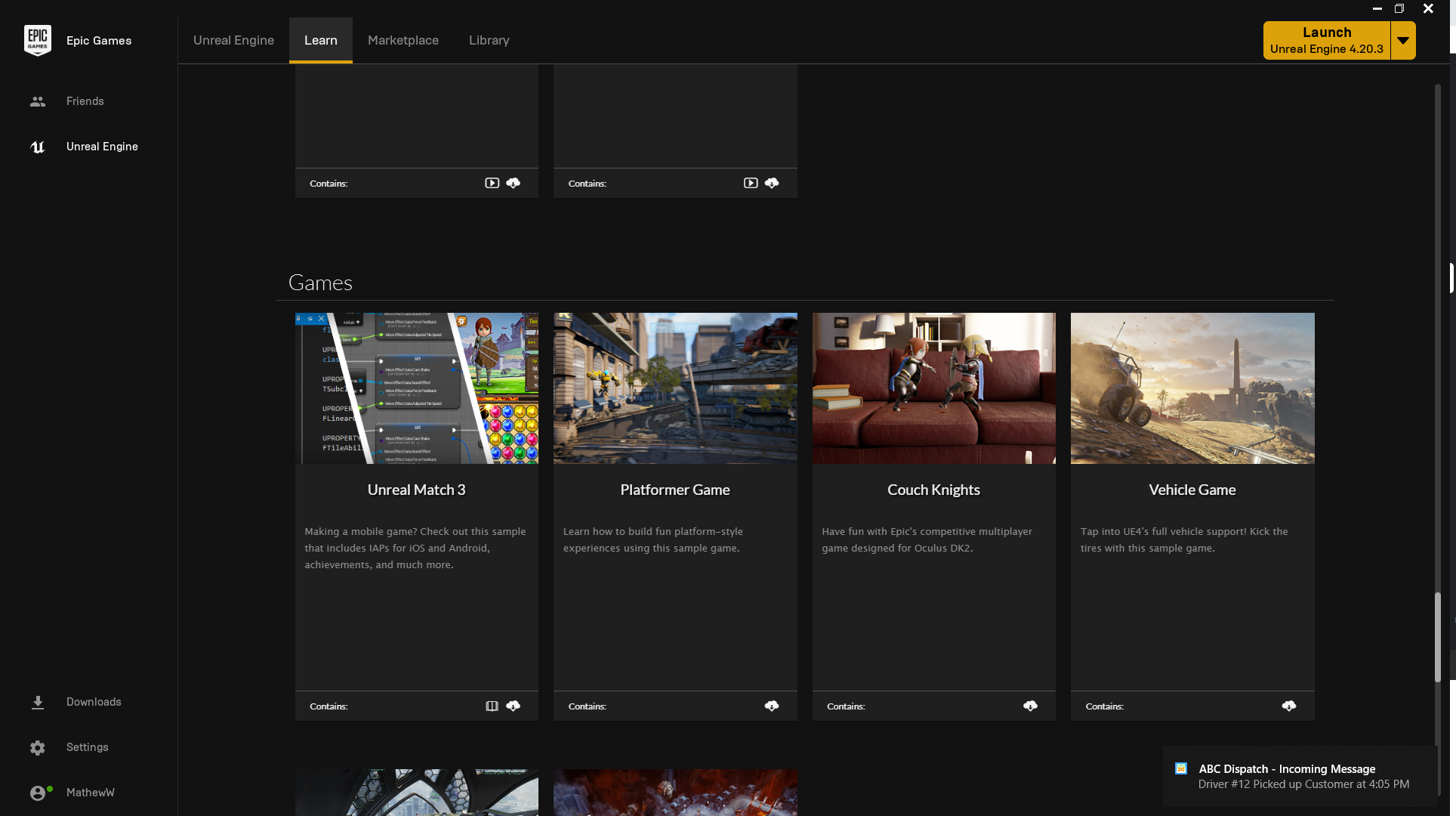 ancient otter
Ohhhh

I will check if its there
It is there... I had it in spanish and it said more info not learn
spring blade
Does anybody know if i can check if 2 widgets are touching?
 grim juniper
hot
ancient otter
Btw im also getting a problem when using tesselation
Its flickering
i had to lower it down so it stopped
spring blade
does anyone know how i can make it so the mouse is visible the whole time?
so that when i click the editor it doesnt dissapear
lime cobalt
@spring blade shift + f1 while playing the game in the editor ?
spring blade
yeah, but when i click in the game it goes back
grim ore
set the input mode on the player controller to ui and game
or set show mouse cursor to true
lime cobalt
what @grim ore said
spring blade
how do i set the input method to ui?
i tried setting show mouse cursor to true on player controller but it does the same ting
but, nevernmind its not important anymore because i just put a transparent button with a z order of -999 covering the wole screen
probably not the best fix but it worked
lime cobalt
there's a blueprint node for that one sec
lime cobalt
player controller node, and then select set input mode UI only
that's how I do it anyway
 novel ember
so i have something crashing the engine in a widget blueprint because it's hooked up to the preconstruct
is there a way to get to it without crashing the game?
because as-is opening the blueprint causes a crash immediately
lime cobalt
@novel ember I do initialize everything on tick, to avoid inits getting null references
after every object being created, that's where I get every object to search references to other objects
not saying it's the best thing to do tho ...
in tick , i got a method like if (SomeNeededObjectReference==NULL) { SomeNeededObjectReference=FindAllActorsOfClass(SomeClass).get(0); }
novel ember
i get that but i'm asking if there's a way to fix it now
like to be able to just go in and disconnect the node in that blueprint without it crashing
lime cobalt
well that's how I fixed it
doesn't the preconstruct method happens during the game ?
is it a method that is executed inside the editor ?
novel ember
from what i can tell yeah
lime cobalt
you maybe have a Saved folder in your project directory, there's maybe an older version of your blueprint
if you back up all your project before, you can replace your blueprint by a previous version of this blueprint found in the "saved" directory
also, it shouldn't crash... it should return an error message saying the function can't execute
this is blueprint too... blueprints are a VM so there's totally the possibility to add such messages ...
novel ember
okay yeah i just had to import a backup thanks
lime cobalt
np
 gleaming lagoon
Is there an common practice for ue4 backup? So that I don't run into similar case with the guy up there? 😛
 manic pawn
use version control
gleaming lagoon
@manic pawn which one? Github? Git? TortoiseSVN?
spring blade
hello
does anybody know how i can check if 2 widgets are touching
i cant find anything on google or the documentation, maybe somebody has a hacky way they use to test widget collision, please let me know
 tribal pebble
cedar comet
tribal pebble
cedar comet
alright so following my convo i wanted to make a suit equip iron man style
@grim ore
tribal pebble
so it says that i need to scale teh animation 10 times its original , scale , make instant interpolation (not linear) , then bake it again , then import in ue4, and give ue4 10 times the read speed for the animation
but the last step is not clear
tribal pebble
"Unfortunately I don't have a clean way to achieve that look, but maybe you can use this workaround:
In Maya, bake your animation with the desired number of frames.

Scale up the baked animation curves to about 10x the original length. (It must have enough frames to exceed your FPS in UE4 so the engine can't interpolate between frames.)

Change the interpolation of your keys to "step tangents", bake again and export as FBX.

In Unreal, set the "Rate Scale" to 10. "
@lime cobalt
where is rate scale tho
and am i missing something inthe steps?
@cedar comet sorry for cluttering the chat dude
cedar comet
np
tribal pebble
maybe ue4's way can be more satisfying but more convoluted ,imo if you code its the same really (just an opinion i don't code)
grim ore
@cedar comet the engine is not a factor for what you want to do. Most of what you are asking can be done in either engine and is primarily animation which is done outside of the engine
tribal pebble
Matthew do you know anything about the thing i mentioned? i have interpolation problems with animations from blender
its for sequencer
so the solution i found is to make the animation giant and make the interpolation Stepped (so it actually can imitate the 25 fps )
my issue is that 25 fps animations in sequencer when playing or rendering ,it thinks its 30 or 60 fps based on my performance (so scrubbing doesn't make the interpolation bad its perfect)
only playing makes it go wrong @grim ore
like some things that should change from 1 frame to the next , when playing or render ,have interpolations that break the animation transitions
grim ore
@cedar comet for what you want and learning either engine will be fine. Blueprints generally has a lower learning curve for most non programmers while C# in Unity is easy to pick up if you are used to programming languages. Neither is wrong, both will work. You should do some basic tutorials in each and see which feels better.
@tribal pebble I saw the conversation earlier and unfortunately I have like 3% experience with the animation system for my time using it 😦
grim ore
yeah I only use the default stuff as art is way out of my league
tribal pebble
i just can't find a way to change interoplation for imported animations in ue4 too
tribal pebble
do you have the sexy lizard man voice?
cedar comet
Rip
grim ore
I am assuming the custom sample rate when importing the animations are not working to let you make it 25fps?
tribal pebble
yeah exactly
it just resamples it for some reason
any interpolation change in blender, doesn't transfer
it considers it all Linear too
grim ore
using the new 4.21 import screen does it show at 25fps in the file frame rate?
grim ore
it pops up the import dialog tho right?
grim ore
yeah at the bottom in 4.21 it shows file info now
grim ore
well we atleast know it shouldnt be the file
tribal pebble
yep
maybe i could try the method of the link (increasing the lenght of animation ) and giving ue4 a x10 rate speed
obviously with the 10x animation baked ,so when its sped up by 10 times, it will have duplicate frames to play
grim ore
so when it's playing it back in the animation editor it shows 30fps in the top left? or it just looks weird at 25
tribal pebble
ok lemme explain by images
top one is frame 1 bottom frame 2
the camera changes from 1 to 2
but when i scrubb first camera has frame 1, and when camera changes i see frame 2
when i render or play , it shows frame 1 , before camera changes for 1 frame ,it shows frame 1.5 (inbetween) , then when camera changes it shows frame 2
the only way for now to fix that is to cut those 2 frames ,and take the little cut frame ,and give it a different start offset( a change by -0.01 or +0.02 if i need the frame 2 to stay)
grim ore
yep damn. Even looking thru there I cannot even guess I know so little about the animation system. It's on my list but it's been there for 2 years so.....
grim ore
I know it's weird but if you lock your FPS at 25 does it still happen?
tribal pebble
uh how do i do ?
grim ore
t.maxfps XX
tribal pebble
sorry i'm newb
grim ore
in the console (`)
tribal pebble
italian keyboard lemme chane to english and see where it is
grim ore
stat fps in the console shows viewport fps, t.maxfps 30 or whatever locks the fps to that max
and yeah noooooo idea what it is on other keyboards lol
tribal pebble
xD ye lemme gogle one sec
grim ore
someone was complaining earlier changing the hotkey didnt work on non US keyboards sooo dunno if it even works well lol
its the tilde key, top left on a US layout to the left of the 1
tribal pebble
aigh i changed it from preferences to shift apostrofe
soo do i write like t.maxfps 25?
grim ore
yep just type in t.maxfps whatever to lock the max to that number
stat fps shows the current fps if you want to check it
cedar comet
@grim ore @tribal pebble could you try to answer my question
grim ore
lol it's a weird solution but if you are rendering out maybe it helps
tribal pebble
finally i can finish this damn animation xD
grim ore
@cedar comet it depends on what you are doing. i would assume hand_l is a skeleton bone so normally you wouldnt. If you are trying to get the location of it you can add a socket on the skeleton and then get a reference to that for where it is in the world.
with that said this falls into the same category as before lol, I barely understand the animation system
cedar comet
Im trying to make an object teleport and set his hand as his parent socket
grim ore
then you need a socket on the skeleton to set it to
a socket is an actual item added onto the skeleton in the skeletal editor in UE4
tribal pebble
bruh that's so complex, no wonder i stick to making and animating 3D models lol
props to you all coders out there!
tribal pebble
for now!
tribal pebble
welp just try to find some correlated tutorials online? there is always something out there
👽
tribal pebble
i mean not everyone is active
tribal pebble
welp in the correct channel? personally i rarely get answers in dedicated channels ^^"
ancient otter
Guys im getting a problem with displacement again
this is te texture
but again is going bad
i ahve to put like 50 to get a "good" result, but it starts flickering :/
 icy bone
@cedar comet lol ure so impatient
novel ember
nvm
 twilit dawn
Hello everyone.
spare sun
hello
 weary basalt
Hello
twilit dawn
Question does unreal auto set an array of spawned items within a blueprint?
twilit dawn
were trying to get something to spawn 10 things two teams of 5 but we only get 1 team of 5 and 1 team of 4 and it is random as to what team gets the 5 and 4
 south ridge
If you specify it in the CDO (default settings), they will be carried over to the instances
 rocky kestrel
Anyone have any good resources on how the underlying frameworks work and interact? Like in depth explanations of PlayerState, GameMode, Player controller etc
Trying to figure out server stuff is a headache
I've read that guys compendium on networking but I'm still unsure of how to use the frameworks to their strengths
 lyric merlin
hmm.. I need to roll the camera somehow in the editor so I can test some view-dependent stuff. Anyone know a way of doing that?
plush yew
anyone here
 sudden agate
@south ridge I would like to do Bitshift and stuff tho :(
sudden agate
@fathom gust are you using a landscape?
 fathom gust
no
sudden agate
make sure to turn off Crack Free Displacement
fathom gust
it was off initially. was not working. Ive turned it off
sudden agate
is your mesh dense enough?
fathom gust
The tessellation is subdividing the mesh. Do I need to make already dense mesh ?
sudden agate
yes
sudden agate
@fathom gust Tesselletion shouldnt be used to create the main sillhouette of the mesh but only to create small details
@south ridge yes, but it can only return Float1/Float2/Float3 and the inputs are Float only aswell
south ridge
But you can do everything in HLSL and even work with ints
Or just pass ints around as floats
You only have 8 bits lol
Or you want all 32 bits?
sudden agate
I only need 8 bits
south ridge
So in our game I have a shader which uses bitmasking to light up sections of the texture
It's a bitmask mapped onto a texture mask sorta thing, if texture has specific pixel value, it gets lit up etc
I did all bitwise logic in HLSL for that
sudden agate
I tried it yesterday already, but the custom node complains about unidentified token "int"
south ridge
Well, I just used floats and did bitwise on them directly hurr
sudden agate

 past sun
Why isn't the camera facing where it's supposed to face?
 vernal tapir
Can anyone pls help me out? I'm getting outraged. I have a bouncing ball and hit events don't trigger all the time, which makes it unplayable.
I've asked in physics, no answer
It seems like an engine bug, a bad one.
 uneven fractal
doubt
past sun
Do you have right collisions in place?
uneven fractal
if you want to be outraged try using unreal 4 version 4.5
lyric merlin
@past sun Your picture is lacking in pixels
vernal tapir
Collisions is fine, they just trigger about 80% of all time
uneven fractal
well by definition something is going wrong with collision the question is what
uneven fractal
actually can you post a picture of the static mesh collision?
vernal tapir
COllisions is
uneven fractal
in the actual static mesh file
past sun
@lyric merlin
https://cdn.discordapp.com/attachments/496301249268809742/519403210864197632/unknown.png
try this one
 uneven fractal
that doesn't appear to be a ball?
vernal tapir
What doyou mean?
uneven fractal
You said you have a bouncing ball
uneven fractal
so is there anything different when it doesn't send out hit events?
or is it just like bounce off 4 walls and doesn't register a hit on the last one?
vernal tapir
Oh gosh
I don't believe i've fixed it
There is like gazillion physics settings
It probably was bounce threshold in project settings
Seems to work now
uneven fractal
huh guess my theory wasn't right oh well
uneven fractal
aight
vernal tapir
Like this https://youtu.be/vnRxUgIrAI4
Impossible record on dfwc2008-1 by Woody Follow him on Twitch here: https://www.twitch.tv/w00deh Music: Excision & Space Laces – Rumble
uneven fractal
well okay
vernal tapir
Thanks anyways
uneven fractal
apprently my code was too sexy and the bot deemed it explicit
uneven fractal
I'm making mini games inside another game
uneven fractal
Pretty fun to ride off the exsisting player base but the version of unreal 4 is like 40 versions behind
vernal tapir
Why do you use the older one?
uneven fractal
because that's the version of unreal that the game is created in
not my game just modding it
When a studio customizes the engine too much for their needs sometimes it becomes nigh impossible to update the game to the newest version
vernal tapir
Oh, that's the worst scenario, probably
I was struggling the same way, when there was no built in GoogleVR plugin and 3rd party cardboard code worked only on older engine versions
uneven fractal
Yeah the game is ark which is a survival game that includes tens of thousands of networked actors so the reason they modified it so much was to optimize the networking to make it playable. They were ahead of their time in terms of networking optimization back then but ironically now modern UE4 is way better network optimized
vernal tapir
Oh gosh, it eplains some things, haha
 void geyser
anyone here tried an udemy course as a tutorial for beginners? a lot of these online video tutorials seem to be all about blueprints, and i just don't get them like i do coding
vernal tapir
The most painful thing is that you can't downgrade your project
vernal tapir
@void geyser i do stuff that i need right now, dig specific tasks, and yeah, blueprints are coding
uneven fractal
I would recommend just using the tutorials epic themselves put out
void geyser
i mean i work as a software dev, the blueprints system is just not meshing with my brain
vernal tapir
And they make debugging waaaaaaay more obvious
void geyser
i get some of it, but a lot of it seems.. random?
uneven fractal
what do you mean?
Some things I've found unintuiative but I think that's just because I'm not used to c++ which is basically what blueprints are based on
void geyser
i'm actually pretty comfortable with C++, so that's why I thought those might be better tutorials for me
i've been trying to follow along one of the tutorials put out by epic
but I feel like this guy just says "okay now we do this, and then we do that" without explaining why or how he got to that conclusion?
vernal tapir
You're not getting like overall logic, right?
uneven fractal
never dabbled in animation graphing tbh
vernal tapir
Mb you should try to get some basic tasks done? So you would need to dig some specific info and solve some "real"problems?
void geyser
hmmm maybe? like for instance, right now I'm stuck on something:
I used the third-person template, and am trying to add the punching montage this guy has given us in our anim BP
buttt in the tutorial, they define jumping as a state machine (makes sense, i get that)
however, in the third-person template, jumping is already built-in to the character
uneven fractal
Do they make a state machine for jumping or do they just mention it?
void geyser
they make it
uneven fractal
oh wait I remember this tut
void geyser
so i'm stuck because i don't know how to access whatever jumping state machine exists in the third-person tutorial compared to making my own
i'm sure i can follow this tutorial step-by-step and finish it, but if i can't branch out and change one thing and make it on my own... haha
uneven fractal
So the point of this tutorial is to show you how they made the 3rd person template starting from scratch
You can't access a state machine that hasn't been built yet
void geyser
right, makes sense... but somehow in the template the character already knows how to jump
uneven fractal
I was also kind of dissappointed at the end of that tutorial a year ago when I realized I wasn't making a 3rd person game I was making a 3rd person template
the one in the video or your template?
void geyser
so the video starts from scratch, I started from the template built in to unreal
I want to use the pre-existing jump in the template and hook it up to the punching in the tutorial
vernal tapir
Built in character movement component can have jump function in it already
uneven fractal
damn when you accidently hit the browse button on a class input and there are hundreds of that class in the project
5 minutes later
void geyser
I guess I wish the tutorial also explained things a little more? like... I can follow the tutorial, but once it's done, if I was asked to do the project again from scratch without a tutorial, I wouldn't be able to do it I don't think
anyway sorry for complaining
I think I'll go try a different tutorial or something
uneven fractal
people don't recommend that tutorial for you to memorize how to do what they did exactly
it's just a way to introduce blueprinting basics
void geyser
yea, sadly I don't think it's explaining any of that to me
he pulls up the event graph, but doesn't explain to me what it actually is
uneven fractal
well not even blueprint basics more like navigating the engine itself
void geyser
I think I just need a new tutorial, I don't feel like I'm learning anything from this one - was wondering if anyone had any experience with this? https://www.udemy.com/unrealengine-cpp/
I just think I'll need to learn blueprints a little better as well - like when to do something in code, and when to do it in blueprints
uneven fractal
Thankfully that question is one I can answer
You want to do network intensive and performance based operations in c++
So like stuff on event tick or loops that interate through hundreds of objects
On super repetitve tasks like large loops you can see 90% performance savings by using C++
void geyser
but other things like
creating a projectile or particle effect
playing a sound
should be done in blueprints?
uneven fractal
yes
well it depends
the main benefit of blueprints is the speed you can make them vs c++ which is relativily slow
so if your looking for quickly making something you would normally choose blueprints but if your more experienced with c++ is totally okay to do everything in c++
but I would learn blueprints just because they have the potential to be far far faster to create then c++ once your accustomed to them
void geyser
any recommendations on blueprints tutorials? the one i've been following hasn't been helping much
uneven fractal
eh after that one I did the epic games multiplayer one afterwards
probably unwise though since the difference in difficulty is night and day
void geyser
like all I want to do is make it so when you left-mouse click, an animation plays, and maybe a particle effect - that would be a great starting place for me, but even that is just too much right now
uneven fractal
void geyser
looks like I need to take that animation, put it in its own montage, then have an animation blueprint for the character and inside it, have a custom event that links to a montage play
uneven fractal
not necessairly
void geyser
and inside the montage have a notifier and use that notifier to spawn a particle?
uneven fractal
you can play an animation on a mesh without a animbp
the animbp is used for complex charectors with lots of animation, states ect, complex animations like montages/blendspaces ect
void geyser
like a player character
uneven fractal
yes so you can start playing with animations in the charector bp
and as your needs become more complex move on to the animbp
void geyser
what if i wanted to spawn the emitter at a specific point during the animation?
also I assume all this goes inside... the character blueprint event graph?
uneven fractal
Well if you know the exact point in the animation you could put a delay node after the play animation node so the emitter plays at a certain time in the animstion
void geyser
gotcha, I need to look at all the available nodes
since right now they seem like magic 😃
uneven fractal
Yep you have all your standard c++ stuff if you know where to look
For loops,while loops, for each, delays,timers,event dispatchers, functions,gates
And even some stuff that c++ doesn't have like do once nodes
 white pagoda
Does anyone here know anything about how Unreal works with SLI gpu setup?
void geyser
Maybe I'll try that one tutorial in C++ and then after I finish it try to rebuild it using blueprints instead
white pagoda
Sounds like a good way to learn.
 worldly sierra
Hi do you have any idea how to install nvidia flex at this moment?
github page is down
languid shard
@cursive dirge might know
grim juniper
I have a simple little question just cause. Anyone know why landscapes have a default location of 0,0,100 instead of 0,0,0?
cloud cobalt
Maybe because a flat landscape at 0 would have the world grid overlayed
And it would look wrong
 teal tulip
the landscapes are scaled, probably the engine himself calculate the location the vertical difference ?
no idea
 static viper
one could also ask why landscapes begin at a edge
so if you center them,... they are in only positive areas
they are not centered
also a weird thing
wary wave
because they're basically 2d array of vertices and the top left corner is vert 0,0
just like how they came from a texture, and the pixel at 0,0 corresponds to said verts
grim juniper
Is there any way to get more vertical resolution? Not that I need it, just curious if it's possible
wary wave
also, a 512x512 texture doesn't actually have a center pixel
@grim juniper - some texture formats offer more precision
I usually use a RAW format when exporting / importing terrain for that reason
grim juniper
But what if you're not importing a landscape, but hand sculpting it? It should be at max vertical resolution, right?
wary wave
a standard bitmap only gives you 255 'steps' in height, but you can get a lot more out of a raw file
hand sculpted would probably be max resolution, yeah
I don't see why it wouldn't be
grim juniper
Yeah, makes sense
wary wave
at that point you're limited, so you'll instead want to think about how you're going to mitigate that limitation
grim juniper
I'm only interested in making racing games, so I probably don't need as much vertical resolution as something where you've got a human sized character walking around
wary wave
I'd be surprised if you're having trouble with resolution for racing games tbh
grim juniper
I'm kind of just in messing around stages. Not really making anything yet. Just learning the editor and getting more confident in my ability to actually make something
I want to get into world building. Designing road networks and stuff interests me a lot, so I want to make sure I have the landscape set to give me the option to make a large world with potentially a lot of elevation change
So I have scaled the Z pretty high as well as I've moved the landscape up so the farthest down it can go is slightly below sea level since I doubt I'll need to go below sea level much.
grim juniper
Just messing around I made the z scale 8 times larger so the highest elevation is about 4km. The smallest step is about 6.2 cm. Honestly better than I expected. Not sure I'd ever go nearly that high though 
wary wave
4km is enormous
grim juniper
Yup
wary wave
there's only something like 20 points on Earth you couldn't accurately model with that :p
(and if you went to 12.4cm per step you could do them all)
grim juniper
Pikes Peak is a little over 4km iirc
wary wave
1690m prominent according to wiki
grim juniper
Yeah, I meant overall elevation. Which is insane
wary wave
you only need to model prominence with a landscape
since you only care about the height of surrounding terrain - not how far above sea level you are, hehe
grim juniper
The idea is I want to build the world larger over time. Or at least be able to keep expanding it as I want to. Going from beach the whole way up to mountains and stuff
Not recreating any real world location
wary wave
you can use more than one landscape (and will probably want to anyway)
grim juniper
So I doubt I'd ever go to Pikes Peak elevations
wary wave
but also, there is the problem of time / effort
building large outdoor areas takes a considerable amount of time, simply due to the space you need to fill
I'd be careful about setting your goals too high
grim juniper
I've been messing around with World Composition. With the option to add adjacent landscape levels
I know all about managing expectations. I want to start out small
But I want to make sure I have stuff in place to be able to keep expanding it
wary wave
IIRC, a 2kmx2km Ark map, entirely outdoors without too much complexity, took me something like 2-3 months of full time work to build
that was largely just landscape, painted foliage, and manually placed rocks
 waxen glacier
I am struggling with a good landscape material with auto slope detection for cliff faces and paintable layers
Not sure if that would be useful for a world comp map though
The paintable layers would be for like painting roads and all but i probably could use splines instead
grim juniper
I might decide to do a low poly art style just to make it faster to build stuff, but honestly this is all just experimentation to see what I can do
wary wave
I would use blueprint / code based spline tools for roads
grim juniper
Way ahead of you
wary wave
IIRC there's a free / cheap road plugin that does that non-destructively already
waxen glacier
Yeah i think i know what ur talking about
landscapes are tough a lot more complicated than i originally thought
i haven't even touched distance based tesselation
for extra pizzaz
prob not practical for games though
grim juniper
I've been working on a road tool using the procedural mesh component to build the mesh, then convert them to static meshes
wary wave
I usually use spline mesh components, but yeah
waxen glacier
I have been doing ue4 for over a year and still haven't got to splines lol
wary wave
the real trick is painting and deforming the landscape non-destructively
@waxen glacier - splines are a wonder-tool, I recommend learning them
lots of practical applications if you're doing real world environments
waxen glacier
Absolutely I agree it's just im still neck deep in tons of other stuff haha
wary wave
I use them for walls, fences, bodies of water, telegraph pole networks, roads, paths, ropes, vines, all sorts 😄
waxen glacier
Yep i've seen their power
grim juniper
I started with spline meshes, but I wanted total control over the mesh so I can make unique sections of road
waxen glacier
what's the difference?
grim juniper
With procedural meshes you have to make the mesh from scratch instead of supplying a mesh
Well, you can supply a mesh, but I want to build from scratch
This way I can also give the mesh world space UVs meaning no need for projecting textures
grim juniper
Yeah
waxen glacier
I do my assets externally so that's interesting ill have to look into that as well after i jump into basic splines
never really heard of anything like that though
grim juniper
Well you need to generate all the verts and triangles and stuff manually basically
It's easier to make a road when you keep it a grid shape
grim juniper
Here's some work in progress screenshots from a while ago
https://cdn.discordapp.com/attachments/225448516376461313/424796671826984961/unknown.png
https://cdn.discordapp.com/attachments/225448516376461313/424796852224000000/unknown.png


I have a nicer looking screenshot, but I haven't found it yet
wary wave
looks pretty reasonable
the real trick has always been intersections, hehe
if you can get good looking intersections, you're ahead of most people
grim juniper
Oh yeah, I have some ideas, but I've yet to make anything for that. It's a problem indeed
static viper
looks promising
grim juniper
Oh and I'm cheating a bit in those images above, it's pretty much just a grid, so those lanes which are only along part of it are actually along the whole thing and are just squished to 0 wide  I've worked on it since then though. I can fix that part
static viper
just wait until you meet spline tangents 😄
grim juniper
Here's a nice looking screenshot thanks to Substance Source for the asphalt material
waxen glacier
Yeah that is pretty cool but I agree intersections is where the challenge will be. Best of luck with it 😃
grim juniper
Thanks 👍
I'm really curious to get into editor scripting to see what's possible to make all this easier
Oh and all of this is in Blueprints
I've also worked on a tool to quickly and easily place utility poles. Uses the cable component for the cables.
 white spruce
I thought 4.21 released? Why is my Epic launcher only showing 4.21 Preview 4?
grim juniper
I think it's a bug with the new beta launcher
wary wave
I used spline meshes for the cables, but yeah, you can do a lot with it!
I kinda want to make a survival game, but make good use of the spline tools and stuff to set up automated processes (rather than spending all your time manually harvesting shit, you'd set up automated networks to gather most resources)
 floral finch
so, this is the 2000's version of IRC 😄
 trim pier
wheres the best place for me to report a bug?
cloud cobalt
Thanks for reporting a bug with the Unreal Engine 4. Here you will find information on how to submit a report and what you can expect afterwards.
 iron wadi
Have there been any weird changes to how physics assets work between UE4.19 and 4.21? Because when I import and set up a ponytail physics asset in 19 it works as intended with a rigidbody node in anim BP, even colliding with itself (capsule in the asset for body), but in UE 4.21 it no longer works in rigidbody node and the asset itself doesn't collid the ponytail with body capsule anymore
I imported the same asset the same way in both versions
 hollow quail
fathom gust
hollow quail
fathom gust
Hey, please help me fix this texture flickering issue
Edit: nvm, just silly overlapping
wary wave
that doesn't look like a texture problem
looks like Z-fighting
two different planes in the same place
hard to really tell with such a static camera and short clip though
static viper
odd z fighting
reef python
So yesterday I asked about a problem on my viewport, were the viewport was blurry even in play mode, so after a bit we tried most solution so you guys told me to reinstall the engine, so I reinstalled the engine and it did not work, so I tried earlier versions (19 and 20) still the same problem, what can I do to fix my problem?
elfin jacinth
Good morning!
 teal tulip
^
languid shard
EU WEST WILL PREVAIL
languid shard
Dota flashbacks
 lone yoke

Unreal Engine
Online store pioneers 88% revenue share in favor of developers, and connects them with players and content creators.

 vale silo
this store sounds like Steam killer.. Besides revenue share, it offers direct line to your customers.. Nothing like Steam.
really hyped now
maiden swift
What a way to start the day.
languid shard
😄
reef python
So yesterday I asked about a problem on my viewport, were the viewport was blurry even in play mode, so after a bit we tried most solution so you guys told me to reinstall the engine, so I reinstalled the engine and it did not work, so I tried earlier versions (19 and 20) still the same problem, what can I do to fix my problem? [My earlier message got buried] [Repost]
 fierce tulip
I just hope it doesnt have the same rocky road and sometimes "odd" settings, or non-existent settings that a good marketplace needs, like the ue4 content marketplace has had.
I welcome it a lot though
maiden swift
Yeah, UX is going to be key. There's a lot of value being offered here, but no info on what the backend is like.
Could be missing features compared to Steam, or even itch.io.
plush yew
Seems interesting. Cool stuff.
maiden swift
On the other hand, I'm actually hoping this is the reason the Marketplace backend updates have been delayed so much.







 safe rose
@fierce tulip where is that from?
Damn shame Unity games get the same cut as UE4 games 😉
fierce tulip

GamesIndustry.biz
Free games, direct access to customers, mod support and more; Tim Sweeney reveals the plan for the Epic Games Store
wary wave
oh snap son
maiden swift
Epic covers the 5% for UE4 games, but I guess they're equal since Unity has no royalties.
But yeah, Unity still costs more up front so there's some offset there.
maiden swift
Sure, but you'll have to buy Pro eventually if your game takes off. Worth keeping in mind.
reef python
Does anyone here actually use the discord store, to my knowledge it didn't really go so well as expected
safe rose
Who knows if this store will do good
maiden swift
Discord Store is in beta, so it's too early to tell.
plush yew
I use the games on the discord store cuz of nitro
safe rose
That's the real benefit from this
plush yew
Good perk
cloud cobalt
Discord is 30%
safe rose
Because anyone can get on Steam
But we don't know the exact requirements yet for Epic Store
reef python
But epic got an advantage due to fortnite being on there too, people are already used to epics ecosystem(?).
safe rose
`Q: You plan to open up to more games in 2019. What's the right amount of openness you want for the Epic Games Store?
Tim Sweeney: We'll have an approval process for new developers to go through to release a title. It will mostly focus on the technical side of things and general quality. Except for adult-only content, we don't plan to curate based on developers' creative or artistic expression.`
Still need more info than that
 thorny cipher
lol
plush yew
I think in any case it will take a bit of time for the store to get momentum. Note the article says "long journey". But it could be really good.
safe rose
The problem is. Just because Fornite/ Launcher gets a shtiton of traffic, does not mean shit for developers getting their games bought
Because guess what?
thorny cipher
14 day refund is stupid
safe rose
Most people play fornite because it's free
cloud cobalt
@safe rose Exactly the same thing goes for Steam.
safe rose
@cloud cobalt ?
dark depot
I mean that is how steam was successful at the start
cloud cobalt
90% of Steam players have exactly one game, @safe rose
safe rose
The ONLY reason the increase in traffic to launcher = Fornite
So, if the majority of players are only there to play that game
And only if they are cheapsakes
safe rose
Then it stands to reason that most will not buy shit from the store
dark depot
The only reason steam had traffic when it launched was half-life so
safe rose
@thorny cipher Agreed on the refund policy
thorny cipher
if they offer refunds, but dont take that money from the developer - sure
 whole quarry
@safe rose if you enter a store, you only look at the product you went to the store for or do you also see the other products in the shelfs?
wary wave
Fortnite is making huge bank, so it being free is not necessarily a thing
vale silo
So, 14 days refund and no DRM is why I am not going to bother with Epic's store front
safe rose
New store, with a unique user flow
thorny cipher
maybe when all the developers leave steam theyll make half life 3
safe rose
not the same as Steam
I'm not trying to downplay how cool this is...
But you all need to get real
safe rose
This may not end up being the greatest thing since sliced bread
plush yew
Maybe people will go with the honor system of keeping what they buy :)
thorny cipher
steam can stop screwing developers
safe rose
But it may end up having ramifications throughout the store world
plush yew
Since epic is so loved
maiden swift
It's exciting news, but we're all very aware that this is not a guaranteed success.
dark depot
Yeah but even if they only allow AAA at the start it makes other storefronts have to do things
wary wave
DRM has never worked, and a 14 day refund policy is healthy
cloud cobalt
^
thorny cipher
well they have the support of the whole UE community I believe
safe rose
Nah
wary wave
heck in Europe it's technically still the law
cloud cobalt
I'm very happy we have refunds
wary wave
yup
cloud cobalt
Yes
wary wave
90 days here, by law
whole quarry
Steam has a refund policy as well though!?
safe rose
So basically, people can play your game the entire weekend and refund..
plush yew
Yeah. Time will tell. Always pays to be optimistic though.
safe rose
Wtf...guys
cloud cobalt
It's the law, and it's very healthy for your game
safe rose
You guys...
vale silo
yes, Steam does, but it's a sane policy
cloud cobalt
I'm from Europe, and I love that law. And I also love it as a user and dev.
safe rose
I actually don't mind Steam Refund policy, but they don't adhere to it
maiden swift
I suspect the refund policy may cause hesitation for anyone developing a single-player game.
thorny cipher
A mass produced toaster != game
safe rose
I had plenty of games refunded after the 2-hour mark
grim ore
so everyone keeps saying how fortnite drives traffic but how much does it really drive to the PC launcher? Fortnite may be big but the it's on more than just PC to get that number.
safe rose
@grim ore 😃
wary wave
it's pretty big on the PC
safe rose
I just said that
safe rose
Just because it drives a lot of traffic to the launcher, doesn't mean it's going to be some crazy hit
It may flop
thorny cipher
I'm sure they will use their leverage of fortnite to say "hey look at the store while you're here"
vale silo
Maybe too many devs here don't spend enough time with average Joe who will abuse that refund policy
cloud cobalt
@safe rose I would take a refund over a negative review happily any day of the week. It's way, way less impacting. A refund is one lost sale, and sure, we have like 10% refunds on Steam. A negative review is way mroe than one lost sale.
safe rose
Especially if they handle it worse than Steam
grim ore
pretty big is not a metric. Pretty big compared to the people that live in montana or pretty big compared to the population of china?
safe rose
@cloud cobalt What if you can get a Negative Review + Refund? Just like Steam?
thorny cipher
@cloud cobalt or get both 
safe rose
rofl
vale silo
Just told co-worked (an engineer nonetheless) about 14 days and first thing he said was how cool is this - free games.
cloud cobalt
We have way, way more refunds than negative reviews
wary wave
the big thing that concerns me more, is that Epic infrastructure for anything online is no way ready for this
safe rose
I take that back
cloud cobalt
Like, 100x more
safe rose
You are correct, majority, will refund before posting neg reviews. But you definitely get combos.
thorny cipher
Maybe you get 1 refund a month
wary wave
answerhub, forums, launcher, all catastrophic
grim ore
answerhub is not a disaster, it's just a good excuse to go out for lunch while it loads...
cloud cobalt
Actually we had something like 600 refunds, and maybe 10 neg reviews, 1 or 2 combos
thorny cipher
Launcher is still slow as fuck
safe rose
@cloud cobalt out of a total of how many sales?
cloud cobalt
6000
maiden swift
Added another interview to the list in #unreal-news
cloud cobalt
Two months ago
safe rose
Remember, as time went on, kids got more entitled and whiny
cloud cobalt
We're also open-source and DRM-free and we have an Itch build, and we're doing a mod kit too. Build trust with your audience, not walls