#ue4-general
1 messages · Page 34 of 1
 toxic lily
Is there a way i can have collission enabled on a skeletal mesh without simulating physics?
i have a flaying character and im trying to prevent him from phasing through walls
toxic lily
guess not?
 violet portal
Hey,
Anyone who could help me set up some API calls from a game to my website to retrieve a image and some text from it?
I have VaREst plugin, just not sure how to setup the calls and the Wordpress page that would hold the data.
 finite bison
How do i make the lighting in ue4 better? The lighting im getting is very bland and just overall unrealistic. There are some very good games made with versions as low as 4.25, and their lighting is surprisingly good compared to what im getting

 rigid yacht
can anyone help? My main level isnt showing in my main folder, but i can find it in file explorer? I had a fix in the past, but now cant remember…
 spice ruin
Search your output log for the level name. It will tell you why it didn't load.
 crude tulip
One message removed from a suspended account.
 solid anchor
does anyone know if theres a way to copy spline paths you already created but just the spline info from one actor to another
so like the lenght and all the spline points and translations of each point etc. just a clean dupe of the source spline
spice ruin
<@&213101288538374145> missed one. 😛
 manic pier
We recently upgraded from UE4.26 to UE4.27.2, and now have problems with the built in Water plugin.
I've been wanting to delete the old water and add new water, however adding new water deforms the landscape and we don't want to lose the landscape sculpting we've done in the past.
To fix this I've tried to untick the "Affects Landscape" tickbox which should cause it to not deform the landscape.
This works; however when unchecking this box the water stops rendering entirely, is there a workaround or fix for this?
As a sidenote I'm aware the Water plugin was experimental and unstable in UE4, I'm just looking for a solution to this new issue as we havent had issues with it in 4.26

 hollow dragon
I'm a paid artist / developer and I do 2D/3D, web, software & game development and much more. If you're interested so can I make something dope for you, Dm me to have a look on my portfolio.
 hidden osprey
Do not post that here also don’t post it into multiple channels either just get out of here
 plush yew
how do i enable SSR in UE4?
 cosmic zealot
is this the place to ask high level game design problems?
i have a game idea but I have no idea on how to even ask the right questions on google
 tough thicket
im about to set up a large game world similar to Skyrim and Oblivion just wondering;
Is that just 1 single landscape?
Will it just be a landscape material with 20 layers?
so i guess ill use Level Stream to seperate the "regions" of the country...
i guess i could make islands
any guides on open worlds?
hidden osprey
Do a small game first not an open world one
cosmic zealot

so... the game loop should be...
- Player goes to central unit (Fabrication Unit) to get a turret to place
- Place retrieves turret and walks to where they want to place it
- Held turret should appear green when within range of the other turrets
- Held turret should appear red if player carries the turret beyond the range
- Player places turret if all conditions are met
i am struggling with what questions to ask the internet
*2. player retrieves
but like... how do I determine if the player is inside the green area?
if I use "collision spheres" and do a "on overlap" event.... then I have areas where multiple collision spheres are overlapping each other. so Id be pinging three or four onOverlap AND onEndOverlap events all over the place
tough thicket
you mean getting the nearest turret and finding if your in its range should be easy enough with distance to vector node
those spheres are weird so idk your choice a few ways
cosmic zealot
i haven't started testing yet, but the 'in between' areas are gonna throw some weird logic errors
tough thicket
if your only checking for the nearest turret, and only accepting its range then i dont see the problem
cosmic zealot
that may be the solution i need.
but each turret has a different build range. Fab unit might be 100 meters. Level 1 turret might be 10 meters
i do appreciate your help. good to have someone to toss ideas with
cosmic zealot
if I were going to treat this like a "stealth" type game and the green circles are the "lighted area" and the player needs to stay in the lighted space....
how would I do that?
im' just trying to look at this problem from different angles
ok, I think I have a solution. Think I'm gonna do a "event Tick -> Sphere trace (custom collision with Turret collision sphere channel)"
lunch break time
 lost mantle
can someone help me with something
 fallow dawn
small question regarding unreal 4. what skin weight limit it had?
 quick grove
anyone able to help me with what can cause a stack overflow error please ?
I'm getting the error on a scenario i'm testing in the TSW public editor and the error seems to come up a bit random and well I can't work out why
 timid trellis
hey guys i got an issue
i imported a model into my project and it worked just fine but everytime i restart my project, all the textures for the model dissappears
it says "failed to load" and then it says the name of all the textures of the model
how can i fix this or like save all the textures into my project?
toxic lily
timid trellis
i imported a model into my project and it worked just fine but everytime i resta...
are the textures imported into your UE project?
timid trellis
Yup
When I just import them it's fine but after I restart my project all the texture slots are there they just don't load
 fickle prawn
Random question for you guys " what makes a game unique ? "
 solid holly
fickle prawn
Random question for you guys " what makes a game unique ? "
solid holly
fickle prawn
Random question for you guys " what makes a game unique ? "
I'd say implementing your own ideas
Something that makes your game different than others
.
Can I adjust the size of my mesh directly in the mesh and not have to create a BP for each mesh to do that?
(Ping pls)
solid holly
solid holly
.
Can I adjust the size of my mesh directly in the mesh and not have to create a...
Found out
Man, they need to add more tips in the tutorials :(
 mental ravine
when I duplicate my projectile bp, duplicated one doesnt hit main character
how can I fix it
 tepid dew
Hi i wanna ask about a problem in UE4
"Access none trying to read property CallFunc..."
 oak patio
You're treating a reference as valid when it's not
toxic lily
fickle prawn
Random question for you guys " what makes a game unique ? "
If you like the game then it’s unique, if you don’t it’s not unique, ez pz
 spare trench
does UE4.27.2 supports Web based game?
If it does then how difficult it is?
toxic lily
spare trench
does UE4.27.2 supports Web based game?
If it does then how difficult it is?
Yes it does, and no idea
Depends on the complexity of your project.
fickle prawn
spare trench
does UE4.27.2 supports Web based game?
If it does then how difficult it is?
Web based if i remeber well is 4.23
timid trellis
guys i have no lights in my scene why is it still bright?

i deleted all the lights in the outliner but shouldnt this be pitch black?
 light verge
Is there a way to access the legacy documentation pages for 4.27?
I am trying to get to the Skeletal Mesh Sockets page on this document but it fails.
https://dev.epicgames.com/documentation/en-us/unreal-engine/skeletal-meshes?application_version=4.27
Epic Games Developer
Meshes bound to a hierarchical skeleton of bones which can be animated for the purpose of deforming the mesh.
finite bison
timid trellis
guys i have no lights in my scene why is it still bright?
baked lighting
also is there a way to prevent trees spawning on rocks and such?
i have inclusion landscape layers enabled too


 fierce tinsel
Hey can some one help me when I create an input action to open our flashlight in horror game and when I try to use the enhanced input action it is not working please help in unreal 4.27
tough thicket
how do i fix this without a higher resolution mesh?
 tough thicket
i fixed it by making the map resolution more dense so

 edgy quest
Hey. Got some serious problem
I am making an action combat racer. My game project settigns are set to fixed framerate ( 25 ), everything else is at default
When I am increasing the framerate option, then the game speeds up like it was somehow accelerated or fast-forward ( imagine like it was a radio song played with 150% pace )
There is very scarce data covering this topic. I've tried to tweak delta time options, but still my game runs like it was set to "global time dilation 1,5x ), but I wanted to make everything run more fluently, but the normal game pace must be ket
*kept
 grim raft
hey guys, is there a way to stop emitter spawn when its too far from player pawn?
without a blueprint
manic pier
Anyone know why my landscape sculpting isn't going above ~100 Unreal units and won't go below by about the same height on a perfectly fresh and flat landscape? No heightmaps involved, just a new landscape straight out of the box
I've recreated it twice now because this happens, I tested to make sure I could use the sculpt brush to raise it as high and low as I want when I first recreated it and it worked fine no problem, now when I come back to it to do the same it only goes to a certain height again.
I think it seems to happen after I paint foliage on the landscape or something like that?
The strange part is that it also only happens on this level, the level is freshly made and has barely been touched. On older levels I've made in the same project this issue has never happened at all
manic pier
Update on the above: I figured out it's because of the Water plugin that affects the Heightmap of the landscape, disabling it for the Water edit layer fixes the issue. I'm hoping there's a way to fix this without disabling it though
Aaand the solution seems to be to create a layer that is above the Water layer, this new layer doesn't have this strange height limit for sculpting
 odd swan
manic pier
Update on the above: I figured out it's because of the Water plugin that affects...
odd swan
manic pier
Update on the above: I figured out it's because of the Water plugin that affects...
you’re not alone in your struggles with the water plugin. that thing gave me lots of trouble in ue4!
 minor plover
Would this be the correct (or best) Discord server/channel to ask for help w/ modding unreal games, or should I be somewhere else?
oak patio
It's not. We don't support unsupported modding, and even with officially supported modding (ones with modkits on EGS), we normally aren't much help there either
oak patio
Hope you can solve your problem!
tough thicket
minor plover
Would this be the correct (or best) Discord server/channel to ask for help w/ mo...
What game?
 karmic seal
I hope this is the right place to ask for help with this sort of stuff otherwise i apologize:
in ue4 im trying to add a feature where a player can pick up another player and use them as a human shield.
I'm making it so that when you are behind another player you can trigger and event (on the server) on the other player which triggers a multicast event. In this multicast event this player attaches to a specific socket in the other players hand. It works well when the server host picks up a client and when a client picks up a client, but the rotation of the picked up player is messed up when a client picks up the server host. Any idea what causes this?
minor plover
tough thicket
What game?
Gundam Breaker 4 (which uses UE4.29, iirc); the English translation is really bad, so I'm looking to fix some things.
tough thicket
minor plover
Gundam Breaker 4 (which uses UE4.29, iirc); the English translation is really ba...
https:// www.nexusm ods.com /gundambr eaker4
i would ask there and modding is illegal so
minor plover
modding is illegal? what?
fierce tinsel
Guys my pc is not opening unreaL engine 5.0 if I will upgrade my ram will it work please tell me the error is this


 tough thicket
minor plover
modding is illegal? what?
tough thicket
minor plover
modding is illegal? what?
yea but like the dude said unless its supported, anywyas i gave you the link to the nexus
 broken geyser
Hi there, just curious why ppl still use UE4, cuz it's faster than UE5 or something else?
 echo eagle
Is the uk really built like a souls like?
echo eagle
broken geyser
Hi there, just curious why ppl still use UE4, cuz it's faster than UE5 or someth...
When my pc had less than 200 gb of space id use unreal 4 to finish assignments
But tbh you can get unreal 5 to run lile unreal 4 if you know what your doing.
And if your on some serious potato hardware theres other engines out there.
oak patio
fierce tinsel
Guys my pc is not opening unreaL engine 5.0 if I will upgrade my ram will it wor...
This channel is for ue4. You want #ue5-general
 dense plover
Hello, can I ask questions here or should I go elsewhere? My question is about editing engine.ini in an UE4 game. I tried reddit sub first, but got denied for some reason by automod.
broken geyser
echo eagle
When my pc had less than 200 gb of space id use unreal 4 to finish assignments
Alright thanks 👍
For me UE5 is only around 30gb if you don't install the optional data
toxic lily
I’m getting a lot of spam DMs coming from this server specifically
 prime tulip
Uhm.. Unreal? What chu doin? Y u no work? 😦 https://i.gyazo.com/2f7ca87aa915628bd3ff1cf2665e6efd.mp4
Anyone know why nothing happens when I press create on landscape tool?
Is my engine FUBAR? 
aaaaah nvm I found it. I accidentally had a hidden level selected as current level.

A little popup saying that would be handy though ngl 😅
Like "Can't create landscape in current level because it's set to hidden"
dense plover
Hello, can I ask questions here or should I go elsewhere? My question is about editing engine.ini in an UE4 game. I tried reddit sub first, but got denied for some reason by automod.
spice ruin
If you're trying to modify an existing game, we don't really do that. We don't provide support for released games either.
dense plover
spice ruin
If you're trying to modify an existing game, we don't really do that. We don't p...
What would you suggest for me to do? I can't address my issue to developers of the game I'm intetested in, because they pointedly provide no support for potato lowend pc users. I'm exactly that, I have no other options but to deep dive into engine optimisation. I tried my best (as a total stranger to the whole UE thing), I had some positive results, but I need further help with more indepth analysis. If here is a wrong place to seek such help - could you give kindly advice on where to seek help?
oak patio
The modding community for the game in question is a good start
oak patio
Nothing says "hire me" quite like: joining, not reading the rules, posting your message, then leaving
spice ruin
oak patio
Nothing says "hire me" quite like: joining, not reading the rules, posting your ...
They're just doing their version of "cool guys don't look at explosions." They post their message bomb and leave before it goes off!
dense plover
oak patio
The modding community for the game in question is a good start
There's no modding community, it is a multiplayer game like cs:go but it's called "Dark and Darker". It is kind of a fresh game on early access stage, devs don't care about potato users, and there's no indepth optimisation guide yet. My only hope leads me here and I don't know where to go next 🙂
spice ruin
dense plover
There's no modding community, it is a multiplayer game like cs:go but it's calle...
Then I would look at other games using UE4 to see how they are optimised.
It's not really a fresh game, it's been around a while. 😛
oak patio
I'd also take a look at the community posted optimization guides

Reddit
Explore this post and more from the DarkAndDarker community
Seems like a common issue that's already been mostly solved.
That being said, .ini tweaks won't fix everything. At a fundamental level support needs to be in game for this. There's no way to hit the magic config button for most cases.
 faint crow
 dense plover
oak patio
https://www.reddit.com/r/DarkAndDarker/comments/16bwa78/early_access_optimizatio...
dense plover
oak patio
https://www.reddit.com/r/DarkAndDarker/comments/16bwa78/early_access_optimizatio...
Thanks. I saw that guide, I've used it as a start... but meh, there's such a mess in those posted config files :) People who did it had little clue about what they're doing, they just piled up hundreds of strings, often mutually exclusive ones. Anyways, thanks for your reply :)
 grave aspen
@raven riverUse the job board, do not advertise, self promote, solicit for work, or hiring outside of the appropriate channels. #instructions will tell you how to use the job board.
oak patio
dense plover
Thanks. I saw that guide, I've used it as a start... but meh, there's such a mes...
Bah, I don't know why I'm surprised 😆. Seems par for the course for tech support in games.
Since this is not really underground modding and thus not against the rules, you might want to try reposting it over the coming days.
The annoying part with it being a shipped game is there is no way to tell what they may have stripped out of the config files, or changed :P
A quick Google search does reveal mods for the game do exist, albeit not exactly thriving due to the nature of the game, so you might want to try and track down a discord server for it.
As mentioned though, the only guarantee you can get for this is for the devs to fix the game, .ini tweaks can only get so far if anywhere. It's a frustrating one, especially given their preference for content than patches.
cosmic zealot
question for anyone who can answer.
How do I make a "Version 2" of my game? Like, I want to make a drastic change to the files and I want to create another version of my game to mess with and I want to be able to revert back to the previous version (Version 1) if I screw things up beyond repair
 velvet drum
cosmic zealot
question for anyone who can answer.
How do I make a "Version 2" of my game? Lik...
velvet drum
cosmic zealot
question for anyone who can answer.
How do I make a "Version 2" of my game? Lik...
Duplicate the project, change the necessary project settings like version or name to 2, and if you mess up you can just go back to the original files
cosmic zealot
thank you so much!

sry, i'm getting confused here. Apparently I have a ton of versions already. how do I know which is which?
none of the "Date Modified" dates are lining up with when I last worked on the game
i think I figured it out, but my way is very 'round about'. I selected an asset in the content browser, then I "Opened in Explorer". this gave me the file on disc location. Now I know which folder to copy.

 solar stone
Those are the same guys who got fnaf security breach running on the switch so they know quite a bit about optimization
 golden sundial
Can someone help me with an #gameplay-ai problem? 🙈
golden sundial
Where can I ask about a Custom Nav Mesh? still in Ai? geometry-tools?
 spare trench
I have a collision box attached to a cube and I move it in the world where the camera is watching. This issue is that it doesn't detect the any collsion except the other collision boxes in the world. All the collision settings are correct
 onyx viper
It is weird please help.
When i set "Speed" inside AI's animation blueprint to => lesser than 10
then i throws an error of "access none for Enemy_Ref Variable"
but when i set value greater than 10 and then run game it works fine.
like how is it not getting value for Enemy Ref when lesser than 10 ?
It is weird please help.
When i set "Speed" inside AI's animation blueprint to => lesser than 10
then i throws an error of "access none for Enemy_Ref Variable"
but when i set value greater than 10 and then run game it works fine.
like how is it not getting value for Enemy Ref when lesser than 10 ?


and here is Run transition logic

 patent kelp
Can you do something like "set all bodies below simulate physics" with an exposed bone name to input, but on a rigid body setup and not on a simulate physics setup?
Like the first picture, but compatible with the second pic setup


 foggy marten
ever want to try a game but sick of trolls, now u can with Visual Quest

ddm me for info since updates here and their
oak patio
foggy marten
ever want to try a game but sick of trolls, now u can with Visual Quest
This is not the place for promoting the game
 clear warren
I don't know a better place to post this, so I'm putting it here.
I'm trying to localize a texture, but it's not working. (Other textures are localizing, but not this one for some reason)
When I right-click and go to Asset Localization->Edit Localized Asset I can see the correct languages, and the right textures open when I click on them, but in-game that texture never seems to want to update. Any suggestions on what I should check?
foggy marten
oak patio
This is not the place for promoting the game
my bad
spare trench
spare trench
I have a collision box attached to a cube and I move it in the world where the c...
bump!
manic pier
Using UE 4.27 and Epic Games' Water plugin, is there a way to hide this translucent plane of water that sticks out past cliff edges like these? It's not part of the actual river spline mesh but renders independently from it, I'm not sure why this extra plane is needed
The river splines end way before the open space and is hidden inside the rocks, but this translucent plane is causing this undesired visual effect
 solid holly
How to stop the lighting issue on the fence? This problem wasn't before, it just appeared and I had these fences for a long time
 solid holly
||I am going insane with this engine||
 azure shore
congrats 
prime tulip
Can someone tell me why my standalone game always starts in VR despite me having disabled everything VR related I could find in project settings and plugins? Like what must a man do to turn VR off around here? 😅


Is there some hidden setting or something that still sneaks VR into your project? And if yes, then why?  I don't really get it. I love VR, but I mean, I'm making a non-VR game, isn't that allowed or something? lol
 spice current
Is this the correct channel for help with broken plugins? I enabled GLTFimporter, now I get the error message that 2 modules are missing
finite bison
so epic games launcher specifically uses ue4.. nice
 oak patio
Yes, it's a slate app
spice ruin
I think he means as opposed to the ue5 code.
velvet drum
Does anyone know why it could be that my physx vehicle wheels are spinning when i accelerate but the car is stuck in place?
also they dont have a collision for some reason even though there is one in the physics asset
 harsh orchid
does turning off cast shadow off good for performance ue4
 worldly trout
harsh orchid
does turning off cast shadow off good for performance ue4
worldly trout
harsh orchid
does turning off cast shadow off good for performance ue4
for dynamic shadows, yes
harsh orchid
worldly trout
for dynamic shadows, yes
what about static meshes?
worldly trout
harsh orchid
what about static meshes?
if casts dynamic shadows then yes
harsh orchid
worldly trout
if casts dynamic shadows then yes
thanks
spice current
<@&213101288538374145> this guy is spamming DMs as well
 round knoll
Anyone had any luck with bringing inputs into Unreal in a 2110 environment?
Got everything up and running with the Bluefield card on Windows, Mellanox switch, monitor and a 1080p5994 camera source - monitoring and output out of Unreal works, but i can't seem to get a proper input into Unreal, the picture from the camera does arrive, but looks very scrambled and distorted.
 pallid latch
If anyone has a quick moment to help, I'd appreciate it. I'm trying to remember how to setup my textures in Unreal for a material that's for a character model but cannot for the life of me get this thing to work properly. The Emissive and Metallic textures are not functioning as they should. These textures are genericly exported using Substance Painter's Unreal 4 Packed export template, so I have an Emissive, Base Color, AO/Rough?Metal, and Normal textures to use. would anyone know how I can set those up properly or give me a reference to steer me?
 plush thicket
hello, i'm working in ue5 with a chaos vehicle. how do i make it so that the vehicles wheels turn evenly even at high speeds?
it's almost impossible to turn my vehicle at high speeds
manic pier
pallid latch
If anyone has a quick moment to help, I'd appreciate it. I'm trying to remember ...
If you explain what the issue is with the Metallic and Emissive maps, it would be easier to help
 azure vault
Is there a way to select multiple folders and do an asset actions -> migrate rather than having to go into each folder, each subfolder, and select assets like that
oh i can probably just copy the folders in explorer nevermind lol
 hidden dew
Hi all.
I have a camera/spring arm whose pitch is somehow bound to 180° of rotation, but I don't know why/what I've done.
(The small rotation overshoot/undershoot I'm not so worried about.)


Oh, I found that this solves everything.
So I guess the 180° limit is just a default that's built in until you override it with this.
 rigid yacht
Does anyone know how to make a noise play inside a box, and then cancel when u leave it?
I tried searching myself but didnt know what to look up, im a bit new
 pallid olive
rigid yacht
Does anyone know how to make a noise play inside a box, and then cancel when u l...
pallid olive
rigid yacht
Does anyone know how to make a noise play inside a box, and then cancel when u l...
Begin overlap and end overlep?
rigid yacht
Can someone help? I see my level in the content files, but it does not show up in unreal
rigid yacht
Nvm fixed it from an autosave, twice now its disappeared randomly on me…
plush yew
guys where can i learn unreal engine 2d for free?
 royal arrow
plush yew
guys where can i learn unreal engine 2d for free?
royal arrow
plush yew
guys where can i learn unreal engine 2d for free?
YouTube
 opal zealot
Guys I want to get all actors in the scene including static meshes, how can I do it?

I can only see actors
oak patio
static meshes in the scene are actors
anything in the scene is an actor, it's impossible for it to be otherwise
when you drag and drop a static mesh it creates a "StaticMeshActor" which is just an empty, non ticking actor with a static mesh component. That's it
 eternal wave
Will tweaking engine.ini [SystemSettings] for fog override the density, even if a BP with exponentialheightfog as a component makes changes to it?
 hollow sinew
how do i see the fps after packaging the game
 scenic bolt
Hey guys, is there any method to ignore "r.ViewDistanceScale" for specific actors? I want to make it so that some actors have the same culling distance regardless of scalability settings.
 jade surge
hollow sinew
how do i see the fps after packaging the game
jade surge
hollow sinew
how do i see the fps after packaging the game
float FPS = 1.0f / DeltaTime;
Put it in a UI somewhere, Unreal doesn't have a built in feature to show ping in game for shipped games
hollow sinew
jade surge
Put it in a UI somewhere, Unreal doesn't have a built in feature to show ping in...
Oh I see ok
What is f here @jade surge ?
jade surge
if you're using cpp then the f in 1.0f just further declares the number as a float, you really don't need it since I already declared FPS as a float at the start
not adding the f there would make 1.0 a double rather then a float but it's really not a big deal
hollow sinew
Oh ok
 drowsy turtle
what should player controller actually do? Right now I'm using it only for showing pause menu and HUD, but I kinda feel like that's not its only purpose
tough thicket
drowsy turtle
what should player controller actually do? Right now I'm using it only for showi...
something about not being able to change controllers but posses things per level
matters if you are playing with multple gamemodes
 thick tiger
Hello, I am thinking of learning UE, but as far as I know. UE5 is heavy and needs high spec PC, so I was thinking of starting to learn from UE4.
My question is, is investing time to learn ue4 worth it? like will it lay foundations for me to use ue5 in the future if I get more powerful pc?
oak patio
thick tiger
Hello, I am thinking of learning UE, but as far as I know. UE5 is heavy and need...
UE5 is not much heavier than UE4. Both require a powerful PC for serious development.
Read the top pin of this channel
thick tiger
oak patio
UE5 is not much heavier than UE4. Both require a powerful PC for serious develop...
so is it better to just wait until I get powerful PC then?
oak patio
No, that's why I said to read the top pin
thick tiger
oak patio
No, that's why I said to read the top pin
I see, thanks bro
oak patio
No worries!
 wanton river
thick tiger
Hello, I am thinking of learning UE, but as far as I know. UE5 is heavy and need...
wanton river
thick tiger
Hello, I am thinking of learning UE, but as far as I know. UE5 is heavy and need...
I do stuff in ue4 cause I cant run 5.4 at all
thick tiger
wanton river
I do stuff in ue4 cause I cant run 5.4 at all
by "run" you mean it doesn't start? or the performance is bad like slow and laggy?
wanton river
thick tiger
by "run" you mean it doesn't start? or the performance is bad like slow and lagg...
Way too slow and laggy
thick tiger
I see
spice ruin
Probably because the default scalability settings were increased.
tough thicket
and live icons
 surreal steppe
Hello everyone,
i wonder what causing this crash in my packaged game. Sometimes it happens after moving from 1 level to the others, unpausing game from UI, or something that make a 'hitch' in the game. Does anyone have any idea/solution for this issue? any help will be appreciated 🙂


 spice ruin
It's impossible to track the error down with just those errors.
The third one, for instance, is just a pointer set to -1.
Some random pointer
surreal steppe
@spice ruin is it like something wrong in the c++ plugin? A behaviour in the game? Most of those crashes are happened after hitch or moving to different level. Idk does it from GC problem or did i not unload the streamed maps correctly?
 queen wasp
After upgrading from an ATI RX580 to a Nvidia 4060 Ti, the blueprint editor bugs out frequently, suddenly no context menu works, nor linking any variables. I enabled DPI scaling, it might be an issue, last UE4 version. I have to restart the editor every time, like 2-3 times in half an hour..
 worn bluff
oak patio
UE5 is not much heavier than UE4. Both require a powerful PC for serious develop...
worn bluff
oak patio
UE5 is not much heavier than UE4. Both require a powerful PC for serious develop...
For the longest time I thought there was a difference between UE 4 and 5 like I thought 5 was a completely different engine
My mind was blown when I found out that it's still the same
 neon aurora
Not sure where to put this so I'll ask here, I'll gladly move it if its not fitting:
Anyone ever had the issue of a Shipping build not generating Crashdumps? I'm trying to debug a crash on shipping which only happens sometimes, so having a crashdump to check out would be nice. I managed to reproduce the crash once so far, but for some reason the Crashes directory is empty. And for the past 20 minutes I wasn't able to reproduce it again... Very frustrating
 green acorn
plush yew
guys where can i learn unreal engine 2d for free?
green acorn
plush yew
guys where can i learn unreal engine 2d for free?
but why do you want to use Unreal Engine for a 2D game? While it's possible and have been done, they don't really harnesh much love from Epic afaik.
If you just started, perhaps consider using other engine that is catered to 2D game.
 fierce tulip
enough tuts for it on youtube.
UE is just a canvas, like many other engines. check them out, watch a few people trying to make games with em on twitch/youtube and decide for yourself. making a 2d game in ue is entirely feasable, but the other options mentioned are just as fine. It mainly depends on your capability to learn, solve problems, perseverance, and how much fun you have while doing so.
 frosty veldt
opal zealot
Guys I want to get all actors in the scene including static meshes, how can I do...
frosty veldt
opal zealot
Guys I want to get all actors in the scene including static meshes, how can I do...
Did you manage to solve this? You can loop over and call "GetComponentsByClass" on each of those actors to see if they contain a static mesh component and add any that do to an array
worn bluff
fierce tulip
enough tuts for it on youtube.
UE is just a canvas, like many other engines. che...
Beautifully crafted message
plush yew
green acorn
but why do you want to use Unreal Engine for a 2D game? While it's possible and ...
you know, im in a team in our school and we gotta make a game for a competition for abt 5 months later and i thought it would be good to use unreal engine to make it, do u know any good tutorial for ue 2d or unity 2d? we already have the story and we will buy 2d models but we dont have enough money to use udemy tutorials and also we dont know any good tutorial to make 2d games with any engine
plush yew
hey guys I'm looking for someone to help with changing some of my vehicles, specifically tweaking their turning sharpness, navigation skills, etc. I'm already using a plugin so hopefully it wont be too difficult.
solar stone
plush yew
guys where can i learn unreal engine 2d for free?
The ue4 fnaf games do have 2d segments that vary between being entirely widgets and 3d scenes rendered flatly so it could be done in a variety of ways
plush yew
plush yew
hey guys I'm looking for someone to help with changing some of my vehicles, spec...
anyone
 cunning dew
Hey guys,
Is there a way to debug packaged unreal apps, deployed on meta quest? By attaching a debugger to it.
I have done it for PS4 but I do not know how to do it for quest
 arctic plover
Hey there, don't know where to put this: I want a large "robot crowd" cheering my player. What would be the best way to do this in UE4? I have robot skeletal meshes and animations but I doubt I can put 50 of those in a scene and still have the game playable. What options do I have? Thanks in advance!
spice ruin
Try it. Don't use Character.
arctic plover
Yes it would be just skeletal meshes with animations (no BPs). Do you think it would work?
drowsy turtle
anyone has any idea what's wrong? Logs don't show anything useful. Game works in standalone mode
 spice ruin
The Steam OSS is missing.
 wary whale
I'm working on skeletons, but now when I try to use IKs, they don't work and when I rotate the armature inside the skeleton window I noticed odd stretching, this has not occurred with previous skeletons that have the exact same structure/heirarchy/IKs/weight paints etc. Any idea on what could be causing this? pic for reference.

The stretching issue also occurs on the hands (IK points) when trying to rotate entire arm. But again, has not occurred on the older armatures so not sure what's going on.
 restive venture
we are group of game developer
thick tiger
Whenever I try to compile a cpp file for ue4, it gets stuck on "collecting data...". I do have MSVC 143 installed, does anyone know how to fix it?
 thick tiger
ok I don't know what I did, but I uninstalled and reinstalled MSVC, and somehow it fixed the problem
plush yew
Hello guys, i was searching for a free combat system for unreal engine 4 and chatgpt sent me here
does anyone know any free combat system for UE4 ?
(searched on github, seems to be down for a moment, searched on unreal marketplace, didn't find anything for UE4)
solar stone
arctic plover
Hey there, don't know where to put this: I want a large "robot crowd" cheering m...
Depends on how close they are to the screen
I've seen some games use particles or just animated 2d planes for distant crowds
spice ruin
plush yew
Hello guys, i was searching for a free combat system for unreal engine 4 and cha...
I think you'd need to be a bit more descriptive on what you want.
 tacit knoll
Hey, I'm having an issue where characters seem to be freezing when outside of the player's FOV. It wouldn't be much of an issue except that it seems to be messing up anim notifies.
So for example, a character can start a projectile attack, but if they freeze before the anim notify for triggering the projectile occurs then they don't throw anything until the player looks at them again.
It seems to freeze about half a second after the character leaves FOV judging by the preview window on the animation blueprint. Does anyone have an idea what I'm looking for to turn it off?
plush yew
spice ruin
I think you'd need to be a bit more descriptive on what you want.
engine plugin such as VCS Framework (ideally) but compatible with UE 4
you can find it by going to unreal engine marketplace and searching "combat system" with a tag "free"
I want an easy combat solution since i am new in unreal engine and i mainly focus on 3d models (using blender)
 sick escarp
Just curious, why use UE4 over UE5 if you are new?
plush yew
Computer specs
sick escarp
Oh I see
 vast anvil
Is there a setting to route all gamepads to PlayController0, for single player games?
Default behaviour seems to be for only one gamepad to work?
cunning dew
Hey Guys,
Is there a way to debug packaged unreal apps, deployed on meta quest? By attaching a debugger to it.
I have done it for PS4 but I do not know how to do it for quest
drowsy turtle
are actors placed in a level owned by server by default?
 opaque seal
hi guys how you doing?
I have 2 problems in my project, can anyone help me?
the first problem is the client that joined the host is moving glitchy
and the second problem is when the client attachs, other clients dont see the animation even though I setup RPC changing flipbook on my character :(
and sorry for bad english guys :D


 regal mulch
opaque seal
hi guys how you doing?
I have 2 problems in my project, can anyone help me?
the ...
regal mulch
opaque seal
hi guys how you doing?
I have 2 problems in my project, can anyone help me?
the ...
You shouldn't use so many RPCs. The flip book is a state so you should only use the initial server RPC and then set a RepNotify variable and assign the flip book in the OnRep of that
The multicast is basically wrong there
And the logic where you call deal damage should only run on the server. Clients shouldn't deal damage
 raven nest
has anyone built Android APK from 4.26.2 using Android Studio Flamingo? Flamingo is required for 5.3+, and I'm wondering if it works fine to update Android Studio 4 to Flamingo and it still works
light verge
I'm on 4.27. How do I limit this thing from popping up each time I hop out of PIE? I'm testing minute changes and if I don't take the time to dismiss it each time it can take up the entire right hand side of a monitor.
I know the only real way to get it from showing up is to fix the errors/warnings, but that's someone else's responsibility on the team.
 hidden dew
Hi all.
Using a breakpoint in a blueprint, what does this mean? (The way the lines are taking 3 branches.)

OH... a loop, right?
drowsy turtle
hidden dew
Hi all.
Using a breakpoint in a blueprint, what does this mean? (The way the lin...
I don't understand what you're asking about
hidden dew
drowsy turtle
I don't understand what you're asking about
Ah sorry. I was confused as to why a break in the simulation was displaying 3 paths of execution, not just 1. I realised that it is 1 path, there's just a loop inside that tick.
In hindsight I also realise the reader had no way of telling this was actually a break in the execution, not just a screen taken while running.
 zealous belfry
Hello, everyone.
I have a project in unreal engine and joomla.
If anyone is interested, please dm me
drowsy turtle
what's wrong with these shadows
 worldly trout
drowsy turtle
what's wrong with these shadows
worldly trout
drowsy turtle
what's wrong with these shadows
insufficient lightmap resolution
onyx viper
can i promote my project here ?
oak patio
onyx viper
can i promote my project here ?
Not here, but in #1054845120236757103 or #1054845218723209226 depending on what fits best. Make sure you read the post guidelines and ensure there's no crowdfunding or discord links
 onyx sorrel
Has anyone ever encountered issues with using Bink to play movies with render to texture? Using the Bink Movie Player to play the raw bk2 files is fine, but when I open the uasset in Unreal, the playback is slow (duration says it's 3 seconds but takes 10 seconds to play)
onyx sorrel
so I spent half the day on this, and I still don't know why it's happening but I suspect that the rate at which Bink updates is different to the rate at which the UI updates. To fix this, I paused the Bink video and maintained my own ElapsedTime which I incremented in the widget's Tick(), and then used that to set the frame of the video with Seek()
solid holly
need help, followed a tutorial on how to have stuff move at the same speed no matter the fps, and it doesn't work

ping pls
solid holly
Issue fixed
oak patio
solid holly
need help, followed a tutorial on how to have stuff move at the same speed no ma...
If that's the goal, just put the logic on the tick. You're not actually helping matters. In fact you're probably harming them.
That's also not how timers work, rarely if ever should the event on a timer lead back to executing the same timer again.
Just put your logic on your tick. If you want it to move at the same speed no matter what, multiply the speed by the delta time.
solid holly
oak patio
If that's the goal, just put the logic on the tick. You're not actually helping ...
Ok, I will get into how timers work
Yeah I don't think I'm using the tick for that, too much code so it will lag
(Maybe)
@oak patio is this method valid?
Edit: yeh seems valid
 hollow sinew
Working only on one side
Can someone tell me why it's not showing textures inside the ship . Only showing outside textures
solid holly
hollow sinew
Can someone tell me why it's not showing textures inside the ship . Only showing...
The normals
Try searching a tutorial on double sided normals
Or just remake the mesh with 2 face one with normals up the other down
hollow sinew
solid holly
The normals
Try searching a tutorial on double sided normals
Or just remake the ...
Ok
oak patio
solid holly
<@462353459111264256> is this method valid?
Edit: yeh seems valid
No. Just use tick. That's what it's for.
solid holly
oak patio
No. Just use tick. That's what it's for.
What if I have branches?
oak patio
Doesn't matter
solid holly
Ok...
solid holly
oak patio
No. Just use tick. That's what it's for.
Used it with a delay, works flawlessly, thanks man
edgy quest
Hey!
I am desperately calling for help
The package game started to crash
It did not happen before. This does on one map only
Unfortunately I have pitch session incoming and I have some meetings set up, where I am expected to show all 3 maps working
😦
Publishers expect me to show all 3 maps
Fatal error appears when loading the level
I have attached the error decoding into a package game, so that's the stuff I get
"<CallStack> (mygamename)_Win64_Shipping!FLandscapeComponentSceneProxy::GetStaticMeshElement<TArray<FLandscapeBatchElementParams,TSizedDefaultAllocator<"
Dunno if it's trying to find some static mesh element, that doesn't exist anymore ?
Please help me out!
The destiny of whole project is at stake if I don't figure this out before the friday
edgy quest
Full error below:
Unhandled Exception: EXCEPTION_ACCESS_VIOLATION reading address 0x0000000000000008
TURBOBullets_Win64_Shipping!FLandscapeComponentSceneProxy::GetStaticMeshElement<TArray<FLandscapeBatchElementParams,TSizedDefaultAllocator<32> > >()
TURBOBullets_Win64_Shipping!FLandscapeComponentSceneProxy::DrawStaticElements()
TURBOBullets_Win64_Shipping!FRayTracingDeferredReflectionsRGS::FParameters::operator=()
TURBOBullets_Win64_Shipping!FDeferredShadingSceneRenderer::PrepareSingleLayerWaterRayTracingReflections()
TURBOBullets_Win64_Shipping!TRDGLambdaPass<FVisualizeShadingModelPS::FParameters,<lambda_72265747c8d69c710a699e31e0be7953> >::ExecuteImpl()
TURBOBullets_Win64_Shipping!FTaskThreadAnyThread::ProcessTasksUntilQuit()
TURBOBullets_Win64_Shipping!FTaskThreadBase::Run()
TURBOBullets_Win64_Shipping!FRunnableThreadWin::Run()
 raven river
Are there any mod makers here who are familiar with UE4-UE5? Please DM me🙏
plush yew
edgy quest
Unhandled Exception: EXCEPTION_ACCESS_VIOLATION reading address 0x00000000000000...
You probably tried already but ask chatgpt
It can explain the errors pretty well and suggest things to check
Obviously not 100% right but it helped me with a lot of debugging for ue4/vs and even win11 scripting/regedits
i wouldnt blindly copy any code it generates but for troubleshooting it might help
eg:


 charred spire
raven river
Are there any mod makers here who are familiar with UE4-UE5? Please DM me🙏
charred spire
raven river
Are there any mod makers here who are familiar with UE4-UE5? Please DM me🙏
hello mate kindly go to dm
edgy quest
plush yew
You probably tried already but ask chatgpt
It can explain the errors pretty wel...
Thanks a lot!
- The Ray tracing is disabled in project settings. Weird
plush yew
i just spent 40 minutes trying to figure out an issue
it was throwing random errors that didnt make sense
finally i copied and paste both my header and source file into chatgpt and it told me i forgot to capitalise an M in GameMode
🤦
charred spire
hello everybody here
arctic plover
Is there the option for "Translucency Pass" in the material details of Unreal Engine 4.27.2 materials? Or is it an exclusive UE5.x feature?
 summer pine
Hello, have a problem. When I'm importing skeletal mesh into UE4.18.3 it imports mesh fine but animations becomes empty and root bone rotated.
I've tried to export mesh by standard fbx exporter of Blender and BetterFBX exporter.
If i'll try to re-import skeletal mesh into blender, it works fine, all anims are fine too, but can't import anims into UE. It happens only with one single skeleton mesh, every other mesh imports without such stupid issues.
Animations in Blender in NLA tracks.


 warped elk

 marble kayak
Just have a quick question. Working in Unreal 4.26.
Can you string "or" and "and" bools together like this when you run out of pins?
Good idea or bad idea?

I don't know why there are only a limited number of pins on them.
 magic gale
I was wondering if someone could possibly help me figure out why my blueprints and Niagara systems and emitters won't pop up when moving them via file explorer into another project?
I need to zip up the specific folder to turn it in for a class, but whenever I export the folder and open the level in another project my BPs and stuff won't show. 😦 I have 30 mins to turn it in
marble kayak
I don't know the sure answer but it might have something to do with the particle systems that are just clones of the engine components.
or this might work:
To migrate assets between projects in Unreal Engine 4, you can use the Migrate tool to copy assets, references, and dependencies:
Select the assets you want to migrate from the Content Browser
Right-click any of the selected assets
Select Asset Actions > Migrate
Select the project to migrate the assets to
Click OK to confirm
You can also try just having both Unreal projects open and copy and paste from the one to the other. I think that worked for me once.
marble kayak
magic gale
I was wondering if someone could possibly help me figure out why my blueprints a...
Answer above
magic gale
marble kayak
Answer above
Thank you, I will try this, and hope for the best. I ended up just leaving a note for the professor in-game lol. I really appreciate your help!
marble kayak
Remember to right click on the folders afterwards and do a "fix up redirectors" @magic gale
green acorn
solid holly
Used it with a delay, works flawlessly, thanks man
Tick with delay doesn't do what you think it does. It will only delay the initial time, it will run every frame after. Just print string and you will find out.
solid holly
If there's is no lag it's good enough for me
green acorn
solid holly
If there's is no lag it's good enough for me
it's nothing to do with performance...
solid holly
Ah
green acorn
you will be executing your code more than you want to
which can break things
Don't worry about performance too much until you hit the bottle neck. You are already using bp anyway, so performance isn't really a priority.
solid holly
Im at school
Ima find out when I get home
Thanks dud
green acorn
Before you fall into more traps by youtubers, I would suggest you to read this as soon as you get time.
https://dev.epicgames.com/community/learning/tutorials/l3E0/myth-busting-best-practices-in-unreal-engine
@solid holly

Epic Games Developer
Are Ticks really that problematic? Should you make all your meshes Nanite? Is the ChildActorComponent truly cursed? Should you never use Cast?
You've pr...
solid holly
Ok
spice ruin
Then join me in the rage at the terrible kerning.
tough thicket
How do you launch your game in windowed mode
my built game is fullscreen
do i add steam commands -w ?
or something else
solid holly
tough thicket
How do you launch your game in windowed mode
I think you could have a bp, that does: On begin play > set game to windowed
Or press F11
Else idk
tough thicket
solid holly
I think you could have a bp, that does: On begin play > set game to windowed
No man and i killed my editor playing with every option and rebuilding it like 15 times this afternoon testing
Anyways it was only possible with a console command
idk why i didnt try that first but i was hoping i wouldnt need it
oak patio

 left cipher
hey! im fairly new to all this but its definitely been fun. Uhh when importing textures ive been getting a stretched look on the textures and i cant seem to fix it 😅 😌
tough thicket
left cipher
hey! im fairly new to all this but its definitely been fun. Uhh when importing t...
scale?
thats impossible unless you scaled it
 steady dagger
Hey everyone! The replication of the pawn that the client possesses is facing an issue. When the server possesses the pawn and flies, everything replicates correctly for the clients. However, when the client possesses the pawn and starts flying, it only appears to move for the client. For other clients and the server, it stands still. I would appreciate it if someone could help resolve this issue. All necessary checkboxes for movement replication are enabled.
solid holly
That's the only option? :(
Fine, I won't be lazy
Thanks
Ima stick to the grid
And I will stop being a perfectionist
 toxic wagon
Did Epic purge all their UE4 documentation?
 slender egret
Hey everyone,
No matter what I do, Level Streaming Volumes do not work. I have everything set up properly, and no mtter what, my levels will just alwaays be loaded even if im not in the volume. Whats the deal?
 hidden dew
Attempting to press Play with a 5 million vertex collider for fun...
hidden dew
Surprisingly worked... so yay

 opaque obsidian
Hello everyone! I need help with Blueprint. I tried to create a Blueprint myself, but I realized that I can't do it without help. I'll tell you everything in more detail now... I'll be grateful for help!
opaque obsidian
Well. My problem is that I wanted to make a Blueprint of a box that I can put any item in, and when I pick up the box, the items should stay in the box. And I also have Unreal Engine 4, not the regular one, but the one for making mods, so if anything, most of the items and Blueprints are already made. I just need to make a Blueprint of a box that I can put items in.
 shell ridge
opaque obsidian
Well. My problem is that I wanted to make a Blueprint of a box that I can put an...
shell ridge
opaque obsidian
Well. My problem is that I wanted to make a Blueprint of a box that I can put an...
You can create a variable of class "Actor" inside the box and set the type to Object Reference. You can set this to any Blueprint because every Blueprint you put in this is inherited from actor.
You can also make an Actor Variable of Type Class Reference (using the button beside the bp variable) and save the class but then you have to spawn the actor when removing from the Box. If you store the Actor Object then you can just show or hide this when putting in the box.
opaque obsidian
Well, I tried my best and I couldn't do it. And another problem is that since I have this version of Unreal Engine 4 created for creating mods, everything works differently there. Now I'll send a video of what my problem is.
For example, I have 3 apples as shown in the video. And I put them in a box, but when I pick up the box, the apples are not in the box, they are on the floor. And I realize that I don't need just a StaticMesh, so I need to add nodes or something else in Blueprint to my box that will make the apples stay in the box.
And the idea for the player to be able to put items in the box was not invented by me, I borrowed this idea from another mod. And of course I looked at the Blueprint of the box from another mod, but there was one big problem in that there were no nodes in the EventGraph, absolutely none. And as far as I understood, that Blueprint was created as Child_Blueprint.
So I will send another video in which I will show that box from another mod, or rather Blueprint, and how it works, and perhaps you will understand how I wanted to create Blueprint.
 rancid nymph
anyone know how to keep contraints when welding / attaching to other components and simulating physics?
i turned off auto weld which helped but it made it float
im basically trying to make a building vehicle like game and everytime i weld the vehicle together and simulate physics, the wheels fall off
opaque obsidian
opaque obsidian
So I will send another video in which I will show that box from another mod, or ...
Here in the video there is Box 1 and Box 2. Box 2 is different in that you can put an object in it as you can see in the video. I hope it is now clearer how I want to create a Blueprint of my box.
 cunning rune
Does anyone happen to know a place to get all the Metahuman hair grooms? I don't wanna download a million custom metahumans to get it all 🫠
 teal tulip
is there a way to cleanup all references in a created material instance lets say ?
old created ones reference textures that aren't even in use by the master anymore, without slots or anything
made a new instance and copy pasted all params, but feels like an overkill

 tough thicket
This is also fucked up but this is like beyond fucked or something

if i set it focusable, it doesnt work but if i leave it unfocusable but use SET FOCUS it works
but then i get a warning
my mouse fucking teleports if i miss a button without it...
any alternatives?
 mint tendon
Hi all)
did anyone use custom UE 4.27 for HTML5 builds by SpeculativeCoder
https://github.com/SpeculativeCoder/UnrealEngine-HTML5-ES3
I have an issue with touch input, and can not find any solution(

GitHub
Unreal Engine 4.27 HTML5 ES3 (WebGL 2) / 4.24 HTML5 ES2 (WebGL 1) - SpeculativeCoder/UnrealEngine-HTML5-ES3
I use it for my browser project
grim raft
when exporting to Unreal Engine from Blender, shadow artifacts appear, tho UV is good
 worldly trout
grim raft
when exporting to Unreal Engine from Blender, shadow artifacts appear, tho UV is...
worldly trout
grim raft
when exporting to Unreal Engine from Blender, shadow artifacts appear, tho UV is...
Caused by DFAO, the mesh distance field isn't high enough resolution to capture that detail and so it is self-shadowing
nothing to do with the uvs
grim raft
worldly trout
nothing to do with the uvs
So i have to increase distance field resolution?
worldly trout
grim raft
So i have to increase distance field resolution?
You can try, it might help, there's a distance field self-shadow bias that is intended to resolve this though afaik
grim raft
worldly trout
You can try, it might help, there's a distance field self-shadow bias that is in...

that worked, thanks man, i spent the whole day joining calls and asking for hlep
worldly trout
np
 gray basin
Have you managed to use Microsoft Access to orangise your game assets ?
Or use MS Access to do anything game dev wise
oak patio
No, Microsoft Access is database software, and not particularly great database software at that.
I'm not sure the relation to asset management
tough thicket
i need help with a few things
- when a character is inside a sphere/cube, the overlapped areas change to a translucent material
2)im looking for a guide on a few materials for the world offset and positioning for simple animations like wind
 grim pivot
Hi @fast verge
 lilac zinc
Have unreal 2FA emails stopped working for anyone else? I haven't gotten an email for the last week; can't log into the launcher.
 honest stone
oak patio
No, Microsoft Access is database software, and not particularly great database s...
honest stone
oak patio
No, Microsoft Access is database software, and not particularly great database s...
What is the better database sofrware
 last current
Hello everyone) Does anyone know any lessons on creating a damage area using anim notify? For example, so that I could set a damage zone at a certain moment in the animation, in a certain place and size.
 thorn mountain
Hey there, i'm trying to set up win condition so that when the player character overlaps with a component in the BP_WinCondition actor it wins, the problem is that the big ass hitbox on the front of the player character is triggering the win condition (and any other overlap events including the player character) how do I fix this?

 north belfry
not really sure where to ask this question, im editing static mesh and no matter what I do I can't save the changes. There is no error, no message, nothing, "save" button just doesn't do anything.
 grizzled field
 rose cloak
north belfry
not really sure where to ask this question, im editing static mesh and no matter...
rose cloak
north belfry
not really sure where to ask this question, im editing static mesh and no matter...
screenshot
magic gale
Does someone know how to export a folder with a level and all the things in it onto another project? I need to turn in an assignment, and it never works for me. 😦 My professor says to just zip the folder via file explorer, but whenever I try importing the folder (after unzipping) into another project (like he does) it never works for me. Idk what I am doing wrong.
green acorn
content migration
rose cloak
magic gale
Does someone know how to export a folder with a level and all the things in it o...
from windows explorer, you can copy from project 1 content folder to project content folder, as long as you keep the directory structure. Afterwards, you may move files around inside UE. - Alternative in UE, rightclick asset or folder and chose migration.
 clear osprey
is this the right place to go if im looking for help modding a game?
oak patio
No, we don't really do modding support. You're probably better off in a modding community for your needed game, or for unreal engine games in general
clear osprey
yeah i couldnt find one
magic gale
rose cloak
from windows explorer, you can copy from project 1 content folder to project con...
Thank you, would this still apply if I needed to zip up the project folder via windows explorer? The file itself has to be a zip file in order to submit.
rose cloak
magic gale
Thank you, would this still apply if I needed to zip up the project folder via w...
sure you can zip it. and unzip it with correct paths in another project. It will not work, if you transfer to UE lower version. Only same version, or higher. Else use migrate.
magic gale
rose cloak
sure you can zip it. and unzip it with correct paths in another project. It will...
Awesome, thank you!
solid holly
The animations are missing. Anybody know how to export corectly from Blender? I have a simple gun mesh with 3 animations in one blend file (it only has 1 bone)


Please ping
plush thicket

why doesn't this work?
it's impossible to change the default pawn class, it doesn't want to update
oak patio
By the time that's ran, it's probably too late
If you want to change the player pawn class, override something like GetDefaultPawnClassForController
 wet pond
hii everyone what can i disable for increase fps and not heat my pc?i don´t care for realistic graphics, of course i sill want light and shadows for my project
 thin forum
Just learned about the Game State Integration API for CS2 after talking to some mates, and it got me curious, is there an equivalent for UE4/5?
CS2 seems to make game state information readily available to consume, so got wondering if there was something similar existing for UE4/UE5?
Edit
Example, can do the same using BaseUnityPlugin (looking at some examples online, pretty cool!) for Unity games
foggy marten
if the server make the running motion while servertravel does it mean thus is really online?
auto traveling which brings the other connected user to the world
do have a reference video but sadly discord do not support mkv
rigid yacht
Are there any good tutorials on how to make a horror game where u serve customers?
rose cloak
rigid yacht
Are there any good tutorials on how to make a horror game where u serve customer...
serve customers ? - anyway look at the free horror engine asset, its pretty neat
plush thicket
am I the only one that thinks one of the most stable versions of UE was 4.27?
I still find myself using it
PhysX is just faster
rose cloak
plush thicket
PhysX is just faster
yeah, windows 7sp3 was the best
plush thicket
@rose cloak /s ?
 unkempt furnace
I need help with unreal engine 4.27 (custom engine) but there is no channel that I see fitting. I want to add jiggle to a character. Weightmap is setup, Skeleton too, Physic asset as well. Everything works perfect in the Engine simulation preview. None of it works in the game
foggy marten
@unkempt furnace saying that nothing works far as functions or am i mistaken?
unkempt furnace
foggy marten
<@818835954956632104> saying that nothing works far as functions or am i mistake...
The physic asset is not recognized in the game. One modder has made jiggle for this game, so it is possible. But for me I can not get the physic asset to work. Only in the Unreal Editor preview
foggy marten
@unkempt furnace oh my bad i do not know anything about that
so anyone know in what way instead of just testing a way to tell if its gonna work, the ue4 network i am refering too
other words i am asking if there a easy method to tell if multiplayer going to work across the country/ or other state
next question is can anyone tell me what photon data mean
 tough thicket
it means
foggy marten
but @tough thicket what does it mean?
 meager sedge
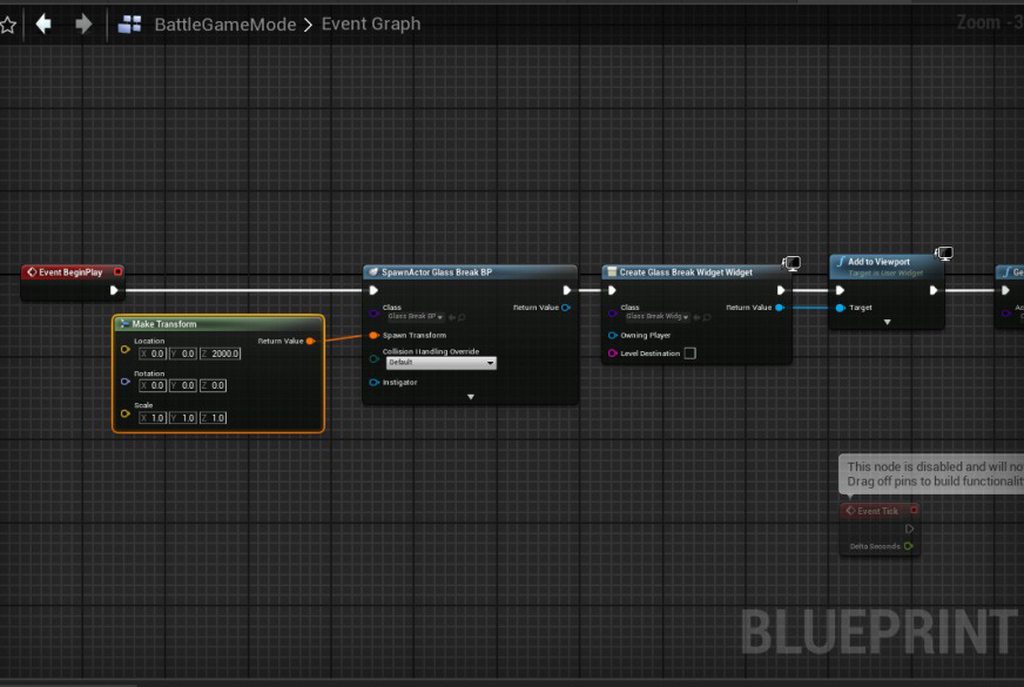
Hey all, I'm working on a JRPG combat system and am incorporating a screen shatter transition screen from the overworld to the gameplay. I'm currently stuck on having it shatter and still having the overworld underneath before it hard cuts to the battle game map without letting the effect finish. Any ideas on how to improve this?
Here's a link with a video and pictures of my code: https://imgur.com/a/8Tegtra
 brisk jackal
Hello everyone, I have a problem with the widget, when I click on the buttons, they simply do not respond, they do not work, but when I click on other buttons outside the widget, they work, what am I doing wrong?


 magic ether
my character for my horror game I’m making
 brisk jackal
Nice Work
foggy marten
@brisk jackal this happen to me when u overstacking
or if it a mutiplayer game then u simply need to replicate them
 modest whale
Help idk how I got ue4 standalone to freeze just cause I tortured it by making every object simulate physics and the whole room rotates?
(idk if this helps but each object is using apex destruction thingy)
royal arrow
I'm making a datatable of a bunch of sublevels I need to load in. Obviously these need to be soft object references, but I can't seem to figure out what variable type I'm looking for. Any ideas?

Oh, and this screenshot is a variable I promoted from the OpenLevel (obj ref) so I could see what the variable was called, but I just can't seem to find that type in the list of variables.
I guess I need to use soft object path? Can anyone confirm?
oak patio
You cannot make variables of the world type manually, no
royal arrow
oak patio
You cannot make variables of the world type manually, no
Any idea how I can make an array of level references to load then? Or do they need to be level names of string ID's?
Name ID's*
And yeah. I think using the soft ref ptr works, but I don't know how to translate the ptr to a world ref and don't think I can. Any idea if this will work?

I assume the path will give me like... game/levels/levelToLoad which clearly isn't gonna work.
I'm testing now and I'm thinking I can probably just parse the string and get the last index, but we'll find out. lol
 valid raven
friends
is it possible to attach a particle to a moving object
a single particle
right now i'm trying to make a sort of laser burst thing
but as you can see the lasers (there's 2 of them) stay in place
tough thicket
valid raven
friends
hmm with animtrail data or use a slot or parent it to the root of something that moves
valid raven
how do i parent a single particle?
right now i spawn the emitter attached to the object

but it doesn't seem to take the particle itself
 restive ingot
Where would be the best place to ask about problems with animation blueprints working with multiplayer
rose cloak
restive ingot
Where would be the best place to ask about problems with animation blueprints wo...
brisk jackal
Please help me, there is a problem with the game packaging, when I packed the game and launch the level, the mouse movements do not work, I simply cannot control it, but in the editor it works fine even in (PIE) and in (Standalone Game) I have already looked for an answer in Google but did not find a solution to the problem, how to fix this?
 dawn sapphire
Hello all, ive created a retro pixel effect i wanna apply to a game in UE4 as a mod, and someone said make an persistent actor to make it active all time. I cant find a tutorial around to do so, could someone assist if possible?
tough thicket
dawn sapphire
Hello all, ive created a retro pixel effect i wanna apply to a game in UE4 as a ...
I think you want a post process material
tough thicket
Why is it when i set up an animation bp with my walk and run
before i scaled my world and character down, now i need to walk slower to compensate for the smaller world
tough thicket
nevermind... i just have too much crap
dawn sapphire
tough thicket
I think you want a post process material
yea thats what i meant. i made one up and saved it and everything, but its getting it applied to a game as a mod where its getting me. and modders from that game are no help.. if it makes it easier its using UE 4.26
modest whale
plz help ue4 keeps crashing upon startup

helllllp ive tried everything
idk how it's just like this out of nowhere
 snow sinew
Hi there y'all! I encountered too with the same issue "Exporting Lighting Data 33%: Done" and the engine freezes when I start to build the lighting. Is there still no solution?
I also tried the same on a blank project too but no difference.
 subtle fable
hi all, i'm trying to package my project for XSX, but i'm getting this error:
Failed to compile global shader FClearReplacementCS_LargeBuffer_Uint_Zero . Enable 'r.ShaderDevelopmentMode' in ConsoleVariables.ini for retries.
anyone has any idea how to fix this?
 old ice
so i don't really know who to ask this question. i'm literally grasping at straws here and im hoping you guys can help.
im trying to randomize a 3ds game. style savvy. there's a file in the romfs called ItemDatabase.bin
the magic bytes in the hex editor tell me that this file was compressed in unreal engine
this is all i have to go off of
how would i go about using this file in a randomizer? i just want to open it up to read it for gods sake
 rustic panther
this is an Unreal Engine server, not a hex editor server
also discussing unofficial modding is against the rules
tough thicket
old ice
how would i go about using this file in a randomizer? i just want to open it up ...
their should be a community dedicated to this so maybe what game and i can help with that
modest whale
plzz help its urgent
Every time I try to open my project it crashes upon loading

or once it's done i mean
It just started this after it crashed on it's own awhile ago
and it's done this yesterday too
to which I fixed it by opening it in the engine startup page
but it wont work either way now
hellllllpppppp idk what to do
there's no tutorials for ue4
 grave pollen
without any further info my best guess to at least get ur project opened is to open ur config folder, open the DefaultEngine.ini and change ur Editor startup map to None
but more ideally u open ur project through vs debugger and/or go to ur saved -> logs folder to see what the last real error was b4 the crash
modest whale
grave pollen
without any further info my best guess to at least get ur project opened is to o...
would a comment be //, /* */, ; or #?
also it didnt work'
modest whale
I hit the play with debugging button and it doesn stuff
it sure is loading alot of things
grave pollen
im off 2 bed gl
modest whale
oh ok gn
it think that helped thx
ok can anyone help me
I got the error!
Ensure condition failed: !FindPin(FFunctionEntryHelper::GetWorldContextPinName()) [File:D:/Build/++UE4/Sync/Engine/Source/Editor/BlueprintGraph/Private/K2Node_FunctionEntry.cpp] [Line: 364]
[2024.11.21-04.08.09:638][ 0]LogOutputDevice: Error: Ensure condition failed: !FindPin(FFunctionEntryHelper::GetWorldContextPinName()) [File:D:/Build/++UE4/Sync/Engine/Source/Editor/BlueprintGraph/Private/K2Node_FunctionEntry.cpp] [Line: 364]
[2024.11.21-04.08.09:638][ 0]LogStats: FDebug::EnsureFailed - 0.000 s
A breakpoint instruction (__debugbreak() statement or a similar call) was executed in UE4Editor.exe.
help
oh wait theres more
I hit continue
and it threw another error after doing things:
Assertion failed: IsValid() [File:D:\RocketSync\4.27.0-17155196+++UE4+Release-4.27\Working\Engine\Source\Runtime\Core\Public\Templates/SharedPointer.h] [Line: 890]
A breakpoint instruction (__debugbreak() statement or a similar call) was executed in UE4Editor.exe.
more:
Exception thrown: read access violation.
this was nullptr.
The thread 0x43cc has exited with code 0 (0x0).
The thread 0x1320 has exited with code 0 (0x0).
Unhandled exception thrown: read access violation.
this was nullptr.
and it goes around in a loop
so the two files it throws exceptins in are:
K2Node_FunctionEntry
SharedPointer
and'
Set
None of it cam from the content folder that I was working in btw
grave pollen
those errors dont help u too much, u will need to check ur saved -> logs folder to see if it points to a specific blueprint
if not, out of ideas, and may be worth trying a different engine version or backtracking any recent changes u made on ur project
modest whale
grave pollen
if not, out of ideas, and may be worth trying a different engine version or back...
I opened the project today and it didnt crash what?????

ig a good restart worked
grave pollen
lol
 tidal venture
Hey guys
harsh orchid
should procedural forest be on persistent level or it own level?
finite bison
hey, why is my model looking like this compared to the viewport of my 3d modelling software?


 brazen aspen
finite bison
hey, why is my model looking like this compared to the viewport of my 3d modelli...
brazen aspen
finite bison
hey, why is my model looking like this compared to the viewport of my 3d modelli...
Different shading/material
 dry jacinth
ban this bot tyvm

 lethal breach
is this a bot or human being
 low vale
so i have .psa and .psk files how can i import them into my unreal project
oak patio
low vale
so i have .psa and .psk files how can i import them into my unreal project
You don't
Especially since it's fairly safe to assume you've extracted some assets from a UE3 game and are attempting to get them into UE4
oak patio
.psa and.psk isn't a format in UE4
but we aren't going to help you reverse engineer assets here
tough thicket
low vale
so i have .psa and .psk files how can i import them into my unreal project
maybe try the modding forum that tought you how to do it
 bleak wharf
Hello.had an Question as an Gamer, Not a Dev:
had an UE4 Game and wanna unbind the Default Key of the Command "Fire" which is binded by Default on the RightMousebutton. The Problem is, the Game also Had an Mouselock on RMB(Hold RMB for Camera Movement)
I used These Commands in the Defaultinput.ini :
-AxisMappings=(AxisName="Fire",Key=RightMouseButton,Scale=1.000000)
+AxisMappings=(AxisName="Fire",Key=Q,Scale=1.000000)
The Game itself recognized the Fire Command on the Q Key Fine this worked flawelessly but its also binded on the RightMousebutton which was Set by Default on the Game but what I need to remove or to even unlock the RMB Mouselock?
Someone had an Solution for this Problem ?
spice ruin
We don't really do game support, but good luck!
 frail leaf
Hi here are my specs:
8 GB Ram
i5-7 GEN @ 2.71 Ghz
HD Graphics 620
So unreal engine 4.27 or 5.0 and above , which will perform better for me after I disable features like global lighting, all those lumens, virtual shadow maps , nanite and so on ?
How can I increase my performance on unreal 5 even more , what can i do ?
I know my device is weak but still what’s the best I can develop on ?
Also I ran 4.27 on device weaker than this for around 60 FPS.
Please be a bit clear with your answer too.
spice ruin
If you disable all the extra stuff, 5.0 should run just as well as 4.27.
Don't forget, the default editor viewport scalability is higher in 5. So you should turn that down too to match 4.27 performance.
Your mileage may vary, of course.
frail leaf
spice ruin
If you disable all the extra stuff, 5.0 should run just as well as 4.27.
Could you tell all things I could do to increase the performance in UE5 or UE4
spice ruin
I cannot.
frail leaf
spice ruin
I cannot.
Were you referring to scalability setting in the above context
spice ruin
That's a part of it. I did specifically mention them.
 swift juniper
Hey!
anyone who has experiance with upk and xdb files here?
they are unreal engine model/texture files from Heroes of might and magic 5 and 7.
spice ruin
If you're looking to mod those games or re-use their assets, that's not something we support here.
rose cloak
frail leaf
Hi here are my specs:
8 GB Ram
i5-7 GEN @ 2.71 Ghz
HD Graphics 620
So unreal en...
https://forums.unrealengine.com/t/my-laptop-have-i5-8th-gen-processor-with-intel-uhd-graphics-620-and-32gb-ram-which-version-of-unreal-engine-will-be-best-for-me-i-am-a-beginner/1775590
You really should invest in a dedicated grapic card, else you will be in alway-trouble

Epic Developer Community Forums
strong text
 graceful oracle
Hi, I'm new here. Where do I go to find help with Unreal Engine 4.27 not cooking any content after integrating Wwise?
 gray mesa
what's the fastest way to move a project from 5.1 to 4.26?
 kindred creek
gray mesa
what's the fastest way to move a project from 5.1 to 4.26?
kindred creek
gray mesa
what's the fastest way to move a project from 5.1 to 4.26?
You cannot downgrade engine versions without breaking basically everything.
gray mesa
kindred creek
You cannot downgrade engine versions without breaking basically everything.
yeah, I just don't want to copy all the bp out by hand, gimme a shortcut boss, a tool, anything (lumen make me go crazy)
kindred creek
gray mesa
yeah, I just don't want to copy all the bp out by hand, gimme a shortcut boss, a...
You can disable lumen in UE5 you know
gray mesa
I do know
kindred creek
gray mesa
I do know
also, if you copy a bp from 5.1 and paste it on ue4, it disconnects everything, variables don't work more than half the time 😅
if you find anything, please do tell me. everyone tells me it's impossible...
gray mesa
ok 👍
bleak wharf
Just Had an Question. Did someone know how to fix: If the Host Type "Open MainMenu?listen" - the Clients joined over the IP fine with the "Open IP" Command. Then the Host use "Switchlevel Mapname?listen" as an Command to start the Game/Map and The Clients automatically Join - this worked fine but the Host would overwrite its settings to the Client (Skins, Character...) - If the Host use "Open Mapname?listen" instead of "Switchlevel Mapname?listen" the Clients would be kicked Out of the Server automatically, then Reconnect but all Clients had ITS own Settings (Skins, Character) . Someone know what this is caused ?
 still kayak
Guys, could someone please explain me why enabling cloth sim ruins shading? 4.27.
Thanks in advance!
 burnt ermine
Hi, where can i ask for a crash issue?
 restive basalt
is there a simple way/checkbox to disable to the left click setting input mode to game only that allows you to pivot the camera, during play-in-editor?
spice ruin
burnt ermine
Hi, where can i ask for a crash issue?
If it's the editor or some game you're working on, any channel related to the crash? If you have a game you've purchased crashing, you should find that game's community and ask there.
raven river
Company of Heroes 2
Will anyone modify this game? I need to mod this game
It is a game developed by Essence's Entity Engine 3.0
spice ruin
We don't support modding games. And it's not even unreal?!
burnt ermine
spice ruin
If it's the editor or some game you're working on, any channel related to the cr...
Oh ok thanks
 tranquil crown
Hi, is there a way to sort placed cameras in that selection window? (in folders, groups etc)
Also cinematic cameras will always stay underneath normal cameras which sucks so u even cant sort with the naming

 amber compass
uhm so how do i ask for help here? simplely im new to the whole game making thing and unreal over all and i wanna make a souls like game only issue there is no tutorials for the version i got (4.0.2) only 5 and even bigger issue not evreything is the same and the starter issue i stumbled is the sk_mannica how do i implamented as a option of skletons mesh to choose from not just the tpphero one or whatever its called (could someone help me)?
spice ruin
Why can't you use 5+ where there are actually tutorials?
 crisp palm
Is there a specific place to ask for help here? I'm new to unreal engine and this server
 keen lance
Hello, how can i build 4.27-HTML5. When i tried to build i got an error on build like this ss.
 spice ruin
crisp palm
Is there a specific place to ask for help here? *I'm new to unreal engine and th...
spice ruin
crisp palm
Is there a specific place to ask for help here? *I'm new to unreal engine and th...
Every single channel is a help channel, except the off topic ones.
crisp palm
Oh okay
crisp palm
I decided I’d try my hand at making a Hello Neighbor fan game and I was wondering if it's possible to extract the game files of the Pre-Alpha and Alpha 1 and open the projects in unreal to edit. I did manage to extract the files but I have no idea where to go from here and if it's even possible and any attempt to open the project files has crashed the program, any help would be appreciated! (Also I know about copyright, I won’t be selling anything I make because it’s a fan game)
oak patio
crisp palm
I decided I’d try my hand at making a Hello Neighbor fan game and I was wonderin...
We won't help you reverse engineer a game.
Also, you don't know about copyright. Copyright isn't just for selling. Your fan game is still infringing and ripping assets.
Fan games, while normally infringing the characters and ip, still make their own assets.
crisp palm
Yes I know all that but given that I’m basically gonna try and make remake of the older games I’m ready to bend the rules a little bit-
oak patio
crisp palm
Yes I know all that but given that I’m basically gonna try and make remake of th...
Sure, we aren't, and we aren't going to help you break the law either
Even as just another dev, why would we help you rip someone else's work?
crisp palm
Well I just don’t think it’s a big deal, I will not be profiting from this at all and I’m doing this out of love for the old games themselves. And almost everything used in the old games were abandoned in the final version of the game. The developer of the old art style has even worked with other devs for their fan games
oak patio
crisp palm
Well I just don’t think it’s a big deal, I will not be profiting from this at al...
Great, it still doesn't make it allowed, nor ethical, nor could we even discuss it here
crisp palm
Well thank you for responding regardless, I shall find another way
oak patio
No worries, I hope you can solve your problem, it's just not a method we can discuss in this server
crisp palm
Yeah I get it, worth a try
amber compass
spice ruin
Why can't you use 5+ where there are actually tutorials?
long story shot im in egybt where wifi is sooo limited (and so dose my pc hard drive space) if i try to download 5 gbs im getting a beat so imagin 35gbs
amber compass
amber compass
uhm so how do i ask for help here? simplely im new to the whole game making thin...
so uhm anyone will be able to help me out?
 hollow flame
amber compass
so uhm anyone will be able to help me out?
hollow flame
amber compass
so uhm anyone will be able to help me out?
yes hit me a dm
plush yew
does anyone know if its possible to make static lights work with IES?
plush yew
worldly trout
Yes
everytime i bake the lights, the IES profile disappears


i tried to crank up the lightmap resolution for the wall up to 2048 but still nothing
worldly trout
plush yew
everytime i bake the lights, the IES profile disappears
Dunno what to tell you, works for me
 left shuttle
Hi everyone!
I have a folder full of hundreds of 3D models, and I want to spawn models out of this folder randomly in different random locations on the ground.
So far from every tutorial I’ve seen, they had to add static meshes one by one in an interface, which I can’t do because I have too many models.
Would love to hear what you think I should do, or if you know any tutorial that would be helpful 🙂
 worthy anvil
spice ruin
worthy anvil
spice ruin
.. With?
 tender pecan
left shuttle
Hi everyone!
I have a folder full of hundreds of 3D models, and I want to spawn...
tender pecan
left shuttle
Hi everyone!
I have a folder full of hundreds of 3D models, and I want to spawn...
Import the assets into UE.
Drag and drop as many models as you want from Explorer/Navigator into Content Browser, and ensure they exist
in the content browser.
OR
You might also be able to use the importAssets commandlet ( this supports multiple assets )
https://github.com/EpicGames/UnrealEngine/blob/4.27-plus/Engine/Source/Editor/UnrealEd/Private/Commandlets/ImportAssetsCommandlet.cpp
Example usage: https://forums.unrealengine.com/t/importassets-commandlet-examples/104213
Then random spawn from a list of assets.
You can use line tracing to find a spot to spawn, and choose a random actor from a list.
Couple ways to do this, you could load and spawn from the content browser ( editor scripting ), or have your imported assets
referenced in a list in a blueprint for example, then choose from the list at runtime depending on your needs.
editor: https://forums.unrealengine.com/t/dynamically-spawning-actors-in-the-editor/475764
runtime: https://forums.unrealengine.com/t/spawn-random-actor/457603
keen lance
How can i fix this? I need to build for android

 plush thicket
What am I doing wrong here?
I have a timer that counts down, and then when it reaches 0, it loads the next map. However, since there's a check to see if the countdown > 0, it loads the next map and the countdown does not reset even though I'm setting it before executing the servertravel command, I've tried everything, setting it after, with a delay, etc. What am I doing wrong?

It just loads the next map over and over again because it constantly thinks the round is over
 night birch
Out of curiosity. Excluding things like old projects that would be very hard to update to UE5, what are the reasons people still using UE4?
 magic trout
So i'm using Hello Mod kit and i tried to place a door i play it and the door disappeared
nevermind i got it
 fading magnet
Any ideas on how to fix this?
 finite bison
Anyone know why this is happening? Its really annoying when Im trying to look at my materials
spice ruin
Looks like the near clip distance?
finite bison
No, because it happens when you almost look away from the character as well
finite bison
whole editor crashed and i come back to this:
 worldly trout
finite bison
Anyone know why this is happening? Its really annoying when Im trying to look at...
worldly trout
finite bison
Anyone know why this is happening? Its really annoying when Im trying to look at...
typically this is caused by having an incorrect bounds scale, mesh gets culled too early because Unreal thinks it's off screen
finite bison
Incorrect bounds scale? How can I edit it?
crisp palm
I edited a model in Blender and now some textures are all screwed up when I apply them, is there anyway to align the textures in unreal or do I have to do something in blender?

 oak patio
You'll need to UV unwrap the model again
crisp palm
oak patio
You'll need to UV unwrap the model again
That causes all the textures to be stretched out
oak patio
Not if you do it properly
crisp palm
Any advice?
oak patio
I reccomend taking some basic tutorials on UV editing
crisp palm
Alriiiight
tough thicket
crisp palm
Alriiiight
uhh in blender should be able to select by material, then uv unwrape cube/square unwrap should do it
crisp palm
Thanks, I’ll try that
restive ingot
crisp palm
I edited a model in Blender and now some textures are all screwed up when I appl...
how did you mess up the pre alpha house more than it already is
crisp palm
restive ingot
how did you mess up the pre alpha house more than it already is
Sssshhhhh don’t question it
crisp palm
tough thicket
uhh in blender should be able to select by material, then uv unwrape cube/square...
It just ends up looking like this, it would probably be easier to trouble shoot if I could actually see the textures in blender-
 tough thicket
crisp palm
It just ends up looking like this, *it would probably be easier to trouble shoot...
tough thicket
crisp palm
It just ends up looking like this, *it would probably be easier to trouble shoot...
rotate the uv 90 degrees then fix it
looks fine
 hazy schooner
Anyone mind messaging me and helping me create a basic layout for a game ? I’m new to this but have a very good idea for a simple effective yet addicting game
plush yew
6 years later and it's still drawing a cube..
 green fern
Have you guys ever made a case about floating boats? I watched a few tutorials, but the posture of the boats I made was very strange. The back half sank, and the bow floated. I wonder if the water plug-in has any requirements for collision bodies?
quick grove
Anyone know if in UE 4.27 theres a way to auto generate various LOD levels?
 keen bramble
Hi everyone give me a rating on this little environment I made using UE4
cosmic zealot
i need some help on where to learn something
I'm making a turret with interchangable child components. Kinda like a character with interchangable armor peices.
but my current question is, where can I learn how to integrate this 6 degrees of freedom type animation to a character? the turret will act as a character. but the pistons section will be able to be swapped out
can anyone point me in the right direction?

each one of these colored objects will be a swappable component.
 inner steppe
Everything is marked as poor rendering optimization, I tested it on an empty level, with meshes from the Starter Content package, basic material without texture and without lighting.

For those who don't understand, this on the screen should be painted green by the debugger since they are meshes with just over 10 triangles and material without texture.
Does anyone have any ideas?
toxic wagon
cosmic zealot
each one of these colored objects will be a swappable component.
easiest way would be to make a rig for the whole object, then in Unreal make each individual component a separate object
Then you have the choice of using object blendspaces, or using code to manually set the aim of the object
tough thicket
green fern
Have you guys ever made a case about floating boats? I watched a few tutorials, ...
Uhh i use this one

Fab.com
Video: https://youtu.be/lQqJJ6MOR0gTutorial: https://youtu.be/uU9BoD3sutYTutorial for Sailing Mechanics: https://youtu.be/6ilTf94qXwc Underwater Tutorial: https://youtu.be/Cn7EnRz_7-sWaterline and Tile Solver Video: https://youtu.be/-NnFK4x12bkUpdate 2.3• Tile Solver• Waterline for ocean and lakeUpdate 2.2• Underwater implementation• You can cre...
it has bouancy
 marsh galleon
Guys. I've written a piece of UE4 CPP code to copy the level lightmap data, and save it as another texture (inside another package).
This seems to work while the editor is opened, but when I reopen the project (where the copied lightmap texture is referenced), I get a BulkData compressed header read error error.
Here is the code I use to duplicate and save the lightmap texture:
inline UTexture2D* DuplicateTexture2D(UTexture2D* SourceTexture, FString NewTextureName, FString& PackagePath)
{
    check(SourceTexture);
    FString PackageName = PackagePath + "/" + NewTextureName;
    UPackage* Package = CreatePackage(*PackageName);
    Package->FullyLoad();
    UTexture2D* NewTexture = NewObject<UTexture2D>(Package, FName(*NewTextureName), RF_Public | RF_Standalone | RF_MarkAsRootSet);
    if (NewTexture)
    {
        NewTexture->AddToRoot();
        NewTexture->Source.Init(
            SourceTexture->Source.GetSizeX(),
            SourceTexture->Source.GetSizeY(),
            SourceTexture->Source.GetNumSlices(),
            1,
            SourceTexture->Source.GetFormat()
        );
        int32 NumBlocks = SourceTexture->Source.GetNumBlocks();
        for (int32 BlockIndex = 0; BlockIndex < NumBlocks; ++BlockIndex)
        {
            void* SourceData = SourceTexture->Source.LockMip(BlockIndex);
            void* DestData = NewTexture->Source.LockMip(BlockIndex);
            FMemory::Memcpy(DestData, SourceData, SourceTexture->Source.CalcMipSize(BlockIndex));
            SourceTexture->Source.UnlockMip(BlockIndex);
            NewTexture->Source.UnlockMip(BlockIndex);
        }
        NewTexture->CompressionSettings = SourceTexture->CompressionSettings;
        NewTexture->SRGB = SourceTexture->SRGB;
        NewTexture->MipGenSettings = SourceTexture->MipGenSettings;
        NewTexture->PowerOfTwoMode = SourceTexture->PowerOfTwoMode;
        NewTexture->LODGroup = SourceTexture->LODGroup;
        NewTexture->UpdateResource();
        NewTexture->PostEditChange();
        Package->MarkPackageDirty();
        FAssetRegistryModule::AssetCreated(NewTexture);
        FString PackageFileName = FPackageName::LongPackageNameToFilename(PackageName, FPackageName::GetAssetPackageExtension());
        UPackage::SavePackage(Package, NewTexture, RF_Public | RF_Standalone, *PackageFileName, GError, nullptr, true, true, SAVE_NoError);
        return NewTexture;
    }
    return nullptr;
}
Any idea of what might be wrong?
 grave kettle

 lone pebble
guys for some reason since some days i have massive fps drops in editor (max 20 fps) no matter how high or low my graphics are. the project is almost blank and i cant find any solution for this. Anyone had this aswell and knows the solution? My version is 5.4.4
hidden dew
Hi all. I've brought my project onto a new laptop and can open it in UE4 just fine, but I'm struggling to get the "Generate Visual Studio Project Files" option to appear in Explorer's context menu.
I've tried the approach of opening with the UnrealVersionSelector, but no dice
hidden dew
Ok just posting here for posterity. I couldn't find the Unreal Engine Visual Studio Integration Tool on Fab (and found a November post saying to keep waiting for it)
But out of desperation, I just made a brand new C++ UE4 project
That project gave me the context menu option, and that appeared to wake up the whole system because it then appeared on my project's files too
tldr - I made a fake UE4 C++ project and that did it
 coral crag
PLEASE CAN SOMEONE HELP ME IM STRESSING OUT I HAVE TO SUBMIT THIS THING FOR SCHOOL IN 35 MINS AND MY PROJECT IS ALL OF A SUDDEN SCUFFED AF 😟 ok lemme calm down. basically what happened was, my pc crashed while i was working on it and now when i started the project back up, everything is pitch black and its not because the textures arent loading or whatever bcs when i put a point light (as seen in second image) then it lights up that area and the textures are fine any help would be amazing


 earnest prawn
why is this 4 second delay taking 12 seconds

 terse solar
greetings, so i packaged my 4.27 game, it works fine on Win10, but there's no sound at all on WIn7, log says "maybe you forgot to cook your files" or something which can't be true of course
 thick socket
terse solar
greetings, so i packaged my 4.27 game, it works fine on Win10, but there's no so...
thick socket
terse solar
greetings, so i packaged my 4.27 game, it works fine on Win10, but there's no so...
i mean windows 7 is old, completely unsupported, especially for modern version of UE so you shouldnt be surprised
terse solar
thick socket
i mean windows 7 is old, completely unsupported, especially for modern version o...
there's some support for Vista in the engine, so at least it's not that old
inner steppe
terse solar
greetings, so i packaged my 4.27 game, it works fine on Win10, but there's no so...
may missing dll file system
Try activating the "Include prerequisites installer" and "include app-local prerequisites" options
It will include a module installer like Microsoft NetFramework, Visual C++ 2015, VbNet Runtime... something like that.
And you will need to install Directx 11 manually, if your project uses SM6 shader model which uses Direct X12, it will not work on Windows 7, using Direct X11 on UE5 will disable features like Nanite.
 pulsar ruin
i have a question i need move player on specific point if only point is available how i can do this with built in ureal node system
hidden dew
Merry Christmas everyone 😄 🎄🎄🎄
 cloud geyser
Hello,
We are seeking a skilled Blender animator and renderer to create high-quality animation videos showcasing product renders. The project involves working with multiple CAD files and creating animations for various product categories, such as rings and earrings.
Key Details:
Workload: Bulk project with multiple videos required. PAID WORK.
Timeline: Urgent, with quick turnaround needed.
If you're interested, please share examples of your work, specifically 3D motion animations of any product or object, at ishanraut@bigmiles.in.
Looking forward to collaborating with talented professionals!
Best regards,
Ishan Raut
terse solar
inner steppe
may missing dll file system
i found what happened here
so i cut all the textures in half before
and this action broke the sound somehow
 sullen star
hey where can i put an animation i have created for christmas?if its okay to post it? <@&213101288538374145>
rustic panther
sullen star
hey where can i put an animation i have created for christmas?if its okay to pos...
sullen star
@rustic panther I can't find it and I'm on my phone (can't get the link thing to work buddy but once I find it :p
tough thicket

i red that actor autokills when far from origin of level
sure disable world bounds check fixes that
but my AI NPC ZOMBIES, outside that greenbox no matter what their animations are all spazy, playing 1 frame and whatever the blend track is
even proper level streaming doesnt help
what do??
tough thicket
oh is that the 4km2 playable area
Wow i already set my scale to like 0.03
could probably go lower but damn
frail leaf
Can a macbook air 8 gb ram with m1 run unreal 4 for medium size stylized projects ?
I ran it on 4 gb ram with 30-42 fps
quick grove
can someone help me please I need to disable a plugin I enabled which now I can't disable cause I can't get into editor
so i seem to have broken the editor as I tried enabling Groom and Alembic Importer thing for editor and now I get error when trying to run editor as it's can't find HairStrandCore module
quick grove
out of interest is there a rule at all about people sending freind request that aren't asked for ?? just wondering
frail leaf
quick grove
out of interest is there a rule at all about people sending freind request that ...
who sent you friend request
there is no such rule
quick grove
was someone telling me about their services they could offer, I ignored their freind request as I no offence to anyone but wasn't looking for what services people offered so their freind request served no purpose to me
Only asking if there is a rule because other discord servers do have a rule roughly like the where trying to sell services directly to people randomly isn't allowed etc
oak patio
quick grove
Only asking if there is a rule because other discord servers do have a rule roug...
there is a rule against it
quick grove
oak patio
there is a rule against it
fairs, I'll grab their name next time it happens, was only this one off to be fair but you never know haha
starts with one and then increases
frail leaf
i know him , i too got a friend request from him
i dont know what he is trying to do with friend requests
quick grove
frail leaf
i dont know what he is trying to do with friend requests
I think it's their way of getting visibilty for what they can offer with their services which I don't mind, it's more so it's the direct messinging without any message. Cause they waited for me to ask him what he messaged for before he actually then sent his message so just be one of them
oak patio
quick grove
I think it's their way of getting visibilty for what they can offer with their s...
Be wary, lots of them are scams. No real professional needs to contact you like that. They do it because no one else can see it.
Even if they are real, someone that can't read a list of rules for a discord server is probably not going to be any good at reading a list of requirements for contract work :P
quick grove
oak patio
Be wary, lots of them are scams. No real professional needs to contact you like ...
Yeah i took the stance its prob a scam and ignored there friends request
frail leaf
https://forums.unrealengine.com/t/issue-with-mouse-cursor-when-resolution-change/15051
https://forums.unrealengine.com/t/umg-mouse-screen-position-problem/14933
@acoustic cypress Maybe this will help you , check em out
Epic Developer Community Forums
Hi all, Another problem that I have with my new project : When I change the resolution or switch off/on fullscreen mode, the mouse cursor can’t reach all the area of my window game. To illustrate this I made a little video capture : the issue is visible at 00:09 when I change my resolution to 1920x1080. I have another question :...
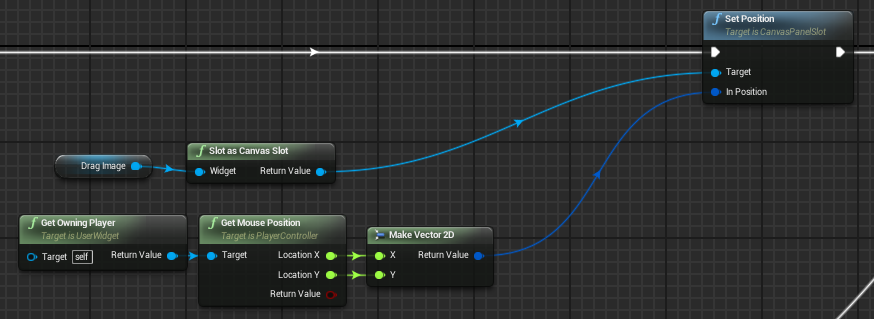
Epic Developer Community Forums
Hi everyone, I’m trying to move a item with the mouse by using the “Set position” option in BP. It is working but there seems to be some discrepancy between the mouse position and the dragged texture position. This is my dragged-image set up in the widget “On mouse move” event: And this is the actual problem: When the mouse is near the top...
by the way
Can a macbook air 8 gb ram with m1 run unreal 4 for medium size stylized projects ?
I ran it on 4 gb ram with 30-42 fps
 potent smelt
job freelance
 coarse turtle
Where is the sample project for this? "Immersive, true-to-life audio | Feature Highlight | Unreal Engine"
https://www.youtube.com/watch?v=1cgN5pLG8Rs

New to Unreal Engine in version 4.25, we’ve added Convolution Reverb and support for Ambisonic Soundfield rendering. Both features allow for the importation and use of audio samples captured from real world spaces to enhance your Unreal project's environmental sound. With these additions, designers can bring their projects to life with more imme...
 jolly mason
Anyone know a voxel plugin that allows me to add a voxel sphere to an actor? Bonus if I can actually move it around as well
 opal depot
hi i just finish my game and packed it it is working soo smooth in ue5 editer but in a actual game i have my main map as main menu and have play butten to my game map from there just like normal game but when i press play it did not do anything its playing the audio it plays on click but its not loading the map well in editter its working soo fine. idk why its only happening but if anyone does know please tell
 fallen geyser
Could anyone tell me why my guys eyes are so light and have no shadows? He looks so weird
 fallen geyser
Well yes ofc they have a different material 😭 but there’s no emissive so they shouldn’t be that bright
 grave nexus
Maybe it's not about the emissive
but how it works with the shadows
or how it's influenced by lightning
 regal kernel
Quick question. I have a Game.ini I've downloaded from Nexus Mods for Lord of the Ring Return to Moria, to change the controller icons. It changes from Xbox to PS5. How do I change it to PS4? Is that something you guys can help with?
 unreal parrot
idk if this is relevant but does anyone know if rl sideswipe uses side scroller functionality

This is how it looks like
Ik it uses paper 2d
 hasty epoch
Hello. I have a problem. The text in another language is not aligned like the original. Do you know how to fix it please?

 charred agate
Any ideas on how to fix this?

 white spruce
Hi, I am having a problem with 4.27 version. when I toggle anti aliasing method to none in rendering settings it does not make changes and I still see the ghosting behind moving objects, nor does it do anything when I set it to TAA or FXAA. All edges are jagged as well. Does anyone know how to solve this?
I'm on deferred rendering with motion blur turned off
inner steppe
Does Steam provide an email system? Some kind of messaging between player and publisher / developer within the API?
In short, I want to create a bug report form within the game, but avoid creating my own third-party server to receive the messages
 short vector
i need help please and im begging
doesnt let me import psa and this pops up please help
 prime tulip
Am I blind, is there no widget / UI channel to ask questions? 🤔
ah nvm it's under a seperate category
keen bramble
Why don't people's questions get answered most times in the channel......it feels like the channel is just for questions and no solutions
I think a community manager is needed for this
oak patio
keen bramble
I think a community manager is needed for this
Why lol? It's an outdated engine version that most people have moved on from.
A community manager is pointless for that. Nor is there any guarantee of an answer. You can't expect anything.
 winged notch
GameWorks restoration WIP
https://youtu.be/7N_rCyjmIBo
https://youtu.be/zA6o8wR2Res
https://youtu.be/XWbZv8dY1x4
https://youtu.be/k5vI-GCEo8g

This is NVIDIA FleX, part of the GameWorks SDK, running in Unreal as part of my GameWorks Revival Project.
#NVIDIA_GameWorks #UnrealEngine #NVIDIA #Gaming #CES #GeForce #GeForceRTX

This is temporarily stable volumetric lighting and light shafts utilizing the NVIDIA GameWorks SDK in Unreal, running at 120 FPS.
#NVIDIA_GameWorks #UnrealEngine #NVIDIA #Gaming #CES #GeForce #GeForceRTX

This is an early look at restoring NVIDIA HairWorks, a part of the GameWorks SDK, in Unreal running at 120 FPS. The art assets need to be updated, but the core technology is functioning.
#NVIDIA_GameWorks #UnrealEngine #NVIDIA #Gaming #CES #GeForce #GeForceRTX
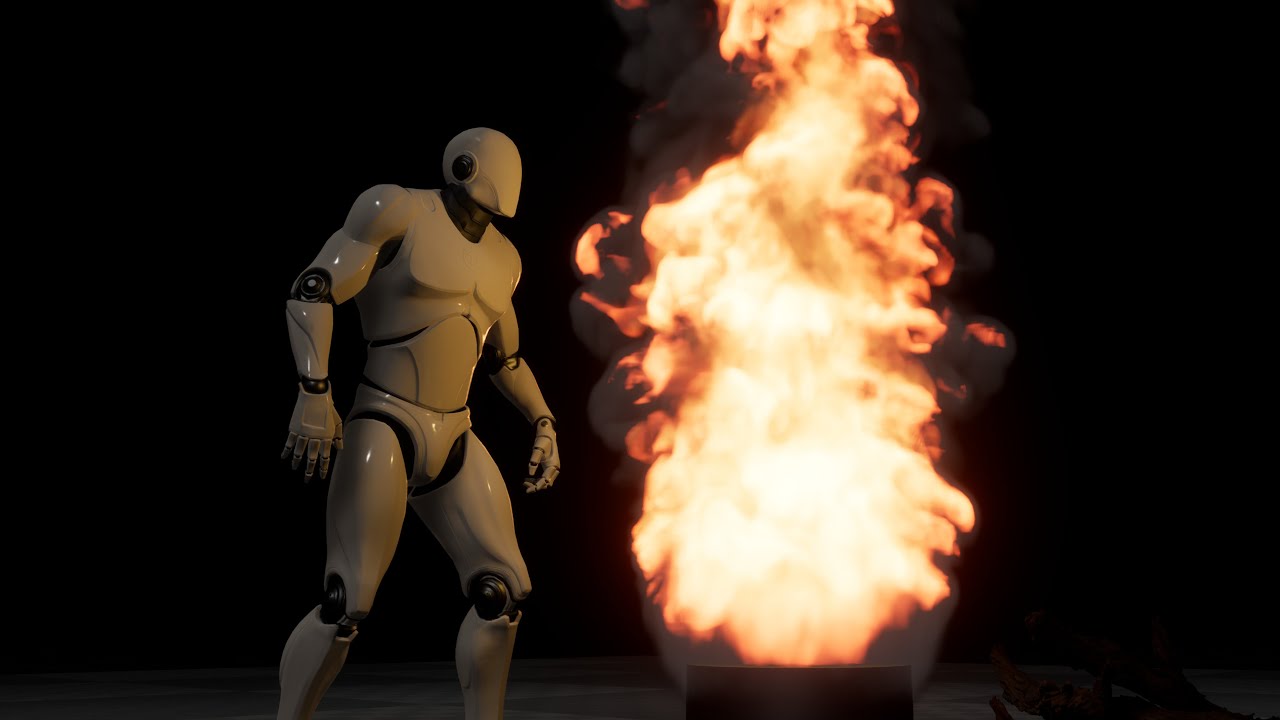
This is a small showcase of NVIDIA GameWorks Flow running at 120 FPS in Unreal Engine. Flow is a real-time dynamic fluid simulation solver, allowing for interactive real-time fire and smoke effects without pre-baking anything.
#NVIDIA_GameWorks #UnrealEngine #NVIDIA #Gaming #CES #GeForce #GeForceRTX
prime tulip
Random question. Does anyone know why the Epic Launcher always closes when you launch an Unreal project. Here I am browsing the Epic store while my project launches and boom project opens up and launcher closes? Like, lol why the f is that? 😂
 tidal dune
Hello, I'm trying to import a skeletal mesh into Unreal (in FBX exported from Maya), and I get a shuffle of the vertex IDs (indexes), has anyone encountered this before? If so, how can I fix it? Thanks
tidal dune
prime tulip
Random question. Does anyone know why the Epic Launcher always closes when you l...
there are a option to uncheck somewhere, I'll post more information if I launch a old project
 frail river
Hey all, does anyone know how to enable Landscape Edit Layers, when doing Tiled Import with World Composition? The Wiki says; " To use Landscape Edit Layers, check Edit Layers under the Manage tab when creating a new Landscape. Layers cannot be added retroactively to an existing Landscape; you will always need to create a new Landscape to use them in your project. " , and yes when making a new terrain I see that option, but when using Tiled Import, I do not. So does this mean there's no way to use Landscape Edit Layers on a Tiled Import-ed landsacpe?
 mossy ravine
HI, Does anyone know how to lower the strength of a UE4 mannequin please? We reskinned one to make it look like an enemy but somehow it can lift a 1500kg vehicle, which is what the player uses to get about - the player can't explore while the vehicle's in the air
Thanks!
keen bramble
oak patio
Why lol? It's an outdated engine version that most people have moved on from.
A...
I still use it though and also a some people too......but the both engines are kind of similar just a little different
oak patio
Of course, but it checks out that it's gonna have much less interaction, because vastly fewer people use it :P
 boreal shadow
hi everyone I’m a skilled and creative 3D modeling artist with a passion for transforming concepts into high-quality, photorealistic . i create 3d game character, game building, game environment
 brittle gulch
Hey guys, I have a troubling problem : When I change level, my pawn doesn't have any collisions anymore, I fly through walls. I don't know where it comes from, any idea how I can debug that?
 distant junco
Why the Shadows became distorted after building lights?, i tried playing around with the settings for 2 hours and nothing worked


 strong lagoon
Hi all , so i was just wondering , is 4.27 considered to old an engine to use? I mean is there problems with using that old a version? thanks
oak patio
strong lagoon
Hi all , so i was just wondering , is 4.27 considered to old an engine to use? I...
Yes it's considered old.
No, there's no problems in using it.
However, there's not much reason to use it for a new project, or if you're new. The main reasons for sticking with an older version are:
- Modding a title that used that engine version
- You have a bunch of custom stuff requiring that engine, and upgrades would be too much time cost
- You need a feature specific from that engine that is now removed or deprecated (people still use 4.24 to make web games, for instance)
- You're still maintaining an existing launched title in that version, or have one near release.
strong lagoon
oak patio
Yes it's considered old.
No, there's no problems in using it.
However, there's...
Thanks , so will 4.27 lose support at some point? If someone had a couple years of development left on a game , will it still be viable then?
oak patio
It's already lost "support", it stopped receiving updates as soon as 5 came out. In the traditional sense at least.
It will always be available however. The source is on GitHub if you have a linked account, you can still get it in the launcher.
Personally, I'd say if you had a couple of years left, there's no reason to not try an upgrade unless you're on a small team with a heavily customised source build of the engine. It's just making sure you've got a safe point to revert too, then biting the bullet.
I'm more talking about "We're releasing in a month" type of stuff.
FWIW the engine is still viable. There's just no reason to use it if you don't already depend on it, considering the latest versions are basically "4.27 with active bugfixes and new shiny things"
strong lagoon
Well there is some assets that are not available in 5 , thats one reason , another is lot of characters with UE4 skeletons , that don't jive well with manny , and from the playing around trying to get them to work , i have not has success. Fails to merge bones.
oak patio
Honestly, assets are probably your weakest reason to stick with it. After all you could migrate a UE4 skeleton to UE5 and import the assets as well
You can upgrade, just not downgrade, and most assets have options to export to their raw form anyway
Now if it was like "I've modified thousands of lines of engine code, and have 12 other projects with the engine", it'd be a much more valid reason.
Not that you need one of course, use whichever engine you want to obviously :P, it's just that there's little justification for it, even from a performance standpoint.
strong lagoon
Right , thanks
 tardy bronze
can someone help me trouble shoot PackagingResults: Error: Unknown Error pls idk what to do
tardy bronze
thx srry
 grim vector
Hello friends! Can someone please direct me to the appropriate location to ask a question where I can get some direct advice about making adjustments to my procedurally generating hexagonal static mesh grid, I got my cube grid blueprint working but I can't get the hexagonal tile staggering math to work, thank you? (oh right, im using UE 4.27.2)
*Problem resolved. Did not actually solve for the pentagonal row staggering... But actually needed a more modular approach down to individual rows making it actually unnecessary

 warm meteor
Hey guys! I was wondering if this was the spot to ask for help with an issue I’m running into on some of my levels in UE 4.27.
warm meteor
The issue is that, on some maps, all actors within the map become unclickable. Selecting the actors in the world outline selects them, but the transform gizmo doesn’t detect my mouse.
When attempting to click on a static mesh, it selects the instanced foliage actor. When I delete the foliage actor, clicking selects the background (AKA nothing).
The issue persist when leaving the map, and seems to effect all viewports. The only way to resolve the issue to restart the editor. The issue will re-appear when I work on one of the maps with the issue after about 2-5 minutes.
grim vector
LIGHT FIGHT: A fast-paced Parkour Platformer 3D Danmaku (弾幕) adventure beyond reality.
Deep dive looking at some of the Light Fight lore & game mechanics.
Featuring Music By: Karl Casey @WhiteBatAudio
Unreal Engine 4.27.2, Solo Dev, Video Games, Fractal Geometry, Sacred Geometry, Polytopes, AI Conversation, Platonic Solids, Keple
r-Poinsot p...
 shrewd widget
guys can we access fab with ue4 ?
i don't see the plugin on 4.27 vs on 5.5 it's there
how to access my assets if i don't want to use 5+ for various personal reasons
brittle gulch
Hey there! I have a bug with UE4, sometimes the right click menu flickers and I can't see it anymore. Is there a way to fix that?
(If it happens again I'll capture it and post a video)
Ah, and when it happens, any YT video playing in my browser in the background becomes black. When I close unreal the YT video works fine again
I believe it's a GPU problem. I have a 4070 Super and win 11 (Everything up to date. The problem occured before and after the latest update I did)
 tall escarp
brittle gulch
I believe it's a GPU problem. I have a 4070 Super and win 11 (Everything up to d...
tall escarp
brittle gulch
I believe it's a GPU problem. I have a 4070 Super and win 11 (Everything up to d...
Did you do the tdr delay changes to your registry?
grim vector
shrewd widget
guys can we access fab with ue4 ?
I am also with 4.27 for various reasons. Unfortunately, based on my current information, the official FAB plugin for direct asset import is primarily designed for Unreal Engine 5 and later versions.
While there might be some workarounds or unofficial methods to potentially use parts of FAB with 4.27, it's not officially supported.
Here's what I've gathered:
Official Focus on UE5: Epic Games seems to be concentrating their development efforts for FAB on Unreal Engine 5, likely due to architectural changes and new features in the engine that FAB leverages.
Quixel Bridge as an Alternative: If you're using Unreal Engine 4.27, Quixel Bridge remains a viable option for accessing and importing Megascans assets. Although Epic Games has transitioned to FAB, Bridge still functions for older engine versions.
Community Workarounds (Limited): There might be community-created solutions or methods to extract and use some FAB assets in 4.27, but these are not officially supported and may have limitations or require manual adjustments. / you might consider using UE5 as a tool giving you access to fab, completing the work you need to do there and then exporting the work for use in 4.27 if possible
shrewd widget
grim vector
I am also with 4.27 for various reasons. Unfortunately, based on my current info...
they're really tryin to kill ue4 each update how funny cause all the assets that were compatible ue4 are now impossible to use if you don't have it in your vault cache?
brazen aspen
short vector
i need help please and im begging
doesnt let me import psa and this pops up plea...
Try using "OldUnreal" discord for anything below UE4
tough thicket
anyway i can make the game screen this small

like do i just use a render target?
or is there a real way
well i guess i can just use an overlay but still would be nice to cull out what isnt on screen
no that doesnt work because the character isnt centered
rip
 stable granite
Hi, I’m downloading UE 4.27.2 git files to build it. Which files do I have to update to be able to publish android games ?
 urban kettle
anyone have experience using Unreal 5 on a linux machine?
 lyric apex
urban kettle
anyone have experience using Unreal 5 on a linux machine?
lyric apex
urban kettle
anyone have experience using Unreal 5 on a linux machine?
Yep
Kindly check your DM
plush yew
Hi, i am having this strange bug where UE4.27 just freezes randomly until I alt-tab out and back in, it seems to happen every couple of seconds, im not sure if it happens when i PIE though
 brazen dove
Hello everyone, can someone help me with some tips about how can I determine the minimum system requirements for a game?
oak patio
brazen dove
Hello everyone, can someone help me with some tips about how can I determine the...
You don't. It's a common misconception. You don't develop the game and then find out what it runs on.
What you do is you identify what the minimum hardware you want the game to be able to run on actually is. This is normally informed by market research and things like the Steam Hardware Survey.
You then build a machine or find someone with access to a machine with those specs or similar and test the game on it.
brazen dove
oak patio
You don't. It's a common misconception. You don't develop the game and then find...
Oh ok, i get it now.
brazen dove
oak patio
You don't. It's a common misconception. You don't develop the game and then find...
Thank you for your time!
oak patio
If you don't have access to such things, which can be understandable, you can kind of emulate things with maybe an older PC you have lying around, or a laptop or a virtual machine. Though the VM option ain't the best.
There is the option of making it up, but I'd reccomend trying to find people with some average hardware to test it out.
oak patio
brazen dove
Thank you for your time!
No worries!
brazen dove
oak patio
If you don't have access to such things, which can be understandable, you can ki...
I have a laptop but it doesn't even open the game.
So I assume that the hardware on that is too outdated
azure shore
oak patio
It's already lost "support", it stopped receiving updates as soon as 5 came out....
wth I didnt even know unreal could do web games
stable granite
Hi, how can I modify UE4 to be able to publish android games compiled with it to play store ?
thick tiger
Hi, can someone tell me how to use Megascans for UE4 after the Fab update? I did get the scans, and it's available in my library, I downloaded one grass asset, but extracting the zip file and dragging it into the project makes the fbx files miss the textures, so I was wondering if there is better efficient way of doing this?
 placid dirge
Anyone know if using the Cable Component is a good idea in a large scale open world environment? Is it fairly efficient or is there a better way?
strong lagoon
Hi , so wondering , can Lyra be used as a base template to create a single player game ? Or more specifically , can it be used to create a regular open world shooter or is it confined to the game modes it shows? Like control , elimination , etc...........? thanks
oak patio
There wouldn't be much value in using it for one
placid dirge
you wouldn't get much more out of it than just the base FPS template
tough thicket

how do you fix the alpha
like i can clearly see through my plants completely to the other side
oak patio
Are you using transparent materials or masked ones?
tough thicket
oak patio
Are you using transparent materials or masked ones?
well how do you used the masked ones the alpha is totally see through
ill look it up
strong lagoon
So being not new to Unreal 4 , but new to Unreal 5 ( been away from the engine awhile) . What is the story with animations these days , do the UE4 animations work with UE5 skeletons , or are they completely different or require extensive retargeting? thanks
lost mantle
is there anyway I can merge my landscape actors so this dosent keep happening?
 restive ingot
 tough thicket
lost mantle
is there anyway I can merge my landscape actors so this dosent keep happening?
tough thicket
lost mantle
is there anyway I can merge my landscape actors so this dosent keep happening?
yes
actually the method is reversed unfortunately
and it requires level streaming
build landscape then go to landscape edit
hit select and chose where you want the landscape to be seperated
then in level streaming pick new level and then go back to landscape edit and click "move" next to "add select"
then click on the selection and swap levels
sucks though no turning back
good luck!
 hasty mortar
Is it possible to add a second details window? I'm making custom versions of widgets and need to copy over details from the old ones. So having 2 parallel detail panels would be handy to compare the new widget to the old.
strong lagoon
Hi , just wondering, if i retarget anims to the Manny simple , then when i click find skeleton , why does it show this skeleton and the other Manny skeletal mesh's? thanks

 summer sundial
?
strong lagoon
strong lagoon
Hi , just wondering, if i retarget anims to the Manny simple , then when i click...
So i am out of the loop on Unreal 5 , last when i worked with skeletons it was UE4 , so what i am asking in the pic above is . Is the SK_Mannequin skeleton the base skeleton of the Manny's? Or are each Manny or Quinn actual skeletons themselves , or are they just skeletal mesh's based on the SK_Mannequin skeleton? What is the actual default skeleton for UE5? When people say it uses the UE5 skeleton , what skeleton exactly is that? thanks
tall escarp
strong lagoon
Hi , so wondering , can Lyra be used as a base template to create a single playe...
Just use Lyra for an idea of project setup and some good practices like sound cue construction.
 lilac cipher
Hi, I am trying to receive on my server the data sent by Report Crash and I already have a backend reading the data and it works. However, I don't know how to extract the information, I understand that Report Crash sends the data as UE4CC (?) which is zipped in zlib. And I don't know how to extract this UE4CC data on a Linux server?
 fading fog
Hello, I need help I’m making a bow game, and I need some help. The arrow should lerp to the location where the line trace hits. The line trace starts from the camera, and I want the arrow to move smoothly (lerp) to the point where the line trace hits. However, since the line trace starts from the camera, if I do the lerp, it will start from the camera position
fading fog
fading fog
Hello, I need help I’m making a bow game, and I need some help. The arrow should...
Does anyone know how to fix this?
fading fog
fading fog
Hello, I need help I’m making a bow game, and I need some help. The arrow should...
I want it to start from the Arrow Socket to the location where the line trace hits
Right now im just Spawning the arrow
tall escarp
You have to program an offset that accounts for the arrow world position/transform. Everyone who does this with projectiles has to make the same adjustment which is why so often games just do camera spawn. It's a matter of coding it.
 paper island
Hi everyone, building a pc soon (waiting for the full release of upcoming GPU's), wondering is it worth it to buy a ryzen 9 9900 or just a ryzen 7 9700x?
Is there a dramtic enough difference in how unreal performs when it has access to more cores and threads on a cpu? Is it worth the price difference in terms of shader compilation, packaging builds, dealing with large data sets ect?
oak patio
Compilation is always going to be worth the extra cores if you've got enough RAM to feed them
onyx viper
hey guys my map is very simple with cube and textures on it
but the size of map is 56mb, i don't know what i cause it

 spice ruin
Static lighting data?
onyx viper
spice ruin
Static lighting data?
what
frail river
Hey all, Does anyone know where this option is


Epic Games Developer
System for managing large worlds including origin shifting technology.
Right clicking in the world composition menu gives me this

How do I reimport the heightmap for all tiles?
When I google it, I only see people searching for it 😄 Did this option disappear and no one noticed xD
onyx viper
spice ruin
Static lighting data?
it is set to dynamic, and i have changed it to other settings but it doesn't seem to affect
spice ruin
What is set to dynamic?
onyx viper
spice ruin
What is set to dynamic?
the directlight/sun in map is set to dynamic
i guess we can't do anything about it


 spice ruin
It's the individual geometry that has the static lighting data.
 dire roost
Are there any ways to increase ssgi's samples?
I realize that noise is normal in these rooms, but are there ways to make it less?

 tall escarp
dire roost
Are there any ways to increase ssgi's samples?
I realize that noise is normal in...
tall escarp
dire roost
Are there any ways to increase ssgi's samples?
I realize that noise is normal in...
You can try playing with the quality using
r.SSGI.Quality which changes the top value in your screenshot (values are 1-4)
onyx viper
spice ruin
It's the individual geometry that has the static lighting data.
can we remove it ?
or re generate ?
dire roost
tall escarp
You can try playing with the quality using
r.SSGI.Quality which changes the to...
unfortunately it increases the number of over-reflections, but not the number of samples
onyx viper
spice ruin
Set every mesh to dynamically lit and rebuild lighting maybe?
ok, thanks for your help
oak patio
there's no reason to use unreal 4 for that purpose
no
there is no purpose in using it unless you're activaly making something in it, or modding something that used it
nope
unreal 5 is unreal 4 with bug fixes and optional extras
ue 5.5 is essentially ue 4.32
nope, just someone with a lot of free time 😆
I'm on the lower end compared to some of the regulars 🤣
I'm not surprised, the pfp is something that was spat out of an image generator when I was bored :P
there's no beating unity in terms of a smaller package size, but honestly you can get extremely good performance from either
possibly a slight hit in unreal, but with the benefit of having things made for you already
oak patio
If it's not modding that's officially supported, I.e. you don't have modtools, or the author hasn't shipped a build of UE that functions as a modkit, then nowhere in this server. Reverse engineering and underground modding is against the #rules
You should probably look into a general UE modding community, or a community around the game in question
 clear moat
oak patio
You should probably look into a general UE modding community, or a community aro...
clear moat
oak patio
You should probably look into a general UE modding community, or a community aro...
Appreciate it! I'll look around and see if I can find some more mod centric forums
I'll delete my messages to stick within the rules
oak patio
good luck with your hunt!
 wooden heath
big cercular landscape with road path (12 m widh) only 10k tris, static lighting, good for multiplayer mobile.


 past carbon
Hi, I need your help to finish my game. I started making it. What did; map, Day night system, customers, some cooking mechanics
azure shore

 haughty harness
for compiling shaders on a first project bootup, my system gets through about 800-1000 shaders and then ue4 just freezes. in the past the CPU and GPU were never an issue with this, and i've already tried goingg into task manager to give the shader compiler workers higher priority. Any ideas?
brittle gulch
Hey there! How do you get the playing sequence, is there a way to do that?
 wise trail
haughty harness
for compiling shaders on a first project bootup, my system gets through about 80...
wise trail
haughty harness
for compiling shaders on a first project bootup, my system gets through about 80...
If you let it sit for a while does it eventually unfreeze?
On my older pc I had similar issues after letting it sit project eventually loaded for me.
lilac cipher
Is any way to hide crash report windows but send the report to server background? Builded shipping version.
lilac cipher
I found that the bug has been known to Epic for a long time. Do you know any way to work around it?https://dev.epicgames.com/documentation/en-us/unreal-engine/crash-reporting-in-unreal-engine?application_version=4.27

Epic Games Developer
Learn about crash reports and how to use the Crash Reporter in your projects.
 violet pilot
Hey, my game currently gets random crashes, and I'm trying to find the source. It's not super frequent, but frequent enough to be annoying and cause loss of progress. Any guidance on how this would be debugged? The entire game is blueprint driven, and I'm trying to find the source of the crashes. Having looked in some crash minidump files, this is what I could find.
It appears there are two different types of crashes happening? Any thoughts on how to debug?
 rose cloak
violet pilot
Hey, my game currently gets random crashes, and I'm trying to find the source. I...
rose cloak
violet pilot
Hey, my game currently gets random crashes, and I'm trying to find the source. I...
Try enabling DX12 and SM6
violet pilot
rose cloak
Try enabling DX12 and SM6
SM6?

 raven wraith
Hey, can anyone point me in the right direction for getting dynamic shadows to be displayed onto a transparent mesh? I've spent a couple days and understand the limitations of blend mode and how shadows work, but just looking for maybe a work around.
I have a post process displaying a pre-rendered image and want the characters shadow to be displayed over this dynamically.
Good amount of half-solutions on the forums but none seemed to have worked for me, or aren't really performant
Thanks!
rose cloak
violet pilot
SM6?
Maybe I use a newer UE. Using 5.1-5.5
 violet pilot
rose cloak
Maybe I use a newer UE. Using 5.1-5.5
violet pilot
rose cloak
Maybe I use a newer UE. Using 5.1-5.5
ah that's probably it - I'm using UE4
 fringe kestrel
Hi guys, me and my friends r making a game. Its abt horror and we js need 1 more dev for our game. We know this game will go big. Anyone wanna join us pls dm me
tough thicket
fringe kestrel
Hi guys, me and my friends r making a game. Its abt horror and we js need 1 more...
your set to private
I dmd you though i could use something to do
prime tulip
Hello. Does anyone know why the line [Engine.LocalPlayer] AspectRatioAxisConstraint=AspectRatio_MaintainYFOV does not work for my project? After adding the line to the DefaultEngine.ini relaunching my project it still uses the XFOV scaling method 😦 Please help
Using 4.27
nvm found it
had to add /Script/
tall escarp
violet pilot
Hey, my game currently gets random crashes, and I'm trying to find the source. I...
IMO you should have a robust debugging setup based on print screens that can be toggled for backtracing which is what you're trying to do. You're never going to get sufficient answers for all your crashes from forum topics, you need to build your system based on your project to really be efficient with your time.
 weary patio
Anybody still around from the UE3 days? I have a very UE3 specific problem I'm working with, and I'd love to pick your brain if you've got a few. Can't offer too much by way of cash, but can offer a little if it would help. Feel free to add me, DM me or @ me here.
keen bramble
wooden heath
Would love to make something like this one day
finite bison
is it possible to have animbp templates in ue4
tall escarp
finite bison
is it possible to have animbp templates in ue4
Are you talking about having an animbp that inherits from the parent? Have you tried creating a child animbp and then using overrides?
finite bison
tall escarp
Are you talking about having an animbp that inherits from the parent? Have you t...
I know in ue5 it doesn't require a skeleton but in ue4 it requires a skeleton of some sort
It won't break if I edit the skeleton in the animbp, right?
tall escarp
i don't know what you mean by "edit the skeleton in the animbp"
you would set it up for two blueprints that use the same skeleton, but for which one animbp needs overrides
it inherits most of the functionality from the parent animbp except for whatever it plays different animations for etc. but it still uses same skeleton
finite bison
tall escarp
you would set it up for two blueprints that use the same skeleton, but for which...
No, my scenario is that I have different characters with different skeletons and animations but the logic for them is similar
tall escarp
finite bison
No, my scenario is that I have different characters with different skeletons and...
My understanding is that scenario is why they made some changes in ue5. i have similar issues with my game's NPCs and i just found it better to recreate the logic in each animbp and separate them by parent skeleton
i never found another method
finite bison
tall escarp
My understanding is that scenario is why they made some changes in ue5. i have s...
Unfortunately, there's some things that require me to continue using ue4 and I don't want to make the switch because my game doesn't need everything that u5 gives
tall escarp
Yeah I'm in the same boat I just find balance by continuing to learn UE5 concurrent with my active UE4 development. UE5 has some improvements but nothing ground breaking imo unless you have complex input schemes or something
finite bison
I had a friend that told me you could get some sort of template animbp if you use a custom editor
tall escarp
if he knows just have him show you lol
finite bison
tall escarp
Yeah I'm in the same boat I just find balance by continuing to learn UE5 concurr...
Yeah and I absolutely hate the editor performance
tall escarp
It's pretty bad, i remember trying to learn from the matrix demo and being shocked at how poorly it ran in editor
5.5 seems better though
finite bison
tall escarp
5.5 seems better though
I think 5.1 had the best performance for me
I have a terabyte of unreal engine versions actually
tall escarp
my personal view is ue4 could be like gz doom or whatever where people use it for a long time due to it being good enough for a full gaming experience even if it lacks some features
i just think epic made a lot of mistakes with UE5 and the fab rollout personally but we'll see
finite bison
tall escarp
my personal view is ue4 could be like gz doom or whatever where people use it fo...
I think it just lacks qol touches and lighting
Which is to be expected, it's old
But the tradeoff right now is still not worth it
tall escarp
the dynamic lighting issues are defintely a problem but i think we can get buy with less great lighting if it means people don't need 5090s to get 60 fps. the overemphasis on graphics is weird to me.
I do really like the new path tracing graphics i'm seeing though
finite bison
tall escarp
i just think epic made a lot of mistakes with UE5 and the fab rollout personally...
I seriously dislike fab. I don't like everything being mixed together
finite bison
tall escarp
I do really like the new path tracing graphics i'm seeing though
Good for renders
finite bison
tall escarp
the dynamic lighting issues are defintely a problem but i think we can get buy w...
Especially since I have a GTX 1080 on my main PC
tall escarp
I'm optimistic that solo devs and small teams can create an interesting niche with people who have good but not cutting edge pcs and still want value priced games
people with families etc.
 shrewd maple
hello guys, is anyone using Vsc for unreal engine 4.27? i already talk about it to ai and it says it can ! im just making sure here......🙏🙏
oak patio
VSC is not something you should use with unreal engine. Use Visual Studio instead
shrewd maple
oak patio
VSC is not something you should use with unreal engine. Use Visual Studio instea...
ohh alright! thx for informing !
 cobalt wadi
or shall I ask where should I ask ( which channel should I seek advice about this? )
 tranquil crown
I would need that level streaming volumes work camera independent.
I have a debug mode where I can zoom out with a second camera on a spring arm but of course I come outside the streaming volume.
is there something I have missed to achieve this, so that level streaming is based on the first person camera although it's inactive or based on the character/ pawn?
So that I can just observe more easily with the debug cam what happens around the player.. so the debug cam dosen't affect any stuff
 cedar peak
So I have a question about Vertex Culling. But I'm not entirely certain which chat to post it in. Can somebody tell me where to post it or is here fine?
tall escarp
Post here if it's a ue4 question lol
cedar peak
Yes it is a UE4 question, at least in the sense that that's the version I'll be using for this, UE4.24 to be exact. So essentially what I'm looking to set-up is basically a method of masking out underparts of a base mesh using Vertex Colors. Then, when the base mesh has its outfit swapped out I'm planning on using the Alpha Channel of the Vertex Color to mask out anything I don't want to be visible underneath the clothing and then paint those vertices dynamically either in blueprints or somewhere else. I'm not sure of all the specifics of this yet but I can easily look up tutorials for a lot of this stuff so that's not the issue.
The issue is what happens after that, where during runtime, I'd like any transparent vertices to be either culled or in some way removed from the mesh so that they don't mess with draw call calculations. I don't have the first idea of how to do this second bit and if anyone has any recommendations of, if not what to do, at least where to start looking for what to do, I'd greatly appreciate it. Because the trouble with transparent vertices, as far as material data goes, is that to my understanding vertices that are masked out via a transparent material are still being calculated in the draw call, they're not showing up in the final frame. What I'm looking for is to try to cull those vertices that are being masked out so that if they are being masked, the draw call calculations are simplified just a little bit further.
distant junco
how can i fix this error?


i get it when i try to import this model /\
here i have another screenshot
 cedar peak
distant junco
i get it when i try to import this model /\
here i have another screen...
cedar peak
distant junco
i get it when i try to import this model /\
here i have another screen...
My guess is that if the Armature listed below pose is not being added as the root, you've got 3 separate bones in that hierarchy that are competing for the top spot. So taking two of those and parenting them under the third will probably fix your issue. If it doesn't, something else is going on. The bones I'm referring to look like they're named Bone, Bone7, and Bone8 in particular.
distant junco
cedar peak
My guess is that if the Armature listed below pose is not being added as the roo...
i fixed that but now i get this
 cedar peak
distant junco
i fixed that but now i get this
cedar peak
distant junco
i fixed that but now i get this
That error is literally because your bone naming convention is not the same as Unreal's. This is likely happening because you're attaching the animations to an existing skeleton with a different naming convention. I get that all the time with my Akeytsu Exports because I use Unreal 4's Mannequin with some custom Akeytsu IK Controllers. As long as the bones are in a relatively safe location, it shouldn't affect your stuff too much but if it does, your options are to either select the no skeleton option when you import so it creates a brand new rig, or go into blender and change the naming convention manually. The latter you should probably do either way because calling every bone just Bone + a number is horrible for organization.
frail river
Hey all, so if I have a physics volume, how do I make a prop float on it? It doen't affect objects with simulate physics at all
Because I feel like I've seen that done, and I was wondering if it was an entirely custom coded solution, or is there some built in feature I can't find 😄 I feel like floating objects have to be built in right?
And if possible, I want is to have the waves of my displacement shader affect the physics
distant junco
cedar peak
That error is literally because your bone naming convention is not the same as U...
ok thank you
frail river
Oh ok I found it, and it really is a custom blueprint script to add boyancy, nvm
distant junco
bruh what happened to my man
 distant junco
azure shore
just enable root motion and root lock itll probably be fine <:shrug:111887250279...
distant junco
azure shore
just enable root motion and root lock itll probably be fine <:shrug:111887250279...
Ok ill try that
 grand ravine
distant junco
Ok ill try that
grand ravine
distant junco
Ok ill try that
either that, or try zooming in