#blueprint
402296 messages · Page 949 of 403
 spark steppe
 sinful moth
ok, so if I get an output from it, then it can't be nil?
 wary crane
Can someone help me I want to recreate the mechanics on the bp as in mordhau (in short, this mechanics of the arrow movement behind the mouse for the direction of impact)
Like this
 hasty dune
Hello ! Is it possible to prevent Actor from being in the "All Actor of class" node in Unreal Engine ? I want to disable actor (it's a hiding spot actor) when my EQS system choose it so they didn't appear anymore in next test. I don't want to check for every actor if it's empty or not.

 pulsar lantern
This is good information. I could have sworn I had a delay in a function but I had it between functions on tick.
I guess I could homegrow something based on time but I don't have the need
pulsar lantern
hasty dune
Hello ! Is it possible to prevent Actor from being in the "All Actor of class" n...
You could set up a TArray to hold all the things you actually care about and iterate over it
pulsar lantern
hasty dune
Hello ! Is it possible to prevent Actor from being in the "All Actor of class" n...
Like every time you spawn an actor you want to query, shove it in that array.
hasty dune
Thank you for your reply. My actors are already placed in the level. But if I understood correctly, I can make an array of actors that are already in use so that they are no longer tested?
pulsar lantern
hasty dune
Thank you for your reply. My actors are already placed in the level. But if I un...

So these aren't actors, but instanced meshes so it's not the same
but I add their id to an array (Box1, Box2)
and then I can iterate over just what I spawn in this function

this for example is my delete function to get rid of all of them
You could make an array of actors, shove them in there, and then do similar things
hasty dune
Okay I see. I will try that, thank you !
pulsar lantern
Oh if it's not clear, it's the Blocks array
no problem!
 magic haven
Hello everyone, I'm very new to UE, what is the best way to integrate a blueprint into an existing project? After simply copying the nodes into the blueprint, I've noticed many things don't behave the same, even after creating the required variables
 tawdry surge
Learn how it works so you know how to integrate it into your project
No generic method
 maiden wadi
Blueprint isn't usually copy friendly in most cases. At least from personal experience I find just reconstructing it quickly is easier. But then most heavy code lives inside of my blocks in C++. Blueprint is usually just a flow control.
 faint pasture
magic haven
Hello everyone, I'm very new to UE, what is the best way to integrate a blueprin...
faint pasture
magic haven
Hello everyone, I'm very new to UE, what is the best way to integrate a blueprin...
Migrate it then modify it to tie in. Or just recreate it if it's simple enough.
magic haven
faint pasture
Migrate it then modify it to tie in. Or just recreate it if it's simple enough.
I attempted this, created the new variables, even recreated the function nodes.. But it seems as though the variables I created aren't propagating as they're supposed to (their values always seem to be 0 for example)
 junior hedge
faint pasture
Migrate it then modify it to tie in. Or just recreate it if it's simple enough.
junior hedge
faint pasture
Migrate it then modify it to tie in. Or just recreate it if it's simple enough.
he copied the nodes
faint pasture
magic haven
I attempted this, created the new variables, even recreated the function nodes.....
What do you mean by propagating? I promise the code is doing exactly what you tell it to do. Are you not setting the default values the same?
junior hedge
magic haven
Hello everyone, I'm very new to UE, what is the best way to integrate a blueprin...
what things dont behave the same?
you need to drag all the variables back in btw
you cant just make a new variable and call it a day
even if its named the same
magic haven
junior hedge
what things dont behave the same?
Like, basic movement axis input no longer works, or vector arrays don't receive proper calculations
magic haven
junior hedge
you need to drag all the variables back in btw
Can you elaborate on this please? This sounds like the issue
junior hedge
magic haven
Like, basic movement axis input no longer works, or vector arrays don't receive ...
you cant just inport bind events that dont exist
magic haven
I created them, they can even output a print string, but they don't move the character because the evaluated velocity is 0
But I don't know what you mean by dragging variables back in
junior hedge

when you copy and paste and variable doesnt work

this is me dragging in new blueprint
notice how its gray
magic haven
Yes
I just right clicked and created variable, it was no longer gray
I thought that was fine lol
magic haven
Not promote, it was create a variable because it was missing
magic haven
Yes
junior hedge
did you import an actual entire actor or just some nodes
faint pasture
magic haven
Yes
You should just MIGRATE the asset from one project to another to start
junior hedge
^
magic haven
I just put the nodes into my existing actions graph of my player character bp
faint pasture
magic haven
I just put the nodes into my existing actions graph of my player character bp
You need to understand what these nodes are doing and why. Then you won't need to wonder what's breaking, you'll know.
magic haven
What do you mean migrate exactly, import the entire blueprint into a plugins folder of sorts?
faint pasture
magic haven
What do you mean migrate exactly, import the entire blueprint into a plugins fol...
Right click asset, asset actions
Copies it and all dependencies
 versed spruce
Im having a hard time making a fungible inventory. When i actor has a bunch of info in its sheet. How do i remove it from play without deleting all its information?
 vivid inlet
Why would I use a 'Switch On [state]' instead of a boolean and a branch?
is there any difference?
 digital lantern
Hello, when I open my level the cursor of my mouse is displayed and I am obliged to make a left click to "enter" the game, how to make so that that does not occur (ping me please)
 solid belfry
Does anyone know how to force an anim blueprint transition to finish even if its condition turns false in the middle?
vivid inlet
Oooooh, that's a good point. But if I only have an 'On' and 'Off' state, I might as well use a branch I guess? Not sure why I was using a state lol.
 tribal ether
Hello,
How would you do a rating system that is global?
 spark robin
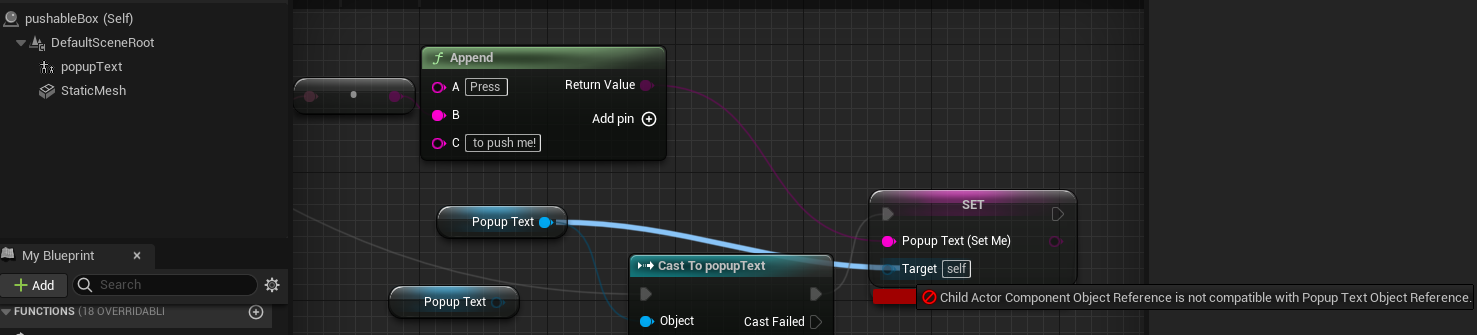
How do I set/get member variables of a component of a blueprint, from the blueprints event graph?
I have a blueprint "textPopup" with a variable "popupText" (type string) that I want to be able to spawn as a component in another Blueprint and then set that "popupText" variable in the parent BP
Is this possible? https://i.imgur.com/wvyD51B.png
 zealous moth
Here's a head scratcher.
I am using a touch input manager for mobile and I am trying to use both thumbs on the screen.
On left, I have a virtual joystick and for the right, i got a button and i want to use general drag events to move camera around.
Looks like this:

Now here is the issue
this thing will tell it whether finger is 1 or 2nd on screen

Is there a way to detect when I am using the joystick at all? This would be the easiest since i can reset the finger to 1
because the behaviour now is that if i touch 1 the joystick, it doesn't register the camera with touch 2
but if i touch 1 the camera, and then the joystick, as long as it is down, touch 2 is on joysticks
the touch joystick is a touch interface setup blueprint
vivid inlet
Ahhh, I see, thank you! :)
 lime moat
I'm having an issue with physicsbodies. I am looking to have some nice wiggly physics on my actor without affecting the location of the actor. However, when I turn on "simulate physics", my actor begins to fly all over the place. I have a projectile movement on this actor, which should slowly be moving across the screen. I have played with various settings such as gravity, setting the mass lower, but nothing seems to keep my actor from flying around. Any thoughts on the matter are appreciated!
spark robin
spark robin
How do I set/get member variables of a component of a blueprint, from the bluepr...
this was the solution apparently

 dry condor
solid belfry
Does anyone know how to force an anim blueprint transition to finish even if its...
dry condor
solid belfry
Does anyone know how to force an anim blueprint transition to finish even if its...
you can get the "time left of animation" or something like that and add that to your other condition
pulsar lantern
Alright this has now reached a point of extreme inconvenience, and I'm considering rewriting all my C++.
Is there truly not a way to work with unsigned integers in blueprints?
I'm still a bit fresh in unreal engine, so I'm having some growing pains.
I have a bunch of algorithms that require unsigned 64 bit variables, but I'm strongly considering converting them all to unsigned 32bit so I can shove them in int64s.
I'd really like to be able to work with math operations in blueprints on uint64 but I don't think that's something UE5 can do
Right now I return uint64s as FStrings, but this is only useful for displaying information, not useful for actionable expressions.
spark steppe
pulsar lantern
Alright this has now reached a point of extreme inconvenience, and I'm consideri...
you would just need to go to 63bit if you want signed 64bit?!
pulsar lantern
spark steppe
you would just need to go to 63bit if you want signed 64bit?!
I've considered this and it'd work in many of my cases, but it really just feels like a hack. Especially when working with random number generation it's not optimal.
Right now when I absolutely need to I cut off the first bit as you say but its a bandaid for just wanting to be able to pull data into blueprints.
spark robin
Can I make a particular blueprint or C++ script run always, regardless of level, game mode, actors in the scene for my entire project?
spark steppe
game instance
faint pasture
vivid inlet
Why would I use a 'Switch On [state]' instead of a boolean and a branch?
More than one option
faint pasture
spark robin
Can I make a particular blueprint or C++ script run *always*, regardless of leve...
Game Instance
spark robin
Is there a solution that would let me make the blueprint/c++ script a part of a plugin that can be used for various projects?
I want to make some runtime developer tools that I can use to do things while test playing
spark steppe
game instance subsystem maybe
if you dont want to go with a "custom" game instance
well, he asked for both
spark robin
Yes thank you :3
 untold dome
Looking for help regarding a lerp function in BP
Clip 1 - Shows an enemy moving along a path with a LERP.
Clip 2 - Shows what happens if i choose to block his path THEN move away.
Question.. Is it possible to stop a lerp from executing fully?

 stoic raft
not sure if this is a question for here or plugins, but has anyone gotten lightweight instances to work?
@untold dome how are you lerping it?
untold dome
 stoic raft
how are you calling SimpleMovement?
 stoic raft
when it hits something just have it stop the timeline
untold dome
How can i do that when i'm inside of a function? Should i.. return a boolean and stop it based on that?
Or can i stop the timeline from within?
stoic raft
u can make a custom event and just plug it into Stop in the timeline. then call that function from anywhere in the class
like that bool when u move, if true just call the StopMovement or whatever you want to call it
untold dome
Oh alright. Well that makes sense - thanks for clarification!
 gentle urchin
You can also grab a ref to the timeline and stop it via the reference
 shut quest
Anyone got any tips on how Hydroner disables physics when putting items in the back of the vehicle and then keeps the relative position of that object to the vehicle? Trying to achieve the same thing.
I've got my actors with physics enabled and want to disable physics of that actor when it is on a table. Appreciate any help.
 copper steppe
shut quest
Anyone got any tips on how Hydroner disables physics when putting items in the b...
copper steppe
shut quest
Anyone got any tips on how Hydroner disables physics when putting items in the b...
A collision box, set to overlap, and then checking if it overlaps a certain class of item, would be my first guess?
 cyan bone
My blueprint is a sphaghetti al tomato mess.
I didnt know what to do about * repacking* Timelines, so i just created timelines everywhere.
Now i found that the timelines work inside the awesome Collapse to Node.
The issue is, it needs a new copy everytime. So is this actually reusable?


Its the only way to have "timelines" packed in a "function"
But then there's the issue that when reusing it, it seems to create a new block for it, as you can see in the *_2

Hmmmm. Can anyone give me their opinion on this. Should i actually use this?
gentle urchin
Unlikely? 😛
 ocean meadow
I am thankful of having you coaching me again!
I will try out what you told me and will get back to you at a sooner or later date (Since I will be busy tonight).
 quaint geyser
Should you use blueprint nativization in a packaged game?
 dawn gazelle
From what I've seen others say on here, it's not worth messing with. Apparently has a lot of problems, you can't nativize everything and if I recall correctly, UE5 doesn't have it anymore, or it's being deprecated?
From what I've seen of videos about it, it does significantly increase performance in certain workloads.
tawdry surge
Nativization is terrible in 4 and gone in 5.
You should just convert BP to cpp manually if you have performance issues
vivid inlet
Any ideas why this results in a 'Accessed None' error?

So references not work with widgets?
dawn gazelle
vivid inlet
Any ideas why this results in a 'Accessed None' error?
Can you provide the full error? There's two things there that could be "None".
vivid inlet
dawn gazelle
Can you provide the full error? There's two things there that could be "None".
Well I actually get two haha.

 dawn gazelle
Ok so your "Pause Menu" variable doesn't have a value set in it. Is the widget you're working in a child of your pause menu widget? ie. Is it created/contained within your pause menu widget.
vivid inlet
dawn gazelle
Ok so your "Pause Menu" variable doesn't have a value set in it. Is the widget ...
Yeah, that's right!
The Pause Menu has a widget switcher.
And PauseMenuWidgetMain is the index 0, main menu of the pause menu.
I'm trying to get it so it'll change the index to the Options Menu (index 2) when I press the Options button in the Pausemainmenu.
 uncut shale
I was wondering if anyone knew how to change gamemode via blueprint?
tawdry surge
You can't
Gamemodes can only change when levels change
uncut shale
Oh ok
Can every asset stay in a level? Or do I have to remake everything on the new level
dawn gazelle
vivid inlet
I'm trying to get it so it'll change the index to the Options Menu (index 2) whe...
Ok what you may want to do instead, is create an event dispatcher in the widget you're working in currently. After you've done that, when you select the widget in the designer of your pause menu, scroll down to the bottom and you'll have an option to add the event dispatcher to your Pause Widget. When you add that event in your pause widget, it'll fire when the button is pressed, and then you use that event to drive the change on your pause menu widget. If you want to get a bit more fancy, you can give your buttons "IDs" which can be a name variable that is set to "Exposed on Spawn" and "Instance Editable" that you pass back through the event dispatcher, which allows you to reuse your button, and then your pause menu can handle which button was pressed.

 tawdry surge
You can assign the gamemode override to a level via blueprint but not while the level is open.
So if you pick a gamemode and level in the main menu, you can open your level with the desired gamemode override assigned
uncut shale
Well I'm making a jrpg and want combat to take place in the overworld
So I created the combat game mode and want to have when you interact with an enemy for combat to start
tawdry surge
That doesn't need a new gamemode.
New gamemode would be timetrial win condition vs kill all enemies
uncut shale
Oh ok
It's just the tutorial I was using made the combat system in its own gamemode with its own camera
tawdry surge
That's a strange approach
vivid inlet
dawn gazelle
Ok what you may want to do instead, is create an event dispatcher in the widget ...
Ah ha, thank you so much for the detailed reply, this sounds like it'd be way better I'll try this out. :) I appreciate it immensely as I've been stuck on this for a while. :)
notetoself.
uncut shale
Well how would I change the camera if im not going to make it a different gamemode
Cuz I want a static camera for combat but a dynamic one for outside of combat
tawdry surge
Gamemode is more to do with win conditions and things related to the rules of the game
Player controller is in charge of the camera. You could just have another camera and set it as the view target
Doesn't even need another controller
uncut shale
Wdym?
I have a player controller set up for combat, how do I change between it being static and dynamic
tawdry surge
I mean have another camera and set that as the one you look through during combat
Or you can just move your existing one
uncut shale
That's what I currently have, but idk how to change between the two if im not using a different gamemode
tawdry surge
Get controller-> set view target(target = new camera)
uncut shale
How do I connect get controller to sn input action?
tawdry surge
I'm not sure what you mean
uncut shale
Wait nvm
I can just change out the code to be instead of eventbeginplay to inputaction
It should be the same code
 dim tapir
Is there a "on movement" function I can call? I want to abort attack if player is moving
tawdry surge
You can get the axis values from the movement input events and if they are !=0 you're moving
 desert juniper
How can I make an actor always point towards a target? (in this case center of screen)
I have the target, but setting the rotation of the object (flashlight) is proving to be the tricky bit
 tawdry surge
Find look at rotation
desert juniper
tawdry surge
Find look at rotation
right. it doesn't quite seem to work just yet

getting the yaw down, but not the pitch
dim tapir
tawdry surge
You can get the axis values from the movement input events and if they are !=0 y...
I don't know how to do that (beginner) so I tried to check if my idea would even work. I want to set a variable from my projectile to false but I need an object. No idea what to put there, any tips?
 ocean meadow
Hi!
I have set up the function "Slot Swap" Like you said and inserted both, my Slot Structure and Slot Index as inputs. But after that I am a little bit confused on the reading the rest of the message 😅
I had followed this gentleman on youtube on how to install this drag and drop function, and 3/4 of the way through I started getting the duplication bug with my inventory.
Again I apologize for my lack of knowledge in UE4 blueprinting! T_T
tawdry surge
@desert juniper how is it rotated? Find look at assumes x forward
cyan bone
cyan bone
My blueprint is a sphaghetti al tomato mess.
I didnt know what to do about * re...
Is there a way to reuse a timeline. Im spamming timelines all over the place. This cant be right???
tawdry surge
@dim tapir casting is just trying to change the type of a reference. You need a reference to the thing you want to try and change the type of
@cyan bone what are you using them for?
desert juniper
tawdry surge
<@106621971705380864> how is it rotated? Find look at assumes x forward
 hmm. okay. the socket is y-forward atm
 dim tapir
tawdry surge
<@150563997840703493> casting is just trying to change the type of a reference. ...
dim tapir
tawdry surge
<@150563997840703493> casting is just trying to change the type of a reference. ...
Well the thing i want to change is a projectile, so an actor. I don't see anything that would fit though
 tawdry surge
Then probably.. how are you actually using them atm?
@dim tapir you need to get a reference somehow. Best way to do that depends on use case
dim tapir
I found get owner and it let me compile. My idea did not work so I'll investigate. Thanks
cyan bone
tawdry surge
<@969845251911073833> what are you using them for?
To move units.
tawdry surge
No I mean how is it physically set up that you are using more then one timeline for this?
cyan bone
tawdry surge
No I mean how is it physically set up that you are using more then one timeline ...
Well because i have to call it in different places with different variables. Like im calling it to move in a specific way, then later i need them to move faster, then other times is just rotate. etc
and it gets annoying not being able to put it inside a node or function
Say. Im rotating my soldiers with lerp. Then i need to reuse that later. I need to post another timeline, and same stuff again 😮
i must be doing this wrong
or its just the way it is. its working so dont break it
tawdry surge
Oh yeah don't do that.
You can set play rate on the timeline from the component reference.
And if you use 0-1 curves and a lerp you can dynamically feed in your starting and destination values then adjust the time it takes Accordingly with only one timeline
At most 2
One for location, one for rotation if you want more independent controll over it
desert juniper
desert juniper
alright turns out this is just an unreal thing. the gizmos will always point in the same direction
but still don't know how to properly rotate the mesh
lime moat
Hello! Does anyone know how to get 2 separate PHAT assets to collide with each other? No matter what I try, they seem to always intersect
tawdry surge
@desert juniper they always point the same way if you have them in world space
Little box icon in the upper right of the viewport changes it between world and local
 marble tusk
dim tapir
I found get owner and it let me compile. My idea did not work so I'll investigat...
marble tusk
dim tapir
I found get owner and it let me compile. My idea did not work so I'll investigat...
You need a reference to the object you want to change the variable for. All casting does is ask if an object reference is a reference to a more specific object. You're asking if this object reference you input is really a reference to a ChargeBall object
 astral epoch
I have a collision event on one of my objects that triggers only when it collides with another instance of itself to spawn an actor between the two objects. Problem is both instances will trigger the event, creating a duplicate of the spawned actor. Does anyone know a solution for having it only trigger once? The event does disable its trigger volume to prevent further triggers, but since they're both touching in the same frame this won't be a solution here.
dawn gazelle
ocean meadow
Hi!
I have set up the function "Slot Swap" Like you said and inserted both, my...
You just need to feed in indexes to the function. Source Index, Target Index.
Store contents of inventory at target index and store in a local variable. (Moving target slot content > temporary variable)
Set contents of inventory at target index to contents of inventory at source index. (Moving source slot content > target slot content)
Afterwards, set content of source index to local variable content. (Moving temporary variable content > source slot content)
Finally, call your refresh event dispatcher.
 tawdry surge
You could make a managing actor class that actually causes the event to happen and put a do once or a delay on it.
So your actors collide and call the manager which triggers the spawn event just once @astral epoch
astral epoch
Maybe. Do Once gets reset after frame?
cyan bone
tawdry surge
Oh yeah don't do that.
You can set play rate on the timeline from the component ...
Im confused. How can i possibly reuse this mess?

where do i feed in stuff
you mean the new time?
Then how could i make everything use this timeline. that would be a sphaghetti mess too
Sometimes i need a lerp and i need to keep going after
An event, would solve that i see
tawdry surge
Not new time. That just sets the current playback position
In the variables section of the my blueprint tab, under components you can get a reference to the timeline
From that reference you can set new play rate which is a multiplier applied to the length of the timeline (so 2 is double speed, .5 is half speed)
Combining that with lerps allows you so dynamically change where the units are going and how fast
Idk what you mean keep going after the lerp. The lerp is how you go from a to b. If you're going passed b then it wasn't really the destination
cyan bone
tawdry surge
Not new time. That just sets the current playback position
In the variables sect...

so i ahve this.
tawdry surge
Yep
cyan bone
tawdry surge
Yep
and how do i call it now? to reuse it
if i copy paste it, it just creates new timeline
only by event right?
tawdry surge
1 sec
astral epoch
tawdry surge
You could make a managing actor class that actually causes the event to happen a...
Okay very simple solution was to put a boolean check straight after the collision check. Both collisions will trigger on the same frame hence the event for both instances is called, but code is still executed in sequence so the first will tell itself and the second to ignore further calls. Second gets to executing its event, see that boolean and fail to pass it.
...now to figure out how to hijack the AI move command to stop them from simply walking away.
tawdry surge
@cyan bone


How you determine the destination is up to you
@astral epochWait you put a bool in the colliding actors? or in a manager? Cuz the former shouldnt work

 tawdry surge
oh it's replicated
astral epoch
My understanding here is that both trigger collision events are triggered before the code in it is executed?
Oh that replication shouldn't actually be there 😂
I was using it as a hacky way to do... something, forgot what. Its a repnotify.
tawdry surge
then each actor should have their own copy and setting it on one shouldnt effect the other
astral epoch
tawdry surge
then each actor should have their own copy and setting it on one shouldnt effect...
Probably a very janky way to do it but the actor spawned between them has a reference to both the spawning and the collided actors as exposed-on-spawns.
tawdry surge
Ah
astral epoch
In its constructor it will call both actors and set their engaged values to true.
Probably there's a better way to do this but it gets the functionality I need.
cyan bone
tawdry surge
<@969845251911073833>
Ok i see, but how do you reuse the timeline. ?
I mean how do you call it again
the same one
tawdry surge

 tawdry surge
then just change the play rate and transform variables
cyan bone
all doing the same
astral epoch
oh sweet lord
tawdry surge
haha yeah that's alot of copy paste
also this will help if they need to be interruped
 cyan bone
tawdry surge
haha yeah that's alot of copy paste
cyan bone
tawdry surge
haha yeah that's alot of copy paste
yeah i was about to do the whole project with that. at first i was like, ahh just use another timeline. but then im like this cant be the right way
tawdry surge
are you rotating them on timelines as well?
@cyan bone If you are, you can use this on the move timeline to get them to face the right way. (Mine is just on tick for my use case)
 cyan bone
tawdry surge
<@969845251911073833> If you are, you can use this on the move timeline to get t...
cyan bone
tawdry surge
<@969845251911073833> If you are, you can use this on the move timeline to get t...
this is what im doing to rotate

So i have rotations, movement, relative movement (inside the actor), then also spline path movement.
thats why it is driving me insane
faint pasture
Buddy wtf this is a mess
cyan bone
faint pasture
Buddy wtf this is a mess
i know 🙂
tawdry surge
Don't look at it all at once
Break it in to parts and build up in degrees
Also that sounds like a lot of different movements
Why do you need actor movement and spline movement? (Assuming relative movement is variations for individual units)
faint pasture
This really oughta be some function on tick to move all your dudes
tawdry surge
for this I'd never use tick directly. Unless they are always moving
faint pasture
OK assuming you have some function that can give all your dudes a target location or a path to follow.
Tick -> foreachdude -> update position -> update rotation -> update ISMs
 faint pasture
You can early bail out if they aren't moving but most of your guys are moving most of the time
 gray lantern
not create one
not sure how to access the reference of the sequence that's already in my level
cyan bone
faint pasture
You can early bail out if they aren't moving but most of your guys are moving mo...
No they are not moving, most of the time they are idle.
They move only for formations
Attack, rotation
faint pasture
only when changing formations or when formation is marching?
You need to nail down a simple common movement algorithm that can be fed from higher level / lower frequency stuff like orders and formations
cyan bone
when marching they rotate, orient, and the squad moves them, they just then simulate that they are walking with a little random separation
faint pasture
It sounds like you have more exceptions to rules then rules.
Just lay it out so you can bulk update everyone at once, then have the marching, turning, formation changing stuff interact with their Path or TargetPosition or whatever.
cyan bone
faint pasture
It sounds like you have more exceptions to rules then rules.
Just lay it out so ...

its messy. but the soldiers are in high moral and certain of victory 🙂
faint pasture
I understand it's working. I'm asking why you have like 6 ways to accomplish a move, instead of 6 ways to accomplish the move orders, with only 1 way to execute.
cyan bone
faint pasture
I understand it's working. I'm asking why you have like 6 ways to accomplish a ...
okay i will show you my last issue
cyan bone
faint pasture
I understand it's working. I'm asking why you have like 6 ways to accomplish a ...

you see
faint pasture
The interface between the higher level stuff like marching/formation/attacking and the low level code that determines the position and orientation and anim state of each ISM should be a path, or a target position, or a spline, or something like that. The soldier itself should not care or even be able to tell the difference. It's just moving
cyan bone
the transforms i get them before the timeline
so if i do the Start Timeline node
i dont have them
tawdry surge
Thats sorta the point of making the timeline re-usable
cyan bone
no worky
 faint pasture
Have 1 block of movement code. Have EVERY movement use it or otherwise modify state (target positions, paths, etc).
cyan bone
need to create event
tawdry surge
you need to set your start and destination vector variables before starting the move
cyan bone
tawdry surge
you need to set your start and destination vector variables before starting the ...
and store them in variables?
global variables
 cyan bone
Ok so a timeline works pretty much like an event almost
tawdry surge
 cyan bone
tawdry surge
cyan bone
tawdry surge
what confuses me is the ammount of options.
I can also create an event with Inputs, instead of global variables. right?
tawdry surge
how you get the start and end points is up to you
you should generally always save any data you want to re-use or alter into a variable
cyan bone
tawdry surge
you should generally always save any data you want to re-use or alter into a var...
But then this takes me to the issue that was puzzling me yesterday. That is, if i need to rotate 5 soldiers on my left (because im flanked on the left), and right about the same time when they are rotating, another army flanks me on the right, then i have to rotate 5 other soldiers in the Right.
Which means this will break
Only in this situation
My idea yesterday was to create a struct of arrays
And then when calling the timeline to lerp. I lerp the struct of arrays (groups of soldiers inside my unit)
faint pasture
OK you need to back up and start back at some basics. At any given time, WHAT determines the path a soldier should follow?
Is it 1 spline per soldier, or a few splines per squad, or 1 spline per squad, or what?
cyan bone
faint pasture
Is it 1 spline per soldier, or a few splines per squad, or 1 spline per squad, o...
They rotate and move with lerps in all cases, Except when doing the enveloping attack
the enveloping attack requires splines
i tried without it
faint pasture
fuck exceptions. Think in terms of general rules
if you wanna do splines do splines
keep that same energy, use splines all the time
cyan bone
okay. but why? is this better in performance?
faint pasture
You knwo what's bad for perf? Branching all over the place
cyan bone
i dont know but i think i will need the movement lerp without splines, for rotating too
because how do i rotate it with the splines
i need to timeline ways for movement
faint pasture
why are you so insistent on timelines
cyan bone
the spline and the the movement right?
faint pasture
does it always take the same amount of time to move? No matter the distance?
cyan bone
faint pasture
does it always take the same amount of time to move? No matter the distance?
No, its different
faint pasture
I would do something like this.
You can pretty easily modify it to be spline driven instead of target position driven
OR just have the splines drive target position and then you don't have to use splines all the time.
 tawdry surge
@faint pasture the amount of time a timeline takes is variable.. only real consideration between tick and timeline is if it's event driven or data driven movement
faint pasture
You could of course early bail out whenever a soldier is where they want to be but it's probably not worth the trouble, depends on your average time spent moving.
 bold shard
Is it possible to change the PositionX/Y variables of a Canvas Panel Slot in a BP? I am trying to modify them based on some back end data.
 cyan bone
faint pasture
cyan bone
faint pasture
im reading it
faint pasture
bold shard
Is it possible to change the `PositionX/Y` variables of a Canvas Panel Slot in a...
maybe?
 copper steppe
Alright, so I've got two pieces of code running in sequence, first for actor1, then actor2
It's the exact same code, copy pasted, so it's an exact match, when running the code on actor1, it does not behave as expected, on actor2, it does
The trouble starts, when I start deleting the spline points from the actor. The expected behaviour, is to delete all points, except the start and end point, however it only happens on the second actor (Simply using a for loop, to go through all points between 0 and NumberOfPoints-1, and calling "Remove spline point") 🤔
While the second spline works fine I'm not really sure, why actor1 seems to only delete 1-2 points, when it has around 13
(In case someone were to ask how it's deleting)
 bold shard
faint pasture
maybe?
bold shard
faint pasture
maybe?
That worked, thanks a lot
cyan bone
faint pasture
Thats actually quite complex. I think i can get away with something simpler
You are adding velocity
every tick
well but this applies to all circumstances
except the spline
faint pasture
That's just to derive orientation. You could skip it and just subtract Newposition from oldposition when you need it but it's cheap to cache and you could use it in other places
For spline following you'd just change how you calculate next position
But if you did something like this in C++ you could move prolly like 40-50k soldiers easy
 weary marsh
Is there any way (thru blueprint or cpp) to have the type of a variable in a blueprint in run-time, even if the variable is NONE ?
tawdry surge
What?
faint pasture
weary marsh
Is there any way (thru blueprint or cpp) to have the type of a variable in a blu...
uh wut
 last ice
does someone know why this print string fires 2 times if i press enter on the textbox once?
is there a logical reason for that?
 last ice
does someone know why this print string fires 2 times if i press enter on the te...
last ice
last ice
does someone know why this print string fires 2 times if i press enter on the te...
found out someone had the same problem once. seems like you need to check what type of commit was done on the textbox by using "Switch on ETextCommit"

solved
tawdry surge
Does hitting enter cause more then one type of commit to fire?
last ice
yes... i imagine it fires enter and the text boxes loss of the focus^^
thats why i got 2 times the execution
tawdry surge
Ah, so this way it won't fire if they just click off then
last ice
if you want to catch this case you need to use "Switch on ETextCommit" with "On User Moved Focus" i imagine
tawdry surge
Id pry just run it off moved focus so it doesn't matter if they hit enter or just click on something else
Good to know tho
last ice
for me only the "pressed enter" case was important... if you not filter it can hit twice. especially if you hide the element afterwards (maybe thats where it looses the focus for me and sends the second hit without filtering)
in my case I maybe did set up a trap for myself xD
 calm citrus
for a multiplayer survival game do I need to replicate food and water bars? I could just leave that client side right?
 hearty ore
what's a good generic way to check in Event Hit if whatever has hit me has some sort of damageable tag? i don't want to just consider 1 type that can do damage (see below)

 jaunty summit
calm citrus
for a multiplayer survival game do I need to replicate food and water bars? I co...
jaunty summit
calm citrus
for a multiplayer survival game do I need to replicate food and water bars? I co...
Are they something that you don't want your client to mess up with and want only the server to change(authority driven)? If yes make them replicated and change them server side
calm citrus
What if it is a co - op game among friends that I really wouldn't care if someone decided to cheat
 dark crow
calm citrus
for a multiplayer survival game do I need to replicate food and water bars? I co...
dark crow
calm citrus
for a multiplayer survival game do I need to replicate food and water bars? I co...
The bars themselves no, but the value of the bars are gonna come from the player so yeah, those are gonna be replicated and driven by the server
calm citrus
I just dont want anything to break
jaunty summit
Clients can still change them btw, but server version will overwrite it once sent
calm citrus
I think Im just gonna replicate it then
 queen tinsel
hey so i need some urgent help with my game
i created a boolean for thirdpersoncharacter that toggles whether or not a player has a key. how do i check whether or not the player has the key before opening the door? here is my door blueprint so far.
 zealous moth
@queen tinsel you cast to the player and you can take the blue pin out and get the boolean
@dark crow but if you do you won't make mistakes to learn from
@tawdry surge the suspense is killing me
tawdry surge
Well you don't wanna just do things poorly on purpose..
But once you know how to do it properly it makes it much easier to cut the right corners
 hybrid ether
anyone know how to save that little image from asset?
 junior hedge
queen tinsel
hey so i need some urgent help with my game
i created a boolean for thirdpersonc...
junior hedge
queen tinsel
hey so i need some urgent help with my game
i created a boolean for thirdpersonc...
Branch
faint pasture
calm citrus
for a multiplayer survival game do I need to replicate food and water bars? I co...
You replicate state. The UI driven by that state is client side.
ocean meadow
dawn gazelle
You just need to feed in indexes to the function. Source Index, Target Index. ...
Thank you,
I set everything up in the function and called a refresh slot, is there anything more I can do? Thanks! 🙂
 ocean meadow
I am getting closer though! the inventory does update! but it does remove an item after 2 duplications too!
ocean meadow
dawn gazelle
You just need to feed in indexes to the function. Source Index, Target Index. ...
I got it!!! Thank you so much!! I'm not sure if it is right coding, but the inventory is refreshing the way I want it to!
ocean meadow
The item still overlaps the other item but still this is amazing!
 cedar sparrow
How do i set an actor variable as Invalid again? I have a grid actor in the world and when it's hovered i want to set it as the HoveredGrid, but when the hover ends I want to set it back to invalid again because I use the IsValid node on it for later logic
 tight schooner
cedar sparrow
How do i set an actor variable as Invalid again? I have a grid actor in the worl...
tight schooner
cedar sparrow
How do i set an actor variable as Invalid again? I have a grid actor in the worl...
set with no data
"set" node
cedar sparrow
Yeah i tried that but it's still valid, its just empty
which means it will pass the IsValid check
I just changed IsValid to check if the DisplayName is null
gentle urchin
If it passes you have not set it i fear
It doesnt pass validity check when being a null pointer
cedar sparrow
yeah how do I set it back to Null
before i set the variable, it will fail IsValid
but after I set it, I can't ever make it fail IsValid again
a set node with no input doesn't make it invalid
it just makes it empty
gentle urchin
Empty = invalid
If we're talking about a reference
Invalid is either reference to null or a reference to an object marked for destruction / destroyed iirc
tight schooner
🤔
Guess I could test it next time I'm at a PC but my understanding is setting an obj ref variable with no data invalidates it
gentle urchin
It does
tight schooner
Otherwise you'd get accessed none errors when using it
cedar sparrow
 gentle urchin
Most things under cursor wouød give a hit result ,
cedar sparrow
i want accessed none errors, but once you set it you can't get it again
gentle urchin
So youd need to filter the resulting hit (or pre filter it with collision channels )
cedar sparrow
yeah
gentle urchin
Try to grab a fresh reference to the reference
The get from the set may have issues with it in this regard
cedar sparrow
yeah im not super worried about it for now. just checking if it has a display name is working for testing purposes at the moment
gentle urchin
5.0.2 you're on?
Been invalidating references since like 4.11 this way, no issues at all
cedar sparrow
5.0.3
gentle urchin
Curious if this got something to do with how the get pin from a set node is set...
cedar sparrow
Yeah it's something to do with the Set node
i just dont know what lol
because for all intents and purposes, it's empty
but, it still passes the IsValid check
tight schooner
If it thinks it's valid, that means it's set with something, so you may as well get that variable —> totext/tostring —> Print
tight schooner
I was expecting an accessed none
cedar sparrow
Same
tight schooner

cedar sparrow
but i feel like im wasting everyones time on this lol
gentle urchin
Display name might be , but not prints i think :p
Nah im boored, and cant test it myself, so no time wasted here😂
tight schooner
We're here to escape from our gamedev problems by jumping into other people's gamedev problems
cedar sparrow
😄 😄
tight schooner
Now I can sleep at night. UE4.26.2 though.

 cedar sparrow
must be me then D:
desert juniper
Is this not stinky of a corrupt BP?
if you change the name of the variable for the actor reference, does it still not work?
gentle urchin
tight schooner
Now I can sleep at night. UE4.26.2 though.
Looks correct to me !
 warm delta
Is this stupid? Instead of constantly calling "Get actor of class" in a BP (12 times), is it better to set it once as a variable on Event Begin play and then just keep referencing the variable instead?
 tight schooner
I don't think it makes much of a difference in practice? If you're accessing it a lot, it makes for cleaner BP'ing though.
But assuming there's always just 1 of that actor in the world -- never multiple and never none -- then there are worse things you could do in BP than call Get Actor of Class a dozen times
Get Actor(s) of Class isn't a slow function in practice
gentle urchin
There are usually better ways to achieve the same thing tho
warm delta
gentle urchin
There are usually better ways to achieve the same thing tho
Thought there might be. Can you name a couple? I'll look them up.
gentle urchin
Depends a bit on the context, what is this actor to the blueprint that needs its reference ?
If its a pawn youd set it in gamemode, using global getter like GetPawn -> cast to UDS
If this were something interactable you'd get it by tracing / collision testing
warm delta
tight schooner
But assuming there's always just 1 of that actor in the world -- never multiple ...
In this case its a weather plugin that controls the weather, lighting, etc. on every level (Ultra Dynamic Sky) and I reference it all over the place. That's why I'm asking if there's a better way as a general rule. Just that I heard you should avoid using casts and Get actor of class...
warm delta
Thanks Seanny (and Squize). As long as I'm not doing something incredibly stupid I'm happy. Slightly stupid is not a problem of course. 🙂
desert juniper
warm delta
In this case its a weather plugin that controls the weather, lighting, etc. on e...
Epic sugests you use it with caution, and don't call it on each frame.
/**
     *    Find the first Actor in the world of the specified class.
     *    This is a slow operation, use with caution e.g. do not use every frame.
     *    @param    ActorClass    Class of Actor to find. Must be specified or result will be empty.
     *    @return                Actor of the specified class.
     */
    UFUNCTION(BlueprintCallable, Category="Actor", meta=(WorldContext="WorldContextObject", DeterminesOutputType="ActorClass"))
    static class AActor* GetActorOfClass(const UObject* WorldContextObject, TSubclassOf<AActor> ActorClass);
besides that if you need to call it a bunch, and don't have a manager, it shouldn't be too much of an issue. especially if it's all being done on BeginPlay
junior hedge
gentle urchin
If its a pawn youd set it in gamemode, using global getter like GetPawn -> cast ...
when I was trying to GET HUD earlier it wasnt using my NEWHUD even though its assigned in the gamemode
I had to actually cast it
gentle urchin
Yes the static getter is not casted
junior hedge
ahh ic
gentle urchin
Its still NEWHUD,
The engine just doesnt know it
Thats why you cast it. You type-check it, and if success you can access its functionality and variables
This is easily proven by printing the displayname of GetHud()
warm delta
desert juniper
Epic sugests you use it with caution, and don't call it on each frame.
```cpp
/*...
Thanks AmazeCPK. In that case it's probably better to do it once on Begin play and then reference.
tight schooner
desert juniper
Epic sugests you use it with caution, and don't call it on each frame.
```cpp
/*...
I remember doing a test where I did Get All Actors of Class --> set into array variable ... 100,000 times on a button press and it wasn't that slow (in a level with 200+ actors). You'd think the game would seize up for several seconds if it was. So I wonder under what conditions that function is slow.
gentle urchin
Perhaps i just have a personal vandetta against it :p
warm delta
tight schooner
I remember doing a test where I did Get All Actors of Class --> set into array v...
Could be one of those things that used to have a big impact but as hardware improved became less so...
gentle urchin
The GetActor(s)OfClass or by tag or any similar function
gentle urchin
tight schooner
I remember doing a test where I did Get All Actors of Class --> set into array v...
Keep in mind its iteration amount increases with spawned actors
So spawning 1 million actors or chevking 1 actor 1 million times should equal the same (generally speaking)
Now if you suddenly have close to 1 mill actors, and you iterate them all, all over the place, i can imagine it coming to a hurl
tight schooner
It's kind of like Event Tick I guess where it could encourage bad BP habits if you don't know what you're doing, but using it here and there isn't a project killer
gentle urchin
For sure
In isolation its seldom what kills a project
But it inspires bad habbits , and keeps you away from doing things "the common ways"
tight schooner
Epic always thinks about the worst case scenario, where they've seen projects where there's several hundred actors iterating through big arrays on tick and every class casting to every other class
gentle urchin
Yepp^
desert juniper
tight schooner
I remember doing a test where I did Get All Actors of Class --> set into array v...
let's do a test
gentle urchin
junior hedge
oh i get what you meant now
This is true for all actor references really.
They are the actual reference to the actor, despite not being type-checked
You're just not allowed to access its methods/variables untill you've type checked it
It would be a very risky endevour, if you could. And messy i think
junior hedge
right ic
if I wanted an interactable world where I would pick up things, would I have a constant linetrace? (For costant ui showing ex:Pick Up Box)
gentle urchin
Line trace or collision volume
junior hedge
would linetrace be performance heavy?
gentle urchin
Trace would be simpler in regards to hit (only hits one item),
Traces are incredibly cheap
Dirt cheap
junior hedge
ic
 foggy escarp
You can always turn on and off a line trace with a collision volume if you require precision interactions.
junior hedge
i havent really gotten into anything to do with volumes yet
desert juniper
tight schooner
Epic always thinks about the worst case scenario, where they've seen projects wh...
yeah hardly a blip

 gentle urchin
Benefit of the volume is that you can get a "general look direction" approximation to the closest interactable to the center of the screen
desert juniper
 gentle urchin
Hardly a blip, but still a blip
junior hedge
gentle urchin
Benefit of the volume is that you can get a "general look direction" approximati...
ic
gentle urchin
Would you risk framedrops for this?
desert juniper
sure. if I was just getting references on inital load
why not
during gameplay however, def would optimize
gentle urchin
If done once, sure i guess
The issue is the abuse of it 😅
Using it all over the place
desert juniper
absolutely agreed
gentle urchin
Suddenly it drops because someone pressed a UI button
That for some reason uses GetAllActorsOfClass to spawn an item!? 😅
Uses tick to check if it has spawned and whatnot
If it works and you're satisfied with the performance, then all is good
junior hedge
gentle urchin
Depends a bit on the context, what is this actor to the blueprint that needs its...
lets say I wanted to linetrace a button and then it opened a door, how would YOU cast it to send the door event to open? (preferably without level bp)
gentle urchin
Id use an interface, pretty common for interactables
desert juniper
how would YOU cast it to send the door event to open?
that's not really how casts work
agreed that an interface is a great option
desert juniper
an interactable component is another one
junior hedge
i didnt mean to say cast
gentle urchin
If you really wanted to avoid interface for some reason
You could make a super lightweight master interactable class
desert juniper
I personally use components over interfaces for my current project both are great options
gentle urchin
Which would be parent to all thinga interactable
Easily gets out of hand tho (got some first hand experience there)
gentle urchin
desert juniper
I personally use components over interfaces for my current project both are grea...
Same
tight schooner
Yeah it depends on your intended class hierarchy. If it makes sense to put all interactables into a family of classes, then a parent class function makes the most sense
If you need something that cuts across hierarchies, then interfaces/components
desert juniper
yeah, I kinda stray a bit from the OOP nature of unreal and try to do as much composing as possible. but sometimes you're not left with too many options
gentle urchin
The last thing you wanna do is cast to every single class that can possibly be interacted with
It would not be efficient use of your time either
Having to implement an interaction function in every damn class
Instead of 1 common + some special events
If you see yourself repeating a lot of code
Theres usually a better way to organize it
 strong turtle
Anyone know how to make physics objects push your character using character movement component?
strong turtle
hmm ok thanks 🙂
 whole socket
Okay, this is something super basic but I'm struggling with it anyways:
I basically want to access the content of a folder in the content browser full of static meshes. Since there's no node for that afaik, I dragged all the meshes into an empty actor, and now I'm trying to access that actor and go through its components instead (basically achieving the same as accessing the content browser).
However when trying to print out the mesh count it always says 0 (see first image) and when I stop the simulation I get the usual "Accessed None" Error (Second Image).
So, how can I access the blueprint and its components? What do I need to do to prevent the error?


Thanks in advance
gentle urchin
TorchCollection is null
you must spawn the actor first
What i would suggest
is a data object
with soft references to all torch meshes
whole socket
but I only seek the components of it, do I really have to spawn it into the world? I actually wanna call it in the construction script
whole socket
gentle urchin
is a data object
oh, haven't worked with that before
gentle urchin
me neither,
whole socket
do I create that in the blueprint itself or do I create a new object in the content browser?
well
whole socket
hmm, I think I'd highly prefer data objects if those can soft reference, I just have to find out how to create one now
junior hedge
@gentle urchin any simple docs that compares interfaces to casts/get actors? really curious now
never heard about them until you mentioned them
junior hedge
gentle urchin
compares in which way
on how they are used
gentle urchin
whole socket
hmm, I think I'd highly prefer data objects if those can soft reference, I just ...
It appears data asset cant be directly references as i had hoped 😛
whole socket
can I create that "procedurally" somehow? Basically I'm looking for a way that I don't have to set every static mesh manually because there's a lot of them
gentle urchin
and out comes an array of soft ref static meshes
Doubt there's a bp function for it
probably a cpp one
perhaps a python
whole socket
hm :/
junior hedge
dont know of any doc?
gentle urchin
Not really
i mean
i could link the interface doc etc
but i dont think they're that helpfull
whole socket
Okay, so to be a bit more broad, what I basically wanna do is import a bunch of static meshes (in this case light sources aka. torches) and add a point light to all of them, so they actually emit light. I mass import level data of varying sizes, so I want to do that procedurally.
My current attempt was to collect all torches in one blueprint and then get the locations from there.
oh maybe I just got an idea
gentle urchin
junior hedge
nvm finally did
Interfaces are great for when you dont know the class of the reciever, but you know it implements the interface event
Like, it might not make sense to make a superclass interactable if most of your classes are very different, both in representation and logic
If you had a superclass interactable, you would cast to this superclass whenever you suspect the actor in question can be interacted with, and if so, call the interaction method
with an interface you can simply call the interface event with any given actor,
and if the actor has an implementation of that event, it will be triggered
if not, then nothing happens
junior hedge
ahh i just watched a bit of a video
gentle urchin
probably explains it better 😄
junior hedge
hold on
whole socket
whole socket
oh maybe I just got an idea
nvm
junior hedge
I tried to make an interface awhile back (didnt know what it was actually called) but it wasnt working so I had to do it like this:
 whole socket
I'd just put in the torches as static meshes and only add the point lights via blueprint, but I don't think there's a way to get the torch static meshes only
junior hedge
whole socket
I'd just put in the torches as static meshes and only add the point lights via b...

like this?
or are you talking about something else
whole socket
I don't quite get what excactly you wanna show me
gentle urchin
It was probably ment for me
junior hedge
you said you don't think theres a way to get your static meshes but ig you're talking about something else mb
gentle urchin
oh nvm
junior hedge
lol
junior hedge
junior hedge
I tried to make an interface awhile back (didnt know what it was actually called...
@gentle urchin
gentle urchin
whole socket
I'd just put in the torches as static meshes and only add the point lights via b...
Its still much manual work untill you can auto create classes with different meshes found in a folder
whole socket
junior hedge
you said you don't think theres a way to get your static meshes but ig you're ta...
yes, but you are getting a cube, either from inside the blueprint or as a... welll... cube. I have different meshes with different names and I want to get them specifically (as an array probably)
whole socket
gentle urchin
Its still much manual work untill you can auto create classes with different mes...
If I can set it up once so that it works for that specific purpose automatically later on...?
would save me enough time
better than manually dragging in and placing 800+ meshes
gentle urchin
If i understand you correctly, you want to auto generate a class that holds a point light and a unique SM , and place that in the scene by soime import logic?
whole socket
how damn hard can it be to get actors from a damn folder in your content browser? ;-;
gentle urchin
hard xD
'


This should be a nod in the right direction
I wonder.. Are these torche meshes already in the scene and you need to replace them ?
or do you just want them created as actors, so that you can place them(with the included point light)?
If its the first one you might be able to make a blutility for adding the point lights
whole socket
gentle urchin
If i understand you correctly, you want to auto generate a class that holds a po...
okay, let me try to explain it as well as I can:
I have Level Data that I'm importing into Unreal. This includes in this case a bunch of Torch Meshes.
This imported Data is set up in a way, that all origins are 0/0/0, even if the actual mesh is somewhere else (so the pivot is 0/0/0 but the mesh ends up at its correct destination).
Since I want actual light being emitted from the torches, I want to add a point light for starters (can become more complex later). I exported the torches as individual objects and found out how to access their bounding box and procedurally find out the excact spot where to place the individual point lights.
Now all I'm looking for is a way to procedurally place these point lights.
So I thought the smartest way to do this, would be to collect all torch meshes in one giant Actor as indicidual components, and the add point light components at the respective locations.
By going through all the static mesh components and creating a point light for each at each location
 lime fulcrum
Hi!
Is there a way to set the default value on Custom Functions to be set as "SELF" instead of having to add a node SELF ?
 whole socket
gentle urchin
'
whole socket
gentle urchin
'
I'm now trying this one out, but the problem that I didn't think about prior is, that when I'm just using the data reference I don't think I can get infos I need to calculate the bounding box and stuff
 whole socket
whole socket
whole socket
whereas before that I could use the data from the blueprint
 whole socket
lime fulcrum
Hi!
Is there a way to set the default value on Custom Functions to be set as "SE...
whole socket
lime fulcrum
Hi!
Is there a way to set the default value on Custom Functions to be set as "SE...
at least from what I can find on the internet this feature seems to not be supported in blueprint atm
lime fulcrum
Oh.... Understood
I'm desperately trying to find a solution to Keyinput settings
Input Key Selector won't let me update the text on the button when I load the default key maps :\
gentle urchin
whole socket
I'm now trying this one out, but the problem that I didn't think about prior is,...
you can, if you cast it
gentle urchin
Was a response to Von Yoosten
lime fulcrum
oh 😄
gentle urchin
whole socket
I'm now trying this one out, but the problem that I didn't think about prior is,...
 junior hedge
Will timers work in a competitive mp game environment
Since it's not ticking every frame
foggy escarp
junior hedge
Will timers work in a competitive mp game environment
It's an area for performant logic yes
It could be used on anything really
junior hedge
gentle urchin
Are you doing competitive mp game ?
No lol
foggy escarp
Anyone know of a solution with UE for sharing player created content. It would use json files for dynamically generated content.
I know there are a couple marketplace assets and a free one that's been not available. I could create one in cpp, but I'm just wondering if there's somone who's seen another solution.
junior hedge
I am interested in multiplayer implementation but most I would try rn is just movement + animation replication
 uneven geode
is there a way to display navmesh at runtime? with some sort of grid material or something
like steam vr does

 torpid hound
uneven geode
is there a way to display navmesh at runtime? with some sort of grid material or...
torpid hound
uneven geode
is there a way to display navmesh at runtime? with some sort of grid material or...
Navmesh rendering is pretty hard coded as a debug feature I think. Much of the code is excluded from shipping builds. There's definitely ways to make it happen but you probably need a fairly deep dive into cpp land
 trim matrix
https://youtu.be/oO3lc2UyJgk hey guys im having an issue where unpossessing a pawn causes game breaking lag back and fourth, jittering, breaking animations, and some other problems as you can see in the video, its worse when you unpossess while moving because the player actor simultaneously follows the formerly possessed actor, despite it not having a controller which should make it stationary, and sits where it originally dismounted

 pure hemlock
Is there any specific prefix for blueprint-made enums that epic suggets like EN_MyBlueprintEnum or BPEN_MyEnum?
 north void
i need help my bp plays perfect the first time i enter after that the timelines in red are not resetting i tried play on start but then nothing happens
 tawdry surge
@pure hemlock I think epic uses E in front of the name
Personally I prefer putting the naming convention at the end so it's easier to read the name, and so things are automatically grouped together in the world outliner
dim tapir
Team I'm getting some weird errors. When I try to implement my healthbar to enemy base I get spammed with errors that it can't read the property of my HealthInterface. It's working on my chars but not on my enemy base.
I even tried redoing the video tutorial and it won't work.
https://youtu.be/PCrGEcF3UhM
"Blueprint Runtime Error: "Accessed None trying to read property HealthInterface". Node: Get Health as Ratio Graph: GetHealthPercent Function: Get Health Percent Blueprint: HealthBar"
tawdry surge
@north void are you running those on tick or something?
tawdry surge
It should definitely be on play from start. I was asking about tick because if you play from start every frame it will look like nothing is happening because it starts over every frame
Oh the other two timelines are running off update. Same as tick while the timeline is running..
You need to make an event track to cause the other two timelines to activate or something so they can play from start too
dim tapir
dim tapir
Team I'm getting some weird errors. When I try to implement my healthbar to enem...
I think it's due to my function is empty. But when I double click to edit it I get a "read only" state. Can I force edit it somehow?
tawdry surge
Interfaces and dispatchers are always read only
They only pass the message, they don't implement anything directly
@dim tapir you'll have to show screen shots before anyone can make a reasonable guess at what your issue is
dim tapir
tawdry surge
<@150563997840703493> you'll have to show screen shots before anyone can make a ...
Hehe sorry about that, I think I found the problem. Not sure how to resolve it though.
Basically I have a interface for health called HealthInterface (img1). When I implement it I have 3 functions in it where one is called "Get Health as Ratio". For some reason when I implement it on my EnemyBase character the function is empty. However when I implement it on my other characters it is working. So it implements some kind of "shadow version" of the HealthInterface as it clearly is getting the variables.


 dim tapir
Hehe sorry about that, I think I found the problem. Not sure how to resolve it t...
dim tapir
dim tapir
Hehe sorry about that, I think I found the problem. Not sure how to resolve it t...
I just tried to remove it and add it to a previously working character and got the same problem. I can't edit the HealthInterface direcly as it's "read only"
 tawdry surge
Health and max health variables probably don't exist in the new scope.
You should use inputs rather then outputs and just implement the event.
It'll pass the info and you can use it however you like.
General rule is that interfaces shouldn't alter data themselves
Actually forgot you even could
dim tapir
I have the Health and Max Health, as you say you werent supposed to change the data in the interface but on each BP. (I rewatched the tutorial again). I got it to work on my character that worked previously.
Could it be that I need to edit this function on each character and not on the parent?
whole socket
gentle urchin
you can, if you cast it
cast to a static mesh?
pure hemlock
is there any reason why this wouldn't work?
the camera is not changing for some reason

 versed sun
maybe add a 0.0sec delay between nodes?
dim tapir
dim tapir
I have the Health and Max Health, as you say you werent supposed to change the d...
On the childs the GetHealthAsRatio turns into a function and doesn't work.
 tawdry surge
Use inputs, not outputs
It'll keep it as an event and you can use the data it passes however you want
gentle urchin
whole socket
lmao literally yes
🤣 well an asset is just the raw thing so... it should work..
dim tapir
tawdry surge
Use inputs, not outputs
It'll keep it as an event and you can use the data it pa...
I have inputs for "Heal" and "Damage" and output for a maxhealth/health for a ratio to use in my healthbar/progress bar.
If I were to change it to an input instead I'm not sure how that would work
 tawdry surge
No you don't, you have an output. That's why it's on the return node.
dim tapir
tawdry surge
No you don't, you have an output. That's why it's on the return node.


Inputs on heal and damage, output on ..ratio
gentle urchin
Or two delegates really
One for updating the actual health percent
And one extra if you want some battle info text
Healed 330, damaged 275 etc
 ornate trail
how can I invert the output of the distance blend node?

not sure if this is the way to do it but I want to get my material to fade in not fade out
 limber parcel


 covert stirrup
ornate trail
how can I invert the output of the distance blend node?
covert stirrup
ornate trail
how can I invert the output of the distance blend node?
Does the One minus of the distance blend give the result you need?
ornate trail
cosmic scale so yes, everything is big.
ornate trail
covert stirrup
Does the One minus of the distance blend give the result you need?
perfect, just the node I was looking for, thanks 😄
 serene crown
Hey guys, had a questions... I was watching some tutorial and the guy is using the "KEYS" node... as I'm trying to actually understand stuff and not just blindly follow a tutorial I have a hard time understanding what a "KEY" is in the context of a map/Array... when I google it, it gives me results of things unrelated... can someone quickly explain or send on the right track to find my answer?

 mental trellis
T Map maps a list of keys to a list of values
gentle urchin
A key in a Map is paired to a value
Given a key, you can get a value (if a value with such a key exist)
mental trellis
The "Keys" node returns the list of keys.
gentle urchin
its the "lookup" method
mental trellis
A map is a pairing to a value. A key is just a key.
mental trellis
It's the programming representation of domain mapping!
serene crown
"A key is just a key." I still have trouble seeing what a key does exactly...
What does it represent?
Is it a value?
serene crown
Yeah, an array is basically a list of things... You could make an array with all the loot possible in a chest and use it to randomly give an item... is this correct?
dawn gazelle
Yep
serene crown
mental trellis
You can think of the indices in an array as the "keys"
Ohhh, yes
this helps
so keys is the indices of a map (Kind of)? right
mental trellis
Maps just don't have keys that have to be 0->n, they can be anything.
dawn gazelle
A map is similar in which it's a list of things, however, rather than using an index to look up an item in the array, you're using the "key" to look it up, and that "key" can be almost anything - an integer, a class, an object, an enumerator.
serene crown
dawn gazelle
A map is similar in which it's a list of things, however, rather than using an i...
Basically instead of giving it a number, you give a name... kind of like an ID
mental trellis
Generally, yes, but it can be anything.
dawn gazelle
Yes, you can use strings or names too for a map.
serene crown
So what's the benefits of an array compared to a map?
mental trellis
Fast linear access.
Good for iterating.
And you're guaranteed contiguous, numeric keys.
dawn gazelle
Arrays also can be replicated, maps cannot.
serene crown
yeah, this makes sense!
Thanks a lot guys, this helped a lot!
copper steppe
Are there any reasons why Remove spline point at index wouldn't work?
I'm iterating through two splines, removing all points after 0, and before the end point. But for some reason spline1 either, doesn't delete any points, or only deletes some of the points
Only thing the loop does, is remove the points
The thing that happens prior to the loop, is removal of the mesh components, after the loop, is changing the location of the last point on the spline
oh yeah 
I guess I need to figure out, how to loop backwards in bp then haha
 warm quail
How do I change this so it doesnt instantly go from 0 --> 1 in three senconds, but slowly racks up to 1 in three seconds?
 copper steppe
Thanks, hopefully this fixes the issue^^
I guess another way would be the same loop, but just always remove index 1?
Even though that sounds like a bad idea lol
warm quail
I know this screenshot wont work, but what other stuff should I put into the inputs/outputs?

 hollow schooner
Anyone know if there is an option to add "camera lag" to zooming in and out? There's the option "camera rotation lag" which is awesome and gives me a really nice and smooth orbit, however my current zoom in/out is stepped and is very clunky. Anyone know how to smooth that out so it's just as smooth as my orbit?

Here is the smooth orbit and chunky zoom
Okay let me see if I can figure that out...
warm quail
worked like a charm, none of that crazy bs I saw online worked, but this was such a simple solution, thank you so much!! 😁
hollow schooner
Im still quite new to UE so im still trying to wrap my head around everything.
At the bottom you can see my current zoom in/out. Im trying to recreate the smooth version above with the finterpto and im sorta stuck.
 copper steppe
The problem was indeed me looping forwards, thanks for helping me out with my smooth brain moment!
hollow schooner
Well i created a new variable, but not sure what to do with it. How do i get the data into it?

 broken quiver
look details panel
 acoustic wing
does anyone know how i can make a hover effect all i can seem to do is get my object to rotate in place something like this any idea's https://www.youtube.com/watch?v=z3e2A2lngf8
 hollow schooner
This still doesnt quite seem right

Like this? Setting the new variable, and the piping it into the zoom branch?

But that sounds to me like A is a static value? I'd want that to change depending on mouse wheel usage?
Im sorry if this is super obvious, but that sounds exactly like what I had before?
ZoomIn is setting A
B is thee spring arm length. They are piping into the FInterpTo and setting the new arm length?

I feel so dumb right now
what am I missing
The time?

Its going to the camera orbit gate

That look better?

 slender sky
There's a Gate node? Never tried that.
hollow schooner
But if I dont connect ZoomIn it wont read the mouse at all?
mental trellis
I think BPs are smart enough to just give you the last delta seconds
However, there's also a delta seconds node, so probably use that.
hollow schooner
The F interp node doesnt have an input for the white line, so what do you mean by running that node on tick?
slender sky
Try using WorldDeltaSeconds if you really need it, that green line is risky, it might not run.
Haven't really read the code that carefully, was just wondering why the nodes so interconnected with each other.
What's the problem again? Updating the spring arm distance?
hollow schooner
slender sky
What's the problem again? Updating the spring arm distance?
smooth zoom
 paper galleon
Not really useful to use interp outside tick
hollow schooner
Someone shoot me already, im a lost cause
slender sky
What a very kind senpai 👍
paper galleon
"Fine, I'll do it myself" vibes
slender sky
paper galleon
"Fine, I'll do it myself" vibes
I hear a "Fine, I'll do it myself b-b-b-baka!!" vibe somehow, must be my imagination.
hollow schooner
"My current value" is the spring arm length, is it not?

 minor pagoda
Is the SaveGame BP overwritten each time it is saved?
Or it just save the new data?
hollow schooner
I think I found a video that I can use as refence. Sorry for being such a pain 😒
okay I'll try
slender sky
hollow schooner
I think I found a video that I can use as refence. Sorry for being such a pain �...
Everybody's learning, don't be afraid to ask and prepare for another roast again next time, you'll find a solution always.
hollow schooner
I dont care getting roasted, I'm just frustrated with myself
 queen sphinx
Very true, I looked and tried stuff for 3 hours, then decided to ask a question and had the issue solved in 10 minutes in here
But is it not super awarding when the problem is fixed?
gentle urchin
hollow schooner
I dont care getting roasted, I'm just frustrated with myself
Do one of the tasks first. On mousewheel -> set TargetZoom
gentle urchin
hollow schooner
"My current value" is the spring arm length, is it not?
This is 90% correct
Oh, i joined late, didnt realize , mb
queen sphinx
Is this for a iron sight zoom kind of thing, or more of a sniper type?
queen sphinx
cool idea.
hollow schooner
I tried copying a setup that is basically what you have been explaining, yet it still doesnt work.
I think the issue is that the tick is going through two gates. But I cant have two Tick Events, so what do I do?
 queen sphinx
cant you just sequence off the tick event? and split it?
or create a custom function that is triggered off the event tick
 gentle urchin
Many ways to achieve the same thing
hollow schooner
Well now orbit works again, but zoom still doesnt work 🙃 🔫
gentle urchin
Show the code. The last ss looks like it would work
hollow schooner
 dim tapir
Anyone have a tip on how to deal % dmg without having to cast each character?
 foggy escarp
dim tapir
Anyone have a tip on how to deal % dmg **without** having to cast each character...
foggy escarp
dim tapir
Anyone have a tip on how to deal % dmg **without** having to cast each character...
You shouldn't necessarily need to cast, you can override the onDamage event of any actor.
dim tapir
Sorry I'm a complete beginner, could you elaborate a bit?
foggy escarp
When you use the built-in damage functions, You can then use the anyDamage event.
dim tapir
The problem is that I want some abilities to deal set damage and some to deal %. If I use a "on any damage taken" event won't that make all abilities deal that specific amount (% or static)?
gentle urchin
so close
 dark fox
dim tapir
The problem is that I want some abilities to deal set damage and some to deal %....
dark fox
dim tapir
The problem is that I want some abilities to deal set damage and some to deal %....
All actors has ApplyDamage event if you have reference to damage taker you can call ApplyDamage on him by supplying the amount of damage you want to cause in parameter
gentle urchin
Damage type could specify percent?
hollow schooner
Changing it didnt fix the issue though :/

I think i tmight have to do with the variables Im using

Id like to be able to scroll between e.g. 200 up close, and 1200 far.
So i should set min to 200 and Max to 1200, right? Also, I dont need to specify a value for "camera goal" as I set that value with the mouse wheel right?
Awh shit
its working
But zoom is slow as heck
let me play with values
guys im so sorry for being an absolute nightmare to try and help out
ok lol, scrolling works but its just as chunky as when I started🤣

Ah, it might be the interp speed
tidy
OCD i guess
true
omg it finaly works
the issue was indeed the interp speed
Jesus
this was probably the roughest thing I've had to figure out until now. Like, its not even coplex as such. No idea why it took me so long to get right....I'll need to study this a few times to fully understand it.
source control?
erm
I've bene learning UE5 for the past 2 weeks on this project
okay, let me google
thanks
no hecking way
Is it like a cloud backup?
Just so I understand, are those two software tool names, or is that like the act of doing e.g. a backup?
Nevermind, I'll just google it
Okay, so what you are telling me is that I should be backing up my project onto Git-Hub using something calles "source control" in the UE editor?
okay, Azure it is then
Is there any step-by-step documentation you know of to set this up?
sure thing
Is the Git Path some file I need to download from Azure?

ok thanks!
Sorry, didnt know source control was even a thing
Git CMD or Bash? for the Git path in source control
 gentle urchin
Loosing that functional zoom would be a pain
 slender sky
I use good ol zip, but then again, I don't work nor collaborate on a big team.
So please don't follow this advice.
dim tapir
hollow schooner
Is there any step-by-step documentation you know of to set this up?
Please link if you found a good step by step
hollow schooner
dim tapir
Please link if you found a good step by step
Im just following this video:
https://www.youtube.com/watch?v=F5Yn7y9Ib_I&ab_channel=QuinnKuslich

In this short tutorial I will be covering the setup process for project collaboration utilizing the GitHub integration within the unreal engine. I made an effort to convey the necessary information as fast as I possibly could while still covering everything needed to properly get started. If you have any suggestions for other tutorials concernin...
tawdry surge
I have no issues with free github for smaller group or solo projects
if your gonna pay for something tho
 astral fiber
I would still recommend perforce over git for binary files, which Unreal has plenty of, basically every .uasset file is a binary file
tawdry surge
perforce is just annoying cuz you gotta keep signing things out all the time
its good for a large team but solo its just a hastle
queen sphinx
it all depends on who you are and what your requirements are.
 harsh tartan
Hey yall, just a quick question. Has blueprints changed at all between ue4 and ue5 so that ue5 blueprint tutorials would be a bad place to base my knowledge if im working in 4?
tawdry surge
not much
slender sky
The last time I checked, private github repo are free right?
Is there any reason to choose github paid service?
 obsidian arch
Hey all, Im trying to find the camera shake blueprint class, but I can't find it anymore, maybe it got removed in ue5, but does anyone know what the equivalent of it is now?
harsh tartan
All i can really find are ue5 bp tutorials uou
junior hedge
harsh tartan
Hey yall, just a quick question. Has blueprints changed at all between ue4 and u...
Mostly improvements like math being revamped
slender sky
harsh tartan
All i can really find are ue5 bp tutorials uou
There's a lot of ue4 bp tutorials, anything specific you're looking for?
harsh tartan
Oh im switching over from unity and i just need a resource to run me through scripting in blueprints
What the most important nodes do and all that
Its weirder starting this cause since its all premade nodes i feel like i need to know what tools are in the box for me to use
tawdry surge
Mathew Wadstine on youtube is a great resource too
harsh tartan
Ok cool. My search for official documentation was very brief so i guess i didnt look hard enough lool
Thank you :o
I will keep this in mind
Ah i said that as in just about any archive that will tell me what im looking at, but thats fair
dim tapir
Is there a function that works like a random "Sequence"?
slender sky
@harsh tartan
The project example template (first person, third person) helps a lot for a quick overview on how blueprint works, familiarizing yourself with the nodes in those examples would probably help, as they're used very often.
queen sphinx
multi gate i think
junior hedge
dim tapir
Is there a function that works like a random "Sequence"?
I'm pretty sure sequences don't have a priority on what to do first
harsh tartan
slender sky
<@373210787843670028>
The project example template (first person, third person)...
I see i see
slender sky
dim tapir
Is there a function that works like a random "Sequence"?
How bout a switch on int? With random int as the input.
 hoary pulsar
Hello,im trying to add a cable actor to my scene but it seems to clip through my meshes even though they have collision on and stiffness enabled. anyone? is this the adequate text channel to ask in?
slender sky
Ah, so the question was asking for a random arrangement on all the sequence cables?
dim tapir
queen sphinx
multi gate i think
MultiGate worked perfectly, thank you kind stranger
 slender sky
hoary pulsar
Hello,im trying to add a cable actor to my scene but it seems to clip through m...
slender sky
hoary pulsar
Hello,im trying to add a cable actor to my scene but it seems to clip through m...
That is how it works, at least until 4.26 the last time I check, not sure whether it's improved in UE5 or not.
First time hearing gate and multigate, I'm pretty uninformed 🤨
Any other conditional/sequence/loop blueprint nodes that people should know of?
 surreal peak
 slender sky
queen sphinx
slender sky
queen sphinx
Thanks!
What does a reverse flip flop do?
Can't you just adjust the node flow arrangement manually in the first place?
Oh, that kind of reversal.
Gotcha, was thinking of a right hand side reversal initially, wondering why would that even necessary, but I get what you mean now, thanks Laura.
shut quest
Still learning here. I have two blueprints that are the same in the world. When i interact with one of them the other is also interacted with... I'm sure its something simple just getting stuck on it. I blame the heat.
dawn gazelle
shut quest
Still learning here. I have two blueprints that are the same in the world. When ...
How are you interacting with them?
shut quest
Got a collision box around the item and the rest..
 dim tapir
Can I add multiple conditions to a branch? I tried googling and it got very complex very fast
<-- Complete beginner
shut quest
I'm pressing F on the right box and items spawn on the left box..
 queen sphinx
no actorEndOverlap command?
shut quest
Nope didnt think I needed that..
desert juniper
shut quest
I'm pressing F on the right box and items spawn on the left box..
are you selectring the actor, or the static mesh?
shut quest
selecting the actor
dim tapir
dim tapir
Can I add multiple conditions to a branch? I tried googling and it got very comp...
There is something called "AND" that does the trick. Thank you
slender sky
dim tapir
Can I add multiple conditions to a branch? I tried googling and it got very comp...
Can always hide it in a macro or pure function if the condition looks too complex or cluttered.
shut quest
desert juniper
did you accidently duplicate the mesh within the actor?
Nope both are the same actor but placed in the world twice if thats what you mean ?
queen sphinx
 shut quest
Will try 🙂
queen sphinx
Does both trigger when you only walk into 1 of the objects? Keep the 2nd one further away, have to make sure you are not triggering them both by hitting the collision box.
desert juniper
shut quest
Nope both are the same actor but placed in the world twice if thats what you mea...
can you take a screenshot to verify?
as well as post some code
shut quest
queen sphinx
Does both trigger when you only walk into 1 of the objects? Keep the 2nd one fur...
Both triggered with that other one was fair enough away
@desert juniper Looks like I'm actually selecting the static mesh with line trace. Could be my problem
Weird. After an engine crash it worked 😄
 shut quest
Guess it needed that restart
 acoustic lava
Hi
Anyone know why drag and drop stopps working on a packaged build
When I drag the screen my control rotation updates
junior hedge
shut quest
Guess it needed that restart
Unreal 5 moment
 frank tide
Hi guys, can u say why this isn't working? I am new to unreal

 wanton fiber
frank tide
Hi guys, can u say why this isn't working? I am new to unreal
wanton fiber
frank tide
Hi guys, can u say why this isn't working? I am new to unreal
what's not working about it?
frank tide
wanton fiber
what's not working about it?
it wont add impulse
wanton fiber
are you sure that static mesh component has simulate physics enabled in the details panel? Or that the impulse you're giving it is strong enough to push it?
frank tide
wanton fiber
are you sure that static mesh component has simulate physics enabled in the deta...
? my brain is about to explode cause im new
wanton fiber
you know the details panel that has a lot of info about the component?
there's an option that says "simulate physics"
and it does what it says
here's an example (from ue5, but same exact thing)

make sure that is actually ticked
frank tide
wanton fiber
there's an option that says "simulate physics"
this?
 wanton fiber
yep
frank tide
its ticked
frank tide
frank tide
its ticked
 wanton fiber
are you sure that the impulse is strong enough to push the object? It might be too heavy
frank tide
wanton fiber
are you sure that the impulse is strong enough to push the object? It might be t...
object is 1kg
dawn gazelle
frank tide
this?
Seeing as you're using a static mesh actor, you likely don't have input enabled which means the spacebar command won't execute on that actor.
frank tide
dawn gazelle
Seeing as you're using a static mesh actor, you likely don't have input enabled ...
How to check?
hollow schooner
Anyone know why my objects have a red cross over them? I just removed a few folders with meshes that I dont need anymore
 dawn gazelle
Put a breakpoint (select the node, press F9) on the add impulse node. Play the game and press space. If your game doesn't stop executing and showing you the breakpoint, then you don't have input enabled on that actor.
gentle urchin
frank tide
How to check?
Print string
or breakpoint, but breakpoint feels sorta next level 😛
despite its flaws
dawn gazelle
Print string: REACHED HERE
Print string: Got this far this time.
Print string: Weeeeee
gentle urchin
heh
love it when top left corner says "hello",
because you added a print string a month ago somewhere
Im sure you can trace the callstack in bp aswell , but it usually just saves you some trouble if you throw yourself a bone when making print strings 😛
atleast some vague hint about the function that ended in the print, or the actor or something
I've seen many macros for it, but none that actually grabs the function name
you can always globally search for print strings if you're desperate
True that
 deft totem
hi, how can you have this behaviour in c++ plus blueprints?
C++ class A with function that calls event
Blueprint B that inherit from A that listen to the event, implement a response
Blueprint C that inherit from B that listen to the event, implement a response, that execute after the code in B
I think virtual is the solution, but after trying/documenting for over an hour this is the max I was able to come up with:
C++ function in class A:
UFUNCTION(BlueprintNativeEvent, Category=Interaction)
void OnUnlocked(ASGInteractable* OtherInteractable);
// in the .cpp
void ASGInteractable::OnUnlocked_Implementation(ASGInteractable* OtherInteractable){
UE_LOG(LogTemp, Log, TEXT("C++ class implementation"));
}```
**Blueprint B**:
(Screenshot)
but in the** Blueprint C** I can't find the function/event `OnUnlocked`
I'm probably pursuing the wrong path, can someone show me the light? gentle urchin
A workaround if all else fails is to just create a new event in BP B which you call after OnUnlocked, and override in bp C
dry condor
i would use a blueprint interface for this, but idk if thats the best solution
 blissful grail
deft totem
hi, how can you have this behaviour in c++ plus blueprints?
C++ class A with fun...
blissful grail
deft totem
hi, how can you have this behaviour in c++ plus blueprints?
C++ class A with fun...
By "event", do you mean an event dispatcher?
Or the red "event" node from BP?
(I ask because you mention "listen")
deft totem
blissful grail
By "event", do you mean an event dispatcher?
I'm trying to understand right now, probably not
I'm using red events
the reality is a bit more complex, in C++ I have a multicast:
DECLARE_DYNAMIC_MULTICAST_DELEGATE_OneParam(FInteractedSignature, ASGInteractable*, OtherInteractable);
which an even is binded to in BeginPlay in the C++ class:
MulticastUnlocked.AddDynamic(this, &ASGInteractable::OnUnlocked);
so the blueprints can use it
It seem that now I'm able to override the event in all the child blueprints, but if even one doesn't do it, in some way the chain is broken, I'm trying to find the culprit
blissful grail
So the issue is that during inheritance, one of the parent calls is not working?
So, if B doesn't implement the event, but C does, having C call the parent, A's version of the event does not run?
gentle urchin
But its blueprintnative? Isnt the c++ implememtation just ment as a fallback then?
While if it was a virtual "regular" event, it would be expected to run?
deft totem
doesn't seem so, maybe I just had an hallucination, I'm testing various cases to be 100% sure it is working
I go quickly eat my dinner and come back
 marsh violet
Hey guys does anyone know why this CONVERTMOUSELOCATIONTOWORLDSPACE BP shows the correct mouse direction values in editor but not in a packaged build ?
Here's my code :

 minor dew
Hey guys could really use some help here.
Getting this error crash every time I'm changing a default parameter from a child actor.
Assertion failed: IsValid(this) [File:D:\build\++UE5\Sync\Engine\Source\Runtime\Engine\Private\ActorConstruction.cpp]
Really can't understand what's the problem, thought something about the construction script but it's empty no code over there.
 ornate dragon
Hi. Whewn trying to turn off Texture Streaming, it throws - "out of video memory trying to allocate a rendering resource".
Any ideas how to fix this? Game is still in early point, only heavy part is 20 paragon characters.
Got RTX 2060. Was turning off Texture Streaming to avoid low texture paragon cahracters loading up.
 velvet yacht
hello
maiden wadi
deft totem
hi, how can you have this behaviour in c++ plus blueprints?
C++ class A with fun...
I have tested this in a clean, new C++ class inheriting from AActor.
I could manage to get the function hidden only in the Override list on the left side. However, right clicking and typing in the graph finds the event to override just fine. And it only seems to break when implementing it in parent BPs
deft totem
maiden wadi
I have tested this in a clean, new C++ class inheriting from AActor.
I could man...
What do you mean "implementing" in the parent BP, are you calling the C++ parent?
for me I tried with this tree:
- C++ Class A
- Blueprint Class B
- Blueprint Class C
- Blueprint Class D
All the blueprints has the same code I showed earlier, with the call to the parent, and their log get shown in this order correctly:
- Blueprint Class D
- Blueprint Class C
- Blueprint Class B
- A (C++) Implementation
- B Implementation
- C Implementation
- D Implementation
When called from an actor of type D
I tried removing any node in between, and it doesn't break the chain, as long as you remember to call the parent in the function
But I can also don't do that and effectively override/hide all the previous functions
I don't know why it didn't work before, maybe I forgot to build the latest changes 🤷♂️
Now my only problem is the logs being shown twice, but that is probably my code fault, I hope
C++ code for anyone interested:
UPROPERTY(BlueprintAssignable, Category=Interaction)
FInteractedSignature MulticastUnlocked;

UFUNCTION(BlueprintNativeEvent, Category=Interaction)
void OnUnlocked(ASGInteractable* OtherInteractable);```
(and remember to bind the OnUnlocked to the Multicast in BeginPLay if you don't want to do it in the first blueprint)

For the blueprint one go read my first post.I was mostly replying to your issue of not being able to find the function in ClassC. If I set my actor classes up the same way, and implement the BNE function in ClassB, then ClassC cannot see it in the override list.
 brittle osprey
hey all, im trying to make a camera switch that activates when i click a button and after this portion, its failing ive tried casting and that fails.
 lime fulcrum
Hi!
Is there a way to update the variable saved in config file? You know when you check the box "Config Variable" Or is it like hard coded?
 copper steppe
brittle osprey
hey all, im trying to make a camera switch that activates when i click a button ...
copper steppe
brittle osprey
hey all, im trying to make a camera switch that activates when i click a button ...
My first thought would be, what did you try casting?
brittle osprey
tried casting to the player controller and setting a different view point
copper steppe
lime fulcrum
Hi!
Is there a way to update the variable saved in config file? You know when yo...
I've done it, just gotta go into the config and change the variable 
lime fulcrum
You mean manually only?
copper steppe
brittle osprey
tried casting to the player controller and setting a different view point
Well, What did you cast, to what?
copper steppe
lime fulcrum
You mean manually only?
Well, config variable, yes. You could still change it in runtime with code, I would guess?

 brittle osprey
ya i know that NOW...
lime fulcrum
Yeah but there are no Blueprint nodes for such function... I think
brittle osprey
okay let me rephrase the question
copper steppe
lime fulcrum
Yeah but there are no Blueprint nodes for such function... I think
Just get the variable from wherever you store it in runtime -> Set it to something new
dim tapir
Is there a function for "stacks"? Some kind of counter
lime fulcrum
I was trying to save settings for mouse sensitivity but I guess I'll just use the Save Game system
brittle osprey
So, im trying to use a button to activate the game mode camera. basically, im running around in 3rd person and push button. then (ideally) the camera switches to a top down camera where a new game mode activates.
lime fulcrum
@proven pollen ...Why not have 2 cameras and then just activate one and deactivate the other?
brittle osprey
clarify?
lime fulcrum
Add 2 Camera component to your character, place one on top and the other in the third view position
brittle osprey
my logic/idea behind it, was treating it like a mini game of sorts
brittle osprey
lime fulcrum
Add 2 Camera component to your character, place one on top and the other in the ...
the topdown camera is over a board tho
copper steppe
dim tapir
Is there a function for "stacks"? Some kind of counter
You mean, You've got 2 of this item, 3 of that item, kind of stacks?
lime fulcrum
@brittle osprey is the top down camera another area of the map/game, like if you where to "use" a chess board and then play chess so the camera changes there
right?
brittle osprey
exactly
hollow schooner
Im trying to delete the Unreal Engine City Cars Pack from my project by deleting the project. Every time I try the Engine crashes. Am I doing something wrong?
*By deleting the Folder
lime fulcrum
Ok then... Why don't you just make another pawn class for that mini game
and then just possess it
dim tapir
copper steppe
You mean, You've got 2 of this item, 3 of that item, kind of stacks?
Yeah, but not so specific. I'm pretty sure I used a counter in my code earlier but I can't find it.
What I want is that on overlap add 1 to the counter. When counter hits X do Y
lime fulcrum
from GetPlayerController you can get the node "POSSESS and d the target opf the POSSESS should be the pawn you want to take control over
you basically switch which pawn to possess
as you possess it, all your controls are executed from that pawn and you can do whatever you want
copper steppe
dim tapir
Yeah, but not so specific. I'm pretty sure I used a counter in my code earlier b...
Seems like something that would be easy to do, without existing functions
dim tapir
Yeah right? The question is how
copper steppe
On overlap -> int counter = counter + 1
If counter = somenumber -> dostuff
brittle osprey
lime fulcrum
as you possess it, all your controls are executed from that pawn and you can do ...
ill have to rework it (made it as an actor) but ill give it a shot