#blueprint
402296 messages · Page 947 of 403
 versed rune
 gentle urchin
Not really, no
 hollow schooner
After a restart, I managed to set it up. I changed it to "Hit Component" as I'll be adding some additional components to the car blueprint that I want selected that might not be the car.
Thanks again, your help is greatly appreciated
versed rune
Yep, that's a perfect use for components tag, good luck ^^
hollow schooner
Cheers!
Does anyone here by chance know how to make a Drop-down menu for the UI?
I have my paint colors but would like to store them in a type of "folder" which the user can select to then show the different color options. Just like the attached image

Or what I need to google? Cant find anything matching when I do a search
 limber parcel
bruh
 gentle urchin
hollow schooner
Cheers!
Does anyone here by chance know how to make a Drop-down menu for the UI?...
gentle urchin
hollow schooner
Cheers!
Does anyone here by chance know how to make a Drop-down menu for the UI?...
Its an extremely specific thing to google. It looks like its just about toggling the display of another widget when the "folder" is clicked
Not sure what happens when you press brakes etc,
perhaps a "Widget Switcher" is suitable
hollow schooner
The icons just open up sub-menus to varient sets. The left square opens up color swabs, the brake allows color change too, the rim allows rim switching, etc
I already have the same setup, now I just want the UI to change. I'll look up widget switcher, thanks!
 humble flume
Hey can anybody tell me that how can I make a dynamic crosshair like I want different type of crosshair for different weapon and that crosshair should spread when character move anybody know how to do that
 sand yacht
For some reason this node only works when I'm clicking on the object rather than when I'm hovering over it
 limber parcel
maybe its not focused or something
sand yacht
How would I focus it then?
 jagged stone
Does anyone else have a problem where sometimes double clicking does not work for creating reroute nodes?
 tight schooner
Can't say I've had that issue (UE 4.26 though)
are you running any node graph plugins? Just stabbing in the dark here
otherwise I got nothin'
jagged stone
I haven't changed any plugins for default, the rerouting works if i restart
Then it just randomly seems to die sometimes...then the only way to create reroutes is to drag them out
tight schooner
are you running dual monitors?
jagged stone
Yeah, oh weird, yeah if i drag the graph onto a different monitor it works
tight schooner
I don't have an explanation. I've just seen the UE editor act up on some dual monitor setups. Not sure if it's due to DPI scaling or what
jagged stone
So now to decide if i want to work with my head turned all the time, or use double click rerouting 😄
limber parcel
sand yacht
How would I focus it then?
by clicking on that widget
u can probably force it in code too or something, i dont know much about UI stuff sadly
sand yacht
limber parcel
by clicking on that widget
im not using ui, im trying to hover over an actor
versed rune
limber parcel
bruh
Lmao srsly that's a thing?
gentle urchin
jagged stone
So now to decide if i want to work with my head turned all the time, or use doub...
Swap primary monitor in windows settings 😄
hollow schooner
I got the widget switcher to work and also toggle on the visibility of the sub-menus.
The issue I am having, is that when one menu is open, and I want to open the other, I have to select the button twice. THe first time, it closes the currently open menu, and then on second click it finally opens the desired menu. Video attached.
This is what the widget switcher setup looks like now:

 midnight ravine
I feel like I haven't changed anything, but now my character doesn't change pitch (the camera doesn't move up or down) based on mouse input.
Note that I can't use Use Pawn Control Rotation and haven't before anyway I think because I'm working on a multiplayer game (if I do this, the pitch is not replicated at all)
I'm at a total loss right now and have no clue where to even look to fix this.
The weird part is that the yaw works perfectly fine, but pitch is set up the exact way, so how come it doesn't work anymore?

(the pitch doesn't change even when just doing singleplayer stuff btw)
tight schooner
hollow schooner
This is what the widget switcher setup looks like now:
Maybe it does switch on the first click but you've hidden it? I'm not sure what's up. But what would happen if you bypassed the branch and went straight to Set Active
tight schooner
Maybe the fuller realization would be a double boolean (try the AND node), where it also checks if the button clicked corresponds to that index before toggling visibility
Cuz otherwise it's just always toggling visibility
gentle urchin
So whichever widget index is active is the only one displayed
hollow schooner
Yeah and that works, but I want to be able to close the menus, hence the current setup
Otherwise at least one menu will always be open
hollow schooner
tight schooner
Maybe it does switch on the first click but you've hidden it? I'm not sure what'...
then none of them are visible, as I need to set it as visible first
sand yacht
is it possible to Set local location of an actor instead of Adding Local location?
local offset*
gentle urchin
hollow schooner
Yeah and that works, but I want to be able to close the menus, hence the current...
Just have an index empty (purely a invisible border)
hollow schooner
gentle urchin
Just have an index empty (purely a invisible border)
Big-brain move right there
Although, how would that let me toggle them on/off
Ah, I think I know how
humble flume
Hey can anybody tell me that how can I make a dynamic crosshair like I want different type of crosshair for different weapon and that crosshair should spread when character move anybody know how to do that
hollow schooner
hollow schooner
Ah, I think I know how
Okay, no, I cant seem to figure it out. I tried to set the invisible widget as active if the selected button is already visible, but then for some reason, once clicked again, none of the menus pop up again 🧐
This was my idea, but that failed

 tawdry surge
@sand yacht set relative location
sand yacht
thanks
gentle urchin
hollow schooner
This was my idea, but that failed
Personally id make custom buttons that can, on clicked, return their respective index aswell
You just need to check if current index != desired index
If they are the same, set index to 0
If they are inequal, then set to new value
 smoky elm
Does the blueprint of anyone else also keep turning out like this 😂

 near wolf

Triplanar UV mapping function for use with Decals.
Note decals cannot write to the normal channel as the SceneTexutre:WorldNormal is being read, therefore cannot be used with Decals which need to contain Normal maps.
Use this Material Function as your
Can someone help me a little bit how can I use this blueprint for my decal ?
or this one

 last charm
i need help, the IsPunching variable is in player controller because it gets triggered by a button, the problem is that i need that variable in my Animation BP because if the variable is true it triggers an animation.

i just need someone to tell me what that Target is
tawdry surge
It's the controller if thats where the bool lives
 copper steppe
last charm
i just need someone to tell me what that Target is
copper steppe
last charm
i just need someone to tell me what that Target is
The target would be owning pawn->PlayerController
Unless you can get controller directly
tawdry surge
You'll have to cast it tho since the generic controller reference won't give you access to variables on your custom controller class
hollow schooner
How would I go about adding a sound when the door opens? Is that something I do in the Car blueprint?
Here's the door animation section in the Car BP
 hollow schooner
smoky elm
Does the blueprint of anyone else also keep turning out like this 😂
hollow schooner
smoky elm
Does the blueprint of anyone else also keep turning out like this 😂
Tidy and organized? 😉
 versed sun
hollow schooner
How would I go about adding a sound when the door opens? Is that something I do ...
versed sun
hollow schooner
How would I go about adding a sound when the door opens? Is that something I do ...
Add an Event Track to your timeline
smoky elm
hollow schooner
Tidy and organized? 😉
Kinda like my coloring book from when I was an infant ngl
last charm
tawdry surge
You'll have to cast it tho since the generic controller reference won't give you...
idk
 copper steppe
last charm
idk
copper steppe
last charm
idk
 last charm
copper steppe
last charm
copper steppe
ok it works but i cant get the button to work now
copper steppe
last charm
ok it works but i cant get the button to work now
Which part of it? The button that changes the variable? Or the one that starts the animation?
What's up with the IsPunching & IsPunching2 though?
last charm
I just deleted IsPunching2 because it was useless
copper steppe
last charm
ok it works but i cant get the button to work now
So, is the button press not detected? Or is it the code that's executing wrong?
last charm
 copper steppe
last charm
copper steppe
last charm
That still won't work, since you can't cast a pawn, to a controller, you have to do either of these:


Where "PlayerCash" of course is you punch variable
last charm
Punch is set to LMB, this is in player controller
 last charm
copper steppe
That still won't work, since you can't cast a pawn, to a controller, you have to...
last charm
copper steppe
That still won't work, since you can't cast a pawn, to a controller, you have to...
ill try
hollow schooner
When using the Timeline for sound, it plays the same sound when I reverse the animation (in this case to close the door). However, when revesring, it plays the same sound (from the start) when it reaches the end.
is there a way to tell it to use a different Event graph when the animation is reversed?
 tawdry surge
Direction pin will return an enum you can use for a branch
last charm
copper steppe
That still won't work, since you can't cast a pawn, to a controller, you have to...
none of those work, but the error says:
 copper steppe
last charm
none of those work, but the error says:
copper steppe
last charm
none of those work, but the error says:
You have to connect it's execution pin:
 last charm
and what can i connect it to
copper steppe
last charm
and what can i connect it to
Well, I'd connect it when I need the variable.
Seeing as you are using it in a result pin, then maybe use "BlueprintInitializeAnimation", and then set it as a reference
Then you can just use it later
last charm
copper steppe
Well, I'd connect it when I need the variable.
Seeing as you are using it in a ...
cant find "BlueprintInitializeAnimation"
copper steppe
last charm
cant find "BlueprintInitializeAnimation"
You are in a animation blueprint right?
copper steppe
last charm
in the state machine
Exit the statemachine, and go to the event graph, it should be there
last charm
copper steppe
Exit the statemachine, and go to the event graph, it should be there
ok what do i do now
copper steppe
last charm
ok what do i do now
The cast the playercontroller from there, and and then set it as a reference, then you can use it in the statemachine by getting the reference
last charm
copper steppe
The cast the playercontroller from there, and and then set it as a reference, th...
how do i set it as a reference
copper steppe
last charm
how do i set it as a reference
Like you would create any other blueprint variable
last charm
yes but i dont know to do that either
copper steppe
last charm
yes but i dont know to do that either
How did you create the punch variable then?
copper steppe
lmao
 signal hornet
Hey guys, I have an array of meshes I'm looking to trigger an animation on the server but my problem is that I cannot specify the meshes because they depend on being 'from Persistent Level'. The only way I can specify the meshes is via the level blueprint because it can detect the meshes within the level, but I can't replicate them from there but anywhere else like a Gamemode BP or Character BP I cannot specify the level specific meshes if that makes sense. Any help much appreciated!
last charm
copper steppe
How did you create the punch variable then?
ok i just cant seem to set it as a reference, exactly how do i do it?
copper steppe
last charm
ok i just cant seem to set it as a reference, exactly how do i do it?
Drag out the pin from the "As controllername and press -> Promote to variable
That variable is your reference
last charm
now?
 copper steppe
last charm
now?
copper steppe
last charm
now?
 copper steppe
last charm
where did you find that variable
copper steppe
last charm
where did you find that variable
You can either create one yourself, or simply:

 tawdry surge
@signal hornet if they are placed in the level you could just make a direct reference using instance editable on the mesh array variable
versed rune
last charm
now?
You also can use the node "Get player controller" and connect it to that cast
last charm
copper steppe
should it be like this?
 versed rune
Try right click on the error and refresh
copper steppe
last charm
should it be like this?
Yes, but you still need to set the reference in the event graph, you still have to exec the cast
then you can use The variable as a "get" and then get the punch in the state machine
versed rune
last charm
should it be like this?
Also, cool shortcut: if you select several nodes and press "Q" you can straight them up 🙂
last charm
copper steppe
Yes, but you still need to set the reference in the event graph, you still have ...
i have no more errors
but there is still a problem
copper steppe
last charm
but there is still a problem
What's the issue?
last charm
the button doesnt work
i have created a system that sets the IsPunching variable to true when you press the button and to false when you release and when the variable is set to true the animation plays
bot it doesnt work
copper steppe
last charm
the button doesnt work
So, if you hold down the button, nothing happens?
last charm
nope
copper steppe
Is the state machine setup correctly?
last charm


 copper steppe
last charm
copper steppe
last charm
How about just starting out with just setting it to true
And you didn't by any chance switch the transitions around?
and you did put the cast into the event graph?
 willow phoenix
last charm
willow phoenix
last charm
try a print node on the button, if the print does not show up in console you need to enable "recive input" in the object your trying to creat this from
versed rune
willow phoenix
try a print node on the button, if the print does not show up in console you nee...
Is in the player controller so it should receive it automatically
last charm
willow phoenix
try a print node on the button, if the print does not show up in console you nee...
it receves the input
versed rune
copper steppe
*and you did put the cast into the event graph?*
Seems something like that
willow phoenix
last charm
it receves the input
oh sorry, i didn't notice that part
versed rune
How did you set up that variable Farinah?
copper steppe
versed rune
How did you set up that variable Farinah?
haha
versed rune
oops
last charm
copper steppe
*and you did put the cast into the event graph?*
witch event graph, animBP or PlayerController
copper steppe
last charm
witch event graph, animBP or PlayerController
animbp
last charm
versed rune
How did you set up that variable Farinah?
the IsPunching variable?
versed rune
Yea but where are you setting it?
last charm
this is my event graph rn
 copper steppe
last charm
this is my event graph rn
copper steppe
last charm
this is my event graph rn
this is still wrong
versed rune
Yea xD
versed rune
In the event graph of the animbp, you need to conect that player controller cast in the node Event Blueprint Update Animation
copper steppe
In the animBP, go to the Event Graph,
press it
Then from BlueprintInitializeAnimation -> do the cast, and set the variable
 versed rune
copper steppe
In the animBP, go to the *Event Graph*,
**press it**
Then from BlueprintIniti...
versed rune
copper steppe
In the animBP, go to the *Event Graph*,
**press it**
Then from BlueprintIniti...
It's not better to set it in the BlueprintUpdateAnimation? it's a variable that you need to know about it everytime, idk if it will work in the initialize
last charm
is this the problem?
 copper steppe
versed rune
It's not better to set it in the BlueprintUpdateAnimation? it's a variable that ...
copper steppe
versed rune
It's not better to set it in the BlueprintUpdateAnimation? it's a variable that ...
I'm doing it in the "InitializeAnimation", but I know that the stuff done there, won't change
 versed rune
last charm
this is my event graph rn
versed rune
last charm
this is my event graph rn
In that case you need to connect the input in the Player Controller, not the set speed, you're omitting the player controller there
last charm
versed rune
In that case you need to connect the input in the Player Controller, not the set...
what input
versed rune
Something like that
 last charm
i dont have promote to variable, only promote Pin to variable

 shrewd hedge
hey guys, I have a question, whenever I die in my game, the camera never shows my death, but instead points toward the -X axis. It'll only show my death if I died facing the -X axis
versed rune
And this in the transition
 last charm
 last charm
versed rune
And this in the transition
last charm
versed rune
And this in the transition
yes but is punching is a variable from player controller
versed rune
last charm
Nope, use "Get player controller"
last charm
 versed rune
last charm
versed rune
last charm
And don't set the player controller variable, create one on the animBP, and set that one
last charm
versed rune
Instead of get owning pawn
ok works
versed rune
I know it's confusing but you'll get the hang of it ^^
Wait, it won't work if you set the player controller variable
Or it will work but there's a better way xDD
last charm
versed rune
Wait, it won't work if you set the player controller variable
it wont work if i set the is punching variable in the AnimBP because i cant toggle it with a key
versed rune
Create a "is punching" variable in the animBP, and then set that "is punching" animBP variable with the Player Controller "is punching", so you have that local variable there, that's the same from the controller but you just can use the variable alone and it's cleaner
versed rune
versed rune
This is how you want it
Like I do here
versed rune
versed rune
And this in the transition
And then you can just use that variable
last charm
like that
 versed rune
Exactly 🙂
last charm
it works
yeeeee
thanks to all the people that gave me their time @copper steppe @versed rune @willow phoenix @tawdry surge
versed rune
You're welcome ^^
I've been there and it can be confusing as hell in the beginning but you'll end up getting the abstraction of Unreal and it will get easier, good luck 😉
 cyan bone
Im having a super weird bug that scales/deforms unit (you can see the spears get bigger), when Rotating instances.
There is a clear bug, its not the static mesh that is wrong.
https://streamable.com/a9px1s
https://cdn.discordapp.com/attachments/221798862938046464/997488776328785981/unknown.png
How do i fix this problem?


I googled and it seems this is a prevalent bug, that has not been fixed. So im trying to find a work around. Pls anyone, help me.
 dawn gazelle
cyan bone
Im having a super weird bug that scales/deforms unit (you can see the spears get...
dawn gazelle
cyan bone
Im having a super weird bug that scales/deforms unit (you can see the spears get...
Your image isn't loading properly, can post again?
cyan bone
dawn gazelle
Your image isn't loading properly, can post again?
Sure.
 cyan bone
dawn gazelle
Your image isn't loading properly, can post again?
cyan bone
dawn gazelle
Your image isn't loading properly, can post again?
can you see it now?
dawn gazelle
cyan bone
can you see it now?
Yes, but it doesn't appear that you're doing anything incorrect in your code. You go through a full rotation (front, left side, back, right side) and only in the left and right does it appear that the spear may be larger which makes me think that your spear mesh may be wider in one axis.
Have you tried placing a single unit on the screen at each of the rotations to see how it looks?
gentle urchin
Unrelated but related : only mark the render state dirty on the last index
cyan bone
dawn gazelle
Yes, but it doesn't appear that you're doing anything incorrect in your code. ...
yes
i will show you a video of the unit in different position
but not rotated by update transform
they are fine
cyan bone
dawn gazelle
Yes, but it doesn't appear that you're doing anything incorrect in your code. ...
https://streamable.com/3tamvu
As you can see the distortion only happens when i rotate the instances.
But not when rotating the actor that contains them.
Unfortunately this is not looking good. Because in most situations i need to rotate them they look super inflated.

pls help me find any work around for this. even if its something unconventional. i need to fix it
cyan bone
gentle urchin
Unrelated but related : only mark the render state dirty on the last index
I tried that too. Didnt change much. But thank you for reminding me, its a good practice for performance
If squize doesnt know how to solve this. then we are screwed
gentle urchin
Havnt had a chance to look at it lol
 zealous moth
we used to be able to spawn cascade emitters, how do we spawn niagara emitters?
gentle urchin
cyan bone
I tried that too. Didnt change much. But thank you for reminding me, its a good ...
Do is it just the spears? Are you using vertex animation from a material?
cyan bone
gentle urchin
Do is it just the spears? Are you using vertex animation from a material?
yup its a VAT instanced static mesh. No its not just the spears. Its the whole soldier
gentle urchin
So what happens if you simply rotate an ism?
With that material?
Or
What happens to the ism without it ?
 maiden wadi
zealous moth
we used to be able to spawn cascade emitters, how do we spawn niagara emitters?
maiden wadi
zealous moth
we used to be able to spawn cascade emitters, how do we spawn niagara emitters?
Basically the same way. Slightly different function name. Spawn Emitter will spawn Cascade, Spawn System will spawn Niagara.
 cedar sparrow
Should i put my movement logic in the player controller? or the character blueprint
gentle urchin
cedar sparrow
Should i put my movement logic in the player controller? or the character bluepr...
Char usually
Unless you have good reason to have it in the controller
 dry condor
depends what kind of game you want to do, if you never intend to have anything else as a playable character it doesnt really make a difference imo
cedar sparrow
not really, its the same for every character and it's literally the definition of controlling them lol
ill just put in the character then
gentle urchin
Make a parent char then
 trim matrix
I spawned a Character in BP with SpawnActor, but the MovementComponent does not work on the spawned Character. Why is that and how to fix it?
tawdry surge
Make a child class and implement the movement..
Pretty sure base characters don't have the inputs set up by default
trim matrix
Not sure what that means tbh. I still do not understand why it works when I put the BP into the scene, but not when it is spawned on runtime
gentle urchin
Auto recieve input ?
trim matrix
Whats that?
This is not working when the BP is being spawned.. only SetRelativeRotation works
 cyan bone
gentle urchin
So what happens if you simply rotate an ism?
cyan bone
gentle urchin
So what happens if you simply rotate an ism?
Rotating the instances? thats what im doing?
cyan bone
gentle urchin
What happens to the ism without it ?
thats a good idea to test. I will test it with small cubes to see if they also distort
but right now i was trying to solve it by adjusting the scale everytime i rotate. a bit like cheating you know
 cursive elbow
Hi guys, I have a level in UE4.27, and I have grouped a load of static meshes together. Is there a way to turn these all into a navmesh (as well as the static mesh they are now)? Thanks!
gentle urchin
cyan bone
but right now i was trying to solve it by adjusting the scale everytime i rotate...
Right, but if you figure out why it happens in the first place, it could all be fixed properly :p
Hacks usually only last so long
Then some edge case comes along and tears it all down
 civic badge
How would I go about scaling an actor in my map smoothly over time? I can seem to only find it for rotation
tawdry surge
set scale 3d
civic badge
that is instant
gentle urchin
VInterpConstant
tawdry surge
interp it
gentle urchin
For linear
Slap it in a timeline if you want curves
Or use an extra curve asset, but thats some extra work
civic badge
Thanks I will look into these
cyan bone
gentle urchin
Right, but if you figure out why it happens in the first place, it could all be ...
But it seems its a bug that happens a lot and has no fix. i googled it a lot
That is why i trying to jump in to hacks
because they all are saying there's apparently no fix
tawdry surge
Chivalry 2 uses vat all over the place. I remember them talking about it in a live stream, but don't remember how technical they got on it tho
cyan bone
gentle urchin
There's no issue without it ?
i had a similar issue before using just sprites
but i solved it using this:

Unreal Engine Forums
These empty spaces appear in between my instanced static meshes when I generate my level in 4.8: It’s fine in 4.7.6: This only happens when I rotate the instanced static mesh. If the rotation = 0, everything aligns perfectly. Blueprint for spawning my instances: If I manually place the static meshes in my level they align perfectly a...
https://d3kjluh73b9h9o.cloudfront.net/original/4X/3/c/9/3c9dc0a047a4914825505af5de10a5dd78b78bd8.png

you see
thats so weird
yet it solved it
but its not working in my situation right now
its an issue with the rotation
it scales stuff up sometimes
civic badge
So I'm having issues trying to smoothly scale this actor, this seems to only do large jumps regardless of what I set interp/delta too

Am I supposed to loop it slowly til it's the desired size?
tawdry surge
And delta should be a tiny number like .0016
Tick will provide it or you can get world delta in seconds
dry condor
i would do it with a timeline, but im also a noob and dont know if thats the best way to do it
tawdry surge
I like timelines, but then you'd just use a regular lerp node
gentle urchin
^
timelines gives you some out of the box flow control, curves and whatnot
which often comes in handy
gentle urchin
anything done in a timeline can be done on tick, but requires some extra to get it working the same way
lerp(StartScale, TargetScale)
 faint pasture
dry condor
i would do it with a timeline, but im also a noob and dont know if thats the bes...
faint pasture
dry condor
i would do it with a timeline, but im also a noob and dont know if thats the bes...
Is it always changing or just over a defined time when something happens?
 zealous moth
is there a way to check if i am overlapping an actor of a specific channel type?
other than tracing around me
faint pasture
zealous moth
is there a way to check if i am overlapping an actor of a specific channel type?
Is that the only channel you care about?
zealous moth
yes, i am making a thing where you can phase through things like walls
i want it disabled if you are inside the wall
 spark steppe
gentle urchin
gentle urchin
timeline example
spark steppe
gentle urchin
gentle urchin
timeline example
Or Tick example
 faint pasture
zealous moth
i want it disabled if you are inside the wall
faint pasture
zealous moth
i want it disabled if you are inside the wall
Ok so non phasing, you block walls. Phasing, you overlap them?
zealous moth
yup
dry condor
faint pasture
Is it always changing or just over a defined time when something happens?
im not sure what he wants to do, looks like on button press the scaling should happen
zealous moth
i think Ben pointed it out
faint pasture
dry condor
im not sure what he wants to do, looks like on button press the scaling should h...
That's a timeline
dry condor
faint pasture
That's a timeline
thats what i said i would use for this 😄
faint pasture
Continually scaling driven by HP for example would be on tick.
faint pasture
zealous moth
yup
Do you overlap anything else that you care about?
zealous moth
nope
faint pasture
You can either use end overlap to check for overlaps then switch back to non phasing
Or do a capsule trace
I would do the capsule trace on end overlap. You don't wanna be stuck phasing cuz you're overlapping a trigger volume for example.
dry condor
note that no overlap events are generated when you turn off collision
i learned that the hard way the other day
faint pasture
Well yeah, overlap is still a form of collision.
dry condor
yeeah well stupid me got confused by the "generate overlap events" tick box which was still set to true with no collision 😄
faint pasture
faint pasture
I would do the capsule trace on end overlap. You don't wanna be stuck phasing cu...
Either way you do the check for "Can I quit phasing now?" on end overlap.
dry condor
should be greyed out imo if it doesnt work anyway
 civic badge
Ah thanks everyone I have it scaling smoothly now 🙏


 dry condor
maybe someone can enlighten me, i have this setup, when i scale the anchor (scene component) i can see both components (collision and mesh) scale appropriately. but in the game the collision doesnt actually scales up/down
 tawdry surge
Is it's scale set to relative or absolute?
dry condor
 tawdry surge
Nah in the details of the component
dry condor
🤦♂️ its relative...
tawdry surge
Oh, then idk.. that should scale it with the anchor then
dry condor
let me try something
dry condor
thanks, will try that
dry condor
tawdry surge
Oh, then idk.. that should scale it with the anchor then
yeah its weird, because in the viewport both are scaling
scale 3d didnt work either 😦
 winter kettle
if I have a component on an actor blueprint, how do I make that component instance-editable?
dry condor
got it working by plugging in the collision directly into the transform node as a 2nd target, still weird that it doesnt work like in the viewport
tawdry surge
@winter kettle if you mean show up in the details panel of the level, they already do that
winter kettle
right, I completely missed that, thanks
 broken wadi
 rich isle
How to edit motion blur with blueprint?
rich isle
How to edit motion blur with blueprint?
Figure out which post process you are seeing the reference it in a blueprint (could be level blueprint, maybe character blueprint idk where your post process is) and you can drag off of it and set the motion blur float value.
winter kettle
I have this Call In Editor function, but I don't see the created component in the Details panel, how do I add it in a way that the component shows in the details panel in-editor
 rich isle
broken wadi
Figure out which post process you are seeing the reference it in a blueprint (co...
rich isle
broken wadi
Figure out which post process you are seeing the reference it in a blueprint (co...
It is the stock ThirdPerson gamemode
broken wadi
Gamemode has nothing to do with post process. A post process is something placed on your level. There’s also a global motion blur section I believe somewhere in project settings.
tawdry surge
@winter kettle pretty sure components created via the BP graphs just don't show up in the components or details panels
winter kettle
tawdry surge
<@537450420352581635> pretty sure components created via the BP graphs just don'...
alright, thanks
rich isle
broken wadi
Gamemode has nothing to do with post process. A post process is something placed...
I know but I have an issue where regular motion blur value turns screen into mess on certain timescale, so I wanted to fix that by lowering or disabling blur on that scale
broken wadi
rich isle
I know but I have an issue where regular motion blur value turns screen into mes...
Okay so you can reference your post process which contains the motion blur and check to see if you’re on that specific timescale and adjust the float value of the motion blur accordingly.
rich isle
broken wadi
Okay so you can reference your post process which contains the motion blur and c...
So where exactly do I find the blueprint with blur effect?
the node or something
broken wadi
Where is your post process? Is it part of the level? Is it attached to a character or pawn as a component?
Wait nevermind you’re a Russian supporter with “UN is useless” on your discord bio. I’m no longer interested in helping anymore.
rich isle
broken wadi
Wait nevermind you’re a Russian supporter with “UN is useless” on your discord b...
Lmao
Kinda cringe
 acoustic lava
 spark robin
does this ring any bells for anyone? I have a blueprint using static mesh components where Im running a "boxtrace by channel - visibility" on a player pawn - the box trace detects the static mesh when spawned as an actor but not from the BP
Cant quite figure out how this could be

While Im here, can I get a 5th content browser somehow (other than the content drawer)?
faint pasture
spark robin
does this ring any bells for anyone? I have a blueprint using static mesh compon...
Check collision profile on both versions
maybe one or the other is not doing the mesh default
spark robin
faint pasture
maybe one or the other is not doing the mesh default
where do I find that again?
 timid rock
Just started using ue5 for the first time
I've set up a very basic controller which literally just has this a blueprint that detects WASD input and applies a force based on that, which works fine, but for some reason my character is perpetually moving to the right even if I press nothing, like this:
https://gyazo.com/106bb744e62e05cf44406cd07fa91190.gif
 faint pasture
spark robin
where do I find that again?
faint pasture
spark robin
where do I find that again?
Mesh editor is where you'd see the default collision profile
faint pasture
timid rock
Just started using ue5 for the first time
I've set up a *very* basic controller ...
Is it a character or a pawn simulating physics?
timid rock
The character has UE5's default gravity feature on, yes
faint pasture
is it an actual character?
show the blueprint
also show your code surrounding the wasd -> force bit
spark robin
faint pasture
Mesh editor is where you'd see the default collision profile
This is from the mesh editor


 spark robin
timid rock
spark robin
timid rock
input axis event nodes calls every tick, the axis value is between -1 and 1 (0 if no input)
faint pasture
He got it, just forgot to hook the AD one up. WS is set up right
faint pasture
spark robin
This is from the mesh editor
Show the collision when spawned from the BP
you can just inspect it in the world
shift F1 to jump out of pawn

 faint pasture
spark robin
faint pasture
spark robin
select the thing and look at its collision profile
spark robin
faint pasture
select the thing and look at its collision profile
Can I select individual components?
 faint pasture
spark robin
Can I select individual components?
faint pasture
spark robin
Can I select individual components?
I won't stop you
top right, you can see all the components inside it
spark robin
ooo

its a little weird, because I created several other blueprint actors like this one before that didnt end up with this issue
Idk what I did with this particular guy
faint pasture
ya idk. I don't see a point in spawning it at runtime, just set it up in the actor and hide it or disable it or whatever
faint pasture
Check its collision in the BP
 worldly oar
hi does anyone recomend any cource or video that explains every blueprint in a way that after i could make anything i wanted
broken wadi
There’s a whole bunch of official courses over at https://dev.epicgames.com/community/learning?application=unreal_engine

Epic Developer Community
Epic Developer Community Learning offers tutorials, courses, demos, and more created by Epic Games and the developer community.Learn UE and start creating today.
Free
worldly oar
thank you
spark robin
Even more strange: The character actually falls through my BP if I remove the box trace
But the static mesh component on it is set to block all, how does that make any sense?
faint pasture
spark robin
Even more strange: The character actually falls through my BP if I remove the bo...
Did you check the collision settings in the BP editor?
You can override the collision settings on a static mesh in a blueprint, you probably did that
spark robin
faint pasture
Did you check the collision settings in the BP editor?
You mean on like the static mesh component in the BP?
faint pasture
Yes
spark robin
No that looks normal to me oddly
faint pasture
but when in the world it changes?
spark robin
It appears to be related to the mesh
I tried adding another static mesh component with a different mesh (in the same BP), and that one collides fine.
If I then take that same static mesh component and switch the static mesh to the newer one the hit events goes away again
 wary tinsel
hey guys, I need to set a particle system at runtime. For a sk mesh I would go with SetSkeletalMesh, what should I look for to set my particle at runtime? Thanksss
dry condor
wary tinsel
hey guys, I need to set a particle system at runtime. For a sk mesh I would go w...
i think "spawn emitter" might be what you are looking for
wary tinsel
mmm but I have a particle system attached to my pawn as component let's say, which is empty. On spawn I want to be able to assign it
spawn attached would give me two particles then right? (one empty)
dry condor
yeah i think so
you are basically spawning one, but im sure there is a way to switch the one you allready got
wary tinsel
yeah that's what I was looking for
should be as easy as changing a skeletal mesh, but apparently I'm missing it 🙂
dry condor
you can drag the particle system into the bp as a reference, im currently looking for a function to set it
node is called "set template" dragged off the particle system reference
faint pasture
wary tinsel
should be as easy as changing a skeletal mesh, but apparently I'm missing it 🙂
Niagara Emitter component or soemthing like that
dry condor
i think hes using legacy particle system
faint pasture
so cascade system component or something like that
 limber parcel
uhh i need help integrating steam sdk into my game
in the documentation it says to move some dll files into my engine folder
but the sdk files i downloaded dont contain any dll
 junior hedge
timid rock
Just started using ue5 for the first time
I've set up a *very* basic controller ...
junior hedge
timid rock
Just started using ue5 for the first time
I've set up a *very* basic controller ...
This fixes my problem from a few days ago too
Was wondering why that was happening
wary tinsel
limber parcel
uhh i need help integrating steam sdk into my game
you should have steam by default in ue4? At least I did this with my game
limber parcel
then why would they tell me to do this in the documentation?
i have some steamworks files too but they are not the ones described in the documentation
im refering to this part of the doc

i checked every folder of the sdk manually now, these files simply dont exist
trim matrix
Hey guys! Quick question if I was trying to check distance from a zombie spawner blueprint, how exactly would I go about checking if the player is near to spawn zombie on said spawner. To be more clear, the way cod zombies has it setup, so zombies only spawn in surrounding areas. Sorry if this question was messy for yall Im still new to Unreal and im doing the best to try to explain it.
limber parcel
by checking the distance between the spawner location and the player location
trim matrix
limber parcel
by checking the distance between the spawner location and the player location
Sounds good! Thank you!
limber parcel
 cyan bone
I was told that Set Timer Event is cheaper than Timelines.
But i find myself having to create 2 events to make a proper lerp.
Is this actually cheaper? Or Timelines win in this context?

 surreal peak
Eh... They are two different concepts
You don't really swap them out
Either you need a timeline or you need a timer
Also you are using inputs from LerpSplinePoints outside it's scope (inside LerpSplinePointsTick) which is incorrect
And the way your wires look you are doing this a bunch of times
cyan bone
thank you
cyan bone
surreal peak
Also you are using inputs from LerpSplinePoints outside it's scope (inside LerpS...
so how could i pass arguments from a function to this event?
cyan bone
surreal peak
Also you are using inputs from LerpSplinePoints outside it's scope (inside LerpS...
This is the only way i found so far. By creating 2 events. One calls the set timer, and carries the parameters, the other is the actual event timing
But please tell me what should i do instead. Because im about to do another 6 of these 😆
I mean they are working. Im just thinking if this is not the correct way and what should be the correct way.
surreal peak
Promote them into variables and use those
 swift kestrel
Do blueprint macros not work with wildcard maps
cyan bone
surreal peak
Promote them into variables and use those
But isnt it better to have less variables. That way im only using the events, and am not creating global variables
surreal peak
cyan bone
But isnt it better to have less variables. That way im only using the events, an...
That only makes sense inside a function
It's not guaranteed that the input still has the value it had originally
BPs are c++
And c++ doesn't allow this
Function and event inputs are only valid in their scope
And in BPs the scope is the white exec line
If there is no connection between the event and wherever you use its inputs, you are doing something incorrectly
No white exec wire connection that is
And at that point you need member variables
To share the data between two functions/events
That's nothing bad, that's just how it works
cyan bone
surreal peak
If there is no connection between the event and wherever you use its inputs, you...
ok i decided to post an image showing the whole event for better context:

you see. im using everything? nothing is going to places where its out of context.
if i understood correctly
So this was part of my effort to unclog my character blueprint. This way i dont create extra variables
surreal peak
Again you can't use inputs from the top event in the bottom event like this
cyan bone
surreal peak
Again you can't use inputs from the top event in the bottom event like this
So they should be variables
cyan bone
surreal peak
Again you can't use inputs from the top event in the bottom event like this
But i can still use these two funny events?
oh well at that point then its not needed
but so far i didnt have any issues. it worked out well
cyan bone
surreal peak
I have no idea what you are doing there so no clue
this event is part of an Actor Component called Extra Functions, inside a Character. I made this Actor Component, to kind of "Export" a bunch of functions that were clogging my Character blueprint everywhere.
This particular function deals with a special attack from my soldiers, where they encircle the enemy, by moving through a spline.
 tropic pecan
Hey there, I have an simple question. I'm attempting to make a camera setup and I do remember seeing an example on YouTube but I can't find it anymore cause I don't remember what it's called anymore. How I can describe it that it's a camera placed somewhere it follows the player smoothly but it slows down as it reaches it's limit on how far it turns to the player. The question is what is the name of that setup. I really don't remember.
It's a little bit similar to this one but has limits of how far it turns.

How to re-create the fixed third-person cameras that games such as Silent Hill and Resident Evil are known for. Topics covered: Level blueprint, custom events, blueprint scripting, camera handling.
CONTACT:
Twitch - https://www.twitch.tv/bevd0g
Discord - https://discord.gg/27xAR5j
ArtStation - https://www.artstation.com/artbybeven
E-Mail - un...
 solar sequoia
tropic pecan
Hey there, I have an simple question. I'm attempting to make a camera setup and ...
solar sequoia
tropic pecan
Hey there, I have an simple question. I'm attempting to make a camera setup and ...
no idea what to call it, but I could tell you that it's probably a camera actor that the view target of the controller is set to. Whether you're using one camera or multiple is a different issue, but either way you could probably drive that through your level BP, or possibly the character. Depends a little bit on your use case
and slowing the camera turn rate is a bit dependent on how your cameras exist in the context of the game, like if it's something you can check distance / rot on via the level I'd do that personally
tropic pecan
solar sequoia
no idea what to call it, but I could tell you that it's probably a camera actor ...
I'm attempting to setup a camera that rotates a little bit to an actor smoothly but now all the way. I know I found it somewhere. Just can't find it because I don't remember what it was called. I don't need instructions, just the name. If you don't know then okay. I've just been looking a lot and no luck yet so I just attempted to ask here if anybody who'd know the name. Thank you for at least answering. If I can just find it again, I'm all good.
solar sequoia
tropic pecan
I'm attempting to setup a camera that rotates a little bit to an actor smoothly ...
I couldn't even guess what to call it, but it sounds simple enough just to replicate
 hardy merlin
Hello! I have a 2D png that I need to have hovering over a 3D actor object. How can I do that? Decal seems to require it to intersect a surface but I basically just want a floating plane.
solar sequoia
hardy merlin
Hello! I have a 2D png that I need to have hovering over a 3D actor object. Ho...
widget component based on a widget
hardy merlin
Really? Widget seems like overkill
solar sequoia
hardy merlin
Really? Widget seems like overkill
how else would you do it? ¯_(ツ)_/¯
solar sequoia
try it I guess
solar sequoia
hardy merlin
I don't want it to billboard.
you mean appear on top or what?
hardy merlin
Like a signpost.
solar sequoia
hardy merlin
Like a signpost.
you mean you want it to always face the player?
hardy merlin
I want it to not always face the player
solar sequoia
put it in world space then
hardy merlin
As a widget?
solar sequoia
as a widget component on that actor, yes
@tropic pecan To me it sounds like something you would design through your level BP, maybe. Have a min and max world rotation and do some vector math to make your turn rate scale down based on how close you are
I don't know your project or idea so if that doesn't work out it's understandable
tropic pecan
solar sequoia
<@304334748497739777> To me it sounds like something you would design through yo...
I'll find something. I did find some camera rotation limit videos. I'm just researching a last camera setup I once found that may have some answers to my Turn Based JRPG setup when selecting enemy units is all.
solar sequoia
tropic pecan
I'll find something. I did find some camera rotation limit videos. I'm just rese...
You can probably make a BP that inherits from the Camera Actor and do something funky like checking when or before the rotation changes to see how much it should actually move, or something
If I have this right, the camera is stationary, and it should turn slower once the character that it normally follows is on the outer edges of a predefined area?
tropic pecan
solar sequoia
You can probably make a BP that inherits from the Camera Actor and do something ...
I already did say I have some information like that, I was just looking for a name of something. I did appreciate your responses.
There's no need to say further unless I have another question.
dry condor
cyan bone
ok i decided to post an image showing the whole event for better context:
put some meatballs onto it and you have a great meal 😉
now i want spaghetti 😦
tropic pecan
solar sequoia
If I have this right, the camera is stationary, and it should turn slower once t...
Yes, I do think that's the case. I'd have to check it up again. Thank you.
cyan bone
dry condor
put some meatballs onto it and you have a great meal 😉
now i want spaghetti 😦
there you go 🍝 al dente
solar sequoia
dry condor
put some meatballs onto it and you have a great meal 😉
now i want spaghetti 😦
I'm still pretty bad about it, but he should definitely get that under control. Reroute, collapse, call variables multiple times if you have to. Makes it much easier to come back to without going crazy
 ocean meadow
Hello! is this the right channel to ask a question about my inventory (drag and drop) blueprint? Thanks! ^^
dry condor
the organisation of the wires alone would drive me insane
solar sequoia
dry condor
the organisation of the wires alone would drive me insane
I'm bad about running wires under other nodes, or running blue wires over each other and getting completely lost when I come back to what I did
dry condor
yeah sometimes you cant avoid it, but multiple wires crossing multiple nodes is a nono for me 😄
solar sequoia
dry condor
yeah sometimes you cant avoid it, but multiple wires crossing multiple nodes is ...
the auto curve thing that node wires do can make it pretty messy but you can almost always avoid it imo
dry condor
thats what reroute nodes are for
cyan bone
but the thing is, sometimes being all tidy when you eventually are not going to need this function.
so i think like, im just gonna do it as fast as possible, then i fix it right after. i promise. then i always forget
solar sequoia
dry condor
thats what reroute nodes are for
I mean like how it still makes a bell shape towards the reroute pin, meaning you need even more space to fit whatever it is
 dry condor
you need to use multiple of them ^^
 solar sequoia
dry condor
you need to use multiple of them ^^
solar sequoia
dry condor
you need to use multiple of them ^^
That's true. It's like envelopes in timeline editing software
dry condor
and yeah using more functions or interfaces cleans it up further
 long whale
hello, when deleting actors in the level from call in editor functions, sometimes actors randomly become unloaded and fail to delete.
What's causing this issue?
solar sequoia
dry condor
and yeah using more functions or interfaces cleans it up further
I've tried to use collapse more for single-use cases and it definitely helps
cyan bone
im with a dilemma right now.
I have an instanced static mesh of soldiers inside my blueprint. And sometimes this group of soldiers is attacked from 4 sides at the same time.
I have a function that deals with the lerp of turning the closer soldiers to the point of the attack of the enemy.
And it works if im attacked once by one side.
But if im attacked by 4 sides, almost at the same time. How can i make the soldiers turn to each different side at different times?
It would need something like an asenchronous function right?
dry condor
could you split up the group and rotate them to the nearest enemy ?
dry condor
solar sequoia
I've tried to use collapse more for single-use cases and it definitely helps
yeah i saw those once somewhere, still havent used them yet
solar sequoia
dry condor
yeah i saw those once somewhere, still havent used them yet
very helpful for sweeping things under the rug haha

 cyan bone
dry condor
could you split up the group and rotate them to the nearest enemy ?
cyan bone
dry condor
could you split up the group and rotate them to the nearest enemy ?
Ah i see. But the function that deals with turning my soldiers, would still be busy turning the soldiers attacked from the right. So how do i then make the other soldiers also turn, when the function is still busy lerping from the first attack?
I mean they are 1 instanced static mesh inside 1 BP
solar sequoia
cyan bone
Ah i see. But the function that deals with turning my soldiers, would still be b...
I believe it would run another instance of the function
dry condor
thats what i mean by splitting them up
you wouldnt command the whole group to turn at once but the individual soldiers to their specific targets
cyan bone
solar sequoia
I believe it would run another instance of the function
From what i tested it is not doing that. Its just "overwritting"
solar sequoia
cyan bone
From what i tested it is not doing that. Its just "overwritting"
does the function affect all units or something?
I think it's a scope issue more than anything
cyan bone
solar sequoia
does the function affect all units or something?
No. It affects just the selected instances.
cyan bone
dry condor
you wouldnt command the whole group to turn at once but the individual soldiers ...
yes thats what im doing. But say you ahve 10 soldiers. You call function, and send argument Soldier 1 and Soldier 2, turn west. They are turning. But while they are turning im attacked again from another side. If i call the function to turn Soldier 6 and Soldier 7 to east, it will be messed up
dry condor
so your function affects all soldiers and not the individual ones
solar sequoia
wouldn't the function end almost immediately? I wonder if the issue is more about turning multiple units at once
by that I mean you're obviously not controlling turn rate through the function, because they don't support timelines or delays iirc
dry condor
yeah but if it affects all soldiers and they are attacked from multiple sides they would just spin around
cyan bone
solar sequoia
wouldn't the function end almost immediately? I wonder if the issue is more abou...
It takes like 1 or 2 seconds. But if im attacked twice during those 2 seconds, it will break.
solar sequoia
cyan bone
It takes like 1 or 2 seconds. But if im attacked twice during those 2 seconds, i...
I don't think the function runs for that entire duration
dry condor
are you playing an animation for that or something ?
solar sequoia
functions are usually faster than can be perceived, especially small ones
cyan bone
Its a lerp
solar sequoia
interpolated over what? @cyan bone
cyan bone
Z rotation
solar sequoia
what's the time element here, turn rate?
cyan bone
Yaw
cyan bone
solar sequoia
what's the time element here, turn rate?
time is set timer like 0.05
solar sequoia
outside of the function?
cyan bone
i think in c++ they would use a new thread for this. but i know nothing
solar sequoia
so iirc functions are designed to run as quickly as possible. Your function is not active for the entire time it takes to turn, ergo your issue is something else imo
cyan bone
sorry i meant an Event in the event graph
solar sequoia
it's probably getting called into your delay
I think you should designate your turn rate somewhere else and actually use a function for this
with the way you've described it, turn rate isn't really applicable, right? That's a controller thing
dry condor
you could also use a branch with a bool setting a variable "turning" when the soldiers turn, and prevent turning while they are turning but thats a bandaid
limber parcel
 cyan bone
dry condor
you could also use a branch with a bool setting a variable "turning" when the so...
cyan bone
dry condor
you could also use a branch with a bool setting a variable "turning" when the so...
yup its a bandaid. Because imagine my army is attacked on 5 sides. then some sides will be lagging
solar sequoia
remind me again, is the issue that nothing happens while the first set is turning, or is the issue that the second set overwrites the first before the first completes?
dry condor
yeah thats why i think you need the functions to target the individual soldiers so they can turn independently even when they are selected as a group
limber parcel
cyan bone
yup its a bandaid. Because imagine my army is attacked on 5 sides. then some sid...
welcome to programming^^

solar sequoia
dry condor
yeah thats why i think you need the functions to target the individual soldiers ...
sounds like maybe he's trying to call a function but it's stopping at a delay node that's already triggered?
limber parcel
u cant use delays in functions
solar sequoia
or the same exec I mean
solar sequoia
limber parcel
u cant use delays in functions
correct 

cyan bone
i have to test it more. maybe im doing something wrong
but i think maybe i would need a new actor spawned
solar sequoia
cyan bone
i have to test it more. maybe im doing something wrong
yeah ngl but it can be fixed
cyan bone
that takes care of each movement separetely?
solar sequoia
probably don't need it
solar sequoia
why bother?
cyan bone
so that he is separate
limber parcel
why not just make an actor for every soldier?
solar sequoia
I think you can just instruct them from the controller or whatever this is
solar sequoia
limber parcel
why not just make an actor for every soldier?
yeah I also don't get why not
cyan bone
limber parcel
why not just make an actor for every soldier?
Because they are instance static meshes already inside one bp
limber parcel
are u playing this on a potato?
dry condor
you have an actor for every soldier allready i believe? or can you just select the whole squad ?
cyan bone
no i have huge squads
limber parcel
how huge?
cyan bone
goes from 200 to 3k
solar sequoia
like AI War 2k ships big, or like 20?
dry condor
ok, make a single soldier and then make a group of single soldiers to build your squad
limber parcel
so how many units would be involved in a battle?
cyan bone
limber parcel
so how many units would be involved in a battle?
im aiming at 50k
zealous moth
@limber parcel limit is 70 actors at once before fps is affected. If he has squads then e needs to be more efficient. In various cases efficiency is worth it.
limber parcel
depends if its real time or not
zealous moth
What he is doing is absolutely correct
solar sequoia
well I hope you're not using collision for each, because that's a pretty huge fps killer in some cases
cyan bone
im using collisions just in specific situations.
limber parcel
maybe it would actually be better to make ur own object type instead of actors
dry condor
build everything out of niagara 😄
solar sequoia
I guess part of the question should be: how individualized do you want these to be? should the group generally do the same thing (single actor / less for more), or should they all do their own thing (1:1 (laggy))?
zealous moth
Ue5 mesh flip book also works
cyan bone
i think i will just spawn an actor that takes care of movements that are differentiated in the same squad that need to be synchronous? I dont see anything else working in this situation.
dry condor
i have only glanced at niagara yet and it looks terrifying as a beginner tbh lol
solar sequoia
dry condor
i have only glanced at niagara yet and it looks terrifying as a beginner tbh lol
it's... okay. I also haven't done a lot with it, but it's all just parameters to modify a base value. More artistry than anything I think
cyan bone
solar sequoia
I guess part of the question should be: how individualized do you want these to ...
They mostly do the same thing. Its only now that im comfronted with this problem. A squad can be attacked in some occasions by multiple units almost at the same time from different sides
zealous moth
@solar sequoia
 cyan bone
If that happens then then the EVent that takes care of that, will be busy
solar sequoia
cyan bone
They mostly do the same thing. Its only now that im comfronted with this problem...
pretty sure the core issue is that you're using a delay in the main actor to control the rate of the individuals, right? You should use breakpoints to see what happens when your execution fails the second time
dry condor
the question is also how intelligent you want your soldiers to be, or if you leave it up to the player to choose attack targets
solar sequoia
the impression I get is that the squad is one actor that does a singular task, right? all that really varies is the number of "soldiers" in it, but that's more cosmetic and data-driven than anything
cyan bone
solar sequoia
pretty sure the core issue is that you're using a delay in the main actor to con...
Delaying is bandaid. I can only delay so much. It will be noticeable. If i delay the left flank side for lerping and responding to an attack, because the right side is doing it, it will look fishy
solar sequoia
cyan bone
Delaying is bandaid. I can only delay so much. It will be noticeable. If i delay...
yes, the issue is that you're doing that
it sounds like it's failing the second time because your delay is active. Try to use individual turn rate or something else
ocean meadow
If it's okay to ask, I am currently having a problem with the dragging and dropping mechanic in my inventory. Every time I hold click to drag and drop an item into a different slot, it starts to duplicate itself that is shown below.
I am not sure if the problem consists of me having 2 slot indexes, or something might be wrong with my refresh slot function.

 cyan bone
Oh i got it. I see. This is what i can do. C branch to see if someone is using the function. If it is, then just add the new soldiers that need to be lerped to an array, and their destinations. hm
solar sequoia
cyan bone
Oh i got it. I see. This is what i can do. C branch to see if someone is using t...
that sound bad imo
you might want to find a solution other than lerping it with a delay
cyan bone
solar sequoia
you might want to find a solution other than lerping it with a delay
its with a set timer
dry condor
ocean meadow
If it's okay to ask, I am currently having a problem with the dragging and dropp...
im having trouble reading everything on that screenshot but the issue should be fixed by adding a do once node at the correct spot
ocean meadow
dry condor
im having trouble reading everything on that screenshot but the issue should be ...
Thank you for responding!
I will try what you said and see if that would work!
solar sequoia
cyan bone
its with a set timer
just send a screenshot, please
cyan bone
solar sequoia
just send a screenshot, please
its a big mess 🍝 🍝 🐍 I will try to make a simple one that is readable and communicates the issue
solar sequoia
cyan bone
its a big mess 🍝 🍝 🐍 I will try to make a simple one that is readable and co...
I mainly just need to see the delay/timer/timeline (you've said all 3), because that's where the issue might be
Have you used breakpoints so far?
dawn gazelle
ocean meadow
If it's okay to ask, I am currently having a problem with the dragging and dropp...
From what I can see, your first Set Array Element node should likely have some kind of input for the "Item" value. Drag off from it and do a "make" and then just fill it with blank details (not sure what your structure is set up like).
Your refresh slot may also only be running on the target slot and not the slot where the drag originated from.
ocean meadow
dawn gazelle
Your refresh slot may also only be running on the target slot and not the slot w...
Thank you for your help!
I do believe my refresh slot seems to be at fault here, because my inventory window refuses to update itself when I run over an item to pick it up with the inventory window open
cyan bone
solar sequoia
I mainly just need to see the delay/timer/timeline (you've said all 3), because ...
So this is simplified version of what im doing

before i lerp it i push the origins and the destinations
ops no
wait
solar sequoia
cyan bone
So this is simplified version of what im doing
yeah so that's probably not the issue here. Like I said, you're probably misusing your time element here, so you should send a screenshot of that
you can collapse what you sent into a function, even. Makes it a little cleaner and a bit more efficient (?)
cyan bone
Sorry that one was wrong

ok. you see i push the indexes of the instances im moving into ST origins and ST destinations
solar sequoia
so again, I don't need to see this because you know it works. Please send the section of your code that contains your timeline, timer, delay etc.
I feel the need to reiterate that you're using a time element from a single source (actor) to control individuals (static meshes). The expected issue would be much like the one you're experiencing
 foggy escarp
cyan bone
ok. you see i push the indexes of the instances im moving into ST origins and ST...
foggy escarp
cyan bone
ok. you see i push the indexes of the instances im moving into ST origins and ST...
Usually using brakepoints and skipping through noded by node of unfamiliar bugs is the best way to understand the issue.
Every single part should do exactly as expected. If you are unsure, make some test code do something more obvious like printing or debug strings etc.
cyan bone
solar sequoia
I feel the need to reiterate that you're using a time element from a single sour...
I understand. So maybe the only way to do this is by spawning a separate actor called "Specific Soldiers Movement" that just deals with movement of each separate groups of soldiers inside my blueprint actor being attacked when needed. then destroy it
solar sequoia
cyan bone
I understand. So maybe the only way to do this is by spawning a separate actor c...
please just send a screenshot and I can help you
 versed spruce
Im having a hard time making a inventory system. I made one but released it cant support unique items. Like how do i give a weapon durability and keep that durability be remembered in the players inventory?
solar sequoia
solar sequoia
please just send a screenshot and I can help you
I'm like 80% sure what the issue is, but I don't have your code so I don't know
solar sequoia
versed spruce
Im having a hard time making a inventory system. I made one but released it cant...
I believe that it would be stored on an instanced object as a variable?
solar sequoia
solar sequoia
I believe that it would be stored on an instanced object as a variable?
that's the way I've seen, after taking a short look
dry condor
iirc you can create a struct with the item information and add it to your items to hold that information
versed spruce
solar sequoia
I believe that it would be stored on an instanced object as a variable?
I currently have a map with a name and quantity integer. Is there a way to add additional information to the map?
cyan bone
solar sequoia
please just send a screenshot and I can help you
ok i need to organize this. this is a mess
versed spruce
Referencing actors seems like a bad way to do it
dry condor
map can have just 2 different types inside
solar sequoia
versed spruce
I currently have a map with a name and quantity integer. Is there a way to add a...
that's not really what maps are for. I might not be the one to ask, but would you want a struct?
to me it sounds like you should be using instanced objects because they're heavily individualized, but I haven't done this before
maiden wadi
You should probably have an item. Either UObject or Struct. On it is the quantity, and the type of item it is. And you can also add a Map or Array to that of GameplayTags/Floats, which will let you put 1 to several thousand stats on a single item with no change in structure.
 halcyon frost
I'm adding controller support but some of the UI stuff expects a mouse etc so I need help adding gamepad support to my menus Vert. slot boxs
i need to be able to scroll through the options with my keyboard/controller but right now i can only change with my mouse by clicking on the arrows
so this is what it looks like highlight using my keyboard vs hovering with my mouse, If anyones willing i can also stream it in voice chat


 versed spruce
solar sequoia
that's not really what maps are for. I might not be the one to ask, but would yo...
versed spruce
solar sequoia
that's not really what maps are for. I might not be the one to ask, but would yo...
I have a strut for what an item does but as far as im aware a struct cant be used as a inventory list
solar sequoia
versed spruce
I have a strut for what an item does but as far as im aware a struct cant be use...
no, but it would be an individual item in the inventory
I think objects are a more concise way, though
dry condor
the inventory list itself would be an array of structs
junior hedge
halcyon frost
I'm adding controller support but some of the UI stuff expects a mouse etc so I ...
create a input bind
you only want it to scroll if that part is selected right?
versed spruce
The current problem i have is i want a battery to retain it charge when i pick it up. Cant find a way to keep that info in the players inventory
dry condor
you store the info in the item
maiden wadi
halcyon frost
I'm adding controller support but some of the UI stuff expects a mouse etc so I ...
You should change the brush based on focused for that widget. That'll make them look the same. For keyboard or gamepad, you simple override KeyDown events like DPadLeft, or A, or Left, and have that all run the same event as clicking the left array.
versed spruce
So every time a battery is created it will be a unique actor that persists in every save game? Since its a actor that keeps the battery level inside its self
dry condor
versed spruce
The current problem i have is i want a battery to retain it charge when i pick i...

Before we can dive too deep into combat or quests or anything, we need to get started with our Interaction system. in this video we'll start laying the ground work for our inventory and going over Enumerators and Structs, things that will make our inventory system much more expansive and able to fit our needs very well.
halcyon frost
junior hedge
you only want it to scroll if that part is selected right?
smth like that, theres only 3 options rn so i can need to increase or decrease the value by pressing left/right
versed spruce
dry condor
https://www.youtube.com/watch?v=DTOpsTKnXnU
Ill check it out
dawn gazelle
versed spruce
I have a strut for what an item does but as far as im aware a struct cant be use...
A structure is just data. You can use a structure to indicate the contents of an inventory slot, with a variety of different values that can be stored in the structure. An inventory can be made using just an array of a structure.
solar sequoia
^ that's the efficient way to do it btw, then you can just iterate through your array to adjust UI stuff
versed spruce
dawn gazelle
A structure is just data. You can use a structure to indicate the contents of a...
my inventory system uses volume. Don't have slots. And you cant modify structs in real time so that doesnt really let me set a battery level
junior hedge
halcyon frost
smth like that, theres only 3 options rn so i can need to increase or decrease t...
you could just simply create an input bind for that then in project settings then it checks what is selected and increases/decreases the value
 quartz girder
Hey guys
pls is it possible to implement the voip system without having to using the online subsystem?
I am using a server related to gamelift
solar sequoia
versed spruce
my inventory system uses volume. Don't have slots. And you cant modify structs i...
? yes you can modify the value of structs, just not their parameters / variable types. Try breaking your struct, making it with everything including the modified value, and then setting the value of the struct
dry condor
look at the video i sent, it explains it pretty well imo
versed spruce
solar sequoia
? yes you can modify the value of structs, just not their parameters / variable ...
Wait i can modify structs in game? That was be so nice
solar sequoia
versed spruce
Wait i can modify structs in game? That was be so nice
yeah one sec
versed spruce
That would make everything easier
solar sequoia
versed spruce
That would make everything easier
like that because I've made the mistake of not plugging in all break to make pins, setting everything to zero 😆
 cyan bone
solar sequoia
please just send a screenshot and I can help you
cyan bone
solar sequoia
please just send a screenshot and I can help you
sorry for taking so long.
This one rotates all the soldiers
https://i.imgur.com/r3GrQTJ.png

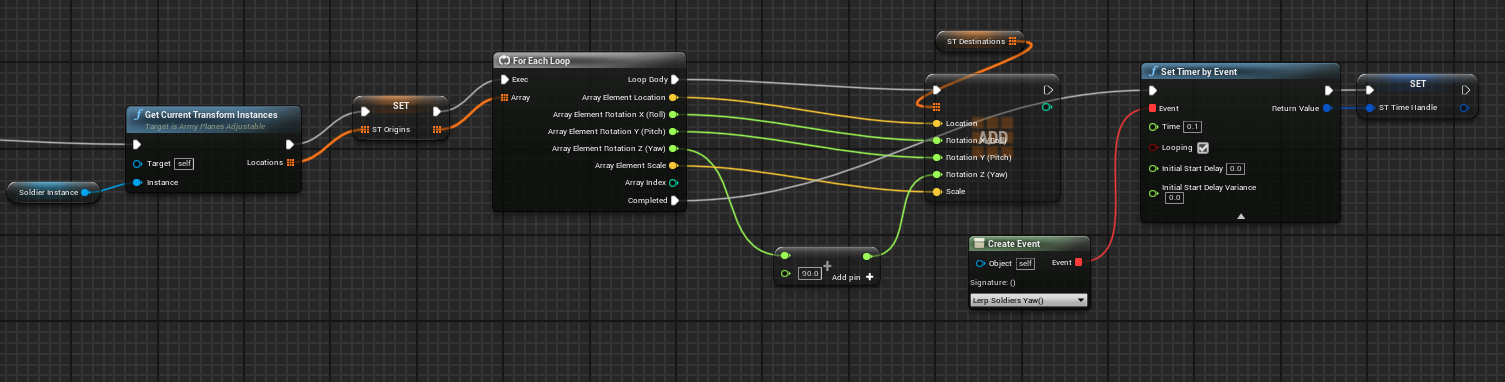 solar sequoia
like that because I've made the mistake of not plugging in all break to make pin...
solar sequoia
solar sequoia
like that because I've made the mistake of not plugging in all break to make pin...
obviously replace "slatebrush" with your struct
solar sequoia
cyan bone
sorry for taking so long.
This one rotates all the soldiers
https://i.imgur.com...
what does "create event" do and why are you calling it 10 times per second?
dawn gazelle
solar sequoia
like that because I've made the mistake of not plugging in all break to make pin...
You can also use "Set members in <struct type>" to set values.
 cyan bone
solar sequoia
what does "create event" do and why are you calling it 10 times per second?
cyan bone
solar sequoia
what does "create event" do and why are you calling it 10 times per second?
ops sorry
versed spruce
solar sequoia
like that because I've made the mistake of not plugging in all break to make pin...
amazing, that will make everything easier. I just wanted a in game spread sheet to fill data and struts are almost that
solar sequoia
dawn gazelle
You can also use "Set members in <struct type>" to set values.
I never knew that. do this instead @cyan bone
dry condor
aaand learned something new again! thx @dawn gazelle
cyan bone
solar sequoia
I never knew that. do this instead <@969845251911073833>
what a shame. i connected the loop, not the Completed
cyan bone
solar sequoia
I never knew that. do this instead <@969845251911073833>
Im rotating the units 90º just that
solar sequoia
sorry I pinged the wrong person
solar sequoia
cyan bone
Im rotating the units 90º just that
ignore the thing I just pinged you in
@versed spruce use set members instead of the thing I showed you. I guess UE really does have a solution for everything
dawn gazelle
dry condor
aaand learned something new again! thx <@218956378654507008>
Just be careful whether it's a reference to an actual struct as the input. If it's not by ref, then it won't set the value in the actual struct. Eg. If you pull a struct from an array, you need to reset the value into the array as it may be returning a copy, not a ref.
 dry condor
this whole break/make thing takes up so much space in a BP, so much cleaner to set it directly 😄
ah ok have to get a ref then not a copy
solar sequoia
dry condor
this whole break/make thing takes up so much space in a BP, so much cleaner to s...
I had no idea that was even a thing tbh
versed spruce
Im gonna have to fuck around with it to learn it but this will help a lot. You are my savoir guys
dry condor
me neither
solar sequoia
versed spruce
Im gonna have to fuck around with it to learn it but this will help a lot. You a...
structs are kinda easy once you make the first one. I use them all over, just apparently have been setting them wrong 😆
cedar sparrow
only the movement animations are replicating for the paragon assets. How do I get the attack animations to replicate for multiplayer
solar sequoia
cedar sparrow
only the movement animations are replicating for the paragon assets. How do I ge...
through a replicated event, generally
versed spruce
Ill ive wanted was a spread sheet to keep data in. I was so excited when i found them but wasn't able to set them in real time
cyan bone
solar sequoia
structs are kinda easy once you make the first one. I use them all over, just ap...
I wonder if i could use a struct of arrays (groups of soldiers), and then lerp them like that in that one function
solar sequoia
cyan bone
I wonder if i could use a struct of arrays (groups of soldiers), and then lerp t...
not really a solution to your issue imo
@cedar sparrow some animations are easily replicated because they're technically procedural, like if your anim BP knows to play the jump animation when a specific bool gets set, you just replicate the variable, but for event-driven stuff like attack animations, it's probably best to use a server RPC
 foggy otter
is there any way to get accurate normalization of small vectors in blueprints? the default normalize function is kinda really inaccurate. for a vector [0, 0, 0.001] it gives me a 0 vector. if i crank up the precision it instead gives me something like [0.27, 0.69, 1.0] which is not even close to being correct, the vector drifted sideways dozens of degrees. how do i make this better?
solar sequoia
welcome to floating point precision lol
cedar sparrow
solar sequoia
<@135786775628087296> some animations are easily replicated because they're tech...
How would I do that? the attacks are just set to the InputAction binding
 solar sequoia
cedar sparrow
How would I do that? the attacks are just set to the InputAction binding
solar sequoia
cedar sparrow
How would I do that? the attacks are just set to the InputAction binding
so let's say 1-10, how confident are you with networking stuff? I won't explain every step if I don't need to
foggy otter
solar sequoia
welcome to floating point precision lol
okay i know there is inherent limit to precision in using floats but isnt it like 7 orders of magnitude? the error here is way bigger
cedar sparrow
solar sequoia
so let's say 1-10, how confident are you with networking stuff? I won't explain ...
like a 3. if you want to just point me to a resource i can do some research on my own so i don't waste your time
solar sequoia
foggy otter
okay i know there is inherent limit to precision in using floats but isnt it lik...
not to be dismissive, but I don't really know. Can you normalize just one float at a time or something?
solar sequoia
cedar sparrow
like a 3. if you want to just point me to a resource i can do some research on m...
no big deal. Do you at least sort of understand how replication works? or what a remote procedure call is?
I'll explain whatever I need to
foggy otter
hm, maybe thats the way, i'll try it
limber parcel
dawn gazelle
A structure is just data. You can use a structure to indicate the contents of a...
you are just data
dawn gazelle
I've been found out.
cedar sparrow
solar sequoia
no big deal. Do you at least sort of understand how replication works? or what a...
So I know a little bit about replication. As in you need to enable it on certain components to make them show up in other clients. But I haven't dealt with RPCs yet
solar sequoia
cedar sparrow
So I know a little bit about replication. As in you need to enable it on certain...
so the idea is that a client can't just do something and expect it to replicate, because the client isn't authoritative. The server is, and whatever the server does that's designated to replicate will do so to the clients
limber parcel
cedar sparrow
So I know a little bit about replication. As in you need to enable it on certain...
 solar sequoia
so the idea is that a client can't just do something and expect it to replicate,...
solar sequoia
solar sequoia
so the idea is that a client can't just do something and expect it to replicate,...
this is all an rpc is. You create a custom event and choose who will run it, and it will run in that configuration when that's called
 limber parcel
and dont forget about HasAuthority node
solar sequoia
there's a lot to know, but let's just do this one thing first and I'll tell you what to read to learn what you need
limber parcel
 cedar sparrow
solar sequoia
this is all an rpc is. You create a custom event and choose who will run it, and...
cedar sparrow
solar sequoia
this is all an rpc is. You create a custom event and choose who will run it, and...
So this should be run on server then right?
 limber parcel
its only needed if you want to run stuff on server as a client
solar sequoia
that's what he needs in this case
he's right that you shouldn't always use that, but in this case it's correct
limber parcel
he can also use shared space with authority switch or not?
limber parcel
for effects and stuff yes
solar sequoia
stick with me for the moment, but the client can't call a multicast, but the server can, so you call a server rpc into a multicast to play your montage
limber parcel
but on a replicated actor u basically dont need a multicast
u just have to make sure code runs in correct instanced with HasAuthority switch
cedar sparrow
Ok so I set the event to multicast. I need to make another event that is the server rpc that calls this event?
 limber parcel
but for convenience u can still use run on server, multicast etc
solar sequoia
cedar sparrow
Ok so I set the event to multicast. I need to make another event that is the ser...
yeah, pretty much
limber parcel
cedar sparrow
Ok so I set the event to multicast. I need to make another event that is the ser...
thats correct if ure using listen server
cedar sparrow
limber parcel
thats correct if ure using listen server
which i am
limber parcel
if you use dedicated server u dont want this to run on the server
cedar sparrow
limber parcel
if you use dedicated server u dont want this to run on the server
makes sense. luckily its listen only for me 😄
limber parcel
yeah listen server are easier to manage i guess
cedar sparrow
solar sequoia
yeah, pretty much
so what does that look like? a normal function or does it need a replication setting too
limber parcel
it looks ok
but wait
im not sure if the montage needs to be called on server or client
solar sequoia
limber parcel
im not sure if the montage needs to be called on server or client
multicast
limber parcel
technically it should be replicated though
solar sequoia
something like that


@cedar sparrow
this case is a little weird. Normally it's just something the server needs to do, so you server rpc, or maybe an owning client once in a while
cedar sparrow
solar sequoia
something like that
oh hey this worked
solar sequoia
I suggest you read the whole thing, maybe skipping C++ stuff if you haven't done it, and just reference that whenever you need to. Specifically the graph that shows what actors are replicated, from the Game Instance down to the pawn
solar sequoia
cedar sparrow
oh hey this worked
👍 like I said, it's fairly easy. You just have to be used to doing everything kinda roundabout to make sure it runs where it should
cedar sparrow
solar sequoia
https://discord.com/channels/187217643009212416/221799385611239424/2810420375019...
Ill get to reading. thanks!
 minor lynx
I am trying to use ConvertMouseLocationToWorldSpace but it seems like its returning the location of my camera not the mouse or something
err not exactly, it follows the mouse but its all the way up against the screen if you will. instead of on the ground/terrain/object my mouse is hovering
 astral stratus
how can i smooth a lookat roation? I have it so my AI looks at me and shoots
its very snappy right now
 icy dragon
astral stratus
how can i smooth a lookat roation? I have it so my AI looks at me and shoots
icy dragon
astral stratus
how can i smooth a lookat roation? I have it so my AI looks at me and shoots
RInterp To
astral stratus
thanks!
might be doing something wrong forgive me still learning
https://gyazo.com/ff628395a07f0a3a234633b4cdaeb371
 tight schooner
@astral stratus the interp is designed to change things a little on each frame so that it's a smooth animation that happens over time. It has to be done on Event Tick. (And you need to give it the delta time or World Delta Seconds.)
astral stratus
i thought converting delta time to a variable and setting it on the tick would work
tight schooner
Get World Delta Seconds node will give that to you. No reason to store it into a variable
astral stratus
ahhh thats right
tight schooner
But in any case the interp needs to happen every frame, so the rotation has to happen on tick
astral stratus
ok
tight schooner
You can control the ticking with Set Actor Tick Enabled node if you need to conditionally turn it on/off
BTW you don't need to cast to your character class to Get Actor Location
It'll work without the cast
Unless you're checking something idk
 tight schooner
Hard to say but you need to put Event Tick on your event graph, and move the Set Actor Rotation there
astral stratus
so put the tick in and just plug it into the set actor rotation?>
tight schooner
Probably. I can't see your whole graph so I can only guess what you need to do
Event Tick is an event that executes once per frame
And delta seconds is the frame time
 astral stratus
ok
tight schooner
Accessed None means it's trying to get invalid data
astral stratus
ill show you the whole thing gonna take 2 screen shots though
tight schooner
Go for it
trim matrix
Guys what will be the performance difference with making with complete blueprint or with C++
When making a open world game something like a small town of 4*4 km
 fiery swallow
depends?
tight schooner
@astral stratus your scenario is actually pretty tricky cuz you want to do a series of actions. It might even be easier to do it with a Timeline component, where the turret turns toward the player during the timeline and then shoots on complete.
astral stratus
Ah back to timlines lmao
tight schooner
but the path of least resistance given what's on your graph could be...
replace the target for the 2nd Get Actor Location node with Get Player Pawn, lol
trim matrix
trim matrix
Guys what will be the performance difference with making with complete blueprint...
Any rough estimate
tight schooner
or well, then the turret will always look at the player no matter what. Hmm...
I guess start with actor tick disabled. Then when the OnSeePawn event fires, enable actor tick.
(Class Defaults panel has the option to disable actor tick by default)
astral stratus
ok
tight schooner
Then the SetActorRotation stuff will only happen after OnSeePawn is called
and if you have an event that detects when the pawn goes back to unseen, you can have it disable actor tick
and the turret rotation will halt
astral stratus
havnt gotten that part done yet but thank you
 faint pasture
versed spruce
The current problem i have is i want a battery to retain it charge when i pick i...
faint pasture
versed spruce
The current problem i have is i want a battery to retain it charge when i pick i...
Make your item definition include some info that could be used for the battery level, if items as structs is what you're doing
gentle urchin
 drifting peak
You dont need to get the element ?
Simply remive the randomly found index
Remove*
faint pasture
Structs are mega cheap, you can have a field like
float Condition
or
float CustomFloat
to represent level for a battery, something else for seomthign else, etc
drifting peak
@gentle urchin i tried to remove that as well
faint pasture
I have arrays of custom ints, floats, and vectors for my struct representing a saved and customized vehicle part.
BTW how does a struct with an array in it get serialized?
cuz you don't know the array's size in bytes
gentle urchin
drifting peak
<@231467939734355969> i tried to remove that as well
Sure it finds an index?
Also if this array is an input of the function you need to input it by ref


 gentle urchin
Well now you've added to it
Before the check
It might still be true, but atleast your test doesnt prove it..
faint pasture
drifting peak
What are you trying to do?
gentle urchin
Atleast not by what im seeing
faint pasture
Also what is the scope of this array, is it a local variable?
How do you know it's not removing?
drifting peak
gentle urchin
It might still be true, but atleast your test doesnt prove it..
how would you suggest I test to prove it
@faint pasture its not local var, i know its not removing because the number is repeated after being removed
trying to make a dice roll
faint pasture
Why would this be how you do a dice roll
drifting peak
but each index cant be repeated
@faint pasture how would you suggest to do it then?
faint pasture
drifting peak
<@127902729677963264> how would you suggest to do it then?
Random int from 1 to 6 lol
drifting peak
..
I need to store the all sides of the dice
and the number has to add to 21
random int from 1 to 6 wont work lol
faint pasture
What's the use case? Are you doing something where anything beyond the face-up number matters?
Like is this physical dice?
drifting peak
yeah it will be a physical object
faint pasture
WHy not just let physics do the work for you?
do you want the number before doing the animation/physics or after?
drifting peak
you are saying to have a dice and let it roll with physics right
faint pasture
I mean a random int from 1 to 6 is good enough for most games, I'm trying to nail down exactly what you need here
gentle urchin
^
drifting peak
in this case, each side of the dice, will affect each side of a wall, the number will affect the walls ( such as dynamically changing the walls with different numbers)
thats why i have to store the value of each side
faint pasture
so it's more than just the face up number
drifting peak
I would say so
faint pasture
so you need one of the 24 orientations it could land in
gentle urchin
Why 21?
faint pasture
do you care if they're in canonical order?
like the 1 and 6 opposite?
or just that they don't repeat
faint pasture
k then make an array from 1 to 6 and call shuffle array on it
drifting peak
aight ill try it
faint pasture
you'll have a jumbled up array with all 6 numbers in it
then just call indices 0,1,2,3,4,5 your top,right,front,left,back,bottom or whatever
if it MUST be accurate to real dice you can just roll a number from 1 to 24 and have that be one of the 24 orientations a dice could have
drifting peak
faint pasture
then just call indices 0,1,2,3,4,5 your top,right,front,left,back,bottom or what...
I am currently already doing that
faint pasture
It looks like you're trying to reimplment shuffle array on your own
it's a node
just call it
gentle urchin
^ sounds like a neat solution
drifting peak
you know what
faint pasture
Now I'm interested in randomly rolling the orientation preserving the actual orientation of dice
with the numbers oposite
drifting peak
thats pretty good solution
but yeah i might also want to preserve orientation for the fun of it
gentle urchin
Also, not an issue anymore,
drifting peak
your solution works i just did it
gentle urchin
But one of the reasons your function repeats
Is that you're pulling from a random
A random is random or every call
So when you get it the first time, some number is added from index X. Then you remove some index Y
You must save the valurs of random if you wish for them to persist
drifting peak
i checked that the random stays the same until the next loop
faint pasture
drifting peak
but yeah i might also want to preserve orientation for the fun of it
I would honestly recommend that because it might look weird to have a 1 next to a 6 instead of opposite, and it would also allow for some patterns
drifting peak
im sure you are making a point @gentle urchin I might just not be following
faint pasture
although it constrains your random generation space down to 24 options instead of uh 6^6?
nvm it'd be 6!
720
gentle urchin
drifting peak
i checked that the random stays the same until the next loop
If you checked by the same method as your isValid, then its a false positive
drifting peak
@gentle urchin how do I check it properly?
tight schooner
drifting peak
im sure you are making a point <@231467939734355969> I might just not be followi...
Every time you connect a "pure" function (a node without exec pins) to an executed function/event (a node with exec pins), the "pure" functions are called again. So if you connect a "Random..." node to two executed nodes, it'll roll two different random numbers. The "Random" node doesn't remember the last thing it rolled. That's what's going on in the screenshot you posted JFYI
 tall rain
Hello, I mostly prototype little games for fun, but I find myself repeatedly creating the same classes and actor components (Health System, Experience System, AmmoSystem, etc...). Do yall create like a "core library" of modular components you use often? What would be the best way of doing this (in terms of making them accessible through different projects and updating them) (Also sorry if I'm interrupting, I don't know discord etiquette and if its cool to add another conversation)
drifting peak
@faint pasture @gentle urchin @tight schooner thank you yall for helping, I appreciate it, have a goodnight mates
gentle urchin
drifting peak
<@231467939734355969> how do I check it properly?
The only safe way is to save it in a variable untill you are done
faint pasture
tall rain
Hello, I mostly prototype little games for fun, but I find myself repeatedly cre...
Plugins
tight schooner
@tall rain re: interrupting... it's par for the course in this channel. Don't worry about it
faint pasture
faint pasture
Plugins
I have a project that's just a container for plugins I've made for various systems. Just drag and drop them and you're good to go
gentle urchin
But then you always have to go back and update the core
Which is fine if you're structured
But for me thats troublesome 🤣
I want some autosynced plugin that i can edit on the fly in any project :p
faint pasture
Automagically linking them together across different projects will take some source control or symbolic link magic but it's doable I'm sure.
Not worth the trouble for me, I just dev in context then update the Plugins project with the latest whenever I want
gentle urchin
Perhaps engine plugin solves it ? Not sure if you can edit them "randomly"?
faint pasture
Ya engine plugin would but then your team members aren't getting them and it's not nice and contained in the project
gentle urchin
faint pasture
Not worth the trouble for me, I just dev in context then update the Plugins proj...
Honestly im just making it to be an issue. Its less of an issue than i want it to be
faint pasture
Not too much trouble to manually update unless you're changing projects 5x a day.
tall rain
I'm pretty beginner so I've been creating a ton of new projects. The plugin idea seems like the way to go if its easy to update. can I update the plugin form inside multiple projects? I know I would have to update them in every project though but im likely not going back to projects cause theyre mostly just to have fun while learning UE
faint pasture
My oldest is from 4.1 lol
It's been upgraded all the way up to 5
I bet it has some cruft in it
faint pasture
I havn't done any real work on it for a few years, just keep it up to latest engine and make sure it compiles. I decided that a multiplayer only action game is a bad idea for a small outfit.
gentle urchin
tall rain
I'm pretty beginner so I've been creating a ton of new projects. The plugin idea...
Exactly, old learning projects
faint pasture
The design was basically Arathi Basin with 3rd person RPG action combat. Way too ambitious.
gentle urchin
As most early projects are
Like
I have a project named mmorpg
Who am i fooling 🤣
Me and what army
tight schooner
Apparently my oldest is UE4.12 (2016)... a 2-man project that was going to be a DayZ-esque multiplayer game with little or no graphics; just 3D sound and VOIP with grid-based movement in a pitch-black dungeon. It was as much the nebulous game design that killed it as the tech requirements. We didn't have a strong idea of where to take it.
But at least I got my feet wet with blueprinting
gentle urchin
Thats usually my struggle aswell, and is why i abandoned my last project
Not having a clear idea of what the end result is
And I get influenced by input i asked for, but ignorantly starts to implement parts of it before i realize i'm drifting to far from the original idea, losing motivation :p
faint pasture
Yeah I looked it up, April 2014 is when I started on my oldest project lol
man they moved fast if 4.12 was only 2 years later
gentle urchin
Time goes by to fast
I need more time for my projects
Guess i cant have more, so only solution is to clone myself
That or hiring 😮💨
faint pasture
Couldn't find my first video but this is the oldest video of my first project I could find.
"sure, a pvp game for your first project while you're learning how to program and also learning blender is a great idea"
gentle urchin
It's a start, as you say in the video! Well done while learning!
faint pasture
"Back in the day we didnt have no dang tootorials" old man noises
gentle urchin
xD
drifting peak
drifting peak
faint pasture
Couldn't find my first video but this is the oldest video of my first project I ...
multiplayer for first project thats hardcore mate
heli giraffe
faint pasture
drifting peak
multiplayer for first project thats hardcore mate
I'm still multiplayer but at least it's not a dedicated server competitive 20v20 action RPG game lol
drifting peak
faint pasture
I'm still multiplayer but at least it's not a dedicated server competitive 20v20...
LOL true dat
 naive geyser
Hi, i have set up an axis mapping for mouse X. However i always have to hold down the mouse button for it to work, else it doesnt work if i swipe the cursor across the screen. How do i make it work without holding down the mouse button?
faint pasture
naive geyser
Hi, i have set up an axis mapping for mouse X. However i always have to hold do...
Set Input Mode
naive geyser
faint pasture
Set Input Mode
In the actor?
 fleet cedar
Hello. If I had a big event like... 'Disable all locked doors' that affected multiple blueprints where would I put that event?
I get confused by the game mode / player controller,
 pale blade
fleet cedar
Hello. If I had a big event like... 'Disable all locked doors' that affected mul...
pale blade
fleet cedar
Hello. If I had a big event like... 'Disable all locked doors' that affected mul...
Hm, maybe something like a manager? Interaction manager that handles all interactions?
foggy escarp
naive geyser
Hi, i have set up an axis mapping for mouse X. However i always have to hold do...
Use action mapping or a branch to check for value.
, oh nvm discord failed to properly update
 trail sierra
Is there a better channel for an absolute newbie to ask blueprint questions?
limber parcel
trail sierra
Is there a better channel for an absolute newbie to ask blueprint questions?
no, but u should watch some tutorials before u ask stuff like "how do i make multiplayer"
trail sierra
No I was going to ask a question about a step in this tutorial im going through that I didnt understand
limber parcel
wel then what are u waiting for xD
trail sierra
It was just a basic tutorial on adding movement input to a pawn, ill link the actual tutorial then ask question

raywenderlich.com
In this Unreal Engine 4 blueprints tutorial, you will learn how to use blueprints to create a player character, set up inputs and make an item disappear when the player touches it.
I understood all the steps for taking the player input, scaling to a max speed then combining all those together. I thought that would lead to movement, but then the tutorial had me add this section

and I dont really understand its purpose
 still rain
can i get any point info of spline mesh component?
like how many points a spline mesh componet have or anything like that?
tight schooner
still rain
like how many points a spline mesh componet have or anything like that?
AFAIK a single spline mesh component only has a start and end point
here are the nodes available for spline mesh components

Spline components (no mesh) can have multiple points
but if you want to cover a spline component with spline mesh components, you have to spawn several of the latter AFAIK
 safe iron
Hello there
The add node does not work :/
I am trying to add an actor to the array but when I check that array it's empty for reasons
That's about it... I should mention that this array right here is in a struct, which then is contained in an array of structs itself, since I needed something similar to an array of arrays but had no other way to do that
But I think it should work anyways
 naive geyser
foggy escarp
Use action mapping or a branch to check for value.
naive geyser
foggy escarp
Use action mapping or a branch to check for value.
I am using axis rn, I’ll try using action in a bit
still rain
tight schooner
AFAIK a single spline *mesh* component only has a start and end point
but in ue4, if you drop a spline mesh actor in the scene, it will have at least 2 points
tight schooner
start point + end point = 2 points
still rain
iirc, we can edit it, like add more points?
but i have no idea why i cannot do this now
limber parcel
trail sierra
and I dont really understand its purpose
i havent seen it before but im guessing it reduces the movement speed, something like drag
trail sierra
Is there a quick way to temporarily "comment out" blueprints?
so I can take them out of the equation without fully deleting them
tight schooner
yeah sorry idk much about spline mesh actors. I know about spline mesh components. I'm looking at the actor now; as far as I can tell it contains a single spline mesh component. Not sure what else is possible with it.@still rain
There are some tutorials online that detail how to loop through a spline component and systematically attach spline mesh components all along the spline component. I'm sure if you google you can find one
@trail sierra Right click on node and "do not compile"
might need to tick an editor option to show that
still rain
tight schooner
yeah sorry idk much about spline mesh *actors*. I know about spline mesh *compon...

it's just splineMeshComponent with an actor
tight schooner
@trail sierra in UE4.26 anyway, to enable the commenting-out of nodes, go to Editor Preferences --> Content Editors: Blueprint Editor --> Experimental section
click the chevron to reveal more
Allow Explicit Impure Node Disabling
still rain
I knew how to do it with spline component...but since the asset i get is a bunch of spline mesh actors...