#blueprint
402296 messages · Page 823 of 403

 odd ember
yes
 subtle isle
got it
odd ember
you're basically ensuring that there is a current interaction before using it
before you didn't have that safeguard
subtle isle
im assuming not having these could lead to crashes at some point
odd ember
probably
tbh I'm not sure how BP handles null pointers in projects
if it was cpp side it would definitely crash
subtle isle
so far so good i suppose
subtle isle
can i get a reality check real quick?
My deadline is the 2nd of february and I was thinking of making the following things:
- Transported to another area of the map after that interaction we just made
- Roll a dice to lockpick a chest, succeed depending on the roll
- Roll a dice to open a door further down the cave
- Roll a dice to percept what's behind the door after opening it (showing/hiding objects depending on what the player rolled)
- Roll dice to fight a lil spider
I got the dice system working
 subtle isle
Right
 primal smelt
Transportation would be a simple set actor location wouldn't it?
odd ember
but a general dice system is something I could probably do over weekend. then you can ask yourself if you need AI and combat systems for the spider
primal smelt
IF you literally just need to go to one place to tick a box for your class
 gentle urchin
Just for curiousity CE, is there any reason why this wouldnt behave the same way ?

 odd ember
gentle urchin
Just for curiousity CE, is there any reason why this wouldnt behave the same way...
odd ember
gentle urchin
Just for curiousity CE, is there any reason why this wouldnt behave the same way...
because that would imply a hierarchy of interactibles
subtle isle
Not necessarily, I was told that getting the dice system working was already enough to be considered a playable level
so I could make the player roll dice to see if it hits the spider
and take hp off of it he does
gentle urchin
odd ember
because that would imply a hierarchy of interactibles
Yeah it wouldnt work across any class i suppose.
odd ember
gentle urchin
Yeah it wouldnt work across *any* class i suppose.
for interactions especially you want the same functionality across many hierarchies
doors and NPCs
for instance
gentle urchin
Based in AActor it should generally be quite safe tho ? and all things in the end derive from Object, dont they?
Door and NPC both derive from actor
i would think
odd ember
you're misunderstanding hierarchies
if you wanted both to have an interact function
you would have to write it into a separate hierarchy starting from AActor
since you cannot do that in BP, and it would require engine source in cpp, the better alternative is to make an interface
gentle urchin
I dont see why i would need to do that
odd ember
for which this is one of the few use cases that an interface is actually valid for
gentle urchin
the door implements the interface,
and the npc does ..
Both classes naturally comes from Actor..
odd ember
the NPC does what?
gentle urchin
NPC comes from Actor yes ,
and would , if being interactable, implement BPI Interaction
odd ember
so both of them need the interface, correct
odd ember
we've reached the same conclusion
glad we agree
and we can put this nonsense behind us
primal smelt
yikes!
subtle isle
for me thats exactly what it is because it all goes over my head
at my current level of noobness
primal smelt
subtle isle
for me thats exactly what it is because it all goes over my head
It probably wasn't the quickest and dirtiest way, but you learned something (so did I!)
odd ember
it's a setup in the right direction
subtle isle
Certainly, I had been looking through like 5 different youtube videos before this
couldnt figure out how to implement any of them
odd ember
with this template you can keep improving it, ultimately getting a really complex interaction system going
the idea is to understand the notion of registration
primal smelt
subtle isle
Certainly, I had been looking through like 5 different youtube videos before thi...
Honestly when it comes to Youtube, i mostly just check up on the mighty Matthew Wadstein
Just nice brief explanations and examples
odd ember
primal smelt
Honestly when it comes to Youtube, i mostly just check up on the mighty Matthew ...
you can't rely on this alone. his videos will give you an understanding of what it is every element does in the engine. but he won't teach you code architecture, for instance
primal smelt
He does have some longer videos for exploring coding concepts but if you need a quick primer on what a thing does, he's a good reference point for sure
subtle isle
odd ember
with this template you can keep improving it, ultimately getting a really comple...
yeah I could totally use this to start an interaction with for example the lockpicking chest thing as well right?
odd ember
subtle isle
yeah I could totally use this to start an interaction with for example the lockp...
pretty much
as well as NPCs etc.
the whole point of code is to be as lazy as possible while being as flexible as possible
odd ember
gentle urchin
Which was my entire point lol.
yeah but your code doesn't work for anything but a single hierarchy
gentle urchin
Everything is a single hierarchy.
odd ember
and it makes me question your understanding of OOP
only if you have access to AActor
which you don't, unless you use engine source
gentle urchin
You can even toss it up to Object and support those components aswell. Just avoids the casting, thats all
odd ember
you can't
 odd ember
you cannot do anything on the base actor or object classes without using engine source
gentle urchin
I dont want to do anything in them xD
odd ember
yes but how are you going to call that interaction function?
gentle urchin
thats the entire point
this is only for storing the reference to whatever object derived class that implements the interface
I think we're walking around each other
 dawn gazelle
I think what Squize is pointing out is that you can implement the interface into any AActor, therefore, if you call an interface on an AActor reference, and the actual class of object that is stored in that reference has the interface, it'll still work.
gentle urchin
Extra work, as you pointed out
primal smelt
Question: I'm still not super scrubbed up when it comes to hierarchies. Couldn't you just create a new class from Actor and have everything you possibly want to interact with derive from here?
odd ember
you can create a derived class
but you cannot edit functionality on the actor class itself
dawn gazelle
Sure, but then you lose the ability to use some other nifty prefab classes... Like Pawn or Character.
primal smelt
Would that not be a simple way of doing it for a lot of use cases?
odd ember
it would not
custom means that you are ignoring all the functionality that is built into the engine
dawn gazelle
Like, it's not a ton of work to implement an interface. You're better off just creating a subclass of what you need to work off of, and build off from there regardless.
odd ember
I don't generally like interfaces, but this is genuinely one of the few cases they are useful
gentle urchin
If you knew that all your interactables ever is only going to be relatively specific Actors, you could do it with a proper hierarchy.
But it easily gets out of hand
primal smelt
odd ember
custom means that you are ignoring all the functionality that is built into the ...
Do you mean in respect to the issue Datura raised? I'm not sure if you mean a derived Pawn for example would lose all engine functionality of a base Pawn?
gentle urchin
and locks you to that hierarchy .. which is not flexible
odd ember
gentle urchin
If you *knew* that all your interactables ever is only going to be relatively sp...
this is overengineering
gentle urchin
We agree.
odd ember
primal smelt
Do you mean in respect to the issue Datura raised? I'm not sure if you mean a de...
no but let's say you wanted to add functionality that is unique to a special type of pawn that you wanted, and you wanted that functionality to be shared with, let's say, the specific character derived class (like your own custom character class)
going by regular hierarchies, you could only do that if you edited the base pawn class, since both your custom pawn and the character class ultimately derive from pawn. but that would require access to the engine source, since you would be changing engine code
dawn gazelle
yea
primal smelt
I'm following. So if you did decide to derive from Actor and then suddenly you realise "oh I want pawns to be able to interact with this" you'd then have to set up another derived class from a pawn and then end up back where you started needing a BPI or something similar?
odd ember
correct
so interfaces exist for this particular purpose
to bridge functionality across hierarchies
within the UE ecosystem of classes however, there are also other ways of having this happen
primal smelt
Good to know, I have come across BPIs before and didn't fully grasp it. I've mostly been focusing on a single a pawn throughout this project so far with any interaction outside being level geometry data. I'm getting close to the point where I want to start adding enemies to the game so I need to really think about this kind of thing
odd ember
the reason I don't like interfaces generally, is because they are basically a function label you slap onto a hierarchy
so you could end up repeating yourself quite a lot
 odd ember
the alternative to this is using components, which can be slapped onto classes all the same, but contain functionality in and of themselves
primal smelt
odd ember
the alternative to this is using components, which can be slapped onto classes a...
You mean actor components? I have these implemented in my pawn currently!
odd ember
it's not a question of replacing but rather understanding how to abstract logic to a point where you can very easily add or modify classes with little work
primal smelt
Mostly for raycasts for wheels, same one just repeated four times
odd ember
I like to, as much as possible, treat actors with the general notion of being component managers
so the components do the work, but the actors let the components communicate between each other
subtle isle
quick question not quite related to blueprints but is it okay if I just make a room under this landscape and tp the player there?

and have the rest of the lvl play out there
odd ember
is it okay? who are you asking permission from?
subtle isle
i meant like
primal smelt
subtle isle
quick question not quite related to blueprints but is it okay if I just make a r...
So long as the collision doesn't overlap, I guess?
subtle isle
would it bug out or something yeah
odd ember
try it
subtle isle
aight x)
primal smelt
Check teh collision of the landscape, if you put the room where the collision plane cuts right through it then you may get problems
Completely unrelated but @odd ember and @gentle urchin , I don't suppose you recall my tick timer macro thing?
subtle isle
oh yeah its all good
 gentle urchin
How could that be forgotten
primal smelt
So, if I explain the purpose of it. Do you think you could give me an example of a better alternative?
odd ember
no guarantees
primal smelt
I gave a off-the top of my head example last time but lemme screenshot something more specific
dawn gazelle
subtle isle
quick question not quite related to blueprints but is it okay if I just make a r...
If you go too far down, the game will destroy anything that goes below the Kill-Z setting (but can be changed in the world settings)
odd ember
dawn gazelle
If you go too far down, the game will destroy anything that goes below the Kill-...
you'd have to go really far below 0 though
 subtle isle
dawn gazelle
If you go too far down, the game will destroy anything that goes below the Kill-...
subtle isle
dawn gazelle
If you go too far down, the game will destroy anything that goes below the Kill-...
im at like -2500 right now i think
 odd ember
dawn gazelle
-1000 by default, no?
odd ember
dawn gazelle
-1000 by default, no?
I think the default value is negative 16bit max
subtle isle
oh right mb
 versed sun
is there a way to disable the use of Int(64) ? I don't use it in this project and am tired of it being suggested when looking for Int
primal smelt
Ok so this part of code that detects how much the player has rotated the thumbstick from one position to another along the outer radius. I haven't worked on this bit of code in some time so bear with I may be misremembering exactly what does what!
The "Amount" float is basically a value based on how much the stick has rotatesd from a starting point, the Amount Last is a saved position from when the stick was moved and stopped (I think it checks over increments of 0.1 or less than that, I forget.)

That isn't too important for my question though. What I am able to do with this is determine the duration based on the difference between these saved positions so to better control the amount of torque and force that is applied
As a bonus, elsewhere in the code I can also check the stored float - which is acting as the timer - to block something else from executing. In this example, due to a complex to explain control system, when the vehicle (or wheelchair in this case) is rotating from this thumbstick input, the brakes will not be applied.
Actually struggling to tease out the question from this... I suppose a good place to start - if you are running on tick, what kind of timer/gate implementation could work where I can track it's current progress as it runs?
And something where the duration can be altered in such a way as it does in this macro?
Here's the guts again, in case that's helpful
 gentle urchin
Its a lot cleaner if you dont drag everything from the same variable node
Less messy
The first screenshot in particular
primal smelt
gentle urchin
Less messy
I know but I have a weird thing for fungi and things sprouting out from a tiny nook or cranny :p
Although bizarrely I hate the curve tangents, which look far more organic than my straight lines
But this was what I came up with as a consistent way to manipulate physics with precise inputs that are framerate independent
gentle urchin
Also if Lhand Fr Tpush ? If 1, set to 0, else set to macro value?
odd ember
versed sun
is there a way to disable the use of Int(64) ? I don't use it in this project a...
no
versed sun
odd ember
no
bummer , thanks
primal smelt
gentle urchin
Also if Lhand Fr Tpush ? If 1, set to 0, else set to macro value?
Yeah basically in this instance the timer stops and does not reset until prompted elsewhere when value is 1
else = incrementing the float and timer ticking
odd ember
primal smelt
Ok so this part of code that detects how much the player has rotated the thumbst...
you could probably get away with using interpTo or a curve possibly over all this complex math that just seems over engineered
but beyond that I still don't know what you're trying to do. what kind of handling does this provide for your vehicle?
what kind of handling do you want?
is there a real life example?
primal smelt
In a wheelchair when you are stationary, you can grip both wheels and rotate in opposite directions to rotate on the spot. I have it so you can do this on a per wheel (left and right) basis, adjusting the amount of force and torque applied accordingly
Also, I am not applying torque to the wheels for movement as you would expect. I am applying forces and torque to the chair itself.
gentle urchin
Sounds like this could work directly on both axis values instead 🤔
Where the difference would be applied to rotation, and the commonvalue applied to torque
So 0.3Leftstick and 0.7Rightstick would be 0.3Forward and 0.4Rotation
Unless i completely got this wrong lol
primal smelt
gentle urchin
Sounds like this could work directly on both axis values instead 🤔
Hold on, need to put my roast potatoes on
odd ember
primal smelt
Also, I am not applying torque to the wheels for movement as you would expect. I...
I think generally #legacy-physics would be a better place to ask about this
it's a case of translating angular momentum to forward momentum basically
and vice versa
I'd have the value just scale linearly based on the input value
you can turn a -1..1 value into an alpha by adding 1 and multiplying by *.5
that way you could use it with a lerp for momentum
then it's a case of states. if both wheels are turning, you would have forward momentum
if only one wheel is turning, you have angular momentum
you could also make it into fluid states based on the alpha value if you really wanted to
primal smelt
It's difficult to explain without fully going into the way the control setup works, this timer is more in consideration for the thumbstick rotation demands and also the way braking is input by the player.
But I have these tick timers all over the shop. As a way to gate off code on a timer, with a duration adjustable at runtime that is consistent across framerates - that's kinda what I was hoping to focus on.
Or better yet, what's wrong with the macro itself in your opinion? You mentioned over engineered?
Best way to briefly summarise my game is Arx Fatalis but Am Shagar is in a wheelchair
odd ember
timers won't be consistent over framerate anyway
primal smelt
But using floats in this way ensures - as accurate as I am able to measure - consistency. A lot of forces are applied over time and even though physics is supposed to be framerate independent when run on tick, I found using this macro gave more accurate results.
odd ember
physics aren't framerate independent
nothing is
physics tick at a different rate only for performance reasons
primal smelt
Oh boy I wish I could pull up all the chat logs of people telling me it is (on add force, not impulse)
primal smelt
I do use substepping as well
odd ember
but it's not indepedent
primal smelt
true, I should have put two and two together on that one.
But I think what has been communicated in the past is that when you add force on tick it should apply that force consistently over framerate - I guess as an instruction to what gets fed to physX
But yeah, didn't mean to turn this into a topic about physics.
odd ember
well your question was about physics
primal smelt
But this macro certainly has proven useful for ensuring physics applied over time are consistent across framerates
primal smelt
odd ember
well your question was about physics
It really wasn't
odd ember
primal smelt
It really wasn't
well yeah it was seeing as what you're working in is the physics of the engine
macros aren't all bad, but certainly seeing weird macros in lieu of better functionality definitely sets off warning signs
I would also look into the different types of engineering latches that exist and see if you can translate those into code
primal smelt
odd ember
well yeah it was seeing as what you're working in is the physics of the engine
Ok well let's bring it back to this question:
But I have these tick timers all over the shop. As a way to gate off code on a timer, with a duration adjustable at runtime that is consistent across framerates - that's kinda what I was hoping to focus on.
Or better yet, what's wrong with the macro itself in your opinion? You mentioned over engineered?
odd ember
yeah it just seems unnecessary
 deft patrol
Hey guys, i have a quick question, that i'm sure you'll be able to answer within miliseconds of me posting it. Can i interupt you for just a minute?
deft patrol
 primal smelt
odd ember
yeah it just seems unnecessary
primal smelt
odd ember
yeah it just seems unnecessary
Ok well thanks for trying anyway
odd ember
primal smelt
Ok well let's bring it back to this question:
But I have these tick timers all ...
nothing wrong with having timers running on tick time for whatever reason, but the notions of them being framerate independent etc. is something I would disregard completely
odd ember
deft patrol
Im having issue with saving blueprint
seems like the array is empty
deft patrol
array has to have predetermiened size?
odd ember
deft patrol
array has to have predetermiened size?
no? it's just an empty array you are feeding into it
subtle isle
Greeeetings I have returneeed with some questionez
im adding impulse randomly to this dice

i think
but it always gets shot in the same direction

also, im line tracing to check the number it lands on
is there a sleeker way to delay the line trace other than using a delay node?
like a, wait for impact then do line trace kinda thing?
deft patrol
odd ember
no? it's just an empty array you are feeding into it
i added an empty array element, and nothing changed, beside length showing "1"
odd ember
subtle isle
is there a sleeker way to delay the line trace other than using a delay node?
just call the line trace once the dice has stopped?
odd ember
deft patrol
i added an empty array element, and nothing changed, beside length showing "1"
makes sense?
odd ember
okay well make sure that Names isn't an empty array
deft patrol
it isn't
odd ember
but it is
because there is nothing in it
maybe you changed code that adds to it
but it is empty
and your code as you've shown it works correctly because it is empty
subtle isle
odd ember
just call the line trace once the dice has stopped?
yeah thats what id want to do but how do I check if the dice stopped, is there a node to check for whether its in movement or not?
 subtle isle
I suppose I could get velocity
deft patrol
but thats still not
odd ember
you can use the Set node to set one array to be equal to another
deft patrol
the thing
odd ember
well I don't know what you are asking then
deft patrol
odd ember
you can use the `Set` node to set one array to be equal to another
I did, and it didn't work
odd ember
deft patrol
I did, and it didn't work
well show code?
deft patrol
deft patrol
im setting it here
odd ember
deft patrol
im setting it here
use breakpoints to see what values are actually stored inside each array
 twilit gull
Do i need to store all connected to session players somewhere to be able to get their score?
odd ember
subtle isle
yeah thats what id want to do but how do I check if the dice stopped, is there a...
I don't know, I don't use physics when I can avoid it. you can always ask in #legacy-physics
 tranquil abyss
Simple one here, I have a coin that I pick up when I walk over it, The issue is the AI also pick it up. Im guessing once of the pins on the overlap event can solve this issue but im not sure which one
 odd ember
tranquil abyss
Simple one here, I have a coin that I pick up when I walk over it, The issue is ...
odd ember
tranquil abyss
Simple one here, I have a coin that I pick up when I walk over it, The issue is ...
change your cast to be for your player character
subtle isle
odd ember
I don't know, I don't use physics when I can avoid it. you can always ask in <#2...
Aight, I'll try experimenting a bit, thanks again 🙂

 odd ember
tranquil abyss
odd ember
tranquil abyss
I don't know what your player character is called
dawn gazelle
You want to do a check if "other actor" on the overlap is "get player character 0". if it is, proceed with your cast.
odd ember
tranquil abyss
TopDownCharacter
make your AI a different class
tranquil abyss
Their a easy way to do that
also would that break all my other logic around the AI
odd ember
I don't know how you got around to having your player and AI be the same
tranquil abyss
ctl c and ctl v
and being very new to unreal
and
having almost no clue what im doing lol
 bitter tapir
Is it possible to get the linear velocity of a body after a collision?
odd ember
bitter tapir
Is it possible to get the linear velocity of a body after a collision?
you can try with Event Hit otherwise try #legacy-physics
bitter tapir
Event Hit gives me the old velocity
odd ember
I don't know what you're after hten
bitter tapir
That's weird. All of a sudden I'm getting the new velocity.
Oh, I know why. With Tick Physics Async activated it returns the velocity before the collision. With it deactivated I'm getting the velocity after the collision.
 indigo bough
Working on a tool for character customisation.
Right now I have a decal being positioned/rotated based on the surface normal of the mesh under the cursor. It works really nicely in smooth areas, but as you can see, detailed parts of the mesh end up looking strange when moving over them. Any idea how I can solve this?
I thought of using the camera forward vector instead of surface normal, but it doesn't look as nice as the surface normal method (when it works correctly).
I guess I could create a proxy mesh which is simplified and removes these smaller details, but that would mean it'd have to be similarly rigged and have all the same blendshapes/morph targets which is a pain. Any other ideas before I go that route?
odd ember
indigo bough
Working on a tool for character customisation.
Right now I have a decal being p...
sorry but which part of this relates to blueprint and not #graphics ?
versed sun
indigo bough
Working on a tool for character customisation.
Right now I have a decal being p...
My idea would be 4 line traces close to where the mouse cursor is, and get the average surface normal. have a variable to adjust how close the 4 points are and adjust with mouse wheel ?
indigo bough
odd ember
sorry but which part of this relates to blueprint and not <#221799195806400512> ...
The part of the question is about projecting the decal correctly using blueprints 🙂
indigo bough
versed sun
My idea would be 4 line traces close to where the mouse cursor is, and get the a...
That's a good idea! I'll give it a try - thanks 🙂
odd ember
indigo bough
The part of the question is about projecting the decal correctly using blueprint...
I'd consider asking there first to see if there are better solutions that don't have to involve BP
indigo bough
odd ember
I'd consider asking there first to see if there are better solutions that don't ...
Just figured out a way to do it with material spheremask and world position 🙂
 dire oyster
how can i learn about how the blueprints system is implemented in unreal and why does it compile so fast?(opening the black box)
 empty needle
Hi, is it possible to call a function by it's name?
versed sun
like from a text/string?
empty needle
Yeah, I basically have different functions.
But I want to be able to call them in different orders.
versed sun
 empty needle
So, I'd like to have a array of strings. And based on that array, I'd like to be able to call then in different orders.
versed sun
this might work for you , leave time and looping default
Object is also blank/default if yo are calling it inside the same blueprint
empty needle
Yeah, that didn't work. 🙂
gentle urchin
Sounds like a weird way of doing it, may i ask why?
In what scenario do you want to swap the sequence of function calls?
empty needle
I have a lot of UMG animations, that are driven by blueprint. And when going through various menu's they close in various orders.

I'm trying to avoid the spaghetti, and see if I can create a universal function that'll run the animations in the order I need
 gentle urchin
You can always switch on string
Wrap that in a function then you can do an array loop
empty needle
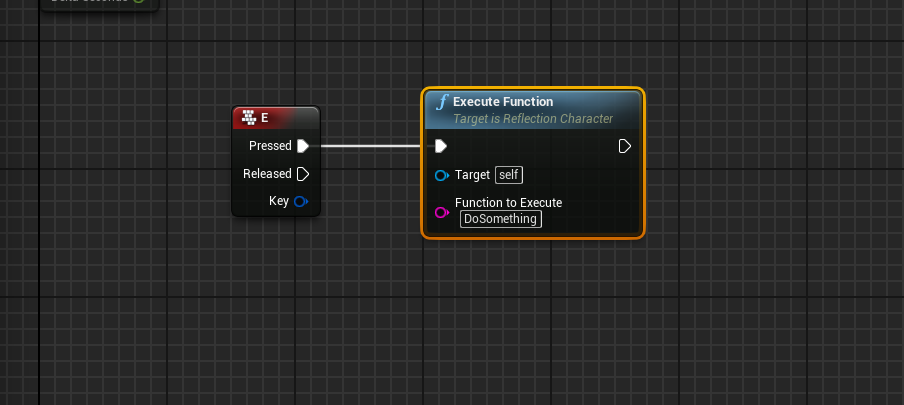
In this post, we’re going to utilize the built-in reflection system in UE4 to perform changes in our game at runtime. Reflection is the ability of a program to inspect its own code (or other associated code) and change at runtime…
This looks very interesting
empty needle
Appreciate the feedback, thanks @gentle urchin
gentle urchin
Did it work? Or didnt try?^^
empty needle
I created a function, with an enum based on your suggestion. 🙂
empty needle
🙂
versed sun
Does Unbind all Events run on just the BP calling it , or on ALL blueprints?

 maiden wadi
It will unbind every single thing that has ever subscribed to that delegate.
Generally speaking, that call should be avoided if at all posible.
versed sun
any easy way to "Unbind All in this blueprint" ?
maiden wadi
Not really. Just make yourself a function that unbinds the things you've bound.
 waxen knot
what would I use as an object when I case to a UI
versed sun
thats what i have done
waxen knot
im trying to make it so when I hit a key it changes an image on it
versed sun
just didnt want to reinvent something that exists
maiden wadi
Yeah, nothing easy by default. I wish. 😄
maiden wadi
waxen knot
what would I use as an object when I case to a UI
Need explanation here. Not sure what "case to a UI" means?
waxen knot
maiden wadi
Need explanation here. Not sure what "case to a UI" means?
sorry I meant cast to a widget
maiden wadi
Then you would use a pointer to the widget.
All Casting does is attempt to change a pointer type.
waxen knot
ok but what would I use?
maiden wadi
You created the widget somewhere. That returned a pointer. If you want to access the widget again afterwards you need to save that pointer into a property.
However, that is a rare use in that sense, because you're supposed to let UI just poll from game's state and not make gameplay classes affect UI directly.
What is the image you're wanting to change displaying?
waxen knot
it looks like a text just cause of how I did it but I have an animation that changes it when I hit a key all set up

Here is what I mean
 maiden wadi
Is this in your Controller?
waxen knot
yes
maiden wadi
The correct way to do this is to make yourself a Delegate. AKA Event Dispatcher.
You set your Gun state, on or off, and then call that dispatcher. Your UI can get the local player controller, cast it to the correct one, bind that event dispatcher, and change it's state when that dispatcher runs by polling the current Gun setting.
maiden wadi
Try this really quick. In the bottom left, make a new Event Dispatcher in your Controller.

You should be able to set it up just like this.
 maiden wadi
Just following your current setup.
If you do that in the controller, you can do this in your Widget.

Set Turret, or Set Rocket can just be a branch where that Print is.
maiden wadi
Event Dispatchers are just a way to allow things to communicate, similar to Casting directly do something. Except in this case HUD gets the controller and binds it's own event to when the controller calls that dispatch instead of the controller directly telling HUD to do something.
 undone willow
how do timers work? should this not execute "right wall jump" after two seconds has passed?
 maiden wadi
undone willow
how do timers work? should this not execute "right wall jump" after two seconds ...
maiden wadi
undone willow
how do timers work? should this not execute "right wall jump" after two seconds ...
Should. But I would consider ditching the spaces.
maiden wadi
Unsure. Could be resetting it, yeah.
undone willow
how would I prevent that?
maiden wadi
Save a TimerHandle from the blue return pin and check if it's in use before calling SetTimer.
undone willow
uhhh how do I do that?
maiden wadi
Right click the return value. Promote to variable. Will create a TimerHandle struct type for you. Leave the Set node it creates there. Drag a Get version of that into the graph and drag off of it and call IsTimerActiveByHandle

If timer is active->Not == true, then start a timer and set it's handle into the timerhandle struct. Else timer is active, so don't do anything.
undone willow
can I do it like this? 😂
 maiden wadi
Guess it'll work. That'll get you fired in a few studios though. 😄
undone willow
hahaha
undone willow
maiden wadi
it kind of works now but it is super incosistent
it will do way more than two seconds and then less
i tried using a breakpoint on it, seems like it fails to detach every second time or something, the set timer is activated when I start wallrunning, then two seconds later its activated again and the player falls of the wall, then next time I wallrun, it's activated, and again after two seconds but the player doesn't fall off until another two seconds later when it is activated again.....
wait now its actually working
am confused
huh, when I jump from one wall to another, i seem to be able to run twice as far on the second wall
i don't know, it seems to do whatever it wants tbh
it works better than the delay i used before anyway
 shadow grove
Hey all, I could use some advice on save/load (persistence) in an RPG context. I came across SPUD (https://github.com/sinbad/SPUD/blob/master/doc/props.md) recently which makes persisting a number of properties straightforward. However, it doesn't appear to support persistence of arrays of structs. Currently, my player's inventory is stored as an array of structs. This would be fine if I chose to persist item names and simply retrieved them from a data table but the items have procedurally generated properties and IIRC I can't write to data tables at runtime.
Some options I'm considering:
- SPUD supports persistence of actor arrays. I could wrap the items in an actor but that seems like a lot of overhead.
- Ensure the procedural generation is deterministic and encode the seed/base information into a string and persist that array of strings, rebuilding the objects from that seed at load time. This may unnecessarily constrain the procedural generation of items down the road, however.
Any ideas? Thanks!
maiden wadi
I'm not sure what SPUD is, vaguely looked at it. Serialization is exceptionally easy if you know what you're doing. Much easier in C++, but very doable in Blueprints. You just need to learn to write to SaveGame objects. Using managers for your gameplay data makes this much easier. How you serialize it and restore state is entirely up to you. My containers that players put items into for example have an Inventory Component on it. I use the same component as a child class on the player. But any one of these are just an array of structs. To save the data it's just a new struct which is a class for the building type, and then an array of the inventory's data. At load, the game spawns that container building class and populates the new inventory with data from the SaveGame object.
 rough warren
Hi, I've got a bit of a problem. I have my blueprint here detect the class of a collision and if it's a certain class than do x. But the thing is, it's not returning true even though it's the right class. There is collisions detected and it does output the right class but it just doesn't wanna work. Does anyone know what I'm doing wrong?
 rough warren
So, I forgot to mention, when I do the Building Gen, it works. But it just doesn't work for the road_temp
dawn gazelle
shadow grove
Hey all, I could use some advice on save/load (persistence) in an RPG context. ...
2 works fairly well. All you need to do is build in a way to have additional versions of the generator so if you need to change the procedural generation to add new options to it, you use the appropriate version when generating the item, which means the item itself should also store the version it was generated by.
gentle urchin
rough warren
So, I forgot to mention, when I do the Building Gen, it works. But it just doesn...
Not sure how class check works against actors being destroyed but i imagine they dont play nice.
gentle urchin
gentle urchin
Not sure how class check works against actors being destroyed but i imagine they...
Also, is building gen parent to road ?
Not sure how class checks works in terms of hieriarchy etc
Do parent classes pass or are they exact.. 🤔
shadow grove
maiden wadi
I'm not sure what SPUD is, vaguely looked at it. Serialization is exceptionally ...
Thanks, Authaer.
This is how my system works as well. There is a component that handles the concept of an inventory. That component has a list of structs, each struct representing an item. My player, and any other container, have their own instance of this component. What I'm struggling with is serialization. Could you elaborate a bit on this? To save the data it's just a new struct which is a class for the building type
 grave yoke
How do I let the Cheat Manager instantiate when testing with a dedicated server?
 soft peak
is there a way i can get the "yaw angle" of playable character and a wall?
 broken stream
this is probably a pretty simple question, but how would i go about having an anim montage play repeatedly whil im holding down the button
I want my character to do a spinning slash on repeat until i release the key
tranquil abyss
Does anyone have any insights on how to start building / how to build an inventory system
Im looking to do a list type inventory Kinda like this

The device folder part.
If you know what games this is form Bonus points :p
empty needle
You could create a struct with the various items, and then create an array of those structs.
tranquil abyss
Im lack of unreal engine knowledge hurts me here
I understand coding but now sure how to set this kind of thing up in unreal
also probably wanna avoid the cpp route here tho
i have never dont sotware dev for something like this so Id for sure break everything
empty needle
you won't need Cpp for this, there are a lot of tutorials online on how to create an inventory system;
tranquil abyss
Ive looked into some
but they are all for the traditional block style / dayz / tarkov style
ill figure something out
but of course having an array of items is the basic premise
 wide linden

would anyone know why when i change x it doesnt change distance
hahah nvm
it is
im dumb
was hitting my map border
 dawn gazelle
tranquil abyss
but they are all for the traditional block style / dayz / tarkov style
dawn gazelle
tranquil abyss
but they are all for the traditional block style / dayz / tarkov style
At their core, they're all the same. A structure of items is stored in an array within an inventory component. You generate and manage your UI based on the contents of that array.
maiden wadi
shadow grove
Thanks, Authaer.
This is how my system works as well. There is a component th...
I would start with learning some basic usage of SaveGame Objects. This is a topic that can grow in complexity extremely fast. But if you start simple. For example. If you have your inventory set up already, then start with your player's stats. Make a call in your GameMode to save your game's data. This is what you'll call before quitting the game. Start with your character. Create a new Struct for saving the player's stats. No pointers, just basic data types. Create a custom SaveGame class type, add a property to it of your new struct. Start small, Struct only needs the array of inventory items you have. These need to be serializable without pointers, so FNames, GameplayTags, Floats, Integers, etc. On your controller's Beginplay, you can get this Savegame, pull this struct out, and overwrite your player's inventory.
Realistically to start learning them, all you really need is a SaveGame class. These calls mostly.

 shadow grove
Good advice, thanks. I have simple properties working. Your point about no pointers may have been my issue.
maiden wadi
Yeah. Pointers cannot be serialized. Well.. They can, but they point to memory locations. And you cannot replace that when you reload your game, objects will be in new memory locations, so the pointers will be invalid.
 wild seal
i made a door using nav link proxy, can i somehow make smart links conditional like only go there if ai has the key?
 jaunty solstice
Hi guys
Getting about 100 'Access None' errors when I first enter PIE mode.
PIE: Error: Blueprint Runtime Error: "Accessed None trying to read property CallFunc_GetPlayerController_ReturnValue". Blueprint:
I think the faulty logic is here in my EventGraph. Can any Blueprint experts suggest how I would avoid these errors?

 light hamlet
 odd ember
jaunty solstice
Hi guys
Getting about 100 'Access None' errors when I first enter PIE mode.
PIE...
odd ember
jaunty solstice
Hi guys
Getting about 100 'Access None' errors when I first enter PIE mode.
PIE...
where is this code located?
 tawdry surge
I'm stuck on why
 loud cipher
Anyone know why anim montages with a negative play rate e.g. -1.0 do not play?

Not working anymore
 odd ember
are you sure it doesn't play? I reckon it just plays backwards
so your other event might not trigger
otherwise I'd ask in #animation
 tulip mason
loud cipher
It seems like a engine bug according to unreal engine forums
tulip mason
loud cipher
It seems like a engine bug according to unreal engine forums
Just duplicate th montage and set th sequence I side to -1 playrate
 glossy drum
How can I call a function from a widget
tawdry surge
same as from anywhere else
tawdry surge
Probably none. You could profile it to be sure
 last abyss
loud cipher
Not working anymore
last abyss
loud cipher
Not working anymore
you sure it isn't happening because you're playing it backwards (-1.0) but your starting position is 0.0 ?
loud cipher
Ahhhhhhhhhh ty
rough warren
gentle urchin
Not sure how class check works against actors being destroyed but i imagine they...
The object I'm trying to check, is not destroyed.
rough warren
gentle urchin
Also, is building gen parent to road ?
Nope
rough warren
rough warren
Hi, I've got a bit of a problem. I have my blueprint here detect the class of a ...
^^^
last abyss
well yeah, you're destroying the other actor so the next execution you're getting null if you get other actor and compare it
rough warren
Ohh
dawn gazelle
rough warren
Nope
Not just that but if your building gen isn't a parent to road, how would the second branch here ever execute?
 rough warren
That is a fair point
dawn gazelle
Not even sure if it was parented it would go through... If that == is looking for a specific class, then child classes wouldn't count.
rough warren
That makes, sense thank you so much for pointingg that out for me!
 candid dirge
Default character movement has a sort of ramp up to max speed. Does anyone know how to disable to make character move at max speed immediately?
 brazen merlin
candid dirge
Default character movement has a sort of ramp up to max speed. Does anyone know ...
brazen merlin
candid dirge
Default character movement has a sort of ramp up to max speed. Does anyone know ...
Acceleration. Try that out.
candid dirge
@brazen merlin Yep, thanks! Had to use a giant number
 plucky fractal
Quick Q about SimpleMoveToLocation, is there a way to detect once the movement has finished? The player is required to click on an actor, then the player will move to the location of the actor and interact with it.
But it's interacting as soon as the move to is fired, is there a way to make it wait till its finished?
tawdry surge
Check player location is == destination
 drowsy ferry
anyone know why my child blueprint editor randomly changed to this?
 brazen merlin
drowsy ferry
anyone know why my child blueprint editor randomly changed to this?
brazen merlin
drowsy ferry
anyone know why my child blueprint editor randomly changed to this?
i dont know why, maybe Window menu can help though
drowsy ferry
Ah thanks, finally fixed
gentle urchin
rough warren
That makes, sense thank you so much for pointingg that out for me!
Exactøy the pointni was trying to make lol.
drowsy ferry
went into class defaults in the window menu and in there was a prompt to open full editor
 topaz badger
Is there any particular reason unreal makes it as hard as possible (maybe impossible) to set animation of a actor from another blueprint?
context is: Making a train controller, each car will have its own mesh and animation i want to be able to specify through the editor details panel. Ive run into many hurdles as if the engine is purposely built that way. (Cant add an animation reference in a structure, cant set a skeletal meshe's animation in the constructor, cant cast to an animation asset in the event graph (but can in the constructor)
sorry was pretty vague at first lol, just was frustrated that theres a million hurdles for something so simple
You also cant make animation asset object references, but can for almost any other actor. Is it there for some kind of computational reason?

Skeletal meshes have no issue with this among many other actors

 trim matrix
 topaz badger
Thanks for the clarification on the constructor part, its strange that when setting it with other blueprints, the only option is "Set Animation Asset"

Also, is there any way to input data with that? As far as I know the only way to set the animation is to use the drop down as you cant expose that variable.
 topaz badger
So theres no way to set an animation programmatically besides just a bunch of switch nodes?
trim matrix
I dont know of any way to input animation data like that.
Just make a master car class
Then make each car a children
then change the animation in the details of each childrens skeletal mesh componet
topaz badger
thats my setup but i would like to change the number of cars and type in the level editor/have it be procedural in the future
trim matrix
I dont see any reason why it isnt already ready for a more procedural system
The only things each child needs
is a mesh and a animation asset/anim bp
Unless each mesh can have multiple different animation assests it could use?
topaz badger
Ah you are referring to a child as in a descendant of the class not child actor component. My fault misread that.
Yeah that was what I was going to do originally, ill just do that thanks, wayy easier
 I still dont understand why people use child actor componets
topaz badger
I still dont understand why people use child actor componets
topaz badger
I used them recently for a car, allowed people to posses each actor in the seat. So I felt comfortable using them again
Thank you for the help! I really appreciate it
 graceful forum
Is it possible to override the GetDisplayName node for my custom blueprints?
Like internally it uses UObject::GetActorLabel() or UObject::GetName() according to if it's with editor or not. But I guess those are not exposed to blueprints. Is there any trick for this to not have a cpp parent and still override in blueprints?
 mossy mist
Hi my navigation is not rebuilding

the recast is set to dynamic
and it is set to generate around invokers
it builds in editor fine
but when played nothing regenerates
the ai is just stuck


any ideas?
would be greatly appreciated
graceful forum
Is it possible to make a macro like a function set as Pure to make it have an execution line internally but doesn't require to be connected to the execution pin when used as a node?
gentle urchin
why would you let a seemingly "pure" macro modify anything?
defeats the pure concept doesnt it
soft peak
Hey there, can anyone tell me the difference between those two?

i actually just need a variable inside the animblueclass
gentle urchin
one is an instance, the other is just the class
gentle urchin
instance exist in the "world" , so .. probably yes
class would give you class default values mostly
soft peak
but i also could use the class to get the custom variable
soft peak
Ohh....i actually did something wrong.....
is it even possible to get the animation blueprint INSIDE of character blueprint?
gentle urchin
Most things can be done but is it good practice? Unlikely
I'm wondering a bit about my component setup. I was gonna do a NPC_Manager and a Building_Manager, but cant decide if its really a good idea since they will be heavily interacting with each other anyways. Perhaps i should just wrap it all in one manager..
Feels like I'm dividing them just for the sake of dividing them
The same can be said for the planned inventory manager aswell. The interaction between them is so tied up that it's just.. weird?
A scenario would be placing a building:
Player places it -> It registers to its manager -> Manager generates resource request -> sends request to Inventory manager
Inventory manager recieves request -> sources the required items (if avaliable) and sets up a transportation order -> transport order is sent to NPC Manager.
NPC Manager recieves transport request -> sources the required NPCs -> Gives them orders about where to go and what to pick up.
 glass magnet
hey I'm here to ask for some help/advice
 glass magnet
i forgot what the actual correct name x.x
but
oim trying to change an objects custom depth for stencils thats the word
through a mouse hovering over it
i have it updating whenever the mouse goes over but it isnt changing the stencil depth to my knowledge
oh gorsch my unreal engine isnt launching now
there it goes
am i allowed to send pictures here
 brazen merlin
i dont work with them much, but wouldn't turning off depth matter for the bottom section?
glass magnet
you mean not having value checked ot
brazen merlin
it should be kept on regardless no?
glass magnet
honestly ive tried that and it never seemed to make a difference
brazen merlin
can you also test using the stencil debug where you see the numbers on them?
glass magnet
i think im either missing a step or my materials are
stencil debug
im still fairly new to unreal engine so wdym?
sorry-
 brazen merlin
jc if you have it working at all 😛
brazen merlin
and you didnt mess with other settings.. or?
 brazen merlin
if you can, please explain what you've done (generally) for getting them to work so far
glass magnet
basically trying to change the black to red
ok so
i did the post process array
and have both down there
then i made the stencil to give an outline
and set up that
i also changed the custom depth stencil pass to enabled with stencil in project settings
brazen merlin
alright
glass magnet
is it a problem that they are both set up as 1 under the post process array?
brazen merlin
i dont know
you are not trying to change the ppm you are trying to change the stencil bit
glass magnet
yeah the stencil depth
 icy dragon
glass magnet
basically trying to change the black to red
icy dragon
glass magnet
basically trying to change the black to red
Do you just want it to be red, irrespective to the stencil index?
glass magnet
yes i want the outline to show up as red instead of black if thats what you meant
is there a different way to go about doing that
brazen merlin
there is, is that all your trying to do?
glass magnet
yeah
brazen merlin
so its just an outline on certain objects right?
gentle urchin
black to red, wouldnt that be in the material?
brazen merlin
i jw if it needs to be stencil
glass magnet
gentle urchin
black to red, wouldnt that be in the material?
i just assumed you couldnt change it through mouse contact in the material
brazen merlin
seems like it if you want to have player with an outline and a box with an outline that can change colors
glass magnet
brazen merlin
i jw if it needs to be stencil
jw?
brazen merlin
just wondeirng
glass magnet
ah
glass magnet
glass magnet
i just assumed you couldnt change it through mouse contact in the material
unless you can have 2 set things in a material that you are able to call to? or somethin
brazen merlin
again, if the player has an outline that doesnt change, but another object does, pretty sure you need stencils
glass magnet
so im on the right trackkkkk?
brazen merlin
appears so
ive not read about changing stencils at runtime, but clearly there is the node for it
glass magnet
hmmmm
im assuming
that my blueprint is wrong
wait
got it
im dumb
i was calling to the wrong asset
i was calling to the box collider not the actual mesh


brazen merlin
ah
brazen merlin
cube
glass magnet
a test
 woven ermine
hey guys
woven ermine
- it doesnt change the material and 2. im getting an error :
gentle urchin
 woven ermine
i dont know if you can see
gentle urchin
You should show a screenshot of that then
Why post an outdated screenshot/snippet..
woven ermine
no, the thing is, when trying to connect the array to the "set material" it just does this:

cant directly connect the array to the set material
brazen merlin
woven ermine
array > forLoop > do your stuff
gentle urchin
 glass magnet
im just curious as to what youre building titana
gentle urchin
you also need to connect it
glass magnet

woven ermine
glass magnet
im just curious as to what youre building titana
some sort of unreal version of skiFree :))
if anyone here remembers that game
glass magnet
no cluew googling it rn
woven ermine
i have quite a lot of it done so far
glass magnet
the yeti's lookin kinda cute
brazen merlin
woven ermine
i have quite a lot of it done so far
look forward to that Yeti AI
woven ermine
brazen merlin
look forward to that Yeti AI
dont 😄
gentle urchin
tehe
glass magnet
Hey so I have another question about the thing I was working on
glass magnet
glass magnet
Hey so I have another question about the thing I was working on
Before I put it into practice and actually try something out
brazen merlin
the yeti pretty much bounces across screen, i dont think actual ai is needed
it sort of acts like a projectile
glass magnet
Why so much room x.x
woven ermine
yeah but i`m trying to make it a bit better than the old one
brazen merlin
then add a modified sine for up down, or timeline it
woven ermine
atm i just leave it at that so it follows the player but i`d like to add more stuff to it, maybe use it to practice blackboard etc
glass magnet
I have a curious inquiry, what exactly does sine apply in the sense of unreal blueprints/code
brazen merlin
glass magnet
I have a curious inquiry, what exactly does sine apply in the sense of unreal bl...
depends on application
glass magnet
What about a general sense of what sine is going to do
brazen merlin
glass magnet
What about a general sense of what sine is going to do
sine wont do anything until you put it to use
 glass magnet
X.x
woven ermine
its common knowledge 😄
woven ermine
the movement part of the sky is not complete, still work in progress
brazen merlin
gentle urchin
i never knew this....
lol noob
gentle urchin
good old times of gaming tho
brazen merlin
that it was
brazen merlin
gentle urchin
some magic and a castle
go on......
gentle urchin
googling...
 wet grotto
Hello

This is my reference
But in mine I cannot connect game state to spawn actor
 glass magnet
Reference may be outdated?
I should stop trying to help sorry I'm still new to all this, just an idea
wet grotto
No I already open the project and using it as a reference in my current UE4 version.
 frank rover
No it's right. It depends on the class reference. If the class reference doesn't have those variables, you ofc can't access it. Spawn Actor from Class.. if you select the right class, you can access to the "expose on spawn" variables.
glass magnet
frank rover
So either those "expose on spawn" are not set right, or the class reference is not concrete and could be any class. It reads a little weird tbh ^^
gentle urchin
brazen merlin
go on......
Hocus Pocus xD
glass magnet
was that the game?
frank rover
Technically if the class reference is really a general class reference there should be no way to expose and variables because it could be ANY class ...
glass magnet
anyone else miss the old ds cartridge games of random movies and tv shows
sorry off topic x.x
frank rover
If you are using an ATile class reference it might work tho.
wet grotto
You were right, I fix the settings and still can't see them but I will figure it out

Thanks
glass magnet
you got this
frank rover
Hover over the class pin and see if there is a different type used ;)
brazen merlin
gentle urchin
Hocus Pocus xD
ah, apogee
brazen merlin
glass magnet
anyone else miss the old ds cartridge games of random movies and tv shows
i miss coconut monkey and pc gamer demo discs
glossy drum
I have an array of static mesh. How do I set visibility off in all elements of the array?

 glass magnet
so i tried to just input my box event into my character in an attempt to replicate the same thing but it does not work
i assumed it wouldnt but
frank rover
glossy drum
I have an array of static mesh. How do I set visibility off in all elements of t...
Use a ForEachLoop :)
 stray moat
I'm having an issue in my turn base game anim notify refuses to trigger my hit react anim montage , I do have slot default on both enemies,but in the other project I made it works works well , any help would be appreciated
 gentle urchin
Array Elem -> Set visibility
connect to loop body
Completed fires after all elements in the array is executed
frank rover
glossy drum
I got stuck there
Yes. ForEach actually goes through all array elements and exposes them one after the other.
glossy drum
Array Elem -> Set visibility is not an option
frank rover
It depends if the array contains actors or components... I think for actors you use "set hidden in game"
Could be wrong on that, but it's sometimes a little weird ^_^
wet grotto
If anyone have trouble about my issue in future here is the solution 😄
I need to change the inputs
 rough warren
How can I get a variable from another blueprint?
I'm trying to cast but, I don't know what to put in object feild
 frank rover
rough warren
I'm trying to cast but, I don't know what to put in object feild
frank rover
rough warren
I'm trying to cast but, I don't know what to put in object feild
There you put in the reference to the other object
odd ember
rough warren
How can I get a variable from another blueprint?
if you read the pinned posts there's a live stream on blueprint communication
rough warren
frank rover
There you put in the reference to the other object
How can I reference it?
rough warren
odd ember
if you read the pinned posts there's a live stream on blueprint communication
Sweet, I'll take a look
odd ember
I recommend just going through that. it'll help you understand what a cast is and how it is used
glossy drum
frank rover
It depends if the array contains actors or components... I think for actors you ...
None of them are visible at the moment - maybe I should start there 😉
I have an actor with an arrary of static mesh
odd ember
set hidden in game != visible
you can have things visible in editor that are hidden in game
and vice versa
frank rover
glossy drum
I have an actor with an arrary of static mesh
Why are you naming it "Hair Actors" then if they are technically not Actors? Stuff like that can cause confusion :)
glossy drum
The Script is called hair
rough warren
So, I'm looking at the video and I'm still a bit confused. I'm trying to get a variable from my Grid_spawner BP and I don't know how to refernece it
glossy drum
frank rover
Why are you naming it "Hair Actors" then if they are technically not Actors? Stu...
It is a collection of static hair mesh
frank rover
"Get Actor Of Class" could be an easy ugly way to get this Grid_spawner. It will return the first actor of that class if only one grid spawner exists it works pretty okay
glossy drum
 rough warren
frank rover
"Get Actor Of Class" could be an easy ugly way to get this Grid_spawner. It will...
rough warren
frank rover
"Get Actor Of Class" could be an easy ugly way to get this Grid_spawner. It will...
ok
What's messy about it besides if u have more than one
frank rover
Yeah, since it's not an actor that doesn't work. Drag out the blue Array Element pin and search for visible or something like that :)
frank rover
rough warren
What's messy about it besides if u have more than one
Yes that's why you need to come up with a good way to keep references between your stuff. :)
glossy drum
 frank rover
A spawner could for example give it's reference to all things it spawns.
frank rover
glossy drum
That is a static mesh reference and not a static mesh component reference. If you think about it, it's a reference to the assets and ofc you cannot hide them in game becausethey are not components. You need to "add static mesh component" first and store those in an array.
glossy drum
Why are blueprints like splitting an atom for me
glossy drum
frank rover
That is a static mesh reference and not a static mesh component reference. If yo...
alright
 frank rover
Okay, so the easiest way to have exchangeable hair is to add a static mesh component "Hair" to your blueprint. Then on begin play you use "Set Mesh" on that component and use one index from your array of static meshes as input.
glossy drum
frank rover
Okay, so the easiest way to have exchangeable hair is to add a static mesh compo...
St has no options
*Set

 gilded pasture
is it possible to acces vertex color from bp ?
 glass magnet
Damn it I hate this, I'm in bed but I realized the solution to my problem
 hexed glade
Got "Accessed None while trying to read property CallFunc_array_Get_Item_8" on the SetText node of this macro. The macro itself seems to run fine as it does what its supposed to. If I should guess it seems its trying to find array 8 even though it doesnt exist. Should I leave it as is as there seems to be no in game problems?
 gentle urchin
i'd suggest validating before accessing
 earnest tangle
"Should I leave it" No no no no no....
If you have an error or a warning do not leave it :P
frank rover
glossy drum
<@!417116127597035531> 🍺
Yes, almost right. This will create a hair with index 0 on begin play,tho. I think if you call the change hair event at the start you don't need to connect it to begin play : 🍻
hexed glade
gentle urchin
i'd suggest validating before accessing
Thanks. Worked perfectly.
earnest tangle
Almost always if you have a seemingly innocent/random error or warning it's hiding something that could be a bug, or it could become a problem later.... or by the time you have 50 of them that you ignored it makes debugging any actual errors difficult lol
frank rover
hexed glade
Got "Accessed None while trying to read property CallFunc_array_Get_Item_8" on t...
GetArrayIndex_8 of an array that is only 0-7 is the problem. So your arrays are not the same size
Your struct array might be larger than the makearray array?
hexed glade
When running the length of each arrays into a print string I get 8 on both
earnest tangle
If you use a for loop, note that the indexes for it are inclusive
So if you loop from 0 to array length, it will loop index 8 as well which would be invalid since the last valid index is 7
soft peak
"Event ActorBeginOverlap"
can i get the "normal" of the box collider on which the actor began overlapping?
like collider is a wall (collider), now i need to get the normal of that wall/collider
oh i am agenius xD
i added a "arrow", i then "ask" "get arrow" -> "Get forward vector" tadaaaa
gentle urchin
x)
soft peak
uhmmm what does "Set PLane Constraint Normal" do?
(trying to "force" the player mesh into a specific rotation, so he cant rotate anymore)
 jolly island
Hello, why am I getting an infinite loop error here from While Loop?
 odd ember
consider also not doing a delay on a timer. it's not going to give you the results you want
timers exist for this reason
jolly island
Alright, thank you 🙂
trim matrix
Hello, before I ask you my question I want to apologize for my bad English.
I'm trying to follow a tutorial on how to make a third person character swim and change the animation.
I have created a water plane and put the water material on it, with a collision that detects if you are touching the water or not.
I put the collision in "OverlapAll" and the plane in "No collision".
To see if it worked I put a "Print String" in it and it detected it and could go through it.
Problem: When I get to the blueprints section, the tutorial puts the "water volume" node and from then on I collide with the water all the time and walk on it, if I remove that node I go through it (in short, if I deactivate that node I do overlap and if I activate it it blocks me)


I have reviewed the Colliders and I have not found the problem, I do not understand what makes the "overlapp" not work if that node is active.
Thank you very much in advance 😄
gentle urchin
<@&213101288538374145>
 limber copper
Hello, I'm trying to work out if I can create Blueprints programmatically using Python. I have managed to create a Blueprint asset and saved it, but can't seem to access the node structure.
I have been able to create Materials etc using Python, but the Blueprint part is difficult, and the Python API docs are, well, challenging...
tawdry surge
Probably not..
Python's only legitimate application in unreal is implementing ML models anyway.
Using to code a BP is just wasting performance for no reason
limber copper
tawdry surge
Probably not..
Python's only legitimate application in unreal is implementing ML...
Appreciate the reply. I ask because we use Python for much of our production 'pipeline', and being able to create procedural landscapes / blueprints using it would be very helpful.
tawdry surge
Using it for the landscape I can see, kinda
For BP just make the BP. You can read data from files and anything else just as easy as python
odd ember
limber copper
Appreciate the reply. I ask because we use Python for much of our production 'p...
okay but why not just use cpp then?
limber copper
odd ember
okay but why not just use cpp then?
I'm pretty experienced with Python - but not C++. I'm working on it though.
odd ember
limber copper
I'm pretty experienced with Python - but not C++. I'm working on it though.
I think you'll find it easier to consider making BP nodes in cpp than python
instead of trying to squeeze blood from a stone
limber copper
odd ember
I think you'll find it easier to consider making BP nodes in cpp than python
That's my current feeling tbh. It's very early days for me and C++, just need to get stuck in.
odd ember
yeah I mean if you know OOP it's the same thing
UE4's version of cpp takes care of a lot of things for you
so as long as you follow convention you'll be fine
 fierce stump
Reworked the functions to pull up the pause menu in the character blueprint. Don't think I've done it right, though, since the player still has to press the pause key again to properly unpause the game, which isn't ideal since I want the player to pause and unpause the game using the same key/button.

I'm assuming I haven't set things up correctly for the resume button's functionality in the UMG widget. How should I set it up?
twilit gull
how to setup constant character forward moving?
event tick seems like not the best way to do that 😄
tawdry surge
All axis inputs run on tick. They have to
twilit gull
so i make infinite loop?
 native willow
twilit gull
event tick seems like not the best way to do that 😄
native willow
twilit gull
event tick seems like not the best way to do that 😄
do it on tick, why not, at the end of the day it just assigns a value
native willow
twilit gull
so i make infinite loop?
Tick() { AddMovementInput(); }
twilit gull
so kinda this
 native willow
or assign a value to velocity directly
native willow
twilit gull
i've tried to preset velocity
do it on tick
native willow
twilit gull
for some reason floating pawn movement does nothing
never used it tbh, check the ScaleValue
odd ember
twilit gull
so kinda this
that looks strange. movement input is intended to work with inputs, not on tick
twilit gull
yeah, thats why i'm asking 😄
and without character movement i also need to sync tranform after input as its not replicated
soft peak
i try to rotate (Z axis) an actor from "A" to "B"
currently i use "SetActorRotation"
but this of course sets the rotation to "B"....
but i need some kind of "animating from A to B"
is there a useful node for that?
 brazen pike
soft peak
i try to rotate (Z axis) an actor from "A" to "B"
currently i use "SetActorRotat...
brazen pike
soft peak
i try to rotate (Z axis) an actor from "A" to "B"
currently i use "SetActorRotat...
Could use a timeline using a float track from 0 to 1 over however long period you want. Then you use a lerp node from the float output to get it to smoothly transition between A and B
Connect the "set actor rotation" float input to the output of the lerp and connect the pins to the "update" pin on the timeline
 wintry bay
I have made a very simple blueprint creating a procedural mesh with four Vertices. Is it possible to define the positions of Vertices in world pace instead of local?
wintry bay
Thanks!
 flat scarab
Hi. I am trying to display how many frames have been rendered since going into Runtime/Play Mode.
It is like a score/benchmark of sorts. How can I best set this up in blueprint?
I see. Can you give me an example of how to increment this variable? Sorry I am still learning blueprints.
tawdry surge
Make an int variable-> get it-> add 1-> set it on tick
flat scarab
tawdry surge
Make an int variable-> get it-> add 1-> set it on tick
Thank you!
 hoary ore
Does anyone have a good tutorial (text or video) that discusses how to store character stats in a way that is pretty modular (can be reused by player character, NPCs/enemies)?
I'm looking to store dynamic values of things like strength, blacksmithing, etc. as well as statuses like poisoned, cursed, sleeping, etc.
I found videos that touch some aspects but they all seem to use different methods that aren't very modular.
Oh and they need to be persistent across saves.
Alright, I think I just included that part out of ignorance and to cover my bases.
hoary ore
Really? Interesting, I thought that was something separate since so many guide seem to avoid it
 runic urchin
I'm looking to clamp the float value that I have in the default spot in the details panel to 0 to 1. Currently I can plugin a negative value or a value above 1 is there a way to clamp this?

I do have a map range clamped that I am using
just can't figure out how to clamp the visible variable which is the Door Front Right to only be between 0 and 1
 orchid star
runic urchin
I'm looking to clamp the float value that I have in the default spot in the deta...
orchid star
runic urchin
I'm looking to clamp the float value that I have in the default spot in the deta...
this is not clamp
use clamp(float)
This transforms a value(0.5) of 0-1(In Range) to 50-100(Out Range) value(75)
so swap between in and out I think\
in = input value gap
output is transformed output
runic urchin
Okay, thanks
I actually figured it out it's the value range that I needed
On the Door Front Right variable
 open sedge
anyone else having their pc hang when trying to change scalability settings in 4.27
made me have to switch my whole game back to 4.26
and lost my levels 😠
 devout bane
I am moving a character with movement component. I am trying to stand on raft using Unreal 4.26 Water system and Buoyancy. When I stand on boat it raft. A fix would be to set character mass movement but than that screws up movement. Another possible solution is to increase mass on raft which works but than it sinks. Is there a way to set how much mass effects Buoyancy? I been looking for variable or something but can't find anything.
earnest tangle
Unity 4.26
What now
 pine trellis
does unreal engine have to be installed on the same drive that your working on? I installed 4.27 on another hard drive thats not on my OS, but when I move the project over to my OS drive it says it cant find the plugins but its all there
maiden wadi
@open sedge4.27.2 fixed that crash
maiden wadi
pine trellis
does unreal engine have to be installed on the same drive that your working on? ...
No. Engine and project can be in separate places.
 blissful grail
pine trellis
does unreal engine have to be installed on the same drive that your working on? ...
blissful grail
pine trellis
does unreal engine have to be installed on the same drive that your working on? ...
No. My engine install is on my D drive and my projects are on my C drive.
maiden wadi
Strongly recommend faster drive for project, usually. Often more requirements from project than engine.
 remote loom
how do I set a variable in an animation bp that's for an actor and not a pawn? 'try get pawn owner' obviously does not work here but I can't figure out what else I would use
oh I guess I could cast the anim instance from the actor itself
 eternal furnace
Hi
how Can I Fix attached actor collision not working ?
When My Character Wants to Push Objects I Attaching Object to my Character but attached actor Collision Is Not Working ...
 runic eagle
Hey Slackers, I try to implement a basic camera movement based on the cursor location of the viewport. The problem i face is that the maximum cursor x-axis and maximum y-axis (via Get Mouse Position on Viewport) I am able to reach with cursor are not the stated boundaries of the ViewPort (via Get Viewport Size) is this to be considered a bug or do i miss smth here? Cam movement left and up are working because i can reach close to X and Y being 0 //Thanks in advance
Thats the attempt to move the view camera when cursor is above 95% viewport x-axis, but the max i can reach with cursor is at about 70% of viewport stated size...

@plain helm I guess thats what "Vector 2DInterp to" is made for, feed current location and new cursor location
 flat coral
So basically it feels like it's affected by framerate even though you think you controlled for that?
Let's see the code!
Actually that reminds me of a question I had. I'll ask in #ue4-general it's not blueprint specific
 glass stump
Okay so the problem I have is that I've made a level sequence that moves the camera, but it's free roam game and the bluprint activating the sequence just transfers the playercamera to the sequencer's cinecamera but it's not relative to where the player is currently, it goes back to the original starting point. I keep trying different things but it always just resets to the centre.
flat coral
Question I asked was fruitful. Before you do anything else, use this command to test that the framerate IS the problem
 runic eagle
The cam sequence is not relative to the current player position correct?
brazen merlin
yo! dat soldat!
glass stump
runic eagle
The cam sequence is not relative to the current player position correct?
Yeah, I don't know how to get it relative.
Or more specifically relative to an enemy I suppose. When an enemy collides with the player, I want it to show a closeup of the enemy as a death sequence. (and the enemy will do an animation.)
 winter garnet
Hey - how would you accomplish a simple turret (visual) upgrade system?
Our scenario: we're building a Tower Defense game, where the player has 4-5 different turrets and each of them has some upgrades to increase damage, range, etc etc. (This part is done). What we want to do, however, is to attach new meshes to sockets in the turrets to represent the upgrades these turrets have.
That said:
- Would you create an Actor for the Upgrade with a Mesh and attach this actor to the designated socket?
- Would you create a Static Mesh Component that represents the upgrade and attach it to the designated socket?
- Would you, in your turret, create static mesh components for each and every possible upgrade, attach them into the right sockets and change its visibility depending whether said upgrade is available or not?
brazen merlin
btw, looks like that camera works by averaging the positions of player and cursor, there might possibly be some bias to one or the other (like barrett vs mp5)
brazen merlin
winter garnet
Hey - how would you accomplish a simple turret (visual) upgrade system?
Our sce...
sounds more like a #graphics questions - i would make meshes for each upgrade and swap them
maiden wadi
@winter garnet Main mesh just needs sockets. Class can attach new static mesh components or even just unhide already added components to the sockets. OnLevelChanged, GetLevel, determine which meshes should be shown however you like. Can Tag each mesh or, make a map/array of sockets to levels, etc.
 gilded venture
yo! So I'm upgrading from 4.22 to 4.26 and I'm running into a slight hiccup
in 4.22 I used a console command, ShowFlag.Tonemapper 0 to disable some color shenanigans that were occurring as I'm making a game using paper2d. in 4.26 there's some weird post processing occurring that I can't quite figure out what the hell it is, nor how to disable it
a blank post processing volume hasn't solved the issue, nor has modifying camera settings

top being 4.26, bottom 4.22
 bitter hull
how do i make a branch always check
eternal furnace
eternal furnace
Hi
how Can I Fix attached actor collision not working ?
When My Character Wan...
guys you don't have any experience?
runic eagle
Someone can have a look at my above issue? I've tried dedicated fullscreen too (with alt+enter true fullscreen) but still the viewport reports greater as my max x-axis mouse position...
 midnight kiln
@gilded venture Is this in Paper2d? It almost looks like your texture settings got lost. Maybe check your TileMap or Texture and see if sRGB is checked or if your compression settings got changed.
gilded venture
fwiw hitting F2 makes it render properly
but I will check

lmbo yeah srgb makes it go bananas
SRGB is checked and compression is set to RGBA 
midnight kiln
gilded venture
SRGB is checked and compression is set to RGBA <:Thonk:654873234809946132>
Damn, I was sure that was gunna be it.
gilded venture
quick googling says it's because I'm viewing the game "unlit," but none of my materials are lit
so I'm confused on that one too
midnight kiln
So no lights in your scene?
 midnight kiln
well that answers my next question
@gilded venture Could it be from bloom or auto exposure?
gilded venture
 midnight kiln
@gilded venture Well I'm out of ideas. You can try Right Clicking your tile texture > Sprite Actions > Apply Paper2d Texture Settings, but I don't think that's gunna work.
gilded venture
Yeah I'm thinking I'm just gonna force unlit viewmode
I won't ever have it lit so y'know WHATEVAH
odd ember
gilded venture
have you tried #graphics ? not sure why this is asked here
 alpine igloo
Is there a straight-forward way to slice a mesh with a grid? My aim is to have an actor(s) which can be attached to a skeletal mesh socket and chunks be destroyed, but I've been through a lot of experiments and everything seems to either involve a really arduous asset pipeline, or working lower level with procedural meshes where using the Slice function multiple times does not seem to produce desirable results. Apex Destruction also doesn't work well here because it's based on bones, and the whole attachment falls off under damage and animates with the skeleton.
 teal talon
When I'm in a delay and something happens I need to break out of the delay, how do I do that? Say my deer in resting, a looped animation for rest is playing and I have delay while it rebuilds energy. But it gets shot while in this delay. How do I stop the delay so I can play the run logic. Right now the run logic runs so the deer moves on the ground while in rest animation until delay stops.
I'm sure it's not, just too new to know better or what options I have. Thank you, I'll see if I can learn how a gate works.
 spark steppe
or you would use a timer which you can cancel from it's timer handle, https://www.youtube.com/watch?v=qc5WpNq7RFg @teal talon
 silent rivet
Would it be bad practice to have both an inputaxis and inputaction for the same thing? A key that moves the character forward for instance.
 cyan surge
Simplest way to drag around a widget?
 gaunt ferry
hello fellow eu4 enjoyers i am in need of assistance, so im developing a mod for a game and what i need to do is spawn a new player with spawn actor which i did but i have a issue, see when i spawn the player they player is not visible until its been possessed but the thing is i cant possess it bc i will already be controlling another pawn, so my question is..... is there any way to make it so the player is visible when i spawn it
cyan surge
silent rivet
Would it be bad practice to have both an inputaxis and inputaction for the same ...
Yes, that would be bad practice completely unnecessary
Just my opinion but that's what you're asking for when you ask that kind of question 😋
 eternal saffron
Idk why these Melee Attacks don't work I think everything is good there. When I'm trying to hit enemy - nothing happens. Can someone tell me what did I wrong? It's ready character with animations Aurora from Marketplace. I just tried to add Melee AA to her.

 eternal saffron
But I did it earlier same because I wanted to try another Melee AA. Now I've just paste and copy it to my character and it dont work 😦
cyan surge
There just isn't enough information yet @eternal saffron if that's all that is in the actor seems like you need to replace "CustomEvent" with the correct collision overlap delegate, "CustomEvent_1" with the correct damage taken delegate
Click Melee Box and scroll down the details until you find this,

Might look a bit dif in UE5

Click this one and replace the links on "CustomEvent"
After that find Functions,

Add the one that along the same lines of "AnyDamage" and replace "Custom_Event_1"
You can't just expect to have no issues if you just copy and paste blindly @eternal saffron

 odd ember
rough warren
How can I make it so my new SpawnActor is put into my folder "Buildings"?
odd ember
rough warren
How can I make it so my new SpawnActor is put into my folder "Buildings"?
a spawned actor isn't the same as a blueprint asset actor
it isn't placed anywhere
it only exists in memory
icy dragon
rough warren
No, you can't put actors spawned in runtime into world outliner folder.
trim matrix
even if that what he means, I dont know of a way to put a spawned actor in that kind of folder. There wouldnt be a reason to anyways
icy dragon
The folders are mainly for management purposes when making levels in editor.
runic eagle
Can one of you help me with my issue? Maybe track down if this is the same for you? I have cursor enabled but the most right cursor position is not viewport max right...
odd ember
actors at runtime disappear when returning to editor time
 old wadi
Is there any way for an actor (in-editor) to get the current active sequence level?
 mild edge
So i've found myself into a problem and basically i need multiple "cameras" that each do a post process and display it on that cameras screen.( IR camera, Thermal Camera) when i use the capture component 2D i get a huge drop in fps. I was thinking of maybe capturing my main camera or some how sending a post process component to a render texture. im not sure how to do it.
 still delta
Hey guys, looking for some assistance. I've created a main menu for my first project, but upon loading the alpha level the main menu doesn't destroy/remove itself. I've checked reference viewer, checked for redirectors, nothing. The menu seems to create itself again in the main game despite having no code there explicitly telling it to
 valid lintel
Hey everyone, I have this simple drag and drop working with the on mouse button down event. I now want to implement a double click event to consume an item within the same widget. The double click seems to be not running at all. Wondering if I was doing this incorrectly, a simple google search makes it seem like it should just work.
Drag and drop single click event
Double click event


 zealous fog
still delta
Hey guys, looking for some assistance. I've created a main menu for my first pro...
zealous fog
still delta
Hey guys, looking for some assistance. I've created a main menu for my first pro...
I thibk you have to manually remove it but im not 100% sure
Upon opening a level I just remove all widgets from viewport
still delta
zealous fog
I thibk you have to manually remove it but im not 100% sure
I figured as well. In my BP for it, I have the usual "Remove from parent" node attached to the end of the load level node at the end of the "click enter" button sequence
but it doesn't seem to work
zealous fog
Try removing all widgets from viewport when you open the alpha level
still delta
would it be the same thing? a node that explicitly states "remove all widgets" or something? never used it
still delta
lol tyvm, i'll see what i get x)
fierce stump
Hey, quick question.
I'm trying to put together some menu inputs for opening and closing the current widgets, and going back to the previous one if applicable? What'd be the best, or at least the most convenient, way to go about doing that?
still delta
nothing, still there. i'm honestly stumped xS. I don't see any references to my main menu UI from the main game/game mode/UI stuff, and I've checked for redirectors (i often rename things), but nothing seems to be calling it
zealous fog
valid lintel
Hey everyone, I have this simple drag and drop working with the on mouse button ...
Dont know about the method you are using but how I did a double click method, On the click event it have a branch on bClicked, if false I set bClicked to true and start a timer of .25 seconds that will set bClicked to not true. If bClicked is true it will run the double click code instead of the single click code
zealous fog
still delta
nothing, still there. i'm honestly stumped xS. I don't see any references to my ...
Have you searched all blueprints? Ctrl shift f
valid lintel
Thanks, I had a macro set up to do something similar but opted to see how the double click event would do
zealous fog
It could work
I just dont know about the method so I can't help you with it
They should add a double click input event
Altho I suppose its quite easy to make yourself but its a hassle still
Relatively easy*
valid lintel
Oo I see what you're saying. I'm doing this in a widget using the overridden on mouse button down function
They have another one for OnMouseButtonDoubleClick, this was the one that wasn't working in the way that I thought it should work
zealous fog
fierce stump
Hey, quick question.
I'm trying to put together some menu inputs for opening and...
Save ant widget you open as a variable LastWidget (in something like game instance or gamemode maybe), then you know which one to open
Then you can open that widget when you click the going back button
still delta
zealous fog
Have you searched all blueprints? Ctrl shift f
I mean I've looked everywhere I could think of. Game Mode for main menu and alpha level are different, with there being no overrides for the main menu Game Mode (essentially a blank slate game mode). I've checked the level blueprint as well and only the main menu lvl has code to open the widget
fierce stump
zealous fog
Save ant widget you open as a variable LastWidget (in something like game instan...
are there any visual examples I could check?
zealous fog
You dont have to look evetywhere if you search for it
The ctrl shift f shortcut looks through all blueprints
valid lintel
^ make sure you have a blueprint open first.
zealous fog
^
zealous fog
fierce stump
are there any visual examples I could check?
Not that I know of
Thats just how i woulddo it
still delta
shows that it only appears where it's meant to, as far as I can see
 zealous fog
I would probably make a function in my function library called "OpenWidgetAndSave" that takes an widget as an input and send it to the game instance where it is saved as LastOpenWidget
Then I could use that function when I want to open a widget
So I don't have to manually save the widgets when I use them
And I csnt forget to
zealous fog
still delta
shows that it only appears where it's meant to, as far as I can see
I dont know maybe try remaking the adding and main menu level seems like a bug you usually dont have to remove it manually I see now
I checked my own blueprints
rough warren
odd ember
it isn't placed anywhere
it is though?