#blueprint
402296 messages · Page 810 of 403
 maiden wadi
 gentle urchin
If multimap was supported in bp, that'd work 😄
maiden wadi
Fair warning, best inventory organization requires three structs.

 unreal tusk
Does anyone know what I need to do to improve this? I have a few things I'm trying to do with player movement. I'm needing to set this up so that it runs on the server but I haven't quite figured it out since I'm super new to Unreal Engine. Been teaching myself since yesterday.
The goal is;
- IF Left Mouse Button is held, then the player can turn the camera
- IF Right Mouse Button is held, then the player can turn the camera
- IF BOTH Left and Right Mouse Buttons are held, it will turn the camera and move the character forward
Currently I have the first two goals met, however when I play the session, Client 2 will see Client 1's character rotate with either left or right mouse button. I don't want the character to rotate when someone spins their camera with left mouse button. Only when spinning their camera with right mouse button. I imagine Client sees the character spin regardless due to there being no server side information here? Or maybe actually since the default value is true for the controller rotation yaw. Maybe I should turn that off.
Any ideas on how I can get the player to move with both mouse buttons, while still allowing the player to move with WASD?
 maiden wadi
gentle urchin
Three?
maiden wadi
gentle urchin
Three?
PlayerFacingHeavyUselessData(Icons, Name, OrganizationalTypes, etc)
StaticGameplayData(MaxCount, MaxDurability)
ActualInventoryData(Tag, Count, Durability,etc)
 fervent temple
cant figure out where to put that node. depending on where i put it, does nothing or breaks damage
maiden wadi
You can mix the first two if you want, but I find it much neater to separate them personally.
gentle urchin
maiden wadi
PlayerFacingHeavyUselessData(Icons, Name, OrganizationalTypes, etc)
StaticGamepl...
Currently they are mixed, I figured they'd be static anyways ?
Since they are the same for all items that support them, perhaps it makes sense to separate them afterall
feels wasted to type "99" into each row
instead of just once
was gonna filter based on tag, any tag derived from "Resource" would be stackable to 99, else unstackable
maiden wadi
If you're looking them up via separate arrays like that it's less of a problem. If you're using Datatables, having all of the static data in one place gets annoying.
 brazen merlin
fervent temple
cant figure out where to put that node. depending on where i put it, does nothin...
brazen merlin
fervent temple
cant figure out where to put that node. depending on where i put it, does nothin...
i do it using an anim notify state, essentially its on when the attack starts and off when it ends, anim notify state can be used to define that range for the specific animation
brazen merlin
fervent temple
cant figure out where to put that node. depending on where i put it, does nothin...
and i have two events, one that turns it on and another that turns it off, which the anim notify state calls
fervent temple
ok thx
but if i were to never call the anim notify state by not swinging the sword
brazen merlin
hope anim notify states work with mp 😛
fervent temple
wouldnt i still be able to damage player
fervent temple
brazen merlin
hope anim notify states work with mp 😛
they do if im not mistaken
brazen merlin
fervent temple
wouldnt i still be able to damage player
you should set the collision to no collision
consider that it should usually be off, rather than on
like... turn it off on the collider, no code needed
fervent temple
brazen merlin
you should set the collision to no collision
ok so from the editor go click on box and make it no collision. then in the anim notify, set it to overlap all, and then at the end of swing disable collision again
brazen merlin
you specifically need to control collision enabled, not its preset
fervent temple
so begin play then?
brazen merlin
fervent temple
so begin play then?
no, literally on the component
you dont need to code this lol
 brazen merlin
as i stated before, collision enabled....
fervent temple
brazen merlin
as i stated before, collision enabled....
wait im tripping what do u mean
fervent temple
ahhh
brazen merlin
 brazen merlin
nah, preset works, it just seems easier to use Collision Enabled is all 😛
I often do custom collision settings
 clever acorn
Hey thanks I kind of know about the montages but not sure how to use them if its put in a enum and when it come to what you said about anim pins exsposed I am very sorry but have no idea how that work sorry.
brazen merlin
clever acorn
Hey thanks I kind of know about the montages but not sure how to use them if its...
for montage, i dont think you need enum, you could setup slots so that whatever montage you call that is setup for that slot would override any current anim (you would need layered blend per bone with the slot and cached)
for anim sequences, these are used for the locomotion or anim graph of characters, they live in the anim graph so you have to make variables for them to replace them. That way the animation for standing with an axe or sword or nothing would update that anim system since they are always being processed. This would probably also extend to jump anims and whatever else you have going on in the anim graph
 remote glacier
Is anyone able to assist, I have two issues within blueprints and it's driving me crazy.
 uncut lark
So I was watching this tutorial.
How would I implement this for level streaming?
Announce Post: https://forums.unrealengine.com/showthread.php?146935
Wes Bunn is back to talk about a highly requested topic: Saving and Loading. Together we walked through how to allow your players to make changes to the game world and have those changes retained every time the game is loaded. Check out more about saving and loading in the doc...
fervent temple
brazen merlin
nah, preset works, it just seems easier to use Collision Enabled is all 😛
hey one last question
while making the blueprint for the anim notify
im running into problems casting to my sword bp

this isnt working and the cast keeps failing
brazen merlin
you should be getting the owner of the animation, which should be your character class, and from there get its equipped weapon
maiden wadi
GetOwner->GetOwner->Cast
As Conrad said, need to cast to the character the sword is in, assuming this animinstance is on your character's skeletal mesh.
fervent temple
 fervent temple
maiden wadi
As Conrad said, need to cast to the character the sword is in, assuming this ani...
fervent temple
maiden wadi
As Conrad said, need to cast to the character the sword is in, assuming this ani...
ah see thats the problem
its not
inventory system
brazen merlin
fervent temple
ah see thats the problem
well how do you attach the sword to the player?
fervent temple
brazen merlin
well how do you attach the sword to the player?
spawn it onto a socket on the right hand bone
brazen merlin
fervent temple
spawn it onto a socket on the right hand bone
well when you spawn it, store it as a variable so you can access it here
fervent temple
ok
brazen merlin
ideally all of your weapons are of the same class
fervent temple
yeah downloaded an inventory and health system so imma have to go find where its pulling the sword from
brazen merlin
eww
 fiery glen
remote glacier
Is anyone able to assist, I have two issues within blueprints and it's driving m...
fiery glen
remote glacier
Is anyone able to assist, I have two issues within blueprints and it's driving m...
you are always better off asking your question instead of asking to ask it first
remote glacier
@fiery glen sorry. I have two issues, I'm using an attachment system for my game but the iron sights seem to be apart of the original mesh and as you can imagine, having the iron sights still on when the sight equips is just not the best thing.
Secondly, in blueprint I'm having an issue where the "socket name" isn't appearing to connect the nodes, but it appears on the course I'm doing.
I'm basically break the node for weapon accessories and it has all the correct pins except socket name.
Stuck right now 😩
fervent temple
brazen merlin
eww
its actually really good
saved a lot of time
but some things they did just dont make sense
fervent temple
brazen merlin
well when you spawn it, store it as a variable so you can access it here
could i just create a reference to the sword bp in the thirdperson character
and then pull that from the cast
or no?
brazen merlin
fervent temple
could i just create a reference to the sword bp in the thirdperson character
i guess, as long as its the one in the player's hand
fervent temple
it do be the one in the players hand
fiery glen
remote glacier
<@92824241472307200> sorry. I have two issues, I'm using an attachment system fo...
the first issue is an issue with your 3d assets more than anything else
as for the second you still haven't shown us which node you are trying to see the socket name connection on
remote glacier
fiery glen
the first issue is an issue with your 3d assets more than anything else
@fiery glen lovely.
fiery glen
at least I assume you have a 3d gun model with a detacheable iron sight baked into it
remote glacier
fiery glen
as for the second you still haven't shown us which node you are trying to see th...
I'll take a picture tonight.
The node is a data table of weapon accessories to which I break it and it has everything he has except socket name.
@fiery glen Unfortunately not, most don't have the iron sights as it's own socket etc
gentle urchin
Sounds like the struct is missing a variable
fiery glen
sockets are just a simple named position added to a mesh
so you can add those yourself in the editor if you want
barrel, sight position, hand position etc
(unrelated to the dataasset issue)
 calm iris
Anyone know how to make the camera a child of spring arm so it can rotate around the player?

 remote glacier
@fiery glen I've added all the necessary sockets, just seems the pin isn't spawning and it won't let me add pins
I'll take a picture tonight
@fiery glen

This is what it's supposed to be, everything is exactly the same except I don't have 'socket name' on break
Here's a better screenshot
 gentle urchin
Sounds like the struct is still missing a variable or has not been updated
remote glacier
@gentle urchin any idea how I can rectify this. I'm still fairly new to unreal and blueprints
 atomic salmon
@calm irisclick on the SpringArm to select it. Then +Add Component and choose Camera.
The Camera will be parented to the Spring Arm.
gentle urchin
remote glacier
<@231467939734355969> any idea how I can rectify this. I'm still fairly new to u...
Locate the struct in the content exporer and add the variable to it
remote glacier
@gentle urchin talking about the construction script?
 autumn shard
Hello there, I'm making a cannon BP and currently the rotation movement are linear. I would like to add a bit of realism by adding some acceleration to it, like a bezier curve, here my rotation movement

any idea how I can do this with a add relative rotation?
calm iris
@atomic salmon Thank you!!
gentle urchin
autumn shard
Hello there, I'm making a cannon BP and currently the rotation movement are line...
No, the struct that the db is based on. Changing it can corrupt some stuff tho. Bp structs aint safe
atomic salmon
@calm irisif you are interested in how to control the spring arm with a mouse I am showing it in most of my tutorials
For example here at 01:05:18: https://youtu.be/HBQtxXDEhaM

In this step-by-step tutorial we create a fully controllable helicopter using kinematic movements instead that physics. The helicopter can be controlled along 3 axis (forward/backward, right/left, up/down) and can also rotate around its vertical axis (yaw rotation). It is fully animated and tilts when flying like a real one.
Download the FBX as...
autumn shard
gentle urchin
No, the struct that the db is based on. Changing it can corrupt some stuff tho. ...
sorry I didn't get it
autumn shard
gentle urchin
No, the struct that the db is based on. Changing it can corrupt some stuff tho. ...
I think you answer the wrong person
remote glacier
@gentle urchin sorry man, what do you mean by Struct?
gentle urchin
autumn shard
I think you answer the wrong person
Oops, sorry !
gentle urchin
remote glacier
<@231467939734355969> sorry man, what do you mean by Struct?
The datatable rows are based on a struct, a collection of variables
remote glacier
@gentle urchin so it's just basically me opening the data table rows and adding socket name?
So just got to the Data table of weapon accessories and editing it.
gentle urchin
You must find the struct itself ,
 dim robin
i finally managed to connect ue4 to an exchange with api authentication. to do so i need to concatenate a string in the query format.
so I was wondering if is there any way to get a bunch of strings and reorder them alphabetically (this is a requirement), because as end result i need a string with all parameters ordered alphabetically.
(this screenshot shows that right now I have 3 strings but I ordered them manually)

 remote glacier
@gentle urchin oh wow, it's that easy and to think I wanted to pull my hair out. Just a matter of opening ST_Item_WeaponAcc and adding a socket name row?😅
 brisk garden
Could use some help with something.
In my project, I created 1 blueprint. It is called "BP_hexagon". On top of that hexagon I will spawn stuff.
I will copy-paste this hexagon a few times in the level.

 gentle urchin
remote glacier
<@231467939734355969> oh wow, it's that easy and to think I wanted to pull my ha...
gentle urchin
remote glacier
<@231467939734355969> oh wow, it's that easy and to think I wanted to pull my ha...
Yeah ^^
brisk garden
I also added a widget. In my PlayerController I do some sort of actor check (IDK how to describe it). When I click on the blueprint, the HUD will open.
I set up that the button called "Upgrade 1" will loop through all tiles, and then swap the content ontop of it
remote glacier
@gentle urchin Thanks so much!
brisk garden

But how can I make sure that it will "upgrade" only the selected tile?
I created a Object variable in my PlayerController, but I have no clue how to store it
calm iris
@atomic salmon Great videos, skimmed a few of them! I like the pace and your explanations
gentle urchin
remote glacier
<@231467939734355969> Thanks so much!
Be carefull modfying it to much, especially while its in use. It can cause corruption of sorts
 random quail
is it possible to elevate deprecation warnings in blueprint to errors, so if a deprecated method is used in blueprint it fails to compile instead of warning?
remote glacier
@gentle urchin I'm thinking, maybe just delete it and redo the Structure table. Same name etc should be fine?
Will try editing first
 midnight moss
hello expert i m a beginner in unreal engine in m very confuse creating a pie chart in unreal engine then update form note pade or xml data Plz give me some advice or tutorials

just like bar Chart ,Line Chart,Pie Chart
dim robin
midnight moss
hello expert i m a beginner in unreal engine in m very confuse creating a pie ch...
i can't help you yet, but i'm doing the same
can you link me that video?
 neon gull
Hello everyone! We encountered an issue, where the player movement starts to lag after the level is loaded through level streaming. When we play the level without loading it in with level streaming, we do not encounter any lags. Does anyone know how to fix that? The FPS stay above 30 and the player does not appear to be stuck inside a collider.
midnight moss
dim robin
i can't help you yet, but i'm doing the same
thank you so much
midnight moss
dim robin
i can't help you yet, but i'm doing the same

WIP - Part one: Networkviz in 3d space https://www.youtube.com/watch?v=tVDv0NkUCs8
dim robin
so my approach right now would be to create a blueprint that fetches the data, splits data into [n] rows, then loop for each [n] and spawn/append/create/whatever a cube, and with the value of the data row i would scale the cube. append also a text render to output the value as text.. then what else.. customization for materials etc
maybe there are better solutions, but right now this is what comes into my mind
gentle urchin
Text renderer could prob be ism aswell with custom instance data
 violet wagon
random quail
is it possible to elevate deprecation warnings in blueprint to errors, so if a d...
violet wagon
random quail
is it possible to elevate deprecation warnings in blueprint to errors, so if a d...
If its a variable, you could change its type. if its a function/event you can remove some pins and then youll get errors
gentle urchin
Hacky
 hexed ivy
Why does my actor's BeginOverlap trigger only on the server ?
 trim matrix
Is there a way to reference a boolean thats from a different blueprint
 cloud grove
[Beginner]
Anyone can explain me how i can reference a DestroyedActor with a newly Spawned Actor? Im trying to create a basic respawn system, but keep getting the Pending Kill Error.
Right now im trying to unpossess controller -> destroy actor -> Spawn new Actor for the old Controller & possess again.
Been looking for so many guides and haven't found an answer
Maybe there is a better way to respawn the character on Button-Press from the UI, but the YT-Videos I've been following all used destroyActor
gentle urchin
cloud grove
[Beginner]
Anyone can explain me how i can **reference a DestroyedActor** with a...
save its class
pre destroy
 normal rampart
trim matrix
Is there a way to reference a boolean thats from a different blueprint
normal rampart
trim matrix
Is there a way to reference a boolean thats from a different blueprint
Yes, if the boolean you wish to reference is not private (either public or protected), get a reference to the object instance containing the boolean in the blueprint you'd like to get the boolean reference in and then drag off the object instance reference variable and get the boolean
autumn shard
autumn shard
Hello there, I'm making a cannon BP and currently the rotation movement are line...
anyone?
violet wagon
autumn shard
any idea how I can do this with a add relative rotation?
You could use a timeline with a float track to handle your curve, then add the rotation through that value.
normal rampart
Are local variables/assign nodes safe to use in the top-level of a blueprint? You can't add them directly, only by expanding a macro, that's why I ask. They seem to work, though.
 hybrid latch
Is there a good way to access skel mesh component in a child bp? Creating a bp hierarchy with master on top that does not have the skel mesh component that the child bp has. Master bp is ref’ed in character bp
One workaround I thought of was to add mesh component to master via blueprint if correct item is to spawn so that mesh gets inherited downwards and are reachable from refering to master in char bp. But then all the children downwards also gets this mesh and that seems unecessary and maybe less performant
gentle urchin
function
"get skel mesh"
master returns nothing
child returns the skel mesh
in the override
@hybrid latch
 rich prairie
Can I suppress this message? I am well aware of it, but my quest givers can be pushed around 😄

 graceful forum
Hi all, I have a BP_Character with AC_Component. I derived a child character for another game mode logic named BP_CharacterChild. I also need to change some logic in my component so I created AC_ComponentChild class, created it on BeginPlay of BP_CharacterChild and set the value to my AC_Component. Is this a proper way to change my component? Can I set the class of my component that will be created automatically (without programming it myself) so I don't need to do it externally?
hybrid latch
gentle urchin
function
Ah that should work!
rich prairie
Problem is that they can be pushed when they are on Moveable.
gentle urchin
pushed how ? Make them ignore incoming forces?
graceful forum
graceful forum
Hi all, I have a BP_Character with AC_Component. I derived a child character for...
I got another question regarding to this, if I create my child component and set it on construction script, will the functions that are bound to the parent component by green + button keep working?
rich prairie
gentle urchin
pushed how ? Make them ignore incoming forces?
If I run into them, they can be pushed backwards. I've tried ignoring incoming force. Also tried turning off physics.
Also tried turning off physics.
And constrain to plane / lock movement doesn't work either.
 granite gull
Anybody knows why keeping simulation changes wont work for custom classes ?
 tawdry surge
Think that's called falling
trim matrix
I'm having trouble with this, I'm trying to make text boxes. I made a bool to check if the textbox is open or closed, if it's open, you are unable to move, then you can press e again to close it and set it to closed.
i was able to make it so that you can't move when it's open, but i'm having trouble getting it to close

i'm pretty sure the issue is at the final branch in the end, it doesnt seem to trigger at all
i've tried a ton of different inputs, none of them worked, i tried setting the output to both true and false to see if it was an issue with the bool not updating, also didn't work
i think that might have something to do with the psychics on the collider, but not sure
so take that with a spoonful of salt
 raw escarp
Hey guys i have a question, is it possible to use the stockfish engine in ue5? and so how do i implement it or where do i start?
autumn shard
violet wagon
You could use a timeline with a float track to handle your curve, then add the r...
Thank you good sir, try this when I’m home !
cloud grove
gentle urchin
save its class
I wish i knew how to do that. Can you elaborate more how to save my destroyed actor to then respawn it with reference or any videos that explain it? Tried save game object right now but im stuck.
gentle urchin
Theres a "Get Class" node that can be used
you'd probably want some Spawner Manager that gets this class and possibly some saved values whenever an actor dies
trim matrix
I'm a little confused, sorry I'm like brand new to blueprints
i got it to work though, i was kinda stupid, i didnt need to make a second branch to check if it was true since the first one only checked for false
yeah keyboard e calls interaction
event interaction is when the player presses e within range of an interactable object
this is what i ended up doing, i assume its probably inefficient though

i ended up having to copy paste the thing that set IsTextOpen to TextOpen at the end since it looks like it doesn't stay updated, and the character couldnt move even after the text was closed
is there a better way to do that?
rich prairie
It's for sure the problem. Thing is that my quest givers are always npcs, and sometimes (Rarely) they sghould be able to walk. And making more quest giver masters seems like a lot of work, if there was a workaround 🙂
trim matrix
I'm a little confused
my 3 blueprints are BasicCharacter, which handles movement, then the main character which is a child of BasicCharacter, which handles the interaction function, then the npc, which makes text pop up when you interact with them
I was planning on having multiple characters you could switch between, which is why i made the basic movement blueprint, which would be utilised by all of them, a parent
maiden wadi
Do. Not. Put. Input. In. The. Controller. For. The. Character.
gentle urchin
But.. .but.......
trim matrix
what do i do instead?
Is playercontroller a seperate thing?
sorry if these are stupid questions
ohhhh player controller is a type of blueprint
gentle urchin
if the char input is identical, subclassing the char may be very beneficial
trim matrix
So what do I put in the player controller?
tawdry surge
@trim matrix click on the character movement component and play with the options in the details panel
maiden wadi
The PlayerController houses the InputStack. Pawns have an input component in them that is registered with that controller's input stack. Thus you can use the control events directly in the pawn instead of routing them through solid events that require casting. You should never make Controller directly call input bindings for the character, because then you have to do that for ever pawn you ever plan to possess and it's completely unnecessary when there's a clean system in place for it already.
trim matrix
input stack?
maiden wadi
It's an array if InputComponents
 azure bolt
Hey does anyone know how I can make my Vector Snapped To Grid detect collisions? This is how my current setup works. I tried to have it detect if the actor the line trace is hovering over is a buildable piece, but it doesn't seem to work...


Its an Actor, all the build pieces are child actors of the parent build piece. The line trace does appear to be hitting so idk

Ignore self is checked yes. and yeah it seems to recognise the specific build piece, but I need it to recognise all of them... hmm.

 storm vigil
Hi. can we change via blueprints a certain bones physics type during a certain event? Like change this bone's type from kinematic to simulated? I can't find certain nodes for it. Thanks
 brittle mortar
hello how do i get vertex color using line trace?
 austere comet
Has anyone ever encountered in issue within blueprints where you cannot select colors?
something like this for example, where regardless of how many times I try to set the color it stays black

something like this for example, where regardless of how many times I try to set the color it stays black

welp figured out my dumb hiccup... was wondering why only the right half of the numbers were changing. The left half wasn't getting touch until i clicked into the fields and then would be updated as i moved around the circle.

 faint pasture
@austere comet both of those colors are black. Turn up V (value)
 cyan surge
When it comes to clothing and attaching them to a skeletal mesh, especially one that's animated
any advice?
What do you need for physics based implementation?
from an outside ue4 point of view
Yea, I'm not making it just need to know that it's ready to go
I'm curious about animations tho, how do you have it move with the body?
(Yes)
but do you bind it to the bones then?
do you duplicate the skeleton for the cloths?
because the idea is to have them be able to change 😅
the cloths
Is there a way to just stick it to the body?
just curious :)
Fair thanks for your time :D
 dull folio
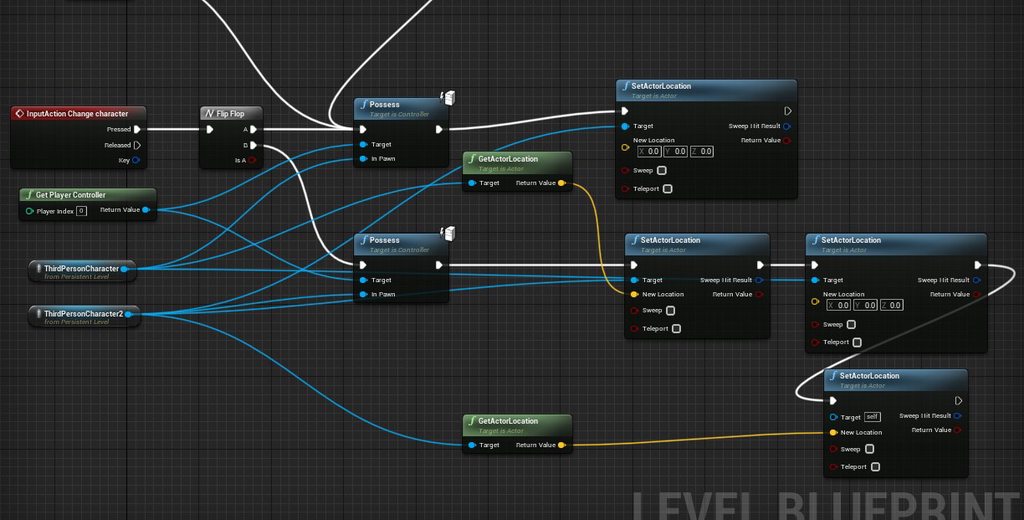
Hi there, a newbie here. I'm trying to implement character swap system by swapping the blueprints mid game
It's supposed to work like this > take control Char A > Swap off Char A to char B > Char A get stored away > Swap to char A again with Char B last location
Only got it to half-working here's the issue I came across https://youtu.be/3czSa8W1flE
Here's the BP. https://imgur.com/a/8ebdcg4
Any help would be greatly appreciated, I'm out of luck myself.
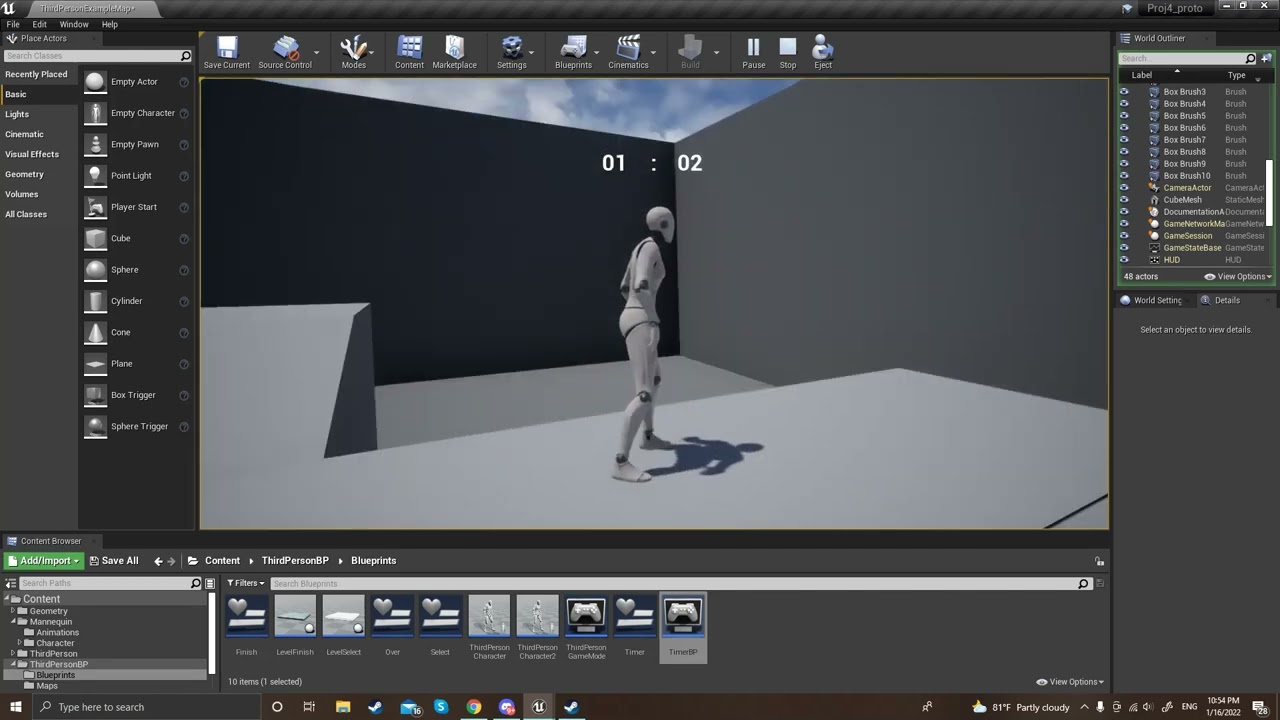
 whole quail
Hello, I need to automate the process of connecting the newly imported object in unreal to the mocap rigid body in real time. I am using Optitrack for motion capture and the live link controller plugin.
I’m unable to set this up though. Would appreciate if anyone could throw some light on this.
 hexed glade
Hi everyone. Been working on an inventory system and I'm struggling to find out how to place my slots on specific position (doing a radial inventory setup). As far as I can tell I need to use a grid setup to let the system know what order the items are in. Or is there another way?
The trouble I'm having is figuring out how to set up the slots along a circle while also keeping data for how to place the items inside the inventory.
maiden wadi
Inventory should just be an array. Widget should display items around a circle via 360/ItemCount to get the angle needed to space items evenly.
hexed glade
Thanks. Will try it out.
 royal trellis
anyone knows how to force a resolution on the game? my camera is fine, but my ui is rendering outside of it. i tried changing get game user settings -set screen resolution and then apply resolution settings but its not working(im doing those in level BP)
maiden wadi
UI doesn't render outside of the viewport unless you've done it wrong by forcing sizes with Sizeboxes and whatnot. If you set it up correctly it'll scale with the screen ratio.
royal trellis
thats the thing..i dont have size boxes
well the way im "setting the resolution " is by using the camera "aspect ratio" i think that might be part of the issue
ok lemme rephrase that, the UI is rendering on the full size of the window
but the camera aspect ratio is putting the black bars on the sides
and the ui is rendering on top of them
so i guess the camera might be the issue...not sure how to fix this
 jaunty solstice
Hi guys.
Trying to debug a Construction script but not seeing my Print Statements.
Can anyone suggest why?
 royal trellis
i guess unticking constrain aspect ration fixed it
 remote meteor
aspect ratio =/= screen resolution or size
maiden wadi
Odd. Haven't done much camera stuff. 😄 Will have to mental note that.
remote meteor
you actually need to change the resolution setting in the game user setting to change it
maiden wadi
Yeah. GameUserSettings can help you there.
royal trellis
im trying standalone too
i even tried something ridiculous like 640x480
didnt change
 remote meteor
how about usual apply settings?
royal trellis
ok now it works
lol
wth
maybe i needed to save before launching
thanks for the help
 stray moat
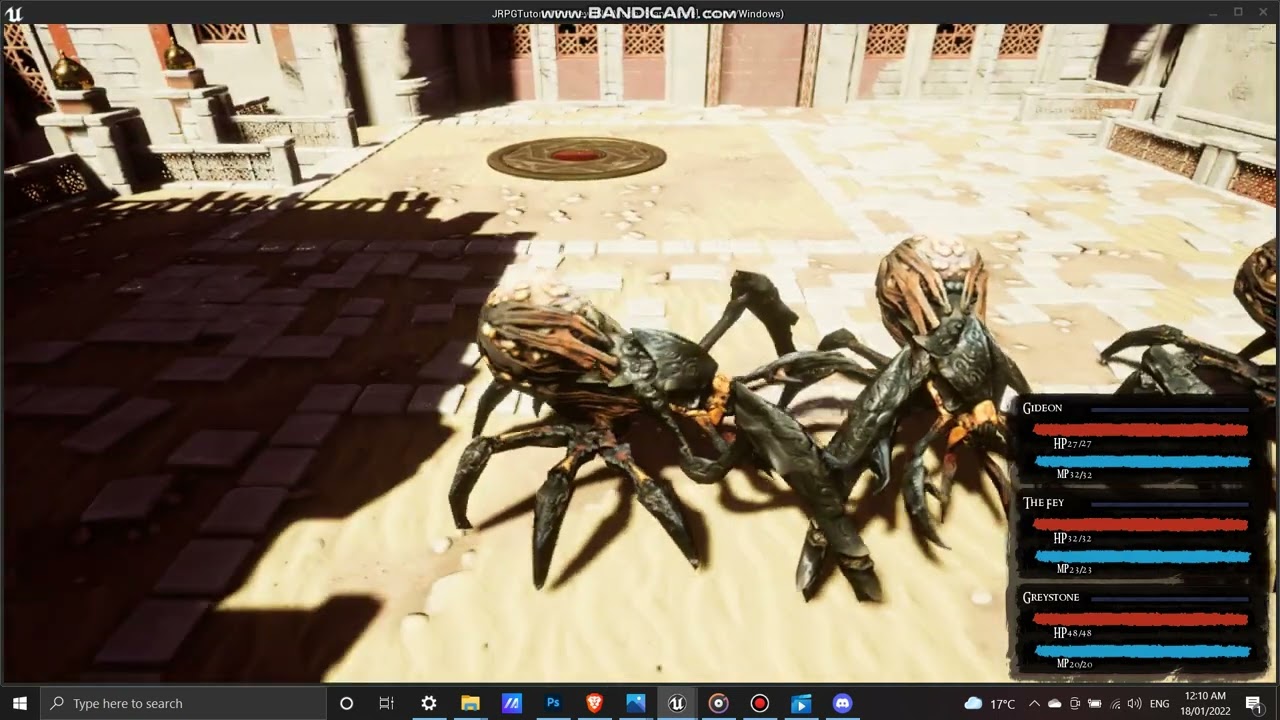
hello I'm making a turn_based game and encountered this issue and I think I made a mistake somewhere along the way, and I don't know where and how to fix , the enemy can attack other enemies and they also have an action command which is only for player and they should have it , could you pls help here's video link showing the issue https://youtu.be/B8mNwJ6Lyhs
 trim matrix
stray moat
hello I'm making a turn_based game and encountered this issue and I think I ma...
trim matrix
stray moat
hello I'm making a turn_based game and encountered this issue and I think I ma...
Nobody has any idea. There could be a hundred different places of failure spread across a hundred different lines of code. Nobody here knows a single line of code in your project. You must first identify the problem area before someone can help. Do you have some sort of function that determines what targets an entity has? I would start at that function.

 umbral ginkgo
How do I do a line trace from the player camera
 umbral ginkgo
thx
maiden wadi
Protip. You can make a very easy camera line trace function in a Library for portable use by using GetPlayerCameraManager. It has GetCameraLocation and GetCameraRotation. Rotation can be turned into an XVector for use in usual GetForwardVector.
Allows easy tracing from camera without having to care which actual camera object it is.
 runic parrot
Hi! is there any way to get from a string, all the substring that is between "WordA" and "Word B" ?
 feral ice
i don't understand, how to i spawn this component at a world position? i tried converting the world position where i want it to spawn into a relative position. What should i put in T?

 earnest tangle
Get Actor Transform
It converts to relative coordinates based on the given transform
dim robin
is there any way to debug a spline in runtime?
earnest tangle
depends on what you mean by "debug"
you can for example use the detach button to get back into the regular editor "view" which would allow you to see the spline
dim robin
i'm trying to move multiple points of the spline using set location at spline points, but nothing happens on the splinemesh, and i can't see the spline points
earnest tangle
I would start by logging the points you're trying to move them into to make sure they're actually where you think they are
 willow phoenix
jesus how do i use a f-string like {x} variable for printing again
maiden wadi
You don't. That's FText and the Format Text node.
Just type the {InputName} into the FormatText and enter, and it'll give you a new pin. You can either use PrintText, or PrintString and convert it to a string.
willow phoenix
yes meant that format text node, thx 🙂
 pastel terrace
Hey I made a third person bp, but the gun is undershooting. The CameraBoom is on Z 40 Socket Offset. I am guessing I need make a rotation offset because of the position of the gun. What's the best way doing it?

I think this might be a more complex problem that fps games deal with.
maiden wadi
runic parrot
Hi! is there any way to get from a string, all the substring that is between "Wo...
That is a pretty messy operation. Is there any reason you need the text between two specific words, or? Some form of divider makes that much easier.
 hollow gorge
@pastel terrace you could look at the fps template and see how it worked there
 polar whale
Hi, I created a plane mesh and I wanna create a material for it to change the planes' color to different colors, so each plane should have its own color. Do you have any ideas about how can I do that please?

 maiden wadi
Randomized individually? Set All the same different color?
polar whale
Randomized individually
 flat coral
is it okay if two neighboring planes have the same color?
Because if not, that's... non trivial.
polar whale
flat coral
is it okay if two neighboring planes have the same color?
Nope :c
flat coral

In mathematics, the four color theorem, or the four color map theorem, states that no more than four colors are required to color the regions of any map so that no two adjacent regions have the same color. Adjacent means that two regions share a common boundary curve segment, not merely a corner where three or more regions meet. It was the firs...
maiden wadi
Depending on their significance to each other, you can place them in an actor as components, or make each one it's on separate actor with a single component. As for how, just make a mesh with a Vector Param. At beginplay you call CreateDynamicMaterialInstance and set the component to use that material instance from SetMaterial. After that you randomize a unit vector and call SetVectorParam on the material instance.
The significance of the color difference also depends on the amount of colors involved.
maiden wadi
runic parrot
Hi! is there any way to get from a string, all the substring that is between "Wo...
To get you started though.
 flat coral
Oh man that's not a bad interview question
polar whale
Alright, thank you so much @maiden wadi, I'm gonna try that!
flat coral
polar whale
Alright, thank you so much <@!143471961723371520>, I'm gonna try that!
Do read up on the Map Coloring Problem though because that's what you're doing. It could save you a lot of headache
polar whale
Okay! Thanks👌
trim matrix
trim matrix
ohhhh player controller is a type of blueprint
I was really tired so I got some rest, I'm ready to pick this back up, would anyone be able to help me with setting this up? I set up my inputs on a character controller instead of a player controller, I think. I'm not really sure what that means though or how to fix it, so if anyone could explain or point me towards a good tutorial I'd really appreciate it.
Like I understand player controller is a type of blueprint, but do I just copy paste the movement script from my character blueprint? Or how exactly does this work
maiden wadi
Controls relating to that character should stay in that character.
trim matrix
And then general controls that every character uses should stay in the player controller?
maiden wadi
A Player Controller is a type of Actor that is spawned for the local player. It allows the player to interact with the world through it's input functions. But you don't put those functions all in the controller. You register another actor's input through EnableInput. A pawn is special in that it doesn't need input enabled as long as the controller is possessing that pawn. Pawn=Character in this sense.
brazen merlin
trim matrix
Like I understand player controller is a type of blueprint, but do I just copy p...
I have all my input logic in my character. Im making a sp game and the player never changes controllers or anything of that sort.
maiden wadi
trim matrix
And then general controls that every character uses should stay in the player co...
Correct on this. Consider a traditional FPS game. WASD, spacebar, etc are character movements in the character. But what if you die? You still want to be able to see the stats screen when pressing tab. Tab would go in your controller.
brazen merlin
If you do multiplayer or have mechanics where different characters/pawns can be possessed, then the logic needs to be split as stated
trim matrix
oh I see, so does movement stay on the pawn..? I'm really sorry I'm so slow to pick up on this stuff
here's what I use to move the player, it's just a modified version of the controller that comes with the third person preset
 maiden wadi
It does.
flat coral
brazen merlin
If you do multiplayer or have mechanics where different characters/pawns can be ...
And if you think you don't have mechanics where different pawns get possessed, you probably do. Something like dying and respawning is most often handled by spawning a new pawn and possessing it
maiden wadi
Put your code on the object it's supposed to affect.
trim matrix
Wouldn't that be the player?
 magic summit
hello, I often face a problem where blureprints wants to get valid objects even if it doesnt use them, for example if I open lootbox, it should only go get lootbox text, however it checks all inputs including one that needs valit dead body reference and spits errors as accessed none on me

is there some way to clevelry bypass checking all inputs in select node?
maiden wadi
@magic summitDrop it into a function and IsValid before. Return blank text if not valid.
maiden wadi
trim matrix
Wouldn't that be the player?
Player what?
magic summit
maiden wadi
<@!325321251826434048>Drop it into a function and IsValid before. Return blank t...
will take a look at it
trim matrix
the character controller, i think is the right term?
flat coral
trim matrix
Wouldn't that be the player?
Just a point of terminology, the player is the human being sitting in the chair 🙂
Or I guess it could be like a monkey
Or maybe a cat
trim matrix
ohhh ok, thanks
magic summit
maiden wadi
<@!325321251826434048>Drop it into a function and IsValid before. Return blank t...
what exactly do you mean by drop "it" into function? select node or stuff before select?
fervent temple
@brazen merlin sword works now. just solving one final bug where the damage doesnt happen half the time
 sterile tartan
Hello, is there a way to get the speed at which the camera is rotating in a first person project? Like how fast I am moving my mouse? 😅
brazen merlin
fervent temple
<@!568839944970174501> sword works now. just solving one final bug where the dam...
Based on yesterday, i would assume its how the overlap is being checked
flat coral
sterile tartan
Hello, is there a way to get the speed at which the camera is rotating in a firs...
Just store the rotation from the last frame and diff it with the current rotation, plus the delta time on the tick
magic summit
magic summit
what exactly do you mean by drop "it" into function? select node or stuff befor...
wish simple solution like this worked
 maiden wadi
magic summit
what exactly do you mean by drop "it" into function? select node or stuff befor...
maiden wadi
magic summit
what exactly do you mean by drop "it" into function? select node or stuff befor...
Select everything in the blue circle. Right click on one and CollapseToFunction or ConvertToFunction, whatever it's called. Then you can IsValid that AsDeadBodyLoot first. If true, return the Select. If False, return blank or whatever else you want.
 flat coral
sterile tartan
Hello, is there a way to get the speed at which the camera is rotating in a firs...
flat coral
sterile tartan
Hello, is there a way to get the speed at which the camera is rotating in a firs...
Actually I might have this exact code gimme a sec
trim matrix
Wait so if movement and character specific actions are stored in the pawn/character, what goes in the player controller?
flat coral
trim matrix
Wait so if movement and character specific actions are stored in the pawn/charac...
Pawn management logic, for one
maiden wadi
Lets do this specific to your game style. What are you making?
brazen merlin
trim matrix
Wait so if movement and character specific actions are stored in the pawn/charac...
Things that the player could still input even if their character was dead or didnt exist, such as accessing menus
flat coral
flat coral
Actually I might have this exact code gimme a sec
(Nah I don't, sorry. I do but it's super fucked and spread out, not useful for an example)
maiden wadi
Funny enough, I have nearly no inputs in my Controller. 😄 I EnableInput in my AHUD class and drive all of my UI keybinds there.
trim matrix
An rpg monster tamer, so there's the human protagonist, but then they can also send out and take control of their monsters during combat
which is what i was referring to when i was talking about being able to switch playable characters
flat coral
Yeah see that switching control from the human protag to the monster is 100% in your PlayerController, whereas each of the human and the monster will have the actual controls in them
maiden wadi
Two buttons in your controller already. Character switching, and Escape/Pause screen.
brazen merlin
trim matrix
An rpg monster tamer, so there's the human protagonist, but then they can also s...
You could still have the inputs for each character especially if the inputs do different things
flat coral
And it actually gives a good opportunity to understand why: Let's say one of your monsters is a flying monster. You'd want that to have VERY different controls from your human character
magic summit
maiden wadi
Select everything in the blue circle. Right click on one and CollapseToFunction ...
so then looks like I would like to clone whole select node again
sterile tartan
flat coral
Just store the rotation from the last frame and diff it with the current rotatio...
Thanks! I'll try that
trim matrix
Oh wait I understand now, so player controller controls the game, then the character controller controls the character, like a steering wheel for a vehicle
magic summit
magic summit
so then looks like I would like to clone whole select node again
I mean I know how to solve it, its just annoys me that its usually overcomplicated like duplicating whole select network
trim matrix
I guess that's kinda a no brainer lol
brazen merlin
trim matrix
Oh wait I understand now, so player controller controls the game, then the chara...
Player controller possesses a character and controls that character. This is more of a matter of general input logic vs specific
flat coral
trim matrix
Oh wait I understand now, so player controller controls the game, then the chara...
Basically, as long as you're a single player game. But if it was a multiplayer game, you'd need to have different layers for controlling each player's control state, and controlling the game overall
trim matrix
Yeah it's 100% singleplayer
maiden wadi
magic summit
so then looks like I would like to clone whole select node again
Oh. My bad, fair. Back up a bit. Actually your AsDeadBodyLoot class should have something like "GetUIDisplayName" or something. It could replace all of those break structs and return that text in a single function. Your class here should have a single function that gets that or returns something else that you can put into DeadBody in the select.
magic summit
maiden wadi
Oh. My bad, fair. Back up a bit. Actually your AsDeadBodyLoot class should have ...
here is my solution that works but I need to separate selection network to two

however its separating it, not cloning same 2x
trim matrix
so then i keep all this movement stuff on the pawn? and is there a meaningful difference between pawns and characters? It says only characters can walk around, does that mean they already come with movement logic or does that mean it's impossible to make a normal pawn move?

 dawn gazelle
Easier way to think about it: The Player Controller is the player. It is an actor unique to that player. A character or pawn is just an actor that the player controller can "possess" and control. Thought of like this, the character or pawn is like a puppet, where the player controller would be a puppeteer. The thing is, each puppet can have their own definition of how to move the handles to make the puppet move certain ways.
The puppeteer may also want to interface with the game in other ways besides the puppet they are controlling.
brazen merlin
trim matrix
so then i keep all this movement stuff on the pawn? and is there a meaningful di...
Pawns are more bare bones. Characters extend from pawns
flat coral
trim matrix
so then i keep all this movement stuff on the pawn? and is there a meaningful di...
So Character is a child class of Pawn.
Pawn is anything that can be controlled. Character is that plus a lot of existing movement logic and other helpful stuff
magic summit
maiden wadi
Oh. My bad, fair. Back up a bit. Actually your AsDeadBodyLoot class should have ...
actually got better solution, its not good to change logic based on validity, rather on loot type so here if its dead body, its always valid so I dont need to check
 trim matrix
So any controllable monster should be a character, but characters can also be referred to as pawns?
flat coral
Whether to use Pawn or Character comes down to basically the question "Do you think you need to write your own input / control handling, or do you think that the built-in logic in Character can handle it?"
All characters are pawns, not all pawns are characters
maiden wadi
magic summit
actually got better solution, its not good to change logic based on validity, ra...
Despite how much time I spend raging on them in this channel. 😄 This is also the one place where I would advise converting this behavior to an interface. You have three very separate classes here by the looks of it that all return names. Your pointer there could be much more generalized like a UObject class and just call the interface function to get that class's name, and that class could handle returning it's own UI name.
trim matrix
wait so character is pre-built moving, for pawns you have to script your own movement?
flat coral
trim matrix
wait so character is pre-built moving, for pawns you have to script your own mov...
Yeah, plus a lot of other stuff too. Like if you get into AI/ senses
For example, for my game, my movement system is really non-standard, so I decided to use a Pawn rather than a Character so I could build my own movement logic ground up
trim matrix
So any character that you can control, or anything that uses AI should be a character?
hm.. I think my movement is pretty standard
 gusty shuttle
I need a rubber duck for a sec. Trying to get a simple health bar to work and for some reason it's not updating. It stays fully red until death then it clears out.


The numbers are all good, but the bar is not moving on decline
magic summit
maiden wadi
Despite how much time I spend raging on them in this channel. 😄 This is also th...
I dont want this to distract from actual problem Im having which is quite general, architecture I set up here in this blueprint works fine, the real problem is how to stop blueprint checking ALL inputs in select nodes, like it has to calculate whole bunch of extra stuff compared if it only evaluated one input that is actually selected in node. I would understand if it was lerp node, it has to evaluate both inputs and alpha but select should evaluate only selected input and index
maiden wadi
@gusty shuttlePlayerHealth numbers?
dawn gazelle
trim matrix
So any character that you can control, or anything that uses AI should be a char...
No. Characters are set up more for bipedal characters.
As an example, you could potentially want to control a car. Wouldn't make sense for that car to be based on character. You'd probably want to make a pawn that uses a vehicle movement component instead.
gusty shuttle
maiden wadi
<@!294162432115474433>PlayerHealth numbers?
Aye, player has 100 health float, I subtract -25 on hit. Could it be because I need to make a MapInRange
trim matrix
So anything that uses standard movement?
maiden wadi
Progressbar is 0-1


 hardy fable
gusty shuttle
Aye, player has 100 health float, I subtract -25 on hit. Could it be because I n...
hardy fable
gusty shuttle
Aye, player has 100 health float, I subtract -25 on hit. Could it be because I n...
Divide current health by max health
maiden wadi
Just divide it by 100
flat coral
gusty shuttle
reverse those lol
gusty shuttle
 flat coral
In range 0 to 100, out range 0 1
gusty shuttle
Yeahhhh, that's all it was! haha I had to reverse them
brazen merlin
gusty shuttle
I need a rubber duck for a sec. Trying to get a simple health bar to work and fo...
Or more specifically currentHealth/maxHealth
gusty shuttle
Thanks guys! Rubber duck successful
dawn gazelle
trim matrix
So anything that uses standard movement?
Characters are simply pawns that have a few components built into them overtop of what pawn offers on its own. That's all.

 maiden wadi
Dinosaurs can be characters too.
dawn gazelle
So if you're wanting to use the character movement component, and you want to use a skeletal mesh, then you should probably use a Character.
If you're wanting to use a static mesh, or want to use a different movement component, you'd probably build it up from a pawn instead.
 ember salmon
Hey, I'm supposed to be able to paste this text from the clipboard into Blueprints in order to construct a spline, but it doesn't seem to be formatted correctly. Anyone have any insights on this? Would really appreciate help!
 open crypt
What's the BP command to make an object track another - (i want some 3d text to always face the player camera)
maiden wadi
FindLookAtRotation on tick.
maiden wadi
Alternatively, in the interest of the AI discussion. Make it a Pawn, and set it's target focus to the player.

 vocal bolt
Forgive me if I'm being incredibly dumb, but it's been a long time since I touched UE:
Where / what is the correct node to send messages to the log? I can visualize what it looks like, but not the name, and google isn't helping me at all
maiden wadi
ember salmon
Hey, I'm supposed to be able to paste this text from the clipboard into Blueprin...
Worked fine. You're pasting it in the wrong place. Look at the first couple of nests. You need to paste it in the level.
 maiden wadi
vocal bolt
Forgive me if I'm being incredibly dumb, but it's been a long time since I touch...
maiden wadi
vocal bolt
Forgive me if I'm being incredibly dumb, but it's been a long time since I touch...
PrintString/PrintText
vocal bolt
maiden wadi
PrintString/PrintText
I swear that was the second thing I tried....nevertheless, thank you 😅
trim matrix
Thanks a ton for helping me out. I have some learning issues, so I really appreciate your patience, I feel like I have a better understanding now
 sonic knot
maiden wadi
Worked fine. You're pasting it in the wrong place. Look at the first couple of n...
sonic knot
maiden wadi
Worked fine. You're pasting it in the wrong place. Look at the first couple of n...
We've been on this for two days. Super annoying. Thank you for your help!
ember salmon
maiden wadi
Worked fine. You're pasting it in the wrong place. Look at the first couple of n...
Many thanks! Here I'd tried it in a crowded level and didn't see that it actually came in, hah
maiden wadi
One thing that will help a lot is to find a long tutorial guide. Like a dozen episodes or more. They'll take you through plenty of systems usually. They're not always the best, but it'll help you get a better feeling for the engine and help you understand it. Then you can focus more on better practice.
flat coral
maiden wadi
One thing that will help a lot is to find a long tutorial guide. Like a dozen ep...
+1 this. A tutorial that shows you how to do something badly still shows you how to do it
open crypt

Need a bit of a nudge - might have it backwards but there are about 18 ways I could screw this up

basically have that face the camera
maiden wadi
Three years ago, I didn't know what an Enum is. Couple of weeks later I vaguely did. Now I know enough to know how to hate using them. 😄
open crypt
so however they hold the controller, it faces the camera
flat coral
maiden wadi
Three years ago, I didn't know what an Enum is. Couple of weeks later I vaguely ...
TFW you add 1 (one) new value to an enum and are transported directly to hell for the rest of the afternoon
maiden wadi
Serialization is a massive one there. Nothing fucking sucks more than not being able to change an Enum's list order because player's savegames rely on that order to properly load that state.
maiden wadi
open crypt
What's this being ran on? That looks fine.
open crypt
an index - I'm trying to get it to 'level' the text, almost like it's a sprite
maiden wadi
It won't rotate around, but it'll pitch.
open crypt
nah, it's not behaving clearly like that
maiden wadi
Is that being ran on tick?
open crypt
yes
flat coral
maiden wadi
Serialization is a massive one there. Nothing fucking sucks more than not being ...
If you aren't already, consider something like a SchemaVersion that gets saved along with any data you write. Then when you read, if it's an old schema, you can have a converter that mutates it to the new schema on read.
maiden wadi
Try it without the complications first. Just do a FindLookAtRotation and use that directly to set the world rotation.
open crypt
maiden wadi
Try it without the complications first. Just do a FindLookAtRotation and use tha...

maybe by negative one on z?
maiden wadi
flat coral
If you aren't already, consider something like a SchemaVersion that gets saved a...
Nah. I just avoid using Enums. GameplayTags are much better, safer, and easier to use.
maiden wadi
open crypt
Reverse the target and start in the look at rotation node.
open crypt
here it is getting there but it looks "odd"
might just need to move it closer to the controller - it just seems like it's radius is expanding
maiden wadi
Well, that has the rotation correct. I would consider interpolating it's world position maybe to smoothen it out a little.
open crypt
it's smooth, it's just odd
maiden wadi
It's following the controller.
open crypt
I know
it's the origin
the origin of that 3d text is on the left, but if you wanted it to rotate evenly, the origin has to be offset
how can I offset some dynamic text?
I mean offset the origin
it's a dynamic thing so I unless I feel like making 8 unique meshes with a corrected origin...
maiden wadi
Personally I would consider detatching it from the controller, and interpolating it a set distance away from the view screen projected towards the controller but clamped to a cone in front of the view.
brazen merlin
open crypt
the origin of that 3d text is on the left, but if you wanted it to rotate evenly...
Would it be possible to instead use a material billboard for this?
open crypt
thought about it - or even a text render - but how do I go about doing that?
 odd ember
the level always loads before it opens
trim matrix
so for my text box i made a UI widget that had the text, do I have to make a new one for each text box? or is there a way to customise the text in the blueprint that summons the text box?
maiden wadi
If you mean loading it into memory for faster load times, you generally don't. You can lower load time by preloading major known assets for a level or by changing classes with long load times to use soft object ptrs correctly. Preloading assets is dangerous though if done incorrectly. Would not advise. Consider hiding it somehow or consider softobject ptrs in heavier classes and async load it after the map loads. Can look bad though.
 zealous fog
maiden wadi
Three years ago, I didn't know what an Enum is. Couple of weeks later I vaguely ...
zealous fog
maiden wadi
Three years ago, I didn't know what an Enum is. Couple of weeks later I vaguely ...
Why? They seem quite useful to me?
Dont scare me I've been using enums lol
brazen merlin
This is where a loading screen would come in... covering the players eyes for a time
brazen merlin
open crypt
thought about it - or even a text render - but how do I go about doing that?
Well for material billboard its a component and it already faces camera
 bright harbor
so i have an ability on my character that allows it to pick up objects using a magnet, but the problem is he can jump on top of them and box jump to infinity and beyond, is there any way to stop this? i've set "can character step on" to no on all the cubes (ignore the bad music in the video, i forgot to mute it)
odd ember
and they aren't accessible in BP either how
zealous fog
brazen merlin
Well for material billboard its a component and it already faces camera
And coding something to always face player is really easy
odd ember
sounds like some assets are loading async though
zealous fog
Set rotation
And then get the look at rotation to the player
Put it on tick (or a low timer)
I've had a few issues with the billboard component
Probably was on me
odd ember
what node are you using to load the level?
brazen merlin
bright harbor
so i have an ability on my character that allows it to pick up objects using a m...
You have access to OnLanded event or something like that which should return what they landed on so you can allow this input or not
odd ember
level loading is generally handled through cpp
bright harbor
brazen merlin
You have access to OnLanded event or something like that which should return wha...
i gave that a shot but it didn't work
 odd ember
you can try load level instance
although I think you'll find the same issue
I ran through the level loading nodes for BP in cpp just now
none of them use seamless travel
bright harbor
bright harbor
i gave that a shot but it didn't work
@brazen merlin do you think it could be something to do with the fact i wrote that in a parent class?
odd ember
bright harbor
<@!568839944970174501> do you think it could be something to do with the fact i ...
it's likely you need a call to parent class
do Onlanded in your subclass and right click the event > Add call to parent function
bright harbor
i tried that, and hooked it up, still nothing
i know i had it working a good while back just by using can character stand on, but idk what i did to make that work so well
 manic vessel
Hi. I created a gun and Im adding bullet actors to an array as I place them in the gun. The Bullet actor has an event inside them, that changes the mesh from a bullet to a bullet shell. But I dont know how to call them from an array In order each time from 1 - 6
for example . First fire is array bullet 1. second array bullet 2 and so on
bright harbor
manic vessel
Hi. I created a gun and Im adding bullet actors to an array as I place them in t...
try a for each loop, grab the object reference of it, and then execute what you want each one to do

 manic vessel
Yeah I got this
open crypt
halp
manic vessel
open crypt
Clearly there is something I don't understand about hidden things -
Do once of the event tick , Remember tick will keep ticking
 open crypt
but look what is happening?
I can't get this to play nice using visibliy or set hidden
manic vessel
open crypt
I can't get this to play nice using visibliy or set hidden
what is setting the bool?
open crypt
i thought that was just a bool built in
gentle urchin
it is
open crypt
like to check the visibility
that's what I'm tryign to figure out, but first I need to at least get the diagnostics working
nothing is setting the bool on tick, I can tell you that
but I think I set the hidden game somewhere else but I need to figure out where
manic vessel
you sure the bool is set to true?
open crypt
that's not a bool I made or set ever
whether I have it set or I've set it somewhere else, I should be able to poll it accurately
manic vessel
The bool need to be tru for that branch to make it say is hidden
open crypt
that's just it
it is saying it's true, that it is hidden, when I can clearly see the damn text
manic vessel
or its not casting to your MC bp
to get it
so what condition is supposed to be setting the bool to false
 rustic rune
Hey guys! Does anyone know how the "Vector Bounded to Box" works and what the input parameters actually represent? I am having a hard time understanding the documentation 🤔
manic vessel
bright harbor
try a for each loop, grab the object reference of it, and then execute what you ...
But how can I set a bullet as fired in order each time I shoot. there are only 6 bullets in the array MAX i want to first set bullet 1= fired, than next time bullet 2 =fired and so on

currently all bullets would be set as fired like this
bright harbor
manic vessel
But how can I set a bullet as fired in order each time I shoot. there are onl...
increment an integer variable each fire, then when it hits the last bullet in your array set it back down to 0, use this integer in a get statement of all the bullet models, and tell the reference from that to set to fired
gentle urchin
open crypt
it is saying it's true, that it is hidden, when I can clearly see the damn text
try the "Set visibility" instead 😄
manic vessel
bright harbor
increment an integer variable each fire, then when it hits the last bullet in yo...
ok Thanks
bright harbor
manic vessel
ok Thanks
np
manic vessel
open crypt
that's just it
Set Hidden in game.
 willow cedar
How do you give a Blueprint Component to somebody in Multiplayer?
I've tried to figure this out ages ago, but to no luck. Thought I'd try again.
bright harbor
willow cedar
How do you give a Blueprint Component to somebody in Multiplayer?
I've tried to ...
manic vessel
I also Have another question. Its kinda similar. I have 6 scene components on my gun and each time Im attaching a bullet actor to it I want to attach them in order of 1.2.3.4.5.6 nOT SURE how to pull that off
to the componets
as they represent where the bulllet bones are
I thought about using a sequence combined with do once nodes but seems like it might be arkward
or maybe this somehow
 bright harbor
this is literally all you have to do, just replace the x input event with your fire event
 manic vessel
Just thinking allowed . but this could work.

so length from the array is the number value of bullets in it?
cool
bright harbor
exactly
open crypt
I thought set hidden and visibility are the same, except collision is off for hidden, but vis is just the visibility channel
gentle urchin
set hidden in game is afaik ment for in editor
so it can be visible in editor,
yet hidden in game
manic vessel
no in my experiance . I had a hand mesh I hide with set hidden. but set visibility wont work
and I have alights that do work with set visibility
manic vessel
gentle urchin
so it can be visible in editor,
Ok thats new to me But I never compiled anything yet
feral ice
I have a hard time trying to explain my problem but i have 2 components and i want to be able to access each component but i also want to gather the two compoentns into one var so i can access var 1 and then in var one i can access the var 2 that contains each component. How do i do this in blueprints
gentle urchin
both being components they could also be connected via the common actor
feral ice
i was thinking of creating an vector where you can store the two or more components and create another vector that contains the vector with component
gentle urchin
assuming.. its a common actor
feral ice
so like a vector inside another vector
no not a position vector an array vector
hm ok
im not sure i understnad you first suggestion

I want to create more than one A, B.
this is what A, B does

it creates a component that i call pole. I want to be able to create more than one of these
trim matrix
Pole isn’t its own actor?
feral ice
nope
trim matrix
I’m confused as to why it’s not
feral ice
i want to create a cable that has an end location at one of the poles but the cable end is a relative postition and i dont know how to go from world coordinates to realtive thats why im doing this
trim matrix
It’s simple. I’m pretty sure there is literally just a function called set world location for components.
You could just use that to set the cable end
feral ice
yeah this is 100% a better choice but i lack a bit of knowledge about these nodes
ill change my mind and create an actor instead
trim matrix
That will be 10x better
unreal tusk
Does anyone know what I need to do to improve this? I have a few things I'm trying to do with player movement. I'm needing to set this up so that it runs on the server but I haven't quite figured it out since I'm super new to Unreal Engine. Been teaching myself since yesterday.
The goal is;
- IF Left Mouse Button is held, then the player can turn the camera
- IF Right Mouse Button is held, then the player can turn the camera
- IF BOTH Left and Right Mouse Buttons are held, it will turn the camera and move the character forward
Currently I have the first two goals met, however when I play the session, Client 2 will see Client 1's character rotate with either left or right mouse button. I don't want the character to rotate when someone spins their camera with left mouse button. Only when spinning their camera with right mouse button. I imagine Client sees the character spin regardless due to there being no server side information here? Or maybe actually since the default value is true for the controller rotation yaw. Maybe I should turn that off.
Any ideas on how I can get the player to move with both mouse buttons, while still allowing the player to move with WASD?
 gentle urchin
this is messy ..
unreal tusk
I definitely feel like it could be cleaner. haha
gentle urchin
Secondly, "On the server" ? Multiplayer ?
unreal tusk
Yes, multiplayer
gentle urchin
gated sequence with tick event
solid
😛
what happens when RMB and LMB is pressed at the same time
they go flipflop
RMB always wins
Being new to unreal i'd also strongly advice against multiplayer
trim matrix
Yes, seriously don’t do multiplayer 
gentle urchin
there's enough to work on even with a single player game
unreal tusk
I have my heart set, too late 🙂
I've been preparing a game and assets for a while now.
gentle urchin
It's never to late
Underestimating scope and complexity of mutliplayer is a common thing
unreal tusk
I've not underestimated it and it's out of the question. I'm going multiplayer.
trim matrix
Good luck lol
hollow gorge
unreal tusk
Does anyone know what I need to do to improve this? I have a few things I'm tryi...
try using the function "is input key down"
gentle urchin
If its as easy as you think, you can easily "upgrade" it for multiplayer later on
unreal tusk
gentle urchin
If its as easy as you think, you can easily "upgrade" it for multiplayer later o...
I never said it was easy.
And moving over from Single to Multiplayer is definitely not "easy"
unreal tusk
hollow gorge
try using the function "is input key down"
I'll try that. Thanks 🙂
gentle urchin
well gl indeed.
unreal tusk
gentle urchin
well gl indeed.
Thank you
unreal tusk
trim matrix
Good luck lol
Thank you as well
gentle urchin
Got any previous programming or multiplayer experience?
unreal tusk
No game development experience, but I am a software developer as a career.
No game development experience, but I am a software developer as a career.
So while a lot of this stuff is new, I feel I'm picking it up pretty quickly. I've already got a few things setup multiplayer like, doors opening, damage, on screen damage text. I'm also trying to keep an eye forward on server load right now. Trying to make sure I'm not telling every player everything at once for no reason.
But it's going to be a difficult long road ahead. I know that for certain. I'm building a MMORPG based off of Dungeons and Dragons.
gentle urchin
famous last words
trim matrix

unreal tusk
Doubt all you want, but I'm going to get this done.
gentle urchin
Dont worry, it's nothing personal.
hollow gorge
just my 2 cents: It's probably smart to start with a simple and small scale project to learn the fundamental steps. If you map your project in a modular way, you can still come back to it and use your code for the big project.
gentle urchin
Lets just say you're not the first individual with an MMO idea
 icy dragon
unreal tusk
But it's going to be a difficult long road ahead. I know that for certain. I'm b...
icy dragon
unreal tusk
But it's going to be a difficult long road ahead. I know that for certain. I'm b...
Building a MMORPG
first project
gentle urchin
@me when i was new. And half a year later. ("I'm ready now, senpai MMO!")
icy dragon
For comparison, Final Fantasy 1 was basically a D&D clone, and it's not MMO.
unreal tusk
hollow gorge
just my 2 cents: It's probably smart to start with a simple and small scale proj...
Yeah, I'm taking small chunks at a time, focusing my efforts towards specific points.
gentle urchin
Someone mentioning single dev MMO always spikes conversation tho!
I assume you are solo?
unreal tusk
gentle urchin
Someone mentioning single dev MMO always spikes conversation tho!
I don't plan to remain single dev. I'm getting the core systems down first, then will be hiring a few people.
icy dragon
unreal tusk
Yeah, I'm taking small chunks at a time, focusing my efforts towards specific po...
Here's the thing, small chunks at a time, but releasing simpler games along the way is much better than in limbo with a single unfinished project for years
hollow gorge
I'd recommend hiring at least one person who has experience with creating complex games like that first or it might end in chaos
icy dragon
Single player indie games can even suffer from that, let alone MMORPG
unreal tusk
icy dragon
Here's the thing, small chunks at a time, but releasing simpler games along the ...
I've thought about doing a MOBA version first, as that would be much simpler than the MMORPG. It will contain a lot of the same core mechanics though. Which is why right now that's all I'm focused on.
icy dragon
Do yourself a favour and put that noble MMORPG plan of yours aside for future use.
For comparison, it took Final Fantasy about 15 years and 10 single player entries to go MMO.
hollow gorge
@unreal tusk creating a large scale game is a huge commitment of time, resources and patience. What makes you so sure you even like working with ue and want to be a game dev in the first place? Are you mentally prepared to be able to spend YEARS on just one project that might eventually never get finished or succeed in the first place?
gentle urchin
Only thing missing is UE5 😛
icy dragon
UE5 and the power of Blueprint will make the perfect MMORP--
Nah just kidding
unreal tusk
hollow gorge
<@!213457397090353163> creating a large scale game is a huge commitment of time,...
Fully ready to spend the next 20 years developing this if that's what it takes.
I was working in Unity on this game for about 6 months. Saw Unreal Engine 5 and loved a lot of it's features. Especially nanite, lumen and ray tracing. I really loved the blue print system as well. So I figure, if I don't make the switch I never will. Went ahead and did it and fell in love with the interface and how everything is done so far.
Though I know the blue print system won't do everything for me 😛 I'm prepared to write code when needed.
 raw orbit
is there any way to 'wrap' a collision capsule around a mesh? i want to fit a collision capsule around weapons such as swords in particular without resorting to making each weapon a separate 'actor'. would there be a way of detecting the size of the mesh and fitting a collision capsule around it accordingly
icy dragon
unreal tusk
Fully ready to spend the next 20 years developing this if that's what it takes.
...
I appreciate your enthusiasm, I really do, but MMORPG is a huge task to overtake by game developers, and none of the feel good underdog story making MMORPG actually exists.
gentle urchin
Is there even a single one?
 novel rock
sorry to interrupt. I can cast but I cant plugin widget to target after setting it to variable.
 gentle urchin
Is there even a single one?
icy dragon
unreal tusk
Fully ready to spend the next 20 years developing this if that's what it takes.
...
And by 20 years, you could've spend that time making smaller projects and gaining fanbase, and UE5 would've been obsolete by that point.
hollow gorge
in 20 years it'll be retro again
icy dragon
novel rock
sorry to interrupt. I can cast but I cant plugin widget to target after setting ...
What are you doing with the Cast?
 unreal tusk
icy dragon
I appreciate your enthusiasm, I really do, but MMORPG is a huge task to overtake...
unreal tusk
icy dragon
I appreciate your enthusiasm, I really do, but MMORPG is a huge task to overtake...
I understand. I'm doing this more out of my love and compassion of Dungeons and Dragons Online, way back when it was Pay to Play. That was an amazing game back in the day. It fell apart when a new company purchased it up and went Free to Play. This is more of a hobby than anything really. If something comes from it and I end up getting a dev team, sweet! If nothing happens and I never release an MMORPG, that's fine. If I decide to lessen the scale and do a MOBA of some sorts thats awesome too. Right now I'm just focused on getting the core components down and from there I will decide what my goal is.
novel rock
nothing going insane trying to plug the set widget into add to viewport like Conrad suggested.
unreal tusk
I know it's a walk in hell 🙂 I'm ready to burn with it
brazen merlin
novel rock
nothing going insane trying to plug the set widget into add to viewport like Con...
Im sorry i suggested this lol maybe remake the variable
unreal tusk
hollow gorge
try using the function "is input key down"
Is "Is input key down" tied to another node? I can't seem to find it. I've tried attaching it via "Get Controller" but alas, not seeing "is input key down"
hollow gorge
unreal tusk
Is "Is input key down" tied to another node? I can't seem to find it. I've tried...
Turn off context sensitive search
 novel rock
trim matrix
The Widget variable is the wrong type
novel rock
trim matrix
The Widget variable is the wrong type
HOW DID YOU KNOW THAT!???
 novel rock
trim matrix
novel rock
trim matrix
dam i was looking for Widget Object Reference lol i'm dumb
trim matrix

 crimson saddle
ok so this might be confusing but I literally have no better way to ask.
I have an array of structs, inside each is another array of structs, I need to add to this nested array but it doesnt seem to be working. I think it has something to do with the variable in memory but I don't know how to fix it
icy dragon
crimson saddle
ok so this might be confusing but I literally have no better way to ask.
I have ...
Got any error message to show, or screenshot of your BP setup?
crimson saddle
no errors, the same logic that works elsewhere just isnt working in one place
novel rock
what's best way to solve this little problem?
novel rock
trim matrix
it isnt spawning? your wagon?
yes
trim matrix
There is no errors or warnings?
You solved that widget warning?
in that screenshot?
whatever that was
novel rock
I can spawn stuff but its getting a little complicated sisn i wanted to make modular buildings with modular npc shop keepers. i thinking that might not work or over complicate things
trim matrix
I mean if its not spawning, then its some simple reason why its not spawning
icy dragon
Is it still about the widget, or spawning an actor?
trim matrix
Why dont you try programing the spawn function into the building itself. Then call the spawn function on the buildings begin play.
Firstly as a test.
The bulding can have a function called, "SpawnWagon"
hollow gorge
novel rock
I can spawn stuff but its getting a little complicated sisn i wanted to make mod...
You can always use a print text message in between your different nodes to see where it stops working.
icy dragon
Or breakpoints
novel rock
trim matrix
I mean if its not spawning, then its some simple reason why its not spawning
I haven't tested it because i don't know how to assigns building. i sure if i try it will say building not assigned. thats why im trying to find widget so i can give it building self.
 trim matrix
oh
well that makes more sense.
Well who created the widget?
Your player character?
trim matrix
Im assuming your player interacts with the bulding, the the widget is spawned.
novel rock
there is a video showing how everything should work.
trim matrix
Im just assuming the building variable name is different, or its an is valid check xd?
THeres a warning tho if you do that
novel rock
Video
trim matrix
I dont see the blue warning.
So i just assume the variable is not of type building for some reason
but yes still
zealous fog
When I look for an interface message I have to uncheck the context sensitive box, any idea why?
trim matrix
The variable should just be of the type, Building.
as far as I know at least.
Anyways, when you create the UI, just set the building variable
it should be that simple.
You should know which building your interacting with.
 novel rock
trim matrix
You should know which building your interacting with.
novel rock
trim matrix
You should know which building your interacting with.
I gave the building Public Int BuildingID Var
trim matrix
Does the NPC know which building it is standing in front of?
trim matrix
Player interact with NPC -> NPC knows which building it is in front of ->
Aka, Player interact with NPC, get building reference from NPC, use that reference to set building on UI.
novel rock
trim matrix
Player interact with NPC -> NPC knows which building it is in front of ->
building set npc shop type > NpcShopTypeID
If building id = 2 > Npc id = 2
novel rock
trim matrix
Aka, Player interact with NPC, get building reference from NPC, use that referen...
how do i do that?
unreal tusk
It may not be the cleanest... But I've got movement now when both left mouse and right mouse are down, as well as movement when WASD is down.

However, moves at a slight angle lmao... So trying to figure that out now.
flat coral
unreal tusk
It may not be the cleanest... But I've got movement now when both left mouse and...
It may benefit you to observe The Octopus

I call it The Octopus but really its called Brake/Roll input manager. The idea is, I've got RollLeft and RollRight buttons, but if BOTH are pressed at once, that's Brake
i think this thing is both absolutely batshit and the simplest possible way to implement this
unreal tusk
Will this allow for all my criteria?
The goal is;
- IF Left Mouse Button is held, then the player can turn the camera
- IF Right Mouse Button is held, then the player can turn the camera
- IF BOTH Left and Right Mouse Buttons are held, it will turn the camera and move the character forward
Right mouse will turn character and camera*
flat coral
I think a modified version could do that yeah. End of the day, the goal is to take the Pressed / Released for two different inputs and get a set of control states from that
unreal tusk
What's that Local Boolean getting information from? Super new to Unreal Engine still so sorry if the question is dumb
unreal tusk
Ahh I see.
icy dragon
That control scheme bear some similarities to FF14, and I'm thinking of Set Input Mode Game and UI
flat coral
unreal tusk
Ahh I see.
Like if you're new, learn as little from this example as possible, this isn't how you normally wanna do things 😛
unreal tusk
icy dragon
That control scheme bear some similarities to FF14, and I'm thinking of Set Inpu...
Yes, it's how DDO used to handle mouse input, but you could still also control movement with WASD, I believe FFXIV borrowed this from it. I can't recall if WoW had this feature though originally or if they implemented it later on.
icy dragon
unreal tusk
Yes, it's how DDO used to handle mouse input, but you could still also control m...
Oh, then I believe Set Input Mode Game and UI.
That'll allow you to have input focus on the HUD widget, and require dragging to move the camera.
From your Player Controller (Get Player Controller), call Set Input Mode Game and UI, then bring in the HUD user widget variable
unreal tusk
Oh nice yeah it has the hide cursor during capture, that's a nice feature I was wanting too
unreal tusk
icy dragon
From your Player Controller (Get Player Controller), call Set Input Mode Game an...
I assume HUD User Widget Variable is something I need to setup? I don't think I have any widgets set.
icy dragon
unreal tusk
I assume HUD User Widget Variable is something I need to setup? I don't think I ...
Hold up
This is your first day/week of using UE4?
 broken wadi
unreal tusk
Yes, my 2nd day using UE.
broken wadi
unreal tusk
Yes, my 2nd day using UE.
Welcome!
icy dragon
unreal tusk
Yes, my 2nd day using UE.
Then may I recommend you to just get used to the engine first.
https://www.unrealengine.com/en-US/onlinelearning-courses
Also see #ue4-general pinned messages for kickstart courses also from UOL

Unreal Engine
Unreal Online Learning is a free learning platform that offers hands-on video courses and guided learning paths.
broken wadi
@unreal tusk Might be because you're using Left Mouse Button and Right Mouse Button twice. I find its always best to simplify my blueprints whenever possible. What if you only have one node for Left and one for Right and do the setting of the booleans before going onto the other logic?
flat coral
I want players to be able to pick dialog options by pressing 1-4 on the keyboard if they're KB&M. What's the least-gross way to get key input events in a widget?
 tight pollen
at the start of the game, I would like to set the initial camera rotation for the first-person player
how can i do it?
this is FPS game
flat coral
tight pollen
at the start of the game, I would like to set the initial camera rotation for th...
Just rotate the pawn if it's already in the level. If not, look at the spawn transform for it, and set rotation there
 foggy egret
I have a question. I am placing a static object along each of the segments of a cable component. (which I am able to do so far). Next I want the static objects thus placed, to move relatively to the cable component when I move it. This is the node setup I have so far (its pretty basic). However for some reason only the last object placed is moving relatively to the update location of cable component.


would appreciate any help
odd ember
foggy egret
you can't do stuff like how you're doing it
use the construction script instead
having a different execution thread do stuff is a big no no
flat coral
I mean it strikes me that most of when you want an object to stop ticking, it's because you're destroying that actor too
foggy egret
odd ember
having a different execution thread do stuff is a big no no
I'm not entirely an expert at BP, but I was just following the official UE youtube channel tutorial, and they used exec script also. This is literally the same as there
flat coral
Wait i'm confused on why timeline isn't working for you?
 summer sparrow
apologies for cutting in between another conversation
flat coral
I'll give you a piece of advice that I got myself: As long as the boolean is false, this tick is about as computationally expensive as not attaching anything at all.

yep. Which is nothing.
It is a single boolean operation. Your CPU is doing literally billions of operations per second.
It rounds to zero.
zealous fog
You can also use set tick enabled node
novel rock
WHAT?

 zealous fog
To control tick usage
flat coral
zealous fog
You can also use set tick enabled node
VERY good point @slate pond just do this
novel rock
 flat coral
novel rock
WHAT?
flat coral
novel rock
WHAT?

 desert juniper
you can just make a parent class that auto bind
Though I think you'd have to call to parent on each child if you plan on doing something different on tick
flat coral
novel rock
WHAT?
Okay but for real though, I think the error message just happens to have VERY misleading grammar because you named the variable Building.
Lemme see if I can rephrase this error message to make it make sense (to me as well as you 😛 )
"Building" (the object) of type Building Object Reference doesn't match the property "Building" (property name) of type Object Reference"
dawn gazelle
novel rock
WHAT?
The Building variable in your Shopkeep BP is of type Object I believe. Needs to be of type Building
flat coral
^
Somewhere you've got something that SHOULD be Building but is just Object
But that refers to the TYPE and not the NAME
dawn gazelle
Mind you, I'm not sure why that would throw an error..... Object reference should be able to hold a reference to an actor too, no?
flat coral
I think it's functionally an unchecked cast right?
novel rock
dawn gazelle
The Building variable in your Shopkeep BP is of type Object I believe. Needs ...
its building
 novel rock
oh
yes that fixed it

I have smooth brain
I have errors but I'm scared to ask for help.
flat coral
This is a super stupid question about some pretty gross code by why is ONE of my Set Brush From Texture nodes wider than the others?!

 modern musk
Hey, anyone have any idea on how to stop my "CreateEvent" nodes from disappearing when I delete the disconnected "SetTimerByEvent" nodes?

 orchid grove
Does anyone know about this glitch where occasionally I cannot exit out of the engine?
odd ember
foggy egret
I'm not entirely an expert at BP, but I was just following the official UE youtu...
don't trust youtube tutorials. they're most often made by people who don't know what they're doing
 last abyss
flat coral
This is a super stupid question about some pretty gross code by why is ONE of my...
last abyss
flat coral
This is a super stupid question about some pretty gross code by why is ONE of my...
seems like its because of the texture name's length
unreal tusk
So I've got my blueprint working completely now. Top node is active when left is on, middle node is active when right is on, and bottom node is on when both left and right is on. Though in my GIF you can see my character moves diagonally. Does anyone know why this is?

 foggy egret
odd ember
don't trust youtube tutorials. they're most often made by people who don't know ...
foggy egret
odd ember
don't trust youtube tutorials. they're most often made by people who don't know ...
well I'm now remaking in construction script..
but don't know what caused my original issue?
dawn gazelle
unreal tusk
So I've got my blueprint working completely now. Top node is active when left is...
The end of this sequence you're doing add movement input for both forward and right vector. Think you only need to do it for forward vector.
 unreal tusk
dawn gazelle
The end of this sequence you're doing add movement input for both forward and ri...
unreal tusk
dawn gazelle
The end of this sequence you're doing add movement input for both forward and ri...
That was indeed it, holy cow. I must of been skipping over it this entire time due to staring at this for hours lmao
unreal tusk
broken wadi
<@!213457397090353163> Might be because you're using Left Mouse Button and Right...
Thanks for the advise early, simplifying each action to their own little section helped me figure out the flow for this.
foggy egret
@odd ember Recreated it in construction script.. now all the static mesh move with the cable, but they don't respect the updated location of particles.

 chilly geyser
How do I get all buttons that are inside a vertical box?
foggy egret

 foggy escarp
chilly geyser
How do I get all buttons that are inside a vertical box?
foggy escarp
chilly geyser
How do I get all buttons that are inside a vertical box?
you can get all the children and then filter by the type
 fickle dune
Hey guys! I'm trying to make my inventory have black boxes instead of white and also to make it persistent as anything i get inside my inventory disappears once i leave the level.
Here is the code for the Inventory Slot Box that's white
I have a lot of code for the actual inventory so I don't know what you guys would need for me to show you
 chilly geyser
Thank you @foggy escarp
last abyss
fickle dune
Hey guys! I'm trying to make my inventory have black boxes instead of white and ...
u could just wrap your item thumbnail in a border and make the border's color black? and for making your inventory persistent, you can save a copy of your inventory in the game instance before changing levels, then on beginplay get the inventory from the game instance since the game instance is persistent.. or you could use level streaming
 granite scaffold
Hello, I would like to split a string using tabs as delimiters. I'm using Parse Into Array, but I can't work out how to input a tab character into the delimiter field. I've tried the traditional escape character \t which did not work (not that i really expected it to). Any pointers?
this one, for clarity

Well it's not ideal but you can just paste a tab character in there 😄
modern musk
Hey, thanks for the response. I definitely tried that, but for some reason the drop down disappears if those two nodes are removed.
Edit: Deleting the old nodes and then re-dragging a new create event node seems to solve the issue.
Edit2: Seems like it's actually the reroute pins that are causing the error, super weird, but just in case it comes up for anyone else.
dawn gazelle
granite scaffold
Hello, I would like to split a string using tabs as delimiters. I'm using Parse ...
Copy and paste a tab character from notepad :3
modern musk
 granite scaffold
yeah its a bit silly in the same way that hitting shift enter works for newline, because it just leaves a blank box
but it does the job
desert juniper
UE needs regex in BP
desert juniper
granite scaffold
Hello, I would like to split a string using tabs as delimiters. I'm using Parse ...
someone online said this has regex https://www.unrealengine.com/marketplace/en-US/product/low-entry-extended-standard-library (free plugin)
dawn gazelle
desert juniper
UE needs regex in BP
There are plugins that can do that.
granite scaffold
trying to keep third party stuff to a minimum but thank you for the link! might be handy for personal stuff, i see it literally has a \t node 😄
desert juniper
you could always install it, rip out the code, and write the classes yourself, though if your project isn't a cpp project already, I'd definitely say more trouble than its worth
dawn gazelle
modern musk
What happens if you just make another "Create Event" node?
chilly geyser
Whats the proper way to do this?
 modern musk
dawn gazelle
What happens if you just make another "Create Event" node?
modern musk
dawn gazelle
What happens if you just make another "Create Event" node?
It seems like it's specifically the reroute nodes that block it (keeping the old ones but removing the reroutes fixes it, adding reroutes to a new one reintroduces the error). I'm using UE5 5.0 so it could be a bug with that.
 rugged elbow
chilly geyser
Whats the proper way to do this?
rugged elbow
chilly geyser
Whats the proper way to do this?
try dragging off of the array element pin and then typing in get background color
Anybody know if its possible to create an instance of an actor component by declaring it as a variable in another blueprint? I have a blueprint for an actor component and set a variable up in another blueprint and set the type to the actor component blueprint. whenever I try to access the variable in runtime i get the 'accessed none' error. Not sure if im just not defining it properly or if what im trying to do is not possible.
dawn gazelle
modern musk
It seems like it's specifically the reroute nodes that block it (keeping the old...
Same in UE4
chilly geyser
@rugged elbow Not a valid option (nothing shows up)
dawn gazelle
rugged elbow
Anybody know if its possible to create an instance of an actor component by decl...
You're not creating an instance of a component by making it a variable in a blueprint. By making a variable of an object or a component or whatever it is, you're just making a spot that can contain a reference to the thing you're trying to store. If you're wanting to add the component to the actor, do so using the Add Component button at the top left, then you'll automatically have a reference to the component within the actor.
rugged elbow
chilly geyser
<@!580830985399173127> Not a valid option (nothing shows up)
ok you might need to cast the array element to whatever it is you are trying to change the color of
chilly geyser
I'm basically trying to make it so that when you click a button inside the vertical box It sets all the other buttons back to default value. The new selected button is darkened to show that its the current one selected.
This one Works but If I add or remove buttons I don't want to have to change the code every time.

 lost solstice
you could just make an array
rugged elbow
chilly geyser
I'm basically trying to make it so that when you click a button inside the verti...
yeah thats annoying. the set background color function's target is a 'button' so you just need to make sure that whatever is being returned out of the array element is a button
rugged elbow
dawn gazelle
You're not creating an instance of a component by making it a variable in a blue...
ok makes sense. i followed this tutorial for making in inventory system https://youtu.be/4CjpBoKl6s8
he uses an actor component to store the dimensions of the container and the array of items stored inside the container. I want to have containers that spawn in the world. is that not going to work with an actor component blueprint? like do I have to just give the blueprint for the container the array and dimensions and redo the functions to take that in? hope im making sense lol

Support the channel through donations. Crypto accepted!
PayPal: https://paypal.me/reidschannel?locale.x=en_US
Patreon: https://www.patreon.com/reidschannel
Bitcoin: 1JFwWHr4X6uAeoZadukzqKjzFBj3Qjy7Sk
Ethereum: 0x2B2Bc108F1Cc0fF899959dEF3226637787d8C3dE
Dogecoin: DNQ33YnhpWoTBokBNVkZP5ub8KTLkpyjpv
Join our community discord!
Discord: https://dis...
dawn gazelle
rugged elbow
ok makes sense. i followed this tutorial for making in inventory system https://...
Should work. All you have to do is add your inventory component to any actors that would have an inventory.
Then I imagine you configure the variables by selecting the component in the hierarchy so they display in the details.
rugged elbow
dawn gazelle
Should work. All you have to do is add your inventory component to any actors t...
oooooh i see
so instead of declaring the variable i 'add component' on initialize or whatever?
 quiet hazel
So I am having an issue that I believe comes in from inheritance. To further explain my parent blueprint has an event called to complete the action of ragdoll-ing the actors (set physics on mesh and destroy actor). But when I hit play all that happens on death is the actor disappears. Could someone point me to where I might have missed a step? I've tried setting to parent event and it didn't change anything.
dawn gazelle
rugged elbow
so instead of declaring the variable i 'add component' on initialize or whatever...
Well, if you have an actor that is going to be your container, and you know that all containers are going to have an inventory, you may as well add it by default to your base container class. Any child classes you create from this container will then all have the inventory component and can have their own settings - so if you have a small container with a small mesh, you can configure it's inventory to be small, and a large one to have a large inventory.
 dawn gazelle
quiet hazel
So I am having an issue that I believe comes in from inheritance. To further exp...
dawn gazelle
quiet hazel
So I am having an issue that I believe comes in from inheritance. To further exp...
are you overriding the event that does the ragdoll in the child?
quiet hazel
dawn gazelle
are you overriding the event that does the ragdoll in the child?
No, it calls from an interface and I assume grabs the parents event

 rugged elbow
dawn gazelle
Well, if you have an actor that is going to be your container, and you know that...
rugged elbow
dawn gazelle
Well, if you have an actor that is going to be your container, and you know that...
thank you for the help! i feel like im really close here but im still getting the 'accessed none' when trying to get the actor component. however i know im closer because i can see that it has a value when i debug (before it said 'none')
 trim matrix
This only works if the actor is facing exactly in the positive X or negative X directions. Why?
 rugged elbow
thank you for the help! i feel like im really close here but im still getting th...
rugged elbow
rugged elbow
thank you for the help! i feel like im really close here but im still getting th...
it gets passed through as 'none' for some reason. and I did delete the old node and drag in new ones.
 bright harbor
i'm probably missing something but how could i add an additional control where you hold right click and it locks the character rotation to look in the camera direction like with the destiny 2 camera controls
dawn gazelle
quiet hazel
So doing some testing on my end, there's nothing wrong with inheritance and interfaces. Both not calling and with calling the parent I was able to get meshes to replicate physics. Seems like there's something else going on, like perhaps you're doing something else that's calling a destroy on the actor?
quiet hazel
dawn gazelle
So doing some testing on my end, there's nothing wrong with inheritance and inte...
Alright, I'll look into that further. Thanks!
last abyss
rugged elbow
it gets passed through as 'none' for some reason. and I did delete the old node ...
i think you should use event construct not initialized ?
brazen merlin
bright harbor
i'm probably missing something but how could i add an additional control where y...
do you have the camera control function working already? like just as an always effect?
bright harbor
brazen merlin
do you have the camera control function working already? like just as an always ...
quite the opposite, i can get when the player holds the button, and by using orient rotation to movement or something like that i was able to get it to lock, but not until you input again. so i was wondering what rotation maths i would do to make it rotate on it’s own
brazen merlin
bright harbor
quite the opposite, i can get when the player holds the button, and by using ori...
so it sort of works?
 dusk dust
hello, I want to loop through a mesh, and have them all spawn in the shape of a square ring
how can i do this?
bright harbor
brazen merlin
so it sort of works?
yeah, let me grab a video of what i have
brazen merlin
dusk dust
hello, I want to loop through a mesh, and have them all spawn in the shape of a ...
im not good with math, I would look up formulas for generating points around a square (Im assuming there's some stuff about width and height from a center point then incrementing it somehow to create even steps)
rugged elbow
last abyss
i think you should use event construct not initialized ?
i dont think so because the same code works when bringing up the other widget that displays the player's inventory
 brazen merlin
dusk dust
hello, I want to loop through a mesh, and have them all spawn in the shape of a ...
brazen merlin
dusk dust
hello, I want to loop through a mesh, and have them all spawn in the shape of a ...
im not good with math, I would look up formulas for generating points around a square (Im assuming there's some stuff about width and height from a center point then incrementing it somehow to create even steps)
dusk dust
thanks ill try
bright harbor
brazen merlin
so it sort of works?
okay scratch that, i have nothing but the holding down the input part, i think i did it wrong
brazen merlin
bright harbor
okay scratch that, i have nothing but the holding down the input part, i think i...
well, rotations are tricky, so im not sure about it, but i would try to get it working without the input part
i also never played destiny, so i dont know what its suppose to do
bright harbor
i think essentially what i want is a turn in place, i'm sure there are plenty of people out there who have done the math already
brazen merlin
because the camera is on a spring arm, i think the rotation is locked while set to inherit control rotation or whatever that setting is. I feel like ive see a "free look" camera tutorial though, maybe thats better to search for?
there's definitely a way to limit axes so it can be two instead of three or whatever you wanted
trim matrix
Right now for my textboxes, the UI widget has a preset text that shows, then the NPC will create the textbox. I'm wondering if there's a way to make the text publicly editable so I don't have to make a bunch of different ui widgets
brazen merlin
trim matrix
Right now for my textboxes, the UI widget has a preset text that shows, then the...
perhaps an interface?
bpi would pass the text value through to the receiver, so its not really about a variable at that point, but having whichever widget receive from whichever sender
fickle dune
last abyss
u could just wrap your item thumbnail in a border and make the border's color bl...
How would I go about saving a copy of it in the game instance?
last abyss
it depends how your inventory works, but essentially you just have to save the data of the items you have..
usually I use map type variables for inventory, so i would just store the map in the game instance and when entering the new map get it from the game instance
ofcourse you have to make your own game instance blueprint and add a (in my case) map variable to it and set the game instance in your project settings
 abstract summit
Quand we randomise in range this value ?
 dawn gazelle
abstract summit
Quand we randomise in range this value ?
dawn gazelle
abstract summit
Quand we randomise in range this value ?
Do it on the output of the timeline.
abstract summit
clever , thanks
fickle dune
last abyss
it depends how your inventory works, but essentially you just have to save the d...
I have my own game instance, and the inventory was made using this tutorial series:
https://www.youtube.com/watch?v=yxqSkFNAzE0
The problem I have is I can't change the white slot to black without making my item thumbnails completely black too, as if its an alpha issue.
And as for the game instance, is there a way to get my players inventorycomponent and save that on the game instance?
If so how do we do that what nodes should I use?

In this new series I go through a method of creating an inventory system, similar to a survival game. In this first part I introduce the system and go through the process of setting up some key assets that we will need going forward.
There are unlimited ways to create a tutorial, all based on your own tutorial design. As per usual with my tutor...
unreal tusk
Is there a way to set it so that the forward vector is not the direction of the camera but the direction the mesh is facing? Running into an issue where if I use middle click to toggle an autorun off the forward vector, when I use left click to turn the camera, the character starts moving forward towards the camera direction
dawn gazelle
fickle dune
I have my own game instance, and the inventory was made using this tutorial seri...
The black/white issue is more of a #umg issue as it has to do with the design of the widget itself. It's not something that's strictly blueprint related.
As for saving your inventory, that all depends on where you store your inventory and then getting reference to that location using the appropriate gets and casts. As an example, if you stored it on player controller, you can easily do Get Player Controller 0 in the game instance, cast to your player controller and do what you need to, or do the opposite by getting the game instance and casting to your custom game instance from the object that holds the inventory, and having functions set up to save the data from your inventory in the game instance. This is basic blueprint communication and using variables to store the data you want.
bright harbor
unreal tusk
Is there a way to set it so that the forward vector is not the direction of the ...
enable use controller desired rotation on your autorun, make sure to set it by referencing your character movement
i think
don't quote me on that, i think i'm wrong
 dark crow
chilly geyser
Whats the proper way to do this?
dark crow
chilly geyser
Whats the proper way to do this?
Cast to the Button Class
unreal tusk
bright harbor
enable use controller desired rotation on your autorun, make sure to set it by r...
Just tried that, tried both on and off, didn't work.
dark crow
Why don't you just get mesh rotation and make it a forward vector?
bright harbor
unreal tusk
Just tried that, tried both on and off, didn't work.
my bad, give orient to movement a try instead, if it's not that, i'm not super sure
bright harbor
dark crow
Why don't you just get mesh rotation and make it a forward vector?
the mesh will still rotate with the camera moving i think
dark crow
Depends if movement is based on control rotation
unreal tusk
bright harbor
my bad, give orient to movement a try instead, if it's not that, i'm not super s...
Turning that off makes the mesh stop rotating which is good, but the character still is moving in the direction of the camera. So just kind of sliding sideways but moving "forward"
fickle dune
dawn gazelle
The black/white issue is more of a <#221799467689574410> issue as it has to do w...
I see, I'm currently storing the inventory component in ThirdPersonCharacter, what else do I need to do to store the inventory? I'm quite new at this and need to know what nodes to use
bright harbor
unreal tusk
Turning that off makes the mesh stop rotating which is good, but the character s...
try changing the forward vector to the forward of the mesh
dawn gazelle
fickle dune
I see, I'm currently storing the inventory component in ThirdPersonCharacter, wh...
It's literally creating the required variables where you want to store it and passing the values there and retrieving it from there. That's all that's needed for storing something in the game instance.I also created my inventory based on that tutorial, and I believe it has an array like I'm showing here - you just make sure that your game instance uses the same structure variable type. So you could potentially make a save function within the inventory itself so that it does the save/loading itself when called to do so.


 unreal tusk
bright harbor
try changing the forward vector to the forward of the mesh
unreal tusk
bright harbor
try changing the forward vector to the forward of the mesh
How would I tie these together? Still pretty new to UE, but. if I pipe just Get Forward Vector on the mesh, it makes the character spin in a circle when I turn on auto run, but it seems I can move the camera around like I want. Though, I'm assuming it's spinning around because I'm no longer using the rotator? I need to spend sometime to understand these four nodes..

 gaunt ferry
am i able to rename a file in bp with no plugins?
bright harbor
unreal tusk
How would I tie these together? Still pretty new to UE, but. if I pipe just Get ...
those 4 nodes basically get the rotation of the controller, and grab just the part (Z) that spins it and gets the forward of that, what you'll want to do for an auto sprint is just grab that and lock it to the last input of the control rotation
i'll write it up for you if you can write it into your bp yourself
dawn gazelle
gaunt ferry
am i able to rename a file in bp with no plugins?
Think these nodes are always available.
 abstract summit
dawn gazelle
Do it on the output of the timeline.
abstract summit
dawn gazelle
Do it on the output of the timeline.
i just realiste i have to randomise the time and not the value
dawn gazelle
abstract summit
i just realiste i have to randomise the time and not the value
Do it before the timeline 😛
You have the "Set New Time" input that can be called and a value.
abstract summit
a ok thanks
unreal tusk
bright harbor
i'll write it up for you if you can write it into your bp yourself
I should be able to manage yeah. I'd greatly appreciate that man 🙂
gaunt ferry
dawn gazelle
Think these nodes are always available.
can you rename the file exaction
dawn gazelle
abstract summit
a ok thanks
 dawn gazelle
gaunt ferry
can you rename the file exaction
dawn gazelle
gaunt ferry
can you rename the file exaction
Not sure, I've not used these nodes. Give it a try.
gaunt ferry
so im making a mod for a game and i only have default engine blueprints butt what i need to do is somehow download a file run and execute bc it will need to be hooked into the game but make it so that the use will not need to do anything
orchid grove
Does anybody know if there is a way to get an animation asset or animation sequence variable and convert it into a useable animation pose in an anim bp?
brazen merlin
orchid grove
Does anybody know if there is a way to get an animation asset or animation seque...
if you are referring to animations used in the anim graph, you can make a Bind (more specifically expose pin) so it can set as a variable input
trim matrix
brazen merlin
perhaps an interface?
this is an interface, right?
 orchid grove
Oh okay
brazen merlin
trim matrix
this is an interface, right?
that looks like an interface as far as i can tell
brazen merlin
trim matrix
this is an interface, right?
i worry about the question though, perhaps learning about them might help you see how to work with them for your needs
trim matrix
i knew it was one, i'm just not really sure how it works that well
do you know a good place to learn about them?
orchid grove
brazen merlin
if you are referring to animations used in the anim graph, you can make a Bind (...
What I meant was having like an animation sequence as a weapon's base-pose and being able to dynamically switch poses when swapping weapons with a reference to that animation sequence variable
brazen merlin
https://www.youtube.com/watch?v=EM_HYqQdToE hot from the pins @trim matrix
brazen merlin
orchid grove
What I meant was having like an animation sequence as a weapon's base-pose and b...
i think still the same as what im saying
fickle dune
dawn gazelle
It's literally creating the required variables where you want to store it and pa...
Okay I did that, I added those as functions in the InventoryComponent, in the Toggle Inventory Function I put the Save Inventory and Retrieve inventory functions but it still doesn't save my items in the next level what could be wrong
brazen merlin
orchid grove
I don't see where there is a "bind"
 dawn gazelle
fickle dune
Okay I did that, I added those as functions in the InventoryComponent, in the To...
dawn gazelle
fickle dune
Okay I did that, I added those as functions in the InventoryComponent, in the To...
Whats the toggle inventory function?
fickle dune
dawn gazelle
Whats the toggle inventory function?

No description provided
and its called in the thirdpersoncharacter event graph with Tab, thats what creates the inventory window
orchid grove
Does anybody know of a free first person animation kit or something that I can use? I really don't want to make my own animations lol
dawn gazelle
fickle dune
and its called in the thirdpersoncharacter event graph with Tab, thats what crea...
You only want to save the inventory when moving between levels and load it when loading into a new level.
Game Instance will also not persist between game sessions - it's not an actual save system, just a means of storing data between levels.
 rain idol
Hello everyone! Somebody can help me...
I found animation, create animmontage from it, and set-up custom anim slot. In animation blueprint I add this slot. And in blueprint class I call "play animation montage", but in game, when I press 1 it doesn't work. Somebody know, what I do not right? May be I forgot about something?
brazen merlin
orchid grove
Does anybody know of a free first person animation kit or something that I can u...
ask in #fab and check the marketplace
orchid grove
Alright
dusk dust
why does the add instanced static mesh function produce incorrect normals?
before(manually adding in the instanced static mesh component) and after(adding the component through bp)


 earnest rose
Hey guys, this forum is mega thick so i dont know exactly if im asking this in the right place, but, here goes- im using Ue4 to make a test game. I have a circle reticle which reflects the current bullet spread- a fired bullet will always land within this circle (ive been following "advanced shotgun Spread" from Rieds Channel).
Do you folk have any ideas how i might create some sort of aim float like in mount and blade warband? you know how you hold down the aim or something and your aim gets tighter, and you zone in? thats what im going for
 graceful hamlet
Question on saving key mapping - I'm using the save key mapping, but it only works in the play in editor, not in packaged. Is there something else I should be calling as well?
 dusk dust
gentle urchin
Seems like its just wrongly added tbh
dusk dust
gentle urchin
Seems like its just wrongly added tbh
I restarted unreal and it fixed itself 🤨
 dusty rune
earnest rose
Hey guys, this forum is mega thick so i dont know exactly if im asking this in t...
dusty rune
earnest rose
Hey guys, this forum is mega thick so i dont know exactly if im asking this in t...
You can use a timeline to output a float which control both the displayed reticle size and bulletspread. Input mousebutton to play the timeline
earnest rose
dusty rune
You can use a timeline to output a float which control both the displayed reticl...
Thanks, i was mucking about with an Finterp To node, but a timeline might do better.
earnest rose
dusty rune
You can use a timeline to output a float which control both the displayed reticl...
I want that smoothness
brazen merlin
earnest rose
Thanks, i was mucking about with an Finterp To node, but a timeline might do bet...
why not both?
earnest rose
brazen merlin
why not both?
I may do that haha
rugged elbow
im getting a 'variable is not in scope'. does anybody see anything wrong with this blueprint? maybe the cast? or do i need to go make a getter function? variable seems to be passed along just fine up until that node
 earnest rose
rugged elbow
im getting a 'variable is not in scope'. does anybody see anything wrong with th...
earnest rose
rugged elbow
im getting a 'variable is not in scope'. does anybody see anything wrong with th...
Maybe one of those fancy "isvalid" nodes. Theyre never a bad thing off a blue pin #NotaDoctor
brazen merlin
earnest rose
Maybe one of those fancy "isvalid" nodes. Theyre never a bad thing off a blue pi...
there is one, but i actually dont think thats needed since the success output for a cast is the same thing essentially
rugged elbow
brazen merlin
there is one, but i actually dont think thats needed since the success output fo...
i put it there because i want to make sure the item that was double clicked has the 'inventory component'. its checking to see if the item is a container.
the BP_ItemObject_Container is a child of another class that does not have that component
brazen merlin
rugged elbow
i put it there because i want to make sure the item that was double clicked has ...
yeah, i dont think it would hurt, but yeah
brazen merlin
rugged elbow
the BP_ItemObject_Container is a child of another class that does not have that ...
does not have the component? shouldn't it?
rugged elbow
i added the component to the child class
the parent is a base class for any item that can be added to the player's inventory
the child is for items that are also containers with their own inventory
maybe i need an interface to get the component??
brazen merlin
then it sounds like it doesnt exist at the parent level which is what it's cast to
brazen merlin
rugged elbow
the child is for items that are also containers with their own inventory
couldn't you just make this component variable in the parent for the children to use?
 unique yoke
I'm trying to pare down a larger enum to something simpler. I came up with a solution but it seems clunky and just curious if there's a better way to do this that I don't know about:
 brazen merlin
unique yoke
I'm trying to pare down a larger enum to something simpler. I came up with a sol...
brazen merlin
unique yoke
I'm trying to pare down a larger enum to something simpler. I came up with a sol...
just by looking at this, im not sure what you are trying to do, but would a select serve better than a switch?
unique yoke
I looked at the select but i didn't see how that could work. Could have just missed something. Basically, we're using the Advanced Locomotion System which is what that ALS_OverlayState enum is. I'm updating some reticles and I just wanted to simplify that large overlay enum to something more manageable for me to work with which is just a "Held Weapon" enum. So just remapping that larger enum to the simplified 3 state enum that has unarmed, pistol, rifle.
brazen merlin
yeah i guess this way works...
unique yoke
oh shit
brazen merlin
doesn't look that bad once you get use to it 😉
unique yoke
i just saw how select works once i connected the links lol
brazen merlin
pretty cool right?
unique yoke
it lets me pick the outgoing enum from the selection.
brazen merlin
maybe it works for you
rugged elbow
brazen merlin
then it sounds like it doesnt exist at the parent level which is what it's cast ...
its casting to the child
unique yoke
Heck yeah hah. Sorry for the language. At first I missed that
brazen merlin
itll still be kinda.... noodly
unique yoke
yeah - this is total hack/quick and dirty for now.
brazen merlin
rugged elbow
its casting to the child
oh! my confusion
rugged elbow
no worries
dawn gazelle
rugged elbow
the BP_ItemObject_Container is a child of another class that does not have that ...
Can you provide a screenshot of the entire left side (show the components & variables) of this class. Example provided as well.

 rugged elbow
dawn gazelle
Can you provide a screenshot of the entire left side (show the components & vari...
rugged elbow
dawn gazelle
Can you provide a screenshot of the entire left side (show the components & vari...
certainly
 dawn gazelle
Thats your ItemWidget class. What about the BP_ItemObject_Container
rugged elbow
this is my BP_ItemObject_Container
 rugged elbow
this is my BP_ItemObject_Container
rugged elbow
rugged elbow
this is my BP_ItemObject_Container
it is a child of this BP_ItemObject
 brazen merlin
rugged elbow
this is my BP_ItemObject_Container
brazen merlin
rugged elbow
this is my BP_ItemObject_Container
and its set to something right?
the inventory component i mean? like there's something there to define it or set by code
dawn gazelle
rugged elbow
this is my BP_ItemObject_Container
You added it just as a variable, not as a component to the object?
... I think I get it... Your base class is an object.
Objects can't have actor components added to them.
brazen merlin
dawn gazelle
You added it just as a variable, not as a component to the object?
BP_ItemObject is the parent and BP_ItemObject_Container is the child which does have the component
brazen merlin
dawn gazelle
Objects can't have actor components added to them.
oh thats a good point 🙂
explains the not in scope part at least
rugged elbow
dawn gazelle
Objects can't have actor components added to them.
oooooooooooo
dawn gazelle
And why he's getting None as he's probably not setting the value.
rugged elbow
im not getting none anymore
wait no the base class is not an object
its not an actor
brazen merlin
strange that it lets the component even be added....
rugged elbow
o wait yeah it is
dawn gazelle
It's not added. It's only a variable in the class.
rugged elbow
no its added as a component
dawn gazelle
It's not.