#blueprint
402296 messages · Page 755 of 403
 devout dove
It looks more like your just throwing random things
 earnest tangle
jeez at least he's trying :P
devout dove
What a kid what ever
earnest tangle
try just putting it on the gamepad left stick x-axis
 odd ember
maybe next time don't insult people trying to help
earnest tangle
remove the others
devout dove
Yes he is trying but if he doesnt know how it works then he shouldnt be a smartass
 heady saffron
Hey guys, I am really confused as of why my cast is always failing off of base_pokemon... any ideas?
 devout dove
I did that zomg
earnest tangle
okay can you show me
devout dove
earnest tangle
okay can you show me
 odd ember
heady saffron
Hey guys, I am really confused as of why my cast is always failing off of base_p...
odd ember
heady saffron
Hey guys, I am really confused as of why my cast is always failing off of base_p...
have you used breakpoints before?
earnest tangle
@devout dove okay, how is the input event set up in your pawn or such?
heady saffron
odd ember
have you used breakpoints before?
yes...
devout dove
earnest tangle
<@!613471838710005770> okay, how is the input event set up in your pawn or such?
simple print out of the axis
 odd ember
breakpoint the cast node and see what class the active pokemon is
earnest tangle
@devout dove try just doing Input Axis Joystick and see what you get from that
devout dove
earnest tangle
<@!613471838710005770> try just doing Input Axis Joystick and see what you get f...
joystick doesnt output anything
earnest tangle
can you show how you have it now
devout dove
or do you mean the action node?
heady saffron
@odd ember well active pokemon is a pawn and base pokemon is a character
odd ember
that's your issue
 heady saffron
@odd ember but it works in another blueprint lol
odd ember
character derives from pawn
but pawn does not derive from character
if you have pokemons that are characters, they may cast succesfully
devout dove
earnest tangle
I mean similar to this
Doesnt work
 odd ember
but it won't cast successfully if they are just pawns and not characters
earnest tangle
@devout dove does this pawn actually receive other input events correctly?
devout dove
yes i can use my mouse to move it 😄
heady saffron
@odd ember but why is it working in another blueprint, its basically the same event I want to happen but in different widgets
earnest tangle
what about keyboard events?
odd ember
heady saffron
<@!224571781862653952> but why is it working in another blueprint, its basically...
I just told you
it will work if the active pokemon is based on the character class
 odd ember
it will not work if it is based on the pawn class
devout dove
keyboard mouse all works
earnest tangle
hm well that's very peculiar... pretty sure it should work like this 🤔 have you tried any of the buttons for actions? Eg. see which button lights up as 1 in the windows game controller menu and see if that triggers anything in UE
heady saffron
@odd ember hmm this becomes an issue cause i need it to cast to a pawn, also I am calling the exact same function but it is working in another blueprint, the active pokemon is still a pawn and it works there.
odd ember
heady saffron
<@!224571781862653952> hmm this becomes an issue cause i need it to cast to a pa...
show me the code where it works
heady saffron
 heady saffron
it is, its also the variable type i set it as.
odd ember
is this true for all your pokemons?
heady saffron
Well all pokemon are characters, and base pokemon is the parent class of them
odd ember
because a pawn should not be able to be cast to a character, unless it is a character
so a character can be a pawn, but a pawn is not necessarily a character
heady saffron
yeah...
odd ember
heady saffron
Well all pokemon are characters, and base pokemon is the parent class of them
then try making the active pokemon class a character instead
and see what error you get
heady saffron
@odd ember base pokemon is already a character
heady saffron
Its not neccessarily an error that i am getting when i do that,
odd ember
you should get an error because now the cast can't fail
 odd ember
nah I dont do vc, but post your error
heady saffron
Ok well if i change it, everything stops working cause im using nodes such as spawn ai from class which will now not be able to connect to pokemon in the world, also, when pokemon in the world was a pawn, it was working for the other widget
odd ember
can you show me your spawn node and which class you are spawning?
odd ember
heady saffron
Ok well if i change it, everything stops working cause im using nodes such as sp...
again, you do understand that some pawns, that are also characters, WILL pass the cast node
but some pawns, that are not characters, will not
heady saffron
 heady saffron
well i just changed it to character
odd ember
and pokemon class has which parent class?
heady saffron
base pokemon
odd ember
ah
I see
ok
in that screenshot
swap the cast node and the pokemon in the world node
heady saffron
still failing
odd ember
show me
heady saffron
well the error was fixed, but the original issue is still failing
im able to plug in pokemon in world to active pokemon now
but the cast to base pokemon is still failing
odd ember
it might be the spawn AI node cannot spawn characters then
and instead spawns a default pawn or something
which then doesn't convert properly
heady saffron
well its not that one that isnt working

that one, in the original bp that i showed u
devout dove
earnest tangle
hm well that's very peculiar... pretty sure it should work like this 🤔 have you...
FOUND THE SOLUTION!
https://docs.unrealengine.com/4.27/en-US/InteractiveExperiences/Input/RawInput/

The RawInput plugin can read specific devices that don't conform to XInput standards.
earnest tangle
Oh nice, I guess it wasn't an XInput device then
Good to know that exists in case I ever run into this :)
devout dove
And CE wont even see it hahaha feelsBatman
earnest tangle
his loss I guess lol
devout dove
I have all axis now the mini stick on top and the big one including the Z rotation
odd ember
heady saffron
that one, in the original bp that i showed u
try to make the active pokemon of the base pokemon class
 odd ember
C&Ds aside, I'm pretty sure the root problem comes down to how SpawnAIFromClass handles pawn spawning
it doesn't seem to be the same as spawn actor from class
earnest tangle
I noticed you actually can call that function in some contexts where you can't call the regular spawn actor node which is a bit peculiar :D
it looks like SpawnAIFromClass just spawns the actor fairly normally so not sure if there'd be a difference because of that
odd ember
I have no visibility on the full project, but I'm pretty sure it's some issue with a pawn somewhere not being able to be a character
I don't know if SpawnAI can spawn characters
or how it works with that
 indigo bough
I've got a function which gets the nearest component of another actor to my player. I'd like to find the 4 nearest, rather than just the nearest. Is there a way to do this? The components in question are in a grid configuration. Eventually the plan is to compare distances to get a weighted average of a float value from each of these 4 grid cells, based on how near the centre of the 4 nearest cells the player happens to be.
earnest tangle
it requires the class to be a pawn, that's all
odd ember
so then the cast shouldn't fail
earnest tangle
I didn't follow the full conversation but I guess it's possible it return null from the spawn because of a collision or something
odd ember
perhaps
odd ember
indigo bough
I've got a function which gets the nearest component of another actor to my play...
you'll have to iterate over them
 icy dragon
This
||He did mention about getting the pokemon asset from an asset rip hub, so that's one more C&D factor, but I digress||
indigo bough
odd ember
you'll have to iterate over them
Would I have to iterate 4 times? How would I ensure I'm not getting the nearest the next times, remove it from the original array before iterating again?
odd ember
indigo bough
Would I have to iterate 4 times? How would I ensure I'm not getting the nearest ...
you could place the ones already found into a new array that you'll have to return anyway
if they exist in the array already, they have been accounted for
indigo bough
Ahh okay, good idea. Thanks!
 plain berry
does anyone know why this code doesn't work in construction script?

But in an editor callable function it works fine?

trying to get the spline point to start at the billboard position

Contstruction script keeps it here
but BP callable function puts it in the correct place on the billboard
 odd ember
construction script is called every time you update the actor in any way
plain berry
I'm aware, that's not the problem
odd ember
are you sure?
plain berry
As another example

So when it's caching the data of a separate world BP, the spotlight will rotate to 'look' at the actor
but with a component, it will not 'look' at it when the BP is moved
Because moving the actor with the code counts as 'updating' the construction script
indigo bough
odd ember
you could place the ones already found into a new array that you'll have to retu...
I just realised, if I just limit which components I add to the original array to ones with a distance equal or less than the grid square size, it'll only grab the nearest 3-4 options anyway. 🙂
plain berry
odd ember
are you sure?
Also, sorry, response was pretty blunt. Thank you for offering a possible solution!
It's just something I've already ruled out
Unless I'm deeply misunderstanding the way construction scripts are called to update
odd ember
in your second example, you can double check if the root component is actually valid first
plain berry
Which is always a possibility!
odd ember
there might not be an actor in world
of that type
or even better, create at the bare minimum a hard reference for an object that you then check against
plain berry
Sorry for confusion: the BP Focus Light actor in the world is the one that works
It's the local component on the actor to be updated that doesn't work
odd ember
sure, I'm just saying that it will still be error prone if you don't check for validity
plain berry
I know, it's just easier to show simpler examples online without checks
odd ember
is it exactly the same logic you have in the update function?
can you show me the update function?
plain berry
Yep, exactly the same
literally copypasted

I wonder if it's an order of operations thing
plain berry
Where the location of the local component is just not being cached when construction script runs
excellent idea trying that now
nada
No change
 odd ember
so possibly your logic just doesn't work with how construction script updates
which perhaps is correct
do you change your spline and then press update?
plain berry
Well this is interesting. It seems like the construction script just doesn't cache the value of the component at all

 odd ember
okay am I understand you correctly in that you're using the billboard to create new spline points?
plain berry
In the context of the problem, the only thing that really matters is getting the construction script to respond to the location of its own component during construction
But essentially yes
odd ember
not sure if it's relevant but you might be able to work with it somehow: if you select spline points, you can alt extrude new spline points using the pivot
plain berry
In this case, the spline is totally deleted and remade
odd ember
and I think that's the issue
plain berry
Nah, it's a caching issue.
odd ember
my other suggestion would be to make a separate actor hard ref that you then use to model your spline after
however how you would put down points when its continuous is beyond me
plain berry
Nah, I'm building an environment spline that responds to gravity during construction and will later be baked down into a static mesh
 odd ember
isn't this what the cable component already does
plain berry

There it is
Relative location DOES NOT get cached during construction script
world location does
Cable component is an option, but it's also very self-contained and I'm too lazy to go into C++ and mess around with the plugin for what I need to do later
@odd ember Thanks for helping me out! I've been banging my head against the wall all morning!
odd ember
I did nothing though
plain berry
Nah, you pointed out debugging stuff I should have thought about but didn't
odd ember
well alright, glad it worked out
 onyx violet
anyone have experience with the localization dashboard? I can't seem to get it working
i've selected different languages, gathered the text, and compiled translations, but when I use the node to set current culture, nothing happens
odd ember
I haven't, but perhaps MathewW would know given he's made at least one video on that subject
I think he's only hovering around the #ue4-general channel though
onyx violet
ok i will check it out thank you
plain berry
Update: NOPE. This was just caching the actor location. Component location is always 0 locally until after construction script


dangit
odd ember
welp
I mean you could assign or spawn another actor that carries the same logic
for the spline
singleton the actor on construction script
plain berry
True. Just feels kinda gross from a user-end.
odd ember
idk, seems like a decent built in solution
plain berry
Oh like spawn an actor during construction script, then delete?
odd ember
yep
odd ember
nah editor only actor
chugs along
deletes at the end of construction script or persists through singleton (but destroys during begin play or such like)
plain berry
I love editor-only stuff because I almost never have to justify performance.
odd ember
yeah I've done a few really nice extensions
the biggest issue I'm facing is no interface for adding editor only hotkeys
which is limiting when you have functions that require viewport focus
not to mention they are a workflow impediment
plain berry
At my last studio we coded editor hotkeys with C++, but the editor customization side of UE4 in engine is pretty limited. Like how you can't inherit editor utility widgets from C++ or it loses all unique functionality.
The downside of doing niche stuff I guess
plain berry
odd ember
the biggest issue I'm facing is no interface for adding editor only hotkeys
Hang on. I'm 100% certain this is possible. Because it's been done before.
odd ember
I'd love to say it's not niche
but perhaps I am wrong
well if you do have the scoop
hit me up
plain berry
Are you assigning the hotkeys in project settings or editor preferences?
odd ember
I'm not assigning the hotkeys
I can't bind them to a custom event
or even an editor widget button
plain berry
Are you doing it with BP or C++?
odd ember
this is purely BP but if there's a cpp solution then I'm happy to hear of it
I've extended UDevSettings with great success
plain berry
one moment lemme check
odd ember
by the same token, if there's some cpp function way of offering a TArray<FName> as a drop down for functions that you might know of, I'm all ears
those two things are my outstanding gripes with editor UI
plain berry
Wdym by drop down? Like passing an array of FNames into a function?
odd ember
something like this spiffy creature
 plain berry
Oh like an enum?
odd ember
yeah except it's an FName
plain berry
hmmm lemme think
odd ember
I did check that node in the editor code, but it's messy. I've since heard from an epic programmer that it is possible for FName var on classes (e.g. so they show up in the details panel of a BP class), but not as function parameters
plain berry
Yeah. I'd think the best way to do that would be the input be an enum, then use Enum to Name in the function itself
odd ember
the issue is that it doesn't allow for dynamic input then
which is the crucial part of using FNames
if it was static then yeah Enums all the way
plain berry
Wouldn't a dropdown require static input anyway?
odd ember
but the fact that you can do it for vars on classes dynamically got me hyped
nope
in fact that drop down I showed you updates dynamically based on a data table
dynamic during editor time to be clear
once at runtime none of this matters
plain berry
Ahhh I see. I could think of a few solutions, but they would all contradict the idea of it being an ease of use issue in the first place.
odd ember
fair enough
plain berry
Sorry to say I can't find any notes on how we did the editor hotkey, but I can check tonight after work. Mind if I DM you if I find it?
odd ember
sure
 burnt abyss
is there a way to detect if the player does not have the game window focused?
 hardy fable
odd ember
but the fact that you can do it for vars on classes dynamically got me hyped
hardy fable
odd ember
but the fact that you can do it for vars on classes dynamically got me hyped
Class variable drop downs are generated by providing an Options functions, eg:
UPROPERTY(EditAnywhere, meta = (Options = "MyOptionsFunc")
Fname MyName;

UFUNCTION()
TArray<FName> MyOptionsFunc();
AFAIK, the only way to get function drop downs is via pin customization classes and editor shinaniganery, which I have done a bit of to know how tedious it is. Lots of boilerplate involved and copying what the engine does since there are no docs on the topic.
"most direct" way is to make a struct that pretends its a fname pin, by recolorering itself to the fname color, and overriding it to accept fname connections. And then making a details customization and a pin customization that generate drop downs. The code for how game play tags act is an example of pin customized dropdowns
odd ember
hardy fable
Class variable drop downs are generated by providing an Options functions, eg:
`...
yeah, this is what I know as well. but I cannot get the same functionality for a function parameter on a BP node
ah I see
hardy fable
Yes that would have to be done with a customized blueprintable struct
odd ember
perhaps I can just hijack gameplay tags for this purpose if the ability for them is already setup
hardy fable
Possible. Gameplay tags are very very usefull
They are basically fancy fnames already
odd ember
in my case they'd just be stand ins for names of structs at editor time so I would be able to pick between them
but, good to know
I will definitely explore this
thanks
hardy fable
All that customization requires pretty good slate knowledge so if you aren't good with slate your pretty f'ed anyway
 tight schooner
burnt abyss
is there a way to detect if the player does not have the game window focused?
tight schooner
burnt abyss
is there a way to detect if the player does not have the game window focused?
I looked into this myself before and found a solution in "Rama's Victory Blueprint Library" which has a pure function called Client Window Is Foreground.
You can run that pure function on e.g. Player Controller tick to detect when the window is unfocused
burnt abyss
tight schooner
I looked into this myself before and found a solution in "Rama's Victory Bluepri...
Thanks, I'll check this out now
tight schooner
can't comment on the rest of that plugin cuz I kinda lifted that one function and put it in my own C++ function library (which is basically the beginning and end of my C++ abilities, lol)
burnt abyss
tight schooner
can't comment on the rest of that plugin cuz I kinda lifted that one function an...
Worked, thanks for the help lol
 mystic mist
What is the best way to set up a blueprint for triggering all lights in the room? or I guess blueprint classes
Ive got a bunch of blueprints I want to trigger all at once, for the most part the same.
I know you can build a level and then save that as a blueprint and use it on another map, But I dont want to have to lay them all out at once and then make a blueprint from there, I'd like to be able to move them around.
burnt abyss
mystic mist
What is the best way to set up a blueprint for triggering all lights in the room...
you could make all of the lights their own BP, then in your level blueprint (or wherever you want to trigger from) you can get all actors of class and then get a for each loop, which will then run the code on every specific actor in that level

in this i set the speed but you could do the same with visibility/intensity and it should still work the same
mystic mist
hmm hmm I see I see. I will try and update. Thank you!
 sonic crescent
hi! I am spawing mesh in my level. A mesh is not display correctly.
Doing a "Set Actor Hide in Game" On and "Set Actor Hide in Game" OFF seems to fix it.
So it a refresh problem.
Any way to do a better refresh than my "Set Actor Hide in Game" hack?
burnt abyss
sonic crescent
hi! I am spawing mesh in my level. A mesh is not display correctly.
Doing a "Se...
when you say the mesh isn't displayed correctly, what do you mean by this?
like is the lighting messed up?
sonic crescent
I'm doing a scale -1 of somes meshs. Most of them display correctly but sometimes Meshs are displayed with all normals inverted (polygons flipped)
I'm doing my scale into a function. So i can't put a delay to let them display properly.
Btw, i have fixed my problem but saving the actor in Hide in Game. And Set it to "Hide in Game" diabled at the end of its display routine.
mystic mist
@burnt abyss should I remove the toggle visibility from the lights Blueprint and move that to the Level blueprint For each Loop node?
burnt abyss
the get all actors of class bit should be in the level blueprint, along with the for each loop
mystic mist
ok so here where I guess I am unsure. Does this set up from my lights:

need to go here:

?
tight schooner
mystic mist
What is the best way to set up a blueprint for triggering all lights in the room...
I haven't played with level streaming so I don't know the ins & outs of that. But generally speaking if you're trying to associate a light switch with a bunch of individual lights, I suppose there are a few ways to go about it.
One is to have a public (or "exposed" or "instanced editable") array variable on the light switch and fill the array with the spawned lights; unfortunately this would only work for things that are already spawned into the level, so idk if it'd work with level streaming.
Another approach is to tag the lights (with actor tags), and have a Name variable on your light switch which it uses to Get All Actors with Tag to find the lights it's associated with.
To do it in reverse, your lights can find the light switch via an actor tag (if not a direct actor reference variable), and then the lights bind to an Event Dispatcher on the light switch. In this scenario, the lights communicate with the switch instead of vice versa.
burnt abyss
mystic mist
ok so here where I guess I am unsure. Does this set up from my lights:
you could make an event in the light BP, and then run it through the for each loop so it runs for all of the lights
tight schooner
In structuring the actual communication, I would think it'd be best if the switch, which is sort-of acting as the manager BP, knew the least about the lights. So it'd just call a function/event/dispatcher that tells the light whether the power is flipping on or off (i.e. one boolean variable), and then the light BP has its own script for how to turn off exactly
If all the lights and other electrical devices share a common parent class, then you can have a variety of devices that respond differently to being activated/deactivated by a switch
mystic mist
Ok Ive got it figured out.
I lied I can get it to turn on working on getting it to turn off haha
burnt abyss
lol
mystic mist
it worked before with the flip flop so it should work this time
ok... weird. now some are turning on while others turn off.
and vice versa

I know Im doing something wrong but I dont know what
do I need to swap the For each loop and the flip flop?

 mystic mist
ok so its something to do with the fact that its calling them separately, so the materials are constantly flipping
so I need to combine the two targets into one node
how would I go about that?

wait a second
omg
I need a static mesh
mystic mist
ok but I dont know what to fix
 spark steppe
you want them to flicker all at the same time?
mystic mist
turn on when clicked, then turn off when clicked again
spark steppe
then put the flip flop before the for loop
 spark steppe
yes
and use a branch and the output of the flipflop on the loop body to switch between the two modes
both execution outputs of the flipflop go to the same for loop
 mystic mist
oh wait hang on I got you
oh no wait that wont work
because I can only connect the loop body to one material at a time
spark steppe
thats why you put a branch between
which uses the bool output from the flipflop to decide which way to go
 spark steppe
yes, just connect the flipflop's "is A" to the branch condition input
mystic mist
oh swap for and branch?
mystic mist
GOT IT
sorry Im new to Visual Scripting
Honestly if this was straight code this would have been figured out hours ago
spark steppe
(x) doubt xD
mystic mist
the logic works when I see it (thus the visual). But its getting it visualized. thats hard.
well thank you for the help
and everyone else
its been a pleasure

 trim mist

not sure if its correct
aerial dash thing
and
when character on air
its did not dash straight
sonic crescent
I'd like to have somes random rocks and plants onto a Static Mesh spawed in my game in runtime.
Do i have to traceline onto my Static meshes and spawn Instances on it?
Or there is a better way to populate the static mesh ground?

Is that a good way to process?
 mystic mist
Just showing this off, I got it all working the way I want, thanks again. This is my first real blueprint assembly without being in a classroom. So thanks guys.


 trim mist

I having a question
for ThirdPerson_IdleRun
I want to know how to regain it

This is mine rn
accidentally delete it
X, Y, and Z axis
h o w
copy wont even work when I open a new project
me after being dumb
thank you
where did you open that?
 sudden lynx
Media player for wmf video file source is messing up and not playing properly after I set Rate to anything higher than 2 and then try to go back to 1.0
This is with mp4 files
I haven't tried precaching the entire video yet to see if that fixes it but some videos are over 1 GB so I want to avoid that. Maybe I will just seek ahead a few seconds on a timer instead of changing the play rate. Any idea why it acts broken or how to fix that with the play rate? It only goes back to normal if i reopen the source.
I am just trying to create an in-game remote control for an in game dvd player.
 chrome fractal
How can I use this node anyone knows.

Please help.
Or share a documentation. Please help
 burnt orbit
Really tried to do this, but I dont believe I quite understand how to get rid of the widget after pressing the respawn button.
 icy dragon
chrome fractal
How can I use this node anyone knows.
icy dragon
chrome fractal
How can I use this node anyone knows.
WTF even is this? Why it's so important to you?
chrome fractal
icy dragon
WTF even is this? Why it's so important to you?
I want to do a documentation because I have to handover my project to another dev
icy dragon
chrome fractal
I want to do a documentation because I have to handover my project to another de...
Why not adding a comment?
Hold C and click anywhere in the graph, and you're off.
chrome fractal
icy dragon
Why not adding a comment?
Hold C and click anywhere in the graph, and you're off...
Actually its for connecting documentations through links.
burnt orbit
I have no clue. Here is the code where the widget is being pulled from. Its in my character EventGraph. perhaps im doing something wrong
 chrome fractal
I just want to know how can I use this
burnt orbit
I am able to respawn from clicking the button tho
icy dragon
chrome fractal
How can I use this node anyone knows.
I suppose that is UDN exclusive? I know there are some minor things UDN usergroup (AAA licencees) get that more public users don't.
Though I don't see how this is not a viable solution

 dawn gazelle
It also looks like the Documentation node is driven by external files stored in /Engine/Documentation/Source/Shared/GraphNodes/Blueprint if you're using the default "link" value.
 icy dragon
Actually scratch that UDN exclusivity part, forgive my ignorance lol
chrome fractal
dawn gazelle
It also looks like the Documentation node is driven by external files stored in ...
How can I add my documentation in that excerpt?
Please Guide
dawn gazelle
Sorry, I'm not entirely sure. You'd probably have to create a file at the defined path - if you look at the example .udn files you can see how they work.
icy dragon
It seems like this UDN isn't stand for Unreal Development Network, which is, let's say the VIP of the Unreal Engine licencees.
 gray needle
Hi! not sure if this is the right place to ask but does anyone know where to get the set this up in 4.27. I know the set level viewport camera info node was moved to the unreal subsystem but no idea how to access it. I am a noob😅 this is for a widget to cycle cameras

 grave relic
Anyone here that can help me find the right node. I have an ai that is just suppose to stand still, so i have disabled movement. But later i want them to walk around, but there is no node that is enable movment

 grave relic
Yeah, tried it by setting it to walking or navmesh walking but couldnt get it to work
 gentle urchin
^sounds like a better solution
 paper galleon
grave relic
Yeah, tried it by setting it to walking or navmesh walking but couldnt get it to...
paper galleon
grave relic
Yeah, tried it by setting it to walking or navmesh walking but couldnt get it to...
I'm not sure how you're moving the AI but you probably need to restart the move to task. But Lorash's approach seems better
earnest tangle
It's possible but not sure how easily
paper galleon
 trim matrix
yep speech to text
trim matrix
yep speech to text

Unreal Engine
Accurate offline speech recognition
earnest tangle
Well there you go :)
paper galleon
Google search
trim matrix
i saw that but i watched the youtube demonstration and it didnt seem that acccurate
paper galleon
It's paid tho. I don't think there's a free solution unless making one yourself
gentle urchin
Pretty sure i had a free one a while ago, but had some accuracy issues aswell
earnest tangle
accuracy is always going to be a problem, even stuff like siri don't always get it right
gentle urchin
would take quite alot of work to make it accurate
earnest tangle
yeah, offline systems are going to be less accurate usually
paper galleon
 earnest tangle
you can often improve the accuracy if you have a limited dictionary of words you need it to detect
paper galleon
$5 less
trim matrix
earnest tangle
you can often improve the accuracy if you have a limited dictionary of words you...
that wouldnt be an issue
icy dragon
I remember how painful it was to use Windows Vista's speech recognition thingie, even as a kid.
earnest tangle
I had the Cortana function in Win10 enabled just for fun but I never used it
Then I randomly clicked it by accident a couple weeks ago... and it just told me cortana is not available in my region
so uhh... I guess they did a 180 on that feature then?
:D
There's some speech apis in windows tho but not sure if it's offline, or speech to text
spark steppe
i remember the first speech2text softwares...
probably one of the reasons i can type pretty quick now 😄
you had to train them and they still where awkward slow and pretty CPU intense
 warm sparrow
Really new user here, would anyone know a simple way to make my Third Person Character face somewhere he impacts? So for example he hits a wall (Which is the breakhit in my screenshot) and then make him face that wall? Any help is appreciated :)
 paper galleon
warm sparrow
Really new user here, would anyone know a simple way to make my Third Person Cha...
paper galleon
warm sparrow
Really new user here, would anyone know a simple way to make my Third Person Cha...
Find look at rotation node.
The impact point as the target and character location as the location. Use only the yaw value of the rotation obtained
warm sparrow
paper galleon
Find look at rotation node.
Thank you so much :)
paper galleon
warm sparrow
Thank you so much :)
You should be using the set actor rotation node for the solution I gave. I think? Test the two nodes and see which works
warm sparrow
paper galleon
You should be using the set actor rotation node for the solution I gave. I think...
Yeah, I realised as I was implementing your solution that I was using add rotation, guess I used it for one of my attempts and forgot to replace it for any others, which could be why they failed, but your one works fine :)
paper galleon
warm sparrow
Yeah, I realised as I was implementing your solution that I was using add rotati...
great
gentle urchin
Not sure if this is a question for another channel but; In an RTS without terrain modification options, isn't it sensible to keep the NAV dynamic for modifiers only (not fully dynamic) ?
^

 faint pasture
gentle urchin
Not sure if this is a question for another channel but; In an RTS without terrai...
faint pasture
gentle urchin
Not sure if this is a question for another channel but; In an RTS without terrai...
If it works it works. Worry about it if performance is bad, but that should be fine
gentle urchin
^true. thanks
 dim robin
sorry i don't know how and where to post this: is there any way to know if a function is more "expensive" than others?
paper galleon
dim robin
sorry i don't know how and where to post this: is there any way to know if a fun...
In terms of performance? you can use the performance profiler. Check the documentation on how to use it.
paper galleon
dim robin
sorry i don't know how and where to post this: is there any way to know if a fun...
But I suspect you don't need this information. It might be premature optimization
dim robin
I might need it now because for the first time I have a severe bug (pawn disappearing) and it might be because of performance.
paper galleon
dim robin
I might need it now because for the first time I have a severe bug (pawn disappe...
I highly doubt that. Do you have a specific function in mind? It would help to show the code
 brittle plinth
Hey guys, Is there a possibility to step on a trigger box and activate another one which is invisible or doesn't work until you step on the first one ?
gentle urchin
They can be set up however you like
So yes, it is possible for one trigger box to "activate" another triggerbox
brittle plinth
how would that work ?
odd ember
by activating one when you're colliding with the other?
brittle plinth
yeah
I've made it

like this
but it does not activate the first one
I want it to be active once I step up on it
odd ember
you've just set it to visible
for a root component even
that doesn't do anything
you probably want to use SetCollision or whtever it's called
brittle plinth
ok, then how could I activate it otherwise ?
odd ember
visibility is not the same as functionality
just because something is visible does not mean it's functional. and likewise, just because something is invisible does not mean it's not functional
set collision, or whatever it is called should have a few different options
brittle plinth
yeah you are right about the visibility
odd ember
you're probably looking at overlaps judging from the screenshot, so query only collision
brittle plinth
yeah so let me explain in detail
I have a room with 2 triggerboxes , One is set when you enter the room and I want that one to be disabled and the other one in the center of the room. When you step on the one in the middle you activate the one at the door, so when you overlap the one on the door ,it activates the events programmed in the master blueprint
does that make sense?
odd ember
IMO instead of explaining what you want your implementation to be, a better way would be to give the concrete case of your design problem or the experience you want to design for
I can read and understand what you're saying, but it doesn't make sense in the greater scope of things.
brittle plinth
So, basically , the short version,

You overlap the 1st triggerbox and it does not do nothing , unless you go to triggerbox 2 and then back to 1
odd ember
if your problem is just getting the other plate to activate, I've given you the solution for that
brittle plinth
yeap
trim matrix
I've followed a persons tutorial for opening something, I've followed it 1 to 1 and I don't understand it and I haven't found a fix, is anyone able to help me?

Support the channel through donations. Crypto accepted!
PayPal: https://paypal.me/reidschannel?locale.x=en_US
Patreon: https://www.patreon.com/reidschannel
Bitcoin: 1JFwWHr4X6uAeoZadukzqKjzFBj3Qjy7Sk
Ethereum: 0x2B2Bc108F1Cc0fF899959dEF3226637787d8C3dE
Dogecoin: DNQ33YnhpWoTBokBNVkZP5ub8KTLkpyjpv
Join our community discord!
Discord: https://dis...
I am pulling my hair out
odd ember
I don't think anyone can look through a video of a tutorial that works and tell you why your implementation doesn't work without you showing your code
trim matrix
Well that's why Im asking for help, if they would want to, I would show it
odd ember
don't ask to ask
just post your problem
if someone can answer, they probably will
sometimes immediately, sometimes delayed


 brittle plinth
it does not with SetCollision
:/
i think i need to find generate overlap events to be set ON

maybe like this ?
But I don't know what to connect on the target
odd ember
brittle plinth
it does not with SetCollision
you have to setup your collision channels to be correct as well
odd ember
trim matrix
I still don't know what your concrete problem is
trim matrix
Okay so in the tutorial, when he holds down "E" the "E" widget bar will fill up, like in most games
However mine does not and I can't find the issue
odd ember
by E you mean your interact input?
 wary tinsel
Hey guys I need to get a random int between 0-5 BUT only one time. This means that if I get int = 2 the next time I call the function he should never consider int 2 and go random on the remaining numbers. Is it possible to do this without doing 3000 branches? thanks
trim matrix
Yes
odd ember
wary tinsel
Hey guys I need to get a random int between 0-5 BUT only one time. This means th...
I don't understand your case but there is a node called GetRandomIntInRange
earnest tangle
If you want the valid numbers to only be selected once, put them in an array
eg. validNumbers = [0,1,2,3,4,5], then on each time you pick one at random from array, and remove it from the array
wary tinsel
I did an array
but if I remove the index 3 the next time the index 3 will be following number
it's kind of tricky 😦
odd ember
trim matrix
Yes
I don't have much time right now, but I would suggest using breakpoints on the interact event to figure out what exactly happens when you go through it
it may be that your arent overlapping any actors for instance
trim matrix
I've tried using breapoints and they dont exactly help me
dim robin
hard to ask question (I'll try to make it more schematic as I can to make it easier to understand):
- I have a pawn. this pawn is made by a sphere (physics simulated), springarm, camera (and a sphere collision slightly bigger than the sphere itself).
- as soon as the game start, of course the sphere will fall on the floor because of gravity.
- I have an input which adds an impulse to the sphere (basically it shoots it) so the sphere might be on air at some point, ready to fall down again.
i need to be able to tell if the sphere is in the air or if it's touching anything: how would you achieve this?
 atomic salmon
@wary tinselwhen you remove an item from an array while looping through it, you should do it in reverse order
if this is how you are doing it.
@dim robinlucky you your pawn is a sphere 😉 https://docs.unrealengine.com/4.27/en-US/BlueprintAPI/Collision/SphereOverlapActors/
SphereOverlapActors
dim robin
OMG!!!!
atomic salmon
make sure the actors you want to detect are set to generate overlap events
 mild jacinth
hi, how can i make it so that the checkpoint sound plays once, but does not play when you get to the same checkpoint again?
its most likely something really easy but im having a brain fart if you can call it that
i dont really want to make separate checkpoint blueprints for each checkpoint
odd ember
trim matrix
I've tried using breapoints and they dont exactly help me
are you sure? they will tell you if there are overlapping actors if you hover over the array
odd ember
mild jacinth
hi, how can i make it so that the checkpoint sound plays once, but does not play...
Ideally before you activate the checkpoint, you make a check (hehe) on whether it's already the current checkpoint. if it is, do nothing
trim matrix
Hello, pliz help me im close to crying, so im making a 1 person shooter and i have a fire input on LMB. The game is already on steam and some of the players expirence a strange bug that not all of their presses are registered by the game, for example press 20 times and 17 of them fires and 3 does nothing, the OnPressEvent does not even exec
This is the function, nothing special here
Any ideas ?

 gentle urchin
plus this doesn't show anything inside the start shooting event
whatever magic might be going on there...
trim matrix
odd ember
are you sure? they will tell you if there are overlapping actors if you hover ov...
Idk where to find that
 odd ember
trim matrix
Idk where to find that
odd ember
trim matrix
Idk where to find that
if you breakpoint and step forward you'll get to that point every time you press the interact button?
sonic crescent
sonic crescent
I'd like to have somes random rocks and plants onto a Static Mesh spawed in my g...
.... First, if i unrestand right, it seems that i must do that in a Construction Script, that's the base, right? (and not in the Begin Event like it is)
trim matrix
I breakpoint here
 spark steppe
 ripe rose
https://i.imgur.com/K8VanCU.png
ripe rose
https://i.imgur.com/K8VanCU.png
where is that array defined?
trim matrix
But it gives me no information
ripe rose
spark steppe
where is that array defined?
it's a local variable in this function
odd ember
yeah because that's not where I said to breakpoint lol
remove that breakpoint, put it on your InputAction Interact event
ripe rose
spark steppe
where is that array defined?
ok i just created a new local variable that is also an array of transforms and replaced the old one and it works now
lol
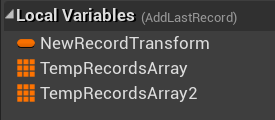
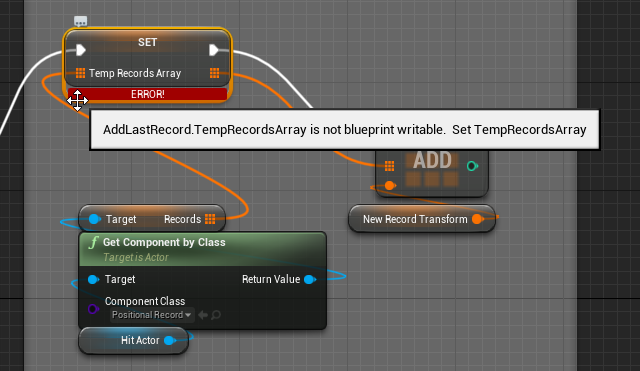
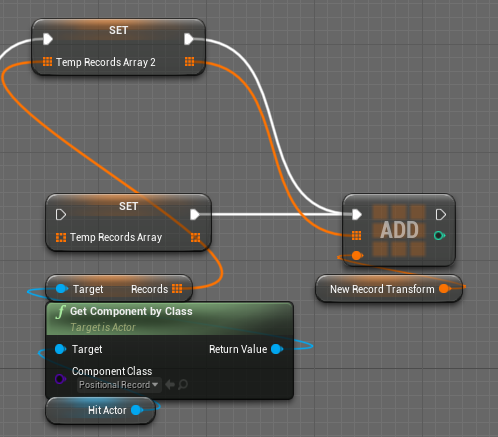 spark steppe
you probably checked "blueprint read only" in the other variables details
spark steppe
doublecheck!?
ripe rose
where even is that
spark steppe
if you click the variable, theres a checkbox in the details
ripe rose
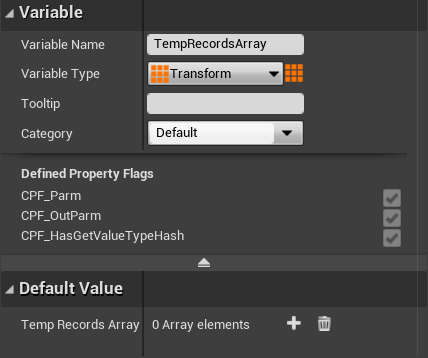 spark steppe
might have to open the advanced tab
trim matrix
Im having a really hard time trying to find that inputaction interact
odd ember
trim matrix
Im having a really hard time trying to find that inputaction interact
it was on your first screenshot?!
I can't help you find your code if you can't find it yourself
trim matrix
I did that, it stopped there but it gives me no information
spark steppe
@carmine bay did you promote the array to a local variable from the function output?
odd ember
use the button up top that says "step over"
spark steppe
then it may have inherited settings of the function return value, which may be read only
odd ember
or "step into"
spark steppe
but idk, just guessing. and you solved it by now
trim matrix
It brings me to the branch
ripe rose
well i instigated the problem by copying code from somewhere else cus i'm refactoring my code, so yeah i hit the "create local variable" button. but i don't know why it made it blueprint readonly or whatever. i'm not using it any differently from how i was using the variable originally
odd ember
if you hover over each pin, you can see what the value of that pin is currently
as it is being executed
odd ember
that should help you find out why it is happening
trim matrix
Before I do anything, what is a "pin"
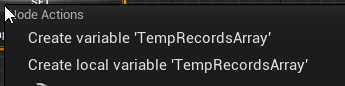 odd ember
a pin is the end point of wires
though if you're this new, I'd suggest looking up some tutorials to familiarize yourself with the UI and terminology
this is double work for me trying to explain what everything is
trim matrix
I appreciate all the help
trim matrix
gentle urchin
plus this doesn't show anything inside the start shooting event
but the Fire event does not "Fire XD" thats the problem
gentle urchin
Are you sure that the issue is externally, and not an internal issue?
The logic you've showed doesn't seem horribly setup, or somehow blocking it from firing
odd ember
it does seem a bit suspect that there is a "stop shooting"
one would have thought that the shooting would stop automatically
trim matrix
I've been using breakpoints and I've fixed the errors that have been occuring but it still doesn't fill
 valid bolt
Anyone know how to add the textures to the 3d model?

 brazen pike
valid bolt
Anyone know how to add the textures to the 3d model?
brazen pike
valid bolt
Anyone know how to add the textures to the 3d model?
If you have the texture, select it in the top right of that page, where it says "Material". Also probably a better question for #graphics
odd ember
trim matrix
I've been using breakpoints and I've fixed the errors that have been occuring bu...
you should be able to see what is going and why it doesn't work inside of that event
trim matrix
I figured it out, I named something wrong when it was trying to call a certain thing, so it wasn't being called at all
But the breakpoints didn't tell me the issue which was annoying, but I got it to work
Thanks for the help! It means a lot
odd ember
breakpoints aren't magic, but they will tell you why something doesn't work at runtime
usually
trim matrix
I have run into a new issue
Whenever the widget is in radius, it starts up automatically without pressing the "E" key

 odd ember
if it's not happening when you press a button, it's not related to the input event
it may be related to the overlap of the actor
which would make sense
trim matrix
So what exactly would I do
 violet flax
@trim matrix
Can you show us your blueprint part using this
https://blueprintue.com/
Mark your Nodes in your blueprint and press ctrl+C and past them in the grey box.
And share the linkl
Can't read the one you uploaded here.

blueprintUE is a tool for sharing, rendering and rating blueprints for Unreal Engine 4. UE4 is a game engine which use visual scripting called blueprint.
trim matrix
No description provided
odd ember
trim matrix
So what exactly would I do
look at the place where you have created the overlaps for the actors you want to interact with
violet flax
I have a question.
I'm using PlayerState to spawn some things for each player based on if they are the "host" or "joined" and make a array with the information of the actors created.
Inside my "PlayerController" i access both Arrays but it says one is empty. Inside PlayerState both are filled. Anyone knows why?
odd ember
probably related to #multiplayer
violet flax
yes
odd ember
so... that's where I would ask that question
trim matrix
Now my widget wont show up at all
odd ember
where is the actor that propagates the widget?
trim matrix
It would be the event tick right?
 trim matrix
I forgot what an actor was
odd ember
I'd recommend keeping a reference sheet for these things then
it's much harder to help when every time I have to re explain elementary concepts. an actor is the entity that exists in world, that has a BP on it
trim matrix
So the circle then right?
 odd ember
an actor is the entire thing
again, look up some basic reference please
and you're looking for the actor in particular, that has that widget attached to it
trim matrix
Oh, the desk is what the widget is attached to because that's where it shows up
odd ember
cool, so look inside the desk's BP
trim matrix
I dont see a problem inside it, all I did was reimport my mesh and now it wont show up
odd ember
just because you don't see it doesn't mean it isn't there
if the widget is inside the desk actor, then the problem is either inside the desk actor itself, or the widget itself
so first we'll want to check the desk
then we'll check the widget
trim matrix
This is my setup of the visibility of the widget, I added breakpoints and tested it and it seemed to work fine
 odd ember
I don't know what happens inside of that macro
but where you need to look is where you spawn the widget, or on the desk's tick function
trim matrix
macro
 odd ember
ok
check where you spawn the widget inside the desk. if it's not spawned, and is part of a component
then we'll have to look inside the widget
trim matrix
The widget location was the problem
Since I reimported my mesh, the mesh moved but not the widget so I have to relocate it
and now my widget wont work at all, time to figure out some stuff
 tawdry surge
Anyone know what could cause this?
I'm trying to move the player along a spline and it offsets hard
gentle urchin
trim matrix
macro
The same effect is achieved with a "not" node for the boolean
gentle urchin
tawdry surge
Anyone know what could cause this?
I'm trying to move the player along a spline...
Gotta show some code
trim matrix
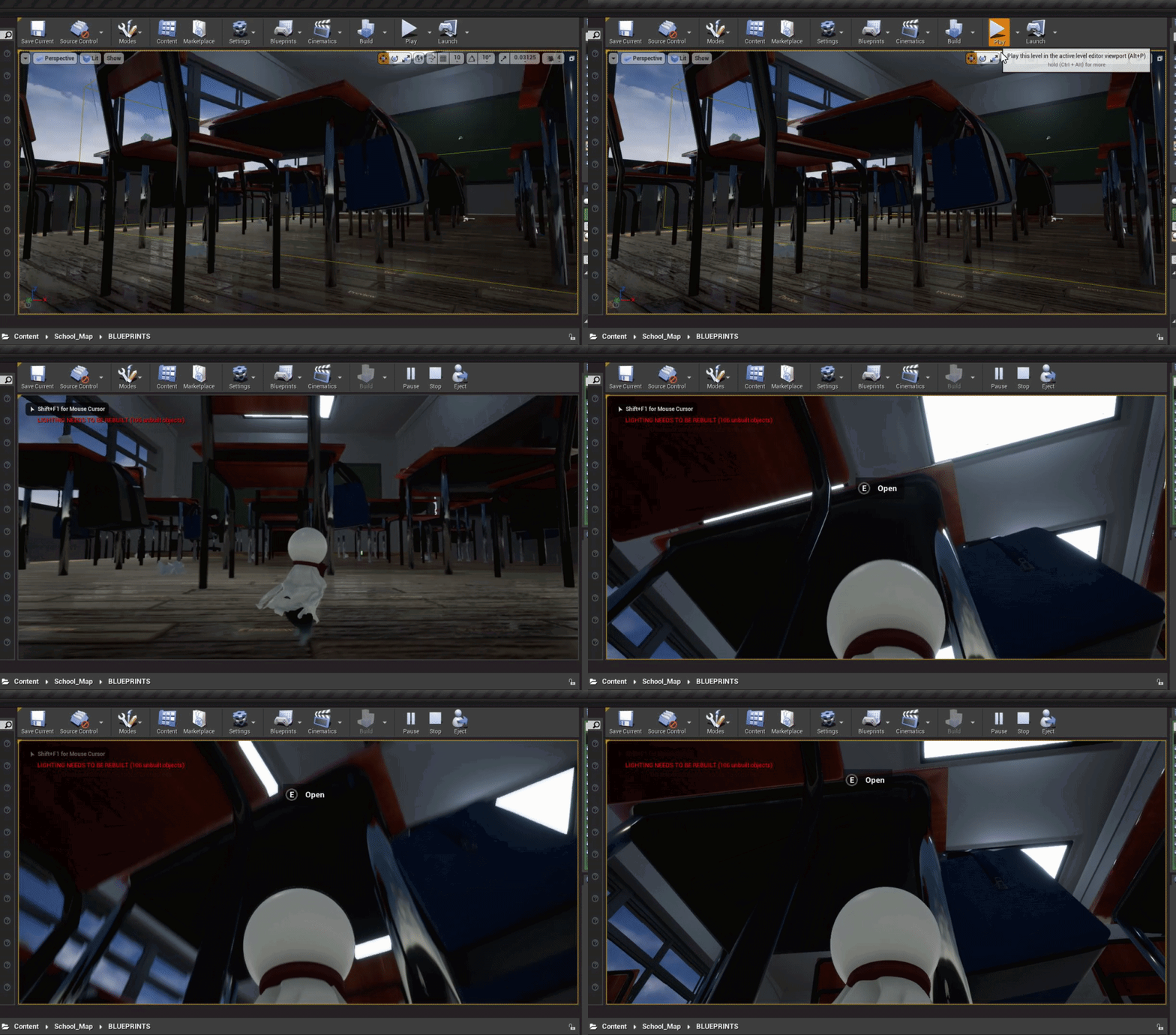
E key still doesn't do anything
I fixed it earlier a different way, my fix is currently in play and that means something else is wrong
odd ember
trim matrix
E key still doesn't do anything
I fixed it earlier a different way, my fix is cu...
breakpoint your inputAction interact event
trim matrix
The red lines mean it's working right?
odd ember
what red lines
trim matrix
 odd ember
that's how far it manages to execute, yes
trim matrix
Alright well after that last node it goes back to the beginner, so I assume that this BP is fine?
odd ember
but it is moot when using breakpoints as they only stop if they are being executed through
trim matrix
Oh
odd ember
trim matrix
Alright well after that last node it goes back to the beginner, so I assume that...
never assume
trim matrix
So the error can still occur even if being exocuted
odd ember
yep
trim matrix
I see
odd ember
the error can be reading of values
or not reading of correct values
it can be any number of things
in this case, your array seems suspicious
so I would take a look at that
and if that works, then look at the OnInteractionBegin function/event
trim matrix
On Interaction Begin is just an interface and the message has nothing in it
And this is my array
 odd ember
trim matrix
On Interaction Begin is just an interface and the message has nothing in it
odd ember
trim matrix
On Interaction Begin is just an interface and the message has nothing in it
that's just the for loop. not your array. and the interface function may have everything to do with it, since it controls what happens when you interact with that item
breakpoint on the for loop node
or foreach node
or whatever it is
trim matrix
Alright so the array works
odd ember
then the only thing left is that interaction function
so you'll have to take a look the actor you are interacting with again
and see what's inside that function
tight schooner
tawdry surge
Anyone know what could cause this?
I'm trying to move the player along a spline...
Hard to say without seeing the BP but it could be a local/world thing. Check that parameter on your Get Transform Along Spline node.
tawdry surge
That's what I was thinking. Im probably getting local spline coords and setting them in world
gentle urchin
If it is, it would worsen the further from 0,0,0 world you got i think
trim matrix
Tested this and it works pretty normally, it looks like it's looping back around to the widget
 tawdry surge
I'm waiting for someone to vacate my chair so I can check
 thorn ermine
tawdry surge
I'm waiting for someone to vacate my chair so I can check
thorn ermine
tawdry surge
I'm waiting for someone to vacate my chair so I can check
Is it a cat? 😆
tawdry surge
No it's an oblivious person jabbing on there phone instead of finishing the email they're supposed to be sending
trim matrix
Comes to here inside the widget
 tawdry surge
Yeah I had my get transform at distance along spline node set to local space.
World space and all good now
icy dragon
inb4 "any struct"
icy dragon
 wet palm
ue does not support structure setting in bp
wet palm
ue does not support structure setting in bp
What kind of structure are you talking about?
icy dragon
wet palm
tool data strecture
You mean Data Tables? Or are you referring something completely different?
wet palm
ill send screenshot
https://cdn.discordapp.com/attachments/127723854171734016/907772942555947059/Record_2021_11_10_02_24_17_345.mp4
it souppsed to show the question mark, but it does not?
it even fire the event to SET the icon to the question mark
it does not show the icon being set -
when i check the array while debugging
https://cdn.discordapp.com/attachments/127723854171734016/907773280197419068/Record_2021_11_10_02_26_11_497.mp4
as u can read in the values, it is all my weapons images name, not the question mark name
what could cause this issue?
i did this code, lets see what it print in real time
the minigun image name or the question mark name
Oh?? it print the minigun image name
how came this be possibe?
@icy dragon
odd ember
BP structs at it again
gentle urchin
Almost every day :p
wet palm
odd ember
BP structs at it again
wdym
gentle urchin
Its a common issue, yes
gentle urchin
Change the get node
gentle urchin
I mean, i dont know the rest of the logic , but that part should work yes^^
Its easy to miss
gentle urchin
So.. diamond for diamond 😀
wet palm
connected
then that is ok
yeah man i noticed that also
but i thought "well the pin connected to each other, so the thing is fine now"
wet palm
i love issues
🤣
i feel when i face a lot of issues
i learn fast
since im making a game with many diff settings and logic and stuff etc etc, i face all kind of diff issues
with this ONLY one game i made
odd ember
this issue only really comes up with structs in BP
wet palm
i learnt alot!
odd ember
because structs are always copies
whereas everything else is a pointer
remember to use set (by ref) too
gentle urchin
Soo is this a fault of how structs are setup behind the scene?
wet palm
odd ember
remember to use set (by ref) too
there is only set by ref
it worked now, u guys are AMAZING HUMANS BEING
😍
tnx
wet palm
no pronblem!
odd ember
gentle urchin
Soo is this a fault of how structs are setup behind the scene?
probably to do with engine limitations in conversions between BP and CPP
 south merlin
I have a behavior tree, and when the ai can see the player, and the player is in range, it will use Rotate to face BB entry and then fire on the player. If I run away, and get out of firing range, the TargetLocation for the rotate to face BB entry says it's invalid (only if I mouse over the node. In the keys, TargetLocation has a valid vector). What the heck is rotate expecting? I have a decorator for PlayerIsInRange, and it's set to Notify Observer on Value Change and aborts Both. It's Key Query is set to Is Set and the key is the PlayerIsInRange, but it never aborts as it gets stuck on the rotate.
I'm absolutely stumped.
odd ember
south merlin
I have a behavior tree, and when the ai can see the player, and the player is in...
A) if you have a problem, you should always post your code, B) as much as they look alike, BTs aren't BP technically. #gameplay-ai is where you want to post instead
south merlin
Roger that, thanks.
trim matrix
https://blueprintue.com/blueprint/ad_bymxf/
https://blueprintue.com/blueprint/19s994vx/
https://blueprintue.com/blueprint/50fxn9jf/
No description provided
No description provided
No description provided
I am still heavily stuck on this widget bp
odd ember
what is your issue
trim matrix
I've told you
odd ember
well feel free to repeat it as I can't remember and I don't want to spend time scrolling through a lot of extra pages just to find it
it's your problem, if you want it solved, at least present it in a way where we can help you
trim matrix
The bar wont fill up when I press the E key


 ebon totem
gentle urchin
The logic you've showed doesn't seem horribly setup, or somehow blocking it from...
ebon totem
gentle urchin
The logic you've showed doesn't seem horribly setup, or somehow blocking it from...
no if i print string directly after Event Pressed it does print it so no event is fired
Thats my priv acount btw
trim matrix
Nothing
 trim matrix
Nothing either
trim matrix
It went straight through and went back to the Array in the Character BP
odd ember
did you put it on the red event node?
trim matrix
Yeah
trim matrix
Went here
 gentle urchin
ebon totem
no if i print string directly after Event Pressed it does print it so no event i...
gentle urchin
ebon totem
no if i print string directly after Event Pressed it does print it so no event i...
It prints 20 of 20 times, but itndoesnt fire 20 of 20 times? Whats the gun shooting logic
odd ember
trim matrix
Went here
cool, so now put a breakpoint after the branch where you use that node on tick
spark steppe
 odd ember
that should work
ebon totem
gentle urchin
It prints 20 of 20 times, but itndoesnt fire 20 of 20 times? Whats the gun shoot...
noooo it prints 17/20 times
trim matrix
This one?
 trim matrix
And see where it leads?
odd ember
see if it triggers
ebon totem
its not a BP problem because if it was it should print 20/20 and every player would have the same problem but the problem happends to 2-5% of the players
trim matrix
It's triggered
odd ember
trim matrix
It's triggered
what's the value added when you hover over the green float pin?
gentle urchin
ebon totem
its not a BP problem because if it was it should print 20/20 and every player wo...
So its an input problem?
ebon totem
yes 😦
trim matrix
It's 0
odd ember
trim matrix
It's 0
that'll be why then
gentle urchin
ebon totem
yes 😦
If so, isnt it out of your control?
 ebon totem
gentle urchin
If so, isnt it out of your control?
ebon totem
gentle urchin
If so, isnt it out of your control?
i hope not because its a game brake for players, i found out that some players of other UE games like DBD and UEturnament have the same problem
trim matrix
I set it to 1, I tried it again, it didn't fill up, it just flashed
Which makes sense
odd ember
also make sure that it is hooked into your dynamic material parameters. I don't see it anywhere in your graph
odd ember
trim matrix
I set it to 1, I tried it again, it didn't fill up, it just flashed
Which makes ...
ok that's good news
so we've isolated the problem to be the math
gentle urchin
ebon totem
i hope not because its a game brake for players, i found out that some players o...
Sounds like the input equipment and drivers should be investigated
trim matrix
Dynamic material parameter?
odd ember
trim matrix
Dynamic material parameter?
nope, since it filled up when you set it to 1, that means it's not the dynamic material parameter
it's the progress float value that doesn't update properly
trim matrix
Yes but what do you mean by hooking it into the dmp
Oh the dynamic material instance I see
odd ember
yeah but since it works you dont have to worry about it
is what I am saying
the math is the issue
trim matrix
Oh okay
trim matrix
And what about the required hold time?
odd ember
test if it works witihout first
you are trying to isolate a problem
not fixing it yet
odd ember
so you now know the that the required hold time is the issue
trim matrix
And the progress values are set to .5 each so I'd just do .2 + .2 or something
odd ember
congrats 🥳
trim matrix
Nevermind that didn't slow it down at all
odd ember
you can still use the hold time
just make sure that it isn't 0
which is probably what happened
dawn gazelle
This is also a problem... Progress == 1 is unlikely to happen. Progress >= 1 is.
 odd ember
dawn gazelle
This is also a problem... Progress == 1 is unlikely to happen. Progress >= 1 is...
odd ember
dawn gazelle
This is also a problem... Progress == 1 is unlikely to happen. Progress >= 1 is...
we've fixed it already cross that you're right
dawn gazelle
Ah ok
odd ember
there were a few kinks in the road leading up to this
trim matrix
I just dont understand because I followed a tutorial 1 to 1 and it worked for them
But oh well, it works now
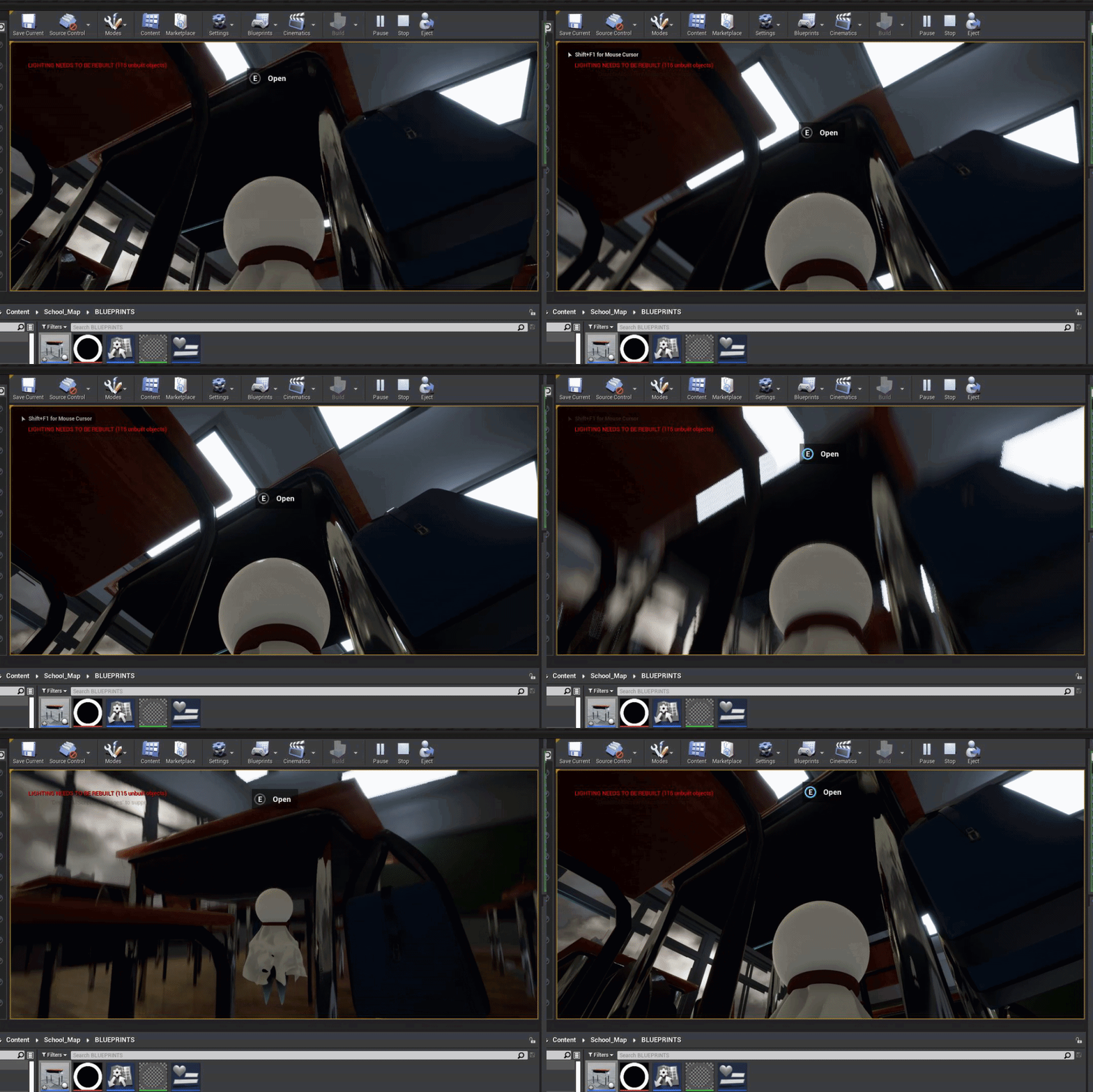
Thanks a lot for the help, this is due in a day and you're a life saver
odd ember
now go forth and use those debugging skills I've taught you
trim matrix
I'll make sure to put them to good use
ebon totem
gentle urchin
Sounds like the input equipment and drivers should be investigated
might be
faint pasture
trim matrix
And what about the required hold time?
HeldTime = HeldTime + Delta seconds
Progress = HeldTime/RequiredHoldDuration
faint pasture
trim matrix
I just dont understand because I followed a tutorial 1 to 1 and it worked for th...
Do tutorials just enough to figure out what an actor and component are and then just dive in and do something by yourself. You won't really learn by watching and following.
trim matrix
Combining watching and following and then doing something by yourself is the best way to learn
I have been doing just that
 wispy solstice
Hi, I have a few melee attack animations in my game where the character moves across the screen. Is there a way for me to make the animation only move the player a certain distance depending on where the target is?
odd ember
root motion
wet palm
Error: CDO Constructor
Error: CDO Constructor (texampleGameMode): Failed to find /Game/FirstPersonCPP/Blueprints/FirstPersonCharacter.FirstPersonCharacter_C
odd ember
does your class exist
odd ember
well then
faint pasture
Change the default Pawn class on the game mode
wet palm
from where
from project settings, which tab?
@faint pastureno such options in the project settings

@odd ember it refuse to get away
trim matrix
 wet palm
@odd ember ok
@odd ember why are u sad? 😔
how can i help to make u unsad
😟
what do u mena
Help
 sterile garnet
i'm having trouble getting "launch character" to work on an AI controlled enemy in my game. anyone had any issues with that or solves?
sorry for my messy blueprints but this is part of the setup i have. basically gets a vector between the player who caused the damage and the enemy, lifts the enemy off the ground slightly to avoid friction, then the vector multiplies by the damage amount, then a multiplier is applied to increase the effect (currently like 5000000 as i was trying to get anything to work)

i was able to get the launch to work straight up, but can't apply it horizontally
odd ember
I think it only works without friction perhaps?
sterile garnet
the enemy is lifted off the ground before the launch is applied
i have a very similar setup for when the player is damaged that DOES work for some reason, so I think it has something to do with the AI controller overriding the movement
odd ember
copy your setup over verbatim to a player class and see if it's supported?
sterile garnet
yeah, i did. this is the same setup in my player character (which works)

 heady marlin
Hello how i can get the "phisyc copy" of the image obtained from steam?

 hybrid ether
Hello, This is sphere world and I want camera be constant pointing planet.
like this way
 odd ember
hybrid ether
Hello, This is sphere world and I want camera be constant pointing planet.
odd ember
hybrid ether
Hello, This is sphere world and I want camera be constant pointing planet.
do you still want it to have the rotation of the plane?
faint pasture
hybrid ether
Hello, This is sphere world and I want camera be constant pointing planet.
So what is your question? Or are you just making a statement.
odd ember
I think his question is pointing towards the center of the world sphere... which is probably x/y rotations if it works without quats
find look at rotation
z rotation can be either plane or planet
or actually, it might be x/z for planet and y for plane
either way something one can figure out by process of elimination
 fierce birch
how do you increase texture pool size limit
odd ember
you pray to the graphics card gods
 quartz mauve
fierce birch
how do you increase texture pool size limit
quartz mauve
fierce birch
how do you increase texture pool size limit

The texture streaming system is a vital part of Unreal Engine's ecosystem. Luckily, this warning message is very common and easily fixed.
odd ember
welp
 maiden jay
Hey all, I've got a BP with a "Play Montage" node, however during runtime it can't seem to get past the node (and the animation doesn't play). it doesn't complete, it doesn't report any interrupts, nothing. Any suggestions?
odd ember
probably better to ask in #animation. I honestly have no idea how the internal logic of anim montages are
 vast crow
Long ago, I created keyboard key event somewhere in some blueprint. Now I can't find it because searching for one letter gives thousands of results
Nevermind, I can look into stack when it crashes to find another nodes to search for
 stuck flicker
I'm trying to disable decals from affecting a dynamically created material.
How do I set the decal response parameter via blueprints for a dynamic material instance?
I think it's a scalar parameter enum, but it doesn't show up with the other associations in Get Parameter Info. Plz help
odd ember
if it's not showing up, it might not be exposed to BP?
otherwise if you do find it, you can input integer values in lieu of enums, if you cannot use enums
trim mist
Is set ground friction still a thing in ue4?
trim matrix
im gonna need some more help
I tried to make a counter since the character collects objects in the game, but the counter doesn't go up when the actor is destroyed


This is the HUD BP
 trim matrix
Anyone know a way to make the number go up one?
burnt abyss
trim matrix
Anyone know a way to make the number go up one?
make a variable
get it
drag out from it with a plus node
set the variable as the result
then every time that runs the variable will increase by one
trim matrix
What BP would I do that in?
burnt abyss
completely depends on what context you're using the number in
trim matrix
Collecting items
burnt abyss
probably either a gameinstance BP or the player
then every time an item is collected cast to the BP and run the event that adds to the variable
trim matrix
How would I do that
burnt abyss
do you have a BP for the item
 burnt abyss
so right before the destroy actor, add a cast to before the destroy actor that points at the gameinstance
burnt abyss
burnt abyss
>make a variable
>get it
>drag out from it with a plus node
>set the variable as...
and then put an event in the gameinstance that runs the code here ^
run the event from the item BP and it should work
 unreal wing
So im having a little trouble with a coin counter UI. Im trying to make it where whenever the player picks up a coin the coin counter UI play a small animation. Ive made the small aniamtion but cannot figure out how to animate it whenever the player picks up a coin. Any ideas?
 mint acorn
Hey Guys/Gals anyone around who can tell me why my animation montage continues to fire the weapon when it should only fire single/once?? - My rifle animation works fine, I have duplicated this and called it shotgun but this now fires continuosly ????
 vapid talon
Hi guys, I want to set allow CPUAccess on Skeletal mesh via BP, but can't find the proper node, there is one for static mesh not for skeletal mesh
 haughty axle
Wise people of internet.. have a question... Is there any way I can add instanced static meshes in data table? And pull them out in BP and add to array? Now i have few BP's who holds bunch of them for random generation. But thinking to move to "data base" for easy managing and entering. But for few hours couldn't manage to pull it off. I can do that with static meshes and pull them out from data table or strings and etc .. but can't manage hot to do that with instanced static meshes
gentle urchin
unreal wing
So im having a little trouble with a coin counter UI. Im trying to make it where...
Whenever coin count changes. Based on this question i'd guess you got a binding for the counter. Otherwise you could simply use the existing function/event that is called whenever player picks something up.
If you really really wanna use the binding, you must cache the current coin count in the widget. Then whenever cached value != incoming value -> do the animation then set cached value == incoming value
unreal wing
gentle urchin
Whenever coin count changes. Based on this question i'd guess you got a binding...
yah im using a binding, ill send a screen shot

so im not sure what to do from here
 gray chasm
This seems like something obvious which I'm missing; if I have an actor with say, 4 boxes on it, and I want to have a different behaviour depending on which box the player is in, how do you do that? the overlap event only seems to specify the two actors, and the on-hit event doesn't let you determine if you're currently overlapping or not.
ah, nevermind. Get Overlapping Components
 amber dragon
Good morning, does anyone know how to fix this bug?: "failed to load (asset) can't find any" That message is appearing every time that I try to package my game, which causes to me not being able to it
dawn gazelle
haughty axle
Wise people of internet.. have a question... Is there any way I can add instance...
What is it about the instanced static mesh you want to store? The mesh it uses? The instances that you're making?
haughty axle
@dawn gazelle the mesh it uses, but i think i will go without data base for these things
trim matrix
burnt abyss
so right before the destroy actor, add a cast to before the destroy actor that p...
Idk what the "Gameinstance" is
I understand now


 timber knoll
Why would you do that in game instance?
If your character collects the other actor = character
In which case you can just have it store the counter and HUD attached as well to update the display every time you pick up something
trim matrix
Im gonna need you to dumb it down for me, I dont understand shit man
timber knoll
Do you have the counter in your player character/pawn?
trim matrix
I have this in it
 timber knoll
Make sure it has one, and create an event or function
Ok good
Then once you collect item
You check if the other actor is the player by casting
Which you do alright
So just add the event before destroying it
trim matrix
So call this logic before destroying it?
timber knoll
Yes from player object > collected teru > destroy self
Inside your teru beginoverlap
So your player will know it has collected the teru
trim matrix
 timber knoll
And can handle the logic from there
The blue pin on the right side of the cast
Should be connected to the collect event
timber knoll
So now that should increase your counter
trim matrix
I can add variables or functions to particles and use those to change the particles right?
trim matrix
I want the rain I created to get less heavier with each teru collected
and on the final one it'll be normal weather
timber knoll
Then you would have to decrease the spawn rate
I’m not 100% sure how to do it but shouldn’t be too difficult
 twilit heath
you'd probably want a parameter on material parameter collection for that
as you'd need more then 1 material to drive the weather
we have over 20
timber knoll
He’s talking only rain particles 😛
twilit heath
and it would be a pain in the arse to set a parameter on each of those individually
things tend to grow
trim matrix
I cant figure out how to add variables to the particles
timber knoll
In niagara you can add parameters
And then you should be able to just change the value in blueprint
trim matrix
I'll give this a shot
spark steppe
and afaik you can use the same parameter for different subsystems
gentle urchin
unreal wing
so im not sure what to do from here
Save the coin amount in the widget for comparison . If coin amount from player is higher than the saved value, play the animation, then save the new coin amount
trim matrix
I got this setup in the particle blueprint
I want it so when a Teru is collected/destroyed, the values on the particles will decrease
 spark steppe
is that a question?