#blueprint
402296 messages · Page 741 of 403
 odd ember
 ripe rose
even an approximation
odd ember
let alone half obscured ones
odd ember
do you care about the surface area or just how "visible" the actor is
ripe rose
i think i specifically want to know what % of the screen they're taking up from the perspective of actor #2
but knowing what % of them is visible and what % is obscured works too
i know there's a function in c++ for getting whether or not they're rendered at all, i already made that bp visible cus i'm using it for something else
odd ember
you can get actor bounds in 3d which would be a bounding box around the actor, giving the furthest extent of the actor in 3D. but it will also taken into account obscured parts
ripe rose
yeah i have to somehow figure out how much is obscured
the naive answer is a grid of line traces
odd ember
you'll have to do your own math for that
I don't even know how you would get it from line traces
let alone translate those values into screenspace
ripe rose
i'd just line trace from actor #2 aimed at a grid across actor #1's bounding box and see how many of them hit
ripe rose
hm
 sharp temple
hey everyone sorry if this is poorly shown and a noob question but when i aim down my weapon scope when i shoot at a wall for example how would i do it so when i shoot the projectile is going exactly where the red dot is looking at because right now i look down my scope if i aim at some ones head the scope is aimed at the head but the projectile would hit the neck or chest

 odd ember
I think you'll find whatever you're doing very hard to do in BP
ripe rose
me? i've done some crazy shit in bp
odd ember
well good luck then
ripe rose
thx
i might not even do it, i was just wondering if anyone knew off the top of their heads if there's an efficient way
i guess not
sharp temple
@ripe rose what's up?
ripe rose
well cranz i wouldn't be surprised if there were like striaghtup a function already built in just because of like
shaders
idk
like a different way to phrase the question is "how much of this is being rendered on screen"
odd ember
shaders don't deal with discrete specifics the way that ordinary code does
in shaders, everything is math
 static charm
Darksounds, if youre using line traces make sure it's hitting the actor/enemy, and not just going through to the background wall.
sharp temple
@ripe rose in the actor blueprint can't you cut the shap or what ever is exposed into parts so what ever is exposed and what isn't it wouldn't be the whole thing sorry if this sounds dumb i only read a short bit what was said
static charm
there is an effiecent way, it's in c++
ripe rose
sharp temple
hey everyone sorry if this is poorly shown and a noob question but when i aim do...
make the linetrace for the shot based on the scope's angle not the gun's
sharp temple
@static charm i'm not using linetrace i'm using projectile actor
static charm
u can search "get actor screen size in blueprint" and find a forum post and other results
ripe rose
darksoul i also fire projectiles in my game and i use a linetrace to determine the trajectory
if the line trace hits it goes towards the hit
if it doesn't hit then it goes towards infinity based on the camera forward vector
or osmething
ripe rose
sharp temple
<@!131685664566542337> in the actor blueprint can't you cut the shap or what eve...
that'd be one way to approximate it and would work if my whole game were based around this idea but it's just a thing i want to try
like checking LoS for multiple components
sharp temple
does it have to be that way because god dam i did not think about such a small thing like this
ripe rose
i mean it's not very hard to do darksoul
lemme double check how i did it
1s opening ue4
sharp temple
ok cool thanks sorry i stop using unreal for a while so my memory is all over the place
wouldn't it be best the tilt the projectile upwards a tad to go exactly where the red dot is?
odd ember
or project a rendertarget onto the red dot sight
from a camera situated at the end of the gun barrel
that way you preserve bullet physics
sharp temple
@odd ember i will be doing that to long range scopes to give it the magnifying look to it but red dot would keep standard
odd ember
if you're going to do it for other scopes then why not treat this as a scope and do the same?
solves your problem
preserves bullet physics
what's not to love
sharp temple
i mean i know this is a cheap lazy way but tilting the projectile spawn point up a little seems to get close
 odd ember
sure but you're not preserving bullet physics
your gun is now shooting the bullet upwards
ripe rose
if you're trying to be realistic the bullet should shoot up and hit where the dot is aiming at a specific range
e.g. 100m
but beyond that range it should hit below the dot
unless you zero the sight
sharp temple
using rendering on a scope from my experience is a huge performance loss so i want to use it where it's needed not saying it's a bad idea what so ever just saying
odd ember
why don't you see if it's actually interfering with your performance first?
the creed goes: make it work, make it neat, make it fast.
ripe rose
i use camera location as my linetrace start, and (camera forward vector) * (range of the weapon) + camera location as my line trace end
if the linetrace hits then i "make rot from x" of (impact point - camera location). this rotator is used to determine the initial transform of the projectile on spawn
this is slightly simplified because i do some other stuff to offset the spawn location of the projectile and make sure it doesn't spawn inside of a wall and stuff like that
i don't have bullet drop though
so my application might be different
also if the linetrace doesn't hit, i use the trace end instead of impact point, so that it fires off into infinity at the angle of the camera or whatever
ripe rose
odd ember
or project a rendertarget onto the red dot sight
can you elaborate on this
or point me to a document
to read
odd ember
rendertargets are materials that can take realtime updates from e.g. a camera location
there's plenty of tutorials out there if you google
it's not a difficult setup
ripe rose
yeah i'll just check out a tutorial and see if it's relevant to my interests
might be something i want to use later
sharp temple
i will see what i can do @odd ember i need to experiment with scope rendering more i know you are right @ripe rose for what you were asking maybe there is some way to give vertices an identity for what is exposed or what isn't because i know it is possible to give landscape blocks an identity because i used voxel plugin before so i hope you find what you are looking for thank you both so much for helping me
 tight schooner
sharp temple
wouldn't it be best the tilt the projectile upwards a tad to go exactly where th...
tight schooner
sharp temple
wouldn't it be best the tilt the projectile upwards a tad to go exactly where th...
I believe real guns have this function called "zeroing" and it's in a handful of games like Arma and PUBG
ripe rose
tight schooner
I believe real guns have this function called "zeroing" and it's in a handful of...
yeah i touched on that a bit
if he's trying to be realistic the bullet should shoot up at an angle based on the zeroing and hit the red dot but only at a specific range
sharp temple
@ripe rose https://www.youtube.com/watch?v=PMeZuQOXGHM&ab_channel=UnrealCG i think i used this one for my project before can't remember if not just ask again
Sniper scope zoom using render to texture and scene capture component .So you can zoom in and zoom out the scope like a binocular.If you like my tutorial please like and subscribe.Thanks for watching
More Tutorials : https://goo.gl/tDSaZq
-~--~-~~-~-
Please watch: "Invisibility Effect - Unreal engine 4"
https://www.youtube.com/watch?v=ZZQo...
ripe rose
odd ember
from a camera situated at the end of the gun barrel
oooh
sharp temple
@tight schooner yeah i was curious on how zeroing works in real life because it is a mystery if you don't know lol but i obviously asked some people lol
ripe rose
you're saying make the scope see from the perspective of the barrel
rather than the actual position of the scope
i get it
anyway good luck gonna go lose some games of OW
sharp temple
this is how it is this is how i want it not perspective from in front of the scope or on the barrel only behind the scope

@ripe rose thanks for your help good luck on your project
@lapis zenith was thinking of doing that but need to test it out because not sure how the other player would see it come from the barrel when if i did that the bullet would be seen coming from the scope you know?
projectile
yep xD
i could use that trick and maybe replicate it in ways so on my screen it comes from scope and for other player it comes from barrel but that wouldn't be good on performance if i were to spawn the projectile 2 times
projectile does damage but that actually isn't a bad idea
using the linetrace to do damage i will put on my list
odd ember
well if it's fast enough
sharp temple
yeah will just have to work out timing
odd ember
bullet through air is near instant enough
sharp temple
well could to make the lintrace kick it when the projectile hit sorry i forgot how quick linetrace can travel xD
odd ember
line trace is instant
sharp temple
yeah sorry my bad lol me being dumb
me thinking about a projectile and a linetrace is confusing me
thank you both a lot i will have to use that when i add more weapons in 🙂
i actually think some games uses that system not sure or maybe it's just bad delay on battlefield i notice when a missile hits something there is a delay from when it explodes and when something is hit maybe they use some sort of linetrace to double check things
odd ember
battlefield uses some type of projectile for sure
sharp temple
yeah but i noticed there projectile spawn is always janky with rockets
odd ember
probably a heavy physics cost for rockets
sharp temple
probably yeah
 icy dragon
Maybe BF put into account gravitational curvature?
sharp temple
i think the way they spawn projectile is just badly done don't get me wrong i love battlefield but some things they do is pritty lazy
odd ember
I'm sure they use state of the art tech to make all of this happen as well, and their entire engine is optimized towards this kind of action
icy dragon
I only (mostly) play boomer shooters, where it's as straightforward as rockets going through a straight line. That's as far as I'm aware with shooty bang bang in games
sharp temple
yeah the only thing that is probably going to hold them back is there servers
odd ember
I haven't played shooters in years
icy dragon
Logic is pretty simple, if unrealistic, but it's easier for netcode transmission.
odd ember
and can't imagine going back
sharp temple
i played battlefield 2042 and it was buggy yes but brilliant but all the flying aircraft would randomly go on a crazy one teleporting around
that sounds like either bad servers which doesn't make sense or everything would be the same or replication issues
 fervent bramble
I have an issue where whenever I launch my project, even in fullscreen or anything (It's the Third person example) the mouse is able to exit the window space, It's visible past the window space and I need to eliminate that
I've tried it as standalone as well
 trim matrix
fervent bramble
I have an issue where whenever I launch my project, even in fullscreen or anythi...
trim matrix
fervent bramble
I have an issue where whenever I launch my project, even in fullscreen or anythi...
someone on the internet posted,

is bounded to run on even tick
there is a c++ version of the discussion on answers hub as well: https://answers.unrealengine.com/questions/771971/mouse-temporarily-leaves-window-at-right-and-botto.html
fervent bramble
trim matrix
someone on the internet posted,
What's the Inputs thing? I'm confused
trim matrix
I am trying to set a custom time for my game and I realized that I could use Timer triggered by 'Event Begin Play' node; OR I could stay with my first solution, which was tick the Delay node. They are in the same ballpark of performance?
 trim matrix
fervent bramble
What's the Inputs thing? I'm confused
trim matrix
fervent bramble
What's the Inputs thing? I'm confused
It is probably a Macro or a Collapsed Node
you should try to link it with this;
 trim matrix
fervent bramble
What's the Inputs thing? I'm confused
trim matrix
fervent bramble
What's the Inputs thing? I'm confused
Got it?
tight schooner
trim matrix
I am trying to set a custom time for my game and I realized that I could use Tim...
impact should be minuscule either way if it's just a thing that runs once
couldn't tell you which has more impact, though you could always do a test where you spawn like 10,000 actors with that code and see what happens in a packaged project
fervent bramble
trim matrix
Got it?
Not quite.. I'm trying to figure it out, there are a few things unexplained so I can't exactly get all the elements in there
trim matrix
fervent bramble
Not quite.. I'm trying to figure it out, there are a few things unexplained so I...
the 'Show Mouse Cursor' boolean already exist in UE, so you get it by right-clicking on the event graph
fervent bramble
Target Self is what I can't find?
The SetMousePosition node requires something there
trim matrix
print your screen
fervent bramble
? screenshot you mean?
trim matrix
yeah
fervent bramble
Hold on, I gotta set it up again, I scrapped it to start over
trim matrix
you want the 'get' not 'set'

@fervent bramble on the self problem, the node already has it, so you do not need to bother
trim matrix
tight schooner
impact should be minuscule either way if it's just a thing that runs once
hmm, it will run while game is running
but I think being ignored every tick on the delay should not be better than the Timer
fervent bramble
trim matrix
<@!223261084818210816> on the self problem, the node already has it, so you do n...
I get an error when compiling though
 tight schooner
trim matrix
but I think being ignored every tick on the delay should not be better than the ...
tight schooner
trim matrix
but I think being ignored every tick on the delay should not be better than the ...
sorry, I didn't quite understand your original solution. Putting a delay node on tick is a weird thing to do in general. A looping timer would be better. Otherwise you have a tick event firing but not executing anything useful on most ticks.
If it's just one actor, the perf impact will be unnoticeable but if you have hundreds of actors ticking, then...
trim matrix
fervent bramble
strange, mine in Player Controller blueprint looks fine
 tight schooner
fwiw the looping timer will also be more accurate in terms of timing, because a tick event can only fire on a frame, so when a delay depletes, it has to wait for the next tick to reset
fervent bramble
trim matrix
strange, mine in Player Controller blueprint looks fine
Yea I can't even get Show Mouse Cursor without disabling Context Sensitive
And even then It has the target attached to it
trim matrix
where you are trying to re-create this?
trim matrix
I am a rookie too but for that, I would use in Player Controller Blueprint...
generally you try to stick controls definitions and UI stuff in Game Mode derivatives, like Game State (for stats), Player Controllers (for controls)
fervent bramble
I'm using the Third Person Example project as my default. The only character related thing is the ThirdPersonCharacter I believe
 kindred pier
I have a blueprint for an atm when placed on the map, you can deposit 200 money from it, and this is an int variable
oops sent too early
I want to create a child class of this bp and set the money amount to 100, but for whatever reason no matter what I do, I end up getting the same 200

 late gorge
hi, im having trouble with losing integer data when im passing a struct through different functions, it seems to always be 0 instead of being the index i give it at the start


anyone got any idea why?
trim matrix
fervent bramble
This right?
as you typed, it is giving you an error... try to watch a video about Game Mode or read some documentation; but basically you want to create a Player Controller blueprint, create the scheme there and link it to your Game Mode
kindred pier
kindred pier
I want to create a child class of this bp and set the money amount to 100, but f...
even just a subject in particular to learn up on would be enough for me
trim matrix
its late, I am out 🙂
trim matrix
kindred pier
even just a subject in particular to learn up on would be enough for me
why you do not update the value when you want to deposit 100?
tight schooner
late gorge
anyone got any idea why?
BP 1 shows a struct being made and put into an "LCur Slot Items" array and the next screenshot shows it coming out of a single variable called "New Item". I don't know all the steps in between so I can't say specifically why you're not getting the int value you expect. Something like this could happen if you're accidentally setting a whole new struct instead of using "set element in struct" to modify one thing (or something along those lines; I don't have UE4 open).
Otherwise you can practice some normal debugging to narrow down where the point of failure is
late gorge
im using a combat framework and it's spaghetti to say the least... was hoping it was some dumb "oh those integers get reset when out of scope of a function"
or something dumb like that :\
pretty sure the point of failure is when it "sorts" the equipment slots, by moving them up an index
just ugh :\
kindred pier
trim matrix
why you do not update the value when you want to deposit 100?
the way things are set up for me it is easier to use inheritance
in this particular instance
ahh I figured it out, was setting in incorrect place, thanks for your time
 fossil skiff
Did anyone follow marco medal's climbing tutorial? im having trouble with the jump up part
 gentle urchin
fervent bramble
gentle urchin
fervent bramble
Ignoring that you're using tick for this (test or whatever), on the non-pure function nodes there's a hint about who you need as a reference. "Target is Player Controller". This means that wherever you try to call this node, you must at the very least have a reference to the player controller you're trying to affect. If you were to do this inside the playercontroller itself, target "self" would work, because self would then be a playercontroller

Show Mouse cursor is also a variable that exist in the playercontroller. So target must be a valid playercontroller, and not "self" when inside the character blueprint
Regarding the variable, it is hinted to both in the contextual menu, and if you hover the target pin (in case you found it during "not context sensistive" search


 gentle urchin
Not sure what the "Jump Up" code does
 dense mural
How can i communicate between blueprints? I have a trigger box and a cube, as soon as trigger box overlaps with player i want the cube to move, how can i do that? Nothing i did worked.
gentle urchin
Multiple ways
hard referencing could be a method
Create an instance editable variable of the desired reference class in the trigger box, (probably need to make it a custom class), and point it towards the cube reference in editor
dense mural
gentle urchin
Multiple ways
This is my 6th day in UE4, can you tell me which nodes?
 wraith bay
Hi, so I’m fairly new to Unreal Engine, and I wanted to make a “Slow trap” which slows you down when you enter the collision box, and I thought it worked at first, but since I have sprint, everytime I sprint within the box, my mov speed resets, is there away to disable my character to sprint while he’s in the box?
dense mural
wraith bay
Hi, so I’m fairly new to Unreal Engine, and I wanted to make a “Slow trap” which...
I am quite new as well but how about an if statement and a public variable that trigger box changes?
 atomic salmon
@wraith bay you can change the max walk speed and other settings in the Character Movement Component as the character enters the box, and reset them when it gets out of it.
The other way would be to use a multiplier to the input movements.
wraith bay
👌🏻
atomic salmon
@dense mural say that your Trigger Box is an a BP_TriggerBox and your Cube is in a BP_Cube. You can add a variable into your BP_TriggerBox of type Reference to BP_Cube. Then you click the little eye on the right side of it, so it is accessible from outside the BP. Now with both your TriggerBox and Cube in the level, you click on your TriggerBox and you should see the Reference to Cube variable under Details. If you click on it to set it you should also see a little eyedrop icon. With that you can go and pick the your Cube from the level.
Now the TriggerBox has a reference to your Cube and it can "talk" to it and call functions/events on it.
fossil skiff
gentle urchin
Not sure what the "Jump Up" code does
its a user interface with a boolean i made
its just this nothing too fancy
 gentle urchin
Im a bit surprised that the default triggerbox dont have any method of reference built in really, is there any way to use it beyond the level bp to pick up a reference, without subclassing it? Sorta defeats the purpose of it imo

 gentle urchin
was just considering if the code in there could be the culprit of the rotator, and not the stuff you initially showed. If you try disconnecting the jump up call, see if it still happens
fossil skiff
in the anim bp?
gentle urchin
dense mural
This is my 6th day in UE4, can you tell me which nodes?
I'd suggest looking up blueprint communications. To add some visuals to Marco's explanation; I've made two new blueprints. BP_MyCube is the cube, and BP_MyTriggerBox is a child of triggerbox, so now some logic can be added to it.
 gentle urchin
fossil skiff
in the anim bp?
gentle urchin
fossil skiff
in the anim bp?
this part, so in the anim bp yes. Figuring out what's causing your rotation issue means debugging step by step, so walk through it. Either by debugging with breakpoints, or simply disconnecting chunks at the time to narrow it down
 gentle urchin
I'd suggest looking up blueprint communications. To add some visuals to Marco's ...
gentle urchin
gentle urchin
I'd suggest looking up blueprint communications. To add some visuals to Marco's ...
In the TriggerBox I've made a variable for the object reference of the new BP_MyCube. I've also set the variable to instance editable, so it's exposed and can be changed in the editor
 gentle urchin
In the TriggerBox I've made a variable for the object reference of the new BP_My...
gentle urchin
gentle urchin
In the TriggerBox I've made a variable for the object reference of the new BP_My...
When the triggerbox is added to the viewport, and i select it, the variable we set to instance editable is now exposed, and is by default empty
gentle urchin
gentle urchin
When the triggerbox is added to the viewport, and i select it, the variable we s...
 fossil skiff
Ok to give a brief explination, i have done jumping sides ways from walls to walls and it works fine. now im doing upwards jump which as u can see is causing me issues.
Without the jump up interface call event, my characters doesn't rotate anymore and looks natural. but i can't jump wall to wall side ways now.
gentle urchin
gentle urchin
After clicking the shown button, you can then click onto the actor in the level that you want to reference.
gentle urchin
gentle urchin
After clicking the shown button, you can then click onto the actor in the level ...
Then adding some simple logic to the Triggerbox, which now should have a valid reference to the cube:
 gentle urchin
fossil skiff
Ok to give a brief explination, i have done jumping sides ways from walls to wal...
gentle urchin
fossil skiff
Ok to give a brief explination, i have done jumping sides ways from walls to wal...
So my guess was correct. The issue is in your jump code
Next up would then be to check out which part of the code is causing you these issues. Either by using the debugging tools with breakpoints and whatnot,
or by removing parts of the logic and determining the outcome that way
just rubberducking it to yourself can also help shed light on the issue
fossil skiff
maybe i have branch thats stopping my character from jumping left and right
gentle urchin
You'd know that better than any of us really
fossil skiff
yea lemme try
thanks mate you gave me a better solution than what i thought of in 3 hours
gentle urchin
If you find it hard to follow your own code there's usually just one thing to do about it; refactor it. But if that's not an option for some reason, temporarily removing parts of it can get you a long way 🙂
fossil skiff
played arounf with it a lil and god an intresting result. ledge jumping up, i could jump side ways. only after jumping up i cannot so getting close lol
 ruby meadow
Is Select node CPP’s Switch analogue?
fossil skiff
@gentle urchin mate thank you so freakin much
 worthy carbon
How to create an system while when player picks up the weapon, the player will be able to fire projectiles?
 worthy carbon
fossil skiff
<@!747140139972558900> like a gun?
worthy carbon
fossil skiff
<@!747140139972558900> like a gun?
Yes
fossil skiff
Picking Up & Swapping Weapons! - Equipping/Unequipping Weapons coming soon!
For the people following the series, this episode is the prequel to it. Had to split them up to make them shorter.
★ Come join the Team Beard Discord: https://discord.com/invite/hhv4qBs ★
★Check out my Marketplace Asset: https://www.unrealengine.com/marketplace/en-U...
Draw/Sheathe Your Weapons! Character Attacking Coming Up Next!
(Apologies for video quality I've just noticed my recording device was stretching the footage, will be fixed for next video)
★ Come join the Team Beard Discord: https://discord.com/invite/hhv4qBs ★
★Check out my Marketplace Asset: https://www.unrealengine.com/marketplace/en-US/pr...
worthy carbon
Thanks!!
fossil skiff

Learn how to make a simple firable projectile using Class Blueprints in this video.
(00:05) - Intro
(00:29) - Collision
(02:44) - Particle Effect
(03:19) - Projectile Movement Component
(04:43) - Rotating Movement Component
(08:06) - Player Character Functionality
wait wait wait
worthy carbon
Okay
fossil skiff

Welcome! This is the beginning of a tutorial series utilizing free assets to create a third person shooter in Unreal Engine 4. This first video will outline the project and set expectations.
Like me on facebook: https://www.facebook.com/evileyegaming/
this should help
worthy carbon
Ok thanks mate!!
ruby meadow
fossil skiff
https://www.youtube.com/watch?v=b6XBzGWoe0I&t=330s
I so don't like his tutorials, completely inflexible systems in my opinion.
fossil skiff
ruby meadow
I so don't like his tutorials, completely inflexible systems in my opinion.
really? they work really well for me
gentle urchin
A wast amount of the avaliable tutorials have very limited flexibility really
Some introduce very bad practices etc etc
ruby meadow
fossil skiff
really? they work really well for me
Yeah, it works. But you cannot expand it.
 earnest tangle
It's not expandable how?
It seems like a reasonably decent method, you just need the interface on the weapon
ruby meadow
Maybe this tutorial is good.
But I speak about antithetical l another tutorials.
That are very bad if you want to make something bigger in your game.
earnest tangle
Right... Yeah often the tutorial just gives you the basic idea so you know where to start and you need to change it so it fits your project
It's pretty hard to make a tutorial that is exactly the way someone needs it without any changes because there's just a hundred different things that people want to do
ruby meadow
Do you know Reids Channel?
This man is fucking legend, he gives you a basic idea, BUT you can very easy to do something else with this system.
For example.
He has quest system video series.
dense mural
@atomic salmon @gentle urchin thank you fellas i got it!
ruby meadow
It's basic idea, but from this basic idea I made quest system like in Witcher 3 or something close with it.
fossil skiff
i plan to do that once i get my map up and rolling. i loved the grappling tutorials too.
ruby meadow
fossil skiff
i plan to do that once i get my map up and rolling. i loved the grappling tutori...
If you do Quest System, you can look at my expanded system of his Quest System video series.
But, of course, first of all, look at his realization.
fossil skiff
link?
ruby meadow
To my system?
fossil skiff
ye
ruby meadow
Okay.
 fierce axle
Hi, Im trying to know if certain pawns are within a volume, but these pawns have a larger bounds generating overlapping events that I want to exclude from the query. Ive managed to make this work with box coli by using a "is overlapping component" node filter, however im trying to make this work with a trigger box and its begin overlap event doesnt give me access to the component. Is there some way to make this work?

example of the trigger box without component access:

is was trying "is overlapping actor" but that doesnt seem to work.
earnest tangle
you probably need to open the level BP and then change it from there, I don't think it's visible elsewhere
 crisp vale
how could i do that?
 near yarrow
right click the orange dot and split structure pin
you can split pins into smaller pieces and type data in or wire it straight in from another node
crisp vale
like this?
 near yarrow
an orange becomes two pins. pinkish purple which is rotation an yellow for world position
right click the orange dot beside spawn transform with nothing plugged in
it splits into rot and location
you can split these dots into smaller structures
i think there is also a node called make transform
it takes a rotation and location as an input
transform is just both rotation and location in world space
a yellow location pin splits into 3 green float pins
x y z
earnest tangle
And scale^
near yarrow
yes and scale
crisp vale
thank you thank you
will try that
im still getting this error

all in the level blueprint
 earnest tangle
Do you understand what those errors mean?
crisp vale
from what i have heard, theres like, no ref which i assume means reference
 obsidian pelican
you try
earnest tangle
Yep, "Accessed None" refers to the value being None, and "trying to read property Char1" means it was trying to read a property called Char1
obsidian pelican
to access an actor which isnt there or not set+
earnest tangle
So yeah as Andrei's saying, those three variables it mentions in the errors are most likely not set correctly
crisp vale
i see i see
obsidian pelican
you could set it by default if it's visible in the editor but otherwise you'll have to use the set node
also you can use is valid and only if its valid and not none you then spawn
crisp vale
i got the char2 errors to go away by using IsValid
 wary tinsel
I usually open the game in another viewport and I can check the flow but it's not working idk why
crisp vale
now whenever i start the game, character 1 gets deleted?
obsidian pelican
yan you paste your whole BP ?
earnest tangle
wary tinsel
I usually open the game in another viewport and I can check the flow but it's no...
Typically if you want to see this you'd set a breakpoint on one of the nodes and then use the stepping functionality to see what happens, or print nodes for logging
crisp vale
so i go from this

to this

i dont know where 11 is coming from
and idk why 1 is deleting
 dark crow
If it cares about the number then idk what you're up to 👀
You're doing a lot of logic in the Level BP as I've seen
crisp vale
should i explain what i have so far?
dark crow
Just send screenshots of the code
crisp vale

Player1Tp and Player2Tp are points in my level
should i spawn player controllers there too?
dark crow
Excuse me
crisp vale
whats up
dark crow
Do you know the basics of how UE works?
crisp vale
no
dark crow
Then why don't you learn that
crisp vale
i thought here would be a good place to start so i can ask questions more related to what i wanted to work on
but any recommendation on where to start?
dark crow
We can't really help you if you don't know the basics
There's pinned messages and official UE's learning site

Unreal Engine
This introductory course to Unreal Engine 4 and the Unreal Editor will take you through the basics of project creation, navigation, and finding your way around the UI, as well as touching on lighting and Blueprints.
crisp vale
thank you
dark crow

Unreal Engine
Unreal Engine offers well over 100 hours of free video tutorials so you can learn the skills to succeed in game development, architecture, film, automotive, and other exciting industries.
You can see some getting started courses in here
obsidian pelican
@crisp vale there is a ninja challenge going right now also winning a prize and in this challenges you learn the most basic things about it

Unreal Engine
Master your Blueprint skills. Earn exclusive prizes. Do it all in this brand-new challenge.
it's a good start also with BPs
near yarrow
this would be great for him
@crisp vale
i took a beginner c++ tutorial series by chili
it boomed my experience in ue4 by alot
he uses a framework tho
there are similar tut series out there
but his was the most helpful for myself
you are missing basic fundamentals which make it hard for you to get help. these fundamentals stretch across all programming langs
i guess its just how the machine actually works that you are missing. ive been where you are and i know how frustrating it can be
but there is a hump
and the determined make it over that spot
i promise it gets easier and more and more your knowledge of systems other people built become less of a problem
and the real enemy becomes time
i think blueprint ninja would help a bunch
and a little c++ intros or tuts would def help you alot
 lament trail
Can anyone help with an easy question (I hope!) I need to get the current camera's full transformation as a matrix. I've got the location and rotation as x, y, z and pitch, yaw, roll but i cant see a in blueprints to get/convert which surprises me. What am I missing?
im looking to get a 4x4 row major matrix
Maybe just use an identity Matrix as the starting point...
 maiden wadi
@lament trailNot fully sure what you mean by a matrix?
I mean I vaguely know what a Matrix is. But not fully following how the camera's transform fits that?
lament trail
I want to know where the camera is located and how it is rotated. A transformation matrix will hold all that in one nice package
I can build it manually, but i just thought there must be a convenience function/s
 open rose
I'm not sure if this question goes here, but recently with my project I've noticed that when I do something that makes my character rotate (the way I found of recreating the issue is getting in a car driving it of the level and jumping out) when I get back onto a floor that is not at an angle, my camera will be on its side. Does anyone know why this is? (Sorry about my bad explanation)
gentle urchin
a camera isnt affected by scale, so i guess that would be why it doesnt exist?
maiden wadi
@lament trail Are you talking about this variable? As in getting the camera's Transform?

If so, you can make one from the location and rotation. Or if you have the actual camera component, you can get that component's world transform.
 lament trail
ill give it a try!
gentle urchin
If ur using a springarm, you can also fetch the socket transform

hmm.. seem you can get the transform directly aswell, as Authaer mentioned

guess i should've checked that first ^^'
lament trail
ive got the transform... (easier than getting location and rotation separately)
now seeing how to convert it to a 4x4 matrix.
gentle urchin
Not sure what you mean by that, sorry
lament trail
Sorry! ill work it out and post back... see an example will help
This works!


the output string is 4 rows, each with 4 numbers. (4x4)
It describes the translation, rotation and scale. It is used a lot in 3d geometry calculations
I suggest this as a good starting point: https://www.mathsisfun.com/algebra/matrix-transform.html
Math explained in easy language, plus puzzles, games, quizzes, videos and worksheets. For K-12 kids, teachers and parents.
gentle urchin
Ah, didnt even know that was a thing
the 4th number doesnt make sense to me out of thebox ^^
lament trail
Thank you @gentle urchin and @maiden wadi for you help.
get the hang of the 2x2 matrix first and build up from there
maiden wadi
Ah. Fair. I've never had a use for them. I just do everything off of basic vector math that I need.
open rose
open rose
I'm not sure if this question goes here, but recently with my project I've notic...
I managed to "fix" this but I still have some issues, mainly being that now when I drive my car off the map at an angle and jump out, the crosshair stops aligning with the centre of the gun and changes when I look up and down, if anyone could please help it'd be appreciated, thanks.

This is what I used to "Fix" the original issue but its not the best, its on Event Tick on the Player Blueprint. I want to change the method though.

 open crypt
I have a two different actors (a generic car and a generic AI pedestrian) that, during their construction script, pick out a skeletal mesh and a random material (given an array of material instances)
I'm experience some big hitches during level loading and I wanted to rule these out - how can I disable these actors from loading without removing them from the map/game
*If my goal is to test them for hitching the game thread when they load, I can't just delete them on their begin play, because their construction script will still run (and bog the game thread down) before the delete actor command fires. *
I have, AFAIK, put the correct project settings for streaming/asychronis loading
 gloomy walrus
hey guys, I have a bit of an issue with camera shakes in UE5. I want to make an infinite one, but once I put the duration at -1 the camera no longer shakes. Any idea why?
 covert pendant
Hello, I’m trying to find a way to allow the player to select pieces of a given text (like an npc dialog) an save the selected text as an array of strings to use it later, but i can’t find anything about selecting text in runtime for it. I’ve asked in the /r/unrealengine too, but it’s worth a shot to try here as well.
Can someone explain to me how something like this could be done with blueprints?
earnest tangle
It kinda depends on how you want to do it
Eg. is it just a textbox where you just drag the text similar to selecting text in a text editor, or what exactly
covert pendant
mmmh allow me to ellaborate.
When the player talks to an npc, they give back their dialog that right now is text. plain text.
The player should be able to select in that box like in the textbox, but not write, just select
and with that selection made, save an array of strings, to check if a keyword is inside
and if it is the player can access a new dialog option to ask about it
which leads to the npc giving more text.
Kinda like an interrogation mechanic, if that makes some sense?
covert pendant
earnest tangle
Eg. is it just a textbox where you just drag the text similar to selecting text ...
so yes, like in a text editor.
earnest tangle
Hmm
Perhaps you could look into just using an editable text box for starters. That should allow you to select text, and there should be a way to prevent the text from being changed
covert pendant
If i can change the appearance of the editable text box, it would work, but there's that, how to prevent the player from writing.
earnest tangle
I don't remember from the top of my head whether it has a "read only" feature, but it should have a On Changed event. If you add a handler for that, and just override the text with the original value every time it fires, that should prevent the user from changing it
Beyond using the editable text box, you would probably need to look into how that works as you'd probably need to create a custom text selection widget
covert pendant
that could work, didn't think about it, but how do i save the selected text as an array of strings like i need?
earnest tangle
I would imagine there's some way to get the currently selected text, so what you could do is for example have a button which the player would then click once the text is selected
covert pendant
yeah, but that's the part i can't find info, get the currently selected text.
earnest tangle
wonder if that's a C++ only feature 🤔
covert pendant
Then i'm screwed. I'm an artist myself, just starting to understand how blueprints work and make some stuff myself
earnest tangle
Yeah it might be a bit tricky. You could alternatively have the text inside buttons which are used to select individual words by clicking on the words
covert pendant
I thought about it, bu the idea I was thinking about was an interrogation game, if the text is a text or a string i could make different languages. But with buttons i don't know how yo tell the UMG to build automatically a button for each word.
earnest tangle
Ah
covert pendant
thanks for the help, @earnest tangle at least with the editable text is a step closer to the goal. If anyone else has an idea, i'm all ears.
gentle urchin
Im not sure i get the usecase so hard to thinknof any proposal to it. Can you provide a per text example? What the npc would say and what the player could... choose.. from?
covert pendant
Ok, my idea was to interrogate suspects, using 5 predefined questions that would relate to each keyword (who,when,what,how, and where)
So, if the Npc says "I saw a misterious person running in the street" and you select misterious person (or person) and it is a valid keyword, you have access to those 5 questions
so it would say "who was it, again?" and the npc could say "didn't see it clearly, he was wearing a mask", (mask could be a new keyword to ask)
or "when did this happen?" and npc could say "around 8:30 pm"
gentle urchin
So by selecting text, could that be hovering the text with a mouse and clicking on it ?
covert pendant
but the key is to select the parts of text the player thinks that are important
Yes, like in a regular text editor
gentle urchin
Oh, so mark from start to end of a word sort of
And if the word is "valid" for further questioning , show those options?
covert pendant
a word or a phrase, since they are strings. But yes, you had the idea, if the word is invalid, the npc will say a phrase like "i'm not sure what you mean" or something like that
covert pendant
So I need to use C++ to make a copy of the editabletext that has the GetSelectedText() Event?
gentle urchin
It would appear so
There's plenty of times where events that could be usefull are not exposed to bp's :-/
covert pendant
And how would implement it in the editor?
gentle urchin
Probably by extending the editable text box class and exposing it as a blueprint callable function. Im not very versed with c++ yet so cant really help much
Another alternative i can think of, but which would be messy, is alot of text boxes, one per character, and using on hovered while button is pressed to define the selected chatacters(which would become a word or a phrase)
Not very optimal tho
covert pendant
Not very optimal, no, and it has the same problem as the "words as buttons" suggestion that zomg made before
It makes translation almost impossible
gentle urchin
How so? The text that is inputed to create the text in its entirety could still be localized, couldnt it ?
Along with your string table of matching words
covert pendant
But it would need a separeate button for each separate word
and a phrase in englsh can have 5 words, and 2, or 8 in spanish
For the moment you helped me a lot, @gentle urchin now i now that i have to look into extending classes that are already in the editor, and since it is calling an event with syntax already in the documentation i assume that creating a new event for getselectedtext shouldn't be too difficult
as long as it is the only thing i have to do in c++
XD
First i think that converting the blueprint project into a c++ is in order
wish me luck. Remember me as a hero.
gentle urchin
Yeah i think the right way to go is into the c++ world. Pretty sure there's plenty of tuts showing the general way to expose events from c++ to bp aswell, if you need some extra input for it
I find just reading the docs doesnt always give me a straight answer without some pre-knowledge (which can be fine)
Other docs usually does this better, with proper code examples
covert pendant
Yeah, and i don't have a technical profile, so i have problems getting the knacks of this stuff, that doesn't keept me away from trying, ofc
gentle urchin
As long as you have some sort of sourcecontrol, things cannot really get that bad 😄
odd ember
just don't let BP classes inherit from classes that you have removed or renamed in cpp
unless you like project corruptions
covert pendant
Well I hop i don't break anything. At first this is the only thing i have to do in C++, the rest can be easily full blueprints.
earnest tangle
so if you can make sense of BP's you can learn C++ too :)
C++ is just... more fiddly
:P
gentle urchin
In the start atleast
odd ember
UE4's cpp has training wheels
covert pendant
earnest tangle
so if you can make sense of BP's you can learn C++ too :)
I'm living proof that that sentence isn't true XD
odd ember
so it's not that hard
you can still screw things royally, but the engine attempts to help you not do that
gentle urchin
Once you get used to it , surely you can get some serious gains from it
covert pendant
Gee, thanks for all the adivice guys. If you guys have any pointers of docs tutorials or some stuff that could help me
that would be a great first step to not "jump-in-and-see-what-this-does"
odd ember
I just google for answers whenever I have something I can't figure out on a mechanical level
on an architectural level... well, get the mechanical level right first
covert pendant
Ok, Ive found the MultiLineEditableTextBox.h in the Visual Studio
Bur there are dozens
I suppose i have to edit a specific one, or create a new one somehow.
odd ember
I would never edit engine code
rather, inherit from the class and make the changes there
covert pendant
and how do i inherit from the class?
odd ember
google is your friend
covert pendant
dumb question XD
earnest tangle
I think if you inherit from MultilineEditableTextBox, you can then access MyEditableTextBlock->GetSelectedText()
so you could add a new UFUNCTION(BlueprintCallable) into your inherited class which just returns the value from that
but this is more of a #cpp topic at this point I think :)
covert pendant
yes, it is, i'm gonna fiddle a little bit and if i get stuck (which i probably will) ask there
thanks again @earnest tangle
earnest tangle
np
open rose
open rose
I managed to "fix" this but I still have some issues, mainly being that now when...
my last follow up to this in case anyone wants to respond, I tested more and removed my "fix". I cant figure out how to actually fix the issue and if anyone can help it'd be really appreciated, when my character pawn is moved sideways, the camera and mesh get stuck like that when the player is moved back to up-right land. and makes the camera tilt as shown in the attached image here, as well as the issues shown in the previous message. I've tried google and it had no answers. that worked, thanks in advance to people who respond or even read this

 hidden grotto
hey im new to ue4 and i made an ability code thing after following a youtube video and i wanted to add a counter so that every time i click the ability it prints the number of times i did it , for example it prints 1 then 2 and so on but it keeps printing 1 and i think i need help

 dawn gazelle
hidden grotto
hey im new to ue4 and i made an ability code thing after following a youtube vid...
dawn gazelle
hidden grotto
hey im new to ue4 and i made an ability code thing after following a youtube vid...
Did you set up tries as a local variable?
hidden grotto
dawn gazelle
Did you set up tries as a local variable?
do i do that by typing event begin play set tries to 0 ?
dawn gazelle
hidden grotto
do i do that by typing event begin play set tries to 0 ?
If you created it as a local variable it would be listed under Local Variables on the left side. You don't want it to be a local variable as they are reset with each execution of a function.
 hidden grotto
i created it as a normal variable
dawn gazelle
What blueprint is your Cast Ability function in?
 dawn gazelle
So you're spawning an ability actor, yes? Do you spawn a new ability actor each time you attempt to cast?
 clever helm
hidden grotto
dawn gazelle
So you're spawning an ability actor, yes? Do you spawn a new ability actor each...
clever helm
hidden grotto
dawn gazelle
So you're spawning an ability actor, yes? Do you spawn a new ability actor each...
yes it spawns a fireball each time i cast
dawn gazelle
hidden grotto
yes it spawns a fireball each time i cast
Then each fireball would have its own "tries" variable. That's why you're seeing 1 each time.
You would need to keep track of the casts in a different blueprint, like your character.
hidden grotto
ok i get it thanks
 fiery swallow
open rose
my last follow up to this in case anyone wants to respond, I tested more and rem...
fiery swallow
open rose
my last follow up to this in case anyone wants to respond, I tested more and rem...
I've had an issue similar to this, and this probably isn't the method you are looking for, but I wanted a more dynamic realistic feel so my method was to actually make the gun look at whatever the crosshair's linetrace would hit, and then use Hand IK to keep the actors hand properly on the gun. This was achieved by finding the look at rotation of whatever the crosshair line trace would hit. It would then rinterp to the correct rotation. (It kind of felt like soldier 76's ult from overwatch). Probably a way more complicated way to do it but this is what I did when I also couldn't figure it out
open rose
fiery swallow
I've had an issue similar to this, and this probably isn't the method you are lo...
although im not using hand ik, i had my gun do a similar thing where it would point the model at the linetrace, but for some reason my entire model is rotating, which affects the camera, which im guessing makes the gun do the weird thing where the crosshair becomes less accurate depending on where I'm looking, aswell as making the world appear to be at an angle. thanks for the response btw (also if you or anyone else knows a fix for this issue please respond this issue is driving me insane)
 late cave
if you want to use beginplay and endplay, are actors the most basic option? I noticed that a plain object blueprint did not get those events... yet, I'm not interested in a world transform
icy dragon
late cave
if you want to use beginplay and endplay, are actors the most basic option? I no...
There's an option for it in C++, but Actors are ones that are easier to spawn in BP than UObjects.
earnest tangle
UObjects don't have begin and endplay
so if you want something with a clear lifecycle, actor is a pretty easy thing to go with
late cave
earnest tangle
so if you want something with a clear lifecycle, actor is a pretty easy thing to...
I really wanted to use actor components, but I was baffled that there's no detach... you have to destroy and recreate them to move them between actors? (I was hoping for cunningham's law here, but nothing so far) 😬
fiery swallow
Child actors aren't buggy you're good
late cave
fiery swallow
Child actors aren't buggy you're good
I thought literally everyone said they were? (And have been saying it for years?)
ahh
earnest tangle
child actor comps seem to work just fine, just don't try to detach the child actor it creates because its lifecycle is tied to the parent actor
late cave
This?
 fiery swallow
I can't really imagine not using child actors personally. It's heaven
late cave
does this show up in the world outliner or actor detail panel somehow if you simulate in the editor?
I wanted to use components because I can see them in the details panel...
like the hierarchy, I mean
fantastic... that's what I'm doing then! thank you so much! 👍
very good
now to see if Unreal crashes when I change my parent class from actorcomponent to actor on this base class 😬
yeah, noticed... refactor time 🙂
 nova ledge
I'm having a bit of trouble. What I'm trying to achieve is make my character turn exactly where the player tells it to like this: if you click the s / down key, you'll turn 180 over a certain amount of time, and if you were trying to turn left or right after you turn 180 degrees, well, you turn -90/90 depending on which way you go, also over time. I need to be able to do this as many times as possible. My problem is that with these nodes here (this is turn left, but it's pretty much the same for turn back, just with different numbers) it only works a few times if I were to change which direction I want to go in. I have no idea if this is a good way to go about it or not. If not, what's a better way? If so, how can I achieve my goal?
 late cave
nova ledge
I'm having a bit of trouble. What I'm trying to achieve is make my character tur...
late cave
nova ledge
I'm having a bit of trouble. What I'm trying to achieve is make my character tur...
Whoah... that's a lot of nodes... if I understood what you want, I think I do the same... but mine looks like this...

And basically, on tick, I check what the pawn is doing against a state, so I don't accidentally run two timelines at the same time, etc...
 nova ledge
late cave
Whoah... that's a lot of nodes... if I understood what you want, I think I do th...
nova ledge
late cave
Whoah... that's a lot of nodes... if I understood what you want, I think I do th...
I know that it's a lot of nodes, and that's honestly why I hope there's a better and less messy way to go about it. However if I remember correctly, I did something similar to this, but didn't work out, but just in case I will try doing it again
@late cave Ah, yea. I tried doing it again and it doesn't actually rotate for me, unfortunately. I'm trying to use an older version of ue4 so I can package it into an html thing.
late cave
nova ledge
<@!149623011199156225> Ah, yea. I tried doing it again and it doesn't actually r...
what, exactly, did you add to make it stop rotating?
icy dragon
nova ledge
<@!149623011199156225> Ah, yea. I tried doing it again and it doesn't actually r...
I think the community patch for HTML5 export is compatible with 4.25, but honestly there's no purpose to export it to HTML5, when Emscripten fails almost all the time.
nova ledge
To stop rotating? I have a set time to it.
nova ledge
icy dragon
I think the community patch for HTML5 export is compatible with 4.25, but honest...
Oh
late cave
nova ledge
To stop rotating? I have a set time to it.
sorry, I meant, what did you add that made it not do what you want anymore? 🙂
but ok, if it's some html5 issue, then I'm afraid I can't help
nova ledge
late cave
sorry, I meant, what did you add that made it not do what you want anymore? 🙂
Ah, I changed it from Set Control Rotation to what you had. However for some reason I'm pretty sure it doesn't actually save it to where I can call it with a Get Control Rotation
Let me reword that. The Set Control Rotation doesnt seem to actually set it to where I can call it with a Get Control Rotation
late cave
Oh wait... you're moving the player controller around instead of the pawn? Ah... hmm... my player controller only handles input, and then relays that to the pawn, which moves around the world...
nova ledge
@late cave Yeah, Im trying to make it where you don't move it yourself, you just automatically run and stop when there's a place where you can turn. You can only choose which direction to go in at that time.
Oh wait, I think I misread what you said XD my brain is kind of fried from over the past few days lol
late cave
nova ledge
<@!149623011199156225> Yeah, Im trying to make it where you don't move it yourse...
Np... then, I think I'll refer you to the master... 😉 but I still suspect you're overthinking the math here... you don't need to use nearly as many nodes to figure out the rotation https://www.youtube.com/watch?v=vszgkMwahDA

What are the Get and Set Control Rotation Nodes in Unreal Engine 4
Source Files: https://github.com/MWadstein/UnrealEngineProjects/tree/WTF-Examples
Note: You will need to be logged into your Epic approved GitHub account to access these examples files. https://github.com/EpicGames/Signup
like... I use this, and that's pretty much it

 nova ledge
late cave
Np... then, I think I'll refer you to the master... 😉 but I still suspect you'r...
nova ledge
late cave
Np... then, I think I'll refer you to the master... 😉 but I still suspect you'r...
What's that blue node called exactly? I would like to try that method.
late cave
which blue node? 🙂
nova ledge
Sorry, meant to reply to the pic below it XD also the one that's called Make PlayerPawnDirectionStruct
late cave
oh, that's literally just a struct I made to map the numbers to my words, so I don't have to see the numbers all the time 😆
nova ledge
oh XD
late cave
(ie "make literal struct", but you need to define the struct yourself)
open crypt
nova ledge
What's that blue node called exactly? I would like to try that method.
Watch a video on structs but make sure you always use the "break struct" when you are accessing a struct - if you do the "split struct" pin, you won't be able to use that blueprint without problems if you ever change what's actually IN the struct (meaning you go to your content browser and add new types of data or change existing variables on the struct, that's crash city if you do)
crisp vale
I have a character thats being created by Unreal, and after a second after running the game, it gets deleted and the camera changes
icy dragon
crisp vale
I have a character thats being created by Unreal, and after a second after runni...
Are you sure it's deleted and not just getting unpossessed?
crisp vale
icy dragon
Are you sure it's deleted and not just getting unpossessed?
this shows up

it was this

right when it gets deleted
it goes from this

to this
 open rose
although im not using hand ik, i had my gun do a similar thing where it would po...
open rose
open rose
although im not using hand ik, i had my gun do a similar thing where it would po...
I said the last message i sent would be the last but i thought id show my issue more visually just in case. sorry for asking about it a lot its just really bugging me. (this video is with the weird fix thingy i made)
and this one is without the "fix", which is where the main issue is and is the thing i need a solution for, the other video just shows one part of the issue better
 rugged nexus
How can I convert mouse location to render transform angle on a widget
 winter kettle
is there a way to know if a blueprint is a duplicate of another blueprint?
 livid lichen
hi 🙂
i have just started with blueprints and i am following a guide that even shows what i have to do but i can't still get to work that my projectiles that i am firing having a collision. i set the StaticMesh of my projectile as projectile(projectile is an object channel that is as default block). So usually this should as default get stuck in every object but i don't know why it just flies through everything. I also tried to print me a string when a collision is detected but even that doesn't print me something 
if you need anything more informations let me know and i appreciate the help 
 fiery onyx
Newbie to UE4, just joined here. I don't know C++ so I'm hoping I can get by with blueprints for the moment. I have the ability to make 3d models, texture, rig and animate but I wonder what is going to be necessary for a character editor
I'm imagining an editor where you can swap out and in parts for a character, morph targets for face and body, recoloring including additional texture overlays and an overall character palette
 somber crypt
hello....random question and issue if anyone knows and/or has had a similar issue...
I have save game objects that I save the character I selected by index, and a save game with volume levels and mouse sensitivity levels. Everything works great in the editor, stand alone, and even launching the project from the ueproject. If I package my game however, I get a fatal error as soon as I try to save those save game objects in a save slot. I always am getting an EXCEPTION ACCESS DENIED. Is there something I am missing? This seems like a really simple thing and to have this much trouble with it seems bizarre. Thoughts?
Stack Trace (if it helps):
 jaunty solstice
Hi Guys. Need some help completing an Actor Blueprint that fades a PointLight when receiving an event.
Using a Timeline node.
Attached shows my Timeline with a Float track and the incomplete Event Graph. What do I need to do to complete it and get it working?

 odd ember
jaunty solstice
Hi Guys. Need some help completing an Actor Blueprint that fades a PointLight wh...
odd ember
jaunty solstice
Hi Guys. Need some help completing an Actor Blueprint that fades a PointLight wh...
set your Time variable to lerp the alpha of the light
I would also use the timeline in this case as an alpha modifier
so limit the range from 0..1
then in the lerp node you can specify more specific values you want to move between
jaunty solstice
Will try thanks. One thing that has me confused aboiut the Timeline Node.
I assume the horizontal axis is time and the vertical represents the value changing over time.
How do you output this value? I only see outputs for Time and Direction.
odd ember
jaunty solstice
Will try thanks. One thing that has me confused aboiut the Timeline Node.
I assu...
time is just what you called your float value afaik
if not, create a new float track and it'll automatically be visible
jaunty solstice
ah yes thanks. Time as a float track name was confusing me.
odd ember
I personally call the value Alpha
as I use timelines almost exclusively for alpha values, and it corresponds with the Alpha input for lerp nodes
 eternal drum
I Found out how to smooth Axises!
without storing it in a variable and usinf finterp
 scenic kindle
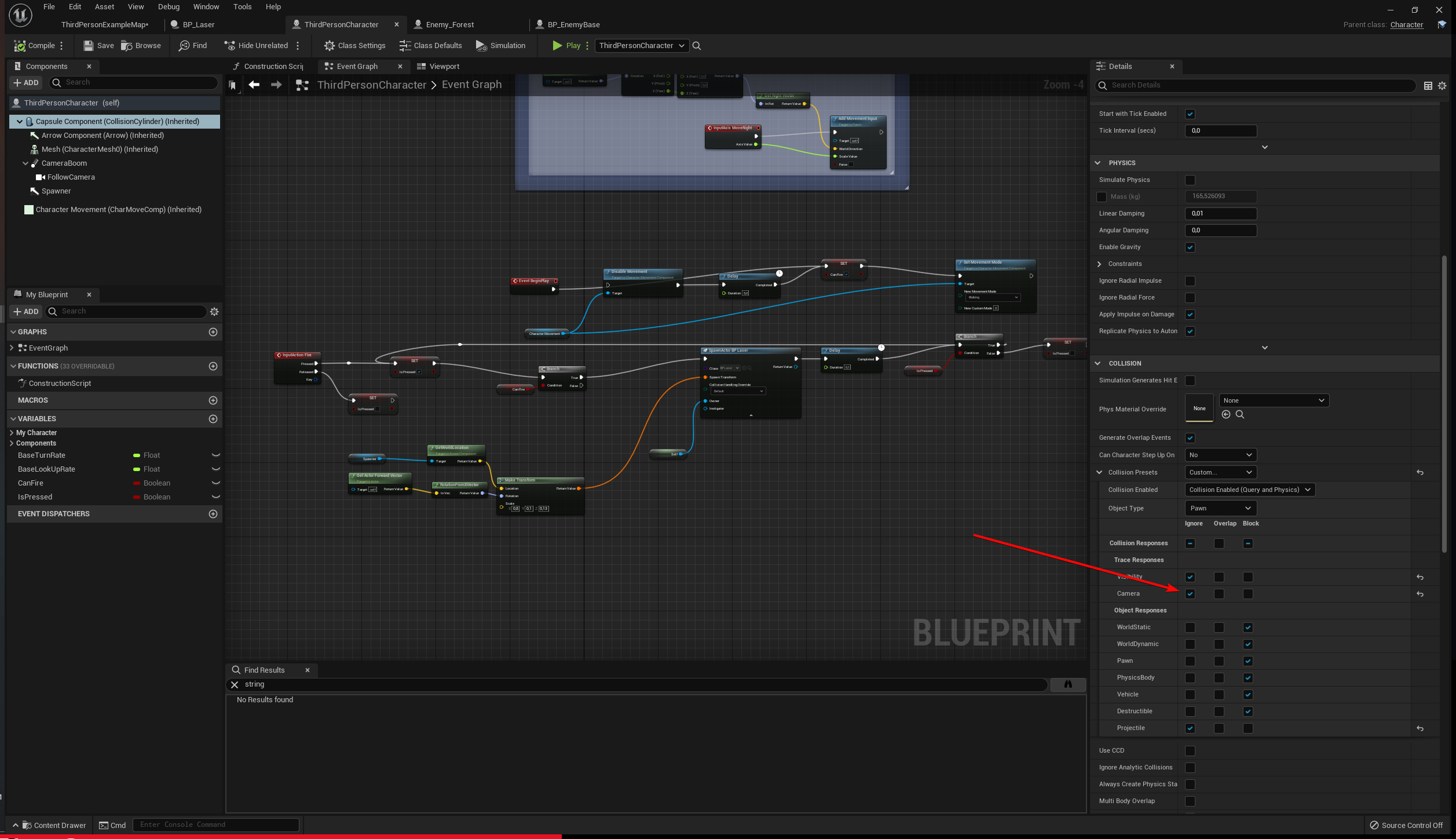
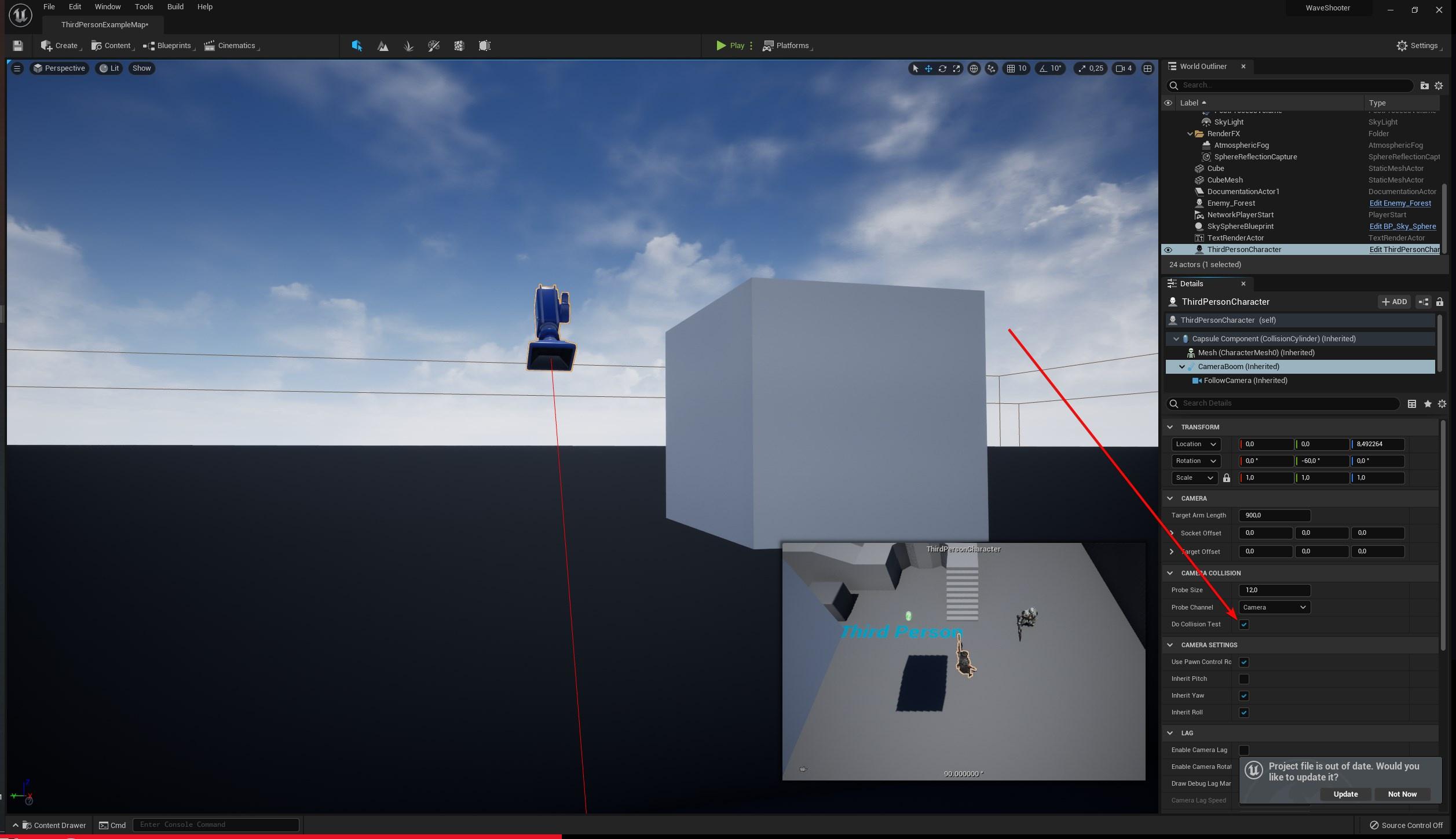
how to disable camera collision?
livid lichen
@scenic kindle https://bit.ly/30uFtfS if i am not mistaken you just have to set it to ignore at the custom collision preset
 scenic kindle
on the bottom right, i don't have the collision presets
 livid lichen
click on capsulecomponent
scenic kindle
but how do i make the camera ignore collisions
all collisions
not just the player collisions
wait i found it nvm
livid lichen
this one? 😄 https://bit.ly/3n5cO8L
 scenic kindle
ye
livid lichen
collisions are a beast 
mine is just gone but i didnt want it to go 😦
 pseudo pelican
does anyone know how I would generate multiple equally spaced vectors from point A to point B?
 blissful gull
has anyone else had an issue with socket transforms being wrong?

i call GetSocketTransform on this socket and sometimes it will be 90 degrees off
seems like gimbal lock or something

nevermind, its an issue with particles
 jagged kelp
Does anyone know of a blueprint replacement for the default character movement component?
 tepid seal
Anyone know how to add a key “ESC” function in widget
gentle urchin
Listen for input action -> bind to custom event or function
configure the input in the project input settings
 stone steppe
Hi guys. Does anyone know how to stop my Character from facing the direction wherever my mouse points out? I want something similar to the ThirdPersonBP but my character doesn't stay in place.
jagged kelp
my problem is that the dynamic gravity plugin I am using does a great job for static gravity points but not for moving gravity sources like platforms, I need to find a way to have the character and gravity affected objects stick to a moving surface as they would in reality thanks to friction, right now a box that sits on a moving platform that is a source of gravity maintains contact with the platform but has the platform free slip under it as though it is frictionless
so I am looking for a solution that would allow me to move a character along with a moving source of gravity so that it maintains its position on the gravity source
 gritty elm
tepid seal
Anyone know how to add a key “ESC” function in widget
gritty elm
tepid seal
Anyone know how to add a key “ESC” function in widget

What is the Listen for Input Action Node in Unreal Engine 4
Source Files: https://github.com/MWadstein/wtf-hdi-files
gritty elm
stone steppe
Hi guys. Does anyone know how to stop my Character from facing the direction whe...
you may need to uncheck use controller rotation yaw
 tepid seal
Thx
 spark steppe
yea, your name gives that away
 rigid dagger
._.
spark steppe
use animation notifies
and send notifies when the foot is planted on the ground, then play sound
rigid dagger
sorry I forgot to mention that I am really new so I don't know most of the terminology
rigid dagger
spark steppe
and send notifies when the foot is planted on the ground, then play sound
issue is I don't have a character model.
rigid dagger
I am not doing an animation project tho
spark steppe
so what is making the footsteps then?
rigid dagger
I am doinga game
rigid dagger
spark steppe
so what is making the footsteps then?
The key input
if u walk in a first person game, it makes the footstep noise.
that's what I'm going for
spark steppe
i see, i dont know the best solution for this, so wait for someone else to respond
spark steppe
i know everything about them
spark steppe
the condition is just a boolean
either its true or false
the loop runs while the condition is true
icy dragon
rigid dagger
if u walk in a first person game, it makes the footstep noise.
I think the best way would be play sound at the player's location every few second (Delay), and adjust the delay length with the velocity.
rigid dagger
spark steppe
the loop runs while the condition is true
I got that but I am trying to change the condition based on keyboard input
spark steppe
i'm pretty sure that a while loop is nothing you would/should use for your sound problem
rigid dagger
Let me explain the logic
rigid dagger
While W is pressed, play the sound
icy dragon
Pedantry aside, perhaps that's doable in Tick.
spark steppe
yes rather that^
rigid dagger
Tick?
spark steppe
you implement the onTick event on your character
add a gate which gets opened by pressing W and closed by releasing W
rigid dagger
What does it do tho
rigid dagger
Can u visualise it?
spark steppe
yea, for $20 bucks i will make a portrait image
icy dragon
rigid dagger
What does it do tho
So from Event Tick, you have a branch to determine if velocity is larger than 0 u/s. If it is, then execute a delay before actually playing the sound, with the delay duration adjusted by the velocity. Otherwise, do nothing.
rigid dagger
ok I will try
spark steppe
what you could also do, but also can't do because im not going to visualize it
rigid dagger
ok
spark steppe
is adding a sound component, detaching it, place it where you play the sound, measure the distance while w is pressed, and if it's over certain distance repeat the process
rigid dagger
I can't find a way to determine if the actor is moving
icy dragon
The delay duration is going to be relative to the velocity, so the curve would be curving downwards.
spark steppe
velocity (tells you if the actor is moving)
icy dragon
rigid dagger
I can't find a way to determine if the actor is moving
Just check if the velocity is 0 or not
spark steppe
the actor velocity
rigid dagger
icy dragon
Just check if the velocity is 0 or not
how?
icy dragon
Though generally you want to be slightly larger than 0 due to floating point errors.
rigid dagger
I am asking how do I get the velocity and then compare it to a float
spark steppe
put the vector in a "vector is nearly zero" node
and add a tolerance of 0.05 or something
rigid dagger
I am really new to this so I really don't know much about the terminology
 native willow
google terminology
spark steppe
xD
well you should ask if you don't understand a term
we don't know what you don't know
native willow
dont expect others to tell you what to do, just learn how to do it
rigid dagger
It's hard when I can't find too many resources
native willow
there are tons of resources
native willow
a lot of ppl from here learned from internet resources so its doable
rigid dagger
That doesn't work either because half of the results are about js
spark steppe
or ask in the general #ue4-general chat
native willow
- You see a term
- You google a term
spark steppe
then you put unreal engine in the search field, too...
rigid dagger
can you stop being so cynical
native willow
rigid dagger
That doesn't work either because half of the results are about js
then add ue4 at the end of the term you look for
rigid dagger
spark steppe
then you put unreal engine in the search field, too...
but then it leads to more terms that I don't understand
spark steppe
maybe you should learn using google before learning unreal
native willow
rigid dagger
can you stop being so cynical
im not
rigid dagger
Trust me, everything ur telling me to do I've done
native willow
we are not your teachers
spark steppe
...
native willow
we can be your advisors at most
rigid dagger
That's fine
native willow
Support me on Patreon: https://www.patreon.com/bartkamski
Join me on discord: https://discord.gg/DgUTZwm
Check my UE4 marketplace assets: https://unrealengine.com/marketplace/en-US/profile/Bartosz+Kamol+Kaminski
Footsteps sound download:
https://gumroad.com/l/MZXSj
that is literally the first result
from the guy I know btw 😄
spark steppe
but it uses animation notifies
icy dragon
rigid dagger
Trust me, everything ur telling me to do I've done
Unreal Engine
Unreal Online Learning is a free learning platform that offers hands-on video courses and guided learning paths.
spark steppe
he claims to not having a character model and therefor no animations :>
spark steppe
still you got 3 solutions suggested
icy dragon
Take some courses on Blueprinting first so that you have better understanding on the nodes.
 native willow
I consider this case as resolved
rigid dagger
:/
native willow
you have everything you need
rigid dagger
does anyone know any nodes that convert float to byte
native willow
the heck?
spark steppe
i highly doubt that you know why you would do that 😄
rigid dagger
fair enough
icy dragon
icy dragon
https://www.unrealengine.com/en-US/onlinelearning-courses
I cannot post this link enough so you better take your time going through the basic courses @rigid dagger
 bright frigate
Hey so I have a timeline set up that determines my day night cycle. The timeline of course, starts from 0. But during the beginning of the game, how can I make it start from say 9 AM instead of 0 (midnight)? And then let it continue like normal?
at present it's like this. So that's like an hour every half second but this is irrelevant
 native willow
there is a node SetTimelinePosition of smth like that
bright frigate
It's actually on auto-start and loop so I'm not sure what to put before it 😄

in the level BP
I'm using the original sun position bp from the plugin, should I make a new bp and inherit from it?
if I do this then it ends up going to the max of the timeline then hopping back up to whatever the first keyframe is on, meaning if I set the first keyframe to 6 am then it's gonna skip 1-5 AM
so I guess I should try putting it on beginplay
for now I only have one level so it's not a problem (and don't plan on more levels)
that kinda flew over my head unfortunately haha
wraith bay
How do I get a variable stored in my character's blueprint, in a level blueprint?
bright frigate
wraith bay
How do I get a variable stored in my character's blueprint, in a level blueprint...
cast to player character, as player character pin -> get variable
@trim matrix by offset stuff do you mean use the "now" node?
wraith bay
bright frigate
cast to player character, as player character pin -> get variable
=DD thanks!
bright frigate
wraith bay
=DD thanks!
for example
 wraith bay
Thanks
bright frigate
not doing any level streaming, just have a single level so no worries about that
jagged kelp
is there a way to get a character to move with a platform if it doesn't have the character movement controller?
 restive oracle
Hey guys, I have a cascade particle system that tries to imitate rain, I was wondering if it was possible to have an emitter spawn somewhere when a particle collides with anything so that it will 'splash'. How would I go about doing this?
 visual umbra
How come this works?
 native willow
?
visual umbra
Its using an array as target
native willow
its internally doing it for all of the objects I guess
visual umbra
I guess it must
earnest tangle
Target pin is special
visual umbra
So i can do this with all targets 😮 well thats nice to know
earnest tangle
You can also connect multiple separate objects into it
The main gotcha with it is that if the node returns a value, you won't get results for every call. So if you need to read results from it, you need to loop
visual umbra
earnest tangle
You can also connect multiple separate objects into it
I've done that by accident a few times
Gotcha
Very cool thanks all 🙂
 fallen glade
could someone please explain these 3 terms to me ?
 earnest tangle
afaik is excluded means it's excluded from valid areas to query
fallen glade
earnest tangle
afaik is excluded means it's excluded from valid areas to query
so don't go there ever, got it
earnest tangle
I have a system where you can mark doors as employees only which prevents customer npc's from using them, which basically sets the door to use NavArea_EmployeesOnly, which is then excluded in the NavQueryFilter which customer NPC's use
fallen glade
earnest tangle
I have a system where you can mark doors as employees only which prevents custom...
I see makes sense
earnest tangle
Don't really know about include and exclude flags though
fallen glade
It's good enough, thank you for your time @earnest tangle ❤️
bright frigate
ok I know you're gonna hate me for this insanity but hey it does work ... 😛

I just copied the original timeline where the first one starts from 6 am and auto start but doesn't loop and once finished it goes to the other timeline that starts from 0 which doesn't auto start but does loop lol
 undone quiver
What makes this target parameter special, and how can I replicate it? It's a "Skinned Mesh Component (Object Reference)" and it's able to accept multiple inputs by default. However, if I create a function/macro with a Skinned Mesh Component (Object Reference) output, I can't connect more than one?

Would it say if it was an array/list?
Yes, the connector image changes, so that isn't it
Set Master Pose Component was created to trigger my OCD and destroy our BP Art.
 icy dragon
undone quiver
What makes this target parameter special, and how can I replicate it? It's a "Sk...
icy dragon
undone quiver
What makes this target parameter special, and how can I replicate it? It's a "Sk...
Skinned Mesh is basically the Skeletal Mesh Component's skelmesh.
undone quiver
Thanks, but I probably said that wrong. What I can't figure out is how to create something in a macro of function so that I can output a single connection the way that Target parameter does.
This will not allow multiple connections.

It's a petty thing, but Set Master Pose Component has always bothered me because there is no nice clean way to connect everything. This one is tiny (4 parts) but sometimes they're huge
I'm one of these weird newbs who still believes I can keep my blueprints neat
 faint pasture
Use an array.
Foreach Equipment actor
Get skelmesh
Set master pose component.
I do it on my attachment function. If skelmesh, set master pose component
undone quiver
That is cleaner. Thanks
In this instance it's only a little cleaner, but in larger ones it will be a lot better
It also bothers me that Target is above New Master Bone Component. Makes it terrible to try not to cross things if you have it all on the grid
faint pasture
Target is always the first parameter.
icy dragon
undone quiver
Would be great if we could re-order them
Would be great if it doesn't allow multiple connection to target at all.
 viral sundial
Is it possible to reparent a DataAsset blueprint to a new class?
 supple dome
a data asset blueprint yes, just file > reparent
if you are talking about an asset, no
viral sundial
Talking about a data asset created from a C++ class yeah
Thanks I'll recreate in that case
crisp vale
saw this in a tutorial, what is that target to player health thing?

 true ingot
hey guys, does anyone know any good places to look when wanting to learn blueprints?
youtube videos or maybe an official site with a good work flow for tutorials?
gentle urchin
crisp vale
saw this in a tutorial, what is that target to player health thing?
A binding to umg progressbar it seem. Health percent. Done wrong.
crisp vale
how could it be done right then
gentle urchin
If one would insist on using a binding, at the very least the percent is a result of current/max hp
Usually one tries to keep things event driven, so personally i'd stay away from bindings in the first place
crisp vale
the percent is what i want to get tho
and i dont really know how i would get it event driven to change the healthbar
gentle urchin
So keep using the binding, and add the division before plugging it into return value
crisp vale
wait, so the target to player health node is a Bind?
icy dragon
crisp vale
the percent is what i want to get tho
Just to make it clear, Progress bar value can only go from 0.0 to 1.0, and percentage is basically division by 100.
crisp vale
icy dragon
Just to make it clear, Progress bar value can only go from 0.0 to 1.0, and perce...
so like a percent used in math class?
icy dragon
Yes.
crisp vale
cool
gentle urchin
Yeah, sorry for my inaccuracy. Could've explained that better
crisp vale
gentle urchin
Yeah, sorry for my inaccuracy. Could've explained that better
its all good man
icy dragon
And I don't even get good math grades back at school days. 😛
crisp vale
icy dragon
And I don't even get good math grades back at school days. 😛
im still in school i hate it LMAO
livid lichen
hi 🙂
i have just started with blueprints and i am following a guide that even shows what i have to do but i can't still get to work that my projectiles that i am firing having a collision. i set the StaticMesh of my projectile as projectile(projectile is an object channel that is as default block). So usually this should as default get stuck in every object but i don't know why it just flies through everything. I also tried to print me a string when a collision is detected but even that doesn't print me something
if you need anything more informations let me know and i appreciate the help
crisp vale
crisp vale
saw this in a tutorial, what is that target to player health thing?
what node should i look for tho to get that one?
gentle urchin
To get the percent?
crisp vale
this one specifically
 gentle urchin
You need the current health value and divide it by the max health value
gentle urchin
Yepp!
crisp vale
bro im having more fun doing this math than math class LMAO
gentle urchin
So if current health was 950, then 950/950 = 1
gentle urchin
Exactly !
livid lichen
imagine having fun in math in school 
crisp vale
if the teacher is cool, then it can be
if they actually explain how it works even better
livid lichen
we just had one that told the ones that have problems that they never gonna graduate 
crisp vale
i had a teacher like that once
crisp vale
crisp vale
this one specifically
im looking for a bind node and cant seem to find one like this tho
gentle urchin
Gotta make it fun/ interavtive and exciting !otherwise its hard to learn ;p
Not a node
You must in the widget designer select the progress bar
Then in the details panel theres a percent value
Next to it theres a bind button
Creates a function and there ya go
crisp vale
and it brought me to that grid
and the tutorial said to do that but idk how to get the node that they put there
gentle urchin
So whatever you insert into return value is automagically updated
crisp vale
but then how do i get the percent from a variable
if the variable was made in c++
oh god
gentle urchin
Do a division !
Create another value
Or
Use a hardcoded value
Last one is seldom recommended but oh well
crisp vale
but if i want the bar to update, dont i want the variable i created to be over 950?
gentle urchin
More important principles to learn at this stage
Your max health variable can be any value you chose. But the current health value cannot exceed this
Thats sort of the point of max health 😅
crisp vale
i thought i would have to call the variable set to do the division
bc i have this in c++

just to test damage working
but i thought id have to input that over 950 to get the % to set the value
i found the issue
i made 1 typo
gentle urchin
Not super versed with c++ but it would seem dmg is percent of max hp, which is hardcoded 950?
crisp vale
yea
crisp vale
its supposed to be BlueprintReadWrite
 gentle urchin
So its flexible in case rockets etc
crisp vale
man
ahhhh
i see i see
the variable is set in the character file as a variable, so it is changeable
gentle urchin
Ah
crisp vale
so
lemme try to find the words
in the c++ file for the character, there is a variable called playerHealth which sets it to 950 for the character
livid lichen
in case you have a rpg system for example where yu can skill into health your maxHealth is changing. so having this as a variable is kinda usefull 😛
crisp vale
so i should have a variable for maxHealth and one for currentHealth?
livid lichen

gentle urchin
^ yes
For flexibility
I mean , it doesnt even have to be an skill to gain more hp
Imagine you needed to tune the game
It was completed
gentle urchin
And youd need to walk through all the code for every place you might've hardcoded 950
Fair ^^
livid lichen
livid lichen
hi 🙂
i have just started with blueprints and i am following a guide that even s...
squize you coincidentally cant help me with that aswell right? 
crisp vale
aight, i made a second variable for max health
gentle urchin
livid lichen
squize you coincidentally cant help me with that aswell right? <a:peepoShy:81018...
Is it a custom mesh? You could compare it to the fp template
make sure the mesh actually has collision
livid lichen
this is the collision for the laser. https://bit.ly/3pheqPv
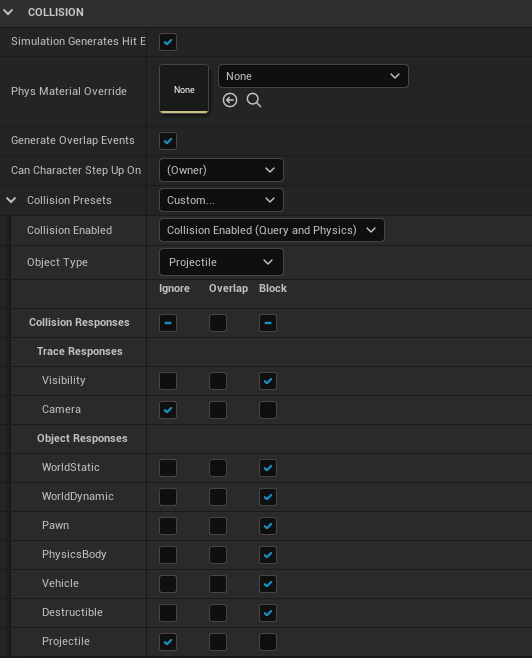 gentle urchin
So it has a collision volume?
livid lichen
it's a sphere yes
gentle urchin
Ah
livid lichen
the weird thing is if i collide as my character with an enemy, my print string, that i have created in the laser, says that i am colliding with myself 
gentle urchin
Wait, is the laser hitting urself?
livid lichen
i am not even shooting there 
it's triggering the moment i am walking into it https://bit.ly/3BW4qP7
 gentle urchin
What does the laser logic look liike
livid lichen
oh damn i'm dumb. i tried to change the colour of the print string of the laser component but i have forgotten that i have another print string in the collision of my enemy BP
gentle urchin
😅
livid lichen
so i know now why it's showing if i am touching the enemy
that's how i am spawning the actor https://bit.ly/3jARo2H
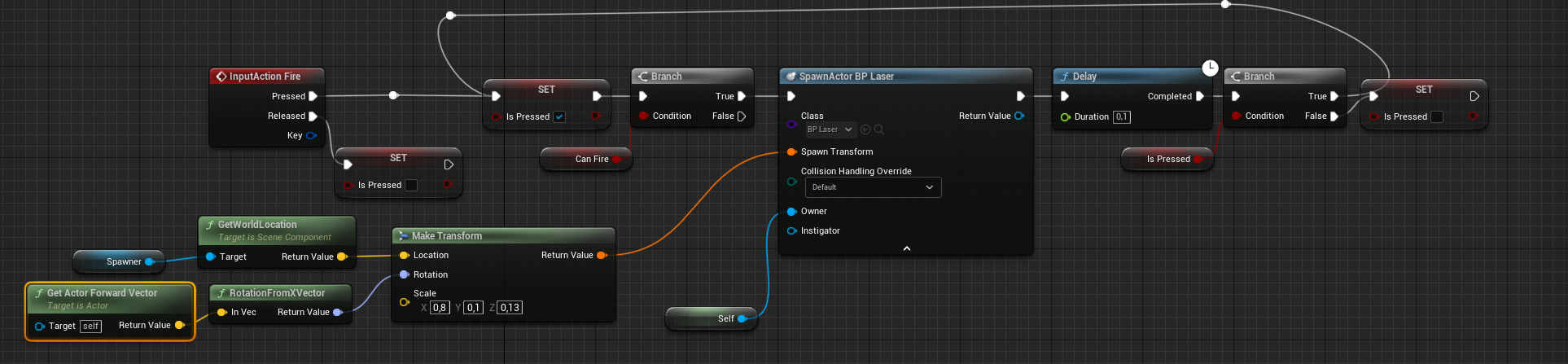
 sage pecan
Hi, I'm unable to line trace to the direction of the camera, it will point down everytime I fired


I figure is the end point that is having issue, is there any better way?
odd ember
try with get component forward vector instead or getting it off the rotation
@sage pecan
livid lichen
i thought you may meant myself @odd ember
sage pecan
I copied from one of the guide now, it seem the multiplication & addition is needed

Can anyone explain the logic behind those 2?
I don't really understand it
sage pecan
odd ember
try with get component forward vector instead or getting it off the rotation
I've tried this too
odd ember
the forward vector is a direction
you multiply the direction with a range amount (the float) then add it to the location where you are, to get a location "in front" of the object
sage pecan
Ohhh ok, so if without the addition, the location will be from origin right?
 forest sable
Good evening..
I have been struggeling with getting the delta of a 2D vector
Can someone help with that
forest sable
just the diffrence between that 2d vector last frame and current frame
odd ember
forest sable
just the diffrence between that 2d vector last frame and current frame
save it to a variable on tick, next tick check the previous value against it
forest sable
so only if it's diffrent i should set it ?!
odd ember
that's up to you
I don't know what you're doing
I'm just telling you the means of getting there
the only thing that is important is that the comparison happens before setting the vector
forest sable
I seem to be struggeling with the part of setting the variable, and doing good when subtracting it
 meager spade
Get absolute value of what you use to set it minus the variable to get the delta and then set the variable afterwards when you are done with the delta (important)
odd ember
I understood it as just checking if it's different per frame, not different in size or length
meager spade
I have no idea
forest sable
odd ember
I understood it as just checking if it's different per frame, not different in s...

I'm lost dude
forest sable
just trying to set it only if it's different
meager spade
Isn't it cheaper to just set it regardless?
odd ember
so e.g. MousePosition() == new
faint pasture
forest sable
just the diffrence between that 2d vector last frame and current frame
Current value minus old value. That's it. If it's not changing, the Delta will be zero
faint pasture
forest sable
just trying to set it only if it's different
Why? It's cheaper just to set it than to check.
Not that that matters at all.
forest sable
Like That ?
 meager spade
Fuck the branch
forest sable
done
meager spade
😄
odd ember
do yourself a favor
meager spade
Unless you are doing a bunch of calculations after the set new
forest sable
 odd ember
and use true branches for expected outcome
forest sable
I feel so Dum 😂
meager spade
odd ember
select nodes evaluate both values
I meant as in it's not needed. But it depends on if he does a lot of calculations or not
If he does it might be worth having the branch to not do the calculations unnecessarily
faint pasture
If you're worried about performance, don't even check. Just set it and forget it.
odd ember
if you're worried about performance, learn cpp
forest sable
forest sable
But then IT doesn't work
odd ember
just leave it if it works
meager spade
Have the branch in that case
forest sable
faint pasture
If you're worried about performance, don't even check. Just set it and forget it...
when i set it is the same time when i'm checking for the current time
odd ember
too many cooks in here
meager spade
Yeah, I've finished eating soon so I'm out
faint pasture
forest sable
when i set it is the same time when i'm checking for the current time
Wut
forest sable
Look they bot are given the same value at the same time
 spark steppe
because you set it
you can't use the time variable as input for oldtime if you already updated it
faint pasture
Yeah LOL why are you doing that. Just at the end of your little bit of logic here, save the value as old value, and then use it the next iteration
spark steppe
just set your time after the calculation (e.g. when you rotated the object)
faint pasture
New = Value
Delta = New - Old
Do stuff
Old = New
That's It let me try
undone quiver
@forest sable I see what you were thinking, but don't think of a node as a point in time. Wherever the node sits in the chain, when you poll it you are going to get its value at the time you poll it. Hope that made sense.
spark steppe
well, actually it's a point in time, but you have to consider that your execution is also a "time flow"
undone quiver
I think he was thinking about it like "when" that node ran its value should have ben x, so polling that node should always have the value at that time.
meager spade
Yeah but most of the time we'll consider everything in the same frame as happening at the same time
spark steppe
it is time
undone quiver
Then why didn't he get what he wanted?
If that node represents a value in the time that it was run I mean
spark steppe
because he didn't consider that if he sets it, that using it at a later TIME will have the updated value