
#blueprint
402296 messages · Page 740 of 403
 bright frigate
 odd ember
If it's something off hand, then ideally you shouldn't spend that long on it IMO
I thought the train was your main focus
but chances are players won't even notice
I don't think you can reparent material instances at all
 lime rain
odd ember
I don't think you can reparent material instances at all
lime rain
odd ember
I don't think you can reparent material instances at all
It seems you can do it manually via the GUI, but if you try to script it, nothing but crashing.
odd ember
you're basically making anew material at that point
if you have any pins that use the old material instance parameters then that's probably crashing it
lime rain
Well my idea is I want to have some scripts to manage material hierarchies managing materials. If I have master material "A", and I have an asset with 5 materials that all inherit from "A", but I want to adjust some parameters across just those 5 materials, I would like to create a new instance of "A" -> "MI_A" and then have my asset materials inherit from that instead of directly from the master "A". Sorry if the language is confusing.
odd ember
why aren't you just assigning a new material instance to each of them?
lime rain
They do have a material instance for each one, and those material instances are pointing to "A" as their parent.
odd ember
I'm also not sure that materials use inheritance the same way that ordinary classes do
lime rain
But lets say I wanted to adjust the tint across all of them at the same time, or dirt overlay, or any other custom paramaters, I would need to go through each instance and adjust the materials individually.
I would like to just insert a new parent above them, and be able to apply the adjustments across the group there
odd ember
I can see the usecase, but in my experience reassigning parents is a bit dangerous. I'd look at the cpp code for how they do it in engine and try as best to copy it
you could also ask in #graphics if there are people there who know more
I know som gfx programmers hang around
lime rain
Yeah my experience is mainly Python for traditional CG Pipelines, I'm wondering how far I can get before having to dip into C++ with Unreal.
 marsh hill
So i'm having a problem - i've scripted wallrunning, and i have two identical vectors being traced to tell if the player is on a wall. It works fine, however i have it set to if you look a specific distance away from the wall it ends the wallrun
the issue is that wallrunning in one direction allows you to look further away from the wall before it detatches
despite the vectors being the exact same
While wallrunning from the left, i'm able to look almost 90 degrees to the right before it detaches
on the other side it's more like 75
 earnest tangle
Maybe try printing the angle or whatever value you're using to decide when the limit is reached
I'd guess they're probably behaving differently depending on which way you're facing, and how they are different should give you some ideas on how the logic needs to be changed
 zealous orbit
Are you trying to change to a new master material?
 unborn radish
has anybody messed around with enhanced input at all? i have two input layers that bind to the same key, but when i press the key it always triggers both actions. one has a higher priority than the other, and both actions are set to consume input. what gives?
lime rain
@zealous orbit I'm using the same master material, but switching to an instance of it
zealous orbit
lime rain
<@!443636088355946497> I'm using the same master material, but switching to an i...
I've had some success creating a new MI, deleting the old MI and redirecting all references to the new MI. Fixing all redirectors. Then restoring the old MI using source control.
lime rain
From : A -> A(Instance1) To: A -> A(Instance2) -> A(Instance1)
zealous orbit
Not sure if that will work for your need
 trim matrix
odd ember
If it's something off hand, then ideally you shouldn't spend that long on it IMO
trim matrix
odd ember
If it's something off hand, then ideally you shouldn't spend that long on it IMO
So it will be in a spot where it would be noticed but it's more of a visual enhancement to the station rather then something they will be able to drive

however is there a way to have this bone Rotation face towards a mesh ??
So toward the Train infront in this case ??
 lime rain
zealous orbit
I've had some success creating a new MI, deleting the old MI and redirecting all...
lime rain
zealous orbit
I've had some success creating a new MI, deleting the old MI and redirecting all...
That would probably work, but sounds a little heavy handed. I think the issue is because the material instance is in use in the world when I change it's parent, if I do these operations on materials that are not in use, no crashes.
zealous orbit
lime rain
That would probably work, but sounds a little heavy handed. I think the issue is...
Yeah it is a bit heavy handed. How often do you need to do it though? For a one time fix it might take more time than you save looking for a more elegant solution. Have you tried redirecting while in an empty level?
odd ember
trim matrix
however is there a way to have this bone Rotation face towards a mesh ??
there is, but you'll have to convert from local bone (or parent bone) space to world space
trim matrix
odd ember
there is, but you'll have to convert from local bone (or parent bone) space to w...
would I not be able to take the bone shown in previous image which is then of a base bone and thus thats attached to root ?
odd ember
you need to convert between spaces
trim matrix
how would i do that ??
like to begin with where would i do that ABP or from the BP that has the train in that all the code to move the train etc
odd ember
https://docs.unrealengine.com/4.26/en-US/BlueprintAPI/Components/SkinnedMesh/TransformfromBoneSpace/
Transform from Bone Space
trim matrix
thanks
so would i pass in my find look at rot here or take the out and use that to then fine the look at rotation ??
odd ember
something like that
trim matrix
but then I need to set bone rot obvs so where would i be doing that cause so far dosen't look like I can do it from BP ?
odd ember
you should be able to convert to bone space from world space again
or rather, from world space to bone space
trim matrix
yeah i've got that node
 heavy lion
Evening all. I am trying to find a way to find all actors of a particular type and then find all the spline points within the actors, and return the closest point along a spline
 white field
is there an easy way to copy a text string into the system clipboard?
 civic briar
heavy lion
Evening all. I am trying to find a way to find all actors of a particular type a...
civic briar
heavy lion
Evening all. I am trying to find a way to find all actors of a particular type a...
"closest point along a spline" closet in relavance to what exactly ?
heavy lion
To whatever you want. But in this instance the player
 maiden wadi
@white fieldNot sure that is exposed to BP. If you know how to do C++ it is very easy to do.
FPlatformApplicationMisc::ClipboardCopy(*MyString);
lime rain
zealous orbit
Yeah it is a bit heavy handed. How often do you need to do it though? For a one ...
I was hoping to be able to do this fairly often whenever an artist is world-building and tweaking materials on across various groups of actors. In any-case, I submitted a bug report and put my notes here https://github.com/jamesdeschenes/ue_mi_crash I really don't expect to get a response, but it would be nice.

GitHub
A simple UE 4.27 project setup to demonstrate a crash issue when switching a in-use materal instance's parent - GitHub - jamesdeschenes/ue_mi_crash: A simple UE 4.27 project setup to demons...
civic briar
heavy lion
To whatever you want. But in this instance the player
And when are you planning to perform these calculations ?
heavy lion
Press of a button
Basically. I wana check, are you near a spline point. What is the location of that spline in the world. Perform action based on the outcome.
civic briar
Maybe use FindLocationClosestToWorldLocation
Target is spline
heavy lion
Trouble with that is, if the spline is really long, and you are miles away from its pivot point in the world. It wont work
 woven lance
are there lists and queues for blueprints? or only arrays?
civic briar
heavy lion
Trouble with that is, if the spline is really long, and you are miles away from ...
civic briar
woven lance
are there lists and queues for blueprints? or only arrays?
I don't believe so. I don't even think you can expose them with UPROPERTY. They don't support the reflection system as I'm aware of
white field
maiden wadi
```FPlatformApplicationMisc::ClipboardCopy(*MyString);```
Saw that.. been a while since I implemented a function. Thanks.
had only seen a deprecated version
 trim pollen
I didn't ask about VertexColor, I asked about how to assign color based on position of the vertex.
 barren orbit
Hi guys, I'm having anouther problem again 😄 So, I'm trying to use the On Begin Cursor Over event in my blueprint. But so far I can only get it to trigger, when i click. And then I also triggers the On End Curser Over, at the same time. Through testing I found out, that it specifically triggers, when I release the mouse click. Anyone have any ideas? I googled it, but the only thing I found was people having HUDs in the Way, that blocked it, but I removed all of those as well, and it still doesn't work correctly...
trim pollen
VertexColor will give me the color of that vertex, not the position 🙂
woven lance
civic briar
I don't believe so. I don't even think you can expose them with UPROPERTY. They ...
that's pretty surprising to me; i wonder why?
trim pollen
here's an example of what I am trying to do. The color is assigned based on each vertex Z position.
 woven lance
not supporting what i'd assume are super fundamental to gamedev
civic briar
That's why I just decided to learn c++ there was so much I couldn't do in BP.
But yeah I don't really understand
I'm also fairly new. Although my knowledge of UE and game dev has drastically increased.
I hope I'm not providing any false info about what I stated earlier
 gentle urchin
woven lance
not supporting what i'd assume are super fundamental to gamedev
gentle urchin
woven lance
not supporting what i'd assume are super fundamental to gamedev
What would diff a que from an array removing from first index?
Same with stack, being opposite
Fifo and lafo principles could be applied
heavy lion
Well I have no idea
I cannot find any examples of anyone trying the same thing either
woven lance
i'm intending to use a queue for an input queue, so something that'll be manipulated practically every frame
and to me, popping off from a queue seems a lot less costly than recreating arrays with one less item
am i overstating the performance difference?
gentle urchin
Could they be so very different at the bottom? I think you are but i could be wrong
woven lance
like an actual linked list sounds like it'd be changing a pointer here or there,
but with an array, it's maybe creating a new array, maybe it's shifting up every item,
etc
gentle urchin
Could be the case, sure
That would prob be wordt case difference
If one is way easier than the other, its not obvious for me thay an array would behave that differently
woven lance
like, adding to the front of an array would mean you'd have to copy every value of the array, but +1 index, and then 0 is the new item
but a new item in a linked list would juts point to the previous head, and hold the new value
gentle urchin
Guess you can always do it in c++ if the performance hurts
 warped cloud
Is there a way to prevent specific objects from being culled using blueprints?
 lyric gazelle
anyone know why a "setactorlocation" with self as target works for an actor with the static mesh as the root, but not with a scene comp as the root? (with SM attached)??
 kindred pier
How come the second delay doesn't occur and it goes straight to the second movement?

 waxen sorrel
Ins't possible to let from a component choose another actor component inside it from the details panel ?


I want to select the StaticMesh but no luck
kindred pier
kindred pier
How come the second delay doesn't occur and it goes straight to the second movem...
what happens is the first delay happens and the npc moves to the second point without stopping, instead of the first, waiting, then second
 dark crow
Use a Sequence after Begin Play
 trim matrix
Hey guys I want your answers in my problem, in a packaged build I am trying to make resolution settings. What I am doing is I get the game user settings and I set resolution setting to what resolution I want . After that should I call apply resolution settings then set full screen and then save ?
My problem was that after clicking this the game was trying to change resolution but the main problem was that the screen was flickering black and back to game every second almost
This is game breaking and the only way to fix this was to delete saved
Saved folder
So after I set resolution
I want to apply the resolution and save it
But I don’t want to flicker
Is there any way to do this?
 young grove
how to make them run together when turning?
 harsh zephyr
Hi

No description provided
Im making a Pickup and move object system
Its my problem
I can put it back when object is coming closer to me
 zealous moth
Does anyone know if there is a ssbm or ssbu template somewhere? Thinking my search is incorrect
 winged sentinel
anyone know why changes my socket offset on springarm creates weird swing movement? im trying to lower the characters camera to make it seem like theyre down
 cinder oak
Hi guys, Is this a bug? in the bottom right I had the event take in a inventory component but I can can't pass it in.
 lyric gazelle
do you have multiple components named inventory?
try to reset the input and perhaps restart the editor ha
cinder oak
lyric gazelle
do you have multiple components named inventory?
yes i did. smh. Thanks for your help!
lyric gazelle
Glad it was simple!
trim matrix
whats the best way to move a bunch of actors at the same time?

im not sure why its not working
it just instantly moves it instead of over time?
lyric gazelle
what is the track looking like
trim matrix
it just goes from 0 to 500 for 5 seconds
lyric gazelle
I would do something like this

in your case you can use relative location, but make your lerp a float, with 0 as the A and 500 as the B
your timeline should go from 0 to 1 as the value, and time is how long
 half cloak
trim matrix
half cloak
trim matrix
@lyric gazellethanks! will try that 😄
kindred pier

I keep getting this error and tbh I'm not sure why, the actor exists so I don't see why it wouldn't be able to get it, and I have it only check if the actor exists
lyric gazelle
does it literally exist in the level when this runs?
kindred pier
yeah
lyric gazelle
how many times is this event being called? if it is more than the amount of actors that exist then i can see why that would return none, since you destroy the actor
kindred pier
this event is being called for one npc
but the event itself is being called when an object on the map is facing a certain way, then it stops when facing the other way
lyric gazelle
lol squid game
but if it's called multiple times and there are no actors being returned in the "get actors of class" because you've destroyed them then there is an issue
i would try a print out after the "get actors" and attach the return value to the print input
kindred pier
thanks I will try that, also I set a variable after the first time the actor is destroyed that is checked before it would have gotten the actor of that class in the next iterations
it just prints out the actor name
lyric gazelle
once?
kindred pier
yeah
lyric gazelle
it would probably work out better to have an event dispatch that your lady statue thing is facing the players, then bind on that event in the npcs / player, then do your movement check with the branch, if true (moving) then destroy actor
kindred pier
I will check that out thanks 👌 though this still stumps me
 lapis atlas
Hey guys, I’m attempting to make a kind of tycoon game just to learn how to. I know some basics like how to setup collision boxes on the player mesh and what not, but how would I go about having a base player money count and have upgrades that would activate when you step on them if you have enough money? Just looking for a vague breakdown to point me in the right direction. I’m just going to be using squares and stuff and make it super simple since I’m just focusing on the blueprints side. Also I’m on UE5
lapis atlas
I guess to make that less vague now that I’m thinking about it, my first question would be how to I make a number that indicates player’s gold/money and have it display on screen normally? And then what would be the blueprint names to change that when the player spends or gains money?
 atomic salmon
lapis atlas
I guess to make that less vague now that I’m thinking about it, my first questio...
atomic salmon
lapis atlas
I guess to make that less vague now that I’m thinking about it, my first questio...
May I suggest you first head to learn.unrealengine.com and take one of the introductory courses about blueprint programming? Your questions are very basic and you will be able to answer them yourself within the first few lessons.
You will learn about using variables to store game play information like health points or money.
You will also learn about using that information to drive your gameplay logic.
lapis atlas
Okay, I figured it was kinda simple. I’ll head over there and start that then. Thanks
atomic salmon
Displaying information on screen is done through widgets. They are part of the UMG, the Unreal Motion Graphics UI system.
 blissful grail
I could've sworn I saw in a video a way to have the Print String node auto format things. Maybe I am misremembering 🤔 (yes, I know about the format text node)
earnest tangle
void UKismetSystemLibrary::PrintString(const UObject* WorldContextObject, const FString& InString, bool bPrintToScreen, bool bPrintToLog, FLinearColor TextColor, float Duration)
I don't think it does 🤔
blissful grail
Must be misremembering.
Maybe I wasn't paying as close attention to that video as I thought I was, lol
earnest tangle
There's a couple of those nodes which do formatting like format text, and some number conversion functions too, maybe you're mixing those together :)
atomic salmon
blissful grail
Maybe I wasn't paying as close attention to that video as I thought I was, lol
You could easily write your own custom print string with formatting capabilities as a function in a BP function library. It doesn’t exist out of the box.
And there’s this: https://github.com/yatima1460/UE4Logger
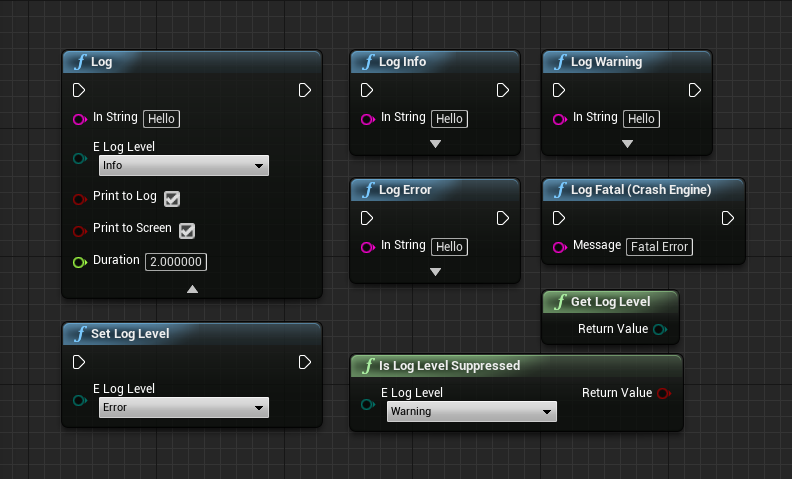
GitHub
Advanced Print String plugin in C++ for Blueprint with Log levels - GitHub - yatima1460/UE4Logger: Advanced Print String plugin in C++ for Blueprint with Log levels
blissful grail
That's far more effort than what I'm wanting to put in. Just using Format Text is enough.
atomic salmon
Lol. Go for it! 👍
 marble summit
Anyone have advice for a situation where I have an array several structs, and I just want to find an index where one variable in the struct matches something else?
blissful grail
Event Dispatcher
trim matrix
idk if this is the right place to ask but how would one handle pathfinding in a rts game, right now i use the "move to" node but it does not work well for groups of units, are there any other options you can recommend?
gentle urchin
Sounds like custom movement would be the way to go
Especially for things like formations and whatnot
trim matrix
i don't have much experience with this, can you recommend somewhere to start?
 icy dragon
trim matrix
i don't have much experience with this, can you recommend somewhere to start?
icy dragon
trim matrix
i don't have much experience with this, can you recommend somewhere to start?
I won't recommend to make some RTS game if you have yet to learn NPC logic development in UE
trim matrix
i am just doing this for fun
icy dragon
trim matrix
i am just doing this for fun
Doesn't matter, tbh
trim matrix
Hes saying that it might be to complicated anyways. 
even if just doing for fun.
i get that
 hasty dune
Hello, I come here to ask for your help. I would like to create a real-time in-game bullet trail system with a spline mesh (because the bullet is very fast), I found something to create this but I have no control over the size of the points that I would like to reduce as time goes by. If anyone has any documentation on this subject, I'm interested. thank you. Otherwise here is where I am :
 icy dragon
hasty dune
Hello, I come here to ask for your help. I would like to create a real-time in-g...
icy dragon
hasty dune
Hello, I come here to ask for your help. I would like to create a real-time in-g...
Any reason not to use particle system for the trails?
gentle urchin
trim matrix
i get that
If you really wanna give it a go, you could google rts pathfinding and go from there. I'd start looking at it from outside of ue4 to not fall in the trap of copy pasting logic, and then having major issues at every bump along the way
hasty dune
icy dragon
Any reason not to use particle system for the trails?
As the bullet is very fast compared to the framerate of the game we only see small spaced points
trim matrix
ok thanks
gentle urchin
trim matrix
ok thanks
icy dragon
hasty dune
As the bullet is very fast compared to the framerate of the game we only see sma...
You know that particles can emit ribbons, right?
hasty dune
Yes I did something like that for the particles :

Haha sorry, finally I tried again and it works fine with the particles. Excuse me !
 woven vault
Is there something wrong with that line trace? It won't work as intended :/
 maiden wadi
@woven vaultIs it not hitting what you intend, or is it not even displaying a debug line?
It look fine at least as far as theory. The distance float is set?
maiden wadi
Your prints after it are showing?
woven vault
the line trace is returning false value every time
when I change the end points to 0,0,0 or something preset, it works then
woven vault
maiden wadi
Your prints after it are showing?
just displaying rotation and location of camera (start and end point).. though start and end point are printing out to be same
maiden wadi
Identical, or nearly identical?
woven vault
identical
maiden wadi
Because even the forward vector at 0 should be a length of 1, so it should be slightly off.
woven vault
yea
i think i'll try restarting or something.. could be some other issue cuz I think bp should work
dark crow

How to take a screenshot on your smartphone, tablet, notebook or desktop computer

 trim matrix
Can someone recommend a video about organizing objects of some type in game (for example, items, or weapons, or enemies)
Is it possible to have a variable in blueprint that holds a blueprint CLASS (not blueprint instance)
earnest tangle
Organizing objects in what way specifically?
And yes, it is possible to have class refs. Go into the variable type selector, select the type you want, and instead of object choose class
 fallen glade
Bit of a weird question. If I need to reuse a variable a lot is there any difference between setting it once like this and reuse or keep grabbing it from the source?
 earnest tangle
This is probably a little bit more performant
But most likely not enough to really make much of a difference
fallen glade
z omg super fast thank you very much!
2 different event types are they not?
one is for overlapping one for hitting
they trigger in different ways/ need different values. It depends what you need really
if you need to keep track of something overlap if you need to fire it once hit I think but I'm always wrong so that that with a pinch of salt
earnest tangle
I'm not sure if there's other differences besides the fact that if your object blocks on everything then it isn't going to overlap (I think?)
and similarly if your object's collision overlaps everything, then it is not going to trigger hits... but I could be mistaken, I haven't tested this
I think that's how it works, but you could find out for sure quite easily by testing it :)
trim matrix
Hello guys, im trying to find a tut of making a Crate Loot like Apex/CoD etc but i cant find a good one. Anyone can teach how to do it? I know its array etc but i cant figure out how to make it 😦
icy dragon
trim matrix
Hello guys, im trying to find a tut of making a Crate Loot like Apex/CoD etc but...
You mean gambling mechanics? That's basically server side random number generator. What client side do is just to read whatever the result is and fake the rolling and suspense with flashy UI widgets and a lot of delayed reveal, after the server already do the randomisation and store the result to the player's account beforehand.
trim matrix
icy dragon
You mean **gambling mechanics**? That's basically server side random number gene...
I want like a chest that you interact and get random loot drop by %
icy dragon
trim matrix
I want like a chest that you interact and get random loot drop by %
Yes, just do the randomisation on server side, client side just have to fake the suspense. Unreal has some randomisation functions you can use, and you could supplement them with arrays or more sophisticated algorithms to stack up the odds for the shitty items.
If it's a single player game, the only exception is to ignore server-client separation and do it all in standalone client.
 tall umbra
Does anyone knows a plugin in the marketplace for ingame GIF recording?
icy dragon
tall umbra
Does anyone knows a plugin in the marketplace for ingame GIF recording?
Unreal doesn't use GIF images for texture/images 🤔
trim matrix
icy dragon
Yes, just do the randomisation on server side, client side just have to fake the...
No clue how to do thaat tbh
tall umbra
icy dragon
Unreal doesn't use GIF images for texture/images 🤔
I mean record what the player is seeing and save it in a GIF file. Something like an screeshot button.
fallen glade
tall umbra
Does anyone knows a plugin in the marketplace for ingame GIF recording?
there is a plugin to import gifs
icy dragon
tall umbra
I mean record what the player is seeing and save it in a GIF file. Something lik...
In many cases, it's up to the player to use their own external setup to record the game display as GIF sequence, but you could assist them with replay system.
tall umbra
yeah, i am looking for a way to have that feature included in the game for players}
fallen glade
tall umbra
Does anyone knows a plugin in the marketplace for ingame GIF recording?
https://www.unrealengine.com/marketplace/en-US/product/animated-texture-with-gif-importer Don't know what happened to it though

Unreal Engine
This plugin allows you to import animated GIF into your Unreal Engine 4 project as a new AnimatedTexture asset type.
tall umbra
fallen glade
https://www.unrealengine.com/marketplace/en-US/product/animated-texture-with-gif...
This is the inverse thing that I want haha
fallen glade
tall umbra
This is the inverse thing that I want haha
if you figure it out can you tag me? Sounds like a cool feature to have
tall umbra
I want to export a replay sequence of gameplay as a GIF from a simple button in game.
tall umbra
fallen glade
if you figure it out can you tag me? Sounds like a cool feature to have
sure
fallen glade
tall umbra
I want to export a replay sequence of gameplay as a GIF from a simple button in ...
https://www.unrealengine.com/marketplace/en-US/product/gif-recorder this was it I think but also out of print :/
 tall umbra
fallen glade
https://www.unrealengine.com/marketplace/en-US/product/gif-recorder this was it ...
tall umbra
fallen glade
https://www.unrealengine.com/marketplace/en-US/product/gif-recorder this was it ...
I saw that one, i dont know why is not for sale anymore
fallen glade
tall umbra
I saw that one, i dont know why is not for sale anymore
You could try to message the users that left reviews/comments to try and get a copy of the file, not sure about the legality of it though since it's not for sale
icy dragon
trim matrix
No clue how to do thaat tbh
Okay, example of my "patent pending" gacha randomiser algorithm
Say that you have number range from 0 to 4096. This will be sort of the "seed".
Make an item correspond to one or more of the numbers. Let's say a busty waifu is assigned to number 420, 666, and 1337.
Randomise a number between the range we have earlier.
Compare the randomised number with the busty waifu's number. If it's not equal, compare it with another, lesser items. If it's equal to one of those number, then grant the busty waifu.
Also known as lottery method.
fallen glade
My packs got straight to torrent sites and I can't do anything about it sooooo......
icy dragon
fallen glade
You could try to message the users that left reviews/comments to try and get a c...
Probably result of Hypercard purge few months ago.
 worthy carbon
hi! i created an inventory but when i tested it i get this error (look at the photo's) how do i fix this error
 fallen glade
icy dragon
Probably result of Hypercard purge few months ago.
fallen glade
icy dragon
Probably result of Hypercard purge few months ago.
What's that?
worthy carbon
this is the blueprint of the error
 fallen glade
icy dragon
Probably result of Hypercard purge few months ago.
fallen glade
icy dragon
Probably result of Hypercard purge few months ago.
spooky
 fallen glade
worthy carbon
this is the blueprint of the error
fallen glade
worthy carbon
this is the blueprint of the error
playerUIref is invalid, that's the problem
icy dragon
fallen glade
What's that?
So a while back Epic used a new, more centralised payment method, called Hyperwallet (or something along the line). It was obliged for all marketplace sellers to fill in taxation informations, so that they get their Hyperwallet account. Those who aren't filling the info by a deadline won't have the account, and as a result, ceased sales of their products.
Some people don't give a shit about this, intentionally avoiding it, or left the marketplace behind, thus their items are not for sale.
worthy carbon
fallen glade
playerUIref is invalid, that's the problem
thanks!!
 dusky topaz
I've been trying to figure out how best to set up a parent blueprint for an event trigger, basically I want the children to define what type of event it is, and as such, I want them to have unique collision shapes. But in the parent, without putting in a Box/Sphere/Capsule collision, I only have ActorBeginOverlap to work with, which has severely limited functionality. Does anyone have an idea of how I could either 1: get the functinality of a box/sphere/capsule collision sent through to child blueprints, or 2: Swap a box collider for a sphere collider in a child blueprint
worthy carbon
fallen glade
playerUIref is invalid, that's the problem
how do i make the playerUIref Valid
icy dragon
worthy carbon
how do i make the playerUIref Valid
How do YOU set the value for PlayerUIRef?
worthy carbon
icy dragon
How do YOU set the value for PlayerUIRef?
where can i see that?
fallen glade
icy dragon
So a while back Epic used a new, more centralised payment method, called Hyperwa...
I've had to do that but I thought people had loads of time to comply
icy dragon
fallen glade
I've had to do that but I thought people had loads of time to comply
Well, in fact, they did have a lot of time to comply.
 crimson hornet
Does Someone know how to make a blocking volume for a specific tag?
atomic salmon
@crimson hornetthere is nothing like that (unless you program it yourself), but you can make blocking volumes for specific object types. By creating your own object type (channel) and assigning the actor you want to block to it, they will be blocked by your wall.
This works if you have a limited number of types of actors you want to block.
crimson hornet
Okay Ill try thanks! @atomic salmon
 spark steppe
dusky topaz
I've been trying to figure out how best to set up a parent blueprint for an even...
spark steppe
dusky topaz
I've been trying to figure out how best to set up a parent blueprint for an even...
you could make your own custom event which takes the parameters which sphere/box/whatever collision provide, then in your child blueprints you add the actual collider and collider overlap event, which call your custom event on the parent
dusky topaz
spark steppe
you could make your own custom event which takes the parameters which sphere/box...
Hmm, I suppose so, thanks c:
spark steppe
or you add all to your parent and destroy the components that your child doesn't need
dusky topaz
But inherited variables can't be deleted, right? 
gentle urchin
dusky topaz
I've been trying to figure out how best to set up a parent blueprint for an even...
Spawn the collision dynamically and bind up to the event , wouldnt that work?
dusky topaz
gentle urchin
Spawn the collision dynamically and bind up to the event , wouldnt that work?
Well, it would work, but I would prefer not spawning things in runtime if I can avoid it
gentle urchin
How so if i may?
dusky topaz
Principle I guess, performance thinking somewhere in the back of my mind. I don't think spawning a single collider is going to eat up much performance, but if it's avoidable, it's avoidable, and that would be preferable
gentle urchin
The collision is gonna exist either way, how could it be different in performance?
dusky topaz
Because one is precompiled and one is spawned at runtime? 🤔
spark steppe
they execute the same code
just do this

and as target use whatever collider you have in your child
dusky topaz
Oh that's funky
dusky topaz
spark steppe
just do this
That's a really neat solution, ty 
trim matrix
does anyone have an idea about my problem?
icy dragon
trim matrix
does anyone have an idea about my problem?
Try asking in #virtual-reality
odd ember
is there any way to assign hotkeys to custom events that are ran in editor?
icy dragon
odd ember
is there any way to assign hotkeys to custom events that are ran in editor?
Probably not.
odd ember
any solution available through extending editor preferences? it feels like this is the one key element that is missing for proper custom tool creation
icy dragon
odd ember
any solution available through extending editor preferences? it feels like this ...
I don't think the hotkey preferences is exposed to even custom C++ editor modules.
odd ember
welp
 glossy bane
I'm trying to spawn the same actor that contains ISM's multiple times, but for each spawn I want to modify the amount of ISM's spawning, problem is even if I change the amount variable, it still constructs the same amount of ISM's as the initial variable declared, anyone know a way around this?
gentle urchin
Sounds like wrong execution but its only a guess untill some code is shown
glossy bane
gentle urchin
Sounds like wrong execution but its only a guess untill some code is shown
Do you mean the construction script code for the ISM's? Can show that if its what you meant
odd ember
icy dragon
I don't think the hotkey preferences is exposed to even custom C++ editor module...
https://forums.unrealengine.com/t/adding-global-editor-shortcut-key-from-plugin-editor-module/40043 I'm looking at this and admittedly not getting a whole lot from it, but it does make me wonder if you can just bind console commands to keystrokes and make it work impromptu like that?

Unreal Engine Forums
I’ve added a menu extension item to the Window|Developer Tools menu in the editor main window. I’ve set up an FUICommandInfo in my module, and created an FUICommandList, bound the action and passed this command list in to the AddMenuExtension call. It all works fine, except for the keyboard shortcut (defined through an FInputChord in the UI_COMM...
odd ember
glossy bane
Do you mean the construction script code for the ISM's? Can show that if its wha...
the place where the ISMs are spawned
 clear robin
does anyone know why the round collision of the characters capsule component is used for the floor check when the capsule is at half-height (character crouching) and i am jumping onto something? "Use flat base for floor check" is enabled.
works fine when i jump on something and the character is standing
glossy bane
odd ember
the place where the ISMs are spawned
I essentially just want to spawn the first with a size of 3, second with size 2, 3rd with size 1
 odd ember
start at is only hooked up for 3
glossy bane
This code rather, had them disconnected as I was testing different stuff

yeah sorry posted correct sc now
odd ember
I don't know where the float variables are set
glossy bane
Float variables are just for the spawn location, the amount variable im trying to control is the size integer
odd ember
I see
I think the issue is that you're spawning them, then setting the variable
which probably doesn't make sense for spawning them
so you should expose that variable on spawn instead
glossy bane
odd ember
I think the issue is that you're spawning them, then setting the variable
yeah it's what ive been thinking but I cant wrap my head around how I can change the variable before the spawn
glossy bane
right, I have checked it now
glossy bane
oh I see now, and just set it there yeah?
glossy bane
odd ember
set it there instead
yeah that worked perfectly thanks alot
 wispy star
Hi. I do have a question in #ue4-general (i don't want to crosspost, sorry in advance) Any way to solve this:
If some actors A were attached to another ones - B. And that B actor will be modified in a way the Root is replaced. Actor A will be detached from it in all the levels.
atomic salmon
@wispy startwo options: 1. add a stable root component to your B actor (like a dummy scene component) and parent A to it; the rest of the B components can be parented to the stable root as well, but in this way you never have to replace the root itself 2. change the logic of your root replacement by getting all the children components/actors of B first, then replacing the root, then re-attaching them to the new root
wispy star
@atomic salmonno way i can reparent all the stuff in all the levels
atomic salmon
There may be other options but these are the most obvious ones without knowing more about your use case
atomic salmon
wispy star
<@!399916238098137098>no way i can reparent all the stuff in all the levels
then option 1.
wispy star
option 1 seems not excluding reparenting
atomic salmon
it does if A is attached to the stable root of B, while what you are exchanging is an immediate child of the root itself
Of course if the root is the collision shape and you need to move the actor with sweep, then this won't work either
wispy star
i want to replace Root with NewRoot
 atomic salmon
Yes, that is clear
wispy star
but it will break the attachment of this cube
 atomic salmon
My suggestion was to have a root which you won't touch and another "root" under it which you can more easily replace because the main root stays in place.
What is the use case for all this reparenting if I may ask?
wispy star
well, i need to replace it, that's the question
oh..it's the bug in ue4 that causes inherited roots to reset their mobility setting from time to time
for DefaultSceneRoot
atomic salmon
wispy star
oh..it's the bug in ue4 that causes inherited roots to reset their mobility sett...
really? bug number?
wispy star
@atomic salmonwell, it can't be reproduced in new project, but we're not using c++
 arctic radish
How can I edit UI elements with blueprints? I wanna have a function that takes a header and a message and can set a UI elements current text to those 2 value

 dawn gazelle
arctic radish
How can I edit UI elements with blueprints? I wanna have a function that takes a...
dawn gazelle
arctic radish
How can I edit UI elements with blueprints? I wanna have a function that takes a...
If you're using text fields in your widget, make sure to mark them as variable, and then within the widget itself, set up a function or event to update the text fields.

 arctic radish
dawn gazelle
If you're using text fields in your widget, make sure to mark them as variable, ...
arctic radish
dawn gazelle
If you're using text fields in your widget, make sure to mark them as variable, ...
so, how do I use these functions
maiden wadi
Keep in mind that this route is going to break very quickly when it comes to localization.
arctic radish
ok
maiden wadi
Personally. When it comes to text in widgets, it should pretty much always stay as FText. And it all needs to be stored in Stringtables
arctic radish
ok
 gray drum
Hey all, I'm trying to get the actual length of a cable component to change its length in runtime. Currently I'm iterating through the cable particles and summing the distance between the previous and current particle, but this always seems to be lower than the real length of the cable. In fact, when the start and end are closer than the cable length set in editor, the cumulative particle distances is still lesser. how do I go about getting the correct length?
arctic radish
how do I run a widget function from outside the widget
I will probably change my method of doing this but im confused on this
 formal prairie
hello, do any of you know how i can hide these categories from my actor ? i only want to show my exposed variables and nothing else

 quartz fossil
formal prairie
hello, do any of you know how i can hide these categories from my actor ? i only...
quartz fossil
formal prairie
hello, do any of you know how i can hide these categories from my actor ? i only...
You can't from blueprints as far as I know.
formal prairie
ah alright thanks
 prisma snow
is there any way to copy one level with all of static mesh inside it to another level?as example I want to copy a room with all stuff inside it to another level, can I do it?
odd ember
yes, select the actors, duplicate them, the while having the duplication selected, go to the levels tab, select the level you want to move it to and do Move selected actors to level
prisma snow
odd ember
yes, select the actors, duplicate them, the while having the duplication selecte...
where is this "Move selected actors to level"? I want copy and paste a room exactly without any change to another level
odd ember
in that case you can copy the actors, paste them into a text editor (notepad/notepad++), then copy the text directly into the other level
when you load the other level
the first one requires you to have both levels loaded at once
the second one uses the ML that is inherent in UE4
prisma snow
ML??
odd ember
markup language
 open shell
hello beautiful peeps of unreal. does anyone know how to enable this light bp in the sequencer? Have no luck with Documentation and google. Thanks in advance!
https://youtu.be/6t9GdM737lw

Reactica UE4 Asset
https://www.unrealengine.com/marketplace/en-US/product/reactica
Samples not included, just for testing :
samples used in video:
https://ncs.io/Cyberpunk
https://ncs.io/MBPain
https://www.beatport.com/release/i-y/2610257
winged sentinel
Is there anyway I can setup a melee system like this without having to manually make each line trace individually? It there a system in UE that can do this?

 odd ember
collision boxes
 ripe lark
Is there a setting to allow you to use breakpoints when creating editor utility widgets when you aren't in play mode?
odd ember
I don't think so. I haven't found any
ripe lark
winged sentinel
Is there anyway I can setup a melee system like this without having to manually ...
You could get something very similar with a single sphere trace, you'd lose the fan nature, though you could return it by doing a dot product between your origin and anything that gets caught in the sphere trace. At a minimum you could use multiple sphere traces vs the raycast.
winged sentinel
ripe lark
You could get something very similar with a single sphere trace, you'd lose the ...
I tried a multi sphere trace and I got a copy of the array, but it doesn’t return all of the objects hit, it’s very unstable
 covert arrow
hey guys what is the best tutorial for a inventory system.
heavy lion
Subjective. Google it and try a few
 high ocean
Bit of a math question...
I have a HP var, taking values between 0-1
I have a stain var, taking values between 0-8.
How would I go about getting this:
HP=0 => Stain=8
HP=1 => Stain=0
🤷♂️
uh oh... curve maybe?
ripe lark
1-hp * 8
worthy carbon
Can someone explain me how to get rewards once you level up and the reward you received will send to de inventory locker
high ocean
@ripe larkomfg I'm retarded - right! Thanks!
Now I feel fully retarded 😔
but I get to solve my problem so yep, moving on, thanks a bunch @ripe lark 🥳
ripe lark
no problem
 open gulch
Hey guys" I'm trying to solve a bug with no luck since yesterday..
It does not matter what kind of Event inputs I’m using, the fact is, Pressed Inputs Draws Trace by Channel, however, RELEASE Inputs do not!
And It happens in literally every project of mine.

The funniest part is that the “print string” function, always fires but the line trace only fires with PRESSED Inputs.
I have searched this problem on the forum, and I found out some people having trouble with RELEASE Inputs, but, in my case, the Release input Fires, however, does not draw lines.

if anyone has any idea to solve this bug, I would be more than happy
dawn gazelle
open gulch
The funniest part is that the “print string” function, always fires but the line...
Just testing using the "Use mouse for touch inputs" option, and the release appears to fire and execute the trace, so long as you're not touching the touchscreen controls they provide. Clicking anywhere else the trace fires.
open gulch
dawn gazelle
Just testing using the "Use mouse for touch inputs" option, and the release appe...
Yeah, it is already set as true.
The Release Input is actually Firing, it just does not draw lines, which makes no sense...🤷🏽♂️


 dawn gazelle
4.26
maiden wadi
May also help to put a radius in. Or use a normal line trace.
dawn gazelle
Sphere trace seems to at least draw the line even with a radius of 0.
maiden wadi
Math has to be off then. No other reason for it to not draw with that enabled unless you cook the game.
@worthy carbon Depends on what you use for items. You should be using Gameplaytags for them but integers work too. Assuming Gameplaytags make a struct of itemcount and GameplayTag. Then create a second struct of level as int32 and the previous struct as an array. Now you can create an array of levels that are linked to an array of items. When you level up, you iterate over this array to find the entry matching your new level, then use the array in the same struct to grant your items.
open gulch
maiden wadi
May also help to put a radius in. Or use a normal line trace.
Look at it 🤷🏽♂️
open gulch
dawn gazelle
4.26
So I can't understand...
maiden wadi
@open gulchWhat are you getting the vectors from?
open gulch
 maiden wadi
Odd, that should still work.. unless..
open gulch
But did you see that it only works on PRESSED and Never on RELEASED?
And i just replicated this bug in 3 projects of my...
hahahha
maiden wadi
Testing something to confirm.
open gulch
https://youtu.be/d7JKfbk699Q
I'm literally following this class step by step

Announce post: https://forums.unrealengine.com/showthread.php?109823
Zak Parrish returns to the Training Live Stream to show how to create an awesome 3D Puzzle game in Blueprints! Zak will be starting with the core mechanics taken from the "Lights Out" game type, but adding a twist: It's on a Sphere. If puzzles and game mechanics are your passi...
open gulch
maiden wadi
Testing something to confirm.
Ook Thanks man!
 warm ocean
ok quick question ive just started to use unreal engine so im really new to blueprints and making games in general but how would I make a projectile that bounces off surfaces
nvm I figured out i needed to change the collision preset
maiden wadi
@open gulch Not fully sure why, but release on Touch is returning the mouse position at -1,-1. Which is leading to the function failing to return a valid vector.
This function is ran from ConvertMouseLocationToWorldSpace to get the mouse location in the viewport so that it can run math on it. This is what I get on Release. So the function isn't creating a valid vector.

@open gulchFound a neat work around. Annoying to have to do, but eh. It works.


 heavy lion
I am trying to get an AI controller to possess the player character. But I cannot for the life of me think how
open gulch
maiden wadi
WOW! you're a God Dude! I'll try it right now! Thank you SO Much
@maiden wadi IT WORKED! Again, thank you so much!! 😄
 quartz tendon
Hey everyone. Am I blind or is "Get Level Viewport Camera Info" gone? Tried to search the forums but no luck 😦
maiden wadi
@quartz tendon Not sure why, but the class it is in is deprecated.
quartz tendon
oof... and there is no other way to get any reference to the viewport camera, right?
maiden wadi
Unsure about that. I don't initially see anything that is blueprint exposed. If you're C++ familiar, the functions that specific function was using don't look deprecated, you might be able to just subclass the EditorUtilityActor and reimplement the function yourself.
quartz tendon
🤔 I have tried working with C++ a few times but not having so much luck. Maybe I can use this problem as another reason to give it a try. Do you have a reference to the function that blueprint was using?
maiden wadi
Which Engine version are you running?
quartz tendon
4.27.1
maiden wadi
Actually you might not even need to Subclass this. Sec.
 fiery glen
no reason you can't just steal the implementation from ADEPRECATED_PlacedEditorUtilityBase::GetLevelViewportCameraInfo , right?
I wonder why they deprecated it
maiden wadi
I'm currently testing if you even need the subclass. Nothing in it looks forced to the class. It very likely might be something to drop into a simple library.
Side note... I fucking love how things like UHierarchicalInstancedStaticMeshComponent is a thing.. and then they Shorthand UnrealEditor module name to UnrealEd 😂
fiery glen
when I first saw that name I thought it was Unreal Education or something for the in editor tutorial
they call instanced static meshes ISM everywhere so it's weird that gets a full name
maiden wadi
@quartz tendon Well, that seemed to work. Do you know how to implement static blueprint library functions?
odd ember
can blackboardkeyselectors still not be setup up as arrays?
quartz tendon
maiden wadi
<@!150688162191114241> Well, that seemed to work. Do you know how to implement s...
You mean a function in a blueprint function library?
quartz tendon
oof, no unfortunately not. I'm still installing Visual Studio 😅
if you can point me to a guide 😓
fiery glen
all you need to do is make a file in your project (the game itself) that inherits from UBlueprintFunctionLibrary
quartz tendon
Alright, I will try that! I also found this. Can you confirm this answer is useful? https://answers.unrealengine.com/questions/49549/view.html
fiery glen
yep that is correct
maiden wadi
.h file
UFUNCTION(BlueprintPure, Category = "Development|Editor") static bool GetLevelViewportCameraInfo(FVector& CameraLocation, FRotator& CameraRotation);
.cpp file
{
    bool RetVal = false;
    CameraLocation = FVector::ZeroVector;
    CameraRotation = FRotator::ZeroRotator;

#if WITH_EDITOR
    for (FLevelEditorViewportClient* LevelVC : GEditor->GetLevelViewportClients())
    {
        if (LevelVC && LevelVC->IsPerspective())
        {
            CameraLocation = LevelVC->GetViewLocation();
            CameraRotation = LevelVC->GetViewRotation();
            RetVal = true;

            break;
        }
    }
#endif //WITH_EDITOR

    return RetVal;
}```Project build.cs file requires "UnrealEd" added as a dependancy.
quartz tendon
alrighty. I'll tr it out. Coming from the Java / C# world, C++ is always a bit intimidating 😅 thank you very much for your support so far!
maiden wadi
And CPP file needs these includes.
#include "Editor.h"
#include "LevelEditorViewport.h"```don't be intimidated by UE++
it removes a lot of the hard parts of C++ for you
of course there are still pitfalls but you should be fine
maiden wadi
But yeah. Once you have a library set up, if you follow what I posted above, it works fine. Tested with an editor callable function on an actor I already had in a level.
 maiden wadi
I couldn't see anything from the calls it was using. And I couldn't find a way to get access to the viewport views it was iterating over in blueprint. 🤷♂️
Odd that it is in a specific class to begin with since it's not tied to it.
quartz tendon
alrighty, so I have VisStudio installed. let's see if i can connect rider to it.
fiery glen
are you using rider for unreal?
quartz tendon
well, I want to try as I am a jetbrains fanboy
fiery glen
just make sure you have the unreal engine package in the visual studio installer
it includes .net stuff
unless I am forgetting how to get those
quartz tendon
yup, followed the docs here: https://docs.unrealengine.com/4.27/en-US/ProductionPipelines/DevelopmentSetup/VisualStudioSetup/
maiden wadi
I think I've opened VS like twice in the last ten months.
fiery glen
Rider is nice because it is more aware of how UE++ works
quartz tendon
Rider is also more aware of how Unity works. Jetbrains just makes the superior IntelliSense
maiden wadi
Side note, don't forget to change the UPortalUILibrary name I have there to whatever your library's class name is.
quartz tendon
Okay moment of truth... I'm compiling the class 😬
fiery glen
any luck?
quartz tendon
I'm not seeing the code yet in the engine but I think there was something going on with a rider plugin. I'm restarting unreal engine.
YES! 🎉 I have to test if the functionality works but I'm more than happy to just see a C++ class in a blueprint! 🕺
 maiden wadi
Give it six months. You'll be reading Unreal native classes wondering why 95% of the functions are marked virtual EXCEPT the ones you really want.
quartz tendon
I guess I will figure it out from here. Thank you both very much for helping out with this. Didn't expect to get help this quickly on a niece problem.
 wet patrol
Can anybody help me with drag and drop for my inventory system. Specifically for destroying the original slot
 young sage
i can't for the life of me figure out why this cast fails. i have the custom player set in world settings

*custom player state class
 undone timber
I am having an issue where child actors i create by code are not sticking to their parent

this is the blueprint

this is inside the collapsed node
 last abyss
young sage
i can't for the life of me figure out why this cast fails. i have the custom pl...
last abyss
young sage
i can't for the life of me figure out why this cast fails. i have the custom pl...
is it multiplayer?
undone timber
no single player
the best i have managed to do was make them spawn in the right place by using world coordinates for the child actor node, but when my ship moves they are left floating in space
last abyss
that wasn't in response to you, but have you tried using attach to actor?
undone timber
yes but apparently the child actors are being destroyed when they are spawned
last abyss
did you have manual attachment enabled when you tried that?
 limpid cedar
anyone have a solution to where the first child of the Uniform Grid Panel is only registering the "DragOver" function at the absolute left hand side of the Uniform Grid Panel's widget space.
dawn gazelle
young sage
i can't for the life of me figure out why this cast fails. i have the custom pl...
Are you certain that the cast is failing? I set up something similar and appears to work ok on my end.
 leaden niche
wonder if anyone can assist. Whenever my character is detected as falling/ in air the character goes to t-pose and I lose the animBP. Happens when jumping or just falling in general
leaden niche
it's definitely setup. the preview editor shows a nice transition between the jump start loop and end when "isinair" is active.
it's not the AnimBP because it's happening on all AnimBPs I have
odd ember
I mean you'll have to show some code for what you are doing. but if it's not the animation not being set, I don't really see what else it could be
young sage
dawn gazelle
Are you certain that the cast is failing? I set up something similar and appear...
i'm pretty sure...in the debugger now... if i pass the invalid node execution continues. I'm at a loss
 dawn gazelle
young sage
i'm pretty sure...in the debugger now... if i pass the invalid node execution co...
dawn gazelle
young sage
i'm pretty sure...in the debugger now... if i pass the invalid node execution co...
So if you say put a print string on the "cast failed" path you see the print string? Or are you putting a breakpoint on your "Create Score Line Widget" node and it's not executing? Are you sure the widget that this code that creates the score line widget is being created even?
young sage
last screenshot was useless, but you can even see it's picking up the overriden player state

yeah it executes the child widget creation through the invalid cast pin
which isn't all that useful since i need the player state data
@dawn gazelle thanks for looking at this
 light token
Hello. I've got a problem. Currently something is eating GPU. I think it's the physics engine. I'm making a coin pusher and even with like 40 coins it's eating 90% GPU on a 2070. Is there somewhere a setting to set physics to eat less GPU by rendering it less realistic or something?
dawn gazelle
young sage
yeah it executes the child widget creation through the invalid cast pin
Can you clarify? You're hooking up the "Create Score Line" node to the "Cast Failed" execution path?
young sage
yeah
just to see that i can add lines
it's not a widget creation problem afaict
the array is there, length 3
dawn gazelle
try removing the cast node and recreating it - failing that, try restarting UE4 entirely.
If in your game mode your PlayerState is indeed set to InvokePlayerState it should be casting ok.
odd ember
if it's multiplayer could it be a replication issue
 gaunt steeple
Can someone tell me how I can make my player appear randomly on a whole landscape every time I press play?
odd ember
put down a collision box above the landscape, get random point in box. trace down to ground level, spawn player
gaunt steeple
I hadn't thought about it, I'll try.
The problem is that the landscape is infinite since I use the Voxel plugin...
odd ember
if you can always guarantee the landscape is there, you can jsut do a random point aboveground and trace down to surface level
bright frigate
how heavy is a physics constraint performance-wise? Is it like having something on tick?
icy dragon
bright frigate
how heavy is a physics constraint performance-wise? Is it like having something ...
I'd say not much.
 viral lantern
Hey guys
 carmine mesa
question
why is my on event overlap not working

my collision spheres

my collision settings on my big sphere
i want to detect what actors are in my larger sphere

i tried both c++ and blueprint
 unreal plaza
How to scale and change location smoothly at the same time?
carmine mesa

 storm vigil
Hi. I am currently using a template that has a lot of childclasses. There are some areas that have several casts and cascades to the specific childclasses. I was thinking of making pure functions on the base bps or the BP_simplified functions so that I can directly get certain references. Is this ok or rather is this one way of optimizing the BPs? or will I have problems is with accessed to none by doing this. Thank you

 gentle urchin
storm vigil
gentle urchin
storm vigil
Id say thats a fine way of doing it. Make sure to handle the case if the cast where to fail tho. Atleast print a string if nothing else
carmine mesa

why is my collision comp2 appearing at 0,0,0 on the map
instead of the location of collision comp
storm vigil
gentle urchin
Id say thats a fine way of doing it. Make sure to handle the case if the cast wh...
Thank you 🙂
 tight schooner
@carmine mesa hard to say. Check details panel on that component and go to the transform section and check if the location is world/absolute. If so, set it to relative? Otherwise dunno
 slate wasp
I have a component in BP that's got many children which in turn have their own children. I want to convert this to a c++ comp, what's the best way to copy-paste all the child component data?
if I copy-paste the topmost comp then I only get its BP code thing but not its children's
if I select every single comp and copy that out then once I paste it back to the parent their properties get messed up
 barren flower
light token
Hello. I've got a problem. Currently something is eating GPU. I think it's the p...
barren flower
light token
Hello. I've got a problem. Currently something is eating GPU. I think it's the p...
Hey nobody got back to you. Look into GPU profiling, the engine can tell you exactly whats using it. I assume you have a lot of transparency overlaps, or bad shaders.
So I have quite a mindbender im trying to sort out. How do I get polar coordinates for a sphere?
For a 2D plane
So basically, I have a 2D, square plane the player can walk on. I want to push this to a sphere, and have the sphere rotate along with the player
But to do that, I need to orient the sphere to polar x/y coordinates, not a vector 3

@untold anchorIm gonna be a mad jerk and ping you about this, specifically, too, because we were having mad mirror fun the other day and I think you might be able to help out, if I can pretty please you enough
 paper galleon
barren flower
So I have quite a mindbender im trying to sort out. How do I get polar coordinat...
paper galleon
barren flower
So I have quite a mindbender im trying to sort out. How do I get polar coordinat...
I don't really understand the question but I was working on something similar yesterday. I was trying to get the path an arbitrarily rotated pendulum traces on any plane.
I found that this node helped me out a lot. ProjectPointToPlane. Also, ProjectVectorToPlane
gentle urchin
When i read it, im imagining something along the lines of ff7 overworld, but i could miss it entirely
paper galleon
Yeah. Something like planetary movement. From a top view, it looks like a square plane but in 3d it's a sphere. That's what I'm interpreting
 gentle urchin
Not that im gonna argue with methodology but could you not rotate the sphere at the velocity of the player ?
barren flower
Basically, the planet surface actually is a square plane, but its projected as though it were a sphere
So you can
But then I need to get the coordinates of the player, in 2D space
gentle urchin
Player velocity / circumference of the sphere = rotation speed ?
barren flower
The rotation speed basically does not matter, the problem is that navigation and enemy placement exists on the plane
 gentle urchin
Right, but speed + rotation of the player handles world alignment, while you can internally just treat it as a 2d space
barren flower
So lets say this is the actual gameworld
If there is a grey cube 3 tiles above me
lets say this represents 180 degrees in both directions
That would be about 16.875 degrees on the sphere
To my north
So I now want to place a cube in that position. How do I get it?
gentle urchin
You place them on the sphere at spawn, attatch them to it and let them rotate along with it
barren flower
Wont work for dynamic movement?
gentle urchin
Finding its location would be a some spreadsheet of relative locations calculated to degrees, rotated at 0,0,0 on the sphere, then moved out sphere radius
Im probably explaining this horribly
barren flower
I think you are saying I need to use some kind of lookup table for positions on a sphere? Thats not a great approach tho
gentle urchin
Its rotation would be equal to its offset from a fixed location on the sphere (0,0,r)
Not a lookup table
But you must convert the 2d displacement to a rotator that you can use on the sphere
barren flower
I better point out right now, because I think what you are explaining isnt going to work
Thats not actually a sphere
gentle urchin
The rotator equals displacement / sphere circumference * 360
barren flower
its not possible to project a grid of squares onto a sphere without massive distortion
gentle urchin
Indeed its not,
barren flower
This is a projection
gentle urchin
I figured you had that solved already :p
barren flower
Well kind of, as you see in the video, but that means placing objects on the sphere as anchors doesnt make sense
Its not a sphere, you cant rotate all around and have them in place anymore
Not if they are attached to the mesh
and if they arent attached to the mesh, im back to the OG problem which is how do I get the vector of a point on a sphere from an X and Y 2D value
Basically, if I gave you my latitude and longitude, how do you make that a point on a globe?
That way I can rotate everything that should be visible to the player, relative to his 2D coordinates, and remove them from the projection when they go 'around the horizon'
 gray chasm
hrm.... I've done ... something... and now my pawn is no longer triggering any ActorBeginOverlap events. It has a collider, and the collision preset is Pawn... anything else I should check?
trim matrix
Hello i am using procedural recoil and i am interpreting between values in order to get jitter motion.Everything works fine but it is working differently on different frame rates.I am calling the interpret code on event tick.How to make it consistent on different frame rate??
light token
barren flower
Hey nobody got back to you. Look into GPU profiling, the engine can tell you exa...
Thanks a lot! Will look into that.
earnest tangle
trim matrix
Hello i am using procedural recoil and i am interpreting between values in order...
Multiply your values that affect movement by deltaTime
 barren flower
For all future explorers
X = cos(theta) * cos(phi) * radius
Y = sin(theta) * cos(phi) * radius
Z = sin(phi) * radius
The radius is rho, the polar angle theta, and the azimuth angle phi, so a formal polar coordinate looks like this:
(rho, theta, phi)
Thats how you do it
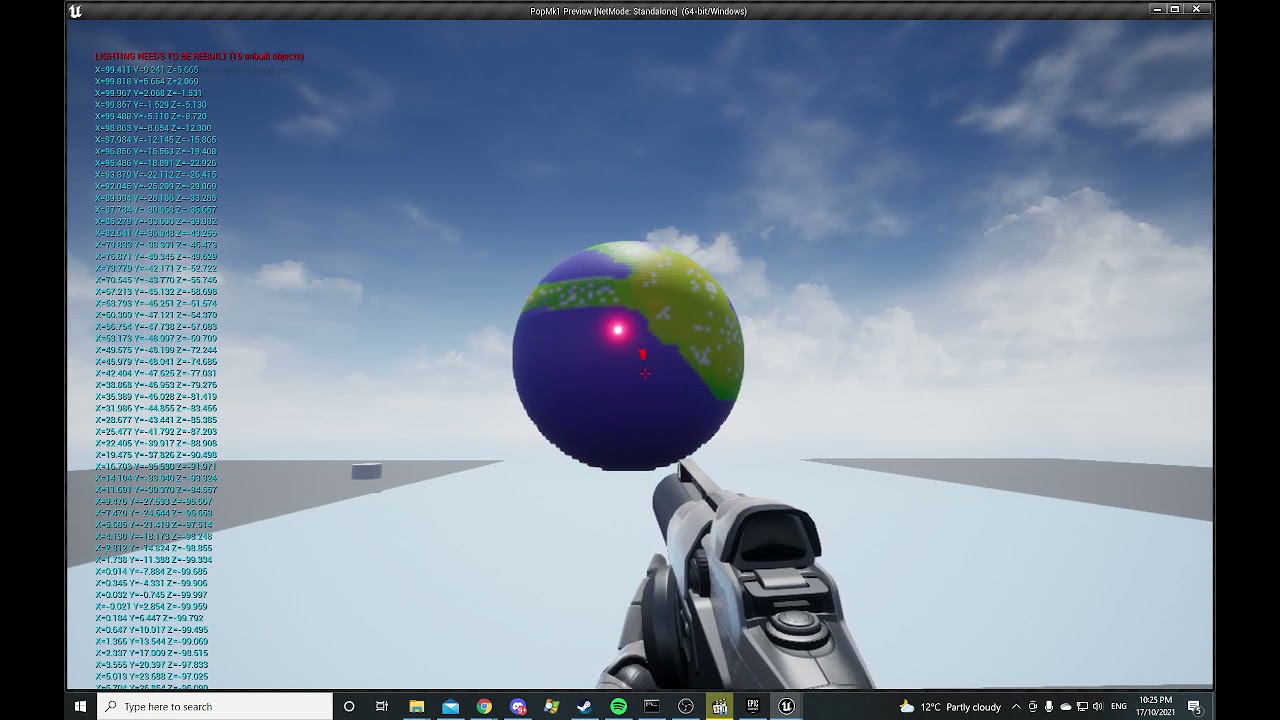
Figure 8's, baby
 devout condor
ok, can anyone help me this has been bothering me for a long time
I have a object that needs to reposition when its to far away from something
but when ever it reposition, it only goes to the 'to far distance' how do I make it reach the center?
https://cdn.discordapp.com/attachments/221798806713401345/899262909492899890/unknown.png

 untold girder
i want to make a reference to an actors location in my third person character but for some reason you cant make references in the player blueprint does anyone know how i can make one
gentle urchin
Check out blueprints communication tut
untold girder
i will thanks
 rancid steppe

I need help
When I download and use Advanced locomotion system to moved to my project, this message appears, and I did the same way, too, to no avail. The same error appears
I can't use it
 modern musk
Hey, so this might be a dumb question, but is there a performance benefit to setting "GetAIController" to a variable on event begin play and then using that vs just using the "GetAIController" node whenever I need to access the controller? I only ask because "GetAIController" appears to cast to the controller, and I've read that casting calls all the references to a class regardless of if they're currently being utilized on screen or not (this could be inaccurate and/or my understanding could be incorrect). Thanks in advance!
earnest tangle
Storing a reference is generally faster, but it might not make a huge difference if you're only calling the function on occasion
and even if you do it on tick it doesn't really have that much of an impact
 rotund ruin
Lets say you're doing something like an endless runner. Anyone have some high level ideas on setting up different level types? Spawning, transitions, etc?
 crimson geyser
Hi, I want to set up the ragdoll animation when the character overlaps with a collision box. It looks very simpel in tutorials, but nothing happens on my end. So I made a custom "death" event with the simulate physics. And I made a overlap collision box with cast to thirdpersonplayer and calls the Death event.

Can anyone help me with what im doing wrong?
 atomic salmon
crimson geyser
Hi, I want to set up the ragdoll animation when the character overlaps with a co...
atomic salmon
crimson geyser
Hi, I want to set up the ragdoll animation when the character overlaps with a co...
Run your game while you keep those Blueprints open and visible on screen. You will see the code execution in real-time. See if your event is being triggered and simulate physics is being called.
As an alternative use Print String to show on screen when your event is executed and the function called.
crimson geyser
The event is triggered correctly, but just not the simulate physics part I guess.. Do I maybe need another target when I call the Death event?
atomic salmon
crimson geyser
The event is triggered correctly, but just not the simulate physics part I guess...
You need to call it on the skeletal mesh within the character
Which needs to have an associated physics asset
crimson geyser
I'm using the 3rd person game template. Wouldn't that be automatically associated?
atomic salmon
crimson geyser
I'm using the 3rd person game template. Wouldn't that be automatically associate...
Yes, the mannequin already has a physics asset.
Mesh is what?
You said the Death event is properly called?
 atomic salmon
Can you put a Print String immediately before Set Simulate Physics
crimson geyser
Yes and that does show up. I also got a Disable input and Quit game after the simulate physics. Those seem to work as well
Its just the simulate physics that doesn't work
atomic salmon
crimson geyser
Yes and that does show up. I also got a Disable input and Quit game after the si...
Do you see any warning or error in the log?
Do you have anywhere any other code that calls Set Simulate Physics in the same mesh?
 somber linden
anybody know how I can convert mouselocation from the player camera to another camera?
atomic salmon
crimson geyser
Nope no warnings. And not this is the only simulate physics I use.
Running out of options honestly. Let me check something.
crimson geyser
Its probably something simple I switched on or off I guess, but I can't seem to figure out what it is.
atomic salmon
crimson geyser
Its probably something simple I switched on or off I guess, but I can't seem to ...
Did you change any settings in the physics bodies inside the physics asset?
crimson geyser
atomic salmon
Did you change any settings in the physics bodies inside the physics asset?
Nope..
I did accidentely deleted the ThirdPersonBP folder, but I've added it again and everything seemed fine. Could that be the problem?
atomic salmon
crimson geyser
I did accidentely deleted the ThirdPersonBP folder, but I've added it again and ...
Can you open the skeletal mesh for the mannequin and make sure you also see the physics asset all the way to the right at the top.
It may stil be there but maybe it is no longer associated.
crimson geyser
 atomic salmon
Ok looks like it is still there. And if you open it you can see the bodies in it?
And if you click simulate it should ragdoll
crimson geyser
Ah no it wasn't selected. This was empty.

That was probably it though because instead of not moving the character falls through the ground now.
atomic salmon
crimson geyser
That was probably it though because instead of not moving the character falls th...
Yes that explains why it wasn’t simulating physics.
formal prairie
hello, is there a way to make a construction script refresh with another actor ? for example, if i move a volume in my scene, i want another actor's construction script to refresh
crimson geyser
atomic salmon
Yes that explains why it wasn’t simulating physics.
Thanks a lot for the help! Think I'll manage from here. Thanks again for your time and have a great evening 😁
atomic salmon
crimson geyser
Thanks a lot for the help! Think I'll manage from here. Thanks again for your ti...
You are welcome
Thanks you too
modern musk
earnest tangle
Storing a reference is generally faster, but it might not make a huge difference...
Hey, thanks for the reply, very much appreciate the info!
untold girder
so i basically made a throwable sphere in my third person character and i want my player to teleport to the sphere whenever i press F but i dont know how to make the reference to the location in my third person player blueprint can anyone help me
trim matrix
formal prairie
hello, is there a way to make a construction script refresh with another actor ?...
When you move the volume, its construction script will fire. During the Volumes constructions script, get references to the actors that needed to be "refreshed" and call each of their constructions scripts. Though you will not directly be calling there construction script however as you cannot do that. Instead for each of the actors that need to be refreshed, condense there construction script logic into a custom function. You can directly call this custom function on all the actors that need to be refreshed.
trim matrix
untold girder
so i basically made a throwable sphere in my third person character and i want m...
So you throw a sphere? Meaning you spawned a sphere actor in?
And made it fly forward?
The SpawnActorOfClass node returns a reference to the spawned actor. All you have to do is save that ActorReference to a ActorTypeVariable. Then when you press F, get that previously saved ActorTypeVariable and run GetActorLocation from it.
 dapper bramble
Does someone know why a child of an actor might translate at a faster rate than the parent, when I move the parent via the gizmo (not in game)?
trim matrix
Not me. Solution in the end is just to not use child actors lol.
untold girder
trim matrix
The `SpawnActorOfClass` node returns a reference to the spawned actor. All you h...
how exactly do i save the actor reference to an actorTypeVariable
trim matrix
right click it
and hit promote to variable
OR
Create a new variable on the left side of the screen by hitting the CreateVariable button.
dapper bramble
@trim matrix yeah thanks ^^
trim matrix
Click on the variable, and in its details, change the type to actor.
untold girder
i don't think i can promote it to a variable(if i right click on it i dont see promote to variable) and if i create one on the left side how to make the variable contain the SpawnActor information
trim matrix

You need to right click the returned ActorReference
And if you did the second thing.

You set it to make it contan the SpawnActor information
Variables are peices of data that can be retrieved (Get) and set (Set).
If you want a variable to hold X data, you set it.
The Input pin in a SetVariable node is where you plug in the data.

Try not to mind my horrible mouse text D:
untold girder
all right thank you
trim matrix

Now thats all you gotta do to get that location you needed.
Might want todo this actualy
trim matrix
untold girder
all right thank you
Make sure to add an IsValid node. If you dont, and you try and retreive(Get) that peice of data before it has been set, you will get an error.

The IsValid node will check to make sure a ReferenceTypeVariable is actualy valid (Is actualy set to anything).
 jaunty solstice
Help! I need to call an event in an existing Actor Blueprint Event Graph (instead of relying on EventBeginPlay) from Sequencer.
I've tried following this
https://youtu.be/Ao6HjoJFDCE
but I need something a little more basic. I assume I would need to set up and use a Blueprint Interface but beyond that am struggling. Is there a good basic tutorial somewhere?

Tutorial showing how to make events in sequencer trigger behavior in the level blueprint.
Software:
Unreal Engine 4.25
Camtasia 2019
Music from https://www.youtube.com/audiolibrary/music?nv=1
- Twilight Train by Dan Lebowitz
- Daily Beetle by Kevin MacLeod is licensed under a Creative Commons Attribution license (https://creativecommons.org/li...
trim matrix
While a BP inferface would work, if you go down that route the event you call should probably be quite generic. I dont think it would be a good idea to create an interface for every single random actor that needs to have its specific events called during sequencer. If you want to use a preexisting actor, you can do this by adding that actor to the sequencer. Then you can "Rebind" those actors that exist in your sequencer to preexisting actors in the world.
I cannot remember the exact procedures to accomplish this although so I would not be able to personaly help you unless I took a minute and figured it out again. Anyways start heading down a the actor rebinding path though rather then the interface path.
Hopefully you can find someone does sequencer alot and knows how todo that very well or even knows some better way and howto do that.
 compact mauve
Hi, I have a issue with my binding function. Each time it gets executed twice after each frame. I am printing out my delta time from tick and these hellos. There are always 2 hellos between one delta time. Does someone know what this can be causing? I have also created a fresh binding function but it still gets called twice 😮
 dawn gazelle
compact mauve
Hi, I have a issue with my binding function. Each time it gets executed twice af...
dawn gazelle
compact mauve
Hi, I have a issue with my binding function. Each time it gets executed twice af...
Are you running multiplayer, or perhaps you're unintentionally creating two copies of the widget that contains this percent call?
compact mauve
Yes I am runnning multiplayer. Removing multiple clients and setting to standalone did not resolve this issue. I have also the issue that the Progress ist twice as fast.
jaunty solstice
trim matrix
Hopefully you can find someone does sequencer alot and knows how todo that very ...
Thanks! Finally managed to get it working however another chicken and egg problem. My interface events properly trigger but only in PIE mode when the Sequncer is playing.
However then my Sequencer camera doesn't animate!!
If I exit PIE mode my camera animation works but the events don't trigger.
In other words my Sequencer camera doesn't animate when in PIE mode.
compact mauve
@dawn gazelle Hmm and printing on construct does only result into one call so construct get called once
 velvet dagger
Where would I save the variables for things such as how many items have been collected?
kindred pier
How come this is spawning the actor at the world center instead of the location of the current actor?

this actor is on the corner of the map, but it still spawns at world center for some reason
atomic salmon
@kindred pierinspect the value out of Get Actor Location or print it with Print String. See what is its content.
@velvet daggerin general or by the player?
velvet dagger
By the player :)
kindred pier
atomic salmon
<@!457305766139920385>inspect the value out of Get Actor Location or print it wi...
thanks will try that
atomic salmon
@velvet dagger You can either store them in the player itself or create an inventory actor, linked to the player, to store that information.
velvet dagger
What I've been doing was storing it inside the player and was a little worried that that was superrr wrong
How would I create an inventory?
I think it'd be more nice to have one to store all of this information
atomic salmon
It is not wrong per se. It may generate problems if you would switch to multiplayer if it is something the other players need to see as well. Then you can use the PlayerState.
@velvet daggerhttps://www.youtube.com/watch?v=TcTxSyk8Vks
In this video I teach you how to create your very own inventory system. I also give you the choice to download it for free
★ Come join the Team Beard Discord: https://discord.com/invite/hhv4qBs ★
★Check out my Marketplace Asset: https://www.unrealengine.com/marketplace/en-US/product/flexible-combat-system ★
★ Ways to Support The Channel ★
Pa...
velvet dagger
Thank you for the help! :)
kindred pier
atomic salmon
<@!457305766139920385>inspect the value out of Get Actor Location or print it wi...
it's located where I put it, so theoretically the spawn actor should not be spawning in the center like it is
I mean I did the print thing and confirmed the location I put it in matches the string it outputs
 mental robin
I am drawing a mask to a render target but I want multiple actors to draw to it each frame. Problem is if I have the RT as additive it leaves a trail and the values build up..if I select translucent or a masked material to draw as this gets me part way there but the previous frame it leaves a smudge of where was previously masked
I just want the actors to draw points to the render target without leaving trails
kindred pier
kindred pier
it's located where I put it, so theoretically the spawn actor should not be spaw...
nvm I'm dumb, was doing it too early before the level fully loaded, thanks for the help
 north marten
Is there a way to stop something from being able to jump again after jumping and bumping into a wall?
trim matrix
jaunty solstice
Thanks! Finally managed to get it working however another chicken and egg proble...
Sorry, I didn't see you replied. Anyways im not the person to help with sequencer issues. So I am sorry I cannot help you in detail about any specific problems.
north marten
I can just keep hitting space and climb up a wall with just the basic jumping blueprint from the ball rolling template
trim matrix
All i could say before was a point in the a general direction.
I have a very infrequent use with sequencer.
atomic salmon
north marten
I can just keep hitting space and climb up a wall with just the basic jumping bl...
Iirc the rolling ball template applies a vertical impulse to make the ball jump. If you keep pressing the jump button it will apply it over and over, so the ball will get higher and higher. You can detect the hit with the wall through a Hit Event and disable the jump for a while.
@north marten better to continue in #legacy-physics
 hidden grotto
hey im new to ue4 and i made an ability code thing after following a youtube video and i wanted to add a counter so that every time i click the ability it prints the number of times i did it , for example it prints 1 then 2 and so on but it keeps printing 1 and i think i need help
 dawn gazelle
hidden grotto
hey im new to ue4 and i made an ability code thing after following a youtube vid...
dawn gazelle
hidden grotto
hey im new to ue4 and i made an ability code thing after following a youtube vid...
Don't set tries to 0.
You want to get tries then +1 it.
 crisp vale
Heyhey, im new to UE4, and i was trying to follow a tutorial for making a fighting game and i keep on getting this error

i have "Char2" referenced quite a few times
and set it to the 2nd player on screen
and i have 0 idea why its not working
dark crow
Empty ref
crisp vale
and the errors only appear when Char2 is connected here

char2 is on the bottom
how should i go about an empty ref?
 dark crow
crisp vale
and the errors only appear when Char2 is connected here
dark crow
crisp vale
and the errors only appear when Char2 is connected here
Give it a ref
dark crow
Char 1 needs to exist
crisp vale
char1 does exist whenever i start the game
dark crow
Then it may not be valid for a while
use IsValid or ValidateGet
Since you're doing it in the Level BP
crisp vale
ill try that
trim matrix
trim matrix
hey guys how do i make these
they're called routing nodes, double click
 dense mural
Can someone tell me why this isn't working? "Hello" gets printed but "Done" doesn't, how can i fix this?
 velvet dagger
I'm trying to make a sound's pitch change depending on the percent of the number, probably sounds wrong but I mean like, so you have 1 of something out of 50, so the sound will be low, then you have 25 of something out of 50, so it'd play at 0.5 pitch. Anyone know how to help me with this?
What happens to me is that it plays at a low pitch and after like a random amount of numbers the pitch will either be normal or really high pitched
 dawn gazelle
trim matrix
dawn gazelle
trim matrix
Connect the second set after the first.
dawn gazelle
dense mural
Can someone tell me why this isn't working? "Hello" gets printed but "Done" does...
The "Other Actor" that is overlapping with the Trigger Box probably isn't a bookshelf. Casting is a means of taking a less generic reference (like the "Other Actor" pin only returns an "Actor" reference) and making it more specific so you can access the functions and variables within the more specific class, but only if the object actually is the class or a child of it.
dense mural
dawn gazelle
The "Other Actor" that is overlapping with the Trigger Box probably isn't a book...
So how do i make it work? I have a trigger box having to cause an event, it is a set of 74 books that are using the same blueprint and i want the trigger box to start an event there.
crisp vale
dark crow
use IsValid or ValidateGet
Char2 just is not spawning
sets up player 2

spawns player 2

 near yarrow
your getting 0
shouldnt you be getting 1 since it is the second char in the index
im assuming char 1 and 2 are of the same class here
you set the pointer Char 2 to index0 of the array "get all actors of class" is spitting out
if char1 is in that array and it exists first then it will be index0
so char2 is actually char 1
get 1 not 0 if this is the case here
id like to see more of your second picture. im assuming char1 and 2 are the same class of actor
dawn gazelle
dense mural
So how do i make it work? I have a trigger box having to cause an event, it is a...
Then you need a reference to the bookshelf itself. You may even want to consider placing the trigger box on a copy of the bookshelf, then that overlap event can exist on the bookshelf actor, meaning you can check the overlap's other actor if it's the player, and then if it is, proceed with the event you're wanting to do.
near yarrow
where should i go to get help with the scenecapture2d on this discord
im using a scenecap for like a pop screen that has a smaller fov for a zoom effect
problem is we dont want a certain post process effect applied
when we set scenecolor options it skips the post process
crisp vale
the top one if for character1, and the second character2
 near yarrow
but it also skips bloom and stuff
we want the final color output but without the post process effect that is sometimes used
i thought about compositing to separate scene caps but it looked worse than just using scene color
dawn gazelle
crisp vale
sets up player 2
What are you trying to accomplish? Unreal doesn't work this way - normally a player controller is automatically created for your players as they join your game.
crisp vale
should i send the videos i was using?
near yarrow
no
crisp vale
okay
crisp vale
so the character controller is set in the player controller file
near yarrow
ive been exactly where you are
crisp vale
but this is the level blueprint
and this is more just setting up the characters to exist in the scene
and for them to be summoned
dawn gazelle
Unreal does most of that for you. A lot of people don't even use the level blueprint.
near yarrow
i would use game mode for possesion and spawning
crisp vale
player 1 is loading in perfectly fine
near yarrow
are they the same class?
crisp vale
no they are not
near yarrow
ok
so get index0 should work
but it kinds of defeats the purpose the way your doing it
but i could see it done this way
double click that spawn players function and show us that
your calling that same function at the end of both
no matter what happens spawn players is going to do what comes after
you might need an input into the function
and input char1 or char2
crisp vale
how would u recommend i start with that?
odd ember
is there a BP class for sounds that exist in world?
near yarrow
show me what the spawn players function looks like. double click the blue spawn players node and screen shot that
crisp vale
 crisp vale
so after it does char1, it does not repeat for char2?
near yarrow
char2 may not be valid yet
i would have to dig into the whole project to make sure
but im willing to bet its going in order and if its not valid yet nothing happens
i would do two separate spawning functions if your going to have them be two different classes
normally people wouldnt do it the way you are
the chars would be the same class
crisp vale
what if they are meant to be different characters?
near yarrow
and you would take a playercontroller and spawn a char for each of them and hand them possession
crisp vale
for example, like a fighting game
near yarrow
inheritance. they would still be children of a type char
but thats neither here nor there. you can still do it the way you are wanting its just going to take a longer time wiring it up
near yarrow
if they are meant to be two different classes then i need to see infront of this pic
 crisp vale
 near yarrow
okay hmm
 near yarrow
i see
do the chars exist before event begin play
this is the level blueprint
that get may not return anything at all
crisp vale
near yarrow
do the chars exist before event begin play
how would i check this?
near yarrow
do you know what the printstring node is
crisp vale
near yarrow
do you know what the printstring node is
no
near yarrow
print string is something you can use for debugging
trim matrix
already got it sorry
near yarrow
hang on let me boot up and ill wire something up as an example

try this real quick on them and it will print the name of the char to the screen or will print does not exist yet
all is valid does is check if something exists or not
could just print display name and it should print null if its not there yet
but you will find yourself using print string alot to check your blueprint wiring out
this can help you find the right direction
crisp vale
both of them
near yarrow
okay you havent actually spawned them yet
 near yarrow
ok
but either way player 1 does not exist yet
use this

you have to spawn the actors
crisp vale
where should i put that?
near yarrow
you could do in place of get actors
you dont need to get the actors since they dont yet exist
go ahead and spawn them using that node and then you can do your rotations to the char 2 after
actually spawn transform is the location and rotation of the actor being spawned
so instead of doing the spawn players function you created that does teleporting and rotation you could do it right there
 somber wadi
does anyone know how to sync a bp variable to a c++ variable?

this is my current blueprint code
near yarrow
what are you trying to do?
somber wadi
so i made an IsReloading variable in c++
and this is my anim bp
so i want to bring the state of that variable into my anim bp
near yarrow
there is a way to expose a variable to bp
near yarrow
ive never done it but ive heard others talk about
thats the terminology they use tho. exposing to bp
somber wadi
oh yeah using UPROPERTY
okay so yeah it was already exposed but im not sure exactly how to access it after a cast
oh wait
i actually think i have to specifically cast to the character class that i made
instead of just the base character class
near yarrow
ya
thats it
i wasnt paying attention. i just thought you named your character character
 grizzled solar
Hey yall! Rotations are making me crazy right now! I'm interpolating a rotation, but when it flips from +180 to -180, my interpolate teleports and just looks awful.
odd ember
near yarrow
animations are hell in general
tell me about it
 peak plaza
odd ember
grizzled solar
Hey yall! Rotations are making me crazy right now! I'm interpolating a rotation,...
peak plaza
odd ember
grizzled solar
Hey yall! Rotations are making me crazy right now! I'm interpolating a rotation,...
is this over time or what are you doing?
grizzled solar
Yeah its over time
odd ember
you may want to use quaternions instead if you want more proper rotation
near yarrow
grizzled solar
Hey yall! Rotations are making me crazy right now! I'm interpolating a rotation,...
its because you need the delta
grizzled solar
 grizzled solar
This is how i have it currently
grizzled solar
capsule component in fps controller
grizzled solar
Yeah fps
grizzled solar
is there a node for that?
near yarrow
let me check what its called
odd ember
what is your code
there is a delta rotation node but I'm not sure what you've been doing so far
there's a few ways you can interpolate rotation
grizzled solar
Theres a lot, im basically trying to get my rotation to add velocity to my lighter flame, i have it for movement and it works just fine. But my rotation snaps, ill cap a .gif
So the movement velocity works fine, but my rotation snaps when going from 180- -180
near yarrow
hmmm
grizzled solar
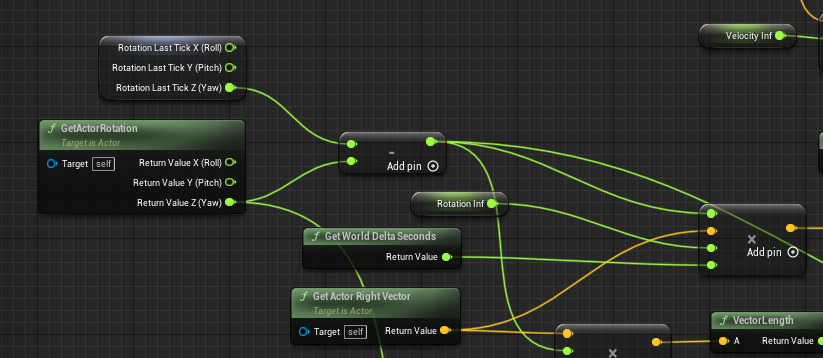
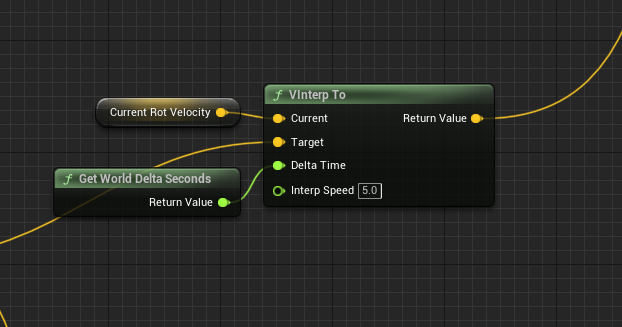
The vector coming off my multiply at the very right
is my target coming into the left of the VInterp
it really just has something to do with the rotation harsly skipping to -180
odd ember
you probably need to use quaternions if you want to keep your method
grizzled solar
Okay! Never used those, can you convert a rotator to a quaternion?
somber wadi

does anyone know what to do with this error?
i want it to get the variable ammo from the owning character
and bind it
odd ember
when spawning the widget, pass a reference to the pawn it is for
somber wadi
how do i do that?
somber wadi
oh so do i have to link it to the character first?
odd ember
the relationship between character, player controller, and UI is special
the best way you can make it work is by having the player controller control UI for the character
so the player controller needs to know the character
if the character is known, it can be passed as a reference when the player controller spawns the UI
somber wadi
okay
so instead i want to get playercontroller
and then get character
and pass it to the widge
odd ember
no
or, I don't know, that may work
but it's a shortcut with no guarantees
what you can do is
create a variable in your widget
of the type of your character
then check instance editable and expose on spawn


 odd ember
when you now spawn your widget (which should be happening in your player controller)
somber wadi
 odd ember
the create widget node will not have a pin for your character
and you can pass the character your controller already knows into it for free
odd ember
somber wadi
so something like this?
yeah. you don't need to cast it anymore
 prisma stag
Hello, is there some variable that can have a name and integer value associated with it that can be set from another bp?
 static charm
and if you want to do more than one, you can use a map
prisma stag
static charm
and if you want to do more than one, you can use a map
I have been trying to do a map since there will be more than one, but I am unable to set the value.
odd ember
prisma stag
Hello, is there some variable that can have a name and integer value associated ...
you can also just do an array of names, since arrays already have integers for the slot they are in
prisma stag
odd ember
you can also just do an array of names, since arrays already have integers for t...
That wont work how I would like it.
I am trying to create an inventory sheet where there will be the item name, then the quantity associated with it. I need to access and change the quantity from another bp but cant find a way to set it up how I would like it.
odd ember
i would use an array of structs then
you can have names and integers in a struct
and it is a future proof solution as you can keep extending the struct with values
prisma stag
odd ember
you can have names and integers in a struct
Ah. This might work. Am I able to search the array via the Name struct value?
odd ember
and it gives you access to data tables so that you can table all possible items
odd ember
prisma stag
Ah. This might work. Am I able to search the array via the Name struct value?
not implicitly in blueprint. but you can create your own predicate lambda functions
well, not lambda
but predicates anyway
the way the engine would do anything like that is a foreach loop with break that matches the name you search for with one of the entries in the array
then break and return that entry once you have it
static charm
if you kept two separate arrays (or put them both in a Struct), you can use the find function, and then returned index to match the other array. it's a little messy but works.
grizzled solar
near yarrow
hmmm
i tried the delta rotation thing and it didnt get me anywhere Sadge
prisma stag
static charm
if you kept two separate arrays (or put them both in a Struct), you can use the ...
Hm, this doesnt seem bad, however, the values associated with the quantities would be zero before play so it would be very confusing. Theres not data structure type thing that allows you to set that value?
odd ember
in CPP structs are much better for this. but in BP you're severely limited
static charm
i'm not sure what you mean, as you can set the values at anytime
unless im forgetting something myself
prisma stag
static charm
i'm not sure what you mean, as you can set the values at anytime
Hm. Let me check to see, as the last time I tried setting the value of a data table item it didnt work.
static charm
i mean a Stuct file/object, not a data table.
prisma stag
static charm
i mean a Stuct file/object, not a data table.
Ok. This makes more sense. So in another bp, I have it setup so that there is a separate variable per product in the game. Now I was going to do the same thing but wanted to create a function that would have an input for the name, then take that name and do a search for that item and get its quantity and set it.
static charm
yup, you don't need a struct to do this, it just organizes the arrays into a single variable that contains the arrays.
but if you ever wanted to nest all your arrays, putting the arrays into an array. you can then just make a struct with all the arrays. and then make an array of the struct.
near yarrow
grizzled solar
i tried the delta rotation thing and it didnt get me anywhere Sadge
Ya when I seen it was a light and not aim I realized there might be something else going
I remember i was using a node call add rotation
It would jump over the 180 mark and go nuts
When I added the delta tho it was all good
prisma stag
static charm
but if you ever wanted to nest all your arrays, putting the arrays into an array...
Im honestly very confused at this 😂. I think I have another option and will give it a try. If it doesnt work I will back here tomorrow.
odd ember
not sure why you don't just create a struct by itself... especially if these are items, you'll save yourself a lot of headache later. but whatevs, it's your funeral
prisma stag
odd ember
not sure why you don't just create a struct by itself... especially if these are...
Each item variable is a struct with a name and qty. I was just hoping to put them in some sort of array and get access to each one via their name however arrays work with indexes so it would be much more difficult to do.
odd ember
prisma stag
Each item variable is a struct with a name and qty. I was just hoping to put th...
in that case what I said about creating a predicate that just checks can be done inside a single function
in CPP you have similar functionality, but you can just as well create your own
in BP
all it is is a foreach loop that checks every struct's name against your name
 ripe rose
is there an efficient way to calculate the exposed surface area of a component from a given location?
odd ember
you'll have to give more detail