#blueprint
402296 messages · Page 716 of 403
 prisma stag
 fading raptor
prisma stag
I tried adding a print string after the true branch which is the one I want to e...
fading raptor
prisma stag
I tried adding a print string after the true branch which is the one I want to e...
Now you know that something is wrong with that branch, maybe the condition you put in is the wrong one?
prisma stag
fading raptor
Now you know that something is wrong with that branch, maybe the condition you p...
The condition is the is game paused. So it should work considering the game is set to paused when the widget is shown.
fading raptor
Make a print string after where u set the game to paused, and see if it shows up
Maybe the game may show its paused but the bp doesn't register it
prisma stag
fading raptor
Maybe the game may show its paused but the bp doesn't register it
The print string does show.
fading raptor
That means your condition for the branch you made is the wrong one
I dont know your code, but try to find the condition you set where it pauses the game
prisma stag

No description provided


 fading raptor
Is the "is game paused" custom made, or does it come with the engine?
 willow breach
it prints hello
prisma stag
fading raptor
Is the "is game paused" custom made, or does it come with the engine?
Comes with the engine.
fading raptor
What determines if the game is paused?
willow breach
willow breach
@fading raptor
fading raptor
Im reading ur code give me a sec
willow breach
k
fading raptor
Its kind of hard to debug when all ur print strings say hello
Rename them then debugg
prisma stag
fading raptor
What determines if the game is paused?
After the true and false branches, I have a set games paused statement. If false, IsGamePaused is set to true and if true, IsGamePaused is set to false.
willow breach
ok i changed the first one to 1
prisma stag
 fading raptor
prisma stag
fading raptor
prisma stag
The problem is in the branch
Try making a custom variable for is game paused and replace it with the engine made is game paused
So instead of the engine is game paused, it would be a boolean you made
And set the boolean wherever you pause the game
prisma stag
Alright. Give me a sec.
fading raptor
I dont like using engine made things because they don't always align with your code
prisma stag
fading raptor
I dont like using engine made things because they don't always align with your c...
The only reason I use it is because I actually pause the game.
fading raptor
Im not familiar with most engine pre-made events/conditions, because they just cause problems tbh, even if u actually pause the game, it still might not register it
prisma stag
fading raptor
Im not familiar with most engine pre-made events/conditions, because they just c...
Oh I got it. I did the branch with the custom variable and it wouldn't work either. Then checked to see if the widget was in focus. I have it set to Set input mode to ui which to me makes sense. However, I saw a video that in order to have the ui and be able to interact with it, you need the ui and game as the input mode and now it works. Thanks for the help though.
 formal wren
How do I make VInterpTo and other Interp-function FPS unindependant?
*unindependant
mmh this seems to do the trick:

any suggestions?
 sinful sequoia
@formal wrenWhy not just set SplineInterpSpeed in seconds and multiply it by GetWorldDeltaSeconds?
I'm trying to figure out what asset is used in classe's static mesh (and use same static mesh in another thing) how do I get it from soft reference?
 formal wren
sinful sequoia
<@!471040295837106178>Why not just set SplineInterpSpeed in seconds and multiply...
formal wren
sinful sequoia
<@!471040295837106178>Why not just set SplineInterpSpeed in seconds and multiply...
mmmh yeah, that should also work 😄 I did all my initial tests at 60fps and wanted to maintain the speed I experienced under that framerate 😛
if I just multiply by world delta seconds I think I would have to recalibrate all my speed variables
sinful sequoia
@formal wren Other option is probably "SetEventByTimer", not sure about the details
formal wren
not possible
i have to use tick. The interp function makes one object follow another objects location
😦
sinful sequoia
https://answers.unrealengine.com/questions/711550/how-do-i-make-rinterp-to-framerate-independent.html maybe this will help - seems they suggest same solution
formal wren
yeah already found that one
I think my solution works
at least the speeds now seem consistent among different framerates
 wind void
Is there a way I can make a custom vector that contains Integers instead of floats?
Or if said vector exists?

 wind void
sinful sequoia
I can only suggest this
wind void
sinful sequoia
I can only suggest this
yeah, problem is that I have todo that every time I use it, just wondering if there was a way I could just simplify my code and skip that step.
 sand shore
wind void
Is there a way I can make a custom vector that contains Integers instead of floa...
sand shore
wind void
Is there a way I can make a custom vector that contains Integers instead of floa...
You could make a BP struct and you could also make a BP function library. I think you might be able to use FIntPoint or something though
but function libraries exist for that sort of ergonomics
 soft scaffold
Hi! I tried to make an angle calculator system to calculate the angle between the lines, but something doesn't work correctly. Any idea?
 unkempt moth
Does anyone know where the best way to learn third person over the shoulder aiming and shooting? I'm not making a shooting game but I need to make a set up like that so I can aim fireballs and arrows where I want.
Tag me please
 fiery swallow
unkempt moth
Does anyone know where the best way to learn third person over the shoulder aimi...
fiery swallow
unkempt moth
Does anyone know where the best way to learn third person over the shoulder aimi...
https://www.youtube.com/watch?v=BzpPK0hPc4s
The fundamentals are kind of explained here. If you want an interactive camera that moves rather then teleports you'll just need to use VinterpTo node, alternatively you can use a timeline to achieve the same effect. I believe VinterpTo is used in Advanced Locomotion System rather then timeline... So it's probably the better method
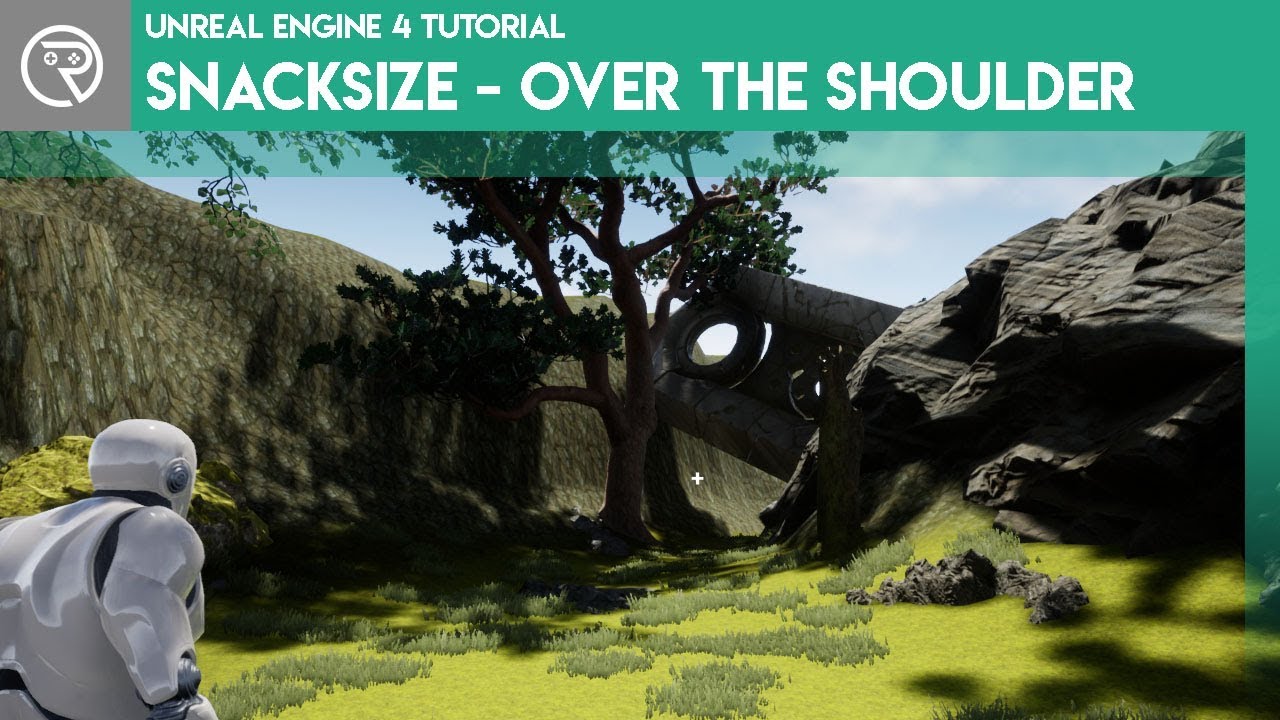
Short, snack size video guides on various elements of Unreal Engine 4.
Support me on my Patreon and see episodes 2 weeks early: https://www.patreon.com/ryanlaley
In this snack I go through how to make your third person character have an over the shoulder perspective like a third person shooter such as Gears of War.
There are all sorts of settings in the camera that can easily be changed in blueprints as well to achieve your desired effect
unkempt moth
I think I've watched this one @fiery swallow. But I might have to watch it again. Maybe my question wasn't completely clear. I want a hold button to aim and a shoot button to shoot. Not just over the shoulder view but an over the shoulder when aiming view. Does it cover that or do I need to adapt from what it is talking about?
fiery swallow
unkempt moth
I think I've watched this one <@!135505411779461120>. But I might have to watch ...
The way he changed the camera boom is how it can be done in the video, what I mentioned though
If you want an interactive camera that moves rather then teleports you'll just need to use VinterpTo node, alternatively you can use a timeline to achieve the same effect
Is how you'll achieve the effect of shoulder view when aiming
Are you familiar with VinteroTo node or a Timeline node?
unkempt moth
Only slightly
I'm working on my 2nd game and my 1st commercial game
Plus I've been using Unity mostly until a certain point
fiery swallow
In your case, I would go with a timeline since it's suppose to be a temporary thing
unkempt moth
Okay, I'll check the video out. Thank you!
fiery swallow
unkempt moth
Okay, I'll check the video out. Thank you!
I can show you how to do it if you want
unkempt moth
Okay that would be a great help!
fiery swallow
join programming parlor voice chat
unkempt moth
Hold on trying to get the mic to work
fiery swallow
I guess you need special permission to screenshare so just sent you a friend request, you'll have to accept
 fiery swallow
 trim matrix
does anyone know the name of this node?
trim matrix
does anyone know the name of this node?
is it camera 1? ☺️
trim matrix
i mean im guessing??
im tring to figure out which one it is that target to the left thingy
if i drag camera alone with get or set it doesnt give me it
fiery swallow
I see a cast to node
a variable
and a set view target blend
the one on the left is a cast to node
trim matrix
yeah
but how do I get the middle one?

if i click on promote to variable it gives me that node instead
fiery swallow
so you're trying to get camera 1 from Dviz Game Mode?
trim matrix
yeah
idk im kind of in a mess rn
because im following a guide to be able to to access a camera
on this scene
so it says here to place the camera in the level
then get the reference
so maybe that step has to do with it
how do i get a reference from a camera thats already in the scene?
i already tried dragging it onto the event graph or components and it doesnt work
fiery swallow
So the way cast nodes work is... They give you all the variables and information from a different blueprint
the reason you can't get camera 1 when dragging off of it is because camera 1 does not exist inside of it
trim matrix
yeah
Camera 1 exists in the level
but its not referenced
because I dont know how to do it, I tried looking it up but i havent had much luck with cameras only
fiery swallow
what do you mean it exists in the level, it's not attached to any actor?
trim matrix
i have a camera actor to roam around
im trying to get a second camera so the player can look at specific thing from a specific angle. controlled with a widget
the plan was to let people click on it and use the camera for a bit and then go back to the roaming character
what I mean is this
on the second step is where im a bit lost cause i dont know what he means by get the reference (Like I know what he means but im unsure on how to do it)
fiery swallow
Okay so it's saying open your level blueprints and store these camera references in your gamemode
trim matrix
yeah
fiery swallow
then go to your map and open up the level blueprints
should be at the top
somewhere around the toolbar
somewhere near the play in editor button
it's like a picture of blueprints
fiery swallow
right click and click create reference
it will automatically give you a reference to that camera
it should say camera actor from persistent level
fiery swallow
if it doesn't, you'll need to go back to the viewport and click on the camera, and then do it again
trim matrix
i created the cameras on the gamemodeBP not on the LevelBP
fiery swallow
yes that's correct
leave it
you can not reference the cameras properly in the actor unless you store it's reference in a reachable location, which is why you needed to create it in the gamemode
trim matrix
yeah bare with me for a sec
im redoing all the steps
im trying to find the level blueprint real quick
ur saying that its at the top
fiery swallow
look where the play button is
and go left of it untill you see some blueprint logo
fiery swallow
click on it and then click open level blueprints. okay
Go back to the viewport
and click on the camera
trim matrix
yea
fiery swallow
return to the level blueprints and right click and then click create reference
fiery swallow
you dragged it into the gamemode set camera actor?
fiery swallow
okay
trim matrix
ok so
im trying to rebuild the nodes
but im having a hard time getting the set node
fiery swallow
cast to your game mode drag off of it and type set camera actor or whatever you named it
trim matrix
awesome
ok done with that
now

if i have that camera called "Driver"
- Go to your GameMode BP and add variables of type Camera Actor (As many variables as their are cameras in your level)
I just have to add them by name?
or do i have to drag and drop from the Level BP
nvm I think I got it
@fiery swallow thanks for the help, appreciate it 🙂
fiery swallow
np
 minor wolf
So I was having an issue before where I had a widget with an expose+instance editable integer variable that was never actually being set even though I provided it with a value in CreateWidget. Just wondering if anyone knows how to fix this?
 open peak
How do I clone an Actor and make it a child of the BP actor?
 tired cypress
@open peak Right click the BP object in the Content Browser then select "Create Child Blueprint"
tired cypress
minor wolf
So I was having an issue before where I had a widget with an expose+instance edi...
The Create Widget node just creates an instance of your widget. I don't think you can set variables inside the widget with this node (you'll need to do that after you create it).
open peak
tired cypress
<@!145832650643472384> Right click the BP object in the Content Browser then sel...
But how do I do it in a blueprint function? I have a variable exposed to the user and i intent to have it run in the construction script
minor wolf
You can expose variables same as any other blueprint and I'm pretty sure this is the only blueprint that is not working. If I make a custom event to set the integer I get the correct value but none of my text widgets inside are updated
tired cypress
open peak
But how do I do it in a blueprint function? I have a variable exposed to the use...
Are you wanting to create an instance of the blueprint? Or you are actually trying to create a child object blueprint at runtime?
tired cypress
minor wolf
You can expose variables same as any other blueprint and I'm pretty sure this is...
If you use the CreateNode and are dragging off the return value, then you'll likely need to cast this to your widget type first in order to expose the var
open peak
tired cypress
Are you wanting to create an instance of the blueprint? Or you are actually tryi...
I making a Repeater script where i can give it an actor and have it be repeatedly placed in the level
I come from a Unity background so im not completely familiar with the way UE does level objects yet
minor wolf
tired cypress
If you use the CreateNode and are dragging off the return value, then you'll lik...
I am using CreateWidget as shown in this image https://media.discordapp.net/attachments/221798862938046464/881222403336839168/unknown.png
 tired cypress
@open peak Yeah so all you want here is an object instance. Likely you'll use the SpawnActor node
open peak
tired cypress
<@!145832650643472384> Yeah so all you want here is an object instance. Likely y...
But how do I provide it the Actor instance, it only accepts Class
tired cypress
Well if you specifically need the in-game actor instance, then you'll have to grab that at some point, really depends on your workflow here
You really can't provide it the Actor class?
open peak
It'll GetClass when i try to pass it the Actor but is it going to clone everything in the actor?
 surreal peak
No
Blueprints have no logic to automatically duplicate afaik
You can grab the class and spawn a new one
But that's a fresh one
You would need to set all variables by hand
C++ could probably do it I guess.
open peak
But what if for example I have an actor in the level which has a static mesh as a child, it will only instantiate the actor and not it's children?
tired cypress
You can use GetActorOfClass in order to find an actor that has spawned within the level...but that doesn't specify exactly which actor
surreal peak
It will spawn a new copy of that actor with all default values
Child is a confusing word to choose here
Child usually means inheritance
So a child class. Not really related to spawning it or an instance of it
tired cypress
Yeah, if it has inherited components, then it will spawn all of them
surreal peak
Components are defined in the class so it will also create those again
If you changed the static mesh asset in it during runtime then that change does not exist in the new one
Only the default values will be there
open peak
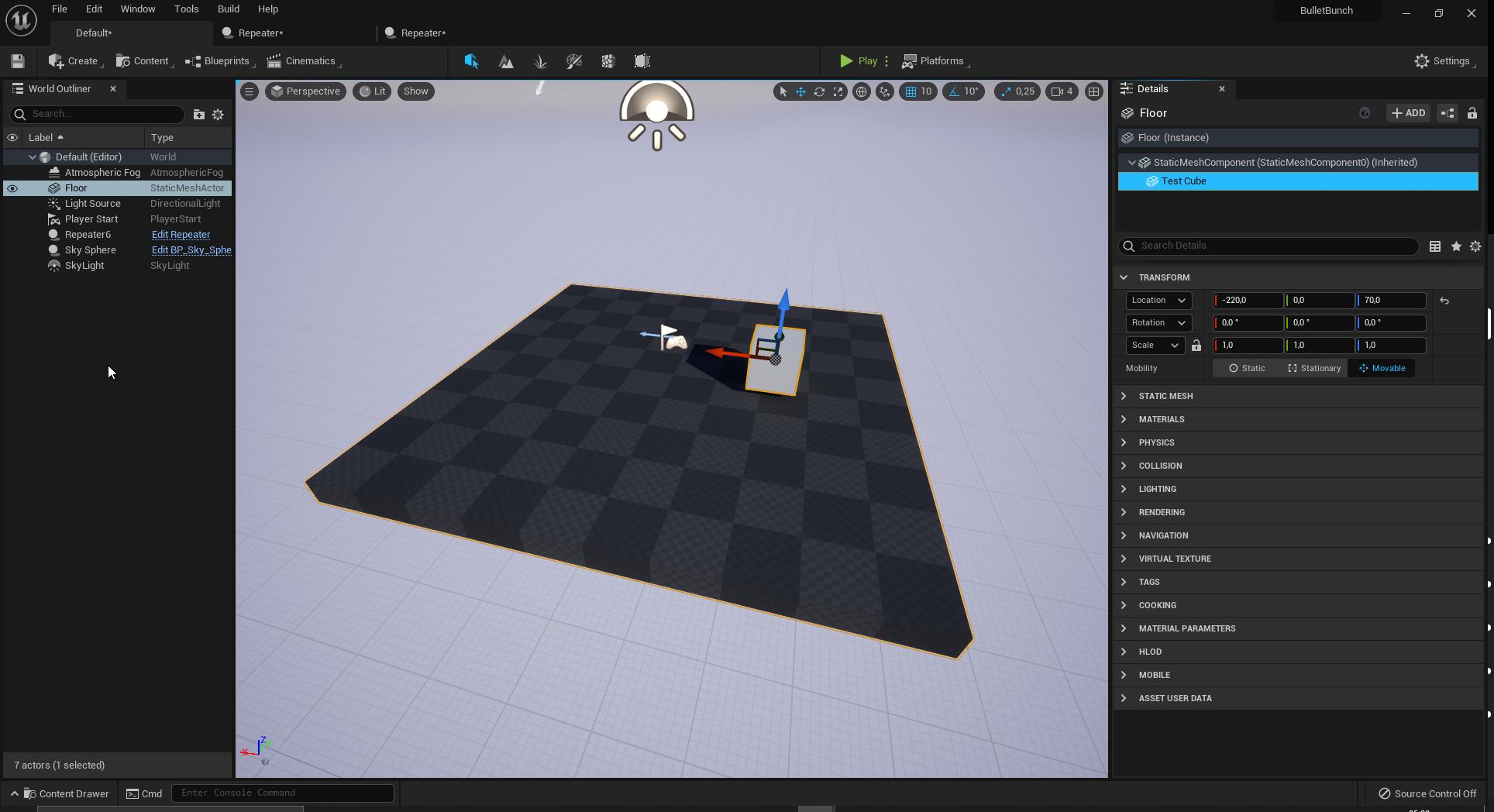
So if i for example wanted to duplicate this floor with the cube
I can't really figure out how I could do that in a BP script
open peak
I just want to repeatedly place out any kind of level objects without having to do each one by one manually
But rather, provide what i want to repeatedly place out along a line for example
surreal peak
You would place some actor that has an array of actor instances in it
open peak
It's more as an editor tool i guess
surreal peak
Then you can reference those two actors via that array if they are all in the level
And let the additional actor spawn them via their class
That said. Constellations like this would probably be good to be created as one actor
Or the actor itself can spawn multiple meshComponents via construction script
Oooor you simply hold ALT while dragging them :D
open peak
But If i wanted 100 of them along the X axis i need to do that 100 times and be accurate with the mouse (unless i use snapping)
surreal peak
Yeah alt is more for a few copies
open peak
surreal peak
Or the actor itself can spawn multiple meshComponents via construction script
Doing it this way, I would be limited to Meshes only, right?
surreal peak
Yeah
open peak
I wouldn't be able to have repeatedly placed out AIs for example then
surreal peak
Correct
But there are also editor utilities you can use nowadays
Where you can script your own widgets that can get your actor selection and do things with them
Which might be a bit more suited for generic editor utilities
open peak
Yeah I was looking into that initially, then I found out about Constructor Script and gave it a try but no luck
surreal peak
Yeah an actor with a spline that places things along the spline via construction script is also a way
Hard to explain though without giving you actual code
open peak
I saw this before but wanted it with other things than just Meshes https://youtu.be/83Jd3HhADCU?t=3641
Tom Shannon, Technical Artist at Epic Games, will explore the systems available in Unreal Engine to create in-editor tools that automate and improve workflows, reduce errors, and even extend the Editor, unlocking new functionality.
Using Blueprints—the native visual scripting language in Unreal Engine—Tom will demonstrate how to create robust t...
(Timestamped)
trim matrix
How would I be able to rotate a camera, but disable character rotation on key press for a thirdperson game? Any help would be greatly appreciated. Trying to get
a block stance locks character rotation(strafe all directions), but camera can look around. Or a video about it, I could follow. enabling rotation yaw and disabling yaw input works, but locks camera too.
surreal peak
open peak
I saw this before but wanted it with other things than just Meshes https://youtu...
Can't check the video. Currently 5am here .only up cause new kittens are crying.
Grabbing the actor class and spawning them again should work
open peak
He basically has a BP with a spline and has meshes spawn along the spline in the editor
surreal peak
trim matrix
How would I be able to rotate a camera, but disable character rotation on key pr...
Given your spring arm is controlled by control rotation, I think you only need to make sure the Orient Rotation to movement is false and that the character isn't also using control yaw
 cloud jetty
Hey guys, just a quick question.
I'm trying to use "WASD" input action but it's not working. Is because it has been already used as an InputAxis ? And do you have any solutions for that ?
surreal peak
cloud jetty
Hey guys, just a quick question.
I'm trying to use "WASD" input action but it's ...
You mean you already set up inputs in your project settings and now you want to use the same keys again for a different input?
surreal peak
trim matrix
sigh all day struggle lol. I come here more 🙂
Did that help though?does it work now?
trim matrix
Yup! I always get confused with that stuff. I just need to turn on off Orient Rotation now in BP. Works perfect though 🙂
cloud jetty
surreal peak
You mean you already set up inputs in your project settings and now you want to ...
Yea "WASD" are already used as an "Input axis" in the project settings for player movement
But I want to use them as an "Input action" To know which direction the player is moving to (For animation purposes)
 main sundial
Hi, I am a beginner and want to create a simple character that can run and fall. I tried many tutorials and somehow able to make it run but it doesn't fall.
surreal peak
cloud jetty
Yea "WASD" are already used as an "Input axis" in the project settings for playe...
Hm check if disabling their consume boolean helps. Click the axis events and check the details panel on the right
 midnight ravine
What do I use to create a data-based relation between stuff?
Here's my scenario:
I want to change the color of objects in my scene based on what category it belongs to. But I do not know how to describe the relation between a category (which is just a custom Enum) and their corresponding color vector. Can someone help out? I've looked into Data Assets but that doesn't seem to be right
cloud jetty
main sundial
Hi, I am a beginner and want to create a simple character that can run and fall....
Check your "Gravity Scale" on your character movement
midnight ravine
main sundial
Hi, I am a beginner and want to create a simple character that can run and fall....
define "falling".
midnight ravine
@main sundial do you mean "fall" as in have an animation play when the character is no longer touching the ground?
surreal peak
midnight ravine
What do I use to create a data-based relation between stuff?
Here's my scenario...
DataAssets are a bit advanced. They allow you to pull data out of your actor class and define it reusable in an asset
A dictionary like lookup can be done with a Map
main sundial
midnight ravine
<@!664778047320489984> do you mean "fall" as in have an animation play when the ...
No, I mean it's not falling even if there is nothing below it.
surreal peak
What class did you use when creating your character?
midnight ravine
surreal peak
A dictionary like lookup can be done with a Map
Map! That's probably what I'm looking for in case it means something like it does in general programming. Thanks Cedric.
@surreal peak would I be able to create a Map Asset that all my blueprints would be able to access game-wide though?
main sundial
surreal peak
What class did you use when creating your character?
I tried using pawn, character and player controller. But it didn't work. Which one should I use ? I am creating a local multiplayer game.
midnight ravine
I wound up using DataTables but have one question. Is my "category" column redundant and should I just use Name?

 tawdry raft
Big question, would anyone have an idea how to make the camera move how DMC5's camera tracking works when fighting an enemy?


I keep thinking maybe a spline could work?
 ivory adder
So I have a weapon that takes 5 seconds to be able to fire again. I would like a progress bar on the HUD that displays the cooldown. How would I do that?
 light garnet
Is there any online subsystem for mobile ?.
minor wolf
would it just use like google/apple services?
midnight ravine
tawdry raft
Big question, would anyone have an idea how to make the camera move how DMC5's c...
DMC used a combination of splines and general actor tracking.
The math behind it is complicated and you're probably better off writing it in C++ because it'll get messy real fast in BP I reckon.
Take a look at some custom camera systems other people have written.
https://github.com/donanroherty/UE4_DarkSoulsCamera
https://github.com/mklabs/ue4-targetsystemplugin
https://github.com/redcatbox/CameraVolumes
https://github.com/joessu/DynamicCameraSystem
https://github.com/historia-Inc/UE4_AimCameraPlugin
https://github.com/jlamarche/ExploreController
You might want to use a CineCameraActor instead of the regular camera actor as it offers more features out of the box such as actor-tracking.
You'd need to tweak that though to get the effects you're hoping for.
You might also find the source code of Unity3D's CineMachine useful: https://github.com/Unity-Technologies/com.unity.cinemachine
 desert rover
I have this 2d sidescroller game and on the blueprint I can move my mouse around and my player will look in the direction of the mouse and shoot, I want to implement a controller thumb stick instead of the mouse but i cant figure it out.
 feral jay
So right now I have it set to spawn 1 of every type of die on pressed. how would I have it spawn a specified amount of each die.


 plush swallow
why cant i move instanced meshes on runtime
like is it possible to set the location of each instance at runtime?
 tight schooner
Like with a hierarchical instanced static mesh component? Yeah you can set locations of individual mesh indexes or update them all in batch. There are nodes for that.
plush swallow
i used the update instance transform and it didnt work
tight schooner
Did the instance index exist before you used that node? That's all that comes to mind offhand for why it wouldn't work
The update node doesn't create the indexes IIRC
plush swallow
i created the instanced meshes in the construction script using add instance
and then i use the update instance transform in the event tick
the instances are generated but they dont move
w8 now they are moving
i was using instanced static mesh instead of hierarchical instanced static mesh
but i dont get it isnt hierarchical used for high poly meshes that need LOD? i didnt use it because my instanced meshes were just cubes
trim matrix
hey all, having trouble wrapping my head around bp communications.
Trying to reference a variable between to blueprints.
without using interfaces can I make the below work?
 minor wolf
you need an object to cast
if the blueprint in the picture is of type BP_MoneyGeneration (eg it derives from it) then you can use a "reference to self" node
otherwise, you will need to procure a reference to it from elsewhere
trim matrix
There are numerous ways to get references as well, so you should definitely check up some online resources on casting.
Yeah i;ve been reading the UE doc but I'm just have trouble interpreting it. Got the cast to work a different way for now.
If all else fails you can create a variable that is an object reference
I ended up putting the variable into my player and calling it with a cast on collision =/
desert rover
This is the code to get my sidescroller character to look at my mouse cursor and shoot bullets, but i want to add gamepad controls with using the gamepad thumbstick to aim instead of my mouse. any one got any ideas?

 fallow orchid
hi! did you resolve it with custom angle?
trim matrix
I have a question, why do we need casting?
My question arises from this:
https://cdn.discordapp.com/attachments/127723854171734016/881446940670328943/unknown.png
https://cdn.discordapp.com/attachments/127723854171734016/881446992209920041/unknown.png
In both of these images I am accessing the 'box', a collision box belonging to the ThirdPersonCharacter
Why do I need to cast, if using an object reference also works, are these two things synonymous, or do they serve different purposes?

 minor wolf
trim matrix
I have a question, why do we need casting?
My question arises from this:
https:/...
minor wolf
trim matrix
I have a question, why do we need casting?
My question arises from this:
https:/...
you only need casting when you have a type T and want to use it as a type U where U and T are related. if you have a type of Controller and need to use it as PlayerController or you custom player controller bp/class, then you have to cast. if you dont, then you dont need to cast
trim matrix
I see it is all about type T and type U
time to google what those terms mean, thank you.
minor wolf
they are just type names
if it helps, T is Controller and U is PlayerController
substitute them accordingly for the types you want to cast to/from
trim matrix
So as long as my casts aren't dealing with a Controller/Player Controller I don't need casting?
minor wolf
that is incorrect
you only need casting when you have a type and want to use it as a different type where types are related
trim matrix
I see, any types not controllers specifically.
minor wolf
Controller is a type
if you mouse over the output pin in GetPlayerController it will say it returns a Controller
if you look up the docs page from Epic it will tell you that PlayerController is a type of Controller

its all about the hierarchy of types, or "classes". in blueprints, each blueprint is a class of its own
ThirdPersonController im pretty sure is a type of PlayerController because its parent is PlayerController
not sure about your ThirdPersonCharacter, maybe im confusing names
trim matrix
I am using get Player Character, ThirdPersonCharacter is just the name of the default BP class in the ThirdPerson Demo
minor wolf
let me check it real quick
so it says in ThirdPersonCharacter that its parent is Character
makes sense given the name, however there is no direct relationship between Character and Controller
the docs page sheds more light on this

the closest common ancestor for Controller and Character is Actor
however you should be able to do GetPlayerPawn -> Cast (ThirdPersonCharacter)
trim matrix
Since Pawn is higher in the hierarchy than ThirdPersonCharacter?
minor wolf
theres no way to get a ThirdPersonCharacter directly from a Controller
best you can do is get the pawn (since Controller has this function), then downcast to your character class
trim matrix
I somewhat understand, further study/experimentation definitely required.
Hey Gambit, there is this casting based snag I am running into could ya guide me a little?
minor wolf
sure
for further reading you can check the wiki page https://en.wikipedia.org/wiki/Type_conversion
In computer science, type conversion, type casting, type coercion, and type juggling are different ways of changing an expression from one data type to another. An example would be the conversion of an integer value into a floating point value or its textual representation as a string, and vice versa. Type conversions can take advantage of certa...
also check this out https://en.wikipedia.org/wiki/Inheritance_(object-oriented_programming)
In object-oriented programming, inheritance is the mechanism of basing an object or class upon another object (prototype-based inheritance) or class (class-based inheritance), retaining similar implementation. Also defined as deriving new classes (sub classes) from existing ones such as super class or base class and then forming them into a hier...
trim matrix
So I made an actor called Pickable, and then made three child blueprints so that I can add all the functionality into the parent class while I can customize some of the stuff like meshes and variable values in the children.
I then made a data asset called Inventory and made an array of type 'Pickable' to store objects of the children.
I am trying to 'get' the inventory into the BP for the parent 'Pickable' Class but it hits me with the accessed none error.
Images for reference

Ah I see.
 plush ridge
why doesn't cloth work on LODs above 0?
main sundial
How can I make my character cover fixed distance on every jump. I want my character to jump from platform to platform.
 earnest tangle
As in, automatically cover a specific distance for the jump?
main sundial
earnest tangle
As in, automatically cover a specific distance for the jump?
Yes, I want my character to cover distance just by jumping.
earnest tangle
Right - and the jump distance must always be the same, and not affected by things like other inputs or the character's speed?
main sundial
earnest tangle
Right - and the jump distance must always be the same, and not affected by thing...
Yes, My character can not move. It can only jump.
earnest tangle
Ah I see
You could perhaps use Launch Character
I think that's what it was called
If you give it an upwards vector into the direction you want to jump with sufficient force, that should do it I think
formal wren
Anyone have an idea how I can watch the value of an variable and trigger an event in the moment a certain threshold is reached? I don't like the idea of using Tick for this
Maybe using a special setter function?
or is there a better way
earnest tangle
It depends on how you're updating the variable I guess. If you tend to update it on tick, then checking for it on tick seems fine. If you only update it occasionally, using a setter function would be the way to go
 floral quail
My input is not executing at all even though i have it set up in Input. I can see the execution when other events fire. Any thoughts on why?

pls @ me btw
fiery swallow
floral quail
pls @ me btw
there's likely a key already using the same key as crouch, assuming it's placed in the actor you're controlling
surreal peak
Where is that placed in
Because both Character and Controller wouldn't need that amount of nodes to trigger this
Ah well controller maybe but then GetControlledPawn would be better
Either you are using the same input or the key itself somewhere and it's being consumed or you are in object that has no input enabled
floral quail
surreal peak
Either you are using the same input or the key itself somewhere and it's being c...
Can you expand on this Either you are using the same input?
surreal peak
Inputs are handled on a stack
Means one after another has a chance to utilize an input
floral quail
fiery swallow
there's likely a key already using the same key as crouch, assuming it's placed ...
Any way to check for multiple actions bound to same input?
surreal peak
Each can say they can consume the input which will remove it from further handling
E.g. if your Playercontroller has the event and your character and your controller consumes it, the character won't get the event anymore
floral quail
That makes sense, consuming the input is optional then?
floral quail
surreal peak
E.g. if your Playercontroller has the event and your character and your controll...
Any way to get a consumption stacktrace or the like?
surreal peak
Hm maybe via cpp breakpoints
But generally you should know if you used that input elsewhere
And consuming is optional but enabled by default
You can click on the input node to disable it on the right
In the details panel
floral quail
Currently I'm only using the default fps controller. I wanted to add crouch. The event is something I added. I also have a global event that toggles some light on ctrl, would this be the culprit?
surreal peak
It's also important to answer the question as to where your code is even located
floral quail
I'm new to blueprints
floral quail
floral quail
Currently I'm only using the default fps controller. I wanted to add crouch. The...
This is probably why I think
surreal peak
floral quail
Currently I'm only using the default fps controller. I wanted to add crouch. The...
It could very well be the issue
surreal peak
Input for your character should be in the character
Controller input should be for things that have nothing to do with one specific character
floral quail
It is in my character
floral quail
The other thing was just to test some quick and dirty blueprint
surreal peak
You can call crouch directly
floral quail
How would it know the type?
floral quail
Ah
 azure vale
Hey Guys I have a question for something I thought would be easy.
I have an Enemy Actor, which goes into ragdoll if hes dead. I wanted to add an impuls so that he flyes away on death.
But the ragdoll does not react to that, just falls to the ground.


 hexed cloak
fallow orchid
hi! did you resolve it with custom angle?
hexed cloak
fallow orchid
hi! did you resolve it with custom angle?
Custom point in bounding box with rotation works by taking the bounding box’s world position away, applying rotation, getting random point, and adding back the world position.
surreal peak
azure vale
Even with an insanely high number?
azure vale
@surreal peak is this enough?
😂

 warped cloud
Does anyone know of functionality to copy text to the system's clipboard?
warped cloud
yeah google didn't reveal anything; I guess I'll look for plugins!
surreal peak
Yeah it's gonna be c++
Either something with the platform interface or directly via windows apis
azure vale
surreal peak
Just making sure. Forces are sometimes a bit random
I know, im glad for any help^^
Is there maybe another approach to apply force/velocity directly to simulated ragdolls?
floral quail
surreal peak
You are in your character
how would you reference own instance of character for crouching
trim matrix
Wow autosaves just saved me
I first compiled an asset after some change in the BP code and it made crash the editor
Then I opened the project again, and made the same changes to the editor, then saved first then compiled the asset and it made crash the editor
then after that everytime I tried to open the project it crashed endlessly o_o
I had a brief moment of panic
then I remember there was this "Autosave" folder and it just saved me wow
floral quail
Aight, this actually just works
 surreal peak
trim matrix
then I remember there was this "Autosave" folder and it just saved me wow
surreal peak
trim matrix
then I remember there was this "Autosave" folder and it just saved me wow
Nice and now stop relying on that and use #source-control like every other sane person
trim matrix
surreal peak
Nice and now stop relying on that and use <#375019235853729805> like every other...
Oh yeah, that's a thing, you're right, thank you !!
 lusty elbow
Which would be the best way to create a persistent log? Using "print string" with very large values of Duration and short string works for now, but I am looking for a clean permanent solution.
Here's an example. Combat log of the game Battle Brothers
 lusty elbow
Which would be the best way to create a persistent log? Using "print string" wit...
lusty elbow
lusty elbow
Which would be the best way to create a persistent log? Using "print string" wit...
New lines appear at the bottom, as if we were writing it, unlike the "print string" where it's written at the top and pushes the other lines downwards.
 loud cipher
anyone know how i can make a blood vignette appear the more the player gets hurt?
e.g.

i want the health to increase the alpha so it appears more the player gets hurt
so at 100 hp alpha is 0, at 50 hp alpha is 50
how can i do this
willow breach
someone pls help in #ue4-general
surreal peak
lusty elbow
New lines appear at the bottom, as if we were writing it, unlike the "print stri...
Print string is for debugging only. You are aware of that right?
lusty elbow
surreal peak
Print string is for debugging only. You are aware of that right?
Yes. Hence my question.
surreal peak
loud cipher
i want the health to increase the alpha so it appears more the player gets hurt
...
Post Process effect for example. I'm sure you can find tutorials about that via Google
surreal peak
lusty elbow
Yes. Hence my question.
UI is done via #umg
surreal peak
Spawn widgets into a vertical box
surreal peak
Oki
loud cipher
surreal peak
Post Process effect for example. I'm sure you can find tutorials about that via ...
What do you mean
soft scaffold
Hi! I tried to make an angle calculator system to calculate the angle between the lines, but something doesn't work correctly. Any idea?
 azure sparrow
Hey i needed a help regarding the interface thing
So i have an interface named interact interface
And im trying to call it

whats the difference between these two?
and also i am calling this on a widget (If that makes a difference)
For some reason this isnt getting called
 random quail
azure sparrow
random quail
azure sparrow
left is event provided by interface (interface call) , right is a regular event (regular call)
azure sparrow
random quail
left is event provided by interface (interface call) , right is a regular event ...
but i cant seem to find the one at the left anymore(not for the interface or for any other)
nvm i found now lol
it wasnt showing up for some reason
willow breach
how do i make this 2 peices instead of one?
 azure sparrow
u should do it on ur 3d Software @willow breach
willow breach
its from sketchfab
i downloaded it
i just wanted to know if i could split it @azure sparrow
 zealous moth
I am trying to populate my UMG widget horizontal box with buttons based on a list. I put a print string to catch whether or not the button gets constructed and it does however it does not appear in the horizontal box. In fact it looks completely collapsed. Anyone encountered this?
 azure sparrow
willow breach
i just wanted to know if i could split it <@!489800493711884288>
azure sparrow
willow breach
i just wanted to know if i could split it <@!489800493711884288>
yeah u need to do it on a 3d software : )
azure sparrow
zealous moth
I am trying to populate my UMG widget horizontal box with buttons based on a lis...
not add child but add child to grid
zealous moth
hm, it's not a grid per se but I did change it to add child to horizontal box.
the result is the same
looks collapsed in the corner

bottom left
my button structure looks like this

if i set size to content, it will expand to something more or less acceptable but I want to to fill all..
willow breach
azure sparrow
yeah u need to do it on a 3d software : )
...
zealous moth
Alright so the solution was to cast off the child for the sloy and set that slot size to fit
 latent basin
Hi guys, one of my project files has somehow been currupted, and now I cannot open it or interact with it anyway, even though the game shows the file, therefore I know it is technically valid, just anytime I try clicking it or opening it the editor crashes. Can I somehow fix it? i spent some time on the file and would really like not reworking it.
midnight ravine
@latent basin that's why you should use #source-control
latent basin
😦 ok
fiery swallow
latent basin
😦 ok
Do you have autosave on? :)
 fiery swallow
get the autosaves
azure sparrow
willow breach
...
??
surreal peak
latent basin
It Worked!!!! yaaaaaaay
Get #source-control anyway. It's insane to work without. One unlucky moment and your project can be toast
tawdry raft
midnight ravine
DMC used a combination of splines and general actor tracking.
The math behind it...
Thanks for the answer, I'll take a look at these although I have 0 experience in coding, I'll have to ask a friend to help me with this 
minor wolf
does anyone know why my text widgets are not updating? i can confirm this being executed (via PrintString), however the changes are not reflected in the actual widget


using bindings instead does not work. just the widgets to default value of the variable


doing this in tick with bindings yields the same results as just using bindings in construct. in tick without bindings and setting the widget text directly is the same the first game picture with the prints, the values its setting are correct but its not reflected in the widget itself.
setting the ServerItem text widgets text directly from where the session information is available also does not work, same result as the first game image with the prints
i decided to print the text values when i click the button and can confirm the values are not being set at all.

session info is definitely available

 sinful saffron
anyone got a problem with blueprint not reciving keyboard input?
I put in enable input on event begin play, but event with key Y is not triggering.
minor wolf
turns out ListView is the reason. maybe i was using it wrong and i should have been using the Entry Initialized event, but i swapped the ListView for a VerticalBox and its working fine now...

 marble nova
Quick question on best practice - is there any reason to limit the number of levels you can stream? - eg i'm making a puzzle platformer & i'm streaming all levels into a single main level and unloading the previous for better loading. will i encounter some kind of limit on how many levels i can include?
sand shore
You shouldn't, but it's always a good idea to try to not have as many levels present.
 tawny river
anyone have a good reference on getting a projectile to be lobbed in a ballistic arc from point A, to point B
I know there are built in nodes for it, but I've always struggled to get decent results out of them (if any results at all)
 marble violet
where can i find Blutility.GlobalEditorUtilityBase class?
UE 4.20.3 has it but i can't find it in 4.26.2
earnest tangle
Have you enabled the plugin? I recall Blutility was one that's not on by default
marble violet
I can't find Blutility in experimental section of project setting in 4.26

in 4.20 it was in Tools tab
i think in 4.26 is not experimental anymore @earnest tangle
though i can create Blutility but I can't find the GlobalEditorUtilityBase

 worthy tendon
wonders
 earnest tangle
marble violet
i think in 4.26 is not experimental anymore <@!286140789304721417>
earnest tangle
marble violet
i think in 4.26 is not experimental anymore <@!286140789304721417>
It still exists on C++ side, but it's marked Deprecated, so you probably wouldn't want to use it
marble violet
oh damn... then probably I have to use Editor Utility Widget instead
thanks for the help
open peak
how do i get all the children of an actor?
 maiden wadi
@open peak Children in what sense?
 maiden wadi
If Repeater is your actor, you'll call Get.. Editor isn't open at the moment. I think it's something along the lines of GetAllComponents, or GetComponentsOfClass if you want just the static mesh ones.
open peak
maiden wadi
If Repeater is your actor, you'll call Get.. Editor isn't open at the moment. I ...
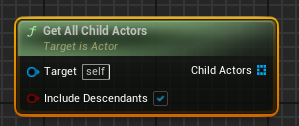
There is this but it doesnt work https://i.imgur.com/FtyrTCl.png
 maiden wadi
Where are you calling that? Inside the blueprint of Repeater?
If not, the target needs to be Repeater.
open peak
Editor
 earnest tangle
Note that Get All Child Actors returns child actors from child actor components - if you just attach actors into another actor, that won't return them.
open peak
then how do i get the attached actors
earnest tangle
Get Attached Actors
maiden wadi
Oh. I totally overlooked that. I didn't realize those were actors. I read that as StaticMeshComponent. 😄
earnest tangle
yeah wasn't sure if it was child actor comps or not, just thought I'd mention it just in case :)
open peak
earnest tangle
Get Attached Actors
This only gets half of the attached actors
earnest tangle
ah the classic pure node footgun
open peak
ah i see it reads from the array as i delete them
How do i save it to a temp variable then? Local variable?
earnest tangle
right click the array return pin and choose promote to variable / local variable
(locals are only available if you're in a function)
maiden wadi
Likely easier just to use a reverse for each loop.
earnest tangle
yeah that would work, although it'll still keep re-calling the node every iteration I think
it's probably not really a huge problem tbh
open peak
I did this and it works well now 🙂 thanks

before, i was just connecting the out array directly to the foreach, as zomg noted
earnest tangle
Yeah, it's good to be aware of the behavior with pure nodes where they get ran multiple times in some situations like this
They can occasionally cause bugs which can be hard to figure out unless you just know this is how it works
open peak
How do I get the mobility of an actor?
earnest tangle
isn't there like a get mobility node or something (it's probably for components, since those are the ones that have that, not actors)
open peak
ah so i have to probably get the scene root component or something?
earnest tangle
yeah whatever is the root of your actor
open peak
Is it possible to multiply a whole transform or i have to multiply every vector by vector?
 turbid orbit
What is the correct way to reference character height?
For example here I can use "Third Person Character" to get "Character Movement" then "Max Walk Speed". What do I type to get the correct value for player height?

In case my intention matters: I want to make the Height a variable just like I did with MaxWalkSpeed so I can reference it elsewhere in my Animation Blue Print
 modern musk
Hey everyone, I did some googling and playing around with this a couple months ago and couldn't come up with anything, I'm just making another attempt and thought I'd ask here:
When attaching a mesh to another mesh's socket (currently working with skeletal but it would be useful to know for static as well), is there any way to snap one socket to the other?
For instance, let's say I have a sword with the origin point set to the hilt, but I want to snap that weapon to character's back when it's sheathed. In my mind, I thought I would just be able to create a socket midway down the swords blade, create a socket on the characters back, and snap those two sockets together. In actuality, I'm having to attach the sword to the characters back socket using the "keep relative" option, and then manually adjust the sword's transform so it fits properly, then save that variable and call it when sheathing the weapon. This works fine for a couple weapons but becomes tedious in a game with customization. Anyone able to point me to a better solution?
zealous moth
@modern musk use a placeholder for the weapon socket and rotate/adjust and record it. It will be tedious since it aounda like your weapons arent standardized
@turbid orbit i am confused as to how it is relevant. You can get your characters capsule height for instance.
But if you want the exact height of your head to your root... use measure on 2 sockets? Or get bone locations and get distance
modern musk
zealous moth
<@445786984737275905> use a placeholder for the weapon socket and rotate/adjust ...
Hey, thanks for the response, yeah that's pretty similar to what I've been doing (sans the intermediary object). Although, you make a good point re: standardization, maybe I should focus more on ensuring weapon types (e.g., 1H_Swords, Spears, etc.) are roughly the same shape/size so that it only needs to be done once for each category.
zealous moth
@modern musk on the static meshes you can add a socket and rotate it as needed and use that as a point of reference when attaching it to something else
For instamce, i had some swords where the handle was at origin. However for some daggers they were not. So i added sockets to all and make the xyz coords rotate so when you equip it uses that data to correct it
 abstract gate
in VR the GrabComponent will orient and grab the object correctly. Is there any way to modify this or duplicate it to grab 2 places?
at once? It releases the other hand when I do this
 atomic salmon
abstract gate
in VR the GrabComponent will orient and grab the object correctly. Is there any ...
atomic salmon
abstract gate
in VR the GrabComponent will orient and grab the object correctly. Is there any ...
You can’t do two hands with an attachment technique
abstract gate
can i use the attachment with one hand then do the collision thing with the second hand?
atomic salmon
Check out my tutorial here: https://youtu.be/wxKYgJmc5a8

Learn how to grab and handle a weapon with two hands in VR!
Includes an MK16 and a Katana example. The weapon can be held with one hand or with two hands. Plus it can be switched from one hand to the other on the fly. You can even teleport while holding your weapon.
This has been requested so many times that I had to give in and do it. ;-)
MK...
modern musk
zealous moth
For instamce, i had some swords where the handle was at origin. However for some...
That's what I'm working at right now, basically, take the socket transform relative to the origin and then use that information to attach the item, I think is the general idea?
 feral ice
how do i save each instance as an item in a list? Or is that possible? If I want to access instance 6 and change its rotation for example, how do i save in list?
 feral ice
ok
abstract gate
@atomic salmon in your video you are using a static mesh but it should be fine to follow it with a skel mesh correct?
 minor lynx
is there a way to make the water bodies act like a physics body set to water? seems odd to have to also maintain a separate volume to say hey this is water but i cant figure it out
trim matrix
ok so I have set up cameras on the scene with widgets and if the player wants to go and look at things from these cameras perspectives it will switch up from the main character camera to the cameras in the scene
one issue im running into is that if I want to go back to the main camera, I cant because i havent figured it out
im on the Level BP and this is what I created with nodes to see if I can jump back into the character after interacting with one of the cameras

but it brings me back to where the player first starts and I cant move
Im trying so if the players Clicks E, he can just go back to where his body was before swapping to the camera. It would be efficient if I could just set up an UI inside each camera to tell the player "Press E to go back" but thats something I want to do after I figure this out
minor lynx
i think you need to target the pawns?
because switching camera doesnt switch which pawn you are controlling
you can probably getpawn from the controller to know where to reattach
minor lynx
awesome
trim matrix
but its using the optional camera pov/height
and not the characters one im using
so i have to figure out how to use that one instead
trim matrix
yeah me too haha, im trying to get used to the blueprint system
theres a lot
@minor lynx got it working, I needed to use the get player pawn node
connected to view target and then get player controller for target
minor lynx
awesome
feral ice
Can you use I as in complex numbers in ue4?
turbid orbit
zealous moth
<@167297331610386433> i am confused as to how it is relevant. You can get your c...
I dont know why youre asking about relevance. I just want to know what to "get" so I can have the characters height as a variable.
atomic salmon
abstract gate
<@!399916238098137098> in your video you are using a static mesh but it should b...
Yes, works similarly.
atomic salmon
feral ice
Can you use I as in complex numbers in ue4?
No, but why would you?
marble violet
How can i render a Material into TextureRenderTarget2D without dropping it into the scene?
it's always black, except I add emissive into the material
zealous moth
turbid orbit
I dont know why youre asking about relevance. I just want to know what to "get" ...
because typically, a capsule colider is used to delimit your character with a root position and a height.
so when you ask about your character's height, i'm not sure why that would be relevant.
marble violet

i have a simple material
Trying to render it into TextureRenderTarget2D

it's black if there is no emissive
i believe is because there is no lighting
since i'm just doing it within the content browser
feral ice
atomic salmon
No, but why would you?
Just curious
earnest tangle
marble violet
i believe is because there is no lighting
rendering a material to a render target doesn't really have anything to do with lights, and you can't really do it in the content browser either, so I'm not quite sure what exactly it is you're doing here
 earnest tangle
Ah something like that
atomic salmon
feral ice
Just curious
There is no support for complex numbers in Unreal. You would need to write your own library or use a C++ one.
marble violet
basically i pick material and RenderTarget and render it
earnest tangle
If you use Draw Material to Render Target I'm fairly sure it should work, but tbh I'm not sure how the editor treats RT's when you're just using editor utils like this
 earnest tangle
Ah
Yeah it might have something to do with how the editor captures the thumbnails
Why are you trying to draw into an RT in editor utilities anyway?
turbid orbit
zealous moth
because typically, a capsule colider is used to delimit your character with a ro...
I dont think the why even matters. And as I said I want reference it in an Animation Blueprint.
marble violet
some of my texture are fairly heavy trying to optimize them into a single image
zealous moth
then i gave you and answer, enjoy~
earnest tangle
You would probably have to generate an actual texture2d asset from them, I'm not sure if you can really save render targets like this 🤔
open peak
is it possible to multiply a vector by float
marble violet
@earnest tangle I was watching UE Material Master Learning by Sjoerd de Jong, and in "Render Target" section he did that in UE 4.20 so i thought that is an interesting approach
earnest tangle
interesting if that would actually work
I know you definitely can generate and save texture2d's, but it has to be done in C++
but maybe it's possible to save the RT's as well, but I guess you might just not get a good preview for them unless its emissive
earnest tangle
open peak
is it possible to multiply a vector by float
Yes, there's a node for it if you search using *
marble violet
hmm... i thought maybe i missed something somewhere
 ashen panther
can you change a splines lentgh at runtime? so that it retracts and extends?
earnest tangle
marble violet
hmm... i thought maybe i missed something somewhere
Don't really know if there's a lot of folks doing that sorta stuff especially in blueprints so it might be a bit hard to find info on it unfortunately
earnest tangle
ashen panther
can you change a splines lentgh at runtime? so that it retracts and extends?
Pretty sure you should be able to edit the spline point locations to do that, or just adjust the scale of the spline component
ashen panther
open peak
is it possible to multiply a vector by float
if youre in ue5 you have to get the multiply node and then right click the pin and change it to float
ashen panther
earnest tangle
Pretty sure you should be able to edit the spline point locations to do that, or...
thanks!
marble violet
earnest tangle
Don't really know if there's a lot of folks doing that sorta stuff especially in...
thanks for the help
 paper vapor
are there any tutorials for dynamic mesh painting with multiple colors?
 spark nest
Hi there, I'm pretty new to UE and Node stuff in general, I'm currently following along a post on making drag-able widgets for a pseudo operating system and this node wasn't explained very well (at all actually) Could someone identify it for me so I can do some wider reading? I thought it was a Math expression but those don't seem to factor inputs (at-least from what I've seen so far) Many thanks in advance

 runic plinth
It doesn't sorry I just took your latest message.
marble nova
I have a static mesh which im using 'anim to play' on inside a blueprint - is it possible to use a blendspace and then modify the blendspace value in normal blueprints, or does it need to go through an anim graph?
 abstract gate
under custom it says there is the ability for two hand grabs. This is UE4.27 and i am struggling. it isnt like the older youtube videos
 marble nova
managed to get this far but im not sure this makes sense
 abstract gate
 spark nest
(Apologies for repost, got buried) Could someone identify the circled node for me so I can do some wider reading? Cheers
 worthy tendon
spark nest
(Apologies for repost, got buried) Could someone identify the circled node for m...
worthy tendon
spark nest
(Apologies for repost, got buried) Could someone identify the circled node for m...
its just input key comparison. right now it's checking if pressed key is equal to left mouse button
spark nest
Awesome, I had a feeling it would be obvious. Forest through the trees and all that. Thanks for the help 🙂
 iron heron

Hey can someone maybe help me
This is my character blueprint
i built some logic to change the movement input on "ctrl" and reset it once "w" is released
but i can't seem to go faster even after switching
when ingame and debugging i see it switching over, my logic is working
but if i pass more than 1,0 into the add movement nothing happens
iron heron
it#s basically like minecraft
i want ctrl to enable sprint while holding forward
and to reset this state after letting go
sinful sequoia
Dont think this is relevant but ok

Also false under any condition


Ugh.... alright, thank you
iron heron
then you have to hold control
that's very fatigueing
wait
i butchered that word
my pinky is thanking me later
 runic parrot
Hi! one question with player controler/UI.
I have 2 maps
- LoginScreen
- CityMap
I want to use a specific player controller and HUD for the login screen, but i'm not sure on how to change the player controller when changing between maps (there is going to be more maps with diferent playerControllers).
Is this the right approach? if so, how can i change the player controller?
i think i can change it swapping the GameMode to another one that has the new player controller as default, but how do i change the GameMode at runtime on new map load?
Yeah, that is the way, thanks!.
iron heron
Ah no its not
its release forwar button and go back to normal walking
so everytime you walk again you have to toggle sprint on again
tawdry raft
midnight ravine
DMC used a combination of splines and general actor tracking.
The math behind it...
Where would you recommend I start for this feature?
open peak
is there an event for when the actor is deleted from the level editor?
When I delete a parent actor, the attached child actors are not destroyed with it, but rather moved to the world
 raw orbit
is there a way to have a button widget parent for all buttons in my project for styling purposes? otherwise its a pita to change the color / image / font of every button when needed
zealous moth
@raw orbit afaik no there isn't. You'd have to make an array for your buttons and do foreach loops and set the properties
raw orbit

 raw orbit
what about cpp, creating my own improvised button there
zealous moth
you can create a class or a struct that defines those things and then a function
raw orbit
oh okay. another question is there anyway to keep manipulating a synth 2d slider even if im outside its bounds
trim matrix
Does anyone know why I cant get this node to work inside my blueprint

i need this action to happen once only so it doesnt keep making widgets on top of each other
i want the person to use a key on the keyboard to make it dissapear once they get out of the UI mode, but for some reason keyboard nodes dont work inside my blueprint?
nvm figured it out
iron heron
Basic Movement and movement based camera tilt
 midnight ravine
tawdry raft
Where would you recommend I start for this feature?
midnight ravine
tawdry raft
Where would you recommend I start for this feature?
No one can give you a step by step on this. Watch some tutorials on YT I guess. "DMC camera ue4"
midnight ravine
@tawdry raft maybe put in a bit more effort looking up stuff.
Again, what you're trying to do is a massive undertaking and you will not find a cookie-cutter solution.
tawdry raft
I was watching that just now lol
Though, if I had a combat system atm, my current camera would probably behave similarly, but not exactly as in the video
trim matrix
how would you guys delay flip flop animations?
i need one action to be done before option B can run

currently the user can spam and it messes up the animation
midnight ravine
@trim matrix make a boolean variable ranActionNeededForB. Set it to true when the function needed to run ran. Probably set it to false when B has been executed. Create a branch with the newly created bool as its condition, if true execute B, else execute the function needed to run B.
trim matrix
@midnight ravine let me try that out
@midnight ravine im trying to follow but im kinda new to the blueprint system
i created the variable and the branch
but still im trying to figure out how to connect it properly to make it work
midnight ravine
Show @trim matrix
trim matrix
@midnight ravine
 midnight ravine
@trim matrix

Set var to true when timeline A finishes. This is probably what you want.
assuming you want B to only run (close door) when the open animation has finished.
A better variable name would be "IsDoorOpen?" for your context btw.
trim matrix
i just tried connecting flip flop a to play from start and flip flop b to reverse
and it does what I want
now I need to sync the sound when to door opens and closes
i know your way works as well
but seems a bit more complex than what I need dont you think?
midnight ravine
it's not complex. It's literally a condition you check for and common practice AFAIK. Do what you want anyway. Your solution sounds cool alas I probably wouldn't know how it works at first glance.


 dawn gazelle
trim matrix
dawn gazelle
trim matrix
That'll still give you issues with your animation.
Eg.
I interact -> it starts to animate the door opening from the start
Before finishing the animation, I interact again -> the door begins to close from the current position
I interact once again before the door is finished closing -> the door begins to open from the start
You need a boolean in there to check whether or not the animation is in progress and if so, go to "play" and if not go to "play from start"
trim matrix
but then im trying to see how to make it work so its sync with the animation
I see
let me try out that way then
 mortal cradle
is there any issue with not adding return nodes to functions? bp always continue properly without them anyway
trim matrix
@midnight ravine

so it works when it comes to animation B waiting for A to be done
but I can still spam A
and it messes up the animation
I thought about connecting a branch node with the door open unchecked to the timeline_0
and connect the boolean node to the "finished" output of it

like so, but its not working
midnight ravine
@trim matrix Here's an alternative. Remove the current stuff. Make new bool IsDoorAnimating. Place a branch node in front of both timelines, check if isdooranimating. If it is NOT, run the timeline.
On both timelines set isdooranimating to false after the timeline has finished (drag off of the Finished pin).
trim matrix
@midnight ravine awesome thanks
I will check it out tomorrow
been working on this all day
maiden wadi
@mortal cradle Not really. I usually add them just to be explicit. But if you don't add them, then any failed control path will simply return defaulted values in any return value. IE False Boolean, 0,0,0 vector/rotator, 0 integer/float, etc.
 void comet
Hey mates. Wonder if anyone can help me with some vector math. Not my strong suit. Here I have where I spawn my projectile. Takes position of arrow I have set up to follow mouse and its rotation to spawn the projectile along its forward vector. After projectile is spawned I set its velocity and multiply it by a float which is my charge counter so that it flies faster the longer the charge. Problem is that its also making my projectile spawn further away from my character the longer the charge. How can I increase its speed but have it always spawn in same position?

 sand bloom
Is there a way to cast to every actor that's the same in my level and trigger a event in them?
ah well just worked around it by making a manager bp for it
 river pine
Hi Guys, what am i doing wrong? The Weapon spawns in the Holster tiny

 gentle urchin
Ur getting the holsters scale ?
Transform includes scale... dunno how big the weapon is in terms of scale relative to the holster but that could be the issue
river pine
yes that codl be it, Transform includes scale... ok gotta google it 😄
void comet
Can anyone help me with some vector math. Not my strong suit. Here I have where I spawn my projectile. Takes position of arrow I have set up to follow mouse and its rotation to spawn the projectile along its forward vector. After projectile is spawned I set its velocity and multiply it by a float which is my charge counter so that it flies faster the longer the charge. Problem is that its also making my projectile spawn further away from my character the longer the charge. How can I increase its speed but have it always spawn in same position?

Or I should say how can I increase its speed but have ti always spawn the same distance from my arrow
gentle urchin
Doesnt projectile speed do what you want in terms of launch speed?
Not sure why this would change the location tho.. except if its like calculating the velocityand updating the arrow location in the same frame its spawned or smth
void comet
I am applying custom gravity to the projectiles on tick and velocity overides the inital speed variable
So I have to do it with velocity
I can't really work out why its affecting my spawn point of the projectile either. But it is obvious it is. Adding more to that float that im multiplying before setting the velocity drasticly changes spawn point. Low numbers my projectile is slower and spawns at my offset, higher numbers make projectile faster but it spawns further and further away the higher it is
But the spawn point is set by that transform that is based on the arrow that has nothing to do with the float
gentle urchin
So it would seem its using the velocity the same frame its spawned ..?
void comet
I guess. How can I nullify it without losing the speed
gentle urchin
No clue really, I'd probably just use a socket to tie it in place, and unattatch it once its ready to fire, with the new velocity
Or have velocity at 0 untill it actually fires? Does that work?
Seeing how you spawn and update velocity at the same time, makes me wonder if you have a secondary arrow for the player just to visualize the drawback? And on release you spawn this arrow and swt its velocity?
void comet
Seems like a problem that could be solved with vector maths rather than a workaround..or was hoping
gentle urchin
Increasing the offset based on velocity
void comet
Yer I was coming to similar conclusion
gentle urchin
Or based on the same float you're multiplying velocity with
You just need to figure out the values
void comet
Its just its kinda unusual behavior so thought id done something wrong tbh
gentle urchin
130 min, .... 260 max?
Well im surprised if this actually is what we think it is (projectile using velocity the same frame its spawned)
void comet
IKR. Seems weird since even small values change the spawn point quite a bit
 dreamy basin
can anyone help me i wanna make a blueprint for a gate which open after 30 sec do anyone suggest me similar tutorial or smthg else to useful for this topic
gentle urchin
void comet
IKR. Seems weird since even small values change the spawn point quite a bit
You could try adding a 1 frame delay before setting the velocity
void comet
Ill try that now
It just kinda does same but sticks for a frame near the char
then teleports to that further point
void comet
nope
azure sparrow
Hey i am trying to use a switch to string node in such a way that where i can give a condition where i will be using 2 strings as input
how to do that

i want to use both as inputs
then if any of the string matches the outputs, it will trigger
How to do that
desert rover
anyone know how to get aim offset working in a sidescroller using a controller thumbstick?
gentle urchin
azure sparrow
then if any of the string matches the outputs, it will trigger
You could append them but not sure that'd be the best way.
atomic salmon
@azure sparrowthere is nothing like that, so you need to rethink your logic or do a first comparison, then if it ends to Default, do a second one.
@dreamy basin you need to use a Timer to wait for 30 seconds, then you can use a timeline to animate your gate opening. There are other ways of course, but this one is pretty straightforward.
@desert rovernot sure there is a general answer to that. Typically you would use a thumbstick axis to control the aiming angle. This can be easily done by mapping the axis input [-1,1] to your angle, say [-45,45], simply by multiplying it by the angle absolute value: Axis Value * Angle Absolute Value
 warped spindle
Does anyone know why my location of the block volume changes just when i play the game in standalone and mobile preview? When i'm in viewport it's working just fine
 onyx pawn
I have a compass that gets facing of player controler on map but I am wondering how can I also have the camera get diration of camera on level

 tropic olive
Hi
How can I start my blueprints events in the sequencer?
atomic salmon
@warped spindleyou mean a blocking volume placed in the level? Its location should not change. How do you realize it has moved?
@onyx pawnnot really sure I understand what you are asking. Do you need to get the direction the camera is pointing to in world coordinates? That would be Camera --> Get Forward Vector.
warped spindle
When i play the game in viewport the block location it's ok,but in the standalone it's moved somehow closer to me. It's brick breaker game. The paddle should move left and right. From block volume left to block volume right. But in the standalone alone they are too close to paddle.
I hope you understand what I mean
atomic salmon
@warped spindlethat is strange because it shouldn't move around just because you are changing the way the game is played. Unless, of course, you change its position depending on the screensize or something along these lines. Do you?
warped spindle
Ohh.. so that must be... The screen size of the game is in portrait. 1280 x 640
So.. when i Play it in Viewport that screen size is automatic but in the standalone it opens a new window where I can modify the screen size
Thanks. My plan right now was to export it and test it on Android,maybe it doesn't have that problem anymore
warped spindle
atomic salmon
<@!398047087670853633>that is strange because it shouldn't move around just beca...
Ok.. i check it. That's the problem. Do you know how to fix that?
atomic salmon
warped spindle
Ok.. i check it. That's the problem. Do you know how to fix that?
So it moves because the screen resolution changes? How do you position it in first place?
 safe iron
Hey guys
I have a small question, probably something super easy, but I'm a beginner
I have made a simple weapon roster using an array, Child Actors and Child Actor Variables, it works fine, with the mouse wheel I can switch between the four weapons that are currently in the game, but I would like to make it so not every weapon is unlocked by default, I want to make it that some are unavailable until you pick them up, so, how do I make it in the character blueprint? and how do I make the pickup? Thanks in advance
I'll send my blueprints here, it's not all of them, if you need more tell me

This is the function I made
 atomic salmon
@warped spindle I don't do much mobile development (only VR on Android), so it may be better to ask in #mobile . In general you want to do your placement as a percentage of the screen resolution (like it happens with UMG). You can also count on the fact that the target resolution is known and use it directly.
 fast blaze
hi all, do you know why my animation montage is playing in world space, not in local space, when I rotate character mesh inside capsule or I need to rotate capsule too?
when mesh is rotated inside capsule, montage is still playing vertical
thanks
warped spindle
atomic salmon
<@!398047087670853633> I don't do much mobile development (only VR on Android), ...
Hmm ok. Thank you very much.
atomic salmon
@safe iron either you pre-attach all the weapons but keep track of those that are equipped with an internal flag for each weapon (e.g. a bIsEquipped boolean) and then check it before making that weapon usable, or you attach the weapon only when it is picked up (AttachToActor or AttachToComponent) after which you can assume all the attached weapons are available.
safe iron
Ok, I'll see how to do that, I think I'll go for the first options, thanks a lot
atomic salmon
@safe ironthe second one is more typical of inventory systems with a high number of weapons. The first one is ok if you have very limited weapons and you know all of them upfront.
safe iron
I would like to do something like Doom or Unreal Tournament, where you can keep all the weapons if you find them
Thanks a lot for your advice
 unique wasp
I have a Blueprint class that implements an interface, and another one that wants to receive an object that implements that interface. How do I pass the object that implements the interface? I'm using a cast now, which seems to work, but makes me feel like I'm doing things wrong?
 dreamy basin
atomic salmon
<@!400292166150258690> you need to use a Timer to wait for 30 seconds, then you ...
dreamy basin
atomic salmon
<@!400292166150258690> you need to use a Timer to wait for 30 seconds, then you ...
i used sequencer for the animation of the gate i need to knw how can i set a timer for the gate to open
atomic salmon
@dreamy basin like this: https://docs.unrealengine.com/4.26/en-US/AnimatingObjects/Sequencer/HowTo/TriggeringSequences/

Illustrates how to trigger a Sequence from an in-game event.
@unique wasp looks legit to me. In C++ (and therefore in Blueprints) an interface is just a class (with only pure virtual functions in it), so as long as your actor implements that interface it derives from the interface class so you can cast it to it. Not sure whether this could be useful, but you can use the ImplementsInterface node to check whether a certain class implements a given interface.
 gloomy walrus
hey guys! how would you make it so that a widget (like a crosshair) follows the mouse position?
I'm having trouble with this and I figure this should be really easy lol
willow breach
anyone know a tutorial that shows how to make a seamless portal gun?
atomic salmon
@gloomy walrushttps://www.youtube.com/watch?v=Hb31pUMFphg

Private Tutoring & Work for hire: www.Tesla-Dev.com
dreamy basin
atomic salmon
<@!400292166150258690> like this: https://docs.unrealengine.com/4.26/en-US/Anima...
nw how can i put a 30 sec timer after that 30 sec the gate will automatically opes like we see in shooter games preparation phase
atomic salmon
dreamy basin
nw how can i put a 30 sec timer after that 30 sec the gate will automatically op...
you know what, since you are using Sequencer anyway, I would just play the sequence on Begin Play. Inside your sequence, place a keyframe at 0 and at 30 seconds, leaving the angle of your gate unchanged, then animate the angle from second 30 on. In this way you spare the Timer.
@willow breachdid you google it? https://www.youtube.com/watch?v=v3paFpIilGg

PLEASE WATCH AN AD ON THE VIDEO TO SUPPORT ME!
DOWNLOAD THE FINISHED PROJECT FROM HERE BY DONATING $3 OR MORE: https://www.patreon.com/posts/39077273
Portal Gun Tutorial Series: https://www.youtube.com/playlist?list=PL_z1oXjT7l9o-VYz2Z1d7msftkQPUQ5kE
Hey Guys! In this video, I give ...
willow breach
atomic salmon
<@!423103426801696769>did you google it? https://www.youtube.com/watch?v=v3paFpI...
yes that one works, but isnt seamless like the actual portal game
i am currently using that one
atomic salmon
@willow breachthen you need to merge it with something like this: https://www.froyok.fr/blog/2019-03-creating-seamless-portals-in-unreal-engine-4/

In this article I cover how to create Portals in Unreal Engine 4. As I did not find any write-up that would provide enough details...
tropic olive
Hi
I made a turret blueprint which is shooting continuously. My question is how can I activate it in the sequencer? (So I would be able to control when it shoots in my cinematic.)
atomic salmon
@tropic oliveyou can define a boolean variable inside your turret BP, make so that it fires only when that variable is true, then expose it to cinematics and change its value from sequencer.
azure sparrow
atomic salmon
<@!489800493711884288>there is nothing like that, so you need to rethink your lo...
oof ok
 candid nest
@everyone hey i want to make a system in whcih when i pick something i can kill enemy but for the time till i have that ability somewhat like pacman
gloomy walrus
atomic salmon
<@!212872951173873664>https://www.youtube.com/watch?v=Hb31pUMFphg
duh, was getting around it the "hard" way. Thanks a lot Marco, that solved it!
atomic salmon
@candid nest you need to use a Timer for that. You set the Timer and at the same time give your pawn the power to kill (by setting a boolean variable to true). Once the timer has elapsed, you remove the power by setting the boolean to false.
candid nest
okay i get it but how to make him kill
atomic salmon
@candid nest this is not a question that can be answered in one line or so. The short answer is that you apply damage to your enemies (either by shooting them or touching them or in some other ways) and once they have received enough damage they will die (which typically means you delete them from the level).
unique wasp
atomic salmon
<@!327843153413668864> looks legit to me. In C++ (and therefore in Blueprints) a...
Okay, clear! Thanks! :)
 languid lion
Is there a way to blend view target to another camera and not be affected by global time dilation?
atomic salmon
@candid nestyou can use a simple overlap events between your pawn and the enemy to apply damage, but only if in kill mode, otherwise you will receive damage from the enemies. There is a pacman tut on YouTube you may want to watch: https://www.youtube.com/watch?v=PluQO5fpyLA

#gamedev #unrealengine #ue4
Ever want to see an entire video game made from start to finish? That's exactly what happens in this video. Every aspect of a 3D Pac-Man like arcade game is made from scratch and you can find out exactly how it's done in less than 30 minutes!
Are you an intermediate video game developer? Are you interested in learnin...
candid nest
thanks man thkans a lot i need this only
 winged thicket

 trim matrix
Does any one know how can I prevent camera from going up once I start jumping in ALS? Actually whole capsule goes up and I can`t find where it happens.
 indigo bough
Has anyone successfully modified the water wave generator values at runtime? Thought I was onto something with my current setup, but I'm not seeing any visual change, even though the values are changing in the WaterBodyOcean actor.
indigo bough
I also noticed there is a "Simple" and "Spectrum" asset type for this input, but I cannot seem to find a way to use Spectrum, just wondering what that might mean/allow that 'Simple' doesn't.


 void needle
how can i teleport my player towards location he is facing?
zealous moth
Get forward vector and then get the location of that multiplied by the distance
@trim matrix what i did for als is make my own camera and disabled theirs.
@languid lion use relative dilation and put the difference
trim matrix
zealous moth
<@456226577798135808> what i did for als is make my own camera and disabled thei...
this is an option, but there is another custom logic already binded to this cam
zealous moth
Unfortunately als systems are not components they are tightly woven and very difficult to work with
trim matrix
the issue is actually not in camera, since its just follow the capsule. I cant find where and what controls the capsule.
zealous moth
Check the als parent
trim matrix
Once I press space it fires up Jump start at BP_BasePlayerController. Then it goes to ALS_Bbase character. And there is a function jump. But I cant open it or edit this func
zealous moth
That would be the base jump function iirc
trim matrix
so that mean that capsule position is set somewhere else. But find reference gives noting useful
languid lion
zealous moth
<@159741295802187776> use relative dilation and put the difference
But on what exactly? Player character? I've tried it on the camera actor but it makes no difference
I'll give it a try with offsetting custom dilation on the player character
zealous moth
languid lion
But on what exactly? Player character? I've tried it on the camera actor but it ...
Let's say you want to stop time for all except the player. You set a global time dilation to 0 while you set your player's back to 1 using custom dilation. It would be on the actor itself.
Based on what you say, it sounds like you use a separate camera? Set that dilation also to 1.
Fyi, you can blend between cameras without having to maintain the same actor
void needle
zealous moth
Get forward vector and then get the location of that multiplied by the distance
i didnt quite understood what you meant, i tried but it still doesnt work
zealous moth
your pawn will have a forward vector. I don't recall if normalized or not. Whichever, you can then multiply that vector by a float for a distance and then get the location. Then teleport
sand shore
direction vectors from the API will be normalized (because otherwise they're offsets and not directions)
void needle
ty, already done
 fossil skiff
anyone know how to do ue4 hit based reactions?
atomic salmon
fossil skiff
anyone know how to do ue4 hit based reactions?
From the On Hit Event
fossil skiff
atomic salmon
From the On Hit Event
im no advanced level ue4 user so ur gonna have to be a lil more specific
atomic salmon
fossil skiff
im no advanced level ue4 user so ur gonna have to be a lil more specific
When your player hits something or something hits your player, the engine triggers an On Hit Event. That event contains all the information you need to react to the hit, for example by applying damage to your player or to an enemy.
fossil skiff
Ahhh
atomic salmon
For the On Hit Event to be generated some conditions have to be met, mostly ensuring your colliding actors have a collision volume around them and that they are set to collide (aka block each other).
 rain egret
a quick question, in coding you can set a class to final so you cant create instances of that class, how does this work in ue4?
i have a parent class that i want to forbid being created by accident
maiden wadi
@rain egretI could be mistaken, but I don't believe you can do that in Blueprint. You could likely do that in C++, and also mark the class as Not Blueprintable, but that would just keep you from creating blueprints of the class.
rain egret
hm, alright thanks
how can i damage children

i have child actor components with health that are basically modules that will affect the performance of the actor. how can i damage those?
i have tried radial damage and also the hurt zone. but it doesnt seem to register taking any damage
maiden wadi
Unsure. I generally avoid ChildActorComponents. But my initial assumption would be to make sure you're calling it on the right thing. You can get the actual actor by calling GetChildActor on the child actor component.
worthy tendon
Hi, Is there a way to trigger a sound inside a sound cue multiple times using sound cue parameters?
rain egret
maiden wadi
Unsure. I generally avoid ChildActorComponents. But my initial assumption would ...
what alternative could i use then? all i need is an object that runs an event when damaged
i have a HUD element that portraits the amount of damage each module takes

the modules are placed in her limbs so when something near her stomach explodes it should damage the modules placed there
theres a blueprint with the sole purpose of testing the damage system. i can only damage the child when i address it directly
 safe iron
Guys please help
I made this weapon system meant for an Unreal Tournament like game, where you can hold something like 10 weapons at once and switch between them if you unlocked them, and here comes the problem, I have no idea on how to make weapon pickups and an unlocking system for those weapons, I have searched the internet for hours and I have found nothing, it's almost like I'm the first guy who has ever tried to do something like this in Unreal Engine 4
I am a beginner, I mean an extreme beginner so, if possible, I would ask for images of code so I can write it instead of a message that says "Use this with that" and stuff, that just leaves me with more questions than before
this is part of the code I wrote for the weapon roster system, there's a lot more code I wrote on this and if it's necessary just tell me

 heady burrow
safe iron
I made this weapon system meant for an Unreal Tournament like game, where you ca...
heady burrow
safe iron
I made this weapon system meant for an Unreal Tournament like game, where you ca...
The problem is that you don't really have a problem. What you are asking is no much different from: "hey guys, how can I make a game?"
Advice: watch some videos, lessons on how to do basic stuff.
eventually you will connect the dots and make your game
and when you have concrete questions, you can come here and ask
safe iron
Yeah you're probably right
Thanks
Tomorrow I'll start a new project from scratch and follow Unreal Engine's tutorials, then I'll move on, thanks
 twin ore
Hi guys! I'm attempting to put my own spin on Stardew Valley's fishing minigame. My goal is to make it so the slider starts in the middle while the fire above and below alternate randomly so the player needs to "balance / guide" the slider between the flames. I'm not entirely sure where to start; I've attempted to find some documentation online, but thus far my Google-fu has failed me. I'd appreciate some assistance, no programming has been done at this point.


 echo wave
Hey all! Does anyone knows if it's possible to Run a Editor Utility Blueprint, from an Editor Utility Widget? Like, with a press of a button in my Editor Utility Widget, I'm calling to Run a Editor Utility Blueprint.
 quasi relic
Hi everyone. How do I calculate the end point of a linetrace so that it reaches the location of an actor? Like this:

 jaunty dome
is it possible to have camera and spring arm inside of Player Controller instead of Pawn ?
this is how far I've gotten, I want the camera to be fixed and the player pawn to move inside it, what I'm doing now is adding local offset to player mesh, however its not working properly (collisions and everything)
if I move the player pawn the camera will move as well
gentle urchin
Viewtarget as a custom camera pawn moving at fixed speed ?
Or moving the spring arm to root instead of collision volume
So that you can offset the collision volume aswell
jaunty dome
you can't set spring arm as root in Character as it inherits Collision Capsule as root
but I like the first solution
gentle urchin
Adding a second spring arm would work aswell i think :p ignoring the inherited one
But ye custom pawn gives more options i think
quasi relic
Got it working, thank you!
jaunty dome
trying to create a custom pawn however add movement input doesnt work
atomic salmon
Add Movement Input requires a movement component to be part of the pawn and should target it
gentle urchin
Its gonna be moving at a constant speed, so cant you just add world offset on tick?
 hybrid latch
Anyone who has a pointer about the best way to handle gunshot hit location on the player mesh? I would like to implement a more detailed damage system depending on where the player or AI got hit.
gentle urchin
Think you can get hit bone
marble nova
I have set up a dialogue system using data tables - i want one line to tell the player how much time they have left based off a variable owned by the gamemode - is it possible to reference variables from data table to include in the dialog?
hybrid latch
gentle urchin
Think you can get hit bone
Will hit bone register if hit is on the connected mesh?
quasi relic
Is it possible to rotate a linetrace to an actor?
maiden wadi
@quasi relic What do you mean by rotate the line trace?
A line trace is a query from point A to point B
quasi relic
maiden wadi
A line trace is a query from point A to point B
Sort of like this, the red line would be like a bullet
 maiden wadi
The black square is the start, and the circle is the target?
 grave swan
If i shove a group of objects into a folder in my level outlined, can i access the contents of that folder specifically in the level blueprint?
quasi relic
maiden wadi
The black square is the start, and the circle is the target?
Yes the black square is the origin and the circle is the target in this case
maiden wadi
What do you need rotated exactly? You have a start and end point.
quasi relic
maiden wadi
What do you need rotated exactly? You have a start and end point.
If I use the target as the end point, how do I clamp the line trace? I want the lines to have a range
maiden wadi
(Target-Start).Normalize * MaxDistance
Or, TargetVector minus StartVector. This converts it to a local space length vector. Then you normalize it so that it's at a length of 1.0. Then you multiply it by your max distance to extend the new end point to that location. You use that newly found end point as the end of the trace. Same start point.
Er
Why do I always forget that?
After the multiplication, add the Start point to the newly found end point, THEN use it as the new end point of the trace.
 woven arrow
quick problem: my enemies can't seem to detect my player in an AIMove To node, no matter what I try to change. I already have it set it for the ai to auto possess after being placed in the world or spawned in, but now it just doesnt want to work.
quasi relic
maiden wadi
(Target-Start).Normalize * MaxDistance
PERFECT! Thank you so much o7
grave swan
woven arrow
quick problem: my enemies can't seem to detect my player in an AIMove To node, n...
Is ur navmesh setup?
woven arrow
Yep, the volume is in there
It was working perfectly fine before, but then I was working on a main menu and adding a button to start the game proper, and then when I did, thats when the AI went bust. Not sure if that has anything to do with it, tho.
nevermind, i just deleted the old navmesh, put in a new one and it works fine
 heady zenith
I have a problem, When I open a level and then come back to the last level, it didn't get reseted
I mean: In the first level I get this droplets and they dissapear, then I change to my second level with "Open Level" and from that level I come back to the first, again with "Open Level" but the droplets still destroyed, I need to do something special to open a level and reseting it to it's default state?
 trim matrix
hello
does anyone know how to make a playsoundatlocation node with a referenced AmbientSound in the level?

this is the reference

I want the user to be able to walk around the vehicle and hear the sound dynamically
which is why I need it at the location on the scene
 fast lintel
guys i need help
whenever i equip weapon an unequip
the weapon appears everytime mor into the character`s chest
till it ends up in the head
atomic salmon
fast lintel
guys i need help
Looks like your weapon is getting an offset added to it each time it is attached. How do you attach it and detach it?
fast lintel
do you want a pic of my blueprint? or rather watch the tutorial video i copyed
he triggers an event with left and right click..
but i used just R to sheath and unsheath
atomic salmon
No time to watch tutorials sorry
fast lintel
checked the R event with a branch
made a copy one true another false
so when i have a weapon in back an press R
i grab it
but if i have no weapon in back and i press R then i put it on the back socket
i have a weapon interface
created
the weapon its an actor
inside that actor i made the attach blueprints
atomic salmon
When you attach it do you add any offset?
fast lintel
im not sure
i only set it so that when i pick up it goes to back
then with R i equip and unequip
from spine socket
to hand_r
atomic salmon
Can you show the attachment code
fast lintel
thats in the player event graph, i do the R key event with the anim montages

and under that i have this

draw axe to AxeHandR socket and to sheath, its the backaxesocket
atomic salmon
Can you change the Location Rule to Snap to Target
atomic salmon
Yes. That ensure the weapon gets centered to the socket
fast lintel
its like every time charac grabs it
leaves it in a different position
nevermind fixed it
and thanks to you lol
thanks a lot
atomic salmon
So what was it?