#blueprint
402296 messages · Page 688 of 403
 zenith trout
Yes
On finished (forward) increase current index by one
Then for the lerp, you would lerp from current index to current index +1
zenith trout
 wary tinsel
so it won't repeat?
wary tinsel
so it won't repeat?
Do you understand?
 worldly leaf
I can move the actor but it doesn't register its position toward the shader, like it does in runtime
 candid nest
yes he is moving bit over a ground and not going upwards can u help me out i have watched almost all tutorials on youtube and i set the capsule and mesh rotation too but didnt work
 tired chasm
Hey guys, I've been asking a lot here lately but you guys have been super awesome 😅 I have yet another question involving splines. from what I understand, you can't create an overlap using normal splines? I need an overlap event along the path of a spline. Do I have to manually insert box collisions to do this or is there a more procedural way to get this done?
I'm not using spline meshes, just regular splines, but if I have to switch to spline meshes I will, I'm just learning about splines though ^^
 burnt nest
worldly leaf
I can move the actor but it doesn't register its position toward the shader, lik...
burnt nest
worldly leaf
I can move the actor but it doesn't register its position toward the shader, lik...
Hmm. Well if it's a shader deal, it's probably more related to graphics or visual fx, I would recommend asking there. 🙂
burnt nest
candid nest
yes he is moving bit over a ground and not going upwards can u help me out i hav...
I'd need to see the blueprint. Your character might be offset, or the animations are offset, it's hard to say.
burnt nest
tired chasm
Hey guys, I've been asking a lot here lately but you guys have been super awesom...
I haven't worked much with splines, but I reckon on Begin Play, that you can iterate through the spline points and spawn collision shapes on them for overlapping purposes?
 analog perch
tired chasm
I'm not using spline meshes, just regular splines, but if I have to switch to sp...
analog perch
tired chasm
I'm not using spline meshes, just regular splines, but if I have to switch to sp...
you are correct, splines themselves do not have collision, but spline meshes do. I do exactly what you suggested in vr because meshes were to expensive
tired chasm
ugh, I had a feeling spline meshes would be expensive x_x
worldly leaf
burnt nest
Hmm. Well if it's a shader deal, it's probably more related to graphics or visua...
It's because I'm using a blueprint to register the actor position and set the vector into the material. I have heard about Blutilities but I'm a bit lost. I can try to ask in the shader section however
tired chasm
burnt nest
I haven't worked much with splines, but I reckon on Begin Play, that you can ite...
I have to spawn them along the spline as well and not just the points
analog perch
you can get point at distance along spline
burnt nest
worldly leaf
It's because I'm using a blueprint to register the actor position and set the ve...
If it's just a custom function you're updating the position and material vector with, you can try enabling "Call in Editor". That will allow you to manually run the function on the blueprint without simulating.
analog perch
tired chasm
ugh, I had a feeling spline meshes would be expensive x_x
if you aren't going crazy with them, spline meshes work fine
tired chasm
analog perch
you can get point at distance along spline
ooh thanks. I think this will put me on the right track.
oh... hmm, if I can get regular splines to work, that would be awesome.
I see I have to put in the point values here. There could be a random number of points though so will this work?
 analog perch
tired chasm
ooh thanks. I think this will put me on the right track.
analog perch
tired chasm
ooh thanks. I think this will put me on the right track.
you would probably do get location at distance (if you know the length) or use get location at time (that will return a 0-1 if your spline duration is set to 1)
burnt nest
You can also Get Number of Spline Points/Segments.
candid nest
burnt nest
I'd need to see the blueprint. Your character might be offset, or the animations...
okay i will dm u
tired chasm
alright. I'll try these and see if I can get something a bit more user friendly. thanks!!
burnt nest
I'm dying with anticipation.
tired chasm
if not, I may have to use spline meshes x_x
 clear meteor
Does anyone know why I can't see the Blackboard Target drop down anymore? At some point while I was working it disappeared and when I create new Blackboards/Behavior Trees/tasks the field is entirely missing. I can't see how I can do any more work without it. Seems like a nasty bug but I don't know
 burnt nest
clear meteor
Does anyone know why I can't see the Blackboard Target drop down anymore? At som...
burnt nest
clear meteor
Does anyone know why I can't see the Blackboard Target drop down anymore? At som...
You need to set which blackboard it should use. Check if it's set correctly?
I can see the Keys though, so I'm guessing it is set...
I'm not sure why people insist on using UE5 when it's in early access.
tired chasm
Yeah people been getting upset when they work hard on something in UE5 and it gets buggy. like, yeah it's buggy. it's early access! lol
clear meteor
I was hoping there was something stupid that I was doing with the BT because I'm fairly new to it but yeah... looks like I'll be submitting a bug report.
tired chasm
Yeah I had to submit a bug report after 1 day of using it 😅
clear meteor
Someone has to break it so they can fix it lol
tired chasm
yeah true xD
so I ended up following a tutorial that shows how I can spawn box colliders along a spline

yes those are all box colliders
thousands of them all mushed together on a spline :D
lmao
I have a spacing variable and I set it to 1 and that's what I got LMAO
that's just for the luls btw.
clear meteor
I'm going to try making the tasks in another project and then migrating them over just so I can finish this Behavior Tree
tired chasm
@analog perch Hey you mentioned needing to using box collisions cause you have the same issue as me. after digging, I found this https://www.youtube.com/watch?v=BIU5zEnXiGY&ab_channel=ShaunFoster. I'm still playing around with stuff to get it working the way I like it but what I have so far is pretty nice :0

Tutorial 2: https://www.youtube.com/watch?v=gMYUjE22mZg
Tutorial showing object along splines and the creation of a road
0:00-2:17 Intro
2:18 Mesh Splines & Create Variables
4:15 Blueprint Construction Script - Loop, Add Mesh & Set Materials
5:40 Spline Math Divide into pieces
6:35 Spline Placement & Randomization
FYI - For a useful HOUDINI b...
I wanna see if I can figure out a way to use only one box collider in between spline points and have the length extend across the 2 points. If my potato brain can figure that out, I'll post the blueprint here.
 loud cipher

Hey all i have setup a script where the player can build
So the fake class variable is my preview mesh

But i can switch the class to another blueprint by pressing 4 or
5
However, the variable i promoted off the spawn actor called Item Being Built 1
gives me an accessed none error

Due to me setting the actor location using the 'item being built' actor variable
It still works but gives me a load of accessed none errors
How can i tell it that the class has been changed
 fringe frigate
How can i stop and reset a timeline, while starting another?
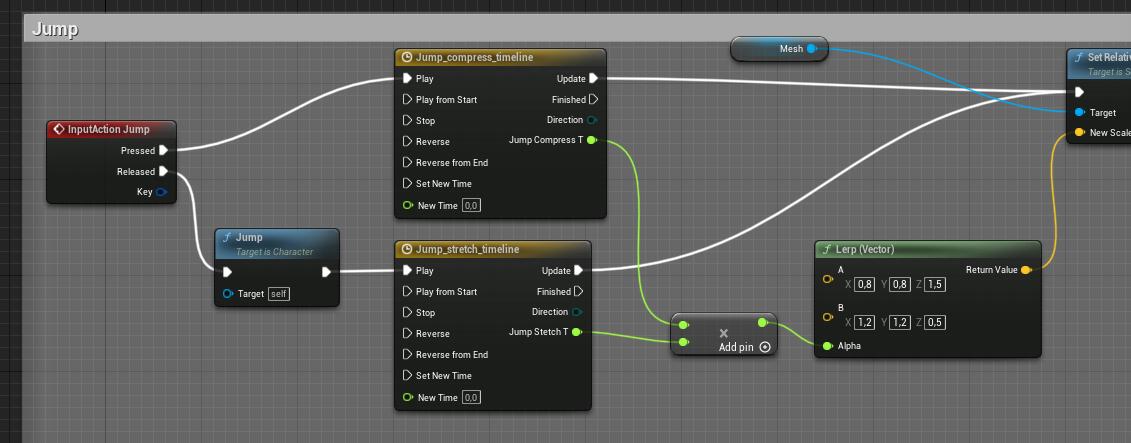
when i press, i want the first one to play.
when i release i want it to reset, and play the other one
zenith trout
fringe frigate
How can i stop and reset a timeline, while starting another?
Sequence node ?
loud cipher
How can i have my spawn actor change its class while in my game?

I want to be able to press a key and then it sets the Fake class to another actor
However doing it like this gives me an access none error whenever i reference the return value of the spawn actor
 lament ginkgo
Does anyone have any good practices/tips for marking things as TODO in ue4? Like I have a block of code I know I need to go back to at some point, I'd like to set a reminder.
In Unity I would just say TODO in comments, then I could search all instances of TODO, but not sure how I could do something similar in ue
fringe frigate
zenith trout
Sequence node ?
yes! thanks, still new
 severe turret
@loud cipher you cant change the class of an actor at runtime, but you can switch the actor out with one of another class
unless there is something new I haven't seen of course.
burnt nest
lament ginkgo
Does anyone have any good practices/tips for marking things as TODO in ue4? Lik...
You can add a comment node. I don't think you can search them up, but they should at least be well visible when in the blueprint.
zenith trout
loud cipher
However doing it like this gives me an access none error whenever i reference th...
Are you calling a function on the return value ?
zenith trout
fringe frigate
yes! thanks, still new
Np
 stark marsh
Hey i have a small problem i was following a tutorial for a ARPG game and i came across a small issue where i cant add my updatehealth function as a event? I put the function in my BPInterface and added a input for the health percentage but i cant add the Event Update Health to my HUD_Widgets event graph? lol
zenith trout
stark marsh
Hey i have a small problem i was following a tutorial for a ARPG game and i came...
Does you hud_widgets implement that interface ?
stark marsh
@zenith trout Im not too certain how would i check that lol. Im a utter beginner at unreal engine lol
stark marsh
zenith trout
<@351101654961225729>
I'll check it out now and see
zenith trout
If it doesn’t add it
stark marsh
@zenith trout Thank you so much that was actually sending me crazy 🤣
stark marsh
@zenith trout he actually cut out the part where he did that and explained in his description what to add because he forgot it but it confused the life out of me. I cant believe i didnt check that though but aye Thanks again chief i appreciate it! 👌
 severe turret
there are some objects/functions that are tagged as EditorOnly. They cannot be packaged so you can't use them in your game
 hoary junco
everything in C++ are UPROPERTY(EditAnywhere, BlueprintReadWrite)
 fresh sand
Isn't something supposed to happen here?

 split ginkgo
Can we have "pointers/references" to variables in actors?
I have a Inventory_Include and I want to make it reference the Inventory that its viewing
So that when the player drags an item from a chest or something, it moves it from the storage and into the players inventory
I made something that does that right now, but the inventory in the player isn't actually updated. Its only updated inside of the widget's variable
severe turret
when you create a variable you set it's type. Then you store the pointer/ref to the object of the type you set. You will have to get the instance of the object first
split ginkgo
Oh
Well now idk why its not actually showing the item after the inventory ui is closed and opened again
Thats what happens
I set the inventory that the PlayerInventory is viewing right here
 split ginkgo
severe turret
when you create a variable you set it's type. Then you store the pointer/ref to ...
split ginkgo
severe turret
when you create a variable you set it's type. Then you store the pointer/ref to ...
When you say "You will have to get the instance of the object first" does that mean I can't just store a variable of the inventory?
So I can't just store

I'll have to store the player?
severe turret
well creating a variable of that type doesn't mean it's going to reference the inventory. It means it can hold a reference to the inventory. You still need to fill it with an object reference in your world
split ginkgo
Okay thats kind of annoying
severe turret
not really. its the basis of instantiation
split ginkgo
In C++ you can just use a pointer/reference
severe turret
you could keep one Inventory variable in an accessible location and use that when updating. Its the same result. Or you can copy between different locations.
split ginkgo
I'll probably just store an "owning inventory actor" reference
severe turret
yeah that works too. Then you know where the original inventory variable is
severe turret
no worries good luck
fresh sand
Anyone here able to help me real quick? Nothing is really happening here

 faint pasture
fresh sand
Anyone here able to help me real quick? Nothing is really happening here
faint pasture
fresh sand
Anyone here able to help me real quick? Nothing is really happening here
What bone are you doing the blend at?
 loud cipher
zenith trout
Are you calling a function on the return value ?
loud cipher
zenith trout
Are you calling a function on the return value ?
Not off the return value, off the return value is a reference i made, then in an event tick i get a line trace and off that hit location i get the reference of the actor and set the actor location to the line trace hit location @severe turret
It works, but then if i try switching the actors in runtime, it still works but throws an access none error
loud cipher
severe turret
<@!371344641641021441> you cant change the class of an actor at runtime, but you...
How can i switch an actor out?
Using an array index type thing?
 gusty cypress
How do I "clamp" the decimal places of a float? I get 0.XXXXXX and only want 3 decimal places ex. 0.XXX
found this online but is all this necessary?

 trim matrix

In this video, we discuss the type of game that we're going to make and begin by setting up the player controls.
In place of this character I am using a rolling ball in my game but I am not able to get desired output

I got this type of rotation for my rolling ball but not able to turn it right and left for a long part
can anyone help me?
 dawn gazelle
gusty cypress
found this online but is all this necessary?
dawn gazelle
gusty cypress
found this online but is all this necessary?
If all you want is for text output somewhere, then you can use just "ToText" and expand to see the formatting options and set the fractional digits to 3.
 clear meteor
How would I debug an infinite loop error?
The error references a node and when I bypass that node it just complains about another one. The call stack is long
 random ibex
Hey, everybody.
I'm a little stuck.
I have an Actr that is in the scene when BeginOverlap is destroyed.
However, Resopown is not working.
Can anyone give me some advice on how to do this correctly. Thank you

 green shoal
Hey there. I am trying to adjust the field of view of the camera based on a user input (right click). Its working, but it feels very snappy. How do I add a transistion to that right click? Like 0.5 seconds for it to transistion into it's "zoomed" FoV.
 desert juniper
@green shoal I believe you can do a Timeline and lerp between the values
desert juniper
clear meteor
The error references a node and when I bypass that node it just complains about ...
Show your BP
green shoal
@desert juniper But I don't want a timeline right? I would more of like a small increment of the fov over a period of time. I guess I would have to write something custom for it.
clear meteor
desert juniper
Show your BP
 desert juniper
green shoal
<@!106621971705380864> But I don't want a timeline right? I would more of like a...
desert juniper
green shoal
<@!106621971705380864> But I don't want a timeline right? I would more of like a...
That's what a timeline will do
clear meteor
 desert juniper
green shoal
<@!106621971705380864> But I don't want a timeline right? I would more of like a...
desert juniper
green shoal
<@!106621971705380864> But I don't want a timeline right? I would more of like a...
The timeline will give you a delta value over time that you can lerp between for your FOV value
green shoal
@desert juniper Hmm oke, I guess I would need to have a closer look at timelines. Thanks
desert juniper
clear meteor
And which node is throwing the error?
desert juniper
green shoal
<@!106621971705380864> Hmm oke, I guess I would need to have a closer look at ti...
https://www.youtube.com/watch?v=SW4nq2BNlto&t=190s watch this. he uses the timeline/lerp to open a door smoothly
you'll use the same logic to zoom in / out
clear meteor
The call stack seems to focus around the custom event "StopShooting"
 clear meteor
Yes
 desert juniper
he might be calling a function/event called "StopShooting" in another class instead of the same event
clear meteor
At least I know where my problem is now, thanks a lot for taking a look for me
desert juniper
np 🙂
clear meteor
I think I see what's going on. He's doing that bit in his weapon bp but my firing logic is actually in my character bp
zenith trout
loud cipher
Not off the return value, off the return value is a reference i made, then in an...
add an Is valid before using the reference for anything
green shoal
@desert juniper Got it to work. Appreciate it 😄
zenith trout
you can change the reference of the class in the spawn actor node but its possible that for at-least one frame the reference is invalid
green shoal
@desert juniper Another little quick question. I wanted to add a crosshair. I have seen some generate it on start, and others through a HUD. What would you recommend (Best practice)?
zenith trout
green shoal
<@!106621971705380864> Another little quick question. I wanted to add a crosshai...
make a widget to handle the cross hair logic (if its dynamic)
and add that to your main UI widget
desert juniper
green shoal
<@!106621971705380864> Another little quick question. I wanted to add a crosshai...
Someone else will have to answer on the best practices.
I believe the way I've done it for now is:
A HUD/Widget only exists on the client, so it might make sens to spawn it on the client when OnPossed is fired with a validation check to check if pawn is locally controlled.
zenith trout
or create it and add it to screen in the Hud (keep a reference tho)
green shoal
Yeh should definetly be dynamic. Increase in size based on movement, crouching, etc.
stark marsh
Ive come across a problem which seems to have broke my death animation. basically when my health hits 0 its supposed to make the player character play a death animation then ragdoll with a canvas saying you are dead but since i overhauled the health bar so it was actually animated it seems to break the chain link of events and the player character can still walk around with 0 health lol
zenith trout
green shoal
<@!106621971705380864> Another little quick question. I wanted to add a crosshai...
in the end it all depends on how you decide to handle Ui
some people prefer it layered
some prefer to nest widgets
or a little bit of both
as long as you manage it properly and don't overdo it , either one works
desert juniper
^ that sounds about right. I personally do a mixture of layered and nested widgets
zenith trout
desert juniper
^ that sounds about right. I personally do a mixture of layered and nested widge...
same here
green shoal
Oke will have a look. Thanks for both your inputs @desert juniper and @zenith trout
zenith trout
my main Ui is composed of sub widgets that handle their own ish
zenith trout
green shoal
Oke will have a look. Thanks for both your inputs <@!106621971705380864> and <@!...
no worries
 zinc spear
in my bp actor, i have a spline and a box collision. i tried doing this to make the box collision contain the entirety of the spline but it doesnt seem to work. anyone have some ideas?

the result is this
 tired chasm
I'm also working on trying to figure this out.
oh do you want multiple boxes between points with like spaces in between?
I can show you a BP that I have for that
zinc spear
id prefer it to just be one large box, thanks for the suggestion tho 👌
tired chasm
aaah okay. Yeah I'm working to figure out how to make it one box as well.
If I figure it out, I'll post my results.
zinc spear
thanks man 🤝
desert juniper
this might sound stupid, but are you not able to loop through each point, grab the world position of each one, and replace MinX, MaxX, minY, MaxY , get the distance between the X's and Y's, and set that to the bounds of the box?
 tacit lake
So I have this tutorial I'm trying to follow, the concept is it takes a placeholder mesh, changes it to a foliage mesh, then once a capsule overlaps the mesh, it deletes the mesh and replaces it with an actor. Actor class and meshes are from an enum, so does anyone know how I would remove the actor when no longer overlapping?
I just can't find a way to reference that specific instance of the actor and destroy it from outside of the actor blueprint itself.
desert juniper
tacit lake
I just can't find a way to reference that specific instance of the actor and des...
Personally, I would create an Actor that is reposnsible for spawning in the correct actors
that way you don't destroy the actor responsible for that action, and you can easily keep track of the other actors
so, 3 actor BPs
BP_ActorSpawnerOnOverlap - Just an actor with a box/capsule/etc trigger
which contains two variable
DefaultActor (Actor to spawn when not overlapped)
ActorToSpawnOnOverlap
lament ginkgo
How can I ensure an actor does not block clicks? I have a player pawn infront of another object and I need to be able to use the OnCLick event of the other object, but I think the pawn is blocking it.
tacit lake
Only problem with that I believe is I need it to be just a mesh while not overlapped, not an actor
Unless that can be done with what you're suggesting
desert juniper
an actor is anything that can be placed in a scene
A mesh is something that can be placed in a scene, so it's parent is actor
oh I think I see, you don't want it to be a blueprint
tacit lake
Yes, just trying to reduce lag with foliage
desert juniper
That's fine, just have the default object just be a skeletal mesh/static
Sounds like you're trying to reinvent LODs
tacit lake
I have LOD's on everything, having so many actor blueprints* in scene just bogs everything down
 desert juniper
tacit lake
I have LOD's on everything, having so many actor blueprints* in scene just bogs ...
desert juniper
tacit lake
I have LOD's on everything, having so many actor blueprints* in scene just bogs ...
I'm fairly certain that a static mesh in the scene regardless is going to be an actor.
desert juniper
 fluid compass
hey im confused at why when im trying to set an actors visibility it doesnt work
fluid compass
hey im confused at why when im trying to set an actors visibility it doesnt work
You have some logic there that seems to contradict your intentions
tacit lake
Yes, I think I just didn't explain it well enough, the actor I'm trying to replace the mesh with has script for harvesting and such which is what is causing the lag I assume
desert juniper
Following your logic, it's "If bVisible, set its visibility to false"
fluid compass
yeah so if it was visible set it to false so it isnt visible
before i had the branches i was setting it visible on press and not visible on release and that didnt work either so tried adding branches
desert juniper
fluid compass
yeah so if it was visible set it to false so it isnt visible
you are never changing the Visible boolean though. what is your actual problem?
fluid compass
ah
true
i think if i add it anyway it still wont work cause i set it to false with beginevent
desert juniper
tacit lake
Yes, I think I just didn't explain it well enough, the actor I'm trying to repla...
ah understood. well, I'm not certain, but I believe you can use LODs to replace the entire actor with another instance that doesn't contain the harvest logic.
fluid compass
yup still didnt work
tacit lake
Okay, I will look into that, thanks! @desert juniper
trim matrix
@desert juniper hey I have 4 possible conditions that can execute when begin overlap
and I wish to execute any of them and not execute 3 when one is found right
so how can I do it
desert juniper
@trim matrix what are your conditions? enums? booleans?
 trim matrix
I used sequence but then all got execute
 trim matrix
there are actually 4 different integer value
@desert juniper
that are possible
I thought of using for loop or switch loop but I don't know how to use them in ue4
desert juniper
know what, I take that back
Switch node

there you go use that, input (selection) is the value you have, and the output is your possible actions
trim matrix
I have 4 input
like it can be +x,+y,-x,-y
x and y are integer and one of them is right
every time it check 4 of them one will be correct and wish that now till next overlap don't execute
@desert juniper
desert juniper
I'm not sure what your setup is. how are you storing the deciding value?
trim matrix
desert juniper
I'm not sure what your setup is. how are you storing the deciding value?
it is confusing concept
@desert juniper
actually I am making an endless runner type game where I am using ball instead of character so it is giving me tough times
 desert juniper
are you trying to add movement input based on right/left/up/down?
trim matrix
desert juniper
are you trying to add movement input based on right/left/up/down?
yes
but not movement input you can say torque
I tried you tube video but that did not help
In this video, we discuss the type of game that we're going to make and begin by setting up the player controls.
my character is different so whole different logic

 fleet cedar
Before I watch 3 hours of youtube videos waiting for somebody to get to the point, can anybody put in simple terms how to pick up a physics object?
 maiden wadi
Just attach it to something.
If you still want it to move, it should be done via some form of constraint most likely. But if it's just like, pick up to hand, just attach it to the skeletal mesh at the hand bone location.
fleet cedar
don't I need a physics handle?
desert juniper
disable simulate physiscs on the skeletal/static mesh when picked up?
fleet cedar
okay thank you
wil ltry
what's the advantage of physics handle? it's still sim'ing while held?
 faint spire
Im trying to make my object on the spline stop once it reaches the beginning again, what am I doing wrong here?
 tired chasm
okay I'm out of ideas here >< Nova and I are trying to figure out how to construct a box collider in between 2 spline points and have the length of the box extent across the length of the spline.
I only know how to get them to appear at the spline points

anyone know how to get them in between the 2 points and extend one length across the 2 points?
dawn gazelle
faint spire
Im trying to make my object on the spline stop once it reaches the beginning aga...
Your tolerance on the distance check may be too narrow. Floating points can end up with unexpected values and being within 0.0001 is very hopeful. Maybe set it up to .1 or even just 1.
faint spire
Alright let me try that 🙂
tired chasm
seems like lots of people are trying to work with splines today xD
tired chasm
Splunday
tired chasm
This is what I'm trying to accomplish. I made this by hand but I'd like this to be done in the construct graph.

tried a few things but nothing I'm doing is right lol
 timber pilot
I've got an object which, in one of my levels, spawns inside a blueprint set to event ActorBeginOverlap. I need the "Begin Overlap" to apply immediately, but it is seeming to only apply when the object leaves and re enters the collision space. Any suggestions?


 dense tulip
hey guys, im trying to follow a tutorial for driving a boat .... its the following tutorial : https://www.youtube.com/watch?v=dkcKwq6xRM4, any of you able to have the BP that is in the download content ?

Hello guys and welcome back to another tutorial. I will show you how to use the free community ocean project to create our own custom driveable boat that has buoyancy and also cloth physics for our sails. The boat model you can download and use for whatever you want. I made it myself a while back so feel free to use it for your game!
Download P...
fleet cedar
Argh... I'm really dumb but I need help... I want to attach part of an item blueprint to my character but can't figure it out... If my item blueprint is made up of 2 cubes, can I have just one of them attached to a socket on my character mesh?
actually I mighta done it

seems to work
 junior yarrow
is there a blupeprint that allows me to download items on command when actaully playing the game?
junior yarrow
dense tulip
hey guys, im trying to follow a tutorial for driving a boat .... its the followi...
yeah i do do you want it?
 surreal delta
Is there a way to collapse this into one variable? Im just having invisible walls enable/disable after an animation event on a moving vehicle. Wondering how to call all of the boxes without pulling a reference to all of them
 surreal delta
fleet cedar
yay
surreal delta
fleet cedar
yay
This looks like a lot of fun 😮 What kind of game are you trying to make with this mechanic
fleet cedar
I want to make an adventure game about a dog detective
I was thinking to make a puzzle where you have to use the hose to fill up a hole to float an item that you can then use for something else
thanks btw @surreal delta
surreal delta
Sounds interesting 
 burnt citrus
I have a question
I want to implement true FPS camera without penetrate arms
so I search the methods
and I found this
https://youtu.be/Ud3EHCs1wsw
what method does he use to prevent arm penetration?
animation? just camera settings? or other than that?
Enjoy my latest progress!
This Product:
https://www.unrealengine.com/marketplace/en-US/product/third-person-template-remastered
Assets Used:
https://www.unrealengine.com/marketplace/en-US/product/5-fps-4k-custom-modern-handguns-vol-02
https://www.unrealengine.com/marketplace/en-US/product/fps-weapon-bundle
Music:
Liam Thomas - No Time
burnt citrus
fleet cedar
<@!298714232571166722> who knows... maybe best to buy it an dissect it?
yes that's true XD
but some other assets, like ALS v4, has also true FPS camera
so I want to know how they prevent penetration…
fleet cedar
I have that asset so maybe I can check a little later. No idea though. Is there a part in the video where he sees his legs?
burnt citrus
maybe no, but he says this uses true FPS camera in video and comments
 heady patrol
I try to set a Skeletal Mesh in a BP but the physic is not working ?
 languid lion
Anyone know why spawned AI refuses to move how it should?
If I place an actor, it works fine
but if I spawn the same actor, it just doesn't move
It does have an AI controller assigned
also debugged to make sure it has it and it does
 next jungle
Does anyone know how to find the length of an instance of an anim notify state? I'm trying to do some easing in one of these and I can't seem to figure out how to grab the markers
 lost solstice
does anyone know why my grip position is always returning 0, 0, 0 even though my motion controller is at a completely different location?


 worldly axle
I'm making an animation blueprint, and in the EventGraph I want to get the bone location of a specific bone. So I'm trying to use the Get Bone Location By Name node. But that wants a Poseable Mesh Component Object Reference. How do I get that inside the Event Graph?
 fringe flame
I have a problem with my touch controlls when i click it moves to left and and i swipe its unpredictable

i did my best to fit almost everything in one photo


 crimson saddle
is there a way to generate a mesh from the transparency of an image at runtime?
faint pasture
burnt citrus
yes that's true XD
but some other assets, like ALS v4, has also true FPS camera
...
Penetration has nothing to do with the camera, just detect when arms/gun would penetrate and trigger a pose or do some IK when super close to walls
burnt citrus
faint pasture
Penetration has nothing to do with the camera, just detect when arms/gun would p...
I don't want wall penetration solver
I want to camera and character mesh penetration solver
 flint vector
so i want to set the players camera to a camera in the level as soon as they spawn but i'm not able to just use a variable because i can't set a camera actor variable in blueprint. How would i do this?
flint vector
figured it out
next jungle
Is it possible to poll actions and buttons the same you can poll an axis?
trim matrix
i have done checkpoint objects that are on my games track, they have an index if wich one the player run thru last , i want to do so i can calculate that if something then set that index - 5 for example. but i dont know how to do that since they are objects and to calculate i as far ad i know have to use like integer and i dont know how to convert between objectd and integers, help ^^
 crimson dawn
This is a noob question, I just switched from Unity. I have an object reference variable, and that variable is exposed. So in the viewport I dragged an actor that I placed in the level into the exposed variable reference. Im trying to use that objects location as a spawn location for another actor when I press space, but the reference returns, "Access none when trying to read property",which I assume means the reference isnt working, but I dont know why. Can anyone help a noob?
burnt nest
crimson dawn
This is a noob question, I just switched from Unity. I have an object reference...
Simply dragging an actor from the level into the blueprint only works in the Level Blueprint. Any other blueprint needs a reference to the actor some other way. If let's say the actor is a button the player can press, the player might cast a linetrace and if the linetrace is hitting a button, you can grab that reference. Or if it's a pressure plate, you can check for overlapping actors. It depends on your needs. The least performance friendly way is to use "GetActorOfClass".
next jungle
If you want to assign something like a public game object ref in unity you can do it

if you make the variable instance editable you just need to set it to a scene actor on the placed instance of the bp class
burnt nest
trim matrix
i have done checkpoint objects that are on my games track, they have an index if...
I am not quite sure I'm understanding your question. You mean once a driver has past the last checkpoint, you want to set the next checkpoint back to the first one (index 0)? You should probably be storing an integer on the player that keeps track of which index is next, and calculate with that.
burnt nest
next jungle
If you want to assign something like a public game object ref in unity you can d...
You do know this is Unreal Slackers, right? 😄
next jungle
I mean this works the same way. Coming from unity UE calls what you think of as a gameobject an actor.
burnt nest
next jungle
I mean this works the same way. Coming from unity UE calls what you think of as ...
So you're saying you can just drag a reference to an actor from the level into any blueprint? 🤔
next jungle
no I'm saying you can do exactly what I posed a screenshot of. You can make a variable instance editable and then assign that variable to an actor in the same world via the drop down. Which will give you functionally the same unity workflow that he's talking about (get a scene reference to a gameobject placed in a scene by dragging it into a public reference slot)
burnt nest
Oh, right, so the actor that is placed in the level can set a reference to another actor that is placed in the level. I didn't know that, that's good to know! 😄
next jungle
yeah it's a reasonable way to test stuff IMO. Unity also doesn't have a default "level script" so that kinda workflow is very common there (wiring level objects together directly). It's a little like UE3 in an odd way now that I think about it.
 lunar coyote
Heya, I have a strange blueprint issue that's been going on for a while.
I'm using my BP Function Library to spawn a popup Widget.
https://i.imgur.com/8a3RnUS.png
You can see the defaults there to the right.
But in my main menu UMG graph, it sometimes resets these defaults to some really old ones or something. It's supposed to be Yes and No, not "Click Me"
https://i.imgur.com/4d6CEcp.png
And even more strange, this is what it looked like when I played and it popped up:
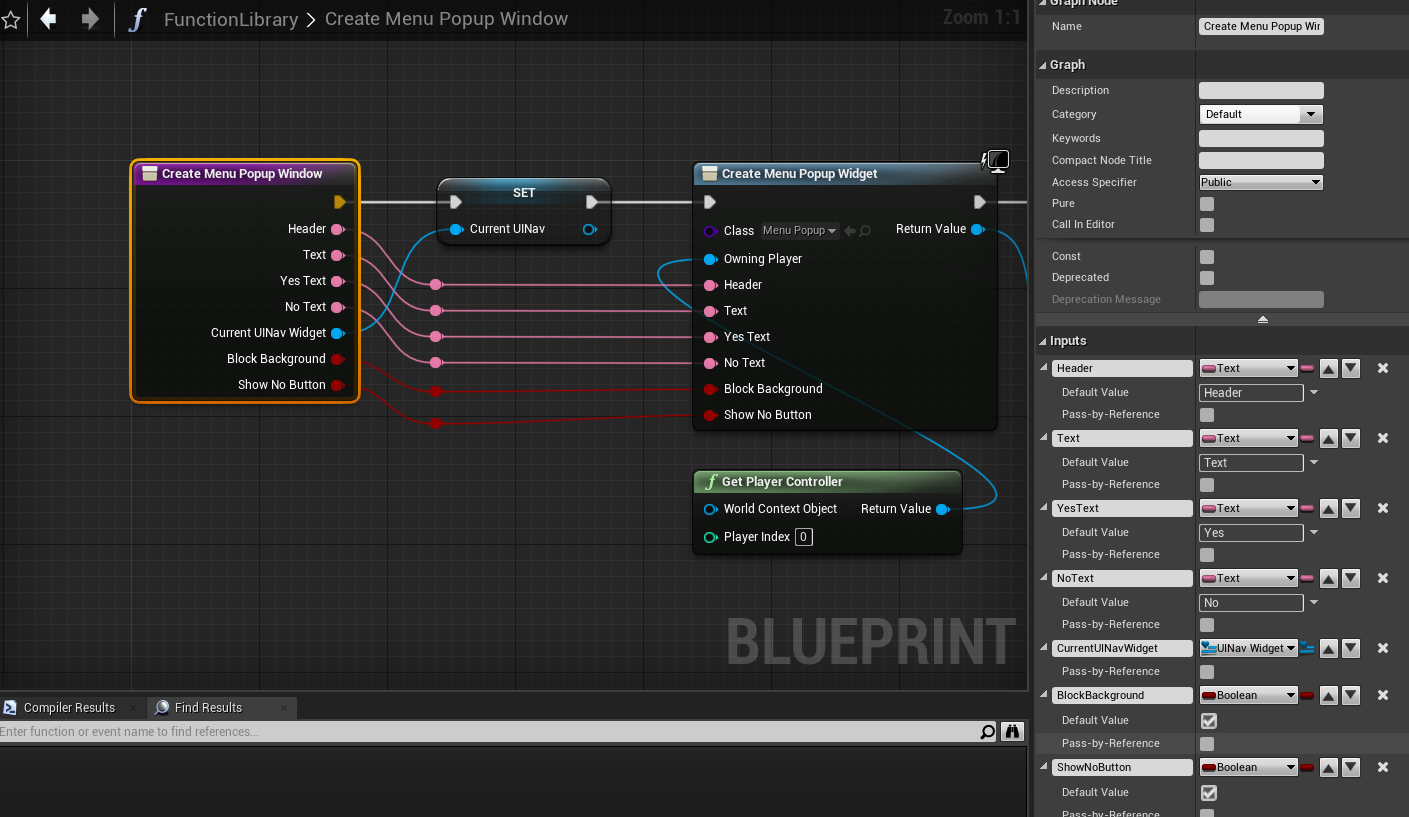
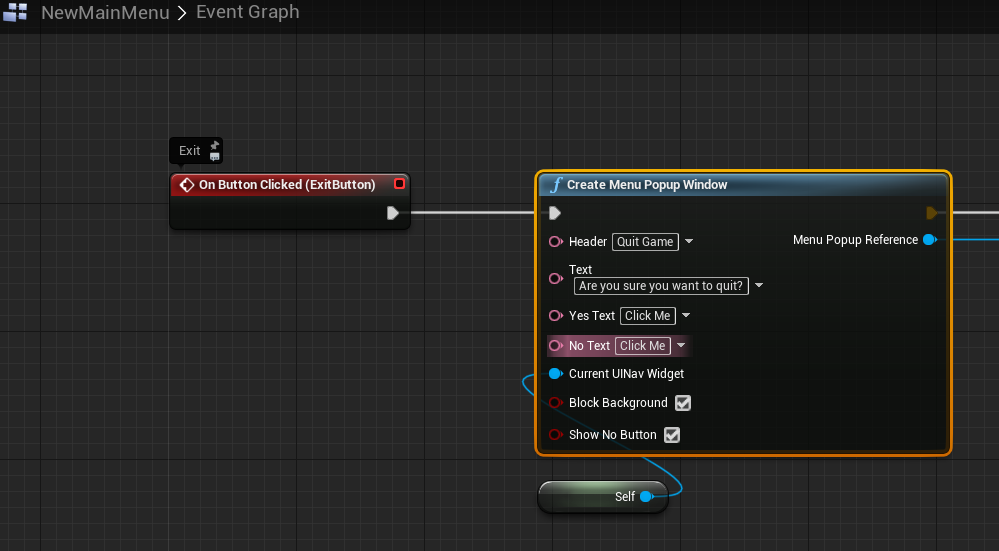
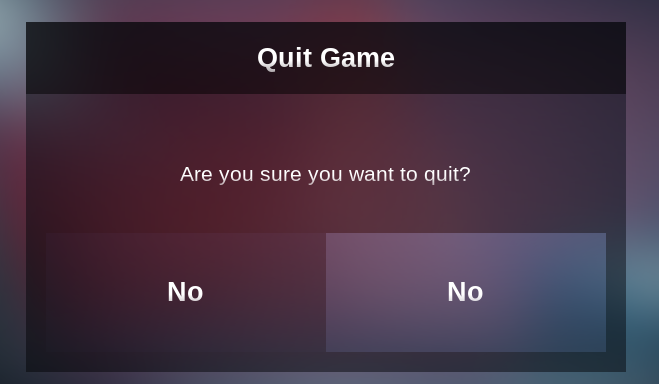
It's like it forgets what was set inside the BP graph
wtf. Now I right clicked the node and chose "Refresh Node" and it changed both yes and no texts from "Click Me" to "yes"
https://i.imgur.com/r2Kza0j.png
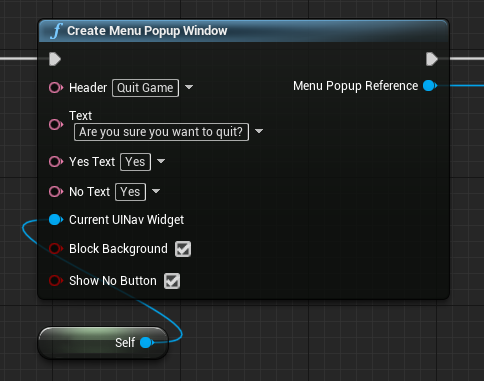 lost solstice
anyone know what i would need as the object for my scene component to cast to its attached actor?
lunar coyote
But when I compile, it reverts both back to "Click me"... 😦
@lost solstice Something Parent or Owner I think
 tight schooner
@lost solstice get owner
lost solstice
tight schooner
<@241149394722750465> get owner
it was the last one i tried... thank you though!
tight schooner
@lunar coyote compile all your blueprints then refresh node maybe
maiden wadi
@lost solsticeAre you trying to get the owner, or the actor it's attached to?
lost solstice
the actor its attached to... which is the owner correct?
maiden wadi
Not if you attached it to something else.
Cause then it'll still be owned by it's creating actor, but attached to something else. In which case one will be the literal owner, and the other will be it's hierarchy owner.
lost solstice
oh right yeah i would need just the actor then
maiden wadi
Either way. GetOwner always works to get an object's creating owner. If you need it's attachment owner, you can use GetAttachParent->GetOwner
lost solstice
Ok thats more what I was going for cause the actor its casting to will be spawned and attached to the player character so thats really good to know
thank you!
trim matrix
Hello, I'm one step away from creating my game. However, I have a problem. I translate:
I have 2 maps, one is the whole map (FirstMap). The second is the main menu through which I run (FirstMap), but (FirstMap) was running without an actor. I fixed it but now actor is not chasing me or box collision is not working and is not walking on the map. As if the nav mesh bounds volume is missing on the map. But it's not because of that. I do not know why this is so, please help.
|
lost solstice
anyone know the alternative to Vector.Rotation() in blueprint?
wary tinsel
I'm trying to split a struct into 2 structs. One is supposed to contain even array index numbers and one odd array index numbers. After a for each loop I put a condition i array index % 2 is > 0 only fill the struct with even numbers. for some reason this is not working can someone tell me what am I doing wrong?
lunar coyote
Anyone able to unberstand why BPs keep forgetting the values as stated here?
I recreated the Function Library function completely from scratch with a new name, and for a moment I think that had solved it, but now, it's the same issue again, with two "No"s on the popup.
 clear plover
Hi, i want to make a game in which you control Rocks that can roll. When they collide they should shrink in Size, but for that i have to measure the Impact force or impulse, any idea how i can get the impulse from the collision??
Thanks
lunar coyote
@clear plover Get the size of the velocity of the rock, then multiply it by the mass of the rock
 wooden owl
whats the benefit of using in-engine cinematics? As opposed to screen recording? Is there better quality?
clear plover
Yes... But i want to calculate impact Impulse, for that i could do that before and after collision, the Problem is than, that if you bumb in the ground you will not get the right impulse and also for multiple rocks (more than 2) this will be hard
clear plover
lunar coyote
<@!610179659069521929> Get the size of the velocity of the rock, then multiply i...
Ok, thanks you bring me to a Solution (i hope) i can subtract the Impulse of the both rocks and use OverlapEvent.
 cinder dirge
Why will the ground be incorrect? It sounds like you want to subtract kinetic energy after the collision from kinetic energy before the collision. It's not technically "impulse" in a physics sense, but change in energy is probably more correct than impulse
Alternatively, just calculate the total energy at the time of collision by taking the sum of the kinetic energies of the colliding objects at the time they collide. It will be a fairly good measure of the "size" of the collision
 uneven geode
Is posible to add components in runtime ? I did it but no errors are shown and no components added in spawned actor
burnt nest
wooden owl
whats the benefit of using in-engine cinematics? As opposed to screen recording?...
There are pros and cons for both. An in-game cinematic may be preferred if your game features any changes; like if you have character creation, it's kind of a must, since you can't pre-record a cutscene with the player created character.
Pre-recorded cinematics can also take up quite a bit of space.
burnt nest
uneven geode
Is posible to add components in runtime ? I did it but no errors are shown and n...
Yes, it should be possible.
uneven geode
burnt nest
Yes, it should be possible.
Do you have any approach of how to do it? or some link with documentation?¿
trim matrix
let me explain If I am moving forward and I press W it will move forward but as I change camera angle to its right now it's forward motion is towards right
did anyone understood my problem
when we use a third person bp it is set already I want to do this with a ball
faint pasture
trim matrix
let me explain If I am moving forward and I press W it will move forward but as ...
Change how the vector that is sent to AddMovementInput is made
trim matrix
faint pasture
Change how the vector that is sent to AddMovementInput is made
I am not using add movement input its a ball so I am using torque

Hey guys!
Let me know if im typing in the wrong room, but I have some questions about UI scaling
Well not really about scaling, more like "not allowing UI to have different spect ratios.
I can't seem to figure out how to disable window resizing, its disabled in the project settings, but upon maximizing the window on my screen that is not 16:9 all the widgets try to alig themselves to my screen, not the middle 16:9 area that would normally be with the normal screen. Is there an easy way to disable widget aspect ratio modification?
Im trying to implement a tracker system that show where the objective is, even if its not on screen it stick to the edges of the viewport, and it works perfectly on my 16:9 monitor, but on my other that doesnt have that ratio the widgets wanders off to the black bars at the top and bottom that shouldnt contain anything.
I just want those black bars that is there because of the monitor's wrong aspect ratio (or sizing the viewport wrongly") to be ignored all times. I hope I you could understand! Thanks in advance!
loud cipher
How can i have a begin overlap that checks if a key is pressed
I want to make a door that only opens when i press e in an overlap
trim matrix
loud cipher
I want to make a door that only opens when i press e in an overlap
you can use a gate node and use the begin overlap as the open and the input action E as the enter
loud cipher
Hmm, the input key wouldnt work since im in a seperate actor
analog perch
tired chasm
This is what I'm trying to accomplish. I made this by hand but I'd like this to ...
you could get the location of point 1 and point 2, and subtract 1 from 2 and do get vector length, that will be the length of the box ( i think you need to divide that by 2 for colliders) then i think they spawn in the middle of the box, so you would take that vector and divided it by 2 and add it to point 1 to get the spawn location. use find look at rotation from point 1 to 2 to set the rotation. i think that should work
 hardy summit
loud cipher
Hmm, the input key wouldnt work since im in a seperate actor
hardy summit
loud cipher
Hmm, the input key wouldnt work since im in a seperate actor
I think you use enable player input in that BP aswell
loud cipher
Oh thanks ill try that
 last abyss
 loud cipher
Hmm, but that would only work if i spammed the key down since it checks only once on overlap
clear plover
Is there a way to open a virtual keyboard on Screen?
You can select Virtual Keyboardtype in a edibleText, but it dont opens (is that so, because i am on Pc?)
analog perch
tired chasm
This is what I'm trying to accomplish. I made this by hand but I'd like this to ...
try this out

 analog perch
loud cipher
How can i have a begin overlap that checks if a key is pressed
analog perch
loud cipher
How can i have a begin overlap that checks if a key is pressed
i would probably do that the other way around, when you press e then check for overlaps, if the overlapping actor is say BP_Door, then you have a ref to it and can call a function on it directly or use an interface and send that out to all overlapping actors and if they use that interface they can execute a funtion
loud cipher
Thanks, i got it working through enabling input on begin play, then i have input action E, connected to a branch, condition is if player is overlapping box collision component then go ahead with door opening
analog perch
ok cool, glad you got it working!
trim matrix
Hi, I'm wondering why my projectile only travels in the same direction instead of the direction it was spawned in, anything I need to set?
burnt nest
trim matrix
Hi, I'm wondering why my projectile only travels in the same direction instead o...
If you're telling it to "move in X" or "move in Y" it will move in one direction.
analog perch
tired chasm
This is what I'm trying to accomplish. I made this by hand but I'd like this to ...
just for fun i also did one that has a set number of colliders that are evenly spaced and follow the spline

 wary tinsel
Is it possible to add points to a curve at runtime? so I can play into a timeline?
 scenic ginkgo
Best way to turn control rotation into a -90 to 90 (or 0 to 1) range? Right now looking straight down is 270, horizontally is 0/360, and straight up is 90, and since it "wraps around" where the player looks horizontally, I'm drawing a blank as to how to turn it into a usable range that doesn't include branches
 covert aspen
Looking for blueprint methodology implementation of a multi-verse value system "UNITS" built on Blockchain technology. The plugin needs bridge the gap between unreal engine and the Array Core wallet. Goal is for any unreal game developer to be able to implement Array wallet Core functions into Unreal engine with easy to use blueprints. Goal is for any game developer to be able to use UNITS value system in their game or unreal engine project. Here is the GIT for Array Core https://github.com/ArrayCoreDevelopers/Array
GitHub

GitHub
The Array is a limitless virtual universe . A universe restricted only by your imagination. The Array is powered by blockchain technology that governs all economy based functions. All commerce insi...
moderators if there is a better place to post this please advise
 earnest tangle
@covert aspen see the job board section, in particular #instructions
covert aspen
@earnest tangle fantastic thank you
@earnest tangle Don't think we can post in #instructions
 ebon venture
is there any way to make transforms relative to some other component other than the parent? i have a marker that rotates around my character as an XY scale for a blendspace, but since its location comes from a parent object its local coordinates stay the same no matter the position.
 earnest tangle
it'll tell you how to post it in the appropriate section
analog perch
ebon venture
is there any way to make transforms relative to some other component other than ...
if you get the world location of it, you can use the transform of another object and do inverse transform location to get the relative location to that object
ebon venture
analog perch
if you get the world location of it, you can use the transform of another object...
Thanks a lot mate. Works like a charm now
covert aspen
@earnest tangle Thank you for your help
 broken roost
Does anybody know why sometimes ue4 instantly hides drop down menu when you press right mouse button?
maiden wadi
@broken roost Cause Slate.
A better answer would be that the editor likely uses the same Combobox for dropdown lists. And if it is, it's frustrating and very likely lazily relies on OnMouseDown events and doesn't care which mouse button it is.
broken roost
So how do i fixt it?
maiden wadi
To be fair, I started learning on 4.24. So, it's always been there for me. 😄
But yeah, you can't fix it unless you want to edit engine source.
And if you're going that far, the same widget has a problem with dropping pointers to things in it's box that aren't UserWidget wrapped.
broken roost
so relaunch is the way)?
maiden wadi
Not sure I follow?
broken roost
idn i just relaunch the editor and it work for some time)
tired chasm
Anyone know how I can get the location that's in between these 2 vectors

I need the location that is directly in between these 2 locations.

 prime stump
broken roost
so relaunch is the way)?
prime stump
broken roost
so relaunch is the way)?
Does it literally appear for less than a second and disappear again everytime?
broken roost
yeah)
prime stump
broken roost
yeah)
download the first one
then re-boot UE but you may need to restart ur computer
i had the same issue before i updated to 4.26.2 and the last nvidia driver update
I think its fixed now depending on which version of UE and the Nvidia driver your using but if you're on older version if you update UE and it starts doing it again you can just download it again and it should stop and if you ever need to re-enable what its disabling thats the second link on that link i sent
broken roost
Wow thx)
faint pasture
tired chasm
I need the location that is directly in between these 2 locations.
Add them, divide by 2
next jungle
I think I asked this earlier and then fell asleep is there a way to poll action and buttons the way you can poll an axis with a Get Axis func
loud cipher


Hey im using ue4 4.26.3 however i cant find that section what i highlighted blue
Bottom one is mine
burnt nest
loud cipher
Bottom one is mine
You are in mesh painting mode. Go to landscape mode, then paint.
loud cipher
Oh thank you
wary tinsel
is it possible to create a curve at runtime on bp? I need to assign locations and interpolate them
burnt nest
wary tinsel
is it possible to create a curve at runtime on bp? I need to assign locations an...
Um.. yes, I think so. You can make a Interp Curve Float variable for example, and add points to it and change them during runtime.
 autumn plover
Got a particle notifier. I can see the particle on the server even when the model that has the particle attaches has "owner only see"
any way to not make the sever look at this?
wary tinsel
burnt nest
Um.. yes, I think so. You can make a Interp Curve Float variable for example, an...
the result should be like a spline but I need custom play time not linear I will try it
burnt nest
autumn plover
any way to not make the sever look at this?
Set the particle system to "only owner see" as well?
tired chasm
faint pasture
Add them, divide by 2
oooh alright!! thaaanks! :D
autumn plover
burnt nest
Set the particle system to "only owner see" as well?
particle attached to gun
burnt nest
autumn plover
particle attached to gun
It still has a particle system though, doesn't it?

 hexed finch
is it possible to modify the time of a timeline with a variable? like compressing or enlarging the keys that are there?🤔
 burnt nest
hexed finch
is it possible to modify the time of a timeline with a variable? like compressin...
burnt nest
hexed finch
is it possible to modify the time of a timeline with a variable? like compressin...
I think so, yes. The timeline is a variable on your left, you can drag that into the event graph and change stuff in it.
tired chasm
analog perch
did you see my posts? <@!329796769292615681>
oh! no I didn't. I'll scroll up and find it.
hexed finch
burnt nest
I think so, yes. The timeline is a variable on your left, you can drag that into...
when I change that variable 'new time' nothing happens
burnt nest
hexed finch
when I change that variable 'new time' nothing happens
That's not what I meant. Changing "new time" just changes when the timeline starts at (I think that's what it does anyway 😛 ). I mean you drag this into the graph and then change whatever you need out of that.

Like if it's the length you want to change, you do this. @hexed finch
 hexed finch
thanks you !😁
tired chasm
@analog perch oooh I just saw it. I did end up getting something similar to that. for my setup, I have a setting that you can tick in case I wanna use curves or linear splines

in the red node for curves I have this.

The transform of that last node goes into this.

I think this is pretty similar to yours
analog perch
tired chasm
I think this is pretty similar to yours
ah yeah, very similar
if you use local, you dont need to manually attach it
tired chasm
works really nicely :D

oh really? even for moving splines? These splines won't be static.
analog perch
yeah, the add box collision wants a relative location
tired chasm
I attached it because when the splines moved, the boxes stayed in world space
let me try
analog perch
oh im not sure if it is at runtime
tired chasm
oh you're right
....idk what I did wrong last time but now it's staying LOL
staying local**
sweet. Yeah I guess I can get rid of that attach now.
analog perch
when i update the splines at runtime, i have to recalculate the colliders, i dont think its possible to not have to do that
tired chasm
mine is working even after I removed the attach node
I have them moving along the edge of a rotating cube
 analog perch
as long as the spline points dont move relative to itself, it will work. but i am moving the points at runtime
Nice!
tired chasm
oooh! I see
Yeah I don't think I'll be moving the spline points at run time. just to whole spline
 proven loom
hey everyone. i see telegraphs in a lot of games to signal to the player that an attack is happening. are there any tutorials around how to do this? especially around custom patterns
my idea is to create a mesh out of the shape that i want, and then whatever actors overlap with the mesh will get hit. i'll hide the mesh and create a shader that only appears when the mesh overlaps with the ground. do i have the basic idea of telegraphs correct? thanks for your help
here's an example of the telegraphs. i might be overthinking it. would decals accomplish the same thing? with decals i'd just need to somehow be able to raycast the actors that are inside of the decals

Executive Producer Jeremy Gaffney walks us through some of the challenging combat you'll face throughout WildStar.
Keep up with the latest news -- http://www.wildstar-online.com
Follow us on Twitter -- http://twitter.com/Team_WildStar
Like us on Facebook -- http://www.facebook.com/WildStarOnline
We're hiring! -- http://www.carbinestudios.com
analog perch
oh nice, thats sounds cool. gl with it!
tired chasm
thanks! x) deleting my last message cause I feel like it's rudely hiding the last question
proven loom
Hm… looks like there might be a way to find overlapping actors with a decal
burnt nest
I feel like just combining a decal for the visual with a collision shape for the overlapping would be the way to go.
 proper wyvern
Hi there -- Does anyone know how to modify bone transforms at runtime? From what I understand you can only do it in the AnimationBP, but that seems very messy.. Can't even use for loops inside?
tired chasm
@zinc spear Are you still trying to figure out how to make a box collision extent across a spline? I figured it out.
zinc spear
havent figured it out yet, but if u could tell how u did it itd be greatly appreciated 👌
tired chasm
for sure! Just to make sure, you're trying to do something like this right?
 zinc spear
I was trying to just have one box surround the entire thing, instead of multiple boxes
tired chasm
zinc spear
havent figured it out yet, but if u could tell how u did it itd be greatly appre...
This is what I came up with. Pretend that input node at the start is the construction script node.

OH!
riiip sorry >_<
zinc spear
no worries, thanks for the help tho lmao
tired chasm
np haha. hope you can figure out your idea. 😅
flint vector
ok so i got a weird problem, i want to set a homing target to my player but i can't get the static mesh actor reference because i'm using a player start. how would i set the player as the homing target?
 tawdry dune
You can use GetActorOfClass() assuming you only have one instance of your player
tired chasm
Perhaps an interface would also work?
burnt nest
flint vector
ok so i got a weird problem, i want to set a homing target to my player but i ca...
Sorry, are you shooting the static mesh actor, or is the static mesh actor shooting at the player? If the player is shot at, you can just do "GetPlayerCharacter". And if it's the other way around, and there's just one thing to shoot at for whatever weird reason, yes, you can do GetActorOfClass to find the static mesh actor... but, I'd assume you'd have some form of target acquisition system, even for a homing projectile.
flint vector
basically i'm trying to get the target to change to the player when it enters a collision volume
tired chasm
can you do a "cast to PlayerCharacter (or whatever you named your character BP" after you enter the collision volume?
flint vector
can i cast to the player from the projectile?
desert juniper
@flint vector just look for all actors of class BP_MyPlayerCharacter, and get the first instance, set that to be your target
tired chasm
pretty sure you can. is the collision volume on the projectile bp?
flint vector
no it's on the other objects
flint vector
desert juniper
<@!695574454557868042> just look for all actors of class BP_MyPlayerCharacter, a...
how would i get the static mesh component from that?
desert juniper
exactly as you would any other way
If the class has a static mesh, then just drag out of the "AS BP_MyCharacterClass" node ande type in "get static mesh"
burnt nest
How to get references to other stuff during runtime is a really vital part of game design in general. I'd recommend looking up some tutorials on it. Yes, it will take you a bit of time now, but it'll save you a ton of time down the line if you don't have to wonder about it every time until you got it figured.
tired chasm
 desert juniper
cool. you got it
but Raptor's right. if you don't know how to do something as basic as that, you'll be stuck every step of the way. consider doing the courses that unreal engine offers
flint vector
that gets a skeletal mesh not a static mesh
desert juniper
why would your player character be a static mesh? doesn't it have animation?
are you aware of the difference between the two?
tired chasm
if the model is using a skeletal mesh then there won't be a static mesh to get
desert juniper
then your homing logic needs to change.
tired chasm
why won't it work with skeletal? Are you sure?
faint pasture
flint vector
the basic homing in ue4 needs a static mesh component
The built-in projectile movement component is pretty crap anyway, make your own if you need it to be good
burnt nest
Know your audience, Adriel. I don't think he's at the level of making his own guided projectile system.
Anyway the built-in system takes a scene component, so a skeletal mesh should work fine.
flint vector
i was using a branch to check if it was static idk why i did that when i was setting it up
 silk hinge
Hey Guys I got a problem for the adjustment of my left hand to the weapon depending on the type of weapons etc... The all rest Is done But This particular part dont work. Its supposed to get my Left Hand to move at the location of the socket on the weapon, socket name is correct (ctrl-c / ctrl-v) the name of the socket, and no matter where I moove the socket the location of the hand dont change, did I missed something ?

 tough fern
How do I change game resolution in a shipped game? For me right now buttons works in a standalone but in a packed game console doesnt seem to work. Any solutions? 🙂

 quick lark
Hi all, is there a way to have an event listener (in blueprint) that listens to "MoveTo" from a behaviour tree?
clarification: this is for a vehicle
I can't figure out how to override RequestDirectMove in blueprints
fleet cedar
Hey guys..

Trying to have a cable component hose
But the hose just rotates right through the nozzle... is that unavoidable?
 fossil osprey
I have this particle system that's hidden but becomes unhidden upon jumping and becomes hidden upon spacebar being released but the problem is at times when i jump its not showing anymore, but i eject from the player and it says its hidden box is set to false so it should appear but it doesnt for some reason, can someone help me fix that issue?
fleet cedar
fleet cedar
Hey guys..
Figured it out
 little torrent
I have created a basic C++ UENUM() in a Component and have a variable that is being retrieved in an animation blueprint with this value.
After geting the variable in the animation graph, I want to Blend Poses by Enum and use that enum, but, I am not seeing that as an option, even after recompiling, and even a full UE4 engine reboot.
Is there something I am missing to expose this enum type to the animation graph?
 robust shuttle
Is there any way I can delay the creation of this Draw Line, or make the come in under what gets drawn in-between the lines?
For context, this goes towards an inventory system. The items are created, and I created a sort of "animation" where when the mouse hovers over the item it gets slightly larger. Problem is, the lines in-between the items are getting drawn over the items themselves, so when I make it bigger you can see the line overtop the edges of the items.
 flint vector
Well you guys were right, the built in homing is absolute shit.
tired chasm
I try not to use built in stuff. They're usually only there for beginners to refer to.
look at the 3rd person template and walk off a ledge and see what happens.
yup that's right. The "jump" animation plays as you walk off the ledge.
lol
 late shuttle
Out of curiosity, what isn't the homing projectile module able to do for you, @flint vector ?
burnt citrus
hey I need help
I want to make a logic
when it execute first time, it will execute next node soon, but when it execute second time or more, it has delay to execute next node
how to make it?
I think I should retrrigerable delay or something, but I don't know how to make it
late shuttle
Just create an integer that keeps track of how many times the execute has been fired.
Do a check to see if the integer is greater than the number of times you want then if that is true execute the delay.
 candid blade
hey quick question! trying to set bool from one BP and get it in another. how would I go about this without a blueprint interface?
sets it here

trying to get it in this different bp
 tight schooner
@candid blade whether you're using an interface or not, the BP that needs to check the bool needs a reference to the actor/object that contains the bool, and there are many situational ways to do that (ray casts & other overlap/collision checks, Get All Actors of Class, etc.)
Once your BP has an object reference to the thing that has the bool, you need to check its class with a Cast To [the BP class that has the bool]
If it passes the check, the Cast To node will output a class-specific reference, and from that you can Get your boolean variable
or Set it, even
tight schooner
burnt citrus
hey I need help
I want to make a logic
when it execute first time, it will execu...
like a queueing system? Will every call to the function/event add something to a queue that gets processed one at a time periodically?
To make the queue you probably need to put the information into an array variable, so yeah, learn about arrays
To process the queue, you can do it on a looping event — examine the node, Set Timer By Event
burnt citrus
tight schooner
like a queueing system? Will every call to the function/event add something to a...
I don't know whether my knowledge about queueing system is correct or not, but I think that's I want to say
thank you I'll try it
trim matrix
hey, guys so i've been working on applying animation to my character from unarmed idle to idle with rifle. And its working, when i press input for equipping weapon the animation change from unarmed idle to idle with rifle. So its work perfectly as i want. And somehow, this massage appear when i stop play. When I clicked it, the problem is on Unarmed Idle to Rifle Idle transition

and this is the blueprint
 tight schooner
@trim matrix idk about character animation specifically, but the error means your "Char REF" variable isn't set. The error is saying there's nothing there.
trim matrix
tight schooner
<@456226577798135808> idk about character animation specifically, but the error ...
so, do you know how to fix it?
tight schooner
Sorry, nope.
 glad spruce
i just got unreal, and want to start with blueprints but dont know where to begin. does anyone have recommendations?
candid blade
tight schooner
<@157664553386246144> whether you're using an interface or not, the BP that need...
ugh I can't figure out the cast nodes for the life of me. if i'm trying to cast to my twinklelightBP I need to select an object but i'm not sure what its set as? It's just a light in the scene with a BP on it

 icy saddle
is there a way to have UE open the full BP editor by default instead of always having to click this link in order to see my individual actor/scene components?

 gentle urchin
candid blade
ugh I can't figure out the cast nodes for the life of me. if i'm trying to cast ...
gentle urchin
candid blade
ugh I can't figure out the cast nodes for the life of me. if i'm trying to cast ...
You need an object reference to have something to cast (casting is like a method for treating something in a specific way, allowing you to access its methods and variables and whatnot)
In your scenario you either need to hard reference the twinklelightBP via editor exposure , (instance editable variable), or with some logic for fetching all actors of that class
 candid blade
right, so in this instance, I decided to get rid of the bool and instead, I have a different variable on the object I want affected.
in short, I made a chest, that has a spotlight near it in the scene. when you interact with the chest (input E) i want the lights intensity (a variable i already have set) go to 0
what i'm having a hard time understanding, is who casts to who? which BP gets the cast
do I cast from chestBP to the light, to fetch its variable?
gentle urchin
There are a bunch of roads to rome
If this is a one off scenario,
its easiest to hardreference the light from the chest
with the method proposed above ;
Instance Editable variable, and handpicking the light reference in the editor
If you select the correct class in the first place (variable type), you dont need to cast either
 gentle urchin
You cant set the default value,
you must add it to the scene first
then in the details panel, connect the dots
candid blade
omfg I finally got it
thank you @gentle urchin
i managed to get it to work but with casting, i have no clue how to get it to work without casting. but doesnt really matter for my needs atm so thank you!
 gentle urchin
Glad you got it working
if you wanna avoid casting,
just select the correct class as the variable

In your case it would be named TwinkleLight
 candid blade
fantastic!! thank you so much
candid nest
can anybody teel me what is this error how to fix this i cant open my engine
 gentle urchin
Not sure what to tell you beyond the error you already see
glad spruce
so i opened ue4 fps blueprints and idk wtf all of the spagetti is or how to learn about it.
i just need a small push in the right direction
should i google about every node that im not familiar with?
glad spruce
ok

 novel ice
Is it possible to inherit a Macro-function from parent?
I've got a base weapon class with spawn muzzle macro

But I can't use it in child class
candid nest
fleet cedar
for my project
i think in free u cantod that
but u can add a new loading screen and first u will se this banner then loading screen
hey i added a fpp cam to a third person player (gasmask) when i play in my vieport i can see the gas mask overlay but i didnot want to see it also i cannot change camera position as my gun animation will not show any fix
candid nest
novel ice
Is it possible to inherit a Macro-function from parent?
if u make change in macro it will automatically change in child class and u can use for many child class u made
novel ice
I still can't see that macro in my child class
gentle urchin
If its generic enough it could fit in a macro library
candid nest
u wont see in child class
can anybody fix this i am using fp cam in tpp and my chracter gas mask is comming when i play i cant move camera bcz my gun anim will not shown properly then and i am using only one material so i cant hide particular material

 woeful pelican
candid nest
can anybody fix this i am using fp cam in tpp and my chracter gas mask is commin...
woeful pelican
candid nest
can anybody fix this i am using fp cam in tpp and my chracter gas mask is commin...
I have one idea you could do, but I have no idea if it's easily possible. I'll post it in #graphics
candid nest
yeah this character comes with single material that is the main problem
 candid nest
ohh i didnt new that
fleet cedar
Can't figure out why my cable component keeps shooting over
Any ideas?
during simulate
 native terrace
lets be fair, nobody reads TOS cause they are usually written by lawyers and it would take a decade to decrypt the 40+ pages we sometimes get as a end user
wary tinsel
best way to move an object on a spline with NO constant speed? for example the speed should change according to the distance of each point on the spline. is it possible?
 fallen glade
how do I get self reference in blueprint libraries?
 burnt nest
fallen glade
how do I get self reference in blueprint libraries?
burnt nest
fallen glade
how do I get self reference in blueprint libraries?
Rarely use blueprint libraries, but I'd guess pass it along as an input variable, unless there's any built-in reference to whoever's calling the function.
fallen glade
burnt nest
Rarely use blueprint libraries, but I'd guess pass it along as an input variable...
cool thanks
 dawn cloud
Hey everybody, I'm a little rusty, but is there a way to change the HUD class per level? I know you can set the default class for the project but I'm not sure how to override that on a per-level basis? Any clarification would be much appreciated.
 whole viper
is there any way to reference another component in the blueprint inspector?

without just hard coding it in the constructor like this

I found FComponentReference but this is purely based on the component name which isn't great
woeful pelican
dawn cloud
Hey everybody, I'm a little rusty, but is there a way to change the HUD class pe...
I think you can do that by overriding the gamemode, but maybe there are better ways.
 prime stump
Hey, does anyone know much about line traces?
trim matrix
whats up? @prime stump
prime stump
trim matrix
whats up? <@!605390088247050271>
Im just trying to figure out if its possible to have a blueprint actor respond only if you're within a certain range of the line trace.. for example lets say the line trace is set to 200 units, that works fine if im trying to open a door, but when its trying to open lets say a draw you can open it from miles away so do you know if there is a way where you can say that regardless of what the line trace distance is set to i only want this blueprint actor (the draw) to open if its within lets say 100 units of the 200 units its set to.. does that make sense? lol
 sick sapphire
so i want to do a bullet impact effect that is perpendicular to the wall
like when you shoot the wall then debris sprays out perpendicular to the angle of the wall
how do i acheive that
trim matrix
@prime stumpnot sure I understand but you could do a less then node and set it to 200
cinder dirge
@sick sapphire Any line trace or hit event can give you an Impact Normal You can use that to make a rotation for your debris emitter(s)
faint pasture
sick sapphire
so i want to do a bullet impact effect that is perpendicular to the wall
like wh...
You can get the normal of a hit. Use that
cinder dirge
You can convert the impact normal (vector) to a rotator and use that
sick sapphire
 cinder dirge
That's the one
sick sapphire
so its this one right (my bullet proj)
cinder dirge
Yep
sick sapphire
ok so it will be a rotation that is perpendicular to the surface or the rotation of the surface
cinder dirge
Perpendicular to the surface, yes
It's a vector that sticks straight out from the surface. You will need to turn it into a rotator
sick sapphire
oh thats convinient
Thanks people
cinder dirge
You're very welcome 🙂
 runic plinth
Newbie question, how does one go about to add a key press input event to a BP that's not the level BP and not the character BP?

 surreal peak
Well, depends how proper you want to do this
The easiest and ugliest way is to call "EnableInput" on that Actor, passing in the PlayerController.
A better way would be keeping the Input in the Character and keeping track of what the Character is overlapping (Sphere Overlap or so). And on Key press tell the overlapped actor that you are using it.
If you overlap multiple things you would need some logic for "What is the best of all of these to interact with?"
E.g. distance, direction etc. checks
runic plinth
So that means I would need to filter the overlapped actor?
Thank you for the information. I will keep working
What about a press E event in the character BP and sets a bool to true / false on released then pass on that variable to the actor BP that has the overlap trigger?
surreal peak
The standard approach would be:
- Create an Interface for Interacting with Actors.
-- Give all interactive actors that Interface. - Give you Character a Sphere Collision (or similar) to detect overlaps with Actors
-- When overlapping, check if the Actor implements the Interface and if so, add it to an Array of currently overlapped interactive actors.
-- When stopping to overlap, remove the actor from the array again. - On Tick (Yes, here it's fine), go over the currently overlapped actors and determine the "best". Save that one into an extra variable
- When pressing your interaction key, call an "Interact" function on the Actor, that function should be part of your Interface
runic plinth
surreal peak
The standard approach would be:
- Create an Interface for Interacting with Actor...
Thank you so much for taking the time. That seems a bit over my skills atm, but I saved the answer and will reference it later on future projects. I'm just a sound guy 😅
robust shuttle
Is there any way I can delay the creation of this Draw Line, or make the come in under what gets drawn in-between the lines?
For context, this goes towards an inventory system. The items are created, and I created a sort of "animation" where when the mouse hovers over the item it gets slightly larger. Problem is, the lines in-between the items are getting drawn over the items themselves, so when I make it bigger you can see the line overtop the edges of the items.
 prime stump
trim matrix
<@!605390088247050271>not sure I understand but you could do a less then node an...
prime stump
trim matrix
<@!605390088247050271>not sure I understand but you could do a less then node an...
I guess what im trying to do is have the BP Actor thats hit detect the line trace it was hit by, the way i have it set up is that the character does the line trace and if it hits something it calls a OnInteract function which is part of an Interact Interface, the interface is on every actor that i want to be intractable, if there is a way that i can have the BP Actor itself detect when its been hit by a line trace i could then check if the actor was within a certain distance from where the line trace came from before it runs its logic, in this case its a draw opening so the line trace logic is still ran on the character but somehow have the actor detect when its been hit, like an 'OnOverlap' but for when its hit instead
 uncut granite
how do i connect my state machine as the base pose for both of these?

they are for aim spaces that need the state machine as the base pose
 opal ivy
If'm going to be simulating physics on a bunch of objects (lets say a few hundred) does it make more sense to do each of them as an individual actor, or as components of a small handful of actors
 sand shore
uncut granite
how do i connect my state machine as the base pose for both of these?
sand shore
uncut granite
how do i connect my state machine as the base pose for both of these?
this is more #animation than blueprint. But to answer you, you can cache the pose/save the pose (I forget the specific nomenclature) and it acts similarly to a variable and you can use it in multiple places
opal ivy
The objects themselves will do little more than react to physics, but with spawning them at runtime + the number of them, I'm afraid that it'll spiral out of control pretty quickly if I'm using a full Actor for each
 long smelt
I have the weirdest issue right now.
I'm running PIE with 2 clients, and trying to debug a Widget Blueprint.
In the debug selector, it has a World selection, and an Object selection.
When I select Dedicated Server in the World selection, the Object selection shows each client's widget blueprint that I'm trying to debug.
Shouldn't this be impossible, or am I confusing Widget Blueprints with actual UMG?
uncut granite
sand shore
this is more <#221798806713401345> than blueprint. But to answer you, you can ca...
Cache is the correct one, worked perfect. Cheers
 whole oracle
So, this is kicking my butt and I can't wrap my head around it, but for some reason my branch isn't firing off correctly and I'm not sure what's wrong with my logic. Essentially, I'm trying to find the largest value that a float is becoming over a session, so I use a check that sees if the value beats its previous value and if it does, set the variable to that new value. Easy, right?
Except it's constantly updating to the new value whatever it is. I've printed the condition and it's always coming up as "false" to top if off, so I don't know what I'm doing wrong. Any help you could provide would be awesome, thank you.
 cinder dirge
@whole oracle Try moving your Print String to before the Set node to start. Should give you a better idea of what's going on
whole oracle
Okay, I'll try that.
So, now it always says "true" on the condition, but the value remains at the default value I set, 0.
cinder dirge
So it never ever updates?
whole oracle
Not that I can tell. The angle itself (which is the value I'm tracking) does indeed change every frame, as I'm printing that one out as well, it's hovering around 90 at the moment. But as far as I can tell with the print string of the Max Angle variable, it never updates.
cinder dirge
Your logic there looks sound. Any chance the value is being reset by some other part of your code?
whole oracle
I don't believe so, Max Angle isn't called anywhere else. But here's the rest of the function just in case:

As well as two Print Strings right after the Add Relative Rotation
cinder dirge
And Max Angle is an Actor Variable and not a Local Variable in that function, correct?
Sorry if it's a silly question, just want to make sure
whole oracle
Oh, it is a Local Variable, is that a problem?
cinder dirge
Aha!
Local variables start at their default value each time the function is called. They're "local" to the function and so you can't see their values outside the function or across function invocations
You'll want a regular variable rather than a local one if you're tracking something across multiple function calls or game frames
whole oracle
Oh shoot! Well that makes total sense! I was always wondering what the difference between those two types were. Well, that should fix it up, let me check real quick...
cinder dirge
Cool!
whole oracle
Ha! Worked like a charm. Thank you so much, such an easy error to make, now I know better.
cinder dirge
Fantastic! Great to hear 🙂 And hey the best way to learn is to make errors and then work out why
It can help keep your blueprints clean to use local variables where you can - if you use regular variables for everything then you can quickly end up with hundreds of them. In this case though, cause the thing you're tracking applies to the Actor and not just within the Function (it looks like it's the Suspension's maximum deflection angle? So the Suspension owns it), a regular variable is the right tool for the job
whole oracle
Okay, that makes sense. That's part of the reason I went with the Local in this case, didn't want to add to my growing list, felt like a in function kind of thing, but now I know the parameters I'll have to keep in mind. Thanks again, was hitting my head against the wall for a while on this one!
 open crypt
What am I doing wrong? I'm trying to get a linetrace BEHIND something, so I'm multiplying the forward vector by -1 but I'm assuming I'm doing something wrong in the whole thing - I swear I do this once a year and forget it every time

ugh
why was I not using the actors location? because I forgot
faint pasture
@runic plinth We are using the component approach for interaction. We have an overlap sphere on Character. When E is pressed, we RPC to the server inside character, get overlapping components by class (Interaction component), then select one based on distance and direction, and call BeginInteraction on it.
open crypt
weird...it's not behidn

what am I missing here?
foprward is 1, so -1 should be reverse
That's based on the mesh and it kinda has to be because the mesh size is variable
faint pasture
We have interaction components so the interaction point can be placed in the world and also to store state
faint pasture
open crypt
foprward is 1, so -1 should be reverse
Show your math as of right now
open crypt
 faint pasture
@open crypt that should be a plus not a multiply
The node going into end
Trace from location to location plus forward times negative some number
 long wyvern
Hey everyone, I just have a quick question.
Should I bother with BP or go straight in to C++?
I'm moving from Unity and want to have the best start I can.
trim matrix
long wyvern
Hey everyone, I just have a quick question.
Should I bother with BP or go straig...
start blueprints, go cpp if needed
how can i set my projectiles static mesh material with a button?
faint pasture
@open crypt what do you mean by flexing? How are you determining the length?
faint pasture
trim matrix
how can i set my projectiles static mesh material with a button?
At runtime?
trim matrix
faint pasture
At runtime?
?
faint pasture
Are you trying to have a button in the game that changes the material?
open crypt
I should know this - but those other sequence pins WILL still fire after this boolean, even if it's false right? ****
 whole oracle
Yeah, a sequence will go through them all, regardless if one path stops or not.
open crypt
whole oracle
Yeah, a sequence will go through them all, regardless if one path stops or not.
Just wanted to confirm, thank you
trim matrix
faint pasture
Are you trying to have a button in the game that changes the material?
can i make a variable mat that i can connect to the mesh inside of the projectile actor?
faint pasture
trim matrix
can i make a variable mat that i can connect to the mesh inside of the projectil...
Yes ez. The hard part will be populating the choice list
trim matrix
faint pasture
Yes ez. The hard part will be populating the choice list
I can make the UI ez if that’s what you are referring to
green shoal
Is it good practice to put the input action in their system event graphs? Lets say keypress 3 activates an ability. Should you check this input action in the baseAbility class or should you use it in the player bp?
faint pasture
trim matrix
I can make the UI ez if that’s what you are referring to
The hard part will be making the list of allowed materials. You can either manually make an array, or use a data table, or use some sort of system that can inspect the folder, there's a million ways to do it
trim matrix
faint pasture
The hard part will be making the list of allowed materials. You can either manua...
Probably the array
 tough coyote
Does anyone have a video teaching how to make a pause menu, using a gif/mp4?
 wide nimbus
green shoal
Is it good practice to put the input action in their system event graphs? Lets s...
wide nimbus
green shoal
Is it good practice to put the input action in their system event graphs? Lets s...
I think best practice is to handle all input in the PlayerController
green shoal
@wide nimbus Why is that? Could you elaborate?
wide nimbus
because ostensibly you could use one controller to send input to a different pawn class
 formal wren
Why can't I add components to a scene component blueprint? For example I want to create a scene component blueprint class which also should have a static mesh component
wide nimbus
@formal wren components can't contain other components, You'll need to make a BP that inherits from actor to add multiple components
quick lark
Where do I override RequestDirectMove for a vehicle? I can't find out where to do it
formal wren
wide nimbus
<@!471040295837106178> components can't contain other components, You'll need to...
Thanks! But can I add this new BP as a component to another Actor/Character?
quick lark
Is it in the controller or the pawn that is extending WheeledVehicle?
wide nimbus
you can, but adding blueprints to other blueprints can be a bit troublesome in my experience. There's a component called ChildActor you can add to your BP
the issues I had with it may have been fixed 10 engine versions ago, and I just haven't tried again since 😛
formal wren
wide nimbus
you can, but adding blueprints to other blueprints can be a bit troublesome in m...
Ah just found the ChildActorComponent 🙂 When I want to access variables inside the child actor, I guess I have to cast it first?
wide nimbus
that or you could make an interface
formal wren
wide nimbus
that or you could make an interface
Interesting. Haven't hear about interfaces in ue before
wide nimbus
it's less complicated than it sounds and will probably save you a lot of effort in the future 😛
formal wren
I would have simply stored the casted reference in a variable on the parent actor
wide nimbus
yeah, if you plan on having potentially other classes in that slot, interface might be easier than trying to cast to x different classes
otherwise, just store your reference and live your life, I'm just a guy on the internet
formal wren
hahaha okay 😄
you mean blueprint interfaces: https://www.youtube.com/watch?v=G_hLUkm7v44 ?

What is a Blueprint Interface in Unreal Engine 4 Blueprints?
Source Files: https://github.com/MWadstein/wtf-hdi-files
Thanks
will check them out
formal wren
wide nimbus
otherwise, just store your reference and live your life, I'm just a guy on the i...
mmh can't cast to my actor class 😦

solved:

😄
runic plinth
Guess I will follow up on that casting issues, I don't quite understand why this doesn't go through, weapon is from character
 wide nimbus
show log bb
but I'm guessing you don't actually want to cast your character as a weapon class
you probably need to get a component of your ShooterCharacter, then cast that
but you might not even need to cast it 🙂
runic plinth
wide nimbus
show log bb
show log bb?
wide nimbus
the compile results at the bottom of your BP
but as I say you probably just need to get the component from shooterCharacter rather than casting it
runic plinth
Well I just want the bool I created in the other BP to control an event in this BP.
 wide nimbus
is the weapLauncher a childActor or component in the ShooterCharacter BP?
if so, just use a getter from the AsShooterCharacter cast to get your launcher reference
runic plinth
wide nimbus
is the weapLauncher a childActor or component in the ShooterCharacter BP?
Bit confused but after fidgeting around I found a better way to get what I need though this has an error. Probably need to set that bool to public?
 wide nimbus
might be hitting before your pawn spawns since it's happening on tick. Hard to say
 heady terrace
I'm trying to find out why SphereTraceByChannel is producing Out Hit structs whose "Normal" Vector is not a surface's actual normal value, and something subtle appeared in "Out Hit Normal's" documentation:
"e.g. for a sphere trace, this points towards the sphere's center"
So does this mean Out Hit Normal is not guaranteed to provide the normal of the surface the trace collides with? Should I use Out Hit Impact Normal, or is it better to switch to "LineTraceByChannel" instead?
runic plinth
wide nimbus
might be hitting before your pawn spawns since it's happening on tick. Hard to s...
Thank you for taking your time to help me 🙂
runic plinth
wide nimbus
might be hitting before your pawn spawns since it's happening on tick. Hard to s...
Just want to share the way I solved it was kinda dirty but it does, with an Is Valid node
in case anyone also needs ideas though far from efficient
 wide nimbus
heady terrace
I'm trying to find out why SphereTraceByChannel is producing Out Hit structs who...
wide nimbus
heady terrace
I'm trying to find out why SphereTraceByChannel is producing Out Hit structs who...
suppose that depends on the application, but I'm assuming it's something like this amazing mathematical drawing I just made.
on a surface like this, the green circle might be the impact point, and the normal of that surface would point right back in the direction of the trace
 fleet cedar
Something in my project (using some demo content) is overriding a certain key press so my character can't use it... how can I bypass that or find the culprit?
 cursive path
Have some question
1- why we use variable reference if we can cast every time?
2- what the difference between reference and class?
severe turret
- casting is considered as something you want to do as little as possible. A "pre-casted" variable (or a typed variable) means you can avoid the casting as it expects a value of the class type as standard.
- A class is simply a type. A reference is the created object of the class in memory.
cursive path
@severe turret class is like all enemy but referance this specific enemy
heady terrace
wide nimbus
suppose that depends on the application, but I'm assuming it's something like th...
Ok, that answers a question I had, and unfortunately that is not the problem I am having...
The code to "attach" the player character to the ledge works ~88% of the time. in the remaining 12%, the character's up-vector "leans forward". (See image)
This happens when the character enters the "hang state" on a ledge and it will persist after they mantle the ledge.
What happens in code is a rotator is passed to a"MoveComponentTo" node, that Rotator is generated in a function "AlignToWall" using the "Make Rot from XZ" node, whose Z value is the Capsule Component's up vector and whose X value is the Normal retrieved from a Sphere Trace made from the character's Forward Vector.
The normal I get from that Sphere Trace is not always what I expect. I draw every Normal that's sent to AlignToWall. In those 12% of buggy cases, it's always pointing at an angle, i.e. NOT a normal to the wall whose ledge I am trying to grab. And that angle is aligned to my character's buggy orientation.
 heady terrace
Here is a video of the problem, so you see it in action. You can also see one of the normals I debug drew. It's possible the sphere is hitting the edge where the 2 faces of the cube intersect, in which case I'd have to switch to a Line Trace.
It's set to half-speed, btw.
I'm using "MakeRotFromXZ" to make sure the character is always facing towards the ledge they're hanging from. The X component is taken from a Normal generated by a Sphere Trace. I believe that is what's causing my problems, like @wide nimbus suggested.
 civic jasper
Hay dose anyone know how to make an Ai get as close as it can to a player while staying in its zone (without the player being in the zone) Thanks and have a lovely day
heady terrace
Possibly, but in either case the function is going to be generating an orientation based on the Hit Normal of a sphere trace that might possibly be connecting with the edge of a mesh instead of its face, so it would result in a similar unexpected rotator.
severe turret
@civic jasper you can do it with a volume that blocks or one that overlaps that tells the AI to stop. Another way would be to keep track of the distance between the two actors and clamp the movement once it gets to a certain threshold.
civic jasper
Ok I will try that thank you
fleet cedar
I have a sphere with physics, when my character touches it he kicks it like a pro football player
Why's it flying so far?
 midnight wedge
So this code is for the enemy projectile, which when spawned launches itself forward. since it moves fast enough to be inconsistent when registering hitboxes, I am trying to do a line trace in front of it each frame that reaches to where the bullet will be during the next frame, and if the trace registers an overlap the bullet is destroyed and the hit is registered. Is there a way to mathmatically ensure that the line trace ends where the bullet will be next frame, or should I just brute force values in until I get something that works

(also yes I plugged the velocity into the part that contols line trace length I just wanted to get a general idea of what I need
wait I just remembered that predict by line trace exists. my b
This is the setup Im using and it seems to be working, but I was wondering if theres a better way of using this that doesn't involve an event tick. If not its no biggie, but I tend to avoid them unless its absolutely needed
 heady terrace
I think I just solved my problem: because I cannot predict what z-position the character will be in when the Sphere Trace connects with the wall, there is a possibility the Sphere Trace will hit an edge instead of the vertical face, producing a Normal that is not aligned with the side I want to connect to.
heady terrace
midnight wedge
This is the setup Im using and it seems to be working, but I was wondering if th...
In some engines and API's, the physics system allows you to update physics objects positions more than once per frame because in-game an object might go "through" its target or whatever object it collides with.
midnight wedge
ah ok
heady terrace
So like you said, you have an object that might not collide at the connecting point, but let's say you are at 1min, 30 sec, 28th frame in playtime (01:30:28). The missile object will connect with an object at 01:30:28.25, but the update does not occur until later. If Unreal provides "Physics Ticks", then in theory ("in theory" because I have never done this before) when the physics simulation registers the collision, it will save the bullet's position and halt its movement.
midnight wedge
also turns out the line trace by location is very much not working
midnight wedge
heady terrace
So like you said, you have an object that might not collide at the connecting po...
Cool beans!
heady terrace
Now the question is how to do this in Blueprints. Has anyone done this before?
midnight wedge
I think Im just gonna use a linetrace then brute force a roughly accurate value
(the prediction trace deals with the arch of the object and I just have it flying straight)
nvm I fixed the prediction trace
(some values were wrong
heady terrace
That's fine. Unreal calls this "physics substepping," and while it is configurable in project settings the first example I saw of this in action used C++, not blueprints.
midnight wedge
Ah ok. Thank you!
 royal helm
Is there a way to have a gate in blueprints that only opens in a PIE session, or cooked build? For example, there are autoplaying sequences in my level that I would like to avoid while in editor when I simulate or PIE.
 humble frigate
I need help please :) it might be simple but i started yesterday!
Okay so I want an AI to have a faster max walk speed when I have my flashlight on, and when it's off the max walk speed should be slower. How do i do this with blueprints? I have two characters, my first person character and the AIBlueprint.
severe turret
@royal helm there is a node called IsPackagedForDistribution which may help in a packaged game. Otherwise there is a C++ equivalent macro if WITH_EDITOR
@humble frigate when you switch the flashlight on you can fire an event which sets the AI walkspeed. And vice versa.
humble frigate
severe turret
<@!108014929860190208> there is a node called IsPackagedForDistribution which ma...
How do I do that?
severe turret
I would take a look at how to use Events and Event Dispatchers
humble frigate
Okay. Got any good sites for that? Vids?
severe turret
learn.unrealengine.com is a brilliant place to start to learn the basics. Or the official documentation. Or youtube/google it
humble frigate
👍
royal helm
severe turret
<@!108014929860190208> there is a node called IsPackagedForDistribution which ma...
Oh brilliant. Thank you
 frank thunder
Hello, I've having some issues with a blueprint issue when adding a footstep sound effect
I'm following a tutorial by AstrumSensei and I'm having an issue with using an interface
I have an anim Notify that calls this interface

which is supposed to lead to this event:

I know the notify event is firing because the test string is printing
but the second one is not printing and no sound is coming
which leads me to believe I'm having some sort of problem with my interface
This is what my interface looks like:

I can see that the node looks different in the tutorial

I'm confused as to why my node doesn't have that mail icon and has a different object for target corresponding to a different color
note that I can get the message for other methods in the interface, but not this one
It should note that the notifies are in the AnimBP or Animation Blueprint and the corresponding event is in my BP_Base, a parent of my player
open crypt
Is the vehicle movement (**I need to change the vehicle wheels based on the skeletal mesh) ** is this exposed to blueprint? I mean I know it is right there but to be able to change it besides there

 coarse orbit
Any reason why deactivate component doesn't work on even beginplay? 4.26
 heavy gulch
I am trying to grapple with a 2H weapon issue. It's pretty common in different martial arts to change the hand positions on a weapon during certain moves, but it doesnt seem like there is an easy way to do this in-engine. If I parent the weapon to a right handed socket, that hand can't move along the length of the weapon to change positions with the left hand. anyone have ideas?
lost solstice
Anyone know how I might get the Velocity of the motion controllers? I've even tried getting the velocity of an attached component but it just gives the value (0, 0, 0). Any Ideas?
 true valve
trying to get location of a static mesh socket. https://gyazo.com/3ea0ff104e3acc102a45ef4f83bcebb4

 vast widget
A user posted this image in #online-subsystems and I was curious how their lines look like this.
 tight schooner
@vast widget there are marketplace plugins that can change the node styling
trim matrix
Guys i have a mixamo skeletal mesh with around 30 animations.Now i imported another skeletal mesh from mixamo.I can retarget them from content panel but it will lead to duplication.Can anyone help me how to do runtime retargeting in ue4 without duplicating the animations??
 true marsh
Is there a way to use the reference viewer to see the exact reference being used? Not just the object
sick sapphire
This is the hit info for my Begin Overlap. The ones circled in red are false, and the ones circled in white are all 0,0,0. Hit Actor and Hit Component work though.
What is going on? I want to use impact point and impact normal, how can I fix this?

I could cheese it by doing a line trace from the bullet projectile, but thats not a pretty solution and I want to know what is causing this
true marsh
@sick sapphire First just curious, is it single player or multiplayer?
If it is multiplayer, it could just be a replication issue if your are setting the variable on the server but not the client.
Or the other way around
sick sapphire
true marsh
<@!512990075802615818> First just curious, is it single player or multiplayer?
multiplayer

this is what i used to check those values
true marsh
Hit info is a pretty big struct to RDP, it might be too big to fit in one packet and your getting loss, try sending the sever just the vector
Or are you getting 0,0,0 before the server overlap RDP?
sick sapphire
well the print string is not inside the server overlap thing
so the hit info is not being replicated i guess?
 true marsh
Hmm
sick sapphire
k its like that even on standalone
it has projectile movement and collision is this if it helps
 true marsh
So its a projectile you shoot, and shows the hit properly, but the vectors are still 0,0,0?
tight schooner
Not sure if an overlap event would even produce impact data...
sick sapphire
yes
i have implemented damage, and it does damage whatever it hits properly so hit actor and hit component are working
it also disappears properly when hitting something
sick sapphire
tight schooner
Not sure if an overlap event would even produce impact data...
im not sure either, im trying to find out if this is a normal thing or not
true marsh
I think @tight schooner is right, I thought thats what I was doing but I just looked and I pull "get actor location" at the hit moment
Also as a note which may not be necessary cause I don't know the function completely, but you can put a Switch Has Authority node after the overlap and you won't need to RDP the information
Cause the client and server will both execute the overlap event
sick sapphire
true marsh
I think <@!183028535563255808> is right, I thought thats what I was doing but I ...
k i guess i will do an extra linetrace on overlap since i need bone name, impact point and impact normal to do vfx and damage properly
thanks for help
sick sapphire
true marsh
Also as a note which may not be necessary cause I don't know the function comple...
ok could be useful
tight schooner
true marsh
Is there a way to use the reference viewer to see the exact reference being used...
"find in blueprints" might work

it's like the usual BP search box except it searches every BP in the project
 mortal cradle
Are macros/ functions costing anything by themselves? I mean just creating them without paying attention what's in them, can I use as many of those to organize my blueprints or just like variables they are not free and should be used with some caution?
tight schooner
@mortal cradle I think someone did a test by running a simple math operation like a hundred thousand times and saw that collapsed graphs, macros and functions impart some overhead. So, strictly speaking, there is a cost... but using those organizational tools is so fundamental to BP'ing that I wouldn't tie yourself in knots trying to avoid them
If you're doing something a thousand times on every frame then that's a target for optimization (migrating or nativizing that class to c++) but otherwise BP isn't slow if you're doing normal game logic
mortal cradle
@tight schooner All clear, thank you for helping out
sick sapphire
how do I turn an impact normal into a rotation that is perpendicular to the surface
 tropic oracle
hey anyways i can make it so the a pink button changes the text field of the email?
 trim matrix
I have two camera component blueprint, how can I blend between these two camera components
I tried to Set View Target with Blend but New View Target pin wants actor and camera component is not an actor
surreal peak
ViewTarget != CameraComponent
A ViewTarget is indeed an Actor
The CameraComponent is only an offset to the Actors Location
So if you need to blend, you need to have two actors
Or you perform the blend by hand via a Timerline
 jade frost
surreal peak
A ViewTarget is indeed an Actor
jade frost
surreal peak
A ViewTarget is indeed an Actor
(isnt viewtarget just the data inside the PlayerCameraManager actor? )
jade frost
great
if i have multiple screens rendering (SceneCaptureComponents2D) i have multiple PlayerCameraManagers to make the blends, not sure if it is the best way but works for me
 shrewd condor
Hey guys, I have an issue that I have a struct, it has values when I hover over it, but when I break the struct and try to get values from it there are all null. Has anyone experienced this kind of issue ?
this is a struct from get data table row
jade frost
shrewd condor
Hey guys, I have an issue that I have a struct, it has values when I hover over ...
Screenshot?
shrewd condor
This is blurred, but you can see that the value is there right

But after breaking the values are none
 cinder dirge
That's odd. Does the same happen if you break the Out Row pin itself?
shrewd condor
yup
surreal peak
If you print the pin, does it also state nothing?
shrewd condor
I can't print the struct itself, but since values return none I figure they won't print anything.
shrewd condor
okay, one second
ookay, that is odd
so print actually prints the value
maybe editor debugger is at fault then
trim matrix
i need help with this, im trying to make so if the character is in a trigger and presses a button they teleport, should this work?
 long smelt
Reposting as buried:
I have the weirdest issue right now.
I'm running PIE with 2 clients, and trying to debug a Widget Blueprint.
In the debug selector, it has a World selection, and an Object selection.
When I select Dedicated Server in the World selection, the Object selection shows each client's widget blueprint that I'm trying to debug.
Shouldn't this be impossible, or am I confusing Widget Blueprints with actual UMG?
maiden wadi
@long smelt I don't really understand the last question. UMG is just a blueprint extention of Slate. UMG is to Slate what normal actor and such blueprints are to common C++. As far as what the debugger sees, that's a rough edge. Blueprint debugger is flawed, to put it mildly. It can be a helpful tool in some cases. Networking isn't often one of them. For instance, it may just be showing you everything since the server has none of that type. But unless you have explicitly told it to, dedicated won't have any UI, the functions for creating it won't even run on a dedicated server and that machine will have no ability to directly affect widgets created on a client.
long smelt
maiden wadi
<@!186114455686479872> I don't really understand the last question. UMG is just ...
I see - thank you 😄
lost solstice
Is anyone able to guide me a little bit. I am trying to make it so that when a disc is thrown in VR it will spin like a disc normally around the yaw. My current setup makes it so that it spins around yaw but it sets pitch and roll to 0 and I can't understand why. Setting it as relative rotation does the exact same thing, probably because the mesh I am rotating is the root component. Anyone have any ideas?

 maiden wadi
@lost solsticeUpVector = x0,y0,z1. GetActorRotation = r0,p50,y70. Multiplied together, they would be 0,0,70
Anything multiplied to upvector would zero X and Y and leave Z alone.
lost solstice
maiden wadi
Anything multiplied to upvector would zero X and Y and leave Z alone.
X and Y aren't zero though because the object is at a random floating rotation in the scene
maiden wadi
But they are for UpVector. Anything multipliedby 0 = 0
Oh. Object upvector. Derp.
What is your component hierarchy?
lost solstice
StaticMesh->SceneComponent
should I make a scene component root and then I can set relative rotation then
that honestly seems really simple and I dont know why I didnt think of that until now...
maiden wadi
No, just checked, that call should be in world space as well regardless of attachment. 😦
lost solstice
why would it be world space even though its being called for relative space?
maiden wadi
I mean the GetUpVector. It should return the pointing direction that the top of the disk points to in world space. So unless it starts flat, or is at a flat pitch/roll, it shouldn't zero. At least not instantly.
What's the use case with this though? If you're just trying to make it spin without affecting the other axis.
lost solstice
Thats essentially what I'm going for. I just want the disc when thrown to stay at the release rotation, but spin like a disc would around that Z axis
lost solstice
Im making like a tron style disc wars game and I am trying to do disc projectile pathing and such and want to rotation to be that way
maiden wadi
I would just use addlocalrotation then and only add on Z. It'll simplify your logic quite a bit. Alternatively you're looking at transforming rotations back and forth from world and local space. Which isn't hard, but addlocal or addrelative should be much easier.
lost solstice
maiden wadi
I would just use addlocalrotation then and only add on Z. It'll simplify your lo...
That works exactly as I wanted it too. Cant believe I wasnt able to find that. Thank You!
maiden wadi
Rotations are a fun beast to tackle. 😄
runic plinth
Morning, am I missing something? this isn't setting a random new time length
 lost solstice
maiden wadi
Rotations are a fun beast to tackle. 😄
lost solstice
maiden wadi
Rotations are a fun beast to tackle. 😄
Sorry i've just hit another issue where the disc is getting stuck between around 175-180 and just starts jittering. Why would that be?
maiden wadi
That's odd. Only ever seen that happen on pitch.
burnt nest
It sounds to me like your logic doesn't know whether to spin clockwise or counter-clockwise at that point. How does your logic look now?
burnt nest
runic plinth
Morning, am I missing something? this isn't setting a random new time length
You have one path into Play from Start, and then the sequence too. So do you know that the sequence is being run?
runic plinth
burnt nest
You have one path into Play from Start, and then the sequence too. So do you kno...
Logic is being controlled by Do Once and I have prevented the Tick from spamming the triggers. The problem is the "set new time" based on google doesn't do waht I need so Im toying around new work arounds
 maiden wadi
I might be mistaken, I don't use timelines that often, but won't PlayFromStart simply start it from 0 regardless of what you set the time to?
runic plinth
Yeah but it runs til the end cause Do Once prevents it from restarting on its own
maiden wadi
I'm more saying that after you set a time, you might want to try using Play instead of PlayFromStart
SetNewTime sounds like a seeking function. So telling it to play at 50%, and then start from the beginning, it's likely just going to overwrite that 50% setting back to 0%
burnt nest
That's my problem as well, I am not sure if New Time sets where it will start or where it will end, nor do I know if it's taken into account if it's the start time that's being set if you PlayFromStart".
maiden wadi
I'd assume it's current playtime.
burnt nest
That would make sense, otherwise you have Set Timeline Length for the end.
runic plinth
Yeah, this is was an user from forums also said "I’m not 100% but i think the ‘set new time’ function actually just jumps the current location along the timeline to that time, rather than change the length of the timeline."
His workaround was to use Set Play Rate node
lost solstice
burnt nest
It sounds to me like your logic doesn't know whether to spin clockwise or counte...
I think it might be due to the way I am setting the spinning speed. Though when I did a debug I couldn't see any negatives, though it was going quite fast to properly tell.
 maiden wadi
How is the rotation being set?
runic plinth
Thank you for helping 🙂


 maiden wadi
Try just using spin speed.
burnt nest
That is one heck of a calculation to get a range between -20 to 20. 😅 Divide by 7500?
I'm also wondering if your velocity is in one direction, and "Hand Direction" is in the opposite direction... I can't even make a guess as to what the result would be 🤔
maiden wadi
Won't matter if the result is a single constant number. It can be anything form -38457238947839 to +3890248030748 Right now the addrotation node is adding rotation based on the mesh's world rotation and that's likely causing a negative to positive to negative shift around the low or higher values.
lost solstice
maiden wadi
Try just using spin speed.
Idk why i didnt think of that cause im not trying to do any fancy calculations to get world rotation and such now
thank you for help this dumb fool
maiden wadi
Unreal Rotations are absolutely annoying, until they're not. 😄
lost solstice
burnt nest
That is one heck of a calculation to get a range between -20 to 20. 😅 Divide by...
Im doing that because the velocity decreases as the projectile bounces so even though it is clamped to 20 it will start decreasing quicker
burnt nest
lost solstice
Im doing that because the velocity decreases as the projectile bounces so even t...
Alright, but I feel like something like this would be more predictable and an easier calculation; just pick a speed at which it will spin at full speed (1000 in this example).
 lost solstice
burnt nest
Alright, but I feel like something like this would be more predictable and an ea...
lost solstice
burnt nest
Alright, but I feel like something like this would be more predictable and an ea...
Im not really understanding what that is doing exactly?
burnt nest
If the velocity is -1000, it will output -20. If it's 0, it will output 0, and if it's 1000, it will output 20. And in between will be... in between. 😄
burnt nest
Yes, but a bit more predictable than dividing by a massive number.
burnt nest
👌
maiden wadi
@trim matrixInstead of using a gate, you can do the same thing via getting the overlapping character's controller, casting it to a player controller, and enabling input, and doing the same with Disable Input on the end overlap. Then your keypress can go straight into the teleport logic.
 agile valve
Hello guys, i'm new to ue in general and i have a question.
Ive been trying to make a trigger volume that destroys some blueprint class (falling platforms, thrown arrows...) but beside some static meshes that are already on the level i can't figure out how to do so...
can't get that mesh or actor on the event graph of the level
burnt nest
agile valve
Hello guys, i'm new to ue in general and i have a question.
Ive been trying to m...
Let me know if you need an explanation.
 agile valve
Gonna try that now just a second
humble frigate
what is the easiest way to play a sound at me when an ai is near me? for example heartbeat. I dont want the sound to come from the ai itself.
burnt nest
humble frigate
what is the easiest way to play a sound at me when an ai is near me? for example...
You can make the sound 2D, put a collision sphere on the AI, and start the sound when the player overlaps it. Making the sound 2D will make it come from yourself, basically.
humble frigate
ahhh! 2d! thanks
burnt nest
agile valve
Gonna try that now just a second
If it doesn't work, just cast from "Other Actor" instead of "Overlapped Actor". I might have gotten them confused. 🤔
 quick grove
sorry guys, do you know how can I use the "Create Advanced Session" in UE4 (4.26)?
'cause I can't find it!
humble frigate
burnt nest
You can make the sound 2D, put a collision sphere on the AI, and start the sound...
one thing tho, the sound starts when it overlaps with anything. how do i fix that? sorry im new to this
burnt nest
humble frigate
one thing tho, the sound starts when it overlaps with anything. how do i fix tha...
Same as in the screenshot up there. Cast to your player character to check if it's the player being overlapped.
burnt nest
quick grove
sorry guys, do you know how can I use the "Create Advanced Session" in UE4 (4.26...
I think that's a plugin, probably need to enable it. 🙂
humble frigate
what is the trigger volume?
burnt nest
humble frigate
what is the trigger volume?
Oh, that was just part of another answer. Nevermind that part.
humble frigate
alright, but the custom event has got "overlapped actor" and "other actor". whats that all about?
burnt nest
One of them is the actor being overlapped, and the other is the actor it's overlapping. You don't need to bind the event like that though, you can just select the collision mesh and create an overlap event

@humble frigate So yours will just look like this.
 humble frigate
ahh! simple
should i use a boolean to check if im outside the collision and then fade out if thats true?
agile valve
burnt nest
If it doesn't work, just cast from "Other Actor" instead of "Overlapped Actor". ...
Thank you Raptor, that was it, took me time to understand each part of it, have a nice day
isn't there a way to make it destroy any actor overlapping it ? so i won't need to specify which actor to destroy everytime ?
burnt nest
agile valve
isn't there a way to make it destroy any actor overlapping it ? so i won't need ...
Absolutely, then you just skip the cast and plug OtherActor directly into DestroyActor. You may want to have a look at the collision settings then though, then you can specify what type of actors it should overlap so you don't end up deleting the landscape or something like that.
agile valve
Done, thank you sir !
humble frigate
@burnt nest i cant figure out how to fade out the sound when exiting the collision area. i tried makeing a boolean with branches but i failed. you got any tips?
burnt nest
humble frigate
<@!246621213638656002> i cant figure out how to fade out the sound when exiting ...
Hmm yes, I've had the same problem, gimme a sec
burnt nest
Good job! I was unsure if it would be possible with a 2D sound
If it works, it's good 😉
humble frigate
nice
 primal spire
Hello !
I'm currently working on a 1v1 online game and i'm having some troubles testing some of my functionnalities alone. I would like to automate my spells test but i can't manage to create a playerstate for my test pawn.
I fell like i'm either going at it completely wrong or it's possible and i didn't find how because i can't believe i should have to play the game to test every single feature that use my playerState.
lost solstice
How might I get the Velocity of the motion controllers? I've even tried getting the velocity of an attached sphere collision component but it just gives the value (0, 0, 0). I realised i might need to simulate physics but then the collision doesnt follow the controller so it wont give me the correct directions. Any ideas?
burnt nest
primal spire
Hello !
I'm currently working on a 1v1 online game and i'm having some troubles ...
You can set up PlayInEditor to play as 2 players, so you can test with both views. I don't understand the rest of the question about player states.