Eg - going from a widget to a pawn to a controller is bad (because the widget already has a path to get the controller that owns it); going from a random actor to the pawn that just overlapped it to the controller is good (because you can't really get the controller any other way); Using Get Player Controller (0) is always bad because there's just better ways to do it
#blueprint
402296 messages · Page 683 of 403
 sand shore
 flat raft
Safer to just cast. Why keep BP_Ai from being garbage collected if there is no AI
sand shore
that isn't how it works most of the time because you have to call Destroy on actors or they'll persist with the world
And if you do call that, the underlying UPROPERTY won't keep it alive anyway due to MPK
flat raft
I assume the AI character will be destroyed
well, I don't know what kinda game is being made..so never mind
sand shore
I'd be quite curious how you arrive at it being safer to never store a reference?
flat raft
lol
sand shore
Like I cover a thing here?
That's a case where you have to watch your references, but it isn't really unsafe?
flat raft
No no... I mean just get it directly, not go through another Bp
 mortal cradle
Thank you for helping out
 surreal delta
Is there a more efficient way to do this?
So I'm setting up some box collisions that will activate after the player steps in the trigger volume.
Need a relatively tight invisible wall here. Basically, the player will step up onto the boat and it will start an event where they will move on the boat in realmtime but cant jump off.
Wondering how to combine all of these collisions together as one variable for reference to pass in HiddenInGame to false
Sorry for any incorrect terminologies will be happy to further explain if I used the wrong phrasing or event. I dont think I actually need HiddenInGame, I believe I need the equivalent of just spawning and despawning that can be toggled as a bool, not sure which function/event that would be
TLDR: Player gets on boat. Walls spawn in to prevent jumping out. Boat moves from A to B. When timeline is finished, walls will despawn.. Q: Is my setup a good method for this? If so, How do combine all of these collision components as 1 variable? What function do I need to spawn/despawn these collision areas?
Thank you for reading and helping out 😄

 fiery swallow
@surreal delta create a box trigger and place it where the player must eventually step to get on the boat
When the trigger is activated have the blueprint level cast to the boat and call the appropriate events
The boat doesn't need to know anything about the player, who's on it, and, or where they all. All it needs to know is to lift invisible walls when it's called, and to drive off
You can have the blocking volume walls already spawned in but inactive, and then just activate them once it's time
 mossy bronze
Should I use different widgets for different "sub-menus" within my pause menu?
For example,
Should I create a new widget for my options page within my pause menu? or should I just make it all in the same widget and hide everything when I click the "settings" button?
fiery swallow
mossy bronze
Should I create a new widget for my options page within my pause menu? or should...
Your pause menu should only consist of a vertical box with buttons and etc, and each button should Open a corresponding widget
mossy bronze
thanks @fiery swallow
fiery swallow
You could do it all in one place if you wanted to, but it'd be much less design friendly and probably chaotic
mossy bronze
that's what I was thinking
 fiery lark
I made a building mesh using the geometry place actors, but there's no collision for it. When I add collision, it won't let me walk through the door way. How can I fix this?
 fallen gazelle
Hi, I wrote this question in the physics channel yesterday but it was perhaps overlooked or people didn't know the answer but I guess it might be a question to blueprint too from a given perspective. Hope someone here knows. This is my question:
I have an instance of a DefaultPawn (BP), which comes automatically with a Collision Component and a nested Mesh Component that are welded together. Now when I simulate physics on my Collision Component only and give it a mass of 70.0, then when I print the mass:
UE_LOG(LogTemp, Warning, TEXT("mass: %f"), Actor->FindComponentByClass<UPrimitiveComponent>()->GetMass());
It shows consistently to be 119.059105 instead of 70.0. So where did the +49.059 come from?
Well, if I now simulate physics only for the MeshComponent instead, it will now tell me the weight is 49.059105 instead of 70.0 (note that at no point did I tick the box to give it weight on the MeshComponent)
The two of them combined seem to at least explain why I'm seeing 119.059105. But what is happening here?
It seems the mesh component influences the weight but I don't understand why. I found two solutions but they don't make sense to me.
- Enable physics on both the CollisionComponent as well as the MeshComponent. This will correctly show a weight of
70.0. Why shouldn't it be enough on the Collision Component only? - Set the Mass Scale from
1.0to0.0on the meshComponent. Now I get70.000999, likely a bit of a rounding error.
Can anyone explain the difference in weight? And what is the correct way of setting my components to get a mass of 70.0?
 tired chasm
Hello epic people! x) Can anyone point my in the right direction? I'm trying to figure out how to make gradable ledges on moving platforms. I've seen someone on YouTube parented their character to the platform, but I also wanna account for the platform rotating. I wanna make sure my character is safe from any scaling or rotating. (I might not ever scale a platform but I just wanna be safe). Anyone know how this is done in games?
trying to get something like this

Or this

Is parenting my character to the object my best option?
I'd also like to move along side the edge of the object I'm hanging on.
but you know, one thing at a time xD
 gentle urchin
I think the ALS includes this part
you could check it out
Hmm, guess it never made it into the actual system
tired chasm
holy cow that looks really cool!!!
gentle urchin
I agree
tired chasm
It never made it into the actual system? : (
gentle urchin
looks smooth as hell
There's also the stuff I think we got for free, "Custom Movement" its called
doesnt seem to handle rotating ledges
Rotating ledges would probably be calculating the angles of the ledge possibly with friction involved (slipp cubes would give a lower angle than .. a rock or whatever)
tired chasm
aaah yeah, I was looking into custom movement before and couldn't figure out how I could make my own custom movement.
 obtuse herald
what
 gentle urchin
weird how if its not valid, you cant check if it is valid?
or rather, weird that it throws an error
tired chasm
ooooh, when I vault over a moving object in the ALS project, he stays on that object!!!

Now I just need to figure how how this is done I think
aaah yeah vaulting over something that's rotating will rotate him...... that's a little weird I think. it doesn't affect his scale but it effects his rotation. hmmm
 sick sapphire
does projectile motion destroy an actor automatically?
i have a multiplayer project (dont know if this is related) and i am trying to make shell casings
if I add in projectile motion the shells seem to despawn
if i remove it they are permanent again
i need to know this because i am using projectile motion for my regular bullets and dont want anything weird happening
gentle urchin
In anycase, setting Lifetime might be easier/better/more controllable ?
sick sapphire
gentle urchin
In anycase, setting Lifetime might be easier/better/more controllable ?
Yes, i would like to rely on lifespan instead, which is why I need to know how to fix or disable this thing in projectile motion
tired chasm
alright. I wasn't sure if attaching was the right way to go, but if I do go the attaching route, is there a way to override the parent's scale and rotation?
I know I could just fix the rotation after detaching, but I just wanted to be safe I guess.
 primal smelt
I'm getting an instance of a static mesh (which has no blueprint) and applying an AttachActorToComponent
oops, that somehow sent mid-message when I moved my window to another screen, bare with
I'm getting an instance of a static mesh (which has no blueprint) and applying an AttachActorToComponent to a pawn bp and setting location and rotation. I also want to change the collision object type of the static mesh, however I cannot do that with an actor reference (I can only set collision enabled). I'm curious, any idea if it would be worse perfomance-wise if I got just a component reference and applied transform and change object type to that or would it be worse getting both an actor and component reference from the same line trace?
The reason I'm unsure about getting just the component reference is because the actor transform coordinates will not match up to the component coordinates. I could forsee this being an issue if there's a large distance between the two perhaps.
 maiden wadi
@primal smeltIf you know you're dealing with a Static Mesh Actor, you can just use the actor reference and cast it and get it's static mesh component. Alternatively, you can just use the uncasted actor reference and use Component getters.
As far as performance goes. You won't notice either of these. Not unless you're running a simulation of this happening a few thousand times a cycle on tick.
primal smelt
maiden wadi
As far as performance goes. You won't notice either of these. Not unless you're ...
Thank you, uncasted I could only get root component which I guess because it's an instanced actor it didn't recognise that as being the primitive component? Change object type and most other collision profile related nodes wouldn't accept it. My next step was to cast it which I may still do but for now I'll stick with getting the actor and component refs separately. Fortunately it's something that'll only fire off on one tick!
maiden wadi
Nah. You use component getters. If you know is a SMA, or any actor with one static mesh component you want to affect, you can just use GetComponentByClass
 trim matrix
hey I want to make a mesh appear or disappear if I press the T key I used the toggle visibility and its not working.... Did I miss something ?
https://gyazo.com/5beb3b7a3495e99c3d0baba89fda074e

the input action is tied to the T key already....
primal smelt
maiden wadi
Nah. You use component getters. If you know is a SMA, or any actor with one stat...
Ah I see, I wasn't aware of GetComponentByClass. Thanks for the tip!
 torpid blade
What's the way to execute a piece of code on a widget trought a blueprint?
 errant snow
torpid blade
What's the way to execute a piece of code on a widget trought a blueprint?
errant snow
torpid blade
What's the way to execute a piece of code on a widget trought a blueprint?
You mean like a function? that sounds like a function
torpid blade
errant snow
You mean like a function? that sounds like a function
Yeh like, I have this piece of code that was supposed to execute when I clicked on a button on a widget, but I change some stuff and know I have an level object that when I click on it it I want it to do what was supposed to happen when I clieck on the widget button

I have made it possible for the object to be pressed by E and I can do stuff like killing the actor when I click in it
But I dont know how to execute the widget code
 chilly jetty
do macros copy to child actors?
errant snow
Ah, well you'd have to get a reference to the widget that you want to call the function on. It's hard to say exactly how you would do that since it depends a lot on how your game is architected. But if I had to guess, you'd have to get your AHUD, get the widget it's using and then find your widget. I don't really recommend this strategy though, it leads to lots of bad dependencies.
The alternative is to move that functionality out of your widget into a blueprint function library. Then you'd have a function that you can call from both the widget and the level actor without creating that dependency.
errant snow
chilly jetty
do macros copy to child actors?
What do you mean? nothing in an actor's blueprint will have any effect on the child actors unless the blueprint logic specifically does something to them.
torpid blade
errant snow
Ah, well you'd have to get a reference to the widget that you want to call the f...
Does custom events work?
errant snow
They're just a slightly different implementation of a function, so yes. But you'll also have the same dependency and finding problems you'd have from a function. Blueprint function libraries don't support them, which I guess would be a problem if you're trying to do anything latent.
torpid blade
But I can call a widget custom event trough a blueprint right?
errant snow
Yes. From the caller's perspective they look the same as any other function
torpid blade
Great, Im gonna try that way else I probably just make it so the actor just displays the lobby widget
trim matrix
hey I want to make a mesh appear or disappear if I press the T key I used the toggle visibility and its not working.... Did I miss something ?
https://gyazo.com/5beb3b7a3495e99c3d0baba89fda074e
 blissful glen
trim matrix
hey I want to make a mesh appear or disappear if I press the T key I used the to...
blissful glen
trim matrix
hey I want to make a mesh appear or disappear if I press the T key I used the to...
i managed it this way:

 flat laurel
how if click esc resume the game
trim matrix
@blissful glen but the mesh is not a player controller in my case ...
flat laurel
how click esc close the pause ?
blissful glen
trim matrix
<@!439135946160472084> but the mesh is not a player controller in my case ...
i understood it as " if i press 't' the mesh should disappear" In my level i wanted to fire an action with a keyboard press as well and it worked. don't know what else you have in the scene
trim matrix
pmed you for better explanation @blissful glen
blissful glen
i also have a quesion:
Is it possible to completely lock off the default player camera? Every camera movement i want to handle program wise. At the moment i click play and the mouse turns the camera, that i don't want
 burnt nest
blissful glen
i also have a quesion:
Is it possible to completely lock off the default player...
burnt nest
blissful glen
i also have a quesion:
Is it possible to completely lock off the default player...
It sounds like you don't have a player pawn. Then it will default to some sort of editor-like freelook camera. If you use a custom player pawn with a camera and no movement logic, it will just sit there.
 kindred marsh
Hello guys. I need your help with a problem that i have. I am working on a vr project. i create a widget and i put it on an actor. i want this widget's rotation to follow player's location (find and look). i made a BP but it doesn't work. could you tell me what am i doing wrong?? thanks for your time.

 burnt nest
kindred marsh
burnt nest
kindred marsh
I am not sure about the "Get last update location" node. You might try to just Get player pawn, and then get actor world location, see if that helps.
blissful glen
burnt nest
It sounds like you don't have a player pawn. Then it will default to some sort o...
thanks for pointing me in the right direction 
 jade zinc
Hi, anyone familiar with TQuadTree and knows how to visualize it?
 zinc portal
I am about to create a system to attach one actor to another. Sockets seem to be relevant here. So my question is very general:
Are sockets just whatever (for example scene components) elements of an actor? Or are does a component really need to be bade into a socket somehow?
 surreal peak
Sockets are Named Transform that you can add to SkeletalMeshes and StaticMeshes in their respective Mesh Editor.
sand shore
jade zinc
Hi, anyone familiar with TQuadTree and knows how to visualize it?
I'm not familiar with that, but maybe some other #cpp dwellers are.
 mortal isle
Guys is there performance difference between macros and custom events?
 faint pasture
mortal isle
Guys is there performance difference between macros and custom events?
faint pasture
mortal isle
Guys is there performance difference between macros and custom events?
Macros are just literally a copy paste of the nodes
mortal isle
Yea thanks
faint pasture
Can't really replace an event with a macro afaik but maybe you mean a function? I usually stay away from macros unless needed for little things like a loop with delay etc
What's the thing you're trying to do?
faint pasture
zinc portal
I am about to create a system to attach one actor to another. Sockets seem to be...
A socket is just a named transform relative to the mesh pivot (static mesh) or bone (skeletal mesh)
They are properties of the mesh and can be authored in your modeling program, makes the workflow slick and easy.
 ebon olive
This is a blueprint for opening a door. Does anyone know from this image, why I can still interact with the door once I leave the overlap box?

disable input into player controller?
the 2nd one?
amazing, fixed, ty
 silk hinge
hello
I'm having a problem and i'm new to UE, trying to lurn a lot of basic stuff
So this is a verry basic blueprint that "equip" weapons but its allways going to the same sockets, probably cause of the sequence I cant find a node that act like a "OR" boolean to dispactch
 zinc portal
faint pasture
They are properties of the mesh and can be authored in your modeling program, ma...
zinc portal
faint pasture
They are properties of the mesh and can be authored in your modeling program, ma...
ok cool. but can I use a scene component as a socket?
in my case it would be the handiest way to assign and adjust/store a transformation
and thanks, also @devout panther
surreal peak
silk hinge
So this is a verry basic blueprint that "equip" weapons but its allways going to...
Probably better to call the code twice. Wrap everything that is duplicated into a function and expose all variables/pins that differs as input pins.
 slow pewter
hello Bois and Girls
im asking here too
Yo Guys, im Using an Array like System for my Temple, and looks like that im Spawning Instances with +30° with every Spawn, so yeah on my Offline 3DProgramm the Pivot Points works perfect, but on Unreal Engine, looks like it doesnt matches, and theres no ROOT, or Scene Component, so it should be 1:1 the same Pivot
https://puu.sh/HPDgz/b4239af72e.png
https://puu.sh/HPDgM/2518a112a2.png
thats really strange

 silk hinge
I wanted to copy past the event but you can call it only once so a variable with the keys would be way better ?
the other problem is, I cant seems to be abble to call "InputAction" into a function and is keys variable I cant set "Alt+E" keys
 still plume
is this frame rate independent? 🤔

 zinc wasp
still plume
is this frame rate independent? 🤔
zinc wasp
still plume
is this frame rate independent? 🤔
I believe so. I remember I had a character move very badly on a slower PC.
Until I added a world delta seconds into it and it ran smoothly.
burnt nest
silk hinge
I wanted to copy past the event but you can call it only once so a variable with...
You don't need most of the nodes you're using. You can just plug "Equip right" directly into the top "Attach" node, and "Equip left" into the lower one.
still plume
zinc wasp
I believe so. I remember I had a character move very badly on a slower PC.
you have take the axis value and multiply for world delta seconds?
zinc wasp
Ya pretty much.
faint pasture
zinc portal
ok cool. but can I use a scene component as a socket?
in my case it would be the...
Yeah you can use a scene component in that way. I use scenes to set up turrets and doors etc without bones or authoring the meshes in a specific way.
still plume
i have the problem on different PC. one pc go fast and another pc go really slow, so the movement is different on different PC @zinc wasp
faint pasture
For prototyping it's fine to place a scene at a gun muzzle or whatever but for full production I'd use sockets so you can place the muzzle point when modeling instead of in the bp editor
silk hinge
burnt nest
You don't need most of the nodes you're using. You can just plug "Equip right" d...
damm you were so right way more simple for a nub like me xD
ty
 olive sedge
I want to record lap times. Is it ok to just add up the tick deltas? Will this be consistent across runs/machines?
faint pasture
olive sedge
I want to record lap times. Is it ok to just add up the tick deltas? Will this b...
No, just GetGameTime
zinc wasp
still plume
i have the problem on different PC. one pc go fast and another pc go really slow...
Ya. Multiplying the delta should fix it. Lol also your two random reroute nodes blow my mind. Lol.
olive sedge
@faint pasture ah ok, thanks!
faint pasture
olive sedge
<@!127902729677963264> ah ok, thanks!
Also it probably won't be bulletproof vs cheating but should be fairly accurate.
olive sedge
ok, thank you
faint pasture
Just record the game time every time you pass the lap line and subtract them for the lap times.
olive sedge
well, I don't actually have lap times, it's a single course with start and end.. But in any case.. I fear that higher frame rates will bring down the times
or lower frames rates bring them up
So I want something consistent
burnt nest
olive sedge
So I want something consistent
Is it a single-player or multi-player game?
olive sedge
Single player
faint pasture
olive sedge
So I want something consistent
Get Time at start moment, get time at end moment, subtract
burnt nest
Then I'm sure game time as Adriel suggested is perfectly fine.
faint pasture
That'll be waaaay more accurate than summing deltas
olive sedge
Right.. Well I just hope that it takes frame time into account
faint pasture
It doesn't have to. It's literally real world time. Will be within a frame wether you run at 15 fps or 1000
Assuming you don't have time dilation. It's actually game time including dilation like if you had slowmo effects.
still plume
@zinc wasp the timeline is frame rate independent is correct?
zinc wasp
still plume
<@!144642580028588032> the timeline is frame rate independent is correct?
Tbh I don't know. I use timelines a lot but haven't noticed anything different between PC's.
But probably would be safe just to add delta seconds. Though I never did.
faint pasture
zinc wasp
Tbh I don't know. I use timelines a lot but haven't noticed anything different b...
Yes timeline shouldn't depend on framerate other than maybe some aliasing at end
Like if timeline is 1s and you have 0.3s frame time idk if it'll tick 3 times or 4
So framerate might change whether you get 60 or 61 or 59 timeline updates but other than ending it should all be nice and smooth
For 1s timeline at 60 fps
zinc wasp
I believe you, I don't have a slow enough computer to test it out.
obtuse herald
shouldn't source string be an array?
 zinc wasp
Lol. It does say array.
still plume
@zinc wasp @faint pasture i have test with the get world delta time but the result is 4 seconds for the fast pc and 5.80 on the slow pc

 arctic junco
is it possible to pack videos in game files? (not in the movies folder)
faint pasture
@still plume add movement input is already framerate independent
Don't use the frame time in that
still plume
@faint pasture same solution make same resul and I have two different movement on slow pc and fast pc, so how can fix the problem?
gentle urchin
faint pasture
Like if timeline is 1s and you have 0.3s frame time idk if it'll tick 3 times or...
Pretty sure it would tick 4 times. Otherwise you wouldnt get updated on the last info.
Can easily test it by setting t.maxfps to 3 (333.3ms)
Damn. It actually only ticks 3 times.
After some more testing, it seems to be reliable at the punchline regardless. It's last update is the first frame after timeperiod specified has been passed. Complete happens on the followed frame.
zinc wasp
still plume
<@127902729677963264> same solution make same resul and I have two different mo...
Maybe the multiple of 100 slows it down? Lol. Try just multiplying the axis with the delta.
still plume
there are different between delta seconds and get world delta seconds?
gentle urchin
No
 narrow kelp
@still plume Yes but it probably doesn't matter for you. Delta Seconds are Actor delta seconds. You can change the time dilation per actor.
zinc wasp
Not sure but you could also make your own tick variable, just make a float variable and get the delta from the event tick of your actor.
But I'd always assume it is the same as world delta seconds.
narrow kelp
Unless you add slow motion or something to your character
zinc wasp
Never knew that. I barely played with time dilation but that's good to know.
gentle urchin
Same. I always assumed they were the same. Didnt even consider tick being modulated by time dialation
narrow kelp
I only know because I just added a slow ability the other day 🙂
ebon olive
Unreal engine 5 is actually cheating
zinc wasp
That's not good.
ebon olive
like im creating a comment box, is there a way to create a disable box or something? Tutorial dude is telling me to delete half the code to continue.. but I wanna like go over it later and stuff...
zinc wasp
Just unplug it?
ebon olive
lol k
zinc wasp
Or if you really need to take it out but want to view it later. You could use this website. https://blueprintue.com/
BlueprintUE
BlueprintUE.com is a tool for sharing, rendering and rating blueprints for Unreal Engine 4. UE4 is a game engine which use visual scripting called blueprint.
gentle urchin
I usually just unplug it, wrap it in a comment box, if it can be of service to me later. Prototypes got both v1,v2 and v3 code
 dapper bramble
Hello!
Is there a way to find out which sense has caused the target perception to update?
Lets say I have sight and hearing but I want to do something specifically different for hearing than when it reacts to sight.
 gentle urchin
Check if theres tags on them
olive sedge
Guys, is there any way to have an objective timer? I use GetGameTimeSinceCreation on the Controller right now but that increases my lap times if FPS are low
 dry blaze
Does anyone know why SetControllerRotation() isn’t working for me on my AI Controlled Character? Please can someone help me out, thank you :))
dapper bramble
Found out I can do this. Which is not apparent when you break the stimulus output just by itself
 gentle urchin
Hm.. that's weird imo
No binding for the senses either ?
Seem to remember using a different method for finding which sense..
Pretty sure its either with tags, or other events. Can check tomorrow
 jaunty solstice
Any Sequencer experts? I have 3 versions of instanced static meshes defined in my Blueprint Construction Script.
They can be swiched in Play mode via keyboard input. Lets say the default is Version1.
When I try and record via MovieRenderQueue the render always defaults to Version1 even though I have switched to another version and is updated in the viewport .
In other words, the Sequencer Camera Cuts track does not reflect changes in the viewport during PIE mode.
Is there any way around this?
mossy bronze
How would I go about setting the visibility of a widget that's already created and added to viewport in another widget bp?
I don't want to recreate the widget and readd to viewport in the other bp because of performance.
I just want to change the visibility
 exotic warren
I'm either losing my mind or UMG scroll boxes are broken in 4.26? I check if they are valid and they never are, Other widget types that I test are always valid? :/

^ This breakpoint never hits with scrollboxes
oh ffs, was an editor bug with subwidgets
trim matrix
Hi! This has to be easy, but I cant figure it out.. I'm inside my Actor BP and I want to Cast to a Skeletal Mesh BP. But it gives me a warning when compile. Which is the correct way of doing this? Do I need to set a different Object?
 narrow kelp
@trim matrix Like the warning says, the controller isn't related to your skeletal mesh
casting basically means "pretend you're this thing instead"
trim matrix
I dont really know what to put there. I just want to use a function I created in my Skeletal mesh BP inside the Actor BP
 desert juniper
trim matrix
I dont really know what to put there. I just want to use a function I created in...
desert juniper
trim matrix
I dont really know what to put there. I just want to use a function I created in...
What is the Skeletal Mesh BP parent? just an actor?
narrow kelp
Do you mean an animation blueprint?
trim matrix
It cointains 4 skeletal mesh components (my character)
narrow kelp
You probably don't actually have any functions on your skeletal mesh
trim matrix
And I put morph targets nodes, animation, material changes, and so on
I created a Custom Event (that Check Rows)

And I want to run it from my actor bp (first screenshot)
 stark tide
i have a question, how to get the location of this static mesh
 maiden wadi
@stark tideYou don't. That's not an object in the world. You need to get the location of the component you just assigned it to.
 low mural
desert juniper
trim matrix
And I put morph targets nodes, animation, material changes, and so on
low mural
desert juniper
trim matrix
And I put morph targets nodes, animation, material changes, and so on
What is the parent of the BP you want to modify?
What class did it inherit form? Character?
stark tide
maiden wadi
<@!823007952578674689>You don't. That's not an object in the world. You need to ...
i arrayed that static mesh and i want to access the location of those static mashes
i could used the location that i used for the array but it doesnt seem to do what i want it to do
maiden wadi
The static mesh itself is not in the world. It's a single object that gets copied into components. Components are what have a world location.
stark tide
yes, i duplicated that static meshh in the component and i want to interact with each of them
maiden wadi
Which you'll have to do through the Component.
stark tide
this is how i duplicated it, in theory i can just use this as their location but if i do, everything goes crazy

u mean i have to duplicate the component?
maiden wadi
Because you're mixing world and relative locations.
I don't think you're intending to use the GetActorLocation. Components are added in local space.
stark tide

i want to use the location variable to interact with everything i duplicatetd,
here, i want them to move away from the location variable
if i use the component location, everything move as one
maiden wadi
Isn't that what the loop's index *200 is for?
stark tide
yea thats the location offset of each duplicated object
but it doesnt work as intented
maiden wadi
Okay. Put it like this. If you have an actor at 500x0y,0z location in the world, and this script runs. You're going to say.. Spawn this new component 500+(200xloopindex) away from this actor in the X direction.
The further you get from world center, say.. 50,000x,0y,0z, you're going to spawn your components even further from the actor. 50000+(200*Loopcount) in that case
How many loops are you running here?
maiden wadi
You want these to follow the cursor that you're moving?
stark tide
i want them to move away when cursor is close
when i use this

it seems to work
but they move together
 muted valve
Yo wudup... is there anyway to visualize a physics constraint while playing in game? I am trying to debug something and having a heck of a time. "Actor hidden in game" is unchecked and "visible" is checked on the physics constraint but I see nothin
narrow kelp
You could draw a debug line or something like that
stark tide
maybe my whole approach is wrong?
i want to create this type of effect (at1:45) https://youtu.be/_YFhuuMOhVo?t=105
when an effector is close it effect objects thats close
▼ After Effects Beginners Course ▼
https://www.domestika.org/en/courses/2207-fundamentals-of-animation-in-after-effects/tierneytv
In this tutorial I will show you how to use the PolyFX MoGraph effector in Cinema 4D to create procedural effects.
Colour Lovers: http://www.colourlovers.com
DON'T FORGET TO LIKE, SHARE, SUBSCRIBE!
FOR MORE TIPS...
 nova belfry
Hey guys , anybody have a good idea on how to do cycle movement? So that like when the character turns around he turns in a circle? (not turn-in-place) but actually if you were to go full forward and then full backward the character would turn in a small circle. That circle would for example be bigger when sprinting etc.
 exotic jasper
Is it possible with blueprints to just ... apply a lava texture over water and make it damage the player?
Probably not an ideal method sure but it sounds good in theory lol
nova belfry
@exotic jasper Drive it with a blueprint that changes the material and enables a damage volume
zinc wasp
nova belfry
Hey guys , anybody have a good idea on how to do cycle movement? So that like wh...
Basically anything with a velocity with a set rotation should always go in a circle.
trim matrix
there are some logs printing to the PIE window, but I don't know which blueprint is doing this, is there a way to know which blueprint is doing this?
 keen goblet
@trim matrix If you check the project's log file, I think each BP print says which BP it came from. I may be wrong.
 finite osprey
Hi, is it possible to get skeletal mesh of an actor that got LineTraced by a player and set players 3rd person model to whichever skeletal mesh he hit?
 trim matrix
keen goblet
<@456226577798135808> If you check the project's log file, I think each BP print...
trim matrix
keen goblet
<@456226577798135808> If you check the project's log file, I think each BP print...
Already used the "find in blueprints" tool, but didn't find this particular "print string" node in the BP that the logs indicate
 noble moss
Hi 🙂 Is there a possibility under UE 5 to move control points of a control rig in blueprint/C++ without using motion warping / baked animations?
keen goblet
finite osprey
Hi, is it possible to get skeletal mesh of an actor that got LineTraced by a pla...
Probably! I think you could call HitActor.GetComponentByClass(SkeletalMeshComponent) to get the skeleton ref. Unsure how to change your pawn's skeletal mesh tho
 proud sable
I built some characters with the default ThirdPerson BP and at this point I need them to have explicitly different mechanics to work properly. I'm not sure which route I should take to make it work though. Each character has the same control scheme, but they have different gameplay abilities. I'm guessing I need to make a blueprint class for each ability and trigger them through the original thirdperson blueprint?
I don't need a specific walkthrough of the process, just an idea of what the "proper" way of doing it would be so I can research it 😊
I see, thanks! I had forgotten GAS was built in. I got a bit overwhelmed when I first looked into it but I was pretty fresh to UE at the time (still am but a bit more confident).
I only have three characters with preset abilities, otherwise they're essentially identical aside from different float values for stats. I'll try the one class per character approach and see if it fits, otherwise I'll take another look into GAS
faint pasture
proud sable
I built some characters with the default ThirdPerson BP and at this point I need...
It depends on the amount of abilities and characters you intend to have and how modular you need things to be. It can be as simple as just implementing the abilities in each character subclass. Depends really.
proud sable
faint pasture
It depends on the amount of abilities and characters you intend to have and how ...
Things don't need to be too modular, just not overcomplicated like I had it before. I've been setting up the basics in a new class and I think it should work fine for what I need (fingers crossed).
Currently thinking of having the controls in the original blueprint which fires an event in the abilities blueprint, which then handles the cooldown and mana logic and whatever effects the ability has. Still quite new to UE so I'm sure I'll overcomplicate it regardless, but it seems like it should work 😅
zinc wasp
proud sable
Things don't need to be too modular, just not overcomplicated like I had it befo...
I'd just make a child blueprint of the master blueprint. If the abilities aren't reused for any other class than you could just make it off the master blueprint, which could hold all your data for each character.
faint pasture
You can do it as simply as InputAction -> DoThing, with functions for mana and cooldown check existing in the base class if needed.
In a very old project I implemented abilities as components but that was before GAS was a thing. If you need prediction, it'll be really hard to get anything complicated.
proud sable
I'm just a little worried about my master blueprint getting too cluttered, would there be any major drawbacks to doing it all in a child/subclass? (Not too sure about the terminology here sorry).
I originally had the basic functionality in the master blueprint but I already got a bit overwhelmed with all the variables and nodes lying around. Figured it'd be easier to manage if they were all cleanly setup in a second blueprint instead
narrow kelp
@proud sable I make a lot of components.. My main character class has like 10 custom components that just manage things
 covert arrow
hey guys does anyone know how to affect speed on landed event i don't know if you guys get what i'm saying but basically i want to brake the character essentially on landing.
 ember veldt
Not a request for help, but I'm interested in what some of you have created in terms of useful if odd macros.
I present this macro I created. It's for detecting when something has stopped ticking, to fire off some behavior. For example, an ontick line trace passes it's execution through here when a player has a certain item, to check for interactions with it. When the player swaps to their weapon, it stops getting input, and will fire the Lack of Input to turn off the interaction widget.
 zinc wasp
covert arrow
hey guys does anyone know how to affect speed on landed event i don't know if yo...
zinc wasp
covert arrow
hey guys does anyone know how to affect speed on landed event i don't know if yo...
Brake as in brake apart into oblivion? Or brake as in slow down before landing?
burnt nest
zinc wasp
Brake as in brake apart into oblivion? Or brake as in slow down before landing?
The former would be "break". 🙂
zinc wasp
Lol, damn. I somehow read break instead of brake.
zinc wasp
covert arrow
hey guys does anyone know how to affect speed on landed event i don't know if yo...
Never tried this but I think you could get away with this by changing the gravity. Make a trace to ground when in air and when it hits a certain distance, apply new gravity to "slow down"
burnt nest
covert arrow
hey guys does anyone know how to affect speed on landed event i don't know if yo...
If we're essentially talking about bouncing, you can change the dampening on physics materials, allowing you to give different surfaces a different bounce; like making asphalt have a higher bounce than mud, for example.
Or you can divide the character's velocity; that's what I do when objects land in water, to simulate slowdown.
faint pasture
covert arrow
hey guys does anyone know how to affect speed on landed event i don't know if yo...
You mean before landing right? Landing is an instant stop....nothing to do after that
covert arrow
I mean after landing slowing down the character so that they aren’t able to bunny hop and such
I don't know if this is what i'm looking for?

oh
i mean a landing recovery
burnt nest
covert arrow
i mean a landing recovery
Seems like a bunch of ways to do this. You could set movement speed to zero and reset it after a second or so.
narrow kelp
Make an SpeedScale float and interp it back to 1 on tick
faint pasture
@covert arrow on landing, play a timeline that modulates max speed
 fossil osprey
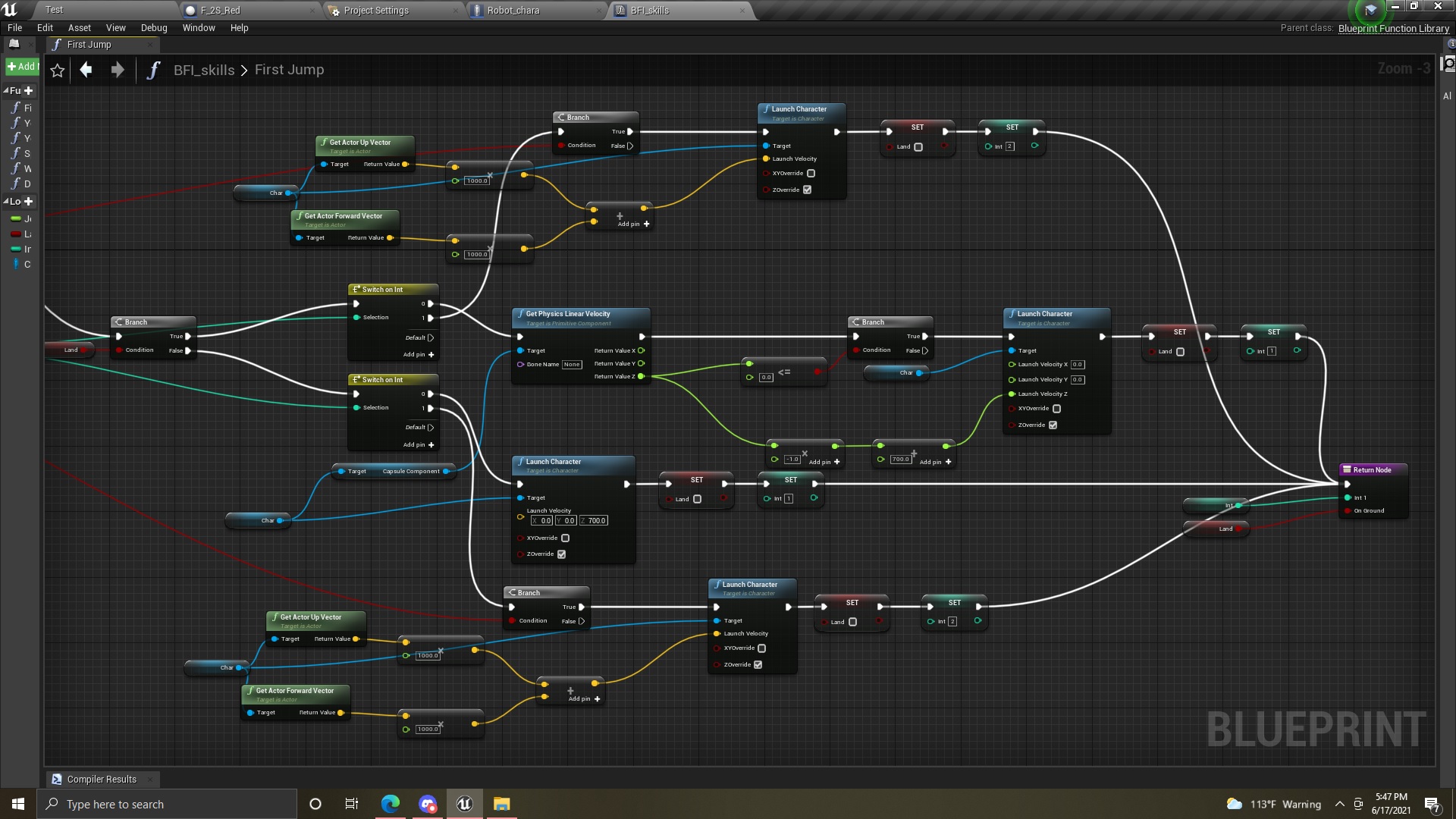
Hey how can i improve this?
https://youtu.be/HpUxGjJ_Md8
Purpose: so I have the player jump only once, but when he picks up the backpack (the cube on his back) he can double jump. 1st jump is basic 700 units up, 2nd jump is as if he gets a boost up and forward. But whenever I play this, for some reason, it doesn't seem natural when I jump on a platform. Like i have to predict where it will go rather than to just go right on it. it feels like as if it can be improved but idk how, any suggestions are helpful.
Code:

 faint pasture
Stuff like this only will work in single ayer tho
 marble spoke
Got a quick question about Anim Montages, do they override the transform modify bone functions in the anim bp?
faint pasture
marble spoke
Got a quick question about Anim Montages, do they override the transform modify ...
That would depend on how your animBP is set up. Playing a montage doesn't just magically override the animBP
marble spoke
faint pasture
That would depend on how your animBP is set up. Playing a montage doesn't just m...
Right I thought so, here's a snapshot of my setup. Basically all upper body animations are rotated based on where my camera is aiming, the pose is then cached and fed into the upper body slot. Problem is when I do the montages to swing the sword, the transforms reset and mess everything up. I'm wondering if i'm missing a setting or something
 marble spoke
Managed to figure it out: turns out it wasn't an anim bp problem, i had to adjust the additive settings of my animations to local space with a reference frame to my idle pose
 glacial merlin
So, I am a complete noob to unreal engine and am having some animation issues. I cannot figure out how to call individual animations while in a state machine loop. Running and jumping are both things that are controlled by a start and a stop but something like dodge only has a start call. Any ideas on how to solve something like this?
narrow kelp
My rule of thumb is to use a state machine for looping things, and to use montages for individual actions
burnt nest
glacial merlin
So, I am a complete noob to unreal engine and am having some animation issues. I...
You could just add the end transition to the dodge animation like you would on a jump end (land) animation.
glacial merlin
burnt nest
You could just add the end transition to the dodge animation like you would on a...
Sadly it is not possible since the way the animation starts is by a variable and in order to stop the animation from re-running, you must toggle it to false. The problem is that you may not set variables from transitions.
burnt nest
glacial merlin
Sadly it is not possible since the way the animation starts is by a variable and...
Right, um. What you can do is use the end transition event to turn the variable off. If you click on the end transition to select it, on the right hand side if you scroll to the bottom under "Notifications" you have an "End Transition Event". Give that a name, then go to the event graph and search for that name and create an anim notify event for it where you can set the bool to false.
glacial merlin
Oh I see.
gentle urchin
dapper bramble
Found out I can do this. Which is not apparent when you break the stimulus outpu...
Mornings! Sadly not able to dig up alot from it (not that versed in c++) Seems there are (as expeced) data about which sense it is, but i'm not sure why its not exposed to blueprint ..
 candid nest
idk why but my touch inputs doest work after some actions like zombie attack and enemy shoot on me i cant press any button but can rotate my screen plz help
dapper bramble
@gentle urchin Thank you so much for digging! One of these days I might do a more sophisticated setup (I am not bp only anyway) but for now I think I can work with what I discovered. And yes I also noticed you can do a bit more stuff with the tags 🙂
gentle urchin
Also found this https://www.thinkandbuild.it/ue4-ai-perception-system/ could be of interest (but still not easily providing which senseID that detected it) ..
you could possibly also differentiate (to some degree) which sense it was based on location of the actor
sight would only be in heads-forward direction with a fov of X
while damage and sound could be anywhere
beyond that I'm not sure what the purpose of differentiation would be ^^
zinc wasp
You could just use tags?
Which you can even single out different hearing senses with it. I'm sure that's why they didn't have a sense break out.
gentle urchin
^for sure
dapper bramble
I have a good purpose actually. My sight is a cone forward. But I have “make noise” events on my run and sprint animations, so when I run up an enemy from behind he will turn around. (And then “see” me.
gentle urchin
Wouldnt that also work with checking location vs sight radius? Sounds a tad extra when the system already should know tho 😛
dapper bramble
Technically yeah but I might wanna expand it with other things making noise that may not even have a sight stimuli
gentle urchin
fair point
dapper bramble
But yeah, with tags you get quite flexible.
gentle urchin
So the tag coming in to the sense is from the stimuli then i suppose?
dapper bramble
Yep
So I could tag footstep sounds to cause some curious turn around and an explosion sound or whatever to drop everything and investigate
 onyx pawn
I am wanting to create an array of static mesh components and I added them to a make array where they have a number assigned, how can I set it to get the total number of actors in that array and list that number as an integer.. when I use get it gives me a slot enter a single number for a location in the array but I want to output from array total number in the array
 gentle urchin
That's pretty cool, and more realistic for sure!
Again tho, i feel like the stimuli should already provide this sort of info
how "loud" it was etc.
dapper bramble
Mhh you can set a loudness on the stimulus. Not sure yet how to fetch it from the perception. But I am sure it’s somewhere in the data
gentle urchin
Tags still give you something extra tho
even a distant explosion sounds like an explosion
gentle urchin
x)
gentle urchin
onyx pawn
I am wanting to create an array of static mesh components and I added them to a ...
"length"
 lapis gorge
Hey all!
I've just started to learn blueprints a week back and I was looking for ideas for some small games that I could implement that would help me learn blueprints.
Thanks!
onyx pawn
gentle urchin
"length"
ok got the length working so it gets all the numbers of slots now what would be the best way to pass an interget value circled to update number for token slot number and append that number to the open token slot number

 dusky topaz
onyx pawn
ok got the length working so it gets all the numbers of slots now what would be ...
dusky topaz
onyx pawn
ok got the length working so it gets all the numbers of slots now what would be ...
Set member of struct, and then in the details panel check the element you want to change
onyx pawn
dusky topaz
Set member of struct, and then in the details panel check the element you want t...
ok I added the set member struct and got it number but not sure how to now link that to length and updated number
 dusky topaz
Are you adding the length to the token number or setting the token number to the length?
onyx pawn
Ok I want it to do this, while my actor has total of 4 slots I want it to get number from the struct which is is say 3 and set that number as number of token slots that are open for use.
dusky topaz
Before you break the struct, drag it into the Struct Ref

Wait no, that sets the number of the struct to 4...
I seem to have misunderstood what you wanted
If you want to get the number of open slots from the struct, the length of the array shouldn't matter, and you just break the struct and get the number and plug it directly into the Set Open Token Slots
 gentle urchin
Hardcoded like this, im not sure what is gonna be achieved by it,
but if 4 is the total amount of slots, and you wanna update free slots based on already occupied slots,
you'd probably need to subtract length from tot (4)
burnt nest
lapis gorge
Hey all!
I've just started to learn blueprints a week back and I was looking f...
This is a vague and difficult question to answer... you could get no replies or about a million (give or take). I'd either suggest looking up some simple tutorials, or if you really want small game ideas, maybe look for Mario Party minigames on YouTube, there are at least a hundred of different small games there that you could try to copy.
gentle urchin
^Or look at oold simple games like ping pong, and those alike
dusky topaz
lapis gorge
Hey all!
I've just started to learn blueprints a week back and I was looking f...
Recreating simple games would probably be the best way to learn the basics, like this https://store.steampowered.com/app/298600/Lovely_Planet/

With boots of speed on your feet, an infinite supply of bullets for your semi-automatic and the ability to jump over twice your own height, you're well equipped to go up against any enemy on your quest to reach Lovely Planet! Balance between jumping around dodging bullets and taking aim for a better shot at your enemies, don't waste time camping...
Price
$5.99
Recommendations
1197
Metacritic
61
onyx pawn
gentle urchin
Hardcoded like this, im not sure what is gonna be achieved by it,
Squzie I basicly wanted it to be setup that while token has four locatons the location that the game will be using is set in the card struct file and then that number is used as the availble starting number of open slots so if a person then addeds a token or presses action it set new number to say we have 3 slots I add a token it places token and sets open slots from 3 to 2 if token destroyed then add its slot value back to number of open slots.
faint pasture
lapis gorge
Hey all!
I've just started to learn blueprints a week back and I was looking f...
Depends on what style of game mechanics you really like. I really like physics so I started there. Start with one of the template projects and give yourself a small goal.
 burnt nest
 indigo cave
im dumb
indigo cave
im dumb
Nahhh, just a little blind! 😎
indigo cave
yes
 burnt sage
Someone could help with this?
 fallen glade
doesn't using this give you 255 possible masks?

 dawn gazelle
burnt sage
Someone could help with this?
dawn gazelle
burnt sage
Someone could help with this?
Are you close to the component that is performing the shake and is it looping or being played repeatedly?
fallen glade
also, does anyone know if it's possible to reduce the size of spline debug? I can't see anything with these huge squares
 gentle urchin
If a thousand actors were to cast to a custom pawn at beginplay; would the custom pawn have thousand copies in the ram for a while, or does it smartly know that "oh, i've already cached pawn into ram, ill re-use that!" ?
fallen glade
gentle urchin
If a thousand actors were to cast to a custom pawn at beginplay; would the custo...
I think the second, it should be already in ram
burnt nest
fallen glade
also, does anyone know if it's possible to reduce the size of spline debug? I ca...
For regular actors this is called the billboard. Try searching for that in the spline's details window.
fallen glade
burnt nest
For regular actors this is called the billboard. Try searching for that in the s...
no result
 burnt sage
will have to recreate to test, but I doubt that's the culprit
burnt sage
dawn gazelle
Are you close to the component that is performing the shake and is it looping or...
Yes, I've verified the component itself works. If I play it from code it's fine. Radius is the same, component camera shake source and camera shake are identical. Just, play from code works, but not sure why it simply ignores me from a BP.
 haughty crypt
is there a better or math-y way of doing this specifically?

just clamping the axis value from the input to respect the animation speed more
slow pewter
anyone have experiences with Array on Blueprint Based here ?
i Fixed floating point precision Issue, and still my array doesnt Work like it should
i mean Array Placement like
 quartz osprey
Hi all.
I have a situation with an EventDispatcher
I create a widget and add it to the view port, from my level with "Event Begin Play"

The Event is created and called from my Character BP

And in my widget I use the Bind, which is not firing [SOLVED]
The problem was... me. 😂
I've created an Editor Utility Widget instead of User Widget.
 faint pasture
haughty crypt
is there a better or math-y way of doing this specifically?
faint pasture
haughty crypt
is there a better or math-y way of doing this specifically?
Ok wtf are you trying to do here?
haughty crypt
haha
faint pasture
@haughty crypt you aren't using axis values to drive animation are you?
haughty crypt
I'm trying to modulate the speed of the axis to fit the animation speeds
faint pasture
That still doesn't compute. The speed of what axis? Are you trying to have the animation speed drive the CMCs properties?
Unless you're doing something exotic you really should just go input -> CMC -> animation causally
haughty crypt
essentially, the animation I have is sliding when I move, I've set it to a blendspace but it's still very much sliding
faint pasture
Make your locomotion blend space such that the animations match up with the speeds
haughty crypt
yeah thats what I did
faint pasture
@haughty crypt set up the CMC such that your movement is how you want it, then adjust your blend space to match
haughty crypt
whats does CMC stand for?
faint pasture
Character Movement Component
haughty crypt
yeah thats what I did, when we get to the speed of the animation, theres no slipping, but anything underneath has slippage
faint pasture
Show your blend space
haughty crypt
also, it takes very little to do the tip toe, so I essentially changed the speed when axis is at 0.5

as you can see, tiptoe is at 18.7, and walk is at 116.5
when the character gets to 200, which is its max walk speed, it scales the animation very well
yeah, but I do like 200, good speed
 knotty dirge
how would one go about calculating the position the AI needs to be to fire at the player that is located on higher ground to ensure it will hit the player?
Is there a function already in UE for this?
I made a drawing to explain what I mean
the yellow line represents bullet trace (able to hit)
 haughty crypt
so yeah, when the axis is from 0 to 0.5, the speed will be at 18.7, then anything higher will be walkspeed
I guess this is better then

 stray island
My for each loop ignores “make array 0 and starts from 1 instead
How can i fix this
faint pasture
knotty dirge
how would one go about calculating the position the AI needs to be to fire at th...
There's no simple way to do it for arbitrary geometry but if you can detect the point where the terrain gets in the way, you can project a line from the player character towards a location above that point and see where it intercepts the ground again. That would be where the AI can stand and see the player character
Doing it robustly with arbitrary geometry will naturally involve a lot of checks and estimations to converge on a solution if one even exists

Like what if it looks like that? There's no solution then
knotty dirge
ye true, I wonder how other games do it 🤔
faint pasture
Depends on the obstacles etc. They may pre-compute visibility maps or just iterate. It's basically a pathfinding function
Might be easier just to check if various areas nearby have visibility, and then expand that area out. That's basically pathfinding to an area that can see the enemy
 sly berry
Hello, does anyone know how to parse a string into an array of strings with a special character as a delimiter ?
I'm getting an input such as "msz 10 10\nsgt 100\n..." and I would like to split this string by the newline character '\n' (not '\r\n', it must only be the linux newline char)
Here is what I've tried so far :
 faint pasture
Yeah that'd be the single-plane solution. Could also try various reachable points in radius expanding outwards to enable horizontal movement and generalize for vertical obstacles.
sly berry
This splits the array to only "msz" and nothing else, where I would like "msz 10 10" as my first index, and the rest of the lines as other indexes
faint pasture
I think no matter what, you're just guessing and checking and iterating until you have a good enough result. You'll never find the one perfect optimal closest point without some fancy math
knotty dirge
Thanks both, I think I'll go for an EQS solution to something similar what Adriel said, it'll work both horizontal and vertical in that way
where each generated position does a raycast towards the player
faint pasture
EQS is prolly the correct way to do it
sly berry
Okay thank you I will try it
faint pasture
Cost functions etc so he's not running across the map to pop a shot off
knotty dirge
yeah 😛
zinc wasp
knotty dirge
ye true, I wonder how other games do it 🤔
I could think of a hacky way for it. Just make a "High hat" collision on the player. Have your AI do a box trace to see if it just hits the player or just the hat. If just the hat than he moves back.
Or you could make a few line trace from player to AI. Like a laser until it hits a z that's equal to the AI z. And get the ai to move to that spot.
faint pasture
zinc wasp
Or you could make a few line trace from player to AI. Like a laser until it hits...
Yeah that's the 1 plane approach
zinc wasp
Lol. Didn't know they had names for these things. I just gave ideas that pop into my head.
faint pasture
The name just popped into mine lol
zinc wasp
Lol. It shall be called the 1 plane approach from now on. I think I'm gonna start naming all my ideas. Just for the Lols
 barren condor
Hello everyone I just found this discord ✌️
Im asking for help for a simple problem about one of my blueprints.
I'm trying to attach a distant object to my TPcharacter but it doesnt seems to work, nothing is happening to the object, after attaching the actor to my character socket in the blueprint below, I can see it has been successfully attached by printing the value of "GetAttachParentSocketName" with the "grabbed" object but like I said, it does nothing

 elfin hazel
@sly berry How do you know that it results in only "msz"? If you're going by the provided example, that's just because you're only printing array index 0.
With a message "msz 10 10\nsgt 100\n...", parsing it into an array with the literal byte 10, should result in "msz ", " "[culled], "\nsgt ", 0\n...".
Because you're parsing it by 10, not \n.
Parsing by \n should result in "msz 10 10", "nsgt 100", "...".
Additionally, don't operate directly on the results of pure functions. Instead in this example, save the return value to an array. To print the result, iterate over the array and print each index.
 little flame
can anyone tell me how to restore the position of an actor if it has been moved?
barren condor
little flame
can anyone tell me how to restore the position of an actor if it has been moved?
this ?
 faint pasture
little flame
can anyone tell me how to restore the position of an actor if it has been moved?
faint pasture
little flame
can anyone tell me how to restore the position of an actor if it has been moved?
Save it, them set position or teleport
little flame
I mean
if my actor has a position of x,y,z and my player kicks it, I want it to be restored again to its position via BP
faint pasture
little flame
if my actor has a position of x,y,z and my player kicks it, I want it to be rest...
Save position before kick, move it back after
little flame
@faint pasture thank I am looking into setlocationandrotation but somehow not really managing it right
faint pasture
How is the actor being moved, physics?
little flame
im making a VR project where one can throw away things
faint pasture
But I mean what is doing the moving when you throw something?
little flame
theyre being picked up by
faint pasture
Something is running the logic to move them, what is it? Out of the box your options are the projectile movement component or just physics
elfin hazel
@barren condor It could be the "get object name". If you have a class named say "Hello", then the object name is typically "Hello_C" with some number. Print it to see exactly what it is, but really, you should never use "Get Object Name" for game logic. Why the grabbed object returns the socket name, I don't really know but that's where I would start investigating, by using a static name until you get it to function.
sly berry
elfin hazel
<@!275551233274675201> How do you know that it results in only "msz"? If you're ...
Its okay I got it working ! Well I tried parsing it by '\n', but it was literrally parsing these two characters instead of the escaped character. I'm not sure what you mean by pure functions, I'm still a beginner to blueprints. My problem was that I used byte arrays instead of characters arrays
faint pasture
barren condor
Hello everyone I just found this discord ✌️
Im asking for help for a simple pr...
Ya that looks really fucky. What exactly are you trying to do? Is the object meant to pick the socket it attaches at?
barren condor
elfin hazel
<@!216641525390508032> It could be the "get object name". If you have a class na...
Even without the getObjectName, it doesnt seems to work, already tested it before
 little flame
@faint pasture its with physics!
barren condor
faint pasture
Ya that looks really fucky. What exactly are you trying to do? Is the object mea...
Im trying to attach an actor succesfully identified by linetrace in the macro to my scenecomponent (my socket) with parent socket defined to my right hand bone
faint pasture
@little flame k just save position whenever you want to a variable then teleport it back
faint pasture
barren condor
Im trying to attach an actor succesfully identified by linetrace in the macro to...
Scene components aren't sockets. Are you trying to attach the actor to a scene component and then move the scene component to your right hand bone socket?
barren condor
This is my scene component
 faint pasture
Okay so then just use attached actor to component, with SNAP turned on. And that should be it
faint pasture
Assuming ObjectSocket is already attached correctly
Why aren't you just attaching the other actor to the mesh at the right hand bone socket? Why use the scene component at all?
elfin hazel
There's also the "move component to" node, which could be messing with the result, try without that first just to get the basics working.
barren condor
Didnt worked with snap enabled :/
 faint pasture
barren condor
Didnt worked with snap enabled :/
faint pasture
barren condor
Didnt worked with snap enabled :/
Are you attaching the object to the scene component or to your mesh?
You don't need the socket name if you're attaching to your scene component which should already be attached to the socket
barren condor
faint pasture
Are you attaching the object to the scene component or to your mesh?
Scene component
faint pasture
Then you don't need the socket name. Scenes don't have sockets
The way you're describing it, you want your other actor attached to the scene component which is attached to your character mesh at the right hand socket
barren condor
Yes In the lesson I was following it was set to blank, but still it wasnt working for me, did tried again
faint pasture
It seems like the same component is useless, but that should work.
Show what you have hooked up to Target and parent in that attach node
barren condor
And now the actor is not getting attached to the scene if I leave socket name to vblank
ok
faint pasture
Just skip the scene component entirely. Attach other actor to mesh at right hand socket
Why do you even have the scene?
barren condor
grabbed object is actor reference and Objects socket is scene component
 little flame
@faint pasture do you have an example of that?
barren condor
Here is the getforceresponsiveObjects
 faint pasture
little flame
<@127902729677963264> do you have an example of that?
faint pasture
little flame
<@127902729677963264> do you have an example of that?
Just make a variable OriginalLocation, set it whenever (begin play?), After being kicked, delay, teleport self to OriginalLocation
little flame
@faint pasture allright thanks a lot! ill give it a try!
 outer moat
is there a blueprint function that finds at which depth level one actor sits in a level scene hierarchy
 hardy sphinx
i have some postions of the door i want to spawn. How can i spawn all this doors ny one event?
 elfin hazel
array variable - foreach - spawnactor
 craggy trellis
I have been wondering for a while now how the tekken 7 bars are made. Diagonal HP bars that when they take damage they retain the shape. Can anyone just tell me the overall approach to do it?
hardy sphinx
thank u sp much
 barren condor
faint pasture
Why do you even have the scene?
barren condor
faint pasture
Why do you even have the scene?
I've simplified my blueprint, adding socket to bone to avoid using scenecomponent, but the same behavior still occurs, the Item doesnt seems to be linked to my socket, it doesnt move

 proud sable
I need to trigger a custom event inside an actor component from the character blueprint when a key is pressed, what would the process for that be like? I'm guessing I need to read about event dispatchers?
Something like this just as a visual example of what I mean
 faint pasture
proud sable
I need to trigger a custom event inside an actor component from the character bl...
faint pasture
proud sable
I need to trigger a custom event inside an actor component from the character bl...
Depends. Is the component on the character?
If so or if it has a ref to it in any other way, just go Input -> get component -> call event
That simple
 nova ledge
Any idea why my component gets skinner every time I attach it to a different socket? I didn't set it up to do that
proud sable
I placed it manually through the content browser, so it's not directly available through the character blueprint. I'm not sure how to apply those steps you're referring to sorry. Are you saying to get the component in between the input node and call event nodes I already have, and plug the component into the target?
 gentle urchin
proud sable
I placed it manually through the content browser, so it's not directly available...
gentle urchin
proud sable
I placed it manually through the content browser, so it's not directly available...
You could setup a dispatcher at beginplay or smth if the player should always be able to trigger this event. Otherwise binding on overlap, or even adding the actor to the input stack could work fine
faint pasture
nova ledge
Any idea why my component gets skinner every time I attach it to a different soc...
Scale
Keep world scale on attach
nova ledge
faint pasture
Scale
It's been on Keep World tho... which is why I'm confused
faint pasture
nova ledge
It's been on Keep World tho... which is why I'm confused
Print world scale and see if it's changing. Are you moving it in the middle of an animation or something?
nova ledge
faint pasture
Print world scale and see if it's changing. Are you moving it in the middle of a...
Yeah... is that the problem then? Well, I move it close to the destination point through an animation, and then attach to it another socket, and once it disappears after the animation ends, I attach it back to it's original spot so I can "recycle" it
nova ledge
faint pasture
Print world scale and see if it's changing. Are you moving it in the middle of a...
Yeah I did the print string and that seems to be the problem... how do I avoid this then?
nova ledge
faint pasture
Print world scale and see if it's changing. Are you moving it in the middle of a...
Nvm, I think I found a way to fix it. Thank you for lighting up the path!
dapper bramble
Hello!
Can someone explain to me please why this cast fails?
I am trying to access a object type that I created for further usage and added as blackboard key, but when I wanna cast to it (to access data from it) it fails.
Even if I print out its object name it prints the correct class it seems.

I am really lost on this one
faint pasture
@nova ledge my hunch was that the anim was scaling the bone but what was the solution?
@dapper bramble you're using an object as a key, not a name
Nvm hold on
faint pasture
Ya I was thinking map
dapper bramble
Alternatively, does anyone know a good explanation for getting an array as blackboard key?
burnt nest
No, that's not a thing.
dapper bramble
Yeah it is set and the blackboard then also switches from none to what I set
But I might have done that part wrong. Because everything else makes no sense. It should TM work.
Hm interesting, lemme see
Yeah that’s always a factor too haha
Blackboard seems allright but I think I set the value wrong indeed. Looks like a hard reference to the asset path?

I was doing it like this (not sure how else) so this might be the issue

Yup 🙂
Silly me
olive sedge
Anyone know if it is possible to have a circular trace? (not sphere) or have a sphere trace that picks up the same object multiple times at each overlap location?
dapper bramble
Constructing an object proper first and then setting it did the trick. Then the cast later also does not fail.

And this is how indeed you can have access to arrays in blackboardse
 empty needle
Does anyone know if there is a Property Grid available in anyway for Unreal . (https://github.com/xceedsoftware/wpftoolkit/wiki/PropertyGrid)
GitHub
All the controls missing in WPF. Over 1 million downloads. - xceedsoftware/wpftoolkit
I'd like to know if something native exists to do this.
Something you could use in your own application
olive sedge
I'm really struggling with these traces.. I need to keep a set distance from a wall but sphere trace picks up the ground before the wall and multiple line traces is too slow. BoxTrace doesn't give me a distance which I need.
Can someone help on how to do this?
empty needle
why not a single simple trace?
burnt nest
olive sedge
Anyone know if it is possible to have a circular trace? (not sphere) or have a s...
Maybe a multi line trace?
olive sedge
That only gives me a single direction as well
I mean, I can cut down a but by going across my actor with a multi but I guess that's just as expensive if not more than a single line trace in 8 directions
burnt nest
olive sedge
I'm really struggling with these traces.. I need to keep a set distance from a w...
Boxtrace doesn't give you a distance? 🤔
zinc wasp
olive sedge
I'm really struggling with these traces.. I need to keep a set distance from a w...
Change the trace for a different collision. You can make your own collision type in project setting and apply it to your wall. Than for the trace just make it trace for that wall.
olive sedge
@zinc wasp that's a good idea but it's the same object, it's a spline mesh component
This is the lats resort.. If I can't make this work in any other way, I will have to split into wall and track and then generate both in the spline construct
but I would hope there's a nicer solution
zinc wasp
That or make a collision box on every wall. Lol.
burnt nest
I still don't understand why boxtrace wouldn't give you a distance.
olive sedge
@burnt nest yes, me neither..
burnt nest
olive sedge
<@!246621213638656002> yes, me neither..
Are you... trying to get the distance? Because it's definitely possible. 👀
 olive sedge
yes, but that delivers a fat 0.0 for me every time
burnt nest
olive sedge
yes, but that delivers a fat 0.0 for me every time
Then something else is wrong, maybe it hits something on your character? I tried it like this, and it hits 580 ish from above if I'm over a vehicle, and 400 ish when it hits the ground.
olive sedge
ok, i'll try this again, thank you
 crimson saffron
I never worked with unreal for this so Im clueless
Im trying to make it so that my player faces the direction hes walking to
olive sedge
@burnt nest Always 0.0
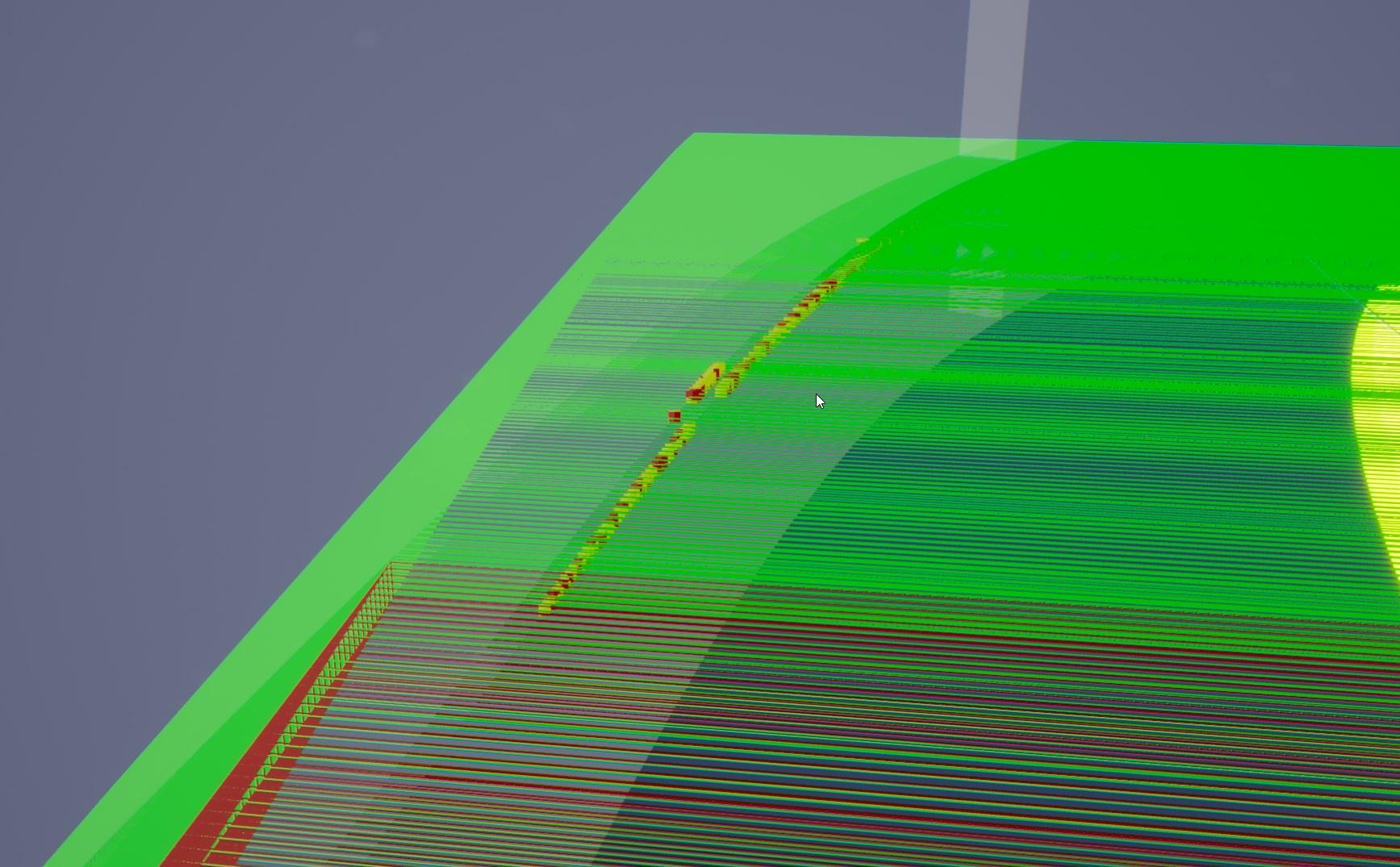
There's impact points, the distance is def not 0
I don't know what this is.
burnt nest
olive sedge
<@!246621213638656002> Always 0.0
Could you set the debug mode to 1 frame?
burnt nest
crimson saffron
I never worked with unreal for this so Im clueless
Im trying to make it so that ...
Typically you have a collision component as the root for your character, such as a capsule component. Then you can just rotate the character mesh to face the right direction. Otherwise if the character is the root component, you have to rotate it correctly in your 3d program before export, or change the rotation on import.
crimson saffron
Oh no I dont mean that
Im using a fixed third person camera system and the player always faces forward is what I mean
I want him to rotate depending of the direction hes moving
burnt nest
Oh okay, I get it! Um.. gimme a sec
crimson saffron
Np
empty needle
is your actor driving down a road?
since the forward vector and left vector is easily put calculated based on the direction of the road
empty needle
got it.
olive sedge
It's definitely colliding but the distance is always 0.0
but this box trace is second rate for me anyway. What I would need is a circular trace
It's weird that a sphere trace works but not circular
empty needle
I'd try and get the trace working for 1.

@olive sedge , I'd try and get the trace working for 1. It would work all the time, be the cheapest in terms of performance. And constantly work in what I see in your video.
burnt nest
olive sedge
It looks like your box trace starts somewhere behind you, and ends somewhere in front... that's not quite how you box trace I think. You'd want it to start at your character.
burnt nest
crimson saffron
Np
Okay so first off I'd set the spring arm to inherit yaw and use pawn control rotation set to true.
burnt nest
olive sedge
or half size rather
Here is my box trace from a top down view. It goes from the camera downwards, and reads 648 distance when it hits the ground.
 olive sedge
hm...
I think I'll put my collision vehicle higher and use a sphere trace to see if that works
Sphere trace gives me a 0 distance too :/
burnt nest
It's definitely hitting something. 😄 Probably the road?
faint pasture
@olive sedge there's no way the line traces are slow, I can run thousands a frame ez
What is the end result you're after?
olive sedge
wat.. If I do like 10 It noticably slows everything down
faint pasture
Unless you're running this on a tamagotchi
olive sedge
GTX 970
that's not ideal but it's not the worst either
I would ideally want to be able to run this on a phone
faint pasture
That has nothing to do with the traces. Anyway, what is the end result you're after?
olive sedge
traces is CPU only?
faint pasture
The GPU can trace but that's like Ray tracing. Traces on the game thread or CPU only, as is pretty much everything else.
Anyways, what's the end result you're trying to achieve?
olive sedge

not really tamagotchi then
well, I want to keep a steady distance to the wall
be able to glide along it so my idea was to split down my velocity into chunks, move a chunk, calculate the offset by tracing, offset my vehicle a little bit and then move again..
this works well but it's slow
faint pasture
Is this feeding back in as a control system or are you using this in the actual movement component?
olive sedge
it's movement
faint pasture
Like do you want to be more like an autopilot or more like being on rails?
faint pasture
Uh. How would that work. If you yaw towards a wall, what should happen?
olive sedge
one sec
faint pasture
Or do you mean the output of these traces should be fed into the control for yaw
faint pasture
Oh okay so you can steer all you want while all the track but just can't drive off of it
olive sedge
I trace in all directions and when there's a hit I offset a little bit and move again (cyan is my intended move and yellow is correction)
yes
I can set the amount of steps I take here and the more I make, the slower it gets
so thousands per frame sounds sick
faint pasture
Yeah something else is eating your CPU time, it's not the trace. Do you have a spline down the middle of your track?
olive sedge
yes
faint pasture
Then why not use distance from middle instead of distance from edge? Just if distance from spline is greater than some number, only allow yaw that points toward the spline
olive sedge
hm, that's actually not such a bad idea..
that would actually be super smooth if it works
faint pasture
I haven't messed with splines much but I'm assuming you can at least get the reference frame for the nearest spline point. That'll give you enough info
olive sedge
I already have the spline location because I shoot a trace for the normal
empty needle
@olive sedge , are you ignoring self in your trace?
olive sedge
@empty needle yes
faint pasture
If you're right of spline at limit, you can only yaw left of spline X and vice versa
olive sedge
I'll try this
crimson saffron
I dont use spring arm
burnt nest
crimson saffron
I dont use spring arm
What is wrong with you-- I mean... okay, show me your setup please. 😉
crimson saffron
I dont use spring arm because uhh its not standard 3rd person
burnt nest
crimson saffron
I dont use spring arm because uhh its not standard 3rd person
Okay, okay... 😛 But I'm not sure how your character is not rotating in the direction he's moving in that case.
proud sable
Sorry to revisit this, I looked into the solutions I got last time I asked (and a ton of googling) but I couldn't get anything to work. I created an ActorComponent blueprint that contains spell and attribute logic for my character and dragged it from the content browser to my character instance. I need a way to activate these via key press but I can't create key input events in the bp.
If I do "Add Component" and add an ActorComponent (NewPyrron_Abilities in the screenshot) I can add key presses, but I need each character to have their own unique abilities blueprints so I don't think that would work.
I'm super stuck, could someone point me in the right direction? I feel like I'm approaching this wrong
 crimson saffron
burnt nest
Okay, okay... 😛 But I'm not sure how your character is *not* rotating in the di...
crimson saffron
burnt nest
Okay, okay... 😛 But I'm not sure how your character is *not* rotating in the di...
Me neither tbh
Like, the default 3rd person template does what I want, but I dont get how they made it work
burnt nest
crimson saffron
Like, the default 3rd person template does what I want, but I dont get how they ...
Well, if you're not using a springarm, I need to see your components to know what you have to work with.
crimson saffron
Sec
burnt nest
proud sable
Sorry to revisit this, I looked into the solutions I got last time I asked (and ...
So... you made a component containing the abilities. And added that to your character. And you can use key presses to call those functions on the component? Am I following so far? So what's the issue?
crimson saffron
proud sable
burnt nest
So... you made a component containing the abilities. And added that to your char...
Yeah, almost. The original component I made directly in the content browser, but I can't access key inputs to call the functions.
The second component I made inside the character blueprint with "add component". I can access key inputs but it would mean all my characters are using the same abilities components which I don't want, since they all have different abilities and stats
burnt nest
crimson saffron
Riiight, okay, so you want a GTA style movement where your character turns where it moves.. got it..
crimson saffron
Yup
burnt nest
proud sable
Yeah, almost. The original component I made directly in the content browser, but...
I would probably create a base class for your abilities containing all the logic your characters have in common. Then create child classes of those containing specific abilities that you then attach to each respective character.
 cunning hull
Hi.I noticed,what when I hold mouse button then IsHovered/OnHovered doesn't work.How can I get around this?
burnt nest
cunning hull
Hi.I noticed,what when I hold mouse button then IsHovered/OnHovered doesn't work...
This has to do with mouse capture, I think. It's under project settings.
crimson saffron
burnt nest
Riiight, okay, so you want a GTA style movement where your character turns where...
How can it be done?
cunning hull
burnt nest
This has to do with mouse capture, I think. It's under project settings.
when i can find this settings?
burnt nest
cunning hull
when i can find this settings?
Search is your friend. Otherwise it's here.

 brittle plinth
I remember there was a node that rounded whatever number was passed to it down/up to a certain amount. As in it capped a value. But I forgot what it was called. Any ideas?
cunning hull
burnt nest
Search is your friend. Otherwise it's here.
Aaaa.I set all settings,but this doesn't help me
burnt nest
crimson saffron
How can it be done?
Is this essentially what you want?
burnt nest
brittle plinth
I remember there was a node that rounded whatever number was passed to it down/u...
Clamp?
crimson saffron
burnt nest
Is this essentially what you want?
Yesyesyes
brittle plinth
burnt nest
Clamp?
yes thats it thank you
burnt nest
crimson saffron
Yesyesyes
Right. So here's what I do for turning...
 cunning hull
Hi.I noticed,what when I hold mouse button then IsHovered/OnHovered doesn't work...
cunning hull
cunning hull
Hi.I noticed,what when I hold mouse button then IsHovered/OnHovered doesn't work...
I'm trying make inventory in my game and i want drag and drop my items.But when I pressed cell with items and drag on another cell,then IsHovered action on another cell doesn't work
crimson saffron
burnt nest
Right. So here's what I do for turning...
Yeah but then, it still doesnt rotate when moving
proud sable
burnt nest
I would probably create a base class for your abilities containing all the logic...
Thanks, that's what I have so far, a base class essentially just handling the cooldown and mana logic.
Just to make sure I understand first, could you explain what you mean about creating children and attaching them to each character? I feel like if I do that I run into the same issue again where I need to call an event inside a component from the character blueprint which is where I'm stuck at at the moment
 olive sedge
@faint pasture https://i.imgur.com/bmscUkN.jpeg
this has potential
thanks so much for the input!
crimson saffron
Thats not what I mean either
My player doesnt rotate in the direction hes walking
proud sable
The issue I'm having isn't so much with the stats and cooldowns, but just giving each instance of my character blueprint separate ability behaviour. I'm mostly just stuck on triggering an event in one blueprint and executing it in a non-inherited component, I think if I could figure that out I'd be okay. I'm a little hesitant to learn GAS while that's the only roadblock I'm facing right now :(
faint pasture
@proud sable the easiest approach is ability equals actor or component on character
Then the ability can have its own little zone of state where it keeps track of its projectiles and cooldowns and whatever
nova ledge
faint pasture
<@486912429536575488> my hunch was that the anim was scaling the bone but what w...
I clicked on the component I was having trouble with, and under transform in details, beside the scale, there was scale type, and I chose world. It was set to relative
burnt nest
proud sable
The issue I'm having isn't so much with the stats and cooldowns, but just giving...
Okay, so. What I would do is right click the base class, and create child. Then create a function in that, name it after an ability. Then add this child component to one of your characters. Do an input action. Then call the function you made. Is this along the lines of what you want to do?
 elfin hazel
@proud sable So you're attaching these ability-components to the characters in the scene? And you have trouble referencing them, since they are not part of the native class? Is that the issue?
 lime karma
quick question, when using the Deal Damage and Take Damage nodes which I only just recently discovered existed, is there an easy way to check whether damage was dealt, like if the thing you hit had a Take Damage event? I know it automatically won't bother throwing up errors or whatever but what I want to do is have a projectile that does one thing if it hits an enemy it can damage, and then does another thing if it hits anything else.
burnt nest
crimson saffron
My player doesnt rotate in the direction hes walking
I'm not sure what you're looking for then. 😦 The steps I showed you would result in the movement system shown in the clip.
proud sable
elfin hazel
<@!226309675912658947> So you're attaching these ability-components to the chara...
Yeah that sounds like it exactly. I'm fresh to UE4 so I'm not great at the terminology yet, sorry. I'm dragging them from the content browser in the level editor to my character like so.

If I make one from inside the blueprint editor I can access everything I need, but it's added to every character that uses the same character blueprint

Ideally each character would only have their own version of the ability blueprint
elfin hazel
I'm not entirely sure how I would handle it, but I'm thinking if you expose an int variable as instance editable on the ability-component, so you can assign 1,2,3 which would correspond to a slot. Then on begin play of the component, Get owner - cast to character class. Now make a function on the character that takes the ability-component, checks its int value and puts it in a variable dedicated to that slot. Let me draw a poor paint image.
burnt nest
proud sable
Ideally each character would only have their own version of the ability blueprin...
Then you make a child class of the character blueprint. Just right click it in the content browser, click create child at the top of the list. Then you can add a different ability component to each one.
 runic bison
I've got working blueprints for my door and window actors, but I'd like to integrate them into a house actor.
Is there a way to attach actors to actors? Or do I need to build a more complex house actor and copy/paste elements in (e.g. collision boxes opening/closing doors, window interactions, etc). I want to be able to drop multiple copies of the same building in a scene
proud sable
burnt nest
Then you make a child class of the character blueprint. Just right click it in t...
I think that makes sense to me, so rather than instancing a single character blueprint split it into children so they can each have their own behaviour without conflicting with the others? Sorry if I'm being dense, I'm a bit overloaded today lol. I guess that's an option, a little worried about it breaking some other mechanics in the game that are already finished but it's an option either way
burnt nest
proud sable
I think that makes sense to me, so rather than instancing a single character blu...
Yes, that's the way I would do it at least. Then you can still change any core mechanics all your characters use in the base class, and just vary abilities in the child classes.
elfin hazel
@proud sable This is a quick sketch I could come up with
 burnt nest
proud sable
I think that makes sense to me, so rather than instancing a single character blu...
burnt nest
proud sable
I think that makes sense to me, so rather than instancing a single character blu...
Of course there are always a million ways to do the same thing. You could just inherit a component that has all abilities in the game, and use some variable to determine what your class should have access to.
crimson saffron
burnt nest
Right. So here's what I do for turning...
Could you explain what this script is for and how it works?
proud sable
burnt nest
Of course there are always a million ways to do the same thing. You could just i...
Alright yeah that makes sense, thank you. I can definitely figure that one out if it comes to it.
proud sable
elfin hazel
<@!226309675912658947> This is a quick sketch I could come up with
The poor paint image helps a ton, thanks! I'll give this a shot first, I can see this one working
elfin hazel
The biggest problem with this is that it doesn't really allow for dynamically spawned characters. Now that I think about it a bit, the best bet is to subclass the character class into the different unique heroes you want.
And giving them the ability components.
burnt nest
crimson saffron
Could you explain what this script is for and how it works?
Instead of vertical and horizontal movement as you're using, I just use "W" to move the character forward. A and D turn the character by "Add Controller Yaw Input". You could just plug the axis value directly into it to test it out. I'm just using turn rate for... reasons I forget. 😉
burnt nest
elfin hazel
The biggest problem with this is that it doesn't really allow for dynamically sp...
Subclasses? Hey, that was my suggestion. 😎
 sacred estuary
Not sure if this is the right place to ask, but I'm using the basic Third person character. Does anyone know what part of the player movement component controls sliding off of surfaces? I don't want my character to slide down slopes anymore
zinc wasp
runic bison
I've got working blueprints for my door and window actors, but I'd like to integ...
Make your house blueprint, spawn the doors and windows. So you don't have to do anything else afterwards.
runic bison
zinc wasp
Make your house blueprint, spawn the doors and windows. So you don't have to do ...
Should doors and windows be actor components? Or actors themselves?
zinc wasp
runic bison
Should doors and windows be actor components? Or actors themselves?
That's up to you. You said you already made them actors so why not just leave it at that. Unless you want to do everything all over again.
But that's me assuming you made them open and close.
runic bison
zinc wasp
That's up to you. You said you already made them actors so why not just leave it...
Just trying to develop good practice. I don't mind redoing something if it is the right way of doing it
elfin hazel
@runic bison There is a class called Child Actor Component, which is a component that can hold a blueprint, that you can attach to other actor blueprints. But honestly, I've had extremely poor experience with child actor components making the editor less stable, more prone to crashes.
zinc wasp
If those doors and windows gonna be used on another blueprint than its best to keep it separate.
runic bison
Thanks peeps... Much appreciated
zinc wasp
elfin hazel
<@!165655980498092032> There is a class called Child Actor Component, which is a...
This ^^. I had a master BP corrupt on me once and it destroyed all my child bp.
flat raft
Use source control
zinc wasp
Though I still use child bp. As it makes things easier.
elfin hazel
I think that if I would design a dynamic house, I would at least explore the option to have placeholder objects, such as cubes for windows or doors, and then when loading the game, replace them with the real windows and door actors.
zinc wasp
flat raft
Use source control
I'm a risk taker. 😎
flat raft
lol
 soft scaffold
Hi! I had a similar question. Can i Lock rotation via blueprints?
 vestal apex
Hello again everyone!
Quick and slightly odd question: Does anyone here know if it's possible to adjust the world lighting dynamically during gameplay, maybe via a blueprint?
Basically, I'm trying to create a bunch of images of an object as training data for some computer vision stuff. One of the things I'd like to include is the object with various different lighting conditions, to make the model more robust and less susceptible to only being able to identify the object in well lit environments.
 severe turret
@vestal apex sure. Use Dynamic Lighting.
desert juniper
runic bison
Just trying to develop good practice. I don't mind redoing something if it is th...
A good practice to look at is using interfaces for interactable objects in the world (Like doors and windows)
trim matrix
Is there a way to make ghost/walk console commands work in listen servers?
 shut hinge
run into a problem. Got plant pulsating using set world transform, (but not smoothly) but only one of the BP intances in the world is active the others are all dead and not pulsating, don't know why..
faint pasture
@shut hinge show your BP
shut hinge
why is only just one of the bp instances is only active jn the world.
faint pasture
Nobody can see your BP so nobody has any idea. Post a screenshot of the nodes
shut hinge
I don't know the logic to doing this the correct way to get all he alien plants pulsating because I've never done it before. First time.

i'm not gonna get it right the first time if I don't know the correct sequence of the logic. But it does work for just one of the linstances. But I've never come across this before. For I thought all your instances would be all active in the world, when you drag them in instead of just only one being active.
elfin hazel
Well, the logic says "get all actors of class", but only grab the instance at index(0).
shut hinge
Since I don't have any alien pulsating animations, i have to use set scale transform instead to mimick the animation.
I don't understand that, since the instances are not in an array.
They are just being dragged into the world from out of the browser from the BP.
desert juniper

you are only ever getting the first one it finds
see the 0? that means the array index 0. which happens to be the first one this node found
 shut hinge
but I'm using the actor bP not the level BP for the level bp is he only way I can select the instances in the world for ref if you have to do it through the level bp...
desert juniper
it doesn't matter
you are getting ALL actors in the entire world, and then only choosing to affect the first one it found
shut hinge
do I have to attach a make array to this get array
desert juniper
no, just a for each loop should do
question though
are you trying to affect all the actors in the world when your character steps in the box trigger?
shut hinge
Yes I was trying to do it through the on overlap trigger like I had done with my dialog triggers.
desert juniper
okay, then yes. create a foreach loop after you get all actors of class
and the loop body can get the static mesh and transform it
shut hinge
ok i'll try that. but i have got this thing running off the tick at the moment (not good).
 shut hinge
but i have made an event dispatcher for it just in case i need to use it
desert juniper
yeah, you probably want to look at shaders in the future, but what you're doing now is good enough for basic prototyping and discovery
shut hinge
for I may want to use this in another game map.
elfin hazel
Is "bolbous" the flower that should pulsate? eg, you have dragged a bunch of Bolbous into the scene?
desert juniper
^
With the logic you have here, each time you are near one of these flowers, they will all start pulsing, but if you go near another one, you're going to start a new event tick for each one you go near
shut hinge
here's the plants I put in well crudely put together of course.
 elfin hazel
Okay, and do you want all of them to pulsate when you get close to one, or only the one you're close to?
shut hinge
want them to all pulstate when you get close, I called this blowout hp alley, the purpose, the party members go through this narrow area and lose most of all their HP when they touch the plants..
desert juniper
okay, so yeah this is mostly right then.
covert arrow
i need help
im trying to do a simple molotov
but the event hit is not working for the capsule collision
desert juniper
Just be sure to turn off tick when you endoverlap event

 desert juniper
otherwise you're going to have multiple ticks running and conflicting with each other
shut hinge
Turn off Tick? Ok.
desert juniper
shut hinge
Turn off Tick? Ok.
@shut hinge A better solution is to enable tick on overlap, and disable it when leaving
then run your code off the tick, and not off the overlap event
elfin hazel
Another problem with using "set world transform" the way you do now, is that all plants will be updated with the same location. They -should- all teleport into one exact pile. Instead, consider using "set world scale".
shut hinge
whats the node to that? as I don't know all the nodes.
desert juniper
like this
 shut hinge
first of all I also have to add the pawn check so party members can activate it also.
A question anything we store in the Player Controller BP will that carry on over to other level maps like the game instance?
i using get controlled pawn to do the pawn check. As I have a party switching system.
elfin hazel
If you only have one map, and load another then no, the controller is destroyed.
@covert arrowOn Hit requires a block, where as you have the collision preset set to overlap.
shut hinge
ok, so it has to be stored in the game instance. but in my current system has 10 party members, and currently you can access all of them. But ideally I want it so you can access all 10 party members, but you can only switch between 4 of them on the screen at a time so you don't have all 10 of them on the screen because that be too much clutter. Also the dialog system, I think the dialog should be one line display instead of sentence because I need things to be less cluttered.
 past coral
Hey is it possible to replicate movement when I want to use "addImpulse" to move a character? I am using a listen server. I can only see the server move right now as a client. Clients cannot see each other move, and the server cannot see clients move either. If the server character bumps into a client character, the client character will move due to physics(not input), but movement will be jittery.
finite osprey
keen goblet
Probably! I think you could call HitActor.GetComponentByClass(SkeletalMeshCompon...
Bro, youre the best works perfectly fine! Thank you 😄
shut hinge
how do we make the widget adjust its size when displaying text. at the moment the widget is a fixed size.
burnt nest
shut hinge
how do we make the widget adjust its size when displaying text. at the moment th...
Wrap the text with something like an Overlay. Then check "Size To Content" on that, and it will scale with the text.
 pliant jewel
Is there any way for me to view Physics Constraint Components at runtime?
narrow kelp
You could do some debug line drawing
 halcyon hill
I'm trying to figure out components... I'm wanting to create a Targeter component that lives on the player, and it raycasts out to see what I'm looking at. Then I want that component to send out a message to whatever I'm looking at, and if that targeted actor has a component that cares about being looked at, it can react (such as a Highlight component.) The raycasting isn't a problem. My issue is I get that TargetedActor and it may or may not have a Highlight component. Or it may have a different component that cares about being targeted, such as a BlowUpOnLookAt component or something. How can I send a message to a single Actor that may or may not be setup to deal with it - that will be ignored unless that actor has a component that uses it do something?
desert juniper
@halcyon hill You're just discovered interfaces
You can make a blueprint interface class, such as IInteract, and give it a function. Such as "Interact"
then any actor that implements the Interact interface can have the Interact event called
in your other component, you can just call the Interact event without necessarily needing to cast to it
halcyon hill
ahhh, I'm a bit familiar with Interfaces, but I don't use them a ton yet. I had played with creating a "Targetable" component but a Targetable interface might be more lightweight and do what I need by allowing the component already there to listen to the event if it wants to? Cool that me play with this idea some 🙂
desert juniper
Sure, if you create a Targetable interfeace, and just have the actor implement it, then you can just define what is supposed to happen then
when you do your linetrace, you can get the returned actor, and call the target, interact, destroy, or whatever else event/function you defined in the interface BP
You should be able to go directly from the linetrace 'Other Actor' to the desired interface message. If the actor does not impliment that interface, then nothing will happen 🙂
halcyon hill
My goal is to not have to do ANYTHING to the actor other than drop on the component. I just put the Targetable Interface on the HighLightComponent. I'm not sure yet how that's going to work, but I'm playing with it.
desert juniper
ahh so that's a tiny bit trickier
from the linetrace you can get component by class
and if it is valid, then you can execute whatever code you want
unfortunately, a standard interface message like i described won't work if the interface is on the component, not the actor
So you'll just need to check if you can grab the component by class on the actor first
halcyon hill
ok thanks for your help. I think I understand. If I can't get it to work, would you mind if I pinged you later?
desert juniper
sure
that's how I'm building my characters as well. trying to do everything through composition
or as much as possible anyways
 tight schooner
@halcyon hill I'm also in the process of experimenting with components as interfaces, but yeah checking if an actor has a component of class and doing stuff / executing functions on that component obviates the need for a Blueprint Interface. I haven't tried this myself but I imagine you could have a component base class which acts as the interface, and child component classes that ofc have customizations e.g. function overrides.
 proper sentinel
I'm making a platformer. Would the blocks that make up the level best be classed as actor blueprints?
desert juniper
tight schooner
<@205461316582899712> I'm also in the process of experimenting with components a...
I feel that you still have the problem where you need to check to see if the component exists first.
And then you have a problem where you have one monolithic class to handle all interface actions, when you may only need one or two
tight schooner
Yeah it's an extra node vs a BP interface call but it still serves the purpose of breaking up a dependency web of assets
Anyway point taken. There are so many ways to do things and I'm still exploring.
desert juniper
Don't worry. I definitely haven't found the perfect solution either
tight schooner
BPIs are annoying to work with IMO cuz they don't have any functionality in them, so everything that implements it does its own unique thing
rather than inheriting some default behavior
But I digress...
desert juniper
also, if you make use of BlueprintLibraries, you can take care of some of the repeatable code automatically
@tight schooner That's kinda the beauty of interfaces
the fact that it's just a contract. if the object implements it, you know they have a callable function
now if you want, you can always make a parent that implements the interface and does something with it, then make children of the parent that call the super before running their own special code, or even override the original event
tight schooner
Yeah that's an idea
desert juniper
I'm coming from Unity though, and I am quite fond of the idea of composition, so I think that's how I'm going to try and build out my characters. so I can just add components for functionality, without mudding up the actual actor
narrow kelp
The only legit need I've had for an interface is when I need to give something information, but have absolutely no idea what its going to do. Basically when its someone elses work
desert juniper
The best example I have for interface is object interaction
you do a line trace, and get back an actor. if the actor implements the interaction interface, then interact with it
narrow kelp
Yeah, you could have lots of people making interactable objects
desert juniper
if it doesn't don't do anything
narrow kelp
that do god knows what
desert juniper
yes, and since each actor interacts differently, each one needs their own functionality anyways
instead of a parent 'interact' behaviour
for instance, some may disapear, some may be added to inventory, some may turn on lights, some may explode, etc
tight schooner
Epic's own example is a flamethrower that sprays "set on fire" messages to whatever it hits
desert juniper
none of those in my example have anything in common, other than the fact that they are interactable
shut hinge
ok got alien plant working, but how do I update the health bar widget. Health bar value is being stored in game instance but widget is not updating..
shut hinge
heres whats in alien plant bp

and here's the binding to the widget itself which is the player portrait health bar

You walk into the area with the alien plant and it takes -10 health from you. BUt I also wanted to store the health bar value in game instance as I want the player's health bar to be avaliable across all the game levels not just one level.
print string is showing up nothing on the screen when casting to game instance the health value.
strange.
Why won't print string work with the game instance cast?
narrow kelp
Either your game instance isnt that type, or your value isnt being set
or you aren't calling that function
shut hinge
the health bar is a float value
where do I update the widget with the tick? The Health bar is in axle UI BP for the widget binding. But its not updating the health progress bar. and the float value is supposed to change the progress bar.
and I'm trying to change the float value in the alien plant BP actor itself.
silk hinge
hello I got a question I would like to check if a socket is allready used to avoid having two weapons in the same hand I cant seems to find a "is valid" for checking if there is allready something attached to a socket.
 narrow kelp
I would just use a variable to keep track
but I guess you could get the number of children on your mesh
if you dont have anything else there
silk hinge
yeah i'm really nuby not really abble to do any variable and fully understand it sadly I been starting like a week ago ^^

 tame grotto
shut hinge
still not updating
tame grotto
shut hinge
still not updating
You cannt hook up a single float to a progress bar. You need it to be done through Normalize to range node
progress bar works in percentage from 0 to 1
trim matrix
will ue4 have adaptive trigger support?
or does it
halcyon hill
Removed my pic and edited because I figured it out!
shut hinge
widget progress bar not updating. I have the percentage halfay down in the designer, when I start the game the bar is all full. but it don't change, and take 10 percent off it.
zinc wasp
trim matrix
will ue4 have adaptive trigger support?
or does it
It has too. I mean if ue5 is mostly targeting console.
shut hinge
so its not subtracting, and print string won';t give me anything from the game instance to tell me if value is changing or not.
what was this about needing to update the widget from the tick?
so how do you update the widget? it won;t update it when I step into on overlap trigger.
narrow kelp
I would recommend learning how to step through the code using break points
silk hinge
narrow kelp
but I guess you could get the number of children on your mesh
sorry for bothering I'm afraid I didnt get what you ment 😦
shut hinge
i don't have debug, I only have print string.
narrow kelp
ok
tame grotto
shut hinge
what was this about needing to update the widget from the tick?
Binding already works through tick. For the health you need two variables - current health and max health. In the bind section of the widget you use Normalize to range, where you hook your current health variable to the value input and maximum health to the maximum input
or do it like here
In this tutorial I show you how to create a basic health bar that fills up an decreases based on the player taking damage. If you have any questions or comments please let us know. If you like the video and want to see more, go ahead and subscribe. Or consider supporting us on patreon https://www.patreon.com/titanicgames for more great tutorials...
but i strongly recommend against casting in the bind
shut hinge
don't think this gonna work through the game instance because I got axle max and current values stored in Ch-Human in the commander's own blueprint.
and not stored in the game instance
so that's not gonna carry over into other game maps as a result.
is already been wired to work only through ch-Human.
here's the binding for the levelling system

 jolly carbon
Hi! I'm trying to make a dash move that only works if a movement key + E is pressed but I can't seem to get it to work, I keep only having it work with only one pressed 😅
 icy dragon
jolly carbon
Hi! I'm trying to make a dash move that only works if a movement key + E is pres...
icy dragon
jolly carbon
Hi! I'm trying to make a dash move that only works if a movement key + E is pres...
Can you give screenshot or https://blueprintue.com copy of the BP?
BlueprintUE
BlueprintUE.com is a tool for sharing, rendering and rating blueprints for Unreal Engine 4. UE4 is a game engine which use visual scripting called blueprint.
zinc wasp
When E is pressed, get the axis of moveforward and moveright. if its not 0 than dash in that direction
tame grotto
jolly carbon
Hi! I'm trying to make a dash move that only works if a movement key + E is pres...
 shut hinge
don't know if it will work from the game instance. widget progress bar still not updating.
 zinc wasp
jolly carbon
hm I don't seem to have that Is Input Key Down node in 4.26
zinc wasp
jolly carbon
hm I don't seem to have that Is Input Key Down node in 4.26
Or when E is pressed branch to check if velocity is > 0 than dash.
tame grotto
jolly carbon
hm I don't seem to have that Is Input Key Down node in 4.26
you need to do it in the controller or from PlayerController node
shut hinge
here's what i have in the binding of that progress health bar.
 halcyon hill
I just now discovered BlueprintUE thanks to you all 🙂
 storm vigil
Hi. Could anyone give a rough logic on this two topics?
- get an exp from killing an AI from a specific weapon, I plan to improve weapon accuracy when you kill more AI with that weapon
- melee weapon getting damaged after several hits on an AI
Thank you
zinc wasp
storm vigil
Hi. Could anyone give a rough logic on this two topics?
1) get an exp from killi...
Do you know about structures variables?
shut hinge
is the logic incorrect? or is there logic still missing for it should be updating the progress bar.
zinc wasp
Looks like your just giving it the currentHP
What you do is get the currentHP and divide it by the MaxHP. That should give you the hp percent
shut hinge
i have that in the levelling system


 icy dragon
tame grotto
icy dragon
tame grotto
I definitely won't do this kind of setup, because I also have to support either keyboard and gamepad. I'd rather use input axis to determine the movement/direction.
@tame grotto @jolly carbon
shut hinge
what about construction script since the widget is still not updating itself.
zinc wasp
icy dragon
I definitely won't do this kind of setup, because I also have to support either...
I didn't think about that but getting axis is so much easier anyways.
shut hinge
i dont know what to put in the event construct of the widget itself that contains the binding.
storm vigil
zinc wasp
Do you know about structures variables?
Yes a bit I have been working with them with the templates I am using. I just do not know how to connect a specific weapon kill to gain exp from and improve my variables for the weapon system.
Same with how to damage a melee weapon when hitting an AI. Unless i make a hit event on the AI cast to the weapon itself?
tame grotto
icy dragon
I definitely won't do this kind of setup, because I also have to support either...
you can do it with Get Action Mapping by Name. And in that case it will determine by itself whether it was gamepad key pressed or a keyboard
jolly carbon
@icy dragon I'm trying out blazen's suggestion, this is my first time using the blueprint system 😅
zinc wasp
tame grotto
you can do it with Get Action Mapping by Name. And in that case it will determin...
But you could make it as simple as this
 shut hinge
i know how to create widgets, toggle widgets but not how to update widgets yet. What do we put in the event construct node..
jolly carbon
I got that suggestion working, but I'm looking for if two inputs are being pressed at the same time for the action to happen
zinc wasp
@jolly carbon This won't give you the direction lol just using it as example.
jolly carbon
lol yeah I got that
icy dragon
tame grotto
you can do it with Get Action Mapping by Name. And in that case it will determin...
Using the input action event is going to be way easier though.
tame grotto
zinc wasp
But you could make it as simple as this
also an option
icy dragon
And I'm speaking putting into account that the input has to be remappable and device agnostic.
shut hinge
what needs to go into the event contruct to get this widget progress bar to update itself?
zinc wasp
storm vigil
Yes a bit I have been working with them with the templates I am using. I just do...
Hmm, I just make a structure variable and array it. It gets complicated once you start doing this. I'd make a few variables in that structure that you would need.
tame grotto
icy dragon
And I'm speaking putting into account that the input has to be remappable and de...
for remapable you need to use that Get Action Mapping by Name. It will take any key you map under that name you've given
zinc wasp
@storm vigil Basically have a name, index, and currExp. variables.
Than update it as you hit something
icy dragon
tame grotto
for remapable you need to use that Get Action Mapping by Name. It will take any ...
Okay, but what if, say, the key binding has secondary button mapping? Surely that won't be a good solution for actual gameplay function (but passable for prompt widgets)
shut hinge
do i need to put something else in the construction script of the UI that has the progress bar in it to get this health bar to automatically update.
zinc wasp
shut hinge
do i need to put something else in the construction script of the UI that has th...
No not really.
tame grotto
icy dragon
Okay, but what if, say, the key binding has secondary button mapping? Surely tha...
for that reason the node i mentioned gives you an array as an output
shut hinge
well I'm not sure why its not updating the bar yet. But my commander IS a child of THird Person Character so I'm working wtih a child BP, not the main BP.
jolly carbon
I figured out a good solution using bits of what you guys told me, just messing with it a bit
thanks for the help 😄
zinc wasp
jolly carbon
I figured out a good solution using bits of what you guys told me, just messing ...
Awesome, glad it helped
icy dragon
tame grotto
for that reason the node i mentioned gives you an array as an output
I'd avoid using array if I were you.
zinc wasp
shut hinge
well I'm not sure why its not updating the bar yet. But my commander IS a child...
You did have it working for your other widgets right?
shut hinge
no, i only just starting to install in the health bars for my widgets. After I had installed in the levelling system in for all the pawns using the game mode..
tame grotto
icy dragon
I'd avoid using array if I were you.
and the reason for it? Since that node is exactly what you need for a remapable inputs
shut hinge
the text counter for the health bar is working, that's updating but not the progress bar itself.
zinc wasp
Is the progress bar bind?
shut hinge
the cuurrent health bar I'm trying to get working is binded to the progress bar through the designer.
zinc wasp
Hmm, haven't made it in a long time but should work once it bind.
Maybe getting the wrong value from the wrong bp
shut hinge
thisis what's in the binding
 zinc wasp
Do a print string and connect the cast to it
Maybe the game instance not getting update?
shut hinge
and i set the two health values to 6000 for current and max in the game instance.
three's no logic in the game instance BP for updating the health. all I did was store the health values in it.
shut hinge
 zinc wasp
Ya I know what you mean. But is the varible get updates when it get hit?
shut hinge
that's in the alien plant BP where the value is supposed to update

this is connected to the on overlap trigger of the plant itself.
zinc wasp
Not really sure whats going on but your health seems to get set to 0
which 0 divde by anything is 0
shut hinge
buti ts not showing up with print string when the game instance is used.
so print string instead of showing up 0 is showing nothing on the screen. he only time print string prints anything is if its outside of the cast of the game instance node.
zinc wasp
Your normalize value is 0. Try setting it to 1
shut hinge
which has me puzzled as I thought print string displays values from the game instance.
zinc wasp
oh
tame grotto
shut hinge
that's in the alien plant BP where the value is supposed to update
current health you need to hook up to a value input
jolly carbon
I'd say this is a successful first dive into Blueprints, got it to work!
 silk hinge
gj ^^
shut hinge
but i have current health hooked up into normalize node and into pecentage node.
zinc wasp
jolly carbon
I'd say this is a successful first dive into Blueprints, got it to work!
Lol, that works too.
jolly carbon
might be a lil bit complicated lol
zinc wasp
Did you just wanted to launch the player forward?
jolly carbon
I was going for directional
tame grotto
shut hinge
but i have current health hooked up into normalize node and into pecentage node.
into a value input of a normalize node. The minimum should be 0
shut hinge
range min already has current health plugged into it so I can't change it to 0
tame grotto
and the return value of this node straight into the health bar
shut hinge
wait a minute, I have this normalize code in the alien plant actor BP, not in the widget binding.
zinc wasp
jolly carbon
so D and E, go right, and so on
Hmm. Congrats! Lol, I know I did this long time ago as well but I forgot what I did. I'm trying to remember but I can't. I know get velocity gives you the direction the player is moving.
tame grotto
shut hinge
range min already has current health plugged into it so I can't change it to 0
it is how percentage works. What this node does is basically determines percentage of the value, based on the max input and normalizes it to 0-1 range
icy dragon
jolly carbon
yeah
I'm using ALS, so all I did for the dashing is to get the last input direction and execute the dash in Input Action Dash event
jolly carbon
ALS?
zinc wasp
Last movement input vector, first I heard of it. Haha
jolly carbon
I haven't touched Blueprints really before today so I don't know much of the terminology
zinc wasp
ALS is a free plugin
icy dragon
Advanced Locomotion System. It's like the buffed up version of Character movement.
zinc wasp
That makes your character look AAA
icy dragon
It's free but not exactly beginner friendly
But it still adhere to Character standard so you can apply the concept I mentioned earlier.
shut hinge
i disconnected current health pin and put 0 in it for min but that did nothing.
i still can't get that progress bar to drain on the screen.
zinc wasp
Do print string of currHealth / maxhealth
shut hinge
so maybe this normalize node is not supposed to be in alien plant BP. But in the Widget Binding code.
tame grotto
i think theres something overcomplicated there. Why do you need game instance? Wheres you health variables stored and the health decreasing logic?
zinc wasp
You dont
tame grotto
shut hinge
so maybe this normalize node is not supposed to be in alien plant BP. But in th...
yeah it should be in the bind
zinc wasp
I thought you wanted to put it in there
shut hinge
ch_human is where i have the player health stored. But the problem is when I change maps I will lose the values. that's why I was going to put it in the game instance.
proud sable
Are there any obvious disadvantages to creating a ground AOE indicator this way? I essentially have a spring arm attached to the camera which projects a decal onto the ground at the end point. From what I've read I'm supposed to use a line trace. I'll be honest when I saw the line trace node I kind of got overwhelmed and did it this way instead, so I might be missing out on something obvious
 tame grotto
shut hinge
ch_human is where i have the player health stored. But the problem is when I cha...
tame grotto
shut hinge
ch_human is where i have the player health stored. But the problem is when I cha...
so for now just forget about changing maps and game instance and focus on one problem at a time
zinc wasp
You could use it to store the variables as you change map. But probably easier as is.
shut hinge
alright
flat raft
Howdy ... what we talking bouts?
zinc wasp
Overly complicating things.
flat raft
Nice
shut hinge
here's the binding now I dunno if its right
 zinc wasp
Don't need normalize
just divide curr and max
and hook it straight in
dividing pretty much normalize it already
tame grotto
shut hinge
here's the binding now I dunno if its right
get rid of the divide node and unhook min input
shut hinge
 tame grotto
proud sable
Are there any obvious disadvantages to creating a ground AOE indicator this way?...
tame grotto
proud sable
Are there any obvious disadvantages to creating a ground AOE indicator this way?...
dont you want to move AOE indicator with the mouse? In that case you pretty much need the line trace
tame grotto
shut hinge
and current health hook into the value
zinc wasp
shut hinge
Just divide curr hp and max hp
flat raft
You're adding health to the game instance??
tame grotto
or just do the divide yeah
zinc wasp
I think normalize to range node is too much for you right now
proud sable
tame grotto
dont you want to move AOE indicator with the mouse? In that case you pretty much...
It's essentially a 1st person/over the shoulder kind of game, the AOE moves to wherever the player is looking at
zinc wasp
flat raft
You're adding health to the game instance??
Ya he has different levels
proud sable
I'm just wondering if it's awful for performance or something, visibly it seems to do what I expect but I'm not sure if there's some obvious pitfall of doing it this way that I'm not seeing
zinc wasp
proud sable
I'm just wondering if it's awful for performance or something, visibly it seems ...
If your rate ain't dropping to down by 10s it should be fine.
tame grotto
proud sable
I'm just wondering if it's awful for performance or something, visibly it seems ...
well i never saw a spring arm used that way and i dont think theres any disadvanatges in that, but line traces are essential thing and sooner or later you'll need to face them
zinc wasp
Ya line traces probably be better.
I'm sure the perform from a line trace is better than a spring arm, just not sure by how much.
The way I see it, the spring arm is always checking to see if it gets collided.
proud sable
Right yeah now that I'm thinking about it the line trace can return information on what it hits
shut hinge
i don't have all the different levels maps made yet because i been having trouble trying to get just one level to work with this system as its a 10 party member game. I have got the basic dialog system for all the NPC'S working now, but not the dialog branching choices in the dialog yet working (that's the next biggest obstacle). For that system that brings up the window of dialog choices after ending conversations with NPC'S needs to be put in as well..
proud sable
I was thinking purely about the projection
 brisk turtle
not sure if i should ask this in bp or cpp cuz it involves both... when you either migrate stuff that was obviously based on custom classes (or rename the classes) it will break everything in the content folder ... now you don't want to open all these one by one and fix it, reparent all , re-class the variables, etc
or even remake them all ... is there a tool for uncooked .uassets where you can go change the class names /paths before you import them in so they aren't broken?
for example i'd like to open all the .uassets and do a find and replace >.>
shut hinge
ok now that the widget binding is done, what else needs to change with this code that's in the alien plant actor bp itself.
 tame grotto
shut hinge
ok now that the widget binding is done, what else needs to change with this code...
tame grotto
shut hinge
ok now that the widget binding is done, what else needs to change with this code...
make the health depleating logic before the normalize. You dont need to do that -0.2 deduction. Deduct from the current health and set the current health with the new value
shut hinge
i didnt understand what you mean by that I don't need to do a 0.2 deduction since I need to subtract to change the health so this is what I ended up with when I plugged in the pins.
.
 tame grotto
shut hinge
i didnt understand what you mean by that I don't need to do a 0.2 deduction sin...
tame grotto
shut hinge
i didnt understand what you mean by that I don't need to do a 0.2 deduction sin...
unhook the minimum input. It should be 0
tame grotto
shut hinge
i didnt understand what you mean by that I don't need to do a 0.2 deduction sin...
you subtract from the current health
shut hinge
unhooked it, it now reads 0.
tame grotto
yeah
zinc wasp
shut hinge
unhooked it, it now reads 0.
Do you know what normalize mean?