#blueprint
402296 messages · Page 674 of 403
 deep cove
 trim matrix
Ah thanks , i will try that
deep cove
A good practice is to always appen the area the print sting is coming from. ie. SwitchD-UpdateAngleFunc blablabla. Then you can turn it off when you see it pop up later.
 proud sable
I'm on Day 1 of UE and following this BT tutorial, everything's set up and mostly working but the patrol behavior never seems to trigger. I noticed at the end of the guide BTT_FindRandomPatrol displays the patrol location, but with the same node setup (as far as I can tell) I don't get the variable to display in my behavior tree. I tried checking instance editable to see what's going on and it shows up as EnemyActor even without line of sight. Looking at the tree the Patrol sequence flickers for a frame but never reaches "Wait", it skips immediately from Move To to AI Root>Wait.
Any idea what I could be doing wrong? Sorry if my terminology is way off, this is all new to me.
Oops, quick edit: I double checked one last time on the "FindRandomPatrol" condition and was able to change EnemyActor to PatrolLocation and it seems to be working now. I couldn't find this anywhere in the guide but it seems to work in this case?
This guide shows how to use Behaviour Trees to set up an AI character that will patrol or chase a player.
trim matrix
how to check if an actor is player 0 1 2 3 4 5 6 or check if player is oneself ?
 twilit heath
never check for player or controller index in MP
only 2 things you generally need to know are: IsLocallyControlled(Pawn) or IslLocalController(Controller)
and if the code is executing on server or not
 gusty portal
can anyone help me with collisions?

i have one an actor with a box collision
i want it to ignore all collisions including projectiles
but projectiles keep getting deflected by it
and it acts as a world static type object i guess(cause whenever i ignore world static on the projectile, the projectile works fine but the problem is that it goes through walls)

i have this for the encounter volume
yet it stops projectiles
anyone know what's going on?
deep cove
many times it is both sides of the equation that can cause this. I have had objects that are set as AA, and AA only detects BB, but if CC also detects AA, then AA with get bumped by CC. Collision and overlap are different things.
also check your AutoWeld. That can sometimes throw things off with collisions
gusty portal
deep cove
also check your AutoWeld. That can sometimes throw things off with collisions
what's that
 olive sedge
anyone know of a plugin to add comments to blueprints? and I don't mean those section boxes with headlines but something like that with the possibility for longer texts
deep cove
gusty portal
what's that
Auto Weld is under Physics
deep cove
olive sedge
anyone know of a plugin to add comments to blueprints? and I don't mean those se...
Dude, you can write a book in those boxes. Just don't pull the box out, and it will just be text. I do it all the time. My BP is like Post-it note city
gusty portal
deep cove
also check your AutoWeld. That can sometimes throw things off with collisions
so my encounter space has auto weld on
is it supposed to have it off?
well my projectile also has it on
deep cove
maybe. It means that it will take on the traits of its partent or root.
gusty portal
didn't achieve anything
olive sedge
@deep cove hm, don't know why I've never done that.. think it just feels wrong to write huge headers
deep cove
I don't think projectiles simulate phyiscs.
gusty portal
idk if i even will end up using this projectile but i need to understand how and why the collisions are messing up so that i can avoid it in the future
deep cove
My collison object nor my sphere is set to physics
Have what you want to hit, set to ignore projectile
gusty portal
i want the projectile to bounce off walls or hit the enemy ai
deep cove
I had issues with projectiles bouncing off my player detection colliosn objects when I first started
deep cove
right. the projectiles have thier own thing in there. You'd have to just play with the settings. I remember using one to make a door blow in the wind.
deep cove
I havent used AI, so I would not know.
I'm focused mostly on what the player cna interact with.
gusty portal
there's no other collisions apart from this box i'm pretty sure
is overlap like a block?
i thought it mean it'll pass through the object but can be used to generate overlap events
wait what?
it's apparently hitting some collision cylinder but i don't have any collision cylinders
deep cove
there is obviuly something there. Make a copy of the things, and start deleteing. That's what I do, unitl I find the problem, then use that knowlege on the real bp
gusty portal
so
the projectile is hitting the character(which is shooting the projectile)'s own collision
as soon as it spawns
deep cove
nice.
deep cove
It the face palm momments that make all this worth wile. I have at least 5 per week.
gusty portal
all it needed was a print at the right place
ok now the issue is how do i make the projectile ignore the actor
that's spawning it
cause it's doing damage to the owner which isn't good
 little helm
here's a blueprint of door open/close. The door is rotating only in anti-clockwise direction ...i tried but not able to resolve this ...please help anyone
 deep cove
Why are yo adding world rotation and not local?
 tired fossil
A negative value will rotate in the opposite direction
Or you can change the timeline so that it works, for example, from zero to the desired negative value
Or multiply by -1 the current timeline output
deep cove
olive sedge
<@!790997169998004235> hm, don't know why I've never done that.. think it just f...
What my BP's look like, so I can always figure out what I was thinking when I made it.

Here is my door, using a physics hinge. When the player unlocks it, it opens slightly, and then when the player pulls on it, the door will open all the way. I hate having to pull open a door, in vr.
 gusty portal
ok now the issue is how do i make the projectile ignore the actor
gusty portal
gusty portal
ok now the issue is how do i make the projectile ignore the actor
is there a way to keep track of this?
deep cove
If you are using a timeline be careful about using your destination as your input. Always set aside your starting position as a variable. So doo shoudl never be your start input. Only you destiation for set door rotation, etc.
 loud cipher

Hey guys im trying to make houses spawn at a location
But i want them to be random
But within a fixed spot
How could i set a random integer setup to hook up to spawning objects
deep cove
random in range
loud cipher
deep cove
random in range
Yes but where would i go from there
to hook it up to spawning an object
deep cove
hook it to your XT and YT location
Worlld or local location. Depending on if you want it to spaw around a cretain actor
spoawn actor by class.
there should be lots of video on this on YouTube
you have a random number in range for both X and Y , and you need you actor to spawn. Its a bit of math and Breaks to get correct. I'd spawn a dummy to tell me if there was something there already, and then spawn the real thing, if its safe, using a break.
But I'm new at UE4. only 4 months
 tired fossil
@little helm, one way, but maybe there are better
 gusty portal
how can i debug eqs queries
tired fossil
I'm not sure if I'm writing to the right section. But can anyone help with a question like this?
I want to release a BP product for the marketplace, and I don't understand what to do if I need to make changes that will change the API in blueprints (for example to fix a bug).
I see the 2nd option:
- just change and send for updating in the marketplace. But when users were updated, then parts of the project using this BP may not work for them.
- each time add the updated version to a new directory. But then users need to transfer all developments to the new version
/Content/BPTool_v1/
/Content/BPTool_v2/
/Content/BPTool_v3/
Please help with this. Perhaps there is a single way to do this. Thanks
 light plinth
Can anyone help with creating a simple card game that only requires cards with attack and defence points as well as player life points
 sinful sonnet
Hello, how can I deform a blueprint (not a mesh) along a spline ?
olive sedge
@deep cove how do you make them look that way?
 ember oracle
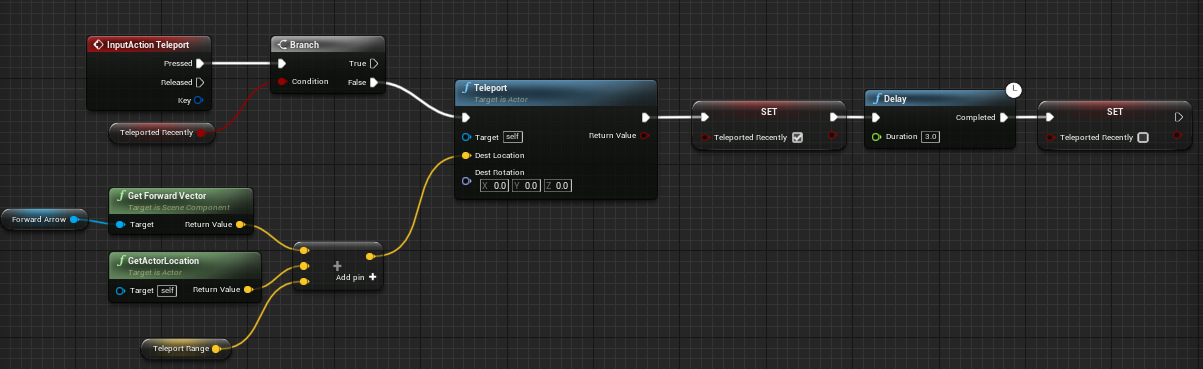
Hey, I'm trying to make a 'teleport' ability in the third person example project. I can't get it to teleport in the direction the character is facing, any tips? https://i.imgur.com/WBdUJMj.png
 olive sedge
@ember oracle location + (forward vector * distance)
or just add the forward vector * distance as an offset
oh wait, didn't even know teleport node exists, interesting
I woulda done it with SetActorLocation or AddActorWorldOffset
ember oracle
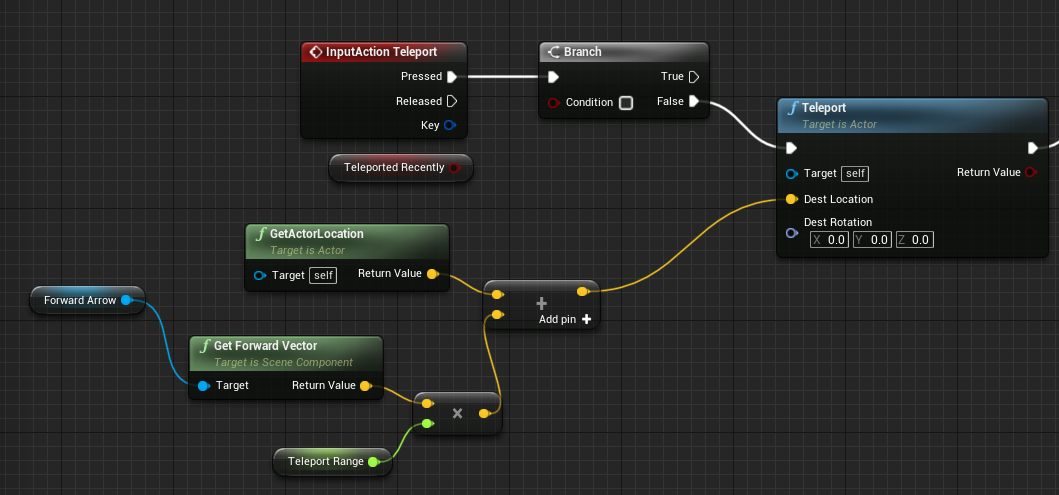
@olive sedge I think I set this right? would it be easier using a SetActorLocation instead? Main reason I'm going for this is because it doesn't let you teleport through meshes https://i.imgur.com/roRZKnQ.png
 olive sedge
Yes, looking good now
ember oracle
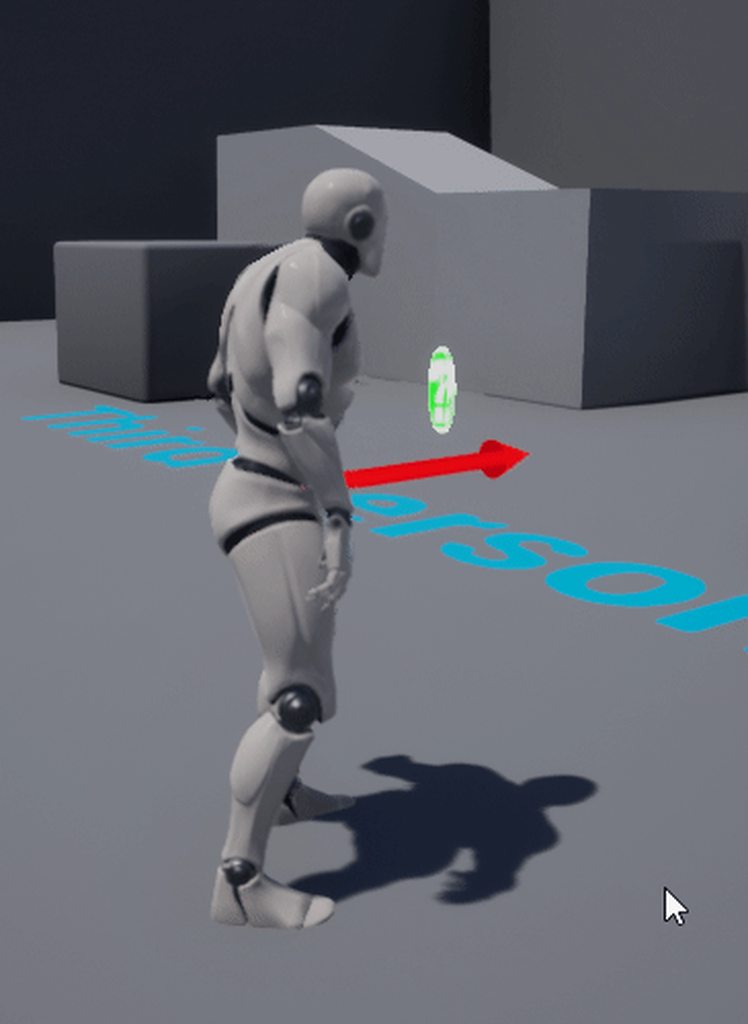
Also it still only goes along the X axis, I'll upload a gif, one sec
olive sedge
I'm actually not sure what Teleport does but I think it's probably just SetActorLocation with Sweep Teleport
ember oracle
https://i.imgur.com/lyItfh6.gif this happens still
 olive sedge
not sure what I'm looking at.. Try it with SetActorLocation and Sweep checked
olive sedge
Teleport probably does some things you're not aware of
if you just want your character at a different location, do SetActorLocation. If you want it to be collision aware, check Sweep
ember oracle
I suppose I could use that to move the player from say one platform to another
olive sedge
sure
all you need then is a box trigger on the one platform and the coordinates of the other platform
you could even get that by tagging that other platform and do GetAllActorsWithTag
ember oracle
Thank you!
little helm
tired fossil
<@!538040183644356609>, one way, but maybe there are better
I will go through that thanks buddy
tired fossil
@ember oracle, If you are trying to teleport a character for the first time, then I will warn you that there are many nuances. I once ran into them and it took a long time.
A normal teleport pushes the character through objects or even through a landscape, which is very bad. Here you can use not a teleport but an add or a set location with a sweep option. When add, friction in the character movement component starts to interfere. There is also a setting for the angle at which the character cannot move if he rested on the surface. Maybe there are other nuances, this is what I immediately remembered
 spark steppe
also helps to disable the movement component before the teleport, and enable it afterwards
otherwise you may end up with unexpected velocity on the character
 hoary gazelle
Hey im having a bit of an issue with blueprint involving an inventory system. It works and everything but I wanted to find a way to switch the weapons but couldnt.
It works fine with the skins/armor as shown in the screenshot where i can just replace the template for the particles, but i have weapons as a BP Class, im not how how im able to switch classes.

 olive sedge
Guys, I think DrawDebugFloatHistory is really cool, is there a way to get this into a widget?
 sand yacht
Hey guys, Im having trouble firing a bullet to the mouse position in a 2d platformer. Can someone help me?
loud cipher

I have a simple ai follow player script
But i was wondering how can i make it so it only triggers when the player overlaps a box that the ai is in?
 meager hinge
Hey guys, so i'm following this tutorial. Nice guy, explains things well, but my first checkpoint is not showing when i hit play. Any ideas?
Wrapping up the Checkpoint Tracker Blueprint, we add the script for updating goal times, lap checking, activating checkpoints and checking if the race is complete through the functions we created. With all of those scripted, we then test out our system and populate our level with several checkpoints that are automatically activated when racing t...

 dawn gazelle
loud cipher
But i was wondering how can i make it so it only triggers when the player overla...
dawn gazelle
loud cipher
But i was wondering how can i make it so it only triggers when the player overla...
Create a boolean variable. Put a branch between the See Pawn and cast nodes, with the true path connected to your cast. Attach your boolean as the condition.
On your overlap, cast "other actor" to your ThirdPersonCharacter and then set the boolean value true. On end overlap, do the same, but set the boolean false (if you want the AI only to move while the player is in the box)
 odd plume
I created a custom player controller and create two players in my gamemode. But it apprears that I am not getting any working input in my game now. What could I do to fix this, as it appear that I have NO input at all
 cinder shell
hey, guys.. Can somebody tell me why delta seconds always returns 0.02 ?
loud cipher
Thanks
Anyone know how i can save an integer?
So that when i unposses and then repossess the integer value doesnt reset?
I want to have a coin system that keeps track
 tired cypress
loud cipher
Thanks
tired cypress
loud cipher
Thanks
You will want to create the variable on an object that isn't temporary and doesn't get destroyed. A good example would be your GameInstance object.
tired cypress
cinder shell
hey, guys.. Can somebody tell me why delta seconds always returns 0.02 ?
That's expected. Delta seconds is just how much time has passed since the last event tick. You typically aren't returning this value, but rather, multiplying it to your animation offsets to make them independent of frame rate.
 dry pewter
Hello my dudes
Why is this seting my widget position correctly (on input key S)

But this is not? (After creating widget and add to viewport)
 deep cove
Hard to tell what's going on there. Everything is so packed together.
 lunar holly
Do I put the collision code on the Player or on the Enemies?
 shrewd marten
Hey guys, I implemented a plugin that contains an abstract c++ parent class (InventorySlotUI) and a BP widget that inherits from it (SimpleInventorySlotUI) in the content folder. Another BP widget (InventoryUI) is using this and the first time I put everything together it compiles fine and it works also during gameplay. However, everytime I restart the project I get the messages as seen in the screenshot. If this happens the parent of my SimpleInventorySlotUI BP is NONE instead of my c++ class InventorySlotUI and cannot be opened anymore. If I remove the usage of it in InventoryUI and I restart the project it loads properly again. Any ideas whats going on here?
 olive sedge
I have an issue that I need help with: my pawn has a static mesh as its root component. When I use a scene component as root, the collision doesn't work anymore. I need to rotate the static mesh during the game but the camera is attached to it. I want it to stay in the same place
So.. I either can't rotate the mesh because of camera or I have no collision. Thoughts?
dry pewter
deep cove
Hard to tell what's going on there. Everything is so packed together.
This is working
 dry pewter
deep cove
Hard to tell what's going on there. Everything is so packed together.
dry pewter
deep cove
Hard to tell what's going on there. Everything is so packed together.
But this is not

 near flint
Hey, i'm what i need to tick/untick to prevent from different destructible meshes to react eachother?
dry pewter
olive sedge
I have an issue that I need help with: my pawn has a static mesh as its root com...
Have a CAPSULE component as the root then, abd the meshh inside the capsule component
olive sedge
I don't want or need a capsule collision though
dry pewter
olive sedge
I have an issue that I need help with: my pawn has a static mesh as its root com...
And attach the spring arm+cammera to the capsule
near flint
near flint
Hey, i'm what i need to tick/untick to prevent from different destructible meshe...
When I break one of them, all of them are breaking one by another
olive sedge
I need my custom mesh
dry pewter
olive sedge
I don't want or need a capsule collision though
Can't you turn off the collision of the capsule?
Not sure tho
 dark crow
dry pewter
But this is not
dark crow
dry pewter
But this is not
Don't cast to the same class, not needed btw
dry pewter
dark crow
Don't cast to the same class, not needed btw
Yeah, i tried it "directly" and still not working
olive sedge
I could but I don't think it would change from scene component. The sub components don't collide afaik
olive sedge
@dry pewter just tested, collisions don't work
dry pewter
near flint
When I break one of them, all of them are breaking one by another
Hard to tell without knowing your node setup
dry pewter
olive sedge
<@!270307292912549888> just tested, collisions don't work
Uhmmm and making a different static mesh (invisible and no collision) the root to attach the cammera to, and your static mesh not a child to that new root mesh?
olive sedge
as far as I know it doesn't matter if it's scene, static mesh or capsule as the root component. if the root component doesn't have collision, the actor doesn't collide
near flint
dry pewter
Hard to tell without knowing your node setup
That's from the Player's blueprint, just a causing damage

The destructible settings
 dry pewter
olive sedge
as far as I know it doesn't matter if it's scene, static mesh or capsule as the ...
dry pewter
olive sedge
as far as I know it doesn't matter if it's scene, static mesh or capsule as the ...
I have a character actor, the "human" skelletal mesh does has collision, it posseses a sword and a shield that do not, pretty sure you can set them for each component
olive sedge
you can set them, yes but they won't follow
dry pewter
olive sedge
you can set them, yes but they won't follow
Follow as inheriting translation/rotation? use sockets, it's what i did
olive sedge
no, I mean they just don't collide
 bold zealot
Can somebody help me out with some math, I'm apparently too stupid to work this out.
The logic is that I am pulling an integer from an array (values are either 0 or 1 for now). This is pulled randomly and I believe it's working correctly, it then prints the value to the screen.
It then takes that resulting value (0 or 1) and does an if statement on it to set the value of another variable.
Right now it's supposed to set it so if the array value is 0 then the integer gets set to 0, and if the array value is 1 the variable gets set to 1 (I plan on changing these in the future).
But for some reason, sometimes when the array value is 0 it sets the variable value to 1 which is wrong and I'm not seeing why.


 dawn gazelle
bold zealot
Can somebody help me out with some math, I'm apparently too stupid to work this ...
dawn gazelle
bold zealot
Can somebody help me out with some math, I'm apparently too stupid to work this ...
Your random value is being called twice - once for the print string and once for the branch check.
dry pewter
near flint
That's from the Player's blueprint, just a causing damage
Nothing here explains why they are any actors (other than the one "Damaged actor") is reacting
dawn gazelle
When using a random value, you need to set it somewhere if you plan on using it more than once.
dry pewter
Promote to variable might be helpful
dry pewter
olive sedge
no, I mean they just don't collide
If you want you can PM me and try to work this out?
bold zealot
Hah it worked. Thank you very much! I've been banging my head against this for the last hour 😆
olive sedge
@dry pewter I'm trying a child actor component right now. if that doesn't track, sure, thanks for the offer!
meager hinge
Anyone able to tell me why my first checkpoint isn't spawning when i hit play?
 dawn gazelle
bold zealot
Hah it worked. Thank you very much! I've been banging my head against this for...
dawn gazelle
bold zealot
Hah it worked. Thank you very much! I've been banging my head against this for...
It's one of those things that isn't very obvious. @_@
dry pewter
bold zealot
Hah it worked. Thank you very much! I've been banging my head against this for...
Happens pretty often to a lot of us, there are no stupid questions, it's easy to get stuck behind a simple solution not knowing, that's why we're all here, to get and give support
dawn gazelle
meager hinge
Anyone able to tell me why my first checkpoint isn't spawning when i hit play?
Not sure if this is part of the issue, but you're double looping through your checkpoints array which it doesn't look like you need to do.
meager hinge
dawn gazelle
Not sure if this is part of the issue, but you're double looping through your ch...
The blueprint system is new to me and i'm trying to learn so i'm not sure on that tbh. I've been following an old tutorial that i posted above.
I've made sure it's not hidden in game and looked to make sure i didn't miss anything and i'm pretty certain i didn't.
dawn gazelle
meager hinge
The blueprint system is new to me and i'm trying to learn so i'm not sure on tha...
Everything in the "Loop Body" execution path on a loop is executed for each element in an array.
So for each Checkpoint:
- You're setting the checkpoint number to the array index +1 (which makes sense)
- You're setting the length of Total Checkpoints to the length of the checkpoints array (doesn't make sense to do in a loop, this could be done before the loop or on the "Completed" execution path).
- You're getting the first array element in checkpoint and calling "Activate Checkpoint" function on it (doesn't make sense to do in a loop again)
- You're calling another For Each Checkpoint --- so then another loop is started.
For Each Check Point you:
1 - 2nd Loop) Binding to the checkpoint Cleared Event (which you shouldn't need to do in a second loop as you're already running a loop of checkpoints)
2 - 2nd Loop) Playing your level music component (which you shouldn't need to do in a loop at all)
So ideally you would in your For Each Loop:
- Set the checkpoint number to the array index +1
- Bind to the checkpoint Cleared Event
Then before the loop or on the completed path:
- Set the length of total checkpoints
- Calling the activate checkpoint function on your first checkpoint element
- Play your level music
Unfortunately as far as the checkpoint not working - this code doesn't really have much to do with that - so long as you're calling the "Start Sequence" event, this code will run, so then it's a matter of what is contained within the Activate Checkpoint function.
meager hinge
dawn gazelle
Unfortunately as far as the checkpoint not working - this code doesn't really ha...
I have copied all that and will give it a good look when i have some time. Unfortunately i am 10 days away from my university submission and i need to get this working before i go tidying it up.
Here is what's in the activate checkpoint function 🙂
 tired cypress
olive sedge
<@!270307292912549888> I'm trying a child actor component right now. if that doe...
tired cypress
olive sedge
<@!270307292912549888> I'm trying a child actor component right now. if that doe...
I had this exact issue. When you have a custom mesh and you want it to collide, it's best to set it as the root and set collision there.
olive sedge
@tired cypress yes, that's what I did. I'm trying a spring arm and counter rotating the camera now
dawn gazelle
meager hinge
I have copied all that and will give it a good look when i have some time. Unfor...
Ah, good job plagiarizing then. I see you copied the tutorial node for node, and despite the fact that I told you of a potential fix you still don't care and want me to fix the problem for you. Good luck.
meager hinge
dawn gazelle
Ah, good job plagiarizing then. I see you copied the tutorial node for node, an...
Erm, wow... That's not my intent at all, i'm on a design course not a development course so it's not about what i develop, it's about what i design. I'm just forced to develop a lot of stuff on my own because we only have a support tutor for Unity. I chose to use Unreal due to other developers telling me that it was the engine i should be getting to grips with. I'm sorry if i misunderstood what you wrote, or didn't reply in the way you wanted me to.
But there's absolutely no need to speak to me like that.
 wise lynx
Any1 here can help me understand ARPG by Unreal Engine? I am stuck at ItemType
meager hinge
Please don't. I'm not looking for anything like that. just here for support.
 surreal peak
Honestly
Read what the person told you
Looks to be a lot of info for you to fix your issue
meager hinge
surreal peak
Read what the person told you
I did, but as i said, i'm a noob. I thought that his advice was for something else as he stated at the end that he wasn't sure about the actual problem i was asking about.
 worthy frost
I don't see much of an issue here, tho @dawn gazelle remember people can be new, instead of saying "Ah, good job plagiarizing then." maybe just walk away.
surreal peak
The stuff that was written is about the image you posted
The code that I see when looking at it is flawd
So this is indeed an attempt to help you
dawn gazelle
worthy frost
I don't see much of an issue here, tho <@!218956378654507008> remember people ca...
Understood and apologies.
meager hinge
I did not intend to annoy anyone with my post...
worthy frost
Just remember, people can only help as much as the information you provide.
meager hinge
As i said, i'm a design student trying to follow a tutorial and it didn't work. I was just asking for support from people who are much cleverer than I.
surreal peak
Well
I want to make sure that no one (or usually no one) here will tell you exactly what you need to do
meager hinge
He did and i was very thankful. Hence why i didn't understand his hostility...
I understand that
I don't have expectations
Well, one. Please be patient and don't be rude.
surreal peak
Again, Datura answered the question as good as anyone here could
You posted an image
It has bad code in it
Datura told you what to improve
None of your image shows why your stuff isn't spawning
At least none directly
Improve the code, add more debugging, give us more info
meager hinge
Ok, i appreciate that and thank you. But as Datura stated,
"Unfortunately as far as the checkpoint not working - this code doesn't really have much to do with that - so long as you're calling the "Start Sequence" event, this code will run, so then it's a matter of what is contained within the Activate Checkpoint function."
So i assumed what he wrote wasn't to do with my issue and that the image i posted was wrong.
surreal peak
What he wrote COULD solve your issue
It's just not visible to us
There is no directly visible "Oh you forget to call the spawn code" stuff
meager hinge
Ok, again i AM thankful for ANY support... I'm just stressing out because i don't have a lot of time to get this running. I didn't need the rudeness.
surreal peak
It's like me telling yo u"Why is my light in my living room not working." and showing you my broken house from the outside.
meager hinge
Ok, i'm sorry i didn't present my question properly. I try my best...
surreal peak
I actually haven ot even downloaded UE5ea
worthy frost
Anyway, the gist of this encounter is, "Provide as much detail as possible/required to receive help. We can't see your code/blueprints.". And we are all volunteer helpers here, no one is required to help you. 🙂
meager hinge
worthy frost
Anyway, the gist of this encounter is, "Provide as much detail as possible/requi...
I never and would never EXPECT help from anyone here. I don't think i ever even acted as if anyone was required to help me.
surreal peak
Yeah so... read Datura's text. Stop typing here.
Improve the code, add print strings, debug it
We aren't going to give you the result, evne if you would have to hand in your stuff tomorrow.
That's your business
dawn gazelle
meager hinge
Ok, again i AM thankful for ANY support... I'm just stressing out because i don'...
I did make a very large assumption, and I'm sorry for that.
And sorry to everyone else in this channel having to read through this now.
meager hinge
I will do my best but you have to understand that i come here for help and support because i simply don't get it from my course.
Look, i can see that people are just going to keep being harsh instead of being polite and understanding so i'm going to take your advice and do my best to understand Datura's advice.
meager hinge
dawn gazelle
I did make a very large assumption, and I'm sorry for that.
It's ok mate, don't worry about it. We all make mistakes 👍
surreal peak
Only advice I can give you is to stick with your course and use Unity, unless they add a tutor for UE4.
You can always learn UE4 in your free time
Probably too late of an advice
 burnt nest
Something to consider is that a lot of people come through here to ask for solutions. A large number of them just want a quick fix, not really seeking to learn anything, and don't say thank you. So sometimes we're a bit on guard, especially when someone is asking for help with code that isn't theirs, and say they don't have time to learn beyond just "here's what you have to do".
meager hinge
surreal peak
Only advice I can give you is to stick with your course and use Unity, unless th...
I'm 10 days away from submission. It's way too late for that. Even my Unity teacher is barely available. We're talking a 40 minute private session per week... And that's if i get a slot. Hence why i chose to do this on my own. I stick by that decision but that doesn't make my life any easier.
 dense mica
I just dont understand why they force design students to learn BP or unity scripting anyway
meager hinge
dense mica
I just dont understand why they force design students to learn BP or unity scrip...
Don't even get me started on that...
 nimble vortex
protip:
if you notice you cannot submit your finished project in time: writing an essay on why you messed up, what you learned from messing up, and what you would do differently if you had to do it all again can result in a positive grade. (worked for me the few times I did it)
dense mica
Yes, but looking at the code, for loops, triggers etc. kinda too much or unnecessary, even both
meager hinge
nimble vortex
protip:
if you notice you cannot submit your finished project in time: writing a...
Yeah i'm doing that too, but we have an arcade event where we have to show off our finished game experiences. I'm so close to completing my project but i'm also close to submission so stress levels are high.
meager hinge
burnt nest
Something to consider is that a lot of people come through here to ask for solut...
I am always willing to learn and i'm doing my best, but i'm also running out of time. It's a difficult line to tow.
nimble vortex
lol
meager hinge
Right, after that painfully public situation, back to hell for this guy. Thank you to those that gave advice, contrary to what some may think, I DO greatly appreciate it.
For the record, i usually directly reference anyone who helps me in my blog. So they do not get forgotten!
 zealous cave
Hi UE Discord! I'm very new to all of this, but I'm having a great time learning it. I'm trying to determine the max jump height of a character, but I can't seem to get the value from a TextBox on the HUD. I'm trying to compare the previous Z coord (textbox) against the current, getActorLocation Z. If its greater then update MaxHeight, otherwise do nothing. Unfortunately the only thing that is getting returned when I get the value from the textbox is the name of the variable and not the value. I learned most of this from the "First hour with UMG" video. But now I want to try something on my own.


Thank you for the quick replay! Here's my original thought process. The max height stays at 100 and doesn't change. Sorry about the mess.
 odd plume
I have a question about how to implement local multiplayer with my UI. Both players are on the same ui screen. But it appears that my update score method only runs on player controller of 0, how could I get it to work on for both players?

what would you suggest instead?
zealous cave
Should I then create the a separate variable within the widget so the character can get that instead of going to the GUI?
I understand. I will experiment. Thank you @trim matrix
odd plume
I made a get all actors of class for them, but it is a lil confusing. The same exact UI screen contains both user scores
zealous cave
I'm experimenting with this but I'm getting hung up on, "Event BeginPlay Signature Error: The selected function/event is not bindable - is the function/event deprecated, pure or latent?"

I'm not really sure where it goes
lol this all seems so much easier in C++, creating a temp variable to remember a value then comparing it to a new value. But in BP why is it so cryptic lol
 maiden wadi
You also need to bind that event on jump, not beginplay. That event gets unbound after it's called.
zealous cave
jump event gave me the same error
loud cipher
Anyone know how i can display the number of ai's in my level?
tired cypress
loud cipher
Anyone know how i can display the number of ai's in my level?
Hmm this could be tough. Since AI classes are tied to the objects that use them and not the level persay.
loud cipher
True
Yeah thats what im doing in my case
My ai setup is so simple
Its just an ai move to node
that tracks the player and follows them
Then when they follow the player and end up at a checkpoint they are deleted
But in my case now i want to know how many ai are following me at one point
tired cypress
I like @trim matrix idea of incrementing on spawn.
Ahh yes, true. Just as long as you are storing it somewhere
zealous cave
This is still reporting at the start of the jump and not the apex. I don't get it.

lol oh yea. I have 4.26 installed, but liked the new layout on 5. It gave a little more screen room because they shrunk the toolbars and menus. I'll recreate in 4. it'll be good practice, too.
I tried this prior, but I hadn't set the Notify Apex variable to true. I've moved it over to after the event and now its working correctly!!! Thanks you so much @trim matrix I'm so happy lol...
dope! ill do this
LOL!! its working!! I'm so excited lol. I dumped the branch because it wasn't needed.
 loud cipher

Hey all so i have tried to make it display the number of ai in the level
It works great

I have then used a bind on a text block to then display the number
However is there a way i can make it update without using the tick function?
 devout dove
Is it possible to create a whole world and split it into chunks to stream as the player goes to prevent filling up the RAM and choking the CPU to death?
I'm not talking about splitting it for map design but splitting it for the game, like playing, loading chunks etc
 brisk mortar
im sorry but
how the hell do i just create a simple number

i dont have a clue what im doing
dawn gazelle
brisk mortar
how the hell do i just create a simple number
const
dawn gazelle
parameter
brisk mortar
basically everywhere said to use this tab, that doesn't exist here
bold zealot
I've setup a really basic projectile object but not matter what I see on the ProjectileMovement settings for velocity, it still just drops to the ground right in front of me. Anybody know what I'm doing wrong here? It should be shooting forward like a cannonball

 dawn gazelle
All those different parameters are variable types.
dawn gazelle
You create the parameter and name it X
brisk mortar
which one of these is just a simple number xD
dawn gazelle
ScalarParameter
brisk mortar
thanks ,3
dawn gazelle
bold zealot
I've setup a really basic projectile object but not matter what I see on the Pro...
Think max speed needs to be set
 bold zealot
I thought 0 means there is no max?
dawn gazelle
Yea nevermind.
 scenic quail
Hi all, looking for some guidance on working with custom binary files. not sure where to begin in the blueprints.
These are custom binary files built in another application, but which have logically structured data
spark steppe
the answer is c++
 opal ivy
If I'm passing a struct as a parameter to a function, I'm not seeing a way to Get it?
nvm, I'm stupid
opal ivy
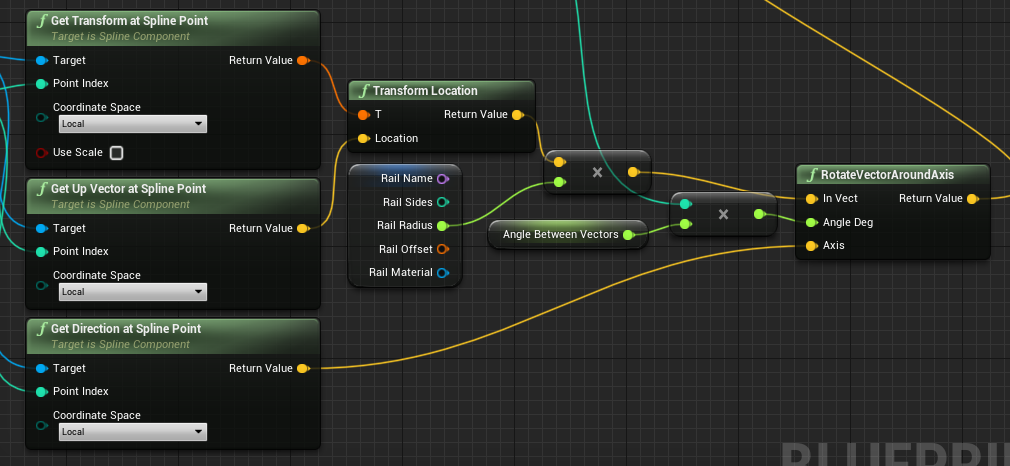
given a transform and a diection vector, how do I get the transform that's x units away from the original transform along that vector?
 bright dirge
Hello, I am trying to use a function defined in a blueprint function library from a blueprint inheriting "Primary data asset" but when i type to look it up I have no result. Any idea ?
opal ivy
https://i.imgur.com/VQfWRKe.png I know that I'm on track here, but the neurons just aren't firing in my head
Transform Location
trim matrix
I'll move my question there
opal ivy
i-
So, I'm generating a polygon with a procedural mesh. Can I not make UVs wrap around it without sides + 1 verts?
 keen goblet
opal ivy
given a transform and a diection vector, how do I get the transform that's `x` u...
keen goblet
opal ivy
given a transform and a diection vector, how do I get the transform that's `x` u...
Scale the direction vector by the distance you want and add it to the original location:
LocXAhead = Loc + (ForwardVector*X)
opal ivy
https://i.imgur.com/D0tuVdx.png I believe I solved that.
I don't know, it could be an absolute disaster. 😛 The UV thing is my current concern until I see things explode
I guess I have to add 2 verts at the same sport, so sides + 1
 covert arrow
Is this the best way to handle input (frame dependent)

 twin kite
covert arrow
Is this the best way to handle input (frame dependent)
twin kite
covert arrow
Is this the best way to handle input (frame dependent)
I thought multiplying by delta seconds served to make the input frame independent
opal ivy
twin kite
I thought multiplying by delta seconds served to make the input frame *in*depend...
Seems accurate to me
covert arrow
I was just wondering you know.
twin kite
I'm not trying to be insulting, I'm just saying that you've said "frame dependent" for input but made a frame indepedent setup
I believe
And as far as I know it is the best way to do that
Simple math and pure nodes
opal ivy
I would really like the ability to rotate reroute nodes
twin kite
opal ivy
I would really like the ability to rotate reroute nodes
Holy shit you and me both
opal ivy
I just want more vertical lines
https://i.imgur.com/4Euu9z8.png my sequence output execs are tangled
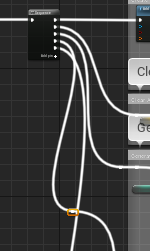
 autumn grove
Can an entire game be made with blueprints?
 dawn gazelle
autumn grove
Can an entire game be made with blueprints?
dawn gazelle
autumn grove
Can an entire game be made with blueprints?
Sure
autumn grove
Actually?
dawn gazelle
Yep
autumn grove
Like with no issues?
After seeing ue5 I wanna have a go at making a small story exploration game
Was wondering if it was possible with bps only
dawn gazelle
Of course, depending on how big you're trying to make your game. At a certain point with certain things, doing some parts of it in C++ can help you optimize the game so it runs better, but if it's not going to be anything huge then blueprints should more than suffice.
You may run into some issues where you may have something very specific that you're trying to do that you can't really do in blueprints, and I wouldn't be able to specifically spell them out for you either. You'd have to jump over that hurdle when you reach it - and even then, a little C++ may not be that hard to figure out.
autumn grove
Does using blueprints teach you c++ at all?
opal ivy
not even a little
dawn gazelle
opal ivy
HOW?!
There's a paid plugin on the Marketplace called Electronic Nodes (currently 30% off)
opal ivy
I mean, I guess if you don't have any knowledge of logic and how programming working, you'll get a little out of it
 ember veldt
To some degree it can teach you some concepts of programming
deep cove
C++ is for full-on programers. It's not a kid's toy.
It runs faster than BP, but i like the ease of use of BP.
There are onnly a few places on YT that teach UE4 using C++
opal ivy
dawn gazelle
There's a paid plugin on the Marketplace called Electronic Nodes (currently 30% ...
Disappointing that it's paid
deep cove
KeySmash is one
dawn gazelle
opal ivy
Disappointing that it's paid
Very much worth it. It makes the WORST of Spaghet look like a nice lasagna.
opal ivy
Right, but I'm a broke boi
My resistance to paid things isn't about not wanting to pay, it's about not being able to. 😛
deep cove
Anyone know why just adding a Child to a BP would give these types of errors? Nothing gets destroyed or deleted.
LogActorComponent: RegisterComponentWithWorld: Trying to register component with IsPendingKill() == true. Aborting.
LogActorComponent: RegisterComponentWithWorld: (/Game/VirtualRealityBP/Maps/MotionControllerMap.MotionControllerMap:PersistentLevel.DESTROYED_SwitchD_overlap_C_CHILDACTOR_546.DefaultSceneRoot) Trying to register component with IsPendingKill() == true. Aborting.
LogActorComponent: RegisterComponentWithWorld: Trying to register component with IsPendingKill() == true. Aborting.
LogActorComponent: RegisterComponentWithWorld: Trying to register component with IsPendingKill() == true. Aborting.
LogActorComponent: RegisterComponentWithWorld: Trying to register component with IsPendingKill() == true. Aborting.
LogAc
 icy dragon
opal ivy
My resistance to paid things isn't about not wanting to pay, it's about not bein...
icy dragon
opal ivy
My resistance to paid things isn't about not wanting to pay, it's about not bein...
You had to live with it 
 faint pasture
autumn grove
Does using blueprints teach you c++ at all?
faint pasture
autumn grove
Does using blueprints teach you c++ at all?
It teaches you the engine and general programming and would make the jump to C++ easier.
autumn grove
Is there any plugin that brings all of the missing c++ features into blueprints?
faint pasture
autumn grove
Is there any plugin that brings all of the missing c++ features into blueprints?
Doubt it. You won't even know what you're missing if you're new to UE4 and gamedev in general. If you're new, just dive in.
autumn grove
Okay thank you it's really confusing cuz I am new and so many people on Reddit say you need c++ to make a functional game
opal ivy
I'm adding a variable in my construction script that I want editable in the editor. How do I keep it from being filled by the construction script being called tons of times when making adjustments?
ember veldt
Unless you're going for over 12 players in MP, or some insanely complex simulations, BP is viable
faint pasture
autumn grove
Okay thank you it's really confusing cuz I am new and so many people on Reddit s...
Nah fuckem. You can do just fine with BP. I wouldn't go for anything too crazy with procedural or other high perf stuff tho.
autumn grove
I know how to make procedural textures .... In blender XD
Idk if that's what you meant
faint pasture
@autumn grove I mean like trying to replicate Minecraft.
autumn grove
That's a thing?!
faint pasture
Prolly a bad idea BP only.
ember veldt
I prototyped a 3D atmospherics that simulated gas composition and temperature and could handle simulating a large area, solely in BP, and it ran fine
faint pasture
ember veldt
I prototyped a 3D atmospherics that simulated gas composition and temperature an...
I made a full drivetrain and tire model solver and it runs fine too. Craps out at like 6 vehicles tho. I'm gonna move most to C++ once it's more concrete.
autumn grove
Really? You guys are inspiring! I've been a games artist for 8 years but never did unreal heads on
And always wanted to make a solo game
faint pasture
autumn grove
And always wanted to make a solo game
I would just start messing around, try to learn enough about programming to be able to have intuition about what is hard and what isn't, and 100% forget about multiplayer until you're more experienced
autumn grove
I know python but barely
Like I know the basics I can't do data science
I know c++ is really complicated tho
faint pasture
autumn grove
I know c++ is really complicated tho
The general structure of working with the engine is the same with both languages, it's just that you'll have enough on your plate just learning the engine. Trying to learn the engine and basic programming and doing it all in C++ right out the gate? That would be a really bad idea
autumn grove
Lol so Reddit is as usual just assholes
opal ivy
figured it out
autumn grove
I don't get Reddit sometimes... But thanks I suppose learning blueprints will be a good solid start
ember veldt
Also with this conversation, BP is extremely fast to iterate on, and work with. It's excellent for prototyping and getting a feel for what you want to do/how you want it to work, with much less effort
opal ivy
https://i.imgur.com/icFn59i.png something is happening, but something isn't quite right. 😛
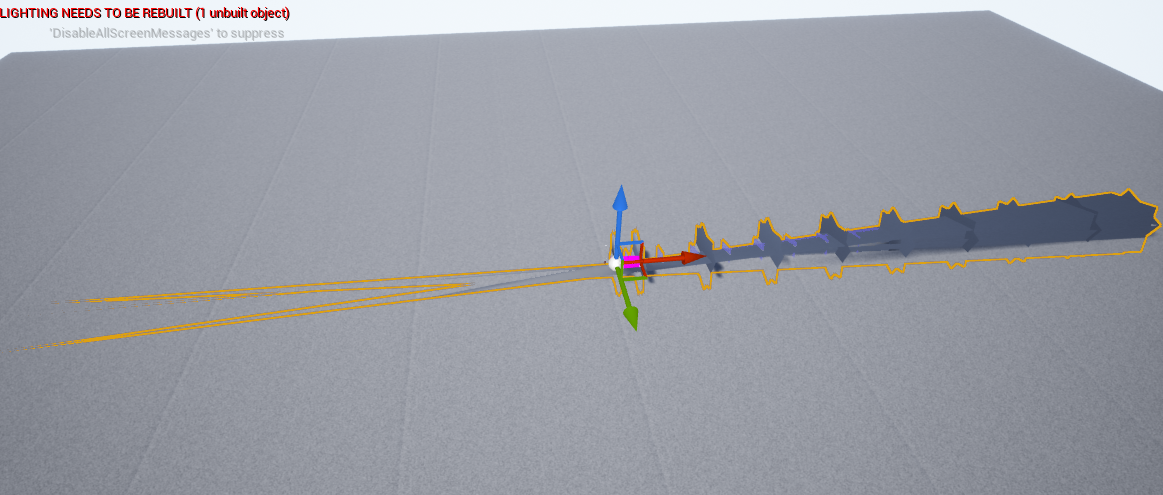 autumn grove
Yeah as I said earlier Reddit confused me badly XD Idk why I even doubted it I've seen a few games made fully with unreal BP's
faint pasture
ember veldt
Also with this conversation, BP is extremely fast to iterate on, and work with. ...
This 100%. If blueprint was exactly as fast and had all the same capabilities as c++, I would never fire up Rider. I only drop in to C++ out of necessity
autumn grove
Maybe in the future maybe even in ue5 full release well have that
I'm hopeful
Seeing how the industry is changing as time goes on is fascinating
opal ivy
AH It's growing! https://i.imgur.com/dw4LFvK.png
 fleet cedar
Hello
I'd like to add a collision capsule to my character, because the default one isn't really in the right place to stop the character going through the wall
How can I have a second capsule block movement?
I copied the settings from the character BP capsule but isn't blocking movement
deep cove
There is a good tutorial on YouTube about this. Check for "Block player wall" he even sets up a fade to black and a warning message
fleet cedar
thank you
deep cove
its a VR tutorial, but the idea should be the same
fleet cedar
will it actually collide with the wall so I don't go through in the first place?
deep cove
no.
fleet cedar
That's what I was hoping for... my character's head doesn't really fit into the cylinder
deep cove
You can add blockers in your scene to stop that.
Ahh... but .. yeah.. if the wall block the player but not the head, just add a similar collison to the head bone.
just like attaching a weapon
fleet cedar
I've added a separate capsule but it isn't actually blocking the wall
deep cove
or in VR attaching it to the head mount. But nothing can really stop someone from walking through a wall. there are setups where, if you lean/push/bang your head on a wall, the room will slide away from you. but that makes people a bit dizzy sometimes. fade to black is just easier.
fleet cedar
hmm
deep cove
the issue is that the player can move by sliding or they can move by moving around in the real world. some of those are blocked and others are not. my issue is having a player get blocked by a table, so thye can not walk through it, but can still lean over the table to look at the wall behind it. since the capsule hanges directly down from the head, the software thinks the player is moving forward and blocks the movement.
you should check your collison settings again. sometime a tiny thing makes a big difference
fleet cedar
I guess I could do a capsule trace from the player's head and if it hits something then block forward movement
deep cove
ew
fleet cedar
haha
deep cove
constant trac is heavy
opal ivy
Can I remove elements during a foreach loop, or will I get some CME style error?
deep cove
That's kind of what that guy did. he has it so if the player makes contact with the wall or other object that has the same tag, it goes black.
 deep cove
ahhh youre the parcore cat guy
faint pasture
@fleet cedar I'm not 100% sure but it'll be hard to get the CMC to play nice with additional collision
deep cove
so... not VR
fleet cedar
ahaha
no.. not VR
That sucks... and it sucks that I can't even rotate the capsule they give me
faint pasture
fleet cedar
That sucks... and it sucks that I can't even rotate the capsule they give me
The movement model is dependent on a vertical capsule. You're totally free to extend and modify the CMC tho.
Is this multiplayer?
deep cove
I think you can add a collison on the head with a new bone. It is a way we would do it for movies. The head would have a basic location, but try to ballance between its goal_bone, and it's colliosn bone. The collion would get 100% physics, and get ushed out of shape when hitting things. The actual head would have a setting to float somewhere between the desired location, and the collion bone. you can adjust the % on the fly
faint pasture
Does the dog need to walk through really skinny areas?
deep cove
Basically treat the head like a physics object on a chain.
fleet cedar
faint pasture
Does the dog need to walk through really skinny areas?
Not sure yet, Adriel, maybe
faint pasture
@fleet cedar The easy solution is to have a capsule that reaches out to almost the muzzle,then solve mesh penetrations by animation and IK
The movement component doesn't care about the mesh. It's just driving a capsule.
fleet cedar
starting to think I should just make my own BP not using Character Movement Component
faint pasture
You might be surprised at how hard that is but sure
opal ivy
Is there an easier way than adding a tag to determine if a component is part of the base actor vs added during construction?
dawn gazelle
opal ivy
HISM doesn't have a Get Static Mesh node
Sure it does
 opal ivy
Is it just a cast?
dawn gazelle
 opal ivy
hmm
Wonder why it didn't show up in my node list. I'll look again in a minute
screams internally https://i.imgur.com/o2Waa7g.png
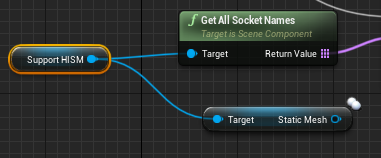
I don't understand why I need a scene component to get sockets...
Oh well, doesn't matter, it only returns each socket once. I had this weird suspicion that it was gonna return a set of sockets for each instance, but does not
dawn gazelle
opal ivy
Oh well, doesn't matter, it only returns each socket once. I had this weird sus...
An instanced mesh is only 1 mesh rendered several times which means that only 1 set of sockets exists.
opal ivy
I'm trying to work out how to perserve my array elements across constructions atm
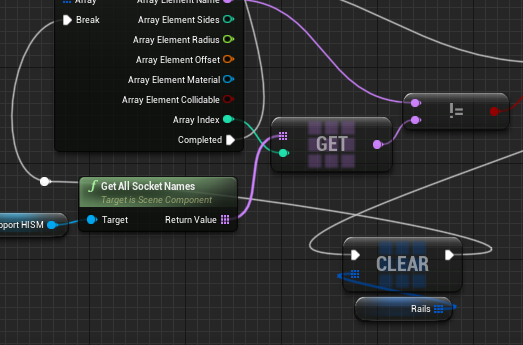
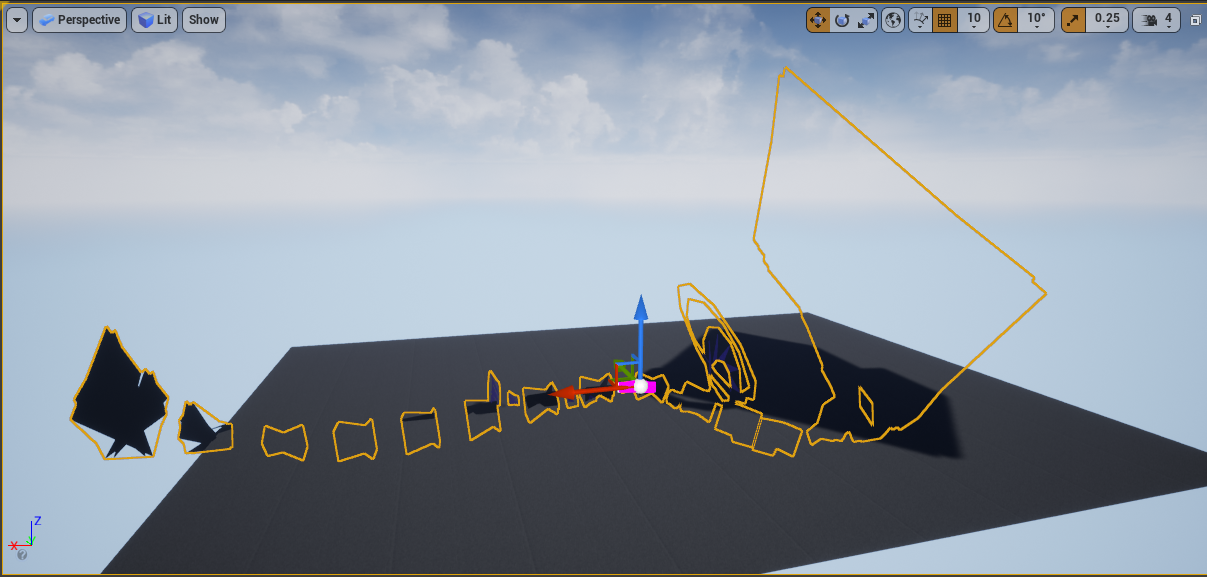 opal ivy
https://i.imgur.com/qUvN6lg.png lots of progress has been made, very close


 hazy tide
Can someone help me? I'm following tons of tutorials, I get a nice looking texture as can be seen here: https://gyazo.com/83cfab34c615ab483deedbd7319a985e
But when applied to the landscape it looks like this:
https://gyazo.com/a73f2fe20d85bc60f90a561a0b3c4c60


 wise swan
wise swan
wise swan
LogNet: Warning: Actor BP_serverIndicator_C / BP_serverIndicator_2 has no root component in AActor::IsNetRelevantFor. (Make bAlwaysRelevant=true?)
this is the warning im getting
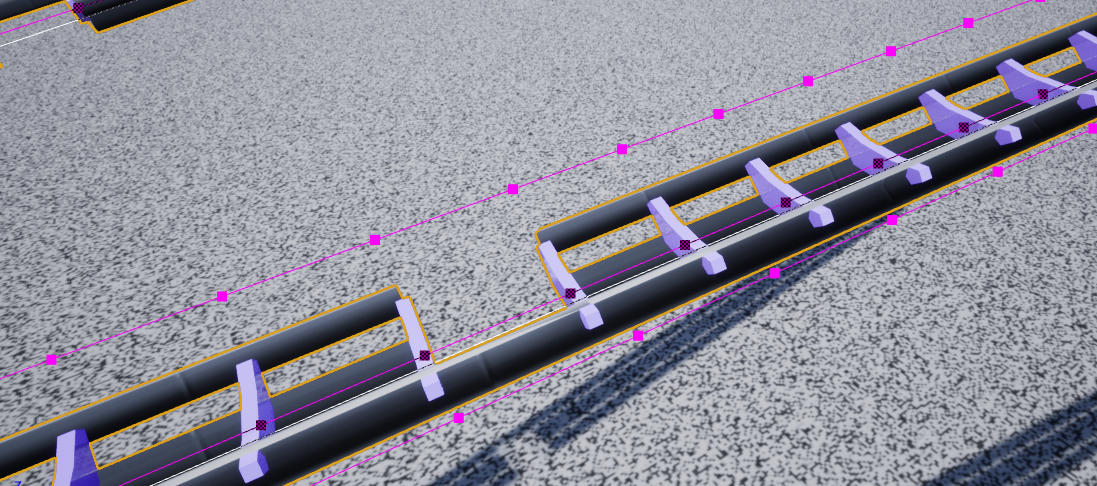
also i have setup a simple replication(player 1 shoots player b and health decreases) but it doesnt seem to work
 violet wagon
when i use the "MoveToLocationOrActor" or "AIMoveTo" node on my AI it works fine, but if i use it on any character thats possessed it doesnt work, anyone know why?
dawn gazelle
violet wagon
when i use the "MoveToLocationOrActor" or "AIMoveTo" node on my AI it works fine...
Those nodes take AIController references only. A player controller isn't (and can't be) an AI Controller
Assuming when you say "any character thats possessed" is referring to a player controlled possession.
violet wagon
i see. any suggestion on how I could find a workaround? I want my character to run to a location with pathfinding, like my ai
 crimson saddle
Feels like arrays and lists are always the bane of my existence. I am trying to get a reference to a widget in my List View so that I can edit its content as soon as I create the entry. My problem is that I can't seem to find any way to go about getting this reference. I really need some help if anyone knows how to do this
dawn gazelle
violet wagon
i see. any suggestion on how I could find a workaround? I want my character to r...
Don't possess the character. Let it be an AI. You can still send commands to it without possessing it.
Eg. When you play point and click strategy games, you're controlling dozens of AI - you're telling them where to move without possessing them.
opal ivy
oh... oh... oh my god
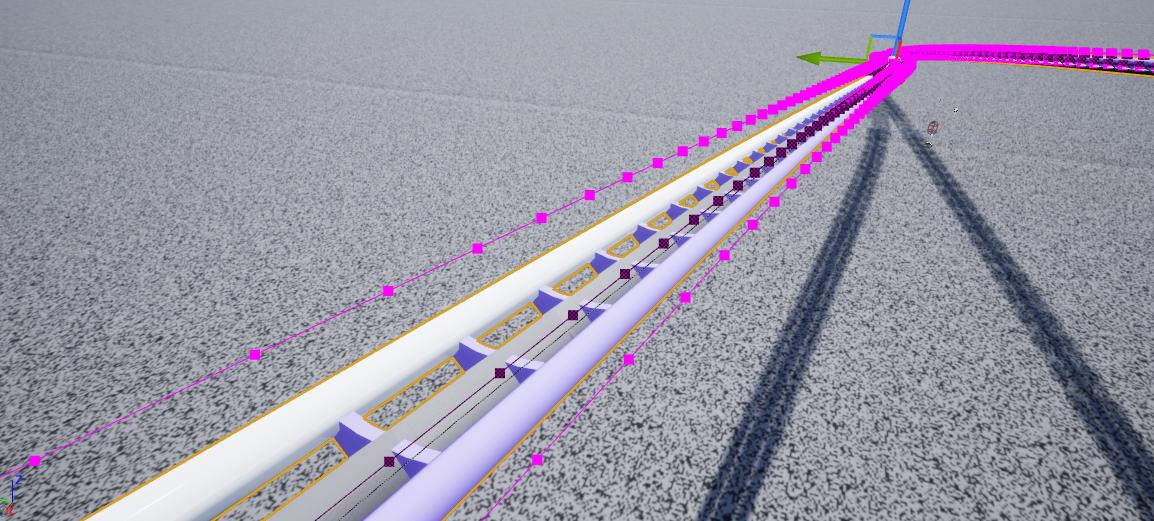
Not me battling with for literal hours while generating an extra vertex per support or anything
trim matrix
oh howdy once again fine gentlement
I am making some solid progress, however I recently wanted to get started on making some visual effects for the guns firing.
In the tutorial I'm using, they are making effects through something called "Niagara", which I will learn about next in the tutorial
However, since I was using an older version of UE, "Niagara" was not available. So I upgraded to the version 4.26
I loaded my project
Everything was good except for one thing
my project went from this:

to this:

does anyone know why my project got so excessively bright when I upgraded it to 4.26? I tried messing with all the skybox and brightness settings in this vault template for the sky and ocean I'm using, but I cannot for the life of me find what is causing it
Thanks in advance for anyone reading!
dawn gazelle
Perhaps this might help?https://www.youtube.com/watch?v=K2kIre_BHgA
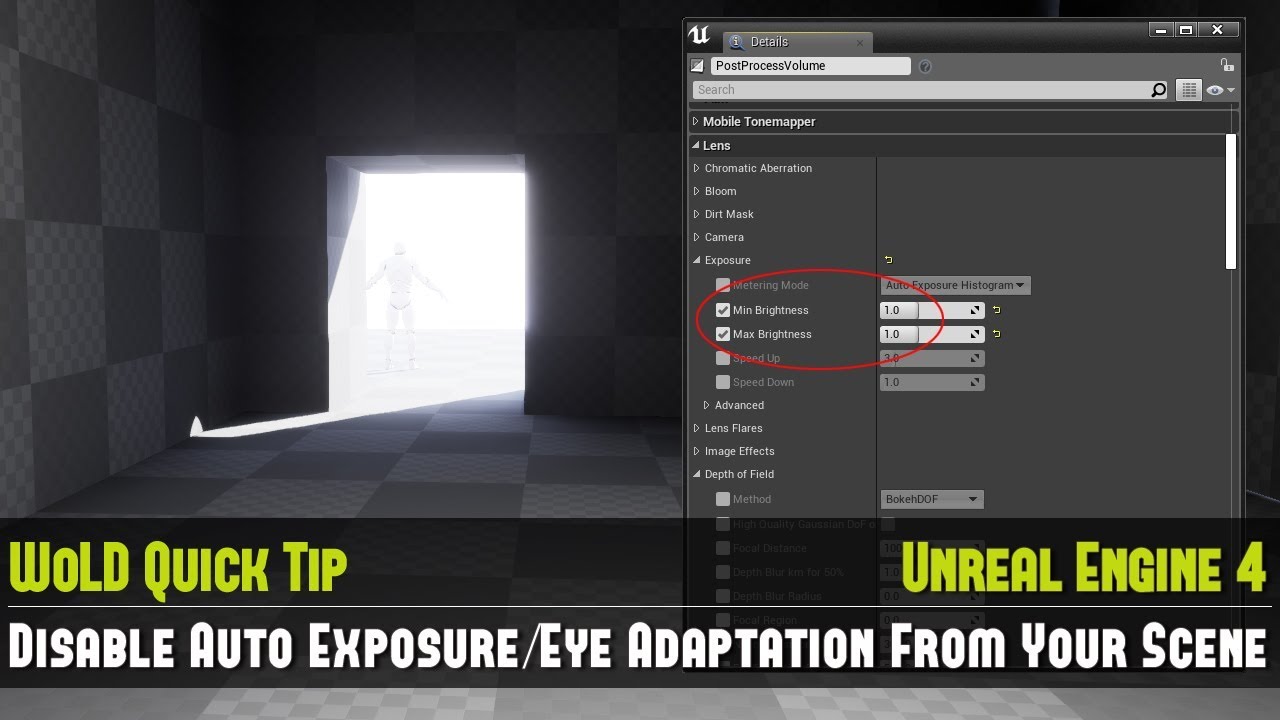
Full UE4 Quick Tip Playlist: https://www.youtube.com/playlist?list=PL_c7yiTIRI8rPQfsNytgjgJh-bssWUczX
Learn how to quickly disable auto exposure, also known as eye adaptation from your scene. This is especially important to do when you are working on creating your environment and not on lighting, as exposure is too distracting in the scene by d...
 dusk flame
Does anyone know if its possible to make RelativeToGameDir work with plugins?
If I select an asset within a plugin, it doesn't get relative, and instead goes all the way to C:/
dusk flame
Give me a pingpong if you do. Right now I've left a comment saying "please make your path relative", but that feels yucky.
OK, its not even possible to make it relative by editing it. It auto-corrects it to fully-justified path.
deep cove
what the heck does this mean?
My screen went red with warnings
LogOutputDevice: Warning: Script Stack (0 frames):
LogStats: FPlatformStackWalk::StackWalkAndDump - 0.451 s
LogOutputDevice: Error: === Handled ensure: ===
LogOutputDevice: Error: Ensure condition failed: !bGraphDataInvalid [File:D:/Build/++UE4/Sync/Engine/Source/Editor/GraphEditor/Private/SGraphPin.cpp] [Line: 821]
LogOutputDevice: Error: The Graph Pin Object has been invalidate. Someone is keeping a hard ref on the SGraphPin. See InvalidateGraphData for more info
LogOutputDevice: Error: Stack:
LogOutputDevice: Error: [Callstack] 0x00007ff9cd4fd149 UE4Editor-GraphEditor.dll!UnknownFunction []
LogOutputDevice: Error: [Callstack] 0x00007ff9cd3a2141 UE4Editor-GraphEditor.dll!UnknownFunction []
LogOutputDevice: Error: [Callstack] 0x00007ff9cd3a0db8 UE4Editor-GraphEditor.dll!UnknownFunction []
LogOutputDevice: Error: [Callstack] 0x00007ffa401a7034 KERNEL32.DLL!UnknownFunction []
LogOutputDevice: Error: [Callstack] 0x00007ffa40e82651 ntdll.dll!UnknownFunction []
LogStats: SubmitErrorReport - 0.000 s
LogStats: SendNewReport - 1.178 s
LogStats: FDebug::EnsureFailed - 1.634 s
surreal peak
Some Blueprint Pin had a problem. Should not do any harm, otherwise it would crash
deep cove
restarting just the same. dont want to save something that is broken
trim matrix
For whatever reason, my character doesn't airstrafe
I'm using the standard jumping system that's built into the character controller
And these are my airstrafe settings

(Default values change nothing)
And I'm not getting or setting any of that either in my BP

Same in the AnimBP

And I'm using in place animations so root motion is out of the question
For what it's worth, this is my entire jump graph

BlueprintUE
 turbid shard
Hello, how can I destroy the weapon from the player when this one leaves the session? The weapon keeps floating in the air
trim matrix
 turbid shard
Im usign this node, but I feel like the player is getting destroyed first so the attached actor will never get destroyed
turbid shard
whats the event for that, Im using on logout on game mode
trim matrix
On logout, get the child actor or the gun actor first, then destroy the actual player actor
Woah yeah that's a ton better
Thanks, I'll keep that in mind too <3
turbid shard
okay, thanks for the answers will check it out 🙂
trim matrix
Yeah, depends on the game though
ideally if you're working in 3d, you'll want to target the player's position and add a little variance around it
Which can be more or less depending on the gameplay requirements
In particular, this is the node you're looking for:

What is the Find Look at Rotation Node in Unreal Engine 4
Source Files: https://github.com/MWadstein/UnrealEngineProjects/tree/WTF-Examples
Note: You will need to be logged into your Epic approved GitHub account to access these examples files.
Use that to find the direction in which the bullet is supposed to go
Using it without any variance will give you aimbot enemies
What exactly happens?
I assume the projectile itself has some velocity along its local X right?
Ah
The character
The function targets the root transform of the character
You sure the root transform is at the centre and not the feet?
Well where does it go?
A screen recording might help more
 molten surge
Hi there, I have a question regarding playback of sound effects, as I'm not sure I'm doing it correctly.
I have a single AmbientSound in my scene playing a loop of music. I also have a few copies of a bottle actor blueprint, when it gets hit, it plays a bottle chinking sound using "Play Sound at Location". Unfortunately this seems to cause the ambient music to stop and start, any ideas how to resolve? Ideally I'd like to be able to play any number of bottle chinking sounds one after the other without anything else stopping.
trim matrix
I uh, need to see the enemy itself for that
😅
Yeah! Show me that
Preferably while circling around the enemy
trim matrix
molten surge
Hi there, I have a question regarding playback of sound effects, as I'm not sure...
Maybe use "Spawn sound attached"?
molten surge
trim matrix
Maybe use "Spawn sound attached"?
Thanks, I'll give it a go! 🙂
trim matrix
Gotcha
trim matrix
molten surge
Thanks, I'll give it a go! 🙂
Anytime!
@swift pewter have you tried overshooting?
Like drop a ridiculously large offset on the Z of that one
Also, nice visuals, I love it 👀
Okay lil hacky workaround
Can you target a specific bone instead?
Get the mesh of the player character, then the bone location
wise swan
wise swan
```LogNet: Warning: Actor BP_serverIndicator_C / BP_serverIndicator_2 has no roo...
any1 know this issue?
wise swan
trim matrix
<@!214696654735933442> https://letmegooglethat.com/?q=Warning%3A+Actor+has+no+r...
but im not doing any spawning in cpp, im spawning the players in blueprint but i dont see any issues there either
 atomic salmon
@swift pewterwhen you spawn a projectile you typically give it a direction, that is what you need to customize
Often the direction is provided by an arrow or scene component attached to the weapon
and the projectile flies along the X axis of it (for example)
Look at the settings of the projectile movement component
@swift pewter
There is an initial velocity set for it
That means the projectile travels along the X direction of the projectile actor
Your Projectile Spawn transform should handle that.
What you can also do is create an angle parameter in your projectile BP and mark it as Expose on Spawn
Then you will find it as additional input to your Spawn function above
And you can pass an inclination angle to it taken from the LookAt function.
Want to switch to DM?
I can guide you
lunar holly
How can I make my program print "hello" only when my Cube collides with a specific Actor? Now it prints "hello" all the time. I only want it to print "hello" when it collides with a specific obstacle.

 cyan prawn
you can tag the actor and use has tag on the other actor and branch off it
or maybe use an interface on the other actor and check implements interface
 devout geyser
Grab out the Other Actor line and cast it to the first \ third person character in order to check if that's the player or not, if it is the cast will be good of its not the player the cast will fail
cyan prawn
I wouldn't recommend casting for such simple things
lunar holly
Im very new to Unreal so I dont know what casting is
devout geyser
Yeah it will cost memory, I will suggest using the blueprint method for easy communication

Casting is a big part of learning Unreal Engine; I hope this video helps ease some of the pain!
0:00 - Thesis
0:36 - Video actually starts
3:39 - Casting to classes
Join the fun: https://discord.gg/32qgNwm
cyan prawn
cyan prawn
you can tag the actor and use has tag on the other actor and branch off it
Try this. It's easiest. Try to check documentation if you get stuck. The process will help you out in future problems
 gentle urchin
Is checking for / using interface cheaper than casting? I understood they' be equivalently costly
cyan prawn
I was told one of the benefits of interfaces is that you don't have to cast. So, I think so.
lunar holly
Can I do some sort of "if statement"?
If other actor == obsticle Axtor
print helo
devout geyser
Yes
gentle urchin
but you'd still need a reference to the obstacle actor ..
Or using the default tags, for sure
cyan prawn
gentle urchin
but you'd still need a reference to the obstacle actor ..
We already have a reference as Other Actor
atomic salmon
The advantage of interfaces is that you can call them on any actor but only the actors implementing the interface will react to it and do something with it.
gentle urchin
yes, but you dont have anything to compare it to
cyan prawn
Using tags will be easiest I think
gentle urchin
True, Marco, that part is a clear advantage
Just not sure if the statement of it being cheaper than a regular cast is true or not .. If they are, then great ^^
lunar holly
Can I use the "Actor Has Tag"?
gentle urchin
Y
then you just make sure the actor actually has that tag
Personally i just use casts for overlaps that are ment for specific actors, altho i can see a clear benefit of using tags instead
cyan prawn
And dont make typing mistakes
atomic salmon
@gentle urchinA believe the check for whether an actor implements an interface is cheaper than a casting (at least in C++). Not sure in BP. Probably the same (so cheaper as well).
lunar holly
This worked!
 surreal peak
cyan prawn
I was told one of the benefits of interfaces is that you don't have to cast. So,...
surreal peak
cyan prawn
I was told one of the benefits of interfaces is that you don't have to cast. So,...
Yes and no, it still casts to the Interface class. What you are saving is the endless "Cast to this -> Failed? -> Cast to the other thing -> Failed? -> Cast to yet another thing" chain.
For what Cazzola is doing, if it's ONE SPECIFIC actor, then the tag might work. If it's a specific class of actors, so generally all obstacles, then casting is pretty okay
lunar holly
How is there so many ways to check collision? What are the benefits? And what is the right thing to do?
In Unity only the "As Tag" is used.
okey. I need to check those things out.
The Cast code looked much more clean. And I did not have to make a Tag
 gentle urchin
Well, you could combine the tag and branch into one function to make it look as clean as the cast
devout geyser
@lunar holly Glad to see you got the hang of it, well done 🙂
deep cove
Are there any good tutorials on Haptics?
Everything I find is on the suits, and how 'cool' they are. I'd like to know how to modify and cause haptic responces in the controllers.
You know, subtile shakes for when you grab something, or press a button.
icy dragon
deep cove
Are there any good tutorials on Haptics?
Everything I find is on the suits, and...
You can use Force Feedback assets for controller vibrations.
Don't know the specific about DualSense's audio based haptics though, as you may need PS5 specific libraries for that.
tired fossil
Hello everybody
Why does SetActorLocation have both sweep and teleport available at the same time? Can they somehow function at the same time? If not, which of them is the priority if you set both?
 olive sedge
I'm trying to make a material that is transparent from one side, here: https://i.imgur.com/uBaOjTk.png
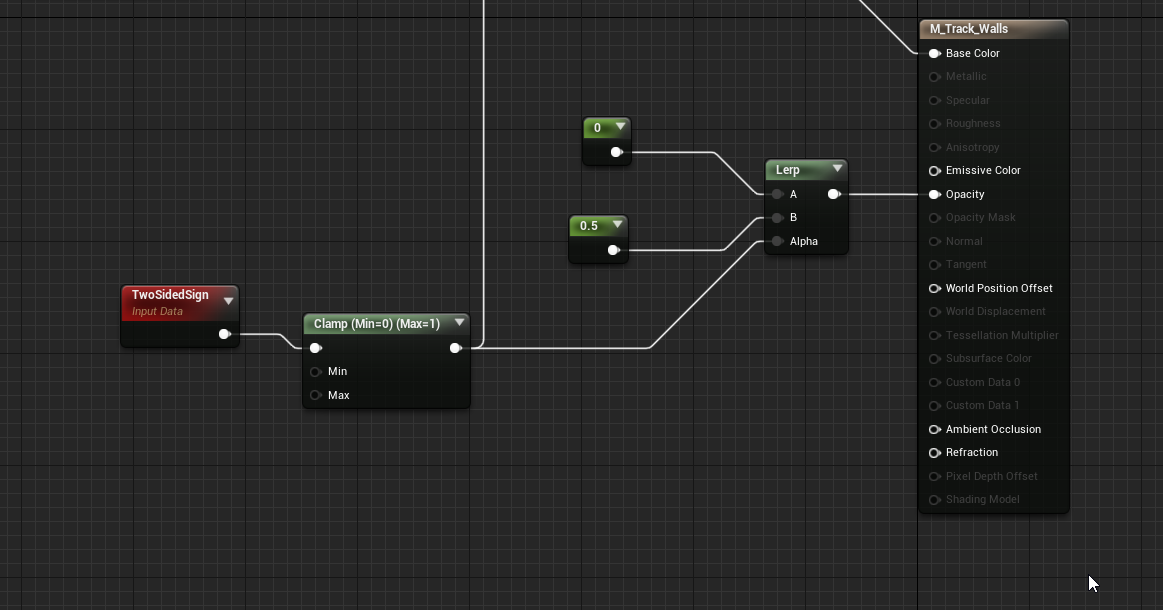
but it's just not. what am I doing wrong?
 summer skiff
Can someone help me understand if I can make a blueprint light appear in a reflection after I bake lighting. Basically I have a chandelier mesh with point lights in a blue print. It all appears fine until I bake the lighting then suddenly the reflection of the light disappears? The lights are set to static because if they aren’t the chandelier lights up the entire scene (and I only want it in the reflection) so I had a solid blocking them from hitting my scene. Is it like this because it’s set to static?
tired fossil
@trim matrix, oh, now I understand. Thank you so much 👍
twin kite
summer skiff
Can someone help me understand if I can make a blueprint light appear in a refle...
Huh
That's an interesting question actually
And setting them to dynamic and having their intensities set very low doesn't give desired results?
I mean I can still get a reflection in a planar reflection object if the intensity is set so low it doesn't really affect the scene

 minor fractal
you guys mind if I ask some really dumb questions
summer skiff
Thanks, I will post there and try lowering the intensity and see how I go... just to add some detail though in case u don’t mind helping... the chandelier/light sits directly above my character pretty much so it appears in the reflection so I put a solid above them to block the light from hitting the character however it still seems to put the unbaked text all over the character. If I set it to dynamic it seemed to totally ignore the solid and light them through it. Lowering the intensity may well do it but is there a way to just set the light to not affect the character at all?
twin kite
minor fractal
you guys mind if I ask some really dumb questions
Go ahead bud, no judgements here
twin kite
summer skiff
Thanks, I will post there and try lowering the intensity and see how I go... jus...
The only way you can really change how a light affects the world (as far as I'm aware) are the options that change whether it casts shadows, or transmission, or deep shadows etc
minor fractal
how do I make the trigger box on the ground cause the box in the sky to fall
 summer skiff
twin kite
The only way you can really change how a light affects the world (as far as I'm ...
summer skiff
twin kite
The only way you can really change how a light affects the world (as far as I'm ...
Thanks yeah I did try that, perhaps changing the light type will help too
minor fractal
I see a "simulate physics" button, so I'd like to learn that way for now
maybe later learn how to move stuff with force or along a path
twin kite
Right, so like with anything there are a fair amount of ways to go about this
minor fractal
understood
twin kite
The node that you're looking for is a node in blueprint called "Simulate Physics"
Do you know what a level blueprint is?
minor fractal
I'm assuming this is it
 twin kite
Yes correct
Open that
We'll do this in level blueprint since it's the easier
Easier*
minor fractal
yup, open now
twin kite
On the side of your screen in the main viewport you have the World Outliner
I have UE4 opened right now but it looks like this

It lists all of your assets
(This isn't in the level blueprint thing)
minor fractal
yeah I know of it
twin kite
To tell the code what specific objects you want to do what, you're going to want to get references to them
So that, obviously the code knows what's what
So click and drag from the World Outliner the cube that you want to simulate physics on
 twin kite
Oh
minor fractal
though I guess I should change that asdf bp to a regular trigger box
twin kite
Yeah I was about to say
Eh, he only wants to make it drop
Just a fun experiment I'm guessing
minor fractal
yeah I saw the warning, but thanks for reminding me lol
twin kite
Shouldn't be too much of an issue
Yeah so change to a regular trigger box
And drag from the world outliner the cube on to the level blueprint graph
You should get a node that just says Cube or something
Small and blue
minor fractal
yup
 summer bolt
Ok so I want to have a line trace and the hit object is used to cast to a character, I get a cast error simple line trace for object hit actor in the wildcard, Any advice
 blazing delta
Hi,
which one would be better at sending information from one actor to another triggered by an overlap event:
Event dispatcher or Interface?
surreal peak
They are different concepts
There is no "better", there is a "right" thing to use however.
blazing delta
ok, that is something, but then which one would be the right thing?
I have an actor i want as the gun, and some other actors that then overlap and send info to the gun
twin kite
minor fractal
yup
Oh shit I'm so sorry lmao I got distracted
twin kite
minor fractal
I haven't learned anything for a year, what's another 5 minutes
Amen lmao
surreal peak
blazing delta
ok, that is something, but then which one would be the right thing?
I have an ac...
If you know it's a gun and you never overlap with anything else, just cast to the Gun
twin kite
Select your Trigger Box in the game and go to your level blueprint
Right click and at the top of the list it should have some stuff like "Make an event for Trigger Box" or something like that
minor fractal
okay done
minor fractal
awesome; progress
 twin kite
Purrrrfect
minor fractal
where to now, boss
blazing delta
@summer bolt best thing is not to have a wild card, there should be a way to make/set an array of objects like world static or pawn instead of the wild card if u right click that pin
twin kite
Drag off your fallingCUBE node and type in "Set Simulate Physics"
summer bolt
blazing delta
<@!508566496562380800> best thing is not to have a wild card, there should be a ...
Sorry I didn't understand the wild card pin is the one on the cast
twin kite
And then hook up the event from begin overlap to the Set Simulate Physics
And tick the simulate physics
And then it should work if you compile??
Idk lmao give it a shot
blazing delta
@surreal peakI wanted to move away from casting if possible, i am using the ARS plugin that is free this month and wanted to send info from the overlapped actors to the "gun"
since i am only interacting with one main object/actor for the case its best to casting but at a later point i wanted to have the actors that overlap be usable on a non gun actor
surreal peak
Then an Interface
blazing delta
thank you
minor fractal
something went wrong, but I'll redo all the steps again in a fresh map
blazing delta
@summer bolt oh, for that u would take the hit actor pin and connect it to that wildcard pin
blazing delta
does it kinda look like this? @summer bolt

I have this set up for a random row in a datatable, but when i add to the datatable the "get number of entries" node doesnt change when i look at it with a break-point
and when i put the new row higher with in the table it does show up in runtime but the one that was pushed down then goes away

 vocal kestrel
Howdy, i've a question about level streaming and AI. assuming we want the ai to be able to run around a level that is otherwise not loaded in for the player, would it be a good idea to have like a collsiion-only version of the map that a trimmed-down ai actor is able to navigate loaded in in the place of the normal streamed level?
That came out kinda confusing, but i'm just generally curious about how level streaming and AI mix.
 hazy seal
is there a way to set local rotation for a "Socket Transform" ?
vocal kestrel
well i wanted to ship in like a month
so that's a bit off the table.
but i'll look into that later.
olive sedge
I can't figure out how to roll a spline mesh, any help? I've tried setting rotation on the selected points in the editor and on multiple places in the blueprint but it just stays in the same orientation..
ember veldt
blazing delta
I have this set up for a random row in a datatable, but when i add to the datata...
Try using the length of the out row names array
blazing delta
@ember veldtThank you, that fixed it
trim matrix
How can i make a loading screen?
loud cipher

Hey all
I have a simple ai setup
It roams randomly and if a player overlaps the sphere collision
the ai is highlighted with a material
However i have an issue where if 2 ai overlap eachother the sphere collision still enables
and it still highlights
Is there a way i can make it ignore AI or i can set the ai to not be a pawn
I want it to only highlight when a player character overlaps
Thank you so much
that worked great
blazing delta
Hello, I am using the ARS plugin and got some questions about it, where should i ask them here or in the plugin chat?
summer bolt
blazing delta
does it kinda look like this? <@!508566496562380800>
Without the branch yeah
blazing delta
@summer bolt what are u casting to?
summer bolt
blazing delta
<@508566496562380800> what are u casting to?
A character file
And its the object I'm hitting
blazing delta
Have u done a print string on the hit actor pin to make sure that the line trace is hitting it? @summer bolt
faint pasture
loud cipher
Is there a way i can make it ignore AI or i can set the ai to not be a pawn
On overlap, cast overlapping actor to PlayerCharacterClass, if succeeds, change color
summer bolt
blazing delta
Have u done a print string on the hit actor pin to make sure that the line trace...
Sorry my notifications aren't working well... Yes I believe I did and it was
blazing delta
So just to be clear, u have a character actor "char" that u have out in the map, and then u the "player" is using a line trace to hit "char" then "player" is casting to "char" to do something
If that is so then maybe see if the cast to the parent of "char" works or not? Or make a child of "char" and see if the cast for "char" works
sand yacht
Hey guys, can someone explain to me why the line trace is not firing straight ahead?


 unique harness
does it always fire in the same world direction no matter your rotation
or is it always the same offset from your character's rotation?
sand yacht
its like it sticks to a certain point on the map
it always fires to one certain point
unique harness
Show how you're rotating your character
sand yacht
you mean in blueprint?
unique harness
ah yea, gotta add initial location lol
sand yacht
how should I add that?
unique harness
drag off the location pin from the transform and add it to the result of the multiplication node
dusk flame
Is there a way to get the current plugin?
icy dragon
trim matrix
How can i make a loading screen?
You can use this plugin to create true loading screen. This is not faked by single persistent levels.
https://github.com/truong-bui/AsyncLoadingScreen/

GitHub
Async Loading Screen is a free and open-source plugin for Unreal Engine. Async Loading Screen allows you to easily configure a Loading Screen System in the project settings, and automatically add a...
dusk flame
Is there some way to get the name of the current plugin?
Or a reference to the current plugin, or something?
I want to make a blueprint function like DoFoo that changes its behavior based on the plugin it was called in (relative filepath nonense).
burnt nest
I'd try asking this in #plugin-dev because I have no idea what "the current plugin" would refer to. 😅
dusk flame
Do people not tend to use plugins?
dusk flame
Its a reasonably nice way of abstracting parts of your codebase out.
I mean, if I have Actor inside of a Level in a Plugin.
worthy frost
you cant determine that
burnt nest
I mean, I use plugins sure, but they tend to add something to the editor, not be something I'd call in a blueprint. 👀
dusk flame
Ok, so then there must be a system for handling relative filepaths that can work with plugins, right?
worthy frost
maybe explaining what you want to achieve might be a better idea?
dusk flame
Yeah sorry, I'm complicating things.
I want to provide a node that takes in a relative filepath (can't be global to the C:/ root obviously).
It should be callable from within a Plugin, with the understanding that the filepath should be relative to the content root of that plugin.
 gusty shuttle
Hey guys, I want to change the velocity of my projectile based on the position from the enemy to the player. Any tips?
 worthy frost
@gusty shuttle whilst its in flight?
gusty shuttle
@worthy frost No sir, before flight. The arrow moves and tracks the player then shoots
worthy frost
use PredictProjectilePath and SuggestProjectileVelocity nodes
gusty shuttle
Aye, solid keywords. I'll try
dusk flame
If I have:
Base
   Plugins
      MyPlugin
         Content
            thing.jpg
   Content
      thing2.jpg
I want to somehow define a path that can select out of plugins. So I either need a path likeMyPlugin/Content/thing.jpg, or I need some other way of "knowing" which plugin to pull from.
I'm sure I'm just misunderstanding something about how plugins are mounted.
worthy frost
something like this @gusty shuttle http://www.thegames.dev/snaps/UE4Editor-Win64-DebugGame_s5YTajfypK.png but instead of manual, you just provide the target actor location
 dusk flame
I know this kind of thing is possible:
static FString ContentDir = IPluginManager::Get().FindPlugin(TEXT("Foo"))->GetContentDir();
But the missing link there is I don't know which plugin a blueprint is being called from. I guess I could force people to pass in the name of the plugin they want to be relative to?
burnt nest
I would definitely try #plugin-dev because at least I have no experience with working with my own plugin. 🙂 And that's CPP, so either way it doesn't seem like a blueprint question. 😅
worthy frost
yeah i am not sure you can reliably detect what plugin you are in
dusk flame
Ah, fair enough. I tend to think of anything that splits across C++ blueprint lines as being in Blueprint.
dusk flame
Yep. Thanks. On my way 👋
burnt nest
Good luck! 🥳
 tall sand
Can i get some feedback, Am i overthinking this as a input macro?
 burnt nest
Seems good to me.
gusty shuttle
worthy frost
something like this <@!294162432115474433> http://www.thegames.dev/snaps/UE4Edit...
Yes sir just like that!
 weak grove
When i try to climb up from my hang anim, my animation plays like hell and i am not able to figure it out


 main smelt
Can anyone tell me how could I rig mouse wheel to UE5 demo scene directional light rotation?
trim matrix
dawn gazelle
Perhaps this might help?https://www.youtube.com/watch?v=K2kIre_BHgA
Thank you so much for the suggestion, but it did not help unfortunately. I just tried replacing the entire vault template in my project for 4.26, and it is still very bright. Maybe it's just something with version 4.26 that is causing the issue. Welp, there goes my project haha


I have a foilage components and when I try to interact with one of them their variables get mixed up for some reason
they are for resource gathering and they spawn the actual resource when they get hit but for some reason the class reference is broken
sometimes it works with tree sometimes with bush
I couldnt understand why that might happen maybe I am missing something help is appreciated

when I hit it it thinks its component is the bush one for some odd reason
loud cipher
How can i create a setup whereby you must be within a box collision and you must press a key for it to trigger?
I want to make it so i can only interact when im within the box collision and i must press the key to interact
trim matrix
So would anyone know why my project got so excessively bright when I upgraded it to 4.26? Is there anything in the newer version of the engine that messes with the lighting effects?

 loud cipher
Quick question what would i use as the object for cast to for an ai?
I need a reference
Player controller?
player camera manager
try it
trim matrix
@empty zealot you need a reference to your widget
loud cipher
Sorry i dont know, im trying to figure the whole cast to object pin myself
trim matrix
where did you create the reference to your hud
 warm summit
I have a BP, that is dealing with Midi Data, I am trying to use my CC# value (an Int) to set a specific index in an array. And I have Print Statements shown here as part of my debug. The print statements seem to be verifying my data, but my prints are showing that the set Array Elem is not using the input Int as the index to set, and is just going 0 - the end but even at the end it starts stepping not by 1's.... very confused


 left carbon
Guys, does anybody know, what 'self' in Session Frontend's profiler means?
 warm summit
data flagged as blue in the graph also shown in the print line, but look at the index circled in red and the print lines in red....
loud cipher

Im so confused
I cant find what i can use for the pin
Player pawns wont work
get owner doesnt either
All give me accessed none errors
 frozen needle
Hello. Is there a way to check if my "move component to" is currently in work? What I want is to stop its execution if player leaves the trigger box.
 unique harness
frozen needle
Hello. Is there a way to check if my "move component to" is currently in work? W...
unique harness
frozen needle
Hello. Is there a way to check if my "move component to" is currently in work? W...
You could set a bool "Moving" to true when you call Move and set it to false when completed is called
violet wagon
if there a way I can make a delay have multiple timers? Every time you call a delay while its counting down, it gets ignored, but I would like it to start a new timer.
unique harness
Where are you creating the HUD_Widget?
unique harness
loud cipher
Show more nodes so I can see what you're doing before this node
So you can store a reference there and access it from your player
or my suggestion would be to create it in the PlayerController
unique harness
violet wagon
if there a way I can make a delay have multiple timers? Every time you call a de...
Retriggerable Delay but that will restart the timer, you want it called multiple times?
so before you call AddToViewport, right click the ReturnValue node and hit PromoteToVariable
violet wagon
yhea, i want to be able to have a few timers running at the same time
violet wagon
unique harness
Then you need to use actual timers instead of dealy
gotcha, thank you
loud cipher

@unique harness
im trying to get a reference to my AI parent in my main character bp
unique harness
The output of the GetAllActorsOfClass seems to be doing that
loud cipher
How could i use that to then get a boolean then?
unique harness
what do you need a boolean for?
loud cipher
I have set in my ai bp on begin overlap set boolean overlap to true
then on end overlap set boolean overlap to false
then i want to be able to go in my character bp
interact key is overlap true
unique harness
What are you trying to do on begin play?
loud cipher
if so then perform xyz
Just cast a reference so i can access the overlap boolean that is set in my ai bp
the begin play nodes are in my character bp
unique harness
I understand, what are you using the boolean to do?
loud cipher
For a interact system only when im in a box collision
unique harness
ok, so what are you trying to do on begin play?
loud cipher
Cast to the AI
unique harness
So it sounds like you should be doing this in an overlap event, not in BeginPlay
what class is this?
you need to call GetPlayerCharacter, cast it to your player class then access the widget variable
and you shouldn't need to cast it
 rugged wigeon
Is there any reason that, when loading, I shouldn't just put the savegame object into the game state and use that as a container for all of my "global" variables? As opposed to unpacking it and assigning them to variables owned by the the game state itself, and then later creating a new save game object and populating it again?
unique harness
no
rugged wigeon
Cool, thanks.
covert arrow
Do collapsing certain mechanics or say abilities for example into functions improve workflow and performance in BP'S?
rugged wigeon
workflow, absolutely. performance, not materially.
unique harness
You should write readable code and handle optimization if there are issues after the system is completed
rugged wigeon
as a general rule, if you're writing some functionality more than once, you should be considering putting it into a function instead.
olive sedge
How can I rotate my pawn to always stay even with the ground? I trace towards it and get a rotator from the normal but X is always 0 for some reason
 narrow kelp
Is there a name for the type of movement / item selection that windows uses when arrow-keying around desktop items? Like where it skips over empty slots, and tries to pick the best next item?
I'm doing something similar where I have a grid with a couple selectable items cells
rugged wigeon
@trim matrix How do you get the data across the loading of the map? Do you put the savegame data into a game instance, then on load,transfer it into the game state?
 static frigate
Is it possible to pump values from a data table into a blueprint that displays in the details panel as a drop down? For example I would like to have a blueprint that artists can customise before runtime with a couple of drop down menus. Top one being category like Chairs, Animals, Plants. The second drop down would be populated/updated with actors based on the category list
crimson saddle
I am attempting to call Get Displayed Entry Widgets on my ListView but it is always returning an array of size 0
Why is this happening? Is it because I am calling it in the construct function? If so when should I call it in order to populate my list?
Also is there a system better than the terrible ListView?
I need to add information to the widget in the ListView when I populate it if I find a duplicate entry
cinder shell
guys, can someone please point me in right direction? I'm trying to create a blueprint which will spawn actors with delay and moves em towards the target. So I managed to spawn and move one actor, but can't figure out how to spawn them constantly with delay?
 crimson saddle
cinder shell
guys, can someone please point me in right direction? I'm trying to create a blu...
crimson saddle
cinder shell
guys, can someone please point me in right direction? I'm trying to create a blu...
Are these items "magnetizing" to a player, or enemies/characters that spawn and move towards the player?
To spawn constantly you can make a repeating timer and bind an event to it
cinder shell
no.. Actually it's just a cars which will fly in the straight line
crimson saddle
In that event you can put your spawn actors
cinder shell
I tried it, but not managed to make it work. Let me try ones again )
do you mean set times by event?
timer
@crimson saddle yeah... By a some reason it's not doing anything... Am I missing something?
 surreal peak
The whole setup is a bit janky
The Actor that you spawn should move itself
And the Timer has to be started ONCE
You are calling it over and over again atm via Tick
It should be started on BeginPlay
crimson saddle
^^^
its kind of a weird node, so I don't blame you for being kinda confused by it
cinder shell
ah... you right! it's spawning.. and what do you mean by actor should move itself? Moving logic should be inside of actor blueprint?
crimson saddle
yes
so you can just have the actor move itself forward each tick
you will be able to spawn it facing a direction using your timer setup here

 sonic pine
Hiho i have a small Problem with my register and Login Screen. If im Clicking on the Register or Login Button i will get an Error Message but i downt know thats the Problem.

In the left top corner is the PrintString True if im clicking the register Button, but the Switch to Register Function isnt working
Thsi are the Error Codes

And here is the Problem, the print String is behind the SwitchRegister Function, so the clicked Button will trigger the function, will do nothing and will go to the PrintString...

In the function, i have connected 5-1 PrintStrings but they will not be called...
 dawn gazelle
sonic pine
Thsi are the Error Codes
dawn gazelle
sonic pine
Thsi are the Error Codes
Your LoginW variable doesn't have anything set in it.
opal ivy
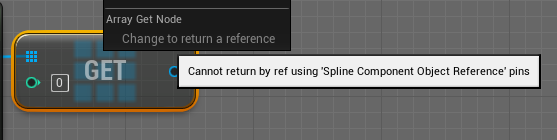 sonic pine
Do you mean taht?
 opal ivy
I specifically WANT to edit my spline component
and subsequently WANT my changes propagated back
sonic pine
dawn gazelle
Your LoginW variable doesn't have anything set in it.
I try to create the bottom "CreateWidget" but i cant create the Login UI Pin...
dawn gazelle
sonic pine
I try to create the bottom "CreateWidget" but i cant create the Login UI Pin...
If you want something to appear on the create node, select the expose on spawn option.

 prisma stag
Hello, I have a 3rd person project and am having a problem where if I enable the cursor to click on something in the level, I have to double click for it to work.
Also, when the cursor is shown, it moves the camera slowly, then when you right click it disables that and you have to move the camera via holding the RMB.
crimson saddle
sounds like your mouse isnt focused on the viewport
crimson saddle
prisma stag
Hello, I have a 3rd person project and am having a problem where if I enable the...
do you have any widgets that could be taking focus away?
olive sedge
Anyone know a good primer for vectors / rotators?
prisma stag
crimson saddle
do you have any widgets that could be taking focus away?
I do have a widget that pops up when you hold tab to make your selection, however, when you release tab it is removed from parent.
spark steppe
wikipedia also pretty much covers those topics
the brain melting starts when you read about quaternions
olive sedge
Alright. I'll google 3d geometry for dummies
spark steppe
yea they are certainly better, but also more complex
controlrig and compatibility in one sentence... strong one
olive sedge
I found a 3brown 1 blue for it. <3
opal ivy
AHHHHHHHHHHHHHH! https://i.imgur.com/2xONw6b.png https://i.imgur.com/GrR7cAf.png sobs uncontrollably
I don't understand why my verts are getting screwy.
cinder shell
@crimson saddle it almost working now ) but spawned actor are not facing the target on spawn... Is it right way to do it?

or look at the target not what I need here?
crimson saddle
if your flying cars blueprint moves forward on its own, you can direct it with the rotation on the transform when you spawn it in
so you would find look at rotation before spawning it, and plug that into your transform
I'm not 100% sure if that will work but try it
cinder shell
I tried it at the first place, but have the same result (
crimson saddle
is your car moving on its forward vector, or just moving along an axis?
cinder shell
just along axis with add relative location
narrow kelp
Hey folks, looking for a technique or search terms for grid cell selection.
I have a randomized grid with several selectable cells. Pressing a cardinal direction moves to the best cell in that direction - meaning it can deviate from the column / row, similar to windows desktop icon + arrow movement. Every cell must be navigatable this way.
Here's an example of the grid.

Maybe this is a standardized thing I can search for? I haven't had any luck yet.
narrow kelp
Windows must apply some kind of heuristic based distance and deviation from the direction
opal ivy
Is there are way to make components that I add to my actor at runtime "instance editable" so that they persist between constructions?
Maybe they already are and I'm just stupid
maiden wadi
@narrow kelp I'd be surprised if the Windows arrow navigation for desktop isn't just some sort of A* algorithm with directional weighting.
narrow kelp
Thats what I was thinking, but I'm trying to figure out how to guarantee that you can eventually get TO every cell FROM every cell
I'm not smart enough to figure it out without testing examples
maiden wadi
Every cell would be able to reach somewhere with that, if you don't gate it off. You just create weights. Take your image above for example.
 nova ledge
I'm not sure where exactly I'm supposed to ask this question, but... is anyone else having trouble going to the Unreal engine website? I'm trying to do online learning but the page keeps refreshing on a redirect page thing
maiden wadi
@narrow kelp Terrible numbering, probably definitely needs adjusted, but this is assuming that you're going to the right. Any cell above or below that cell gets +2, each cell in the same row only gets +1. So to get to the red mark it costs 1 to move right, 2 to move up, for 3 total. To get to the green mark, it costs 1+1+2+2 to move right, right, down, down.
 maiden wadi
Of course, moving left has huge costs because you don't want anything going that way by default when you're trying to go right. You collect all of that, then get the cheapest, and that's where you'd want to move in that direction.
 tight schooner
@opal ivy all I can think of is don't spawn the components dynamically; make a BP child class where the components are in the component list proper. Or (a messier solution) make public variables in the host BP that it passes on to the dynamically spawned components.
narrow kelp
I think thats almost exactly what I'm going to try. Thanks for the help @maiden wadi 🙂
opal ivy
I just added a bool that when ticked triggers building the track and then resets itself to false, so after you place the actor and shape the spline, you check the box to "bake" it
It would be cool to get the components visible while the actor is being changed, but oh well.
Ultimately though, I'd rather have the performance to edit the actor and spline then just have to hit a button
rather than have my construction script build a bunch of complicated meshes every tick while I'm adjusting it
tight schooner
You could make an editor-only function. I haven't wrapped my head around your project
but if you want BP script to execute in the editor on demand, that's totally possible
whether in an editor-only function in your BP class, or an Editor Utility Widget
opal ivy
And editor function to bake it definitely could be the right solution rather than a bool. 😛
Those components still wouldn't last while moving it and stuff
I can make that adjustment in a bit. I'd really like to get the firetrucking meshes rendering correctly.
 true quartz
I am having a lot of trouble with my blue print.. I am spawning multiple meteors from the sky and having them crash but they are supposed to play the explosion sound and spawn the emitter. They are doing it in the begining not the end. Can anyone help?
spark steppe
you probably start all of that in the wrong event
true quartz
I can post pics of what I have if that helps. I just need to figure this out for a school project. Not to mention it will help me wrap my head around it
spark steppe
you want some collision event to start the particles/sound and you might also want to check if it's overlapping with the correct thing (e.g.: the ground)
true quartz
I have that set actually.
spark steppe
ok, show that part as screenshot please


 spark steppe
that doesn't look tooo bad, and it's the same problem when you readd the landscape check?
true quartz
yes I dont get why the sound and explosion goes off before impact with thte ground
spark steppe
me neither, that should work fine when you do the landscape check before
unless one of the hitboxes is way too large
true quartz
maybe I dont know what you mean by landscape check
I am new and in school lol
this is my second game
I have to create
spark steppe
the cast to landscape on the other actor
you should only do stuff like sound and such when the cast succeeds
 warped cairn
Can't get my widget for some reason, this is what I have done, but still can't find it. Am I missing something obvious?

 opal ivy
Maybe my issue is the "up" vector usage.
Would "up" from a spline not be a vector at a 90 degree angle from the tangent?
warped cairn
Ah, never mind.... I forgot to set it, I feel stupid lol
 scarlet arrow
Does anyone knows a BP tutorial where i can use real phone motions to move an object in game?
true quartz
[6:19 PM]
[6:19 PM]


I dont get why the sound wont go off after impact
any one able to help
covert arrow
@true quartz you're using set timer by function name but you don't have the function with that name
instead you may need to use use set timer by event and bind that to spawn instead
then clear and invalidate it.
Spawn is a custom event
you can make a function with the same functionality though
true quartz
@covert arrow I messaged you I cannot get it stil
covert arrow
what are you trying to do
faint pasture
@true quartz First of all you're getting a random point every time that node gets hit
So spawn point and sound point won't line up
Also you're only playing sound when entering the area. Not per spawn
When and where do you want the sound to play?
true quartz
@faint pasture I want the sound to play when the meteor impacts with the ground