#blueprint
402296 messages · Page 667 of 403
 limber finch
 hollow cape
you can utilize the data however you like, the concept stays the same. Instead of interping a location, you interp a rotation
limber finch
I guess I'm not fully understanding it, but let me give it a shot.
@hollow cape like this?
 hollow cape
well I have no idea about the values you're mapping there, or what the exact scenario is, but yes that's generally the concept.
limber finch
So I'm getting the viewport location of the mouse
And clamping it for only monitor 1
 smoky belfry
@icy dragonHi thanks! If I may ask how'd you get that awesome node theme?
 thin token
Hi is there any blueprint node which convert integer to string like 1 becomes One, 2 becomes Two?
 icy dragon
thin token
Hi is there any blueprint node which convert integer to string like 1 becomes On...
icy dragon
thin token
Hi is there any blueprint node which convert integer to string like 1 becomes On...
No, you have to create your own translator for that, as many languages have their own literal number writing rules.
thin token
@icy dragon Thanks I thought so too but just wanted to confirm as there are so many helper function ue4 has
 lost canopy
Did you remember to add a NavMeshBoundsVolume?
limber finch
okay so
I think I found the vector spring interp is best for what I'm trying to do
But I'm still trying to figure out how to get current and target values
Current should be old mouse position
Target should just be the mouse moving
I've tried with a delay and it's just buggy
 royal kraken
I am trying to add a tag to my BP widgest, I have added a TAG say "WidgetTAGS" and I want to turn the visibility off on all these with TAG. I cant seem to connect it to a visibility node, is this possible to do?
limber finch
I will literally pay someone to help me fix this rightnow ahahha
 fading fog
limber finch
I will literally pay someone to help me fix this rightnow ahahha
fading fog
limber finch
I will literally pay someone to help me fix this rightnow ahahha
I think I have something! I tried to find the look at rotation ( to make the object face the mouse), then I added offset to it in that direction! I will send you a dm with the result and the code if that is ok with you @limber finch
 cursive latch
Sorry for late response I was sleeping xD. But yeah. The blueprint updates whenever I move the vector-3D-widget from the bp in the scene. Do you know if there is a way it can detect currently selected?
 trim matrix
Guys how to convert an image to 8bit inside the engine?
royal kraken
trim matrix
Guys how to convert an image to 8bit inside the engine?
Would it not be best to do it is PS first
trim matrix
royal kraken
Would it not be best to do it is PS first
No I need it in the engine 🙂
 next jungle
Is it possible to poll input actions independent of their event (there does not appear to be a section for "Action Values" under the input heading)?
trim matrix
How to get an access to this setting in blueprints/materials?

 earnest tangle
You might have to do this in C++... you can definitely do image conversions there but not really in BP's afaik
trim matrix
earnest tangle
You might have to do this in C++... you can definitely do image conversions ther...
 earnest tangle
Changing that won't convert the image though. It'll just tell UE what settings it should be using with it
If it's not the right one, it won't render correctly
trim matrix
Hey guys!
Im new here and got a little random question:
I've setup a dynamic material on Demo_Hero but my Demo_Hero_Warror material shows up black...
Seems weird, I deleted the Dynamic material on Hero_Warrior construction script (what was setup for demo.)
I know it's not alot of info, but weird that it works for parent but not child ?

The Demo_Hero is parent of black guy..
royal kraken
Does anyone know if you can add a TAG to a widget bp? I can do it to a actor BP but cant see how to add it to a widget bp
royal kraken
or if you cant add a tag to widgetBP what is the best way to select say 5 different Widget BP and turn them all off (I am currently using a button to the one off)
 robust jacinth
I would just keep references to them somewhere.
royal kraken
robust jacinth
I would just keep references to them somewhere.
how do you do that?
my worry is I am wanting to turn off a lot of different widget BP and turn on other widget BP and dont want a huge list of nodes, ideally just say all widget BP with tag "Dance" turn off and widget BP with tag "Freeze" turn on
 warped cairn
How can I make variables show in inspector? So they are editable for the same blueprint.
Basically I have a gem blueprint, I want to use the same gems but have different materials, I also want to add a different score for different gems
Never mind, you literally click the "instance editable" check on your variable, I was staring at world settings for hours wondering where I was going wrong lol
robust jacinth
royal kraken
how do you do that?
Don't know what's best practice, but a simple way is to have an event in your GameState that you send a reference of the widget to. Then two other events. One for hiding widgets in that list, and one for displaying. I bet you could add another input that is a string and could function like a tag. Just compare it with a variable in your widgets to see if it matches. Not in front of unreal now so I can't get into more details than that at the moment. But something like that should work? But all your widgets need to inherit from a custom BP that exposes said variable.
robust jacinth
warped cairn
Never mind, you literally click the "instance editable" check on your variable, ...
You could also create something like BP_GemBase that has the value variable and the mesh, and then create your gems based of that, and set the value and material in the child gems.
 hushed sphinx
I am printing to screen what is the name of the component I am hitting with my vehicle. And sometimes I see the following none.ModelComponent_2, and when that is happening my vehicle is a bit jumping. How can I figure out what is that none.ModelComponent_2? How can it be "none" at all? I am confused.
I mean I don't have anything with such name, at least as far what I can see
/Game/VehicleBP/Maps/UEDPIE_0_VehicleExampleMap.VehicleExampleMap:PersistentLevel.ModelComponent_2
this is the path of it
but I don't have such thing added to the world
I don't know what is that
royal kraken
robust jacinth
Don't know what's best practice, but a simple way is to have an event in your Ga...
Thanks, not sure I can get this to work as I need to turn some off and some on. Thanks for your help though
warped cairn
Okay so the text updates, but the progress bar doesn't, what am I doing wrong here?

Here's how I am setting it, using ontick event. This is just a temporary setup until I implement enemies

I have followed the same procedures for both text and progress bar, it ignores the percentage update
Never mind, I was unaware progress bars only ranged from 0 - 1, found this out through trial and error
Simple float/float worked
 pastel rivet
Hey, how can i access a material functions output?
 severe turret
inside a material. If you want to access it via blueprint I'm unsure tbh. I'd like to know for future reference but I can't see how it would work as materials raymarch through logic
pastel rivet
I cant seem to access it at all
severe turret
from blueprint?
I think, don't quote me on this, that if you have a material instance, you can access the values of those parameters in blueprint. So if you added the value of a material function into a Parameter, then you could see it in blueprint
 carmine quest
hello, is there a way to show console from blueprint? (in order to bind it to a VR controller button)
severe turret
@carmine quest just add it as an input bind in your project settings
pastel rivet
severe turret
I think, don't quote me on this, that if you have a material instance, you can a...
Ive tried this
carmine quest
thanks @severe turret !
pastel rivet
@severe turret
I can access parameters, but not material expression functions
severe turret
well no because that is a material function. It's internal code won't be visible to blueprints at all. Only what goes into the Input and out of the Output.
Its compiled into the shader so to speak
 royal rain
So I'm pretty sure I have some blueprints going but when I check if the w key has been pressed in an if statement it had to be pressed recently. I want it to check at all time if its down but I cant seem to get that figured out
I'm currently adjusting also the ability to move my ball through the air using force
severe turret
https://docs.unrealengine.com/en-US/BlueprintAPI/Game/Player/IsInputKeyDown/index.html if you google, you will solve issues faster.
Is Input Key Down
this google is on me.
royal rain
I looked that up already
I even found it in the editor
Just couldn't get it to attach to a node corrextly
severe turret
Sounds like you need to stop running for a day or two and start walking through some core courses at http://learn.unrealengine.com . No shame in it. We all have to learn
 drowsy osprey
Has anyone successfully used an an “embedded actor sequence” and called it by an event?
They would be particularly useful for me, and I can’t find any info on what to call or how to set that up, and from where.
Not much documentation but very cool, little known thing.
For those interested, actor sequences let you play a sequence direct from a Character bp with no dependency. https://docs.unrealengine.com/en-US/AnimatingObjects/Sequencer/HowTo/ActorSequence/index.html
Describes how you can embed Sequences within Actor Blueprints using an Actor Sequence Component.
severe turret
@drowsy ospreyit looks simple enough. What is the issue you are having? The page there is very straight forward
 unique harness
cursive latch
Sorry for late response I was sleeping xD. But yeah. The blueprint updates whene...
unique harness
cursive latch
Sorry for late response I was sleeping xD. But yeah. The blueprint updates whene...
I don't think there's a way purely through blueprints unless there's something in blutilities, I've never used them
severe turret
its not technically an actor. its a visualizer. So there is no handle for it unless you make a custom one.
 novel ice
Hey guys! Is there any way to not display one decal on actor, but still being able to display another decal on actor?
unique harness
novel ice
Hey guys! Is there any way to **not** display one decal on actor, but still bein...
yes but I don't remember exactly how. I think you do it through the stencil buffer or something similar
novel ice
Damn... I really need to know how 😄
severe turret
https://docs.unrealengine.com/en-US/Resources/ContentExamples/Decals/1_5/index.html this tells you how
An overview of the Decal example level, example 1.5: Receives Decals Off
novel ice
This thing disables decals on actor at all, right?
 frozen thicket
I'm trying to make a Text Render Component above an Enemy AI always face the controller using this:

but the text keeps getting mirrored

what's wrong here?
novel ice
Can you * -1 it?
novel ice
🙂
 bright dirge
Hello, is there a better solution between having specific visibility channel for each team or filtering by team the result of lineTrace with the base visibility channel ?
 slow phoenix
Yo, I forgot if there is a vector interpolation using a rotate that also have rotate speed limit?
unique harness
VInterpToConstant
or RInterpToConstant
whether you're interping a vector or rotator
 faint pasture
bright dirge
Hello, is there a better solution between having specific visibility channel for...
faint pasture
bright dirge
Hello, is there a better solution between having specific visibility channel for...
I prefer to have a collision channel per team. In my project we have four teams, player team, enemy team, neutral, and world.
bright dirge
faint pasture
I prefer to have a collision channel per team. In my project we have four teams,...
For the trace channel also or only for the collision profile ?
Thinking about it since i will have to switch the collision profile when switching team anyway I don't really gain much time by not having a specific traceChannel
and what is the difference between neutral and world if I may ask ?
faint pasture
bright dirge
Thinking about it since i will have to switch the collision profile when switchi...
They had something to do with the fact that everything hits the world, but everybody's team ignores their own team. Neutral is used for neutral AI that can be friendly or aggressive toward either party
bright dirge
okay so neutral is pretty much a third team
faint pasture
Ya
 mighty fable
Can someone tell me why I have gray squares popping up with my particle effects?
bright dirge
mighty fable
Can someone tell me why I have gray squares popping up with my particle effects?
can you do a screenshot of said particle effect ?
 void cobalt
would anyone know why my enemy actor wont register hit events unless its aggro'd on me with pawn sensing?
mighty fable
 void cobalt
it makes no sense
this is the collision settings i have for my enemy

on the capsule collision component
bright dirge
mighty fable
is it a mesh particle ?
void cobalt
and this is my projectile
 mighty fable
bright dirge
is it a mesh particle ?
mighty fable
bright dirge
is it a mesh particle ?
no its an emmiter
bright dirge
yeah but is your emiter of type mesh ?
mighty fable
I honestly wouldnt know where to find that info
mighty fable
I think so, I have that on my movement FX but idk what the smoke assets are under tbh, its a group thing and I didnt implement it
bright dirge
take a screenshot of your emitter or system
mighty fable
 bright dirge
okay so its cascade, you can see on the preview above each emitter which emitter create the gray rectangle
shockwave fireball and smoke
mighty fable
so I need to replace the emitters in those gray rectangle spots, but how?
bright dirge
it might be because the wrong material is selected for those emitter in the required module
mighty fable
so just to make sure im doing it right I should click the emitter with a gray square in it and then click required and change it?
bright dirge
change the material yeah
if its doesn't fix your problem you might get better help in the visual-fx channel
mighty fable
no that did it, thank you so much!
severe turret
perhaps it uses the serialization of the savegame object or something
void cobalt
does anyone know why my projectile doesnt generate overlap events on my ai actor unless its pawn sensing is activated?

this is all that is in my projectile bp
and it prints the string HIT when it hits cubes in the map
the default ones from fps example
but even if the enemy has the same collision preset as those cubes, it still wont print the HIT when i shoot the enemies
the only times it does HIT is when the enemy is running at me
but even then its really buggy and the enemy kinda teleports in a random direction when i hit them
limber finch
Does anyone know why when I change a morph target value the physics no longer work?
lost canopy
void cobalt
this is the collision settings i have for my enemy
I think it might be your overlap settings for your enemy. Looks like it only generates overlap from enemies
 regal venture
Is there a way to make widget variables that are exposed on spawn mandatory for construction?
void cobalt
lost canopy
I think it might be your overlap settings for your enemy. Looks like it only gen...
thats not the issue unfortunately, ive tried loads of different collision settings
none of them work
regal venture
I don't want this code to compile without this node connected
 limber finch
regal venture
I don't want this code to compile without this node connected
limber finch
regal venture
I don't want this code to compile without this node connected
Try a branch
regal venture
What do you mean?
void cobalt
regal venture
I don't want this code to compile without this node connected
what do u mean compile
regal venture
I want the compiler to error if this widget is attempting to be constructed without the node connected
void cobalt
you WANT it to error?
regal venture
Yes.
 supple dome
i dont think custom errors are possible with blueprint
regal venture
This class will not function without that connection
void cobalt
so u want it to not work?
regal venture
No, I just want that connection required
Essentially the equivalent of
MyClassConstructor(MyStruct struct);
The class expects and requires that data to be set to function, so I want to ensure that it's being set upon construction
 sand shore
regal venture
The class expects and requires that data to be set to function, so I want to ens...
sand shore
regal venture
The class expects and requires that data to be set to function, so I want to ens...
you could make it an array, but ignore anything other than the first entry?
I think empty arrays will error (but maybe not always)
If that doesn't help you, then you can't enforce this
you'd have to throw an error at runtime
regal venture
Hm. I guess runtime error it is
 willow cedar
Kind of really weird problem I am having, but here

This is a Widget BP
Also, the first print string works
 dawn gazelle
Are you in UI Only mode?
willow cedar
Yes, but I also just disconnected that node, and it still have the same problem
dawn gazelle
Appears to be working fine on my end, with input mode set to UI and Game or Game Only. Won't work with UI Only.
willow cedar
I'm wondering, could there be that I am not setting the UI correctly in a player controller or something
Also, with buttons, I can press them, see them click with the animation, but it doesn't trigger

For example, this button I have for Back to Game, doesn't do anything when you click it. But it used to
willow cedar
So I guess it was glitched. I saved and reopened, and now the input works, but now the buttons still don't work on click
I also need to set it to Input UI only, but doing so negates the Listen for input action.
 gritty elm
so i have an issue, when i spawn some enemies at target point, they looks like spawn from sky ( like flying down or floating in air before spawn )
how i can prevent that?
i only want my character to be weld or attach with ground when they spawn
earnest tangle
just spawn it closer to ground?
gritty elm
so these are my target points, where i spawning npc

sometime the enemies are spawn from sky ( i think they collide with each other while spawning )
or they go to upward when spawning
"try to adjust location, but always spawn"
does this helps?
earnest tangle
Hmm yeah could be collisions I guess, it's worth a try
I don't think it should attempt to uncollide them by placing them above, usually it pushes them to the sides
limber finch
Anyone know if you can adjust physics linear limits in blueprint?
 sonic silo
https://youtu.be/N6c1Qglg5yE How can I fix this glitch something wrong eith collision?! Character should move to character wall perfect. I am using trace hit result> hit location and move companent to:)

 brazen frigate
I'm sure I'm making a silly mistake, but I can't figure out why my health bar UI is thinking the owning pawn is one particular character for all instances of the UI.

I have a health component...

And my widget...

Center character is standing in a pain causing volume, both UI's think the owning player pawn is the center actor.
Both characters have a healthcomp and a widget comp. Left character is dragged and dropped into the world, center character is spawned from a Player Start.
dawn gazelle
brazen frigate
And my widget...
In your widget, you're binding to the Owning Player Pawn which I believe would always be the local player as the Owner of widgets is usually the client. Like... This node is useful in the sense of "Get the owner of the widget (which is always the local player), and get their particular pawn" Since the owner of these widgets is likely one client, you're ending up binding both instances of the widget to that one player's event.
brazen frigate
Ok, I think I found a resource online that will give me the fix and what you said just confirmed that, thank you!
dawn gazelle
Both would probably be particle effects which you can attach to your item actor. #graphics would likely be the better spot to ask about how to make effects.
or #niagara
 prisma stag
dawn gazelle
Both would probably be particle effects which you can attach to your item actor....
prisma stag
dawn gazelle
Both would probably be particle effects which you can attach to your item actor....
Ok. Thanks.
severe turret
Vector Get Abs
 grave relic
Anyone that could help? It should be fiering 3 times, ive tested that it prints out all 3 options, but when it goes in the level streaming it only does one
 severe turret
@grave relicI think it might be something to do with the loading of a single level. It might jam the loop. It might be worth trying this. https://gumroad.com/products/nCGWI

Gumroad
A latent streaming level node for Blueprints in Unreal Engine 4.This node lets you load a level dynamically into World Composition whilst executing other code. Asyncronous level loading helps avoid hitching and gives opportunity to adjust the user experience so they don't feel like they are lagging or performance is bad.The demo is setup as a pr...
 tired wolf
I'm making a vault mechanic, and I'm using MoveComponentTo node to move the player to the top of the object they want to vault over, but when it reaches the top the player completely stops. Does anyone know how to make them maintain velocity after they vault?
 narrow kelp
I guess you could make them simulate physics and add an impulse, but i doubt thats what you'll want.
If it were me, I'd have a custom movement mode that would take over while they're doing the action, then revert to normal once its finished
tired wolf
Okay
 left fulcrum
Hey there, for some reason I can't get the beginplay event to work for something I am doing.
I spawn in an AI enemy when I hit a certain trigger and it just stands there, but I place it before I hit play and it works fine, anyone got any idea why that is?
tired wolf
Does anyone know how to calculate the force required to reach a given location?
I'm using 'Add Impulse' to launch the character to a location
 ripe rose
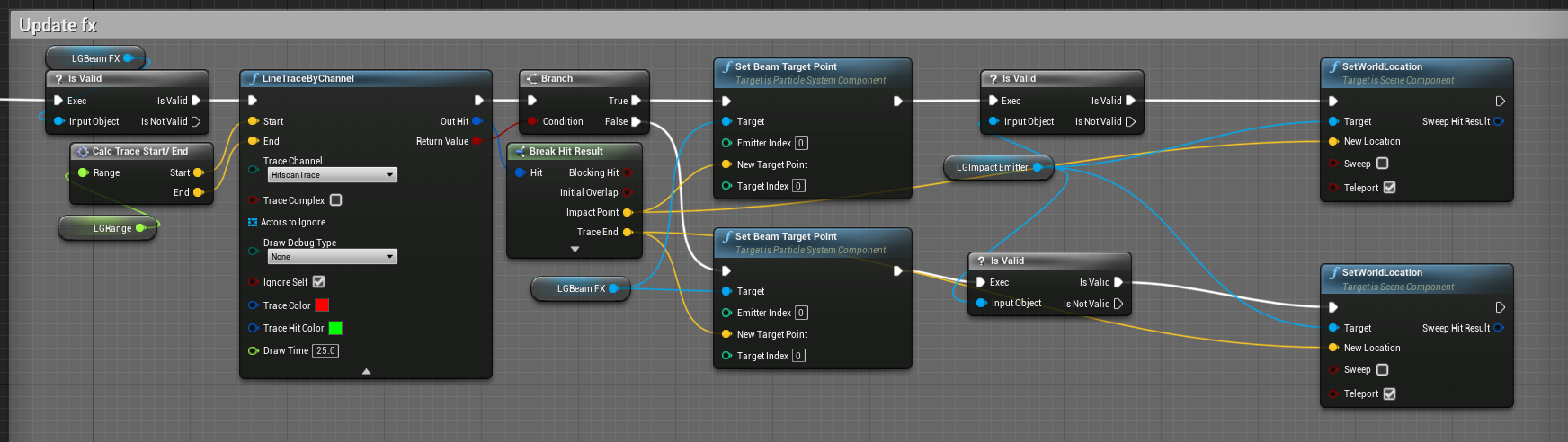
i have this on tick
is there a more efficient way?
it's updating the end point of a beam effect for a weapon
logically this seems necessary but i could be unaware of something
you mean, don't have 100 enemies all doing this as well?
ah right that's a way, could only have the beam update every 60fps or 30 or whatever too
ite
 odd veldt
Would this make performance problems?

(just want to get a value with the same name out of the materials)
icy dragon
odd veldt
Would this make performance problems?
Creating MID every tick? Yeah, that's a bad idea/bad design. You'd better have it on BeginPlay instead, and set the MID variable there.
There's no one preventing you from doing a check to compare if one MID equals to another MID anyway.
icy dragon
Consider checking out for the Material Parameter Collection instead.
 bleak perch
How would you find what type of asset something is like blueprint,skeletal mesh and all that stuff
icy dragon
bleak perch
How would you find what type of asset something is like blueprint,skeletal mesh ...
Casting.
odd veldt
icy dragon
Consider checking out for the Material Parameter Collection instead.
how should this help me?
icy dragon
odd veldt
how should this help me?
In a way that you would have a global params for your materials, that anyone can access.
odd veldt
I need to know the value that the floor under the player has
things like reading custom primitive data is also not possible
icy dragon
You could just have the floor as a BP and read the variables instead of a dumb StaticMeshActor.
drowsy osprey
severe turret
<@!719373757663412224>it looks simple enough. What is the issue you are having? ...
It only shows an example with 'auto play' and mentions you can script it, but doesn't show what to actually do? Is it casting to the char BP and then trying to pull of that Seq and then play the standard way? I just doesn't know exactly what to get a ref to or do with it. (edit: scratch that, now I see the BP at the bottom, I was on mobile and didn't see if the first time around)
willow cedar
Anyone know how to set your camera to rotate around a Character? I have a spring arm with Follow Lag, and when I move really fast and try to look around, the character is no longer centered and is either off to the left or right depending on the direction of the momentum.
 opal ivy
Here's a conundrum... and before it's asked, yes,I've tried reimporting my mesh with all different kinds of rotations on the Z... Why the hell is my character BACKWARDS in the template ThirdPersonController?
icy dragon
opal ivy
Here's a conundrum... and before it's asked, yes,I've tried reimporting my mesh ...
Your character is a Moonwalker.
icy dragon
What's your DCC software?
opal ivy
my what?
icy dragon
Digital Content Creation software.
Blender, 3ds Max, Cinema4D, ZBrush, Maya, and others alike
icy dragon
Not my point, because that's an asset hub website, not DCC, but okay.
I primarily use Blender, so if you use other DCC software, I can't try pinpointing the issue.
opal ivy
I'm assuming the model was created in blender since it has .blend files
I'm trying to do some more in-depth reimporting now, that might fix it
Is there a way to just rotate the mesh inside the BP?
I reimported and redid my animation blueprint, it was facing the correct way on reimport, but I attached my animation BP and now it's sideways
I accomplished it with a Pitch rotation in between my state machine and my output node in the anim graph, not sure if this is a good fix or not
 quaint bough
can anyone tell me how i get my noise to have less of these small islands? currently i do it like this: if noise is between 0.25 and 0.75 draw black else white. im trying to get something like a camouflage pattern

 keen goblet
@tired wolf You'll have to fix either the impulse or the launch angle, otherwise there's multiple answers.
Then pull up an AP Physics equation table or something and solve for the unfixed value given the fixed value, player mass, and acceleration from gravity.
 short pawn
does anyone know how to set the style of an input key selector?
dawn gazelle
short pawn
does anyone know how to set the style of an input key selector?
VIA BP it would be like this, otherwise it apperas under the "Appearance" section in the details when looking in the designer.


 static charm
@quaint bough do you still need help with small islands?
actually nevermind im not even sure how to fix it lol
quaint bough
@static charm yes
static charm
if it's material graph based though, i can say that #graphics channel are the people to ask
quaint bough
its not 😦
static charm
oh in that cause maybe just divide the noise output by 2 before you do your .25/75 check for drawing.
although it would effectively make all islands smaller
opal ivy
does the construction script just constantly run?
static charm
runs in edtior when you compile the blueprint, or move the blueprint/actor in the level editor(can turn this off, called run when drag)
opal ivy
Ah, maybe it just looked like it was twitching because z-fighting with the XY grid
static charm
haha yeah
opal ivy
https://i.imgur.com/gvfCGAu.png what node do I need to get ThirdPersonCharacter from inside HandLight?

GetOwner returns None
dawn gazelle
?
 opal ivy
well, that doesn't error at least.
dawn gazelle
This seems to do it.
 opal ivy
https://i.imgur.com/s40ool2.png still no attachment though. 🤣
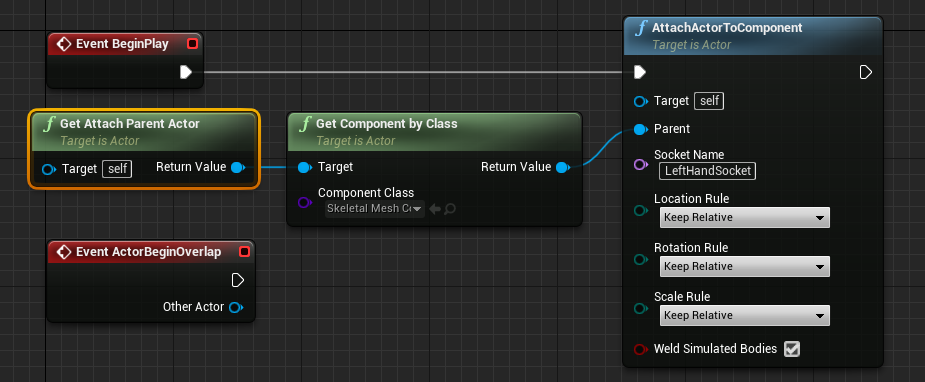
OH!
those drop downs need to be "Snap to Target"
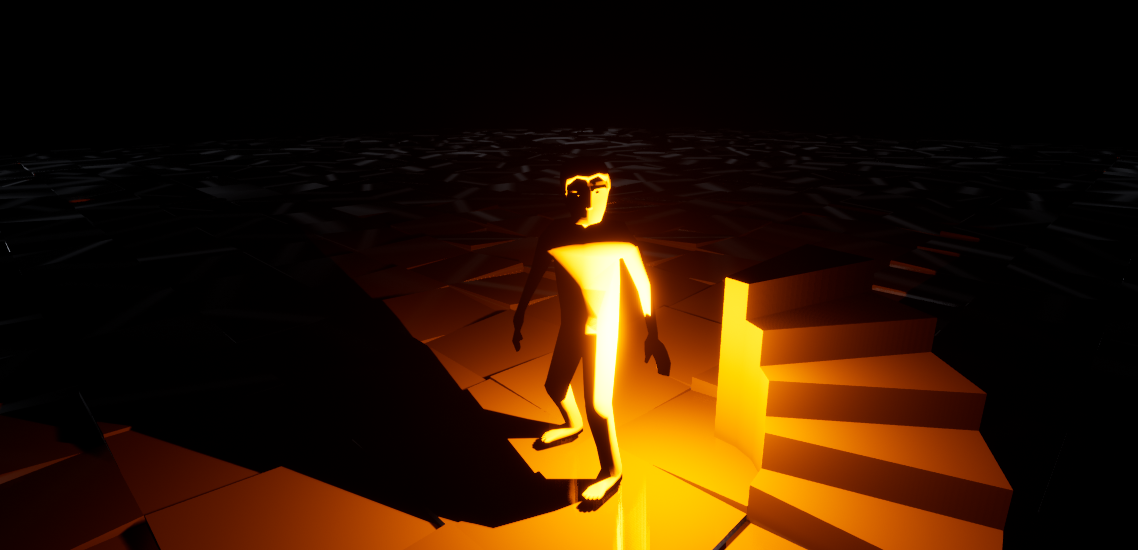
 burnt citrus
Hi all
I need help
I want to make switch character system, and I want AI to possess the previous pawn after switch
but AI character Ref is always invalid...(so previous character won't move after switch)
How can I do it?

 dawn gazelle
burnt citrus
Hi all
I need help
I want to make switch character system, and I want AI to poss...
dawn gazelle
burnt citrus
Hi all
I need help
I want to make switch character system, and I want AI to poss...
I tested something similar on my end and it appears to work ok if I unpossess an AI Pawn, then a few seconds later repossess it with a reference to its previous AI Controller.
If the reference is going invalid, then perhaps it's being cleaned up, and if so, maybe this node may help?
 short pawn
dawn gazelle
VIA BP it would be like this, otherwise it apperas under the "Appearance" sectio...
short pawn
dawn gazelle
VIA BP it would be like this, otherwise it apperas under the "Appearance" sectio...
It won't let me add my input key selector to the set widget style
burnt citrus
dawn gazelle
I tested something similar on my end and it appears to work ok if I unpossess an...
Thanks, it works! but...
I use "set tags" from character BP to set "Team" to AI controller
And after I use this node, the node says "Accessed none trying~~~"error. so...how to fix?

 dawn gazelle
short pawn
It won't let me add my input key selector to the set widget style
dawn gazelle
short pawn
It won't let me add my input key selector to the set widget style
Drag from your key selector reference and type set style with the context flag enabled. There's a lot of those nodes available within widgets and you might have one for the wrong type of object.
 dawn gazelle
burnt citrus
Thanks, it works! but...
I use "set tags" from character BP to set "Team" to AI ...
dawn gazelle
burnt citrus
Thanks, it works! but...
I use "set tags" from character BP to set "Team" to AI ...
Can you provide a screenshot of the error message text?
burnt citrus
dawn gazelle
Can you provide a screenshot of the error message text?


obviously, this error is caused by them, but AI works fine
WHY??? WHAT DO YOU READ FROM "NONE"???
 dawn gazelle
burnt citrus
obviously, this error is caused by them, but AI works fine
WHY??? WHAT DO YOU RE...
dawn gazelle
burnt citrus
obviously, this error is caused by them, but AI works fine
WHY??? WHAT DO YOU RE...
It's the GetControlledPawn node. Because the controller is being spawned again it likely isn't immediately possessing the pawn, so the begin play is firing before the possession. To fix this, in your DefaultAI, use the On Possess function instead of using the BeginPlay.
burnt citrus
dawn gazelle
It's the GetControlledPawn node. Because the controller is being spawned again ...
Wow, thank you, finally there is no error! you saved my time!
short pawn
dawn gazelle
Drag from your key selector reference and type set style with the context flag e...
Thank you. I think I am doing something wrong i is, not doing anything when I am checking if it has keyboard focus
dawn gazelle
short pawn
Thank you. I think I am doing something wrong i is, not doing anything when I am...
 narrow kelp
@split marlin I can't answer your question, but I can suggest double checking that the fps drops in a build and not just the editor.
what kind of question is that
 cold raft
Any ideas why string "5" does not convert to int 5

ah, crap - I am an idiot - I passed "year 5" instead of "5"
 primal smelt
I'm running a check on whether my pawn is moving in any direction above a certain speed. Just checking if anybody knows of a more elegant way than this?

 formal dagger
Hey guys, i have a big issue, i'm actually on this thing since yesterday...
So! i'm trying to make an interraction "pick up" with an animation and so far i only got this .
Probleme is : after the animation stops, my character doesn't go back to the blendspace and stay froozen and plus, as i have an interface i wish i could automatise the process like "item with "tagA" uses "animationA", item with "tagB" uses "animationB".
I know, big message, but i'm a totally beginner and all i could find on the internet is interraction without a 3D character animation... I'm so lost right now
(don't hesitate to mp me for me details, thx)
 robust jacinth
primal smelt
I'm running a check on whether my pawn is moving in any direction above a certai...
robust jacinth
primal smelt
I'm running a check on whether my pawn is moving in any direction above a certai...
Get a vector if you can, or create one from those X,y,z values, and then check its length.
primal smelt
robust jacinth
Get a vector if you can, or create one from those X,y,z values, and then check i...
Get component velocity is a vector. I'm sure it is a simple math problem that I am too stupid to think of but how would I check a vector in such a way I described?
robust jacinth
primal smelt
Get component velocity is a vector. I'm sure it is a simple math problem that I ...
Perfect. Get its length then. :)
Length should be a positive value so just check if it is > 50
primal smelt
Ah ok, that would involve measuring between two vectors right?
robust jacinth
Not sure it is. It's a vector with the current velocity. Length should be 0 if it is not moving. Above 0 if it is.
primal smelt
I could track location at multiple points, sure, but seeing as get component velocity is doing a lot of that legwork for me it seems pointless recreating that (and I'm not even sure it would be much cleaner)
robust jacinth
I do not know how the velocity component work, and i am not in front of the computer right now, but if it returns a vector with it current velocity, then the length should be all you need to know if you just want to check it
What you did above in the image was to check its velocity in specific directions.
primal smelt
robust jacinth
Not sure it is. It's a vector with the current velocity. Length should be 0 if i...
Nope you're absolutely right, I was searching "length" and nothing came up (which is why I assumed it perhaps had to come off a vector subtract node) but searching "vectorlength" got the correct node and achieved the right result. Thanks for your help 🙂
smoky belfry
Hello everyone. How do I make something like this? It is basically a widget that points out wind direction.

Is there a simple way to setup a 3d widget?
 maiden wadi
@smoky belfryIf you want a 3D widget, render targets are easiest to work with. But honestly, they're overkill in this scenario. Instead of using a widget, just use an actor or something that can be spawned and update itself based on the player's screen. It can hold a static mesh and a widget component. Widget component can have the text, static mesh can be the arrow.
 gusty shuttle
Heya, I'm a bit puzzled here. My time line works great on flame forward, but on flame default it jumps to the target without the smooth timeline movement. What gives?

nvm, figured it out haha. I had to call flame forward again
 short pawn
dawn gazelle
short pawn
dawn gazelle
Thank you so much for trying to help me. I want to figure out if a iks has the keyboard focus. Not if it is selecting a key. They are being added as children into a boarder so I'm not sure of I can see if one of the children is in keyboard focus
primal smelt
maiden wadi
<@!648116539308113930>If you want a 3D widget, render targets are easiest to wor...
@smoky belfry The only problem with this solution is that it'll get picked up in motion blur post process. It's something I've had to have a look at recently and - unless I haven't been looking hard enough - there's no easy way to filter particular objects out from it.
 onyx pawn
is it possible to trigger a matinee with a button on the interface?
maiden wadi
Hmm. Fair. You could probably go by it with some custom depth stencil stuff, but I always disable motion blur in projects.
primal smelt
maiden wadi
Hmm. Fair. You could probably go by it with some custom depth stencil stuff, but...
Yeah my google-fu lead me in that direction, seemd like a whole 'nother rabbit hole to get lost in so I've parked it in the "later" isle :p
maiden wadi
Haha. Yeah. I suppose in that regard you'd probably want to do a rendertarget to handle it easiest without issues. There are ways to get 3D stuff in widgets, but it's C++ related and not for the faint of heart.
primal smelt
maiden wadi
Haha. Yeah. I suppose in that regard you'd probably want to do a rendertarget to...
Great, looking forward to it!
Don't suppose anybody here has ran into issues with set profile collision name before? I'm currently looking it up now but might as well ask while I'm here. I've got a curious case where the collision profiles appear to be updating based on what is printed however it doesn't seem like the collision responses are. When changing back to the original profile it also doesn't behave as it did before switching.
 steady night
https://gyazo.com/43fdcf61c164a456557e6e8a3279cb36
Gyazo
Gyazo
Hey guys this is displaying the health % from a floating varaible
i want it to show % health from a Integer Variable what formula do you recomend ?
 sonic silo
https://youtu.be/N6c1Qglg5yE How can I fix this glitch. I am sure that this problem is caused by collision! Character should move to character wall perfect. I am using trace hit result> hit location and move companent to:) I tried to set radius of capsule companent to fix that but then I had another problems. Is it vey hard to fix that?
primal smelt
steady night
https://gyazo.com/43fdcf61c164a456557e6e8a3279cb36
Gyazo
Gyazo
Hey guys this is...
You could just use the 'round' node to convert o int
steady night
@primal smeltso it converts the integer value to a % value ?
maiden wadi
Is that a progress bar?
steady night
yeah
primal smelt
Ah I thought you just wanted to get rid of the decimal :p
steady night
hm okey so lemme se

so the red string i need to convert from there value > %
right ?
maiden wadi
Progress bar percent takes a multiplier of 0-1. 0=0% and 1=100%
To get that multiplier, you need to divide your current health by your max health. So say you have a max of 150 and your current is 120. 120/150=0.8. 80%
steady night
yeah i get the logic of it i just dont know the blueprints name and how to set it really
burnt citrus
Hi again
I need help
I implemented BPInterface, but it won't work...


Print string won't show any text...
how to fix it? Is my how use this node right?
steady night
@maiden wadihttps://gyazo.com/dea50b52dd8d9e1d1962e98bcbe37605

something like this ?
maiden wadi
Yes. But convert to floats first. If you do that with integers, you'll never get anything but zero. Integer math floors to closest whole.
steady night
hm if i convert to float first then i cant divide float / int
or is there a special node your thinking of ?
icy dragon
steady night
hm if i convert to float first then i cant divide float / int
Duh, divide float by float.

 thorny hatch
what are u trying to do @steady night
burnt citrus
I think Health should be float too
icy dragon
steady night
https://gyazo.com/51f9607629ebb8e613b30a24fa20b877
Yes.
maiden wadi
What you have should be fine.
icy dragon
burnt citrus
Hi again
I need help
I implemented BPInterface, but it won't work...
I'm still not sure if the casting from the macro would trigger the Set AI Mode...
I guess something to do with your casting macro?
burnt citrus
macro is same of above

And Player ref

using function in UI
and using Event in Player character BP(Mannequin)
but it don't work...
icy dragon
I'm going to roughly reproduce the node for some sanity check, brb.
burnt citrus
thank you...
 tepid steeple
Need a nudge in the right direction. If I wanted an in-game decision to permanently make a change to a blueprint how would I go about that? For example say I change a skeletal mesh in the third person blueprint in-game. I'd like that to update the blueprint in the editor so that the next time I dragged in the blueprint it reflected the changes. The functionality I'm creating is less for game play, more for game construction.... any thoughts?
steady night
@maiden wadi@icy dragon
https://gyazo.com/ad3f05551d0eea8ad927ae4533c9790c

so question, it works but if my "max mana is 50 value then it should show as 100% full so what im i missing
the integer values will change "ingame"*
icy dragon
steady night
so question, it works but if my "max mana is 50 value then it should show as 10...
Current Mana / Max Mana
It's that easy peasy lemon squeezy
burnt citrus
lol
steady night
hmm so i have to make 2x integer variables 1 for the current mana and 1x for the maximum mana yes ?
burnt citrus
yes
steady night
yeah ofc i have to.
burnt citrus
and why u use int, not float?
primal smelt
Ok I am actually trying to troubleshoot this right now but because I barely have two brain cells to rub together I am making a pig's ear out of it. But does anybody know if set collision profile name acts a bit funky (as in, doesn't work at all apart from updating JUST the name) if you're applying it to a child component?
 bleak perch
is there a way to get a blank cast
primal smelt
(don't read too much into the names - it might suggest I am trying to turn a wheelchair into a weapon but this is just me swapping out a bunch of profiles and seeing if any of the responses behave)
bleak perch
and then i can choose
steady night
 bleak perch
which thing to cast
steady night
so like this then ?
bleak perch
like
icy dragon
burnt citrus
macro is same of above
I somehow forget this.
Try doing Message functions of the interface to call the Set AI Mode.
burnt citrus
steady night
<@!298714232571166722>if i use float it will be % health not fixed value yes
Use truncate int
bleak perch
Is there a empty cast node in blueprints where you can send in the object type and it would automatically know which object to cast to?
steady night
@steady night whats "truncate int" ? and why not use integer ?
bleak perch
object reference*
burnt citrus
integer / integer always return float, you know
it will be frustration
steady night
aye for the decimals you mean ?
icy dragon
burnt citrus
integer / integer always return float, you know
it will be frustration
Actually integer / integer results in integer. Any decimals will be rounded out
steady night
aye gotcha but im in learning phase so i will remember what you said
primal smelt
Sorry, I'm not spamming - but just in case my last question got flooded off screen (and with an update): Anybody know if setting collision profile name doesn't work properly if it's for a child component? I was just able to test it for the scene root component and it works fine, but for a child component I'm getting no joy at all. It just appears to ignore all collision responses (but to be fair to it, when printing the variable the name has indeed changed, for all the good it does me...)
 burnt citrus
icy dragon
I somehow forget this.
Try doing Message functions of the interface to call the...
burnt citrus
icy dragon
I somehow forget this.
Try doing Message functions of the interface to call the...
then...
I use message but it still does not work...
 icy dragon
steady night
aye gotcha but im in learning phase so i will remember what you said
icy dragon
steady night
aye gotcha but im in learning phase so i will remember what you said
Since I'm working on J-RPG style, I have my player stats in integer, so to create the progress bar for the health/magic points, getting the percentage is the matter of converting both current stat and max stat to float, and divide them to get the percentage.
 burnt citrus
primal smelt
Sorry, I'm not spamming - but just in case my last question got flooded off scre...
burnt citrus
primal smelt
Sorry, I'm not spamming - but just in case my last question got flooded off scre...
I think you should use "set collision enabled" too... maybe...
steady night
yeah thats more or less like mine@icy dragon
primal smelt
burnt citrus
I think you should use "set collision enabled" too... maybe...
Would it switch it off when changing profile name? It's on by default - the profiles I'm trying to change both work as defaults, just not after switching.
primal smelt
burnt citrus
I think you should use "set collision enabled" too... maybe...
And liek I said, it works for the scene root component with manually enabling collision for every switch
bleak perch
is there a better way of doing something like this

beause I am using casting to see if the asset is what ever and if its not it failed and if it is I rename the asset
and append it
burnt citrus
primal smelt
And liek I said, it works for the scene root component with manually enabling co...
hmm... I haven't heard that child components collision will be no collision, so ...idk sorry
primal smelt
burnt citrus
hmm... I haven't heard that child components collision will be no collision, so ...
No wait, I think you might be onto something. I think I assumed/misremembered/brain farted that collision profiles included collision enabled TYPE but I don't think that is actually the case. The default is on query only, I shall now do science!
icy dragon
burnt citrus
then...
I use message but it still does not work...
So I reproduced the node, and I figured you just need to message the interface as the BP widget, not the Player Ref.
primal smelt
burnt citrus
hmm... I haven't heard that child components collision will be no collision, so ...
No it does, just turns out I had query set on both profiles by mistake. I appear to be having a day...
icy dragon
 primal smelt
And thank you!
burnt citrus
haha, ur welcome
burnt citrus
icy dragon
So I reproduced the node, and I figured you just need to message the interface a...
so,I need connect self reference to target pin?
icy dragon
burnt citrus
so,I need connect self reference to target pin?
Reference to self works on me.
So the target in interface message refers to the one who has the interface function defined, and execute them remotely.
burnt citrus
🤔hmmm

I try every pattern but all of them don't works...
I think it is perfectly right, I did implement interfaces to both and I did use event correctly but...
why...🤔
gusty shuttle
What does the little ball in the corner of that thumbnail mean?
 burnt citrus
icy dragon
Reference to self works on me.
So the target in interface message refers to the ...
burnt citrus
icy dragon
Reference to self works on me.
So the target in interface message refers to the ...
Could you show me your node? I can't find anymore...
icy dragon
burnt citrus
Could you show me your node? I can't find anymore...
Here's my rough reproduction

 worldly gyro
 burnt citrus
icy dragon
Here's my rough reproduction
burnt citrus
icy dragon
Here's my rough reproduction
even In same BP, it doesn't works, WHAT?????WHY????
I perfectly copy your BP!?!!? I DON'T UNDERSTAND
 icy dragon
gusty shuttle
What does the little ball in the corner of that thumbnail mean?
icy dragon
gusty shuttle
What does the little ball in the corner of that thumbnail mean?
It's the icon of Actor.
gusty shuttle
@icy dragon Thanks for answering. I know it's an actor. My other bp's are actors to. So why is this one special?
All actors
 burnt citrus
okay I might find why it is caused.... because my button layout is shit...
gusty shuttle
 icy dragon
gusty shuttle
<@!325627930484932608> Thanks for answering. I know it's an actor. My other bp's...
icy dragon
gusty shuttle
<@!325627930484932608> Thanks for answering. I know it's an actor. My other bp's...
Because you have a mesh in that actor that the engine can make a thumbnail out of.
 icy dragon
burnt citrus
okay I might find why it is caused.... because my button layout is shit...
icy dragon
burnt citrus
okay I might find why it is caused.... because my button layout is shit...
At least it kills two birds with one stone now 🤣
gusty shuttle
I guess haha. Okay, so the original plan is to create a new thumbnail. So I guess I take a thumbnail of the static mesh instead?
icy dragon
gusty shuttle
I guess haha. Okay, so the original plan is to create a new thumbnail. So I gues...
You could create one by capturing from viewport.
gusty shuttle
Aye, that's where my problem was started. Usually I can, but I don't have the option in asset actions
icy dragon

 burnt citrus
now, finally, it works fine...!!
F**kin my layout lmfao
anyway thank you hoodie!!
icy dragon
gusty shuttle
I guess you couldn't if the engine detects the mesh
gusty shuttle
Aye, all good man. thanks anyways dude!
onyx pawn
in my widget I have button set to event dispatcher

and in my level blue print assign event to that click

but its not playing the sequnce on click
 errant snow
@onyx pawn have you placed any breakpoints yet to see if you're actually executing the nodes you think you are?
onyx pawn
I have just added prints
errant snow
And those prints confirm that the blueprint is at least getting to the "call cameraflymode" and "bind event to cameraflymode"?
Is it possible that somehow the bind isn't happening until after the call executes? it's hard for me to tell with the provided snippets.
onyx pawn
yeah its not printing any text on button click
so it does not even seem to be getting called
ok now I am getting clicked print
but its not playing the sequence I have selected camera remains same
 errant snow
If I had to guess it's because you're not providing any values for the settings input and the defaults aren't sufficient to play the sequence for some reason.
but that's only a guess, I don't interact with sequencer a whole lot
 dark crow
CMC has a Can Walk Off Ledges bool, give it a try
Yes but it can be turned off only for duration of dash ability
Well then you can modify friction values or gravity scale or whatever works the best if falling and dashing
So decelerate it faster for example
 plucky harness
can anyone help figure out the issue, i have "Hit result under cursor by channel" and branch with condition equaling to a character from "hit actor" which im clicking, print strings print exact name of said character but true condition never gets triggered for some reason, what i am missing?
 unique harness
plucky harness
unique harness
plucky harness
Then the type isn't equal to the one you're checking against. Verify what the class of the hit actor is
 white crypt
i think he is comparing to an invalid object, but as you suggested he should check if its the same class
 plucky harness
ty, got it
white crypt
@plucky harness or you can even do "cast to", when you will be hitting something else, then it will return fail cast
plucky harness
ty!
limber finch
I have a box collision on in a blueprint, and I have a sphere mesh on the same blueprint that I'm trying to activate the box collider with and it's not working. Any ideas?
unique harness
limber finch
I have a box collision on in a blueprint, and I have a sphere mesh on the same b...
show code
limber finch
uhhh there really isn't any code, just trying to activate when it moves into the collision box

trying to have the collision activate when the sphere is inside the box collider
unique harness
so you want to know how to do it?
limber finch
Yes
unique harness
So you want the box to have no collision but once the sphere overlaps it, you want the box to block everything?
limber finch
Noo like
I just want an event to to be called when the sphere is inside the box
Like if the sphere is inside the box something happens
limber finch
Overlapping is fine
unique harness
ok so you can select the box and in the details panel there is a green button for overlap events
limber finch
The sphere has no collision though, I want it to phase through the other objects
I'm tying it to a sound cue
unique harness
then in this event, check the component to see if it is the sphere
if it is, execute your logic
limber finch
How do you do that?
unique harness
do what?
limber finch
One sce
unique harness
select the box and scroll down in the details panel, you'll see this

click the + for Begin Overlap
limber finch
Yeah it's not detecting for some reason
unique harness
we're not done
limber finch
Oh okay yeah I've already done that
 limber finch
OHHHHH
unique harness
you need to make sure the collision for both objects is set to overlap all

as well as the GenerateOverlapEvents checkbox is true
then it should work
limber finch
Checking now
unique harness
how are you moving these components?
limber finch
Well for now I'm just moving it into it with a set local transform set to sweep
unique harness
ah ok
limber finch
This isn't working for me and I know that it should.
unique harness
So I would set a breakpoint on your OnComponentBeginOverlap and see if it's being called
limber finch
You mean getting a print string before the branch?
unique harness
that is also a method
limber finch
It's not for some reason
unique harness
You're sure your collision presets and GenerateOverlapEvents is checed?
limber finch
Yeah
unique harness
it looks like your method of moving might not work
if you look at the description of sweep
"Only the root component is swept"
limber finch
I figured it out
I was testing with a basic blueprint, but on my complex bp I realized I didn't attach the component, so it was moving while the sphere was staying in place.
unique harness
😛
 novel goblet
Happy Saturday all. I'm trying to reverse a blueprint into C++ and I'm trying to look at a little bit of code here and break down what is going on.
I believe in the image we are getting the length of an array.
For the sake of the example here lets say the array is size 5.
Then adding 2 in the first add to 5. So 5+2 = 7.
Then in a new created array storing 7 as the value of the first element [0] Is this correct?
 maiden wadi
@novel gobletThat would be correct. Same thing in C++ would just be
TArray<int32> IntegerArray;
IntegerArray.Add(VectorArray.Num() + 2);
IntegerArray.Add(VectorArray.Num() + 1);
IntegerArray.Add(VectorArray.Num() + 0);
IntegerArray.Add(VectorArray.Num() + 2);
IntegerArray.Add(VectorArray.Num() + 3);
IntegerArray.Add(VectorArray.Num() + 1);
Brilliant. Thank you Authaer!
 barren salmon
hello i am having a strange bug where my player cannot move up or down
ik things are being pressed but for some reason even though i enable flying nothing happens
ik it works on event tick as otherwise it would not let me move left to right
maiden wadi
@barren salmonTry Y direction, instead of Z
onyx pawn
ok I got it so when I click button on interface it starts playing the level flythrough, but when I click button again its not stopping the play animation.. how should I make it stop playing the sequence on click again
 robust jacinth
When a player dies I spawn the items the player was carrying, and then the dead ragdolled corpse picks them up again... Isn't game dev fun?
(Realized I wrote this in the wrong channel. Oh well... sorry!)
trim matrix
has anyone used clipworks for a replay system if so did you add first person view or player/bot names above their heads
willow cedar
Any way to update the location of a looping audio source without restarting the sound
I just realized I can probably use a sound component, never mind lol
dawn gazelle
onyx pawn
ok I got it so when I click button on interface it starts playing the level flyt...
You shouldn't need to use Event Tick at all for any of this. Use Begin Play to bind your event, and when the fly event is triggered you can do your "Play" of the SequencePlayer.
I suppose you could still use your flip flop to turn it on and off but you also need to use the "Stop" node for Movie Scene Sequence Players.

 azure bolt
Hey I'm trying to get my first person player camera while driving my boat to only be look to side to side (not all around) so i can't have a static clamp value. So i've tried this, among other things. Doesnt seem to work though. I can drive my boat around by rotating the boat with WASD. I'm trying to get the rotational value of my boat mesh so the clamp values can match up with the rotation of the boat.

 severe turret
you can base the clamp on the world direction or the player normal facing direction
you could even use the boat rotation as a base.
 spiral reef
Is there a way to get current playing animation ? I getting AnimationData from mesh but it comes null
 quartz locust
Alright so ive only been messing with unreal engine for like 10 hours total, and ive found the solution to alot of my issues out with google but this one im not sure ill be able to, i have it worked out so when i press "C" i open my character menu, it also disables camera and makes the cursor appear, all works fine, on the menu i have buttons to switch to different widgets to look at the different menus, this works fine, when i close the menu after using these buttons i have to click once again to get my camera controls back. should i be looking at the third person character blueprints or is it my menu blueprint that is goofed up? i can show screenshots/a gif of the behavior.
 cyan surge
Is it possible to include an blendspace 1D animation as part of an anim montage?
quartz locust
now somehow i broke the ignore look controls so 😄
azure bolt
Well i got my boat kinda working but the clamp reverts back to the minimum value once it reaches the maximum. any idea whats causing this?
 willow cedar
Is it possible to expose the Camera Lag values to be used to drive other values?
Or I would at least like to change the camera rotator to be a character, event when the camera moves really far away
trim matrix
is it possible to get 3 exec outputs from a widget
 narrow kelp
@trim matrix use a sequence if you need to
severe turret
@willow cedarits technically possible by compering the position of the spring arm to the player the camera/SA is attached to. When it is not lagging it will retain it's position value in relation to the player, but any difference between that would be the lag value. You could update that in a variable and use it for other calcs.
willow cedar
severe turret
<@!183669598355193856>its technically possible by compering the position of the ...
That is a good start. Thanks, I'll try messing around with that.
 mossy herald
I have a main menu and a pause menu but after I press play I have to click one more time on the screen to be able to click start or quit. Same for the pause menu[SOLVED]

these are the level bp
 dark ingot
Anyone know of a way to detect if an actor is in the shadow of another actor?
I'd like to try to accomplish this without line tracing, although it appears that might be most direct route.
severe turret
no that wouldn't really be possible without custom code or some extra collision detection. Its cheaper to work out the distance and angle between the two characters with a trace.
limber finch
Does anyone know why some audio would not play after build?
barren salmon
maiden wadi
<@!755508494815330325>Try Y direction, instead of Z
I tried that but since it didnt work I'm going to look at the top down example project to see how it is done there
 fleet cedar
Hey guys... I need some help if anyone can... trying to copy this effect I saw on a GDC talk where the character faces his velocity. The problem is that when lerping to smooth the rotation, the character jumps between -180 and 180 at the poles.
icy dragon
fleet cedar
Hey guys... I need some help if anyone can... trying to copy this effect I saw o...
If you use RInterp To, there's an option to take the shortest path.
fleet cedar
O_O
ohhh
I will try that

Where is that option?
you're a genius!
rinterpto does it by default
tysm!
spent like 3 hours on that last week
fleet cedar
Thank you @trim matrix
Got another question... do you or does anyone know how to change the friction caused by hitting a wall on the player movement component?
gritty elm
@spiral reef it depends, if you are using montages, you can use "GetCurrentActiveMontage" from get anim instance
slow phoenix
Btw, any default texture collection object?(to randomly pick textures from)
Also, how do you set a textturesampleparameter2d in blueprint?
spiral reef
gritty elm
<@!524975754568663046> it depends, if you are using montages, you can use "GetCu...
no i am using state machine
slow phoenix
Cool thanks
So it must be material instance dynamic? If I already create a material instance and expose the texture parameter it doesn't work as is?
Gonna try and see how that goes later
gritty elm
@spiral reef You can use ‘animNotify’ events to setup this
but can be a tedious overworked solution if you have many States
gritty elm
you have many states, but you have some basic animations like walk, run, etc
create an animNotify custom blueprint class
and use that class as an AnimNotifyClass in each start of animation sequence
@spiral reef let me explain how to do this
and yes i'm solving your issue
gritty elm
1 : create custom anim instance class

after creating this class, make a new string variable, and make it instance editable.
2 :

step 3 : click on override function button and override "Receive notify" function

@vernal fjord step 4 : inside receive notify function, get reference to your character and set current animation variable to "my variable"

you also need to make a new variable inside your character to store current animation name
final step : open the all animations one by one, and add the new custom anim notifyclass that you have created ( in the begin frame of each animation )
like this :
 spiral reef
only left thing is
gritty elm
and just set the name of your variable like this, so when this notify is called, then it means that "OnReceive" Event is called, and i'm sure that you have understand now
 spiral reef
getting animations from its name
gritty elm
yes this is what i explained in last image
just set the name for individual animations, and your problem is solved @spiral reef
spiral reef
can i get animation asset from name ?
gritty elm
why not just specify the name manually? ( remember: myVariable is the variable that you've created )
gritty elm
spiral reef
can i get animation asset from name ?
Yes you can also do this : from animation -> get display name
 spiral reef
you cant continue after rewind 😦
spiral reef
gritty elm
Yes you can also do this : from animation -> get display name
yeah this is getting name of animation
gritty elm
get display name, so you don't need to specify manually
spiral reef
can we do this backwards too ? getting asset from name
gritty elm
or even you don't need to create string variable and make it instance editable
gritty elm
spiral reef
can we do this backwards too ? getting asset from name
your issue is solved
gritty elm
spiral reef
can we do this backwards too ? getting asset from name
Yes, you can also do this by making a function, and use switch statement to return animations assets based on their values.
spiral reef
gritty elm
Yes, you can also do this by making a function, and use switch statement to retu...
ahh yeah this can be posible

if getting animation data were working that will be easier
gritty elm
spiral reef
can we do this backwards too ? getting asset from name
answer to your question :
 spiral reef
ok thank you soo much i am trying it now
 fleet cedar
Hey... I want to do a check to see if the viewing angle to the wall is within a certain range. I'm doing a line trace. Would I use out hit normal for this?
 spiral reef
gritty elm
answer to your question :
spiral reef
gritty elm
answer to your question :
thank you soo much it worked !!! only animations doesnt play but its a little bug it seems
gritty elm
@fleet cedar https://forums.unrealengine.com/t/determine-angle-between-player-direction-and-wall/15482/9
yes you can also use normal

Unreal Engine Forums
I don’t why do you want to know the angles. But if it is only to know if it is left or right of the player, this is what I use and it works for me:
@spiral reef sure
spiral reef
maybe because its resetting animation every frame
spiral reef
gritty elm
<@!524975754568663046> sure
is it imposible to make this in state machine ?
slow phoenix
So does it make sense to save material instance dynamic to say game modes?
Cause when I first change material to use Custom Primitive Data, the draw call cuts to about half.
But now I want to do different textures, the draw call climb back up again but I only ever have like 5 base color variations.
So wonder where to save the instance ref makes more sense.
 coarse marten
Is there anyway to feed the viewport or the current view forward vector for my movement?
slow phoenix
Yes, but it probably won't be this frame
dawn gazelle
?
 slow phoenix
If you are doing like VR or 6-DOF movement components, it could change very quickly
coarse marten
Kind of? Im using a bunch of different camera volumes
wait, lemme record a video
will allow me to better explain what im trying to do
slow phoenix
So probably better just to save and do some extrapolation + lerp of existing vector
coarse marten
its blending between two cameras, but i basically want the forward vector from blends and stuff at all times.
so they move in that direction always
tired wolf
Anyone know how I can calculate the launch force required to send the player to a specific location?
slow phoenix
Same idea for fast view changing like this.
If you do the interpolate to you can adjust how quickly it snaps to your current view dir
So it won't feel like a jitter
VInterpTo
For your case you don't even need prediction/extrapolation
VInterp To
tired wolf
k
slow phoenix
tired wolf
Anyone know how I can calculate the launch force required to send the player to ...
I suggest that you do it with a curve or something, cause by default ue4 physics are ticking with frame rate
supple dome
see SuggestProjectileVelocity and PredictProjectilePath
slow phoenix
If you want some air control for the player, you probably want to do some tweaking on how physics tick
tired wolf
okay
slow phoenix
Cause otherwise when player have different max fps your force could be different
More visible from say 30 to 60 than 60 to 120
coarse marten
slow phoenix
If you do the interpolate to you can adjust how quickly it snaps to your current...
Oh i think i understand what you mean, vinterp the forward vector of the viewtarget basically?
slow phoenix
Yeah, whatever feeds your movement component velocity
Basically anything you want to have smooth interpolation across frames, use that and FInterpTo
coarse marten
I see.. right now im using this for the camera blending

im not sure how much the interp value will translate to blend time, but i'll play around with it i guess.
tired wolf
@slow phoenix SuggestProjectileVelocity Custom Arc did the job
slow phoenix
Cool, now test different max fps and see if it works properly or if there is a simulation for varying FPS
Cause I used to have this issue and I have to tweak until my fps are consistent to get the physics working properly
coarse marten
last thing, is there a proper way i can grab the actual camera that's in the view target or would i need to setup some sort of interface for that?
as this returns the actor itself, not the the camera which is kind of problematic as its different from the actual camera vector i want.
 slow phoenix
coarse marten
last thing, is there a proper way i can grab the actual camera that's in the vie...
slow phoenix
coarse marten
last thing, is there a proper way i can grab the actual camera that's in the vie...
No idea, it depends on how you implement the current pawn camera
coarse marten
its just a standard camera component attached to the pawn and the volume
i thought this would be it actually, but its not.
 slow phoenix

get the rotation from this cause the Actor eye isn't camera if your read the description.
my screen shot is under pawn blueprint
coarse marten
OOOOOOOOOH
THATS WHAT I WAS LOOKING FOR!
This was what i wanted. Thank you

Exactly what i needed, thank you!
slow phoenix
😄
onyx pawn
if i want to set a mouse over event to instead of popping up right as users mouse cursor moves over it but check if a cursor hover over is more then a few seconds then pop up widget. how would this be done?
dawn gazelle
onyx pawn
if i want to set a mouse over event to instead of popping up right as users mous...
Are you using a custom widget tooltip rather than the built-in tooltip system?
slow phoenix
onyx pawn
if i want to set a mouse over event to instead of popping up right as users mous...
a few seconds is really long time though. anyway, there are many ways to do it but what I would do is using the timeline node to do this.
for example

so this way you can control how long the time line is, and it only fires "Do my thing" when the timeline finished playing. anytime the cursor left and re-enter the component it will reset the timeline from beginning.
note: if you want to have something like say, doing the safe crack/bomb diffuse where the progress are not reset but reduced over time. you can move the "End cursor over" to "Reverse" part
And this is just 1 way to do it.
dawn gazelle
If you are using custom tooltip widgets, an easy way to do it is bind to a function that creates the tooltip widget, and design the tooltip so that the root component is set to collapsed or hidden so that it's not visible, then on the construct event of the widget, you can set a delay and set the visibility to visible.

 slow phoenix
one of the thing the delay doesn't quite fit the bill is that delay doesn't check if your cursor is off the target or not, there are no gate input in the note itself so you can't "close" the gate once it fires to the delay node.
dawn gazelle
The widget gets destroyed if you move off.
slow phoenix
that's kinda weird to do. would that keep the system lighter this way?
I guess if Epic did it this way they must have considered it already
dawn gazelle
I'm not sure to be honest. I just know that it seemed to work well 🙂
slow phoenix
just a reminder that I used to do a prototype that destroy things while it have some lingering events
dawn gazelle
I say destroy, I don't know if it's being destroyed destroyed.
slow phoenix
gave me plenty of errors so I have to be really careful in early days of UE4.
dawn gazelle
But it doesn't seem to reference any existing tooltip widget.
slow phoenix
I pretty much skipped from 4.12 to 4.26
dang they still haven't implement a make selected node layout/look nicer function yet?
smoky belfry
Hi everyone. Is it possible to set a widget component visible to owner only?
I currently have a widget component set on the character.

And I only want it to be visible to its owner. How do i do it?

 hazy tide
Anyone know, when I alt tab inside a blue print. It doesn't alt tab to the other window I was just in?
How can I fix this?
hazy tide
Can someone help me?

I'm trying to set up a player controller, I assigned my game mode in settings. And also assigned the camera to player controller. Yet when I press play it doesn't put me as the camera view.
nvm solved it
 tropic oracle
Can anyone send me any link on anything that has to do with making a garden or growing a plant or watering crops . I need this badly or a gun that shoots certain ammount of water depending on the plant need


 snow thicket
Hello guys
I am new to unreal and have been exploring blueprints
I am trying to get min and max output from the FloatRange node.
How am i suppose to achieve that?
 trim matrix
how do i run two "beginplay" at the same time?
i want to set one more thing to this


this
just one
onyx pawn
slow phoenix
a few seconds is really long time though. anyway, there are many ways to do it b...
I have it on start mouse cursor over building it pops up text information window at end of timer, on on end cursor over reset hud.. only issue is on end cursor over itst not stopping the timer and I am still having information widget pup up at end of time after mouse cursor left..
 spiral reef
Is there a way to smooth animations set from blueprint?
steady night
https://gyazo.com/dab1d89e4bf2af1ae241d7c0499f82d9
hey how do i release camera to not fixate after charachters rotation ??
 trim matrix
is there a way to add more angle when my character looks up for exaple now its 180 degree from all the way down to up but i want it to be 200 so it bends a bit more

 versed sun
Does anyone know if A or B is better or will they function the same?

 surreal peak
Should theoretically do the same
versed sun
thanks
trim matrix
im using transform modify bone

the bend variable comes fromt he character
this is the bend variable

can i adjust those to bend upwards more
allright thanks
 hexed parrot
anyone an idea what this is?

 wheat ermine
hey there, i just recently started getting into unreal, both c++ and blueprint, but i'm having an issue with my BP implementation of a damaging dash.
it seems that the damage is only calculated if the enemies are in the dash hit box at the start of the dash. it does not calculate any damage to enemies that are hit after the dash is started.
i'm sure this is pretty vague, but i wanted to see if this might be a commonly overlooked situation or i just need to really dig in and debug that action?
thanks in advance!
fleet cedar
Lorash, do you or does anyone else know if there's anything I can do to correct the skeletal mesh pack that I downloaded that is using the wrong forward axis? It's causing a lot of irritation in my blueprint. I don't have the source files so I don't think I can even just apply the usual import rotation can I?
fleet cedar
I did rotate it BUT
I am doing some trickery and not using the normal locomotion system, but actually rotating the mesh via code
so when I use forward axis it is flipped 90 and I have to subtract -90 from all the math so far
hexed parrot
Thanks Lorash!
fleet cedar
I was thinking I could parent it to an empty object but you can't parent the mesh in a Character BP
😄
wheat ermine
i have an On Component Begin Overlap event like this
 wheat ermine
on a custom dash event
fleet cedar
You really know your stuff, may I ask do you work in Unreal Engine for your job?
wheat ermine
it's kinda long
here's the client dash

and this is the server

thank you @trim matrix! i'll try it out
fleet cedar
Would you recommend any learning resources @trim matrix ? Or did you just adapt from another programming language?
what do you mean by latent nodes
 molten hound
Hi guys does anyone know how to set the text field in a particle system from a variable?
 fleet cedar
Thanks. I am facing this very struggle now with animation blueprints... I've learned the basics watching UE4 livestreams and dissecting the blueprints but now find the leap to the next level is a massive chasm. In a live stream they said they'd be releasing more featured versions of the paragon assets but never came through with it.
Aye. But honestly most of the complicated stuff to me is the blueprint side, something like climbing a ledge or a ladder perhaps, it's nearly all blueprint then just some animations played on top.
Yeah that's the one people always recommend but it's so interwoven that I can't really understand it
It also seemed to me that their approach to layering animation is very unique and requires a very large bespoke animation library... I guess any good blueprint would but these are not typical animations you'd find readily from what I could see
I'll take another look at it though, I've learned a fair bit since the last time I tried to examine it
I haven't had time to explore control rig yet... I thought it was for creating animations clips not for run-time is that not right?
wheat ermine
adding the sweep seemed to work, but i had to apply my damage to the Hit Actor from the Sweep Hit Result
it's working now, a bit janky... but hey. one of my first games
thanks for the help
here's a quick lil demo 😄
indeed, thanks again. you've been really helpful!
 latent finch
Hey, I have a quick question.
I am working on a 2d sidescroller and I have an enemy make that runs toward the enemy. What would be the best way to have that enemy stop before reaching the player and start shooting?
I was considering adding a collision to him to make him stop moving when the player overlaps and begin shooting then
earnest tangle
That works, or check distance to player
latent finch
Ok, I made a collision for him but now my projectiles break when they overlap his "vision" collision. Any idea what I can do about that? The projectile is set to overlap all and I have the collision on the enemies vision set to trigger. So I didn't expect them to interfere with each other
 simple dragon
someone have idea how to slide camera along spring arm trace
 olive sedge
anyone know of a good way to calc where a pawn will be if it keeps moving in the direction it's heading at the speed its going?
simple dragon
@olive sedge get actor velocity 🙂
olive sedge
@simple dragon well yes.. But I need to calculate where a pawn will be if it keeps going so I can let my character shoot that there instead of the current position
simple dragon
u men 100% accuracy on AI
olive sedge
not 100% because the other guy can still change trajectory
but it's just too easy to dodge shots rights now
simple dragon
u cant protected where player move next
is like taring to say to water sit down XD
olive sedge
bruh. It's AI shooting at each other
and they shoot at the current position of the other guy with non instant projectiles
so they miss every time the other one is moving
I need to calculate something like position + move speed character * trajectory / projectile speed * distance or something of the sort
simple dragon
get target velocity and rotate ai less with distance + up/down for bullet drop if u have it (this is hard btw)
@olive sedge
try this for bullet drop https://blueprintue.com/blueprint/y0k35cta/ u be needing to tweak it
BlueprintUE
or just use raycast/trace and do hit scan 🙂
o i miss bulet drop node lol
BlueprintUE
power is a projectile initial speed
dawn gazelle
latent finch
I'm using a collision for my enemy to track whats around it. But my projectiles hit the collision. Any ideas why? I have the collision set to overlap, and I have it set to query only. I tried changing it's collision to trigger and it didn't change either.
Fixed my issue, by ignoring all collisions except pawn.
 olive sedge
@dawn gazelle thanks!
slow phoenix
olive sedge
bruh. It's AI shooting at each other
You basically need to fulfill a couple condition, 1. Bullet speed must be faster than AI movement speed. Usually 5x or more is necessary. 2. Your AI movement, if the AI can change velocity instantly compare to say using acceleration to adjust velocity. The latter with momentum is easier to predict. 3, your AI must prefer engagement than dodging danger. Cause if dodging is too high eventually they move further away thus make prediction harder.(you kill this effect by increasing your bullet speed) 3. You can implement reaction time into your AI so they can't sense and react to anything that just spawned last frame.(this also make it feel more realistic)
mighty fable
im not 100% sure how to do that
This is for school, and none of the teachers are online
can I just reduce the amount of niagara effects that I imported from the marketplace?
 stray wagon
Im trying to create an object of type "key" but I cant find Oculus Touch (R) press A
Even though I can see displaying when I log Any Key event
Any reason why it's missing??
mighty fable
I guess im better off asking my teacher then
The teacher told us to follow a tutorial to setup our workspace
slow phoenix
Lol
mighty fable
They barely went over perforce, just basics on uploading and importing from our classmates, I'll see if I can get a hold of someone.
slow phoenix
Yeah, that's not how teacher should work.
mighty fable
trust me I know
slow phoenix
Better complaint to someone cause that's irresponsible
If you paid money for education you better get what you paid for.
mighty fable
Yeah, that's how it should be but I have gone through enough bs and I graduate next month so I just wanna be done, the program itself hasnt been all that great
 slow phoenix
like all my project are literally under something like D:\UnrealProjects
and if you have assets that can be independently import to other projects
you can put them into folders like D:\UnrealAssetsShared
slow phoenix
stray wagon
Isnt that liust missing like... almost all the controls of the Touch?
if the input is Axis(like analog trigger or stick direction) you can't really map them into keys as they are float value range
stray wagon
It's not an axis, face top/bottom etc.. of the gamepad are available as well in this list, just not the touch 's buttons
limber finch
Hey guys, I want to allow players to export a combination of elements into a preset to be able to load in, how would I go about doing this?
slow phoenix
stray wagon
It's not an axis, face top/bottom etc.. of the gamepad are available as well in ...
I think the buttons are mapped to some default ones.
stray wagon
slow phoenix
I think the buttons are mapped to some default ones.
You reckon? Tested with the gamepad ones but definitly not
slow phoenix
that's what most other controllers are getting
like vive one, I don't have touch so I can't test those
slow phoenix
stray wagon
You reckon? Tested with the gamepad ones but definitly not
here you go I did some random search, https://forums.unrealengine.com/t/unreal-button-mapping-names-for-oculus-touch/80235
Unreal Engine Forums
Is there a rosetta stone lying around with the mapping names used in UE4 to correspond to the button signals coming in from the Touch controller? You can see what they are call here, however UE4 has different names for everything so it would be great to know what that is: https://developer3.oculus.com/documentation/pcsdk/latest/concepts/dg-inp...
so yeah,they are mapped to those generic ones(Motion Controller buttons.)
stray wagon
Thanks for the help,
I have see this post and unfortunately Motion Controller is not in the list, that must be some older version's mapping
in recent UE those are def mapped to Oculus TOuch as I can see those in the Project settings
but not from the BP
 slow phoenix
there is a reason why they implement those in project settings though.
I wonder why you need to do this key mapping here instead of using the events?
stray wagon
BTW it doesnt contain the Vive either
slow phoenix
yeah
stray wagon
I need it here because this is just a bridge to another external module, im juste sending the opcodes of for identifications
slow phoenix
you can still send the code if you trigger the send from input events no?
stray wagon
No the controls are not managed this way
All I need is to send the array to the plugin
slow phoenix
sorry I am super confused as this is not in the normal realm how UE4 work, can you explain a bit about the plugin and what it tries to achieve?
stray wagon
It's not a normal UE 4 project im just trying to send some mapping to an external C++ module
But that doesnt really matter, I just need to know why UE4 does not have the VR buttons as part of the BP Key's structure where they should be with all the others
Seems like either a bug, a missing feature of sort or simply a config may be that needs enabling
slow phoenix
no, I think they kinda want to get away from that so they don't keep updating the key struct
stray wagon
Can I do smtg like simulating a game pad press when VR buttons are clicked?
slow phoenix
It's definitely not a bug, just something they don't get rid of probably for compatibility reason.
stray wagon
I mean using Key in Bp is a common thing to do
Just to like
Build options menu and so on to set custom keys from user
There's no way to get rid of it
slow phoenix
Essentially that's what the project settings are for. You can lump many physical buttons into one action.
Thus you don't couple your actions with just one set of physical inputs
Yeah, that's why they don't keep updating it cause people get stuck with updating that.
stray wagon
But those arent even remappable at runtime are they
But either way that's not my point, I dont need the input I need the Key structure surely I can get what I want, especially because when I listen to the ANy Key Event the Key structure exist
For the button
I just need to access it
stray wagon
stray wagon
But those arent even remappable at runtime are they
- if you dont have access to a Key Structure
slow phoenix
I don't understand what you mean by runtime cause it's reading off a config.
stray wagon
As in even with that system you still need the Key Structure to make those settings remappable
dawn gazelle
Key variables seem to have access to what you're looking for, no?
 stray wagon
When a player plays a game and remap the buttons
slow phoenix
So if you save the settings and reload the config it can do at runtime.
Cause otherwise how do fortnite do the key bindings?
stray wagon
Manipulating the project ocnfig using the Key Structure
stray wagon
dawn gazelle
Key variables seem to have access to what you're looking for, no?
Amazing! You're saving my life
Apparently you can't access them directly from the BP but somehow they are available by creating a variable
Dont understand how/why but wont question it and move on 😄 thanks
dawn gazelle
Yeah, definitely seems like an oversight or something.
slow phoenix
I think epic probably want people to move away from doing what azukaar doing
It's maintenance nightmare
stray wagon
The key structure is used for many things not just to shortcut the mapping system like you (rightfully) point out shouldnt be done
You cant just remove that system
It's more likely that it was overlooked, since the mapping system seems to have moved A LOT for VR systems in UE over the past 2 years
Anyway thanks for your help both !
slow phoenix
It is cause index and probably other motion controller are getting more complex input possibilities
My last VR project is around 4.12-16 era, so color me out dated with recent development.
stray wagon
TBH it's probably gonna be another 2-3 years before VR dev system start to stabilize
So we're not through the pain yet
slow phoenix
I doubt it ever gonna stabilize. But they can provide a better API so manufacturer can provide a config or something to let developer do the mappings easier. For example, if you have a glove controller but want gesture based input, how can you Mao those into traditional analog/button inputs?
(imagine a input based on sign language with 2 gloves)
It hurts my head just thinking about this.
stray wagon
Yeah althought that's quite niche, I would assume that your everyday average VR controls can be generic just like any gamepad
And anything else would be done separatly
slow phoenix
I think the ultimate goal for VR is to do away with physical controller. Cause if a ideal glove controller exist, the feed back can let you pick up an gun object and let you pull the trigger and not feel weird about it.
So as to actually press virtual keyboard buttons in VR with proper feedbacks.
olive sedge
Seems I forgot everything about how collision works :/
I have a simple cone as my pawn and I want to have a kind of race track with collision but the cone just goes through..
The sides of my track are a simple imported mesh on which I did Collision -> Add Box Simplified Collision and I set it to Block All (The pawn is set to Block All as well)
slow phoenix
You can't collide something if you are already overlapped
olive sedge
ah, right, this. It's because the root component is a scene
 solemn aspen
Yo, can I get some help here
I need some help with getting my mouse icon to appear in-game
slow phoenix
I think that's in content example or the 2d puzzle game template
 fading wren
Hello , what name of the node that let you make action limited by time. ( I want a limit time of sprint, only 5 sec. of sprint)
slow phoenix
fading wren
Hello , what name of the node that let you make action limited by time. ( I want...
Not exactly one node but usually you can get a timer to fire events that are gated. Ie, if you are sprinting or on cool down you can't sprint. Also you can close the gate once the timer expires so even if the button is pressed it won't trigger.
In reality it's more complicated than that cause your player might get hit, trapped etc.
 exotic pawn
Noob question! Why can't I copy static meshes from one blueprint to another? I have a house and a basement and I want to copy/paste the basement meshes into the house blueprint but the static meshes just show up empty...
slow phoenix
It's a component and you can have multiple of them and pointing to different static mesh.
slow phoenix
exotic pawn
Noob question! Why can't I copy static meshes from one blueprint to another? I h...
Just check the side bar with properties and make sure it's set properly.

 exotic pawn
slow phoenix
Just check the side bar with properties and make sure it's set properly.
exotic pawn
slow phoenix
Just check the side bar with properties and make sure it's set properly.
will do 🙂
you're right... thanks guys :0
🙂
slow phoenix
If you are doing a group of static meshes that you aren't spawning into level, you can do groups etc in a map and maybe easier to turn that group into blueprint afterward.
That way you don't have to deal with that issue. It's like building Lego's and then turn a whole group of meshes into a blueprint directly from editor.
 rich shadow
Can someone help me with this problem involving "Get Component Bounds"? When my mesh is rotated diagonally, it returns the wrong bounds. My full explanation is a bit long and full of screenshots, so here's a link to the forum post about it:
https://forums.unrealengine.com/t/get-component-bounds-not-returning-correct-bounds-on-diagonally-rotated-mesh/229625

Unreal Engine Forums
I’m using UE4 4.26.1. Hi! I’m having difficulty retrieving the exact bounds of a custom static mesh. As a demonstration, I’m rotating two objects diagonally. I using this logic draw the bounds: In my game, I require the drawn debug box’s extent’s Y to be elongated to 1600 and the it’s rotation to be absolute: On the left is my custom me...
slow phoenix
rich shadow
Can someone help me with this problem involving "Get Component Bounds"? When my ...
yes, that's what bound is for, they are bounded on axis aligned manner.
(so getting the min/max value of a component in the world.)
willow cedar
Any simple and easy way to close UI with ESC when UI Input only is enabled?
steady night
https://gyazo.com/cc5a7279f8a03913021448d8b9fe1f06
hey guys i wanna spawn the projectile at the direction of the "crosshair (hud)" ihave any tips ?
 earnest tangle
@rich shadow there's a function called CalculateComponentsBoundingBoxInLocalSpace which returns the correct value even for rotated things. That's how I ended up doing it because I never found a good way to do it otherwise (you will have to wrap it if you want to use it from BP's because it's not BlueprintCallable by default)
slow phoenix
the post actually mentioned a calculate local bound node
but that's not what he has trouble with. XD
earnest tangle
GetLocalBounds is different from CalculateComponentsBoundingBoxInLocalSpace
but if the problem is that rotated actors give the wrong result, using Calculate... should fix it because I had the same issue and that function produces the correct values for rotateds as well
looking at the forum post not really sure whether the problem is from the function being used, but rather just the rotation of the bounding box after getting it so it lines up
azure bolt
Hello I have a problem with my clamp on the Z axis that when the camera rotates to the maximum value (180), it snaps back to the minium (0) Anyone know whats causing this?
 slow phoenix
willow cedar
Any simple and easy way to close UI with ESC when UI Input only is enabled?
slow phoenix
willow cedar
Any simple and easy way to close UI with ESC when UI Input only is enabled?
if you are in editor it's messy, but if you are in standalone just follow the input diagram
The Input object is responsible for converting input from the player into data in a form Actors can understand and make use of.
make sure nothing else consumed the input for your UI
fading wren
slow phoenix
Not exactly one node but usually you can get a timer to fire events that are gat...
So we have timer node
azure bolt
Thanks! I'll look into quaternions

 floral condor
I need a simple way to simply take 2 "skill" values and decide a winner between the 2. So if Character A has a skill value of 90, and his opponent has a skill of 79, then character with 90 will win most of the time, but not every single time. Any ideas?
 fallen canopy
I have setup a dynamic day/night cycle with Unreals Sky Atmosphere component and I am currently trying to get stars and a moon in. Anyone did something like this before and can share experience?
dawn gazelle
floral condor
I need a simple way to simply take 2 "skill" values and decide a winner between ...
If the skill value is up to 100, you could do two random rolls, for each character between 1-100. If the value is <= their skill level, they can be marked to win. Then you can check if they are both marked to win, take the highest skill value.
Need to rethink this a bit more...
 sharp fog
Yo guys, trying to figure stuff out blind after watching a tutorial a few days ago, I've got something like this but am I just overcomplicating stuff?  seems like a lot of nodes to put transition rules for
 sharp fog
floral condor
I need a simple way to simply take 2 "skill" values and decide a winner between ...
sharp fog
floral condor
I need a simple way to simply take 2 "skill" values and decide a winner between ...
If you haven't got any other conditions, random integer is probably the best way to go? like 1-3/10 chance of overthrowing
Gotcha, will have to look up montages, i got a rough idea of blendspace, thanks ^^
 pallid iris
anyone know why my livelink subject is showing in one project but not in the other?
latent finch
Does anyone know an easy way to make a specific area in a 2d sidescroller have less gravity? I'm having trouble making my character fall slower when in areas that will contain water.
I have a volume that I set to change gravity scale, but it isn't slowing the player down
so adding a force is gonna be the easiest way?
It won't be swimming, more like sinking. But I want it to be slower than the natural world fall speed
I just need it for vertical falling
Ok, thanks
willow cedar
slow phoenix
if you are in editor it's messy, but if you are in standalone just follow the in...
This didn't really help me too much. I've seen tutorials explaining this, but nobody has talked about what to actually do. Even forums I have checked, people have said they found out but didn't post how.
I'm just trying to get ESC to work as a way to close the menu after opening it with Esc, but it doesn't work because Input modes, which I would like to keep.
It could just be that some of the understanding is flying over my head, but from what I understand, UI Input Mode Only disables player controller in general.
dawn gazelle
willow cedar
This didn't really help me too much. I've seen tutorials explaining this, but no...
I had given you a different suggestion quite a while back.
#blueprint message
This will work so long as the widget has focus.
And it'll work with UI Only Mode.
willow cedar
Oh my bad, I must have missed this
willow cedar
dawn gazelle
I had given you a different suggestion quite a while back.
https://discord.com/c...
What is that In Key Event for your function input?
dawn gazelle
You should be overriding the function --- it'll be within this list.
 fleet cedar
Hi guys... how can I compare whether a value is increasing or decreasing? I assumed cache the last value then get it a moment later and see if it's greater or less than the cached value, but doesn't seem to work. Is it because they're happening too quickly? Do I need a delay?
willow cedar
dawn gazelle
You should be overriding the function --- it'll be within this list.
Ahh, ok. First time I have had to use that Override tab
 dawn gazelle
That would be checking the exact same value.
fleet cedar
ugh of course
sorry
stupid
That worked tyvm
pretty pleased with myself
Now need to fix the wall running rotation angle though
willow cedar
dawn gazelle
That would be checking the exact same value.
I think I did it right, but it doesn't work or even print string.
 dawn gazelle
Make sure you have Is Focusable enabled on the widget and set the focus to it when you're adding it to the view.
 willow cedar
Ahh
willow cedar
dawn gazelle
Make sure you have Is Focusable enabled on the widget and set the focus to it wh...
Ok, I enabled that check box, but what exactly goes in here, because I can't select it from the dropdown
 dawn gazelle
willow cedar
Ok, I enabled that check box, but what exactly goes in here, because I can't sel...
dawn gazelle
willow cedar
Ok, I enabled that check box, but what exactly goes in here, because I can't sel...
The reference to the widget you've either saved or the return value from the Create Widget node.
willow cedar
Would there be a quick way to save the reference to the widget. I'm not familiar with that. I would prefer not to use the return value because that is in the character BP so I would have to cast
dawn gazelle
willow cedar
Would there be a quick way to save the reference to the widget. I'm not familiar...
If that's where you're creating the reference, that's the value you need to use. You can store it elsewhere, but that's up to you where you want to store it (ie. Game Instance, Player Controller, etc.)
willow cedar
Would its stored value be a the Vaviable that I set?
 dawn gazelle
Yep
willow cedar
Cool, also, I forgot to ask, Should the override be in the Widget BP or the character BP?
dawn gazelle
The widget.
willow cedar
Ok, thank you
I'll see if I can get this to work

Tried it and still no print string where it should work
I didn't change any of the override nodes in the image above either
dawn gazelle
If you're doing it like this, then you can just pass a reference to self into the "in Widget to Focus". I'd also recommend against creating widgets on characters if you're planning to do multiplayer as multiple characters can unintentionally end up creating multiple widgets for each player.
Are you receiving any error messages when attempting this?
Are you sure that your ActionName for the menu is entered correctly in the Project settings and the name is entered correctly in the function?
When I was creating the widget myself, I was using a character just for convenience, but this is what I did to get the widget on the screen:

Also it looks like you have Unhandled plugged into the return node when the Close Window boolean is true - you want Handled plugged into it.
willow cedar
I have gotten no errors, and I have also tried this with Multiplayer and it has worked normally. It has never created a widget for another player either
Ooo
Ok, fixed that

Here is my Character BP
This is what I have been doing to open the Widget
The Input action "PlayerMenu" is what I have typed in the override too
dawn gazelle
Looks like you may have Set Input Mode UI only in two places?
willow cedar
Oh yeah
I just saw that when looking at it again
I removed it, but didn't change anything
dawn gazelle
Did you set the Is Focusable value while the top level item in the widget is selected?


 dawn gazelle
So you got rid of this Input Mode UI Only?
 willow cedar
Yepp
dawn gazelle
Put it back, and hook up the Return Value from the created widget into the In Widget to Focus. Remove the one inside the widget.
Are you running in multiplayer right now?
willow cedar
No. Can I do it in Editor standalone or do I have to test it with friends
dawn gazelle
No i'm just wondering... The thing is you're also using a reference to Get Actor of Class within your widget. You don't know which character that is.