#blueprint
402296 messages · Page 635 of 403
 full fog
Actually I have some similar issue...
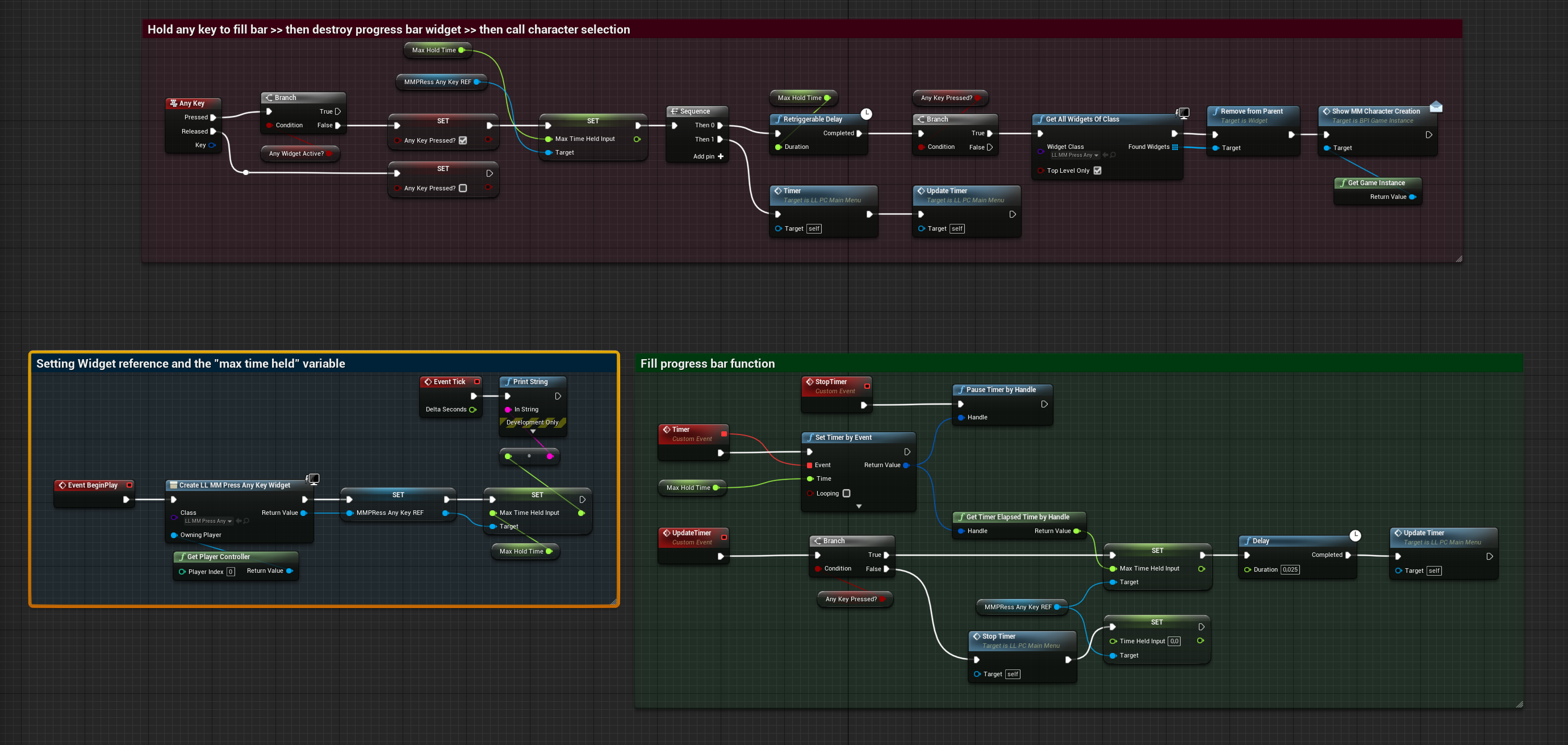
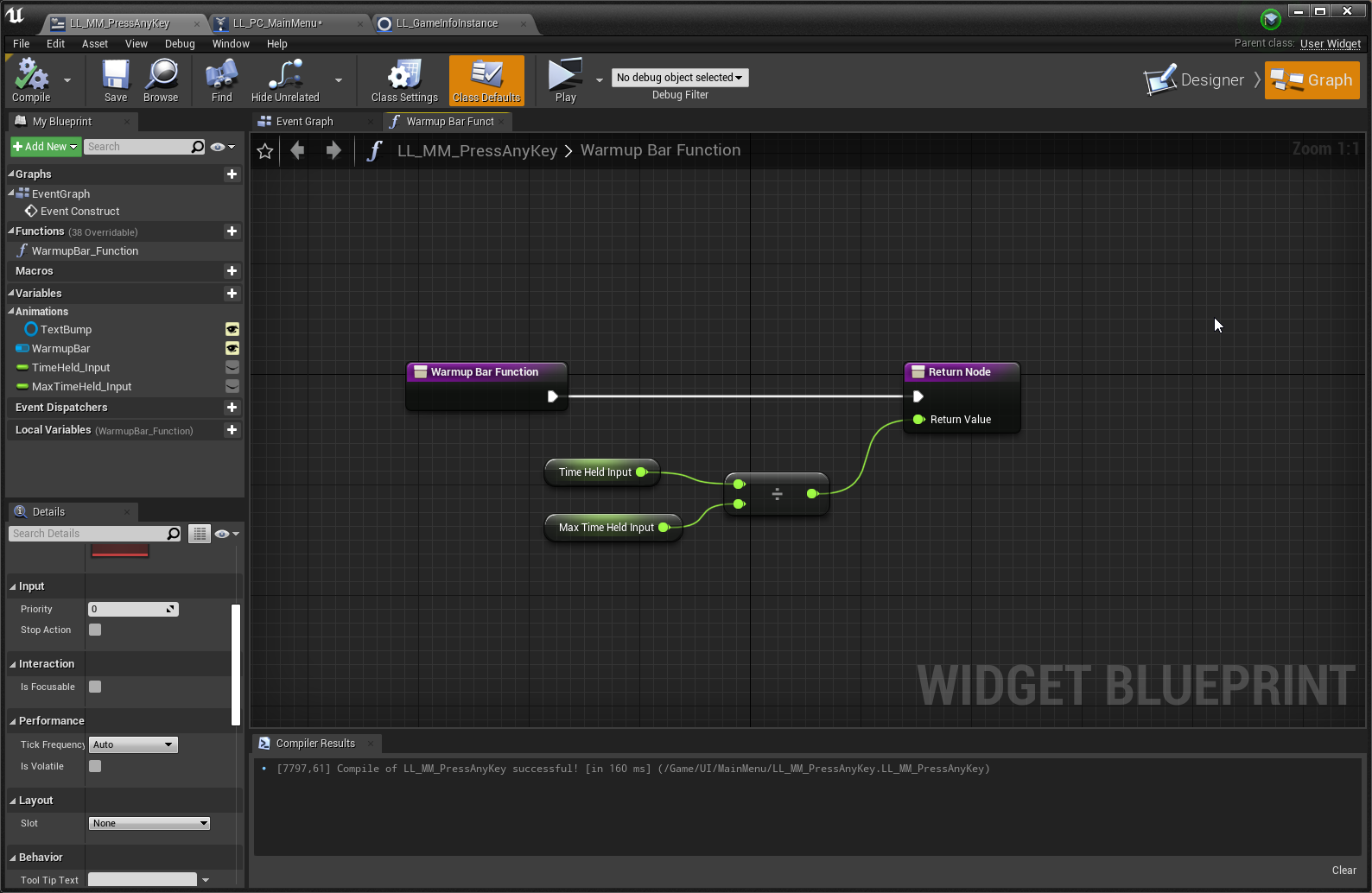
I have a main menu which, by start, has a little widget with a progress bar
hold any key to start.. similar to cyberpunk and other games
After a second, the widget vanish and the character screen comes up
-- Problem: The widget bar is not updating.
I actually used that tutorial here as a base:

Hey guys, in today's video, I'm going to be showing you how to hold a button to fire off code. For example, having to hold 'E' to interact with something. We will also be adding a visual progress bar on screen for the player to see. This will increase as the player holds the button.
#Ue4 #UnrealEngine4 #Ue4Tutorial
_____________________________...
And somehow all works...except the Widgetbar is not getting updated on runtime.
I am sitting on that f*** for a week now. Most tutorials just cover health bars, stamina or things that use in-world actors etc. I wonder what I am doing wrong or which checkbox that has to be checked. I tried "is volatite" on the widget settings but that doesn't do anything. Test-Strings give out correct results so the progress-bar in theory "must" update.
 atomic salmon
@astral tangle good. I can imagine that to calculate depth of penetration of the bullet it needs a back face.
 astral tangle
Yeah, true
 pliant frigate
full fog
Actually I have some similar issue...
pliant frigate
full fog
Actually I have some similar issue...
I sympathize. I can't get a nameplate to replicate names properly in a dedicated server. It does it half-assed. You can see everyone else's name correctly IF they joined the server after you but not before. I've been fighting with that for 3-4 weeks now, lol. I'll figure it out at some point.
full fog
Yeah its like.. you post your issue on answerhub..right next to your 20 unanswered questions since end of 2016, knowing that you get more help from a singing dolphin, probably. Google is giving you like thirty other people with similar questions and comments that may or may not solve your issues. I really dig deep into that things but sometimes its near impossible to find the needle in hay, especially if your issue or what you like to build seems pretty unique.
@pliant frigate Could you give them a partial tick to send their names to the server?
like, every 30 seconds > send name to everbody
pliant frigate
I can try. I need to learn a lot more about multiplayer and replication. I'm learning, but still in that "know just enough to get myself in deep water but not enough to get out" phase . 😄
 rancid topaz
i cant seem to center my crosshair
like it is in the center if I dont like resize it
but if I do because its like really tiny then it moves off and doesnt want to move to the middle
full fog
lemme guess, in a widget aye?
full fog
ok, it that image inside a size box?
pliant frigate
maybe try adjusting the crosshair position by an amount to compensate for the scaling?
rancid topaz
i tried
it never hits the middle only like
near
its dumb as hell and i cant do decimals so it wont resize properly or center properly
but its in the middle if the texture size is like regular size or something
but when it is its like really tiny
full fog
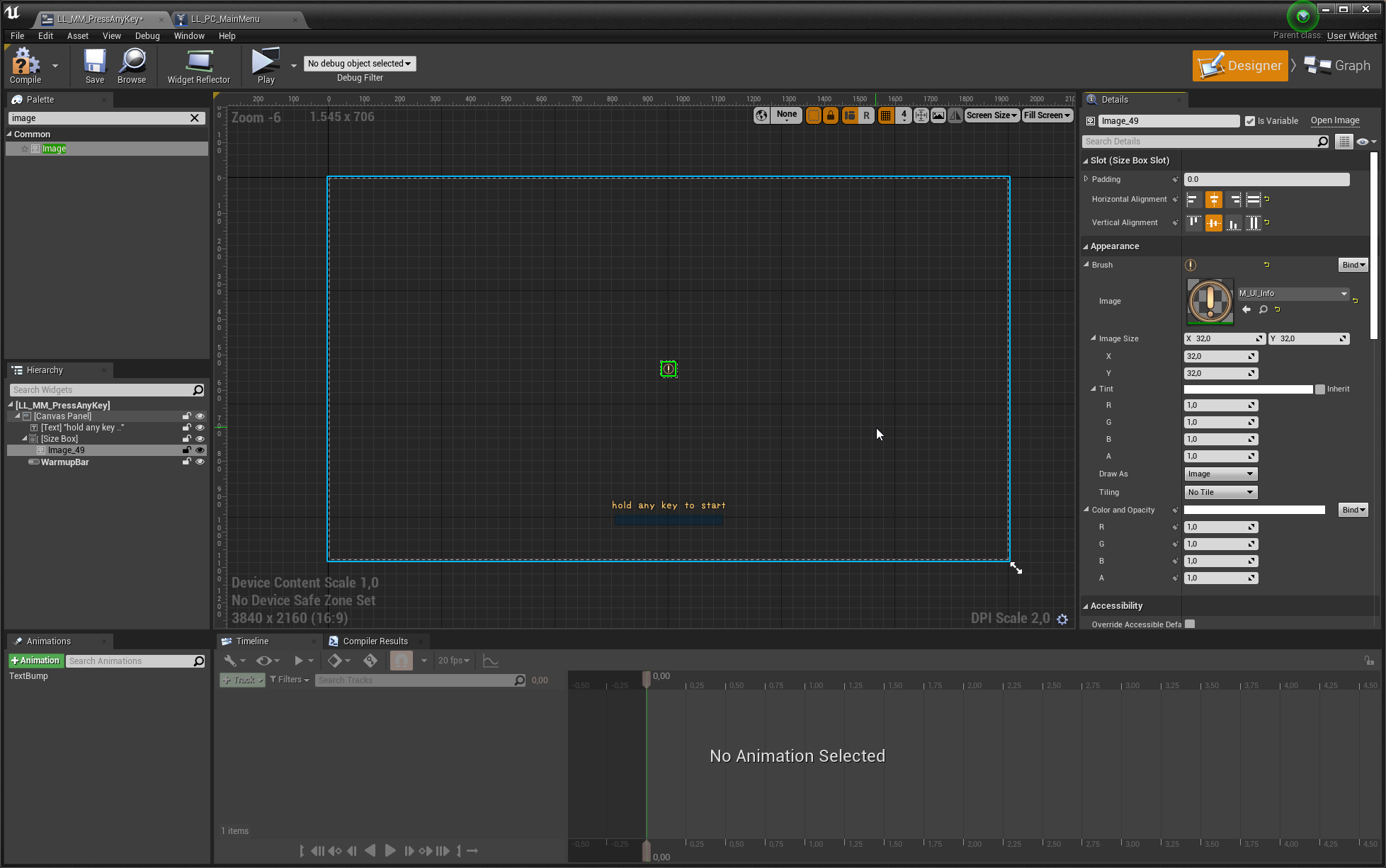
mhm i would thing that if the sizebox is centered with the ancor and at 0.5, 0,5 then it should be in the middle
and about the size..huh - i would have to see some image of that
or trying on my own-
rancid topaz
idk
full fog
second
full fog
 huh
huh
 robust spoke
@full fog No success with the do once node..
rancid topaz
do once node will run anything after it once

 rancid topaz
yeah i gethow that works
full fog
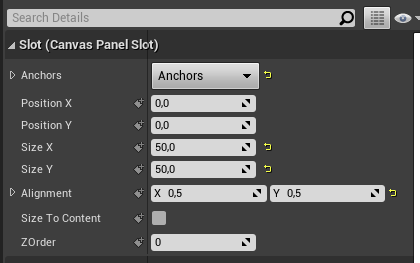 rancid topaz
i used a widget before
full fog
ah fine
rancid topaz
so a user widget im guessing
 trim shuttle
Hey any one got any ideas on why My state machine is not active there are no errors
 full fog
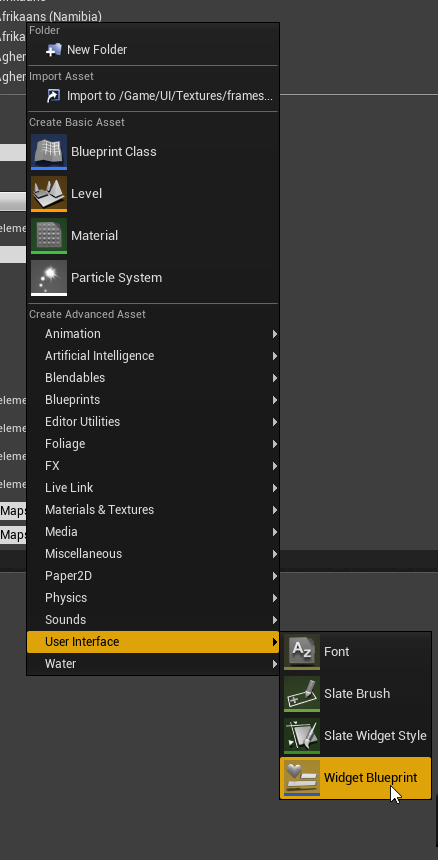 rancid topaz
it centered a like light thing
idk if itll move the crosshair in the middle -_-
im sorry im somewhat new and i did use a widget before but it was used differently
rancid topaz
ok i see the alignment
full fog
actually the light like thing.. the ancor?
rancid topaz
yes
 prisma stag
Hello, Im trying to get it so that the object that you are placing in my game is allowed to rotate when you press r. How would I go about doing that in the function?
rancid topaz
the light looking thing is in the middle but the image itself the crosshair is a little off
full fog
but then.. your "item" is still not centered till you place the alignment at 0.5 both
yep, look at my screenshots
this is how the setup should work
full fog
one thing @rancid topaz
rancid topaz
yea
full fog
would suggest using that size box
for like.. first sizing
and actually then you can either just drive it with the sizebox
when "this" is set on your image
rancid topaz
mhm
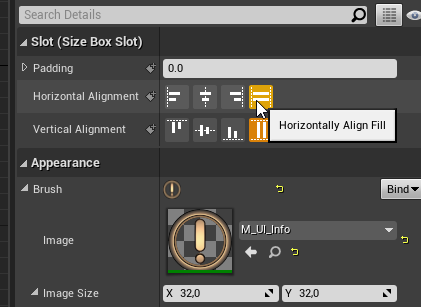 full fog
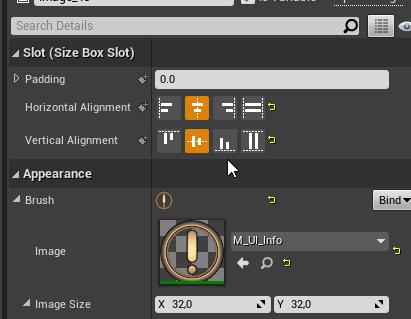 rancid topaz
2 problems already
full fog
then you can size if by the image size, no matter how big the size box is
rancid topaz
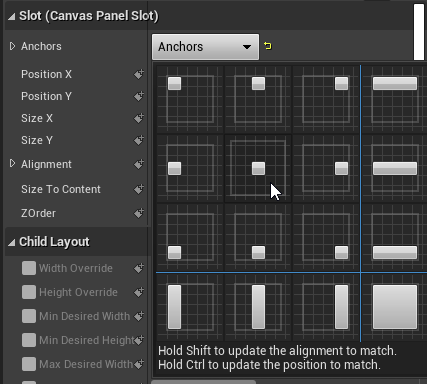
see i dont have that soze box slot
i dont have padding either
i just see slot canvas panel slot
idk if its versions are different or not but yeah
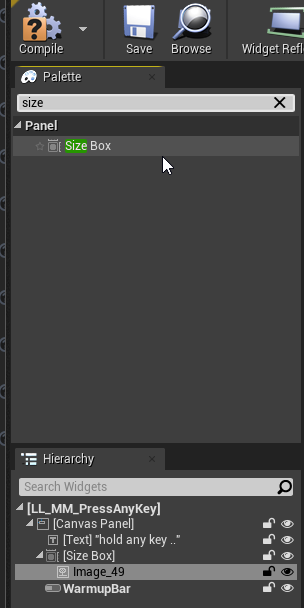 rancid topaz
got it
full fog
@prisma stag Maybe that is some start? https://www.youtube.com/watch?v=fQjTrHYUygQ

Hey guys, in today's video, I'm going to be showing you how to to place down and rotate objects in-game. This is a basic building system example.
Interactable Drawers Tutorial: https://youtu.be/x7q4Ans3mPk
#Ue4 #UnrealEngine4 #Ue4Tutorial
00:00 - Intro
00:29 - Overview...
YouTube query: ue4 rotate object
prisma stag
full fog
<@!324230048506707968> Maybe that is some start? https://www.youtube.com/watch?v...
Ill give it a look thanks. I over complicated my search 😛
rancid topaz
how do i select the widget now to be used in the game -_-
cause it still uses my bad hud
full fog
You could call it in your game instance
if needed you could add some bools and a branch to make sure it just appears when you need it
I am just starting on some stuff like that as well but here is how i did it
rancid topaz
ugh i hate how im just dumb
yeah but how do i call it in thats the problem
i can make booleans but i got nothing going on with blueprints except the character blueprint with movement
thats it
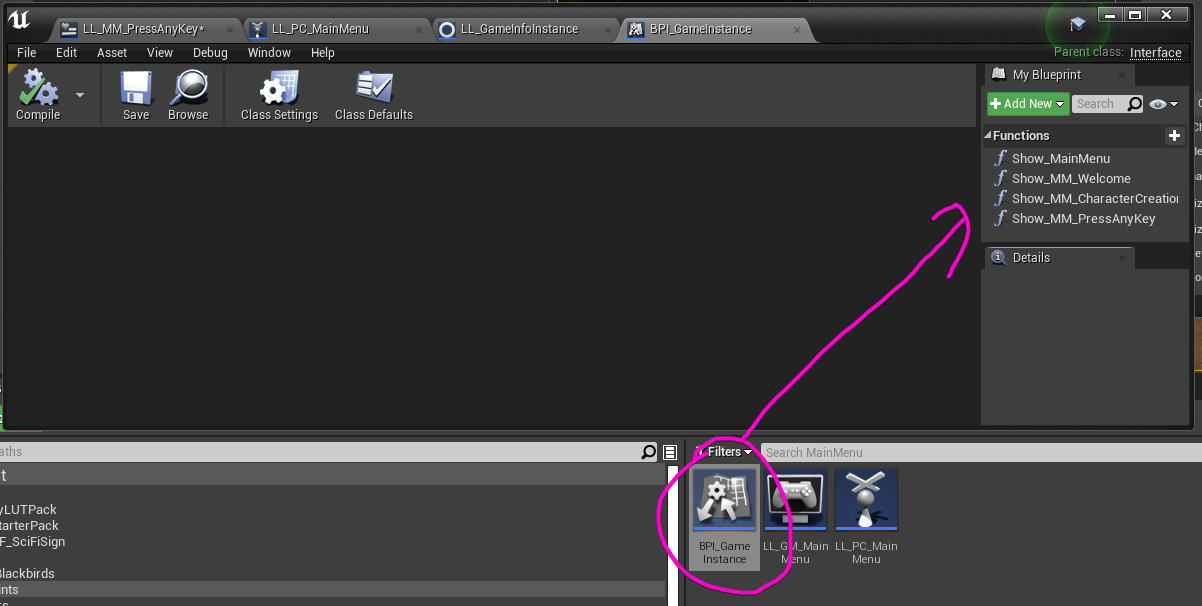 rancid topaz
i never used a instance
gimme a second i have to reopen the editor again because of a shitty problem ive still been having
and i even reinstalled the editor
still the same problem
full fog
actually quite simple, yeah lemme just write
this is in my gameinstance
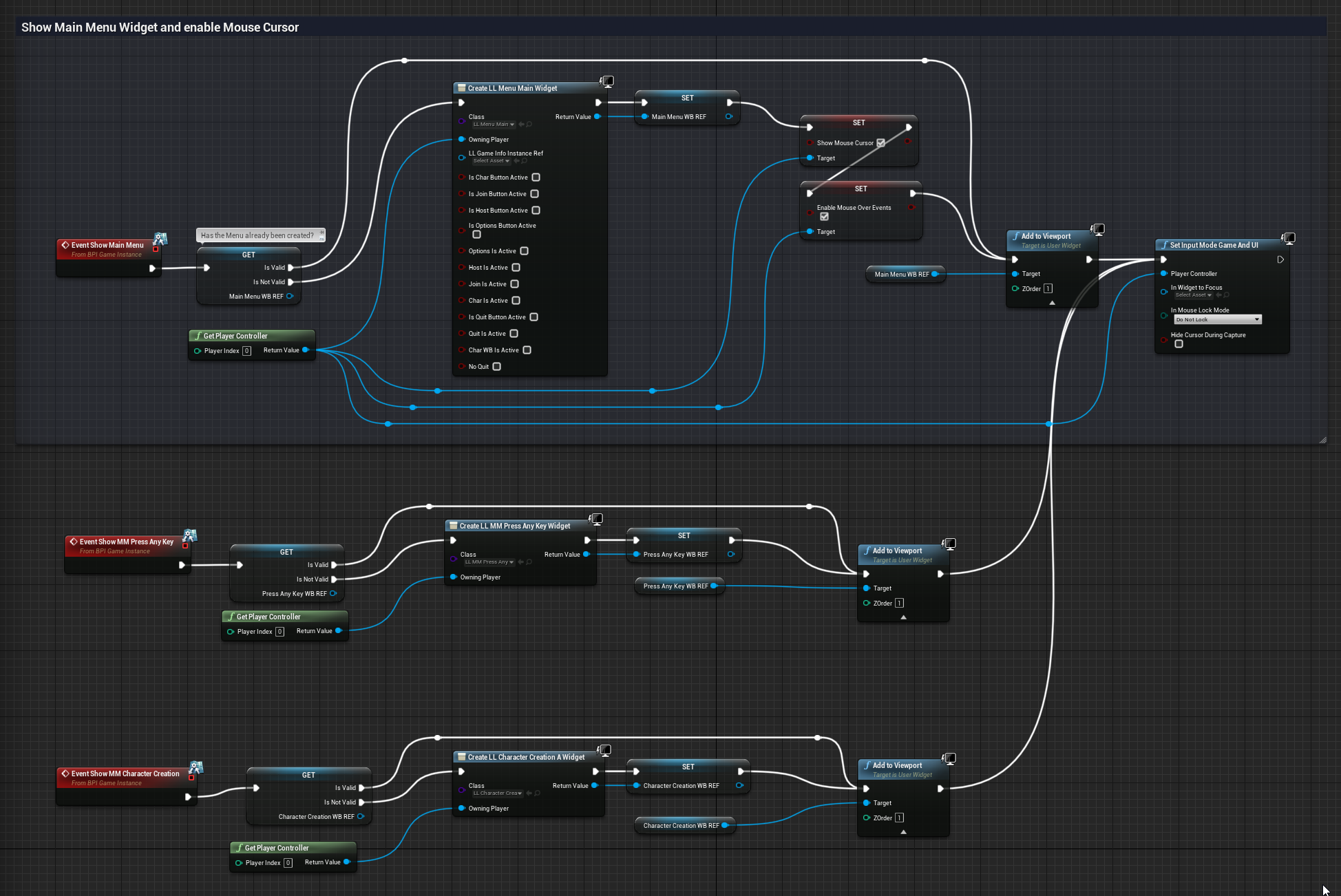
there you can see that I use these BPIs for creating the widgets
rancid topaz
yes it also is kinda blurry for me and i dont wanna enable mouse cursor
well i mean
full fog

In this series we take a look at how we can develop beautiful, interactive user interfaces within Unreal Engine 4!
We'll cover the process of creating heads up displays, menus & more using UMG...
♥ Subscribe for new episodes weekly! http://bit.ly/1RWCVIN
♥ Don't forget you can help support the channel on Patreon! https://www.patreon.com/Virtu...
I suggest this one
short videos.. but get you up to the top pretty fast
Thats what I used to get into all that widget things
rancid topaz
ah ok
full fog
week later, some UI elements from me look like this
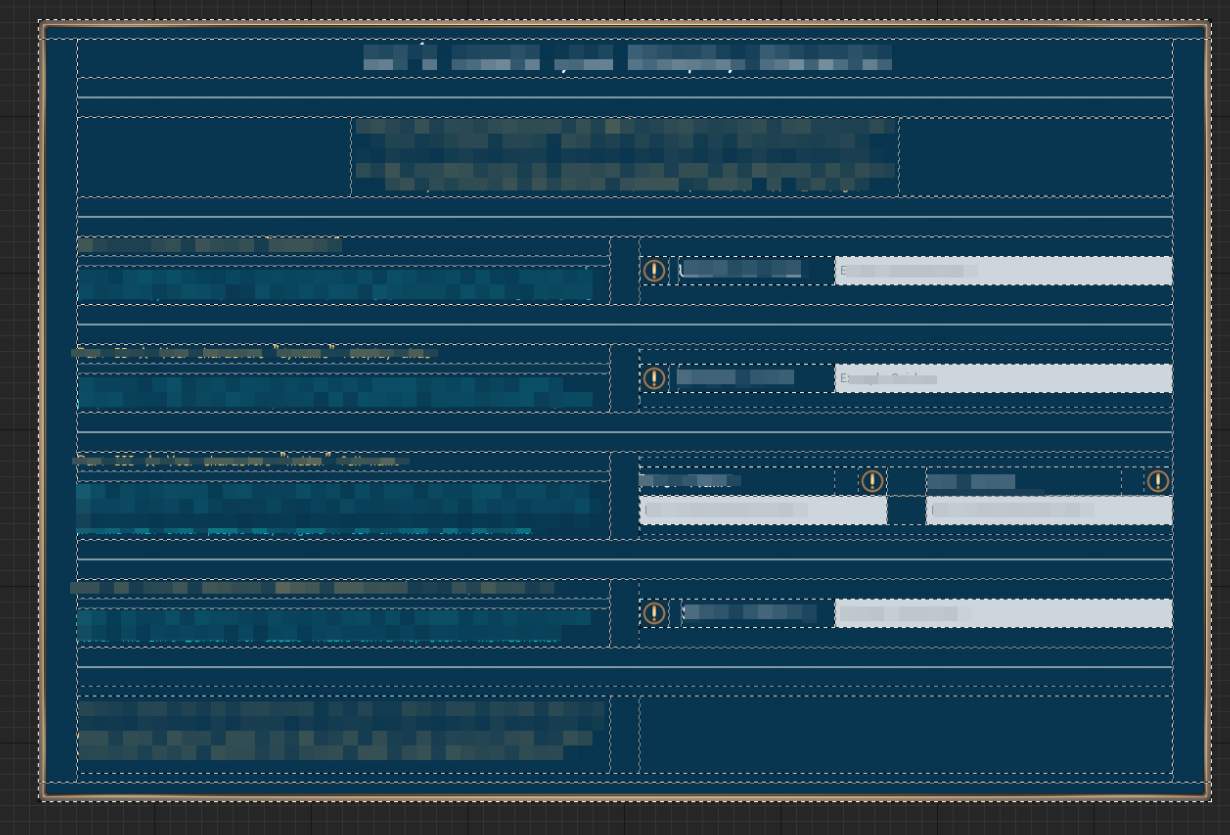
So, you will find it useful for sure
rancid topaz
XD

 sudden shale
Hello, i currently try to make an selectable button and for that i have create an sub BP to Button.
But for change the style i need do store default style in other varible for swap between 2 style.
So for that how (what event) i can make that at construction/begin play ?
Thanks
full fog
@sudden shale Good question. I think I had to deal with something similar (but did not worked for me.. but different issue)
Do you know something about break out the buttons style to get all its settings?
With that, you could store its default settings into variables maybe
and then calling these once needed
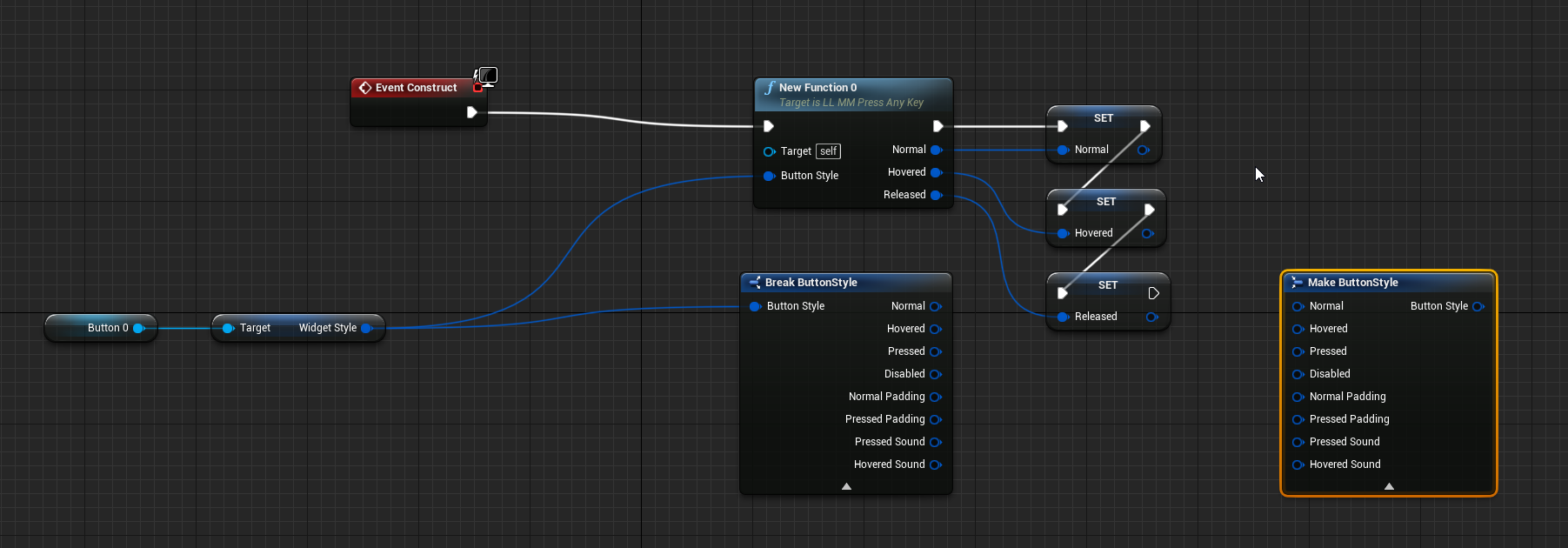
made a quick idea
sudden shale
Ok, for now i have make an DoOnce for store WidgetStyle inside custom variable in my method for toggle select
full fog
actually getting the buttons style, break it and save variables
Not sure its what you look for
full fog
@trim shuttle I am really sorry. It seems that you are using some custom animation system. Within, because I never used it before, its hard to tell why it does not work for you. Maybe ask AngelV on the Unreal Thread for this system. https://forums.unrealengine.com/community/community-content-tools-and-tutorials/1781385-advanced-blueprints-tutorials-multiplayer-free-download
Unreal Engine Forums
Hi everyone!
Recently I've been reworking some tools I developed for multiple purposes on multiple projects.
I am part of this incredible community for so long and experienced nothing but support from everyone! UE4 got one of the most integral, strong and active communities out there.
So I wanted to give back.
I started to wrap
trim shuttle
full fog
<@!479077873861525514> I am really sorry. It seems that you are using some custo...
I found out why its ok I forgot I unplugged the calling node xD
lmao
full fog
oh fine
And actually thanks!
Never seen this one before, looks like a pretty interesting setup
trim shuttle
Ye except its hard to setup a bit I mean if your experienced with this stuff its easy but like for me I have been setting it up for 2-3 weeks now xD
 olive sedge
hey!
Anyone know of a working web tech ui plugin?
full fog
barely.. working html or webbrowser inside engine?
trim shuttle
Hey Kaji do you think you could help me out on a small problem I am having I have been stuck on it for about 3 days now?
full fog
@olive sedge something like that? https://www.unrealengine.com/marketplace/en-US/product/web-browser-umg


Quick intro tutorial to add our web browser as a 3D widget in the game world.
Unreal Engine Forums: https://forums.unrealengine.com/unreal-engine/marketplace/1792768-web-browser-umg-plugin
Purchase: https://www.unrealengine.com/marketplace/en-US/product/web-browser-umg
I know..costs money - not doing advertisement but its looking interesting.
olive sedge
@full fog no, I don't need a browser in the game to google something, I mean for UI creation
I'm adding colored borders to my button here and DAMN is it a hassle
I'd much rather have css to style it
full fog
@trim shuttle I am not sure, just ask. Actually I am here because I have an issue..but try to help anyways since the rest of the...15544 people.. are online.
Gosh that number is insane..
trim shuttle
Alright
full fog
Ah I see @olive sedge -- I think I've seen something quite a while ago --
olive sedge
@full fog I've seen 2 of them but one is completely abandoned and the other kept crashing..
full fog
Then these are the same
I was looking for some UMG alternative (Yes Epic... your UMG is not Epic..)
Well, have to stick with the things we have - sadly
olive sedge
@trim matrix yes, have a different channel for your ground
@full fog I can't imagine it's that complex to make this tbh
the hard part is probably just click pass through on transparency
full fog
what he means is that you have to setup some collision channel inside the project settings
and maybe use that one.
Had to do it once but thats years ago, just remembered there is something like this
olive sedge
@trim matrix create a new trace channel in the project settings, set it to ignore by default, set your ground to block under collision and then trace by that channel
full fog

I see..with that he is ignoring everything with the mouse trace and just hits the ground, aye?
olive sedge
@full fog aye.
 faint pasture
@trim matrix you can use a line plane intersection node if you always want the cursor projected to a certain height like 100Z
 gusty surge
Is event tick same as Event Blueprint Update animation ?
 trim matrix
No
gusty surge
Thanks 😄
 mystic storm
You guys are very likely sick of me talking about this, but each hexagon has 50% chance of either going up or down, this is it cranked up to exaggerate things, what gives? Why is it going mostly up?

It generates a number between 0 and 10, and if it's bigger or equal to 5 it goes up, otherwise it goes down, with some hexes not moving at all
 keen bluff
Are those numbers inclusive?
I.e. is it 0-10, 0-9 ?
Bc 0-5 is 6 numbers, but 6-10 is 5
 marble tusk
Yeah, if it's 0-4 down and 5-10 up then there's more chances for it to go up
 merry cobalt
I am using Unreals free Inventory System and I want to increase the number of items you can craft. It is set to 4 by default. How do you increase the amount, say to 8?
mystic storm
so basically don't be a moron and use integers, with 1-10 instead?
that makes sense
keen bluff
mystic storm
so basically don't be a moron and use integers, with 1-10 instead?
Something like that, just make sure there’s the same amount each side
mystic storm
even if I have that fixed, for some stupid reason it's still generating structures like these

Like, they tend to create rings, even though it's configured to always go up or down
if it's fully random, why is it not fully random
the distance between "steps" is constant
 maiden wadi
olive sedge
I'm adding colored borders to my button here and DAMN is it a hassle
maiden wadi
olive sedge
I'm adding colored borders to my button here and DAMN is it a hassle
If you're making a lot of similar style widgets, make one class with some instance editable variables, set the logic up to change your widget in preconstruct, then you can change those values in the editor as well and have easily copied buttons with borders.
olive sedge
So.. I got a widget that is neatly placed in my UI. I want to temporarily hide it and then add it again. Is that possible without having to recreate it and add it to the viewport?
maiden wadi
Set visibility.
olive sedge
@maiden wadi I'm kind of doing that but it's still a LOT more work than just going "border-right: 1px red;"
maiden wadi
True, but someone had to write the code that reads css to set up that border.
olive sedge
maiden wadi
Set visibility.
perfect, thanks!
well, yes.. But I feel like I'm doing so much work just to do the simplest UI things (in comparison anyway)
keen bluff
mystic storm
even if I have that fixed, for some stupid reason it's still generating structur...
Is that not random? Are lines mostly all going in one direction ?
 gentle urchin
Guess we'd need to see some code to have an idea of why its not as random as you would like
merry cobalt
Does anyone know how to increase crafting table size? Im using Unreals Inventory system, set to 4 by default. Want to increase size to say 8.
mystic storm
@mystic storm it generates everything ring per ring, but there should be an equal chance of it going up or down, meaning you shouldn't even be able to notice rings because it the overall height should average out
@keen bluff
but it's not doing that, it's usually either creating a mountain or a valley
gentle urchin
It all depends on the code you got for it
keen bluff
Yeah defo need to see some code
I’d say test on an even larger scale to make sure but it seems like lines are all in one position
Unless my vision is deceiving me
gentle urchin
Something beyond range seem to have changed between first screenshot and second screenshot
mystic storm
even when probability looks about equal (equal rings going down and up) it feels like the step from one ring to another is way bigger than the step between a hex to a hex in the same ring
and it looks to be exponential
like each ring further out is a bigger step
keen bluff
Are you multiplying by anything?
gentle urchin
Is it incremental stepping?
mystic storm
they should increment to the position of the next hex spawned
but there's an equal chance of it either adding or subtracting a step
probability dictates it should even out
gentle urchin
In the long run, sure
Not on small sample size
With the wrong luck , 10k tiles could be to small aswell
keen bluff
That’s what i was saying too
 gentle urchin
Just show us the code so we can have a look ;p
Its alot easier to help when we know whats going on
mystic storm
probably a good idea, hold on
keen bluff
It seems like your multiplying the offset by the radius or something
 summer bolt
How can i make it so this is constantly running 🤔

 indigo bough
Hello folks, trying to get the surface normal of the ship's deck so that I can apply that to my cannon placement script for each gunport. I'm currently drawing a line trace from the gun placement location, down to the deck mesh, and getting the Impact Loc + Impact Normal, my understanding is that after putting that through a RotationFromXVector, it should be correct?

 keen bluff
Not 100% sure about that
If you get the cross product of the line trace and the forward vector I.e. the way ur gun is facing you’d get the arrow you want
mystic storm
Ok how would I go about sending a blueprint to someone?
keen bluff
But your way is correct too
mystic storm
do you like shove the file on google drive? Do I screenshot the thing?
which doesn't work, because there are functions
 dawn gazelle
https://blueprintue.com/ works pretty well
BlueprintUE
BlueprintUE.com is a tool for sharing, rendering and rating blueprints for Unreal Engine 4. UE4 is a game engine which use visual scripting called blueprint.
mystic storm
awesome
indigo bough
Ahh, perhaps my image is confusing, the arrow in the box is the one I'm trying to get pointing relative to the surface normal of the deck it's coming from 🙂
 gentle urchin
This might be stupid, but can you not just fetch the rotation of the ship?
 keen bluff
Just send a pic
mystic storm
||How do I see a text blueprint||
@keen bluff https://blueprintue.com/blueprint/by88nqm0/ Code for hex generation
BlueprintUE
Code for steps https://blueprintue.com/blueprint/-bm_vscu/
BlueprintUE
indigo bough
Hmm, I could add additional sockets, mine are placed for the gunports/holes, rather than the deck surface
mystic storm
My suspicion is it has something to do with the scaling but I'm not sure, idk
merry cobalt
@indigo bough I would place sockets inside the cannons
indigo bough
I have bones at each of the holes

I guess I could just manually add sockets for each of those bones. Was hoping I could use those bone locations to trace from and avoid extra work by hand 😄
mystic storm
I'll take a break, cool my head, and fix this later
Smite patch notes probably started already
merry cobalt
Trying to increase amount of crafting slots seen here from 4.. to say 8. or whatever. I can not figure it out.

 minor pagoda
someone knows if i could save an object in a SaveGame? For example, i want to save the complete User Object, not only the variables "Name", "password" etc..
maiden wadi
@minor pagoda You cannot. You need to serialize your data into variables and save it that way and reinitialize the object before using it.
dawn gazelle
An enum is basically a human readable number. So instead of having to remember 0 = One thing and 1 = another, you can see the names. You should be able to convert between an int to an enum, so long as the int is within range of the enumerator's values. You may need to convert the int to a byte first if I remember correctly.
 stray island
Yes worked thanks
I set up my construction script in an actor to affect the another actors material , and when i do the effect through construction script , the effect wont take place unless i move the other actor (the actor with the material) or adjust it
keen bluff
mystic storm
I'll take a break, cool my head, and fix this later
Sorry bro, just seen this, I’ll check it out tomorrow, gotta be up early
trim matrix
anyone here can go into VC real quick? noob here needs help on a simple issue (me being noob)
 maiden wadi
@trim matrix ClassIsChildOf
Parent class on that is misleading. It also includes the input class, or anything it inherits from.
trim matrix
thank you 😄
 midnight wedge
So whenever my character ragdolls, the camera doesnt stay locked to them and they sometimes flop out of frame. Is there any way to have the boom stay locked even after death? I also disable player input on death if that makes any difference


(theres the code and macro if its any help)
midnight wedge
nvm I got it. I just weld the boom to the mesh on ragdoll
 upbeat otter

I made a construction script for a random skin and nose texture, the only problem is that they both aren't using the same color (for example on begin play some character may have a white nose with dark face or reversed.)

 midnight wedge
try saving the random int as a variable, use that variable to get the same material for the nose, and then reset it after that
upbeat otter
well what i dont understand is that this worked in 4.25 but not in 4.26

^this was 4.25 setup I did and it worked perfectly
midnight wedge
I can't help ya there, Im still using 4.25
midnight wedge
idk
first thing that comes to mind is storing the random selected int as a variable, then use it as a key to pull the same color for the nose. Then just rerandomize the key
maiden wadi
@upbeat otter That has nothing to do with engine version. You have a logic issue. You need to randomize an integer once and then get that index from the array. Right now you randomize one integer, get a value from the array, and then get a new integer and get another value from the array.
midnight wedge
^^^
maiden wadi
@upbeat otter This will help you follow that better. Each node is numbered with when it would get called in your execution flow.
 upbeat otter
ooo thank you!
 minor sleet
Hey,
I'm new to Unreal but I am trying to create 3D buttons that I can slide up or down with the mouse cursor (the camera doesn't move). Therefore I use the ActorOnClicked and ActorOnReleased events but that is not working as expected when I release the LMB too far from the button: https://i.giphy.com/media/EoplQ4FIK10hwss9Do/giphy.mp4
Here is the blueprint.
I now think there might be better ways to do this kind of drag and drop system but I feel like I should restart from scratch (I have buttons with different behaviors)


 mellow folio
so I assume you're activating the tick on this object when it gets clicked on
for the release, what I would do is just have the object check whether LMB is down to determine whether to turn dragging off
just do getplayercontroller then iskeydown off of that
I has a question for the audience.
If I have 10000 objects in the world of a class....
And if there is a variable on that class with "BlueprintReadOnly"
Will the computer have that variable once for the entire class, or once per instance? I'm wanting a value just once for the entire class.......

 quasi frost
Hey guys I am having an issue where casting to game mode is failing. It is set to the current game mode in project settings. Never had this issue before.
faint pasture
@quasi frost Show where you're doing that
 pale galleon
Does anyone know if there is a way to "Hide Unconnected Pins" for class defaults like there is for structs? The button exists, and the pin options have checkmarks but clicking the button or the checkmarks does nothing for me.
 tight schooner
@pale galleon yeah I noticed the button doesn't work for me either when a class has a lot of variables. You can hide the mess fwiw by collapsing the node...
But it's generally annoying when it's on a class that you work on a lot cuz the defaults node throws compile errors until you refresh it whenever you add/remove variables, so I'm kind of disenchanted with that node at this point
pale galleon
tight schooner
<@170398888296054785> yeah I noticed the button doesn't work for me either when ...
Not sure what else I can use to get around it though.
Is there another way to get values out of a class?
 tepid merlin
Can anyone help me out with this? I started this months ago, then had to step away. Recently, I got some time to work on it again but wanted to start a fresh project with the same goals. But looking back at the previous build feels like a completely different person put it together, and I can't begin to figure out how I got it to work.
The problem is this is a Resident Evil tank control setup, and the character in my new build gets stuck in either walking or running states, and can't move between them freely. For example, if I hold the run button while walking forward, the character will run. But if I then walk backwards while still holding run, he maintains the run speed going backwards.
However, in this months old build, the controls work flawlessly. I keep looking at it, and I can't figure out why this build is working. My guess is that it has something to do with the two speed increases in different places that's somehow fixing the issue, but I'm not sure.
I don't want to just copy the previous build, I need to know how I did it to begin with, in case I need to change anything. Any help or observations would be appreciated. Thanks!
Below is the working build.


 trim matrix
another problem in my other project which is runner game
for now I am switching the lines with the "arrows", now I want the player to be able to do it with the A and D keys too
I connected the code for the same binds and the D works, but the A not

 mellow folio
tepid merlin
Can anyone help me out with this? I started this months ago, then had to step aw...
mellow folio
tepid merlin
Can anyone help me out with this? I started this months ago, then had to step aw...
are both projects single player only?
mellow folio
trim matrix
another problem in my other project which is runner game
for now I am switching ...
check to see if the "A" key is used and "consumed" anywhere else, such as on this BP or on your controller
trim matrix
I checked
iti sn ot used anywhere else 😦
I checked in the project settings, the input for A and D, and their values are different, like the one is 1,0, the other is -1,0

I am not sure if they are setuped correctly
 dense tulip
Hi guys, what is that white framing in the pic .. seems to prevent me from doing anything in the viewport
 dawn gazelle
dense tulip
Hi guys, what is that white framing in the pic .. seems to prevent me from doing...
dawn gazelle
dense tulip
Hi guys, what is that white framing in the pic .. seems to prevent me from doing...
That displays usually when you're trying to move tabs around.
trim matrix
Hello Datura, how you doin 😄
 rapid crescent
Hey all, I'm looking for a way to ensure my Popup Widget Blueprint that I create actually behaves likes a Popup and stays on top of everything else. Any suggestions?
dense tulip
oh ! it seems to be frozen .. i will try to move it
rapid crescent
oh I just noticed there are some UI channels sorry
dense tulip
I had to close my project and reload to fix it !
trim matrix
rapid crescent
Hey all, I'm looking for a way to ensure my Popup Widget Blueprint that I create...
A MenuAnchor is probably what you're looking for.
 remote reef
Is there any tutorial on how to asyncly spawn actors?
 brave hatch
what's the average pricing for setting up a character in BP? health, stamina, experience, all that jazz.
 surreal peak
remote reef
Is there any tutorial on how to asyncly spawn actors?
surreal peak
remote reef
Is there any tutorial on how to asyncly spawn actors?
Don't think that was possible as the actual spawn code runs on the GameThread
remote reef
Hmmm
full fog
Hey, I just came from the UMG channel and have a general question which may sound basic and I already watched tutorials but they somehow never fit into my case of use.
[Question]: Is there a standard procedure for communicating variables like a bool between a Player Controller (for example, of others) TO a widget - and vice versa.
From this: https://i.imgur.com/3o36UfY.png

to this: https://i.imgur.com/DIGqQuL.png
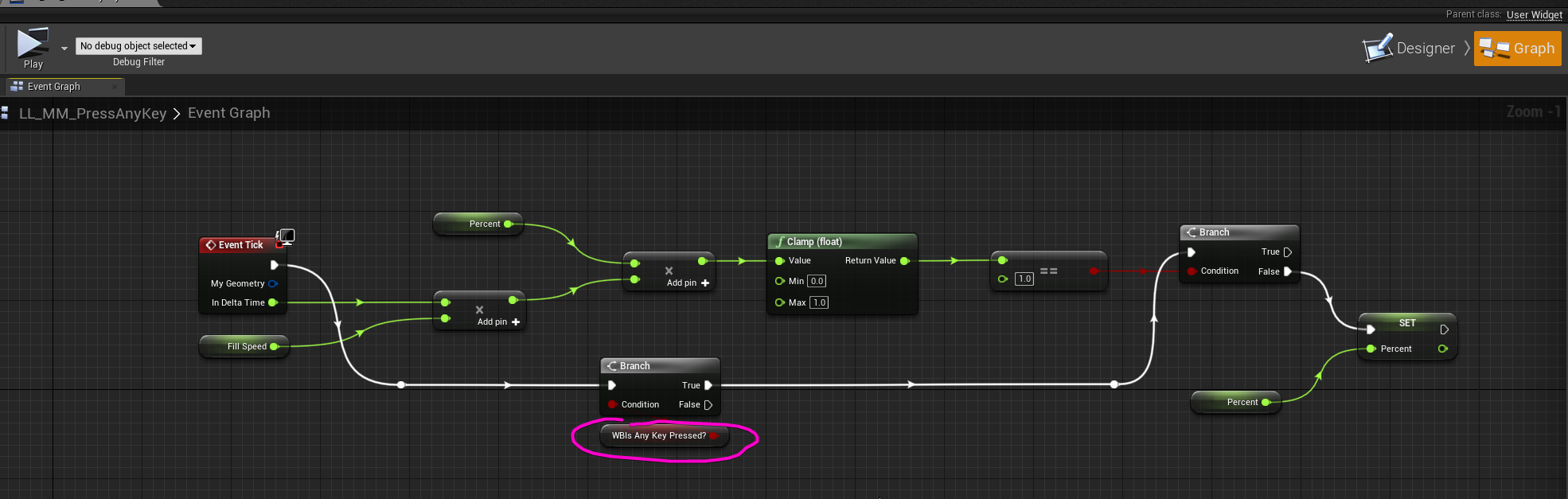 gentle urchin
I can't speak for any "standard" method, but how I usually see it handled is by the widget to be created in the playercontroller and saved as a variable. Then you can have f.ex. a custom event or a function in the widget which takes in key as a variable
In the playercontroller it'd look like this

then the widget would have the called event

passing a bool would be the same thing, just with a different variable input
Setting up comm the other way can be done in a million ways, this is how i usually do it

requires you to set the owner during creation of the widget tho

@full fog
Sorry for the clunky explanation
full fog
Oh no worries!! Its actually more helpful than digging through hundreds of tutorials
Which.. I already did.. but they all talk about complete different topics
and within using complete different nodes or things.
Ok this is weird. I start to think that my Unreal Engine is not doing things as it should.
Inside the PlayerController: https://i.imgur.com/ecUqFSc.png
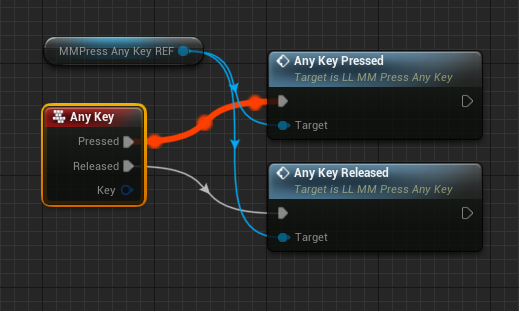
That works.
Ok I think I know why its not working
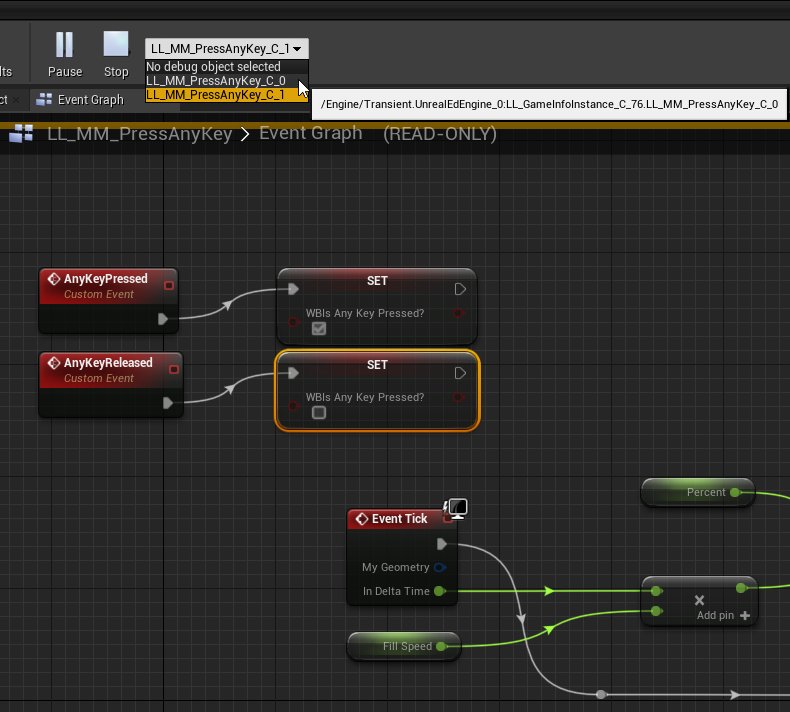
Why I am having two of these on my debug.. when I use the first, it actually shows Event tick working but not the custom events firing.. and the second one does not show the event but the customs...like its two different systems working inside one BP..
gentle urchin
Looks like you got two widgets
one being referenced by the playercontroller, and one created elsewhere
full fog
Yeah I actually created that one inside the Player controller to get the ref
but it also exists inside my game instance for my BPI to get called
maiden wadi
I find it crazy how often tutorials and such advise using GameInstance for things. I'm pretty far into my current project and I don't even have my game instance subclassed yet.
gentle urchin
^Word
full fog
I have no idea. Its crazy for me as an artist to build up a simple vertical slice. Yes without any network and BP magician on my side because that would be a thing "after" the Slice Project gets a fund.
And now dealing with things where its like running blind through a field of mines.
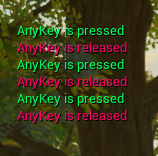
at least my strings have fancy colors
 gentle urchin
Also I think one should consider not doing hardcoded keybindings
full fog
Well in that case its just for the very first start of the game, being inside the MainMenu Level
but actually have to hold "any" key to fill up a little progress bar for half second to show the menu
its on purposes since the level environment is part of the whole show
gentle urchin
Ah
full fog
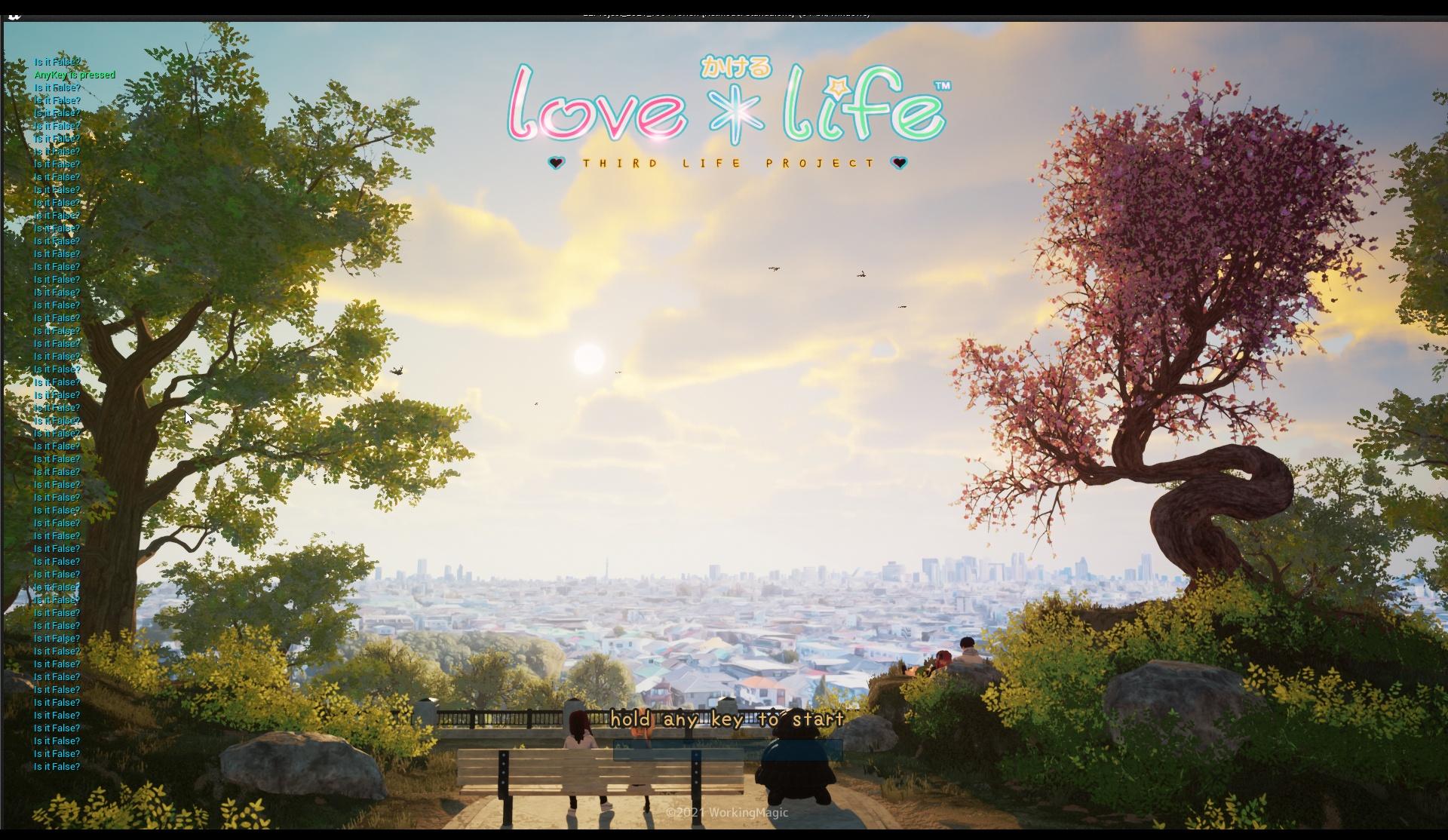
with a complete camera sequence and multiple cuts
which is why I just would love to have this little cyberpunk like startup bar
gentle urchin
KeyPress -> Start Timeline Forward
KeyRelease -> Start Timeline Reverse
could be used to update a bar or smth to show this
Or just a straight timer on .5 sec when its pressed, which is reset on released
full fog
I actually used a system from that tutorial here:
Hey guys, in today's video, I'm going to be showing you how to hold a button to fire off code. For example, having to hold 'E' to interact with something. We will also be adding a visual progress bar on screen for the player to see. This will increase as the player holds the button.
#Ue4 #UnrealEngine4 #Ue4Tutorial
_____________________________...
and it even worked once but somehow I build it inside the level blueprint..which was odd
I actually have all things explained in the #umg section
everything works...
but the progress bar widget does not update
all numbers work
so it should...must..fill up the bar. One mentioned that a timer by event could be the issue
gentle urchin
Seems like alot of hasstle for a simple progress bar but..
full fog
but I don't really understand why it works for the guy in the tut with an ingame actorBP..and inside a levelBP.. but not inside a player controller
maiden wadi
You should make sure you're referencing the correct widget. But Iraj in UMG is correct. You should just check that from the local controller in the tick event rather than sending it from elsewhere.
maiden wadi
Then it wouldn't matter if you accidentally add ten of them to screen, they'd all just work. Although still make sure you only have one.
full fog
I would love to ask what's meant with that
when i create "this" widget..somewhere..
to create a reference
does that matter?
if its being created in two different blueprints for example
gentle urchin
Yes and no. Some places are more practical for things you need easy access to
maiden wadi
It matters if you create it in two different places. That'll mean you have two different instances of the same class.
full fog
I just wonder because actually I just did that because I got an access none each time when I just wanted to create a ref variable
without creating it
gentle urchin
Like the playercontroller is logical to handle the players widgets and inputs imo
full fog
like.. a devils circle
Yeah when I tried it gave me BP errors that my ref variable has no reference
gentle urchin
A reference variable is by default empty/null and refers to nothing by itself
full fog
yeps.. so how to get that
maiden wadi
I prefer AHUD class personally. Keeps Widgets away from anything networkable.
gentle urchin
I probably should do that aswell for the widgets. Just me being lazy
full fog
AHUD?
Well actually I just try to have a system where I can call and close different widgets. When I started the project i tried to put everything into "one" widget blueprint..was a mess
So..and now I learned about BPI's and I should use them to call Widgets
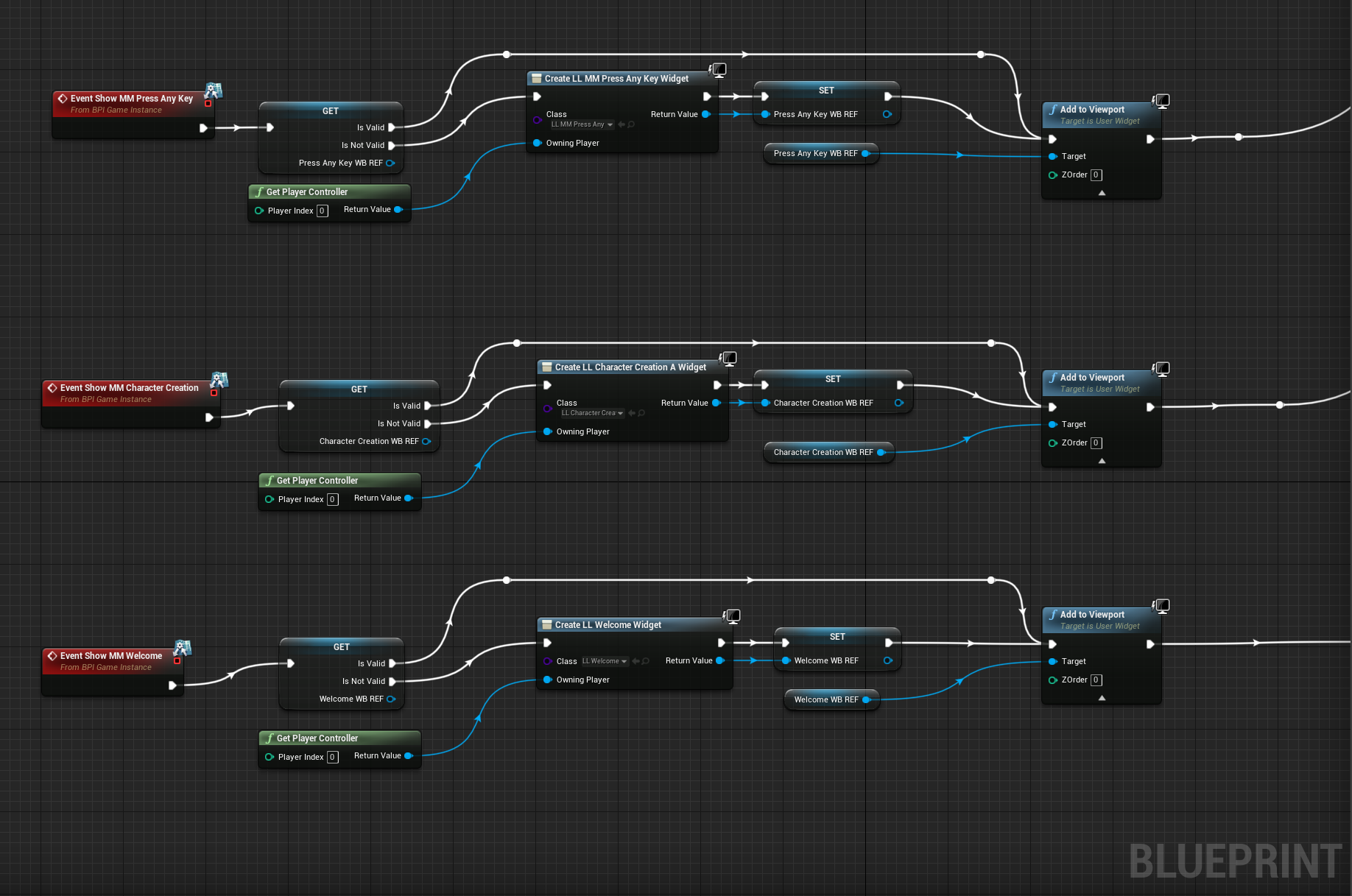
Which feels confortable
But then, the logic after that is getting crazy. Because after I hold the key, it kills the widget and opens a welcome widget. thats done inside the player controller. But then the next action is inside the welcome widget to close it and opens the character creation widget. -- hard to explain but I really would love to have one place to do all of this
and not like 120312 event graphs
gentle urchin
Again i prefer creating widgets just once, then toggle visibility , but thats probably just a preference
maiden wadi
AHUD is just HUD in blueprint. It's an actor that is spawned for the local controller. By default it doesn't do much. It has some small functions that can draw simple lines and text on screen. I store all of my logic for widgets and any references I want to save there. It's also very easy to get with GetPlayerController->GetHUD
Also, in your case, you really don't want to be saving these widgets to reference pointers if you're not reusing them. Saving them in pointers means garbage collection won't trash them, and you don't want the progress bar widget hanging around forever after it's done being used.
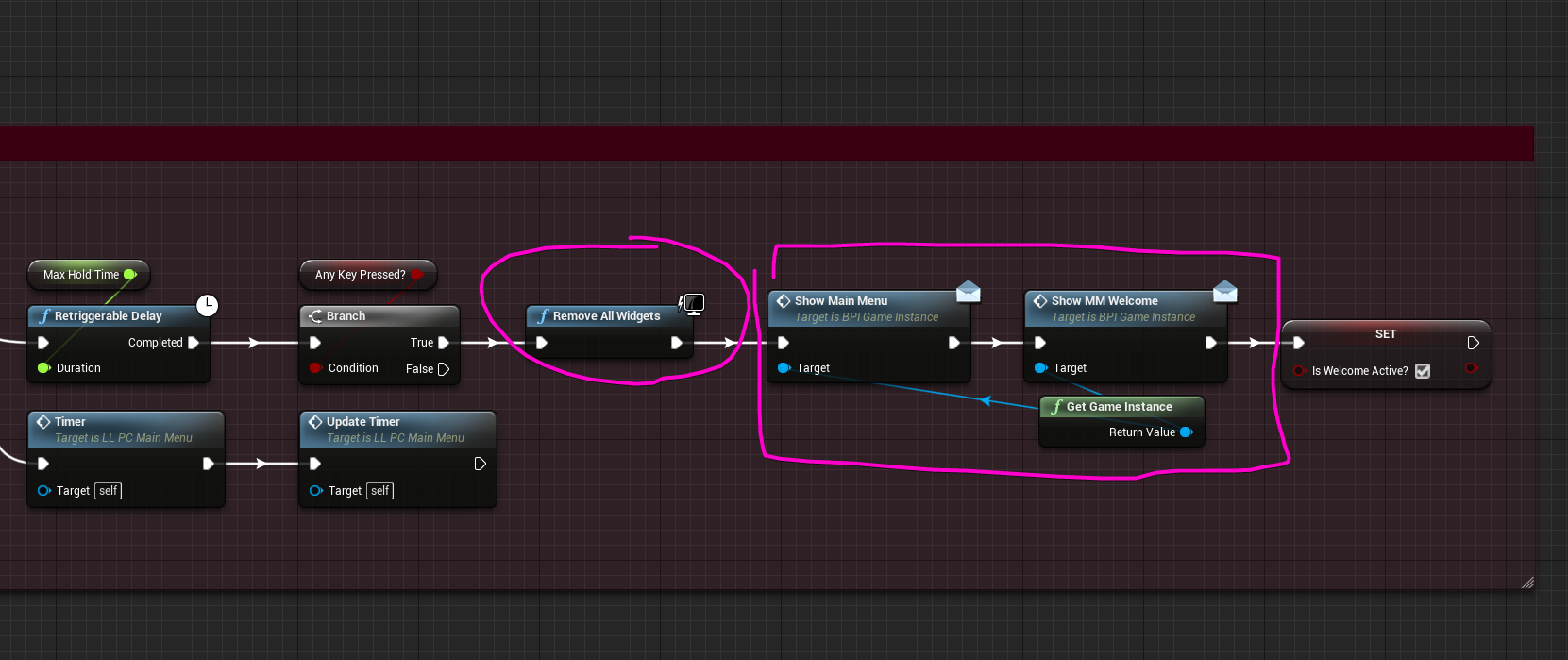 maiden wadi
It's removing it from screen. But the actual object still exists.
full fog
Just asking. I actually destroy that one once its done with its work, then calling the others
oh ok.
I just hope AHUD is not something c++ related.
maiden wadi
You can do it in CPP, but it's just as easy in blueprint.
full fog
I actually need to keep it simple as hell, I want to release my first version in April and have like weeks lost because of this UMG "insert very very bad words in here"
I can't learn everything..doing 3d for 23 years but actually just want to kickoff a simple project. I love to learn since i started in 1998 but I really try to use this advantage UE4 gives us (unlike Unity..)..just for the beginning and then handing over all the heavy load to coding people that are used to it..as a job.
And thats like fighting against Windmills since 99% of the community is like: oh you have to learn this and this..you get my point i guess
But.. I bite my way through it.
gentle urchin
Would be easier if the learning material was more consistent in their methods
full fog
Its just exhausting sometimes. I have no problems creating all the visuals
But the little things like..yeah that progress bar..kills time
time i could spend on visuals
and other important things
And looking for solutions is like looking for the needle in hay - per case
I watched three days UMG tutorials in a row to get used to it, it kinda works fine for building up the visual side
but behind the curtain, its a nightmare to make things communicate and sort. And no good documentations to get at least some ..yes as you said, consistent results
maiden wadi
A lot of the problem is that more beginner level tutorials don't really teach, and by the time you find the intermediate tutorials, they start throwing words around that you wouldn't understand without a degree. It can be frustrating.
full fog
I kinda try advanced tutorials..and most time I just pick the stuff out from them that I actually need.
That sorta works and per use-case I learn the parts for it
But in case of this example here I now have 3 different Puzzle-Answers and ideas (which I am thankfully for!) on how to build that hold key to fill bar
But my initial question for the "sort of" working solution with an visual issue is still unsolved
So and this is where is becomes naughty.. should I kill that one and try to go another route
And I see myself going to have to tackle this issue later on again on other parts
And now I have a lot of puzzle pieces and need to figure out how they work with the solution I had.
Blueprints from hell.
 dusky dome
so nice people, quick question from a former Unity developer. From what I've understood, the blueprint class actually kinda serves both as the script and prefabricator creation: you can make some functions to make the blueprint class mostly data-driven, and then create some child class from it and use the "class default" to fill in the value of variables and even some custom events there, which is kinda a stronger version compare to Unity's prefab (since it support custom functions and events), and I right?
 strange pike
Does anyone here know to lock the player Character camera so that it only moves on one axis?
Can you expand on what you mean?
maiden wadi
It might help to better explain the kind of camera controls you want the user to have.
strange pike
I’m currently using the camera from the third person template
 stray wagon
Spawn AI from Class does not expose the actor's spawn property on the pawn ?
minor pagoda
Hi, does someone know if i can save an object inside a SaveGame or i have to re-construct it from the SaveGame variables saved?
 scarlet timber
minor pagoda
Hi, does someone know if i can save an object inside a SaveGame or i have to re-...
scarlet timber
minor pagoda
Hi, does someone know if i can save an object inside a SaveGame or i have to re-...
did you save an object or reference to an object?
 earnest tangle
minor pagoda
Hi, does someone know if i can save an object inside a SaveGame or i have to re-...
earnest tangle
minor pagoda
Hi, does someone know if i can save an object inside a SaveGame or i have to re-...
If by object you mean actor or such, then the way it needs to be done is you can save the actor class name, and then you use that information to respawn it on load
you can store soft object references if you want to save something like a reference to another actor
scarlet timber
i don't think its possible in bp but its in c++
minor pagoda
I have "UserObject" (String Name, String Lastname, Array<ActivitiesObject> Activities), and i want it to save it from one level and load it in another one. So i would like to know if i can save the User (Name X, Lastname Y, Activities [W,Z])
But i have to save the object user or just the variables like name, lastname, etc.
Ohhh now its clear
Thanks
 tawdry surge
Does anyone know how to get a tiled height map landscape in world composition to wrap?
Say I have a 10x10 tiled landscape. As the player travels around, tiles are loaded and unloaded.
When the player reaches the right edge of the map (tile X10,Yn) I want to load in the tiles for the left edge (tile X1,Yn), and adjust the world origin to the player's position.
 unique wyvern
My game uses mostly blueprints yet I'm getting an exception access violation crash whenever I play the game In editor, does anyone know how to debug those crashes
The only information I get is that its from the AI Module
i have no clue if its an engine issue or a game bug since my code is in blueprints
Do I need the ue4 debugging symbols for that?
kk
trim matrix
Can someone share a good tutorial about weapon inventory ? Right now I can switch between all my weapons. I don't know how to make a pickup blueprint an index that the player blueprint will store.
And I have to be able to skip the weapons I don't have, only the ones I picked up. Right now my switch system is incrementing 1, which may not be the right thing.
unique wyvern
Well l I built using debug game editor and im trying to launch a debug instance of ue4 but now im getting some other weird error related to "Cannot create softobjectpath"
is ue meant to be this painful to use
maiden wadi
It's really not painful to use. You just aren't used to it. Few months and this stuff is second nature.
 worldly edge
question whats the difference between this

and this

ahh ok
makes sense
so its no more intensive to use a seperate get tho
another question why is it that teleport works only sometimes
my theory "switching player with objects whose origin when lined up with the players would cause a intersection so it doesnt teleport the object?"
sweep parameter?
im not seeing a sweep param

or do you mean its intrinsic
would that fix the problem of skipping teleports
all i need is to change the location of actors
i think teleport keeps the physics velocity compared to set actor maybe ill try and keep it by doing some math with the scale of the object being teleported
doesnt seem so

 worldly edge
destination isnt set?
 pastel garnet
It is just standing still
I thought that the MoveTo node would target the location of the target actor?
worldly edge
oh idk
maiden wadi
NavMesh?
pastel garnet
What's that?
maiden wadi
Definitely Navmesh.
pastel garnet
Does the navmesh allow it to move?
maiden wadi
Go to the editor and drop one of these into the level.
 pastel garnet
Alright, thank you
what does it do?
Maps the level so it is compatible for AI?
Works now, thanks!
maiden wadi
High level explanation is that it creates a simple mesh that AI can poll for movement data.
 timber cloak
did version 4.26 removed the pause settings in BP game mode? There was an option in "Class Default" setting to pause it if not mistaken. I can't find it anymore.
i searched the docs, nothing about this there
is it removed?
maiden wadi
Not certain I remember that. What did the setting do?
timber cloak
it will pause the game until you set begin the game
so that you can run all the data or whatever info first
was sure it was there in default setting
it cannot be found anymore
maiden wadi
You're certain you're using GameMode, and not GameModeBase?
GameMode should have those settings. GameModeBase won't.
timber cloak
let me check
maiden wadi
DelayedStart boolean in GameMode seems to be what you're after, I think.
maiden wadi
GameMode is meant as more of a match based game mode. GameModeBase is much more basic and stripped down to allow different styles of games without so much default stuff.
timber cloak
I see. Thank you for the info. I presume that GameMode is used more for online networked too, right?
 left carbon
Is it a bug??
 maiden wadi
Doesn't matter so much. For instance, I use GameModeBase. I don't need the match based functions since my game is more open world.
left carbon
Trunc should round toward zero, but 1.00 become zero for some reason..
maiden wadi
Got to love a bit of precision error.
timber cloak
Noted. Thanks again.
left carbon
Still looks like a bug to me. At least in blueprint debug system.
maiden wadi
I'd also say print it. Blueprint debugger has done weird things to me before. I stopped trusting it.
 maiden wadi
It's possibly just typical FPPE
If you want to be safe with your truncating, you should make your own function that has an error tolerance.
left carbon
I would stick with Round. Works fine in my case. But thank you anyway!
 frozen needle
Hello, I have a small issue. I have a "hiding spot" working in a way that teleports player behind an object if he overlaps box trigger and presses interaction key. When I teleport my character behind it, it overlaps another box collision and it's supposed to work the opposite way that will teleport the character back, but the overlap doesn't work properly -- to make it work I have to walk out of it and walk back in. It detects the player entering collision, but doesn't fire teleport event when I press the button. What can I do to make it work? Here's also the gif of the problem: https://imgur.com/a/2jVC7gN

 maiden wadi
It's like trying to == floats. I really wish they would do the same thing with that that they did with FRotator and add a tolerance setting there. The chances of a float == another float is even less than the literal mathematical odds, because you're at the mercy of how machines store and read the value from floats to ints and back to floats.
olive sedge
I have a scrollbox with text blocks inside of it, can I somehow wrap this on overflow?

I tried wrapping the text block with a wrap box but that doesn't help
maiden wadi
I'm not sure you can do that with multiple textblocks. It might be easier to get the text from those and make a new textblock with one larger string if you can, then you can make that wordwrap.
Otherwise you're looking at some fun work ahead.
Actually..
olive sedge
@maiden wadi hm, not sure I get what you're saying.. This is supposed to be a chat box so I put a scroll box and fired text blocks into it
maiden wadi
Are each one of those Test words a single textblock?
olive sedge
@frozen needle why don't you use the same volume and just have like a state "front/back"?
maiden wadi
Like, in your screenshot, is there one textblock, or 14?
 turbid tiger
olive sedge
https://i.imgur.com/tM9Qn9o.png
turbid tiger
olive sedge
https://i.imgur.com/tM9Qn9o.png
 maiden wadi
Ah. Okay. I'm semi certain that all you need to do is specify the width of the text box in the WrapTextAt value.
Ah, yeah, the auto wrap works as well.
frozen needle
olive sedge
<@!158595803609300992> why don't you use the same volume and just have like a st...
I was originally planning on using just one volume but I don't know how to make it work so I went with two, but it doesn't work properly
olive sedge
@frozen needle well what's the issue?
frozen needle
olive sedge
<@!158595803609300992> well what's the issue?
I described it above, the box collision doesn't work on the first attempt but works properly if I walk in and out of it one or two times
gif attached
tawdry surge
He is either teleporting inside the volume and never crosses the perimeter, so it never fires.
or it's not resetting after the initial fire, and isn't firing because it thinks it already did it
olive sedge
@frozen needle yes, but that's just a small part of the whole thing, innit? Try to boil it down
 wet hound
How can i create a array of actor in bp???
tawdry surge
frozen needle
tawdry surge
He is either teleporting inside the volume and never crosses the perimeter, so i...
how can I reset it? My google is purple on that topic
tawdry surge
I'm not sure what nodes to use(not that familiarwith BP syntax).
Logically you probably want to set the second volume Collison check to true when the first teleport event fires.
Or set the teleport to fire whenever the interact button is pushed inside the volume and use a state variable to determine the teleport destination (front/back)
 grim gorge
how can I check it the game is playing (either in PIE or standalone) or just In Editor but not playing?
 last patrol
wheres this node gone?
 trim matrix
I think I saw how to add up weapons from an empty list with an empty Array actor.
I would like to check if the player character has the array in the pickup blueprint tho.
How should it go with the branch ?

 maiden wadi
@trim matrix Didn't follow that very well. You want to check if the class is already in that array before adding it?
trim matrix
Yep.
maiden wadi
Just use AddUnique.
trim matrix
If I already have the weapon, I just want to add ammo.
trim matrix
Also the weapon has to be a given Index.
I use Set Array Elem after adding ?
Aha
I'll try Contains, thanks.
Seems to be the right thing.
What's the difference between Add and Add Unique ?
maiden wadi
Add will add it to the end of the array. No questions. AddUnique quickly iterates over the array to make sure no element has the same value as what you're trying to add before adding it. If there is already something in the array with the same value, it won't add it.
last patrol
why is this tab missing on some of my materials?
 trim matrix

Umh... I don't know what to do here. The Add Unique Index has to be 3 here, but it's set depending of the pickup, so it's set at the end of the Array list. So if I pick it second, it's 2.
It seem to work with a Select Int but I'm not sure it's the proper way. 🤷♂️
Even with the correct Index the Weapon doesn't shoot...
Oh I see... It's something in my Player blueprint, not the pickup one.

In my Player BP, when I switch weapon it increments 1. So if I pick the 3rd index weapon, it will still choose the 2nd Index if I pick the weapon second.
 long smelt
you're not telling us the actual error you're getting
trim matrix
It's such a mess. 🤔
It's not an error thing, just an Index capped to an array list.
The "Available Weapons Class Array" is the Weapons I have in my "Inventory" (let's say it's empty at start). The Weapon R Index is corresponding to each Weapon in the Array list and is used to identify the weapon when I switch.
So if I pick up a given weapon, a given index has to be set when I switch weapons. So that it skips the weapons I don't have in between 2 given weapons.
Instead of incrementing 1 in my Player BP when I switch, something else should happen.
It should go to the next weapon I got in my possession through a given pickup.
Like any classic FPS in short.
🤦♂️
How do I check if an Index is valid ? If I add something to the 3rd Index in the Array list for example, something will be added in 2.
Yeah.
I have to check if 2 is None.
It's Actors.
So by default Not Valid = None ?
Like this ?

Not sure about the Index holder in Is Valid
Yeah.
I can only check Is Valid Index.
Wait no the node does what it's supposed to do.
So if it's not Valid, I have to loop increment 1 until it's valid.
I know I know.
As you said I have to loop incrementing until it's Valid.
 unkempt blade
I am trying to basically do this, but on a staticmesh actor itself. I cannot figure out how to call the static mesh from a blueprint on said static mesh
 trim matrix
Ok let me see.
Your Is Valid is for Objects, my thing is Class.

I have a set Child Actor in the end. It's the weapon BP that "spawns".

Maybe this way ? 🤷♂️
There's no Index checked in think.
Ah it's such a mess. 🤦♂️
And I have to go.
Oh wait.
I see, in fact my Index 0 is None, because I hold no weapon.
Maybe that(s the problem.
Well no...
Not sure the pickup is adding Indexes properly.
Yes.
The "Available Arrays" is empty tho.
And I have to add things in it depending of the pickups I picked up.
The Index 0 of it is unarmed.
Yeah it's a Bool thing.
Ok.

So it's simpler like this ?
I have to figure out what my pickups do exactly too, I'm not sure it's doing what I need...
The arrays of Classes have to be equal to given Indexes, so the guns shoot properly. If the Index is not corresponding, they just don't shoot.
minor pagoda
Hi, could someone tell me if there is any event that i can call from GameMode that executes before OnPostLogin? Because BeginPlay doesn`t work 😦
I cant find it in my bp

Look
And how? haha
So i would need to have source code of the engine?
Ohhh ok, i will do it
Thanks
Got it, thanks!
I did, but i found that AGameModeBase can implement networking, so i went for AGameMode, but i couldn`t find an event that executes before OnPostLogin
 fervent temple
anyone know how to make an autodetect optimal graphics settings?
 weary mason
hello, can someone help me? I can not drag it to the blueprint.
 fervent temple
thx
if someone were to change their graphics settings would this override that on startup?
 rare gale
@weary mason Target points are strange. You can't do what you're trying to do unless it's the Level Blueprint (even then I'm not positive). The best way I've found is to put a tag on the Target Point I want to use, and get it through BP using get all objects with tag (something like that, I don't have UE4 in front of me right now).
weary mason
rare gale
<@!321821618177310721> Target points are strange. You can't do what you're tryin...
Ok, thanks 🙂
 obtuse thunder
I am having a problem where I watch youtubers make an event in an INT_BP but when I do it and follow their steps mine shows up as a (Message) and not a red event. Very frustrating.
It is also coming up as a "call function". Yes I want it as an event not a call function
Yes when I hit the drop down for add event it isn't showing
 dire grotto
the event "blah" can only be called in the BP thats targeted. where as the message "blah" can be called from remote BP's.
obtuse thunder
yes that is exactly what I am looking at. So I am making an equip weapon function and followed how to but putting the event into the "player" event graph, they get it as an event and mine is a call function
I couldn't tell you how stupid I feel at the moment, bless you and thank you deeply. Cute cat btw
 worldly dew
Hello! I am having some issues with my animation blendspace. Here is a link to my reddit post with the details and a video of what is going on: https://www.reddit.com/r/unrealengine/comments/lxbj7q/help_first_person_animation_blendspace_diagonal/

reddit
1 vote and 0 comments so far on Reddit
 proper wyvern
Is there a linear version of FInterpTo?
 wind tartan
Lerp
frozen needle
Is it possible to attach player character movement to a camera sequence? For example if I place a sequence on the level, the "playback" is player's position in space? Like on the image below. Or is there something similar to it? What should I google?

I tried camera moving along spline resident evil-ish style, but it's not quite what I need because the camera is very static, but I want it to feel like it's constantly moving, floating around
mystic storm
OKAY
back to trying to figure this shit out
I'm gonna post this again here just in case someone wants to try and take a crack at it. https://blueprintue.com/blueprint/by88nqm0/ https://blueprintue.com/blueprint/-bm_vscu/ This is the spaghetti code for generating a hexagon grid in rings, from the centre out, randomizing the height of the hexes. Problem is, every time I generate a grid, it doesn't matter how I tweak the numbers, each new ring has a drastic difference in height compared to the previous one, which increases exponentially the more rings I generate, even though there distance between hex height "steps" should be consistent, and there is no code that changes the height from one ring to the next
BlueprintUE
BlueprintUE
the chance of it either going up a step or down a step is 50%, so it should level out, but that's clearly not what it's doing
I'm considering just randomizing it completely differently, by like, generating a "height map" beforehand and mapping it to the hexagons
for example, creating code to generate an image like this, and then mapping the alpha of each pixel to the x-y position of each hexagon

 toxic goblet
Does anyone know if I can repair a BP if it lost its reference to its class in C ++ because was deleted or changed?
faint pasture
toxic goblet
Does anyone know if I can repair a BP if it lost its reference to its class in C...
You using version control?
toxic goblet
faint pasture
You using version control?
yes, but was a recent change
just a C++ rename
faint pasture
Assuming you can open the project and open the blueprint editor, just reparent the blueprint at the top right
toxic goblet
with a C++ missing reference you cant iopen the BP
thats the problem
but i actually just fixed, im gonna tell for some who need this solution, i simple create another C++ Class EXACTLY with the base class and Name was before, then the BP can be opened and then just reparent to the correct C++ Class
 hushed pewter


Im attempting too make this ball artifically bouncy but i dont think i understand how its getting the actor
Thats the blueprint for a peg
Im just trying too push the ball in whatever direction it hits the peg from
Oh wait
Its overlapping a ton of times
Spamming the event, i think
faint pasture
@hushed pewter wait, what are you trying to do? You're trying to make it super bouncy when it hits what?
dawn gazelle
mystic storm
back to trying to figure this shit out
Part of your issue is your spaghetti :/ Use local variables within functions to help clean things up. I spotted this in your randomize steps function. When you have more than one pin coming off from any "Random X" nodes, each pin linking to it will execute it again, giving you a different value. Set the random integer you generate into a local variable and use that instead where needed.
 hushed pewter
I just wana add some force based on what direction it hits my actor from
faint pasture
@hushed pewter you want to add an impulse, and everything you need will be in the hit result.
Do you need it to be physically accurate or have it be bouncier than perfectly bouncy, like leaving with a higher velocity than it had going in?
 rough jay
hushed pewter
I just wana add some force based on what direction it hits my actor from
rough jay
hushed pewter
I just wana add some force based on what direction it hits my actor from
will this work
 hushed pewter
Isnt that pretty much the same?
Other than your getting your hit location from a different spot
faint pasture
you probably want to use either the normal or impact normal, which will be similar to that math that you're doing there. And you want to scale impulse by mass unless you use the regular add impulse note in which case you can change it to a velocity change
hushed pewter
Got it working
faint pasture
There's no need to add impulse at location to a sphere,
Although if you don't need the bounce to be manually controlled, you just want to be super bouncy, you can set both physics materials to have restitution of one
 mental robin
In construction script I use a loop and add a bunch of static mesh components..how can I add the static mesh component to the 'actor' so when I move the actor all the static meshes move with it..because they wont move when the actor moves..it just spawns them into the world
maiden wadi
You might want to show some blueprint. That's not normal behavior.
 unique harness
proper wyvern
Is there a linear version of FInterpTo?
unique harness
proper wyvern
Is there a linear version of FInterpTo?
finterptoconstant
 cobalt temple
Does anyone know why I can't see these particle effects or decals?
 stray island
Unreal can convert my input voice to text right?
maiden wadi
@cobalt temple Start with some prints. See if it prints before the Multicast when damage is applied. If yes, see if it prints first thing in the multicast. If yet, check validity of each component locally.
stray island
Does blueprint have saving screenshot / texture to device functionality ?
 spark steppe
stray island
Does blueprint have saving screenshot / texture to device functionality ?
spark steppe
stray island
Does blueprint have saving screenshot / texture to device functionality ?
yea it's called Export to Disk iirc
stray island
Can i insert pdf files inside unreal then give the option to save these pdfs to the user device?
spark steppe
you mean unpack a pdf from your packed game on the disk?
stray island
Yes
spark steppe
i think that would require some custom c++ stuff
spark steppe
i think there are marketplace plugins for raw file access, like rama's plugin
proper wyvern
unique harness
finterptoconstant
that's exactly what I needed, thanks!
spark steppe
arche, if you aren't a total c++ noob its also not that hard to make your own stuff, Unreal has some FileManager API which just isn't exposed as Blueprint Nodes, but pretty much handles File IO for all platforms
 autumn grove
Is it possible to make a full game with blueprints only?
spark steppe
unfortunately yes
autumn grove
Why unfortunately?
spark steppe
because many BP only games are made by people with little programming background, and that shows in the overall performance of the finished project
autumn grove
Luckily I have programming knowledge
I know python and C#
But c++ is a pain in my butt
 dark crow
It's not that bad honestly, how you type code is very similar to the way you blueprint
Once you know nodes in blueprint you can easily translate them into UE4 C++
unique harness
just understand what by-pointer, by-reference, and by-value is and you're good to go
autumn grove
Oh awesome ^^ and yeah so far I noticed that blueprints just feel nicer , slower but easier to debug
dark crow
You could blueprint and then on a later date slowly transfer the code into C++ when something is "ready" to
I think there are some courses on that too
Transfer Blueprint code to C++
spark steppe
yea BP isn't bad, its just that background in programming usually teaches efficient ways of doing things
i bet theres code thats worse than some BP setups 😛
autumn grove
Yeah a big mistake a previous game company I worked for did was adding endless components and the performance took 100% of the GPU
was stupid
BP only
unique harness
but then there's also this https://blueprintsfromhell.tumblr.com/
 autumn grove
I'm an artist originally but got into coding when chasing my solo project passion
I only started with BP but where the fuck is the commenting on these tumblr posts and the branching XD
Made me physically cringe.
Big pet peeve of mine is people who don't comment their code
unique harness
if you need comments, you're likely writing bad code
code should be self explanatory except in niche situations
autumn grove
I need to comments when working with others if it's for me I can do without it but if I get stuck and go to stack exchange I'd like people to be able to help
stray island
spark steppe
arche, if you aren't a total c++ noob its also not that hard to make your own st...
I am a total noob in c++ , i have asked about c++ learning before, responds where that I should start with hello world , then it should take some years for minimum knowledge
spark steppe
indeed it will take several months probably
 steep robin
mystic storm
I'm gonna post this again here just in case someone wants to try and take a crac...
steep robin
mystic storm
I'm gonna post this again here just in case someone wants to try and take a crac...
Looks like you've made a random walk. As it walks from each hex to the next, it is statistically likely that each ring will deviate further away from the previous ring, more so as the rings get longer. (Conceptually, the rings are only adjacent at the hex that connects them in the order of construction.)
A heightmap would work, as would any other random method that is independent of the order of construction. Anything but a random walk, in other words. Good luck.
cobalt temple
It prints before the multicast. In the function it prints on the server side within the multicast, but I don't see it print output on the client side. @maiden wadi
Which is odd since its a multicast function
pastel garnet

For linetracing, I understand everything but why use the vector + vector node with the world location?
unique harness
v1 is location, v2 is an offset
so location + offset = new location
v2 can also be thought of as a direction and a distance
maiden wadi
@cobalt temple Sounds like your actor isn't replicating.
unique harness
so if the end is just a direction and a distance, that doesn't really do anything, it needs to be a location
cobalt temple
Hmm replicates is checked
unique harness
so if you apply a direction and a distance to a location, you get a new location
maiden wadi
@cobalt temple Click AlwaysRelevent. I'm semi certain that relevancy is based on the root component and with yours being a Scene Component, that's not testable.
cobalt temple
Ok I will try that. Thanks
 blissful gull
is there a way to set tick so that it's not affected by time dilation?
ive got a player camera pawn that i dont want to be affected by time dilation
spark steppe
tick shouldn't be affected by it, or is it?
maiden wadi
Just don't use DeltaTime. That or inverse DeltaTime from your TimeDilation.
 unborn maple
i did this once in my personal project to keep track of the kills i had from a wave and it work but this time it not working and saying it not in scope. though it in a function

it then being called here but when it reaches 0 the end wave isnt being c alled
 cobalt temple
hey homie that worked, thanks a lot @maiden wadi I am self taught and don't know plenty 😉
I didn't pick the easiest type for my first game either lol
cobalt temple
well, I can see my fire now, but FPS is god aweful when I look the direction of the fire. Its like my LOD isn't working. I need to test more
unique harness
cobalt temple
well, I can see my fire now, but FPS is god aweful when I look the direction of ...
I would suggest using a test scene and dragging the particles in
mystic storm
Someone said this but I'm still sceptical, I'm working on the height map and do loops stop after a while? What's the index limit?
hold on, I fixed it I think, it handles 1024 well enough
but I don't think it can go for 2048, which is a bummer
unique harness
i think the default is set to 1 million iterations
mystic storm
strange
I probably did something stupid, but it's fixed now
ok the fact I made it generate from the centre out is biting me in the arse
the math to convert a sequence of numbers to a 2d array is dumb, but I'm sure it exists
unique harness
do you want to show some code?
cobalt temple
Thanks for the advice. I have to take a break from the dev work but will try later. Once my fire is burning right my game is ready for my testers. I'm excited!
mystic storm
I got it, I just need to use the remainder
mental robin
Okie Dokie..So if I have an actor..that I do a loop and use 'add static mesh component'..and then update the actors location on beginplay (say on a timeline or event tick or w.e)..how can I get the static meshes to move with the actor? They will not move with the actor, they stay in place. They are all moveable
It didnt work..so I just added a box collision and set simulate physics on it..and I am 'moving' it at runtime...and I want all the meshes to follow it (because theyre all part of the actor) ..but they will not
Is there something I need to do after adding the static mesh component to set it as part fo the actor ..
I figured if it was part of the hierarchy it would just go where the actor went
unique harness
mental robin
Okie Dokie..So if I have an actor..that I do a loop and use 'add static mesh com...
make sure they're attached
show code
mental robin
I am just testing so the code is messy sh*..but I dont get why it wont work


I dont even think a box collisimn is remotely neccessary..but the other way didn't work either. probably somethign simple i am overlooking
OH
I GOT IT
I had simulate physics left checked on the meshes. Didn't need it as they were following the actor!
unique harness
lol
frozen needle
I have a small teleport player feature that works with two trigger volumes and it works fine until I start spamming the interaction key. I noticed that the "interact" action is firing even if player is not overlapping the second volume. How can I prevent the key spam? Example is on the gif https://imgur.com/a/7oIX3fQ

and the teleport blueprint after gate
 unique harness
What if you trigger the enable with a delay
also, is there a reason you're lerping the position instead of just setting it?
as well as starting the camera fade within the timeline update
frozen needle
that was before I did the fade thing to make it more fluid instead of snapping
frozen needle
unique harness
What if you trigger the enable with a delay
you mean after overlap event?
unique harness
so when you teleport, you leave one overlap but enter the other right?
frozen needle
yeah
unique harness
disable the other one for a aseco
for a sec
and don't execute this stuff in the update
that means it's being called constantly
frozen needle
unique harness
disable the other one for a aseco
doesn't seem to be working
unborn maple
any reason why a array would be out of scope in a function?
unique harness
frozen needle
doesn't seem to be working
show code?
unborn maple
 unique harness
did you fix your timeline?
frozen needle
unique harness
did you fix your timeline?
did this
 unique harness
and you get the exact same interaction?
unique harness
Try printing when you enable and disable input
so you can see how that relates to you pressing a key
frozen needle
it prints it working but it just doesn't for some reason
since I can still press interaction
I'm assuming it has to do something with enabling and disabling it on overlapping but I can't put my finger on it
https://imgur.com/a/XAawHXA
Basically what is happening when I spam it first and then try to press it normally
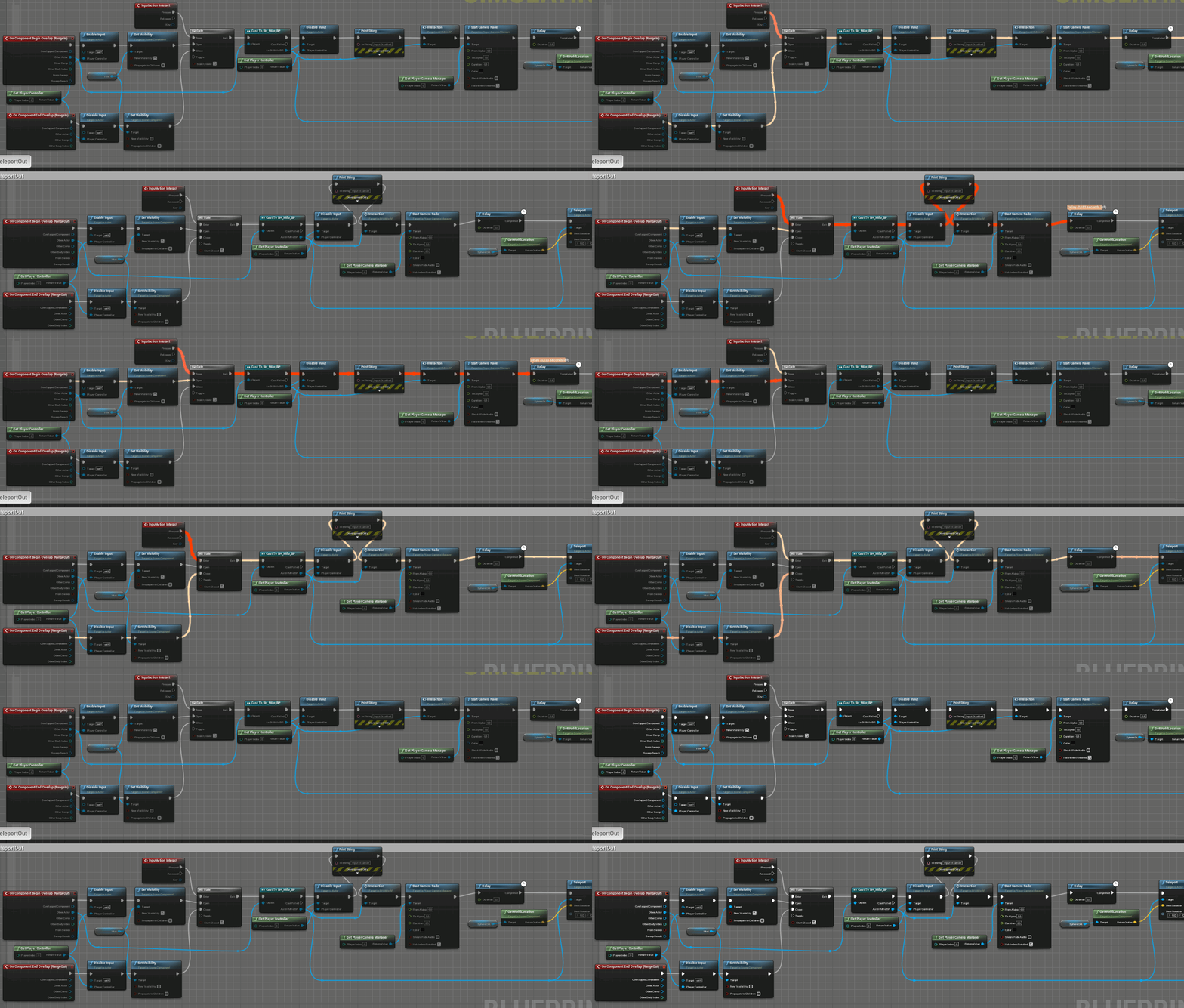 unique harness
ah I see
when you enter your gate, you need to close it
wait no
so you didn't actually make the change i suggested
you need to disable the collision
unique harness
on the target trigger
so instead of the delay to enable input, delay the activation of the trigger collision
unique harness
awesome!
pale galleon
Is there any other option for getting properties out of a class besides "Get Class Defaults"? Any work around I can do?
unique harness
What are you trying to do?
pale galleon
I just need to get the default values from a class but get class defaults seems really broken and frustrating to work with, so I was hoping there was some alternative.
unique harness
That is the way to do it. What is the issue you're having?
pale galleon
You cannot hide pins, and any change you make to properties (such as renaming) will break any situation it is being referenced through get class defaults
timber cloak
need someone to correct me. The DelayedStart appears to work on Player's Pawn only? I mean my AI is still moving, i double checked the GameMode in WorldSetting too.
i even tried to disable movement in GameMode in both "OnPostLogin" and "Handling Starting New Player"
mental robin
Okaaaay so I find this interesting. I just tried moving an actor on event tick with 500 meshes attached to it..versus using the actor to spawn 500 meshes and doing a FOR EACH and setting their velocity....and doing a for each of each individual mesh was..somehow..WAY faster
I mean like 50fps fast
faster
how does that make sense!
 worthy frost
moving a single actor is expensive
so if you had 50 attached things to it
it had to go through each child transform and update, etc
and can do that a couple of times
moving an individual actor with no other actor attached is quicker
you doing velocity is moving its location yourself
but moving the actor, is forcing it to iterate over all childs, move, do overlaps, etc, etc
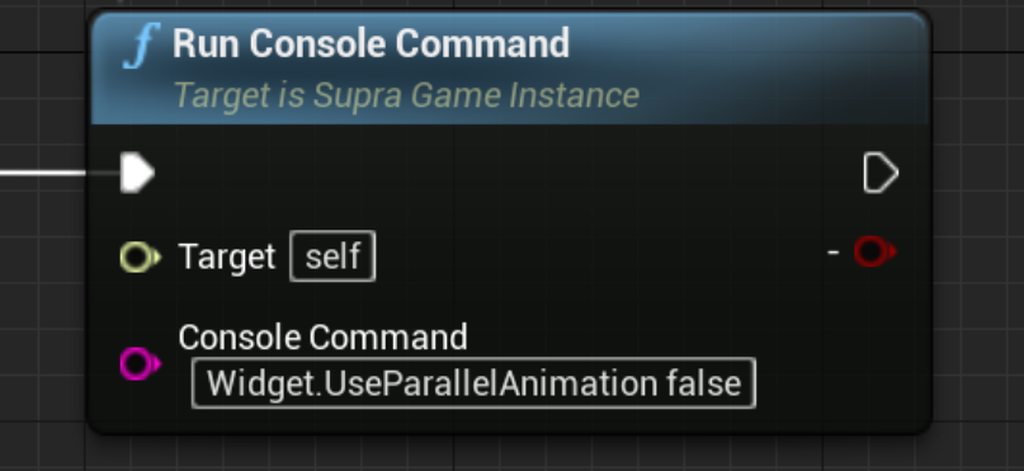 worthy frost
that is the same
timber cloak
odd
worthy frost
that one above looks like some custom thing 🤷
Execute Console Command will allow you execute console commands the same as that
timber cloak
okay, instead of running the node, i just hit "`" button and wrote that command line but i can't verified whether it is executed or not
worthy frost
you can always bring up the console
with ` key and type the cvar in
it will tell you the value
timber cloak
thank you
worthy frost
you can also define cvars in DefaultEngine.ini
if they need to be persistent
Widget.UseParallelAnimation=true
``` for examplethanks a lot. That's helpful. Appreciate it, really.
Apparently it does not solve this bug still
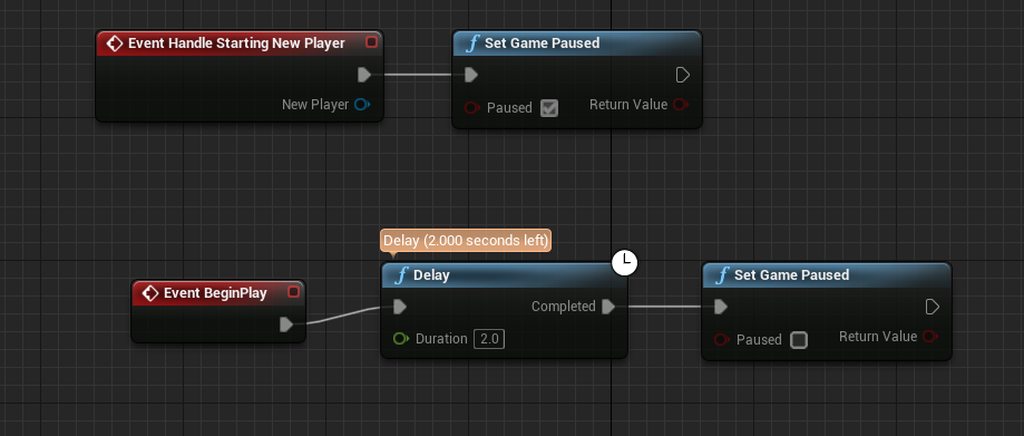 worthy frost
what bug?
timber cloak
the "delay" node won't execute
worthy frost
why would that cvar fix the delay node not running
timber cloak
correct
worthy frost
see needed context lol
timber cloak
sorry, i am too stupid to understand
the 2nd link has a screen shot that is same as mine
apparently 4.26 version bug?
worthy frost
yeah
do this
close editor, open your DefaultEngine.ini
Widget.UseParallelAnimation=0``` put this inreload editor
worthy frost
ok let me know if it works after doing this
sorry @timber cloak
Widget.UseParallelAnimation=0```both should work
timber cloak
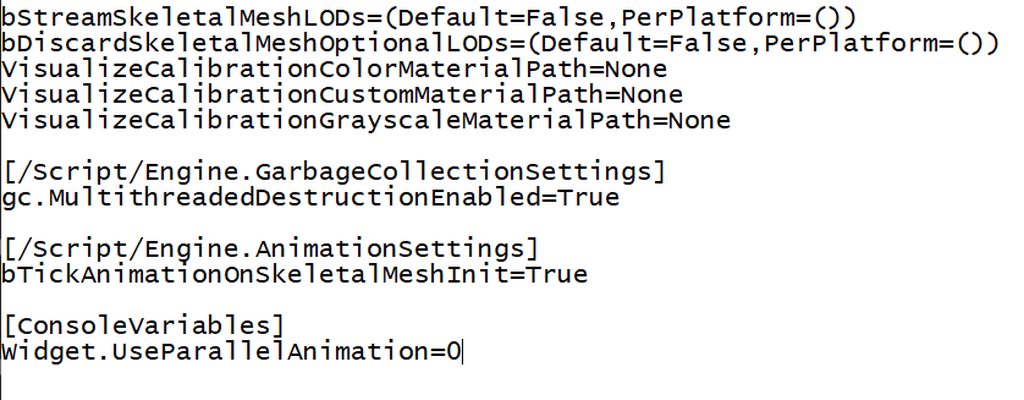 worthy frost
maybe just put both in for good measure 😄
worthy frost
if you bring up the console
and type just Widget.UseParallelAnimation
what does it say?
press ` twice to bring up the big console
 true valve
Is it possible to remove placed objects from the level via blueprint? So that when I load it doesn't appear again or does it involve saving and loading?
timber cloak
 worthy frost
ok so its set
timber cloak
not sure how do i report this bug, though it seems to be reported as said in the answerhub
but that guy who suggested the answer apparently has it bypassed with such command
which is also another bug itself
since i don't get it working
he said "bypass"
worthy frost
let me check my 4.26 project
thing is
Async nodes do not rely on the underlying widget to tick
so that is why i smell something funny with that
timber cloak
oh thought you mean my other code
worthy frost
not the widget
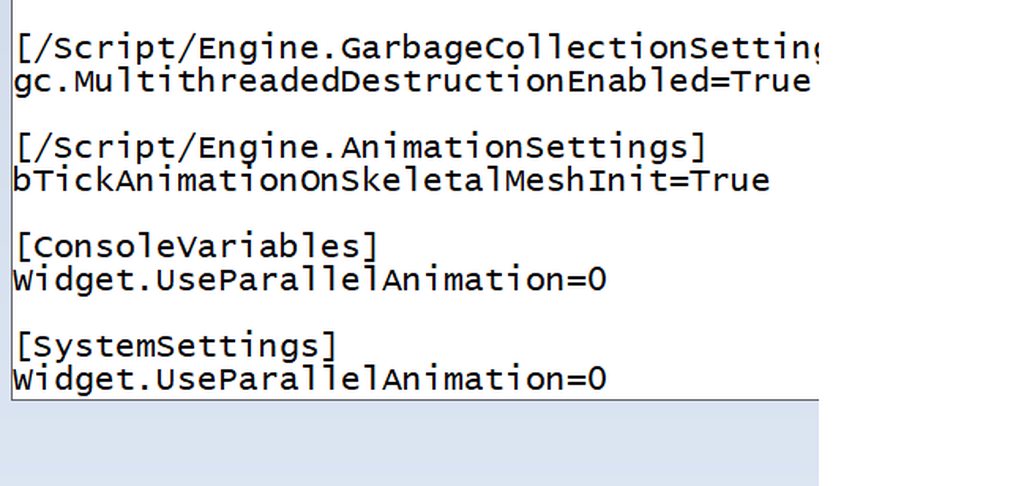 worthy frost
gimme sec
timber cloak
there is no widget owner, the entire game is paused
worthy frost
open your widget
timber cloak
if i remove entire delay node, the game unpause
timber cloak
okay sure
worthy frost
actually want to screenshare? might be easier so i can see
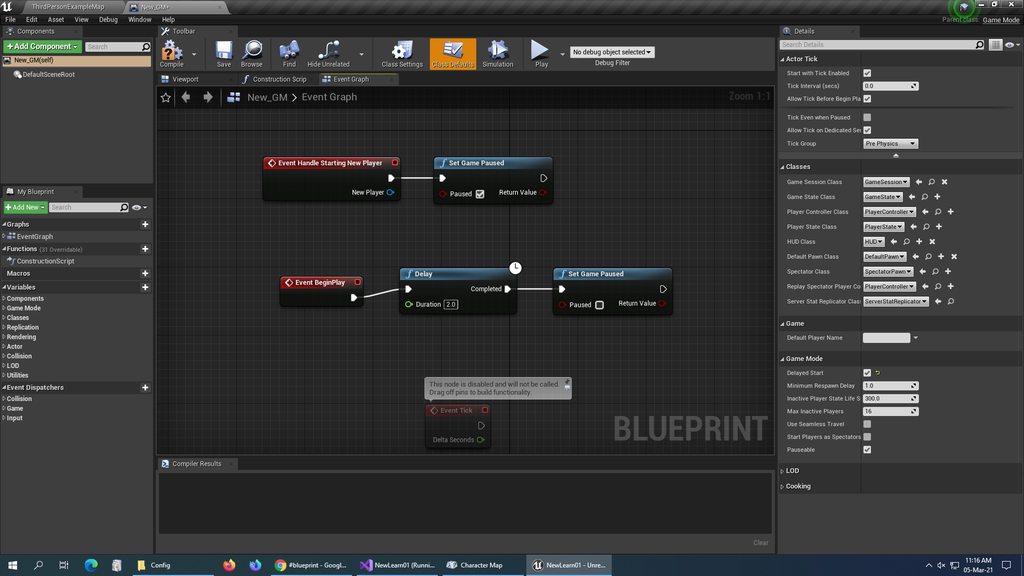


 worthy frost
ah this is not widget
this is GameMode
ok you can do two things
see that tick node
timber cloak
yup
worthy frost
connect a node to it
and remove that connected node
so its not greyed out
basically so the disabled text goes away
timber cloak
okay my bad
worthy frost
pull from begin play
and set the open Tick Even when Paused
option*

see this here
just tick that its easier
timber cloak
done
worthy frost
now try
timber cloak
but what if i want the tick to be disabled again?
worthy frost
call SetActorTickEnabled node