
#blueprint
402296 messages · Page 634 of 403
 slow zealot
yeah but background image is actually an image for the background, right? not the highlight color of the text
 dawn gazelle
there's a setting specifically for background color, mine is blue in this example
 slow zealot
this is multi=line textbox
 slow zealot
dawn gazelle
there's a setting specifically for background color, mine is blue in this exampl...
slow zealot
dawn gazelle
there's a setting specifically for background color, mine is blue in this exampl...
let me try...
that's the background color for the whole textbox

I mean when you select some text (with the mouse), THAT selection color
dawn gazelle
Could you possibly just set your popup widget to have focus?
 trail condor
dawn gazelle
Could you possibly just set your popup widget to have focus?
trail condor
dawn gazelle
Could you possibly just set your popup widget to have focus?
I was trying to find a way to, but I didn't see one.
oh wow.
dawn gazelle
Just feed in its reference to the target whenever you've created it and added it to the viewport.
 trail condor
I didn't realize I could just grab the highest level object in the hierarchy and enable focus there. Thank you.
That did it. Thank you very very much ❤️
one more tiny detail, I can work around this, but I've got a function expecting a key event, but I'm using InputAction AnyKey, which just gives me a regular old Key. Is there any equivalent I could use that gives me a KeyEvent?
 wet steppe
Dont know if this is right place to ask
nor have I ever got a reply from here much often but here it goes 🙂
How would I go about getting my actor to always face its target
ive tried look at with set rotation
reinterp to
but it just spins crazy

this being the actor I want the tip to always be forward facing target
right now it flies to the target side ways
even if I change the forward orientation. like right now its along the z axis
had it facing the x+
when perched upwards on the ground
still takes off and flies sideways
like do I want set or add
rotation
I added the camera thinking maybe I could lock the view to a target
Easy if it was AI but
this bugger not so much
If anybody knows of a solution please DM me or @ me
 gritty elm
you are adding rotation to your pivot point of static mesh or actor, the pivot maybe on the center of static mesh, so it will rotate from it's origin.
You need to change or set pivot point of your static mesh or root point of your actor to it's tip, so it will change rotation from it's pivot point.
You can either change pivot point of your static mesh in blender or 3ds maya etc, and import back in unreal. The other solution is to add a fake scene root component in your actor and make the mesh as child of that scene component, and try to adjust the static mesh to lower down, and when you want to rotate your object. you need to rotate actual your scene component
@wet steppe
 maiden wadi
Also the rocket should ideally be on it's side when in editor, with the tip pointing in the actor's +X vector.
dawn gazelle
wet steppe
If anybody knows of a solution please DM me or @ me
This should be in the actor's BP. Doesn't need to be on tick, but does need to be on something that continually triggers (like a timeline). Orientation of the projectile should have the front facing X

The white sphere indicating forward on the rectangle below would be the correct way to orient your projectile

 wet adder
Hey guys quick question I want to make the boolean game over true given they equal each other

I tried set but I just want it to become true
dawn gazelle
You need to connect the execution path
dawn gazelle
The > on the left needs to go to the > on the right

 iron bobcat
Fixed it by redoing all UI related blueprints and then restarting the editor. So still no idea, what it was.
(it works now though)
 copper iron
Hey friends quick question. Is there a way to use a substring to find an item's index in an array? I've been searching for a solution over the last couple of days and can't seem to land on one.
Essentially I would like to have a substring like "head" return the index number of more complexly named item such as 02_Gordon_Head
I'm currently loading files from a folder so the only consistent name between folders would be head so chances are i couldnt just type in a hard value in a string append node for the desired functionality
let me know if you guys have any suggestions! thanks!
 nova rivet
Switch on string
 dense tulip
Any of you know what could cause the warning ?
 nova rivet
Map might work too
 trim matrix
You can parse strings into arrays and then do 'array:contains', maybe that would help, not sure how you'd avoid massive 'foreach' loops, maybe there's a smart solution
dawn gazelle
dense tulip
Any of you know what could cause the warning ?
You should be able to hover over the node or it'll tell you at the bottom of the screen in your compiler results tab.
 uncut lark
I stuck an event tick with a .02 delay. Is that going to have a huge impact on performance?
dawn gazelle
I think it more depends on what you're doing on tick whether or not it's going to be an impact on performance.
Though of course, it's always best if you can avoid tick.
 summer bolt
👋 have a quick question if a character has a sword being swung around What blueprint type should the sword be
 paper galleon
Actor?
Depends on the nature of the sword though. It can also be a static mesh component. But if it can exists in the world as an independent item. Just make it an actor.
nova rivet
uncut lark
I stuck an event tick with a .02 delay. Is that going to have a huge impact on p...
No, that would improve performance (assuming a lot)
 pastel garnet
Are there any replacements to event tick that would not damage performance?
paper galleon
pastel garnet
Are there any replacements to event tick that would not damage performance?
Timeline maybe. But that runs using tick also. But you have more control over it's execution
pastel garnet
Ah okay, will try that
paper galleon
Start, stop, reverse.etc
uncut lark
nova rivet
Although getting a value on tick is going to be cheap
Ye I'll just bump it up a touch
Thank you
nova rivet
Np
summer bolt
paper galleon
Depends on the nature of the sword though. It can also be a static mesh componen...
Thanks
 tight schooner
@pastel garnet tick is just an event that fires every frame; there's nothing uniquely heavy about it. You can control tick with the node, Set Actor Tick Enabled, which would be effectively similar to using a timeline. You can also change the tick rate.
You can also use a looping timer event (Set Timer By Event node).
 leaden dock
ah without it it creates a new object from scratch
tight schooner
@leaden dock pass by reference is like... It doesn't make a copy of the input but passes that variable directly. And then your function or macro or whatever can "set variable by reference". So you can have a function that alters whatever variable that's provided to it.
There are a lot of "standard macros" that use it
leaden dock
or does it become its own object then?
tight schooner
Promoting it to a new variable? You're making an explicit copy of it in that case
leaden dock
ok then that tutorial i follow along is doing a bit of bad practice
tight schooner
Try using the node (I might get the name wrong here...) Set variable by reference
Or set by ref var. It had some weird name like that
leaden dock
i dont know why he's storing the inventory at all, since the inventory exists in the character
tight schooner
Afaik that's the intended use of a pass by ref input
 atomic solstice
Does anyone know what these 2 nodes are? Really frustrating seeing hundreds of results for "Set" 😒
 leaden dock
the first note is a multiply
the other node sets the tentacle scale variable to the output value of the - node
or wait
 dense peak
isn't the fist node a cast?
dense peak
casts the int to a float
dense peak
actually it's float to int sorry
nova rivet
No you had it
leaden dock
nope int to float was right
dense peak
haha all the greens
and yeah second one sets your local variable wonderfully titled 'Tentacle Scale' but weirdly it's new scale is divided by 1
atomic solstice
gotcha, thanks. Ya first one is cast (int to float I think?). Not sure about the second one.
oh my bad, i understand now. Thanks @leaden dock!
leaden dock
tentacle scale is a variable in the blueprint
when you drag and drop the variable
you can pick if you want to get or set it
 wheat vigil
how do i get all attributes of an asset in blueprint?
id like to enumerate to know what it contains
or how do i find the documentation where all attributes are listed?
dense peak
attributes or components?
 lone arch
o ok sorry for that
wheat vigil
dense peak
attributes or components?
both
everything that unreal engine knows about an asset
my goal is to load assets that are closeby to a players location
and id like to know what options i have
leaden dock
hm i recompiled a c++ class that i also use in some blueprints and now all my blueprints throw errors even after recompiling the engine
does that mean i have to rewrite all my blueprints every time i edit the c++ class?
maiden wadi
It's not a hotreload issue, is it?
I really wish they would seriously just disable hotreload if they're not going to fix it. It's practically deprecated, hasn't been updated, and just literally doesn't work, and yet it's still enabled by default.
leaden dock
well i used the compile button in the editor
so probably that was the mistake i made
maiden wadi
Did you compile VS with the editor open?
leaden dock
should just close the editor and recompile if i made changes to a c++ class
but seriously thats a horrible workflow :/
maiden wadi
You get used to it.
Enable Livecoding. It'll keep you from compiling with the editor open. Then you can compile already declared functions. and only have to restart when making changes to a class constructor, or the .h file.
 tame pecan
It happens for me in a plugin setting. If I derive a class from my plugin into the project content, it says "Invalid parent" each time I recompile. The current workaround to test the plugin for me right now, is to create all my test actors in the plugin content folder.
It sucks, but hey, it works to test the plugin atleast.
I remade the plugin and project to see if there's anything wrong with that plugin/project, but nope, same problem.
maiden wadi
Here is an article on the hotreload matter. It's annoying. But a few second restart of the editor can save weeks of blueprint work in the end. https://www.ue4community.wiki/live-compiling-in-unreal-projects-tp14jcgs
Compiling with the Editor Open Do's and Don'ts
tame pecan
Mine is not about hot reload, I restart and compile
maiden wadi
Linked that for Karasa.
tame pecan
Ah, okay 🙂
nova rivet
Recompile an in-use DLL? Sounds like that would be a problem in almost any environment
tame pecan
Hot reloading is the devil. If you change in the header and hot reload, it usually corrupts the blueprint.
Usually a issue for newcomers, some of the students I've teached with UE4 have fallen into that trap
nova rivet
Attractive problem to get trapped by
tame pecan
I think it comes from coming from Unity, where you never close the editor and it just compiles
and they're like "oh a compile button, lets go"
nova rivet
Indeed
maiden wadi
I still don't understand Unity. I feel like I'm pretty intermediate in my UE4 skillset, good enough to definitely understand things when I read them... but every time I read a Unity doc to try and help someone here who's from Unity, that stuff just doesn't make sense. :/
tame pecan
I usually read unity forums for mathematical problems, because usually they have way more topics available rather than ue4 forum
maiden wadi
Well, code snippets are one thing. Math is kind of universal. But the file structures and the way they do things is just... Wut? I know I'd get it if I spent more than two minutes on it. I've never had that with Unreal though, even from the beginning.
 thorny relic
One advantage of BP is the instant compile times and not having to restart the editor
Wonder if/when that UE4 scripting language will show up?
tame pecan
thorny relic
One advantage of BP is the instant compile times and not having to restart the e...
Don't need to restart editor if you use live coding (unless you change to header)
thorny relic
Well, if I'm doing C++ classes, I'm probably changing the headers often /o\
trim matrix
maiden wadi
I still don't understand Unity. I feel like I'm pretty intermediate in my UE4 sk...
Unity is like clay, Unreal is like stone sculpting.
In Unity, instead of Actors carrying their own BPs, everything is created into a component. And components aren't smaller actors like in UE, they're.... you can say they're BPs that have no physical form, each with a BeginPlay, EventTick and other events
thorny relic
Even if you're using a lot of blueprints and just C++ for things you can't do there, you still end up wanting to create new global blueprint library functions ... and that needs changing headers
trim matrix
trim matrix
Unity is like clay, Unreal is like stone sculpting.
In Unity, instead of Actors ...
That's the best comparison that helped me, an intermediate-advanced Unity user to wrap my head around UE4
thorny relic
(I'd imagine hot reload would be safe for that use case, but...)
maiden wadi
Kind of makes sense.
 zealous moth
does anyone have any resources on how to implement fluid-like physics? I am thinking of using spheres and enabling physics but I was wondering if there was a better way.
 waxen rose
can one explain with graph what this nodes do? Get Forward Vector ,make rotator, break rotator , get control rotation
 indigo quest
Yo, I'm wondering if it's possible to use a sphere trace and get an array of overlapping bones from a skeletal mesh?
maiden wadi
@indigo quest I have a feeling that would require a bit of custom work. If you could get the bone's length, it would be easy to use the already easy to get bone location and rotation to do simple distance checks to a start and end point on a line.
 dark crow
waxen rose
can one explain with graph what this nodes do? Get Forward Vector ,make rotator,...
dark crow
waxen rose
can one explain with graph what this nodes do? Get Forward Vector ,make rotator,...
Get Forward Vector gets the Forward Vector (duh) aka +X Axis
Make Rotator enables you to create a Rotator from X Y Z Floats
Break Rotator is the opposite, break a Rotator into X Y Z Floats
Get Control Rotation gets the current rotation of the Player Controller
You could use for example Get Forward Vector with Get Control Rotation to understand where the player is looking with the Camera
waxen rose
so the problem them fix let me move from x/y with the camera rotation value right?
indigo quest
maiden wadi
<@!275281228536741889> I have a feeling that would require a bit of custom work....
I see, tho in my case the purpose I already have a start and end loc, I want to get all overlapping bones in a radius around the impact point so I can Set Bodies below simulate
basically flip the overlapped bones's physics bodies to simulated
dark crow
waxen rose
so the problem them fix let me move from x/y with the camera rotation value righ...
You could in theory decide the player movement based on the Control Forward Vector yes, for example if you press W your character to rotate and match the forward vector of the Control so it basically rotates towards where you look and moves forward
indigo quest
currently my hit results bone returns none in print txt
waxen rose
dark crow
You could in theory decide the player movement based on the Control Forward Vect...
thank u so much
maiden wadi
Bit odd. You should get a bone print from a successful hit result.
For your sphere trace issue, you'd need something akin to this. Although you'd still need the bone length for accuracy because you would want to get the bone's end point as well to test that, since if it's a long bone and you hit the end of it, and the actual location is further than the sphere trace, this wouldn't work, so..

 stray island
Does unreal have quick copy pasting plugins or anything? Like Hover copy paste , so i hover a color and click ctrl + c then other color ctrl + v without right clicking each
 indigo quest
you are right, for some reason it's unsuccessful hit, Also Dude thanks so much thats exactly what I was looking for, filtering the bones in a radius, you're a godsend
btw If you're interested, I'm using it for a wood chopping system, to fracture rigged chunks on the location where the axe hits the tree
maiden wadi
That sounds much more interesting right now, than setting up a replicated building system using subclassed HISM components.
My brain is slowly turning into ooze.
indigo quest
hahahahaahhaah dayum I had to google what that even is
tho much more fundamentally useful for a survival game I'm guessing
maiden wadi
Possibly. To be honest it's not so bad. I'm enjoying this much more than doing inventory stuff. I just miss working on gameplay aspects. I'll probably like this much more once I get to the placement system. Right now I'm just working with pure data and replication issues so it's bleh.
indigo quest
Yeah I can imagine doing only abstract stuff becomes a drag after a while, I've transitioned to tech art a lil' bit ago so I think there'll be more of that coming my way eventually, albeit not purely.
 white scroll
Easiest way to get number of certain substring in a string?
dark crow
white scroll
Easiest way to get number of certain substring in a string?
Get Substring?
white scroll
It just gets the start index of the found substring. One way ofcourse is to just start the search again from the index and do that till the end but was wondering if there was some ready function for that
dark crow
You can modify the starting index or the length after the index
Let's say i wanna just get the first 10 characters
starting index 0 and length 10
I wanna get just the 5th character
starting index 4 and length 1
white scroll
I know
dark crow
You wanna actually categorize each Char into a number depending on their position in a String?
 shrewd mural
Is there a way to 'redirect' the outputs of a node? Basically just replace Selected Actor with Selected Character without having to manually re-make all the connections?
 dawn gazelle
hold ctrl and click and drag the pins
shrewd mural
Thanks
trim matrix
Hello guys, I have problem with my booster item
How does this booster item work? When I get it and press left shift I have faster speed for 5 seconds, but if I stop pressing the button and I press it again, I don't have the boosted speed, how I can do it?
 violet inlet
hello guys i have a wierd problem with my spline bp, he his showing only in editor and when am out of the player character , the actor is not set to be hidden in game


 rancid topaz
I know this is stupid but if anyone is willing to do this it would be really nice um is someone willing to be like a teacher to me and half time on whatever day and can teach me how to use unreal
i mean yeah i could look at tutorials but I would like a live class if someones willing to volunteer with that
if not then ill talk to my mom about classes for me
 primal smelt
Is anybody here well practised / knowledgeable when it comes to ensuring your code is framerate independent? I'm currently running some tests to try and get a vehicle to turn the same amount irrespective of framerate using torque and I could sure use some pointers.
rancid topaz
frames dont control the sensitivity on your vehicle
so what you might wanna do is maybe have a value or float for the vehicle steering to be set higher
framerate isnt what controls how a game functions its more of how it visualizes like how well it runs on your monitor
 left niche
primal smelt
Is anybody here well practised / knowledgeable when it comes to ensuring your co...
left niche
primal smelt
Is anybody here well practised / knowledgeable when it comes to ensuring your co...
multiplying the delta time with the variables you use is a good way to start
maiden wadi
primal smelt
Is anybody here well practised / knowledgeable when it comes to ensuring your co...
You just have to do everything by a multiplier. Usually delta seconds.
primal smelt
maiden wadi
You just have to do everything by a multiplier. Usually delta seconds.
It seems to be a bit more complicated than that where physics are concerned, I have substepping enabled and have managed to get the vehicle to turn at a close enough rate by dividng delta seconds from 1 (multiplying does not work here) to get the framerate and then setting that as the maximum float value which increases by 1 each tick. Ideally I would want it to be the same, however. I'm just now about to grab my dinner but all post screenshots when I'm back at my pc.
At 30 and 60 fps the difference is barely noticeable but at 120 fps it falls short when trying to do a 180 turn for example.
 hollow gorge
I hope this is the right channel to ask: I was trying to create a toggleable auto walk function (going forward, possible steering with mouse). The event is started by a button press (so no event tick start), does anyone know a right approach to keep the required resources to a minimum?
maiden wadi
primal smelt
At 30 and 60 fps the difference is barely noticeable but at 120 fps it falls sho...
Delta seconds is your multiplier. Take for instance you want you turn 90 degrees over 5 seconds. 90/5 = 18 degrees per second. 18*delta = degrees to turn per tick.
In physics you translate some of that to speeds instead of time. Speed gets multiplied by delta to determine new location or rotation of this tick.
trail condor
I'm creating a bunch of buttons in a loop. I'm binding them to an OnClicked event. Is there a way to find out which button triggered the event? Or some way to pass along more info into the event?
hollow gorge
@trail condor you could try to get more info by throwing in a few different string messages in between and see which provide feedback
trail condor
hollow gorge
<@693256861381558363> you could try to get more info by throwing in a few differ...
what do you mean?
primal smelt
maiden wadi
Delta seconds is your multiplier. Take for instance you want you turn 90 degrees...
This is my attempt at dividing 90 by timeline length (0.25) and multiplying that by delta seconds (from the event tick node). I'm using torque in radians as degrees sees virtually no movement at all. I must stress that I don't need it to rotate by 90 degrees as in the final product the amount will be determined by other factors. So long as it is consistent across different framerates.
Doing it this way results in there being quite a large difference in how much it turns when jumping from 30 to 60 to 120 (lower fps = greater rotatioin)
 maiden wadi
Where is delta being updated from? You can also use get world delta seconds.
I'll be able to help a bit more in a little over an hour. Out of the house, so no ue4 at the moment.
primal smelt
This pile of spaghetti is taking a different approach and so far comes the closest to getting the amount of rotation to match regardless of your current framerate. Between 30 and 60 the difference is not so noticeable but going from 60 to 120 and while still not too bad it is certainly noticeable.
When the player fires off the instruction to add torque the LHandTorqueAdd event is called and adds 1 each frame until it hits the max float value dictated by the >= node. This node is 1/Delta seconds as this gives me the framerate. Even though going from 30 to 60 is doubling the number of ticks a torque force is applied, it still works out to fully rotate by a similar amount. I'm not sure why this is, perhaps because this is an actor with phys constraints for wheels as well as gravity enabled that there is some kind of interpolation going on between each frame?
Funnily enough I just tested it again and if anything 30 is undershooting it a bit whereas earlier it seemed like it was doing that at 120. I must have tinkered something and forgotten. But really I'm just after a bit of guidance - any drawbacks to doing it this way? Any comments about how I have attempted the delta seconds method you suggested?
 primal smelt
maiden wadi
I'll be able to help a bit more in a little over an hour. Out of the house, so n...
primal smelt
maiden wadi
I'll be able to help a bit more in a little over an hour. Out of the house, so n...
That's very kind of you thanks! I'll still be online for a good many hours as yet so would very much appreciate any help.
And the event tick delta is being set from event tick. I'll try getting world delta seconds now
maiden wadi
Out of curiosity, why not axis events?
primal smelt
Getting world delta seconds seems to give the same results
primal smelt
maiden wadi
Out of curiosity, why not axis events?
The vehicle I'm making is a wheelchair and instead of holding a button to accelerate you "push" either left or right wheel, so it's just a single fire event
maiden wadi
Ah, that makes sense.
primal smelt
The left wheel forward adds positive torque and the right wheel forward adds negative torque (and if you push both at once - this may be inefficient - both forces still paply but counterbalance to keep the vehiclemoving straight forward)
*still apply
 signal heath
I have a question regarding blueprint logic and structure for a high level overview of a kart racing game:
Here's my thought process on the same-----
Create an actor BP for wheels
Create another actor BP for the whole cart
The wheels BP is a child of the Cart
Create variables for acceleration, velocity, friction, weight etc and apply them the wheels BP for applying a change to the transform's rotation and to the cart and then creating a function that would affect the wheel BP based on the value of weight
Finally, create a BP class for abilities
This class is spawned on a timer on the race track or based on a powerup like a 'random power' ability
Depending on if the game is made to have abilities inherently for the karts, the ability would instead be created as a function
Is this appropriate? What would you add/edit or how would you go about planning to create such a game, from a high level, making use of technical blueprint terminology?
maiden wadi
primal smelt
This is my attempt at dividing 90 by timeline length (0.25) and multiplying that...
I don't fully understand why your time line doesn't work. The math on it looks fine... At 60 fps that should add about 6 torque, at 30fps about 12.
Should do that per tick, or per time line update.
primal smelt
maiden wadi
I don't fully understand why your time line doesn't work. The math on it looks f...
Yeah I thought maybe substepping was the culprit but disabling that doesn't seem to yield any different results unfortunately. Perhaps it has something to do with the way I have the physics constraints setup for the wheels? I wouldn't know what to start checking though!
primal smelt
maiden wadi
I don't fully understand why your time line doesn't work. The math on it looks f...
The other method of running it on tick with the delta providing maximum number of frames to apply torque, I'm surprised how well it is working now. My biggest concern doing it that way is what would happen if the framerate dipped while that event is running?
maiden wadi
One person that I know could definitely help hangs out in #legacy-physics. I can do some tests, but @atomic salmon is the guy to ask about physics.
primal smelt
maiden wadi
One person that I know could definitely help hangs out in <#221799426820276226>....
Great, I'll see if I can get his attention! I'm sure the method you suggested would work fine if I was rotating the actor instead of applying torque, I will give that a try in a moment. Problem is I can see that causing problems with how I've got things currently set up what with how the counterbalance of torque works to keep the vehicle moving straight.
indigo quest
maiden wadi
For your sphere trace issue, you'd need something akin to this. Although you'd s...
Yo, I don't think I quite understood the find closest point on segment part, could you please elaborate or correct me a bit more?

I can't debug why my bones seem to teleport away
and why it bends 90 degrees at the end like that, like theres some pivot there, all the bones are directly parented to the root
 marsh seal
is this a good place to ask about sound occlusion?
im setting up a 2k map with some buildings that have interiors
i dragged in the sound of nature and despatialized it just so no matter where you go you hear it and its not like "coming from over there!"
but... is there a way i can occlude a sound thats not spatialized? OR.. are there some attenuation settings that i can use to De-stereo a sound even if its spatialized
maiden wadi
@indigo quest I'm uncertain about the bone issue. The math was more or less a SphereTrace. You specify a start and end location in world space. And for each bone it finds the closest point on that line to the bone. If the distance between that found point and the bone is within the radius, then it can be considered hit by the trace.
 long smelt
I wonder if UISound can be used with spatialization @marsh seal
maiden wadi
@signal heath The simplest way I could think of to implement that, would actually be to make the kart an actor. The wheels would be components attached at sockets or locations on the kart. Wheels can be made to behave however you want based on their owner actor. As for power ups. Those could be a mix of events or actor components. Simpler ones could be simple events in the kart that a powerup actor could trigger. More complex ones can be an actor component that a powerup actor could make the kart add to itself to affect it for a time.
 mellow folio
I know I’ve used code before to manually check whether we are inside and crossfade sounds. This can be useful in other areas too. Just put overlap volumes in your buildings or for an even more expensive approach, regularly line trace
I once lerped between wind and howling wind based on how surrounded the player was by collision. This caused a howling sound when the player was in a crevice
indigo quest
maiden wadi
<@!275281228536741889> I'm uncertain about the bone issue. The math was more or ...
Thanks for your help, I'll continue digging around
maiden wadi
I unfortunately don't do physics stuff enough. Unreliable in multiplayer environments.
primal smelt
maiden wadi
One person that I know could definitely help hangs out in <#221799426820276226>....
Looks like Add Torque operates on tick which must be why the math seemed correct but the results weren't expected!
gritty elm
how to pause particle system?
maiden wadi
Should have still worked on a timeline though. Timelines's Update on tick.
@gritty elm
 gritty elm
thanks
trim matrix
Anyone knows how to fix thid weird bug ? I'm using 2 Bone IK to change the hands placement when leaning... The hand seems to always point toward the Player Start.
 primal smelt
maiden wadi
Should have still worked on a timeline though. Timelines's Update on tick.
primal smelt
maiden wadi
Should have still worked on a timeline though. Timelines's Update on tick.
Hmm yeah good point, I'll mention that to him!
marsh seal
@long smelt found the answers on youtube.. you can have ambient sounds get occluded and messed with through audio volumes.. have to make a custom sound class and check "apply ambient occluesion" or something
i knew it had to be simple
 viscid fox
I'm trying to debug the water caustics generator blueprint in the unreal editor. I've put a breakpoint in the blueprint that should hit when I press the 'Begin Rendering' button but it never hits. Is this a limitation of blueprints that run in the editor?


 teal lantern
The ball moves with the mouse. How would I make the sword always point an the ball? I tried look at but it doesn't rotate so that the point is touching the ball.

 polar fulcrum
Look At should work. Seems your aim vector should be the Sword Z axis. and the rotate vector the Y axis.
You could also skin the sword with 2 joints, one at the pivot rotation and another at the sword end, and use an IK system (Anim Blueprint post process) to move the top sword joint ant automatically rotate the base root joint (disclaimer, I have never done an IK to a root joint so it might not be allowed, in that case you will need 3 joints, the root, the one located at the sword handle and the top one).
teal lantern
polar fulcrum
Look At should work. Seems your aim vector should be the Sword Z axis. and the r...
Look at has Start and Target as inputs. is the aim vector the start and the rotate vector the target? Is that what you meant?
 keen wedge
Hi all, don't suppose anyone can think of a reason why the load of a save game object wouldn't work after a build (as a standalone/windows) but does in the editor?
maiden wadi
Depends on the build type. Did you save in the editor, and then build and try to load it in the packaged build?
keen wedge
maiden wadi
Depends on the build type. Did you save in the editor, and then build and try to...
hiya... actually tried a combination.... in editor only, both saving and loading works fine. Then I created a build, ran it, it saves the file, but doesn't load it again. The file is there. Can't think why this would be a problem.
Was running it from my desktop, moved it all to a separate drive and ran it from there, still no joy.
maiden wadi
Hmm. I can't say I've had that problem. I know that shipping build games actually save to Appdata rather than the game or project directory.
keen wedge
maiden wadi
Hmm. I can't say I've had that problem. I know that shipping build games actuall...
Whats REALLY annoying is that I think I have had this problem before and I can't remember what I did to resolve it. I have another game that I made and that runs fine saving and loading... so annoyig..
 timber pilot
I've been trying to fix this error for a friend of mine for days. I've set the object that is called to check an "isvalid" before proceeding but it is seemingly ignorning that
 maiden wadi
Show the logic? Isvalids definitely won't get ignored.
timber pilot
BlueprintUE
maiden wadi
You're not checking it though. You're checking if the pawn is valid. But that pawn has a struct with another pointer in it that points to something else that isn't valid and you're calling AssignEmployeeJob on that.
timber pilot
Ahhhhh that makes sense
 static charm
authaer, what do u do for a living
maiden wadi
Exist mostly. Haha. Why?
keen wedge
maiden wadi
Hmm. I can't say I've had that problem. I know that shipping build games actuall...
I think its going to be another of these, what gets built first issues... ffs... does my head in ... guessing now there's a difference in order between gamemode and level being created first...
its like the other day, all over again.
maiden wadi
A lot of it's just very fresh. It's a hobby I've been working on for the last year and.. some months now.
@keen wedge Hmm. Still shouldn't affect loading though. Or is it a logical issue after loading?
keen wedge
Its triggering this Print at the moment...

Thats in the level blueprint...
looks like the level and gm load in different orders
depending whether its in editor or standalone
maiden wadi
Are both of these running on beginplay?
hollow gorge
Hello, I'm currently trying to change my 3rd Person Camera in a way, that allows for free Character movement without the direction of the camera influencing the character's path when moving. Any ideas?
keen wedge
maiden wadi
Are both of these running on beginplay?
😩
I hate myself...
(but Unreal Engine more)
maiden wadi
Haha. Generally, don't ever trust beginplay's order. Alternatively, you can just load up the savegame from anywhere and get the data from it and then let it be garbage collected instead of saving a pointer to it. So GameMode can load it, get the data it needs, do it's stuff, and then level can come along, load it, get the data it needs and do it's stuff. The only time this isn't preferred, is if you have a stupid amount of data. But then you should consider multiple different save files for different things.
keen wedge
maiden wadi
Haha. Generally, don't ever trust beginplay's order. Alternatively, you can just...
Whats really bizarre about all this ordering nonsense though is that this is about the 5th noddy little project I've made using UE4, and this is the only one I think I've had these problems with. Its frustrating because the code to do the actually functional does work, it does save, it does load, I have a little admin screen that displays it.. all lovely... but then you build and its like, oh ffs... here we go again... will maybe trying bumping the loading into the game instance... that gets created first I think, so maybe that'll work. dunno. so tired of this 😦
 flat raft
Hey hey.. I have a question, but I don't know what the effect/control is called...
In metal gear 5, when snake is crawling on the floor, or when Tomb Raider is squeezing between rocks, or in order 1886, when you're escaping the prison...
What's the cinematic control effect called?
The player can only press forward, but it plays the squeeze through wall animation
nova rivet
Camera control?
 white field
can any Actor have PawnSensing component and actually work, or does it need to be of Parent class Pawn or something?
or is there some other trick to having pawn sensing work on child actors?
 spark steppe
flat raft
The player can only press forward, but it plays the squeeze through wall animati...
spark steppe
flat raft
The player can only press forward, but it plays the squeeze through wall animati...
technically you would play an animation where the player controls the animation position with w/s key
if he reached the start or end of the animation you would return to normal input
flat raft
Is there a specific name for that?
Like the button pushing during a cinematic is called QuickTime
 bright frigate
Is there a easy way to figure out where this is being fired from>? Blueprint Interface Event,
 trim matrix
Is Audio component Fade out working for anyone? I'm on version 6.2 and Fade out seems to fade, but it won't completely fade out to 0.0

 rough jay
can linetraces be detected by another actor having "component hit event" or should i just do it inside my character bp
 scenic scroll
if I have location A and location B, how would I get the "AB" line vector?
left niche
scenic scroll
if I have location A and location B, how would I get the "AB" line vector?
B - A
Why does the spline start curving automatically? I want to make a square but the corners get curved
 royal helm
Does this not work anymore?
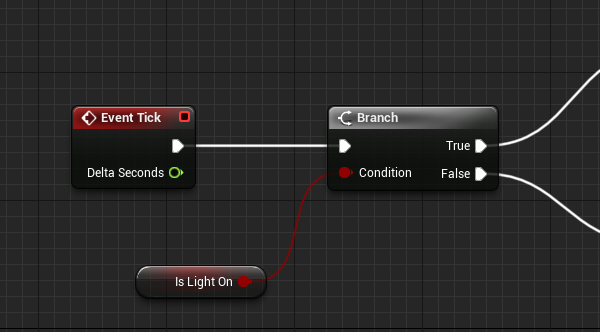
Imagine we had a Lamp object in our scene, and a Switch we can flick so that it turns on. Both objects are instances of a Blueprint, so the switch needs to know which lamp we’re talking about…
Following this I can't get it to work. I have a lightswitch, and I want it to toggle visibility on a pointlight inside a seperate light blueprint.
dawn gazelle
royal helm
https://www.versluis.com/2020/08/how-to-reference-a-blueprint-from-another-bluep...
All this is really showing is changing a boolean variable between two blueprints and yes, this way still functions. Are you getting any errors or anything?
royal helm
I'm a bit idiot, and I figured it out myself. I was getting missing reference errors. I had to select the correct reference in the details panel
I'm still learning, so forgive me. ❤️
 left cradle
How can I assign a int/float value to Cam1 (actor refrence) in level Blueprint ?
I will be adding it in Event Begin Play.

 barren flower
@left cradle what exactly do you mean? If it's an actor you can cast to it.
left cradle
@barren flower So what I mean is, I want to set value to cam1 as int/float so that i can switch multiple cams by just comparing values with cams.
barren flower
You aren't making sense. Set value? What value?
Do you mean you want to give each camera some kind of ID number?
left cradle
Yes
dawn gazelle
Use a map variable.
 barren flower
Yeah that's the best way
dawn gazelle
Alternatively, you could use an array, but it's easier to keep track with a map.
 barren flower
Give the camera actor an int variable called 'ID' or something, and click the eye next to it in the variables panel to expose it to the editor.
Give each camera a unique number, and have them cast back to whatever is switching and add themselves to the map array with that as their key.
That allows you to dynamically add them, too, if the each check the map length and add 1 as their own id
Actually if you let it be dynamic like that they don't even need to contain their own variable, let the map address them on its own.
left cradle
Cool, Thank You guys. Will try this way 🙂
barren flower
Alright my question now.
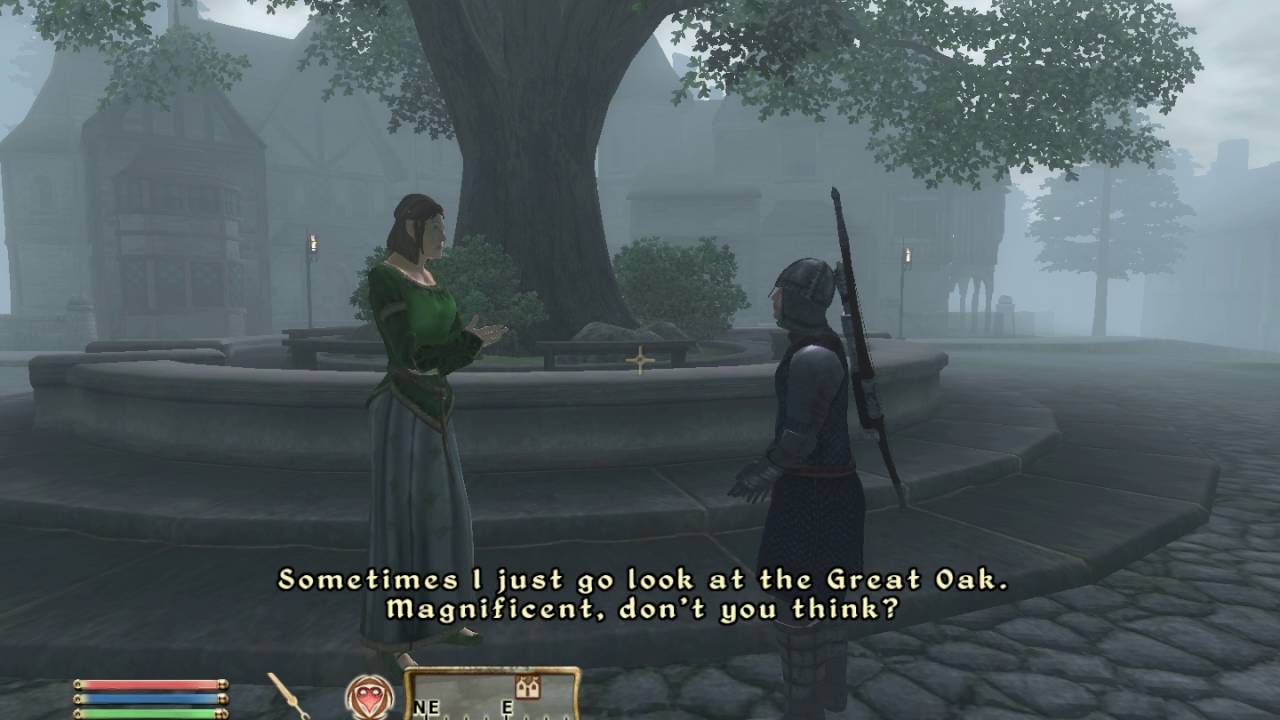
Anyone have ideas on how to approach an npc dialogue system? I want two NPCs that approach eachother to be able to have a short discussion with eachother, and walk away.
Kind of like the system oblivion tried out.
But it has to be interruptible, so if they are attacked or something they can bail on the conversation and respond.
Any ideas? I don't even know how to APPROACH this
 left cradle
Am a newbie, I dunno much but try this one tutorial. https://www.youtube.com/watch?v=3uW7CgmrKAo

This is the start of a new series covering how to make a more advanced dialogue system than the previous one I had made. This one features questions and responses all using the behaviour tree as a make shift dialogue tree. In this first episode I show off the final product and start things off with setting up how to show a interact message such ...
flat raft
Try Ai behavior tree
barren flower
I haven't done much with the tree, but I'll look into it. My question though is how on earth do I pass the different messages between eachother? Some conversations will be different lengths than others, and each pawn needs to pull its own lines from its personal voice type too
They need to know to wait, for how long till the other pawns line gets delivered, and then pick an appropriate response to that type of topic
dawn gazelle
You probably want more generic lines than anything. Basically, have topics that you assign to an NPC that they want to talk about. Then have the other NPC respond with generic, non-specific banter.
You can have the NPCs test if they want to talk to each other (perhaps a random roll on both) and if they do, toggle a boolean on in both of them to indicate they're talking to one another. If you're wanting to wait for actual spoken voice lines to finish playing, you can bind events to when the playback stops.
 flat raft
Use a Datatable to list all the dialogue. Tag them to a topic. When the Npc meet they will choose a topic, and assign each other the lines
dawn gazelle
If two NPCs happen to have the same topics assigned, then the responding NPC could respond a little less generically.
flat raft
as for when to talk.. in the datatable you can also set a wait time.
Weather :
1-1 : Hi : 2sec
2-1: Nice Weather : 4sec
1-2: Indeed : 2sec
2-1: bye : 1sec
There are a lot of dialogue stuff on the youtubes
barren flower
Hmm okay it's a direction to explore for sure, thanks guys
Also @flat raft i love stargate at that is horrifying haha
flat raft
lol
barren flower
This is the real reason the replicatiors won't stop
white scroll
Is there any way to switch between directx 11 and 12 without restarting the gamme?
barren flower
That's a fundamental library of graphics instructions to the graphics card, on how to do all low level graphics processing.
I would bet my house against being able to switch that on the fly, and you would be stupid to even try, for stability reasons
white scroll
K, thanks
 grim heart
Hi! I'm controlling a level sequencer from a blueprint.. it works perfectly when the level sequence is open in the editor (in sequencer tab) and I play the game ... otherwise nothing! I'm so confused... would appreciate any suggestions!
 sonic frost
Does anyone know how I can get around this infinite loop? I just want my Blueprint to keep running after B is pressed and stop when B is pressed again

 junior mural
try using gates
 faint pasture
sonic frost
Does anyone know how I can get around this infinite loop? I just want my Bluepri...
faint pasture
sonic frost
Does anyone know how I can get around this infinite loop? I just want my Bluepri...
what do you mean by keep running, do something every frame?
sonic frost
@faint pasture Yeah, I ditched the while loop for a Tick event which has been working better
faint pasture
Yeah just on tick, branch on bIsBuildModeOn
then when you press the button, set bIsBuildModeOn = NOT(bIsBuildModeOn)
barren flower
GUYS
for real
@sonic frost Use a flip-flop node
and use a timer
@faint pasture dont ever use tick, theres no excuse for it, not even for beginners

#ue4 #beginner #blueprint #tick
Brief discussion of event tick, demonstration of tick vs timers, common mistakes when using tick and appropriate use.
 slender idol
What is the best way to make an actor using RotatingMovement push the Player away when hitting hit?
 teal dove
@slender idol Turn on physics on the Player ... actually you just need to have a collision turned on the rotating actor, it should automatically push the player away.
teal dove
barren flower
<@!127902729677963264> dont ever use tick, theres no excuse for it, not even for...
Yeah this
Use Timer By Event instead of tick
slender idol
@teal dove the collisions work fine, the rotating object doesn't seem to push the player just preventing him from clipping into the mesh.
 earnest urchin
if I make a change to a base character at run time, say increasing the base character's health variable, will that apply to all child characters as well?
Specifically if I do it during gameplay
maiden wadi
Lolol I love that video about tick. He's concerned about a few math equations on tick.
teal dove
@earnest urchin No, you need to call all other actors / characters as well to tell them to change the variable. Unless you use an event system that propagates the change to all event receivers.
 glacial eagle
Tick is fine btw
teal dove
@glacial eagle That heavily depends on the case, it's almost always better not to use them
glacial eagle
The only thing you want to avoid is doing heavy math/container work on tick - and even then most of that cost is the Blueprint VM not the math work itself. If an actor is already ticking for some other reason, there's very little reason not to use it.
But the notion that tick is inherently bad for performance is plain wrong
mellow folio
earnest urchin
if I make a change to a base character at run time, say increasing the base char...
what do you mean by "child character".....
because that could mean child class or child actor
maiden wadi
Timers can be worse than tick in some cases actually. If you set your timer to 30 times a second to avoid it being called 60 times a second on a better machine, then the machine that only runs at 20 times per second will have 10 frames that do double the work, because the timer will run the function twice every other frame.
teal dove
@maiden wadi this is incorrect, timers are time dependend not frame dependend
event ticks are actually framerate dependend
I stand corrected
however it remains true that event ticks are framerate dependend
glacial eagle
everything is framerate dependent
Timers "tick" internally via a manager
Timers can be just as deadly
faint pasture
barren flower
<@!127902729677963264> dont ever use tick, theres no excuse for it, not even for...
tick is fine if something needs to update every frame.
glacial eagle
The answer is as always: profile it 😄
teal dove
glacial eagle
The answer is as always: profile it 😄
Yeah this 😄
glacial eagle
But just be aware that timers aren't a fix-it solution, and can even create more issues if you don't use them properly
 round basin
Hi, do you know why my framerate settings doesn't apply in the editor (I recently disabled plugins like chaos)
 teal dove
faint pasture
tick is fine if something needs to update every frame.
teal dove
faint pasture
tick is fine if something needs to update every frame.
Movement Input is a good example for something you want to tick, especially in an FPS (axis input is already ticket in blueprints)
glacial eagle
If you have a timer set to 0.01 seconds, and your game runs at 60 for example, your timer is being called more than once each frame very often
Since timers will 'queue up'
So you can actually make things worse

 glacial eagle
Just avoid simulating the universe each tick and you'll be fine
faint pasture
I run 1500 line traces on tick at over 100 fps, you guys will be fine with whatever you're doing lol. Heavy math in BP is what eats up time, otherwise don't worry about it.
maiden wadi
Timer still runs 30 times a second. So you're still wasting ten frames a second on slower machines.
faint pasture
Timer is dumb for things near framerate anyway. It's alright for things in the 0.1+ second range tho
glacial eagle
#cpp has descended on #blueprint 😄
hollow gorge
I'm trying to change my 3rd Person Camera in a way, that allows for free Character movement without the direction of the camera influencing the character's path when moving. Any ideas?
round basin
Hi, do you know why my framerate settings doesn't apply in the editor (I recently disabled plugins like chaos)

 wind sequoia
read what they do
slender idol
Is there any correct way to make Characters be able to be pushed around? Whenever my character stands still and gets hit by a moving obstacle, the character just jitters around the obstacle and isn't actually pushed by it.
 keen bluff

does anyone know why this isn't working? Is it bc I've set inputs in my C++ class?
it's just in my character class
thirdperson
maiden wadi
Blueprint should override C++ bindings. The only reason that shouldn't work is if you have an E binding in something else that is consuming the input before it reaches the character.
keen bluff
oh
i'll try anything else then, not sure if i do
omg it's working hahaa
I did a stupid
thank you !
maiden wadi
Is this in a widget binding?
Is the widget added before the weapon is spawned?
If it works, I'd assume the widget is being created before the pointer is valid. Just a small side note. Setting a brush like this every tick is a bit expensive. You could created a binding to call whenever you change equipped weapons and have your widget bind an event to that, and only update the brush when the weapon is changed.
Softrefs are also good here to avoid loading too many assets at once. UImage has a great function for setting the brush from a softref UTexture2D
Uncertain on that one. The bindings should all tick at the same time more or less. So three different bindings getting the same thing should all return null.
 supple plank

Hi everyone, for school i need to implement an extra mechanic to a basic mario game
I want to add a time moves when you move mechanic, in this piece of code i'm trying to change te max speed of a goomba to 0 when my character also has a velocity of 0
how do i access the max movement speed or should i change something else to 0?
 wise raven
The "Hide bone by name" hides my bone but but also removes the shadow, I want the bone to be just hidden from the screen but still give the shadow, how can i do that?
 ornate bison
Hello everyone, i'm trying to instance bunch of SM and place them randomly on another objects positions. I did it with this blueprint but i got huge performance issues. Is there a better way to do that?
 rancid topaz
anyone willing to be like a teacher to me and teach me unreal as well as proof read like my work and stuff
i know i can pay for lessons or look at tutorials but i wanna just see if anyone is willing to first
my dms are open and my timezone is est
 neat prairie
is there a way to get the rgb colour of a material and use it in the blueprint for a separate material?
rancid topaz
somethings you use a node that can change the rgb
if you have a node which allows u to pick your material
and it says like rgb or whatever then you should be able to change it yeah
yeah
but that depends cause sometimes the person already has the material set to whatever it is and dont wanna change the parameter of it so instead they use something that isnt like draw rect or whatever that other node is where u select the material
neat prairie
@trim matrix well i found the GetMaterialAttributes node and you can output the baseColor value, but it requires a material input
nevermind, it is material functions, i will check them out
round basin
Hi, do you know why my framerate settings doesn't apply in the editor ?

Oh But I think it has worked a time before
Thank you !
slender idol
Hi, I have an issue with CharacterMovement. The vertical pillars move using RotatingMovement around their own axis, is there any way I can make them push the Player that uses CharacterMovement around? I tried using launch character, set velocity on hit but it is very inconsistent, the character keeps jittering around the pillar.
 left niche
ornate bison
Hello everyone, i'm trying to instance bunch of SM and place them randomly on an...
left niche
ornate bison
Hello everyone, i'm trying to instance bunch of SM and place them randomly on an...
Don't use get all actors of tag. thats the issue here
slender idol
@trim matrix that just makes the character unmovable by the object using physics. no matter the mass settings I use the object is always stopped completely by the character
 flint trench
hey all, trying to make a turn based strat, whats the best way of storing the players units' stats?
atm i have them stored in an array of structs in the instance, but i cant figure out how to get the units to access without a direct call to the right place in the array.
the units are placed by the player so when spawned I can't expose a pin to plug the struct into
teal dove
@slender idol Do your pillars have collision properly set up? Also does your Player character have physics enabled?
slender idol
@teal dove I have box collisions taking care of the collision itself, I don't think I am able to enable physics for the character since that will disable movement.
teal dove
You mean the Player Character or the Pawn? The former can have movement with physics enabled
both can actually
slender idol
well physics for the pawn itself (capsule component) is disabled
and I use kinematic movement for the charactermovement itself
meaning I don't move with add torque or impulse or force etc
teal dove
Do you use the character movement component?
teal dove
Try to enable physics on the character mesh
I have to leave now, but I will be back in about an hour, if it's still not working then I can help you figure it out.
 small plover
Hi friends.
I have a float in an animation blueprint that goes from 1 to 0 immediately and i'd like it to have a smooth transition. Can anyone help? i dont really know how to approach this
rancid topaz
@small plover u would need to use a timeline
its like a keyframe when it comes to video editing if you know what i mean
it allows u to configure the line that goes from point a to point b depending on how fast you want it to happen
small plover
rancid topaz
<@!170225806117699585> u would need to use a timeline
is it usable in animation blueprint? i dont see it when i try to find the node
rancid topaz
in an animation blueprint i dont know
but when its a character blueprint you can connect play animation
to a timeline
 subtle nova
I'm trying to set up a very basic quest system. But with level streaming it's becoming a headache. Does anyone know of a good way to implement a simple quest system with levels that can load in and out? Things need to reference each other, and subscribe to events and such, but they they load/unload and those references are broken.
rancid topaz
i dont know im pretty new but i believe its something with a timeline Nirva
left niche
rancid topaz
in an animation blueprint i dont know
no it isnt. lerp
small plover
rancid topaz
i dont know im pretty new but i believe its something with a timeline Nirva
it seems it cant be used in animbp
small plover
it looks promising but how do i use it? i need the last value so i have to store it somewhere is that it?
And if so, can it be done all in animbp?
rancid topaz
those are good tutorials
small plover
Ok thank you... i still have a noobie question. the set variable node has an exec input but im inside an anim state and i done have any exec, how do i link it?
oh ok
i think i got it thanks
and thanks for the tutorial
rancid topaz
well itried but turns out im still not there yet -_-
 hushed pewter
Is there a good option for moving an actor in a linear line too a position without having too ues Lerps.
Its a set 2 positions that dont change.
Just seems a wee bit difficult
What do i use other than an event tick
Oh
wait
Does a loop work?
Can you not use the big boy words
What does latent mean
small plover
It all works. My transition looks sick now thanks to you! I cant count the numbers of time you helped me over the last few month. Lorash MVP thanks a lot m8
 coarse obsidian
Hi guys, I'm having bad performance using WidgetBlueprint or TextRender component. My scenario is pretty simple ... I want to show multiple dice (cube mesh) with a number on every faces of the cube. WidgetBlueprint absolutely destroy performances, TextRender is not that bad but still has a significant impact. I guess, another solution would be a material applied on every faces of the mesh ... but I do not have the knowledge to create such a material ... anyone wanna help ? 🙂
 sand pine
Hey guys, quick noobie question, I have an imported modeled actor, using a linetrace for hitscan, when I drop the actor in through drag and drop the line trace hits it no problem, however when the actor is spawned in through means of a trigger box, the linetrace no longer hits them. Any quick ideas what could be causing this? Any help would be appreciated, thank you!
teal dove
@sand pine You have to be more specific: who is firing the linetrace and what is getting hit?
ornate bison
left niche
Don't use get all actors of tag. thats the issue here
there is 1300 objects, how should i call them?
sand pine
teal dove
<@!227504411272806411> You have to be more specific: who is firing the linetrace...
FirstPersonCharacter (Base BluePrint aside from slight moderations) is firing, and the imported actor is (attempting to be) hit
teal dove
When are you firing the linetrace? It could be that it's firing before the actor is spawned.
If you know it's firing the linetrace after the actor is spawned, then check if the actor is spawned with correct collision
sand pine
teal dove
If you know it's firing the linetrace after the actor is spawned, then check if ...
I have the actor spawning and running at the player currently, and the player fires a gun, I have checked collision and overlap all, on every aspect of the actor and any blueprint that I can think of that may have something to do with it
Currently have run out of ideas 😅
teal dove
So if you drop the actor manually, the linetrace registers a hit, but when it's spawned via blueprint, the linetrace does not generate a hit?
sand pine
Correct.
teal dove
hmm can you screenshot the blueprint part how you spawn the actor?
sand pine
Absolutely one moment.
teal dove
take your time 🙂
sand pine
Thank you so much for taking yours to help me
teal dove
no problem, I hope we can figure this out ^^
left niche
ornate bison
there is 1300 objects, how should i call them?
1300 😕
supple plank
hmm, it only let's me make the character jump now but not move it to left or right. Do you know a way around this?
teal dove
@ornate bison 1300 is wayyy to much to get this way. I would implement a method that changes them based on distance to the camera, like an overlap volume around the player, and it changes those close into instanced meshes.
sand pine
teal dove
no problem, I hope we can figure this out ^^
This is how they are set to spawn (currently in the level blueprint)

And this is the setting within the "Base Zombie" Class that it is spawning from
 teal dove
@sand pine Hmm if you use "spawn actor from class" instead, do you still get the same problem?
sand pine
teal dove
<@!227504411272806411> Hmm if you use "spawn actor from class" instead, do you s...
Rather than the "Spawn AIFrom class"? Just to clarify what I am editing?
supple plank
 teal dove
@sand pine Yes instead of the spawn AI from class
supple plank
This is how i made it now but when i try to move left and right it also seems to be affected by the time which holds the velocity at one
should i turn back the dilation at my input blueprint?
I'll test it
sand pine
teal dove
<@!227504411272806411> Yes instead of the spawn AI from class
It does appear that the problem persists. Doing some further edits to make sure but on initial edit the problem remains.
left niche
Instanced mesh spawned along a spline. How to get the vector away from the spline(so i can set the offset for things like balconies/fire escapes towards or away from the wall).
teal dove
@sand pine In that case, try to set your "Update Overlap Method" to always update and see if that helps
sand pine
teal dove
<@!227504411272806411> In that case, try to set your "Update Overlap Method" to ...
No dice
teal dove
puhhh 😛
sand pine
Yeah this has been killing me
teal dove
Did you check the log for what it says when you fire the linetrace?
sand pine
Can I bring it up while in simulation/play? Not sure how to do that if so
teal dove
It should record it and you can check it afterwards
sand pine
Sorry for the ignorance here, but where do I find the log? Usually the only time I see it is when it pops up after an error when I exit simulation. But currently I am not having any errors
teal dove
Go to Window --> developer tools --> output log
Though I am not sure if it actually logs the hitscan there
sand pine
When the gun blueprint fires the linetrace, it does mention the gun blueprint, and the component hit by the linetrace. It appears to go right through the "zombie"
I also have it set to print whatever component the linetrace hits when simulating so I can see while playing it if it hits the "zombie" so I would know if it hits anything
teal dove
I can only guess that it does not properly enable the collision when being spawned, which is weird but I had problems with AI spawned via blueprint myself
It's hard to figure it out on my end here though 🙂 if you want you can pm me and we can screenshare
sand pine
If you'd be willing I would absolutely do that
teal dove
sure pm me
supple plank
Is there a way to 'slide' the value of a float over a certain amount of time? I'd like to slide a variable from 0 to 1 in about 0,3 seconds and vice versa
 prisma stag
supple plank
Is there a way to 'slide' the value of a float over a certain amount of time? I'...
prisma stag
supple plank
Is there a way to 'slide' the value of a float over a certain amount of time? I'...
You could use a timeline.
supple plank
Could you expand? i'm very new to bluaprinting
prisma stag
supple plank
Could you expand? i'm very new to bluaprinting
In your event graph you can right click and select create new timeline. .

When you double click that, in the top left of the grey window, there should be this

This will create a float track.
Once you select that, on the top it says length, think of that as you time.

Then, on the graph for the track, shift + left click to add 2 nodes. When you select a node a Time and a Value appear.
 supple plank
Alright, and i can use this to continuously update a variable?
prisma stag
Well you see, when you go back the event graph, on the right of the timeline, the float you added will be there.

You could then, take that float and set whatever variable you want set to that value, and the execution wire would come off of update.
supple plank
alright, but i guess this couldnt be attached to a tick event? cause it would keep starting from 0
Thank you very much btw!
prisma stag
When timelines execute, their value is saved at the time they stop. This in itself doesnt need a tick event setup since it will always update.
np.
supple plank
Yeah the problem is i need it to link up with a tick
prisma stag
I see.
If its something that will happen right as the level start you could just have it connected to BeginPlay.
supple plank
Can i dm you?
prisma stag
Sure.
 winter seal
feeling stupid for my question after reading down through yalls posts but, gotto learn somehow .....
What did I do wrong here? was trying to get a random male/female spawn

I get the random spawn but, what comes after isn't workin as intended for some reason
trim matrix
hey guys, any workflow ideas for hunger impacting walk speed swing speed stamina regen etc? including buffs
id try to maths but im bad at maths, so would using datatables work?
get like 3 datatables? starving hungry full etc?
dawn gazelle
winter seal
What did I do wrong here? was trying to get a random male/female spawn
When using pure nodes, like the "Random Integer in Range" you have there, each time a number is pulled from it, you'll get a new random number generated. Instead, promote it to a variable if you intend to use the generated number more than once.
trim matrix
put the variables in there?
dawn gazelle
winter seal
What did I do wrong here? was trying to get a random male/female spawn
Also, if you have an actor list, the actors themselves should have whether they are male or female defined on them.
prisma stag
Quick question: The origin of my actor is at the middle of it however I would like it to be the bottom middle. If I add a scene component and set it as a root, will it be placed at the scene component if I do set actor?
winter seal
Thank you @dawn gazelle I'll try that here in just a minute
trim matrix
Hello guys, I have problem with my booster item
How does this booster item work? When I get it and press left shift I have faster speed for 5 seconds, but if I stop pressing the button and I press it again, I don't have the boosted speed, how I can do it?


this is the code for the custom event that boost the speed
with this check is again the same result
dawn gazelle
trim matrix
Hello guys, I have problem with my booster item
How does this booster item work?...
 trim matrix
aha
you make sure I need to make it on left shift
cus the boost speed is custom event in inventory player character?
dawn gazelle
It can be on any button, doesn't matter. I put it there just to indicate that something should happen on pressed & released of a button.
dawn gazelle
Then why have this part at all?
 trim matrix
I want to check if I press left shift or not
I tried to combine the both of the,
like pressed and not pressed
but idk how to do it
I will try now with your way
dawn gazelle
Ok, so basically, you want shift to trigger the consumption of the item and give you the speed boost, but holding of shift shouldn't matter, the player will retain the speed?
trim matrix
this booster item is, you get it and have boosted speed for 5 secnds
but I want to make it to work,doesn't matter if you press left shift or not
dawn gazelle
So shift has absolutely 0 value in this at all then?
trim matrix
yep
so I have left shift for running animation, but when it is connecteed with this item, it doesn't have any value
trim matrix
dawn gazelle
I understood this code
but I don't think i need to do it there cus every time I press left shift I will ave boosted speed for 5 seconds?
supple plank
Is it possible for an actor to have it's own time dilation? (That is not a multiple of the global time dilation)
dawn gazelle
trim matrix
I understood this code
This would probably make more sense.
 dawn gazelle
Basically.... Any time you pick up a boost item, it'll reset the timer back to 5 seconds.
dawn gazelle
Left shift shouldn't matter as you said.
trim matrix
I want to have boosted speed, doesn't matter if I hold or not left shift
trim matrix
dawn gazelle
Left shift shouldn't matter as you said.
okay
dawn gazelle
If you're changing player speeds on your shift key, then you should do a check to see if "Is Speed Boosted" is set false, and only then allow the shift key to augment the max walk speed.
 dawn gazelle
 trim matrix
aaaaaaaaa
😄
the defaul value of speedboosted is false
now I go through the item and don't get it, lmao
dawn gazelle
This would only allow your shift key to modify the speed if the player is not currently speed boosted.
Effectively a speed boost will force your player to move at 800, regardless if shift is pressed or not.
Once the timer wears off, then your player will go back to their normal movement speed. If shift is pressed, then they'll be able to go at their "running" speed or whatever you want to call it, but only so long as they aren't currently speed boosted.
dawn gazelle
has nothing to do with anything we've been working with.
round basin
Hi, how can I call an event that is in a child actor, when I am in my "main" actor ? please
trim matrix
dawn gazelle
has nothing to do with anything we've been working with.
aha
okay
hmm
dawn gazelle
round basin
Hi, how can I call an event that is in a child actor, when I am in my "main" act...
Get the function/event node you're looking for then set your child actor reference as the target.
trim matrix
so in my booster item which event I need to get in touch with?
boost speed event
or boost event end?

this is the code and stil can't get the item, hmm
round basin
@dawn gazelle Is that what you meant ?
 trim matrix
yep, the problem is from the event
I removed it and I can get the item
hmm
Do console commands entered in BP have effect on a packaged game?
dawn gazelle
round basin
<@!218956378654507008> Is that what you meant ?
Sort of. Do you have a component with the name "PIece" in the top left, around here? Or is it dynamically added?
 round basin
dawn gazelle
Sort of. Do you have a component with the name "PIece" in the top left, around ...
round basin
dawn gazelle
Sort of. Do you have a component with the name "PIece" in the top left, around ...
I don't, it is just a child actor
 trim matrix
do I need to put the boostspeedevent and after it boostevent end?
dawn gazelle
round basin
I don't, it is just a child actor
Ok, then I believe you'll need to cast the child actor reference to Piece in order to run that event.
winter seal
This what u were talking about Datura? My problem with adding "isMale" to my list is that the list is skeletal meshs and have yet to figure out how to make a list of "characters"
 round basin
dawn gazelle
Ok, then I believe you'll need to cast the child actor reference to Piece in ord...
round basin
dawn gazelle
Ok, then I believe you'll need to cast the child actor reference to Piece in ord...
Yes but if the event is supposed to change things to the actor itself, would it work ?
dawn gazelle
Yes
round basin
Okay, i'll try that
trim matrix
these are the collusion settings that I have
 dawn gazelle
When casting, you're trying to get to the specified class type of the object you're referencing. So if your Child Actor reference is actually referencing an object that is of the class "Piece" then the cast will succeed, and your object reference can have access to any functions or events that Piece classed objects have.
 dawn gazelle
Whats the warning say?
round basin

"'Piece' does not inherit from 'Child Actor Component' ( Cast To piece would always fail)."

 round basin
It works! Thanks a lot!!
dawn gazelle
winter seal
This what u were talking about Datura? My problem with adding "isMale" to my lis...
Yes, that's better for the random number. This part is no good right now though, as the integer should always be > 0
 trim matrix
yep
I put breakpoint on casting to the player
and it showed me it
when I clicked on step into
and it stopped
dawn gazelle
trim matrix
Do console commands entered in BP have effect on a packaged game?
I believe so. The console is still available in packaged games, so I would imagine a BP initiated console command would function as well.
trim matrix
ok
another problem in my other project which is runner game
for now I am switching the lines with the "arrows", now I want the player to be able to do it with the A and D keys too
I connected the code for the same binds and the D works, but the A not

 hushed pewter
Ok using a tick with a lerp is fucking stinky
Anyone know how too use lerps too create keyframe like animation ;;/
trim matrix
use timeline
trim matrix
hushed pewter
Ok using a tick with a lerp is fucking stinky
it works but I do the smae code for the key A and doesn't work as the key D
 quasi frost
Is there someway to set a max follow distance for AI MoveTo?
 mental sail
quasi frost
Is there someway to set a max follow distance for AI MoveTo?
mental sail
quasi frost
Is there someway to set a max follow distance for AI MoveTo?
You could use Acceptable Radius, the very first variable on the node
(if you mean, follow and stop before reaching the target location. Otherwise, if you mean follow target location that is moving, but then stop after a certain distance from original position, you'd have to make some extra logic)
quasi frost
The second thing is what I mean
mental sail
I'd make a decorator, attach it to Move To and make it check distance of character to original position and return success once distance has been reached.
There is also a "Time Limit" decorator that you could use to have a similar effect but based on time not distance

Question about Controller blueprint variable reading in Animation Blueprint, vs Character variable reading... the setup: I have a FABRIK node that checks for a boolean before doing something on my character (moving a hand into position) I've attached the boolean through the animation blueprint pin drop-down/selector. The issue is: if the variable is read from the AI Controller BP, it does not update the animation (acts like it is not set, even if it is) But if it is linked to the Character blueprint boolean, it works as expected. I know that the Controller AI does have this boolean value properly set because I use the Character Blueprint to read this boolean and set it's own boolean based on this value... So, I guess, the question is, why the different behaviors when reading value from Character blueprint vs Controller blueprint if value of variables is identical?

 quasi frost
Hmm, do you think it would be more optimized to just have an enemy "area" volume and when an AI stops overlapping with the volume it runs back to its starting position?
mental sail
Certainly a way to do it as well
If your game allows for that kind of setup, another way is to use a limited Nav Mesh Bounds volume to a similar effect
With your idea, you could then use the "Blackboard based condition" and have a blackboard variable updated on the event the AI leaves the volume trigger that you set
 mystic storm
I am appalled

How does it make any sense to rotate an asset without rotating the collision
How does this happen
dawn gazelle
Rotate the actor rather than rotating the mesh?
mental sail
The two are separate things, there's no reason why two separate things should have the same rotation. If you do want than, then either add the collider as a child of the component, or the component as a child of the collider, or have a parent "Scene" component that holds both, and rotate that
mental sail
mystic storm
I am appalled
Is that the mesh collider?
mystic storm
I've downloaded ue4 today, I wouldn't know how to answer that question
basically, I used blueprints to procedurally generate hexagons in rings using cube coordinates
but the model I used wasn't in the orientation I wanted
which would completely mess up the math for converting hex coords to actual coords
so I just used a transform to flip it 90 degrees
but when I did that it only flipped the mesh, and apparently didn't flip the hitbox
Can I just rotate the collider somehow?
blueprint or otherwise?
WAIT A MINUTE
I have been bamboozled

THAT IS NOT A HEXAGON AT ALL
THAT'S AN OCTOGON
Wow
I feel betrayed
 earnest tangle
That's not an octagon either lol
Oh sorry it is, I was being confused by the lines of the collision box :P
mystic storm
wait no, the complex collision is a normal hexagon, what am I dealing with here
as far as I know a octagon has more sides than a hexagon
earnest tangle
it has 6 edges on the mesh and 8 on the collision mesh
mystic storm
how is it more complex
earnest tangle
hexagon is 6 edges octa is 8
 earnest tangle
yes it has 6 edges, making it a hexagon
mystic storm
I know it's a hexagon mate, I've been looking at hexagons for hours doing math and shit to try and get this thing to wrok
point is, why is the collision an octagon and how do I force it to use the proper complex collision
even though the "complex collision" is less complex than the simple collision that is inaccurate for the sake of being inaccurate
trim matrix
Simple collision is an approximation
 jaunty stirrup
Can someone give me the nodes for making a mesh exaclty face the camera plz?
I try everything and the result is not well.
mystic storm
I used the auto convex whatever the hell to sort of fix it
mental sail
Delete it and create it again, it's some buggy stuff from previous settup
Especially if you changed the type of variable from something else before
ya
prisma stag
Hello, I have this function that displays a "hologram" to where the object will be placed, however I would like to add the option to rotate the object as well however since this is in a function the Action event I made cant be called. How else could I do this?
 odd roost
Anyone have experience with Smart Links? It seems that AI will still traverse them even if they are disabled AND an AI standing on a smart link think that then becomes active makes the AI just stand there for the rest of his little digital life
Why cant the event be called?
 pine trellis
is there any way to add another array to a for each loop?
 dawn gazelle
pine trellis
is there any way to add another array to a for each loop?
dawn gazelle
pine trellis
is there any way to add another array to a for each loop?
Does the second array contain the same type of objects?
pine trellis
@dawn gazelle no its another kind of character
dawn gazelle
Do they both inherit from the same parent class?
 dawn gazelle
That's kind of what I was getting at 😛
odd roost
yw, Just be mindful about how you're using the array. You may need to clear it often.
This is specifically how you add two arrays together
 pastel garnet
Hello! I am replicating a shotgun/rocket jump mechanic into my game but the force applies to everyone around its radius (Multiplayer)
Any way to tick it so that it only works for a certain player?

 pine trellis
@odd roost that only works if they have the same object type I have 2 difference character classes
@odd roost isnt that get all actors of class an expensive node to be using for each loop?
odd roost
Make the array and Actor array
It all depends on how big your game is and many actors you have
odd roost
You don't have to use get all actors of class, that is what I'm doing to add them to my array because I need to ignore them and can be added and removed from game during play
Any actor should be able to be added to a generic actor array

Here is another example where I'm finding all of the AI that are currently alive in my game. These are humans, animals, enemies, etc

There are usually around 150 alive at a time and in none of the alpha builds has there been any frame drops when this runs
 white lynx
How can I monitor a Blueprint's Specific Variable Value and copy what that value has during runtime?
odd roost
What is it you're trying to achieve? Simply know what that value is or use it for something else?
white lynx
I'm wanting to copy the value to other class's Default Values for the asset itself
@odd roost
odd roost
Okay, not sure of the big picture but you should be able to achieve that with an interface
white lynx
It's a Map and has a lot of data generated during playtime
so I want to copy that information so that in editor, I can set a variable to that value, then save the asset
odd roost
Can you accomplish that with the built in save functionality? I'm not really sure if I can offer more guidance without knowing exactly what you're trying to do.
white lynx
Not really, as I want to save a variable's value from what is currently generating during playtime. However, it doesn't let me do that wih the EditorAssetLibrary since that library doesn't allow it to happen when Playing
earnest tangle
have you tried using apply instance changes to blueprint?

I dunno if that reflects runtime changes tbh but worth a shot maybe
white lynx
earnest tangle
have you tried using apply instance changes to blueprint?
I love you
odd roost
oh snap! Nice
earnest tangle
Oh that worked? Good to know :D
 high sapphire
Hmm. Is there a way to do a check for if a level exists? Tried searching on Google but I guess the keywords confused the Google Machine..
I tried this, but it goes down the false path even for a level that does exist.

(Main reason is, I have one level created and I plan to make two more but haven't created them yet; I want there to be a check for "if level exists" because by default it boots me to the default level when the level it calls for doesn't exist)
odd roost
what is the return value of the build string printing out?


 shell jetty
Bit of a weird question, but is anyone familiar with a weird occurrence where changing a pawn's movement mode causes its collision channel responses to change. We'e trying to find a workaround for this.
white lynx
@shell jetty which channels responses "change"?
and how have you troubleshooted these behaviors? What have you debugged?
shell jetty
World static and world dynamic it seems. It may be more but we've tested those
We would constantly print a string displaying a channels' response, and then un-plug the movement mode nodes. We noticed that removing all of the movement mode setting nodes keeps the channels from changing seemingly at random.
Also, weirdly enough..the pawn(s) don't fall through collisions while this is happening. They only seem to pass through collisions laterally, but not collision below them(and probably above them)


 mental sail
If your first map is loaded from the same path, a relative path might be enough, which means just using the map name
high sapphire
So I'd be able to just plug the map name plus the .umap extension into the File Exists node?
uncut lark
Does this look like an okay script for a health system?
 mental sail
I was assuming you want to load a map like so.

Which doesn't need an extension
just the name
high sapphire
That's not the entire thing I'm trying to do, no
I'm trying to check whether the map exists

Basically, I'm making a uni project, where I plan to make two more levels but I won't have time before it's due.
I don't want the game to just boot the player back to the title screen when they select the "second" and "third" levels, so instead I'm just tossing some debug text up to go "hey btw this isn't ready yet, sorry" (the professor wants us to submit the raw files, not an .exe, so he'd see the debug text)
Once the other two levels are finished, then I'll be able to remove the "if level exists" stuff, but until then I'm basically doing exception handling, kinda.
mental sail
Right, I see, well the Open Level only needs the name, as for FileExists... good luck, the documentation is crap, might be trial and error for a bit...
high sapphire
I'm not worrying about Open Level.
I'm trying to format the string so that the File Exists node can go "oh yeah I see that level in the folder, gotcha" for the level(s) that exist.
I may not be a UE4 expert, but I know how to use an Open Level node
flat raft
Anyone know what Get Base Aim Rotation returns?
What is the Base Rotation ?
I guess it's the rotation of the controller
NOT
Base Aim is 0 to +-180 where Control Rotation is 0 to 360
It's the Camera World Rotation
 compact basin
Anyone know a tutorial or a video where i can figure out how to draw a road / path in runtime like Simcity or city skylines? I cant for the life of me figure this out
flat raft
draw a path?
compact basin
Basically yes
 weary prism
Guys i need help my project upon compiling successfully is not generating a exe file it generates the shortcut but not the actual exe itself
the exe in the binaries folder defaults to UE4-game.exe not my project name
and to top it off im missing stuff in my binaries folder even though it compiled successfully
this is a very strange bug

im running 4.26.1 btw
flat raft
compact basin
Anyone know a tutorial or a video where i can figure out how to draw a road / pa...
Create a BP, add a spline component, add a var of type Vector Arry
weary prism
ive never seen turbojpeg.dll in my life in a unreal project
compact basin
flat raft
Create a BP, add a spline component, add a var of type Vector Arry
This is what i currently have, i can place the asset once, but i cant edit the splines nor do they show up in game
 flat raft
@compact basin

use spline
What you want is a layered system.
Look at spline tuts on youtube and how to use them to loft a surface
compact basin
Ill do just that thank you
flat raft
It's not a easy thing to make
weary prism
Guys am i doing something wrong im a bit lost as to why the compiled exe wont open
flat raft
but that's the basic idea
weary prism
anything you guys recommend to help fix
bruh its literally compiling a blank exe

or eqivilant to that
 covert arrow
flat raft
covert arrow
flat raft
@weary prism make a copy of your project, then nuke the unneeded folders, and rebuild.
weary prism
ok
weary prism
ok so copy it and nuke the uneeded folders like how?
flat raft
in fact.. zip the orignal also
weary prism
ok
flat raft
 trim matrix
So I got this line tracing which works if the item if crossing path with the line. However I would like to make it so that I can detect anything that is in front of the character (from his feet up to his head). Anyone know how I would do that? 🤔
 flat raft
trim matrix
So I got this line tracing which works if the item if crossing path with the lin...
flat raft
trim matrix
So I got this line tracing which works if the item if crossing path with the lin...
Box collision
trim matrix
flat raft
Box collision
That would require an overlap check instead, no?
Didn't get that working before which is why I had to switch to line trace
flat raft
Box collisions are far cheaper than traces
You can also trace down from his head to the ground if u really want to use trace
But collisions are the way to go for theses kinds of things
YouTube item pickups... there are a million tuts on it.
trim matrix
Alright. I know how to do it, it just hasn't worked 😛
 arctic finch
anyone a wiz at BP can give me a moment of their time?
weary prism
Can someone tell me what im doing wrong? ive tried to package my project on multiple diffrent computers with a successful build but no binaries folder im confused on what to do and i do not want to start a new project
 valid musk
hello everyone ! I am looking for making an melee enemy to my horror game, I want him to walk and if he gets too close he will punch you, I am using the horror engine from marketplace, please somone help me 😦
valid musk
weary prism
Can someone tell me what im doing wrong? ive tried to package my project on mult...
I am not sure what are you talking about, can you give me a little more description ?
 vagrant moth
reddit
3 votes and 5 comments so far on Reddit
 unkempt adder
trim matrix
So I got this line tracing which works if the item if crossing path with the lin...
unkempt adder
trim matrix
So I got this line tracing which works if the item if crossing path with the lin...
Hey mate! You can also use multiboxtrace instead. it will give you accurate results, but if there are many items it will cost you performance. What I have ended up doing was using the boxcollisions (overlaps) those are much cheaper comparing to traces because how those are implemented in ue4...
trim matrix
unkempt adder
Hey mate! You can also use multiboxtrace instead. it will give you accurate resu...
Interesting. Will look into it, thanks!
 buoyant zealot
hey, experiencing bumpy collision on spline mesh intersections. anyone who had something similar and happens to know how to get around that?
 stuck kiln
Hey guys I am facing this bug that begin overlap event of child bp is being called infinite times when overlapped but it works perfectly and is called once in parent blueprint. Anyone know what the issue is?
buoyant zealot
here's how it looks...

 lofty saffron
looks like "internal edge" issue
normally there is special code for dealing with that in e.g tri-mesh intersection handling
buoyant zealot
could you elaborate or point me towards some more info?
tight schooner
@buoyant zealot if you're using a collision mesh, try removing the end caps
The bounce seems to be happening where those would be
lofty saffron
the balls are colliding with the sides of the different sections
removing the sides if there are any might solve it... or if you can create a single trimesh maybe physx will solve it
but need to removes sides in either case
buoyant zealot
i guess you are talking of the mesh faces. will try...
lofty saffron
if you google for 'collision internal edge' you will find plenty of people with similar issues
buoyant zealot
alright thanks for the hints. will do some research and report back
 atomic salmon
@buoyant zealot you can usually solve that by adjusting the min and max contact offsets
 astral tangle
What is the most effective way of stopping projectiles going through walls? I have both the projectile, and the wall set to "block all". Once the projectile hits the wall, it's meant to cause damage and be deleted after that (with DestroyActor). The only problem is, that in the same frame, the projectile goes a bit forward inside the object, and causes other problems. Anything I'm doing wrong here?
I want the object to always stop at the wall.
Using easyballistics plugin
atomic salmon
@astral tangle Not familiar with that plugin but turning on CCD on both the projectile mesh or collision primitive and the wall should solve it
Now I know why #legacy-physics is silent, all the physics problems are being discussed here 😉
astral tangle
@atomic salmon I'll try the collision primitive, tried CCD already on both objects with no effect. Maybe it has something to do with the plugin though, that I'm doing wrong on that.
thx
buoyant zealot
atomic salmon
<@!502125986918432788> you can usually solve that by adjusting the min and max c...
you mean the spline mesh start and end offset?
lofty saffron
does it actually use physics for the projectiles? otherwise try sweeping
atomic salmon
buoyant zealot
you mean the spline mesh start and end offset?
No, these are global settings of the physics engine which can be found under Project Settings --> Physics
buoyant zealot
oh, will give it a try, thx
 lofty saffron
most collision shapes seem to have "rest offset", is that the same?
pretty good explanation
atomic salmon
lofty saffron
most collision shapes seem to have "rest offset", is that the same?
contact offset is the distance below which a contact impulse will be generated, rest offset is linked to stacked objects and the maximum force which keeps them stably apart
The NVidia PhysX documentation has a good description about both of them
lofty saffron
so contact offset can not be set per shape in UE?
atomic salmon
no it can't, but you can tweak it on a per-body basis through the contact modification callback if really needed
plus there are body specific flags which affect how contacts are handled
lofty saffron
guess I could just go to physx and set it directly
high sapphire
high sapphire
Hmm. Is there a way to do a check for if a level exists? Tried searching on Goog...
Still haven't been able to figure this one out. I've tried Game/Content/2DSideScrollerBP/Maps + Map Name + .umap, I've tried Content/2DSideScrollerBP/Maps + Map Name + .umap, but it always returns false even when the level does exist.
long smelt
Isn't it like MapName.MapName_C?
 long smelt
Yeah but if you copy the reference from that it will end in Twilight_Forest.Twilight_Forest_C
yeah just copy reference
high sapphire
Hm. That still didn't work.
long smelt
did you copy reference?
high sapphire
Yeah. And the reference didn't end in Twilight_Forest_C.
long smelt
hm
high sapphire
World'/Game/2DSideScrollerBP/Maps/Twilight_Forest.Twilight_Forest'
long smelt
huh
high sapphire
Not sure why the 's are there.
long smelt
just try and give that to does file exist?
long smelt
high sapphire
Not sure why the ``'``s are there.
cause of the World tag
high sapphire
Ah
high sapphire
long smelt
just try and give that to does file exist?
Problem is, I need this to check for multiple level names, not just Twilight_Forest
long smelt
high sapphire
``World'/Game/2DSideScrollerBP/Maps/Twilight_Forest.Twilight_Forest'``
You can easily format this to fit a different map name?
high sapphire
Yeah, trying to figure that out right now
long smelt
World'/Game/2DSideScroller/BP/Maps/ + [MapName] + . + [MapName]
I would just use an append node for that

 maiden wadi
@high sapphire I tagged you before about that. Not sure if you missed it. You need the full path of the file.
high sapphire
That is the full path of the file. I tried Content/2DSideScrollerBP/Maps/[MapName], I tried Game/Content/2DSideScrollerBP/Maps/[MapName], neither of them worked
 high sapphire
Yeah, I tried that, and on my end it didn't work


Or does the "get project directory" also need to be added in?
Yeah, guess it was the "get project directory" that was needed.
Thank you, @maiden wadi!
 high ocean

I have this running in construction script
when i pull bps in the world, it runs normally. but when i pull the bp around to update it, the skm doesn't update and stays the same as the one it was when i pulled the bp into the world
the int var however does change its value
any idea on why this happens? are skms not updatable at design-time as other params? do they follow some other logic for updating?
maiden wadi
Should work fine. Let me throw together a quick test.
Seems to work fine.


Dragging it along rapidly changes the mesh.
 short oriole
Is there a problem with higher values in loops? When I try to increase the Depth or ChunkSize variable, it says that it detected infinity loop.
 maiden wadi
@short oriole There can be. The default loop max count is supposedly 1000000 in Project settings. However I've noticed that it seems to count 3-4 loops per loop. So in reality it's more like 3-400,000. You can up the count. Though it's also worth noting that blueprints don't handle multiple nested loops well either. You can sometimes get around this by hiding your loops inside of functions and returning the end results into the first loop's body. In reality, if you need that much looping and data, you're far better off learning to use some simple C++ in some function libraries.
high ocean
@maiden wadi Thanks, idk why it does that...
maiden wadi
Do you have any other stuff running in your construction script that might affect it?
short oriole
@maiden wadi alright, thanks for the response. I guess I will take a look into C++
high ocean
@maiden wadi I do, but they all work fine - i attach some random haidos and/or hats and change some DMI params for clothing. All working fine, except this. But this is the first function which determines the others through a switch so idk xD
maiden wadi
What happens if you temporarily remove any other logic and only call this one function? If it works, then, you might slowly add back the other logic until it breaks again.
high ocean
@maiden wadi same. Only left that function and whatever skm gets set at drag-in time stays.
@maiden wadi hm...nope, my bad...it does change as it should if I only leave that function o.O
maiden wadi
Hard to say without seeing the logic flow. But I would guess that something else is either somehow silently breaking the construction script, or you accidentally are resetting the mesh somehow.
high ocean
@maiden wadi I'll check, can't ss the whole logic, it's lots of nodes since the dmis and vector param changes for them
but nothing else refs that index, only the skm itself, to get the materials. Idk, it's not the end of the world, was just wondering what could cause it - thanks for the hlp 🙂
maiden wadi
I doubt it has anything to do with the index or whatever. Something else would have to specifically call SetSkeletalMesh on your component.
@swift pewter Image as in a Widget's UImage?
Well. Image is Widget. If you have a UTexture2D that you want to set as the visual for that Image, you'd get the UImage and call one of the set functions.

Usually one of these.
astral tangle
@atomic salmon So it was the plugin. If it does not have two sided wall, it seems to bug out for some reason with my blueprint scripts. I replaced this shatter effect that was ran with the plugin, with simple linetrace, seems to work well with CCD. Thanks anyways!
maiden wadi
@swift pewter Drag off of the cast, and get the Image, rather than Setting it. That should get you a pointer that you can drag off of to get those functions.
That should work fine, assuming you are getting the correct widget, and the texture from the weapon isn't null.
Try this if you want to brute force test it.

Make sure to uncheck TopLevelOnly.
 hexed inlet
What does this mean? (The two little white baubles)

 pliant frigate
The variable is replicated.
hexed inlet
hmm.. as in a full copy?
 robust spoke
Hey guys , i have a question , i created a blood particle system and want to spawn it whenever the character collects a collectible, what i noticed is that the particle system keeps playing like in a loop once a coin is collected , how can i fix this problem?
pliant frigate
hexed inlet
hmm.. as in a full copy?
The variable can be passed from server to clients in a multiplayer set-up.
hexed inlet
Oh, ok. I'll look into it some more, ty
pliant frigate
When you are ready for multiplayer, this is the best resource I know of for that stuff:
http://cedric-neukirchen.net/Downloads/Compendium/UE4_Network_Compendium_by_Cedric_eXi_Neukirchen_BW.pdf
hexed inlet
Thanks 🙂
pliant frigate
Question: Can I "Cast To" from Get Owning Player in a widget?
It doesn't seem to work the way i think it should.
 full fog
@robust spoke Could you try to find some setting that may handle loops? Not sure something like that exists in the particle system settings.
robust spoke
Hey Kaji , I have heard that the particle systems loop on their own by nature , and you have to stop then in like the blueprints , but that brings the question what nodes do i have to use to lets say deactivate them?
full fog
Some "Do once" node may help
robust spoke
Okay ill try that! thank you!
full fog
and after that, maybe destroy the actor (particle system) .. if you know how long exactly, you could place some delay node in front of the destroy actor node to set some time before it goes poof
@pliant frigate do you get some access/return none?
pliant frigate
full fog
<@!202543499650924545> do you get some access/return none?
Here's what I have:
A. Blueprint "Gameplay_PC" player controller class is parent.
B. In Game Mode, player controller is set to Gameplay_PC.
C. Widget has a button with On Clicked Event.
D. In On Clicked Event, I get Owning Player, Cast to Gameplay_PC and have two print strings (Success, Fail) linked appropriately.
If i press button, it always returns "Cast Failed" print string.
If I do a is Valid from the "Get Owning Player" and test, it returns valid.. so its the casting that is failing.
full fog
Tbh, I am actually not sure I can help in detail since my BP knowledge is quite basic - but wanna help anyways somehow since Answerhub is dead as hell (Real suggestion @shut grove >> Epic should think about open some subscription based Answerhub, get some support people hired from that money..)
mhm
cast failed... ok
Could you provide a screenshot of the Widget BP?
full fog

pliant frigate

My Project Settings & Game Mode

I don't see a reason why this isn't working.. but Im pretty new to this stuff.
full fog
hüm.. I am actually doing trial and error most of the time (Senior Artist, BP skills like a cow plays banjo)
pliant frigate
lol.. that sounds like me.
hexed inlet
Hmm I can't find much about not replicating, or if that's important.
I have this, which is just a StaticMeshComponent (the GET with index 0), and then a Get Static Mesh (with the 2 white baubles).
 pliant frigate
It passes the Valid check and still chokes on the Cast.
hexed inlet
So it's replicated. What I'm doing has nothing to do with networking though, so should I be concerned that it's replicated?
pliant frigate
hexed inlet
Hmm I can't find much about *not* replicating, or if that's important.
I have th...
Are you working on something that is multiplayer?
hexed inlet
Woops wrong screenshot
Nope

It's just part of a BP graph whose job is just to store a ref to all Static Meshes in the level
maiden wadi
@pliant frigate What about the map? Are you using project settings on the map, or are the GameMode/PlayerController classes overridden?
pliant frigate
hexed inlet
Woops wrong screenshot
Someone will correct me if i am wrong, but if you aren't using multiplayer, I wouldn't worry about it. I think static meshes are replicated by default. I wouldn't mess with it.
full fog
Actually just replicate what needs to update to other players..and your own
pliant frigate
maiden wadi
<@!202543499650924545> What about the map? Are you using project settings on the...
Well, that's what I missed! Thanks Authaer.
I forget the level has gamemode settings to.
full fog
oh?
pliant frigate
Yeah, World Settings for the map level also needs to be set, apparently, lol. Glad it was something simple.