#blueprint
402296 messages · Page 618 of 403
 astral epoch
 dawn gazelle
I think your game may be angry.
astral epoch
Current reflection of my mental state. Consistent screaming.
 violet wagon
Is there a way to run an event every time a variable is changed? Instead of binding my UI visibility to a variable (Which updates much more often than needed) I want to have the visibility change when the variable is changed, like RepNotify does.
astral epoch
RepNotify apparently. I've not really used it.
In C++ I think you can run extra code in a variable setter, but that doesn't really apply to blueprints.
 last abyss
create a reference of ur UI wherever ur changing the variable ?
 gentle flare
I'm trying to get my ALS pawn to stand in the same spot as my VR pawn so I can IK him as a VR body
but he dies after a few seconds, I'm assuming because of collision
Any tips how to make ALS pawn not worry about the VR pawn like this?
 midnight ravine
Is it possible to lock the Roll of a player camera?
I don't know where the camera gets the roll values from because my input handling looks like this:
 trim matrix
anyone got an idea how to stop the ai from going somewhere another ai is already going?
midnight ravine
I tried this but it didn't work at all (it did, but the result was clunky)
trim matrix
i got resources set up, if its empty it ignores it, but it still goes there atleast once
 astral estuary
is there a way to send more data than just the amount of damage in an "apply damage" node?
I can give the class but I don't get how to give parameters to that damage class 😦
 maiden wadi
What kind of information are you trying to send?
 dull tree
Why Open Level is working in editor but not in Standalone?
 fading raptor
Can anyone help me align character to landscape? I know i have to do a linetrace but i have no idea how
astral estuary
maiden wadi
What kind of information are you trying to send?
distance that the enemy has to fly, if it is an instakill attack, how many "ammo" the player used in this attack
say, like 2 floats and a boolean
I can use interfaces and forgo completely the damage system 
 foggy jolt
Hello everyone 🙂 I see a lot of good stuff here. Besides the documentation about blueprints in the unreal documentation. Any course or book that you guys recommend to start learning? Or I will be stuck in here for days asking questions. 😛
maiden wadi
@astral estuary Interfaces might work too. Alternatively it depends on your damage type and how it's applied. If it's like an explosion, then apply radial damage could work to let the hit actor figure out how far it should fly based on the center of the damage point. Otherwise you would need to use something like different Damage types for different ranges and such. It works well for simple damage stuff, but for more complex systems you're definitely better off creating your own interface for it.
@foggy jolt You will not be stuck here for days asking questions. It'll be at least months. 🤣
foggy jolt
@maiden wadi Hehe, fair enough 🤣
maiden wadi
On a more serious note, I recommend just doing stuff.
Find a longer tutorial guide and just follow it to get a small grasp on the editor. After that, just try to implement small systems here and there and learn from them.
foggy jolt
Roger that 🙂 Will start on that. Guess most games needs enemies, therefor health, will start there 🙂
maiden wadi
Being in development pretty much means that you're always going to be in school. You're always going to be learning new things.
@fading raptor Do you mean placing a character on the landscape as if by gravity?
 gritty elm
does blueprint have garbage collection feature?
trim matrix
thats how I do it, you can go surprisingly far on just basic concepts
then you run into an issue and google it or ask, you learn something new and you can use that new knowledge to do more
 tight schooner
@gritty elm yeah. You can call it manually... There's a node
Destroyed objects (actors, etc) stay in memory until GC
 final pine
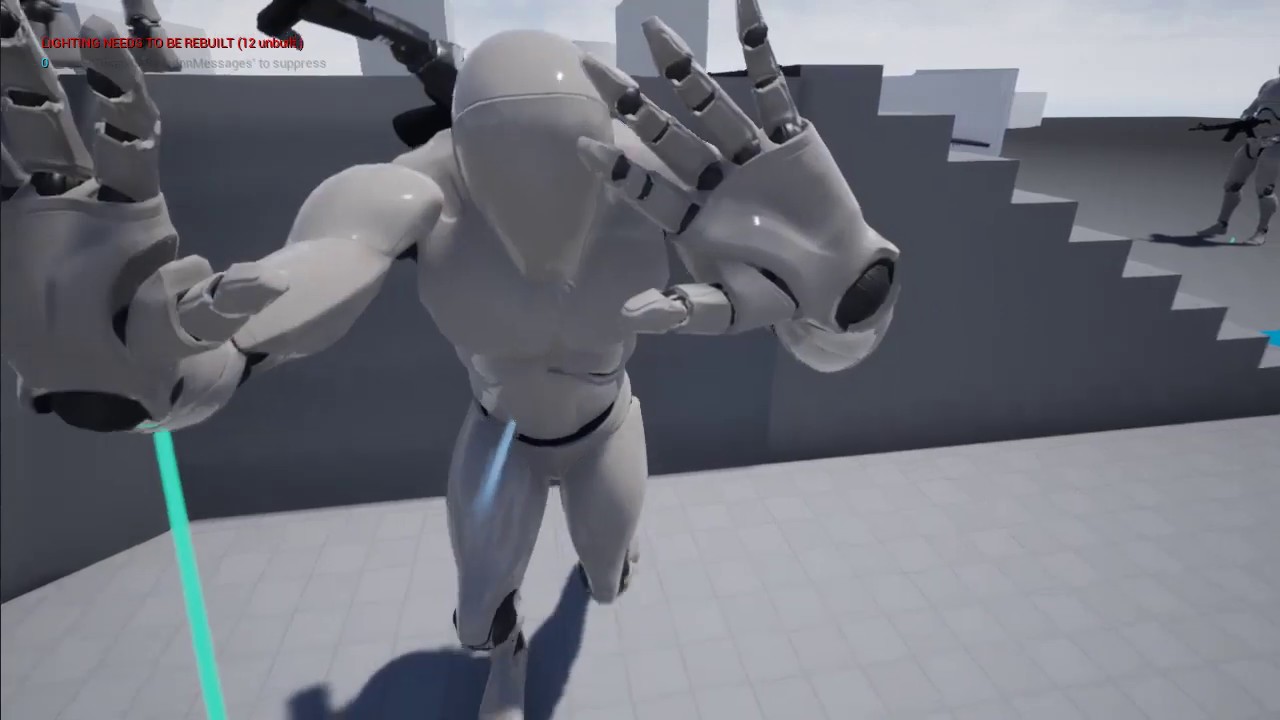
Hi guys. Can you give me advice from what to start please? How to make locomotion/IK pushing object like in this video? With those smooth animations https://youtu.be/EPeoi0eH110
Is it only blueprints or code needed?
 sand stream
I was looking for a long time, I tried, and I was unable to tie it to anything to make it work. it can be done differently?
dawn gazelle
sand stream
I was looking for a long time, I tried, and I was unable to tie it to anything t...
What type of object is first_board (actor, pawn/character, widget, etc.) and how are you spawning it?
sand stream
dawn gazelle
What type of object is first_board (actor, pawn/character, widget, etc.) and how...
it is a widget to be switched on from the previous game menu
dawn gazelle
Ok, are you spawning it in your player controller?
sand stream
I create it in level blueprint
dawn gazelle
Ok, so you're probably doing something like this in your level blueprint, right?
sand stream
yes
dawn gazelle
Ok, and what about the widget where you're trying to get the value from the other widget? Is the creation of it in your level blueprint too?
sand stream
no is started with a button, so it is in bluerprint widget
dawn gazelle
So the first widget is creating the second?
sand stream
yes
dawn gazelle
On the second widget, create a variable that is an object reference to the first widget.
So in my case here, I'm creating an object reference to a "image Widget" classed object.
You would want it to be a class of first_board I believe.
Then you want to set it so the variable is editable and exposed on spawn:
Then when you're creating your second widget, you can do this, which passes in a reference from the first to the second.
Then on your second widget, you just reference the variable we just created above directly, no need to cast.
sand stream
dawn gazelle
Then when you're creating your second widget, you can do this, which passes in a...
It works! thank you very much
 long schooner
Hi, is there a way to make animated buttons arrays like in the sillent hill 2 and 3 menu?
like the squares on the left side
 willow vault
Hey , have anyone know how to make the end point of line trace is on the little character ? Thus, the big character can hit the little character.
dawn gazelle
willow vault
Hey , have anyone know how to make the end point of line trace is on the little...
Can't you just get the world location of the target actor and pass that into the end of the trace?
 outer minnow
I have used the Quit game node, the "Exit" command in console command and the "Quit" in console command as well. My game refuses to close in the background when using them. For some reason the application runs in background. This is a big problem I am facing. I cannot publish my game since Steamworks support is telling me that the application still runs in background after closing the game. Does anyone know how to fix this issue?
Hello
 solemn parcel
Does the 'Reset' pin from the 'Do Once' Node executes the 'Do Once' Node ?
last abyss
no it just allows it to do the code again when it gets executed
 neat surge
guys can someone tell me why my rotation starts snapping if i increase the sensitivity to like 50 but it is smooth at 10
 red oyster
I need to move the camera with middle mouse pressed down. I figure how to do it (click events and mouse visibility is disabled). But where this must be implemented? In player controller blueprint or in pawn's blueprint?
 grim meadow
So i have this major optimization issue and i am not sure where to ask this but here. So for context i am making a tower defense game with 20 waves of ai enemies spawning. So for the waves 10-12 I get 100 fps with everything running smooth. however after that the fps gradualy drops to a point were the last 5 waves i get 15 fps with some major 1-2 sec lag hitches here and there. I thought this may be a too many actor issue as of course it is supposed to get harder, however after all the enemies are dead the fps is stuck at 15. I checked stat game to see the cpu usage it is maxing on everything saying tick (obviousely not good). To see what is causing it in the final waves, i started the match and only spawned the final 5 waves skipping the first 15 (again thinking its cause of increase actor count). But i ended up getting 100 fps and maybe dropping to 70-80 fps when a lot is happening to my suprise. So It almost seems like it starts to lag after half an hour of gameplay (but i dont think that would be an issue, let me know if that is actualy something). My next thought is it could be the spawner running its chain of code to long. It is very simple blueprint that spawns enemy then delays and continues that pattern to the end of the wave where another longer delay happens. Is this causeing the issue? and how could i fix this? maybe have two spawner actors that split the wave counts in half to "lighten the load". Let me know if you have any idea what the issue is and how i might fix it! Also is there a way to check and see what actor is causing the large cpu draw and maybe what blueprints are causing it?
 worthy frost
@grim meadow i would highly recommend using Unreal Insights
it will show you why it starts slowing down
grim meadow
@worthy frost what is Unreal insights?
grim meadow
Thanks i will check it out, if i have any Qs i will come back
 thorny merlin
Im trying to get an enums friendly name as a string
i could swear i was able to do so just by doing enum to string sometime
but now it just returns an empty value
dawn gazelle
thorny merlin
Im trying to get an enums friendly name as a string
Something like this is working on my end.
thorny merlin
thank you, that at least confirms im not nuts but there has to be something else going on here 😄
dawn gazelle
Possibly doesn't report the value when looking at the simulation...
Ah.. You need to have executed the path for it to populate.
willow vault
It is work , thank you! @dawn gazelle
long schooner
is there any way to animate a scroll box offset?
 obtuse ravine
Hi chads, I've rather stupid situation. So, Unreal keeps "killing" cable component after reopening the project. I make a simple bp which uses Cable, and then when I return to project, it says failed to load Script/CableComponent/CableComponent referenced by some node. Does anyone knows what's the cause of this?
 wind sequoia
 sour urchin
 lyric gazelle
Can someone help me with this: https://answers.unrealengine.com/questions/1008889/save-changes-to-foliageinstancedstaticmeshcomp-in.html
with a huge: please and thank you for looking
 cinder shell
guys, what object should I get for successful cast to actor from UI bluprint event graph?
maiden wadi
@lyric gazelle Is this for HISMs?
lyric gazelle
standard ISM
maiden wadi
@cinder shell What is the warning you're getting from the Cast node?
lyric gazelle
InstancedStaticMeshComponent
cinder shell
maiden wadi
<@!118491516229386244> What is the warning you're getting from the Cast node?
 zealous moth
does anyone know if there is a built in swipe detection method for UE4 mobile? I found this node
maiden wadi
@lyric gazelle Similar enough, only real difference is HISM uses LODs and normal ISM doesn't. I made a manager not too long ago using foliage HISM components to save where players had harvested certain things. I've found that saving the instance's world location is the best way to handle that. I save mine via an array of structs, Two values on the struct, one is the static mesh that the component uses and the second is the instance world location. Saving this into an array allows you to remove that instance at that exact location during runtime. If you're only using one array per thing, you can just use an array of vectors and remove them on load of the map.
lyric gazelle
that makes sense
I just assume there is no built in way to do that, at least in BP?
maiden wadi
@cinder shell It looks like your ship is not a pawn, or a class inheritting from Pawn. GetPlayerPawn gets the currently controlled pawn of whatever class it is and returns that reference casted to the pawn class. What is your BPPlayerShip and where/how do you spawn it? Do you keep it's reference somewhere?
cinder shell
maiden wadi
<@!118491516229386244> It looks like your ship is not a pawn, or a class inherit...
it's just an actor. I placed it in the scene and it's always there.
maiden wadi
@lyric gazelle Not really built in no. It's pretty specialized stuff that needs to be tailored to your game.
@cinder shell Your best option is going to be either to spawn it from somewhere instead of dropping it into the level, or find a way to let it register itself somewhere on beginplay. For instance, maybe in the Ship's beginplay, get PlayerController and cast to your controller type, and make a variable there of the ship that you can set from that beginplay. Then your UI can do GetPlayerController->GetShipVariable
cinder shell
maiden wadi
<@!118491516229386244> Your best option is going to be either to spawn it from s...
thank you so much! I will try it
grim meadow
So it has come to my attention that when you delete an actor it stays in the memory until a garbage collection happens to clear off the memory. However after you destroy an actor it may have been refrenced some how to other actors there for the destroyed actor will not be deleted in garbage collection. Is there a way through blueprints to remove any and all refrences to a destroyed actor?
worthy frost
they will get cleaned up when GC runs
if you try to access them, it will say its Pending kill in your error log
so best thing is just to use IsValid node before accessing them
grim meadow
Well to be honest i dont want to access them i want them gone peroid when they get destroyed. I just learned that the GC may not delete the destroyed actor if its been refrenced somewhere i am wrong?
grim meadow
I understand destroyed in the game but not in the memory
worthy frost
yes in the memory
 stray island
How to convert a float to integer , i think there was a mode like that
 faint pasture
stray island
How to convert a float to integer , i think there was a mode like that
faint pasture
stray island
How to convert a float to integer , i think there was a mode like that
Round or truncate
stray island
Thanks
 stable dove
My problem is the balls that spawn seem to spawn regardless of if they are within 150 or -150 of another ball
any ideas on why?
would really appreciate any help : )
lyric gazelle
maiden wadi
<@!175054945827946496> Similar enough, only real difference is HISM uses LODs an...
@maiden wadi what node or process do you use to remove the mesh after the restart?
i see the indexes get all moved around when you remove an instance
 tardy kayak
Is there a way for me to access this render target and update it in blue prints if so how?
maiden wadi
@lyric gazelle Hmm. Let me look and see if blueprint has similar calls on the ISM. I do mine in C++.
@lyric gazelle Something like this is what I ended up with.
lyric gazelle
Thank you!
maiden wadi
In short, it gets all instances overlapping a small area. Preferably this just returns one, but incase you have large meshes overlapping the single spot, it may return more than one, but since you only care about the closest one to that point, you run the returned integer array of instances through a distance check, then remove the closest instance.
 orchid garden
so i have some laser beam particles setup....
lyric gazelle
maiden wadi
<@!175054945827946496> Something like this is what I ended up with.
how did you get your instancedstaticmesh? if i may ask
orchid garden
im wondering whats the best method to detech if the player is overlapping them?
lyric gazelle
I want it from level start and accessible from game mode/instance, if possible?
orchid garden
i want to apply a constant damage as they are overlapping... im thinking i need to setup a timer on begin overlap and kill it on end overlap but im not sure.
maiden wadi
@lyric gazelle Mine is ran on a manager actor that is spawned in GameMode. The actor does one GetAllActorsOfClass that gets the foliageactors that hold the foliage painter's foliageHISM components. In your case, that'd be different with a normal ISM. It depends on what that ISM component is on. Where are you keeping it?
lyric gazelle
it is actually a foliageinstancedstaticmeshcomp
which i thought exists in the level
maiden wadi
It does. Is it from the foliage painter?
lyric gazelle
i can get the actor FISM from the level BP, but not the comp
lyric gazelle
maiden wadi
It does. Is it from the foliage painter?
yes, and proc gen'd
maiden wadi
You might do a quick test with a trace to test. But my painter spawns the components inside of an AInstanceFoliageActor.
maiden wadi
If you did logic on the true side of that branch, that gets any foliage component that is in the level, that has the 1M_Cube static mesh as it's mesh.
I subclassed my foliage components for the interactable stuff. I have a C++ component that I paint with instead of the default FoliageInstanceStaticMeshComponent
lyric gazelle
i did that with a BP "override"?
so we have a BP_FISMC with the parent being the FISMC
if that makes sense
maiden wadi
So you have more or less this screen for painting the subclassed one?
lyric gazelle
maiden wadi
Right. So you could change the GetComponentsByClass to that BP one, which would save a lot of processing if you use a lot of default foliage for other stuff. But to get the component, that's all I do in the manager I have. Get all of the foliage actors with the GetAllActorsFromClass call, iterate over it's components with GetComponentsByClass, and that returns the components you need.
lyric gazelle
okay, i have this, need to test but should work
it is in the level bp, would that cause any issue?
will probs move, nvm haha
maiden wadi
@orchid garden If it's like every 0.25 seconds damage, probably timer. For more constant, I'd probably rely on tick. Timers get weird at near tick rates. But more or less you can probably just make a quick brute force check on Begin and End overlap. Check if any of the overlapping actors are pawns. Make a function that damages any overlapping pawns. In the timer, call that function to damage any pawn in the field. And then in BeginEnd overlap, just check if there are still any pawns in the field, if yes and the timer is active, leave it alone, if none and it's active, disable the timer. Tick would work the same way if that's a separate actor, you could enable or disable tick based on the overlap.
@lyric gazelle Nah. That shouldn't matter where it is with that logic set. Only reason mine's in a manger is because I have a lot of foliage and I'm using specialized replication for multiplayer issues and I need the replicated manager to handle client side stuff.
stable dove
stable dove
@orchid garden Im trying to spawn the balls with a method thats not based on previous ball position but instead rerolls the spawn if it overlaps here is what i have so far but the balls still spawn ontop of each other no matter how big or small the InRange values are. Any ideas on how i could fix it?
orchid garden
stable dove
<@!458977415176257536> Im trying to spawn the balls with a method thats not base...
if you change the min you need to change the max as well, if say min is 100 and max is 90, your going to get a range between 90-100
stable dove
the ball diameter is 300 so i set the min to be (previous y - 160) and the max to be (previous y + 160)
i would expect that to stop the balls spawning ontop of each other
but they still do
and it doesnt matter how big i make the numbers they still spawn inside each other sometimes
orchid garden
how are you building the vector for position?
stable dove
actually i changed it to 400 and it seems to be working perfectly
orchid garden
if you want to see how close you can get them start dropping it by 10 and see if they start bumping again.
being your spheres are 300 radius, and im guessing their root point is in the center, minimal should be about 305 to keep them from bumping.
@stable dove
 neon forge
Question: so I'm following this tutorial and got it working. But I want to push it further into having it choose between two animations (we'll define it as a Good or Bad choice for simplicity). I think I would use a Branch to tell it if you do press the button, it activates the "Good" animation, and vice versa for the "bad". But not sure where it would go.
stable dove
I think the collisons are actually caused because its only checking that its not coliding against the previous y value of the last ball so the 3rd ball wont collide with the second ball but it could still collide with the first
neon forge
orchid garden
you playing the animations in multiple locations?
For what I want in the end result, no. This would be a one time event
neon forge
orchid garden
you playing the animations in multiple locations?
er, it would be in one location
orchid garden
yeah a simple branch then would work just fine.
orchid garden
stable dove
I think the collisons are actually caused because its only checking that its not...
thats why a slight delay between spawns helps, but sense your trying to do them all almost at the same time, it makes it abit more difficult.
orchid garden
neon forge
er, it would be in one location
set a boolean for good/evil (true good/false evil) then where you want to play it, do a branch check for that boolean, play either animation, and then continue on.
just so you don't get confused on the boolean, name it something like "IsGood?"
(incase you reuse it for other things)
neon forge
orchid garden
set a boolean for good/evil (true good/false evil) then where you want to play i...
In my head, I'm beginning to understand what you're saying, now I just have to put it to the keyboard, lol. But thank you, that was helpful. 🙂
last abyss
or true evil/false good 🤯
orchid garden
neon forge
orchid garden
Thank you, I'm much more of a visual leaner with this stuff
neon forge
orchid garden
or if you really want to get carried away....
not seen that node before. That's still a branch?
oh
got it
orchid garden
its a enumeration bp
you set a value to a var that set to the enumeration bp, then switch on the enumeration value to do whatever
 proven moss
this is what i did for walking but i cant figure out how to do more animations like when i want to jump its still at the walking animation it tried connecting it to something that isnt event tick and it still didnt worked
proven moss
what?
orchid garden
built in jump function when your using character movement component
proven moss
i tried playing a flip book when im jumping if thats what you mean and it still didnt work
orchid garden
2d game im guessing?
last abyss
its setting it to walking because of how ur checking walking
neon forge
orchid garden
you set a value to a var that set to the enumeration bp, then switch on the enum...
ah yes, I forgot these existed. I will do more research
proven moss
orchid garden
2d game im guessing?
yes
proven moss
last abyss
its setting it to walking because of how ur checking walking
i know that but how can i do it in a different way?
orchid garden
idk if this would be any help ROFUS, i haven't done anything with 2d, but in the learning tab
proven moss
its for a game jam so i need every solution that will work
last abyss
after add movement you can add the branch to check if axis > 0, then set the walking flipbook
stable dove
orchid garden
thats why a slight delay between spawns helps, but sense your trying to do them ...
I created a new variable to store the "previous y" variables value after spawning then just copied the code to do another check for the previous previous y and everything seems to be working pretty well
proven moss
last abyss
after add movement you can add the branch to check if axis > 0, then set the wal...
i did that as well but it still dont work because the axis is more the 0 if you jump
is there a way to use action mapping instead of axis for the movement ?
orchid garden
stable dove
I created a new variable to store the "previous y" variables value after spawnin...
you could colapse this into a function or macro and just reuse it in those two checks, saves on redundant coding:
neon forge
orchid garden
set a boolean for good/evil (true good/false evil) then where you want to play i...
And this is something I would set up in the NPCs character blueprint? or the level blueprint? I would think character since that's what I'm interacting with. But I would need some type of trigger code in the level to even get it to start.
last abyss
proven moss
i did that as well but it still dont work because the axis is more the 0 if you ...
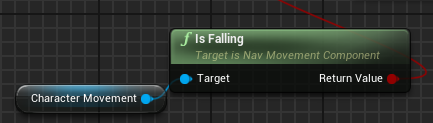
you can use from the charactermovement IsFalling for a branch
stable dove
I would have no clue how to do that seems pretty advanced for me i might look up a video on it later, would be nice to tidy this spider web of messy routes up
last abyss
if they are falling you set the jump flipbook otherwise u do whatever else
orchid garden
neon forge
And this is something I would set up in the NPCs character blueprint? or the lev...
you'd probably what to do it on whichever character its going to be playing for, or make it into a function in a function library so you can reuse it on mulitple character types.
but the boolean value would need to be on the character type.
proven moss
last abyss
you can use from the charactermovement IsFalling for a branch
how can i create character is falling?
last abyss
 stable dove
orchid garden
you could colapse this into a function or macro and just reuse it in those two c...
stable dove
orchid garden
you could colapse this into a function or macro and just reuse it in those two c...
GeekyGek what would i look up to learn how to do this on youtube because i feel like its gonna take me a while to wrap my head around?
proven moss
still nothing
last abyss
you need to add that after you add the movement input on walkright
orchid garden
stable dove
I would have no clue how to do that seems pretty advanced for me i might look up...
stable dove
But wouldnt i still need to have 2 of those
last abyss
proven moss
like that?
nah, so let me explain. After adding the movement input, you want to have a branch to see if the character is falling (which you already have). If that is true, you do nothing (or set the flipbook to jumping if you don't want to fall off ledges in the walking animation). If its false, you want to get the axis value of the walkright and see if it is >0. If thats true you can set the flipbook to walkright and if its false you set it to idle pose.
orchid garden
you'd have to run the function twice yes.
last abyss
and yeah, you want to remove the event tick because this would be replacing that
stable dove
nah but the bottom one is the check for the previous previous y value and the top one is the check for the previous y value
stable dove
orchid garden
wouldnt i need to still make 2 of these for previous y and previous previous y?
orchid garden
stable dove
But wouldnt i still need to have 2 of those
the problem is with redunant code - you may fix one of the routines but forget to fix the other and wonder why its not working, when you have redunant code in your bp's to do the same thing, its best to make it into a function of macro so that if you need to fix something in it, it fixes it for everything instead of just one part.
proven moss
last abyss
nah, so let me explain. After adding the movement input, you want to have a bran...
ill try it thanks i also saw that you can just check it only when you press the d key
stable dove
orchid garden
the problem is with redunant code - you may fix one of the routines but forget t...
Yeah just not sure what i would do to fix it idealy i want all the + and - floats to be controlled by one float
just not sure how i would achieve this
last abyss
proven moss
ill try it thanks i also saw that you can just check it only when you press the ...
try it all out, the more you know 😃
proven moss
last abyss
try it all out, the more you know 😃
i will thank you for the help
orchid garden
stable dove
Yeah just not sure what i would do to fix it idealy i want all the + and - float...
plus it looks much cleaner 😉
orchid garden
using that macro @stable dove
fyi, that has a single var doing both float checks.
 vapid ibex
Hello, is there a way to expose custom blueprint component's parameters in the setting of an actor placed in the world?
I'm trying to do a modular approach to actors, so that NPC actors, for example, had a module for their inventory, a module for their AI, a module for their dialogue system, and so forth. I've created blueprint component for the inventory, but I can't interact with it other than from the inside of the blueprint of an NPC. If the component is not the intended functionality, then what would be? Child actors?
orchid garden
vapid ibex
Hello, is there a way to expose custom blueprint component's parameters in the s...
get the actor -> get component -> get var
orchid garden
the woes of RNG
stable dove
like about 50% of the time 2 of them are pressing very close to each other and they shouldnt even be able to spawn that close
vapid ibex
orchid garden
get the actor -> get component -> get var
Yeah, but how do I do that in the level editor? So that one NPc on the level had 5 meat in their inventory and 10 gold, and the other NPC of the same class would have none at all.
orchid garden
hrm... get all actors of class?
vapid ibex
Uh...
orchid garden
oh wait you mean when you place a character in the world...
no actually running the game >.<
vapid ibex
I'm talking about this panel.
orchid garden
yep yep im following now...
stable dove
the balls arnt scaling when i change the scale of the sphere in the blueprint class im spawning
any ideas as to what im doing wrong?
no matter what the scale value is they are always the same size
orchid garden
vapid ibex
I'm talking about this panel.
what i did... is made the inventory holder array part of the character, while all the inventory processing is in the component itself.
orchid garden
vapid ibex
I'm talking about this panel.
If your placing the actors in the world though, you can select the character then in the detail panel select the component:
any variable thats set to be exposed will be editable from there.
in the component, just make sure that little eyeball is set open 😉
orchid garden
stable dove
the balls arnt scaling when i change the scale of the sphere in the blueprint cl...
far as the bp goes @stable dove if i change the sphere scale there it changes for me without issue, we both have the same sphere object.
vapid ibex
orchid garden
If your placing the actors in the world though, you can select the character th...
Oh, it is indeed! Thanks! Scrolling all the way down there is cumbersome though, but I doubt there's any way to bring components to the top of the list.
orchid garden
vapid ibex
Oh, it is indeed! Thanks! Scrolling all the way down there is cumbersome though,...
if there is, i don't know of one
yay! got my keypad panel all done and functional 😄
next... a interactive computer screen thingy... like alien isolation has 😄
stable dove
orchid garden
far as the bp goes <@!332199405186711554> if i change the sphere scale there it ...
Ill try doing it through the graph editor
was doing it in the object properties for the sphere
stable dove
orchid garden
yay! got my keypad panel all done and functional 😄
That looks so cool
orchid garden
took awhile to do 🙂 but im happy with it
stable dove
yeah looks great
i dont even want to see how much code it took to get it to be actually interactive
i wouldnt have a clue where to start with that
the scale works when i have it like this
But not this
orchid garden
wierd both work for me
rather then selecting the sphere in the bottom one, select 'falling ball3(self)
and then try scaling it, see if that makes any difference
oh the keypad panel, theres not too much happening in it:
making a working keyboard though, that would be a wee bit more effort lol...
orchid garden
stable dove
yeah looks great
if selecting the main object and trying to scale it doesn't work, i'd think something in the bp's construction script is stopping you from doing it.
 dense tulip
Is there a rule or best practice about the use of DefaultSceneRoot and/or Just having no SceneRoot ? What i mean is, does a BP require to have a SceneRoot ?
 static charm
If you were making hundreds of actors that did stuff in the level, best practice for performance would be to always miniize the amount of components a blueprint has
worthy frost
An actor can not be positioned without a root scene component
Actors do not have transforms and do not know world locations on it's own. It pulls this info from its first scene component
?
i didn't read your posts lol
static charm

static charm
you're fine
 paper sky
Hello people
I am trying to set up the AI in a VR project but their perspective doesnt work on my VR_Pawn while working correctly on everything else, is there something different with VR for the AI to see the player character ?
I've even put on a collider and still didn't work
 south charm
look, i just need some help with my unreal
im working on a uni assignment and currently just struggling
my issue if anyone could help,
I have created a crouching blueprint with animations / prone bp and animation / pushing object bp with animations.
I have got them all to work however when it comes to animgraph and then playing the level it cancels out my crouching.
stray island
I want to move from value 30 to value 80 in a timeline without the float values in between , just 30 then 80 and i cant place two keys on same place
Like Imagine 90 degrees a stair shape curve in timeline is that possible
dawn gazelle
stray island
I want to move from value 30 to value 80 in a timeline without the float values...
You mean like this?
stray island
Yes
Kind off
How ever whats with the little curve
I think shd be straight lines
But if it works no problem
dawn gazelle
Right click on your keys and select "constant"
dawn gazelle
correct
stray island
Gr8 thanks alot
 young mulch
hey does anyone know how I could make it so if the jump key is held down, the player constantly jumps? atm with this the character just jumps once until you let go and press it again
i tried doing a while loop but it didnt change anything
im new to this so im not sure exactly what I would use in this situation
 kindred mason
do you want one continuous jump or an infintie amount of regular jumps
young mulch
kindred mason
do you want one continuous jump or an infintie amount of regular jumps
I don't know what you mean by this, I just want it so if you're holding down spacebar you keep jumping
I don't mean jumping midair btw I just mean jumping constantly after hitting the ground
like
bunnyhopping
kinda
kindred mason
oh my bad, you can use the onLanded event to detect when the player touches the ground
young mulch
how can i get it so you have to be holding down the jump key to constantly jump?
think of it like uhh
minecraft
in minecraft when you hold down spacebar you keep jumping until you let go
kindred mason
a gate could work
young mulch
could you elaborate?
dawn gazelle
young mulch
could you elaborate?
young mulch
Oh, you actually made it out for me
I really appreciate that
Thanks a lot
it worked
 grave nebula
Hey, how to make our / AI character slope if we / they fall in the top capsule? My character keep bouncing if i fall into physical mesh or AI caspsules
 sacred urchin
How do I make a health bar and damage bar with the template twinstick
 lusty vessel
hey anybody know why, no matter what index values i use, the end point of my spline mesh is doubled?
 rough wing
I think the one extra point is the default spline point
 tired warren
Mudrunner car when get stuck in mud is that a physic or a programming ?
 graceful haven
helllo
im have problem
v
Hello! im search blueprint interaction Press "E" to interction. Im have problem.
[10:38]
for interaction Menu to - character -> distance -> view (interface Interaction) Press "E" to interaction and image Botton ->
[10:40]
press E to view in log Name for left msg to - Name NPC.
😛
 marble tusk
lusty vessel
marble tusk
lusty vessel
You want to subtract by 2 before the last index of the loop, not add. Subtracting 1 since the first index is 0, and subtracting another 1 since you're adding it back for the end location and tangent.
Right now it's looping more times than it needs and is trying to get positions and tangents for spline point indecies which don't exist.
stray island
By accident i deleted nodes and saved , closed project
Is there a way i can recover previous version
dawn gazelle
stray island
Is there a way i can recover previous version
Do you have autosaves enabled?
dawn gazelle
Then I think you're out of luck from the UE4 side of things. So unless you have your own backup, or are using source control, or are using Windows Previous Versions thingy, you've probably lost your work 😦
maiden wadi
@stray island Check inside of your ProjectDirectory/Saved/Backup folder.
stray island
Ya i lost it and recreated it , thanks got to be careful next time
 twilit heath
turn it into string, then into text
you can alternatively use FormatText node
which is more useful when you have a combination of text and numbers
maiden wadi
I think they're trying to turn the text into numbers. Which works fine the way they're doing it by going to string, then to int. But it's the logic that is messed up. You don't want to set the resolution on every keypress. Instead you should just get the text from both text blocks in an accept button's onclicked or something afterwards or maybe even just on commit of each text box and make them update only their own struct.
dawn gazelle
Yeah like wouldn't the text output be blank on one of the event nodes until it too is changed?
twilit heath
also needs to be clamped so it can't go below some min value
otherwise if you enter something like 10x10, you won't be able to see the textboxes anymore
usually better to just provide a combobox with an array of acceptable resolutions
then let them enter it on their own
maiden wadi
If it's coming out as zero, then the numbers have to need to be preceded by a non space character. Anything that is just spaces and numbers should convert fine.
dawn gazelle
Imma drop this here as it seems like it would be a bit cleaner and you're preventing players from typing in whatever they want for their resolution.
Doesn't leave room for custom resolutions I guess >_>
maiden wadi
Sure it does. That likely gets it's information from the graphics driver. Let them put their custom resolutions there. Unreal should still pick it up.
At least as far as I'm aware, that works with NVidia control panel.
 spark robin
I hate it when it does this. Can I not like make it show the whole macro/function hierarchy instead of just the final macro and the first macro?
Im using a hierarchy of macros, so its like impossible for me to troubleshoot what while loop is broken
(please ping on reply ❤️ )
The error itself is also a little confusing, why wouldnt it be able to access array index -1 of an array of length above 0?
tight schooner
@spark robin beats me, but you can try setting a breakpoint and stepping through the execution flow
or slapping some print nodes on it
or clamping / using a Max node to prevent values below 0 (though you should look into why it's producing -1)
do some general debugging
 fast orchid
I added VaRest to ue4 because I wanted to use it in a project I already started. but for some reason even after adding it to the engine I can't use any nodes/they don't appear for me even though Context Sensitive is turned off
tight schooner
@fast orchid idk jack about VaRest but if it's a plugin, check if it's enabled in the plugin manager?
dawn gazelle
^
fast orchid
where is the plugin manager?
dawn gazelle
maiden wadi
@spark robin You cannot access index -1 in an array. -1 never exists in a TArray. Indexes are only ever positive values of 0 to ArrayLength-1.
paper sky
I need some suggestions about an AI system, I am trying to make a tavern for my project and I am trying to make a Customer AI that comes in, gives their order, sits on a currently empty seat and then leave after some time. How can I accomplish this code or logic wise ? :/
this is my supreme artistic algorithm straight out of paint
after sitting the npc stands up after around 20-30secs and leaves, permitting new npcs to come in
just not sure how to code this :/
spark robin
Oh heh, I thought you could use -1 to get the last element
last abyss
paper sky
just not sure how to code this :/
but you got the idea and logic that's half the work :p
paper sky
paper sky
just not sure how to code this :/
other half eats my brains out :/
 mortal isle
how can I see how fast my car is accelerating?
mortal isle
brother
 hushed pewter
But its taking the position relative too the world rather than the camera
faint pasture
mortal isle
how can I see how fast my car is accelerating?
(Velocity - VelocityLastFrame)/DeltaT
mortal isle
ok but how do I get velocity last frame?
last abyss
mortal isle
ok but how do I get velocity last frame?
store velocity into a variable
tight schooner
@mortal isle Save the current velocity to a variable on tick after you do your acceleration calculation; it'll hold the previous frame's velocity in that context
tight schooner
several people typing
mortal isle
lol
orchid garden
hushed pewter
this is what i did for making a laser hit the center of the screen (camera position) from a little drone I made. whereever the camera is looking the beam will always hit the center of the screen. It takes and gets the start and end point for the camera first (bottom function) then from there it gets the firing socket location and creates the lasers end point so that its always center screen:
hushed pewter
So what its constantly drawring a line between the ray caster and ray end position too find out exactly where the caster is and drawring it around that?
 dreamy stump
sorry im really new to programming but i need to know how to create logic that counts up by 1 every 1 second and displays that value on a text render
hushed pewter
Or no i see its hitting the middle
orchid garden
yes it uses a linetrace to figure out if the laser will hit anything or not sense my laser is a particle emitter.
hushed pewter
Ive already got my casting down and that
I tried using cast too cursor
But both always end up taking it based ont he worlds origional position
tight schooner
@dreamy stump look into the node, Set Timer By Event. You can use that to make a looping event that occurs on a regular interval
hushed pewter
am i right in that its convert world location too scene locations fault
dreamy stump
so far i have this
dawn gazelle
paper sky
I need some suggestions about an AI system, I am trying to make a tavern for my ...
That's not a very easy question to answer as there's a lot involved with what you're trying to do. The first bit of it would be to probably create an actor that controls the spawning of the AI and keeps track of the specific location that it should be ending up at. You can do this by creating a map variable of vector and boolean to keep track of which locations are "taken" and if you want to create the locations easy in the editor, expose this variable at spawn and you can then create them directly on the actor itself. Make it so the actor spawns an AI through a timer, one for each location that you have set. If you can get it to spawn an AI for each position, you're on your way to getting what you want.
tight schooner
@dreamy stump yyyyyyeah I mean putting a delay on a tick is a little wacky. Set Timer By Event (or if you prefer, Set Timer By Function Name) is the proper way.
it'll also be more accurate
timing-wise
orchid garden
dawn gazelle
That's not a very easy question to answer as there's a lot involved with what yo...
after spawning the character couldn't B just use a blackboard to control the npc going to the next avialable seat or leave if none?
cinder shell
good day, everybody! Can someone please give me a hand here? I have a two inputs: "Q", "E" and "Shift+Q", "Shift+E." And every time I press Shift version the regular also executing. How to prevent it?
orchid garden
setup so you have a shift function for toggling and then just use Q and E and do a check to see if shift is pressed off the toggle boolean in Q and E?
cinder shell
orchid garden
setup so you have a shift function for toggling and then just use Q and E and do...
ah... yes! Thanks )
dawn gazelle
orchid garden
after spawning the character couldn't B just use a blackboard to control the npc...
Yes, but B. seems to not know where to start at all. Getting an actor set up that controls the spawning seems like a good place to start. Once they're spawning in at the right place, instead of spawning them at the place, the value could be fed into the AI's blackboard instead.
tight schooner
@dreamy stump ... also you'll want to put the Set Timer node on BeginPlay or somewhere other than Event Tick, cuz every time you call the Set Timer node, it resets the timer.
orchid garden
tight schooner
<@!784361087624544287> ... also you'll want to put the Set Timer node on BeginPl...
isn't setting timer off a tick a bad idea as you end up with a bunch of timers that no longer have a control to shut them down and then you can only terminate all timers to stop them?
tight schooner
I don't think the timers stack...
orchid garden
(unless of course you use a do once)
tight schooner
it works like a retriggerable delay AFAIK
dawn gazelle
If no variable set to control them, they do.
orchid garden
i donno much about controlling ticks except with do once nodes... i usually avoid them and only use custom timers.
dawn gazelle
It appears that they don't stack, but regardless, a timer on tick seems a bit pointless unless you're controlling the ticks themselves somehow before setting the timer.
tight schooner
yyyyyyeah, that's why I said not to do that... in case he's trying that
need to put it on beginplay or w/e
Just to confirm I actually tried this just now lol. The "tock" never prints
dawn gazelle
Yeah
orchid garden
well thats good to know.
maiden wadi
@cinder shell If you do this correctly inside of the input settings, both events won't run.
In this case, if you press K while shift is down, the top will not run, only the bottom.
orchid garden
maiden wadi
<@!118491516229386244> If you do this correctly inside of the input settings, bo...
all depends on what your doing it in Authaer, we had a discussion about that before and widget interaction keys 😉 you pointed me in the right direction for it as i had the same issue.
maiden wadi
True. Widgets are a little different in that regard.
 tall pine
how can i make the game spawn random decals from a list?
maiden wadi
Add random decal textures to a list, select one at random, and spawn a decal with that selected index.
tall pine
guide?
orchid garden
get a random in range set min to 0 and max to the length of the list.
tight schooner
there's also a "random array item" node
but yeah you need to look into array variables
orchid garden
all really just depends on what you use to hold the list of decals.
tall pine
how do i use arrays to contain my decals?
tall pine
not that advanced yet no clue about arrays yet so i dont know how to start with one
so i create the variable first
orchid garden
personally i'd use a datatable with a list of decals, that way i can only load it into the memory when needed.
have the whole load datatable - get length - get random - return random inside a function with local vars so it all gets dumped at the end of the function.
tall pine
yeah i have a bleeding effect with blood drips spawning on the ground, i want to make the script choose random decals to spawn for it
maiden wadi
SoftObject references as well are good when dealing with selecting from things like textures or meshes. Because if you're selecting one out of a hundred, you don't want to load a hundred into memory just to select one.
orchid garden
already did that with 135 data tables varying in range from 1kb to 4mb in size, and it seems to work great, releasing the memory at end of the functions for a random generator.
tall pine
maiden wadi
SoftObject references as well are good when dealing with selecting from things l...
i searched for softobject and the search engine puked out soft object path, is that the one?
tight schooner
orchid garden
ever install a game to go play just to get some ideas?
i.e. im installing watchdogs, as i want to check out how some things work in it.
tight schooner
I need to do that some more
fast orchid
how can I convert Text Box Object Reference to String?
orchid garden
textbox->getText -> tostring
fast orchid
thanks
dawn gazelle
fast orchid
how can I convert Text Box Object Reference to String?
This gives you it in text, which you can convert to string easily.
orchid garden
oh derp... i went and played another game thinking it would dl the other game in the bg while i was playing it.... epic launcher paused the dl even though it was a single player game... >.<
 peak cipher
There is an issue with hold attack that If i rapidly press the input it does the attack fast, how can i set it to where you can only press the input once every 1 second?
orchid garden
peak cipher
There is an issue with hold attack that If i rapidly press the input it does the...
maybe... something like....
 jolly niche
peak cipher
There is an issue with hold attack that If i rapidly press the input it does the...
jolly niche
peak cipher
There is an issue with hold attack that If i rapidly press the input it does the...
This is what I use, havent had any issues
orchid garden
do once saves you on a var 😉
jolly niche
Does anyone know why this simple thing doesn't open the level? Removing the delay opens the level just fine
What's worse is that i have the exact same thing in another place and it works just fine, but here it doesn't
peak cipher
@orchid garden hold attack doesnt work anymore
orchid garden
o.O
jolly niche
The closest solution I found was that you can't delay and then open a level if an actor is pending to be destroyed (Set Life Span node), but I don't see any way around it so idk what to do
orchid garden
peak cipher
knew it had to be something simple if it broke
jolly niche
Removing the Set Life Span didn't work, welp
dawn gazelle
peak cipher
That potentially could make you wait 2 seconds tho... This would make it so the one delay controls it
jolly niche
Okay, fixed it like this, really stupid but the delay node seems to absolutely not work in some situations, whatever
orchid garden
dawn gazelle
That potentially could make you wait 2 seconds tho... This would make it so the ...
hehe i shoved it into a macro 🙂
vapid ibex
how to better implement and use containers for an object's properties that supposed to be defined out of the game and be static (say, stats of an weapon?) Via Uobjects with parameters in them?
dawn gazelle
vapid ibex
how to better implement and use containers for an object's properties that suppo...
You can, or create a structure that your weapons follow and then create a table based on that structure.
Table is slightly easier as you wouldn't have to manage several blueprints.
peak cipher
Thanks datura its perfect now
dawn gazelle
orchid garden
hehe i shoved it into a macro 🙂
Should have the delay time as an input too 🙂
orchid garden
well could have a function in place of the printstring that handles what happens depending on what is firing, just by passing a value to the function from the initial trigger.
good point 🙂 be able to control the amount of delay depending on what its hooked to...
vapid ibex
Can you "select" UObject like you would a model or texture asset, or you only can always need to construct them in the blueprint?
dawn gazelle
vapid ibex
Can you "select" UObject like you would a model or texture asset, or you only ca...
You can't, but you can get a a class default object to get values off of them.
orchid garden
course the printstring would be replaced with a function 🙂 :
vapid ibex
dawn gazelle
Nice, exactly what I needed, thanks!
 stray wagon
orchid garden
vapid ibex
Nice, exactly what I needed, thanks!
stray wagon
orchid garden
vapid ibex
Nice, exactly what I needed, thanks!
there we go, all polished 🙂
dawn gazelle
Aww shucks
orchid garden
sry i love reusable functions / macros lol.
trim matrix
Hey there, can somebody help me with the confusing collision channels ? I have everything setup correctly but cant get it to genereate overlap events on custom channels. I created a custom Collision Channen and Object Type, then set two collision objects to be this object type and react with overlap to this object type, also checked "genereate overlap" but it does nothing 😕 Any ideas ? (if more information is needed, i can send screenshots)
 winged sentinel
Hi i have a question, im trying to make a weapon sway but have a bounciness at the end, so im trying to use the vector spring lerp
Basically, when I look around nothing happens, I have my custom event on Tick
any help would be greatly appreciated!
wait i just cranked the stiffness to 100 and my gun slid off the screen
faint pasture
trim matrix
Hey there, can somebody help me with the confusing collision channels ? I have e...
Post your collision settings
trim matrix
ok created screenshots of everything:
Object Channel "PlayerDetection"
first Object
Collision Profile
second Obj
am i missing something ? in theory they must generate overlap events only for any object with object type PlayerDetection, but no overlap events get fired
faint pasture
@trim matrix what are the shapes? Are they meshes or are they implicit colliders?
faint pasture
How's the capsule moving? Is it the root component?
trim matrix
the capsule is attached to the default scene root of a pawn
moving by teleportation (is a vr pawn)
Does the collision shape need to move into each others to generate overlap events ? or can i just teleport one into another ?
maybe there is another solution to my problem, i want to recognize when the player is inside a certain area, i figured i can do this with overlapping, but maybe there are other solutions
ok i found a solution, i just used the collision preset overlap all, thx
faint pasture
trim matrix
ok i found a solution, i just used the collision preset overlap all, thx
So just changing the presets, and nothing else, caused the events to fire now?
trim matrix
yes, iam trying to find out what was wrong with my custom presets
but first i'll check if its really the collision capsule and collision box that are firering the overlap events
i find these collision profiles very confusing
seems to be a problem with the parent of the capsule, when i attach the capsule to my Vr controller it generates an overlap event and as soon as i attach it to the root node of the pawn it does nothing
trim matrix
collision profile is good, the parent is the problem, maybe something it inhererits ? Any ideas somebody ? (sry for spamming here, hope my investigations at least one day helps somebody facing propblems with collisions :-D)
stable dove
this is the macro i used
is it possible to make it so when i change the floats in the range it changes the floats in the macros range to be the same
if yes then how would i go about doing it?
orchid garden
stable dove
if yes then how would i go about doing it?
use a var to set the range floats and pass those vars into the macro like you are the first var.
trim matrix
stable dove
if yes then how would i go about doing it?
you can use somme global variables
exactly 🙂
stable dove
ty
orchid garden
stable dove
ty
stable dove
couldnt i just do this to make it so i dont have to route the min y and max y into the macros
orchid garden
that works as long as your not going to be using the macro in a library
stable dove
idk what that means
im really new to this stuff so i got no clue what using the macro in a library actually means
orchid garden
macro libraries and function libraries are collections of macros / functions in a bp that any bp can access really.
stable dove
ah
so if i wanted to use the same macro outside the level bp in a different bp i would use a macro library
orchid garden
or share the same function / macro between two different character bps.
stable dove
ah ok that makes sense
orchid garden
macro / function libraries can't hold vars, so you have to pass the vars into the macro / function.
stable dove
yeah i dont think im gonna need to use a library for this
wait how would i set the values for those variables?
i was thinking i would just change the default value
but i dont seem to be able to
should i compile it then change the default value?
orchid garden
this would work for a macro library, or allow for you to use it for not only Y access but X Y and Z:
orchid garden
stable dove
should i compile it then change the default value?
yeah you need to compile before you can set default values to vars
stable dove
yeah this is perfect
just saves me having to write out the same number 4 times
when i want to change it
orchid garden
yep 🙂
orchid garden
here's food for thought.... if your going to develop a game, and supply it to someone like steam or epic to distrubute it, but require people to connect to your front end, don't be retards like UBISoft...
This is the worst possible thing to make people do, they don't want to redownload a game because your connection system to your frontend had a issue.
stable dove
I love redownloading a game i already downloaded
especially if its a game like modern warfare
orchid garden
honestly i really hate how so many game developers do their games these days:
- download game
- download updates
- download languages
- download more updates....
- download High res Textures...
- sorry we can't connect to xxx website... you have to reinstall everything now!
stable dove
I hate how games like modern warfare and other large games force you to download all the dlc content and skins for the game instead of making that optional
orchid garden
or... you get a patch and...
"sorry we erased all your character information, you'll have to start a new game now"
stable dove
honestly probably the main reason so many games are so big is because you are forced to download all the dlcs that you don't have or skins that you don't care about
orchid garden
ark is a good example of that, but they allow DLC items to be brought into the regular maps. so, you basically have to have all the DLC content... then if you buy the DLC, you have reinstall all that DLC content thats already in your system...
dawn gazelle
But if you don't download the skins from the DLC, how are the other players supposed to show off? 🙃
stable dove
dawn gazelle
But if you don't download the skins from the DLC, how are the other players supp...
Legit the reason they do it
orchid garden
i think the point is, sense its already in your system for compatability reasons Datura (i.e. showing off your skin to other players) you shouldn't have to download ALL of it again just to activate it so you can use it.
stable dove
makes people more likely to buy the massive new dlc if they dont have to download it they instantly get access to the massive dlc all they have to do is click the buy now button
but it sucks if you dont have much space or have slow internet and dont want to install the 60gb extra content that you cant even play
orchid garden
honestly they just need to leave out the parts that allow a player to use it, then only download those parts like a mini patch to enable the player to be able to use it.
dawn gazelle
Sounds like it'd require more maintenance. Easier just to flip a switch.
orchid garden
and sense most games do 'online checks' before allowing you to use some paid DLC in mp games....
stable dove
yeah it should be a tickable option "download all content"
orchid garden
i remember a game that actually did a good job on that, it only downloaded the single player maps, and if you wanted to play any of the multiplayer modes, you had to install the individual maps for those modes.
i.e. ubisoft - downloaded a 40gb game, their launcher failed, and popped a error - click for more infor - "im sorry you need to reinstall the game.." - then after that - launcher launches and ... have to download another 24gb from their launcher and still haven't played the game yet.
so thats 104gb so far for a 40gb game... just to 'try' to start the game.
i mean right off the bat, it should of combined the 40gb & the 24gb in the begining... not make me do two seprate downloads to get the game. now if this second part screws up... am i going to have to start all over yet again?
UBISoft and their 'you must connect to us' stuff is a serious fail on their part to be honest. Alot of their console games do the same thing to you.
see... i've downloaded 3 patches for this game so far and now... when clicking 'lauch' i get....
This is a prime example how NOT to do updates for your games.
dawn gazelle
Yo dawg, I heard you like updates, so we put an update in your update so you can update while updating.
orchid garden
exactly Datura
sad part is 3 are for multiplayer and i only want to play it in single player.
another thing that people should think about is redistributables - please for the love of god, check to see if we have the redistributable installed first BEFORE making us download it. I donno how many times i've had to download DirectX version XX before I was able to play a game when its already installed.
speaking of... >.<
stray island
Can i set a key in a timeline as a variable to control it as instance ?
 exotic sun
Hello everyone. How to setup startup countdown like "3 2 1 Go!"? I have no clue how to start, I understand that it should be done mainly in GameMode blueprint. Maybe there is a good tutorial you know about? I searched for such but they are all mainly about how to setup in-game timer
faint pasture
@exotic sun multiplayer or no?
exotic sun
faint pasture
<@697872771497328640> multiplayer or no?
Local multiplayer on one screen
rough wing
Look into timers
faint pasture
I would make an enum the represents the match state (might already exist on GameMode) and use that to drive it
So the flow is like prestart, countdown, match, end screen
exotic sun
faint pasture
So the flow is like prestart, countdown, match, end screen
Yes, like that
 smoky zealot
hi, why is there no file loader for BP? i wrote one myself in cpp exposed to BP, but im curious why there is none?
faint pasture
exotic sun
Yes, like that
You actually might not need the enum for local. Just have a chain of events in gamemode
With timelines etc
So the countdown timeline would have an float or integer track to drive the seconds display, maybe an event track to play the beeps, whatever
exotic sun
How can I stop every other blueprints from execution during timer?
faint pasture
You don't, you maybe just disable input or whatever. It depends on what you want to disable and what you don't
The game mode has access to every Pawn so it can do things like disable input or set a variable like max speed or whatever
There's a million ways to do this.
exotic sun
I want to disable everything for 3 seconds
faint pasture
Even camera movement? Even ambient sounds?
Everything is a very broad statement. Well you probably actually want to disabled is just the movement
exotic sun
faint pasture
Even camera movement? Even ambient sounds?
Yes, just leave countdown timer and countdown sound
exotic sun
faint pasture
Even camera movement? Even ambient sounds?
My camera is static
exotic sun
faint pasture
Everything is a very broad statement. Well you probably actually want to disable...
Ok, thank you for advice, I'll try something)
vapid ibex
If I want my items to drop from a died enemy in stacks of 50 or less, is that the correct way to organize that?
Oh, forgot to add a condition)
 unique harness
Any ideas what would cause the engine to think there's a ton of input coming from a gamepad?
faint pasture
unique harness
Any ideas what would cause the engine to think there's a ton of input coming fro...
What's the input, sticks or buttons?
 patent lantern
Can someone help me with this blueprint, The player can only move sideways not up and down
https://i.gyazo.com/c5114a1dfddb1c92154e152752a4d6d1.png
 unique harness
faint pasture
What's the input, sticks or buttons?
unique harness
faint pasture
What's the input, sticks or buttons?
I figured it out, it was a dll issue
smoky zealot
do most blueprint dev actual have a dev background?
 molten thicket
hey guys im having a brain fart right now trying to get the angle between the direction my character is moving and the forward vector.
smoky zealot
its nice to use it, and compiles fast, but i feel for bigger stuff it gets a bit uncomfortable
 chrome orchid
the player falls through the seat only on the client not on the server how can i make the sitting replicated
proven moss
is there a way to package a game to html5 in version 4.26?
faint pasture
molten thicket
hey guys im having a brain fart right now trying to get the angle between the di...
Easy way is to convert both vectors to rot and delta the yaw
molten thicket
Thx I’ll try that
@faint pasture works perfect thx again
@faint pasture one slight problem it seems to change based on world space direction is there a way to fix that?
maybe i shouldnt be using the velocity vector
faint pasture
molten thicket
maybe i shouldnt be using the velocity vector
Yeah. What were you using lol?
er
er wait
You should be using world space velocity adn world space forward
so just get forward of the capsule
molten thicket
ok
trim matrix
Hey I got this crafting blueprint (probably pretty bad but it works) And im stuck on something someone hopefully might give me a solution
I want to cast the missing amount of items back to the ai, BUT I'm not sure what a easy to way to do that
Like if I'm missing 1 stone, and 1 handle, cast it back so I can go grab those
 prisma stag
Hello, I quickly created an actor with 2 static meshes, a projectile movement component, and a box collision. I have set the collision to block all but when the projectile is spawned to shoot, it falls through the floor. I have a begin overlap for the box collision to destroy the actor and it works when I place something in the world and shoot it but it just goes through the floor.
orchid garden
trim matrix
Hey I got this crafting blueprint (probably pretty bad but it works) And im stuc...
you'd probably be better off using a data table to hold the craftable items and their requirements, that way you can check the data table to see if the character has the require items or not, then pull them directly from them.
trim matrix
I have no idea what a data table is, But im gonna go look it up now 😄
sounds usefull
orchid garden
sent you a link that might prove helpful for you @trim matrix
 keen goblet
@prisma stag Make sure your actors collision channels are correct and that they respond to each other's collision channel appropriately. Also make sure they have Generate Overlap/Hit Events on as needed.
I wrote a tool to dump collision information on actors just for this type of thing -- "this doesn't collide with this, but why?"
prisma stag
keen goblet
<@!324230048506707968> Make sure your actors collision channels are correct and ...
The floor is a static mesh and for the cannon bullet, each static mesh is set to blockall
 hexed flower
i've been stuck on this for the past 10 minutes, have i messed somet up here?
making a healthbar that uses finterp which i'm still learning, but that doesn't work
the problem is that my hud isn't changing
the health is changing though, i've checked that with a print string node
i'd prefer to stick with finterp, only because i'm pretty sure it's better
unique harness
Why can I not access the player controller ID in the player controller begin play other than the default player controller?
rough wing
Each time damage is taken start a timeline and slowly decrease the health UI to it's target value
@hexed flower
hexed flower
and how would I go about that?, where would i start the timeline
rough wing
On damage taken fire a timeline
hexed flower
okay
hexed flower
ok are you sure i need a timeline
because baso the only thing not working is my hud isn't actually changing
the set current health here is showing the current health, it's just not showing it on the health bar
ah it's my clamp
 mighty granite
proven moss
is there a way to package a game to html5 in version 4.26?
mighty granite
proven moss
is there a way to package a game to html5 in version 4.26?
HTML5 support was removed in 4.25
vapid ibex
If I want enemies to drop their items on death in stacks of 50 or less, would that be a good way to handling that (Yes, I do store quantities of items in a different map, for reasons)?
 plush zodiac
i'm trying to make a projectile spawn from the player's weapon, but for some reason Get Owner always returns null
and i set the weapon's owner on BeginPlay, so i don't know why it doesn't work
proven moss
mighty granite
HTML5 support was removed in 4.25
i know but i was curios if there is a third party thing for it
mighty granite
not that i know of ;/
 north oriole
Is there a way to stop Possess resetting the pawns rotation to 0?
 weary jackal
vapid ibex
If I want enemies to drop their items on death in stacks of 50 or less, would th...
weary jackal
vapid ibex
If I want enemies to drop their items on death in stacks of 50 or less, would th...
use modulo (%)
it will give you remainder
let's say you have 250 quantities then 250%50=5; it will drop 5 of 50 stacks
if % returns 0 then drop all of it, cuz it's less than 50
after dropping you have to remove that amount of quantities from your data table
mighty granite
north oriole
Is there a way to stop Possess resetting the pawns rotation to 0?
it sets control rotation to 0, but shouldnt set the rotation to 0
unless you have use controller rotation yaw on
faint pasture
weary jackal
let's say you have 250 quantities then 250%50=5; it will drop 5 of 50 stacks
250%50 = 0
faint pasture
vapid ibex
If I want enemies to drop their items on death in stacks of 50 or less, would th...
weary jackal
faint pasture
250%50 = 0
Pardon. Has to use /. %will be dropped last 😂
north oriole
@mighty granite I see, you are right. But then how do you spawn a pawn from a gamemode, give it to a player and have it still face the same rotation as the playerstart you used? Once you give the player the pawn you cant change its control rotation anymore it seems?
 tired cypress
What I do is grab the transform of playerstart at the very beginning and store that to a variable. Then you can always reference back to your playerstart transform.
mighty granite
north oriole
<@!138547120230760449> I see, you are right. But then how do you spawn a pawn fr...
set the owner to the player controller also
orchid garden
prisma stag
The floor is a static mesh and for the cannon bullet, each static mesh is set to...
with the starter content there is one floor mesh who's collision does not perform properly, ran across a issue with it myself and collisions, when its scaled something weird happens with its collision scaling for the mesh itself. if its at its default size it works like expected. if your using that same floor piece it might be the root to all your problems.
north oriole
even when i spawn the pawn and possess it, it shows the correct rotation
but the character is still looking the wrong way
no matter what the actor rotation or the controller rotation every character spawns looking 0,0,0
 tired saddle
I have a Blueprint class that is getting quite big, as in having many Components. This makes right-clicking in the Event Graph slow since it lists functions that can be called on all the Components as well. Is there a way to disable this, so that only functions and variables on the Blueprint class itself is shown?
 narrow bear
Has anyone ever seen things like this in a BP? Some of the variables have long strings of characters suffixed to them, and I'm not actually sure what this BP_World variable is, seems to refer to the class itself.
Seemed to happen after switching to the 4.26.1 dev branch 😬
If I update the struct variable, it actually also edits the other section, within BP World on the screenshot
Maybe the engine is showing me something that should be internal?
 surreal peak
That's usually Struct related and not good at all
narrow bear
Seems to happen across a variety of my blueprints, since updating to the dev branch 🤔
This is in another
tight schooner
If you can replicate it in a new project then you can submit a bug report to Epic
Otherwise time to restore that pre-migration backup
and wait for the 4.26.1 full release
north oriole
Wait, its actually the camera? Why does the camera not inherit its parent rotation when you possess a pawn?
The camera defaults to 0,0,0 world transform which then forces the pawn to match its rotation.
maiden wadi
@north oriole Camera should inherit it's parent's rotation like any other scene component, unless you have UseControlRotation checked, then it will just use the controller's ControlRotation of the controller that's possessing the pawn. If your camera has UseControlRotation to true, and your pawn has UseControllerRotationYaw true, then something is setting control rotation to 0,0,0. In your SpawnPlayer, you might also include a call from the passed in PlayerController to set Control Rotation to the same world rotation as the spawned pawn before calling possess on it. May or may not work.
north oriole
hmm it actually happens in a fresh project too
Create new third person template project > remove preplaced pawn > add two new player start with different rotation > remove default pawn class > go into gmb and make it spawn two third person characeters at the player start transforms > launch game in "play as client" > cameras will all default to 0,0,0 when possessed
characters spawn in right spot with correct rotation, both cameras default to 0,0,0
tall pine
https://i.imgur.com/X6Kd6Mj.png
line trace doesn't hit the player, why is that?
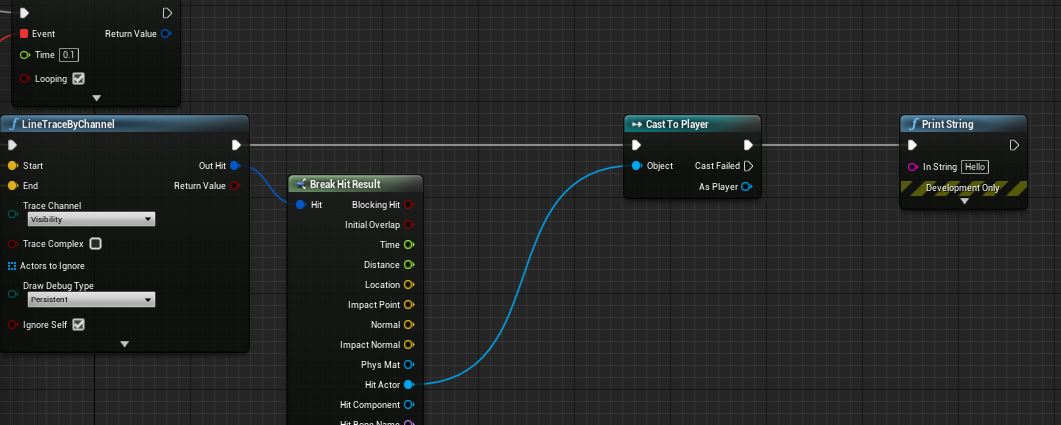
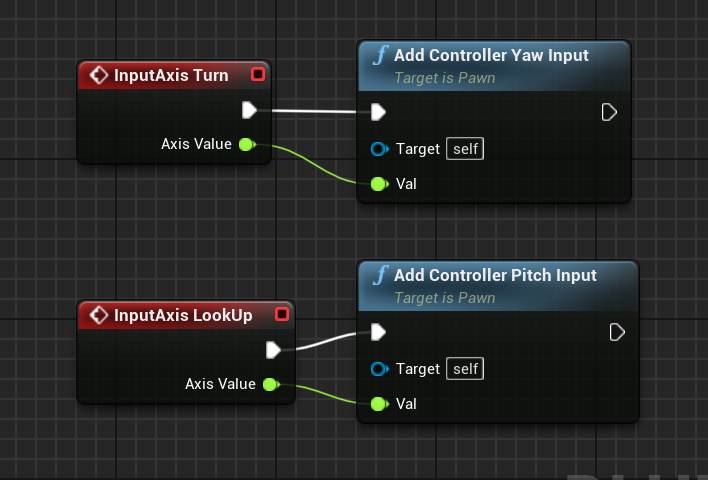
 dawn gazelle
tall pine
https://i.imgur.com/X6Kd6Mj.png
line trace doesn't hit the player, why is that?
dawn gazelle
tall pine
https://i.imgur.com/X6Kd6Mj.png
line trace doesn't hit the player, why is that?
Check the collision settings on your player. If you have their CapsuleComponent object type set to Pawn, the Visibility channel is by default set to Ignore.
fast orchid
I have an energy system for sprinting. to make the person only sprint if they have energy. this is what I wrote
but for some reason. even if the person has energy and they start sprinting, they will be able to do it until they let go of ctrl
but when the energy hits 0 I want them to start walk
ing
dawn gazelle
fast orchid
I have an energy system for sprinting. to make the person only sprint if they ha...
Can't see anything in your screenshot, it's too small.
maiden wadi
@north oriole Looks like those are third person characters? If so, the Spring Arm that the camera is on also needs to use control rotation.
trim matrix
Hello guys! Does anyone have any idea or tutorial about how you would approach making stage levels for puzzle games like Overcooked?
Regarding meshes, textures, floor etc? Would you make the whole stage mesh in 3d? Assign multiple materials and call it a day? Or have modular meshes for walls, windows, and place props? Maybe combine them in the end?
Actually my game doesnt show the whole map at once like Overcooked, its more zoomed in and the camera follows the player in a tps fashion, so culling may play a part in performance. There are differently built up stages with reoccuring assets.
Would you make instanced mesh modular walls that i can set how long i want in the level editor, or have 1m, 2m, 4m long meshes? What about the floor? Inside the house made out of concrete but outside grass? What would be the best approach that would allow me to make several puzzle stages quickly?
 tribal hill
Hello , I have a question does anybody knows how to rename an actor on spawn? Using the OnSpawn actor from class
 restive tundra
How does one get rid of a return node on an interface function, I accidentally added an output to one, then removed said output but the return node still persists and is causing issues.
 past girder
hi, i can`t seem to get this working https://blueprintue.com/render/bmtljibo/ When the Pym particles are lower than 0 or is 0 its setting a variable to true, then i check if i am big and Pym is lower or equal to 0 if yes i am reversing the timeline from end but for a split seconds he gets smaller but grow bigger again
prisma stag
orchid garden
with the starter content there is one floor mesh who's collision does not perfor...
I used a bsp and then converted it to a static mesh. However I noticed while scaling the bsp the squares on the default material just enlarged to 4 giant squares to where I thought they would multiply?
 formal wren
How bad is this recursive event call:
dawn gazelle
formal wren
How bad is this recursive event call:
If EmotionInterpTo consistently returns false I think you might get an infinite loop error. Nevermind. It won't.
formal wren
dawn gazelle
~~If EmotionInterpTo consistently returns false I think you might get an infinit...
My testing so far didnt got me an infinite loop errer
*error
tight schooner
It ain't pretty but you can feed select nodes into select nodes
 pulsar lion
Hi! You can't use timelines in actor components right? What's the proper way to animate mesh rotation of 45deg?
tight schooner
@formal wren if you want something to occur every frame, try Event Tick. You can control the ticking with "Set Actor Tick Enabled"
dawn gazelle
tight schooner
<@471040295837106178> if you want something to occur every frame, try Event Tick...
What Gosling has there is a bit more controllable than tick. It'll only interpret when the event is fired and will keep running until the value from his function returns true, then it stops, so it's actually a tiny bit better than using tick.
tight schooner
@pulsar lion yeah for some reason you don't get timelines in components, but you can make something kind of similar with Event Tick and a curve asset. There are lots of ways to rotate a mesh... You can do it in a material, in a mesh particle effect... It's very situational what is "proper"
tight schooner
@dawn gazelle I mean, you can make a ticking thing that has some check and the end and situationally disables tick
dawn gazelle
true
trim matrix
Hey
I get this on simple variable
Yet it's very simple to fix this problem but it's unknown, knowing that in a class character it works perfectly.
The problem with the initial class is that it works perfectly.
I created another class for test and it doesn't work.
how can I solve this problem?
is set
mhhh
tight schooner
Hence "accessed none"
trim matrix
wait
is set
sorry wrong file
Yeah true
Thanks
print work when i pick item, i got the name of the object.
formal wren
tight schooner
<@471040295837106178> if you want something to occur every frame, try Event Tick...
Yeah, but I also wanted to be able to stack "emotions". For example I am interping to an angry face, but still want the character to blink using this logic
tight schooner
oic. Maybe look into timelines?
tight schooner
Well if it works, it works. Feeding the frametime into Delay had me thinking "this man wants tick"
tight schooner
I've done similar things with BP components, cuz they can tick as well. A component can run its own update logic on a reference to something in the host actor class
...So I've used components as a bootleg way to get multiple tick events within one actor
maiden wadi
Facial expressions being melded sounds a lot like animation territory.
 languid lion
Hi there
 neat abyss
Hey, guys. Is there an opportunity to see blueprint animation called with custom event in the sequencer while scrubbing it? I know I can see it when I play\simulate the game but I need to see the result realtime in the editor while scrubbing sequencer
languid lion
Is it possible to update Max Draw Count for a particle system through blueprints?
Or alternatively, only spawn/kill particles when told through BP?
Figured it out
 rustic pond
Id like to encapsulate a function like this does anyone know how i could pass a Animation Pose as input?
 granite jackal
help, Im trying to transform a sk_mesh on the firstperson_BP (FPSwordAndShield) but it is stuck
I cant rotate the mesh
orchid garden
prisma stag
I used a bsp and then converted it to a static mesh. However I noticed while sc...
not when its a static mesh, they scale the polys rather then like the landscape multiplying squares.
orchid garden
granite jackal
help, Im trying to transform a sk_mesh on the firstperson_BP (FPSwordAndShield) ...
set relative rotation
prisma stag
orchid garden
not when its a static mesh, they scale the polys rather then like the landscape ...
So should I convert it to a static mesh then scale it?
orchid garden
to do what?
granite jackal
@orchid garden see the problem, Im trying to change the sword and shield on the BP, it should looks like this
but looks like this
So when I play it looks terrible
Im trying to rotate it on the BP but it reset my rotation
 waxen sorrel
what you do when the engine remove a struct from the list of vars but keep telling there is an error because that structure don't exists anymore
Reload, nevermind
orchid garden
granite jackal
how are they attached to the actor?
granite jackal
nvm, i fix it
it seems to be edited from here
and rotated there
but thanks @orchid garden
orchid garden
ah socket
orchid garden
granite jackal
but thanks <@!458977415176257536>
🙂 gl with your project
granite jackal
nah im just looking around UE4 hahah
 neat stream
Hello guys, do you know what is the best way to detect collision between my Pawn and the New Water System... can't get a hit or overlap watever the channel 😦
?
I want to have water sounds 🙂 just saying
prisma stag
orchid garden
to do what?
Well the problem Im having is the collision. I dont know maybe I converted it to a static mesh wrong?
orchid garden
prisma stag
Well the problem Im having is the collision. I dont know maybe I converted it t...
it may be its simple collision is too simple.
prisma stag
I see. Let me check that.
orchid garden
what you could try is.... changing the models collision complexity to use complex as simple and see if you get a different result:
prisma stag
orchid garden
what you could try is.... changing the models collision complexity to use comple...
Yea, I just took a look at the simple collision and there is none 😂. However in the details panel of the static mesh, the collision complexity isnt there.
orchid garden
prisma stag
Yea, I just took a look at the simple collision and there is none 😂. However in...
should be right under here for the static mesh:
prisma stag
This is all I see
prisma stag
orchid garden
should be right under here for the static mesh:
🤦♂️
I see it now. . .
orchid garden
4.26?
prisma stag
Ye.
orchid garden
im 4.25 so that explains the difference in the details panel
prisma stag
nonono. I was being dumb, I was in the static mesh panel in the content browser 😂
orchid garden
ah lol
prisma stag
But for some reason the projectile still goes through it 😦
 bright osprey
what nodes do i use to get a close relative radius of a actor location? (im basically trying to spawn things randomly around the actor)
prisma stag
bright osprey
what nodes do i use to get a close relative radius of a actor location? (im basi...
You might be able to use GetRandomReachablePointInRadius and then set the origin to your actors location.
orchid garden
don't know if any nodes that do it by itself... but... a really simple method would be make a spring arm attached to the actor with a simple unseen / non coliding object on the end thats facing the actor, and then you could just rotate that around the actor to get the world location and rotation of that unseen object to get a spawn point.
dawn gazelle
bright osprey
what nodes do i use to get a close relative radius of a actor location? (im basi...
If you don't care about Z axis you could do something like this, changing the float values on the random node will increase or decrease the maximum range.
bright osprey
ill try that 😄
dawn gazelle
Fix!
bright osprey
gotcha
prisma stag
dawn gazelle
Fix!
I believe he could also add a float to the output pin from the GetActorLocation Z and change the height
orchid garden
don't forget to set the rotation of them after with the get look at rotation node else they'll all be facing one direction with Datura's example.
dawn gazelle
Good point 😛
neat stream
No idea for the collision with the New water system bodies.?
bright osprey
thank you guys, i got it 😄
orchid garden
could actually generate the look at rotation off the new vector ... and then spawn them with the rotation.
maiden wadi
That'll spawn things in a square around the actor. If you want a radius, it's easiest to make a rotator from a random yaw, turn that into a unit vector, and then randomize the range from 0 to radius.
bright osprey
🤔
maiden wadi
bright osprey
oof ill definitely do that
dawn gazelle
Imma put that one in the function library for later 😄
 proud hull
In 4.22, how can I dynamically create more actor components from inside an actor component blueprint? Unable to use Add Component nodes in actor component bp, which doesn't really make sense why it can't be done when all I need is a reference to the actor to attach it when created, which is easily done with GetOwner....
Actors can create actors, widgets can create widgets, why can't components create components?
I wonder if this is possible in a more recent engine version, but for 4.22 I may have to result to ChildActorComponent.... ewwww. Or scrap making it modular altogether.
dawn gazelle
proud hull
In 4.22, how can I dynamically create more actor components from inside an actor...
You mean this one?
proud hull
Did you get that node from inside an actor component blueprint?
dawn gazelle
Yep. On 4.26
proud hull
Damn bastards did expose it. Well I know it will work in 4.26 at least, haha.
They even made it by class. In 4.22 it is all individual functions. "Add Spring Arm Component" and such.
faint pasture
Is that runtime ad component node stock now? I had to make my own a couple years ago.
proud hull
I wonder which version got it first. Might exist in 4.23 through 4.25 as well.
4.22, definitely not, haha.
maiden wadi
It's not in 4.25.4 at least. Not sure what they changed in 4.26, but at least as far as 4.25 is concerned, they couldn't do that easily because those calls were supposed to be made in the actor itself. So you could still do it from a component by making a function in the actors that could get the component, and then make the other component call that function.
To be fair though. 4.26 has added an incredible amount of things for blueprints. Really hoping 4.26.1 will be out soon with the interface fixes so I can actually use it.
proud hull
maiden wadi
It's not in 4.25.4 at least. Not sure what they changed in 4.26, but at least as...
Yeah, I just checked 4.25.4 right now too. Still all individual limited functions.
I would go with the actor middleman route, but trying to keep it modular and remove the actor classes altogether.
Like the user just attaches it to the character of their choosing, then adjust values, and it just works. Instead of having to reparent things or make child classes.
Does 4.26 even allow that node in a function library? For shits and giggles just tried in 4.22, but no workaround that way.
dawn gazelle
proud hull
Does 4.26 even allow that node in a function library? For shits and giggles just...
Yes, it can be added in a BPFL.
 indigo bough
Is anyone aware of the way to change the height of the WaterBodyOcean? Or does it have to be at 0?
faint pasture
Why do you need a component to add components? That sounds smelly.
worthy frost
eh?
 ivory estuary
does anyone know a good way to learn blueprint? or is anyone willing to walk me through it as i go?
worthy frost
proud hull
faint pasture
Why do you need a component to add components? That sounds smelly.
To keep things modular. It adds spring arm components to its owner to create group formation locations.
maiden wadi
@ivory estuary Feel free to ask more direct questions here, or for advice generally. But for actual learning, you're just going to want to google a lot, read a lot, and just generally get familiar with the editor. If you have any other programming experience, then blueprint won't be hard to follow since each node is just a function being called.
ivory estuary
maiden wadi
<@!523834004915486728> Feel free to ask more direct questions here, or for advic...
gocha, ill go look for some courses on google
worthy frost
@ivory estuary look at the link i posted. Has a lot of tutorial on UE4.
orchid garden
ivory estuary
gocha, ill go look for some courses on google
@ivory estuary this is a good place to start:
https://www.youtube.com/channel/UCOVfF7PfLbRdVEm0hONTrNQ

YouTube
This channel is dedicated to exploring Unreal Engine 4 and the Blueprint programming language that it uses. You can think of it as a companion to the API documentation as I try to cover the how and why for what things are used for when using the Blueprint system.
The master project for these tutorials can be found at https://github.com/MWadste...
 brazen hatch
how should i handle landing gear for an airplane? is there a way to add wheels for an existing pawn? or start from a wheeled vehicle blueprint?
orchid garden
he's the guy who does the WTF is video's for ue4
proud hull
brazen hatch
how should i handle landing gear for an airplane? is there a way to add wheels f...
Will the physics of a plane on the ground be important to the game?
Like for instance, do you need the velocity of the plane on the ground to be based on wheel torque?
If not, you can kinda fake everything for ground movement and make it not physics based at all.
orchid garden
add a socket to the mesh, add the wheel as a physics body to the socket, and lock the Z & Y axis?
winged sentinel
Quick question, my trying to play an animation when my first person character looks around
Ive tried that way and with a bool and each way doesnt work
brazen hatch
@proud hull i wanted to use the breaks on the wheels, but they will not be powered
and steering for the backwheel
@orchid garden the airplane is already a skeletal mesh and it has joints for the wheels
proud hull
These things can still technically be "faked". With some nice wheel animations you can accomplish that.
orchid garden
could do the same with a skeletal mesh
youd be attaching it to the bone rather then the socket.
maiden wadi
@winged sentinel Don't == a float. The chances of that being true is... near impossible. In other words that bottom part is pretty much never going to be true.
orchid garden
you lock the right two axis and the physics object will only move forward / backward, so it looks like a plane wheel. steering would be controlled by the skeletal mesh rather then the wheel itself.
orchid garden
maiden wadi
<@!612738576525950998> Don't == a float. The chances of that being true is... ne...
yep gotta love when you set a var to 0.0 unreal somehow translates that var to 0.1111111191
maiden wadi
Well, for instance. (0.0 == 0.000001) = false
winged sentinel
@maiden wadi aha I removed it
and it worked
Should i use nearly equal to?
It works without it but i need it to stop when im moving
maiden wadi
Probably. But even better would be to move that logic to the animBP event graph and have that set a bool that this part can look up. It makes your animations faster not using blueprint logic anywhere other than the event graph.
proud hull
If you handle every set instance of the float yourself (hard-coding numbers into the set node), it should be fine, but if you run functions to get the input for the set node, or you change something within the editor (like setting location, rotation, etc.), the accuracy is not guaranteed.
orchid garden
proud hull
If you handle every set instance of the float yourself (hard-coding numbers into...
in a bp, i've set a float to 0.0 and gotten 0.(somerandomrange) instead. so even if your setting constant values in a bp it can be off unless its the vars default value.
proud hull
orchid garden
in a bp, i've set a float to 0.0 and gotten 0.(somerandomrange) instead. so eve...
I'll need to look out for that, haven't come across that issue yet though.
orchid garden
usually if i know the float value will never be a neg, i use float < 1
or float > 1
winged sentinel
@maiden wadi thats a good idea thank you
proud hull
Trying to see if I even have an instance of using float == float. Tried to reference the node by creating a one, but no dice.
maiden wadi
@winged sentinel For instance, if you do this in the blueprint graph
That can just use it here.
winged sentinel
Ah i see call it right in the update
 fallen glade
Yo boys does anyone know how to reliably get info out of a string table? this stops working every time I close the engine : /
proud hull
Got one, but that is for my custom conditional setup, which the user would then have to choose to use that option, haha.
fallen glade
this too
maiden wadi
@winged sentinel The Update runs on GameThread, it uses information from there to populate variables inside of the animbp. Other animation stuff tries to run on another thread, but cannot do that if you have it doing anything more than referencing variables in itself. Small projects won't notice it, but it can quickly get out of control if you have your gamethread doing heavy animation stuff for dozens of actors.
winged sentinel
I do have capacity for large teams so this may increase performance
thank you @maiden wadi
brazen hatch
@orchid garden and @proud hull thank you for the answers, ill go experiment and see what it leads me to
winged sentinel
@maiden wadi Im trying to playing my walking arm animation when I turn in place, is there a way to get the speed of turning like there is for walking?
maiden wadi
Hard to say initially. What numbers are you trying to get? I mean you can easily get a delta from the pawn's rotation. That would indicate how many degrees the pawn has turned since last update.
winged sentinel
So my goal is to get the animation to start when my character looks around
to give the illusion that my character is walking in place
my only issue is that it stops when i walk
but if i look then stop without walking then it continues to plau
i think im looking for a way to detect when the character stops looking
maiden wadi
What prompts the looking in the first place? Is that a keypress, or?
winged sentinel
mouse look/joystick
maiden wadi
What stops the looking then? Just stopping the mousemovement/releasing joystick?
winged sentinel
yes
maiden wadi
Hmm. If you wanted to keep it contained to the animbp, you could use BaseAimRotation.
winged sentinel
Get Base Aim Rotation
orchid garden
=
maiden wadi
You might also need to lower that == number considerably, like 0.001 maybe.
orchid garden
== with floats man...
maiden wadi
Basically check if the baseaimrotation is nearly what you've saved it as, if it's not, then you're looking around, if it is, the mouse or controller stopped moving.
orchid garden
<= or => not ==
maiden wadi
Doesn't apply to rotators the same way.
== for Rotators is the same as a NearlyEqual for Floats.
orchid garden
what ue can do rotator floats properly?
winged sentinel
I think i see it, that 0.0001 looks like the error adjustmetn
maiden wadi
Funny enough, rotators are one of the only things in UE I've rarely ever encountered issues with. Only real issue with them is gimbal lock.
They're even auto optimized for network replication by condensing to bytes or shorts on each float in the rotator.
orchid garden
well... im coming to find logic in UE, is... well... Unreal. lol.
probably not so much when you start doing things in c++
dawn gazelle
To err is human, to really foul things up requires a computer.
orchid garden
well... humans made the computer... and made the code that makes stuff work in the computer.... so its just expected that to be a computer is to err as well.
maiden wadi
I don't know why, but I've had an incredibly easy time adapting to UE design processes. They just make perfect sense. I've also dabbled with CryEngine and Unity, and I feel like I'm using systems designed for a race of extraterrestrial people. I just don't get it.
orchid garden
i didn't like CryEngine... played with a demo of it.
fallen glade
so can someone help me with string tables? They don't load unless I reload the blueprint involved, should I use something else for texts?
orchid garden
build your own loading logic to load the strings from the drive or... just use a datatable.
fallen glade
orchid garden
build your own loading logic to load the strings from the drive or... just use a...
can't be right because the nerds (programmers) in my previous studio managed to use string tables
orchid garden
just suggestions
winged sentinel
@maiden wadi it worked! Thank you!
 sweet swan
Is there a way to import a bp into another bp? IE I have a torch bp (with a SM/particle system etc) and I want to add it to a wall bp without having to create each component every time
fallen glade
sweet swan
Is there a way to import a bp into another bp? IE I have a torch bp (with a SM/p...
child BP
dawn gazelle
fallen glade
can't be right because the nerds (programmers) in my previous studio managed to ...
Seems odd that the string tables don't get loaded automatically, but I found this online and it does appear to work.
Doing this will load the StringTable into memory which then allows you to access them using what you were doing previously.
maiden wadi
@swift pewter What event is this execution logic coming from?
Nothing updates it. Being an input action, it only fires once, so it'll play once for whichever IsAiming is set to until you press the fire button again.
Normally stuff like that is handled in the animbp though. Can blend between an Aiming animation state machine, and a hipfire animation state machine, and apply montages to them from the weapon every time it fires. All the pawn does would be to set a bool for IsAiming, and then the weapon's bullet spawning event would play an animation montage on the pawn holding it. And the animbp updates itself based on those accordingly.
maiden wadi
@trim matrix Multiplayer or SinglePlayer?
 proper sundial
Is there a tool to compare two blueprints and their class defaults?
And component settings
maiden wadi
Depending on when you need access to it, the simplest solution is just to make your GameMode create your blueprint on BeginPlay and set a variable to it in the GameMode to point to it. Then create a static library function that anything can call.
@trim matrix So for instance.
prisma stag
orchid garden
to hook up the pew pew pew:
Even after setting the floor static mesh collision to use complex, my projectile still goes through the ground
maiden wadi
Sounds like collision settings are wrong then.
Really depends on what the actor is for. What is it supposed to do?
winged sentinel