#blueprint
402296 messages · Page 617 of 403
 orchid garden
 tardy kayak
i need it to be the bounds of the actor as the actors mesh is made of lots of small meshes
and those meshes can change
tardy kayak
ok ill give it ago is there really no cleaner way?
orchid garden
idk, im just guessing sry
tardy kayak
thanks anyway
 dull tree
how can i change hud when player died and changed to spectator pawn
and when he respawned
after 10 seconds
Thats my hud blueprint
first time i call it it works but second it doesnt change
 clear robin
Is the variable "IsSpectator" actually changed?
add a Print String node and see is the variable is true or false
 atomic prairie
Is it possible to do a ''circle loading'' easily? I would like to add a circle power on my HUD and when it is used: have a circular loading that reload the power
 thorny cape
Hmmm. The console says that it can't parse the value. Thats related to casting?
 vestal prairie
do constructor and begin play on an actor execute on a client that joins later during a multiplayer session? or just the constructor?
orchid garden
thorny cape
Hmmm. The console says that it can't parse the value. Thats related to casting?
sry i was referring to the spawner one
didn't noitce the timestamp one.
clear robin
dull tree
its changing
Is the lower path executed the second time?
dull tree
clear robin
Is the lower path executed the second time?
what do u mean?
i am beginner so 😦
orchid garden
@thorny cape perhaps where your calling it from, i did this on a beginplay, and recieved -13:
clear robin
dull tree
what do u mean?
The part where the UI is changed from Spectator to Player
orchid garden
both text and editable texts let you do settext
typing it as one word should only show settext (editable text)
 bold fiber
I need help with player navigation. I'm trying to move my player to the navmesh edge when clicking off the walkable area. In a lot of top down arpgs if you click off the nav area your character will move to the edge closest to the click. Is there way to do this?
dull tree
clear robin
The part where the UI is changed from Spectator to Player
ok, its not
idk why
this should trigger change
clear robin
dull tree
idk why
You are calling it on the server
orchid garden
that vid is wrong, lol your trying to set the text of a 'rich text' to a exitable text 😉
clear robin
But you have to call it on the client, because Widgets only exist on clients
clear robin
In which BP is this?
dull tree
this last ss is in player
clear robin
Or let me ask this way: Is "Hello" printed out and is the cast to BP_Hud successful?
dull tree
yeah
but its on server
but why
when i have replicates: run on owning client
i think i am dump 😛
but still dont know why
clear robin
does it work when sou set the C_ChangeUIToPlayer to Not Replicated?
dull tree
still only Server: Hello
clear robin
hm idk. set it back to run on owning client and refresh the nodes
clear robin
Since I am also a beginner i am out of ideas at this point. I had several situations where something was not updating properly and when i showed it so someone it suddenly worked.
Maybe closing and opening the project again?
atomic prairie
I'm trying to make this, someone know the name for this "circular loading"?
 faint pasture
@dull tree if you find yourself reaching for run on owning client or any other weird replication settings, you're probably doing something in a wrong or bad way.
 latent finch
Not sure if this is the right palace to ask. But is there a way to add collisions to shadows in unreal?
faint pasture
atomic prairie
I'm trying to make this, someone know the name for this "circular loading"?
angular mask maybe?
faint pasture
latent finch
Not sure if this is the right palace to ask. But is there a way to add collision...
Probably not without some SERIOUS work.
dull tree
faint pasture
<@259800346321354753> if you find yourself reaching for run on owning client or ...
so how can i do it in "good" way
faint pasture
dull tree
so how can i do it in "good" way
What exactly are you trying to do?
dull tree
dull tree
if i find i can tell what works
If i turn multicast it works but trigger also other players
dull tree
faint pasture
What exactly are you trying to do?
when player is back from spectator pawn
it turn from spectator UI to Player UI
So i spawn and posses player pawn and then switch UIs
faint pasture
dull tree
it turn from spectator UI to Player UI
Put an enum on the Playerstate (Spectating, Playing)
or there might already be a boolean on it
set it to repnotify
then whenever it changes, swap the UI out
You can also put the state variable on the PlayerController if you don't need to see the state of the other players. Same thing tho, use repnotify
 stray island
Can i set the origin/pivot location of a component in bp?
Say a static mesh
Component
faint pasture
dull tree
got this
You should switch on Player State
so it does something different depending on what the new state is
dull tree
how?
atomic prairie
@faint pasture thx
faint pasture
dull tree
how?
Something like this
dull tree
and on player bp i should only change this enum?
faint pasture
Since you're using the HUD, you might want to have a function on HUD that takes a state enum and does the widget switching etc.
dull tree
got it
faint pasture
Wherever you have it replicated. PlayerState or PLayerController. So the flow goes like this.
- Change variable on server.
- Repnotify fires, get HUD and call function StateChange on it, which takes in a new state.
- Hud switches on the state enum and shuffles around its widgets.
faint pasture
It's a good design pattern for many stateful things. They are just responsive to 1 source of state.
dull tree
one more, animation i should player bp?
faint pasture
what
 trim matrix
Hi, I am using this blueprint and when i run diagnol, the head bob gets faster, can someone tell me why that is?
I fixed it
faint pasture
trim matrix
Hi, I am using this blueprint and when i run diagnol, the head bob gets faster, ...
Any reason you aren't just scaling vertical head bob by speed?
trim matrix
It had to do with me having both forward and sideways axis's so it was overlapping
Look man I just found this off Google @faint pasture
I am a returning UE4 user from Unity and I didn't know how to do what you described
faint pasture
that looks like a bunch of nodes when you could just have
 teal nexus
I need to randomly pick a location either around original location (within certain boundaries, so that new location is no more than so many units away) of the actor or inside a volume. What's the easiest way to do so?
trim matrix
I don't speak C++ @faint pasture
teal nexus
I guess I'll try Random Point in Bounding Box
latent finch
I have a blueprint I made for a moving platform, but I'd like ot modify it to destroy the platform after it reaches it's end location and make a new one back at the start. Is there a good way for me tomodify my current one for that?
Or would I be better of making a new one with maybe a spawn loop?
 tight schooner
There are a lot of ways to approach it. You could have a manager BP that spawns these. (You could also do object pooling so it reuses moving platforms that have finished their animations, but that's more of an optimization technique.)
latent finch
Thats what I was kinda thinking of doing.
tight schooner
Or you could just have the platform hide itself and move itself back to the start at the end of the animation and replay the animation.
latent finch
Basically have like 3 platforms that follow a trail and then restart after. So it kind of looks like a conveyor belt
If I were to make there visibility go away to return to start how would that effect the character landing on an invisible one?
tight schooner
You can disable collision too while it's resetting
There's some node with a name like Set Collision Enabled
latent finch
Will that node work on a sprite? The current level is in 2d
tight schooner
I never made a 2D project so idk. It'll work with colliders
and Set Visibility will work with anything render-able
latent finch
Ok, also an option that I thought about doing but don't know if it would work. Could I make the timeline node just have 4 vectors? then I could put 2 vectors below view and they would just run in a loop around. But to player view they would look like new boxes
tight schooner
I don't know what you mean by "below view"
Are you talking about having multiple sprites animated by one timeline? That's doable
latent finch
I mean, could I keep a box and it follows the normal path. But add 2 more vectors that match the first 2 on the x and y axis, but they fall under the map on the z axis so you cant see them while playing. but they are basically just making a loop and not being destroyed
tight schooner
That's kind of hackish but yeah it's possible
Actually, you don't need to mess with visibility/collision management
On timeline complete, you can just move the platform back to the Start Location
but with teleport enabled on the Set Location node
And that'll essentially zap the platform back there
And you can just play the timeline from the beginning again
@latent finch
latent finch
So I just make the teleport true and then do I need to morph my timeline?
tight schooner
Morph? Just teleport it to the start location upon Finished and then use the "Play from Start" exec pin on the timeline node
latent finch
Ok, I got it
I basically take away my moving back to start node in the timeline and make teleport true
it will run it's course and then teleport to start
That's working exactly as I hoped. Thank you for the help!
 dense tulip
Means it a message .. so every BP listening to that message will handle it
example: You are 10 persons who bought some show tickets for in 1 week, when the week is done all these people can go see the show
tight schooner
It also means there a Blueprint Interface involved, so you can look into BPIs
 smoky belfry
So its like if an "actor type" is equal to "actor example" what it will do is call everything that has that node and make every "actor type" equal to "actor example"?
Do i get that right?
 low forge
hi can someone tell me how the PhysX will be replaced by Chaos Vehicles?
for example I have a PhysX car, when PhysX is removed will my car be automatically migrated to Chaos Vehicles or will I have to do it manually?
tight schooner
 static charm
chaos still has awhile to go before physx is depreciated. i wouldn't worry about it.
tight schooner
@smoky belfry you should read or watch a primer on blueprint interfaces... The envelope icon is related to that
 dawn gazelle
smoky belfry
So its like if an "actor type" is equal to "actor example" what it will do is ca...
dawn gazelle
smoky belfry
So its like if an "actor type" is equal to "actor example" what it will do is ca...
When dealing with BPIs, you implement them on the class (Blueprint) of the object. In your example above, your BPI is called "BP Ping Interface". On the blueprint that implements the BPI, you can then add the events and functions that exist in the BPI in your blueprint. In your example above, the function is "MSG get Actor Type". When you add your example node above somewhere, you need to feed it a target - that target is the object that you want to execute the BPI function on and it'll run its implementation of the BPI function. What is nice about this is, if the object you're feeding in doesn't implement the interface, then nothing happens. You also do not have to cast to a specific class of object, you just need a reference to the object.
Here's an example of a BPI function being implemented on a blueprint:
In this example, whenever any other object overlaps with my box collider, it'll call the MyBlueprintInterfaceFunction. If it happens to be of the same class of object, then they'll get a print string saying "I am overlapped."
In a different blueprint, I may implement the BPI call differently:
smoky belfry
I see. Thanks for the nice explanation. ^^
dawn gazelle
So now if the class above touches my box, it'll destroy itself. But others of the same class will still get the print string.
 open crypt
I have a cable component whose attachment point is being set to world origin for a single tick at begin play...then it snaps back to it's PRESET attachment point - how do I normalize it's end location before runtime???
static charm
Did you try doing anything in construction script, or maybe spawning it at correct location to begin with
 undone quiver
I'm expecting this to migrate all elements from one array to another. Should it do that? I have an odd problem that seems to be that only the first element is being moved.
BaseRunners is completely empty when this is called in testing, so it isn't a "uniques" problem.
dawn gazelle
undone quiver
I'm expecting this to migrate all elements from one array to another. Should it ...
Maybe instead of removing each element, you could just clear the Followers array once completed.
Manipulating an array while looping through it isn't necessarily the greatest
undone quiver
That would probably perform better, but they need to not exist in both arrays any longer than they have to. I've actually concidered a buffer area to move them to for that reason.
that's a good point. that is my problem. and I need a buffer area. Thank you
I'm removing items from an area and trying to continue looping though it. not going to work
array* not area
Yup. Stupid hurts. Thanks again. Now I have some push/pull going on where they are being directed by code acting on both arrays, but I can fix that.
stray island
Graphics didn’t answer me about this so it’s maybe a bp thing , can i flip a whole material with all its texture horizontally for example ?
I can flip a Single texture using texturecoord * -1
In material
I have 2 material functions inside my material and if i connect a fliping node to the maps inside , it wouldn’t fully work
tight schooner
@stray island yeah use a scalar (float) material parameter, and in BP, create a dynamic material instance and set that parameter to whatever it needs to be to flip the texture coordinate.
 maiden wadi
@thorny cape Not sure if you're still encountering that issue, but by the looks of it, it seems to think your Counting variable is still a Date variable. If compiling a couple of times doesn't fix it, you may need to check it's default value and try changing that a couple of times or remove it entirely and put it in directly as a float. It's also worth noting that GetRealTimeSeconds will restart counting when the app closes, so your counting would only work as long as they leave the app open. If you do need full dates for something like this to persist across app opening/closing, you're pretty much stuck writing your own functions for it. In the boat myself with my day/night/season system. Timespan and Dates aren't very worked on values in the libraries, so you have to make your own helper functions.
 agile loom
Hey, who here is good at vector maths? 😛 Because I know I'm not.
I'm trying to determine the yaw angle from my character to the location of a sound. If the sound was directly in front of the player, it would produce an angle of 0 degrees. If the sound were directly behind him, it would be 180 degrees. If the sound were to his right, it would be 90. If the sound were to his left, it would be -90.
Here's what I've got based on some vector math I've looked up online, but this constantly produces an angle of 0.
 paper galleon
agile loom
paper galleon
agile loom
I don't think you need to normalize GetForwardVector () again, it's already normalized. But I don't think that's the problem. Still looking through.
paper galleon
agile loom
You're multiplying the two vectors. The z component of GetForwardVector is 0. Any multiplication with that value is 0
dawn gazelle
agile loom
Z is zero from Get Actor Location and Location of Noise. When you multiply Z here and forward, it's all 0.
paper galleon
Yep
agile loom
Yes.... yes it is...
I knew you geniuses would know what's up... I'm so out of my league
Any ideas on how I can subsequently calculate the angle? I've been looking at this for so long I can't make heads or tails
paper galleon
The formula for the angle seems to be correct.
But I think you want the value to be between -180 to +180, right?
agile loom
Yes!
paper galleon
Okay. It's been awhile since I've used dot product. But can you tell me the max angle you can get and if it prints out any sign alongside.
I always forget if ue4 automatically clamps the angle to between -180 and 180
Or 0 - 360
agile loom
So just reading the dot product, it's producing values between -1 and 1
paper galleon
Multiply the dot product by 180 then. You should have guessed that anyways
Although. There is a node that called CalculateDirection and I think this node already does the -180 to 180 stuffs for you. But it has a little caveat. The value tends to fluctuate between -180 and 180 for that direction depending on the frame.
agile loom
By multiplaying the dot product by 180, it's giving me values between 180 and -180 as expected
paper galleon
agile loom
By multiplaying the dot product by 180, it's giving me values between 180 and -1...
Good. Test if those values are what you should get and not just arbitrary value. Like the source being directly left of the player should give -90 or 90.(not sure if clockwise is negative or positive in ue4)
dawn gazelle
So testing here... I connected the values for Z in as well, and I also did this...
This is getting really close.
basically X and Y will go between -1 and 1 depending on which side of the cube you're on and if you're facing it.
agile loom
paper galleon
Good. Test if those values are what you should get and not just arbitrary value....
It looks like forward is 180, behind is -180
agile loom
dawn gazelle
So testing here... I connected the values for Z in as well, and I also did this....
Are you able to zoom in on the right side also?
stray island
Is there a way to choose how fast a timeline play? As New time have no effect
paper galleon
agile loom
It looks like forward is 180, behind is -180
Nah. That's wrong. A little more math there then. But try the CalculateDirection node first.
I'm not with my computer presently, else I'd have tried it for you.
agile loom
Alrighty where does the calculate direction node go?
The only CalculateDirection node I can find is where the target is an anim bp
Ah, so it is the anim instance node
paper galleon
agile loom
The only CalculateDirection node I can find is where the target is an anim bp
Oh. It's math then, sorry.
agile loom
This one?
paper galleon
I've never used this. Lemme pull up my laptop real quick. All these abstract stuff is starting to confuse me
stray island
Set play rate controls the speed of a timeline component
but what if i want to control how many seconds the timeline shd play for
Its some math to connect to play rate
dawn gazelle
stray island
Set play rate controls the speed of a timeline component
but what if i want to ...
Timelines play at game speed only, and can ignore time dilation effects.
stray island
So i cant resize its curve over more or less seconds ?
dawn gazelle
Correct. The length is defined within the timeline.
stray island
It seems like i can connect smth to set play rate to control it tho
agile loom
Hard to read some of the nodes dude, take a screenshot...
Mac is mac + shift + F4, windows has 'snipping' tool
dawn gazelle
A timeline component is not a timeline.
stray island
Oh i am talking about a timeline
Sorry
Its just set under “components” so i called it a component
So my question about controling timeline seconds and resizing its curve
 surreal peak
Sure, you can adjust the play rate to scale the timeline
I usually do that when I want to use a Timeline but don't know the final length.
So I set it to 1 second as length and then scale it.
Math for that is usually PlayRate = 1 / LengthInSeconds. So if you want to stretch the Timeline to play for 2 instead of 1 second, you do PlayRate = 1 / 2 = 0.5, so it plays half as fast, which means 1 second becomes 2.
@stray island
It scales the timeline though. So if you have a high point at 0.5, it will move to 1 etc.
 vital ingot
Hello! Right now I'm doing animations in blueprint (Locomotion in statemachine), and I was just wondering if there's a way to get how long an animation has been playing for. This is my current setup, but I'd like my delays to be based on the last animation part finishing instead of manually inputting them. As an example; the first animation when my event input is pressed gets skipped unless I put a delay inbetween that animation & the next animation. I'd like that delay to be whatever duration my first animation was.
maiden wadi
@agile loom Did you figure out the sound thing?
paper galleon
Yeah. I sent him a solution
Y'all should take a look at this for me please. It works as expected but I can't shake the feeling it could be done better
This prints out a value 0 - +180 when turning clockwise and 0 - -180 when turning anti-clockwise.
maiden wadi
Works as well. Another solution just for fun, already commented it.
paper galleon
Yeah. Uses a bit more specialized nodes. I was trying to be simple, but this looks professional
paper galleon
dawn gazelle
So testing here... I connected the values for Z in as well, and I also did this....
This should do the trick also
surreal peak
The "Get Unit Direction" could just be a "Normalize" :P
 paper sky
I need help about an algorithm, I want to generate multiple random numbers but they must add up to 100 in total. Is there a specific node for that or how can I implement that
paper galleon
How many random numbers
 untold fossil
Question. Has anyone found a way to reduce / eliminate mouse input lag? I've read some things on tick priorities. Like controller being ticker first and character comes quite late in that list. Are there any interesting reads, docs anyone can share to dig into this? We're having a slight bit input lag no matter the FPS but our game is very fast paced and it can be quite annoying.
paper galleon
@paper sky If you don't care about the number of random numbers, generate the random number, add them up and do a check before each addition if they would cause the sum to be greater than 100. If true, discard that number and generate another.
paper sky
paper galleon
How many random numbers
2 - 3
paper galleon
I'm assuming here that you need the sum and not the individual number
paper galleon
paper sky
2 - 3
The range doesn't matter? E.g the first can be 1 and the next 27
paper sky
paper galleon
The range doesn't matter? E.g the first can be 1 and the next 27
as long as they add up to 100 it will be fine
it can be 11 and 89
40 and 60
doesnt matter
paper galleon
Okay. There are two options I can think of. If you have a fixed number of random numbers, add them up each time and check if they would add up to 100 or greater. If so, discard the number and choose another. However, the last number will not be so random and it'll be 100 minus the sum of previous numbers
The other is if you don't have a fixed amount of random numbers. Keep adding them up until they equal 100. Discard any that gives a sum greater than 100.
I don't know if he needs the individual numbers or the sum which is 100
paper sky
I first thought about getting 1 random number, and extract it from the range of the next random number
paper galleon
That makes your work a bit more complicated since you said you don't care about range
So the big question is fixed number of random numbers or unfixed?
paper sky
its not about the range though
do you mean like "preset" by fixed ?
I am thinking pure rng numbers from 1 to 100
paper galleon
Like do you need 3 random numbers that add up to 100 or you need any amount of random numbers so far they add up to 100
dawn gazelle
just random once and then subtract the first value from 100 to get the second value.
paper galleon
In that case only the first number is truly random
This works the same for any amount of random numbers i.e the last number is not random
paper sky
dawn gazelle
just random once and then subtract the first value from 100 to get the second va...
yes but how can I do that ? Sorry i am just not familiar with the nodes
paper sky
paper galleon
In that case only the first number is truly random
This works the same for any a...
yes true
paper galleon
paper sky
yes but how can I do that ? Sorry i am just not familiar with the nodes
Are the numbers in an array?
dawn gazelle
paper sky
nope but i can make it
maiden wadi
@surreal peak That's fair, I hadn't considered normalize! I was initially preparing to include base eye height and whatnot into that though, but decided to leave it simple.
paper sky
dawn gazelle
cool thanks
paper galleon
dawn gazelle
This works. But you need a check that the first number is not 100. You can make the upper bound 99 or something
paper sky
but what can I do if i need 3 numbers
maiden wadi
Guess it wouldn't change anything with eye height.
dawn gazelle
0 is still a valid number, no?
paper sky
paper galleon
This works. But you need a check that the first number is not 100. You can make ...
yep
paper galleon
dawn gazelle
0 is still a valid number, no?
😅😅. Zero is weird
paper galleon
paper sky
but what can I do if i need 3 numbers
You'll have to use an array there unless you want a variable for all the numbers.
paper sky
dawn gazelle
hmm
paper sky
paper galleon
You'll have to use an array there unless you want a variable for all the numbers...
I need to assign these numbers and then check them if they match with another instance
 runic phoenix
Thanks for the advice! The error was because the box had negative bounds. All I had to do was use Absolute Value of the each value in the bounds vector and it works like a charm!
paper galleon
@dawn gazelle, can you please put the check for if the numbers add up to 100 before adding another number.
paper sky
its basically a mixture thing, the required formula needs me to do 40% A, 40% B, and 20% C for example, and then when I put the mixture in place it will check if they match with the formula
paper galleon
Oh?
paper sky
I completed "preparing the mixture" part where you empty bottles inside a mug or something
it can record different drinks and stuff, but now I need to check if the crafted amounts match with the requirements
then it will return either a success or fail
paper sky
yes, at first it will just require 2 ingredients but more difficult recipes can go up to 5 I think
array might just work
paper galleon
Yes you'll have to use an array. With another variable specifying the array length. You might not want to add default entries to the array to match number of ingredients. Because this defaults all to 0 and you'll have to use set array elem. You'll want to use the regular and flexible Add node. And keep checking each time if the array length is equal to the variable specifying array length.
Again, I'd have done this for you but I'm not with my PC
paper sky
paper galleon
Again, I'd have done this for you but I'm not with my PC
It's OK, I am grateful for your attention nonetheless
paper galleon
No problem.
paper sky
"And keep checking each time if the array length is equal to the variable specifying array length." why are we checking each time btw
paper galleon
paper sky
"And keep checking each time if the array length is equal to the variable specif...
So that you'll know when you're about to add the last value. And simply subtract the sum of the others from 100 and use the result as the last value
paper galleon
Yeah. Hope it works out for you.
dawn gazelle
Yes, except the last which is just 100 minus the sum of all the other numbers generated
paper sky
dawn gazelle
Yes, except the last which is just 100 minus the sum of all the other numbers ge...
its not a problem
how did you achieve this ?
dawn gazelle
BlueprintUE
Example for output:
Just in case you don't know, you can copy and paste from blueprintue by highlighting what you want and doing CTRL+C and then CTRL+V in UE4.
paper sky
thanks alot 🙂
clear robin
I have a problem with floor check, when my character is crouched and i am (duck-)jumping onto an edge. It seems to not use the flat base in this case. Walking off an edge crouched looks like it's using the flat base again. Does anyone know whats going on here?
 unique hollow
BlueprintUE
I have this system for reloading
and it works perfectly until the reserve ammo dips below 18
if the reserve ammo is below 18 and I try to reload, it does funky stuff
18 is the max ammo in a clip for the weapon
 stiff chasm
Is there no way to do a non latent delay? 😩
this isnt cash money anymore
is there a possible way to do a Non latent Wait until
it needs to be non latent so it can stay inside a function
So i can overide it in my child classes if needed
pls ping on an answer
maiden wadi
You cannot do any form of pausing or waiting inside of a function. They're designed to execute instantly. The only way to get away with something remotely similar is to split your function up into two functions and make one function start a timer that'll call the other function when the timer is finished.
Thus one function executes instantly and sets a timer in the time manager, time manager continually checks til the timer is up, when it's up, it runs another function that executes immediately.
 violet wagon
^ or use a macro
 shut harness
I have a blueprint that derives from UObject. It is in the content browser. Is there a way to get or set a level actor inside this object blueprint? I see nothing for GetLevelActors or anything
maiden wadi
UObject doesn't have the same access to library functions as an actor does, so things like GetAllActorsOfClass and whatnot aren't able to be used. What is the blueprint for? How do you use it? Where is it stored? It's possible that something else may be able to populate that uobject for you.
shut harness
I think I know my issue. I'm trying to get back the contents of the CameraShake update. The actor only takes a reference to the camera shake class, and the instantiated object is created in C++ and never exposed. I think I have to go into C++ mode to achieve what I want here.
here it only returns the class, as opposed to any instantiated object :(
maiden wadi
That's because what you're dragging off of is a pointer to the instantiated object type. You have to set that from a valid object of the type.
shut harness
Yea, this is an Unreal C++ class, so I think they don't want us to have access to that object
maiden wadi
@shut harness You're not working in a UObject either, what class type are you in that has that component reference? UObjects don't have construction scripts.
shut harness
So this is inside the CameraShakeSourceActor. it has a CameraShakeSourceComponent, which you add the class of type CameraShake. It uses this Camera Shake in C++ and does some funky thing to all the cameras this actor is near to.
I am trying to get a reference to the Camera Shake object, but in their blueprint it only stores the class. The actual object I think they instantiate in their C++ class and never expose it.
maiden wadi
The component is what likely does the camera shaking. Which you already have your reference to.
shut harness
the CameraShake being a uobject, i can open the blueprint and see an override for UpdateCameraShake which returns the data I want, but I can't assign that to any other actor...because it is a UObject blueprint
🤔
maiden wadi
Hold on, let me grab that plugin really quick and look.
shut harness
so inside the CameraShake UObject, there is an override for this function. I want to grab this data, and pass it to an actor. But beacuse this is a UObject, I can't find any way to do that.
maiden wadi
Ah. Okay. This is another thing like ApplyDamage. They're using a literal CameraShake UObject to pass parameters through the CameraShakeComponent.
shut harness
yes exactly
the CameraShakeSourceComponent doesnt actually hold the logic, because we have this global function that can do it. the source actor component just gives it a position to affect i believe.
trim matrix
how do i acces a single actor if i spawned more then one from the same one?
I already got the variable in my AI
wich is ''closestActor''
maiden wadi
@shut harness Kind of glanced through the .h files for that. What actor do you need a reference to in the BlueprintUpdateCameraShake Fucntion?
shut harness
i need to extract the shake data from that and apply to one of my Level actors
my main goal here is to make camera shake work with SceneCapture2D
camera shake applies it directly to the Camera frustrum settings, i want to extract the position and rotation to apply to a SceneCapture2D actor
mm, seems in the C++ they create a pool of shakes from that class template, so maybe what i'm trying to achieve won't work
maiden wadi
It might be in C++. The CameraManager has the data for it, but the data is not blueprint exposed.
orchid garden
trim matrix
how do i acces a single actor if i spawned more then one from the same one?
get all actors of class - cycle through them and get distance to for each comparing it to the last till you get the one with the closest distance to? (guessing)
orchid garden
and?
trim matrix
I got more then one ''foodsource'' with a simple bp thats just a float wich is the remaining food
i want it so only that one actor and not all get affected
i just set up a custom event to fire atm
but obviously it fires the event on all the actors
orchid garden
sense its a behavior tree why not just pass it to the actor that the current running tree is for?
trim matrix
what do you mean?
maiden wadi
Is this something for like having an AI go and gather food from a food source?
trim matrix
yup
maiden wadi
Your AI should likely have a "GatherTarget" actor reference in it's blackboard. It can see if it has one set, if not, it can run a quick function to get the closest one and set it's blackboard value as that, then later functions can move the ai towards that actor, when in range it can stop moving and run the gather logic. And since it's only storing that one pointer, it should only work on that one instance.
How your get that one actor out of many is a matter of preference. It depends on how you're spawning the food sources and whatnot. If you have a manager with all of them stored already, running a simple distance check on that array is easy. Otherwise you'll need to do something like SphereOverlapActors at the AI's current location to gather all of the nearby food sources to run through a distance function.
trim matrix
i got all that set up already yes
problem is getting it to the bp on the food source
obj variable for closestfood and bbkey aswell
maiden wadi
You have to get the blackboard key as object or actor and then cast it to your food source class type.
 olive sedge
https://i.imgur.com/YQz945F.png
This is the result when I paint foliage with a 0.001 density. Am I doing something wrong?
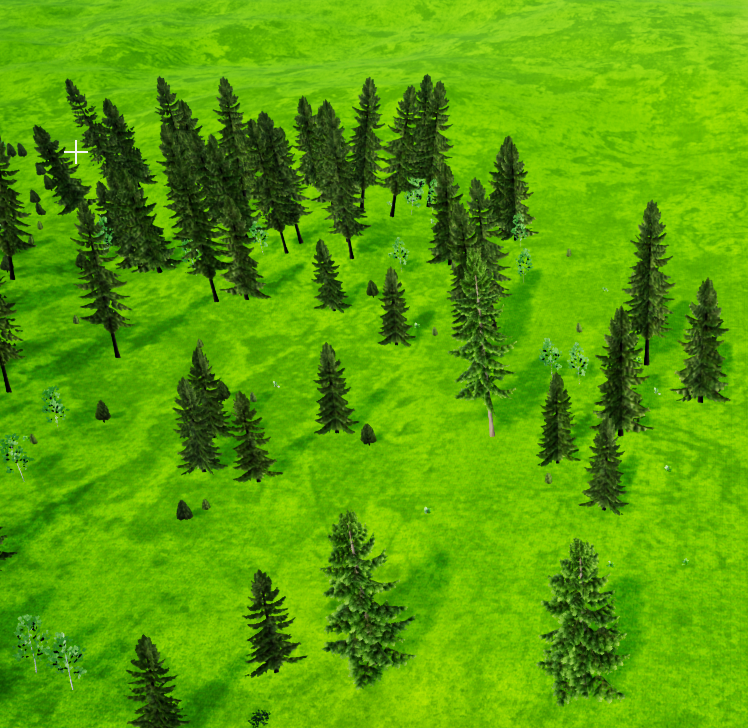 maiden wadi
@trim matrix Other way around. The Key that contains the object, needs to be gotten as an object or actor, and then cast to the foodsource, then you can call PickBerry from that.
@olive sedge Also depends on the radius specified per mesh.
olive sedge
@maiden wadi wdym? my brush radius?
maiden wadi
The Radius at the bottom there will keep them from painting too close to one another.
maiden wadi
They don't need to be, it's in the foliage painter tool.
olive sedge
ah, sweet, now I see. Cool
orchid garden
from my understanding.... density is the number of objects that get painted within the radius
click drag may not seem like it, but just a quick click it seems to be that way
olive sedge
yes, but it's funny. 1 click at .3 density looks like this: https://i.imgur.com/gM3mWwB.jpeg
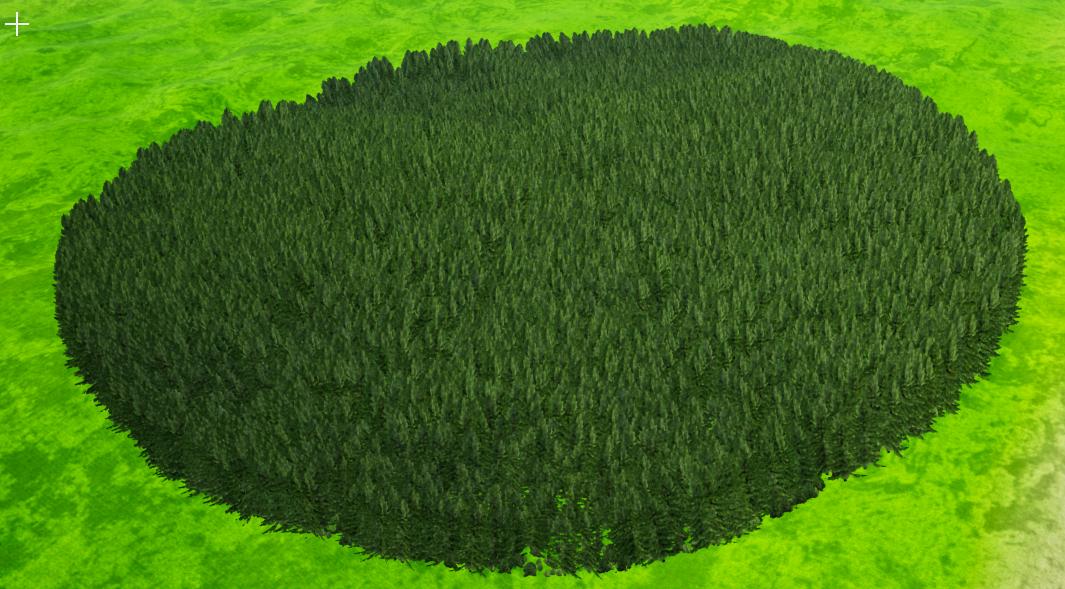
it's just that they have no radius set so UE gets confused
maiden wadi
They seem to be independent. One setting is how many you can have in a 1000 unit radius. So 1 density means that one will get placed every 1000 units at least. Where as the radius seems to be an enforced minimum safe distance between the meshes.
orchid garden
ctrl+Z is your friend when landscape painting heh 😉
 proud hull
runic phoenix
Thanks for the advice! The error was because the box had negative bounds. All I ...
proud hull
runic phoenix
Thanks for the advice! The error was because the box had negative bounds. All I ...
Hah, that is great. Love it when it is something so simple. 👍
 ancient topaz
Help me Guys! How do I make the array select the object that was picked up by the player? I'm completely confused about arrays.
orchid garden
shut harness
@maiden wadi @trim matrix thanks for chatting that through with me. I managed to get the camera shake working in the end, I had to create some child classes of UE4 camera shake classes (in C++) so I can extract the data to blueprints :)
orchid garden
ancient topaz
Thats right? GetChickenFront is not working(
well you don't need the 'set' inbetween the add -> get the out index should be the index of the added item.
but your 'add' has nothing to it, so your getting a empty index.
your original - should be getting the last index of the array, and your get should be getting the last item in that array
my little sample was just to show how you get the index of a item your adding
i would select get chicken front and press F9, then run the game, and see whats happening inside that (step into/step forward), to see if something isn't firing properly. (dont forget to select and F9 it again to remove the breakpoint)
orchid garden
yeah see i thought that may be where the problem was happening, in this routine:
its basically saying that is looking for a array item that doesn't exist
 long schooner
quick question, is there any good tutorials about doing UI widgets?
orchid garden
ui widgets for?
long schooner
menu navigation+ menu animation
I would want to loop the left array of items, so the player can choose one in their inventory
but no idea how the widget actually works, so I would like get some knowladge, and then ask specific questions if there are any here
ancient topaz
@orchid garden If i do like this, is workong, but not right. Its working just if i take a first chicken then second. if i take second chicken, and then first, i have a problem. I have a 2 chicken
orchid garden
long schooner
menu navigation+ menu animation
decent starter menu tutorial - https://www.youtube.com/watch?v=U_DY1lmHbLc&feature=youtu.be

This is episode 51 of my unreal engine 4 beginner tutorial series, in today's episode we look at the first step of creating a main menu for use inside of unreal engine 4. We show you how you can create a menu widget, get it displayed on the screen, create a new menu game mode.
I also show you how you can import image assets for buttons, backgro...
orchid garden
long schooner
menu navigation+ menu animation
and for abit more advanced menu...
ug damnit wrong link...
long schooner
xD
long schooner
orchid garden
and for abit more advanced menu...
btw I know the very basics
I have a working Ui rn, But i want to expand the knowledge
orchid garden
long schooner
btw I know the very basics

Check out my Link Tree, with links to my game My Beautiful Paper Smile, my other socials, and Discord server!
https://linktr.ee/TwoStarGames
--------------------------------------------------------------------------------...
he covers more things with his 3 part tutorial covering the menu he made for his game
orchid garden
im assuming your wanting the interfacing parts
long schooner
this is my menu so far, But i still want to fix it and make it much more appealing
long schooner
orchid garden
im assuming your wanting the interfacing parts
Yeah, especially that cuz I have no idea how to make that
orchid garden
yeah watch that mini series on paper smiles menu, it'll help 🙂
long schooner
Thanks
orchid garden
your pause menu looks good so far btw 🙂
long schooner
orchid garden
your pause menu looks good so far btw 🙂
Thanks, it was an aweful experience to make it work with the controller, everything works as I wanted and there will be an image of the item right in the middle
But it took me a week or 2 to do it right
orchid garden
UI design always takes time, more time then some other parts of the game i think, got to get all the elements right, make sure they work and scale properly to different screen sizes, etc.
long schooner
orchid garden
UI design always takes time, more time then some other parts of the game i think...
Yeah i know that this is an issue, but since this will be my degree work, I have to have everything done by may, I will focus on it later if I have time
orchid garden
best of luck 🙂 took me a month just to get my inventory menu working right and looking all purdy lol.
long schooner
orchid garden
best of luck 🙂 took me a month just to get my inventory menu working right and...
If i can't make it as I want I would leave it working xD and thanks
 quiet stag
hey guys can i call an interface function to an actor without casting that actor to a specific class to call the interface function on it?
like if i do an event hit...can i just test to see if it has the interface and if it does call that function on it?
dawn gazelle
quiet stag
hey guys can i call an interface function to an actor without casting that actor...
yes, you can just BPI directly to the actor reference without casting.
quiet stag
figured it out u just cast to the interface 😛
 weary jackal
There's a node 'does implement interface'
quiet stag
thanks i got it 😄
orchid garden
when i got up 5hrs ago... i had a plan for what to work on in ue4.... i've gotten 0% of that plan done... lol... >.<
maiden wadi
That's okay. I do most of my work when I'm "Just going to check something really quick."
orchid garden
i think i get distracted too easy
 keen seal
Hi, why doesn't the SpawnAI work?
 ivory estuary
hey, im looking to get into programming, but i have a certain thing that i want to programme, im currentally making an Attack On Titan pve game, for the grapple gear they use, if anyone can swing a few links or tips my way itd be appreciated
 rough jay
keen seal
Hi, why doesn't the SpawnAI work?
rough jay
keen seal
Hi, why doesn't the SpawnAI work?
because ur dragging an array into that little circle thing i think
keen seal
rough jay
because ur dragging an array into that little circle thing i think
Yes, but the array for SpawnActor works
rough jay
yeah because you got the object from the array not drag the whole array
keen seal
keen seal
Hi, why doesn't the SpawnAI work?
The same here
open crypt
I have an event tick function that checks a component for a certain height then turns off freezing - it works the way I want to, I just want to extend that same functionality to another component on the same blueprint - **how do I split up tick events like that? **
 last abyss
keen seal
Hi, why doesn't the SpawnAI work?
last abyss
keen seal
Hi, why doesn't the SpawnAI work?
because spawnai requires a pawn class reference, while spawnactor requires an actor class reference and you're using a base enemy class reference
last abyss
open crypt
I have an event tick function that checks a component for a certain height then ...
you can use a sequence, or make a custom event or function thats set by a timer
open crypt
Basically this is checking to make sure one of the particle locations of that cable component is close enough to the ground and if it is, (and the end location is on the ground too) it turns off tick on that component and freezes it in place looks like this
now do I add the OTHER wire into this functionality
they are independently moving, so I shouldn't be checking them on the same function \
keen seal
last abyss
because spawnai requires a pawn class reference, while spawnactor requires an ac...
ah, but my BaseEnemy is a Pawn
How do I go about this?
last abyss
keen seal
How do I go about this?
like soop said, you're dragging an array into a single pin. You need to get a copy or reference
keen seal
Yeah, already figured it out, thanks
last abyss
😃 great
 real garnet
How do I tell in code that the distance has increased or decreased?
And how do I tell in the code how fast the distance is increasing or decreasing
trim matrix
Hi I have a trace and I want to get a rotate to set a rotation of the ai character to rotate to the trace collision location.
Please reply to my message so I can understand someone answered me . Thankful
last abyss
trim matrix
Hi I have a trace and I want to get a rotate to set a rotation of the ai charact...
You can use the Find Look At Rotation node
trim matrix
last abyss
You can use the Find Look At Rotation node
no i get the wrong rotation. sometimes its right.
last abyss
o.o
 rocky pivot
Hey guys can someone lend me a hand? I made an object bp and then made children of it. When I use the child as a reference to cast to the parent it always fails though? Furthermore, it's class is "Blueprint"? The actor's display name is correct though...
 frozen needle
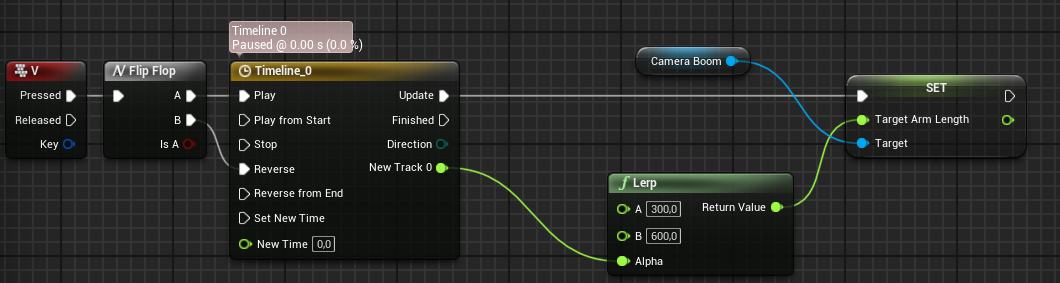
I want to make a simple blueprint for smooth transition between two values (making spring arm length shorter in this case), but it seem to be executing all the time, making my camera fly away into oblivion. How can I tell it to change the value just one time?
last abyss
frozen needle
I want to make a simple blueprint for smooth transition between two values (maki...
every frame timeline is being executed (or delta second? idk)
frozen needle
last abyss
every frame timeline is being executed (or delta second? idk)
I think it's delta second. So I just want it to change the spring arm length once to the desired value, but it works like it's changing this value constantly and I'm not sure how to prevent it from flying away
frozen needle
Instead of a timeline?
last abyss
you can use the timeline with Lerp
just set the alpha of the lerp to the Time value
A to current value and B to what value you desire
 worthy frost
i would use Lerp with timeline and Tick with FInterpTo, benefit for timeline lerp is being able to reverse
 summer maple
hi, I have a character that is spawned in my level but I want it to be asleep until I trigger it to be awake, I can't find how to do that in blueprint, I tried turning it's ai perception off, didn't seem to work, any ideas?
paper galleon
summer maple
hi, I have a character that is spawned in my level but I want it to be asleep un...
What do you mean asleep?
Just staying at a position doing nothing? Or Having the AI off until triggered.
summer maple
yeah i mean off until triggered, it's a robot
 modest gulch
Is there any way to tell game in advance "hey I am about to use some assets, load them already"?
 deft elm
Hey guys, apologies if I'm interrupting something
I am working with a hover and unhover events on a widget
the animation is a simple 0 to 1
paper galleon
summer maple
yeah i mean off until triggered, it's a robot
You can have it as a prop Actor then call possess on an AI controller to possess the robot
deft elm
so hovered : 0 to 1
unhovered : 1 to 0
paper galleon
modest gulch
Is there any way to tell game in advance "hey I am about to use some assets, loa...
D'you know about SoftObjectPtr and Async loading?
modest gulch
paper galleon
D'you know about SoftObjectPtr and Async loading?
I am not sure. maybe i will describe my use case. So I have cursed window where I show something unsettling via portal. problem is that game seriously hitches when it activates since it loads assets (model, sounds etc) and because of that beginning of vision may be skipped
paper galleon
modest gulch
I am not sure. maybe i will describe my use case. So I have cursed window where ...
So you're loading the assets at the moment the player looks at the window?
modest gulch
paper galleon
So you're loading the assets at the moment the player looks at the window?
I guess? I am not explicitly loading assets, game does that for me
summer maple
paper galleon
You can have it as a prop Actor then call possess on an AI controller to possess...
Thanks, so you'd tell the AI controller to possess the robot?
paper galleon
summer maple
Thanks, so you'd tell the AI controller to possess the robot?
Exactly
paper galleon
modest gulch
I guess? I am not explicitly loading assets, game does that for me
I'm trying to understand if the vision is another map?
modest gulch
paper galleon
I'm trying to understand if the vision is another map?
no, it is same map, just in part that player will never see directly or enter. That part of map is box with empty skeletal mesh. what I am doing is that when window activates, I set skeletal mesh and run animation blueprint (I am guessing that is when game loads needed assets)
paper galleon
You can store references to all the actors that will show up in the vision as SoftObjectPtrs then do an Async loading when the player gets to a certain distance near the window. Before he triggers the vision
modest gulch
hmm, I guess pre-loading when he gets close is solution, thanks
paper galleon
modest gulch
no, it is same map, just in part that player will never see directly or enter. T...
But this setup should load instantly if it's the same map. The entire map should just take longer to start initially(if there are too many assets ).
I may be wrong tho. Never done much work with maps
ancient topaz
Friends, help me out with some advice.
I want to shoot chicken bullets so that the enemies move to where this bullet will fall. When I shoot, enemies react, but as soon as the bullet flies out, enemies immediately lose interest in it. Can you tell me what I'm doing wrong?
paper galleon
Maybe the bullets fall outside their range of interest?
ancient topaz
@paper galleon Im found another way. Thanks
paper galleon
Alright
 stable dove
trying to recreate this anyone know what the spawnballs 3x node is?
like it looks like its doing nothing
but idk it probably is im trash at this stuff
paper galleon
I think it's the current count of spawned balls. It gets incremented by 1 each time a ball is spawned that's what ++ does.
paper galleon
The < node checks if the spawned balls are up to 3 and prevents anymore from spawning
paper galleon
The only thing missing I think is where the spawnballs x3 gets defaulted back to zero
paper galleon
stable dove
this confuses me so much
It's the naming convention. The x3 doesn't mean anything. It's just to show how many balls can be spawned
stable dove
this is mine rn
paper galleon
stable dove
what node is the spawnballs?
Are you new to blueprints?
The spawnballs x3 node is the getter for the variable
stable dove
yeah very new
started learning them like 5 days ago
wanted to randomize how they spawned abit and was sent this as refrence for a way i could do it
but im trying to wrap my head around it
paper galleon
stable dove
yeah very new
Oh? I'd sound like snob right now but you need a few more lessons
The reason the spawnballs x3 node is there is to keep track of how many balls have been spawned.
stable dove
And if its more than 3 it wont call spawn balls function right?
paper galleon
Exactly.
stable dove
so branch is an if statement and the condition is whats inside it?
paper galleon
Yes.
stable dove
wait so the ++ is adding 1 to the count of balls each time i spawn it correct?
paper galleon
Yes. See you're learning fast.
stable dove
how do i go about adding the spawnballs count node to my blueprint?
i have no clue what that node is called
i think i understand what its doing but dont know what it is
paper galleon
Just create a variable called spawnballs count or something similar.
The value defaults to zero.
stable dove
ok
paper galleon
Then drag that variable to the event graph and click on get. The node appears
Alternatively, right click and search for spawnballs count then select the Get Spawnballs count option
Alternatively, hold down left Ctrl and drag the variable to the event graph, let go of the mouse button and the node automatically appears
atomic prairie
heeey i'm trying to detect with a OnComponentBeginOverlap if the player is in the box or not, but this from BP actor, I tried different methods but it doesn't work, any ideas?
paper galleon
atomic prairie
That equal to comparism is very dubious. It's not really advisable to use the get player character node .
If the third person character is the only one in the level, you don't need the branch
atomic prairie
Oh okay but with a BPactor there is no ActorBeginOverlap, but only the OnComponentBeginOverlap and they detect all my component :/
frozen needle
last abyss
you can use the timeline with Lerp
I tried to do that but it doesn't seem to be working. The string is printing, but the value isn't changing
paper galleon
If it's for a multiplayer game and you want the character you're controlling, you can use the IsLocallyControlled node
atomic prairie
I've only 1 character
paper galleon
atomic prairie
I've only 1 character
Is it the overlap that isn't working?
last abyss
o.o, that should work. is the value in the timeline 0 to 1?
paper galleon
atomic prairie
I've only 1 character
Run a print string and see if the node gets called when you overlap.
frozen needle
last abyss
o.o, that should work. is the value in the timeline 0 to 1?
Yes, the Transition value in timeline is 2 seconds long with float changing from 0 to 1
worthy frost
@frozen needle also that lerp would break
atomic prairie
Iv an BeginOverlap and an EndOverlap, but theyre triggered because they detect the other bpactor of the level
worthy frost
ah wait nvm you are setting SpringArmLength
i don't see where you are adjusting the TargetArmLength*
atomic prairie
So I want to limit the OnComponentBeginOverlap to the player and not to anything that can trigger it
paper galleon
atomic prairie
Iv an BeginOverlap and an EndOverlap, but theyre triggered because they detect t...
What exactly do you want the overlap for?
paper galleon
atomic prairie
So I want to limit the OnComponentBeginOverlap to the player and not to anything...
That node gets called everytime a new actor overlaps. So you can run your code safely
worthy frost
yes but when is it adjusting your spring arm?
paper galleon
paper galleon
That node gets called everytime a new actor overlaps. So you can run your code s...
@worthy frost, I'm correct right?
atomic prairie
When the playercharacter is in the BOX, it teleports the BPactor to a spawn, when the playercharacter exits the BOX, it activates the BPactor animation
stable dove
Did this but it only seems to spawn 1 what am i doing wrong?
frozen needle
worthy frost
yes but when is it adjusting your spring arm?
after the timeline in "set spring arm length"
worthy frost
BeginOverlap is triggered only on initial overlap
@frozen needle but that will not adjust your spring arm though
you are just setting a property
frozen needle
How could I do it then? Sorry, I'm not very good at this
worthy frost
sec
frozen needle
I just want a smooth camera transition
last abyss
ah i see it
paper galleon
stable dove
Did this but it only seems to spawn 1 what am i doing wrong?
Connect the output pin of the delay node to the input pin of the branch
paper galleon
atomic prairie
When the playercharacter is in the BOX, it teleports the BPactor to a spawn, whe...
You can set in the collision setting to ignore all other Actors except the pawn. I think?
paper galleon
stable dove
i forgot i didnt connect that back up
Yeah, that creates a looping function until the condition breaks
atomic prairie
like this? i'm trying
ivory estuary
hey, im looking for a bit of help on programming, is this the right place?
paper galleon
atomic prairie
like this? i'm trying
Yeah.
paper galleon
ivory estuary
hey, im looking for a bit of help on programming, is this the right place?
#cpp if you are dealing with code.
last abyss
frozen needle
the problem is you're setting the spring arm length which is a variable, but never setting the target arm length of the object (spring arm) to the spring arm length
ivory estuary
ah nono, im using blueprint for my project
atomic prairie
Something works wrong :/
paper galleon
ivory estuary
ah nono, im using blueprint for my project
Here is good then👍. Welcome
atomic prairie
I think the ActorBP trigger the box again
orchid garden
atomic prairie
like this? i'm trying
whats happening Edwing?
paper galleon
atomic prairie
I think the ActorBP trigger the box again
Regular actor?
ivory estuary
perfect, im looking to make a grapple hook mechanic based off of attack on titan, but not sure where to start, im a complete newbie to blueprint, but im willing and dedicated to learn
orchid garden
ivory estuary
perfect, im looking to make a grapple hook mechanic based off of attack on titan...

This month, we explored the updated Control Rig system in Unreal Engine 4 and analyzed Sekiro: Shadows Die Twice to bring you the grappling hook mechanic!
https://www.patreon.com/Lucid_Tales_GDP
00:00 Sekiro's Roots
02:39 Game Dynamics
03:46 Grappling Hook Analysis
04:48 Detection System
11:49 Control Rig
17:26 Animations
19:31 Grappling Movem...
frozen needle
last abyss
the problem is you're setting the spring arm length which is a variable, but nev...
I'm not sure what exactly I should do in this case
paper galleon
ivory estuary
perfect, im looking to make a grapple hook mechanic based off of attack on titan...
Use this. Aimed at beginners
https://youtu.be/pd-sO4lqdV4
Hey everyone! Welcome to Let's Create! In this Let's Create we'll be looking at Widowmaker from Overwatch and her grapple hook ability.
We'll be recreating Widowmakers grapple hook using blueprints.
I hope you enjoy the video!
If you're new to Let's Create make sure to watch this video first: https://www.youtube.com/watch?v=GbhKmFIQtvU
Supp...
atomic prairie
@orchid garden I try that my componentBeginOverlap only activates if they detect the character, but I think they also detect when an ActorBP is in the box
 paper galleon
orchid garden
https://www.youtube.com/watch?v=fL8FcQFK7pA
paper galleon
orchid garden
https://www.youtube.com/watch?v=fL8FcQFK7pA
😅😅👍👍
orchid garden
you can grab the grapple project from the description @ivory estuary
atomic prairie
@paper galleon No Blueprint Actor
ivory estuary
great, i did look into those, but the grapple system im looking to create has two grapples rather than the one
 plush zodiac
i just tried to compile a blueprint that spawns a weapon and sets it as the player's current weapon on BeginPlay, but it gave me this error:
CurrentWeapon of type ZWeapon Object Reference doesn't match the property CurrentWeapon of type HOTRELOADED ZWeapon 0 Object Reference
what does this mean exactly?
atomic prairie
Like a Door with interact
paper galleon
atomic prairie
<@!748903497570713650> No Blueprint Actor
I really can't tell what is going on. Unless I try it myself. Which I can't right now.
frozen needle
last abyss
https://prnt.sc/xq4y5y
That just worked. Thank you!
last abyss
great, do you understand what went wrong?
atomic prairie
stable dove
Adjusted the script to behave abit more like how i had imagined it to be but i have two new questions white tiger
orchid garden
paper galleon
Use this. Aimed at beginners
https://youtu.be/pd-sO4lqdV4
between the two he's got two different styles of grapple to look at 🙂
plush zodiac
it even changed the variable type from ZWeapon* to whatever this mess is
paper galleon
orchid garden
between the two he's got two different styles of grapple to look at 🙂
Yeah variety is nice
frozen needle
last abyss
great, do you understand what went wrong?
I wanted to change the value depending on the existing value in a weird way but I could've just set both values in the lerp itself
orchid garden
are you using a trigger box @atomic prairie ?
ivory estuary
yeah the grapple sytem im aiming to achieve is
https://www.youtube.com/watch?v=ti2naQ5wJgs
but most videos showcase a grapple system quite different

Song: "Barricades" Composed by Hiroyuki Sawano
(AOT Season 2 OST)
Scenes taken from Attack on Titan: Season 1, Season 2, and Kuinaki Sentaku
Best experienced in 1080p
Here's to season 3...
Got a video you think I should make? Let me hear it!
paper galleon
plush zodiac
it even changed the variable type from ZWeapon* to whatever this mess is
DO NOT EVER HOTRELOAD AGAIN
stable dove
the first is how can i clean up the line that connects the set ballcount node to the branch because it goes through multiple nodes and is hard to read?
ivory estuary
so my brain is kinda frozen aha
last abyss
yeah that was one thing that would break it, but most importantly you were just setting a variable of the class, not the variable of the spring arm
atomic prairie
atomic prairie
My ActorBP (The Door) trigger my other ActorBP (The CollisionBox of my trap)
@orchid garden CollisionBox in a BPactor
paper galleon
ivory estuary
yeah the grapple sytem im aiming to achieve is
https://www.youtube.com/watch?v=...
You can easily modify to match your style. The principle is the same. The link I sent you is what I used to make my own 3d maneuver gear system
stable dove
stable dove
Adjusted the script to behave abit more like how i had imagined it to be but i h...
The second is how can i stop them spawning ontop of each other like i want them to be random but not spawn overlapping
ivory estuary
paper galleon
You can easily modify to match your style. The principle is the same. The link I...
mind if i dm you?
paper galleon
plush zodiac
it even changed the variable type from ZWeapon* to whatever this mess is
Close the editor and open again
orchid garden
ivory estuary
yeah the grapple sytem im aiming to achieve is
https://www.youtube.com/watch?v=...
that could be done with either grapplehook
paper galleon
ivory estuary
mind if i dm you?
Go ahead
Man I've said a lot of sh*t on stuff I barely understand 🤪🤪
last abyss
 welcome to the club
stable dove
How can i stop this route overlapping all my other nodes?
atomic prairie
double clic and delete
paper galleon
Double click on the link and a reroute node will appear
paper galleon
You can have 1000 if you want
last abyss
and enjoy the real fun experience of bp, rerouting 😎
paper galleon
last abyss
and enjoy the real fun experience of bp, rerouting 😎
Spaghetti and meatballs
paper galleon
stable dove
just not when i add them with right click
It's weird that way
orchid garden
atomic prairie
double clic and delete
i had to see if it was a player triggering a box in one of my projects, give me a min and i'll send you a snip of what i did for the overlap
atomic prairie
@orchid garden Thx!
is it possible that my BPactors are considered lika a "pawns" for the colision?
stable dove
My final problem for tonight is how can i make it so they spawn 3 balls on a random y axis but make sure they dont overlap because that messes up the collisions and the balls fly everywhere?
orchid garden
atomic prairie
<@!458977415176257536> Thx!
thats what i did so only the player would trigger it
paper galleon
stable dove
My final problem for tonight is how can i make it so they spawn 3 balls on a ran...
Do you want the balls to behave like projectiles?
stable dove
nah i want them to spawn and fall
the balls are just spheres with simulate physics on
orchid garden
i have two actor types that use the samp bp, so its kinda a double check.
stable dove
problem is 3 of them spawn on a random y axis and they sometimes spawn overlapping each other
paper galleon
stable dove
the balls are just spheres with simulate physics on
The random float in range should be good.
stable dove
dont know how i should go about making sure they dont overlap when they spawn
orchid garden
atomic prairie
<@!458977415176257536> Thx!
also, you may need to replace the 'default scene root' with your collision...i.e.:
paper galleon
You can further do a check to see if a particular y value had been used and ignore that one but it adds complexity
paper galleon
paper galleon
You can further do a check to see if a particular y value had been used and igno...
@stable dove
stable dove
yeah i need to do something like that
orchid garden
atomic prairie
<@!458977415176257536> Thx!
and my collision settings for it:
stable dove
because the balls are fairly big and so one of them spawns inside another 9/10
paper galleon
You can add the diameter of the ball to the random number each time
atomic prairie
orchid garden
Yea i try this method with equal but i'm using a CompinentBeginOverlap and not a ActorBeginOverlap,
orchid garden
@atomic prairie note though, i made my collision box a blueprint class of 'Trigger Box' not a 'Actor'
atomic prairie
orchid garden
and my collision settings for it:
I'm trying this
stable dove
paper galleon
You can further do a check to see if a particular y value had been used and igno...
How would i go about adding a check for if a y value and the ones within 3 and -3 of it have been used?
frozen needle
last abyss
yeah that was one thing that would break it, but most importantly you were just ...
You know there's this thing that changes between two cameras smoothly? I really like how the "Lock Outgoing" bool works because it doesn't snap if I abuse it. But do you know what I can change it with when I'm smoothing just one camera (as I did before with the lerp thing)? Because without it it snaps in an ugly way if I go in and out of trigger box that initiates the camera transition
orchid garden
@atomic prairie i use it to add minimap markers on my map for the players.
paper galleon
stable dove
How would i go about adding a check for if a y value and the ones within 3 and -...
You'll have to create a variable and an array. With a bit of setup.
stable dove
oh god sounds scary
paper galleon
stable dove
How would i go about adding a check for if a y value and the ones within 3 and -...
Just do this.
You can add the diameter of the ball to the random number each time
stable dove
how would that stop them spawning inside each other
oh
it would pick a random number in the range then add the diameter to where the ball spawned for the next spawn
last abyss
I have never used that node, but I assume it has to do with the blend func @frozen needle
paper galleon
stable dove
how would that stop them spawning inside each other
If the y value ends up overlapping the ball, the diameter addition will ensure that the y value falls outside the ball. Especially if the random numbers are positive all the time
stable dove
the diamiter is 6
paper galleon
stable dove
it would pick a random number in the range then add the diameter to where the ba...
Works for every spawn including the first
stable dove
couldnt they randomly spawn 6 away then still overlap
idk im probably missing something obvious here
but i cant see how that would fully eliminate spawning inside the balls
frozen needle
last abyss
I have never used that node, but I assume it has to do with the blend func <@!15...
Yeah, I want to achieve something like this but for the simple trigger box. It works like I want it to if you walk patiently, but if you rapidly go in and out of the box it snaps and I somehow want to prevent it from that
paper galleon
stable dove
idk im probably missing something obvious here
Nah. It's good. If for any reason, the randomly generated y value is within a ball, adding the diameter to that value will ensure it spawns outside the ball.
last abyss
it snaps because you're playing from start @frozen needle
stable dove
but could it not spawn the exact diamiter away from the ball and adding the diamiter cause it to spawn inside the other ball?
last abyss
if you use play instead it shouldn't snap
stable dove
it would massively reduce the chances
ivory estuary
say i wanted to have the grapple detach when you let go of Q, how would i go about that from this?
stable dove
but it would be possible to spawn inside each other right??
frozen needle
last abyss
if you use play instead it shouldn't snap
Yeah that seem to be doing the job, thank you again
last abyss
no problem 🙂
orchid garden
ivory estuary
say i wanted to have the grapple detach when you let go of Q, how would i go abo...
you'd do it in the blueprint not in the project settings. The key assignment you've given will fire off a custom event that returns both a 'on pressed' and a 'on released' event.
atomic prairie
Ok, I abandoned this idea and just make a triggerbox in the Level and that calls with my LevelBP a custom event in my BPactor, it works and it took me 3sec ..
orchid garden
trigger boxes work great for stuff like that
paper galleon
stable dove
but it would be possible to spawn inside each other right??
Yeah, actually. Well an exercise for you, I guess.
Pardon my language
stable dove
nah its good im just trying to understand it im probably being really annoying
paper galleon
stable dove
nah its good im just trying to understand it im probably being really annoying
Nah. It's good to ask if you don't understand something
orchid garden
look okay for a keypad?
stable dove
Im gonna try adding the diamiter each time and see what happens
probably easier for me to understand if i just try it
stable dove
paper galleon
Just do this.
You can add the diameter of the ball to the random number each tim...
wait so what do i need to add to this?
paper galleon
stable dove
wait so what do i need to add to this?
First off, is this exactly how you want the system to be? I like to split the transform so that I have more control over the location.
paper galleon
Yes. Right click on the sockets and select split pin
orchid garden
right click the pin (when nothing is connected) and select split pin.
stable dove
so something like this would work better?
im gonna randomize x later but just want to do y for now
is there a way to remove the rotation and scale sockets? not going to change those.
orchid garden
stable dove
its really up to you whichever works easier for you in both cases of your images.
paper galleon
stable dove
is there a way to remove the rotation and scale sockets? not going to change tho...
No.
stable dove
ah well
orchid garden
keep in mind any transform that you don't set will have 0 values set when you apply it.
stable dove
even scale?
paper galleon
In your collision handling override, select the option that looks like Spawn but try to adjust position. I forget the exact option
orchid garden
scales default is 1
paper galleon
stable dove
even scale?
Scale is default to 1
orchid garden
so like if your balls scale is 2, you want to make sure to set the scale as well.
paper galleon
stable dove
this?
Yes. Are your balls blocking collisions ?
orchid garden
@paper galleon lol damn you, you distracted me from my keypad with that grapple video lol... im never gonna get this keypad done today lol...
stable dove
not sure exactly what you mean but there launching into different directions when they spawn inside each other
paper galleon
orchid garden
<@!748903497570713650> lol damn you, you distracted me from my keypad with that ...
😂😂. Sorry about that.
orchid garden
stable dove
not sure exactly what you mean but there launching into different directions whe...
if they are physic enabled balls thats normal behavior
paper galleon
stable dove
not sure exactly what you mean but there launching into different directions whe...
Isn't that good? You want them to fall straight down?
stable dove
yeah they are
i want them to fall down
so i need to make sure they dont spawn inside each other otherwise they fly everywhere
orchid garden
spawn one, do a delay, spawn next
stable dove
yeah but i want to spawn them at the same time so they are harder to dodge spawn them in a pack of 3 every x amount of seconds
orchid garden
or setup a timer to spawn the balls and after x number of balls are spawned invalidate the timer.
stable dove
orchid garden
so your trying to make it rain balls then
stable dove
doing this right now
paper galleon
orchid garden
so your trying to make it rain balls then
Why is this statement weird
orchid garden
give them a random vector offset from the last ball spawned?
orchid garden
from the return value
paper galleon
You'll have to create a variable for that and set it as the randomly generated vector
 spark steppe
anyone messed with changing groom assets on runtime? i cant figure out how to change stuff in the group description (which works as long as i dont change the asset)
stable dove
ok
i think i understand
so i return the value into a set variable node for a new variable i create
orchid garden
kinda like this ->
orchid garden
the return value on the spawner is the object that was spawned
stable dove
yeah
i get it
or at least i think i do
why do i need the target sphere bit?
oh
i think i know why
orchid garden
sphere is the static mesh of the actor
thats just my little test object, the sphere is the only mesh in it lol.
stable dove
same
the falling ball blueprint class is just a sphere with a material and set physics on
deft elm
I was facing an issue with playing a umg animation forward and in reverse where I wanted the reverse to play at the same second the forward was interrupted
and I found the solution
so this is here for documentation ❤️
deft elm
(0.5 here being the length of the anim)
orchid garden
that default scene root can cause problems, no just drag the static mesh ontop of it and drop it, its default action is to replace the root
orchid garden
there ya go 🙂
orchid garden
thats the position where the ball was spawned, from that you can make your random distance vector on the xyz for the next spawn.
stable dove
So my spawn transform will be my random range then i get the position that the first one spawned at with the return value and what do i need to do with that?
sorry im kinda new to all this
paper galleon
Store the GetWorldLocation vector in a variable and spawn the next ball at an offset from that vector
orchid garden
for instance, if i wanted the next ball to spawn 50 cm from the previous one on the y+ axis, i'd do this:
orchid garden
you could randomize it before or after, then stick it in a var to pass to the front. you need a var because you need your base start position first.
stable dove
stable dove
wait so i should do it like this? or like yours?
 grim meadow
So i have this major optimization issue and i am not sure where to ask this but here. So for context i am making a tower defense game with 20 waves of ai enemies spawning. So for the waves 10-12 I get 100 fps with everything running smooth. however after that the fps gradualy drops to a point were the last 5 waves i get 15 fps with some major 1-2 sec lag hitches here and there. I thought this may be a too many actor issue as of course it is supposed to get harder, however after all the enemies are dead the fps is stuck at 15. I checked stat game to see the cpu usage it is maxing on everything saying tick (obviousely not good). To see what is causing it in the final waves, i started the match and only spawned the final 5 waves skipping the first 15 (again thinking its cause of increase actor count). But i ended up getting 100 fps and maybe dropping to 70-80 fps when a lot is happening to my suprise. So It almost seems like it starts to lag after half an hour of gameplay (but i dont think that would be an issue, let me know if that is actualy something). My next thought is it could be the spawner running its chain of code to long. It is very simple blueprint that spawns enemy then delays and continues that pattern to the end of the wave where another longer delay happens. Is this causeing the issue? and how could i fix this? maybe have two spawner actors that split the wave counts in half to "lighten the load". Let me know if you have any idea what the issue is and how i might fix it! Also is there a way to check and see what actor is causing the large cpu draw and maybe what blueprints are causing it?
stable dove
Am i being an idiot or would something like this add 6-50 to the previous spawn @orchid garden sorry for all the questions
paper galleon
Remove the + node and the random float node
paper galleon
Connect the set node into the main flow. After the ++ node
paper galleon
In between the ++ node and the branch input
paper galleon
Yeah.
stable dove
add a node there?
paper galleon
Connect the set node between the ++ and the branch input
paper galleon
Just normal connection. I'd have shown you but I'm about to go to bed
orchid garden
something like....
stable dove
oh
orchid garden
that should spawn 3 rows with 3 in each row course you'll probably have to change the plus value depending on the size of your balls.
stable dove
orchid garden
(wow that sounds wrong lol)
orchid garden
yep both of the values could, that plus and the X value at the top where i did the row bit
the one I posted should do 3 rows of 3 balls all evenly spaced.
stable dove
but if i add a random range there they will be randomly spaced?
orchid garden
along the Y axis
stable dove
yep
orchid garden
lemme do another...
orchid garden
this is probably more along the lines of what you want:
stable dove
how do you create the NOT node?
i did less than 3 but that probably works a bunch better
orchid garden
the Random Float in Range - first value minimal should be the distance from the spheres center, second value would be the max distance to spawn from the ball.
er max distance from the start spawn position...
for not - drag off the pin and type not
orchid garden
branches are easier i learned... hold B and click anywhere, instant branch lol.
stable dove
im gonna copy this then try and work out exactly why and how it works and how i can manipulate it to do exactly what i want when i wake up tomorrow its like 0:30 for me rn
thank you so much for the help
stable dove
this is like 10x more complicated then anything else in this game i making to learn unreal
once again thanks for the help would have not been able to get anywhere without you
ivory estuary
goodluck, trolls!
 haughty fossil
Does anyone know of a different solution to the mouse cursor graphics not updating without moving it or clicking than shifting the mouse position like a pixel or two?
 high sapphire
Hmm, been having difficulty finding anything on this, so I figured it was time to ask on here:
I'm using the Vehicle Advanced template. I created basic "you win"/"you lose" HUDs in UMG, I set up a Trigger Box that shows one of the HUDs depending on whether the player has the win/lose conditions
I thought I could use the "Set Input Mode UI Only", but it turns out that only works with PlayerController rather than Vehicle Blueprint.
Is there a way to do this when using Vehicle Blueprint? Or would I have to create my own version that works with Vehicle Blueprint?
Disregard, figured it out
 timber cloak
@trim matrix I read that you were saying with C++ can treat 10 guys as one actor. Does this also mean I can treat 100+ Units as one Character/Pawn? I am too stupid for C++, just curious.
 vernal wind
I work with (I guess 'huge') blueprints (state machine via GamePlayTag switch on container) and reached a point where the right click editor menu will glitch out. It will only appear for an instant before vanishing again, rendering the blueprint editor almost useless until an editor restart. It happens if I modify/copy/delete (too?) much in the blueprint.
Is this a known issue or a faster workaround fix known than reopening the whole project each time?
vernal wind
k so another thing for the bug list to study/reproduce/fix later if my thesis deadline passed and I have time for analysis
tardy kayak
can i assign a render target to a widget image?
 agile hinge
why it do dat 
worthy frost
cause you are not taking in the rotation of your doors
you are opening on one axis only
agile hinge
🤔
that could be it
lol ty
 was setting it based on world rotation not actor rotation
tardy kayak
have a you got a good tutorial on render targets to UI right now i am creating render targets live storing a image of what i need then trying to display it on a widget
but i cant get the canvas render target to display on the image
dawn gazelle
tardy kayak
have a you got a good tutorial on render targets to UI right now i am creating r...
This one is fairly simple and quick.https://www.youtube.com/watch?v=lw2m6o7xMKI
A tutorial that shows how to show a scene capture component output on a user interface widget in Unreal Engine.
tardy kayak
i need this to happen at runtime
dawn gazelle
It is at run time <_<
tardy kayak
no i will be creating the camera and render image from that camera at runtime then assign them to widget at runtime
 strange igloo
Since references to functions can't be passed in blueprints, what's an alternative to accepting a callback function?
 odd roost
Anyone ever have an issue where level streaming volumes will not load the level?
odd roost
Hit ~ then type stat fps
stray island
Whats hit
odd roost
Press the button on your keyboard
stray island
Which
odd roost
~
stray island
Ohhh
odd roost
Tilde
odd roost
np lol
odd roost
Don’t recall off the top of my head but you can google UE4 stat commands
You can also type stat and look through the ones that come up
worthy frost
Stat unit and stat unitgraph
tight schooner
Just type it in again
stray island
But , To clear all stats?
tight schooner
Wat
stray island
I type wat?
tight schooner
Uhh
Whatever stat thing you typed in to show stuff
You need to type it in again
They're toggles
stray island
But if i want to clear or disable all , because i randomly showed stuff that idk what it was
Its ok i will figure it out
tight schooner
Restart the editor afaik
stray island
Alright
tight schooner
Having too many stat displays on the screen can affect performance anyway lol
trim matrix
anyone know how to set up a interface to send a int from a WB UI to a character ?
maiden wadi
@trim matrix WB UI?
stray island
I assume widget blueprint UI
stable dove
can someone explain to me why this is not working
its spawning all the balls at 0,0
not sure why
 next tusk
anyone got the voxel sandbox toolkit who really good with it?
https://www.unrealengine.com/marketplace/en-US/product/voxel-sandbox-toolkit/reviews

Unreal Engine
Voxel Sandbox Toolkit to create endless cube worlds
maiden wadi
@stable dove You're setting Position from StartPosition, and StartPosition is not connected to any execution flow, so it's never getting set.
 bright osprey
how do you reverse a ui progress bar from 100-0 with bp
maiden wadi
@bright osprey In what sense? It helps to know what the bar is supposed to display.
 cinder shell
hey, guys! can someone give me a little help here please? I'm trying to snap one actor to component socket in another actor on overlap. It's snapping for a second and falls. But if I remove socket and just leave None it works just fine. What's the problem?
cinder shell
If I attach to any other bone other than socket I create - all works just fine.
stable dove
maiden wadi
<@!332199405186711554> You're setting Position from StartPosition, and StartPosi...
Im really new to this how do i connect it to an execution flow?
oh is that a node
maiden wadi
maiden wadi
That circled node needs to be where the green X is between those two nodes, for it to work correctly.
Otherwise the vector remains 0,0,0 which is default.
So, it probably was spawning your ball, just not where you intended.
stable dove
yeah now im getting a wierd thing with how the balls are spawning
 compact stratus
Hello guys, I really need some help, i want to make a cartwheel jump from the 3D mario games and i need to check, if the controller directions or the keyboard value changed around 180 degrees in a very short period of time (walking forward as example and then directly push the opposite controller direction). It has to work in every direction/360 degrees. If someone kinda knows what i'm trying to do, pls /w me 🙂


 stable dove
stable dove
stable dove
this is the blueprint
dawn gazelle
Just going to fathom it's happening because after spawning you're plugging into the loop you already have going.
stable dove
yeah but there is a delay
dawn gazelle
You shouldn't need this line
dawn gazelle
well, you're also setting ball count to 0 in your loop for some reason.
stable dove
yeah so i want to spawn 3 at once that are 6-50 apart from each other
but i want to spawn the pack of 3 every 2 seconds
dawn gazelle
This should do what I think you're looking for.
might want a third person character cast on the end overlap as well.
 brittle reef
Hello everyone! im making a dash system using an youtube tutorial as reference but by dash only works if the keys are setted different from the movement keys, so if i double tap W nothing happens but if i assign the Y as the key for the dash it works perfectly, can anyone help me in this one?
 solemn parcel
Hello Hello, what node can i use between 'Self' and 'Actors to Ignore' in a 'Sphere Overlap Actors' ?
Is there an other way than this ?
 thorny cedar
can someone help me with a audio system? i need a general concept for it
i want to have a function, that is simply called with a soundfile. ok my current setup is a mess and i have no clue how to set it up properly.
it's in VR. so i can't use any built in Systems for Subtitles and audio
dawn gazelle
brittle reef
Hello everyone! im making a dash system using an youtube tutorial as reference b...
Can you show how you have your double tap currently set up?
dawn gazelle
solemn parcel
Is there an other way than this ?
You don't have to set the "Self Array" variable - you could plug the array that you've made directly into the sphere overlap actors node.
tight schooner
@thorny cedar my current project has a certain way to spawn sounds and I made a macro-library macro for that. Maybe what you're thinking of can be done with a global macro or function?
solemn parcel
@dawn gazelle totally right. thanks
 foggy escarp
Anyone know of a way to customize the inbuilt destructible meshes so they produce an accurate representation of chopping wood?
I expect that it would mostly all need to be redone, or a custom one built.
The idea I have is something similar to Son's of the Forest. https://youtu.be/fsGVzf-2I5I?t=13
I imagine a modification of the concept could be used for other materials such as rock.
I was thinking maybe it wasn't procedural destruction, but a predefined state of the model being spawned in as sections are being removed.
I think this would work well if maybe there were some clever way to choose the section to remove depending on where it was hit, that way it would work regardless of angle.

The second trailer for the upcoming sequel to 'The Forest'
thorny cedar
@tight schooner can describe it simple ? The system that I built does work, but I guess I haven't understood completely how sound and audio components work in unreal
For something like a audio system I have one main audio component, that I check for valid before actual playing the sound
I also added some aspects like, continue after the length of the sound file through a delay
brittle reef
@dawn gazelle this is the character movement from the player controller bp
and the dash is right here
BlueprintUE
dawn gazelle
brittle reef
<@!218956378654507008> this is the character movement from the player controller...
So you don't have a double tap set up. You'll need an "Input axis" double tap if you want your forward input tapped twice to dash forward.
I'd give you more than that, but I don't have one set up myself, and after a little searching on google, it seems like it may be a bit complicated to try and explain what needs to be done.
dawn gazelle
brittle reef
well, if i actually double tap I the character dashes foward
The thing is, W is normally bound to the Input Axis "MoveForward". So if you always want your player to use the same input of "move forward" for both walking forward and dashing forward if they double tap it, you have to build a double tap system that uses that input axis. Then you'd have to do similar for the other directions as well.
It's not a good idea to use direct keybind events like the L K I, etc. that you have as you can't change them at run time through settings, etc. and if you were to say put in a "W" key event for your dash forward, then if the player changes their moveforward bind, they can only use the dash if they double-tap W.
 sand stream
hi, does anyone know what i need to give is an object for the function to work? please help
dawn gazelle
sand stream
hi, does anyone know what i need to give is an object for the function to work? ...
A reference to an object or actor that is of the class of first_board.
 prime moss
Do you need visual studio for blueprints?
dawn gazelle
prime moss
Do you need visual studio for blueprints?
If you're editing strictly blueprints, no.
prime moss
Ok
sand stream
dawn gazelle
A reference to an object or actor that is of the class of first_board.
and what could this object be? I'd like to use the value from first_board to be displayed in textblock in another widget
dawn gazelle
sand stream
and what could this object be? I'd like to use the value from first_board to be ...
If you're creating an object of "first_board" somewhere you need to get its reference. Whether you pass that reference in when creating your widget, or if you're doing a "get all actors of class" or what have you, you need to get a reference to that specific object in order to get values out of it.
 astral epoch
I have a lobby for my multiplayer game, and in that I have a TextRenderActor that should display remaining time before game starts.
I'm using a gamestate to handle the timer countdown server side, and then multicast to every client telling them to update said TRA to display the time.
But the event just isn't being called, even when the beginplay is attached to it.
Ideas?
 gentle flare
Hey everyone, just getting started in some AI stuff and need a bit of help...
So I got this VR pawn and this ALSv4 character:
And I'm trying to get the ALS dude to move to the teleport location instead of the vr pawn
I got this on the ALS dude:
But it doing this:
But I don't understand why cos ALS dude got this:
If I've put an AI Controller Class on him, why is Get AIController returning none?
dawn gazelle
astral epoch
If you put a print string directly on to begin play on your game state, do you see anything print?
astral epoch
Just tried that, no.
dawn gazelle
You're probably using incompatible game mode / game state. Check your output log for this message.
dawn gazelle
Also, I'd recommend instead of multicasting, just change the variable itself to an repnotify variable and use the created function to drive any changes as it'll fire when the change is actually received.
dawn gazelle
gentle flare
If I've put an AI Controller Class on him, why is Get AIController returning non...
You have nothing plugged into the Controlled Actor pin.