#blueprint
402296 messages · Page 606 of 403
 hearty moss
 nimble talon
How would I compress it
 orchid garden
the woes of discord file limits 😉
nimble talon
Are there even quality settings for xbox game bar
I could upload it to youtube...
actually no
orchid garden
upload it to youtube as unlisted, so it doesn't show in your list of videos, then you can just share the link for that video.
when its uploaded as unlisted only people with a direct link to the video can view it.
 worn nebula
How can I get this camera shake to loop? If I walk for to long the camera shake stops
nimble talon
My channel has a lot of old cringy videos
orchid garden
lol mine has old no man sky videos
i think i even have some old minecraft ones on it lol...
 faint pasture
New collision channel?
orchid garden
is there a simpler way?
 dawn gazelle
Length + 1 could cause out of bound array index. You just want last index.
orchid garden
random with max is max - 1
dawn gazelle
then just use length without the +1, or last index +1.
length is how many indexes there are in the array. So you could have 1 item in the array, but its index would be 0.
orchid garden
really no other way i can see to get the length of the data table
dawn gazelle
 maiden wadi
This is one of the other major reasons that I want 4.26 to be fixed. :/
orchid garden
still basically the same thing @dawn gazelle
maiden wadi
Array library is getting a function to return a random value from an array.
dawn gazelle
orchid garden
still basically the same thing <@!218956378654507008>
No it's not. What you have now will result in an error
It may not happen often, but whenever the last row is accessed in the table, it'll error out.
orchid garden
still basically the same thing as in ' i have to get the data table to then count the items in the data table to get the total index' rather then just 'get total datatable entries' or something simple like that.
 sonic cipher
how can i prevent the cube to rotate when i hold it ? without ticks ? https://gyazo.com/cac7213b8734f5a2f750a0f9452e0777
thanks
orchid garden
or like Authaer was just talking about it would be nice just to be able to 'Get Random Data Table Row'
maiden wadi
I routinely avoid using datatables at runtime. I dump the contents into TArrays.
orchid garden
could always dump the contents into a data table row as a array. then you could just pull the array from the data table and do whatever with the array.
maiden wadi
Datatables were one of my first great realizations at how limited blueprint can be versus C++. Populating an array of 100 items from a datatable, it takes about 7% of the time in C++ that it does in blueprint.
That's more or less what I do though with my inventory and crafting systems. My GameState has a component that is a GameItemsManager. And on beginplay, it populates a few arrays inside of it from datatables, and I just read from the arrays at runtime. Much easier and faster access.
orchid garden
i.e. datatable->array then function: get datatable row -> process Tarray -> return values
some things just seem a pain to keep a constaint array for processing, bigger memory footprint.
faint pasture
@maiden wadi any reason it's on state and not game mode?
orchid garden
expecially if the array's items are only used during specific functions... i.e. like crafting.
maiden wadi
@faint pasture Clients need to read from it too. It's details about items and crafting recipes. Server and clients populate their own lists, no replication, but it's deterministic so that's fine. But clients read from it for UI purposes, server also does since it's a listenserver, but server functions also use it for things like max stack sizes, spawning certain things from items, etc.
orchid garden
client just needs the crafting for the list, and base checks, server needs it to handle removing items from players inventory and spawning the new one if they have the requirements. (crafting)
maiden wadi
Right, and putting it more or less on GameState without replication kills any necessary network traffic, and makes it available on all machines whether it's a dedicated or listen server, or a client. So if I ever decide to do the dedicated route, I have options open.
faint pasture
Doesn't that mean you pretty much load up your entire item database though? I mean it's probably nothing right now but what if you had like 10,000 items
maiden wadi
It's possible, sure. I'm not too concerned with that though. If I was making a game that size, I'd likely leave it in the datatable for that reason, but I highly doubt that I'll break a thousand items.
And that's a highly optimistic number. Projecting more like 400-500.
orchid garden
see thats why im using databases atm with the rng, some of the lists are 4k long.
i don't want to keep that information loaded when its not needed
maiden wadi
Yeah, that would get a little bit brutal. Blueprint handles that okay though? I remember having some serious issue with performance from blueprints using datatables directly to get data for UI.
orchid garden
yeah no problems so far accessing the data via blueprints, have 16 database tables at varring lengths for different things, can fire them all off during the same time and things seem to go pretty smoothly from what I can tell, no hickups, studders, etc.
not that they ever would fire off at the same time, as they are independant of eachother and aren't constant calls.
maiden wadi
Huh. I might reconsider my stance on that. Gonna have to rerun some tests now.
orchid garden
its rng though, not full processing like say loading up a entire crafting list and building it up for the hud.
 willow phoenix
anyone knows if "targetpoints" are never registered by a "overlap"? i switched everything with overlap on, changed channels and still cant overlap them!?
maiden wadi
@willow phoenix I'm not sure that TargetPoints even have collision? Let me look at that.
Yeah, none of the components in a TargetPoint actor have collision, so they wouldn't be able to be overlapped. To do that, you'd need to subclass them and add in a collision component.
willow phoenix
uhm its a sprite, but i thought when i click those "generate collision events"
oki thanks 🙂
 solemn parcel
Basically my character can spawn an actor. I want that actor to be spawned outside of the radius of the other actors of the same class that are already spawned by the character.
I more or less got the effect I want, but randomly my character can still spawn the actors while overlapping. What is wrong here ?
Here is the same process but with the distance from character to actor, but still having the same issue.
 rough wing
on landed launch character towards floor normal
With landing velocity
the floor normal goes away from the floor
Not towards it
So your character will launch perpendicular to the surface
onLanded:
Hit----------->BreakHitComponent--->ImpactNormal
GetVelocity()
GetVelocity().Size() * ImpactNormal
Sorry this was blueprint
GetVelocity -> length * impact normal
looks okay
just
Z velocity isnt absolute
it can be negative
So you need to check if z velocity is < -1000
That level looks interesting btw
 steep verge
guys i am struggling a bit with a problem. Every time i spawn in my level the animation for some odd reason freezes but when i move my cursor its fine. This demonstration i printed out the skeletal mesh head bone rotation just to show the animation freezes. any ideas?
 last walrus
what's difference between these 2?
last walrus
rough wing
one gets the first one it finds
I'm watching tutorial
if the guy is calling get(a ref) and calls for 0'th element of array (from getcomponentS) so it'll be same as get a single component func?
rough wing
yea
last walrus
thx
 winged sentinel
hi everyone, i have a question, I have specific animations for my reload animations, and im trying to get them to work in ue4. So for i have tried to import them as an animated cube, then sokcet the camera to the cube, but it doesnt follow the rotation
Is there a well known method to do this?
sonic cipher
https://gyazo.com/76049cd952dadbc56894123d7e2d4b04 why my cube does that please ? https://gyazo.com/e5c42876c4f03a63a1784c2ba5aa3082

i'm stuck since this morning
When i pickup, the cube faace the player (working) but it moves a bit and when i release it just jump :/
i got the robot rotation so the cube is oriented like him

This is hapenning when pressing left mouse 🙂


this in my character BP
So on mouse click, linetrace check if i hit object, if yes then grab + update rotation every tick
on mouse click again, release
if so, the cube wont move :/
because i think it is a physichandle
so it doesn't work :v
 fierce birch
Anyone know how to make a grenade bullet line up with a crosshair
sonic cipher
sure
haha okay 😉
do you see which one ?
i will try this then ahah
so
set when drop ?
oh yes ... sorry, i aalready tryed with this only and it is exactly the same result
and if i wait like 30 secs or hit a wall (so it will like turn) and release it it will jump even harder
sorry i was afk
i will try this
oh
setting location too
i forgot
well it seems to work 🙂 sadly it doesn't have the same effect of Physichandle it is like welded to me, but thanks you ❤️
https://gyazo.com/97499553d347a926c3d26b9cd118b845 do you know how i can fix this ? ^^
 unborn maple
anyone can help with my above problem with the widget not appearing no error message and the pins fire off it just doesnt show the viewport.
 dull gale
Alright, so I have a multiline trace for shooting here. Everything works fine except if I shoot a wood/concrete/metal target, and then separately shoot a flesh target because the damage modifications only get reset if I hit a flesh target. (modified damage is dealt to the target instead, in some cases being 0)
Does anyone have an idea of how I can reset the damage stat after hitting any of the first 3 materials without hitting a flesh target behind them? I tried checking if there's a flesh target behind the concrete/metal using a reverse foreach loop but it didn't seem to work
orchid garden
sonic cipher
https://gyazo.com/97499553d347a926c3d26b9cd118b845 do you know how i can fix thi...
watching your different cube videos... and how its reacting to the world, it looks like it may be a mass issue. I have a drop item that gets spawned in when the actor drops it, and when the actor runs across th, the dropped item reacts like its expected to, but the same dropped item placed in the world does like your cube, like its ignoring the mass of the object.
One of your videos though, when you were dropping the cube, it looked like it was being affected by the actors collision causing it to fall forward, it might be held just a wee bit too close to the actor and that might be part of the problem.
orchid garden
sonic cipher
https://gyazo.com/97499553d347a926c3d26b9cd118b845 do you know how i can fix thi...
that last video - could you maybe use a on begin overlap / end over lap to set a flag to if the object can be dropped or not?
if thats what you were meaning
sonic cipher
orchid garden
that last video - could you maybe use a on begin overlap / end over lap to set a...
strange, as you can see nothing is colliding https://gyazo.com/fbb221b67e00e40be9e7aaf09176b10c
sonic cipher
orchid garden
that last video - could you maybe use a on begin overlap / end over lap to set a...
hum add box collision to the wall so it drop it ? yeah but i would have to add box collision everywhere lol
 sweet swan
Why would these two prints return different values?
dawn gazelle
sweet swan
Why would these two prints return different values?
Because nodes execute backwards - each call to the random is its own call, so you get a different value.
dawn gazelle
If you want it to be the same, then set the value of the random to a variable and then call from that variable instead
dull gale
dull gale
Alright, so I have a multiline trace for shooting here. Everything works fine ex...
So nevermind about this, I realized I can just set stats back to default on the foreach loop complete node.. I need a break
orchid garden
sonic cipher
hum add box collision to the wall so it drop it ? yeah but i would have to add b...
if you just want to drop it if it gets too close to the wall couldn't you just use a trace for that? trace hits a object and it drops the cube?
sonic cipher
then it would drop everytime it hit someone else or something that isnt a wall
orchid garden
sonic cipher
then it would drop everytime it hit someone else or something that isnt a wall
can use this trace and specify which objects the trace can collide with:
all traces also have 'actors to ignore' which you can specify what actors to ignore like player pawns, other robots, etc.
sonic cipher
orchid garden
can use this trace and specify which objects the trace can collide with:
I could yeah, why not in last case 🙂
do not worry ^^ i was trying to found a solution so it doesnt go trough wall, the thing is that with PhysicsHandle it doesnt go trough wall :v
Because when i disable physics it does
Hum, handling and set rotation works good with what you told me, but the cube can go trough walls and stuff

like this
sure 🙂
maiden wadi
Are you trying to get the little drone to stop turning when the box hits the wall?
sonic cipher
Hum i could, if only physics handle worked good :/
orchid garden
is why i suggested the trace for objects
sonic cipher
maiden wadi
Are you trying to get the little drone to stop turning when the box hits the wal...
The cube go trough the wall, i'm trying to improve this ^^
So is the trace better than onhit ?
or onhit better
Would attachto component work too maybe ?
I will try i tell you if it worked ^^
maiden wadi
You really only have three options. Attachement and physics, making queries around the held object before allowing movement, and then subclassing your pawn class and making the root some form of extendable object that can encompass the held object so that the character's movement will stop when that extended root collision hits something.
orchid garden
hrm.... Unreal has issues with some characters it seems:
any simple way to resolve that?
maiden wadi
What's it supposed to say?
orchid garden
see if discord will show it right: Ãgë ... nope discord messes it up too... must be a font issue?
has to be a font thing -> same thing happening here: Çajup second letter in, they are part of the extended ascii text encoding.
guessing i'll have the same problem with russian (spelling) characters?
sonic cipher
maiden wadi
You really only have three options. Attachement and physics, making queries arou...
i'm gonna try to do this onhit thing :v no other way to do this
sorry i dont know mate 😢
unborn maple
still need help this widget doesnt pop up even tho everything fires normal and no error are shown
everything else in the code work fine but the game stop but doesnt display the restart menu
orchid garden
correct me if im wrong here but if you have a breakpoint on your set state isn't that going to stop the game in the editor?
 dense tulip
Hi, i'm on a 3rd person character, trying to set a LineTrace where the it extends straight in the direction the characater is looking, even if the character look lower i want it straight
@orchid garden It wont stop the game, just pause it !
orchid garden
hrm... so somethings being lost in UE, characters like ... á ó ñ ä are displaying improperly when placed in a database.
unborn maple
yeah i added it to viewport and set it to a variable so i can collapse the widgets
the break point set the ready state which i posted underneath
orchid garden
dense tulip
Hi, i'm on a 3rd person character, trying to set a LineTrace where the it exten...
just set it so the pitch of the trace is the same for the start/end point.
unborn maple
from there i did a branch check to see if i hit the out of bounds zone and if it out i lose i life and then show restart widget in the ready state
dense tulip
@orchid garden i guess i stated this the wrong way, what i want is for the LineTrace to have start and end at the same height
orchid garden
dense tulip
<@!458977415176257536> i guess i stated this the wrong way, what i want is for t...
setting the pitch to the same on the start and end point should do that
willow phoenix
😮
i didn't know that THIS is actually in the engine content. wtf there are tutorials built in the editor?!?
orchid garden
dense tulip
ok, thank, sorry if i dont understand sometimes !
my bad @dense tulip set the Z axis to the same
i was thinking rotation not angle :/
orchid garden
willow phoenix
😮
i didn't know that THIS is actually in the engine content. wtf there are tuto...
you can make your own tutorials too
dense tulip
oh, i think i know why ...
Shouldnt this make a linetrace where the 2 ends are at the same height ?
orchid garden
dense tulip
Shouldnt this make a linetrace where the 2 ends are at the same height ?
the camera doesn't really rotate for 3rd person, the spring arm does if your trying to get the rotation.
can get world rotation from it though.
 tawdry osprey
Anyone else have trouble with spawn actor from class node in 4.26. I tried using an actor class ref variable, made it an array then used a get node with random int in range for the int input on the random in in range to select random classes in my array. But when I try to plug it into my blueprint that is called after the spawn actor from class node it dosent want to hook up. Says it’s not a compatible actor class even tho all my blueprint classes inherit from one base class.
orchid garden
here this works:
@dense tulip
tpboom is just my springarm for my start location.
dense tulip
thanks, lemme try that @orchid garden
orchid garden
the multiplier is for the length of the trace
dense tulip
Yes
orchid garden
@dense tulip that what you were wanting?
 amber meteor
Hi there im really new to unreal im trying to get my gun to fire full auto without using tick event any tips ?
dawn gazelle
amber meteor
Hi there im really new to unreal im trying to get my gun to fire full auto witho...
Could use a timer, or a timeline
dense tulip
Seems like it could work, sill working on it
orchid garden
what about a gate that opens when the key is pressed, closes when it is released? or is a gate fire and forget?
dawn gazelle
orchid garden
what about a gate that opens when the key is pressed, closes when it is released...
Gate still needs something to feed into it
Like tick
orchid garden
dawn gazelle
Gate still needs something to feed into it
ah yeah wouldn't work then, was just a though 🙂
amber meteor
a delay just made it shoot one at a time
i just heard somewhere that using tick based logic is to be avoided ?
orchid garden
ticks for constant things... i usually only use them to display variables for debug info (printstring with 0.0 lifespan)... timers you can setup for individual features, and give you better control, least thats how i see it.
dawn gazelle
There's nothing wrong with using tick for logic, but you just have to be careful what it is you're doing with tick. Like if you're trying to get all actors of class on tick and you have 1000 of those actors in your scene, you're going to have a bad time.
amber meteor
Correct me if im wrong tick logic is tied to fps correct?
dawn gazelle
That too, yes.
 unique wyvern
when a streaming level is loaded, is the begin play event fired for actors in that level?
not just at the beginning of the game
 rough jay
cant you just set timer and clear timer when release?
dull gale
any vector geniuses out there can help me out? I'm doing a bullet ricochet mechanic using linetracing, so far it spawns the linetrace at the bullet hit location and uses the impact normal as the end point. My objective is to somehow make it the "opposite" angle from where the bullet was spawned, as you can see in the example I made on paint lmao, anyone can point me in the right direction on how I could do this?
so far this is what it does
red is origin, purple is ricochet
orchid garden
dull gale
any vector geniuses out there can help me out? I'm doing a bullet ricochet mecha...
couldn't you just get the angle difference between red and purple and then add that difference to purple to get the angle?
or multiply the difference by 2 and add it to origin?
dull gale
yep, that's what I want to do, problem is I'm now sure how, I was playing around with the nodes coming out of the hit normal to try and get something to add rotation but failed to get any solution
orchid garden
world rotation values?
 soft orbit
Hello, I'm curious of a way to allow for when there are 2 clients in a multiplayer match, and client 1 fires a bullet at client 2, client 2 hears a flyby sound. I've been messing around with play sound at location and it is working, but when client 1 is close to client 2, client 1 is able to hear the flyby sound. I would like it to only play for client 2. Any ideas? (Sorry to overlap anyone else's questions, respond to me when their situation is solved if so.)
dull gale
orchid garden
world rotation values?
let me take a look at that and see if I can come up with something, thanks for the tip
 timid comet
Is there any blueprint out there to make my character have more emotion in its movement? im looking to get the player to float, but now its very solid movement and stiff
orchid garden
soft orbit
Hello, I'm curious of a way to allow for when there are 2 clients in a multiplay...
what causes the sound to play?
the bullet? the player?
soft orbit
when the projectile spawns it fires a multi line trace, which detects a collision sphere on all players
each time there is a hit, sound plays at that location
where the sphere is
orchid garden
who owns the sphere?
soft orbit
player
orchid garden
player 1 or player 2?
soft orbit
client 2
orchid garden
mayhap try something like....
getting the owner of the sphere and comparing it against the current actor?
soft orbit
This will work, however when the sound plays, it can be heard by all clients in proximity.
including the player who fired the weapon
I dont want the player who fired the weapon to hear the sound
only other players around him
if the bullet flys past them
orchid garden
according to play sound at location its not replicated by default, so if you only played it on player 1's side it shouldn't be heard on player 2's side from player 1 playing it.... hrm.... intresting...
soft orbit
yes so whats happening is
player 1 can hear it
but player 2 cannot
if i replicate the sound
they both hear it
but i only want player 2 to hear it
orchid garden
yeah you don't want to replicate it.
you want to fire the sound on the machine that needs to hear it.
soft orbit
hmmmmm
how would i do that?
i tried like overlap -> other actor or hit actor
dunno what to do with them
lol
orchid garden
im guessing the trace is from player 1?
orchid garden
it hits the sphere on player 2, and then triggers a event to play the sound?
soft orbit
the bullet itself
yes!
now you get it
lol i was like damn how do i explain this?!
as soon as the bullet spawns it checks its forward vector and traces forward
its a multi hit trace so it detects any play spheres it hits
and triggers a sound at the hit location of those spheres
orchid garden
so... your replicated event needs to know which players sphere it hit, then when its going to play the sound it checks to see if the active player is the hit sphere player, then if it is, plays the sound, if not does nothing.
soft orbit
unsure about the active player part but the rest yes
active player do you mean the player who fired the weapon or the one whose sphere got tapped
orchid garden
the player who's on the current computer.
soft orbit
yes that player should not be able to hear so the other way around
if it is not the active player, play the sound for the player it is near only
orchid garden
so you want the player who fired the shot to hear it?
soft orbit
no
orchid garden
if active player = sphere player, play sound
orchid garden
that should only make it heard by the sphere player.
soft orbit
so something like... uhh "Hit Actor" which returns the sphere in this case
then use that to get the owning player
somehow
orchid garden
yep
soft orbit
check if its me or the player who fired the weapon
soft orbit
if not then play it for this guy and this guy only
ok gonna try
Yep, still playing for the player who fired the weapon
orchid garden
yeah thats just telling it to play if the target has a tag
steep verge
guys i am struggling with a problem for a while. every time i play the game the animation freezes until i move my cursor or when i stand in direct light. not sure on what the problem might be but i am printing the head bones rotation just to show when it freezes
dull gale
@orchid garden well, I couldn't figure anything out but it's about time I quit for today, thanks for helping me though
orchid garden
soft orbit
if not then play it for this guy and this guy only
try a branch like that and off true = play sound
see if that does the trick.
soft orbit
Im going to try to make the actual bullet carry the sound
that should do it
so whoever it goes past
they hear it
thanks for your help man helped me gain some more clarity on how this should be done
 elfin badger
does anyone know how to set an actor yaw rotation so its in direction of player input?
 ember crescent
dose someone know why it only works the first time? then second time i do it it will happen instant and not follow the timeline.
its a cube that i want to "roll"/rotate 90 degrees
 pine trellis
is there anyway to color code volumes(i,e, culling volumes, level streaming volumes in unreal ??
like to make it fill in the volume so its easier to see?
 nocturne flax
hey, I'm trying to use the spline mesh component, but it seems that it twists when its end is set directly above start
the twist is so bad the faces in the middle completely disappear
Attempted to change start/end rolls, but this just twists the entire cable, becoming screw-like, without fixing the issue in the middle
Tried up vector too, setting it to Y instead, but then the entire cable disappears at certain angles
 radiant rapids
How do i reference this as a class for an output? ive tried material instance, material expression and material interface... nothing works :/
also tried decal component
dawn gazelle
radiant rapids
How do i reference this as a class for an output? ive tried material instance, m...
I don't think you can reference it specifically as a class, only as an object reference (Material Instance). What are you trying to plug it into?
 stray island
I always forget what is event construct and how it differs from event begin play
radiant rapids
dawn gazelle
I don't think you can reference it specifically as a class, only as an object re...
Basically a function that checks what i hit with a linetrace and returns what particle effect, decal and sound i should have at the impact location. But cant even get the damn decal to show up now
orchid garden
hrm... is there a way in UE during runtime to....
- build a data table
- export the data table to a csv
I had a thought on something and if i could do this it would save me abit of time... expecially if i could then...
- import csv to data table....
dawn gazelle
radiant rapids
Basically a function that checks what i hit with a linetrace and returns what pa...
I believe you want to use this, the output is what you would use to do things with, but without knowing what it is you're wanting to plug into I couldn't say if this is valid or not.
dawn gazelle
orchid garden
hrm... is there a way in UE during runtime to....
1) build a data table
2) expor...
I don't believe data tables are writable at run time, at least definitely not through BP. They're only meant as a means to store data that will be consumed, not as a database-like system.
stray island
What about my question 🙋🏻♂️
orchid garden
dawn gazelle
I don't believe data tables are writable at run time, at least definitely not th...
hrm... well rip that idea, sense this is strictly bp based then. ty for the reply @dawn gazelle
orchid garden
stray island
What about my question 🙋🏻♂️
event construct vs. event begin play? construct happens before the item is added to the scene, begin play is after the contruct has been done and the item is being added to the scene.
stray island
For example ? I didn’t get it 😇
orchid garden
say you want to add meshes to the actor before its actually in the scene, you'd use the event construct to do that.
for instance.... i have a master character class that has zero meshes in it, if i were to add it to the scene it would basically be a empty actor. i create child actors from the master, and in the childern during the event construct, i set what their actor mesh is, what animation graph to use, setup some variable reverences, generate names for random npcs (if thats what they are) then add then when they get added to the scene they look like a completed character.
If i were to do that during the begin play, if a person was looking at the actor when it was assimbled they'd see a actor pop in in T-Pose, then suddenly get a animation.
construct is basically pre-play.
 proud hull
It is basically just order of operations. Pre-Construct -> Construct -> Begin Play
Pre-Construct is a widget thing. Not sure it is used in other places too.
orchid garden
pre-construct is a whole other ball of wax 😉
stray island
orchid garden
pre-construct is a whole other ball of wax 😉
Thank you , great explanation i think i get it
 winter garnet
Hey guys, is there a way to create a generic Event Dispatcher for the Actor Object through Blueprints?
I'd like to introduce a OnActorChange
(I'd love to use an Interface to address this, but well... it seems I can't declare EventDispatchers in a BlueprintInterface)
 true valve
How can I make a character rotate based on A/D keys?
Rotate means if I hold a key, it continue to rotate toward that direction.
winter garnet
@true valve First you have to setup your inputs. As the most basic example, just add to your PlayerController some input events, such as Keyboard A, Keyboard D. Once that's ready, call the function SetActorRotation, passing the direction you want to rotate your actor to.
 jaunty acorn
sorry if this is the wrong channel, how do i go about making my items in a grid?
 wild harbor
Converted class settings, complete rpg character BP as a master onto ALSv4 and the only errors i'm getting are for the speed variable nodes, wondering what i should do to resolve this
speed floats
 weary jackal
jaunty acorn
sorry if this is the wrong channel, how do i go about making my items in a grid?
weary jackal
jaunty acorn
sorry if this is the wrong channel, how do i go about making my items in a grid?
the grid has 2 main factors: rows and columns
you can add that child in the row
when the row fills add to the next row by incrementing column
rough jay
anywhere i can plug in to make it go false? it wont go false because theres no value and it will stop saying true when there isnt a value
dawn gazelle
-1
actually, no
it won't run the loop if there's no value.
You're better off checking it before going into the loop
weary jackal
are you trying to interact with the first overlapped actor?
dawn gazelle
rough jay
anywhere i can plug in to make it go false? it wont go false because theres no v...
rough jay
dawn gazelle
ima try it in a bit
weary jackal
first you're setting the overlapped actors in an array but you are not removing it when you stop overlap . Also you should use 'Get overlapping actors for capsule component' with class filter of actor. Next it will directly gives you an array so you don't need to make a new variable. Use for each loop with break for each instance of actor it will check.
 rustic yacht
How would I go about making a linetrace register a hit when it starts inside of an object? Currently I'm doing some traces to determine camera angle, but they seem to break when the traces start inside of objects.
maiden wadi
@rustic yacht Make the trace ignore the actor that it's starting in.
rustic yacht
The actor it's starting in varies though. Basically, it's a trace offset from the position of the player, so the point it starts at moves around as the player does so...
maiden wadi
Really depends on what you're trying to trace then. You might have to add an extra function to get actors near the player to add to the ignore list.
Is this like a third person crosshair trace?
rustic yacht
It's for a top-down camera thingy.
Basically, I want the camera to be angled normally. But I need the camera to move to a "true top-down view" if the player moves close to an object so that their view isn't obscured. Similarly, I want the camera to enter that view if any of the forward traces detect something like a ledge in the direction the player is moving, lower than the player's position. The second part seems to work decently, but the line trace on the left in the image doesn't seem to register the object.
The camera trace on the left here is when the trace starts right before the pillar. As the trace start point enters the pillar, the trace doesn't register a hit anymore.
Sorry, wrong image format.
Wait, I'm dumb. Obviously I just do the trace the other way around - from the camera to that point >_<
I'm even dumber than that. The reason the original traces didn't register was because they were starting at the capsule half height, which was higher than some parts of the pillar. So the traces DID register, but they just started above some parts of the pillar...
 undone wing
Has anybody worked with VaRest plugin before?
 snow halo
sigh spawning child actors being so buggy. For some reason it only spawns an instance of the material on the spawned bp actor on 1 or 2 two of them when i spawn them as child actors
if i drag the spawner bp in again, all meshes have the material. But when i change the material, it doesn't update in viewport
or even when running PIE
any idea how to force a kind of recompile?
drag in a new one and all good
 worldly goblet
uuh i'm sorry to say this but unreal 4.26 is vey glitchy.you have to recreate the project in 4.25.that's the most stable version i know
does your project require water?
snow halo
thought for sure i was doing something dumb so i stared at my construction script to make sure i wasn't swapping the material but ya not me - it's a bug
no, but i'm stuck on 4.26 for now
honestly it's a minor bug
just wasted a lot of time realizing this hehe
worldly goblet
ok
Can someone help me for my FPS Game?i'm trying to customizing the character with an another gun, but then it is rotated wrongly.when i try to rotate it, it reset's back whenever i move it.and FPS = First Person Shooter
snow halo
what's the gun attached to?
worldly goblet
the FPS template
snow halo
but what's it attached to?
attach to socket to what?
or another method?
something is resetting it so gotta figure out what it's attached to
worldly goblet
the First Person character
snow halo
does the gun move with the hand?
if so then it is attached to something inside the FPS char bp
worldly goblet
yes
snow halo
so you gotta figure out what it is attached to, probably a hand bone
that may be happening at begin play, the attaching and that's why it is flipping
but 🤷♀️ could be a bit different of an issue
worldly goblet
ooh wait i'll send the vid
snow halo
in a bp for example you can socket a mesh to a bone
Parent Socket
that will pull up a list of bones if your gun is a child of the skeletal mesh
the Mannequin or whatever your character is may also have sockets
if so you can try rotating that socket in the sk mesh skeleton asset to correct the orientation
worldly goblet
it's the FP Blueprint
snow halo
ya i don't have it open though so can't see
snow halo
that's not really a fair question lol
worldly goblet
snow halo
that's not really a fair question lol
i posted the vid
worldly goblet
Can someone help me for my FPS Game?i'm trying to customizing the character with an another gun, but then it is rotated wrongly.when i try to rotate it, it reset's back whenever i move it.and FPS = First Person Shooter
 livid dust
Hi. Is there any way to wrap/decorate event bindings with additional inputs? I have the useful data at the moment of the binding. I bind in the loop though, iterating over an arbitrary array of levels. I can't create events manually. The lack of any payload on the OnLevelLoad and OnLevelShown events prevents me from any automated way to figure save/load solution working with World Composition. All I have is "something is loaded" anonymous events.
worldly goblet
use C++
snow halo
@worldly goblet that all seems normal.
That details component section in the editor isn't da place to be messin w your rotations
 surreal peak
Also seems like it's parented to some socket of the mesh. The Rotation of the Socket is what you are rotating relative to.
Which gets problematic if that socket/bone is rotate close to the gimbal lock.
surreal peak
livid dust
Hi. Is there any way to wrap/decorate event bindings with additional inputs? I h...
Well, you can't magically add inputs to it. The inputs are defined by the delegate you bind to.
So you might have reached a point where BPs aren't enough anymore
livid dust
I found solution, actually.
@surreal peak looks like this setup is working:
And the decorator object is simple:
surreal peak
So an Object per call. Sure, just make sure to clear the reference again later (so remove from array) so UE4 cleans your object up
livid dust
@surreal peak I do it once on Persistent level startup, so probably an Object per sublevel. Or I missing something?
surreal peak
Yeah
What I mean is that if you add them to the Array, they will remain until you remove them from the array again
There is NO* "DestroyObject" call like for Actors
livid dust
@surreal peak got it, thanks. I store them because otherwise they got garbage collected immediately.
worldly goblet
snow halo
<@!747670942452285454> that all seems normal.
uhh ok?i solved the problem myself
surreal peak
Yeah exactly. What I meant was: Once you are done, you might want to clear that array so they get GCd
But you seem to know about that already, which is nice
A good thing might be returning the instance of the object in your callback too :P
livid dust
@surreal peak streaming level instance?
livid dust
Oh, I see. Great idea, thanks!
last walrus
How do I make skeletal mesh behave like its a stafic mesh but also be animatable?
I just broke my head with this
surreal peak
What is "behave like static mesh" for you?
 gentle gulch
dull gale
<@!458977415176257536> well, I couldn't figure anything out but it's about time ...
gentle gulch
dull gale
<@!458977415176257536> well, I couldn't figure anything out but it's about time ...
hi @dull gale , got this working if you are still on it
last walrus
surreal peak
What is "behave like static mesh" for you?
Ill try to explain
I have a scene component for object flying
If I attach it to static mesh everything goes good
If I attach it to skeletal mesh it goes to space/ignores floating/behaves like spaghetti
surreal peak
Could be collision related
last walrus
surreal peak
Could be collision related
Yeah I know
But 0 options work for me
surreal peak
Does the SkeletalMesh work fine if you just place it into the scene?
gentle gulch
dull gale
<@!458977415176257536> well, I couldn't figure anything out but it's about time ...
last walrus
Yes
Its default UE skeletal mesh
surreal peak
Are you simulating physics on it?
last walrus
surreal peak
Are you simulating physics on it?
When I simulate physics it drops like a dead body
(Sorry for photo instead of screenshot, discord isnt working on pc for some reason
So the Idea is to make this
https://blueprintue.com/blueprint/8tzkmpd8/
Work with skeletal mesh
But I cant figure out how...
BlueprintUE
@surreal peak any ideas?
surreal peak
Sorry, had a meeting
Is MoveDude the skeletal Mesh?
Not sure it's the best idea to add force to the SkeletalMesh. You might want to do this to the RootComponent of your actor.
last walrus
surreal peak
Not sure it's the best idea to add force to the SkeletalMesh. You might want to ...
It doesnt matter where I add this force to
It still behave like on photo above
surreal peak
I didn't ask you to simulate physics. Just asked if you are doing so already
last walrus
Yes I am
maiden wadi
This may be easier if you attach the skeletal mesh to a simpler component like a shape or static mesh and then simulate physics on that instead of the skeletal mesh.
 cold raft
I have an achievements blueprint (actor) in a Game Instance which checks what player has done - this works except I get errors if the PlayerCharacter tries to access it before the map has loaded (it has to have a map to spawn I assume)
Not sure if there is another blueprint class I can use to hold this code that can be created anywhere - or should I move it to the PlayerCharacter instead of game instance?
 twilit heath
GI exists waaaaaaaaaaaaaay before the Character
only way i can think of you can fail to access GI is to do it from a constructor or a UObject with no WorldContext
cold raft
I know - thats the problem. I cant spawn the BP_Achievements before the map has loaded as I made it as an Actor
twilit heath
why does it need to be an Actor?
cold raft
It doesnt - that was my question - what should I change it to?
twilit heath
object
then you can have your GI instantiate it, and its always accessible
having it as a subsystem isn't a bad idea, provided you use c++
dull gale
gentle gulch
hi <@!225287982574338058> , got this working if you are still on it
Hey, only woke up now. Let me get on and see how that works out for me, I can't believe there's something called a reflection vector, Unreal surprises me every time 😄
cold raft
I cant see Object on the list when I try to reparent it
twilit heath
the reparenting option doesn't like to mix actors and non-actors
cold raft
twilit heath
the reparenting option doesn't like to mix actors and non-actors
got it - I just made a new BP of type Object. Thanks so much for that, cant believe I missed that - cheers
steep verge
guys i am struggling with a problem for a while. every time i play the game the animation freezes until i move my cursor or when i stand in direct light. not sure on what the problem might be but i am printing the head bones rotation just to show when it freezes
rustic yacht
Which method of calling an interface function is better from a performance perspective?
 slender raft
Am very confused does anyone know a fixInfinite loop detected. Blueprint: Tile Function: On Component Begin Overlap (Box) Call Stack: Show
"Infinite loop detected. Blueprint: Tile Function: On Component Begin Overlap (Box) Call Stack: Show"*
dull gale
gentle gulch
it works perfectly, now I just need to find a way to limit the ricochet so it only happens past a certain angle. Thank you so much for the assist!
 small plover
Is it possible to setup a component to NOT be a child of CapsuleComponent there? I want to rotate the capsule around but keep the camera rotation "world relative"
(its a character actor)
 olive sedge
@small plover you always have a single root component which all others are attached to recursively. Your CapusleComponent is your root so no, you can't avoid that
What you could do is have a different root component and attach the capsule and the spring arm to it
small plover
olive sedge
<@!170225806117699585> you always have a single root component which all others ...
Ok i'm going to do this thank. is there some kind of "blank" component to do this?
olive sedge
@small plover not sure honestly, maybe just scene? don't know if that messes up your collision tho, just try it
small plover
I'm going to try this, thank you
olive sedge
@small plover there might be an easier way though.. I haven't looked too deeply into this. have you checked all the settings on spring arm and camera?
small plover
Yeah in the spring arm nothing seems to do the trick. the thing is, i have a third person camera and the very top and very bottom get displaced when rotating the character so moving the camera gets really un-intuitive
i don't know if what i'm saying is clear ahah
small plover
olive sedge
<@!170225806117699585> there might be an easier way though.. I haven't looked to...
Yep, worked like a charm thank you 👍
olive sedge
@small plover so what did you end up using.. was there a setting or did you create a new root?
small plover
Created another capsule
And i rotate the character capsule and the capsule component (which i should probably rename) always stays "up"
 slow wyvern
Is it true that u can’t block all input except looking?
Yeah tried with widget and with controller - either everything gets blocked or just movement
Is there no simple way to unblock axis movement?
olive sedge
@small plover ok. make sure to not have collision enabled on both capsules
One of my own though:
I have these RVO settings but my characters still bump into each other when I use MoveToLocation, anyone know what else I need to do? https://i.imgur.com/yAmHzSK.png
 maiden wadi
@slow wyvern What are you trying to do?
slow wyvern
@maiden wadi im trying to disable input on begin play. Wait 5s and then input gets enabled
To have it not so dull, I would like to be able to look around
maiden wadi
Hmm. Let me look, but I don't think you can unbind axis at will in blueprint. Most people just get inputs with a bool and turn it off and on that way.
last walrus
How do I delete inherited mesh?
I know I can do so by editing class but Im very bad in cpp
worn nebula
Does anyone know why my head bob doesn't loop?
maiden wadi
@slow wyvern Oh. Actually it seems like there's a default implementation for this, that no one seems to know about. I just stumbled on it while looking for something else.
slow wyvern
@worn nebula make sure ur camera shake is set to -1 in duration
@maiden wadi yeah that would be quite tedious.
maiden wadi
This disables the movement component's ability to move. Note this oddly doesn't stop jumping.
slow wyvern
Yeah I know about that. But I also want to disable others. Like jump and interact, etc
worn nebula
@slow wyvern worked like a charm, thank you
maiden wadi
@slow wyvern Hmm. This might be one case where it would be easiest to separate the input. Put all of your other input in the character, and disable that. But leave look input in the controller maybe?
Otherwise you're going to need to gate off your input I feel. You could make it easy with some macros. But setting look in the controller and the other inputs in the character might end up easier.
slow wyvern
@maiden wadi sounds like a good idea. Cheers
Or maybe I create a hold Boolean, which goes into each input event. Once it’s false, the input can be consumed
gentle gulch
dull gale
it works perfectly, now I just need to find a way to limit the ricochet so it on...
you're welcome !
i have not unreal open right now but you should have a node "Dot product"
when you give it the hit normal and a normalized vector of your trace it will return you a value between 1 and -1 depending on the angle which you can use to see if you angle is good for your ricochet
 stiff chasm
Ive set my game instance to a custom blueprint class but when i pakage and build my game, it uses the wrong one
how do i set it to package a specific game instance
dull gale
gentle gulch
you're welcome !
i have not unreal open right now but you should have a node "Do...
I'm using Vector Cosine Angle 2D, right now it's super spaghetti (working on commenting and organising now). it works but I doubt it was intentional, something else I find funny is that this node says it discards Z, but vertical ricochet still works based on it
cold raft
stiff chasm
how do i set it to package a specific game instance
Project Settings -> Maps and Modes ... then scroll right to the bottom to set the Game Instance
 viral kettle
My OnHit Event doesnt trigger when my projectile hits actor which is a pawn with a static mesh and the collision Preset BlockAll. Does somebody know which collision presets are the right one, so that my pawn detects the on hit from the Projectile?
stiff chasm
cold raft
Project Settings -> Maps and Modes ... then scroll right to the bottom to set t...
Yes but when i build and package my game it doesent use that game instance
 gloomy parrot
Does anyone know why the mesh on my spline is getting stretched? I think it has something to do with the Forward Axis
cold raft
stiff chasm
Yes but when i build and package my game it doesent use that game instance
Make sure you dont have a GameMode Override in one of your maps? (Under World Settings)
and shove a Print string in the game instance start to see if it is actually being called
amber meteor
Is using "Cast To" logic to be avoided? - is there any repercussions ?
 supple dome
no, no
olive sedge
I've been having trouble with getting my npcs to go to a location basically as a team. when I move them from point A to B on a collision course, they avoid each other (I have RVO on) but when they are supposed to line up, they're being dumb, looks like this:
any help?
stiff chasm
cold raft
Make sure you dont have a GameMode Override in one of your maps? (Under World Se...
When i do it in editor everything works fine
no overiddes anywhere
i checked
but when i build and play or launch my game nothing works
cold raft
stiff chasm
When i do it in editor everything works fine
What do the log files say when you run it from the build version? You should put in a print string to see how far it gets - not sure what you mean by nothing works, but if it is a blank screen then the logs should say something about that
 velvet viper
Bit random, but how would one go about replicating this? Player is contrained to the pole spinning in a direction with the velocity/momentum taken into consideration with the speed of the spinning and being launched off. Any response would be greatly appreciated
 primal smelt
Ok so trying to import a model into Unreal from blender - just something slapped together so I can prototype an idea. Problem is, the normals seems to get flipped when I import it into Unreal. Checked in blender and the normals are all correct. I found the invert normals option on the import window in Unreal and it does absolutely nothing. What am I missing here?
Bizarrely inverting the normals in blender so they are INCORRECT gives the desired effect in Unreal. This can't be right, can it?
primal smelt
Yeah I've not much experience with importing models although I've done placeholder stuff like this plenty of times. Closed everything and retried and now it seems to be working. Very strange.
orchid garden
primal smelt
Yeah I've not much experience with importing models although I've done placehold...
you'll run across glitches like that with unreal, something wont work, and then after restarting the engine its working properly.
 covert kestrel
respawn or teleport???
Looking to use a button to cycle my fps character pawn through a number of target points, at each new target, the fps camera view also has to update to a new target.
sonic cipher
https://gyazo.com/8477f1f96302d8cc0430059d35a36f20 hey, how can i chack if the hit actor is = to a blueprint ? (= object doesnt work )
 covert kestrel
primal smelt
Ok so trying to import a model into Unreal from blender - just something slapped...
covert kestrel
primal smelt
Ok so trying to import a model into Unreal from blender - just something slapped...
is this blueprints?
 sick onyx
Hello guys
has anyone know how to disable body parts from material
so it doesnt appear like this ?
 jolly orbit
Can i check from BP that my custom Uobject was cleaned up by garbage collection?
orchid garden
sick onyx
so it doesnt appear like this ?
is your actor subdivided to use seprate material settings for the body parts?
sick onyx
ı use Character Customizer asset
they use material opacity masks to make transparent the parts
but ı couldnt understand the code to copy
orchid garden
rephrase ... is the character mesh 1,2 or more materials?
jolly orbit
jolly orbit
Can i check from BP that my custom Uobject was cleaned up by garbage collection?
resolved: "obj list class=MyCustomObj" by console and output log
orchid garden
sick onyx
ı use Character Customizer asset
this?
orchid garden
yeah i was just reading, what he's doing is getting the mask texture for the body part, then applying that mask when the clothing item needs the mask, if no mask is needed for that body part, then he removes the mask.
orchid garden
the mask being added / removed from the texture during runtime... least thats what it sounds like in the forum.
sick onyx
so how can ı copy what he did to make transparent which parts ı want
orchid garden
looks like something your going to have to contact the creator of the asset about, its really not outlined in his forum post on how to setup the material / texture bit.
sick onyx
okey then ı contact them, thanks
orchid garden
sry can't be more help, you'd think for 99$ they'd provide some sort of walkthrough tutorial vid or even some documentation that covers how his character setup works.
sick onyx
orchid garden
sry can't be more help, you'd think for 99$ they'd provide some sort of walkthro...
I finally understand what he did and what ı can do
if someone wants to do it too contact me
stray island
If i have two cubes in an actor
And i want to decide a “height” variable for each separately
Sharing the same height variable, without having to make height 1 , height 2
Like without having to make two variables for the height , one float variable, two different values, how is it possible
olive sedge
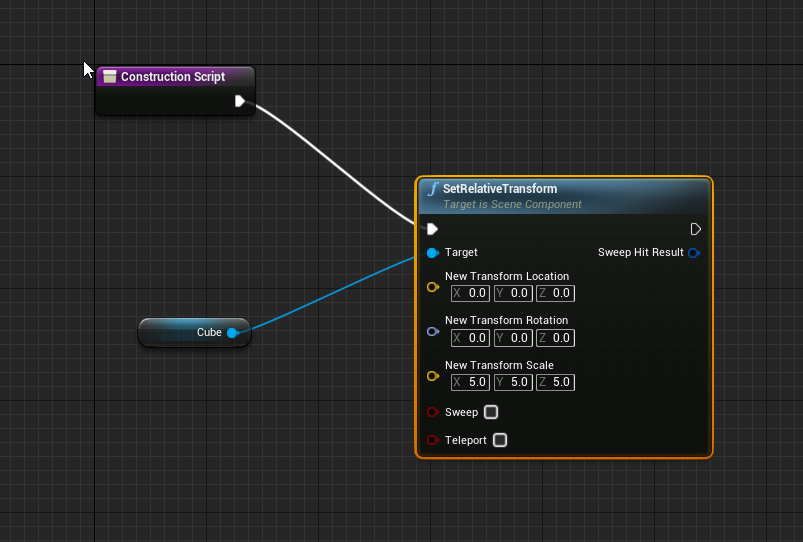
@stray island why don't you justset it in the scale section of the component?
olive sedge
@stray island https://i.imgur.com/vm0zeMm.png
 stray island
I get u but i said i want it editable in editor
stray island
Yes , they are two cubes
I dont want a new veriable for each cube
One variable , different values of it
stray island
Maybe its possible through structure or list variable of some indexing , i think i passed by something similar before
 tawny lantern
like array?
stray island
Yes maybe , I’m not sure 😇
tawny lantern
https://docs.unrealengine.com/en-US/ProgrammingAndScripting/Blueprints/UserGuide/Arrays/index.html it looks like it
An overview of Blueprint Arrays, including creation, editing, and use.
it could work the way u want t
o
olive sedge
@stray island is this only about the editor?
that you don't want two seperate fields?
stray island
Yes
olive sedge
@stray island that's one of those things where I really have to ask why
stray island
I want two separate fields
olive sedge
then make it two variables?!
stray island
I want to duplicate the cubes and let them be controled by new variables so i decide each
With recreating new variables each time i add a cuve
Without recreating *
Sorry i think i didnt make sense
stray island
Oh
Its like how u duplicate the actor in scene so it have its independent var , but i want that to happen inside the bp itsself
olive sedge
@stray island the cubes have their own scale variables by default tho, why not just set them there?
stray island
Because that wont be in editor , i have to go to bp
olive sedge
but it is in the editor
stray island
Wdym , they are static meshes inside an actor
sonic cipher
why it does that please ? https://gyazo.com/9e9bd1f755cda59978949e1a31b1a88d https://gyazo.com/71b6c4924fac1851361443089d0650be
 olive sedge
@stray island https://i.imgur.com/csSJE6i.png

@sonic cipher you're getting location and setting rotation
undone wing
Can we create or add key-value pair to a map at runtime using blueprints?
stray island
olive sedge
<@!768035735470080000> https://i.imgur.com/csSJE6i.png
Thats inside the BP i meant inside the editor / map
olive sedge
@stray island oh, so per instance.. well, just punch in variables.. Don't see why not
olive sedge
undone wing
Can we create or add key-value pair to a map at runtime using blueprints?
yes, but don't use maps if you can help it
undone wing
olive sedge
yes, but don't use maps if you can help it
Can you please tell how? And why should't we use it?
maiden wadi
Cause they the devil!
undone wing
I'm getting a Json string with key-value pair, which data structure do you reccomend for storing that information?
maiden wadi
Nah, in seriousness maps are fine, but they're for quick and small use cases and they're not networkable. In most use cases, people will us an array of structs with helper functions for adding/removing/modifying/finding stuff in the array. Maps are also not very blueprint friendly.
undone wing
Hmmm, I can use struct I guess...
maiden wadi
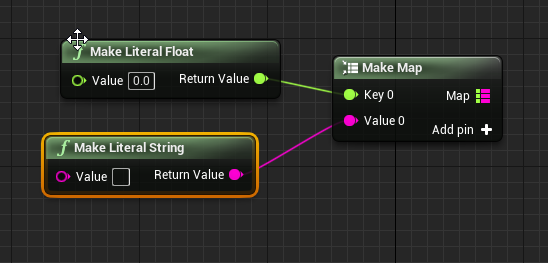
If you want to use maps, go for it. There are some helper functions for doing what you want. At runtime, you just need to call Add to add a new K,V to the map.
olive sedge
@undone wing if you really want to use maps, is this what you're searching for? https://i.imgur.com/iIfSEGZ.png
 undone wing
This should help. I guess I have to learn how to search for nodes and read the documentation more carefully. Thanks y'all!
proud hull
stray island
Double-click that timeline node. Then setup your new track.
orchid garden
stray island
How did he add new track to time line
ember crescent
dose someone know why it only works the first time? then second time i do it it will happen instant and not follow the timeline.
its a cube that i want to "roll"/rotate 90 degrees
 trim matrix
Hello! I want to move the player to the location of an object and also turn to the same rotation as that object - basically move and turn to look at this object. I can get it to move but not to rotate. Here's my setup.
maiden wadi
You're going to need to do a custom implementation for that, because to rotate the character, you need to affect their Control Rotation. Rotating the character itself isn't really enough because control rotation will just override it.
@trim matrix Actually, contrary to what I just said, you might be able to do this by disabling control rotations on the character, then setting the control rotation to that arrow's rotation, then reenabling UseControllerRotationYaw on the completed side.
 naive heron
Hey guys I am needing some help I currently built a radial menu that tells me which piece of the pie I am in but I am having problems connecting functionality the different areas. Meaning I have it setup that when the mouse is in the top are of the screen I want to be able to play a certain attack anim and when in the left are of the screen play a different attack anim etc.
This is what I have
Sorry not trying to over take the previous convo
trim matrix
@weary jackal @maiden wadi Thanks I'll give that a try
Is there a way to get all the values in one array into another? Without for looping thru index?
weary jackal
naive heron
Sorry not trying to over take the previous convo
Is it like weapon wheel where based on the mose position, the slot selected?
naive heron
Yes pretty much except its constant
Basically its for checking where the mouse is so you can attack from that area
Left,top,right,down
weary jackal
So you can provide a center point of the screen as 2d vector and another point is your mouse. On event tick calculate the angle between 2 points. If the angle is between - 45 to +45 then top,... And so on
naive heron
yes I have that it works perfectly what my problem is setting functionality to my character from those points when the mouse is clicked.
So right now it will highlight which area I am in and tell me which area i am in when the mouse is in the area. I am trying to set in the player character when the right mouse button is pressed and it communicates with the widget and checks the mouse position then executes the correct anim.
Its simple fix I am just way over thinking this.
 ripe rose
i have a projectile whose position is recorded every tick, and then the player bp does something with those positions. but i noticed that the projectile's position doesn't update until after the player bp's logic occurs. i tried switching player bp tick group to post-update, but that didn't help (perhaps because the player is the "owner" of the projectile?)
my work-around was to extrapolate the projectile's latest position using its velocity. however, i'm not sure this is a robust solution in the case of a velocity which changes unexpectedly
is there any way to make the pb logic occur after the position of the other actor is updated?
 thin ferry
Anyone every use a physics thruster I am not finding much for tutorials out there.
 warm ermine
Anyone know how I would update my pawns yaw rotation only while running?
winter garnet
Hey!
I have a simple int called Num being set as 25 at ConstructionScript. When I try to read its value from within the same Actor on BeginPlay, its value is 0. Why's that?
(FWIW, this Actor is spawned on my GameInstance, at the Init event.)
 hexed saffron
Hi, I have a very weird problem with OnComponentBeginOverlap. It is working with the Sphere Collision in the component list. But I try to spawn the Sphere Collision only when I need on the Pawn. But the Component Begin Overlap isn´t working now. I checked everything, the GenerateOveralaps is active, the overlappingBP has no wrong settings as far as I can see. What I´m missing here? What I´m doing wrong? Thanks for help in advance.
trim matrix
Is there a way to reduce the size of these mini node conversion things? (idk what they are called tbh 😆 )
 minor merlin
trim matrix
Is there a way to reduce the size of these mini node conversion things? (idk wha...
minor merlin
trim matrix
Is there a way to reduce the size of these mini node conversion things? (idk wha...
Nop sorry, and yeah that's conversion node (or at least that's how I call them ^^)
trim matrix
Alright Thanks 😄 I will just make the whole function in a macro or something haha
minor merlin
winter garnet
(FWIW, this Actor is spawned on my GameInstance, at the `Init` event.)
Can you send a screen? else just set the default value as 25, but not worth for everything
minor merlin
hexed saffron
Hi, I have a very weird problem with OnComponentBeginOverlap. It is working with...
Are you rebinding your event?
 rare gale
ember crescent
dose someone know why it only works the first time? then second time i do it it ...
rare gale
ember crescent
dose someone know why it only works the first time? then second time i do it it ...
Have you tried Play from Start? I can't see your image very well, so that may not be it, but something worth trying.
minor merlin
Since it's not an original part of the mesh you should do it, because the default event just works for native part of the blueprint
hexed saffron
minor merlin
Since it's not an original part of the mesh you should do it, because the defaul...
Assign On Component Begin Overlap? No didn´t do that.... oh because it´s not in the Component List it doesn´t count as part of the Pawn?
Ah okay allright, that could be the problem, yeah....
minor merlin
Yes ^^
hexed saffron
minor merlin
Yes ^^
Ah that makes sense, thank you. Man I tried the entire last night several possibilities not and wasn´t thinking about assigning it. Okay, I´m trying it right now 👍
minor merlin
hexed saffron
Ah that makes sense, thank you. Man I tried the entire last night several possib...
Just right click on the variable name, add event, very easy and that make the work. Np 😄
 simple berry
hey guys, im trying to export my game to test some of the features, but for some reason after it loads up the menu level, it decides to give you a black screen with oddly oversized text from the pause menu, any idea whats up with it? im on 4.25
hexed saffron
minor merlin
Just right click on the variable name, add event, very easy and that make the wo...
The overlap code is in another node. So can I do that with the Set varialbe. Also Get Sphere Collision Component -> assign overlap. Or does it has to be connected to Add Sphere Collision?
minor merlin
hexed saffron
The overlap code is in another node. So can I do that with the Set varialbe. Als...
Well you just have to move the event? And yes that's another option if the first don't work
If you cut paste it's not good?
hexed saffron
No it´s not firing the code yet. But still testing ^^
The BindEventToOnComponentBeginOverlap has to be activated before the Sphere overlapps with the other object right?
maiden wadi
The binding means "Call this event when this component is overlapped by something", so you need to bind the event before the overlap call occurs.
trim matrix
Is there a way to print text in the details panel for an object? (using construction scripts) and if so what do I need to look up for that 🤔
I.e. you activate a bool and it changes the text to a warning or something similar.
solemn parcel
Hey I'm having troubles understanding why the AI continues attacking rentlessly. Any thoughts ?
hexed saffron
maiden wadi
The binding means "Call this event when this component is overlapped by somethin...
Yeah it was not working. I copied it out of the other Node and copied it directly to the Node where the EventBind is, now it does work. Need to change a little bit logic here then. Thank you guys, I appreciate it, I know what to do now. 🙂
trim matrix
Also is there a way to have it so if I check Stop Timer, then it hides some of the public variables?
maiden wadi
@trim matrix Unless something has changed, I believe that is a C++ thing using meta specifiers.
trim matrix
Alright, Thanks :)
@maiden wadi Would that be the same for just displaying text on the window? (Needs to be done with C++ and cant be done with Blueprints right?)
trim matrix
Hey guys ! 🙂 I have a problem with changing the speed of my character in trigger box. The speed is defined in anim graph and i want to set "walking" state when my speed is for example 50. I tried to do it, however my charatcer does not look like it is affected. My characters comes from Epic Games - Paragon Game content.
This is connected to event begin play in my character bp
This is my what i have done in trigger box on the scene
I am kinda new in bps and ue4 so i come here for the help
wild harbor
how do i turn these into the Orient/ Yaw rotation instance? i cant find the option to turn into the last picture
maiden wadi
@wild harbor That's just a macro.
maiden wadi
@trim matrix The speed of your character, or the speed of an animation? Because the character speed is set in the CharacterMovementComponent.
wild harbor
"Inputs generated can not be put into a Macro it says
after attempting to collapse to macro
maiden wadi
You're doing something odd then. Just make a new macro, get the character's CMC, drag off of it and get those two set nodes, and add the inputs by dragging to the macro thing on the left.
viral kettle
I want to delete an actor when i pick up another actor. How can I get the reference of the actor into the graph of the other actor?
wild harbor
okay ill try that
viral kettle
How do I get the Object to cast to
maiden wadi
@viral kettle You need a reference to an object before you can cast that reference to something else.
warm ermine
warm ermine
Anyone know how I would update my pawns yaw rotation only while running?
Never mind. I figured it out lol
 tight hound
I made a blueprint to make my ship move along the spline and it works well with buoyancy but if i add the rotation blueprint to it ... it behaves strange 😂
maiden wadi
@tight hound Is the ship even moving? It doesn't look like it's moving along the spline?
tight hound
maiden wadi
<@!337982967827791874> Is the ship even moving? It doesn't look like it's moving...
after adding get rotation at distance along spline but without it it moves but i have to change set world transform to set world location ... just give me seconds
trim matrix
maiden wadi
<@456226577798135808> The speed of your character, or the speed of an animation?...
The speed of my character, because my animation state like "running or idle" is based on speed defined in anim graph as far as i understand. Take a look
transitions in this anim graps have that variable speed that is in every transition
I tried to do "walk" state and transition to that state based on other transitions that have already been in Paragon-Revenant pack
 cyan hornet
How would I change properties from here
maiden wadi
You need to get the character's CMC and set max walk speed to make the character move faster or slower.
cyan hornet
In here
dawn gazelle
cyan hornet
How would I change properties from here
Get your reference to your ArrowProjectile your spawning, then get its ProjectileMovement component and set whatever value you want in there.
cyan hornet
dawn gazelle
Get your reference to your ArrowProjectile your spawning, then get its Projectil...
Thanks so much for the reply! I started reading about references and this looks great :)
cyan hornet
dawn gazelle
Get your reference to your ArrowProjectile your spawning, then get its Projectil...
Is this ok for the reference? Thanks!
dawn gazelle
So long as your "Arrow" variable type is set to "Arrow Projectile" object reference.
cyan hornet
ok :) thanks
trim matrix
maiden wadi
You need to get the character's CMC and set max walk speed to make the character...
But if i simply set max walk speed my character will still use "run" state but just will move slower. How to properly set there in trigger box that "walk" state with slowed max movement ?
is there any simple thing like "set character state based on anim bp" that I can use in trigger box?
faint pasture
trim matrix
is there any simple thing like "set character state based on anim bp" that I can...
What exactly are you trying to do?
I'm thinking you want a locomotion state enum which sets the max speed.
trim matrix
I want to create in my project an area, where my character moves slower and uses not "run" state with running animation, but state with "walk" animation
faint pasture
K so make an enum representing the state. When it changes, update the max speed
That same enum would drive the anim bp
I would use repnotify OR make an event ChangeMoveState or whatever to do all the logic surrounding changing state.
solemn parcel
How can I get reference of AnimMontage in a BP ?
 dusk basin
just curious if anyone knows how to replicate a sequence in sequencer meaning when the server would start the cinematic when lets say all the players joined
proud hull
trim matrix
I want to create in my project an area, where my character moves slower and uses...
What about using a blend space?
trim matrix
Yeah, probably will do that
 grim meadow
So i managed to get it where my enemy follows along a spline when it spawns, however when i spawn a new bad guy to follow the same spline it stops the first one in its tracks. How can i make it so that all new enemies spawned wont mess up the pathing on prevously spawned enemies already on track?
trim matrix
Hello! I have an actor in my world outliner that, when triggered, create a UI Widget. How can I pass a variable along to that newly created UI Widget?
faint pasture
@grim meadow put the movement logic on the enemy, not on whatever is spawning the enemies
sonic cipher
https://gyazo.com/9f63dc445241270b3b9d575105b55493 is it possible to make a widget and set the outputs ingame ?

Or, how can i get the object list in the game in a widget ? 🙂 thanks
 thorny cape
anyone know how I can have a sound track play and loop during gameplay as long as the player is alive?
and have a different one play in the menus
and then when the game starts it ends?
grim meadow
@faint pasture Thanks I had a feeling that was the case and thats what i stared with but i could not figure it out so i tried it in the spawner. But i ended up figuring out how to do it in the enemy itself now. works great.
cold raft
sonic cipher
Or, how can i get the object list in the game in a widget ? 🙂 thanks
you can use Get All Actors of Class to get a list of the objects, otherwise keep track of them when you spawn them
sonic cipher
cold raft
you can use Get All Actors of Class to get a list of the objects, otherwise keep...
thanks i will try 🙂
cold raft
thorny cape
anyone know how I can have a sound track play and loop during gameplay as long a...
Have a look at Sound Cues - you can set them to loop (assuming you have a sound file that loops nicely). I use this to start and stop sounds playing
and this to stop the sound
 queen lichen
hello there 🙂 my last post was trying to get the pawn sphere to gain a point when it overlaps the actor wall(score). this screenshot is during gameplay, the score widget shows but the point system doesn't, at least this is the only thing that isn't working atm
this is the function score, im having trouble to cast it to pawn, i figure there's some specific way to cast it.
wild harbor
@maiden wadi Thanks for the tips with making a new macro, it worked i just need to create them in proper order etc
dawn gazelle
queen lichen
this is the function score, im having trouble to cast it to pawn, i figure there...
What is actually calling this function? As this function is right now, it'd do nothing. "Get player pawn" returns a reference to a "Pawn" object reference, and casting that to "Pawn" means it would always succeed anyway, and then the return value is set to blank, so it's doing absolutely nothing.
queen lichen
@dawn gazelle the widget name W_score
dawn gazelle
queen lichen
<@!218956378654507008> the widget name W_score
Ok, what is keeping track of the score itself? How is it that the function is getting triggered at all (screenshots will help)
dawn gazelle
What is the name of the blueprint in that screenshot (should be at the top of the window)
Something like this - in my example, the BP name is GA_WallRunning
queen lichen
@dawn gazelle Puppy_Pawn
dawn gazelle
Ok, so then in your Score function, cast to "Puppy_Pawn" instead.
grim meadow
quick Q I have a pawn collision on an actor. I want to shoot a line trace at it and apply damage. However the line trace goes throught the collision with no hit generated. Any idea of a fix for this maybe change collision type or turn on a certain setting?
rough jay
grim meadow
quick Q I have a pawn collision on an actor. I want to shoot a line trace at it ...
is the collision set visible? or block i mean in collision settings
dawn gazelle
From there, you should be able to drag out "Score" and connect it like so.
grim meadow
@rough jay so for trace responses it is visability is set to ingore and the line trace goes through it. But if i change it to block than it blocks the trace but the event hit does not come through to apply damage.
rough jay
can i see the bp for applying damage with linetrace
grim meadow
@rough jay I know the code works as it works fine on other enemies I made. Its just the collission. It is not generating a hit. I know that as as i have a particle effect that spawns on a hit which works on other enemies/ground but still not the enemy with collision issues.
queen lichen
@dawn gazelle alright ill do that and aee where i go from There :), thank u!
wild harbor
I'm in the process of integrating "CompleteRPGsystem" and "AdvancedLocomotionsystem" If anyone here has gone through this processes already and comfortable having the brain picked apart on the issues, please drop me a PM. thanks!
 clever condor
If there any way to copy all of an actors variables and paste them into another actor? I cannot make a child class, because the actor I want to move the variable to is already a child of an actor.
Or is there a way to make an actor a child of two classes?
dawn gazelle
clever condor
Or is there a way to make an actor a child of two classes?
Definitely not able to parent an object to two classes, it's not how classes work. As far as copying variables over, (like making sure the blueprint itself has the types & names of variables) I'm not aware of any means to do something like that.
cold raft
clever condor
If there any way to copy all of an actors variables and paste them into another ...
Not all at once that I am aware of - but right click Copy on the source BP and right click on the variable header of the Destination BP and click 'Paste Variable (or Paste Function if its a function), works pretty well and fast [do the variables first)
 keen goblet
@trim matrix The GameInstance has an Init event, which is the earliest event that fires in a UE4 app as far as I'm aware
 dark crow
Project Settings -> Project -> Map & Modes -> Game Instance
faint pasture
@clever condor sounds like a good job for a component.
trim matrix
👋 Hello, everyone. I keep getting errors for variables I don't even think I still have in my code, even though it says they're there. I've tried recompiling 3 times and deleting what I think is the problem but the same errors keep coming up. Thanks for your help :)
 odd veldt
Sorry for the stupid question, but I can't find a answer for it in google...
Is the "Key" in a Map variable unique?
dawn gazelle
Yes, it must be unique.
If you try to set another value to the same key, it'll overwrite what the map had stored at that key.
rough jay
if there is no value in an array(not 0 or above) does that mean its negative?
dawn gazelle
rough jay
if there is no value in an array(not 0 or above) does that mean its negative?
If you were to test the length of an empty array, you would get 0. If you were to check the last index, it would be -1.
odd veldt
dawn gazelle
If you try to set another value to the same key, it'll overwrite what the map ha...
nice, this is exactly what i need
thanks
rough jay
i thought an empty array had no value and an actor in an array is 0
im just confused on how this worked when it should be the same thing?
dawn gazelle
This means if the length > or = 0, which means that the array could contain nothing. You would want to do a >0 if you only want it to run if the array has something.
sonic cipher
How can i add an actor in an array please ? https://gyazo.com/5eedb84e458055a2eb32fa1097f783c5 this does not work
 dawn gazelle
This would mean only if the array has nothing or less, so it would only execute ever if the array was empty.
dawn gazelle
sonic cipher
How can i add an actor in an array please ? https://gyazo.com/5eedb84e458055a2eb...
That appears to be adding an object to a set, not an array.
sonic cipher
dawn gazelle
That appears to be adding an object to a set, not an array.
https://gyazo.com/e224cc584b74b8dac6864c6f2d980b24 ive tryed with this too :v
 dawn gazelle
Not the same thing.
That's setting the array, meaning not adding to it.
This is adding
sonic cipher
The add node ? ^^
dawn gazelle
Yes, it adds items to the array.
sonic cipher

Doesnt seems to work hum i don't get it
Does it apply in the editor in realtime ?
when it add ?

here ?
sonic cipher
i dont see it, but the door should open when i add, when i add in the editor it open
dark crow
That's if you wanna add a direct reference from the level
You won't see anything in there
sonic cipher
okay so it is good, but why the door doesnt open when i do that :/
dark crow
You could check if the Hit Actor has any reference stored
If it returns None then you have a problem
sonic cipher
yep i will do a test with this 🙂 thanks
it doesn't print on the tick
when i add in editor it print
dark crow
Perhaps a more complete overview of what you're trying to achieve could help isolate the issue
Like i don't know where you get Hit Actor 2 from
sonic cipher
Hum okay, so i would like to add the Door in the input of my Laser (so it can open) https://gyazo.com/bbf52e888bdc4ac999a290fda34771f6

For this, i got a linetrace that get the HitActor2
so when i press M on the door, it is the HitActor2
then when i press the Widget button, i would like to add this HitActor2 (Door) to the Laser array
dark crow
First thing to check as i said is if the Hit Actor 2 is Valid first of all
If the reference is set succesfully
sonic cipher
https://gyazo.com/f48f718d1a8e99839d3da0fd4c496609 this is when i set array manually
sonic cipher
dark crow
First thing to check as i said is if the Hit Actor 2 is Valid first of all
okay, i'm doing it
seems to be valid, it does not print the is not https://gyazo.com/33c37607d64cba953818495814308110
 cold raft
trim matrix
👋 Hello, everyone. I keep getting errors for variables I don't even think I sti...
cold raft
trim matrix
👋 Hello, everyone. I keep getting errors for variables I don't even think I sti...
did you recently change the characters skeletal mesh? Might be bones on the skeleton
sonic cipher
Okay, oops ^^
trim matrix
cold raft
did you recently change the characters skeletal mesh? Might be bones on the skel...
yeah i was messing with the animations
lemme check
dark crow
A question i just noticed
In the Cast why are you getting Hit Actor 2 and setting it to Hit Actor 2 again?
Wops
sonic cipher
I should not set it ? ^^
dark crow
My question is why are you setting it from a get of the same name
sonic cipher
well i deleted it and still the same
i set it in case i need the node :v
dark crow
I know, setting it is normal, just didn't get the part where you get it from the cast to set it again instead of setting it directly from the cast
sonic cipher
yeah you aare right, my mistake lol i was just trying stuff
dark crow
It surely is something related with how you get the door
Cause if you set it manually and it works, means it's a reference problem
sonic cipher
maybe get the component and not the actor ?
dark crow
Thing is, you manually set it and it worked, so the variables are right and how the code executes, but it fails to get a valid reference at the beginning if not done manually
sonic cipher
oh
i found out that if i go in the LaserInput blueprint and on event tick add the HitActor2 then it work
 dark crow
Bettee not to do that xD
sonic cipher
but why it doesnt work on button press in my widget lol
sonic cipher
dark crow
Bettee not to do that xD
x) my pc gonna explode
dark crow
You keep adding it to the Array, it can get out of hamd yeh
sonic cipher
Hahah i'm mad
dark crow
Does the Widget have a reference when you press?
 spring yoke
good, does anyone know how to capture mouse speed in unreal engine?
sonic cipher
dark crow
Does the Widget have a reference when you press?
Hum nope
dark crow
Like does it know that pressing that button equals to sending a reference of the door somewhere?
sonic cipher

it is just this, it should know that when i press the button it add something, doesn't it ?
dark crow
So, you hold a reference of what you hit on your Character right?
Aka this Hit Actor 2
sonic cipher
yep this is it !
dark crow
And you Add that reference to the Array
sonic cipher
yes ! i mean i try aha
dark crow
Do you get the Laser Input from somewhere or it's just an emtpy input of an Actor Object?
sonic cipher
because i just made a variable then grab it but i didnt set it
dark crow
Cause if it's a Blueprint, you need a proper reference to it
Or it will hold None
Like, no reference
sonic cipher
The variable is the laser with the array
dark crow
You have just 1 laser in the level right?
sonic cipher


for now but what if i have more ?
sonic cipher
dark crow
You have just 1 laser in the level right?
if i add more lasers, it will add the door to every lasers right ?
okay so if i understand i need to cast
dark crow
If you wanna do that, fast way is get all actors of class and for each loop of them Add
So get all BP Laser Inputs for example
And for each one of them it will do something
Array Element holds the reference to the laser
If you have 10 lasers, it will go through all 10 of them
dark crow
It's the Array Element
To make sure it works right
Create Get All Actors Of Class
Set it to BP Laser Input
After that created the For Each Loop from Out Actors
 sonic cipher
I can't get the variable from the array element
dark crow
To make sure you can just recreate the For Each Loop by draggin from Out Actor
 dark crow
What's the error?
 sweet swan
Adding/rearranging a field in a struct breaks things in odd ways that I'm having trouble debugging. Any insight on this?
dark crow
sonic cipher
It doesn't print anymore at the end and doesn't seems to work :v
I don't see anything wrong per see there, you're getting all laser pointers and adding the hit actor to them all
dawn gazelle
sweet swan
Adding/rearranging a field in a struct breaks things in odd ways that I'm having...
Build your struct as you want it before you start using it. You are bound to run into problems otherwise.
keen goblet
@sweet swan Perhaps try refreshing every node where the struct is referenced
sonic cipher
dark crow
I don't see anything wrong per see there, you're getting all laser pointers and ...
Hum i don't know why ... i will try to fix this thanks you a lot !
dark crow
Perhaps just in case have a failure Print String Debug in the Cast Failed just to make sure the Cast is Valid
sonic cipher
strange that it work on event tick (inside the laser BP) but not when i copy the same nodes after the other nodes
sonic cipher
dark crow
Perhaps just in case have a failure Print String Debug in the Cast Failed just t...
yep i should do that more often ^^
https://gyazo.com/0c69a86d9103815936c8cbc4dfd4c731 < here it doesnt work
 keen goblet
@sweet swan I believe that fixed my problems when I've had wonky behavior after modifying a struct
sonic cipher
https://gyazo.com/927ef5db41442dcb17994933b0d532fc < here it works

https://gyazo.com/168ba217033f68f9e809295c98705a4a the developper of the laser told me that


don't know if this is where the problem come from
sweet swan
keen goblet
<@!434005121509228547> I believe that fixed my problems when I've had wonky beha...
is there a way to refresh all the nodes of a component? I have a lot of references...
dark crow
I sadly don't know how the entire system works, so wouldn't know how to help you in depth, just make sure you get the references right and check if they're valid
As i said since setting the reference manually worked, it's a reference problem
How you're getting it
keen goblet
@sweet swan If you click on a graph and press Ctrl+A, it highlights all the nodes. Then you can right-click any one and do Refresh Nodes
Don't know of a way to highlight all nodes in every graph in a BP, tho
sonic cipher
dark crow
As i said since setting the reference manually worked, it's a reference problem
Yeah it could be that 🙂 thyanks for your help
sweet swan
keen goblet
<@!434005121509228547> If you click on a graph and press Ctrl+A, it highlights a...
Took me 30 minutes to go through them all but that did it thank you 🎉
 pliant jewel
Anyone familiar with the quirks of Physics constraints?
I have an Actor for my player that has components for the motion controllers.
Up until now, i've used a no collision skeletal mesh for the hands, that is parented to the motion controller.
Now I want to set up physics on the hands, so they can collide with things, so Im using the current skeletal mesh as a "ghost" image, of where the hands should be, and would like to have another skeletal mesh with collision on it, that is put in place via a physics constraint.
I've set it up, but the constraint doesn't seem to do anything. I've tried making both the motion controller, and the "ghost" hand the parent object, to no avail.
The physics simulated hand either falls to the ground, or gets sent to (0,0,0).
Anything I can read up on, or any tricks i should know about?
 pastel fern
I'm afraid I have a noob question, I have played with UE4 for quite awhile but Im just getting into network replication and I am a little lost... I am using VoxelPlugin and removing terrain with each shot.
I am trying to fire a projectile from an actor held by the player character. If I spawn the projectile to the server from the player character everything works as expected.
If I spawn the projectile to the server from the weapon actor instead the multicast required by the plugin fails to return information to the server.
I have a suspicion that it has to do with the owner of the spawned actor, but I can't seem to find success through that road.
 vital ingot
Is there a way to store an output, and to retrieve it through other places without a line going across your entire board? Similar to how the cached poses work in the animgraph.
pliant jewel
@vital ingot right click, promote to local variable
vital ingot
I don't see that. This is a material; would that change anything?
pliant jewel
Oh ya, that may not work
 static charm
there's probably a method to "storing" variables by like rendering to a texture or a material function or something
u can ask in graphics channel which is for material questions
Aj Jones, i would be surprised if there is no VR ghost hand/hand outline tutorial?
there is VR chat here as well, dont know if its active or not though.
vital ingot
Kk. Tyvm I'll give there a shot.
pliant jewel
@static charm yea i was thinking my main issue was most likely the Physics constraint, as it simply didnt work.
static charm
yeah ive used physics constraints and they are tricky but haven't used them in the context of VR
 tardy kayak
What's the best way to get access to a folder of assets. For instance I want to get a folder of materials and loop though that I need a way to access it at runtime like the image below.
pliant jewel
I think it most likely has to do with the simulated skeletal mesh unparenting when physics starts simulating. Since i'm seeing it get moved to origin
static charm
without seeing exactly what you're doing, yes simulating a component(the skeletal mesh), that isnt root of an actor, will no longer be joined to actor's root/origin as you said.
static charm
i think there is some (free probably) plugins that expand on accessing assets though
tardy kayak
yeah can i access them right from a folder
I need a clean way to get a array of alot of materials
 worthy frost
but you cant do that at runtime
why do you need an array of lots of materials?
this sounds like a bad programming thing
tardy kayak
it needs to be a clean pipeline so that the user can change material of a object in game
worthy frost
well you could make an editor script that gets all materials in a folder, and stores them in an array in that blueprint
then you can loop through that array
be warned though, it will load ALL those materials all the time
static charm
to fix the 'bad progrmaming' part, he could use a soft reference for the material, right?
static charm
i mean we are already using blueprints, so we are already 'bad programming' 
tardy kayak
got any links to documentation on this stuff?
worthy frost
though normally for changing things like material colors etc, you would use an instance
then you just modify the params of that instance (like a different texture, etc)
static charm
if mean if you have like 20 materials, just add the references manually.
if you have 200
worthy frost
why can't that be the same material
and you just modify the instance?
its a lot cheaper
tardy kayak
yeah but the issues is the company i work for needs to expand this freely
static charm
write instructions for them to manually add more lol