#blueprint
402296 messages · Page 605 of 403
 open crypt
My scenarios are basicaly mini-disasters the player has to fix
Incident management technically
 maiden wadi
Well. In this case. If your print doesn't fire more than once, it's because some part of your VRBasePawn never level the trigger's capsule. It still considers that actor as overlapping, so it never fires it again. I assume you're trying to make this work when a player's in game hands overlap the capsule?
open crypt
 open crypt
maiden wadi
Well. In this case. If your print doesn't fire more than once, it's because some...
open crypt
maiden wadi
Well. In this case. If your print doesn't fire more than once, it's because some...
I don't care about their hands, I want their pawn to do it - when I check the overlapping actor most of the time, it's the MotionController - but again, I do not care if that overlaps because it has a long laser pointer which could trigger this thing, I want it to ignore that....normally I wouldn't care but it is stopping the overlap from detecting my VR pawn
I'm legit standing in the middle of that trigger box and it's not overlapping
maiden wadi
The print does fire once though for the player pawn, right?
maiden wadi
Hm. Well if it's never showing for the player pawn at all, then I'd wager collisions. What channels is the capsule set on, and what collision does your VR Pawn's capsule use?
maiden wadi
Even if you back out of the capsule and run back into it?
 dull gale
Hi everyone. I could use some help as I don't quite understand what's going on here. I'll try to explain the situation the best I can:
I have a character blueprint and a weapon blueprint here. When reloading, both the character and the weapon have animation montages that play when I press R.
Character animation works fine, Weapon animation does not, returning me a "accessed none" error. I managed to pinpoint the error to the fact that I'm spawning the weapon in my player's hands.
If I connect the "Target M16" to the spawn return value, everything works, but if I get a reference to the class the weapon belongs to, it doesn't.
Could someone who understands Blueprint more than me explain why this happens, and maybe how I could possibly find a way around this? Thanks!
open crypt
maiden wadi
Even if you back out of the capsule and run back into it?
That's tricky - I only have teleport locomotion - so I can't back out - today I'm not in my normal office, so I don't have access to my VR equipment, but I can manually teleport it in there to test for collision
Basically - how do I make it keep it's "overlapability" so it will see my VR pawn?
dull gale
So, should it work if I use a "Cast To" instead?
maiden wadi
@dull gale No. You should set Test to the actor that you spawned. Test is a container. It's just an empty variable of the type WeaponBase. It knows that it should hold a pointer to an actor that is a WeaponBase, but it doesn't know which one. You have to tell it which one by setting it.
dull gale
Oh, I think I'm getting it
maiden wadi
@open crypt BeginOverlap is only called once per time that the overlapper enters the overlappee's component. So if you're teleporting into it, it should only fire one time until you teleport out and then back in.
dull gale
thanks for the help, let's see if I can fix it
open crypt
maiden wadi
<@!273265779175194624> BeginOverlap is only called once per time that the overla...
What happens if something teleports into it one or two frames BEFORE the desired overlapper does?
maiden wadi
@dull gale This may help a bit more.
dull gale
was about to say, this worked!
maiden wadi
@open crypt The overlap fires for that object, then it fires again for the one that teleports into it. It will fire once for every single component that overlaps it. So technically if you have three components on your VR pawn that can overlap that trigger, it'll run three times.
dull gale
it's basically what you put on the screenshot, but thanks for not telling me straight away! the best help is the one that helps us solve the problem, not tell us the solution
open crypt
Okay, that's what I wanted to confirm, thank you
Confused - triggering what I want, which is this call for this event dispatcher
and this fires before, so I know the event is bound correctly
but the event that is bound to, this doesn't seem to want to fire
maiden wadi
Do any prints or breakpoints fire from the MakeStuffFall event?
open crypt
No
at least the event itself you see there (3rd image with breakpoint) never breaks
But I am using a new 3rd person pawn and switched it out and it triggers the overlap event (and calling the event dispatcher) consistently every time
and the event that Binds that dispatcher to the "Make stuff fall" fires first, so it's not an order of execution thing
 unborn maple
is there a reason for only one of my set promote to variable on my widget is failing saying access to none when trying to set visibility. it only one of the widget but in debug it show it storing the info
open crypt
unborn maple
is there a reason for only one of my set promote to variable on my widget is fai...
The "timing" of your setting the variable is probably off
unborn maple
not sure what timing it need im promoting the set variable after i set the other widgets
and there not failing
open crypt
is the variable details, maybe it is set to read only
unborn maple
it not
the widget are also in the same blueprints
should i add a delay after adding each viewport
open crypt
let me see the details of the variable itself
unborn maple
open crypt
@maiden wadi that event fires but it goes nowhere? what gives ?
open crypt
unborn maple
Try clicking "expose on spawn"
 dapper siren
Dumb question:
you can only assign a custom event dispatch if you Cast to that actor first, right?
 open crypt
dapper siren
Dumb question:
you can only assign a custom event dispatch if you Cast to that a...
open crypt
dapper siren
Dumb question:
you can only assign a custom event dispatch if you Cast to that a...
I have no idea, and I never thought about that, maybe that's my problem too
dapper siren
There's no way to get that custom event any other way i dont think right?
Yah @open crypt , i can't find any other way tbh
open crypt
I'm doing it because i need to have events triggered on my level blueprint itself
dapper siren
Because the dispatch requires that specific actor
ya
same boat lol
i mean i guess its fine
but
open crypt
It's not fine lol - it doesn't work
 trim matrix
can you use animations on level blueprint?
unborn maple
still getting error
trim matrix
player animations
open crypt
yes
open crypt
unborn maple
still getting error
try the delay, and also put instance editable and make sure it's exposed on spawn
trim matrix
open crypt
yes
Can you use them on TriggerBox and what conponent do i need to make it happen?
open crypt
trim matrix
Can you use them on TriggerBox and what conponent do i need to make it happen?
I'm the wrong guy to ask about triggerboxes, scroll up and you'll see I'm having issues too - I'd first make sure you can get the animations to play correctly, usually it's just Set Animation and then play animation
open crypt
unborn maple
wowwwwwwww
This is important - play with the delay, try like .1 ms, then .05, then try delaying just a frame or too, figure out where the line is that stops it from working
Also you might try making that add to player viewport a function, with the output being that variable you want
I think encapsulating it in a function might correct the time issues
unborn maple
alright thanks for the help/
open crypt
No worries, i've always had trouble in particular with widgets
unborn maple
yeah this is like the 2nd game im making it a small game but i am trying to learn baby steps.
open crypt
You know about how to pass in existing variables when you spawn something right?
Like exposing on spawn and making instance editable, then you create the variable on the blueprint you are spawning, making sure you pick the same object type from the details...then when you spawn it, there will be a node you can pass in?
Btw, what is PlayerNowReady? That seems like a bool and not a widget
 frozen spear
Quick question: Im working on a coop lan game and in onhit event from my attacks Im trying to get forcefeedback on the controllers and camera shake, Im testing with a listen and 2 clients. all 3 of them are correctly playing thier camera shakes, however...only the first "client" is getting controller feedback, the server and client 2 are not getting any controller feedback....Ive also tried using spawn feedback at location which makes none of them get feedback.
what am i doing incorrectly?
the effects are being issued through a interface message call
open crypt
@frozen spear you read the network compendium right?
frozen spear
of course 🙂 but is there something i should look deeper into there?
mind you im like 8 months into dev on this multiplayer game
open crypt
Well if you got the forcefeedback back to fire once, then you know at least the implementation of force feedback is correct, and it's probably a replication issue
frozen spear
right, im using the client play X nodes
open crypt
Are you able to print out from the same event on all three? Basically have you confirm that the event is being broadcasted correctly?
frozen spear
let me check that now
i should mention i only want the person that did the attack to experience the cam shake(which is working) and controller shake(which only works on client 1)
open crypt
It might be as simple as just not having the node checked for replicates
On Your controller shake
maiden wadi
If you're on a listenserver setup and only the host is getting feedback, then it isn't being replicated, or your programming is serverside and does no local effects.
 fallen glade
Can someone help me run this project please? https://drive.google.com/file/d/1N6NZBdEv3pV3OUrbwKWUnOhmE9E2fJFS/view?usp=sharing I'm getting an error no matter what Blueprint I try to open or right click on. It's a simple game I've made for a company. I had to work on a mac book over the holidays and now I'm stuck. Delivery is in like 10 day lol. Please can someone have a look?
Google Docs
open crypt
@maiden wadi can you advise about why a custom event bound to an event dispatcher, where I've confirmed that the bind executes, and the call executes, why the custom event isn't firing?
maiden wadi
@open crypt Very hard to say. Initial thoughts are either that it's not being called, but you said you've seen the print just before that so it likely isn't that. Other idea is that your're calling it from an instance that hasn't had that dispatch bound. Assuming that both of those are false, I'd look at race conditions, but you've confirmed that the binding happens long before the call does.
frozen spear
the host doesnt get it, and only 1 of the 2 clients do...let me just redo this and see if its a replication issue. ill be back shortly 🙂
it become a replication issue i think becuase onhit is a server called event...so i just have to see how to work it to the correct clients
open crypt
maiden wadi
<@!273265779175194624> Very hard to say. Initial thoughts are either that it's n...
I've gotten it to fire before
the event happens on a level bp, if that matters
More information, this should help you @maiden wadi I'm using multiple instances of that Trigger Actor - while both overlap fine, only one of them successfully fires event on the Level BP - so what is it about event dispatchers and instances that I am not aware of, clearly that's the issue here
maiden wadi
Being on the level blueprint shouldn't matter at all since you have references to the trigger there. As for the binding, that shouldn't be the issue if you're using the correct pointer to the correct binding event.
open crypt
oh crap
that's it, i'm an idiot
I only referenced one of them
so the 2nd one was never added in there and bound
Ugh, there should be an easier way, I wanted an Actor who can send out a broadcast to any level BP and trigger events - the "call" could be the same, and the only thing I'd pass is an event number, then each different level could use it and fire unique events, but still numbered @maiden wadi any advice?
 exotic cradle
@unique harness So quick question. What would be the easiest way to debug the system I was working on that you’ve helped me with. I ask because I am able to place all the blocks I want but only on the front and the back of the mesh and it doesn’t allow me to place on the top and bottom nor the left or right sides of the mesh despite having sockets and their locations. I’ve been going at it for a couple days now trying to see why it wouldn’t let me and I have not produced anything productive in terms of finding out why it won’t let me.
 olive sedge
I want to display a bunch of widgets that i create dynamically. Is it enough to have a Horizontal Box and AddChild my widgets?
frozen spear
ok so after some debugging...all 3 see the same ts_controller when using the engine to debug 3 clients on the same system....im guessing this will have to be something I test with more than 1 computer to see if its working correctly
 split crescent
Anybody know why this doesn't work when I set interp speed to anything other than 0? If it is set to 0, it rotates my character in 1 frame. But if I set it to anything else, it doesn't rotate at all
 edgy halo
Hey so I am scripting on the default Character class, but want the camera to be stagnant and not follow the character? Any help on how I can do so?
 dawn gazelle
split crescent
dawn gazelle
split crescent
Is the execution path it's on fired every frame?
ie. through a timeline or on tick
split crescent
No it is called when I press left mouse button
 weary jackal
@edgy halo you mean camera should stay at the constant place and the background should change?
edgy halo
No like the character should be able to move but the camera should stay at the same place
@weary jackal
I kind of want it to be a top down view, but the camera shouldn't move at all
dawn gazelle
split crescent
No it is called when I press left mouse button
So that's the issue - you need a continually firing path for that to execute right. You could use something like a gate to control it.
weary jackal
well disable the camera in character bp and use a camera in level bp
edgy halo
weary jackal
well disable the camera in character bp and use a camera in level bp
where can I do that?
edgy halo
Ohk thanks
got it!
what are the advantages of using a character rather than using a basic actor class?
and scripting it yourself
split crescent
@dawn gazelle thank you very much 🙂 it works now!
weary jackal
basic actor class is only a simple class with almost no major inherited parent methods.
frozen spear
yeah its an engine issue, even just using a key event press, only the last player loaded on the same computer is the one that gets the controller shake....going to just assume for now that its working on all 3 players, since the camera shake is working perfectly on them and its executed in the same line of code
weary jackal
character class do have character movement, a capsule , and many other pre defined methods
edgy halo
weary jackal
character class do have character movement, a capsule , and many other pre defin...
Alright thanks a lot for your help!
open crypt
dapper siren
Because the dispatch requires that specific actor
So, I've realized something regarding this - you need to bind an event to each instance of the actor sending that event dispatch call
Seems obvious but my problem was I was treating each instance of the actor like it was just THE actor
once I dropped the reference to the trigger BP actor into the level BP (I only did it once, not for each one) and make a bind event, it worked
But at this point, I'm thinking it makes more sense to do an interface call
How does this look @maiden wadi - I need to make stuff happen on the individual scenario level blueprints hey are basically empty sublevels loaded with their area levels, where I stream in ruined buildings or effects, etc -
I have a trigger BP actor that I use to generate an overlap event - this event calls on an interface that makes various unique events happen, I'm sending out an interface with an INT input, that way when the level BP receives the interface call, it can switch on INT from the same event, but do different things - I have it working, but I wanted to make sure that this implementation won't lead me to problems later on. -before I was using event dispatchers which were working but I couldn't figure out a way to bind each instance easily, without just having it as a separate binding event - which method do you think is better to use?
My concern is mainly from the Trigger BP's getting the correct level instance - I guess I could control the logic but as long as I only implement these events on scenarios and only one is ever loaded at once, it should be fine
edgy halo
weary jackal
'set blend with target '
@weary jackal so I did that but I can't get a reference to the camera in the level? How do I get it?
Ohh nvm I understood
 unique harness
exotic cradle
<@209383767322656768> So quick question. What would be the easiest way to debug ...
unique harness
exotic cradle
<@209383767322656768> So quick question. What would be the easiest way to debug ...
Print statements and learn to use the unreal debugging with breakpoints.
unique harness
olive sedge
I want to display a bunch of widgets that i create dynamically. Is it enough to ...
Yes
olive sedge
@unique harness late reply but thanks!
my problem right now is that only one of the child widgets shows up
exotic cradle
unique harness
Print statements and learn to use the unreal debugging with breakpoints.
I have but it’s outputting what it’s supposed to but not actually doing what it’s supposed to do that’s why I’m stuck lol. I’ll try again in a bit once I’m free. Thank you for the help you have provided so far
dapper siren
@open crypt interesting thank you for sharing
 hollow drift
OK i am banging my head against a wall again. How to use "Dynamic Material Instances" proper?
Here the situation: I have a field of Different Tiles. Those tiles when uncovered will be replaced with a new Bp while the old one gets destroyed.
What I want to achieve: If you pick up the pawn, all tiles nearby will be highlighted (including the uncovered ones). In order to do so i have to create the "Dynamic material instance" to manipulate my Material Instances on runtime.
What I cannot understand: How to create the "Dynamic Material Instances" globaly and assign it to a specific Actor of my choice throught my PlayerControler. My PlayerControler already chooses which Actor should be selected.
What I got so far:
I could get it to work inside of my Playercontroler. But there it Loops throught an create Dynamic Material Instance each time i pick up the pawn to color in which valid tiles are accessible. I fear this will tear much on performance.
My second attempt on performance is to make the "Dynamic Material" globaly so I can cherrypick for which Actor it should apply later (I hope this is the right approach):
Either it does not work (above script)
Or either my whole Map is Green.
olive sedge
I can't find anything on this: how do you find the screen space extent of an actor?
I want to display a widget above (in screenspace) the actor
open crypt
@olive sedge I think you need a 3d widget, which you could resize dynamically based on a box that is on your actor
olive sedge
@open crypt I had a widget component on my actor so far but I can't place it above my actor in screenspace
if I place it on top of the actor in worldpsace an move the camera to be ISO or top down, it will be over the actor in screen space
and hide him
 keen seal
Hey, this is a very simple blueprint to make the enemy always face me.
However it doesn't work, he just moonwalks towards me
dawn gazelle
 fair sun
@keen seal Your start location should be the enemy actor location
rn you are finding look at rotation from player to player which is probably 0,0,0
also +1 to SetFocus
fair sun
What what? 😄
 lament ginkgo
Hey all, I have a question - still a little new but I need to get a lot of information from a pawn to a controller. So far I've been doing a cast from the controller, but having to do it for every single aspect is tedious. Is there an alternative to cast for when you need to get more than one piece of data?
fair sun
You can promote it to a variable and use that variable
lament ginkgo
You mean to like a global variable? (I have lua background)
fair sun
If you promote it to a variable in your pawn class it will stay inside your pawn class
but it will be visible to other classes
all variables in blueprints are public by default
lament ginkgo
But don't you still need to cast for each one? Like say I have three variables I need to get, would I not need to do a seperate cast for each? It feels like only the connection immediately from the cast will go through.
fair sun
also you can drag off that cast node multiple times
if you cast it and then promote it to a variable it will store it as a player controller
so no need for further casting
lament ginkgo
Oh, so you're saying cast to my pawn and then promote THAT to a variable.
fair sun
yes, that will work
 pulsar moss
LogScript: Warning: Script Msg: Attempted to access index 0 from array 'targets_52_051026F94335D78F715F8199768DE133' of length 0 in '/Game/Operator/Combat/F_OP_Action.F_OP_Action'! How do I actually find the offending node here? This warning gives no indication which BP it's coming from
 livid iris
New blueprint user here, coming from Houdini.
How would I create a constant value (float, vector, matrix, whatever)?
For example, i have a direction vector and want to multiply it with any constant value, say 3.624.
In Houdini I would create a „constant“ node, set type to „float“, and set value to „3.624“.
What is the blueprint equivalent?
pulsar moss
@livid iris depends on what's running the code, all variables must live somewhere, usually on an Actor or Component
one way is to create a blueprint function library and make a function return some constant, that would be accessible from everywhere
livid iris
@pulsar moss
That sounds interesting. Thanks.
To specify my question:
A Niagra module (point attraction force) is running the blueprint. I dove in and wanted to do some modifications in it (is that the way to go at all?).
I like the way blueprints work, very intuitive
dawn gazelle
pulsar moss
`LogScript: Warning: Script Msg: Attempted to access index 0 from array 'targets...
The BP should be F_OP_Action, and within it an array named "targets" or "targets_52"?
pulsar moss
there is no array named targets, the name looks dynamically generated
@livid iris I like blueprints a lot more than Houdini nodes, Houdini tends to have too much lingo, VOPs etc
SOPs
I keep getting confused
livid iris
@pulsar moss
Both are great.
Back to my question.
How would I do that in a Niagara module?
pulsar moss
I've no idea, never used Niagara, but if it can call blueprint then you should be able to just call the blueprint library function to get your constant
dawn gazelle
pulsar moss
there is no array named targets, the name looks dynamically generated
But you do have a BP named F_OP_Action? Going to guess that maybe it's a line trace and you're trying to grab result 0 from its array?
pulsar moss
@dawn gazelle nope that is the name of a structure...
 strange pike
does anyone here know how to run a function everyframe for a duration?
pulsar moss
is there no way to interrupt on access to index out of bounds? UE4 can automatically pause on accessing invalid
@strange pike you can use a timeline for that if you don't need it to happen exactly per tick
otherwise use a timer and check if the timer is active in your tick
strange pike
@pulsar moss how would i set that up?
pulsar moss
here's a video on how to use timers https://www.youtube.com/watch?v=QcN04l3Vlxk

In this Unreal engine 4 (UE4) tutorial I show how to use a timer. I implement a function to decrement an integer periodically by using a timer in a blueprint.
00:20 : Create actor blueprint
01:10 : Add decrement function in blueprint
02:15 : Set Timer that calls decrement function
See my social profiles here
G+: https://plus.google.com/+JayAnA...
I would just google for that. "UE4 blueprint timers"
strange pike
apolgies. i meant the timeline
pulsar moss
same, just google for timeline
right click add timeline, set it up, faster to google than me explaining it 😛
timeline node looks like this, your "thing to happen every frame" happens on Update pin
if you need to know the progress of a timeline you can create a float curve that goes from 0,0 to 1,1
that gives you the 0 to 1 variable you can use to measure normalized progress
if you need to know exact time you can multiply that value by duration
this controls duration
 tardy kayak
Any one got a good solution for having a preview of materials like this image. I just need a way to display the materials as 2D textures with out saving as 2D textures then uploading them.
pulsar moss
if you need to play at variable duration, you can just set the timeline's playrate to 1/duration
tardy kayak
tardy kayak
ok thanks
pulsar moss
dawn gazelle
The BP should be F_OP_Action, and within it an array named "targets" or "targets...
Finally found it 😄
 wooden holly
Does someone know how I can move the camera with WASD?
So that I have a floating camera
 rotund basalt
@wooden holly
http://letmegooglethat.com/?q=UE4+create+floating+pawn
exotic cradle
unique harness
Print statements and learn to use the unreal debugging with breakpoints.
Yeah. The reason it wasnt working at all was because my character BP wasnt communicating or using any of the functions inside of the MasterObjectBP. Found that out after 50 print strings and a few break points. 😄
Also the thing with having the masterBP set socket availability it seems is that regardless of what mesh I use the 1 socket it sets to "unavailable" than becomes the only socket I cannot attach to.
 jade bane
How to add UI widget to certain viewport? Not the first Viewport. But choose one of the other Viewports like 2, 3 or 4?
jade bane
will check it out, thx
wooden holly
rotund basalt
<@!381817894578814986>
http://letmegooglethat.com/?q=UE4+create+floating+pawn
That doesn't help me at all. I already searched the whole internet, therefore I'm asking
 tiny locust
I want the floor to fall when I wal on it, I did that, but for some reason the "hit event" doesnt seem to be working as I intended
I tried the event "Event ActorBeginOverlap" but it didnt work
jade bane
omg this is hilarious 😄
 sweet swan
Every so often when I'm working in blueprints my action selector (the popup that shows up after right clicking or dragging a node in a bp) starts flickering a lot and then shows a black box. I can still type and hit enter but I can't see the selection. Anyone had this happen before?
jade bane
To have a UI in one of multiple Viewports, You just have to have the one you want active
so it jumps between viewports, lols
tiny locust
jade bane
omg this is hilarious 😄
but what should i do lol
 orchid garden
this is something i've never gotten about unreal.... you setup a new project with some content and....
your stuck at 39% because its 'compiliing shaders'... but....
once it finally loads its going "8k shaders compiling"
 hearty moss
tiny locust
hearty moss
tiny locust
might want to double check "generate hit event" or whatever it's called is true in the object blueprint
 clear temple
orchid garden
once it finally loads its going "8k shaders compiling"
clear temple
orchid garden
once it finally loads its going "8k shaders compiling"
Cause it's compiling the engine stuff and some of the normal shaders
orchid garden
clear temple
Cause it's compiling the engine stuff and some of the normal shaders
if it were the normal engine shaders, it wouldn't take some projects 5 hrs to load while others will load in minutes.
and if you look at the task manager - its just shaders compiling thats using up all your cpu.
clear temple
Huh well I don't know sorry
orchid garden
this one only took 10min to load and after in...
oddly enough, shaders seem to compile 10x faster once the engine is up.
hearty moss
"only" 10 minutes? how big are these projects? jeez
orchid garden
its the shaders the developers used... some of them are serious overkill for what they are trying to achieve.
'marketplace content' need i say more?
i.e. good example is that 'city park' that was given away a couple months back, 1/2 the people that downloaded it couldn't even get the thing to load up lol... I managed to but man it was sooo freaking laggy inside due to how the scene was done and the shaders.
hearty moss
you should start migrating marketplace assets instead of importing the entire thing into your projects
oh yeah some will be bad for sure
orchid garden
oh i don't, i make seprate projects to pull out what i want from them 🙂
tardy kayak
so i want to get the material of the cube and make it a 2D texture that i can apply to a widget but when i cant seem to get it to work though when i hand select a texture it does change the widget
 stray island
Who knows about hierarchical instanced meshes?
I want to make there transformation so that one is say 20 up in z direction , then next is 20- and so on
Smth like this ^
 queen lichen
hello there 😄 ive seem to have issue to get these spheres to trigger a point system that ive set up. (red takes away points, and green give points)
this is the blue print for the "give points" both the take and give are the same just the take blue print has a negative.
stray island
queen lichen
this is the blue print for the "give points" both the take and give are the same...
Why actor begin over lap isnt connected?
queen lichen
stray island
Why actor begin over lap isnt connected?
the point system is set to if over lap give player point, im not very experience with blue print yet :/ .
hearty moss
i believe you should be able to delete the orange overlap node
stray island
I meant why this isnt connected
Its pointless this way , isnt itv
?
Did u add collisions to the actors ?
hearty moss
I'm pretty sure the orange overlap being connected to 'other actor' on the regular overlap event is causing it to never fire the event
@queen lichen you should be able to just delete the orange overlap node and it should work just fine
 slow niche
hey folks. does anyone know of a way to intercept an actor selection change in the editor?
queen lichen
@stray island the objects have collison, but there not actors. ive try ur way of connecting, it still isnt sending points to player, but im not using actors, i think i see why it isnt working as i continue to type.
@hearty moss ill see if that work.
@stray island ok so one sphere is a StaticMeshActor, and the small one is an asset.
stray island
I’m not expert but i would make an actor and add the assest static mesh to it too and add a collision to both actors
Box collision
queen lichen
@stray island u maybe on to something there 😄
stray island
@queen lichen why
queen lichen
@stray island wait the blocks are actors already, whoops @_@
stray island
U said theres an asset
queen lichen
im sorry, im not reading the first subjugation correctly 😦
stray island
I’m just saying make each an actor and add collision box
Dont leave them as static meshes
Or u can make an actor and control what ever static mesh u want through a variable
Anyway i think watching blueprints basics would save u tone of time
lament ginkgo
Hey, I seem to remember being able to run unreal and see the debug path through blueprints in real time, but it's not doing that anymore. Am I doing something wrong?
Oh it works for the pawn but not the controller
olive sedge
@lament ginkgo make sure you use the debug filter next to the play button
 zealous moth
anyone recall how to access the material from a component being hit?
lament ginkgo
Thanks. One other question - I'm using a set view target with blend. Can anyone suggest the best way to wait for it to complete before continuing in the blueprint?
 sonic cipher
Hello, can someone help me please to align the cube to the facing direction of my robot when i pick up? thanks https://gyazo.com/e7d3c0eb8f568fa8cac028fc93408eca
slow niche
sonic cipher
thanks i'm gonna take a look
Hum, i tryed but it is still the same https://gyazo.com/06ee6a7241ff7f0141f2d59706269aa5

 hardy merlin
Here is a courtesy reminder about the Create Event node. No more red lines everywhere.
 robust cliff
when using a blueprint interface, is it better to use trigger volumes separate from the actors or volumes attached to each actor?
Does an actor have to have an interface on it to interact with other interfaces?
zealous moth
@robust cliff it depends on what you want to do. If you want to interact with the actor in a sense of player -> actor, then do it at the player level. If it's the reverse, do it in reverse.
Interfaces work as subscriptions. When a trigger is met, you send a message to whatever. If it has the interface, it will respond according. If it doesn't, nothing happens.
robust cliff
Lets say that I have a bunch of cannons in a row and I want to trigger them all with the character when he enters a volume? Would I have to have a BPI on the cannon class and the character, or just the cannons?
@zealous moth
zealous moth
just the cannons
well, wait
so your logic is "when player overlaps cannon's volume, trigger", right?
i mean at this stage you don't need an interface
robust cliff
Well. I want all say.... 10 cannons to continuously fire until leaving the volume.
zealous moth
Oh then you shouldnt use interfaces since it is fire and forget.
You should use on overlap begin and check if your actor is the player char. Then set up a timer and turn it on to do whatever.
On overlap ends then just turns the timer off.
olive sedge
I'm down a really really deep rabbit hole right now, trying to find the box extents of an actor in screen space.
there's a function: FVector AHUD::Project(FVector Location) const
and that's where the rabbit hole starts
there has to be an easier way?
 haughty belfry
ConvertWorldLocationToScreenLocation wouldn't work ?
olive sedge
I don't think it would.. I tried this many hours ago and it didn't work but I'll give it another shot
haughty belfry
Its the way i would have gone but never tried... get the corners of the box -> convert to screen -> calculate the extent
dawn gazelle
Doesn't look like it. Are you able to make your own BP Function Library and throw that in there?
 tight schooner
@hushed gazelle compose transforms
dawn gazelle
That multiplies transforms.
sonic cipher
Can someone help me please, the set rotation doeesn't work it's like random https://gyazo.com/5168f5dbb0ad2320e59fd66867cd7b18 https://gyazo.com/e7d3c0eb8f568fa8cac028fc93408eca ?

 tight schooner
Yeah i suppose. It won't add scales
Adding scales is a weird way to use transforms anyway
sonic cipher
I don't want to set the rotation with the ticks, this should work but ..
 marble tusk
I'm not certain, but doesn't these bottom two act like adding and subtracting? I've confused myself trying to work with transforms a lot
It's really confusing with how they're named and all
tight schooner
Yeah I don't get it either. I think compose transforms just does the thing https://docs.unrealengine.com/en-US/BlueprintAPI/Math/Transform/ComposeTransforms/index.html
Compose Transforms
I don't think it, like, multiplies location vectors but I don't have UE4 open in front of me to test
 royal rain
hey so i made some spline code that i followed Ryan Laley Games for a tube, i have a ball i would want to roll inside the tube but its just falls through, i have the collision set up for the same tube but without spline, i want the same collision with the splineless tube for the tube with spline, also the back end of the tube is filled in when the original tube is not.
can anyone help with that
tight schooner
@royal rain all I can say is you need to use complex (mesh) collision if you want spline meshes to collide, cuz they're essentially deformed meshes and using non-complex collisions will produce unpredictable results
dawn gazelle
Here's what they do in C++:
KISMET_MATH_INLINE
FTransform UKismetMathLibrary::MakeRelativeTransform(const FTransform& A, const FTransform& RelativeTo)
{
    return A.GetRelativeTransform(RelativeTo);
}

KISMET_MATH_INLINE
FTransform UKismetMathLibrary::ConvertTransformToRelative(const FTransform& Transform, const FTransform& ParentTransform)
{
    return ParentTransform.GetRelativeTransform(Transform);
}
@tight schooner can you explain what you mean further
i want a tube i can roll inside of for a racing track
tight schooner
Unfortunately I have to go, sry
royal rain
ah thats ok
marble tusk
royal rain
hey so i made some spline code that i followed Ryan Laley Games for a tube, i ha...
Are you setting the collision of the spline mesh to how you're doing it with a static mesh?
royal rain
can anyone else help from here
idk
i set up my collision that works in
a static mesh
the spline is a class and i used the tube mesh with good collision in the blueprint
idk what you mean sorry
not the sharpest tool in the shed
marble tusk
I think spline meshes have their own collision settings and it doesn't just copy from the static mesh it uses
royal rain
ok so how do i edit it
also
the tube is smushed
until you extend it
idk why
his isnt
marble tusk
In the blueprint wherever you've got the spline mesh. If you're using an Add Spline Mesh Component node, then select it and you should have all the spline mesh's stuff in the details panel
royal rain
yeah
and then what do i do the static mesh should be good there
this is what i mean by its smushed btw
not the prettiest tube but yeah
maybe i didnt apply the convex stuff yet
???
for the new spline tube?
that might be it
it kinda was
its stiff very
invisble wall hitting
its a crappy tube someone gave me becuase i needed one quickly
buit still
 clever lark
Hi everyone, can someone with me with patching? I am able to create the first patch file (with _P) but on 2nd change, I can not get another patch file. It always creates one single patch for the same release. So how I will have multiple and incremental patch files for the same release?
marble tusk
Keep in mind spline meshes need verts in order to bend, so if the collision isn't subdivided to match the bend of the visual mesh, then it won't match when it bends
royal rain
yeah it stops on invisble walls any help maybe at least i can kinda roll in it, might need to wait for a friend to help fix it
with me
the friend who gave it to me said that the mesh has the ablitiy to cruve like you said
.and i saw it
marble tusk
ah, okay
olive sedge
Any idea why this comes out totally different on server and client?!
https://i.imgur.com/JhH7pfS.png
https://i.imgur.com/4lMdQRM.png
Red/Orange is server (correct), green is client (way off!)
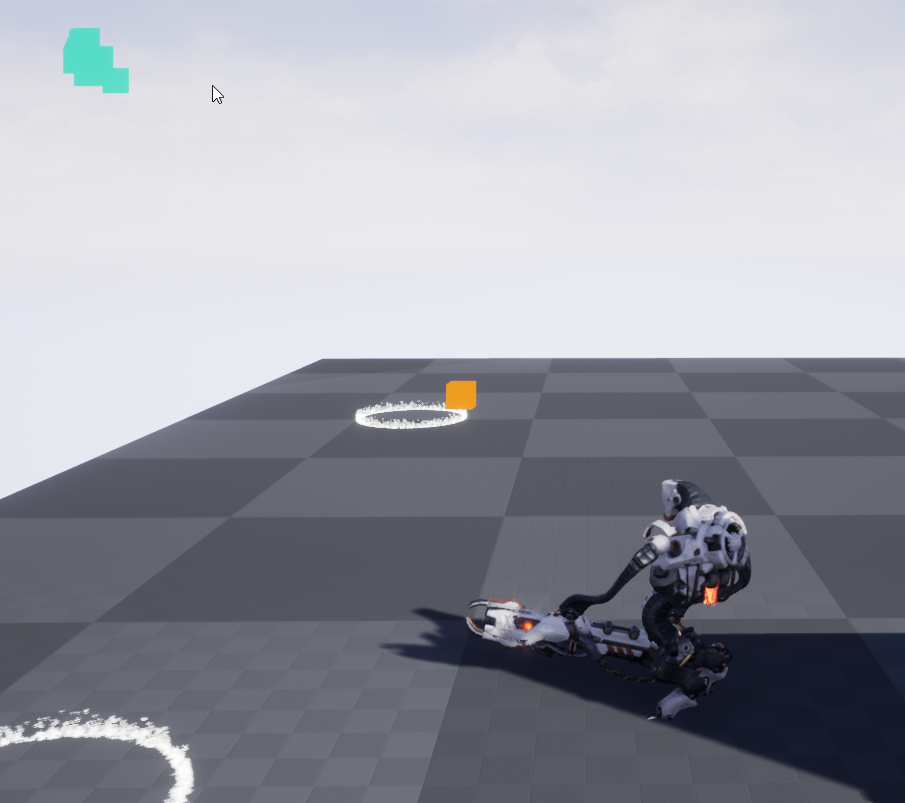 royal rain
but like
thats my collsions
very
glitched out
wasnt there a setting to help get the collsions generated better
complex
marble tusk
I'm not super knowledgeable about collision stuff, so I'm not really sure where to go at this point 
royal rain
ok one sec
let me test something
ok so like do i have to replace the old spline if i updated the collisions
or should it automatically do it when i play it
marble tusk
¯_(ツ)_/¯
stray island
Is there away to add a rotation movement to an actor and control rotation speed via variable without Event tick
royal rain
ah ok
marble tusk
I need to get back to my stuff, hope you figure it out!
royal rain
well i feel acoplished either way so ill wait until my personal friend can help mje
i need to do check points though before i do
dawn gazelle
stray island
Is there away to add a rotation movement to an actor and control rotation speed ...
A timeline
stray island
dawn gazelle
A timeline
It would loop rotation?
olive sedge
https://i.imgur.com/vKYUz5Z.png
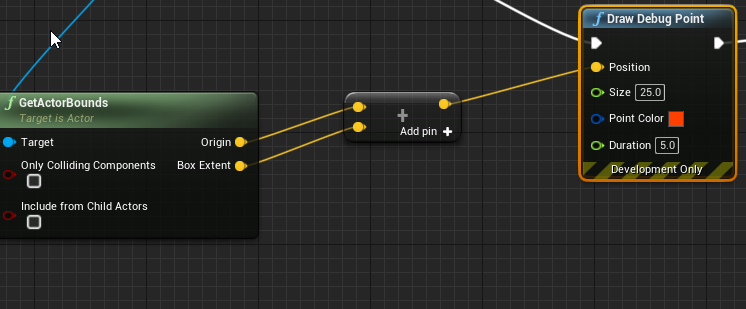
Anyone an idea why my GetActorBounds is completely off on the client (red) but fine on the server (green)?
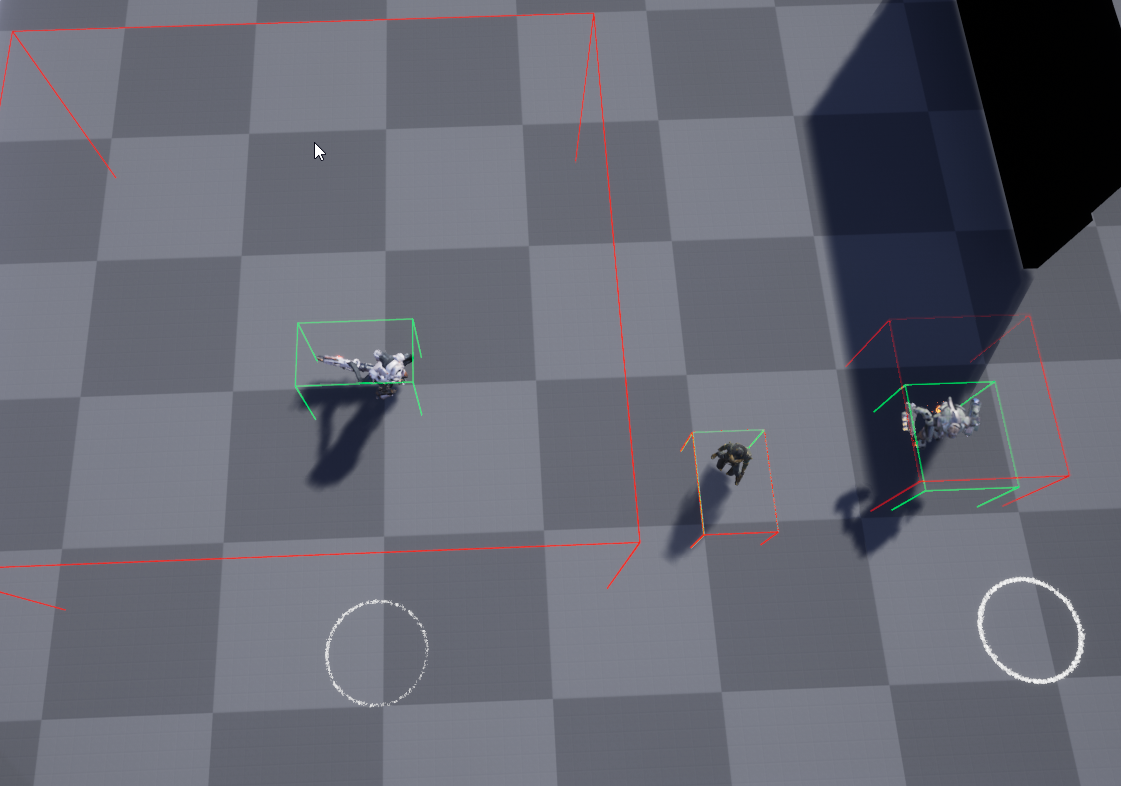
but only on the models on the left and the right
dawn gazelle
stray island
It would loop rotation?
Timelines can auto-start, can output float values, and they can loop. So you can take the output of the timeline and plug it into whatever you want it to do.
olive sedge
olive sedge
https://i.imgur.com/vKYUz5Z.png
Anyone an idea why my GetActorBounds is complet...
Particle system!
lament ginkgo
Question: If I'm running around as a player character, and then possess a pawn... and then unpossess the pawn - do I immediately revert to the character or do I need to explicitly re-possess the character?
stray island
dawn gazelle
Timelines can auto-start, can output float values, and they can loop. So you can...
Plugging that into construction script would make the object rotate in the editor?
dawn gazelle
Can't be placed in the construction script.
stray island
Oh , why , sorry i wanted a construction script one should of specifed
dawn gazelle
lament ginkgo
Question: If I'm running around as a player character, and then possess a pawn.....
You have to tell the controller what to posses.
stray island
I want it to rotate anytime placed
dawn gazelle
Not possible VIA blueprints. Only thing you could do is have the object have it's own animation BP set up.
Construction script is only really meant to fire once and that's it. There's no access to delay nodes (for potential looping), timers, events, etc.
stray island
Its POSSIBLE VIA BLUEPRINT
zealous moth
stray island
Is there away to add a rotation movement to an actor and control rotation speed ...
there are several ways to add rotation. check this video:
https://www.youtube.com/watch?v=pfeF1ONTRWQ

Source code: https://github.com/PendingKill/Tutorial_RotatingActors
Today we're discussing different ways of rotating actors in Unreal Engine 4 (blueprints), profiling the performance of each method, and analyzing the results to find out which one you should use in a given scene.
TABLE OF CONTENTS
00:00 Introduction
00:42 Rotating Movement (BP...
uh oh
maiden wadi
I love how he compared timers and ticks, and just kind of glossed over the fact that ticks are framerate independent when you do the math correctly. He also failed to make sure his lighting was set to mobile for all of his tests, which will have a huge impact on moving objects, and also did not disable all collisions on the root object. Having collisions on the root dramatically increases the movement cost of objects since it has to check for sweeps.
 true valve
Is there a way to disable a component?
stray island
Useful video , i guess i will use rotation movement component but can we set its rotation values as variables
maiden wadi
Not a bad video for basic understanding, but the tests were a little shallow.
stray island
maiden wadi
Not a bad video for basic understanding, but the tests were a little shallow.
Whats ur opinion in best rotation for performance
zealous moth
i personally use the material rotation whenever i can
maiden wadi
Really depends on the use case and requirements.
zealous moth
if not, the rotation component works fine
maiden wadi
I mean the best rotation in the world is a flipbook of textures, performance wise.
stray island
But can ee set rotation component values as variables ?
zealous moth
sure
stray island
Rly
zealous moth
you can set them all as variables
maiden wadi
But it's one directional. The Shader is probably the second best, but like he pointed out, not that good on shadows.
stray island
Like its x y z?
 twilit heath
@stray island best rotation, until you have a game that is more or less finished is the one that is easiest to read and understand
maiden wadi
For all other movement, you're not going to see much difference between tick, component, and timers. But the component does usually win since it's easier to use.
zealous moth
yup ^
twilit heath
and optimizations are required only if makes a significant entry on the profiler
stray island
Another question is increasing an assest scale affect performance by any means
zealous moth
no
twilit heath
it is far easier to optimize after the fact then you might think
maiden wadi
Yes and no. Usually no, but increasing scale does effect culling. Larger objects cull less and can stay in screen view easier.
zealous moth
what do you want to rotate? entire characters, a coin, is it purely visual? or do you need physics involved?
stray island
No physics
zealous moth
then do it via material
stray island
Just a duplicated object
Thanks guys that was informative I will try these things
But these wont rotate in the Editor only material one would , correct ?
olive sedge
Anyone know how to find the highest screen position of a box/extent?
 honest raven
Hey guys. How would I go about making it where a group of nodes and the code they run could be triggered by another object? Beginner here just making an elevator door. Made the code that opens the doors and sets the elevator LED text to open/closed but now I am adding a switch that I want to be able to use to perform the action of opening those doors.
zealous moth
yup @stray island
 desert storm
honest raven
Hey guys. How would I go about making it where a group of nodes and the code th...
desert storm
honest raven
Hey guys. How would I go about making it where a group of nodes and the code th...
When the player uses the button, do you want them to have to look directly at it, or just be close to it?
honest raven
Just within the box collider nothing complex
I think I may of figured it out but not sure yet lol.
It'll be an And type thing. Player inside box collider and button presses
desert storm
I think that'll work, but I'll check how I did it and let you know.
honest raven
Thinking if I create a boolean for OpenDoor which is turned true when both of those are true, then I could use the True of OpenDoor as what the code inside the door that controls the animating and such waits for
Yeah that was an ass explanation lol. Just unsure how to get the boolean to be what the code waits for within the elevator nodes. Atm it's box collider driven so I'm guessing I erased that. Create the reference to the button, get the OpenDoor boolean ..... And then branch off ....
If branch is True then it sets off the rest of the code? Something like that lol
desert storm
Sounds about right, you're on the right track
dawn gazelle
zealous moth
there are several ways to add rotation. check this video:
https://www.youtube.co...
Thanks for this. I was able to set up the material rotation on one of my static meshes. Looks good 😄
desert storm
@honest raven As far as triggering the elevator button goes, I think that you can do an "Enable Input" node inside the button when the player overlaps it. This enables the ability for it to read a player's button presses. You can then use a simple "E" or "Left Mouse" event node or whatever to trigger the button. Naturally, when the player stops overlapping you'll want to disable input.
That's a rough explanation. Let me just get you a screenshot.
honest raven
Awesome. Is there a way to group together nodes into a single new event or function that can then be called? Would probably look better in the end for the OpenDoor being true to just activate ElevatorOpen function which has the code for all that inside of it. But that's probably something for later
No I gotcha. I'll give that a shot as well thanks!
desert storm
Yes, on the left-side of the blueprint editor you can create a new Function, and then call that Function whenever you need it.
I got the screenshot anyway, this is what I had set up for a simple open/close door thing, but I'm sure you can easily adapt it.
zealous moth
@dawn gazelle small detail -> add the node TransformVector from Local to World if you want the object's Y or X axis
honest raven
Excellent thanks @desert storm. If you don't do Enable Input would it still be able to detect the button press?
desert storm
I don't think so, but as far as I know your "Player inside box collider and button presses" should still work. I don't know for sure, though - you'll have to experiment with that.
honest raven
So far it's not responding. Here's what I put together so far. Testing by just printing a string if it detects the player is inside the collision and E is pressed
Feels like a sequence issue. Or like it's only running this once as soon as I trigger the collider so the branch is false as it isn't waiting for my button press or something like that
dawn gazelle
Windows Key +Shift + S is your friend.
honest raven
Hmm yeah .. maybe the set after Interact is Pressed should connect to the branch @desert storm ?
dawn gazelle
Unless of course, you're on discord using your phone, and the PC doesn't have discord on it XD
honest raven
Lol
desert storm
Worth a try, I'm at a loss on it
 nimble talon
honest raven
nimble talon
honest raven
Hahaaaaa yeah that was it
It was triggering the whole thing when I entered the box collider which was too fast
Here you go @dawn gazelle im on my PC now haha
dawn gazelle
I don't think you need the Enable input node there. Not doing what I think you think it's doing.
err wait
nvm
I was thinking you were using a BPI.
honest raven
It worked with the print string, but now as im referencing this button in the elevator door itself where the opening timelines are, it is giving me that " Accessed None while reading property ElevatorDoorRef " when trying to open the door through this OpenElevator boolean.
which is a common thing this is where im getting confused. I thought creating the reference for the ElevatorButton, being able to get the internal variables and such, means the engine knows what I'm doing. But seems like im missing a step somewhere
this is what im attempting. When OpenElevator is true, trigger the timelines to open the doors. But it gives me the error message and wont work @dawn gazelle
dawn gazelle
How does the Elevator Button Ref get set?
honest raven
oh the variable has to be set first before it can be used?
 manic knot
Hey everyone! Anything more reliable than the IsFalling node to determine if my Character isnt on the ground? Doesnt seem to work to prevent doing something while jumping or in the air! Anybody have a better solution hopefully not requiring traces
dawn gazelle
honest raven
oh the variable has to be set first before it can be used?
Depends. If the Elevator Button Ref is a component of ElevatorDoor then it should be ok.
But if it's not attached to the actor in any way, then you need to give it that reference.
honest raven
its not. its a separate actor, mainly on purpose i wanted to get used to the whole blueprints communicating between each other thing
ok, so when doing this sort of thing, creating a variable that is the object reference, you have to Set the variable before you are ever able to use it
dawn gazelle
manic knot
Hey everyone! Anything more reliable than the IsFalling node to determine if my ...
You're using a character or a pawn?
manic knot
@dawn gazelle is an ALSCharacter
dawn gazelle
dawn gazelle
honest raven
ok, so when doing this sort of thing, creating a variable that is the object ref...
Absolutely - Again, components that are attached to the actor are normally fine to reference, but anything not attached the actor won't know what object is that you're trying to reference.
Just like I did with that above screenshot for uzi... I can reference Character movement without setting it as it is attached to the character.
honest raven
gotcha. so the Set of the variable reference is like ... the confirmation to the blueprint that ElevatorDoorRef is ... what i said it was lol
if its an outside component
so set the variable, then i can go ahead and get it and use the OpenElevator boolean to trigger everything,
dawn gazelle
No.
Set = assign the variable a reference.
Just like you can set a boolean
You're setting the value of that boolean to true or false.
So when dealing with objects in the game like an actor, and you want a reference to a specific actor, you need to somehow get that reference from somewhere, then you can set a reference to it.
Example, I have an object in my level of class "PatrolPath" I could run a "Get all actors of class" in a blueprint which will get me an array of all objects that are of that class. I could then loop through them like so...
or, I can get a specific reference to a single one (if I knew which one in the array I wanted, which most people wouldn't know using this particular way of getting the reference)
Then I could say, set a reference to that particular get I just did...
So then whenever I call Patrol Path Ref, it'll reference the first object that was in the array that the Get all Actors of Class returned.
honest raven
so when you create the variable and give it the Variable Type " Actor Name ", and can then drag that variable in and Get it and you can then drag out and get the variables that are within that objects blueprint, why does the engine still not have the data it needs to know whats what? Sorry lol.
dawn gazelle
Because it doesn't know which particular actor you're talking about.
I could place 100 patrol paths in my level.
honest raven
even though you chose the name of the actor within the drop down and all that? interesting
ooooo i think i see where you are going
dawn gazelle
If you don't have the reference to the specific one you're trying to work with, then you don't know what it is you're working with.
honest raven
so if i added like 3 ElevatorDoors to my level, I would be using that same object reference for each one
so this is the engines way of making me tell it exactly whats what
dawn gazelle
No - you wouldn't be working with any of them.
honest raven
dawn gazelle
you have to get a reference to the specific one you want.
honest raven
or buttons i should say lol, since that is what im trying to reference
dawn gazelle
When you're defining a variable's type, all you're doing is saying "This is what can be contained in here".
Just like you create a boolean variable, all you can set it to is true or false.
When you're dealing with another object (like your buttons) you have to set it to the specific reference of an object of that class.
So if I had something like this...
When I press F5, it'll get all actors of that particular class that exist in the level, then set the value in my Patrol path Ref to the very first instance that the get all actors of class found.
So it could be any of them in the level, I wouldn't know which.
honest raven
gotcha, so how do i set the specific reference. Just drag in the variable and set the variable? or do i need to connect something else to the Set to make it work
sorry lol, im extremely new this is day 3
dawn gazelle
S'all good
honest raven
and ive run into this same error like 10 times so lol. its my first wall
dawn gazelle
You need to somehow get a reference to that object. Here's one way you could do it.... Set your Elevator Button Ref "Expose on Spawn" to true.
Then go find your elevator door that you've placed in your level.
Click on it, and then you'll be able to select which button you want to use directly on it.
honest raven
awesome thanks for that
dawn gazelle
It's one of the things you need to wrap your head around when dealing with object oriented programming... You need to specifically get a reference to the object you want to manipulate.
honest raven
what if i drag off the blue pin of the Set and do Get Elevator Button?
or is that too generic
dawn gazelle
The set node is only for setting the value of the variable.
honest raven
ah ok
dawn gazelle
If you have nothing connected on the left side of the set, you're basically saying the value of the variable is nothing, and then by dragging off of it on the right, you're saying get that value of nothing 😛
Another example of how you could get a reference across, is how you're doing an overlap - that "other actor" pin is giving you a reference to something external, and by casting it, you're finding the specific object + its actual class, so you could manipulate that object.
honest raven
I think i gotcha. So now i can go into the door actor in the editor and under default choose ElevatorButton from the drop down and now it has a specific reference for that variable im using. Very interesting.
honest raven
so im sending that data to the variable. all the reference is, is saying hey some sort of object data is going to be inside this variable. but it doesnt know what object data, just that it is a object reference type with the name ElevatorButton
so i have to provide the rest of the information to it with the actual data of what the object actually is. in this case by choosing elevator button in the drop down that comes up after the expose on spawn being checked. letting me add data to that variable
i guess the part that threw me off the most was the fact that when you created that reference variable you could Get the object variable and then get the other variables that are inside the referenced object. So i was like wait you know what is inside the object but not what the object is? WUT? lol
dawn gazelle
honest raven
so im sending that data to the variable. all the reference is, is saying hey so...
not with the name ElevatorButton, the class of ElevatorButton.
dawn gazelle
honest raven
so i have to provide the rest of the information to it with the actual data of w...
Correct
honest raven
So on the left blue pin of the Set, is there something I can do there to tell it what to use as the main reference? Something similar to choosing Elevator Button in the drop down in the editor
Or use that pin to get the actor I'm going to be using. Sorry my terminology is still bad lol
dawn gazelle
Yes, lots of different ways of getting a value that you could set into an object reference, but the thing is, you have to have a way of getting that reference.
And I gave you one example already - the Get Actors of Class and then looping through them or getting a specific value out of the array, though this way is not ideal for what you're doing.
You can get a reference through overlaps, like I pointed out above, and then cast to your appropriate type, but again, not what you're looking for.
honest raven
So this?
dawn gazelle
Sure, but that'll only ever get the very first one it finds and it could be any of them in the level.
manic knot
@dawn gazelle Thank you I'm trying that now
honest raven
gotcha gotcha, this is a very general, one actor reference. which is bad for later when i have like 5 elevator doors in my level with various other buttons
dawn gazelle
Correct. how you have it exposed right now is probably the best solution if your button is separate from your elevator object.
That way you can set it in the designer to reference the button you need.
honest raven
just getting the basics in my brain of how this is all working within the engine
very cool, awesome. its finally becoming clear on why this never worked before haha
i kept thinking the creation of the variable, using the name of the other actor as the variable type, was the reference
dawn gazelle
Nope, just the name of the variable as you want it in that blueprint + you're defining the class of it, not the reference to the object in the game.
honest raven
I like it when progress happens lol. So thanks a ton. Now to get this all plugged in and working right. Should be fun
olive sedge
I have a widget and on that widget an onclick. In the event I return handled but my playercontroller still picks up the click. Anything else I need to do to prevent the bubble?
dawn gazelle
olive sedge
I have a widget and on that widget an onclick. In the event I return handled but...
You using the OnMouseButtonDown function?
manic knot
@dawn gazelle Aw damn so I'm not sure that will work in my case, as I'm trying to disable an action when the player is ragdoll and in the air, which I believe switches the movement mode to "none" whether on the ground or not
olive sedge
@dawn gazelle it's an image widget inside my widget and I have bound OnMouseButtonDown, yes
dawn gazelle
Is the image set to not-hit testable?
olive sedge
@dawn gazelle can't find that setting
dawn gazelle
Doesn't matter - I seem to get clicks going through only if I click rapidly, which would be considered double-clicks.
Yours is always going through?
olive sedge
I'm thinking maybe the PC gets it first, gonna check
honest raven
is there something like EventTick you can use that doesnt run the code every frame but you could tell it like to check every 5 seconds or something. Like a timer? set timer to 5 seconds and at the end it executes?
dawn gazelle
Yep, set timer by event
honest raven
looping around
olive sedge
@dawn gazelle appearently the image eats the button down but the button up triggers on the controller
released
@dawn gazelle having that ignored would be incredibly hacky interaction between the widget and the player controller
Actually, I'll just set a bool on pressed and if it's not set, I'll ignore released
 cold raft
What is the best way to grab all the columns of a DataTable for loading into a widget? I am currently doing this, but it looks like it hits the datatable in each for loop. Will that cause performance issues?
maiden wadi
@cold raft This was actually one of the first things I learned to do in C++. Populating an array from a datatable is immensely faster in C++ than it is in blueprint because of the way it's structured. If you can, I'd recommend making a simple library function or whatever that can populate an array of structs from your datatable that you can then use for the UI.
Realistically though, it depends on how often you call it. If you do that once, I wouldn't bother changing it. If you read from datatables often, it's worth it.
honest raven
Lol had this code working but didn't like that I had to use EventTick for it to work right so I messed around. Now I can't get the code to work anymore even using eventtick lol. Gotta love when you break stuff.
maiden wadi
@honest raven What are you having trouble with?
honest raven
Oh just some newb code I had running where an elevator door open when hitting the button which was a separate actor. The button code trigger a OpenDoor boolean to go true which I then added to the elevator code to trigger the doors to run the open animation. But only event tick would keep pinging the branch to check if the boolean was true. Now for some reason it's never triggering right. Probably butchered that explanation lol. I'll figure out what I did I'm just tired
maiden wadi
For an elevator, it would be best to use timelines. Or for more complicated implementations, enable or disable tick based on events. Elevators are kinda fun. Specially when you have to consider multiplayer implementations.
honest raven
This is day 3 for me so I'm just learning how this all works. Damnit it worked a moment ago lol. Guess I messed around too much. I used timelines for the door opening " animation ". Doors open, wait 2 seconds and then close back up. I'm gonna add a " if player is in between doors don't close " thing later but for now gotta figure out how I broke the opening altogether lol
cold raft
maiden wadi
Realistically though, it depends on how often you call it. If you do that once, ...
Cheers for that - I will flag this as needing to be replaced. For now it is fine as it is only loaded when the player logs in, or gains an achievement, so probably not going to get refreshed a lot.
maiden wadi
@cold raft It might not matter that much then. But I did some rudimentary testing with blueprint versus C++ with datatable extraction. A datatable of about a hundred items that took almost 50ms in blueprint to fully run into an array was cut to roughly 3ms in C++. Over 90% difference of compute time, it was a pretty brutal example of Blueprint vs C++. At the time I was constantly polling a datatable for information about items via an ID, because my inventory is just a list of amounts and an ID. I noticed with larger inventories it was destroying my framerate. Before I switched to C++, I tried simply dumping the datatable into an array that the inventories could poll rather than the datatable, which worked perfectly after the initial startup. That was what was taking almost 50ms, the same exact functionality that just returns an array of the same thing in a C++ BlueprintCallable function was 3-4ms in the profiler.
cold raft
maiden wadi
<@!675613310825136128> It might not matter that much then. But I did some rudime...
That's awesome info! I will load the DataTable to an to array and query that for now. [when a programmers says "for Now", of course that means leave it like that for many, many years until users scream about performance and leave it for the interns to fix]. 🙂 Thanks again for your help!
 scarlet ibex
does anyone know how to make this enemy ai jump over the barrels/boxes?
ive already made blueprints for the ai to chase the player but the enemy will always get stuck
olive sedge
https://i.imgur.com/OiRjOCQ.png
oh the dread! :>
 maiden wadi
@scarlet ibex Really depends. There are a couple of different ways. Some games just make the AI query if it's stuck and it will jump if it is. Other games specifically create nav points for the AI to run to and jump to specific locations.
dawn gazelle
olive sedge
https://i.imgur.com/OiRjOCQ.png
oh the dread! :>
I get that every time I compile C++..... It's how I know my compile succeeded XD
olive sedge
😆
I've resorted to closing the editor to compile
but that's not even what's crashing the thing. I do an RPC client -> server, that triggers a multicast event dispatcher and BAM! Fatal gunshot wound to the editor
but only if I have a breakpoint on the mutlicast handler 🙈
scarlet ibex
maiden wadi
<@!330595300894965760> Really depends. There are a couple of different ways. Som...
which way would be easier to do so? i do not have much experience with blueprinting and coding
i also cant seem to find any tutorial that work out for me T^T
maiden wadi
@scarlet ibex If your level never changes, and you're not used to writing logic, I'd probably say NavLinks. This video seems to cover it okay. Skimmed through it quickly. https://www.youtube.com/watch?v=wW4t5QxOQaE&feature=youtu.be

In this series of videos we are going to create an NPC which can jump onto or over objects in the Unreal Engine 4. We are going to accomplish this by using the Smart Link component of the Unreal’s Nav Link Proxy, we’re doing this so that we don’t have to rewrite or add to any of path-finding code in the Unreal Engine.
In this video we will crea...
scarlet ibex
alright thank you
queen lichen
so after some research and testing, turns out the score is blueprint is working but this isn't changing the score 0 to 1. how would anyone get this one to work properly? I've seen vids of using target score but i don't seem to have it for some reason.
maiden wadi
@queen lichen Not following what you're trying to do? You're trying to make that function return 1 instead of 0?
Or are you trying to get the score that is stored in a specific pawn to return that?
queen lichen
@maiden wadi mainly trying to get the score go from 0 to 1 once the ball goes through the green wall.
maiden wadi
Is the ball your controlled player pawn?
trim matrix
Hello guys, I work on change nickname function but it doesn't work
any help?
when I change to this name, it doesnt confirm it and set on the old name
cold raft
trim matrix
get rid of the SET in button confirm - you have already set the text, but there you set it to null
trim matrix
okay
so if I remove the node it will work?
I removed it
still doesn't work
@cold raft
cold raft
Might be Text committed - try updating your variable from the on Text changed instead
@trim matrix - or you could just set it once when you click the button, probably not needed to update the variable on each keypress?
trim matrix
cold raft
Might be Text committed - try updating your variable from the on Text changed in...
so text commited to be empty?
cold raft
trim matrix
so text commited to be empty?
Yes, you shouldn't need all 3 events - try from the on textChanged first to update the variable and see how it goes
cold raft
In your editor, right click the SET box and choose "Add Breakpoint" - then run the game and type something in. The game should stop when that code runs and you hover the mouse over to see the value of 'Name' - this should be what you typed (the first letter at least). Also, are you getting any error messages when you run that code and stop the game? @trim matrix
trim matrix
trim matrix
cold raft
In your editor, right click the SET box and choose "Add Breakpoint" - then run t...
yep
I don't run erro messages
I ran when I had this code:
cold raft
@trim matrix Thats good - it proves you are getting text from the textbox. After that you should be able to access the variable Name from your player controller - post the code you use to do that (the Set player name you posted isnt connected to any event so it wont run)
 red portal
can anyone help me with my healthbarUI? It works fine until I take damage (10) and then it just drops all the way to 0 instead of the 90% it should be showing
olive sedge
@red portal are you using progressbar?
cold raft
red portal
can anyone help me with my healthbarUI? It works fine until I take damage (10) a...
Can you post the Blueprint where you change it? - might be it is expecting 0 - 1 but you are giving it 0 - 100
red portal
Im dividing it by max health (100) so I dont see why it would be getting values higher than 1
olive sedge
ToFloat (integer)
You're doing a conversion to float, then back to int
Remove the truncate and connecto to divide float by float
red portal
It's just that I've seen it work with my exact code, so although converting it to a float would work, I'm just confused as to why mine isn't
olive sedge
Because 40/100 =. 4
But an int cant have decimals so it gets truncated to 0
Or rounded, not sure
 unique hollow
don't use bindings
for health that is
use an event driven UI system
bind calls every frame
red portal
part of my course mate 😦
unique hollow
you want it to only call when needed
it's way better when you use events instead of bindings because you save performance by only updating the health bar when it's needed, and not every frame
it's extremely simple to do too
I have a progress bar for this too
the dispatch calls every time the player takes damage
 full wind
anyone knows how to access an montages metadata
cause dang it i wanna put info in those things xD
trim matrix
cold raft
<@456226577798135808> Thats good - it proves you are getting text from the textb...
so you want to move this code to text changed?
but I got these errors
bruh
maiden wadi
Your blue variable is empty. It's not pointing to anything.
trim matrix
you mean hud reference?
maiden wadi
Yeah.
maiden wadi
So you can't call functions on empty pointers. It doesn't know what instance of that object to run the function on.
trim matrix
okay
like I need to set it to have something in it and then to get it and set the function?
maiden wadi
Is HUD another widget that's on screen?
trim matrix
yep
I have hud
and in thud widget I have fuynction to set the player health
and his name to 123456
maiden wadi
You need to save a reference to it somewhere when you create HUD, then this other widget can get that from where you save it.
trim matrix
yeah okay
on event tick in the event graph in change nickname widget?
still doesn't work
hmmm
unique hollow
I've been trying to replicate "view rolling" from Black Mesa (the Source game) into UE4 but not sure how to exactly do it, here's a video of it (when you move left, your camera slightly turns left, when you move right, your camera slightly turns right)
olive sedge
@unique hollow on move left, put your roll slightly to the left and the same with right, then interp between them
unique hollow
yes problem is how would I do that
I don't think my movement allows for it
I'm not exactly sure for how I'd check for axis movement pitch
I only have moving forward and right
with two keys assigned to both with + and - pitches
olive sedge
just save your axis value
-1 would be left and 1 right or vice versa, there's your roll
unique hollow
so would I have a custom event that gets triggered every time I move right or left, then checks an if statement (branch) for if my axis is a certain value, and if yes, roll in that direction?
olive sedge
could do it with an event dispatcher, yes.. or just use your input event and save the axis
unique hollow
yes that's what I plan on doing
olive sedge
so.. I got a problem too. My NPCs are trying to walk somewhere and trip over each other.
LogCharacterMovement: BP_Quad_C_3 is stuck and failed to move! Velocity: X=599.00 Y=28.00 Z=0.00 Location: X=-932.17 Y=-1236.86 Z=90.15 Normal: X=-0.56 Y=-0.83 Z=0.00 PenetrationDepth:0.589 Actor:BP_Quad_C_0 Component:CharacterMesh0 BoneName:weapon_l (4 other events since notify)
I tried to show the nav mesh with show Navigation but I get LogNavigation: Warning: No NavData found when calling UNavigationSystemV1::VerifyNavigationRenderingComponents()
these are my runtime settings: https://i.imgur.com/l4RWuzo.png



any idea?
 somber quail
ight i need some help this is just not working so i am trying to make a switchable build mode but it just dose not work what so ever when it does work sometimes it does not place a block and sometimes it does
then when i add the brake switch (the destroy mode) it then just destroys and dosnt build
even when set to build
then when i remove the build mode switch and just make it perm build it is fine
unique hollow
olive sedge
so.. I got a problem too. My NPCs are trying to walk somewhere and trip over eac...
well the log is clearly not finding navigational data, are you sure you built navdata correctly?
olive sedge
@unique hollow yes. it shows up alright in the editor and they move as they're supposed to but the mesh doesn't seem to update with my characters moving around
unique hollow
that's because the navmeshes are precomputed as far as I'm aware meaning that they don't update dynamically
maiden wadi
You need to enable that in the project settings.
maiden wadi
For dynamic runtime generation, yeah. Trying to see what that error is about.
unique hollow
okay so
uhh
this not work
using print string I checked that the axis values are correct
and are set to -1.0 on left and 1.0 on right
somber quail
what are you trying to do
unique hollow
I'm trying to rotate the camera in a certain direction
when moving left or right
like this
maiden wadi
@olive sedge You cannot see your nav mesh at all using Show Navigation?
unique hollow
rn I'm just testing to make sure it works in the first place
somber quail
where it says sequence just change it to a multi gate and set it to loop
well i mean that is probs not a propper way of doing it
but it will do the trick
(maybe)
olive sedge
@maiden wadi no, it doesn't show up at all. I do see it in the editor when I hit P tho, looks fine
and the navigation works as intended. Just not updating with the characters moving around
unique hollow
but since the input for moving right and left is an axis input, it should be constant
therefore there's no need for it to loop anyways
I think
olive sedge
@unique hollow not sure about the rotation. does it work without input, just like on beginplay?
maiden wadi
You could try to force rebuild it really quick by deleting the recastnavmesh, then nudge your NavMeshBoundsVolume just a little. Seen it fix a few issues like that.
unique hollow
nope
olive sedge
I enabled landmass plugin but don't know how to build the thing from source
olive sedge
@unique hollow tick?
unique hollow
nope
olive sedge
I don't know how else to roll the camera.. gotta work on that first I think
unique hollow
hmm
maiden wadi
I'd probably just do it based on velocity. Check velocity based on character's local space and lerp a roll value back and forth based on it.
unique hollow
I'd rather not
the velocity isn't always the same
I prefer it being set in stone
might be because of how my player code is handled
the current player character is a child of a C++ class that contains special code that can't be done through blueprints
but it should only really affect movement
I might wanna move with this to C++ channel
although i doubt this is the problem
as these are the two only mentions of camera in the code
and all they do is set some basic values and collision responses
therefore shouldn't really be a problem
cold raft
trim matrix
still doesn't work
you are almost there - replace the "Set Player Name" with "Get Player Name", and from that do a "Set Text" which passes the Name text to it
somber quail
wat
unique hollow
it means
somber quail
oh
unique hollow
not very precise
somber quail
ok
yea
i just googled
welp
here is it copyed and pasted but ill tweek it
ight i need some help this is just not working so i am trying to make a switchable build mode so a mode where you place buildings and a mode where you destroy the buildings
but it does not work
it breaks by:
if i remove the switch (the key that switches the modes) it works fine i can just build (no destroy)
if i then add the switch (but no destroy added yet) then sometimes it will place the buildings sometimes it wont
and if i then add the switch and destroy mode then it wont let me switch it will only let me destroy
unique hollow
show us the code
and what do you want to achieve
like
oh
nvm, got it
but still code needed
somber quail
there is one with the switch (bottom)
and one without (top)
rn i have it set to the bottom code
maiden wadi
@unique hollow Ah. I think I might have realized the issue. If your FPS is set up anything like mine, your camera or spring arm uses control rotation, you'll want to affect the roll on that instead of the camera itself.
unique hollow
ohh
maiden wadi
Top, instead of the bottom.
unique hollow
maiden wadi
Top, instead of the bottom.
It worked!
Thank you
I am deeply grateful
somber quail
ok this is annoying me but below the event tick there is a camera tilt slider and it is slitely off place
maiden wadi
Does it make you a little.. tilted?
trim matrix
Anyone know why AIMoveTo Doesn't work when the actor is spawned in from the level blueprints?
somber quail
maiden wadi
Does it make you a little.. tilted?
why just .... why
why must you hurt me in this way
maiden wadi
I'm just a little.. off centered.
cold raft
trim matrix
Anyone know why AIMoveTo Doesn't work when the actor is spawned in from the leve...
search for Auto Pocess AI = change from Placed in World to "Placed or Spawned"
maiden wadi
Also make sure you're using SpawnAIFromClass, and not SpawnActorFromClass.
trim matrix
My heroes!
unique hollow
so, this works
maiden wadi
@trim matrix The bottom node will do everything that the top execution line is doing.
unique hollow
but now I'm not sure how to lerp it
trim matrix
@maiden wadi Right, got it thanks fam
unique hollow
so what would I do to make it interpolate between camera swings
so it's not snappy
using lerp is my weak point, I rarely ever use it
so pardon me
 small plover
Hi, so my character has the "Orient rotation to movement" set to true and the "Use controller rotation yaw" set to false. I move it around using cpp with ```cpp
AddMovementInput(cameraRelativeMovement, 1);
But when i move, the rotation twitches like in the video. I don't know how to solve this, has anyone any idea? thx allthis way?
somber quail
yea i am still havin this build problem
maiden wadi
@unique hollow The one I posted earlier was working fairly well I thought. I tried it without the extra variable, but there was some bug with moving left and turning right at the same time that royally messed up the camera. The variable seems to negate that.
somber quail
stuff it this is not going to be a building game its gonna be some sort of farm game
seeing i just made little wondering robots
somber quail
hand
cold raft
trim matrix
No, check your previous screenshot - you need to go from HUD > Get Player Name > Set Text . And in the Set Text, then you pass the Name variable you set previously
unique hollow
hmm
https://cdn.discordapp.com/attachments/221798862938046464/798158097990287360/unknown.png this happens when i interpolate from the current rotation (f.e i am moving left or right) to the default rotation


and set that as the current control rotation when my speed is 0
maiden wadi
@unique hollow Is this being called from your move right/left axis event?
maiden wadi
Try something like this.
small plover
small plover
Hi, so my character has the "Orient rotation to movement" set to true and the "U...
nobody for this ?
maiden wadi
Looks like it's overcorrecting it for some reason.
trim matrix
cold raft
No, check your previous screenshot - you need to go from HUD > Get Player Name >...
I can't get name from the HUD
maiden wadi
@small plover Are you doing any other form of rotation on this actor? Cause that's not normal with only OrientRotationToMovement. Also what Z(Yaw) value do you have set for that?
small plover
No no other set rotation except for the camera spring arm, the Z axis may be a good lead i'm going to check for that quickly
Its not the Z thing, it's always at zero
I guess i should go in the cpp section for this but here is my code
// Apply camera relative ground movement
            FVector cameraForwardOnPlane = FVector::VectorPlaneProject(Camera->GetForwardVector(), FVector(0, 0, 1));
            cameraForwardOnPlane.Normalize();

            FVector cameraRightOnPlane = FVector::VectorPlaneProject(Camera->GetRightVector(), FVector(0, 0, 1));
            cameraRightOnPlane.Normalize();

            FVector cameraRelativeMovement = InputMovement->X * cameraForwardOnPlane;
            cameraRelativeMovement += InputMovement->Y * cameraRightOnPlane;

            GEngine->AddOnScreenDebugMessage(-1, FApp::GetDeltaTime(), FColor::Green, FString("Z axis: ") + FString(FString::SanitizeFloat(cameraRelativeMovement.Z)));

            AddMovementInput(cameraRelativeMovement, 1);


            *InputMovement = FVector::ZeroVector;
i map the camera vectors on the horizontal plane and then multiply them by my input to get the movement relative to the camera
the Debug message was to check, the Z axis is always at zero
small plover
maiden wadi
<@!170225806117699585> Are you doing any other form of rotation on this actor? C...
so i dont think thats the problem
maiden wadi
I meant for this. The Yaw rotation amount applied to that.
That seems like a rather complex way to get the movement direction from the camera direction.
small plover
Oh sorry, i have 360 but changing it doesnt solve the problem i've tried with different values. it seems if the value is low the twitching gets smaller but its still there
 steep verge
guys i am struggling a bit with a problem. Every time i spawn in my level the animation for some odd reason freezes but when i move my cursor its fine. This demonstration i printed out the skeletal mesh head bone rotation just to show the animation freezes. any ideas?
small plover
maiden wadi
That seems like a rather complex way to get the movement direction from the came...
and i know its "old" code i wrote 3 month ago when i was just getting started with ue4 i'll have to get back to it sometimes. i should mention the bug with the twitching just appeared and it used to work fine
maiden wadi
I normally just use the camera's world rotation and zero pitch out and then turn that into a direction vector.
Not sure about the twitching then. But it definitely looks like either something is overcorrecting constantly, or two things are fighting for the rotation.
cold raft
@trim matrix - this is what I meant about Getting the Object, then setting the text IN that object
trim matrix
aha okay
small plover
maiden wadi
Not sure about the twitching then. But it definitely looks like either something...
yeah that's probably it. i'm going to investigate more. the worst part is: i had this exact same bug when i first started and then fixed it and then my character blueprint got corrupted because of a known ue4 bug and i had to recreate one and now i have the same bug and dont remember how i solved it the first time. But its definitely in the blueprint because the code is the same as before
 split bridge
is there any ways to connect UE4 camera to OBS?
 fleet nimbus
Hi! Uh, excuse-me I would have a question, I try to load a scene (via commandline), and it works just fine, the thing is that.. the loading screen doesn't disapear
keen seal
Hey, why does my top down character spin endlessly in place?
I didn't add any blueprints for him to do so.
 worn nebula
Hey guys, how can I make a head bob just when the player is in a certain volume?
 solemn parcel
So my player character can spawn an actor wherever he wants on the map, with no limit in number. I need to setup each of these actors to have their real time coordonates, to be able to limit their spawn to a certain limit around each already spawned actors. How can I go with this ?
 gritty elm
Hi, do you have any idea for smooth mouse movement
i have basic camera pawn, i want to rotate my camera with my mouse
but smooth rotation
solemn parcel
@gritty elm Camera Lag probably ?
solemn parcel
I don't think so
sonic cipher
how can i avoid the cube to turn when i hit wall then release please ? https://gyazo.com/364aa5555dd3a38eb9513b4991e75127
 woeful dawn
Hi, I was just wondering if anyone has an idea on how to make the time travel mechanic from titanfall 2's Effect and Cause mission. I was thinking u make two maps, put one above the other and when the player hits time travel button, warp them to the other map. Is the a good way to do it?? Also, hope everyone is having a good day :))
small plover
woeful dawn
Hi, I was just wondering if anyone has an idea on how to make the time travel me...
that is the exact way respawn did it 🙂
 last walrus
I think it should be done with splines in 1 map
loading 2 maps at the same time is not the best idea
example of what I imagine: when your char moves you can make spline leading his way and when you want to move backwards just set his position to first spline checkpoint (of course you should delete old points of spline if your time travel has a timer)
or if you want insta teleportation without smooth movement - you cant just record points in space
 ancient topaz
Guys, tell me how to make that the character does not rotate around its axis with the mouse?
orchid garden
sonic cipher
how can i avoid the cube to turn when i hit wall then release please ? https://g...
to disable the turning of the cube while your carrying it just disable physics on it after you pick it up. that should stop it from turning when it bumps into a wall, then just enable physics on it again after you drop it. far as it turning after its dropped, not sure.
sonic cipher
orchid garden
to disable the turning of the cube while your carrying it just disable physics o...
thanks but then if i disable physics it wont move
orchid garden
sonic cipher
thanks but then if i disable physics it wont move
sorry i was assuming you were attaching it to the actor after pickup.
maybe temporarily increase the mass of the object?
i.e. record its current mass, then set its mass to some ungodly amount like 20,000. that should stop physics from turning it, donno if that would interfere with how you move it on the character though.
solemn parcel
Does that ForEachLoop calculates the GetActorLocation of each of the ActorsOfClass in one loop ?
worn nebula
How can I make this blend? I've tried using Set View Target with Blend and making the cameras under a child actor but I still can't connect the child actor to the New Target node
zealous moth
@worn nebula
worn nebula
Yeah I said I tried using that, but my child actor wasn't connecting. I found out you need to bring in your child actor, then get child actor then it connects -.-
zealous moth
child actor variable or the actual child actor?
worn nebula
Like this, didn't realise it had to be like this
orchid garden
okay this may seem like a really silly question... but... is there a simple function to detect if the actor is a player or or not?
dull gale
When using MultiLineTrace, does the array of objects get sorted by distance? e.g. if I put a "For Each Loop" after the Trace, does it go through each hit in order from closest to furthest?
 proud hull
worn nebula
Like this, didn't realise it had to be like this
proud hull
worn nebula
Like this, didn't realise it had to be like this
Child Actor can be confusing like this. The left one is a reference to the "Child Actor Component" which would be attached to the actor you are currently working out of. The right one is the actual "Actor" being attached. Imagine the component simply being a container which is holding the actor.
worn nebula
Ah, thank you!
nimble talon
proud hull
dull gale
When using MultiLineTrace, does the array of objects get sorted by distance? e.g...
They are added in the order they hit, so it would go in order by distance as well.
nimble talon
I have been reposting this question for some time now
dull gale
proud hull
They are added in the order they hit, so it would go in order by distance as wel...
perfect, thank you
orchid garden
nimble talon
I have been reposting this question for some time now
sounds like something that would be better answered in #legacy-physics
honest raven
Getting frustrated. Can't figure out why this blueprint is not detecting the boolean change of another blueprint. Have a confirmation print string in one blueprint that spits out when the end boolean gets turned to true. Plug that boolean into another blueprint attempting to use it in a branch where True starts an animation. But despite the string still being printed, which means the boolean has changed to true, it doesn't recognize that change in the other blueprint so the animation isn't playing.
proud hull
dull gale
perfect, thank you
You can also test it to verify, just print out distance instead:
orchid garden
nimble talon
Oh
sry that i can't be much help with it, physic objects drive me nuts... ones placed in the level seem to react differently then ones spawned in the level.
nimble talon
That sounds wonky
proud hull
nimble talon
Can you show how you are currently giving the cube movement?
honest raven
using the pressing of E as the trigger to check the branch. works when it is set to False to continue on, but True is never triggering
nimble talon
I scrapped forward and backward movement for now
orchid garden
nimble talon
That sounds wonky
yeah i know, had been fighting with it for awhile for some items, so i decided just to spawn them in rather then place them.
nimble talon
hmm
dull gale
proud hull
You can also test it to verify, just print out distance instead:
will try, working on a bullet penetration mechanic, still wondering if I should make it based on penetrated material thickness but that'll cause a few more headaches
nimble talon
So when you spawn them in, what exactly is different
orchid garden
how the mass of the objects is being processed by the engine (4.25), when placed they seem to be 10x lighter then when spawned.
proud hull
dull gale
will try, working on a bullet penetration mechanic, still wondering if I should ...
Instead of multi line trace, you might even want to look into doing multiple single line trace calls. Usually bullet penetration involves changing the trajectory and velocity after each hit.
 faint pasture
Just don't use child actor components, they suck.
orchid garden
nimble talon
So when you spawn them in, what exactly is different
i.e. when placed, a 200 kg object reacts as if its only a 20kg object, but when spawned it reacts as if its a 200kg object.
dull gale
proud hull
Instead of multi line trace, you might even want to look into doing multiple sin...
Might look into that later, right now I'm under a big time constraint so I want to focus on the essentials. Thanks for the tip though, I'll definitely rework this later and might include that
orchid garden
sooo back to my seemly silly question... is there a simple way to detect if the actor is a player or not?
faint pasture
dull gale
will try, working on a bullet penetration mechanic, still wondering if I should ...
I made a projectile movement component that worked like this.
Projectile mesh has NO collision.
Each frame, do this:
- Update projectile velocity (new = old + acceleration * timestep)
- Trace from projectile location to next location (new = old + velocity * timestep)
2a. If hit, do hit stuff, if it'll penetrate, update velocity, add hit actor to ignore list.
I do it without a projectile mesh, just particle system for trail.
faint pasture
orchid garden
sooo back to my seemly silly question... is there a simple way to detect if the...
Is a player what? Pawn, controller, state, what?
orchid garden
well for instance.... things players can possess... only wanting it to fire off certain functions if its player controlled, and other functions when its not player controlled?
faint pasture
orchid garden
well for instance.... things players can possess... only wanting it to fire off ...
Is Locally Controlled
orchid garden
ah ty @faint pasture Adrial 🙂 knew there had to be something simple 🙂
nimble talon
proud hull
Can you show how you are currently giving the cube movement?
I’m attempting to show forward and backward movement
dull gale
faint pasture
I made a projectile movement component that worked like this.
Projectile mesh ...
That sounds awesome, might try something like that in the future as well, but right now I'm loving playing with "lasers" too much
proud hull
orchid garden
well for instance.... things players can possess... only wanting it to fire off ...
Is Player Controlled will work for multiplayer while Is Locally Controlled only checks for local controllers, so split-screen maybe.
orchid garden
dull gale
That sounds awesome, might try something like that in the future as well, but ri...
"pew pew pew" ... 3 days later ... "i need to stop playing with lazers and get this project done... " "pew pew pew"
faint pasture
dull gale
That sounds awesome, might try something like that in the future as well, but ri...
The good thing is that if your velocity is high enough, it's effectively a laser. It's basically a velocity/timestep length line trace per frame.
orchid garden
proud hull
Is Player Controlled will work for multiplayer while Is Locally Controlled only ...
yeah i just need it for local stuffs 🙂 but ty for the tip 🙂
@dull gale hehe i tend to do that sometimes ( start playing with something ) and forget what i was working on in the project lol 😉
dull gale
faint pasture
The good thing is that if your velocity is high enough, it's effectively a laser...
Doesn't making projectiles too fast have weird results with physics like ignoring collision? In your case there wouldn't be any collision but maybe it would skip a hit?
dull gale
orchid garden
<@225287982574338058> hehe i tend to do that sometimes ( start playing with som...
My problem is having a specific goal, realising I can do more, wanting to do more, then realising I don't have time for that
orchid garden
dull gale
My problem is having a specific goal, realising I can do more, wanting to do mor...
theres always time :D, unless its a schooling project... but... can always come back later and make it better 😄
 sharp zealot
hi all, can i ask a hand on a issue that i haveon open and close a wiget already created with a keey?
unfortunately i dont know how to use if value on unreal blueprint
orchid garden
branch?
sharp zealot
i wanna to check if visibility of a widget is true and if is true i wanna make it hidden, if false i wanna make visible
😦
for now i can make it hidden with key I
orchid garden
from the widget reference - isvisible?
sharp zealot
with set visibility
orchid garden
loading a project that i got widgets in so i can make a sample 🙂
sharp zealot
thanks 🙂
orchid garden
actually... i think i got a little hide/show thing already done in this one...
sharp zealot
just for to understand, IF is flipflop or branch?
dull gale
orchid garden
theres always time :D, unless its a schooling project... but... can always come ...
that's exactly this situation, if only I didn't have to write a report afterwards 😄
 crystal basin
Hi, I need assistance with Spline Meshes. I made a spline where I want to populate a mesh but the scale is off.
I would be very happy if someone could tell me, why the scale is off and if there is a good way to scale it.
orchid garden
sharp zealot
just for to understand, IF is flipflop or branch?
top is flipflop, bottom is branch example:
sharp zealot
what is HUD ui?
orchid garden
its a reference to my widget
honest raven
While debugging I see after each InputAction I get that confirmation that the Pressed is executing. But as soon as I enter a box collision it is no longer registering the Pressed anymore. Just dies. Anyone know what could cause that?
sharp zealot
orchid garden
its a reference to my widget
how can i get it of my HeadsUpWidget?
orchid garden
my hud widget contains all the things that are visible while the player is moving about:
and i hide / show certain widgets in the hud widget (like the info panel above the quickslots) when needed / not needed
sharp zealot
i have same variable created in gamemode and with that i set widget visible on starting
orchid garden
your hud var = my hud ui var
sharp zealot
ok but from blueprint of character i donw know how to call gamemode hud variable 😦
orchid garden
sense its stored in your gamemode you'd get a reference to game mode and pull a pin off it and type 'get hud' and it should show up in the list
orchid garden
sharp zealot
with your original code, this should work, just make sure you have the widget class set to your heads up display:
(i had to use a different key on keyboard as the other is assigned to something)
sharp zealot
it works 😄 really thanks 😄
weary jackal
Get game mode >get hud object reference > set visibility
nimble talon
Does anyone know how I can quickly capture videos on my pc
weary jackal
It will save the for loop clocks
orchid garden
sharp zealot
not class, just 'Get Hud' should appear near the bottom, will be blue when you add it.
nimble talon
nimble talon
Does anyone know how I can quickly capture videos on my pc
👆🏾
I am trying to show an example
Err, I don’t do this often
weary jackal
nimble talon
I am trying to show an example
There are applications for recordings like obs studio, xbox gamebar....
orchid garden
obs studio is going to make the video too large to share on discord so you'd have to upload it to something else and share a link.
nimble talon
For some reason it is not letting me record with the game bar
Oh, now I can
I like how it says the name of my game lol
proud hull
OBS works just fine, just change your output settings.
You can lower quality to make smaller videos.
orchid garden
its kinda overkill for using for just discord shares.
faint pasture
dull gale
Doesn't making projectiles too fast have weird results with physics like ignorin...
That's exactly it, there's no actual physics. The faster the projectile velocity, the further it traces per tick.
orchid garden
wtf.... discord keeps shutting itself... this is getting annoying...
proud hull
weary jackal
It will save the for loop clocks
Funny thing is, Set Visibility node actually doesn't even need for loops before it as it accepts arrays as the target, hehe.
orchid garden
beats discord with a stick quit restarting!
orchid garden
so.... i named a project RNG, as im working on a rng system piece.... every time I launch that project, discord restarts.... any other project, no problems, just the one labeled 'RNG'.... why???
hearty moss
nimble talon
What do I do
are you dragging it onto discord or are you clicking the + on discord to add it?
dull gale
faint pasture
That's exactly it, there's no actual physics. The faster the projectile velocity...
hmm, I'll definitely take a look at that, last time I did shooting projectile based I kept running into physics issues, even when I didn't use colliders so I became a raycast/linetrace preacher
nimble talon
I am clicking the +
hearty moss
try dragging it on
orchid garden
try just dragging it on to the discord window
orchid garden
video is too big