#blueprint
402296 messages · Page 604 of 403
 odd ember
 shell heath
Where do you see this? I don’t see this part
 unique harness
shell heath
Where do you see this? I don’t see this part
unique harness
shell heath
Where do you see this? I don’t see this part
You add one
odd ember
ah
for camera components within characters you use SetControlRotation
and equally GetControlRotation
set exists if you pull a reference to your PlayerController
technically camera should be managed by the controller, not the pawn itself
for uh, reasons
odd ember
beautiful
unique harness
 exotic cradle
I love it when Im trying to make functions and it wont let me use the word Index for an input on every other function I make lol
shell heath
I don’t understand how you got to the nodes from the widget page nor where those nodes are supposed to be placed in terms of levels.
BP_Card is pretty simple to follow tho haha
unique harness
shell heath
I don’t understand how you got to the nodes from the widget page nor where those...
I'm not sure what you mean
 floral adder
Im sorry to interrupt, but do you know if there is a way to have multiple instances of a BP share one variable
exotic cradle
I hate to ask but it stumped me a little. How come for the OnAttach it lets me have the new parent actor node use a self reference when the target node already is referencing itself?
unique harness
floral adder
Im sorry to interrupt, but do you know if there is a way to have multiple instan...
that is called a static variable and they don't exist in BP
floral adder
darn
unique harness
exotic cradle
I hate to ask but it stumped me a little. How come for the OnAttach it lets me h...
picture?
unique harness
floral adder
darn
what were you hoping to do?
shell heath
unique harness
I'm not sure what you mean
You posted an image of the card. Then the following images were a bunch of nodes but I don’t know how to get there from the widget page.
Then we go back to the BP_Card widget and adding all of that was pretty simple. Just don’t know what the nodes part is about
exotic cradle
https://gyazo.com/fd50c401ed152f38f4903d4cca631aa3 It doesnt let me attach anything to the Target node regardless of how many times I restart this process and set my variables as they should be.
 unique harness
shell heath
You posted an image of the card. Then the following images were a bunch of nodes...
unique harness
shell heath
You posted an image of the card. Then the following images were a bunch of nodes...
those are methods I created in BP_Card
unique harness
exotic cradle
https://gyazo.com/fd50c401ed152f38f4903d4cca631aa3 It doesnt let me attach anyth...
did you create the OnAttach on the master or child class? it needs to be master
exotic cradle
All of the code is currently in the master object
unique harness
so what does it say when you drag the pin to the target?
floral adder
@unique harness Im making an inspection system, a ray cast gets an object then an event trigger is sent to that object using an interfaceBP. In that object I have a variable trying to track if the object has been inspected before.
unique harness
floral adder
<@!209383767322656768> Im making an inspection system, a ray cast gets an objec...
One way is you could use the tag system and keep an array of tags you've already inspected
exotic cradle
unique harness
so what does it say when you drag the pin to the target?
"Actor Object Reference is not compatible with Self Object Reference"
shell heath
unique harness
those are methods I created in BP_Card
Methods? What do you mean by this? And what purpose is it serving?
unique harness
@exotic cradle try deleting the node and re adding it
odd ember
functions
unique harness
shell heath
Methods? What do you mean by this? And what purpose is it serving?
method/function
floral adder
@unique harness the problem being that when you have multiple instances of the BP, it counts each first inspection for each instence
floral adder
unique harness
One way is you could use the tag system and keep an array of tags you've already...
how would i do that
unique harness
floral adder
<@!209383767322656768> the problem being that when you have multiple instances o...
or just store the class if each class represents a different object
 split barn
Does anyone know how to modify the rotation of an object that is outside a blueprint from that blueprint?
floral adder
store the class as a variable?
floral adder
unique harness
or just store the class if each class represents a different object
the goal is to get a bool to keep track if something has or hasn't been inspected before, but if there is something better than that
unique harness
floral adder
store the class as a variable?
imagine my object i can inspect is called "BP_InspectableObject". create an array of type "BP_InspectableObject" (Class not reference) and each time you inspect something, store the class, then check the array if it contains the object class to see if it's something new
exotic cradle
split barn
Does anyone know how to modify the rotation of an object that is outside a bluep...
Youd need a way to modify the transform of the actor at runtime say like increment by a set ammount when a button is pressed or something
unique harness
split barn
Does anyone know how to modify the rotation of an object that is outside a bluep...
yes, you need to get a reference to that object some how
unique harness
like gun recoil?
shell heath
unique harness
method/function
Functions to do what tho? And where did you make these functions in? As far as I know you have to have a button inside of a level to make the “nodes” or “scripts” and not just inside a widget.
unique harness
I would look into curves for creating that
split barn
unique harness
yes, you need to get a reference to that object some how
ok thanks
split barn
exotic cradle
Youd need a way to modify the transform of the actor at runtime say like increme...
thanks
floral adder
unique harness
imagine my object i can inspect is called "BP_InspectableObject". create an arra...
how would i check if something was in the array
unique harness
floral adder
how would i check if something was in the array
there should be a "contains" node when you drag off the array
floral adder
oh cool thanks ill try it
unique harness
shell heath
Functions to do what tho? And where did you make these functions in? As far as I...
the functions are just to keep the code clean, nothing special about them
 sharp fox
I know i wonna write my question on #multiplayer but no one in #multiplayer is online so i asking there.
Anyone know how i can launch my character in multiplayer server
 stray island
I have a value that i wanna invert its effect , like its decrease becomes increase and its increase becomes a decrease
What do i do to invert it ? Multiply minus one didnt work well
shell heath
unique harness
the functions are just to keep the code clean, nothing special about them
Ok, so now that I have BP_Card & BP_Inventory. How do I add cards to that scroll box so that I can scroll through them? Also, was I supposed to make multiple cards in the BP_Card?
exotic cradle
unique harness
<@!241705563753283595> try deleting the node and re adding it
So it seems I may need to actually get my socket locations in my masterbp lol

 true valve
What's the best way to do this? I'm trying to play walk audio not based on line trace. https://gyazo.com/a21e497a5d30fd9be4e63f4fdd2d046d

Pretty much I want to continue playing the audio as long the walking animation is running.
shell heath
unique harness
I see the Method you made is for representations of the card.
So all of that information will be shown in the Img itself. I assume when it comes to expanding the card for stats/effects I’ll make imgs for that too for every individual card. I just need to attach cards (I guess the images) to stats/effects for the game to understand tho.
Does this make sense?
 grim meadow
Can get some quick help i am stumped. I got a gun that shoots physical projectiles. Its a shotgun so it needs bloom. I acheved this by spawning a bullet blueprint on a socket of gun near barrel. That works well for straight one shot. But for the other pellets i did the same but with taking the transform of the socket and adding to location and rotation to get a curcular pattern of pellet shots. This works well for the most part however when you aim the gun in a particular direction the pellets instead of splaying outward they go at each other. Any better way to achieve this?
 rough wing
If you're interested I can link you a plugin I made
It has a gun component
But it's cpp
grim meadow
quick Q on that a problem is that the bullets will collide with one another an delete what collision setting should i use to fix that?
grim meadow
thank you i will see what i can do, if not i will come back for more help
 dire lava
I have some progress as to my save state issue!
(I had to take a little bit of a break from that specific issue cause I was getting so tripped up on it)
So what I just did was in my structure, I added a secondary "is placed" variable (there's already 1 on the item itself, but since the item is destroy on the next level's load, it's obviously not gonna read).
What's happening now is at the beginning of a level is nothing's set, all my items are set to the origin. If one has been placed, then on the level's load, all of the items in the room are teleported near or on that location (it will do this for all levels with items until another is placed).
I have another idea that could maybe work, but it's a really poor idea in terms of actual scalability (but seeing as it's a small game, I don't think I'll lose sleep over it).
In my game instance, I'm creating map variables per room that will grab the name of the item (string) and grab the location of the item (vector).
So when I load, I should be changing by index.
 trim matrix
Hello so I've been following this tutorial and everything has been going smoothly so far, except I can't place a second path point, I can create one/duplicate the first one, but it doesn't show up anywhere and all I can see is "path point 0" but "path point 1" can't be seen, although it's supposed to show up inside the patrol path allowing me to move it https://youtu.be/eLI6TOXaG5k
In this episode I show you how to make a NPC patrol a route; travelling from point to point.
Support me on Patreon and get access to videos early, join our developer community on Discord, get exclusive behind the scenes videos on my projects and much more over at https://www.patreon.com/ryanlaley.
Subscribe now to catch each video as they are ...
3:14 is the point of the video I'm stuck on
 dawn gazelle
trim matrix
Hello so I've been following this tutorial and everything has been going smoothl...
dawn gazelle
trim matrix
Hello so I've been following this tutorial and everything has been going smoothl...
You add path points by clicking on the path actor, then in the details click on the path points and add it there - it'll be created on top of the path actor, so you need to click it in order to move it.
dawn gazelle
Add this to the construction script of your patrol path actor - it'll make a visual text render object appear.
trim matrix
why did it automatically make a render for the first one though?
dawn gazelle
What my example is, is a bit more visible is all.
trim matrix
okay I'll try that
dawn gazelle
It'll look something like this
trim matrix
oh nice ty
dawn gazelle
I followed his tutorial to build mine out as well 😄
 modest stag
hello everyone. I'm trying to make a vehicle that works kinda like a tank, in which you can accelerate each track individually with different inputs, like W and S moving the left track and Up and Down moving the right track. to move forward, the player would have to press W and Up at the same time. if the player moves just one track, they should pivot around the other. any ideas on how I can do that?
trim matrix
dawn gazelle
Add this to the construction script of your patrol path actor - it'll make a vis...
hey sorry, I'm confused how you extended the "add render component" and everything
dawn gazelle
trim matrix
hey sorry, I'm confused how you extended the "add render component" and everythi...
Extended?
odd ember
each one checks the value of the other and if it isn't 1 it does rotation instead of movement
trim matrix
relative location x, y, z
dawn gazelle
Right click on the transform and select split
Can do that for the relative transform location as well.
trim matrix
ah okay!
modest stag
odd ember
each one checks the value of the other and if it isn't 1 it does rotation instea...
oh, I see. I'll give it a try here, brb. thanks!
dawn gazelle
trim matrix
ah okay!
Oh also to set some of the values on the widgets, click on the "Add text render component" and the settings will be on the right (size/scale/color). Another option you should have checked is "Hidden in game" unless you want to see it while playing.
trim matrix
nice, got it
odd ember
modest stag
oh, I see. I'll give it a try here, brb. thanks!
that's going to get you part of the way. you'll run into the problem of not having the same case in reverse. so I imagine you would want to use a lerp instead
floral adder
can anybody help me im having some funky issues
odd ember
no
floral adder
darn
trim matrix
dawn gazelle
last question, what about the add pin ? I can't find it
sharp fox
I know i wonna write my question on #multiplayer but no one in #multiplayer is online so i asking there.
Anyone know how i can launch my character in multiplayer server
 dusk basin
@dawn gazelle after some testing I realized that the only way to get a reference to the portal is to spawn a portal for each player on event login and destroy on logout only issue is when spawning more than 1 the second one will spawn on my controlled pawn and not at my specific location any ideas?
 meager idol
Hi, is it bad idea to use custom character movement? because the prebuilt is knda too complex for my needs (Too many knobs to turn for me) but there are some complex sounding things in it and i dont want to get stuck making complex features later on. I am not planning to do anything complex, but idk
odd ember
meager idol
Hi, is it bad idea to use custom character movement? because the prebuilt is knd...
what kind of game are you trying to make?
meager idol
Uh, so far just a simple endless shooter
Basic jump, moving around, endlessly spawning enemies
odd ember
keep the default
unless you're doing something physics based you can keep the cmc at default values and it'll be fine
whereas writing your own custom movement will probably be tedious and require cpp to be good
trim matrix
@dawn gazelle Holy shit, thanks so much it works!
meager idol
I just wanted to simplify it a little cuz i am trying to get the movement just right and there are a bit too many knobs in the default
odd ember
just use... movement speed?
that and acceleration are basically what you're looking at
meager idol
Hmm
meager idol
I just have hard time working with black box design a little, temptation to make my own stuff is huge
odd ember
I mean if you're proficient enough go for it
meager idol
That's the ting, i am not x)
odd ember
so I'd say stick with the easy stuff then
cmc is among the few things I keep from the basic unreal package
dawn gazelle
trim matrix
<@!218956378654507008> Holy shit, thanks so much it works!
You able to see the patrol points you're creating a bit easier now?
modest stag
odd ember
that's going to get you part of the way. you'll run into the problem of not havi...
something like this?
I can't get it to move forward though 😦
odd ember
modest stag
something like this?
nope
you dont need tick for anything
and the axis values are already available as nodes, you dont need an extra variable
for each of those input events you need a branch
that leads to your movement input
that leads to your movement input
stray island
I have a value that i wanna invert its effect , like its decrease becomes increase and its increase becomes a decrease
What do i do to invert it ? Multiply minus one didnt work well
dusk basin
ok so for whatever reason my bp portals is returning null when i get from the array this is how im setting it
this is how im getting it
i tried to do random int in range as well and it will return the clients portal as null
dawn gazelle
modest stag
I can't get it to move forward though 😦
Just made this by fiddling around... Sort of emulates tankish sort of movement.
https://blueprintue.com/blueprint/q2os1t7z/
BlueprintUE
dawn gazelle
dusk basin
ok so for whatever reason my bp portals is returning null when i get from the ar...
Get rid of this get, just pass the direct reference you have already.
Don't use length here. Should be Last Index
dusk basin
ok
@dawn gazelle i get a crash when executing my logic
i find 4.26 to be quite buggy though so im not gonna sweat it
@dawn gazelle thank you it now returns the specified portals
ok im so close to fixing this now when setting view target with blend to the specified portal it runs fine on the client but the server gets this werid view
this is what should be previewing
ok so seems like a spawning issue cause by off chance itll show this
grim meadow
@rough wing I created a new collision type "projectile" like you said. on the bullet i set its collision to ignore any projectile collision. however when i set the collision object type to projectile the bulletes disappear. when i set it back to world static the bullets are fine but how does it know when to ignore a projectile? what am i doing wrong?
modest stag
dawn gazelle
Just made this by fiddling around... Sort of emulates tankish sort of movement.
...
thank you very much ❤️
I'll try it out ASAP
 shadow saddle
how do youu switch langauge in ue4 ?
i mean as in like
player want to choose different language
so ur UI story and everything change to another language
thru excel ?
 bold moat
@shadow saddle I think you should use Localization an all of its related features 😉
https://docs.unrealengine.com/en-US/ProductionPipelines/Localization/index.html
Information about how to localize your project.
bold moat
I admit I don't know (since I don't use it), but the documentation seems really complete
 eager wagon
Is it possible to use blueprints and do stuff with blueprints, and record the whole scene through sequencer?
I want to make an action scene and record it through sequencer not my screen recorder.
rough wing
Localization isn't a feature you can add directly
dusk basin
ok so i have a issue where i need to do a for each loop on 2 diffrent array elements i might need to make a custom one because in order to switch to portal view i need to for each loop the controllers and the portals
i cant put this logic in the controller or the portals as the array element is not compadible
with self
 zealous moth
@dusk basin use game state
dusk basin
i cant because this logic requires that it cycles through the elements from last index to 0 @zealous moth
zealous moth
i don't understand, why can't you?
dusk basin
because the refrences are stored in the gamemode not the game state
i tried making custom inputs but they dont work either
zealous moth
have you gone through Cedric's compendium for online replication and the major classes?
dusk basin
idk what Cedric's compendium even is from my understanding i need to make a custom for each loop
 gusty shuttle
When teleporting from one level streaming volume to another, I am using a camera fade, however, when I finish the teleport, the next camera fade in prematurely fires. You guys every have that proble,m?\
dusk basin
because the functions that need to fire are co-dependent
if i do it anywhere but the controller or my portals it wont go through the array from last index to 0
zealous moth
@dusk basin well, ok, here's my issue: you mentioned that you need to use 2 for loops. So far so good. You need to do it for the controllers and portals but you cannot put it in the controller or the portals. Either way, Player controllers are not replicated. You would need to use the game state instead to communicate the info.
Now you bring up a new issue where you want it to cycle in reverse?
So I am not sure what you are asking anymore, seems like multiple issues in 1 question.
dusk basin
on event post login i add all the player controllers to an array and i use that
zealous moth
@gusty shuttle do trigger checks. Once stuff is loaded, fire it.
dusk basin
2nd i dont need to replicate the controllers because this is for a lobby to map transition its all effect based and it happens to all the controllers in that array
dusk basin
its in the gamemode actually
zealous moth
which is not replicated
only the server knows
I'd recommend you read this: http://cedric-neukirchen.net/Downloads/Compendium/UE4_Network_Compendium_by_Cedric_eXi_Neukirchen.pdf
you want to use a game state instead so that the info is stored accordingly
dusk basin
well ill take your word for it and try it in the game state
zealous moth
don't take my word, read the compendium
it's a short read
but gives you a lot of clues about replication and comms for mp games
dusk basin
ok thanks i will make sure to refrence for future use
zealous moth
that's why when you said you wanted to add this to a player controller, my red flag was up
dusk basin
nah i never wanted to it was more of i didint know where to put the logic so i thought controller first thing
gusty shuttle
@zealous moth Aye, my triggers are working, the dude teleports, just as he gets there it fires but to soon. Even if I add a delay it ignores is
it
zealous moth
in a single player game, makes perfect sense. in MP, not so much @dusk basin
dusk basin
gotcha
zealous moth
@gusty shuttle is your trigger in a function? that's the only case I can think of where delays are ignored. otherwise, not sure
dusk basin
@gusty shuttle i recommend pressing F9 when selecting the delay node to breakpoint to the delay if it dosent stop execution there youll know exactly what your problem is
 sonic cipher
Hey guys, how can i make a custom playerstart please ? It's for my editor 🙂
dawn gazelle
sonic cipher
Hey guys, how can i make a custom playerstart please ? It's for my editor 🙂
Create a new blueprint with playerstart as the parent?
sonic cipher
Is that possible ? i mean Epic Games GCU says
a. Distribution to end users - You may Distribute the Licensed Technology incorporated in object code format only as an inseparable part of a Product to end users who are subject to an end user license agreement which explicitly disclaims any representations, warranties, conditions, and liabilities related to the Licensed Technology. The Product may not contain any Paid Content Distributed in uncooked source format or any Engine Tools.
zealous moth
@gusty shuttle use timelines instead of delays.
 thin cedar
How would I go about making a sword trail in vr, like beatsabers for example?
sonic cipher

Learn how to make VR grabbable weapons (or tools) that position themselves perfectly in the hand once you pick them up. Weapons can be dropped/thrown and swapped from one hand to the other. This technique works with weapons based on Static Meshes as well as Skeletal Meshes.
The Katana used for this tutorial is courtesy of nixor and is available...
@thin cedar
 rough jay
he wants a trail for it
thin cedar
I've watched that tutorial, which really over complicates it anyways
dusk basin
@zealous moth so i tried it in the game state and nothing is happening
my logic worked before in the game mode and now nothing even executes on the screen
thing is in breakpoints its "executing" or at least it says it is
thin cedar
I figured out what I need to do
sonic cipher
oops sorry then
 orchid garden
hrm... i was averaging 50-60 gpu usage when opening up my projects, or any project for that matter in UE 4.25, and now... im averaging 90-100 gpu usage for some strange reason today... anyone know what might cause that to happen with UE?
zealous moth
probably shaders and cache buildup
thin cedar
Whats up with the little line at the bottom of the trail
 supple dome
@thin cedar are you using a texture for that
supple dome
check the details, make it Clamp instead of Wrap
its interpolating the bottom with the top
supple dome
try forcing a material recompile, disconnect something and reconnect
thin cedar
Yeah thats what I had to do
I just reset the texture and that did it
Thank you so much for the help
 clever lark
Hi guys, very basic question. What is best way to communicate btw 2 UMG. Will interface will work?
 steady apex
My cable components are flailing around wildly after I spawn them at runtime -- is there any way to prevent that?
 cold raft
clever lark
Hi guys, very basic question. What is best way to communicate btw 2 UMG. Will in...
cold raft
clever lark
Hi guys, very basic question. What is best way to communicate btw 2 UMG. Will in...
I create the UMGs in a BP class and keep the UMG reference there - that way the BP class manages communications (it works ok).
cold raft
steady apex
My cable components are flailing around wildly after I spawn them at runtime -- ...
check the actor rotation - I am having a similar issue but haven't back to fully solving it yet. (to do with launching force I think)
clever lark
@cold raft Thank you, This I know. Is there any direct ways to communicate using Interface or dispatcher? Reason why I need is as I have multilevel hierarchy of umgs. I need to fire event or call from 4th level of umg.
steady apex
@cold raft Didn't help, sadly. I'll keep digging and see what I find
cold raft
steady apex
<@!675613310825136128> Didn't help, sadly. I'll keep digging and see what I find
I needed to apply Set Angular Damping and Set Linear Damping to my bobber after it was spawned. - https://youtu.be/2ubmuB7mn8k
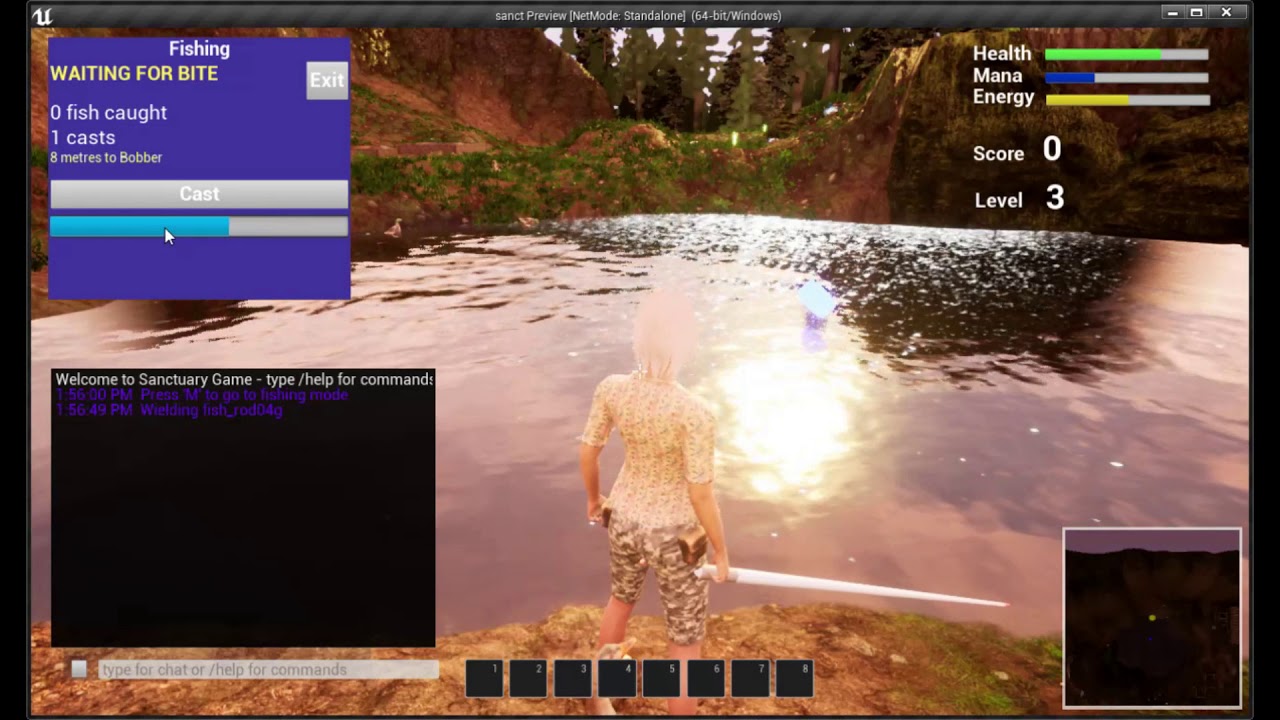
Showing fishing progress in the sanctuary game (as at 9-Jan-2021). Blueprints showing the spawning of the Bobber and the dampening needed to stop it bouncing around too much.
steady apex
I'll check it out, thanks!
thin cedar
Anyone know how I would fill a distance between two points with like 10 or so decals
odd ember
steady apex
My cable components are flailing around wildly after I spawn them at runtime -- ...
disable physics on spawn, enable after 1f?
steady apex
Disable physics how?
cold raft
I have an architecture question : I want to move my inventory load/save from playerCharacter so something that handles level transitions nicely (and multiplayer) - is a Save/Load function in the Game Instance a good idea? So Character can call that once it has spawned, or is there a better place to manage load/save?
 maiden wadi
@thin cedar Do you mean placing ten decals in a line between two points? Something like charred ground?
maiden wadi
In short, Get your points, get the distance, divide by your desired decal width to get the amount needed to use. Use the look at unit direction from start to end to find a point, add some number to the Z of it and line trace down to find the ground at that point and place your decal at the line trace hit location.
thin cedar
Gotcha, I'll give that a go. I appreciate your help.
maiden wadi
If you need more help, feel free to @ me. But it should mostly just be simple vector math and a line trace per decal spawn.
cold raft
dire lava
I have another idea that could maybe work, but it's a really poor idea in terms ...
Could you spawn the items from the game instance, instead of having them teleported on the map - it might make it easier to manage. If you want to keep the placement of a manually laid out level you could have a utility function that collects all actors of class and saves the name,location, transform into an array and keep that to be used in a Game Instance 'createMap' function [I am actually about to do this myself now, but not 100% if it is the best way]
dire lava
I just found a solution
Basically, I wasn't setting up my struct properly and the handoff between the struct saving and the actual object moving was missing (I didn't add an Event End Play)
 tight schooner
@finite wasp ostensibly you can get world scale 3D from a component
and then you can scale that vector by a float or however you want to manipulate it
 snow halo
Is there any way to set a streaming level location at runtime?
such as modify this
is not working at run time : /
 edgy halo
So if you want it to multiply, right click and type Set World Scale 3D. Select the node which has the capsule component in bracket
Once you have added that, a you will see a yellow output point, drag that out and once the menu kinda thing opens, type vector * float (even typing just * would fetch it) and in the green input point of this node, put the number you want to multiply it with!!
Ohk so you can see the yellow input point on the multiply node right?
That is a vector, which means a combination of three floats which can be used to represent individual scale in the three axes
So you need to multiply it by a certain number everytime
So you can get the current scale of the object, and then multiply it by the constant number, and then make that it's new scale!
Gimme a minute I will send an ss to you
Do you understand this?
You can reuse that reference as input for GetWorldScale3D too
Not an issue 🙂
I am not so sure, I am pretty new too
I can help with this, since the scale will be multiplied everytime, you should know the size of the player in the world units, and move the camera away by how much the increase is everytime
orchid garden
the spring arm controls the distance from the player.
just scale your spring arm by changing the size of the arm length. (tpboom is my spring arm)
 blissful lava
 nimble talon
I really, really need help
nimble talon
I really, really need help
Just state your problem with as much detail as possible and someone may answer
nimble talon
Sure
So, I am attempting to make a physics based first person game, where you are a cube
Being physics based, I wanted the cube to be able to roll
Yes, cubes do not normally roll
But roll is good
so
I have tried multiple methods,
nothing worked
For some reason, it can strafe (roll from side to side), but it can’t move forward or backward without going very slow or bouncing very high
It also keeps tipping over, distorting the movement,
is there a sort of stabilizer script I can use, where, if you stop trying to move in the middle of a rotation, it rotates back on the correct side?
Another issue,
Instead of making the character using the character class, I decided to use a pawn, as I have more freedom,
but the problem this imposes is that I cannot use the jump function.
I admit to being a noob, so can someone walk me through this?
If anyone happens to answer, you should probably ping
 short pawn
@nimble talon i know this sounds cheap, but the way I would do it would be to make the collision an invisible sphere... and attach the non collidable cube to it so it looks like it is rolling
does anyone know how to make a pixelated font material for runtime fonts that I want to put on widgets?
nimble talon
Someone suggested this before, the problem is, if it were on the edge of a platform, wouldn’t it roll off? Also, the edges of the cubes would have no collision and go through the floor. Even if these problems didn’t exist, the friction on ue4 by default is very low, so the cube would be rolling in place. Believe me, I have tried.
Thanks for trying to help, though
short pawn
what about both the sphere and cube being collidable
it would just stabilize it for rolling and the cube edges would make it stop
nimble talon
Wouldn’t it look like it is floating off the ground?
short pawn
wait. its first person right? would you even be able to tell?
nimble talon
Yeh, it’s local multiplayer
short pawn
if you are looking to try to add jumping to your character, my advice would be to look at the first person character unreal has and just copy what they do.
nimble talon
That’s the thing, I can’t
For the default character, there is a built in jump function
Problem is, it is for characters only
My character is a pawn
short pawn
you can change the default character in the gamemode
nimble talon
I did
short pawn
also in the project settings
nimble talon
I meant the character class
short pawn
i found this tutorial https://cybereality.com/tutorial-how-to-make-a-cube-roll-on-a-grid-in-unreal-engine-4/
nimble talon
That’s on a grid, though
true valve
How do you set the camera so that you can rotate the camera while controlling character movement via WASD.?
short pawn
you can probably use that tutorial to see how it makes the movement though
and alter it for your use
 true valve
I am using one. But if I am walking then move the cam left or right the character moves
short pawn
does anyone know how to make a pixelated font material for runtime fonts that I want to put on widgets?
short pawn
i want to make a font material that pixelates my font
 unique hollow
is there any way I can check for what type of damage is dealt
to the player that is
since damage type classes are a thing
I really don't want to make an extra boolean just to check for type of damage if that's a thing
nimble talon
shadow saddle
ok so
i was working with drag and drop operation
when i drag an item to another border
it will delete its original item in original position
and then move to the new border that i drag to
basically like ur typical MMO drag drop thing
so i have this "valid item" bool var to check if the border that i drop my item is empty , if its empty its true then i can drop my item to that border
but somehow when i drop it to empty border , the valid item var is true , but the program just treat the border as the same instance as my widget
im using grid panel
i made 8 border like this
the X button is the border that i cant drag to
and i dunno why

 neat stream
Any idea on why or if it's possible to fix that when I set text on construct on my Text 3D all letters are messed up in the editor ? 🙂 there I wrote "Unreal"
trim matrix

Anybody know a good method to make these two sync properly?
no matter what I do I can't get them close enough. There's always a little gap inbetween the zombie biting the man's neck
Maybe I could try turning off their collision somehow...
How can switch my camera with another camera smoothly
 outer lance
Anyone got any tip on what could be wrong with my spline generation?
Why all those lines towards one of the points.. :S
Hmm changed to "AddSplinePoint", no control over tangents but it seems to work
One bug in the indexing but starting to look ok
meager idol
Hi, why does UE say that an exec pin is not connected when my macro has no exec pin at all?
It's just pure maths macro for some procedural animation i am working on and no execution should be needed
cold raft
unique hollow
I really don't want to make an extra boolean just to check for type of damage if...
I think you can break the Hit result to get all kinds of info
meager idol
(Is in anim bp)
unique hollow
yeah but i don't want a hit result
I don't want to do a linetrace
I want to figure out what damage type is getting applied to the player and use it as a boolean to check a if statement
 prime wyvern
unique hollow
prime wyvern
unique hollow
ok got it
prime wyvern
how do I get the exec part of the Montage play?
unique hollow
meager idol
Um @unique hollow You could possibly do it with some dictionary or something like that where along the damage number you pass also damage type as a string
unique hollow
already got it
prime wyvern
nvm I'm a dumbass
turns out the executable is just a connection of a touch input
so it's not necessary for what I'm doing...
trim matrix
How can I do smoothly blend transition with these two cameras?
 silent comet
https://gyazo.com/b04f5149bd860eeab7ad72be308864b8 Item inspector BLUEPRINT ( Pawn ) Hey Guys, i run in to a issue where the camera is bugging out ( Jiggling ) while rotating around my static Mesh. what could coz this issue ? This problem happends on the Y... if i only rotate on X its fine... FIXXED: Dont make the Spring Arm a Parent of your Mesh.

 solemn parcel
Hi there. So I have a spawn emitter spawning from the Trace Start location, and end on the Impact Point location of the line trace. Everything works properly when it hits something. On long distance, it does not hit nothing, and while the line trace still is on the proper coordonates from Start to End, the emitter in this case, goes wild into the player characters feet. I can just change the End Point of emitter to be Trace End to fix this, but it will pass through any hit points.
Except by adding a 'branch with: Does it hit ? Does it not ?', is there a way to fix this ?
 crude dew
Hi I have a blueprint which creates a 10x10 grid of squares but when the squares are created they do not have the box collider which I have attached to the master copy of the square?
Grid Blueprint
Any ideas why the copies do not have the colliders or appear invisible to a line trace? If i place a single block in the map the line trace does detect the collision on the single block but not on the 10x10 grid?
The ox i use to make the grid instances.
 plain flare
Hey my progress bar starting to fill after 3-5 seconds. Why is that ?There is no delay about that ?
 vernal kindle
meager idol
Hi, why does UE say that an exec pin is not connected when my macro has no exec ...
vernal kindle
meager idol
Hi, why does UE say that an exec pin is not connected when my macro has no exec ...
You want a pure function for that not a macro right?
meager idol
Uh, it's a pure maths macro, just a bit of division, multiplying etc, nothing is being set n stuff so it's just macro
sharp fox
um where i can post ui problem?
trim matrix
sharp fox
um where i can post ui problem?
#umg ?
 tall pine
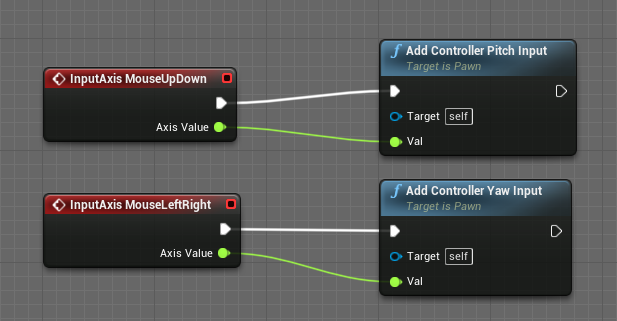
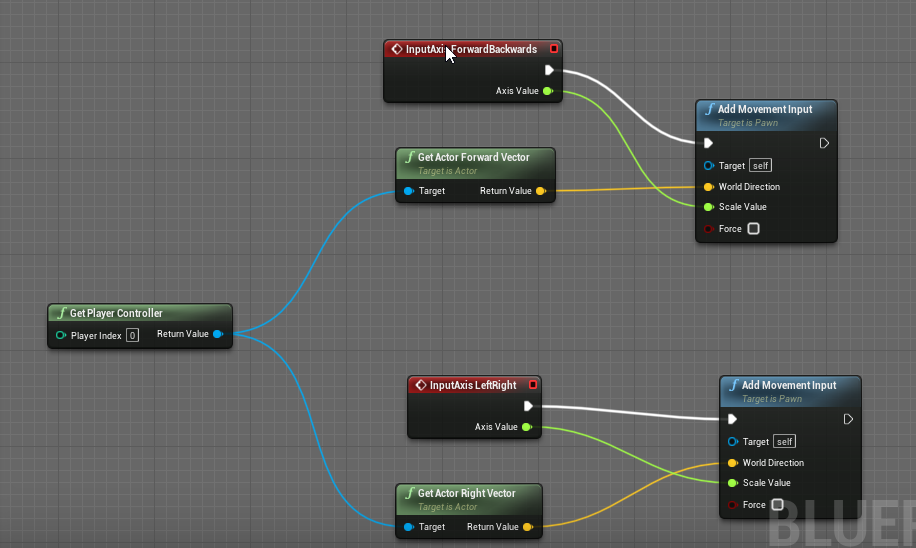
how can i fix the issue that when a player looks down or up, the movement gets slow or stops completely? i think the forward vector gets smaller but i do not know how to go around it? tips? https://i.imgur.com/GVmj4KE.png
https://i.imgur.com/2VpX1D2.png
 hot fjord
does set element work with a struct array ?
I found quiet old information that says, it doesn't and would like to know, if that's still the case
trim matrix
Hello guys, I want to make to read a text file from URL- for example: Blueprint
How I can do it?
 worthy frost
@tall pine why are you using the player controllers forward and right vectors?
you do know player controllers should not be used for such things?
tall pine
worthy frost
you do know player controllers should not be used for such things?
no i didnt know that
tall pine
character worked
orchid garden
trim matrix
How can I set my Camare component as New Target?
How do I use the Set View Target with Blend node to change cameras during gameplay using Unreal Engine 4 Blueprints.
Source Files: https://github.com/MWadstein/wtf-hdi-files
 grave jolt
Hi, I'm looking for a programmer, if you speak Spanish that would be pretty good, if not English.
 safe fox
I have several levels, each has its own score, The player has a total score which is the sum of the scores from all levels. Each level stores its own score, how do I retrieve that, or keep a reference to it somehow so I can get all the scores without loading the actual levels?
 rancid quartz
@safe fox You could use the game instance to store your scores. That way they won't be reset as you move between levels. A game instance is a class that is created when you start the game and persists until it is closed.
If you need the scores to be preserved for the next time the game is launched, you'll need to use a SaveGame object.
I'm trying to set spline points to specific locations using this interface, but entering values into these fields seems to have no effect. Does anyone know what I'm missing?
safe fox
rancid quartz
<@!522042576279437312> You could use the game instance to store your scores. Tha...
OK, thank you!
rancid quartz
No problem.
 red portal
New to UE, is it possible to set up a blueprint that updates text on walls?
orchid garden
safe fox
OK, thank you!
this little diagram is a good refrence for mp replication:
 clear robin
Hi there. Does NetUpdateFrequency also limit the amount of updates per second? I'd like to set a maximum value so an actor can not update more often.
safe fox
red portal
New to UE, is it possible to set up a blueprint that updates text on walls?
Yes, If you're using TextRender, you can just have a reference to it and use the node SetText directly in any blueprint.
red portal
safe fox
Yes, If you're using TextRender, you can just have a reference to it and use the...
I'm doing some work on assignment and it requires a value being incremented by 1 every second. I could update the textrender every second with the new value?
orchid garden
using a timer yes
safe fox
Exactly! simplest way to do it with a timer.
safe fox
red portal
I'm doing some work on assignment and it requires a value being incremented by 1...
This does exactly what you want
red portal
safe fox
This does exactly what you want
woah, thanks a lot 🙌
 lime fulcrum
Hi!
How expensive are line traces? Not Ray tracing, just line tracing. Let's say I want to have 16 traces for like 10 actors doing traces every frame. Would that be expensive?
I'm not gonna trace lines each frame, I'm just making an example so I have an idea. Anyone tried a lot of traces and see any performance issue?
Thanks 😄
odd ember
Cheap compared to the alternatives
You could conceivably do 100s of traces per frame without affecting performance
lime fulcrum
oh nice
orchid garden
also depends on how many traces are server based and how many are just client based.
orchid garden
16 is nothing in sp
whats really going to effect the performance isn't the trace but what you do with the trace results.
lime fulcrum
you mean using the results it gives?
orchid garden
well, if you have a long drawn out function that the results go to, it can cause slow down and studdering.
trim matrix
What are you using PlayerCameraManger for? What should I put in it?
odd ember
Nothing
 molten hound
Can anyone please tell me how I can rotate a player to face the direction of the camera but without changing the world rotation for the mesh as that messes up my movement?
unique harness
you probably want SetActorRotation not SetComponentRotation for the mesh
molten hound
@unique harness Thank mate I will try it now.
molten hound
@unique harness That worked a treat but it breaks character movement. Esentially The player now faces his aiming direction when LT is held but when released movement no longer works.
unique harness
what do you mean the movement no longer works?
molten hound
Left gamepad stick does nothing after but right can still look around. Up to the point I press the LT to aim movement is fine.
 deft snow
I'm trying to trigger a blueprint based explosion inside the sequencer. How do I specify the timing so it doesn't fire automatically?
unique harness
@molten hound how are you doing the movement?
 inner wedge
hi all, anyone know why I would be seeing multiple instances of my level blueprint when I do a print statement on BeginPlay?
molten hound
@unique harness Thank you mate, fixed it. Just needed to follow the logic. However you answer to the orignal question was perfect.
 gritty elm
i want to change or reduce mouse sensitivity in spectator pawn
unique harness
add a sensitivity scalar and multiply it times the input scalar
gritty elm
i was asking about spectator pawn, does it support changing mouse input?
unique harness
I assume there is some how
gritty elm
because my pawn by default move with mouse without add pitch input
unique harness
probably have to create a child of the spectator pawn class
odd ember
presumably the controller still controls a pawn, whether spectator or not
hence why it's better to make inputs work for your controller
 inner cypress
yo @full wind the surface thing worked except it the cube lights up from its own surfaces
 wise heath
hello, I want to get the relative location of a camera attached to a pawn, with a spring arm. The location is 0 in the blueprint, I don't rly understand why, the object is away from the pawn... So would CameraWorldLocation - ActorWorldLocation work?
unique harness
sounds logical to me
 full wind
should work
unique harness
but it'll be from pawn root to camera location
wise heath
yea I think it should work best
okay thanks
But do you know why the location of a camera is 0?
full wind
are you getling relative location?
unique harness
because it's offset from it's parent is 0
full wind
relative would be based on it's parent
unique harness
show the scene hierarchy
wise heath
unique harness
click on CameraComponent and what does it say for the location
full wind
the offset from the spring arm does offset it's root so the camera would still be 0
unique harness
😛
wise heath
full wind
the offset from the spring arm does offset it's root so the camera would still b...
You mean it gives as location this point?
or root location
full wind
yeah that point would be it's childrens 0 location basically
wise heath
okay weird
full wind
it's not really
wise heath
well when you know how it works I guess it's not xD
full wind
xD
full wind
i think you culd also use get local location
i never actually used it
though
but i think it gives you basically the component world location - actor lcation
wise heath
y it's what I want 😮
I don't find the node
tho I'm doing it in C++ anyway but was testing in bp
full wind
am wrong
inner cypress
yo @full wind im not getting the same options as you, where did u find those settings?
full wind
hell can i call you,so you can show me
inner cypress
sure
full wind
cause i have no idea what's wrong
wise heath
Thanks a lot btw 🙂
full wind
np bud
edgy halo
Hey @full wind so related to the texture which changed color, can I contact you on dm?
full wind
@edgy halo you just need a lerp with a scalar parameter and
dynamic material instance in a bp to control it
odd ember
edgy halo
Hey <@182162983051329536> so related to the texture which changed color, can I c...
All of this should be available online
gritty elm
how to implement mouse trail in unreal
full wind
like an after image for the cursor @gritty elm ?
 verbal flower
i created a session with this, and i can join it with a diffrent instance of the game with "open 127.0.0.1" but what ip do i use if its not on the same machine? i tried using the lan ip of the other machine but it didn't seem to work (i dont have Use LAN on, so that might be why it didn't work) but how can i connect over the internet to the other machine?
 covert kestrel
I've been looking at Matt Wadsteins level streaming tut, my difference form his high level description, is that I'm using an array variable, instead of a single level variable in the game instance. The idea is that from that array, I load two different lists, ie common levels within each but a couple of unique ones like foliage, for example. I'm not sure if I can do this, and I'm not that informed on all the available nodes to use either. Any advice or pointers appreciated.
 hearty moss
verbal flower
i created a session with this, and i can join it with a diffrent instance of the...
hearty moss
verbal flower
i created a session with this, and i can join it with a diffrent instance of the...
i believe you'd use your local ip, assuming you're on the same network
verbal flower
hearty moss
i believe you'd use your local ip, assuming you're on the same network
ye that was what i thought too but it dint seem to work
hearty moss
try turning LAN on. not too sure
molten hound
@verbal flower does it require a certain port number? when not localhost?
verbal flower
i dont know but i dont think so
molten hound
change the value of public connections to match how many clients
and select use lan
modest stag
hey everyone. what's a good substitute for the Add Movement Input node?
modest stag
I'm trying to move a pawn, but Add Movement Input seems to need a character controller (which I don't have because my pawn is a sort of vehicle)
 ruby egret
Hey i got a qestion about blueprint map variables.
Lets say i get a map from another blueprint (like in the picture below) and try to find some variable in it with a key.
Will the whole map be copyed to the class i'm calling this blueprint snipped in befor searching the variable in this key? Or will just be the variable from the specific key be transfered over?
In case i want to repeat this blueprint various times, would it be smarter to get a copy of the whole map first or repeat the blueprint like it is in the picture a few times? I'm asking this because the map could become quite large.
odd ember
modest stag
I'm trying to move a pawn, but Add Movement Input seems to need a character cont...
you should always have a player controller, regardless of what type of pawn you are dealing with
otherwise you might have to make your own
but even so I think you'll be hard pressed to get around not having a player controller, as it is a core part of unreal's game architecture
modest stag
odd ember
you should always have a player controller, regardless of what type of pawn you ...
but that's for humanoids, isn't it?. it takes a capsule collider
modest stag
hmmm, I see
is there no other way to move, though? it doesn't need to be pretty yet; I just want to take the forwards vector and go to it
odd ember
think of the controller more as the strings that control the puppet
the pawn being the puppet
odd ember
modest stag
is there no other way to move, though? it doesn't need to be pretty yet; I just ...
the forward vector isn't a location, it's a direction
shadow saddle
is this even normal , i have uniform grid panel that will create 8 slot when construct, when i close it and open again the children of panel is now 16 instead of 8
 coarse marten
you need to clear children before creating the 8. @shadow saddle
modest stag
odd ember
the forward vector isn't a location, it's a direction
sorry, I meant towards it
shadow saddle
so u gotta store the data in object and pass to the slot instead of saving the data to the slot huh
modest stag
I added it to my BP, but it doesn't do anything


 modest stag
it is
odd ember
cool
coarse marten
if you have it being made from an array and your always going to have 8 you should be able to clean the children or the array to make sure its all starting at 0 @shadow saddle
then you do your blueprints after
odd ember
so you can just use get controller or some such to get the controller for it to work
alternatively, and I would recommend doing this later at least, put all of your movement logic in your controller
or well, not the movement
but the input
sorry
mincing words here
shadow saddle
nvm
i used boolean var
to check if it has more than 8 slot if there are stop create new one
tq
 open crypt
Help me with some resolution hackery - I can use Position X/Y to move a control window I have (this isn't a UMG though) that moves the popup screen (which is basically another window just like in windows) - I can hardcode it for myself to spawn it on my left monitor, or my right, but I'm trying to figure out the way the pattern it does to move it - for example - if I put -1920 in X it moves it to my LEFT monitor, and if I do like dbl that (and positive) it moves to the right - it's not a clear position because I think it is spawning with my native resolution (center monitor is 2560 x 1440)
odd ember
open crypt
Help me with some resolution hackery - I can use Position X/Y to move a control ...
resolution canvasses are usually painted from top left
open crypt
so I'm trying to normalize that to take in the users resolution and adjust it, then just have a bool to let them say, "left monitor, or right monitor"
odd ember
I don't think you should need to worry about monitors like that specifically, usually users have a monitor that they want things to work on, and that is an OS setting
open crypt
No, this is entirely different use case
This is a marketplace addon specifically made for VR use, to have additional windows popup
odd ember
I see
open crypt
I can't rely on the author to update it anytime soon and if I can figure out how the system works, I can workaround it
so, if my main window was 1920 x 1080 and i did -1920 by zero in the window position, that would put it correctly on the left monitor you think right? @odd ember
open crypt
hmmm let me see
odd ember
generally you could add a scalar that multiplies the horizontal resolution with 1 or -1 depending on which monitor to use
odd ember
hard to say tbh, this might be a windows issue even with how the monitors are considered to be relative to each other
odd ember
yeah so I think your issue will extend beyond unreal at this point
I think asking the guy who made it will probably be your best bet
open crypt
Yeah that's what I was afraid of thanks for trying to help though
odd ember
sure
 clear palm
Whats up! Does anyone know how I could create then destroy an image at a specific location inside a widget? I am trying to make a sonar system and I want to feed it just the distance from the center and the angle to determine it's location.
open crypt
@odd ember this looks interesting
odd ember
you can try

Dots per inch (DPI, or dpi) is a measure of spatial printing, video or image scanner dot density, in particular the number of individual dots that can be placed in a line within the span of 1 inch (2.54 cm). Similarly, the more newly introduced dots per centimeter (d/cm or dpcm) refers to the number of individual dots that can be placed within a...
hearty moss
im pretty sure it's taking only your primary monitor's canvas position
if you move it to the middle monitor does it display correctly?
 urban haven
Hi all, I got a interesting problem: I want to make a flatbedscanner. So far I have got the first part working. I can scan 1 Line of anything ( using a render-target and scene capture 2d. I can see the output using a material.) The problem is that I need a lot of 1-line scans to get a full picture( like 100 or even 1000). I was thinking of making a second Render-target and use that as a buffer. But how do I connect them? Anyone has an idea on how to proceed?
 stable fjord
Hi! So there is someone, who has an idea about resolving conflicts with blueprints? When for example Blueprint Actor is both modified. Once I am trying to merge, I always dont see a
<<<<<<<<<<<HEAD
...
575732fasd123751...
 vital lynx
Im havin issues with my regeneration, if my armor gets to 0 then it wont restart to replenish to the value of 1
Do i need to make a blueprint straight from zero?
tight schooner
@urban haven might be a good question for #graphics or even #visual-fx
odd ember
vital lynx
have you tested that it works with values between 0 and 1?
vital lynx
Yes i did, once it hits 0 then it doesnt start its regeneration
odd ember
where are you placing the breakpoint?
vital lynx
Delay area
odd ember
before delay?
 hollow drift
how to change only one object through Vector Parameter Value?
or what should i use instead?
if i just connect it to set vector parameter value all my models with the same material get the color change. i want to only change one specific tile which i pic before hand
vital lynx
Yeah
odd ember
vital lynx
Yeah
you should put it after the delay as you are getting no info before the delay
vital lynx
Oh okay ill try that
Got it! okay the delay on starting from 0 is SUPER delayed... its fixed now thank you!
odd ember
vital lynx
Got it! okay the delay on starting from 0 is SUPER delayed... its fixed now than...
you might want to use a re triggerable delay, or tbh move all of that off tick and use a timer instead
 frail swift
I am trying to make an acceleration curve for my physics based vehicle does anyone know what is the best way to go about giving in an input float x (current speed) and getting out an output y (acceleration), is their a graph feature or something like the timeline, really dont want to have to do a bunch of select nodes; thanks 🙂
 willow phoenix
Any Ideas why my Camera Plane buggs out like this? the "find look at rotation" did the same in the editor, it rotated its head basicly in a wrong direction ~90° away from where i would it expect to look
odd ember
frail swift
I am trying to make an acceleration curve for my physics based vehicle does anyo...
curve assets
 unborn turret
is there a way to localize comboboxes?
dawn gazelle
Perhaps keep your options as an array of text objects and build the combo box at run time. Then you can localize the options individually?
 bright haven
Having some rotation math problems.. Any takers? LMAO. I'm at that rubicks cube sort of progress where I feel close but probably another entire solution is better (one where there's a method to it, instead of my trial and error madness).
This rotation math works any time my ControlRotation doesn't push the Mesh's world rotation upside down. Then it snaps.. (I suppose because of GimbalLock).(ändrad)
https://cdn.discordapp.com/attachments/588108157637754920/797597149826121754/unknown.png

Working as intended: Character pointed up, and towards view.
https://cdn.discordapp.com/attachments/588108157637754920/797597298275647528/unknown.png
Turning down the camera a bit, It sort of snaps into the opposite position of what I want.:
https://cdn.discordapp.com/attachments/588108157637754920/797597494283730974/unknown.png


 trim matrix
ill try to word this as best as i can: how can i subtract 1 from an int and if it goes below zero, it becomes the maximum value
dawn gazelle
trim matrix
ill try to word this as best as i can: how can i subtract 1 from an int and if i...
orchid garden
hrm... anyone know a simple way to capitize the first letter in a string? not seeming to find a function that does this.
i.e. if i had a string "joe goes to the market" and wanted to change it to "Joe goes to the market"
dawn gazelle
Do you have the Low Entry Extended Standard Library?
It's a free plugin on Marketplace.
orchid garden
zero plugins
dawn gazelle
Dang. it has a regex function in it that makes string manipulation easy.
dawn gazelle
That's probably better than mine.
maybe put it into a Blueprint Function library and you can call it easier
orchid garden
yeah just need it in one component
oops left chop is wrong, i think i need right chop...
dawn gazelle
yep
orchid garden
hrm still doesn't seem to be working... im endind up with Mm
dawn gazelle
You have 1 set on both the Left function and Right Chop function?
orchid garden
haha derp... i forgot to set the int hahah oopsie
 somber falcon
You're not comparing the actor in the world to itself. You're comparing it to the asset on disk (its class)
which are not the same thing
open crypt
somber falcon
You're not comparing the actor in the world to itself. You're comparing it to th...
so equal to class name then?
somber falcon
no
dawn gazelle
You're probably better off casting to the class
somber falcon
What are you trying to do? See if the actor is a player?
open crypt
or what is technically more performant, just casting to it, and if cast succeeds, do the thign?
dawn gazelle
yeah
somber falcon
casting is what you want if you're trying to get an object of a specific type
open crypt
Just want to make somethign happen when player shows up
zealous moth
casting will not cause performance issues especially in this context. I really hate it when people say that....
dawn gazelle
I guess the alternative would be you get the class of the object and compare it, if you don't need to specifically reference the object that was hit.
open crypt
I'm trying to make a trigger event that happens when the player shows up - normally I'd use an interface call and be done with it, but I need to be able to have the event functionality happen on the actual levelblueprint - it's a special use case, normally I don't do much on level BP's
I'm using event dispatchers for this, first time I've used them but I think they are what I need
odd ember
zealous moth
casting will not cause performance issues especially in this context. I really h...
it's probably a remnant from code indoctrination
but I wonder why that sticks when stuff like amortization never gets brought up
which in this case negates any costs
open crypt
Help me figure this out - my event it's triggering, and I think it is because it sees my motion controllers and never Unoverlaps them (because I teleport my VR Pawn there and they are 'on' the VR pawn)
i don't want to mess with the collision channels yet
so how can I make this trigger 'reset' so It will detect my VR pawn
zealous moth
odd ember
it's probably a remnant from code indoctrination
most likely because almost every single youtube tutorial for newbies says this stuff
hence why me and a buddy revisited some of these concepts and actually measured them in 4.22+
unless you run over a few million for loops with casting, you will never notice it
@open crypt overlaps are tricky because as you say, it doesn't retrigger. Use the overlap to turn on a timer instead and turn it off afterwards.
 thorn rune
Got a weird issue in 4.26 trying to play a widget animation. The widget starts out with visibility switched off, and I then switch it on prior to playing the animation like so:
Except the animation won't play, unless I stick a delay (just 0.1 works) between the set visibility and the remainder
If I test whether the widget is visible prior to playing the animation (even without the delay), it's always true/visible
not quite sure why the blueprint won't play the animation as-is - bug?
 proud hull
thorn rune
Got a weird issue in 4.26 trying to play a widget animation. The widget starts o...
proud hull
thorn rune
Got a weird issue in 4.26 trying to play a widget animation. The widget starts o...
You can try using render opacity instead of visibility.
As far as I can tell, your current setup should work though. Unless there is a difference in visibility between the widget itself and the widget component.
dawn gazelle
Not a bug, same setup working fine on 4.26 here.
thorn rune
hmm so that same node setup works for me in 4.25.4
dawn gazelle
possibly try using a different widget class just to see if maybe there's something buggered with the widget?
thorn rune
good idea - i'll try remaking that now
 stiff linden
dawn gazelle
stiff linden
dawn gazelle
Tangent, but how do you get the BP wires to look this way?
dawn gazelle
stiff linden
Tangent, but how do you get the BP wires to look this way?

Unreal Engine
Improve the wire style of Blueprints and materials editors.
thorn rune
hmm nup same deal - wont work without a delay in 4.26
stiff linden
Gotcha, ty
dawn gazelle
Maybe its in how it is being triggered? Like, is it getting triggered repeatedly which may be restarting the animation?
Testing with Begin Play vs. Tick - Begin Play the Anim plays, Tick it doesn't.
thorn rune
so the event is begin overlap but that shouldn't trigger right
I'll test that now
weirdly it seems to work fine on event begin play, but doesn't like my overlap setup. The overlap event isn't firing twice though so I have no idea
branching to when Is Playing Animation = false doesn't solve it so I'm presuming that's not the issue
open crypt
zealous moth
<@!273265779175194624> overlaps are tricky because as you say, it doesn't retrig...
Turn off what exactly? The collision of the trigger actor?
dawn gazelle
4.26 triggered via Actor Begin Overlap, animation fires fine on my end
thorn rune
i really can't figure it out, it works even if I stick a 0.05 delay directly after Actor Begin Overlap
This is with everything else ripped out:
That is using on component but same result with on actor
zealous moth
@open crypt a timer. A timer is a built in method that cyclically runs at set intervals. Look into the node "Set timer by handle" or "Set timer by name" and you can write the name of the event in it. Each BP can only have 1 timer of a specific type at a time, so set it as a variable and when you are done with it "stop and invalidate it" or you can "pause timer by handle" your choice
open crypt
zealous moth
<@!273265779175194624> a timer. A timer is a built in method that cyclically run...
I use timers - my question was more about triggering the state that allows the overlap to overlap with something else. Since my motion controller is located right on my VR pawn (but is its own actor) it is triggering the overlap event and I believe that is why the VR pawn is not triggering the overlap.
How would I use timers to reset my "overlapability"
zealous moth
@thorn rune add some print strings in your branches including your cast, it will tell you at which step it stutters
thorn rune
yeah tried that, it only ever prints once on the correct path. as far as I can see it doesn't fire twice (also tried setting a bool and checking against that to stop a second exec)
i'm just lost as to why a random delay fixes it
zealous moth
@open crypt the overlap of what? i know you know what you're talking about but i have no idea. Is it the right on the VR pawn or another actor?
open crypt
it is attached to the vr pawn but when I check the overlap actor, it says the name of the motioncontroller actor
zealous moth
@thorn rune probably because the play animation doesn't have an output to flag when it is done. the delay probably does that bit
open crypt
orI guess I need to do either or
zealous moth
ugh, i wish i was more familiar with VR... it's a bit confusing which is doing what now...
thorn rune
zealous moth
<@!789119322315685888> probably because the play animation doesn't have an outpu...
well so the delay can be anywhere though and it still somehow fixes it, e.g.
zealous moth
if you remove the delay, you don't get any errors? maybe a pending kill error?
thorn rune
nup, everything still works except the animation doesnt play
the node directly after the animation still fires like normal
printing a string on overlap only fires once, so I have no idea what's going wrong lol
BP also thinks the animation is playing even though visually it's not if I run it without a delay, very weird. Going to roll back to 4.25 for now, that exact setup works fine in that version.
 nocturne flax
Hey, it looks like the SceneCaptureComponent2D has an inverted alpha channel, any way to invert it back? Or would I have to make a material for this
 weary jackal
nocturne flax
Hey, it looks like the SceneCaptureComponent2D has an inverted alpha channel, an...
weary jackal
nocturne flax
Hey, it looks like the SceneCaptureComponent2D has an inverted alpha channel, an...
in the material use 1 minus node in alpha channel and plug it in the opacity. the material domain should be user interface
nocturne flax
that's what I've done, bit weird to have to use up a material for this but oh well
 tardy kayak
C:\Local\bmc153\Unreal Github\UnrealEngine\CADModels\multibody_model.glb say I have this string and I want to remove all the characters except the last work and its file type what would be the best way to achieve this?
dawn gazelle
tardy kayak
C:\Local\bmc153\Unreal Github\UnrealEngine\CADModels\multibody_model.glb say I h...
tardy kayak
thanks
 random stratus
just curious if anyone had any experience with creating fog of war using blueprint/material?
 violet wagon
Am I able to change what map my game starts up on based on a savegame variable?
 karmic zealot
@violet wagon just open the map from the game start map(make a blank one), get the map you want to open from the save game and then open map immediately on Begin Play from level bp
trim matrix
I have quick question- I am paying for git storage in github- if I remove repository that I payed storage for and if I create new repo, will I lose the storage that I payed for?
 agile hinge
having issues with generating a overlap event on a creature's character mesh..however everything else like the CapsuleComponent and other collisions work fine

my raycasts just go straight through the mesh
violet wagon
thank you @karmic zealot that worked!
 robust jacinth
Having an issue with an endless loop...
When this event is fired, I want to delete the other object and replace it with one specified by a variable.
The thing is this causes the new actor to fire this event as well...
How can I disable collision between the actor and the spawned actor?
To the right in the image I try to disable it with something I found googling the issue, but it doesn't work, and the endless loop remains.
true valve
Let's say I have an Item BP with a sphere collision and an item info widget. When players overlap the items they display info on player's screen
There could only one item or multiple items with in the range.
I found in-consistency on overlapped items.
Also is it better to have collision on your character or work items.
clever lark
Hi everyone, anyone can help me to understand patching, How can i creating small patching files like 1_p.pack, 2_p.pak etc. When I create patch it always create 1 patch with name gamename_0_p.pak
Just to add, I have patch tier slected.
molten hound
Has anyone managed to get subtitles working? I have read and followed the docs, entered the text but cant get any to show? Oh and it was enebled.
 little cosmos
Hi
How can I rename the actor instance in the outliner with BP?
Like Get Display Name but a Set Display Name (which doesn't seem to exist in bp)
for editor purpose
little cosmos
https://forums.unrealengine.com/development-discussion/python-scripting/1765356-set-actor-label-in-editor-utility-widget found my solution
Unreal Engine Forums
so I was watching this video
https://www.youtube.com/watch?v=PHKmTC55XL4&t=58s
and I was looking for some kinda function that looked like that in an editor utility widget, seeing as how in the video it was being done on just a regular actor,
how would I try to do this in 4.25 editor utility widget?
 amber meteor
Hi just wondering if anyone could give a noobie a hand. The variables I've created on a parent class aren't showing up in the child
cold raft
amber meteor
Hi just wondering if anyone could give a noobie a hand. The variables I've creat...
post a screenshot of your parent and child blueprints showing how the variables are set and how you access them from the child BP
 pallid tree
amber meteor
Hi just wondering if anyone could give a noobie a hand. The variables I've creat...
pallid tree
amber meteor
Hi just wondering if anyone could give a noobie a hand. The variables I've creat...
Have you set "Show Inherited Variables" to true in your child class? There's a little eye icon at the top of the blueprint tab that shows variables, functions, etc
amber meteor
pallid tree
Have you set "Show Inherited Variables" to true in your child class? There's a l...
Thanks for the help !
 twin heath
Could someone help me with this: basically it seems to work while I'm playing in the editor but after I'm getting these errors and I assume it's because I set it up wrong somehow. Basically you pick up the coins and it updates how many coins you have, on your UI. (it's for a multiplayer game)
Blueprint Runtime Error: "Accessed None trying to read property PlayerInventory". Blueprint: BP_Coins Function: Execute Ubergraph BP Coins Graph: EventGraph Node: Update Coin Count
Blueprint Runtime Error: "Accessed None". Blueprint: BP_Coins Function: Execute Ubergraph BP Coins Graph: EventGraph Node: Update Coin Count
Blueprint Runtime Error: "Accessed None trying to read property PlayerHUD". Blueprint: BP_Coins Function: Execute Ubergraph BP Coins Graph: EventGraph Node: Update Coin Count
Blueprint Runtime Error: "Accessed None trying to read property PlayerInventory". Blueprint: BP_Coins Function: Execute Ubergraph BP Coins Graph: EventGraph Node: Update Coin Count
 magic pecan
Heya
Maybe somebody have an idea: im facing problems when my NPC got into non-navmesh locations and get stuck there.
Like a mountain slopes and stuff
One of my NPC just got stuck in this slope
Is there a way to move npc when its stuck to nearest accessible navmesh?
willow phoenix
magic pecan
Is there a way to move npc when its stuck to nearest accessible navmesh?
are you using a BT or only blueprints?
magic pecan
blueprints
willow phoenix
you could check the movement component in your npc there should be a "max walkable slope"
magic pecan
Ah, the problem more about its getting out of navmesh
willow phoenix
for the unstuck: you could use the move to node, if i remember correct there is a "failure" exit
magic pecan
yeah, i have Failed move to with print
willow phoenix
then you could find a random point in walkable nav mesh and go there
magic pecan
something like that?
willow phoenix
i guess, does it not work?
150 may be very little space if its stuck
~70 is the third person mesh standing next to another third person mesh
magic pecan
willow phoenix
i guess, does it not work?
waiting 🙂 this npc daytime take sometime
willow phoenix
lol dude XD
just make a debug branch
use a bool and a branch, make it public so you can check it in your editor
and go like "on begin play -> AI Move too"
*to
and check if its in debug or not
or if thats a lot of scripted stuff make a debug option to set a specific "time" in your game
magic pecan
willow phoenix
use a bool and a branch, make it public so you can check it in your editor
You thought i didnt think of that? 🙂 Problem is that in test situation all works just great, but in big terrain some weird shit starts to happen
willow phoenix
well, i waited loong times 😉
willow phoenix
did you check the max walkable slope?
magic pecan
yeah, thats not what it need. i want them to avoid slopes - its as it should be. but sometime they got into slopes or just not navigatable areas for some reason.
Seems like its working like a charm, need to remove some under terrain trash to avoid them move there.
thank you
Now i need to figure out why every two days whole village sleeps all day instead of working ha
willow phoenix
oh okay wait
magic pecan
magic pecan
Now i need to figure out why every two days whole village sleeps all day instead...
This doesnt have connection with navmesh ofc
its something inside my bp
willow phoenix

Today I show an often unknown but very useful tool for helping differentiate our AI movement.
magic pecan
i know about it, thank you 🙂
willow phoenix
well how do you calculate that day/night?
is there a minus that gets multiplied with a minus so the guys get sleepy? ;=)
edgy halo
Hey guys so I have an actor who has collisions enabled and another actor who has collisions enabled too, but is player controlled...So when I move diagonally, and hit the any object with collisions enabled, it stops moving at all, but it should be able to move sidewards if the collision happens on the top surface? How can I do so?
This is what is happening
maiden wadi
@edgy halo My initial assumption as to why it happens is likely just to do with sweep movement. It would probably move in that manner if your collision was round instead of flat, like a capsule instead of a cube. As for how to get around that, you're most likely looking to implement something like on a hit event for the root component. Get the hit normal, maybe add movement input more towards the accessible direction. It might work. If it does, it'll save you having to calculate a lot of math for movement.
 worn nebula
Hey guys, just wondering if anyone can give me a little help, how can I do it so the player can only move along a spline, so pressing W will put them forward along the spline and S backwards?
tight schooner
Use the node Get Transform at Distance Along Spline (if I recall correctly)
And increment the input distance up or down
And set your pawn location to the output of that
There's probably also a node that gets the closest distance along spline if you want the reverse
if you want to know how far something is along a spline
 shrewd palm
how does one make a light turn on when time of day is night? event dispatcher?
 olive sedge
So.. How is UMG supposed to be used? I have a root widget that holds all the other widgets in my UI?
But if I have that, what is HUD for?
hollow drift
how to change colour throught blueprints?
tried to to it this way, it changes all colours of all instances. i want to change only one instance
maiden wadi
@olive sedge People do user interface in many different ways. It really comes down to personal preference. AHUD is an older class that was originally designed to be able to draw simple things to screen like text, or lines, or box selections. UMG is a much newer implementation for more modern UI design.
Some people don't use AHUD at all, they do their UI in different places like the level, or PlayerController. Where you keep the references is important for your game flow though.
I personally love AHUD as a container for keeping my widget references there for a few different reasons. The first is that it's an actor class that doesn't get garbage collected, so storing pointers there is safe. The second is that it's spawned anyway via game mode and it's spawned once per client as a client only actor, which makes it very easy to use for multiplayer as well and to keep UI for the client only and not get your UI mixed up. The third is that it's extremely easily accessible both in C++ and blueprint, via getting the local player controller, and then calling GetHUD on that controller. This allows things from anywhere in the game to affect your widgets that you're storing or using in the HUD class. Anything from key presses, to trigger boxes, to RPCs, or repnotify functions can all easily access and affect the widgets stored there.
@hollow drift So don't do it for all instances? You're running that in the body of a loop. You need a logical way to get the correct instance you want to change and change only that, not everything in that loop.
hollow drift
to correct myself
i pick my selection with the loop
so i just want those to be "highlighted". i just could not find the way to do it
I tried to do vector param, which changed all values of all instances
the set scalar param does not seems to be working.
the execution works until create dynamic material
olive sedge
@maiden wadi 👍 thanks for the write up, man!
maiden wadi
@hollow drift SetVectorParameterValue does not change it for all instances. That sets a vector parameter for once instance.
hollow drift
i used a material parameter collection
is there another way i missed?
"TileSetSelected" is part of it
for me it changed all color of tiles
maiden wadi
Can I see the left side of that loop?
What are you feeding into the loop as an array?
hollow drift
spoilers... getting complicated 🙂
short version. i do a mathematical calculation to pick tiles nearby
this works fine
so i get the object names of the tiles
those i adress and tell them to do stuff
maiden wadi
I'm not that familiar with using Material Parameter Collections, but a quick glance says that you're not actually using them.This looks like you're getting specific objects, and telling all of those objects to change their values
maiden wadi
You said it does.
hollow drift
le me rebuild the previous version where it changed all fields color
this is in material
this is what happens
this is what was executed
this tile was accessible with the boolean. all others were set to false
"tile accessible"
so only the neccecary tile was set to true. e.g. i try to do the same with the material. to color it in into a different color to show players where his valid fields are
maiden wadi
I'm under the impression that MaterialParameterCollections are supposed to be global values. But it looks more like you're trying to use them as PerInstance. Why not just use a simple VectorParameter in the material and pass that in? I could be off here though. Let me try and test a couple of things.
hollow drift
the documentation is quite lackluster on unreals side (again)
already tried similliar stuff
at least its "better" now 🙂
ou ups
forgot...
zealous moth
@maiden wadi that is correct.
hollow drift
no. now it just does not highlight anything
i pick the correct material from landtile (has only one) it gets printed correctly
but after create dynamic material it does not do anything anymore
dynamic material outputs TileSetSelected
but vector does not call anything
i adjusted also the material accordingly
does anyone has done this before?
its one of those things where it should be simple, but no 🙂
maiden wadi
I've used Scalar and Vector inputs into dynamic materials all of the time. First time I've used the MaterialParameterCollections thing though.
hollow drift
do you have me a example by any change?
perhaps if overlooked something
perhaps i am getting the wrong way the material? i have the same material on all tiles, but i want to pick only one material from a certain tile....
maiden wadi
First note would be to only create a dynamic material once, don't create one for every time you change something. But that's optimization. Instead of getting the material and creating an instance out of that, use the other call.
Use the top one, not the bottom.
hollow drift
ok
ill optimize later, ty for the tipp 🙂
first need it to get working
great...
only one works (faceclap)
and you can find it only when untick context sensitivity
maiden wadi
You just have to drag off of the right object type.
hollow drift
maiden wadi
There's almost never a reason to remove context sensitivity. Just need the right object. In this case, the primitive component that has the material.
That's odd. What version are you on?
hollow drift
4.25.4
i am slowly used to it 🙂 unreal is unreal
but it worked now like a charm 🙂
ty a lot
maiden wadi
Shouldn't matter if you're dragging off of something.
zealous moth
The context is cache dependent and sometimes the editor incorrectly thinks the context doesnt apply. Happened to me a few times.
maiden wadi
zealous moth
Happens a lot in widgets
maiden wadi
In a macro in the player controller.
maiden wadi
Shouldn't change anything. The list is about what you're dragging from.
hollow drift
disconecet the loop and now it appears
maiden wadi
hollow drift
@zealous moth as he mentioned, perhaps it was not cached..
appears now too in a loop
noticed this more often, specially when i started my project i could not find stuff what i needed
perhaps this is some sort of attemt for user friendlines. hide it until someone realy needs it... Not get overwhelmed with the amount of stuff possible
maiden wadi
To be fair, I do a fair amount in C++. I'm constantly closing and refreshing the editor, and removing cache files from project directories to recompile fully. Helps intellisense not derp as much in visual studio.
hollow drift
hahaha
switch around to visual code
starts much faster, runs smoother
just dont know if y need library or stuff
y can even change default editor in unreal to code
prefear to code there. at least php and stuff
zealous moth
the issue isn't that, it is a performance/consistency issue and you are much more limited in BPs
zealous moth
a good point a friend of mine made was that you cannot control how nativization works so you have to re-QA everything from BP to get that 30% increase in performance
hollow drift
If i could do C++ i would not do the bp stuff
zealous moth
unless you make a multiplayer game, you can get away without C++
zealous moth
there is a lot that needs to be done for networking that needs C++
you can't just replicate stuff
players have to connect to each other
zealous moth
of course
zealous moth
like, if I have a game and you have a game, how in the world will they know that we exist? you need a sub-system for that. Sub-systems are hardcoded.
hollow drift
Our "Multiplayer" guy has watched some epic tutorials
they mentioned it can be done in bp i think
maiden wadi
I learned C++ in just under a month with no coding background. I only really knew LUA before that. Just spent some time translating blueprint calls to C++ to rewrite functions in a library. After that I've been really comfortable even writing larger base classes in C++. So if you have any idea how to code and you're comfortable in blueprints, I wouldn't fear C++ in Unreal at all.
zealous moth
there are a few udemy courses on sub-system and you need to read up the documentation
hollow drift
Hmm i think it is about time. Think should not be too hard to learn 🙂 ty guys
Just everything is so time consuming
since logic is quite easier to understand then learning all the codeparameters by hearth
zealous moth
honestly, if you've never made a game before, do a single player one before attempting a multiplayer. If you can get a single player game to work well in terms of performance, then attempt a MP game. Otherwise you will have a poorly performing MP game.
i have met plenty of folks that go straight into the MMO trap and never get finished
hollow drift
i already choose a quite simple game
zealous moth
match3 😄
hollow drift
but good point. our basic for "single player" is anyway almost done
zealous moth
?
hollow drift
just a boardgame
would need a tcp connection and stuff. Handshake. No need to precalculate a eventual position of player like fps. would make live easier i think
ne keine billigspiele wie die da XD
more advanced
anyway. got bit lost in discussion. have now bit more idea what do do and stuff. Ty @maiden wadi and @zealous moth a lot 🙂
worn nebula
Is there a way to stop a first person camera to stop going through a wall when it's close like this?
orchid garden
zealous moth
i have met plenty of folks that go straight into the MMO trap and never get fini...
kinda of ironic being mp is mostly just replication management, but starting out as a single player game, even if you plan on moving it to multiplayer later, is a pretty easy way to go, IF you think about your coding along the way. there are some aspects while they work well in single player, they don't work so well in multiplayer.
orchid garden
worn nebula
Is there a way to stop a first person camera to stop going through a wall when i...
i've only seen that when the animation pushes outside the capsule components collision. if your not using a capsule component, maybe try adding custom collision to block the camera from entering the wall? animations will still be a issue though if the camera is attached to a bone.
zealous moth
worn nebula
Is there a way to stop a first person camera to stop going through a wall when i...
increase your side arm's collision probe from 5 to 12 or even 15
zealous moth
orchid garden
kinda of ironic being mp is mostly just replication management, but starting out...
it really isn't just replication management. That's the simplest part. The most complex parts of MP are networking with a subsystem and performance being met across the board. That's why earlier games like WoW couldn't be run half the time on most machines past a few people and going into a city would mean waiting about 2-5 mins to load everything and everyone.
the last bit, if you do p2p, is connection management. another annoying thing to tackle...
orchid garden
zealous moth
it really isn't just replication management. That's the simplest part. The most ...
if your going for a full bore MMO game yeah, if your going for a simple rpg style with limited number of players, its mostly just replication management. It all really depends on how indepth it goes, is it a single map, multiple maps that allow characters to be in different maps, are you using level streaming, etc. etc. But most connection issues is based on the data being sent back n' forth during play and while loading, if your sending alot of data back n' forth between the server and the players, you can make a nice single player game into a crappy multiplayer game just due to replication. With poorly managed replication, the networking is going to crap out on you no matter how well its done.
zealous moth
This is where a true balance lies. You need to also balance CPU/GPU resource management. The reason those games were so lackluster in performance were precisely because most of the time they clogged up the CPU
orchid garden
performance ballancing the cpu/gpu should come before you even think about multiplayer.
zealous moth
so even if you had the best connections in the world, if you cannot run the game, all of that well managed replication goes down the drain
maiden wadi
My favorite are the people who think that making an MMO multiplayer game is just about designing it. Even with my intermediate knowledge, I could make a decent MMO style game within a couple of years. But the actual startup? The cost of hosting, the community management, bugfixing, QA? All of that is larger than one person even if you get past the design and programming alone.
zealous moth
^ you're forgetting customer care
maiden wadi
QA
open crypt
Where can I learn a bit more about how overlap/collision is "overridden" like the way input is consumed - I'm having one actor overlap a trigger, and that trigger is not seeing another actor as a result, (because the 1st actor never "ends" it's overlap" - to me it seems obvious there is some clarity on the concept I am missing, can someone point me into a resource that will help?
zealous moth
QA is a different department on its own. If you mix QA and CC, you will clog up QA's time. I mean just having a 24/7 team with easy tools for easy fixes
maiden wadi
@open crypt That has to do with the logic on the overlap event most likely. How are you handling the overlap logic?
orchid garden
open crypt
Where can I learn a bit more about how overlap/collision is "overridden" like th...
on begin overlap should report what character / object has entered the collision, i haven't had a issue thus far with trigger boxes not seeing the second player / npc entering the trigger box.
open crypt
My player pawn is a VR pawn that, and begin play, spawns motion controllers as actors and attaches them to the pawn - however, they are triggering this overlap event as a result - I don't want to mess with my pawn so I'd prefer to implement a workaround on this BP here
Problem - My MotionController triggers this overlap event, and seems to stop the VR pawn from triggering it as a result
Addt. Complexity - Normally I'd just so, okay, pick either the VR pawn OR the motion controller and let either one trigger the event
The problem with that is the motion controller has a laser point that projects far into space, so I think it is triggering the event, from far away too, and I don't want that
This actor you see before is a BP child of Trigger Base - I just noticed this - I have added a capsule which does trigger overlap events, so I guess I can leave this alone
That's why I asked for some more indepth resource because I missing some key nuances of the system
maiden wadi
If something does not trigger the overlap again, then it is still overlapping somehow. But to try to understand better, which blueprint is this overlap event in?
open crypt
A "TriggerBase"BP
maiden wadi
So this is just an actor that you can place somewhere and let the VR player touch?
open crypt
Basically