#blueprint
402296 messages · Page 596 of 403
 orchid garden
np 🙂
@maiden wadi even with them being replicated, still getting off time from the server (top is server)
the time difference doesn't seem constant like before either:
while really funny, i just realised i have another problem in my bp lol, poor guy:
equipping the wrong mesh lol.
 dawn gazelle
lol
 indigo ledge
Hey everyone! I have a couple of questions, if that's alright: First, I'm trying to set up the nodes to be able to make the in app purchase to remove ads in my game, and I got this far, but don't really know where to take it from here and apparently, neither does my google searching powers?
I assume, I'll have to make a save game to store the fact that they did buy it (If they do) and check it when they load the game again. But I can't seem to find the nodes that would actually disable the ads. Maybe have it check to see if they bought in remove ads purchase, then branch to see if they own it, if they do don't do the ad if they don't, show the ad? Thanks in advance!
orchid garden
im against in game ads and probably would never play one that requires me to buy something to get rid of them... i can imagine playing a game and right at a criticial point a viagra ads pops up on the screen... but.....
You'd want some way to check to see if they purchased the addon, storing the information locally just makes it so it can be hacked in as purchased, if your not worried about that then its just getting the initial return from the purchase screen and checking to see if they completed or canceled the purchase.
indigo ledge
I'm trying to make them as non-invasive as possible. Only running a video add randomly between 3-5 deaths, so min of 3 deaths, max of 5, so it doesn't intrude on the actual game. Which is another question I was gonna ask 😅

 hot fjord
Hey everyone !
Does anyone have a couple minutes ?
Basically, I have a value, of which I think is set up properly, that doesn't seem to communicate between the game mode and player controller. (Because it's not set up properly and I havent managed to figure out the issue)
Would someone hop into a screenshare with me ?
orchid garden
indigo ledge
I'm trying to make them as non-invasive as possible. Only running a video add ra...
yeah i would suggest if your going to add them have them as least intrusive as possible, puzzle games usually give something for watching the ad (my mom plays those) so get sets some coins or a extra life or something odd like that.
If you want to make sure that the purchase information is valid, i'd suggest storing the completed purchase for the player on some custom server possibly, that way you could make it so that no matter what device the player logs in to the game on, they game can check and go 'oh this guys has it, don't smack him with ads'.
I'm assuming its a phone/tablet game?
indigo ledge
Yeah, it's on mobile. Specifically just Android for now. I'm also no coder, so I don't even know where I'd start for storing it on a server 😅
And yeah, it's just an interstitial add that happens sometimes after you die (if I can get it set up that way) and that's pretty much it.
Kinda simulating your actual "game over". It's an endless runner, by the by
orchid garden
the problem with storing it locally on the phone is if they ever delete the application, then reinstall it, they would have to purchase it again as it doesn't have any built in check to see if they bought the item. You'd really need to find a way with the app purchase unit your using to check to find out if the player has bought the addon for cases like that.
they'll be times they don't have service as well, and in those cases, it would serve to store it locally as well.
indigo ledge
Yeah. I was gonna ask too about the restoring the purchase. They talked about it in the Match3 video and it's in the documentations. But it doesn't make a lick of sense to me, but sounds like if they change phones or whatever they can just have the purchase added back in if they bought it previously.
I honestly don't mind if it's hackable to add it in without buying it. If people are enjoying it that much to hack it to play it more...I think that's a win in of itself haha.
orchid garden
if the purchase unit doesn't have a way to see if they bought it previously, i'd suggest going with a different one, as it doesn't stop from accidental duplicate purchases.
hot fjord
Or maybe like this for those who don't like voice chat.
Basically I have "Player ID" as an Integer inside my player controller and it's set to "Instance editable".
Inside the Game Mode, I try to set that Integer Variable by grabbing it through the cast. The blue pin is linked to the incoming player's "Player Controller Obj Ref".
But when I try to grab the "new" Integer value from the "Player Controller" it seems to read 0.
orchid garden
i mean yeah sure part of that is the coders responsibility, but like in cases of reinstalling you'd need to be able to check.
indigo ledge
Mmm. How would I go about doing that?
I assume it's possible for BPs
I hope so. It's all I know
 green briar
Sorry to interrupt your convo, but I was wondering if someone could tell me what a "Accessed None Trying to read Property" error means?
orchid garden
only thing i can suggest is read through the documentation for the purchasing unit your going to be using, it should be outlined in it somewhere. Some systems don't give very 'detailed' info but most usually give you a 'test' backend you can connect to to make your your coding its talking to theirs properly for the purchase processing.
green briar
orchid garden
points down to compiler results looks like your trying to cast something you don't need to?
indigo ledge
orchid garden
only thing i can suggest is read through the documentation for the purchasing un...
Alright. I'll give it another look over, see if I can makes heads or tails of it. Thank you!
green briar
It isn't that, and I do need them for the various states of attacks. It has something to do with "set sword slash" but I'm not entirely sure what it wants me to fix?
orchid garden
this is inside the player blueprint? and your checking to see if that player is attacking?
green briar
yep!
orchid garden
couldn't you just use a self reference off of target for sword attacking?
green briar
I'm not sure what you mean
I'm still learning the engine by following these videos, my BP is what the video creator does at 4:40 in this video https://www.youtube.com/watch?v=GQlqwFiIiu0&list=PLL0cLF8gjBpqA8DcrhL_O9kD4jsUqhDR6&index=21

Today we show you how you can make your character use a sword slash animation when holding down the left click, essentially starting our Melee combat system within UE4.
Unreal Engine 4 Beginner Tutorial Series:
https://www.youtube.com/playlist?list=PLL0cLF8gjBpqDdMoeid6Vl5roMl6xJQGC
Blueprints Creations Series
https://www.youtube.com/playlist?...
orchid garden
anything thats accessing the current bp's vars shouldn't need to do a cast to themselves.
green briar
I do exactly what he says but I get the error
orchid garden
ah devsquad... i've had issues trying to follow some of his tutorials... he sometimes leaves things out.
green briar
He really does, almost every video I have to find fixes elswhere lol
orchid garden
~~this does bring up a question on simple animations like that though..... whats the advantage of sticking the animation into the animation graph vs. using a played montage?~~i'll ask in #animation
@hushed gazelle is this what your looking for?
 unique wyvern
I have a issue where calling GetWorldTransform on a SceneComponent returns a incorrect location for some reason

 orchid garden
socket none?
you need to give the name of the socket your trying to get the location of
 sonic cipher
i cant put socket because its static mesh :v
orchid garden
if the socket doesn't exist it should be returning a 0,0,0 location
why not just get the location of the sphere and set that to your target?
sonic cipher
hmm it was going 0,0,0 until i did a cast now it goes straight
you mean get world location ?
orchid garden
yep
sonic cipher
it is still the same :v

and if i remove the cast it goes 0,0,0
and pop an error in logs
orchid garden
i donno much about particles but maybe you need
 orchid garden
O.O ouch sry im not much help 😦
sonic cipher
np merci quand meme cest sympas 😄
 weak kindle
its bad to have alot cast to ??
orchid garden
@sonic cipher i don't know if this will help, but he seems to be doing what your attempting to: https://youtu.be/kN8oRz90q38?t=467 if it doesn't start at the point, he starts going over the blueprint at 7:47

► Hi guys and welcome back, today I'm going to teach you how to do a Laser Beam in Unreal Engine 4 using Blueprints! In this tutorial we're going to use a material, a particle system for the laser beam and 2 references to some components in a blueprint.
Hope you all guys are doing good today and I hope that you have enjoyed this tutorial. As alw...
dawn gazelle
weak kindle
its bad to have alot cast to ??
The performance drop of casts is minimal, but if you're casting like 1000s of times a second, your performance is going to take a hit.
weak kindle
@dawn gazelle okay thanks u
can l do it with other way?
take variables l mean for each second
cause l have create a chaos on animation blueprint
 rotund basalt
"Ahh c'mon man your Blueprint Graph, its a mess!"
https://youtu.be/LembwKDo1Dk?t=69

Mark your calendars — Cyberpunk 2077, the open-world, action-adventure story from CD PROJEKT RED, is coming to Xbox One, PS4 and PC April 16th, 2020.
For even more in-depth coverage visit: https://www.gamespot.com/e3
 faint pasture
weak kindle
its bad to have alot cast to ??
faint pasture
weak kindle
its bad to have alot cast to ??
Having tons of casts implies that your architecture is highly coupled and you have tons of references everywhere.
 fair magnet
Real Quick: Having a looping Timer on a Event. Will calling the Event while the Time is running cause the time to reset or smth ?
dawn gazelle
No
 solemn parcel
Hi there. I've added a new socket with an asset preview on the skeleton mesh of my character.
fair magnet
Good Job I guess
solemn parcel
But it's been added in my character mesh BP without adding it as a component, meaning I cannot select it. How can I avoid this ?
 maiden wadi
@weak kindle Your question is inherently complex. Casting really doesn't cost anything, even in blueprint. In fact, it costs nearly nothing. The validity check is what costs, which is what Datura is talking about. It's about a 15% performance cost to cast. Mind you, it takes you literally upwards of fifty thousand casts in a single call, or hundreds of thousands of casts per second for this performance hit to be noticeable. Now, beyond that, casting is necessary a lot of times because it's smart to pass variables around as lower versions, to make functions more easy to use for multiple classes. However, that isn't the reason that casting is bad. I don't know what you know of encapsulation, but it's an exceptionally important thing to keep in mind. A simple example... Lets say you have a player character class... This class has an anim blueprint that casts to a couple things somewhere in it, lets say one is a specific AI you have. This AI at some point casts to different weapons, and other AI classes somehow. These AI cast to even more weapons and Widgets, and such. Guess what all gets loaded the moment you load that single player character into existence? Hint, not just that player character.
orchid garden
solemn parcel
But it's been added in my character mesh BP without adding it as a component, me...
solemn parcel
@orchid garden The thing is, i've not added that weapon as a component yet
Just as a preview asset on the socket of the skeletal mesh
weak kindle
@maiden wadi thank u
fair magnet
@solemn parcel try this node
hot fjord
@maiden wadi Isn't one of the downside of casting, the amount of unrelated data that will be loaded into the memory ?
I recall there being another way to reference. I forgot its name though. I think it was interface or something.
orchid garden
if its a component your adding to the mesh you select the socket via the mag glass next to the box. else like Ayuma did, where you assign the socket when adding to player.
fair magnet
Why even cast at all :) Just use Blueprint interfaces instead :o
maiden wadi
@hot fjord Interfaces can stop that chain loading, sure. It's perfectly okay to cast to things that things will directly need. Just be aware of what those things are casting to as well, cause it'll all get loaded. When you use interfaces, you're basically loading empty functions into existence that don't directly connect to other classes, since that's what an interface is, just a list of empty functions for classes to override. Another, less commonly used in blueprint, way to do this is soft object pointers.
orchid garden
fair magnet
Why even cast at all :) Just use Blueprint interfaces instead :o
sense your suggesting this - how can one use a blueprint interface as the interface needs a target, if you don't cast or have a physical reference to the object the interface call is being made to, the call will only fire on the current object
fair magnet
Well I've learned that generally it is better to use interfaces instead of casts
orchid garden
(i asked earlier and no one knew so...)
fair magnet
Teach me better if u know o.o
orchid garden
but if you don't have a reference for the interface call, your still going to need to do a cast.
hot fjord
if I recall correctly you can cast or interface.
The difference is, that if you have a cast, it's going to load things before you might actually need them
in interfeaces it only loads them once you want to run through them
maiden wadi
You still need a reference to the object to call an interface function on it. But usually these are passed around as UObject, AActor, UActorComponent, etc, much simpler objects that won't load anything extra into memory than what's already likely there. So you pass around your AMyPlayerCharacter as a ACharacter, or APawn and call interface functions on the ACharacter or APawn, or AActor reference instead of casting it to AMyPlayerCharacter.
 odd ember
interfaces are cheaper than casts but require way more boilerplate code
hot fjord
Unreal has an interesting video about it I think
odd ember
but then again if you're concerned about performance use cpp or nativize your code
fair magnet
Can I convert my stuff to cpp ? :o
odd ember
each cast is somewhere around O(log n) where n is the size of the hierarchy
faint pasture
orchid garden
sense your suggesting this - how can one use a blueprint interface as the inter...
You can use "does implement interface" or just blindly throw interfaces all over the place.
Interfaces make things REALLY elegant tho.
maiden wadi
One important thing to note is that this is why empty parent classes are useful to do code in. You put all of your code in the parent, then inherit from it and put the actual meshes and such there. Then when casting to the parent, you're not loading all of the meshes and such just for the cast to the parent.
faint pasture
Just do an interface call "Interact" instead of casting to BaseInteractable which then would need to be the base class for all interactables for example.
odd ember
you don't need to do that if you're in an interaction hierarchy
base class functionality is automatically passed down the hierarchy
casting is wholly unnecessary, as would an interface be
orchid garden
@faint pasture well yeah i get where in cases like interactables its practical to use a interface call like so:
faint pasture
I know but having interaction in the heirarchy would be horrible.
odd ember
interfaces only really exist to solve the problem of unifying multiple hierarchies
orchid garden
but in some cases you won't have that reference to pass to the interface call without chain passing a variable through blueprint to blueprint.
faint pasture
Say you get your E interact functionality all set up and built out. Then you wanna add interaction to a pawn
orchid garden
so which is more pratical - a bunch or references through out your blueprints to make a interace call, or... a cast. it really makes me wonder sometimes.
odd ember
components are more practical
you get the flexibility of interfaces with none of the boilerplate
orchid garden
even in components its still wanting a target, as my above snip shows.
solemn parcel
@fair magnet @orchid garden Thanks guys, it was some old code in the construction script that was messing with my brain !
maiden wadi
@orchid garden Casting and Interface calls are nearly the same thing in the ways that you use them. In fact in C++, to call interface events on an object, you actually cast it to the interface class type instead of using the Message thing blueprint does.
odd ember
again, you're in blueprint
if you're bothered about performance
switch to cpp or nativize your blueprint
use the profiler
orchid garden
.<
maiden wadi
It's less about blueprint vs C++ performance and more about project structure. Bad casting in blueprint or C++ causes breach of encapsulation.
faint pasture
orchid garden
even in components its still wanting a target, as my above snip shows.
I think the problem is more one of readability and structure than perf. You can do some crazy shit in BP before you hit perf problems, and item pickups are not one of them.
fair magnet
What's the downside of nativization ?
orchid garden
faint pasture
I think the problem is more one of readability and structure than perf. You can...
i know that, i was just using that as a example to a interface call.
odd ember
sure but encapsulation and true GRASP style OOP isn't great for game engines in general. that's why there's been a push for going towards ECS. and the flexibility of components alone show why this is a superior choice for games so far
faint pasture
orchid garden
i know that, i was just using that as a example to a interface call.
Ya forgot i was doing a reply when I wrote that lol
maiden wadi
Still. If you're in the Evergreen Glades, running around killing plants. You don't want your magma boss Mr Smouldy to be active in memory when he's five hours of gameplay away sitting in a level that's not even loaded. It's important that people learning know these things.
odd ember
I would only ever use interfaces when absolutely necessary. in almost all cases a component is going to be far more beneficial in the long run, both in terms of readability and flexibility
in terms of casting vs interfaces, just do a cast
fair magnet
@odd ember are u talking about actor components ? :o
odd ember
fair magnet
<@!224571781862653952> are u talking about actor components ? :o
actor component is a type of component, yes
faint pasture
So how would you do something super generic and flexible like "Press E to interact" then?
odd ember
put in a component, let the component register it, pass it down by delegates
if you have a hierarchy you can get away with doing this just in the base class too
faint pasture
Ah i gotcha so the actor specific implementation would be by delegating "OnInteract" or whatever?
odd ember
yeah
so basically doing the work of an interface
but the boilerplate is already done
you can literally slap it on anything and it will work
faint pasture
Ah so the component would hold data like bIsBusy or whatever
odd ember
yes
the ultimate benefit of this is that you can get very shallow hierarchies as well which means less search times for casts and generally optimized performance
maiden wadi
Speaking of actor components, I am still so fucking sour that the CMC doesn't default to the default land movement mode when it finishes falling. 😦 That was a lot of hours wasted just to find that out.
dawn gazelle
@_@
odd ember
cmc is its own little hellscape
 calm cargo
Umm.. I'm getting some extremely buggy behavior where if I have 2 players, A and B on my server, and player A dies, then player B's on die logic gets called.. did I screw up these bindings somehow? This OnPostLogic code is on the gamemode.
maiden wadi
I was trying to get NavMeshWalking movement mode working... Of course I was spawning my AI just a little above landscape so they'd fall at first, and then immediately get set to the normal "Walking". So. Note to anyone who plans on using NavMeshWalking, Override OnLanded and set the movement mode back to NavMeshWalking.
@calm cargo You're telling it to use the latest joined player controller when you call the two GameMode functions from the two red events there.
dawn gazelle
calm cargo
Umm.. I'm getting some *extremely* buggy behavior where if I have 2 players, A a...
I may be wrong, but the event you're calling wouldn't necessarily know about the cast you've done before. You should change your event dispatcher to have a reference to the player controller in question.
maiden wadi
Cause the reference form the Cast will just sit there, so when any player calls that event, it'll just use the latest joined player.
calm cargo
Yessire, I made to sure to amend my mental model of this binding shenanigans just now following your reply, hopefully I won't repeat this :D
Thanks for the help @dawn gazelle @maiden wadi!
fair magnet
How would I test my codes performance under heavy circumstances ? :o
like... thousands of actor ?
 rough jay
cant u just spawn thousands of actors
fair magnet
Well How am I suppsed to do this :o place em all in by hand ?
odd ember
fair magnet
How would I test my codes performance under heavy circumstances ? :o
unit/functional tests and ranges
 tight schooner
fair magnet
What's the downside of nativization ?
tight schooner
fair magnet
What's the downside of nativization ?
Longer packaging times, some weird bugs with collisions, delay nodes, Blueprint Interfaces and maybe more
fair magnet
odd ember
unit/functional tests and ranges
Excuse me but I don't get how I do these
odd ember
you make a framework for them
probably not that easy in BP since the functionality isn't that relevant
 formal echo
Random question... If I connect the whats in the image below to the Scale Value in Add Movement Input it doesn't count it as 0.5, but as 1.0. Anybody knows why?
Nevermind, it was because of the way I was calculating the World Direction
 coarse forge
If I wanted to load a level.. from my main menu button click.. which of these options...
 quick lance
Hey folks, I'm trying to create a mortar-like ability and im struggling a little. I have found numerous tutorials on how to make an ability that has an arc, but I'm attempting to make an ability that targets a location and the projectile will fire up in the air and then land at that location. I've tried a homing projectile and I'm currently trying at timeline but they're not giving me quite what I want. Anyone have any suggestions or be willing to help? I think the timeline might be able to do what I want, but I'm so new to using it I'm not sure where I'm going wrong.
formal echo
There are a few good Grenade Throwing tutorials on the YouTube you could check out
 unique falcon
anyone else finding docs.unrealengine.com is down?
formal echo
Not for me
formal echo
@coarse forge The link Servus posted up above is great for questions like that. You will find 95% of your questions answered there.
coarse forge
okay.. so when I load this level.. it doesn't swap to the game mode assigned when I manually load the level in the editor.. is there a different load function I should be using or is there something else in the bp world I need to do
@formal echo sure, I have it up all the time
quick lance
@formal echo I'm not looking for a grenade. A grenade is not going to have a hard locked destination, it's based on the arc that you throw it in. I need to generate the arc based on the destination location.
formal echo
coarse forge
thanks
unique falcon
formal echo
<@!715916504599887892> The link Servus posted up above is great for questions li...
me? ;O
formal echo
Yeah, just wanted to tell him to open the docs 😛
formal echo
and now you need UE Answerhub
unique falcon
ha, i wish i could open them!
coarse forge
gotta remember which mfa my mfa is in
unique falcon
(i think it's my net, dw all)
coarse forge
lol
reloading worked
k thankx.. let me look through this for a bit
okay found the issue
load level is not the same as open level
unique falcon
oh wut
faint pasture
quick lance
<@!409066113943470081> I'm not looking for a grenade. A grenade is not going to ...
Suggest Projectile Velocity node
quick lance
@faint pasture oh my god i think this is it! Thanks so much!!!
 low marsh
formal echo
<@!715916504599887892> The link Servus posted up above is great for questions li...
low marsh
formal echo
<@!715916504599887892> The link Servus posted up above is great for questions li...
Sometimes people just need help discovering what their question actually is 😛
formal echo
@livid cloud Yeah I get that, I need a push myself sometimes as well, but its still a great thing to know nowadays that there is an open world of questions that were already asked and answered on the internet
low marsh
I've noticed a lot of the UE asks are X-Y problems, and the askers are more or less simply unfamiliar with that fact.
unique falcon
is there a way to get DrawDebugString to work when ejected from the player camera?
alternatively, is there an alternative method of drawing something on the screen at a particular position for debugging purposes
 chrome kraken
im trying to make a way to add a custom image to a widget, how would i make the blueprint copy the selected image and move it into the game directory?
 sudden lynx
@unique falcon i think either use widget components or use the HUD canvas functions
But IDK if that solves the dependency on playercontroller
 proud mauve
Hey guys, i'm looking for information on a "rewind time" feature. Not just for some specific actors, but more like you die and then a maybe 3 second rewind happens and you try again. Many games have kind of that. I'm wondering if there is an easier way to do a effect like that without a save and load system...Maybe a way with matinee??
sudden lynx
Hey does anyone know if I need to do sonething special to make game mode aliases that have spaces in their name work as an option in the open level node?
unique falcon
sudden lynx
But IDK if that solves the dependency on playercontroller
that's what i think the main issue is - i can swap to using the HUD widget i have set up but that ... seems to be what it needs in order to be displayed anyway
sudden lynx
@unique falcon hmm well when you are ejected then SOMETHING is controlling the editor pawn or camera or whatever it is called. I wonder if that can be accessed or changed
unique falcon
i wonder if that can be given a hud class
sudden lynx
@proud mauve I think there is a feature for record and replay based on the replication system but IDK how to use it
@unique falcon game mode can and that stays same even if you change pawns or playercontrollers
 fleet crest
What would be a good alternative to tick when i want to outline a interactable actor? (performs a line trace)
In my opinion tick is to fast for that so i want to optimize it.
quick lance
fleet crest
What would be a good alternative to tick when i want to outline a interactable a...
SetTimerByEvent and just set it to every few frames. 60fps/numoccurrencesyouwantpersecond = time value to put in the event
fleet crest
quick lance
SetTimerByEvent and just set it to every few frames. 60fps/numoccurrencesyouwant...
I will give that a try, thanks 🙂
quick lance
fleet crest
I will give that a try, thanks 🙂
Do 100/the result to get the time.
unique falcon
sudden lynx
<@140217440926695425> game mode can and that stays same even if you change pawns...
Does this have access to the HUD class, could i keep it sticky?
quick lance
faint pasture
Suggest Projectile Velocity node
Suggest projectile velocity worked, but it's not quite what I want. It only uses a very low arc or a very high arc, and I can't use a medium one. the Custom Arc version of the node allows me the perfect arc, but now i can't control the launch speed to get it there in the time I want. Any suggestions?
 blissful lava
quick lance
Do 100/the result to get the time.
blissful lava
quick lance
Do 100/the result to get the time.
There are 1000 milliseconds in a second. Milli- is a unit prefix for 10^(-3)
quick lance
blissful lava
There are 1000 milliseconds in a second. Milli- is a unit prefix for 10^(-3)
That is 100% true. IDR what that 100 represents then. Guess just converting it to a decimal.
proud mauve
@sudden lynx I guess you mean the replay system, right? i looked it up. i believe it is mainly for recording and playback gameplay. What i need is the possibility to jump back in time and start there again. I mean, it's not a new thing... Prince of Persia, Braid, there are plenty of games doing that. There has to be a efficient way to do such stuff in UE4, right? 🤨
 fickle nebula
Hey, I'm attaching a box to a player but the box isn't colliding anything while I move
 quasi frost
Hey guys what is the best loading setting for something that plays all the time like a footstep sound?
sudden lynx
@proud mauve Well I suppose you could make your own by creating a struct that has game time seconds, Transform, and anything else it needs to know, then have it add to an array of those every tick and remove anything older than X seconds, then when rewinding, step through the array and apply transforms etc.
proud mauve
@sudden lynx Yeah nice, that sounds really interesting. Thank you! I'll try that 😀
quasi frost
Here is a ss. All sounds are crackling, any idea what is causing this?
 keen seal
Hi, I'm getting the Accessed None error message in this blueprint on the On Event Destroyed
https://blueprintue.com/blueprint/eyj5xrnt/
BlueprintUE
 trim matrix
i really need some help
i worked so hard on my game
i was trying to do something in blueprint and then ue4 crashed and when i opened it back it was saying if you want to restore idk what and then i said yes and now when i click on play it's saying one or more blueprints has an unsolved compiler error, are you sure you want to play in editor?
keen seal
trim matrix
i was trying to do something in blueprint and then ue4 crashed and when i opened...
Have you tried loading up the autosave?
keen seal
Or have you even looked at the blueprint to see what's wrong?
keen seal
Check the blueprint that has a problem.
keen seal
There you go.
 distant scroll
hello
Local variables is cleared from memory after the function or concstruction script is done, right?
 untold girder
Is there an agreed upon best practice for music in a game? I'm not sure if I should just handle it with level blueprints, or components, or just floating object blueprints or what
 long hawk
Hi all! the cube to rotate object here is a "Touched Component" that I'm passing from a OnReleased event. My problem is that this event is called whenever i touch the cube. Except that it only happens one time. When I try to do it the second time, it throws the Accessed None error. Any idea why this is happening? Cube to Rotate - object becomes invalid the second time.
dawn gazelle
untold girder
Is there an agreed upon best practice for music in a game? I'm not sure if I sho...
If you want music to play between levels without it stopping suddenly, then you'd need to use Game Instance, otherwise, use the level if it's just music that is global in your level. If it's music you should only be hearing in a specific area in your game world, use the Ambient Sound actor from the placeable actors list.
dawn gazelle
distant scroll
hello
Local variables is cleared from memory after the function or concstruction...
Yep
distant scroll
dawn gazelle
Yep
thanks, i wasnt sure somehow
dawn gazelle
long hawk
Hi all! the cube to rotate object here is a "Touched Component" that I'm passing...
Can you provide a screenshot of the "None" error you're receiving?
untold girder
dawn gazelle
If you want music to play between levels without it stopping suddenly, then you'...
Okay, thanks!
trim matrix
guys
i made a crosshair
and
it's not in the middle of the screen
where it should be
how do i fix this
long hawk
dawn gazelle
Can you provide a screenshot of the "None" error you're receiving?
Thanks @dawn gazelle I fixed it myself. It was a stupid mistake on my end.
 weary crown
I'm trying to line up a VR environment with a real world environment that matches. What I am thinking of doing is placing the controllers in two real world locations which correspond to locations in the unreal editor, and then somehow making it align me based on that. How would I do that
 odd roost
need some vector math help real quick if anyone can oblige. I need to make sure I'm always 40 units away from something after I hit the interact button. The object is stationary and basically I just need to push my character back 40 units before the animation plays.
 odd roost
hard to say without seeing the rest of you nodes
sonic cipher
 sonic cipher
how did you know xD
odd roost
just a guess lol
sonic cipher
😮
sonic cipher
i tryed to put ui only on top and game only down but it did the same 😦

it looks so easy :v
odd roost
oh don't bother doing the
does the owning player controller mean anything?
I mean, is there a reason for specifying it?
sonic cipher
odd roost
does the owning player controller mean anything?
hum i dont know lol i dont think, i want to add to viewport but i dont need to do that ?
sonic cipher
odd roost
oh don't bother doing the
i did that but it is still the same
odd roost
but by default widgets are client only
 hollow cape
odd roost
need some vector math help real quick if anyone can oblige. I need to make sure ...
hollow cape
odd roost
need some vector math help real quick if anyone can oblige. I need to make sure ...
What have you tried so far, this should be pretty straightforward
sonic cipher
so if it is mp i have to put controller but i dont need in solo ;p
odd roost
sonic cipher
i did that but it is still the same
did you remove the the enable disable input?
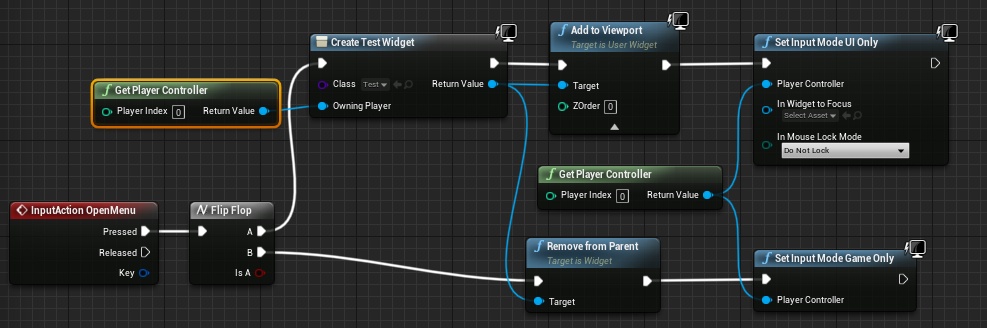 odd roost
hollow cape
What have you tried so far, this should be pretty straightforward
odd roost
hollow cape
What have you tried so far, this should be pretty straightforward
I know, that is what's frustrating me lol, I'm trying to track down a video I had saved but I can't find it. Basically I've just played around with adding and removing from the actor location
yeah like that
dawn gazelle
Ideally you wouldn't drag a pin across execution paths like that. You'd be better off setting a reference to the widget after creation and when it flops you get that reference.
sonic cipher
yeah i know ^^ it was just for testing but result is the same no ?
odd roost
dawn gazelle
Ideally you wouldn't drag a pin across execution paths like that. You'd be bett...
You are correct, but I have also found other issues with that, like the reference being lost. When using a flip flop for widgets it gets tricky. I guess as along as you don't try and set focus
hollow cape
@odd roost the simplest brute force way I can think of would be to get the distance between the pawn and the interactible, subtract 40 to get the distance you need to move. Then use the same vectors to get a unit direction, multiply that by the distance - 40 value, add to the pawns location, and set actor location
dawn gazelle
sonic cipher
yeah i know ^^ it was just for testing but result is the same no ?
Not always. It's good to not rely on that kind of pinning as it's messy and you will likely run into problems, especially across execution paths.
sonic cipher
i'm gonna try this thanks
sonic cipher
dawn gazelle
Not always. It's good to _not_ rely on that kind of pinning as it's messy and y...
didn't know that thanks you 😄
odd roost
In my second screen shot, I am relying on the mouse being available because of my style of game
You would just set to game mode only
sonic cipher
You set UI main but you dont call it after so i dont need to make that reference right ?
odd roost
I don't actually call it no, not there. But in a component I call it
sonic cipher
okay thanks let's try :p
odd roost
I have is valid checks
hollow cape
@odd roost
odd roost
fancy digital nodes!
odd roost
hollow cape
<@!379369794581037067> the simplest brute force way I can think of would be to ...
I appreciate it, I will give it the ol college try
sonic cipher
aaaaaa doesnt work xD what the heck
odd roost
oh this is function territory
can you describe your expected results and your actually results
sonic cipher
So
i just would like to press E>open UI + disable movements / Press E again>close UI + enable movements
What i get : E>Open UI + disable movements / Press E again> still have the UI and the movements disabled
odd roost
hollow cape
<@!379369794581037067>
Is that vector * vector and vector + vector?
hollow cape
vector * float, and vector + vector
odd roost
Are you still disabling movement?
An alternative is to set global time dilation to 0 when open, one in game mode
sonic cipher
hum when i press e again it is suposed to enable movements
odd roost
depends on what you're doing though, because that isn't always ideal
sonic cipher
this is an ingame editor x)
hollow cape
@sonic cipher are you disabling inputs anywhere?
sonic cipher
hollow cape
<@!472099187853361185> are you disabling inputs anywhere?
i tryed with that too https://gyazo.com/83d88d5a66f3220bd871aa6fa3e107f2
hollow cape
you don't have anything connector to widget to focus on the set input mode ui only....no idea if that makes a difference, but maybe add a reference to your widget there
sonic cipher
tryed but it is still the same :v i dont understand why it doesnt work
hollow cape
so what is NOT happening that you are expecting to happen
sonic cipher
i cant move again when i enable input
i disable the input, then when i enable again i cant move
odd roost
I think the widget is preventing you from enabling input
you never get control back to enable it
 versed stirrup
Can i set default health above 1? I have the AI health set to subtract a certain amount of health after being hit by a spell and it works fine when the default health is set to 1 or lower, but above 1 health the spell doesn't kill it when its theoretically at 0 health and instead it takes 1 extra hit to kill the AI.
hollow cape
that's what I'm trying to dial down in to
I wouldn't expect the event to fire again if input mode is UI only
 hollow cape
because you are disabling input, meaning it is no longer going to fire the OpneMenu event on keypress....because input is disabled
sonic cipher
yeahhh its disabled so i cant do aanything hmm
hollow cape
what you should do is put the remove from parent/set input mode game only in the UI I think, since the UI will be receiving the input
or handle disabling input custom, and use the set input mode game and UI (instead of UI only)
hollow cape
well you didn't try everything....I just gave 2 other options to solve it
sonic cipher
hollow cape
or handle disabling input custom, and use the set input mode game and UI (instea...
What do you mean handle disabling input custom ?
odd roost
hollow cape
<@!379369794581037067>
 hollow cape
as in, handle when you can and can't move yourself. There are many ways to do this, the simple/ugly way is to have a bool in your pawn called something like CanMove or CanReceiveInput, and you set that to false when you fire the Open Menu event (also using Set Input Mode Game and UI). Then to stop movements, you would need to use the CanMove bool to block inputs if true, so you add that and a branch in front of every input action/axis event
Not the best way, but it would work
the easier way would be to add the OpenMenu input action event to the UI, and have the UI handle destroying itself and Set Input Mode Game Only
so the pawn handles OPENING the menu only, and the menu handles CLOSING the menu
@odd roost lol! I assume that worked?
odd roost
The only time I disable input is if want to make sure my character cannot do anything like interrupt something or if I want to combo to play out. When I do disable input I either have a timer, delay, or notify enabling it again.
hollow cape
Yeah there has to be something to re-enable input
odd roost
hollow cape
<@!379369794581037067> lol! I assume that worked?
I was wrong about my calculations but using your function I just had to plug and play!
totally not as pretty 😦
hollow cape
lol! nice. Yeah, I've used that function many many times
btw, the only reason I did the Get Unit Direction method was to have it move back/forward based on it's direction to the interactible. If you want it to be like 40cm AND in front of the interactible in a specific spot, that's a bit more work but doable
Just know that if you approach at an angle to your interactible, it might not do exactly what you're looking for, so test from different angles to make sure your animation will work correctly
sonic cipher
wow okay that not easy i think i'm just gonna sleep now gonna take a look at that tommorow thanks for help
odd roost
I'm actually moving in regards to "fuel" collision box on a vehicle so it is perfect
instead of disabling input
hollow cape
yeah as long as you can't even interact until you are in the relatively correct position anyway, then you're good
hollow cape
I've seen it when there is a large interactible volume, and you end up with a bunch of edge cases that just don't work right
odd roost
yeah this is perfect
hollow cape
rock on
odd roost
it is like maybe a third wider than the character
hollow cape
perfect yep
could also have it a bit wider and handle rotating the pawn to face the interactible as well. You have the math functions there to handle that as well (like if you end up having another interactible with a wider area of interaction)
odd roost
Yeah for sure, I wasn’t happy with my look at pick up after function so I may blow it up for this

You’re my hero
If you look at my vid in work in progress you’ll see where you helped me
Its currently the most recent post
hollow cape
ah that works perfect for a 2.5D type
 royal rain
hey i was having trouble with some camera code, a friend told me to change some stuff and I did it and i cant get back to what i did before
i added a lot of stuff that doesnt help
basically the mouse x and y events dont change the angle the camera is at anymore and the direction of the camera is supposed to change the direction the ball rolls in
also i want the camera to not be able to go trhough the ground anymore
and clamp at an angle
i forget what goes there
hollow cape
the spring arm component should have a checkbox for hit test or something along those lines, that'll stop it going through the ground
no idea about clamping the angle of the camera since you haven't really shown how you are moving the camera
royal rain
i know that option
it doenst help rn
it will cause the camera to go into the ball's butthole
and then you cant see
 snow halo
I need to call some events from one BP that will fire in a ton of other BPs in my level. Broadcasting with an event dispatcher works perfectly, but do you all think I should consider using a a blueprint interface instead?
Any pro to that? As of right now I'm not passing in any parameters
 brittle fiber
happy new year
hollow cape
@brittle fiber don't spam. You just posted that like 2 minutes ago
royal rain
the thing is i forgot how to set up the camera in general, so that you can move it in the first place
i deleted it
hollow cape
@snow halo dispatchers are well suited for something like that
brittle fiber
@hard one, isnt it)
snow halo
i assume blueprint interfaces are more for when you need to pass variables through to other BPs
hollow cape
you haven't asked anything @brittle fiber .... you posted a picture with illegible hand written text.
royal rain
snow halo
and make those functions available globally
hollow cape
@snow halo not necessarily, BPIs are better suited for "castless" event calling. But you need a reference to the actor(s) you are wanting to call the BPI event on
royal rain
i deleted how to move the camera by accident
hollow cape
with dispatchers, you can also pass params. But dispatchers require the receivers to have a ref to the sender, rather than the other way around. Dispatchers are "blind" calls
snow halo
Right right @hollow cape thanks for setting me straight on that. So then why not use BPIs and then i can avoid the reference and the bind event?
 dim robin
hello, is there a way to read a float (for example 1,20812093) and return a value "even" or "odd" for each digit of the float? how can I achieve this?
hollow cape
@dim robin float -> int, mod 2, if it's > 0 it's odd if I remember correctly
snow halo
since everything is in my level I can expose on spawn and i get the reference to the broadcasting BP
but still BPIs would skip the need for that
hollow cape
@snow halo with BPI, the sender would need a reference to all intended receiving actors
snow halo
I thought both receiver and sender just need the interface, not a reference
that's kind of the point?
hollow cape
with BPIs you need to supply an object reference to the receiving actor
the benefit of BPIs is you don't need to cast and call an event, you just call the BPI event, and the receiver will handle that however it needs to
ie, you can have a door, window, and pilot seat all implement an interface, but have very different functions when interacted with. You still need to get a reference to what you're intending to interact with to call the BPI event on it however
snow halo
Do you mean plugged into the Target @hollow cape ?
hollow cape
And to clarify, the reference can be Actor, it doesn't need to be the specific class you are trying to call the BPI event on. That's the glory of BPIs
snow halo
That's a function inside my BPI
hollow cape
yes
the target needs to be something. If you run that, you are running the BPI event on the calling actor
generally BPIs are called after a trace, or an overlap, where you can get a reference to the receiving actor
snow halo
oh weird, so I can't broadcast to multiple actors with the interface without chaining together these?
hollow cape
you would have to connect multiple actor references to the target, or have an array and foreach through it calling Beat on each
if you are trying to call from 1 place, and implement on many, Dispatcher is going to be better suited
brittle fiber
@hollow cape ty, if u have a moment later, would be great
snow halo
thnx @hollow cape im still a bit confused because that Target won't even accept an actor so i think i'll just have to experiment and read up more
odd roost
If you're merging assets I would recommend reaching out to the main asset creator
hollow cape
@snow halo in fairness, it should look like this
odd roost
Of course I'm assuming MGS is an assert, as well and Player building system
hollow cape
I usually drag off any actor ref and search for the BPI function to get that.
snow halo
why is mine a weird green pin lol
odd roost
Green is because it is an interface call
hollow cape
yep
snow halo
one is the function definition
which i define unique to the blueprint that the interface is attached to
that's weird ya, i had to drag off an actor to even see that with in context checked
brittle fiber
@ its too complicated for them.. they fear this q as much as you do. need some thought on solving
@ its too complicated for them.. they fear this q as much as you do. need some thought on solving
hollow cape
if you uncheck context sensitive, you will see it say Beat (Message) @snow halo
 snow halo
roger yup
odd roost
oh and ignore the zombies trying to wreck the party
hollow cape
@odd roost looking great! love it
hollow cape
I've never actually tried haha
snow halo
hollow cape
so yeah, add to array and foreach. If this is for more than a couple actors, and is ever going to be dynamic, BPIs are going to be rough for this
hollow cape
Yep!
odd roost
brittle fiber
@ its too complicated for them.. they fear this q as much as you do. need some t...
Blow it out and rebuild it from scratch, that is my adivce
Also, when you merge projects with different collision channels, you're supposed to create them all in the main project first
Look at Defuse's video about merging Smart AI and SGK into one project.
brittle fiber
@odd roost tried both, something still interferec
collision settings from 3 different projects (same button LMB click but different functions), when merged inside 1 project, only 1st project Original - mgs works cuz collision settings. The others dont. when controlling pawn, all functionality under buttons work, EXCEPT when LMB clicks, nothing happens. It has to either: 1 shoot 2 select 3 draw - depending on the pawn that use it. When MGS deleted, other 2 projects, work fine.
odd roost
Why would collision impact a LMB click unless you're doing a game where clicking the environment was part of the game?
have you tried looking at the project settings for input actions? Is it possible that one project is overriding the LMB click for the other two?
brittle fiber
one project has lmb for attack the other 2 has lmb without project settings default
odd roost
change it
brittle fiber
it either overrides it, or trace under coursor
hollow cape
wait do you have a Left Mouse Button Event (not an input binding event) in your BP(s) somewhere? This could be an issue of the input being consumed by something else
odd roost
find everywhere LMB is used and change it to P
odd roost
hollow cape
wait do you have a Left Mouse Button Event (not an input binding event) in your ...
That's exactly what it sounds like, it cannot fire because it is being overridden, or not handled
hollow cape
you shouldn't ever have an explicit input event (ie Left Mouse Button) AND have it as an input action/axis binding. This will cause issues
odd roost
For sure
brittle fiber
its both... my player collision, does not interfere with fog and button click doesnt interfere the fog. without main projcet collision settings, both work
odd roost
what type of game is this? top down?
hollow cape
I'm not understanding why we're talking about collisions and input. Is this an input issue or a collisions issue?
Have you verified that your inputs are actually firing as intended (printstring, or something)
brittle fiber
multiplayer game system 1 3 player build system 1 3 fluid ninja just trace channel
odd roost
Before I assume it is collision, find every input event left mouse button and add a print string to it
the binoculars will search every BP in the project
brittle fiber
they dont fire, and posibility to trace under cursor doesnt trace
both are interfered
odd roost
which ones don't fire?
you should only have one per controlled pawn
lol you should have seen me a year ago, this statement would have made me cross eyed hearing it
hollow cape
I'm guessing you have multiple copies of the LMB event. You should have one, and switch the functionality somehow (usually Enum) as to what the LMB should be doing.
royal rain
ok i remebered how to fix my camera so it behaves normally
but how do i make it so the camera cant go under a certain y axis
so it doenst clip under the map
odd roost
that doesn't mean anything though
brittle fiber
input blocked, trace distorted
odd roost
search for every "left mouse" in your project
brittle fiber
checking what u said so far
hollow cape
@royal rain depends on how you are handling moving the camera. If you are setting rotation, you can just clamp the input. If you are adding rotation, you will need to check if the resulting value would go over your max/min first, then add if it doesn't
brittle fiber
i try change button for attack from LMB to different
royal rain
hmmm i dont know what im doing im pretty sure im doing setting
ive looked up clamping in the past but it didnt work for me, like it wouldnt do anything
so something was wrong with what i did or they did
hollow cape
ah you're adding input. You may have to get the current control Yaw, add the axis value, and only Add Controller Input Yaw if it falls within your range. There may be a better way but I don't know of it if there is
royal rain
i mean this right here worked great until it clipped under the map
so i would like to know how to limit it becuase im already adding it
how would i do what you said
wait did i mix up the yaw and pitch controlls
hollow cape
I just explained it. You need to run a check first to see if the current control yaw + input axis is within your clamped range before running Add Controller Input Yaw
royal rain
so like a branch and bool that says if it is under 0 dont add anymore?
rough jay
cringe u want to clamp ur cam?
royal rain
@rough jay sent me a video ill see if it can help me
brittle fiber
just imported collision from other project and 2 projects work,
collision settings from 3 different projects (same button LMB click but different functions), when merged inside 1 project, only 1st project Original - mgs works cuz collision settings. The others dont. when controlling pawn, all functionality under buttons work, EXCEPT when LMB clicks, nothing happens. It has to either: 1 shoot 2 select 3 draw - depending on the pawn that use it. When MGS deleted, other 2 projects, work fine.
 atomic prairie
How do we detect if the player's uses an xbox or playstation controller?
 primal rock
Hello, i am currently following a tutorial series for a basic multiplayer system and I have the following problem: In the lobby menu the player selects the class they want to play as and then when the game is started, and the level loaded this selection seems to disappear and the player wont spawn because he has no class assigned to it.
I think it has to do with the game instance not storing it between gamemodes but i cant figure out where i went wrong
keen seal
Hi, I'm getting the Accessed None error message in this blueprint on the On Event Destroyed
https://blueprintue.com/blueprint/eyj5xrnt/
BlueprintUE
hollow cape
are you trying to reference something that has been destroyed/without having an IsValid?
keen seal
hollow cape
are you trying to reference something that has been destroyed/without having an ...
Check the blueprintue I'm accessing the AI from the spawn ai
hollow cape
you should be doing an isvalid on the get node. Also, you are doing a random integer of Length of the Out Actors array. Length is Last Index + 1. You either need to do Length - 1, or just use Last Index instead of length
keen seal
I'll try that, thanks.
I followed a Epic Games verified course lol
hollow cape
In fairness, I'm under the assumption that the random int node is inclusive. If it's not, then the Length is correct
 hybrid lodge
Hey fellas, I am having a hard time with ALS V3, I want to add an animation (holding a Phone) so that the camera follows when the player turns, At teh moment I found the ALS Aim Offset tutorial where he adds 4 poses to AO offset and then it blends it. Well this is not a gun hehe, I think this is a wrong approach.. Can anyone suggest how properly create the effect I want to achieve? It is ment for 1st person view
This is in-game view (dont mind the phone orientation)
This is where I blend the animations.. I want to achieve (for instance when I press M the phone animation plays and stays on the screen. like how in the video (but without using the Aim offset) any Ideas?
hollow cape
can you have the aim offset handle just up and down, and let the rotation of the character handle the left/right?
hybrid lodge
The problem Is that I am not very familiar with how ALS anims work
hollow cape
dive in and start tinkering, or #animation
hybrid lodge
Alright, @hollow cape thanks for the direction
trim matrix
How do I remove a specific widget and not all of them?
hollow cape
you need a reference to the widget, then Remove From Parent
trim matrix
Ok ill try that thx
 near flint
Is there a reason a cast to FirstPersonCharacter from the GameMode, is failing?
This is what i'm trying to do, it's on the game mode
and the casting fails
chrome kraken
i have a function that gets a directory of an image but it freezes the game, is there a better way to do this?
maiden wadi
@chrome kraken Is that in a Widget's binding function?
chrome kraken
yes
maiden wadi
Loading a texture in is heavy. Not exactly something you should be trying to do for every frame drawn to the screen. You're doing that anywhere from 30 to 300 times a second if it's in a binding.
chrome kraken
what would be the best way to allow users to upload custom profile images?
maiden wadi
Try doing that once somewhere like EventConstruct or Initialized, rather than a binding. That way it'll only run once, or once when you add the widget to the screen instead of dozens of times a second.
chrome kraken
ok, thx
maiden wadi
@near flint The only reasons that would fail is if your player controller's currently possessed pawn is not a "FirstPersonCharacter", or if either your player controller, or possessed pawn to be don't exist yet.
chrome kraken
maiden wadi
Try doing that once somewhere like EventConstruct or Initialized, rather than a ...
it works great, thx
maiden wadi
Be careful with bindings. They're kind of a lazy way to UI design and don't offer anything worthwhile. Quite honestly, if you need to use bindings, I find it better to just use Tick in the widget. It's the same thing, happens once per frame drawn to screen. Bindings incur their own overhead though too. So one tick updating three updates, is better than three bindings. Event driven is always best of course, but still.
keen seal
Hey, I want to make my character move slower when shooting. Doing this doesn't seem to do anything.
solemn parcel
The Firing animation only runs once, so i'm trying to loop it. This makes my UE4 crash. Why ?
NVM just needed a delay
dawn gazelle
keen seal
Hey, I want to make my character move slower when shooting. Doing this doesn't s...
You need to drag a pin off the red square on the timer - this will allow you to create an event that you can attach your "fire" function to. Also, do not cross execution paths with pins like this. Set a reference to the timer and call it.
You do not need this branch here either, it's effectively doing nothing. You can keep the boolean there if you're checking for it elsewhere, but here there is no point.
keen seal
Yeah, I've hooked up that timer, just didn't wanted to show all the spaghetti
weak kindle
@dawn gazelle l want to do a ai when he sees my pawn shot which is the best way?
L dont know why it works l hope now rotation base player location it will be easy
chrome kraken
instead of having the user manually set the directory to an image, is there a way to open a file manager to select the image?
trim matrix
weak kindle
L dont know why it works l hope now rotation base player location it will be eas...
What’s the problem with this?
 stable fjord
weak kindle
stable fjord
weak kindle
@trim matrix It works so its ok for me if u can help me to rotate a specific bone what l must do?
can l set a bolean to 0 when my senses of my actor doesnt see my player?
rotund basalt
@chrome kraken There is no cross platform solution build into unreal engine. You can use the file picker of windows but it won't work for any other platform.
The Alternative is to build your own file picker using UMG, but without any File I/O Nodes from a plugin or C++ that won't work.
 amber marsh
anyone here have advice on how to do this properly? I need the area of effect offset to be based on the forward vector rotation.
but its messed up.
chrome kraken
rotund basalt
<@!449271938548891658> There is no cross platform solution build into unreal eng...
i want to make it only for windows, how would i call the file picker?
rotund basalt
https://www.unrealengine.com/marketplace/en-US/product/easy-file-dialog
You can use this plugin, free and straight forward.
Then for FILE IO you can look up any sort of Utils plugin thing but if you want the free solution:
https://www.unrealengine.com/marketplace/en-US/product/blueprint-file-sdk

Unreal Engine
A simple & easy to use blueprint file dialog plugin

Unreal Engine
Simple, easy, and free file and directory management; the way it should be.
@amber marsh You mean you want the trace to be forward of the player and then be able to change it using the params?
amber marsh
I want it so the area of effect origin rotates properly with the players direction.
So the offset is based on the rotation of the aoe object itself
fleet crest
Is there a way to combine the two LineTraceByChannels?
So that when i execute it with the Event it will just outline it and when i execute it with the Interact event it will 'use', in this case destroy the actor?
orchid garden
@fleet crest why would you want to combine your E key pickup trace with the other? its a fire and forget trace
rotund basalt
So like this ? @amber marsh
fleet crest
orchid garden
<@!162681843806765056> why would you want to combine your E key pickup trace wi...
Cause it's basicly the same Trace when it comes to Start / End and could just reuse it
amber marsh
nah more like simply make the AOE origin in the actor based on local space rather than world space.
so if the offset is 100 units to the left then its allways to the left when placing it
weak kindle
Its ok to use Sphere Collision to sight??
orchid garden
fleet crest
Cause it's basicly the same Trace when it comes to Start / End and could just re...
well thats not where the problem comes in on the trace output Nikku was it a key that set it off or is this just the general trace? so you'd need some boolean for a branch on your outpin saying 'this was a key trace'.
Its actually just making redundant coding for what you already have there.
if your just going to use the trace for the two things (outline & e press) i'd leave it like it is, if you were going to have more things that could effect the trace, it might be worth while going to the extra level to make it a multi-purpose trace.
I ran across a simular issue with a trace, but had other traces that could have modified trace start / ends, so I just turned the start / end vectors into a pure function i could call for the other traces and it output the vector i needed for them:
sense my hightlight event needed a wider hit area, i used a sphere trace by channel instead of line:
 twilit heath
the naming could use an upgrade there, GetInteractionRange strongly implies a float output
fleet crest
Mh that would be a nice way to reduce the amount of space the calculation takes, kinda like that.
My point was that it kinda felt bad to make two LineTraceByChannel when it's the same trace just differently executed?
Hope you understand what i mean, but also new to unreal so guess have to get used to that 😄
maiden wadi
Functions are a fantastic way to do two exact things, in two different locations.
amber marsh
Hmm yeah I am stuck on this and its super simple I think. How can I make this offset behave locally
orchid garden
fleet crest
Mh that would be a nice way to reduce the amount of space the calculation takes,...
the only line traces you really want to reuse and try to keep at a minimal would be ones that constantly fire, for fire for a set time limit. those i can see reusing for different actions, fire and forget line traces are no big deal (i.e. press e do a trace, move on)
twilit heath
@amber marsh start by not giving it same point for start and end
while i have no idea what you're trying to do exactly, im guessing you want to plug getactorlocation into start directly
amber marsh
its to do an trace that grabs all actors inside the area of effect.
fleet crest
orchid garden
the only line traces you really want to reuse and try to keep at a minimal would...
Alright thanks for helping 🙂
Just curious since i'm trying to get used to the work environment and file system.
Did you put your Interaction Stuff into the Character?
twilit heath
and what is an area effect a sphere or a cylinder?
(i can see its a sphere now, but i don't know the intent)
amber marsh
it can be a sphere, rectangle depending on the trace
orchid garden
fleet crest
Alright thanks for helping 🙂
Just curious since i'm trying to get used to the w...
all my interaction stuff is in a component attached to the actor, and the interaction keys fire events inside that component
amber marsh
and the object is already properly rotated
maiden wadi
SphereOverlapActors, not MultiSphereTrace at the same location.
amber marsh
Its for those AOE things you see in MMO RPGs where it pulses every second to apply damage or status effects.
twilit heath
sphere overlap has a disadvantage over the sphere sweep - it won't return any hit locations
fleet crest
orchid garden
all my interaction stuff is in a component attached to the actor, and the intera...
So you even have the Trace in a Component? 🤔
orchid garden
yep
fleet crest
Alright, thanks 🙂
twilit heath
@amber marsh either do a sphere overlap if you don't care about hit locations, but just actors inside the AoE
orchid garden
it a 'actor component':
twilit heath
if you need hit locations, make that trace not start and end at the same location, give the end +/- 10 Z or some such
fleet crest
orchid garden
it a 'actor component':
Ah so you basicly combined the inventory with the interaction system into one component?
orchid garden
yes because most my interactions are inventory based (open container, pickup item, harvest)
twilit heath
how you should do interactions mostly depends on what kind of controls the game uses
there is no one size fits all solution
amber marsh
The multi trace is better than overlap because it pulses evey 2 seconds
twilit heath
you can pulse an overlap every 2 seconds
SphereOverlapActors
it doesn't have to be primitive component with collisions on
orchid garden
@fleet crest , there are a few that aren't i.e. like opening a door, but they just make a interface call to the traced object to fire the event off on that object itself.
amber marsh
I am more worried about getting the offset positioned.
fleet crest
orchid garden
<@!162681843806765056> , there are a few that aren't i.e. like opening a door, b...
Yeah was kinda confused since i just saw it as a 'you Interact with something and every Actor can handle it differently' like doors, switches or a chest then just opens the inventory, so basicly a general system not bound to something.
amber marsh
I need the offset of the aoe to position it based on the forward vector of the actor
twilit heath
so basically it fires offset units in front of the actor?
 stray island
Hi there , other rooms not answering this
How do control the width of a texture through blueprint
amber marsh
So I have the location, I have the forward vector. But the offset is only applying in world coords
twilit heath
if so your offset should be a float, not a vector
amber marsh
The offset has to be 3d space
twilit heath
ok
twilit heath
in that case pull GetActorRotation
orchid garden
@fleet crest yep you got it 🙂
orchid garden
couldn't you get the lookat rotation?
twilit heath
you can alternatively do
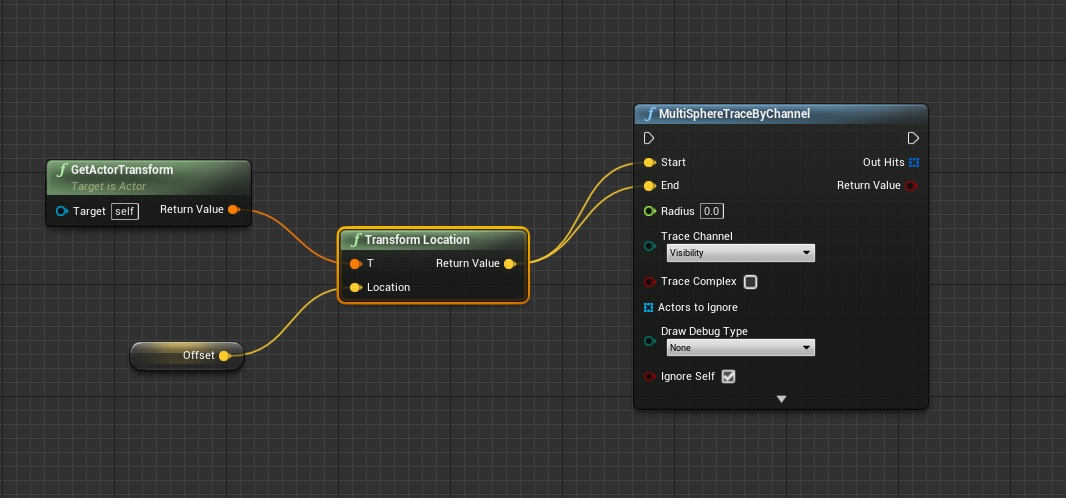
TransformLocation on it
and use that without adding ActorLocation
basically plugging the ActorTransform and Offset in it, which will tranform the offset from local to world coordinate space
amber marsh
how do I rotate the vector?
fair magnet
Is there a clamp with an open end ?
orchid garden
i mean if you just need the rotation from one actor to the other... couldn't you use...
amber marsh
I just need the rotation to be on the actor itself
twilit heath
min / max
twilit heath
@amber marsh the most elegant soluton is using an InverseTransform node to translate the offset's local coordinates into world space
*InverseTransformLocation
amber marsh
wait I know this is super simple and I am stuck. So I get the rotation and rotate the offset?
That sounds correct but what nodes are needed?
twilit heath
sure, can dot hat too
orchid garden
@amber marsh, so your basically trying to do something like (example) a field of view for the area of effect ? (i think im misunderstanding part of this)
twilit heath
you rotate offset vector by GetActorRotation Rotator, then add it to GetActorLocation
no
he has an offset in local space
amber marsh
what nodes are needed?
twilit heath
and he wants it added to actor location after its in world space
ok, castle node by node
pull from your offset pin
add InverseTransformLocation node
amber marsh
this seems weird
twilit heath

alternative

correction on the first, mixed the transform and inverse transform again 😄
 fair magnet
@twilit heath not sure but it seems to not do what's supposed to do
fair magnet
oh
twilit heath
basically take the minimum or maximum of 2 values
fair magnet
excuse me then :o
twilit heath
acting as one sided clamps
Min(variable, A) basically clamps the max to A
while Max(Variable, B) clamps the min to B
fair magnet
That is not what's happening :x
amber marsh
hmm none of these worked :X
amber marsh
it causes the rotation to be completely off. it also causes the object to also not be present at all
weird
twilit heath
fire this AoE 400 units forward, 100 to the right and 50 units up
relative to me
that should work just fine
amber marsh
yep
twilit heath
the TransformLocation node in last screen
basically takes a point (with above example) at 400, 100, 50 relative to the Actor that provides the Tranform
and turns it to World Space
amber marsh
Works perfectly if I dont include the offset
as soon as I do anything to get the offset in it acts really weird
twilit heath
really weird is not something that helps me understand your problem
amber marsh
hmm
oh I am already properly rotating the object and making sure its in the correct location
twilit heath
@fair magnet you are using min node to clamp maximum value and max node to clamp minimum, right?
amber marsh
is that why its not working?
amber marsh
This should be super simple to get the offset to work
twilit heath
this doesn't require anything except that TransformLocation node to work
fair magnet
yea sorry I just missunderstood the node descriptions... I thougt it would choose either A or B depending on which one is higher
because it says return min/max of A AND B
but I'm good now :D
twilit heath
it would, so if you have a variable, 10 as inputs to MAX
fair magnet
ty
twilit heath
then minimum is 10
fair magnet
I'm using it like that
amber marsh
The object is already placed and rotated correctly by default.
The transform location thing doesnt work at all
hmm
twilit heath
what object are we talking about?
orchid garden
just sat here watching a UE4 tutorial video... and about at about 80% of watching a very sloppily done blueprint makeup.... he pops to another 'tutorial' by someone else that is what he is doing in his video (checked the other, its much cleaner) .... 😐 youtubers have no scruples.
twilit heath
and whats the offset?
amber marsh
its placed and rotated correctly, this works perfectly. Now I need to offset to further update the position.
The offset is the origin of the trace.
twilit heath
you just completely lost me
if your AoE is an Actor
all you need is its position
and nothing else
if you want it to stay relative to another Actor
attach it, set relative positon to the desired offset and let unreal handle the rest
amber marsh
The trace is not the actor
trim matrix
Hello guys, is there a way to disable a specific input and not them all?
amber marsh
The actor is properly placed and rotated. The offset is for where the trace takes place.
twilit heath
actor that contains the trace code you posted?
fleet crest
orchid garden
just sat here watching a UE4 tutorial video... and about at about 80% of watchin...
How did you pass the Input to the Component or did you just make a Event that is being called from the Pawn?
orchid garden
the pawn calls a function / event in the component
fleet crest
Ah i see, thx
amber marsh
The AOE is an actor I place and rotate. The origin of the trace is the offset
amber marsh
The AOE actor
amber marsh
yes
orchid garden
fleet crest
Ah i see, thx
amber marsh
so I set location rotation. Now I need the offset to be relative to that
twilit heath
then both rotate vector and transformlocation approaches have to work
do the following
for the start vector of the trace
plug in GetActorLocation directly (doesn't matter that is not intended functionality at this point, it will let you use debug draw to visualize whats happening)
amber marsh
yeah have been doing that.
twilit heath
then draw that trace from AoE to offsetted position
amber marsh
wait, cant I just translate to a local offset?
Wait that should work..
how to apply this locally
fleet crest
Is there a way to do the timer stuff without the custom event?
Something like a Set Timer by Execute and it just executes with a given delay? xD
or is there a better alternative?
keen seal
@fleet crest what do you mean?
If you want a delay between the timers just add in a Delay node
maiden wadi
Not really. Timers take in a function for the timer to call. If you're looking to clear up the blueprint, you can do SetTimerByFunction, but be aware of that if you ever change that function's name, because you'll need to update all timers that use it. Usually SetTimerByEvent is the easiest way.
fleet crest
Mh alright, guess will have to keep it that way.
calm cargo
@true yew it looks like so:
Maybe I should check if it's also pending kill, or something? 
 true yew
That's really weird that it crashes then
calm cargo
Weird indeed :/
orchid garden
calm cargo
Weird indeed :/
you sure that point is where its crashing?
calm cargo
I am fairly certain, this is the only place where I'm changing actor IsHidden
I did have this part hooked up to the OldWeapon before but I disconnected it:
orchid garden
this may seem like a silly thought, but did you try disconnecting the get actor hidden in game and see if it still crashes?
maiden wadi
I was going to make suggestions like that in the C++ channel, but he says the crash isn't that often, which makes it very hard to track down with stuff like that.
calm cargo
You mean set actor hidden in game? I did not, but even if I did, I probably - yes, what @maiden wadi said
I am currently running in Debug mode and I'm eagerly waiting for that to happen again so I have a more verbose stack, maybe?
orchid garden
i honestly can't see why that would cause a crash unless your shooting in a non-actor to it.
calm cargo
A non-actor?
maiden wadi
I'd offer some help in that, but I'm not used to using delegate calls beyond timers in C++. Might be worth making a tick function or something with some pointer inputs and put a few of them on a map and let them run, see if it crashes with null pointers using the same style isvalid checks.
orchid garden
I've had some oddball crashes before current project that I just couldn't wrap my head around but the crash was causes by something different then looking at what the logs were reporting.
calm cargo
maiden wadi
I'd offer some help in that, but I'm not used to using delegate calls beyond tim...
This is a very involved idea but I like it, yeah, try and repeat that code as many times as possible to try and cause it to crash again
orchid garden
calm cargo
A non-actor?
your target being the wrong type resulting in a null is what i mean
im soley bp, so i can't help with c++ stuffs
calm cargo
Oh np
calm cargo
orchid garden
I removed those and now I'm running around barehanded, not sure what I expected :D
maiden wadi
@calm cargo Actually, speaking of your pending death checks, you might consider making your If OldWeapon and If NewWeapon into If (IsValid(OldWeapon))
calm cargo
Oh? I always do the if (OldWeapon) {} style checks
Is IsValid() any different under the hood?
maiden wadi
That just checks that the object is currently valid in memory. IsValid(Object) also checks if it's pending Destroy.
calm cargo
Dang, thats a lot of code I need to go back to and edit :D:
maiden wadi
@calm cargo IsValid is literally just this
FORCEINLINE bool IsValid(const UObject *Test)
{
    return Test && !Test->IsPendingKill();
}```if is old weapon and is valid it would return true, all other cases would return false yah
@maiden wadi ?
calm cargo
maybe things get fucky because of how I'm calling SetCurrentWeapon()?
it's a predicted function, so it gets called quite a bit in a single tick due to rollbacks, at least occasionally e: aye Geeky, gonna look into it. Thanks @maiden wadi @orchid garden for the help 😍
orchid garden
that might be why its a occasional crash
 patent ermine
I'm using this to blend between two cameras which works great. However, it looks like both the translation and orientation when switching from one camera to the other starts interpolating. I'd like it so that the camera for a given time just starts moving towards the target camera, and only after a given time does it start orienting to what the target cameras orientation is. But not doing both right away, I hope this makes sense. Any ideas? Thanks
maiden wadi
@patent ermine For that kind of control, you're probably going to need to override the CameraManager class, and create your own tick function for the blend. All that function does is sets a new view target for the player's CameraManager, CameraManager class ticks and does the work on that.
keen seal
Hey guys, trying to package my game.
When I load it up it's just my character in the void. No level.
I've added my level to the list in the package settings.
orchid garden
did you set the startup level in the project settings?
orchid garden
orchid garden
o.O and your map is packaged?
keen seal
well I think so
orchid garden
okay..... idk why at that point.
keen seal
hmm
patent ermine
@keen seal In the project settings under maps & modes, like @orchid garden has shown, select none for game default map, and then reselect the map of your liking... basically resetting the selection
weak kindle
how can l create a loop that works until my boolean goes 0
dawn gazelle
Can you give an example of what you want to accomplish? You should never loop until a variable is a specific value as you could run into infinite loops.
tight schooner
@weak kindle Loop With Break, but the potential for infinite loops (crashes) are there
weak kindle
its ok now l guess @dawn gazelle have u a tip how to rotate only a bone?
 formal wren
I am currently trying to create a posable character using IK handles. The handles should be manipulated ingame using the mouse cursor. There are a lot of tutorials on how to set up IK effectors, but none on how to manipulate them on runtime. I already have it working to an extend, but I am not satisfied. The main issue i am having, is that the effector does not stick to the bone it is attached to. So the effector disconnects from the bone when the bone can not move to the effectors location. Do you guys have any suggestions on how to solve this?
orchid garden
reset the effector to the bone at end of drag?
dawn gazelle
weak kindle
its ok now l guess <@!218956378654507008> have u a tip how to rotate only a bone...
If you're wanting to do it programatically, the only way I know how is through the anim bp.
orchid garden
i did the head rotation directly in the animation graph:
keep in mind though, to make it look like their head isn't doing some funky bending, you may need to modify the neck bone as well:
on the manniquin it looks fine just rotating the head, but when you use actual characters, it starts looking pretty funky lol.
(without neck rotation)
with the component selected, in the details pane make sure to set which bone your modifying and how the rotation is going to be added to the current pose, mine are additives:
in the animation graph you'll need to pass it from local to component before adding the rotation:
and make sure to pass it back from component to local before the output pose:
hope that helps @weak kindle
odd roost
Anyone know how to prevent a 150lb character from pushing around a two ton vehicle?
odd roost
I've made it like 20 millions tons and no difference. I appreciate your joke 🙂
Most of the suggestions I've seen are basically hacks and unfortunately the do not work for me
dawn gazelle
Hmm... When i set the mass on the vehicle low, my player can move it. When I set it to 2000kg, they can't.
odd roost
I have the vehicle set to 2500kg and the ai bumps into and knocks it around, flipping it over etc.
dawn gazelle
whats your AI's mass set to?
odd roost
68kg
I only simulate physics when it is possessed as before when they were chasing me they would bump the vehicle and push it all around
dawn gazelle
I have another physics volume that I'm hitting the 5000kg car with that bats it around like nothing XD
odd roost
It doesn't even have to be a bunch of them just one
I set it so heavy I couldn't even drive it and one walked into it and pushed it back lol
maiden wadi
@odd roost Mess with these.
odd roost
Thanks, I have them all completely off
zeroed them all out and disabled physics interaction
maiden wadi
@odd roost And that worked, or?
odd roost
no it did not
I tried that one a while ago
I've been messing with it off and over for a month now
weak kindle
L have used Box Collisions for eyes and when my enemy see my thought box collision l want to stop movement but when l go out from box collision l want to continue to move
ai move to doesnt work well
dawn gazelle
odd roost
I've been messing with it off and over for a month now
cveedub - I found out why my weapon was flinging the box away - check all your meshes on your actors - they may have collisions enabled but they don't take into account their mass in the calculation. If they need to have collisions, perhaps make it in a channel that ignores vehicles.
odd roost
I need to be able to run them over, that’s where the problem lies
I’ll try setting the mesh to block vehicle on death and see how that goes
trim matrix
hello, umm i know pretty much nothing about UE4... do you know why this basic sleep system is not working?
odd roost
When you press E and you’re overlapped it will always return false. At least that how it looks to me. On mobile
trim matrix
Oh... what if I put the keyboard event on the flip flop?
odd roost
Ideally you would set variable on your character when you overlap and unset it when you end overlap. When you press E you check if the variable is set and then run your logic
Run the logic in your player character I mean
trim matrix
Oh ok thx
odd roost
The trigger box will never consume the E key press unless you possess it
Alternatively, you can set a reference in your character to the actor when you overlap it. Then create a function or custom event on your actor that process the logic. When you press E in your character you check if the actor reference is valid and if so, drag off your referenced actor and call the function or event
That would probably be the best solution
That way you don’t have to creat references to your sky sphere and stuff on your character
maiden wadi
@trim matrix Does the widget show up?
trim matrix
Yes
maiden wadi
Disconnect E from everything and put a print on it, see if it prints something.
odd roost
I bet if you held E down when you overlapped it may work
Start holding before you overlap I mean
maiden wadi
I'm pretty sure that the Overlaps need to be fed into a gate, and E needs to enter it. But still make sure that the E press is working before anything else.
odd roost
You could also set a timer by even when you overlap that check for the key press ever .1 seconds and run the logic of it happens
Nice I like that
I’m guessing all this is happening the level blueprint?
maiden wadi
Looks like it.
odd roost
Create an array of the tags you want to check?
orchid garden
its a hit response from a trace, the only other way i could think of was maybe...
but that assumes the tag will always be in the same slot.
orchid garden
yeah but it would be the same as doing a 'actor has tag'
odd roost
Yeah didn’t realize you were switching
orchid garden
with actor has tag its one branch after another to check.
maiden wadi
I'd probably just make a function that takes in an actor, and an array of names by ref, and does the loop over in the function. No other way for it.
At least none I know of. I don't use tags really.
orchid garden
well i was using tags to determine a type... but yeah... probably not the best method...
maiden wadi
For different functionality, or?
orchid garden
yeah its for different functionality. some items are world objects some items are in the main datatable.
maiden wadi
Actually if it's for different functionality from a line trace, like igniting and putting out the lantern, opening or closing door, or picking up the object, you'd use an interface, not tags or enums.
orchid garden
well this part changes the users hud to display information about the item they are pointing at:
maiden wadi
I do all of that through an interface. Line trace to see what the player is looking at, and call an interface function on the object. This tells the object to call my HUD class and update the look at widget with what the player is looking at. So, line trace, interface function, object calls HUD to make a widget update. Works on anything that uses that interface, and implements that interface function to pass through parameters to the hud and widget.
Same interface has the interaction call too, so separate interface function in the same interface, calls and makes objects do different things.
orchid garden
okay that seprates world objects from pickups.. but with pickups, still have the same issue, some have secondary functions like the lantern would be 'pickup, turn on/off'
maiden wadi
Do you use different keys for the pickup vs turn off?
maiden wadi
Two different interact functions then. Maybe even just one with a parameter.
odd roost
dawn gazelle
cveedub - I found out why my weapon was flinging the box away - check all your m...
So that works, blocking vehicle one capsule, ignoring on mesh, and setting it to block vehicle on mesh when they die. It's not perfect as some AI still clip through the vehicle but that could be RVO settings
orchid garden
maiden wadi
Two different interact functions then. Maybe even just one with a parameter.
yeah, two different interact functions, basically E would be the default interact (pickup/open/mount) if its a single interaction object, and if its a dual interaction, F key would be like turn on/off , open
maiden wadi
You could also use the same function with like a bool input for "Alternate interaction". Just depends on where you want to split the logic.
orchid garden
the interaction part isn't a problem, just mainly the hud display for the interaction information.
odd roost
orchid garden
i guess the easiest way would be stick two strings in the db table... 1 for single interaction, and 2 for extended interaction.
maiden wadi
@orchid garden The other alternative, if most of your interactable stuff is simple, is a base class that can branch out. The issue here is that this keeps you from interacting with stuff like other players, cars, anything that can't be put into a simple actor class. using the interface, you can interact with anything. Interact with a lantern to turn it on or off, interact with a door to open it, interact with another player to invite them to your clan, interact with an AI to talk to them, etc.
orchid garden
yep already doing that for interaction itself.
in fact they are all using the same interface
well.... still a problem.... still need to determine (even with interfaces if i don't use tags) if its a interactable or not.
maiden wadi
DoesImplementInterface
If the actor isn't using the interactable interface, it's not interactable.
orchid garden
oh nice ty @maiden wadi
that right there might just resolve it all for me 🙂 i can use the item struct on the world objects as well for the interface info (sense it will be constant on the world object)
what am i thinking.... interface call not shared function.. >.< i can write it differently for the world objects lol...
maiden wadi
Aha, it just occured to me that I can make a fully functional foliage replication system that is relatively bandwidth friendly, and works for any foliage the designer wants to paint down using a specific component type... Yet I don't actually know how to make a lobby and use sessions yet. :/ I should probably fix that.
orchid garden
but can that foliage be harvested? 😉 heh
maiden wadi
Yep, that's the whole point of it.
maiden wadi
To simplify it, it basically saves the harvested foliage spot in an array that gets replicated to all clients. Clients poll for the specific foliage component type, check if there's foliage at those locations and remove the instance from the HISM component if there is. After a time, the server removes that instance from the array, which then leads to clients replacing the HISM instance at the location.
I made it mostly so that I could use the foliage painter and HISM components for harvestable plants as well as normal foliage. Much nicer on the graphics card.
orchid garden
@maiden wadi on the interface thing, something like:
if im understanding that right
if i am, that should only return objects that are interactable (sense they are all actors)
maiden wadi
That should work, yep. Otherwise the FHitResult will be empty on the other side of that function.
orchid garden
yep
then for the interface call... i'd pass a hud refrence to the object, and just setup the hud information via the objects interface call? and on the false return from the above function hide the info window.
ty much @maiden wadi
maiden wadi
I normally just get the HUD class inside of the object. That's one reason I started keeping all of my widget stuff there even for multiplayer stuff. It's very easy to get the local client's widget from anywhere with GetPlayerController0->GetHUD, which I usually put in a library function as just GetBPHUD.
orchid garden
wouldn't you need to pass the proper player controller for clients? or is it always 0 on client end?
maiden wadi
Client's local controller, including in a Listenserver, is always 0. And UI doesn't belong on a dedicated server, so this always works.
maiden wadi
I do that for a lot of my commonly used casted classes. PlayerController, GameMode, HUD, GameState, PlayerCharacter, etc.
Ends up looking much neater than having cast nodes everywhere and makes the calls a node or two less to drag out.
I personally used to think wrapper functions were stupid and a waste of time. Past me is stupid.
orchid garden
well thanks for the tips Authaer, its much appreciated going to save me some time in the future once i get these calls setup on their masters 🙂
orchid garden
pardon me asking but.... what other keys would there be besides keyboard?
 pine trellis
Vr keys, game pad keys
orchid garden
aren't those considered buttons?
pine trellis
or is there an any button pressed or something?
yeah I need something like an any key or button pressed
is there an any button node?
royal rain
hey so i forget what the shape is called but how do you make a round tunnel shape in unreal engine
theres a name for the type of tunnel
its like a convex?
royal rain
maybe
i want to make a concave
but maybe only the bottom half of one eventually
but yeah i at least need a concave
.dont know how to do it in unreal
 minor lynx
is there a way to make the input to a function a list of the row names from a datatable?
royal rain
I might start with something simpiler maybe idk i just wanted to design a simple concave to race around in
rotund basalt
@minor lynx You mean this or am I reading that wrong
minor lynx
looks like right now im going to have to maintain a datatable and a string table to match it
royal rain
is this for level design chat
minor lynx
rotund basalt
<@!110089160437559296> You mean this or am I reading that wrong
different, I am looking to provide a dropdown as the input for a function
minor lynx
rotund basalt
<@!110089160437559296> You mean this or am I reading that wrong
like you get from an enum or a string table
rotund basalt
Not possible unless you know some crazy levels of Slate
well not crazy its just hard
orchid garden
using wizards example to get the row names you could then pass them like ...
to a function couldn't you?
minor lynx
hey slate is a direction i need to look at it
rotund basalt
Nah he means literally being able to select the row by just having something like this
minor lynx
yes like that ^
rotund basalt
But to provide such a menu you need slate
I mean its already a pain to just add a button
so doing this is beyond my expertise unfortunately.
however
a silly solution would be to create a enum thats equal to the row name and then you "could" have it like that
minor lynx
just trying to avoid keeping 2 different lists of the same information
rotund basalt
Thats generally tho not a bad idea you got, sadly there is no way around it other than writing slate in C++ to support that
minor lynx
😫