#blueprint
402296 messages · Page 592 of 403
 rough wing
 royal rain
also i dont know what or where accerleration is
rough wing
What are you trying to do?
royal rain
im trying to make the roll torque only move forward in the direction of the camera
and its hard to follow words when talking about visual stuff sometimes
rough wing
Not sure if this will help, but you might use set physics angular velocity
And to rotate the object towards the camera direction, you can get camera forward vector and rotate the yaw by 90 degrees
royal rain
that seems more complex than what i had going on with the other guy
i mean if you can help with it maybe sure then
rough wing
Literally like 3 nodes
royal rain
o
rough wing
- Set physics angular velocity
- Get Player camera manager>>Get actor forward vector
- Break rotator
- Make rotator
royal rain
there is many different pyhics angular velocities which one do i do
rough wing
And from the broken rotator, add 90 to the yaw, and then connect everything to the make rotator
Screenshot pls
 faint pasture
@royal rain
rough wing
That also does the same thing :d
faint pasture
This has momentum so it's for more if you want thigns to be physical
rough wing
Basically what I was doing is, get forward vector and rotate it to match the right vector
faint pasture
Either one
rough wing
Input axis should fire continuously
faint pasture
inputaxis event fires every frame as well
I usually use tick when I have more than one axis so I can combine them all into a vector etc
royal rain
i alost had what you posted there btw
faint pasture
You can do the same setup for Left/Right just swap the axis value and change the torque direction to camera.forward
royal rain
i was close
ok so unless there is something else dumb in my code then this should work
 thin cedar
For some reason the trigger on the oculus touch controllers doesn't seem to register in unreal
rough wing
There should be different input events for different VR controllers, did you set the correct one?
thin cedar
rough wing
There should be different input events for different VR controllers, did you set...
I believe so
royal rain
i only mvoe forward barely with the accleration turned on
nvm i found why
ok i fixed it but turning left and right is backwards
 karmic pebble
oh wait! im taking the last index of the completed loop. its not as if it was a break loop.
duh
royal rain
i sorta fixed it again but its not correct
ok so when i try to roll left
it goes to the upper left courner
right is the lower right courner
this is my turn left and right code
there werent problems with it before some of the new stuff
do i do something similar to the other code too
faint pasture
@royal rain try changing the multiplier like 5,000 and if it works for forward, duplicate it for the left and right
royal rain
i fixed what was wrong where i coulddnt go forward
ill do the left and right thing too
so you mean do the exaact same thing i did for the other code for moving left and right
are you sure i dont have to do anything different
@faint pasture
faint pasture
Why would it have to be any different besides using a different input and rotating around a different vector?
BTW to handle slopes well, you'll want the direction vector to be the cross product of camera.right and 0,0,1
Otherwise it'll depend on camera pitch
thin cedar
I'm confused on why my inputs aren't working, you just go into the event graph and hook up the input action to what you want right?
faint pasture
@thin cedar actions or axis?
faint pasture
Did you set up the action to be driven by something? Show the setup in project settings
thin cedar
faint pasture
What actor is this event on?
thin cedar
I've tried it on a static mesh and scene
faint pasture
Uh
thin cedar
Wait a minute I think I know where I went wrong
faint pasture
I mean what actor. Is it a pawn?
karmic pebble
Yes! ^^ Thanks for the help folks.
thin cedar
faint pasture
I mean what actor. Is it a pawn?
Yeah I just had to put it on pawn 🤦♂️ I'm still super new to ue in general
thanks for the help
 mild fossil
Hello @everyone ! I'm trying to spawn an actor/static mesh and follow cursor when I click on a UMG button. I tried spawn actor from class but a bit confused on how to proceed after. Especially that I'm trying to destroy the actor when it collides with other objects. I was wondering if you had any suggestion on how to do it. Thanks
faint pasture
@mild fossil There are 3 distinct things here. The spawning, following, and destroying. The spawning and destroying are easy, the folding is a bit tougher
For destroying just implement event hit and destroy it there.
For following it depends on if it moves in a plane or not.
mild fossil
Thanks for the reply @faint pasture what I'm trying to do is a bit like simcity. Yes it moves on a plane
I have different sets of voxels that I'm referencing in UMG. Just want to be able to place them on a plane without colliding
faint pasture
Look into convert mouse position to world space and line plane intersection
royal rain
@faint pasture you said use a different vector do you mean instead of right vector use soemthing esle
faint pasture
Or just get hit result under cursor if that suits your design
royal rain
when i used the same code i got different thing
faint pasture
royal rain
<@!127902729677963264> you said use a different vector do you mean instead of r...
Yes, use the output of cross product of camera right vector and 0,0,1
royal rain
what does cross producrt of right vector mean
faint pasture
Try typing cross product in when you right click to get a node.
mild fossil
Thanks @faint pasture. Will try it out
royal rain
ok so what do i do witgh cross product
faint pasture
@Lord Of Cringe#6312 OR you can use this to get your vector directions.
For forward, rotate 0,1,0 by the control rotation yaw. For right, just rotate 1,0,0 by control rotation yaw
royal rain
that wasnt in the other code you posted do you want me to edit the other thing too
faint pasture
Did you start with the rolling ball template?
royal rain
yes
ok i almost fixed it with qwhat i had there
it spun perfectly left and right but not with movement
funny
idk how to make it actually move left and right now
it just spins left or rgiht
in place
wait
do i even need it to move left and right now
i mean i kinda do
but
i mean if i just move with the mouse it gives a lot of control over movement
idk if i want to keep that though i would also perfer some movement with the a and d keys
ok so mouse steering does work as smooth as butter but my camera is very bad at times
basically i can move it around too much, to the point where i can too easily look above my ball, but if im too close to the ground it will zoom into the ball
it can get a little sickening
example of too close and i dont know how to fix it
example of looking too high up
its something to do with the camera and where the extender thing is
karmic pebble
Okay so this is news to me. On Construct will fire again when added as a child blueprint, not just when its created. For a single call On initialized. huh, after 5 years i never knew this. xD
royal rain
how do i stop the camera from crashing in the ball like show
 trim matrix
Warning dont work for @clear temple if your looking for pay he is 13 and wont be able to oay yoy
royal rain
bruh
when the leauge of legends mmo finnaly comes out i better be ahead in life to work at riot
anyway unless i can get help i think ive actually did some good progress today
 deft hawk
Hi. I'm trying to mimic air resistance for a projectile. Is it a bad idea to lower velocity on tick? Is there a better way?
I feel like tick is too slow, since my projectile is traveling at 920 m/s, the speed reduction would be too choppy.
 tight schooner
yeah supersonic rounds may be too fast for the physics engine to handle, so you might want to simulate the projectile as a series of line traces or something that you can substep
 cobalt temple
When I start my level, this lightning bolt particle effect appears
I searched my whole project for all Spawm Emitter nodes, but cannot find what is making it
I tried finding it with the profiler, any ideas?
I just want to see what BP is creating the particle effect
but I can't find it
 rapid token
My game also has it
I set up a drag and drop system on my game, when I drop the item, I want the item to get the location of where it is dropped, how do I do that?
thin cedar
How would I change this pivot point?
 odd ember
thin cedar
How would I change this pivot point?
odd ember
thin cedar
How would I change this pivot point?
in your 3d package where you made the mesh
thin cedar
Gotcha, ty
trim matrix
Hello I need some help
I have a 2d capture and made a mat for a minimap, i want a component 2d sprite on my players to show in the camera but the players not be able to see them. so that the mini man shows an icon on the map where they are
how can i make the component not visible to players but visible to that camera
@everyone dont know if anyone could help me with this
 icy saddle
is there a way to get delta seconds of a Timeline's update loop?
odd ember
icy saddle
is there a way to get delta seconds of a Timeline's update loop?
you can do something like GetPlaybackPosition or GetPlaybackRate from the component part of the timeline
Nodes that are used to handle specific functionality of Blueprint Timelines.
deft hawk
I'm guessing it's bad to call something 920 times every second, right...?
even if it's just subtracting a value from a variable
deft hawk
reduce a projectile's velocity over time, to simulate air resistance
but the projectile is traveling at 92000 U/s
is there a physics update hook?
odd ember
I know there is in cpp, it's probably not exposed in BP
but
if you use the projectile movement component I'm sure there's a setting that does exactly that for you
deft hawk
I am, there's no option for drag/resistance etc.
odd ember
deft hawk
I am, there's no option for drag/resistance etc.

A UE4 tutorial showing how to add penetration and advanced projectile physics to the unreal engine 4 first person template.
Note: rather than copying out the ComputeExitLocation function from this video it might be easier to watch part 2 and copy from this image: http://i.imgur.com/Ub600gx.jpg
A text/image version of this tutorial is available...
icy saddle
odd ember
you can do something like `GetPlaybackPosition` or `GetPlaybackRate` from the co...
how do I get a reference to the timeline in order to be able to call Get Playback Position or GetPlaybackRate?
odd ember
icy saddle
how do I get a reference to the timeline in order to be able to call Get Playbac...
it's a component so it's available as a variable
look where your variables are
or type it into the context menu
icy saddle
oh I see, thanks!
However, will these 2 functions work for what I want if my timeline is blank?
I don't have anything in them, I just use the timeline to call an event that sort of acts as a Tick function
icy saddle
the playback rate is something I set somewhere?
odd ember
you can set it through that timeline function
not sure if you can set it by default tbh, haven't looked too much into it
trim matrix
i was wondering if someone could help me with making a mini map, theres a component in the actor i want only visible to the 2d capture component in the level.
but its a multiplayer game so i want the player to only see theirs not anyone elses. and only see it through the mini map cam, not the player cam
 snow halo
hmm, is there any way to get the last item in a map?
(i mean if you don't know what its key is)
karmic pebble
@snow halo you can get the length of the map i do believe but maps have no order index. it what makes them so quick, they are an index lookup by key.
you would get keys which returns an array, then you should be able to get length of map, get a copy of the array and use the index-1 on the get copy then find that in the map
other than that, use arrays. ^^
 devout kelp
okay im having a baffling bug and i don't even know how to describe it so here goes nothing:
ive got a bunch of instances of a blueprint actor in my scene. Each of these instances has a box collider that calls an event and does whatever when clicked on. If i click on any of the items in the scene, i then can not click on a few particular items. it starts with one item, and then on the second item click, i can't select 3 of them. if i click on a specific other item, they all behave normally again.none of these items have special individual code or anything so im like what the hell lol'
i can try recording it but im like at a loss of where to even start trying to figure out whats going on
faint pasture
@deft hawk Why would you need to change velocity between frames?
faint pasture
devout kelp
okay im having a baffling bug and i don't even know how to describe it so here g...
What is it doing in the "does whatever" part?
Sleep family, or just set velocity to 0 if its below 1 or whatever
devout kelp
@faint pasture basically, unhides an item inspection blueprint (static mesh + a box collider that is set to have no collision when that blueprint gets hidden again)
but like it isn't like the collider is still active because if it was i wouldnt be able to click on anything. its more like... the colliders on the blueprint instances/copies are moving or something? or something is preventing them from registering the mouseover/click?
 dim robin
i have a problem with a fixed camera on the level blueprint.
so, I have a trigger box, and a new camera, I would like to setviewtargetwithblend on trigger box begin overlap. the generate overlap event is enabled on the "sphere" which should trigger the trigger, and on the trigger itself. but the camera is not changing. why is that not happening?
 placid steppe
im having this issue where a destructible is not showing up in standalone or packaged until it is "hit" then it appears and works as intended. also works in PIE
trim matrix
Guys how do I create a death zone?
dim robin
you can set up a trigger box, on overlap kill the actor
dim robin
why is the action push working only on the last array index and not on every single array element?
 dawn gazelle
dim robin
why is the action push working only on the last array index and not on every sin...
dawn gazelle
dim robin
why is the action push working only on the last array index and not on every sin...
Your begin play is looping through the actors, and every time setting the specific actor into "Array Element". When the loop completes, it will have the reference to the last actor that the "get all actors of class" array has.
dim robin
is there a way to perform that action on all of those actors of that class?
dawn gazelle
dim robin
holy crab, thank you so much
dawn gazelle
If those are actors being spawned or destroyed though, then you'd have to get all actors of class on the input action.
dim robin
nono, they are persistent, but i didnt want to make a ref for each one on the level blueprint...
thanks a lot
 willow phoenix
spline experts, where are you? 😦 https://youtu.be/aOx9C7iqYKA it is "almost" what i want it to do 😄
 dawn gazelle
willow phoenix
spline experts, where are you? 😦 https://youtu.be/aOx9C7iqYKA it is "almost" wh...
dawn gazelle
willow phoenix
spline experts, where are you? 😦 https://youtu.be/aOx9C7iqYKA it is "almost" wh...
So the creating the mesh 3000 times a second thing is sort of what you're looking for, other than it's creating too many meshes?
willow phoenix
yea thats my problem. i want to add 1 mesh and move it along the spline and then add an other splinepoint, scale that mesh, add a splinepoint...
maybe i need to add a point, move that along the existing spline and then add a new one
dawn gazelle
You could slow things down - timelines fire their update on tick basically.... if you wanted to you could create an event track in the timeline by adding an event key - this would allow you to dictate when it should create a new mesh (like every few milliseconds or seconds, however you want) this would give you a different output path as well on the timeline.
You could still use the float output you're using right now as well.
dim robin
can someone help me to find a way to set this in a smarter way? I will need to set moooore triggers, and mooooore cameras. thankyou
 gentle urchin
Combine trigger and camera in one bp
Or expose a hardref variable for a trigger blueprint, and manually connect them
dim robin
wait
i would do something like this
just right click on the transform pin (orange one) and split struct pin
 atomic salmon
You need to use the pawn’s forward vector
dim robin
be aware that I added something on the x vector, but you just need to add something on the axis you want
atomic salmon
Otherwise that will be the world’s X direction, not the player’s
dim robin
exactly
trim matrix
Guys how to make a death zone?
 north bay
Question (multiplayer related)
How can I set up that all players that join the level use the same still camera that is put inside the level itself?
In the gameplay blueprint
And in the player controller I try to activate the camera (I think I did this slightly wrong and that's why its not working
 orchid garden
trim matrix
Guys how to make a death zone?
orchid garden
trim matrix
Guys how to make a death zone?
use a hitbox with a begin overlap event
 prime wyvern
so uhh I somehow borked up
and I'm unsure of how to fix it, and so I need a hand
I have a character mesh as part of a Capsule Component with a Camera + Spring Arm
orchid garden
@north bay are you setting the player active camera?
prime wyvern
and somehow, the capsule + camera + spring arm works perfectly
trim matrix
orchid garden
use a hitbox with a begin overlap event
Its ok. Kill Z
prime wyvern
but I have no clue why my character mesh is left at X0 Y0 Z0 while the capsule component runs around
orchid garden
@trim matrix did i misunderstand? you mean world kill zone?
trim matrix
orchid garden
<@456226577798135808> did i misunderstand? you mean world kill zone?
Yes
Oh wait never mind.
orchid garden
orchid garden
whatever value kill z is set is how far down from 0 they would have to fall in units before they die.
trim matrix
orchid garden
1k is default
trim matrix
Yes I set it to 1k
orchid garden
mines set to -10k because the world landscape falls below 1k.
trim matrix
Oh
orchid garden
you can change it to whatever value you need it set to. basically look at your lowest object, and set the kill zone to be below that.
trim matrix
Oh so thats why its so low
orchid garden
well 1k really isn't very far to be honest.
orchid garden
i'd personally would like to override the killzone with a teleport, so if they fall to the kill zone i can teleport them to the landscape above the world (simpler then making another object to tp the player before they hit the killzone).
trim matrix
Also what does it say I am doing in my profile?
orchid garden
DM.s are open?
trim matrix
Oh it doesnt say I am making a plugin?
orchid garden
yeah just DM's are open under your name in the list as well
trim matrix
Oh ok
orchid garden
took abit to find your name lol
trim matrix
How do I enable the thingy?
orchid garden
honestly idk sry
trim matrix
When your in another app then it shows the app that your using
trim matrix
orchid garden
honestly idk sry
Oh ok
orchid garden
prime wyvern
but I have no clue why my character mesh is left at X0 Y0 Z0 while the capsule c...
can you show a pic of how your character is put together? like...
orchid garden
hrm... character setup looks right.... i have one major difference in turn left/right look up/down, im multiplying the axis times world delta seconds... my forward movement is abit different as well:
this is default for forward movement:
your mouse input for up/down left /right is set like default movement as well
honestly other then it possibly being something with forward movement, it looks like it should be working @prime wyvern
prime wyvern
hmm
does this bp system allow for full circular rotation?
or something of the sort?
orchid garden
the forward movement? allows for circular movement yes.
prime wyvern
as in the mouse
cause my current mouse settings bugs out, and is a nightmare to control
orchid garden
your mouse left / right - up / down should be full cirular yes
@prime wyvern are you trying to make a strafing system for your character?
orchid garden
this is a pretty good put together tutorial on setting it so you can toggle between camera turning and strafing movement on your character, it might help you:
https://www.youtube.com/watch?v=ZqxRUV_mrVo

This time You will learn how to set Your first character. Add strafes capabilities and death animation. I also show and explain basics about animation blueprints, retargeting animations, changing skeleton, modifying state machine (adding new states and transitions).
You can find every animation You need (free) on the mixamo website:
https://www...
orchid garden
only reason im giving you that is because for some oddity your movement isn't working the way you want it to, and he covers it in detail so you might find whats causing yours to malfunction.
in all honesty, i can't see why it wouldn't move your character, unless your animation graph maybe is forcing it to its default position, and i haven't messed much with the animation graph yet except for basic stuff.
prime wyvern
I haven't made an animation bp as of yet
orchid garden
i swapped out my blueprint movements with your and the character is still moving properly, and your character structure seems right....
turns abit fast
but its moving like expected
placid steppe
im having this issue where a destructible is not showing up in standalone or packaged until it is "hit" then it appears and works as intended. also works in PIE. any ideas?
prime wyvern
check VC's general chat
orchid garden
prime wyvern
I haven't made an animation bp as of yet
it may be a problem in the master blueprint (just noticed your character is a child of another)
prime wyvern
I dun screwed my mouse movement as mentioned earlier
 maiden wadi
@prime wyvern Are you sure this isn't a skeletal mesh issue? Even the default Mannequin needs rotated by -90 degrees to work correctly.
orchid garden
or the component for the character replaced with something other then a skeletal mesh.
orchid garden
its inherited, you shouldn't be able to remove it.
the blueprint your working on is a child of another blueprint
maiden wadi
Your character is looking left from the capsule, correct?
maiden wadi
And what does it look like when you play?
prime wyvern
absolutely fine in terms of mouse, wasd movement
etc
the Camera is spring armed to the Capsule
so when I move so does the camera meaning the Capsule works perfectly fine.
orchid garden
o.O wait, you were saying your actor was staying at 0,0,0
prime wyvern
basically yes
north bay
Sorry guys im kinda new at this. This event gets called for each Player but its not working, its supposed to use the camera that I put inside the level. (I made an Instance reference to the Camera Blueprint that I have put in the level)
How should I write this code correctly?
maiden wadi
Oh. I completely took that as the mesh was rotated left at 0,0,0 rotation.
orchid garden
@north bay - are you setting the active camera for the player when they join the level?
maiden wadi
@prime wyvern Either you've done something to unattach the mesh, or you need to check the location settings and make sure that they're local and not world.
orchid garden
@north bay the camera routine you got there may just be working fine, but if the players active camera isn't set to the camera, they won't see what the camera sees.
north bay
The event gets called in the GameMode (as you see here)
maiden wadi
Haha, happens.
prime wyvern
I wasted quite possibly an hour, maybe even two
north bay
orchid garden
<@!535490322759811123> the camera routine you got there may just be working fine...
And where exactly would you recommend setting the players active camera?
orchid garden
@north bay i mean something like this:
north bay
Ah cool! I will try it out now 🙏
orchid garden
the first one deactivates my players first camera, the second one activates the other camera as what they are looking through
so you'd switch off the players current camera, then set their active camera to the level camera, and once they start playing, you'd do the opposite and deactivate the level camera and reactivate the players camera
maiden wadi
I'm not even sure if that's something you should be networking. If the camera exists in the level for all players and you want the player to be viewing through that when they start, you should probably just make them autopossess a non replicated placed pawn in the level locally.
orchid garden
yeah you wouldn't replicate it, it would be independant on each client side.
im guessing he's doing something like a lobby when they join that gives a overlook on the map.
north bay
Correct!
Or more like a lobby room where players already can walk freely before the actual game starts
orchid garden
i mean as long as you don't replicate the camera movement / control from the client, it should work with simply swapping cameras executing the movement only on that client, and then when they start playing switching back.
so a lobby like.... shudder ... fortnite?
north bay
LOL yeah I guess so
orchid garden
i'd go with Authaer's suggestion for that then
maiden wadi
In that case, you'd just spawn them in normally as their own pawn.
north bay
It just happened to be in the tutorial I was following, Just a lobby screen where players can join and chat would have been enough
maiden wadi
The Lobby would just be a blocked off portion of the map that normal characters can run around in. Then when you want to start the match, you can either destroy and respawn the pawns, or move them to their start location. Not sure what the SetViewTargetWithBlend would be for.
 static charm
well looking at his original code it's not working the way they wanted because there was no player controller attached to the SetViewBlend (unless it was being called in the player controller blueprint)
north bay
Yeah there is just one still camera perspective in the level I want all players to use once the game starts. that code was my attempt to make this happen 😂
orchid garden
a single perspective camera for all players you'd do like i said, just don't replicate the camera.
(when your assigning it to the player)
that way all players will see through that one camera, and you can still move the camera about and replicate the movement from the server but the movement of the camera would effect all players at that point.
north bay
Thanks Guys! I understnad what you mean @orchid garden I'm probably very close. The only thing I'm trying now is trying to reference that first camera so I can shut it off. But once I figured that out I guess it should work then
orchid garden
the first camera would be referenced threw the player
get the player -> get the camera-> set it to inactive
if your player character doesn't have a camera ( the level perspective cam is the only one ) you can skip that part.
if the players view is from 'inside' their body (i've had it happen) then the reference to the second camera was bad or didn't get assigned as the active camera.
static charm
if he's trying to use the level camera, i dont think Set Active is going to do anything here.
SetViewBlend would be fine to use, he just needed to input the player controller.
north bay
static charm
if he's trying to use the level camera, i dont think Set Active is going to do a...
You mean Like this? Because this method is not working
north bay
orchid garden
if your player character doesn't have a camera ( the level perspective cam is th...
Thanks for the tip, If I cant figure it out like this I will use this method
static charm
what blueprint is this
north bay
The Player controller Blueprint
static charm
then either this event isn't being called or the camera reference isn't being set
or it's being set too late, like the reference is delayed
north bay
I guess its the camera reference then, because I already checked with printed String if the event got called (and it did)
north bay
The reference gets called it says
 lean plover
trying to use "Open Level" in a function library through the webcontrol api, but I need to give it a world context?
north bay
Maybe its the way I put the camera reference
Made a Blueprint interface for the CameraBlueprint
and then in the CameraBlueprint a reference to self via the Interface I created
static charm
yeah i dunno i can't follow whats going on
like here you have the camera reference already
and are calling the interface
and then setting it
but i dont work with interfaces so i can't say whats right or wrong there.
either way your code is pretty close to working
just need to verify the level camera reference is going to the SetView
north bay
Almost haha, but I cant do this apparently
orchid garden
@north bay break the pen from the Camera 01 Ref, to new view target, and connect the variable directly, it may be pulling the previous reference before your set.
north bay
@static charm @orchid garden Really thanks for your help guys, I;ll see if I can make it work, sorry for all the noob questions
static charm
change the variable type in the bpi/ camera still
orchid garden
oh you just did lol
@north bay try it like amost in your original, but like....
or just run it directly off your function to the new view target pen
static charm
yeah he only needs the actor reference, not even the camera component. SetView automatically gets the active camera from inside the actor
orchid garden
@maiden wadi I want to setup another macro similar to the double tap you gave me awhile back:
except i want to have it count the number of taps the player does (i.e. double, triple, quad) would it be good to do that in the macro, or should I just count them from the results?
thinking myself it would be better to have a new macro function for it.
static charm
i dont think it would matter except for organization. if you think you're going to want to know the count most of the time, then keep it in the marco would be my opinion
orchid garden
@static charm well my idea is, depending on how fast that they click, a different attack animation will play for single, double, triple or quad. like single click = swipe, double = swipe in x, triple a leap attack, quad a roll attack
static charm
yeah i would just do whatever feels better to you right now.
although personally i just lump one system together, and maybe separate it internally if it gets big
like you can put a marco in the macro or just collapse certain parts.
orchid garden
yeah i've already started breaking things down into seprate components from the start, 1 for inventory, 1 for player stats, 1 for fighting.
static charm
yeah thats the smart way
orchid garden
some functions & macros im sticking in libraries to keep from doing redundant coding between npc's and players
static charm
very wise
orchid garden
mostly learning by example
my first real project (not counting tutorials i've done just to learn how to do things)
its really just to "see if i can" lol... old man with too much time on his hands.
maiden wadi
You could probably just update a local integer on press if it was a double tap, clear it back to 0 or 1 if not. And output that as well.
If you want them to be able to double tap forever as long as the next press was a certain distance from the last, or only be able to spam the key within a certain window, it's mostly just logic variations.
orchid garden
alrighty ty for the tip 🙂
 hollow meteor
hey guys, im really new in unreal engine, and i was thinking to create a Perlin Noise using blueprints without adding more content, any tips or ideas?
static charm
what well else do you want to do
there's a pelin noise node in blueprints
although it's only 1d
hollow meteor
my idea is to make a 1d mesh who acts like a terrain that is automtically made with perlin https://prnt.sc/w9b5zh
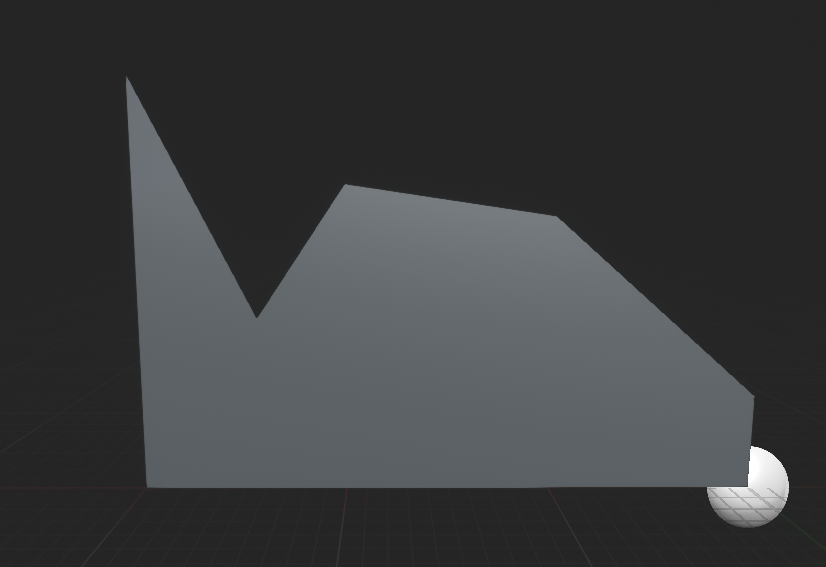
something like this but, you know, perlin
hollow meteor
i know about that, but no matter what i try that code doesnt work, and if i search in internet i found nothing that could help me, i came here to search for advises
static charm
Okay post a pic of your code and we can help
hollow meteor
https://prnt.sc/w9b7zj isnt a lot, but i made this
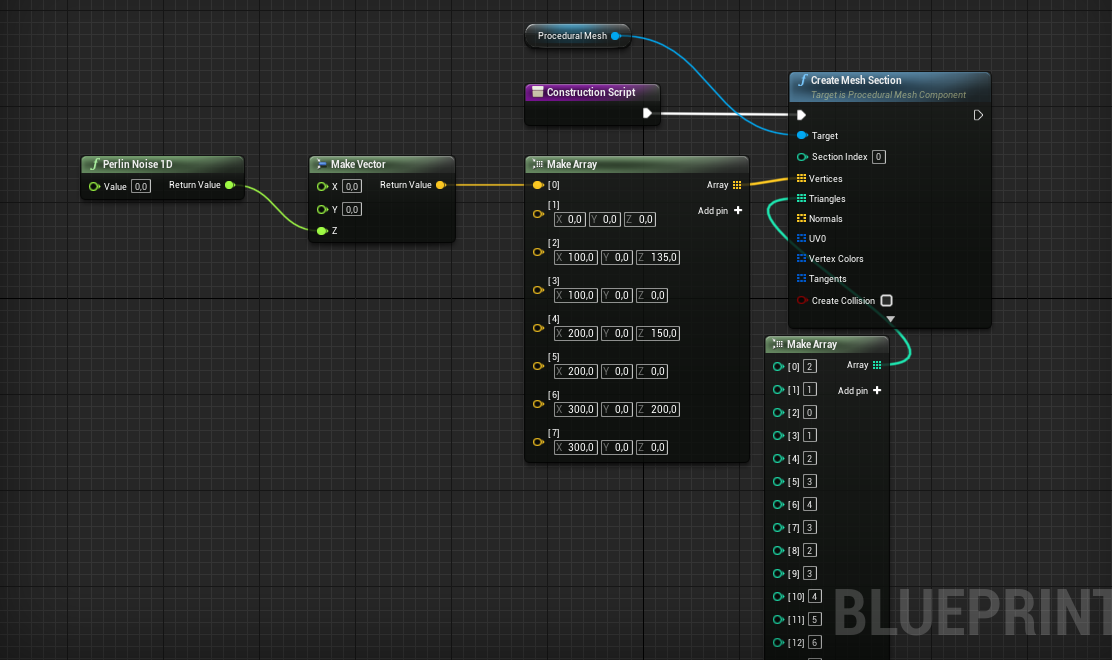
maibe i didnt even understood the functioning of that node
i made an example, just to see if he could give input
static charm
well the output is always betwee -1.0 and 1.0
so you need to scale it manually
like multiply it x 10 or something
or map it to a range

 static charm
hmm okay just tried the node myself
and its not working either
let me check whats going on
okay the node is kinda dumb
it's meant for continuous generation
which could still be useful
for you but
hollow meteor
what you mean for continuous generation?
static charm
well nevermin lol. Anyways you can fix it by putting Random Float to the input of the Perlin node
hollow meteor
let me try
static charm
 supple folio
in the content examples blueprints a sound plays. How do I turn it off? like I tried turning off editor sounds in editor preferences but it keeps going
static charm
you mean during play in one of the maps?
supple folio
no in a blueprint window
it is a mix of an ufo powering up a jump and ufo powering down
I opened one like the example said with "ctrl+e"
static charm
did you hit simulate in the window?
supple folio
no
nothing is running, which is confusing me even more 😄
I never tried the content examples so not sure
static charm
you can try going to viewport and turning off realtime
click the little arrow button next to Perspective
and disable realtime
supple folio
still going
static charm
i dunno you probably have something else going on
close the editor
and dont do what u did again lmao
could be a bug or just something im not thinking of
i used the UFO example a few times and dont remember it looping the sound
but its been awhile so i dunno
supple folio
I found it. it is the niagara example map. I tried some other ones and it didn't do it.
only there, sound starts playing in the other windows
when I turn off the realtime in the example map, the sound stops
thank you
supple folio
it happens when I put the window in the tabs besides the main editor. hm interesting bug. 😄
orchid garden
so... sometimes i'll need to get the default meshes for the character in play after they have been changed... i thought about storing references to those default meshes on the character itself but.... could i just create a blank reference to that default character, and pull the default meshes from that reference?
static charm
i believe so
dawn gazelle
You could store the default in a variable.
orchid garden
mk i'll give it a go, just seems like a better option then storing 5 mesh pointers in the character.
static charm
ok so theres a few ways
easiest way is actually using built in Get Class Defaults
but then you'd probably have to make a variable anyways
dawn gazelle
yep
dawn gazelle
if you don't want every character carrying around the default mesh variable, then perhaps set it in game state?
orchid garden
well... im using a single master character for both player and npc
say their chest armor breaks, i want to be able to set it from their chest armor back to the default mesh of the actor (male/female/critter)
the default meshes are setup in the child classes in the mesh components
so i was trying to figure out the best way to get that default mesh for the actor so that i can reset it to the one for the actor
(while keeping the code universal from the master character)
static charm
ah yeah either way you're gonna have to make something. can just make a Map with a custom struct or even just a Select node with the defaults saved that way.
orchid garden
its not very many that i need to reference, head, chest, arms, legs and feet.
things like the backpack and dorlach are just empty components when nothing is equiped so thats just switching to a damaged or removing the mesh.
static charm
yeah i means there's a bunch of ways of doing but it's gonna be easiest to just make references to the default for each subclass like this or something else.
i mean it can even procedurally set the Map in Construction by getting the meshs that you already selected as the defaults
orchid garden
so if im looking at that right, a map is just a array using names instead of numbers?
static charm
yeah a map can be any two variables
anything as the Key and anything as the Value
you could make an array out of a map lol
orchid garden
never used maps so had to ask
static charm
yeah i barely use them myself (because i like arrays having an order of items)
dawn gazelle
Maps are super useful.
orchid garden
but... if i make a map, stick a reference to the default mesh, then replace the default mesh, wouldn't the reference point to the new mesh?
 lime fulcrum
How come there's no such tutorial showing SAVE/LOAD game?
No, I'm not talking about saving data. I'm already able to do so. I can't find any explanation on how to do a classic QuickSave and QuickLoad of the game. Example: Half-Life when pressing F5 and F6
static charm
If you set the Map in the construction script, it only fires once before play starts, and saves the default meshes.
but yes there's potential for mishaps with a save system etc.
orchid garden
@lime fulcrum wouldn't you just store a reference to the last save for quickload and just load that save when the button is pressed? then for the quicksave just make a name for the save like they do in halflife / fallout and jump strait to the save routine rather then giving the player a screen?
lime fulcrum
What I'd like to understand is. For example, I know how to store variables. But it seems like I have to save every single variable of each instance and also place it with the code.
Isn't there a function that snapshots the current situation and then loads it?
static charm
no but there are plugins and stuff that can save entire actors, etc.
one plugin was free a few months ago
lime fulcrum
I have that I think
orchid garden
@static charm hrm... so the best solution to prevent mismatched / replaced mesh values would probably be a struct in the character containing pointers to their default meshes i guess.
static charm
more or less unfortunately yeah
lime fulcrum
but also how do you load a game? If you kill/destroy an actor. it means the reference is lost and you'd need to recreate that actor... It just seems way too much work for such thing, Maybe I'm overthinking it
dawn gazelle
or, use a datatable and have the character look it up from the datatable when needed.
static charm
^this too!
lime fulcrum
:\
static charm
yes i think you are overthinking maybe
Support me on Patreon: https://www.patreon.com/user?u=13785186
Or donate on PayPal: paypal.me/ispheria
Sorry about the weird blurring effect going on, I have no idea what's happening, but will try to fix it asap
i didn't watch this
but maybe it has some new info for you
lime fulcrum
LOL!!! I've just opejned that exact video xD
static charm
but yeah save load systems, there is no all in one solution to every game
orchid garden
@dawn gazelle there's a idea, could use a datatable and just store a single row reference for the data table to the actor, brilliant 😄 didn't even think of that!
 turbid rapids
Hi
Primitive Component not showing .... what is the problem?
dawn gazelle
turbid rapids
Hi
Primitive Component not showing .... what is the problem?
You probably need to cast the "other actor" to the appropriate class you're looking for.
turbid rapids
dawn gazelle
You probably need to cast the "other actor" to the appropriate class you're look...
but it shows in another device ... I don't think it would be because of cast...
dawn gazelle
Can you provide a screenshot of the component you're trying to get off the actor?
turbid rapids
dawn gazelle
Can you provide a screenshot of the component you're trying to get off the actor...
I want to grab PrimitiveComponent of the actor that entered the trigger
to change it's mass and physics
in another device it shows up
static charm
change the parent class to actor
sometimes it's a different class it gives you limits to different things going on
lime fulcrum
Looks like this one is the one I need :D
https://www.youtube.com/watch?v=nhv4hiBm-Ak&feature=youtu.be

Easy Multi Save is a all-in-one save and load solution for Unreal Engine 4 projects of any kind. Available on the UE4 Marketplace. https://www.unrealengine.com/marketplace/easy-multi-save
static charm
in the top right corner of the screen you will see it says Static Mesh Actor, you can safely change this is to just be Actor
Milijan, yeah that was the free one i think
for a month only
maybe not
i dunno
turbid rapids
static charm
in the top right corner of the screen you will see it says Static Mesh Actor, yo...
Ok I will test that .... thank you
turbid rapids
static charm
for a month only
yes it was .... I got a copy also 😄
lime fulcrum
static charm
in the top right corner of the screen you will see it says Static Mesh Actor, yo...
Yes and I got 😄
orchid garden
70usd, hrm.... one of those things that make me go 'should i or...' have a few items i bought that didn't live up to what they were, and all the 'positive' reviews turned out just to be people who grabbed it for free and gave a 5 star cause they got it for free.
Unreal actually refunded me for one of them because the author wasn't willing to, and i showed what was broken for me in the item.
anyhow sadly, because of my purchase experiences on the market i tend to stray from items over 50 usd.
hope it works good for you @lime fulcrum 🙂
lime fulcrum
Thanks 😄
maiden wadi
Just be careful with plugins like that. Usually saving is a pretty integral part of any game's design. It matters a lot for performance and integrity. If it works for your uses, that's great. I have a need to do most things myself, it bothers me a little when I don't have a solid idea of what my data is doing. And plugins like that can easily cause things like crazily bloated save files.
orchid garden
ever stare at one of your blueprints for hours trying to figure out how you can simplify things in it?
maiden wadi
Most of the switches could be hidden away in other functions and return the correct values to use, or do what it needs to do in the function with a few inputs. That'd clear up a lot of that. Specially the bottom right.
That is a crazily branching function though. What's it for?
orchid garden
bottom right is equipment handling, has shared functions in it already.
mostly inventory
i.e.
dawn gazelle
But sometimes the spaghett can be so beautiful
orchid garden
lol that it can 😉
maiden wadi
I have found that almost all of my functions end up looking like the side view of scifi weapons when zoomed out.
orchid garden
the equipment / inventory handling is actually working really good, and doesn't take a performance hit, so i think i've optimized it pretty well.
hehe @maiden wadi i thought that about one of mine the other day "hey... that might make a nice gun pattern..."
turbid rapids
static charm
in the top right corner of the screen you will see it says Static Mesh Actor, yo...
Hi again this solution didn't work
static charm
just make a new blueprint
as an base actor
oh my bad
yeah i dunno why its not working for you
oops
@turbid rapids
 muted dawn
double check everything
static charm
sorry i thought it was something ive seen before
muted dawn
damn powerik was a hassle to fix
turbid rapids
static charm
sorry i thought it was something ive seen before
No Problem thanks for your helps.... maybe I should reinstall the engine
static charm
lol no
dawn gazelle
turbid rapids
Hi again this solution didn't work
Is that component something you custom created? It doesn't appear to be one of the components in the engine.
turbid rapids
dawn gazelle
Is that component something you custom created? It doesn't appear to be one of ...
No it's a default built in component .... primitiveComponent for controlling physics
static charm
oh i see maybe
what type of variable is that
the New var1 actor
it has something to do with that i think
turbid rapids
static charm
the New var1 actor
it's a volume trigger I refrenced it in the editor
it doesn't relate to blueprint class etc.
in aanother device this function was available in any class and it had primitive component also
static charm
what do you mean another device
yeah i dunno you should be able to select primitive component for any blueprint
dawn gazelle
Primitive Component is not in 4.26. It is in 4.25.4
static charm
wtf lol
dawn gazelle
guessing a bug of some kind.
static charm
this is why i never use the lastest engine version lol
static charm
wow nice find
im trying to see if its already reported as a bug
unless a different component is supposed to replace it
or maybe you just get the actual component itself
i dunno
well MeshComponent should work i guess
since thats the next one down the chain
dawn gazelle
I know others have seen strange behaviour out of these drop down context menus with other things. Like, someone was missing all the default interfaces.
turbid rapids
dawn gazelle
Primitive Component is not in 4.26. It is in 4.25.4
Oh yes.... please report this bug
dawn gazelle
In 4.26
As a workaround, if you have it defined in the one instance, try copying the node into the other.
 covert delta
I find one of the best features of blueprints vs. traditional code is that it becomes much easier to visibly document and nest logic in collapsed nodes. IMO, every single event should be encapsulated in a single comment block, with a short comment that is easily readable when zoomed out at max. If you have a complicated set of code that does stuff exactly once, collapse it, and give it a long detailed name that describes what it does, but gets it out of the way so people don't need to see it. Traditional code has no place for long detailed descriptors. You can make doc strings or something, but those are never apparent just reading the code that calls these functions. You can comment what you're doing, but the ratio of design detail to code is often going to be poor for a reader who wants to understand what you were doing. BP is bad for figuring out someone's implementation logic, but A+++ for giving the tools to describe intentions.
If I were writing the bp code in the pics above, the event graph would be condensed to just a handful of collapsed nodes. If you're writing good code, it should more or less read like pseudo code at the level of the event graph imo.
I haven't actually seen any design docs that share this opinion though, so maybe that's just me.
@orchid garden @dawn gazelle
 twilit heath
when i see a blueprint and a collapsed node in it, i generally don't trust it enough not to check it out
turbid rapids
dawn gazelle
As a workaround, if you have it defined in the one instance, try copying the nod...
Thank you ... I will figure it out.
covert delta
@twilit heath Perhaps that's because a lot of people use them to hide spaghetti under a rug though, haha.
This is how I write my bp logic:
One collapsed bit:
twilit heath
so you're basically using collapsed nodes to make blueprints as readable as c++
side note, you don't need the auth switch, you can just use the GM cast as one
covert delta
Maybe? Idk. I think BP is more readable and approaches a true pseudo code style vs. cpp or other languages. I write python for a living mostly.
twilit heath
and while that has merit when you are just checking out what the BP does in general
im not sure it helps when tracking specific network functionality
my python has degraded to a point where its 50% time spent on google 😦 haven't used int in 7 years
turbid rapids
dawn gazelle
As a workaround, if you have it defined in the one instance, try copying the nod...
can you please test and see mesh component is available in the function?
I don't have access to engine right now
dawn gazelle
turbid rapids
can you please test and see mesh component is available in the function?
I don't...
Nope.
static charm
well he could also use scene and then cast from that
unless it doesnt have scene either lmao
dawn gazelle
Has that
covert delta
@twilit heath probably true. I feel bp makes network stuff approachable, which is a good accomplishment, but I think there's a fairly significant chunk that's hidden and really shouldn't be if you want a tight feeling for multiplayer... eh. Tomorrow's problem.
twilit heath
BP has about 10% network functionality
and the replication callbacks in BP are hacks
turbid rapids
dawn gazelle
Has that
have can I access physics with that?
static charm
yes with a bit of work
but like Datura said when you get back to the engine, try copy n pasting a working node that has the primitive successfully selected
dawn gazelle
If I recall correctly, I don't think you can cast backwards - if SceneComponent inherits from PrimitiveComponent that won't work.
 worthy tendon
dawn gazelle
If I recall correctly, I don't think you can cast backwards - if SceneComponent ...
worthy tendon
dawn gazelle
If I recall correctly, I don't think you can cast backwards - if SceneComponent ...
PrimitiveComponent inherits from SceneComponent
 worthy frost
@covert delta i prefer proper functions over collapsed nodes
thin cedar
So I have a system where I can grab objects from far away, like telekinesis, but the object perfectly mirrors my motion controllers (This is in VR). I want to make it so the object I'm holding feels more loose and weighted.
Any ideas?
static charm
physics handle
with some logic
physics handle lets you grab physically simulated objects
there's probably some tutorials on VR immersion/ physics handling.
thin cedar
I think that's what I was looking for, thank you.
static charm
its cool because if u grab an object and and try to move it into a wall, the object hit thes wall and stops
or knocks over other objects that simulating, etc
but also annoying because its game physics and hard to account for all situations
turbid rapids
@dawn gazelle @static charm
I really appreciate your help
Thank you very much
covert delta
@worthy frost functions convey to me that the logic within is something that is applicable elsewhere. I generally don't want my functions modifying state at all even if they aren't marked as const and I don't want to see them in the list of functions outside of the contexts where they're relevant wherever possible.. collapsed nodes state that this is a block of logic that is used exactly once that accomplishes exactly one side effect. I also feel absolutely fine writing out a whole sentence to name a collapsed node, but find that abhorrent for a function.
covert delta
twilit heath
BP has about 10% network functionality
Terrifying 😦
though if I had one wish, it would be that I could make an anonymous function in the style of a collapsed node and pass it around as a first class citizen. That would would solve many of BP's weaknesses imo.
static charm
i mean isnt that what copy paste is
or just a macro
i dunno they are all apples to me
covert delta
Copy paste is the serpent in the garden of eden.
the devil on your shoulder
or some other non-christian analogue
static charm
without evil would we know good?
tight schooner
@covert delta my BP style of late is similar to yours (a series of collapsed graphs). I also like to have important parameters/variables as inputs on the box, e.g. a debug boolean that enables some Prints and Draw Debugs.
In any case I do like that aspect of BP
that you can make a visually legible overhead view / dashboard type thing
I guess that's the whole premise if you embrace the C++/BP hybrid workflow that Epic Games envisions. (I've only done pure BP so far.)
 shell rivet
@covert delta i made the things you said 2 days ago. and it gives an error. how can i repair it?
dawn gazelle
When you have a variable being set like this, the target is normally set to another blueprint class, namely, wherever that particular "Floor Touches" variable is actually being stored.
This would always return 1
shell rivet
how to repair it?
oh, it "works" now
i've set the wrong cast
nah
it still doesn't works
now it doesn't destorys the actor
@dawn gazelle can you help me?
static charm
its going to destroy the actor even on the first floor touch
shell rivet
dawn gazelle
What type of class is it? Actor? Game Mode? Game State?
Game mode
 warm ermine
Is this the right place to ask for help regarding different idle animations for different weapons through blueprints?
dawn gazelle
shell rivet
Game mode
This would never work in that case - you're trying to cast an overlapping actor as a game mode, so it would always end up failing to cast as game modes usually aren't overlapping things 😛 And I pointed out before, your adding 0+1 then setting that as the value for your floor touches, so it would always just be 1 and never run true on your following branch. This is what you probably want.
static charm
Water, yes and no
yes because you can do it through only blueprints and no because technically there's also Animation Blueprints which is different than blueprints lol
warm ermine
Got it - sorry ^^; Where would I start blueprint wise?
static charm
well i dont think you can procedural set different animations into the animation blueprint.
so really you just need to make the different animation blueprints for each weapon
orchid garden
if you want to rip apart a animation bp to see how they did it, Advanced Locomotion is a good starting point.
static charm
Unreal Engine Forums
Animation discussion, including Animation Blueprint, Persona, Skeletal Meshes, and more.
warm ermine
@static charm @orchid garden Thank you both 🙂
 grizzled garden
guys why those settings ( in the render panel in the right side ) is grey? i cant change the settings. i want to change the settings from masked to something else.
dawn gazelle
grizzled garden
guys why those settings ( in the render panel in the right side ) is grey? i can...
I'd say save and restart.
grizzled garden
i did
same thing
but its ok, i used blueprints to change it, but still wonder why that settings is grey out.
dawn gazelle
What happens if you add another widget component?
grizzled garden
same thing
dawn gazelle
o_o
 dreamy ice
Could it be that widgets themselves don't have access to the rendering tab?
grizzled garden
how to check that?
it happen to me only
on some unreal engine forums they have it ungrey
other thing guy. i want to hide that widget when they are not near the camera
which node i use?
to set its visibility distance
dreamy ice
add to viewport and remove from parent is what I'd do not sure other than a big volume how to track distance.
I'm still new to UE4 so everything I say probably isn't the most efficient way to do what you need.
Basically you want to show/hide the widget when outside or inside the radius. Like a NPC health bar.
grizzled garden
yes
dreamy ice
What I'd do... (because it's the only way I know how to do it) is create a volume on the NPC that when it overlaps with another actor casts to my player character to see if what overlapped is a character but to also spawn the healthbar widget above the NPC in my characters viewport. I'm not sure of other ways, you'd have to google some tutorials/.
grizzled garden
yep im doing that
 zealous moth
@true valve branch or switch
 true valve
enum uses switch
zealous moth
yup
true valve
SO I have both info- Trying to == them
if enum is male and bool is male then continue else dont
So I took enu and used IsMale variable for male and female then compare that with bool
true valve
ok thanks
 worldly dew
Hello! (this is my first time using lerps):
I could be doing this completely wrong and I can't find a way around this issue (I'm still learning). I have a first person character who, when he enters a trigger volume, plays an cutscene animation. During, the player has no control, and the camera is attached to the player's head bone while the animation plays. I lerp the camera rot to face straight ahead.
The issue arises when I lerp the actor rotation. The actual lerp works fine, however when the timeline finishes the actor rotation reverts back to how it was before the lerp occurred. If anyone knows a fix for this issue, let me know, it would be greatly appreciated.
https://www.youtube.com/watch?v=gCI-vKT4ZCA
 trim matrix
I have a widget which plays a simple animation (a picture which is moving). How to close the widget once the animation is finished ? Or eventually when I hit a button ? (one or the other.. The easier option would be better...)
zealous moth
@trim matrix remove from parent
worldly dew
Ignore what I said earlier, I ended up changing how I did it and used set control rotation instead
trim matrix
Guys I have a question...
Some things I feel like belong in macro, some things I feel like belong in functions...
I always try to use a Function and only use Macro's when I need to.
My question is: 1. Does Function cost less then a Macro, or vice versa? 2. Do you have a preference on which to use? If So then why?
 lapis path
I prefer using functions since they have a return node (and BTW can return variables and execs) , can use local variables and so.
I have read somewhere that functions are cheaper in ressources, but don't remember exactly why... However note that macro act as a big collapsed node.
trim matrix
 weak kindle
how can l make it print only one time per some time
weak kindle
how can l make it print only one time per some time
If it's going to be putting out information a lot and is unnecessary I would recommend putting that print on an event tick. Event ticks are perfectly fine to use for testing purposes
weak kindle
l just want when player reach a voice volume do something but when l run it that takes more than 1 volume per time
trim matrix
I don't know what you mean, but there is a Do Once node

If it's printing out more then once and it's a bug I would recommend fixing the but instead of using the Do Once node
Hi, I want to separate the camera-related things from the character's code. What exactly does APlayerCameraManager do and will it work for me?
PlayerCameraManager is basically what you just said
It is a variable component that stores all the information of the camera
weak kindle
l fix it l used do once in right position l have used it before if
now it works perfeclty
trim matrix
glad I could help
 hollow drift
I am confused. I have a weird animation glich whereby my casted pawn just stucks half way into the animation
O tile click i animate a tile to go up and down. This works fine. then i just continue the execute after then Timeline. Cast to a pawn and use same values for the animation. But the pawn just goes up and stays there.
Anyone any idea why this is happening?
Ugh i am stupid. The pawn left the collision box of the tile. e.g. tile did not know pawn was there (faceclap)
hollow drift
ou. i try better next time
hollow drift
How can I filter out for "Get hit Result under Cursor for Objects" my collision box? Issue is i still need my collision box to work for other function like my pawn interaction with the collision box.
dim robin
hello, happy christmas to everyone. I have a question: is it possible to change a material color when my actor (a ball) is over another object (a rail)? Sorry english is not my native language, so to explain better, think about a slug/snail dropping her slime over an object. I would like to do something like this. how would you do this?
hollow drift
If i move my ship and place it in exactly the selected part, the white tile with the watherdroplet will be not hit but my tile to the right....
hollow drift
dim robin
hello, happy christmas to everyone. I have a question: is it possible to change ...
For example add your rail a collision box and change color parameters in your material when your ball is overlapping the rail-collision box
 stiff chasm
Any tips for fighting games?
for example things i should take note of or shouldnt do in the future
dim robin
hollow drift
For example add your rail a collision box and change color parameters in your ma...
I would like to do something like this (of course this is badly photoshopped)
I was thinking about a post process box moving with the ball..
hollow drift
ah your problem is it is no a straight "rail". You want to do it along a curve
dim robin
exactly
hollow drift
hmm
dim robin
basically where tha ball is touching, the color is changing
I don't even know if it's possible.. but I guess it is somehow
hollow drift
yes
make a torus
and say: on collision with torus do color
but you have to model the "collision" box yourself
something like this
dim robin
but will this not change ALL the rail length color???
hollow drift
depends on what you want to do with your curve
make this around your trail and if your ball is coliding with it, it will change color
tight schooner
dim robin
hello, happy christmas to everyone. I have a question: is it possible to change ...
You'll get some ideas if you look up tutorials for snow trails or how to paint on a canvas. I never delved into it but they involve runtime virtual textures or texture render targets. I would imagine your snail slime trail would be similar to that.
the #graphics channel may be more knowledgeable on the topic
dim robin
thank you both, I'm going to try something now! also I will post further questions on graphics channel, thanks!
trim matrix
stiff chasm
Any tips for fighting games?
Utilize child blueprints!!
and controllers!
 unborn needle
Can anyone help me with a blueprints problem?
preferably in vc
trim matrix
depends on the problem
unborn needle
I followed a tutorial on a wallrunning controller but it doesnt let me jump off the wall
trim matrix
So you can get onto the wall but you can't get off the wall?
unborn needle
I've got a lot of different funtions so that would be not ideal
screen share would be better
trim matrix
oh see yeah I've got a league game starting in a few minutes, wouldn't have enough time
sorry bro
unborn needle
bruh
trim matrix
how long have you used blueprints ?
unborn needle
just a few days
maiden wadi
Sounds like wha' choo got is ya self a little bitta' one em logic problem.
unborn needle
what
unborn needle
I dont think thats the problem
maiden wadi
I'm pretty certain it's the problem. Logic is the problem in 100% of bugs.
maiden wadi
Not really a voice chat person. But I'd recommend breaking your system down a little. Wall running should be a simple set of functions. Your issue is that you can't get off of the wall. How are you trying to get off of the wall? Button press?
maiden wadi
I'd put a print after Launch character. Make sure that the function is running to begin with.
unborn needle
this is what it looks like
unborn needle
maiden wadi
I'd put a print after Launch character. Make sure that the function is running t...
Print string innit?
maiden wadi
The stuttering at the end is trying to get off of the wall?
maiden wadi
What happens if you up your Reset Time to like 1.5?
unborn needle
nothing really changes
maiden wadi
What does the reset time do? I assumed it would keep you from being able to land on a wall for a small duration?
unborn needle
yeah I think it's something like that
maiden wadi
If upping that to 1.5 seconds doesn't change how sticky you are to the wall I'd assume it's not working.
unborn needle
🤷♂️
maiden wadi
On a side note. I was fairly sure that Launch Character was in world space?
Oh, nevermind on that part.
unborn needle
ok
maiden wadi
Does upping the WallRunJumpOffForce help?
unborn needle
lemme try
no but it kind of works when you hold the a or d key (depending on wich side you are) and then press space
maiden wadi
Up it to something stupid like.. 10,000.
unborn needle
okay
maiden wadi
If that doesn't get you off of the wall, you have a repeating logic sequence that isn't being broken somehow by that end wall run function.
maiden wadi
What if you up the ResetTimer to like 20.0 seconds? Does that keep you from sticking to a wall for 20 seconds?
maiden wadi
I'd run through your stuff and figure out why that isn't working. That was probably how you were supposed to keep from sticking to the wall.
unborn needle
how would I do that
maiden wadi
Stock up on coal and sandwiches and grab an express ticket on the logic train. 🤷♂️
unborn needle
bruh
maiden wadi
What does that float do inside of the stop wall jumping function?
maiden wadi
Yep.
maiden wadi
It's not connected.
unborn needle
it is
maiden wadi
Nah.
unborn needle
yeah
look
thats the same as the input
if I connect the reset time input to the time on the suppress wallrun it does the same
you get me?
maiden wadi
Can you put prints in both SuppressWallRun and ResetWallRunSuppression?
Make sure they both run at their times. The first one should fire immediately on spacebar, the second should run after the ResetTime.
I wonder if it's the timer continually firing with multiple spacebar hits...
unborn needle
they both fire immediately
maiden wadi
In that last picture you posted, can you print off ResetTime right before the Suppress Wall Run? Make sure that's not sending 0.0
maiden wadi
Just put a print between SetGravityScale, and SupressWallRun, and connect the ResetTime to it.
unborn needle
okay
maiden wadi
Need to see what it's sending into SuppressWallRun.
unborn needle
like this?
maiden wadi
You can drag from ResetTime to connect it, it'll create the convert node in the middle automatically.
unborn needle
okay do I still keep it connected to the setgravity and suppress?
sometimes it says 0.0 and sometimes 1.0
trim matrix
why is your wall run so complicated
shell rivet
dawn gazelle
This would never work in that case - you're trying to cast an overlapping actor ...
it still doesn't destroys the candy
trim matrix
you have 3 different booleans for wall running
trim matrix
What is Left and Right for
unborn needle
to see if youre wallrunning on the left or on the right
maiden wadi
I wonder if it's the timer.
unborn needle
you dont want to be launched in to the wall
trim matrix
So is the code forcing you to the wall or is it changing gravity?
unborn needle
changing gravity and launching you off the wall
unborn needle
maiden wadi
yeah sure
doesnt do anything
I do allready have this in the event graph
maiden wadi
That's useless after the timer. You want to use that to clear the timer before starting a new one. Calling that after the timer is only useful if you're using a looping timer.
unborn needle
should I delete that then?
maiden wadi
I'm mostly just trying to figure out why your reset doesn't seem to work. Where are you starting the wall run? Is WallRunSuppressed actually being checked?
 willow phoenix
willow phoenix
willow phoenix
that just showed up for my tentacle BP :<
unborn needle
😅
 storm dove
how do i make it so my physics object would slide on surface when it hits it instead of bouncing?
maiden wadi
@unborn needle I mean where does the wall run start? Like when you collide with a wall, or whatever.
maiden wadi
What about before that? Where is WallRunUpdate called from?
Nothing is using your WallRunSuppressed? bool yet.
unborn needle
yeah I think youre right
unborn needle
omg it was that simple
thank you so much
fucking hell I really am that stupid but thanks
but now I cant do 2 wallruns in a row
without touching the ground
maiden wadi
Lower the time on the spacebar thing that I had you up to like 1.5 and 20 seconds.
Put that back to 0.35 or whatever.
 upper adder
Is creating a new savegame object every time you save good?
unborn needle
that is allready back to .35
maiden wadi
Take out the thing I had you put before the timer to clear it before setting a new one. I don't initially see why that would affect it like that, but maybe.
unborn needle
still doesnt work
trim matrix
@upper adder Why not reuse the save you already created?
When you create a save it is saved to your disk I believe, Not really something you want to just do unless you're properly disposing the objects you create
maiden wadi
Whether you create a new save or update an existing one has no bearing on actual saving. The only reason you'd do one or the other is if you're just wanting to brute force save everything, you'd just create a new object, populate it and save it. Vs if you just want to update one single value, you'd load up a save object, change the value, then save that. But the saving to disk part will be the same regardless of which method you do.
trim matrix
@maiden wadi Really? Doesn't the objects you create add up? I mean people don't have infinite disk space
Wouldn't it save more space to keep everything in one rather then having an infinite stacking amount
unborn needle
unborn needle
but now I cant do 2 wallruns in a row
@maiden wadi you know what might be the problem?
trim matrix
I finished league, I might be able to help you out if you want to call and screenshare
unborn needle
yeah sure
dawn gazelle
shell rivet
it still doesn't destroys the candy
Mebbe put a few print strings into your code and see where it's failing. The logic is sound based on what you've told me.
maiden wadi
@trim matrix The Saved Games are written to a file on disk space by name. So to fill up a disk, you'd need to change the name every single time. Where as if you're overwriting it every time with the same name, it'll basically delete the original and create a new one.
trim matrix
@maiden wadi Oh I see what you're talking about, As long as you select the same class then it just overwrites? That's dope
orchid garden
dawn gazelle
This would never work in that case - you're trying to cast an overlapping actor ...
floor touches should really be =>, sometimes you may end up with two items hitting the floor at the same time or a fraction of a delta second so floor touches can end up jumping to 6 before it finishes processing.
orchid garden
or do the check directly off the add node
maiden wadi
@trim matrix The Savegame class doesn't matter. Just the slot name.
shell rivet
dawn gazelle
Mebbe put a few print strings into your code and see where it's failing. The lo...
what? i wanted to make like this: touch the ground - destroy itself and add point to "fallen candy's", and if fallen candy's = 5, show game over screen
can we do this all over again?
orchid garden
shell rivet
what? i wanted to make like this: touch the ground - destroy itself and add poin...
you did this like @dawn gazelle said and its still failing?
https://cdn.discordapp.com/attachments/221798862938046464/791813038301773834/unknown.png
 shell rivet
yes, i made exactly what datura said
orchid garden
is it destroying the candy when it hits the floor?
shell rivet
no
orchid garden
is that call inside the candy itself?
shell rivet
yes
orchid garden
add a Printstring off the castto node on the failed, see if it tosses you a failed cast
if it doesn't, and the number isn't increasing, its something prior to that event being called thats causing the problem.
orchid garden
shell rivet
yes
are you getting a failed cast?
trim matrix
How do I set an actor component so that it always ticks no matter what, and is only ever destroyed when its parent actor is? It is a widget component that displays health but I am having a problem where every time it's recreated (due to other players moving away from camera) its values reset
odd ember
@trim matrix widgets ticks are different than actor ticks, but it will tick automatically as long as you have something that requires ticking behavior. A component always gets destroyed with its parent
trim matrix
It's more to do with rendering I have some fairly complicated replication behaviour on a health bar which works but is lost if any of the players moves too far away, then the bar vanishes and when it is reconstructed its health is displayed as full again.
odd ember
Doesn't sound like fault of the component itself but rather that you are destroying the component at a distance instead of hiding it perhaps
But IDK your setup so I can't say
trim matrix
I haven't changed any setting related to that
Also it seems to vanish at a mid-range distance like I can see it from far then when I am mid range it briefly vanishes then reappears when I'm close
maybe related to render order
odd ember
Perhaps. Check if it gets occluded
trim matrix
and how to increase max draw distance of this one component?
odd ember
There might be a setting on the component itself?
That's what i can think of
But i haven't had a chance to mess around with the 3d widgets just yet
trim matrix
its screen space
odd ember
So you are using a screen space widget at a distance? In that case, have you tried replacing it with a 3d widget and seeing if it solves your problem?
shell rivet
orchid garden
are you getting a failed cast?
unfortunately, yes
trim matrix
no, makes the problem worse sadly
dawn gazelle
shell rivet
unfortunately, yes
You probably haven't set your game mode to "class1". You do this in the world settings. Write down the current values you have listed underneath before changing your game mode to "class1", and after changing it, enter in the values that you wrote down.
shell rivet
dawn gazelle
You probably haven't set your game mode to "class1". You do this in the world s...
i have.....nothing?
trim matrix
Yo! Was just wondering if anyone knows if there's a blueprint-way of opening a level after a sequence is done playing (or alternatively open a new level after a 50 second delay when going into a trigger box). Thanks! 
dim robin
trim matrix
Yo! Was just wondering if anyone knows if there's a blueprint-way of opening a l...
delay -> "open level (by name)"
trim matrix
dim robin
delay -> "open level (by name)"
Exactly that's the thing though, I don't really know where to place it  if I place it after (like this) it just triggers the moment I launch the game (and not after the sequence)
shell rivet
trim matrix
Yo! Was just wondering if anyone knows if there's a blueprint-way of opening a l...
quick sketch
trim matrix
shell rivet
quick sketch
Thank you that worked perfectly! 
 amber marsh
Anyone here know the mathmatical formula to figure out the dps of a weapon based on it damage and delay
gentle urchin
delay == fire rate?
shell rivet
gentle urchin
delay == fire rate?
yes and no
yes, if you make loop
just put delay on start
gentle urchin
1s / delaytime * damage per hit = dps
shell rivet
i think so
gentle urchin
Lets say 0.3sec delay and 30 dmg per hit
(1 / 0.3) * 30 = 100 dps
 supple dome
dawn gazelle
trim matrix
Thank you that worked perfectly! <:PES_Heart:530205382832816128>
supple dome
dawn gazelle
trim matrix
Thank you that worked perfectly! <:PES_Heart:530205382832816128>
This is a better way to do it.
trim matrix
dawn gazelle
This is a better way to do it.
Ah okay, gotcha! I'll try that instead!
gentle urchin
damage / delay
amber marsh
damage / Delay
gentle urchin
dunno what i was thinking with 1/delay .. tired 😛
amber marsh
so if it fires once every 3 seconds and its damage is 15 then...
dawn gazelle
1 damage every 1 second = 1 DPS. 2 damage every 1 second = 2 DPS. 1 damage every 2 seconds = 0.5 DPS.
15 damage every 3 seconds = 5 DPS
gentle urchin
^
amber marsh
thanks, I must need some coffee
odd ember
shell rivet
yes, if you make loop
don't do delay loops it'll crash the engine lmao
orchid garden
any idea what would cause a blueprint to do this? nothing was changed in it, just opened it up and have these problems, all the warnings say it can't find the local variable thats in local variables....
 dark crow
If it's not a problem just right click and promote it again to a local variable, should fix the warnings
Without losing any code
orchid garden
if i do that, it creates a duplicate of the same variable same CaSe.
odd ember
orchid garden
any idea what would cause a blueprint to do this? nothing was changed in it, ju...
if you recompile what does it say
orchid garden
same thing
dawn gazelle
F7?
odd ember
try duplicating the class, open the duplicate and see if you still have the issue
that's all I can think of on the engine side of things
orchid garden
i've dragged most of them back in and replaced them and that works... but... why did it happen in the first place?
dark crow
Many things could have gone south that caused that
orchid garden
had it working last night, saved everything, left, started ue4 back up, opened the blueprint... boom.
dark crow
Sounds like UE4
It happened to me once that it created 10 times the same variable with the same name and to deleting one of them would crash the entire engine, so to fix the issue i literally had to crash the engine multiple times
It can be picky
orchid garden
i was gonna work on optimizing it today but i've spent most my time replacing variable references.
odd ember
I had a component in an actor that I could not change variables in as they would always reset. duplicating the component in question made it work somehow
I figured you might as well try and see if that works
orchid garden
so basically just UE4 wierdness i guess. never had anything like this happen before. guess i should check the other bp's as well just to make sure all is still good.


 orchid garden
gah yep thats what would happen if i promoted to var on the 'warning' ones
dark crow
Solution was deleting and recreating indeed, it can be weird sometimes
odd ember
I'd still say it's worth trying to duplicate the class in question and seeing if you still have the issue on the duplicate
worst case you lose 10 seconds best case you save yourself redoing x amount of variables
orchid garden
if it happens again, or another one of my bp's has the same issue CranzEstebogen, i'll try that.
dark crow
Yeah, try that, just make sure to save first, in my case deleting a duplicate crashed the engine
But it would be deleted on restart
trim matrix
looking for tutorials how to place a specific mesh on specific location
trim matrix
@odd ember can u help me a bit in private?
 torn kettleBOT
:triangular_flag_on_post: xmas is not real and not a thing#0398 received strike 1. As a result, they were muted for 10 minutes.
 north herald
Is there any way to replicate a variable map container (dictionnary) in blueprint? By default, it isn't replicable, so I tried to make it update via a replicated server event, but the value returns as null.
I've already asked in #multiplayer but I'm also trying here, I'm not sure if it's more a BP issue or a MP one. Thanks.
dawn gazelle
You can create a structure that takes the same type of map and replicate the structure.
shell rivet
shell rivet
i have.....nothing?
. @dawn gazelle
north herald
dawn gazelle
You can create a structure that takes the same type of map and replicate the str...
Huh. I didn't expect that to let me replicate it! I'll try, thanks for the advice.
orchid garden
gotta thank you guys here, you know sometimes its just little tidbits of info here that give us better ideas on how to do something, i've just reduced the circled mess down to that little tree above it 🙂
shell rivet
dark crow
Set your GameMode to class1 in the Override
like this?