#blueprint
402296 messages · Page 591 of 403
 dawn gazelle
 worthy frost
that is still not max float though 😄
likely just a BP limitation, and the fact you would likely never use values that high anyway
dawn gazelle
True
 maiden wadi
It's worth noting that blueprint Float variables can hold up to the FLT_MAX, but the entry field is limited. Quite possibly for the same reason a lot of blueprint things are limited. Efforts to save designers from themselves.
 tranquil gorge
Hey guys, im having a problem im not sure if its a bug or not. im just wondering why all of a sudden the third person blueprint character camera wants to turn relative to the direction in the world depending on where i would rotate the control stick.... I never tweaked anything about it and i know the settings to tweak to mess with it. i figured it must have bugged bc when i went to bed and saved it was fine. It was staying focused on the default forward locked position that we're all used too allowing you to rotate around the character with right stick. now the rotate camera function with right stick wont even work.... is this a bug?
 rough wing
https://blueprintue.com/blueprint/s8v2rljw/
Link to my very basic corner finding function. I'm trying to find corners for the player to mount their gun on to.
I'm sharing this so people can add on top of it to get something game-ready.
BlueprintUE
Currently it can't differentiate between an actual corner and a wall (in some situations).
tranquil gorge
fixed... make sure to have this checked 👍
 stray island
Is TextureSampleParameter 2D
The correct method to make images changeable in material instances
rough wing
rough wing
https://blueprintue.com/blueprint/s8v2rljw/
Link to my very basic corner finding...
Fixed the wall/corner issue.
A line trace between the hit point and the not hit trace end point. If there is a hit, it's a corner; if there is no hit, its a wall
 shell rivet
hello again 👋
i have a problem
i wanted to show game over screen when player gets 5 points
and how i do it?
@covert delta maybe you know (again..)
 covert delta
You had some text on your screen working, didn't you? To that widget, add a big border element that covers everything, and give a child text object that says "Game Over". By default set this to not visible. When the game is over, set it to visible.
shell rivet
covert delta
You had some text on your screen working, didn't you? To that widget, add a big ...
but if you remember, we made two situations: when it touches the floor and when it touches the player
 mild granite
Fellas, I beg someone helps me understand Trigger boxes and casting :'(
shell rivet
so i wanted to make something like this:
touch floor 5 times: game over
i mean
i already made this
but how do i get: if fallen candy's =< 5 then game over
covert delta
I don't have time to go over it in detail, but at a high level:
- Make a new game mode class. Add an integer variable to it called Floor_Touches
- Give the game mode class an event called "Floor Touch". This event should add 1 to Floor Touches, then branch on whether or not floor touches >= 5 to do the image thing I mentioned above
- In your candy, right before destroying it when hitting the floor, call get game mode, cast the result to your new game mode class, and call "Floor Touch"
The problem with what you wrote there is that each candy has its own "Fallen Candies". So they just set their own value to 1, and then get destroyed.
covert delta
If you set this up properly and track Fallen Candies in the game mode, you can drag out the pin from "Set Fallen Candies/Floor Touches" to integer == integer, and compare it to the value 5. Then drag out the red pin (bool, aka, true/false) to a branch node.
shell rivet
covert delta
I don't have time to go over it in detail, but at a high level:
1) Make a new g...
there?
covert delta
yeah
 orchid garden
here's one that makes no sense for UE4.....
This always returns TRUE:
 vast lion
maiden wadi
It's worth noting that blueprint Float variables can hold up to the FLT_MAX, but...
vast lion
maiden wadi
It's worth noting that blueprint Float variables can hold up to the FLT_MAX, but...
Sad that they would choose to limit us
orchid garden
floating point math is apparently too hard for a computer game engine, so even with single decimal floats, you'll end up wrong results. (i.e. 0.5 / 2.0 = 0.24999879 or some other off number) so honestly floats with large values in the decimal, aren't practical.
 carmine prawn
I'm sure I read somewhere that 64 bit or double 32 was coming soon™
maiden wadi
@vast lion Actually, I did a little bit of testing, and I'm finding that the input is... odd. It doesn't seem clamped to a particular value.
orchid garden
floating point math in unreal is like using Siri "Siri, play rock" "Im sorry do you want to play rock paper scissors?"
vast lion
@maiden wadi we had a team that actually modified the text field to be able to take doubles. Asking them now where in the engine that is. Kinda want to have a look at why standard floats are being cheated out of nine digits...
For reference:
The number I inputted: 35,730,000,000,000,000,000,000,000,000 The number the field gave me back: 17,283,256,262,359,777,280
maiden wadi
Well, case and point. Put in 9999999999999999999999999999999999999999999999999999999999999999
It'll come out at 9223372036854775808.0. That's lower than the 12919594778391216128.0 that you were getting. Yet I can input 17509777647914188800.0 which is higher than the one you were getting.
vast lion
Odd. I care less about precision of the number, and more about just being able to store the actual magnitude
I want all my digits 🙂
orchid garden
why not just use a int64?
maiden wadi
Two things I'd love to see in blueprint are ValueMax/min checkboxes on variables, and += nodes. Such small things, but I would love them.
orchid garden
so can anyone tell me why compairing data table row names always returns a false positive?
maiden wadi
How are you comparing them?
maiden wadi
That's.. Odd.
 hollow cape
how are you inputting the data table row handle. What's to the left
hollow cape
and you've print string'ed everything in that function to verify that the comparator is actually getting 2 different values and still returning true?
orchid garden
yep
hollow cape
I do data table comparisons quite a bit, and never have had it return true when it isn't. My guess is there is a logic issue somewhere in your code.
maiden wadi
This doesn't return true at least.
orchid garden
points at above code not much code to have a logic issue.
hollow cape
what I'm saying is, instead of thinking it's an engine issue, I would try to more manually recreate it, a la what Authaer just posted. Manually type in some row names and run the function to see what is returns
orchid garden
maybe i just need to restart UE4 again..... yesterday i had a int (0-1) always returning 0 till i restarted it.
vast lion
orchid garden
why not just use a int64?
int64 gets me this number 9,223,372,036,854,775,807 which means I'm still missing 10 digits
So it's actually worse than float
orchid garden
vast lion
`int64` gets me this number `9,223,372,036,854,775,807` which means I'm still mi...
was just a thought, why would you need such large numbers? (curious)
vast lion
Dealing with large things 🙂
maiden wadi
Hmm. Randomly curious...
vast lion
35,730,000,000,000,000,000,000,000,000 is the amount of lumins the sun gives off @orchid garden
orchid garden
i just can't think of a reason in a game to need that large of a number.
vast lion
Well what if you want to calculate the Source Angle for a light?
0.54 degrees is the answer
But to get there you need the lumins of the light source (the sun)
Which is a big number
The math is easy
What is annoying is the the text fields in BPs seem to ruin my numbers arghhhhhh
orchid garden
hrm okay
maiden wadi
Hmm. Amusing. Initializing a float to FLT_MAX from C++ initializes the blueprint value to 9223372036854775808.0. Also the same number as the one I posted above with the billion 9s.
Only interesting, seeing as you can manually enter higher numbers than that.
vast lion
Wait, hold up. You're saying using FLT_MAX in C++ gave you back 9223372036854775808.0?
maiden wadi
float TestyFloatThing = FLT_MAX;``` Initializes the variable value to that when you check it in blueprint.restart of UE4... now getting proper return value on check row....
guess for now on when i do a Branch, im gonna restart UE4 if its giving me false positives... using 4.25 donno if that has anything to do with it.
ug... now im getting a different false positive >.<
maiden wadi
Lolol Now I'm thoroughly amused with this editor. I printed off the sanitized FString float with a UKismetSystemLibrary::PrintString(this, FString::SanitizeFloat(TestyFloatThing));
So... That outputs 340282346638528859811704183484516925440.0... But if I go put that in a float variable in the editor, it inputs exactly 0.0.
vast lion
Well that makes zero sense
orchid garden
ah second false positive was my fault :/ broke a node.
vast lion
A float should easily be able to store this number
orchid garden
i was building a simple check to make sure they couldn't unequip a bag / pack if it had items in it:
vast lion
It's almost like it's storing the error 😂
orchid garden
maiden wadi
Lolol Now I'm thoroughly amused with this editor. I printed off the sanitized FS...
millennium bug? lol
i have a old tablet pc, that if you put 2000 as its year it rolls to 1969 every time.
i.e. because your putting in its max number its rolling to 0.0
just a thought.
maiden wadi
Haha, that's awesome, but no. Even if you trim off that last 0, it still goes to 0 for some reason. It's almost like it's some form of mathmatical compression of some kind.. just very nonsensical.
orchid garden
gotta love floats in ue4
maiden wadi
Suddenly, I'm wondering if it's an inbuilt engine failsafe for math.
and...
9223372036854775808.0f / FLT_MAX = 0.0```Note that the first number is the default max number when you input a ton of 9s.
 rain peak
How do I write to a DataTable row from blueprint? It's simple enough in C++, but can't figure it out in spaghetti
dawn gazelle
Data tables are meant to be static in blueprints. There's no runtime way of saving data to a table.
 gritty elm
how to get z order of widget using blueprint
ok so issue solved, is there any way to change z order of widget at runtime, i created a new widget, when i try to hover or click on button inside that widget, it doesn't work
vast lion
Trying to find where that parsing code is
Honestly I find it ridiculous that it's limiting our numbers
dawn gazelle
gritty elm
how to get z order of widget using blueprint
I think these 3 nodes are what you need. You can feed in a reference to widgets or widget components on the "Slot as canvas slot"
dawn gazelle
vast lion
Honestly I find it ridiculous that it's limiting our numbers
What is the use case you have for using numbers that are that huge? Already at the 1784.... whatever number you had, the accuracy is way off.
 grizzled garden
Help me guys
i used the get actor location, i tried to get the actor location of the nearest actor.
so that the final node which is spawn actor from class can spawn the bullet from the nearest actor location
here is the function to get the nearest actor
anyway the issue is, the spawned bullet does not spawn from the nearest actor
it spawn from another actor
pls help me guys
what is the wrong in my nodes? why it does not work as it supposed to work?
Help me guys
 cobalt temple
After damage is applied to an area I spawn 2 decals and a fire partle effect to all clients. Is this the best way to turn my ground black and orange after damage? With a decal?
grizzled garden
Help me guys
cobalt temple
That first M_Rock_Burn decal shows up but it is transparent, not solid like I want
it looks correct in the preview
Your print string shows you the location of the wrong actor too I assume?
grizzled garden
yes pls help me
lemme explain it better
as u can see
it hit the robot
and when it hit the robot
another glowing white bullet spawn
and it move toward the second robot
which is the nearest to the first robot or the robot that the first bullet touched ( overlapped )
what it should do
instead of moving to the nearest robot
it should spawn there
not move TO there
cobalt temple
I would need to see BP before Find Nearest Target
dawn gazelle
vast lion
It's about magnitude
I'd still argue that a 32-bit float is the wrong type of variable for such a calculation. If you're not concerned about accuracy in the values you'd be working with, you probably don't need to represent the number in its full form. So instead of trying to input all the significant digits into a float calculation, represent it as a smaller number instead ie. instead of inputting 35000000000000000000000000000000000000, represent it as 35000 and realize that whatever you get out of the calcuation you're trying to do, you need to multiply it by the amount of 0s that are really supposed to be there.
grizzled garden
@cobalt temple here they are all ( loading video )
cobalt temple
I would also want to see what is inside the projectile blueprint making it travel
because your code just shows it being spawned with the location given, I don't see what makes it move
cobalt temple
That is the first projectile, the one that isn't working is Projectile 3 right?
grizzled garden
no
its all working
i just want the proj3 to spawn it the second robot or the robot neareast to the hitted robot by proj1
cobalt temple
If you want it to spawn on the second robot, you're passing it the location of the First AIenemy that the initial projectile hit
grizzled garden
and?
cobalt temple
you should take the get actor location of you're 'Find Nearest Enemy' result, and pass that vector
which would spawn that light bolt at the location of the nearest robot
grizzled garden
u saw the pictures i send?
cobalt temple
I watched the 2 videos you put in discord
cobalt temple
which doesn't match the video you sent
cobalt temple
the video you sent me when I asked for the whole thing had a rotation plugged in there
cobalt temple
um, give me pictures and videos that match eachother
grizzled garden
wdym
cobalt temple
You showed me 2 different examples of the first person projectile blueprint
grizzled garden
rotation or location its the same contexts, i just showed u that using both rotation and location is not going to work. why u are saying that?
i just want to give u all details
as u told me
cobalt temple
Which one of those 2 examples is shown in the video with the actual shooting?
grizzled garden
both does shot
there is no diffrence
between the tow
right now im using the location not the rotation
cobalt temple
I see a real big difference between the two. In the video you are passing the Spawn First Person Projectile 3 with a different location then the one in your picture
I think its best someone else help, there seems to be a communication issue here
cobalt temple
sorry I couldn't do more, good luck!
grizzled garden
godluck to u too
vast lion
dawn gazelle
I'd still argue that a 32-bit float is the wrong type of variable for such a cal...
I don't disagree, but why can't I store a number that should fit in a float? Seems like an unnecessary limitation on the BP side... especially when it stores just fine in C++.
dawn gazelle
So I was able to do something interesting... Got this value in there by importing a CSV
Though this was originally 99999999999999900000000000000000000 in the csv.
And sure enough, accessing the data table row, still allows me to access it as a float and print it
 dusk basin
so ive spent 2 days making a inventory system and i need help being pointed in the right direction on how to have these functions feed off of a currently selected index so for example im wanting these functions to be based off of a currently selected item aka index so i can switch the currently selected index with lets say scroll wheel down etc lemme know if you guys have any suggestions
vast lion
@dawn gazelle that would seem to confirm my suspicions that the text field parser is doing some stupid stuff to numbers...
dawn gazelle
 hollow drift
how can i empty an array?
hollow drift
how can i empty an array?
Clear
hollow drift
ty
 thin cedar
Guys I forgot how to do multiple events at once, I don't remember the name of it.
nvm its a sequence
dawn gazelle
dusk basin
so ive spent 2 days making a inventory system and i need help being pointed in t...
Will even scroll around if you go out of bounds of the max index value or below 0 😛
dusk basin
thank you so much @dawn gazelle
orchid garden
dusk basin
so ive spent 2 days making a inventory system and i need help being pointed in t...
i'd love to help but i've spent a week on my inventory system so far and haven't even gotten the quick slots done. I think the easiest way to scroll through them would be to stick refrences to them in a array, that way if they scroll up / down you can select the proper quickslot via the array by the index number.
i walked away from it abit ago, and came back to find my food / water / health / torpor system is working though 😄
icons are temp icons, but eye = torpo, chicken leg food, then stam, then water drop water, then weight, then health head thing.
even have the 'your dead' message popping up in the corner (death doesn't do anything yet)
 dense isle
My StringTable is not always being loaded on cooked builds, but it works most of the time. I followed this post https://forums.unrealengine.com/development-discussion/blueprint-visual-scripting/1517002-string-tables-not-loaded-at-start and included the workaround, but on some games the table is still not loaded at all. What else can I do to ensure it will be loaded? I'm only using it on blueprints, like in this screenshot (where StringTableID is in the form of /Game/MyGame/Custom/Path/MyStringTable.MyStringTable)
Unreal Engine Forums
I have several string tables in my project. If i open them in the editor, everything works fine. (I assume they become registered if they get opened).
I can play my
vast lion
@dense isle you need to look at the asset registry and asset manager
cobalt temple
man no matter what I do that decal always shows up transparent
cobalt temple
oh sweet, got it fixed
 dreamy ice
So in theory I shouldn't use line traces for shooting a gun because it can't have gravity?
dusk basin
@dawn gazelle just one small problem when i try to visualize it my slot widget variable gets invalid after calling this function several times
this is in my inventory widget btw
 naive heron
Hey guys I am needing help splitting my viewport into 4 different quadrants. The quadrants are in a x not standard form. I have tried many ways just can't get it to work properly. It needs to calculate where the mouse is and check which quadrant it is in.
 orchid garden
invisible UI Widget with mouse move override?
make 4 widgets each with the triangle shape, and on each of those do a 'on mouse move' override, have that override call a event/function on whatever needs the position to set which widget its over, then put all 4 in another widget that fills the screen with them, you can use a size box to place them all in and align them, then just wrap that size box with a scale box, and anchor the scale box to all 4 corners, that should stretch the size box to fit whatever screensize it is.
far as mouse position you can use the regular mouse functions to get the position.
naive heron
Can I call this in the player graph?
I will need to run 4vdifferebt attack animations from the 4 points
Omg
You have no idea how much problems this has been giving me.
orchid garden
i can imagine, i've been working on my inventory system for a week now and its far from finished.
naive heron
Lol I understand the struggle this is the key aspect if the game so it has to work properly 😅
Or somewhat
 robust cliff
anyone know how to enable the water ripples in the new water system? I cannot get it to work
naive heron
I have been trying to use vectors to calculate the mouse position from the center of the screen
robust cliff
anyone know how to modify the new clouds in new volumetric cloud system?
orchid garden
naive heron
Lol I understand the struggle this is the key aspect if the game so it has to wo...
far as adding the widget to the screen on the event graph, its as simple as:
be sure to assign the return value to a variable, so you can destroy the widget when neeeded. (i.e. player dies)
naive heron
Yeah that portion is fine I guess I can create a interface function then call those functions to check where the mouse is.
orchid garden
well the 'on mouse move' will fire whenever the mouse moves over one of the 4 widget panels, it can't be called directly by the player, so the on mouse move would call a function/event to set which panel its over.
naive heron
Ah true then if clicked i can play my attack animation!
dusk basin
@orchid garden any way to visualize a currently selected index i have my array of slots but the variable gets invalid after i call the function several times
naive heron
Thanks @orchid garden
dusk basin
and the function is in my widget blueprint
orchid garden
@dusk basin O.o shouldn't give a invalid as long as you don't alter the array, haven't had that issue.
dusk basin
ik its werid
orchid garden
i.e. reset the object to a null
i've done array->item->function for setting state (like a tent to show its selected)
dusk basin
@orchid garden im wondering if its because its doing it but not setting the other ones back to original style
orchid garden
@dusk basin your altering the item from the array which may be causing it, rather then doing it that way, make a function on the widget in the array, get the item in the slot index and from that call a the function to have it set your style.
dusk basin
Ok I’ll try that
orchid garden
it may be your index # is getting out of bounds too
dusk basin
Maybe I was using the method that I got above
i did this and its the same thing @orchid garden
orchid garden
dusk basin
Maybe I was using the method that I got above
something like...
dusk basin
ok
orchid garden
then you can run the pins off the set strait into the function call from the get
dusk basin
ok ill report back if this works
orchid garden
gl, im off to go make some diner 🙂
 cosmic forge
also hoping someone who has used the Async Loading Screen plugin can help me on this. I'm trying to set up my loading screen image manually based on what level that I'm going to. In the tutorial there were only two levels, however mine will have multiple. In my level transition I'm using a Level ID and destination to tell the game which level connects to which. You'll see that the WBP_OpenLevelButton from the tutorial only has two levels. How would I go about telling the game which image to load I know it would have to do with the image array shown one of the images I've attached.
 short pawn
@trim matrix could you make a parent with bones and physics that has a child camera and then you then attach to your player character?
 vital lynx
I’m messing around with the FPS starter kit, I figured out the projectile speed, but how do I get it to despawn after hitting a wall or floor?
 trim matrix
Hi all I was experimenting day night effects was playing with the values of BP_Sky_Sphere blueprint by habit saved it so it affected all the other projects as well.How to reset these settings?Help me with these thanks in advance 🙂
 olive sedge
@trim matrix Maybe you still have it in source control? That's what that is for 😉
Otherwise the small yellow bended arrows will reset to default
trim matrix
olive sedge
Otherwise the small yellow bended arrows will reset to default
First thanks for helping out as in the above screenshot the Zenith color and horizon color doesnt have that revert yellow arrow
trim matrix
Zenith worked but Horizon was a blue gradient if I remember correct
olive sedge
hm, yes
it just shows up as FFF probably because it can't very well hex a gradient
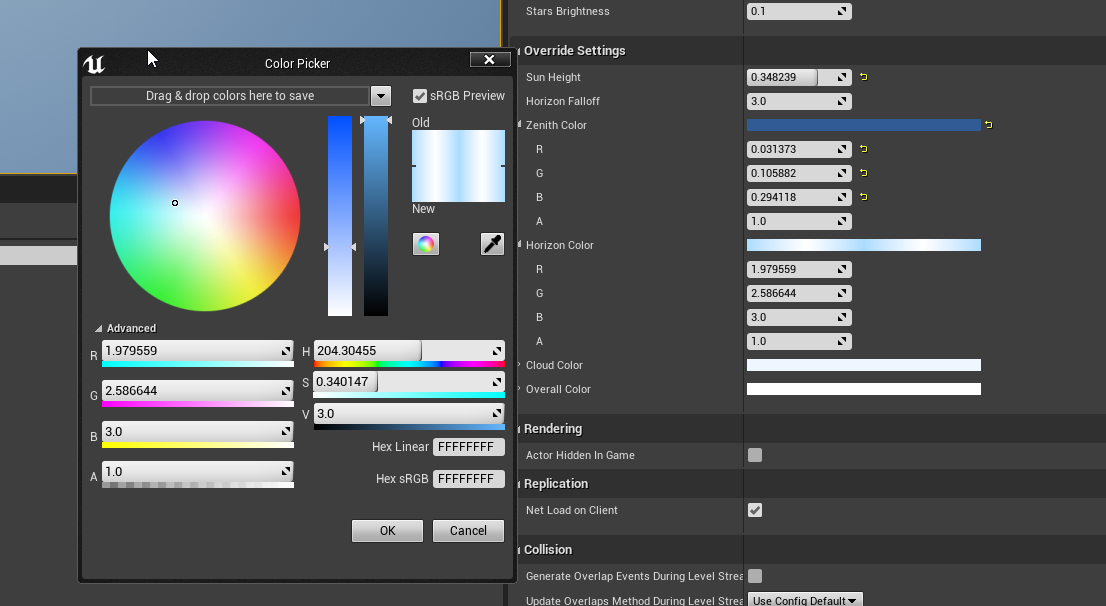 trim matrix
thanks a lot 🙂
olive sedge
I've got a question of my own though: I need to set the owner for an actor. Right now, I spawn the actor in the player controller on the server via SpawnAIFromClass. Then I do SetOwner with a reference to self (PlayerController) but that doesn't set the Owner. It's none when I do GetOwner on the AICharacter right after. How do you set the owner of an AI Character correctly?
I've already looked in the code and tried to do a UE_Log on AActor::SetOwner but that makes my editor crash with a fatal error on startup
 plain flare
Hey I want this character every 3 second visible, every 3 second hidden. https://i.gyazo.com/e58637d4303983128b542bf7cf9491fa.gif

And code is this
where is the problem ? Character becoming 1 sec visible, then becoming hidden speedly
olive sedge
@plain flare you set the character invisible and then add a timer vor invisibility every tick
do it on BeginPlay
plain flare
Oh ok Im gonna try
olive sedge
then do a looping timer
plain flare
beginplay makes 1 time
plain flare
olive sedge
then do a looping timer
How can i ?
@olive sedge with for loop ?
And why event tick isn't working on that code. It doesn't seems like wrong.
 jade falcon
hello, Im having an issue where i am making an enemy but like when it moves or does any animation it is like making a double of its mesh when doing it.
I am using an animation blueprint with an enumeration file
duration back to conduit is set to 0 for all of them since i thought maybe the animations were overlapping but that did not help
olive sedge
@jade falcon are you sure you only have 1 of those actors in the world?
Maybe you have 2 and only one responds, I'd check that out first
olive sedge
yes but are you 100% you only have 1 instance of that enemy in the world?
you could do a GetAllActorsOfClass and check the num on the array
jade falcon
olive sedge
ok, can rule that out I guess. Did you check what the animation actually does and how it looks in isolation?
jade falcon
it looks perfect in the little preview window in the animation blueprint
olive sedge
have you tried setting it inside of an empty level and calling a move on it?
olive sedge
ok, can you show that "Walk" state?
jade falcon
that is it walking
olive sedge
I mean in the state machine
olive sedge
ok, what does that Walk_Slime_Anim look like?
jade falcon
olive sedge
ok, what happens to that Output Pose in the Animation Graph?
jade falcon
goes back to the conduit
olive sedge
No, that's the state machine, I mean the AnimGraph
jade falcon
olive sedge
That's the animation itself
Go to the animation blueprint
find the "My Blueprint" tab
click on AnimGraph
on top of the animgraph with > the > arrows, click AnimGraph
jade falcon
olive sedge
change that to Action -> Walk -> Not -> Can Enter Transition
jade falcon
in the walk to conduit make a action does not equal walk?
olive sedge
yes.
jade falcon
still doubles
 twilit heath
silly question, you checked for multiple enemies, did you also check for the enemy not having multiple visible meshes?
jade falcon
is that what you mean?
twilit heath
wait, Mesh (inherited) is also a skeletel mesh
jade falcon
yeah i noticed that and that was 100% the problem lol i removed the slime_SK and it no longer duplicated. Thank you so much
olive sedge
😆 ggwp
jade falcon
im still fairly new lol
jade falcon
well thank you 🙂
olive sedge
I still think it's odd that the animation preview doesn't show the additional mesh and it's only shown in world space
stray island
How do i change landscapecoords map scale value to a variable so i can change texture scale in my material instances
I asked in graphics but no answers , might be a blueprinty question too
olive sedge
O_O I'm stumped. I have a rotation value that I set on the server and if it's a negative value, the replicated value on the client is 360 - value on the server
Do rotators not go from -180 to 180?
 lament crag
hi, i have this weird replication issue where the clients only deal damage to other players if the serverhost can visibly see the client attacking and hitting. I'm using a line trace and a Blueprint interface to send information to the damage receaver, and calling a serverevent to remove damage and play animations ect. Anyone had similar things happen?
dawn gazelle
olive sedge
O_O I'm stumped. I have a rotation value that I set on the server and if it's a ...
Rotators are 0-360. Any negative values are taken off of the top of 360.
olive sedge
@dawn gazelle I see. It always seemed weird to me it was -180 to 180 but I rolled with it. I guess it's because I've been working with deltas
 inland plover
hey i made sound settings
in menu i set value in slider, then open level in selected wieport it works but when i open it in standalone wieprt it crashes or it doesnt change
 fair sun
My collision only works when i turn simulate physics on, but that breaks my projectile movement component
here are my settings
this is on a static mesh component
olive sedge
@fair sun I had the same problem. I put a static mesh as root component and it now works but I'm pretty sure that's not what I'm supposed to do
esp. since CCD doesn't work and I really need that
fair sun
is there any other way? I don't really want to mess with my component hierarchy
olive sedge
I haven't found any so please do let me know if you find out
 fossil linden
you could just use a sphere collision at the top
olive sedge
I tried this in my other project and it didn't work but it does in this
Perfect. CCD works too
don't know what I did wrong before
olive sedge
@inland plover first look it seems like you're trying to access an array with an invalid index
well, probably not an array but something anyway
GetDisplayNameEntry, what's that look like?
inland plover
i changed sound value in main menu then opened level and that level didnt change the value and it crashe
I did it by tutorial on YT and it doesnt work
fair sun
putting a sphere collision on top of the mesh didn't fix it ]
maiden wadi
@fair sun What are you trying to do?
fair sun
I want my mesh to generate Hit events
maiden wadi
Against what?
fair sun
against what was marked as "block" in the collision settings
it works when i simulate physics
otherwise it ignores everything
or overlaps, havent checked if overlaps get called
maiden wadi
Can I see your projectile's component list?
maiden wadi
So, in short this won't work. Movement components sweep the root component to move. These are what call blocking hits. So... If this object moves, that Arrow's blocking hits won't get called, but if something ELSE moves and is on the same channel, and runs into Arrow, then it'd block.
maiden wadi
Overlaps will work if you want to use those. But for a moving projectile, if you want blocking hits, it has to be on the root component.
fair sun
Okay, thanks for your help
hollow drift
is there a easy way to merge maps or do i have to create two arrays and combine them back to maps
note, i need to double the values and keys, store them in a separate array and then combine it back
 sacred estuary
Hey guys, I have a health bar, but it only gets the previous damage done (so if I hit it for the first time, it doesn't update). Anyone have an idea on how to fix?
maiden wadi
@olive sedge Did you figure out the rotator issue?
orchid garden
@sacred estuary its to do with whats calling your damage event, your damage event seems fine.
olive sedge
@maiden wadi Somewhat, yes. It appears a negative rotator is just replicated like that
@maiden wadi I only worked with deltas and they come out differently it seems
@maiden wadi did you figure out your asteroids problem?
orchid garden
astroids... i remember that game....
maiden wadi
@olive sedge Never did. Just remade them in C++ for optimization purposes and it went away. 🤷♂️ Random setting somewhere I suppose. Weirdest bug I've ever seen.
olive sedge
😆
maiden wadi
Well this is annoying. Blueprint doesn't have a normalize for Rotator? O.o
dawn gazelle
Just do this for each axis?
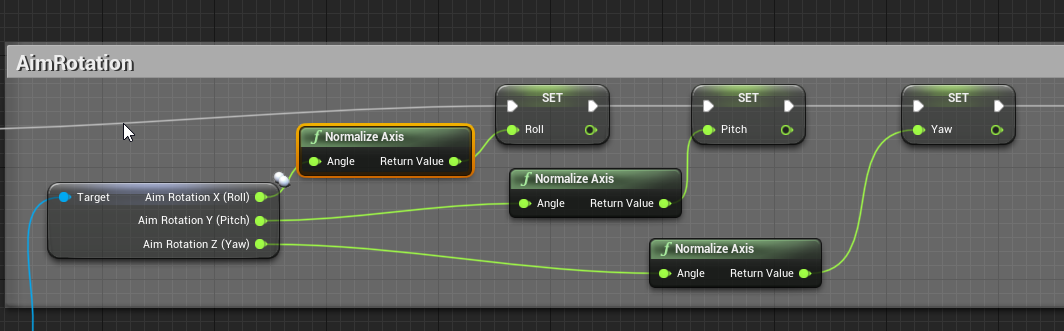 maiden wadi
Using the Delta node against a 0,0,0 node works as well apparently. That's kind of a dumb oversight.
Either way, that's interesting. I wonder if that's a network optimization. I can't see any reason it wouldn't replicate the floats directly even with negative values.
olive sedge
Took me a good while to figure this out too
maiden wadi
Yep, they get compressed.
dawn gazelle
I would tend to agree with network optimization. Rotation <0 or >360 doesn't really make a lot of sense.
Though I can understand the need to maybe compare against a negative value.
maiden wadi
Bytes, or Shorts. They get uncompressed as 0-360.
It's mostly a moot point. Most functions that use them will normalize them or use the extra winding anyhow. But if you need to, just normalize them in a repnotify or something.
Or I suppose the server would need normalized if you're constantly adding to it.
Hmm. I wonder if a single actor emulating a "push away" function on pawns would be more performant than letting them sweep move with collisions.
I'd really love to get my pawn count up to about 500 with the same performance that I can get out of about 200 actors using sweep moves with collision, but I've recently realized that the default sweep movement is insanely expensive. Trying to keep units from overlapping too much. Disabling sweep movements, or turning off all collisions instantly nets me 2.7x more actors at the same performance cost.
olive sedge
It's the combination of movement and collision check that's expensive I would imagine
maiden wadi
Yeah. Even with simple capsules, that hurts.
orchid garden
i have another odd issue.... I have a dorlach thats attached to a character bone, but when equipping it, its out of sync with the character so it looks like its bouncing around, here's how im adding it:
i can't seem to figure out whats causing the desync, with or without Reinit Pose checked it desyncs with the character.
being its attached to a bone, i'd think the item would just sync up with the character.
any ideas?
dawn gazelle
Maybe the bone you're attaching to has strange constraints on it?
orchid garden
if i add it directly in the bp it works fine
adding via blueprint its desyncing
i.e added like this it works fine:
seems to be happening with any item im adding via the blueprint thats attached directly to a bone.
dawn gazelle
mebbe try using this after attaching it?
Master Bone Component should be the parent mesh, target should be the Dorlach
orchid garden
nope still desynced
 frank elk
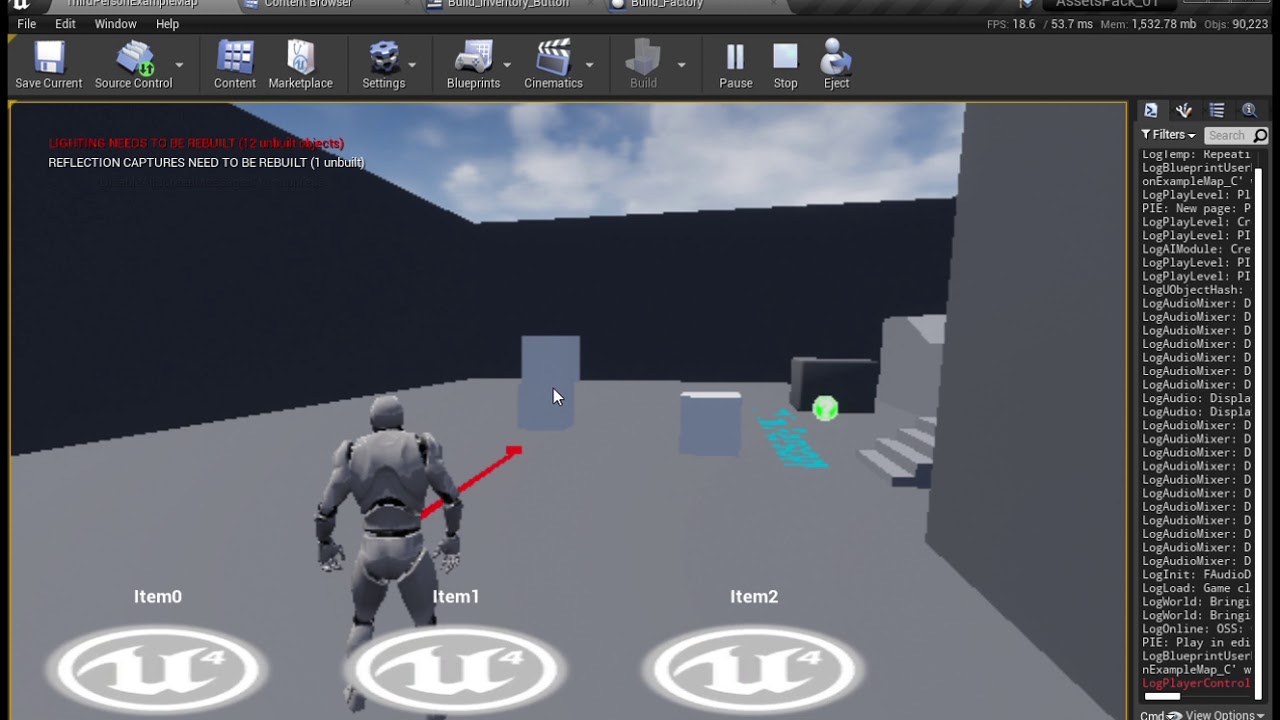
Disclaimer: this worked for me after some testing with the scaling, it might not work for you
Project link: https://github.com/ppchavan001/AssetsPack_01/tree/Build_System_FortniteStyle
hi i want do something like this someone can help how to do this?
dawn gazelle
orchid garden
nope still desynced
You're creating the skeletal mesh component in the blueprint as well, yes? Like you're trying to make stuff that gets equipped more modular?
orchid garden
yes
dawn gazelle
Are you parenting the component to the base mesh?
olive sedge
Unreal Engine Forums
After over a year in maintenance mode, the official Unreal Engine Wiki is now permanently offline.
These resources now live on a new community-run Unreal Engine Community Wiki — ue4community.wiki (https://ue4community.wiki)! You will be able to find content from the official Unreal Engine Wiki at ue4community.wiki/legacy
This page.. this goddamn page.
dawn gazelle
That's not what I mean Geeky - when I mean you're creating the component in blueprint, you're using this?
maiden wadi
@olive sedge Haha. You'll see it often.
dawn gazelle
I hate that page too -_-
olive sedge
@maiden wadi
Here's your solution <some link>
-> thanks! works perfectly!
After over a year in maintenance mode...
orchid garden
im not adding the component via blueprint, the component for the mesh is already on the character. im just replacing the skeletal mesh.
dawn gazelle
ok
orchid garden
 vivid fog
This may be a very silly question, but:
Is there a way to get a reference to a specific actor that isn't loaded in the current level/cell without casting, or is that the only/best way to do it?
(I know there's the "Get All Actors Of Class" node, but I've heard that's super expensive to use, and won't work if the actor in question isn't currently loaded into memory)
 atomic salmon
@vivid fog if an actor is not in the level (meaning there is no instance of it), you cannot get a reference to it and therefore neither casting nor Get All Actors of Class would work
orchid garden
its not that they are desyncing, its more like they are bouncing up and down (looking at a different camera angle) ug this is frustrating...
vivid fog
@atomic salmon Thanks for the reply! I was thinking/afraid that'd be the case. I really miss this functionality in another engine I used to use, where you could specify specific actors/objects outside of runtime or without their being loaded into the level you're currently working in. Is there any way of working around this that you know of, or at least somewhat duplicating the ability?
orchid garden
thought maybe the collision on the object so i disabled collision for it, still no go.
atomic salmon
@vivid fog what do you need that for?
Makes it easier to point you to a possible solution.
dawn gazelle
I'm not getting the same kind of issue on my end Geeky. When I add VIA blueprint a skeletal mesh to a skeletal mesh component that is a child of another mesh, but parented to one of the bones, it stays put in relation to that bone. Perhaps try connecting to a different bone just to see what happens? that'll rule out an issue with the specific bone you're attaching to.
vivid fog
@atomic salmon One example would be specifying actors that need to have an objective marker spawn over their head for certain points in quests (as in Skyrim or any RPG).
I built a system that does this currently, but I have to do it with actors loaded into the level, and while that works well enough, sometimes a quest objective may be in a different level/world and in that case I'm not sure how I'd get access to it to ensure the marker spawns over the correct actor/item
dawn gazelle
(yeah I know, it works if you set it in the editor, but... why not try?)
orchid garden
well the helmet is attached to the 'head' bone and its doing it, the belt is attached to the pelvis bone, and its doing it. the dorlach has a custom socket thats attached to spine 3, its doing it. the necklace is attached to the neck bone, and its doing it.
dawn gazelle
ah so all of them have the same unexpected behaviour?
orchid garden
yep.
in Actor class blueprint, not character
it was built for showing this on the players inventory:
they work as expected on the character class, but in the actor class for that image, they bounce around.
atomic salmon
@vivid fog I would build a list of items you need to spawn in the new level (which is not yet loaded) and spawn them when the level loads.
If you need to know the spawning position you can assign it up front.
dawn gazelle
orchid garden
in Actor class blueprint, not character
I bet you it has something to do with using your character rather than that actor for the pose.
orchid garden
@dawn gazelle all im doing is getting the static mesh from the datatable, then setting it on the character, and if the inventory is open (as the item for that image is only in world if it is) then it fires the routine i sent to assign the skeletal meshes for the equipement slots to it.
vivid fog
@atomic salmon A list as in an array of actors that will be need the objective marker spawned over them? And then upon loading the new level run through that array and assign the objective markers accordingly? Sorry, just want to be sure I understand
orchid garden
its really not rocket science to how im going about it, its rather simple, and it malfunctioning like it is doesn't make any sense what so ever.
@vivid fog i'd set a objective pointer at the spot that loads the level, that one being constant in the previous level till the mission is complete, then when the next level is loaded, you can have the objective pointers point to the proper spots. Its just a matter of how you want to code your questing system.
vivid fog
That's something I thought would be a good idea to try @orchid garden, i's just hard to know how to store the proper spots when I can't get access them yet.
atomic salmon
@vivid fog you can use the GameInstance for that
orchid garden
most games, even fallout, with random quests, spawn the actors in the cells for the quests when they player enters the next area.
atomic salmon
You can store the list of potential spawning locations out of your level and randomly pick one. The only challenge would be if your level is dynamically created, but that is a whole different task on its own.
orchid garden
cells/levels
vivid fog
For sure, but you're definitely able to reference any actor or object in the entire game without it being currently loaded; as long as it's in a cell, you can "point" to it from anywhere. (I used to be a Fallout modder before I started gamedev, so I got to know the engine pretty well, and definitely miss some of its abilities lol)
dawn gazelle
Sorry, I'm not an expert at attaching things myself, and I'm just trying to help you through what might be happening. I agree it is strange, and it doesn't happen like that on my end doing the same thing using my character mesh. You're using a separate actor that is representing what your character is wearing, and you're saying all attached pieces are behaving similarly, which to me means they're using something different for their pose then the actor they're attached to.
orchid garden
well with how the questing system works in fallout if you wanted to do a system simular to it, you'd probably need to do level streaming.
 errant verge
dudes, who knows how to make a MediaPlayer, only not local, but with access to a web browser if it can be called xd?? thank you for your attention.
vivid fog
@orchid gardenhmm, you may be right about that. That leaves all the streamed/sub levels available, right? haven't looked too closely at it
 spice sequoia
Hi - is there a way of destroying particular/chosen chunks of a destructable object - for example I want chunks that fly outside a particular area to disappear while keeping all chunks within the range? I only seem to be able to make all chunks dissappear
orchid garden
@dawn gazelle only the pieces that are directly attached to bones, pieces like the chest, arms, legs, feet work properly but they have full skeletons to them and are attached to the root bone, and are set to the master pose component. Even setting the bone connected ones with the master bone component they still behave oddly. I don't get it either... it shouldn't be doing this at all and doesn't make any sense to me what so ever to why they are bouncing like they are.
Far as what the pose it, its set to the same animation sequence as the character, so both the actor and character are using the same master mesh, same clothing meshes, and same accessory meshes ran on the same animation sequences.
but... now were back to square one - things attached to bones don't rely on the animation, their position is effected by the bone movement... least thats how its supose to work.
being its working fine on the character, but not the actor class it makes me feel like something odd is happening in the actor class with it processing the bone movement.
now here's something odd as well, if its inintially attached to the actor (i set the static mesh in the blueprint rather then with code) it doesn't bounce at all.
vivid fog
@orchid garden This may be a long shot, but have you tried converting copies of the skeletal meshes into static meshes (since, if I'm understanding correctly, you only want to display them in a fairly static sense/pose?)
orchid garden
some of them have additional bones within them, so taht wouldn't work.
here's a short video showing the dorlach bouncing:
https://youtu.be/urNNO3gSvAg


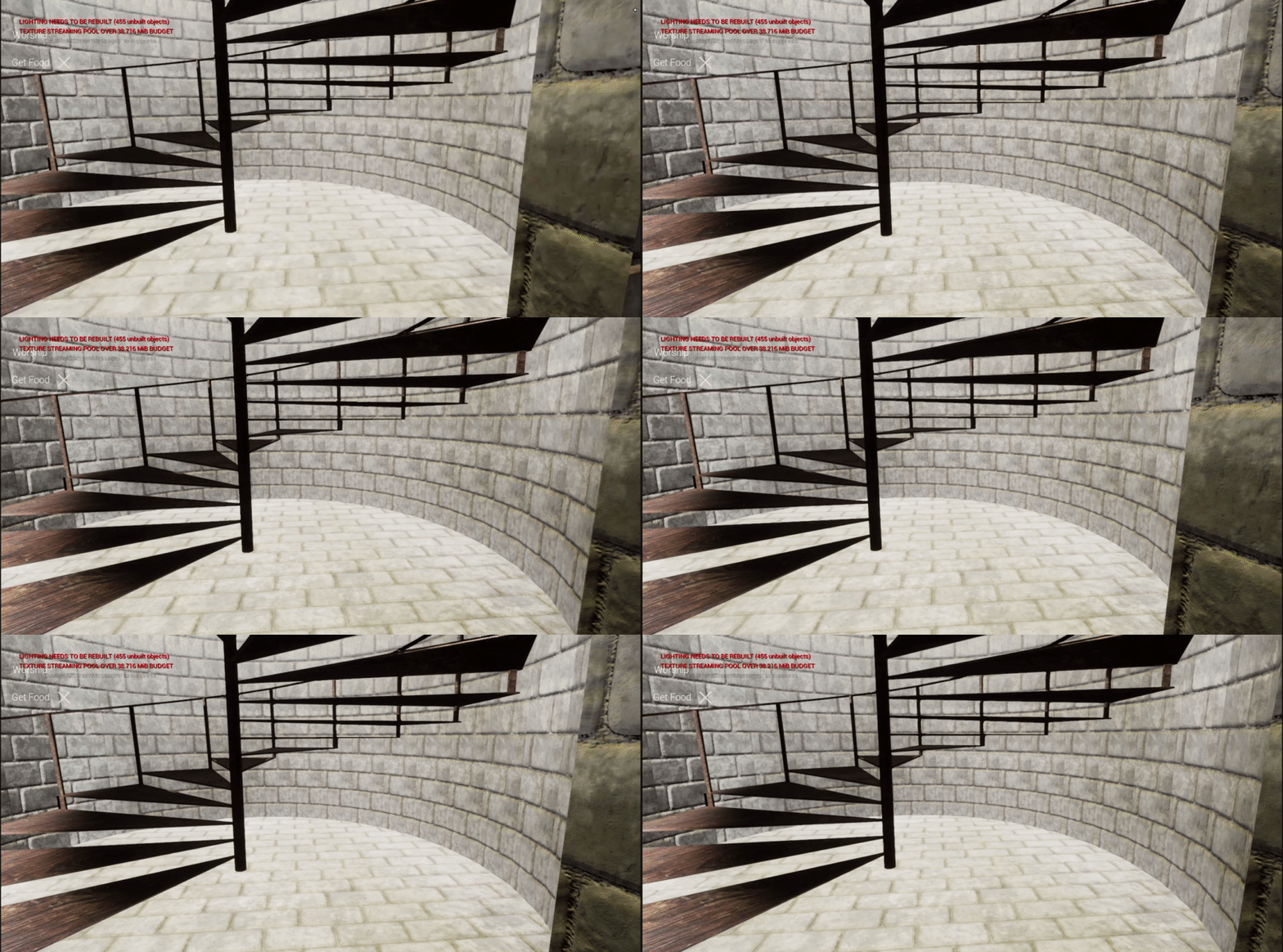
 vivid fog
can you temporarily d/c the anim blueprint hooked up to the character?
(disconnect, sorry. Nurse words are a hard habit to break)
orchid garden
as long as the character doesn't move - no bounce.
vivid fog
how did you get it to stop moving previously? By disconnecting the animbp or by using a different idle pose?
orchid garden
but... its happening across all animations, manniquin, male characer, female character.
vivid fog
try attaching a random static object instead, something you've already got
orchid garden
the only way it doesn't bounce is if its placed in the component in the character bp, not assigned via blueprint code.
(when animated)
vivid fog
I've never used the node you're describing, I always use attach component to actor/component, and so far haven't had any issues attaching either skeletal or static meshes to characters/actors, so I'm really not sure what it may be doing. But I think it's safe to say it's that node causing the issue since it doesn't happen when you bypass/place directly
orchid garden
to make sure you understand what im saying....
if i assign the dorlach in the red circled in the blueprint before the games ran, works fine... but if i assign it via the code there, it doesn't.
vivid fog
Right, that's why I think it's something about that node that is causing the issue
why not use "Attach Component to Component/Actor"?
orchid garden
but, i use the same method to attach it to the character and its working fine (code wise)
its very frustrating...
vivid fog
I honestly don't know. I've never used the set skeletal mesh node so I have no idea what it's doing behind the scenes. I've just used attach component to nodes extensively and they work exactly as intended for any kind of object
It does seem frustrating, and I'm sorry I don't have better info. It may be a bug within UE
orchid garden
something
is there a way to duplicate a actor thats in game?
er duplicate a character.
without rebuilding... i.e. make a copy of them?
dawn gazelle
There is a clone actor function within C++ that can be exposed in blueprints.
or should I say.. you can make one in C++
XD
{
    UWorld* World = InputActor->GetWorld();
    UE_LOG(LogTemp, Log, TEXT("Actor Duplication"));
    FActorSpawnParameters params;
    params.Template = InputActor;


    UClass* ItemClass = InputActor->GetClass();
    AActor* const SpawnedActor = World->SpawnActor<AActor>(ItemClass, params);
    SpawnedActor->SetOwner(Owner);

    if (SpawnAtSpecifiedLocation)
    {
        SpawnedActor->SetActorLocation(SpawnLocation);
    }

    return SpawnedActor;
}```yeah thanks but won't help, this project is strictly blueprint, no c++
maiden wadi
Scene render on the character, that only sees the character?
orchid garden
that doesn't work well either Authaer, due to scene lighting, if its night, the character in the preview panel shows up pitch black.
its gotta be something with actor class.
vivid fog
Why not try the other attachment nodes?
orchid garden
eh?
vivid fog
I mentioned them previously
orchid garden
doesn't seem to matter how im attaching them.
vivid fog
Have you tried it that way?
orchid garden
i even went as far as pulling the static mesh directly from the data table and just adding it to the actor that way, same thing, bounce..
vivid fog
👍
orchid garden
and only on the actor... character fine.
maiden wadi
@orchid garden Does that mesh have collision on it? That look s a lot like bounds popping.
orchid garden
with all collision off it still happens, i don't get it. restarted unreal too just to make sure it wasn't a glitch, still same thing.
maiden wadi
It's just a mesh component that's attached to another mesh component at a specific bone?
maiden wadi
That's odd. The only thing I've ever seen cause that is collision problems. I'd inquire about the animation's bone location, but if the same animation plays on the character fine and that doesn't happen, it's not that. But the class shouldn't have any reasoning here. Just Components. So if both components that are getting attached to are Skeletal meshes with the same mesh, playing the same animation, all I have left is collisions. 🤷♂️ If those are all off, you got bugs.
orchid garden
ones a character class, ones a actor class, both are setup identical, even just using the default mesh & animation for the actor class (not changing those two) during setup, the same thing happens on the actor class. I donno... im at wits end. i've tried everything i can think of (including shutting off all collision in the actor class) and nothing seems to work.
this is 4.25.4 engine version.
 fading raptor
So im having a problem with my gun game where if I shoot with a certain gun, drop it, and pick it back up, it resets the ammo count. Im not sure how to fix this since the code for when I 'pick up' the gun is just deleted the dropped gun and equipping a different blueprint which represents the same gun that was picked up
Im not sure how I can get the ammo count from the gun I used and put it into the dropped gun since they are two different blueprints
Any ideas would be appreciated!
Also the dropped gun has no 'ammo count', since it is just for picking up
orchid garden
store the ammo count in the dropped item, on pickup get the ammo count from the dropped item, make the new gun, set the ammo, then delete the pickup.
fading raptor
So should I basically replicate the ammo code for the gun and put it into the dropped gun?
Then just use that same ammo count?
dawn gazelle
Don't need to replicate code. It's just a variable storing the amount of ammo.
orchid garden
just a var representing how much ammo is in the dropped gun.
 iron socket
hey any one know how to fix interact issue the commands running properly but the gun im trying to pick up dosent equip
fading raptor
What I did is when I pick up my gun, it deletes the dropped gun and just casts to the BP which has the gun
So it looks like I picked it up
But it really depends on how you coded your guns
iron socket
its rigged to do that but its stopped working im at a loss lol
fading raptor
You should use print strings and just go through the code bit by bit
I know its annoying but debugging is debugging
iron socket
ive been at it for 5 days cant figure it out
fading raptor
Did you happen to use a tutorial for your guns?
orchid garden
fading raptor
What I did is when I pick up my gun, it deletes the dropped gun and just casts t...
you'll need to reverse that for setting your ammo ashraf, cast the bp, set ammo then delete the one on floor
iron socket
i did use a udemy tutorial lol
fading raptor
@orchid garden Yeah thats what im trying to figure out, im just trying to find where I stored my ammo info rn
and @iron socket Can you go back through the tutorial and make sure you did everything correctly?
Thats what I tend to do when I run into a problem
iron socket
i have it seems 100 percent i was wondering if unity settings have been accidently changed or something like that lol
orchid garden
fading raptor
<@!458977415176257536> Yeah thats what im trying to figure out, im just trying t...
if its a mp game, you might want to set a boolean that someones picking it up too, i've seen some glitches where two characters can hit the pickup at almost the exact same time and get the item.
fading raptor
Ohhh you're using unity
iron socket
my bad unreal lol
fading raptor
@orchid garden For now its just a single player game, but in the future i might make it MP
iron socket
my m8 was on about unity thats y i sed that lol
fading raptor
Also about your settings, I highly doubt that a setting was changed
But in my experience, a line of code can affect another line of code
Even if you dont mean it to
I had a similar problem as you and I figured out that I had an event begin play event chain that conflicted with my weapon pickup
iron socket
hmm i did delete the if near wall weapon pull down code to fix weapon clipping but didnt fink that would have any relevence
fading raptor
Try retracing any changes you made since your problem
iron socket
the weapon pickup did work be4 i made the weapon pull down code lol
fading raptor
Then maybe thats where your problem is
Try unplugging the weapon pull down code if you can and see if it makes a difference
iron socket
its deleted
iron socket
no thats it
fading raptor
Thats strange, it should be working. Did you change any variables in your weapon pickup?
iron socket
is there anyway something could b messing with the input in project settings
fading raptor
Its a possibility, is your weapon pickup set to when the player presses a key or when the player overlaps the weapon?
iron socket
wen player overlaps a sphere round the weapon u can press e i did a print string and its registering thr e key been pressed but its no longer picking up the weapon lol
fading raptor
Then the problem isnt in your input, its in the weapon pick up code
That narrows the location of your problem
What i'd do is go to the section in the tutorial where it talks about weapon pickups and see if everything is correct
iron socket
ill keep browsing thanx ashraf
fading raptor
Np
 zealous moth
@iron socket add print string nodes to your code and make them print 1, 2, 3 etc and see where it skips or fails
iron socket
ill give it a go thanx zanet
orchid garden
@maiden wadi @dawn gazelle im thinking my problem may be related to world position... gonna do some testing....
bloody hell... thats exactly what is causing the meshes to bounce.... their placement in the world.... arg...
@maiden wadi @dawn gazelle this spawn location for the actor causes the bone attached items to 'bounce'
which is just outside my skysphere.
however this:
which is inside the skysphere doesn't make them bounce.
why??
1999999.0 works though, and im not getting the skysphere. so its something to do with the distance it is from the player.
or some internal border
I can finally stop pulling hair 😄
iron socket
@fading raptor i fink it might be my points system to buy weapons lol
fading raptor
Did you use print strings to determine that?
iron socket
yes its in the pickup node it gets to the points bit then nothing so guna review vid lol
fading raptor
There you go!
iron socket
if it wasnt 4 u guys ida probs had to start a new project lol
 orchid ibex
Hello, someone know why the delay wont work in widget on game pause (UE 4.26)?
zealous moth
@orchid ibex what does it not do?
like, you cannot find it or it actually doesn't delay?
and is it in a sequence?
orchid ibex
orchid garden
things are starting to come together now:
orchid ibex
worked before 4.26
orchid garden
im suprised that worked before, unreal engine has a cow about infinite loops
zealous moth
then again, it looks like it will delay infinitely
orchid garden
why not just set a timer or run it off a tick?
orchid ibex
now delays are frozen on pause
orchid ibex
orchid garden
why not just set a timer or run it off a tick?
timer same result
orchid garden
with a timer you shouldn't need the loop, just a strait execute line to the end.
same with tick
but with a timer, once the 'wanted text' is done, you kill the timer.
orchid garden
check 'looping' if you want it to fire more then once
orchid ibex
not a problem with looping ^^ it's just for test
orchid garden
then when you want the timer stop you'd need to do something like....
orchid garden
so what exactly is the problem then? i must be misunderstanding.
orchid ibex
so
the delay is frozen when the game is paused
just that
before 4.26 delay on pause worked well
orchid garden
wouldn't that be because of where the delay is setup? if its setup in a component thats litterally paused (i.e. a character) then its functioning as expected.
orchid ibex
widget created in a playercontroller
orchid garden
that may be the very issue, who's the owner of the widget?
orchid ibex
the player....
orchid garden
and when you pause a game, the player, and all things they are owner of, are paused.
orchid garden
yep thats normal
orchid ibex
orchid garden
yep thats normal
I konw ^^
orchid garden
i think you'd need your timer setup in the game instance to keep it going wouldn't you?
orchid ibex
maybe it's a bug in version 4.26? On all versions before 4.26 it works
orchid ibex
orchid garden
i think you'd need your timer setup in the game instance to keep it going wouldn...
it's a timer that allows to make manipulations in the widget...
orchid garden
yeah but.... even in previous versions if a widget is assigned to a player, and you pause a game it should pause all executions in that widget till the games unpaused.
if thats not the case... i need to recode some stuff lol...
trim matrix
is there a way to delete a playerstate?
dreamy ice
trim matrix
is there a way to delete a playerstate?
In execution or in the editor?
trim matrix
in execution, like an unused playerstate. gonna have AI that use playerstate but if I delete the AI cant get rid of the playerstate
oh
nevermind
didnt think this would work
fading raptor
So basically I found the location where it sets the ammo count for dropped weapons, now my problem is when I cast the ammo count from my Weapon_AK to the SET node, it just sets the ammo count to 0 even though the default value is 30
What could be the problem?
 cloud bridge
hi everyone, newb question here.
I have a ball jumping in a closed room and i try to separate between hit by a wall and hit by a projectile.
how do i make a "== static mesh actor" to know i hit a wall?
dreamy ice
I’d normally cast and see if it’s a projectile and if not then assume it’s a wall. Not sure if there’s a better way to do that.
orchid garden
orchid ibex
it's a timer that allows to make manipulations in the widget...
tested it, when game is paused my widget assigned to the player is paused as well in 4.25.4
dreamy ice
orchid garden
tested it, when game is paused my widget assigned to the player is paused as we...
Do you think it was an intentional change?
Maybe it’s a setting for the widget itself
orchid garden
@dreamy ice well thats how i figured it was supose to work from the start.
widgets that are just added to the viewport (without owner) will still function.
orchid ibex
orchid garden
tested it, when game is paused my widget assigned to the player is paused as we...
delay work on 4.25 now test with 4.26
orchid garden
@orchid ibex well its working for me how i suspected it would for player assigned widgets, food, water and health are not dropping while paused:
orchid ibex
in 4.26 ?
orchid garden
4.25.4
orchid garden
you just told me it didn't execute the delay.
and thats exactly whats happening for me, its not excuting anything in the widget and the widget isn't interactable.
but your saying while in 4.25 your widget is still executing the delay.
orchid ibex
orchid ibex
Hello, someone know why the delay wont work in widget on game pause (UE 4.26)?
here i sais 4.26
yes
dawn gazelle
orchid garden
why??
It's because that's so far out of the world that precision errors start to happen. XD
orchid ibex
all worked on all version before 4.26
orchid garden
and im getting the opposite of what your saying
orchid ibex
and with 4.26 delay don't work
orchid garden
.<
You say "Delay works in player attached widgets in 4.25 when game paused" and im getting the opposite of what your saying in 4.25
orchid ibex
I specify that it works on the other versions
orchid garden
ITS NOT
omg
games still paused here on my side - 4.25.4 - and delay to drop values NOT happening on player assigned widget:
orchid garden
but yet your insisting it does when it doesn't.
orchid ibex
??????
I don't understand, I ask why it works on all versions except 4.26 and you're testing on 4.25 when I know that on this version there is no problem...
orchid garden
and im saying A Player Assigned Widget Does NOT excute while the game is PAUSED in 4.25
orchid ibex
ok...
orchid garden
you can add widgets to the viewport without a owner that will continue to execute when the game is paused.
orchid garden
your showing me a picture of your custom function
not the actual way your doing the widget
orchid ibex
same result with an empty widget
orchid garden
because you did it right, you didn't assign a owner
@dawn gazelle
i had the same results with this, i could interact with widget, and all functions in that widget worked:
BUT if a Owner is set, it doesn't.
dawn gazelle
But in 4.26, the same set up, including without an owner, does not work.
orchid garden
im betting its setting a default owner from where its being executed at
orchid ibex
dawn gazelle
But in 4.26, the same set up, including without an owner, does not work.
ah you see, thank you understand me ^^
trim matrix
Can I put any blueprint in another blueprint
I have blueprint to control rain system, I want to attach this blueprint with my character
zealous moth
@trim matrix add a child component to your character and set that child to your other blueprint
 void oak
I have a weird problem when im leveling streaming(Loading) 2 clients to the same map it doesnt spawn the players characters. When i Level stream only using one client (Level Streaming) it works correctly. Does anyone know why this would happen?
trim matrix
zealous moth
<@456226577798135808> add a child component to your character and set that child...
Thanks, Its worked
 hearty gazelle
Hey guys, do I need to set up a behaviour tree for my AI to use move to actor node?
 odd ember
orchid garden
i had the same results with this, i could interact with widget, and all functio...
odd ember
orchid garden
i had the same results with this, i could interact with widget, and all functio...
owning player is setup by default if you don't set it yourself. it makes no difference for singleplayer games
presumably there might be some bugs with 4.26 currently as well since it's not seen any hotfix patches
epic themselves say to stay away from new versions of the engine for anything but testing purposes until they've been hotfixed
maiden wadi
@hearty gazelle No. You just need to spawn the AI with SpawnAIFromClass instead of SpawnActorFromClass, and make sure your level has a nav bounds volume.
hearty gazelle
What if my AI is a Flying AI @maiden wadi
orchid garden
dawn gazelle
But in 4.26, the same set up, including without an owner, does not work.
seems to work for me in 4.26:
maiden wadi
@hearty gazelle Then you need a custom implementation. MoveTo uses the nav mesh, which a flying AI could move along, but it won't really go up or down much, just along the terrain.
hearty gazelle
@maiden wadi I did read somewhere that you can use it but you have to turn pathfinding off.
maiden wadi
If you don't want any form of AI, just a thing that flies straight towards something or a point, You may as well just ditch having an AI at all, and make a simpler actor do a VInterpToConstant on tick.
hearty gazelle
Yeah I basically just want my AI to fly to the player when detected and pause to shoot at the player.
And also shoot while flying towards the player.
maiden wadi
I doubt I'd even mess with a full AI if I was building a simple drone like enemy. Simple tick state machine in an actor class can achieve the same thing. Just needs a little vector math and some basic states set up.
hearty gazelle
@maiden wadi Yeah that makes sense.
 formal totem
Hi guys I am trying to make discord recognize my project in Game Activity I am using this example as a test subject https://github.com/ryanjon2040/Discord-UE4-Example-Project

GitHub
An example project demonstrating the usage of Discord-UE4 plugin. - ryanjon2040/Discord-UE4-Example-Project
it prints out OK but my discord does not show anything
I have my custom application added to my Discord developer portal and i am using its client ID
odd ember
sounds like it's an issue with the discord API and not so much the actual blueprint
formal totem
I was told to use GameSDK as it has no issues. still glad that there is nothing wrong on my end.
odd ember
I mean just from what you've shown
probably some authentication process somewhere down the line not functioning
formal totem
wait a min
I can see from my other profile that it is working
gonna need a restart
no luck others can see that I am in game but not me.
orchid ibex
orchid garden
seems to work for me in 4.26:
send me the project plz
orchid garden
odd ember
probably some authentication process somewhere down the line not functioning
could just be a communication issue, 1/2 the time discord doesn't like to show what game im playing, for example Ark, and the other half of the time it will.
vital lynx
In my blueprints for my projectiles I’m running into an issue that my bullet would not de-spawn itself. I got it to stop bouncing off the walls but it slides around instead
Do I need to make a new line of blueprints for that
formal totem
orchid garden
could just be a communication issue, 1/2 the time discord doesn't like to show w...
this is the screen shot from a friend's ID he can see that i am playing
only for me (The PC that is playing the game) game activity is none
vital lynx
The way I got around it was sharing my whole screen
Not just UE 4 but any new pop up the screen share would catch it
orchid garden
vital lynx
In my blueprints for my projectiles I’m running into an issue that my bullet wou...
not working for you?
odd ember
you can leave the self node off, it's the default for DestroyActor
orchid garden
habit to avoid complications
odd ember
such as
orchid garden
such as it not happening?
odd ember
what the node not working?
orchid garden
had it fail before with nothing plugged into it. so just got into the habit of doing self reference for it.
formal totem
orchid garden
had it fail before with nothing plugged into it. so just got into the habit of ...
its self by default as far as i know
orchid garden
yep
vital lynx
ill slice what my bp is here shortly
odd ember
orchid garden
had it fail before with nothing plugged into it. so just got into the habit of ...
that makes no sense
vital lynx
its the standard FPS starter btw
orchid garden
odd ember
that makes no sense
so does 1/2 the other stuff i've ran into with ue 4.25
odd ember
I think it's rather a missing connection that has tripped you up
somehow none of my destroy actor logic blew up when I moved to 4.25
orchid garden
i.e. like 0-1 kept returning 0 till i restarted the engine.
i've ran into all sorts of little querks like that... wasted time trying to figure out what im doing wrong and it turns out its a engine hickup.
orchid garden
your mostly c++ though aren't you?
odd ember
nope
I do subsystems in cpp
or whenever I need something certified fast or a special case that BP can't do
orchid garden
just use to most of your solutions to peoples blueprint problems being c++
odd ember
the rest I handle in BP
what because I type it in the brackets?
I give out BP solutions, not cpp solutions
if anything I'll refer people to the cpp channel if they need to do cpp
orchid garden
mk
vital lynx
orchid garden
not working for you?
still isnt disappearing unfortunately
odd ember
remove the branch
vital lynx
the self to destroy actor
odd ember
IsSimulatingPhysics
orchid garden
yep i'd say its going to your false
odd ember
also I encourage you to use the debugger with breakpoints
it's the best way to catch issues like these
and get a clear answer
orchid garden
unless your wall is simulating physics its not going to trigger a true
vital lynx
Im still completely fresh with UE but im willing to learn sooo...
odd ember
Pause execution using Breakpoints to inspect graphs and the values of variables.
if you follow that page you'll already be ahead of a good 80% of BP users
vital lynx
TY
maiden wadi
I don't think I've ever actually used that thing.
Either way, it's just a simple logical issue. You want to destroyself even on the false branch.
odd ember
surely you've used breakpoints before
orchid garden
printstring is my friend most the time in tracing the root of the problem.
odd ember
printstring is very inaccurate though. it'll tell you whether or not there is a problem, not what the problem is
breakpoints will give you a breadcrumb trail
orchid garden
but it helps me to pinpoint where to look for the problem.
maiden wadi
I find that if you require a debugger for finding where your logic failed, you both need to get better at writing logic, or find a way to simplify your code. 🤷♂️
dawn gazelle
=SUM(1+1)
orchid garden
odd ember
no such thing as perfect code
he didn't say perfect, he said simplify, big difference.
trim matrix
For some reason I have a static mesh component that is breaking my character making it unable to move. Anyone ever had this issue before? It happens when I make it invisible/delete it, works when it is visible.
odd ember
I will guarantee that 90% of those problems you've had in this channel you could have solved with breakpoints @orchid garden
orchid garden
1/2 the problems i've had required restarts of the editor and they magically went away.
some things weren't problems, were inquiries for suggestions on how to do something properly.
odd ember
and to say that you don't want to use a tool that is available just because "yOu NeEd tO gEt bEtTeR aT wRiTinG lOgIc" is possibly one of the most inane things I've ever heard.
orchid garden
and a break point wouldn't of helped me figure out the bouncing mesh problem.
odd ember
then again people love shooting themselves in the foot so what do I know
orchid garden
not saying its not useful, but everyone has their own methods of debugging.
odd ember
sure. if you don't want to use something more efficient then that's up to you. it's your time wasted after all
orchid garden
it depends on what your doing if it will be more efficient or not, or how much code you need to trace through.
i.e. like the guys problem with his actor not despawning, a printstring off the false could tell him if its firing a false and thats why its not destroying the actor.
maiden wadi
Or just assume that the wall is likely not simulating physics, since it's a wall, and tell him to also destroy the projectile on the false side of the branch. Instead lets get a microscopic analyzer to find out why Godzilla isn't stepping on a particular building. I'm sure breakpoints are great inside of things like a CMC, which is a massive component with a lot of interweaving parts with the Character class. Or inside of an inventory system. Projectile not destorying when it hits something doesn't strike me as debug worthy. Just spend a couple of seconds following the execution line. You'll see the problem by the time you set up the debugger and click play. Using it for every single tiny thing like that is going to end up wasting time, not saving it.
odd ember
maiden wadi
Or just assume that the wall is likely not simulating physics, since it's a wall...
I mean I did say what the problem is beforehand. I did also encourage using the debugger as a general rule, because it is a way to be self sufficient about your problem solving. but go off
 deep imp
Omg it looks like 4.26 introduced this node
God I love UE lol. I've been wanting a node like that for ages. Also I was able to use it inside of a blueprint 'base object' class. This gives so much flexibility WOO HOO!
maiden wadi
@deep imp Should also check out OpenLevel with the SoftObjectPtr input, and that you can now click and press a key to select keys instead of having to search for them. Will definitely be a good QoL release once it's bugfixed a bit.
trim matrix
trim matrix
For some reason I have a static mesh component that is breaking my character mak...
should add that the component has no references to anything, it is only in the character. need to correct, if the component is invisible in anyway or if there is no mesh connected to the component, it breaks. Could it be an engine issue of some sort?
dawn gazelle
Yes, the click key thing is fantastic.
maiden wadi
@trim matrix Do you have EditAnywhere on the component's pointer in the header?
trim matrix
UPROPERTY(EditAnywhere, BlueprintReadWrite, Category = "FX")
UNiagaraComponent* NSRain;
trim matrix
maiden wadi
<@456226577798135808> Do you have EditAnywhere on the component's pointer in the...
Yes
 faint pasture
While we're on the subject, is every variable of a BP component supposed to be public in an actor? It seems like they're all there by default.
maiden wadi
@trim matrix That's odd it should show up fine. Are you closing the editor to compile?
trim matrix
maiden wadi
<@456226577798135808> That's odd it should show up fine. Are you closing the edi...
I just compiled it
maiden wadi
Did you close the editor before compiling though?
trim matrix
maiden wadi
Did you close the editor before compiling though?
Yes
NSRain = CreateDefaultSubobject<UNiagaraComponent>(TEXT("Rain Niagara System"));
My cpp code
maiden wadi
Try also setting RootComponent = NSRain;
I remember something about singular C++ created components having issues like this, setting the root component may or may not work.
trim matrix
Not working
maiden wadi
@trim matrix Your character doesn't move, if this mesh component is invisible or if the mesh is not set? O.o
@trim matrix Sec, I'll make a quick dummy test to try it out.
trim matrix
maiden wadi
<@456226577798135808> Sec, I'll make a quick dummy test to try it out.
RootComponent is empty too
trim matrix
maiden wadi
<@456226577798135808> Your character doesn't move, if this mesh component is inv...
it is actually a skeletal mesh component. I deleted it, doesnt work. Added a new skeletal mesh component (with a mesh attached), then it works again. as if the character depends on some random skeletal mesh...
maiden wadi
@trim matrix Worked fine. Let me test one more thing.
trim matrix
Worked at me too
I just reparent blueprint
such a ridiculous bug...
Thank you so much @maiden wadi 🙂
maiden wadi
Anytime. Also do initialize the component's pointer to nullptr in the .h file. The packaging will whine about that later.
 hardy galleon
hello there! I'm new to blueprints in unreal and I'm trying to move a cart to another location using a timeline, and I want the cart to then block the player's path but it keeps being deleted after 3 seconds (the length of the timeline) and i'm not sure how to stop it from deleting
odd ember
are you calling the timeline multiple times?
odd ember
hardy galleon
i have a do once applied
I see you've used breakpoints. does it get called more than once with the breakpoint?
hardy galleon
when i tried to use the breakpoint it didn't call the action at all
i only tried to use it on the timeline though
odd ember
is it because you left the breakpoint as inactive? 😅
hardy galleon
oh i disabled it after the breakpoint prevented the cart moving at all so it didn't give me any answers haha
or at least not that i could tell 💦
odd ember
I think the do once is at fault here if I am being honest
or at least that is one point where the execution could break down
I would assume that the cart resets or something but it seems like nothing in your logic would trigger that
do you have collision or something enabled on the cart?
if so, could you try disablingt it?
OH
wait
hardy galleon
oh okay. I had a branch with a variable before but then it would replay the table moving whenever i activated the trigger so i put in the do once
odd ember
why are you moving the root component instead of the actor as a whole?
hardy galleon
oh?
umm
oh when i dragged the node string to the set location it spawned that in between
odd ember
try with set actor location instead
and also
gate your trigger with a cast node or a branch
instead of a DoOnce
because right now anything touching that trigger will make it execute that
and I assume you only want stuff to happen when e.g. the player triggers it
hardy galleon
ah, that's true! Okay, I'll try that and let you know how it goes! Thanks for your help!!
faint pasture
Are all variables in BP components supposed to be visible in the actor? It's sort of annoying.
olive sedge
Could someone clear up PlayerControllers for me? How does it work in a multiplayer setting? When I call an RPC on the server from the player controller, is that run in the server side instance of that player controller or is there only one player controller on the server?
deep imp
faint pasture
While we're on the subject, is every variable of a BP component supposed to be p...
You can check the 'Advanced Display' box on the variable to hide it
dawn gazelle
olive sedge
Could someone clear up PlayerControllers for me? How does it work in a multiplay...
When you run on server on a player controller, it is on that instance of the controller. Controllers are not replicated and other players do not directly have reference to other player controllers.
hardy galleon
@odd ember I updated it and the cart is still deleting after the 3 seconds.. is that a normal function of timelines? i'll remake it and see if that works if it's not normal
odd ember
hardy galleon
<@!224571781862653952> I updated it and the cart is still deleting after the 3 s...
it isn't. do you have something your cart saying it only has a lifespan of 3 seconds? or something that could cause the cart to destroy itself?
hardy galleon
there aren't any blueprints on the cart itself currently
i made a new timeline for 5 seconds and now it's deleting after 5..
i'm using a float timeline, could that be causing it?
olive sedge
dawn gazelle
When you run on server on a player controller, it is on that instance of the con...
That's what I always figured but I spawn an actor on the server from the player controller and set the playerid from the controller's state
then later, the ids don't match anymore
but maybe I have a hickup somewhere else
orchid garden
hardy galleon
<@!224571781862653952> I updated it and the cart is still deleting after the 3 s...
i recreated that overlap box on mine, and it litterally shot the box out of view then was pending kill, i think it may be something with your lerp location.
orchid garden
hardy galleon
😱
for the final location of the box, which should of only moved aprox 150 units forward ended up being:
its original location:
hardy galleon
ahhhh yeah that is definitely broken..
orchid garden
change your timeline to go from a value of 0.0 to 1.0
orchid garden
np 🙂
i did one thing different with the trigger box, setup the actor to move and the location to move to as exposed vars, so i could set the trigger box in the world then select the objects directly on it.
hardy galleon
I'm not sure what you mean.. do you mean so you could see the effect outside of play mode..?
robust cliff
when doing blend space for direction should i use the (calculate direction node) or us the dot product from (velocity and actors right vector)?
orchid garden
@hardy galleon first image - where i can set which actor it moves and what actor it moves it to, second image - what i did differently
 karmic pebble
I need to talk some theory because I am currently not sure how i should go about this. We have a turn based battle system. Each Character and enemy has an initiative bar that when full is their turn to attack. So this is data readily available to access at any time.
So I want to have a visual representation that cycles the characters and enemies to the top of the list and when they attack they go back to the bottom. Problem is that a number of factors could cause this sort order to change. Magic, death of enemies/characters.
I have through about using Binds to keep track of the current initiative and just running a loop on a timer/tick to reorder them, however I am not sure how I could properly reorder the widgets.
orchid garden
@hardy galleon i basically turned your hit box into a reusable hitbox with no predefined actors.
hardy galleon
how did you do that, make them their own components? I only know how to grab the references of them tbh
odd ember
hardy galleon
how did you do that, make them their own components? I only know how to grab the...
you can promote anything to a variable
including components
orchid garden
drag the pin off the target and promote to variable
hardy galleon
ohhhhh that's so cool! thankyou!
orchid garden
lol i was having too much fun making it move things about lol... shame on me hah
maiden wadi
@karmic pebble The widgets should probably just be an array of widgets that can be added to and removed from a Vertical Box. After that, you can simple clear out the VBox children, iterate over your data to both update the widgets and add them back to the VBox in order.
karmic pebble
and you dont think that would create a visual glitch?
seeing them disappear?
As for the array of widgets, funny enough thats actually i just converted to about 20 minutes ago to go down that route
i am tying the battlestats reference which holds that initiative data and actor information directly to the widget
dawn gazelle
karmic pebble
I need to talk some theory because I am currently not sure how i should go about...
This works well for moving them down to the bottom, but as Authaer said, you probably want to keep track of their individual positions in an array.
karmic pebble
@dawn gazelle Ohhhh that might just work!
So the Remove Child At does not actually destroy the widget?
which i guess is something i have wondered honestly for years now, widgets are not destroyed until you change levels right?
dawn gazelle
Something like that.
At least as far as I understood it as well.
Typically best to reuse widgets.
There is the Victory Blueprint Library that apparently exposes the InsertChildAt function which would allow you to directly insert them into a specific slot.
 surreal peak
Widgets get destroyed when nothing references them anymore. Default Garbage Collection basically
maiden wadi
@karmic pebble Like eXi said. More or less if they're not saved in a variable, or they're not a part of the current hierarchy of widgets on the screen, they'll get garbage collected.
But removing them and quickly readding them won't destroy them.
karmic pebble
hmmm. okay. I have never actually played with garbage collection. Okay that might make sense, is because i save most of the widgets into variables
okay so i have the widgets creating and data is updating in them correctly. I just have to work out the order on them now.
orchid garden
karmic pebble
hmmm. okay. I have never actually played with garbage collection. Okay that migh...
i like how you did the damage numbers 🙂
karmic pebble
i was playing with handling arrays and maps elsewhere and sorting them and converting them keeping track of names with the indexes. it was a total mess
oh thats actually just jRPG Templates base stuff with modified font. I never felt the need to change the mechanics on that one. 😂
ive been using jRPG template for almost 2.5 years now. We recently decided to split our battle system into players choice with a full Turn Based and a full Action Combat. Its not been easy but so far its going well
orchid garden
orchid garden
oh my never seen that one, ty for the link Darinius 🙂
karmic pebble
np. I am one of mods over there if you join. Been helping the dev for quite awhile on it. ^^
anytime time to impliment those ideas, thanks guys! 😄
orchid garden
i like getting stuff like that so i can look and see how others did it to give me ideas how to go about things.
karmic pebble
this kit actually helped me learn how to work with BPs. So while today its 75-80% different from the original core (as it should be. lol) it helped me learn BP Communication pretty quickly
orchid garden
karmic pebble
this kit actually helped me learn how to work with BPs. So while today its 75-80...
yeah i was just going to say yours is alot different then the base, GJ mate!
thats actually going to help me with a couple things i've been pondering on how to do 🙂
 royal rain
so i kinda fixed my camera problem even though it could still use some work
faint pasture
I'm prototyping a procedural generation system. What would be the approach to take for saving the spawned actors to the level?
royal rain
but im trying to get my ball roller game to only move forward with torque when the camera is looking in that direction
the ball uses torque as movement so eyah
and i need it to only go in the cameras direction
this is my bad first attempt to get it to do that but i dont think it works
faint pasture
@royal rain the direction of the applied torque should be the camera right vector
faint pasture
Grab the camera component, drag off of it, get right vector, multiply by about 500 or so, then use it in the applied torque in degrees node with acceleration checked
faint pasture
Camera right vector multiplied by the forward input multiplied by 500
Forward input and 500 are floats
 fair magnet
Hi uhm
For some reason The attach actor to component thing isn't working as planned o.o
royal rain
what do you mean by forward input when i type that in it just says get move forward
this is what i have
btw i showed the wrong code lasst time
the other one was for left and right
faint pasture
Whatever the input access is that you're using for forward. It's probably called move forward in your project
royal rain
oh
you mean that number
roll torque
so what do i do with it
times it by 500
like this?
wait you said right thing times touge then mtuiply
so the multiply would be last
do i need the make vector
faint pasture
Do you understand what any of this stuff is doing or are you just plugging stuff together?
royal rain
im trying to follow the directions that i dont understand you are giving
i do to a certain extent
but im kinda sorta new
on and off
dont have to be like that
fair magnet
Can someonehelp me ? I have AttachToActorComponent node but If It gets fired it doesn't get attached to the socket (i think) but instead it's heavily offset

 faint pasture
The input to your add torque node needs a vector. The vector is the torque applied to the sphere. You want the applied torque to be relative to the camera orientation. The camera's right vector is a vector pointing right from the camera's point of view. That's the axis you want the ball to accelerate around. So you take the right vector, multiply it by your forward/backward input multiplied by 500 or so, and plug that into the add torque node(with acceleration checked). That will apply a torque on the ball of max size 500, which means that at max input the ball rotation will accelerate by 500 degrees per second per second.
karmic pebble
Okay so this is working..... ish. lol
It seems that the array is running but its returning the SAME widget for every single one. Do I have an issue with my loop.
This is what gets fed out of it:
and i only end up with this:
rough wing
@fair magnet have you set "snap to target?"
karmic pebble
royal rain
ok so im sorta following but there is something that does need clearing up, it does make sense tho
fair magnet
@rough wing where do I find it ?
rough wing
@karmic pebble what is the default value of highest initiative?
@fair magnet drop down from Location Rule
royal rain
So you take the right vector, multiply it by your forward/backward input multiplied by 500 . when you say that do you mean roll torque is * by 500 or after the right vector times torque is mtuplied then mutiply it again by 500
 mild fossil
Hello @everyone ! I'm trying to spawn an actor/static mesh and follow cursor when I click on a UMG button. I tried spawn actor from class but a bit confused on how to proceed after. Especially that I'm trying to destroy the actor when it collides with other objects. I was wondering if you had any suggestion on how to do it. Thanks !
karmic pebble
Its 0.0
fair magnet
@rough wing That fixed it :o weird it wasn't mentioned in the tutorial at all
orchid garden
tutorials are notorious for leaving things out they 'think' people just 'know'.
royal rain
and does that mean i can get rid of the make vector