#blueprint
402296 messages · Page 573 of 403
 exotic rose
the problem is it doesnt repeat until the key is released, so I thought that I would have to make a custom event for it to repeat every .1 seconds
 static charm
go back to using the key presssed
static charm
i meant that method
exotic rose
oh okay
and how do I make it repeat every .1 seconds until released?
let me screenshot what I have, one minute
static charm
wait so that wasnt working?
exotic rose
alright
static charm
u almost had it
exotic rose
damn 
static charm
basically delete the gate
and plug the delay out into the branch in
then connect branch boolean to the cntrl hold boolean
static charm
static charm
there's a lot of ways to do it
 olive sedge
How can I set my project to capture mouse on middle mouse button and otherwise show cursor?
 timber cloak
is there such thing as automatically create new Array Variable?
static charm
uuuttp, depends what you need to do
but yeah theres a few ways to add new variables
you can use Add function for the array
timber cloak
i understand that you can promote new variable using "Add" node
but instead of manually promote new variable for new array, can we make it automatic?
timber cloak
after the "Add" node, it automatically create new variable itself.
timber cloak
the variable thing is the only thing i have no clue how would one create it automatically. Only manual i know, by using "Promote Variable"
static charm
if u give the situation or scenario then maybe there's a easy solution we can give u
 odd ember
wait what are you even trying to do
static charm
the gameplay situation
"player kills enemy and the enemy reference automatically gets added to the array"
there's really nothing automatic about it, you just program it
which is what we can help with
olive sedge
@static charm very good, thanks
timber cloak
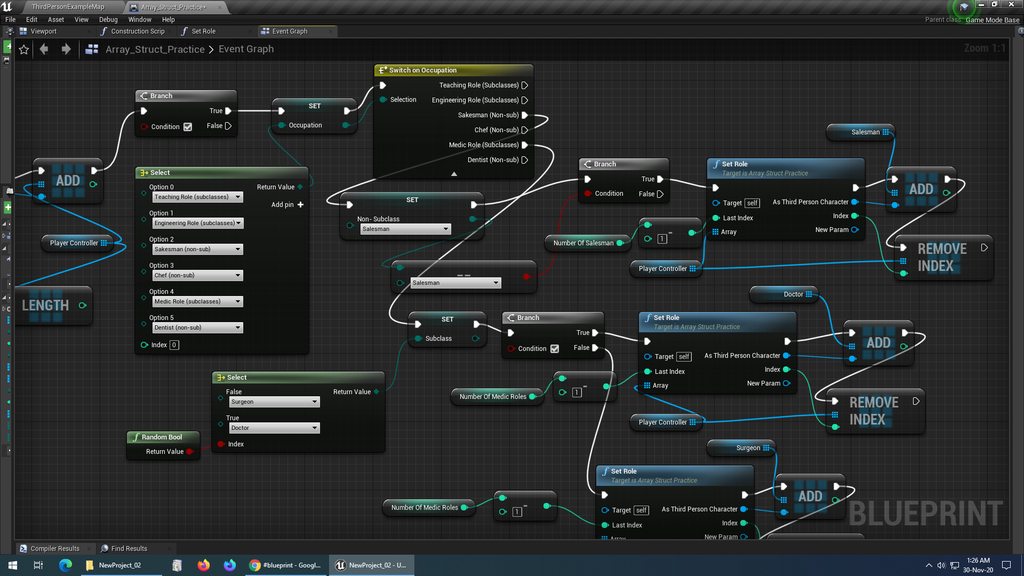 timber cloak
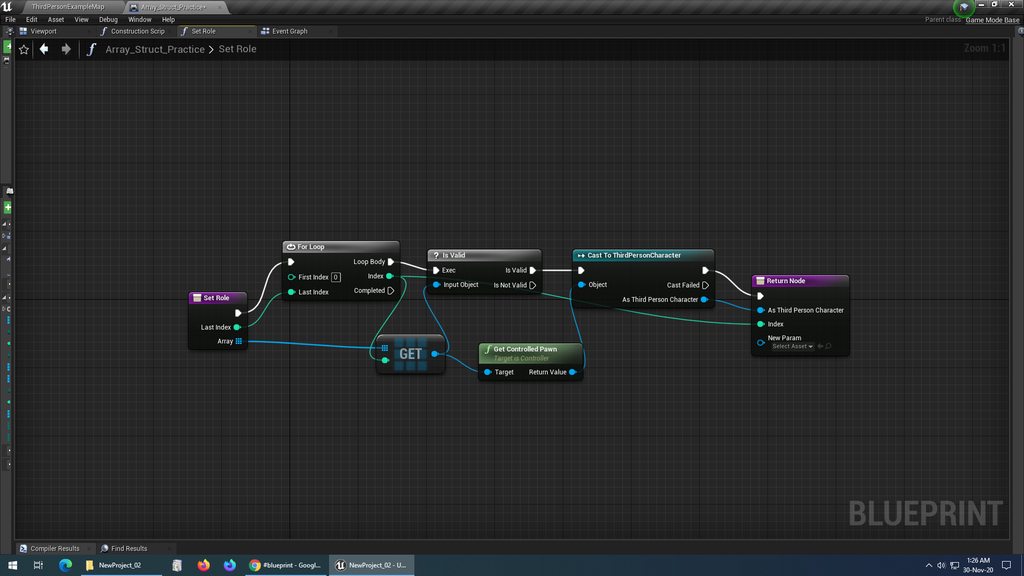
my role function
well, the only thing i am trying to do is, getting it set promote new variable on the "Add" node
odd ember
pretty sure loops cannot extend beyond a function's scope
so whatever that function does (which seems to be nothing currently), it doesnt work
timber cloak
eh? i see
static charm
well it would do the first part of the loop and exit
timber cloak
thanks for letting me know
odd ember
also the IsValid macro is buggy
better to using a branch on the pure IsValid function
or I say buggy
what I mean is there are certain scope instances where it just doesn't or can't fire due to the underlying BP logic
timber cloak
Branch, that has True and False bool?
odd ember
yes
timber cloak
noted, thanks
static charm
anyways, still don't know what variable you're trying to add to an array, but you can make an empty variable and set it during gameplay and then add that to the array
you can use Make
odd ember
I think for your role thing that we discussed yesterday or whenever
the trick is to make a tree with enums
is that you can hook up a select node to another select node
timber cloak
3 days ago, you said there's a bool into SetRole function, i suspect it's the branch, but then i don't think it can fit in
so a list of Enum using Select, then select again after?
instead of using Switch?
timber cloak
static charm
you can use Make
make for new Array being set automatically?
odd ember
you would use a variable named Role
that you would then want to set
from that set, you have a network of branching select nodes
done
odd ember
timber cloak
3 days ago, you said there's a bool into SetRole function, i suspect it's the br...
I don't think this was directed at me, correct?
timber cloak
odd ember
I don't think this was directed at me, correct?
directed at you. The "SetRole" function is also from you
which is i am trying to figure out
timber cloak
i probably misunderstood, my bad
odd ember
role would always be a variable
and set role
would be literally using the Set functionality
of a variable
I got an animBP where I have selects set up in that fashion because I want to be able to assert anim states based on exclusion
the most important part is that it is readable in this case, not that it performs exceptionally wlel
going back to the mantra of make it work, make it neat, make it fast - in that order
timber cloak
odd ember
going back to the mantra of `make it work, make it neat, make it fast - in that ...
that's what i am trying to achieve
but failed to do so
odd ember
so use the above as an example of how to link select nodes
that's how you want your role tree to look basically
if there's more than two roles you need to use an int or enum instead as a branch but it is still possible
or you can just add an additional select node and branch between those as well
I recommend drawing out your role tree
on paper
figure out where each role is situated
and use that to construct your select tree
 lucid granite
Is there a way to move a horizontal/vertical box at runtime in blueprint?
 lucid granite
noooo
static charm
lol
lucid granite
timber cloak
let me try to digest on your advice, i am slow will take some time.
lucid granite
don't see a move (only a remove)
odd ember
best way would be to use a timeline
odd ember
timber cloak
let me try to digest on your advice, i am slow will take some time.
draw what you want out on paper first, it will help you visualize what you have to do
odd ember
lucid granite
don't see a move (only a remove)
timeline + lerp (location/transform) + set (actor/component) world location
 odd ember
that's pretty much the standard for anything moving, anything rotating etc.
odd ember
timber cloak
https://imgur.com/a/fflVJEf
I meant as an actual tree diagram
lucid granite

What is a Timeline in Unreal Engine 4.
Source Files: https://github.com/MWadstein/wtf-hdi-files
says timeline can only work inside actors
so not widgets?
timber cloak
ah i see
 trim matrix
I can´t find any cascade text channels so I am just going to put my question here: How can I spawn a particle emitter after one have finished?
lucid granite
odd ember
lucid granite
https://www.youtube.com/watch?v=v7bdcvGlgIg
well you didn't specify what type of box. I figured it'd be an actor in the world. what are you trying to do exactly?
static charm
i think thats Set position for moving those widget boxes
lucid granite
odd ember
the widget boxes can be animated
I reckon that's your go to
look for animating widgets ue4 or some such
lucid granite
thanks for the advice 👍
 sand shore
@lucid granite the reason timelines can only work in actors is that the node creates a component which belongs to the actor
lucid granite
Thx, I found out there are blueprint timelines with widgets too

Learn how animated widgets work and what you can do with them. This video was voted for by my supporters on Patreon and YouTube Memberships. Join them and support me and cast your vote into the next poll!
Support me on Patreon and get access to videos early, join our developer community on Discord, get exclusive behind the scenes videos on my p...
He explained it quite well to me (widget timelines)
sand shore
well that's not the same thing but yes
they both use curves with the same (or similar) editor
odd ember
lucid granite
He explained it quite well to me (widget timelines)
good on you for doing your own research 👍
 sharp zealot
someone knows how to rotate the character where i click on terrain?
used this tutorial but this is missing

Get the full course: https://devslopes.thinkific.com/courses/intro-to-unreal-engine
For Big Updates & Freebies:
https://www.instagram.com/devslopes/
In this tutorial you will learn how to implement a simple RPG point and click mechanic. Wherever you click the player will move to while also navigating around objects. This feature includes usi...
 spice sequoia
What node would I use to get a Float input of between -1 and +1 to give out a relative value of up to 1 depending on which side of zero it is at? - so +1 would be 1, and -1 would also be equal/up to 1 etc. Zero would be zero. I know I can lerp on an alpha but this only works between 0 and 1 of course
trim matrix
@sharp zealot If you get the location where you click you can add a find look at rotation and set the players rotation
sharp zealot
ill try tnx
unfortunatly im a c++ programmer, with blueprint imtrying to understand how to do with tutorials 🙂
trim matrix
@sharp zealot Then you should ask in the c++ text channel there should be someone who could help you
spice sequoia
@tight schooner Thanks - Exactly what I was looking for and so simple. Thankyou!
 icy saddle
Is there an easy way of spawning a cube on ground level in BP?
Currently I'm spawning the cube in front of my character by using an offset from my character location, but it spawns a little above ground (so it floats a bit).
 maiden wadi
The simplest way is probably a linetrace to find ground level.
icy saddle
ah I see, I was hoping unreal would have something simple like "spawn on ground" hahah
thanks, I'll try that
i saw there's an option to place objects on ground level in the editor's viewport but i guess they didnt create a function for it outside the level editor functionality
trim matrix
hey guys any tutorials to save all actors in maps (actors and destroyed actors) ?
how do i let one object (for example Triggerbox) destroy an foreign object (like doors or anything like this)
maiden wadi
@icy saddle Come to think of it. That might be a way too. I didn't consider that. You may be able to simply move the object straight down on Z in a sweep move. It should stop it at the first thing hit.
trim matrix
or in better way: how do i let one object interact with an other.
i tried to make an openable door with E button first... this did'nt worked so now i try to open an door automatically with an triggerbox
maybe i create an cutscene for this so it looks better
 ruby tree
I just have a quick question
Does anyone know how long it takes to build ue4 from source? I did some calculations and it's looking like it takes upwards of 33 hours, is this normal?
 spark steppe
ruby tree
Does anyone know how long it takes to build ue4 from source? I did some calculat...
spark steppe
ruby tree
Does anyone know how long it takes to build ue4 from source? I did some calculat...
~2 hours for me
maiden wadi
@ruby tree Highly depends on your machine. Anywhere between 11 minutes to several hours.
spark steppe
11 minutes? how?
ruby tree
I'm assuming the visual studio build output (currently [222/3743]) is probably not a great indicator of time then
maiden wadi
Some of the newer AMD processors work incredibly well I suppose.
trim matrix
i already created an trigger box.. or you mean in the object editor?
spark steppe
well ok right, it uses almost all cores to compile
odd ember
timelines were created for stuff like door rotation over time
maiden wadi
@trim matrix By destroyed, I assume you mean actors with destroyable meshes? A destroyed actor can't be saved, it doesn't exist anymore.
trim matrix
So I want to add a sprite box in my dialog component but I don´t know how to store a sprite in my blackboard or get it out form a blackboard key any suggestions on how to do it?
maiden wadi
He is, but I'm just trying to be certain he's not somehow trying to save already destroyed actors, and just means a fractured mesh or something.
ruby tree
@trim matrix Maybe try https://youtu.be/VqdjnLxCkyk
 amber marsh
is a time span variable something that can replicate?
If I do this on the server will it replicate to clients? Or is this a special case?
ruby tree
I don't see why you wouldn't be able to, but I don't know that much about replication
Also @spark steppe you said a build took about 2 hours for you, what specs are you working with?
trim matrix
so my currently only problem is.. i dont created an door by myself because i dont know how do create models and i cant model. so i downloaded one from quixel bridge.. so now i want to make this door move/openable. first i wanted to create an dynamic door that you have to open fully by hand like the doors in the Game "Visage" then i wanted to make it half automatically to just press E and then it opens. and now i want to make it fully automatically with an trigger box because i dont know how to make the previous ideas work.. sorry if my english is bad. i'm not native english
 mortal wharf
Why is the string being printed when i am not in his overlap? For example the string gets printed when i am standing here https://gyazo.com/c0e4cba9404be60fd51afd9d071bfd6a the box collision is only this big https://gyazo.com/cb134495fb94eb4111cbd364a5a882ce why is this happening?

 odd ember
set the collision boxes to be visible
or debug using breakpoints
the latter is more precise
trim matrix
@mortal wharf If you have the print node in your character the enemy mesh may be called as touching you
mortal wharf
the enemy mesh isn't touching me in this photo @trim matrix https://gyazo.com/c0e4cba9404be60fd51afd9d071bfd6a
There is a lot of space between the player and the enemy
trim matrix
Oh you meant from the pic got it
thats an good idea. but my main question is. how do i make that one button "E" can interact with every object i want. so that the Button "E" not only opens one door but every Door you look at.
mortal wharf
odd ember
set the collision boxes to be visible
https://gyazo.com/9dd72b0baf54e3019ee4b3386eaa47fb It doesn't touch me at all but still prints
 odd ember
well if you try one of the things I mentioned you could get to the bottom of your issue
visually in this case it's clearly not helping
so try debugging with breakpoints
maiden wadi
You may also want to show what and how you're printing. It's probable you're not checking the overlapping actor correctly.
odd ember
likely
mortal wharf
where should i put the breakpoints?
mortal wharf
@odd ember I mean now i just got a black screen when i put a breakpoint on the overlap
 odd ember
tab back into the editor
because that means the breakpoint triggers on the first frame
before the game even runs properly
mortal wharf
This is what it looks like when i tab back into the editor https://gyazo.com/86d7facbd270642ddf0de51deba6b671
 mortal wharf
The current value of the other actor is none
odd ember
even after you stepped into the next node? as in, the big red arrow above the node is on the cast node?
mortal wharf
No i haven't stepped into the next node yet i am doing it now
odd ember
do that and then check
those values only update after the node has been triggered
and breakpoints hit as soon as the node gets hit
so generally you can only see stuff on the previous node when it comes to variables
mortal wharf
 odd ember
here it generally helps to have classes called something appropriate
I have no idea what the Test2 class/actor is
mortal wharf
Test 2 is the enemy
odd ember
cool
then we can ignore this case
press the button to return to game
I forget what it's called
mortal wharf
Resume?
mortal wharf
And now when i have resumed?
 dusky thicket
So what would the cleanest way of notifying a parent blueprint when a childactorcomponent does something? I'm going down the Blueprint EventDispatcher rabbit hole and it's way too ugly (particularly because I cannot bind the event dispatchers in a function, so I have casting vomit all over my event graph of the parent).
odd ember
or make it trigger again if you have to manually do it
mortal wharf
I took a single look at the enemy and the screen got like grey or something
odd ember
@dusky thicket if you leave an event dispatcher unhooked up in your component, then go into the parent class, right click on the component and go down to event
odd ember
yeah so that means the breakpoint has triggered
breakpoints will pause the game and execution
so you can step through
dusky thicket
@odd ember Ah this is a ChildActorComponent, and the event is on the actor.
odd ember
I strongly recommend not using child actor components
dusky thicket
Ahhh so that's my problem. Got'cha.
odd ember
whatever your case may be there are probably better ways of doing it
dusky thicket
I was wondering why this was blowing up...
I'm just trying the logic simply on a title menu. Poke the single player or multiplayer button, some effects play, and the menu prevent you from touching the other buttons.
I'd normally do this in C++ but I took it as an opportunity to learn more about blueprints.
odd ember
I don't see any reason for using child actor components in this case
you can have the parent widget spawn child widgets
dusky thicket
The buttons have similar effects so each button is a sub actor.
odd ember
save them as individual widgets
custom widgets are available
so you can template all your widgets
and they will appear as custom widgets in the left hand menu in the UI designer
dusky thicket
Note that these are 3d objects... collision spheres. It's VR.
odd ember
I'm sure there's a custom class or component for this in VR
although I'm not big into VR
mortal wharf
So do i just repeat resuming or what do i do?
dusky thicket
Anywho. Thanks @odd ember for pointing out the moment where I strayed from intended.
odd ember
remember you have to step to your cast node
or alternatively move the breakpoint to be on the cast node instead of the event node
mortal wharf
Ok so when i first start the game, the other actor is the enemy but after i look at the enemy after i have resumed i step into the cast and the other actor is the player
odd ember
cool
so that's the point where they meet
you're using a separate window for your playtest yes?
mortal wharf
Yes
odd ember
try instead using the PIE window
mortal wharf
A standalone game window
mortal wharf
Yeah and now?
odd ember
so at the top of the window, next to the pause/stop buttons there should be another icon
that says something like "detach from player controller"
this will allow you to fly around freely
at this point, if your trigger boxes are visible, you should be able to see where the overlap happens
odd ember
so do you see the overlap? can you take a screenshot?
mortal wharf
It happens here https://gyazo.com/08b4b629f1ff29d034bdb619860d546e

The player doesn't have a mesh
So it isn't visible
maiden wadi
Might also check that the player character doesn't have some sort of large detection sphere or something with overlaps.
odd ember
yeah absolutely
mortal wharf
@odd ember Do you think i could screenshare? You don't have to use a mic cause i don't have one here either
odd ember
I don't think it would help as I don't get more info from this
and there is no remote control option
maybe for good reason tbh
mortal wharf
https://gyazo.com/db8c783e26af1022808c9635692ad92f Take a look at this you see it triggers when i am no where near him and at the end you see the capsules
odd ember
try with detaching
so we can see it from a third point of view
right now it looks like it overlaps in the front
but it may be wrong
mortal wharf
It isn't touching at all https://gyazo.com/f7d306798d89edfa90957a6c0cd1337d
 maiden wadi
Can you show the player character's class viewport and component list?
olive sedge
I'm trying to get a Manny to stand around and then go places I click. Right now he just falls down and spazzes out on the floor until the drops off the edge.
How do I define the behaviour? Is this in my PlayerController? Would I have a seperate PlayerController for each character? Should this Manny be an Empty Character Actor with a manny mesh attached?
maiden wadi
mortal wharf
So the player not the enemy?
maiden wadi
Possibly both. Start with player.

 maiden wadi
Cone, and Sphere, what are those?
mortal wharf
You might remember a few months back with the stand and sit enemy?
That is the cone
 maiden wadi
If that is in front of the player character, I'd assume that is what is overlapping your enemy and triggering it.
maiden wadi
Hard to say. You can change overlap channels, but that's going to get complicated fast with multiple enemies. You could check the overlapping component and make sure it's not that, in your one enemy, but that's kind of a bad method for future updates.
odd ember
@mortal wharf you could check for specific components and ignore if it is that particular component's class
otherwise it's physical object overlap
but that comes with its own share of hurdles
as collision is two way
mortal wharf
This is actually the last update for my game, i have been working on it since april @maiden wadi
@odd ember How would i do that?
odd ember
spark steppe
anyone has an idea what im doing wrong here? i want to attach the cameraComponent to a socket of my actor but somehow it ends up with having pitch/roll in it's rotation... (all childs of the cameraComponent get relative location set to 0 after setting the root to the actors yaw)
odd ember
whatever the class is that's causing the issue
in my case I can do this because I have a custom component
if you don't have a custom component you do it based on object name
for instance, if it's just a trigger box
but it gets more and more hacky the weaker your checks are
mortal wharf
So the cone in this case?
The cone isn't selectable
The cone is for another enemy with a overlap event so do i put that enemy in the field, or the weeping angel enemy or the player?
odd ember
yeah the cone in this case
spark steppe
let's call it partyhat from now on
mortal wharf
No i want the cone overlap to only work on one actor and not all of the actors in the level, so i basically want to restrict it to only that one actor
@unique flicker
The cone isn't in the list @odd ember
odd ember
if you want the cone to just work on one actor
use cast to prevent it from reaching any other actor
shouldn't be harder than that
mortal wharf
But isn't that the thing i am doing?

I have to get the function
From the Nightmare bp
odd ember
so why is it hitting the player?
timber cloak
probably a skill
mortal wharf
It doesn't but someone here told me that if the cone is in front of the player which it probably is, that is probably the problem or something like that
I just need to find out why it triggers https://gyazo.com/db8c783e26af1022808c9635692ad92f
 timber cloak
it says dead on the top left
mortal wharf
I am not near him at all but the overlap print string still gets called
Take a look at my last messages @timber cloak
Well not last but some of my last
timber cloak
yes, i saw both "sit" and "stand" on your screen shot
mortal wharf
omg i said look at some of my last messages with @odd ember and @maiden wadi
mortal wharf
mortal wharf
https://gyazo.com/db8c783e26af1022808c9635692ad92f Take a look at this you see i...
this
🤦
Yes it says dead but just please look at my last messages
not the nightmare and cone things
before that
timber cloak
i scrolled up, and i can't see the code clearly but i suppose that one is the "dead"
that part triggered only
basically your last screen shot cone is not there/not triggering
mortal wharf
mortal wharf
Why is the string being printed when i am not in his overlap? For example the st...
Begin from here and scroll down don't mind the cone and nightmare things
timber cloak
@unique flicker you saw it correctly lol
mortal wharf
You guys are talking about the wrong blueprint
lucid granite
I have the Is Variable checked but don't see it
so the "Designer" has the button BtnBetRaise but the "Graph" does not
the BtnBetRaise is a part of the BxBottomRow but I don't know how to get that button from that horizontal box
and shouldn't the button just be there as a varible?
mortal wharf
So since the cone wasn't the problem what do you think the problem is? @odd ember
The sphere didn't have any references so i just deleted it
odd ember
it is probably the cone, because the cone is still part of the player character yes?
mortal wharf
mortal wharf
Begin from here and scroll down don't mind the cone and nightmare things
here
odd ember
@mortal wharf if the cone is still part of the player (as in, it is a component of the player actor), then that will still overlap with the test2 enemy
mortal wharf
Well yeah the cone is in the player character but it gets casted so shouldn't it be restricted to that ai only?
odd ember
the problem is that the cast that happens on the enemy
just checks for if it is the player
and in this case, the cone, since it is attached to the player
it IS the player
so we're back to that you should have an additional check that in case it is the cone component, it does not count as an interaction
timber cloak
also, we can't the see cone without actual visual debug on it
to be accurately see the problem, you need to have a visual as well
mortal wharf
But i can't select the cone in the field?
timber cloak
first person perspective usually can be misleading when it comes to range interaction lol
mortal wharf
I have already tried seeing it in third person
odd ember
also a cone like this can be represented mathematically instead, which would eliminate the reason to have mesh overlap
mortal wharf
The cone doesn't appear in this list https://gyazo.com/ea8c5e8f3a3770a6c5b15d5c84c0ca88 @odd ember
 odd ember
timber cloak
<@!224571781862653952> btw i am still lost with your select coding
odd ember
timber cloak
<@!224571781862653952> btw i am still lost with your select coding
I made it as simple as I could
what is your issue now?
timber cloak
@unique flicker he triggers the dead part for sure, not the last one. Without visual nobody knows
odd ember
I mean I said that a while back even lmao
timber cloak
 maiden wadi
I thought we established the cone issue an hour ago?
timber cloak
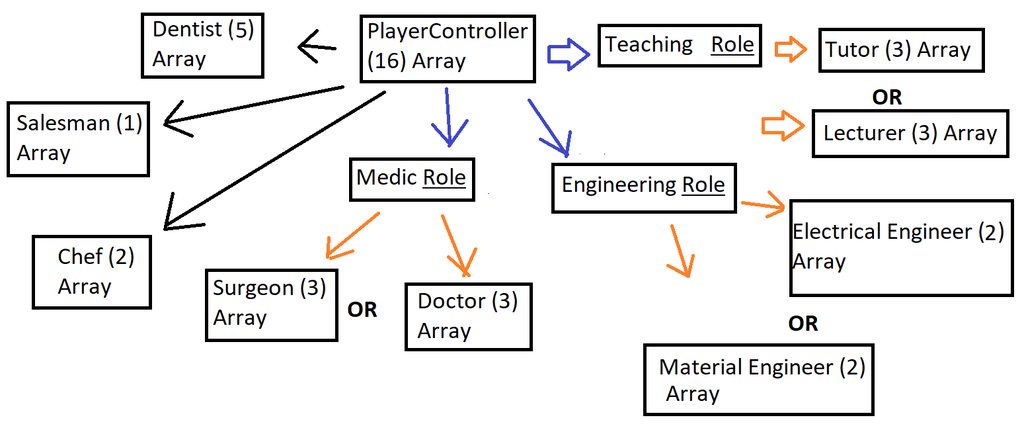 odd ember
pretty much
timber cloak
but.. how am i going to do with the "amount" and add them into new arrays?
odd ember
@timber cloak okay that's a start but it's a really flawed way of describing it. forget the arrays. arrays have nothing to do with this
this is purely for picking 1 role
nothing lse
mortal wharf
I can't seem to find where i check what class the cone is
Oh wait
Yes it is static mesh
odd ember
@mortal wharf cool, so say that if it's a static mesh component, exclude it
which will require a branch, and the != node for class
mortal wharf
But i know the cone is the problem now
timber cloak
you can't set arrays anymore once you do those select type of coding? I definitely need to add the "amount" variable of the players (that is being randomly set for their role/job), and then lastly add them into new arrays.
timber cloak
then what about amount?
timber cloak
like Number of Salesman, Number of Chef
mortal wharf
And what should i select in the != field?
odd ember
@mortal wharf the class of your cone... so static mesh component or whatever it's called
timber cloak
i am not so used with "Select" nodes, sorry. I am still trying new stuffs/nodes here.
odd ember
@timber cloak it's nothing to do with the select nodes
it's how you set up your thinking even before then
let's start again
you have a person
that person can only have a single role, correct?
timber cloak
correct
odd ember
so, create a class called person, add a variable to that class called "role"
mortal wharf
 odd ember
the logic is correct, but you need to do it where you print "dead" and cast to the player, not where you cast to the nightmare class
also the branch should go AFTER the cast, not before
mortal wharf
Yeah but this whole system is for another enemy i just need to restrict it so it doesn't interfer in other ai's in this case the weeping angel
timber cloak
odd ember
so, create a class called person, add a variable to that class called "role"
Let's put it with default BP that already exist as starter. Basically, create a variable called "Role" in my "ThirdPersonCharacter" BP Class. Implement* the "Select" nodes from the "GameMode" BP.
mortal wharf
Cause the cone is for another ai and i want the cone to be for that ai and that ai only but the cone also stops the weeping angel so i need to set it so it only works for the nightmare ai
odd ember
mortal wharf
Cause the cone is for another ai and i want the cone to be for that ai and that ...
place it where I said and it should work without consequences for anything else
odd ember
timber cloak
Let's put it with default BP that already exist as starter. Basically, create a ...
yeah so you can do it in the BP you have right now. but the main point I want to get across is that your person, as an individual, has an attribute, that is a role
I would strongly urge you to create a separate actor class for your person
 astral tangle
Hello, I'm new to visual scripting and trying to make a smooth mouse aim. I think I got it how to do it, however, i'd need this Get mouse position on viewport to two values. Currently it's printing them as one debug line. How to split it to x and y values or is there a better node for it? Thanks guys!
odd ember
@astral tangle right click on the pin -> split struct pin
can't be connected while you do it
timber cloak
clearer now. Thanks for the detailed explanaition
odd ember
that's what we're trying to do
we need an actor to be a person
and that is most likely not the same class as the player class
I mean player
not necessarily
timber cloak
odd ember
I would strongly urge you to create a separate actor class for your person
but then, all characters shares the same thing, nothing changes except probably Role, Name and Skill.
odd ember
nope
timber cloak
i rather keep it less rather than adding more
odd ember
you are writing the underlying "archetype"
timber cloak
there's a reason i am not using "Spawn" and "Possess"
timber cloak
odd ember
they get assigned a role at runtime
that's what got me confused
odd ember
@unique flicker there isn't. what I'm trying to say is that it cannot be the player BP
odd ember
timber cloak
that's what got me confused
that's how programming works
mortal wharf
 timber cloak
so your idea was to use multiple "ThirdPErsonCharacter" BP class all along
odd ember
no
because you cannot control multiple characters with a player controller in third person
timber cloak
well, i have same question as tidii with using one character BP class only
odd ember
at least not how the third person template is set up
timber cloak
the thing is, it is multiplayer and everyone's character is the same character with same thing except Skill, Role and Name.
odd ember
no, AI controller is what you'll need
timber cloak
nobody going to control multiple characters
odd ember
that's fine
in that case you can add it to the third person character
so understand this: as a blueprint what you are creating is a blueprint of an archetype
at editor time it doesn't really do anything, as none of the variables are instantiated
once you run the game, you can spawn any number of actors based on the blueprint you've created
and give them custom values for any variable you've created
astral tangle
@odd ember Thank you so much! I'll let you know if I get the thing working!!
I was searching that one for a while from internet 😛 couldnt find
odd ember
in the case of your third person character, every player gets a different third person character
and every character can be assigned a different role
as you want them
mortal wharf
The main problem is still not fixed unfortunately he doesn't move inside
We fixed that he didn't move all the way to me but he doesn't move at all when he is indoors
odd ember
I mean I wasn't aware that that was a problem
mortal wharf
Yeah sorry about that i didn't mention it
And correction it works in the test level but he doesn't move at all in the main level
The screenshots were all from a test level because he appeared broken in the main level
He works good in the test level but if i put him anywhere in the main level he just doesn't move at all
spark steppe
does he spawn inside the nav mesh?
mortal wharf
The whole level is covered in nav mesh so yes
timber cloak
@odd ember For roles with single "ThirdPersonCharacter", i suppose i run a loop with enum variable on "ThirdPersonCharacter" BP class?
Another thing is to confirm is, the integer on the boolean "Select" which overwrites the enum's name with "False" and "true", any caveats or it is fine?

 winged kettle
using an actor component for a grabbing system. How do I get references from the actor components owner without casting? Also without adding code in the owner?
odd ember
@timber cloak I mean your setup does nothing the way you've set it up
your "number of roles" doesn't matter
@winged kettle there's no real way to do it without casting
maiden wadi
It depends on what you need from the owner.
winged kettle
Thats what I was worried about
odd ember
well yeah if you just want actor functionality that's free
maiden wadi
GetOwner() will return the owner as an AActor, but if you need the class, you have to cast.
odd ember
but if you want anything class specific from the owner, then no
winged kettle
Need a way to check for overlaps without casting inside the actor component
odd ember
I created a custom component derived from a collision component for that 😅
maiden wadi
You can get overlap data from the Actor pointer.
winged kettle
well, im not sure how to do either of those methods.
maiden wadi
What overlap data do you need? What are you looking to do?
odd ember
you need to dive into c++ if you want to derive from a collision component class
winged kettle
basically it turns physics off and sets the location to a scene component in the player bp. If over lapping another actor it keeps you from being able to drop it.
Works fine just trying to get it all tidy in an actor component for modularity
Ok with c++ but will probably not go that route
maiden wadi
I imagine it would likely be best to do something like this in a custom SceneComponent, and use the SceneComponent as the grab location.
As for overlap stuff in either an ActorComponent or SceneComponent from the owner without casting, these are your options.
winged kettle
maiden wadi
As for overlap stuff in either an ActorComponent or SceneComponent from the owne...
Well, it looks like you just solved my problem. Thanks!
That was the last piece of the puzzle
That bind event is pretty great
maiden wadi
Found it pretty useful, myself, in quite a few abstract locations.
odd ember
requires a little more boilerplate but I suppose it is a good BP only solution
winged kettle
odd ember
requires a little more boilerplate but I suppose it is a good BP only solution
This wont be called too often so hopefully the weight wont be noticeable
odd ember
I mean it has no impact on gameplay
it's more for your own sake of doing repeat setups
winged kettle
Yep, going for that extra time in setup to save time in the long run
timber cloak
odd ember
<@!192102567021379586> I mean your setup does nothing the way you've set it up
then how should it be setup actually?
timber cloak
uh, the way with multiple "ThirdPersonCharacter" BP Class?
odd ember
you dont need multiple classes
you're misunderstanding things
you need one class
and one variable within that class
timber cloak
i see. So, do i still go with the Select node and all?
i am quite slow, my bad
i totally fell asleep just now
odd ember
all you need is a role variable
of type enum
inside your custom enum
you need EVERY SINGLE ROLE AVAILABLE written in
trim matrix
heyya
do you know why my char jumps off edges when going down hill ? i am using character movement
its doing that in fast speed only
timber cloak
odd ember
you need EVERY SINGLE ROLE AVAILABLE written in
Okay, but what about the select node that is made earlier? Just to clarify.
in case i misunderstood again
odd ember
delete all of that
once you have your role variable
use the Set functionality
no loops
no nothing
no functions
and pull out a select node from that
timber cloak
odd ember
delete all of that
noted. Thank you. Will take some time on this.
winged kettle
Have to manually tell it when to update but works well. Any one have any better ideas? It just updates when the player moves. This is basically hey you cant drop this item because it is overlapping something and when physics turns on it will flip out.
 twilit heath
you can just do a sphere trace on a 0,1 sec timer
and enable physics/dropping depending on if you caught something in the overlap or not
without even accessing the Owner, except to get its location for the Center
(if its a scene component, you don't need owner loc, it has its own)
winged kettle
Its an Actor component set up to work with many items. Many items are kinda long. Not sure if a sphere trace is good enough.
winged kettle
You know, Ive never done a sweep before
twilit heath
its basically a trace with a shape
winged kettle
oh, well thats pretty cool
 earnest tangle
You can't sweep with an actor from blueprints though unless you use a set location :\
winged kettle
ahh... 😦
twilit heath
i don't do such thing in BP
earnest tangle
I guess you could set location with sweep enabled and check the sweep result
if it's bad then reset
winged kettle
well ill have to keep that in mind though may come in handy
earnest tangle
Yeah I just made a C++ helper function to allow me to do a sweep from BP's... no idea why it isn't available by default :P
winged kettle
Ill have to comment that then with this info. If its too heavy ill need to go that route
twilit heath
but essentially
doing a periodic sphere overlap
or reacting to begin/end overlap doesn't really make a difference player can notice
in most cases
winged kettle
Maybe I can do a two stage test. First being a larger overlap that triggers this more accurate overlap test.
twilit heath
accuracy is the same
earnest tangle
bool UCppHelperLibrary::SweepTraceActor(const AActor* Actor, const FVector& Start, const FVector& End, const FRotator& Rotator, const TArray<AActor*> IgnoredActors, FHitResult& OutHitResult)
{
    UPrimitiveComponent* Root = Cast<UPrimitiveComponent>(Actor->GetRootComponent());
    if(Root == nullptr)
    {
        return false;
    }

    FComponentQueryParams Params;
    Params.AddIgnoredActor(Actor);
    Params.AddIgnoredActors(IgnoredActors);

    ECollisionChannel Channel = ECC_Camera;
    const bool Result = Actor->GetWorld()->SweepSingleByChannel(OutHitResult, Start, End, Rotator.Quaternion(), Channel, Root->GetCollisionShape(), Params);


    return Result;
}```here's the code to do a sweep with the actor's shape
twilit heath
the only difference, if you run the sphere overlap every say 0,2 seconds
earnest tangle
you can stick that into a C++ blueprint function library
twilit heath
is that if something enters overlap 0,05 seconds after your last check
it won't be detected for another 0,15 seconds
winged kettle
And......... thats going into my bag of tricks. Nice man, I really appreciate it. Ill get that dude in my library.
earnest tangle
One modification you may wanna make is set the Channel variable as a parameter instead of hardcoding it to ECC_Camera
that would allow you to choose which channel to do the sweep on, I just needed it on Camera for time being so it's hardcoded lol
winged kettle
lol, Im glad you mentioned that. I may have overlooked it.
twilit heath
could had added that little tidbit to the function's name @earnest tangle
earnest tangle
Maybe, I probably meant to change it into a parameter but forgot about it :P
twilit heath
you can do it without breaking anything
but putting it as last default parameter
then no code or BP node breaks
earnest tangle
I'm probably using it in like one place in my project so nbd even if it did break something :D
twilit heath
and it traces on camera unless you tell it otherwise
 elfin inlet
why is this not working?
its inside my playercontroller
i don't think there is any reason for it to not work
the hud widget isn't added to viewport
 flat raft
@elfin inlet use the debugger.. see where it fails.
elfin inlet
@flat raft it looks fine to me.. i'm baffled
flat raft
Maybe it is added and you can't see it.
Try adding it to the top left, which I think is default.
odd ember
at least they are not indivisible
elfin inlet
thank you for making me feel dumb lmao
 fierce birch
just wondering, what would be a good idea to set up a saving system when you dont know how many variables you need, and you have a lot of them
 dense badger
Heya all, I'm doing this to try and find out what class of thing I am targeting:
But GetClass and Class == doesn't appear to resolve with inheritance.
IE: if I say Class == Vehicle and the class I am testing is Car it returns false
Hrrrm, I found "ClassIsChildOf" I guess that works
timber cloak
odd ember
you need EVERY SINGLE ROLE AVAILABLE written in
Would like to clarify if this is the correct way, please.
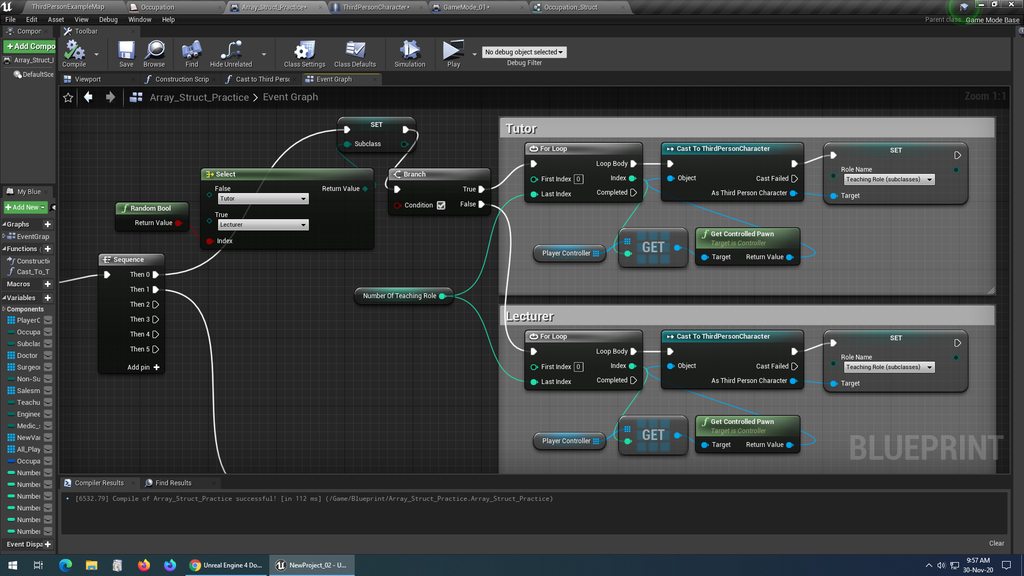
the "Set Role Name" Variable is from "ThirdPersonCharacter" BP class.
 forest sable
hello
real quick, what is the deference between an interface call and an interface massage ?
odd ember
timber cloak
Would like to clarify if this is the correct way, please.
I told you, no loops. literally all you need is the first part before the branch
everything else is useless
forest sable
@unique flicker can you elaborate ?
timber cloak
odd ember
I told you, no loops. literally all you need is the first part before the branch
i read that and been figuring out, like what about the Number_Of_Teaching roles integer?
forest sable
yup
odd ember
timber cloak
i read that and been figuring out, like what about the Number_Of_Teaching roles ...
none of that matters. I told you to delete it.
like you're not understanding how programming works yet you won't give up on your own interpretation of it, even when it's wrong
 neon sorrel
Anyone know why this gets the variable from the local player, not the one that is the hit actor? The input into the cast is the hit actor on a sphere collision. They're both the same character. Im trying to get those variables from the player it hits, so that it displays the other plays name not the player who looks at them.
timber cloak
odd ember
like you're not understanding how programming works yet you won't give up on you...
i have to admit i am not that smart, which is why i am struggling with this alone for days to weeks. While at it, i am asking around to correct myself.
timber cloak
odd ember
none of that matters. I told you to delete it.
i am still cannot understand how will i set an "amount" for "number of Teaching roles"
odd ember
you don't
not here
you assign the role to the class
and nothing else
stop
really
you're not helping
timber cloak
odd ember
not here
okay, i am thinking if not here, then where
odd ember
he already does @unique flicker
imagine
whenever a person spawns
they ask for a role
not if you set up the role on beginplay
which is basically what you want to do
you do not want to ever have to loop over all of your persons
timber cloak
wait, this is not like the player walk up to the AI manager and ask for the role, but it straight away give the player roles at BeginPlay/OnPostLogin.
odd ember
you want each person to autonomously ask for their role
so that when they spawn, tehy already know what they are going to be
timber cloak
this is supposed to be randomed each time it BeginPlay though
odd ember
sure
doesn't matter
no loops
none
whatsoever
literally as you spawn your person, they will find out themselves what they are
and you can decide then if it's random or predetermined
it doesn't matter
timber cloak
really? without loop? My first time doing random on BeginPlay without loops. Especially without having the amount that is fixed in the beginning prior beginplay
odd ember
the amount can come into play later when you're spawning them. but that's not relevant here
here you are looking at blueprint of one person
timber cloak
Okay, then if it's 10 players*, 5 different roles, each roles has a fixed amount "Number of Teaching Role" etc. Then how is the system knows how many roles is going to be assigned?
odd ember
the system spawns the roles
it knows all of them
it manages them
etc.
if you tell the system to spawn 10 persons the system will know all of those 10 roles
timber cloak
correct, then each of the role contains different integer/amount
odd ember
no
in your person/character blueprint whatever you're calling it
all you need to do is set your role on beginplay
timber cloak
the player isn't walking up to AI manager and ask for role.
Yes, i can understand know the role is all automatically assigned once you set.
The only thing my stupid brain cannot understand is that where should the integer be at?
set the integer in ThirdPersonCharacter BP class?
timber cloak
correct
odd ember
and so if you absolutely need an amount to spawn, it would spawn them
hence game mode handles amount
depends on what logic he wants
if it's random, then just set it up with a select node
if he wants he could even expose it on spawn so the role becomes visible on spawn and the game mode can input a role based on whatever parameters it chooses
timber cloak
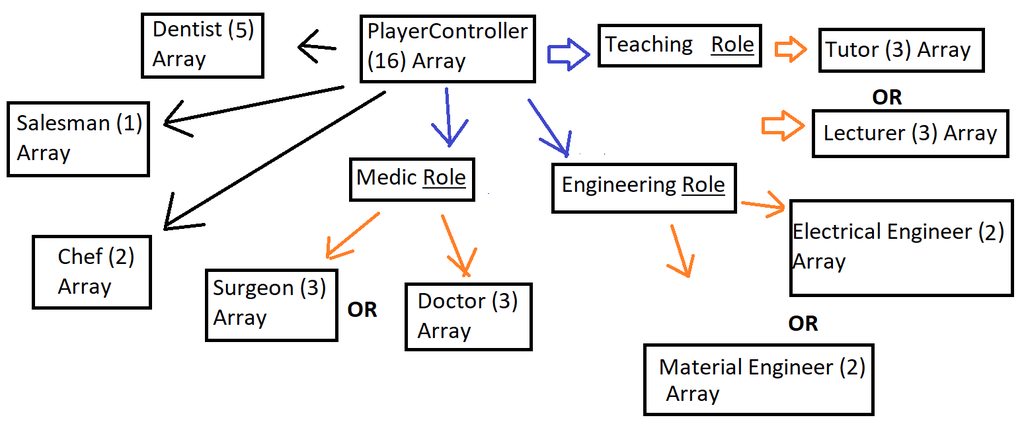 odd ember
I told you that was wrong
and right now I think it's just making you more confused
there are no arrays
timber cloak
okay no more arrays. I forgot that picture has it.
timber cloak
it is just to show that there's 16 total players, roles automatically assigned randomly to 16 different players.
then the bracket with number (3) amount being set, how?
and where?
odd ember
in game mode
game mode essentially becomes your person manager
it tells each person that spawns what role they have
timber cloak
correct, that's what i have been doing
odd ember
and if they have to change role, they ask the game mode to change role
only the game mode will have the authority to change the role for them
it's certainly not
basically you have to unlearn everything you've done up until this point
or it'll keep confusing you
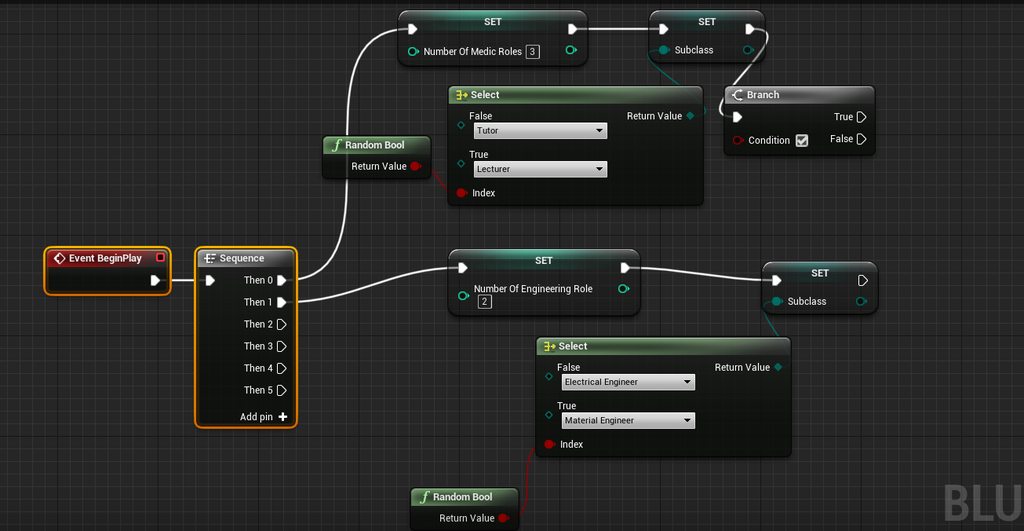 odd ember
I can already tell you this is wrong
it's wrong if it's in the character blueprint and it's wrong if it's the game mode blueprint
the number of roles
is something game mode and only game mode needs
the select node for which roles
is something the player character and only player character needs
timber cloak
odd ember
is something game mode and only game mode needs
In GameMode, "Number of Roles" integer variable link to -> "Set Role Name" (Enum variable from ThirdPersonCharacter class", correct?
odd ember
I don't understand what you're trying to say/do
timber cloak
odd ember
the select node for which roles
then the select node, in player character BP, is similar to what i made in the screen shot?
odd ember
yes
the latter is basically what you need
for your player character
for your game mode you'll need to manually handle spawning
timber cloak
the former, is what i am trying to understand you because I still remember the "Set Role" enum variable you told me create, and i suppose this is also what i should put in GameMode link with Number of Roles? Sorry if i misunderstood again.
odd ember
yeah the set role is for your player character
your game mode isn't going to have a function like that
if anything, it's going to use the variable on the player characters it spawns
now before I leave for the night
go into your game mode blueprint
and set up your player spawn
timber cloak
 forest sable
does anybody know how Fortnite building system was created
timber cloak
ignore the player controller
odd ember
timber cloak
https://imgur.com/a/zShUHVz
you dont need the cast or the player controller or anything
literally just the last node
and begin play
forest sable
I've been looking for documentations for it everywhere and i'm really struggling with something
timber cloak
but the last node requires "target"
odd ember
the target is class itself
timber cloak
i brought in from Character BP
odd ember
it's because you're making it in this silly practice class
remove it
bring it the player character class
delete this nonsense class
timber cloak
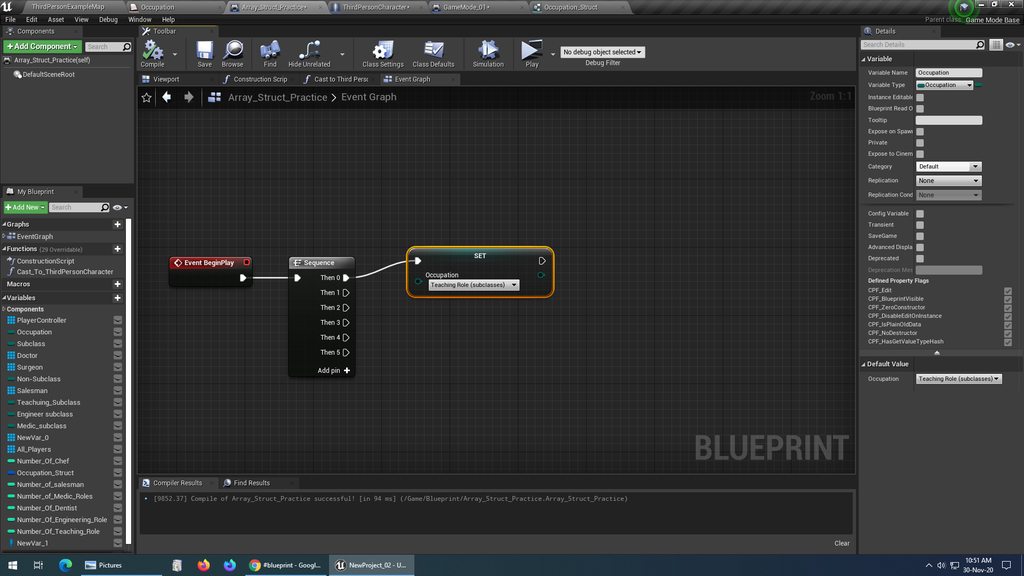
this is the variable made inside GameMode
without the "Target" since no class reference
timber cloak
ok then it's the first screenshot
timber cloak
 odd ember
and put it inside the player character class
timber cloak
this put in player character class?
odd ember
yes because you're in the array_struct_practice class
delete that class
it's just making you do wrong stuff
timber cloak
that's just a GameMode's name
odd ember
honestly, delete it and remake a new game mode. or delete all of your variables
start clean
timber cloak
okay i remake new
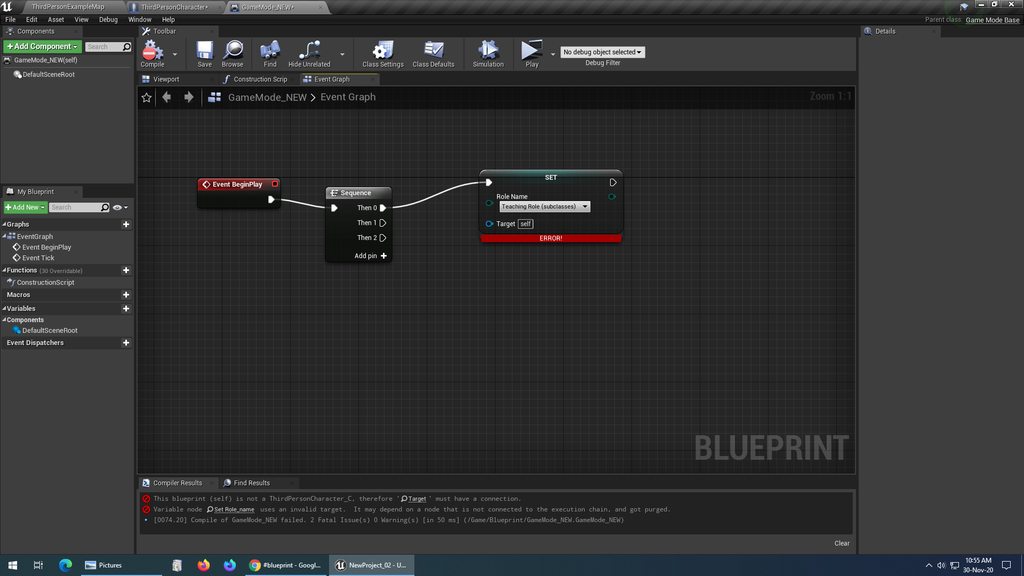 timber cloak
there isn't any new variables anymore. Deleted all as per your instruction
forest sable
@unique flicker Epic doesn't but i do
 noble basin
how would i access a parameter in a blueprint and then change it within that blueprint?
odd ember
okay, delete the stuff in the event graph
timber cloak
won't improve if i just stop at this point and making mistakes like now
noble basin
a parameter of a material i should say
odd ember
there is a plus next to where it says functions on the left
if you hover the mouse next to that
you'll get a button that says override
click it and it's going to open a long list
spark steppe
did you mean onBeginPlay?
timber cloak
odd ember
you're looking for a function that's called something like "OnMatchStart"
i am sure this requires Advanced Session Plugin
timber cloak
there's none there
odd ember
okay, go to your class defaults
check which class is the parent class
it's probably GameMode Base
spark steppe
isn't that class settings?
odd ember
you need to change that to GameMode
timber cloak
GameModeBase
odd ember
without the base
GameModeBase is a limited gamemode for singleplayer
it doesn't have multiplayer functionality
once you've reparented
go back to the override and see if you can find the OnMatchStart
or something else with "match" in the name
timber cloak
i remake a new under GameMode Parent, without Base
odd ember
sure
timber cloak
but no OnMatchStart either
odd ember
is there any name there with "match" in it?
timber cloak
ready to start match?
timber cloak
Okay
odd ember
what do you get
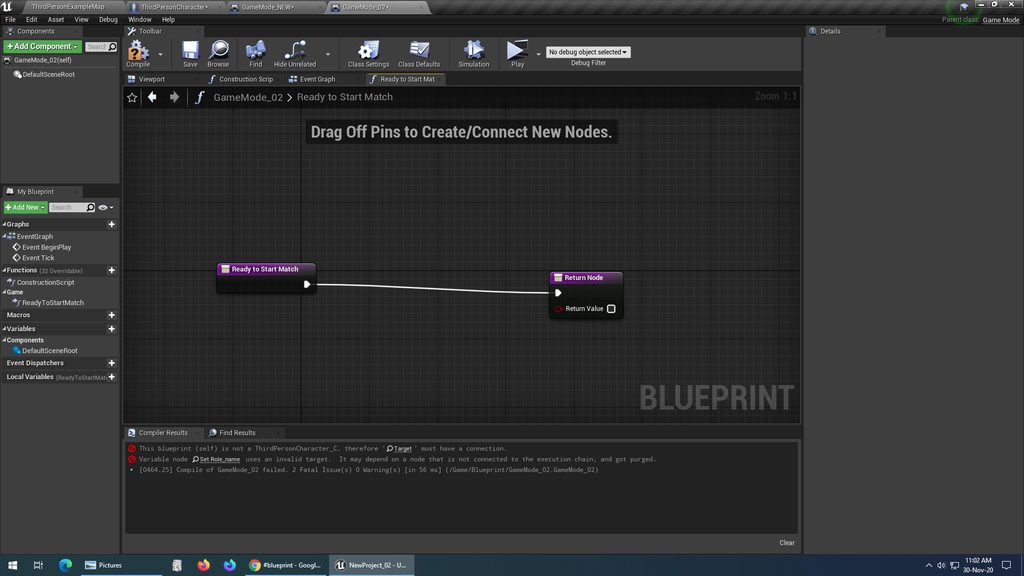 forest sable
i really need to get a look at that building system code
odd ember
that's the one you want
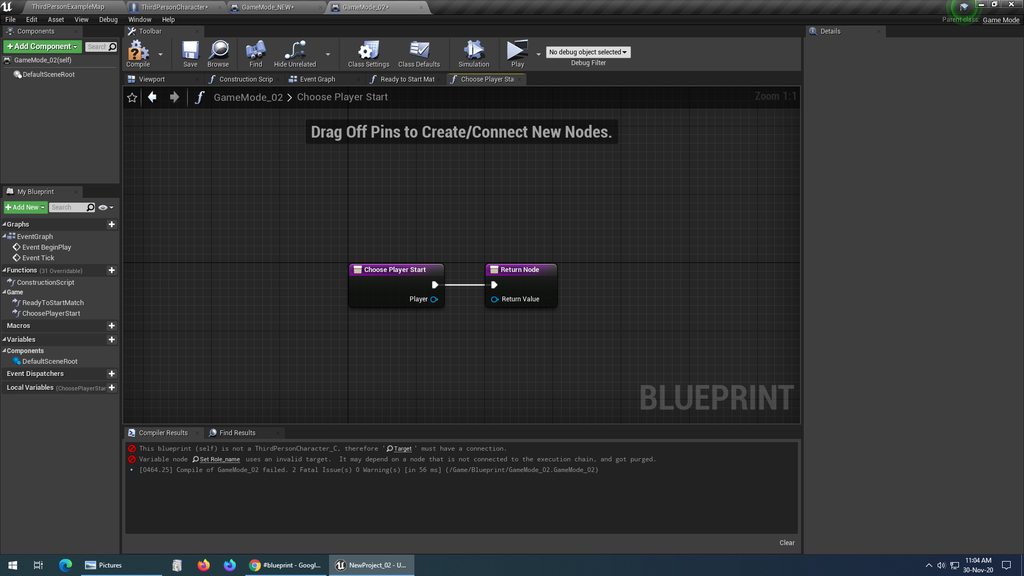 odd ember
Start Match
handling new player is too simple for what you want to do
at least for now
or actually
you can use it
timber cloak
ok found Start Match with mouse clicks
odd ember
you need it as a function though
that you can override
ah
let's try with handling new player
what you want to do is create a "spawn actor" node
inside of that function
and that should be of the class that is your player character
timber cloak
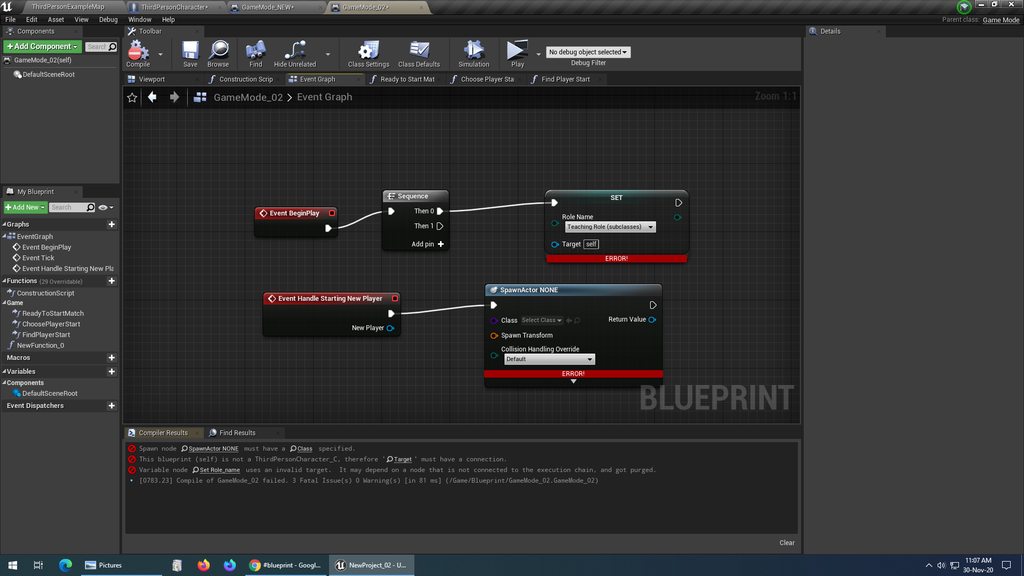 timber cloak
ok done
timber cloak
done
odd ember
now go into your player character blueprint
timber cloak
alright
timber cloak
ok had that
odd ember
cool
so
click it
in the details panel
tick the box called "instance editable"
and the box called "show on spawn" or something like that
timber cloak
done
odd ember
expose on spawn
now go back to your game mode
right click on the spawn node
and hit refresh node
timber cloak
already
odd ember
your spawn node should have that variable on it as a pin
forest sable
waht is GAS ?
timber cloak
correct
odd ember
this is how you will set the role on any new spawning player
timber cloak
ah i see now
but if you are not using spawn node? Only default spawning through defaults World Setting.
odd ember
if you want it to be random, just put a random function deciding the role
if you want it to fulfill other constraints, do that
forest sable
Thanks
odd ember
there is no such thing
everything gets spawned
players do not exist in the world
they always get spawned in
a player start is just an indication of where you want them to spawn
timber cloak
I am using "PlayerStart" capsule on Level. That's how i have been automatically spawning without Spawn and Possess node
forest sable
Gameplay Abilities (sometimes referred to simply as "Abilities") themselves are C++ or Blueprint children of the UGameplayAbility class. They define what the Ability actually does in C++ code or Blueprint scripting, as well as establishing elements of how the Ability should be treated, such as replication and instancing behaviors.
timber cloak
that was also how i started running around with loops and arrays
timber cloak
i see
odd ember
when the game mode is looking to spawn players
it gathers all the spawn points
in random order
and checks if something is already spawned on them
if not, it spawns something
it does this automatically
timber cloak
correct, i spammed countless of test to see it for weeks.
but then.. i always thought the sequence is similar when it comes to player controller's index
as in, the player0, player1, player2, which then i used "Shuffle"
to randomise
timber cloak
Uh i see.
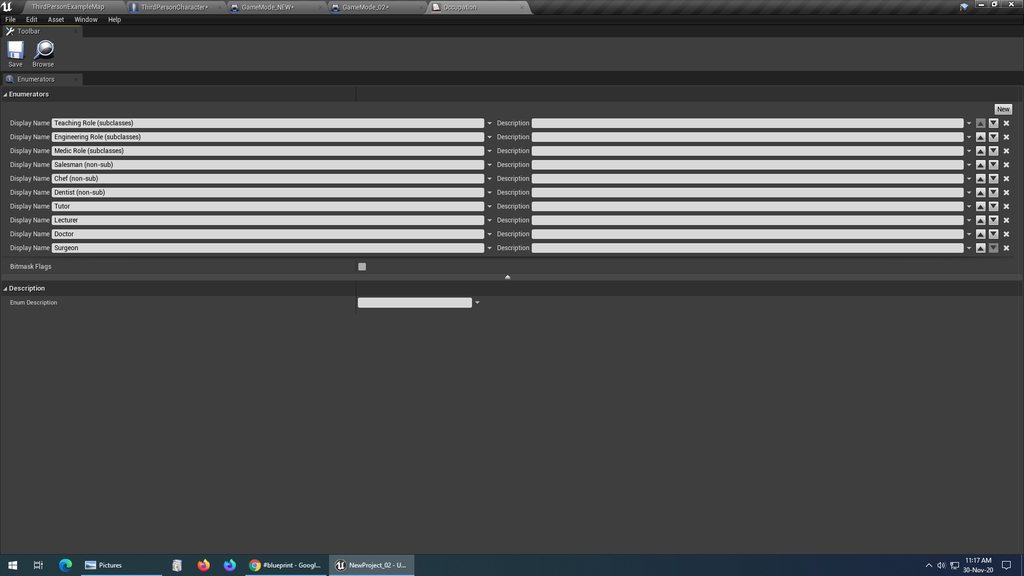
i would like to clarify, does all the Subclass for "Roles", goes into the same list together?
hold on
odd ember
yeah they're all in one big enum
right now you don't care about making it different than that
it's a consideration for later
for when or if you need to optimize
 timber cloak
which was also why my variables are a lot as you saw
odd ember
you have no subclasses currently
odd ember
and when youll start making them that's a later consideration too
timber cloak
that's also got me confused
odd ember
yeah you cannot convert between enums
and since role is a unified concept
your character will only ever have one role at a time
hence
1 enum
timber cloak
yeah been figuring how do i convert Byte to Enum back to back for few days =.=
been doing all these stupid mistakes.
thanks for the sitting through the frustrations on me, appreciate it really
odd ember
you're going about it wrong because you have this thinking that all of the responsibility is in one place
which is a really bad practice
each class is responsible for its own behavior
timber cloak
can see it clearly that is all wrong all along
odd ember
that is why the role is on the character
but the spawning of the character
is handled by the gamemode
therefore it gets to decide what the role is
this is how you should be thinking
now if you'll excuse me, I'll be leaving
timber cloak
odd ember
now if you'll excuse me, I'll be leaving
sure, so sorry to bother you till this late
i haven't slept past 24 hours either.
thanks a lot really.
neon sorrel
-Is anyone able to help me with getting variables from a player?
I keep getting the same one from myself, not the player im looking at
I cant access the hit player even though I cast to them
noble basin
would anyone know how to change the radius of an instanced material through a blueprint?
 tight schooner
Change the radius?
tight schooner
yeah, using BP you need to make a dynamic material instance and then you can change parameters on it
What are Dynamic Material Instances in Unreal Engine 4?
Source Files: https://github.com/MWadstein/wtf-hdi-files
noble basin
i followed along with that, i get how to use a dynamic mat instance to change the color or anything along those lines, i just dont know how to get to those variables along the right there
tight schooner
ultimately you're going to Set Float Parameter Value on a Dynamic Material Instance reference
and the parameter name will be "Radius"
so like the video demonstrates, you need to create a DMI, save the reference to a variable for future use, apply the DMI to some mesh
and once you've done all that you can Set Float Parameter Value on that DMI variable you saved
noble basin
does it matter what the mesh is
cuz the material is assigned to the post process volume
tight schooner
oic... I haven't tried it on post process materials
so I don't know if there's some consideration involved
tight schooner
@noble basin In my project I'm setting a (non dynamic) post processing material
reviewing my script, apparently the way you do that is by setting the... Settings... (set settings) on a PostProcess object
and within that huge PostProcessSettings struct is a "Post Process Materials" parameter
and you can set a material there
Maybe you can make a dynamic material instance
and set it in a PostProcessSettings
here's a simplified version of that. "Object" way at the bottom left is where one assigns a postprocess material
so if you fed it a dynamic material instance, maybe you could control it
noble basin
im in a group project tryin to figure all this out haha, im talkin to the person who handles all the fx stuff and seein if they can help
 vivid aurora
i changed it from being an actor to being just an object and it lets me use the dropdown now but now it doesn't see any objects
 ember dawn
So I've got a broad question. Where exactly do you put the core systems of a game? Like if you want combat to have an Armor system that both players and enemies use, where do you build that system so that all the various actors can access it rather than building it into each of them individually? Because if you end up needing to make changes to it, its better to have ONE place you can make those changes, rather than redoing it on EVERY actor.
I originally thought I could put those things in the GameMode but apparently that was incorrect.
 mortal nacelle
question: what is the best way to check if a class variable is set to None? the IsValid macro node doesn't seem to work for class variables.
situation: I have a basic attack with an optional projectile to spawn. I want to run the projectile logic only when i've configured that child class with a projectile BP
ok, apparently i can use an equals node. when I select "None" to compare, it is pretty glitchy, but it actually works
just says "Select Class" still
but w/e, i dont care
tight schooner
@ember dawn I'm not an expert and I haven't tackled equipment systems before. In lieu of someone more knowledgeable responding, I'll suggest it can live in a parent class of your pawn subclasses (knowledge of how inheritance works helps), or if it's a system that will exist across unrelated classes, you could make it as an actor component class and add it to any BP class that needs armor handling. (https://youtu.be/qr4ZjieAQKY)
Game Mode and other such manager classes is too high level for an armor system
 blissful hornet
I'm getting a BPNativization error for my UMG widget. Get Selected Item in is private in UListView. How could such an important function be private?
 raven pilot
hello friends
So am getting this error in the editor even though theres nothing wrong in the blue print graph, any thoughts is apprieciated
 turbid rapids
Hi
Anyone has a good way or tutorial for making a edge detection?
something like what is in Batman or Spiderman games ... when character face to an edge a little icon shows on that edge... I couldn't find a good tutorial myself .. any help is appreciated
elfin inlet
Where can I find good documentation about tile view umg?
I'm trying to do a good foundation for RTS hud but that wretched thing just keeps crashing
 brittle fiber
Masters, Spacetime is right
there is a platform that spawns blueprints from data table in a sphere
there are 2 dew things that i am to blend. This tentacle is a spline BP with niagara....
mission is simple, the spline has to start where the platform is placed( center. and finish where the spawned blueprint is
some private step by step dedicated guidance i seek)
is loading
elfin inlet
this is an inquiry for the ascended
olive sedge
I need some clarity on NPCs/AI. I'm trying to get a Manny to do my bidding.
Could you guys help me clear up the structure here?
I need a blackboard, that's where I store my decision making data
I need a Behaviour Tree, that's where I decide what the character is doing under what circumstances
I need an AI controller, that's where I.. I don't know, initiate the BT?
I need a character blueprint, do I? Why?
I need a pawn to attach my mesh and such to, yes? Should it be a character pawn? can it be an empty pawn?
elfin inlet
olive sedge
I need some clarity on NPCs/AI. I'm trying to get a Manny to do my bidding.
Cou...
"I need an AI controller, that's where I.. I don't know, initiate the BT?"
It posesses the character and starts controlling it according to the BT