#blueprint
402296 messages · Page 574 of 403
 brittle fiber
 olive sedge
@elfin inlet I see.. I just can't figure out how to get this to work. My Manny just collapses and spazzes 😆
 elfin inlet
olive sedge
elfin inlet
olive sedge
Can't right now but in an hour or so maybe
 chrome quiver
I have a top down camera, you can rotate it's spring arm by 45 degrees left or right. I want to have this rotation happen over the course of a couple of seconds. I've tried timelines and RInterpTo as forums recommend but can't get them working. Any recommended way to accomplish this?
 turbid rapids
any suggestion?
chrome quiver
@turbid rapids You only need it for specific edges right? Maybe just put an invisible collider at the edge that shows the icon when player is within. I also haven't played the games though :P
turbid rapids
chrome quiver
<@!395140496152068097> You only need it for specific edges right? Maybe just put...
No I want a method for every edge of models in the scene
I saw this method in a tutorial but not only it's not optimized also if there be a lot of building it'll be too hard to put a collision in any edge
 maiden wadi
@olive sedge For an AI to move somewhere, it just needs to be a Pawn or Character class, and have an AI controller possessing it. Most pawns placed in level are auto possessed, if you spawn it from blueprint make sure you use SpawnAIFromClass and not SpawnActorFromClass. Pawn also needs to have a movement component, Character comes with one by default. If you have that set up, you also need a NavMeshBoundsVolume in the level. If you have one, press P while in the editor and it should turn green where your AI will be able to move. Assuming all of that, you just need to call AIMoveto with a valid location that the AI can reach and it'll move there. The movement does not require a blackboard or behaviortree, both of those are for more complex AI.
@chrome quiver The only way to have that happen over a time distance is via Timelines/Tick/Timers. In your case, not timers. Do you want to allow full 360 degree movement, but only 45 degrees each button press?
chrome quiver
Yes that's correct.
Like Don't Starve if you've played that
RotateCameraRight shows what I'm currently trying (and is def not working, lol)
This vid show's what I'm going for, should start at 3:28

Leave a like and comment if you enjoyed the video.
And subscribe if you want to see more.
¬ Facebook: http://www.facebook.com/JyrzRM
¬ Twitter: @JyrzRox
¬ Tumblr: Jyrz.tumblr.com
Have an Awesome day. :D
@maiden wadi
maiden wadi
Still depends on a few factors. Do you want consistent movement like disallowing another button press until the camera is finished rotating, or would you prefer if say.. two button presses would move 90 degrees, but faster?
 fair sun
Does this return velocity in local or global space?
chrome quiver
Just one per, but it might be nice to move back the other direction mid rotation, and have it stay on the snapped 45 degree angles
maiden wadi
@fair sun Velocity will be a length vector relative to 0,0,0, but it's relative to global space. Not compared against the velocity of anything else so to speak.
fair sun
thanks
 dusty ibex
is it possible to set exponential fog's Fog Height Offset from Blueprints?
 hollow drift
how can I send information from a bool to another bp
this seems not to work. the object is an actor
maiden wadi
@chrome quiver I find this worked pretty well. Could suit until you find something better. Could also break it apart a little with some extra events/functions.
@hollow drift What does PuzzelBlockRef point to?
maiden wadi
Have you set it anywhere?
chrome quiver
Gonna try it now 👌
maiden wadi
You're not setting it there. You're getting it. If you haven't set it anywhere, it'll be pointing to nothing, and you can't cast nothing to something.
 deep elbow
hello, i have a variable in BP_01 that is being updated and set from BP_02. the var is set to RepNotify in BP_01 but that isn't being triggered. any ideas why that would be the case?
maiden wadi
@deep elbow It's for sure being set on the server?
deep elbow
It's actually single player, I'm just trying to pass on some info when the var gets updated. If i update the var directly in BP_01 the notify gets triggered, just not externally
may be using notfy in an unconventional way and should change how that is updated
maiden wadi
Ah, if I recall right something stops OnRep from being used in singleplayer reliably. I'd honestly just make yourself a function to call when you want to set the variable. The function can set it and do what you need. For example, in BP_01 just make yourself a function with the property type as an input, and set it in the function, and do whatever you're doing in the OnRep.
deep elbow
yeah i've just made that change and it works as expected, thanks for the help!
 spark bridge
Hello ladies and gentlemen. A smol question if I may.
Is there any way for Unreal Engine to NOT compile all blueprints at startup?
Thanks in advance!
 supple night
Hey, anyone has an idea why FInterpTo would interpolate up, but not down?
I'm using it to smoothly set a progress bar's progress. setting it to e.g. 0.5 works fine, but setting it to 0 (while the current value is 0.5) won't do anything. in theory it should interpolate down from 0.5 to 0
deep elbow
looks like it, my brain too slow to see anything wrong with that
supple night
yea its weird
deep elbow
it IS getting updated to 0 right, like
maiden wadi
That should work perfectly fine as long as ProgressTarget is definitely 0.00
supple night
It is, I'm calling it with 0.0 to reset the bar
maiden wadi
Can you disable anything calling the SetProgress, and start your progressbar at 0.5, and let the tick run with default values on the Target at 0.0?
If that works, it might be probable that something is affecting your ProgressTarget.
supple night
yea running it in the sandbox works
oh let me check a thing
yep that was it
stupid me was recreating the widget everytime, so the progress bar theoretically was updating right, I just didn't see it because everytime a new bar got overlayed
deep elbow
boom
maiden wadi
Been there done that.
supple night
Thanks! Sometimes a simple push in the right direction is enough 😉
 thorny cedar
can somone help me with Physics?
i spawn an object and lerp it from left to right, then stop the lerp and active set simulate phys, but nothing happen :/
this seems to do the job, if i spawn the object with physics on the physics are active :/
chrome quiver
@maiden wadi Thanks a ton! Really appreciate you even showing me the blueprints needed, was hard trying to figure it out on forums. I didn't add the StopRotating function as I didn't know what you had in it, but it works just fine without it it seems.
maiden wadi
Ah. I forgot to finish that. Was supposed to close the tick gate when the rotation reached the right point.
 odd ember
thorny cedar
this seems to do the job, if i spawn the object with physics on the physics are ...
odd ember
thorny cedar
this seems to do the job, if i spawn the object with physics on the physics are ...
can you double check that your physics are actually set to active when you're doing it after the lerp?
thorny cedar
will do that
Î activate it right before i grab my cube
when my Interactor overlaps the cube it stops lerping
thorny cedar
got it working made a mistake when copy paste and forgot to edit the static mesh component names
 modern root
So I'm getting a super weird behavior within Unreal Blueprints
I have two rotators, LastRot and CurrentRot (Last and current rotation of the pawn) - and I'm tracking the different between each frame to calculate the rate of change
if I do it manually, I can save it as a variable and read that variable anywhere in my blueprint. However if I pass it through a Delta (Rotator) to normalize it first, and save it as a variable it shows up as 0 everywhere except within the function it's being processed.
I've logged the Delta, and the Rotator both in and out. And it only doesn't save the variable if it hits the Delta (Rotator) function - even though printing the results of the Delta() is good, and even printing the variable being set comes good. As long as I print it in the same function, any other function returns 0
 earnest tangle
Show a screenshot of your graph, otherwise kinda hard to say
 marble tusk
What does the function look like?
earnest tangle
That's peculiar... you sure "Rot Test" is not a local variable? Not sure what else could cause that 🤔
modern root
I did check, but regardless of what variable I set if it runs through the Delta it doesn't work outside the function scope
I even tried breaking it and setting each as its own individual float variable, same result
if I just do CurrentRot - LastRot and save that to the same variable, it works
 tight schooner
Why is your blue colored print showing up twice with different numbers vs your green colored one?
It's like you're running that function twice, and it finds a delta of 0 after the second run
maiden wadi
You're sure you don't have a third printstring somewhere?
hollow drift
@maiden wadi sorry did not respond. I had to set up a ganestatem then i could cast properly 🙂
 lusty escarp
Hey, Not sure if this is the right place to be asking this, so hopefully someone can show me where. I am using the Architecture, Engineering, and Construction category instead of the Games one (not sure if that makes a difference). When playing the level, the screen is white and fades in, How can i remove this fade? I don't have a Post process volume in the world and there isn't a camera on the pawn
maiden wadi
@lusty escarp Unless it's something specific, there's a chance it might be exposure. You might try simply adding in a PostProcess volume, setting it to infinite extents, and turning the exposure up and down speeds way up.
Besides that I'm unsure. Never used anything but Game.
lusty escarp
@maiden wadi ah yes, setting the speedUp to 100 completely removes the white fade
Cheers
maiden wadi
@trim matrix How do you mean?
More specifically, what kind of vectors are they, and what are you trying to do with them?
Most people just call those two with AddMovementInput separately. Though if you still need the vector math, I would assume that adding them together, dividing them by 2, and then getting the unitvector from 0,0,0 to the new vector would give you the correct facing vector.
Vector with a length of 1.0
Facing vector, or normalized direction vector.
Something like this, I imagine would get your correct unit vector to the front right of the character.
tight schooner
Wouldn't there be cases where adding two vectors results in different vector lengths?
I'm no math whiz but I'm thinking like if one vector was 270 deg rotated from the other
It'd probably add up to a length less than 2?
If that's the case you'd have to re-normalize the result
odd ember
it would but forward and right vectors come prenormalized
and the length would be exactly 2
maiden wadi
Can think of it more like this.
If red is forward, green is right. Orange dot is added then divided by two. Purple is the new unit vector.
 river seal
quick question about function calling. how can I call a function which exists in several actors but another actor/BP decides which actor will be called. (hope i am explaining it right)
odd ember
tight schooner
Does a vector of 1,1,0 have a length of 2?
yes
tight schooner
"UE4 Blueprint is the only scientific calculator I know how to use" struggle life
If I'm wrong then there's something I'm fundamentally misunderstanding
maiden wadi
@tight schooner Actually a vector of 1,1,0 has a length of just under 1.5
odd ember
yeah I forgot that the distance formula actually makes it the square root of 2
tight schooner
but yeah if you add normalized vectors you have to renormalize it AFAIK
cuz the result will have a different length
@river seal Are you asking how to do that without a chain of cast-to nodes for every class?
If the classes (can) share a common parent class, then you can cast to the parent class and all the child classes will inherit that behavior
If they're disparate BP classes, you can have them implement a Blueprint Interface
river seal
tight schooner
<@!689401908950990870> Are you asking how to do that without a chain of cast-to ...
oh! parent class sounds interesting, if I understand correctly what you mean. will give it a quick try and let you know. thx 🙂
 wooden rapids
Hello is there a limitation of using Play Montage , after using multiple Play Montage in my Characters Blueprint some of my Action Events or Animation for Attacking doesnt work , the funny thing is if i remove 1 of the Play Montage its gone work , overall i have maybe 8 pieces of Play Montage , does anyone have the same conflict?
tight schooner
river seal
oh! parent class sounds interesting, if I understand correctly what you mean. wi...
yeah, the premise is the parent class has the function, then you can cast to the parent and call that function. All the child classes will inherent that function (but each child class can override the behavior if desired). And in that way, the manager actor doesn't need to know about every single child class it's talking to.
 gusty shuttle
You guys have any tips to not have any texture bleeding?
gusty shuttle
I already posted there man, I figured I would open the question up to more people
Why? Because I am irrational and pissed that my texture import is doing wacky things haah
tight schooner
not my area of expertise but if your texture map has a blue BG for the unused areas
maybe your texture map needs a larger skirt around the textured areas
so that when UE4 makes MIP maps it doesn't blend the background
that's my guess as to what's happening
gusty shuttle
Yeah, I know I made my UV's too small, it's a 4k texture, tried to jam as much as I could on it. But I mean, wtf does UE4 do to make it bleed. I tried no mipmaps, tried other texture settings in ue4 and still, it bleeds

UE4 to my texture^
odd ember
clearly #blueprint is the correct place to ask
wooden rapids
Overall if imported Model to U4 from Blender , and if i change before the Uv`s scale in Blender , it doesnt import correct in U4
gusty shuttle
@odd ember If you know the answer, let's move the convo to Graphics then 😉
wooden rapids
Hello is there a limitation of using Play Montage
odd ember
goes without saying that people with appropriate expertise hang around the appropriate channels
wooden rapids
i wrote above but no one answer
gusty shuttle
Aye, fair enough, no need to get snippy @odd ember
 stray island
Hi , I am trying to change the main player actor to change the main actor to a selected other actor
Whats the best method? Changing meshes? This would require changing many character attachments
If i want to change change an actor to its child actor , what should i do ? Spawn ? Or what method
 trim matrix
I am new to Unreal Engine and am currently looking at tutorials. But I have a problem that I can't find this Defualts window anymore because the tutorial is old.
I'm using UE4 2.25.4
tight schooner
isn't that icon somewhere in your toolbar?
stray island
I think it used to be under blueprints?
stray island
Window > details?
tight schooner
it is the correct window though
stray island
Ya class defaults should be the one
tight schooner
In your previous screenshot dude typed "wheel" into the search box, which limits the view to just the wheel stuff
trim matrix
I already got the other one but I don't know how I did it
trim matrix
tight schooner
In your previous screenshot dude typed "wheel" into the search box, which limits...
yeah ik
stray island
Defaults , or class defaults is dependent on your blueprint so maybe the one you’re editing doesn’t have the options you want?
trim matrix
It's a normal Blueprint
stray island
What option exactly are u trying to find
trim matrix
I want to know how to open this tab
trim matrix
yeah but how in 4.25
odd ember
it doesnt exist as a separate tab
trim matrix
hey guys I already have my save load system, I just need to implement a system that will save the location of the objects in my map, and if we destroy them and then save the destroyed objects remain destroyed, you can make a special offer for that. **I don't know where I should say **it but if you can help me in voice / teamviewer to do that.
I obviously pay for the support and help.
I've been stuck for several days, with the docs I'm lost.
stray island
This is probably some car blueprint? If you have some default car in your project open it and press class defaults or click car movements , sorry never dealt with cars
odd ember
you will most likely need c++ to implement that @trim matrix
trim matrix
Wait i'll send link and time

For the full tutorial playlist:
https://www.youtube.com/playlist?list=PLZlv_N0_O1gaz6eETtIxcmUDnqu5A-8At
In this video, we setup a basic car using all the default values. We will use this car for future tutorials to learn about tuning and handling.
A link to the wiki for further notes is available here -
https://wiki.unrealengine.com/Vehicles...
@odd ember someone tell me we can with bp save (struct), i have learn but its not possible for me :/
 amber marsh
for some reason I am having trouble with a simple thing right now where I want triggers that only overlap players. I made the player character custom collision type of overlap. But the player does not overlap with this trigger. What am I missing?
odd ember
trim matrix
<@!224571781862653952> someone tell me we can with bp save (struct), i have lear...
it's not really possible in general. you really need to use c++ to make it work
wooden rapids
guys i didnt know really ,do i need to repeat everytime my Question here or if someone join later and know a solution
trim matrix
@odd ember You can for me ? 🙂
stray island
trim matrix
hey guys I already have my save load system, I just need to implement a system t...
I think its possible with blueprints
trim matrix
trim matrix
https://www.youtube.com/watch?v=9ariPx6M33o&t=189s 12:38
@stray island Do you know what I mean now
If I load a part I have the position of the objects of the last save and if some objects were deleted then they are no longer there.
easy to write but not easy to make lol
odd ember
well if you think it's possible then good luck trying
stray island
trim matrix
i just need to save all location objects and if destroy
Get all actors of class > get world location > save that locations , and create some boleans for destroying
stray island
trim matrix
<@!768035735470080000> Do you know what I mean now
I will check out
trim matrix
@stray island we can go PM do explain me ?
easy to write, but to do its not same choose
 stray rock
Hey not sure if my issue should be in multiplayer or here so I'm having an issue where if the player1 for example gets a weapon its added to his view and the weapon is also added the the others people view and i want to disable the other view for player1 and so on (i don't get why disable for others or only owner see isn't working maybe im using it wrong)
i think its more connect to blueprints than actual networking stuff
stray island
trim matrix
https://www.youtube.com/watch?v=9ariPx6M33o&t=189s 12:38
Did u create a vehicle wheel and go to its class defaults
stray island
trim matrix
<@!768035735470080000> we can go PM do explain me ?
easy to write, but to do its...
Alright
trim matrix
stray island
Did u create a vehicle wheel and go to its class defaults
I have done everything like in the video
stray rock
can some help :P?
stray island
trim matrix
I have done everything like in the video
Then someone with car experience should reply to you
trim matrix
ok
wooden rapids
guys i didnt know really ,do i need to repeat everytime my Question here or if someone join later answer me here, thanks
stray rock
what?
 echo snow
If it's been a while and your question was drowned out, it's best to ask if anyone knows vehicle stuff and then ask again
stray rock
hey do you know how to fix my issue?
echo snow
Questions can be passed by very easily due to the speed in which the conversations flow.
No I don't, I have a question of my own and am waiting so I don't interrupt anyone)
wooden rapids
because i didnt find anything on Google , is there a limitation of using Play Montage
echo snow
@trim matrix if by BP and you've set it up already, run the simulation)
Sorry for asking this in multiple places ahead of time, it falls in two categories so I don't know if the graphics channel will know.
Does anyone know how to grab the light value on an object, possibly per pixel or tri / quad. The value can be either a float or vector. If anyone has a BP or cpp solution I would be very grateful.
It is to override the shading on an object without adjusting the shading model itself or adding a post process material. The object is a planet from above so it doesn't need to be perfect give the distance to the camera.
The example here is using the atmosphere lighting but I will need to use my own mie ray solution
maiden wadi
@wooden rapids Limitation like what?
wooden rapids
maiden wadi
<@!434129980419604480> Limitation like what?
a limitation of using Play Montage , after using multiple Play Montage in my Characters Blueprint some of my Action Events or Animation for Attacking doesnt work , the funny thing is if i remove 1 of the Play Montage its gone work , overall i have maybe 8 pieces of Play Montage , does anyone have the same conflict?
echo snow
If anyone has an answer to my question, please @mention me when you write, I have a meeting in a few minutes. Thanks a lot!
maiden wadi
@wooden rapids Have you actually set it up correctly in the animation blueprint for the montages to blend in?
@stray rock That's not an easy question to answer, partially because there are a couple of different methods. In short, you need to first make sure you're only spawning a replicated weapon on the server alone. This is important so that you don't end up with client copies. Second is the difficult to answer part. Some people attach them differently. Some simply attach one mesh to different skeletalmeshes from an onrep pointer of the weapon on each client. So the owning client would attach it to the first person arms mesh any other client would attach it to the third person mesh. Alternatively, you can also do as Epic does. Two different meshes in the weapon, one for first person, one for third person, and simply attach these to the correct mesh and set up the correct OwnerNoSee, OnlyOwnerSee on the correct mesh.
wooden rapids
maiden wadi
<@!434129980419604480> Have you actually set it up correctly in the animation bl...
Its worked before like a charm and i have multiple Animations , just when i use Play Montage not Play Anim Montage , because Play Montage interrupt my keys or event on my gamepad just severall button , its very funny because they have no relation to each in another graph and i have the limit of 7 if i use the 8th than i get the problem, thank you again Auther for reply
maiden wadi
Okay. But my question was if you set them up to play correctly in your animation blueprint?
Do you have something similar to this in your animbp?
 rough jay
no lol
stray island
wooden rapids
Its worked before like a charm and i have multiple Animations , just when i use ...
Montages sometimes have problems if you dont set up the correct correct slot did u check these?
Default slot and so on
maiden wadi
I would read over both of these if you're going to start working with montages. Pretty much everything you need to know is in those two links.
river seal
@tight schooner working perfectly with parent/child actors. thanks a lot 🙂
wooden rapids
maiden wadi
Okay. But my question was if you set them up to play correctly in your animation...
Yes but not all , i just use some Hurt Animation inside the Animation Blueprint all working perfect and so on, thank you Auther i will check out all these you send me , maybe i miss something there
maiden wadi
@wooden rapids Initially I would ditch the LayeredBlendPerBone, and change your speed >0.0 to something more like Speed>1.0 or 5.0. >0.0 for something like this is a bit razor's edge.
 tulip iris
Anyone have a Blueprint nativization standards guide? Unreal's documentation doesn't seem to be complete in this area. Unless I'm missing it?
maiden wadi
Nativization made me learn C++.
tulip iris
🙃
maiden wadi
Dunno. I've never looked for much on it. The little research I did more or less painted nativization as a halfway project that never quite worked correctly. Has it's small uses here or there I suppose, but I just assumed by the time I learned the quirks, I'd be able to translate most of my blueprints into C++. Only took a couple of months to get comfortable with it. Very happy I did too. Opens up a lot of avenues.
wooden rapids
maiden wadi
<@!434129980419604480> Initially I would ditch the LayeredBlendPerBone, and chan...
Ok thank you really much Authaer , i will check it soon , i come from Blender Game Engine to Ue4 and its my 8 month and i am really happy with Ue4
maiden wadi
@trim matrix Should work fine. How did you set it up?
 wicked dock
Hey guys, i have problems constructing an object from a class :/
I have no idea what im doing wrong, any help appreciated.
The outer is just a normal Blueprint Class
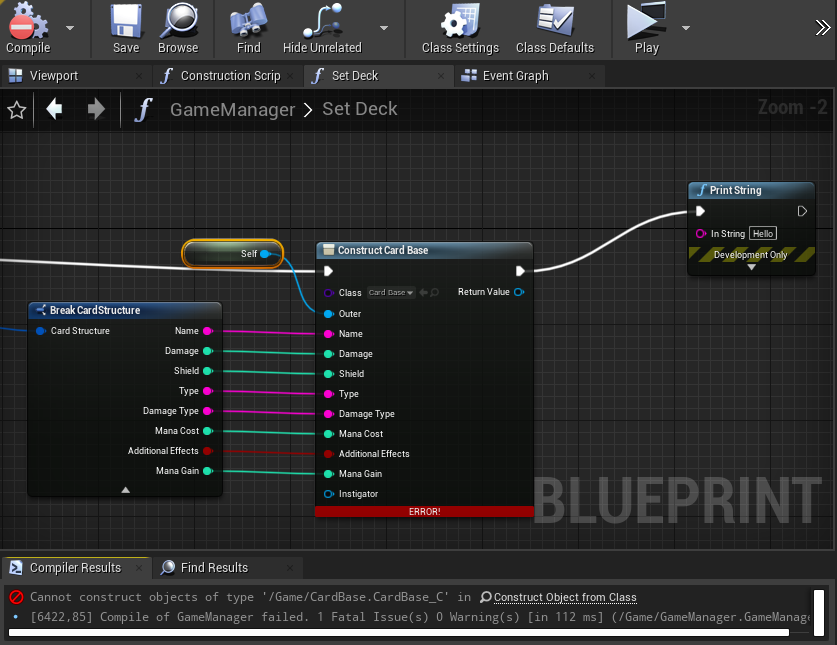
what ive read is that the Outer has to be a blueprinttype Uclass or something but i have no idea what that even means or how to change that
maiden wadi
@wicked dock What is CardBase? What does it inherit from?
wicked dock
its an actor...
maiden wadi
Don't use Construct, use Spawn.
wicked dock
i got it wrong i mean
i want it to be an object that i can place into an array
and later spawn as an actor
sorry for confusing u
maiden wadi
Can't you simply make your CardStructure struct an array, and spawn it from that?
wicked dock
the cardstructure is just an a table with all the card types etc
i guess i could make a cardstructure holding all the different "owned cards" but then i wouldnt be able to shuffle them, right?
actually i could.... This is a total different way to do it. it could also be a better way runtime wise
maiden wadi
Generally you should only use Objects in place of struct data if you specifically need an array of objects. Like for differentiating between a simple inventory object and a gun actor. But if you don't have different classes like this to differentiate, it'll be a lot easier just to use an array of structs.
wicked dock
this makes a lot of sense
so this would be a workaround to the problem, but why do i even encounter the problem?
wicked dock
this makes a lot of sense. thanks a lot authaer!
rough jay
anyone got an example of adding more items to an array
stray rock
maiden wadi
<@!371258739917062146> That's not an easy question to answer, partially because ...
sadly the owner see no, see stuff isn't working as i spawn the guns into the players hand however i found a cheat if i make the third-person model the first-person too than i only need 1 gun but than i get character legs and it looks weird xd
also he can put his head trough walls ._.
so i dont think this will work
maiden wadi
@stray rock The OwnerNoSee stuff works fine if you set it up right. How is your player character set up?
wicked dock
@maiden wadi it worked instantly. thanks for the help
maiden wadi
@wicked dock Also for future reference, the general guideline for creating classes is:
Actor = SpawnActorFromClass
AI = SpawnAIFromClass
UObject = CreateObject
UserWidget = CreateWidget
wicked dock
here is where my thought process went wrong: I thought i can create an actor as an object first and set up all the variables and then later use it as an actor
but thats not how any of this works haha
tight schooner
@tulip iris re: nativization... Delay nodes are sometimes buggy (use timers instead) and collisions are sometimes buggy (if so, spawn collision components on BeginPlay). Make sure there are zero warnings or errors in your BP. BP Interfaces are kind of weird with nativization so maybe avoid those on your nativized classes unless you're doing total nativization.
Those are the hurdles I had to jump through in my project
 late cloud
Yo guys, do you know whether there is a way i can render my sequence in HEVC?? All i see is .avi and probably using H.264. Files are huge and compression ruins them. And .avi? like seriously, can i change that?
oops wrong channel sorry
ignore lol
 spark steppe
can i assume that in a map the last added value is always the last item?
trim matrix
So I want to be able to change a sprite in my behavior tree is there any way to do that?
 vivid fog
Hey everyone! Does anyone know if there's a way to search for one specific item in an array, rather than having the entire thing required to be an exact match?
Like if I have an array of structs and I only want to search the string values within those structs (and not the other data they contain like ints and objects, etc) is that possible?
maiden wadi
@trim matrix You might be able to store that as an object in your Blackboard.
@vivid fog That requires a custom implementation. You'll need your own function for that which loops over the array, breaks the struct to compare it's string.
spark steppe
or refactor to a Map if you have unique strings
tulip iris
@vivid fog Use the "contains" node on a branch
maiden wadi
Contains compares the whole struct.
odd ember
vivid fog
Hey everyone! Does anyone know if there's a way to search for one specific item ...
you'd need something like a dictionary tree if you're looking for partial matches
vivid fog
@maiden wadi I think that did it! I've at least got a true/false return value now for whether or not the struct array contains this one string; thanks so much for your suggestion(and everyone else who replied as well)
 spice sequoia
What is the best/most efficient way to always have an actor always pointing down? I have a BP in my scene (basically a cannon) that is attached to the underside of another Pawn BP that moves (a floating ship). I want it so whenever the top BP pawn tilts/moves that the cannon hanging underneath is always pointing at the floor, sort of gyro'd?
Have tried turning physics on with rotational constraints in the child but the Child BP no longer moves with the adult
 paper galleon
@spice sequoia
If you want it pointing straight down, you could do a line trace to the ground and use the look at rotation function so that the cannon is always rotated to the hit location of the line trace
This is one way to do it though
maiden wadi
You can pretty much get away with vector math too. Down is always the same direction. But in short you're going to need to update it on tick in the actor that needs to face down.
trim matrix
So I have added a image variable in my npc blueprint but I can´t see anything to add to it
paper galleon
@maiden wadi
Exactly. I wanted to point out that it could cause a performance drop.
Although he could use a time line that is set to looping
paper galleon
@spice sequoia
Hope your question was answered?
spice sequoia
paper galleon
<@453628418991325195>
If you want it pointing straight down, you could do a lin...
I guess I would need to do this on Event Tick all the time?
maiden wadi
@paper galleon Timeline is the exact same thing as tick, there would be no operational performance difference between the two.
One update per frame drawn to screen.
trim matrix
Is this the right way getting image object from a object variable?
maiden wadi
Can disable tick at runtime too.
spice sequoia
I actually just set the world rotation from Relative to 'World' in the child BP and that seems to have done the trick - Is the BP/tick version more efficient than this?
paper galleon
Yep
I actually just set the world rotation from Relative to 'World' in the child BP and that seems to have done the trick - Is the BP/tick version more efficient than this?
@spice sequoia
I'm not sure exactly how your cannon works. But if what you did works, go for it.
Tick is almost always never efficient especially with complex calculations
maiden wadi
@spice sequoia What did you change?
paper galleon
I assume you are not changing the rotation at runtime, like swivelling the cannon
 old grove
I am starting with UE, and I have a silly question. how do I mmake the hand to move on the blueprints screen popup? I am struggling to navigate that window
spice sequoia
So to do the same with a timeline would I essentially connect a 'set rotation' node to the update node and constantly check this against a down vector and leave this looping forever?
paper galleon
Yep, in theory.
spice sequoia
@paper galleon The cannon basically stays fixed in one direction (down) and the airship moves it around
paper galleon
Not sure about performance though. But this is a relatively small calculation, so you good.
spice sequoia
Sorry - just to get my knowledge straight - is a timeline more efficient than a tick?
and why?
paper galleon
@paper galleon The cannon basically stays fixed in one direction (down) and the airship moves it around
@spice sequoia
Is the cannon a component or another actor?
maiden wadi
If you use it constantly, no. They're the same thing. If you want something that only happens sometimes, yes a timeline is better than tick.
spice sequoia
@paper galleon Cannon is another actor
Ok got it - thanks for the help
@maiden wadi -so for example I could have it on a timeline that only runs when the actual ship moves
to keep its use minimal
paper galleon
Sorry - just to get my knowledge straight - is a timeline more efficient than a tick?
@spice sequoia
The delta time of a timeline that enables it to run comes from tick.
But the timeline has some added functionality that allows you to determine when to start it, stop it, what to do while it is running, what to do when it is finished e.t.c. as far as I know, tick has only one function to disable it.
maiden wadi
Not really. Because you'd need something checking when the ship is moving. Unless you want to rely on Action events. Axis events are the same as tick as well.
paper galleon
to keep its use minimal
@spice sequoia
Yeah. Good idea actually. You could start the timeline when the ship begins moving and stop it when the ship stops
maiden wadi
How are you planning on checking for when the ship is moving and when it stops?
spice sequoia
paper galleon
> Sorry - just to get my knowledge straight - is a timeline more efficient than ...
Ahh - ok. makes sense. I always thought of them as two different things. Makes sense it runs off the tick
paper galleon
He should be able to handle that.
trim matrix
is there any way to get a image object variable from a object variable?
spice sequoia
maiden wadi
How are you planning on checking for when the ship is moving and when it stops?
I guess I could cast to an event in the cannon every time the ship recieves an input as one option. For now will just use the relative rotation fix as it seems to work great and so far having no negative imacts impact.
old grove
I have a silly question. how do I get the hand to move on the blueprints screen popup? I am struggling to navigate that window
maiden wadi
@trim matrix Cast the Object to Image.
paper galleon
I have a silly question. how do I get the hand to move on the blueprints screen popup? I am struggling to navigate that window
@old grove
🤔🤔 What hand? Could you post a pic?
trim matrix
@maiden wadi the cast failed
tight schooner
right click and drag?
paper galleon
If you are talking about event graph or any graph for that matter to pan around is holding right click
old grove
@paper galleon
I know its a dumb question, but I am struggling to move trhough the bluespring window without it xd
tight schooner
Right click and drag
old grove
askljdhasiudhasdjasd
wheel buttom wasnt doing it
and I tryed like
control click, mayus click, alt click
except that
xD
ty tho
paper galleon
Right click should work
old grove
yah it works
trim matrix
@maiden wadi Yeah my object was a texture 2d but is there any way to make a texture 2d to image?
maiden wadi
@trim matrix UImage is a widget. UTexture2D is a texture. I think you're looking to set the UImage's brush from the UTexture2D
paper galleon
I think he's trying to get a texture asset from a texture class🤔
maiden wadi
@paper galleon Here is your Timeline vs Tick. First is timeline. Second is tick. 10,000 actors with timelines vs 10,000 actors with tick. All doing the exact same thing, just setting a single float variable.
Note the extra spawn time on the Timeline ones, because a timeline is an extra component in the actor. Other than that, they're nearly identical.
tight schooner
👀
paper galleon
Yeah. I see that. That's what I told him. I just prefer timelines because of the extra functionality added to them. Also, the curves are super convenient. But in terms of performance, I guess you've enlightened me.
amber marsh
anyone here know why this does not work?
can an actor properly get the player controller somehow?
maiden wadi
Is that component on the ElPlayerController class as a component?
amber marsh
the elplayercontroller is just the default player controller for the game mode
maiden wadi
What is this component being put on?
amber marsh
and this is a trigger to change music
maiden wadi
Which actor class?
amber marsh
its a actor that has a trigger box to change music
maiden wadi
If that actor is not the player controller, that call will never work. Owner is the Actor that the component is added to.
Is this in multiplayer?
amber marsh
yes
maiden wadi
Does this only happen on a client? Or do all clients need to hear the change?
amber marsh
oh good point. so is it possible for a regular actor to get the local player controller?
only on the client
maiden wadi
Just use GetPlayerController0 then.
amber marsh
how do I get around the issue where testing in the editor will mean each local player is a different index on that node?
 pastel tiger
Guys I Need Help I Was Using Unity PlayMaker Then I Changed To Unreal Engine Blue Print I Want A Tutorial For Third Person Shooter Game Pleasssssse
Help Me Help Me
amber marsh
So I guess the real question is. How do I make it so a trigger will only trigger something locally? Is this default behavior if the actor with the trigger event is not replicated?
maiden wadi
@amber marsh GetPlayerController0 is always the local controller.
If you use this on a client, it will always be the local controller. If you use it on a Listenserver, it will always be the listenserver's controller, and if you use it on a dedicated server, it will always be the first player connected's controller.
 sonic crescent
Hi there. What is the best way to do a big RAZ bomb, where all enemy died? like in retro Shoothemup?
an event dispacher? a big overlap collision?
amber marsh
oh wait this means that getting the player controller on random actors is not an easy process then.
maiden wadi
Why?
amber marsh
My goal is to have this run locally. Music only changes for the client that touches the trigger.
not for anyone else
maiden wadi
By client, I assume you mean their character?
amber marsh
yeah
Play A is listen server. Player B joins and runs into town. Player B should hear town music play locally
maiden wadi
Use GetPlayerPawn and == it to the overlapped actor in the trigger.
GetPlayerPawn is the same thing as GetPlayerController->GetControlledPawn. GetPlayerCharacter is GetPlayerController->GetControlledPawn->CastToCharacterClass
amber marsh
kk thanks!
 void oak
Hello All,
I am trying to save each individuals player options into an array.
My issue is the number of players in a game can differ.
Is there a way to make an array variable with its name being the same as the "Players name"?
maiden wadi
You could make a map out of it, and make the Keys the player's name.
void oak
I have 6 variables i need to save per player. Don't maps only save 1?
maiden wadi
One Key, One Value per entry. Could always make a struct out of the variables and make that the Value.
Alternatively an array of structs, with one of the variables being the name and a function to parse the array for the correct struct.
void oak
Didnt know you could make an array of structs
maiden wadi
Your world is about to change my friend.
void oak
for sure, thanks for the wisdom
 brittle shell
Can anyone tell me how to reset the animation whenever I press the "E" key and how to trigger this just from the triggerbox area and not from the entire scene ?
void oak
stop anim montage
Built in node
Also you would have to make your "use button" check for event overlap.
brittle shell
Cant use the anim montage :<
wooden rapids
Hello have someone stuck on these problem , i have 7xPlay Montage and 6 x Play Anim Montage with different Animation Montage all work fine..after i add the 8th Play Montage as on the Picture below node in my Characters Blueprint , 4 of my 6 Play Anim Montage wont work correct anymore, so i am ask is there a Limit to use Play Montage as on the Picture below , because its stupid i try everything but when everything work just the 8th Play Montage make trouble
And there is no Solution no Solved on Google anywhere , if i use Play Anim Montage all works fine its very strange
trim matrix
Is there a node to check if the unreal engine 4 game window is running in the bg?
i.e. you tab out to a different program? 🤔
rough jay
is the addforce node the same thing with unities addforce?
 random hill
Hey, I just found this problem... I have a character that rotates towards a cursor. He has a weapon actor attached. When I shoot the weapon using a Trigger Event (aka, left mouse button) it works perfectly and shoots where I am aiming.
But when I want automatic fire, it always shoots straight forward. I have event tick with two gates. One is opened / closed by left mouse button and the other gate works on a delay, acting as a cooldown.
any ideas what can be wrong / how to fix it?
 pale blade
So I have this radar system. Actors implement BPI_Marker to be able to be picked up on radar. Radar BP component attached to player that will scan and update the distances of the cached actors that implement BPI_Marker.
Option 1: Tick
Tick in BPC_Radar that will loop through the cached actors, for each movable actor will get the distance and update
Option 2: Timer with movable flag
Every time you add a movable actor to the radar to follow, it will set a timer to run and update each movable actor (similar to Tick). Will stop timer when the last movable actor is removed from cache
Option 3: Timer with flag called from actors
Each actor will implement BPI_Marker and when they move, they will manually call the character's Radar component to set the timer flag to start updating, for example "OnMove"
Timer will update for a second, but will refresh duration until after a second of no more "OnMove" then it will stop timer
Basically, I want to do Option 1, it's the most simple but it is not efficient.
Option 2 is also not as efficient because as long as there is a movable actor in the cache for the radar to follow, then it will keep updating even if no one is moving
Option 3 is the most efficient, only starting the timer if something moves. However, this requires the actor to send its own update (OnMove), rather than the radar component scanning for any movement.
What do you guys think is best or if there are any issues?
 proud hull
@pale blade you can use option 1 and set a custom tick interval so it doesn't run every frame. Somewhere between 0.1 and 0.5 seconds is probably good enough.
pale blade
proud hull
<@!479500648103280650> you can use option 1 and set a custom tick interval so it...
I think then that's like Option 2, it'll run even if nothing moved. Isn't that kind of inefficient?
proud hull
Not saying it is most efficient, but for simplicity it can then be made a bit more efficient.
Like you mentioned, option 3 would be most efficient since it is event driven.
 neon sorrel
Anyone know why this cast is failing? The widget's parent is user widget, so should work.
@trim matrix Just make it a widget for the texture, fairly easy to make one and then just put it on the players screen.
 royal cedar
I've created a new player controller and a new gamemode and when I try and get references to the player controller I'm having an issue stating "Accessed None trying to read property..." when trying to get a reference to the player controller as well as when using the Add to Viewport node, could anyone help point me in the right direction please?
maiden wadi
@trim matrix If by shooting him, you mean with Line Traces, LineTraces don't cause EventHit to run.
random hill
@royal cedar Can you show us a bit of the code or at least the error message?
"accessed none" means that you either forgot to set the variable up, or that whatever is calling it gets initiated faster than it's stored (that happens).
 hollow jackal
Does anybody know if there is a blueprint-friendly way to pull "child" GameplayTags out of a container and store them separately for use, by using its parent tag as an input and reference?
Example: Container contains "A.1.Cat, A.1.Dog, B.X, A.1, A.2, A", and I use a reference of "A.1". In this situation, I would JUST want A.1.Cat and A.1.Dog.
The screenshot below is as close as I can get, but it fails because it also matches "A" and so returns "A.1.Cat, A.1.Dog, A" when I want just the first two (or just the children). Is there any blueprint GameplayTag pattern matching functionality I'm unaware of, or am I going about this the wrong way?
royal cedar
@random hill Yeah sorry forgot to include that in the original question, one sec
I'm also following along with the Ability System from Ryan Laley on Youtube if anyone is familiar as well
random hill
Bruv
That looks a lot like what happens when I make the gamemode create widgets that access players hp.
Im not familiar with him
If this is the case, there's 2 options
Either try in game mode Delay 0 before spawning the widgets
Or spawn widgets from the player bp
Gamemode is created before characters are spawned. So at that very moment it can't find player because it doesn't exist
If your player holds the abilities, that would also cause the second error your are getting
@royal cedar try it and see
 deft zealot
Anyone knows how to check if the object is visible to the sky or if it's blocked by something above it?
hollow jackal
deft zealot
Anyone knows how to check if the object is visible to the sky or if it's blocked...
Easiest way is probably to spherecast the bounds of the object you want to detect for 10000 straight up and check for collisions on the profiles you want to detect
Further filtering can be done by tagging blocking objects and comparing the actors on the hitresults
royal cedar
random hill
Bruv
Adding the Delay and switched over to the player bp helped, and turns out I had not selected the default values for the ability class to get, but fixed that up. Only issue now is with the following sc
random hill
Just for future reference - you have to either add the delay OR move the bp. No need for both.
royal cedar
I tried adding the delay in the gamemode bp and it didn't help, but adding the delay will allow me to do other functions later on that I have planned as well
random hill
@royal cedar can you show that script too? Btw if I go silent that means I fell asleep
 granite verge
Hi, anyone know how to flip a sidescroller character when the cursor is on one side of the screen?
royal cedar
random hill
<@155385542165397504> can you show that script too? Btw if I go silent that mean...
Right there with ya lol
hollow jackal
granite verge
Hi, anyone know how to flip a sidescroller character when the cursor is on one s...
Depends, you probably want projectcursortoworld and normalize the difference of the character's y/z positions with the projected mouse, then multiply it by the scale like krit said
That way if you're using damping on your camera tracking it's always based on the character's actual position relative to the screen
random hill
@royal cedar the only thing that comes to my mind is that you have some bug in the widget class, so it doesn't actually get created and hence the error.
Or there's some bug in UE4. For that you can try restarting the IDE.
one more thing, maybe the error refers to some variable inside the widget?
Either way im too sleepy to look into it more
royal cedar
random hill
<@155385542165397504> the only thing that comes to my mind is that you have some...
Sounds good I'll take a look into it, thanks for your help I appreciate it!
deft zealot
hollow jackal
Easiest way is probably to spherecast the bounds of the object you want to detec...
Could you provide a little general example of how one would do that? I am assuming you mean the SphereTraceByChannel blueprint function? Also, why a sphere and not just a line trace?
So start would be the worldposition of the object i wan't to check
hollow jackal
deft zealot
Could you provide a little general example of how one would do that? I am assumi...
I'm predicting your use case is all. If you use a line trace, you won't be able to set an "area" that needs to be open above the object, it'll just be a point, which can lead to a buggy implementation
deft zealot
and the end would just be the worldposition x and y of the object plus the z (10000)
deft zealot
hollow jackal
I'm predicting your use case is all. If you use a line trace, you won't be able...
gotcha
hollow jackal
Yep
Assuming you're using a capsule collider, you can look at the radius of the collider component and use that to set your sphere radius
hollow jackal
Nah, that's a mesh, if this was CPP I'd tell you to grab the automated bounds that get generated for collision efficiency but I think that's impossible in blueprint
deft zealot
btw the context is i am making a rain system, and I kind of have materials with rain shader for every object
But obviously I don't want to switch materials if the object is blocked
by the roof or something
hollow jackal
In Blueprint it might be impossible to do dynamically, so if you're okay with an approximation as far as shape and size, I'd just hardcode a value per actor and multiply it by one or a ~~normalization ~~ **average **of the x/y scale axes
Err, not normalization, average
deft zealot
hollow jackal
In Blueprint it might be impossible to do dynamically, so if you're okay with a...
yeah, I am a total newbie so i as long as the concept of the logic works somewhat - it's good enough 😆
hollow jackal
If you're brand new then don't worry too much about dynamic integration then! Yes, that should work fine
Your return value boolean should be fine for determining which shader to use
deft zealot
hollow jackal
Your return value boolean should be fine for determining which shader to use
So it would only generate a hit if the object that it's colliding with also has some sort of collision right? What I am trying to clarify is that it will NOT generate a hit event if there's no collision on the object
hollow jackal
That's what channels are for
It can theoretically still generate a hit if you set it for the right kind of channel
deft zealot
You mean the trace channel? The one I currently have visibility set for?
hollow jackal
Yep
Check this out
Unreal Engine
Choosing what collides is obviously very important, but it can be tricky, and it’s a problem that we have spent quite a while discussing while developing UE4. The system we have can seem a little complex at first, but it is very powerful and consistent, so I wanted to give a little background on how we arrived at it. We’ll talk about the differe...
deft zealot
So at the moment It would still generate a hit even if the roof is set to no collision
hollow jackal
Correct
Well, depends on the object response and type of your roof
I would read through that article for a quick bit of knowledge
You've got the general idea, I've gotta go, but generally (at worst) you may have to toy around with the channel of the trace and the object responses, but for your case you can probably just select the right defaults
olive sedge
maiden wadi
<@!526469115372634122> For an AI to move somewhere, it just needs to be a Pawn o...
thanks!
do I need something to make my character stand?
cause still, the problem is it just falls to the floor and spazzes
maiden wadi
Are you simulating physics on it? What base class is it?
olive sedge
what I did is add an empty character, set mobile manny as mesh, enable physics simulation and set it to physics actor in collision. also I added a blueprint on it that I extended from AiController
@maiden wadi
 vernal wind
I have a hierarchical instanced static mesh grid and need to separate position in world space from the grid index position to enable scaling and other things. Think Minecraft but with the ability to scale the blocks apart. So I need to know that e.g. instance 42 is at grid index 2,3,4 and this maps via scaling to 300,450,600 and the other way around to know that the instance at world space x,y,z is actually grid index 2,3,4. How do I do this the best way?
Options that came to my mind so far:
- Trust to not have any math glitches or implement everything based on integers so Position/Scaling=Index works?
- Custom HISM components with data?
- A general data lookup set by instance index for the whole grid?
- The new 4.25
SetCustomDataValueoption for instanced static mesh? (seems to only allow floats and be designed for materials, not real data)
maiden wadi
@olive sedge Simulating physics will detach your object from the actor. So they won't be able to move with the actor.
olive sedge
@maiden wadi ah ok I see. It's just for ragdolling and such, I understand
maiden wadi
What's your end goal? Ragdolling is usually used for death and such.
olive sedge
Yes. No, that wasn't my intention
I just figured I needed that so he could fall down when going over a ledge
right now he just hovers in the air
maiden wadi
Ah that kind of effect. I'm not sure how Unreal handles that. You could probably do some form of ragdolling effect and reattachment. I imagine a lot of people handle that with animations, but I can remember a few games that did the ragdoll fall and get back up.
olive sedge
I don't even want him to ragdoll, just not float through the air
just.. be grounded, essentially if that makes sense?
maiden wadi
Are you looking for something like animation changes while it's in air, and some form of landing animation when it hits the ground?
olive sedge
no, a lot more simple than than that. I just the character to be on the ground. for example if I spawn it at z=1 I want it to fall down to z = 0 or whatever ground level it
no animation, just be on the ground, brother
maiden wadi
Ohhh. That's pretty much just a quick sweep movement.
I'm fairly certain, let me test really quick.
olive sedge
I mean.. What's the default procedure here?
I just want my characters to be on the ground..
and vehicles too
let them tilt a little to the left when they're sideways on an incline
do you know what I mean?
I figured, that's physics but not in the sense of the engine I think
@maiden wadi
 untold quarry
Anyone have an issue where the simple jump blueprint for the third person controller doesn't work? The debugger shows the input is correct and goes into it and the box that allows jump is ticked in the character movement component.
maiden wadi
Tilting while on an incline for vehicles is a little different than characters. Characters often do this sort of thing with animblueprints, unless you're looking for some form of non gravity runner, that's a whole other issue with the CharacterMovementComponent.
maiden wadi
That's usually on by default in characters.
maiden wadi
Have you disabled any world gravity settings or anything? Cause Characters shouldn't float.
olive sedge
he is actually falling but not all the way to the floor
something seems to be in the way
olive sedge
maybe my path finding box?
maiden wadi
Nah. You probably have the mesh offset. Been there a time or two myself. The Mesh default spot is... off.
olive sedge
no
it's all good now, actually 😄
oh, wait
I know what you mean
the capsule
at some point I disabled visibility for that
yes, that's exactly what it looks like
and seems I can't move the capsule independently
maiden wadi
Nah, you have to move the mesh down. The root component can't be moved because everything else is supposed to be relative to it.
maiden wadi
Most times when you use the default mannequin, you have to move it down about -90.0 on Z, and then rotate it's yaw -90
deft zealot
Do i need to rebuild the project/level in order to update distance fields?
i.e if I have rain particles (gpu) and then I add a roof somewhere for example, do I need to rebuild the level in order for it to not rain under that roof?
olive sedge
I have a pawn blueprint in my scene in which I want to handle the click of the mouse button but it's not triggering. Is there restrictions which kinds of blueprints handle that?
maiden wadi
@olive sedge Player Controller needs to have click events enabled, and the clickable blueprint needs to have the OnClicked event overridden.
olive sedge
ah ok, thanks
 worn nebula
Hey guys, just wondering, what's the best way to do something each time the same action happens? For example, each time there's a lightning strike, I want it to print string "1", then the next lightning strike it prints "2" and so on? I thought a sequence but obviously they print all at the same time
maiden wadi
Pretty much just keep a counting integer and ++ it every time you call the lightning strike.
worn nebula
Sorry, the print string is just for testing purposes, I will need it so a lightning strike does something, then the next lightning strike something else will happen, and so on
This is what I had so far
maiden wadi
Same thing. Either an integer or an enum. ++ it when the lightning strikes then do a switch on int or Select from int to choose what you want to do.
worn nebula
Ah a switch on int, I see thank you
 tough geyser
Hi guys,
In (ALS4.25) I added (new notify) to the (Run) animation and I named it (left leg) after that I connected it with (print) but the problem is that the (left leg) keeps showing (print) throughout the game and it supposed to show (PRINT) only when the (Run) animation is active anyone has an idea what's going on? thank you in advance.
olive sedge
before I continue here, I have a general question: is it foolish to want to use UE4 for a strategy game?
it does seem a bit like it is heavily geared toward a single playable character in 3rd or 1st person
 flint surge
IIRC there's even an example strategy game in the Learn tab of the launcher
olive sedge
yes but still
maiden wadi
You might want to also define strategy game. That's an incredibly large genre.
flint surge
As far as I can tell, they're trying to make the engine suitable for everything... but yeah it's historically been less suitable for 2D stuff and such, not sure what the current state is
olive sedge
well, strategy in the sense that I want to spawn units and control them
maiden wadi
Are we talking like Stellaris/EuropeUniversalis4, Starcraft, XCom?
flint surge
We use UE for various traffic simulations and other miscellaneous things, I haven't tried making a game with it personally
olive sedge
starcraft probably if I had to pick from that list. world in conflict / ground control is closest though if you know that
flint surge
But from what I've gathered so far working with the engine, I can't see any obvious reason why it would be ill-suited for strategy games
maiden wadi
Starcraft style is pretty easy to accomplish I'd say.
flint surge
It's a general purpose engine -- everything is possible but some things take more work than others (our use case for example takes quite a bit of coercion to get working, it's somewhat atypical)
olive sedge
right. and I kinda feel that
like I'm working away from the original intended purpose
or working around it
maiden wadi
Just looked up the other two. They'd be fairly easy to accomplish as well. Very traditional RTS style.
olive sedge
yes, @maiden wadi
flint surge
It seems to fall squarely within the purview of their intended use cases
olive sedge
alright. I take your word for it, thanks guys
maiden wadi
But yeah, like Lurk said the engine itself can accomplish a lot of things gaming wise. It just depends on how far you want to take your learning. For example, blueprint could likely handle a traditional singleplayer RTS fairly well. Multiplayer might be a bit rough depending on scale. But looking at something like Stellaris/EU4, you need C++ and some very crafty work for optimizations.
olive sedge
Multiplayer for sure
I haven't done much C++ but I'm an experienced programmer so I think I could work myself into that
maiden wadi
I strongly urge you to spend a month or two learning some C++ for Unreal. Don't ditch blueprint. It's still very useful, but for networking efficiently you're going to run into some trouble in blueprint. Not to mention it's just simply faster over all.
Not to mention it makes blueprinting a lot easier when you can write your own blueprint nodes.
olive sedge
right..
Yes, I will do that
but I don't think I'm there yet
I'm still struggling with the actual engine basics. For example I'm wondering how to implement unit selection and ordering. I have 2 mannys on my board right now and I want to draw the rect to select them.
I would imagine I need a blueprint that works with the LMB press event but I can only draw the rect on HUD
so this seems to become a bit of a mess
because I would need to interact between the player controller and the hud blueprints
which originally sparked my question if it even makes sense to do what I'm about to here
maiden wadi
Hah. So. That's a fun one. So... I actually broke my selection grid up a bit.
For example, my controller just does a click and release. Click sets the viewport location clicked, released calls the event to select units in the selection rectangle. My HUD is what draws the rectangle based on the values from the controller.
olive sedge
yes, that's what I was heading towards too
maiden wadi
Now. This gets tricky when you actually need to select the units.
olive sedge
so how do you implement that? controller accesses variables in HUD?
maiden wadi
Well, to start with, lets just start on the rectangle itself.
Do you have a Player Controller and HUD class set up?
olive sedge
yes
maiden wadi
Key. Start in the controller. You'll need a Left Mouse Button event and a Vector2D variable. Something like MouseFirstLocation or something.
olive sedge
I actually have most of the work done
but my issue is that HUD doesn't react to clickLMB
it should anyway, shouldn't it?
olive sedge
maiden wadi
Never quite finished converting hud to C++ there.
Ah, that's why. The DrawRect needs to be on Event ReceiveDrawHUD
olive sedge
ok.. but the clickLMB isn't triggering
maiden wadi
Usually you'll need to enable input in a blueprint for that. I'd recommend just doing that in your Controller, and getting the values from there into the HUD for use.
olive sedge
ok.. how do I pass them on? can I call a function inside the blueprint or something?
olive sedge
hmmm
maiden wadi
You can also use the IsInputKeyDown in the HUD for checking if you should be drawing it or not.
olive sedge
gonna try this out
maiden wadi
Note that the GetDrawRectValues is my own C++ function. In blueprint it'd be...
olive sedge
I would like to try to make the HUD clickable
maiden wadi
Just call EnableInput on it. Needs the PlayerController as an input.
To be honest, I'm not sure how to make that function in blueprint...
olive sedge
it kind of works, just the coords are off
and obv. it's a full rect instead of just edges :>
maiden wadi
For the mouse up, you're probably looking to use GetActorsInSelectionRectangle, from the HUD class.
maiden wadi
I personally don't care much for it. I wrote my own that projects my units to screen space and tests if they're within the rectangle.
flint surge
w.r.t. the coords being off, I had to get view scale or something to scale things by, because apparently in PIE the viewport is scaled in some weird manner
maiden wadi
It should be fine with the draw even with the scaling. How are you doing it right now?
Cause remember that it's a point, and then the size of the rectangle, not two points.
So like.. Size would be something like MouseLocation - 1stClickedPoint or something.
olive sedge
the initial point is off. so getMousePositionOnViewport really does seem to scale in a weird way
like it's x2 or something
maiden wadi
Oh, yeah, that one does. Use the function from the PlayerController for that.
PlayerController->GetMousePosition should return correctly with scaling.
Otherwise you get to GetMousePositionOnViewport, GetViewportScale, Multiply mouse position by viewport scale, etc.
maiden wadi
Oh, I remember the scaling part being more complicated. Then again I was using Widget stuff at the time and probably needed it to be more complicated. I suppose it's not that bad to multiply scale. I'm fairly certainish that these two are the exact same.
 feral ice
what does calculate direction do? Doesn't get actor rotation do the same
 white crypt
for example if you were running backwards, then using direction you will be able to play the correct animation, but the get actor rotation will tell you which direction you are looking at
maiden wadi
I didn't actually know that existed. I always did it manually.
feral ice
hmm ok. Gotta look into to that
im trying to learn the maths behind some of the code
for example find look at rotation
feral ice
ah thats actually really smart. Why didn't i think of that xd
white crypt
ahh he didnt cover this one 😦
feral ice
ah sheit
white crypt
he covered get unit direction vector
or hover over that node and read the description, could give a better explanation than i did
white crypt
if you want to go even deeper, double click on that node, then it will open visual studio
and will show all the math
feral ice
ohh
thanks for the help
@white crypt sorry for all the trouble. If i double click on it i just says reading c++ symbols. How do i open visual studio? I have it downloaded
white crypt
this is a bp project right?
if so then you might need to add a "dummy" c++ class to generate visual studio solution
just right click on the content browser and look for c++ class
white crypt
by dummy i meant a class that you wont do anything with it
its just for generating visual studio solution
feral ice
ok what
feral ice
white crypt
yeah create
feral ice
ok nothing to change then
white crypt
nope
after that look inside your project folder and double check if a new visual studio file appeared
if so then it should open when you double click a node
feral ice
inside here?
feral ice
?
feral ice
this one?
white crypt
yup, it didnt generate i see. right click on watchdogs and generate
maiden wadi
You also need to have Visual Studio installed if you don't have it.
feral ice
i have it : D
@maiden wadi
i will just search for a turorial on youtubr
instead of wasting your time
it seems to have some trouble
white crypt
your visual studio is missing some packages i believe
 grave relic
Does anyone know what setting there is to change to get the navmesh to the edge?
stray island
Is there a way to change a static mesh attached to an actor publicly in the editor? Without having to go to the actor blueprint?
white crypt
you can expose that component on spawn and change it in your world outliner
same thing as you would do with floats/booleans etc
stray island
Alright Lets try thanks
white crypt
or wait, you will need to create a new variable
and set that to be exposed
then use that variable inside your construct script to set the mesh

and when you select that actor inside your level, you will see a new setting for that mesh
stray island
white crypt
and when you select that actor inside your level, you will see a new setting for...
Oh yes that worked , thank u so much
olive sedge
this should definitely print something, yes?
white crypt
i never used selection in rectangle, wouldnt you need to specify the class?
what are you trying to accomplish?
olive sedge
yes, length: 0
I want to select whatever is in my box. I figure if I don't filter, it should return everything?
white crypt
see if it works with class filter
white crypt
np, you could try selecting a higher hierarchy class
lets say you have bunch of actors, so just filter the default actor class
or make all your actors into childs and only filter the parent class
olive sedge
right
the real problem is that appearently get actors in selection rectangle calls draw
when I call it: bp_HUD_C_0 Canvas Draw functions may only be called during the handling of the DrawHUD event
white crypt
cant you move the logic to your widget? since widget has pre/construct
oh but that wouldnt work too since its only added after game starts
so really not sure what you could do, maybe blutility could help in this case
white crypt
another option could be if you moved all the actors under one folder/group inside world outliner
but it wouldnt be a modular system, you would have to add each one manually
 north bay
Hi Guys! I'm trying to find a tutorial on how to set up that when a player walks to the edge of the right side of the screen it will come back on the left side (and the other way around). Is there a new for this? because I'm struggling to find sanything about it.
name*
north bay
Yeah was just thinking about it, I guess its a logical way to do this, thanks!
 lime lichen
Can you have too many Blueprints?
For example does it have an impact on performance when you have 10k blueprints in a project
ofc not running at the same time
 violet girder
how do i set the visibility of a child actor component to owner no see?
violet girder
?
tight schooner
@lime lichen if a blueprint is just an asset then I would suspect not, but I don't actually know. If you have a poorly managed dependency web (blueprint classes that reference too many other blueprint classes via casting and whatnot) then you end up in situations where huge chunks of the game are unnecessarily loaded into memory.
trim matrix
I am not sure if this is the right place to ask but I have a persistent level which has 10 sub levels. In each of those sub level I want to press button and make the character restart at player start. Is it possible? or do i have to manually set the actors location? I would want to not destroy the player actor on reset. I am really struggling with this.
I know that in my gamemode BP there is restart player at player start node but I don't know how to reference that player start in the level
And If I cast it in the PersistentLevel it just resets the players location where the player is at the moment..
 upper adder
Just reload the level?
And save the stuff you dont want gone in the game instance
But im not sure too..
earnest tangle
@trim matrix just move the player back to where it started. There's no reason to overcomplicate it :)
upper adder
But you have to get the location of the start in each level manually..
earnest tangle
Depending on how you have it set up, you could save the player pawn location on its Begin Play
upper adder
Or get the location of the player start now that i think about it..
earnest tangle
Yeah that would also be an option
trim matrix
hmm
I have one system already that just sets actor to locations and have rotation set
but it would be nice to have system where I can just reset the player at player start
then I dont need to think about making different variables for rotations and what not locations
upper adder
Just get all actors of class (player start), get index 0 and set the new player location to that..
(if you just have 1 start possibility per level)
earnest tangle
@trim matrix on the pawn's begin play, just save the current location and rotation to variables. You can then give it a function or custom event "MoveToStartLocation" that just puts it back there
or something along those lines... that's about as simple as it gets I think
upper adder
yeah do one of those
trim matrix
zomg exactly how I did that except take begin play off cause it will not work with my project
but i need to have different locations and rotations
cause the there is 10 sublevels
earnest tangle
Ah, so you want to update the start position based on which area you're in?
trim matrix
yes
earnest tangle
You could probably use some logic to determine when the player has entered a new area, and set their start location
trim matrix
@upper adder -How do i get from array to restart player at player start..
Zomg I know but the main question was that How can i have a character start at player start
there is a node called restart player at player start. it doesnt work for me
I would like to know why because it would be the easiest way for me
 fierce birch
@trim matrix what do you have, can you show me what you are trying to do
Btw I have this character switch system, but confused on what the best way to save characters data before I destroy it. I could make functions, but I would have to add to them and they would be big, and suggestions
There’s no exec pin
trim matrix
@upper adder yes I did now the get actors thing but still doesnt work.
fierce birch
For 1
Or if you plug it in that’s the error
Ok
One sec
Is percent at the 0 index
Or why don’t you just get the index and set the struct
?
What did you do
upper adder
trim matrix
<@!414737660587016193> yes I did now the get actors thing but still doesnt work...
take the node "get all actors of class"
and then plug "get" into the array output
trim matrix
yes i did
Does not work
it behaves same. just restarts at the same place the player is at
@upper adder
 gritty elm
need help, i want to translate any text into other language when hover on text
is there any default translator system? or should i need any external api or plugin?
gritty elm
thanks, does it convert any language into other language?
because i need to translate any words to other language
white crypt
he told you that you have to translate it yourself
unless you manage to integrate some kind of translator
 worthy frost
could try integrating https://cloud.google.com/translate/docs/
random hill
random hill
Hey, I just found this problem... I have a character that rotates towards a curs...
Can anyone take a look at my issue again?
white crypt
on mouse button down you open gate, on mouse button up you close the gate
why you need tick in the first place?
what purpose does it serve?
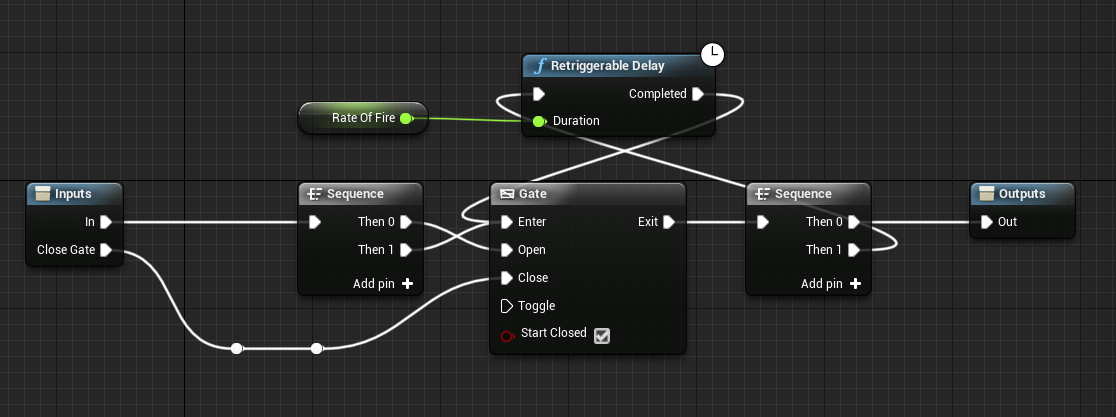

@random hill do it like this
you can change these two events into 1 left mouse button
random hill
worthy frost
if you spammed it
maiden wadi
Ya'll need TimerJesus.
white crypt
i have a system that doesnt allow to spam
worthy frost
i use timers
random hill
@white crypt Did you read what the real issue is?
random hill
@white crypt you asked "why use tick". Uhm, because I am doing automatic fire.
and I mentioned that the problem is with the rotation.
worthy frost
right but what is wrong with the rotation?
random hill
@worthy frost I'm pretty sure I wrote it in the OP.
maiden wadi
Your arrows should be firing from another arrow in the direction that it's pointing.
random hill
worthy frost
right, so have you drawn any debug lines?
random hill
@maiden wadi yes, that's the whole point
maiden wadi
What is the whole point. What is it doing wrong?
Is the arrow where you're aiming or not?
random hill
and that's what isn't working right now, and I feel like I'm writing the same thing 3rd time
worthy frost
you said Straight Forward
straight forward from what?
straight forward is very vague when we can't see what you mean
maiden wadi
@random hill A better more direct question is where do you want it to shoot, towards where the center of the screen is pointing?
random hill
maiden wadi
Are the two things you pasted the two different shooting methods?
The tick and the timer?
random hill
You're seriously making me type all that again.
maiden wadi
I'm just asking you to type "Yes", or "No" actually.
 unborn maple
question im trying to make a cube kinda move. like when i press D i want the cube to flip over on it side to the right and as well as move to the right. what node should i do. i try local rotation and the rotation component but it just keep spinnin
worthy frost
@random hill if you would have posted proper information at the start and a proper description then people would not have needed to ask. Also don't be rude, we don't get paid to help you nor are we obliged to help you. We help for free and because we enjoy helping.
maiden wadi
I don't see anything that would make a difference between the Tick and the Timer. Which is why I was asking to be certain.
maiden wadi
Unless those are somehow two different blueprints and Arrow is facing a different direction, they should be shooting the same place.
random hill
I have a character in a twin stick game. (almost) top down view. The character rotates towards my cursor. That works fine. The character has a blueprint of a weapon attached to it. When given a mesh, you can see that the weapon is rotating along with the character.
When I use semi automatic fire, it works perfectly. The gun shoots exactly where the cursor is pointed. Just a simple "right mouse button" + spawn actor.
When I want to make an automatic weapon, shooting with a cooldown - things go wrong. The bullets spawn in the right location and with right scale. But always pointing forward. World forward, no matter how I rotate.
The problem doesn't appear when I use any other method, like timer.
I think this is as clear as I can get it
This doesn't work. Location / scale are good but not the rotation. Bullet goes forward in world space.
white crypt
@trim matrix window-details
random hill
This has proper rotation.
unborn maple
i didnt know it was c alled grid i was search the wrong key words lol i just search for rotation actor
white crypt
i searched for cube movement
random hill
maiden wadi
Unless those are somehow two different blueprints and Arrow is facing a differen...
They should, but they're not, and that's the whole issue I'm asking about. It's the exact same code. The mesh / arrow component ARE rotating along with the character. I didn't use debug lines but I did print the forward vector value of the arrow component. And it showed the exact situation I described. Perfect behavior on click or timer, bad behavior on tick.
maiden wadi
Are those two methods on the same actor?
random hill
Yup.
But just for fun I tried it on the character - I accessed the weapon attached, took the arrow and printed forward... and same deal. On tick, always shows world forward. On timer / click - shows proper direction.
I would say that it's a problem with how I attached the weapon to my character. But then it shouldn't work at all.
white crypt
so drag it into the correct place
maiden wadi
I'm at a loss. Unless you're somehow doing something else somewhere different that affects them, the two things you've posted are identical. I recommend a Priest. It's possessed.
random hill
@maiden wadi That's exactly what I'm thinking. And that's why I turned in to forums.
random hill
This is how I spawn the weapon:
This is how I attach it.
(if I don't show something, it means that it's trivial)
(so in this case, target is the weapon)
random hill
@maiden wadi the really weird part is that the location and scale work fine. Just the rotation is messed up, and only when shooting from a tick. Any other combinations don't have this issue. Shotting with timer or button press give the right rotation.
And just to make extra sure - the same problem doesn't persist when I put the shooting loop directly in the character blueprint. Then it works with tick AND with proper rotation.
random hill
@maiden wadi Is it possible that the rotation updates later, after the tick / button presses are handled?
maiden wadi
Those gets are all at the time of the bullet spawn.
 astral fiber
"Function may need BlueprintThreadSafe metadata adding."
Does anyone know where I can add that metadata?
random hill
@maiden wadi I even tried playing with the tick settings, or to make extra extra sure that the rotation is updated - I made a variable for it. Set up the variable just before spawning the bullet, and THEN using that variable. I also added an ugly mesh (because I can't make a pretty one) to the weapon, to see if it's really rotating.
Which is pointless, because of course it's rotating if it works in other cases
olive sedge
how do I get a blueprint off a character instance? (I need its AIController)
upper adder
I have many nodes that use event tick.. Is hooking event ticj to an event dispatcher to use it then at multiple places a clean/safe way?
maiden wadi
@olive sedge Just drag off of the character/pawn reference and GetAIController.
olive sedge
ah, ok, thanks!
random hill
@upper adder I'm no expert, but I would reduce it to a minimum
every element that affects other elements, increases the complexity of your game, so keep things like that to a minimum
@maiden wadi You won't believe it. But I fixed it. And it was what I was thinking of when I messaged you.
upper adder
So you would just use sequencer?
random hill
@upper adder it's really hard to tell. Can you give at least a bit of context? Like what kind of actors are you talking about, how many, what kind of events
maiden wadi
@upper adder Sequence. Sequencer is a different thing. But what all are you doing on tick?
white crypt
following tutorials prob
maiden wadi
@random hill What was it?
random hill
@maiden wadi I want to see if I can post more than one pic in a single message...
upper adder
I just have a lot of things that need "event tick" and to not have a wire chaos to all those nodes from event tick i thought about using a event dispatcher, now im wondering if that is performance safe and clean
random hill
Basically, going from this:
to this:
Or even to just "during physics".
@upper adder nothing wrong with event tick itself, as long as you don't put heavy computing into it.
Event dispatchers are very good if you can keep them under control.
There might be a problem if you add listeners to many objects where you start forgeting what is listening to what. Suddenly you get extra events you didn't even realize about
are the listeners in the same actor or not?
upper adder
yes same actor
random hill
@upper adder then it should be a problem unless you do something really weird. You can use simple events and listeners just as a way to organize the nodes better.
@upper adder I don't wanna be rude but are you a beginning programmer?
upper adder
random hill
<@!414737660587016193> then it should be a problem unless you do something reall...
you meant cant?
random hill
@maiden wadi Now I have a different question. Since this problem was so annoying and so easy to fix once I figured it out, what should I do about it? I'm sure someone will one day look for this solution. Should I post it somewhere or?
@upper adder Nope, I mean "can". I think it was even recommended in one of the basic UE4 tutorials, that instead of having a lot of long "cables" its better to use events
upper adder
but thats what i wanted to do??
maiden wadi
I'm honestly not sure. I still don't even understand what happened. I mean I use tick constantly and I've never ran into an issue where my rotators were wrong. I don't think I've ever even changed an actor's tick group.
random hill
@maiden wadi I'm pretty sure it's because it was on an attached actor. I think I mentioned that when I copy pasted dthe same loop to the character (instead of the weapon) it also worked properly
@upper adder yes and you asked if it's a good / clean solution... I think it's much cleaner than the alternative
and it won't cause more issues than using the long connections
upper adder
My question was more if it would bring down the performance..
random hill
(making a literal spaghetti)
upper adder
because the stuff hooked up to tick is so sensitive
random hill
@upper adder you asked if it's clean also, and for that I would say it's cleaner than the alternative. And about performance, I don't think it will matter any more than the actual tasks you put in there.
It should matter if you use normal nodes or events in tick. What matters is, do you really need to put it in Tick, and what is that thing actually doing? Making a print or variable assignment won't cause any issues. But recalculating all the colliders in range of a particular class will
random hill
@upper adder If you have "light" tasks attached to tick, using events won't break it or make it sluggish. And on the other hand, if you put a lot of heavy calculations to tick, making small changes like not using events won't speed it up
may I ask if you are new at coding?
maiden wadi
Using an event dispatcher will bring down performance. They're not meant for that kind of use. Dispatchers are meant to call multiple random events in unknown places whenever a blueprint does something. They're slower than simply calling an event. Which is meant for cleaning up large chunks of code into smaller ones.
fierce birch
trying to delete an actor but ue4 crashes if i do, anyone know why
upper adder
random hill
may I ask if you are new at coding?
If you include Blueprints as coding im not new to it, i just never used event dispatcher and just learned it..
maiden wadi
On a side note, I'm willing to bet that if your tick is massive, that you either need to reconsider if half of it needs to actually be on tick, and if it does, if you should move it somewhere else like a component in the actor.
upper adder
Besides Blueprints i cant code tho..
upper adder
maiden wadi
On a side note, I'm willing to bet that if your tick is massive, that you either...
I dont waste my ticks man..
xD
but thanks
random hill
@maiden wadi Yeah... even something as simple as running a task once every 10 frames instead of every frame is a huge difference
@upper adder Ok simple advice. Be careful when you watch youtube tutorials, you never know if someone making it is actually good 😛
I see a lot of tutorials literally avoiding using tick and trying every trick to use something else. Tick is there to be used as long as it's in moderation
maiden wadi
What are you doing in this crazy tick though?
random hill
@maiden wadi I was a bit hasty and made a mental shortcut that @upper adder thinks of events when saying dispatcher
my bad if that was wrong
upper adder
maiden wadi
What are you doing in this crazy tick though?
I made a flight simulator with own physics calculations..
So i need to update all the forces every tick
random hill
@maiden wadi I decided I will at least post my solution to stack overflow. This way someone might one day google the same problem and find an answer.
maiden wadi
Events are just functions without return values. Dispatchers are delegate driven calls that can call the delegate, which other actors/objects can bind into to be notified when the dispatch is called.
random hill
@maiden wadi I'm pretty sure that you can always use events instead of dispatchers when talking about the same actor
I can't think of an example when that's not the case
dispatchers are only needed when it has to communicate with other actors?
upper adder
but then ill have to do eventtick1 eventtick2 eventick3...
because you only get one output
random hill
@upper adder what about using a sequence, as you mentioned before?
that pretty much acts the same
upper adder
upper adder
but then ill have to do eventtick1 eventtick2 eventick3...
but then were here again
random hill
@maiden wadi since you are knowledgeable, I have another question... it probably doesn't have a simple yes or no answer though.
When I have my array of weapons in the character blueprint - is it better to store them as classes, and spawn whenever I switch to a certain weapon, or store them as actors and hide / show the mesh when needed?
Using classes seems cleaner. And would use less memory? But using actors could allow easier storage of bullets in a clip etc.
In the end, the differences are probably pretty small.
@upper adder but events are alright...
maiden wadi
Hmm. Hard to say. State probably says typical weapons exist better not being destroyed because you can keep bullet counts on the actor itself. Alternatively, if your weapon is just a "Dummy" and your actual data like uses of the weapon or bullet counts, are in the inventory as data, There's no problem with destroying and spawning a new one. I do the second version myself because my inventories are all pure data, no actors or objects.
Spawning is "Slow". But that's more in regards to something like Don't create a minigun that spawns 2,000 bullet actors a second. Won't really apply to switching weapons in a game.
random hill
@maiden wadi That's my dilemma too. Seems like storing all the info on the character is a bad practice. I mean, I don't have 7 bullets in the clip, but my gun does.
I have a gun that has 7 bullets. Hence, storing the ammo in the gun seems much better.
but then... I have a backpack full of ammo. So a hybrid solution?
Character has a dictionary (or map, however UE4 calls it) of ammo types and count... and the guns have clip information
And yeah spawning one gun every few seconds won't break the game that already has who knows how many polygons and visual effects on.
maiden wadi
Yeah, if you're keeping state on the weapon itself, it's likely best not to destroy it between uses. There's nothing wrong with just disabling it. Kill it's collisions, set it to hidden and disable it's tick if it uses it. On equip, reverse.
random hill
If I go with character having all the data about bullet counts, the gun will definitely need connection to the parent. Not a big problem but not a "perfectionist" solution. But judging by the fact that you are also hesitating... both solutions seem almost equally viable 😉
@maiden wadi That's what I thought. Except for a gun you probably wouldn't even have a collision most of the time
maiden wadi
Sometimes. You'd need a collision if you allow pickups.
random hill
Oh, I would treat pickups as a different type of actor
A WeaponPickup Actor that would only have a collider, mesh and some info on what gun it's holding. And that would use some method on the character like "AddWeapon(AK 47)" or so.
Again, not purist but it should work... 99% of the time? The only thing it couldn't do is like, advanced animations of picking the gun up and then shooting it without any cuts. But I think that could be fixed somehow, and my games are far from that level.
maiden wadi
Most games don't do that outside of cutscenes anyhow. You usually just press E/F, get a little hand forward "Pickup" animation, and a gun just gets Robin Williamsed into the character's hands.