#blueprint
402296 messages · Page 560 of 403
 cold raft
 trim matrix
@twin heath @cold raft Thanks for the reply. But if the object is un-instantiated, I am assuming I would need to change the variables through the constructor on creation?
I just find it funny that, assuming I need 20 different health options, I would need to create 20 different children – which all figure as their own class e.g. when casting.
 tight schooner
@trim matrix cast to the parent class, and that can be an interface to all the children
It's actually normal practice to make child classes that only have some different variable defaults
They call that a "data only blueprint"
A breakdown of the UI elements of the Blueprint Editor when working on Blueprint Classes where only the class defaults have changed from the parent.
If you make a child class and don't do anything in the node graph editor, then it's automatically a data only BP
But yeah, casting to the parent class is key. The child classes inherit/implement all the functions, events, variables, components etc. of the parent
trim matrix
@tight schooner I see, was wondering why BPs sometimes open in that state. It simply irked me a little that these copies figure as classes. You would never create new classes every time you needed a unique copy of a gameobject in Unity, not even if they inherited from the same parent or interface. Thanks a lot for the insight 😄
Considering spawn refer to a class, I guess there would be little way around.
 silver temple
hey weird question and maybe not quite a blueprint question, but has anyone noticed an error when using multiple touches in 4.25 or 4.26?
If I open a blank 4.24 project, I touch the screen with two fingers and all good. If I open a blank 4.25 or 4.26 project and touch the screen with two fingers I immediately get an error and the second touch doesn't seem to register
trim matrix
hello can someone help i use uiws water system from marketplace and if i try to jump in the water i eventualy climb it any idea how to fix it ?
 marble lantern
Hey, this might be weird but, is there a node that can tell a blueprint when another blueprints capsule is intersecting?
 hollow cape
On Begin Overlap?
hollow cape
BP Interface
 hollow drift
?
hollow cape
Blueprint Interface
Blueprints that declare functions to define an interface between Blueprints.
hollow cape
BPIs essentially negate the need to cast
hollow drift
"Blueprint Interfaces allow different Blueprints to share with and send data to one another."
i see
ahh
just the how question is still there
but think google might help
hollow cape
On Begin Overlap -> Call "Custom BPI Event"
using the overlapped actor ref of the On Begin Overlap as the target
then, if the overlapped actor implements the interface, it can fire off an event
there are tons of videos up about using BPIs, I'm sure Matt W has some vids about it
hollow drift
sometimes its just hard to grasp what it actually does
like cast for example
but trial and error will teach me^^
ty for the tipp
hollow cape
or watching some specifically related vids? Trial and error is great, but there has been work done on explaining how it works
might as well take advantage of it
hollow drift
i would love to
marble lantern
its funny cause I thought overlap would work it but it isnt
hollow drift
but special cases or just not having the right word to describe the issue is issue number 1
just read the questions in this discord
marble lantern
?
hollow drift
sometimes people just ask like hey how to do stuff like that and this
and explain half of it what they actually try to do
hollow cape

What is a Blueprint Interface in Unreal Engine 4 Blueprints?
Source Files: https://github.com/MWadstein/wtf-hdi-files
hollow drift
but understandable, since getting the right word to do what you want is difficult
ye, this guy is great
i am generalising here
hollow cape
I get you
hollow drift
@hollow cape is it also possible to communicate execute throught it?
hollow cape
what do you mean by "communicate execute"
you can basically call an event and pass parameters to the target Actor
hollow drift
i want to play an animation in sync. When i click on target 1, target 2 should play the animation too
tried gate + event tick + shared boolean
but cant realy get my head around how to achieve this
when clicked on tile, tile gets animated and pawn (yellow) should move too. else it intersects
hollow cape
depending on the level of complexity of this, you may also want to look in to event dispatchers
and probably use that along with some kind of a managing actor, so the logic is in one place
hollow drift
i think its a bit more complex, yes
hollow cape
there's many ways to do something like what you're talking about
hollow drift
"This allows data flow not only within your Blueprint Class"
Looks promising, thank you @hollow cape 🙂
hollow cape
think of an event dispatcher like a guy yelling the event, when it fires the dispatcher blindly yells out "DO X!". Then any actor that is listening (has an event bound to that dispatcher event) can receive the event, and execute whatever logic is necessary after
BPIs are more direct, as you need a reference to the actor you are trying to communicate with, meaning you have to have a method to get the reference (trace, overlap, etc)
hollow drift
ye
the event i am missing, thats the problem. So the do X yelling style might be the best approach 🙂
hollow cape
I haven't used it at a large scale, but I believe that can get heavy
hollow drift
I think i also just would use it for this one action
since the game is not a shooter, think should be ok, as fps is not priority
hollow cape
always get it working first, then worry about optimizing. Make it work -> refactor -> break it -> loop
hollow drift
ye exactly^^
i try to do this, get it running, then fix afterwards glitches
This code does the same as this one
hahaha
 grizzled garden
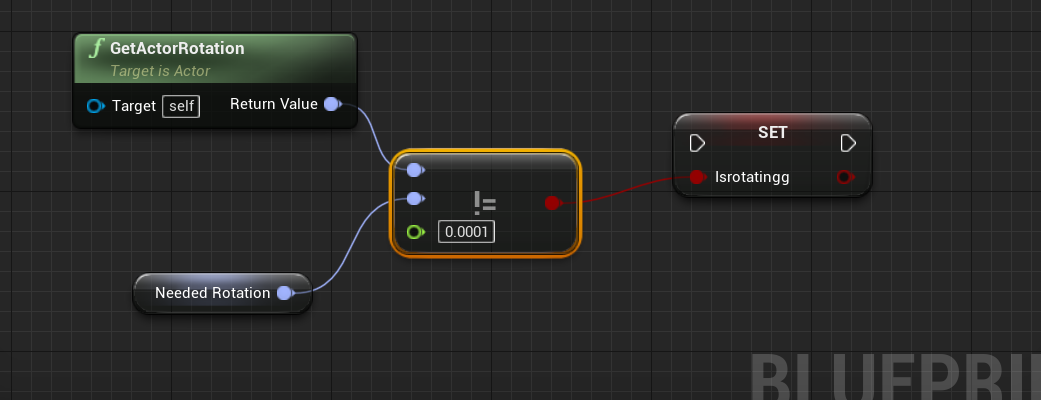
guys why it does not have a smooth rotating?
it rotate instantly for some reason
 maiden wadi
You might want to show where you're actually rotating. Setting a bool doesn't help debug much.
grizzled garden
what do u mean
tat all the info
they are rotating by default
i havent done anything to make them rotate
that is a default thing
hollow drift
what is "thing"
grizzled garden
what do u mean
hollow drift
you took some asset from assetstore which might have a script build in or something else to let it rotate?
it just does not do rotation by itself
maiden wadi
Presumably you have a tick function, or timer, or something somewhere, where that bool is checked and if it's true, you rotate something. Where is that?
grizzled garden
i have no where, i showed everything in the video
i have AIenemy and SpawnAI only
hollow drift
@maiden wadi while you here, may i ask you a question too?
nevermind, i just solved it
lol
@hollow cape wanna see my cheap version for that solution i was looking for?^^
It could not have been more simpler tho XD
Sometimes just making it to complicated, then coming back to think about it in simpler terms, as you said^^
hollow drift
hollow cape
I mean, if it works it works, but if you are using Tick, you can get rid of the timeline honestly
hollow drift
on the other end i control the on/off switch
nono, i need it for transition
or what do you mean by getting rid of it
i need to move my object for 0,5 seconds 800 units into the air
and need to sync it with my pawn standing on it
thats the best approach so far i could build
hollow cape
@grizzled garden ask your question here
grizzled garden
i did, re asking the question will be considerd spam
but if that what u want i will re ask it
hollow drift
yes please
grizzled garden
https://ibb.co/NYWqpWL
@grizzled garden
guys why it does not have a smooth rotating?
@grizzled garden
it rotate instantly for some reason
@grizzled garden
hollow cape
@hollow drift you're calling play from start on tick, that could be problematic. But if it works it works I suppose
hollow drift
yee
grizzled garden
 hollow cape
I wouldn't call that "cheap" though
hollow drift
@grizzled garden what video
ah
ahh i rember
you have the ai running along a path?
hollow cape
errr why is most of that stuff not connected to anything?
hollow cape
also AI movement is notorious for snapping rotations, you have to modify a few settings. Just google ue4 smooth ai rotation
hollow drift
does AI moves along the "target points"? classes?
hollow cape
hollow drift
i see
hollow cape
you need to uncheck use controller rotation yaw on the class defaults, then check orient rotation to movement on the character movement component
assuming the actor is a Character
then you can set the rotation rate under the Character Movement (Rotation Settings) of the character movement component
hollow drift
his actor is an "actor", not pawn
hollow cape
I still wanna go back to my earlier question of, why is half your BP not connected to any exec pin
hollow drift
yes
why
why do you do a set and not connect to anything
it does not set anything if you do not let a exc pass throught it
hollow cape
none of this is doing anything
hollow cape
also @hollow drift his actor is a Character, you can see it in the vid
hollow drift
what do you mean with character?
when he hovers over the bp of the yellow ball it says actor
hollow cape
everything inherits from actor, but if you watch the vid when he opens the BP it says in the top right what that actor inherits from
hollow drift
ahh
hollow cape
at a base level nearly everything inherits from Actor
hollow drift
ah i see
@grizzled garden still you need either to remove you loose ends or make shure they go throught a exc
grizzled garden
im back
hollow drift
if y want well can have a quick look in voice
grizzled garden
hollow drift
i am not so experienced myself
grizzled garden
i tried this but not found them
hollow drift
but think with people from here we might solved it
would love to see how ai works too
i am in voice, if you want...
grizzled garden
yes
hollow cape
I can tell you with certainty that method does work
I just implemented it again, for the 100th time a few hours ago
grizzled garden
we are on a call
hollow cape
I just left my desk for a bit, won't be back for an hour or so
maiden wadi
I love seeing some of the insane ways people work around simple issues.
hollow drift
I had a look on it
hollow drift
problem is, that he uses a framework from epic, which controls the movement of the character
grizzled garden
it is impossibile to solve it
hollow drift
no
grizzled garden
they AI has a big library
hollow drift
you give up too fast
hollow drift
i showed you how to debug, its a start
hollow drift
you have a complicated task in front of you
trim matrix
Anyone who know blueprint well
I want them to join our game
It's a fps multiplayer
We have the fps template already
Just need a blueprint guy
If interested dm me
grizzled garden
yep
hollow drift
i would love to hear from it too
if you have any specific questions for the future, feel free to ask
grizzled garden
thanks, u are really nice and kind
hollow drift
just have a loook on some simple tutorials first thoughgt
make a fire turn off and on
hollow drift
then return back to your project
grizzled garden
isnt that simple?
hollow drift
its quite complicated
grizzled garden
oh
hollow drift
yes, but the whole movement is doing a script
and we both understand half of it what is happening inside of it
hollow drift
the best approach is to understand how the engine works, what kind of parameters it uses
when you do, you can understand how to approach your problem
grizzled garden
ok
hollow drift
but first i highly recommend try some easy tutorials to get some "aha" effect
grizzled garden
i made a turret code
that follow me
and shoot me
when i reach its sense range
it should be complexer than a bot move from a to b haha, but that is life.
hollow drift
If been working with ue4, again, now for 3 months and almost daily
and still struggle. So is a steep learning curve, but it is rewarding
hollow drift
@maiden wadi complicated enought?^^
i could just do 1 array...
(copy link and open in browser)
 errant cradle
guys how can i export stuff in "editor widget" and import it back
does save game to slot work in "editor widget"?
errant cradle
im trying to make a tool that will merge selected static meshes from viewport in to a single static mesh and store source static meshes array with transform and etc
so i can roll back to unmerged version with a single click
tight schooner
@errant cradle Savegames do work in editor functions
errant cradle
@tight schooner thx
 latent arch
Hey all, so i wonder if you have any ideas. I am trying to use the nav mesh to return paths and their length from the player to nearby sound effects in order to create a semi decent Occlusion script. It works fine untill there are height variations etc. Is there a way that you can have the pathing / calculation done on just one horizontal plain so its always "flat" ? othey wise i go up some stairs and the path become way longer than it needs to be 🙂
hope i explained myself enough hehe
i guess wha ti mean to say is its not always taking the most direct path to the player rather its snaking around everything to get to you even if the object or sound it in LOS at a much shorter distance
@maiden wadi Sorry to bother you, i know you helped me get the initial code set up the other day 🙂 do you know any tweaks for the nav system to be able to achieve something like this?
maiden wadi
Not really. The nav system will just follow walkable spaces. You could maybe shorten those lengths a little by dropping everything to the same Z level, but for cases where the sound is in line of sight, but able unable to path directly to the player, you might just want to consider some sort of trace test before the nav test. If a trace can reach from maybe one of six points surounding a location to the player camera, it's probably in line of sight enough to avoid the nav path method.
maiden wadi
@latent arch Am I correct in assuming that this is for something like altering sound based on distance/travel path, but you're having trouble with something like the sound playing on a ledge that the camera could see and it still pathing down through a stair well?
latent arch
hey dude thatnks for the assist! yeah your correct
if im in a warehouse type environment, the pathing works great on the ground level. but if i were to start moving along upper walkways etc, the path stays on the ground and snakes to me rather than just coming straight to me
would it be easier / preffered if i sent you some scrren shots via PM?
maiden wadi
I mean, there's a couple of different ways to handle it. If what you're using now works in most situations except that last one, I'd probably just do some quick traces from the sound point to the player camera before doing the AI path test.
latent arch
maybe i need a more technical system as you say, perhaps if i do a cone of traces in the visability chanel i can try and work out how much of the player is "visible" from the audios location
ok ill give that a try 🙂
maiden wadi
@latent arch If you wanted to try tracing from a few points around the sound, try something like this. Messy and quickly thrown together but it could keep it from throwing false flags for slight ledge cases.
Can use it as a function like this to add it to your existing framework.
Might need a few value tweaks or an input for the sound's vector instead of using the Soundlocation Actor ref or whatever. But the base idea is that it just traces from the sound's location to the camera, if that one fails, it'll find six points around the sound nearby, and try tracing each one of those. If nothing makes it to the player, it'll return a false bool that you can use to do the AIpathing method. All in all, it's a small bit of vector math and a few traces at most. So it should be pretty cheap to use.
latent arch
thats awesome thanks a lot mate! 🙂
i had a couple ideas yesyerday about using the sounds attenuation radius as a distance from the center to cast traces from to the player, then the number that hit them is almost like a % occlusion sort of thing
ill hae a play with your setup there and see what happens! thanks again!
can you help me understand this part bud? is it just a range check or?
@maiden wadi 🙂
hollow cape
since Authaer might not be around right now, that is basically saying if the distance is less than 10cm, then distance found = true and exit, else continue on with the for loop and the rest of the function @latent arch
latent arch
hey buddy thanks a lot! 🙂
trim matrix
Uh... About the FPS camera rotation.
On thz Y axis it looks like I'm bending the whole upper body and the camera passes through the wall.
How to change the camera rotation "spring" ?
 hidden hatch
i have enemies that shoot bullets, but if two of their bullets hit each other they both get destroyed, is there any way to make it so that they never interact with other bullets?
i did it before in unity with tags but i'm not sure how they work in unreal
 earnest tangle
You could probably set up the collisions on them so that they ignore other bullets
eg. make their type projectile, and have it ignore projectile on the collision channels, or something along those lines
hidden hatch
thanks for the pointer, that is perfect
 cold holly
Hello! Just starting with UE4 and blueprints. Lets say I've got 2 rooms connected by a door, I would like to print string a message that says you have left room 1 and entered room 2, and when I come back to room 1 the message should say you have left room 2 and entered room 1. With my 1 hour knowledge I can't see a way to do this just with collision box. I was thinking there might be a function that can tell which side of the collision box is hit first or something like that. Is that the case or am I missing something with the collision box?
hidden hatch
maybe keep track of the room you just went into and the previous room, with a variable
then say "you were in x and you went into y"
then replace x with y
cold holly
Like set a variable on collision hit maybe?
hidden hatch
yea
set the next room variable, print the next and last room variables, set the last room variable
does anyone know how to refer to a type of collider without a reference?
i'd like for an enemy to reduce it's health if it gets hit by a bullet
so is there any way to know what the bullet tag is to compare it to or any other way to know that it is indeed a bullet
trim matrix
You have to use is overlapping node in the level blueprint. I think it's on overlap begin / end.
I don't know what type of game you're making but you may not need bullets (meshes), just Raycasting Impact Point.
And see what type of physical material it hits (optional) and if the hit Actor can be damaged.
hidden hatch
nah it's projectile bullets not hitscan
trim matrix
Ah, I'm not using that for now.
hidden hatch
if it was hitscan you wouldn't be able to play it very long :P
cold holly
I'm using the third person preset for now, is there a way to make the character count as a solid object for the puroposes of activating "on component hit(box)" in collision?
cold holly
Yeah I need both the overlap and hit I think
trim matrix
Not even.
cold holly
I'm basically trying to set a different message to print whenever I pass through a door
But I can only set a specific variable once
trim matrix
Make sure you use a Trigger Volume.
On the property list of the volume in the bottom, you have a list of "On..." in green with +.
You click on On begin Overlap, it will bring you to the Level Blueprint.
And create a node.
You grab the node white pin and type Cast to... [ Your Character blueprint ]
In the "Cast to" node you get Player Character on the Object blue pin on the left.
Then with the right white pin of the Cast to node you make what you need, like printing something.
If I get this right.
And you have to find out what to use for the "As [ Character ]" blue pin in the Cast to node.
cold holly
I don't think this works on the preset character UE4 provides, but further down the line when I use a blank file I'll make sure to use that! Thank you!
hidden hatch
so here's how i check if it's the same collision type
it it doesn't collide with others of the same
trim matrix
Just learn how to use cast to node.
hidden hatch
but how would i do it if i'm not comparing to myself
as in what would i replace the bottom part with in order to tell
 stray wagon
Any idea why would this mesh not have any collision at all even tho I set it up?
Im trying to get a Ray tracing to hit it
but it just goes throught
 covert delta
Are there any built in methods that return how well illuminated an object is?
 random shale
Hey guys, I need help.
In the Animation Blueprint I am unable to select Preview Instance in the Debug filter.
How can I fix that?
https://gyazo.com/7839f78c7eb1fbb3c4b4eb2761386511

 odd ember
you can select them in game if there's more than one
 proud hull
@swift pewter your actor's mesh still has collision enabled? Not sure if set actor collision propagates to all children components too, I haven't used it before.
Edit: The docs do say it toggles collision for the "whole actor".
Or maybe for some odd reason it needs the actual "self" node for the target, even though it defaults to self.
 open crypt
anyone here good with blutilities?
proud hull
There is a node without "Actor" in its name. Used for actor components. I'm gonna do a quick test using the node you are using.
 pulsar arrow
Hi everyone, I'm not sure if it's the correct place but I have question. How do you handle capsule component on animals? I mean the capsule is vertical, so it doesn't fit animals so well. Sometimes animals can go through another animal. Any advice?
proud hull
@swift pewter Oh, in that case, I would use destroy actor, but have it the player being destroyed possess a new actor first (a spectator actor you create).
Spawn spectator actor in location of actor being destroyed, unpossess current actor, possess new spectator actor, destroy old actor.
@pulsar arrow You ignore the default capsule component for collision purposes. You need it there for movement to work, but you can set it to spectator collision or something else.
@swift pewter yeah, if that is how you want your spectator mode to work.
Personally, I always saw spectator modes as cheating, hehe. People chatting online will abuse it to report locations to their teammates.
Ah, I see. You said attach it to the player that killed them, so that would have been the enemy team, haha.
pulsar arrow
@proud hull Thank you for answering! How about navmesh? If I enable affecting navmesh for my custom collision, it will prevent other animals to navigate through the animal but the animal itself won’t be able to move as the custom collision blocks the navmesh. As far as I know the main collision is ignored by owning character. Custom collision doesn’t.
 fickle blaze
hey I have a question... I want to remove an actor from my array when it is no longer being hit by a sphere trace. How would I do this?
proud hull
@pulsar arrow you can set the collision of your animal's mesh to work off your physics asset instead. I haven't found the perfect solution to do this yet, but know it is possible.
maiden wadi
I know most people either live with the head being able to pass through things and just scaling the capsule up enough, or they decide to write their own movement component and start from the Pawn class with a customizable base collision component.
pulsar arrow
Thank you, Slashin8r I’ll try that share the results.
Authaer I’ll try to find if there any viable option, writing my own movement component is not possible for me. If nothing works, then I’ll let animals go through each other.
proud hull
@fickle blaze maybe make a temporary array to hold the actors that are being hit, then foreach through the non-temporary array and check if the temporary array "contains" the actor.
Also, if this array is only going to hold the actors currently being hit by the trace, you could just keep using the array output of the trace to overwrite your array variable.
Unless you specifically need to know when an actor left the array, then use the temporary array I suggested.
 amber rock
Hi people, I have a problem.
I need to calculate rotator and set rotation for turret blaster attached on head of my enemy.
I succeded to do it when enemy stand (with disabled animation blueprint, only stand in rig pose).
idea is to calculate rotator and set it for some specific bone, in my case neck.
The problem is when I release enemy to can chase me, my blaster stayed with initial aiming direction, so i need some kind of cast from world to relative rotation, but my logic doesn't work.
Please help, I've already spend lot of time on this.
proud hull
@amber rock
Looks like you are trying to remake a node that already exists, hehe
@swift pewter So I have been messing with setting actor collision. Looks like it doesn't actually take the new setting until the actor tries to move again. So weird.
fickle blaze
@proud hull sorry can you elaborate or show an example? I'm having a hard time figuring this out :p
proud hull
@fickle blaze you using a "multi sphere trace" or just "sphere trace"?
proud hull
Single sphere trace will only ever return 1 hit. How are you filling your current targets array?
amber rock
@proud hull I've already tried FindLookAtTarget but I have same problem with it
proud hull
@fickle blaze yeah, if you want to find all the actors in that radius instead of just the first one it finds.
I'd actually recommend doing this a different way. You have a ton of unnecessary checks.
proud hull
I would use "SphereOverlapActors" on a timer instead of what you are currently doing. I'll get you a screenshot for an example.
fickle blaze
I don't know a better way to do it 😛
well I don't want them to be able to be added if not seen like behind something
proud hull
@fickle blaze connect the timer to begin play
@swift pewter same thing happened even if I set the individual components.
fickle blaze
@proud hull thanks
proud hull
@fickle blaze obviously set the location, sphere radius, and the time in the timer to your liking.
@swift pewter I was testing in single player.
fickle blaze
@proud hull I appreciate the help
proud hull
@swift pewter this worked:
This one as well:
I'd use the 2nd one for your case. And you may only need to set the capsule. I had to do the mesh too since I use custom collision for it.
@amber rock Looks like you aren't using the correct locations. You will want to use World Locations only.
@amber rock Here would be how to get the world location of a bone/socket:
Then use the world location of your turret for "Start".
amber rock
@proud hull aha, I will try thank you
open crypt
is there a "set to ground" option in blueprint like the editor hotkey?
 still sigil
https://gyazo.com/959642712b75fb0819671a327ad0ead1
Trying yet another method to get my Enemy AI jumping working. This time I'm using target points to determine where I want the enemy to land. He passes by a trigger box infront of his jumping path, which sets the target point he needs to jump to. Then after a sphere trace collides with something that has a "Jump Trigger" collision, he does a "Set Projectile Velocity," to jump to the target point.

https://gyazo.com/1142f8ca70359c5a2babf437de3e2d29
I really feel like the game is messing with me now, cause it was working just fine yesterday. But after I encountered a random glitch that caused the enemy to jump infinitely for some reason, I wound up basically redoing the entire system from scratch to fix it. Nothing is changed, everything is set up the same, and yet for some reason, the "Projectile Velocity" isn't working now. (The green sphere is something I placed down so you can see where the enemy is supposed to land after the jump.)
https://gyazo.com/e869da7454182707b63ec287a20aed1c
The projectile velocity is for some reason aiming for the floor, and I don't know why.
 maiden wadi
@still sigil I'm not actually sure how that node is supposed to be used. I did some testing on it at one point and determined that it was just generally broken.
still sigil
It's supposed to launce a character or object to a specific destination of your choosing. I've done it before to create a system where if the player jumps into a hazardous material, like spikes or lava, they take damage, and then the game automatically launches the player to a safe spot on the map, away from the hazard.
trim matrix
How come my HUD widget looks out of place in game as apposed to the widget editor?
how would I make the canvas on the widget correctly spaced out for essentially all resolutions/screen sizes?
trim matrix
Is the canvas not relevant
to the screen size?
I would have assumed the canvas was there to essentially correctly place items across gameplay screen size.
still sigil
I usually fix that by anchoring each widget to the center of the screen. That usually seems to position them in the right spot.
trim matrix
Hmm alrighti'll try that
 junior elm
I need some help, i'm trying to set up a button. When you jump on the trigger, it sends you to the next level. How can i do this?
trim matrix
If the trigger is an actor, it has an overlapped event.
still sigil
Okay, setting the collision radius to 0 seems to have fixed the jump arc atleast, but the enemy still isn't really following said jump arc.
AHA! I think I got it. It was the character's air control that was messing with his momentum.
Cause he's still trying to walk to his patrol point as he's jumping, so his walking speed throws off the jump arc when he's in the air.
Getting it to where he stands still for a bit as he jumps seems to have done the trick!
maiden wadi
@still sigil You can also just do the math yourself as well. It's fairly straight forward.
still sigil
Yeeeeaaaaah, not for me. I suck at math. 😛
I was following the only tutorial on how to do this method, and the math being incorrect was what led me to trying to do this more bootleg version. Cause I don't have the technical know how on how to correct it myself.
maiden wadi
Sec. I have a function in another project. In an overwatch match though.
still sigil
Oooh! 😮 Okay, take your time.
maiden wadi
@still sigil Here's one I use for a grenade launcher from an AI. Works fairly well for me. Just tested with a launch character instead of setting a velocity and it's working just the same.
Jumps that character straight to the one my controller is currently controlling. Should be the same if you have your target destination.
still sigil
Interesting. I'll give this a shot real quick.
@maiden wadi Can this be applied to Navlinks?
That's what I was trying to get to trigger the jumps to begin with, before I realized the math used in the tutorial was somehow incorrect.
maiden wadi
Probably. I don't see why not. It doesn't handle massive height difference that well, so a few thousand units up or down might be off. But small jumps should work fine. If you could get the target nav link location in world space and use the pawn's location as the start that would be best.
 prime snow
God I wish they implemented the new Property Access System for normal blueprints and just animation ones, would clean things up so much
 fierce birch
trying to save these variable when i overlap a trigger volume to go to the next level, it prints out true, but the variables dont load up on level2
prime snow
jesus christ have your ever heard of functions 🙂 You might actually see what's going on
fierce birch
ik, im just prototyping rn, easire to get my thoughts out
this is my loading
ill collapse them to a function later
actually ill do it rn
prime snow
and get https://www.unrealengine.com/marketplace/en-US/product/graph-formatter for gods sake
 trim matrix
What is that
proud hull
@fierce birch your loading is only repeating the exact same logic as your saving. Saving logic looks correct. You need to reverse your loading logic. Get from save slot and set values in main character. You are currently getting from main character and setting in save slot, which is already done in saving logic.
I also recommend putting all those boolean variables in an array or map. Having so many individual variables just to determine whether or not you have a certain skill is pretty redundant.
fierce birch
just save myself, now you cant pick on my messiness @prime snow
@proud hull is this better
ok thank you
proud hull
You should only need to input that player ref one time. Same with the save slot output into your set save variables function. Only need the references as a single input pin.
prime snow
just save myself, now you cant pick on my messiness @prime snow
@fierce birch See how good that feels 🙂 That's a start, you'll be using interfaces and util libraries in no time
just save myself, now you cant pick on my messiness @prime snow
@fierce birch Can you feel how much GetMainCharacterVariables want to be in a function with PlayerRef, all that neatly tucked away droool Sorry, refactoring get's me excited
Also tip, use a separate box for each input variable instead of drawing them from the input box (right click and search for the input variable name) That way you don't have unecessary lines between stuff and easier to see what belongs together
proud hull
@fierce birch See the edits I made. You don't need more than one reference to the same object.
Also, ideally you would have wanted to make a save function and a load function. No need for a function to simply return a bunch of variable values.
prime snow
You need a struct that's what you need
proud hull
Or an array or map. Since they are all the same variable type.
prime snow
"Bad programmers worry about the code. Good programmers worry about data structures and their relationships."
proud hull
The best programmers worry about both, haha.
fierce birch
better
prime snow
hahaha, true, but isn't a poignant a quote, structures first is a great tip tho. Seen so many complex projects that could be simplified just by creating more/better data structures
better
@fierce birch We're getting there
proud hull
@fierce birch Since player ref has direct access to all those boolean variables, if you use player ref as an input, you don't need the booleans as input as well.
prime snow
SetSaveVariables and SetCharacterVariables need both to be in their own functions, that take a struct as input
That way if you go changing something later, you have it in one spot and won't break all the references
proud hull
You need only 2 functions. SavePlayerData and LoadPlayerData. Both only need the player reference as an input.
maiden wadi
On a side note. Since you have so many abilities, why not just make it a simple int array and assign your abilities an integer for identification?
proud hull
That's what I suggested
prime snow
Also, always make stuff pure if you're only getting data, not manipulating it, makes the graph less complex
proud hull
hehe
maiden wadi
Or if you're not using more than 255, an enum at least.
fierce birch
@proud hull i used the Booleans as input to change them based on the save values
hmmm
proud hull
@fierce birch they already exist in the player reference. You are simply saving and loading, not making changes.
proud hull
Unless you plan to let your main character gain or lose a skill just for going to a new level.
 summer harness
gameplay abilities would be better than all those bools ^^
fierce birch
@proud hull if i dont aquire it the bool will be false, but if i do it changes to true
maiden wadi
Actually, don't always make things pure if you're getting data. In blueprint, pure means that function will be called for every single pin. Non pure means it gets called once. Having like ten pins makes that nine unnecessary calls.
proud hull
Player ref is a direct reference to your main character which is storing all the values of those booleans.....
If it is true in player ref, then you save it to a slot as true.
fierce birch
but the inputs are to change the values based on the save game values
proud hull
And the save game values are based on what? Your player ref.
proud hull
Not according to what you originally were showing. I thought you simply want to transfer vars from one level to another? This would require changing nothing.
fierce birch
wdym sorry if im not seeing it all the way
proud hull
In fact, making a change during that process would defeat the whole purpose.
prime snow
Actually, don't always make things pure if you're getting data. In blueprint, pure means that function will be called for every single pin. Non pure means it gets called once. Having like ten pins makes that nine unnecessary calls.
@maiden wadi Quote, good point, but most often performance is neglient, better to make everything pure and set a local variable if you really need to. IMHO at least
fierce birch
@proud hull i have vars in save object and vars in my character
maiden wadi
It still has to call the function ten times to set ten local variables. Which normally I wouldn't balk at, but dealing with savegames and writing to and reading from disk is a different matter.
fierce birch
when i aquire a skill the bool is true
proud hull
@swift pewter the only difference between single player and multiplayer is replication. Something must be going on in your server functions.
fierce birch
@maiden wadi you were suggesting an array
proud hull
Just need to know that index # = specific skill.
summer harness
for maximum control of your abilities i'd recommend this, it's really awesome https://www.youtube.com/watch?v=_713CSOWkTU
In this Unreal Fest Europe 2019 presentation, Matt Edmonds of Splash Damage Games takes a qualitative look at the Gameplay Abilities System (GAS) to help decide if it’s right for your team or project. Then, he switches gears to deliver some quantitative examples to help drive ...
proud hull
If you use an array, main character will not need all the individual booleans. It would be an array of booleans.
fierce birch
@proud hull the index number 0 would be double jump right
proud hull
Sure, if you decide it to be.
fierce birch
how do i decide
proud hull
You can even make a map if you want.
Name to Boolean so you can see the names of the skills.
fierce birch
dont really have that much experience with maps
proud hull
Or if you have a skill BP, make it a map of SkillBP to Boolean
maiden wadi
@fierce birch Okay. Picture this. Ignore the programming. Pretend you have thirteen abilities, right?
summer harness
@fierce birch have a look into gameplay abilities, a lot easier to control
maiden wadi
Pretend you write them in a list on a piece of paper, like a shopping list. Then you write a number next to them. Zero to 12.
proud hull
@fierce birch by you decide, I mean exactly that. You can choose what skill is which index.
proud hull
You're the one programming it, you have full control over what index 0 of the array does.
summer harness
a map would be easier to read, string for identifier/key, bool for value
fierce birch
so map or array
proud hull
Either will work
summer harness
map can do find by key
fierce birch
what is more efficent
proud hull
Array is simpler and more efficient.
But you need to remember what index correlates to what skill
proud hull
Are each of your skills blueprints of their own?
proud hull
You can make an array of the skill blueprints.
Then you also get a reference to it within your player
trim matrix
Hello, I created a reloading animation and put it on UE4, the problem is... when I reload without animation it works... with the animation the bullets don’t go in the weapon
proud hull
Assuming all your skills are under the same parent class (hopefully they are).
summer harness
so many hard refs, all skills and associated effects get loaded when the player gets loaded, wouldnt do that
proud hull
No class like BP_BaseSkill?
You might want to get in the habit of making a custom parent class for things that will share common logic.
fierce birch
i made parent classes for other things but not my skills
@proud hull if im going to add my bools to the array, i would need to make 10 add and add each bool right
proud hull
Yeah, if it is 10 that you need.
Now, I'm not saying bool array is the best route to take (I certainly wouldn't do it myself), but it fits in with your current logic so requires the least amount of changes for your project.
So now your save function will only need to save the 2 float variables and the new boolean array.
No need to foreach through the array, just save the whole array as is.
Same with loading.
proud hull
Well sort of, but honestly the boolean array is being created so you can get rid of all those other booleans.
fierce birch
wdym
i was setting the values
because the values in my array by default are false
proud hull
Ah, I see.
maiden wadi
@fierce birch Are you ever planning on adding more skills?
fierce birch
no
summer harness
do you have a skill enum?
fierce birch
yes
proud hull
Heh, then you can use enum to boolean map
fierce birch
which skills are slotted, and aquired
proud hull
But anyways, how you have it will still work.
summer harness
when if you aquire a skill add its type to an array unique then use this to check if you have the skills
fierce birch
ok, dont make my brain explode lol
proud hull
Many ways to do the same thing, just a matter of how clean you want it all to look, haha,.
fierce birch
ill collapse to function
summer harness
so one single array of enums tells you which skills are active in the save
proud hull
Ah, yeah, that works too
summer harness
no need for bools at all 😄
proud hull
Well, the bools I am sure were used to prevent doing a check like Array>Contains
But all the same either way.
@fierce birch If you do not plan for future skills, you can honestly ignore us all and not even make an array.
Your functions may look messy, but so what.
summer harness
yeah coding wise the cleanest thing to do is use unreals ability system, does so much work for you
proud hull
@fierce birch The only thing I noticed wrong in your original screenshots were that you didn't load correctly. You essentially saved twice.
maiden wadi
Does GAS still require C++ though? For a while it was extremely limited.
fierce birch
idk honestly, i need more practice with arrays and i thank everyone for the help
summer harness
@maiden wadi think so unfortunatly
proud hull
Once again though, a function never needs more than one reference to the same object.
Skill Array only needs to be one input.
fierce birch
ok
summer harness
thats happening with collapse, trick is to add a reroute node before collapsing
proud hull
Oh, so it is collapse that is dumb? haha
proud hull
I think the use of the array is just making it worse. You honestly should go back to what you originally had and make the simple swap I first mentioned in your load logic.
proud hull
The original idea of the array was to replace the need for using so many booleans and to allow for the addition of more future skills.
Doesn't really apply to your project, so you can use what you currently have. Less changes to be made elsewhere.
fierce birch
so like this
proud hull
I have no clue what is in each function anymore, haha.
proud hull
Both functions look identical though.
fierce birch
i think i should make another function that gets saved vars
 wild vale
i need help with the key door system im trying to make
fierce birch
let me fix things up slash
proud hull
You really only need 2 functions. SavePlayerData and LoadPlayerData. SavePlayerData takes a player reference and sets all the booleans in the SaveGame to match the player ref.
wild vale
trying to make it so i have a array statement, so i can set it so key 1 = door 1, key 2 = door 2 etc
proud hull
LoadPlayerData does the opposite. Takes a savegame ref and sets all the booleans in the MainCharacter to match the savegame ref.
wild vale
top is the code for the door and the bottom is for the destructible key
atm its just starting the animation when i collide with the box collider, and the player input does nothing
trim matrix
Umm I don’t see anything wrong , that should work
proud hull
@wild vale when timeline finishes do you want to re-enable input?
wild vale
for the door no, for the player input yes
door needs to stay in the location i set it too
summer harness
@wild vale after the first cast you dont need to loop, just do is valid index and get (by index) with keycard value as index
wild vale
is valid index to the and statement or the branch?
proud hull
To replace the foreach and the and statement.
maiden wadi
@fierce birch Okay. Assuming that you have no intention of adding any more abilities, this should solve your current save/load issue.
Here are two functions.
The save does this, and calls that second function.
wild vale
@proud hull array output to the branch, the keycard value integer inputs to valid index?
maiden wadi
Save to slot like you were, in this manner.
And then in that top function on beginplay, this is happening.
proud hull
@wild vale drag from array, isValidIndex with keycard as the index to test, put the result in your branch.
trim matrix
Wth is “is valid index”?
proud hull
Tests if the index is in that array.
summer harness
after that you need to get the actual value in the array by your keycardvalue int
get (by ref)
proud hull
I'd honestly make that array an integer array and just do Array>Contains(Keycard Value)
wild vale
to correspond with door 1-4
honestly im just trying to get this working bc i need to have it done in like uh 5 hours and this is the last bit i need to do
proud hull
When you pick up a key, you don't insert to a boolean array, you simply "add" the keycard value to the array.
wild vale
hmmm the animation is playing after i enter and leave the box collider
without the key
proud hull
Did you add the additional check @summer harness suggested?
summer harness
wild vale
opohh
proud hull
Yeah
wild vale
thanks for the visual man
summer harness
loaded up the engine just for you 😉
wild vale
:))))
summer harness
array of ints would be more elegant though, like @proud hull suggested
proud hull
I still think an integer array would work better for your needs.
So then you don't need to rely on any value being at a particular index.
wild vale
hmm... the animation is still playing with leaving the collider box
proud hull
I'd have the begin overlap save the reference to the door. Where you are using "door small a" variable, it is hard-coded in there so every time you press E it will open that door, even if not near it.
wild vale
oh
well atm e isnt doing anything
i dont think i have it tied with the thirdpersoncharacter
proud hull
Ah, that is in the door bp anyways.
So you just want the door to auto-open when you walk into its trigger?
proud hull
You would need your begin overlap to save a reference letting you know you are in range of something interactable.
Then when you hit E, you need to make sure that reference is valid before allowing it to open the door.
The way most interaction systems work when you use overlap events is to set a reference to the object you just triggered in your player on begin overlap. Then on end overlap you clear this reference setting it back to null.
wild vale
ok..?
proud hull
Then when you finally press E is where you need to test whether or not you have the correct key.
In your third person character, make a new variable of Actor type.
Call it something like, CurrentInteractable.
 pine trellis
is it posible to have more then 1 game state in a multiplayer game???
maiden wadi
Why do you feel you need multiple GameStates?
wild vale
its weird its like its not even sensing the E input
i have it setup with the project settings... maybe its not tied to the thirdpersoncharacter
@proud hull do i need to setup something in the thirdpersoncharacter Blueprint
proud hull
@wild vale your overlap events should be something more like this:
wild vale
ohh
proud hull
wild vale
this is for the door right?
wild vale
do i keep the on component begin overlap stuff for the trigger
proud hull
I used actor overlap just to quickly make events that look similar.
Yes, keep the trigger overlaps.
Move the open door logic to its own function.
wild vale
whats the set one called
proud hull
I made a new variable in the thirdpersoncharacter of Actor type called CurrentInteractable.
GizmoActor is your door BP
From there, you drag from the output pin and call your open door function.
Oh, forgot to check if current interactable is valid.
wild vale
i can reference self to current interactable
proud hull
wild vale
is that for the door or the thirdperson?
proud hull
ThirdPersonCharacter:
wild vale
wild vale
kk
proud hull
wild vale
where do you get open door from
proud hull
In your door blueprint, change your "Keyboard E" event to a custom event called "OpenDoor"
So your door blueprint should have no logic testing if your player has the correct key. It just sets the current interactable reference and has the logic to open the door.
proud hull
No worries, I see issues. Will help you solve them.
 surreal peak
The Cast Node that is showing the Warning is telling you that this Cast will always fail.
Because you are casting your PlayerCONTROLLER to your Character.
proud hull
surreal peak
Actually, try to teach them to not use GetPlayerCharacter at all
If the Player overlaps, you can just cast the OtherActor.
If they ever take this knowledge and start learning Multiplayer, they will run into all sorts of problems
wild vale
ah ok
maiden wadi
But yeah, eXi is correct. You really should cast the OtherActor to the third person character instead of GetPlayerCharacter. If you want to know if it's a player controlled character, you should cast OtherActor to a Character class first, then get controller and cast that to a player controller. If those both succeed it's a character controlled by a player of some sort.
proud hull
Yeah, use the other actor pin to guarantee it is only the player triggering it. Sorry, was just using most of what you had.
Now, did you also change your key logic?
wild vale
still cant reference close or open door
proud hull
What? If they are events in your door BP, then you should be able to access them after casting to that BP.
wild vale
idk?????
proud hull
Did you compile? Turns out you don't even need to compile, just making a custom event allows you to access it. I have no problems doing so.
maiden wadi
Might show what you've done recently. Both the overlaps and the interaction call.
proud hull
Use "Add" instead of "Insert". This no longer relies on a specific index.
Looks correct so far. How about the E key?
proud hull
In your door, if you want to use both open and close like I was showing, add another boolean variable bIsOpen or something similar. Set it true when you call open door event and false when call close door event.
wild vale
i still cant reference close or open door
or the is door open variable
everything is compiled
proud hull
The events are there, you showed the screenshot of them.
That is Door_A_BP you are working out of, right?
wild vale
yeaj
proud hull
In your third person character, right-click anywhere in the graph, uncheck "context sensitive", type in "open door".
proud hull
Not sure why it wasn't working before, haha. You were dragging off from the "cast to" output pin right?
wild vale
proud hull
Looks good
wild vale
it works yooo
proud hull
With that system, you can interact with any type of object, just need to keep casting to interactable object types until one is successful.
For instance, if you add a light switch, you go from the cast failed of door and try another cast to light switch, etc.
Now if I wanted to really confuse you I would have you make an interactable interface to make things a bit more simpler, hehe.
amber rock
@proud hull Hi, about blastr turrets on enemy, I tried with world location is same result because, GetSocketLocation already return world position.
also i tried on different bone, both bones has some offsets in skeleton, so i tried to compensate that but that also doesn't works well, I get some crazy rotations.
FindLookAtRotation simply doesn't works for my case, start is my socket on blaster turret (world pos) and end is target actor, i hope so GetActorLocation return world pos.
It looks like this:
proud hull
@amber rock Yeah, you are right, that is in world space, my bad. I was using the skeletal mesh version of it in C++ code recently and got used to having to define it as bone space.
FindLookAtRotation should be what you need. It was created specifically for this purpose.
Should simply be, location of turret in world space and location of actor in world space.
amber rock
I know but also i don't know why doesn't works, i will continue to debug, tnx in any case
should be i agreed
proud hull
I've never modified something like this in an animation blueprint though.
That probably does take into account all the local transforms too.
Does it need to be done in the animation blueprint?
You may need to convert the world rotation back into bone space and then try it out?
@amber rock Maybe this?
If not that, then try changing bone name to the name of the head.
amber rock
I will try
this works perfectly if i doesn't move enemy
turret pointing exactly where I want
proud hull
So it is a complication between local and world, based on the logic you are showing.
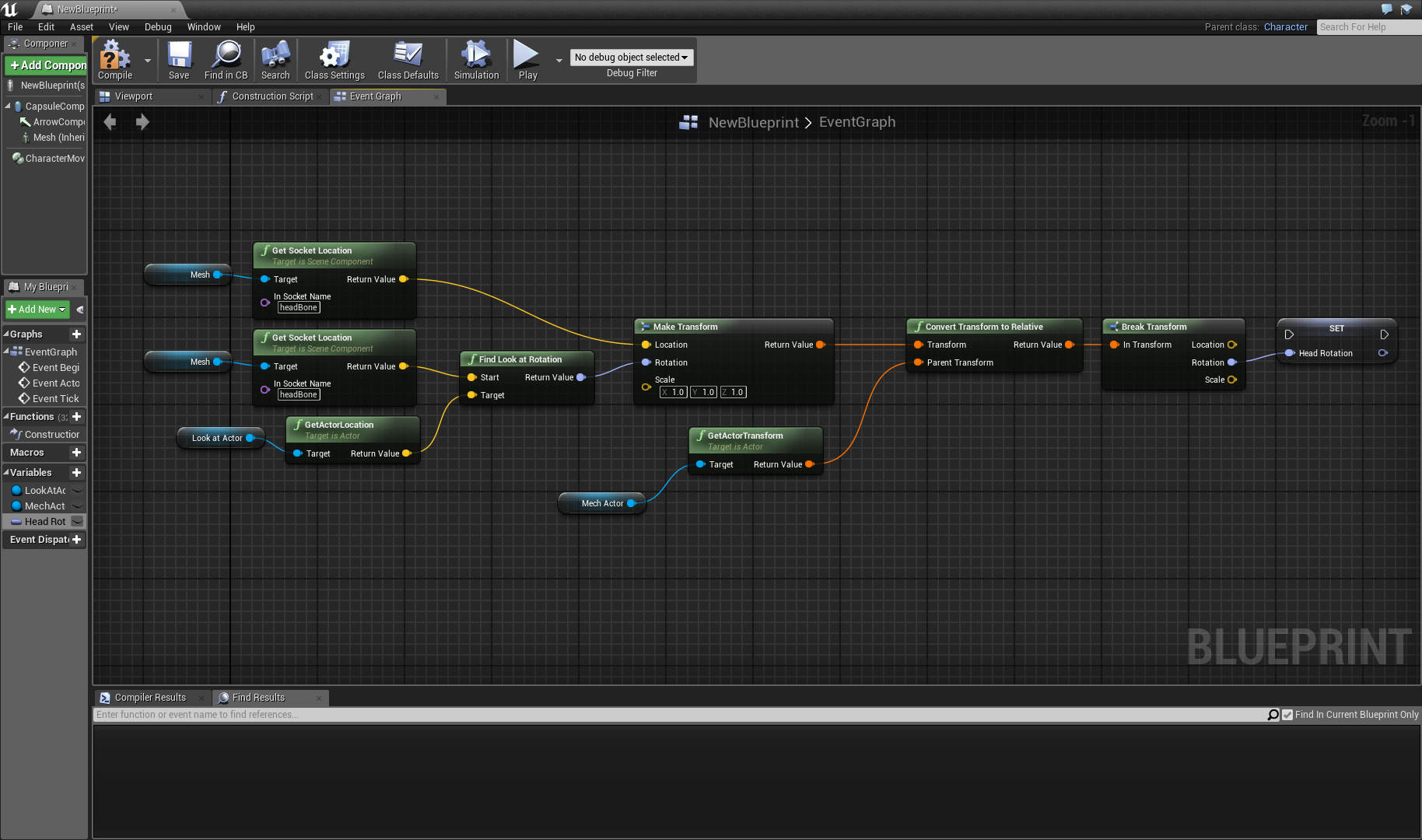
 proud hull
If you try the screenshot above, it should hopefully work, since it converts it back to bone space.
amber rock
ok i will try
proud hull
Which I think you need bone space to use it in animation blueprint.
fierce birch
@proud hull i finished making everything but for some reason its not working
the top one is on begin play, and the bottom one is when you overlap a triggerbox
proud hull
Need to see inside the functions.
fierce birch
ok
fierce birch
amber rock
what I do here, I get all socket names for what and ask something about bone?
fierce birch
proud hull
@amber rock Got all sockets to get the rotation of it in relation to the root bone. Try changing it to the head bone.
proud hull
Where do you actually save and load the save game slot?
fierce birch
level 2 begin play
proud hull
Where do you save the slot?
proud hull
You need to save it somewhere.
fierce birch
level one does the same way
proud hull
Save Game to Slot
fierce birch
one sec
amber rock
Like this? I tried also for Neck bone. Everything what I get is propeller behavior
proud hull
Yeah. If it isn't working then I am currently out of ideas, heh.
I've never messed with bone transforms in an animation blueprint. Beyond me, haha.
amber rock
haha, ok, tnx bro
proud hull
@amber rock Possibly someone in #animation may know more.
proud hull
@fierce birch before you transition from level 1 to level 2 you are using Save Game to Slot, right?
proud hull
@fierce birch You cast to main character and then never use its output.
fierce birch
i just deleted it
proud hull
Where do you set player ref?
proud hull
No need to set in trigger box too.
Only need to set it once.
Begin play is perfect for it.
 sonic pine
Hiho i try i create a "Function" for the Atributes of a character if a Character have 30 points in Vita the Health of the Character should be vita -> Float*30 -> Set helath every character still have 10 different stats to change the attributes like mage = m.attack Tank = Health and so on. The Functuion could be a way to create the attributs. An other idea is to create a BP like the Character Movement, so the CharacterStats would be a component, is this maybe a better way than the function?
The character Movement is a Parent... how i can create that kind of Parent (is th Movement a pawn, actor, or an other kind of BP??
fierce birch
ok
proud hull
@fierce birch can you print out player ref after you set it? Make sure it is setting to MainCharacter and not setting to None.
proud hull
Are those functions you are using located in the level blueprint? Personally, I use Game Instance to work with Save Game.
Nvm
fierce birch
those functions are in the save game
proud hull
I see it is save game bp functions.
proud hull
OMG something so simple in the end, haha
proud hull
Gotta love it
fierce birch
@proud hull i think this is the problem, the save variable is just a variable
proud hull
@fierce birch Save Ref's slot name is called Slot1?
fierce birch
i just deletd the slot name lol
proud hull
Ok
fierce birch
yea, but i just changed them all to be slot one
do i have to cast to use the variable
proud hull
Does it ever print "no data exists"?
proud hull
Like in your screenshot
fierce birch
used to
but it doesnt
i just tested
it
i never casted to the variable that im using called save ref
proud hull
You don't need to.
You created the specific class already.
You only need to cast when you need to go from a parent class to a child class.
fierce birch
but i created that class in level 1
proud hull
But then you get it again from loading the slot, right?
fierce birch
true
proud hull
After loading save slot and casting to your custom save game bp, you can set Save Ref there. Do you use Save Ref in level 2 blueprint?
fierce birch
yes
but only when im overlapping trigger box
thats toward the end
i just looked at the level 1 bp and i did set the var
proud hull
I have a great idea for you if you don't even want to mess with all this save game stuff. You can store all your player data where it won't be lost when changing levels.
@fierce birch single-player game?
proud hull
Storing player data in the player controller or the game instance makes much more sense for a game that involves switching levels.
 dense mica
Anyone knows does Unreal's VM "nativizing" blueprints in runtime or doing something different than nativizing in technical way?
I am just wondering how unreal handles events and spaghetti functions 😄
Nativized cpp files are not pleasant to look at
proud hull
@fierce birch not sure what else you can do to get it to work. @maiden wadi gave you the whole run down on how to use Save Game Slots. Check it out again starting here: #blueprint message
 lean turret
anyone know how to cast to a actor attached to a pawn?
the PlayerTag is attached to the pawn
proud hull
@lean turret What exactly are you trying to do?
proud hull
Can you tell me in terms of your project?
lean turret
A Fighter jet arcady kinda game
proud hull
You can't just use pawn in your project, you usually use a class that derives from pawn or actor or character.
lean turret
wdym
proud hull
I mean that sometimes using general unreal engine terms can be detrimental to getting good help.
Better off wording it as exactly what you want to happen in your project.
Like Fighter Jet has a name tag I need to access. Name tag is of actor type, jet is pawn type, etc.
Saying I need an actor of a pawn is too vague, hehe.
lean turret
the PlayerTag is supposed to hold all the HP and Speed values so the Hud can get that variable from your current pawn, the problem is when there is two Of those pawns, it bugs out, so im trying to get it to cast instead of getting the actor from the entire level
proud hull
So player tag is a component of the player?
lean turret
yes
proud hull
You have a reference to the player?
lean turret
ye
proud hull
You should be able to drag off of that reference and access player tag.
All components are automatically created as variables.
lean turret
its still not workign
proud hull
Gonna need to see more of your graph. Where do you set the player reference?
 brittle knoll
what would be the best way get a static mesh that is attached to an actor to stay still while the actor moves down? I have a mesh that extends from the bottom of my player character when I ground pound, and I don't want it to clip through the ground or go back up too fast and leave space
the wheel and the bits attached are the parts that move
this is how I get it to go down:
lean turret
im just going to redo this tag
brittle knoll
 placid magnet
If I have a static array of Names, is there a way to access that list from a dropdown within blueprints?
proud hull
@placid magnet what do you mean by access it from a dropdown in blueprints? Do you want to turn that array into a dropdown to be displayed in UI?
placid magnet
@proud hull As in a dropdown I can access in blueprints, kinda like this, from a node.
proud hull
@lean turret is PlayerTag a child actor component?
lean turret
Yes
proud hull
I've heard many horror stories when using that component. I recommend you make your own component.
@placid magnet Not sure how to accomplish that.
@lean turret You want to make a custom actor component:
lean turret
i fixed it
 rough blade
Bit of an odd question. When fiddling with my pawns I noticed that disabling their tic or removing their animation BP led to net loss on frames. Wouldn't removing these calculations increase my frames or am I missing something?
 plush ridge
I had some inconsistencies with delays so I did this instead, for the duration of the delay, but it's wrong -- do I need to multiply the delta by something?
 inland merlin
@rough blade be careful when making those assumptions inside the editor, it rarely gives some accurate readings, especially when is comes to blueprints. You should test in a build with and without the tick/animation BP and if they had any impact on the performance at all it should be pretty obvious in that context
@plush ridge What is it hook up to?
Also, can you tell me what's the value of Firing Rate? As well as clarifying what you mean by inconsistencies
proud hull
@plush ridge since you are using the delta provided by tick, I am assuming you are running this delay on tick. The better way to run a delay in a loop is with a event timer. You setup the timer on event begin play and don't use tick at all.
 astral fiber
Where can I tell my pawn, that it should get replicated?
inland merlin
@rough blade Also, close the blueprint before PIE, having the blueprint editor open can do all kind of weird thing with the performance ^^
plush ridge
The value can be anywhere from 0.1 to 1s right now, depending on the weapon. This delay resets a "CanShoot" boolean which lets me fire the gun again. The reason the firing rate is x 0.95 is so that I can reset it slightly before (for automatic weapons that try to use that bool at the firing rate interval via timers)
rough blade
@inland merlin thank you!
inland merlin
@plush ridge Delay's duration shouldn't scaled by delta time, usually you just start it when you fire a bullet with a delay equal to 60/firing rate (as firing rate are often expressed in rpm, round per minute), and once it's over it should fire the next bullet if player is still rpessing the trigger
As Slashin stated a better way to do this is through a timer. They also tend to make you're blueprint cleaner and are more reliable.
When the player press the trigger you fire a bullet if no timer is running, then you immediately trigger a looping timer that will fire the following rounds if the player hasn't release the trigger (otherwise it should abort itself).
plush ridge
I'm using a timer for the automatic weapon firing already, yeah 👍
This extra delay is there to basically lock the gun for a fixed time while the bullets chamber, so that the player can't shoot faster than the timer by spamming their button instead of holding it
inland merlin
@rough blade run some test and come back if it's still weird. But unless removing what you removed caused a lot of errors somehow (it would show in the log) it should increase the performance 🙂
plush ridge
But if I leave the delay here as is, with the firing rate x 0.95, and if the firing rate is low (like 0.1s), the delay becomes unstable and inconsistent
plush ridge
yes, which is used here:
for automatic weapons
but, I also have a bool that must be True, which resets after FiringRate x 0.95
inland merlin
then you should remove the multiply by delta time
just wait for duration of FiringRate
plush ridge
if the FiringRate is low, like 0.1s, and use that for the delay node, it seems to be inconsistent
inland merlin
it sure will be
plush ridge
so can't we make a delay be framerate independent?
proud hull
Using delays in general are inconsistent. I personally never use them.
inland merlin
if you have 60fps it will be 0.1 *(1/60) so probably less that a frame
and since delays can't go faster than your frame rate it will vary
plush ridge
how do Timers differ in this case?
inland merlin
for small numbers you can't really go faster than the everage duration of a frame.
but if you computer freeze for a second, a delay of 0.1 will fire once after the frame is over (so 1s later)
whereas a looping timer of 0.1 will fire 10 times to catch up, at the end of the frame
10 times in one frame, it might not be what you want so you should be aware of how both behave
plush ridge
Awesome, thank you. I'll replace all of my delays with timers like this 👍
Not very many
inland merlin
As long as it's not a looping timer it will be more or less the same, but timer other advantes
if you use a Create Event node you can call a function that is located elsewhere in your blueprint (not just event)
and is you store the variable returned from the Set Timer By Event you can stop it or check it at any time
proud hull

 inland merlin
removing the need to have all those boolean everywhere to keep track of you're delays ^^
proud hull
This is an example I showed someone else earlier
inland merlin
no need to clear the timer once it has fired though
I mean, rarely
Clearing it is useful if you want to abort it earlier (such as when the player changes weapon assuming you're logic is global to all weapons)
and that's what the create event allows you to do
proud hull
Clearing a timer doesn't remove it from memory?
inland merlin
I got ahead of myself ^^
it sure is a best practice, but on the functional aspect it won't change much
But sure, it's a good thing to clear bindings and timers when you don't use them anymore. But in the case of a recurring timer I often suggest people not to bother too much with it.
proud hull
Makes sense.
inland merlin
Did you manage to make it work?
inland merlin
Try to cast in the BeginPlay instead
Update Animation is called before begin play for animation to be settled for a few frames
cast it in the begin then store it as a variable
and inside the update animation check Is Valid on the variable
proud hull
@trim matrix Is this animation blueprint going to be used on the FirstPersonCharacter?
If so, use "Try Get Pawn Owner" instead.
 twilit heath
i always feel a sense of wrongness when i see GetPlayerCharacter[0] in anim BP
trim matrix
idk was just following a guide lol
inland merlin
Slashin is absolutely right
proud hull
Unless you have animations from other actors that rely on something in the current player actor, then no need to use get player character.
twilit heath
GetPlayerCharacter[Index] is such a clumsy shortcut
proud hull
You also need to use validation checks since I've noticed that get player character can fail inside animBPs.
twilit heath
its cause of about 90% of multiplayer bugs like "whenever any of my players get killed, host player dies"
inland merlin
Casting encapsulate a validation check
proud hull
I mean for setting a reference, hehe. Not validation on the get player character itself.
inland merlin
I also usually recommend people to split the Update event in two part with a sequence node, the first retrieves informations from the owning actor, the second part does all the actual math
proud hull
Like you check if your reference is valid, if not, cast and save it.
inland merlin
I think that's what is in the content example
proud hull
Ah yes, that is the node I meant
 hexed saffron
Quick question. Does someone know how to control the controller stick deadzone by blueprint?
 wind atlas
maybe with the InRange node?
is it possible for objects made in construction script to be shown in the components panel?
 static charm
@hexed saffron https://forums.unrealengine.com/community/community-content-tools-and-tutorials/1730732-analog-scaled-radial-dead-zone-in-blueprint might help
Unreal Engine Forums
How to have a "Scaled radial dead zone" in #UE4 (https://twitter.com/hashtag/UE4?src=hashtag_click) Blueprint
Why?
https://gamasutra.com/blogs/JoshSutphin/20130416/190541/Doing_Thumbstick_Dead_Zones_Right.php (https://t.co/FJZfkHdPb5?amp=1)
Analog Sticks seldomly return to ze...
wind atlas
in the components panel, if I have a scene component with nested meshes or other components, is there a way to get a reference to them based on their heirarchical parent?
static charm
there should be nodes available to get child components
wind atlas
there is for child actor components but I guess the terminology for the heirarchical structure in the components panel is different?
static charm
search for get all child components