#blueprint
402296 messages · Page 559 of 403
 plush ridge
 icy saddle
I see, the way I'm triggering it is during an automation test. The test is just to make sure the character can double jump and get over a certain obstacle of a given height.
something like this
 teal nexus
I have an array of floats. How can I find the smallest value among them ?
plush ridge
@teal nexus
run this in a foreachloop on the array
normally I do it without this node, I have a custom float variable that I use as a temp filler. I run through the forloop and populate that temp variable. On the next loop, I override it if the new value is smaller than the current temp value, and so on. When the loop ends, your temp value will be the lowest value
teal nexus
what about this https://docs.unrealengine.com/en-US/BlueprintAPI/Math/Float/MinOfFloatArray/index.html ?
Min Of Float Array
 didn't know about that one
 kind lynx
Anyone know how to get a variable from a Child Actor Component that will change it's Child Actor Class? It seems like I can only cast to a specific blueprint to get the variable. I honestly don't know if I set this up correctly for my purpose. Trying to do an prop change on a character, and whether or not the prop and type it will have have a bool. This seems to describe it but, doesn't work if the BP changes. https://youtu.be/PMGwXEzfCI8?t=2022

Announce Post: https://forums.unrealengine.com/showthread.php?131344
Zak Parrish is back on the stream to talk about the exciting new feature released in 4.14, Child Actor Templates. Using this new tool, Zak will explain how it will benefit your game's development speed and m...
 spark steppe
iirc theres a "get component by class" node
 faint pasture
@kind lynx you can set the child actor class on a reference to the child actor component but I'm not sure if that automagically destroys the old actor and creates the new one. It'd be a simple thing to test.
kind lynx
awesome, I'll look into those things, thanks! @spark steppe @faint pasture
 flat raft
What's iirc ?
kind lynx
If I recall correctly
flat raft
Ohhh 😂
kind lynx
I had to look it up 😉 but always treated it like FYI
 rough blade
Is it possible to take a skeletal meshes pose while in ragdoll and then apply it as a single frame animation? I hope to have a lot of ragdolls but not all need to be "unfrozen" the entire time.
 jovial moat
You trace the translation of the bones, then stop the ragdoll and set that translation as the translation of the bones
Have a poseable mesh and hide unhide it when you set it's bones translation from the ragdoll
 grizzled garden
guys help me
why it wont follow the ball?
the arrow should follow the pink ball
faint pasture
@grizzled garden show a screenshot of where you update the arrows rotation.
@paper quail you would make a structure with whatever text fields you want and then make a save game object from that structure.
grizzled garden
what do u mean adreil
faint pasture
@paper quail just Google ue4 save game
 bitter atlas
if anyone knows anything about vr, please check #virtual-reality please I have a problem thanks 🙂
 maiden wadi
@grizzled garden Is there any particular reason that you needed to do that in relative space?
grizzled garden
@maiden wadi wdym
maiden wadi
Just wondering if you had any separate reason for needing it in local/relative space over world rotations.
grizzled garden
idk im still noob
i want the turret
to rotate to the ball location
and hit it
that all i need
i wil try tommorw, but if u have any tips i appercaite if u tell them
maiden wadi
For example. This avoids the transform into local space and should work with your component hierarchy. You can plug your reset rotation into the 0,0,0 part of the Select Rotator.
grizzled garden
ok
i will try ur trick
thanks so much!
it is 9:43 AM here im awake from yestarday, it is been 27 hours
goodnight!
maiden wadi
Later
flat raft
Maps vs Maps with SubLevels
What should I use for a game like Mario?
well, I guess I should ask first, is there a best case use for either?
Is there a difference if I make 1 Map, and have 5 Submaps vs 5 Maps?
maiden wadi
I'd personally probably just do the maps separate. It'd keep saving easy since it's just a single map variable of which map you start on. And it keeps you from having to deal with level streaming or mass optimization of areas your player may never even see for a long while. They're small enough that loading each one won't take that long so that's not really an issue.
flat raft
Coolz. I usually work like that. I usually use sublevels for organizing and breaking up a big level.
Someone mentioned performance issues, which kinda threw me lol
Thanks!
maiden wadi
If you're more comfortable with sublevels and don't mind breaking them up 'if' you run into performance issues, go for it. If it's a simple enough styled game, I doubt you'll run into much performance issues in a mario style game. Just from a lazy design standpoint though, it'd be quicker and simpler to use many small maps vs one large map. Much less level streaming, and your player is loading much less per map load. Specially if you start varying the level's assets a lot.
 sick sapphire
I am making a gun which has a magazine that drops out.
The magazine is a physics object that is spawned at the location of the gun
How do I set the magazine spawn velocity so that it will start off with the same speed as the player?
 shadow saddle
if the weapon is great sword which require 2 hand
u created a weapon socket on chara to fit that wep in
how do you have 2nd socket
i mean like
2 socket to adjust the position of the great sword
is it possible
because when the AI attack with great sword with left hand for example
 odd ember
sounds like a good question for #animation but I could be wrong
 worn nebula
Hey guys, I'm trying to move the player from one position to another, and have them facing a certain way. They move to the position fine, but they don't rotate at all. I've tried rotating the player camera manager and stuff, but nothing seems to be working. Any ideas?
 weary jackal
if the weapon is great sword which require 2 hand
@shadow saddle Actually for heavy weapons like that you can make a bool and in the animation blueprint you can add a new state of holding sword with 2 hands.
faint pasture
@worn nebula The player camera manager is not the player. What exactly are you trying to rotate? Probably use set control rotation if it's an FPS view
@sick sapphire get actor velocity on character
worn nebula
Yeah it's a fps, so use a set control rotation on the get player controller?
Yep, that worked, nice one! Thank you!
sick sapphire
@sick sapphire get actor velocity on character
@faint pasture yes, i got it from the gun actor (which is a child actor component to the character) but how do I make the other actor have the same velocity
maiden wadi
Probably just add the player or the gun's velocity to the magazine's velocity.
 feral ice
how do i create an level automatically. For example when i enter a portal i want it create an automatic level. Do you know any videos that will cover that?
maiden wadi
What do you mean when you say "create level"? Like, make a randomly generated level?
maiden wadi
Basically you need to create one Map, or Level. And OpenLevel on that map. And that map will have the logic in it to procedurally generate itself however you choose.
feral ice
what if i want it to never end
sick sapphire
Probably just add the player or the gun's velocity to the magazine's velocity.
@maiden wadi what node do i use for adding it to a physics component
feral ice
like you keep going unbtil you quit the game
maiden wadi
Then program it to keep rebuilding itself as you go along. Probably might need origin rebasing or whatever it's called. For a simple start though, check out something like Procedural Level Generation UE4 in Youtube or Google.
feral ice
ok
maiden wadi
@sick sapphire Try something like SetPhysicsLinearVelocity on it if it's simulating physics.
sick sapphire
@sick sapphire Try something like SetPhysicsLinearVelocity on it if it's simulating physics.
@maiden wadi alright, thanks
feral ice
@maiden wadi so you mean that i should create only one map and when i want to enter the next randomly genereated level it just deletes everyhing in the first level and spawns the new stuff
and it keeps going until i quit the game
maiden wadi
Possibly. I mean if you want drastically different levels, you might consider multiple maps, but then you could add most of the differences to your generation. Just depends on how you want to handle it.
feral ice
i want for example that one map should be in nighttime and the other one in daylight
everytime i enter a new world i want it to create this
a new map
and in that level it should add the randomly genereated stuff
gonna watch this video
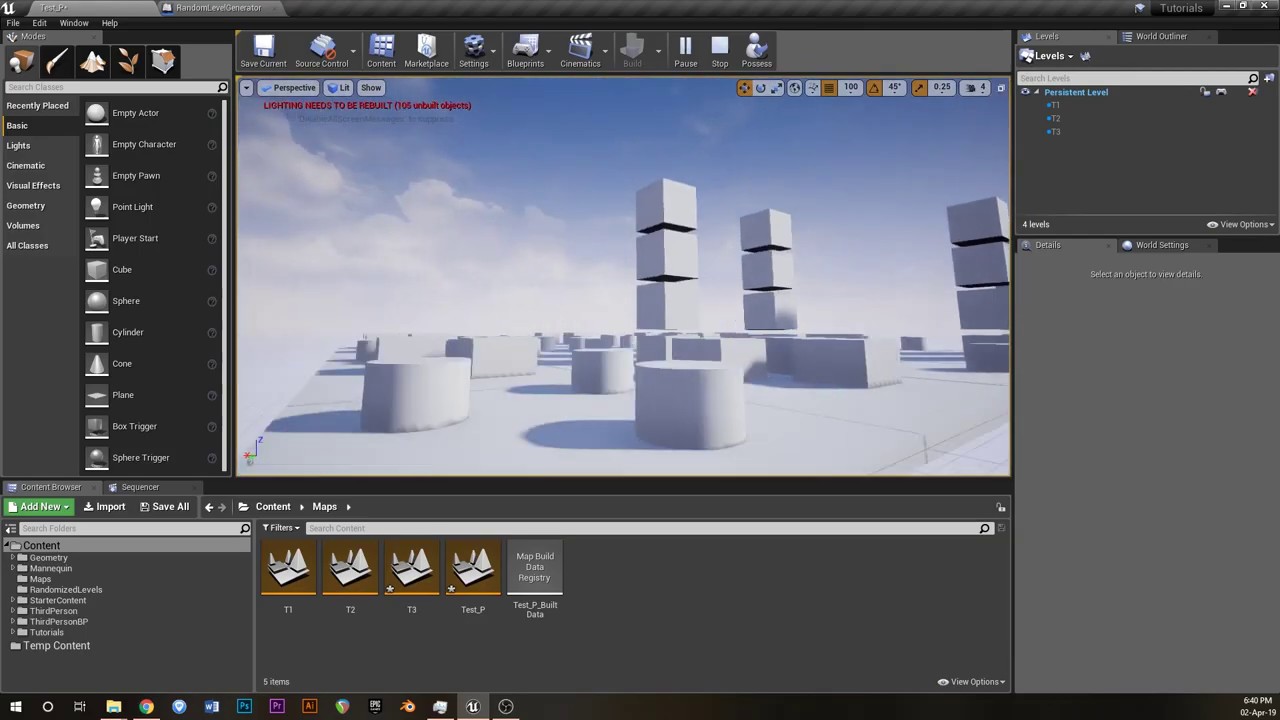
Buy everything created in this video for $5 AUD at: https://gumroad.com/jacksonnexhip#bNNC
An actor which can be dropped anywhere in a world and will randomly generate a grid of selected levels in random positions with random orientations. The actor also contains the option t...
maiden wadi
You can also just set up the lighting procedurally as well for night and day.
 summer zephyr
Where is any documentation about vehicle component ue4?
F.E i have problem with drift, is very weird
it is not documentation it is just for kids
The Unreal Engine 4 Blueprint Vehicles User Guide for SimpleWheeledVehicleMovement Component.
Where is sample how to use that, how modify that why everything is so hard here
 severe iris
I can't figure out why my axis value suddenly stopped working. This used to work fine, but watching the value it now stays at 0.
This is the binding, as it's always been. Any idea?
 hollow drift
I need to move collision box separately from the actor without creating a new bp just for the collision. Is there a way to do so?
I need to have it in the same bp since i am doing a "get hit result under cursor by channel". If I put the collision in a own bp, the "hit result..." will display just my box and not my other items below.
Or else is there a way to set an actor collision box as "not visible" for the "get hit result.."?
Or third option. Can i somehow move my collision box separately from my mesh
 noble pecan
Hello! I recently downloaded UE4 and I'm already running into a problem that could be an easy task,
I'm trying to make it so that when the player enters the BoxTrigger the cube should dissapear.
Any thought's on what's wrong?
hollow drift
try checkbox new hidden
noble pecan
I'll give it a go!
Worked! Feels a bit silly that I didn't check it beforehand. Anyhow thanks for the help!
 safe fox
Just started with blueprints. I was searching for a TSet in blueprints, there doesn't seem to be any. I'm I wrong?
Is it named differently or something? What i'm searching for is a hashset to store unique values.
hollow drift
you can create variables and get and set them, if this is the answer you are looking for. On the right side you can set boolean, int, float and so on
if you want to store, make set, if you want to recieve it, make get.
safe fox
you can create variables and get and set them, if this is the answer you are looking for. On the right side you can set boolean, int, float and so on
@hollow drift Awsome! thanks, mate!
hollow drift
besides: if you make it expose on spawn and instance editable you can call upon it from other bp
@safe fox dont forget tho to remove context sensitivity in your searchbox, else y might not see it in the list
worn nebula
Hey guys, I'm clamping my players view, but then when i try to unclamp it it gets stuck at 0 for min and max. Anyway to reset this?
 errant cradle
hi, i'm using load stream level to stream seamless content during gameplay but its causing fps drops.
how to load streaming level without huge fps performance drops?
 woven kelp
Weird array issue. How is it possible for this to print 0? If I add an item to the array it should have a length of at least 1, right?
 stray wagon
Anyone can recommend a good grass asset from the marketplace ? I used "Dynamic Grass System" but it is using the Unreal's Folliage system which is not so adapted to using procedurally generated terrain,
I had https://assetstore.unity.com/packages/vfx/shaders/interactive-grass-49495 for Unity which was so perfect because the grass looked uniform, dense and the performance were so good
But the Unreal folliage system kinda assume you're going to instantiate and whole terrain at once, and it can do whatever it wants in it (like placing folliage left and right) but in my case I allocate precise location to each patch of grass and I'd like to find a grass system that allow me to do that like the Unity one that I just linked
Any recommendation ?

Add depth to your next project with Interactive Grass from qq.d.y. Find this & more VFX Shaders on the Unity Asset Store.
hollow drift
@woven kelp try to add the array to an variable first, something like this. Perhaps this works:
as i understand, it needs to store it somewhere
 tight kindle
Hello, I would like to achieve this effect with a flashlight and make things partly appear based on the light shape. Anyone have any idea on how to do it ? https://www.youtube.com/watch?v=dGAEMJRJWQw&feature=youtu.be&t=245

Timeline
Chapter 1
0:00 - Personnel Files #1
0:13 - Audio Tape #1
0:28 - Letter Scrap #1
0:45 - Letter Scrap #2
1:15 - Audio Tape #2
1:38 - Letter Scrap #3
2:25 - Personnel Files #2
2:39 - Letter Scrap #4
3:13 - Audio Tape #3
Chapter 2 - Crossing Paths
3:33 - Audio Tape #4
3...
hollow drift
on begin overlap 😉
tight kindle
but it would make the whole thing appear right ?
hollow drift
hahaha
you need to be preciser
start somewhere and start building it along the way up
tight kindle
this is what i am looking for
hollow drift
try to separate all elements mentaly in different parts. What do you need and so on
just a flashlight?
tight kindle
yes, reveal things with a flashlight
worn nebula
I'm not sure how to do it myself, but there is this: https://www.unrealengine.com/marketplace/en-US/product/spotlight-reveal

Unreal Engine
The Spotlight Reveal pack provides Blueprints and materials that let you use a Spotlight component to reveal previously hidden materials or modify them wherever the Spotlight points at.
tight kindle
Thank you ! I will check it
worn nebula
No worries
 silk bluff
Anyone know what controls the collision for how an actor gets adjusted when spawned?
Am changing the collision presets quite a bit but doesn't seem to affect anything. I want it to be like the character which gets correctly adjusted
 rough wing
How can I set materials for player only?
So only the owner of the character will see the changes
 obtuse current
@rough wing check if the pawns controller equals the local player controller; I put this in a macro library called switch is local player, works great
rough wing
@obtuse current thank you, I just found that out and created my own macro for it. Didn't know one existed before you told me
 latent arch
Hey all, I wonder if someone know how / can help me figure out how to get my object / actor to project its location to the nearest point on the nav mesh? 😁 👍
I'm getting a path length of 0 all the time at the moment
maiden wadi
What are you trying right now?
@latent arch Projecting the actor's location to the navmesh would be the easiest way to find the closest point on the navmesh.
latent arch
@maiden wadi sweet, ive been trying that node but I don't think I'm quite getting it. Do you mind showing me how to set it up? 🙂 👍
I want to project an ambient sounds location to the nav mesh so I can get the length of the path to it 🙂
maiden wadi
latent arch
Oh wow thanks dude. So thats searching in a 1000 distance for the nav mesh?
maiden wadi
Yep. You should be able to just do a Dist(Vector) on the actor location and that Projected location to get your distance.
latent arch
Sweet thanks dude
 trim matrix
Anyone know how to hide the Shader Instruction Text while in a Material Instance?
I cant come up with anything thru google
hollow drift
left dropdown
trim matrix
Ive tried ticking on n off
hollow drift
leme chekc
perhaps in the editor preferences
sorry could not find anything specific
hollow drift
why did y wanted to have the shader instructuion text removed
trim matrix
Capturing some video for portfolio, the text is a bit annoying. Could just crop in Premiere
hollow drift
do always less, it saves time.
^^
I am struggeling with referencing variables between bp
I am spawning an pawn in one bp and want to call upon it from another bp
despite i set the correct target it still reads nothing out of it
 thorny cape
Does anyone know a good resource to learn mobile controls?
maiden wadi
@thorny cape Which controls are you trying to learn? I haven't done anything on mobile, but as far as I'm aware there's the virtual joysticks which work just like any other controller, and touches which can mostly be treated like mouse clicks.
thorny cape
I am trying to do touches
but all the tutorials I have seen dont help
so I tried to piece together what ever I learned my self and it doesnt work
maiden wadi
What are you trying to accomplish? What is your use case, or goal?
thorny cape
At the moment my A and D keys work in rotating the cube and making it roll
No I want each half of the screen to go left and right
maiden wadi
You could just mathematically split the screen in half. Let me look at the touch functions really quick.
thorny cape
Here is my current control setup
its probably not good
but I did it all myself and it's my first proj
maiden wadi
@thorny cape Try something like this.
latent arch
hey @maiden wadi thanks for the help earlyer. So ive been testing things and i cant seam to get it to return a value that goes through the branch
maiden wadi
@latent arch Not sure if my last message went through, net died. But change the point's size and duration. If that's on tick, at least make the duration 0.1
latent arch
oh sorry, its not actually returning true to go throught the branch either
as in not getting as far as the point 🙂
but thanks for noticeing that ill change that now 😄
so the project node isnt returning a bool it seems
maiden wadi
You're absolutely sure that it's within 10,000 units of a nav mesh?
faint pasture
@sick sapphire set physics velocity
latent arch
yeah it definaely is. unless the nav mesh isnt working right?
maiden wadi
I'm unsure then. All I did to test that was drop a NavMeshBoundsVolume into level and set it's extents to 20,000 in all directions. Set my player start just outside of it by viewing it with P in editor. And use what I pasted earlier. It draws a point perfectly until it's out of range.
worn nebula
Hey guys, I have a variable in a function in my character blueprint, and in my level blueprint I'm casting to the character blueprint, but it's not picking up when that variable is meant to be true, it's always passing it through as false. Any idea why?
This is my function, I'm passing through the shadow puzzle variable to my level blueprint
This is my level blueprint, and it's only passing through false when it should be true
 worthy pendant
Put a print string after the variable is being set, and make sure the conditions for it to be changed is actually being met
For instance, is the "Inspecting" variable being set to true?
worn nebula
The shadow puzzle variable, the one I'm trying to get through to level blueprint, is coming out as true when it's meant to, i've just tested it
No that's meant to be false to make sure the player is finished inspecting
Oh wtf
Now it seems to be working
Literally did nothing but okay
Ignore me😂
worthy pendant
lol
maiden wadi
@latent arch Oh. That's interesting. That function doesn't actually work that well with higher numbers it seems. It seems to derp out past about 5k units on me.
worthy pendant
If inspecting is set to false, it would terminate here, and the variable would never change
Currently trying to rotate an actor in 90 degree increments to match the rotation of the character
Any ideas on the best way to go about doing this?
maiden wadi
Do you mean like snap to each 90 degree increments based on the rotation of the character?
worthy pendant
yea
I was hoping there were a node similar to snap to grid, but for rotations
But It seems like there isn't one
aaaaand I answered my own question
thanks @maiden wadi , haha
Guess I just needed to put the question into words to understand it
maiden wadi
Yeah, you should be able to simply get the character's rotation, and divide it by 90, round to nearest integer, and multiply by 90.
latent arch
@maiden wadi aha cool ill try again under 5k units
 trim fox
Hello everyone I got a question about the melee attack i have set up.
The idea was that the weapon actor will be destroyed if the combo counter is set to 0 but if you do the combo twice in a row the actor is not getting destroyed why?
maiden wadi
Where are you even calling ResetCombo from?
Nothing in the graph you just posted is calling it.
trim fox
from the AnimNotify
Everyting is working but if you are spaming the attack the actor is not getting destroyed anymore.
Is there maybe a better way to toggle the weapon based on if the player was recently attacking ?
maiden wadi
My first curiosity is if starting the second montage starting calls ResetCombo at any point? Cause if that gets called twice, you could be seeing a second sword instead of one not being deleted.
Can you put a print on ResetCombo before the delay and see if it fires once or twice when you do two attacks?
trim matrix
Hello guys I need help. I think it’s a pretty basic thing but I need help. I created a wolf with an AI, when he sees me if I get closer he starts chasing me, how do I make an animation start when he gets really near to me?
trim fox
i will try the print and there is a ResetCombo Notify at the end of all 3 Montages
odd ember
@trim matrix what is your intention. the animation is just for looks. but what do you want to happen when the wolf gets close? describe the scenario
trim matrix
@odd ember I want an animation where he attacks me, a first person animation, where to break free I need to press a button multiple times
odd ember
okay that's a whole bunch of things
trim matrix
Yea that’s pretty hard for me
odd ember
your first step is to make it functional
and then you can see about having it work animation wise afterwards
are you using behavior trees?
trim matrix
Ye
odd ember
are you familiar with behavior trees otherwise?
trim matrix
So I’ll start doing the animation without the possibility to break free?
trim fox
The ResteCombo Notify is working fine
trim matrix
Oh
odd ember
you want the functionality first
trim matrix
Yea right
maiden wadi
@trim fox It's only printing once per spamming session, not once every attack?
odd ember
I'd create a task in the BT with a decorator that says once the wolf is within a certain distance of the player
inside the task you can measure distance from a line trace
and if several conditions are true you can make it transition into the "trap" state
trim fox
@maiden wadi it is printing after the 3rd combo if i spam it if i stop at the second it prints as well
trim matrix
@odd ember ok sound cool
odd ember
the conditions are probably like: within distance, wolf facing the correct direction. you can also add additional conditions like "trap" state cooldown etc.
trim matrix
Ok thank you
odd ember
you then want to have another BT task for the trap state
trim matrix
Oh why another?
odd ember
in which you basically freeze the player
one is for attempting to enter the state
one is for the state
trim matrix
Ok
odd ember
you could also put the logic into the tail end of your movement task
but that's a question of how you like your semantics
maiden wadi
@trim fox Try something really quick. Check if SwordRef is valid before both of those circled parts, and only do the green one if it's NOT valid, and do the red part only if it IS valid.
trim matrix
Ok ill try what you said. Thx
odd ember
sure
maiden wadi
@trim fox Make sure to route the IsValid True around that green part and into the SwitchOnInt
odd ember
you can use the movement component on the player character to manipulate/freeze the player's movements and if you can get the player controller you will have access to their inputs as well, which you can then check for (for your button mashing)
trim fox
Like that ?
maiden wadi
@trim fox Two separate IsValids. You need one between the SetIsAttacking=True and the SetVisibility node. False from the IsValid needs to go to the Visibility and the true needs to go to the SwitchOnInt.
For the button one that you already have there, it's true just needs to go into the DestroyActor.
Logically speaking, you just want to check if the sword is already spawned before spawning it, and be sure that nothing else has destroyed it before calling destroy.
 devout basin
Hello dudes,İ hope you all fine.İ have a problem.İ made a swimming system,and then i retargeted Mannequin with Mixamo Character but it looks bugged.Who could please help me😔
odd ember
someone in #animation presumably
trim fox
@maiden wadi
maiden wadi
@trim fox That looks right except for the line going from the bottom SetVisibility to the SwitchOnInt.
trim fox
its not there saw it after i took the screenshot. It kinda works now but if i do the combo 3 times in a row the sword is getting destroyed in the middle of the last combo
maiden wadi
Try adding a branch before the destroy to see if IsAttacking is currently true, if it is, don't destroy.
trim fox
It's working now thank you so much 😄
maiden wadi
Basically it was just creating duplicates and you were just destroying the latest one created.
trim fox
i was stuck at that point for nearly 2 weeks. Really appreciate your help and i learnd something new still new at the engine
 lean bobcat
hi, alot of examples show using a get tick event, but you can't really combine it all. isn't there a better alternative, like using multiple timers? Can't really branch from a single gettick event and have to string it like popcorn decoration at Christmas
odd ember
timers yes
lean bobcat
is there a create timer event or something
odd ember
generally it is advised to turn off tick for the actor complete when creating a new actor
so timers actually work by calling an existing event, either once after a delay or repeatedly every x seconds
however
only events without parameters can be considered for this in blueprint
it works for functions as well, with the same stipulation
if you search for "timer" in the context menu you'll find something like set timer by event
that's generally the one you want to use
and to avoid string spaghetti it's advisable to combine with a Create Event node for its delegate pin
kind lynx
Well I'm still at it, I can't seem to get this variable from the child actor class template thing. Closest I can do is get the name of it by Get All Child Actors and printing the loop results. I just feel like I'm not even approaching this the right way.
odd ember
people still use child actors?
what is it you're trying to do and why do you need a child actor for it
 proud hull
@kind lynx did you then cast to BP_Beanie_Blank? GetAllChildActors > ForEach > Cast to BP_Beanie_Blank > Get/Set EarCover.
@kind lynx I went back and read your original question. Are you trying to setup a way to switch gear on a character?
 void oak
Does anyone know how i can apply the second masked image over the original in material editor. I want to change the cape to red.
 hollow juniper
Hey everyone, I have a question - and sorry Keigimada I don't know how it works from the top of my head D:
Does someone know how to get an actor's bounds in screen space?
I found a "project world to screen" function but the problem with that one is that it just gives me an X,Y Vector of where the origin of my object is in relation to my screen. But it doesn't respect the size of my object. What I'm looking for are vectors for each corner of the bounding box.
In simplified terms, what I would like to do is I would like to have a box around a selected actor (think of having a troop selected in an RTS game).
Can someone help me there? I'm really stuck.
grizzled garden
guys can someone help me?
im following a tut
and i did as he did but my result are diffrent
so i made a socket, on top of the turret
and when i implment a texture to the turret
and choose a socket
it will choose the x axies socket postion
and ignore my z axies postion
so it wont go up, it will go left right but no up down
that not what the guy on the tut did, any help please?
kind lynx
@proud hull That's exactly right, I'm pretty new to this but it seemed like a great way to be able to set up an item, and create different varients of those items, different materials, pivot points, meshes, even and so on, then just switch the child actor for a new item. @odd ember I'm totally open to a different way to accomplish this if it still maintains the flexibility for an artist to setup the build the way they want, or even simply update a mesh down the road, and not have to change any configuration logic.
grizzled garden
Help
proud hull
@hollow juniper You can look into post-process effects, specifically post-process outlines.
@kind lynx For my project, instead of using a child actor component, I simply add skeletal/static meshes directly to the character. You can move the EarCover logic to the character as well.
hollow juniper
@hollow juniper You can look into post-process effects, specifically post-process outlines.
@proud hull
Just add a box component to the actor?
@void oak
Thanks for the answer, however I'm looking for doing that in 2D. Like here for instance:
Afaik, post process outlines outline the actual 3D mesh, that's not what I'm after
proud hull
Gotcha. You can use GetActorBounds to figure out every corner of the actor's bounding box and then convert each corner into screen position, iterate through those vectors to pull out the smallest and largest X and Y values to get your 2D bounding box.
hollow juniper
Okay. That's what I'm trying! How do I get every corner? "GetActorBounds" provides me with an "Origin" Vector and a "Box Extent" Vector. Is it possible to get 8 points out of those?
proud hull
@hollow juniper You might have to make your own function to manually map out the corners.
Can have it return an array of vectors or all the corners separately.
hollow juniper
Okay. Putting each corner location into an array and then work with those. I think I understand.
However, how would I get the location of a corner point based on the box extent? Sorry I'm still learning this haha
Okay, I just randomly added both origin and box extent vectors together and used Draw Debug point to show it. It highlighted a corner of my object! I don't quite get the math behind it, but apparently I can work with those two vectors alone to get what I need, haha
Thank you very much for your help and your explanations, Slashin8r, I appreciate it!
void oak
add a box compont that rotates with actor view
hollow juniper
Oh that's actually a good idea as well :o Thanks!
proud hull
@hollow juniper If you are going to add another component, then I suggest a widget component that is rendered in screen space instead of world space. Then you won't need to update its rotation and you can use any texture for a selection border.
hollow juniper
That makes sense. I already prepared Widget assets, too. I think I'll be able to get there from here. Already managed to get all points of my bounding box and already converted them to Screen Space. Now about to find the upper left and lower right extents.
Again, can't thank you enough for your assistance!
odd ember
@kind lynx you would use class inheritance for this
or a component could also handle the logic if you want a more freeform way of doing it
in your case if you're looking for something like a power up actor then class inheritance will likely be a preferred choice
I've used both, and while the component way is superior in flexibility it can require you to dive into code
whereas the inheritance class does not require any of that and will likely save you having to rework a bunch of stuff
as for child actors
I really hope epic are going to deprecate them soon
they're a buggy, expensive mess
 frosty goblet
Hey folks, I am working in the side scroller template and I am not sure what I did but now it is not jumping to the character anymore
when I hit play it just continues moving the camera
odd ember
probably an unhooked connection somewhere @frosty goblet
frosty goblet
@odd ember yeah... I just don't even know where to begin looking
 frigid ether
I'm following a old tutorial from 2016 and I'm a beginner. He skipped how he made this and I can't find out how to make those two circled in red
odd ember
you could start with the player character blueprint...?
@frigid ether context menu -> press + or -
frigid ether
But this is equals
odd ember
what is?
frigid ether
Every time I try to do equals in ends up like this
odd ember
the ones you circled are minus
frigid ether
The video is super low resolution, I swear I thought they were equals
at least on my monitor it's showing a faint black line in the middle
kind lynx
Interesting. I come from Maya and have a good amount experience there. Child Actor Components seems like such a logical way to make variants of items by having blueprints inside of blueprints.
I once built an entire car configurator inside of maya using render layers, display layers with mel script and never duplicated a single piece of geometry, material or anything. Millions of combinations were possible in a single master file.
If I understand it correctly without child actor components, I would need to duplicate the static mesh, change the material, and then swap that out. Say I wanted to add a button to a hat, then I would have to make an entirely new static mesh, and re-purposing assets is lost. Then say I update the static mesh, I would need to go and reload each of those static mesh's instead of one. Child Actor Components and blueprints inside of blueprints seems like an amazingly powerful feature, I think it would be better if they fixed any bugs instead of just dumping it. Again if there's a better way to build variants of objects without duplicating anything then yeah, just have one way that works great. dump the CACS 😉
Forgive me I don't know what a Class Inheritance is or how to use it. Any videos or tutorials?
Then I know there's Parent and Child actors which are a different thing too, that adds another layer of complexity I'm not familiar with yet. So much to learn
odd ember
I don't know maya or MEL very well, but I assume it's python based
kind lynx
MEL is similar to java pretty much, not object oriented though
 twilit heath
ChildActorComponents give you very little control
odd ember
so python does have OO as a paradigm, but having one master file for such idea is a big no no
twilit heath
and a whole lot of headache
odd ember
right so object oriented programming means that you have to do things differently
twilit heath
you can easily get the same modular effect you seem to be after by using either multiple ActorComponents
odd ember
ideally have things as decoupled as possible
twilit heath
or just attaching Actors to Actors
kind lynx
so I guess I don't fully understand what you guys are saying. Attaching Actors to Actors sounds perfect, but how does that work?
odd ember
I really think going the way of inheritance would be of greater benefit
as in, it'll save you time not having to redo code all the time
since a lot of the code will be similar
but
you can spawn an actor
twilit heath
for someone not familiar what inheritance is
odd ember
and then attach it
twilit heath
oh, he's in for several redoing of all the code from scratch
kind lynx
I'm in for starting from scratch at this point, I'm just trying to learn something here.
kind lynx
last thing I want to do is duplicate a static mesh just to have one that's blue and one that's red. Seems silly.
odd ember
I suggest learning a little bit about polymorphism and OO
let me see if I can find something readable
twilit heath
your 2 instances of a static mesh
odd ember

In this tutorial i explain Inheritance in Blueprints with simple examples by deriving functionality to a subset of different Blueprint classes.
If you would like me to share the project or run through how I did this with you more personally, please email, skype or catch me on...
twilit heath
can have different materials assigned to them
twilit heath
or same material with different parameters
kind lynx
nice, thanks Cranz
 thorny marsh
Top notch tutorial. 👍
odd ember
haha
twilit heath
i just went through first 10 seconds now
kind lynx
🤔
odd ember
it seems pretty good, watching it as well just for kicks
twilit heath
and dude seems to have been mixing apples and oranges 😛
thorny marsh
So many years ago.
 dense mica
Anyone knows the best way to move tons of folders with blueprints to another folder without breaking references?
odd ember
just move them
your references will be kept via redirectors
you can then fix up redirectors
and get away with it scott free
dense mica
When we did that engine crashed, dont know the exact crashlog but it was something like graph referencing error etc.
odd ember
did you happen to have one of the actors open or some such? or a level containing the actor?
dense mica
Prorably second one
There are tons of levels already made and tons of other plugins and blueprints
dense mica
Understood, thanks for your guidance 🙂
odd ember
I should say that with a slight caveat
in that moving too many big things at once can cause memory issues and instability
so you might want to move smaller folders first
dense mica
Is moving folders in explorer safe?
odd ember
and break up large folders to move one at a time etc.
I mean is it going to bluescreen you? no
is UE4 going to be happy? also no
dense mica
Yeah, right 😄
odd ember
doing it inside of the editor ensures nothing breaks
it is by far the safest way of doing large scale restructuring
kind lynx
I broke some stuff moving things in file explorer, I'll never do that again.
kind lynx
ok, so I watched that video, seems great, but I think I'm missing something. If I wanted to say put those boxes on a characters head and and attach them to a socket, I think you would use a Child Actor Component, or am I missing something?
kind lynx
ok, done
odd ember
let's say you have a very real problem
of e.g. spawning a powerup
so there's a few things that need to be considered here
- the powerup has a function
- the powerup needs to be interactive somehow
- the powerup needs to update its behavior once interacted with and may need to respawn
these considerations are true regardless of powerup
this gives us enough to work with to start a PowerUpBase class
in which we install the necessary components to make each PowerUp work
once we have this, we can then inherit from said base class to create subclasses/child classes. in these we can then specify the specific functionality that each powerup has
does this make sense?
kind lynx
sort of, in the sense of the object itself. I think I just don't understand some fundamental thing about how to say attach an object to a character, like a hat for example. Like I can even picture that the hat may have a power up. I just think I'm missing something. I'm not even looking to say make a situation. Just kinda thinking like barbie dress up. I mean, much more badass ofcourse but, that's where my heads at.
odd ember
I think you need to think more in terms of functionality rather than cosmetics
kind lynx
ok
odd ember
in the case of how you visualize whatever powerup, cosmetics have no influence on its functionality
like your powerup could be a white square
because it's a placeholder
it doesn't matter
we know that later on that white square will be replaced with whatever cosmetics we want
the functionality is live though
from the time we implement it
kind lynx
any examples out there I can rip through that you know of?
odd ember
I just gave you one, with the powerup
odd ember
I think you're still stuck inside a single actor
where the only things you can operate with are components
you need to take a step out from that
a single actor is a class
so we can load all our functionality into a base actor
and then just derive the classes we need that share functionality
does that make sense?
another example would be a character class
which you can derive into a humanoid character
or animal character
or monster character
etc.
they all share common attributes
maybe they can all be killed? let's put a health component on the base class
now it works for all of them
kind lynx
I'm laughing at myself, you are very kind for trying to explain this over and over. I know when I figure this out, I'm going to laugh again.
odd ember
without exaggeration polymorphism is perhaps the single most relevant way to think about implementations today
twilit heath
oh, composition now 😄
kind lynx
It kind of seems like I should duplicate the entire character, and switch the whole character blueprint whenever a differnet hat is equipped
odd ember
almost
it's not a complete duplicate
and not really a duplicate in the truest sense either. the base class is usually what we call "abstract". it doesn't really exist in the sense of the world. it only exists so we can inherit functionality from it
kind lynx
sure, yeah, I mean that's why I initially wanted to make separate blueprints of items, make variants and material changes to those, and not the static mesh
odd ember
for something like hats etc., those can be added onto characters later. but that's not relevant for this concept
you could inherit a character just to add a hat
but it would be a waste etc.
inheritance only exists to save the amount of repeat work you have to do
kind lynx
ok, I got that part
odd ember
so which part are you unsure about?
kind lynx
putting that instance into another instance
merging them together, sword in a hand, hat on a head
odd ember
attachments
those would be
or they are built into the class already so you switch out the static mesh in question
kind lynx
yup, there lies the stuck part of the static mesh limitation.
odd ember
but that limitation isn't there when you have an inherited class
because in the inherited class you can just swap the static mesh for another
since it's just cosmetic
kind lynx
so say the inherited class would have like a material definition of the hat static mesh, say blue or red material?
odd ember
that can all be changed
as long as there is a reference to the material. or in this case, the hat already has that as part of its component feature
but once again
this is not really where your focus should be
this is all cosmetic
and cosmetics really come last
and just to be clear, cosmetics are completely decoupled from functionality
kind lynx
yeah, I might be stuck there. I guess my goal is to have an artist setup an object, and the logic doesn't need to do anything but swap one node. Say fire hat, or ice hat.
odd ember
that's fine
have a base class with a static mesh component
then any derived class just puts in whatever static mesh they need for that particular class
kind lynx
Hey @odd ember Thanks for all the help, I really appreciate it! 😄
 lone nimbus
Anyone know how to destroy a particle on button release?
So I have an "energy" type shield that I made with a material then made that material into a particle. It's attached to the characters hand when the "block" button is pressed. Works great, but problem is when I release the button for "block", the shield is still there. I want to be able to deactivate the emitter as soon as the "block" button has been released.
I've tried DESTROY COMONENT and made the SHIELD a variable that I them plugged into the out of the SPAWN EMITTER ATTACHED, which is the only help I got from searching online, and that doesn't do the trick.
Any ideas?
 tight schooner
@lone nimbus it depends how the particle system is set up. If you saved a reference to the spawned particle system, and all you want to do is cease emitting particles, you can use a Deactivate node. It'll auto destroy when the remaining particle lifespans are done if you set it to auto-destroy on spawn.
Otherwise you might have to Destroy the component, or set it up differently... I'm not well versed in every way to cleanly end a particle system.
I'm always using continuous emitters so Deactivate works for me.
lone nimbus
I'm not sure that will work for my situation. The remaining particle lifespan is an issue, because I want it emitted and destroyed on demand and not on any type of timer. I can adjust the lifespan of the particle, but let's say I set it to 3 seconds, and the player is holding down block longer than that, it'll go away before the block is released. And on the other hand, if I bump up the lifespan and the button is released before the lifespan, then the character is just running around with a shield and not held up 😆
I've also tried deactivate, but I can't get them to work on button release, only on the output of the emitter and that instantly deactivates
tight schooner
Sorry, idk how to handle that case — a burst of indefinitely long-lived particles. If nobody gives you a great answer here, try #niagara or (if Cascade) #visual-fx
 unborn turret
is there a way to remove all widgets for clients inside game mode?
i m running a server event that multicasts the remove all widgets
but clients widgets are not removed
 austere copper
Hi I just started learning how to make blueprints a couple days ago. Is there a node that you can set two float values and have it chose one randomly and output? Ive tried an array random selection but I dont know how to specify the two numbers I need
tight schooner
@austere copper Try a "select" node and a random bool node
 zealous moth
@austere copper search for "random range" in your blueprint and you will have a choice. sounds like Int is your best bet; if you're new i recommend this series just to get a basic game template going so you don't have to refactor everything from scratch at the end: https://www.youtube.com/watch?v=C8FNZ6B7bU8&list=PLqE-M9bkjoRgzSQGrBCGuLUAhCgFYzXXd&ab_channel=PendingKill
@unborn turret that's because the game mode is not seen by clients. try the game state instead or the player controller.

Source code: https://github.com/PendingKill/BasicGameTutorial
00:00 Introduction
00:39 Demo
02:11 Introduction to GameInstance + Setup
05:25 GameInstance Blueprints
06:30 SaveGame setup + Structs
09:50 GameInstance Blueprints, cont.
12:20 Main Menu WBP (Widget Blueprint)
15:5...
austere copper
@zealous moth Thanks I'll check it out
One more question for anyone out there. Im making a spline rope bridge blueprint and have the planks working. Now I want to add a suspension rope following the same spline's location and rotation but offset the rope so it is above the planks. I don't exactly understand how to add another mesh to the spline nor how to offset it.
This is the network right now
I think it got it figured out
 limber finch
Hey guys! Does anyone have some good resources for someone with no experience in programming starting with Blueprints?
dense mica
Would that work? Make structure instead of directly pointing it?
 wet steppe
Hey
How do I do this
I always forget
please and thank you
like how do I get the boolean with the back connection of target
thats what I have
 atomic salmon
@wet steppe Is Dead is a member variable of whatever Muffin, so Target represents the instance of that actor. That node is created automatically for you when you drag out of the Cast and search for Get Is Dead.
wet steppe
thank you @atomic salmon
wet steppe
Ok I tried it
it does not work
Nvm
I get what you ment
that boolean had to be part of muffin itself
worked thank you
 hot spindle
thoughts on variable naming conventions for booleans? my friend follows a style guide where you prepend 'b' on any boolean variable name. so like bCanJump , but unreal then mostly hides the 'b' part in the UI, so it becomes invisible
i find this really bizarre to do, because everything in blueprints is color coded and type checked, and your boolean names should have good names that make it clear they're a boolean. and the style guide doesnt have you prepend type notation to any other types?
 gritty elm
how to open and run .swf file in unreal engine
odd ember
thoughts on variable naming conventions for booleans? my friend follows a style guide where you prepend 'b' on any boolean variable name. so like
bCanJump, but unreal then mostly hides the 'b' part in the UI, so it becomes invisible
@hot spindle the 'b' in front is following UE4's standard naming convention. generally it doesn't matter that much in BP though. but always name your variables what they are or what they do. then there's the general good practice for naming like not using negations in naming, always branch on true etc.
 earnest tangle
afaict the bFoo naming is because they decided to use first letter uppercase property names
eg. typically you'd have something like isWhatever, and if you have a getter, it's called IsWhatever
but because the variables in UE are supposed to be IsWhatever, now you can't have a getter with that name
that's the only way it makes sense to me lol
odd ember
they also have naming conventions for cpp classes
like U in front of objects, A in front of actors
earnest tangle
and FHahaCouldBeAnything
This is what happens when you try to retrofit a naming convention to an existing large codebase 
Guess it's still better than nothing
odd ember
the F is puzzling
I reckon it was originally intended for structs only
maybe it still is
hot spindle
but why do it on booleans and not other things
v3MyPosition
colCurrentColor
it just seems silly redundent in blueprints
stringCharacterName
hot spindle
i sort of understand it as a c++ convention and it gets hidden in blueprints which is nice
odd ember
and always branch or true
earnest tangle
If you think of it the way I mentioned with getters tho it makes sense
if you have a variable called CurrentColor, the getter for it would be called GetCurrentColor
the naming conflict only really exists with bools
odd ember
true
hot spindle
hmmmmm gotcha
earnest tangle
I mean I have no idea if that's really the reasoning for it, but at least that's the way I managed to have it make sense to me lol
odd ember
I mean none of this really matters in BP as BP is self encapsulated in most cases
every variable and function is a wrapper
 simple sky
If I attach an actor A to another actor B; can the actor A receive an event if actor B is destroyed?
maiden wadi
Attaching doesn't do anything more than make ActorB a part of ActorA's component hierarchy so that ActorB moves when ActorA does. They're still two separate actors.
 halcyon grove
Hey so what I want to do is take my parent blueprints that represent the player, the ai unit, resources or pickups combine those into an array and then check then run what my mouse is over up against the array to see if any matches come up to them build gameplay off of that...
but things are not working how I might like
spag
this was my second attempt when I couldnt get the object array working how I thought.
any ideas?
I'm sure I'm just failing some basic logic
maiden wadi
So, what is the goal with this? Like hovering mouse over something to make it display that it's clickable, or?
halcyon grove
yes exactly
i will outline it
i may bring up some kind of HUD if its an enemy
or click and pick up if its a resource / pickup
at first I was just gonna toggle my post process outline material on / off
well at very first I was gonna get a print screen to say hello 😛
but it was all goodbye 😦
maiden wadi
I'd consider using interfaces. You have a lot of classes there and all of that casting can be solved down into a simple "DoesImplementInterface" branch.
That, or.
halcyon grove
this is the first I've heard of that so I'll look it up
maiden wadi
You could do this all in their separate classes with mouse events.
halcyon grove
like mouse events that happen within the class its;ef?
can you give a small example because that souunds more like what I was trying to do
maybe I've got the blueprints in the wrong place
maiden wadi
Like these, or their specific component versions.
halcyon grove
ahhh
yes thank you
i think that is exactly what I was trying to do
but I was trying to make it work with hut under cursor by channel
im stupid sometimes hahaha
i completely forgot that was there
maiden wadi
Nah. Both ways are valid, but the get hit result under cursor requires an interface to make it easy.
maiden wadi
You're telling it to keep going until the TraceEnd vector.
@swift pewter For the VFX trail, Do a vector switch on the NewTargetPoint of SetBeamTargetPoint. Boolean should be if there was a blocking hit. True should be the hit location, false should be the trace end.
And I can't be sure without seeing it again. Might need a call from the damage event to stop it or something.
What are you doing in the damage to stop the healing?
Yep.
Hmm. CallingStopHeal and then BeginHeal won't solve that, it'll just set the bool to false then true before it replicates most likely. Which won't solve the VFX issue on clients. What I think you might need to do is rearrange your events a little bit to accommodate the damage event.
Long enough for it to replicate. Have a simple fix I think, let me test this.
Something like this could potentially solve that. Basically setting IsHealing to false if it was from a damage event until the healing timer actually starts.
Then just tick the boolean true if you called StartHealing from a damage event.
@swift pewter Actually, hold on a sec.
Try something really quick.
After setting the bool to false in StopHeal, try calling this.
And call Stop, then Start like you tested a minute ago.
Well, no, that would end up doing the same thing and just restart the vfx immediately.
Eh. Timer is probably the best option if you want the VFX to go away for a small time before the healing begins again.
Which?
You're calling only BeginHeal from the damage event with a true boolean?
On a side note. Do also set up a quick branch in front of your SetTimerByFunctionName that's calling the Heal function. You'll end up starting a bunch of timers if you can't clear and invalidate it before starting it again. Or just not start a new timer if the current one is active.
You'll end up with superhuman healing.
I usually just do this.
 lavish zinc
do multicast delegates of an attached actor using child actor component work properly? i have an instance where all the code is working on the child actor other than one of its component receiving a delegate from another component
 still sigil
https://www.youtube.com/watch?v=wW4t5QxOQaE
I posted this in #gameplay-ai yesterday, but this might be more of a blueprint question, rather than it purely being an ai question, so I'm gonna post it again in here. So I'm trying to create a jump function for my AI enemies. There's not a whole lot of info on how to do it. I've been following this tutorial on how to do it, but it doesn't seem to be working, even though I've followed it to the letter.

In this series of videos we are going to create an NPC which can jump onto or over objects in the Unreal Engine 4. We are going to accomplish this by using the Smart Link component of the Unreal’s Nav Link Proxy, we’re doing this so that we don’t have to rewrite or add to any ...
https://gyazo.com/b1085222c7aeb30202f3880b2cd67569
I have a function within a Navlink Proxy BP that controls the velocity, so that the enemy lands on the other end of the Smart Link every single time.

https://gyazo.com/13e7bc58883a0c42bacbe23dc17ddefd
Then that function gets called upon "Event Receive Smart Link Reached" activating.

https://gyazo.com/35ab4fe7dbb4f958f318775ae87037e8
I know for a fact that the enemy BP is atleast TRYING to do the jump function, because once it reaches the Navlink, it jitters slightly, as if it's trying to perform the jump logic. Yet the enemy doesn't actually jump anywhere, and gets stuck. Again, I followed the above tutorial pretty much beat for beat, so I'm not really sure what I'm doing wrong here. :/
 maiden wadi
@still sigil Not sure if it's your issue, but sometimes you need to lift a character up off the ground like 5.0 units or something before launching.
still sigil
Really? Huh.
But I've tried a few other methods for jumping, that are far less scripted than the method I'm currently trying to do. And THOSE work fine, the enemy does jump in the air with those. It's just this one that isn't working.
And I really wanna get this method in particular to work, so that there's a 100% guarantee that the enemy will land where he needs to every single time.
maiden wadi
Dunno. You might also try putting prints after the launch to be sure it's being executed. Make sure that the velocity is high enough, etc.
still sigil
Way ahead of you. Print string shows that it is being executed.
odd ember
I recommend using breakpoints over print string
still sigil
Ahh, okay I know what's happening.
It's trying to place him on the wrong side of the navlink.
It's putting him where the navlink starts, rather than where it ends.
And I don't have the mathematical know how to correct it, hence why I've been following a tutorial for it.
So uhhh.....I think I might be stuck now. 😛
 late cloud
Hey guys, I am a designer and an architecture student, having my thesis very close to game design fields. But I am jumping completely alone into the blueprints and since I am so new to programming I have the most minimum of idea how to work with them. Would anyone be available to help me out with something I am stuck for the last 4 days? Essentially I am trying to create a terminal like the one on Stories Untold, just waaay simpler, only a few interactions. I just want it to accompany the rest of my scene. I've found an article doing that but it's intended for someone having a better understanding of coding. I've progressed a bit but I got stuck at a point. So, yeah, if anyone had a few minutes to help me understand a couple of things I am stuck on the article I would really, really appreciate it. Thank you in advance y'all!
Here is the article: https://80.lv/articles/how-to-create-a-terminal-system-in-ue4/

Developers of TARTARUS showed how you can create an interactive terminal in your Unreal Engine 4 game.
gritty elm
what is the best gpu for ue4
maiden wadi
You'll get much faster results just asking simple questions like that in a search engine.
odd ember
it's more like asking "what's the best color for a wall"
certainly not relevant to blueprints
 rancid nimbus
I have a qustioin about linking up snap turning in the VRExpansion Package? What would i connect to the "Add Factor World Rotion VR" to have it work. I was looking to get the joystick so run it when i move it to the right or to the left to activate the snapturning but im not sure which and where it would be.
atomic salmon
@rancid nimbus usually you take the axis value of the thumbstick and if it exceeds a threshold you call the snap turn function
use a Do Once for that. When you let go of the thumbstick you reset the Do Once.
rancid nimbus
I got this working where it snap turns to thr right side, how would i like it up to also turn to the left?
atomic salmon
@rancid nimbus check the sign of the axis output. Positive is right, negative is left.
 sonic pine
Hiho actually i have the Movement of each character into the different characters but im trying to create a controller for all "normal" Character settings like Movement, Heath and Mana Reg, Exp and skillpoint system. I want to handle it like that is because this settings are worldsetting for the chars, every char need the same exp to get lv 2, will get the 2 skillpoints at lv 2 and so on. I will not have 10 "Big" Characters with 10 times the same infomations. So im hoping im on a good way to fix that problem ^^
Maybe someone can help me, is that a good way to do this, also good for the perormence?
rancid nimbus
@atomic salmon i have it set up to turn right with the value checking < .5. im just not sure how i would link up to get it to also be able to check the other value with out having to duplicate the whole thing.
atomic salmon
@rancid nimbus first branch looks at the sign of the value, positive or negative, the second at abs(axis value) to trigger the movement or back to center
you can combine them in a smart way but this is enough to get it to work
safe fox
How is this possible? The format text node gives wrong answer every time.
should be 5 times 2? but it's formatted to 2 times 4? why?
I clicked the smale blue magnifiers in the Format Text nodes and now it's working.
what do those magnifiers do?
atomic salmon
@safe fox those nodes are evaluated at the time of execution of the node that uses the result
magnifiers are value inspectors
they show the value of the variable represented by the pin
at runtime that is
safe fox
@atomic salmon Right, cause I was inspecting those values. But it's wierd that removing them made the node work correctly again. I mean I didn't change any wiring, it just worked. could be a bug or something?
atomic salmon
@safe fox that is unlikely, maybe there is another explanation.
Something you changed.
safe fox
I figured out what's happening, but no idea how to fix it
the green nodes are generating random values, but the SET nodes triggers the green ones again, making them to regenerate values
I want to either get the old ones or the new ones after the execution of the SET node.
atomic salmon
@safe fox yes that is a side effect of the random nodes
never wire the output multiple times
each time they generate a different random number. you want to assign the output to a variable and that one you can read multiple times
atomic salmon
@safe fox correct. Two output connections, two different random values, one for each
I feel like they should display a warning about that
safe fox
I feel like they should display a warning about that
@atomic salmon Right! It's not obvious! especially for first timers.
 pulsar moss
I have an array of UObjects in my save game class. When I load, the objects are invalid/null. Are UObjects not serializable? Or am I doing something wrong?
This is how I save
And this is how I load
seems like that should work? Or is the list holding onto references that will get nixed?
Does this need to be checked?
pulsar moss
OK the answer to my own question is you can't, I have to save structs only
maiden wadi
@pulsar moss Normally you don't save the object itself. For example, what you're saving at the moment are just memory pointers and not the objects themselves. So when you load them, they're just pointing to random spaces in memory, that when checked, would be null because what they're pointing to wouldn't be an object of that type. You need to get the data you need from these objects on save, and then on load, have some function or manager that can set them back up for you.
pulsar moss
yeah I figured that's what I was doing
thanks for the confirm
I guess I forgot I wasn't using Rama plugin 😛
late cloud
can someone pls explain to me how i use this event with my editable text. thats a screenshot from what i want to achieve, but i don't know how to bring that event on the widget graph. thanks in advance.
 coarse lantern
what does this icon mean?
 sonic kayak
Hey guys, whats the best way to show humanized version of errors that comes from my backend? If I would use enums for errors, how do I convert string message like user_not_found so that I could use this value for lookup in my enum?
maiden wadi
@coarse lantern It means that the event or function is designed around the idea that it's supposed to be cosmetic only. It shouldn't be relied upon for gameplay programming of any kind.
@late cloud Two ways, the most common is to click on the variable anywhere in the graph or the designer, and then on the right hand side scroll all of the way down to the bottom to find these.
trim matrix
Hello guys, I’ve created a day cycle in Unreal Engine 4, how do I Add the possibility to sleep and select the time you can rest? Thx
late cloud
@maiden wadi damn thanks a lot! and how do i do it for two of them and now only one?
maiden wadi
@late cloud How do you mean?
late cloud
on the svreenshot above it included editable text and editable text 17, its two variables right?
maiden wadi
Nah, that's for a single editable box. What it probably is, is that event is hooking into the EditableText's class, So the naming convention is probably something like EventName(ClassEventIsFrom)(ActualClassInstanceName)
If you want that event for two of them, you'll just need to make both events in the graph and have them call the same function or macro.
late cloud
gotcha!
and @maiden wadi how do i hook the event into the edtxt's class?
one last thing, how do i fix that
im banging my head on the wall for hours now
(what i am tryiong to do is make the player change view from the Fp to the camera infront of a screen with a widget)
the widget is the temrinal
im so new in these sorry for my naiveness
maiden wadi
It should do it for you with that green button. For example, these two are the same thing. But the bottom one is just simpler and easier to apply. The top should only really be used in special circumstances.
As for the blend thing. The target of the blend needs to be an Actor. It'd be the actual in game actor that's in the level, not the widget.
late cloud
hmm okay thx, for me it shows only the (ActualClassInstanceName) so dunno... maybe its just a 4.25 change?
aahhh i think i mis-associated my terminal widget and not my terminal actor... let me check that! Appreciate ur help man, truly!
 ripe estuary
I started yesterday and I have so many questions
I followed a tutorial and they showed how to make a cube follow you and push you off, I made multiple cubes and made them spawn in different locations but they always go into the floor
Not fully into the floor but half in half out
How do I stop them going under
maiden wadi
It depends on why they're going under. Are these cubes Pawns with an AI, or are they just normal actors manually programmed to do the following??
ripe estuary
Pawns with AI
maiden wadi
Floating Pawn Movement components?
ripe estuary
Yes
maiden wadi
@ripe estuary What does your Components list look like?
ripe estuary
Where is that?
maiden wadi
Top left in the class. This thing.
maiden wadi
Try making the Cube your default root. Or at the very least replace that with some form of collision like a box collision or capsule collision.
By default, all movement components use the root component for movement and collision, and Scene components don't have any collision. If making the cube the root doesn't work then you will need a BoxCollsion or something similar, and you'll just have to move your cube's relative location up a little.
trim matrix
Somethings wrong with my characters rotation(YAW) my character is using the yaw value (boolean) his pitch works fine, movement works, but he just can't rotation on the yaw and i'm not quite sure what would be stopping it (the rotation is handled in c++).
Could there be something in the animation blueprint that would stop the rotations of my character on that axis?
maiden wadi
Not unless you're telling it to rotate somehow in the animbp. How are you doing the yaw rotation in C++?
trim matrix
dense mica
Is there any way to save my print log to .txt file?
Not the whole log, only my "print string" log
trim matrix
well with the animation blueprint was setup to use aimoffset for a rifle
I just don't see hows its conflicting
maiden wadi
If you remove the animbp from the skeletal mesh, does it allow turning on the yaw Axis? If not, it's unlikely that's the issue.
maiden wadi
Presuming that it's a character class, the only thing you should need to use that exact C++ call is to enable UseControllerRotationYaw in the class defaults. If that's enabled, are you somehow doing any form or rotation anywhere else involving that class?
trim matrix
not that i know of atm but yaw is True
it does have a Gun Component
Basically its the Hero Character from the GASDocumentation project
Because i can't move the character unless I have Stamina I noticed
Maybe not just stamina but Default values set for the attributes (probably has nothing to do with it, regarding rotation)
maiden wadi
Is the axis event being called?
maiden wadi
The C++ one though, it's getting ran?
trim matrix
like a print string in c++?
all my names match too
tried this in the controller
R and Y don't change
think its just the node i useed
 vivid merlin
Total noob and probably dumb question here but: I have created an enemy, and an enemy AI_bp that attaches a behavior tree to it (based on a tutorial) and now I am trying to spawn multiples of the enemy but the AI_bp_BT doesn't replicate- does this sound like a quick fix in anyone's head without thinking too much?
 narrow fjord
R and Y don't change
@trim matrix R probably shouldn't*** change. That's your roll.
trim matrix
yah i noticed that
 opaque valley
@rough thistle I believe that if you right click the event graph and look for Set Speed you can change your variable there
opaque valley
It's a transfer from CPP to here because the question was a BP one, sorry
 rough thistle
Nah it's fine
narrow fjord
Oh no I mean don't apologise I was just confused haha
opaque valley
Yea it was confusing, didn't mean to confuse everyone
rough thistle
Ok since this is a bit more complicated I will just make a C++ class
opaque valley
It's really not that complicated in BP though honestly
But yea whatever you'd like to do
narrow fjord
What are you attempting to do?
rough thistle
ik yea but since everything is in C++ it won't make much sense and later I will add more advanced things so yea
opaque valley
Ok. He was trying to figure out how to set a variable on a spawned actor
So I was basically saying to have a reference to the actor, pull off of it and say set whatever the variable name is
And then you can set it that way
rough thistle
Yea I'm sorry everyone for making things a bit jumbled
narrow fjord
so just get actor, cast to and set variable?
opaque valley
Yep
rough thistle
What do I cast to?
narrow fjord
whatever its' class is
rough thistle
oh yea
opaque valley
Whatever type it is. Or don't cast at all if the stored type is the same as what you need
rough thistle
one second
narrow fjord
Whatever type it is. Or don't cast at all if the stored type is the same as what you need
@opaque valley yeah probably the best way - but when you set that stored type you're probably gonna want to cast it into the set
so that you can check if cast fails.
rough thistle
also a bit off topic but I am super proud of this gun all by my self : )
opaque valley
Progress is always amazing
rough thistle
In spirit of the new cod zombies I wanted to try to recreate and learn some things like making a gun and soon ai
narrow fjord
very unturned vibes.
rough thistle
lmao yea
I want to learn blender soon but first I gotta actually work on learning HOW to make the game
narrow fjord
very good mindset, art can always come later.
rough thistle
game first, graphics later
narrow fjord
it does tend to help inform the direction the game is heading.
rough thistle
yea exactly
narrow fjord
but it's fair enough if you're just not an artist by nature
rough thistle
yea I've never been lmao
narrow fjord
blender is easy though once you get the hang of it!
rough thistle
and the price is very nice to my wallet!
trim matrix
my problem fixed itself not sure how
trim matrix
Yaw wasn't (turning) wasn't working
narrow fjord
did it have a camera?
trim matrix
yah
narrow fjord
ah lol
adding controller yaw with a camera is sometimes buggy
or pitch.
well not buggy
just depends if you do it the right way haha
narrow fjord
code sprites
trim matrix
one thing i did do
is readd the anim blueprint
but i don't see how that would do anything
before i afked
 thorny cedar
is there a way to use Regular Expressions in unreal?
odd ember
in what sense
thorny cedar
i have a text field and i want to only allow numbers like 12 12.232323 and so on
(?:\d+(?:.\d*)?|.\d+) that should be the right expression for floats
i want the user to set a timer
narrow fjord
thorny cedar
oh thank you 😄
plush ridge
I have a character mesh with a physical animation component (which is working, and simulating), but this:
Via line trace, returns False
Anyone know why?
 merry vigil
Hello all unreal members, I have a bit of a problem I started a game with my friend, I was the designer and he was coder, I have been designing for many years now have created the half the open world and story, but due to other things he not able to help me no more, now my idea for the game is 1 of the kind and I'm looking for someone help me finish I'm happy to go 50/50 on it, set up a Kickstarter for it but haven't launched it yet due to my issues, I'm looking for someone that has good knowledge about unreal that can help me finish this game.
faint pasture
@merry vigil You will get approximately 0 good gamedevs to work for free. Everyone here has ideas. If the story is great and it doesn't need to be a game, write a book or an animated short. Or pick it up alone and finish it, BP isn't hard to pickup.
@plush ridge You hitting the mesh or the capsule?
plush ridge
@faint pasture Mesh (confirmed)
When I hit other simulating objects, the bool is True
If I ragdoll the skeletal mesh, it will also be True
But it's False when the mesh is not ragdolled, but is using the physical animation comp
faint pasture
The animation component probably just doesnt set the mesh flag to be simulating
OR
it's on a bone by bone basis
plush ridge
Tried passing hit bone, I actually get warnings in that case... wait that means the bool was True 🤔 but the add impulse did not work
Strange
faint pasture
Yeah I'm not 100% sure what the differences are between the physical animation and ragdoll states, might want to ask animation.
sonic pine
hiho is there a way to create a veriable with diferent values?
tight schooner
@sonic pine What do you mean different values?
You can make a custom struct which is like a bunch of variables packed into one, if that's what you're looking for
sonic pine
yes thats what i mean
i have to give the different characters a different playstyle so i need one variable to say Warrior, Archer or Mage
tight schooner
If you're using freely written names for things, you might want to look into custom enumerators too. https://youtu.be/yVx8sTO43gc
I try to keep my usage of structs simple... I heard of people running into bugs by putting custom structs into custom structs, or changing their structs when they're already heavily used throughout a project.
 hidden hatch
ok so i'm trying to fill an area that's empty without filling the already filled area, but it's acting weird and i'm not really sure how to describe it
so i got some screenshots
when i turn it backwards it does it perfectly, but when i do it normally it just does the top 2 layers
i really just got no clue how it's like this
two screenshots only difference is swapping this
i just can't comprehend what could be happening, like how the inverse isn't actually the inverse
tight schooner
@hidden hatch There's a lot of ways your script could fail and I don't know which one to suggest
cuz anything i say could be a red herring that sends you on a wild goose chase
you just need to do some bug fixing to narrow down the problem more
hidden hatch
anything would help tbh, i'm totally clueless here
tight schooner
For example I wonder whether the vectors you're making are exactly matching the ones in "rooms completed". Floating point imprecision could play a factor there too.
If your procedural level thingy builds in a quantized (tile-like) way, maybe you can use integer vectors (intvec) instead
to represent room coordinates
hidden hatch
i'll try that
i wasn't aware it was a thing
i'll be back in a while if it persists
yep didn't work
surprisingly easy to change over though
and i'm glad i know intvectors exist
tight schooner
well, at least you can rule out floating point imprecision
 quick lark
Hi all, is there a standard way of playing a sound with delay based off of the speed of sound, or do I have to make sure I manually incorporate a delay every time I spawn a sound at location?
quick lark
thanks 😄
 true valve
When I attach a character to another charcter to its socket, is there a way to look on to that location?
flat raft
@hidden hatch what do you mean by turn it backwards?
hidden hatch
as in i want a grey cube in every place it's not in the second image


so instead of it being in those slots i want it in every other slot
flat raft
How are you determining what should be grey, and what should be black
hidden hatch
while making each grey brick i write the location to an array
of intvectors
then do this
keep in mind it's usually false i not true
true is just for that screenshot
because for some reason true works fine
flat raft
So roomscompleted has the location of where it should spawn?
hidden hatch
it was for the screenshot
or no i was changing it at that point
RoomEmpty is the gray one
flat raft
try a for each loop instead
hidden hatch
i don't see how you mean
flat raft
For Each in CompletedRooms Print vector
hidden hatch
oh ok
flat raft
Print it, make sure it's correct, and what you expect
hidden hatch
it's a lot more than i expected
hidden hatch
@flat raft thanks so much lmao
flat raft
No prob
hidden hatch
had this earlier on
and fill empty is the name of the one from before
sometimes all it takes is a push in the right direction lmao
flat raft
I do it all the time. 😂
tight schooner
whenever I use a loop, I connect some conspicuous reroute nodes to the "completed" pin so that I don't forget that's there
and accidentally connect stuff to loop body
flat raft
I build a debug tree for a lot of functions. and add a checkbox to the input
it just prints things
tight schooner
same... A lot of things I make now have a debug boolean
hidden hatch
yea, I usually do it in java but for some reason it doesn't come to mind here lol
 raven pewter

Broad Strokes
So, you thought to yourself, “Man, wouldn’t it be cool if I could add some floating rocks to my level?” Well, I heard those thoughts you were thinking, so here’s a quick tutorial for how to do that kind of stuff pretty simply with blueprints!This tutorial assumes you know at l...
tight schooner
@raven pewter more efficient to do that in a particle system or material (vertex shader / world position offset) if it's purely cosmetic. I mean, it's ok if you're just prototyping or teaching some math concepts.
 vague stream
How do I get UMG to ignore analogue input with the navigation stuff?
I've overwrote all input functions in my widget so all of them just return handled regardless and yet the analogue stick on my controller is STILL making the widget navigation change
raven pewter
@tight schooner
I was posting that for someone in the chat 😉
proud hull
@vague stream You can turn off the built-in UMG navigation.
Set them to Stop or something. Can't remember all the options there.
vague stream
i only want to turn it off temporarily for some other functionality to run, which is working fine for literally everything except the analogue stick
it seems the analogue navigation input just completely ignores the OnKeyDown, OnKeyUp, OnPreviewKeyDown and OnAnalgValueChanged called returning handled
seems like a bug tbh, its incredibly frustrating
proud hull
Are you doing this logic directly in a widget blueprint?
You can make an input action with all the buttons you want it to ignore and then use the "Listen for Input Action" node within the widget to have it "consume" the input. Then you can always have it stop listening when done.
Not sure if that will solve the problem, but another option to test out.
vague stream
yeah directly in a widget
hmm, if it didn't explicitly take an action name and could accept a key instead that could work, but an action is a no go for this sadly
this is part of a controls rebinding menu i'm working on
proud hull
Should be able to still use it, might just need to set your rebind logic to skip over specific input actions.
vague stream
so i can see where the problem is, the "button" for "Left Thumbstick Up"/"Down" fires which gets consumed, but then the Analog change for "Left Thumbstick X" or Y fires and sends the navigation going
its kind of dumb that it would fire it twice tbh
the problem there is i can't really just handle that because that breaks other things from working
this is ridiculous
proud hull
I've actually already made exactly what you are trying to make, hehe. I don't rely on the built-in UMG navigation at all. Navigation is simply done with arrays of buttons and setting the current selected index.
vague stream
sadly our project is way too far gone to just change from using the built-in navigation
proud hull
@vague stream So it is Thumbstick X and Y causing the issue? You can't override them the same way, but use a boolean to skip a call to the parent class to override it?
vague stream
possibly, i'm gunna head to bed i think since its half 1 here, maybe i'll come up with a solution overnight 😄
i've been staring at this for just too long tonight and getting frustrated, need some fresh morning eyes for it
 glossy egret
anyone here got a forumla for converting a local transform to world. there doesnt seem to be a node for it. and i cant seem to find a quick formula on google
proud hull
Haha, I hear ya. I'm almost there myself.
proud hull
@glossy egret What specific type of object needs local transform converted to world?
glossy egret
no i need to take a transform variable and convert it. im generating instance locations in a construction script. i cant pull from the actor location. it
i can spawn the instance in the construction. but if i want to add actors. i have to add them at begin play. and spawn actor uses world
im basically making a bunch of randomly generating assets. specifically a scalable fence. and i would like to add sections that are broken off and have physics. and be there own separate mesh actor
im generating everything in local coordinates. and since it wont let me spawn the actors at construction. im just saving a list of actors and transforms to an array, to be ForEachLooped at beginplay.
proud hull
Using what @vague stream suggested should work then. You get the WorldTransform of the actor that is generating all the local transforms. Then add them together.
glossy egret
actually that sounds right. ill give that a shot. thankyou
i misread what he put up. i though he just said get actor location.
glossy egret
there are text boxes in UMG that can do exactly that. and if you want a physical screen you can make an actor and use a physical widget to display it. @paper quail
if you set them up right. you can have them so that a player can modified them, or so that you can set its text as a variable manually in code
hollow drift
hey folks
can anyone explain me in a easy example how i can share a exe between blueprints? I know i need to create a custom event and reference it in the BP, but i do not understand how I should set my target. Can i use this node just to reference the exe or do i have take something else, like boolean and share it between bp
grizzled garden
guys why they have 1 frame rotating?
why it rotate like that? how can i make it have a smooth realstic rotate?
unborn turret
how can i make sure an asset is loaded before display in game? i m downloading an image from the internet and firing the delegate when its turned into texture but sometimes in game i see a white default texture for a sec
trim matrix
@grizzled garden you might need to add a lerp to the blueprint
trim matrix
Nah it's a different node I'm pretty sure a finterp node might work best for you because that deals with floats
grizzled garden
ok
@trim matrix
that is the balls class
where do u think i should use that lerp thing
and it is lerp(rotater)? coz there is diffrent lerps
trim matrix
Noob question here. But how do people go around making unique non-instantiated versions of a blueprint (to be instantiated during runtime), e.g. with different values set in each variant?
Blueprint child? But that creates a new class, seems overkill. In something like Unity you would simply create a prefab of the object.
hollow drift
How do i share an action beween BP. When one has on clicked do transition, i would like to extend this animation/action to a second bp
 twin heath
Noob question here. But how do people go around making unique non-instantiated versions of a blueprint (to be instantiated during runtime), e.g. with different values set in each variant?
Blueprint child? But that creates a new class, seems overkill. In something like Unity you would simply create a prefab of the object.
@trim matrix I don't think you can, but there is an engine plugin called Prefabricator on the marketplace that can do this. I'd wanted to do the same thing and this was the only way I found to do it.